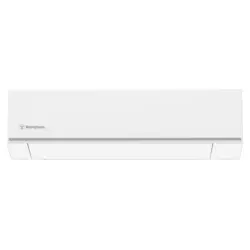
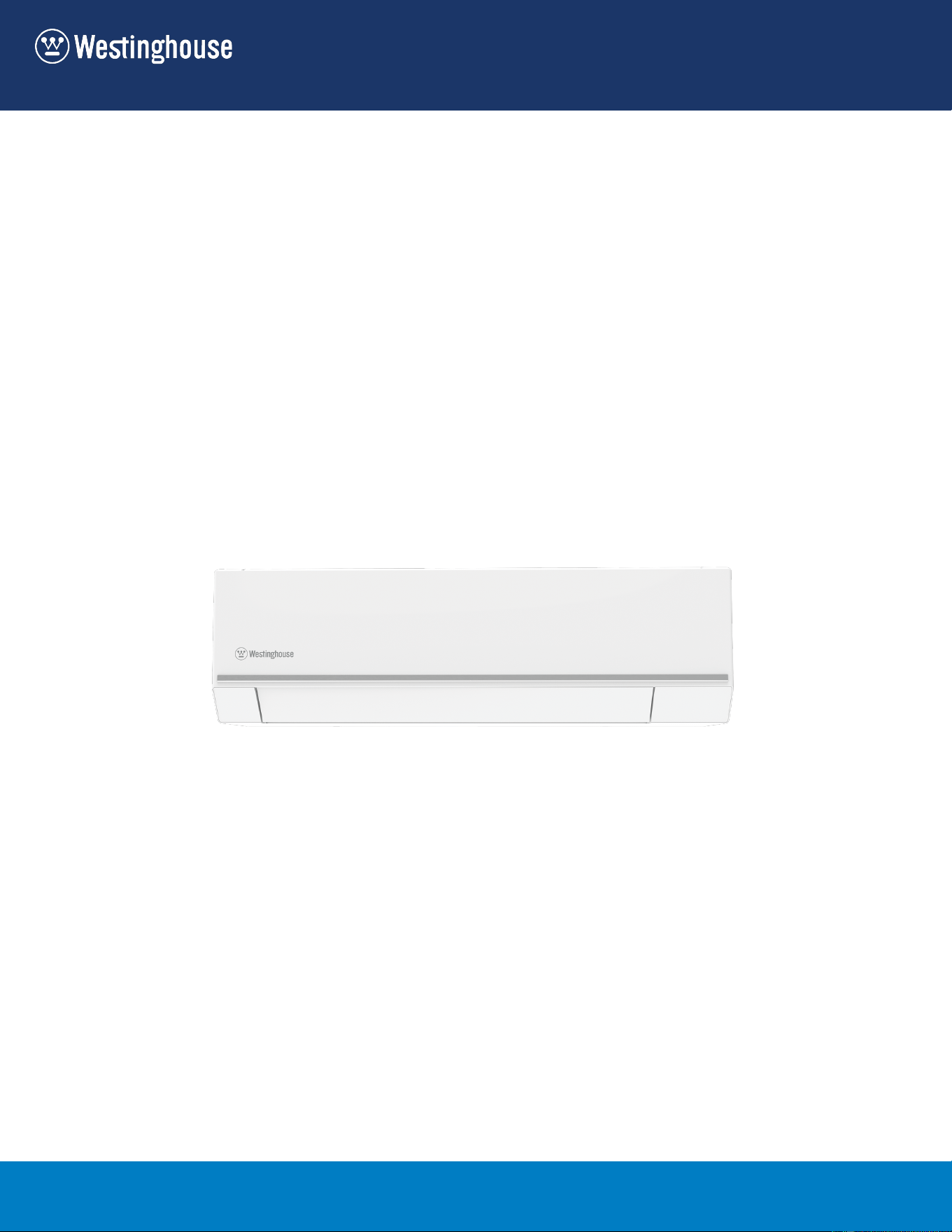
User Manual
WSD27HWA
WSD73HWA
WSD36HWA
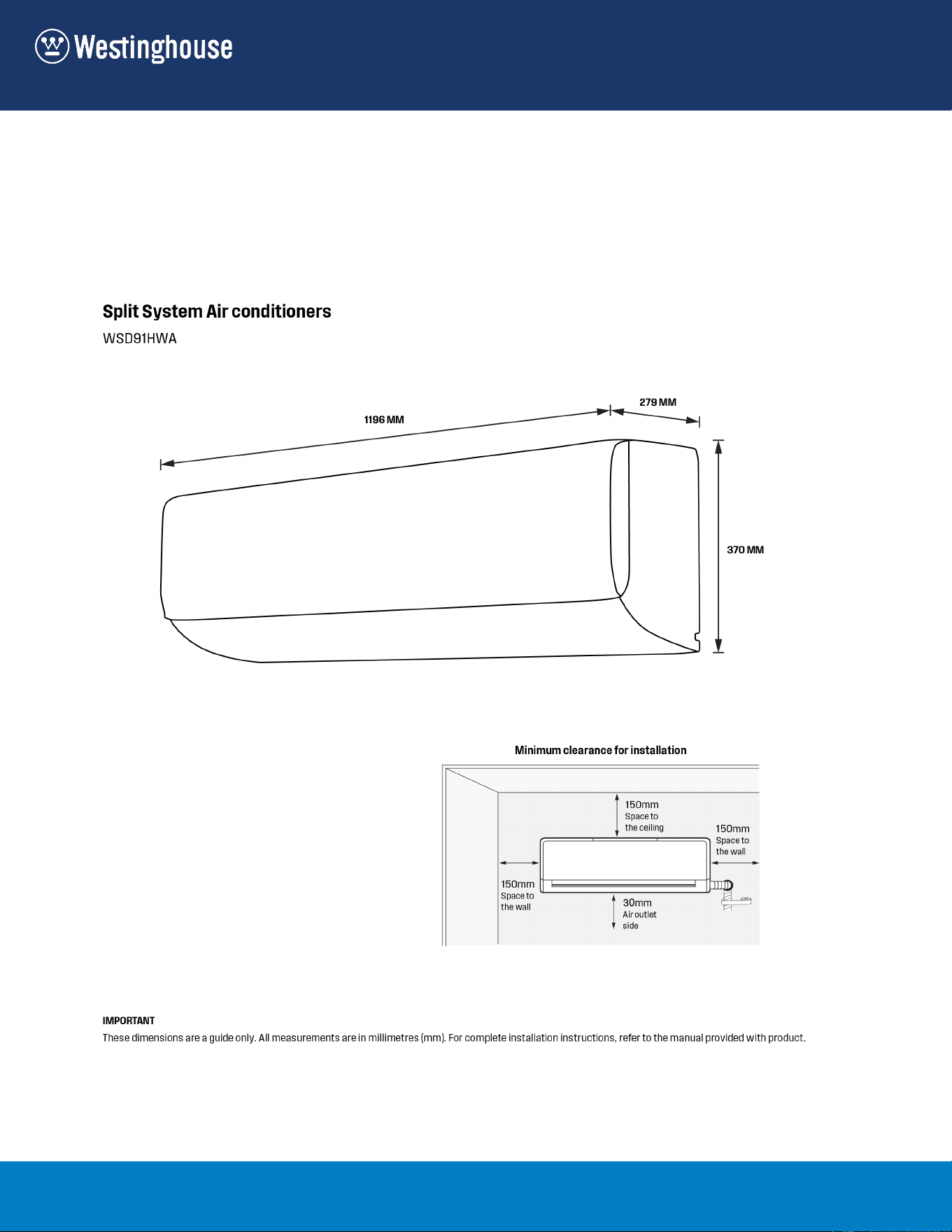
WSD91HWA
WSD51HWA
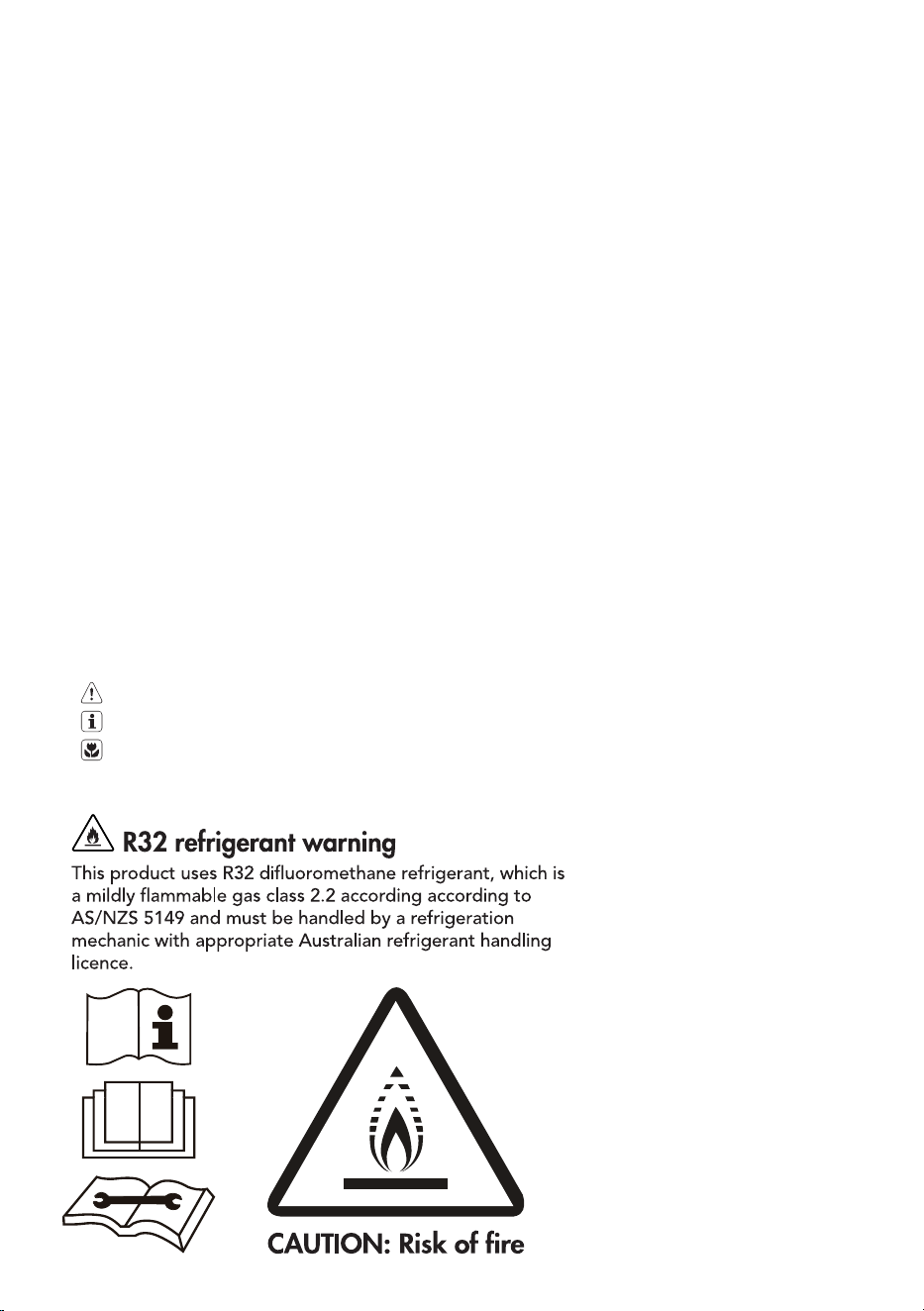
CUSTOMER CARE AND SERVICE
We recommend the use of original spare parts.
When contacting Service, ensure that you have the following data available.
The information can be found on the rating plate. Model, PNC, Serial Number
Warning / Caution-Safety information.
General information and tips
Environmental information.
Subject to change without notice.
2
CONTENTS
1. SAFETY INSTRUCTIONS .................................................................................... 3
2. PRODUCT DESCRIPTION ................................................................................... 5
3. INDOOR UNIT DISPLAY ...................................................................................... 6
4. REMOTE CONTROLLER ..................................................................................... 6
5. REMOTE CONTROLLER DESCRIPTION ............................................................. 8
6. HOW TO USE THE REMOTE CONTROLLER .................................................... 11
7. HOW TO USE THE INDOOR UNIT..................................................................... 16
8. OPERATING TEMPERATURE ............................................................................ 17
9. EMERGENCY OPERATION ............................................................................... 17
10. CLEANING AND MAINTENANCE ...................................................................... 18
11. OPERATION TIPS .............................................................................................. 20
12. TROUBLESHOOTING ....................................................................................... 22
13. ENVIRONMENTAL CONCERNS ........................................................................ 23
3 ENGLISH
1. SAFETY INSTRUCTIONS
Before the installation and use of the
appliance, carefully read the supplied
instructions. The manufacturer is not
responsible if an incorrect installation and
use causes injuries and damages. Always
keep the instructions with the appliance
for future reference.
1.1 Children and Vulnerable
People Safety
WARNING!
Risk of suffocation, injury or
permanent disability.
• This appliance is not intended for use
by persons (including children) with
reduced physical, sensory or mental
capabilities, or lack of experience
and knowledge, unless they have
been given supervision or instruction
concerning use of the appliance by a
person responsible for their safety.
• Children should be supervised to
ensure that they do not play with the
appliance.
1.2 Installation and Use
WARNING!
Risk of suffocation, injury or
permanent disability.
• Contact an authorised installer for
installation of this unit.
• Contact an authorised service
technician for repair or maintenance of
this unit.
• The socket outlet required to supply
power must be connected and
commissioned by a licenced contractor.
• If the supply cord is damaged, it must
be replaced by the manufacturer, its
service agent or similarly qualied
persons in order to avoid a hazard.
• Installation work must be performed
in accordance with the national wiring
standards and the electricity suppliers
service rules by authorised personnel
only.
• If the unit is to be moved to another
location or disposed of, only a suitably
qualied person is permitted to
undertake such work.
• If you notice an unusal situation, such
as a burning smell, please switch off
the power to the air conditioner and
contact an Westinghouse service
agent. If this abnormal status continues
the air conditioner may be damaged or
even cause electric shock or re.
• Do not operate the air conditioner with
wet hands. This may cause electric
shock.
• Do not damage or cut off the power
cord or other wires. If this occurs,
please have it repaired or replaced by
an accredited technician.
• Do not connect this air conditioner to a
multi outlet power board.
• Please switch off the power supply to
the air conditioner if it is not to be used
for an extended period. Otherwise, it
will accumulate dust and may cause a
re.
• Before cleaning the air conditioner,
please disconnect the power supply
in order to eliminate the possibility of
electric shock.
• The power supply should be matched
with the air conditioner. Air conditioners
provided with a supply cord should
be connected directly to a power
outlet with a suitable safety switch. Air
conditioners that are hard wired must
be connected to a suitable safety circuit
breaker.
• Please ensure that the power supply
to the air conditioner is stable and
meets the requirements set out in the
installation manual.
• Always ensure the product is installed
with appropriate earthing.
• For safety, be sure to turn off the
circuit breaker before performing any
maintenance or cleaning or when the
4
product is not used for an extended
period of time. Accumulated dust may
cause re or electric shock.
• Select the most appropriate
temperature. It can save electricity.
• Do not keep windows and doors open
for a long time during operation. It will
result in insufcient performance.
• Do not block the air inlet or outlet. It will
result in insufcient performance and
cause malfunctions.
• Keep combustible materials away from
the units at least 1meter. It may cause
re.
• Do not step on the top of the outdoor
unit or place heavy things on it. It may
cause damage or injury.
• Do not attempt to repair the air conditioner
by yourself. Incorrect repairs may cause
electric shock or re. Please contact your
local authorised service centre.
• Do not insert your hands or objects into
the air inlet or outlet. It may cause injury.
• Do not expose animals or plants directly
to the airflow.
• Do not use the unit for any other
purpose, such as preserving food or
drying clothes.
• Do not splash water on the air conditioner.
It may cause electric shock or malfunction.
The appliance must be installed, used and stored in an area that is greater than 6.39m
2
.
5 ENGLISH
4 5
11
10
13
9
8
12
6
7
1 2 3
Air inlet
Air Outlet
Air inlet (side)
Air inlet (rear)
Air outlet
1 Front panel
2 Air lter
3 Digital display
4 Louver
5 ECO intelligent eye (if applicable)
6 Remote controller
7 Remote controller Holder (some units)
8 Refrigerant pipes
9 Drain hose
10 Power cable (some units)
11 Mounting plate (indoor unit)
12 Connecting cable
13 Power cable (some units)
All the pictures in this manual are for explanation
purposes only. The actual shape of the indoor unit
you purchased may be slight different on front
panel and display window. The actual shape shall
prevail.
2. PRODUCT DESCRIPTION
6
3. INDOOR UNIT DISPLAY
4. REMOTE CONTROLLER
4.1 How to use the Remote
Controller
1. Keep the remote controller where its
signal can reach the receiver of the
indoor unit.
2. When operate the air conditioner, make
sure the remote controller is pointing to
the signal receiver of the indoor unit.
3. When the remote controller sends out
a signal, the symbol will blink in the
display of the remote controller.
4. The indoor unit will acknowledge the
signal with a beep sound when it
receives the signal from the remote
controller.
5. Please press the button of the remote
controller and resend the signal if you
did not hear a beep sound from the
indoor unit.
• The air conditioner will not
operate if curtains, doors or
other materials block the signals
from the remote controller to the
indoor unit.
• Prevent any liquid from falling
into the remote controller. Do not
expose the remote controller to
direct sunlight or heat.
• If the infrared signal receiver on
the indoor unit is exposed to
direct sunlight, the air conditioner
may not function properly. Use
curtains to prevent the receiver
being exposed to sunlight.
• If other electrical appliances react
to the remote controller, either
move these appliances or consult
your local dealer.
2 3
4
1
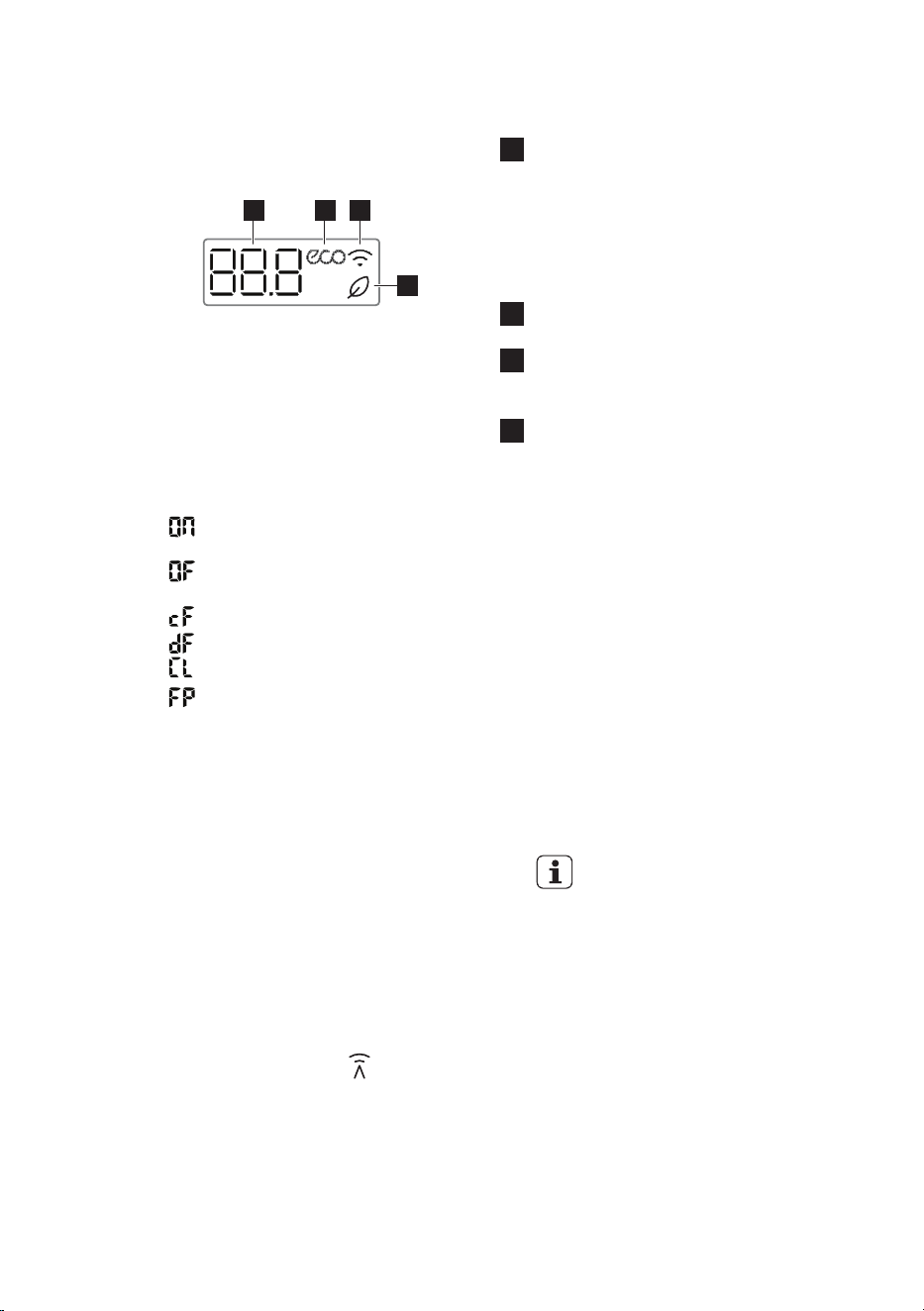
1 TEMPERATURE indication lamp
• Displays the setting or room temperature
when the unit is operational.
• Displays the malfunction code when fault
occurs.
• Displays the feature when a feature is
activated.
2 ECO feature indication lamp
• Lights up when ECO feature is activated.
3 Wireless indication lamp
• Lights up when Wireless feature is
activated.
4 Fresh feature indication lamp
• Lights up when Fresh feature is
activated.
Feature code in indoor unit display
“ ” Displays for 3 seconds when Timer on is set or the feature Swing,
Turbo or Quiet is turned on.
“ ” Displays for 3 seconds when Timer off is set or the feature Swing,
Turbo or Quiet is turned off.
“ ” Displays when anti-cold air feature is turned on.
“ ” Displays when unit is in defrosting.
“ ” Displays when Self Clean feature is turned on.
“ ” Displays when 8
0
C heating feature is turned on.
7 ENGLISH
4.2 Location of the Remote Controller
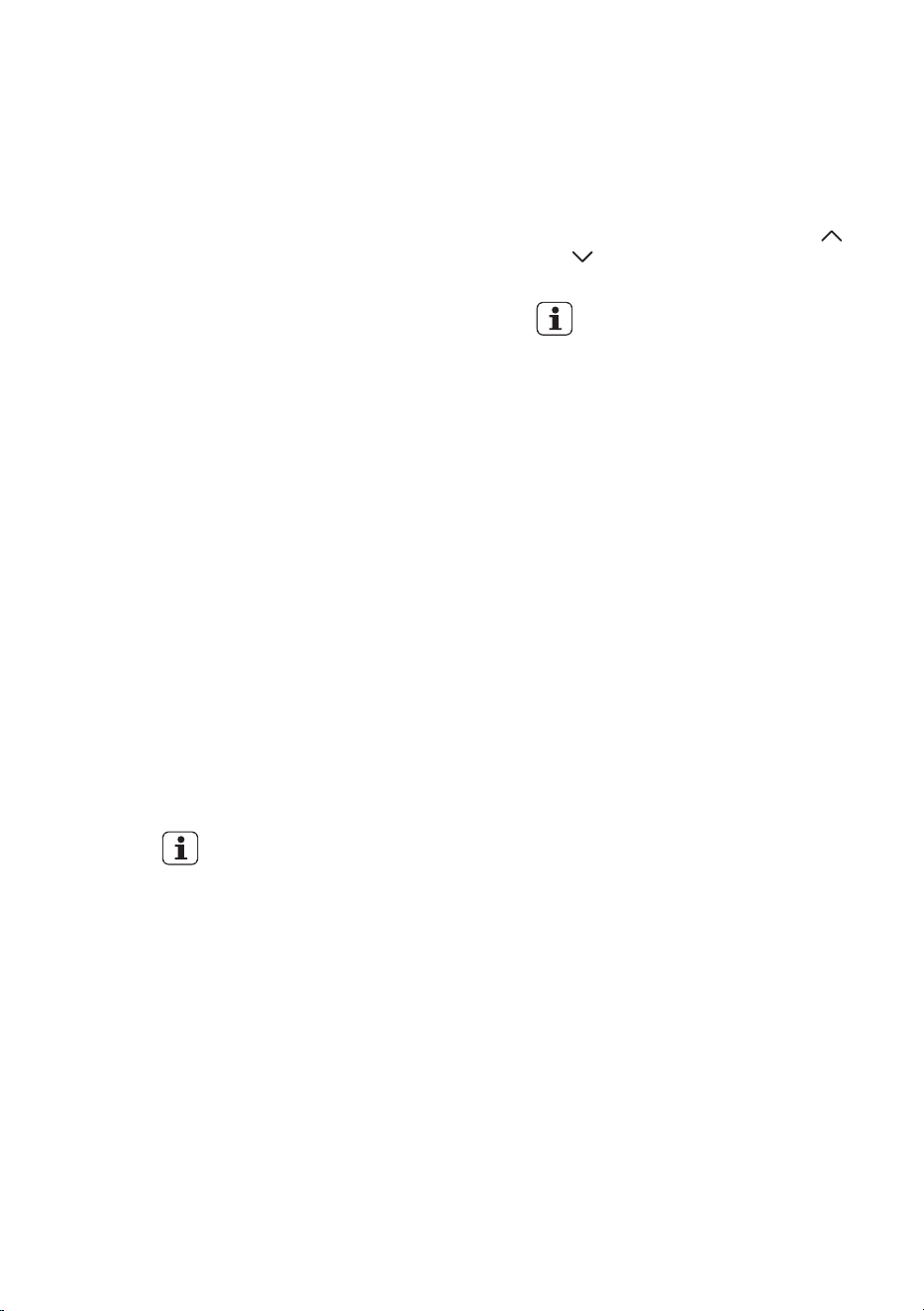
Max. 8m
• Keep the remote controller where its
signal can reach the receiver of the
indoor unit (a maximum distance of
8 m is allowed).
• When the remote controller sends
out a signal, the symbol will blink
on the display. The indoor unit will
acknowledge the signal with a beep
sound when it receives an effective
signal.
4.3 Battery Installation /Replacement
• Remove the back cover from the
remote controller, exposing the
battery compartment and insert two
new alkaline dry batteries (2x AAA 1.5
Volt). Make sure that the polarity of (+)
or (-) is installed correctly.
• Slide the battery compartment cover
back on.
• When changing batteries, do
not use old or varied ones,
otherwise, it may cause
problems with the remote
controller.
• If the remote controller is not
used for a long time, remove
the batteries as old batteries
may leak or corrode and
damage the remote controller.
• The battery life during normal
use is about six months.
• If the remote controller does
not operate normally, please
remove and ret the batteries. If
abnormal operation continues,
replace with new batteries.
8
5. REMOTE CONTROLLER DESCRIPTION
1
3
5
7
6
2
4
8
9
13
12
10
11
23
20 21 22
24 25 26 27 28 29
14
15
16
17
19
18
33
32
30
31
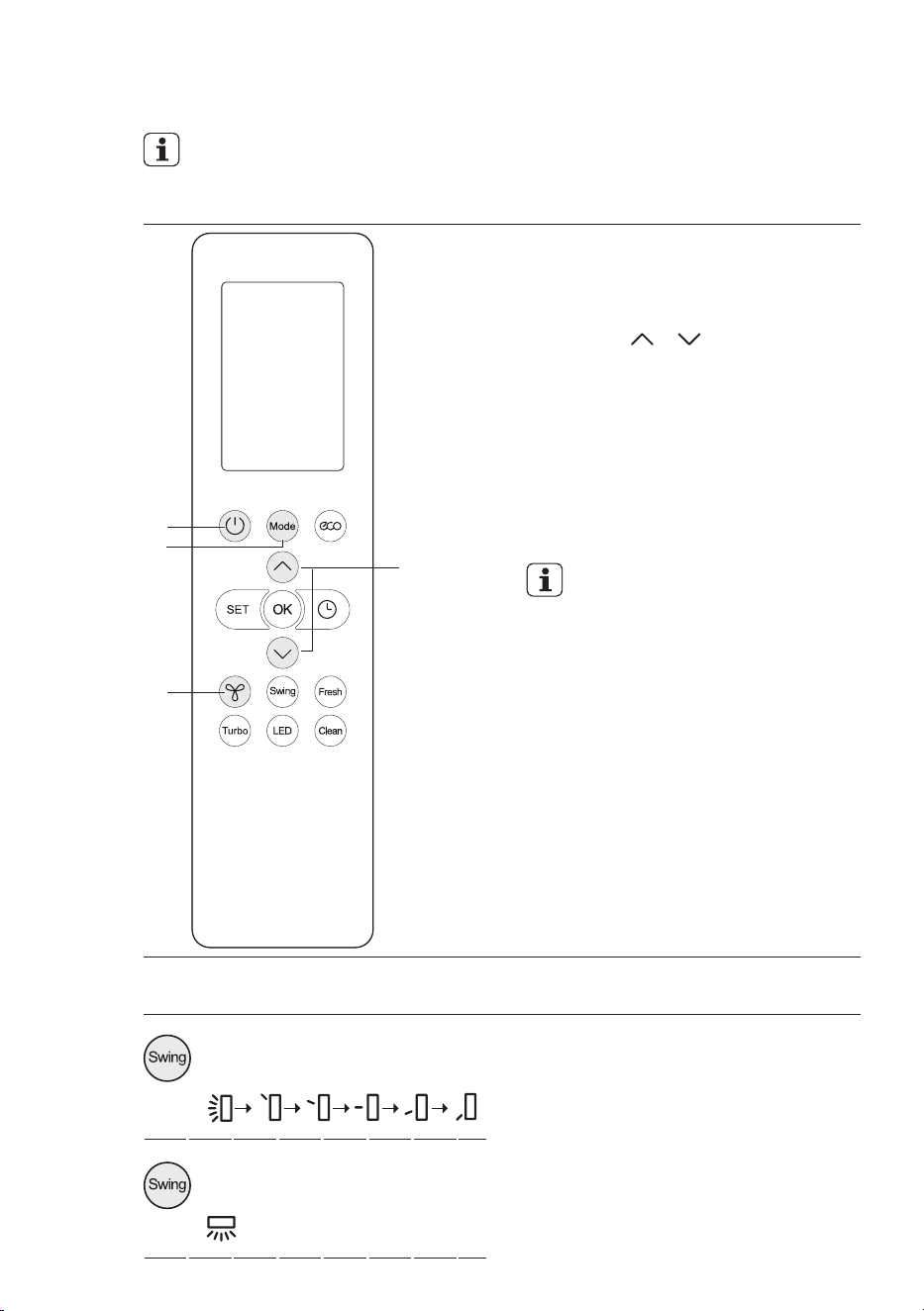
1. ON/OFF BUTTON
Press the button to switch on or off the
unit
2. MODE BUTTON
Press the button to set the operation
mode: AUTO, COOL, DRY, HEAT and
FAN. Default setting: AUTO.
AUTO HEATCOOL FANDRY
• In AUTO mode, user can still set
desired temperature.
3. SET BUTTON
Press the button to select some advance
functions.
The select function symbol will flash on the
display, press OK button to conrm it.
See section “How to use the remote
controller“ for the SET function description
in details.
4. OK BUTTON
Press the button to conrm the function
you have chosen in SET function.

9 ENGLISH
5. FAN BUTTON
Press the button to set the fan speed:
AUTO, LOW, MEDIUM and HIGH. Default
setting: AUTO. In the AUTO and DRY
mode, fan speed can not be set.
Silence
LOW
MED
HIGH
AUTO
1%-20%
21%-40%
41%-60%
61%-100
%
6. SWING BUTTON
Press the button to stop or start vertical
louver movement or set the desired
horizontal air flow direction.
Press the button more than 2 seconds to
stop or start horizontal louver auto swing
feature.
Default setting: OFF.
7. TURBO BUTTON
In COOL or HEAT mode, press the button
to enable or disable the turbo function.
If the turbo function is enabled, the unit
will operate at turbo speed to cool or heat
rapidly so that the ambient temperature
approaches the set temperature as soon
as possible.
8. ECO BUTTON
Press the button to activate the ECO
energy efcient mode. Default setting: OFF
9. TEMP BUTTON
Press the button to increase/decrease the
temperature. Keep the button pressed for
two seconds to accelerate the process.
Temperature range: 16-30°C.
In Timer function, use the button to set the
timer adjustment.
10. TIMER BUTTON
Press the button to set the timer function
for switching on/off the unit.
See section “How to use the remote
controller“ for the Timer function
description in details.
11. FRESH BUTTON
Press the button to enable/disable the
fresh function. Default setting: OFF.
12. SELF CLEAN BUTTON
Press the button to enable/disable the self
clean function. Default setting: OFF.
13. LED BUTTON
Press the button to switch the display of
the indoor unit on or off. Default setting:
ON.
14. MODE DISPLAY
Displays the current selected mode.
Including AUTO, COOL, DRY, HEAT and
FAN.
15. TRANSMISSION INDICATOR
Displays when the remote controller
transmits signals to the indoor unit.
16. TIMER-ON DISPLAY
Displays when the Timer-On function is
enabled.
17. TIMER-OFF DISPLAY
Displays when the Timer-Off function is
enabled.
18. FAN SPEED DISPLAY
Displays the selected fan speed: AUTO,
LOW, MED and HIGH. When AUTO or
DRY Mode is selected, the signal ”AUTO”
will be displayed.
19. QUIET DISPLAY
Displays when Quiet function is activated.
The unit will run with the lowest fan speed.
20. SWING UP/DOWN DISPLAY
Displays when Swing function is activated,
display matched symbol if you select
different up/down direction.
21. 3D SWING DISPLAY
Displays when 3D Swing function is
activated.
22. TURBO DISPLAY
Displays when Turbo function is enabled.
10
23. DIFFUSE DISPLAY
Displays when Diffuse function is enabled.
24. SELF CLEAN DISPLAY
Displays when Self Clean function is
enabled.
25. FRESH DISPLAY
Displays when Fresh function is enabled.
26. SLEEP DISPLAY
Displays when Sleep function is enabled.
27. FOLLOW ME DISPLAY
Displays when Follow Me function is
enabled.
28. WIRELESS CONTROL
DISPLAY
Displays when Wireless Control function is
enabled.
29. BATTERY DISPLAY
Displays the battery status of remote
control, remind you to replace the battery.
30. ECO DISPLAY
Displays when Eco function is enabled.
31. °C/°F DISPLAY
°C/°F can be switched by pressing
and button at the same time for 3
seconds.
• Some models do not have this
function.
32. LOCK DISPLAY
Displays when Lock function is enabled.
33. TEMPERATURE/TIMER/
FAN SPEED DISPLAY
Displays the set temperature by default, or
Timer setting when using Timer functions.
Timer setting range: 0-24 hours
This display is blank when operating in
FAN mode.
• See section “How to use the remote controller“ for the the functions description
in details.
11 ENGLISH
6. HOW TO USE THE REMOTE CONTROLLER
Ensure the unit is plugged in and power is available. The OPERATION indicator on
the display panel of the indoor unit illuminates.
Basic Operation
B
A
C
D
1. Press the ON/OFF button (A) to start
the air conditioner.
2. Press the MODE button (B) to select
Auto, Cool, Dry, Fan or Heat mode.
3. Press the / button (C) to
set the desired temperature. The
temperature can be set in 1ºC
increments. Keep the button pressed
for two seconds to accelerate the
process.
4. Press the FAN SPEED button (D) to
select the fan speed.
5. Press the ON/OFF button (A) to turn
the air conditioner off.
• In the Auto mode, the air
conditioner can logically
choose the mode of Cool,
Fan, and Heat by sensing the
difference between the actual
ambient room temperature
and the set temperature on the
remote controller.
• In the Auto and Dry mode, the
fan speed can not be switched.
• In the Fan mode, you can not
adjust the setting temperature.
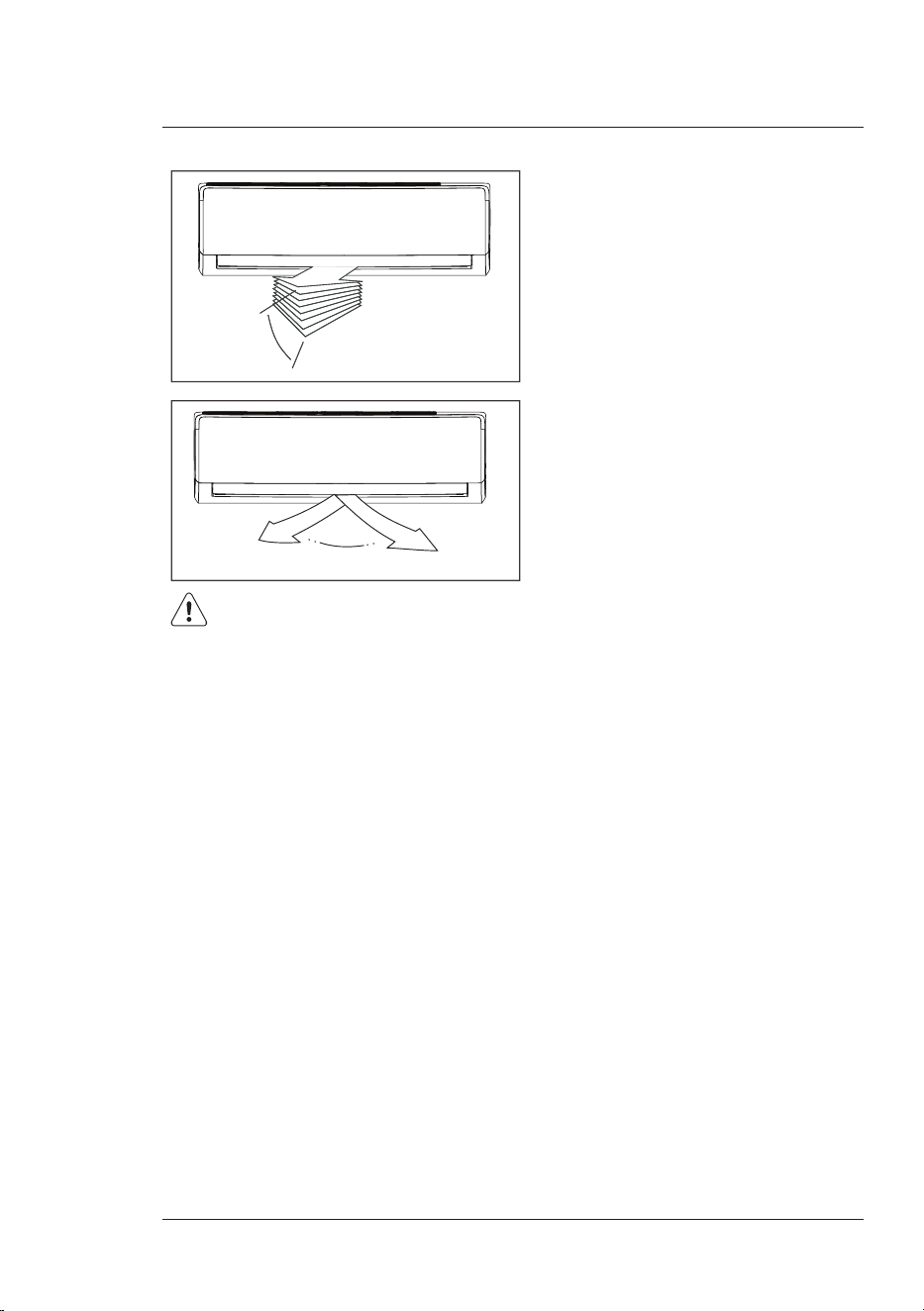
Swing Operation
Vertical
Horizontal
> 2s
Press the Swing button to adjust the desired
airflow direction.
1. Press Swing. The air moves up and
down. Press Swing again to stop.
2. Press and hold Swing for 2 seconds.
The air moves side-to-side. Press and
hold for 2 seconds to stop. (Not available
on all models)
12
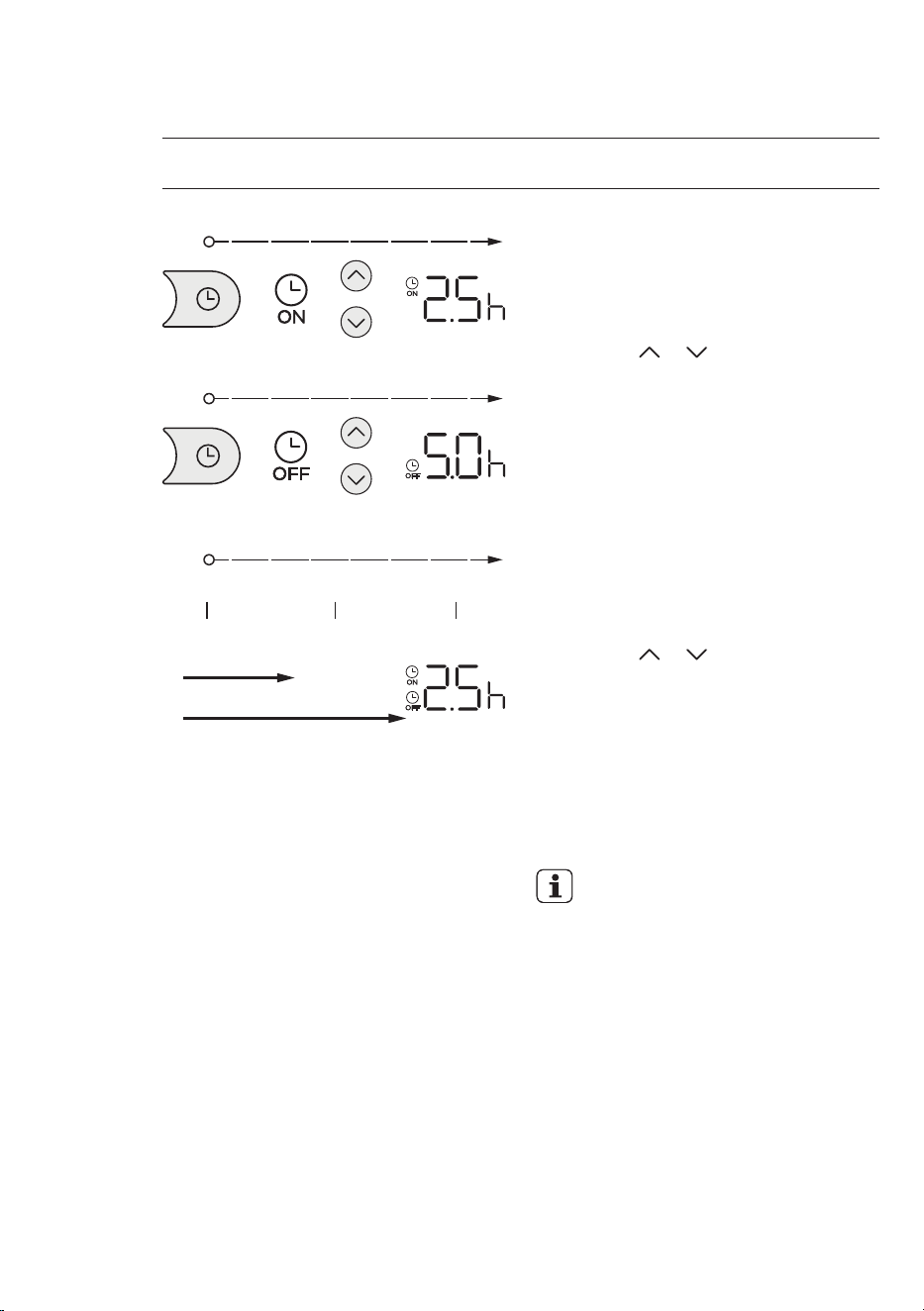
Timer On
Timer O
Combined setting
Time startTurn on Turn o
10:00 AM 12:30 PM 15:00 PM
2.5 h
5 h
Press the Timer button to set the auto-on
time ad the auto-off time of the unit.
Example of Timer on setting
1. Press the Timer button. The Timer on
symbol and time will show on the display.
2. Press the or button to set desired
Timer on time to turn on the unit after
2.5 hours.
3. Point the remote controller to indoor
unit and wait 1 second, then the Timer
on function will be activated. The digital
display on your remote controller will
then return to the temperature display.
The Timer on indicator remains on and
this function is activated.
Example of Timer off setting
1. Press the Timer button till the Timer off
symbol and time show on the display.
2. Press the or button to set desired
Timer off time to turn off the unit after 5
hours.
3. Point the remote controller to indoor
unit and wait 1 second, then the Timer
off function will be activated. The digital
display on your remote controller will
then return to the temperature display.
The Timer off indicator remains on and
this function is activated.
• When setting the Timer on or
Timer off functions, up to 10 hours,
the time will increase in 30 minute
increments with each press. After
10 hours and up to 24, it will
increase in 1 hour increments. The
timer will revert to zero after 24
hours.
• You can cancel either function by
setting its timer to “0.0h”.
Example of Combined Timer
setting
It is 10:00 AM and you want to start the air
conditioner after 2.5 hours and stop it after
5 hours.
1. Follow the Timer on setting to set the
turn on time to 2.5 hours.
Timer Operation
13 ENGLISH
Timer Operation
2. Continue press the Timer button to set
the turn off time to 5 hours.
3. Both the Timer on and Timer off
indicators display on the remote
controller, the combined Timer setting
is activated.
4. Then the unit will turn on at 12:30 PM
and turn off at 15:00 PM.
Advanced Functions Operations
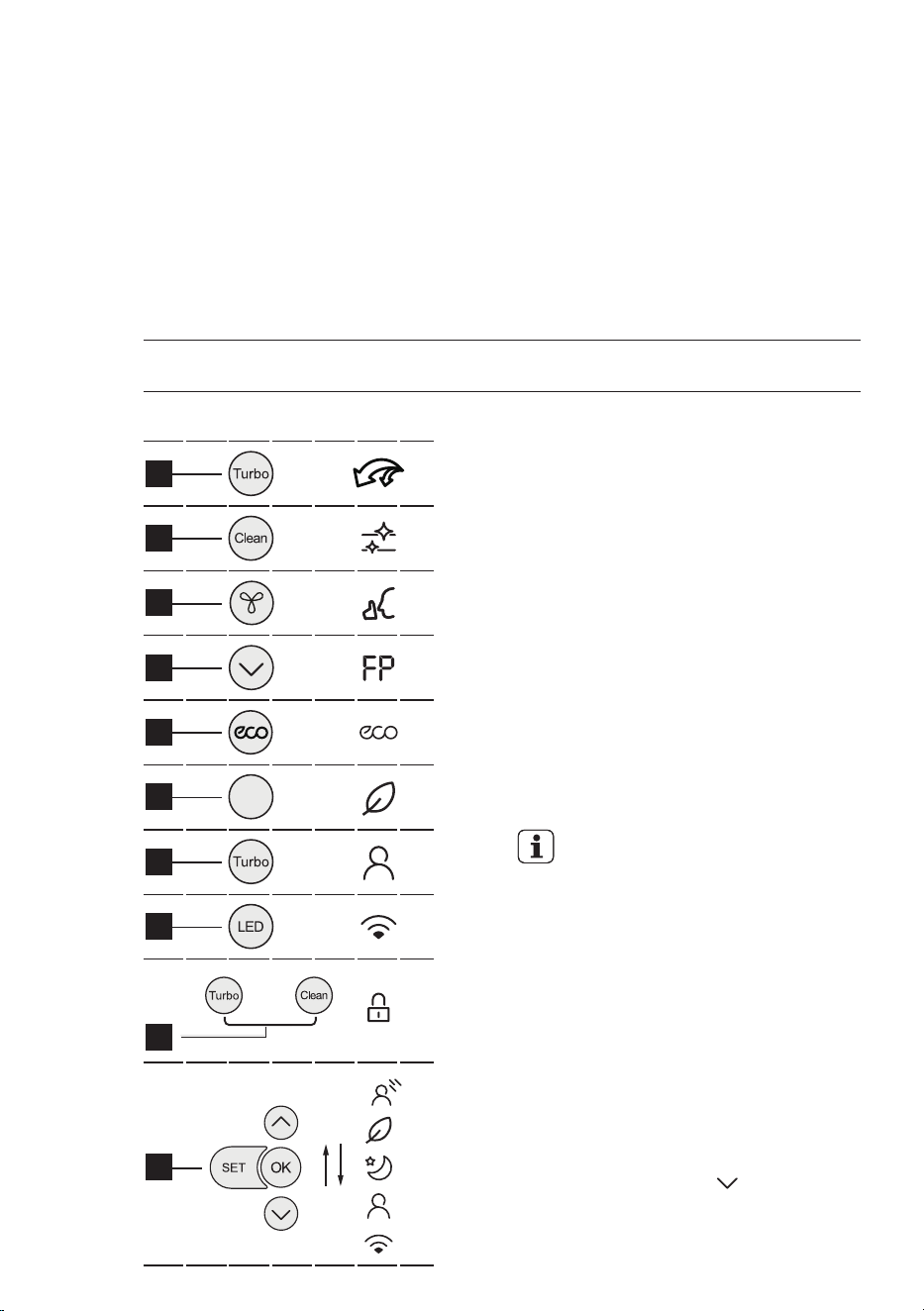
1. Turbo function
Press the Turbo button to enable or
disable the turbo function. The Turbo
function makes the unit work extra hard to
reach your set temperature in the shortest
time as soon as possible. When you need
fast cool or heat, you can choose this
function.
2. Self Clean function
Press the Clean button to activate the
Self Clean feature, your unit will clean
itself automatically. After cleaning, unit will
turn off automatically. Airborne bacteria
can grow in the moisture that condenses
around heat exchanger in the unit. With
regular use, most of this moisture is
evaporated from the unit. You can use self
clean feature as often as you like.
• You may hear “cracking” noise
during the self clean function,
this is normal.
3. Quiet function
Press the Fan button for more than 2
seconds to enable or disable the Quiet
function.
When in Quiet function, the fan will run in
slowest speed. This function is aim to give
you a comfortable low noise environment,
ideal for bedrooms.
4. 8
0
C Heating function
When the air conditioner operates under
heat mode with the temperature of
minimum setting, press “ “ button twice
in one second will activate 8
0
C Heating
function. The unit will operate at a setting
temperature 8
0
C and the indoor unit
display shows “FP“.
1
2
3
4
5
7
6
Fresh
Button Display
2 times
in
1 second
More than
2 seconds
More than
7 seconds
10
9
8
7 times
in
10 seconds
14
5. ECO function
In Cool mode, press ECO button to enter
the energy efcient mode.
Under cooling mode, press the button,
the remote controller will adjust the
temperature automatically to 24
0
C, fan
speed of Auto to save energy (only when
the set temperature is less than 24
0
C. If
the set temperature is above 24
0
C, press
the button, the fan speed will change
to Auto, the set temperature will remain
unchanged.
• Pressing the ECO button, or
modifying the mode or adjusting
the set temperature to less than
24
0
C will stop ECO operation.
• Under ECO operation, the set
temperature should be 24
0
C or
above, it may result in insufcient
cooling. If you feel uncomfortable,
just press the ECO button again
to stop it.
6. Fresh function
Press the Fresh button to activate the
Health function. When the function
is initiated, the Ionizer/Plasma Dust
Collector(depending on models) is
energized and will help to clean the air.
This function is recommended when the
indoor air quality is in bad condition.
7. Follow Me function
Keep pressing Turbo button for more than
7 seconds to activate memory feature
of Follow Me function. The Follow Me
function enables the remote control to
measure the temperature at its current
location and send this signal to the air
conditioner every 3 minutes. When using
AUTO, COOL or HEAT modes, measuring
ambient temperature from the remote
controller (instead of from the indoor unit
itself) will enable the air conditioner to
optimize the temperature around you and
ensure maximum comfort.
• If the memory feature is activated,
“ON“ displays for 3 seconds on
the screen.
• Press the Set and OK buttons to
deactivate the Follow Me feature,
refer to Set function desctription
for the details.
• If the memory feature is
inactivated, “OF“ displays for 3
seconds on the screen.
• While the memory feature is
activated, press the ON/OFF
button, shift the mode or power
failure will not cancel the Follow
me function.
8. Wireless function
Press and hold the “LED” button on the
remote control until the symbol of wireless
network blinks on the air conditioner front
panel. Then enter the wireless binding
status.
• Please refer to the “Quick
Connection Guide” for the
Wireless connection details.
9. Lock function
Press Turbo and Clean buttons at the
same time for 5 seconds, you can lock
the remote controller, and press Turbo
and Clean buttons at the same time for 1
second to unlock it.
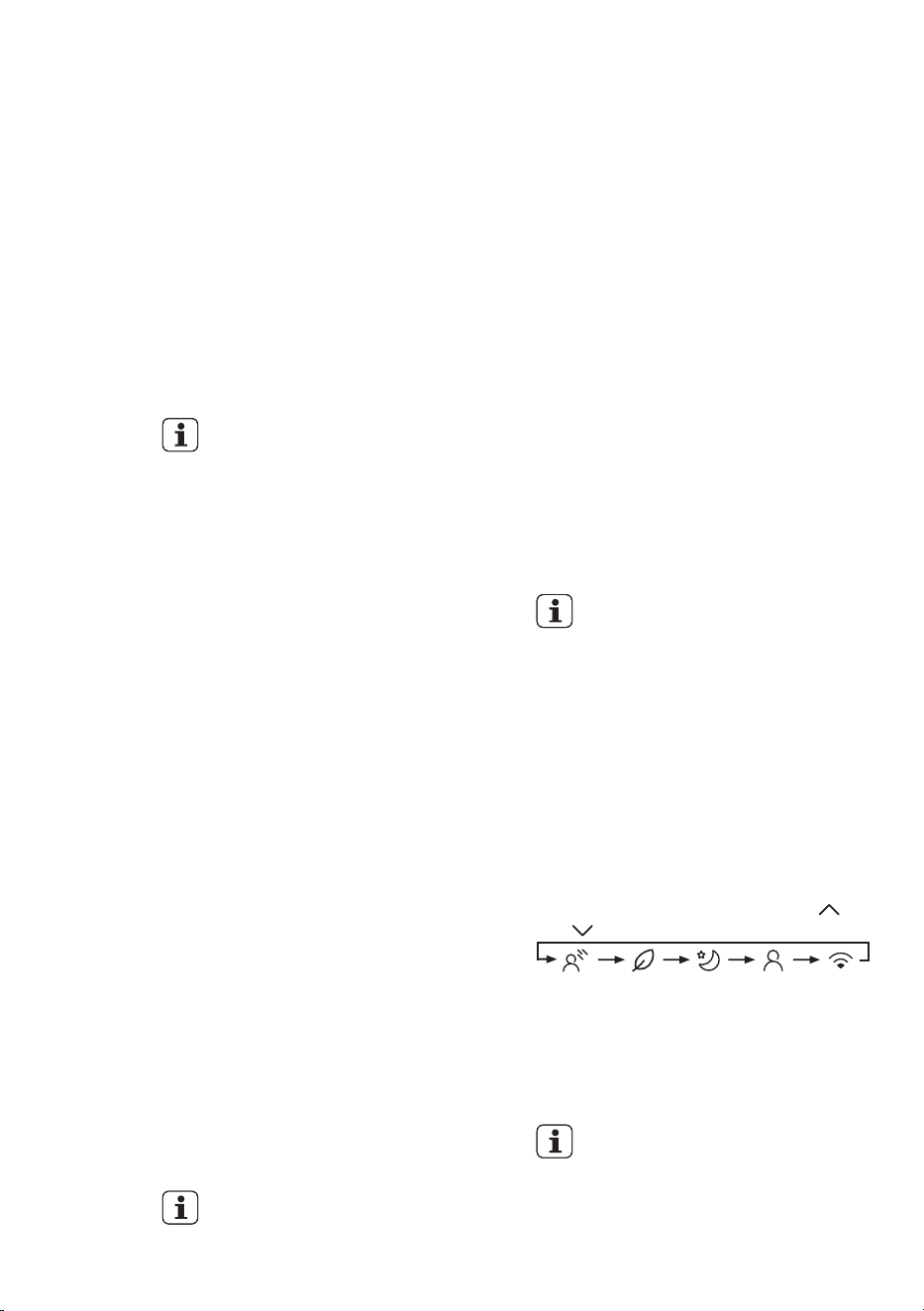
10. Set function
Press the Set button to enter the function
selection, then press Set button or
and button to select the desired
function. The matched symbol will flash on
the display area, press the OK button to
conrm. To cancel the selected function,
just perform the same procedures as
above.
• If your remote controller already
has Diffuse button, Fresh button
or Sleep button, you can not
use the SET button to select the
Diffuse, Fresh or Sleep feature.
Diffuse Follow MeFresh WirelessSleep
15 ENGLISH
11. Diffuse function (optional)
Press the Set button to activate the
Diffuse function. This feature avoids direct
air flow blowing on the body.
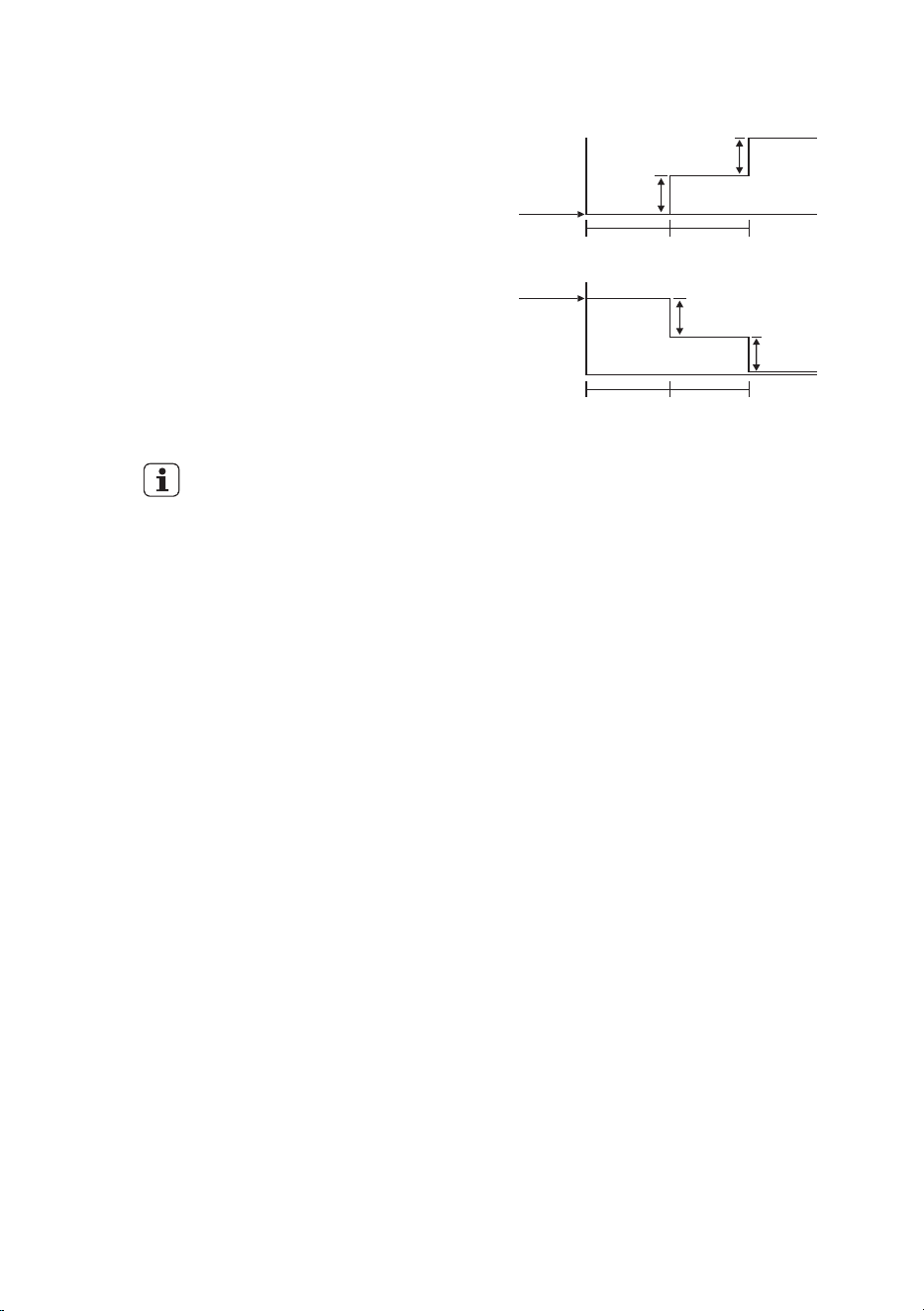
12. Sleep function
Press the Set button to activate the Sleep
function. When you activate the Sleep
function, the economic running function
will be activated, the set temperature will
increase (cooling) or decrease (heating)
by 1ºC per hour over a 2 hour period. The
nal temperature will then be maintained
till further changes made by the user.
The SLEEP function is not available
in FAN or DRY mode.
1ºC
1hour
Cooling
Set
Tem.
1hour
1ºC
1ºC
1hour
Heating
Set
Tem.
1hour
1ºC
16
7. HOW TO USE THE INDOOR UNIT
WARNING!
• Do not operate the air
conditioner for long periods
with the air flow direction set
downward in cool or dry mode.
Otherwise, condensation
may occur on the surface of
the horizontal louver causing
moisture to drop on to the floor
or on furnishings.
• When the air conditioner is
started immediately after it
was stopped, the horizontal
louver might not move for
approximately 10 seconds.
Louver in closed position.
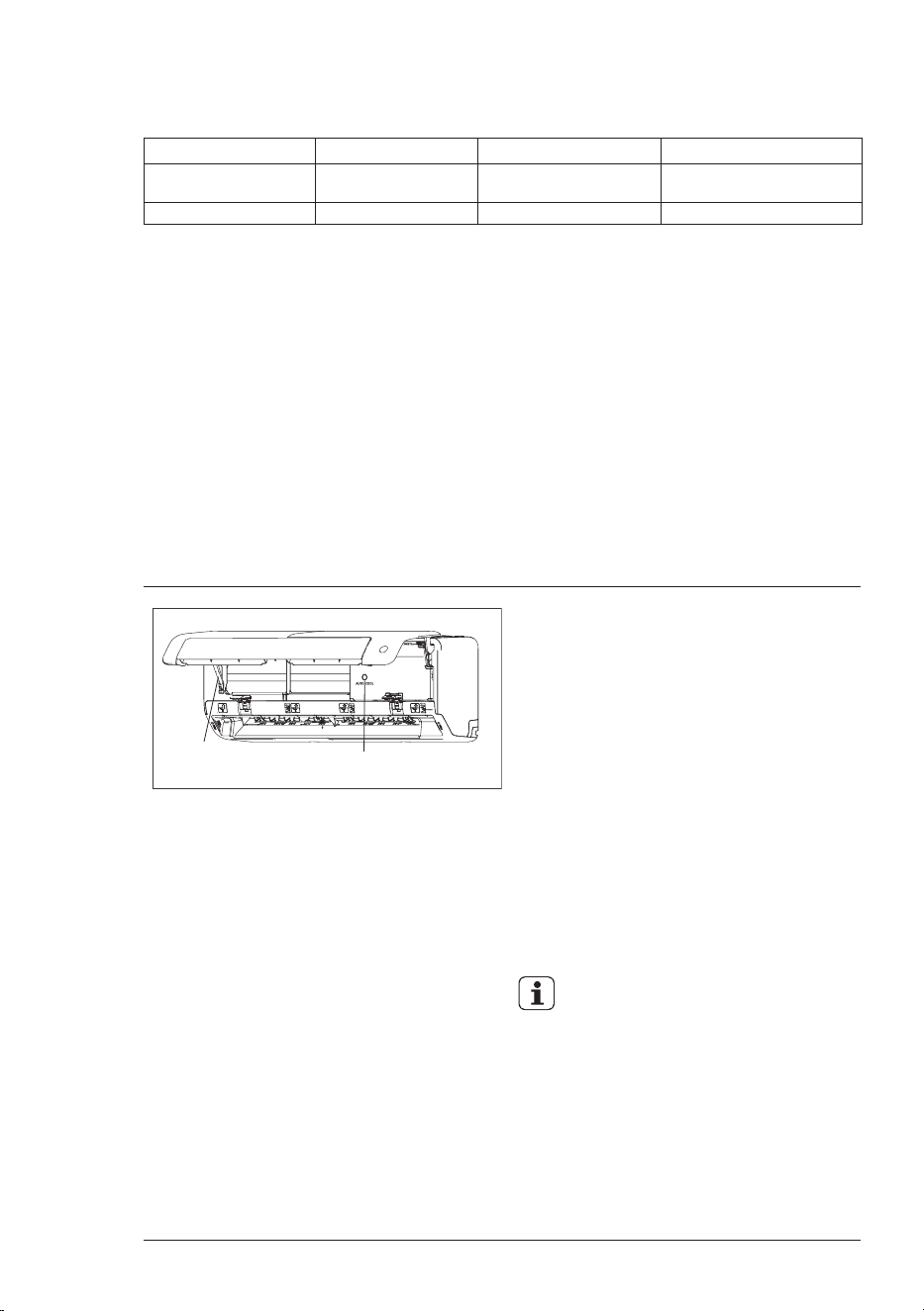
1. Adjust the air flow direction properly
otherwise it might cause discomfort
or cause uneven room temperatures.
2. Adjust the horizontal louver using the
remote controller.
3. Adjust the vertical louver using the
remote controller.
4. Adjust the vertical louver manually
(For models without 3D Swing
function).
To set the vertical air ow
(Up - Down) direction
Perform this function while the unit is
in operation. Use the remote controller
to adjust the air flow direction. The
horizontal louver can swing up and
down automatically.
To set the horizontal air
ow direction (Left - Right)
Perform this function while the unit is
in operation. Use the remote controller
to adjust the air flow direction. The
vertical louver can swing left and right
automatically.
IMPORTANT!
Do not put your ngers into the panel
of blower and suction side. The high-
speed fan inside may cause danger.
• Open angle of the horizontal louver
should not be set too small, as
COOLING or HEATING performance
may be impaired due to too restricted
air flow area.
• Do not move the horizontal louver
manually, otherwise the horizontal
louver will be out of sync. Please
cease operating, unplug power for
a few seconds, then restart the air
conditioner.
• Do not operate unit with horizontal
louver in closed position.
Range
Range
17 ENGLISH
8. OPERATING TEMPERATURE
9. EMERGENCY OPERATION
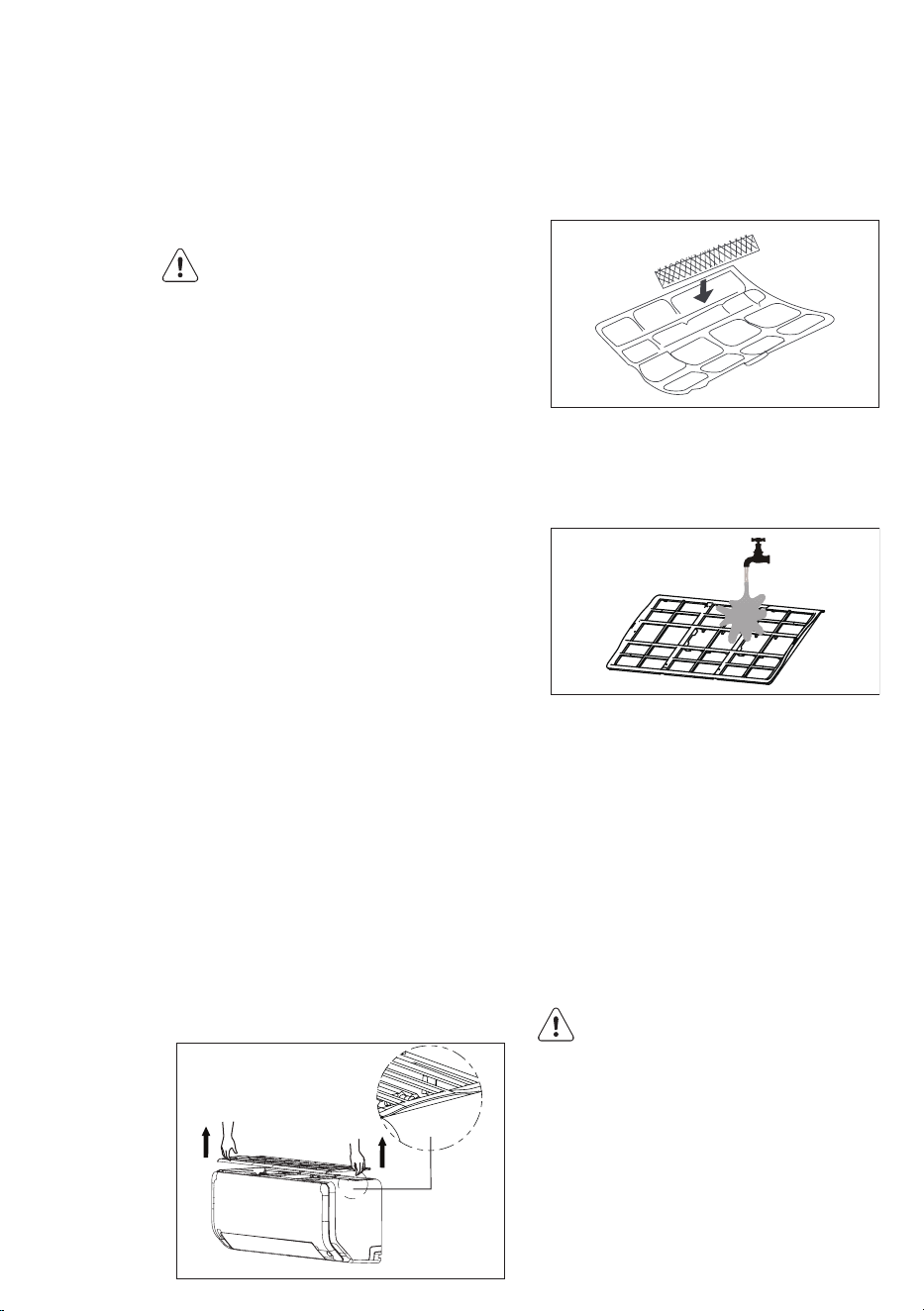
Units are equipped with a switch to run
emergency operation mode. It can be
accessed by opening the front panel.
This switch is used for manual operation
in case the remote controller fails to work
or maintenance is necessary.
1. Open and lift the front panel up to
an angle until it remains xed with a
clicking sound.
2. One press of the manual control
switch will lead to the forced AUTO
operation. If press the switch twice
within ve seconds, the unit will
operate under forced COOL operation.
3. Push and fold the front panel rod, then
close the panel rmly to its original
position.
• The unit must be turned off
before operating the manual
control button. If the unit is
operational, continue pressing
the manual control button until
the unit is off.
• This switch is only to be used
for operation when the remote
controller is not available.
• To restore the remote controller
operation, use the remote
controller directly.
Manual control button
Front panel rod
COOL mode HEAT mode DRY mode
Room Temperature
17°C - 32°C 0°C - 30°C 10°C - 32°C
Outdoor Temperature
0°C - 50°C -5°C - 24°C 0°C - 50°C
IMPORTANT!
1. Optimum performance will be achieved
within these operating temperatures.
If air conditioner is used outside of
the above conditions, certain safety
protection features might come into
operation and cause the unit to function
abnormally.
2. If the air conditioner runs for a long time
in cooling mode and the humidity is
high, condensed water may drip out of
the unit. Please sets the vertical air flow
louver to its maximum angle (vertically
to the floor), and set HIGH fan mode.
18
10. CLEANING AND MAINTENANCE
10.1 Before Maintenance
Turn the system off before cleaning. To
clean, wipe with a soft, dry cloth. Do not
use bleach or abrasives.
WARNING!
Power supply must be disconnectd
before cleaning the indoor unit.
• A cloth dampened with cold
water may be used on the indoor
unit if it is very dirty. Then wipe it
with a dry cloth.
• Do not use a chemically treated
cloth or duster to clean the unit.
• Do not use benzine, thinner,
polishing powder, or similar
solvents for cleaning. These
may cause the plastic surface to
crack or deform.
• Never use water hotter than
40ºC to clean the front panel,
it could cause deformation and
discoloration.
10.2 Cleaning the Unit
Wipe the unit with a soft dry cloth only. If
the unit is very dirty, wipe it with a cloth
soaked in warm water.
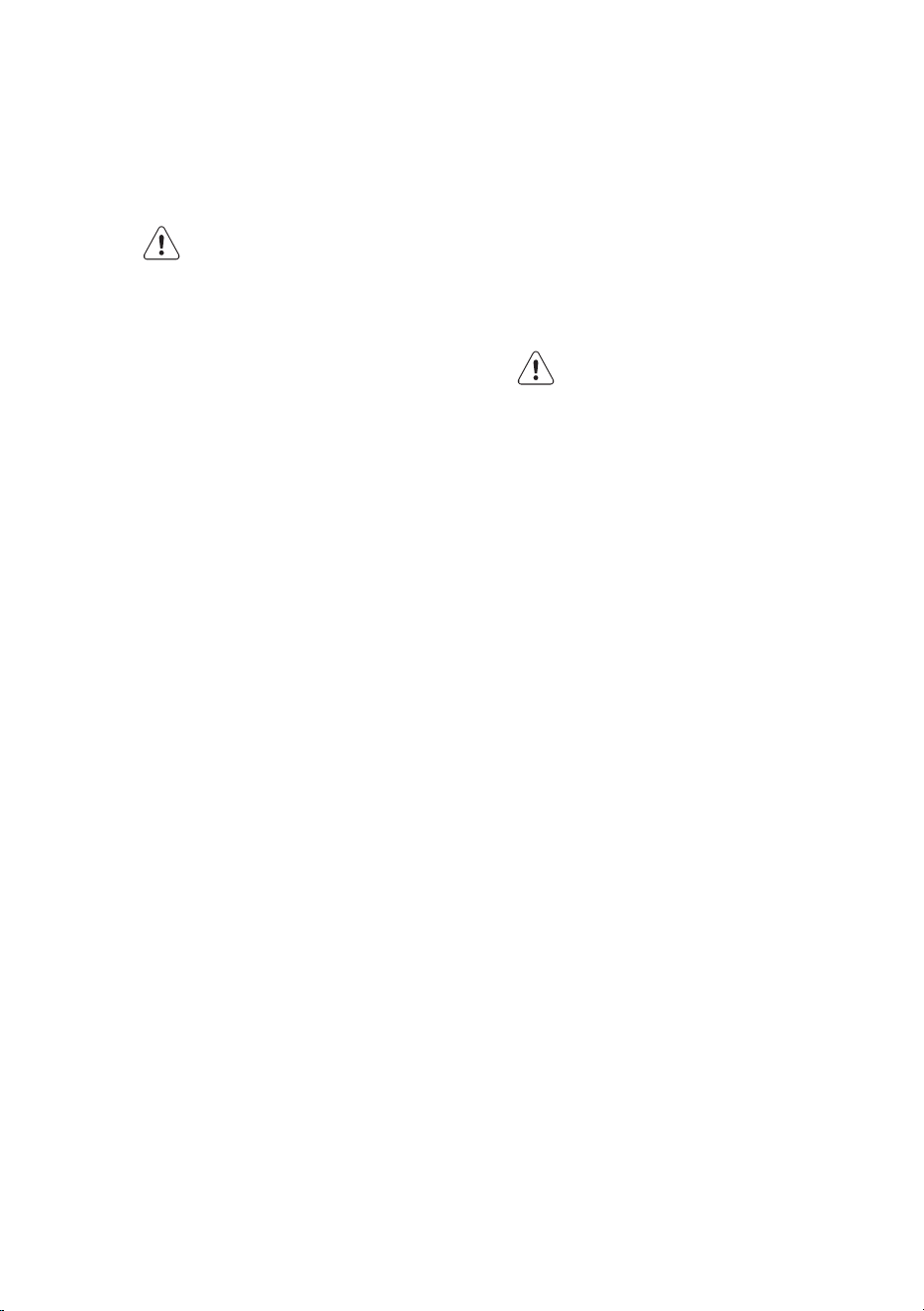
10.3 Cleaning the Filters
A clogged air lter reduces the cooling
efciency of this unit. Please clean the lter
once every 2 weeks.
1. The air lter is on the top of the air
conditioner.
2. Hold both side of the top lter in the
place marked with “PULL”, then pull it
upwards.
3. If your lter has small air freshening
lters, unclip them from the larger lter.
Clean these air freshening lters with a
hand-held vacuum.
4. Clean the large air lter with warm,
soapy water. Be sure to use a mild
detergent.
5. Rinse the lter with fresh water, then
shake off excess water.
6. Dry it in a cool, dry place, and refrain
from exposing it to direct sunlight.
7. When dry, re-clip the air freshening lter
to the larger lter, then install it back on
the indoor unit.
10.4 Cleaning the Air Outlet
and the Panel
1. Use a dry and soft cloth to wipe it.
2. Pure water or mild detergent may be
used if it is very dirty.
WARNING!
• Do not use benzine, thinner,
polishing powder, or similar
solvents for cleaning. These may
cause the surface to crack or
deform.
• To avoid the risk of electrical
shock or re, do not let water fall
into the indoor unit.
• Never wipe the air flow louver
violently.
PULL
19 ENGLISH
• An air conditioner without air
lter can not expel the dust out
of the room, which would cause
malfunctions by accumulation.
WARNING!
The lter must be installed before
you operate the air conditioner.
10.5 Replacing the Filters
1. Remove the air lter.
2. Remove the air freshening lter.
3. Install a new air freshening lter.
4. Reinstall the air lter.
10.6 Preparation for Extended
Non-operation
If you plan to idle the unit for a long time,
perform the following:
1. Clean the indoor unit and lters.
2. Operate the fan for about half a day to
dry the inside of the unit.
3. Stop the air conditioner and disconnect
power.
4. Remove the batteries from the remote
controller. The outdoor unit requires
periodic maintenance and cleaning. Do
not attempt to do this yourself. Contact
your dealer or service provider.
10.7 Pre-season Inspection
1. Check that the wiring is not broken off
or disconnected.
2. Clean the indoor unit and lters.
3. Check that the air lter is installed.
4. Check if the air outlet or inlet is blocked
after the air conditioner has not been
used for a long time.
WARNING!
• Do not touch the metal parts of
the unit when removing the lter.
Injuries can occur when handling
sharp metal edges.
• Do not use water to clean inside
the air conditioner. Exposure to
water can destroy the insulation,
leading to possible electric
shock.
• When cleaning the unit, rst
make sure that the power and
circuit breaker are turned off.
• Do not wash air lter with hot
water at more than 40ºC. Shake
off moisture completely and dry
it in the shade. Do not expose it
directly to the sun, it may shrink.

20
The following events may occur during
normal operation.
1. Protection of the air conditioner
Compressor
• The compressor can’t restart for
3-4 minutes after it stops.
2. Anti-cold air (Cooling and heating
models only)
• The unit is designed not to blow cold air
on HEAT mode, when the indoor heat
exchanger is in one of the following
three situations and the set temperature
has not been reached.
A) When heating has just started.
B) Defrosting.
C) Low temperature heating.
• The indoor or outdoor fan stop running
when defrosting (Cooling and heating
models only).
3. Defrosting (Cooling and heating
models only)
• Frost may be generated on the outdoor
unit during heat cycle when outdoor
temperature is low and humidity is high
resulting in lower heating efciency of
the air conditioner.
• During this condition air conditioner
will stop heating operation and start
defrosting automatically.
• The time to defrost may vary from 4 to
10 minutes according to the outdoor
temperature and the amount of frost
built up on the outdoor unit.
4. A white mist coming out from the
indoor unit
• A white mist may generate due to a
large temperature difference between
air inlet and air outlet on COOL mode in
an indoor environment that has a high
relative humidity.
• A white mist may generate due to
moisture generated from defrosting
process when the air conditioner
restarts in HEAT mode operation after
defrosting.
5. Abnormal noise of the air
conditioner
• You may hear a low hissing sound
when the compressor is running or has
just stopped running. It is the sound of
the refrigerant flowing or coming to a
stop.
• You can also hear a low “squeak”
sound when the compressor is running
or has just stopped running. This is
caused by heat expansion and cold
contraction of the plastic parts in the
unit when the temperature is changing.
• A noise may be heard due to louver
restoring to its original position when
power is turned on.
6. Dust is blown out from the indoor
unit
This is a normal condition when the air
conditioner has not been used for a
long time or during rst use of the unit.
7. A peculiar smell comes out from
the indoor unit
This is caused by the indoor unit giving
off smells permeated from building
material, from furniture, or smoke.
8. The air conditioner turns to FAN
only mode from COOL or HEAT
(Forcooling and heating models
only) mode
When the indoor temperature
reaches the set temperature of the
air conditioner, the compressor
will stop automatically and the air
conditioner turns to FAN only mode.
The compressor will start again when
the indoor temperature rises on COOL
mode or falls on HEAT mode (For
cooling and heating models only).
9. Insufcient Heat (For cooling and
heating models only)
The air conditioner draws in heat
from the outdoor unit and releases
it via the indoor unit during heating
operation. When the outdoor
temperature falls, heat drawn in by the
11. OPERATION TIPS

21 ENGLISH
air conditioner decreases accordingly.
At the same time, heat loading of
the air conditioner increases due to
larger difference between indoor and
outdoor temperature. If a comfortable
temperature can’t be achieved by the
air conditioner, we suggest you use a
supplementary heating device.
10.Auto-restart function
• Power failure during operation will stop
the unit completely.
• For the unit without Auto-restart
feature, when the power restores, the
OPERATION indicator on the indoor unit
will flash for 1 second. To restart the
operation, push the ON/OFF button on
the remote controller. For the unit with
Auto-restart feature, when the power
restores, the unit restarts automatically
with all the previous settings preserved
by the memory function.
22
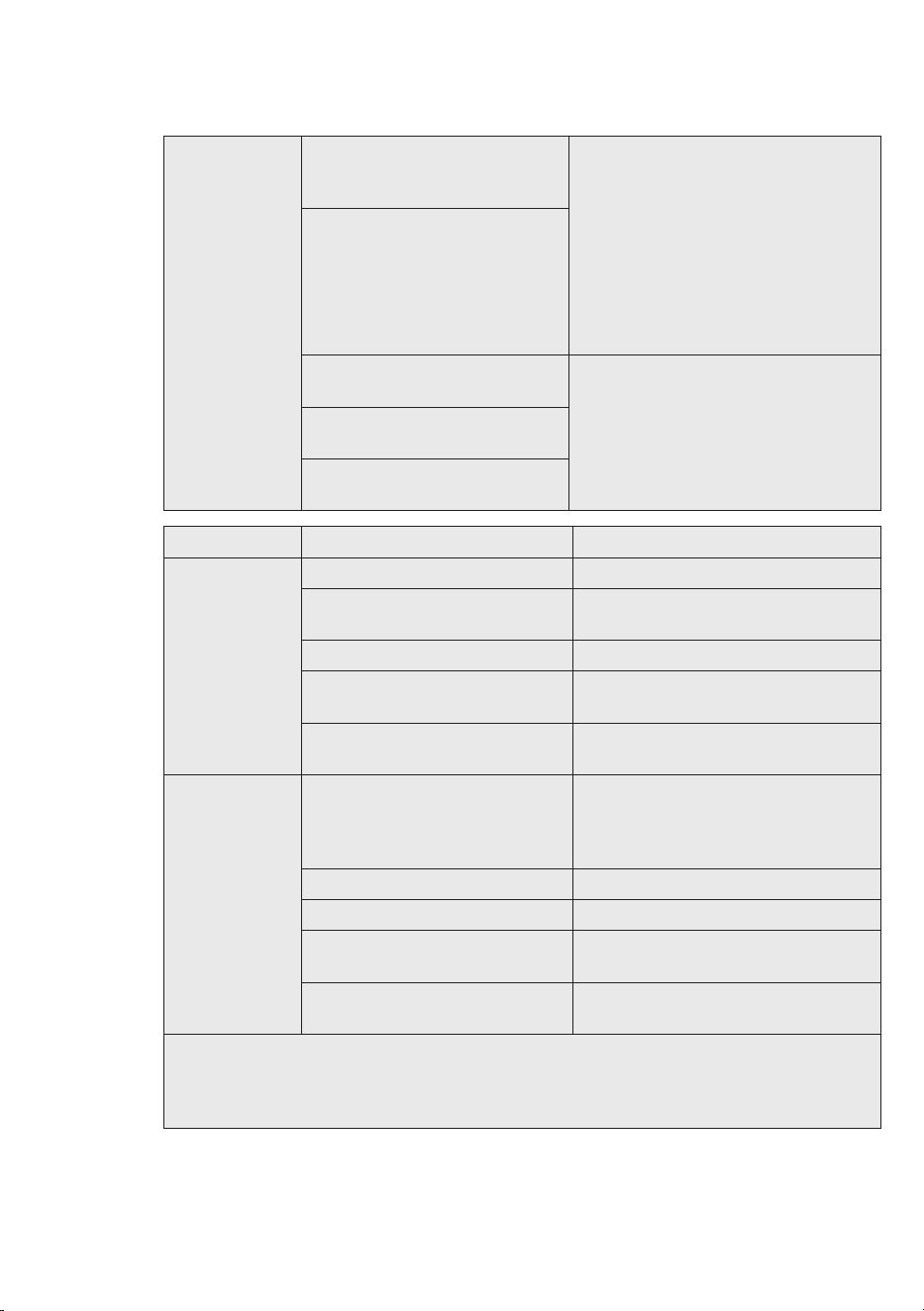
12. TROUBLESHOOTING
Trouble
OPERATION (RUN) indicator
or other indicators continue
flashing.
The unit may stop operation
or continue to run in a safety
condition(depending on models).
Waiting for about 10 minutes, the
fault may be recovered automati-
cally, if not, disconnect the power
and then connect it in again. If the
problem still exists, disconnect the
power and contact the nearest
customer service center.
If one of the following code ap-
pears on the display area:
• E(x), P(x), F(x)
• EH(xx), EL(xx), EC(xx)
• PH(xx), PL(xx), PC(xx)
Fuse blows frequently or circuit
breaker trips frequently.
Stop the air conditioner immediately,
disconnect the power and contact
the nearest customer service center.
Other objects or water fall into
the air conditioner.
Terrible odors are smelled or
abnormal sounds are heard.
Malfunctions Cause What should be done?
Unit does not
start
Power cut Wait for power to be restored.
Unit may have become
unplugged.
Check that plug is securely in wall
receptacle.
Fuse may have blown. Replace the fuse.
Battery in Remote controller
may have been exhausted.
Replace the battery.
The time you have set with
timer is incorrect.
Wait or cancel timer setting.
Unit not
cooling or
heating
(Cooling/
heating
models only)
room very
well while air
owing out
from the air
conditioner
Inappropriate temperature
setting.
Set temperature correctly. For
detailed method please refer to
“HOW TO USE THE REMOTE
CONTROLLER” section.
Air lter is blocked. Clean the air lter.
Doors or Windows are open. Close the doors or windows.
Air inlet or outlet of indoor or
outdoor unit has been blocked.
Clear obstructions away rst, then
restart the unit.
Compressor 3 minutes
protection has been activated.
Wait
If the trouble has not been corrected, please contact a local dealer or the nearest
customer service center. Be sure to inform them of the detailed malfunctions and unit
model number. Do not attempt to repair the unit yourself. Always consult an authorized
service provider.

23 ENGLISH
13. ENVIRONMENTAL CONCERNS
• Most of the packing materials are recyclable. Please dispose of those materials
through your local recycling depot or by placing them in appropriate collection
containers.
• If you wish to discard this air conditioner, please contact your local authorities and ask
for the correct method of disposal.

ver2_Oct2023
and WESTINGHOUSE are trademarks of Westinghouse Electric Corporation.
Used under license. All Rights Reserved.