
www.eureka.com
1
Thank you for purchasing your new Eureka vacuum!
Important instructions
For easy assembly, please take a few moments
to read this owner’s guide.
If you have questions about your new vacuum,
please contact our customer service HELPLINE
at 1-800-282-2886.
We’re here to help!
www.eureka.com
Owner’s Guide
2
Eureka Customer Service HELPLINE 1-800-282-2886
Contents
Write the model, type and serial number here:
Date of purchase (keep your receipt) ______________
Model number and type _________________________
Serial number ________________________________
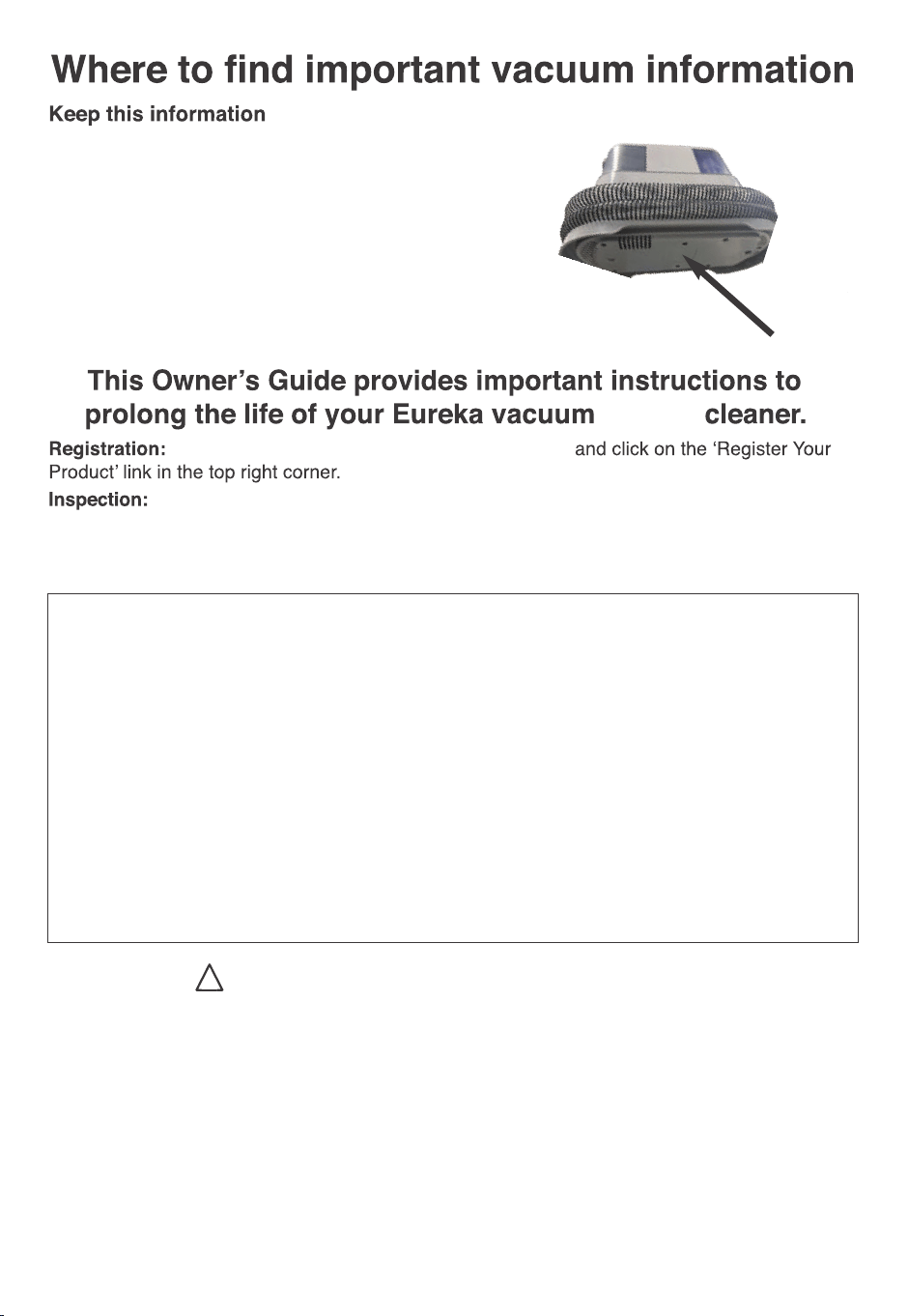
Find these numbers on a label on the bottom
of the vacuum cleaner. Refer to these numbers when
ordering parts and accessories or if service is needed.
To register your product visit www.eureka.com
Carefully unpack and inspect your new Eureka vacuum cleaner for shipping damage.
Each unit is tested and thoroughly inspected before shipping. For instructions regarding any
shipping damage, call Eureka Customer Service HELPLINE 1-800-282-2886 immediately.
!
Follow caution information wherever you see this symbol.
wet/dry
Important safeguards
What comes in the carton
Preparation before Use
Starting up and cleaning
Clean Maintenance
Problem solving
The Eureka limited warranty
. . . . . . . . . . . . . . . . . . . . . . . . . . . . . . . . . . 3
. . . . . . . . . . . . . . . . . . . . . . . . . . . . . . 4
. . . . . . . . . . . . . . . . . . . . . . . . . . . . . . . . 5
. . . . . . . . . . . . . . . . . . . . . . . . . . . . . . . 6
. . . . . . . . . . . . . . . . . . . . . . . . . . . . . . . . . . . 8
. . . . . . . . . . . . . . . . . . . . . . . . . . . . . . . . . . . . . . 10
. . . . . . . . . . . . . . . . . . . . . . . . . . . . 11
www.eureka.com
3
Motor
To reduce the risk of fire, electric shock,
or injury:
•
•
Do not use outdoors.
Do not leave vacuum cleaner when
plugged in.
Turn off the switch and unplug the electrical cord when not
in use and before servicing.
Do not allow to be used as a toy. Close attention is
necessary when used by or near children.
Use only as described in this manual. Use only
manufacturer's recommended attachments.
Do not use with damaged cord or plug. If vacuum cleaner
is not working as it should has been dropped, damaged,
left outdoors, or dropped into water, call the Eureka
Customer Service Helpline at 1-800-282-2886.
Do not pull or carry by cord. Do not use cord as a handle.
Do not close a door on cord or pull cord around sharp
edges or corners. Do not run vacuum cleaner over cord.
Keep cord away from heated surfaces.
Do not use extension cords or outlets with inadequate
current carrying capacity.
Turn off all controls before unplugging.
Do not unplug by pulling on cord. To unplug, grasp the
plug, not the cord.
Do not handle plug or vacuum cleaner with wet hands.
Do not put any object into openings. Do not use with any
openings blocked; keep free of dust, lint, hair, and
anything that may reduce airflow.
This vacuum cleaner creates suction and contains a
revolving brush roll. Keep hair loose clothing, fingers, and
all parts of body away from openings and moving parts.
Do not place vacuum cleaner on furniture or stairs as the
brush roll may cause damage. Use extra care when
cleaning stairs.
Do not pick up anything that is burning or smoking, sucn
as cigarettes, matches, or hot ashes.
•
•
•
•
•
•
•
•
•
•
•
•
Do not use without tanks, filters, lids, float, brushroll
and brushroll cover in place.
Belt pulleys can become hot during normal use. To
prevent burns, avoid touching the belt pulley when
servicing the drive belt.
Do not use to pick up flammable or combustible liquids
such as gasoline, or use in areas where they may be
present.
Store your vacuum cleaner indoors in a cool, dry area.
Keep your work area well lit.
Unplug electrical appliances before vacuuming them.
Always use Eureka cleaning solution in your machine
other cleaning solutions may damage the machine and
void the warranty.
Do not use an excessive amount of cleaning solution or
it may cause internal damage to the machine.
Do not immerse in liquid. Use only on surfaces
moistened by the cleaning process.
Use only on level surfaces for optimal cleaning results.
Do not use to pick up toxic substances (solvents,
ammonia, gasoline, chlorine bleach acidic substances,
drain cleaner, etc.).
Do not lift, carry or shake appliance while in use.
When in use do not lay the machine down flat or on its
side to prevent the dirty water from flowing into the
motor.
WARNING: This product can expose you to chemicals
including Styrene, which is known to the State of
California to cause cancer, and Bisphenol-A, which is
known to the State of California to cause birth defects
or other reproductive harm. For more information go to
www.P65Warnings.ca.gov.
•
•
•
•
•
•
•
•
•
•
•
•
•
•
4
Eureka Customer Service HELPLINE 1-800-282-2886
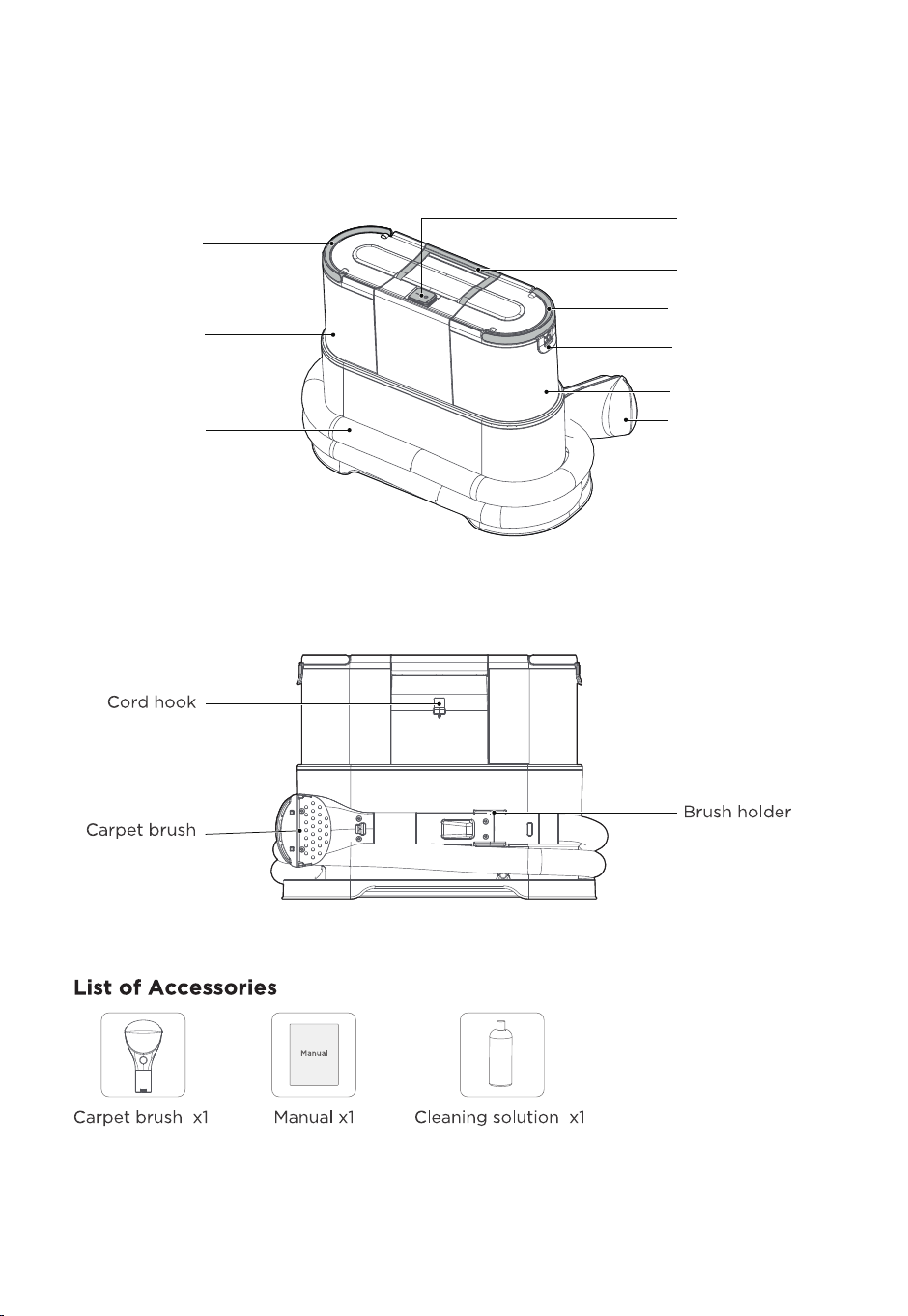
What Comes in the Carton
Dirty water tank
handle
Dirty water tank
switch lock
Dirty water tank
Carpet brush
Clean water
tank handle
Clean water
tank
Hose
Machine handle
On-o Button
www.eureka.com
5
Preparation before Use
CAUTION
Clean water tank
switch lock
Close
Open
Never operate vacuum cleaner without water tanks, brush, float and
brush cover, water tanks cover in proper position.
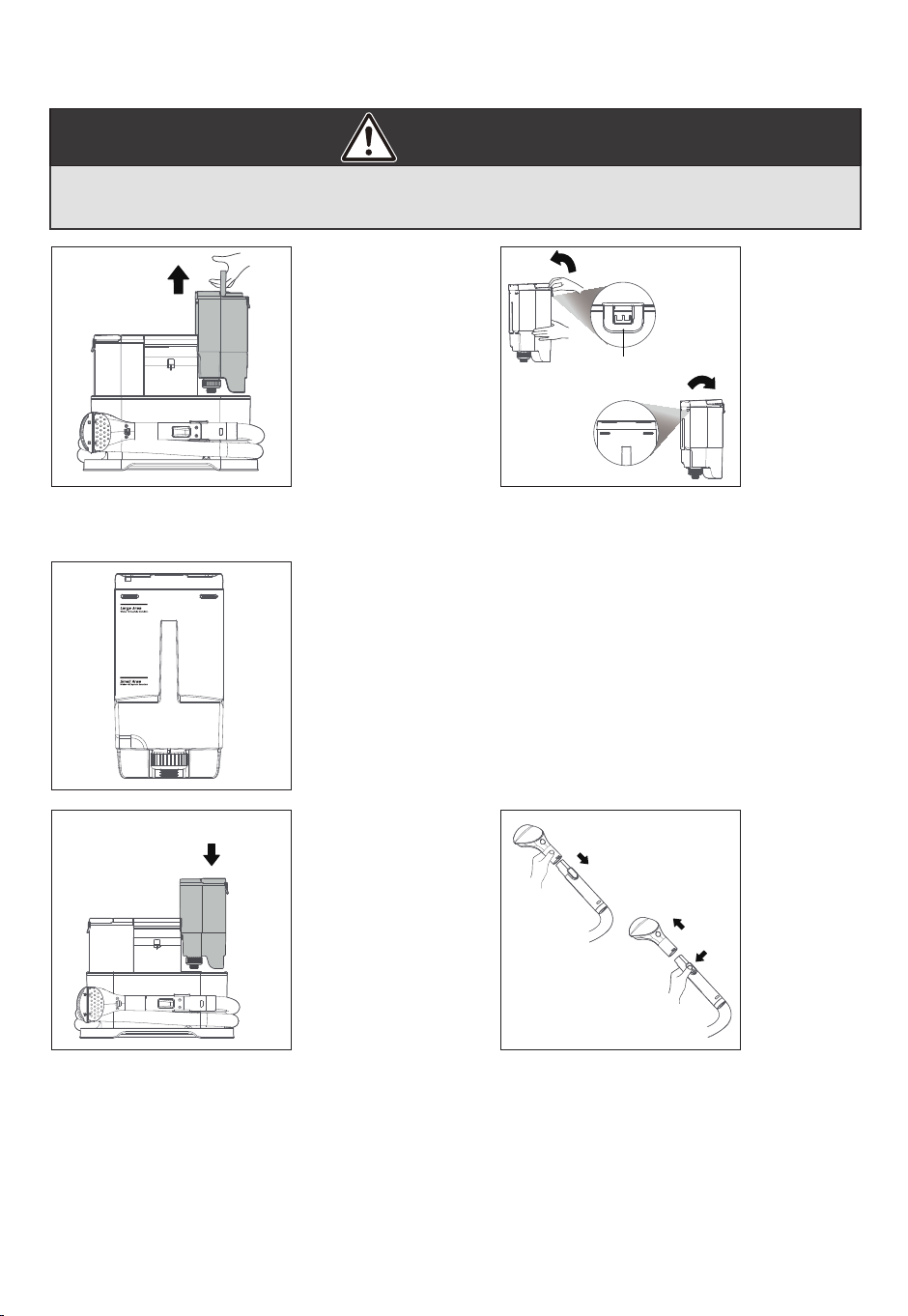
1. One hand on the machine, the other hand
pulls clean water tank handle upward
vertically, and the tank will be taken out.
2. Open the upper cover of clean water
tank, and pour tap water into the tank,
then put on the upper cover.
4. Put the head of the clean water tank into
the open support position of the machine,
and then press vertically down. After hearing
the click, the installation is successful.
Attention:
The disassembly / installation method of dirty
water tank is the same as that of the clean
water tank.
Please DO NOT add water to the dirty water
tank.
5. Insert the hose into the carpet brush.
After hearing the click, the hose is
successfully connected to the carpet
brush. Press the lock cap, pull out in the
direction shown in the picture, and then
remove the carpet brush.
Pull up
Press
3. If desired add cleaning solution for deep cleaning.
Cleaning solution dosage recommended as below:
•Large Area Water + 5 Capfuls Solution
•Small Area Water + 2 Capfuls Solution
The amount of cleaning solution should be used according to
the cleaning area
6
Eureka Customer Service HELPLINE 1-800-282-2886
Starting up and cleaning
CAUTION
Prepare / start the work
Never operate vacuum cleaner without water tanks, brush, float and
brush cover, water tanks cover in proper position.
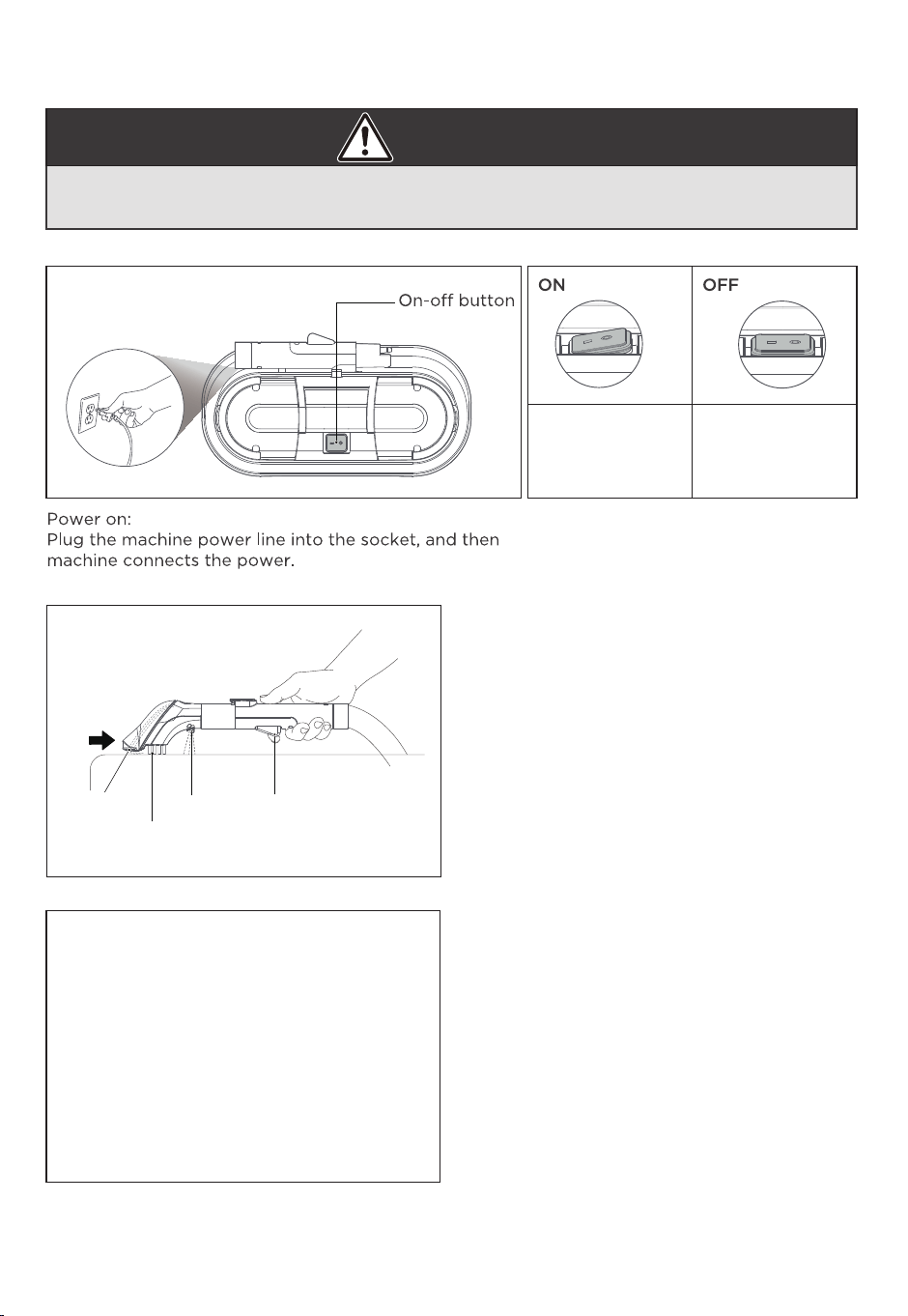
Press the button
and the machine
is on.
Press the button
again to discon-
nect the power.
Turn on the button:Press button to the
ON position, and the machine is on;
button is on o position and power is
disconnected.
After adding water to the clean water tank,
connect the power and press the On-o
button, and then the machine enters the
working state, and the front suction position
of brush head has continuous suction. Press
the trigger, then water will spray from the
spray nozzle. Release the trigger and stop
spraying water.
When adding the cleaning solution to the
fresh water tank, wait for the cleaning
solution to be completely diluted, turn on the
On-o button, press the trigger, spray the
liquid evenly on the stain and let stand for a
while. Finally, clean the stain by pushing and
pulling back and forth at an average speed
until it is completely cleaned
NOTE:When cleaning general stains, it is
recommended that the liquid stand on the
surface of the stain for 3 minutes, and when
cleaning stubborn stains, it is recommended
that the liquid sit on the surface of the stain
for 10 minutes.
Suck sewage
Suction nozzle Spray nozzle Trigger
Brush bristle
Attention:
• Whether the trigger is loose or not, the suction will suck away the sewage and residual water.
• For severe stubborn stains, it is recommended to add cleaning solution,spray the water on
the dirty place,waiting for a period of time, and then use the brush head to clean.
• Do not over tilt or dump the machine during use to avoid water leakage.
www.eureka.com
7
Before You Begin Cleaning
Our cleaning solution are suitable for most carpets and fabrics, but when cleaning special
materials or materials with bright colors
You need to test Color Fastness in a small hidden area. Gently wipe the surface with a damp
white cloth. Wait ten minutes and check for color removal or bleeding with a white tissue.
NOTE: To prevent staining, use plastic or aluminum foil to protect wood or metal surface from
possible water spray.
NOTE: To avoid damage to wood floors underneath area rugs or carpet, place waterproof
material(e.g. plastic) underneath them before cleaning.
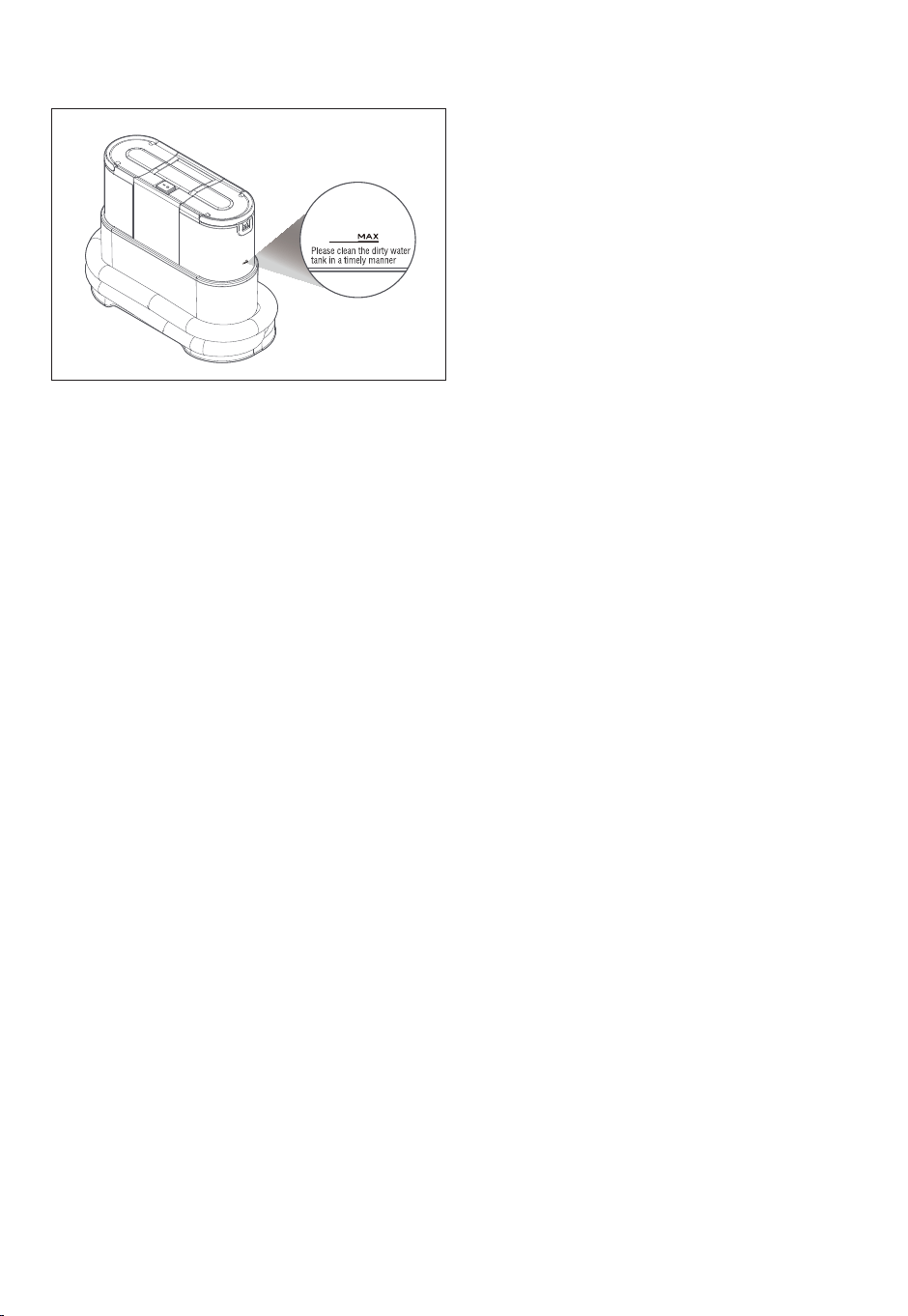
When the water in clean water tank is used up
or the dirty water level reaches the Max line
the suction drops obviously. Please clean it
in time.
Clean Maintenance
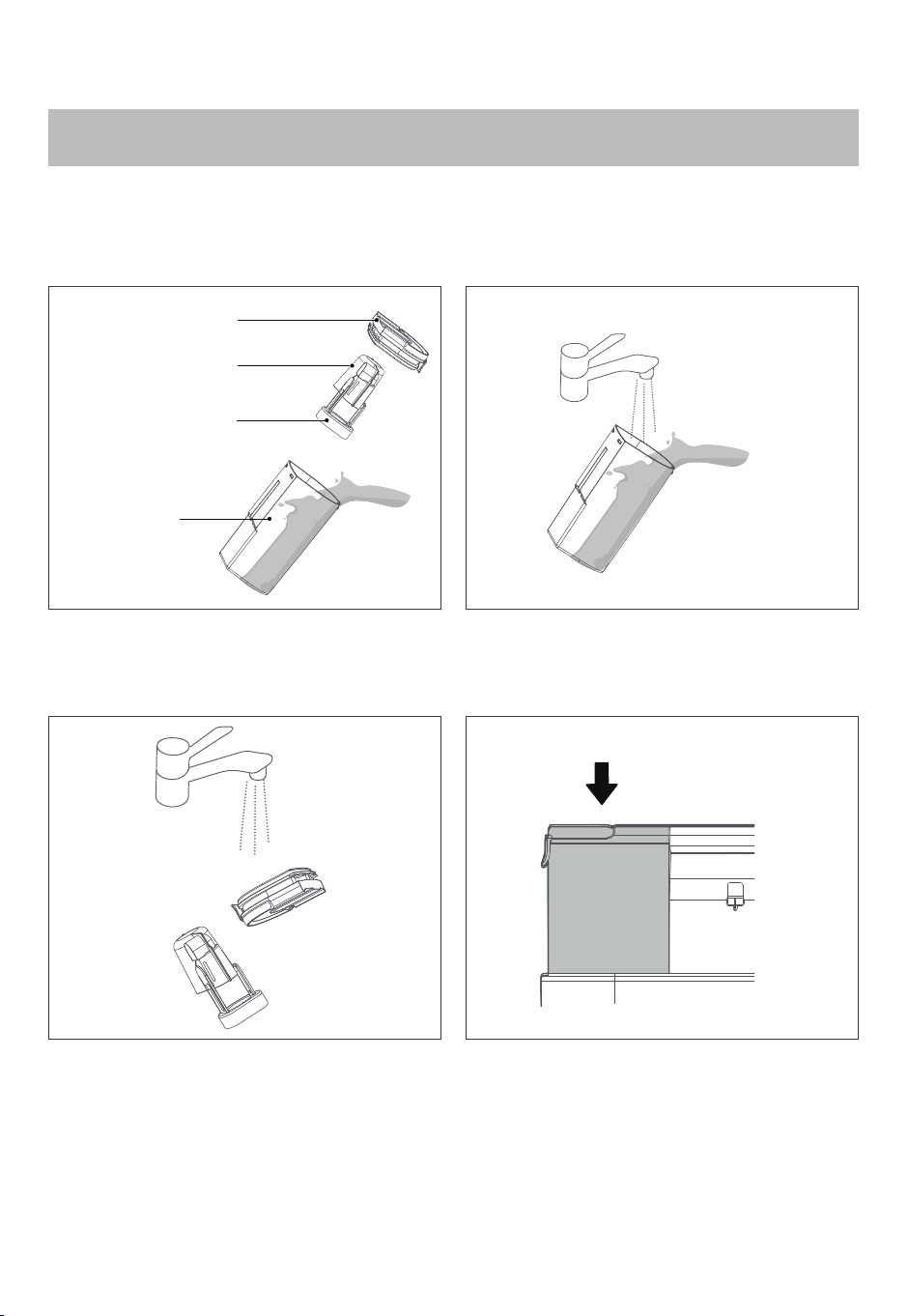
Dirty water tank cleaning
8
Eureka Customer Service HELPLINE 1-800-282-2886
3. Rinse float assembly with clean water
Upper cover
Float cover
Press
Float
Dirty water
tank
Attention:
In order not to aect the performance of the machine, it is recommended that you
clean the machine after using it.
1. Remove the upper cover of dirty water
tank, take out the float assembly
2. Pour out the sewage from dirty water tank
and rinse tank with clean water
4. Reinstall the float back into the dirty water
tank,buckle the upper cover and install them
back to the machine and after hearing the
click, the installation is successful.
Tips:
Before cleaning, please disconnect the power and make sure the machine is turned o.
Clean Maintenance
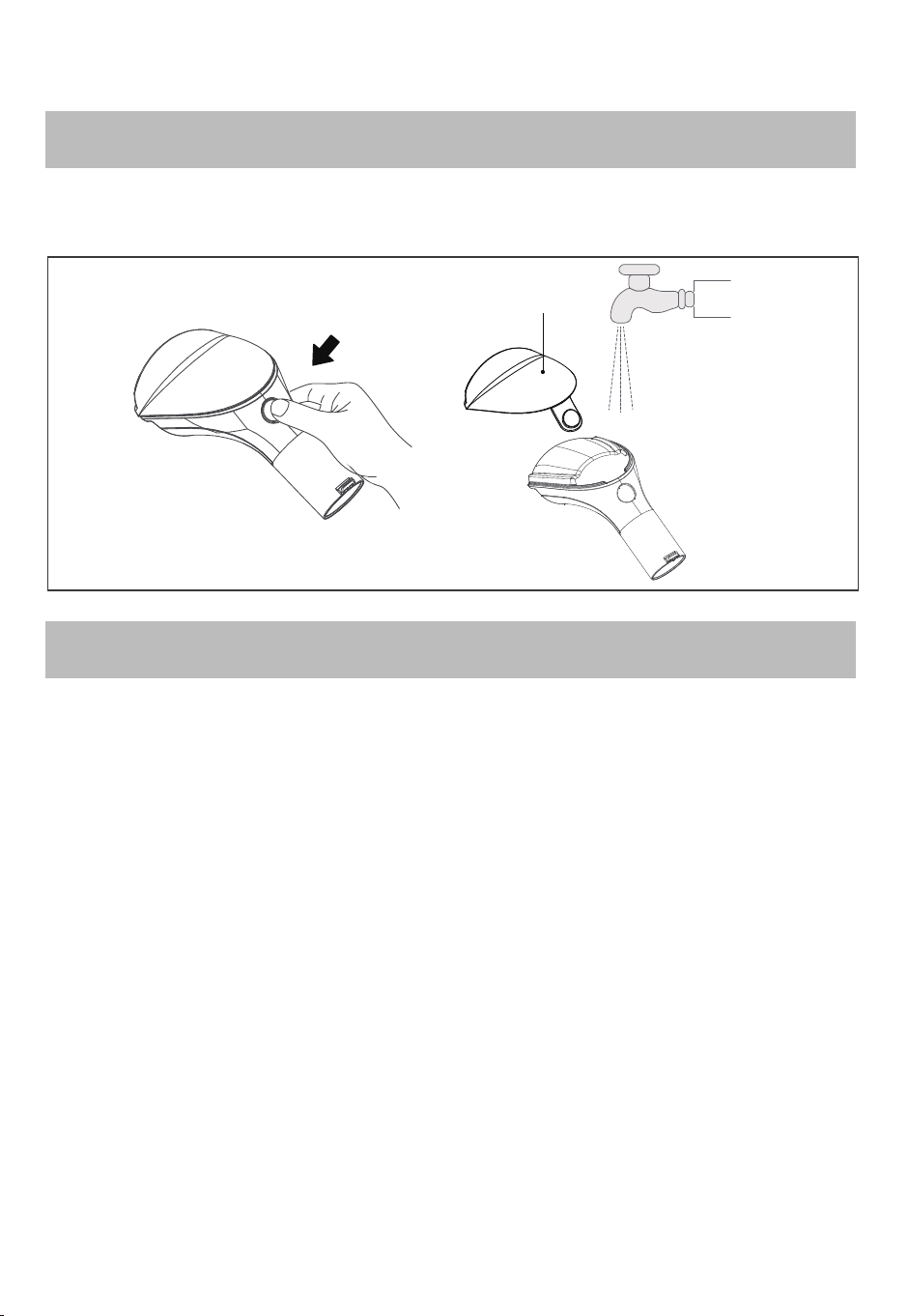
Accessories cleaning
Machine Cleaning
Press and release
Accessory
window
Push the release button with your thumb, the accessory window automatic ejects.
Then, rinse it with clean water and install it back.
• In order not to aect the performance of the machine, it is recommended to
maintain its parts regularly.
• To flush the tools and hose before storage , suction up a bowl of clean water to
ensure all debris are removed.
• Wipe machine with water or neutral detergent, wring the cleaning cloth before
wiping, and do not penetrate water into the machine components.
• After cleaning up, it is recommended to place the whole machine upright, and be
careful not to put it in a direct sunlight or wet place.
www.eureka.com
9
Problem Solving
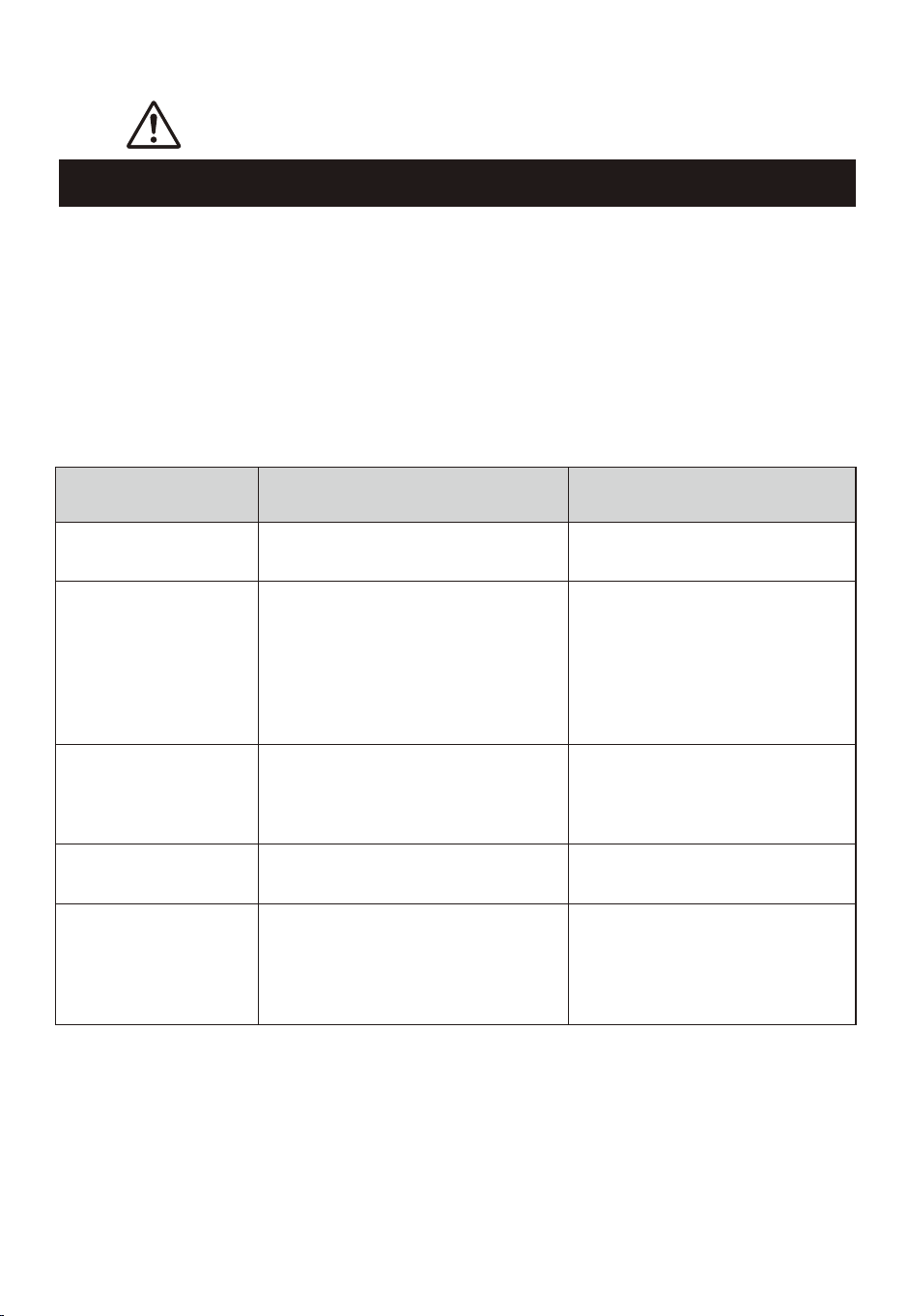
Problem Possible causes Solution
The machine does not
work
-The plug is not fully inserted into the
electrical socket
-Refix the plug to make sure the
machine is on
Draught fan operates
with abnormal sound
-The suction nozzle is blocked
-Sewage in used water tank has
reached the specified capacity
-Clean the obstacles in the suction
mouth
-Take out used water tank, pour the
sewage and reuse
The air outlet or the
bottom of the machine
have water leakage
-Uninstalled float
-The screw capping of the clean water
tank is not fastened
-Clean water tank or used water tank is
not installed in place
-Install float
-Reinstall the clean water tank
-Reinstall the clean water tank or
used water tank
Water is not out of
accessories
-No water in clean water tank
-Clean water tank is not in place
-Add water in clean water tank
-Reinstall the clean water tank
Product suction power
weakened
-The used water tank has reached the
specified capacity
-Used water tank is not installed in
place
-Accessories or hoses are blocked by
objects such as hair
-The suction nozzle or pipe is blocked
-Remove the used water tank and
dump the sewage for further use
reinstall
-Clean the accessories or hoses
-Clean up the obstacles in the
suction nozzle or pipe
Make sure vacuum is turned off and power cord is unplugged.
NOTICE: Thermal cut-off
This vacuum cleaner has a special thermostat that protects the vacuum in case of
motor overheating. If the vacuum suddenly shuts off, proceed as follows:
1) Turn the vacuum off and unplug the unit.
2) Check the vacuum for a possible source of overheating such as a full dust cup,
blocked hose from the outlet or clogged filter. If any of these conditions are found,
fix them and wait at least 30 minutes before attempting to use the vacuum.
3) After the 30 minute period, plug the vacuum back into the outlet and turn on the
switch. If the vacuum still does not work, call the Eureka customer service
helpline 1-800-282-2886.
10
Eureka Customer Service HELPLINE 1-800-282-2886
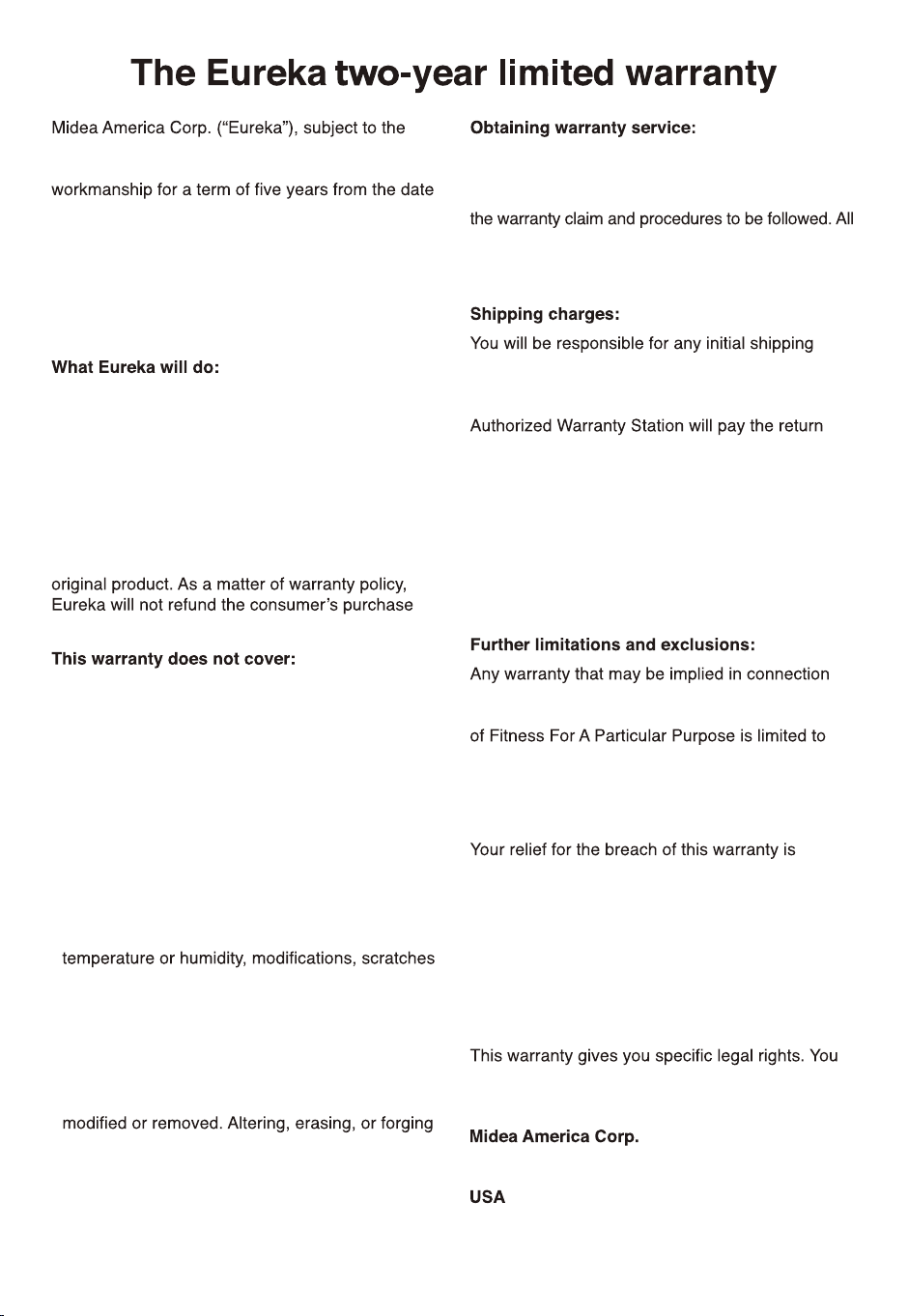
terms and conditions herein, warrants this vacuum
cleaner to be free from defects in material and
of original purchase when used in accordance
with the Eureka operating and maintenance
instructions and under normal household usage.
This warranty is granted only to the original
purchaser and members of immediate household,
and is applicable only to original purchases from
Eureka authorized resellers.
Eureka will, at its option, repair or replace a
defective vacuum or vacuum part that is covered
by this warranty. Repairs may be performed using
new or refurbished parts that meet or exceed
elects to replace the vacuum, the replacement
may be a reconditioned unit. Depending on
availability of products, Eureka reserves the right
to provide you with a replacement product that is
the same or similar, or substitute equivalent of the
price.
• Normal wear and tear of the vacuum and vacuum
parts that require replacement under normal
use light bulbs, brush-roll, bristles, impellers and
cleaning.
• Damages or malfunctions resulting from:
improper or unreasonable use or maintenance,
abuse, negligence, failure to follow instructions
contained in any written materials that
accompany the product, deterioration by reason
of excess moisture, corrosive atmosphere,
lightning, power surges, connections to improper
voltage supply, unauthorized alteration, or
other external causes such as extremes in
or discoloration, accidents, misuse, or acts of
God. This warranty also does not cover damage
resulting from repair or attempted repair by
anyone other than Eureka or an authorized
Eureka Warranty Station. This warranty is not
applicable to any product that has been altered
or on which the serial number has been defacted,
any proof-of-purchase documents voids any
applicable product warranty.
To obtain warranty service you must contact the
Eureka Service Team, toll free, at 1-800-282-2886 or
email customerserviceusa@midea.com, to discuss
warranty claims must include submission of proof-of-
purchase documentation. For additional information,
you may also visit www.eureka.com.
and insurance charges if the defective product(s)
must be shipped for warranty service or warranty
evaluation; however, Eureka or a Eureka
shipping charges if repairs are covered by the
warranty. When returning parts for repair, you must
include the model, type and serial number located
on the rating plate. If any product submitted for
warranty service is found to be ineligible, an
estimate of repair cost will be furnished and the
repair performed only if requested by the owner
and upon receipt of payment or acceptable
arrangements for payment.
with your purchase or use of the vacuum, including
any warranty of Merchantability or any warranty
the duration of this limited warranty. Some states
do not allow limitations on how long an implied
warranty lasts, so the above limitations may not
apply to you.
limited to the relief expressly provided above.
In no event shall the manufacturer be liable for
any consequential or incidental damages you
may incur in connection with your purchase
or use of the vacuum. Some states do not
allow the exclusion or limitation of incidental or
consequential damages, so the above limitation or
exclusion may not apply to you.
may also have other rights, which may vary by
state.
300 Kimball Avenue
Parsippany, NJ 07054
www.eureka.com
11