

ThismanualisintendedforadministratorsandusersofAXISQ1775-E
FixedNetworkCamera,andisapplicabletormware5.85andlater.
Itincludesinstructionsforusingandmanagingtheproductonyour
network.Previousexperienceofnetworkingwillbeofusewhenusing
thisproduct.SomeknowledgeofUNIXorLinux-basedsystemsmay
alsobeusefulwhendevelopingshellscriptsandapplications.Later
versionsofthisdocumentwillbepostedatwww.axis.com.Seealsothe
product’sonlinehelp,availablethroughtheweb-basedinterface.
LegalConsiderations
Videoandaudiosurveillancecanberegulatedbylawsthatvaryfrom
countrytocountry.Checkthelawsinyourlocalregionbeforeusing
thisproductforsurveillancepurposes.
Thisproductincludesone(1)H.264decoderlicenseandone(1)AAC
decoderlicense.Topurchasefurtherlicenses,contactyourreseller.
Liability
Everycarehasbeentakeninthepreparationofthisdocument.Please
informyourlocalAxisofceofanyinaccuraciesoromissions.Axis
CommunicationsABcannotbeheldresponsibleforanytechnicalor
typographicalerrorsandreservestherighttomakechangestothe
productandmanualswithoutpriornotice.AxisCommunicationsAB
makesnowarrantyofanykindwithregardtothematerialcontained
withinthisdocument,including,butnotlimitedto,theimplied
warrantiesofmerchantabilityandtnessforaparticularpurpose.Axis
CommunicationsABshallnotbeliablenorresponsibleforincidentalor
consequentialdamagesinconnectionwiththefurnishing,performance
oruseofthismaterial.Thisproductisonlytobeusedforitsintended
purpose.
IntellectualPropertyRights
AxisABhasintellectualpropertyrightsrelatingtotechnologyembodied
intheproductdescribedinthisdocument.Inparticular,andwithout
limitation,theseintellectualpropertyrightsmayincludeoneormore
ofthepatentslistedatwww.axis.com/patent.htmandoneormore
additionalpatentsorpendingpatentapplicationsintheUSandother
countries.
Thisproductcontainslicensedthird-partysoftware.Seethemenuitem
“About”intheproduct’suserinterfaceformoreinformation.
ThisproductcontainssourcecodecopyrightAppleComputer,
Inc.,underthetermsofApplePublicSourceLicense2.0(see
www.opensource.apple.com/apsl).Thesourcecodeisavailablefrom
https://developer.apple.com/bonjour/
EquipmentModications
Thisequipmentmustbeinstalledandusedinstrictaccordancewiththe
instructionsgivenintheuserdocumentation.Thisequipmentcontains
nouser-serviceablecomponents.Unauthorizedequipmentchangesor
modicationswillinvalidateallapplicableregulatorycertications
andapprovals.
TrademarkAcknowledgments
AXISCOMMUNICATIONS,AXIS,ETRAX,ARTPECandVAPIXare
registeredtrademarksortrademarkapplicationsofAxisABinvarious
jurisdictions.Allothercompanynamesandproductsaretrademarksor
registeredtrademarksoftheirrespectivecompanies.
Apple,Boa,Apache,Bonjour,Ethernet,InternetExplorer,Linux,
Microsoft,Mozilla,Real,SMPTE,QuickTime,UNIX,Windows,Windows
VistaandWWWareregisteredtrademarksoftherespectiveholders.
JavaandallJava-basedtrademarksandlogosaretrademarksor
registeredtrademarksofOracleand/oritsafliates.UPnP
TM
isa
certicationmarkoftheUPnP
TM
ImplementersCorporation.
SD,SDHCandSDXCaretrademarksorregisteredtrademarksofSD-3C,
LLCintheUnitedStates,othercountriesorboth.Also,miniSD,microSD,
miniSDHC,microSDHC,microSDXCarealltrademarksorregistered
trademarksofSD-3C,LLCintheUnitedStates,othercountriesorboth.
RegulatoryInformation
Europe
ThisproductcomplieswiththeapplicableCEmarkingdirectives
andharmonizedstandards:
•ElectromagneticCompatibility(EMC)Directive2004/108/EC.See
ElectromagneticCompatibility(EMC)onpage2.
•LowVoltage(LVD)Directive2006/95/EC.SeeSafetyonpage2.
•RestrictionsofHazardousSubstances(RoHS)Directive2011/65/EU.
SeeDisposalandRecyclingonpage3.
Acopyoftheoriginaldeclarationofconformitymaybeobtainedfrom
AxisCommunicationsAB.SeeContactInformationonpage3.
ElectromagneticCompatibility(EMC)
Thisequipmenthasbeendesignedandtestedtofulllapplicable
standardsfor:
•Radiofrequencyemissionwheninstalledaccordingtothe
instructionsandusedinitsintendedenvironment.
•Immunitytoelectricalandelectromagneticphenomenawhen
installedaccordingtotheinstructionsandusedinitsintended
environment.
USA
Thisequipmenthasbeentestedusinganunshieldednetworkcable
(UTP)andfoundtocomplywiththelimitsforaClassAdigitaldevice,
pursuanttopart15oftheFCCrules.Thisequipmenthasalsobeen
testedusingashieldednetworkcable(STP)andfoundtocomplywith
thelimitsforaClassAdigitaldevice,pursuanttopart15oftheFCC
rules.Theselimitsaredesignedtoprovidereasonableprotectionagainst
harmfulinterferencewhentheequipmentisoperatedinacommercial
environment.Thisequipmentgenerates,uses,andcanradiateradio
frequencyenergyand,ifnotinstalledandusedinaccordancewith
theinstructionmanual,maycauseharmfulinterferencetoradio
communications.Operationofthisequipmentinaresidentialarea
islikelytocauseharmfulinterferenceinwhichcasetheuserwillbe
requiredtocorrecttheinterferenceathisownexpense.
Canada
ThisdigitalapparatuscomplieswithCANICES-3(ClassA).Theproduct
shallbeconnectedusingashieldednetworkcable(STP)thatis
properlygrounded.Cetappareilnumériqueestconformeàlanorme
NMBICES-3(classeA).Leproduitdoitêtreconnectéàl'aided'uncâble
réseaublindé(STP)quiestcorrectementmisàlaterre.
Europe
ThisdigitalequipmentfulllstherequirementsforRFemission
accordingtotheClassAlimitofEN55022.Theproductshallbe
connectedusingashieldednetworkcable(STP)thatisproperly
grounded.Notice!ThisisaClassAproduct.Inadomesticenvironment
thisproductmaycauseRFinterference,inwhichcasetheusermaybe
requiredtotakeadequatemeasures.
Thisproductfulllstherequirementsforemissionandimmunity
accordingtoEN50121-4andIEC62236-4railwayapplications.
Thisproductfulllstherequirementsforimmunityaccording
toEN61000-6-1residential,commercialandlight-industrial
environments.
Thisproductfulllstherequirementsforimmunityaccordingto
EN61000-6-2industrialenvironments.
Thisproductfulllstherequirementsforimmunityaccordingto
EN55024ofceandcommercialenvironments
Australia/NewZealand
ThisdigitalequipmentfulllstherequirementsforRFemission
accordingtotheClassAlimitofAS/NZSCISPR22.Theproductshall
beconnectedusingashieldednetworkcable(STP)thatisproperly
grounded.Notice!ThisisaClassAproduct.Inadomesticenvironment
thisproductmaycauseRFinterference,inwhichcasetheusermaybe
requiredtotakeadequatemeasures.
Japan
この装置は、クラスA情報技術装置です。この装置を家庭環
境で使用すると電波妨害を引き起こすことがあります。この
場合には使用者が適切な対策を講ずるよう要求されることが
あります。本製品は、シールドネットワークケーブル(STP)を
使用して接続してください。また適切に接地してください。
Korea
이기기는업무용(A급)전자파적합기기로서판매자또는사용
자는이점을주의하시기바라며,가정외의지역에서사용하는
것을목적으로합니다.적절히접지된STP(shieldedtwistedpair)
케이블을사용하여제품을연결하십시오.
Safety
ThisproductcomplieswithIEC/EN/UL60950-1and
IEC/EN/UL60950-22,SafetyofInformationTechnology
Equipment.Theproductshallbegroundedeitherthroughashielded
networkcable(STP)orotherappropriatemethod.

Thepowersupplyusedwiththisproductshallfullltherequirements
forSafetyExtraLowVoltage(SELV)andLimitedPowerSource(LPS)
accordingtoIEC/EN/UL60950-1.
ThisproductcomplieswithIEC/EN/UL60950-1an-
dIEC/EN/UL60950-22,SafetyofInformationTechnologyEquipment.
Theproductshallbegroundedeitherthroughashieldednetworkcable
(STP)orotherappropriatemethod.
Battery
TheAxisproductusesa3.0VBR/CR1220lithiumbatteryasthepower
supplyforitsinternalreal-timeclock(RTC).Undernormalconditions
thisbatterywilllastforaminimumofveyears.
LowbatterypoweraffectstheoperationoftheRTC,causingittoreset
ateverypower-up.Whenthebatteryneedsreplacing,alogmessage
willappearintheproduct’sserverreport.Formoreinformationabout
theserverreport,seetheproduct´ssetuppagesorcontactAxissupport.
Thebatteryshouldnotbereplacedunlessrequired,butifthebattery
doesneedreplacing,contactAxissupportatwww.axis.com/techsupfor
assistance.
WARNING
•Riskofexplosionifthebatteryisincorrectlyreplaced.
•Replaceonlywithanidenticalbatteryorabatterywhichis
recommendedbyAxis.
•Disposeofusedbatteriesaccordingtolocalregulationsor
thebatterymanufacturer'sinstructions.
DisposalandRecycling
Whenthisproducthasreachedtheendofitsusefullife,disposeof
itaccordingtolocallawsandregulations.Forinformationabout
yournearestdesignatedcollectionpoint,contactyourlocalauthority
responsibleforwastedisposal.Inaccordancewithlocallegislation,
penaltiesmaybeapplicableforincorrectdisposalofthiswaste.
Europe
Thissymbolmeansthattheproductshallnotbedisposedof
togetherwithhouseholdorcommercialwaste.Directive2012/19/EU
onwasteelectricalandelectronicequipment(WEEE)isapplicablein
theEuropeanUnionmemberstates.Topreventpotentialharmto
humanhealthandtheenvironment,theproductmustbedisposed
ofinanapprovedandenvironmentallysaferecyclingprocess.For
informationaboutyournearestdesignatedcollectionpoint,contact
yourlocalauthorityresponsibleforwastedisposal.Businessesshould
contacttheproductsupplierforinformationabouthowtodispose
ofthisproductcorrectly.
ThisproductcomplieswiththerequirementsofDirective2011/65/EUon
therestrictionoftheuseofcertainhazardoussubstancesinelectrical
andelectronicequipment(RoHS).
China
Thisproductcomplieswiththerequirementsofthelegislative
actAdministrationontheControlofPollutionCausedbyElectronic
InformationProducts(ACPEIP).
ContactInformation
AxisCommunicationsAB
Emdalavägen14
22369Lund
Sweden
Tel:+46462721800
Fax:+4646136130
www.axis.com
Support
Shouldyourequireanytechnicalassistance,pleasecontactyourAxis
reseller.Ifyourquestionscannotbeansweredimmediately,your
resellerwillforwardyourqueriesthroughtheappropriatechannelsto
ensurearapidresponse.IfyouareconnectedtotheInternet,youcan:
•downloaduserdocumentationandsoftwareupdates
•ndanswerstoresolvedproblemsintheFAQdatabase.Search
byproduct,category,orphrase
•reportproblemstoAxissupportstaffbyloggingintoyourprivate
supportarea
•chatwithAxissupportstaff
•visitAxisSupportatwww.axis.com/techsup/
LearnMore!
VisitAxislearningcenterwww.axis.com/academy/forusefultrainings,
webinars,tutorialsandguides.

AXISQ1775-ENetworkCamera
TableofContents
SafetyInformation..........................................6
HazardLevels...................................................6
OtherMessageLevels............................................6
HardwareOverview..........................................7
ConnectorsandButtons..........................................8
LEDIndicators..................................................10
StatusLEDBehaviorandBuzzerSignalforLevellingAssistant...........10
AccesstheProduct..........................................11
AccessfromaBrowser...........................................11
AccessfromtheInternet..........................................11
SettheRootPassword...........................................12
CongureCaptureMode..........................................12
TheLiveViewPage..............................................12
MediaStreams.............................................15
HowtoStreamH.264............................................15
MJPEG........................................................15
AXISMediaControl(AMC)........................................15
AlternativeMethodsofAccessingtheVideoStream....................16
AccessAudioStreams............................................17
SetUptheProduct..........................................18
BasicSetup....................................................18
VideoandAudio............................................19
SetUpVideoStreams............................................19
StreamProles.................................................20
ONVIFMediaProles............................................21
CameraSettings................................................21
Overlay........................................................23
PrivacyMask...................................................25
SetUpAudio...................................................25
AudioClips....................................................26
ConguretheLiveViewPage.................................27
PTZ(PanTiltZoom).........................................29
PresetPositions.................................................29
Gatekeeper....................................................29
GuardTour.....................................................29
Advanced......................................................30
InstallPTZDriver................................................31
ControlQueue..................................................31
Detectors..................................................32
CameraTampering..............................................32
ShockDetection................................................32
MotionDetection...............................................32
AudioDetection................................................34
Applications...............................................35
ApplicationLicenses.............................................35
UploadApplication..............................................35
ApplicationConsiderations........................................35
AXISVideoMotionDetection.................................37
Considerations..................................................37
StartandStoptheApplication.....................................37
CongureApplication............................................37
UsingtheApplicationinanActionRule.............................40
Events....................................................42
SetUpActionRules.............................................42
AddRecipients..................................................44
CreateSchedules................................................46
SetUpRecurrences..............................................46
Recordings.................................................47
FindRecordings.................................................47
PlayRecording..................................................47
ExportVideoClip................................................48
4

AXISQ1775-ENetworkCamera
TableofContents
RecordingList..................................................48
ContinuousRecording............................................49
Languages.................................................50
SystemOptions.............................................51
Security.......................................................51
Date&Time....................................................53
Network.......................................................54
Storage.......................................................59
Ports&Devices.................................................61
Maintenance...................................................62
Support.......................................................63
Advanced......................................................63
ResettoFactoryDefaultSettings...................................64
Troubleshooting............................................65
ChecktheFirmware.............................................65
UpgradetheFirmware...........................................65
Symptoms,PossibleCausesandRemedialActions.....................65
TechnicalSpecications......................................69
Connectors....................................................71
ConnectionDiagrams............................................72
PerformanceConsiderations.......................................72
5

AXISQ1775-ENetworkCamera
SafetyInformation
SafetyInformation
HazardLevels
DANGER
Indicatesahazardoussituationwhich,ifnotavoided,willresultindeathorseriousinjury.
WARNING
Indicatesahazardoussituationwhich,ifnotavoided,couldresultindeathorseriousinjury.
CAUTION
Indicatesahazardoussituationwhich,ifnotavoided,couldresultinminorormoderate
injury.
NO NO
NO
TICE TICE
TICE
Indicatesasituationwhich,ifnotavoided,couldresultindamagetoproperty.
OtherMessageLevels
ImportantIndicatessignicantinformationwhichisessentialfortheproducttofunctioncorrectly.
NoteIndicatesusefulinformationwhichhelpsingettingthemostoutoftheproduct.
6
AXISQ1775-ENetworkCamera
HardwareOverview
HardwareOverview
NO NO
NO
TICE TICE
TICE
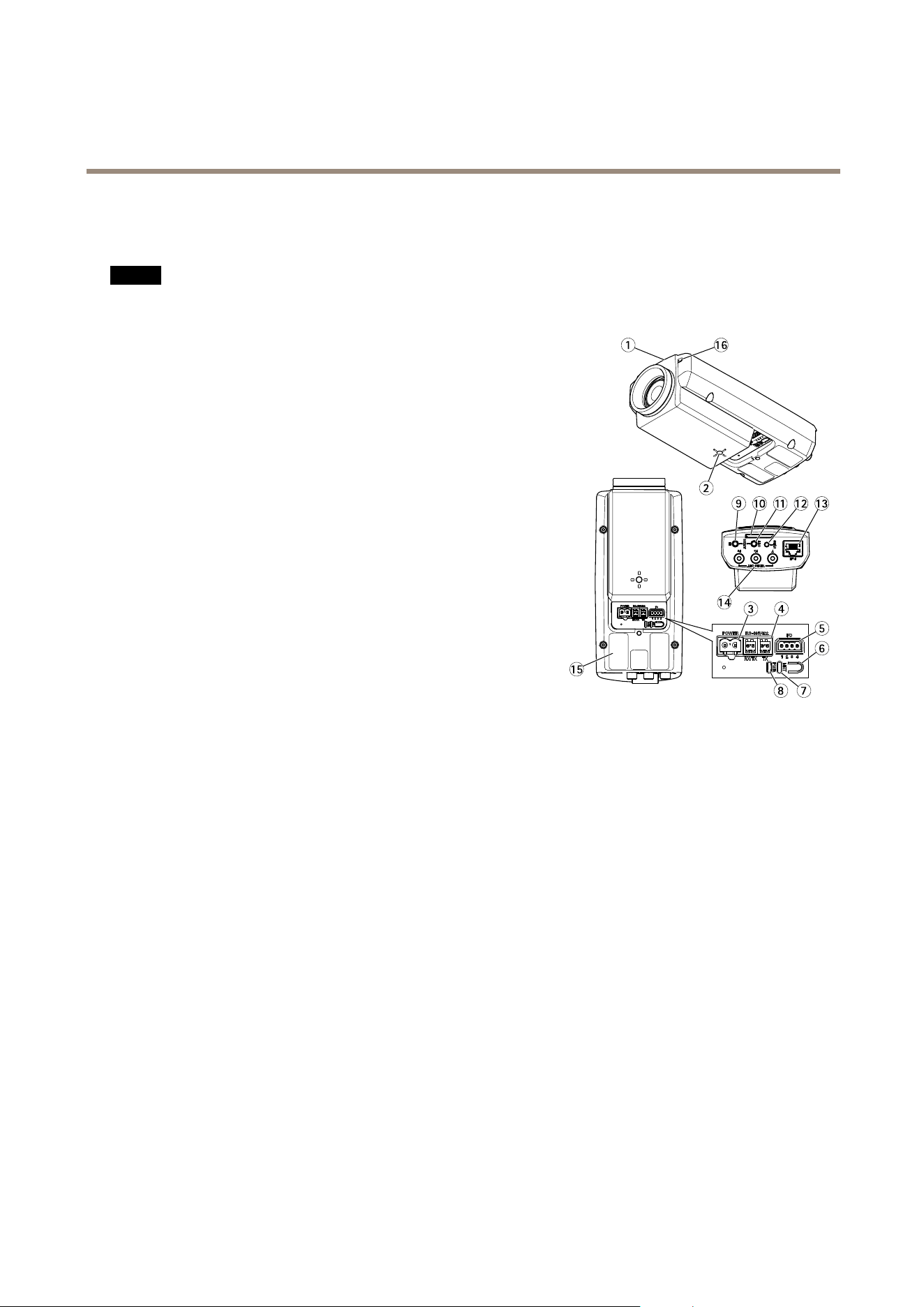
Donotpointthecameralenstowardthesunorotherhigh-intensityradiationsourcesbecausethiscouldcausedamageto
thecamera.
13
12
11
10
9
2
1
16
14
15
4
5
6
3
7
8
1.
StatusLED
2.
1/4”screwmountforwall/ceilingstand
3.
Powerconnector(blockedinAXISQ1775-E)
4.
RS-485/422connector
5.
I/Oconnector
6.
Controlbutton
7.
NetworkindicatorLED
8.
PowerindicatorLED
9.
Audioin
10.
SDcardslot
11.
Audioout
12.
CVBSbutton
13.
Networkconnector(PoE)
14.
VideooutY/Pb/Pr
15.
Partnumber(P/N)&Serialnumber(S/N).Theserialnumbermayberequiredduringtheinstallation.
16.
Microphone
7
AXISQ1775-ENetworkCamera
HardwareOverview
1
2
4
5
6
7
3
8
11
12
13
14
15
16
17
10
9
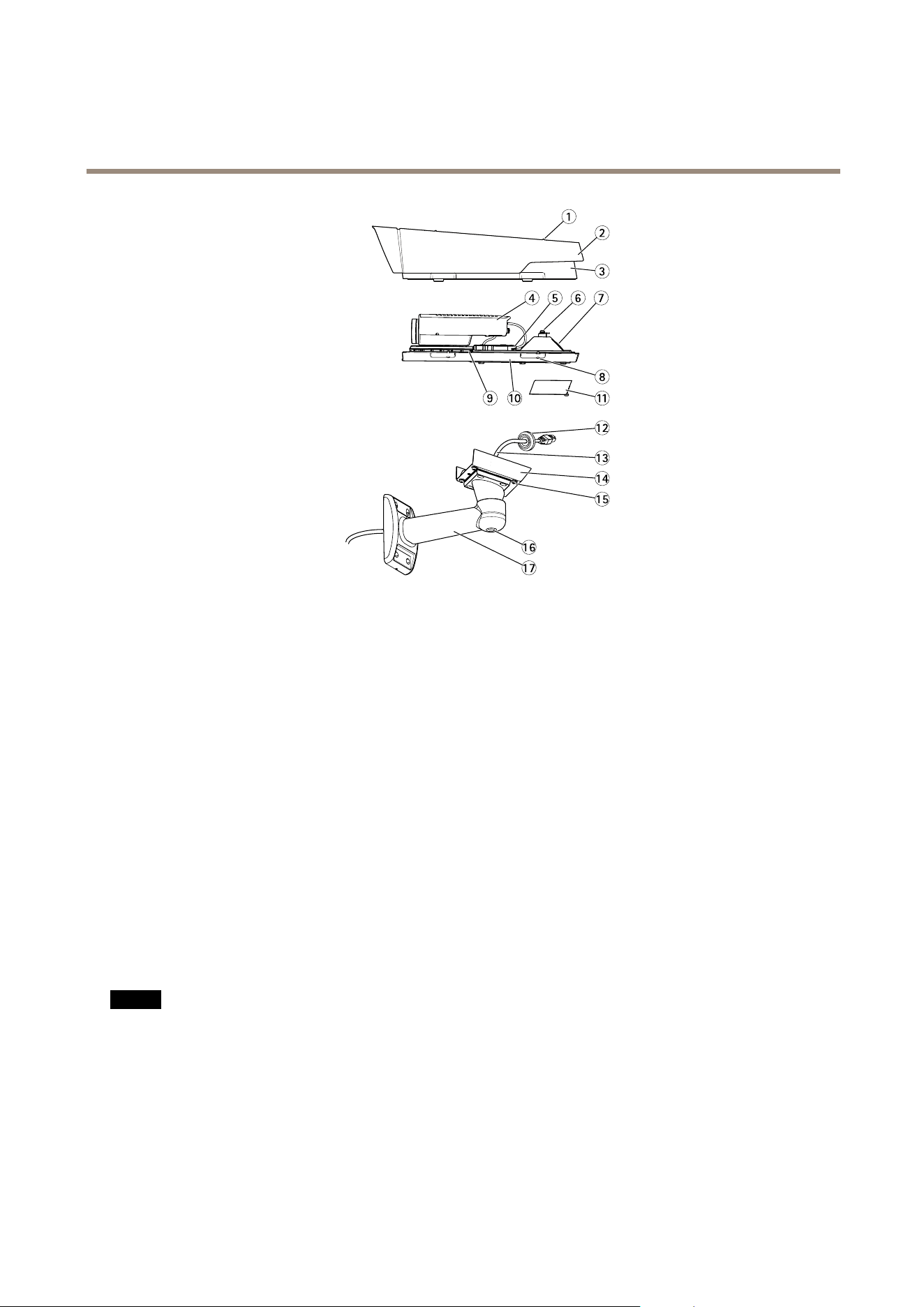
1.
Sunshieldadjustmentscrew(2x)
2.
Sunshield
3.
Topcover
4.
Networkcamera
5.
Networkconnector(PoE)
6.
Safetywiretab
7.
Cablehole
8.
Bottomcoverscrews(4x)
9.
HeaterCaution!Maybehot
10.
Bottomcover
11.
Cablecover
12.
Gasket
13.
Networkcable(routethroughwallbracket)
14.
Bracketadapter
15.
Bracketscrews(4x)
16.
Bracketadjustmentscrew
17.
Wallbracket
ConnectorsandButtons
Fortechnicalspecications,seepage69.
NetworkConnector
NO NO
NO
TICE TICE
TICE
Duetolocalregulationsortheenvironmentalandelectricalconditionsinwhichtheproductistobeused,ashieldednetwork
cable(STP)maybeappropriateorrequired.Allcablesconnectingtheproducttothenetworkandthatareroutedoutdoors
orindemandingelectricalenvironmentsshallbeintendedfortheirspecicuse.Makesurethatthenetworkdevices
areinstalledinaccordancewiththemanufacturer’sinstructions.Forinformationaboutregulatoryrequirements,see
ElectromagneticCompatibility(EMC)onpage2.
I/OConnector
Usewithexternaldevicesincombinationwith,forexample,tamperingalarms,motiondetection,eventtriggering,timelapserecording
andalarmnotications.Inadditiontothe0VDCreferencepointandpower(DCoutput),theI/Oconnectorprovidestheinterfaceto:
8

AXISQ1775-ENetworkCamera
HardwareOverview
•Digitaloutput–ForconnectingexternaldevicessuchasrelaysandLEDs.Connecteddevicescanbeactivatedbythe
VAPIX®ApplicationProgrammingInterface,outputbuttonsontheLiveViewpageorbyanActionRule.Theoutputwill
showasactive(shownunderSystemOptions>Ports&Devices)ifthealarmdeviceisactivated.
•Digitalinput–Analarminputforconnectingdevicesthatcantogglebetweenanopenandclosedcircuit,forexample:
PIRs,door/windowcontacts,glassbreakdetectors,etc.Whenasignalisreceivedthestatechangesandtheinputbecomes
active(shownunderSystemOptions>Ports&Devices).
Note
TheI/Oconnectorisconnectedtothehousing(fan/heater)ondelivery.Inthecaseofafanorheatererror,aninputsignal
willbetriggeredinthecamera.Setupanactionruleinthecameratocongurewhichactionthesignalshalltrigger.For
informationabouteventsandactionrules,seeEventsonpage42.
AudioConnector
TheAxisproducthasthefollowingaudioconnectors:
•Audioin(pink)–3.5mminputforamonomicrophone,oraline-inmonosignal.
•Audioout(green)–3.5mmoutputforaudio(linelevel)thatcanbeconnectedtoapublicaddress(PA)systemoran
activespeakerwithabuilt-inamplier.Astereoconnectormustbeusedforaudioout.
RS485/RS422Connector
TwoterminalblocksforRS485/RS422serialinterfaceusedtocontrolauxiliaryequipmentsuchaspan-tiltdevices.
SDCardSlot
NO NO
NO
TICE TICE
TICE
•RiskofdamagetoSDcard.DonotusesharptoolsorexcessiveforcewheninsertingorremovingtheSDcard.
•Riskofdataloss.Topreventdatacorruption,theSDcardshouldbeunmountedbeforeremoval.Tounmount,gotoSetup>
SystemOptions>Storage>SDCardandclickUnmount.
ThisproductsupportsSD/SDHC/SDXCcards(notincluded).
ForSDcardrecommendations,seewww.axis.com
ControlButton
Forlocationofthecontrolbutton,seeHardwareOverviewonpage7.
Thecontrolbuttonisusedfor:
•Resettingtheproducttofactorydefaultsettings.Seepage64.
•Ensuringthecameraislevel.Pressthebuttonfornotmorethantwosecondstostartthelevellingassistantandpress
againtostop.ThestatusLEDandbuzzersignal(seepage10)assistlevellingofthecamera.Thecameraislevelwhenthe
buzzerbeepscontinuously.
•ConnectingtoanAXISVideoHostingSystemservice.Seepage55.Toconnect,pressandholdthebuttonforabout3
secondsuntiltheStatusLEDashesgreen.
•ConnectingtoAXISInternetDynamicDNSService.Seepage56.Toconnect,pressandholdthebuttonforabout3seconds.
9

AXISQ1775-ENetworkCamera
HardwareOverview
LEDIndicators
Note
•TheStatusLEDcanbeconguredtobeunlitduringnormaloperation.Tocongure,gotoSetup>SystemOptions>Ports
&Devices>LED.Seetheonlinehelpformoreinformation.
•TheStatusLEDcanbeconguredtoashwhileaneventisactive.
•TheStatusLEDcanbeconguredtoashforidentifyingtheunit.GotoSetup>SystemOptions>Maintenance.
StatusLED
Indication
GreenSteadygreenfornormaloperation.
Amber
Steadyduringstartupandwhenrestoringsettings.
Note
TheNetworkLEDcanbedisabledsothatitdoesnotashwhenthereisnetworktrafc.Tocongure,gotoSetup>System
Options>Ports&Devices>LED.Seetheonlinehelpformoreinformation.
NetworkLEDIndication
Green
Steadyforconnectiontoa100Mbit/snetwork.Flashesfornetworkactivity.
Amber
Steadyforconnectiontoa10Mbit/snetwork.Flashesfornetworkactivity.
UnlitNonetworkconnection.
Note
ThePowerLEDcanbeconguredtobeunlitduringnormaloperation.Tocongure,gotoSetup>SystemOptions>Ports&
Devices>LED.Seetheonlinehelpformoreinformation.
PowerLEDIndication
Green
Normaloperation.
Amber
Flashesgreen/amberduringrmwareupgrade.
StatusLEDBehaviorandBuzzerSignalforLevellingAssistant
Forinformationonusingthecontrolbuttontostartlevellingofthecamera,seepage9.
Color
Buzzer
Cameraposition
Fixedgreen
Continuousbeep
Level
FlashinggreenFastintervalAlmostlevel
FlashingorangeMediumintervalNotlevel
Flashingred
Slowinterval
Farfromlevel
10

AXISQ1775-ENetworkCamera
AccesstheProduct
AccesstheProduct
ToinstalltheAxisproduct,seetheInstallationGuidesuppliedwiththeproduct.
Theproductcanbeusedwithmostoperatingsystemsandbrowsers.Therecommendedbrowsersare
•InternetExplorer
®
withWindows
®
•Safari
®
withOSX
®
•Chrome
TM
orFirefox
®
withotheroperatingsystems.
SeeTechnicalSpecicationsonpage69.
ToviewstreamingvideoinInternetExplorer,allowinstallationofAXISMediaControl(AMC)whenprompted.
TheAxisproductincludesone(1)H.264decoderlicenseforviewingvideostreamsandone(1)AACaudiolicense.Thelicensesare
automaticallyinstalledwithAMC.Theadministratorcandisabletheinstallationofthedecoders,topreventinstallationofunlicensed
copies.
Note
•QuickTime
TM
isalsosupportedforviewingH.264streamsandforaudio.
AccessfromaBrowser
1.Startawebbrowser.
2.EntertheIPaddressorhostnameoftheAxisproductinthebrowser’sLocation/Addresseld.
ToaccesstheproductfromaMaccomputer(OSX),gotoSafari,clickonBonjourandselecttheproductfromthe
drop-downlist.
IfyoudonotknowtheIPaddress,useAXISIPUtilitytolocatetheproductonthenetwork.Forinformationabout
howtodiscoverandassignanIPaddress,seethedocumentAssignanIPAddressandAccesstheVideoStreamonAxis
Supportwebatwww.axis.com/techsup
Note
ToshowBonjourasabrowserbookmark,gotoSafari>Preferences.
3.Enteryourusernameandpassword.Ifthisisthersttimetheproductisaccessed,therootpasswordmustrstbe
congured.Forinstructions,seeSettheRootPasswordonpage12.
4.Theproduct’sLiveViewpageopensinyourbrowser.
Note
ThecontrolsandlayoutoftheLiveViewpagemayhavebeencustomizedtomeetspecicinstallationrequirementsand
userpreferences.Consequently,someoftheexamplesandfunctionsfeaturedheremaydifferfromthosedisplayedin
yourownLiveViewpage.
AccessfromtheInternet
Onceconnected,theAxisproductisaccessibleonyourlocalnetwork(LAN).ToaccesstheproductfromtheInternetyoumust
congureyournetworkroutertoallowincomingdatatrafctotheproduct.Todothis,enabletheNAT-traversalfeature,which
willattempttoautomaticallyconguretheroutertoallowaccesstotheproduct.ThisisenabledfromSetup>SystemOptions>
Network>TCP/IPAdvanced.
Formoreinformation,seeNATtraversal(portmapping)forIPv4onpage57.SeealsoAXISInternetDynamicDNSServiceat
www.axiscam.net
11

AXISQ1775-ENetworkCamera
AccesstheProduct
ForTechnicalnotesonthisandothertopics,visittheAxisSupportwebatwww.axis.com/techsup
SettheRootPassword
ToaccesstheAxisproduct,youmustsetthepasswordforthedefaultadministratoruserroot.ThisisdoneintheCongureRoot
Passworddialog,whichopenswhentheproductisaccessedforthersttime.
Topreventnetworkeavesdropping,therootpasswordcanbesetviaanencryptedHTTPSconnection,whichrequiresanHTTPS
certicate.HTTPS(HypertextTransferProtocoloverSSL)isaprotocolusedtoencrypttrafcbetweenwebbrowsersandservers.The
HTTPScerticateensuresencryptedexchangeofinformation.SeeHTTPSonpage52.
Thedefaultadministratorusernamerootispermanentandcannotbedeleted.Ifthepasswordforrootislost,theproductmustbe
resettothefactorydefaultsettings.SeeResettoFactoryDefaultSettingsonpage64.
TosetthepasswordviaastandardHTTPconnection,enteritdirectlyinthedialog.
TosetthepasswordviaanencryptedHTTPSconnection,followthesesteps:
1.ClickUseHTTPS.
Atemporarycerticate(validforoneyear)iscreated,enablingencryptionofalltrafctoandfromtheproduct,andthe
passwordcannowbesetsecurely.
2.Enterapasswordandthenre-enterittoconrmthespelling.
3.ClickOK.Thepasswordhasnowbeencongured.
CongureCaptureMode
CapturemodedenesthemaximumresolutionandmaximumframerateavailableintheAxisproduct.Thecapturemodesettingalso
affectsthecamera’sangleofview.
Selectthedesiredcapturemodefromthedrop-downlistandclickOK.
SeealsoCaptureModeonpage21.
TheLiveViewPage
ThecontrolsandlayoutoftheLiveViewpagemayhavebeencustomizedtomeetspecicinstallationrequirementsanduser
preferences.Consequently,someoftheexamplesandfunctionsfeaturedheremaydifferfromthosedisplayedinyourownLiveView
page.Thefollowingprovidesanoverviewofeachavailablecontrol.
ControlsontheLiveViewPage
ClicktheViewsizebuttonstoshowtheimageinfullsize(rightbutton)ortoscaledowntheimageto
tthebrowserwindow(leftbutton).
ClickWDRontoenableWDRinintensebacklightconditions.ClickWDRofftodisableWDRinlow
lightconditionsforoptimalexposure.
SelectastreamprolefortheLiveViewpagefromtheStreamProledrop-downlist.Forinformation
abouthowtocongurestreamproles,seepage20.
12
AXISQ1775-ENetworkCamera
AccesstheProduct
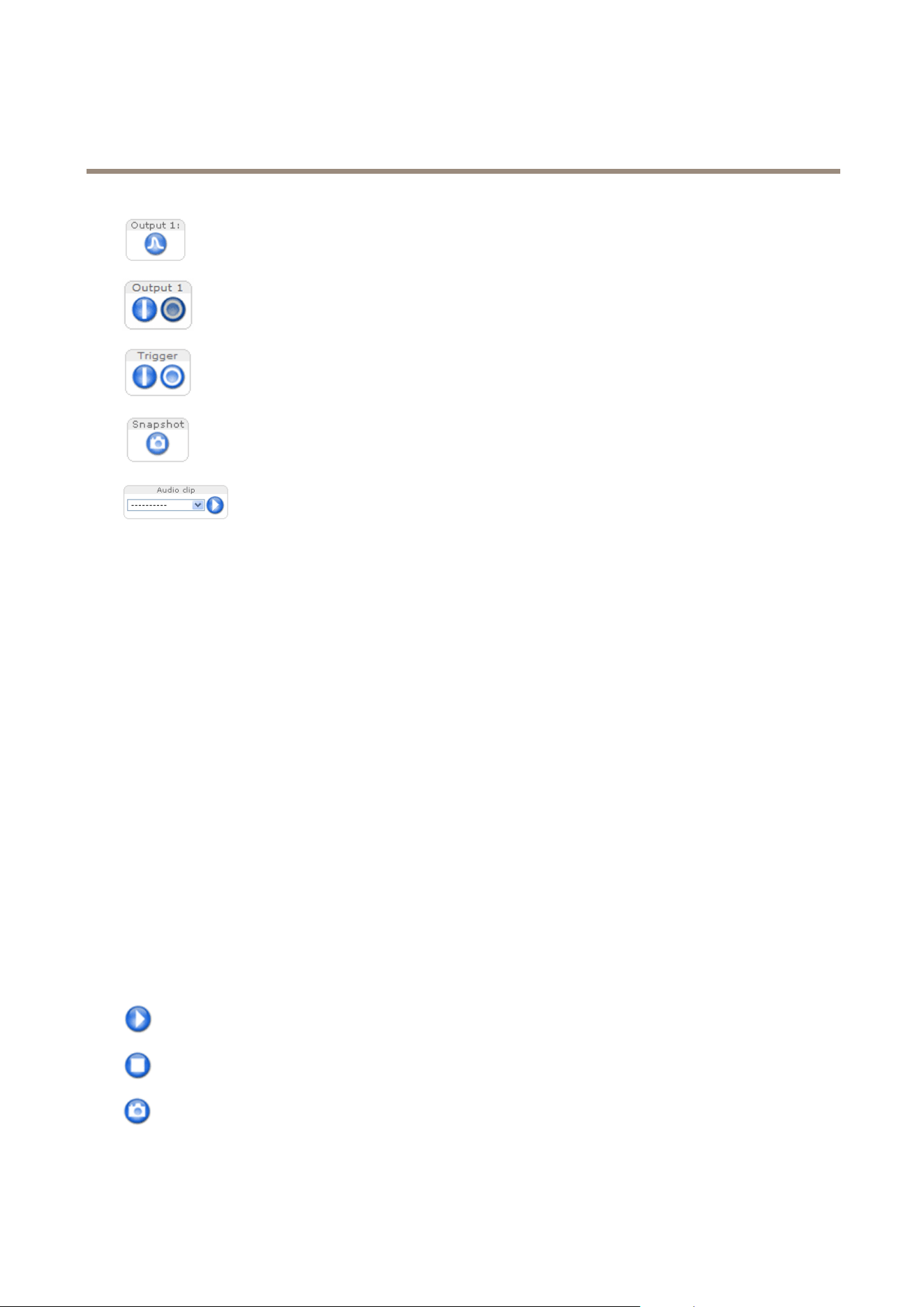
ClickPulsetoactivatetheproduct’soutputportforadenedperiodoftime.Forinformationabouthow
toenableandcongureoutputbuttons,seepage28.Theoutputbuttonnamemaydifferdependingon
thenameenteredintheI/OPortsconguration.
ClicktheActive/Inactivebuttonstomanuallyactivateandinactivetheproduct’soutputport.For
informationabouthowtoenableandcongureoutputbuttons,seepage28.
TheManualTriggerbuttonisusedtotriggeranactionrulefromtheLiveViewpage.Forinformation
abouthowtocongureandenablethebutton,seeManualTriggeronpage13.
ClickSnapshottosaveasnapshotofthevideoimage.Thisbuttonisprimarilyintendedforusewhen
theAXISMediaControlviewertoolbarisnotavailable.EnablethisbuttonfromLiveViewCong>
ActionButtons.
TheAudioclipdrop-downlistallowsyoutoplayanaudioclipfromtheLiveViewpage.Selectthe
audioclipandclickthePlaybutton.
ManualTrigger
TheManualTriggerisusedtotriggeranactionrulefromtheLiveViewpage.Themanualtriggercanforexamplebeusedto
validateactionsduringproductinstallationandconguration.
Tocongurethemanualtrigger:
1.GotoSetup>Events.
2.ClickAddtoaddanewactionrule.
3.FromtheTriggerdrop-downlist,selectInputSignal.
4.Fromtheseconddrop-downlist,selectManualTrigger.
5.Selectthedesiredactionandconguretheothersettingsasrequired.
Formoreinformationaboutactionrules,seeEventsonpage42.
ToshowthemanualtriggerbuttonsintheLiveViewpage:
1.GotoSetup>LiveViewCong.
2.UnderActionButtons,selectShowmanualtriggerbutton.
AXISMediaControlviewertoolbar
TheAXISMediaControlviewertoolbarisavailableinInternetExploreronly.SeeAXISMediaControl(AMC)onpage15formore
information.Thetoolbardisplaysthefollowingbuttons:
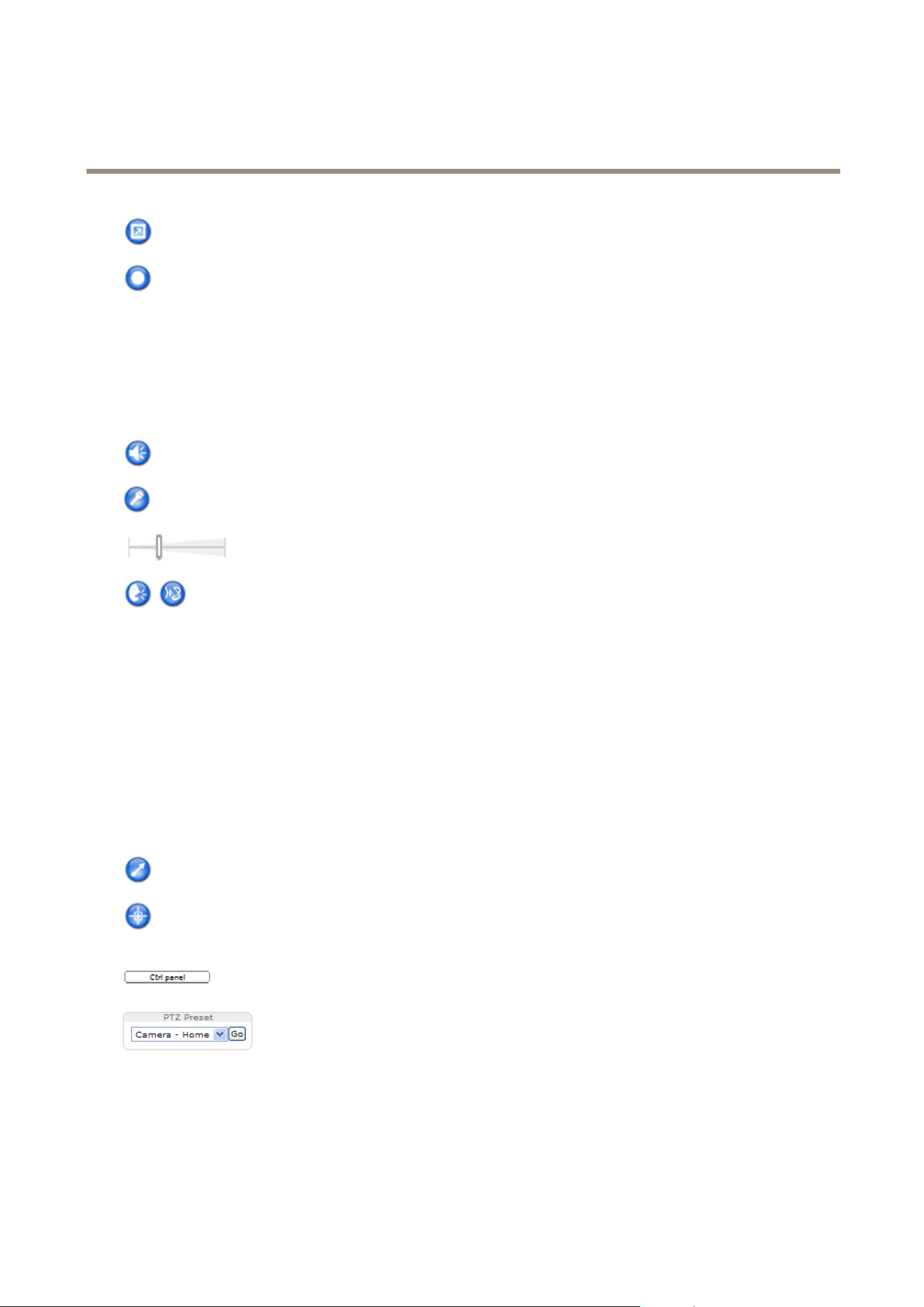
ThePlaybuttonconnectstotheAxisproductandstartsplayingamediastream.
TheStopbuttonstopsthemediastream.
TheSnapshotbuttontakesasnapshotofthevideoimage.Thelocationwheretheimageissavedcanbespecied
intheAMCControlPanel.
13
AXISQ1775-ENetworkCamera
AccesstheProduct
ClicktheViewFullScreenbuttonandthevideoimagewilllltheentirescreen.PressESC(Escape)onthecomputer
keyboardtocancelfullscreenview.
TheRecordbuttonisusedtorecordthecurrentvideostreamonyourcomputer.Thelocationwheretherecordingissaved
canbespeciedintheAMCControlPanel.EnablethisbuttonfromLiveViewCong>ViewerSettings.
AMCAudioControls
AMCaudiobuttonscontrolthespeakersandmicrophoneconnectedtotheclientcomputer.Thebuttonsareonlyvisiblewhen
audioisenabled.
Forinformationabouthowtocongureaudio,seeSetUpAudioonpage25.
Speakerbutton—Clicktoturnthespeakersonoroff.
Microphonebutton–Clicktomuteorunmutethemicrophone.InSimplex-speakeronlymode,theMicrophoneandTalk
buttonsmustbothbeactivetosendaudiototheAxisproduct.Clickeitherbuttontostopaudiotransmission.
Usetheslidertocontrolthevolumeofthespeakersandthemicrophone.
Half-duplexmode
TheTalk/Listenbuttonisusedtoswitchbetweensendingandreceivingaudio.Thebuttoncanbecongured
fromtheAudiotabintheAMCControlpanel:
•Push-To-Talkmode:Clickandholdthebuttontotalk/send.Releasethebuttontolisten.
•Togglemode:Clickoncetoswitchbetweentalkingandlistening.
Simplex–speakeronlymode
Tosendaudio,theTalkandMicrophonebuttonsmustbothbeactive.Clickeitherbuttontostopaudio
transmission.
PTZControls
TheLiveViewpagealsodisplaysPan/Tilt/Zoom(PTZ)controls.Theadministratorcanenable/disablecontrolsforspeciedusersunder
SystemOptions>Security>Users.
WiththePTZControlQueueenabledthetimeeachuserisincontrolofthePTZsettingsislimited.Clickthebuttonstorequestor
releasecontrolofthePTZcontrols.ThePTZControlQueueissetupunderPTZ>ControlQueue.
ClicktheEmulatejoystickmodebuttonandclickintheimagetomovethecameraviewinthedirectionofthe
mousepointer.
ClicktheCentermodebuttonandclickintheimagetocenterthecameraviewonthatposition.
Thecentermodebuttoncouldalsobeusedtozoominonaspecicarea.Clickintheimageanddragtodrawa
rectanglesurroundingtheareatobemagnied.Tozoomout,rotatethemousewheel.
ClicktheCtrlpanelbuttontoopenthePTZcontrolpanelwhichprovidesadditionalPTZcontrols.
User-denedbuttonscanalsoappearintheControlpanel.SeeControlsonpage30.
SelectaPTZpresetpositiontosteerthecameraviewtothesavedposition.SeePresetPositions
onpage29.
PanandTiltbars–Usethearrowstopanandtiltthecameraview,orclickonapositiononthebartosteerthecameraviewto
thatposition.
Zoombar–Usethearrowstozoominandout,orclickonapositiononthebartozoomtothatposition.
ThePTZcontrolscanbedisabledunderPTZ>Advanced>Controls,seeControlsonpage30.
14

AXISQ1775-ENetworkCamera
MediaStreams
MediaStreams
TheAxisproductprovidesseveralaudioandvideostreamformats.Yourrequirementsandthepropertiesofyournetworkwill
determinethetypeyouuse.
TheLiveViewpageintheproductprovidesaccesstoH.264andMotionJPEGvideostreams,audiostreamsandtothelistofavailable
streamproles.Otherapplicationsandclientscanaccessvideoandaudiostreamsdirectly,withoutgoingviatheLiveViewpage.
HowtoStreamH.264
H.264can,withoutcompromisingimagequality,reducethesizeofadigitalvideolebymorethan80%comparedwiththeMotion
JPEGformatandasmuchas50%morethantheMPEG-4standard.Thismeansthatmuchlessnetworkbandwidthandstoragespace
arerequiredforavideole.Orseenanotherway,muchhighervideoqualitycanbeachievedforagivenbitrate.
Decidingwhichcombinationofprotocolsandmethodstousedependsonyourviewingrequirements,andonthepropertiesof
yournetwork.TheavailableoptionsinAXISMediaControlare:
UnicastRTP
Thisunicastmethod(RTPoverUDP)isused
forliveunicastvideo,especiallywhenitis
importanttohaveanup-to-datevideostream,
evenifsomeframesaredropped.
RTPoverRTSP
Thisunicastmethod(RTPtunneledoverRTSP)
isusefulasitisrelativelysimpletocongure
rewallstoallowRTSPtrafc.
RTPoverRTSPoverHTTP
Thisunicastmethodcanbeusedtotraverse
rewalls.Firewallsarecommonlyconguredto
allowtheHTTPprotocol,thusallowingRTPto
betunneled.
Unicastingisusedforvideo-on-demand
transmissionsothatthereisnovideotrafc
onthenetworkuntilaclientconnectsand
requeststhestream.
Notethatthereareamaximumof10
simultaneousunicastconnections.
MulticastRTP
Thismethod(RTPoverUDP)shouldbeusedforlivemulticastvideo.Thevideostreamisalways
up-to-date,evenifsomeframesaredropped.
Multicastingprovidesthemostefcientusageofbandwidthwhentherearelargenumbersof
clientsviewingsimultaneously.Amulticastcannothowever,passanetworkrouterunlessthe
routerisconguredtoallowthis.ItisnotpossibletomulticastovertheInternet,forexample.
Notealsothatallmulticastviewerscountasoneunicastviewerinthemaximumtotalof10
simultaneousconnections.
AXISMediaControlnegotiateswiththeAxisproducttodeterminethetransportprotocoltouse.Theorderofpriority,listedinthe
AMCControlPanel,canbechangedandtheoptionsdisabled,tosuitspecicrequirements.
Note
H.264islicensedtechnology.TheAxisproductincludesoneH.264viewingclientlicense.Installingadditionalunlicensed
copiesoftheclientisprohibited.Topurchaseadditionallicenses,contactyourAxisreseller.
MJPEG
ThisformatusesstandardJPEGstillimagesforthevideostream.Theseimagesarethendisplayedandupdatedataratesufcient
tocreateastreamthatshowsconstantlyupdatedmotion.
TheMotionJPEGstreamusesconsiderableamountsofbandwidth,butprovidesexcellentimagequalityandaccesstoeveryimage
containedinthestream.TherecommendedmethodofaccessingMotionJPEGlivevideofromtheAxisproductistousetheAXIS
MediaControlinInternetExplorerinWindows.
AXISMediaControl(AMC)
AXISMediaControl(AMC)inInternetExplorerinWindowsistherecommendedmethodofaccessinglivevideofromtheAxisproduct.
15
AXISQ1775-ENetworkCamera
MediaStreams
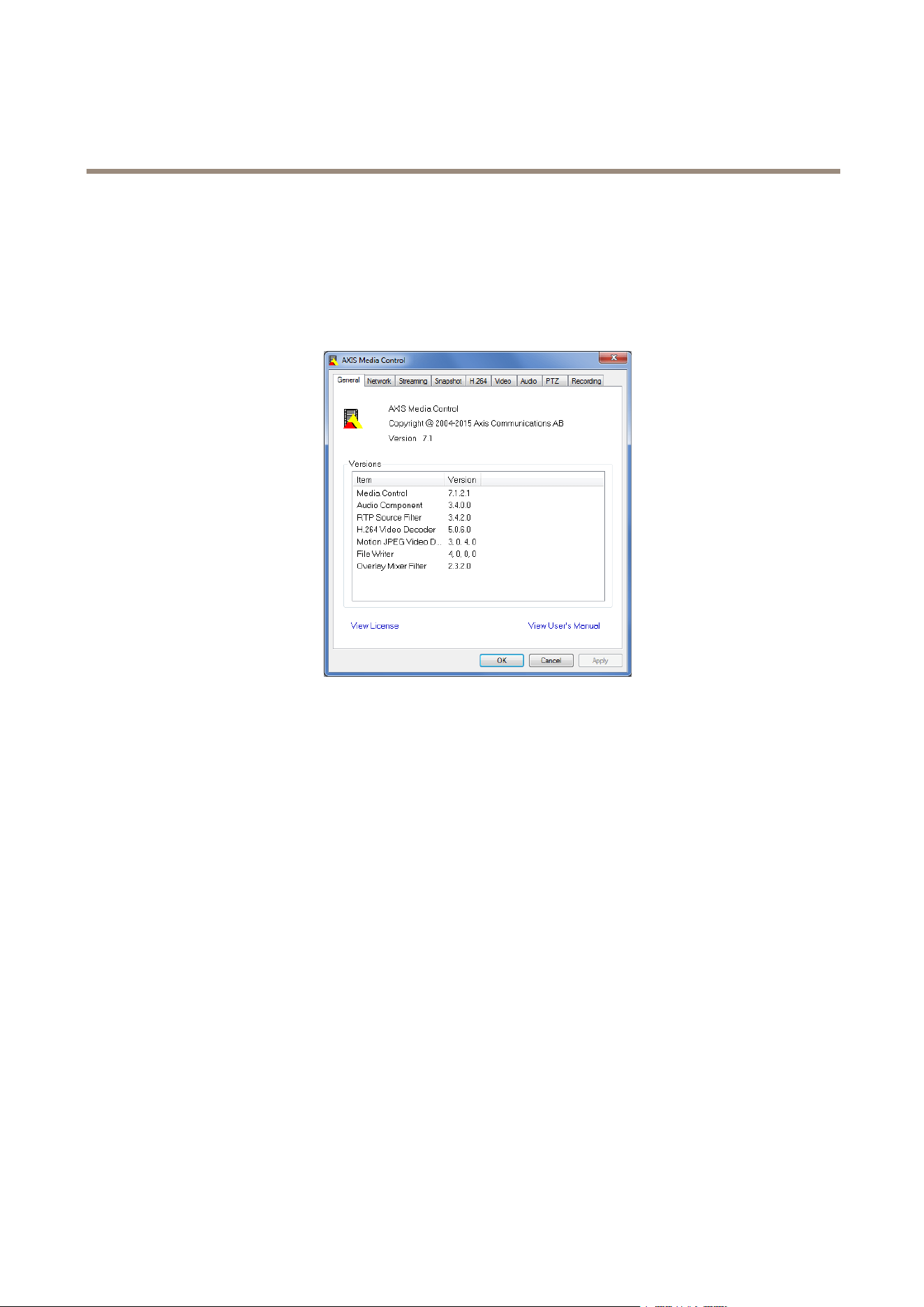
TheAMCControlPanelcanbeusedtocongurevariousvideoandaudiosettings.PleaseseetheAXISMediaControlUser’s
Manualformoreinformation.
TheAMCControlPanelisautomaticallyinstalledonrstuse,afterwhichitcanbecongured.OpentheAMCControlPanelfrom:
•WindowsControlPanel(fromtheStartscreenorStartmenu)
•Alternatively,right-clickthevideoimageinInternetExplorerandclickSettings.
AlternativeMethodsofAccessingtheVideoStream
YoucanalsoaccessvideoandimagesfromtheAxisproductinthefollowingways:
•MotionJPEGserverpush(ifsupportedbytheclient,ChromeorFirefox,forexample).ThisoptionmaintainsanopenHTTP
connectiontothebrowserandsendsdataasandwhenrequired,foraslongasrequired.
•StillJPEGimagesinabrowser.Enterthepathhttp://<ip>/axis-cgi/jpg/image.cgi
•WindowsMediaPlayer.ThisrequiresAXISMediaControlandtheH.264decodertobeinstalled.Thefollowingpaths
canbeused:
-UnicastviaRTP:axrtpu://<ip>/axis-media/media.amp
-UnicastviaRTSP:axrtsp://<ip>/axis-media/media.amp
-UnicastviaRTSP,tunneledviaHTTP:axrtsphttp://<ip>/axis-media/media.amp
-Multicast:axrtpm://<ip>/axis-media/media.amp
•QuickTime
TM
.Thefollowingpathscanbeused:
-rtsp://<ip>/axis-media/media.amp
-rtsp://<ip>/axis-media/media.3gp
16

AXISQ1775-ENetworkCamera
MediaStreams
Note
•<ip>=IPaddress
•TheAxisproductsupportsQuickTime6.5.1andlater.
•QuickTimemayaddlatencytothevideostream.
•ItmaybepossibletouseotherplayerstoviewtheH.264streamusingthepathsabove,althoughAxisdoesnotguarantee
this.
AccessAudioStreams
TheLiveViewpageprovidesaccesstoaudiothroughAXISMediaControl;inadditionaudiocanbeaccessedinthefollowingways:
•VAPIX®ApplicationProgrammingInterface(API)Formoreinformation,visitwww.axis.com/developer
•WindowsMediaPlayersupportssimplexaudio.Thefollowingpathscanbeused:
-UnicastviaRTP:axrtpu://<ip>/axis-media/media.amp
-UnicastviaRTSP:axrtsp://<ip>/axis-media/media.amp
-UnicastviaRTSP,tunneledviaHTTP:axrtsphttp://<ip>/axis-media/media.amp
-Multicast:axrtpm://<ip>/axis-media/media.amp
•QuickTime
TM
supportsG.71 1andAACaudioencoding.Thefollowingpathscanbeused:
-rtsp://<ip>/axis-media/media.amp
-rtsp://<ip>/axis-media/media.3gp
17

AXISQ1775-ENetworkCamera
SetUptheProduct
SetUptheProduct
TheAxisproductcanbeconguredbyuserswithadministratororoperatorrights.Toopentheproduct’sSetuppages,clickSetupin
thetopright-handcorneroftheLiveViewpage.
•Administratorshaveunrestrictedaccesstoallsettings.
•Operatorshaverestrictedaccesstosettings,seeUsersonpage51
Seealsotheonlinehelp
.
BasicSetup
BasicSetupprovidesshortcutstothesettingsthatshouldbemadebeforeusingtheAxisproduct:
1.Users.Seepage51.
2.TCP/IP.Seepage54.
3.Date&Time.Seepage53.
4.VideoStream.Seepage19.
5.AudioSettings.Seepage25.
TheBasicSetupmenucanbedisabledfromSystemOptions>Security>Users.
18

AXISQ1775-ENetworkCamera
VideoandAudio
VideoandAudio
Thevideoandaudiosettingscanbeusedtooptimizevideoandaudioquality.Youcancongurethefollowing:
•Videostreamsettings.Seepage19.
•Streamproles.Seepage20.
•ONVIFMediaProles.Seepage21.
•Camerasettings.Seepage21.
•Overlayimage.Seepage23.
•Privacymask.Seepage25.
•Audiosettings.Seepage25.
•Audioclips.Seepage26.
SetUpVideoStreams
Tosetuptheproduct’svideostreams,gotoVideo&Audio>VideoStream.
Thevideostreamsettingsaredividedintothefollowingtabs:
•Image.Seepage19.
•Audio.Seepage25.
•H.264.Seepage20.
•MJPEG.Seepage20.
PixelCounter
Thepixelcountershowsthenumberofpixelsinanareaoftheimage.Thepixelcounterisusefulinsituationswherethereis
aspecicsizerequirement,forexampleinfacerecognition.
Thepixelcountercanbeused:
•Whensettingupavideostream,seeSetUpVideoStreamsonpage19.UnderPreview,clickOpenandselecttheShow
pixelcounteroptiontoenabletherectangleintheimage.Usethemousetomoveandresizetherectangle,orenterthe
numberofpixelsintheWidthandHeighteldsandclickApply.
Image
ThedefaultimagesettingscanbeconguredunderVideo&Audio>VideoStream.SelecttheImagetab.
Thefollowingsettingsareavailable:
•Resolution.Selectthedefaultresolution.
•Compression.Thecompressionlevelaffectstheimagequality,bandwidthandlesizeofsavedimages;thelowerthe
compression,thehighertheimagequalitywithhigherbandwidthrequirementsandlargerlesizes.
•Mirrorimage.Ifrequired,theimagecanbemirrored.
•Rotateimage.Ifrequired,theimagecanberotated.
19

AXISQ1775-ENetworkCamera
VideoandAudio
•Maximumframerate.Toavoidbandwidthproblems,theframerateallowedtoeachviewercanbeLimitedtoaxed
amount.Alternatively,theframeratecanbesetasUnlimited,whichmeanstheAxisproductalwaysdeliversthehighest
frameratepossibleunderthecurrentconditions.
•Overlaysettings.SeeOverlayonpage23.
ClickSavetoapplythenewsettings.
H.264
H.264,alsoknownasMPEG-4Part10/AVC,isavideocompressionstandardthatprovideshighqualityvideostreamsatlowbitrates.
AnH.264videostreamconsistsofdifferenttypesofframessuchasI-framesandP-frames.AnI-frameisacompleteimagewhereas
P-framesonlycontainthedifferencesfrompreviousframes.
TheH.264streamsettingscanbeconguredfromtheVideo&Audio>VideoStreampage.SelecttheH.264tab.Thesettings
denedinthispagewillapplytoallH.264streamsthatdonotuseastreamprole.
TheGOPlengthisthenumberofframesbetweentwoconsecutiveI-frames.IncreasingtheGOPlengthmaysaveconsiderablyon
bandwidthrequirementsinsomecases,butmayalsohaveanadverseaffectonimagequality.
TheAxisproductsupportsthefollowingH.264prole(s):
•Baseline.TheBaselineproleisrecommendedforclientsthatdon’tsupportCABACentropycoding.
•Main.TheMainproleprovideshighercompressionwithmaintainedvideoqualitycomparedtotheBaselineprolebut
requiresmoreprocessingpowertodecode.
•High.TheHighproleprovidesreducedbitrateandhighercompressionwithmaintainedvideoqualitycomparedtothe
Mainprolebutrequiresmoreprocessingpowertodecode.
ThebitratecanbesetasVariablebitrate(VBR)orMaximumbitrate(MBR).VBRadjuststhebitrateaccordingtotheimage
complexity,usingupmorebandwidthforincreasedactivityintheimage,andlessforlowerimageactivity.Whentheactivityin
thesceneincreases,thebitratewouldusuallyincreaseaswell.Ifthereisasurplusinbandwidth,thismaynotbeanissueand
selectingVariablebitrate(VBR)willbesufcient.Butifbandwidthislimited,itisrecommendedtocontrolthebitratebyselecting
Maximumbitrate(MBR).Whentheactivityinthesceneincreases,VBRadjuststhebitrateaccordingtothecomplexity,usingup
morebandwidthforincreasedactivityinthescene,andlessforlowersceneactivity.MBRallowsyoutosetatargetbitratethat
limitsthebandwidthconsumption.
TheMBRtargetbitrateworksliketheceilingofatent.Itlimitsthebitrate,whilemaintainingsomeexibility.Thebitrate
maybounceupanddownwithinthesettargetbutwhenitnearsthesettargetvalue,thelimitationkicksin.However,because
MBRwillalwaysprioritizeacontinuousvideostream,itallowstemporaryovershootsfromthetargetbitrate.Becausesettinga
targetvaluepreventsthebitratefromincreasing,framerateandimagequalityareaffectednegatively.Topartlycompensatefor
this,selectwhichvariableshallbeprioritized,framerateorimagequality.Notsettingaprioritymeansthatframerateand
imagequalityareequallyaffected.
Thecurrentbitratecanbesettoappearastextoverlay.UnderOverlaySettings,selectIncludetextandenterthemodier
#bintheeld.
Toapplythesettings,clickSave.
MJPEG
Sometimestheimagesizeislargeduetolowlightorcomplexscenery.Adjustingthemaximumframesizehelpstocontrolthe
bandwidthandstorageusedbytheMotionJPEGvideostreaminthesesituations.SettingtheframesizetotheDefaultsetting
providesconsistentlygoodimagequalityattheexpenseofincreasedbandwidthandstorageusageinlowlight.Limitingtheframe
sizeoptimizesbandwidthandstorageusage,butmaygivepoorimagequality.Topreventincreasedbandwidthandstorageusage,
themaximumframesizeshouldbesettoanoptimalvalue.
StreamProles
Astreamproleisasetofpredenedstreamsettingsincludingresolution,compression,framerateandoverlaysettings.Stream
prolescanbeused:
20

AXISQ1775-ENetworkCamera
VideoandAudio
•Whensettinguprecordingusingactionrules.SeeEventsonpage42.
•Whensettingupcontinuousrecording.SeeContinuousRecordingonpage49.
•IntheLiveViewpage–selectthestreamprolefromtheStreamproledrop-downlist.
Forquicksetup,useoneofthepredenedstreamproles.Eachpredenedprolehasadescriptivename,indicatingitspurpose.If
required,thepredenedstreamprolescanbemodiedandnewcustomizedstreamprolescanbecreated.
Tocreateanewproleormodifyanexistingprole,gotoSetup>Video&Audio>StreamProles.
ToselectadefaultstreamprolefortheLiveViewpage,gotoSetup>LiveViewCong.
ONVIFMediaProles
AnONVIFmediaproleconsistsofasetofcongurationsthatcanbeusedtochangemediastreamsettings.ONVIFmediaproles
canbesetthroughtheONVIFMediaProleSettingspageandbeusedbyaclienttoconguremediastreamproperties.
TheONVIFMediaProlespagelistsallsuchpre-conguredproles.Theseprolescannotberemoved.Pre-conguredmedia
proleshavebeenincludedintheproductforquicksetup.ItisalsopossibletocongurenewONVIFmediaprolesasperrequired
specications.ToaddanewONVIFmediaprole,clickAddandentertherequiredinformation.Youcanalsomodifyorremovea
prolefromthispage.
CameraSettings
TheVideo&Audio>CameraSettingspageprovidesaccesstoadvancedimagesettingsfortheAxisproduct.
CaptureMode
CapturemodedenesthemaximumresolutionandmaximumframerateavailableintheAxisproduct.Acapturemodewithalarge
maximumresolutionhasareducedmaximumframerateandviceversa.Thecapturemodesettingalsoaffectsthecamera’sangleof
viewastheeffectivesizeoftheimagesensordiffersbetweencapturemodes.
Capturemodeissetthersttimetheproductisaccessed.SelectthedesiredcapturemodeandclickOK.
Important
Changingcapturemodewhentheproducthasbeenconguredisnotrecommendedasmostothersettingswillbeeither
removedorreset.
Tochangecapturemode,followthesesteps:
1.GotoSetup>Video&Audio>CameraSettings.
2.Selectthenewcapturemode.
3.ClickSave.
ImageAppearance
TochangeImageAppearancegotothemenusunderSetup>Video&Audio>CameraSettings.
IncreasingtheColorlevelincreasesthecolorsaturation.Thevalue100givesmaximumcolorsaturationandthevalue0gives
minimumcolorsaturation.
TheimageBrightnesscanbeadjustedintherange0–100,whereahighervalueproducesabrighterimage.
IncreasingtheSharpnesscanincreasebandwidthusage.Asharperimagemightincreaseimagenoiseespeciallyinlowlight
conditions.Alowersettingreducesimagenoise,butthewholeimagewillappearlesssharp.
21

AXISQ1775-ENetworkCamera
VideoandAudio
WhiteBalance
TochangethissettinggotoSetup>Video&Audio>CameraSettings
Whitebalanceisusedtomakecolorsintheimageappearthesameregardlessofthecolortemperatureofthelightsource.TheAxis
productcanbesettoautomaticallyidentifythelightsourceandcompensateforitscolor.Alternatively,selectthetypeoflight
sourcefromthedrop-downlist.Foradescriptionofeachavailablesetting,seetheonlinehelp
.
WideDynamicRange
WideDynamicRangecanimprovetheexposurewhenthereisaconsiderablecontrastbetweenlightanddarkareasintheimage.
EnableWDRinintensebacklightconditions.DisableWDRinlowlightconditionsforoptimalexposure.
ExposureSettings
Exposurecontrol-Thesesettingsisusedtoadapttotheamountoflightused.Automaticisthedefaultsettinganditcanbe
usedinmostsituations.Theshutterspeedisautomaticallysettoproduceoptimumimagequality.UseManualifyouhavespecial
requirementsfortheexposuresettingandwishtolockit.Selectthedesiredexposuretimefromthedrop-downlist.
Maxexposuretime-Selectthemaximumexposuretimefromthedrop-downlist.Increasingtheexposuretimewillimproveimage
quality,butdecreasetheframerate.Theremayalsobeanincreaseinmotionblur.
Allowslowshutter-SelectAllowslowshuttertoletthecameradecreasetheshutterspeedinlowlighttoimproveimagebrightness.
EnableBacklightcompensation-SelectEnableBacklightcompensationifabrightspotoflight,forexamplealightbulb,causes
otherareasintheimagetoappeartoodark.
Maxgain-Measuredindecibels(dB),gaindescribestheamountofamplicationappliedtoasignal,inthiscasethevisual
informationintheimage.Ahighlevelofamplicationmayprovideabetterimageinverylowlightsituations.Ahighgainwillalso
increasetheamountofimagenoise.
Exposurezones-Thissettingsdetermineswhichpartoftheimageisusedtocalculatetheexposure.Formostsituations,theAuto
settingcanbeused.Forparticularrequirement,selectapredenedarea.
IRcutlter-TheIRcutlterpreventsinfrared(IR)lightfromreachingtheimagesensor.Inpoorlightingconditions,forexampleat
night,orwhenusinganexternalIRlamp,settheIRcutltertoOff.Thisincreaseslightsensitivityandallowstheproductto“see”
infraredlight.TheimageisshowninblackandwhitewhentheIRcutlterisoff.SettheIRcutltertoAutotoautomatically
switchbetweenOnandOffaccordingtothelightingconditions.
Day/Nightshiftpriority-UsetheDay/Nightshiftprioritybartodeterminewhenthecamerashiftsintoeitherdaymodeornight
mode.Bydefault,thecamerawillautomaticallychangefromdaytonightmodeatapre-denedlevelwhichcorrespondstolight
conditions.Bydraggingthebarhandletowardsthesun,thecamerawillchangetodaymodeearlierandchangetonightmodelate.
ImageSettings
Important
Theautofocusbehaviorisaffectedbyfactorssuchaslightconditions,contrastsinthescene,andobjectsmovinginandout.In
theseconditionsorscenes,amanualfocuscouldbepreferabletoenhanceperformanceandallowthecameratofocusfaster.
Autofocusenabled-Autofocusenablesthecameratofocusalthoughthedistancetodifferentobjectsofinterestisconstantly
changing.Wheneverthecamera’span/tilt/zoompositionischanged,theautofocusperformsasearchtondtheidealfocuspoint.
Automaticfocusingisenabledbydefault.Ifthefocuspositionischangedmanuallyusingthefocusbar,autofocuswillbedisabled
evenifenabledinImageSettings.Inthiscase,usethePTZcontrolpaneltoenableautofocus,seepage14.Ifrequired,thefocus
controlcanbedisabledunderPTZ>Advanced>Controls.
Defog-EnablethisfeaturefromVideo&Audio>CameraSettingstocountertheeffectsoffoggyweatherandgetaclearimage.
Noisereduction-SettoOntoenablenoisereduction.Noisereductionmayincreasetheamountofmotionblur.
22

AXISQ1775-ENetworkCamera
VideoandAudio
ImagefreezeonPTZ-SelectAllmovementstofreezetheimagewhilethecameraismovingduringapan,tiltorzoomoperation.
Oncethecamerareachesitsnewposition,theviewfromthatpositionisshown.Presetsfreezestheimageonlywhenthecamera
movesbetweenpresetpositions.
Overlay
Overlaysareusedtoprovideextrainformation,suchasforensicvideoanalysisorduringproductinstallationandconguration.
Overlaysaresuperimposedoverthevideostream.
Anoverlaytextcandisplaythecurrentdateandtime,oratextstring.
Whenusingatextstring,modierscanbeusedtodisplayinformationsuchasthecurrentbitrateorthecurrentframerate.
Forinformationaboutavailablemodiers,seeFileNaming&Date/TimeFormatsintheonlinehelp
.
Itisalsopossibletodisplaytextwhenanactionruleistriggered,seeUseOverlayTextinanActionRule.
Note
Toenableoverlays:
1.GotoVideo&Audio>VideoStreamandselecttheImagetab.
2.Toincludeanoverlayimage,selectIncludeoverlayimageatthecoordinates.Theoverlayimagemustrstbeuploadedto
theAxisproduct,seeOverlayImage.
4.Toincludedateandtime,selectIncludedateandIncludetime.
5.Toincludeatextstring,selectIncludetextandenterthetextintheeld.Modierscanbeused,seeFileNaming&
Date/TimeFormatsintheonlinehelp
.
6.Denetextoverlaycharacteristicsintherelevantelds.
7.ClickSave.
Tomodifythedateandtimeformat,gotoSystemOptions>Date&Time.SeeDate&Timeonpage53.
OverlayImage
Anoverlayimageisastaticimagesuperimposedoverthevideostream.Theimage,forexampleacompanylogo,isusedtoprovide
extrainformationortomaskapartoftheimage.
Sinceitisstatic,thepositionandsizeofanoverlayimagewillremainthesameregardlessofresolutionandPan/Tilt/Zoommovements.
Useaprivacymasktosetupadynamicmaskwhichwillalwaysmaskthespeciedpartofmonitoredarea.
Formoreinformationaboutprivacymasks,seePrivacyMaskonpage25.
Touseanoverlayimage,theimagemustrstbeuploadedtotheAxisproduct.TheuploadedimageshouldbeaWindows24-bitBMP
imagewithmaximum250colors.Theimagewidthandheight,inpixels,mustbeexactlydivisibleby4andcannotbelargerthanthe
maximumimageresolution.Ifcombiningtextandimageoverlays,takeintoconsiderationthatthetextoverlayoccupies16or32
pixelsinheight(dependingontheresolution)andhasthesamewidthasthevideoimage.
ToautomaticallyscaletheimagetotheresolutionusedbytheAxisproduct,selecttheoptionScalewithresolutionfromthe
TransparencySettingspagewhichisdisplayedwhenuploadingintheimage.
Touploadanoverlayimage:
1.GotoVideo&Audio>OverlayImage.
2.ClickBrowseandbrowsetothele.
23

AXISQ1775-ENetworkCamera
VideoandAudio
3.ClickUpload.
4.TheTransparencySettingspageisnowdisplayed:
-Tomakeacolorintheoverlayimagetransparent,selectUsetransparencyandentertheRGBhexadecimalvalue
forthecolor.Example:Tomakewhitetransparent,enterFFFFFF.
Formoreexamplesofhexadecimalvalues,seetheonlinehelp
.
-Toscaletheimageautomatically,selectScalewithresolution.Theimagewillbescaleddowntotthe
resolutionusedbytheAxisproduct.
5.ClickSave.
Toselecttheimagetouseasoverlay:
1.GotoVideo&Audio>OverlayImage.
2.SelecttheimagetousefromtheUseoverlayimagelistandclickSave.
Todisplaytheoverlayimage:
1.GotoVideo&Audio>VideoStreamandselecttheImagetab.
2.UnderOverlaySettings,selectIncludeoverlayimageatthecoordinates.
3.Tocontroltheimage’sposition,entertheXandYcoordinates.TheX=0andY=0positionisthetopleftcorner.Ifapartof
theimageispositionedoutsidethevideoimage,theoverlayimagewillbemovedsothatthewholeimageisvisible.
4.ClickSave.
UseOverlayTextinanActionRule
Actionrules,seepage42,candisplayanoverlaytextwhentheruleistriggered.Thetextcanbeusedtoprovideinformationfor
forensicvideoanalysis,notifysurveillanceoperatorsorvalidatetriggersandactionsduringproductinstallationandconguration.
Todisplayoverlaytextwhenanactionruleistriggered,themodier#Dshouldbeusedasdescribedbelow.Whentheruleis
triggered,#Dwillbereplacedbythetextspeciedintheactionrule.
Startbyenablingoverlaytextinthevideostream:
1.GotoVideo&Audio>VideoStreamandselecttheImagetab.
2.UnderOverlaySettings,selectIncludetext.
3.Enterthemodier#Dand,optionally,additionaltextwhichwillbedisplayedalsowhentheactionruleisnotactive.
Createtheactionrule:
1.GotoEvents>ActionRules
2.ClickAddtocreateanewrule.
3.SelectaTriggerand,optionally,aScheduleandAdditionalconditions.Seetheonlinehelpfordetails.
4.FromtheActionslist,selectOverlayText
5.EnterthetexttodisplayintheTexteld.Thisisthetextthat#Dwillbereplacedby.
6.SpecifytheDuration.Thetextcanbedisplayedwhiletheruleisactiveorforaxednumberofseconds.
24

AXISQ1775-ENetworkCamera
VideoandAudio
PrivacyMask
Aprivacymaskisauser-denedareathatpreventusersfromviewingpartsofthemonitoredarea.Privacymasksappearas
blocksofsolidcolororblurredimageelementsandareappliedonthevideostream.Privacymaskscannotbebypassedusingthe
VAPIX®applicationprogramminginterface(API).
ThePrivacyMaskList(Video&Audio>PrivacyMask)showsallthemasksthatarecurrentlyconguredintheAxisproductand
indicatesiftheyareenabled.
Youcanaddanewmask,re-sizethemaskwiththemouse,chooseacolorforthemask,andgivethemaskaname.
Formoreinformation,seetheonlinehelp
Important
Addingmanyprivacymasksmayaffecttheproduct’sperformance.
SetUpAudio
Tochangetheproduct’saudiosettings,gotoVideo&Audio>AudioSettings.
Eachstreamproleisaseparatevideostream.Toincludetheaudiostreaminallstreamproles,gototheaudiotabineachstream
prolesettingspageandenableaudio.Formoreinformation,seeStreamProlesonpage20.
AudioModes
TheAxisproductsupportsthefollowingaudiomodes:
•Fullduplex–Simultaneoustwo-wayaudioallowingtheAxisproducttotransmitandreceiveaudioatthesametime.
Thereisnoechocancellation;iffeedbackloopsappear,trymovingthemicrophoneorthespeaker.
•Half-duplex–AudiocanbetransmittedtoandfromtheAxisproductbutonlyinonedirectionatatime.Totransmit
audiousingtheLiveViewpage,usetheTalkandListenbuttons,seeAMCAudioControlsonpage14.
•Simplex–NetworkCameraspeakeronly-AudioistransmittedfromaclienttotheAxisproductandcanbeplayedby
aspeakerconnectedtotheproduct.TotransmitaudiousingtheLiveViewpage,theTalkandMicrophoneonbuttons
mustbothbeactive,seeAMCAudioControlsonpage14.
•Simplex–NetworkCameramicrophoneonly-Audiocapturedbytheproductmicrophoneistransmittedfromthe
Axisproducttooneormoreclients.
Tosettheaudiomode,gotoVideo&Audio>AudioSettingsandselectthedesiredmodefromtheAudiomodedrop-downlist.
AudioInput
AnexternalmicrophoneoralinesourcecanbeconnectedtotheAudio-inconnector.ConguretheaudioinputsettingsunderVideo
&Audio>AudioSettings.
Note
Whenusedinanoutdoorenclosure,theinternalmicrophoneonthisAxisproductcannotbeused.
Note
IfusingbalancedLineinastereocontactmustbeused.Hotontip,coldonringandgroundonsleeve.
SelectExternalMicrophonetouseanexternalmicrophoneorLinetouseaLineindevice,e.g.anaudiomixerformultiple
microphonesoramicrophonewithabuilt-inamplier,asaudiosource.
SelecttheYesoptioniftheLineinputorexternalmicrophoneisBalanced.
25

AXISQ1775-ENetworkCamera
VideoandAudio
TheMicrophonepoweroptionisavailableforexternalmicrophones.5VDCpoweror12Vphantompowerareavailabledepending
onifthemicrophoneisunbalancedorbalanced.
Microphonepowershouldonlybeusedwithmicrophonesthathavenobattery.Thissettingshouldnotbeenabledwhenusinga
dynamicorbatterypoweredmicrophone.
UsetheInputgaintocontrolthevolumeoftheaudioinput.Ifthesoundistoolow,chooseahigherdBvalue,toamplifythe
sound.Ifthesoundistoohigh,choosealowerdBvalue.TheLevelbargivesavisualrepresentationoftheaudiosignallevelindB
relativetothefull-scaleinputlevel.
•Green—thesignalisatagoodlevel.
•Yellow—thesignalisbecomingdistorted.
•Red—thesignalisdistorted.
UsetheEncodingoptiontoselectdigitalaudioencodingformat.
•AACrequiresalicenseforbothencodinganddecoding.AACistheleastcomplicatedandmostwidelyusedcodec.If
achievingthebestpossibleaudioqualityisapriority,AACistherecommendedcodectouse.AnAAClicenseisincluded
intheAxisproduct.
•G71 1isanunlicensedstandardcodecthatisusefulwhenintegratingaudiointoaVoIPsystem
•G726isanunlicensedspeechcodecthatismostcommonlyusedwithinthesecurityindustry.
Note
TheSampleratedenesthenumberoftimespersecondthesoundissampled.Ahighersampleratewillprovidebetteraudio
quality,butalsorequiresagreaterbandwidth.
SettherequiredBitratedependingontheselectedencoding.Ahigherbitratewillgivebetteraudioquality.Alowerbitrate
mayhavelatencyordelay,butwillrequirelessbandwidth.
Formoreinformationaboutthesesettings,pleaseseetheonlinehelp
.
AudioOutput
AnexternalspeakercanbeconnectedtotheAudio-outconnector(anactivespeakerwithbuilt-inamplierisrequiredforthis).The
outputcanbeconnectedtoanotheramplierwithspeakers.Astereoconnectormustbeusedfortheaudioout.
ConguretheaudiooutputsettingsunderVideo&Audio>AudioSettings.
Outputgain-Controlthevolumeofthelineaudiooutput.Ifthesoundistoolow,chooseahigherdBvalue.Ifthesoundis
toohigh,choosealowerdBvalue.
AudioClips
AnaudioclipisasoundlethatcanbeplayedwheneventsoccurordirectlyfromtheLiveViewpage.Theaudioclipmustrstbe
uploadedtotheAxisproductorrecordedbyamicrophoneconnectedtotheproduct.
Toadd,download,modifyorremoveaudioclips,gotoVideo&Audio>AudioClips.Formoreinformationseetheonlinehelp.
ToconguretheAxisproducttoplayaudioclipswhenaneventoccurs,anactionrulemustbesetup.Formoreinformation,
seeEventsonpage42.
Note
Audioclipscannotbeusediftheproduct’saudiofunctionalityisenabled.TheaudiofunctionalityisenabledontheAudio
tabunderVideo&Audio>VideoStream.
26

AXISQ1775-ENetworkCamera
ConfiguretheLiveViewPage
ConfiguretheLiveViewPage
YoucancustomizetheLiveViewpageandalterittosuityourrequirements.Itispossibletodenethefollowingfeaturesof
theLiveViewpage.
•StreamProle.Seepage20.
•DefaultViewerforBrowser.Seepage27.
•ViewerSettings.Seepage27.
•ActionButtons.ThesearethebuttonsdescribedinControlsontheLiveViewPageonpage12.
•UserDenedLinks.Seepage28.
•OutputButtons.Seepage28.
DefaultViewerforBrowsers
FromLiveViewCong>DefaultViewerselectthedefaultmethodforviewingvideoimagesinyourbrowser.Theproductattempts
toshowthevideoimagesintheselectedvideoformatandviewer.Ifthisisnotpossible,theproductoverridesthesettingsand
selectsthebestavailablecombination.
BrowserViewerDescription
AMC
RecommendedviewerinInternetExplorer(H.264/MotionJPEG).
QuickTime
H.264.
WindowsInternetExplorer
StillimageDisplaysstillimagesonly.ClicktheRefreshbuttoninyourbrowsertoviewa
newimage.
ServerPush
Recommendedviewerforotherbrowsers(MotionJPEG).
QuickTime
H.264.
Otherbrowsers
StillimageDisplaysstillimagesonly.ClicktheRefreshbuttoninyourbrowsertoviewa
newimage.
Formoreinformation,pleaseseetheonlinehelp.
ViewerSettings
Tocongureoptionsfortheviewer,gotoLiveViewCong>ViewerSettings.
•SelectShowviewertoolbartodisplaytheAXISMediaControl(AMC)ortheQuickTimeviewertoolbarunderthevideo
imageinyourbrowser.
•H.264decoderinstallation.TheadministratorcandisableinstallationoftheH.264decoderincludedwithAXISMedia
Control.Thisisusedtopreventinstallationofunlicensedcopies.Furtherdecoderlicensescanbepurchasedfromyour
Axisreseller.
•SelectShowcrosshairinPTZjoystickmodetoenableacrossthatwillindicatethecenteroftheimageinPTZjoystick
mode.
•SelectUsePTZjoystickmodeasdefaulttoenablejoystickmode.Themodecanbechangedtemporarilyfromthe
PTZcontrolpanel.
•SelectEnablerecordingbuttontoenablerecordingfromtheLiveViewpage.Thisbuttonisavailablewhenusingthe
AMCviewer.TherecordingsaresavedtothelocationspeciedintheAMCControlPanel.SeeAXISMediaControl
(AMC)onpage15.
27

AXISQ1775-ENetworkCamera
ConfiguretheLiveViewPage
UserDenedLinks
Todisplayuser-denedlinksintheLiveViewpage,selecttheShowcustomlinkoption,givethelinkanameandthenentertheURL
tolinkto.Whendeningaweblinkdonotremovethe'http://'fromtheURLaddress.Customlinkscanbeusedtorunscriptsor
activateexternaldevicesconnectedtotheproduct,ortheycanlinktoawebpage.Customlinksdenedascgilinkswillrunthe
scriptinthebackground,inahiddenframe.Deningthelinkasaweblinkwillopenthelinkinanewwindow.
OutputButtons
ExternalI/OdevicesconnectedtotheAxisproduct’soutputportscanbecontrolleddirectlyfromtheLiveViewpage.
TodisplayoutputbuttonsintheLiveViewpage:
1.GotoSetup>LiveViewCong.
2.UnderOutputButtons,selectthetypeofcontroltouse:
-Pulseactivatestheoutputforadenedperiodoftime.Thepulsetimecanbesetfrom1/100secondto60
seconds.
-Active/Inactivedisplaystwobuttons,oneoreachaction.
Toconguretheactiveandinactivestates,gotoSystemOptions>Ports&Devices>I/OPortsandsettheport’sNormalstate.
FormoreinformationaboutI/Oports,seeI/OPortsonpage61.
28

AXISQ1775-ENetworkCamera
PTZ(PanTiltZoom)
PTZ(PanTiltZoom)
ThePTZmenuisavailableifaPTZdriverhasbeenuploaded.SeeInstallPTZDriveronpage31.
PresetPositions
Apresetpositionisasavedviewthatcanbeusedtoquicklysteerthecameratoaspecicposition.Apresetpositionconsistsof
thefollowingvalues:
•Panandtiltpositions
•Zoomposition
AccessthePresetPositions
Presetpositionscanbeaccessedinseveralways:
•ByselectingthepresetfromthePresetpositionsdrop-downlistintheLiveViewPage.
•Whensettingupactionrules.Seepage42.
•Whensettingupguardtours.Seepage29.
AddaPresetPosition
1.GotoPTZ>PresetPositions.
2.Clickintheimageorusethecontrolstosteerthecameraviewtothedesiredposition,seePresetPositions.
3.EnteradescriptivenameintheCurrentpositioneld.
4.Ifrequired,selectUsecurrentpositionasHome.
5.ClickAddtosavethepresetposition.
Toincludethepresetpositionnameintheoverlaytext,gotoVideo&Audio,selectIncludeoverlaytextandenterthemodier#Pin
theeld.Formoreinformationaboutmodiers,seeFileNaming&Date/TimeFormatsintheonlinehelp
.
SettheHomePosition
TheHomepositionisreadilyaccessiblebyclickingtheHomebuttonontheLiveViewpageandinthePresetPositionssetupwindow.
Tosetacustomizedhomeposition,selectUsecurrentpositionasHomewhenaddingapresetposition.Theuser-denedhome
positionwillhave(H)added,forexample,Entrance(H).ThedefaultHomeposition,called“Home”,willstillbeavailable.
TheproductcanbeconguredtoreturntotheHomepositionwhenthePTZfunctionalityhasbeeninactiveforaspeciedlength
oftime.EnterthelengthoftimeintheReturntohomewheninactiveeldandclickSave.Setthetimetozerotopreventthe
productfromautomaticallyreturningtotheHomeposition.
Gatekeeper
ToenabletheGatekeeper,gotoPTZ>Gatekeeperandfollowtheonlineinstructions.
GuardTour
Aguardtourdisplaysthevideostreamfromdifferentpresetpositions,one-by-one,inapredeterminedorderoratrandomandfor
congurabletimeperiods.Theenabledguardtourwillkeeprunningaftertheuserhasloggedofforclosedthebrowser.
29

AXISQ1775-ENetworkCamera
PTZ(PanTiltZoom)
Toaddaguardtour:
1.GotoPTZ>GuardTourandclickAdd.
2.Enteradescriptivename.
3.Specifythepauselengthbetweenruns.
4.SelectanavailablepresetpositionandclickApply.
5.SpecifytheMoveSpeed.
6.SpecifytheViewTimeinsecondsorminutes.
7.SpecifytheViewOrderorselecttheRandomvieworderoption.
8.ClickSave.
Tomodifyorremoveguardtours,gotoPTZ>GuardTour,selecttheguardtourintheGuardTourListandclickModify/Remove.
Note
ForproductsthatsupportLimitedGuardTour,theproducthasaxedminimumviewtime
Formoreinformationseetheonlinehelp
.
TourRecording
Theguardtourfunctioninthisproductincludestourrecording,whichallowsrecordingofacustomtourusinganinputdevicesuchas
ajoystick,mouse,keyboardorthroughtheVAPIX®ApplicationProgrammingInterface(API).Arecordedtourisareplayofarecorded
sequenceofPan/Tilt/Zoommovements,includingtheirvariablespeedsandlengths.
1.GotoPTZ>GuardTourandclickAdd.
2.SelectCreatearecordtourandclickOK.
3.Enteradescriptivename.
4.Specifythepauselengthbetweenruns.
5.Click
tostartrecordingthePan/Tilt/Zoommovements.
6.Whensatised,click
.
7.ClickOK.
Note
Onlythenameoftherecordedtourandpausebetweenrunscanbemodied.Startinganewrecordingwilloverwritethe
existingguardtour.
TherecordedtourcanbeactivatedfromtheLiveViewandGuardTourpagesorthroughevents.Formoreinformationseethe
onlinehelp
.
Advanced
Controls
AdvancedPTZsettingscanbeconguredunderPTZ>Advanced>Controls.
30

AXISQ1775-ENetworkCamera
PTZ(PanTiltZoom)
ThePanelShortcutCommandButtonslistshowstheuser-denedbuttonsthatcanbeaccessedfromtheLiveViewpage’sCtrl
panel.ThesebuttonscanbeusedtoprovidedirectaccesstocommandsissuedusingtheVAPIX®applicationprogramminginterface.
ClickAddtoaddanewshortcutcommandbutton.
ThefollowingPTZcontrolsareenabledbydefault:
•Pancontrol
•Tiltcontrol
•Zoomcontrol
Todisablespeciccontrols,deselecttheoptionsunderEnable/Disablecontrols.
Note
DisablingPTZcontrolswillnotaffectpresetpositions.Forexample,ifthetiltcontrolisdisabled,theproductcanstillmoveto
presetpositionsthatrequireatiltmovement.
InstallPTZDriver
ThisAxisproductsupportsseveralPTZdevices.Pleaseseewww.axis.comforacompletelistofsupporteddevices,andtoobtainthe
correctdriver.ToinstallaPTZdeviceyouneedtoinstallthePTZdriver.
ToinstallthePTZdrivergotoPTZ>DriverSelection.Browsetondthedriver(e.g.driver.ptz)andUpload.Ifthedriverwas
successfullyuploaded,itappearsintheSelectdrivertousedrop-downlist.Fromthisdrop-downlist,selectthedrivertoinstall
orremove,andclickSave.
SelectActivatePTZtoenablePTZ.TheaddressoftheconnecteddeviceappearsagainstDeviceID.ChoosetheDevicetypefromthe
drop-downlist.Tondwhichdevicetypetouse,consultthedocumentationsuppliedbythePTZdriver.
TocompletetheinstallationgotoSystemOptions>Ports&Devices>COMPortandverifythesettings.
ControlQueue
Note
•TheadministratorcanenableanddisablePTZcontrolsforselectedusers.
•Toidentifydifferentusersintheviewergroup,cookiesmustbeenabledontheclient.
•TheControlqueuepolltimeismeasuredinseconds.Formoreinformationseetheonlinehelp.
TheadministratorcansetupaqueueforPTZcontrollersfromPTZ>ControlQueue.Oncesetup,thePTZControlQueuebuttons
appearintheLiveViewpageofferingoneviewerexclusivecontrolforalimitedperiodoftime.Otheruserswillbeplacedinqueue.
Auserwhobelongstoagroup(seeUsersonpage51)withahigherPTZprioritycangobeforeotherusersinthequeueandtake
controloftheproduct.Theorderofpriorityisasfollows:
1.Administrator—AnadministratortakesoverPTZcontrolregardlessofwhoisrstinqueue.Theadministratorwillbe
removedfromthequeue60secondsafterthelastPTZcontrolcommand.
2.Event—TheAxisproductcanbeconguredtogotoapresetpositionwhentriggeredbyanalarm(seeEventsonpage42).
Theeventwillimmediatelybeplacedrstinthequeueexceptwhenanadministratorisincontrol.
3.Operator—Sameasadministratorbutwithlowerpriority
4.GuardTour—Aguardtour(seepage29)hasPTZcontrolforanindeniteperiodoftime.Itmaybeoverriddenbyan
operator,eventoradministrator.Theguardtourwillresumewhenhigherprioritygroupsleavethequeue.
5.Viewer—Multipleviewersmustwaitfortheirturn.Theviewerhas60secondsPTZcontrolbeforecontrolispassed
ontothenextviewerinqueue.
31

AXISQ1775-ENetworkCamera
Detectors
Detectors
CameraTampering
CameraTamperingcangenerateanalarmwheneverthecameraisrepositioned,orwhenthelensiscovered,spray-paintedorseverely
defocused.Tosendanalarm,forexampleanemail,anactionrulemustbesetup.
Toconguretamperingdetection:
1.GotoDetectors>CameraTampering.
2.SettheMinimumduration,thatis,thetimethatmustelapsebeforeanalarmisgenerated.Increasetimetoprevent
falsealarmsforknownconditionsthataffecttheimage.
3.SelectAlarmfordarkimagesifanalarmshouldbegeneratediflightsaredimmedorturnedoff,orifthelensissprayed,
covered,orrenderedseverelyoutoffocus.
4.ClickSave.
Toconguretheproducttosendanalarmwhentamperingoccurs:
1.GotoEvents>ActionRules.
2.ClickAddtosetupanewactionrule.
3.EnteraNamefortheactionrule.
4.UnderCondition,selectDetectorsfromtheTriggerlist.
5.SelectTamperingfromthelistofdetectors.
6.Optionally,selectascheduleandsetadditionalconditions.
7.Selecttheaction.Tosendanemail,selectSendNoticationandselectaRecipientfromthelistofdenedrecipients.
Note
TheWhiletheruleisactiveoptionunderDurationcannotbeusedwithcameratampering,sincecameratamperingdoesnot
haveadurationandonceithasbeentriggereditwillnotautomaticallyreturntoitsuntriggeredstate.
Formoreinformationonactionsrules,seeEventsonpage42.
ShockDetection
EnableShockDetectionfromtheDetectorsmenu.Shockdetectionisused,forexample,togenerateanalarmiftheproductishit
byanobjectoriftheproductistamperedwith.
UsetheShocksensitivityslidertoadjustthesensitivitylevelatwhichtheproductshouldsendanalarm.Lowsensitivityvalue
impliesthattheproductwillgenerateanalarmonlyifthehitispowerful.Ahighsensitivityvalueimpliesthattheproductwill
generateanalarmevenwithmildtampering.
MotionDetection
Motiondetectionisusedtogenerateanalarmwhenevermovementstartsorstopsinthecameraview.
Motiondetectionisconguredbydeningupto10IncludeandExcludewindows:
•Includewindows—deneareaswheremotionshouldbedetected
•Excludewindows—deneareaswithinanIncludewindowthatshouldbeignored(areasoutsideIncludewindows
areautomaticallyignored).
32

AXISQ1775-ENetworkCamera
Detectors
Forinstructions,seeSetUpMotionDetectionWindowsonpage33.
Tocontrolthenumberofmotiondetectionalarms,theparametersObjectSize,HistoryandSensitivitycanbeadjusted.See
MotionDetectionParametersonpage33.
Oncemotiondetectionwindowsarecongured,theAxisproductcanbeconguredtoperformactionswhenmotionisdetected.
Possibleactionsincludeuploadingimagesandstartrecording.Formoreinformation,seeSetUpActionRulesonpage42.
Note
•Usingthemotiondetectionfeaturemaydecreasetheproduct’soverallperformance.
•ThepositionoftheMotionDetectionWindowisrelativetotheorientationoftheCamera.Changingtheorientationofthe
camerawillalsochangethepositionoftheMotionDetectionWindow.
SetUpMotionDetectionWindows
TosetupamotiondetectionIncludeWindow,followtheseinstructions:
1.GotoDetectors>MotionDetection.
2.SelecttheCongureIncludedWindowsoptionandclickNew.Selectthenewwindowinthelistofwindowsand
enteradescriptivename.
3.Adjustthesize(dragthebottomright-handcorner)andtheposition(clickonthetextatthetopanddragtothedesired
position)ofthewindow.
4.AdjusttheObjectSize,HistoryandSensitivityprolesliders(seeMotionDetectionParametersfordetails).Anydetected
motionwithinanactivewindowisindicatedbyredpeaksintheActivitywindow.
5.ClickSave.
Toexcludepartsoftheincludewindow,selecttheCongureExcludedWindowsandpositiontheexcludewindowwithinthe
includewindow.
Todeleteanincludeorexcludewindow,selectthewindowinthelistofwindowsandclickDel.
MotionDetectionParameters
Theparameterscontrollingmotiondetectionaredescribedinthetablebelow:
Parameter
ObjectSize
History
Sensitivity
Description
Objectsizerelativetowindow
size.
Objectmemorylength.
Differenceinluminance
betweenbackgroundand
object.
Highlevel(100%)
Onlyverylargeobjectstrigger
motiondetection.
Anobjectthatappearsin
thewindowtriggersmotion
detectionforalongtime
beforeitisconsideredas
non-moving.
Ordinarycoloredobjectson
ordinarybackgroundstrigger
motiondetection.
Mediumlevel(50%)
Alargedifferenceinluminance
isrequiredtotriggermotion
detection.
Lowlevel(0%)
Evenverysmallobjectstrigger
motiondetection.
Anobjectthatappearsin
thewindowtriggersmotion
detectiononlyforaveryshort
timebeforeitisconsideredas
non-moving.
Onlyverybrightobjectson
adarkbackgroundtrigger
motiondetection.
33

AXISQ1775-ENetworkCamera
Detectors
Recommendedvalues
5–15%60–90%75–95%
Defaultvalues
15%90%90%
Note
•Totriggeronsmallobjectsormovements,useseveralsmallmotiondetectionwindowsratherthanonelargewindow,
andselectalowobjectsize.
•Toavoidtriggeringonsmallobjects,selectahighobjectsize.
•Whilemonitoringanareawheremovingobjectsarenotexpected,selectahighhistorylevel.Thiswillcausemotion
detectiontotriggeraslongastheobjectispresentinthewindow.
•Toonlydetectashinglight,selectalowsensitivity.Inothercaseshighsensitivityisrecommended.
AudioDetection
TheAxisproductcanbeconguredtogenerateanalarmwhenaudiorisesaboveorfallsbelowthethresholdvalue.Thethreshold
valuecanbesetintherange0–100where0isthemostsensitiveand100theleastsensitive.
1.GotoDetectors>AudioDetection.
2.SettheaudioalarmlevelandclickSave.
3.GotoEvents>ActionRulesandsetupanactionrule,seeSetUpActionRulesonpage42.
DetectedaudioisindicatedbycoloredpeaksintheActivityindicator.Aneventistriggeredwhendetectedaudiorisesaboveorfalls
belowthethresholdvalue,whichisrepresentedbythebar.
34

AXISQ1775-ENetworkCamera
Applications
Applications
AXISCameraApplicationPlatform(ACAP)isanopenplatformthatenablesthirdpartiestodevelopanalyticsandotherapplications
forAxisproducts.Forinformationaboutavailableapplications,downloads,trialsandlicenses,gotowww.axis.com/applications
Note
•TheapplicationAXISVideoMotionDetectionisincludedwiththisproduct.SeeAXISVideoMotionDetection.
•Severalapplicationscanrunatthesametimebutsomeapplicationsmightnotbecompatiblewitheachother.Certain
combinationsofapplicationsmightrequiretoomuchprocessingpowerormemoryresourceswhenruninparallel.Verify
thattheapplicationsworktogetherbeforedeployment.
ApplicationLicenses
Someapplicationsneedalicensetorun.Licensescanbeinstalledintwoways:
•Automaticinstallation—requiresaccesstotheInternet
•Manualinstallation—obtainthelicensekeyfromtheapplicationvendoranduploadthekeytotheAxisproduct
Torequestalicense,theAxisproductserialnumber(S/N)isrequired.Theserialnumbercanbefoundontheproductlabelandunder
SystemOptions>Support>SystemOverview.
UploadApplication
Touploadandstartanapplication:
1.GotoSetup>Applications.
2.UnderUploadApplication,clickBrowse.LocatetheapplicationleandclickUploadPackage.
3.Installthelicense(ifapplicable).Forinstructions,seethedocumentationprovidedbytheapplicationvendor.
4.Starttheapplication.GotopageApplications,selecttheapplicationinthelistofinstalledapplicationsandclickStart.
5.Conguretheapplication.Forinstructions,seethedocumentationprovidedbytheapplicationvendor.
Note
•Applicationscanbeuploadedbyproductadministrators.
•ApplicationsandlicensescanbeinstalledonmultipleproductsatthesametimeusingAXISCameraManagement,version
3.10andlater.
Togeneratealoglefortheapplication,gotoApplications.SelecttheapplicationandclickLog.
ApplicationConsiderations
Ifanapplicationisupgraded,applicationsettings,includingthelicense,willberemoved.Thelicensemustbereinstalledand
theapplicationrecongured.
IftheAxisproduct’srmwareisupgraded,uploadedapplicationsandtheirsettingswillremainunchanged,althoughthisisnot
guaranteedbyAxisCommunications.Notethattheapplicationmustbesupportedbythenewrmware.Forinformationabout
rmwareupgrades,seeUpgradetheFirmware.
IftheAxisproductisrestarted,runningapplicationswillrestartautomatically.
IftheAxisproductisrestored,uploadedapplicationsremainunchangedbutmustberestarted.Tostarttheapplication,goto
Setup>Applications.SelecttheapplicationinthelistofinstalledapplicationsandclickStart.Forinformationaboutrestoring
theAxisproduct,seeMaintenance.
35


AXISQ1775-ENetworkCamera
AXISVideoMotionDetection
AXISVideoMotionDetection
AXISVideoMotionDetectionisanapplicationthatdetectsmovingobjectsinthecamera’seldofview.Whenamovingobject
isdetected,AXISVideoMotionDetectionsendsanalarmthatcanbeusedbytheAxisproductorbythird-partysoftware,to,
forexample,recordvideoorsendanotication.
AXISVideoMotionDetection3isincludedwiththeAxisproductandisavailableunderSetup>Applications.TouseAXISVideo
MotionDetection,theapplicationmustrstbestarted.Toavoiddetectingunwantedobjects,theapplicationshouldbecongured.
Duringconguration,visualconrmationcanbeusedtohelpunderstandtheeffectofthedifferentlters.Whenvisualconrmation
isenabled,redpolygonsshowwhichobjectstheapplicationdetectsandgreenpolygonsshowwhichobjectstheapplicationignores.
Considerations
BeforeusingAXISVideoMotionDetection3,takethefollowingintoconsideration:
•Smallanddistantobjectsmightnotbedetected.
•Detectionaccuracymaybeaffectedbyweatherconditionssuchasheavyrainorsnow.
•MakesurethatthelightingconditionsarewithintheAxisproduct’sspecication.Addadditionallightingifneeded.
•Makesurethatthecameraisnotsubjecttoexcessivevibrations.Vibrationsmightcausefalsedetections.
StartandStoptheApplication
Tostarttheapplication,selectitintheInstalledApplicationslistontheApplicationspageandclickStart.
Tostoptheapplication,selectitinthelistandclickStop.
CongureApplication
TheapplicationisavailablefromSetup>Applications>MotionDetection3.GotoSettingsandthenclickAXIS AXIS
AXIS
Video Video
Video
Motion Motion
Motion
Detection Detection
Detection
settings settings
settings
toopentheapplication’swebpage.
TocongureAXISVideoMotionDetection3,followthesesteps:
1.Modifythesizeandpositionoftheincludearea.Thisistheareainwhichmovingobjectswillbedetected.SeeInclude
Areaonpage37.
2.Optionally,addoneormoreexcludeareas.Objectsinanexcludeareawillbeignored.SeeExcludeAreaonpage38.
3.ClickSavetoapplythechanges.
4.Usevisualconrmationtoverifythesettings.SeeVisualConrmationonpage38.
5.Iftoomanyunwantedobjectsaredetected,enableandcongureoneormoreoftheignorelters.SeeIgnoreFilters
onpage39.
Aftermodifyingasetting,clickSavetoapplythechanges.Thevideostreamwillberestartedanditmaytakeafewseconds
beforethechangeisapplied.
IncludeArea
Theincludeareaistheareainwhichmovingobjectswillbedetected.Objectsmovingoutsidetheincludeareawillbeignored.
Theobjectwillbedetectedalsoifonlyapartoftheobjectisinsidetheincludearea.
Note
Tomodifytheincludearea,InternetExplorerandAXISMediaControl(AMC)mustbeused.
37

AXISQ1775-ENetworkCamera
AXISVideoMotionDetection
Thedefaultincludeareaisasquarethatcoversthewholeimage.Clickontheicontohighlightthearea.
Usethemousetoreshapeandresizetheareasothatitonlycoversthepartoftheimageinwhichmovingobjectsshouldbedetected.
Thedefaultsquarecanbechangedtoapolygonwithupto20points(corners).
•Toaddanewpoint,clickontheincludeareaborder.Dragthepointtothedesiredposition.
•Toremoveapoint,right-clickonthepoint.
•Tomoveapoint,dragthepointtothenewposition.
•Tomovetheentireincludearea,placethemousepointerinsidethearea.Whenthepointerbecomesacross,dragthe
areatothenewposition.
•Toselecttheincludearea,clickontheborder.
Toresettheincludeareatoitsdefaultsize,clickReset.
ExcludeArea
Anexcludeareaisanareainwhichmovingobjectswillbeignored.Useexcludeareasifthereareareasinsidetheincludearea
thattriggeralotofunwanteddetectedobjects.Upto10excludeareascanbeused.
Note
Toaddandmodifyexcludeareas,InternetExplorerandAXISMediaControl(AMC)mustbeused.
Toaddanexcludearea,clickAdd.Thedefaultexcludeareaisarectangleplacedinthecenteroftheimage.Usethemouse
tomove,reshapeandresizetheareasothatitcoversthedesiredpartoftheimage.Thedefaultsquarecanbechangedtoa
polygonwithupto20points(corners).
•Tomovetheexcludearea,placethemousepointerinsidethearea.Whenthepointerbecomesacross,dragthearea
tothenewposition.
•Toaddanewpoint,clickontheexcludeareaborder.Dragthepointtothedesiredposition.
•Toremoveapoint,right-clickonthepoint.
•Tomoveapoint,dragthepointtothenewposition.
•Toselectanexcludearea,clickontheborder.
Toremoveanexcludearea,selecttheareaandthenclickRemove.
Tohighlighttheexcludeareas,clickonthe
icon.
VisualConrmation
Visualconrmationisusedtovalidatethatthesettingsarecorrect,thatis,thatallobjectsthatshouldbedetectedaredetected.
Note
Tousevisualconrmation,InternetExplorerandAXISMediaControl(AMC)mustbeused.
Whenvisualconrmationisenabled,allmovingobjectsfoundbytheapplicationwillbeencircledandfollowedbypolygons.Ared
polygonindicatesthattheobjectisfoundandisdetectedasamovingobject.Agreenpolygonindicatesthattheobjectisfoundbut
isignoredbecauseitisnotintheincludeareaorbecauseofoneoftheignorelters.
Toenablevisualconrmation:
1.SelecttheEnablevisualconrmationoption.
2.ClickSave.
38

AXISQ1775-ENetworkCamera
AXISVideoMotionDetection
Note
•Visualconrmationisdisabledafter15minutes.
•Aftermodifyingasetting,clickSavetoapplythechange.Thevideostreamwillberestartedanditmaytakeafewseconds
beforethechangeisapplied.
•Enablingvisualconrmationmayintroducevideolatency.
IgnoreFilters
IfAXISVideoMotionDetection3detectstoomanyunwantedobjects,startbymodifyingtheincludeandexcludeareas.Ifstilltoo
manyobjectsaredetected,useoneormoreoftheignorelters.
Supportedignorelters:
•Swayingobjects—Usedtoignoreobjectsthatonlymoveashortdistance
•Short-livedobjects—Usedtoignoreobjectsthatonlyappearintheimageforashortperiodoftime
•Smallobjects—Usedtoignoresmallobjects
Ignoreltersareappliedtoallmovingobjectsfoundbytheapplicationandshouldbeconguredwithcaretoensurethatno
importantobjectsareignored.
Onlyuseignoreltersifneededanduseasfewltersaspossible.Enableandcongureonelteratatimeandusevisualconrmation
toverifythesettingsbeforeenablinganotherlter.Whenconguringalter,startwithasmallltersize,clickSaveandusevisual
conrmationtoverifythesettings.Ifrequired,increasetheltersizeinsmallstepsuntilthenumberofunwantedobjectsisreduced.
SwayingObjectIgnoreFilter
Theswayingobjectlterisusedtoavoiddetectingobjectsthatonlymoveashortdistance,forexamplemovingtrees,agsandtheir
shadows.Usethelterifsuchobjectscausealotoffalsedetections.Iftheswayingobjectsinthescenearelarge,forexamplelarge
pondsorlargetrees,useexcludeareasinsteadofthelter.Thelterwillbeappliedtoallmovingobjectsinsceneand,ifsetto
avaluetoolarge,importantobjectsmightnotbedetected.
Whentheswayingobjectlterisenabledandtheapplicationndsamovingobject,theobjectwillnotbereportedasdetected(red
polygoninvisualconrmation)untilithastravelledadistancelargerthanthesetltersize.Thealarmsentbytheapplicationwillbe
sentwhentheobjectisdetected.Ifthealarmisusedtostartarecording,congurethepre-triggertimesothattherecordingalso
includesthetimetheobjectmovedinthescenebeforebeingdetected.
Toenablethelter:
1.SelecttheSwayingobjectsoption.
2.Clickonthe
icontoshowtheltersizeintheimage.
3.Usethemousetoadjusttheltersize.Startwithasmallsize.Objectsmovingadistanceshorterthanthedistancefrom
thecenterofthecrosstooneofthearrowheadswillbeignored.Theltercanbemovedtothelocationofaswaying
objecttomakeiteasiertoadjustthesize.Notethatthelterwillbeappliedtoallobjectsintheimage,notonlytothe
onesatthelocationwherethelterisplaced.
4.ClickSavetoapplythelter.
5.Usevisualconrmationtoverifythesettings.
6.Iftheresultisnotsatisfactory,increasetheltersizeinsmallsteps.
Theltersizecanalsobesetbyenteringavaluebetween10and50intheeld.Thevaluecorrespondstothedistancefromthe
centerofthecrosstooneofthearrowheads.Thevalue100impliesthatanobjectmusttravelfromitsinitialpointtoonethirdofthe
imagewidthorheightbeforebeingdetected.Thevalue50implieshalfthatdistance,thatis,theobjectmusttraveladistanceof
onesixthoftheimagewidthorheightbeforebeingdetected.
39

AXISQ1775-ENetworkCamera
AXISVideoMotionDetection
Short-LivedObjectIgnoreFilter
Theshort-livedobjectlterisusedtoavoiddetectingobjectsthatonlyappearforashortperiodoftime,suchaslightbeamsfroma
passingcarandquicklymovingshadows.Usethelterifsuchobjectscausealotoffalsedetections.
Whentheshort-livedobjectlterisenabledandtheapplicationndsamovingobject,theobjectwillnotbereportedasdetected
(redpolygoninvisualconrmation)untilthesettimeaspassed.Thealarmsentbytheapplicationwillbesentwhentheobjectis
detected.Ifthealarmisusedtostartarecording,congurethepre-triggertimesothattherecordingalsoincludesthetimethe
objectmovedinthescenebeforebeingdetected.
Toenablethelter:
1.SelecttheShort-livedobjectsoption.
2.Enterthenumberofsecondsintheeld.Thenumberofsecondsistheminimumtimethatmustpassbeforetheobjectis
detected.Startwithasmallnumber.
3.ClickSavetoapplythelter.
4.Usevisualconrmationtoverifythesettings.
5.Iftheresultisnotsatisfactory,increasetheltersizeinsmallsteps.
SmallObjectIgnoreFilter
Thesmallobjectlterisusedtoavoiddetectingobjectsthataretoosmall.Forexample,ifonlymovingcarsshouldbedetected,the
smallobjectltercanbeusedtoavoiddetectingpeopleandanimals.
Ifusingthesmallobjectlter,takeintoconsiderationthatanobjectfarfromthecameraappearssmallerthananobjectclosetothe
camera.Ifthelterissettoignoreobjectsthesizeofaperson,peoplethatareclosetobecameracanstillbedetectedbecause
theyarelargerthantheltersize.
Toenablethelter:
1.SelecttheSmallobjectsoption.
2.Clickonthe
icontoshowtheltersizeintheimage.
3.Usethemousetoadjusttheltersize.Startwithasmallsize.Movingobjectsthattinsidetherectanglewillbeignored.
Thelterdisplayedintheimagecanbemovedtomakeiteasiertocomparetheltersizewiththesizeofobjects
intheimage.Notethatthelterwillbeappliedtoallobjectsintheimage,alsotoobjectsthatarenotlocatedat
thepositionofthedisplayedlter.
4.ClickSavetoapplythelter.
5.Usevisualconrmationtoverifythesettings.
6.Iftheresultisnotsatisfactory,increasetheltersizeinsmallsteps.
Theltersizecanalsobesetbyenteringthewidthandheightintheelds.Thewidthandheightarethemaximumwidthand
maximumheightoftheobjectstoignoreandaremeasuredinpercentoftheimagewidthandheight.Valuesbetween5and100
canbeused.
UsingtheApplicationinanActionRule
ThefollowingexampleshowshowtoconguretheAxisproducttorecordvideowhenAXISVideoMotionDetection3detectsmotion.
1.InsertanSDcardintheAxisproduct,orgotoSetup>SystemOptions>StorageintheAxisproduct’swebpagesand
conguretheproducttouseanetworkshare.
2.Optionally,gotoSetup>Video&Audio>StreamProlesandcreateastreamproletouseforrecording.
3.GotoSetup>Events>ActionRulesandclickAddtocreateanewactionrule.
40

AXISQ1775-ENetworkCamera
AXISVideoMotionDetection
4.FromtheTriggerdrop-downlist,selectApplicationsandthenselectVMD3.
5.Congureothersettingsasrequired.Forexample,toonlyrecordvideoduringcertaintimeperiods,selectaSchedule.
6.UnderActions,selectRecordVideofromtheTypedrop-downlist.
7.Selectthestreamproleandstoragedevicetouseandcongurethepre-andpost-triggertimes.
8.MakesurethattheruleisenabledandthenclickOK.
Note
ToappearintheTriggerlist,theapplicationmustbestartedanditsstatusmustbeIdleorRunning.
41

AXISQ1775-ENetworkCamera
Events
Events
TheEventpagesallowyoutoconguretheAxisproducttoperformactionswhendifferenteventsoccur.Forexample,theproduct
canstartarecordingorsendanemailnoticationwhenmotionisdetected.Thesetofconditionsthatdeneshowandwhen
theactionistriggerediscalledanactionrule.
SetUpActionRules
Anactionruledenestheconditionsthatmustbemetfortheproducttoperformanaction,forexamplerecordvideoorsendan
emailnotication.Ifmultipleconditionsaredened,allofthemmustbemettotriggertheaction.
Formoreinformationaboutavailabletriggersandactions,seeTriggersonpage42andActionsonpage44.
Thefollowingexampledescribeshowtosetupanactionruletorecordvideotoanetworkshareifthereismovementinthe
camera’seldofview.
Setupmotiondetectionandaddanetworkshare:
1.GotoApplicationstostartandcongureAXISVideoMotionDetection3.SeeAXISVideoMotionDetection.
2.GotoSystemOptions>Storageandsetupthenetworkshare.Seepage61.
Setuptheactionrule:
1.GotoEvents>ActionRulesandclickAdd.
2.SelectEnableruleandenteradescriptivenamefortherule.
3.SelectApplicationsfromtheTriggerdrop-downlistandthenselectVMD3
4.Optionally,selectaScheduleandAdditionalconditions.Seebelow.
5.UnderActions,selectRecordVideofromtheTypedrop-downlist.
6.SelectaStreamproleandconguretheDurationsettingsasdescribedbelow.
7.SelectNetworkSharefromtheStoragedrop-downlist.
Tousemorethanonetriggerfortheactionrule,selectAdditionalconditionsandclickAddtoaddadditionaltriggers.Whenusing
additionalconditions,allconditionsmustbemettotriggertheaction.
Topreventanactionfrombeingtriggeredrepeatedly,aWaitatleasttimecanbeset.Enterthetimeinhours,minutesandseconds,
duringwhichthetriggershouldbeignoredbeforetheactionrulecanbeactivatedagain.
TherecordingDurationofsomeactionscanbesettoincludetimeimmediatelybeforeandaftertheevent.SelectPre-triggertime
and/orPost-triggertimeandenterthenumberofseconds.WhenWhiletheruleisactiveisenabledandtheactionistriggered
againduringthepost-triggertime,therecordingtimewillbeextendedwithanotherpost-triggertimeperiod.
Formoreinformation,seetheonlinehelp
.
Triggers
Availableactionruletriggersandconditionsinclude:
•Applications–Useinstalledapplicationstotriggertherule.SeeApplicationsonpage35.
-VMD3–TriggertherulewhenAXISVideoMotionDetectiondetectsamovingobject.SeeAXISVideoMotion
Detection.
•Detectors
42

AXISQ1775-ENetworkCamera
Events
-AudioDetection–Triggertherulewhenaudioisdetected.SeeAudioDetectiononpage34.
-LiveStreamAccessed–Triggertherulewhenanystreamisaccessedandduringedgestorageplayback.
Thiscanforexamplebeusedtosendnotications.
-ShockDetection–TriggertherulewhentheAxisproductdetectsithasbeentiltedorhit.SeeShockDetection
onpage32.
-Tampering–Triggertherulewhentamperingisdetected.SeeCameraTamperingonpage32.
•Hardware
-Network–Triggertheruleifnetworkconnectionislostorrestored.Thiscanforexamplebeusedtostart
recordingtotheSDcard.
-Temperature–Triggertheruleifthetemperaturefallsoutsideorinsidetheoperatingrangeoftheproduct.This
canforexamplebeusedtosendmaintenancenotications.
•InputSignal
-DigitalInputPort–TriggertherulewhenanI/Oportreceivesasignalfromaconnecteddevice.SeeI/O
Portsonpage61.
-ManualTrigger–TriggertheruleusingtheManualTriggerbuttonintheLiveViewpage.SeeControlson
theLiveViewPageonpage12.Thiscanforexamplebeusedtovalidateactionsduringproductinstallation
andconguration.
-VirtualInputs–canbeusedbyaVMS(VideoManagementSystem)totriggeractions.Virtualinputscan,for
example,beconnectedtobuttonsintheVMSuserinterface.
•PTZ
-Moving–TriggertherulewhenthecameraviewmovesduetoaPTZoperation.Thiscanforexamplebeused
asanadditionalconditiontopreventanactionruletriggeredbymotiondetectiontorecordvideowhilethe
cameraviewmovesduetoaPTZoperation.
-PresetReached–Triggertherulewhenthecamerastopsatapresetposition.Thiscanbeforexamplebeused
withtheSendImagesactiontouploadimagesfromthepresetposition.
-Ready–TriggertherulewhenthePTZfunctionalityisreadytobeused.Thiscanforexamplebeusedtosteer
thecameratoaspecicpresetpositionwhentheproductisstarted.
•Storage
-Disruption–Triggertheruleifstorageproblemsaredetected,forexampleifthestoragedeviceisunavailable,
removed,full,lockedorifotherreadorwriteproblemsoccur.Thiscanforexamplebeusedtosendmaintenance
notications.
-Recording–TriggerstherulewhentheAxisproductrecordstothestoragedevice.Therecordingstatustrigger
canbeusedtonotifytheoperator,forexamplebyashingLEDlights,iftheproducthasstartedorstoppedto
recordtothestoragedevice.Notethat,thistriggercanbeusedonlyforedgestoragerecordingstatus.
•System
-SystemReady–Triggertherulewhentheproducthasbeenstartedandallservicesarerunning.Thiscanfor
examplebeusedtosendanoticationwhentheproductrestarts.
•Time
-Recurrence–Triggertheruleperiodically.SeeSetUpRecurrencesonpage46.Thiscanforexamplebeusedto
uploadanimageevery5minutes.
-UseSchedule–Triggertheruleaccordingtotheselectedschedule.SeeCreateSchedulesonpage46.
43

AXISQ1775-ENetworkCamera
Events
Actions
Availableactionsinclude:
•Day/NightVisionMode–Setdaymode(IRcutlteron)ornightmode(IRcutlteroff).
•DefogMode–SetDefogModetoOnorOff.Thisactionmaybeusedtochangebetweenthemodesautomatically.
•OutputPort–ActivateanI/Oporttocontrolanexternaldevice.
•OverlayText–Displayanoverlaytext.SeeUseOverlayTextinanActionRuleonpage24.
•PlayAudioClip–SeeAudioClipsonpage26.
•PTZControl
-PresetPosition–Gotoapresetposition.
-GuardTour–Startaguardtour.SeeGuardTouronpage29.
•RecordVideo–Recordvideoandaudiotoaselectedstorage.Torecordaudio,useAACaudioencodingandmakesurethat
audioisenabledintheselectedstreamprole.
•SendImages–Sendimagestoarecipient.
•SendNotication–Sendanoticationmessagetoarecipient.
•SendSNMPTrap–SendanSNMPtrapmessagetotheoperator.MakesurethatSNMPisenabledandcongured
underSystemOptions>Network>SNMP.
•SendVideoClip–Sendavideocliptoarecipient.
•StatusLED–FlashtheLEDindicator.Thiscanforexamplebeusedtovalidatetriggerssuchasmotiondetectionduring
productinstallationandconguration.
•WDRMode–TheWDRModecanbeturnedonoroffwhentheactionruleistriggered.
AddRecipients
Theproductcansendmedialesandmessagestonotifyusersaboutevents.Beforetheproductcansendmedialesornotication
messages,youmustdeneoneoremorerecipients.Forinformationaboutavailableoptions,seeRecipientTypesonpage44.
Toaddarecipient:
1.GotoEvents>RecipientsandclickAdd.
2.Enteradescriptivename.
3.SelectarecipientType.
4.Entertheinformationneededfortherecipienttype.
5.ClickTesttotesttheconnectiontotherecipient.
6.ClickOK.
RecipientTypes
Thefollowingrecipientsareavailable:
44

AXISQ1775-ENetworkCamera
Events
RecipientUsewithactionNotes
Email
SendImages
SendNotication
SendVideoClip
Anemailrecipientcancontainmultipleemailaddresses.
FTP
SendImages
SendVideoClip
SFTPSendImages
SendVideoClip
EncryptedletransferusingSSHFileTransportProtocol
(SFTP).SFTPisamoresecuremethodthanFTPbutle
transfermightbeslower,especiallyforlargelessuchashigh
resolutionvideo.
SpecifylogininformationfortheSFTPserverandtheserver’s
publickeyMD5ngerprint(32hexadecimaldigits).
TheSFTPrecipientsupportsSFTPserversusingSSH-2with
RSAandDSAhostkeytypes.RSAisthepreferredmethod.To
useDSA,disabletheRSAkeyontheSFTPserver.
HTTP
SendImages
SendNotication
SendVideoClip
NetworkShareSendImages
SendVideoClip
Anetworksharecanalsobeusedasastoragedevicefor
recordedvideo.GoSystemOptions>Storagetocongure
anetworksharebeforesettingupacontinuousrecordingor
anactionruletorecordvideo.Formoreinformationabout
storagedevices,seeStorageonpage59.
TCPSendNotication
SetUpEmailRecipients
Emailrecipientscanbeconguredbyselectingoneofthelistedemailproviders,orbyspecifyingtheSMTPserver,portand
authenticationusedby,forexample,acorporateemailserver.
Note
Someemailprovidershavesecurityltersthatpreventusersfromreceivingorviewinglargeamountofattachments,from
receivingscheduledemailsandsimilar.Checktheemailprovider’ssecuritypolicytoavoiddeliveryproblemsandlocked
emailaccounts.
Tosetupanemailrecipientusingoneofthelistedproviders:
1.GotoEvents>RecipientsandclickAdd.
2.EnteraNameandselectEmailfromtheTypelist.
3.EntertheemailaddressestosendemailstointheToeld.Usecommastoseparatemultipleaddresses.
4.SelecttheemailproviderfromtheProviderlist.
5.EntertheuserIDandpasswordfortheemailaccount.
6.ClickTesttosendatestemail.
Tosetupanemailrecipientusingforexampleacorporateemailserver,followtheinstructionsabovebutselectUserdenedas
Provider.EntertheemailaddresstoappearassenderintheFromeld.SelectAdvancedsettingsandspecifytheSMTPserver
45

AXISQ1775-ENetworkCamera
Events
address,portandauthenticationmethod.Optionally,selectUseencryptiontosendemailsoveranencryptedconnection.Theserver
certicatecanbevalidatedusingthecerticatesavailableintheAxisproduct.Forinformationonhowtouploadcerticates,
seeCerticatesonpage53.
CreateSchedules
Schedulescanbeusedasactionruletriggersorasadditionalconditions,forexampletorecordvideoifmotionisdetectedoutside
ofcehours.Useoneofthepredenedschedulesorcreateanewscheduleasdescribedbelow.
Tocreateanewschedule:
1.GotoEvents>SchedulesandclickAdd.
2.Enteradescriptivenameandtheinformationneededforadaily,weekly,monthlyoryearlyschedule.
3.ClickOK.
Tousethescheduleinanactionrule,selecttheschedulefromtheScheduledrop-downlistintheActionRuleSetuppage.
SetUpRecurrences
Recurrencesareusedtotriggeractionrulesrepeatedly,forexampleevery5minutesoreveryhour.
Tosetuparecurrence:
1.GotoEvents>RecurrencesandclickAdd.
2.Enteradescriptivenameandrecurrencepattern.
3.ClickOK.
Tousetherecurrenceinanactionrule,rstselectTimefromtheTriggerdrop-downlistintheActionRuleSetuppageandthen
selecttherecurrencefromtheseconddrop-downlist.
Tomodifyorremoverecurrences,selecttherecurrenceintheRecurrencesListandclickModifyorRemove.
46

AXISQ1775-ENetworkCamera
Recordings
Recordings
TheAxisproductcanbeconguredtorecordvideocontinuouslyoraccordingtoanactionrule:
•Tostartacontinuousrecording,seepage49.
•Tosetupactionrules,seepage42.
•Toaccessrecordings,seeFindRecordingsonpage47.
•Toplayrecordings,seePlayRecordingonpage47.
•Toexportarecordingasavideoclip,seeExportVideoCliponpage48.
•Tocongurecameracontrolledstorage,seeStorageonpage59.
FindRecordings
RecordingsstoredontheSDcardornetworksharecanbeaccessedfromtheRecordings>Listpage.Thepagelistsallrecordingson
thestoragedeviceandshowseachrecording’sstartdateandtime,durationandtheeventthattriggeredtherecording.
Note
Therecording’sstartdateandtimeissetaccordingtotheAxisproduct’sdateandtimesettings.IftheAxisproductis
conguredtouseatimezonedifferentfromthelocaltimezone,makesuretoconguretheRecordingtimeltersaccording
totheproduct’stimezone.DateandtimesettingsareconguredunderSystemOptions>Date&Time,seeDate&Time
onpage53.
Tondarecording,followthesesteps:
1.GotoRecordings>List.
2.Toreducethenumberofrecordingsdisplayed,selectthedesiredoptionsunderFilter:
Recordingtime—ListrecordingsthatstartedbetweentheFromandTotimes.
Event—Listrecordingsthatweretriggeredbyaspecicevent.Selectcontinuoustolistcontinuousrecordings.
Storage—Listrecordingsfromaspecicstoragedevice.
Sort—Specifyhowrecordingsshouldbesortedinthelist.
Results—Specifythemaximumnumberofrecordingstodisplay.
3.Toapplythelters,clicktheFilterbutton.Someltersmaytakealongtimetocomplete.
4.TherecordingsaredisplayedintheRecordinglist.
Toplayarecording,selecttherecordingandclickPlay.SeealsoPlayRecordingonpage47.
Toviewdetailedinformationaboutarecording,selecttherecordingandclickProperties.
Toexportarecordingorapartofarecordingasavideoclip,selecttherecordingandclickExport.SeealsoExportVideoClipon
page48.
Toremovearecordingfromthestoragedevice,selecttherecordingandclickRemove.
PlayRecording
RecordingsontheSDcardornetworksharecanbeplayeddirectlyfromtheAxisproduct’swebpages.
47

AXISQ1775-ENetworkCamera
Recordings
Toplayarecording,followthesesteps:
1.GotoRecordings>List.
2.Toreducethenumberofrecordingsdisplayed,selectthedesiredoptionsunderFilterandclicktheFilterbuttonto
applythelters.SeealsoFindRecordingsonpage47.
3.SelecttherecordingandclickPlay.Therecordingwillbeplayedinanewbrowserwindow.
ExportVideoClip
RecordingsontheSDcardornetworksharecanbeexportedasvideoclips.Itispossibletoexportacompleterecordingora
partofarecording.
Note
TheexportedrecordingisaMatroskavideole(.mkv).ToplaytherecordinginWindowsMediaPlayer,AXISMatroskaFile
Splittermustbeinstalled.AXISMatroskaFileSplittercanbedownloadedfromwww.axis.com/techsup/software
Toexportavideoclip,followthesesteps:
1.GotoRecordings>List.
2.Toreducethenumberofrecordingsdisplayed,selectthedesiredoptionsunderFilterandclicktheFilterbuttonto
applythelters.SeealsoFindRecordingsonpage47.
3.SelecttherecordingandclickExport.TheExportRecordingdialogopens.
4.Bydefault,thecompleterecordingisselected.Toexportapartoftherecording,modifythestartandstoptimes.
5.Optionally,enteralenamefortherecording.
6.ClickExport.
Note
Recordingscanalsobeexportedfromtheplaybackwindow.
RecordingList
RecordedvideosarelistedontheRecordings>Listpage.Thelistshowseachrecording’sstartdateandtime,durationandthe
eventthattriggeredtherecording.
Toplayordownloadarecording,followthesesteps:
1.GotoRecordings>List.
2.Usetheltertonarrowthelistofrecordings.EnterthedesiredltercriteriaandclickFilter.Someltersmaytake
alongtimetocomplete.
3.Selecttherecording.
4.ClickPlaytoplaytherecording,orclickDownloadtodownloadtherecording.
Multiplerecordingscanbedownloadedatthesametime.SelecttherecordingsandclickDownload.Thedownloadedleisaziple
containingaminimumofthreeles,ofwhichtheMatroska(mkv)lesaretheactualrecordings.Therecordingsaretime-stamped
withthedateandtimetheyweredownloaded(asopposedtothedatetherecordingsweremade).
Note
ToplayrecordingsinWindowsMediaPlayer,AXISMatroskaFileSplittermustbeinstalled.AXISMatroskaFileSplitter
canbedownloadedfromwww.axis.com/techsup/software
Fordetailedrecordingandvideoinformation,selectarecordingandclickProperties.
48

AXISQ1775-ENetworkCamera
Recordings
Toremovearecording,selecttherecordingandclickRemove.
ContinuousRecording
TheAxisproductcanbeconguredtocontinuouslysavevideotoastoragedevice.Forinformationaboutstoragedevices,seeStorage
onpage59.Topreventthediskfrombecomingfull,itisrecommendedtocongurethedisktoautomaticallyremoveoldrecordings.
Ifanewstreamproleisselectedwhilearecordingisongoing,therecordingwillbestoppedandsavedintherecordinglistanda
newrecordingwiththenewstreamprolewillstart.Allpreviouscontinuousrecordingswillremainintherecordinglistuntilthey
areremovedmanuallyorthroughautomaticremovalofoldrecordings.
Tostartacontinuousrecording,followthesesteps:
1.GotoRecordings>Continuous.
2.SelectEnabled.
3.SelectthetypeofstoragedevicefromtheStoragelist.
4.SelectaStreamproletouseforcontinuousrecordings.Toincludeaudiointherecording,useAACaudioencodingand
makesurethataudioisenabledintheselectedstreamprole.
5.ClickSavetosaveandstarttherecording.
49

AXISQ1775-ENetworkCamera
Languages
Languages
MultiplelanguagescanbeinstalledintheAxisproduct.Allwebpagesincludingtheonlinehelpwillbedisplayedintheselected
language.Toswitchlanguages,gotoSetup>Languagesandrstuploadthenewlanguagele.Browseandlocatetheleandclick
theUploadLanguagebutton.SelectthenewlanguagefromthelistandclickSave.
Note
•Resettingtheproducttofactorydefaultsettingswilleraseanyuploadedlanguagelesandresettheproductlanguageto
English.
•ClickingtheRestorebuttonontheMaintenancepagewillnotaffectthelanguage.
•Armwareupgradewillnotaffectthelanguageused.Howeverifyouhaveuploadedanewlanguagetotheproductand
laterupgradethermware,itmayhappenthatthetranslationnolongermatchestheproduct'swebpages.Inthiscase,
uploadanupdatedlanguagele.
•Alanguagealreadyinstalledintheproductwillbereplacedwhenacurrentoralaterversionofthelanguageleisuploaded.
50

AXISQ1775-ENetworkCamera
SystemOptions
SystemOptions
Security
Users
UseraccesscontrolisenabledbydefaultandcanbeconguredunderSystemOptions>Security>Users.Anadministratorcan
setupotherusersbygivingthemusernamesandpasswords.Itisalsopossibletoallowanonymousviewerlogin,whichmeans
thatanybodymayaccesstheLiveViewpage.
Theuserlistdisplaysauthorizedusersandusergroups(accesslevels):
•ViewershaveaccesstotheLiveViewpage
•Operatorshaveaccesstoallsettingsexcept:
-creatingandmodifyingPTZpresets
-creatingandmodifyingPTZcontrolsettings
-creatingandmodifyingprivacymasksettings
-uploadingapplicationsandlanguageles
-anyofthesettingsincludedintheSystemOptions
•Administratorshaveunrestrictedaccesstoallsettings.Theadministratorcanadd,modifyandremoveotherusers.
Note
NotethatwhentheoptionEncrypted&unencryptedisselected,thewebserverwillencryptthepassword.Thisisthedefault
optionforanewunitoraunitresettofactorydefaultsettings.
UnderHTTP/RTSPPasswordSettings,selectthetypeofpasswordtoallow.Youmayneedtoallowunencryptedpasswordsifthereare
viewingclientsthatdonotsupportencryption,orifyouupgradedthermwareandexistingclientssupportencryptionbutneed
tologinagainandbeconguredtousethisfunctionality.
UnderUserSettings,selecttheEnableanonymousviewerloginoptiontoallowanonymoususersaccesstotheLiveViewpage.
SelecttheEnableanonymousPTZcontrollogintoallowanonymoususersaccesstothePTZcontrols.
DeselecttheEnableBasicSetupoptiontohidetheBasicSetupmenu.BasicSetupprovidesquickaccesstosettingsthatshouldbe
madebeforeusingtheAxisproduct.
ONVIF
ONVIF(OpenNetworkVideoInterfaceForum)isaglobalinterfacestandardthatmakesiteasierforendusers,integrators,consultants,
andmanufacturerstotakeadvantageofthepossibilitiesofferedbynetworkvideotechnology.ONVIFenablesinteroperability
betweendifferentvendorproducts,increasedexibility,reducedcostandfuture-proofsystems.
BycreatingauseryouautomaticallyenableONVIFcommunication.UsetheusernameandpasswordwithallONVIFcommunication
withtheproduct.Formoreinformationseewww.onvif.org
IPAddressFilter
IPaddresslteringisenabledontheSystemOptions>Security>IPAddressFilterpage.Onceenabled,thelistedIPaddressare
allowedordeniedaccesstotheAxisproduct.SelectAlloworDenyfromthelistandclickApplytoenableIPaddressltering.
Theadministratorcanaddupto256IPaddressentriestothelist(asingleentrycancontainmultipleIPaddresses).
51

AXISQ1775-ENetworkCamera
SystemOptions
HTTPS
HTTPS(HyperTextTransferProtocoloverSecureSocketLayer,orHTTPoverSSL)isawebprotocolprovidingencryptedbrowsing.
HTTPScanalsobeusedbyusersandclientstoverifythatthecorrectdeviceisbeingaccessed.Thesecuritylevelprovidedby
HTTPSisconsideredadequateformostcommercialexchanges.
TheAxisproductcanbeconguredtorequireHTTPSwhenusersfromdifferentusergroups(administrator,operator,viewer)login.
TouseHTTPS,anHTTPScerticatemustrstbeinstalled.GotoSystemOptions>Security>Certicatestoinstallandmanage
certicates.SeeCerticatesonpage53.
ToenableHTTPSontheAxisproduct:
1.GotoSystemOptions>Security>HTTPS
2.SelectanHTTPScerticatefromthelistofinstalledcerticates.
3.Optionally,clickCiphersandselecttheencryptionalgorithmstouseforSSL.
4.SettheHTTPSConnectionPolicyforthedifferentusergroups.
5.ClickSavetoenablethesettings.
ToaccesstheAxisproductviathedesiredprotocol,intheaddresseldinabrowser,enterhttps://fortheHTTPSprotocol
andhttp://fortheHTTPprotocol.
TheHTTPSportcanbechangedontheSystemOptions>Network>TCP/IP>Advancedpage.
IEEE802.1X
IEEE802.1Xisastandardforport-basedNetworkAdmissionControlprovidingsecureauthenticationofwiredandwirelessnetwork
devices.IEEE802.1XisbasedonEAP(ExtensibleAuthenticationProtocol).
ToaccessanetworkprotectedbyIEEE802.1X,devicesmustbeauthenticated.Theauthenticationisperformedbyanauthentication
server,typicallyaRADIUSserver,examplesofwhichareFreeRADIUSandMicrosoftInternetAuthenticationService.
InAxisimplementation,theAxisproductandtheauthenticationserveridentifythemselveswithdigitalcerticatesusingEAP-TLS
(ExtensibleAuthenticationProtocol-TransportLayerSecurity).ThecerticatesareprovidedbyaCerticationAuthority(CA).
Youneed:
•aCAcerticatetoauthenticatetheauthenticationserver.
•aCA-signedclientcerticatetoauthenticatetheAxisproduct.
Tocreateandinstallcerticates,gotoSystemOptions>Security>Certicates.SeeCerticatesonpage53.ManyCAcerticates
arepreinstalled.
ToallowtheproducttoaccessanetworkprotectedbyIEEE802.1X:
1.GotoSystemOptions>Security>IEEE802.1X.
2.SelectaCACerticateandaClientCerticatefromthelistsofinstalledcerticates.
3.UnderSettings,selecttheEAPOLversionandprovidetheEAPidentityassociatedwiththeclientcerticate.
4.ChecktheboxtoenableIEEE802.1XandclickSave.
Note
Forauthenticationtoworkproperly,thedateandtimesettingsintheAxisproductshouldbesynchronizedwithanNTP
server.SeeDate&Timeonpage53.
52

AXISQ1775-ENetworkCamera
SystemOptions
Certicates
Certicatesareusedtoauthenticatedevicesonanetwork.Typicalapplicationsincludeencryptedwebbrowsing(HTTPS),network
protectionviaIEEE802.1Xandsecureuploadofimagesandnoticationmessagesforexampleviaemail.Twotypesofcerticates
canbeusedwiththeAxisproduct:
Server/Clientcerticates-ToauthenticatetheAxisproduct.
CAcerticates-Toauthenticatepeercerticates,forexamplethecerticateofanauthenticationserverincasetheAxisproductis
connectedtoanIEEE802.1Xprotectednetwork.
Note
Installedcerticates,exceptpreinstalledCAcerticates,willbedeletediftheproductisresettofactorydefault.Preinstalled
CAcerticatesthathavebeendeletedwillbereinstalled.
AServer/Clientcerticatecanbeself-signedorissuedbyaCerticateAuthority(CA).Aself-signedcerticateofferslimited
protectionandcanbeusedbeforeaCA-issuedcerticatehasbeenobtained.
Toinstallaself-signedcerticate:
1.GotoSetup>SystemOptions>Security>Certicates.
2.ClickCreateself-signedcerticateandprovidetherequestedinformation.
TocreateandinstallaCA-signedcerticate:
1.Createaself-signedcerticateasdescribedabove.
2.GotoSetup>SystemOptions>Security>Certicates.
3.ClickCreatecerticatesigningrequestandprovidetherequestedinformation.
4.CopythePEM-formattedrequestandsendtotheCAofyourchoice.
5.Whenthesignedcerticateisreturned,clickInstallcerticateanduploadthecerticate.
Server/ClientcerticatescanbeinstalledasCerticatefromsigningrequestorasCerticateandprivatekey.SelectCerticate
andprivatekeyiftheprivatekeyistobeuploadasaseparateleorifthecerticateisinPKCS#12format.
TheAxisproductisshippedwithseveralpreinstalledCAcerticates.Ifrequired,additionalCAcerticatescanbeinstalled:
1.GotoSetup>SystemOptions>Security>Certicates.
2.ClickInstallcerticateanduploadthecerticate.
AudioSupport
SelectEnableaudiosupporttoallowclientstoretrieveaudiostreamsfromtheAxisproduct.Forinformationonhowtocongure
audiosettings,seeSetUpAudioonpage25.
Note
DeselectingthisoptionwilldisableaudiogloballyintheAxisproduct,forconguredeventsandproleswithaudioaswell.
Date&Time
TheAxisproduct’sdateandtimesettingsareconguredunderSystemOptions>Date&Time.
CurrentServerTimedisplaysthecurrentdateandtime(24hclock).Thetimecanbedisplayedin12hclockinthetextoverlay(see
below).
Tochangethedateandtimesettings,selectthepreferredTimemodeunderNewServerTime:
53

AXISQ1775-ENetworkCamera
SystemOptions
•Synchronizewithcomputertime–Setsdateandtimeaccordingtothecomputer’sclock.Withthisoption,dateand
timearesetonceandwillnotbeupdatedautomatically.
•SynchronizewithNTPServer–ObtainsdateandtimefromanNTPserver.Withthisoption,dateandtimesettingsare
updatedcontinuously.ForinformationonNTPsettings,seeNTPCongurationonpage56.
IfusingahostnamefortheNTPserver,aDNSservermustbecongured.SeeDNSCongurationonpage56.
•Setmanually–Allowsyoutomanuallysetdateandtime.
IfusinganNTPserver,selectyourTimezonefromthedrop-downlist.Ifrequired,checkAutomaticallyadjustfordaylightsaving
timechanges.
TheDate&TimeFormatUsedinImagesisthedateandtimeformatdisplayedasatextoverlayinthevideostream.Usethe
predenedformatsorseeFileNaming&Date/TimeFormatsintheonlinehelp
forinformationonhowtocreatecustomdateand
timeformats.Toincludedateandtimeintheoverlaytext,gotoVideo&AudioandselectIncludedateandIncludetime.
Network
BasicTCP/IPSettings
TheAxisproductsupportsIPversion4andIPversion6.Bothversionscanbeenabledsimultaneously,andatleastoneversion
mustalwaysbeenabled.
NetworkInterfaceMode
ThenetworkinterfacetotheAXISproductcanbewiredorwireless.Differentsettingscanbeusedforeachnetworkinterface,but
onlyonecanbeusedatatime.InAutomodetheproductwilluseawirelessnetworkunlessanetworkcableisconnected,inwhich
caseitwillusethewirednetwork.InWiredmodetheproductwillrequireanetworkcabletoconnecttothenetwork.
IPv4AddressConguration
Bydefault,theAxisproductissettouseIPv4(IPversion4)andtoobtaintheIPaddressautomaticallyviaDHCP.TheIPv4settingsare
conguredunderSystemOptions>Network>TCP/IP>Basic.
DHCP(DynamicHostCongurationProtocol)allowsnetworkadministratorstocentrallymanageandautomatetheassignmentof
IPaddresses.DHCPshouldonlybeenabledifusingdynamicIPaddressnotication,oriftheDHCPcanupdateaDNSserver.Itis
thenpossibletoaccesstheAxisproductbyname(hostname).
IfDHCPisenabledandtheproductcannotbeaccessed,runAXISIPUtilitytosearchthenetworkforconnectedAxisproducts,orreset
theproducttothefactorydefaultsettings(seepage64)andthenperformtheinstallationagain.
TouseastaticIPaddress,checkUsethefollowingIPaddressandspecifytheIPaddress,subnetmaskanddefaultrouter.
IPv6AddressConguration
IfIPv6(IPversion6)isenabled,theAxisproductwillreceiveanIPaddressaccordingtothecongurationinthenetworkrouter.
ToenableIPv6,gotoSystemOptions>Network>TCP/IP>Basic.OthersettingsforIPv6shouldbeconguredinthenetworkrouter.
ARP/Ping
Theproduct’sIPaddresscanbeassignedusingARPandPing.Forinstructions,seeAssignIPAddressUsingARP/Pingonpage55.
TheARP/Pingserviceisenabledbydefaultbutisautomaticallydisabledtwominutesaftertheproductisstarted,orassoonasanIP
addressisassigned.Tore-assignIPaddressusingARP/Ping,theproductmustberestartedtoenableARP/Pingforanadditional
twominutes.
Todisabletheservice,gotoSystemOptions>Network>TCP/IP>BasicandcleartheoptionEnableARP/PingsettingofIPaddress.
54

AXISQ1775-ENetworkCamera
SystemOptions
Pingingtheproductisstillpossiblewhentheserviceisdisabled.
AssignIPAddressUsingARP/Ping
Theproduct'sIPaddresscanbeassignedusingARP/Ping.Thecommandmustbeissuedwithin2minutesofconnectingpower.
1.AcquireafreestaticIPaddressonthesamenetworksegmentasthecomputer.
2.Locatetheserialnumber(S/N)ontheproductlabel.
3.Openacommandpromptandenterthefollowingcommands:
Linux/Unixsyntax
arp-s<IPaddress><serialnumber>temp
ping-s408<IPaddress>
Linux/Unixexample
arp-s192.168.0.12500:40:8c:18:10:00temp
ping-s408192.168.0.125
Windowssyntax(thismayrequirethatyourunthecommandpromptasanadministrator)
arp-s<IPaddress><serialnumber>
ping-l408-t<IPaddress>
Windowsexample(thismayrequirethatyourunthecommandpromptasanadministrator)
arp-s192.168.0.12500-40-8c-18-10-00
ping-l408-t192.168.0.125
4.Checkthatthenetworkcableisconnectedandthenrestarttheproductbydisconnectingandreconnectingpower.
5.ClosethecommandpromptwhentheproductrespondswithReplyfrom192.168.0.125:...orsimilar.
6.Openabrowserandtypehttp://<IPaddress>intheLocation/Addresseld.
ForothermethodsofassigningtheIPaddress,seethedocumentAssignanIPAddressandAccesstheVideoStreamonAxisSupport
webatwww.axis.com/techsup
Note
•ToopenacommandpromptinWindows,opentheStartmenuandtypecmdintheRun/Searcheld.
•TousetheARPcommandinWindows8/Windows7/WindowsVista,right-clickthecommandprompticonandselect
Runasadministrator.
•ToopenacommandpromptinMacOSX,opentheTerminalutilityfromApplication>Utilities.
AXISVideoHostingSystem(AVHS)
AVHSusedinconjunctionwithanAVHSservice,provideseasyandsecureInternetaccesstoliveandrecordedvideoaccessiblefrom
anylocation.FormoreinformationandhelptondalocalAVHSServiceProvidergotowww.axis.com/hosting
TheAVHSsettingsareconguredunderSystemOptions>Network>TCPIP>Basic.ThepossibilitytoconnecttoanAVHSservice
isenabledbydefault.Todisable,cleartheEnableAVHSbox.
One-clickenabled-Pressandholdtheproduct’scontrolbutton(seeHardwareOverviewonpage7)forabout3secondsto
connecttoanAVHSserviceovertheInternet.Onceregistered,AlwayswillbeenabledandtheAxisproductstaysconnectedto
theAVHSservice.Iftheproductisnotregisteredwithin24hoursfromwhenthebuttonispressed,theproductwilldisconnect
fromtheAVHSservice.
Always-TheAxisproductwillconstantlyattempttoconnecttotheAVHSserviceovertheInternet.Onceregisteredtheproductwill
stayconnectedtotheservice.Thisoptioncanbeusedwhentheproductisalreadyinstalledanditisnotconvenienttousethe
one-clickinstallation.
55

AXISQ1775-ENetworkCamera
SystemOptions
AXISInternetDynamicDNSService
AXISInternetDynamicDNSServiceassignsahostnameforeasyaccesstotheproduct.Formoreinformation,seewww.axiscam.net
ToregistertheAxisproductwithAXISInternetDynamicDNSService,gotoSystemOptions>Network>TCP/IP>Basic.Under
Services,clicktheAXISInternetDynamicDNSServiceSettingsbutton(requiresaccesstotheInternet).Thedomainnamecurrently
registeredatAXISInternetDynamicDNSservicefortheproductcanatanytimeberemoved.
Note
AXISInternetDynamicDNSServicerequiresIPv4.
AdvancedTCP/IPSettings
DNSConguration
DNS(DomainNameService)providesthetranslationofhostnamestoIPaddresses.TheDNSsettingsareconguredunderSystem
Options>Network>TCP/IP>Advanced.
SelectObtainDNSserveraddressviaDHCPtousetheDNSsettingsprovidedbytheDHCPserver.
Tomakemanualsettings,selectUsethefollowingDNSserveraddressandspecifythefollowing:
Domainname-Enterthedomain(s)tosearchforthehostnameusedbytheAxisproduct.Multipledomainscanbeseparatedby
semicolons.Thehostnameisalwaystherstpartofafullyqualieddomainname,forexample,myserveristhehostnameinthe
fullyqualieddomainnamemyserver.mycompany.comwheremycompany.comisthedomainname.
Primary/SecondaryDNSserver-EntertheIPaddressesoftheprimaryandsecondaryDNSservers.ThesecondaryDNSserveris
optionalandwillbeusediftheprimaryisunavailable.
NTPConguration
NTP(NetworkTimeProtocol)isusedtosynchronizetheclocktimesofdevicesinanetwork.TheNTPsettingsareconguredunder
SystemOptions>Network>TCP/IP>Advanced.
SelectObtainNTPserveraddressviaDHCPtousetheNTPsettingsprovidedbytheDHCPserver.
Tomakemanualsettings,selectUsethefollowingNTPserveraddressandenterthehostnameorIPaddressoftheNTPserver.
HostNameConguration
TheAxisproductcanbeaccessedusingahostnameinsteadofanIPaddress.ThehostnameisusuallythesameastheassignedDNS
name.ThehostnameisconguredunderSystemOptions>Network>TCP/IP>Advanced.
SelectObtainhostnameviaIPv4DHCPtousehostnameprovidedbytheDHCPserverrunningonIPv4.
SelectUsethehostnametosetthehostnamemanually.
SelectEnabledynamicDNSupdatestodynamicallyupdatelocalDNSserverswhenevertheAxisproduct’sIPaddresschanges.
Formoreinformation,seetheonlinehelp.
Link-LocalIPv4Address
Link-LocalAddressisenabledbydefaultandassignstheAxisproductanadditionalIPaddresswhichcanbeusedtoaccess
theproductfromotherhostsonthesamesegmentonthelocalnetwork.TheproductcanhaveaLink-LocalIPandastatic
orDHCP-suppliedIPaddressatthesametime.
ThisfunctioncanbedisabledunderSystemOptions>Network>TCP/IP>Advanced.
56

AXISQ1775-ENetworkCamera
SystemOptions
HTTP
TheHTTPportusedbytheAxisproductcanbechangedunderSystemOptions>Network>TCP/IP>Advanced.Inadditiontothe
defaultsetting,whichis80,anyportintherange1024–65535canbeused.
HTTPS
TheHTTPSportusedbytheAxisproductcanbechangedunderSystemOptions>Network>TCP/IP>Advanced.Inadditionto
thedefaultsetting,whichis443,anyportintherange1024–65535canbeused.
ToenableHTTPS,gotoSystemOptions>Security>HTTPS.Formoreinformation,seeHTTPSonpage52.
NATtraversal(portmapping)forIPv4
Anetworkrouterallowsdevicesonaprivatenetwork(LAN)toshareasingleconnectiontotheInternet.Thisisdonebyforwarding
networktrafcfromtheprivatenetworktothe“outside”,thatis,theInternet.Securityontheprivatenetwork(LAN)isincreased
sincemostroutersarepre-conguredtostopattemptstoaccesstheprivatenetwork(LAN)fromthepublicnetwork(Internet).
UseNATtraversalwhentheAxisproductislocatedonanintranet(LAN)andyouwishtomakeitavailablefromtheother(WAN)side
ofaNATrouter.WithNATtraversalproperlycongured,allHTTPtrafctoanexternalHTTPportintheNATrouterisforwardedto
theproduct.
NATtraversalisconguredunderSystemOptions>Network>TCP/IP>Advanced.
Note
•ForNATtraversaltowork,thismustbesupportedbytherouter.TheroutermustalsosupportUPnP
TM
.
•Inthiscontext,routerreferstoanynetworkroutingdevicesuchasaNATrouter,Networkrouter,InternetGateway,
Broadbandrouter,Broadbandsharingdevice,orasoftwaresuchasarewall.
Enable/Disable-Whenenabled,theAxisproductattemptstocongureportmappinginaNATrouteronyournetwork,usingUPnP
TM
.
NotethatUPnP
TM
mustbeenabledintheproduct(seeSystemOptions>Network>UPnP).
UsemanuallyselectedNATrouter-SelectthisoptiontomanuallyselectaNATrouterandentertheIPaddressfortherouterin
theeld.Ifnorouterisspecied,theproductautomaticallysearchesforNATroutersonyournetwork.Ifmorethanonerouteris
found,thedefaultrouterisselected.
AlternativeHTTPport-SelectthisoptiontomanuallydeneanexternalHTTPport.Enteraportintherange1024–65535.Ifthe
porteldisemptyorcontainsthedefaultsetting,whichis0,aportnumberisautomaticallyselectedwhenenablingNATtraversal.
Note
•AnalternativeHTTPportcanbeusedorbeactiveevenifNATtraversalisdisabled.ThisisusefulifyourNATrouterdoesnot
supportUPnPandyouneedtomanuallycongureportforwardingintheNATrouter.
•Ifyouattempttomanuallyenteraportthatisalreadyinuse,anotheravailableportisautomaticallyselected.
•Whentheportisselectedautomaticallyitisdisplayedinthiseld.Tochangethis,enteranewportnumberandclickSave.
FTP
TheFTPserverrunningintheAxisproductenablesuploadofnewrmware,userapplications,etc.TheFTPservercanbedisabled
underSystemOptions>Network>TCP/IP>Advanced.
Note
ThisFTPserverhasnothingtodowiththeproduct’sabilitytotransferimagesviaFTPtootherlocationsandservers.
RTSP
TheRTSPserverrunningintheAxisproductallowsaconnectingclienttostartanH.264stream.TheRTSPportnumbercanbe
changedunderSystemOptions>Network>TCP/IP>Advanced.Thedefaultportis554.
57

AXISQ1775-ENetworkCamera
SystemOptions
Note
H.264videostreamswillnotbeavailableiftheRTSPserverisdisabled.
SOCKS
SOCKSisanetworkingproxyprotocol.TheAxisproductcanbeconguredtouseaSOCKSservertoreachnetworksontheother
sideofarewallorproxyserver.ThisfunctionalityisusefuliftheAxisproductislocatedonalocalnetworkbehindarewall,and
notications,uploads,alarms,etcneedtobesenttoadestinationoutsidethelocalnetwork(forexampletheInternet).
SOCKSisconguredunderSystemOptions>Network>SOCKS.Formoreinformation,seetheonlinehelp
.
QoS(QualityofService)
QoS(QualityofService)guaranteesacertainlevelofaspeciedresourcetoselectedtrafconanetwork.AQoS-awarenetwork
prioritizesnetworktrafcandprovidesagreaternetworkreliabilitybycontrollingtheamountofbandwidthanapplicationmayuse.
TheQoSsettingsareconguredunderSystemOptions>Network>QoS.UsingDSCP(DifferentiatedServicesCodepoint)values,the
Axisproductcanmarkdifferenttypesoftrafc.
Note
LiveaudioDSCPwillbeequaltolivevideoDSCPifH.264overRTSPisused.
SNMP
TheSimpleNetworkManagementProtocol(SNMP)allowsremotemanagementofnetworkdevices.AnSNMPcommunityisthe
groupofdevicesandmanagementstationrunningSNMP.Communitynamesareusedtoidentifygroups.
AXISVideoMIB(ManagementInformationBase)forvideohardwarecanbeusedtomonitorAxis-specic,hardware-related
issuesthatmayneedadministrativeattention.FormoreinformationaboutAXISVideoMIBandtodownloadMIBles,goto
www.axis.com/techsup
ToenableandcongureSNMPintheAxisproduct,gototheSystemOptions>Network>SNMPpage.
Dependingonthelevelofsecurityrequired,selecttheversiononSNMPtouse.
TrapsareusedbytheAxisproducttosendmessagestoamanagementsystemonimportanteventsandstatuschanges.CheckEnable
trapsandentertheIPaddresswherethetrapmessageshouldbesentandtheTrapcommunitythatshouldreceivethemessage.
Note
IfHTTPSisenabled,SNMPv1andSNMPv2cshouldbedisabled.
TrapsforSNMPv1/v2areusedbytheAxisproducttosendmessagestoamanagementsystemonimportanteventsandstatus
changes.CheckEnabletrapsandentertheIPaddresswherethetrapmessageshouldbesentandtheTrapcommunitythat
shouldreceivethemessage.
Thefollowingtrapsareavailable:
•Coldstart
•Warmstart
•Linkup
•Authenticationfailed
Note
AllAXISVideoMIBtrapsareenabledwhenSNMPv1/v2ctrapsareenabled.Itisnotpossibletoturnonoroffspecictraps.
SNMPv3providesencryptionandsecurepasswords.TousetrapswithSNMPv3,anSNMPv3managementapplicationisrequired.
58

AXISQ1775-ENetworkCamera
SystemOptions
TouseSNMPv3,HTTPSmustbeenabled,seeHTTPSonpage52.ToenableSNMPv3,checktheboxandprovidetheinitialuser
password.
Note
Theinitialpasswordcanonlybesetonce.Ifthepasswordislost,theAxisproductmustberesettofactorydefault,see
ResettoFactoryDefaultSettingsonpage64.
UPnP
TM
TheAxisproductincludessupportforUPnP
TM
.UPnP
TM
isenabledbydefaultandtheproductisautomaticallydetectedbyoperating
systemsandclientsthatsupportthisprotocol.
UPnP
TM
canbedisabledunderSystemOptions>Network>UPnP
RTP/H.264
TheRTPportrangeandmulticastsettingsareconguredunderSystemOptions>Network>RTP.
TheRTPportrangedenestherangeofportsfromwhichthevideo/audioportsareautomaticallyselected.Formulticaststreams,
onlycertainIPaddressesandportnumbersshouldbeused.
SelectAlwaysMulticastVideoand/orAlwaysMulticastAudiotostartmulticaststreamingwithoutopeninganRTSPsession.
Bonjour
TheAxisproductincludessupportforBonjour.Bonjourisenabledbydefaultandtheproductisautomaticallydetectedbyoperating
systemsandclientsthatsupportthisprotocol.
BonjourcanbedisabledunderSystemOptions>Network>Bonjour.
Storage
SDCard
NO NO
NO
TICE TICE
TICE
Topreventdatacorruption,theSDcardshouldbeunmountedbeforeremoval.
Note
ForSDcardrecommendationsseewww.axis.com
TheAxisproductsupportsSD/SDHC/SDXCcards.
ThefollowingSDcardlesystemsaresupported:
•ext4—recommendedduetoitsresilienceagainstdatalossifthecardisejectedorifthereisabruptpowerloss.Toaccess
datastoredonthecardfromtheWindowsoperatingsystem,athird-partyext4driverorapplicationisrequired.
•vFAT—supportedbymostoperatingsystemsforpersonalcomputers.
TheSDcardismanagedontheSystemOptions>Storagepage.ClickSDCardtoopenStorageManagement.
Ifthecard’sstatusshowsasfailed,clickCheckdisktoseeiftheproblemcanbefoundandthentryRepair.Thisoptionisonly
availableforSDcardswithext4.ForSDcardswithvFAT,useacardreaderorcomputertotroubleshootthecard.
Toavoidllingthecard,itisrecommendedtoremoverecordingscontinuously.UnderGeneralSettings,selectRemoverecordings
olderthanandselectthenumberofdaysorweeks.
Tostopwritingtothecardandprotectrecordingsfrombeingremoved,selectLockunderGeneralSettings.
59

AXISQ1775-ENetworkCamera
SystemOptions
MountandUnmountSDCard
NO NO
NO
TICE TICE
TICE
Topreventcorruptionofrecordings,theSDcardshouldalwaysbeunmountedbeforeitisejected.
TheSDcardisautomaticallymountedwhenthecardisinsertedintotheAxisproductorwhentheproductisstarted.Amanual
mountisonlyrequiredifthecardhasbeenunmountedandnotejectedandre-inserted.
TounmounttheSDcard:
1.OpentheAxisproduct’swebpagesandgotoSetup>SystemOptions>Storage.
2.ClickSDCard.
3.ClickUnmount.
4.Thecardcannowberemoved.
FormatSDCard
NO NO
NO
TICE TICE
TICE
FormattingtheSDcardwillremovealldataandrecordingsstoredonthecard.
Important
Ifautoformatisenabled,onlyuseneworemptySDcards.Anydatastoredonthecardwillbelostwhenthecardisinserted
intotheAxisproduct.
AnSDcardinsertedintotheproductcanbemanuallyformattedtooneofthesupportedlesystems.Tomanuallyformatthe
SDcard,followthesesteps:
1.InserttheSDcardintheSDcardslot.
2.OpentheAxisproduct’swebpagesandgotoSetup>SystemOptions>Storage.
3.ClickSDCard.
4.ClickFormatandselectthedesiredlesystem.
5.ClickOKtostartformattingthecard.
EncryptSDCardData
Topreventunauthorizedindividualsandsystemstoaccessrecordedvideo,theSDcardcontentcanbeencrypted.Encryptioncanonly
beenabledwhenthecardisunmounted.Afterenablingencryption,theSDcardmustbeformattedsothatnounencrypteddata
remainonthecard.Thecardmustalsobemountedbeforeitcanbeused.
ToencrypttheSDcardcontent:
1.OpentheAxisproduct’swebpagesandgotoSetup>SystemOptions>Storage.
2.ClickSDCardtoopenStorageManagement.
3.IftheSDcardismounted,clickUnmounttounmountthecard.
4.ClickEncrypt.
5.SelectEnableSDcardencryptionandenterapassphrase.
6.BackinStorageManagement,clickFormattoformattheSDcard.
7.ClickMounttomounttheSDcard.
60

AXISQ1775-ENetworkCamera
SystemOptions
Itispossibletochangethepassphrasewithoutreformattingthecard.OpenStorageManagement,clickEncryptandentertheold
andnewpassphrases.Thepassphrasecanonlybechangedwhenthecardismounted.Ongoingrecordingswillnotbeaffectedif
thepassphraseischanged.
Todisableencryption,unmounttheSDcardandfollowthestepsabovebutcleartheEnableSDcardencryptionoption.Thecard
mustbeformattedandmountedwhenencryptionhasbeendisabled.
NetworkShare
NetworkshareallowsyoutoaddnetworkstoragesuchasaNAS(network-attachedstorage).TheNASshallbededicatedfor
recordingsanddatafromtheAxisproductsconnectedtothenetwork.ForinformationaboutreferenceNASdevices,goto
www.axis.com/se/sv/products/axis-camera-companion/support-and-documentation
Note
ForNASrecommendationsseewww.axis.com
Toaddanetworkshare:
1.GotoSystemOptions>Storage.
2.ClickNetworkShare.
3.EntertheIPaddress,DNSorBonjournametothehostserverintheHosteld.
4.EnterthenameoftheshareintheShareeld.Subfolderscannotbeused.
5.Ifrequired,selectThesharerequiresloginandentertheusernameandpassword.
6.ClickConnect.
ToclearallrecordingsanddatafromtheAxisproduct’sfolderonthedesignatedshare,clickClearunderStorageTools.
Toavoidllingtheshare,itisrecommendedtoremoverecordingscontinuously.UnderRecordingSettings,selectRemoverecordings
olderthanandselectthenumberofdaysorweeks.
Tostopwritingtotheshareandprotectrecordingsfrombeingremoved,selectLockunderRecordingSettings.
Ports&Devices
I/OPorts
TheAxisproductprovidestwocongurableinputandoutputportsforconnectionofexternaldevices.Forinformationabout
howtoconnectexternaldevices,seeConnectorsonpage71.
ToconguretheI/Oports,gotoSystemOptions>Ports&Devices>I/OPorts.Eachportcanfunctionasinputoroutput:
•InputasOpencircuit–Theinputbecomesactivewhenthecircuitisgroundedby,forexample,aREXdevice.Itremains
inactiveaslongasitsnormalstateequalsitscurrentstatus.
•InputasGroundedcircuit–Theinputbecomesactivewhenthecircuitisopenedbyforexampleamonitor.
•OutputasOpencircuit–Theoutputportisinanon-conductivestatewhenitscurrentstatusisopencircuit.Thecurrent
statusofanoutputportcanbechangedby,forexample,anactionrule.
•OutputasGroundedcircuit–Theoutputportisinaconductivestatewhenitscurrentstatusisgroundedcircuit.
COMPort
TheAxisproducthasoneRS-485/RS-422serialport.Theportsupportsthefollowingmodes:
•GenericHTTPallowstheAxisproducttoreceivedataandsendcommandsviaHTTP.
61

AXISQ1775-ENetworkCamera
SystemOptions
•PanTiltZoomisusedtocontrolaPTZdevice.ThePTZdevicerequiresadriver.SeeInstallPTZDriverformoreinformation.
Driverscanbedownloadedfromwww.axis.com
•GenericTCP/IPallowstheAxisproducttoreceivedataandsendcommandsviaTCP/IP.
SelectthedesiredPortTypefromthedrop-downlist.Formoreinformation,seetheonlinehelp
.
PortStatus
ThelistontheSystemOptions>Ports&Devices>PortStatuspageshowsthestatusoftheproduct’sinputandoutputports.
Accelerometer
Tiltangleindicatestheangletowhichthecamera’slensholderistilted.A0°tiltiswhenthecameraispointingtotheground.It’s
possibletohaveatiltanglebetween0and180°.Totiltto180°,tilttoanangleof90°,rotatethelensholderandtilttoafurther90°.
Rotationangleindicatestheangletowhichthecamera’slensholderisrotated.Therotationrangeisbetween0to360°.Thecamera
isconsideredtobeinalevelpositionwhentherotationangleis0°,90°,360°or270°.
Thelevelingassistantthathelpstolevelthecameraisenabledbydefault.Todisableit,de-selecttheEnablelevelingassistantoption
fromSystemOptions>Ports&Devices>AccelerometerandclickSave.Torefreshthepageandviewthesavedsetting,clickReset.
Maintenance
TheAxisproductprovidesseveralmaintenancefunctions.TheseareavailableunderSystemOptions>Maintenance.
ClickRestarttoperformacorrectrestartiftheAxisproductisnotbehavingasexpected.Thiswillnotaffectanyofthecurrent
settings.
Note
ArestartclearsallentriesintheServerReport.
ClickRestoretoresetmostsettingstothefactorydefaultvalues.Thefollowingsettingsarenotaffected:
•thebootprotocol(DHCPorstatic)
•thestaticIPaddress
•thedefaultrouter
•thesubnetmask
•thesystemtime
•theIEEE802.1Xsettings
•uploadedapplicationsarekeptbutmustberestarted
ClickDefaulttoresetallsettings,includingtheIPaddress,tothefactorydefaultvalues.Thisbuttonshouldbeusedwithcaution.The
Axisproductcanalsoberesettofactorydefaultusingthecontrolbutton,seeResettoFactoryDefaultSettingsonpage64.
ToidentifytheproductortesttheStatusLED,clickFlashLEDunderIdentifyandspecifythedurationinseconds,minutesorhours.
Thiscanbeusefulforidentifyingtheproductamongotherproductsinstalledinthesamelocation.
Forinformationaboutrmwareupgrade,seeUpgradetheFirmwareonpage65.
62

AXISQ1775-ENetworkCamera
SystemOptions
Support
SupportOverview
TheSystemOptions>Support>SupportOverviewpageprovidesinformationontroubleshootingandcontactinformation,
shouldyourequiretechnicalassistance.
SeealsoTroubleshootingonpage65.
SystemOverview
TogetanoverviewoftheAxisproduct’sstatusandsettings,gotoSystemOptions>Support>SystemOverview.Informationthat
canbefoundhereincludesrmwareversion,IPaddress,networkandsecuritysettings,eventsettings,imagesettingsandrecentlog
items.ManyofthecaptionsarelinkstotheproperSetuppage.
Logs&Reports
TheSystemOptions>Support>Logs&Reportspagegenerateslogsandreportsusefulforsystemanalysisandtroubleshooting.If
contactingAxisSupport,pleaseprovideavalidServerReportwithyourquery.
SystemLog-Providesinformationaboutsystemevents.
AccessLog-Listsallfailedattemptstoaccesstheproduct.TheAccessLogcanalsobeconguredtolistallconnectionstothe
product(seebelow).
ServerReport-Providesinformationabouttheproductstatusinapop-upwindow.TheAccessLogisautomaticallyincluded
intheServerReport.
Youcanviewordownloadtheserverreport.Downloadingtheserverreportcreatesa.ziplethatcontainsacompleteserverreport
textleinUTF–8format.SelecttheIncludesnapshotwithdefaultimagesettingsoptiontoincludeasnapshotoftheproduct’sLive
View.Theserverreport.zipleshouldalwaysbeincludedwhencontactingsupport.
ParameterList-Showstheproduct'sparametersandtheircurrentsettings.Thismayproveusefulwhentroubleshootingor
whencontactingAxisSupport.
ConnectionList-Listsallclientsthatarecurrentlyaccessingmediastreams.
CrashReport-Generatesanarchivewithdebugginginformation.Thereporttakesseveralminutestogenerate.
Advanced
Scripting
Scriptingallowsexperienceduserstocustomizeandusetheirownscripts.
NO NO
NO
TICE TICE
TICE
ImproperusemaycauseunexpectedbehaviorandlossofcontactwiththeAxisproduct.
Axisstronglyrecommendsthatyoudonotusethisfunctionunlessyouunderstandtheconsequences.AxisSupportdoesnotprovide
assistanceforproblemswithcustomizedscripts.
ToopentheScriptEditor,gotoSystemOptions>Advanced>Scripting.Ifascriptcausesproblems,resettheproducttoits
factorydefaultsettings,seepage64.
Formoreinformation,seewww.axis.com/developer
63

AXISQ1775-ENetworkCamera
SystemOptions
FileUpload
Files,forexamplewebpagesandimages,canbeuploadedtotheAxisproductandusedascustomsettings.Touploadale,go
toSystemOptions>Advanced>FileUpload.
Uploadedlesareaccessedthroughhttp://<ipaddress>/local/<user>/<filename>where<user>isthe
selectedusergroup(viewer,operatororadministrator)fortheuploadedle.
PlainCong
PlainCongisforadvanceduserswithexperienceofAxisproductconguration.Mostparameterscanbesetandmodiedfrom
thispage.
ToopenPlainCong,gotoSystemOptions>Advanced>PlainCong.AxisSupportdoesnotprovideassistance.
ResettoFactoryDefaultSettings
Important
Resettofactorydefaultshouldbeusedwithcaution.Aresettofactorydefaultwillresetallsettings,includingtheIP
address,tothefactorydefaultvalues.
Note
Theinstallationandmanagementsoftwaretoolsareavailablefromthesupportpagesonwww.axis.com/techsup
Toresettheproducttothefactorydefaultsettings:
1.Disconnectpowerfromtheproduct.
2.Pressandholdthecontrolbuttonandreconnectpower.SeeHardwareOverviewonpage7.
3.Keepthecontrolbuttonpressedfor15–30secondsuntilthestatusLEDindicatorashesamber.
4.Releasethecontrolbutton.TheprocessiscompletewhenthestatusLEDindicatorturnsgreen.Theproducthasbeenreset
tothefactorydefaultsettings.IfnoDHCPserverisavailableonthenetwork,thedefaultIPaddressis192.168.0.90
5.Usingtheinstallationandmanagementsoftwaretools,assignanIPaddress,setthepassword,andaccessthevideostream.
Itisalsopossibletoresetparameterstofactorydefaultviathewebinterface.GotoSetup>SystemOptions>Maintenance.
64

AXISQ1775-ENetworkCamera
Troubleshooting
Troubleshooting
ChecktheFirmware
Firmwareissoftwarethatdeterminesthefunctionalityofnetworkdevices.Oneofyourrstactionswhentroubleshootingaproblem
shouldbetocheckthecurrentrmwareversion.Thelatestversionmaycontainacorrectionthatxesyourparticularproblem.The
currentrmwareversionintheAxisproductisdisplayedinthepageSetup>BasicSetupandinSetup>About.
UpgradetheFirmware
Important
•Yourdealerreservestherighttochargeforanyrepairattributabletofaultyupgradebytheuser.
•Preconguredandcustomizedsettingsaresavedwhenthermwareisupgraded(providingthefeaturesareavailableinthe
newrmware)althoughthisisnotguaranteedbyAxisCommunicationsAB.
Note
•Aftertheupgradeprocesshascompleted,theproductwillrestartautomatically.Ifrestartingtheproductmanuallyafterthe
upgrade,alwayswait10minutesevenifyoususpecttheupgradehasfailed.
•WhenyouupgradetheAxisproductwiththelatestrmwarefromAxiswebsite,theproductreceivesthelatestfunctionality
available.Alwaysreadtheupgradeinstructionsandreleasenotesavailablewitheachnewreleasebeforeupgrading
thermware.
Toupgradetheproduct’srmware:
1.Savethermwareletoyourcomputer.ThelatestversionofthermwareisavailablefreeofchargefromAxiswebsite
atwww.axis.com/techsup
2.GotoSetup>SystemOptions>Maintenanceintheproduct’swebpages.
3.UnderUpgradeServer,clickBrowseandlocatetheleonyourcomputer.ClickUpgrade.
4.Waitapproximately10minuteswhiletheproductisbeingupgradedandrestarted.Thenaccesstheproduct.
AXISCameraManagementcanbeusedformultipleupgrades.Seewww.axis.comformoreinformation.
Symptoms,PossibleCausesandRemedialActions
ProblemssettingtheIPaddress
WhenusingARP/Ping
Trytheinstallationagain.TheIPaddressmustbesetwithintwominutesafterpowerhasbeen
appliedtotheproduct.EnsurethePinglengthissetto408.Forinstructions,seeAssignIPAddress
UsingARP/Pingonpage55.
Theproductislocatedona
differentsubnet
IftheIPaddressintendedfortheproductandtheIPaddressofthecomputerusedtoaccessthe
productarelocatedondifferentsubnets,youwillnotbeabletosettheIPaddress.Contactyour
networkadministratortoobtainanIPaddress.
65

AXISQ1775-ENetworkCamera
Troubleshooting
TheIPaddressisbeingused
byanotherdevice
DisconnecttheAxisproductfromthenetwork.RunthePingcommand(inaCommand/DOS
window,typepingandtheIPaddressoftheproduct):
•Ifyoureceive:Replyfrom<IPaddress>:bytes=32;time=10...
thismeansthattheIPaddressmayalreadybeinusebyanotherdeviceonthenetwork.
ObtainanewIPaddressfromthenetworkadministratorandreinstalltheproduct.
•Ifyoureceive:Requesttimedout,thismeansthattheIPaddressisavailable
forusewiththeAxisproduct.Checkallcablingandreinstalltheproduct.
PossibleIPaddressconict
withanotherdeviceonthe
samesubnet.
ThestaticIPaddressintheAxisproductisusedbeforetheDHCPserversetsadynamicaddress.
ThismeansthatifthesamedefaultstaticIPaddressisalsousedbyanotherdevice,theremay
beproblemsaccessingtheproduct.
Theproductcannotbeaccessedfromabrowser
Cannotlogin
WhenHTTPSisenabled,ensurethatthecorrectprotocol(HTTPorHTTPS)isusedwhenattempting
tologin.Youmayneedtomanuallytypehttporhttpsinthebrowser’saddresseld.
Ifthepasswordfortheuserrootislost,theproductmustberesettothefactorydefaultsettings.
SeeResettoFactoryDefaultSettingsonpage64.
TheIPaddresshasbeen
changedbyDHCP
IPaddressesobtainedfromaDHCPserveraredynamicandmaychange.IftheIPaddresshas
beenchanged,useAXISIPUtilityorAXISCameraManagementtolocatetheproductonthe
network.Identifytheproductusingitsmodelorserialnumber,orbytheDNSname(ifthename
hasbeencongured).
Ifrequired,astaticIPaddresscanbeassignedmanually.Forinstructions,seethedocumentAssign
anIPAddressandAccesstheVideoStreamonAxisSupportwebatwww.axis.com/techsup.
Certicateerrorwhenusing
IEEE802.1X
Forauthenticationtoworkproperly,thedateandtimesettingsintheAxisproductshouldbe
synchronizedwithanNTPserver.SeeDate&Timeonpage53.
Theproductisaccessiblelocallybutnotexternally
RoutercongurationTocongureyourroutertoallowincomingdatatrafctotheAxisproduct,enabletheNAT-traversal
featurewhichwillattempttoautomaticallyconguretheroutertoallowaccesstotheAxis
product,seeNATtraversal(portmapping)forIPv4onpage57.TheroutermustsupportUPnP
TM
.
Firewallprotection
ChecktheInternetrewallwithyournetworkadministrator.
Defaultroutersrequired
CheckifyouneedtoconguretheroutersettingsfromSystemOptions>Network>TCP/IP>
Basic.
ProblemswithstreamingH.264
ProblemswithAXISMedia
Control(InternetExplorer
only)
ToenabletheupdatingofvideoimagesinInternetExplorer,setthebrowsertoallowActiveX
controls.Also,makesurethatAXISMediaControlisinstalledonyourcomputer.
NoH.264displayedinthe
client
CheckthattherelevantH.264connectionmethodsandcorrectinterfaceareenabledintheAMC
ControlPanel(streamingtab).SeeAXISMediaControl(AMC)onpage15.
IntheAMCControlPanel,selecttheH.264tabandclickSettodefaultH.264decoder.
CheckthatRTSPisenabledunderSystemOptions>Network>TCP/IP>Advanced.
MulticastH.264only
accessiblebylocalclients
Checkifyourroutersupportsmulticasting,oriftheroutersettingsbetweentheclientandthe
productneedtobecongured.TheTTL(TimeToLive)valuemayneedtobeincreased.
NomulticastH.264
displayedintheclient
CheckwithyournetworkadministratorthatthemulticastaddressesusedbytheAxisproduct
arevalidforyournetwork.
Checkwithyournetworkadministratortoseeifthereisarewallpreventingviewing.
66

AXISQ1775-ENetworkCamera
Troubleshooting
PoorrenderingofH.264
images
Ensurethatyourgraphicscardisusingthelatestdriver.Thelatestdriverscanusuallybe
downloadedfromthemanufacturer’swebsite.
Colorsaturationisdifferent
inH.264andMotionJPEG
Modifythesettingsforyourgraphicsadapter.Refertotheadapter’sdocumentationformore
information.
Lowerframeratethan
expected
SeePerformanceConsiderationsonpage72.
Reducethenumberofapplicationsrunningontheclientcomputer.
Limitthenumberofsimultaneousviewers.
Checkwiththenetworkadministratorthatthereisenoughbandwidthavailable.
CheckintheAMCControlPanel(H.264tag)thatvideoprocessingisNOTsettoDecodeonly
keyframes.
Lowertheimageresolution.
SetaCaptureModethatprioritizesframerate.Changingthecapturemodetoprioritizeframerate
willlowerthemaximumresolution.SeeCaptureModeonpage21.
Themaximumframespersecondisdependentontheutilityfrequency(60/50Hz)oftheAxis
product.SeeTechnicalSpecicationsonpage69.
StatusandNetworkindicatorLEDsareashingredrapidly
Hardwarefailure
ContactyourAxisreseller.
Productdoesnotstartup
ProductdoesnotstartupIftheproductdoesnotstartupkeepthenetworkcableconnectedandre-insertthepowercable
tothemidspan.
Videoandimageproblems,general
Imageunsatisfactory
CheckthevideostreamandcamerasettingsunderSetup>Video&Audio>VideoStreamand
Setup>Video&Audio>CameraSettings.
Noaudio
Incorrectsetup
Checkthesoundcardinthecomputer.Ensurethatmuteisnotselectedandthatthevolume
settingsarecorrect.
CheckthatEnableaudiosupportisselectedunderSetup>SystemOptions>Security>Audio
Support.
CheckthatthecorrectAudioInputsourceisselectedunderSetup>Video&Audio>Audio
Settings.
Pooraudioquality
Stuttering
Reducethenumberoflistenersandviewers.Decreaseimageresolutionandcompression.
Unsynchronizedaudioand
videousingH.264
Synchronizetheproduct’sdateandtimesettingswithanNTPserver.GotoSetup>System
Options>Date&Time.
Distortedaudio
CheckthatthecorrectAudioInputsourceisselectedunderSetup>Video&Audio>Audio
Settings.
FeedbackloopsFeedbackloopsmightappearinfull-duplexmode.Trymovingthemicrophoneorthespeaker,or
usehalf-duplexmodeinstead.
67

AXISQ1775-ENetworkCamera
Troubleshooting
Storageanddiskmanagementproblems
Storagedisruption
Astoragedisruptionalarmissentifastoragedeviceisunavailable,removed,full,lockedorifother
readorwriteproblemsoccur.Toidentifythesourceoftheproblem,checktheSystemLogunder
SystemOptions>Support>Logs&Reports.Dependingontheproblem,itmightbenecessaryto
re-mountthestoragedevice.
Forinformationonhowtosetupastoragedisruptionalarm,seeEventsonpage42.
Videocannotberecorded
CheckthattheSDcardisnotwriteprotected(thatis,readonly).
SDcardcannotbemountedReformattheSDcardandthenclickMount.
NO NO
NO
TICE TICE
TICE
Formattingthecardwillremoveallcontent,includingallrecordings,fromtheSDcard.
Productdoesnotfunctionincoldenvironment
ArcticTemperatureControl*/
TemperatureControl
Duringstartupinacoldenvironment,functioninthemechanicalpartsissuspendeduntilthey
aresufcientlyheated.
*ArcticTemperatureControlvalidforspecicproductsonly
68

AXISQ1775-ENetworkCamera
TechnicalSpecifications
TechnicalSpecifications
Camera
Imagesensor
ProgressivescanCMOS1/2.8"withfullHD(1080/60p)
Lens
3.8mm(wide)-38mm(tele),F1.8–3.4
Horizontalangleofview67.8°–8.1°
Verticalangleofview41.2°–4.5°
Autofocus,Automaticday/nightIRlter,Focusnearlimit:320mm(wide)or800mm(tele),M37x0.75mounting
threadforoptionallensadaptor
Minimum
illumination
Color:0.23lux
B/W:0.05lux
Shuttertime
1/10000sto1s
Pan/Tilt/Zoom
Zoom:10xopticaland12xdigital,total120x
Video
Video
compression
H.264(MPEG-4Part10/AVC)Baseline,High,andMainProles
MotionJPEG
Resolutions1920x1080HDTV1080pto160x100
Framerate
50/60fpsinallresolutions
Video
streaming
Multiple,individuallycongurablestreamsinH.264andMotionJPEG
Controllableframerateandbandwidth,VBR/MBRH.264
Multi-view
streaming
Upto8individuallycroppedoutviewareas
Imagesettings
Compression,Brightness,Sharpness,Whitebalance,Exposurecontrol,Exposurezones,Backlightcompensation,Fine
tuningofbehavioratlowlight,Mirroringofimages,Rotation:Auto,0°,90°,180°,270°includingCorridorFormat
(notapplicableinanalogvideooutput),Textandimageoverlay,Privacymask
Audio
Audio
streaming
Two-way,fullduplex
Audio
compression
AAC-LC8/16/32/48kHz,G.71 1PCM8kHz,G.726ADPCM8kHz
Congurablebitrate
Audio
input/output
Externalunbalanced/balancedmicrophoneorlineinput,built-inmicrophone(canbedisabled)
Network
SecurityPasswordprotection,IPaddressltering,HTTPS
a
encryption,IEEE802.1X
a
networkaccesscontrol,Digest
authentication,Useraccesslog
Supported
protocols
IPv4/v6,HTTP,HTTPS
a
,SSL/TLS
a
,QoSLayer3DiffServ,FTP,CIFS/SMB,SMTP,Bonjour,UPnP
TM
,SNMP
v1/v2c/v3(MIB-II),DNS,DynDNS,NTP,RTSP,RTP,SFTP,TCP,UDP,IGMP,RTCP,ICMP,DHCP,ARP,SOCKS
Systemintegration
Application
Programming
Interface
OpenAPIforsoftwareintegration,includingVAPIX®,SupportforAXISCameraApplicationPlatform,enabling
installationofadditionalapplications
AXISVideoMotionDetection3,AXISCrossLineDetection,AXISDigitalAutotracking;specicationsatwww.axis.com
AXISVideoHostingSystem(AVHS)withOne-ClickCameraConnection
ONVIFProleS,specicationsatwww.onvif.org
69

AXISQ1775-ENetworkCamera
TechnicalSpecifications
Analytics
Videomotiondetection,Tamperingalarm,Audiodetection,Gatekeeper,AXISCameraApplicationPlatformenabling
installationofadditionalapplications
Eventtriggers
Detectors,Hardware,Inputsignal,PTZ,Edgestorageevents,System,Time
Eventactions
Fileupload:FTP,SFTP,HTTP,networkshareandemail
Notication:email,HTTPandTCP
Externaloutputactivation
Videorecordingtoedgestorage,Playaudioclip
Pre-andpost-alarmvideobuffering
PTZpreset,Overlaytext,SendSNMPtrap,StatusLED,WDRmode
Data
streaming
Eventdata
Built-in
installation
aids
Levellingassistant,Pixelcounter
General
CasingCamera–Zinc
IP66-andNEMA4X-rated,IK10impact-resistantaluminumenclosure
Memory512MBRAM,128MBFlash
Batterybacked-upreal-timeclock
Power
PoweroverEthernet(PoE)IEEE802.3atType2Class4max.25.5W
Connectors
RJ4510BASE-T/100BASE-TXPoE
I/O:4-pin2.5mmterminalblock,fortwocongurableinputs/outputs
RS485/RS422:Two2-pinterminalblocksfortheRS485/422serialinterface
3.5mmmic/linein,3.5mmlineout
Edgestorage
SupportforSD/SDHC/SDXCcard
Supportforrecordingtodedicatednetwork-attachedstorage(NAS)
ForSDcardandNASrecommendationsseewww.axis.com
Operating
conditions
-40°Cto50°C(-40°Fto122°F)
Humidity10-100%RH(condensing)
Approvals
EN55022ClassA,EN55024,EN61000-6-1,EN61000-6-2,EN61000-3-2,EN61000-3-3,EN50121-4,IEC
62236-4,FCCPart15SubpartBClassA,ICES-003ClassA,VCCIClassA,C-tickAS/NZSCISPR22ClassA,KCC
KN22ClassA,KN24,IEC/EN/UL60950-22,IEC60068-2-6,IEC60068-2-27LevelM4,IP66ofIEC60529,NEMA
250Type4X
Weight
3.6kg(7.9lb)
Dimensions
Withoutsunshield:129x107x343mm(5.0x4.2x13.5in),Withsunshield:140x121x405mm(5.8x4.7x15.9.1in),
Wallmountarm(D):120x80x204mm(4.7x3.1x8.03in)
Included
accessories
I/Oconnectorblockkit,InstallationGuide,Windowsdecoder1-userlicense
AXIST94Q01AWallMount
Video
management
software
AXISCameraCompanion,AXISCameraStation,VideomanagementsoftwarefromAxis’ApplicationDevelopment
Partnersavailableonwww.axis.com/techsup/software
Warranty
Axis3-yearwarrantyandAXISExtendedWarrantyoption,seewww.axis.com/warranty
a.ThisproductincludessoftwaredevelopedbytheOpenSSLProjectforuseintheOpenSSLToolkit.(www.openssl.org),and
cryptographicsoftwarewrittenbyEricYoung([email protected]).
Moreinformationisavailableatwww.axis.com
70
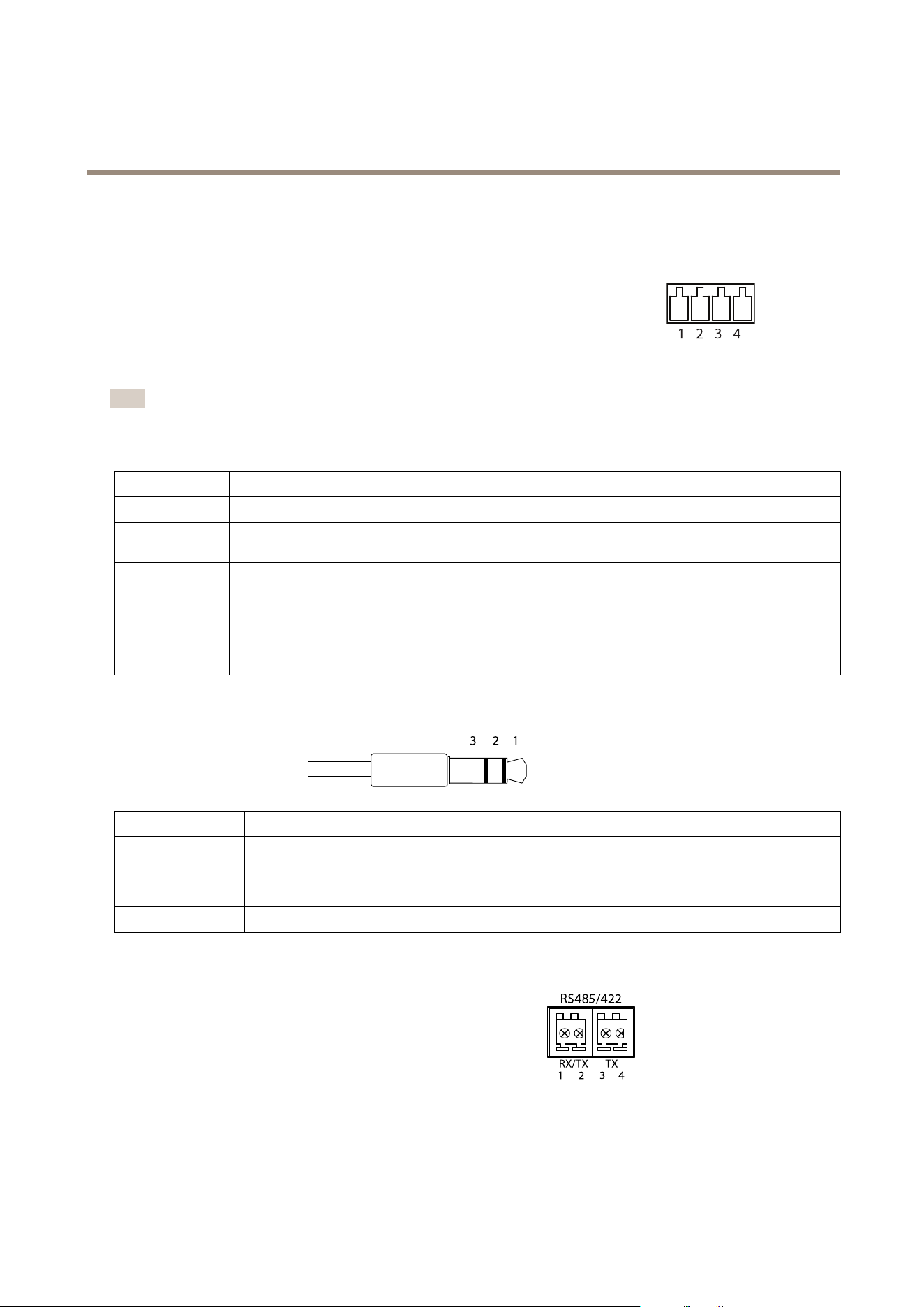
AXISQ1775-ENetworkCamera
TechnicalSpecifications
Connectors
I/OConnector
4-pinterminalblock
1 2 3 4
Foranexamplediagram,seeConnectionDiagramsonpage72.
Note
TheI/Oconnectorisconnectedtothehousing(fan/heater)ondelivery.Inthecaseofafanorheatererror,aninputsignal
willbetriggeredinthecamera.Setupanactionruleinthecameratocongurewhichactionthesignalshalltrigger.For
informationabouteventsandactionrules,seeEventsonpage42.
FunctionPinNotes
Specications
0VDC(-)
1
0VDC
DCoutput
2
Canbeusedtopowerauxiliaryequipment.
Note:Thispincanonlybeusedaspowerout.
3.3VDC
Maxload=250mA
Digitalinput–Connecttopin1toactivate,orleaveoating
(unconnected)todeactivate.
0tomax40VDC Congurable
(InputorOutput)
3–4
Digitaloutput–Connectedtopin1whenactivated,oating
(unconnected)whendeactivated.Ifusedwithaninductive
load,e.g.arelay,adiodemustbeconnectedinparallelwith
theload,forprotectionagainstvoltagetransients.
0tomax40VDC,opendrain,
100mA
AudioConnector
3.5mmaudioconnectors
(stereo)
123
1Tip2Ring
3Sleeve
AudioInput
Balanced:‘Hot’signalMicrophone/Linein
Unbalanced:Microphone/Linein
Balanced:‘Cold’signalMicrophone/Line
in
Unbalanced:Unused
Ground
AudioOutput
Lineout(mono)
Ground
RS485/422Connector
Two2-pinterminalblocksforRS485/RS422serialinterface.Theserial
portcanbeconguredtosupport:
•Two-wireRS485halfduplex
•Four-wireRS485fullduplex
•Two-wireRS422simplex
•Four-wireRS422fullduplexpointtopointcommunication
RS485/422
1 2
RX/ TX TX
3 4
71
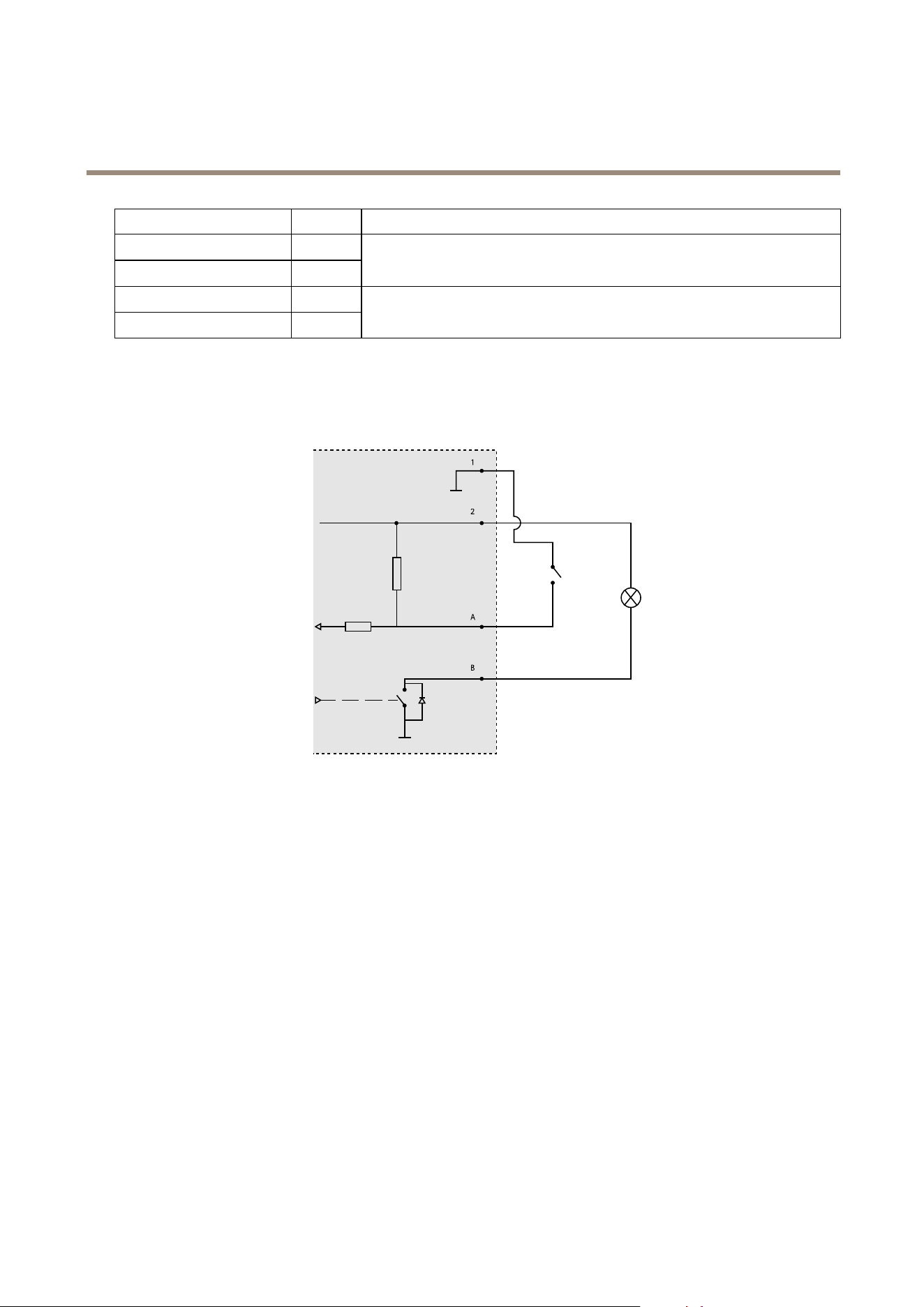
AXISQ1775-ENetworkCamera
TechnicalSpecifications
FunctionPinNotes
RS485/RS422RX/TXA
1
RS485/RS422RX/TXB
2
(RX)ForfullduplexRS485/RS422
(RX/TX)ForhalfduplexRS485
RS485/RS422TXA
3
RS485/RS422TXB
4
(TX)ForfullduplexRS485/RS422
ConnectionDiagrams
I/OConnector
1
2
A
B
1
0VDC(-)
2
DCoutput12V,max50mA
A
I/Oconguredasinput
B
I/Oconguredasoutput
PerformanceConsiderations
Whensettingupyoursystem,itisimportanttoconsiderhowvarioussettingsandsituationswillaffectperformance.Somefactors
affecttheamountofbandwidth(thebitrate)required,otherscanaffecttheframerate,andsomeaffectboth.Iftheloadonthe
CPUreachesitsmaximum,thiswillalsoaffecttheframerate.
Thefollowingfactorsareamongthemostimportanttoconsider:
•Highimageresolutionand/orlowercompressionlevelsresultinimagescontainingmoredata.Bandwidthaffected.
•AccessbylargenumbersofMotionJPEGand/orunicastH.264clients.Bandwidthaffected.
•Simultaneousviewingofdifferentstreams(resolution,compression)bydifferentclients.Effectonframerateand
bandwidth.
•AccessingMotionJPEGandH.264videostreamssimultaneously.Framerateandbandwidthaffected.
•Heavyusageofeventsettingsaffecttheproduct’sCPUload.Framerateaffected.
•UsingHTTPSmayreduceframerate,inparticularifstreamingMotionJPEG.
72

AXISQ1775-ENetworkCamera
TechnicalSpecifications
•Heavynetworkutilizationduetopoorinfrastructure.Bandwidthaffected.
•Viewingonpoorlyperformingclientcomputerslowersperceivedperformance.Framerateaffected.
•RunningmultipleAXISCameraApplicationPlatform(ACAP)applicationssimultaneouslymayaffecttheframerateand
thegeneralperformance.
73

UserManualVer.M2.2
AXISQ1775-ENetworkCamera
Date:July2015
©AxisCommunicationsAB,2015
PartNo.62891