SPEAKER PLACEMENT
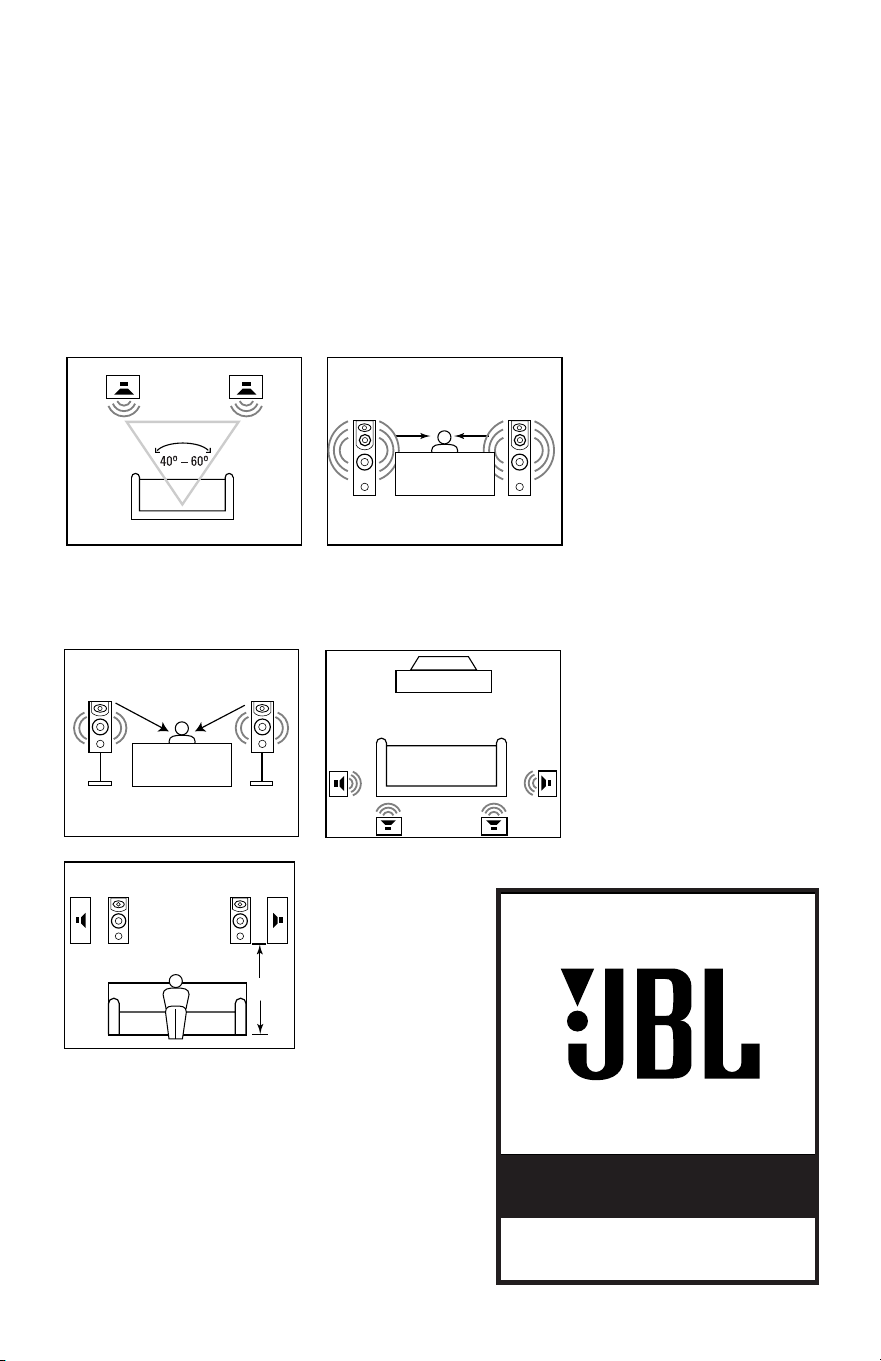
Proper placement of the
speakers is an important step
in obtaining the most realistic
soundstage possible. These
recommendations are for the
optimum placement of the
loudspeakers. Use these
placement recommendations as
a guide. Slight variations will
not diminish your listening
pleasure. Aim the tweeter of
each loudspeaker toward the
listening position at about ear-
level height for best imaging,
especially in digital surround
systems.
All of the Northridge Series
loudspeakers referred to in this
guide are video-shielded and
can safely be placed near a
television.
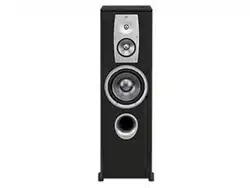
MODELS: N36II, N38II,ND310II
MODELS: N26II, N28II
As Front Speakers As Surround Speakers
N26II, N28II, N36II,
N38II, ND310II
NORTHRIDGE™ SERIES
SPEAKERS
OWNER’S GUIDE
®
5 – 6 ft.
SPEAKER CONNECTIONS
These models are shipped with
four self-adhesive nonskid pads
that are to be used when the
loudspeaker is intended to be
placed on a smooth-surfaced
floor, such as tile or hardwood.
Gently lay the speaker on its side
(not its front or back) on a soft,
nonabrasive surface. Attach each
pad to the bottom of its foot in the
widest portion of the recessed
area.
DO NOT attach the pads if
the speaker will be placed
on carpeting.
NEVER drag the speaker to move
it, as this will damage the pads,
the feet and/or the wood cabinet
itself. Always lift the speaker and
carry it to its new location.
CAUTION: Floorstanding (tower)
loudspeakers have a high center
of gravity and may become
unstable and tip over during
earthquakes or if rocked, tipped
or improperly positioned. If this is
a concern, these speakers should
be anchored to the wall behind
them, using the same procedures
and hardware customary for
anchoring bookcases and wall
units. Customer is responsible for
proper installation and proper
selection of hardware.
Without pad With pad
The supplied self-adhesive felt
pads may be attached to the
bottom corners of your speakers
to protect your furniture.
MODELS: N26II, N28II
MODELS: N36II,N38II,ND310II
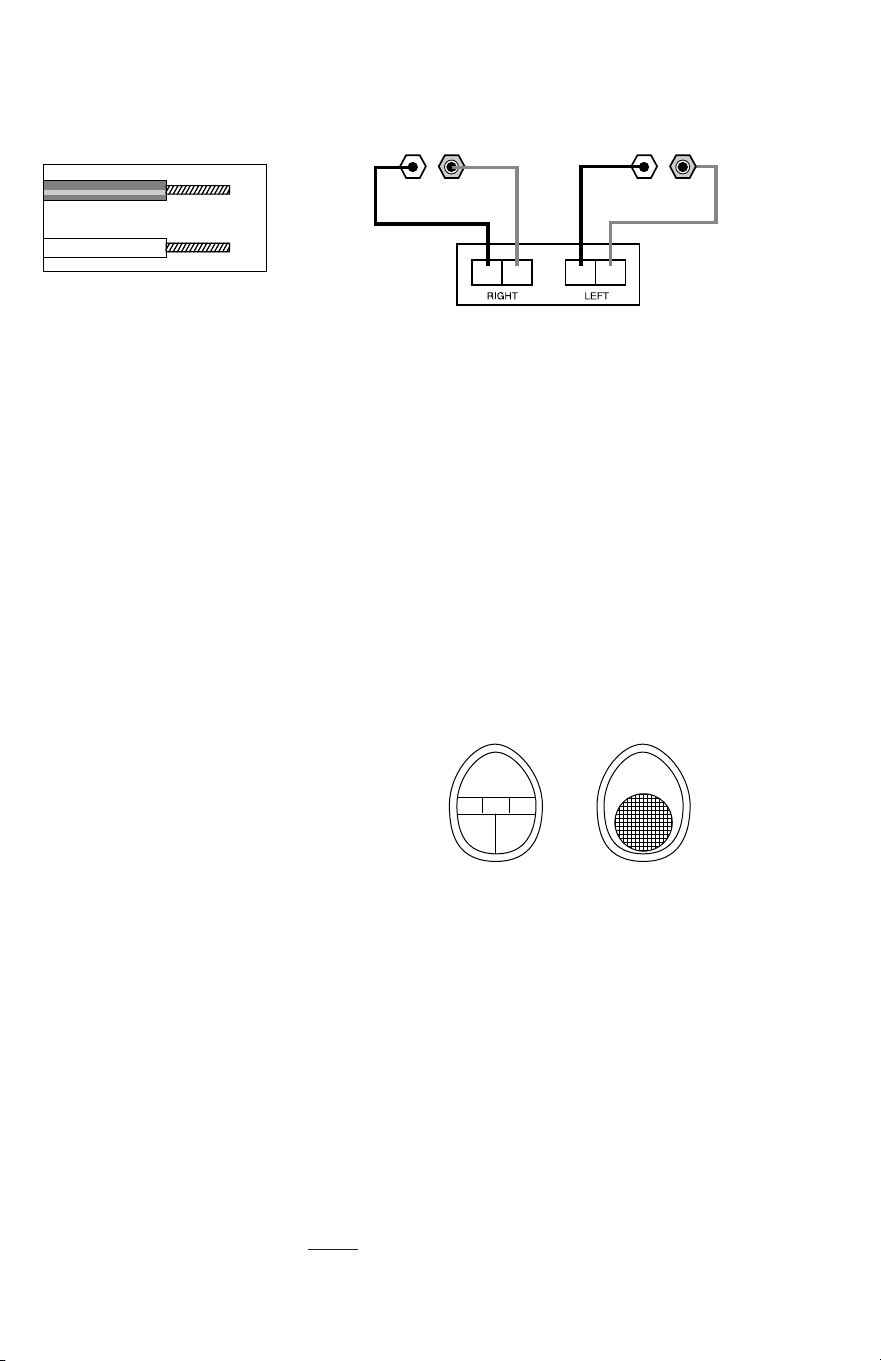
CONNECTION TIPS
Speakers and electronics
terminals have corresponding (+)
and (–) terminals. It is important
to connect both speakers
identically: (+) on the speaker to
(+) on the amplifier and (–) on the
speaker to (–) on the amplifier.
Wiring “out of phase” results in
thin sound, weak bass and a poor
stereo image. With the advent of
multichannel surround sound
systems, connecting all of the
speakers in your system with the
correct polarity remains equally
important in order to preserve
the proper ambience and
directionality of the program
material. To use the binding-post
speaker terminals, unscrew the
colored collar until the pass-
through hole in the center post is
visible under the collar. Insert the
bare end of the wire through this
hole; then screw the collar down
until the connection is tight. The
hole in the center of each collar
is intended for use with banana-
type connectors.
To comply with European CE
certification, these holes are
blocked with plastic inserts at the
point of manufacture. To use
banana-type connectors requires
the removal of the inserts. Do not
remove these inserts if you are
using the product in an area
covered by the European CE
certification.
– +– +
– +
Receiver’s Speaker Outputs
LEFT
RIGHT
– +

If there is no sound from any of
the speakers:
• Check that receiver/amplifier is
on and that a source is playing.
• Review proper operation of your
receiver/amplifier.
If there is no sound coming from
one speaker:
• Check the “Balance” control on
your receiver/ amplifier.
• Check all wires and connections
between receiver/amplifier and
speakers.
• Make sure no wires are
touching other wires or terminals
and creating a short circuit.
• Make sure all wires are
connected. Make sure none of
the speaker wires are frayed, cut
or punctured.
• In Dolby* Digital or DTS
®
modes, make sure that the
receiver/processor is configured
so that the speaker in question is
enabled.
• Turn off all electronics and
switch the speaker in question
with one of the other speakers
that is working correctly. Turn
everything back on, and determine
whether the problem is in the
same place, i.e., the speaker that
was working previously now has
no sound and the speaker that
was not working now sounds
fine; or whether it has moved, i.e.,
the speaker that was not working
still has no sound and the
speaker that was working is still
fine. If the problem is in the same
place, the source of the problem
is most likely with your receiver
or amplifier, and
you should
consult the owner’s manual for that
product for further information.
If
the problem has followed the
speaker, consult your dealer for
further assistance or, if that
is not possible, visit our Web site
at www.jbl.com for further
information.
If the system plays at low
volumes but shuts off as volume
is increased:
• Check all wires and connections
between receiver/amplifier
and speakers.
• Make sure all wires are
connected. Make sure none of
the speaker wires are frayed, cut
or punctured.
• If more than one pair of main
speakers is being used, check
the minimum impedance
requirements of your
receiver/amplifier.
If there is no (or low) bass
output:
• Make sure the polarities
(+ and –) of the left and right
“Speaker Inputs” are connected
properly.
• Consider adding a powered
subwoofer to your system for use
with digital “.1” surround formats.
If there is no sound from the
surround speakers:
• Check all wires and
connections between receiver/
amplifier and speakers. Make
sure all wires are connected.
Make sure none of the speaker
wires are frayed, cut or
punctured.
• Review proper operation of your
receiver/amplifier and its
surround sound features.
• Make sure the movie or TV
show you are watching is
recorded in a surround sound
mode. If it is not, check to see if
your receiver/amplifier has other
surround modes you may use.
•
In Dolby Digital or DTS modes,
make sure your receiver/
processor is configured so that the
surround speakers are enabled.
• Review the operation of your
DVD player and the jacket of your
DVD to make sure that the DVD
features the desired Dolby Digital
or DTS mode, and that you have
properly selected that mode
using both the DVD player’s menu
and the DVD disc’s menu.
TROUBLESHOOTING
Declaration of Conformity
We, Harman Consumer International
2, route de Tours
72500 Chateau-du-Loir
France
declare in own responsibility that the products
described in this owner’s manual are in compliance
with technical standards:
EN 61000-6-3:2001
EN 61000-6-1:2001
Gary Mardell
Harman Consumer International
Chateau-du-Loir, France 4/04

SPECIFICATIONS
N26II N28II N36II N38II ND310II
Description: 2-Way 6" bookshelf 2-Way 8" bookshelf 3-Way 6" floorstanding 3-Way 8" floorstanding 3-Way dual 10"
floorstanding
Maximum
Recommended
Amplifier Power**:
125W 150W 150W 175W 250W
Nominal
Impedance:
8 Ohms 8 Ohms 8 Ohms 8 Ohms 8 Ohms
Sensitivity
(2.83V/1m):
88dB 90dB 90dB 90dB 91dB
Frequency
Response (–3dB):
55Hz – 20kHz 50Hz – 20kHz 47Hz – 20kHz 45Hz – 20kHz 37Hz – 20kHz
Crossover
Frequency(ies):
3000Hz 4000Hz 600, 3500Hz 1000, 5000Hz 1000, 5000Hz
High-Frequency 3/4" Titanium-laminate 3/4" Titanium-laminate 3/4" Titanium-laminate 3/4" Titanium-laminate 3/4" Titanium-laminate
Transducer: dome, shielded dome, shielded dome, shielded dome, shielded dome, shielded
Midrange
Transducer:
NA NA 4" PolyPlas,™ shielded 4" PolyPlas,™ shielded 4" PolyPlas,™ shielded
Low-Frequency
Transducer:
6" PolyPlas,™ shielded 8" PolyPlas,™ shielded 6" PolyPlas,™ shielded 8" PolyPlas,™ shielded Dual 10" PolyPlas,™ shielded
Baffle: Low Diffraction, Low Diffraction, Low Diffraction, Low Diffraction, Low Diffraction,
IsoPower™ IsoPower™ IsoPower™ IsoPower™ IsoPower™
Port: FreeFlow™ flared FreeFlow™ flared FreeFlow™ flared FreeFlow™ flared FreeFlow™ flared
Network: Straight-Line Straight-Line Straight-Line Straight-Line Straight-Line
Signal Path™ (SSP) Signal Path™ (SSP) Signal Path™ (SSP) Signal Path™ (SSP) Signal Path™ (SSP)
Terminals: 5-Way binding posts 5-Way binding posts 5-Way binding posts 5-Way binding posts 5-Way binding posts
Dimensions 17" x 9" x 10" 19-1/2" x 10-1/2" x 11-1/4" 34" x 9" x 11-7/8" 34" x 10-1/2" x 11-7/8" 42" x 14-1/2" x 12"
(H x W x D): 432mm x 229mm x 254mm 495mm x 267mm x 286mm 864mm x 229mm x 302mm 864mm x 267mm x 302mm 1067mm x 368mm x 305mm
Weight: 18 lb, 8.2kg 22.5 lb, 10.2kg 32 lb, 14.5kg 35 lb, 15.9kg 55 lb, 25kg
JBL Consumer Products
250 Crossways Park Drive, Woodbury, NY 11797
8500 Balboa Boulevard, Northridge, CA 91329
516.255.4JBL (4525) (USA only)
www.jbl.com
©2004 Harman International Industries, Incorporated.
JBL is a registered trademark of Harman International
Industries, Incorporated.
Part No.
338061-002
PRO SOUND
COMES HOME
™
**The maximum recommended amplifier power rating will ensure proper system
headroom to allow for occasional peaks. We do not recommend sustained
operation at these maximum power levels.
All features and specifications are subject to change without notice.
*Trademark of Dolby Laboratories.
DTS is a registered trademark of Digital Theater Systems, Inc.