WWW.KUCHT.COM
PROFESSIONAL-STYLE
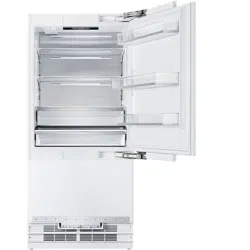
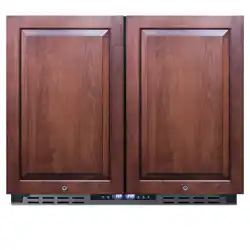
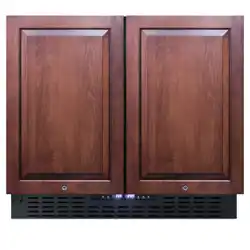
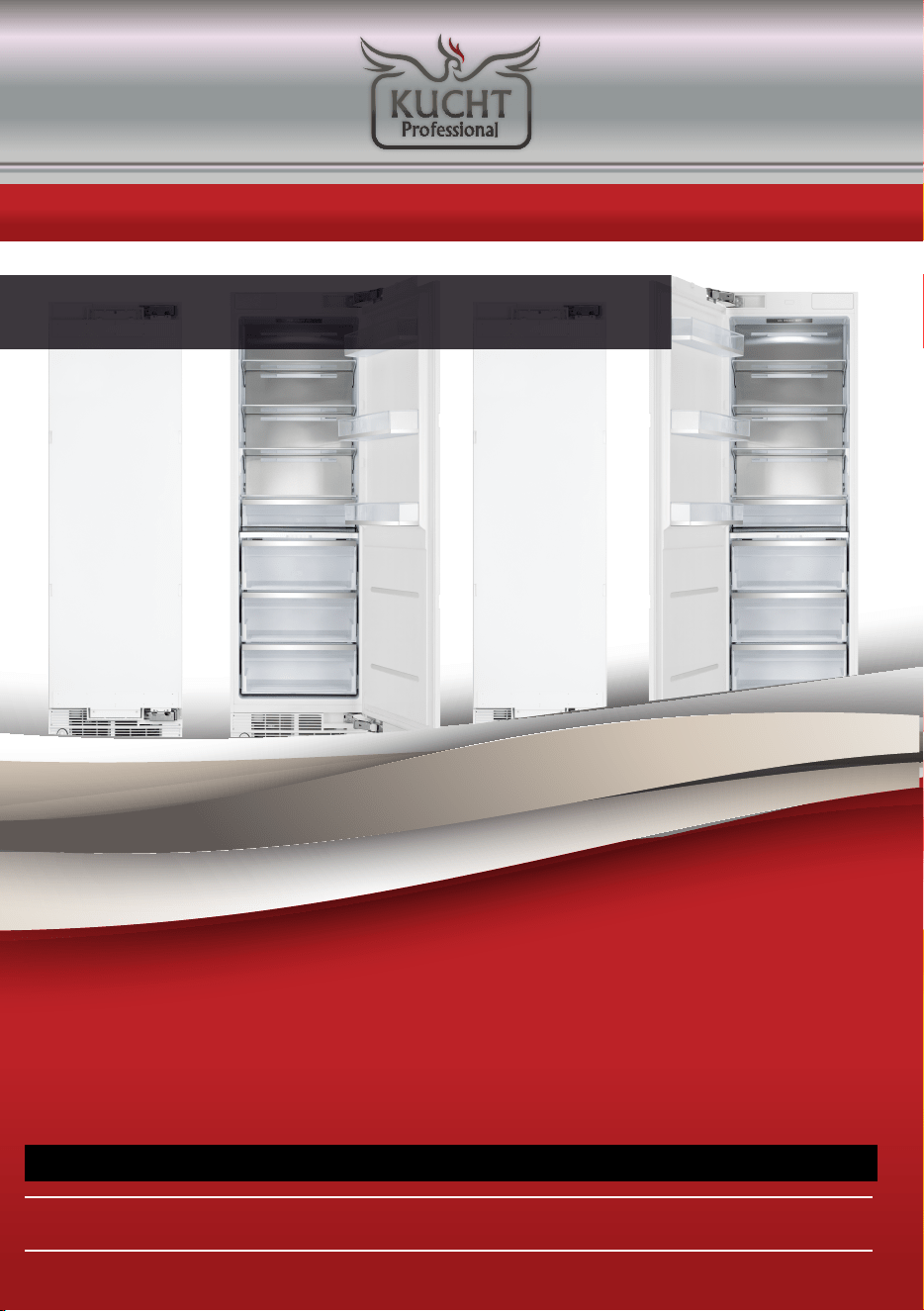
MODULAR, BUILT-IN AND PANEL-READY
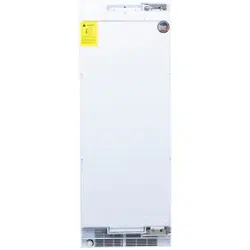
TOWER REFRIGERATION
USER MANUAL
APPLICABLE MODEL: KR240TF, KR240TR
BE A PRO IN YOUR KITCHEN
Please read this manual before using the product!
Dear Valued Customer,
We wish you to get the best results from your product that has been
manufactured meticulously at modern plants and tested with detailed
quality control checks.
For this reason, we recommend that you read this user manual
thoroughly before starting the product.
If you hand over the product to someone else, please remember
to give the user manual as well.
This manual will help you use your appliance in a fast and safe way.
• Please read this us
er manual carefully before installing and using the product.
• Always follow the applicable safety instructions.
• Keep the user manual in an easily accessible place for further use.
• Please read all the other documents provided with the product.
Please keep in mind that this manual may apply to several product models.
This manual expressly indicates the differences between various models
A
Risk of injury and property damage.
B
Risk of electricshock.
C
Important information and useful hints.
Packaging materials of this product has been
manufactured from recyclable materials in accordance
with the National Environment Regulations.
1 Important Instructions Regarding Safety and Environment
This chapter contains safety information that will help you avoid the risk
personal injury or property damage. Failure to follow these instructions shall
render any product warranty void.
1.1 General Safety
• This product can be used by children at age 8 and above and those people
who have limited physical, sensory or mental capabilities and people
who lack experience and information on the condition that they have been
given the instructions about the safe use of the product,
they are supervised and the risks have bee
n eliminated.
Children should not play with the product.
Cleaning and care should not be performed by children unless
they are supervised by an adult.
• Unplug the product if you encounter a failure during use.
• If the product malfunctions, it must not be operated until repaired
by the authorized service provider. Risk of electric shock!
• Plug the product into a grounded socket protected by a fuse
that corresponds to the value on its nameplate.
Have a qualified electrician ground the product.
Our company cannot be held responsible for damages resulting
from the failure to use the produ
ct with a grounded socket pursuant
to local regulations.
• Unplug the product when not in use.
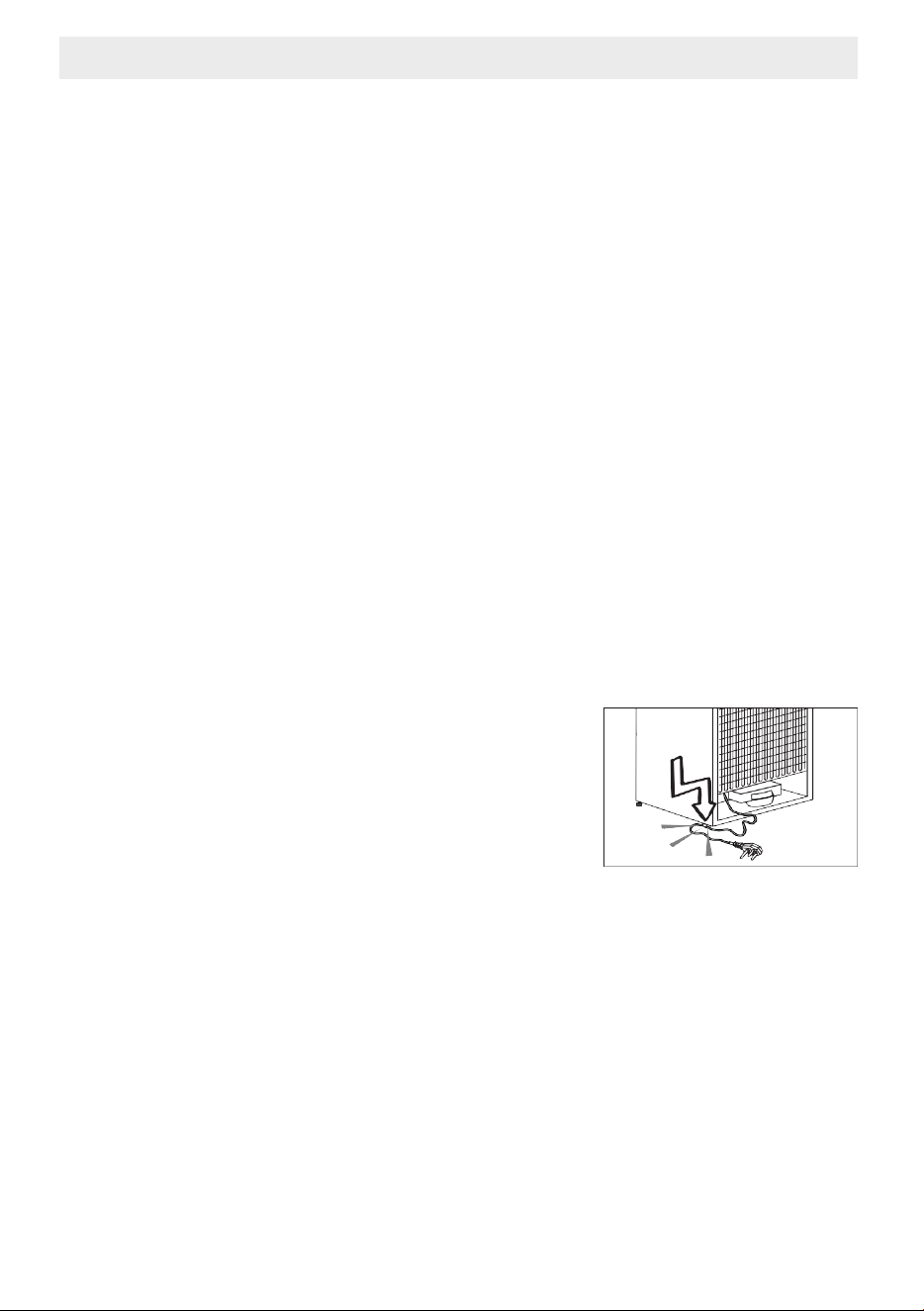
• Never wash the product by spreading or
pouring water onto it! Risk of electric shock!
• Never touch the plug with wet hands!
• Never unplug the product by pulling the cable.
Always pull the plug by holding the socket
• Do not plug the refrigerator if the wall socket is loose.
• Never connect your refrigerator to energy saving devices.
• Such systems are harmful to your product.
• Unplug the product during installation, care, cleaning and repairing procedures.
• Always have the Authorized Servi
ce Provider install the product and
establish its electrical connections.
The manufacturer cannot be held responsible for damages caused
by procedures performed by unauthorized persons.
• Do not eat cone ice cream or ice cubes immediately after you take them
out of the freezer compartment! This may cause frostbite in your mouth!
• Do not touch frozen food with wet hands! They may stick to your hand!
• Do not put bottled or canned liquid beverages in the freezer compartment.
They may burst!
1 Important Instructions Regarding Safety and Environment
• Never use steam or steam cleaners to clean or defrost the refrigerator.
Steam gets into contact with the live parts in your refrigerator,
causing short circuit or electric shock!
• "
DANGER – Risk of fire or explosion. Flammable refrigerant used. Do not use
mechanical devices to defrost refrigerator.
Do not puncture refrigerant tubing.
• Never use the parts in your refrigerator such as the door and drawer
as a m
eans of support or step.
This may cause the product to tip over or damage the parts of it.
• Do not damage the parts where the refrigerant is circulating with drilling
or cutting tools.
The refrigerant that might blow out when the gas channels of
the evaporator, pipe extensions or surface coatings are punctured causes
skin irritations and eye injuries.
• Do not cover or block the ventilation holes in your refrigerator with any object.
• Place the beverage with higher proofs tightly closed
and vertically.
• Do not use gaseous sprays near the product since there is the risk or
fire or explosion!
• Flammable items or products that contain flammable gases (e.g. spray)
as well as explosive materials should never be kept in the appliance.
• Do not place vessels filled with liquid onto the product. Splashing water
on an electrical part may cause electric chock or the risk of fire.
• Do not store items that need precise temperature adjustment
(such as vaccines, heat-sensi
tive medication, science materials etc.)
in the refrigerator.
• If you are not going to use the product for a long time, unplug it
and remove the food in it.
• If there is a blue light on the refrigerator, do not look at this light with optical tools.
• Exposing the product to rain, snow, sun or wind is dangerous in terms of
electrical safety.
• In products with mechanical control (thermostat), wait for 5 minutes
to plug in the product again after unplugging.
• Do not ove
rload the refrigerator. Objects in the refrigerator may fall down
when the door is opened, causing injury or damage.
Similar problems may arise if any object is placed onto the product.
• If the product has a door handle, do not pull the handle
when re-locating the product. The handle might be loose.
• Be careful not to jam your hand or any other body part in the moving parts
of the refrigerator.
• Do not put your hand or any other foreign materials into the ice machine
while it is operating.
1.2 Intended Use
• This product has been designed for domestic use. It is not suitable
for commercial use and it must not be used out of its intended use.
• It must be used only for storing food.
• The manufacturer will not take any responsibility for damages resulting
from improper use or transport.
• Original spare parts will be available for 10 years after the purchase date
of the product.
1.3 Children's Safety
• “
CAUTION - To Prevent A Child From Being Entrapped, Keep Out Of Reach Of
Children And No
t In The Vicinity Of Freezer (Or Refrigerator).”
• If there is a lock on the door of the product, the key should be kept
out of the reach of children.
• Do not let children play with the product.
1.4 Compliance with the WEEE Directive and Disposing the Waste Product:
This product conforms to the EU WEE Directive (2012/19 EU).
This product bears a classification symbol for waste electrical and
electronic equipment (WEEE).
This product has been manufactured from high quality parts and mate
rials
which can be reused and are suitable for recycling.
Therefore, do not dispose the product with normal domestic waste or
other waste at the end of its service life.
Take it to a collection center for recycling electrical and
electronic equipment.
Please consult local authorities to learn about the locations
of such collection center.
1 Important Instructions Regarding Safety and Environment
A
WARNING:
Risk of child entrapment. Before you throw away your
old refrigerator or freezer:
• Take off the doors.
• * Leave the shelves in place so that children may not
easily climb inside.
1.5 Compliance with the RoHS Directive:
The unit you have purchased conforms to the EU RoHS Directive (2011/65/AB).
It does not contain harmful or prohibited materials specified in the Directive.
1.6 Packaging Information
• Packaging materials of the product have been manufactured from recyclable
materials in accordance with our National Environment Regulations.
• Do not dispose the packaging materials with normal domestic waste
or other types of waste.
• Take these materials to a recycling point designated by local authorities.
1 Important Instructions Regarding Safety and Environment
A
DANGER:
Risk of Fire or Explosion:
• This product uses flammable refrigerant.
• Do not use mechanical devices to defrost
the refrigerator.
• Do not use chemicals for cleaning.
• Do not pierce the refrigerant pipe.
• If the refrigerant pipe is pierced, it must be repaired
only by licensed service personnel.
• Please consult the repair/user manual
before cleaning the product.
All safety instructions must be followed.
• Dispose the product according to federal or
local regulations
1.7 Hydro
carbon (HC) Warning
• If your product's cooling system contains R-600a.
This gas is flammable.
Therefore, pay attention not to damage the cooling system or
the piping during use and transportation.
• If damaged, keep the product away from potential fire sources that
may cause it to catch fire and ventilate the room where the product is placed.
1.8 For Products with a Water Dispenser/Ice Machine
• Operating pressure for cold water inlet is between 1-5.5 bars.
If the water pressure exceeds 80 psi (5.5 bars), install a pressure limiting
valve to your mains system.
• If the mains pressure is lower than 1 bar, you can use an auxiliary pump
to compensate the low pressure.
• If you do not know how to check the water pressure,
please consult a professional plumber.
• If there is a risk of water impact in your installation, always use
a water impact protection equipment in that installation.
• Please consult profess
ional plumbers if you are not sure if there is
water impact in your installation.
• Do not make installation on the hot water inlet.
• Take the necessary measures against the freezing risk of the hoses.
• The water temperature operating range must be 0.6°C (33°F) minimum
and 38°C (100°F) maximum.
1 Important Instructions Regarding Safety and Environment
C
If the product is damaged and if you see gas leak,
please keep away from the gas. It may cause frostbite
when it gets into contact with the skin. (including R134
C
Ignore this warning if the cooling system of your product
contains R134a.
C
Type of gas used in the product is stated on the type
plate which is on the left wall inside the refrigerator.
A
WARNING:
Never throw the product into fire for disposal.
A
WARNING:
Never connect the product to a cold water mains with a
pressure of 5.5 bars (80 psi) and above
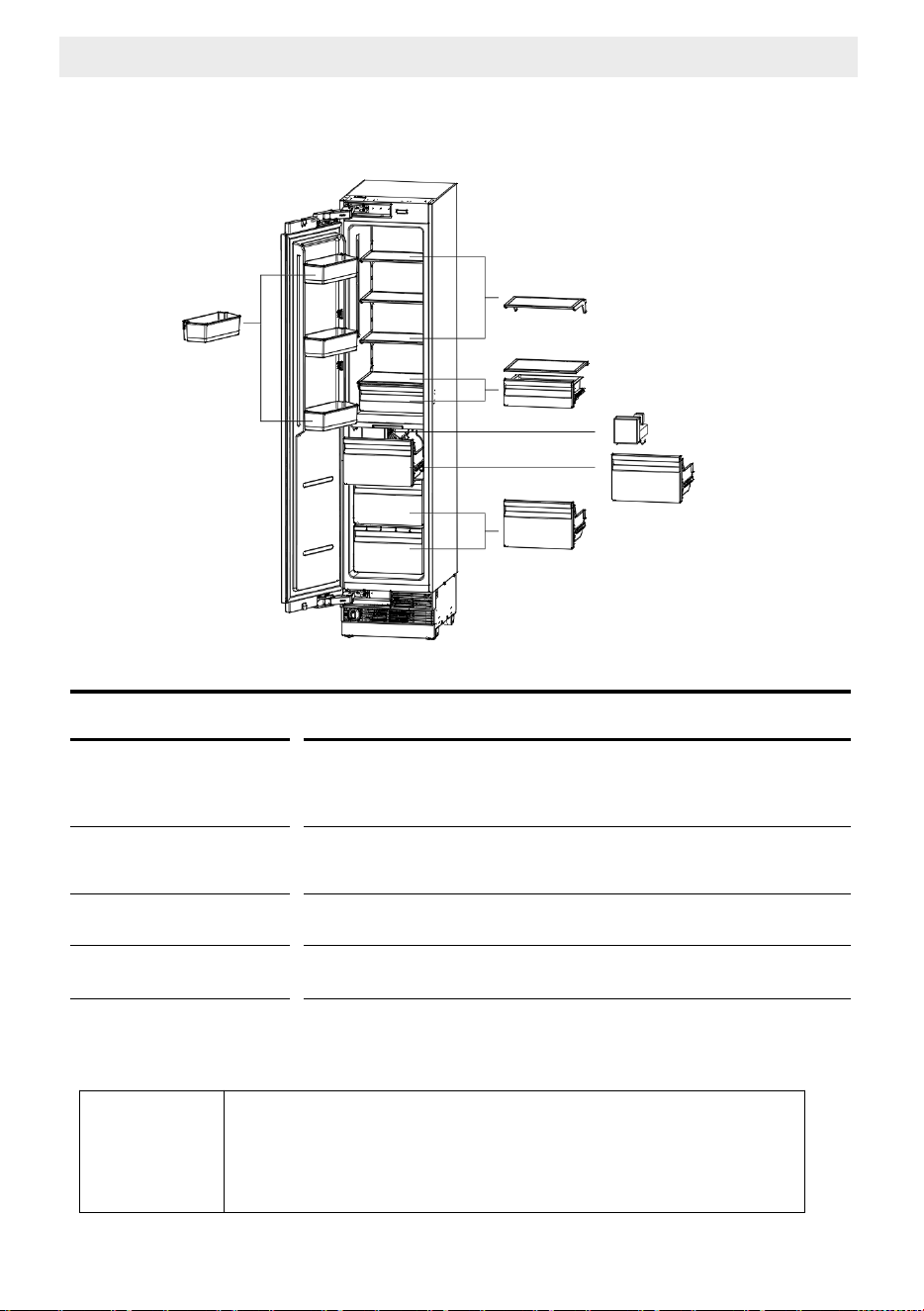
May not be available in all models
C
Figures in this user manual are schematic and may not
match the product exactly. If your product does not have
the relevant parts, the information applies to other
models.
2 Storage features
- Freezer
Shelving
Ice maker
(if applicable)
Self close bins
Door bins
• Selectable shelf heights.
• Heat treated safety glass..
• Removable ice container.
• Hygienic ice scoop.
• Freezer bins self close to ensure all bins close properly.
• Adjustable and removable door bins.
Freezer components
Door bin
So� close small bin
So� close big bin
Ice maker
So� close ice bin
Shelving
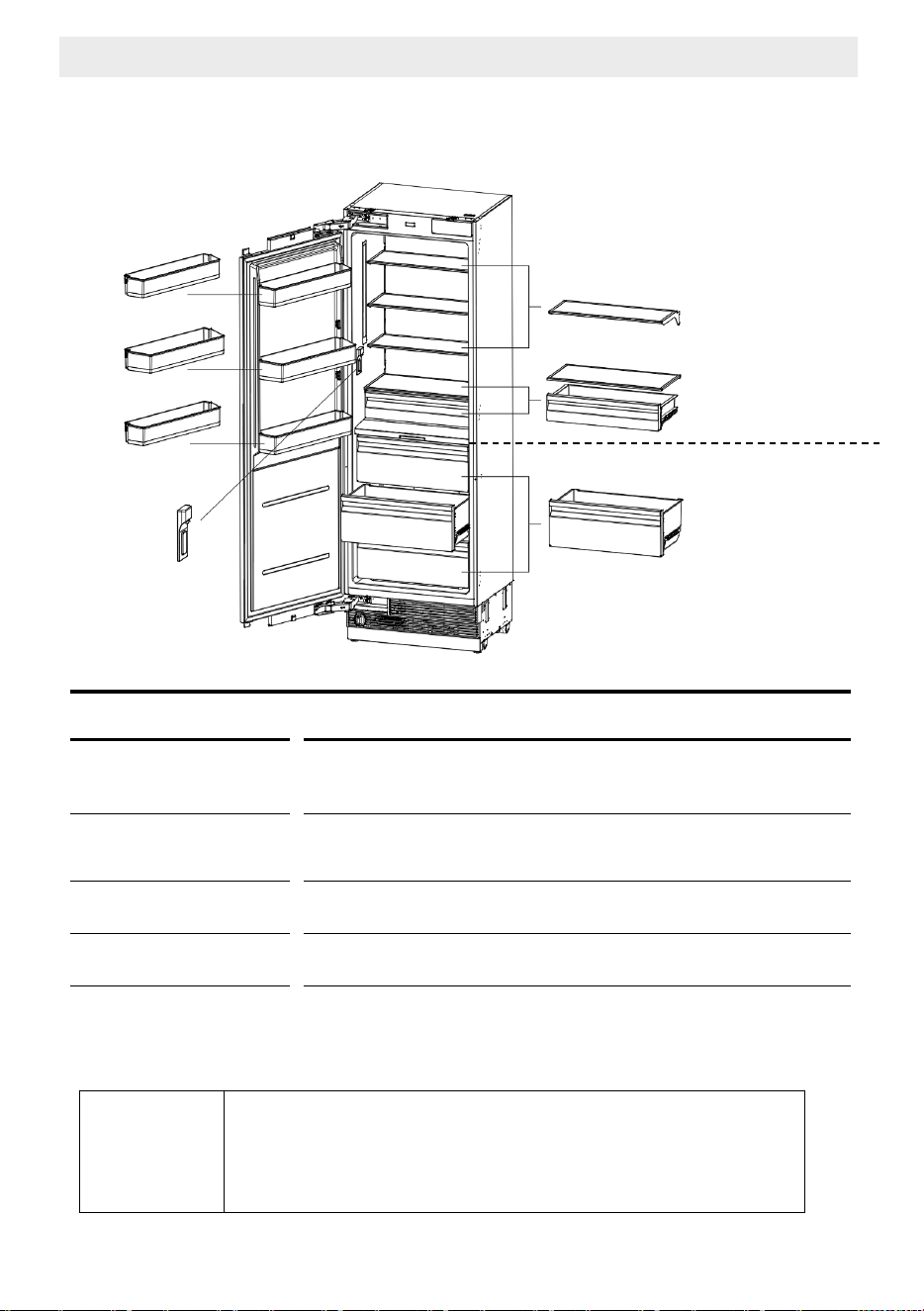
C
Figures in this user manual are schematic and may not
match the product exactly. If your product does not have
the relevant parts, the information applies to other
models.
2 Storage features
- Refrigerator
Shelving
Water dispenser
(if applicable)
Soft close bins
Door bins
• Selectable shelf heights.
• Heat treated safety glass.
• Removable ice container.
• Hygienic ice scoop.
• Soft close bins ensure bins close quietly and properly.
• Adjustable and removable door bins.
• Gallon bottle door bin.
Refrigerator components
May not be available in all models
Door bin
Gallon bo�le door bin
Door bin
Shelving
So� close small bin
SPE. TEMP. zone
Water
dispenser
So� close big bin
REF. TEMP. zone
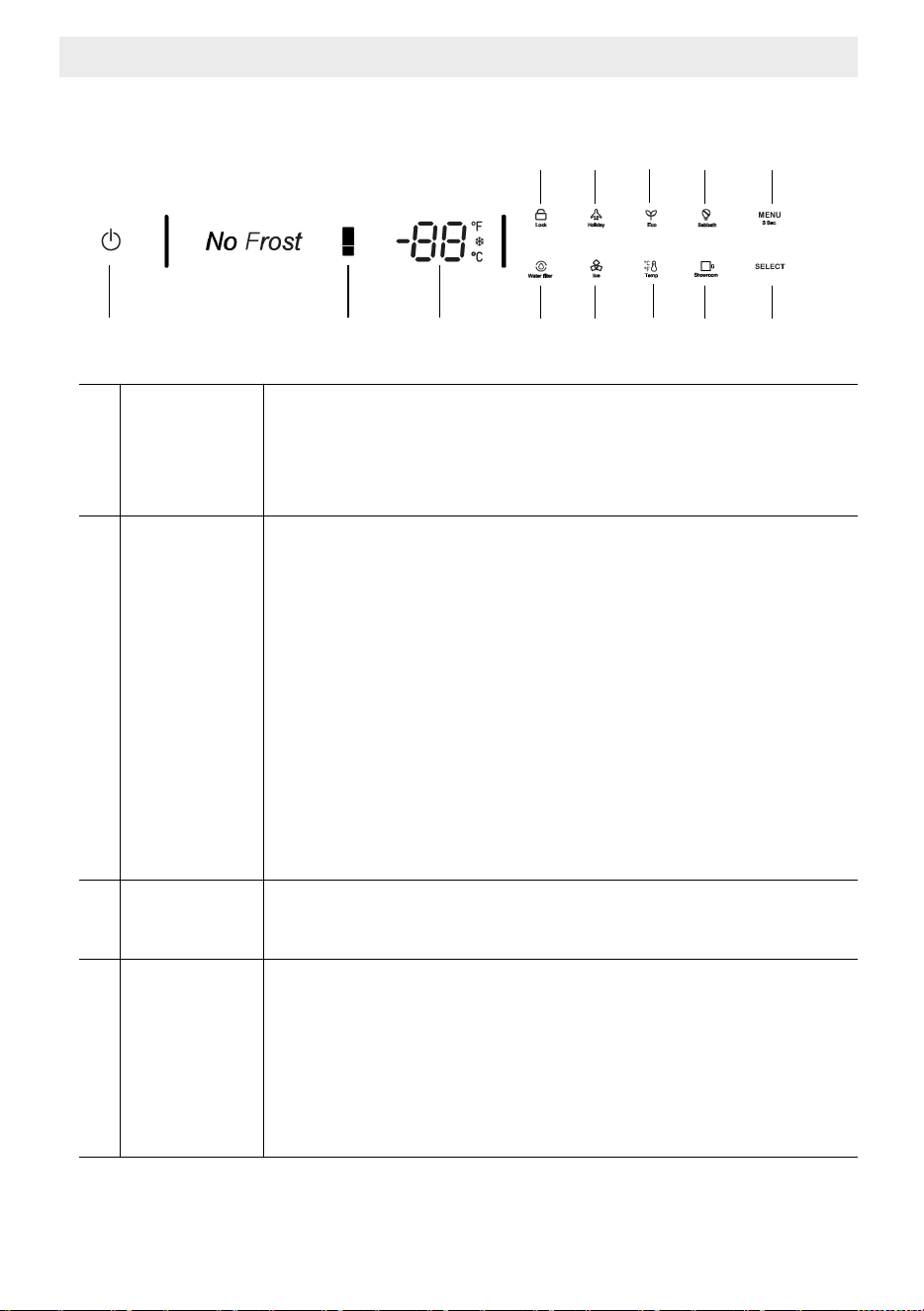
3 Display Panel
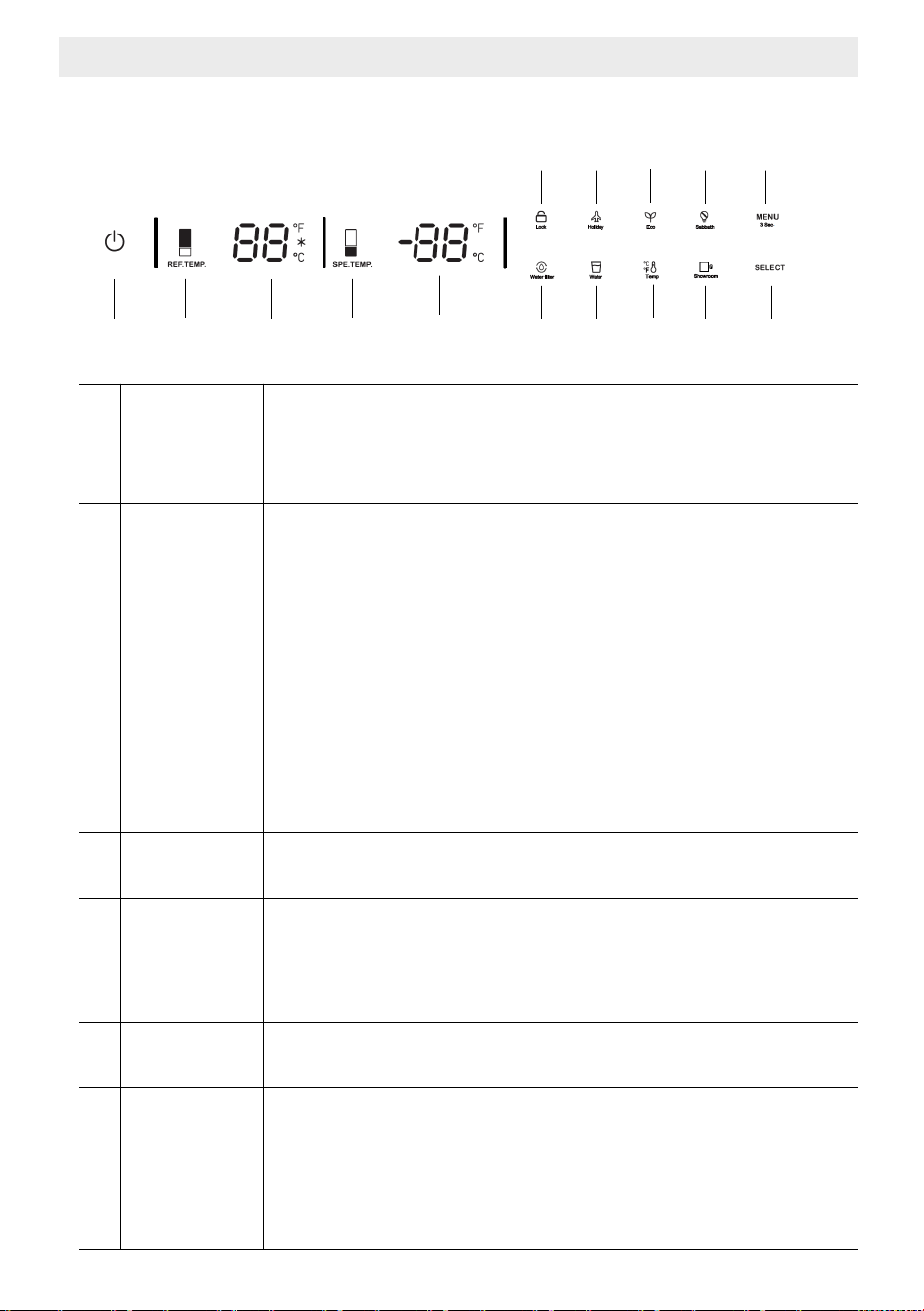
1 2 3 9 10 11
12 13
4 5 6 7
8
1 On/Off button
Serves to switch the whole appliance On and Off.
Press the button to switch on the product,
the product will be switched on in 5 seconds.
Press the on/off button for 1.5 seconds to switch off.
2
Colder/
Warmer
button
Press button to change the freezer compartment temperature
from 5
°
F(-15
°
C) to -11
°
F(-24
°
C)
After the temperature regulation is stopped,
the nixie tube will flash for 5 seconds and take effect.
Super freezing function will be enabled if keep pressing
after -11
°
F (-24
°
C).
When the snow symbol illuminate on the display
the super free
zing function will be enabled.
The super freezing feature assists with periods of high
freezer use, full grocery loads, or temporarily
Warm room temperatures.
After the super cool cycle completes,
the refrigerator will return to its previous setting.
3 Temp. display
Displays the set temperature of the freezer.
Fahrenheit, Celsius, Super freezer lamp illuminate.
4 Lock
Press lock key continuously for 3 seconds and
the lock icon will light up.
Press the lock key for 3 seconds to unlock the icon.
3 minutes wi
thout key operation lock key.
All of the following operations must be performed
in the unlocked state.
- Freezer
3 Display Panel
5 Holiday mode
Press the MENU button till the holiday symbol illuminates,
then press the SELECT button to enable the function.
When the Holiday Mode function is enabled,
freezer temperature set at 0
°
F (-18
°
C)automatically.
Before leaving
- Turn the ice maker to OFF on the control panel.
- Shut off the water supply to the appliance.
On return
- Turn on the ice maker.
- Discard the first full bin of ice.
6 Eco mode
Press the MENU button till the Eco Mode illuminates,
then press the SELECT button to enable the function.
When the Eco Mode function is enabled,
and freezer Temperature set at 5
°
F (-15
°
C) automatically.
7 Sabbath Mode
Press the MENU button till the Sabbath mode symbol illuminates
Then press the SELECT button to enable the function.
When the Sabbath mode function is enabled,
all lights, buzzers, display panels will be switch off.
8
Menu/
child lock
By pressing MENU button for 3 seconds,
you may lock/unlock the control panel.
The child lock is a feature for preventing children
from changing the product settings.
9
Water filter
(if applicable)
The water filter symbol flashes and beeps to advi
se
the user to replace the water filter.
After the replacement is completed,
Press the SELECT button for 5 seconds to reset.
The set replacement time is 130 days.
10
Ice Making
(if applicable)
Press the MENU button till the ice making symbol illuminates,
Then press the SELECT button to enable the function.
When the ice making function is enabled,
ice maker will be automatically operating and
the ice cubes will be accumulated in the ice tray.
NOTE: Prepare the water filter for use before using the ice.
After connecting the freezer to a water source
o
r after replacing the water filter,
fill and discard two full containers of ice.
- Freezer
3 Display Panel
11
Temperature
unit
Press the MENU button till the Celsius and Fahrenheit
selection symbol illuminates to change between Celsius
and Fahrenheit. After that press the SELECT button to confirm.
12
Show room
mode
Press the MENU button till the show room symbol illuminates,
then press the SELECT button to enable the function.
This mode is used when the refrigerator is on display
in a retail store or if you want to turn the cooling off
and deactivate all other functions except interior lighting.
Note : Do not store any food items while in show room mode,
as the
appliance then remains at room temperature.
13 Select
After selecting menu, then press SELECT button
to confirm the function.
- Freezer
C
Recommended operating temperature
Freezer : 0°F (-18 °C)
3 Display Panel
1 4 5 11 12 13
14 15
6 7 8 9
10
- Refrigerator
1 On/Off button
Serves to switch the whole appliance On and Off.
Press the button to switch on the product,
the product will be switched on in 5 seconds.
Press the on/off button for 1.5 seconds to switch off.
2
REF.TEMP.
zone
colder/
Warmer
Button
Press REF. TEMP button to adjust temperature
from 36
°
F(2
°
C) to 46
°
F(8
°
C).
After the temperature regulation is stopped,
the nixie tube will flash for 5 seconds and take effect.
Super cooling function will be enabled if keep pressing
after 36
°
F (2
°
C).
When the snow symbol illuminate on the display
the super cooling func
tion will be enabled.
The super cooling feature assists with periods of high
refrigerator use, full grocery loads, or temporarily
warm room temperatures.
After the super cool cycle completes,
the refrigerator will return to its previous setting.
3 Temp. display
Displays the set temperature of the REF.TEMP.zone
Fahrenheit, Celsius, Super cooling lamp illuminate.
4
SPE.TEMP.
zone
colder/
Warmer
Button
Press SPE. TEMP. button to adjust temperature
from 30
°
F(-1
°
C) to 41
°
F(5
°
C).
After
the temperature regulation is stopped,
the nixie tube will flash for 5 seconds and take effect.
5 Temp. display
Displays the set temperature of the SPE.TEMP.zone
Fahrenheit, Celsius lamp illuminate.
6 Lock
Press lock key continuously for 3 seconds and
the lock icon will light up.
Press the lock key for 3 seconds to unlock the icon.
3 minutes without key operation lock key.
All of the following operations must be performed
in the unlocked state.
2 3
3 Display Panel
7 Holiday mode
Press the MENU button till the holiday symbol illuminates,
then press the SELECT button to enable the function.
When the Holiday Mode function is enabled,
the REF. TEMP and SEP.TEMP will be set
at 63
°
F (17
°
C) automatically.
NOTE: Do not place food in the fresh food compartment
when Holiday Mode is enabled.
8 Eco mode
Press the MENU button till the Eco Mode illuminates,
then press the SELECT button to enable the function.
When the Eco Mode function is enabled,
the REF. TEMP will be set at 46
°
F (8
°
C)
the SEP. TEMP will be set at 41
°
F (5
°
C) automatically.
9 Sabbath Mode
Press the MENU button till the Sabbath mode symbol illuminates
Then press the SELECT button to enable the function.
When the Sabbath mode function is enabled,
all lights, buzzers, display panels will be switch off.
10
Menu/
child lock
By pressing MENU button for 3 seconds,
you may lock/unlock the control panel.
The child lock is a feature for preventing children
from changing the product settings.
11
Water filter
(if applicable)
The water filter symbol flashes and beeps to advise
the user to replace the water filter.
After the replacement is completed,
Pre
ss the SELECT button for 5 seconds to reset.
The set replacement time is 130 days.
12
Water
dispenser
(if applicable)
Press the MENU button till the water dispenser symbol illuminates,
Then press the SELECT button to enable the function.
When the water dispenser is enabled,
fresh water can be provided from the dispenser fitted
on the internal wall.
NOTE: Prepare the water filter for use
before using water dispenser.
After connecting the refrigerator to a water source
or after replacing the water filter,
fill and discard two full con
tainers of ice.
13
Temperature
unit
Press the MENU button till the Celsius and Fahrenheit
Selection symbol illuminates to change between Celsius
and Fahrenheit. After that press the SELECT button to confirm.
- Refrigerator
3 Display Panel
14
Show room
mode
Press the MENU button till the show room symbol illuminates,
then press the SELECT button to enable the function.
This mode is used when the refrigerator is on display
in a retail store or if you want to turn the cooling off
and deactivate all other functions except interior lighting.
Note : Do not store any food items while in show room mode,
as the appliance then remains at room temperature.
15 Select
After selecting menu, then press SELECT button
to confirm the function.
- Refrigerator
C
Recommended operating temperature
REF. TEMP. : 39°F (4°C)
SPE. TEMP. : 34°F(1°C)
4 Before Using the Refrigerator
4.1 Thingsto do for energy saving
• Do not leave the doors of your refrigerator open for a long time.
• Do not put hot food or drinks in your refrigerator.
• Do not overload the refrigerator. Cooling capacity will fall
when the air circulation in the refrigerator is hindered.
• Do not place the refrigerator in places subject to direct sunlight.
Install the product at least 30 cm away from heat sources such as hobs,
ovens, heater units and stoves and at least 5 cm away from electrical ovens.
• Pay attention to store your food in refrige
rator in closed containers.
• You can remove the drawer shelf of the freezer compartment to fill
the freezer compartment with maximum amount of food.
The given energy consumption value of the refrigerator has been determined
with the freezer compartment shelf or the drawer removed and the refrigerator
filled with maximum amount of food.
There is no harm in using a shelf or drawer according to the shapes and
sizes of food to be frozen.
• Thawing the frozen foods in the fridge compartment both saves energy
and reserves the quality of the foods
C
Temperature of the room where your refrigerator is
located should at least be 10ºC/50°F. Operating your
refrigerator under cooler conditions is not recommended
with regard to its efficiency
C
If two coolers are to be installed side by side, there
should be at least 4 cm distance between them
4.2 Recommendations About the Fresh Food Compartment
• Make sure that the food does not touch the temperature sensor
in fresh food compartment.
To allow the fresh food compartment to keep its ideal storage temperature,
the sensor must not be hi
ndered by food.
• Do not place hot foods or beverages inside the product.
A
Connecting your refrigerator to systems that save
energy is dangerous as they may cause damage on the
product.
4 Before Using the Refrigerator
4.3 Initial use
Before using the product, make sure that all preparations have been made
in accordance with the instructions given in the "Important instructions
regarding safety and environment" and "Installation Instruction" chapters.
• Clean the interior of the refrigerator as recommended in the “Maintenance
and cleaning” section. Before you start the refrigerator, make sure
that the interior is dry.
• Plug the refrigerator in a grounded socket. The interior illumination is lit
when the door of the refrigerator is
opened.
• Operate the refrigerator for 6 hours without placing any food in it and
do not open its door unless it is necessary
C
You will hear a noise when the compressor starts up.
The liquids and gases sealed within the refrigeration
system may also give rise to noise, even if the
compressor is not running and this is quite normal.
C
Front edges of the refrigerator may feel warm.
This is normal.
These areas are designed to be warm
to avoid condensation.
5 Equipment
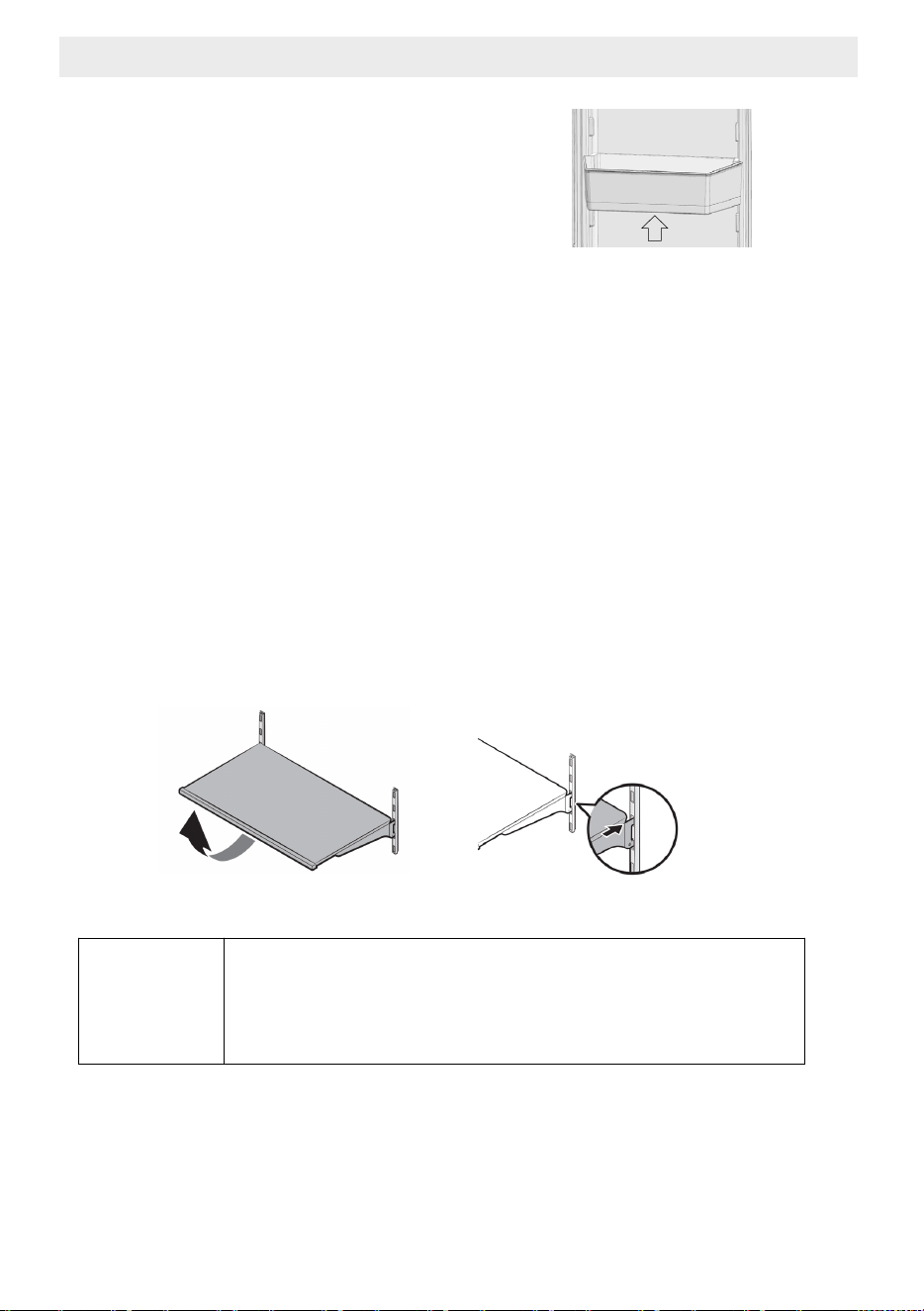
5.1 Door bin
To remove, lift up the door bin
and then pull out straight.
5.2 Glass shelves
To remove a shelf
- Fully open the corresponding door.
- Hold the front of the shelf, and then gently lift up and slide out.
To reinsert
- hold the shelf at an angle so the front is higher than the back,
and then insert the top hook into the top shelf notch.
- Put down the front slightly.
IMPORTANT NOTE:
Use care when handling glass shelves
to prevent breakage or scratching the interior.
A
ATTENTION:
You must wait for the glass shelves
to reach room temperature before immersing
them in water for cleaning.
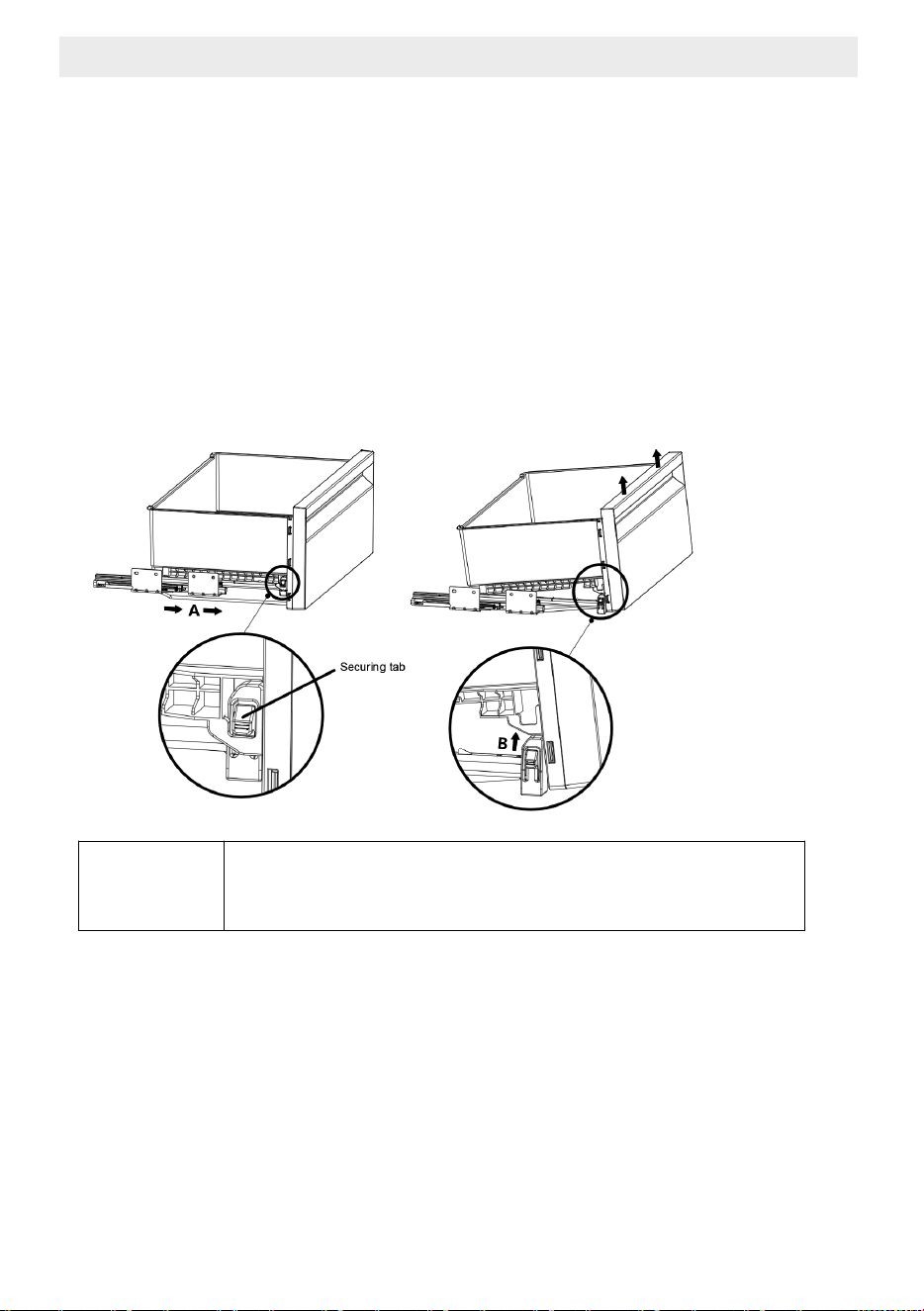
5.3 Bins
To remove the bin
- Pull the bin until it stops.
- Slightly unclip the front section of the bin and take it out completely.
To install the bin
- Pull the rails completely.
- Place the gap at the rear corners of the bin to the detail located
at the rear corners of the rails.
- Push the bin slowly down until you feel it clip front onto the rails.
C
Make sure that the details at the right and left-hand
sides are fixed when installing the bin.
5 Equipment
5.4 SPE. TEMP. zone compartment
You can control the temperature in this section to store your food
such as fish, meat, delicatessen products.
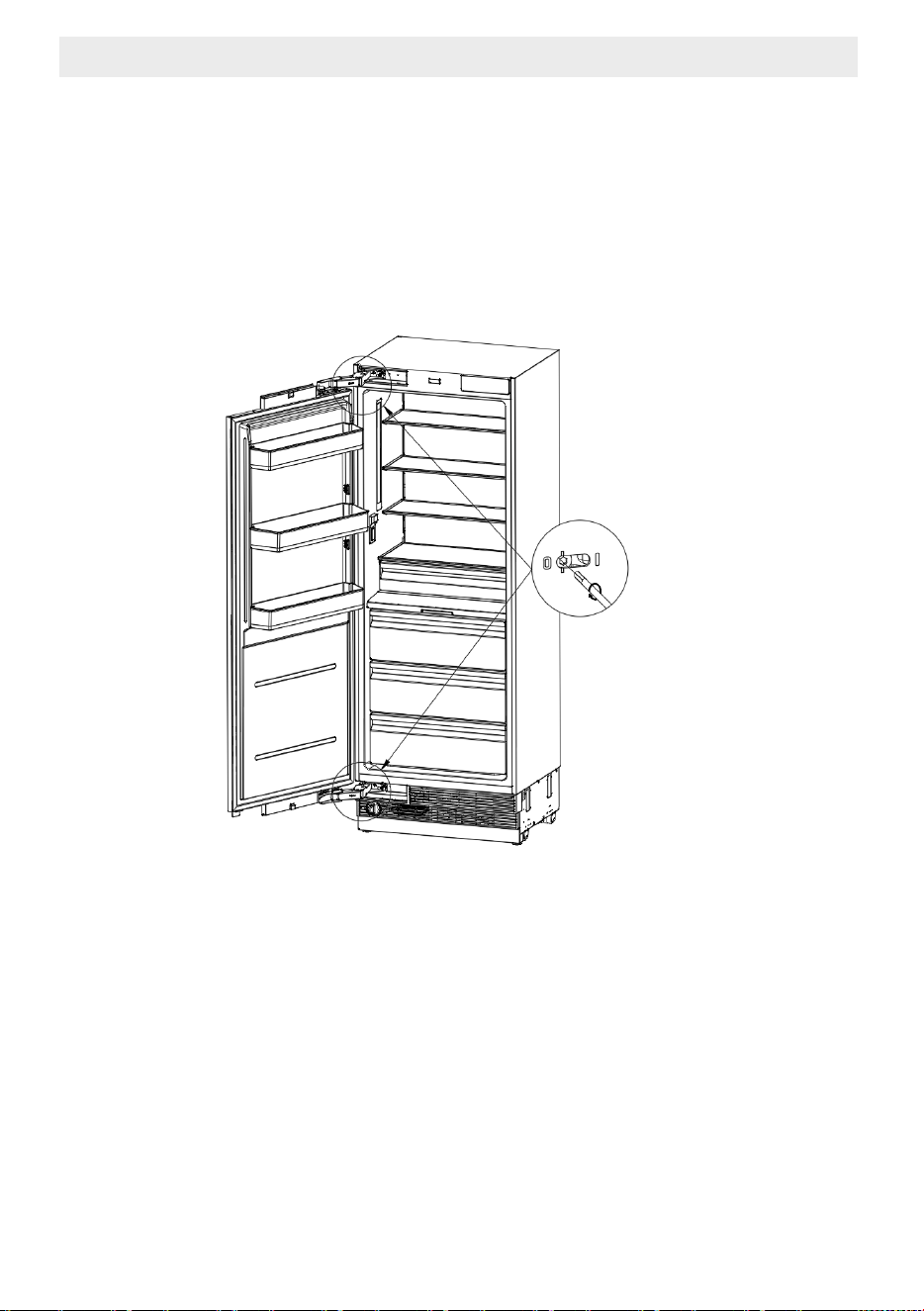
5.5 Hinge Adjustment
When adjusting the hardness of the hinge: Hardness of the lower and
upper door hinges of the fresh food compartment is performed with
the help of a drill. Set the hinge adjustment screw to position "1" from
position "0".
5.6 Changing the Direction of the Door
Please see the installation instructions provided in the bag.
5 Equipment
6 Care and Cleaning
Service life of the product will extend and frequently encountered problems will
decrease if the product is cleaned periodically.
Never use gasoline, benzene or similar substances for cleaning purposes.
Never use any sharp abrasive instruments, soap, household cleaners,
detergent or wax polish for cleaning.
Dissolve one teaspoon of carbonate in half liter of water Soak a cloth in the
solution and wring it thoroughly. Wipe the interior of the refrigerator with this
cloth and the
dry thoroughly.
Make sure that no water enters the lamp housing or other electrical parts.
If you will not use the refrigerator for a long time, unplug it, remove all food
inside, clean it and leave the door ajar.
Check regularly that the door gaskets are clean. If not, clean them.
Take out all items in the product to remove the door and body shelves.
Remove the door shelves by pulling them up. Slide the shelves downwards to
re-install them after cleaning.
Never use chloric cleaning agents or w
ater to clean outer surfaces or chrome-
coated parts of the product. Chlorine causes abrasion on such metal surfaces.
6.1 Avoiding Bad Odors
Materials that may cause odor are not used in the production of our
refrigerators. However, odor may be emitted if foods are stored improperly or
if the inner surface of the product is not cleaned as required.
Please consider the following to avoid this problem:
It is important that the refrigerator is kept clean.
Food residuals, stains
, etc. can cause odor.
For this reason, clean your refrigerator with carbonate solved
in water every 15 days. Never use detergents or soap.
Keep your foods in closed vessels. Microorganisms emitted from vessels
without a cover may cause unpleasant odors.
Never keep expired or spoiled foods in your refrigerator.
6.2. Protecting the Plastic Surfaces
Do not put liquid oils or oil-cooked meals in your refrigerator in unsealed
containers as they damage the plastic surfaces of your refrige
rator.
If oil is spilled or smeared onto the plastic surfaces, clean and
rinse the relevant part of the surface with warm water immediately.
B
WARNING Switch off the product before cleaning.
6 Care and Cleaning
6.3 Cleaning the InnerSurface
To clean the inner surfaces and all removable parts,
wash them with a mild solution comprising soap, water and carbonate.
Rinse and dry thoroughly.
Prevent the water from contacting the lighting means and control panel.
6.4 Stainless Steel Outer Surfaces
Use a stainless steel cleaning agent that is non- abrasive and
apply it with a lint-free, soft cloth.
For polishing, wipe the surface softly with a damp microfiber cloth
and use dry wash-leather.
Alway
s follow the strands of the stainless steel.
A
ATTENTION:
Do not use vinegar, rubbing alcohol or other
alcohol-based cleaning agents
on any of the inner surfaces.
7.1 Water filter cartridge
The water filter cartridge is located in the bottom part of the unit.
Regarding as replace the filter cartridge
The filter cartridge should be replaced every six months or
earlier if 170 gallons of water has been dispensed or the
flow of water to the dispenser or icemaker decreases.
The main refrigerator/freezer control panel will display
water filter lamp when the water fil
ter has
reached 90% of life.
7 Replacement water filter
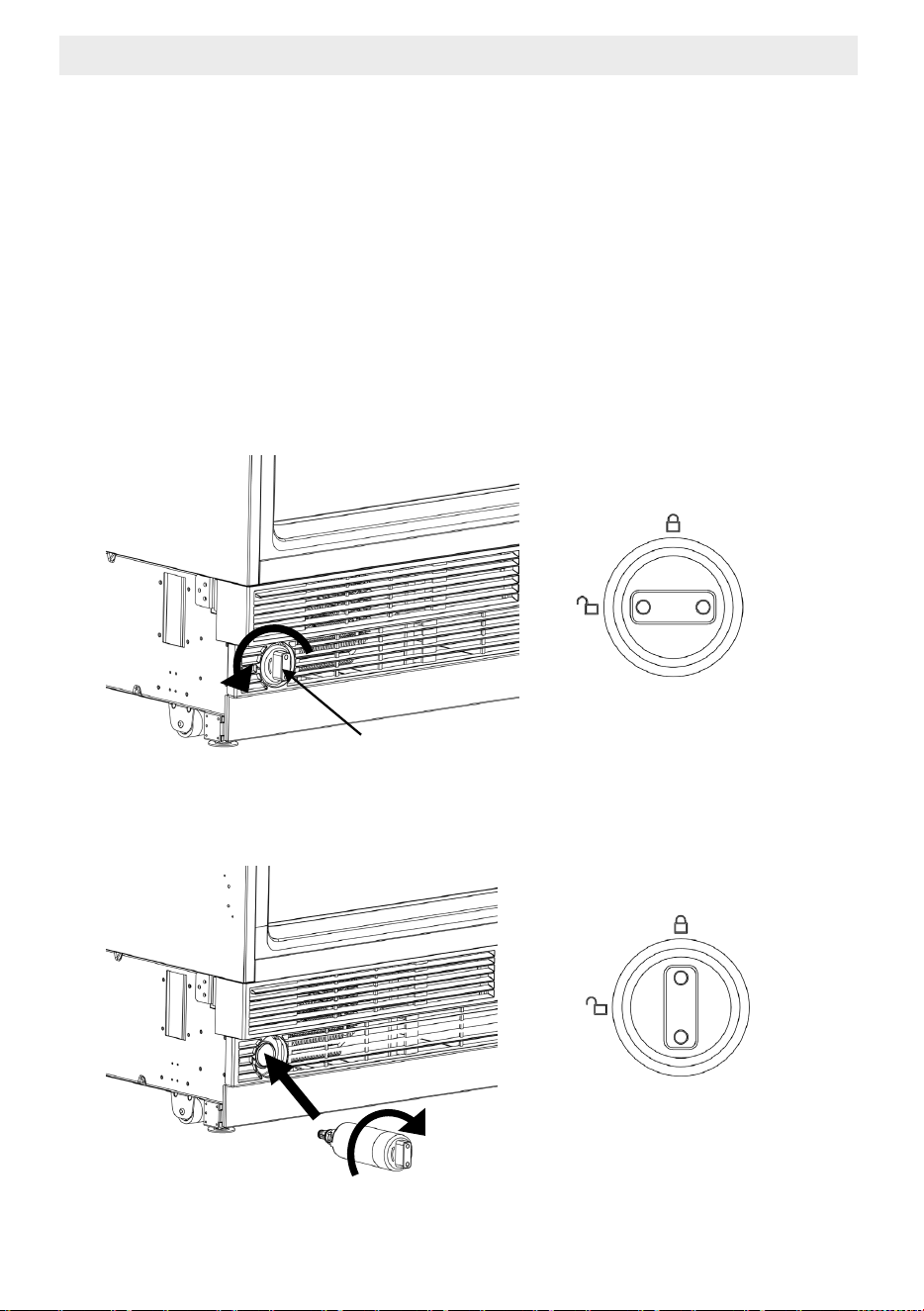
7 Replacement water filter
7.1 Water filter cartridge
The water filter cartridge is located in the bottom part of the unit.
Regarding as replace the filter cartridge
The filter cartridge should be replaced every six months or
earlier if 170 gallons of water has been dispensed or the
flow of water to the dispenser or icemaker decreases.
The main refrigerator/freezer control panel will display
water filter lamp when the water filter has
reached 90% of life.
7.2 Changing the water filter cartridge
T
urn the water filter counterclockwise and remove.
Insert the water filter – with the knobs at the front in a horizontal position
As far as it will go, and turn clockwise until it snaps in.
Rotate 90°clockwise
Rotate 90°counter-clockwise
7.3 When after replacing the filter cartridge
In refrigerators, run 2 gallons of water to remove air from the system.
A newly installed filter cartridge will cause water to spurt and
dribble until the air is out of the system.
In freezers, the icemaker may not immediately produce ice.
Initial ice may be irregularly shaped.
Discard the first bin of ice to allow air to purge from the system.
A newly installed filter cartridge will cause water to spurt into the
icemaker body,
which could lead to ice droplets around
the icemaker area.
To reset the water filter usage, press the SELECT button
for 5 seconds to reset.
C
It is normal for these droplets
and initial ice production to appear discolored
during the initial system flush.
Ice color will return to normal after the first bin
of ice production.
7 Replacement water filter
7 Trouble Shooting
Please review this list before calling the service.
This will save you time and money.
This list contains frequently encountered problems that are not results
of faulty workmanship or material use.
Your product may not have some of the features described here.
The refrigerator is not operating.
• It may not be plugged in properly. >>> Plug in the product properly.
• The fuse of the socket to which your refrigerator is connected
or the main fuse may have blown.
>>>Check the
fuse.
The condensation on the fridge compartment
• The door may have been opened/closed frequently.
>>>Do not open/close the refrigerator door frequently.
• The environment may be too humid.
>>>Do not install the refrigerator at locations with a very high
level of humidity.
• Foods containing liquid may have been placed into the refrigerator
in vessels without covers.
>>> Do not place foods containing liquid into the refrigerator
in unsealed vessels.
• Door of the refrigerator may have been left ajar.
>>>Do
not keep the doors of your refrigerator open for a long time.
The compressor is not operating.
• The compressor protector will work during sudden power failures or plug-out
plug-in as the refrigerant pressure in the cooling system of the refrigerator has
not been balanced yet.
• The refrigerator will start running approximately after 6 minutes.
• The freezer is in defrosting cycle. >>>This is normal for a refrigerator
that performs full-automatic defrosting.
Defrosting cycle is performed
periodically.
• The refrigerator may not be plugged in.
>>>Make sure that the plug fits the socket.
• Temperature settings may be incorrect.
>>>Select the correct temperature value.
• Possible power failure.
>>>The refrigerator will start to operate normally when power restores.
7 Trouble Shooting
The operation noise increases when the refrigerator is running.
Operating performance of the refrigerator may vary based
on the ambient temperature changes.
This is normal and not a fault.
Vibration or noise.
• The floor may not be stable or level.
>>>If the refrigerator shakes when moved slightly feed to balance it.
Make sure that the floor is level and capable of carrying the refrigerator.
• Objects placed onto the refrigerator may cause noise.
>>>Remove the objects on the refrigerator.
There are
noises coming from the refrigerator like liquid
spilling or spraying.
• Liquid and gas flows occur in accordance with the operating principles
of the refrigerator. This is normal and not a fault.
Whistle is heard from the refrigerator.
• There are fans that are used to cool the refrigerator.
This is normal and not a fault.
Dew condensation accumulates on the inner walls of refrigerator.
• Hot and humid weather increases icing and condensation.
This is normal and not a fault.
• The doors may have been opened frequently or left a
jar
for a long time.
>>>Do not open the door frequently. Close the doors, if open.
• The door may have been left ajar.
>>>Close the door completely.
Dew condensation occurs on the outer surface of the refrigerator or
between the doors.
• Air might be humid. This is quite normal in humid weathers.
>>>Condensation will disappear the humidity level decreases.
• There might be external condensation at the section between
two doors of the refrigerator if you use your product rarely.
This is normal. Condensation will
disappear upon frequent use.
7 Trouble Shooting
There is a bad odour inside the refrigerator.
• No regular cleaning may have been performed.
>>>Clean the inside of the refrigerator sponge, lukewarm water
or carbonated water.
• Some vessels or packaging materials may cause the odour.
>>>Use another vessel, or packaging materials from another brand.
• Foods may have been placed into the refrigerator in vessels
without covers. >>>Store the foods in closed vessels.
Microorganisms emitted from vessels without a cover may cause
unpleasant odo
rs.
• Take out expired or spoiled foods from the refrigerator.
The door cannot be closed.
• Food packages may be preventing the door from closing.
>>> Re-locate the packages obstructing the door.
• The refrigerator may be unstable on the floor.
>>>Adjust the refrigerator feet as requir the refrigerator in balance.
• The floor may not be level or solid.
>>>Make sure that the floor is level and capable of carrying
the refrigerator.
Bins are stuck.
• Foods may be touching the upper wall of the bin.
>>>Re-organise
the foods in bin.
A
WARNING
If you can not eliminate the problem although
you follow the instructions in this section,
consult your dealer or the Authorized Service Provider.
Never attempt to repair a malfunctioned product.
FOR MORE DETAILS AND INFORMATION, PLEASE VISIT OUR WEBSITE WWW.KUCHT.COM
WE TRANSFORM A SIMPLE KITCHEN INTO A PRO ONE.
THIS IS WHY WE CARE ABOUT MAKING VERY HIGH PERFORMANCE
RANGES AND HOODS, TO MAKE YOU FEEL LIKE A PRO AND STYLISH COOKER.
DESIGN: LONDON DC - WWW.LONDON-DC.COM