Luci Solar
String Lights
Instruction
manual
If your light does have a USB at the
end of the string, please refer to
'String Instruction Manual_v1'
Charging
String up and shine
• Press power button to turn unit on.
• 1 click for external flashlight, 2 clicks for
low mode, 3 clicks for medium, 4 clicks
for high, 5 clicks to turn off, or hold for 2
seconds at any time to turn off.
Charge via solar
• With solar panel side up, place in direct
sunlight for up to 16 hours for a full charge.
• Press battery level indicator button at any
time to check battery level. See illustration
above for more info.
Twist
• Holding the top and bottom of the unit
with each hand, twist to open and reveal
string lights.
Unravel and string up
• Locate the hook clip at the end of the
string and unravel to desired length.
• Once unraveled, thread string through the
opening notch, and close unit.
• To string up, simply wrap the end of the
string around something and affix the hook
clip to secure.
How to use
1
Getting to know Luci
1
3
4
5
9
8
6
7
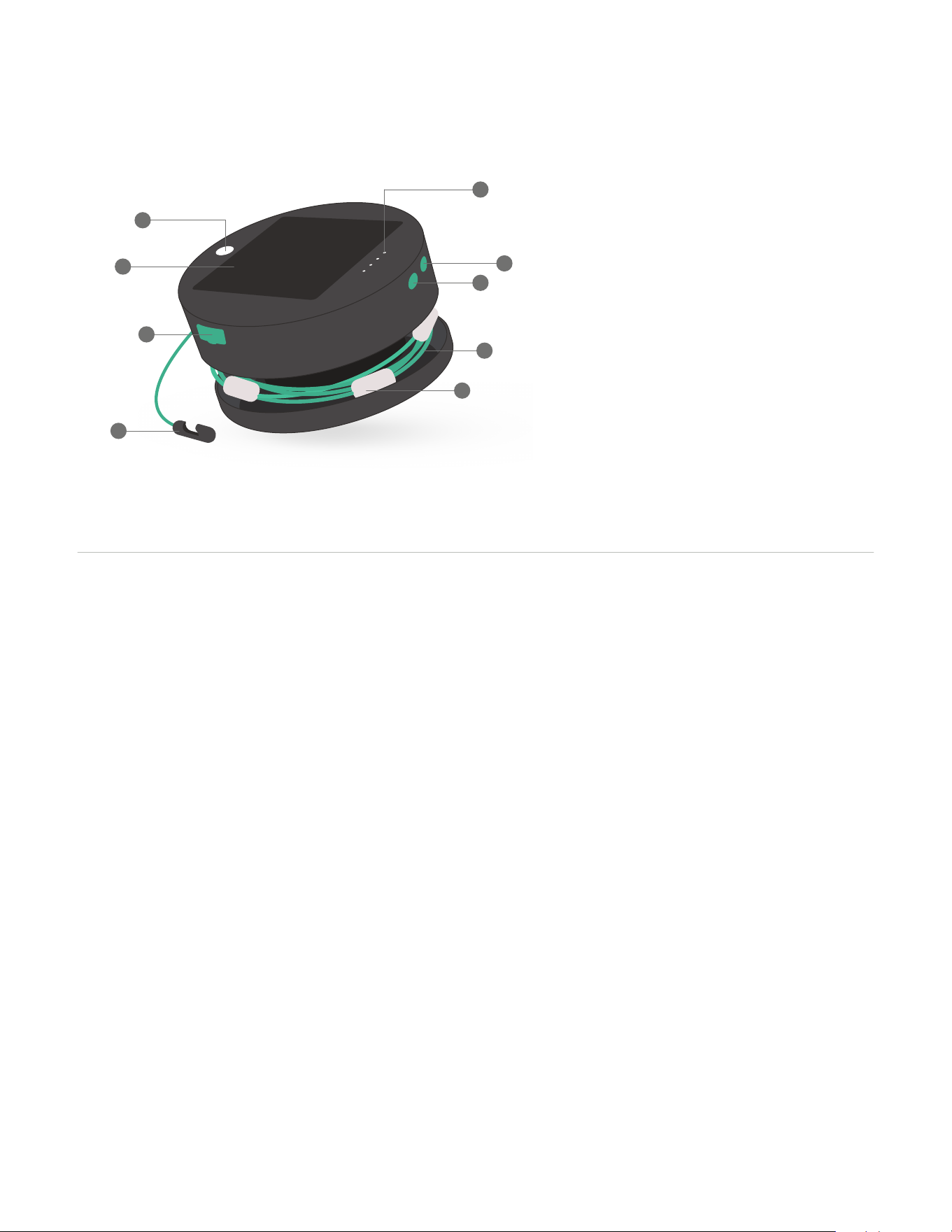
Power button
Battery level indicator
• 1 light = 0-20%
• 2 lights = 21-40%
• 3 lights = 41-60%
• 4 lights = 61-100%
Battery level indicator button
Nylon-braided cord
Nodes
External flashlight
Solar panel
Built-in USB port
Hook clip
1.
2.
3.
4.
5.
6.
7.
8.
9.
2
Charge via USB
• Insert the micro-USB cord provided into
the port on unit, and then insert the other
end into a USB outlet for 2-4 hours.
• Ensure the cord is firmly in position and
check that the Battery Level Indicator lights
are flashing - this means it's charging.
Charging devices
• Simply insert your charging cable at the
USB-A end into the USB port on the light,
and then plug the other end of the cable
into your device. Power up!
What's the difference between charging the light
via USB or the solar panel?
Speed! Charging via USB is ~6x faster than via solar
due to the input power. Whether charging via solar
or USB however, the outcome remains the same - a
full battery charge. Our advice is to charge via solar
for a natural source of power, but if you’re in a pinch,
charge via USB.
Can my light be left outside in the rain?
Yes! It can be left out in the rain but we wouldn’t
recommend leaving it out in strong rain storms for
extended periods or submerging it in water.
Can I charge a device and use my light simultaneously?
Yes, we love multi-taskers! You should be aware
though, that as you’re charging your device, you are
depleting the battery in the light. We recommend
checking the battery level of the light frequently
to make sure that you have enough charge to last
throughout your activity.
Are the bulbs shatterproof?
Yes, the bulbs are super durable. This product was
built to live outside and take knocks, accidental
stomps, or even the occasional cooler drop.
2
USB Port
Frequently asked
questions
What is direct sunlight?
Direct sunlight means that the sun’s light is directly
hitting the solar panel. For example, if you were
standing outside under the sun with nothing
obstructing you and the sun, then you would be
in direct sunlight. If you were standing inside, you
would be getting indirect sunlight but no direct
rays from the sun. Solar panels always need direct
sunlight to charge. If in doubt, think of it this way; if
you were Luci and you were able to directly see the
sun, then you would be in direct sunlight!
It's cloudy, will my light still charge?
Yes, but it will charge at a slower rate than on a
bright, clear day. As your Luci charges via the red and
violet frequencies of visible light, the charge times
will vary based on the UV index or overcast skies.
Generally speaking, the higher the UV index, the
faster the charge.
Will my light charge under indoor lighting?
The sun generates significant red and violet
frequencies (which charge your Luci), whereas your
ordinary indoor lights emit a tiny fraction of that UV.
We recommend you go straight to the source and put
your Luci directly in the sunlight from a windowsill
or, for the best results, outside! Luci is durable and
completely waterproof.
Can I charge your products from my car dashboard?
We advise against charging on a car dashboard. On
a hot summer day, your car dashboard can reach
temperatures of up to 160ºF (71°C) which exceeds the
temperature limit of our products - 122°F (50°C).
We're here for you. For the full list of FAQs and
troubleshooting, go to mpowerd.com/faq.
B
A
C
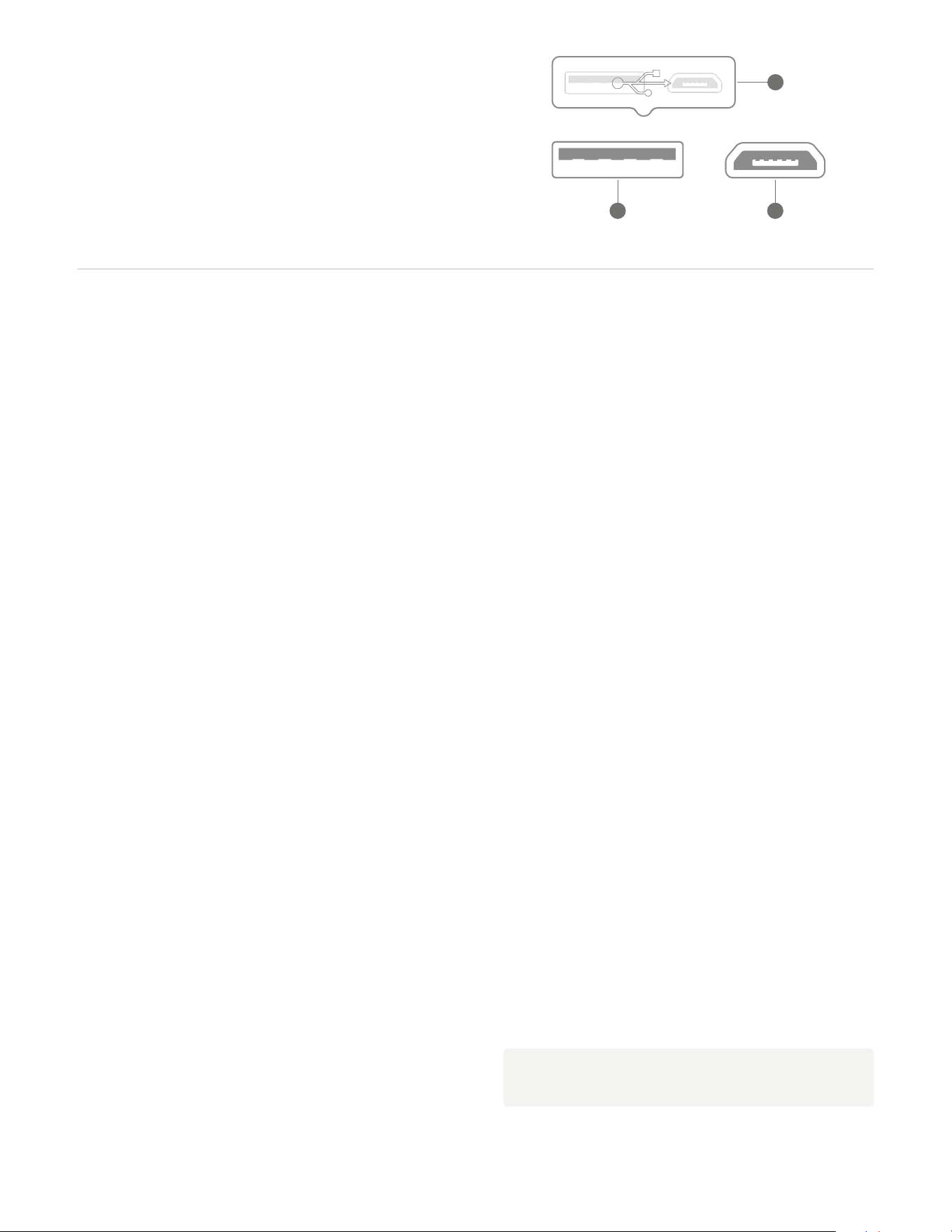
A. Lift cap to reveal ports
B. USB-A port to charge other devices
C. Micro-USB to charge Solar String Lights