Fire/Flammable refrigerant
Maintenance work shall only be carried out at workshop by well-trained maintenance worker.
Please read this manual carefully and follow the information contained within. In particular, be sure to read the safety precautions
before using this refrigerator.
Be sure to receive your copy of the warranty from the retailer and confirm that the purchase date and retailer name are written
on the warranty.
Store this operating instructions manual and the warranty in a safe place.
This refrigerator was manufactured for refrigerating and freezing of foods in general households.
For commercial use, please use a commercial refrigerator-freezer.
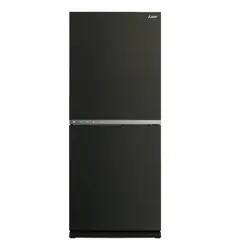
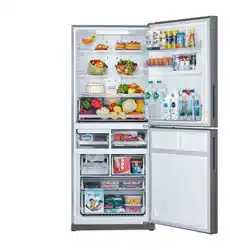
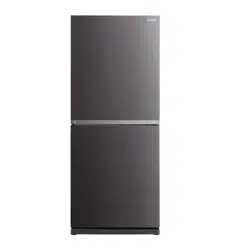
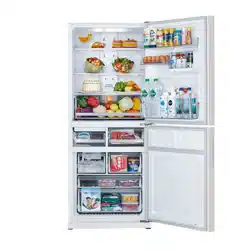
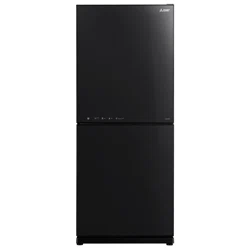
The photographs and illustrations contained in this manual are for the MR-HS421EX. While the appearance of the MR-HGS421EX
are different from the MR-HS421EX, the operation is the same.
The principal plastic components indicate the material name to facilitate recycling.
The user manual should be handed over to any person who would use or handle the refrigerator whenever the refrigerator
would be transferred to another location and delivered to a recycling plant.
This refrigerator uses flammable foaming gas for insulation. Please deliver the unit to specialized industrial waste dealer when
you do away it. Please follow the rules in your country.
It is strongly recommended to use only lukewarm water and a soft cloth when cleaning.
Cleaning agents can cause cracking to the plastic components of your refrigerator.
Cleaning Instruction - Important!
Refrigerator-Freezer
OPERATING INSTRUCTIONS
Contents
Page
2-5
6-7
8
9-11
12-13
14-15
16-18
19-20
20-22
23
Safety Precautions
From Installation to Operation
Refrigerator Compartment / Vegetable case /
Chilled case / Select case / Freezer Compartment
How to Use the Operation Panel
Using each compartment
Automatic Ice-Maker
Performing Temperature Adjustment
Cleaning
Other Issues
Troubleshooting
Accessories
Before useOperation
SERIES MODEL
MR-HS421EX
MR-HGS421EX
2
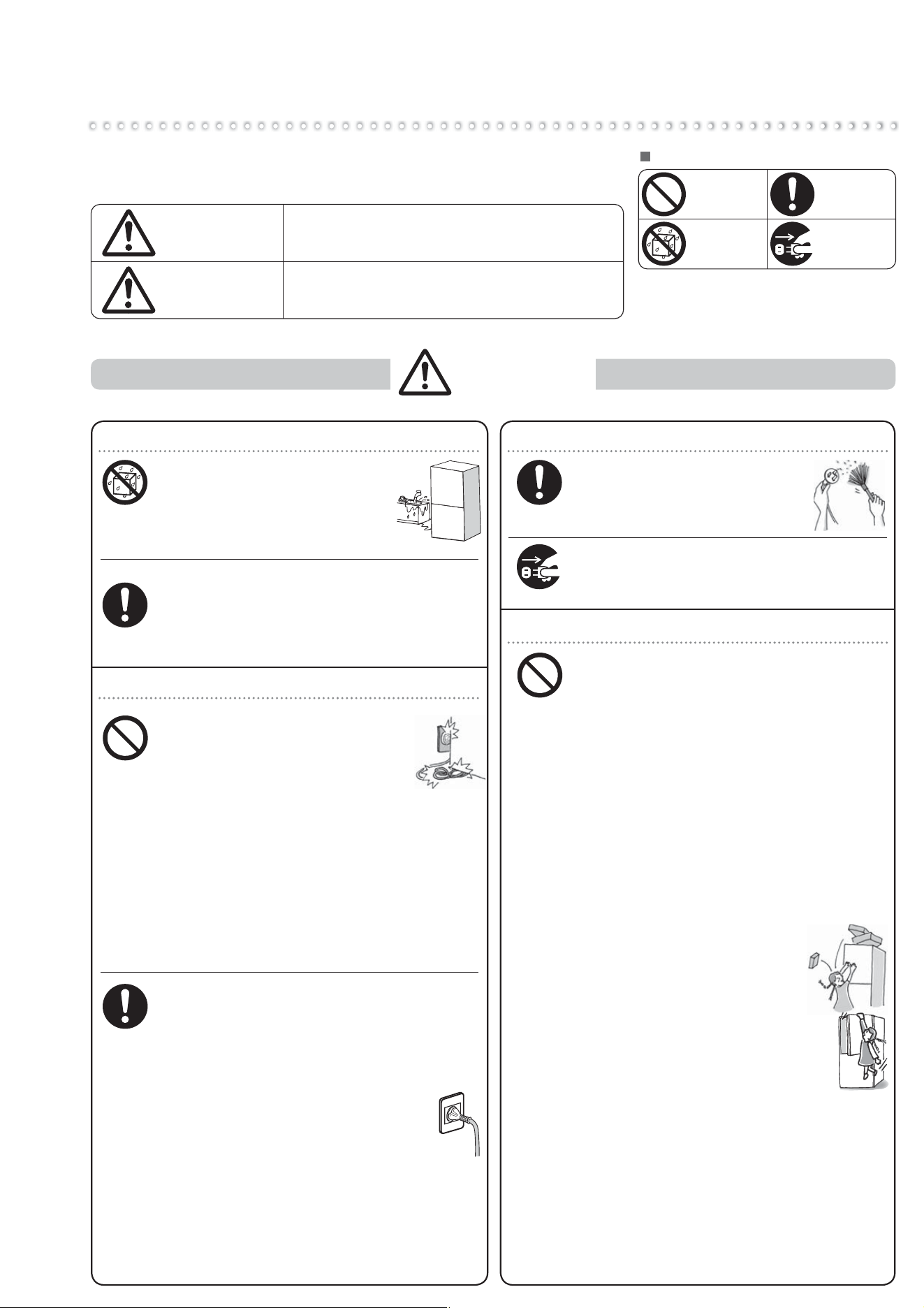
When Installing the Refrigerator
Do not install the refrigerator
outdoors or in places exposed to
water or excessive humidity.
Water may cause insulation failure,
resulting in an electric shock or fire.
¨
Page 6
Leave space around the refrigerator.
If refrigerant leaks, it may accumulate and
catch fire or explode.
¨
Page 6
Prepare for earthquakes by taking fall
prevention measures
Otherwise an injury may result.
¨
Page 7
Power and Power Plug
Do not crush the power plug with the
rear of the refrigerator.
Do not damage the power cord.
Pressing, folding, bundling, or
placing heavy objects on the power
cord may cause an electric shock or fire.
Do not use damaged cords or plugs,
or loose sockets.
Doing so may cause an electric shock or fire.
Do not pull the cord when unplugging
the power plug.
The cord may be damaged, resulting in an
electric shock or fire.
Do not plug in or out the power plug
with wet hands.
Doing so may cause an electric shock.
Use a dedicated outlet for the power supply
that meets the rating specified on the
rating label. (The rating label is located
on the refrigerator compartment.)
Using extension cords and plugging too many
leads into a single socket can cause heat
build-up or fire.
¨
Page 6
Insert the power plug with the cord
facing down, and fully insert the prongs.
Inserting the plug upside-down
places stress on the cord and may
cause heat generation or fire.
If the power cord is damaged, contact
MITSUBISHI ELECTRIC SERVICE CENTRE
or its service agent for the replacement.
If the power cord is damaged, purchase a new
cord from MITSUBISHI ELECTRIC SERVICE
CENTRE or its service agent. Make sure that
the power cord is designed for this model.
Water
prohibited
Follow the
instructions
Power and Power Plug
Remove dust periodically
from the power plug.
Dust may cause insulation failure,
resulting in fire.
Remove the power plug before cleaning.
Otherwise an electric shock or injury may result.
When Using
Follow the
instructions
Prohibited
Remove plug
Follow the
instructions
Do not damage or drive screws into the
refrigerator's refrigerant circuit (pipes).
Because flammable refrigerant is used, this may
result in fire or an explosion.
Do not use electrical appliances inside
the refrigerator.
The refrigerant gas leaking into the compartment
with sparks from an electrical contact may
cause fire and explosion.
Do not place volatile, in flammable
objects inside the refrigerator.
Benzene, cosmetics and hair dressing products
may catch fire or explode.
Do not store chemicals or scientific
specimens in the refrigerator.
Substances that require strict control must not
be stored in household refrigerators.
Do not place objects on top
of the refrigerator.
Objects may fall when the doors are
opened or closed and cause injury.
Do not hang from the door or handle.
Do not climb on an open door.
Do not apply a heavy load.
The refrigerator may tip over and
cause injury.
Do not apply excessive force to glass
doors or shelves.
An impact can cause the glass to crack and
mayresult in injury.
Do not touch the mechanical area of the automatic
ice maker (area above the ice storage box).
Doing so may result in injury.
Do not use flammable sprays near the refrigerator.
Sparks from an electrical contact may cause an
ignition and fire.
Prohibited
WARNING
The following describes the safety precautions to follow in order to
prevent injury to the user and others, as well as to prevent damage
to property.
Meaning of symbols.
Improper handling that can result in grave
consequences such as death or serious injury.
Improper handling that can result in personal injury or
damage to your house, household furnishings, etc.
Prohibited
WARNING
CAUTION
Water
prohibited
Remove the
power plug.
Follow the
instructions
Safety Precautions
3
Before use Operation Cleaning Troubleshooting
Follow the
instructions
Follow the
instructions
Follow the
instructions
Prohibited
Prohibited
Remove plug
Follow the
instructions
Prohibited
Water
prohibited
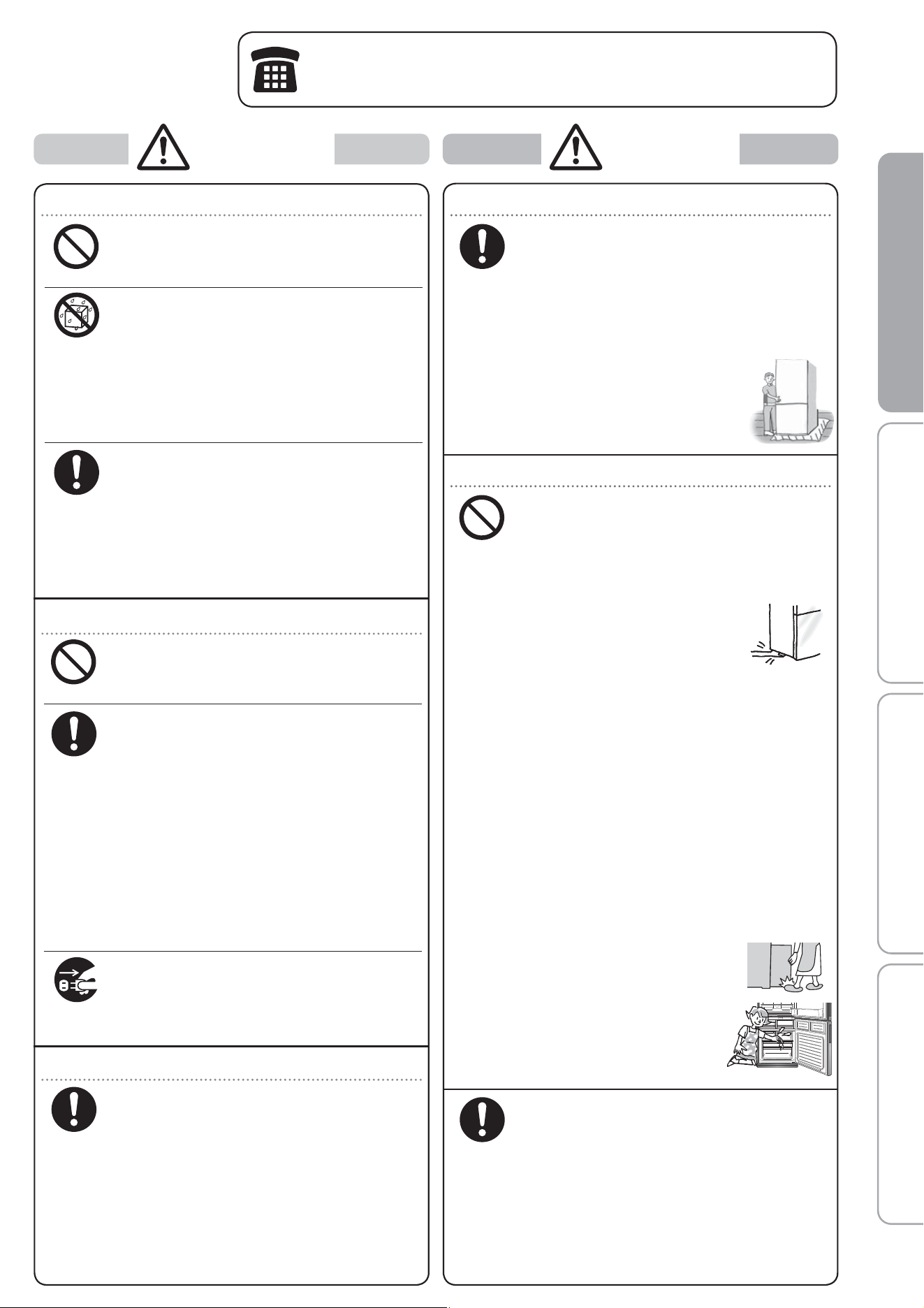
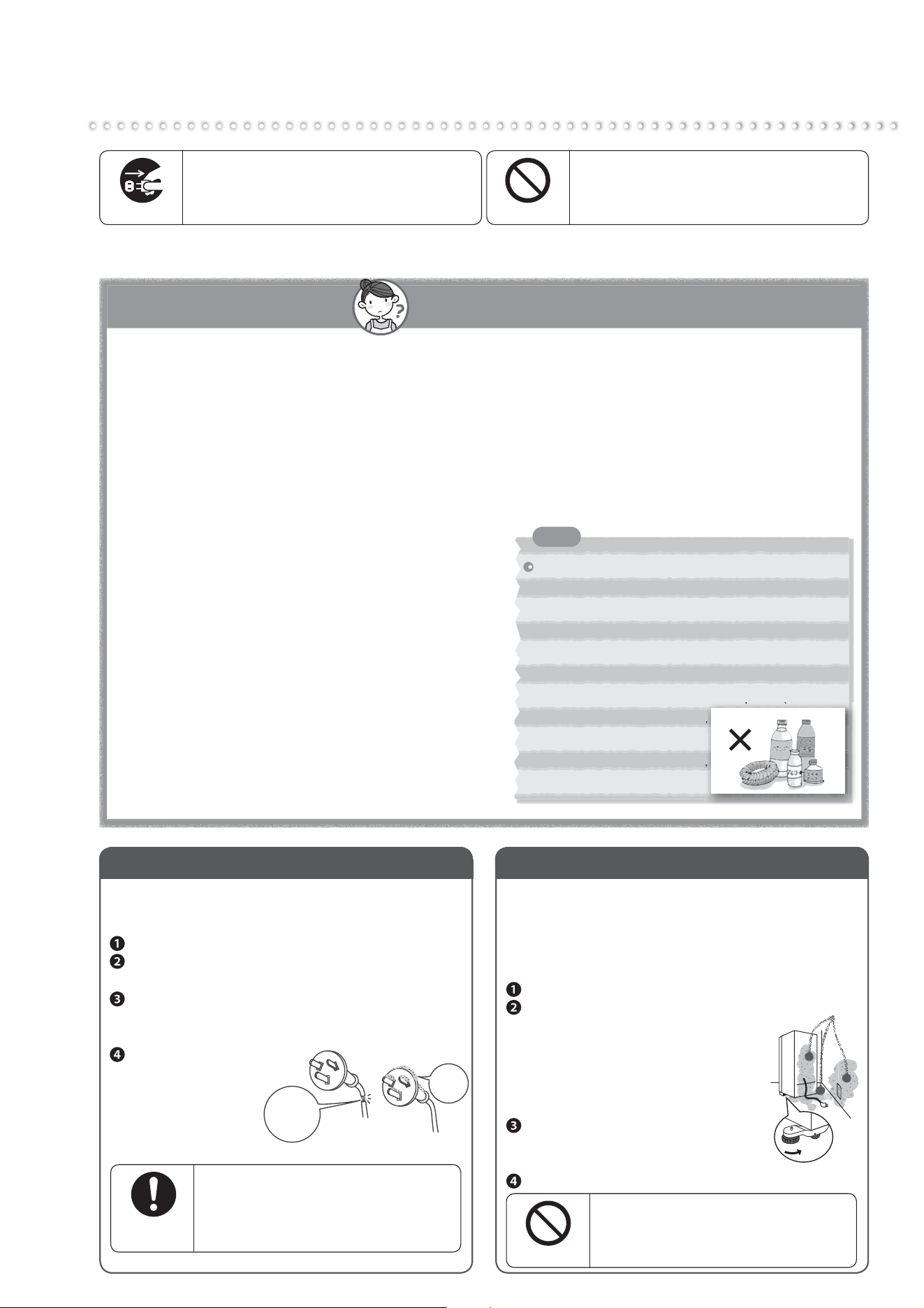
When Installing/Carrying the Refrigerator
Anchor the refrigerator to a strong and level
floor by adjusting the adjustable supports.
Otherwise, the refrigerator may move and
cause injury.
¨
Pages 6 - 7
Use the carrying handles or the parts
instructed when carrying the refrigerator.
Holding other parts may result in injury.
¨
Page 19
When moving the refrigerator,
lay a protective sheet on the floor
and move the refrigerator slowly.
Failing to do so may result in floor
damage or injury.
When Using
Do not pack in excessive amounts of food.
Do not pull the shelves with excessive force.
Food may fall and cause an injury.
Do not place glass bottles in the freezer
compartment and Select case.
The bottle may break if the liquid inside freezes,
causing an injury.
Do not put your hands or feet
under the refrigerator.
The steel plates or other parts may cause injury.
Do not eat food that is
discolored or has a bad odor.
It may result in food poisoning or illness.
Observe the following when opening
and closing the doors.
Do not open or close the doors when another
person is touching the refrigerator.
Do not put your fingers on the top edge of a
drawer
-type door while closing it.
Do not open or close the doors with excessive force.
(Food may fall out.)
Be careful not to trap your fingers or any other
part of your body.
Be careful not to hit a part of your body.
Do not trap your feet with the bottom door.
(Danger of your toes caught by
the door.)
Failing to follow the precautions
above may result in injury.
Do not touch food or containers
in the freezer compartment
with wet hands.
It may cause a cold injury.
Be careful when attaching and removing
the glass shelf and pocket.
If it is attached improperly, it could come loose
and fall, causing injury.
¨
Page 17
Be very careful when crushing ice that
has joined together.
There is a risk of injury.
¨
Page 13
When Using
Do not use in a shed or garage.
Small animals may damage the electrical wiring
and cause an electric shock or fire.
Do not place water containers on top
of the refrigerator.
Exposing electrical parts to water may cause an
electric shock or fire.
Do not wash with water or spill soup or
juice onto the refrigerator.
Water or other liquid may cause an electric shock
or fire. Wipe off any liquid immediately.
If you notice a gas leak, do not touch the
refrigerator. Open windows to ventilate.
Sparks from an electrical contact may cause an
explosion or fire.
When the doors are opened or closed,
beware not to hit any furniture.
The door or furniture may be damaged and
cause injury.
Malfunctions and Long-Term Storage
Do not disassemble, repair, or alter.
Do not use while parts are damaged.
Doing so may cause injury, electric shock or fire.
If the refrigerant circuit (pipe) is
damaged, do not touch the refrigerator
and avoid using flames.
Open windows to ventilate.
If the refrigerant circuit is damaged,
contact the retail store.
Failing to do so may cause a fire.
When not using the refrigerator for a
long time, unplug the power plug and
open the doors to dry the refrigerator.
If the refrigerator is not dried sufficiently,
refrigerant may leak due to condenser corrosion
and cause a fire or explosion.
If an abnormality occurs (such as a
burning odor), unplug the power plug
and stop refrigerator operation.
Continuing to operate with an abnormality may
cause an electric shock or fire.
When Recycling
For storing the refrigerator, make sure to
pull out and remove the door packing.
There is a possibility of a child getting
trapped in the refrigerator during storage.
Contact the retail store or municipal
government for details about correct
refrigerator disposal.
Improper disposal may cause refrigerant leaks,
resulting in a fire or explosion if exposed to a
flame.
If an abnormality or malfunction occurs, stop operation immediately
and contact the retail store where you purchased the refrigerator or
MITSUBISHI ELECTRIC SERVICE CENTRE or its service agent.
Follow the
instructions
WARNING CAUTION
4
Safety Precautions
(Continued)
If the power cord is damaged, contact MITSUBISHI ELECTRIC SERVICE CENTRE or its
service agent for the replacement.
WARNING: fill with potable water only.
For Installation, Handling & Servicing of the appliance, please refer to section
“From Installation to operation”, “How to Use the Operational Panel” & “Cleaning”.
WARNING: Keep ventilation openings, in the appliance enclosure or in the built-in structure,
clear of obstruction.
WARNING: Do not use mechanical devices or other means to accelerate the defrosting process,
other than those recommended by the manufacturer.
WARNING: Do not damage the refrigerant circuit.
WARNING: Do not use electrical appliances inside the food storage compartments of
the appliance, unless they are of the type recommended by the manufacturer.
Contact the retail store or municipal government for details about correct refrigerator disposal.
This appliance is not intended for use by persons (including children) with reduced
physical, sensory or mental capabilities, or lack of experience and knowledge, unless
they have been given supervision or instruction concerning use of the appliance by
a person responsible for their safety.
Children should be supervised to ensure that they do not play with the appliance.
Do not store explosive substances such as aerosol cans with a flammable propellant
in this appliance.
This appliance is intended to be used in household application only.
WARNING: When positioning the appliance, ensure the supply cord is not trapped or damaged.
WARNING: Do not locate multiple portable socket-outlets or portable power supplies at
the rear of the appliance.
5
Before use Operation Cleaning Troubleshooting
R600a Refrigerant Warning
NOTE: THIS REFRIGERATOR CONTAINS FLAMMABLE HYDROCARBON
REFRIGERANT. ONLY SUITABLY QUALIFIED TECHNICIANS SHOULD
ATTEMPT ANY SERVICE TO THE REFRIGERATION CIRCUIT OF THIS
APPLIANCE. SOME JURISDICTIONS REQUIRE A SPECIFIC HYDROCARBON
HANDLING LICENCE FOR SERVICING. PLEASE CONTACT MITSUBISHI
ELECTRIC SERVICE CENTRE OR ITS SERVICE AGENT FOR ASSISTANCE.
This appliance contains a small quantity of R600a refrigerant which is flammable.
During transportation and installation, ensure that the tubing of the refrigerant circuit is
not damaged.
Leaking refrigerant can ignite and may damage the eyes.
In the event any damage does occur, avoid exposure to open fires and any device which
creates a spark. Disconnect the appliance from the mains power.
Thoroughly ventilate the room in which the appliance is located for several minutes.
Notify MITSUBISHI ELECTRIC SERVICE CENTRE or its service agent for necessary
action and advice.
The room for installing the appliance must be at least 1 cubic metre per 8 grams of
refrigerant.
The refrigerant quantity contained in this appliance is noted on the Rating Label of the
appliance.
If your Mitsubishi Electric Refrigerator should require service, please contact
MITSUBISHI ELECTRIC SERVICE CENTRE or its service agent.
●
●
●
●
●
●
●
●
6
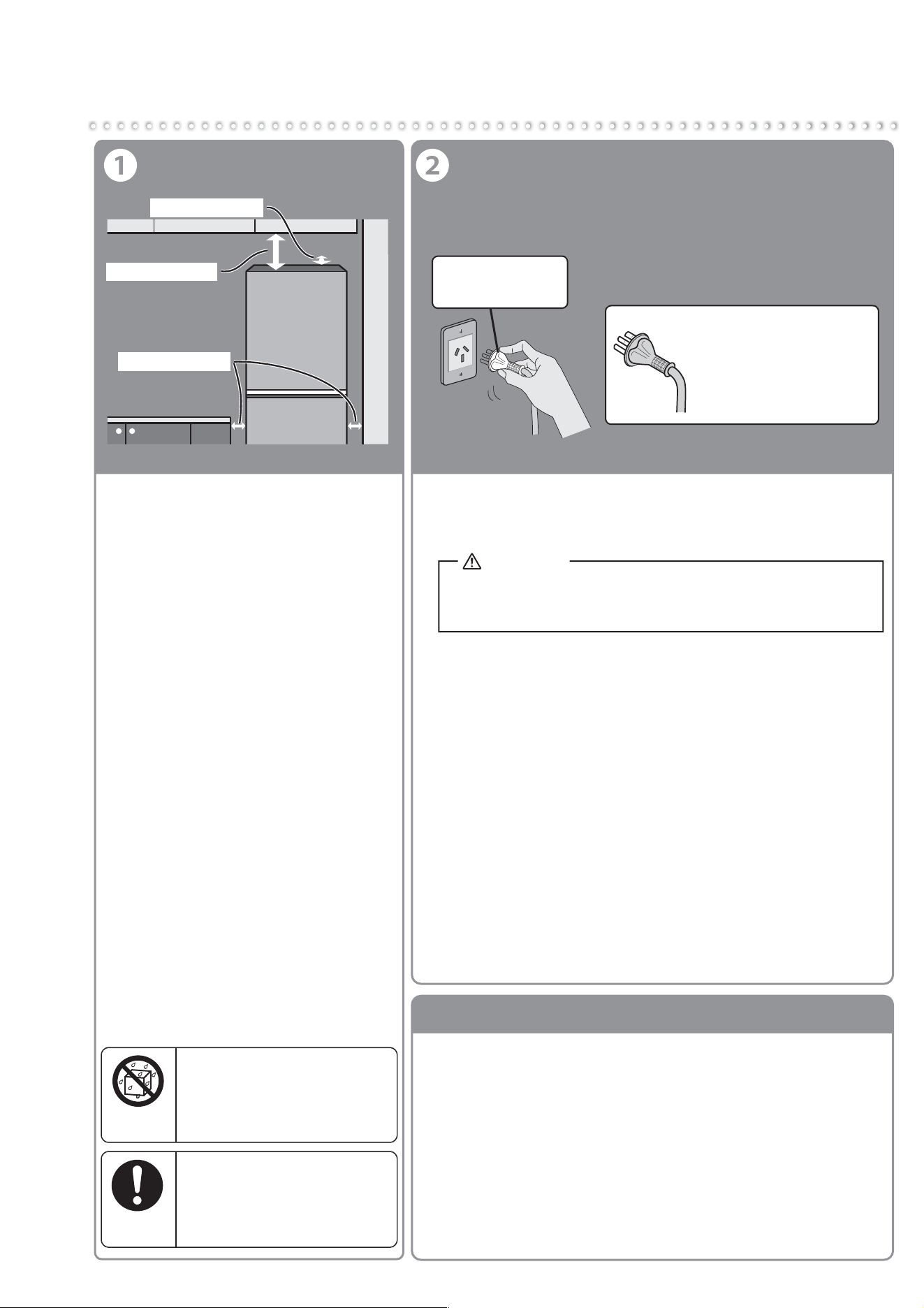
From Installation to Operation
Install the refrigerator in the
following kind of location.
●
A place with good ventilation and not
exposed to direct sunlight or hot air
To keep good cooling performance and
reduce power costs.
● A place with low humidity
To prevent it from rusting.
● A strong and level place
To prevent vibration, noise, and ajar or
tilting doors.
To prevent deformation or discoloration of
the floor materials due to the weight or heat.
*If the floor materials are carpets, tatami
mats, wooden floors, PVC floors, etc.
and may deform or discolor, lay a
strong plate or board underneath.
● A place away from other devices
To prevent noise or video interference
with devices such as televisions.
● There should be at least 3 cm of
space on both the left and right
sides, at least 8 cm of space above
and at least 5 cm of space back.
To allow heat to dissipate from the top,
the back and the sides of the refrigerator.
Installation
Do not install the refrigerator
outdoors or in places exposed
to water or excessive humidity.
Water may cause insulation failure,
resulting in an electric shock or fire.
Water
prohibited
Leave space around the
refrigerator.
If refrigerant leaks, it may
accumulate and catch fire or
explode.
Follow the
instructions
Connect the Power Supply
Remove the energy label carefully. A glue residue may remain,
particularly if the label has been in place for a long period of time.
Apply either Eucalyptus or Tea Tree oil directly on any residue.
Do not allow the oil to run or drip onto plastic parts as it may
cause the plastic to degrade and potentially crack over time.
Allow the oil to sit for approximately 1-2 minutes, or until the
glue residue has softened.
Wipe off with a damp cloth.
If any residue remains, repeat the above process.
Rinse with clear water.
Dry thoroughly.
●
●
●
●
●
●
●
●
How to remove the energy label
5 cm. or more
3 cm. or more
8 cm. or more
Dedicated
outlet that meets
the specified rating.
Turn on the power of the
refrigerator as soon as
possible.
The refrigerator will not be
damaged even if you turn on
the power immediately after
the installation.
* Connect power supply soon after installing the
refrigerator
WARNING
Using outlets that do not meet the specified rating or
plugging in too many leads into a single socket can
cause heat buildup or fire.
● Use a dedicated outlet
● The refrigerator will not be damaged even if the power
is supplied soon after installation. It takes a while for
the refrigerator to cool, therefore supply power as soon
as possible.
● Electrical Connections
●
The refrigerator should always be plugged into its dedicated
electrical outlet. This will provide the best performance and prevent
electrical circuits from being overloaded and causing a fire.
Make sure that the electrical outlet provides the proper voltage.
Extension cords are not recommended.
●
If your refrigerator is installed in a high humidity location, not only
ground connection but also installation of the earth leakage breaker
is recommended.
●
If the power cord is damaged, purchase a new cord from
MITSUBISHI ELECTRIC SERVICE CENTRE. Make sure that
the power cord is designed for this model.
●
If the power cord is damaged, contact MITSUBISHI ELECTRIC
SERVICE CENTRE for the replacement, in order to avoid a hazard.
Make sure this unit is properly grounded.
Use a dedicated outlet for the power supply that meets the rating
specified on the rating label. (The rating label is located on the
refrigerator compartment.)
7
Before use Operation Cleaning Troubleshooting
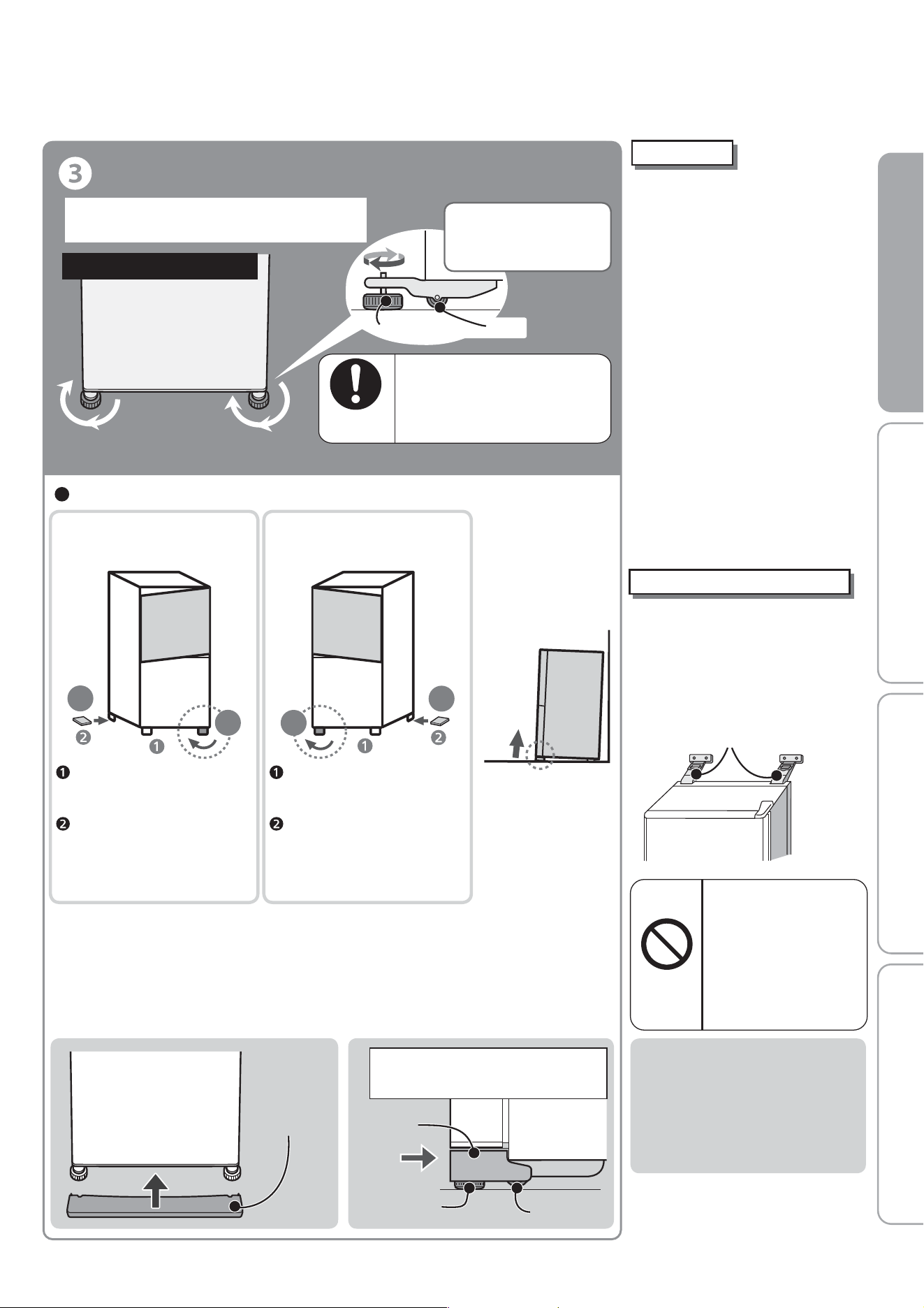
Adjustment and Anchoring
● Adjust the tilt with the adjustable supports.
Anchor the refrigerator to
a strong and level floor by
adjusting the adjustable supports.
Otherwise, the refrigerator may
move and cause injury.
Bottom front of refrigerator
A few days after installation, the floor may sink due to the refrigerator's
weight. Readjust the tilt with the adjustable supports.
*1 Normally, use a board with a thickness of 2 to 3 mm.
● After adjustment, attach the adjustable support cover.
(The adjustable support cover is stored inside the refrigerator
compartment at shipment)
Adjustable
Support Cover
Adjustable
Support Cover
Fully insert the adjustable support
cover horizontally until it touches
the rear side.
Adjustable
Support
Caster
Start using
●
It takes time to cool down.
•Put in warm food items or ice
cream after the refrigerator has
been adequately cooled down.
•Keep opening and closing of
the door to a minimum,
and open in a short time.
•In the summer, it will take
approx. 24 hours to make
the first batch of ice.
● It may smell of plastic.
•
The smell will gradually disappear.
Please ensure room is adequately
ventilated to remove odors.
●
When the refrigerator is in cooling
mode the following may occur
(also occurs during summer).
•
The side will be hot allowing the
outside of the refrigerator to cool.
•Operating noise will be loud
due to the compressor being
in high-speed operation.
Because flammable
refrigerant is used,
this may result in fire
or an explosion.
Do not damage or
drive screws into
the refrigerator's
refrigerant circuit
(pipes).
Prohibited
Use in hot spring and
geothermal areas
Corrosion control treatment may be
required for the refrigerant circuit
(pipes) due to generation of corrosive
gases. Contact the retail store where
you purchased the refrigerator.
(To prevent vibration, noise,
movement, and doors left ajar)
Follow the
instructions
Turn the adjustable supports to the floor and
anchor them so that the refrigerator will not move.
Turn the adjustable
supports in the arrow
direction until they
touch the floor.
Caster
Adjustable Support
Left
Right
Right
Left
When the left side
of the door tilts down
When the right side
of the door tilts down
Turn the right adjustable support
in the direction of the arrow
to lower the refrigerator.
If the door is still tilted after
adjusting the adjustable support,
place a strong board*1 under
the adjustable support on the
left rear side to make it level.
Turn the left adjustable support
in the direction of the arrow
to lower the refrigerator.
If the door is still tilted after
adjusting the adjustable support,
place a strong board*1 under
the adjustable support on the
right rear side to make it level.
Adjust the supports to
make the refrigerator level.
If the front of the
refrigerator is slightly
raised, the doors are
easier to close.
Prepare for Earthquakes
● It is recommended to pass
2 strong belts through the
handles on the top rear of
the refrigerator and anchor
them to a strong location,
such as a wall or post.
Strong Belts
8
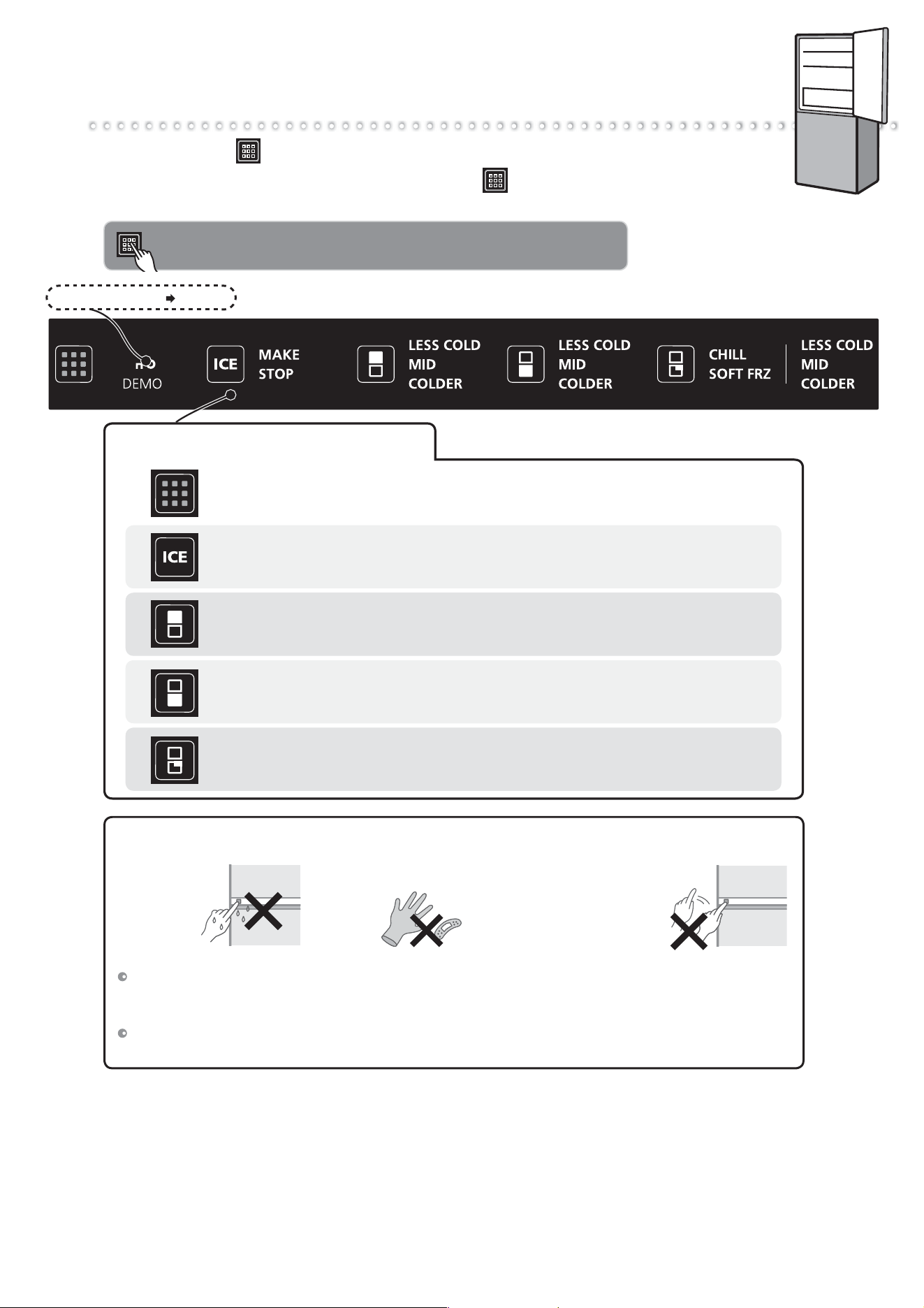
How to Use the Operation Panel
Touching will cause the operable icons to light up.
To save power, all displays other than are usually turned off (it turns
off if there is no operation after 30 seconds).
When operating, be sure to touch the buttons with your fingers.
Child Safety Lock Page 14
If you touch the operation panel, icons will be displayed.
You can select the setting that you prefer.
Touch an icon to display its setting details.
Ice making
To start or stop ice making.
Temperature adjustment in freezer compartment
To change compartment temperature.
Temperature adjustment in refrigerator compartment
To change compartment temperature.
Temperature adjustment in Select case
To change compartment temperature.
In the following cases, the display may not change even when you touch it.
Wipe the moisture and dirt off your fingers.
Perform operations with your hands. After you have touched an icon, confirm that the display
has changed before touching again.
The response may vary, depending on the surrounding temperature, humidity, the health condition
of the person who operates it, and the operating condition of neighboring electric appliances.
The operation
panel or your
fingers are wet
or dirty.
The interval between
touches is too short.
(Pressing repeatedly
may cause a
misdetection)
You are wearing gloves or
have sticking plaster on your
finger.
9
Before use Operation Cleaning Troubleshooting
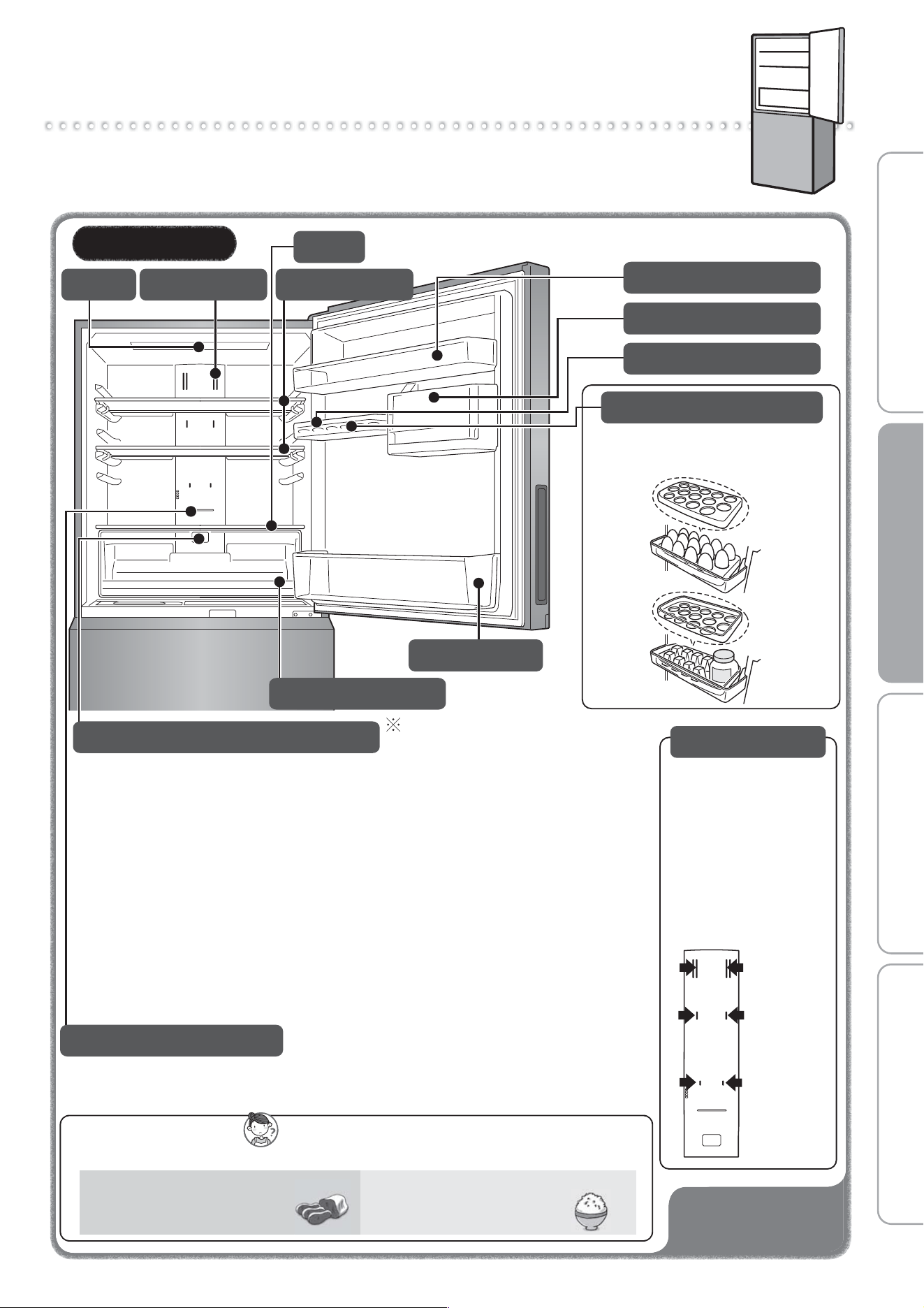
Refrigerator / Vegetable case
Using each compartment
To prevent odors?
We recommend you wrap or store the foods in airtight containers.
Kimchi, dumplings, sardine
(seafood), beef, etc.
Foods with strong odor
Rice, potato salad, etc.
Foods that easy to absorb odor
Door alarm will inform
when the door is left open.
➡Page 20
Air blowing outlet
Food items with a lot
of moisture may freeze
if put near air blowing
outlet.
(Especially canned
beer or carbonated
drink, there is a risk
of rupture when
freezing.)
Refrigerator
Insert drinks or immediately used foods in refrigerator compartment.
Vegetable case can store fruit, vegetables and drinks.
If you wrap fruit and vegetables, they will stay fresh longer.
Free pocket (large)
Adjustable shelf
Shelf
LED light
Air blowing outlet
Bottle pocket
Capsule door pocket
It’s an egg case and a small items tray.
By turning the egg case upside-down,
it converts into a small items tray.
Free egg tray
Free pocket (small)
How to remove shelf, pocket, case
➡ Page 17
Air blowing
outlet
Vegetable case
LED Light (Deodorant)
LED light in the vegetable case
Storage Advice
CAUTION
●
●
The LED light is installed inside the vegetable compartment.
The green vegetables photosynthesis will be promoted by this light.
The orange light emitted by the LED is visible to the naked eye and capable of
passing through transparent boxes or plastic bags. The LED light will operate all
the time regardless of whether the door is open or closed.
●
●
Wrap fruit and vegetables in foil or plastic before storage in the refrigerator
in order to keep them fresh.
Preserve vegetables in transparent containers or wrap in transparent plastic.
Place vegetables so that they are directly exposed to the LED light.
●
●
Using a sharp knife or screwdriver to pick or adjust the LED light may cause malfunction.
Avoid disassembling, repairing, altering or adjusting the LED light,
as this may cause damage and malfunction.
●
Bacteria and odors are removed with the effect of the blue LED light
installed on the back of the refrigerator compartment.
Illustration of the MR-HS421EX
10
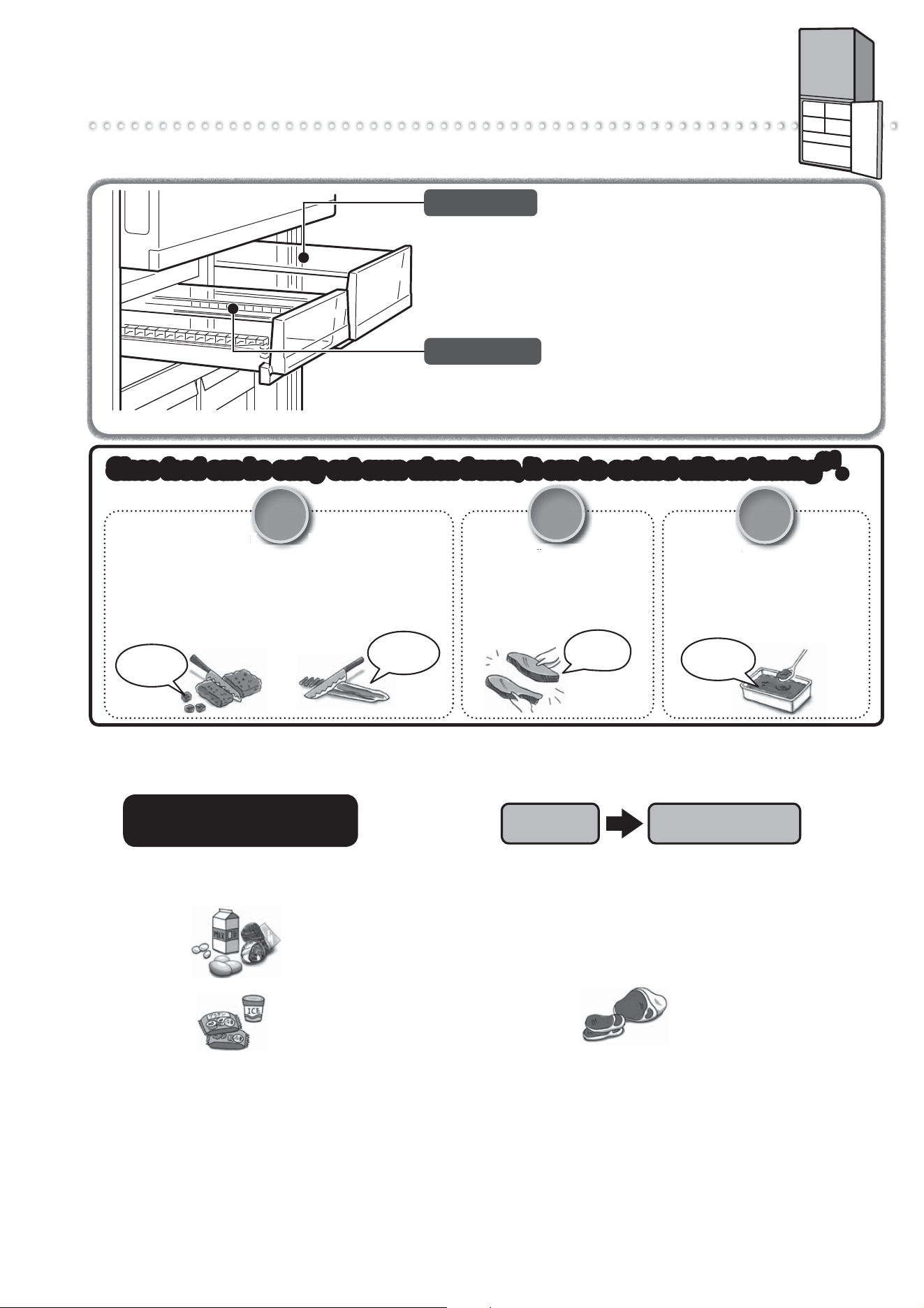
Chilled case / Select case
Chilled case and Select case can store meats, fish, dairy products,
processed foods,etc. at a lower temperature than the refrigerator compartment.
The temperature in Select case can be switched between
"Soft-Freezing" and "Chilling*".
At the time of purchase, Select case is set to
"Soft-Freezing". When setting "Chilling", please make
the settings on page 14.
➡ Page 14
* Chilling mode is cooling to a low temperature in order to
preserve the freshness of foods stored for long periods.
Chilled case
Select case
●
Processed food such as sausage, ham and dairy products
can be preserved.
Do not store food that is easily frozen.
The temperature cannot be adjusted.
●
●
●
You can easily
slice them.
Scoop the
amount you
need.
You can
easily separate
them.
Only the
necessary
amount.
It can be cut with a kitchen
knife easily without thawing.
Because it can be cut while
frozen, whatever you will not
use can be returned to the
sliding case. Food can be
used without being wasteful.
Cutlets
You can easily separate them*
2
.
No need for dividing them by the
amount per serving before freezing.
Purchased packs can be frozen as
it is. Bake them at low heat without
thawing and there is no trouble.
Thinly sliced meat / Bacon
Ground meat / Blocks of meat
Meat sauce
If there is sauce left over, place it in a
storage container and use "Soft Freezing"
Scoop out only the necessary amount
and dress the pasta with it to easily
make a meat sauce pasta*
2
.
You can easily separate
them one by one and slice
them finely without thawing
*
2
.
They will thaw while basting.
Y
m
h
i
m
e
a
T
h
a
t
Meat
il
Fish
ce
uc
ce
Sauces
Since food can be easily cut even when frozen, it can be cooked without thawing .
*
1
Since food can be easily cut even when frozen, it can be cooked without thawing .
*
1
Select Case
(Soft-Freezing setting)
Freezer
Compartment
This is recommended for when you would like to consume food
without thawing.
Food that has been moved to Select case (set to Soft-Freezing)
can be cut to just the portions necessary, so food is not wasted.
Although this differs depending on the size of the food, most
food can be cut in about 2 to 5 hours.
*
Use food within a short period of time (about 1 to 2 weeks).
*
1
Depending on the size or type of the food and how it is frozen, some time for defrosting may be necessary.
*
2
Soft frozen food cannot be separated immediately after being take out.
*
3
Depending on the type of sauce with a lot of water, it may not be possible to scoop it with a spoon. Spread the wrap in a
storage container, pour it in, take it out with holding the wrap after soft frozen, and cut the amount you need with a kitchen knife.
●
Foods that is not suit to be frozen
(Milk, raw egg, vegetable for raw eating, potato, etc.)
Preservation of the pre-freezing texture
and quality cannot be guaranteed.
Foods Unsuitable for
Soft Freezing
●
Groceries like frozen foods and ice cream.
When you have frozen a food too hard, leave it at room temperature for about 5 to 15 minutes. it will become easy to cut.
If temperature setting of food is switched from freezing to Soft-Freezing, the food should be consumed as
soon as possible (within 1 to 2 weeks).
Even if fruits is thawed, it does not return to its original condition. Eat frozen fruit without thawing it.
If fruits is stored for more than a week with Soft-Freezing, its taste may change. We recommend eating within 2 to 3 days.
.
.
.
.
Tips
Because food is frozen at about -7℃, it may take about 24 hours for the food to freeze completely.
The degree of freezing or freezer burn may vary depending on the food type, cooking method, storage
arrangement (stacking, storage location), the amount of food, and the storage time.
Depending on how much sugar, salt, moisture, or fat the food contains, freezing may not be possible or
the food may harden when frozen (cannot be cut immediately with a kitchen knife).
Food that has already thawed once is unsuitable for soft freezing. The texture and quality cannot be guaranteed.
.
.
.
.
Notice
11
Before use Operation Cleaning Troubleshooting
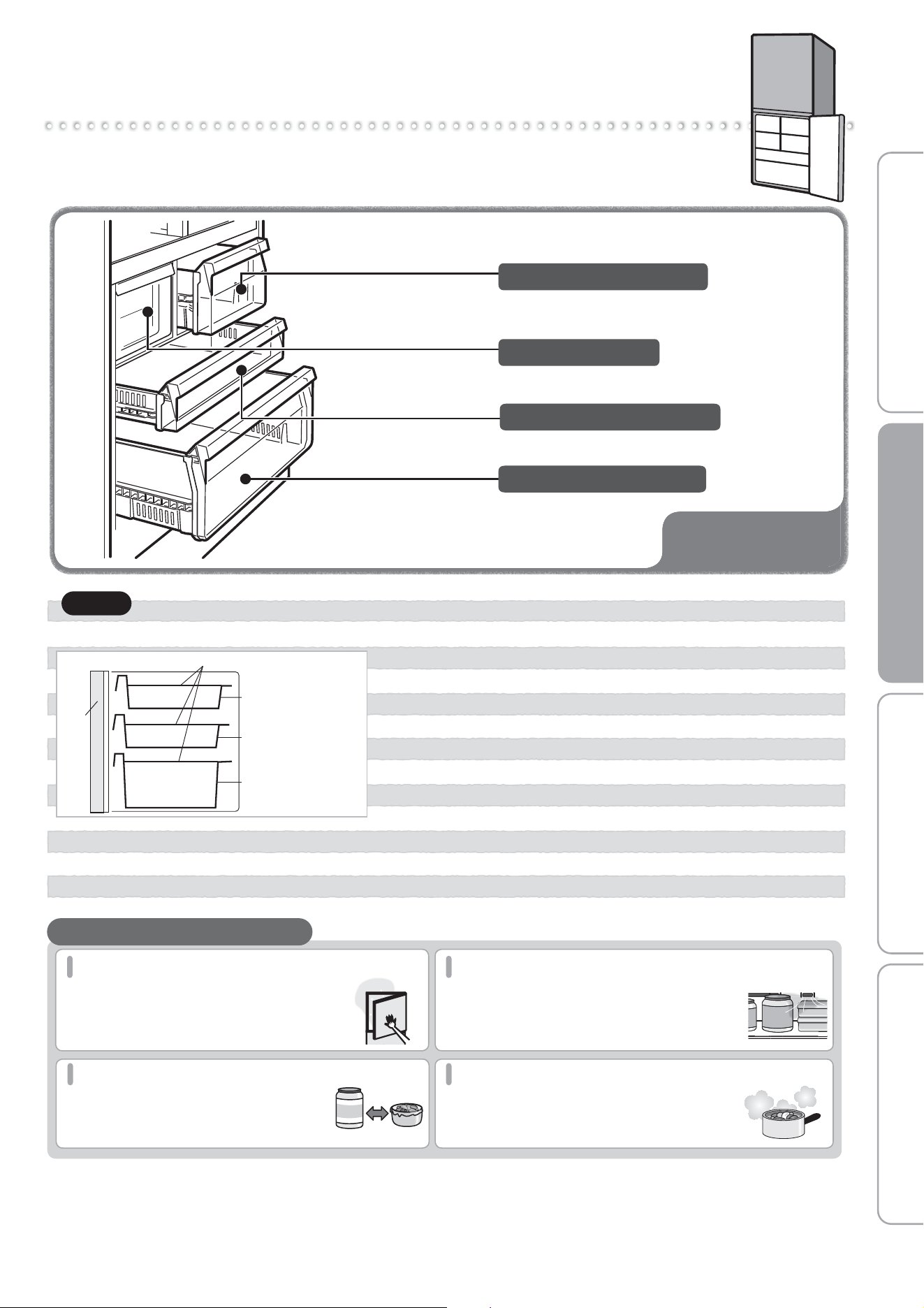
Freezer compartment
● When closing the door, food can get in the way causing
the door not to close properly. This can cause frost to
form on the inside, or improper freezing, and will cause
a malfunction.
● This may damage food and the freezing case, as well as
the automatic ice-maker.
Door
Maximum level for storing foods
Freezing Case (small)
Freezing Case (middle)
Freezing Case (large)
Do not stack food higher than the freezing case.
Notice
You can storage frozen food, ice cream, bread, meat, fish, etc.
Door alarm will inform
when the door is left open.
➡Page 20
Freezing Case (middle)
Freezing Case (large)
Ice Storage Box
Freezing Case (small)
● Freezing cases have some holes on their side wall. If the ice melts due to a power outage,
water may leak from the holes.
Do not store ice in Freezing Case (small / middle / large).
Open and close doors as quickly as possible
If doors are opened frequently or are kept
open for a long time, cold air escapes and
more power is consumed.
Do not cover up air outlets or air inlets
Blocking the flow of cold air can make it difficult
for food in the refrigerator to cool down.
The temperature around the air outlets can drop,
making foods with significant moisture freeze easily.
Don't cram too much food into the fridge
If too much food is crammed into the
refrigerator, the flow of cold air can deteriorate,
making it difficult for food to cool down.
Cool hot foods before placing them inside
Placing hot foods in the refrigerator will lower
the temperature, also affecting the freshness
of other foods. (excluding Hot Freezing)
Leave space
Successfully Saving Power
12
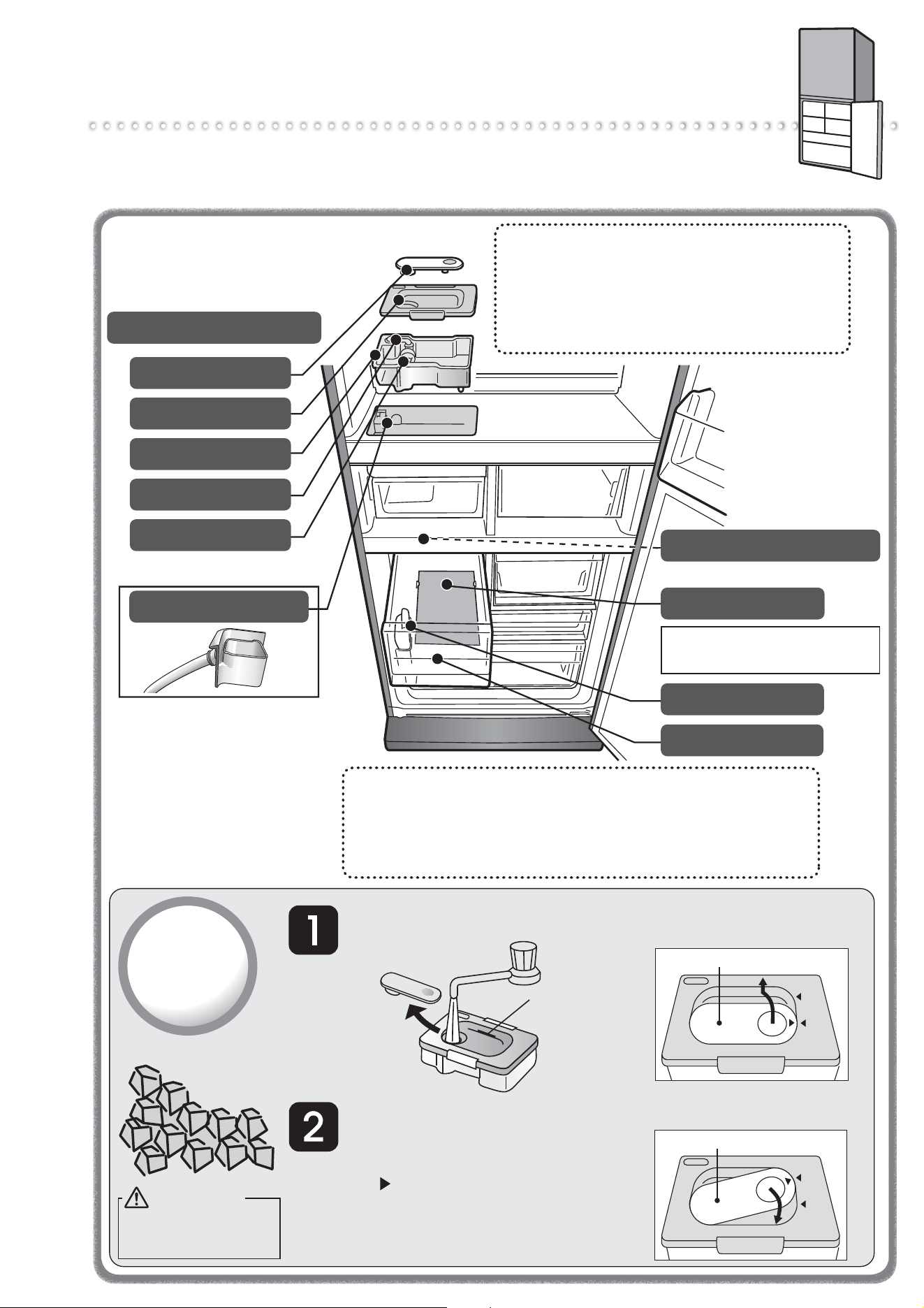
Automatic Ice-Maker
You can make ice cubes by puting water in the water supply tank of the
refrigerator compartment. Please do periodically maintain to make a good ice cube
by cleaning. Please drain the water in the water supply tank when you do not make ice.
Water supply Tank Approx. 1.1 L.
About the first batches of ice.
Please discard the first 2 - 3 batches of ice
(approx. 30 cubes) made at the very beginning.
Also, discard ice that isn’t used in over 1 week.
There may be times when there may be dust
or an odor on them.
Water to Use for Your Auto Ice-Maker.
We recommend that you use water such as tap
water which contains less bacteria.
If you use mineral water or water from a filtering machine,
please increase the number of cleaning times, and be sure
to clean it thoroughly.
➡ Page 18
Take out the water supply
tank, remove the tank plug,
and fill with water.
Put the tank plug on the water supply
tank, carry carefully without tilting it,
and return to its original position.
●
●
●
When carrying the water supply tank, make sure
that the “ ” symbol is in the closed position.
If the tank is tilted, water will spill out.
If the water supply tank is not properly in position,
ice cannot be made. Make sure that there is
nothing blocking the tank receiving area.
How to
make ice
Tank Plug
Water Supply Pipe
Purification Filter
Water Supply Pump
Pipe
Ice Storage Box
Ice Server
Ice-Maker Tray (in freezer compartment)
Noise Reduction Mat
Reduces noise of dropping ice
Do not remove.
(Do not remove.)
Tank Lid
Fill water to the
“full line” mark.
Tank plug
OPEN
CLOSED
Tank plug
OPEN
CLOSED
How to remove the tank plug.
Turn to the “Open” position and lift off.
How to put in the tank plug.
WARNING
Fill with potable
water only.
13
Before use Operation Cleaning Troubleshooting
Be very careful when crushing
ice that has joined together.
There is a risk of injury.
Follow the
instructions
●
Do not put the food items in ice storage box when making ice.
Please gently close the door of freezing compartment.
Ice cube may get dirty.
Do not insert water over full water mark in water supply tank.
Water channel in the ice tray may freeze, ice cube may
connect together, and convex may come out, if insert
water over the mark or pour water by kettle.
● Please do not store anything above the level on the side
of the ice storage box.
(The door may half-open and it may cause failure/damage).
●
Do not insert any drinks such as hot water, juice, tea, soft drink, etc.
other than water in water supply tank (heatproof temperature 60
o
C).
It may cause failure.
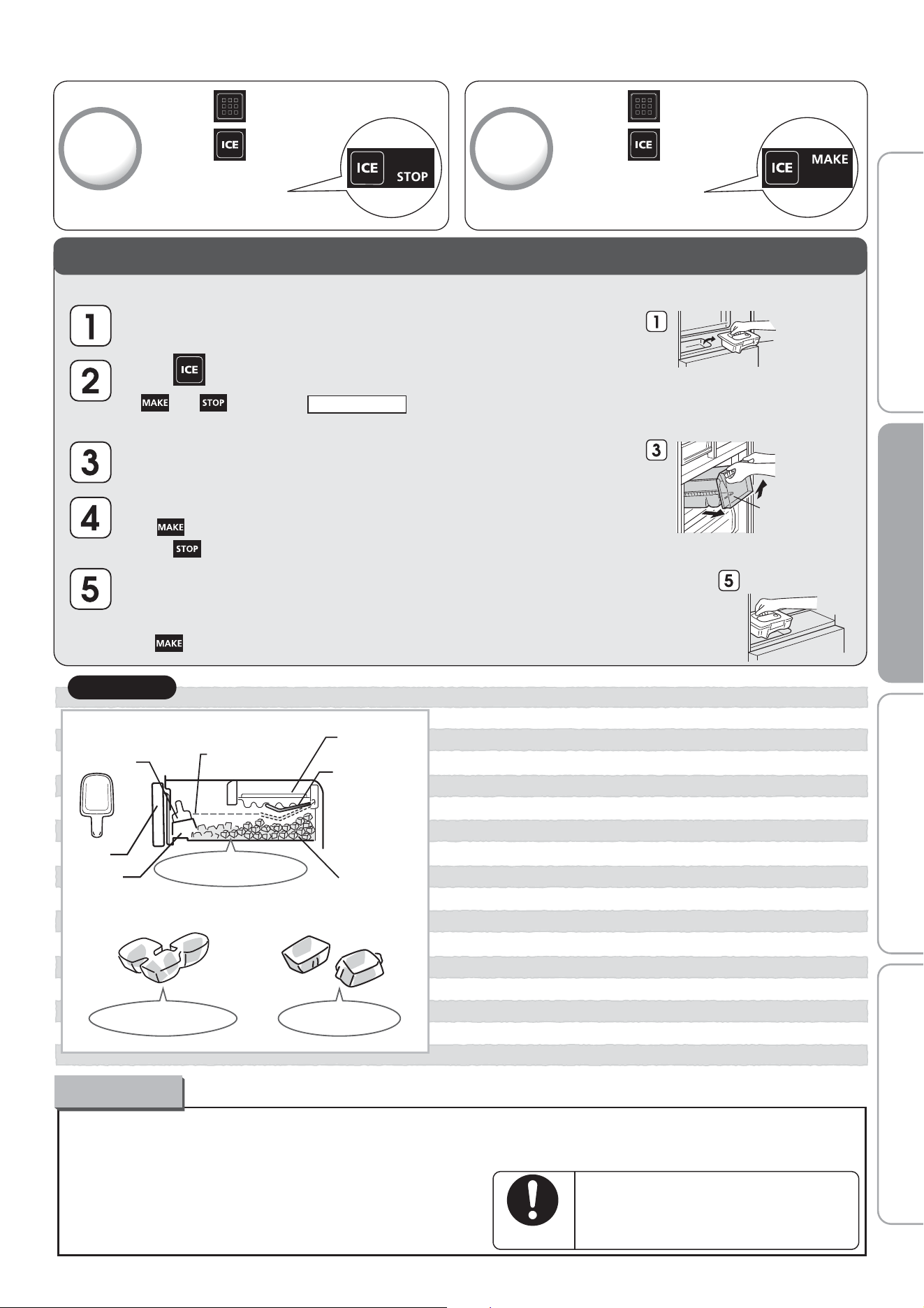
● Ice-making will stop when the amount of storage ice
reaches maximum storage level. Please insert ice server
in the pocket of ice storage box as the left figure.
●
●
Maximum level for
storing foods
Ice tray
Detection Lever
(Detects volume
of ice stored.)
Ice server
Door
Pocket
Ice storage box
●
Ice made with water containing a lot of mineral substances
such as mineral water, can cause to ice to form with a white
sediment (white crystals). These are only mineral substances
that have become crystallized. It is harmless.
●
If ice is stored for a long period of time, the
ice cubes may cling together or become smaller.
(This is known as the phenomenon of sublimation.)
About the ice
●
Ice-making may take longer with frequent
opening/closing of the door, or depending
on the ambient temperature.
Keep ice at an even level
The ice cubes connected Protrusion on the ice
Please note
To stop
ice-making
① Touch on the operation panel
Touch
②
STOP will light up
The setting is finished
To restart
ice-making
① Touch on the operation panel
Touch
②
MAKE will light up
The setting is finished
Take out the ice storage box.
And discard water or ice.
Take out the water supply tank,
close the freezer door.
When you will not make ice for a long time
※
Also do this when moving or transporting unit.
Empty the ice-making tray by taking out the ice or by forcing water to go into the ice storage box.
Press for about 5 seconds.
(Press until it makes a beeping sound.)
●
●
and will blink for about 1 minute.
(It drops down the ice-making tray's water or ice.)
When the light stops blinking, it will return to the previous indication.
Stop making ice.
● If light is on, to do ice-making stop proceedure and check to confirm
that light is on.
Wash with water, dry, and put back in place: the water supply tank (water supply
pump, pipe, water filter), ice storage box and the noise reduction mat.
➡ Page 18
To restart ice-making, to do ice-making restart proceedure and check to confirm
that light is on.
Water supply tank
Put the water supply
tank back in place.
Ice storage box
14
Performing Temperature Adjustment
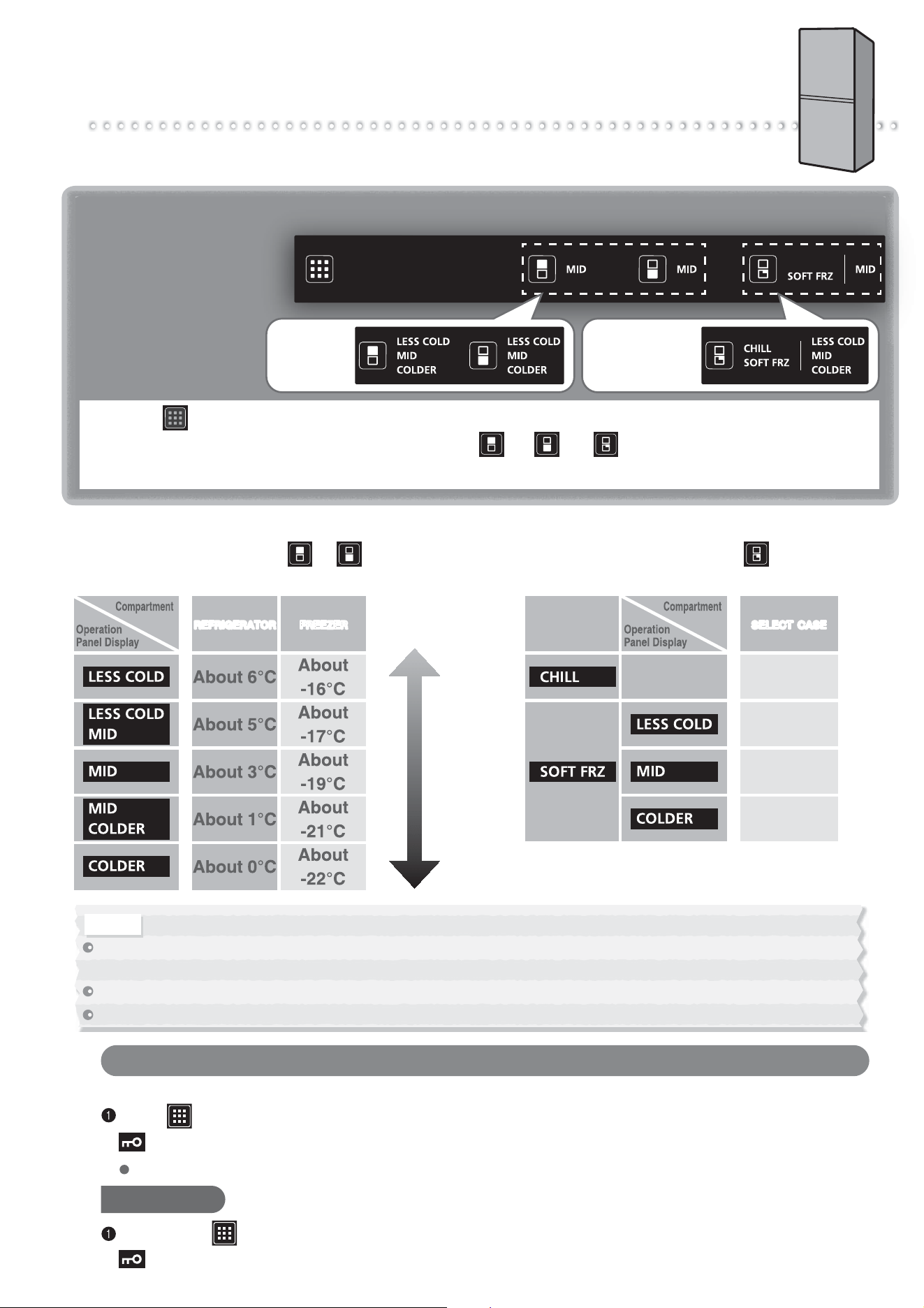
The temperature of each compartment can be adjusted.
Use the refrigerator and freezer to "MID" usually.
Temperature Adjustment
At the time of purchase,
the settings are as follows.
Refrigerator and Freezer
Compartments
……"MID"
The set
temperature
lights up.
The set
temperature and
mode lights up.
1
Touch on the operation panel.
2
Repeatedly touch the compartment button ( or or ) that you want to set.
The display changes in the order shown in the below each time the button is touched.
High Average Low
REFRIGERATOR FREEZER
About 0 ™C
About -5 ™C
About -7 ™C
About -9 ™C
SELECT CASESELECT CASE
Refrigerator/Freezer Compartment Temperature
The display changes each time or is touched
and the temperature can be set to 5 different levels.
Select case Temperature
The display changes each time is touched
and the temperature can be set to 4 different levels.
The temperatures described here are measured in the lower centre of the refrigerator after the temperature has stabilized when the surrounding temperature is 30 ™C and
the doors are closed without any food inside. The temperature fiuctuates with factors such as food storage conditions and how often the doors are opened and closed.
Before and after defrosting, the temperature inside the refrigerator may drop or rise temporarily.
When food freezes in the refrigerator compartment or vegetable case, set the refrigerator temperature setting to MID - LESS COLD.
Notice
To Prevent Accidental Button Operation
(Child Safety Lock)
Locks the operation panel to prevent accidental icon operation by children.
Touch for about 5 seconds or more when the door is closed (until the buzzer sounds).
lights up when the setting is finished.
Setting cannot be changed during Child Safety Lock.
To Cancel
Again, touch for about 5 seconds or more when the door is closed (until the buzzer sounds).
goes off when the setting is cancelled.
15
Before use Operation Cleaning Troubleshooting
Other Issues
(Temperature Fine Adjustment Mode,
When Lights Up)
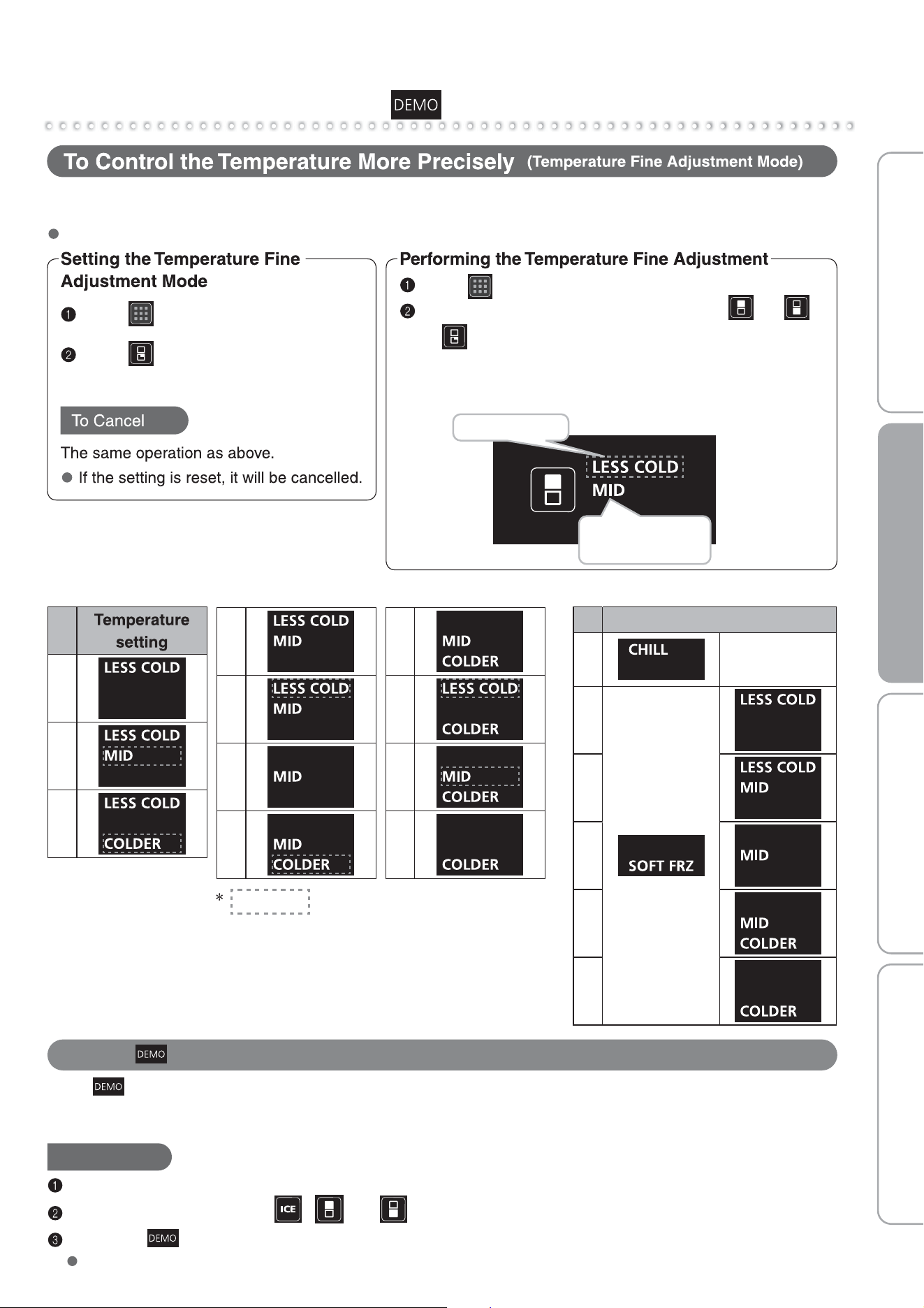
When temperature fine adjustment mode is set, displayed letters blinks about every 10 seconds.
The temperature can be set to 11(6 for Select case) different levels for the refrigerator compartment,
freezer compartment and Select case.
Touch to light up icons.
Touch for at least 5 seconds
(until the buzzer sounds).
Touch to light up icons.
Repeatedly touch the compartment button ( or
or ) you would like to set to temperature fine
adjustment mode.
1
2
3
4
5
6
7
represents a blinking display.
Refrigerator and freezer compartment
8
9
10
11
1
2
3
Select case
Temperature setting
4
5
6
“LESS COLD” blinks
Displayed letters blinks
about every 10 seconds
Display Example: When the refrigerator compartment is
set to Temperature Setting 5.
When Lights Up
When lights up, the refrigerator is in demonstration mode. The refrigerator does not cool in this mode.
Contact the retail store where you purchased the refrigerator, or cancel the demonstration operation with the
following procedure.
To Cancel
Keep the doors of the freezer compartment open.
Light up the icons and press ,
and at the same time for at least 5 seconds.
Check that is turned off.
The demonstration mode was not cancelled if it lights up.
16
Cleaning Removing and Cleaning the Parts
* After cleaning, wait at least 10 minutes before reinserting the power plug into the socket.
If you insert the plug immediately, there will be an overload on the machine.
Remove the power plug before
cleaning.
Otherwise an electric shock or injury may result.
Remove plug
Do not disassemble, repair, or alter.
Do not use while parts are damaged.
Doing so may cause injury, electric shock, or fire.
Prohibited
Remove the adjustable support cover.
Turn the adjustable supports to
raise them from the floor, and pull
out the refrigerator.
We recommend laying out protective
material on the floor to prevent the
floor from being damaged. Also, be
careful not to injure yourself.
Remove dust from the refrigerator's
rear side, the wall, and floor, and
wipe off all dirt.
Check for water dripping on the floor.
Refrigerator Rear Side and Floor
Dust, etc.
Do not put your hands under
the refrigerator.
It may cause injury.
Prohibited
This is a place where, because of the
convection current of the air, dust
tends to gather and can easily turn black.
Also for the purpose of saving energy,
clean periodically.
For safety, clean the power plug and
cord periodically.
Power Plug
Remove the power plug from the socket.
Check for damage or abnormal heating on the
power plug and cord.
Remove any dust from the power plug and
surrounding area, and then
wipe with a dry cloth.
Firmly insert the power
plug into the socket.
Remove dust periodically from
the power plug.
Dust may cause insulation failure,
resulting in fire.
Follow the
instructions
Replace
Clean
Dust
Damaged
cord
Q. What should I do if I notice the refrigerator is dirty?
A. Before the dirt becomes hard, wipe it off.
z Wipe with a soft cloth soaked in warm water.
z For stubborn dirt, wipe using water mixed with a weak concentration of kitchen detergent (neutral).
z
In particular, oil may lead to cracks and citrus fruit juices to discoloration, so be sure to wipe them off right away.
z If dirty door packing is ignored, it can be damaged and cause cold air to leak. After wiping with a soft
wet cloth, if there is still moisture, finish wiping with a dry cloth.
z If the clean tray is soaked in water for a while to clean it or if the tray is rubbed with force, the coating
will peel off. Wipe the tray with a soft cloth soaked in warm water.
Q. Can the shelves, cases, and pockets
be removed?
A. For information on which parts can
be removed,
refer to
¨
Page 17.
Q. What should I do with doors and
shelves made of glass?
A. Wipe with a soft cloth soaked
in warm water.
z
If a door or shelf made of glass has cracked or shattered,
do not touch the broken glass, but contact the retail store
where you purchased the refrigerator immediately.
z Magnets will not adhere to a glass door.
z Wipe any leftover moisture with a dry cloth.
How to Clean Q&A
Do not use the following items.
Alkaline or low alkaline kitchen detergents,
undiluted neutral kitchen detergents, scouring
powder, powdered soap, alcohol, benzene,
thinner, petroleum, acid, scrubbers, boiling water,
or similar substances.
Doing so may cause the plastic parts (such as
the door handles, caps, cases,
etc.) to split, or damage or
rust the glass doors, shelves,
or painted surfaces.
pp(
,
r
,
Tips
17
Before use Operation Cleaning Troubleshooting
When attaching parts, use the backward procedures of removal.
Point when attach Free pocket (large)
Insert the left and right
partway, push the top
of claw part in the center
of free pocket, and fit
the claw part.
※Illustration of MR-HS421EX
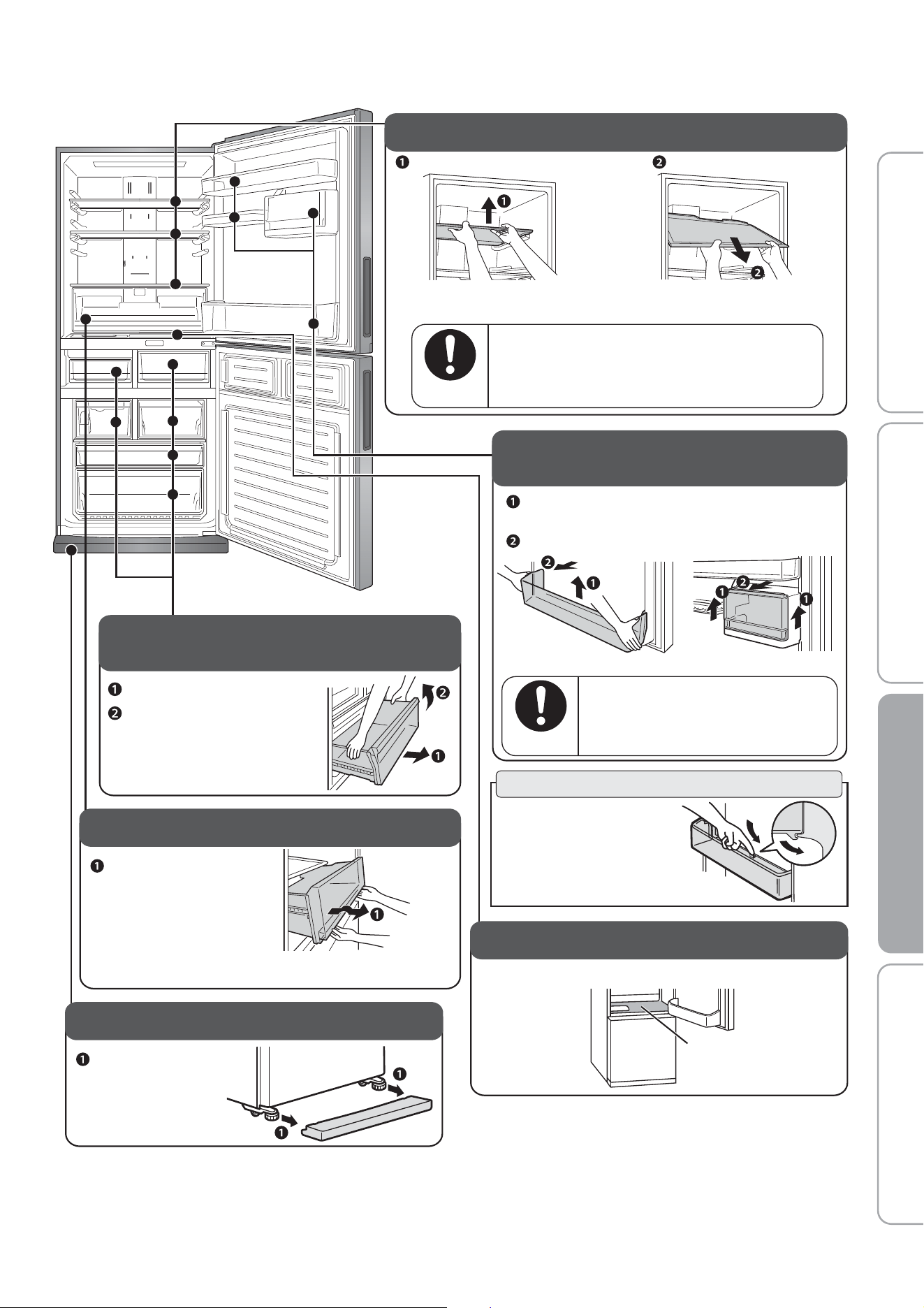
Chilled case / Select case /
Cases in the Freezer compartment
Fully pull out the slide case.
Lift the end on your side.
Adjustable shelf / Shelf
Lift up the front side with both hands.
※
If forcefully pulled outward damage may occur to door side.
Please slowly pull and take out.
Pull forward and take out.
If it is attached improperly, it could come
loose and fall, causing injury.
Be careful when attaching and
removing the glass shelf.
Follow the
instructions
Free pocket (large), (small) /
Bottle pocket / Capsule door pocket
※
Lift upward holding right and left sides.
The piece is attached quite firmly.
Draw forward to remove.
Capsule door pocketBottle pocket
If it is attached improperly, it could
come loose and fall, causing injury.
Be careful when attaching
and removing the pocket.
Follow the
instructions
Recessed Portion of the Drip Gutters
Wipe off any dirt, dripping or condensation.
Drip Gutters
Vegetable case
Pull forward.
Adjustable Support Cover
Remove by pulling
forward on
both sides.
※
If difficult to take out, please remove vegetable case
after removing the bottle pocket and the shelf.
18
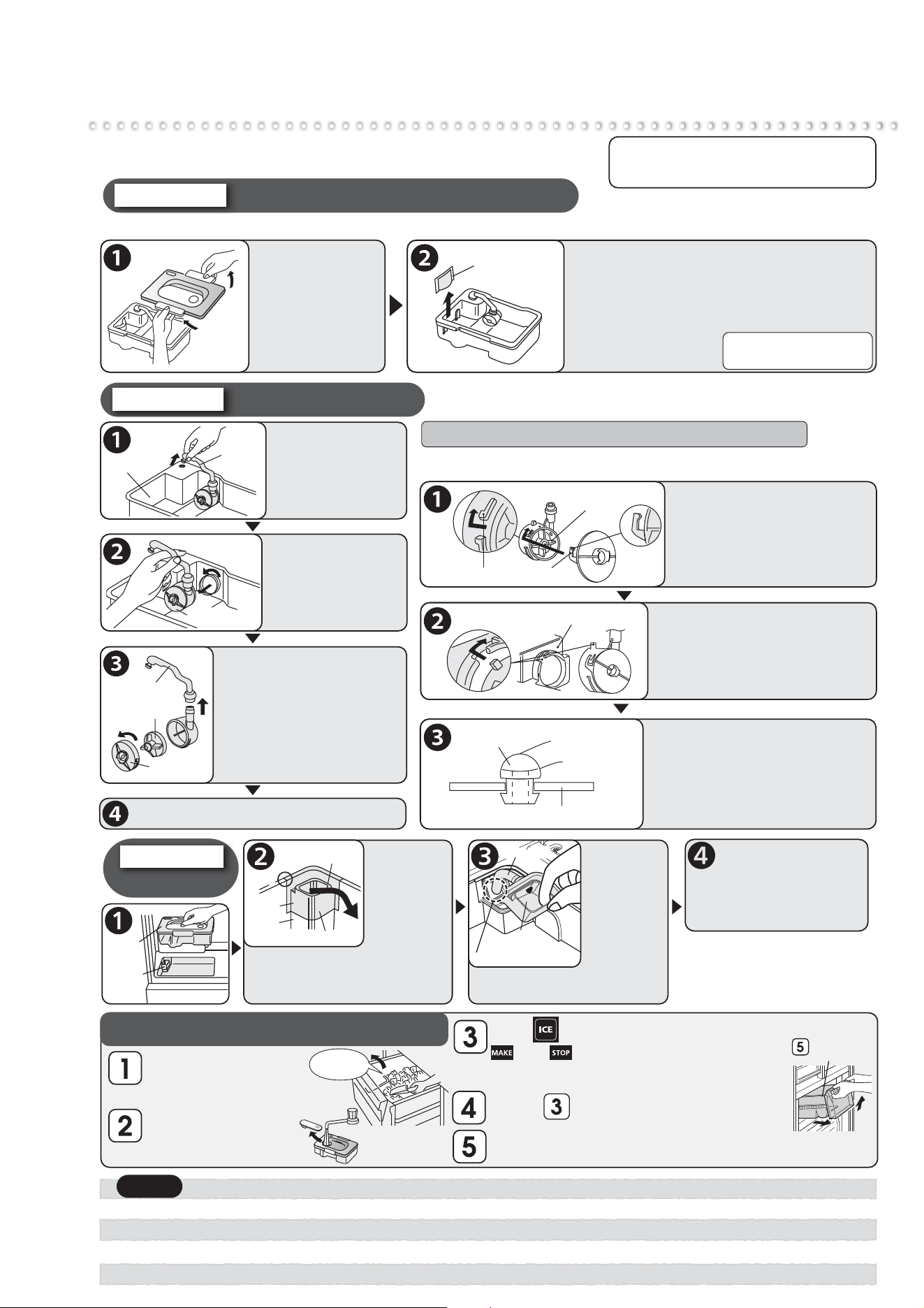
Cleaning the Automatic Ice-Maker
Touch for about 5 seconds.
and will blink for about 1 minute.
● It rinses the ice-maker tray with water from
the water supply tank.
Water supply pipe
For once-a-month
Take out
the water
supply pipe
and wash
with running
water.
The water receptacle and hose
part cannot be removed.
Put the hose in this hole.
Hose partHose part
Water
receptacle
Return back to
original positions.
Return the water supply tank and, if
does not sit in properly, re-set the water
supply pipe. If removal or assembly
are not done correctly, a problem
such as a water leakage will occur.
Make sure to insert the water
supply pipe properly so that there’s
no difference in surface level
between facet A and facet B is.
Remove
the water
supply pipe.
If the water
supply pipe
is tight to remove, place your
finger inside the water receptacle,
remove the corner, and then twist
in the direction of the arrow.
Water supply pipe
Water
receptacle
CornerCorner
Facet A
Facet B
Please do periodic care to prevent the occurrence of water
scale, mold, etc. Please remove water when not making ice.
Take out
ice cubes.
●
●
●
●
Do not use washing agents such as kitchen detergents, benzene or bleach to clean the water filter. It will cause ice to have an odor.
If you use a bleach to clean your water supply tank or lid, please follow product directions carefully.
Assemble the water supply pump properly and firmly. If it is not assembled properly, it may not make ice or it may make a loud sound.
Please attach the lid of water supply tank securely. If the lid is not attached properly, the lid may be out and the water supply tank will fall.
Take ice out of the
ice storage box,
close the freezer door.
Fill water supply tank
with water, put back
in original position.
Repeat 2 or 3 times.
Remove the Ice storage box discard water and ice.
Do not throw out the noise prevention mat.
Ice storage
box
※
Do not use a dishwasher or dryer
because it may cause deformation.
For once-a-week
If mold forms easily in the certain types of water, clean about 2 or 3 times a week.
Water supply tank / Purification filter
Take off the lid
and wash with
water.
(Temperature
tolerance
approx 60
o
C)
Purification filter
Remove and wash with water.
Normally, it does not need replacing.
Please replace for the following reasons:
●
●
●
If something other than water was put in
and the opening got blocked.
If it is damaged.
If mold, etc. is forming.
Water supply pump
For once-a-month
Turn the pump
and take out.
Take out the pipe,
Turn the cap and remove,
Take out the impeller
and wash with water.
Water tank
Pipe
Water supply pump
Impeller※
Pipe
Cap
Water supply
tank
Water supply
pipe
If it is not assembled properly, it may not make ice or it may make
a loud sound. Please check on the following.
The claw on the cap ( )
is turned to put onto the
protruding part ( ) of
the water supply pump.
①
②
②
①
Impeller
Turn
Turn
Water supply tank
※Check to make sure that
the impeller is inside.
Attach the water supply
pump properly to the
water supply tank by
turning and attaching.
Insert the pipe into the
water supply tank opening,
Connect the pipe to the
water supply pump.
※
Check to make sure that there are no substances
at the connection point of the two pipes.
Water supply tank
Pipe
Remove it from
tank.
※
The impeller is made with a
magnetic material. Clean thoroughly
with water, making sure there
are no substances on it.
Cleaning the ice-making tray (rinsing)
Pointers for assembling the water supply pump
To buy another filter, please
inquire at the store where
you bought your unit.
Return parts by following the reverse procedure.
Notice
19
Before use Operation Cleaning Troubleshooting
Other Issues
(Power Outages, When Not Using the Refrigerator
for a Long Time, To Move or Transport the Refrigerator)
Power Outages
Minimize the frequency of opening the doors, and avoid adding more food.
Operation panel settings other than the temperature settings may change. Check the settings. (Child Safety Lock, etc.)
Wash the water tank, water supply pipe, and before making ice for the first time, or if you have not made
ice for more than a week, Odors or dust may be adhering to the parts.
Notice
Remove the power plug.
Empty any water or ice from the water tank, and ice storage box and clean.
Wash the water tank, water supply pump, tank pipe, tank cap, lid, water supply pipe, ice storage box,
soundproof mat, and ice server, dry them completely, and then return them to their original positions.
Do not dispose of noise reduction mat.
Clean the interior of the refrigerator and open the doors for 2 to 3 days to dry the inside.
When Not Using the Refrigerator for a Long Time (When the Power Plug Is Unplugged)
* If the refrigerator is not dried sufficiently, it may cause mold, odors, or refrigerant (gas) leaks due to condenser corrosion.
Pages 13, 18
Check that is lit.
Set to the “STOP” ice making mode.
Page 13
Page 18
Page 7
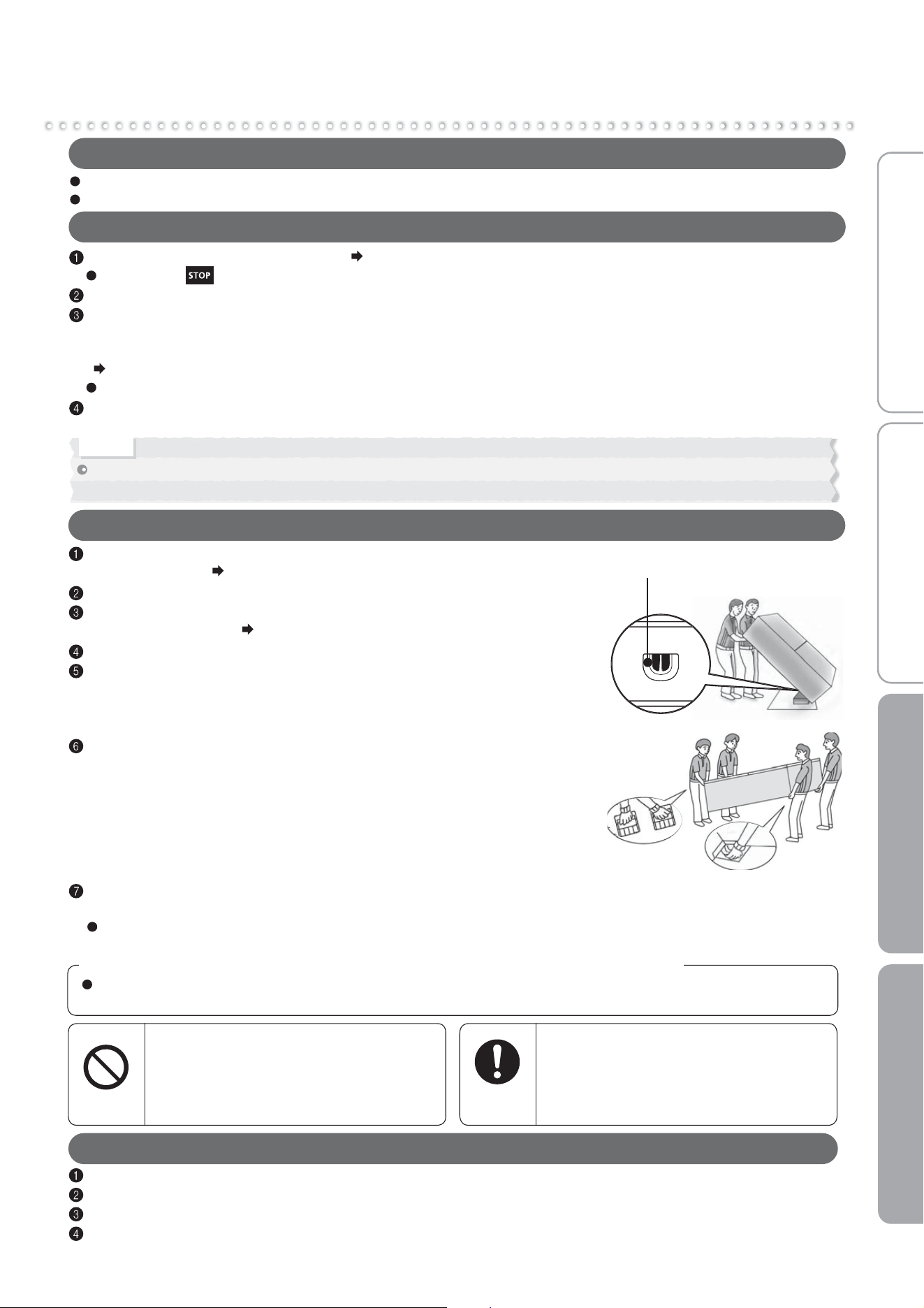
Drainage port
Bottom handles
Handles on rear
upper side
Empty any water or ice from the water supply tank and
ice storage box.
Wear protective gear (gloves).
Remove the adjustable support cover, and then rotate and raise the
adjustable supports.
Remove the power plug.
Lay towels under the drainage port and the lower rear edge of the
refrigerator, and position a container or tray with a height of about
3 cm on the towels to collect the water.
* The towels prevent floor damage, and water from being spilled on the floor.
* Because the refrigerator is heavy, the work must be performed by at
least 2 people.
* The work must not be performed by small children or people
who are not capable of doing heavy work.
Ask a specialist transportation company.
Tilt the refrigerator slowly to the rear by about 30 degrees, and drain
the water from the evaporation tray via the drainage port on the lower
rear side. (The evaporation tray is not visible from the outside.)
2 or 4 persons should grasp the bottom handles and the handles on
rear upper side, and carry the refrigerator slowly.
To Transport the Refrigerator
Do not lay down the refrigerator on its side. (The compressor may
be damaged.)
Frost from the condenser inside the freezer compartment will melt, and may spill water when
the refrigerator is transported. It may take 1 day to defrost after unplugging the power plug.
When the Transportation Time Is Long, for Example When Moving House
Wear protective gear (gloves).
Remove the adjustable support cover, and then rotate and raise the adjustable supports.
¨
Page 7
Lay protective material under the casters and rear supports to prevent damaging the floor.
Move the refrigerator in the forward and backward directions.
* Moving in any direction other than forward and backward may damage the floor.
Please make sure to lay protective material such as a plate or board on the floor.
To Move the Refrigerator in Forward and Backward Directions
Do not damage the refrigerator's
refrigerant circuit (pipes).
Because flammable refrigerant is used,
this may result in fire or an explosion.
Prohibited
Wear protective gear when you
install the refrigerator.
Do not use any tools other than the
adjustable support tool kit.
Not following these instructions may result
in floor damage or injury.
Follow the
instructions
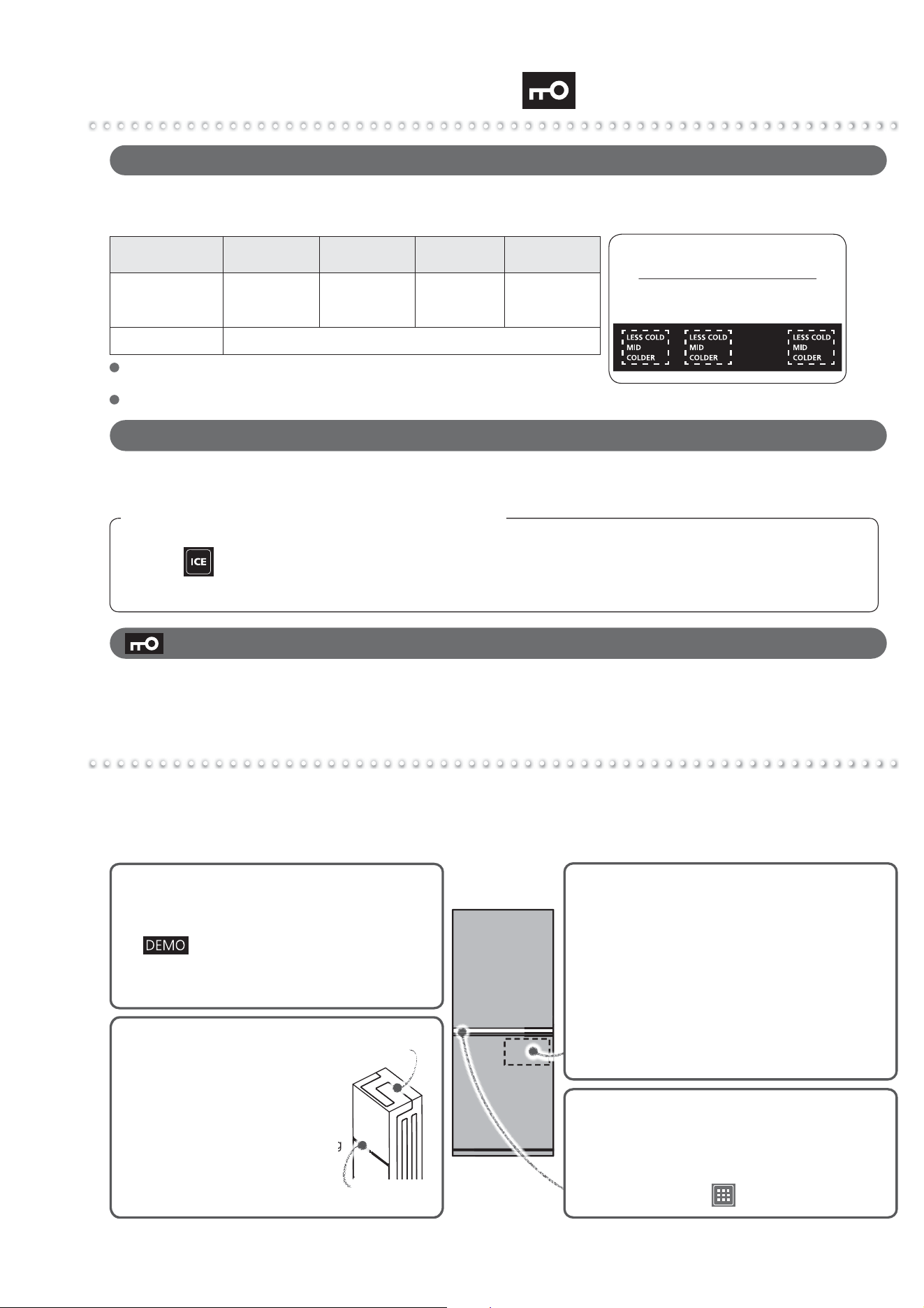
20
Other Issues (Door Alarm, Mark)
Troubleshooting
To Stop the Alarm (Continuous Short Beeps)
The alarm can be temporarily stopped in the time before the refrigerator is repaired.
Press for at least 5 seconds.
* If performing the above operation does not turn off the alarm, or the alarm periodically sounds, check
peripheral machinery as well.
When the Alarm Cannot be Turned Off
Check that there are no gaps between the door.
When the alarm cannot be turned off, there may be a malfunction and an inspection is required.
Contact the retail store where you purchased the refrigerator.
When the refrigerator will not cool, there may be a malfunction and an inspection is required.
Contact the retail store where you purchased the refrigerator.
When the Mark Blinks Rapidly (About 5 Times per Second)
The refrigerator does not cool at all!
z The refrigerator takes time to cool when you first
start using it. In summer, it may take up to 24 hours
for the inside to be fully cooled.
¨
Page 7
z
If is shown on the operation panel, cancel
demonstration mode.
¨
Page 15
z
Check if the power plug is disconnected or the
circuit breaker has tripped.
In Select case
Ice cream melts
z Store ice cream in the freezer compartment,
not the select case.
Food does not quickly freeze
z With Soft-Freezing, food freezes at about -7 ™C,
so it may take up to about 24 hours for food to
completely freeze.
Soft-Freezing freezes food
z Food appears to freeze just as when it freezes
in the freezer.
z The outer walls heat up significantly
(to about 50 to 60 ™C) immediately
after installation and in summer. This
is because the heat discharging and
condensation prevention pipes are
located on the sides and the top of the
refrigerator. They are required for cooling
and the heat is not an abnormality.
z A heat discharging fan is located
under the refrigerator. Warm air
may be discharged from here.
g
Heat discharging
pipe
Condensation
Prevention Pipes
The outer walls heat up!
The operation panel turns off
automatically!
z If 30 seconds pass without any operation panel
button operations, the display turns off.
When lighting, touch .
¨
Page 8
Frequently asked questions in the initial period and in summer
Before contacting MITSUBISHI ELECTRIC SERVICE CENTRE or its service agent or making a
repair request, check the following.
If the problem persists, contact the retail store where you purchased the refrigerator as soon as possible.
When the Door Alarm Sounds (Door Alarm)
The door alarm (with alarm sound and compartment display) is activated when a door is open for 1 minute or longer.
The pattern of the door alarm sound and the action of compartment display area are as follows depending on how
long the door has been left open.
(Operation panel)
Blinks in synchronization with
the alarm sound.
Compartment display area
Time for which the
door left open
1 minute 2 minutes 3 minutes 4 minutes
Alarm sound
Compartment display area
4 short beeps,
then
2 beeps
4 short beeps,
then 3 long
beeps
4 short beeps,
then 4 long
beeps
After 4 short beeps,
Continuous long
beeps
The compartment display area will blink in synchronization with the alarm sound
Check that the doors are not left ajar or do not have any food trapped
(the packing, the back of the drawer cases). (Check at least once a month.)
Refrigerator and Freezer doors have an opening and closing sensor.
21
Before use Operation Cleaning Troubleshooting
Troubleshooting (continue)
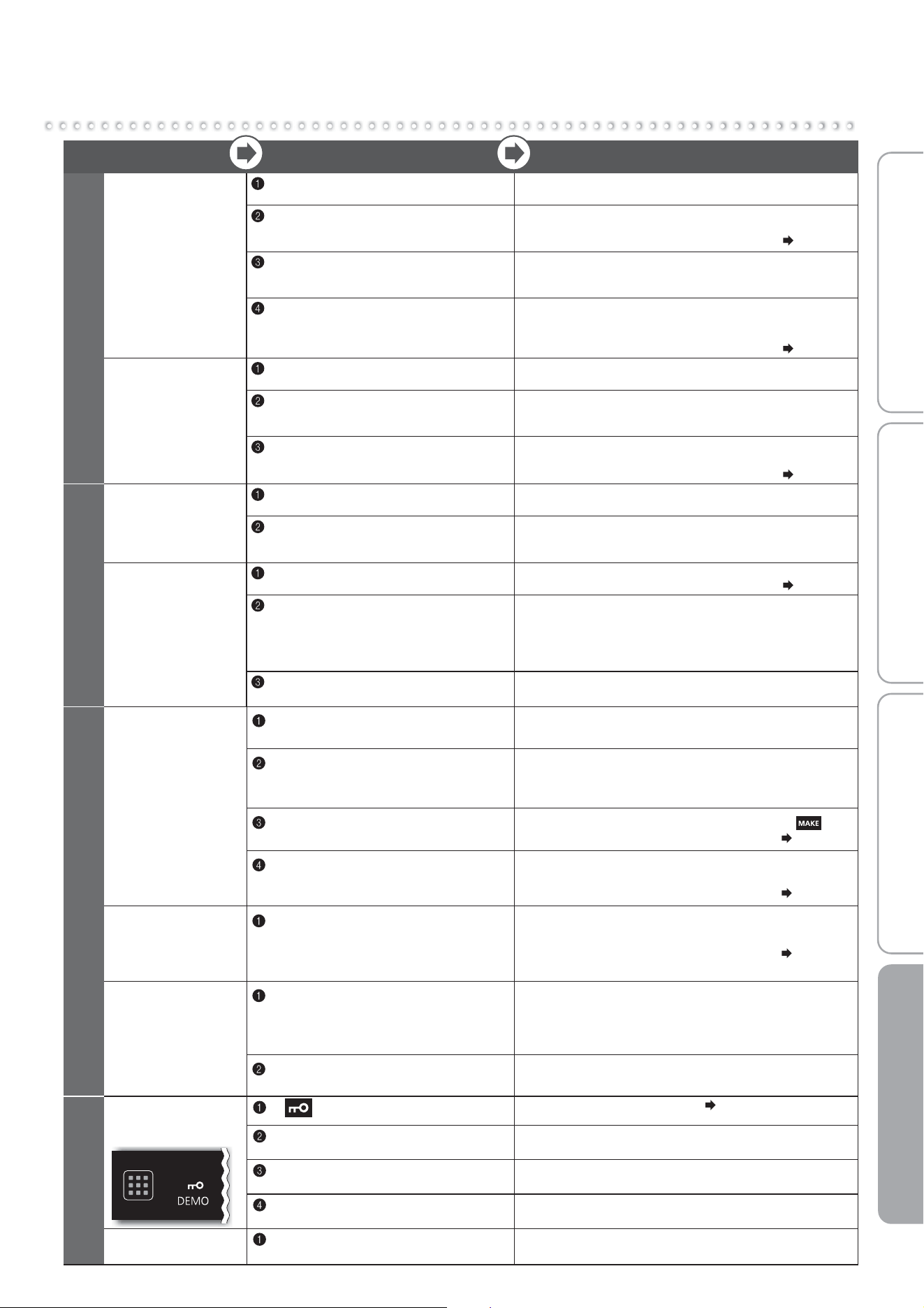
Problem Check Explanation and Action
Page 14
Page 14
Page 6
Set to “MID or COLDER” or
tothesettingofyourliking.
Is the flow of cold air being blocked?
Are the doors being opened frequently,
or left ajar? Is food blocking them?
Make space between foods and remove any food that
is sticking out of shelves or touching the ceiling of the
drawers. Avoid opening and shutting the door for a while.
Is heat discharging being blocked?
Check if there is no gap around the
refrigerator and the refrigerator is
exposed to direct sunlight.
Is the temperature on the operation
panel set to “COLDER”?
Check that there is enough space around the refrigerator
and that it is properly installed.
Set the temperature to “MID”. Also, the temperature with
each setting may temporarily decrease.
Food in the refrigerator compartment or vegetable case
may freeze. Freezing is less likely when the temperature
settings are set to "LESS COLD".
Has enough time passed after
installation?
It takes 4 to 5 hours for the refrigerator to cool, and may
take 24 hours in summer to fully cool.
Is the temperature setting set to “LESS COLD”?
Place drinks and food containing a lot of water,
such as tofu, vegetables and fruits, at the front of
the shelf or in a door pocket.
Is food with a lot of moisture stored at
the rear of the shelf?
Is the surrounding temperature 5 ™C or
less?
Food freezes in
the refrigerator
compartment and
vegetable case
Does not cool
well
Not much ice is
made
Ice melts
Cooling Performance
Page 14
The refrigerator takes time to cool completely.
Is the select case set to
“SOFT FRZ・COLDER”?
Set the select case to “SOFT FRZ・MID”.
Food appears to freeze in the same way as with
“Freezing”.
Is food piled up in the upper area?
Leave a gap so that cold air can flow to the ceiling and
between food.
Has enough time passed after
installation?
Foods containing a considerable amount of moisture
may freeze too hard. We recommend leaving the food
for about 5 to 15 minutes, placing the other hand on
the back of a knife, and cutting the food by pushing on it.
Also, use the setting “SOFT FRZ・LESS COLD”.
Does the food contain a lot of
moisture?
Is food freezing the same way as with
“Freezing”?
Soft-Freezing
freezes food too
hard
Food in the
select case
melts
Soft-Freezing
Cannot make ice
Water in the tank
stays at the
same level
Has enough time passed after
installation?
It takes 4 to 5 hours for the refrigerator to cool,
and 24 hours or more in summer to make ice.
Has food, the ice server, or another
object been left in the ice storage box?
Also, has the ice been leveled?
Remove food or other objects from the ice storage box.
The ice storage box is judged to be full of ice. Also,
spread the ice out flat all the way to the front.
Is the ice making setting for the ice
making compartment set to “ICE STOP”?
Set the ice making compartment's setting to .
Page 13
Are the water supply pump and tank pipe
installed correctly onto the water tank?
Check that they are correctly installed. In particular,
ensure that the opening of the tank pipe inside the
tank is installed firmly to the tank.
Page 18
Automatic Ice Making
Water tank
or water supply
pipe freezes
Are the water supply pipe and water tank
installed to the refrigerator without any gaps?
Additionally, is the tank pipe installed to
the water tank without any internal gaps?
Check the installation around the water tank.
If there are gaps, the cold air may escape
and water may freeze.
Page 18
Ice is small or
joined together
Has ice been stored inside the ice
storage box for a long time?
Ice stored inside the ice storage box for a long time
may shrink or join together (due to a phenomenon called
sublimation). When not using ice, it is recommended that
you remove the water and stop the ice making.
Does it occur when the water in the
water tank is decreasing?
As the water in the water tank decreases, the amount
of supply water is slightly reduced.
The operation
panel does not
respond
Is lit?
Cancel the Child Safety Lock.
Page 14
Are the user's fingers or the operation
panel wet or dirty?
Wipe off the moisture and dirt on the operation panel
and fingers.
Are you repeatedly touching it?
Let your flnger off the operation panel once and then
touch it again. It will respond when you let you finger off.
Are seals and tapes put on the
operation panel?
Remove the seals and tapes.
Reacts without a
touch
Are there any towels, plastic bags,
papers, etc. over the operation panel?
Remove the towel, plastic bag, paper, etc.
Operation Panel
22
Troubleshooting (continue)
There is a
rattling sound
Are any nearby objects in contact with
the refrigerator?
Leave space around the refrigerator. When objects or walls
are in contact with the refrigerator, sounds may be heard.
Loud noises
Worrisome
noises (Noises
described on the
right are normal)
The noise gets louder suddenly
or the tone changes.
Immediately after beginning use, when the weather is hot,
when the doors are frequently opened and closed, and in
similar situations, the refrigerator switches to high-speed
operation and cools with high power.
A whistling sound is made after
closing a door.
This is the sound of the cooling fan motor starting.
A whipping or dripping sound is
sometimes heard from inside the
refrigerator after a door is opened.
This is the creaking sound as warm air enters and
expands the plastic.
Sometimes the sound of flowing or
boiling water can be heard.
This is the sound of the refrigerant (gas) flowing.
Sound
A rattling or squeaking sound is made
sometimes (every 1 to 2 hours).
This is the sound of the automatic ice maker. Even when
there is no water in the water tank, the automatic ice
maker and pump make a sound about every 100 minutes.
After turning on the power, a thumping
or creaking sound may be heard in
the ice making “ICE STOP” mode
(every 1 to 2 hours).
This is the sound of the operation check. The check is
performed even in the “ICE STOP” ice making mode.
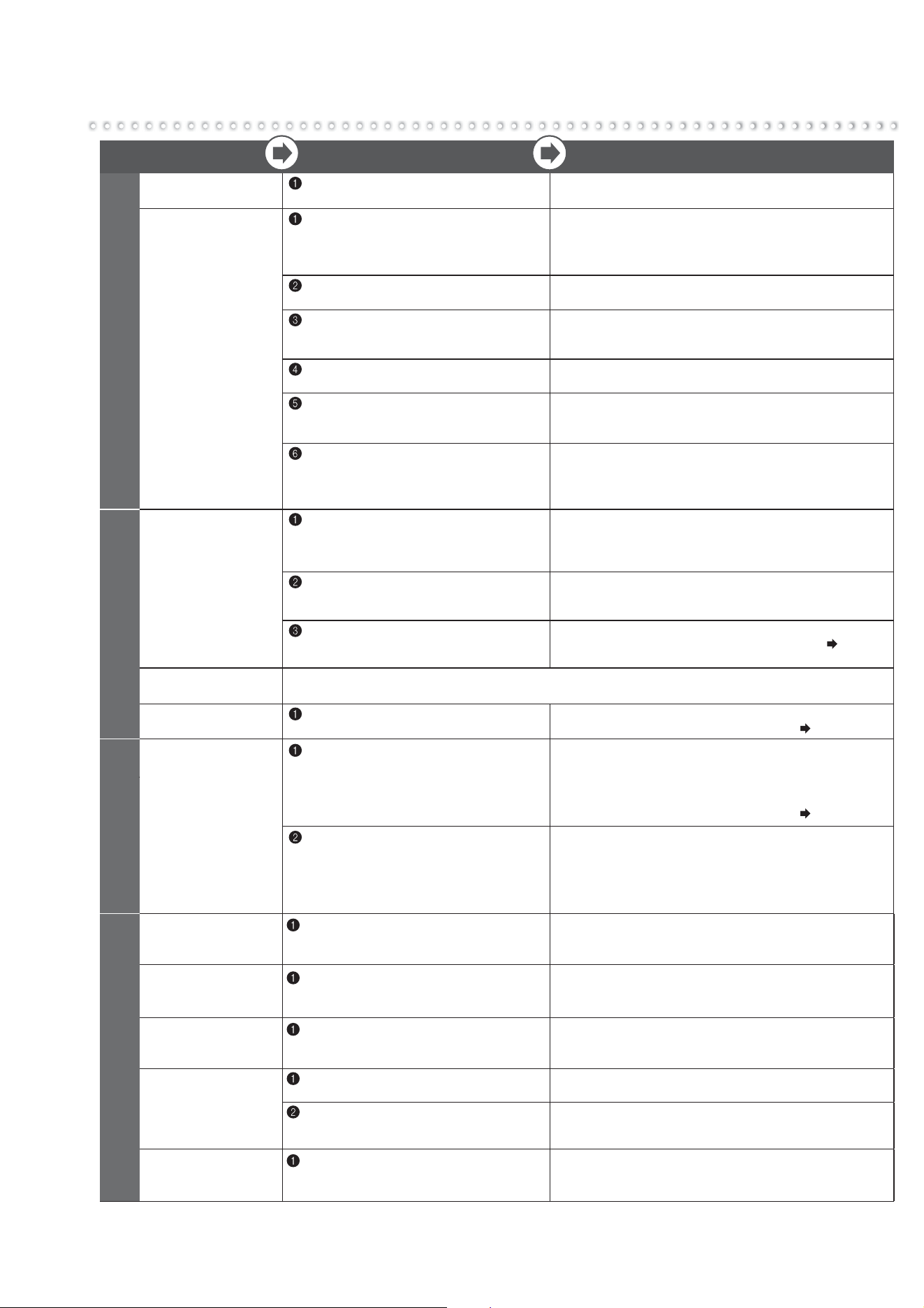
Problem Check Explanation and Action
Doors do not
close
Doors open
easily
Is a door making contact with food or a
case? Is too much food packed inside?
Store food so that the door does not make contact with the food
when closed. In the refrigerator compartment, store food on the
shelves and in the drawer doors store food so that it does not
make contact with the ceiling when doors are shut and opened.
Has food fallen behind a case in a drawer
door, or is the power cord or another object
trapped between the refrigerator and a door?
Remove any objects. Make sure that the door does not
trap objects such as food, power cords or plastic bags.
Is the refrigerator installed stably?
Are the adjustable supports making
contact with the floor?
Lower the adjustable supports to raise the front side
slightly and make the doors easier to close.
The alarm
will sound
Check if the doors are closed.
When close the door,
another door opens.
This is normal. Since each compartment is connected by a passage of cold air, the wind pressure
of closing the door may cause other doors to open or float for a moment.
Refer to “When the door alarm sounds” and
“When the alarm cannot be turned off”.
Page 7
Page 20
Door
Condensation
forms on the
outer walls
and inside the
refrigerator
Frost forms
in the freezer
compartment
Water drips onto
the floor
Are the doors being opened frequently,
or are there any gaps?
Close the doors so that there are no gaps.
When moisture in the air cools, it forms frost or
condensation. When there is high humidity, condensation
or frost will form even in very small gaps.
Regarding the Vegetable Compartment.
Page 9
Is the humidity high, for example is it
raining?
Condensation may form temporarily. Wipe off with
a dry cloth.
Condensation may cause frost to form in the freezer
compartment.
Please minimize the time when doors are kept open.
Condensation/ Frost
1
There are lines
like scratches on
the clear parts
1
Is it a thin line without level difference
on its both sides?
This is a mark created at the time the plastic is molded.
It is created at the joint where resin flows.
This is not a flaw.
There are holes in
the door and the
refrigerator walls
1
Are there small holes in the door or
in the refrigerator walls?
These are holes that let air escape for the injection of foam
heat insulating materials in the manufacturing process.
These are not flaws or abnormalities.
The surface of
the sides or
doors is warped
1
Does the light reflected on the surface
appear distorted?
Warping and surface waviness occurs in the manufacturing
process. When light hits the surface, it may appear warped,
but this is not an abnormality.
Noise interferes
with televisions
or other devices
1
Is the refrigerator installed near an
electronic device such as a television?
Install the refrigerator away from electronic devices
such as televisions.
2
Is the power to the refrigerator supplied
from a socket near the entry hole of
the antenna cable?
Use separate power.
When using a 2 pin plug, use grounding.
There is a
bothersome smell
(Food / Ice)
1
Have you placed food with strong odor
inside the refrigerator without sealing it
in a container?
Store food with strong odor in packaging.
The odor may not be removed with a deodorizing
apparatus.
Others
23
Before use Operation Cleaning Troubleshooting
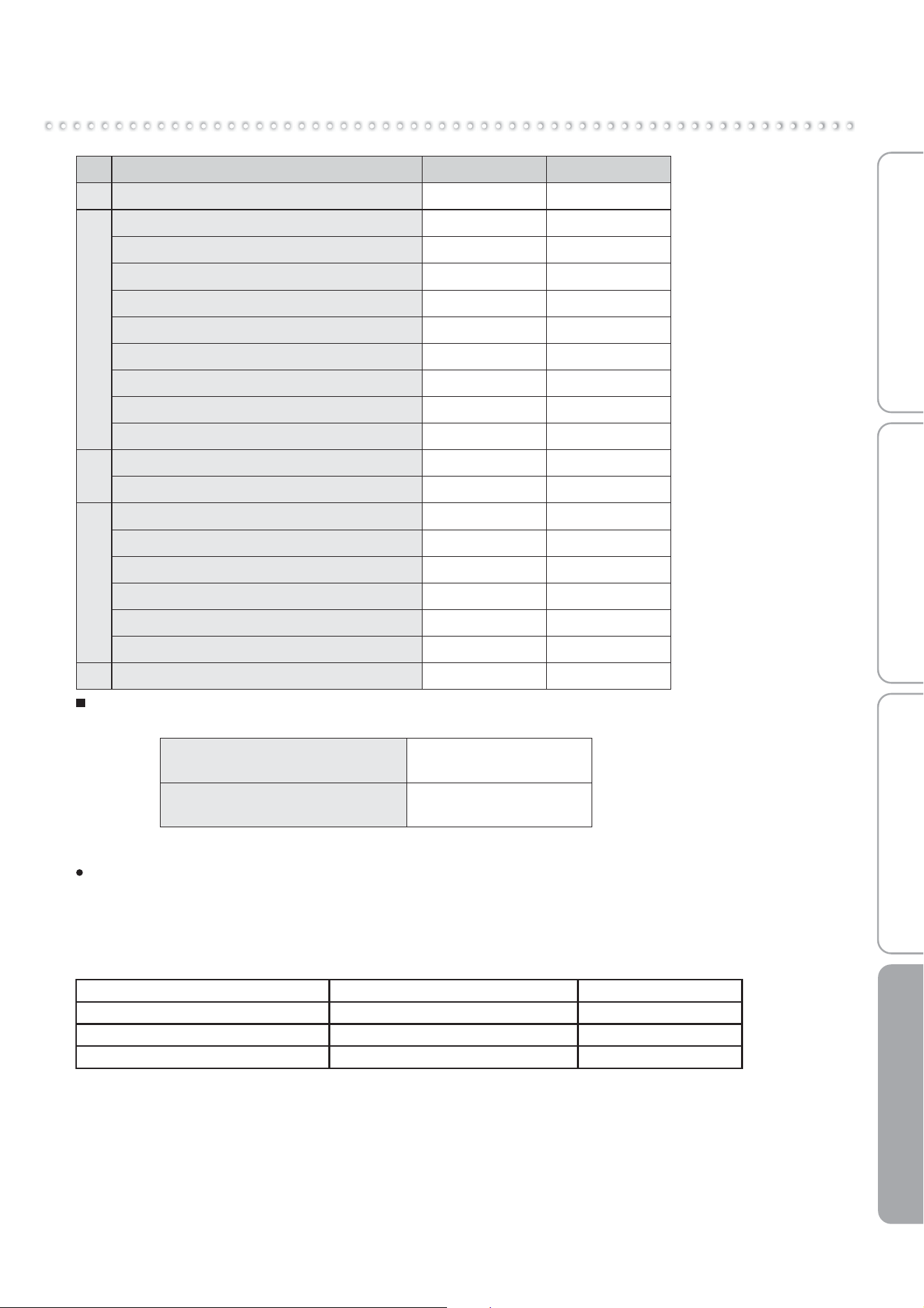
Accessories
Refrigerator compartmentFreezer compartment
Accessories
Model name
Quantity
MR-HGS421EX
Adjustable shelf
Shelf
Vegetable case
Water supply tank (including purification filter)
Free pocket (large)
Free pocket (small)
Capsule door pocket
Free egg tray
Bottle pocket
Chilled case
Select case
Freezing case (small)
Freezing case (middle)
Freezing case (large)
Ice storage box
Noise reduction mat
Ice server
Adjustable support cover
2
1
1
1
1
1
1
1
1
1
1
1
1
1
1
1
1
1
Quantity
MR-HS421EX
2
1
1
1
1
1
1
1
1
1
1
1
1
1
1
1
1
1
MODEL NAME COUNTRY NAME
MR-HS421EX/HGS421EX-A AUSTRALIA / NEW ZEALAND
This appliance is designed for use in Australia and New Zealand only and cannot be used in any other country.
No service is available outside of Australia and New Zealand.
CAUTION
1. This appliance is designed for use in ambient temperature listed below.
The internal temperatures could be affected by such factors as the location of the refrigerating appliance, ambient
temperature and the frequency of door opening, and, if appropriate, a warning that the setting of any temperature
control device might have to be varied to allow for these factors.
2. A rise in temperature of the frozen food during manual defrosting, maintenance or cleaning could shorten the storage life.
3. Food to be frozen is not to be placed in direct contact with food in storage and, if appropriate, that it could be necessary
to reduce the quantity to be frozen if freezing every day is anticipated.
4. The electrical power failure for 1-2 hour will only slightly affect the inside temperature. However, opening and closing the
door results in temperature loss. In case there is more than 24 hours electrical power failure, the food should be taken
out from the fridge.
5. In case you are leaving or there is no food in the fridge for more than 3 weeks, The fridge should be unplugged and
cleaned.
MODEL NAME AMBIENT TEMPERATURE RANGE CLIMATIC CLASS
MR-HS421EX, HGS421EX-A 16
o
C ~ 43
o
C T
When you hear noise from the lower rear of the refrigerator
Part of the cooling system is the compressor, which operating, does create a more noticeable increase in noise level.
This is normal. However, if the noise is quite loud, this could be because the refrigerator is not installed correctly on
a hard level surface, or there may be a problem that may need service.
NZ79G056H01
348 Victoria Road, Rydalmere NSW 2116
For more information and support contact
www.mitsubishielectric.com.au
Call 1300 651 808
SOLE AGENT in Australia
MITSUBISHI ELECTRIC AUSTRALIA PTY LTD.
(Incorporated in New South Wales) ABN 58 001 215 792
Wellington Office (Head Office)
1 Parliament Street Lower Hutt PO Box 30772 Phone: (04) 560 9147, Fax: (04) 560 9133
Auckland Office
Unit 1, 4 Walls Road Penrose PO Box 12726 Phone: (09) 526 9347, Fax: (09) 526 9348
Christchurch Office
44 Halwyn Drive Hornby PO Box 16904 Phone: (03) 341 2837, Fax: (03) 341 2838
SOLE AGENT in New Zealand
BLACK DIAMOND TECHNOLOGIES LIMITED (BDT)
If an abnormality or malfunction occurs, stop operation immediately and contact the retail store where
you purchased the refrigerator or MITSUBISHI ELECTRIC SERVICE CENTRE or its service agent.