Shell Material ABS +Aluminium + Acrylic
USB Output DC 5V
LED
Light Source
Display Controls
LED Cover
Pivot Point
Net Weight 946g
Product Size 7”x7”x15.8”
Color Temperature
White: 5500-6000K
Soft White: 3750-4250K
Yellow: 2800-3200K
Technical Specs
Product Specs
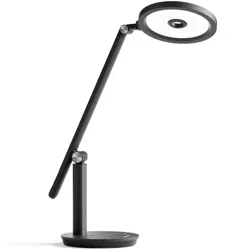
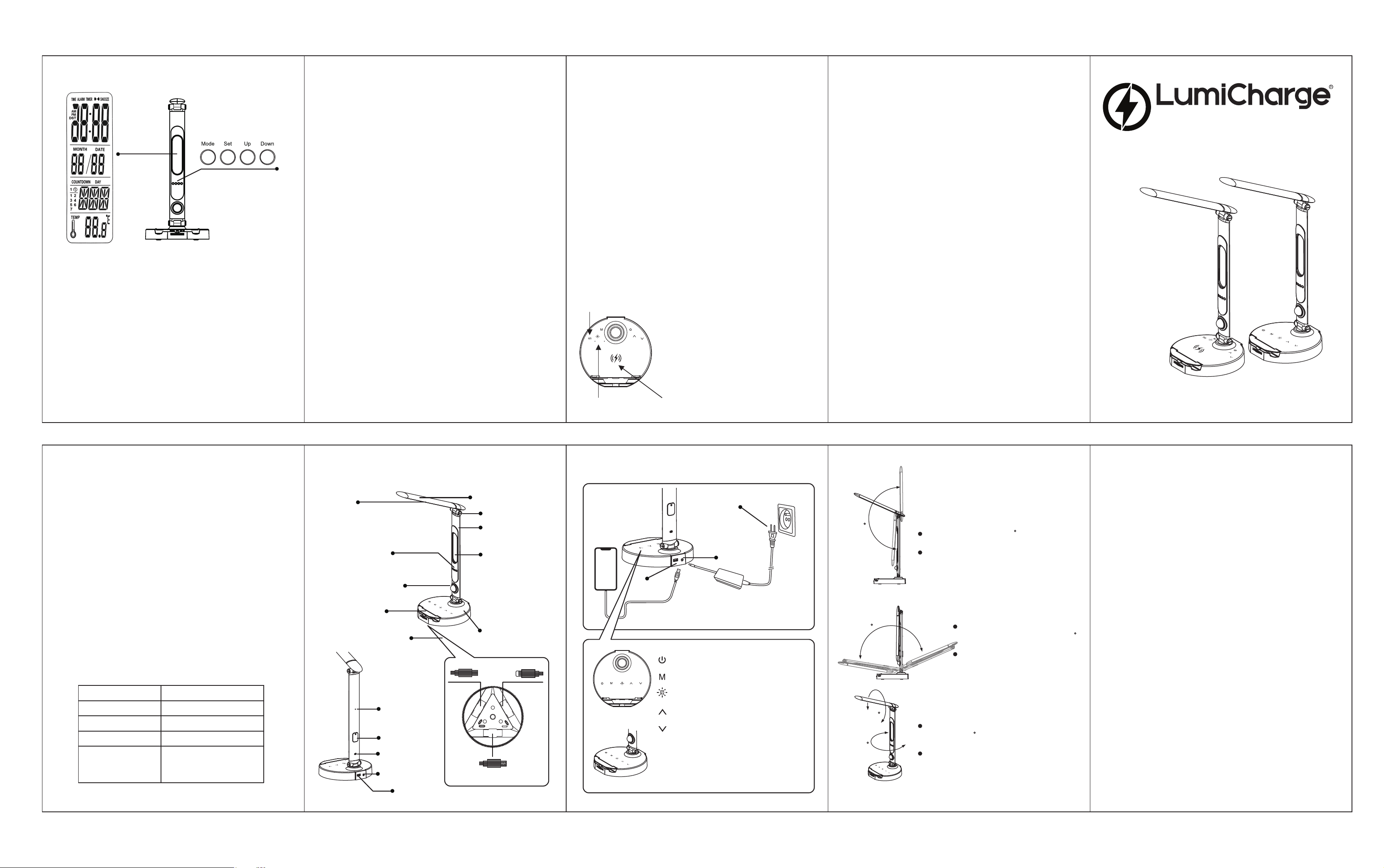
The lamp head has a 195 range of motion
When adjusting the lamp head, be sure to
holdthe base of the lamp for stability.
195
Lamp Head Angle Adjusment
The lamp body has a forward and
backward range of motion of 150
When adjusting the lamp body, be
sure to hold the base of the lamp
for stability.
Lamp Body Forward and
Backward Rotation
Adjustment Capabilities
LED Display Operation
Quick Start
Lamp Body
DC 12V
AC 100-240V
50/60HZ
USB Port
USB-C
Micro USB
Lightning
Time
Date
Day
Temperature
LED Display wiht
Touch Sensitive
Light Controls
Charging Dock
Universal Charging Wheel
Motion Sensor Light
Speaker
Power Input
USB Ports
Internal Battery
Motion Sensor
Switch
100x140mm 双铜黑色印刷B70台灯说明书
LED Screen
Adjustment Buttons
Time/Alarm
Calendar
Day of
the Week
Temperature
LED Screen Functions
150
230
230
The lamp body has a left and right range of
motion of 230
When adjusting the lamp body, be sure to
hold the base of the lamp for stability.
Lamp Head & Body Side Rotation
Setting the Alarm
1. Time Display
Shows time of the day, date(Month and Day), day of the week, and
temperature. The timedisplay can be set for 12 or 24 hour view.
2. Alarm Clock/Event Reminder
The alarm clock can be set so sound is played at the time that the
alarm is set for. you can also set a day and time so you can be
reminded of an important date like a birthday or anniversary.
3. Timer
A timer can be set for as much as 24 hrs. Once the timer is done,
Lumicharge will play a tone notifying the user that the time has expired.
4. Temperature
Ambient temperature is displayed. When the lamp is idle, pressing the
SET button on the back of the display will change the display between
Celsius & Fahrenheit.
Operating and Setting the LED Screen
When powering on your Lumicharge you are put into “Standby” mode.
From here you can set Time, Alarm, Timer, Event
reminder, Date and Day.
In Standby mode, press the Mode button to cycle through the available
functions:
Standby Mode>12/24 Hour Select>Alarm Set>Event Reminder Set>
Timer Set
To change the time standard between 12/24 hours, cycle through to the
12/24 Select Screen and press UP or DOWN
buttons
To change the temperature reading from C to F, go into Standby mode and
press SET button
Setting the Time
1. In Standby mode, press the MODE button 1 time. Select either 12 Hour
or 24 Hour display by pushing the UP or DOWN button then push SET
select USA, Europe or OFF for daylight saving time.
2. Press UP or Down to select the Hour then press set. Repeat steps for
minutes press SET.
3. Press UP or Down to select the year. Press SET
4. Press UP or Down to set the month. Press Set. Select the day of the
month. Press SET.
5. When Time and Date are set, press MODE 5 times to reach
Standby mode.
1. In Standby mode, press the MODE button 2 times. Press SET and select
The Hour. Press SET again and set the Minutes. Press SET.
2. Press Up or DOWN to select the tone that will play when the alarm
Sounds. Press SET when you find the tone that you would like from 8
different tones. The time is now set.
3. When the time is set, the
LumiCharge gives you 4 options for how the
Alarm will function.
7. The Snooze alarm function can be set by pressing UP button. The
Snooze
6. To cancel the alarm, press SET one more time. The display will show
three dots to indicate that the alarm is not set. Return to the Standby
screen by pressing MODE 3 times will return to Standby screen.
5. The number 1 indicates Monday, 2 is Tuesday ,3 is Wednesday, etc. By
pressing the up button will remove the day from the alarm and when you
press set, it will put back the days to the alarm.
4. First option number 1 indicate the alarm will be set just for one day. The
second option is for the alarm to be set for multiple days, and this can be
set by clicking mode 3 times when you are on the standby mode
Only for Smart Lamp with Wireless Charger
Wireless Charging: Touch/Tap the wireless
charging button, the red light is turned on,
Place the mobile device with wireless
charging function on the charging mat to
charge your phone.
Green light is turned on when the phone is
connected.
PLEASE
MAKE SURE YOUR
PHONE/DEVICE Can support wireless
charging.
PS: Wireless charging may need the cell
phone cover/case to be removed depending
on the case thickens and material
Wireless charging
on/off
Wireless charging mat
Green/Red light
Setting the Event Reminder
1. In Standby mode, press MODE 3 times. This will bring up the Event
Reminder.
2. Press SET one(1) time and set the Hour. Press SET again to set the
minutes. Press set again to set the Month and day.
3. Press SET one last time to set the Event Reminder. Pressing SET
again will cancel the Event
Setting the Timer
1. In Standby mode, press MODE 4 times. This will bring up the Timer.
2. Press SET one time and set the Hour. Press SET again to set the
minutes. Press SET again to begin the Timer.
when the timer is done, an alarm will sound. To stop the timer press the
MODE button.
The timer can be set anywhere from 1 minute up to 24 hours.
Reminder and the screen will display dots in place of the Hour, Minutes,
and Date.
MOTION SENSOR NIGHT LIGHT
When it is dark and LumiCharge detects a motion in the room the
night light will turn on and will stay on till there is motion in the
room.
Use the switch at the back to Turn ON/OFF this function/light.
Thank you for purchasing your Lumicharge Smart Lamp.
Please read the manual carefully and keep for later use.
www.thelumicharge.com
Operating
Smart LED Lamp+Universal Phone Dock
Manual
Wireless and Non -Wireless Models
Key Product Features
Motion Sensor Light. Lights up a dark room to make it easier to
find where you are.
High Quality LED Light Source. 3 different Hues: Soft White,
White & Yellow.
Touch Sensitive Light Adjustment. Easily select from 10 levels of
intensity to fit any environment.
Extra USB Port. The lamp base contains 1 additional USB port
for convenience.
Patented Charging Wheel. Charge almost any smart phone on the
market.
Supports Apple Lightning, USB-C, and Micro USB devices.
Power ON/OFF: Touch this key to turn
Lumicharge on and off
Mode: Touch this key to change light hue
Clock display shading: Touch this key to high and
low three adjustment
Increase: Touch this key to increase the light intensity.
Long press for Fast Adjustment
Decrease: Touch this key to decrease light intensity.
Long press for Fast Adjustment
Motion Sensor: When lights are off near the
Lumicharge, the Motion Sensor will illuminte with
movement (10’-15’).
The Motion Sensor will stay illuminated about
15 seconds.
The Lumicharge lamp head and body
can be adjusted for wide Angle lighting
area coverage.
Warranty Card
This certificate extends the warranty for a period of 6 months
from the date of purchase for Registered products. This warranty
covers components and workmanship only. Replacement or Repair
decision
is at the discretion of the manufacturer. This certificate
does not provide coverage for lost or damaged parts due to
improper usage of the product. The warranty if not valid if we
determine there was improper usage of the product.
Product Name
Product Color
Purchase Date
Product Registration Card
Thank You for your interest in our product. We are
happy to have you as a valued customer. Please register your
product with us for future communication with us.
Please register your product at www.thelumicharge.com
Product Name/Color:
Purchased From:
Purchase Date:
Customer Name:
Contact Email: