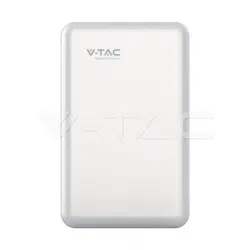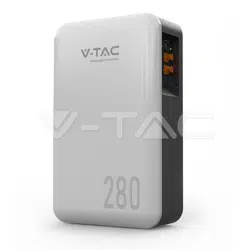
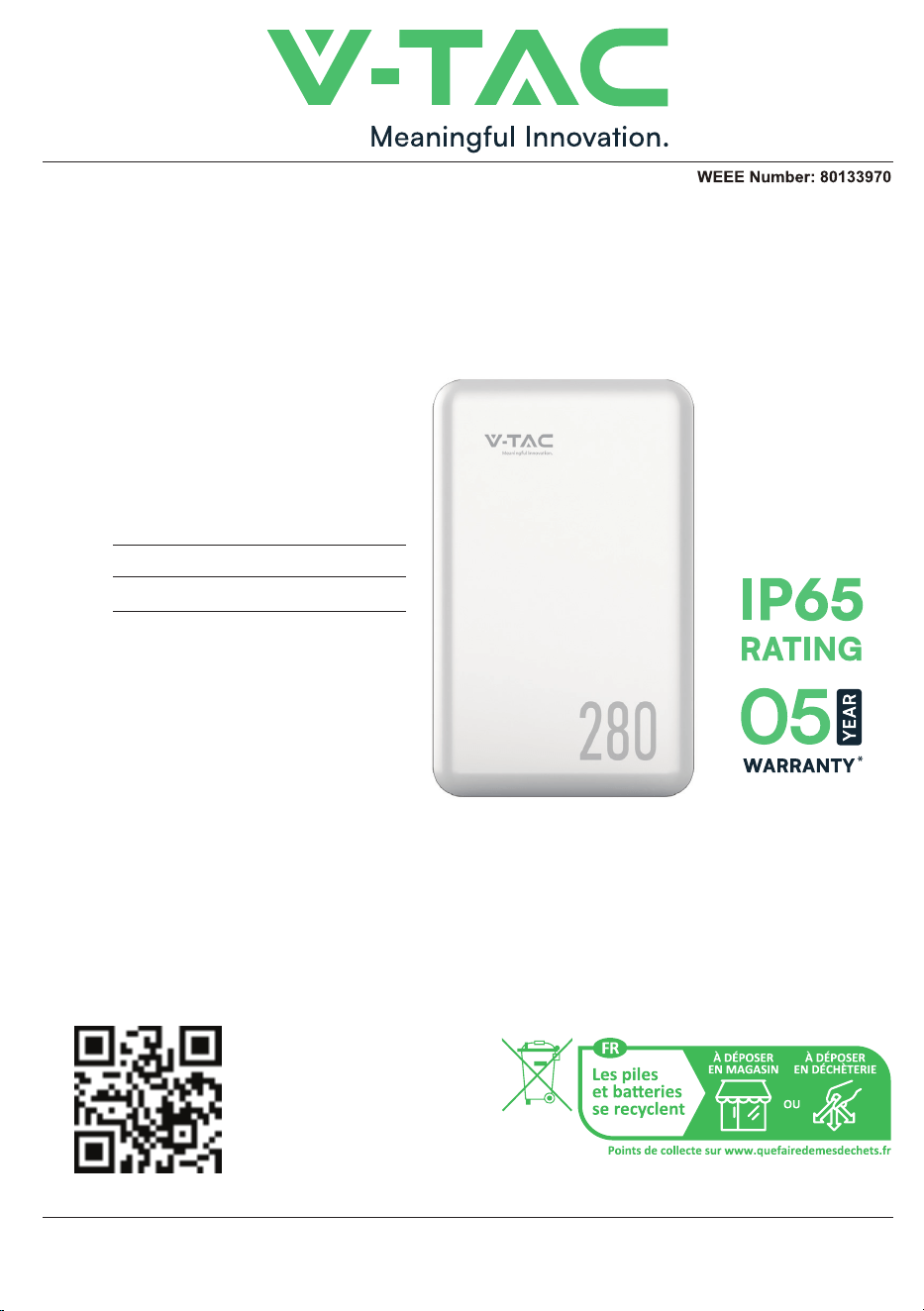
INSTRUCTION MANUAL
14.33kWh WALL MOUNTED
LITHIUM BATTERY
INTRODUCTION
IN CASE OF ANY QUERY/ISSUE WITH THE PRODUCT, PLEASE REACH OUT TO US AT: SUPPORT@V-TAC.EU
FOR MORE PRODUCTS RANGE, INQUIRY PLEASE CONTACT OUR DISTRIBUTOR OR NEAREST
DEALERS. V-TAC EUROPE LTD. BULGARIA, PLOVDIV 4000, BUL.L.KARAVELOW 9B
MODEL SKU
VE51280W 11525
MULTI-LANGUAGE
MANUAL QR CODE
Please scan the QR code
to access the manual in
multiple languages.
Thank you for selecting and buying V-TAC Product. V-TAC will serve you the best. Please
read these instructions carefully & keep this user manual handy for future reference. If you
have any another query, please contact our dealer or local vendor from whom you have
purchased the product. They are trained and ready to serve you at the best.


1 Foreword.................................................................................................................................................
2 Safety........................................................................................................................................................
2.1 Safety Precautions......................................................................................................................
2.2 Abuse Operation.........................................................................................................................
3 Overview..................................................................................................................................................
3.1 Product Description...................................................................................................................
3.1.1 Features...............................................................................................................................
3.1.2 Basic Functions.................................................................................................................
3.2 Application Scenario.................................................................................................................
4 Application Description.....................................................................................................................
4.1 Parallel Connection Application............................................................................................
4.2 Low-temperature Application................................................................................................
4.3 Low Battery-capacity StUXGMK95)ʇ
4.4 Application of Nearing the Ocean.........................................................................................
6roduct Introduction..........................................................................................................................
Dimensions...................................................................................................................................
6 Installation..............................................................................................................................................
6.3 Packing List...................................................................................................................................
6.4 Unpacking and Inspection.......................................................................................................
6.6.1 Power Cable Connection...............................................................................................
9 Shipment & Maintenance & Storage...........................................................................................
9.1 Shipment.......................................................................................................................................
9.2 Maintenance................................................................................................................................
9.2.1 Battery Maintenance Considerations.......................................................................
9.2.2 Routine Maintenance.....................................................................................................
9.3 Battery Storage...........................................................................................................................
10 Trouble Shooting..............................................................................................................................
11 Warranty...............................................................................................................................................
12 Abbreviations.....................................................................................................................................
1
2
2
2
3
3
3
3
4
6
7
7
7
9
10
10
10
10
12
12
1
16
18
21
23
23
23
23
24
2
26
27
28
17
17
Contents
6GTKR/TZXUJ[IZOUT
6/4*KLOTOZOUT
6.1 Precautions for Installation.....................................................................................................
6.2 Installation Preparation............................................................................................................
6.2.1 Tools Preparation............................................................................................................
/TYZGRRGZOUT
13
6.6 Cable Connection........................................................................................................................
6.6.2 Communication Cable Connection............................................................................
ȴ8KYOYZUX)UTTKIZOUT
7 Parallel Connection..............................................................................................................................
8 Make Your System Run......................................................................................................................
6.6.4 Grounding Cable Connection.......................................................................................
This document is mainly applicable to the following engineers
Technical Support Engineer
Installation Personnel
Maintenance Engineer
1
1 Foreword
This user manual mainly introduces product introduction, application descrip-
tion, installation instructions, power-on instructions, maintenance instructions and
provides instructions the <+=+999KXOKY LFP battery pack for technical
support engineers, maintenance engineers and users.
Reader
Overview
Signs
The following signs may appear in this article, and their meanings are as follows.
Sign Meaning Description
Danger
Indicates a hazard with a high level of risk that will cause
death or serious injury if not avoided.
Warning
Indicates a hazard with a moderate risk that may cause
death or serious injury if not avoided.
Notice
Indicates a hazard with a low level of risk that may cause
minor or moderate harm if not avoided.
Explanation
Supplementary explanation of key information in the
main text."Explanation" is not safety warning information,
and does not involve personal, equipment and
environmental damage information.
DANGER
WARNING
NOTE
ATTENTION
This marking indicates that this
product should not be disposed
of with other household wastes.
Caution, risk of electric shock.
Before carrying out battery work, you must read carefully the safety precautions
and master the correct installation and connection methods of the battery.
Prohibit to turn it upside down, tilt, or collide.
Prohibit to short-circuit the positive and negative poles of the battery,
otherwise it will cause the battery to be damaged.
Prohibit to throw the battery pack into a fire source.
Prohibit to modify the battery, and it is strictly prohibited to immerse the
battery in water or other liquids.
DO NOT place installation tools on the battery during battery installation.
DO NOT disassemble, squeeze, bend, deform, puncture, or shred the
battery without the authorization of authorized dealers.
DO NOT exceed the temperature range, otherwise it will affect the battery
performance and safety.
The battery circuit must be kept disconnecting status during installation
and maintenance operations.
Check the battery connection end bolts regularly to confirm that the bolts
are tight.
2
2 Safety
2.2 Abuse Operation
2.1 Safety Precautions
The battery pack needs to avoid abuse operations under the following (includ-
ing but not limited tUIUTJOZOUTY
Abuse Operation Protection Description
If the positive and negative poles are connected reversely,
the battery will be directly damaged.
External short circuit
If the battery pack is short circuited externally, the battery
will be directly damaged.
Series connection application
The battery pack does not support the application of
battery packs in series. If the battery packs are forced to be
connected in series, the batteries may be directly damaged,
and may even cause fire, explosion and other dangers.
Reverse connection of positive
and negative poles

3 Overview
:NK<+=VXUJ[IZ[YKROZNO[SOXUTVNUYVNGZK2,6GYZNKVUYOZO\K
electrode material. It can be widely used in energy storage systems such as residential
energy storage, back-up power, and PV self-consumption optimization.
The battery pack is composed of 16 cells of LFP batteries in series connection,
with low self-discharge, high energy density, and no memory effect. This type of
battery also has excellent performance in high rate, long cycle life, wide temperature
range, and high safety.
3.1.1 Features
3.1 Product Description
• High energy density
Higher volume ratio energy and weight ratio energy.
• Maintenance-free
The battery pack is maintenance-free in the process of using, which can save
customers' battery operation, maintenance testing costs and reduce the frequency of
on-site replacement.
• Long cycle life
The battery pack life is 3 times long than the ordinary lead-acid batteries.
• Excellent temperature characteristics
3.1.2 Basic Functions
• Monitor
The battery system uses a high-performance BMS, it has protection functions
such as current, voltage.
• Alarm
Support abnormal alarms such as overvoltage, under-voltage, overcurrent, short
circuit, high and low temperature, battery failure, hardware failure, etc.
• Communication
PrU\OJK80OTZKXLGIKY[VRUGJGRGXSOTMGTJJGZGULHGZZKXOKYZNXU[MNZNK
89)'4IUSS[TOIGZOUTVrotocol.
3
=NKTINGXMOTMZNKHGZZKX_]UXQOTMZKSVKXGZ[XKIGTXKGINȭdȭ
XKIUSSKTJKJ[YOTMZKSVKXGZ[XK ȭdȭ=NKTJOYINGXMOTMZNKHGZZKX_
]UXQOTMZKSVKXGZ[XKIGTXKGINȭdȭXKIUSSKTJKJ[YOTMZKSVKXGZ[XK
ȭdȭ
• Parallel connection application
• Balance function
Support the cells balance function.
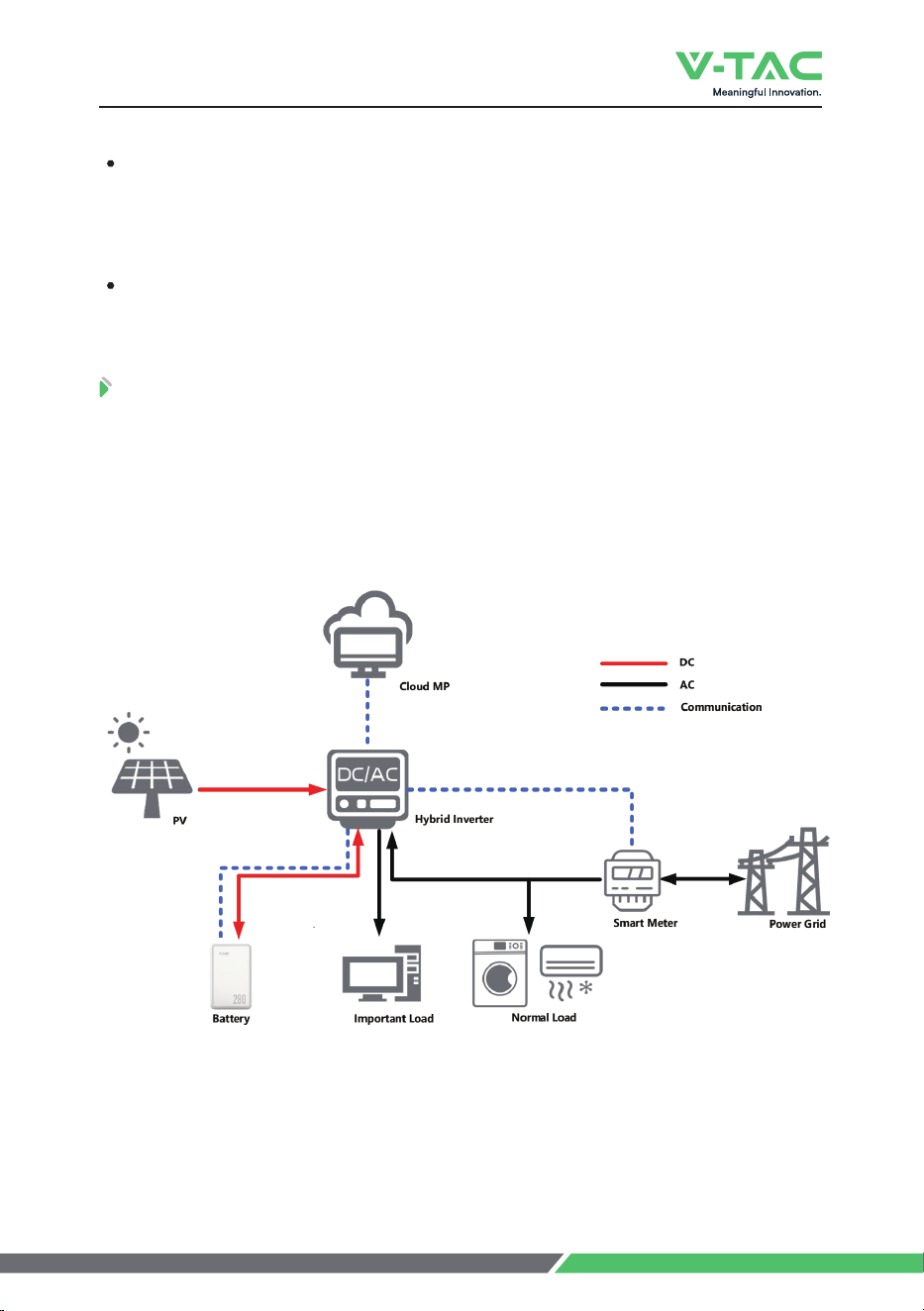
Fig. 3-1 Working Diagram of the Battery Pack
3 Overview
3.2 Application Scenario
The battery pack is used to provide backup power, load shifting, peaking
shaving and can be used for residential energy storage, solar energy storage and
other application scenarios.
The normal working operation diagram of the battery pack can be as shown in
the figure below.
4
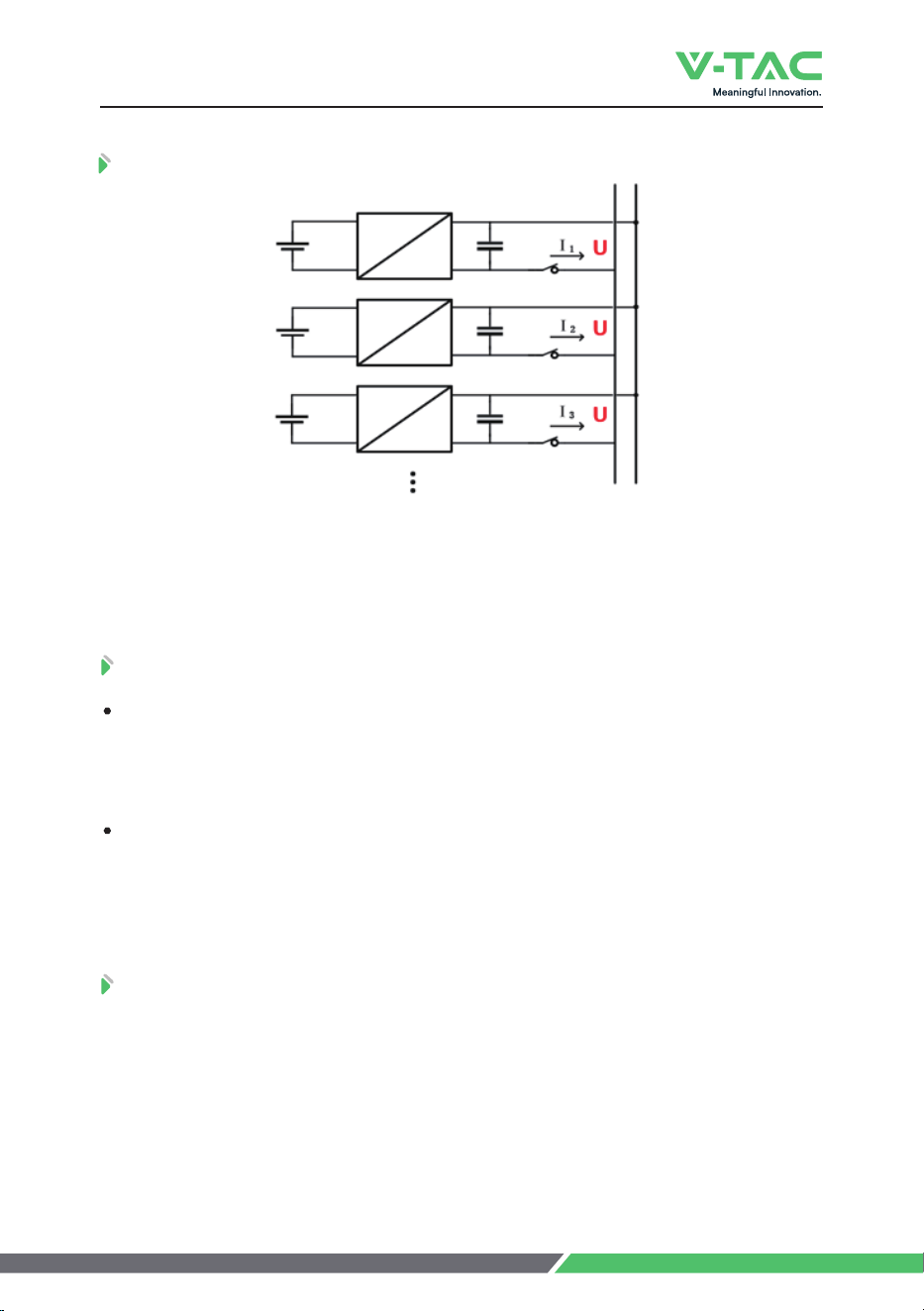
3G^Y[VVUXZVIYHGZZKXOKYOTVGXGRRKRIUTTKIZOUT8KIUSSKTJGZOUT LUXHKZZZKX
performance, when the number of batteries exceeds 2pcs, please connect all batteries
ZUZNKH[YHGX
4 Application Description
The battery packs support parallel connection, and synchronously increases the
backup time or backup power.
Confirm the consistency between the battery packs, check the SOC and voltage
and turn off the batteries before connecting them in parallel.
4.2 Low-temperature Application
4.1 Parallel Connection Application
• Low-temperature Charging
The battery pack does not support direct charging of the battery below 0°C.
When the minimum temperature of the battery is below 0°C, the BMS will cut-off the
charging circuit and cannot be charged.
• Low-temperature Discharging
The battery pack does not support discharge below -20°C. When the minimum
temperature of battery is below -20°C, the BMS will cut-off the discharge circuit and
cannot discharge.
4.3 Low Battery-capacity StUXGMK95)ʄ
After the battery pack is power off, there will be BMS static power consumption
and self-discharge loss. In actual scenarios, it is necessary to avoid low-battery-pow-
er statK95)ʇYZorage. If it is unavoidable, the longest storage period is 30days
&q)JG_Y&q):NKbattery needs to be recharged in time after storage,
otherwise the battery may be damaged due to over-discharge, and the entire battery
pack needs to be replaced.
5

The atmospheric corrosion environment is defined and classified according to
the natural environment statKGTJZNK'(KT\OrUTSKTZOYJKLOTKJGYLURRU]Y
' KT\Oronment refers to the ocean or the land near the pollution source, or
the environment with simple sheltKXY[INGYG]TOTM4KGXZNKUIKGn" refers to the
arKGνQSG]G_Lrom the ocean; "Near the pollution source" refers to the area
]OZNOTZNKLURRU]OTMXGJO[Y QSLrom the saltwater lake, 3km from heavy pollution
sources such as smelters, coal mines, and thermal power plants, chemical industry,
rubber, electroplating, etc. 2km from medium pollution sources such as chemical
industry, rubber and electroplating, etc. And 1km from light pollution sources such as
food, leather and heating boilers, etc.
( KT\Oronment. Refers to the environment on land or outside with simple
sheltKXY[INGYG]TOTM]OZNOTSLrom the coast, or the environment on the sea.
The following conditions may cause the battery pack to be stored in a
discharged statK
After the utility power failurKZNKROTKLG[RZIGTTUZHKKROSOTGted in time, and
the power supply cannot be restored for a long time.
After the installation and commissioning work is completed, the utility power
is turned off directly, but the battery pack is not powered off, which will cause the
battery to enter the low power consumption mode.
Other reasons cause the battery pack to fail to enter low power consumption
normally.
4 Application Description
4.4 Application of Nearing the Ocean
6
:NK<+=NGYGT/6XGZOTMUL/6]NOINGRRU]YOZZUHK[YKJOT'(
environment. However, for better performance, it is recommended to use an
air-conditioning system if possible.
NOTE
6roduct Introduction
6GTKR/TZXUJ[IZOUT
6XUJ[IZ/TZXUJ[IZOUT
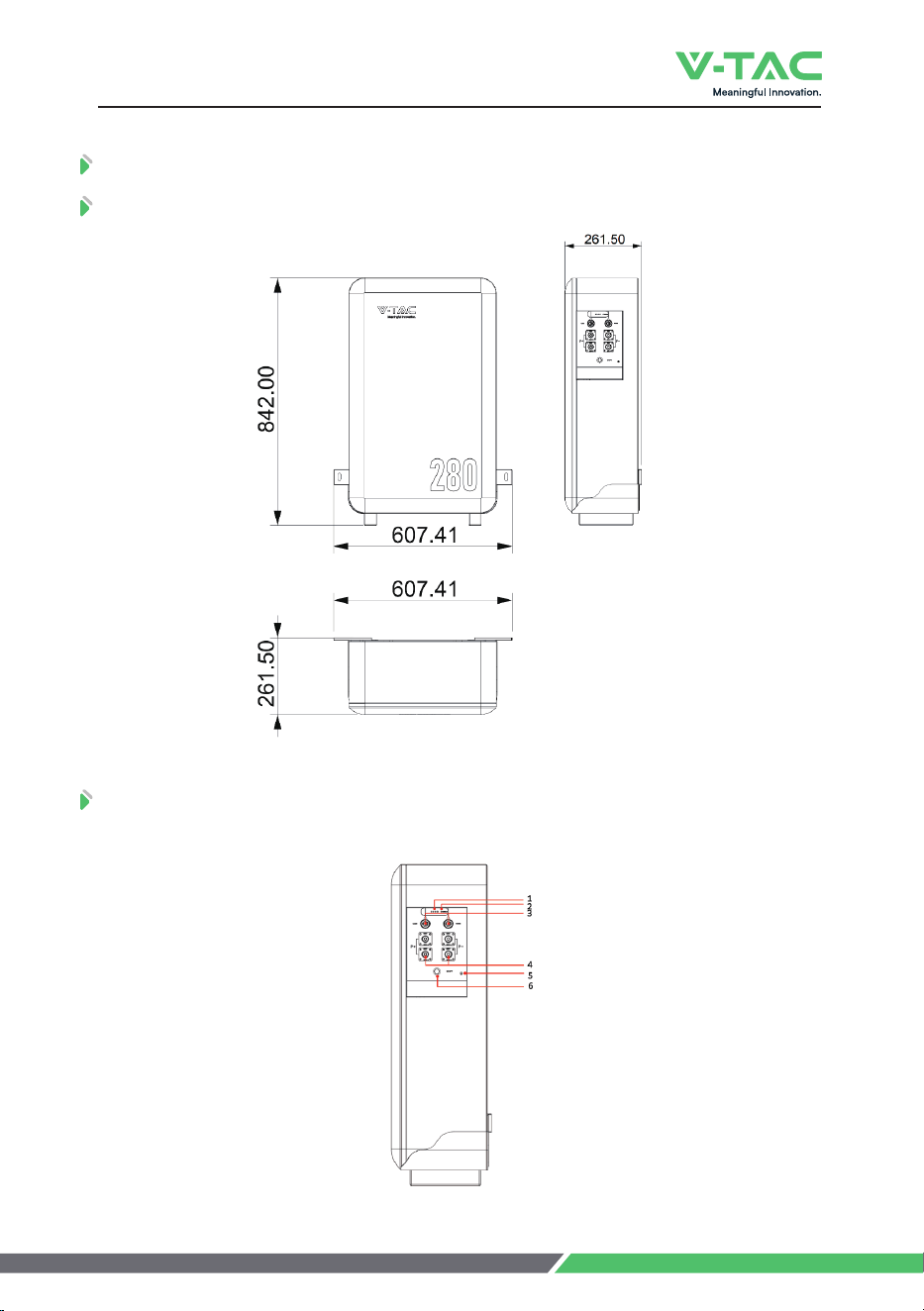
The VE51280W operation panel is shown as follows.
*OSKTYOUTY
,OM6XUJ[IZ*OSKTYOUTY
,OM<+=5VKXGZOUT6GTKR
7
6roduct Introduction
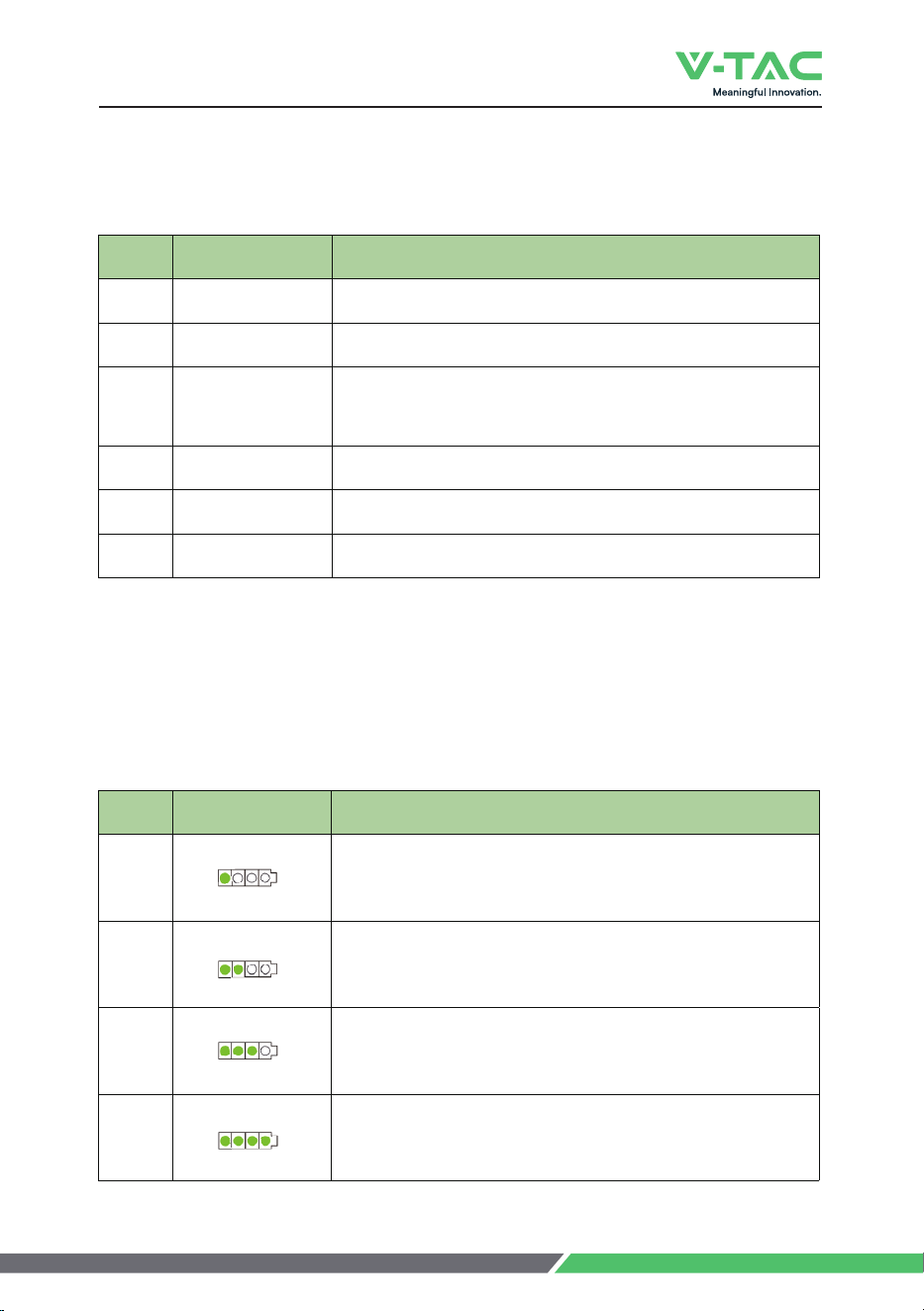
:NKJKLOTOZOUTULZNK<+=UVKXGZOUTVGTKROYYNU]TGYLURRUG]Y
The SOC indicator used to identify the current capacity status of the battery.
The number of blinking indicators corresponds to different remaining capacity. The
specific meaning is shown as follows.
:GHRK5VKXGZOUT6GTKR/TZKXLGIK*KLOTOZOUT
:GHRK:NK95)/TJOIGZUX*KLOTOZOUT
No. Indicator Light Remark
1
ʇ95)ʇ
"95)ʇ
"95)ʇ
"95)ʇ
2
3
4
No.
1
COM 1COM 2
80OTZKXLGIKLUXIUSS[TOIGZOUT
COM1 for communication with inverter;
COM2 is used for communication between batteries.
2
POWE8545,,
Power switch
3
SOC
State of charge
4
RUNALM To indicate the running or alarm status of battery
GND Grounding
6
Battery Output Battery power terminals
Items Remark
8
5 Product Introduction
The corresponding relationship between operation status and indicator operation
status is shown as follows.
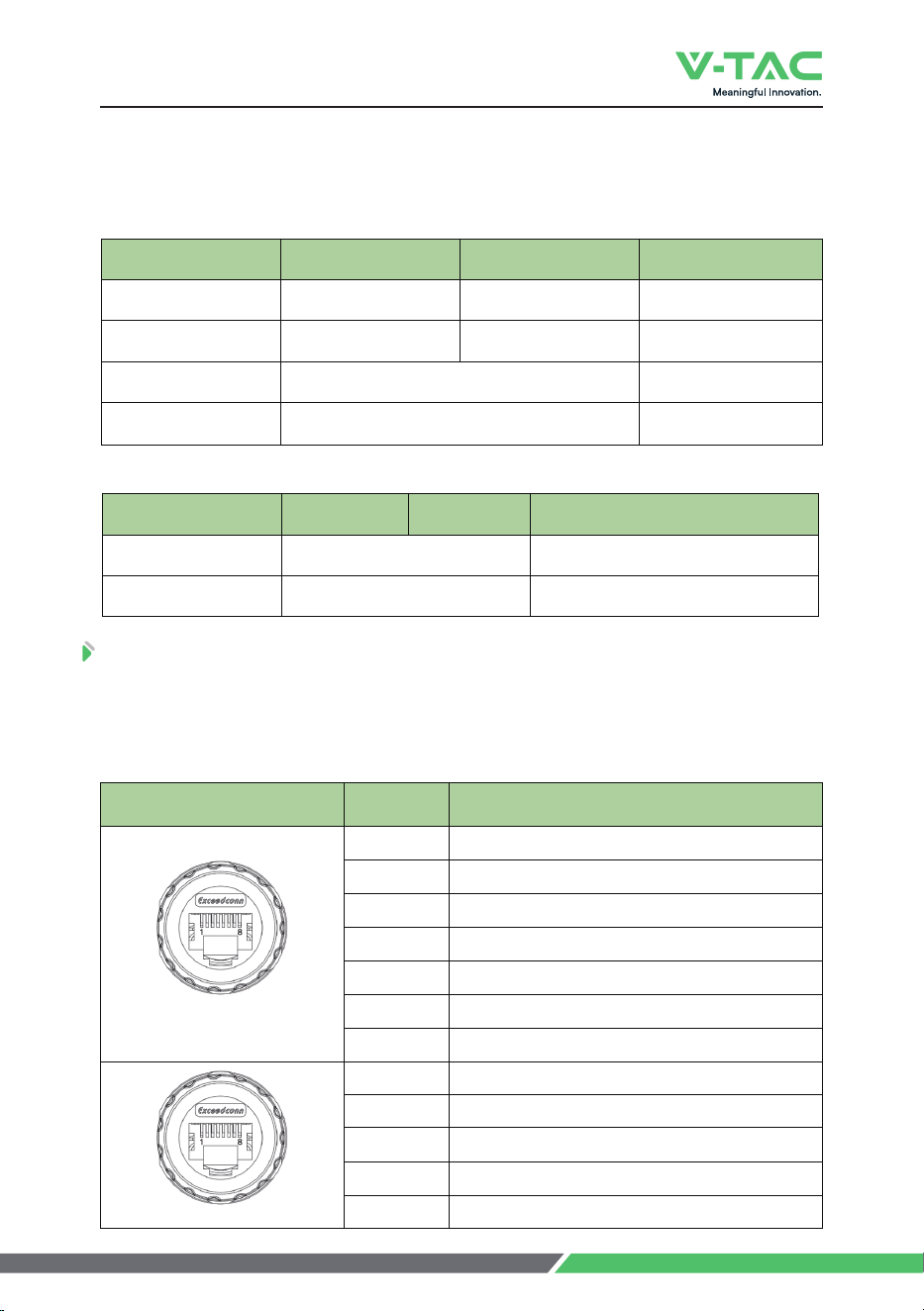
5.3 PIN Definition
VE51280W has 2 communication interfaces: COM1 and COM2, the PIN defini-
tion of COM ports are shown as follows.
Table 5-3 The Run Indicator Definition
Table 5-5 The Communication Port Definition
COM1/2 Pin Description
COM 1
1 RS485_B
2 RS485_A
3 CAN0-H (communicate with the last battery)
4
5 CAN1-L (communicate with inverter)
CAN1-H (communicate with inverter)
6/8 /
CAN0-L (communicate with the last battery)7
1
2
3 CAN0-H (communicate with the next battery)
4/5/6/8 /
7 CAN0-L (communicate with the next battery)
RS485_B
RS485_A
ON OFF Battery Status
Flash 1 1 s 2 s
Flash 2 Charge
Keep On
Discharge
Keep Off
Idle
Sleep/Fault
-
-
Table 5-4 The Alarm Indicator Definition
Indication Status ON OFF Battery Status
Keep On
Fault(Charge/Discharge MOS、NTC、
ADC Fault、Reverse Connection Fault)
Keep Off
Standby/Sleep
-
-
COM 2
Indication Status
9
2 s 3 s
6 Installation
6.1 Precautions for Installation
Light intensity is required near the installation location.
Comply with the safety operation technical regulations when lifting and
handling heavy objects.
Equipment and tools must be complete, intact, and reliable. It is strictly
prohibited to use tools with cracks, burrs, loose handles, etc., that do not meet the
safety standards.
Installation operations must be guided by qualified engineers.
During installation, two people must work together, one operating and the
other inspecting.
The original cable connection and operation process shall not change without
the authorization of the company's consent.
6.2 Installation Preparation
6.2.1 Tools Preparation
Use insulated tools to avoid electric shock. If you use tools without insulation
protection, you need to wrap the exposed metal parts with insulation tape for
insulation treatment.
ATTENTION
10
6 Installation
Table 6-1 Installation
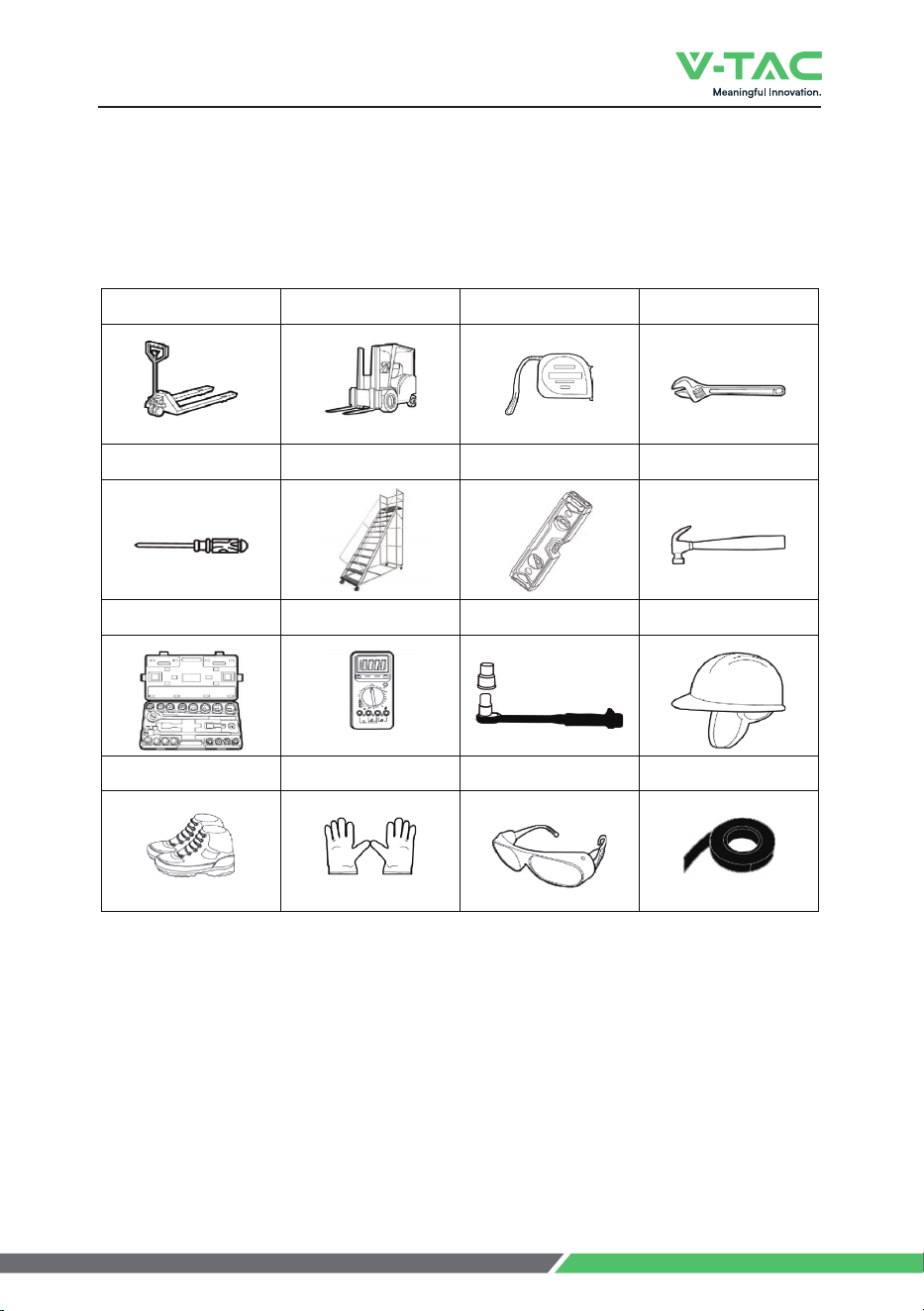
The following table describes the tools and meters that may be used before
installation.
Manual forklift Electric forklift Tape measure Adjustable wrench
Phillips screwdriver
Ladder
Levelling Instrument
Claw Hammer
Socket wrench Multimeter Insulated torque wrench Helmet
Insulated shoes Anti-static gloves Goggles Insulating tape
11
6 Installation
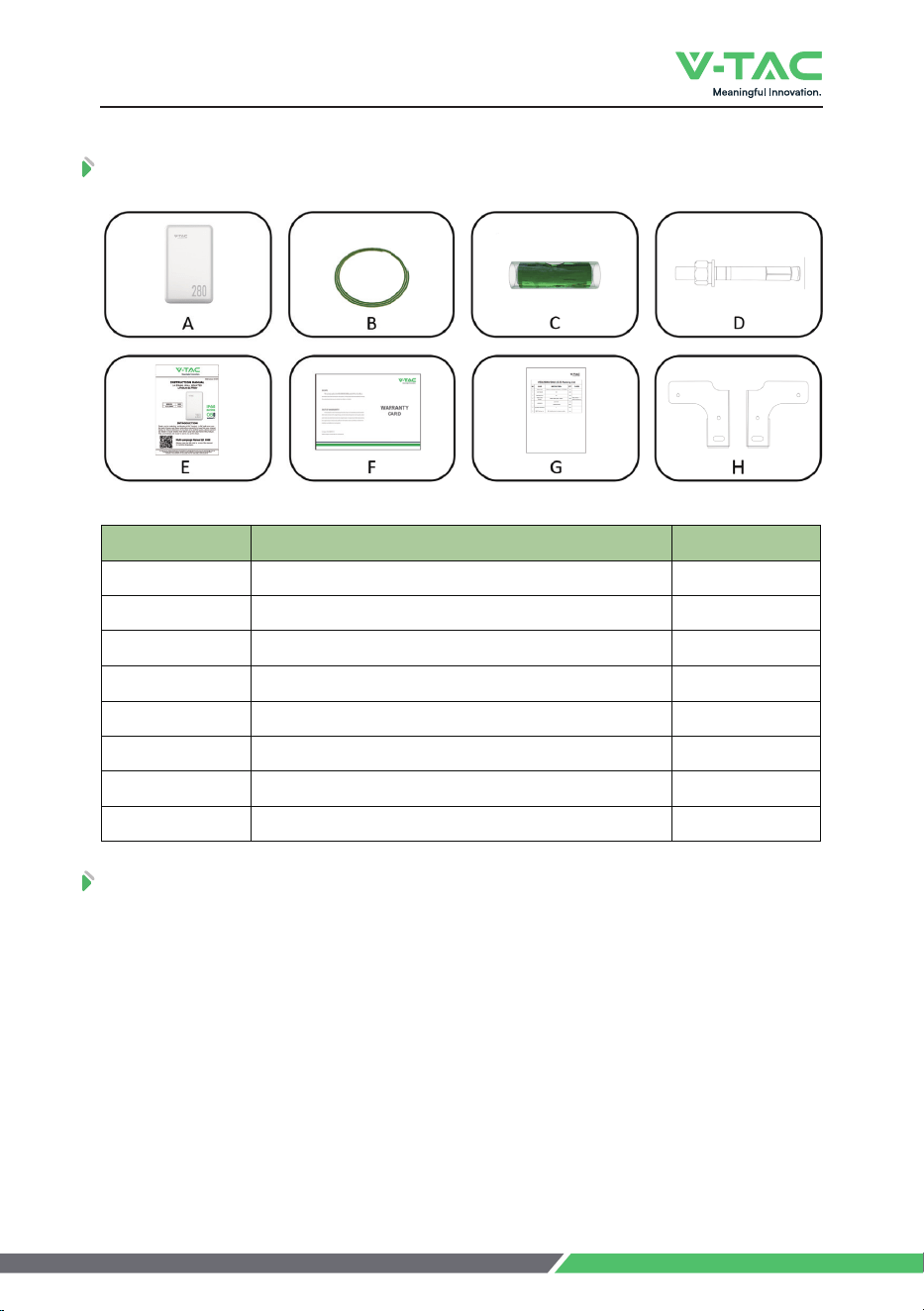
Item Description Quantity
A
B
<+=HGZZKX_
C
1
1
GND cable
1
D 2
E 1
F 1
G
Spirit Level
6.3 Packing List
User Manual
Warranty Card
1Packing List
,O^OTM9IXK]Y+^VGTYOUT(URZ
6.4 Unpacking and Inspection
After receiving the goods on-site, please check whether the packing box is intact
and inspect the goods in time. If the packing box is slightly damaged, please sign the
cargo list to confirm receipt and indicate the extent of the damage. If the damage of
the packing box is serious, please refuse to sign.
Please carry out an unpacking inspection after receiving all the goods. If users
find that the received goods do not match the packing list, please contact Vtac as
soon as possible.
H 2Bracket
12
6 Installation
/TYZGRRGZOUT
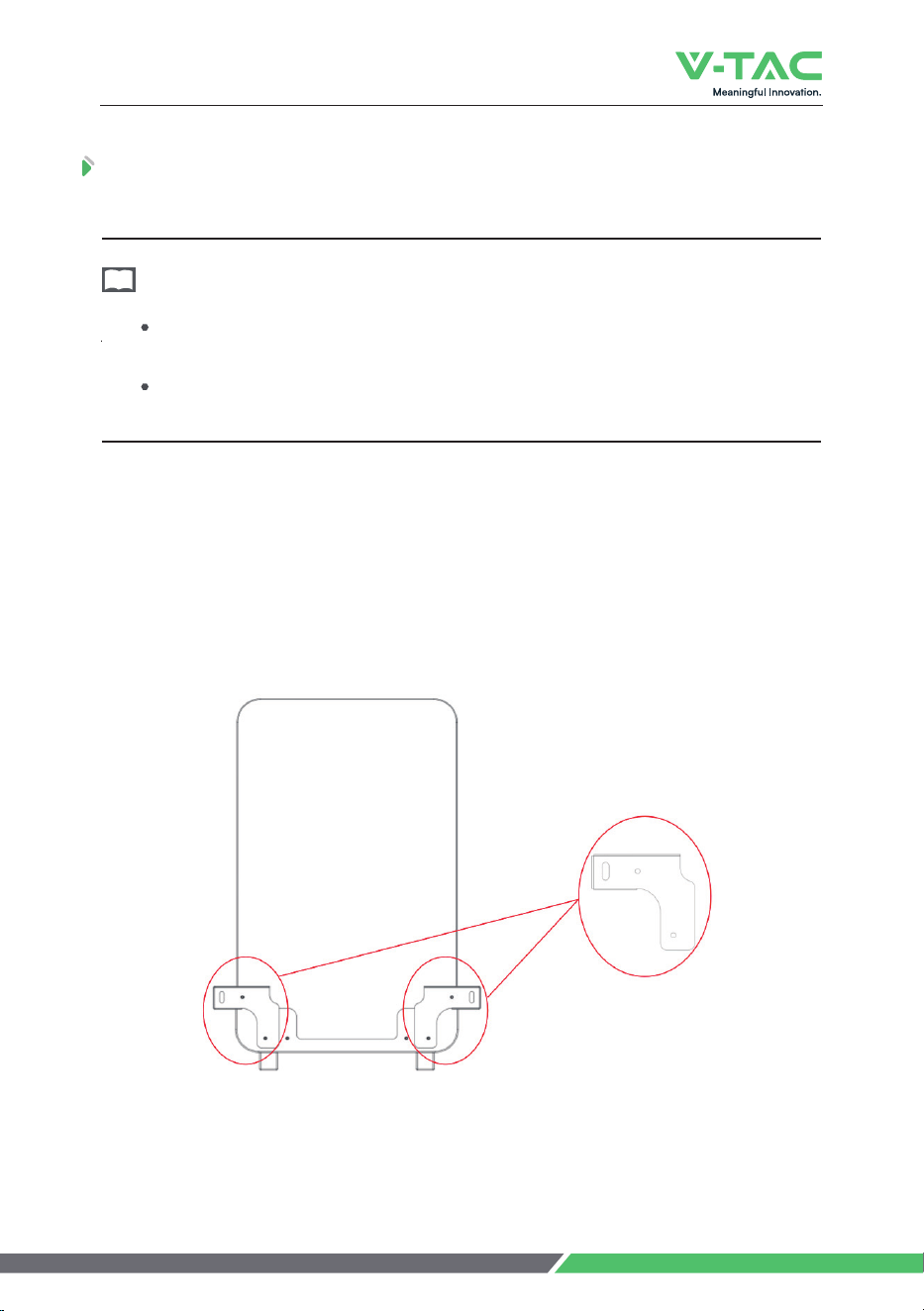
To ensure more stable installation, please mount the battery to the wall before use.
Step 2. Fix the 2pcs brackets to the battery.
Step 2.1. Remove the screws from the back of the battery.
Step 2.2. Take out the 2pcs brackets from the battery package.
Step 2.3. ;YKZNKXKSU\KJYIXK]Y9ZKVZULO^ZNKHXGIQKZYZUZNKHGIQULZNK
battery.
6RKGYKVRGIKZNK<+=HGZZKX_UTGLRGZY[XLGIKKTY[XOTMZNKXKOYGJKW[GZK
YVGIKUTHUZNYOJKYULZNKHGZZKX_XKIUSSKTJKJZUHKMXKGZKXZNGTSS
If possible, the installation site should be as spacious and ventilated as possible.
If the site is small and confined, please configure auxiliary heat dissipation equipment.
NOTE
Step 1. Place the battery to a flat surface.
Fig.6-1 Fix the Brackets to the Battery
2pcs brackets
13
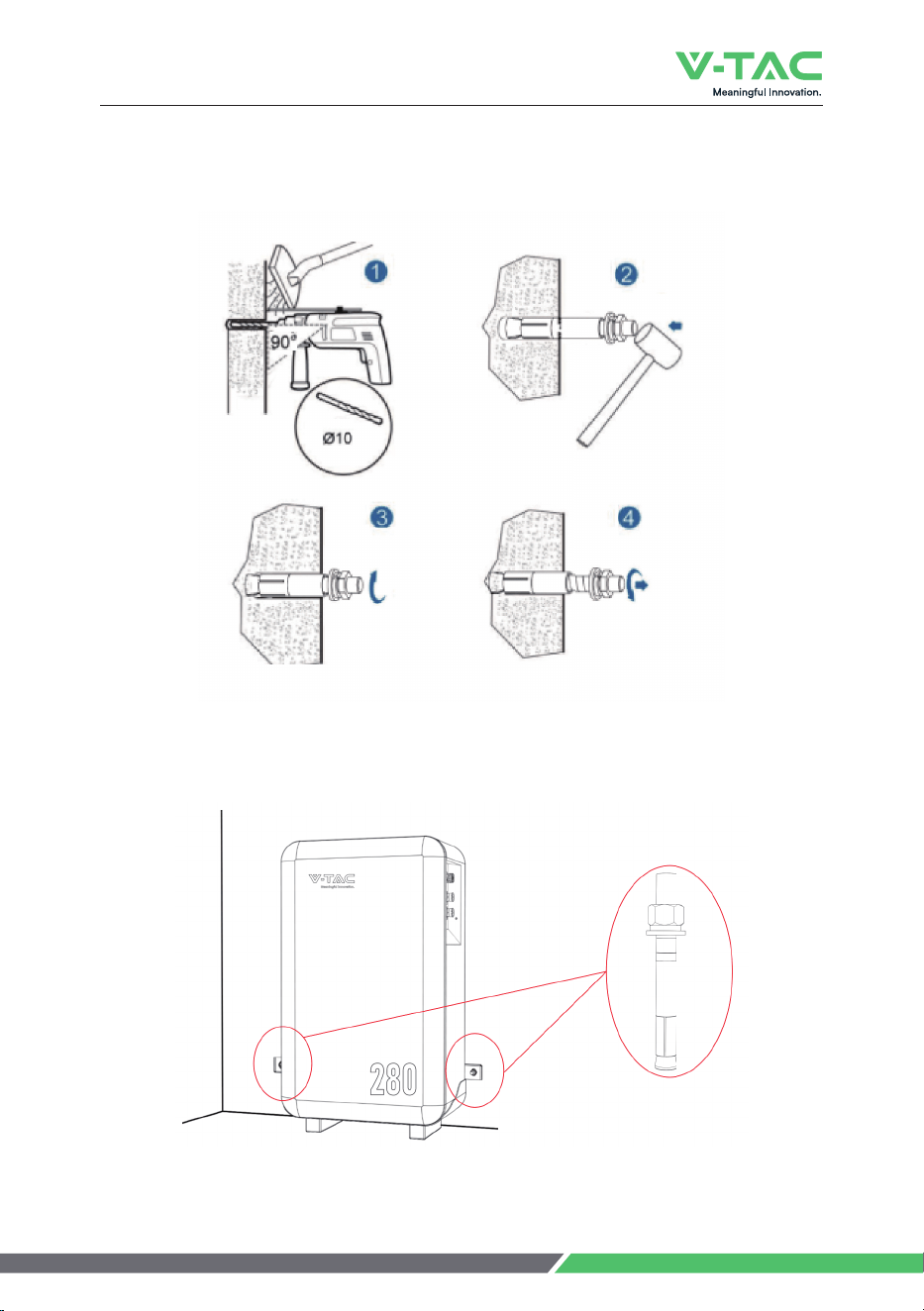
Fixing Screw
Fig.6-3 Fix the Battery to the Wall
6 Installation
Step 3. Fix the 2pcs* ‘Fixing screws’ on the wall.
Fig.6-2 Fix the Battery to the Wall
14
6 Installation
Please contact Vtac or the supplier to purchase the following cables. They are
SG_HKTUZOTIR[JKJOTZNKHGZZKX_HU^GTJIGTHKUHZGOTKJOTZNK3GYZKX9RG\K
Cable Kit provided by Vtac or the suppliers.
NOTE
6.6 Cable Connection
6.6.1 Power Cable Connection
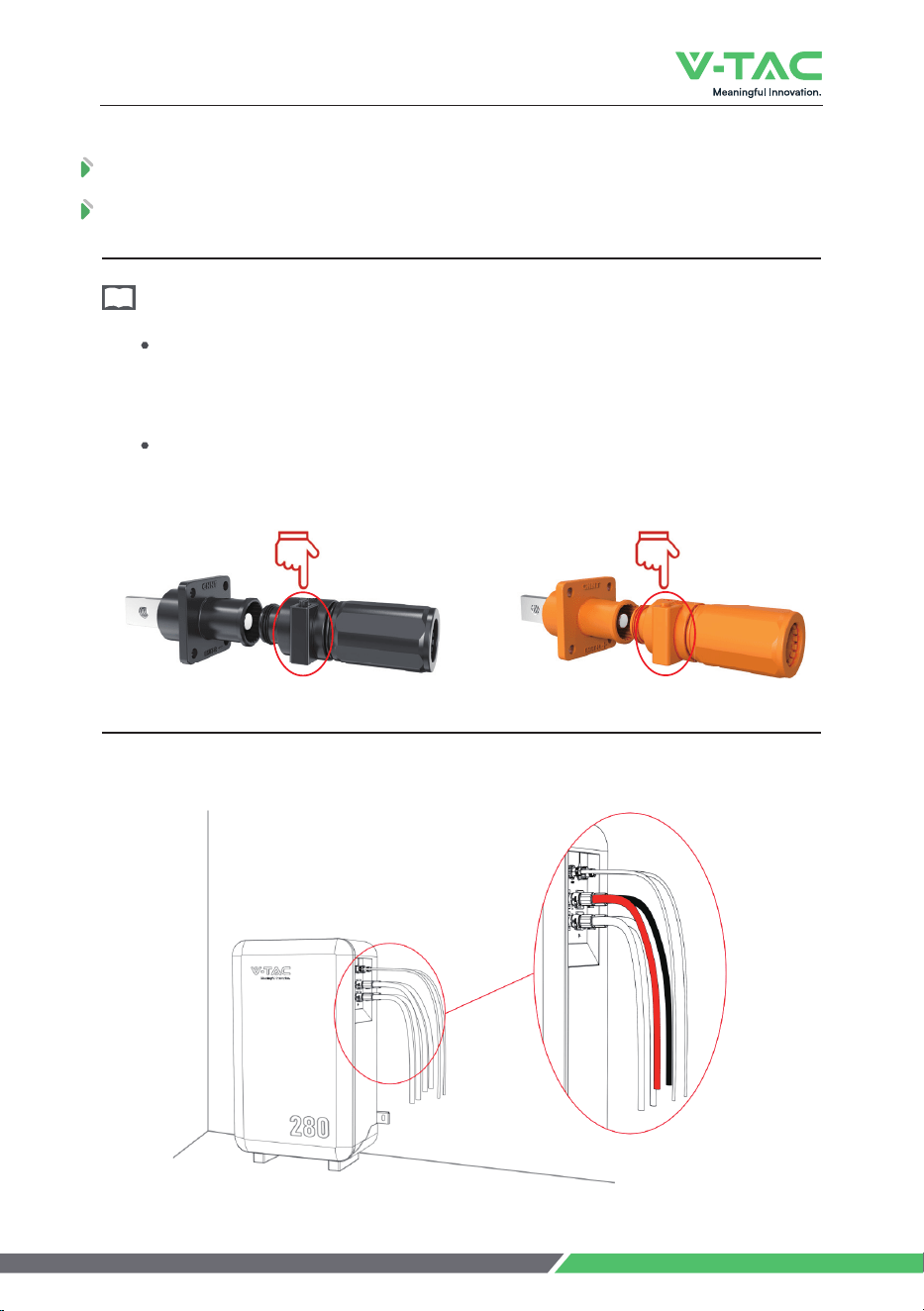
Press to unlock
Press to unlock
The following is the power cables connection display of the battery to the inverter.
Press the unlock on the power cable while inserting the power cable into the
socket.
How to use the touch-safe power cable connectors
Fig.6-4 Power Cable Connection Diagram
15
6 Installation
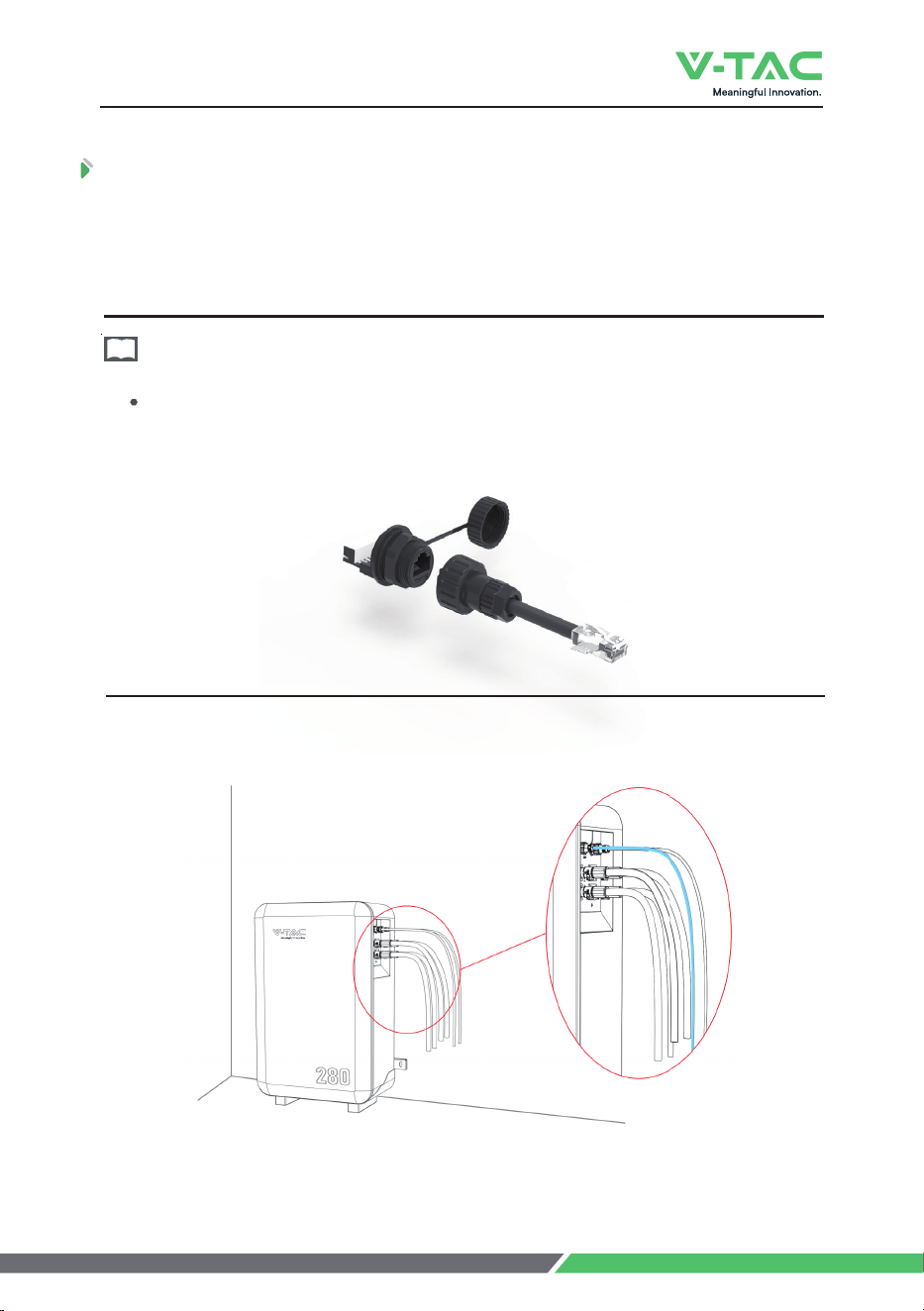
6.6.2 Communication Cable Connection
Locate the direction of the communication cable with the socket and then insert
the communication cable to the socket.
Open the communication port cover, align it with the corresponding socket, and
insert it.
How to use the communication cable connectors
NOTE
,OM)USS[TOIGZOUT)GHRK)UTTKIZOUT*OGMXGS
16
6 Installation
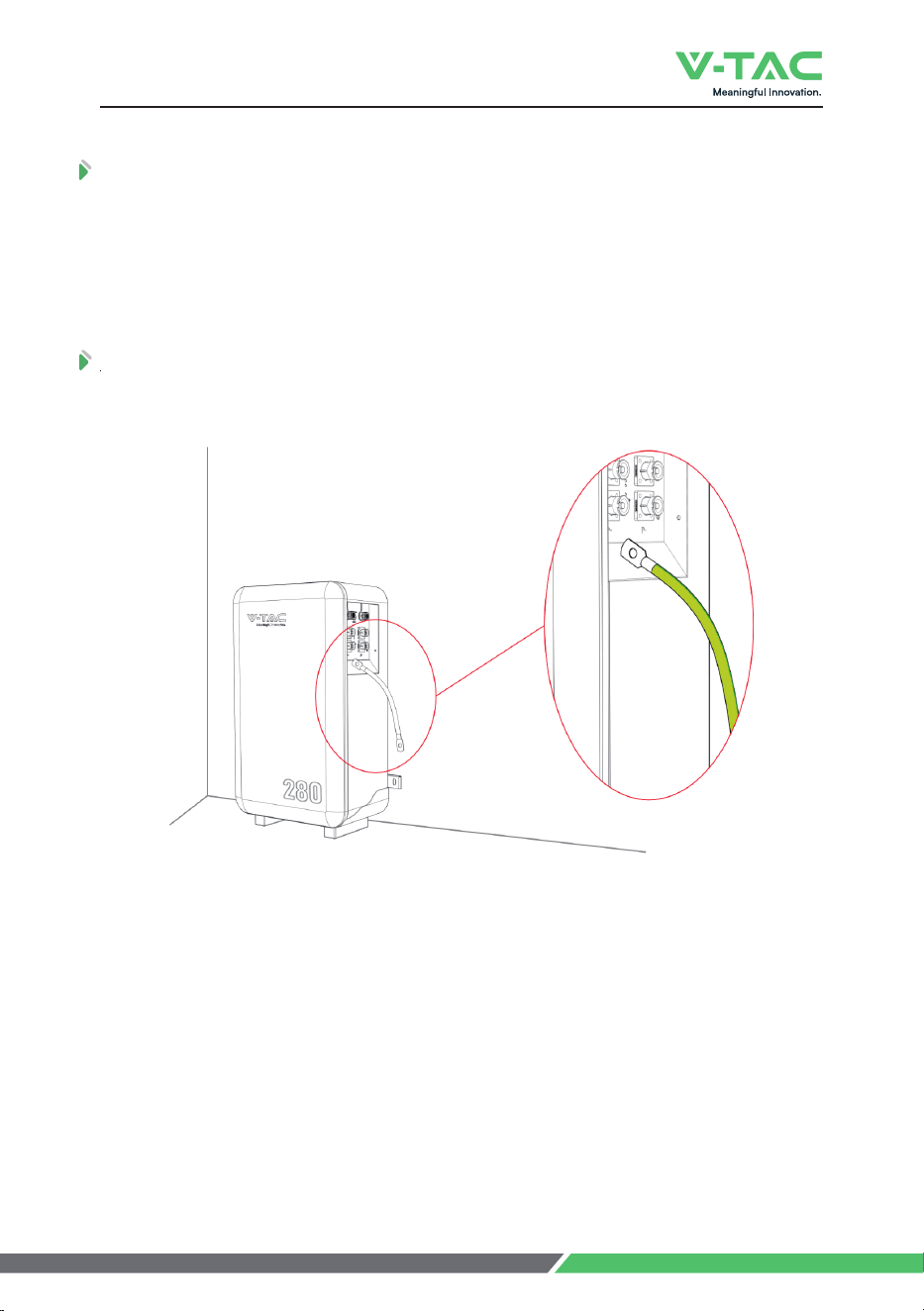
ɂ8KYOYZUX)UTTKIZOUT
6.6.4 Grounding Cable Connection
Connect the grounding cable to the ground.
Fig.6-6 GND Cable Connection Diagram
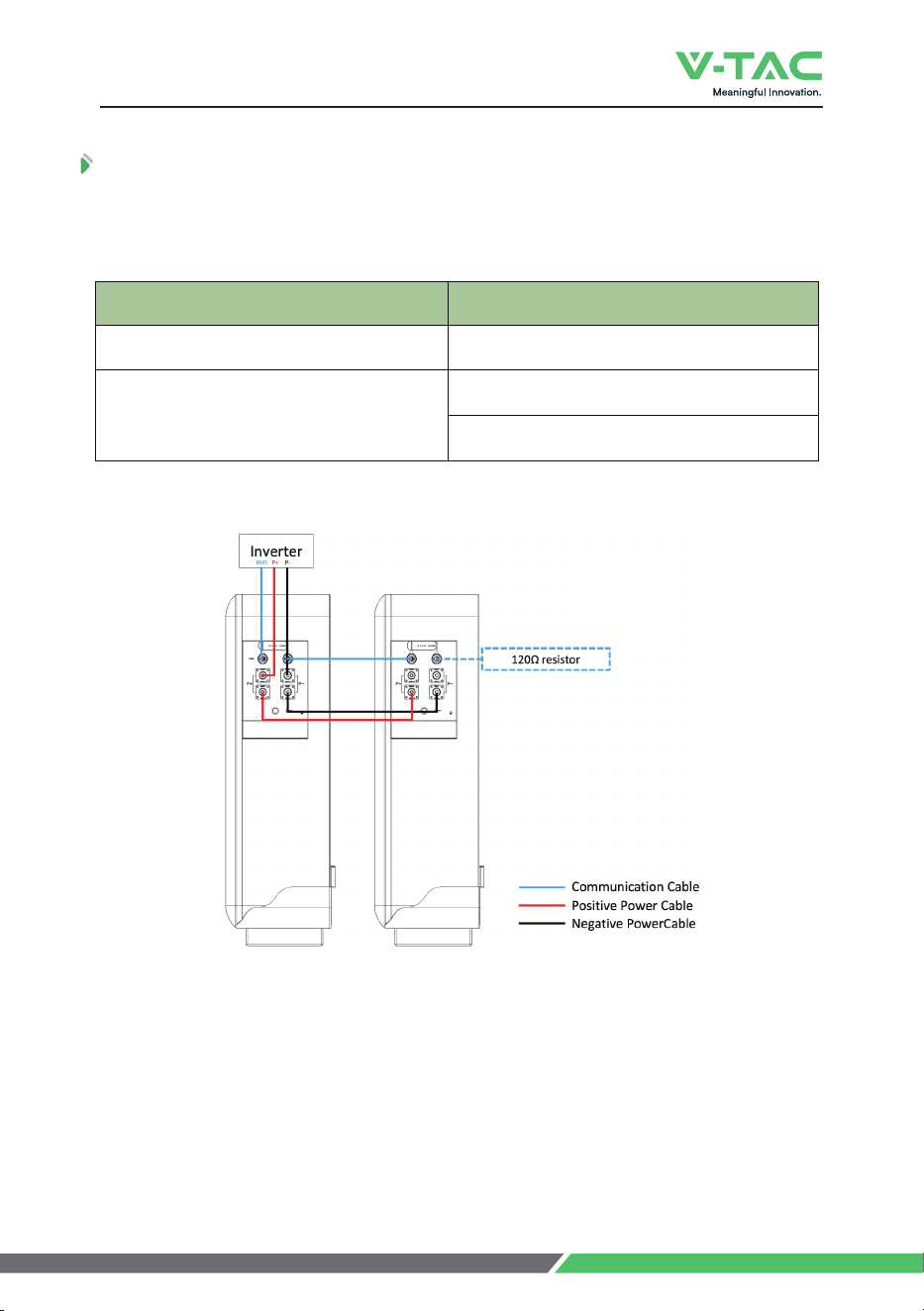
To ensure stable communication with the inverter when using more than two
HGZZKXOKYOTVGXGRRKRLURRU]ZNKYKYZKVY
Step 1.:GQKU[ZGœXKYOYZUXLXUSZNK9RG\K(GZZKX_1OZ
Step 2. /TYKXZZNKœXKYOYZUXOTZUZNK)53VUXZULZNKRGYZ<+=
17
7 Parallel Connection
configured according to the actual current that may exceed 100A.
/L_U[]ORROTYZGRRRKYYZNGTVIYHGZZKXOKY(GZZKX_W[GTZOZ_ʇVRKGYKXKLKXZUZNK
following wiring configuration.
1 pc Master Cable Kit * 1 set
Master Cable Kit * 1 set
Slave Cable Kit * 1 set
Battery Quantity of Parallel Cable Kit
2 pcs
7 Parallel Connection
18
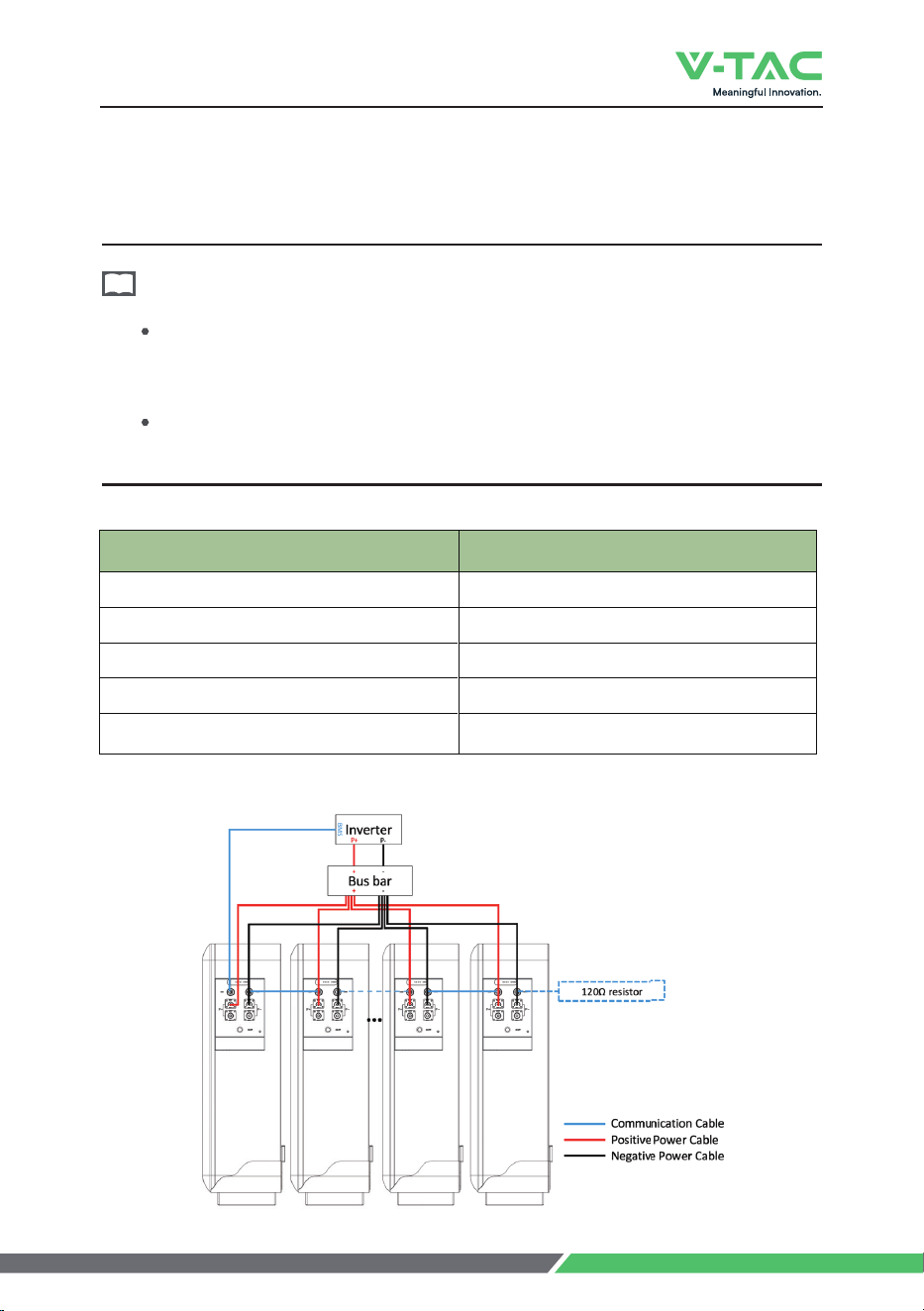
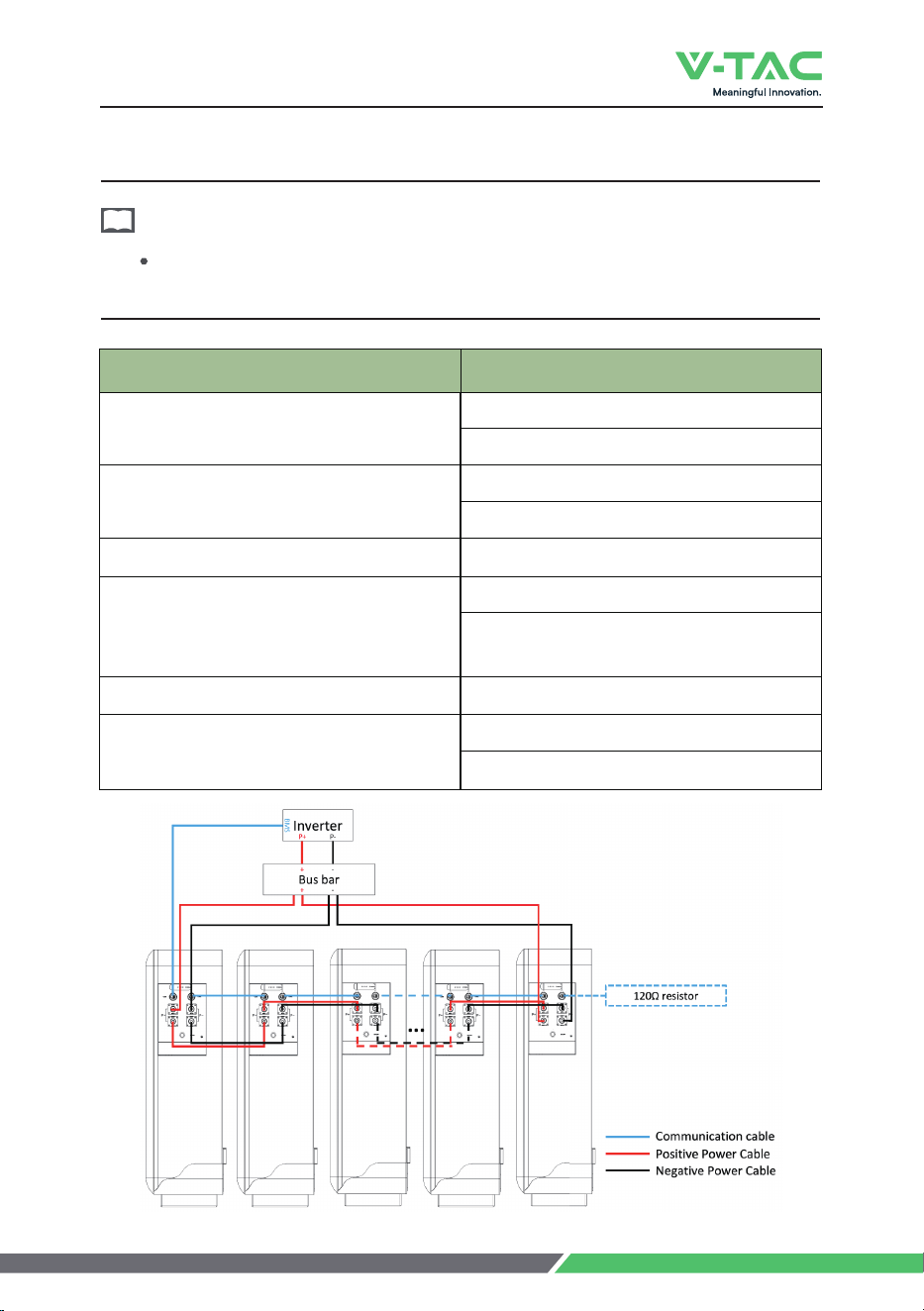
/L_U[]ORROTYZGRRSUXKZNGTVIYHGZZKXOKY4USUXKZNGTVIY_U[]ORRNG\K
the following two system wiring options.
Option 1. Connect all batteries to the bus bar.
For this wiring solution, you will need to prepare bus bars and power cables to
connect the bus bars to the inverter in addition. You can either purchase them
independently or obtain them from Vtac or the supplier.
/TZNOY]OXOTMYUR[ZOUTZNK3G^U[ZV[ZI[XXKTZULZNKY_YZKS]ORRHK'ZNK
quantity of batteries in parallel.
NOTE
7 Parallel Connection
19
3 pcs
VIY
Master Cable Kit * 3 set
3GYZKX)GHRK1OZYKZ
Battery Quantity of Parallel Cable Kit
4VIYʇ4"
3GYZKX)GHRK1OZ4YKZʇ4"
...
...
...
...
7 Parallel Connection
20
... ...
...
...
Option 2. Connect batteries by ‘hand to hand’.
If you want to use this wiring method, please note that the Max. output
current of the inverter is set in advance to 200A. To avoid damaging to the BMS.
NOTE
Battery Quantity of Parallel Cable Kit
pcs
N pcYʇ4"
4 pcs
3 pcs
Master Cable Kit * 2 set
Slave Cable Kit * 2 set
Master Cable Kit * 2 set
Slave Cable Kit * 3 set
Master Cable Kit * 2 set
9RG\K)GHRK1OZ4YKZ
ʇ4"
Master Cable Kit * 2 set
Slave Cable Kit * 14 set
8 Make Your System Run
Please strictly follow the steps below for check and operation. Vtac will not be
responsible for any issues caused by improper operation.
ATTENTION
8 Make Your System Run
No. Description Value
1
2
3
4
42
6 ν
7 ν
8 ν
Table 8-1 Parameter Setting
Parameter Setting
Nominal Voltage
Float Charge Voltage
Recommended Charge Current
3G^)NGXMK*OYINGXMK)[XXKTZ
Discharge Cut-off Voltage
Unit
V
V
A
Charge Temperature Range
Discharge Temperature Range
Storage Temperature Range
A
V
ȭ
ȭ
ȭ
The setting of different inverters will be different.
3GQKY[XKZNKOT\KXZKXINGXMKXOYVU]KXKJUTHKLUXKVU]KXOTMUTZNKHGZZKX_
Must not change the parameters casually in the site.
NOTE
21

Step 1. Check whether the cables are connected correctly.
Step 2. Check whether the batteries are grounded.
Step 3. Check these following status of switchs.
The power switch of the battery should be off.
The DC switch of the inverter should be off.
The circuit breaker from the inverter to the grid should be off.
Check before Running
Step 4. Turn on the DC switch of inverter.
Turn on the switch between the inverter and grid.
:[XTUTZNKIOXI[OZHXKGQKXHKZ]KKTZNKOT\KXZKXGTJHGZZKX_OLGT_
9ZKV:[XTUTZNKVU]KXY]OZINULHGZZKX_'TJ]GOZOTMLUXZNK8[T'RGXS
OTJOIGZUXROMNZYLXUSMXKKTHROTQOTMOTZUMXKKTSKGTYVU]KXUTY[IIKYYL[RR_
Power-on
8 Make Your System Run
If you need to shut down the system for some reason, please refer to the following
steps.
Step 1. Turn off the inverter first.
Step 2. Turn off the battery then.
NOTE
ȕ If you want to Power off your system
22
Whether the loading SOC status of the battery is allowed, you need to consult
the relevant government transportation department.
When maintaining the battery, it is required to use insulated tools or wrap the
tools in insulation.
DO NOT place any debris on the top of the battery.
DO NOT use any organic solvents to clean the battery.
DO NOT smoke or use naked flames near the battery.
After the battery is discharged, the battery should be charged in time to avoid
affecting the battery life.
When not using the battery for a long time, please charge the battery to
dINGrged state. Long-term storage with low battery may damage the
battery.
All maintenance work must be carried out by professionals.
It is suitable for the transportation of vehicles, ships and airplanes. During
transportation, shading, sun protection and civilized loading and unloading should
be performed. The box containing the product is allowed to be transported by any
means of transportation. In the process of loading and unloading, the battery should
be handled with care to prevent falling, rolling, and heavy pressure. Avoid direct rain
and snow and mechanical impact during transportation.
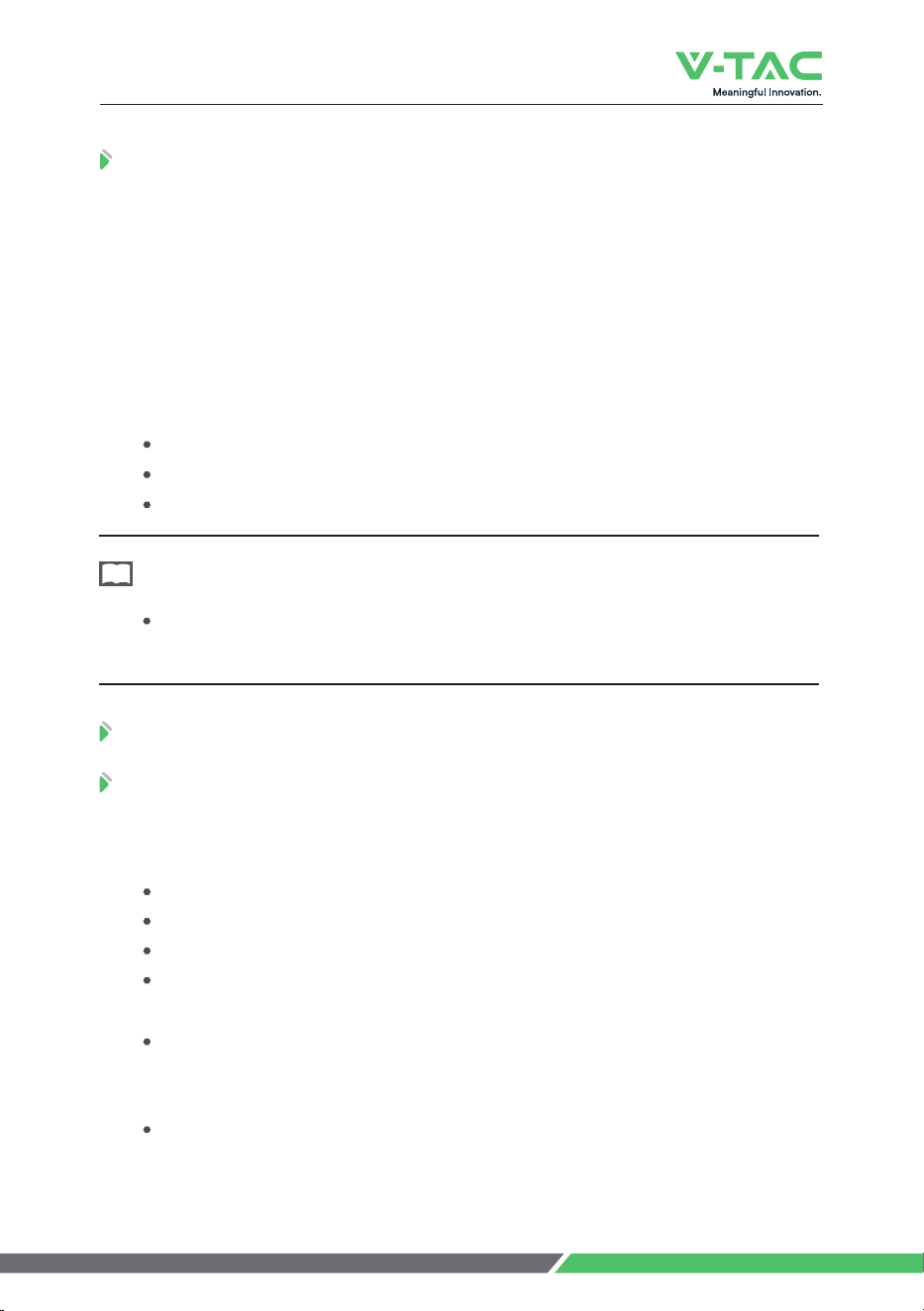
And here is the suggestion for the initial SOC before shipment by different
transporZGZOUT
'OXVRGTK d
9KG d
VKNOIRK d
9.1 Shipment
9.2.1 Battery Maintenance Considerations
9.2 Maintenance
NOTE
9 Shipment & Maintenance & Storage
23
9 Shipment & Maintenance & Storage
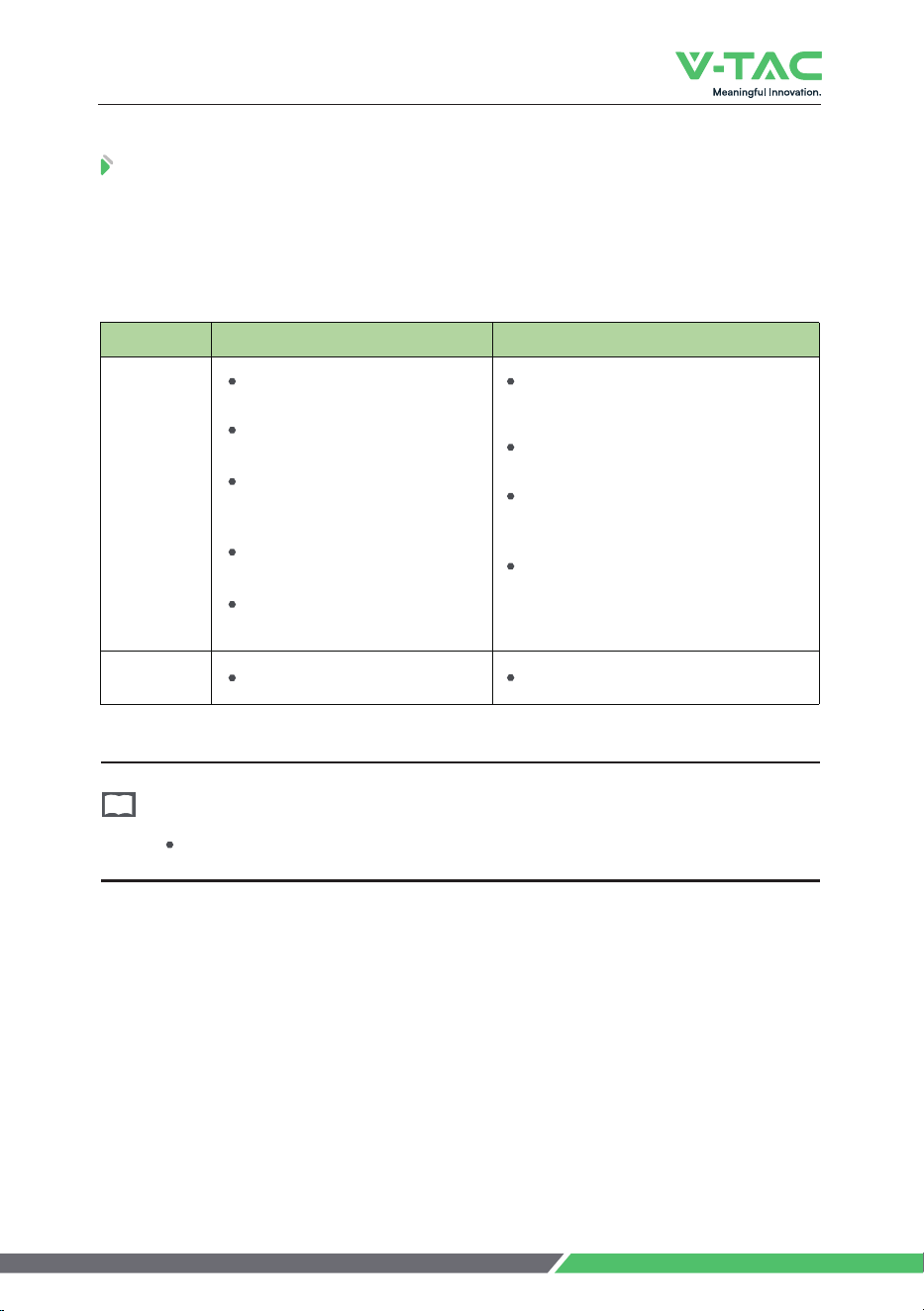
Suggested routine maintenance for every three-month.
The staff should perforS\OY[GROTYVKIZOUTUT<+=HGZZKX_GIIUXJOTMZU
the inspection plan, please refer to the following table for maintenance.
9.2.2 Routine Maintenance
Table 9-1 Routine MaintKTGTIKEvery thrKKSUTZN
NOTE
Items Standard Dealing
Battery
Appearance
Alarm
No Alarm.
Find the solution as per alarm information.
If the surface is dirty, clean the
appearance of the battery pack with
a cotton cloth.
The battery pack terminal is damaged,
replace the cable.
If the appearance is damaged, leaking or
deformed, take a photo and replace the
defective battery pack.
Please contact supplier or the authorized
dealers in time for other abnormal
situations.
The surface is neat and clean
without stains.
The terminals are in
good condition.
The battery pack shell is intact,
and there is no bumps, breaks,
or leakage.
The appearance of the battery
pack does not leak.
No deformation or swelling
of the shell.
24
9 Shipment & Maintenance & Storage
Table 9-2 Routine MaintKTGTIKEver_YO^SUTZN
Items Standard Action
SuggesteJ
Complete
Cycle
Check whether happens alarm action,
and please check with the alarm list.
Please contact with supplier or the
authorized dealers if the alarm still exists.
Cables
Have a complete charge & discharge
cycleunder the equipment no
lack of power.
Replace the faulty connection.
Fastening bolts.
There is no aging of the connecting
wire and no cracking of the
insulation layer.
The bolts at the cable connection
are not loose.
The recommended storage temperaturKOYȭdȭ
Battery performance degradation after long-term storage, please shorten
shelf time as possible as you can.
Recharge charge before using to recover capacity loss of self-discharge during
storage and transport.
Storage batter_YNU[RJHKGZ95)]NKTZNKbattery is not used for a
long time.
Storage battery over 40°C or under 0°C will reduce battery life.
Storage battery in dry and low temperature, well ventilated place.
If the battery is not used for a long time, the battery must be charged at regular
intervals. The charging requirements arKGYLURRU]Y
9.3 Battery Storage
Table 9-3 Battery Charge Requirement in Storage Status
Storage Temp. Charge Period Charge Process
20ȭd30ȭ Each 6 months
1.Charge by 0.2C to 100 SOC
2.Discharge by 0.2C to 0 SOC
3.Charge by 0.2C to 40d0 SOC
0ȭd20ȭ or 30ȭd40ȭ Each 3 months
25

Table 10-1 FAQ
Please refer to the table below to deal with common faults:
Phenomenon Possible cause Solution
The indicator
does not flash
The power cable of the battery
pack is not properly connected.
The power switch is off.
The BMS is in a sleep state.
BMS is damaged.
Reconnect the power cable of the battery
pack.
Turn on the power switch.
Charge the battery pack.
Replace BMS.
Unable to
discharge
The terminal of the battery pack
is damaged.
BMS communication failure.
The power switch is off.
Replace the battery pack wiring terminals.
Reconnect the communication line between
the BMS and the battery pack. If the
communication cable is damaged, replace the
communication cable.
Turn on the power switch.
Unable to
charge
The charger is malfunctioning.
The terminal of the battery pack
is damaged.
BMS communication failure.
The power switch is off.
Replace the charger.
Replace the battery pack wiring terminals.
Reconnect the communication line between
the BMS and the battery pack. If the
communication cable is damaged, replace the
communication cable.
Turn on the power switch.
Communication
fail
The power switch is off.
The BMS is in a sleep status.
The communication cable is
damage.
Turn on the power switch.
Charge the battery pack.
Replace the network cable.
Inaccurate
voltage display
The voltage sampling line is
damaged.
BMS is damaged.
Replace the voltage sampling line.
Replace BMS.
Low capacity
The battery pack has not been
maintained for a long time.
The single battery is damaged.
Inaccurate voltage sampling.
Use an equalizer to maintain the battery pack.
Replace the damaged single battery.
Replace the electrical sampling line or replace
the BMS.
Low cell
voltage
The battery pack has not been
maintained for a long time.
The single battery is damaged.
Inaccurate voltage sampling.
Use an equalizer to maintain the battery pack.
Replace the damaged single battery.
Replace the electrical sampling line or replace
the BMS.
10 Trouble Shooting
26

27
Except for the following and the conditions specified in the contract, you can go to the
supplier or the authorized dealers for reasonable warranty and maintenance.
1. Failure of equipment caused by unauthorized disassembly and maintenance operations
without the supplier or the authorized dealers is not within the scope of the warranty.
2. Equipment damage caused by negligence during storage and transportation is not covered
by the warranty.
3. The damage to the equipment caused by continuous overload work outside the electrical
parameters of the equipment is not covered by the warranty.
4. Unauthorized testing of the equipment without the supplier and the authorized dealers will
not be covered by the warranty.
5. Non-equipment problems, adverse consequences caused by operation and matching
problems are not covered by the warranty.
6. Equipment damage caused by natural forces, force majeure, and uncontrol- lable factors,
such as earthquakes, typhoons, tornadoes, volcanic eruptions, floods, lightning, heavy
snow, and wars, is not covered by the warranty.
7. If the product serial number is changed, blurred, or torn, it is not covered by the warranty.
IMPORTANT NOTES
• This product contains battery type "Secondary" (rechargeable).
• Electrical and electronic equipment that has become waste is known as old equipment/de-
vice. Old devices must not be disposed of with other household waste.
• Owners of old devices at the end of its service life must return the device by taking them
to the collection points set up by public waste disposal authorities or distributors. This
return does not entail any costs for you.
• Owners of old devices have an obligation to remove accessible batteries / rechargeable
batteries as well as non-destructively removable lamps from the old device prior to return.
This does not apply if old devices are being prepared for reuse with the participation of a
public law firm.
• Battery removal warning: The battery contained in this product must be removed only by
professional personnel only. The battery must never be removed by the end user, if not
removed correctly it could damage the battery which could cause fire.
• Batteries removed from an old electronic device should be disposed of separately. This
return of battery does not entail any costs for you and the user is obliged to return the
battery.
• Please make sure that this product is not powered on when removing the battery. Fire
hazard! Avoid short-circuiting the contacts of a detached battery. Do not incinerate the
battery. Please handle the battery with Caution!
• If electrical appliances or batteries are disposed of in landfills or dumps, hazardous
substances can leak into the groundwater and get into the food chain, damaging your
health and well-being.
• The symbol of "Crossed rubbish bins "indicates that this product should not be disposed
of with other household wastes and must be collected separately from unsorted municipal
waste at the end of its service life.
• Please use the link below to view the online directory of the collection and return
points:https://www.ear-system.de/ear-verzeichnis/sammel-und-ruecknahmestellen
11 Warranty

12 Abbreviations
BMS Battery Management System
D Depth
H Height
LCD Liquid Crystal Display
LFP LiFePO4
MOSFET Metal-Oxide-Semiconductor Field-Effect
Transistor
NTC Negative Temperature Coefficient
PC Personal Computer
PCB Printed Circuit Board
PCS Power Conversion System
RTU Remote Terminal Unit
SOC State of Charge
W Width
28

VTAC EUROPE LTD
Bulgaria, Plovdiv 4000, bul.L.Karavelow 9B