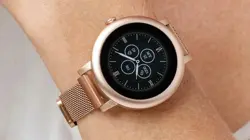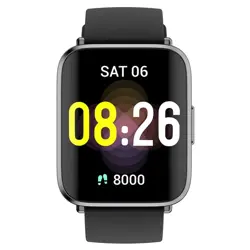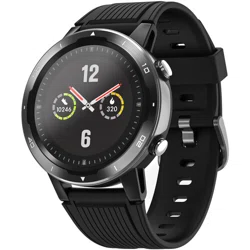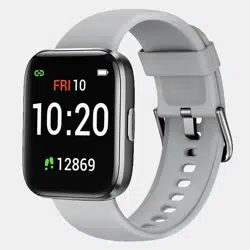
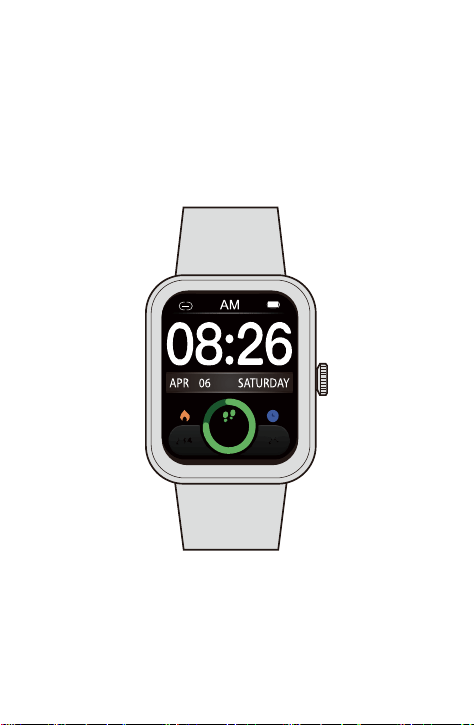
Thank you for purchasing our products. This manual addresses
the safety guidelines, warranty, and operating instructions. Please
review this manual thoroughly before operating your device.
All pictures in this manual are for illustration purpose only. Actual
product may vary due to product firmware upgrade and app upgrade.
E22
Smart Watch
User Manual
8000
234 25

What’s in the Box .......................................................................1
Setting up Your Watch ............................................................ 1
1. Disassembling / Assembling Your Watch .......................... 1
2. Charging Your Watch ..............................................................2
Wearing Your Watch................................................................. 3
Pair Your Watch .......................................................................... 4
1. Install Letsfit App on your smartphone ............................... 4
2. Account Registration and Login .......................................... 4
3. Pair the Watch with Your Phone ........................................... 5
App Interfaces..............................................................................7
Getting to Know Your Watch................................................8
Basic Operations ..........................................................................8
Watch Interfaces ..........................................................................9
Customize the Home Screen ....................................................10
Function Introduction.............................................................10
1. Tracking Daily Activity Data ..................................................12
2. Monitoring Heart Rate............................................................12
3. Measuring Blood Oxygen Level............................................12
4. Tracking Sports .......................................................................13
5. Bluetooth Phone Call..............................................................15
6. Setting Alarms .........................................................................16
7. Message Notification .............................................................16
8. Setting Reminder ....................................................................17
9. Controlling Phone Music .......................................................17
Basic Specifications................................................................
17
FAQs.................................................................................................
18
Warranty.........................................................................................
20
Important Safety Instructions
............................................ 20
Table of Contents
- 1 -
What’s in the Box
Setting up Your Watch
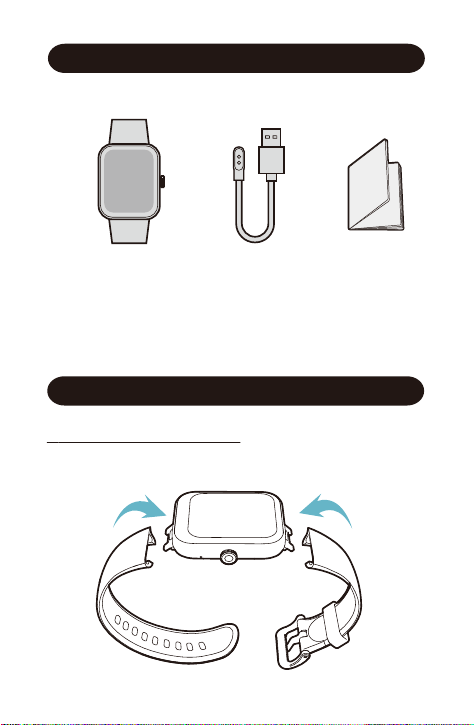
1 Assembling Your Watch
Push the bands in following the direction of the arrow.
Charging cableSmart watch with bands Quick start guide
2 Charging Your Watch
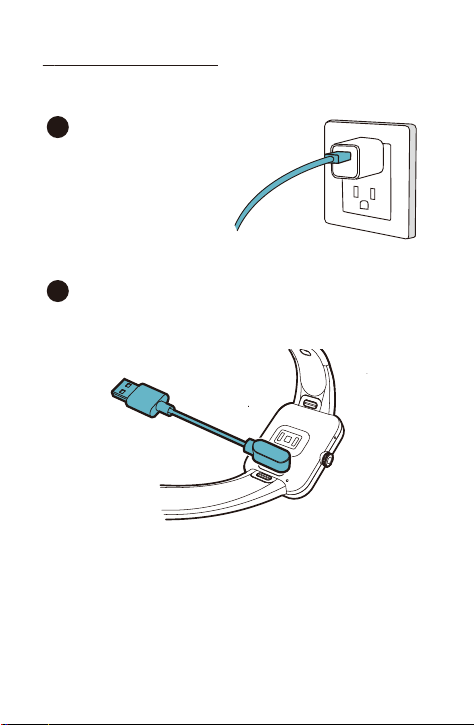
Please fully charge your watch before initial use.
- 2 -
Insert the USB plug of the
charging cable into a USB
charger.
1
Attach the other end to the charging contacts on the
back of the watch. Make sure the pins on the charging
cable lock securely with the port. The connection is
secure when the battery icon with percent charged
appears on the screen.
2
All-day Wear and Exercise
Wearing Your Watch
- 3 -
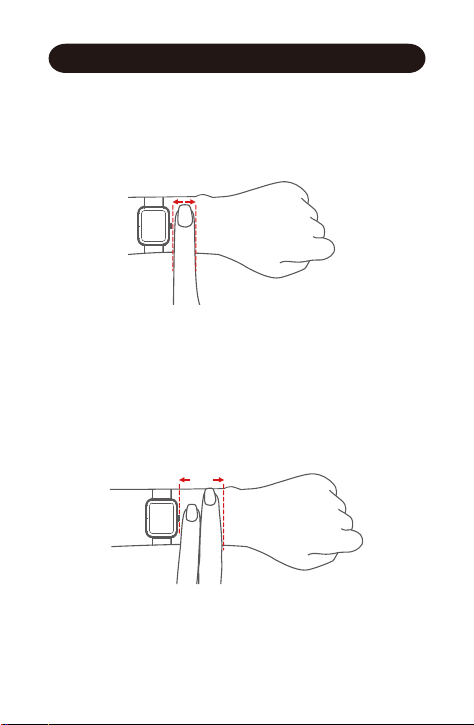
For all-day wear when you’re not exercising, wear the device
on your wrist horizontally, a finger’s width below your wrist
bone and lying flat, the same way you would put on a watch.
For optimized heart rate tracking, keep these tips in mind:
1. Experiment with wearing the watch higher on your wrist
during exercise. Because the blood flow in your arm increases
the farther up you go, moving the watch up a couple of inches
can improve the heart rate signal. Also, many exercises such
as bike riding or weight lifting require you to bend your wrist
frequently, which is more likely to interfere with the heart rate
signal if the watch is lower on your wrist.
2. Do not wear your watch too tight. A tight band restricts blood
flow, potentially affecting the heart rate signal. This being
said, the watch should also be slightly tighter (snug but not
constricting) during exercise than during all-day wear.
- 4 -
Pair Your Watch
1
Install Letsfit App on your smartphone
2
Account Registration and Login
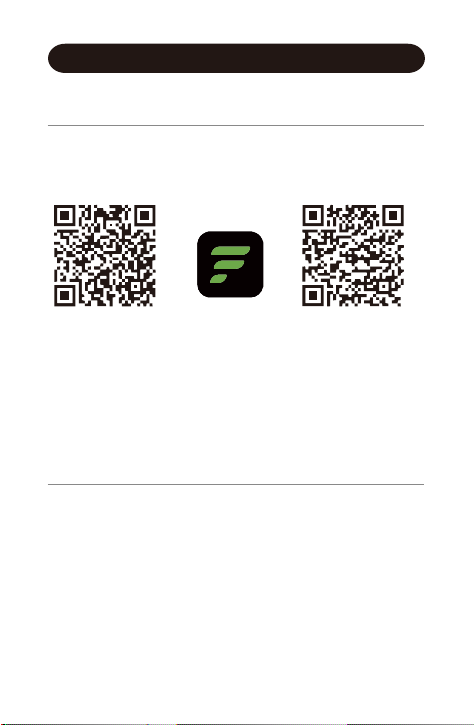
Please register an account with a valid phone number. After
registration, and then tap "Verified" to log in.
Note: The App is only compatible with smartphones, not
tablets or PCs.
You can download Letsfit App from Apple Store /
Google Play or scan the QR codes below to
download.
iOS 12.0 & above Android 6.0 & above
Letsfit
- 5 -
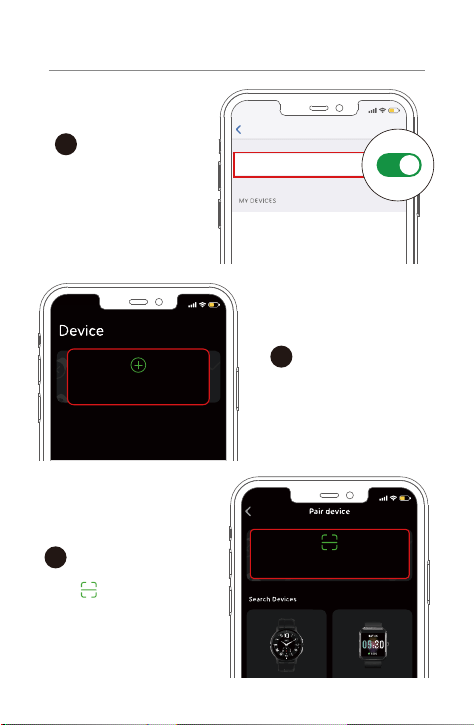
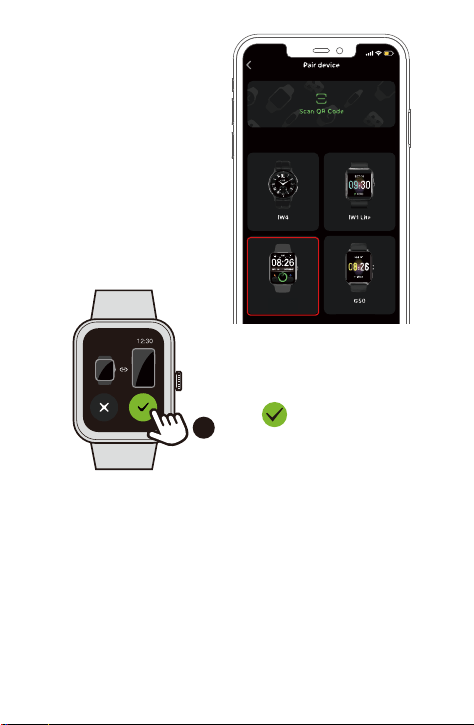
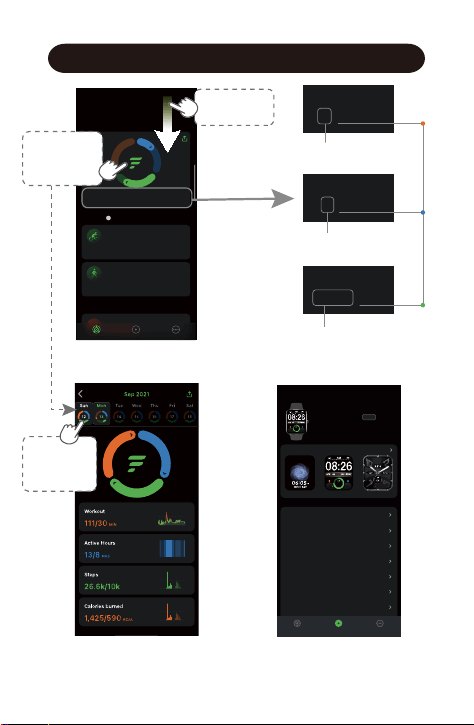
Turn on the Bluetooth
of your phone.
1
Open the Letsfit App. Go
to the "Device" page and
tap "Pair device".
2
Settings
Bluetooth
Bluetooth
15
:
05
15
:
05
Pair device
15
:
05
Scan QR Code
3
Tap " " and scan the QR
code on the watch to pair.
3
Pair the Watch with Your Phone
- 6 -
Notes:
● Once the watch is connected to your app, the watch will
automatically search and reconnect itself if the connection is
lost or when Bluetooth is restarted after manual
disconnection.
● If the watch is unbound from the app, the information on the
watch will be reset and the watch will be restarted. Please do
not unbind the connection unless there is an issue that will
require a reset.
● The watch can only pair with one smartphone at a time. When
pairing, please ensure the watch and your smartphone is
within 0.5 meters distance.
OR tap "E22" to search
the device for pairing.
4
Tap on your watch to
confirm the connection.
15
:
05
Search Devices
E22
8000
234 25
App Interfaces
- 7 -
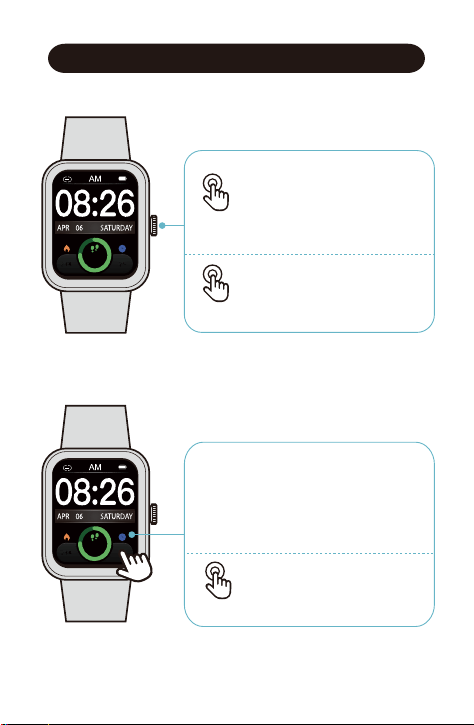
Device
After the watch is connected to your
phone, you can customize watch
face / call / message / alarm /
sedentary alert , etc.
60%
Noti ficat ion Alert s
Off
Off
Do Not Dist urb
Nigh t Mode
Bright ness
Alarm
Sedentar y Alert
Weather Forecas t
Photos Info
Watch Faces
Analog
8000
234 25
E22 0021
MAC
:
00
:
45
:
15
:
30
:
01
:
21
Battery 97% | Connected
Device All devices
Summary Device More
V1.9
8000
234 25
Workout
1/30 MIN
Active Hours
4/12
HRS
Steps
7,736/10k
Activity
Summary
Training
More
Summary Device More
Edit
Mon, Nov 22
Heart
Heart Rate
i
Outdoor Cycle
00:38:24 3.01
1.92
MPH
MI
00:16:04 25‘04“
0.64
/MIMI
Outdoor Walk
Mon, Today 2:46 PM
Mon, Today 2:28 PM
Today’s data
Summary
Select a
date to view
the data.
Swipe down
to sync data.
Workout
1/30 MIN
Active Hours
4/12 HRS
Daily Workout Minutes
Daily Active Hours
Daily
Target
Value
Daily Steps
Steps
7,736/10k
Tap to view
today’s
activity data.
- 8 -
Getting to Know Your Watch
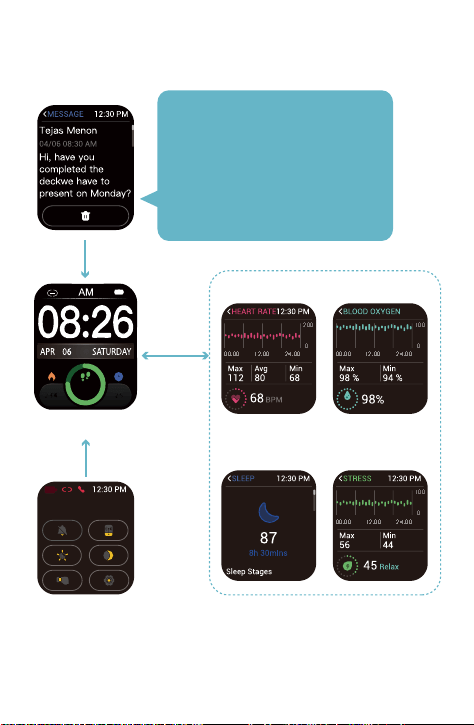
•
Function Button
● Wake the screen
● Return to the home screen
● Go to the Function List
● Pause / resume the sport
● Power on / off the watch
Press
Hold
•
Touch Screen
● Swipe to go to different interfaces
● Tap to enter the function
● Swipe the screen to the right to
return to the previous interface
8000
234 25
8000
234 25
● Customize the Home Screen
Hold
-9 -
Notifications
Quick Settings
Home Screen
Blood OxygenHeart Rate
Sleep Stress
200
0
00:00
12:00
24:00
100
0
00:00
12:00
24:00
100
0
00:00
12:00
24:00
20
Swipe
Right/Left
Swipe Down
Swipe Up
8000
234 25
Note:
Only when your watch is connected
to the Letsfit App, the App is running
on your phone, and "Notification
Alerts" is enabled in the App, will
messages be notified.
- 10 -
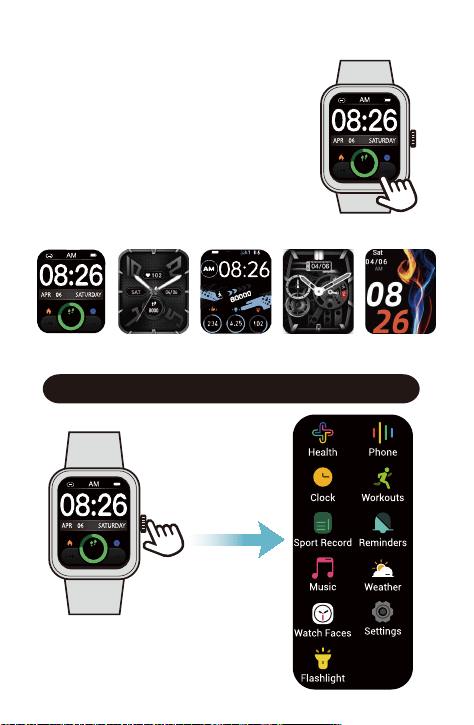
After the watch is paired with your
phone, the home screen will display the
time and date.
You can customize the home screen by
following the steps below :
1) Press and hold the watch home
screen for two seconds.
2) Swipe left / right to choose one and
tap to confirm.
Function Introduction
Customize the Home Screen
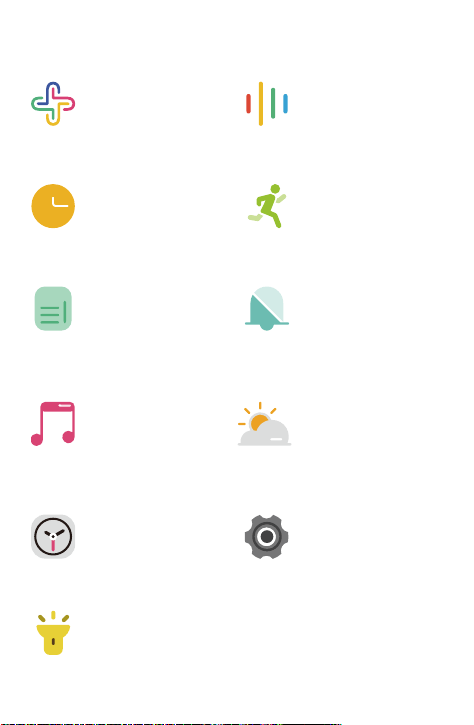
Press the watch
function button go to
the function list
8000
234 25
8000
234 25
8000
234 25
- 11 -
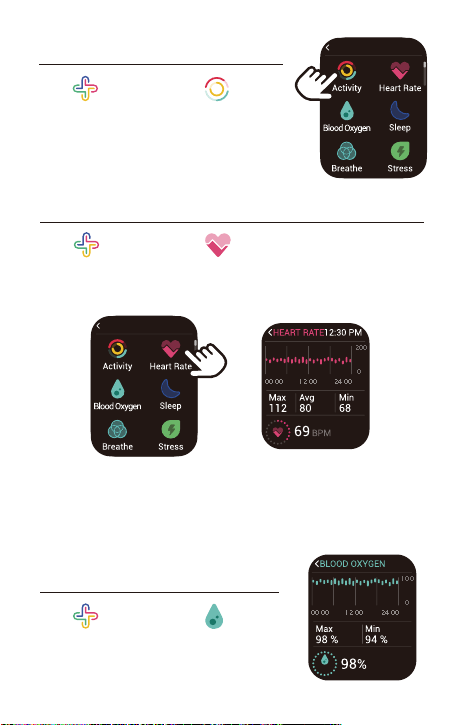
Phone
Bluetooth Call(Make
and Answer Call), Call
History.
Health
Check your daily
activities / Heart Rate
/ Blood Oxygen /
sleep data /Guides
your breathing, etc.
Clock
Customize your Alarm /
Countdown Timer /
Stopwatch.
Sport Record
View the last 20 sports
records.
Music
Control the music
playing of your
smartphone.
Watch Faces
Customize the
Home Screen.
Settings
Some basic settings
and information of
the watch.
Reminders
Set reminders on the
app make the watch
vibrate to remind you.
Weather
Weather forecast for the
day. Weather data is
obtained through your
phone’s network.
Connect the watch to
your phone to timely
update weather data.
Flashlight
Turn on the torch light
of your watch.
Workouts
Tracks your exercise
data in sports modes.
Choose the mode that
you want to start on
the watch.
- 12 -
Note:
To monitor heart rate more accurately, wear the watch on the
upper position of your wrist and a bit tighter than usual when
you exercise. In addition, complete your profile in the app.
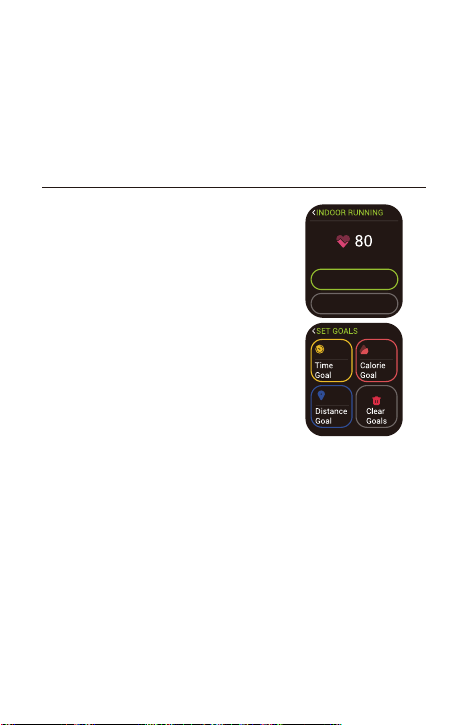
2. Monitoring Heart Rate
Tap " Health" and tap “ Heart Rate” in the function list,
the watch will automatically measure your real-time heart rate.
You can also view your all-day heart rate data in the heart rate
interface of the watch or in the app.
3. Measuring Blood Oxygen Level
Tap " Health" and tap “ Blood
Oxygen” to enter the blood oxygen level
detection mode.
1. Tracking Daily Activity Data
Tap " Health" and tap “ Activity”
in the function list.
The watch tracks your all-day activity data,
including steps, distance, calories burned,
etc.
HEALTH 12:30 PM
HEALTH 12:30 PM
200
0
00:00
12:00
24:00
100
0
00:00
12:00
24:00
- 13 -
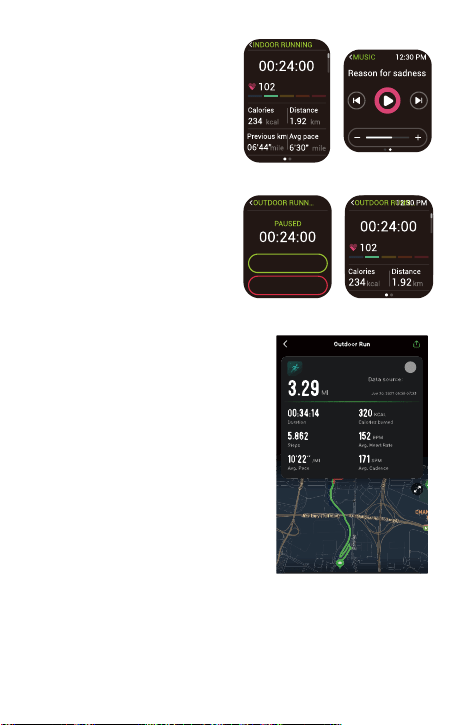
4. Tracking Sports
The watch tracks your exercise data in
workout modes.
Start a sport
Tap "Workouts" → Swipe the screen to
select a sports mode you want to start.
Set goals
Before beginning an exercise, you can
tap “Set Goals” to set training goals
such as time, distance, calories burned,
etc.
GPS connecting
(Only for some outdoor sport modes)
When you start an outdoor sport, the watch begins searching
GPS signal. Please let the Letsfit app run in the background and
allow the location services on your phone, then move to an
open area and stand still to better receive the signal. After the
GPS is connected, the countdown interface will be displayed,
and then you can start training.
Set Goals
Start
When the GPS signal is weak, you can start outdoor cycling,
outdoor running, outdoor walking in non-GPS mode. Your
movement track will not be displayed in your training record
after the exercise is ended.
Note:
Before measuring, wear the watch two fingers below the wrist bone
and a bit tighter than usual.
When measuring, keep your arm flush with your chest and the
watch screen facing up. Keep your arm still to ensure the accuracy
of the data.
- 14 -
E22
Notes:
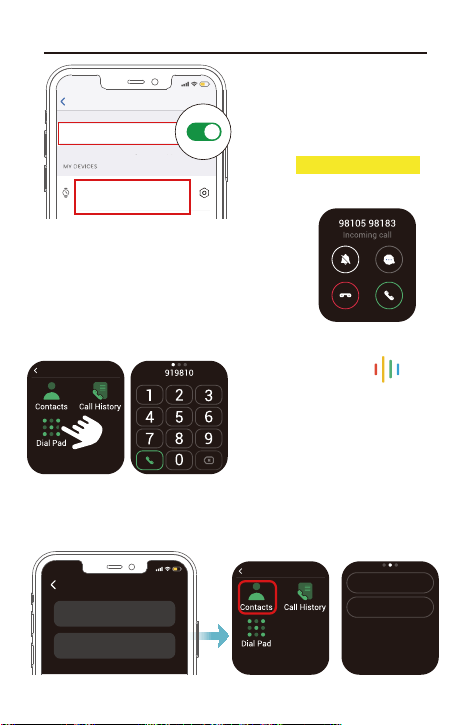
● After ending an exercise, you can
view detailed data and graphs in the
app (Go to the "Summary" page,
swipe down the page to synchronize
data, and tap the exercise you just
ended).
● After you finish the outdoor cycling,
outdoor running or outdoor walking
exercise in GPS mode, your
movement track will be displayed in
the app (Go to the "Summary" page
of the app, and then tap on the
exercise you just ended to view).
● Data of exercises less than 2
minutes will not be saved.
● When the battery level is less than 10%, the watch enters low
battery mode, in which you cannot start a sports mode. Please
charge the watch to operate it again.
During sports
Swipe the screen up or down to
flip through exercise data.
Swipe the screen to the left so
you can control the music
playing on your phone.
End the sport
Press the function button and
tap “End” to end the sport.
End
Continue
- 15 -
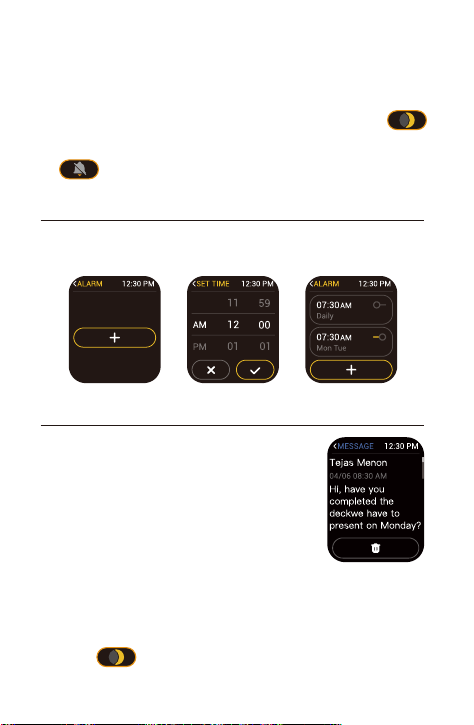
When a call comes in, you can answer the
call by tap the green phone icon, to ignore a
call, just tap the red phone icon the call will
be declined.
Settings
Bluetooth
Bluetooth
15
:
05
E22-CALL XXXX
Connected for calls
5. Bluetooth Phone Call
5.1 Answer incoming calls with your watch
5.2 Make a call from your watch
On your watch, select " Phone"
at the function list.
Tap the “Dial Pad” icon to dial a
number, or tap the “Contacts” icon
to select a specific contact.
When you're ready, tap the green
phone icon to make a call.
PHONE
12:30 PM
Go to the "Device" page in the Letsfit app, tap "Favorite Contacts"
to set favorite contacts.
5.3 Set Favorite Contacts
PHONE
12:30 PM
Helen
Mike
Favorite Contacts Add
15
:
05
Helen
1-532-456
Mike
1-561-006
You can make and answer calls
using the Watch! Just make sure
your watch is connected via
Bluetooth(Connected for calls).
- 16 -
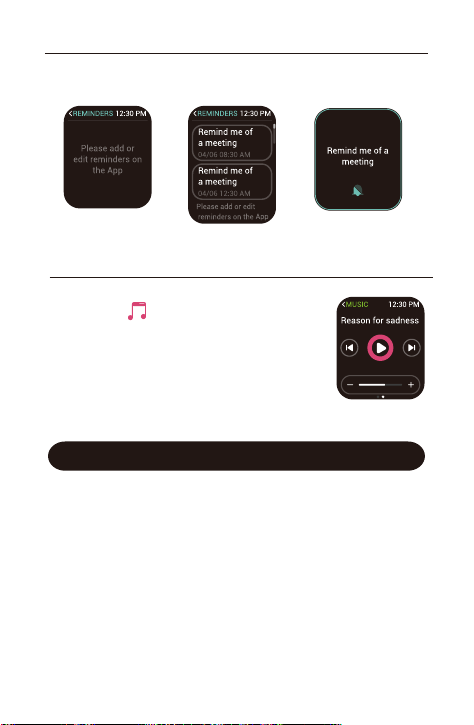
When messages (like Facebook, Twitter, and
Instagram messages) come in, the watch
vibrates to alert you, and the screen
displays the message content.
Notes:
● Only when "Notification alerts" is enabled in the app
("Device" page → "Notification alerts", turn on "Notification
alerts"), will messages be notified.
● When the "DND" function is enabled in the app ("Device"
page → "Do Not Disturb") or on the watch (Quick settings
bar→ ), messages will not be notified on the watch
during the do-not-disturb period.
6. Setting Alarms
You can add/enable/disable the alarm on your watch (Tap
"Clock" → "Alarm"on the watch and then choose to add or turn
on/off the alarm you set.)
7. Message Notification
Notes:
● Only when "Notification alerts" is enabled in the app ("Device"
page → "Notification alerts", turn on "Notification alerts"), will
phone call be notified.
● When the "DND" function is enabled in the app ("Device" page →
"Do Not Disturb") or on the watch (Quick settings bar→ ),
phone call will not be notified on the watch during the
do-not-disturb period.
● "Silent Mode On" can turn off ringtone of the watch.
- 17 -
Basic Specifications
Model No.: E22
Sync: Bluetooth 5.3
Screen: TFT LCD
Battery Capacity: 300mAh
Working Voltage: 5V-500mAh
Working Temperature: -10℃ to 40℃
Waterproof Rating: IP68
Working Time: 6-8 days
If you need to set reminders, you can click "Reminders" on the
"Device" page of Letsfit app to set the reminder time and label.
After the watch is connected to your
phone, tap " Music" on the watch to
enter the function and control the music
playing on your phone.
Note:
You can only control the music player
that’s running on your phone.
8. Setting Reminder
9. Controlling Phone Music

Failure to re-pair the watch with the Letsfit app on
your smartphone
1. Swipe up the home screen of watch and tap ” ” and
choose "Reset". The information on the watch will be reset
and the watch will be restarted.
2. Select the watch language on the watch and enter the QR code
interface as instructed.
3. Use the Letsfit app to scan the QR code displayed on your
watch to pair.
If you still fails to connect the watch to the app, please kindly
take the following steps:
1. Make sure your smartphone’s Bluetooth is enabled and make
sure the watch is not connected to other smartphones.
2. Search this device in the app to pair (Go to the "Device" page
→ "Pair device" → "E22").
3. Make sure the distance between your smartphone and the
watch does not exceed 0.5 meters and keep the watch screen
always on when pairing.
Occasional failure to connect with Bluetooth
Reboot your smartphone or restart your smartphone’s Bluetooth.
Failure to receive message / calls notifications
Message / call notification function works when the watch
connects to your smartphone via the app. Please kindly refer to
the following tips:
1. Go to your smartphone Settings, find the Letsfit app, enable
the Location and all Notifications.
2. Enable your phone’s Bluetooth and go to the Letsfit app to pair
the watch.
3. Open the app. Go to the "Device" page → "Notification Alerts",
turn on "Notification Alerts".
4. Make sure the "Do Not Disturb" function is not enabled on the
watch.
- 18 -
FAQs

- 19 -
The watch is disconnected from the Letsfit app on
your smartphone
The watch will disconnect from your smartphone in the
following cases:
1. Smartphone Bluetooth is off or exceeds the Bluetooth
connection range (the maximum Bluetooth connection range
is 10 meters and can easily be reduced by walls, furniture,
etc.)
2. The Letsfit app is closed on the phone. (This can occur
automatically under certain circumstances.)
To reconnect the watch to your smartphone, please kindly take
the following steps:
1. Restart the Bluetooth of your phone.
2. Clear all running / background processes on your smartphone
and restart the Letsfit app. Then the watch will reconnect to
your phone automatically.
Blood Oxygen Level Measurement Accuracy
The Blood oxygen level will be affected by factors such as
motion, watch placement on the wrist, skin temperature and
skin perfusion. These factors will cause fluctuations in blood
oxygen measurements.
For a single measurement on the watch, please wear the watch
a finger-width below the wrist bone, snug but comfortable on
your wrist. When measuring, stay still and make sure your wrist
is flat with the watch facing up. If you are sitting, you can rest
your arm on a table with the watch facing up.
The smart watch blood oxygen sensor isn’t a medical device
and won’t be able to diagnose or monitor any medical
conditions. If there is a problem with the measurement, we
recommend you consult your doctor.
- 20 -
We strive to build our products with the highest attention to
detail and craftsmanship. However, sometimes there are
occurrences of a defect, so we are happy to offer a ONE-year
hassle-free warranty on all our devices as we continue to
make amazing products. Please contact us if you have any
questions about our devices.
The device contains electrical equipment that may cause
injury if not used properly. For example, prolonged contact
may contribute to skin allergies for some users. To reduce
irritation, please read the safety guidelines on the following
pages to ensure proper use and care.
● Do not expose your device to liquid, moisture, humidity or
rain while charging; do not charge your device when it is
wet, as this may result in electrical shock and injury.
● Keep your device clean and dry. Do not use abrasive
cleaners to clean your device.
● Consult your doctor before use if you have any preexisting
conditions that might be affected by using this device.
● Do not wear it too tight. If your device feels hot or warm, or
if it causes any skin irritation or other discomforts, please
discontinue using your device and consult your doctor.
● Do not expose your watch to extremely high or low
temperatures.
● Do not leave your watch near open flames such as cooking
stoves, candles, or fireplaces.
● This product is NOT a toy – never allow children or pets to
play with this product. Always store the product out of the
reach of children. The devices themselves or the many
small parts they contain may cause choking if ingested.
Warranty
Important Safety Instructions

- 21 -
● Never try to abuse, crush, open, repair or disassemble this
device. Doing so will void the warranty and can result in a
safety hazard.
● If any parts of your product require replacement for any
reason, including normal wear and tear or breakage, please
contact us.
● Do not use your device in a sauna or steam room.
● Dispose of this device, the device’s battery and its package in
accordance with local regulations.
● Do not check any notifications, GPS, or any information on
your device’s display while driving or in other situations where
distractions could cause injury or hazard. Always be aware of
your surroundings while exercising.
Battery Warnings
A lithium-ion battery is used in this device. If these guidelines
are not followed, batteries may experience a shortened life span
or may cause fire, chemical burn, electrolyte leakage, and/or
injury.
● Do not disassemble, modify, remanufacture, puncture or
damage the device or batteries.
● Do not remove or attempt to remove the non-user-replace-
able battery.
● Do not expose the device or batteries to fire, explosion, or
other hazards.
Health Warnings
● If you have a pacemaker or other internal electronic device,
consult your physician before using a heart rate monitor.
● The optical wrist heart rate monitor emits green light and
flashes occasionally. Consult your physician if you have
epilepsy or are sensitive to flashing lights.
● Always consult your physician before beginning or modifying
any exercise program.
● The device, accessories, heart rate monitor, blood oxygen
level measurement and related data are intended to be used
only for general fitness and wellness purposes, not for

- 22 -
medical purposes, and are not intended to diagnose, monitor,
treat, cure, or prevent any disease or condition.
● The heart rate and blood oxygen level readings are for
reference only, and no responsibility is assumed for the
consequences of any false readings.
● While the optical wrist heart rate monitor technology typically
provides the best estimate of a user's heart rate, there are
inherent limitations with the technology that may cause some
of the heart rate readings to be inaccurate under certain
circumstances, including the user's physical characteristics,
fit of the device, and type and intensity of activity.
● The smart watch relies on sensors that track your
movements and other metrics. The data and information
provided by these devices are intended to be a close
estimation of your activity and metrics tracked, but may not
be completely accurate, including step, sleep, distance, heart
rate, and calorie data and blood oxygen levels.
● If you have eczema, allergies or asthma, you may be more
likely to experience skin irritation or allergies from a wearable
device.
● Whether you have the conditions above or not, if you start to
experience any discomfort or skin irritation on your wrist,
remove your device. If symptoms persist longer than 2-3 days
of not using your device, contact your doctor.
● If you sweat for more than two hours while wearing your
watch, be sure to clean and dry your band and your wrist to
avoid skin irritation.
● Prolonged rubbing and pressure may irritate the skin, so give
your wrist a break by removing the band for an hour after
extended wear.

- 23 -
Maintenance
● Regularly clean your wrist and the smart watch, especially
after sweating during exercise or being exposed to
substances such as soap or detergent which may adhere to
the internal side of the watch.
● Do not wash the watch with household cleanser. Please use
soapless detergent, rinse thoroughly and wipe with a soft
towel or napkin.
●While the watch is water resistant, wearing a wet band is not
good for your skin.
● If your bands get wet—for example after sweating or
showering—clean and dry them thoroughly before putting
them back on your wrist.
● Be sure your skin is dry before you put your bands back on.
● Do not bring your device into contact with any sharp objects,
as this could cause scratches and other damage.
● For light-colored arm bands, minimize direct contact with
dark-colored clothing, as color transfer can occur.