2
ENGLISH
SAFETY INSTRUCTIONS
• Please make sure the device is installed near the wall outlet to which it is connected and that the outlet
is easily accessible.
• As long as this unit is connected to the AC wall outlet, it is not disconnected from the AC power source
even if the unit is turned off.
• Be sure to use power cords and AC adapters provided or approved by LG Electronics, Inc.
• Do not use this equipment near water such as near a bathtub, washbowl, kitchen sink, laundry tub, in a
wet basement, or near a swimming pool.
• Equipment is provided with ventilation openings in the cabinet to allow the release of heat generated
during operation. If these openings are blocked, built-up heat can cause failures which may result in a
fire hazard. Therefore, NEVER:
- Block the bottom ventilation slots by placing the Equipment on a bed, sofa, rug, etc.
- Place the equipment in a built-in enclosure unless proper ventilation is provided.
- Cover the openings with cloth or other material.
- Place the equipment near or over a radiator or heat source.
• There is a risk of explosion if a battery is replaced with incorrect type.
• This device is not intended for use in the direct field of view at visual display workplaces.
• To avoid incommoding reflections at visual display workplaces this device must not be placed in the
direct field of view.
OPEN SOURCE SOFTWARE NOTICE
INFORMATION
(Only CQ600W, CQ601W, CQ600I, CQ601I)
To obtain the source code that is contained in this product, under GPL, LGPL, MPL, and other open source
licenses that have the obligation to disclose source code, and to access all referred license terms, copyright
notices and other relevant documents, please visit https://opensource.lge.com.
LG Electronics will also provide open source code to you on CD-ROM for a charge covering the cost of
performing such distribution (such as the cost of media, shipping, and handling) upon email request to
opensourc[email protected]om.
This offer is valid to anyone in receipt of this information for a period of three yearsafter our last shipment
of this product.
LICENSE
Each model has different licenses. Visit www.lg.com for more information on the license.
The SuperSpeed USB Trident logo is a registered trademark
of USB Implementers Forum, Inc.
(Wi-Fi/Bluetooth supported models
only.)
The Bluetooth
®
word mark and logos are registered
trademarks owned by Bluetooth SIG, Inc. and any use of
such marks by LG Electronics Inc. is under license. Other
trademarks and trade names are those of their respective
owners.
* USB Type-C™ and USB-C™ are trademarks of USB Implementers Forum.
3
ENGLISH
ASSEMBLING AND PREPARING
BIOS
CAUTION
• BIOS Password: Without the registered password, access to the system will be denied. Write down and
keep the password in a safe place.
• SSD Password: If you forgot SSD Password, you cannot restore the SSD.
• The replacement of SSD due to a forgotten SSD Password is not covered by warranty.
Product Composition
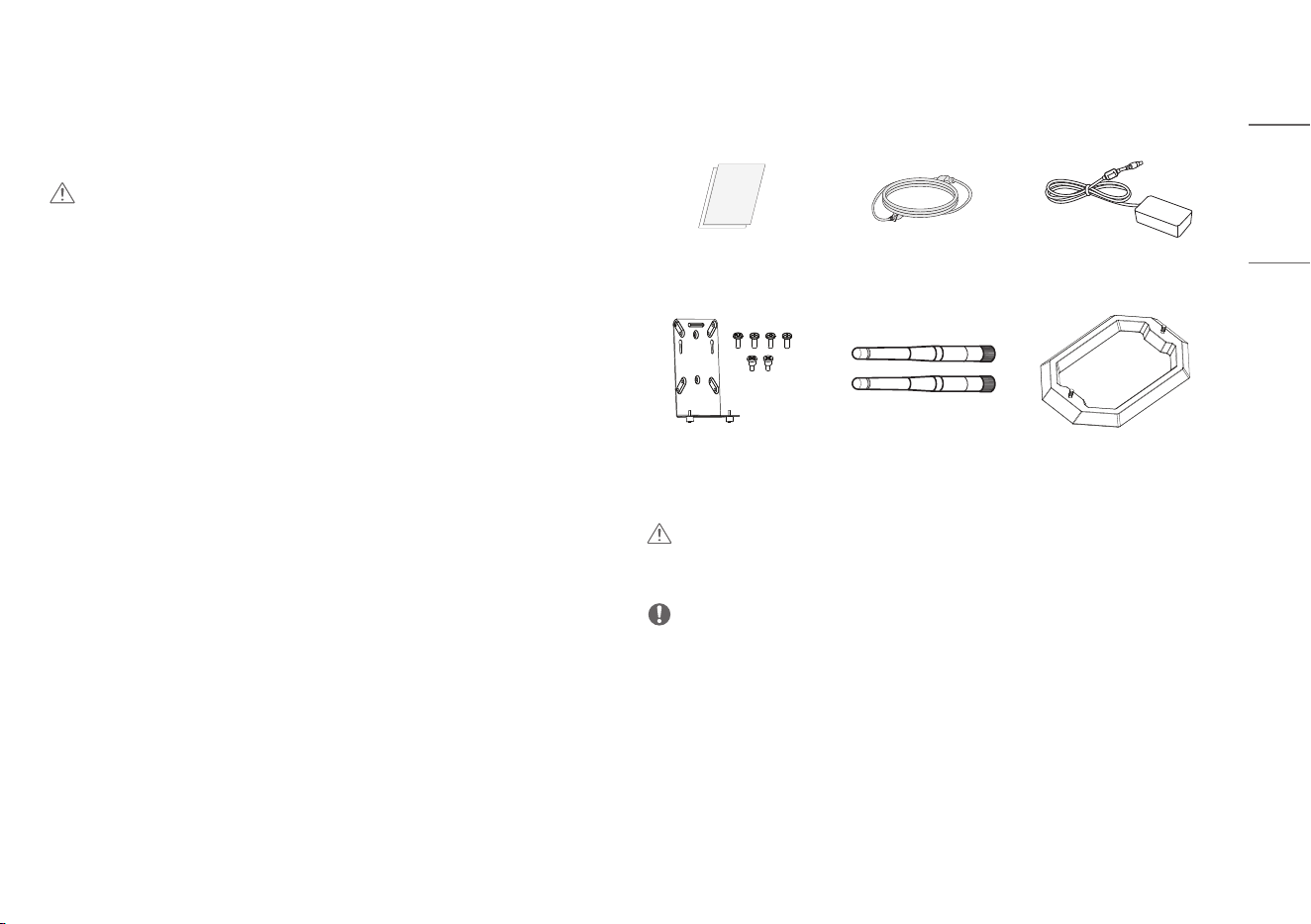
Please check whether all the components are included in the box before using the product. If there are any
missing components, contact the retailer where you purchased the product.
Owner’s Manual/Regulatory
Manual/Cards
Power cord Adapter
Bracket / Screws
(4 ea, M4 x L10)
(2 ea, M3 x L7)
Wifi Antenna
(Wi-Fi/Bluetooth supported
models only.)
Stand Base
CAUTION
• Only use an approved LG power adapter.
• Damage caused by other power adapters is not covered by warranty.
NOTE
• Note that the components may look different from those shown here.
• Without prior notice, all information and specifications in this manual are subject to change to improve
the performance of the product.
4
ENGLISH
Product Installation
CAUTION
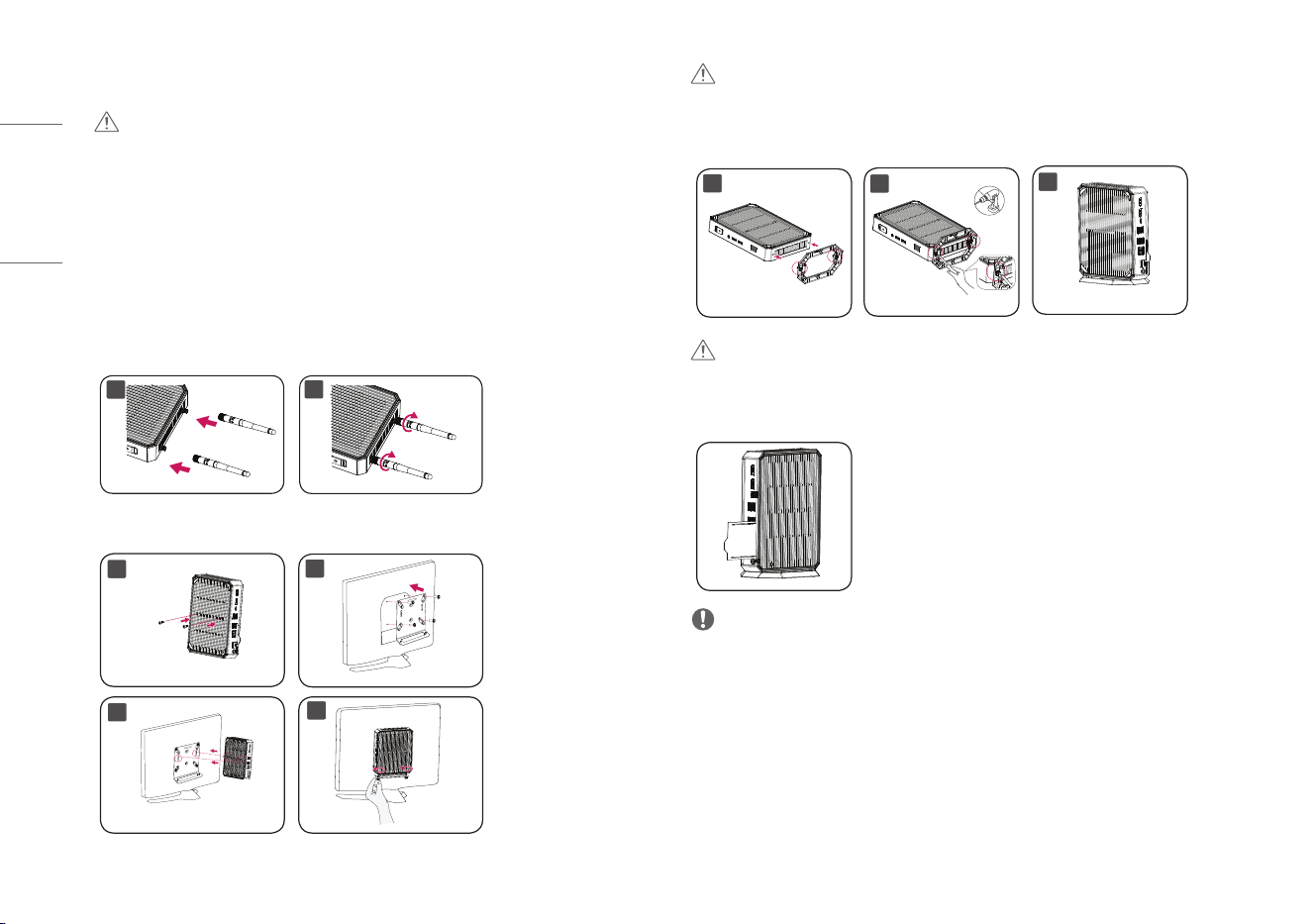
• Illustrations in this document represent typical procedures, so they may look different from the actual
product.
• Applying excessive force when tightening screws may cause damage to the Cloud Device. Damage
caused in this way will not be covered by the product warranty.
• The product may not be mounted on some monitors with mount bracket.
- In this case, use the product in horizontal or vertical position.
• When connecting the peripherals after mounting the product on the monitor, be sure to hold the
product.
1. Assembling the Wifi Antenna
(Wi-Fi/Bluetooth supported models only.)
1
2
2-1. Mounting on the Back of the Monitor
1
2
3
4
CAUTION
• When installing the system on the back of the monitor, please keep stability in mind.
2-2. Assembling the Stand base
1
3
2
CAUTION
• When the product is used upright, it must be secure to the stand.
Check the ID Label Slot
NOTE
• Standard certification can be found by pulling the ID Label Slot.
Using the Kensington Lock
For more information on installation and usage, refer to the Kensington lock owner’s manual or visit the
website at http://www.kensington.com.
5
ENGLISH
Parts and Buttons
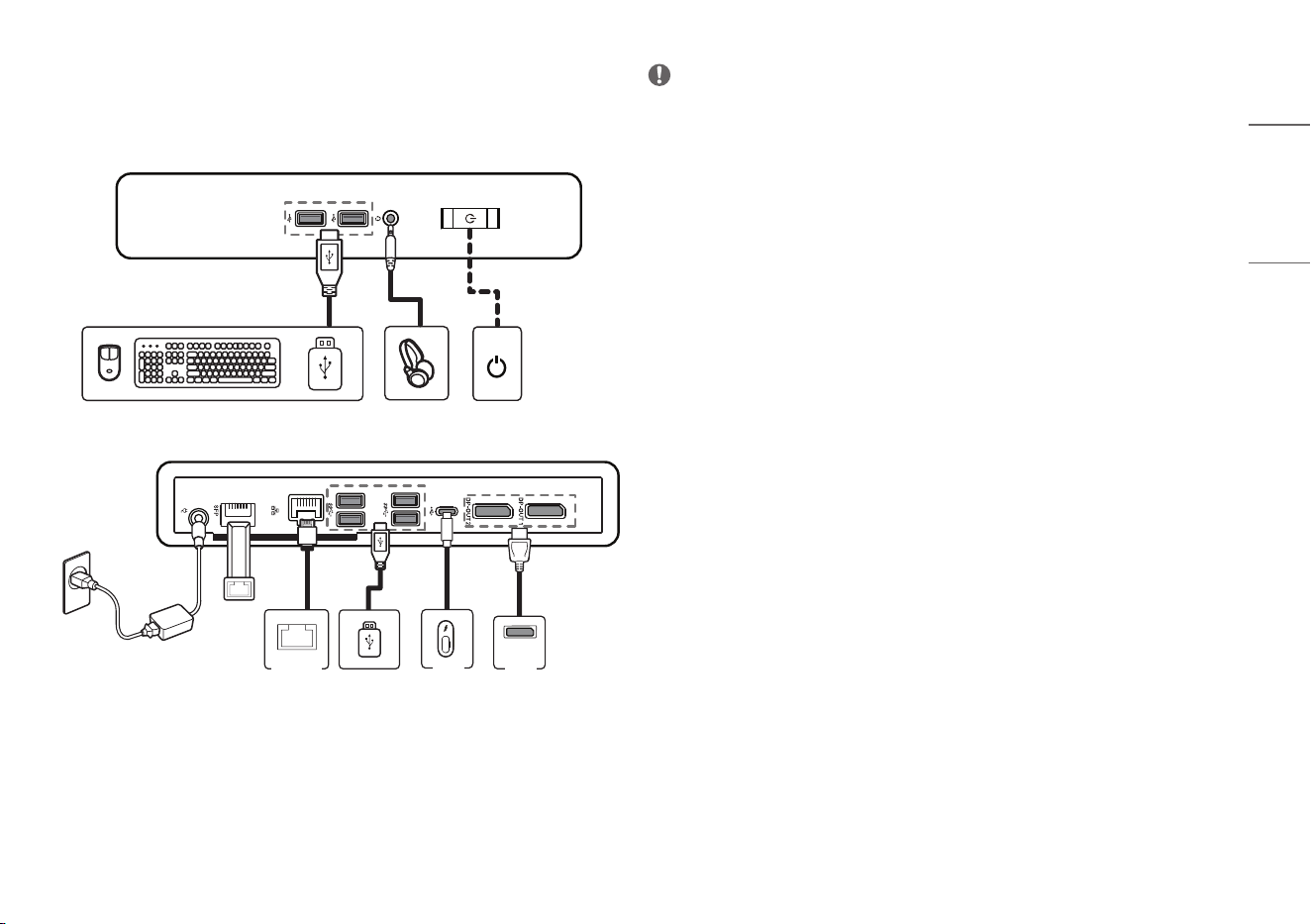
Connection
DP IN
MonitorMonitor
LAN
Hub/Router
SFP
Mini-GBIC
NOTE
• Some games (online, 3D, 2D) may not be supported, and some high-resolution videos (including Full HD
and some HD videos) may stutter during playback.
• SFP Module (SFP supported models only.)
- Only supports 1Gbps module. (155Mbps, 10 Gbps (SFP+) are not supported)
- When you choose the SFP module, refer to the compatibility list by SFP vendor.
- Use the same SFP module to connect both devices.
- Devices are sold separately.
• Headphone Port (4-pole ear microphone port)
- The 4-pole ear microphone port supports US 4-pole standards, but not the European 4-pole ear
microphone.
- When using ear microphone (or Bluetooth
®
headset), audio input and output are directed to the
connected device.
- The 4-pole ear microphone port does not support external microphone.
• If further assistance is needed when purchasing the power source, please contact the brand owner or
agency for further information.
6
ENGLISH
PRODUCT SPECIFICATION
Specifications are subject to change without notice.
The symbol ~ means alternating current, and the symbol means direct current.
AC/DC Adapter Manufacturer: APD
Model: DA-65G19
Input: 100-240V~ 50-60Hz 1.6A
Output: 19V 3.42A
Manufacturer: SHENZHEN HONOR ELECTRONIC CO.,LTD.
Model: ADS-65AI-19-3 19065E
Input: 100-240V~ 50/60Hz 1.5A
Output: 19V 3.42A
Power rating 19V 3.42A
Power Consumption (Typical) On Mode: 25W (Outgoing condition)*
Sleep Mode: ≤ 1.1W *
Off Mode: ≤ 0.9W *
USB Power USB 2.0: 5V, 0.5A
USB 3.2 Gen1: 5 V, 0.9 A
* The On Mode of Power Consumption is measured with LGE test standard. (Full White pattern, Maximum
resolution)
* The Power Consumption level can be different by operating condition and monitor setting.
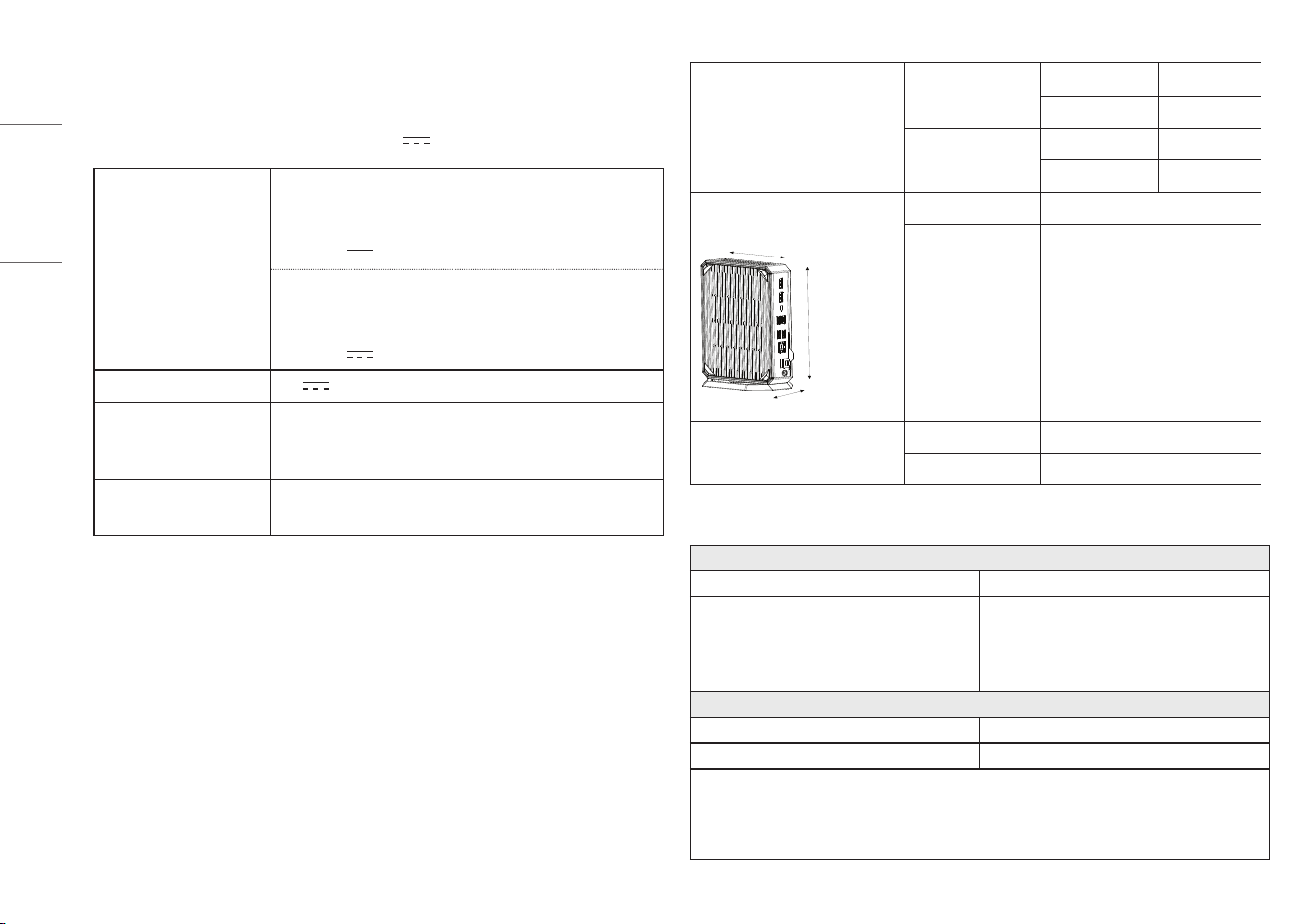
Environmental Conditions Operating Conditions Temperature 10 °C to 35 °C
Humidity 0 % ~ 80 %
Storing Conditions Temperature -20 °C to 60 °C
Humidity 0 % ~ 85 %
Dimensions (Width x Height x Depth) With Stand 85 x 208.1 x 144.9 (mm)
Width
Height
Depth
Without Stand 38 x 199.1 x 144.9 (mm)
Weight (Without packaging) With Stand 0.93 kg
Without Stand 0.91 kg
Wireless module (AX201NGW) Specifications
(Wi-Fi/Bluetooth supported models only.)
Wireless LAN (IEEE 802.11a/b/g/n/ac/ax)
Frequency Range Output Power (Max.)
2400 to 2483.5 MHz
5150 to 5350 MHz
5470 to 5725 MHz
5725 to 5850 MHz
20.0 dBm
22 dBm
22 dBm
13 dBm
Bluetooth
Frequency Range Output Power (Max.)
2400 to 2483.5 MHz 14 dBm
• As band channels can vary per country, the user cannot change or adjust the operating frequency. This
product is configured for the regional frequency table.
• For consideration of the user, this device should be installed and operated with a minimum distance of
20 cm between the device and the body.
7
ENGLISH
Power Management Options
(Only CQ600W, CQ601W, CQ600I, CQ601I)
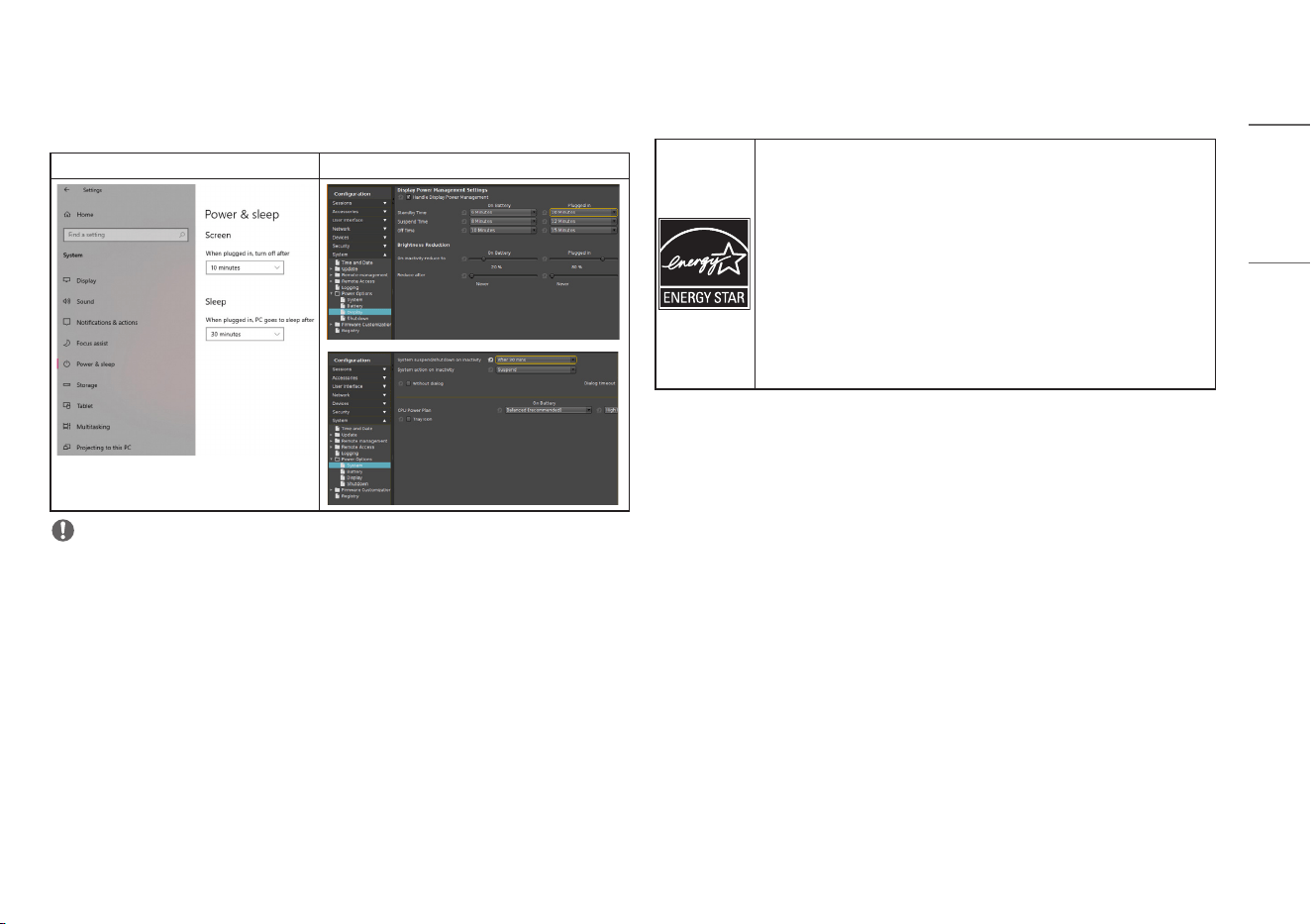
The power management options for this PC are set as follows:
CQ600W, CQ601W CQ600I, CQ601I
NOTE
• The settings of the power management options may change according to Windows updates.
• Turn off the display: Turn off the screen when the PC is not used for a set period of time.
• Put the computer to sleep: Switch to Sleep mode when the PC is not used for a set period of time.
ENERGY STAR
®
(Only CQ600W, CQ601W, CQ600I, CQ601I)
• As a participating company of ENERGY STAR
®
, LGE has determined that this
product meets the ENERGY STAR
®
guidelines for energy efficiency.
• The ENERGY STAR
®
program is designed to encourage electronic product
manufacturers to develop energy-efficient products.
• Reducing the energy consumption of products helps reduce costs and conserve
resources.
• This PC includes the following power management features:
- Display Off: When the PC has not been used for up to 10 minutes.
- Switch to Sleep mode: When the PC has not been used for up to 30 minutes.
• To exit Sleep mode, simply click the mouse or press any key on the
keyboard.(CQ600W, CQ601W)
• To exit Sleep mode, simply press the power button.(CQ600I, CQ601I)
WARNING: This equipment is compliant with Class A of CISPR 32. In a residential environment this
equipment may cause radio interference.
The model and serial numbers are located on the product. Record them below in case you ever need
service.
Model
Serial No.


