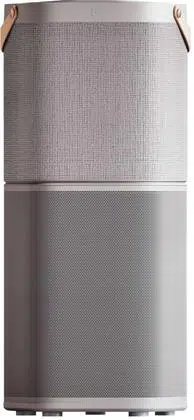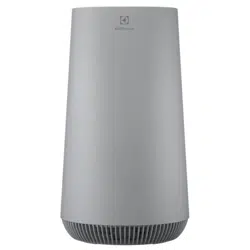

FLOW A4
Instruction Book
www.electrolux.com2
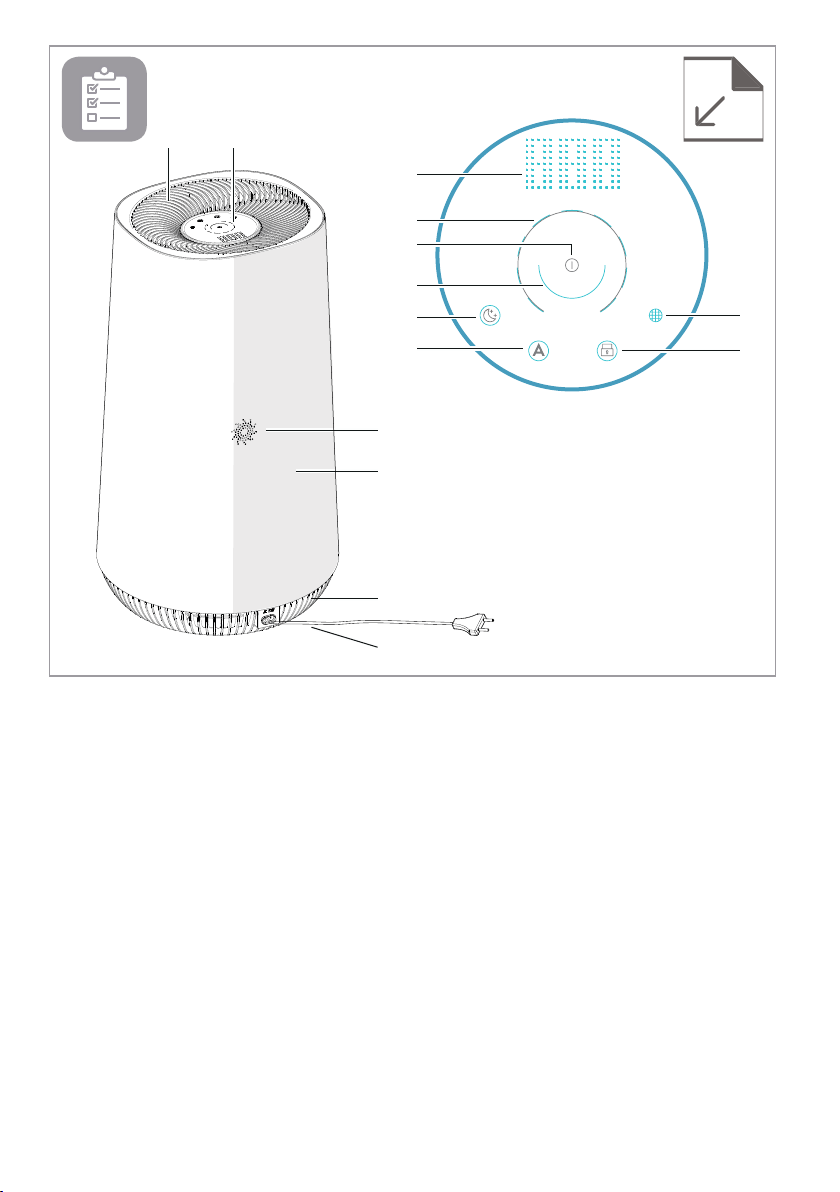
AB
G
H
I
J
K
L
C
M
N
E
D
F
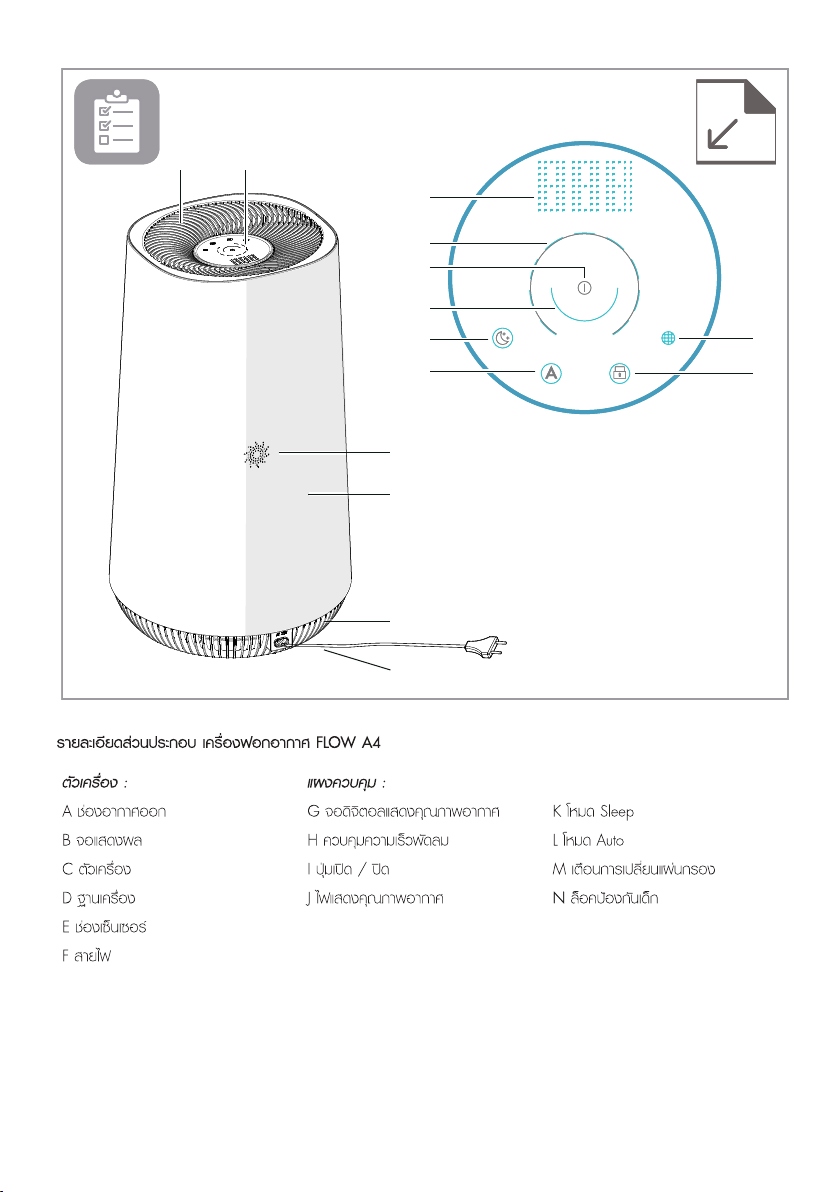
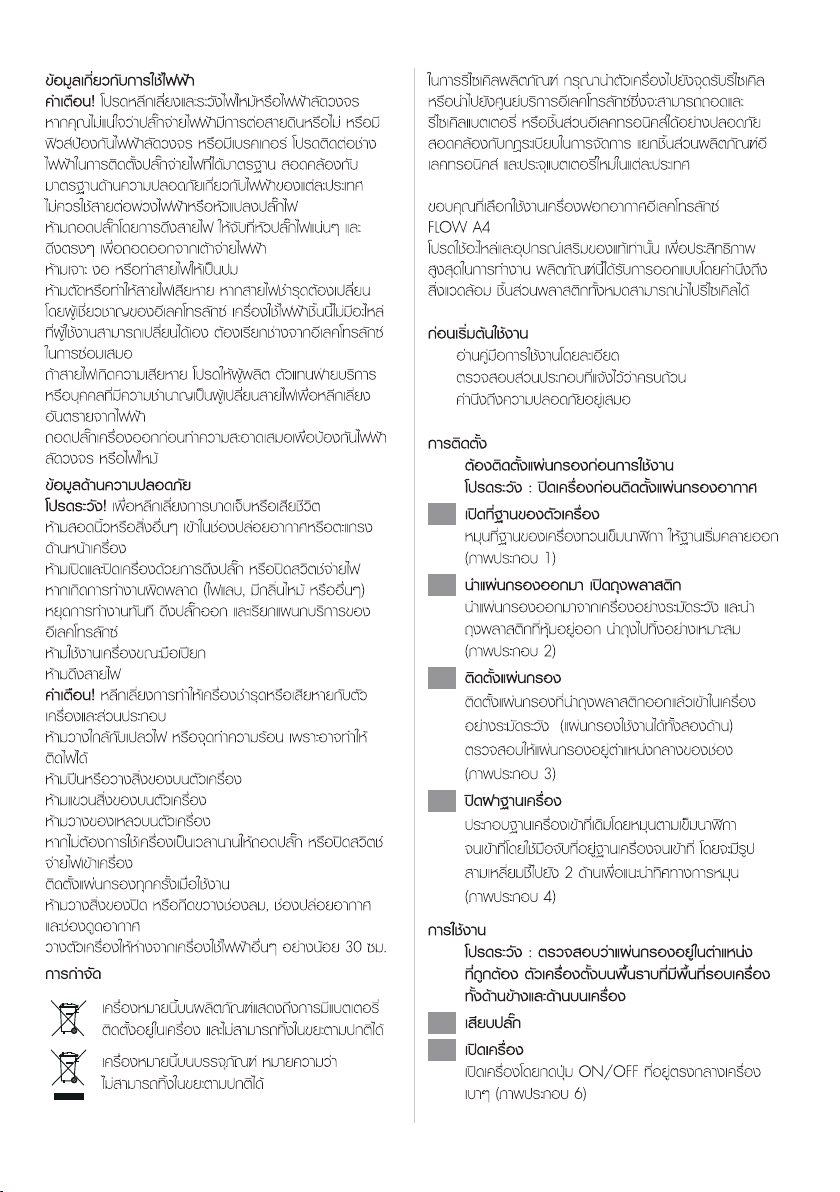
Appliance:
A. Air outlet
B. UI panel
C. Main body
D. Base
E. Sensor window
F. Power cord
Control panel:
G. Air quality digital display
H. Fan speed control
I. Power on/o
J. Air quality color indicator
K. Sleep mode
L. Auto mode
M. Filter change reminder
N. Child lock
DESCRIPTION OF YOUR AIR PURIFIER FLOW A4
www.electrolux.com 3
1
4
7
10
2
5
8
3
6
9
11

www.electrolux.com4
SAFETY INFORMATION
This USER MANUAL provides specic operating instructions for
your model. Use the unit only as instructed in this USER MANUAL.
These instructions are not meant to cover every possible condition
and situation that may occur. Common sense and caution must be
practiced when installing, operating, and maintaining any appliance.
WARNING! Avoid re hazard or electric shock. Do not use an
extension cord or an adaptor plug. Do not remove any prong from
the power cord. This appliance can be used in 50Hz or 60Hz power
supply without any change.
Do not under any circumstances, cut, remove or bypass the
grounding prong.
Do not store or use gasoline or other ammable vapors and liquids
in the vicinity of this or any other appliance. Read product labels for
ammability and other warnings.
Do not let water or any other liquid or ammable detergent enter
the appliance to avoid electric shock and/or a re hazard.
Do not touch the fan blade when removing the lter.
Children and Vulnerable People Safety
WARNING! Risk of suocation, injury or permanent disability.
This appliance can be used by children aged from 8 years and above
and persons with reduced physical, sensory or mental capabilities
or lack of experience and knowledge if they have been given
supervision or instruction concerning use of the appliance in a safe
way and understand the hazards involved.
Children shall not play with the appliance.
Cleaning and user maintenance shall not be made by children
without supervision.
Children under 3 years of age should be kept away from the
appliance unless continuously supervised.
Keep all packaging away from children.
If the appliance has a child safety device, we recommend you
activate it.
www.electrolux.com 5
Electrical Information
WARNING! Avoid re hazard or electric shock.
If you are not sure the outlet is adequately grounded
or protected by a time delay fuse or circuit breaker,
have a qualied electrician install the proper outlet
according to the National Electrical Code and
applicable local codes and ordinances.
Do not use an extension cord or an adapter plug.
Never unplug the unit by pulling on the power cord.
Always grip the plug rmly and pull straight out from
the receptacle.
Do not pinch, bend, or knot the power cord.
Do not cut or damage the power cord. If the power
cord is damaged, it should only be replaced by an
authorized Electrolux servicer. This unit contains no
user- serviceable parts. Always call an authorized
Electrolux servicer for repairs.
If the supply cord is damaged, it must be replaced
by the manufacturer, its service agent or similarly
qualied persons in order to avoid a hazard.
Be sure to unplug the unit before cleaning to prevent
shock or re hazards.
Thank you for choosing the Electrolux air purier
FLOW A4.
Always use original accessories and spare parts to
get the best results. This product is designed with the
environment in mind. All plastic parts are marked for
recycling purposes.
BEFORE STARTING
• Read this manual carefully.
• Check that all parts described are included.
• Pay special attention to the safety precautions!
The lters have to be installed before use.
Caution: Switch o the device before installing
lters.
SET UP
Safety Precautions
CAUTION! Avoid Serious Injury or Death.
Do not insert or place ngers or objects into the air
discharge area or front grille of the unit.
Do not start or stop the unit by unplugging the power
cord or turning o the power at the electrical box.
In the event of a malfunction (sparks, burning smell,
etc.), immediately stop the operation, disconnect the
power cord, and call an authorized Electrolux servicer.
Do not operate the unit with wet hands.
Do not pull on the power cord.
CAUTION! Avoid Injury or damage to the unit or other
property.
Do not direct airow at replaces or other heat
related sources as this could cause are ups.
Do not climb on or place objects on the unit.
Do not hang objects o the unit.
Do not place containers with liquids on the unit.
Turn o the unit at the power source when it will not
be used for an extended period of time.
Operate the unit with air lter in place.
Do not block or cover the intake grille, discharge area
and outlet ports.
Ensure that any electrical/electronic equipment is 30
cm away from the unit.
This symbol on the product indicates that this
product contains a battery which shall not be
disposed with normal household waste..
This symbol on the product or on its packaging
indicates that the product may not be treated
as household waste.
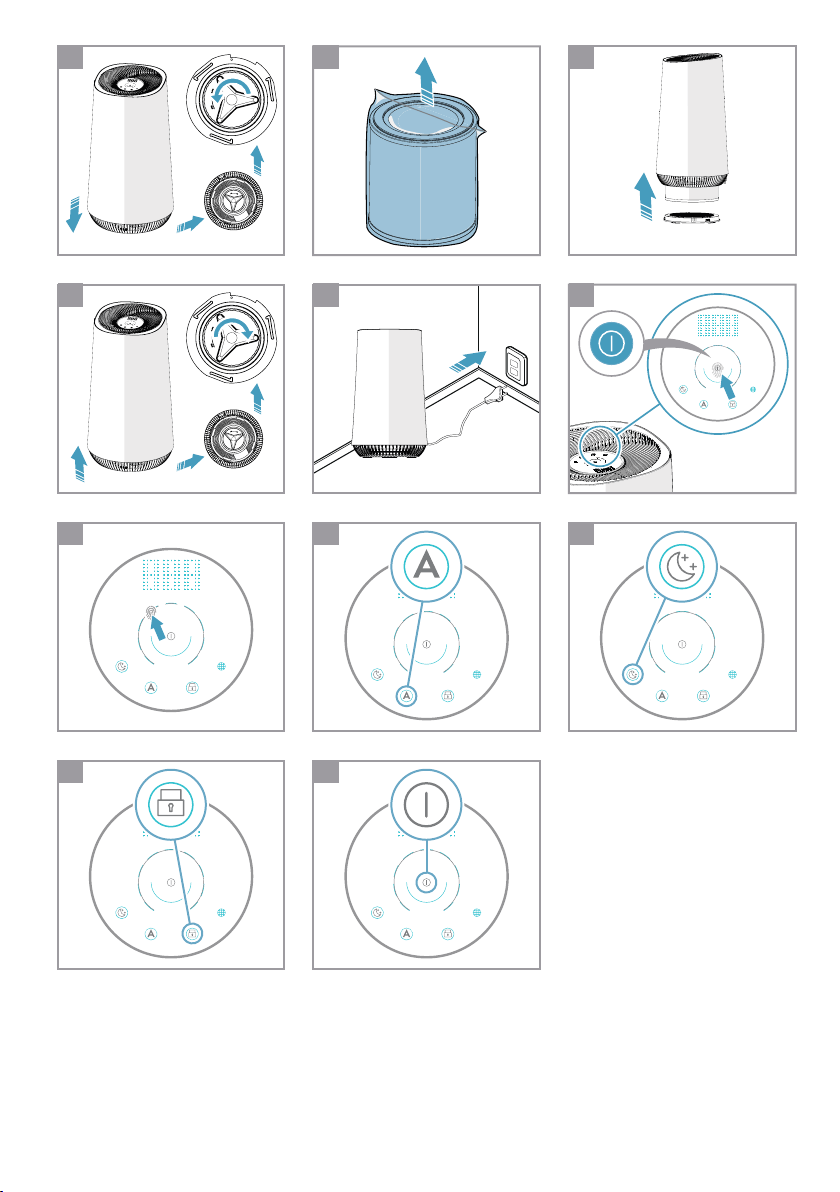
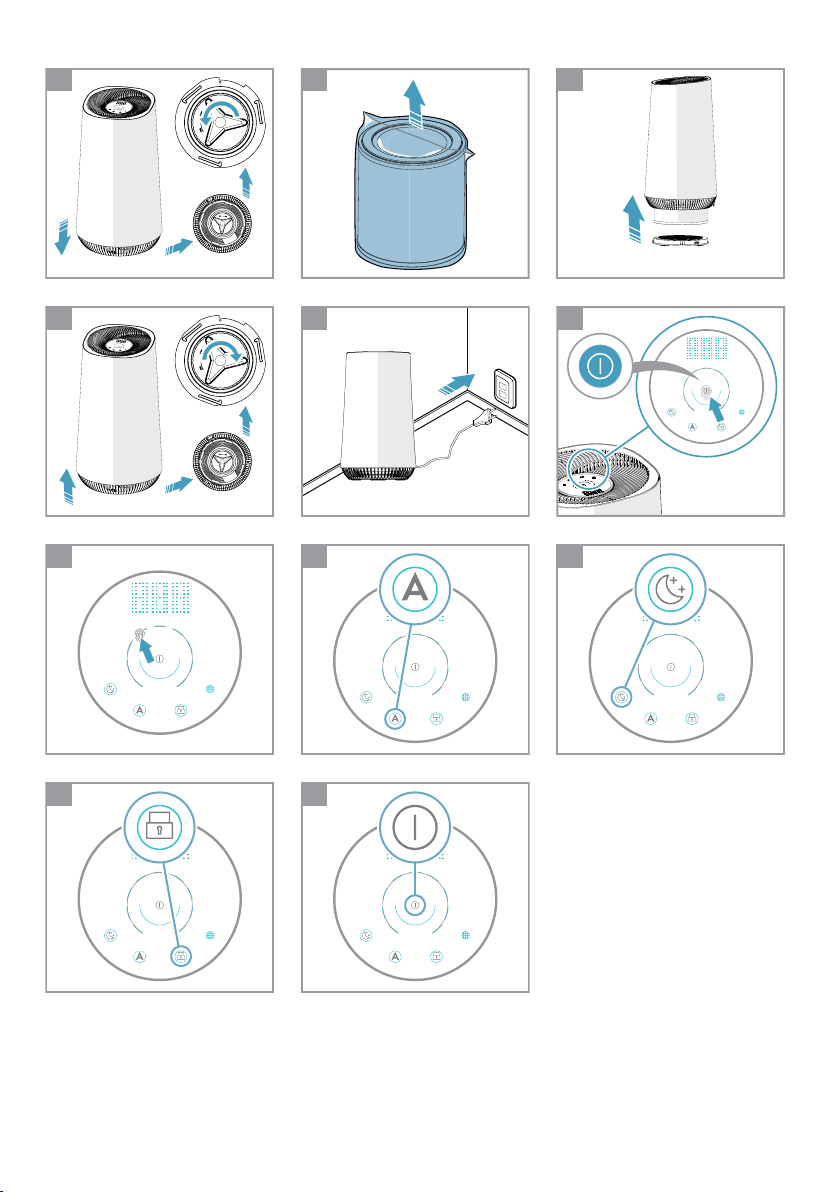
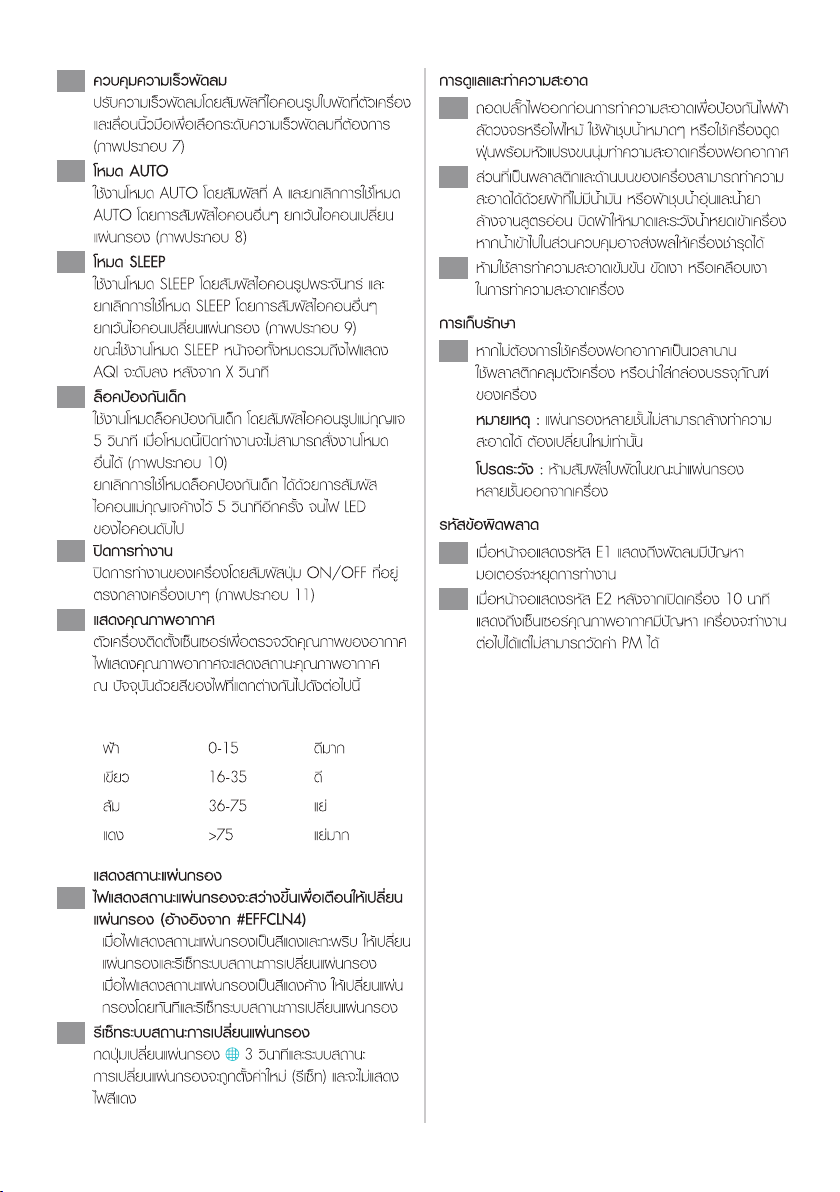
Open the base of the lter
Open the product by rotating the base in
anticlockwise direction with the handle provided
at the bottom till it comes loose (ref. picture 1).
Take out the lter and remove the lter bag
Carefully remove the lter incl. plastic packaging
from the unit and break open the plastic bag and
discard appropriately (ref. picture 2).
Install the lter
Carefully insert the lter back into the product
without the plastic packaging (either end of the
lter works). Take care that the lter is placed in
the center of the cavity (ref. picture 3).
Close the base
Close the product by rotating the base in
clockwise direction with the handle provided at
the bottom till it is securely in place. There two
opposing triangular marks on the base of the
product to identify the leading edge for turning
(ref. picture 4).
DISPOSAL
1
2
3
4
To recycle your product, please take it to an ocial
collection point or to an Electrolux service center that
can remove and recycle the battery and electric parts
in a safe and professional way. Follow your country’s
rules for the separate collection of electrical products
and rechargeable batteries.
Caution: After lter is installed correctly, please
ensure product is placed on a level surface
before proceeding further. Ensure there is
enough free space on top of and around the
product.
OPERATION
Connect the power plug.
Power on
Power on the product by gently touching the
ON/OFF icon on the center of the product
(ref. picture 6).
5
6
www.electrolux.com6
11
10
9
7
8
'BO speed control
Change the fan speed by gently touching desired
fan speed icon on the product. You can also slide
your nger across the arc to change fan speed
(ref. picture 7).
Auto mode
Change to AUTO mode by gently touching icon
labeled A. You can bring product out of AUTO
mode by pressing any other icon except change
lter (ref. picture 8).
Sleep mode
Change to SLEEP mode by gently touching icon
labeled with a moon. You can bring product out
of SLEEP mode by pressing any other icon except
change lter (ref. picture 9).
While in SLEEP mode, the UI including the AQI
light will be turned o after X seconds.
Child lock
To enable CHILD LOCK long press icon labeled
with a lock for 5 seconds. When in this mode, no
other icon will register input (ref. picture 10).
To disable CHILD LOCK, long press icon labeled
with a lock again for 5 seconds till the lock LED
turns o.
Power o
Power down the product by gently touching the
ON/OFF icon on the center of the product
(ref. picture 11).
AIR QUALITY INDICATOR
The appliance has an air quality sensor that
analyzes the air quality.
The air quality light will show the real-time air
quality through dierent colors of light. As shown
below:
12
LIGHT'S COLOR
Blue
Green
Orange
Red
PM 2.5 (μg/m
3
) AIR QUALITY
0-15 Very Good
16-35 Good
36-75 Bad
>75 Very Bad
FILTER CHANGE INDICATOR
The filter change indicator will light up to
remind you to change the filter3FG&''$-/.
• When lter change indicator icker with red
light, please replace the lter and reset the lter
change indicator.
• When lter change indicator stop icker and the
red light x, please replace the lter immediately
and reset the lter change indicator.
13
14 Filter change indicator reset operation
Press the lter change button " "for 3s and lter
change indicator will reset, then red light will go
o.
STORAGE
ERROR CODE
If you are not planning to use the appliance for
a long time, cover it with plastic or return it to its
carton.
Fan failure error code, when digital display area
shows E1, it means the fan failure occurs. Motor
will stop working.
"JSRVBMJUZ sensor failure error code, when digital
display area shows E2 after unit runOing 10min
later, unit will keep running, it means the "JS
RVBMJUZ sensor failure occurs.
18
19
20
NOTE: The multi-layer lter can not be washed, it
can only be replaced.
CAUTION!
Do not touch the fan blade when removing the
multi-layer lter.
CARE AND CLEANING
Unplug the appliance before cleaning to prevent
shock or re hazards. Use a damp cloth or a
vacuum cleaner with soft brush to clean your air
purier.
The plastic part of the cabinet and top may be
cleaned with an oil-free cloth or washed with a
cloth dampened in a solution of warm water and
mild liquid dishwashing detergent. Be sure to
wring excess water from the cloth before wiping
around the controls. Excess water in or around the
controls may cause damage to the appliance.
Never use harsh cleaners, wax or polish when
cleaning the unit.
15
17
16

www.electrolux.com 7
TROUBLESHOOTING
Can the lters be washed?
The control panel does
not seem to work.
The equipment emits a lot
of noise.
The equipment operates
normally but the outgoing
air volume is signicantly
reduced.
If the fault encountered is not listed above, please call the Customer Service Hotline.
When fault indicators show that the system is not operating properly, perform the following check.
NO
Power issue or the lter
compartment if unlocked.
Check if the equipment is powered
on and conrm whether the lter
compartment door is locked.
Replace the compound lter instead
of wash, the pre-lter can be wiped.
The installation location is not
at even level or the lter is not
properly inserted.
Install the equipment on a level
surface and re-conrm lter
installation position and order.
The outlet might be blocked by
a foreign object or the lter has
not been replaced in a timely
manner.
Please re-adjust the equipment
installation position to ensure enough
space is reserved, and conrm that
lter have been replaced according to
lter replacement indicator status.
Questions or Faults Corrective Steps / Reasoning
Commonly Asked Questions & Topics
Carry out the operations below for commonly-occurring questions or faults.
Possible Diagnosis

CONSUMER CARE
Indonesia
Electrolux Indonesia
Electrolux Building
JL. Abdul Muis 34, Petojo Selatan Gambir,
Jakarta 10160, Indonesia
Tel: +(62) 21 5081 7300
Fax: +(62) 21 5081 7399
Customer Care Service: +(62) 0804 111 999
Email: [email protected]
Website: www.electrolux.co.id
SMS: 0812 8088 8863
Malaysia
Head Office: Electrolux Home Appliances Sdn. Bhd.,
Unit T2-7, 7th Floor, Tower 2, Jaya 33 Hyperoffice, No. 3, Jalan
Semangat, Seksyen 13, 46100 Petaling Jaya, Selangor
Consumer Care Center
Lot C6, No. 28, Jalan 15/22, Taman Perindustrian Tiong Nam
Seksyen 15, 40200 Shah Alam, Selangor
Customer care hotline: 1300-88-1122
Customer Care Services Tel: (+60 3) 5525 0800
Customer Care Services Fax: (+60 3) 5524 2521
Email: [email protected]
Website: www.electrolux.com.my
Singapore
Electrolux S.E.A. Pte Ltd
1 Fusionopolis Place, Galaxis #07-10 (West Lobby),
Singapore 138522
Customer Care Hotline: +(65) 6727 3699
Fax: +(65) 6727 3611
Email: [email protected]
Website: www.electrolux.com.sg
Thailand
Electrolux Thailand Co. Ltd.
Electrolux Building, 14th Floor 1910 New Petchburi Road
Bangkapi, Huay Kwang, Bangkok 10310 Thailand
Tel: +(66) 2 725 9100
Fax: +(66) 2 725 9299
Customer Care Services: +(66) 2 725 9000
Email: [email protected]
Website: www.electrolux.co.th
Vietnam
Electrolux Vietnam Ltd.
Floor 9th, A&B Tower, 76 Le Lai street - Ben Thanh Ward -
District 1 Ho Chi Minh City, Vietnam
Customer Care Services: 1800-58-8899
Tel: +(84) 8 3910 5465
Fax: +(84) 8 3910 5470
Email: [email protected]
Website: www.electrolux.vn
Philipines
Electrolux Philippines Inc.,
12th Floor, Cyber Sigma Building, Lawton Avenue,
McKinley West, Taguig City, Philipines 1634
Domestic Toll Free : 1-800 10 845-care 2273
Customer Care Hotlines :
- Domestic Toll Free PLDT No: 1 800 10 845-CARE (2273)
- Manila Hotline No: +(63) 02 845-CARE (2273)
- SMART Mobile No: +(63) 998 582 9970
- Globe Mobile No: +(63) 917 629 7198
Fax: +(63) 2 478 8401
Email: [email protected]
Facebook: www.facebook.com/ElectroluxPhilippines/
Korea
沂崏瞾嵢巯枪瑚庲橊渂
昢殾瞿懊渗割汊滆嵢
砒汾橦捊坺捒娯ͳ壟猻殶
処儣時瘶
砯枪ί
決彚沂ΙΠΞΖΔΒΣΖΜΣΙͱΖΝΖΔΥΣΠΝΦΩΔΠΞ
毿斲決瞾ΨΨΨΖΝΖΔΥΣΠΝΦΩΔΠΜΣ
橧显昢庲割廪ΨΨΨΖΝΖΔΥΣΠΝΦΩΤΙΠΡΔΠΜΣ
Japan
࢚ࣞࢡࢺࣟࣛࢵࢡࢫ࣭ࢪࣕࣃࣥᰴᘧ♫
ࠛᮾி㒔 ༊ⰪබᅬࠉⰪࣃ࣮ࢡࣅࣝࠉ㸿㤋ࠉ㹄
࠾ᐈᵝࢧ࣏࣮ࢺࠉࣇ࣮ࣜࢲࣖࣝ㸸
࢙࢘ࣈࢧࢺࢺ㸸KWWSZZZHOHFWUROX[FRMS
බᘧ࢜ࣥࣛࣥࢩࣙࢵࣉ㸸KWWSVKRSHOHFWUROX[FRMS
Taiwan (ENG)
Electrolux S.E.A. Private Limited Taiwan Branch
9F., No.68, Sec. 2, Xianmin Blvd., Banqiao Dist.,
New Taipei City 22065, Taiwan (R.O.C.)
Customer Care Hotline: 0800-888-259
Email : [email protected]
Taiwan (CHN)
᪂ຍᆜၟఀⴊඞ᪁⫤௷᭷㝈බྖྎ⅂ศබྖ
ᆅᆎ㸸᪂ᕷᯈᶫ༐⦩Ẹ㐨ẁ)
ᐈ᭹㟁ヰ㸸
㟁Ꮚ㒑௳㸸VHUYLFH#HOHFWUROX[FRPWZ
New Zealand
Electrolux Home Care & Small Domestic Appliances
A division of Electrolux (NZ) Limited
3-5 Niall Burgess Road, Mt Wellington, Auckland, New Zealand
Phone: (09) 573 2220
Customer Service Phone: 0508 730 730
website: www.electrolux.com
webshop: www.electroluxvacuums.co.nz/parts-and-service/
all-parts
Australia
Electrolux Home Care & Small Domestic Appliances
ABN 51 004 762 341
163 O'Riordan Street, Mascot, NSW 2020, Australia
Customer Service Phone: 1300 365 305
Website: www.electrolux.com
Webshop: shop.electrolux.com.au

2 www.electrolux.com
AB
G
H
I
J
K
L
C
M
N
E
D
F
FLOW A4
ตัวเครื1อง : แผงควบคุม :
A ชองอากาศออก G จอดิจิตอลแสดงคุณภาพอากาศ K โหมด Sleep
B จอแสดงผล H ควบคุมความเร็วพัดลม L โหมด Auto
C ตัวเครื1อง I ปุมเปด / ปด M เตือนการเปลี่ยนแผนกรอง
D ฐานเครื1อง J ไฟแสดงคุณภาพอากาศ N ล็อคปองกันเด็ก
E ชองเซ็นเซอร
F สายไฟ
AB
G
H
I
J
K
L
C
M
N
E
D
F
www.electrolux.com 3
1
4
7
10
2
5
8
3
6
9
11
4 www.electrolux.com
www.electrolux.com 5
1
2
3
4
5
6
6 www.electrolux.com
7
8
9
10
11
12
13
14
15
16
17
18
19
20
www.electrolux.com 7
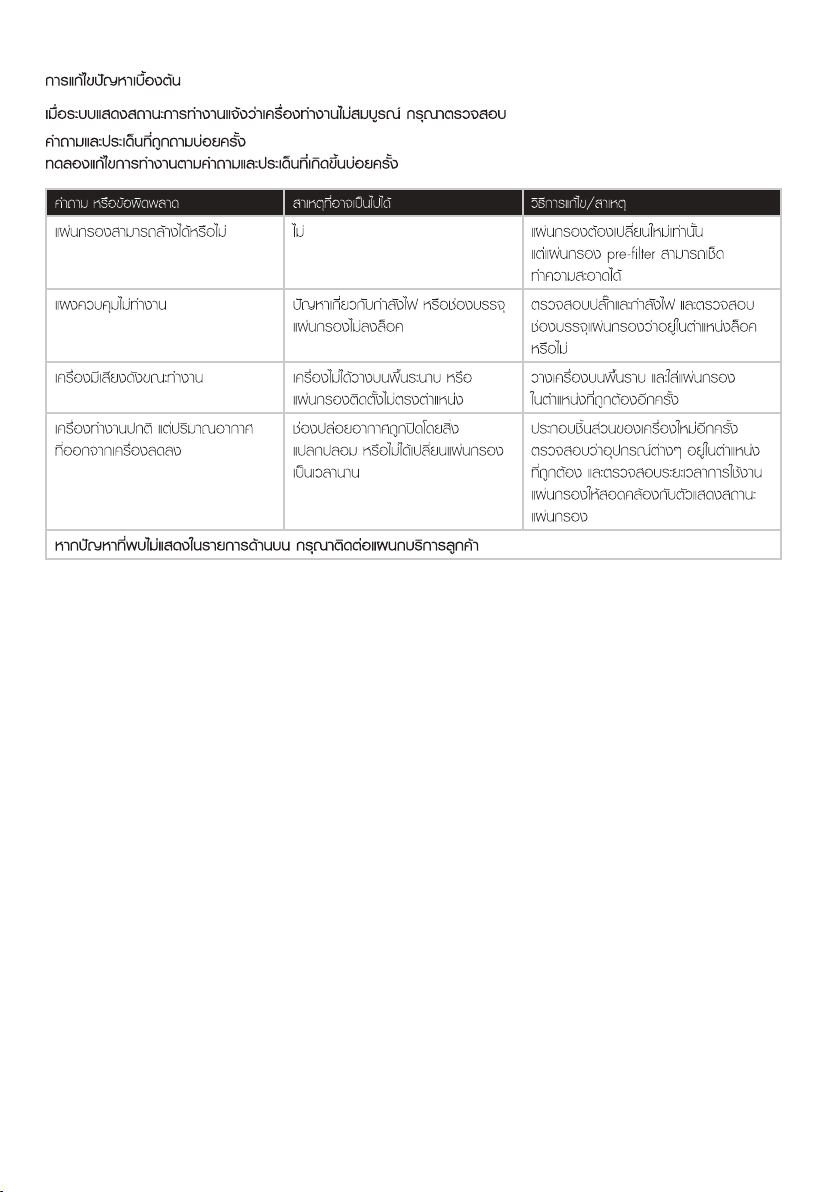
คําถาม หรือขอผิดพลาด สาเหตุที่อาจเปนไปได วิธีการแกไข/สาเหตุ
แผนกรองสามารถลางไดหรือไม ไม แผนกรองตองเปลี่ยนใหมเทานั้น
แตแผนกรอง pre-filter สามารถเช็ด
ทําความสะอาดได
แผงควบคุมไมทํางาน ปญหาเกี่ยวกับกําลังไฟ หรือชองบรรจุ
แผนกรองไมลงล็อค
ตรวจสอบปลั๊กและกําลังไฟ และตรวจสอบ
ชองบรรจุแผนกรองวาอยูในตําแหนงล็อค
หรือไม
เครื1องมีเสียงดังขณะทํางาน เครื1องไมไดวางบนพื้นระนาบ หรือ
แผนกรองติดตั้งไมตรงตําแหนง
วางเครื1องบนพื้นราบ และใสแผนกรอง
ในตําแหนงที่ถูกตองอีกครั้ง
เครื1องทํางานปกติ แตปริมาณอากาศ
ที่ออกจากเครื1องลดลง
ชองปลอยอากาศถูกปดโดยสิ่ง
แปลกปลอม หร
ือไมไดเปลี่ยนแผนกรอง
เปนเวลานาน
ประกอบชิ้นสวนของเครื1องใหมอีกครั้ง
ตรวจสอบวาอุปกรณตางๆ อยูในตําแหนง
ที่ถูกตอง และตรวจสอบระยะเวลาการใชงาน
แผนกรองใหสอดคลองกับตัวแสดงสถานะ
แผนกรอง

www.electrolux.com/shop
ีั
ใหบริการขอมูล รับแจงซอม แนะนำวิธีการใชสินคา
พรอมสรรพใหบริการ ที่
โทรศัพท: 0-2725-9000 โทรสาร: 0-2725-9299
ทุกวัน ตั้งแต เวลา 6.00 – 22.00 น.
http://www.electrolux.co.th