1
User Manual
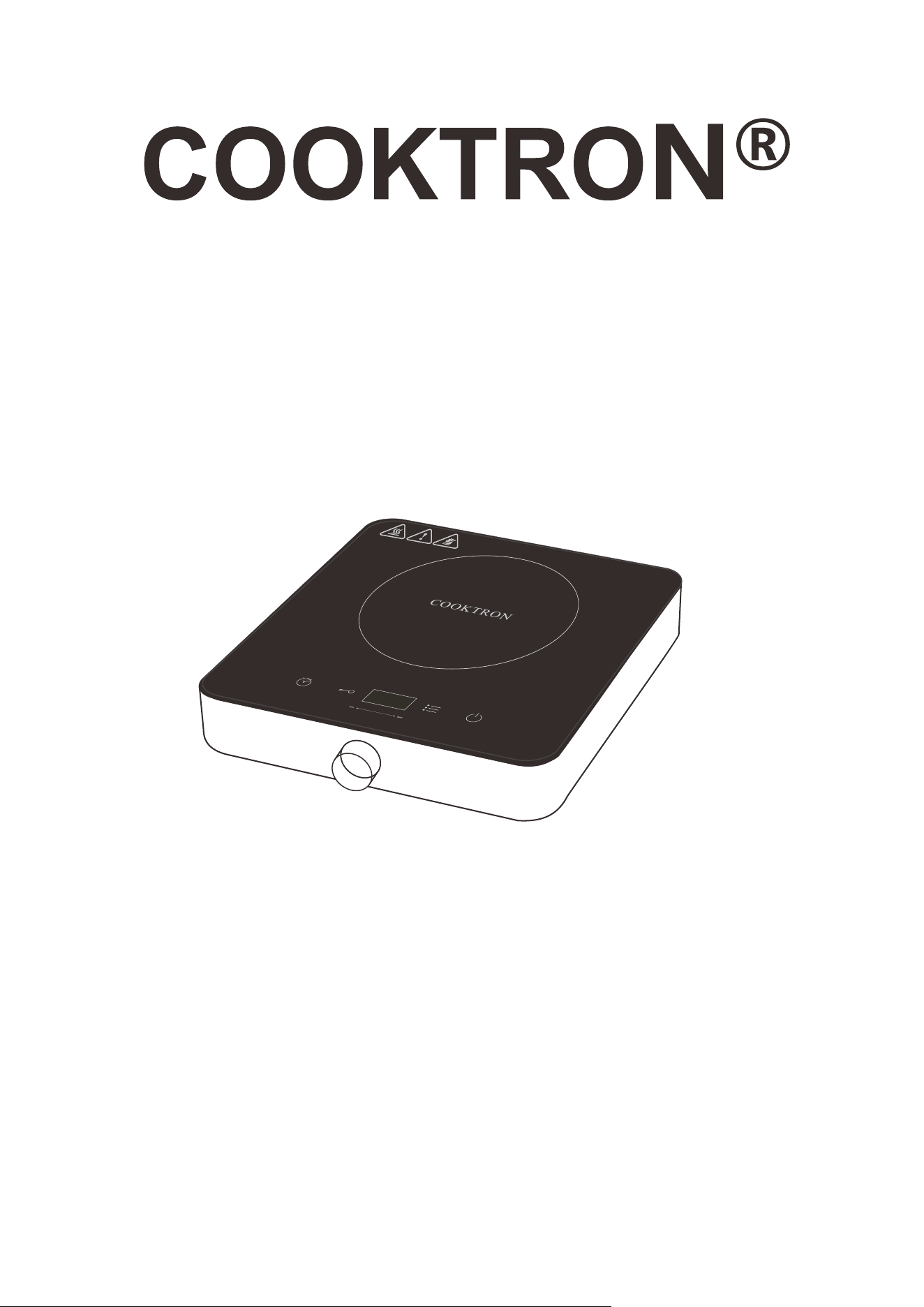
Single Induction Cooker
Model: FS-IC321-3
Thank you for purchasing this product, please read the manual carefully before
using and keep it for future reference.

2
Content
General Instructions
....................................................................................................................................
3
Features Highlight
.......................................................................................................................................
4
Parts Identification
.......................................................................................................................................
4
Precautions Before Use
.............................................................................................................................
5
Temperature/Power Settings
.....................................................................................................................
5
Operation Steps
...........................................................................................................................................
6
Choosing the Right Cookware for Induction .................................................................................8
Troubleshooting...........................................................................................................................................9
Error Codes............................................................................................................................................... 11
Maintenance..............................................................................................................................................12
Waste Management................................................................................................................................. 12

3
General Instructions
1. Do not plug into a socket where several other appliances are plugged in.
2. Do not use if the plug cord is damaged or when the power plug does not fit the socket.
3. Do not modify the parts, or repair this unit, as the supply cord must be replaced by qualified
technicians.
4. Do not use this unit near an open flame or any wet place.
5. Keep it out of children’s reach.
6. Place on a stable, and flat surface.
7. Do not heat or overheat the pot empty.
8. Do not place metallic objects such as knives, forks, spoons, lids, cans and aluminum foils on the
top surface or under the bottom of the cooker.
9. Allow sufficient space around the cooking area (keep a minimum distance of 5 to 10 cm from the
unit to walls or other items).
10. Never use the unit on low-heat-resistant materials (carpet, vinyl).
11. Do not place paper between the pot or the pan and the unit. The paper may get burnt.
12. Do not block air intake or exhaust vent.
13. Caution!The surface will remain hot for a period after using from the heating area. To avoid
injuries (burning) do not touch the heating area.
14. Unit can affect the items having or attracting magnetic fields, such as Radios, televisions,
automatic, banking cards and cassette tapes.
15. Do not use the unit on the metallic surface.
16. Do not disconnect the power cord immediately after cooking, at least 15 seconds is
necessary to cool down the unit.
17. WARNING: If the surface is cracked, switch off the appliance to avoid the possibility of electric
shock hazard.
18.This appliance can be used by children aged from 8 years and above and persons with reduced
physical, sensory or mental capabilities or lack of experience and knowledge if they have
been given supervision or instruction concerning use of the appliance in a safe way and
understand the hazards involved. Children shall not play the appliance.
4
Features Highlight
1. Induction cooker will not produce any flame, heat or smoke to keep the kitchen clean.
2. Cooking can be performed anywhere with power supply, thanks to the light weight.
3. The elegant design allows the cooker as a decoration for the kitchen.
4. Induction cooking allows you to adjust the cooking heat instantly and with great precision much like
a gas stove, but with even more accuracy.
5. There are no open flames or hot elements. Induction cooker will start only once the appropriate
cookware has been placed on the surface and stops immediately when the cookware is removed.
No more burned fingers or hands and safer around young children.
Parts Identification
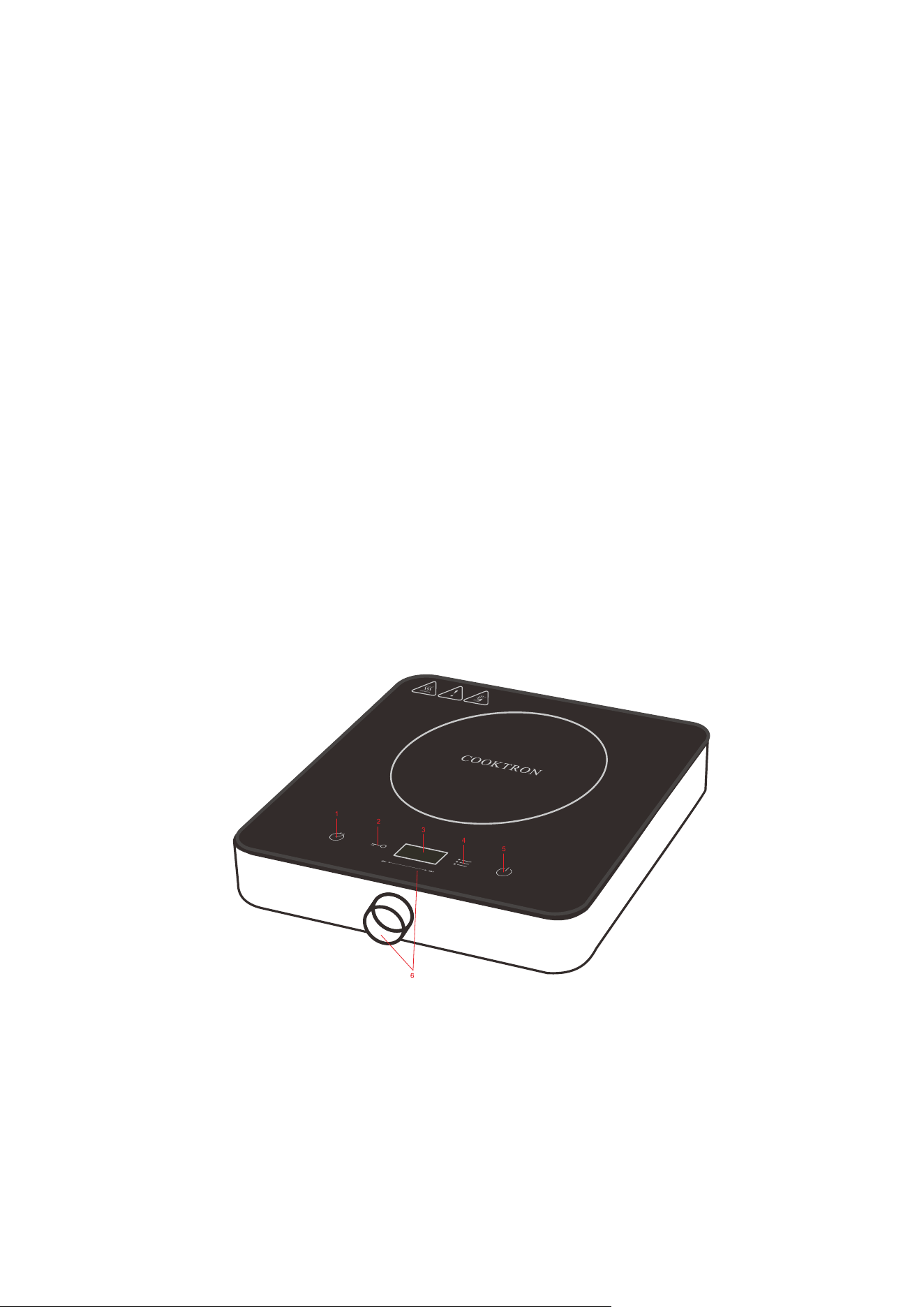
1. TIMER SET UP BUTTON 2. CHILD LOCK
3. DISPLAYER 4. POWER OR TEMPERATURE MODE BUTTON
5. ON / OFF BUTTON 6. ADJUST THE POWER OR TEMPERATURE
WITH ROTARY KNOB

5
Precautions Before Use
1. Make sure that the induction cooker is properly connected to the power supply and enters the
power-on mode.
2. When entering the standby mode, if a pot with improper material is placed on the induction cooker,
the error code “E0” will be displayed, please use the pot with the proper material.
3. The induction cooker can be “MIN” or “MAX” by temperature or power.
Temperature/Power Settings
Model
Max Currency
Voltage
Temperature
Power Rate
FS-IC321-3
15A
AC 120V~60Hz
140
℉
-464
℉
1800W
The hob is provided with 10 temperature levels:
Temperature
(℉)
140
176
212
248
284
320
356
392
428
464
The hob is provided with 9 power levels:
Power
(Watt)
200
400
600
800
1000
1200
1400
1600
1800

6
Operation Step
Power Mode
Plug in AC cord, the buzzer alerts, all LED displayers and the display flash for 1 second. LED displays “Lo”,
the cooker turns to the power mode.
Standby Mode
1) While power is ready, press “ ” button, the LED displayer will turn on and show “ON” in the
displayer. The cooker will be in the standby mode.
2) In the standby mode, the cooker will stop if no function is selected within 30 seconds.
Timer
1) Timer is available for manual functions not for automatic function. Timer range is 1min to 4
hours.
2) In the temperature or the power preset working modes, press “ ”, the corresponding displayer
light up. LED timer zones display “0:10” with blinking. Use the rotary knob "MIN" or "MAX" to control
the LED timer, adding 10 minutes each time by clockwise rotation and subtracting 1 minute each time
by counterclockwise rotation. After 5 seconds no change, the cooker will confirm the selection, the
LED timer will stop blinking and start the countdown. When the countdown ends, the cooker will turn
off automatically.
3) The time setting can be cycled.
4) In the timer mode, long press “ ” button for 3 seconds to cancel the timer.
Function
1) In standby mode or others work mode, touch press “ ”, to set heating power or heating
temperature.

7
2) The default heating power will be 800W, Use the knob “MIN” or “MAX” to increase or decrease
heating power. Power range from 200W~1800W in 9 levels.
3) The default heating temperature will be 464℉,turn the knob “MIN” or “MAX” to increase or
decrease heating temperature. Temperature range from 140℉~464℉ in 10 levels.
Child Lock
In any working status, press the “ ” key, the cooker will enter the locking mode. In the locking
mode, no operation will be responded except the “ ”key. If you press the “ ”key for 3 seconds,
the cooker will be unlocked and keep same status as before.
Automatically Switch off After 2 Hours of Non-operation
In the working mode except the timer mode, the cooker will automatically switch off without any
operation for 2 hours.
Fan Keeps Working
1) When the cooker is powered on and standby, the fan does not work.
2) The fan works continuously under working condition.
3) The fan will keep working for 1 minutes for heat dissipation after finish cooking.
4) Attention: If the cooker shut down directly in standby mode (the cooker has not been heated), the
fan will stop working.
After Heat Code
After the cooker shuts down, if the surface temperature is higher than 60 ℃, the LED will display “H”
to remind users of the high temperature.
8
Choosing the Right Cookware for Induction
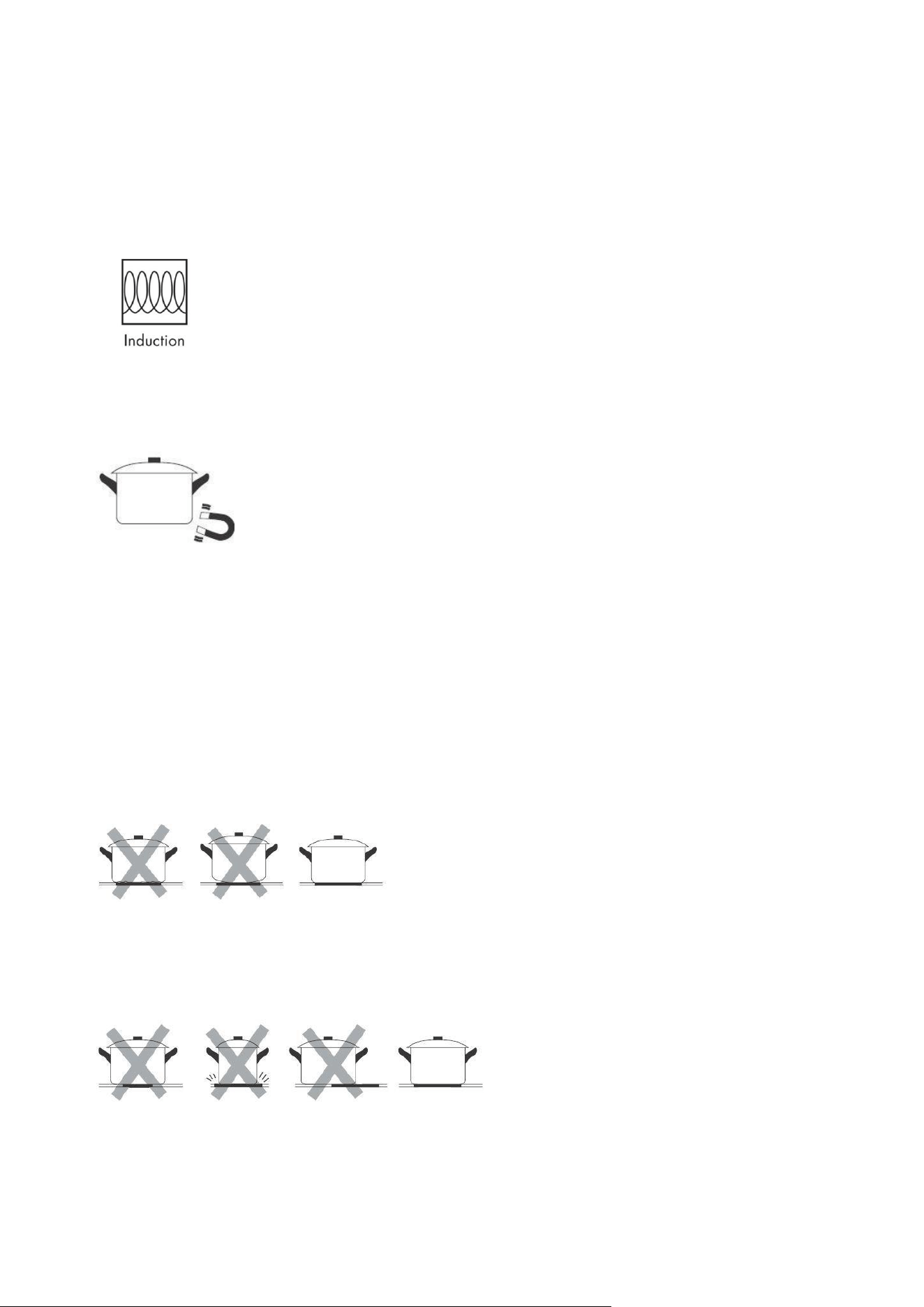
• Only use cookware with a base suitable for induction cooking. Look for the induction symbol on the
packaging or on the bottom of the pan.
• You can check whether your cookware is suitable by carrying out a magnet test. Move a magnet
towards the base of the pan. If it is attracted, the pan is suitable for induction.
• If you do not have a magnet:
1. Put some water in the pan you want to check.
2.
Turn on and wait for 3 minutes to check if water gets hot.
• Cookware made from the following materials is not suitable: pure stainless steel, aluminum or
copper without a magnetic base, glass, wood, porcelain, ceramic, and earthenware.
Do not use cookware with jagged edges or a curved base.
Make sure that the base of your pan is smooth, sits flat against the glass, and is the same size as the
cooking zone. Always center your pan on the cooking zone. The diameter may not be less than 12 cm
to ensure that the energy field has an effect. Do not use pans with a diameter in excess of 26 cm.

9
Always lift pans off the induction cooker – do not slide, or they may scratch the glass.
Troubleshooting
Problem
Possible causes
What to do
The hob cannot be
turned on.
No power.
Make sure the hob is connected to
the power supply and that it is
switched on.
Check whether there is a power
outage in your home or area. If
you have checked everything and
the problem persists, call a
qualified technician.
The touch controls are
difficult to operate.
There may be a slight film of water
over the controls or you may be
using the tip of your finger when
touching the controls.
Make sure the touch control area
is dry and use the ball of your
finger when touching the controls.
The surface of
induction is being
scratched.
Rough-edged cookware.
Unsuitable, abrasive scourer or
cleaning products being used.
Use cookware with flat and
smooth bases. See ‘Choosing the
right cookware’.
See ‘Care and cleaning’.

10
Some pans make
crackling or clicking
noises.
This may be caused by the
construction of your cookware
(layers of different metals vibrating
differently).
This is normal for cookware and
does not display a fault.
The induction hob
makes a low humming
noise when used on
a high heat setting.
This is caused by the technology of
induction cooking.
This is normal, but the noise
should quieten down or disappear
completely when you decrease
the heat setting.
Fan noise coming
from the induction
hob.
A cooling fan built into your
induction hob has come on to
prevent the electronics from
overheating. It may continue to run
even after you have turned the
induction hob off.
This is normal and needs no
action. Do not switch the power to
the induction hob off at the wall
while the fan is running.
Pans do not turn hot
and will display error
code.
1.The induction hob cannot detect
the pan because it is not suitable
for induction cooking.
2.The induction hob cannot detect
the pan because it is too small for
the cooking zone or not properly
centered on it.
Use cookware suitable for
induction cooking. See section
‘Choosing the right cookware’.
Centre the pan and make sure
that its base matches the size of
the cooking zone.
The induction hob or a
cooking zone turn
itself off unexpectedly,
a warning sound and
an error code is
displayed (typically
alternating with one or
two digits in the
cooking timer display).
Technical fault.
Please note down the error letters
and numbers, switch the power to
the induction hob off at the wall,
and contact a qualified technician.

11
Error Codes
When the cooker experiences unsuitable operations from you or by other means. the cooker stops
functioning exhibiting relevant codes on the display screen. This is meant only for the protection of
the cooker and guidance to you.
Error Code
Reason
Solution(s)
E0
Without cookware or
Incompatible cookware used
Place a suitable pot on the hob.
E1
IGBT sensor open circuit /
short circuit
Please return the device repair.
E2
Internal overheat
First, detect whether the air outlet is
blocked or not, and check whether the
cooker will back to normal after cooling
down. If it still does not work properly,
please return the device repair.
E3, E4
Over-voltage 150V
Under-voltage 90V
Check and ensure that the appliance is
connected to a properly installed mains
power socket with 120V~, 60Hz.
E5
Top plate sensor open /
short circuit
Please return the device repair.
E6
Top plate overheat
Disconnect the plug from the mains power
socket and wait until appliance has cooled
down. If the problem should persist,
please contact after-sale service and
specify the error code.

12
Maintenance
1. Clean after each used. Disconnect plug and wait the unit has cooled down.
2. If the surface plate gets dirty, clean it with wet cloth, wash directly.
3. Maintain the unit clean, avoid the insects go inside the unit, the performance.
4. For the ventilation part clean with toothbrush or cotton.
5. If something wrong with the unit, repaired by professionals only.
Waste Management
This marking displays that this product should not be disposed with other household wastes
throughout the EU. To prevent possible harm to the environment or human health from
uncontrolled waste disposal, recycle it responsibly to promote the sustainable reuse of material
resources. To return your used device, please use the return and collection systems or contact
the retailer where the product was purchased. They can take this product for environmentally
safe recycling.
Manufacturer: ZHONGSHAN FANSHENG ELECTRIC APPLIANCES CO.,LTD
Address: 4/F NO 10 BUILDING,NO 268,DONGFU 3RD ROAD SUICHENG VILLAGE,DONGFENG
TOWN,ZHONGSHAN CITY,GUANGDONG,CHINA