

AboutthisDocument
ThismanualisintendedforadministratorsandusersoftheAXISQ1614
FixedDomeNetworkCamera,andisapplicabletormware5.4and
later.Itincludesinstructionsforusingandmanagingtheproducton
yournetwork.Previousexperienceofnetworkingwillbeofusewhen
usingthisproduct.SomeknowledgeofUNIXorLinux-basedsystems
mayalsobebenecial,fordevelopingshellscriptsandapplications.
LaterversionsofthisdocumentwillbepostedtotheAxiswebsite,
asrequired.Seealsotheproduct’sonlinehelp,availableviathe
web-basedinterface.
LegalConsiderations
Videoandaudiosurveillancecanberegulatedbylawsthatvaryfrom
countrytocountry.Checkthelawsinyourlocalregionbeforeusing
thisproductforsurveillancepurposes.
Thisproductincludesone(1)H.264decoderlicenseandone(1)AAC
decoderlicense.Topurchasefurtherlicenses,contactyourreseller.
Liability
Everycarehasbeentakeninthepreparationofthisdocument.Please
informyourlocalAxisofceofanyinaccuraciesoromissions.Axis
CommunicationsABcannotbeheldresponsibleforanytechnicalor
typographicalerrorsandreservestherighttomakechangestothe
productandmanualswithoutpriornotice.AxisCommunicationsAB
makesnowarrantyofanykindwithregardtothematerialcontained
withinthisdocument,including,butnotlimitedto,theimplied
warrantiesofmerchantabilityandtnessforaparticularpurpose.Axis
CommunicationsABshallnotbeliablenorresponsibleforincidentalor
consequentialdamagesinconnectionwiththefurnishing,performance
oruseofthismaterial.Thisproductisonlytobeusedforitsintended
purpose.
IntellectualPropertyRights
AxisABhasintellectualpropertyrightsrelatingtotechnologyembodied
intheproductdescribedinthisdocument.Inparticular,andwithout
limitation,theseintellectualpropertyrightsmayincludeoneormore
ofthepatentslistedatwww.axis.com/patent.htmandoneormore
additionalpatentsorpendingpatentapplicationsintheUSandother
countries.
Thisproductcontainslicensedthird-partysoftware.Seethemenuitem
“About”intheproduct’suserinterfaceformoreinformation.
ThisproductcontainssourcecodecopyrightAppleComputer,
Inc.,underthetermsofApplePublicSourceLicense2.0(see
www.opensource.apple.com/apsl).Thesourcecodeisavailablefrom
https://developer.apple.com/bonjour/
EquipmentModications
Thisequipmentmustbeinstalledandusedinstrictaccordancewiththe
instructionsgivenintheuserdocumentation.Thisequipmentcontains
nouser-serviceablecomponents.Unauthorizedequipmentchangesor
modicationswillinvalidateallapplicableregulatorycertications
andapprovals.
TrademarkAcknowledgments
AXISCOMMUNICATIONS,AXIS,ETRAX,ARTPECandVAPIXare
registeredtrademarksortrademarkapplicationsofAxisABinvarious
jurisdictions.Allothercompanynamesandproductsaretrademarksor
registeredtrademarksoftheirrespectivecompanies.
Apple,Boa,Apache,Bonjour,Ethernet,InternetExplorer,Linux,
Microsoft,Mozilla,Real,SMPTE,QuickTime,UNIX,Windows,Windows
VistaandWWWareregisteredtrademarksoftherespectiveholders.
JavaandallJava-basedtrademarksandlogosaretrademarksor
registeredtrademarksofOracleand/oritsafliates.UPnP
TM
isa
certicationmarkoftheUPnP
TM
ImplementersCorporation.
SD,SDHCandSDXCaretrademarksorregisteredtrademarksofSD-3C,
LLCintheUnitedStates,othercountriesorboth.Also,miniSD,microSD,
miniSDHC,microSDHC,microSDXCarealltrademarksorregistered
trademarksofSD-3C,LLCintheUnitedStates,othercountriesorboth.
RegulatoryInformation
Europe
ThisproductcomplieswiththeapplicableCEmarkingdirectives
andharmonizedstandards:
•ElectromagneticCompatibility(EMC)Directive2004/108/EC.See
ElectromagneticCompatibility(EMC),onpage2.
•LowVoltage(LVD)Directive2006/95/EC.SeeSafety,onpage2.
•RestrictionsofHazardousSubstances(RoHS)Directive2011/65/EU.
SeeDisposalandRecycling,onpage2.
Acopyoftheoriginaldeclarationofconformitymaybeobtainedfrom
AxisCommunicationsAB.SeeContactInformation,onpage3.
ElectromagneticCompatibility(EMC)
Thisequipmenthasbeendesignedandtestedtofulllapplicable
standardsfor:
•Radiofrequencyemissionwheninstalledaccordingtothe
instructionsandusedinitsintendedenvironment.
•Immunitytoelectricalandelectromagneticphenomenawhen
installedaccordingtotheinstructionsandusedinitsintended
environment.
USA
Thisequipmenthasbeentestedusingashieldednetworkcable(STP)
andfoundtocomplywiththelimitsforaClassBdigitaldevice,
pursuanttopart15oftheFCCRules.Theselimitsaredesigned
toprovidereasonableprotectionagainstharmfulinterferenceina
residentialinstallation.Thisequipmentgenerates,usesandcanradiate
radiofrequencyenergyand,ifnotinstalledandusedinaccordance
withtheinstructions,maycauseharmfulinterferencetoradio
communications.However,thereisnoguaranteethatinterference
willnotoccurinaparticularinstallation.Ifthisequipmentdoes
causeharmfulinterferencetoradioortelevisionreception,which
canbedeterminedbyturningtheequipmentoffandon,theuseris
encouragedtotrytocorrecttheinterferencebyoneormoreofthe
followingmeasures:
•Reorientorrelocatethereceivingantenna.
•Increasetheseparationbetweentheequipmentandreceiver.
•Connecttheequipmentintoanoutletonacircuitdifferentfrom
thattowhichthereceiverisconnected.
•Consultthedealeroranexperiencedradio/TVtechnicianforhelp.
Canada
ThisClassBdigitalapparatuscomplieswithCanadianICES-003.
CetappareilnumériquedelaclasseBestconfomeàlanorme
NMB-003duCanada.
Europe
ThisdigitalequipmentfulllstherequirementsforRFemission
accordingtotheClassBlimitofEN55022.
Thisproductfulllstherequirementsforimmunityaccording
toEN61000-6-1residential,commercialandlight-industrial
environments.
Thisproductfulllstherequirementsforimmunityaccordingto
EN61000-6-2industrialenvironments.
Thisproductfulllstherequirementsforimmunityaccordingto
EN55024ofceandcommercialenvironments
Australia/NewZealand
ThisdigitalequipmentfulllstherequirementsforRFemission
accordingtotheClassBlimitofAS/NZSCISPR22.
Japan
この装置は、クラスB情報技術装置です。この装置は、家庭
環境で使用することを目的としていますが、この装置がラジ
オやテレビジョン受信機に近接して使用されると、受信障
害を引き起こすことがあります。取扱説明書に従って正し
い取り扱いをして下さい。
Korea
이기기는가정용(B급)전자파적합기기로서주로가정에
서사용하는것을목적으로하며,모든지역에서사용
할수있습니다.
Safety
ThisproductcomplieswithIEC/EN/UL60950-1,SafetyofInformation
TechnologyEquipment.
Thepowersupplyusedwiththisproductshallfullltherequirements
forSafetyExtraLowVoltage(SELV)andLimitedPowerSource(LPS)
accordingtoIEC/EN/UL60950-1.
DisposalandRecycling
Whenthisproducthasreachedtheendofitsusefullife,disposeof
itaccordingtolocalrawsandregulations.Forinformationabout
yournearestdesignatedcollectionpoint,contactyourlocalauthority

responsibleforwastedisposal.Inaccordancewithlocallegislation,
penaltiesmaybeapplicableforincorrectdisposalofthiswaste.
Europe
Thissymbolmeansthattheproductshallnotbedisposedof
togetherwithhouseholdorcommercialwaste.Directive2012/19/EU
onwasteelectricalandelectronicequipment(WEEE)isapplicablein
theEuropeanUnionmemberstates.Topreventpotentialharmto
humanhealthandtheenvironment,theproductmustbedisposed
ofinanapprovedandenvironmentallysaferecyclingprocess.For
informationaboutyournearestdesignatedcollectionpoint,contact
yourlocalauthorityresponsibleforwastedisposal.Businessesshould
contacttheproductsupplierforinformationabouthowtodispose
ofthisproductcorrectly.
ThisproductcomplieswiththerequirementsofDirective2011/65/EU
ontherestrictionoftheuseofcertainhazardoussubstancesin
electricalandelectronicequipment(RoHS).
China
Thisproductcomplieswiththerequirementsofthelegislative
actAdministrationontheControlofPollutionCausedbyElectronic
InformationProducts(ACPEIP).
ContactInformation
AxisCommunicationsAB
Emdalavägen14
22369Lund
Sweden
Tel:+46462721800
Fax:+4646136130
www.axis.com
Support
Shouldyourequireanytechnicalassistance,pleasecontactyourAxis
reseller.Ifyourquestionscannotbeansweredimmediately,your
resellerwillforwardyourqueriesthroughtheappropriatechannelsto
ensurearapidresponse.IfyouareconnectedtotheInternet,youcan:
•downloaduserdocumentationandsoftwareupdates
•ndanswerstoresolvedproblemsintheFAQdatabase.Search
byproduct,category,orphrase
•reportproblemstoAxissupportstaffbyloggingintoyourprivate
supportarea
•chatwithAxissupportstaff(selectedcountriesonly)
•visitAxisSupportatwww.axis.com/techsup/
LearnMore!
VisitAxislearningcenterwww.axis.com/academy/forusefultrainings,
webinars,tutorialsandguides.

AXISQ1614NetworkCamera
TableofContents
HardwareOverview..........................................6
ConnectorsandButtons..........................................6
LEDIndicators..................................................8
StatusLEDBehaviorforFocusAssistant.............................8
BuzzerSignalforFocusAssistant...................................9
StatusLEDBehaviorandBuzzerSignalforLevellingAssistant...........9
Replacingthelens...............................................9
AccessingtheProduct.......................................11
AccessfromaBrowser...........................................11
AccessfromtheInternet..........................................11
SettheRootPassword...........................................12
TheLiveViewPage..............................................13
MediaStreams.............................................16
HowtoStreamH.264............................................16
MJPEG........................................................16
AXISMediaControl(AMC)........................................16
AlternativeMethodsofAccessingtheVideoStream....................17
AccessingAudioStreams.........................................18
SettingUptheProduct......................................19
BasicSetup....................................................19
FocusAdjustment...............................................19
VideoandAudio............................................20
VideoStream...................................................20
StreamProles.................................................22
CameraSettings................................................22
ViewArea.....................................................25
Overlay........................................................25
PrivacyMask...................................................27
Focus.........................................................27
AudioSettings..................................................27
AudioClips....................................................29
LiveViewCong............................................30
PTZ(PanTiltZoom).........................................33
PresetPositions.................................................33
GuardTour.....................................................34
Advanced......................................................34
InstallingaPTZdriver............................................34
ControlQueue..................................................35
Detectors..................................................36
CameraTampering..............................................36
MotionDetection...............................................36
AudioDetection................................................38
Applications...............................................39
ApplicationLicenses.............................................39
InstallApplication...............................................39
ApplicationConsiderations........................................39
Events....................................................41
SettingUpanActionRule........................................42
Recipients.....................................................43
Schedules......................................................44
Recurrences....................................................44
Recordings.................................................46
RecordingList..................................................46
ContinuousRecording............................................46
Languages.................................................47
SystemOptions.............................................48
Security.......................................................48
Date&Time....................................................50
Network.......................................................51
Storage.......................................................56
I/OPorts.......................................................57
4

AXISQ1614NetworkCamera
TableofContents
Maintenance...................................................57
Support.......................................................58
Advanced......................................................59
ResettoFactoryDefaultSettings...................................59
Troubleshooting............................................61
CheckingtheFirmware...........................................61
UpgradingtheFirmware..........................................61
Symptoms,PossibleCausesandRemedialActions.....................62
TechnicalSpecications......................................66
..............................................................66
Connectors....................................................68
PerformanceConsiderations.......................................70
5
AXISQ1614NetworkCamera
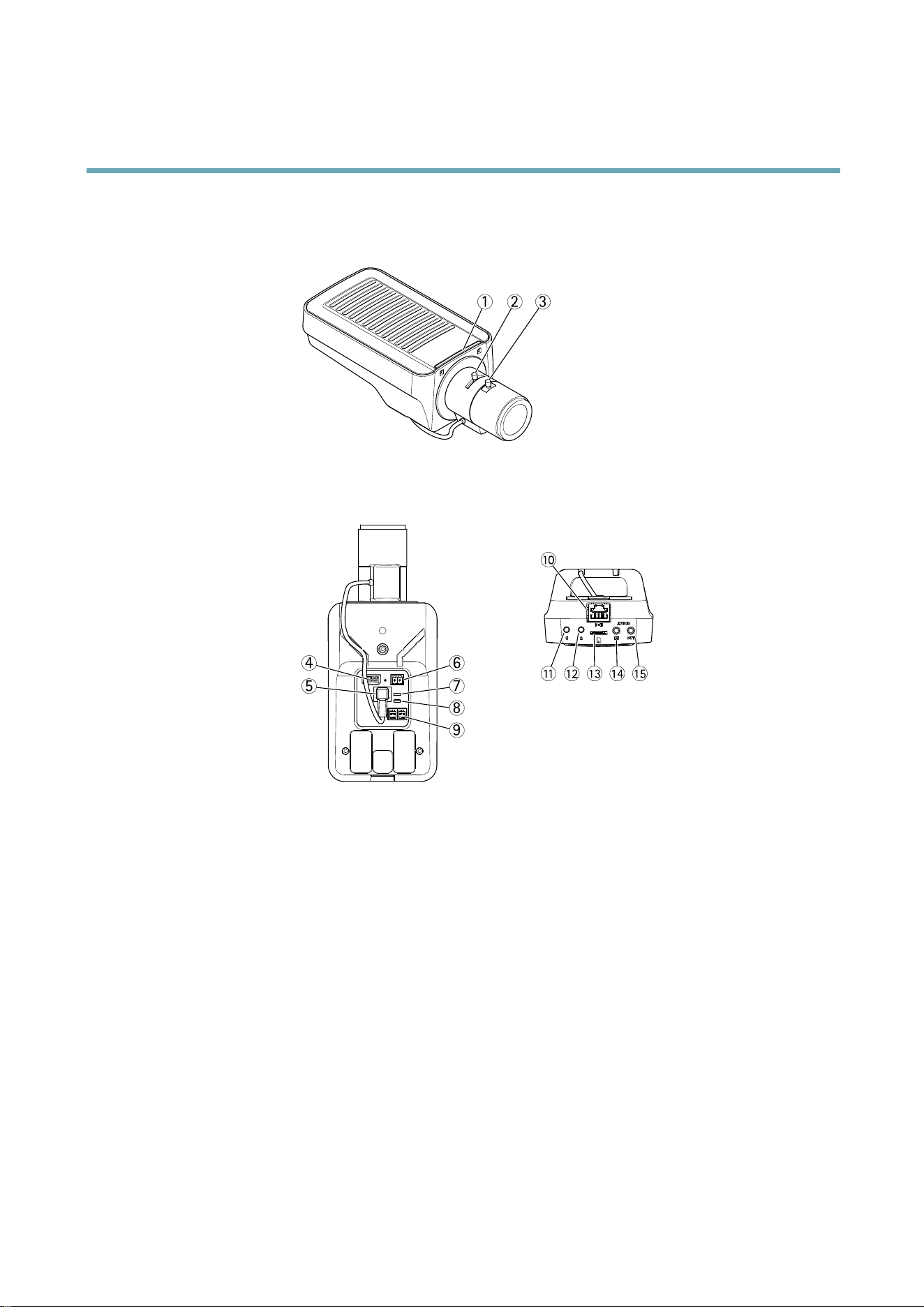
HardwareOverview
HardwareOverview
3
2
1
11
10
4
6
7
8
9
5
12
13
14
15
1.
StatusLEDindicator
2.
Zoompuller
3.
Focuspuller
4.
I/Oconnector
5.
Irisconnector
6.
Powerconnector
7.
PowerLEDindicator
8.
NetworkLEDindicator
9.
RS485/RS422connector
10.
Networkconnector(PoE)
11.
Controlbutton(1)
12.
Functionbutton(2)
13.
microSDCardslot
14.
Audioin
15.
Audioout
ConnectorsandButtons
Fortechnicalspecications,seepage66.
6

AXISQ1614NetworkCamera
HardwareOverview
NetworkConnector
RJ45Ethernetconnector.SupportsPoweroverEthernet(PoE).
NOTICE NOTICE
NOTICE
Theproductshallbeconnectedusingashieldednetworkcable(STP)oranopticalbercable.Allcablesconnectingthe
producttothenetworkshallbeintendedfortheirspecicuse.Makesurethatthenetworkdevicesareinstalledin
accordancewiththemanufacturer’sinstructions.Forinformationaboutregulatoryrequirements,seeElectromagnetic
Compatibility(EMC),onpage2.
I/OConnector
Usewithexternaldevicesincombinationwith,forexample,tamperingalarms,motiondetection,eventtriggering,timelapserecording
andalarmnotications.Inadditiontothe0VDCreferencepointandpower(DCoutput),theI/Oconnectorprovidestheinterfaceto:
•Digitaloutput–ForconnectingexternaldevicessuchasrelaysandLEDs.Connecteddevicescanbeactivatedbythe
VAPIX®ApplicationProgrammingInterface,outputbuttonsontheLiveViewpageorbyanActionRule.Theoutputwill
showasactive(shownunderSystemOptions>Ports&Devices)ifthealarmdeviceisactivated.
•Digitalinput–Analarminputforconnectingdevicesthatcantogglebetweenanopenandclosedcircuit,forexample:
PIRs,door/windowcontacts,glassbreakdetectors,etc.Whenasignalisreceivedthestatechangesandtheinputbecomes
active(shownunderSystemOptions>Ports&Devices).
PowerConnector
2-pinterminalblockforpowerinput.UseaSafetyExtraLowVoltage(SELV)compliantlimitedpowersource(LPS)witheitherarated
outputpowerlimitedto≤100Woraratedoutputcurrentlimitedto≤5A.
AudioConnector
TheAxisproducthasthefollowingaudioconnectors:
•Audioin(pink)–3.5mminputforamonomicrophone,oraline-inmonosignal(leftchannelisusedfromastereosignal).
•Audioout(green)–3.5mmoutputforaudio(linelevel)thatcanbeconnectedtoapublicaddress(PA)systemoran
activespeakerwithabuilt-inamplier.Astereoconnectormustbeusedforaudioout.
RS485/RS422Connector
TwoterminalblocksforRS485/RS422serialinterfaceusedtocontrolauxiliaryequipmentsuchasPTZdevices.
SDCardSlot
AmicroSDcard(notincluded)canbeusedforlocalrecordingwithremovablestorage.Formoreinformation,seeTechnical
Specications,onpage66.
NOTICE NOTICE
NOTICE
Topreventcorruptionofrecordings,theSDcardshouldbeunmountedbeforeremoval.Tounmount,gotoSetup>System
Options>Storage>SDCardandclickUnmount.
ControlButton
Thecontrolbuttonisusedfor:
•Resettingtheproducttofactorydefaultsettings.Seepage59.
•ConnectingtoanAXISVideoHostingSystemservice.Seepage52.Toconnect,pressandholdthebuttonforabout1
seconduntiltheStatusLEDashesgreen.
•ConnectingtoAXISInternetDynamicDNSService.Seepage52.Toconnect,pressandholdthebuttonforabout3seconds.
7

AXISQ1614NetworkCamera
HardwareOverview
FunctionButton
Thefunctionbuttonhasmultiplefunctions:
•Levellingassistant–Thisfunctionhelpstoensurethecameraislevel.Pressthebuttonforabout3secondstostartthe
levellingassistantandpressagaintostopthelevelingassistant.ThestatusLED(seepage9)andbuzzersignal(seepage
9)assistlevellingofthecamera.Thecameraislevelwhenthebuzzerbeepscontinuously.
•Focusassistant–ThisfunctionisusedforenablingtheFocusAssistant.Toenablethefocusassistant,pressandvery
quicklyreleasethebutton.Pressagaintostopthefocusassistant.Formoreinformation,seetheInstallationGuide.
LEDIndicators
LED
Color
Indication
Green
Steadyforconnectiontoa100MBit/snetwork.Flashesfornetworkactivity.
Amber
Steadyforconnectiontoa10MBit/snetwork.Flashesfornetworkactivity.
Network
UnlitNonetworkconnection.
GreenSteadygreenfornormaloperation.
Amber
Steadyduringstartupandwhenrestoringsettings.
Status
Red
Slowashforfailedupgrade.
Green
Normaloperation. Power
Amber
Flashesgreen/amberduringrmwareupgrade.
Note
•TheStatusLEDcanbeconguredtobeunlitduringnormaloperation.Tocongure,gotoSetup>SystemOptions>Ports
&Devices>LED.Seetheonlinehelpformoreinformation.
•TheStatusLEDcanbeconguredtoashwhileaneventisactive.
•TheStatusLEDcanbeconguredtoashforidentifyingtheunit.GotoSetup>SystemOptions>Maintenance.
•ThePowerLEDcanbeconguredtobeunlitduringnormaloperation.Tocongure,gotoSetup>SystemOptions>Ports
&Devices>LED.Seetheonlinehelpformoreinformation.
•TheNetworkLEDcanbedisabledsothatitdoesnotashwhenthereisnetworktrafc.Tocongure,gotoSetup>System
Options>Ports&Devices>LED.Seetheonlinehelpformoreinformation.
StatusLEDBehaviorforFocusAssistant
Color
Indication
Green
FocusAssistantisenabled
Thelensisoptimallyadjusted
AmberThecamerahasbeenmoved,oranobjecthasbeeninsertedinfrontofthelens.Exitandrestartthe
FocusAssistant.
Thelensislessoptimallyadjusted.
RedThecamerahasbeenmoved,oranobjecthasbeeninsertedinfrontofthelens.Exitandrestartthe
FocusAssistant.
Thelensispoorlyadjusted.
8

AXISQ1614NetworkCamera
HardwareOverview
BuzzerSignalforFocusAssistant
BuzzerLens
Fastinterval
Optimallyadjusted
MediumintervalLessoptimallyadjusted
Slowinterval
Poorlyadjusted
StatusLEDBehaviorandBuzzerSignalforLevellingAssistant
ForinformationontheFunctionbuttonusedforlevellingthecamera,seeConnectorsandButtons.
Color
Buzzer
Cameraposition
Fixedgreen
Continuousbeep
Level
FlashinggreenFastintervalAlmostlevel
FlashingorangeMediumintervalNotlevel
Flashingred
Slowinterval
Farfromlevel
Replacingthelens
ItispossibletouseoptionallensesfortheAxisproduct.
Toreplacethelens:
1.Disconnecttheiriscable.
2.Unscrewthestandardlens.
3.Attachandscrewonthenewlens.
Note
ThereisnoneedtorestarttheAxisproductafterchangingthelens.However,theproductmustberestartedifyouare
interchangingbetweenaP-iris,DC-Irisorxed/manualirislens.Inordertosetthefocusandpositionthelens,theAxis
productmustbeconnectedtothenetwork.
Tochangetheirisconguration:
1.GotoSetup>VideoandAudio>CameraSettings.Iriscongurationshowsthecurrentcongurediristype.
2.ClickEdit.
3.Selecttheinstalledirislensfromthedrop-downlistandclickOK.
9

AXISQ1614NetworkCamera
HardwareOverview
Note
ForP-irislensesnotlistedinthedrop-downlist,downloadtheiriscongurationlefromwww.axis.com
Touploadandusethedownloadedcongurationle,clicktheUploadtab.ClickBrowseandselectthecongurationle.
ClickUpload.TheinstalledirislensshouldnowbeincludedintheIrisSelectiondrop-downlist,selectitandpressOK.If
youselectaDCiriscongurationleforaP-irislens,anerrormessagewillappearbelowtheiriscongurationtypeinthe
CameraSettingspage.ForcustomDCIrislenses,selectGenericDCIrisoption.
10

AXISQ1614NetworkCamera
AccessingtheProduct
AccessingtheProduct
ToinstalltheAxisproduct,refertotheInstallationGuidesuppliedwiththeproduct.
Theproductcanbeusedwithmostoperatingsystemsandbrowsers.TherecommendedbrowsersareInternetExplorerwithWindows,
SafariwithMacintoshandFirefoxwithotheroperatingsystems.SeeTechnicalSpecications,onpage66.
ToviewstreamingvideoinInternetExplorer,allowinstallationofAXISMediaControl(AMC)whenprompted.
Note
•QuickTime
TM
isalsosupportedforviewingH.264streamsandforaudio.
•Ifyourcomputerrestrictstheuseofadditionalsoftwarecomponents,theproductcanbeconguredtouseaJavaapplet
forviewingMotionJPEG.
AccessfromaBrowser
1.Startabrowser(InternetExplorer,Firefox,Safari).
2.EntertheIPaddressorhostnameoftheAxisproductinthebrowser’sLocation/Addresseld.Toaccesstheproductfroma
Macintoshcomputer(MacOSX),clickontheBonjourtabandselecttheproductfromthedrop-downlist.
IfyoudonotknowtheIPaddress,useAXISIPUtilitytolocatetheproductonthenetwork.Forinformationabouthowto
discoverandassignanIPaddress,seetheInstallationandManagementSoftwareCDorthedocumentAssignanIPAddress
andAccesstheVideoStreamonAxisSupportwebatwww.axis.com/techsup
3.Enteryourusernameandpassword.Ifthisisthersttimetheproductisaccessed,therootpasswordmustrstbe
congured.Forinstructions,seeSettheRootPassword,onpage12.
4.Theproduct’sLiveViewpageopensinyourbrowser.
Note
ThecontrolsandlayoutoftheLiveViewpagemayhavebeencustomizedtomeetspecicinstallationrequirementsand
userpreferences.Consequently,someoftheexamplesandfunctionsfeaturedheremaydifferfromthosedisplayedin
yourownLiveViewpage.
AccessfromtheInternet
Onceconnected,theAxisproductisaccessibleonyourlocalnetwork(LAN).ToaccesstheproductfromtheInternetyoumust
congureyournetworkroutertoallowincomingdatatrafctotheproduct.Todothis,enabletheNAT-traversalfeature,which
willattempttoautomaticallyconguretheroutertoallowaccesstotheproduct.ThisisenabledfromSetup>SystemOptions>
Network>TCP/IPAdvanced.
11

AXISQ1614NetworkCamera
AccessingtheProduct
Formoreinformation,seeNATtraversal(portmapping)forIPv4,onpage53.SeealsoAXISInternetDynamicDNSService
atwww.axiscam.net
ForTechnicalnotesonthisandothertopics,visittheAxisSupportwebatwww.axis.com/techsup
SettheRootPassword
ToaccesstheAxisproduct,youmustsetthepasswordforthedefaultadministratoruserroot.ThisisdoneintheCongureRoot
Passworddialog,whichopenswhentheproductisaccessedforthersttime.
Topreventnetworkeavesdropping,therootpasswordcanbesetviaanencryptedHTTPSconnection,whichrequiresanHTTPS
certicate.HTTPS(HypertextTransferProtocoloverSSL)isaprotocolusedtoencrypttrafcbetweenwebbrowsersandservers.The
HTTPScerticateensuresencryptedexchangeofinformation.SeeHTTPS,onpage48.
Thedefaultadministratorusernamerootispermanentandcannotbedeleted.Ifthepasswordforrootislost,theproductmustbe
resettothefactorydefaultsettings.SeeResettoFactoryDefaultSettings,onpage59.
TosetthepasswordviaastandardHTTPconnection,enteritdirectlyinthedialog.
TosetthepasswordviaanencryptedHTTPSconnection,followthesesteps:
1.ClickUseHTTPS.
Atemporarycerticate(validforoneyear)iscreated,enablingencryptionofalltrafctoandfromtheproduct,andthe
passwordcannowbesetsecurely.
2.Enterapasswordandthenre-enterittoconrmthespelling.
3.ClickOK.Thepasswordhasnowbeencongured.
PTZMode
PTZmodeissetthersttimetheAxisproductisaccessedandcanonlybechangedbyresettingtheproducttofactorydefault.
DigitalPTZisthedefaultmodeandshouldbeusedwhenapan/tiltmotorisnotused.
Ifthecameraismountedtoapan/tiltmotor,selectUploadablePTZdriver.ForinformationabouthowtouploadaPTZdriver,
seeInstallingaPTZdriver,onpage34.
CongureCaptureMode
CapturemodedenesthemaximumresolutionandmaximumframerateavailableintheAxisproduct.Thecapturemodesettingalso
affectsthecamera’sangleofview.
Selectthedesiredcapturemodefromthedrop-downlistandclickOK.
SeealsoCaptureMode,onpage22.
SetPowerLineFrequency
PowerlinefrequencyissetthersttimetheAxisproductisaccessedandcanonlybechangedfromPlainCong(seepage59)
orbyresettingtheproducttofactorydefault.
Selectthepowerlinefrequency(50Hzor60Hz)usedatthelocationoftheAxisproduct.Selectingthewrongfrequencymaycause
imageickeriftheproductisusedinuorescentlightenvironments.
Note
Powerlinefrequencyvariesdependingongeographicregion.TheAmericasusuallyuse60Hz,whereasmostotherpartsof
theworlduse50Hz.Localvariationscouldapply.Alwayscheckwiththelocalauthorities.
12

AXISQ1614NetworkCamera
AccessingtheProduct
TheLiveViewPage
ThecontrolsandlayoutoftheLiveViewpagemayhavebeencustomizedtomeetspecicinstallationrequirementsanduser
preferences.Consequently,someoftheexamplesandfunctionsfeaturedheremaydifferfromthosedisplayedinyourownLiveView
page.Thefollowingprovidesanoverviewofeachavailablecontrol.
ControlsontheLiveViewPage
ClickViewsizetoscaletheimagedownto800pixelswideortofullscale.OnlyavailableinMJPEG.
ClickWDRontoenableWDRinintensebacklightconditions.Readmoreaboutwidedynamicrangeonpage23.
ClickLightnderModetoenablethismode.ReadmoreaboutLightnderonpage23.
SelectastreamprolefortheLiveViewpagefromtheStreamProledrop-downlist.Forinformationabouthow
tocongurestreamproles,seepage22.
ClickPulsetoactivatetheproduct’soutputportforadenedperiodoftime.Forinformationabouthowtoenable
andcongureoutputbuttons,seepage31.
ClicktheActive/Inactivebuttonstomanuallyactivateandinactivetheproduct’soutputport.Forinformation
abouthowtoenableandcongureoutputbuttons,seepage31.
TheManualTriggerbuttonisusedtotriggeranactionrulefromtheLiveViewpage.Forinformationabouthowto
congureandenablethebutton,seeManualTrigger,onpage13.
ClickSnapshottosaveasnapshotofthevideoimage.Right-clickthevideoimagetosaveitinJPEGformatonyour
computer.ThisbuttonisprimarilyintendedforusewhentheAXISMediaControlviewertoolbarisnotavailable.
EnablethisbuttonfromLiveViewCong>ActionButtons.
TheAudioclipdrop-downlistallowsyoutoplayanaudioclipfromtheLiveViewpage.Selecttheaudio
clipandclickthePlaybutton.
ManualTrigger
TheManualTriggerisusedtotriggeranactionrulefromtheLiveViewpage.Themanualtriggercanforexamplebeusedto
validateactionsduringproductinstallationandconguration.
Tocongurethemanualtrigger:
1.GotoSetup>Events.
2.ClickAddtoaddanewactionrule.
3.FromtheTriggerdrop-downlist,selectInputSignal.
4.Fromtheseconddrop-downlist,selectManualTrigger.
5.Selectthedesiredactionandconguretheothersettingsasrequired.
Formoreinformationaboutactionrules,seeEvents,onpage41.
13
AXISQ1614NetworkCamera
AccessingtheProduct
ToshowthemanualtriggerbuttonsintheLiveViewpage:
1.GotoSetup>LiveViewLayout.
2.UnderActionButtons,selectShowmanualtriggerbutton.
AXISMediaControlviewertoolbar
TheAXISMediaControlviewertoolbarisavailableinInternetExploreronly.SeeAXISMediaControl(AMC),onpage16formore
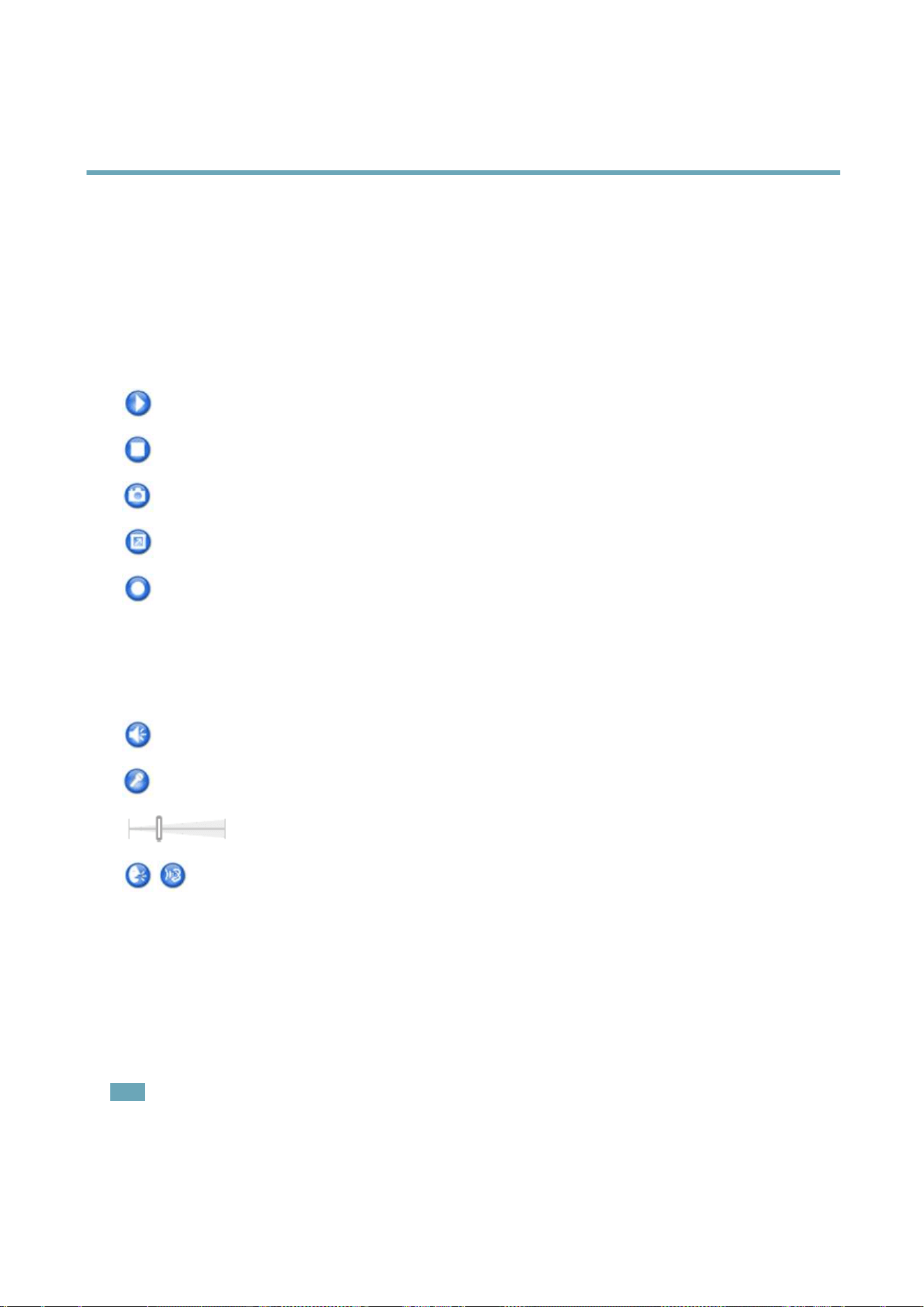
information.Thetoolbardisplaysthefollowingbuttons:
ThePlaybuttonconnectstotheAxisproductandstartsplayingamediastream.
TheStopbuttonstopsthemediastream.
TheSnapshotbuttontakesasnapshotofthevideoimage.Thelocationwheretheimageissavedcanbespecied
intheAMCControlPanel.
ClicktheViewFullScreenbuttonandthevideoimagewilllltheentirescreen.PressESC(Escape)onthecomputer
keyboardtocancelfullscreenview.
TheRecordbuttonisusedtorecordthecurrentvideostream.Thelocationwheretherecordingissavedcanbespeciedin
theAMCControlPanel.EnablethisbuttonfromLiveViewCong>ViewerSettings.
AMCAudioControls
AMCaudiobuttonscontrolthespeakersandmicrophoneconnectedtotheclientcomputer.Thebuttonsareonlyvisiblewhen
audioisenabled.
Speakerbutton—Clicktoturnthespeakersonoroff.
Microphonebutton–Clicktomuteorunmutethemicrophone.InSimplex-speakeronlymode,theMicrophoneandTalk
buttonsmustbothbeactivetosendaudiototheAxisproduct.Clickeitherbuttontostopaudiotransmission.
Usetheslidertocontrolthevolumeofthespeakersandthemicrophone.
Half-duplexmode
TheTalk/Listenbuttonisusedtoswitchbetweensendingandreceivingaudio.Thebuttoncanbecongured
fromtheAudiotabintheAMCControlpanel:
•Push-To-Talkmode:Clickandholdthebuttontotalk/send.Releasethebuttontolisten.
•Togglemode:Clickoncetoswitchbetweentalkingandlistening.
Simplex–speakeronlymode
Tosendaudio,theTalkandMicrophonebuttonsmustbothbeactive.Clickeitherbuttontostopaudio
transmission.
PTZControls
TheLiveViewpagealsodisplaysPan/Tilt/Zoom(PTZ)controls.Theadministratorcanenable/disablecontrolsforspeciedusersunder
SystemOptions>Security>Users.
Note
ThesecontrolsareavailableifdigitalPTZisenabledintheselectedviewareaorifaPTZdriverhasbeenuploaded.Formore
informationonviewareas,seeViewArea,onpage25.Formoreinformationonhowtouploadadriver,seeInstallingaPTZ
driver,onpage34.ToswitchbetweenthetwooptionsseePTZMode,onpage12.
14
AXISQ1614NetworkCamera
AccessingtheProduct
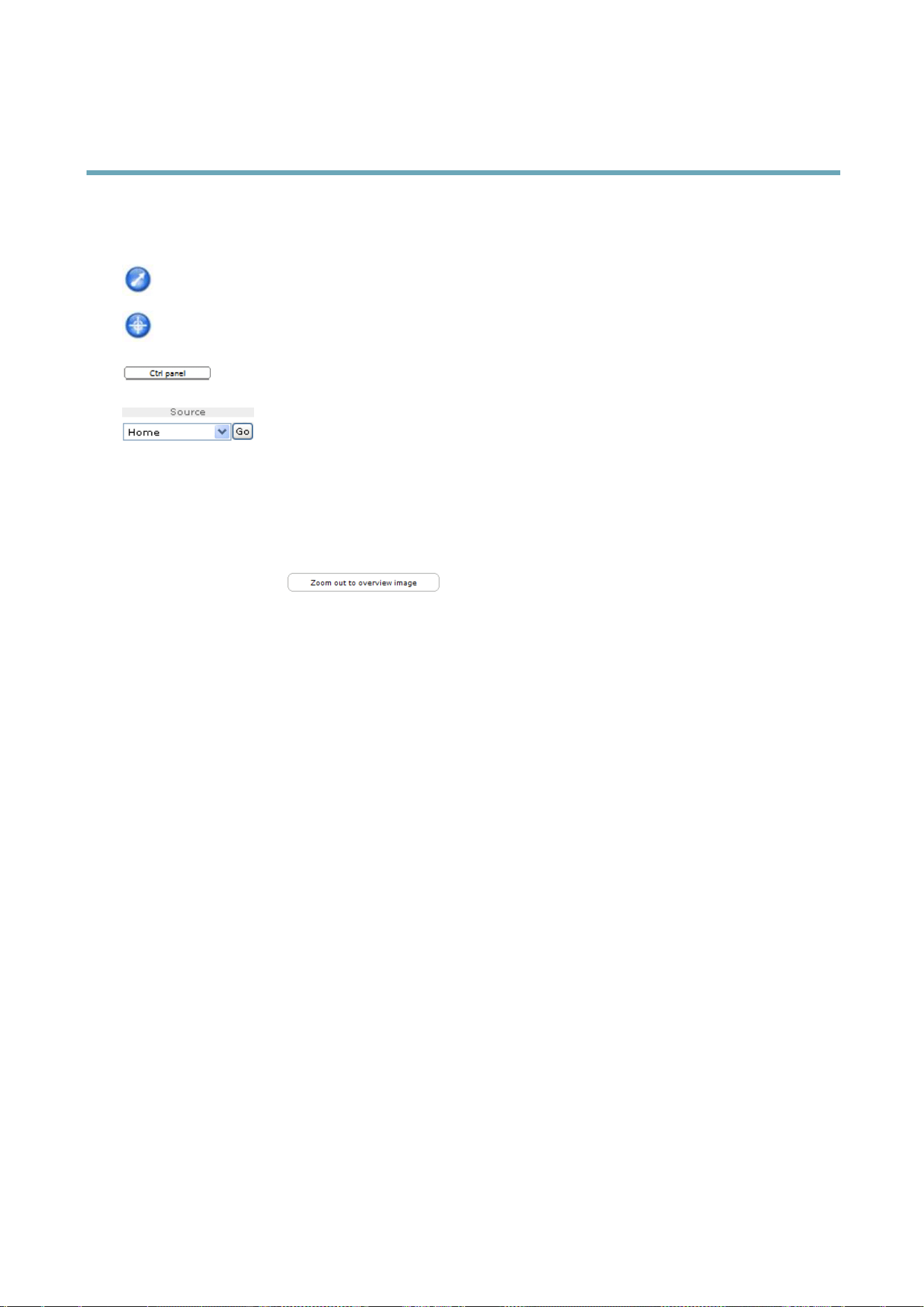
WiththePTZControlQueueenabledthetimeeachuserisincontrolofthePTZsettingsislimited.Clickthebuttonstorequestor
releasecontrolofthePTZcontrols.ThePTZControlQueueissetupunderPTZ>ControlQueue.
ClicktheEmulatejoystickmodebuttonandclickintheimagetomovethecameraviewinthedirectionofthe
mousepointer.
ClicktheCentermodebuttonandclickintheimagetocenterthecameraviewonthatposition.Thecentermode
buttoncouldalsobeusedtozoominonaspecicarea.Clickintheimageanddragtodrawarectanglesurrounding
theareatobemagnied.Tozoomout,rotatethemousewheel.
ClicktheCtrlpanelbuttontoopenthePTZcontrolpanelwhichprovidesadditionalPTZcontrols.
User-denedbuttonscanalsoappearintheControlpanel.SeeControls,onpage34.
SelectaPTZpresetpositiontosteerthecameraviewtothesavedposition.SeePresetPositions,
onpage33.
ClickingZoomouttooverviewimagewillsetthecameratotheminimumzoomposition.Inthisposition,thecamera
cannotpanortilt.
ThePTZcontrolscanbedisabledunderPTZ>Advanced>Controls,seeControls,onpage34.
15

AXISQ1614NetworkCamera
MediaStreams
MediaStreams
TheAxisproductprovidesseveralaudioandvideostreamformats.Yourrequirementsandthepropertiesofyournetworkwill
determinethetypeyouuse.
TheLiveViewpageintheproductprovidesaccesstoH.264andMotionJPEGvideostreams,audiostreamsandtothelistofavailable
streamproles.Otherapplicationsandclientscanaccessvideoandaudiostreamsdirectly,withoutgoingviatheLiveViewpage.
HowtoStreamH.264
ThevideocompressionstandardH.264makesgooduseofbandwidth,andcanprovidehighqualityvideostreamsatlessthan1Mbit/s.
Decidingwhichcombinationofprotocolsandmethodstousedependsonyourviewingrequirements,andonthepropertiesof
yournetwork.TheavailableoptionsinAXISMediaControlare:
UnicastRTP
Thisunicastmethod(RTPoverUDP)isused
forliveunicastvideo,especiallywhenitis
importanttoalwayshaveanup-to-datevideo
stream,evenifsomeimagesaredropped.
RTPoverRTSP
Thisunicastmethod(RTPtunneledoverRTSP)
isusefulasitisrelativelysimpletocongure
rewallstoallowRTSPtrafc.
RTPoverRTSPoverHTTP
Thisunicastmethodcanbeusedtotraverse
rewalls.Firewallsarecommonlyconguredto
allowtheHTTPprotocol,thusallowingRTPto
betunneled.
Unicastingisusedforvideo-on-demand
transmissionsothatthereisnovideotrafc
onthenetworkuntilaclientconnectsand
requeststhestream.
Notethatthereareamaximumof20
simultaneousunicastconnections.
MulticastRTP
Thismethod(RTPoverUDP)shouldbeusedforlivemulticastvideo.Thevideostreamisalways
up-to-date,evenifsomeimagesaredropped.
Multicastingprovidesthemostefcientusageofbandwidthwhentherearelargenumbersof
clientsviewingsimultaneously.Amulticastcannothowever,passanetworkrouterunlessthe
routerisconguredtoallowthis.ItisnotpossibletomulticastovertheInternet,forexample.
Notealsothatallmulticastviewerscountasoneunicastviewerinthemaximumtotalof20
simultaneousconnections.
AXISMediaControlnegotiateswiththeAxisproducttodeterminethetransportprotocoltouse.Theorderofpriority,listedinthe
AMCControlPanel,canbechangedandtheoptionsdisabled,tosuitspecicrequirements.
Note
H.264islicensedtechnology.TheAxisproductincludesoneH.264viewingclientlicense.Installingadditionalunlicensed
copiesoftheclientisprohibited.Topurchaseadditionallicenses,contactyourAxisreseller.
MJPEG
ThisformatusesstandardJPEGstillimagesforthevideostream.Theseimagesarethendisplayedandupdatedataratesufcient
tocreateastreamthatshowsconstantlyupdatedmotion.
TheMotionJPEGstreamusesconsiderableamountsofbandwidth,butprovidesexcellentimagequalityandaccesstoeveryimage
containedinthestream.TherecommendedmethodofaccessingMotionJPEGlivevideofromtheAxisproductistousetheAXIS
MediaControlinInternetExplorerinWindows.
AXISMediaControl(AMC)
AXISMediaControl(AMC)inInternetExplorerinWindowsistherecommendedmethodofaccessinglivevideofromtheAxisproduct.
16
AXISQ1614NetworkCamera
MediaStreams
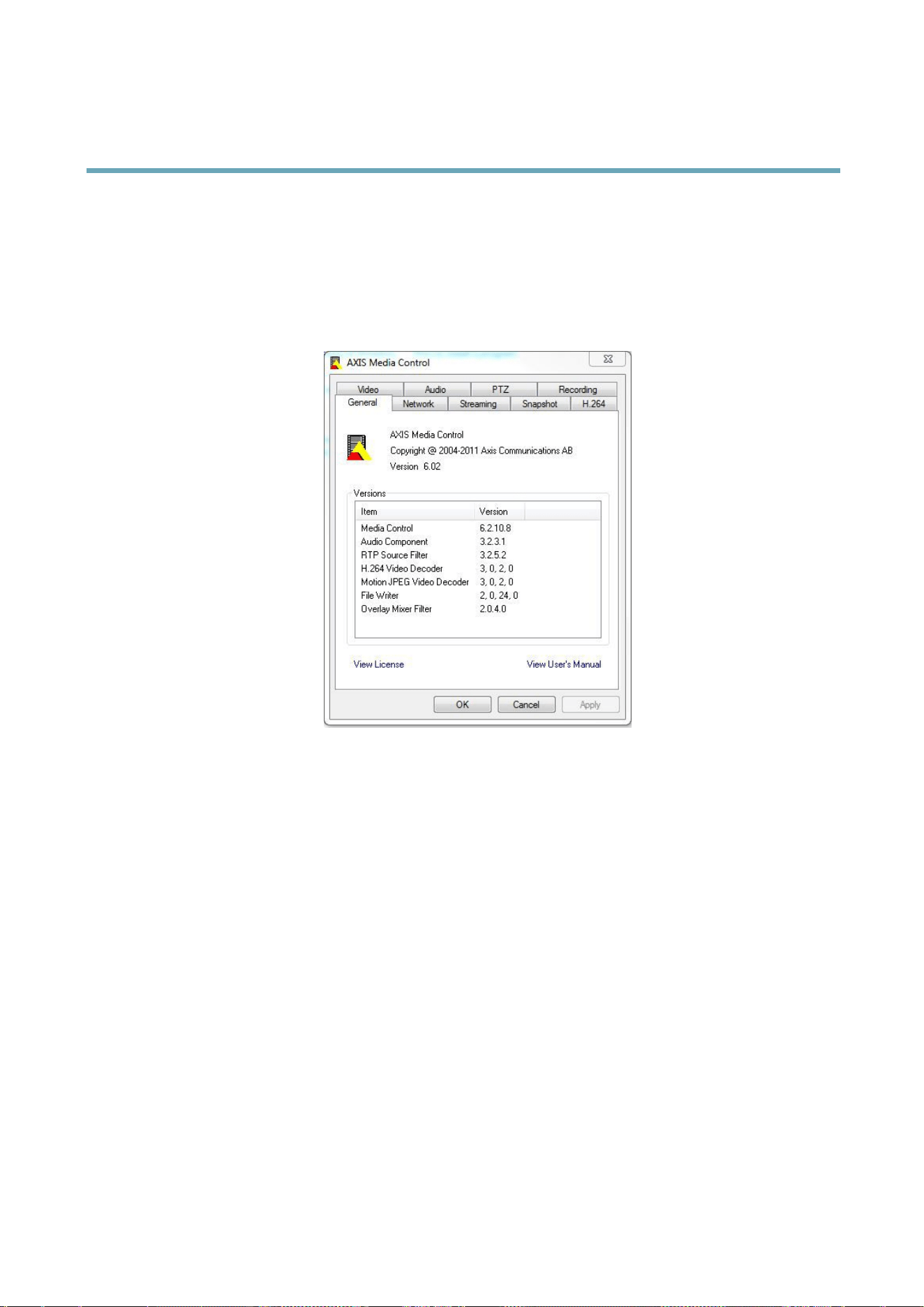
TheAMCControlPanelcanbeusedtocongurevariousvideoandaudiosettings.PleaseseetheAXISMediaControlUser’s
Manualformoreinformation.
TheAMCControlPanelisautomaticallyinstalledonrstuse,afterwhichitcanbecongured.OpentheAMCControlPanelfrom:
•WindowsControlPanel(fromtheStartmenu)
•Alternatively,right-clickthevideoimageinInternetExplorerandclickSettings.
AlternativeMethodsofAccessingtheVideoStream
YoucanalsoaccessvideoandimagesfromtheAxisproductinthefollowingways:
•MotionJPEGserverpush(ifsupportedbytheclient,Firefox,forexample).ThisoptionmaintainsanopenHTTPconnection
tothebrowserandsendsdataasandwhenrequired,foraslongasrequired.
•StillJPEGimagesinabrowser.Enterthepathhttp://<ip>/axis-cgi/jpg/image.cgi
•WindowsMediaPlayer.ThisrequiresAXISMediaControlandtheH.264decodertobeinstalled.Thefollowingpaths
canbeused:
-UnicastviaRTP:axrtpu://<ip>/axis-media/media.amp
-UnicastviaRTSP:axrtsp://<ip>/axis-media/media.amp
-UnicastviaRTSP,tunneledviaHTTP:axrtsphttp://<ip>/axis-media/media.amp
-Multicast:axrtpm://<ip>/axis-media/media.amp
•QuickTime
TM
.Thefollowingpathscanbeused:
-rtsp://<ip>/axis-media/media.amp
-rtsp://<ip>/axis-media/media.3gp
17

AXISQ1614NetworkCamera
MediaStreams
Note
•<ip>=IPaddess
•TheAxisproductsupportsQuickTime6.5.1andlater.
•QuickTimeaddslatencytothevideostream.
•ItmaybepossibletouseotherplayerstoviewtheH.264streamusingthepathsabove,althoughAxisdoesnotguarantee
this.
AccessingAudioStreams
TheLiveViewpageprovidesaccesstoaudiothroughAXISMediaControl;inadditionaudiocanbeaccessedinthefollowingways:
•VAPIX®ApplicationProgrammingInterface(API)Formoreinformation,visitwww.axis.com/developer
•WindowsMediaPlayersupportssimplexaudio.Thefollowingpathscanbeused:
-UnicastviaRTP:axrtpu://<ip>/axis-media/media.amp
-UnicastviaRTSP:axrtsp://<ip>/axis-media/media.amp
-UnicastviaRTSP,tunneledviaHTTP:axrtsphttp://<ip>/axis-media/media.amp
-Multicast:axrtpm://<ip>/axis-media/media.amp
•QuickTime
TM
supportsG.711andAACaudioencoding.Thefollowingpathscanbeused:
-rtsp://<ip>/axis-media/media.amp
-rtsp://<ip>/axis-media/media.3gp
•TheJavaappletsupportssimplexaudiowithG.711encoding.
18

AXISQ1614NetworkCamera
SettingUptheProduct
SettingUptheProduct
TheAxisproductcanbeconguredbyuserswithadministratororoperatorrights.Toopentheproduct’sSetuppages,clickSetupin
thetopright-handcorneroftheLiveViewpage.
•Administratorshaveunrestrictedaccesstoallsettings.
•OperatorshaveaccesstoallsettingsexceptSystemOptions
Seealsotheonlinehelp
.
BasicSetup
BasicSetupprovidesshortcutstothesettingsthatshouldbemadebeforeusingtheAxisproduct:
1.Users.Seepage48.
2.TCP/IP.Seepage51.
3.Date&Time.Seepage50.
4.VideoStream.Seepage20.
5.Focus.Seepage27
6.AudioSettings.Seepage27.
TheBasicSetupmenucanbedisabledfromSystemOptions>Security>Users.
FocusAdjustment
ThefocuscanbeadjustedunderBasicSetup>Focus.Followtheon-screeninstructionstoadjustthefocus.Forfurtherinformation
aboutfocus,refertotheproduct’sInstallationGuide.
19
AXISQ1614NetworkCamera
VideoandAudio
VideoandAudio
Thevideoandaudiosettingscanbeusedtooptimizevideoandaudioquality.Youcancongurethefollowing:
•Videostreamsettings.Seepage20.
•Streamproles.Seepage22.
•Camerasettings.Seepage22.
•Viewarea.Seepage25.
•Overlayimage.Seepage25.
•Privacymask.Seepage27.
•Focus.Seepage27.
•Audiosettings.Seepage27.
•Audioclips.Seepage29.
VideoStream
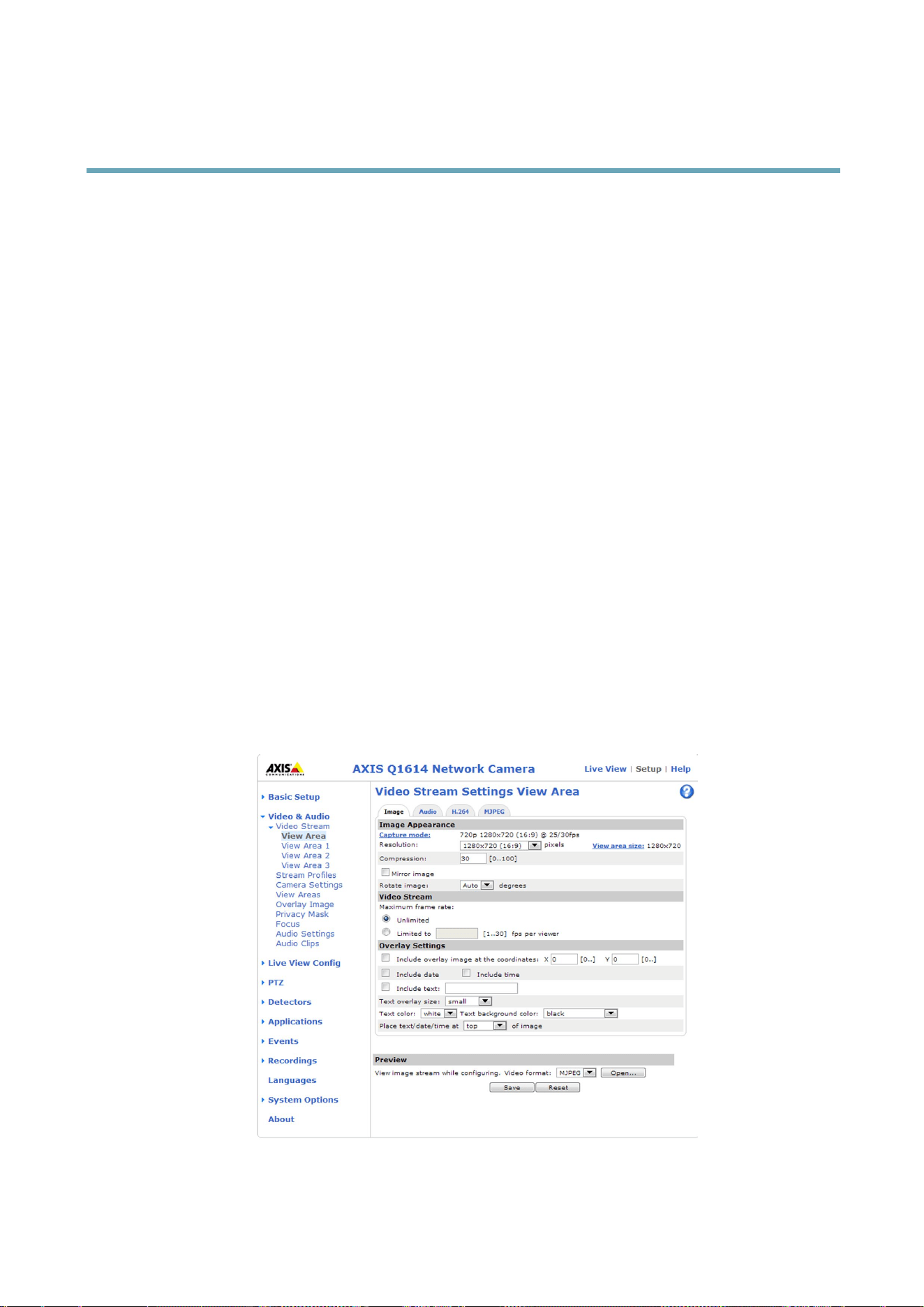
YoucandenethefollowingvideostreamsettingsfromVideo&Audio>VideoStream:
•Image.Seepage21.
•Audio.Seepage27.
•H.264.Seepage21.
•MJPEG.Seepage21.
20

AXISQ1614NetworkCamera
VideoandAudio
PixelCounter
Thepixelcountershowsthenumberofpixelsinanareaoftheimage.Thepixelcounterisusefulinsituationswherethereisa
requirementthattheimageisacertainsize,forexampleinfacerecognition.
Thepixelcountercanbeaccessedfrom:
•Video&Audio>VideoStream.UnderPreview,clickOpenandselecttheShowpixelcounteroptiontoenablethe
rectangleintheimage.Usethemousetomoveandresizetherectangle,orenterthenumberofpixelsintheWidth
andHeighteldsandclickApply.
•Video&Audio>Focus.SelecttheShowpixelcounteroptiontoenabletherectangleintheimage.Usethemouseto
moveandresizetherectangle,orenterthenumberofpixelsintheWidthandHeighteldsandclickApply.
•TheLiveViewpageinInternetExplorerinWindows.Right-clickintheimageandselectPixelcounter.Usethemouse
tomoveandresizetherectangle.
Image
ThedefaultimagesettingscanbeconguredunderVideo&Audio>VideoStream.SelecttheImagetab.
Thefollowingsettingsareavailable:
•Resolution.Selectthedefaultresolution.
•Compression.Thecompressionlevelaffectstheimagequality,bandwidthandlesizeofsavedimages;thelowerthe
compression,thehighertheimagequalitywithhigherbandwidthrequirementsandlargerlesizes.
•Rotateimage.Ifrequired,theimagecanberotated.
•Mirror.Ifrequired,theimagecanbemirrored.
•Maximumframerate.Toavoidbandwidthproblems,theframerateallowedtoeachviewercanbeLimitedtoaxed
amount.Alternatively,theframeratecanbesetasUnlimited,whichmeanstheAxisproductalwaysdeliversthehighest
frameratepossibleunderthecurrentconditions.
•Overlaysettings.SeeOverlay,onpage25.
ClickSavetoapplythenewsettings.
H.264
H.264,alsoknownasMPEG-4Part10/AVC,isavideocompressionstandardthatprovideshighqualityvideostreamsatlowbitrates.
AnH.264videostreamconsistsofdifferenttypesofframessuchasI-framesandP-frames.AnI-frameisacompleteimagewhereas
P-framesonlycontainthedifferencesfrompreviousframes.
TheGOVlengthisthenumberofframesbetweentwoconsecutiveI-frames.IncreasingtheGOVlengthmaysaveconsiderablyon
bandwidthrequirementsinsomecases,butmayalsohaveanadverseaffectonimagequality.
ThebitratecanbesetasVariableBitRate(VBR)orConstantBitRate(CBR).VBRadjuststhebitrateaccordingtotheimage
complexity,usingupmorebandwidthforincreasedactivityintheimage,andlessforlowerimageactivity.CBRallowsyoutoseta
xedTargetbitratethatconsumesapredictableamountofbandwidth.Asthebitratewouldusuallyneedtoincreaseforincreased
imageactivity,butinthiscasecannot,framerateandimagequalityareaffectednegatively.Topartlycompensateforthis,itis
possibletoprioritizeeitherframerateorimagequality.Notsettingaprioritymeansthatframerateandimagequalityareequally
affected.Youmustsaveyoursettingsbeforetheycantakeeffect.
Thecurrentbitratecanbesettoappearastextoverlay.Todothis,selecttheIncludetextcheckboxoptionunderOverlay
Settingsandenterthemodier#bintheeld.
MJPEG
Sometimestheimagesizeislargeduetolowlightorcomplexscenery.Adjustingthemaximumframesizehelpstocontrolthe
bandwidthandstorageusedbytheMotionJPEGvideostreaminthesesituations.SettingtheframesizetotheDefaultsetting
21

AXISQ1614NetworkCamera
VideoandAudio
providesconsistentlygoodimagequalityattheexpenseofincreasedbandwidthandstorageusageinlowlight.Limitingtheframe
sizeoptimizesbandwidthandstorageusage,butmaygivepoorimagequality.Topreventincreasedbandwidthandstorageusage,
themaximumframesizeshouldbesettoanoptimalvalue.
StreamProles
Astreamproleisasetofpredenedstreamsettingsincludingresolution,compression,framerateandoverlaysettings.Stream
prolescanbeused:
•Whensettinguprecordingusingactionrules.SeeEvents,onpage41.
•Whensettingupcontinuousrecording.SeeContinuousRecording,onpage46.
•IntheLiveViewpage–selectthestreamprolefromtheStreamproledrop-downlist.
Forquicksetup,useoneofthepredenedstreamproles.Eachpredenedprolehasadescriptivename,indicatingitspurpose.If
required,thepredenedstreamprolescanbemodiedandnewcustomizedstreamprolescanbecreated.
Tocreateanewproleormodifyanexistingprole,gotoSetup>Video&Audio>StreamProles.
ToselectadefaultstreamprolefortheLiveViewpage,gotoSetup>LiveViewCong.
CameraSettings
TheVideo&Audio>CameraSettingspageprovidesaccesstoadvancedimagesettingsfortheAxisproduct.
CaptureMode
CapturemodedenesthemaximumresolutionandmaximumframerateavailableintheAxisproduct.Acapturemodewithalarge
maximumresolutionhasareducedmaximumframerateandviceversa.
Thecapturemodesettingalsoaffectsthecamera’sangleofviewastheeffectivesizeoftheimagesensordiffersbetweencapture
modes.
Capturemodeissetthersttimetheproductisaccessed.SelectthedesiredcapturemodeandclickOK.
Changingcapturemodewhentheproducthasbeenconguredisnotrecommendedasmostothersettingswillbeeitherremoved
orreset,forexample:
1.GotoSetup>Video&Audio>CameraSettings.
2.Selectthenewcapturemode.
3.ClickSave.
4.Reviewandrecongureallsettings,forexample:
-Viewarea
-Streamproles
-PTZsettingsincludingpresetpositionsandguardtours
-Gatekeeper
-Motiondetectionwindows
-Privacymasks
-Imageoverlays
-Exposurezones
22

AXISQ1614NetworkCamera
VideoandAudio
-Whitebalancewindows
-Actionrules
-Settingsinuploadedapplications
ImageAppearance
IncreasingtheColorlevelincreasesthecolorsaturation.Thevalue100givesmaximumcolorsaturation.Thevalue0givesa
blackandwhiteimage.
TheimageBrightnesscanbeadjustedintherange0–100,whereahighervalueproducesabrighterimage.
IncreasingtheSharpnesscanincreasebandwidthusage.Asharperimagemightincreaseimagenoiseespeciallyinlowlight
conditions.Alowersettingreducesimagenoise,butthewholeimagewillappearlesssharp.
TheContrastchangestherelativedifferencebetweenlightanddark.Itcanbeadjustedusingtheslidebar.
WhiteBalance
Whitebalanceisusedtomakecolorsintheimageappearthesameregardlessofthecolortemperatureofthelightsource.TheAxis
productcanbesettoautomaticallyidentifythelightsourceandcompensateforitscolor.Alternatively,selectthetypeoflight
sourcefromthedrop-downlist.Foradescriptionofeachavailablesetting,seetheonlinehelp
.
ThewhitebalancewindowisenabledfortheAutomaticandAutomaticoutdooroptionsthatappearintheWhitebalancedrop-down
list.Selectoneoftheoptionsfromthedrop-downlisttosetthewhitebalancewindowproperties.SelectAutomatictousethe
defaultsettingsfortheAutomaticandAutomaticoutdooroptions(intheWhitebalancedrop-downlist).SelectCustomtomanually
setareferencewindowforwhitebalanceintheviewarea.
WideDynamicRange
Widedynamicrange(WDR-DynamicCapture)canimprovetheexposurewhenthereisaconsiderablecontrastbetweenlightand
darkareasintheimage.EnableWDRinintensebacklightconditions.DisableWDRinlowlightconditionsforoptimalexposure.
Important
UseWDRincombinationwithautomaticexposurecontrol.Otherexposuresettingscouldgiveundesirableresults.
UsetheHighlightsrecoveryslidertoimprovetheimageappearancebydecreasingbrightnessinthebrightpartsoftheimage.
UsetheShadowsrecoveryslidertoimprovetheimageappearancebyincreasingbrightnessinthedarkpartsoftheimage.
LightnderMode
SelecttheLightnderModeoptionfromthedrop-downlistfromCameraSettings>WideDynamicRange.Thismodeenables
heightenedvisibilityintheproduct,andbetterimagequalityinlowlightconditionssuchasinparkinglots,citysurveillance
andconstructionsites.
ExposureSettings
Conguretheexposuresettingstosuittheimagequalityrequirementsinrelationtolighting,framerateandbandwidth
considerations.
Exposurevalue-Clickinthebartone-tunetheexposure.
Exposurecontrol-Thesesettingsisusedtoadapttotheamountoflightused.Automaticisthedefaultsettingscanbeusedinmost
situations.Theshutterspeedisautomaticallysettoproduceoptimumimagequality.Flicker-free50or60Hzisusedtoremove
ickerwhichcanbecausedbyuorescentandotherlightsources.TheHoldcurrentoptionlocksthecurrentexposuresettings.
EnableBacklightcompensation-Enablethisoptionifabrightspotoflight,forexamplealightbulb,causesotherareasin
theimagetoappeartoodark.
23

AXISQ1614NetworkCamera
VideoandAudio
Exposurezones-Thissettingsdetermineswhichpartoftheimageisusedtocalculatetheexposure.Formostsituations,theAuto
settingcanbeused.Forparticularrequirement,selectapredenedarea.
Shutter&Gain
Theshutterandgainsettingsaffecttheamountofmotionblurandnoiseintheimage.Toadapttodifferentlighting,available
storagespaceandbandwidth,itisoftennecessarytoprioritizeeitherlowmotionblurorlownoise.TheAxisproductallows
usingdifferentprioritizationinnormallightandinlowlight.
Shutterspeedisrelatedtotheamountoftimetheshutterisopenedandismeasuredinseconds(s).Aslowshutterspeedallows
morelighttoreachthesensorandcanhelpproduceabrighterimageinlowlightsituations.Ontheotherhand,aslowshutter
speedcancausemovingobjectstoappearblurry.
SetShutterto
•Autotosettheshutterspeedautomatically.Ifrequired,useMaxshuttertolimittheshutterspeedtopreventtheframe
ratefrombeingreduced.Forexample,toget30fps,setMaxshutterto1/30.
•Fixedtouseaxedshutterspeed.
Gain,measuredindecibel(dB),istheamountofamplicationappliedtotheimage.Ahighgainmayprovideabetterimageinlow
lightsituationsbutwillincreasetheamountofimagenoise.
SetGainto
•Autotosetthegainautomatically.Ifrequired,useMaxgaintolimittheappliedgain.
•Fixedtouseaxedgain.
WhenShutterandGainarebothsettoAuto,itispossibletosetthePrioritybetweenlowmotionblurandlownoisemanuallyandto
useadifferentPriorityinNormalLightandinLowLight.
Example
Consideranareawherepeopleorvehiclesmoveduringtheday,butwherethereshouldbenomovementsduringnight.Tobeableto,
forexample,recognizefacesorlicenseplates,movethenormallightpriorityslidertowardlowmotionblur.Atnighttime,motion
detectionismoreimportantthanidentication.Motionblurisacceptableandsincelowlightcancausealotofnoise,move
thelowlightpriorityslidertowardlownoise.
Example
Ifstoragespaceorbandwidthislimited,tryusingalowergain.Thiswillreduceimagenoiseandproducesmallerimageles.
Irisconguration
Iriscongurationshowsthecurrentcongurediristype.Donotchangetheiriscongurationunlessthelenshasbeenchanged,
seeReplacingthelens,onpage9.
Irisadjustment
SelectEnableautomaticirisadjustmenttoautomaticallycompensateforchanginglightconditions.Thisoptionisnotavailable
ifaxedirisisused.
UsetheIrisadjustmentslidertosetthepreferredF-value.Thescalerepresentstheamounttheirisisopen.Ifsetto0,theiris
isopenedasmuchaspossible.Ifsetto100,theirisisclosedasmuchaspossible.TheactualF-valueisshownbelowthe
slider.Ifautomaticirisadjustmentisenabled,theiriswillstayatthispositionaslongaslightconditionsarefavorable.Iflight
conditionschange,theiriswilladjustitselftothebestirissettings.Ifautomaticirisadjustmentisdisabled,theiriswilllockon
thesetpositionregardlessoflightconditions
24

AXISQ1614NetworkCamera
VideoandAudio
Day/Night
TheIRcutlterpreventsinfrared(IR)lightfromreachingtheimagesensor.Inpoorlightingconditions,forexampleatnight,orwhen
usinganexternalIRlamp,settheIRcutltertoOff.Thisincreaseslightsensitivityandallowstheproductto“see”infraredlight.The
imageisshowninblackandwhitewhentheIRcutlterisoff.
IfusingautomaticExposurecontrol,settheIRcutltertoAutotoautomaticallyswitchbetweenOnandOffaccordingtothe
lightingconditions.
TheDay/Nightshiftlevelbarhelpsdeterminewhenthecamerawillshiftfromdaymodetonightmode.Normally,thecamera
automaticallychangesmodefromdaytonightwhenverydark(level100intheslider).BysettingDay/Nightshiftleveltoa
lowervalue,thecamerawillchangetonightmodeearlier.
ViewArea
Note
ThisfeatureisavailableonlyifdigitalPTZwasselectedwhenconguringtheproductforthersttimeorafterresetting
tofactorydefault.
Aviewareaisacroppedpartofthefullview.TheviewareaistreatedasavideosourceinLiveViewandhasitsownvideo
streamandPTZsettings.
Whensettingupaviewareaitisrecommendedthatthevideostreamresolutionisthesamesizeasorsmallerthantheviewarea
size.Settingthevideostreamresolutionlargerthantheviewareasizeimpliesdigitallyscaledupvideoaftersensorcapture,
requiringmorebandwidthwithoutaddingimageinformation.
Toenable,gotoVideo&Audio>CameraSettingsandselectEnableViewArea.
Toconguretheviewarea:
1.GotoVideo&Audio>ViewArea.
2.SelectanAspectratioandaVideostreamresolution.
3.Usethemousetomoveandresizetheviewarea.
4.SelectEnablePTZtoenabledigitalPTZfortheviewarea.
5.ClickSavetosavethesettings.
Note
ThePTZfunctionalityisusefulduringinstallationoftheAxisproduct.Useaviewareatocropoutaspecicpartofthe
fullview.
Overlay
Overlaysareusedtoprovideextrainformation,forexampleforforensicvideoanalysisorduringproductinstallationand
conguration.Overlaysaresuperimposedoverthevideostream.
Anoverlaytextcandisplaythecurrentdateandtime,oratextstring.Whenusingatextstring,modierscanbeusedtodisplay
informationsuchasthecurrentbitrateorthecurrentframerate.Forinformationaboutavailablemodiers,seeFileNaming&
Date/TimeFormatsintheonlinehelp.
Itisalsopossibletodisplaytextwhenanactionruleistriggered,seeUsingOverlayTextinanActionRule.
Toenableoverlays:
1.GotoVideo&Audio>VideoStreamandselecttheImagetab.
2.Toincludeanoverlayimage,selectIncludeoverlayimageatthecoordinates.Theoverlayimagemustrstbeuploadedto
theAxisproduct,seeOverlayImage.
25

AXISQ1614NetworkCamera
VideoandAudio
3.Toincludedateandtime,selectIncludedateandIncludetime.
4.Toincludeatextstring,selectIncludetextandenterthetextintheeld.Modierscanbeused,seeFileNaming&
Date/TimeFormatsintheonlinehelp
.
5.Denetextoverlaycharacteristicsintherelevantelds.
6.ClickSave.
Tomodifythedateandtimeformat,gotoSystemOptions>Date&Time.SeeDate&Time,onpage50.
OverlayImage
Anoverlayimageisastaticimagesuperimposedoverthevideostream.Theimage,forexamplecompanylogo,isusedtoprovide
extrainformationortomaskapartoftheimage.
Sinceitisstatic,thepositionandsizeofanoverlayimagewillremainthesameregardlessofresolutionandPan/Tilt/Zoom
movements.Tosetupadynamicmask,whichwillalwaysmaskthespeciedpartofmonitoredarea,seePrivacyMask,onpage27
Touseanoverlayimage,theimagemustrstbeuploadedtotheAxisproduct:
1.GotoVideo&Audio>OverlayImage.
2.ClickBrowseandbrowsetothele.
3.ClickUpload.
4.SelecttheimagetousefromtheUseoverlayimagelist.
5.ClickSave.
Todisplaytheoverlayimage:
1.GotoVideo&Audio>VideoStreamandselecttheImagetab.
2.UnderOverlaySettings,selectIncludeoverlayimageatthecoordinatesandentertheXandYcoordinates.
3.ClickSave.
Forinformationaboutsupportedimageformats,seetheonlinehelp
.
UsingOverlayTextinanActionRule
Actionrules,seepage41,candisplayanoverlaytextwhentheruleistriggered.Thetextcanbeusedtoprovideinformationfor
forensicvideoanalysis,notifysurveillanceoperatorsorvalidatetriggersandactionsduringproductinstallationandconguration.
Todisplayoverlaytextwhenanactionruleistriggered,themodier#Dshouldbeusedasdescribedbelow.Whentheruleis
triggered,#Dwillbereplacedbythetextspeciedintheactionrule.
Startbyenablingoverlaytextinthevideostream:
1.GotoVideo&Audio>VideoStreamandselecttheImagetab.
2.UnderOverlaySettings,selectIncludetext.
3.Enterthemodier#Dand,optionally,additionaltextwhichwillbedisplayedalsowhentheactionruleisnotactive.
Createtheactionrule:
1.GotoEvents>ActionRules
2.ClickAddtocreateanewrule.
3.SelectaTriggerand,optionally,aScheduleandAdditionalconditions.Seetheonlinehelpfordetails.
26

AXISQ1614NetworkCamera
VideoandAudio
4.FromtheActionslist,selectOverlayText
5.EnterthetexttodisplayintheTexteld.Thisisthetextthat#Dwillbereplacedby.
6.SpecifytheDuration.Thetextcanbedisplayedwhiletheruleisactiveorforaxednumberofseconds.
Example
Todisplaythetext“Motiondetected”whenmotionisdetected,enter#DintheIncludetexteldandenter“Motiondetected”in
theTexteldwhensettinguptheactionrule.
PrivacyMask
Aprivacymaskisanareaofsolidcolorthatprohibitsusersfromviewingpartsofthemonitoredarea.Privacymaskscannotbe
bypassedviatheVAPIX®ApplicationProgrammingInterface(API).
ThePrivacyMaskList(Video&Audio>PrivacyMask)showsallthemasksthatarecurrentlyconguredintheAxisproductand
indicatesiftheyareenabled.
Youcanaddanewmask,re-sizethemaskwiththemouse,chooseacolorforthemask,andgivethemaskaname.
Formoreinformation,seetheonlinehelp
Important
Addingmanyprivacymasksmayaffecttheproduct’sperformance.
Focus
YoucanfocustheAxisproductunderVideo&Audio>Focus.Formostapplications,theadjustmentsontheBasictabaresufcient.
Ifrequired,additionaladjustmentscanbemadeontheAdvancedtab.Beforefocusing,alwaysclickOpeniristoopentheiristoits
maximum.Thisgivesthesmallestdepthofeldandthusbestconditionsforcorrectfocusing.ClickEnableiriswhennishedfocusing.
Basic
Followtheon-screeninstructionsontheBasictabtoadjustzoomandfocus.Thepixelcounterisusedtodeterminethenumberof
pixelsinanareaoftheimage,forexampletoensurethattheimagesizefulllsspecicrequirements.Topositionthepixelcounter,
clickonthetextanddragthewindowtothedesiredposition.
Note
•Thebackfocus(step2)shouldonlyberesetifthecamerahasbeenfocusedpreviously.
•Setfocusaspreciselyaspossibleusingthefocuspulleronthelens(step3)beforestartingtheautomaticne-tuning(step4).
•Ifthecameraisplacedsothatitisdifculttolookattheimageandmovethepullersatthesametime,youcanusethe
FocusAssistanttofocusthecamera;forinstructions,seetheInstallationGuidesuppliedwiththeproduct.
Advanced
Thetoolsonthispagecanbeusedtondtheoptimalfocusposition.Alwaysopentheirisbeforefocusingandenableitwhennished
focusing.FocusismeasuredinthepartoftheimagecoveredbytheFocuswindow.Usethemousetomoveandresizethewindow
andthenclickFine-tunefocusautomatically.Ifneeded,clickintheFocuspositionbaroronthearrowsattheendsofthebar,to
furtheradjustthefocus.Thebuttons<and>movethefocuspositiononestepineitherdirection.Thebuttons<<and>>movethe
focuspositionmultiplestepsineitherdirection.Clickingonthebarsetsfocustothatposition.Ifthecameraisnotfocusedafter
completingtheaboveinstructions,trytheFullrangefocusscan.Thescan,whichcantakeseveralminutes,transformsthefocus
positionbartoagraphwherepeaksindicatethebestfocuspositions.Clickinthegraphtosetfocustothedesiredposition.
AudioSettings
TheaudiofunctionalityforeachvideostreamisenabledunderVideo&Audio>VideoStream>Audio.
27

AXISQ1614NetworkCamera
VideoandAudio
AudioModes
TheAxisproductsupportsthefollowingaudiomodes:
Fullduplex-Simultaneoustwo-wayaudioallowingtheAxisproducttotransmitandreceiveaudioatthesametime.Thereisno
echocancellation;iffeedbackloopsappear,trymovingthemicrophoneorthespeaker.
Half-duplex-AudiocanbetransmittedtoandfromtheAxisproductbutonlyinonedirectionatatime.Totransmitaudiousingthe
LiveViewpage,usetheTalkandListenbuttons,seeAMCAudioControls,onpage14.
Simplex—speakeronly-AudioistransmittedfromaclienttotheAxisproductandcanbeplayedbyaspeakerconnected
totheproduct.TotransmitaudiousingtheLiveViewpage,theTalkandMicrophonebuttonsmustbothbeactive,seeAMC
AudioControls,onpage14.
Simplex—microphoneonly-AudiocapturedbytheproductmicrophoneistransmittedfromtheAxisproducttooneormoreclients.
Tosettheaudiomode,gotoVideo&Audio>AudioSettingsandselectthedesiredmodefromtheAudiomodedrop-downlist.
AudioInput
AnexternalmicrophoneoralinesourcecanbeconnectedtotheAudio-inconnector.ConguretheaudioinputsettingsunderVideo
&Audio>AudioSettings.
Note
Theinternalmicrophoneisusedbydefault;theexternalmicrophoneisusedwhenconnected.Itispossibletodisablethe
internalmicrophonebyconnectingaplugtothemicinput.
Note
IfusingLineinamonocontactmustbeused.Signalontipandgroundonsleeve.
SelectMicrophonetouseanexternalmicrophoneorLinetouseaLineindevice,e.g.anaudiomixerformultiplemicrophones
oramicrophonewithabuilt-inamplier,asaudiosource.
TheMicrophonepoweroptionprovidesDCpowerforanexternalmicrophone.Microphonepowershouldonlybeusedwith
microphonesthathavenobatteryandwhenusingtheinternalmicrophone.Thissettingshouldnotbeenabledwhenusingadynamic
orbatterypoweredmicrophone.Microphonepowerwillnotharmthemicrophone;ifyouareuncertain,tryswitchingitoffandon.
Touseaprofessionalmicrophonerequiring48Vphantompower,youneedanexternalpowersupplyandabalanced-unbalanced
converter(audiotransformer)inbetween.
UsetheInputgaintocontrolthevolume(dBFullScale)oftheaudioinput.Ifthesoundistoolow,chooseahigherdB,toamplify
thesound.Ifthesoundistoohigh,choosealowerdB.TheLevelbargivesavisualrepresentationoftheaudiosignallevelindB
relativetothefull-scaleinputlevel.
•Green—thesignalisatagoodlevel.
•Yellow—thesignalisbecomingdistorted.
•Red—thesignalisdistorted.
UsetheEncodingoptiontoselectdigitalaudioencodingformat.
•AACrequiresalicenseforbothencodinganddecoding.AACistheleastcomplicatedandmostwidelyusedcodec.If
achievingthebestpossibleaudioqualityisapriority,AACistherecommendedcodectouse.AnAAClicenseisincluded
intheAxisproduct.
•G711isanunlicensedstandardcodecthatisusefulwhenintegratingaudiointoaVoIPsystem
•G726isanunlicensedspeechcodecthatismostcommonlyusedwithinthesecurityindustry.
TheSampleratedenesthenumberoftimespersecondthesoundissampled.Ahighersampleratewillprovidebetteraudio
quality,butalsorequiresagreaterbandwidth.
28

AXISQ1614NetworkCamera
VideoandAudio
SettherequiredBitratedependingontheselectedencoding.Ahigherbitratewillgivebetteraudioquality.Alowerbitrate
mayhavelatencyordelay,butwillrequirelessbandwidth.
Formoreinformationaboutthesesettings,pleaseseetheonlinehelp
.
AudioOutput
AnexternalspeakercanbeconnectedtotheAudio-outconnector(abuilt-inamplierisrequiredforthis).Theoutputcanbe
connectedtoanotheramplierwithspeakers.Astereoconnectormustbeusedfortheaudioout.
ConguretheaudiooutputsettingsunderVideo&Audio>AudioSettings.
Outputgain-Controlthevolume(dBFullScale)ofthelineaudiooutput.Ifthesoundistoolow,chooseahigherdB.Ifthe
soundistoohigh,choosealowerdB.
AudioClips
AnaudioclipisasoundlethatcanbeplayedwheneventsoccurordirectlyfromtheLiveViewpage.Theaudioclipmustrstbe
uploadedtotheAxisproductorrecordedbyamicrophoneconnectedtotheproduct.
Toadd,download,modifyorremoveaudioclips,gotoVideo&Audio>AudioClips.Formoreinformationseetheonlinehelp.
ToconguretheAxisproducttoplayaudioclipswhenaneventoccurs,anactionrulemustbesetup.Formoreinformation,see
Events,onpage41.
Note
Audioclipscannotbeusediftheproduct’saudiofunctionalityisenabled.TheaudiofunctionalityisenabledontheAudio
tabunderVideo&Audio>VideoStream.
29
AXISQ1614NetworkCamera
LiveViewCong
LiveViewCong
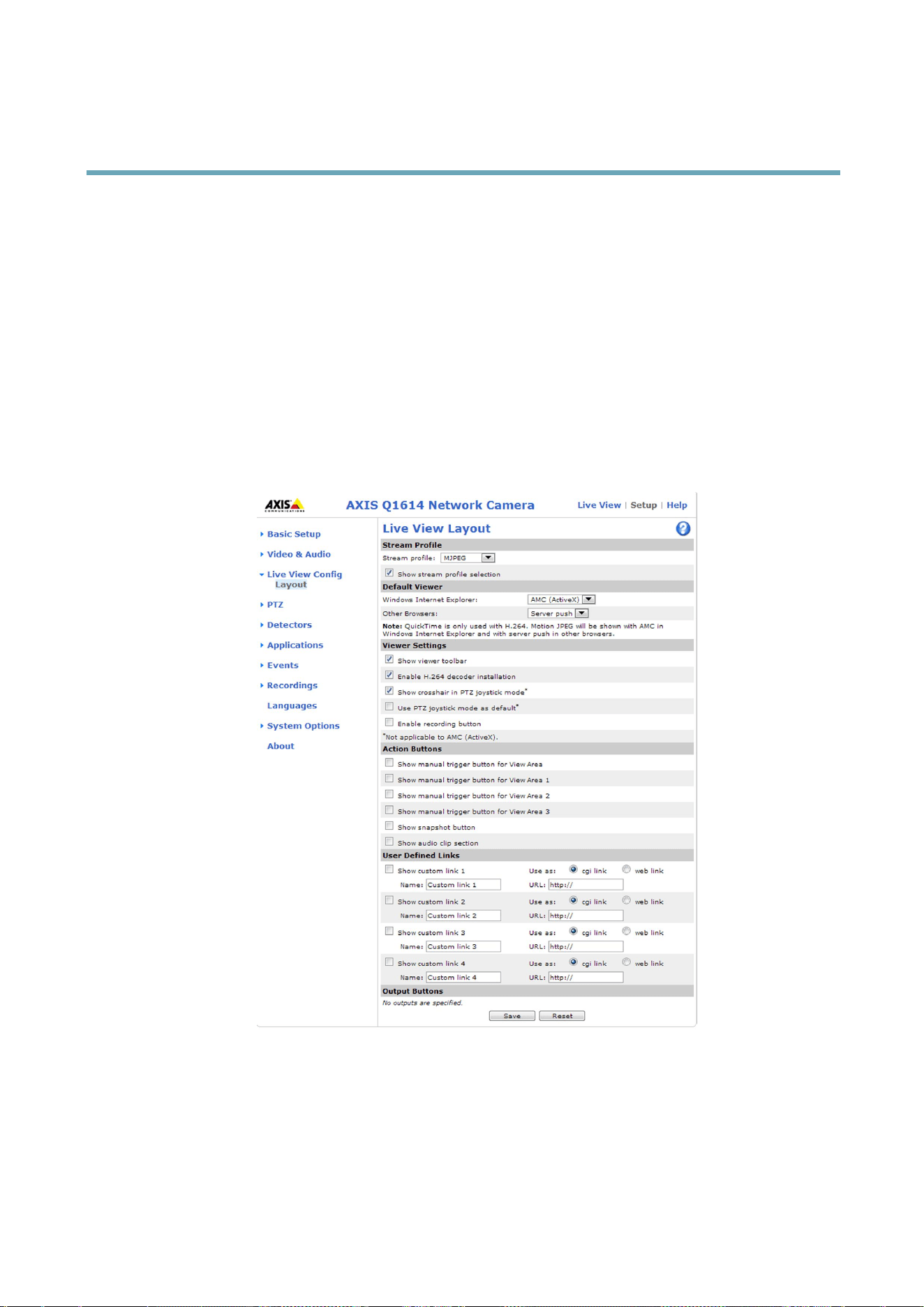
YoucancustomizetheLiveViewpageandalterittosuityourrequirements.Itispossibletodenethefollowingfeaturesof
theLiveViewpage.
•StreamProle.Seepage22.
•DefaultViewerforBrowser.Seepage30.
•ViewerSettings.Seepage31.
•ActionButtons.ThesearethebuttonsdescribedinControlsontheLiveViewPage,onpage13.
•UserDenedLinks.Seepage31.
•OutputButtons.Seepage31.
DefaultViewerforBrowsers
FromLiveViewCong>DefaultViewerselectthedefaultmethodforviewingvideoimagesinyourbrowser.Theproductattempts
toshowthevideoimagesintheselectedvideoformatandviewer.Ifthisisnotpossible,theproductoverridesthesettingsand
selectsthebestavailablecombination.
30

AXISQ1614NetworkCamera
LiveViewCong
BrowserViewerDescription
AMC
RecommendedviewerinInternetExplorer(H.264/MotionJPEG).
QuickTime
H.264.
Javaapplet
AslowerimagingalternativetoAMC(MotionJPEG).Requiresoneofthe
followinginstalledontheclient:
•JVM(J2SE)1.4.2orhigher.
•JRE(J2SE)5.0orhigher.
WindowsInternetExplorer
StillimageDisplaysstillimagesonly.ClicktheRefreshbuttoninyourbrowsertoviewa
newimage.
ServerPush
Recommendedviewerforotherbrowsers(MotionJPEG).
QuickTime
H.264.
Javaapplet
AslowerimagingalternativetoServerPush(MotionJPEGonly).
Otherbrowsers
StillimageDisplaysstillimagesonly.ClicktheRefreshbuttoninyourbrowsertoviewa
newimage.
Formoreinformation,pleaseseetheonlinehelp.
ViewerSettings
Tocongureoptionsfortheviewer,gotoLiveViewCong>ViewerSettings.
•SelectShowviewertoolbartodisplaytheAXISMediaControl(AMC)ortheQuickTimeviewertoolbarunderthevideo
imageinyourbrowser.
•H.264decoderinstallation.TheadministratorcandisableinstallationoftheH.264decoderincludedwithAXISMedia
Control.Thisisusedtopreventinstallationofunlicensedcopies.Furtherdecoderlicensescanbepurchasedfromyour
Axisreseller.
•SelectShowcrosshairinPTZjoystickmodetoenableacrossthatwillindicatethecenteroftheimageinPTZjoystick
mode.
•SelectUsePTZjoystickmodeasdefaulttoenablejoystickmode.Themodecanbechangedtemporarilyfromthe
PTZcontrolpanel.
•SelectEnablerecordingbuttontoenablerecordingfromtheLiveViewpage.Thisbuttonisavailablewhenusingthe
AMCviewer.TherecordingsaresavedtothelocationspeciedintheAMCControlPanel.SeeAXISMediaControl
(AMC),onpage16.
UserDenedLinks
Todisplayuser-denedlinksintheLiveViewpage,selecttheShowcustomlinkoption,givethelinkanameandthenentertheURL
tolinkto.Whendeningaweblinkdonotremovethe'http://'fromtheURLaddress.Customlinkscanbeusedtorunscriptsor
activateexternaldevicesconnectedtotheproduct,ortheycanlinktoawebpage.Customlinksdenedascgilinkswillrunthe
scriptinthebackground,inahiddenframe.Deningthelinkasaweblinkwillopenthelinkinanewwindow.
OutputButtons
ExternalI/OdevicesconnectedtotheAxisproduct’soutputportscanbecontrolleddirectlyfromtheLiveViewpage.
TodisplayoutputbuttonsintheLiveViewpage:
1.GotoSetup>LiveViewCong.
2.UnderOutputButtons,selectthetypeofcontroltouse:
31

AXISQ1614NetworkCamera
LiveViewCong
-Pulseactivatestheoutputforadenedperiodoftime.Thepulsetimecanbesetfrom1/100secondto60
seconds.
-Active/Inactivedisplaystwobuttons,oneoreachaction.
Toconguretheactiveandinactivestates,gotoSystemOptions>Ports&Devices>I/OPortsandsettheport’sNormalstate.
FormoreinformationaboutI/Oports,seeI/OPorts,onpage57.
32
AXISQ1614NetworkCamera
PTZ(PanTiltZoom)
PTZ(PanTiltZoom)
ThePTZmenuisavailableifdigitalPTZ(pan,tiltandzoom)isenabledintheselectedviewareaorifaPTZdriverhasbeenuploaded.
Formoreinformationonviewareas,seeViewArea,onpage25.Formoreinformationonhowtouploadadriver,seeInstallinga
PTZdriver,onpage34.ToswitchbetweenthetwooptionsseePTZMode,onpage12
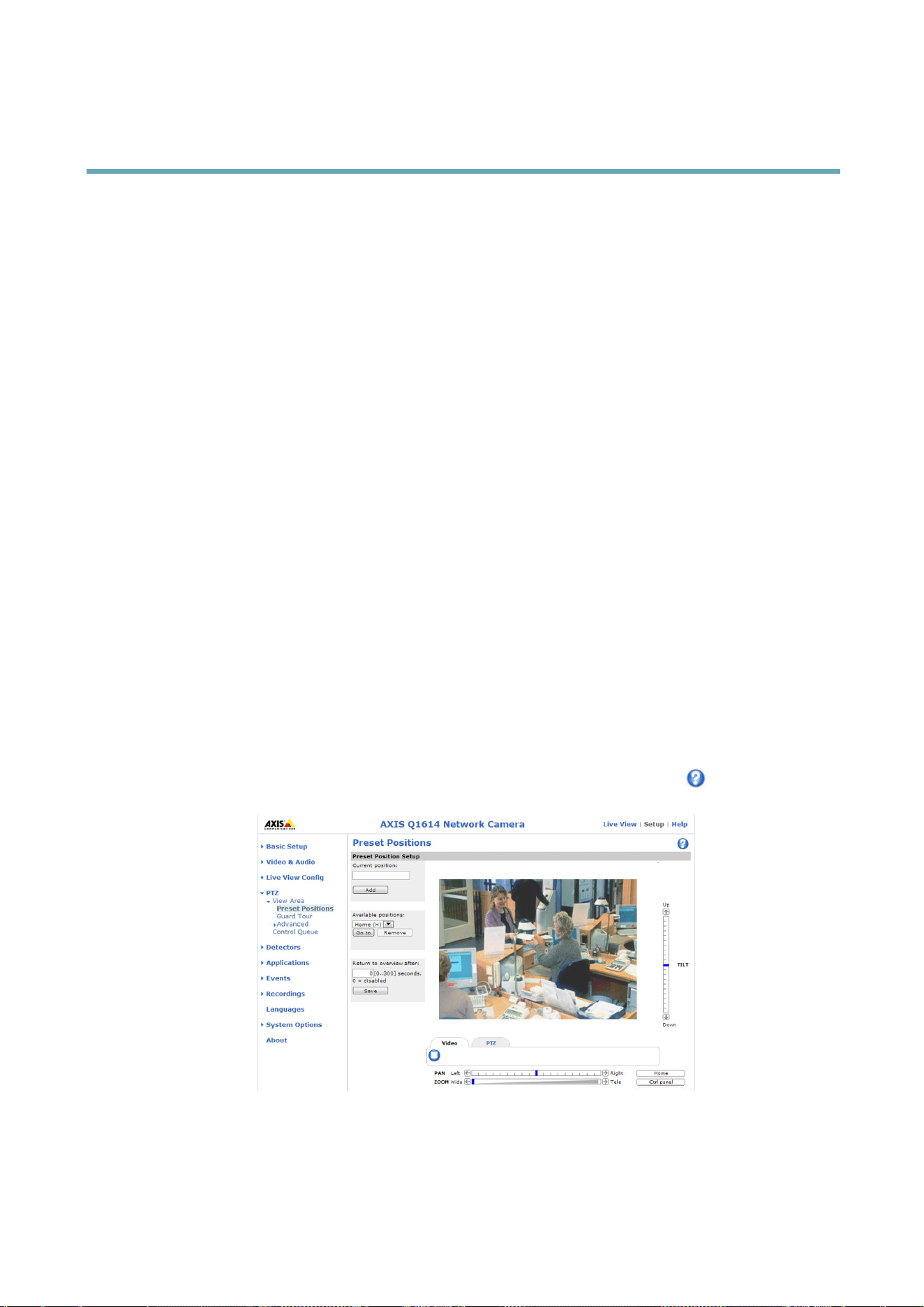
PresetPositions
Apresetpositionisapredenedviewthatcanbeusedtoquicklysteerthecameratoaspeciclocation.Presetpositionscan
beaccessedinseveralways:
•ByselectingthepresetfromtheSourcedrop-downlistintheLiveViewPage.
•Whensettingupactionrules.Seepage41.
•WhensettingupGuardTour.Seepage34.
Toaddapresetposition:
1.GotoPTZ>PresetPositions.
2.Usethepan,tiltandzoomcontrolstosteerthecameraviewtothedesiredposition.
3.EnteradescriptivenameintheCurrentpositioneld.
4.ClickAdd.Thecamera’spositionandfocussettingsaresavedasapresetposition.
TheentireviewareaistreatedastheHomepositionwhichisreadilyaccessiblebyclickingtheHomebuttonontheLiveView
pageandinthePresetPositionssetupwindow.
TheproductcanbeconguredtoreturntotheHomepositionwhenthePTZfunctionalityhasbeeninactiveforaspeciedlengthof
time.EnterthelengthoftimeintheReturntooverviewaftereldandclickSave.Setthetimetozerotopreventtheproductfrom
automaticallyreturningtotheHomeposition.
Toincludethepresetpositionnameintheoverlaytext,gotoVideo&Audio,selectIncludeoverlaytextandenterthemodier#Pin
theeld.Formoreinformationaboutmodiers,seeFileNaming&Date/TimeFormatsintheonlinehelp
.
33

AXISQ1614NetworkCamera
PTZ(PanTiltZoom)
GuardTour
Aguardtourdisplaysthevideostreamfromdifferentpresetpositions,one-by-one,inapredeterminedorderoratrandomandfor
congurabletimeperiods.Theenabledguardtourwillkeeprunningaftertheuserhasloggedofforclosedthebrowser.
Toaddaguardtour:
1.GotoPTZ>GuardTourandclickAdd.
2.Enteradescriptivename.
3.Specifythepauselengthbetweenruns.
4.SelectanavailablepresetpositionandclickApply.
5.SpecifytheViewTimeinsecondsorminutes.
6.SpecifytheViewOrderorselecttheRandomvieworderoption.
7.ClickSave.
Tomodifyorremoveguardtours,gotoPTZ>GuardTour,selecttheguardtourintheGuardTourListandclickModify/Remove.
Formoreinformationseetheonlinehelp
.
Advanced
DeviceSettings
TheDeviceSettingswindowdisplaysdriverspecicsettings.Theappearanceofthiswindowcanvarydependingonthedriver
installed.Optionsthatcanbeconguredinclude:
•DriverSpecicSettingsfromVideoSource
•MechanicalLimitsforMovingVideoSource
•LightControlVideoSource
•ExtendedDriverSpecicSettingsforVideoSource
FordownloadandinstallationinformationaboutPTZdriversforyourAxisproductpleasevisitwww.axis.com/techsup/
Controls
PanelShortcutCommandButtonscanbeconguredtoprovidedirectaccesstocommandsissuedviatheVAPIX®Application
ProgrammingInterface.ThebuttonswillbedisplayedinthePTZcontrolpanel,whichisavailableintheLiveViewpagethrough
theCtrlpanelbutton,seepage14.
DeselecttheoptionsunderEnable/Disablecontrolstodisablethepan,tilt,zoomandfocuscontrols.
InstallingaPTZdriver
ThisAxisproductsupportsseveralPTZdevices.Pleaseseewww.axis.comforacompletelistofsupporteddevices,andtoobtainthe
correctdriver.ToinstallaPTZdeviceyouneedtoinstallthePTZdriver.
ToinstallthePTZdrivergotoPTZ>DriverSelection.Browsetondthedriver(e.g.driver.ptz)andUpload.Ifthedriverwas
successfullyuploaded,itappearsintheSelectdrivertousedrop-downlist.Fromthisdrop-downlist,selectthedrivertoinstall
orremove,andclickSave.
SelectActivatePTZtoenablePTZ.TheaddressoftheconnecteddeviceappearsagainstDeviceID.ChoosetheDevicetypefromthe
drop-downlist.Tondwhichdevicetypetouse,consultthedocumentationsuppliedbythePTZdriver.
34

AXISQ1614NetworkCamera
PTZ(PanTiltZoom)
TocompletetheinstallationgotoSystemOptions>Ports&Devices>COMPort(seeCOMPort)andverifythesettings.
ControlQueue
TheadministratorcansetupaqueueforPTZcontrollersfromPTZ>ControlQueue.Oncesetup,thePTZControlQueuebuttons
appearintheLiveViewpageofferingoneviewerexclusivecontrolforalimitedperiodoftime.Otheruserswillbeplacedinqueue.
Auserwhobelongstoagroup(seeUsers,onpage48)withahigherPTZprioritycangobeforeotherusersinthequeueand
takecontroloftheproduct.Theorderofpriorityisasfollows:
1.Administrator—AnadministratortakesoverPTZcontrolregardlessofwhoisrstinqueue.Theadministratorwillbe
removedfromthequeue60secondsafterthelastPTZcontrolcommand.
2.Event—TheAxisproductcanbeconguredtogotoapresetpositionwhentriggeredbyanalarm(seeEvents,onpage41).
Theeventwillimmediatelybeplacedrstinthequeueexceptwhenanadministratorisincontrol.
3.Operator—Sameasadministratorbutwithlowerpriority
4.GuardTour—Aguardtour(seepage34)hasPTZcontrolforanindeniteperiodoftime.Itmaybeoverriddenbyan
operator,eventoradministrator.Theguardtourwillresumewhenhigherprioritygroupsleavethequeue.
5.Viewer—Multipleviewersmustwaitfortheirturn.Theviewerhas60secondsPTZcontrolbeforecontrolispassed
ontothenextviewerinqueue.
Note
•TheadministratorcanenableanddisablePTZcontrolsforselectedusers.
•Toidentifydifferentusersintheviewergroup,cookiesmustbeenabledontheclient.
35

AXISQ1614NetworkCamera
Detectors
Detectors
CameraTampering
CameraTamperingcangenerateanalarmwheneverthecameraisrepositioned,orwhenthelensiscovered,sprayedorseverely
defocused.Tosendanalarm,forexampleanemail,anactionrulemustbesetup.
Toconguretampering:
1.GotoDetectors>CameraTampering.
2.SettheMinimumduration,thatis,thetimethatmustelapsebeforeanalarmisgenerated.Thiscanhelpprevent
falsealarmsforknownconditionsthataffecttheimage.
3.SelectAlarmfordarkimagesifanalarmshouldbegeneratediflightsaredimmedorturnedoff,orifthelensissprayed,
covered,orrenderedseverelyoutoffocus.
4.ClickSave.
Toconguretheproducttosendanalarmwhentamperingoccurs:
1.GotoEvents>ActionRules.
2.ClickAddtosetupanewactionrule.
3.EnteraNamefortheactionrule.
4.UnderCondition,selectDetectorsfromtheTriggerlist.
5.SelectTamperingfromthelistofdetectors.
6.Optionally,selectascheduleandsetadditionalconditions.
7.Selecttheaction.Tosendanemail,selectSendNoticationandselectaRecipientfromthelistofdenedrecipients.
Note
TheWhiletheruleisactiveoptionunderDurationcannotbeusedwithcameratampering,sincecameratamperingdoesnot
haveadurationandonceithasbeentriggereditwillnotautomaticallyreturntoitsuntriggeredstate.
Formoreinformationonactionsrules,seeEvents,onpage41.
ShockDetection
EnableShockDetectionfromtheDetectorsmenu.Shockdetectionisused,forexample,togenerateanalarmiftheproductishit
byanobject.
UsetheShocksensitivityslidertoadjustthesensitivitylevelatwhichtheproductshouldsendanalarmuponbeinghit.Low
sensitivityvalueimpliesthattheproductwillgenerateanalarmonlyifthehitispowerful.
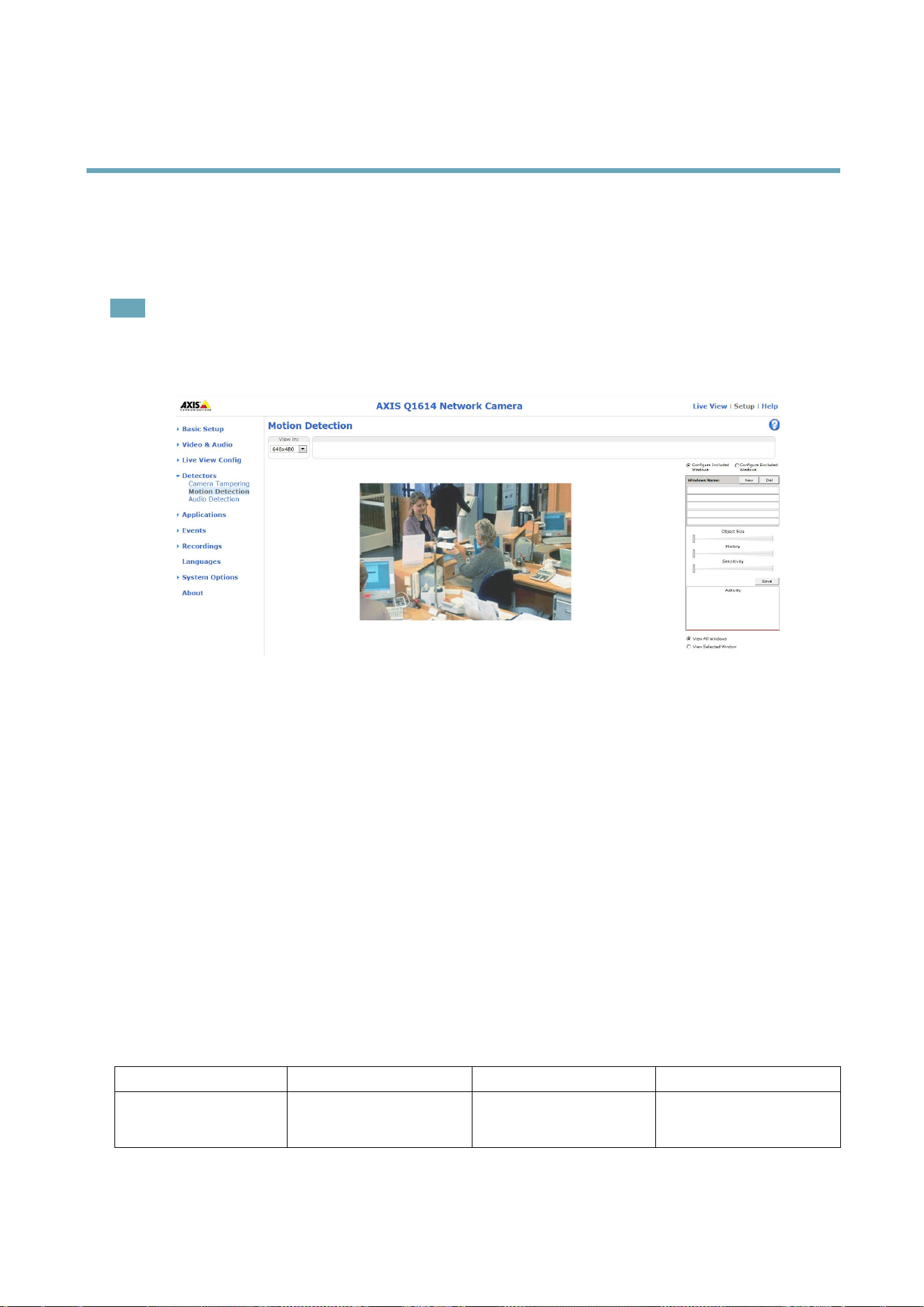
MotionDetection
Motiondetectionisusedtogenerateanalarmwhenevermovementstartsorstopsinthecameraview.
Motiondetectionisconguredbydeningupto10IncludeandExcludewindows:
•Includewindows—deneareaswheremotionshouldbedetected
•Excludewindows—deneareaswithinanIncludewindowthatshouldbeignored(areasoutsideIncludewindows
areautomaticallyignored).
Forinstructions,seeSetUpMotionDetectionWindows,onpage37.
36
AXISQ1614NetworkCamera
Detectors
Tocontrolthenumberofmotiondetectionalarms,theparametersObjectSize,HistoryandSensitivitycanbeadjusted.See
MotionDetectionParameters,onpage37.
Oncemotiondetectionwindowsarecongured,theAxisproductcanbeconguredtoperformactionswhenmotionisdetected.
Possibleactionsincludeuploadingimagesandstartrecording.Formoreinformation,seeSettingUpanActionRule,onpage42.
Note
•Usingthemotiondetectionfeaturemaydecreasetheproduct’soverallperformance.
•ThepositionoftheMotionDetectionWindowisrelativetotheorientationoftheCamera.Changingtheorientationofthe
camerawillalsochangethepositionoftheMotionDetectionWindow.
SetUpMotionDetectionWindows
TosetupamotiondetectionIncludeWindow,followtheseinstructions:
1.GotoDetectors>MotionDetection.
2.SelecttheCongureIncludedWindowsoptionandclickNew.Selectthenewwindowinthelistofwindowsand
enteradescriptivename.
3.Adjustthesize(dragthebottomright-handcorner)andtheposition(clickonthetextatthetopanddragtothedesired
position)ofthewindow.
4.AdjusttheObjectSize,HistoryandSensitivityprolesliders(seeMotionDetectionParametersfordetails).Anydetected
motionwithinanactivewindowisindicatedbyredpeaksintheActivitywindow.
5.ClickSave.
Toexcludepartsoftheincludewindow,selecttheCongureExcludedWindowsandpositiontheexcludewindowwithinthe
includewindow.
Todeleteanincludeorexcludewindow,selectthewindowinthelistofwindowsandclickDel.
MotionDetectionParameters
Theparameterscontrollingmotiondetectionaredescribedinthetablebelow:
Parameter
ObjectSize
History
Sensitivity
Description
Objectsizerelativetowindow
size.
Objectmemorylength.
Differenceinluminance
betweenbackgroundand
object.
37

AXISQ1614NetworkCamera
Detectors
Highlevel(100%)
Onlyverylargeobjectstrigger
motiondetection.
Anobjectthatappearsin
thewindowtriggersmotion
detectionforalongtime
beforeitisconsideredas
non-moving.
Ordinarycoloredobjectson
ordinarybackgroundstrigger
motiondetection.
Mediumlevel(50%)
Alargedifferenceinluminance
isrequiredtotriggermotion
detection.
Lowlevel(0%)
Evenverysmallobjectstrigger
motiondetection.
Anobjectthatappearsin
thewindowtriggersmotion
detectiononlyforaveryshort
timebeforeitisconsideredas
non-moving.
Onlyverybrightobjectson
adarkbackgroundtrigger
motiondetection.
Recommendedvalues
5–15%60–90%75–95%
Defaultvalues
15%90%90%
Note
•Totriggeronsmallobjectsormovements,useseveralsmallmotiondetectionwindowsratherthanonelargewindow
andselectalowobjectsize.
•Toavoidtriggeringonsmallobjects,selectahighobjectsize.
•Whilemonitoringanareawheremovingobjectsarenotexpected,selectahighhistorylevel.Thiswillcausemotion
detectiontotriggeraslongastheobjectispresentinthewindow.
•Toonlydetectashinglight,selectalowsensitivity.Inothercaseshighsensitivityisrecommended.
AudioDetection
TheAxisproductcanbeconguredtogenerateanalarmwhenaudiorisesaboveorfallsbelowthethresholdvalue.Thethreshold
valuecanbesetintherange0–100where0isthemostsensitiveand100theleastsensitive.
1.GotoDetectors>AudioDetection.
2.SettheaudioalarmlevelandclickSave.
3.GotoEvents>ActionRulesandsetupanactionrule,seeSettingUpanActionRule,onpage42.
DetectedaudioisindicatedbycoloredpeaksintheActivityindicator.Aneventistriggeredwhendetectedaudiorisesaboveorfalls
belowthethresholdvalue,whichisrepresentedbythebar.
38

AXISQ1614NetworkCamera
Applications
Applications
ThirdpartyapplicationscanbeuploadedtoandinstalledontheAxisproduct.Applicationsaddfunctionalitytotheproduct,for
examplevideoanalyticsandintelligentvideocapabilitiessuchasrecognition,tracking,detectionandcounting.Forinformation
aboutavailableapplications,downloads,trialsandlicenses,gotowww.axis.com/applications
Note
•Itisrecommendedtorunoneapplicationatatime.
•Avoidrunningapplicationswhenthebuilt-inmotiondetectionisactive.
ApplicationLicenses
Someapplicationsneedalicensetorun.Licensescanbeinstalledintwoways:
•Automaticinstallation—requiresaccesstotheInternet
•Manualinstallation—obtainthelicensekeyfromtheapplicationvendoranduploadthekeytotheAxisproduct
Torequestalicense,theAxisproductserialnumber(S/N)isrequired.Theserialnumbercanbefoundontheproductlabelandunder
SystemOptions>Support>SystemOverview.
InstallApplication
Toinstallandstartanapplication:
1.GotoSetup>Applications.
2.UnderUploadApplication,clickBrowse.LocatetheapplicationleandclickUploadPackage.
3.Installthelicense(ifapplicable).Forinstructions,seethedocumentationprovidedbytheapplicationvendor.
4.Starttheapplication.GotopageApplications,selecttheapplicationinthelistofinstalledapplicationsandclickStart.
5.Conguretheapplication.Forinstructions,seethedocumentationprovidedbytheapplicationvendor.
Note
•Applicationscanbeuploadedbyproductadministrators.
•ApplicationsandlicensescanbeinstalledonmultipleproductsatthesametimeusingAXISCameraManagement,version
3.10andlater.
Togeneratealoglefortheapplication,gotoApplications.SelecttheapplicationandclickLog.
ApplicationConsiderations
Ifanapplicationisupgraded,applicationsettings,includingthelicense,willberemoved.Thelicensemustbereinstalledand
theapplicationrecongured.
IftheAxisproduct’srmwareisupgraded,installedapplicationsandtheirsettingswillremainunchanged,althoughthisisnot
guaranteedbyAxisCommunicationsAB.Notethattheapplicationmustbesupportedbythenewrmware.Forinformationabout
rmwareupgrades,seeUpgradingtheFirmware.
IftheAxisproductisrestarted,runningapplicationswillrestartautomatically.
IftheAxisproductisrestored,installedapplicationsremainunchangedbutmustberestarted.Tostarttheapplication,goto
Setup>Applications.SelecttheapplicationinthelistofinstalledapplicationsandclickStart.Forinformationaboutrestoring
theAxisproduct,seeMaintenance.
39


AXISQ1614NetworkCamera
Events
Events
TheAxisproductcanbeconguredtoperformactionswhendifferenteventsoccur,forexample,startarecordingwhenmotionis
detected.ThesetofconditionsthatdeneshowandwhentheactionistriggerediscalledanActionRule.
Availableactionruletriggersandconditionsinclude:
•Applications–Useinstalledapplicationstotriggertherule.SeeApplications,onpage39.
•Detectors
-AudioDetection–Triggertherulewhenaudioisdetected.SeeAudioDetection,onpage38.
-Day/NightMode–Triggertherulewhentheproductswitchesbetweendaymode(IRcutlteron)andnight
mode(IRcutlteroff).Thiscanforexamplebeusedtocontrolanexternalinfrared(IR)lightconnected
toanoutputport.
-LiveStreamAccessed–Triggertherulewhenanystreamisaccessedandduringedgestorageplayback.
Thiscanforexamplebeusedtosendnotications.
-MotionDetection–Triggertherulewhenmotionisdetected.SeeMotionDetection,onpage36.
-ShockDetected–TriggertherulewhentheAxisproductdetectsithasbeentiltedorhit.SeeShockDetection,
onpage36.
-Tampering–Triggertherulewhentamperingisdetected.SeeCameraTampering,onpage36.
•Hardware
-Network–Triggertheruleifnetworkconnectionislostorrestored.Thiscanforexamplebeusedtostart
recordingtotheSDcard.
-Temperature–Triggertheruleifthetemperaturefallsoutsideorinsidetheoperatingrangeoftheproduct.This
canforexamplebeusedtosendmaintenancenotications.
•InputSignal
-DigitalInputPort–TriggertherulewhenanI/Oportreceivesasignalfromaconnecteddevice.SeeI/OPorts,
onpage57.
-ManualTrigger–TriggertheruleusingtheManualTriggerbuttonintheLiveViewpage.SeeControlson
theLiveViewPage,onpage13.Thiscanforexamplebeusedtovalidateactionsduringproductinstallation
andconguration.
-VirtualInputs–canbeusedbyaVMS(VideoManagementSystem)totriggeractions.Virtualinputscan,for
example,beconnectedtobuttonsintheVMSuserinterface.
•PTZ
-Moving–TriggertherulewhenthecameraviewmovesduetoaPTZoperation.Thiscanforexamplebeused
asanadditionalconditiontopreventanactionruletriggeredbymotiondetectiontorecordvideowhilethe
cameraviewmovesduetoaPTZoperation.
-PresetReached–Triggertherulewhenthecamerastopsatapresetposition.Thiscanbeforexamplebeused
withtheSendImagesactiontouploadimagesfromthepresetposition.
•Storage
-Disruption–Triggertheruleifstorageproblemsaredetected,forexampleifthestoragedeviceisunavailable,
removed,full,lockedorifotherreadorwriteproblemsoccur.Thiscanforexamplebeusedtosendmaintenance
notications.
41

AXISQ1614NetworkCamera
Events
-Recording–TriggerstherulewhentheAxisproductrecordstothestoragedevice.Therecordingstatustrigger
canbeusedtonotifytheoperator,forexamplebyashingLEDlights,iftheproducthasstartedorstoppedto
recordtothestoragedevice.Notethat,thistriggercanbeusedonlyforedgestoragerecordingstatus.
•System
-SystemReady–Triggertherulewhentheproducthasbeenstartedandallservicesarerunning.Thiscanfor
examplebeusedtosendanoticationwhentheproductrestarts.
•Time
-Recurrence–Triggertheruleperiodically.SeeRecurrences,onpage44.Thiscanforexamplebeusedtoupload
animageevery5minutes.
-UseSchedule–Triggertheruleaccordingtotheselectedschedule.SeeSchedules,onpage44.
Availableactionsinclude:
•Day/NightVisionMode–Setdaymode(IRcutlteron)ornightmode(IRcutlteroff).
•OutputPort–ActivateanI/Oporttocontrolanexternaldevice.
•OverlayText–Displayanoverlaytext.SeeUsingOverlayTextinanActionRule,onpage26.
•PlayAudioClip–SeeAudioClips,onpage29.
•PTZControl
-PresetPosition–Gotoapresetposition.
-GuardTour–Startaguardtour.SeeGuardTour,onpage34.
•RecordVideo–Recordvideotoaselectedstorage.
•SendImages–Sendimagestoarecipient.
•SendNotications–Sendanoticationmessagetoarecipient.
•SendSNMPTrap–SendanSNMPtrapmessagetotheoperator.MakesurethatSNMPisenabledandcongured
underSystemOptions>Network>SNMP.
•SendVideoClip–Sendavideocliptoarecipient.
•StatusLED–FlashtheLEDindicator.Thiscanforexamplebeusedtovalidatetriggerssuchasmotiondetectionduring
productinstallationandconguration.
•WDRMode–TheWDRModeorLightnderModecanbeturnedonwhentheactionruleistriggered.Thisactionmay
beusedtochangebetweenthesemodesautomatically.
SettingUpanActionRule
Anactionruledenestheconditionsthatmustbemetfortheproducttoperformanaction,forexamplerecordvideoorsendan
emailnotication.Ifmultipleconditionsaredened,allofthemmustbemettotriggertheaction.
Thefollowingexampledescribeshowtosetupanactionruletorecordvideotoanetworkshareifthereismovementinthe
camera’seldofview.
Setupmotiondetectionandaddanetworkshare:
1.GotoDetectors>MotionDetectionandcongureamotiondetectionwindow.Seepage37
2.GotoSystemOptions>Storageandsetupthenetworkshare.Seepage56.
Setuptheactionrule:
42

AXISQ1614NetworkCamera
Events
1.GotoEvents>ActionRulesandclickAdd.
2.SelectEnableruleandenteradescriptivenamefortherule.
3.SelectDetectorsfromtheTriggerdrop-downlist.
4.SelectMotionDetectionfromthedrop-downlist.Selectthemotiondetectionwindowtouse.
5.Optionally,selectaScheduleandAdditionalconditions.Seebelow.
6.UnderActions,selectRecordVideofromtheTypedrop-downlist.
7.SelectaStreamproleandconguretheDurationsettingsasdescribedbelow.
8.SelectNetworkSharefromtheStoragedrop-downlist.
Toaddadditionalcriteria,selecttheAdditionalconditionsoptionandaddadditionaltriggers.Topreventanactionfrombeing
triggeredrepeatedly,aWaitatleasttimecanbeset.Enterthetimeinhours,minutesandseconds,duringwhichthetrigger
shouldbeignoredbeforetheactionrulecanbeactivatedagain.
TherecordingDurationofsomeactionscanbesettoincludetimeimmediatelybeforeandaftertheevent.SelectPre-triggertime
and/orPost-triggertimeandenterthenumberofseconds.WhenWhiletheruleisactiveisenabledandtheactionistriggered
againduringthepost-triggertime,therecordingtimewillbeextendedwithanotherpost-triggertimeperiod.
Formoreinformation,seetheonlinehelp
.
Recipients
Recipientsreceivemedialesandnoticationmessages.Thefollowingrecipientsareavailable:
RecipientUsewithaction
Email
1
SendImages
SendNotication
SendVideoClip
FTP
SendImages
SendVideoClip
HTTP
SendImages
SendNotication
SendVideoClip
HTTPSSendImages
SendNotication
SendVideoClip
NetworkShare
2
SendImages
SendVideoClip
TCPSendNotication
1.Someemailprovidershavesecurityltersthatpreventusersfromreceivingorviewinglargeamountofattachments,fromreceivingscheduled
emailsandsimilar.Checktheemailprovider’ssecuritypolicytoavoiddeliveryproblemsandlockedemailaccounts.
2.Anetworksharecanalsobeusedasastoragedeviceforrecordedvideo.GoSystemOptions>Storagetocongureanetworksharebefore
settingupacontinuousrecordingoranactionruletorecordvideo.SeeStorage,onpage56formoreinformationaboutstoragedevices.
Toaddarecipient:
43

AXISQ1614NetworkCamera
Events
1.GotoEvents>RecipientsandclickAdd.
2.Enteradescriptivename.
3.SelectarecipientType.
4.Entertheinformationneededfortherecipienttype.
5.ClickTesttotesttheconnectiontotherecipient.
6.ClickOK.
SettingUpanEmailRecipient
Emailrecipientscanbeconguredbyselectingoneofthelistedemailproviders,orbyspecifyingtheSMTPserver,portand
authenticationusedby,forexample,acorporateemailserver.
Note
Someemailprovidershavesecurityltersthatpreventusersfromreceivingorviewinglargeamountofattachments,from
receivingscheduledemailsandsimilar.Checktheemailprovider’ssecuritypolicytoavoiddeliveryproblemsandlocked
emailaccounts.
Tosetupanemailrecipientusingoneofthelistedproviders:
1.GotoEvents>RecipientsandclickAdd.
2.EnteraNameandselectEmailfromtheTypelist.
3.EntertheemailaddressestosendemailstointheToeld.Usecommastoseparatemultipleaddresses.
4.SelecttheemailproviderfromtheProviderlist.
5.EntertheuserIDandpasswordfortheemailaccount.
6.ClickTesttosendatestemail.
Tosetupanemailrecipientusingforexampleacorporateemailserver,followtheinstructionsabovebutselectUserdenedas
Provider.EntertheemailaddresstoappearassenderintheFromeld.SelectAdvancedsettingsandspecifytheSMTPserver
address,portandauthenticationmethod.Optionally,selectUseencryptiontosendemailsoveranencryptedconnection.Theserver
certicatecanbevalidatedusingthecerticatesavailableintheAxisproduct.Forinformationonhowtouploadcerticates,
seeCerticates,onpage49.
Schedules
Schedulescanbeusedasactionruletriggersorasadditionalconditions,forexampletorecordvideoifmotionisdetectedoutside
ofcehours.Useoneofthepredenedschedulesorcreateanewscheduleasdescribedbelow.
Tocreateanewschedule:
1.GotoEvents>SchedulesandclickAdd.
2.Enteradescriptivenameandtheinformationneededforadaily,weekly,monthlyoryearlyschedule.
3.ClickOK.
Tousethescheduleinanactionrule,selecttheschedulefromtheScheduledrop-downlistintheActionRuleSetuppage.
Recurrences
Recurrencesareusedtotriggeractionrulesrepeatedly,forexampleevery5minutesoreveryhour.
44

AXISQ1614NetworkCamera
Events
Tosetuparecurrence:
1.GotoEvents>RecurrencesandclickAdd.
2.Enteradescriptivenameandrecurrencepattern.
3.ClickOK.
Tousetherecurrenceinanactionrule,rstselectTimefromtheTriggerdrop-downlistintheActionRuleSetuppageandthen
selecttherecurrencefromtheseconddrop-downlist.
Tomodifyorremoverecurrences,selecttherecurrenceintheRecurrencesListandclickModifyorRemove.
45

AXISQ1614NetworkCamera
Recordings
Recordings
TheAxisproductcanbeconguredtorecordvideocontinuouslyoraccordingtoanactionrule:
•Tostartacontinuousrecording,seepage46.
•Tosetupactionrules,seepage42.
•Toaccessrecordings,seeRecordingList,onpage46.
•Tocongurecameracontrolledstorage,seeStorage,onpage56.
RecordingList
RecordedvideosarelistedontheRecordings>Listpage.Thelistshowseachrecording’sstartdateandtime,durationandthe
eventthattriggeredtherecording.
Toplayordownloadarecording,followthesesteps:
1.GotoRecordings>List.
2.Usetheltertonarrowthelistofrecordings.EnterthedesiredltercriteriaandclickFilter.Someltersmaytake
alongtimetocomplete.
3.Selecttherecording.
4.ClickPlaytoplaytherecording,orclickDownloadtodownloadtherecording.
Multiplerecordingscanbedownloadedatthesametime.SelecttherecordingsandclickDownload.Thedownloadedleisaziple
containingaminimumofthreeles,ofwhichtheMatroska(mkv)lesaretheactualrecordings.Therecordingsaretime-stamped
withthedateandtimetheyweredownloaded(thatis,notthedatetherecordingsweremade).
Note
ToplayrecordingsinWindowsMediaPlayer,AXISMatroskaFileSplittermustbeinstalled.AXISMatroskaFileSplitter
canbedownloadedfromwww.axis.com/techsup/software
Fordetailedrecordingandvideoinformation,selectarecordingandclickProperties.
Toremovearecording,selecttherecordingandclickRemove.
ContinuousRecording
TheAxisproductcanbeconguredtocontinuouslysavevideotoastoragedevice.SeeStorage,onpage56formoreinformation
aboutstoragedevices.Topreventthediskfrombecomingfull,itisrecommendedtocongurethedisktoautomaticallyremoveold
recordings.Ifanewstreamproleisselectedwhilearecordingisongoing,therecordingwillbestoppedandsavedintherecording
listandanewrecordingwiththenewstreamprolewillstart.Allpreviouscontinuousrecordingswillremainintherecordinglist
untiltheyareremovedmanuallyorthroughautomaticremovalofoldrecordings.
Tostartacontinuousrecording,followthesesteps:
1.GotoRecordings>Continuous.
2.SelectEnabled.
3.SelecttypeofstoragedevicefromtheDisklist.
4.SelectaStreamproletouseforcontinuousrecordings.
5.ClickSavetosaveandstarttherecording.
46

AXISQ1614NetworkCamera
Languages
Languages
MultiplelanguagescanbeinstalledintheAxisproduct.Allwebpagesincludingtheonlinehelpwillbedisplayedintheselected
language.Toswitchlanguages,gotoSetup>Languagesandrstuploadthenewlanguagele.Browseandlocatetheleandclick
theUploadLanguagebutton.SelectthenewlanguagefromthelistandclickSave.
Note
•Resettingtheproducttofactorydefaultsettingswilleraseanyuploadedlanguageleandresettheproductlanguageto
English.
•ClickingtheRestorebuttonontheMaintenancepagewillnotaffectthelanguage.
•Armwareupgradewillnotaffectthelanguageused.Howeverifyouhaveuploadedanewlanguagetotheproductand
laterupgradethermware,itmayhappenthatthetranslationnolongermatchestheproduct'swebpages.Inthiscase,
uploadanupdatedlanguagele.
•Alanguagealreadyinstalledintheproductwillbereplacedwhenacurrentoralaterversionofthelanguageleisuploaded.
47

AXISQ1614NetworkCamera
SystemOptions
SystemOptions
Security
Users
UseraccesscontrolisenabledbydefaultandcanbeconguredunderSystemOptions>Security>Users.Anadministratorcan
setupotherusersbygivingthemusernamesandpasswords.Itisalsopossibletoallowanonymousviewerlogin,whichmeans
thatanybodymayaccesstheLiveViewpage.
Theuserlistdisplaysauthorizedusersandusergroups(accesslevels):
Viewer-AccesstotheLiveViewpage
Operator-AccesstotheLiveViewpageandtoallsettingsexceptSystemOptions
Administrator-Unrestrictedaccesstoallsettings;canadd,modifyandremoveotherusers.
UnderHTTP/RTSPPasswordSettings,selectthetypeofpasswordtoallow.Youmayneedtoallowunencryptedpasswordsifthere
areviewingclientsthatdonotsupportencryption,orifyouupgradedthermwareandexistingclientssupportencryptionbutneed
tologinagainandbeconguredtousethisfunctionality.
UnderUserSettings,selecttheEnableanonymousviewerloginoptiontoallowanonymoususersaccesstotheLiveViewpage.
SelecttheEnableanonymousPTZcontrollogintoallowanonymoususersaccesstothePTZcontrols.
DeselecttheEnableBasicSetupoptiontohidetheBasicSetupmenu.BasicSetupprovidesquickaccesstosettingsthatshouldbe
madebeforeusingtheAxisproduct.
ONVIF
ONVIF(OpenNetworkVideoInterfaceForum)isaglobalinterfacestandardthatmakesiteasierforendusers,integrators,consultants,
andmanufacturerstotakeadvantageofthepossibilitiesofferedbynetworkvideotechnology.ONVIFenablesinteroperablitybetween
differentvendorproducts,increasedexibility,reducedcostandfuture-proofsystems.
BycreatingauseryouautomaticallyenableONVIFcommunication.UsetheusernameandpasswordwithallONVIFcommunication
withtheproduct.Formoreinformationseewww.onvif.org
IPAddressFilter
IPaddresslteringisenabledontheSystemOptions>Security>IPAddressFilterpage.Onceenabled,thelistedIPaddressare
allowedordeniedaccesstotheAxisproduct.SelectAlloworDenyfromthelistandclickApplytoenableIPaddressltering.
Theadministratorcanaddupto256IPaddressentriestothelist(asingleentrycancontainmultipleIPaddresses).
HTTPS
HTTPS(HyperTextTransferProtocoloverSecureSocketLayer,orHTTPoverSSL)isawebprotocolprovidingencryptedbrowsing.
HTTPScanalsobeusedbyusersandclientstoverifythatthecorrectdeviceisbeingaccessed.Thesecuritylevelprovidedby
HTTPSisconsideredadequateformostcommercialexchanges.
TheAxisproductcanbeconguredtorequireHTTPSwhenusersfromdifferentusergroups(administrator,operator,viewer)connect.
TouseHTTPS,anHTTPScerticatemustrstbeinstalled.GotoSystemOptions>Security>Certicatestoinstallandmanage
certicates.SeeCerticates,onpage49.
ToenableHTTPSontheAxisproduct:
1.GotoSystemOptions>Security>HTTPS
48

AXISQ1614NetworkCamera
SystemOptions
2.SelectanHTTPScerticatefromthelistofinstalledcerticates.
3.Optionally,clickCiphersandselecttheencryptionalgorithmstouseforSSL.
4.SettheHTTPSConnectionPolicyforthedifferentusergroups.
5.ClickSavetoenablethesettings.
ToaccesstheAxisproductviathedesiredprotocol,enterhttps://orhttp://intheaddresseldinabrowser.
TheHTTPSportcanbechangedontheSystemOptions>Network>TCP/IP>Advancedpage.
IEEE802.1X
IEEE802.1Xisastandardforport-basedNetworkAdmissionControlprovidingsecureauthenticationofwiredandwirelessnetwork
devices.IEEE802.1XisbasedonEAP(ExtensibleAuthenticationProtocol).
ToaccessanetworkprotectedbyIEEE802.1X,devicesmustbeauthenticated.Theauthenticationisperformedbyanauthentication
server,typicallyaRADIUSserver,examplesofwhichareFreeRADIUSandMicrosoftInternetAuthenticationService.
InAxisimplementation,theAxisproductandtheauthenticationserveridentifythemselveswithdigitalcerticatesusingEAP-TLS
(ExtensibleAuthenticationProtocol-TransportLayerSecurity).ThecerticatesareprovidedbyaCerticationAuthority(CA).
Youneed:
•aCAcerticatetoauthenticatetheauthenticationserver.
•aCA-signedclientcerticatetoauthenticatetheAxisproduct.
Tocreateandinstallcerticates,gotoSystemOptions>Security>Certicates.SeeCerticates,onpage49.ManyCAcerticates
arepreinstalled.
ToallowtheproducttoaccessanetworkprotectedbyIEEE802.1X:
1.GotoSystemOptions>Security>IEEE802.1X.
2.SelectaCACerticateandaClientCerticatefromthelistsofinstalledcerticates.
3.UnderSettings,selecttheEAPOLversionandprovidetheEAPidentityassociatedwiththeclientcerticate.
4.ChecktheboxtoenableIEEE802.1XandclickSave.
Note
Forauthenticationtoworkproperly,thedateandtimesettingsintheAxisproductshouldbesynchronizedwithanNTP
server.SeeDate&Time,onpage50.
Certicates
Certicatesareusedtoauthenticatedevicesonanetwork.Typicalapplicationsincludeencryptedwebbrowsing(HTTPS),network
protectionviaIEEE802.1Xandsecureuploadofimagesandnoticationmessagesforexampleviaemail.Twotypesofcerticates
canbeusedwiththeAxisproduct:
Server/Clientcerticates-ToauthenticatetheAxisproduct.
CAcerticates-Toauthenticatepeercerticates,forexamplethecerticateofanauthenticationserverincasetheAxisproductis
connectedtoanIEEE802.1Xprotectednetwork.
Note
Installedcerticates,exceptpreinstalledCAcerticates,willbedeletediftheproductisresettofactorydefault.Preinstalled
CAcerticatesthathavebeendeletedwillbereinstalled.
AServer/Clientcerticatecanbeself-signedorissuedbyaCerticateAuthority(CA).Aself-signedcerticateofferslimited
protectionandcanbeusedbeforeaCA-issuedcerticatehasbeenobtained.
49

AXISQ1614NetworkCamera
SystemOptions
Toinstallaself-signedcerticate:
1.GotoSetup>SystemOptions>Security>Certicates.
2.ClickCreateself-signedcerticateandprovidetherequestedinformation.
TocreateandinstallaCA-signedcerticate:
1.Createaself-signedcerticateasdescribedabove.
2.GotoSetup>SystemOptions>Security>Certicates.
3.ClickCreatecerticatesigningrequestandprovidetherequestedinformation.
4.CopythePEM-formattedrequestandsendtotheCAofyourchoice.
5.Whenthesignedcerticateisreturned,clickInstallcerticateanduploadthecerticate.
Server/ClientcerticatescanbeinstalledasCerticatefromsigningrequestorasCerticateandprivatekey.SelectCerticate
andprivatekeyiftheprivatekeyistobeuploadasaseparateleorifthecerticateisinPKCS#12format.
TheAxisproductisshippedwithseveralpreinstalledCAcerticates.Ifrequired,additionalCAcerticatescanbeinstalled:
1.GotoSetup>SystemOptions>Security>Certicates.
2.ClickInstallcerticateanduploadthecerticate.
AudioSupport
SelectEnableaudiosupporttoallowclientstoretrieveaudiostreamsfromtheAxisproduct.Forinformationonhowtocongure
audiosettings,seeAudioSettings,onpage27.
Note
DeselectingthisoptionwilldisableaudiogloballyintheAxisproduct,forconguredeventsandproleswithaudioaswell.
Date&Time
TheAxisproduct’sdateandtimesettingsareconguredunderSystemOptions>Date&Time.
CurrentServerTimedisplaysthecurrentdateandtime(24hclock).Thetimecanbedisplayedin12hclockinthetextoverlay(see
below).
Tochangethedateandtimesettings,selectthepreferredTimemodeunderNewServerTime:
•Synchronizewithcomputertime–Setsdateandtimeaccordingtothecomputer’sclock.Withthisoption,dateand
timearesetonceandwillnotbeupdatedautomatically.
•SynchronizewithNTPServer–ObtainsdateandtimefromanNTPserver.Withthisoption,dateandtimesettingsare
updatedcontinuously.ForinformationonNTPsettings,seeNTPConguration,onpage53.
IfusingahostnamefortheNTPserver,aDNSservermustbecongured.SeeDNSConguration,onpage52.
•Setmanually–Allowsyoutomanuallysetdateandtime.
IfusinganNTPserver,selectyourTimezonefromthedrop-downlist.Ifrequired,checkAutomaticallyadjustfordaylightsaving
timechanges.
TheDate&TimeFormatUsedinImagesisthedateandtimeformatdisplayedasatextoverlayinthevideostream.Usethe
predenedformatsorseeFileNaming&Date/TimeFormatsintheonlinehelp
forinformationonhowtocreatecustomdateand
timeformats.Toincludedateandtimeintheoverlaytext,gotoVideo&AudioandselectIncludedateandIncludetime.
50

AXISQ1614NetworkCamera
SystemOptions
Network
BasicTCP/IPSettings
TheAxisproductsupportsIPversion4andIPversion6.Bothversionscanbeenabledsimultaneously,andatleastoneversion
mustalwaysbeenabled.
IPv4AddressConguration
Bydefault,theAxisproductissettouseIPv4(IPversion4)andtoobtaintheIPaddressautomaticallyviaDHCP.TheIPv4settingsare
conguredunderSystemOptions>Network>TCP/IP>Basic.
DHCP(DynamicHostCongurationProtocol)allowsnetworkadministratorstocentrallymanageandautomatetheassignmentof
IPaddresses.DHCPshouldonlybeenabledifusingdynamicIPaddressnotication,oriftheDHCPcanupdateaDNSserver.Itis
thenpossibletoaccesstheAxisproductbyname(hostname).
IfDHCPisenabledandtheproductcannotbeaccessed,runAXISIPUtilitytosearchthenetworkforconnectedAxisproducts,orreset
theproducttothefactorydefaultsettings(seepage59)andthenperformtheinstallationagain.
TouseastaticIPaddress,checkUsethefollowingIPaddressandspecifytheIPaddress,subnetmaskanddefaultrouter.
IPv6AddressConguration
IfIPv6(IPversion6)isenabled,theAxisproductwillreceiveanIPaddressaccordingtothecongurationinthenetworkrouter.
ToenableIPv6,gotoSystemOptions>Network>TCP/IP>Basic.OthersettingsforIPv6shouldbeconguredinthenetworkrouter.
ARP/Ping
Theproduct’sIPaddresscanbeassignedusingARPandPing.Forinstructions,seeAssignIPAddressUsingARP/Ping,onpage51.
TheARP/Pingserviceisenabledbydefaultbutisautomaticallydisabledtwominutesaftertheproductisstarted,orassoonasanIP
addressisassigned.Tore-assignIPaddressusingARP/Ping,theproductmustberestartedtoenableARP/Pingforanadditional
twominutes.
Todisabletheservice,gotoSystemOptions>Network>TCP/IP>BasicandcleartheoptionEnableARP/PingsettingofIPaddress.
Pingingtheproductisstillpossiblewhentheserviceisdisabled.
AssignIPAddressUsingARP/Ping
Theproduct'sIPaddresscanbeassignedusingARP/Ping.Thecommandmustbeissuedwithin2minutesofconnectingpower.
1.AcquireafreestaticIPaddressonthesamenetworksegmentasthecomputer.
2.Locatetheserialnumber(S/N)ontheproductlabel.
3.Openacommandpromptandenterthefollowingcommands:
Linux/Unixsyntax
arp-s<IPaddress><serialnumber>temp
ping-l408<IPaddress>
Linux/Unixexample
arp-s192.168.0.12500:40:8c:18:10:00temp
ping-l408192.168.0.125
Windowssyntax(thismayrequirethatyourunthecommandpromptasanadministrator)
arp-s<IPaddress><serialnumber>
51

AXISQ1614NetworkCamera
SystemOptions
ping-l408-t<IPaddress>
Windowsexample(thismayrequirethatyourunthecommandpromptasanadministrator)
arp-s192.168.0.12500-40-8c-18-10-00
ping-l408-t192.168.0.125
4.Checkthatthenetworkcableisconnectedandthenrestarttheproductbydisconnectingandreconnectingpower.
5.ClosethecommandpromptwhentheproductrespondswithReplyfrom192.168.0.125:...orsimilar.
6.Openabrowserandtypehttp://<IPaddress>intheLocation/Addresseld.
ForothermethodsofassigningtheIPaddress,seetheInstallationandManagementSoftwareCDorthedocumentAssignanIP
AddressandAccesstheVideoStreamonAxisSupportwebatwww.axis.com/techsup
Note
•ToopenacommandpromptinWindows,opentheStartmenuandtypecmdintheRun/Searcheld.
•TousetheARPcommandinWindows7/WindowsVista,right-clickthecommandprompticonandselectRunas
administrator.
•ToopenacommandpromptinMacOSX,opentheTerminalutilityfromApplication>Utilities.
AXISVideoHostingSystem(AVHS)
AVHSusedinconjunctionwithanAVHSservice,provideseasyandsecureInternetaccesstoliveandrecordedvideoaccessiblefrom
anylocation.FormoreinformationandhelptondalocalAVHSServiceProvidergotowww.axis.com/hosting
TheAVHSsettingsareconguredunderSystemOptions>Network>TCPIP>Basic.ThepossibilitytoconnecttoanAVHSservice
isenabledbydefault.Todisable,cleartheEnableAVHSbox.
One-clickenabled-Presstheproduct’scontrolbutton(seeHardwareOverview,onpage6)toconnecttoanAVHSserviceoverthe
Internet.Onceregistered,AlwayswillbeenabledandtheAxisproductstaysconnectedtotheAVHSservice.Iftheproductisnot
registeredwithin24hoursfromwhenthebuttonispressed,theproductwilldisconnectfromtheAVHSservice.
Always-TheAxisproductwillconstantlyattempttoconnecttotheAVHSserviceovertheInternet.Onceregisteredtheproductwill
stayconnectedtotheservice.Thisoptioncanbeusedwhentheproductisalreadyinstalledanditisnotconvenienttousethe
one-clickinstallation.
AXISInternetDynamicDNSService
AXISInternetDynamicDNSServiceassignsahostnameforeasyaccesstotheproduct.Formoreinformation,seewww.axiscam.net
ToregistertheAxisproductwithAXISInternetDynamicDNSService,gotoSystemOptions>Network>TCP/IP>Basic.Under
Services,clicktheAXISInternetDynamicDNSServiceSettingsbutton(requiresaccesstotheInternet).Thedomainnamecurrently
registeredatAXISInternetDynamicDNSservicefortheproductcanatanytimeberemoved.
Note
AXISInternetDynamicDNSServicerequiresIPv4.
AdvancedTCP/IPSettings
DNSConguration
DNS(DomainNameService)providesthetranslationofhostnamestoIPaddresses.TheDNSsettingsareconguredunderSystem
Options>Network>TCP/IP>Advanced.
SelectObtainDNSserveraddressviaDHCPtousetheDNSsettingsprovidedbytheDHCPserver.
Tomakemanualsettings,selectUsethefollowingDNSserveraddressandspecifythefollowing:
52

AXISQ1614NetworkCamera
SystemOptions
Domainname-Enterthedomain(s)tosearchforthehostnameusedbytheAxisproduct.Multipledomainscanbeseparatedby
semicolons.Thehostnameisalwaystherstpartofafullyqualieddomainname,forexample,myserveristhehostnameinthe
fullyqualieddomainnamemyserver.mycompany.comwheremycompany.comisthedomainname.
Primary/SecondaryDNSserver-EntertheIPaddressesoftheprimaryandsecondaryDNSservers.ThesecondaryDNSserveris
optionalandwillbeusediftheprimaryisunavailable.
NTPConguration
NTP(NetworkTimeProtocol)isusedtosynchronizetheclocktimesofdevicesinanetwork.TheNTPsettingsareconguredunder
SystemOptions>Network>TCP/IP>Advanced.
SelectObtainNTPserveraddressviaDHCPtousetheNTPsettingsprovidedbytheDHCPserver.
Tomakemanualsettings,selectUsethefollowingNTPserveraddressandenterthehostnameorIPaddressoftheNTPserver.
HostNameConguration
TheAxisproductcanbeaccessedusingahostnameinsteadofanIPaddress.ThehostnameisusuallythesameastheassignedDNS
name.ThehostnameisconguredunderSystemOptions>Network>TCP/IP>Advanced.
SelectObtainhostnameviaIPv4DHCPtousehostnameprovidedbytheDHCPserverrunningonIPv4.
SelectUsethehostnametosetthehostnamemanually.
SelectEnabledynamicDNSupdatestodynamicallyupdatelocalDNSserverswhenevertheAxisproduct’sIPaddresschanges.
Formoreinformation,seetheonlinehelp
.
Link-LocalIPv4Address
Link-LocalAddressisenabledbydefaultandassignstheAxisproductanadditionalIPaddresswhichcanbeusedtoaccess
theproductfromotherhostsonthesamesegmentonthelocalnetwork.TheproductcanhaveaLink-LocalIPandastatic
orDHCP-suppliedIPaddressatthesametime.
ThisfunctioncanbedisabledunderSystemOptions>Network>TCP/IP>Advanced.
HTTP
TheHTTPportusedbytheAxisproductcanbechangedunderSystemOptions>Network>TCP/IP>Advanced.Inadditiontothe
defaultsetting,whichis80,anyportintherange1024–65535canbeused.
HTTPS
TheHTTPSportusedbytheAxisproductcanbechangedunderSystemOptions>Network>TCP/IP>Advanced.Inadditionto
thedefaultsetting,whichis443,anyportintherange1024–65535canbeused.
ToenableHTTPS,gotoSystemOptions>Security>HTTPS.Formoreinformation,seeHTTPS,onpage48.
NATtraversal(portmapping)forIPv4
Anetworkrouterallowsdevicesonaprivatenetwork(LAN)toshareasingleconnectiontotheInternet.Thisisdonebyforwarding
networktrafcfromtheprivatenetworktothe“outside”,thatis,theInternet.Securityontheprivatenetwork(LAN)isincreased
sincemostroutersarepre-conguredtostopattemptstoaccesstheprivatenetwork(LAN)fromthepublicnetwork(Internet).
UseNATtraversalwhentheAxisproductislocatedonanintranet(LAN)andyouwishtomakeitavailablefromtheother
(WAN)sideofaNATrouter.WithNATtraversalproperlycongured,allHTTPtrafctoanexternalHTTPportintheNATrouter
isforwardedtotheproduct.
NATtraversalisconguredunderSystemOptions>Network>TCP/IP>Advanced.
53

AXISQ1614NetworkCamera
SystemOptions
Note
•ForNATtraversaltowork,thismustbesupportedbytherouter.TheroutermustalsosupportUPnP
TM
.
•Therouterhasmanydifferentnames:“NATrouter”,“Networkrouter”,“InternetGateway”,”Broadbandrouter”,“Broadband
sharingdevice”or“Homerewall”buttheessentialpurposeofthedeviceisthesame.
Enable/Disable-Whenenabled,theAxisproductattemptstocongureportmappinginaNATrouteronyournetwork,usingUPnP
TM
.
NotethatUPnP
TM
mustbeenabledintheproduct(seeSystemOptions>Network>UPnP).
UsemanuallyselectedNATrouter-SelectthisoptiontomanuallyselectaNATrouterandentertheIPaddressfortherouterin
theeld.Ifnorouterisspecied,theproductautomaticallysearchesforNATroutersonyournetwork.Ifmorethanonerouteris
found,thedefaultrouterisselected.
AlternativeHTTPport-SelectthisoptiontomanuallydeneanexternalHTTPport.Entertheportnumberintheeld.Ifnoportis
enteredhere,aportnumberisautomaticallyselectedwhenNATtraversalisenabled.
Note
•AnalternativeHTTPportcanbeusedorbeactiveevenifNATtraversalisdisabled.ThisisusefulifyourNATrouterdoesnot
supportUPnPandyouneedtomanuallycongureportforwardingintheNATrouter.
•Ifyouattempttomanuallyenteraportthatisalreadyinuse,anotheravailableportisautomaticallyselected.
•Whentheportisselectedautomaticallyitisdisplayedinthiseld.Tochangethis,enteranewportnumberandclickSave.
FTP
TheFTPserverrunningintheAxisproductenablesuploadofnewrmware,userapplications,etc.TheFTPservercanbedisabled
underSystemOptions>Network>TCP/IP>Advanced.
Note
ThisFTPserverhasnothingtodowiththeproduct’sabilitytotransferimagesviaFTPtootherlocationsandservers.
RTSP
TheRTSPserverrunningintheAxisproductallowsaconnectingclienttostartanH.264stream.TheRTSPportnumbercanbe
changedunderSystemOptions>Network>TCP/IP>Advanced.Thedefaultportis554.
Note
H.264videostreamswillnotbeavailableiftheRTSPserverisdisabled.
SOCKS
SOCKSisanetworkingproxyprotocol.TheAxisproductcanbeconguredtouseaSOCKSservertoreachnetworksontheother
sideofarewallorproxyserver.ThisfunctionalityisusefuliftheAxisproductislocatedonalocalnetworkbehindarewall,and
notications,uploads,alarms,etcneedtobesenttoadestinationoutsidethelocalnetwork(forexampletheInternet).
SOCKSisconguredunderSystemOptions>Network>SOCKS.Formoreinformation,seetheonlinehelp.
QoS(QualityofService)
QoS(QualityofService)guaranteesacertainlevelofaspeciedresourcetoselectedtrafconanetwork.AQoS-awarenetwork
prioritizesnetworktrafcandprovidesagreaternetworkreliabilitybycontrollingtheamountofbandwidthanapplicationmayuse.
TheQoSsettingsareconguredunderSystemOptions>Network>QoS.UsingDSCP(DifferentiatedServicesCodepoint)values,the
Axisproductcanmarkthefollowingtypesoftrafc:livevideo,liveaudio,event/alarmtrafcandmanagementtrafc.
Note
LiveaudioDSCPwillbeequaltolivevideoDSCPifH.264overRTSPisused.
54

AXISQ1614NetworkCamera
SystemOptions
SNMP
TheSimpleNetworkManagementProtocol(SNMP)allowsremotemanagementofnetworkdevices.AnSNMPcommunityisthe
groupofdevicesandmanagementstationrunningSNMP.Communitynamesareusedtoidentifygroups.
TheAxisproductcanbeconguredtosupportSNMPontheSystemOptions>Network>SNMPpage.
Dependingonthelevelofsecurityrequired,selecttheversiononSNMPtouse.
SNMPv1/v2providesthelowestlevelofsecurity.Thecommunitynamecanbespeciedasapasswordforreadorread/write
accesstoallsupportedSNMPdevices.ThedefaultpasswordfortheReadcommunityispublicandthedefaultpasswordforthe
Writecommunityiswrite.
Note
IfHTTPSisenabled,SNMPv1andSNMPv2cshouldbedisabled.
TrapsforSNMPv1/v2areusedbytheAxisproducttosendmessagestoamanagementsystemonimportanteventsandstatus
changes.CheckEnabletrapsandentertheIPaddresswherethetrapmessageshouldbesentandtheTrapcommunitythat
shouldreceivethemessage.
Thefollowingtrapsareavailable:
•Coldstart
•Warmstart
•Linkup
•Authenticationfailed
SNMPv3providesencryptionandsecurepasswords.TousetrapswithSNMPv3,anSNMPv3managementapplicationisrequired.
TouseSNMPv3,HTTPSmustbeenabled,seeHTTPS,onpage48.ToenableSNMPv3,checktheboxandprovidetheinitialuser
password.
Note
Theinitialpasswordcanonlybesetonce.Ifthepasswordislost,theAxisproductmustberesettofactorydefault,see
ResettoFactoryDefaultSettings,onpage59.
UPnP
TM
TheAxisproductincludessupportforUPnP
TM
.UPnP
TM
isenabledbydefaultandtheproductisautomaticallydetectedbyoperating
systemsandclientsthatsupportthisprotocol.
UPnP
TM
canbedisabledunderSystemOptions>Network>UPnP
TM
.
RTP/H.264
TheRTPportrangeandmulticastsettingsareconguredunderSystemOptions>Network>RTP.
TheRTPportrangedenestherangeofportsfromwhichthevideo/audioportsareautomaticallyselected.Formulticaststreams,
onlycertainIPaddressesandportnumbersshouldbeused.
SelectAlwaysMulticastVideoand/orAlwaysMulticastAudiotostartmulticaststreamingwithoutopeninganRTSPsession.
Bonjour
TheAxisproductincludessupportforBonjour.Bonjourisenabledbydefaultandtheproductisautomaticallydetectedbyoperating
systemsandclientsthatsupportthisprotocol.
BonjourcanbedisabledunderSystemOptions>Network>Bonjour.
55

AXISQ1614NetworkCamera
SystemOptions
Storage
SDCard
TheAxisproductsupportsSDcardswithupto64GBofstorage.Forbestrecordingperformance,useanSDHCorSDXCcard
withspeedclass10.
NOTICE NOTICE
NOTICE
Topreventcorruptionofrecordings,theSDcardshouldalwaysbeunmountedbeforeitisejected.
TheAxisproductsupportsSDcardswiththefollowinglesystems:
•ext4—recommendedduetoitsresilienceagainstdatalossifthecardisejectedorifthereisabruptpowerloss.Toaccess
datastoredonthecardfromtheWindowsoperatingsystem,athird-partyext4driverorapplicationisrequired.
•vFAT—mostSDcardsarepre-formattedwithvFATwhenpurchased.
Ifrequired,theSDcardcanbemanuallyformattedtothedesiredlesystem.ToformattheSDcard:
1.InserttheSDcardintheSDcardslot.
2.GotoSystemOptions>StorageandclickSDCard.
3.ClickFormatandselectthedesiredlesystem.
ToautomaticallyformatanSDcardtoext4lesystem,selectAutoformattooption.TheAxisproductwillchecktheinsertedSDcard
toverifyifitslesystemisext4,ifnottheproductwillautomaticallyformattheSDcardintoext4lesystem.
Itisrecommendedthat,Autoformatbeenabledtoext4inorderfortheneworinsertedSDcardtoautomaticallybeformattedtoext4
asitisamorereliablelesystem.
Note
Duringformattinganypreviousdatastoredonthediskwillbelost.
Mountingisdoneautomaticallywhenthecardisinsertedorwhentheproductisstarted.Amanualmountisonlyrequiredifthe
cardhasbeenunmountedandnotejectedandre-inserted.
TounmounttheSDcard:
1.GotoSystemOptions>StorageandclickSDCard.
2.ClickUnmount.
3.Thecardcannowberemoved.
TheSDcardismanagedontheSystemOptions>Storagepage.ClickSDCardtoopenStorageManagement.
Ifthecard’sstatusshowsasfailed,clickCheckdisktoseeiftheproblemcanbefoundandthentryRepair.Thisoptionisonly
availableforSDcardswithext4.ForSDcardswithvFAT,useacardreaderorcomputertotroubleshootthecard.
Toavoidllingthecard,itisrecommendedtoremoverecordingscontinuously.UnderRecordingSettings,selectRemoverecordings
olderthanandselectthenumberofdaysorweeks.
Tostopwritingtothecardandprotectrecordingsfrombeingremoved,selectLockunderRecordingSettings.
NetworkShare
NetworkshareallowsyoutoaddnetworkstoragesuchasaNAS(NetworkAttachedStorage)oranyserverthatusesCIFS(Common
InternetFileSystem)andusethemforstorageofrecordings.
Toaddanetworkshare:
1.GotoSystemOptions>Storage.
56

AXISQ1614NetworkCamera
SystemOptions
2.ClickNetworkShare.
3.EntertheIPaddress,DNSorBonjournametothehostserverintheHosteld.
4.EnterthenameoftheshareintheShareeld.Subfolderscannotbeused.
5.Ifrequired,selectThesharerequiresloginandentertheusernameandpassword.
6.ClickConnect.
ToclearallrecordingsanddatafromtheAxisproduct’sfolderonthedesignatedshare,clickClearunderStorageTools.
Toavoidllingtheshare,itisrecommendedtoremoverecordingscontinuously.UnderRecordingSettings,selectRemoverecordings
olderthanandselectthenumberofdaysorweeks.
Tostopwritingtotheshareandprotectrecordingsfrombeingremoved,selectLockunderRecordingSettings.
I/OPorts
TheAxisproductprovidestwocongurableinputandoutputportsforconnectionofexternaldevices.Forinformationabout
howtoconnectexternaldevices,seeConnectors,onpage68.
TheI/OportsareconguredunderSystemOptions>Ports&Devices>I/OPorts.Selecttheportdirection(InputorOutput).The
portscanbegivendescriptivenamesandtheirNormalstatescanbeconguredasOpencircuitorGroundedcircuit.
I/OPorts
TheAxisproductprovidestwocongurableinputandoutputportsforconnectionofexternaldevices.Forinformationabout
howtoconnectexternaldevices,seeConnectors,onpage68.
COMPort
TheAxisproducthasoneRS-485/RS-422serialport.Theportsupportsthefollowingmodes:
•GenericHTTPallowstheAxisproducttoreceivedataandsendcommandsviaHTTP.
•PanTiltZoomisusedtocontrolaPTZdevice.ThePTZdevicerequiresadriver.SeeInstallingaPTZdriverformore
information.Driverscanbedownloadedfromwww.axis.com
•GenericTCP/IPallowstheAxisproducttoreceivedataandsendcommandsviaTCP/IP.Daisychainserver-AllowsDaisy
chainclientstocommunicatewiththeAxisproduct.
SelectthedesiredPortTypefromthedrop-downlist.FormoreinformationonSerialPortSettingsandDaisyChainPortSettings
seetheonlinehelp
.
PortStatus
ThelistontheSystemOptions>Ports&Devices>PortStatuspageshowsthestatusoftheproduct’sinputandoutputports.
Accelerometer
Thelevelingassistantthathelpstolevelthecameraisenabledbydefault.Todisableit,de-selecttheEnablelevelingassistantoption
fromSystemOptions>Ports&Devices>AccelerometerandclickSave.Toenablelevelingassistant,clickReset.
Maintenance
TheAxisproductprovidesseveralmaintenancefunctions.TheseareavailableunderSystemOptions>Maintenance.
ClickRestarttoperformacorrectrestartiftheAxisproductisnotbehavingasexpected.Thiswillnotaffectanyofthecurrent
settings.
57

AXISQ1614NetworkCamera
SystemOptions
ClickRestoretoresetmostsettingstothefactorydefaultvalues.Thefollowingsettingsarenotaffected:
•thebootprotocol(DHCPorstatic)
•thestaticIPaddress
•thedefaultrouter
•thesubnetmask
•thesystemtime
•theIEEE802.1Xsettings
•thefocusposition
•uploadedapplicationsarekeptbutmustberestarted
ClickDefaulttoresetallsettings,includingtheIPaddress,tothefactorydefaultvalues.Thisbuttonshouldbeusedwithcaution.The
Axisproductcanalsoberesettofactorydefaultusingthecontrolbutton,seeResettoFactoryDefaultSettings,onpage59.
ToidentifytheproductortesttheStatusLED,clickFlashLEDunderIdentifyandspecifythedurationinseconds,minutesorhours.
Thiscanbeusefulforidentifyingtheproductamongotherproductsinstalledinthesamelocation.
Forinformationaboutrmwareupgrade,seeUpgradingtheFirmware,onpage61.
Support
SupportOverview
TheSystemOptions>Support>SupportOverviewpageprovidesinformationontroubleshootingandcontactinformation,
shouldyourequiretechnicalassistance.
SeealsoTroubleshooting,onpage61.
SystemOverview
TogetanoverviewoftheAxisproduct’sstatusandsettings,gotoSystemOptions>Support>SystemOverview.Informationthat
canbefoundhereincludesrmwareversion,IPaddress,networkandsecuritysettings,eventsettings,imagesettingsandrecentlog
items.ManyofthecaptionsarelinkstotheproperSetuppage.
Logs&Reports
TheSystemOptions>Support>Logs&Reportspagegenerateslogsandreportsusefulforsystemanalysisandtroubleshooting.If
contactingAxisSupport,pleaseprovideavalidServerReportwithyourquery.
SystemLog-Providesinformationaboutsystemevents.
AccessLog-Listsallfailedattemptstoaccesstheproduct.TheAccessLogcanalsobeconguredtolistallconnectionstothe
product(seebelow).
ServerReport-Providesinformationabouttheproductstatusinapop-upwindow.TheAccessLogisautomaticallyincluded
intheServerReport.
Youcanviewordownloadtheserverreport.Downloadingtheserverreportcreatesa.ziplethatcontainsacompleteserverreport
textleinUTF–8format.SelecttheIncludesnapshotwithdefaultimagesettingsoptiontoincludeasnapshotoftheproduct’s
LiveViewthatalsoshowsthesettingsspeciedunderVideoStream>Image>ImageAppearance.Theserverreport.zipleshould
alwaysbeincludedwhencontactingsupport.
ParameterList-Showstheproduct'sparametersandtheircurrentsettings.Thismayproveusefulwhentroubleshootingor
whencontactingAxisSupport.
58

AXISQ1614NetworkCamera
SystemOptions
ConnectionList-Listsallclientsthatarecurrentlyaccessingmediastreams.
CrashReport-Generatesanarchivewithdebugginginformation.Thereporttakesseveralminutestogenerate.
TheloglevelsfortheSystemLogandtheAccessLogaresetunderSystemOptions>Support>Logs&Reports>Conguration.
TheAccessLogcanbeconguredtolistallconnectionstotheproduct(selectCritical,Warnings&Info).
Advanced
Scripting
Scriptingallowsexperienceduserstocustomizeandusetheirownscripts.
NOTICE NOTICE
NOTICE
ImproperusemaycauseunexpectedbehaviorandlossofcontactwiththeAxisproduct.
Axisstronglyrecommendsthatyoudonotusethisfunctionunlessyouunderstandtheconsequences.AxisSupportdoesnotprovide
assistanceforproblemswithcustomizedscripts.
ToopentheScriptEditor,gotoSystemOptions>Advanced>Scripting.Ifascriptcausesproblems,resettheproducttoits
factorydefaultsettings,seepage59.
Formoreinformation,seewww.axis.com/developer
FileUpload
Files,forexamplewebpagesandimages,canbeuploadedtotheAxisproductandusedascustomsettings.Touploadale,go
toSystemOptions>Advanced>FileUpload.
Uploadedlesareaccessedthroughhttp://<ipaddress>/local/<user>/<filename>where<user>isthe
selectedusergroup(viewer,operatororadministrator)fortheuploadedle.
PlainCong
PlainCongisforadvanceduserswithexperienceofAxisproductconguration.Mostparameterscanbesetandmodiedfromthis
page.Helpisavailablefromthestandardhelppages.
ToopenPlainCong,gotoSystemOptions>Advanced>PlainCong.AxisSupportdoesnotprovideassistance.
ResettoFactoryDefaultSettings
Important
Resettofactorydefaultshouldbeusedwithcaution.Aresettofactorydefaultwillresetallsettings,includingtheIP
address,tothefactorydefaultvalues.
Note
TheinstallationandmanagementsoftwaretoolsareavailableontheCDsuppliedwiththeproductandfromthesupport
pagesonwww.axis.com/techsup
Toresettheproducttothefactorydefaultsettings:
1.Disconnectpowerfromtheproduct.
2.Pressandholdthecontrolbuttonandreconnectpower.SeeHardwareOverview,onpage6.
3.Keepthecontrolbuttonpressedforabout15–30secondsuntilthestatusLEDindicatorashesamber.
59

AXISQ1614NetworkCamera
SystemOptions
4.Releasethecontrolbutton.TheprocessiscompletewhenthestatusLEDindicatorturnsgreen.Theproducthasbeenreset
tothefactorydefaultsettings.IfnoDHCPserverisavailableonthenetwork,thedefaultIPaddressis192.168.0.90
5.Usingtheinstallationandmanagementsoftwaretools,assignanIPaddress,setthepassword,andaccessthevideostream.
6.Refocustheproduct.
Itisalsopossibletoresetparameterstofactorydefaultviathewebinterface.GotoSetup>SystemOptions>Maintenance.
60
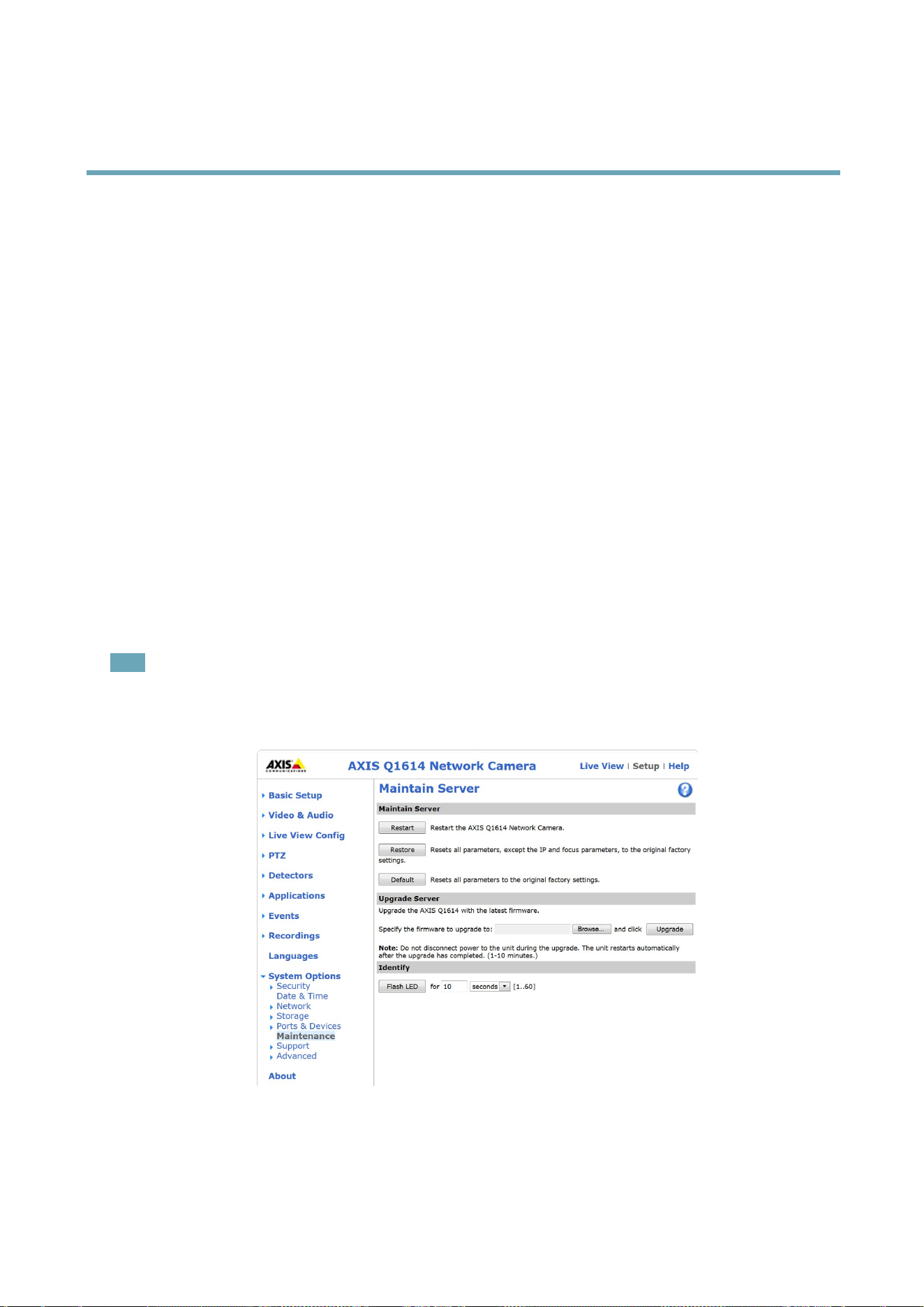
AXISQ1614NetworkCamera
Troubleshooting
Troubleshooting
CheckingtheFirmware
Firmwareissoftwarethatdeterminesthefunctionalityofnetworkdevices.Oneofyourrstactionswhentroubleshootingaproblem
shouldbetocheckthecurrentrmwareversion.Thelatestversionmaycontainacorrectionthatxesyourparticularproblem.The
currentrmwareversionintheAxisproductisdisplayedinthepageSetup>BasicSetupandinSetup>About.
UpgradingtheFirmware
WhenyouupgradetheAxisproductwiththelatestrmwarefromAxiswebsite,theproductreceivesthelatestfunctionalityavailable.
Alwaysreadtheupgradeinstructionsandreleasenotesavailablewitheachnewrelease,beforeupgradingthermware.
Toupgrade,followtheseinstructions:
1.Savethermwareletoyourcomputer.ThelatestversionofthermwareisavailablefreeofchargefromAxiswebsite
atwww.axis.com/techsup
2.GotoSetup>SystemOptions>Maintenanceintheproduct’swebpages.
3.UnderUpgradeServer,clickBrowseandlocatetheleonyourcomputer.ClickUpgrade.
Afterstartingtheupgradeprocess,alwayswaitatleast5–10minutesbeforerestartingtheproduct,evenifyoususpectthe
upgradehasfailed.
AXISCameraManagementcanbeusedformultipleupgrades.Seewww.axis.comformoreinformation.
Note
•Yourdealerreservestherighttochargeforanyrepairattributabletofaultyupgradebytheuser.
•Preconguredandcustomizedsettingsaresavedwhenthermwareisupgraded(providingthefeaturesareavailableinthe
newrmware)althoughthisisnotguaranteedbyAxisCommunicationsAB.
EmergencyRecoveryProcedure
Ifpowerornetworkconnectionislostduringtheupgrade,theprocessfailsandtheproductbecomesunresponsive.FlashingredStatus
indicatorindicatesafailedupgrade.Torecovertheproduct,followthestepsbelow.Theserialnumberisfoundontheproduct’slabel.
61

AXISQ1614NetworkCamera
Troubleshooting
1.InUNIX/Linux,typethefollowingfromthecommandline:
arp-s<IPaddress><serialnumber>temp
ping-l408<IPaddress>
InWindows,typethefollowingfromacommand/DOSprompt(thismayrequirethatyourunthecommandpromptas
anadministrator):
arp-s<IPaddress><serialnumber>
ping-l408-t<IPaddress>
2.Iftheproductdoesnotreplyin30seconds,restartitandwaitforareply.PressCTRL+CtostopPing.
3.Openabrowserandtypeintheproduct’sIPaddress.Inthepagethatopens,usetheBrowsebuttontoselecttheupgrade
letouse.ThenclickLoadtorestarttheupgradeprocess.
4.Aftertheupgradeiscomplete(1–10minutes),theproductautomaticallyrestartsandshowsasteadygreenonthe
Statusindicator.
5.Reinstalltheproduct,referringtotheInstallationGuide.
Iftheemergencyrecoveryproceduredoesnotgettheproductupandrunningagain,contactAxissupportatwww.axis.com/techsup/
Symptoms,PossibleCausesandRemedialActions
ProblemssettingtheIPaddress
WhenusingARP/Ping
Trytheinstallationagain.TheIPaddressmustbesetwithintwominutesafterpowerhasbeen
appliedtotheproduct.EnsurethePinglengthissetto408.Forinstructions,seeAssignIPAddress
UsingARP/Ping,onpage51.
Theproductislocatedona
differentsubnet
IftheIPaddressintendedfortheproductandtheIPaddressofthecomputerusedtoaccessthe
productarelocatedondifferentsubnets,youwillnotbeabletosettheIPaddress.Contactyour
networkadministratortoobtainanIPaddress.
TheIPaddressisbeingused
byanotherdevice
DisconnecttheAxisproductfromthenetwork.RunthePingcommand(inaCommand/DOS
window,typepingandtheIPaddressoftheproduct):
•Ifyoureceive:Replyfrom<IPaddress>:bytes=32;time=10...
thismeansthattheIPaddressmayalreadybeinusebyanotherdeviceonthenetwork.
ObtainanewIPaddressfromthenetworkadministratorandreinstalltheproduct.
•Ifyoureceive:Requesttimedout,thismeansthattheIPaddressisavailable
forusewiththeAxisproduct.Checkallcablingandreinstalltheproduct.
PossibleIPaddressconict
withanotherdeviceonthe
samesubnet.
ThestaticIPaddressintheAxisproductisusedbeforetheDHCPserversetsadynamicaddress.
ThismeansthatifthesamedefaultstaticIPaddressisalsousedbyanotherdevice,theremay
beproblemsaccessingtheproduct.
Theproductcannotbeaccessedfromabrowser
Cannotlogin
WhenHTTPSisenabled,ensurethatthecorrectprotocol(HTTPorHTTPS)isusedwhenattempting
tologin.Youmayneedtomanuallytypehttporhttpsinthebrowser’saddresseld.
Ifthepasswordfortheuserrootislost,theproductmustberesettothefactorydefaultsettings.
SeeResettoFactoryDefaultSettings,onpage59.
62

AXISQ1614NetworkCamera
Troubleshooting
TheIPaddresshasbeen
changedbyDHCP
IPaddressesobtainedfromaDHCPserveraredynamicandmaychange.IftheIPaddresshas
beenchanged,useAXISIPUtilityorAXISCameraManagementtolocatetheproductonthe
network.Identifytheproductusingitsmodelorserialnumber,orbytheDNSname(ifthename
hasbeencongured).
Ifrequired,astaticIPaddresscanbeassignedmanually.Forinstructions,seetheInstallationand
ManagementSoftwareCDorthedocumentAssignanIPAddressandAccesstheVideoStreamon
AxisSupportwebatwww.axis.com/techsup.
Certicateerrorwhenusing
IEEE802.1X
Forauthenticationtoworkproperly,thedateandtimesettingsintheAxisproductshouldbe
synchronizedwithanNTPserver.SeeDate&Time,onpage50.
Theproductisaccessiblelocallybutnotexternally
RoutercongurationTocongureyourroutertoallowincomingdatatrafctotheAxisproduct,enabletheNAT-traversal
featurewhichwillattempttoautomaticallyconguretheroutertoallowaccesstotheAxis
product,seeNATtraversal(portmapping)forIPv4,onpage53.TheroutermustsupportUPnP
TM
.
Firewallprotection
ChecktheInternetrewallwithyournetworkadministrator.
Defaultroutersrequired
CheckifyouneedtoconguretheroutersettingsfromSystemOptions>Network>TCP/IP>
Basic.
ProblemswithstreamingH.264
ProblemswithAXISMedia
Control(InternetExplorer
only)
ToenabletheupdatingofvideoimagesinInternetExplorer,setthebrowsertoallowActiveX
controls.Also,makesurethatAXISMediaControlisinstalledonyourcomputer.
NoH.264displayedinthe
client
CheckthattherelevantH.264connectionmethodsandcorrectinterfaceareenabledintheAMC
ControlPanel(streamingtab).SeeAXISMediaControl(AMC),onpage16.
IntheAMCControlPanel,selecttheH.264tabandclickSettodefaultH.264decoder.
CheckthatRTSPisenabledunderSystemOptions>Network>TCP/IP>Advanced.
MulticastH.264only
accessiblebylocalclients
Checkifyourroutersupportsmulticasting,oriftheroutersettingsbetweentheclientandthe
productneedtobecongured.TheTTL(TimeToLive)valuemayneedtobeincreased.
NomulticastH.264
displayedintheclient
CheckwithyournetworkadministratorthatthemulticastaddressesusedbytheAxisproduct
arevalidforyournetwork.
Checkwithyournetworkadministratortoseeifthereisarewallpreventingviewing.
Installationofadditional
ActiveXcomponent
restrictedorprohibited
ConguretheAxisproducttouseaJavaappletforupdatingvideoimagesinyourbrowser.Goto
Setup>LiveViewCongandselectJavaappletunderDefaultviewer.
PoorrenderingofH.264
images
Ensurethatyourgraphicscardisusingthelatestdriver.Thelatestdriverscanusuallybe
downloadedfromthemanufacturer’swebsite.
Colorsaturationisdifferent
inH.264andMotionJPEG
Modifythesettingsforyourgraphicsadapter.Refertotheadapter’sdocumentationformore
information.
63

AXISQ1614NetworkCamera
Troubleshooting
Lowerframeratethan
expected
SeePerformanceConsiderations,onpage70.
Reducethenumberofapplicationsrunningontheclientcomputer.
Limitthenumberofsimultaneousviewers.
Checkwiththenetworkadministratorthatthereisenoughbandwidthavailable.
CheckintheAMCControlPanel(H.264tag)thatvideoprocessingisNOTsettoDecodeonly
keyframes.
Lowertheimageresolution.
SetaCaptureModethatprioritizesframerate.Changingthecapturemodetoprioritizeframerate
willlowerthemaximumresolution.SeeCaptureMode,onpage22.
Themaximumframespersecondisdependentontheutilityfrequency(60/50Hz)oftheAxis
product.SeeTechnicalSpecications,onpage66.
StatusandNetworkindicatorLEDsareashingredrapidly
Hardwarefailure
ContactyourAxisreseller.
Videoandimageproblems,general
Imageunsatisfactory
CheckthevideostreamandcamerasettingsunderSetup>Video&Audio>VideoStreamand
Setup>Video&Audio>CameraSettings.
MotionDetectiontriggersunexpectedly
Changesinluminance
Motiondetectionisbasedonchangesinluminanceintheimage.Thismeansthatifthereare
suddenchangesinthelighting,motiondetectionmaytriggermistakenly.Lowerthesensitivity
settingtoavoidproblemswithluminance.
Noaudio
Incorrectsetup
Checkthesoundcardinthecomputer.Ensurethatmuteisnotselectedandthatthevolume
settingsarecorrect.
CheckthatEnableaudiosupportisselectedunderSetup>SystemOptions>Security>Audio
Support.
CheckthatthecorrectAudioInputsourceisselectedunderSetup>Video&Audio>Audio
Settings.
Pooraudioquality
Stuttering
Reducethenumberoflistenersandviewers.Decreaseimageresolutionandcompression.
Unsynchronizedaudioand
videousingH.264
Synchronizetheproduct’sdateandtimesettingswithanNTPserver.GotoSetup>System
Options>Date&Time.
Distortedaudio
CheckthatthecorrectAudioInputsourceisselectedunderSetup>Video&Audio>Audio
Settings.
FeedbackloopsFeedbackloopsmightappearinfull-duplexmode.Trymovingthemicrophoneorthespeaker,or
usehalf-duplexmodeinstead.
64

AXISQ1614NetworkCamera
Troubleshooting
Storageanddiskmanagementproblems
Storagedisruption
Astoragedisruptionalarmissentifastoragedeviceisunavailable,removed,full,lockedorifother
readorwriteproblemsoccur.Toidentifythesourceoftheproblem,checktheSystemLogunder
SystemOptions>Support>Logs&Reports.Dependingontheproblem,itmightbenecessaryto
re-mountthestoragedevice.
Forinformationonhowtosetupastoragedisruptionalarm,seeEvents,onpage41.
Videocannotberecorded
CheckthattheSDcardisnotwriteprotected(thatis,readonly).
SDcardcannotbemountedReformattheSDcardandthenclickMount.
65

AXISQ1614NetworkCamera
TechnicalSpecications
TechnicalSpecications
Function/group
Item
Specications
Models
AXISQ1614:720presolution,indoor
Imagesensor
ProgressivescanRGBCMOS1/3”
Lens
P-iris,IRcorrected,varifocal,CS-mount,supportforDC-Irislens,megapixelresolution
2.8-8mm,F1.2
Horizontalangleofview100°-34°
Verticalangleofview:75°-26°
Diagonalangleofview:135°-43°
DayandnightAutomaticallyremovableinfrared-cutlter
Minimum
illumination
Color:0.05lux,F1.2,B/W:0.008lux,F1.2inCapturemodeD1and720p25/30fps
Color:0.1lux,F1.2,B/W:0.02lux,F1.2inCapturemode720p50/60fps
Color:0.4lux,F1.2,B/W0.06lux,F1.2withdynamiccapture
Camera
Shuttertime
25/30fpsmode:1/29500-2;1/231-1/44withdynamiccaptureenabled
50/60fpsmode:1/43500-2
ExtendedD1mode:1/29500-2
Video
compression
H.264(MPEG-4Part10/AVC)
H.264BaselineandMainProle
MotionJPEG
Resolutions
25/30fpsmode:1280x960*to160x90
50/60fpsmode:1280x720to160x90
ExtendedD1mode:768x576to160x90
*1400x1050(1.4MP)scaledresolutionavailableviaVAPIX®
FramerateLightndermode:Upto60fpsin60Hzcapturemode,upto50fpsin50Hzcapturemode
WDR:30fpsin60Hzcapturemode,25fpsin50Hzcapturemode
Videostreaming
Multiple,individuallycongurablestreamsinH.264andMotionJPEG
ControllableframerateandbandwidthVBR/CBRH.264
Imagesettings
Compression,color,brightness,sharpness,contrast,whitebalance,exposurecontrol,
exposurezones,backlightcompensation,netuningofbehavioratlowlight
WDR:Upto120dB(0.4-400,000lux)dependingonscene,shadowandhighlightrecovery
Textandimageoverlay
Privacymask
Mirroringofimages
Rotation:0°,90°,180°,270°,Auto
CorridorFormat™
Video
Users20simultaneoususers
Unlimitednumbersofusersusingmulticast(H.264)
66

AXISQ1614NetworkCamera
TechnicalSpecications
Function/group
Item
Specications
AudiostreamingTwo-way,fullduplex
Audio
compression
AACLC8/16/32kHz,8-128kbit/s
G.711PCM8kHz64kbit/s
G.726ADPCM8kHz32kbit/sor24kbit/s
Congurablebitrate
Audioinput
AudioInput:3.5mmjackfor:mic/linein.Max80mVppformicrophone/Max6.2Vpp
forlinesignal
Impedance:Min1kΏ,Mic-poweractivated;Min4kΏline
Tip:BalancedMicrophoneHot(+)In/UnbalancedMicrophoneIn/LineIn
Ring:BalancedMicrophoneCold(-)In
Sleeve:Ground
Powertoexternalelectretmicrophone:1.3V-3.0V(DC)
SNR:>40dB
Optional12Vphantompower
Audiooutput3.5mmjackforlineout.Max2.8Vpp
Impedance:Max100Ώ,normal<1Ώ
SNR:>40dB
Audio
Builtin
microphone
specication
Sensitivity:-36dB±2dB(0db=1V/Pa,1kHz)
Maxinput(SPL):100dB
SecurityPasswordprotection,IPaddressltering,IEEE802.1X*networkaccesscontrol,HTTPS**
encryption,digestauthentication,useraccesslog.
*ThisproductincludessoftwaredevelopedbytheOpenSSLProjectforuseintheOpenSSL
Toolkit
Network
Supported
protocols
IPv4/v6,HTTP,HTTPS*,SSL/TLS*,QoSLayer3DiffServ,FTP,SMTP,Bonjour,UPnP™,
SNMPv1/v2c/v3(MIB-II),DNS,DynDNS,NTP,RTSP,RTP,TCP,UDP,IGMP,RTCP,ICMP,
DHCP,ARP,SOCKS,CIFS/SMB.
*ThisproductincludessoftwaredevelopedbytheOpenSSLProjectforuseintheOpenSSL
Toolkit.
Application
Programming
Interface
OpenAPIforsoftwareintegration,includingVAPIX®andAXISCameraApplication
Platform;specicationsatwww.axis.com
AXISVideoHostingSystem(AVHS)withOne-ClickCameraConnectionONVIFProleS;
specicationatwww.onvif.org
IntelligentvideoVideomotiondetection,activetamperingalarm
SupportforAXISCameraApplicationPlatformenablinginstallationofadditional
applications
EventtriggersIntelligentvideo,edgestorageevents,videomotiondetection,activetamperingalarm,
audiodetection,temperature,externalinput,AXISCameraApplicationPlatform
EventactionsFileuploadviaFTP,HTTP,networkshareandemail
Noticationviaemail,HTTPandTCP
Externaloutputactivation
Videoandaudiorecordingtoedgestorage
Pre-andpost-alarmvideobuffering
Videobuffer
48MBpre-andpostalarm
Videoaccessfrom
webbrowser
Cameraliveview
Videorecordingtole(ASF)
CustomizableHTMLpages
WindowsVista,XP,Windows7,andServer2008
DirectX9corhigher
Forotheroperatingsystemsandbrowersseewww.axis.com/techsup
System
Integration
67

AXISQ1614NetworkCamera
TechnicalSpecications
Function/group
Item
Specications
Built-inaidsin
software
Focusassistant,levellingassistant,remotebackfocus,pixelcounter
Casing
Camera:Metal(zinc)
ToolsTorxscrewdriverT20
Memory256MBRAM,128MBFlash
Batterybacked-upreal-timeclock
Power
8-28VDCorPoweroverEthernet(PoE)IEEE802.3af/IEEE802.3atType1Class3,
max.10.8W
Connectors
RJ4510BASE-T/100BASE-TXPoE
RS485/422
DCinput
Terminalblockfor1alarminputand1output
3.5mmjackformicin(max80mVpp)orlinemonoinput(max6.2Vpp)
3.5mmjackforlinemonooutput(max2.8Vpp)toactivespeaker
Edgestorage
SD/SDHC/SDXCmemorycardslot(cardnotincluded)
Memorycardupto64GB
Supportforrecordingtonetworkshare(NetworkAttachedStorageorleserver)
Operating
conditions
0°Cto50°C(32°Fto122°F),humidity20-85%RH(non-condensing)
Approvals
EN55022ClassB,EN61000-3-2,EN61000-3-3,EN55024,EN61000-6-1,EN
61000-6-2
FCCPart15SubpartBClassAandB
ICES-003ClassB
VCCIClassB,C-tickAS/NZSCISPR22ClassB
KCCKN22ClassB,KN24
IEC/EN/UL60950-1
Weight
925g(2lb)
Dimensions
58.5x82x87mm(2.3x3.2x3.4in)
Included
accessories
Stand,connectorkit,1AllenkeyResitorx20,InstallationGuide,Installationand
ManagementSoftwareCD,Windowsdecoder1-userlicense
Video
management
software(not
included)
AXISCameraCompanion(included),AXISCameraStationandvideomanagement
softwarefromAxis’ApplicationDevelopmentPartners(notincluded).See
www.axis.com/products/video/software
General
Optional
accessories
AXIST90AIlluminators
AXIST8414InstallationDisplay
AXISPoweroverEthernetMidspan1-port
AXISCameraStationandvideomanagementsoftwarefromAxis’Application
DevelopmentPartners
Connectors
I/Oconnector
4–pinterminalblockfor:
•Auxiliarypower(DCoutput)
•DigitalInput
•DigitalOutput
•0VDC(-)
68
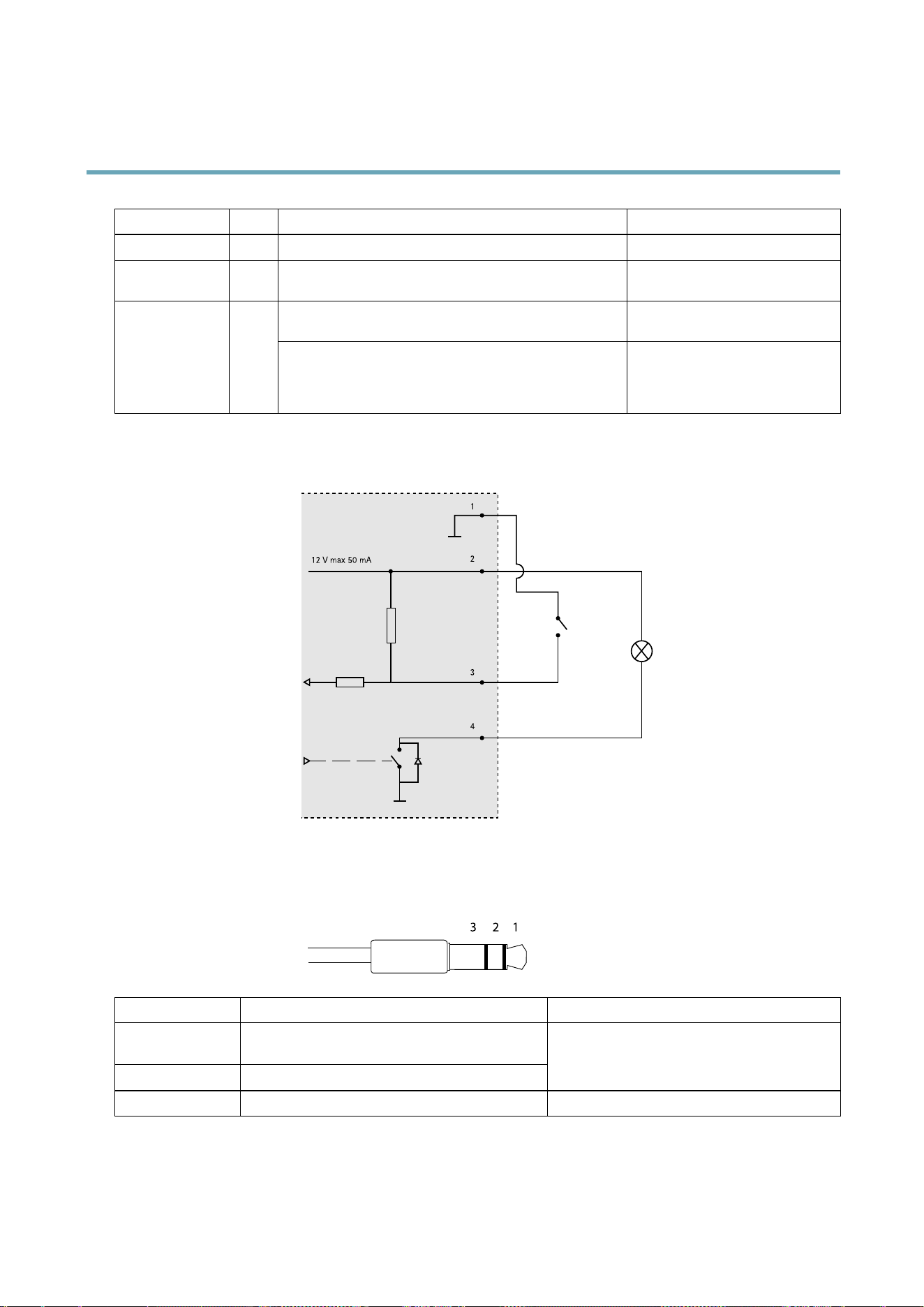
AXISQ1614NetworkCamera
TechnicalSpecications
FunctionPinNotes
Specications
0VDC(-)
1
DCoutput
2
Canbeusedtopowerauxiliaryequipment.
Note:Thispincanonlybeusedaspowerout.
12VDC
Maxload=50mA
Digitalinput–Connecttopin1toactivate,orleaveoating
(unconnected)todeactivate.
0tomax30VDC Congurable
(InputorOutput)
3–4
Digitaloutput–Connectedtopin1whenactivated,oating
(unconnected)whendeactivated.Ifusedwithaninductive
load,e.g.arelay,adiodemustbeconnectedinparallelwith
theload,forprotectionagainstvoltagetransients.
0tomax30VDC,opendrain,
100mA
12 V max 50 mA
1
2
3
4
3.
I/Oconguredasinput
4.
I/Oconguredasoutput
AudioConnector
3.5mmaudioconnectors
(stereo)
123
AudioInput
AudioOutput
1Tip
BalancedMicrophoneHot(+)In/Unbalance
MicrophoneIn/LineIn
2Ring
BalancedMicrophoneCold(-)In
Lineout(mono)
3SleeveGroundGround
69
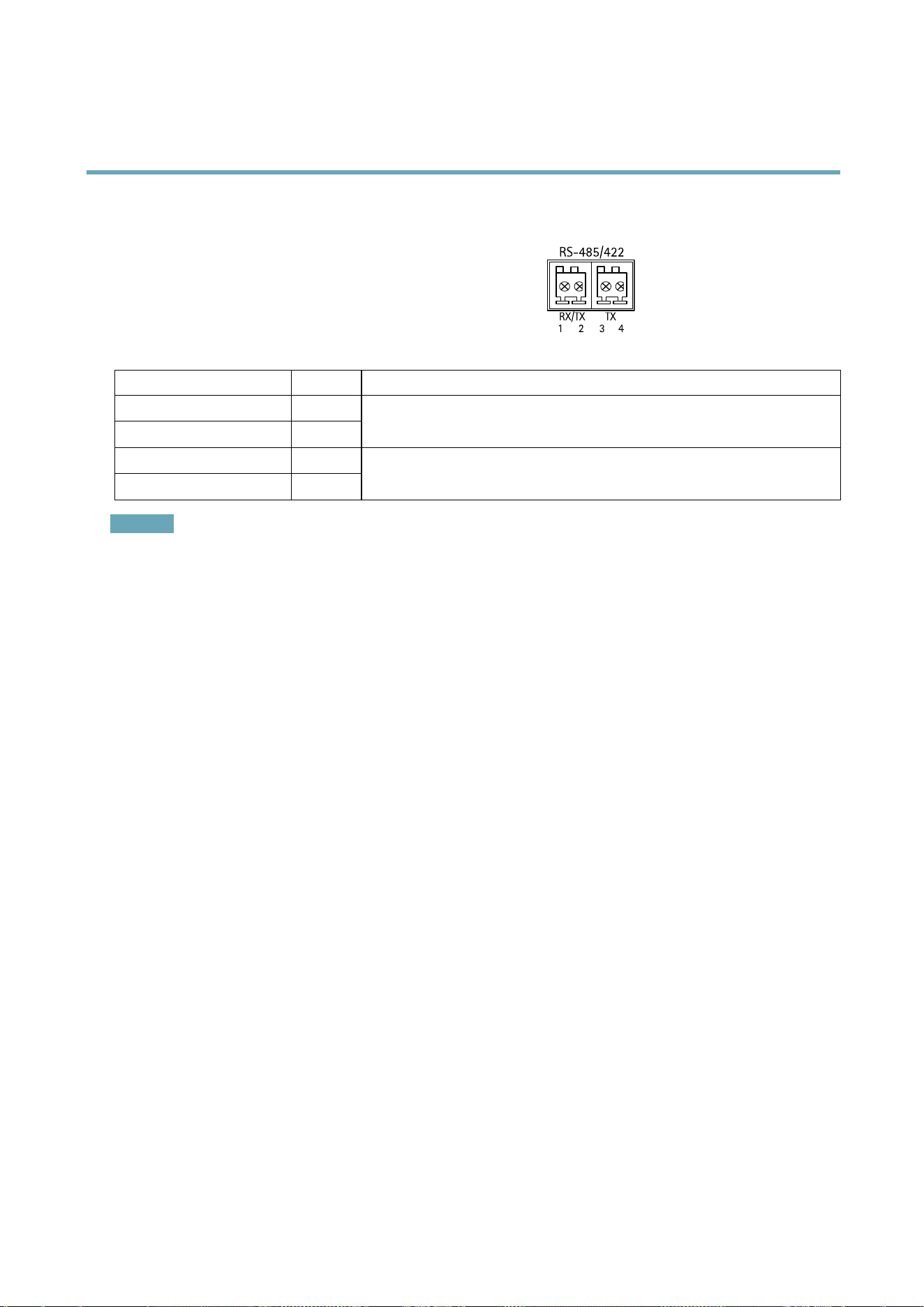
AXISQ1614NetworkCamera
TechnicalSpecications
RS-485/422Connector
Two2-pinterminalblocksforRS485/RS422serialinterface.Theserial
portcanbeconguredtosupport:
•Two-wireRS485halfduplex
•Four-wireRS485fullduplex
•Two-wireRS422simplex
•Four-wireRS422fullduplexpointtopointcommunication
1 2
RX/TX TX
3
RS-485/422
4
FunctionPinNotes
RS485BaltRS485/422RX(B)
1
RS485AaltRS485/422RX(A)
2
RXpairforallmodes(combinedRX/TXfor2-wireRS485)
RS485/RS422TX(B)
3
RS485/RS422TX(A)
4
TXpairforRS422and4-wireRS485
Important
Therecommendedmaximumcablelengthis30m(98.4ft).
PerformanceConsiderations
Whensettingsupyoursystem,itisimportanttoconsiderhowvarioussettingsandsituationswillaffectperformance.Somefactors
affecttheamountofbandwidth(thebitrate)required,otherscanaffecttheframerate,andsomeaffectboth.Iftheloadonthe
CPUreachesitsmaximum,thiswillalsoaffecttheframerate.
Thefollowingfactorsareamongthemostimportanttoconsider:
•Highimageresolutionand/orlowercompressionlevelsresultinimagescontainingmoredata.Bandwidthaffected.
•AccessbylargenumbersofMotionJPEGand/orunicastH.264clients.Bandwidthaffected.
•Simultaneousviewingofdifferentstreams(resolution,compression)bydifferentclients.Effectonframerateand
bandwidth.
•AccessingMotionJPEGandH.264videostreamssimultaneously.Framerateandbandwidthaffected.
•Heavyusageofeventsettingsaffecttheproduct’sCPUload.Framerateaffected.
•Heavynetworkutilizationduetopoorinfrastructure.Bandwidthaffected.
•Viewingonpoorlyperformingclientcomputerslowersperceivedperformance.Framerateaffected.
70

UserManualVer.M3.2
AXISQ1614NetworkCamera
Date:December2013
©AxisCommunicationsAB,2013
PartNo.55118