1 Read all instructions prior to using the oven and its accessories.
2 This appliance can be used by persons with reduced physical, sensory or mental capabilities or lack of experience and knowledge if they have been
given supervision or instruction concerning use of the appliance in a safe way and understand the hazards involved.
3 If food contents were to catch fire during cooking, DO NOT open the oven door.
• If you can safely do so, unplug the oven immediately.
• DO NOT throw water onto the fire. Food contents may contain grease and water may cause fire growth.
• If fire were to emit from the oven door, call the fire department immediately.
• DO NOT use the oven after it has experienced a fire, it may have been damaged and present a risk of fire or shock.
4 To eliminate a choking hazard for young children, discard all packaging materials immediately upon unpacking.
5 To reduce the risk of fire, DO NOT place appliance on stovetops or other hot surfaces or in a heated oven.
6 Take inventory of all contents to ensure you have all parts needed to properly and safely operate your oven.
7 DO NOT use an extension cord. A short power-supply cord is used to reduce the risk of children grabbing the cord or becoming entangled and to reduce
the risk of people tripping over a longer cord.
8 NEVER use outlet below counter level.
9 Keep the appliance and its cord out of reach of children. DO NOT allow the appliance to be used by children. Close supervision is necessary when used
near children.
10 DO NOT let cord hang over edges of tables or counters or touch hot surfaces, including stoves and other heating ovens.
11 NEVER leave the oven unattended while in use.
12 DO NOT place any object directly onto the heating elements and DO NOT cover crumb tray or any part of the oven with aluminum foil. This will cause the
oven to overheat or cause a fire.
13 DO NOT use the oven with the crumb tray incorrectly installed. Crumb tray MUST be placed below lower heating elements.
14 To protect against electrical shock DO NOT immerse cord, plugs, or main unit housing in water or other liquid.
15 DO NOT use the oven with damage to the power cord or plug. Regularly inspect the oven and power cord. If the oven malfunctions or has been damaged
in any way, immediately stop use and call Customer Service.
16 DO NOT cover the air intake vents or air outlet vents while unit is operating. Doing so will prevent even cooking and may damage the unit or cause it to overheat.
17 DO NOT insert anything in the ventilation slots and do not obstruct them.
Read and review instructions to understand operation and use of product.
Indicates the presence of a hazard that can cause personal injury, death or substantial property damage if
the warning included with this symbol is ignored.
Avoid contact with hot surface. Always use hand protection to avoid burns.
For indoor and household use only
IMPORTANT SAFETY INSTRUCTIONS
INDOOR HOUSEHOLD USE ONLY. READ ALL INSTRUCTIONS BEFORE USE
WARNING
When using electrical appliances, basic safety precautions should always be followed, including the following:
SharkNinja Operating LLC
US: Needham, MA 02494
1-877-646-5288
ninjakitchen.com
Illustrations may dier from actual product. We are constantly striving to improve our products,
therefore the specifications contained herein are subject to change withoutnotice.
FOODI and NINJA are registered trademarks of SharkNinja Operating LLC.
This product may be covered by one or more U.S. patents.
See sharkninja.com/patents for more information.
© 2024 SharkNinja Operating LLC.
DT550Series_IB_REV_Mv3
THANK YOU
for purchasing the Ninja® Prestige Smart XL Air Fryer & Countertop Oven
with Pro Cook System
TECHNICAL SPECIFICATIONS
Voltage: 120V~ 60Hz
Watts: 1800W
RECORD THIS INFORMATION
Model Number: _________________
Serial Number: __________________
Date of Purchase: ________________
(Keep receipt)
Store of Purchase: _______________
REGISTER YOUR PURCHASE
registeryourninja.com
Scan QR code using mobile device
@ninjakitchen
TIP: You can find the model and serial numbers on the QR code label on the
base of the unit.
NINJA® PRESTIGE SMART XL AIR FRYER
& COUNTERTOP OVEN
DT550 Series | Owner’s Guide

2
ninjakitchen.com
3
ninjakitchen.com
18 DO NOT place items on top of surface while unit is operating except for authorized recommended Ninja accessories. Placing items on top of the oven
may mark or scratch the surface.
19 Before placing any accessories into the oven ensure they are clean and dry.
20 Intended for countertop use only. DO NOT place the oven near the edge of a countertop, or on or near a hot gas or electric burner. Ensure the surface is
level, clean and dry.
21 This oven is for household use only. DO NOT use this oven for anything other than its intended use. Misuse may cause injury.
22 DO NOT store any materials, other than supplied accessories, in this oven when not in use.
23 DO NOT use outdoors. DO NOT use in moving vehicles or boats.
24 DO NOT use accessory and attachments not recommended or sold by SharkNinja.
25 When using this oven, provide adequate space (at least 1 inch above and on all sides) for air circulation.
26 A fire may occur if the oven is covered or touching flammable material, including curtains, draperies, walls, or the like when in operation. DO NOT place
anything on the oven during operation.
27 This oven has a tempered glass door and is more resistant to breakage. Avoid scratching door surface or nicking edges.
28 DO NOT place anything directly on heating elements and DO NOT use the oven without a wire rack or air fry basket installed.
29 DO NOT spray any type of aerosol spray or flavoring inside the oven while cooking.
30 Use caution when inserting and removing anything from the oven, especially when hot.
31 Outlet voltages can vary, affecting the performance of your product. To prevent possible illness, use a thermometer to check that your food is cooked to
the temperatures recommended.
32 Prevent food contact with heating elements. Excessive food loads may cause personal injury or property damage or affect the safe use of the oven.
33 Oversize foods or metal utensils MUST NOT be inserted in a toaster oven, as they may create a fire or risk of electric shock.
34 With the exception of parchment paper, DO NOT place any of the following materials in the oven: paper, cardboard, plastic, roasting bags and the like.
35 Extreme caution should be exercised when using containers constructed of any materials other than metal or glass.
36 DO NOT touch hot surfaces. Oven surfaces and glass door are hot during and after operation. To prevent burns or personal injury, ALWAYS use protective
hot pads or insulated oven mitts and use available handles.
37 Appliances are not intended to be operated by means of an external timer or separate remote-control system.
38 Spilled food can cause serious burns. Extreme caution must be used when the oven contains hot food. Improper use may result in personal injury.
39 Please refer to the Cleaning & Maintenance section for regular maintenance of the oven.
40 Cleaning and user maintenance shall not be done by children.
41 Allow to cool completely before cleaning and moving for storage.
42 When not in use, turn any control to ‘off’, then unplug. Grasp the plug by the body and pull from the outlet. NEVER unplug by grasping and pulling flexible cord.
43 DO NOT clean with metal scouring pads. Pieces can break off the pad and touch electrical parts, causing a risk of electrical shock.
44 DO NOT use the oven as a source of heat or for drying.
45 This appliance has important markings on the plug blade. The entire supply cord is not suitable for replacement. If damaged, please contact SharkNinja
for service.
46 To prevent possible illness, ALWAYS use an external food thermometer to check that your food is cooked to the recommended temperatures.
47 DO NOT place hands near thermometer or cord when in use to prevent burning or scalding. Thermometer will be hot. Use either oven mitts or tongs to
remove thermometer from food and unit.
48 The thermometer DOES NOT replace an external food thermometer. Use external food thermometer to check that food is cooked to recommended
temperatures.
IMPORTANT SAFETY INSTRUCTIONS
INDOOR HOUSEHOLD USE ONLY. READ ALL INSTRUCTIONS BEFORE USE
SAVE THESE INSTRUCTIONS
WARNING
When using electrical appliances, basic safety precautions should always be followed, including the following:
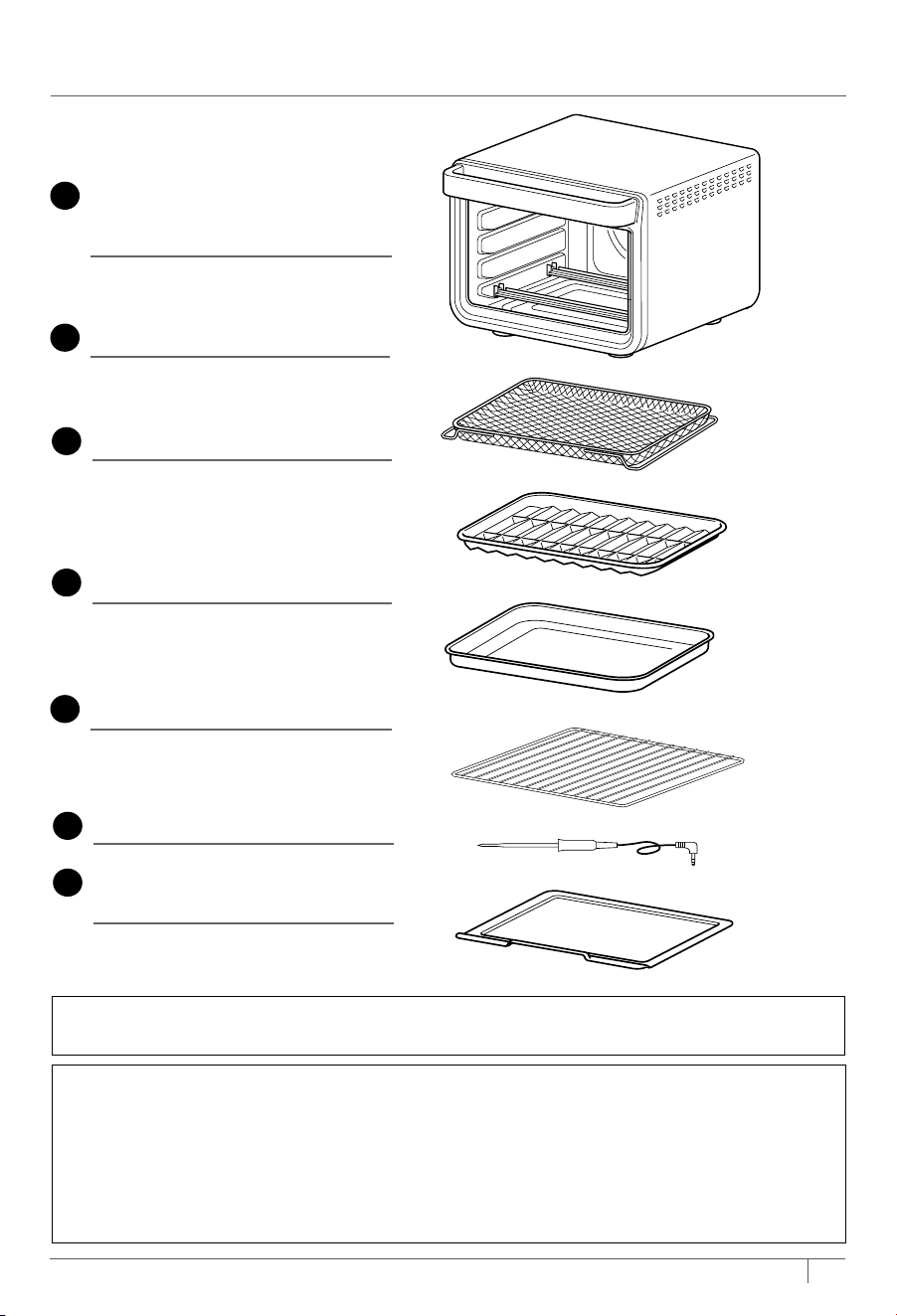
PARTS
IMPORTANT: Place crumb tray below lower heating elements. DO NOT slide into any
rack positions.
COMMON–SENSE PRACTICES/GOOD HABITS:
• DO NOT leave your toaster oven unattended while making food. If possible, unplug the
oven while not in use to eliminate the possibility of accidents occurring.
• Have a fire extinguisher or fire containment blanket handy in a safe, known location. If you
don’t have a fire extinguisher, douse the flames with baking soda until they are put out.
• If a fire occurs and the food in the oven is not greasy, immediately unplug the unit and
douse the flames with water until the fire is extinguished. DO NOT use water if grease
is present, since it could make the fire worse. Use baking soda instead.
A
Main Unit
(attached power cord
not shown)
E
2 Wire Racks
Use on its own or place the
sheet pan on top. Hand-wash
recommended.
D
Sheet Pan(s)
Place on top of the wire rack.
Hand-wash only.
Additional sheet pan is not available
on all models.
B
Air Fry Basket
Install when using the Air
Fry function. Hand-wash
recommended.
C
Roast Tray
Fits on top of the sheet pan
to catch grease below roasted
or air fried foods to reduce
smoke and grease splatter.
Hand-wash only.
F
Removable Crumb Tray
(already installed in unit)
Must remain installed when the
oven is in use. Hand-wash only.
G
Prestige Smart Thermometer
2
ninjakitchen.com
3
ninjakitchen.com
18 DO NOT place items on top of surface while unit is operating except for authorized recommended Ninja accessories. Placing items on top of the oven
may mark or scratch the surface.
19 Before placing any accessories into the oven ensure they are clean and dry.
20 Intended for countertop use only. DO NOT place the oven near the edge of a countertop, or on or near a hot gas or electric burner. Ensure the surface is
level, clean and dry.
21 This oven is for household use only. DO NOT use this oven for anything other than its intended use. Misuse may cause injury.
22 DO NOT store any materials, other than supplied accessories, in this oven when not in use.
23 DO NOT use outdoors. DO NOT use in moving vehicles or boats.
24 DO NOT use accessory and attachments not recommended or sold by SharkNinja.
25 When using this oven, provide adequate space (at least 1 inch above and on all sides) for air circulation.
26 A fire may occur if the oven is covered or touching flammable material, including curtains, draperies, walls, or the like when in operation. DO NOT place
anything on the oven during operation.
27 This oven has a tempered glass door and is more resistant to breakage. Avoid scratching door surface or nicking edges.
28 DO NOT place anything directly on heating elements and DO NOT use the oven without a wire rack or air fry basket installed.
29 DO NOT spray any type of aerosol spray or flavoring inside the oven while cooking.
30 Use caution when inserting and removing anything from the oven, especially when hot.
31 Outlet voltages can vary, affecting the performance of your product. To prevent possible illness, use a thermometer to check that your food is cooked to
the temperatures recommended.
32 Prevent food contact with heating elements. Excessive food loads may cause personal injury or property damage or affect the safe use of the oven.
33 Oversize foods or metal utensils MUST NOT be inserted in a toaster oven, as they may create a fire or risk of electric shock.
34 With the exception of parchment paper, DO NOT place any of the following materials in the oven: paper, cardboard, plastic, roasting bags and the like.
35 Extreme caution should be exercised when using containers constructed of any materials other than metal or glass.
36 DO NOT touch hot surfaces. Oven surfaces and glass door are hot during and after operation. To prevent burns or personal injury, ALWAYS use protective
hot pads or insulated oven mitts and use available handles.
37 Appliances are not intended to be operated by means of an external timer or separate remote-control system.
38 Spilled food can cause serious burns. Extreme caution must be used when the oven contains hot food. Improper use may result in personal injury.
39 Please refer to the Cleaning & Maintenance section for regular maintenance of the oven.
40 Cleaning and user maintenance shall not be done by children.
41 Allow to cool completely before cleaning and moving for storage.
42 When not in use, turn any control to ‘off’, then unplug. Grasp the plug by the body and pull from the outlet. NEVER unplug by grasping and pulling flexible cord.
43 DO NOT clean with metal scouring pads. Pieces can break off the pad and touch electrical parts, causing a risk of electrical shock.
44 DO NOT use the oven as a source of heat or for drying.
45 This appliance has important markings on the plug blade. The entire supply cord is not suitable for replacement. If damaged, please contact SharkNinja
for service.
46 To prevent possible illness, ALWAYS use an external food thermometer to check that your food is cooked to the recommended temperatures.
47 DO NOT place hands near thermometer or cord when in use to prevent burning or scalding. Thermometer will be hot. Use either oven mitts or tongs to
remove thermometer from food and unit.
48 The thermometer DOES NOT replace an external food thermometer. Use external food thermometer to check that food is cooked to recommended
temperatures.
IMPORTANT SAFETY INSTRUCTIONS
INDOOR HOUSEHOLD USE ONLY. READ ALL INSTRUCTIONS BEFORE USE
SAVE THESE INSTRUCTIONS
WARNING
When using electrical appliances, basic safety precautions should always be followed, including the following:
PARTS
IMPORTANT: Place crumb tray below lower heating elements. DO NOT slide into any
rack positions.
COMMON–SENSE PRACTICES/GOOD HABITS:
• DO NOT leave your toaster oven unattended while making food. If possible, unplug the
oven while not in use to eliminate the possibility of accidents occurring.
• Have a fire extinguisher or fire containment blanket handy in a safe, known location. If you
don’t have a fire extinguisher, douse the flames with baking soda until they are put out.
• If a fire occurs and the food in the oven is not greasy, immediately unplug the unit and
douse the flames with water until the fire is extinguished. DO NOT use water if grease
is present, since it could make the fire worse. Use baking soda instead.
A
Main Unit
(attached power cord
not shown)
E
2 Wire Racks
Use on its own or place the
sheet pan on top. Hand-wash
recommended.
D
Sheet Pan(s)
Place on top of the wire rack.
Hand-wash only.
Additional sheet pan is not available
on all models.
B
Air Fry Basket
Install when using the Air
Fry function. Hand-wash
recommended.
C
Roast Tray
Fits on top of the sheet pan
to catch grease below roasted
or air fried foods to reduce
smoke and grease splatter.
Hand-wash only.
F
Removable Crumb Tray
(already installed in unit)
Must remain installed when the
oven is in use. Hand-wash only.
G
Prestige Smart Thermometer
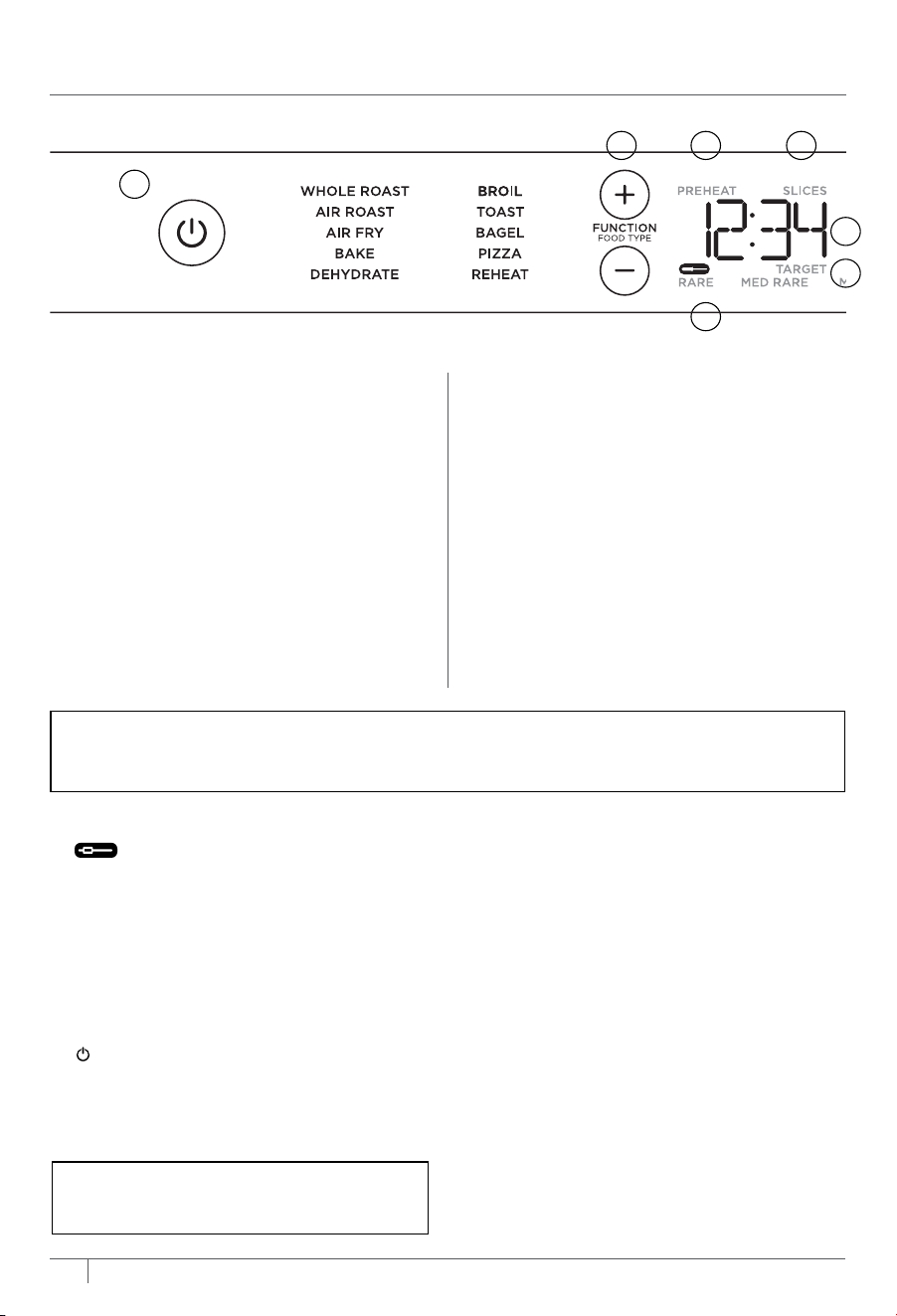
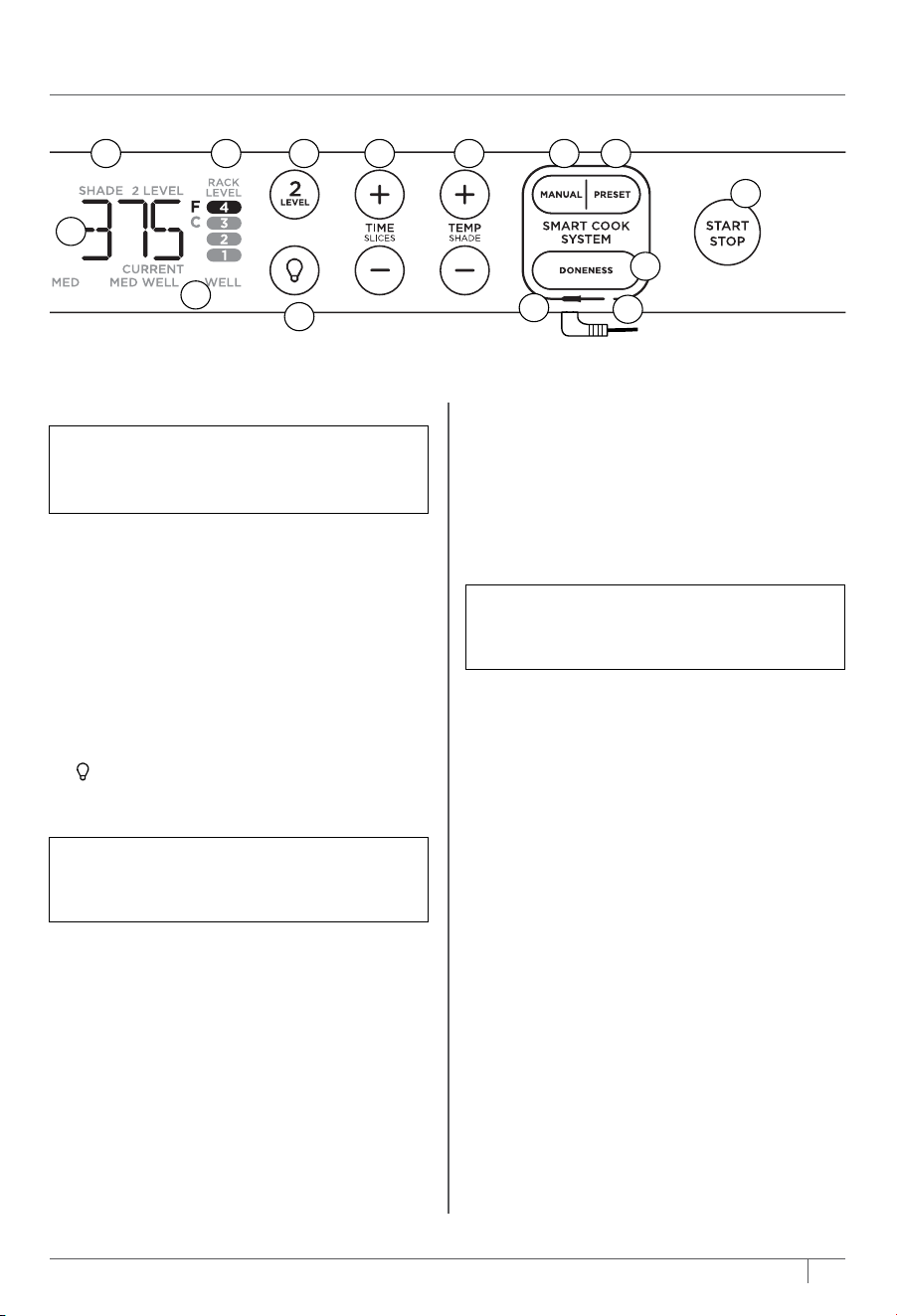
6 Temperature display: Shows the
cook temperature.
7 SHADE: Illuminates when using the
Toast or Bagel function to designate
desired shade.
8 RACK LEVEL: Depending on the
function you choose, the illuminated
rack level(s) will indicate where your
accessory should be placed in the unit.
9 2 LEVEL: For functions that allow you
to cook on 2 levels, press the button
to select two level cooking and RACK
LEVEL will update.
10
(Light) button: Press to turn the
oven’s interior light on and o while
cooking.
11 TIME/SLICES +/- buttons: To select a
cook time, press the TIME +/- buttons.
Time will increase in 1-minute increments
under 1 hour and 5-minute increments
over 1 hour. Hold the +/- buttons for 2
seconds to activate faster scrolling in
5-minute increments. When using the
Toast or Bagel function, these buttons
will adjust the number of slices/bagel
halves instead of the time.
5
ninjakitchen.com
1 (Power) button: Press to turn the unit
on and o.
2 FUNCTION/FOOD TYPE +/- buttons:
To select a cook function or food type,
press these +/- buttons.
4
ninjakitchen.com
USING THE CONTROL PANEL
FUNCTIONS
WHOLE ROAST: Simultaneously roast
larger proteins, like a 5-lb chicken, and
sides for a complete meal. Or cook a larger
protein, like a 12-lb turkey, on its own.
AIR ROAST: Achieve a crispy outside and
perfectly cooked inside for full-sized sheet pan
meals, thicker proteins, and roasted veggies.
AIR FRY: Foods that would traditionally be
fried—such as chicken wings, French fries,
and chicken nuggets—with little to
no added oil.
BAKE: Evenly bake everything from your
favorite cookies to cakes.
DEHYDRATE: Dehydrate meats, fruits,
and vegetables for healthy snacks.
12 TEMP/SHADE +/- buttons: To adjust
temperature, press the TEMP
+/- buttons. When using the Toast
or Bagel function, these buttons
will adjust the shade level (1–7 from
lightest to darkest) instead of the
temperature. Temperature will increase
in 5-degree increments. Hold the +/-
buttons for 2 seconds to activate faster
scrolling in 10-degree increments.
13 MANUAL button: Press to switch the
display to the manual temperature setting
for the thermometer. Use TEMP/SHADE
+/- button to set thermometer’s target
temperature.
14 PRESET button: Press to display food
type settings for the thermometer. Use
the FUNCTION/FOOD TYPE +/- buttons
to toggle through food types.
15 START/STOP button: Press to start or
stop cooking.
16 DONENESS button: Press to switch the
display to the internal doneness settings
for the thermometer. The display will
show the dierent doneness levels.
Press DONENESS repeatedly to toggle
through the doneness levels. DONENESS
can only be selected if a food type has
previously been selected with the
FUNCTION/FOOD TYPE +/- buttons.
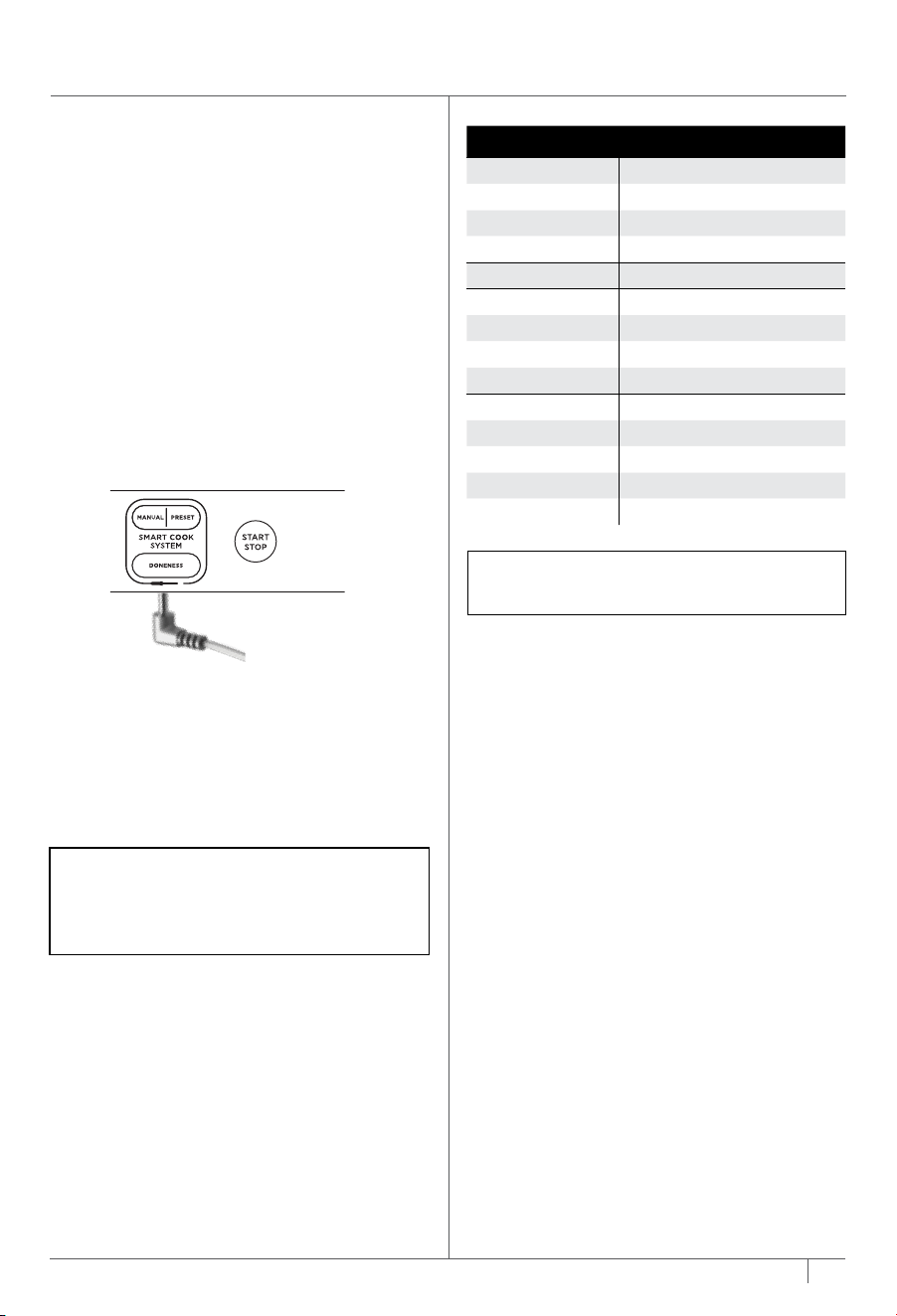
17 Prestige Smart Thermometer plugs in
here as shown in the image above.
NOTE: The cook time and temperature
may be adjusted at any time during the
cooking cycle.
NOTE: As you move through functions,
you’ll notice the rack level recommendations
change for best results.
NOTE: The oven’s technology leads to faster cooking. Always monitor your food to prevent
overcooking. When following package instructions with the Whole Roast, Air Roast, and Air
Fry functions, reduce time by 30% and temperature by 25°F (14°C).
NOTE: Time and temperature will always
return to the settings used the last time
the oven was in operation.
5 6
3 4
10
1
BROIL: Evenly broil meats, fish and brown
the tops of casseroles.
TOAST: Toast up to 9 slices of bread to
your desired level of darkness.
BAGEL: Perfectly toast up to 9 bagel
halves when they’re placed cut-side up
on the wire rack.
PIZZA: Cook frozen or homemade
pizzas evenly.
REHEAT: Heat leftovers without over cooking.
CONTROL PANEL DISPLAY & OPERATING BUTTONS
2
17
A
D
C
B
THERMOMETER MODE DISPLAY
A.
(Thermometer): Illuminates
when thermometer mode is enabled
by plugging in the thermometer then
pressing the PRESET or MANUAL button.
B. DONENESS display: Shows the
dierent doneness levels when in
thermometer mode.
C. TARGET: Illuminates when using
thermometer to show target
temperature.
D. CURRENT: Illuminates when using
thermometer to show current
temperature of thermometer.
NOTE: The light will automatically turn on
when 1 minute of cook time remains and
when door is open while cooking.
3 PREHEAT: Flashes when the unit is
preheating.
4 SLICES: Illuminates when using the
Toast or Bagel function to designate
number of slices.
5 Time display: Shows the cook time. The
time will count down when cooking is in
progress.
16
15
987 1311 12
14
6 Temperature display: Shows the
cook temperature.
7 SHADE: Illuminates when using the
Toast or Bagel function to designate
desired shade.
8 RACK LEVEL: Depending on the
function you choose, the illuminated
rack level(s) will indicate where your
accessory should be placed in the unit.
9 2 LEVEL: For functions that allow you
to cook on 2 levels, press the button
to select two level cooking and RACK
LEVEL will update.
10
(Light) button: Press to turn the
oven’s interior light on and o while
cooking.
11 TIME/SLICES +/- buttons: To select a
cook time, press the TIME +/- buttons.
Time will increase in 1-minute increments
under 1 hour and 5-minute increments
over 1 hour. Hold the +/- buttons for 2
seconds to activate faster scrolling in
5-minute increments. When using the
Toast or Bagel function, these buttons
will adjust the number of slices/bagel
halves instead of the time.
5
ninjakitchen.com
1 (Power) button: Press to turn the unit
on and o.
2 FUNCTION/FOOD TYPE +/- buttons:
To select a cook function or food type,
press these +/- buttons.
4
ninjakitchen.com
USING THE CONTROL PANEL
FUNCTIONS
WHOLE ROAST: Simultaneously roast
larger proteins, like a 5-lb chicken, and
sides for a complete meal. Or cook a larger
protein, like a 12-lb turkey, on its own.
AIR ROAST: Achieve a crispy outside and
perfectly cooked inside for full-sized sheet pan
meals, thicker proteins, and roasted veggies.
AIR FRY: Foods that would traditionally be
fried—such as chicken wings, French fries,
and chicken nuggets—with little to
no added oil.
BAKE: Evenly bake everything from your
favorite cookies to cakes.
DEHYDRATE: Dehydrate meats, fruits,
and vegetables for healthy snacks.
12 TEMP/SHADE +/- buttons: To adjust
temperature, press the TEMP
+/- buttons. When using the Toast
or Bagel function, these buttons
will adjust the shade level (1–7 from
lightest to darkest) instead of the
temperature. Temperature will increase
in 5-degree increments. Hold the +/-
buttons for 2 seconds to activate faster
scrolling in 10-degree increments.
13 MANUAL button: Press to switch the
display to the manual temperature setting
for the thermometer. Use TEMP/SHADE
+/- button to set thermometer’s target
temperature.
14 PRESET button: Press to display food
type settings for the thermometer. Use
the FUNCTION/FOOD TYPE +/- buttons
to toggle through food types.
15 START/STOP button: Press to start or
stop cooking.
16 DONENESS button: Press to switch the
display to the internal doneness settings
for the thermometer. The display will
show the dierent doneness levels.
Press DONENESS repeatedly to toggle
through the doneness levels. DONENESS
can only be selected if a food type has
previously been selected with the
FUNCTION/FOOD TYPE +/- buttons.
17 Prestige Smart Thermometer plugs in
here as shown in the image above.
NOTE: The cook time and temperature
may be adjusted at any time during the
cooking cycle.
NOTE: As you move through functions,
you’ll notice the rack level recommendations
change for best results.
NOTE: The oven’s technology leads to faster cooking. Always monitor your food to prevent
overcooking. When following package instructions with the Whole Roast, Air Roast, and Air
Fry functions, reduce time by 30% and temperature by 25°F (14°C).
NOTE: Time and temperature will always
return to the settings used the last time
the oven was in operation.
5 6
3 4
10
1
BROIL: Evenly broil meats, fish and brown
the tops of casseroles.
TOAST: Toast up to 9 slices of bread to
your desired level of darkness.
BAGEL: Perfectly toast up to 9 bagel
halves when they’re placed cut-side up
on the wire rack.
PIZZA: Cook frozen or homemade
pizzas evenly.
REHEAT: Heat leftovers without over cooking.
CONTROL PANEL DISPLAY & OPERATING BUTTONS
2
17
A
D
C
B
THERMOMETER MODE DISPLAY
A.
(Thermometer): Illuminates
when thermometer mode is enabled
by plugging in the thermometer then
pressing the PRESET or MANUAL button.
B. DONENESS display: Shows the
dierent doneness levels when in
thermometer mode.
C. TARGET: Illuminates when using
thermometer to show target
temperature.
D. CURRENT: Illuminates when using
thermometer to show current
temperature of thermometer.
NOTE: The light will automatically turn on
when 1 minute of cook time remains and
when door is open while cooking.
3 PREHEAT: Flashes when the unit is
preheating.
4 SLICES: Illuminates when using the
Toast or Bagel function to designate
number of slices.
5 Time display: Shows the cook time. The
time will count down when cooking is in
progress.
16
15
987 1311 12
14
6
ninjakitchen.com
7
ninjakitchen.com
BEFORE FIRST USE
1 Remove and discard any packaging material, promotional labels, and tape from the unit.
2 Remove all accessories from the package and read this manual carefully. Please pay
particular attention to operational instructions, warnings, and important safeguards to
avoid any injury or property damage.
3 Wash the air fry basket, sheet pan, wire rack, roast tray, and removable crumb tray in
warm, soapy water, then rinse and dry thoroughly. DO NOT put sheet pan, roast tray,
or removable crumb tray in the dishwasher. Finishes may degrade. NEVER submerse
the main unit in water.
ACCESSORY PLACEMENT
3
NOTE: The accessories are hand-wash recommended. The air fry basket and wire racks
can be put in the dishwasher, but may wear more quickly over time.
1
4
2
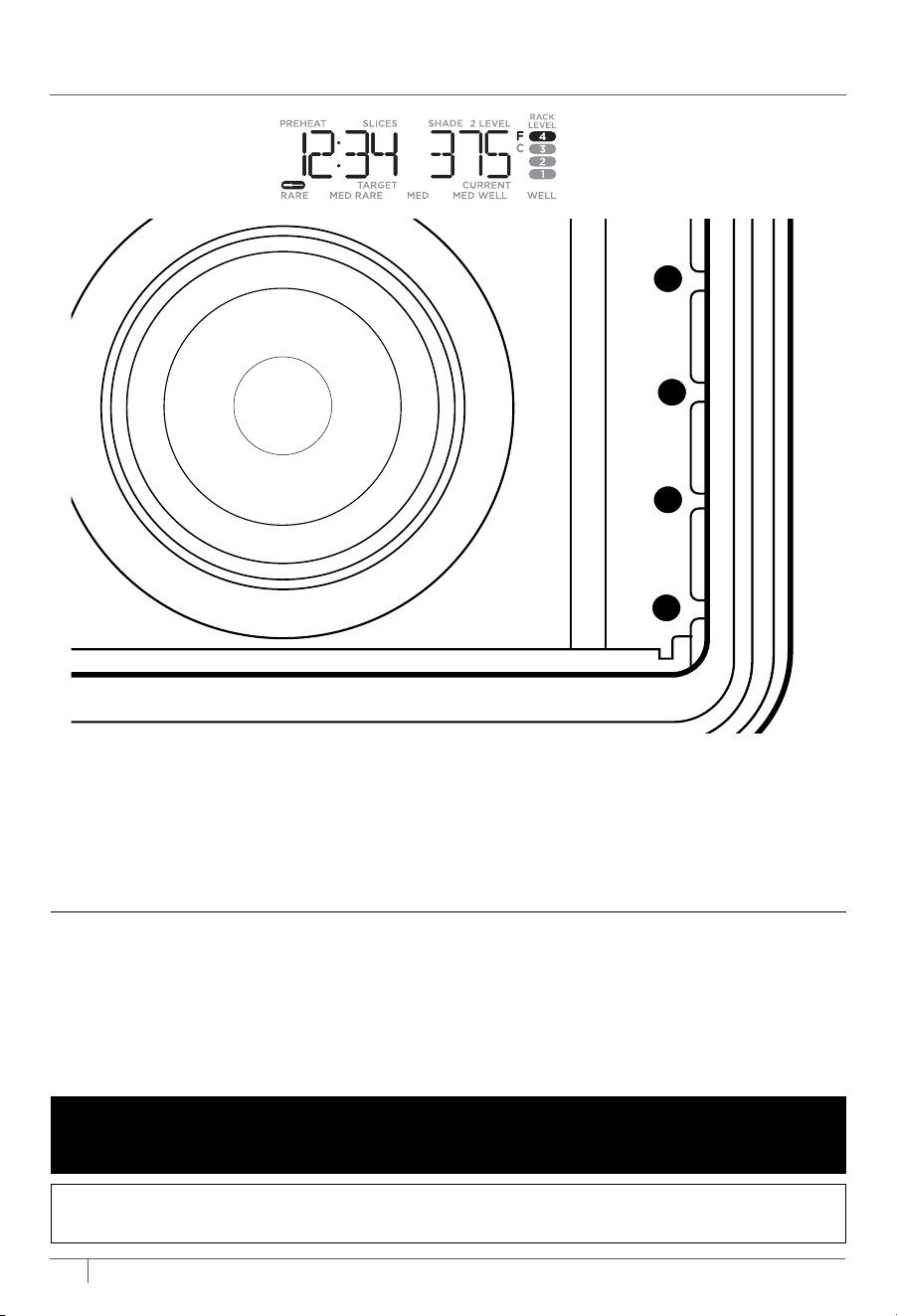
The oven has 4 available rack positions where your accessories can slide into
the unit (see image above). When you select a function, the corresponding rack
number(s) will illuminate on the control panel. The numbers on the control panel
(see Fig. 1) will coincide with those on the interior of the unit. See the chart on
page 8 for further details.
Fig. 1
We recommend placing all accessories inside the oven and running it on Air Roast
at 450°F for 20 minutes without adding food. This removes any residues. This is
completely safe and not detrimental to the performance of the oven.
USING YOUR PRESTIGE SMART XL AIR OVEN
USING THE PRESTIGE SMART
THERMOMETER
Before First Use
Make sure the thermometer jack is free of
any residue and the cord is free of knots
before plugging it into the jack.
1 Remove the thermometer from storage.
Then unwind the cord from the cord
wrap to remove the thermometer on the
right side of the unit.
2 Plug the thermometer into the jack
located on the underside of door handle
below the SMART COOK SYSTEM
buttons. Push firmly on the plug until it
cannot go into the jack any further and
you hear the plug click into place.
3 The thermometer icon on the display
will illuminate once the thermometer is
plugged in and the thermometer mode
is enabled by pressing the PRESET or
MANUAL button. Select the desired cook
function (e.g., Whole Roast) and change
cook temperature accordingly.
4 Press the FUNCTION +/- buttons to
toggle through and select your desired
food type and press DONENESS
repeatedly to set the internal doneness
of your food (Rare through Well).
NOTE: There is no need to set a cook
time, as the unit will automatically turn
o the heating element and alert you
when your food has finished cooking.
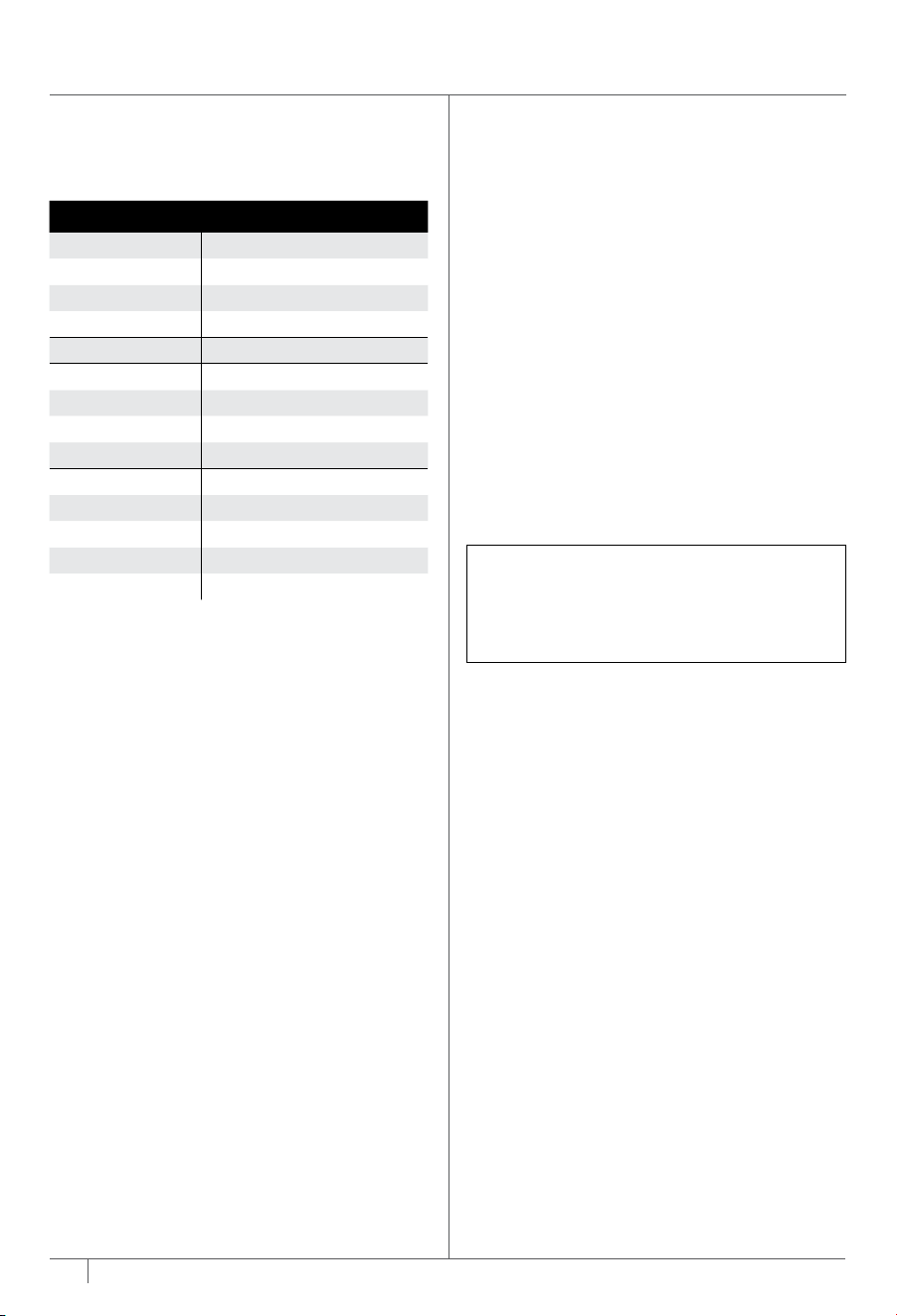
FOOD TYPE: PRESET DONENESS TO:
Fish Medium Rare (120°F)
Medium (130°F)
Medium Well (140°F)
Well Done (150°F)
Chicken/Turkey Well Done (165°F)
Pork Medium Rare (130°F)
Medium (140°F)
Medium Well (150°F)
Well Done (160°F)
Beef/Lamb Rare (120°F)
Medium Rare (130°F)
Medium (140°F)
Medium Well (145°F)
Well Done (155°F)
NOTE: Default Preset doneness is
automatically set to medium.
6
ninjakitchen.com
7
ninjakitchen.com
BEFORE FIRST USE
1 Remove and discard any packaging material, promotional labels, and tape from the unit.
2 Remove all accessories from the package and read this manual carefully. Please pay
particular attention to operational instructions, warnings, and important safeguards to
avoid any injury or property damage.
3 Wash the air fry basket, sheet pan, wire rack, roast tray, and removable crumb tray in
warm, soapy water, then rinse and dry thoroughly. DO NOT put sheet pan, roast tray,
or removable crumb tray in the dishwasher. Finishes may degrade. NEVER submerse
the main unit in water.
ACCESSORY PLACEMENT
3
NOTE: The accessories are hand-wash recommended. The air fry basket and wire racks
can be put in the dishwasher, but may wear more quickly over time.
1
4
2
The oven has 4 available rack positions where your accessories can slide into
the unit (see image above). When you select a function, the corresponding rack
number(s) will illuminate on the control panel. The numbers on the control panel
(see Fig. 1) will coincide with those on the interior of the unit. See the chart on
page 8 for further details.
Fig. 1
We recommend placing all accessories inside the oven and running it on Air Roast
at 450°F for 20 minutes without adding food. This removes any residues. This is
completely safe and not detrimental to the performance of the oven.
USING YOUR PRESTIGE SMART XL AIR OVEN
USING THE PRESTIGE SMART
THERMOMETER
Before First Use
Make sure the thermometer jack is free of
any residue and the cord is free of knots
before plugging it into the jack.
1 Remove the thermometer from storage.
Then unwind the cord from the cord
wrap to remove the thermometer on the
right side of the unit.
2 Plug the thermometer into the jack
located on the underside of door handle
below the SMART COOK SYSTEM
buttons. Push firmly on the plug until it
cannot go into the jack any further and
you hear the plug click into place.
3 The thermometer icon on the display
will illuminate once the thermometer is
plugged in and the thermometer mode
is enabled by pressing the PRESET or
MANUAL button. Select the desired cook
function (e.g., Whole Roast) and change
cook temperature accordingly.
4 Press the FUNCTION +/- buttons to
toggle through and select your desired
food type and press DONENESS
repeatedly to set the internal doneness
of your food (Rare through Well).
NOTE: There is no need to set a cook
time, as the unit will automatically turn
o the heating element and alert you
when your food has finished cooking.
FOOD TYPE: PRESET DONENESS TO:
Fish Medium Rare (120°F)
Medium (130°F)
Medium Well (140°F)
Well Done (150°F)
Chicken/Turkey Well Done (165°F)
Pork Medium Rare (130°F)
Medium (140°F)
Medium Well (150°F)
Well Done (160°F)
Beef/Lamb Rare (120°F)
Medium Rare (130°F)
Medium (140°F)
Medium Well (145°F)
Well Done (155°F)
NOTE: Default Preset doneness is
automatically set to medium.
8
ninjakitchen.com
9
ninjakitchen.com
USING YOUR PRESTIGE SMART XL AIR OVEN – CONT.
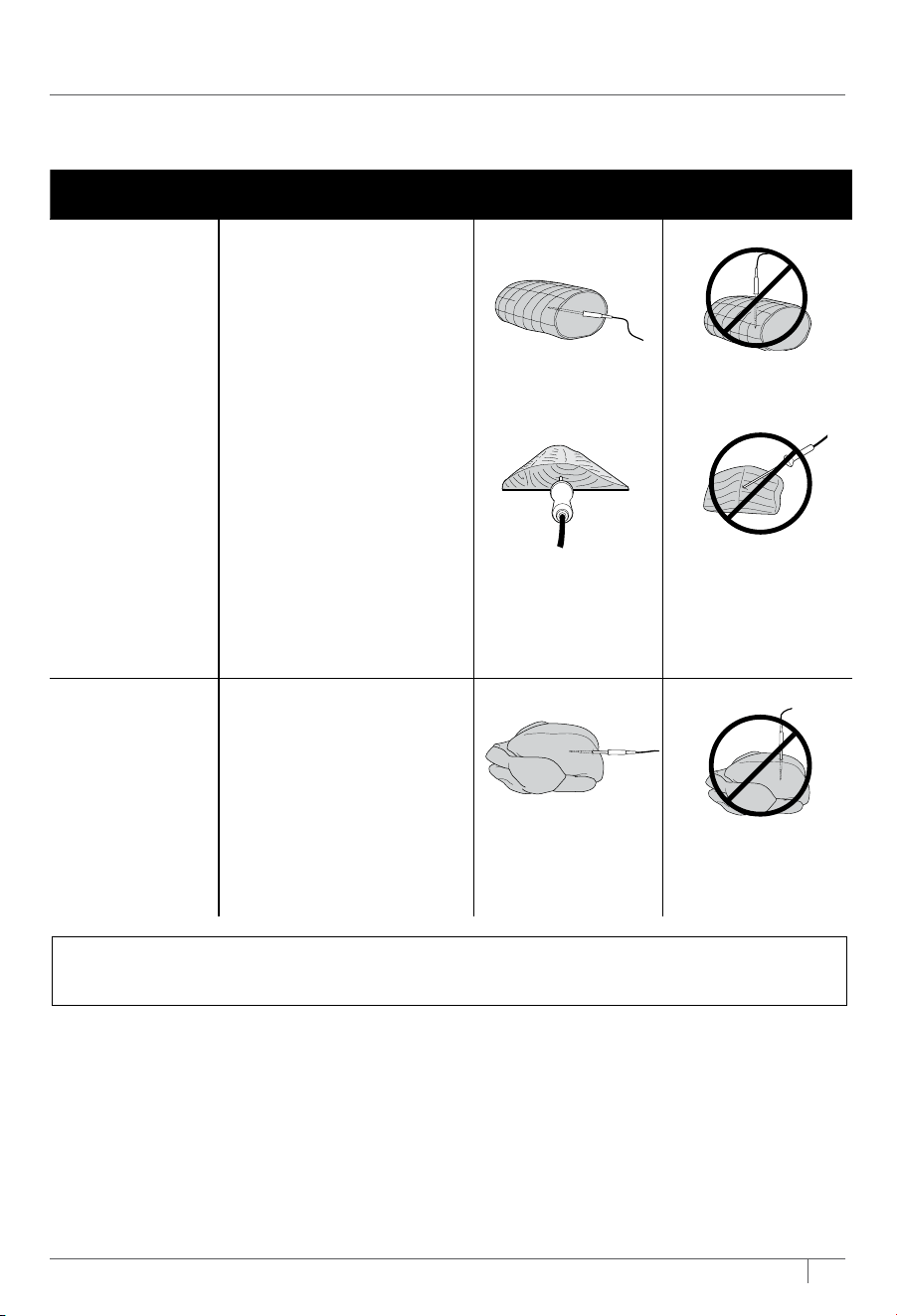
FOOD TYPE PLACEMENT CORRECT INCORRECT
Tenderloins
Fish fillets
Whole fish
Prime rib
Lamb rack
Brisket
Pork Shoulder
Pork Loin
Chuck Roast
• Insert thermometer
horizontally into the
center of the thickest
part of the meat.
• Make sure the tip of the
thermometer is inserted
straight into the center
of the meat, not angled
toward the bottom or top
of it.
• Make sure the thermometer
is close to (but not
touching) the bone and
away from any fat or gristle.
NOTE: The thickest part
of the fillet may not be the
center. It is important that
the tip of the thermometer
hits the thickest part so
desired results are achieved.
Whole chicken • Insert thermometer
horizontally into the
thickest part of the
breast, parallel to, but
not touching, the bone.
• Make sure the tip reaches
the center of the thickest
part of the breast and
doesn’t go all the way
through the breast into
the cavity.
HOW TO CORRECTLY INSERT THE THERMOMETER
NOTE: DO NOT use the thermometer with frozen protein or for cuts of meat 1 inch thick
or thinner.
If selecting the MANUAL button, use
the below recommended internal cook
temperatures.
5 Place the accessory required for your
selected cook function in the unit and
close the hood. Press START/STOP to
begin preheating.
6 While the unit is preheating, insert
the thermometer horizontally into the
center of the thickest part of the piece
of protein. Refer to the chart on the
next page for further thermometer
placement instructions.
NOTE: The thermometer will be HOT.
Wait for the thermometer to cool before
cleaning and storing. Use either oven
mitts or tongs to take the thermometer
out of the protein.
FOOD TYPE: PRESET DONENESS TO:
Fish Medium Rare (120°F)
Medium (130°F)
Medium Well (140°F)
Well Done (150°F)
Chicken/Turkey Well Done (165°F)
Pork Medium Rare (130°F)
Medium (140°F)
Medium Well (150°F)
Well Done (160°F)
Beef/Lamb Rare (120°F)
Medium Rare (130°F)
Medium (140°F)
Medium Well (145°F)
Well Done (155°F)
7 When the unit has preheated and
the unit beeps, open the door, place
food with inserted thermometer in
the unit, and close the door over the
thermometer cord.
8 The display will show the current
thermometer temperature and target
thermometer temperature to show
progress. Press TEMP/SHADE +/-
buttons to view the oven temperature
and TIME/SLICES +/- buttons to view
time since start of cook.
9 The unit will automatically stop when
thermometer temperature has reached
the target. Display will beep and show
“COOK END”.
10 Transfer protein to a plate and allow to
rest for 5 minutes before serving.
8
ninjakitchen.com
9
ninjakitchen.com
USING YOUR PRESTIGE SMART XL AIR OVEN – CONT.
FOOD TYPE PLACEMENT CORRECT INCORRECT
Tenderloins
Fish fillets
Whole fish
Prime rib
Lamb rack
Brisket
Pork Shoulder
Pork Loin
Chuck Roast
• Insert thermometer
horizontally into the
center of the thickest
part of the meat.
• Make sure the tip of the
thermometer is inserted
straight into the center
of the meat, not angled
toward the bottom or top
of it.
• Make sure the thermometer
is close to (but not
touching) the bone and
away from any fat or gristle.
NOTE: The thickest part
of the fillet may not be the
center. It is important that
the tip of the thermometer
hits the thickest part so
desired results are achieved.
Whole chicken • Insert thermometer
horizontally into the
thickest part of the
breast, parallel to, but
not touching, the bone.
• Make sure the tip reaches
the center of the thickest
part of the breast and
doesn’t go all the way
through the breast into
the cavity.
HOW TO CORRECTLY INSERT THE THERMOMETER
NOTE: DO NOT use the thermometer with frozen protein or for cuts of meat 1 inch thick
or thinner.
If selecting the MANUAL button, use
the below recommended internal cook
temperatures.
5 Place the accessory required for your
selected cook function in the unit and
close the hood. Press START/STOP to
begin preheating.
6 While the unit is preheating, insert
the thermometer horizontally into the
center of the thickest part of the piece
of protein. Refer to the chart on the
next page for further thermometer
placement instructions.
NOTE: The thermometer will be HOT.
Wait for the thermometer to cool before
cleaning and storing. Use either oven
mitts or tongs to take the thermometer
out of the protein.
FOOD TYPE: PRESET DONENESS TO:
Fish Medium Rare (120°F)
Medium (130°F)
Medium Well (140°F)
Well Done (150°F)
Chicken/Turkey Well Done (165°F)
Pork Medium Rare (130°F)
Medium (140°F)
Medium Well (150°F)
Well Done (160°F)
Beef/Lamb Rare (120°F)
Medium Rare (130°F)
Medium (140°F)
Medium Well (145°F)
Well Done (155°F)
7 When the unit has preheated and
the unit beeps, open the door, place
food with inserted thermometer in
the unit, and close the door over the
thermometer cord.
8 The display will show the current
thermometer temperature and target
thermometer temperature to show
progress. Press TEMP/SHADE +/-
buttons to view the oven temperature
and TIME/SLICES +/- buttons to view
time since start of cook.
9 The unit will automatically stop when
thermometer temperature has reached
the target. Display will beep and show
“COOK END”.
10 Transfer protein to a plate and allow to
rest for 5 minutes before serving.
10 11
ninjakitchen.com
ninjakitchen.com
10 11
ninjakitchen.com
ninjakitchen.com
DEHYDRATE BROIL TOAST BAGEL REHEAT PIZZA
1 Layer 2 Layers 1 Layer 1 Layer 1 Layer 1 Layer 1 Layer 2 Layers
Air Fry
Basket
Air Fry
Basket
Roast Tray
on Sheet Pan
Wire Rack Wire Rack Wire Rack Wire Rack Wire Rack
Sheet Pan
Wire Rack
NOTE: For more cooking charts, refer to your
Inspiration Guide or visit ninjakitchen.com
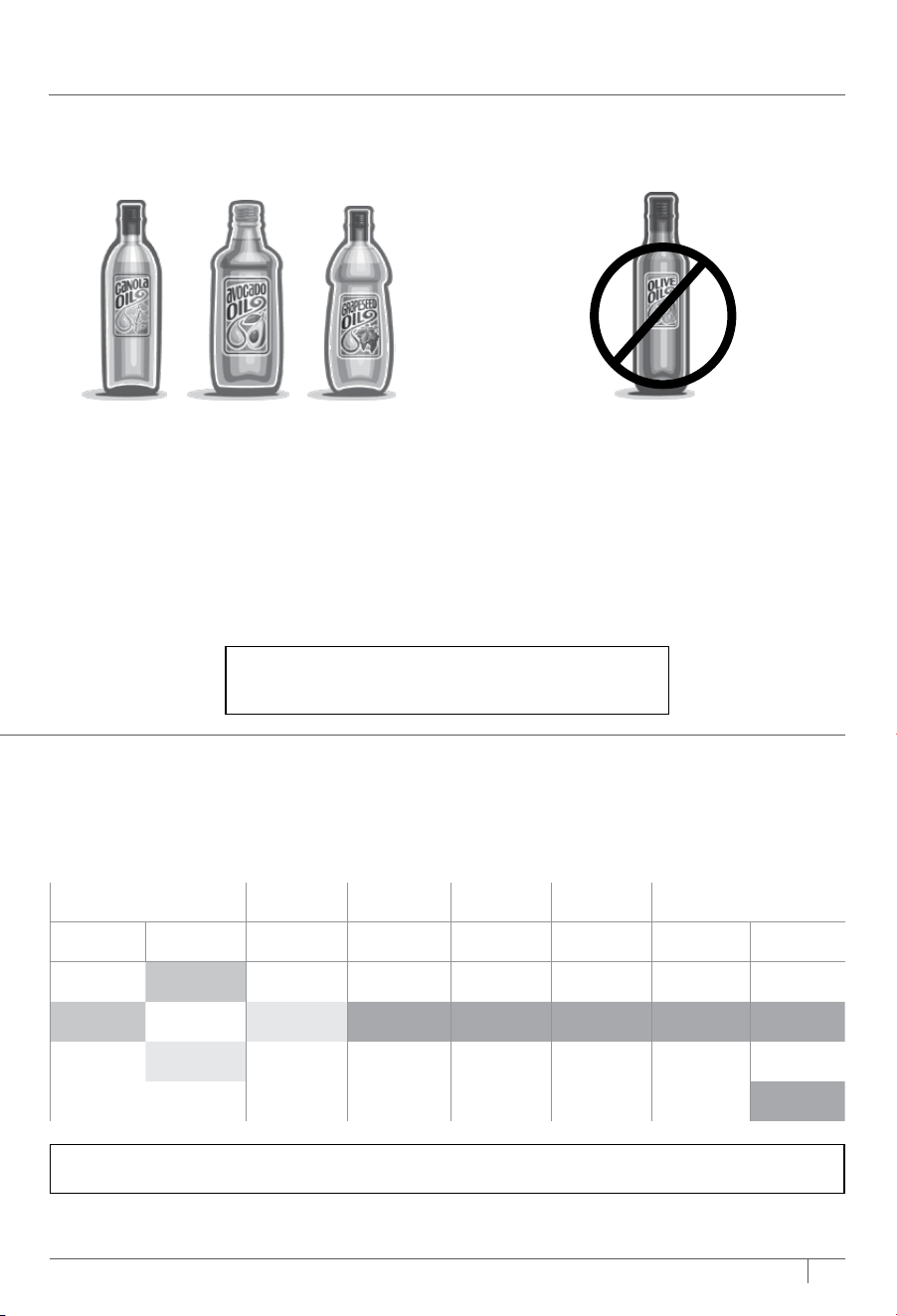
HOW TO REDUCE SMOKE
We recommend using canola, coconut, avocado, grapeseed, or vegetable oil
instead of olive oil.
Recommended:
Canola
Refined coconut
Avocado
Vegetable
Grapeseed
Not recommended:
Olive oil
Butter
Margarine
The unit may produce smoke when cooking on a hotter setting than what is recommended.
USING YOUR PRESTIGE SMART XL AIR OVEN – CONT.
NOTE: Always place Sheet Pan on Wire Rack, DO NOT place directly on heating elements.
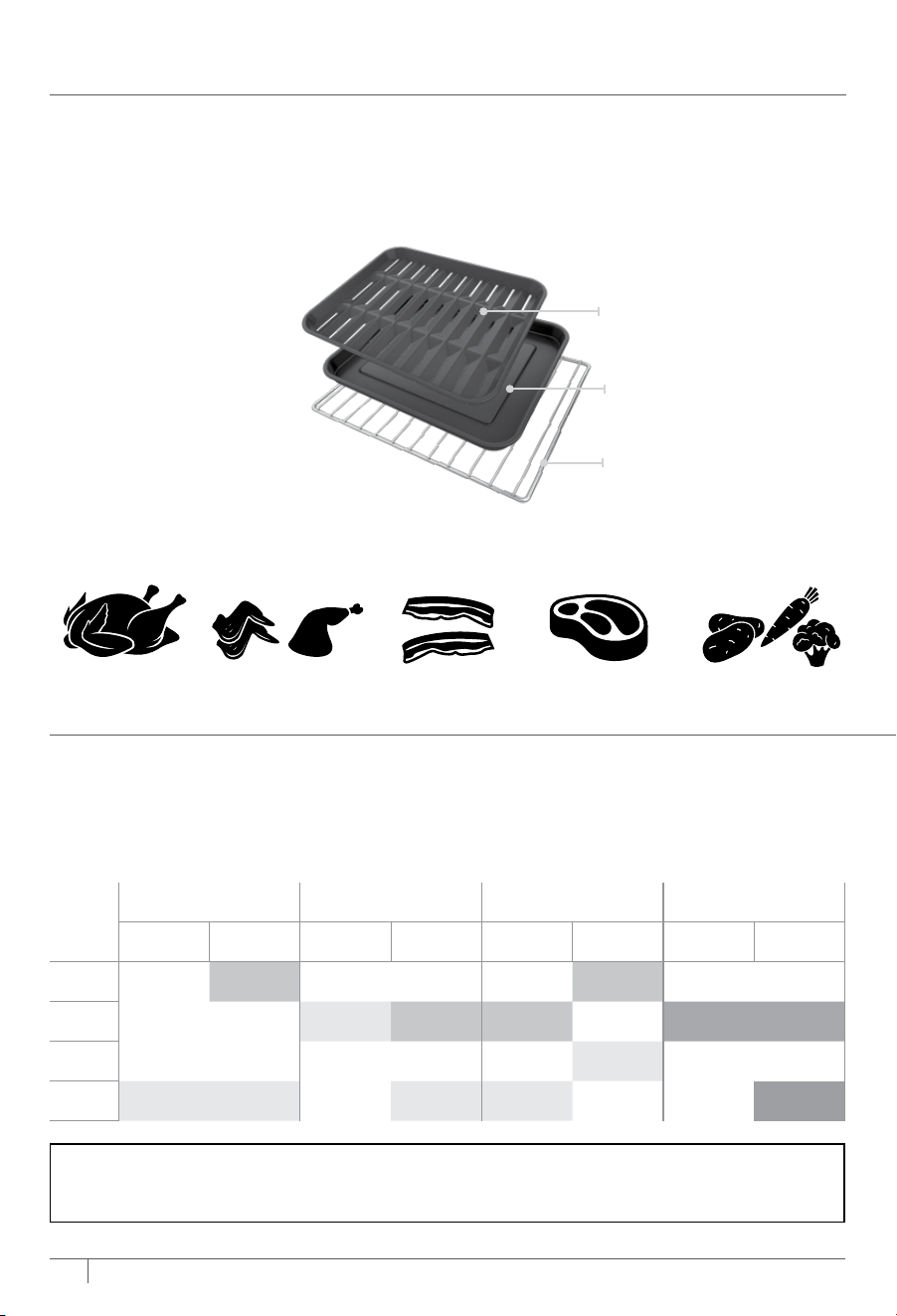
USING THE COOKING FUNCTIONS WITH RACK LEVELS
WHOLE ROAST AIR ROAST AIR FRY BAKE
1 Layer 2 Layers 1 Layer 2 Layers 1 Layer 2 Layers 1 Layer 2 Layers
LEVEL 4
Air Fry
Basket
Air Fry
Basket
LEVEL 3
Roast Tray
on Sheet Pan
Air Fry
Basket
Air Fry
Basket
Sheet Pan
on Wire Rack
Accessory on
Wire Rack
LEVEL 2
Roast Tray
on Sheet Pan
LEVEL 1
Roast Tray
on Sheet Pan
Roast Tray
on Sheet Pan
Roast Tray
on Sheet Pan
Roast Tray
on Sheet Pan*
Accessory on
Wire Rack
As you select a cook function, the control panel will illuminate the recommended rack
height(s). The chart below outlines these recommendations along with the suggested
accessories. For best results, use only the recommended accessories for a given function
and remove others from the oven.
WHEN TO USE THE ROAST TRAY
Use Roast Tray on Sheet Pan when cooking on convection functions (such as Whole Roast,
Air Roast, and Air Fry), or with greasy foods like: whole chicken, chicken wings, bacon,
marinated meats, or oiled vegetables.
NOTE: When cooking greasy, drippy foods on one level, place the Sheet Pan on
the Wire Rack below to catch the drippings. Alternatively, use the Roast Tray on top
of the Sheet Pan.
Recommended for
Whole Chicken Chicken Wings
or Thighs
Bacon Marinated Meats Oiled Vegetables
Sheet Pan
Wire Rack
Roast Tray
10 11
ninjakitchen.com
ninjakitchen.com
10 11
ninjakitchen.com
ninjakitchen.com
DEHYDRATE BROIL TOAST BAGEL REHEAT PIZZA
1 Layer 2 Layers 1 Layer 1 Layer 1 Layer 1 Layer 1 Layer 2 Layers
Air Fry
Basket
Air Fry
Basket
Roast Tray
on Sheet Pan
Wire Rack Wire Rack Wire Rack Wire Rack Wire Rack
Sheet Pan
Wire Rack
NOTE: For more cooking charts, refer to your
Inspiration Guide or visit ninjakitchen.com
HOW TO REDUCE SMOKE
We recommend using canola, coconut, avocado, grapeseed, or vegetable oil
instead of olive oil.
Recommended:
Canola
Refined coconut
Avocado
Vegetable
Grapeseed
Not recommended:
Olive oil
Butter
Margarine
The unit may produce smoke when cooking on a hotter setting than what is recommended.
USING YOUR PRESTIGE SMART XL AIR OVEN – CONT.
NOTE: Always place Sheet Pan on Wire Rack, DO NOT place directly on heating elements.
USING THE COOKING FUNCTIONS WITH RACK LEVELS
WHOLE ROAST AIR ROAST AIR FRY BAKE
1 Layer 2 Layers 1 Layer 2 Layers 1 Layer 2 Layers 1 Layer 2 Layers
LEVEL 4
Air Fry
Basket
Air Fry
Basket
LEVEL 3
Roast Tray
on Sheet Pan
Air Fry
Basket
Air Fry
Basket
Sheet Pan
on Wire Rack
Accessory on
Wire Rack
LEVEL 2
Roast Tray
on Sheet Pan
LEVEL 1
Roast Tray
on Sheet Pan
Roast Tray
on Sheet Pan
Roast Tray
on Sheet Pan
Roast Tray
on Sheet Pan*
Accessory on
Wire Rack
As you select a cook function, the control panel will illuminate the recommended rack
height(s). The chart below outlines these recommendations along with the suggested
accessories. For best results, use only the recommended accessories for a given function
and remove others from the oven.
WHEN TO USE THE ROAST TRAY
Use Roast Tray on Sheet Pan when cooking on convection functions (such as Whole Roast,
Air Roast, and Air Fry), or with greasy foods like: whole chicken, chicken wings, bacon,
marinated meats, or oiled vegetables.
NOTE: When cooking greasy, drippy foods on one level, place the Sheet Pan on
the Wire Rack below to catch the drippings. Alternatively, use the Roast Tray on top
of the Sheet Pan.
Recommended for
Whole Chicken Chicken Wings
or Thighs
Bacon Marinated Meats Oiled Vegetables
Sheet Pan
Wire Rack
Roast Tray
12 13
ninjakitchen.com
ninjakitchen.com
USING YOUR PRESTIGE SMART XL AIR OVEN – CONT.
Bake
1 To select the function, press the
FUNCTION/FOOD TYPE +/- buttons
until BAKE brightly illuminates. The
default time and temperature settings
will display. When cooking 2 layers,
select the 2 LEVEL button so that “2
LEVEL” appears on the display.
2 Press the TIME/SLICES +/- buttons to
select a cook time up to 4 hours.
3 Press the TEMP/SHADE +/- buttons to
select a temperature between 180°F
and 450°F.
4 Press START/PAUSE to begin preheating.
5 Place ingredients on the sheet pan, air
fry basket, cake pan, or casserole dish.
When the unit beeps to signify it has
preheated, immediately place the sheet
pan on the wire rack. Close oven door.
6 During cooking, you can turn on the
light
to check on progress.
7 When cook time is complete, the unit
will beep and “COOK END” will appear
on the display.
NOTE: If cooking for 1 hour or less, the clock
will count down by minutes and seconds.
If cooking for more than 1 hour, the clock
will count down by hours and minutes.
NOTE: The timer will start counting
down as soon as the unit has preheated.
If ingredients are not ready to go into
the oven, simply press the TIME +/-
buttons to add more time.
NOTE: For best results with baked
goods such as cookies, line the Ninja®
Sheet Pan with parchment paper.
Air Fry
1 To select the function, press the
FUNCTION/FOOD TYPE +/- buttons
until AIR FRY brightly illuminates. The
default time and temperature settings
will display. When cooking 2 layers,
select the 2 LEVEL button so that “2
LEVEL” appears on the display.
2 Press the TIME/SLICES +/- buttons to
select a cook time up to 4 hours.
3 Then press the TEMP/SHADE +/- buttons
to select a temperature between 250°F
and 450°F.
4 Press START/PAUSE to begin preheating.
5 Place ingredients in the air fry basket
and roast tray with sheet pan. If
ingredients are fatty, oily, or marinated,
place the basket on the sheet pan. Use
air fry basket for dry ingredients.
6 When the unit beeps to signify it has
preheated, immediately slide the basket
into the rack level(s) designated on
the control panel. If also using the
sheet pan, slide both into the oven at
the same time, with the basket in the
upper rack and the pan on the wire rack
beneath the basket. Close oven door.
7 When cook time is complete, the unit
will beep and “COOK END” will appear
on the display.
NOTE: The timer will start counting
down as soon as the unit has preheated.
If ingredients are not ready to go into
the oven, simply press the TIME +/-
buttons to add more time.
NOTE: Food cooks faster when using the
Air Fry function, so refer to cook charts in
the Inspiration Guide for more guidance
on cook times and temperatures.
Air Roast
1 To select the function, press the
FUNCTION/FOOD TYPE +/- buttons
until AIR ROAST brightly illuminates.
The default time and temperature
settings will display. When cooking 2
layers, select the 2 LEVEL button so
that “2 LEVEL” appears on the display.
2 Press the TIME/SLICES +/- buttons to
select a cook time up to 4 hours.
3 Press the TEMP/SHADE +/- buttons to
select a temperature between 250°F
and 450°F.
4 Press START/PAUSE to begin preheating.
5 Place ingredients on the sheet pan.
When the unit beeps to signify it has
preheated, immediately place the roast
tray on sheet pan on the wire rack on
Level 1. Close oven door. When cooking
on 2 levels, place the sheet pan on
Level 1 and use the air fry basket as
the second layer on Level 3.
6 When cook time is complete, the unit
will beep and “COOK END” will appear
on the display.
USING THE COOKING FUNCTIONS
To turn on the unit, plug the power cord into
an outlet and press the button. The unit will
automatically turn o after 10 minutes
of inactivity.
Whole Roast
1 To select the function, press the
FUNCTION/FOOD TYPE +/- buttons
until WHOLE ROAST brightly illuminates.
The default time and temperature
settings will display. When cooking 2
layers, select the 2 LEVEL button so
that “2 LEVEL” appears on the display.
2 Press the TIME/SLICES +/- buttons to
select a cook time up to 4 hours.
3 Press the TEMP/SHADE +/- buttons to
select a temperature between 250°F
and 450°F.
4 Press START/PAUSE to begin preheating.
5 Place ingredients on the roast tray or
directly on sheet pan. When the unit beeps
to signify it has preheated, immediately
place roast tray on the sheet pan on the
wire rack on Level 1. Close oven door.
When cooking on 2 levels, place the sheet
pan on Level 1 and use the air fry basket as
the second layer on Level 4.
6 When cook time is complete, the unit
will beep and “COOK END” will appear
on the display.
NOTE: If cooking for 1 hour or less, the clock
will count down by minutes and seconds.
If cooking for more than 1 hour, the clock
will count down by hours and minutes.
NOTE: Food cooks faster when using the
Whole Roast function, so refer to cook
charts in the Inspiration Guide for more
guidance on cook times and temperatures.
NOTE: The timer will start counting
down as soon as the unit has preheated.
If ingredients are not ready to go into the
oven, simply press the TIME +/- buttons
to add more time.
NOTE: If cooking for 1 hour or less, the clock
will count down by minutes and seconds.
If cooking for more than 1 hour, the clock
will count down by hours and minutes.
NOTE: The timer will start counting
down as soon as the unit has preheated.
If ingredients are not ready to go into the
oven, simply press TIME +/- buttons to
add more time.
NOTE: Food cooks faster when using the
Air Roast function, so refer to cook charts
in the Inspiration Guide for more guidance
on cook times and temperatures.
12 13
ninjakitchen.com
ninjakitchen.com
USING YOUR PRESTIGE SMART XL AIR OVEN – CONT.
Bake
1 To select the function, press the
FUNCTION/FOOD TYPE +/- buttons
until BAKE brightly illuminates. The
default time and temperature settings
will display. When cooking 2 layers,
select the 2 LEVEL button so that “2
LEVEL” appears on the display.
2 Press the TIME/SLICES +/- buttons to
select a cook time up to 4 hours.
3 Press the TEMP/SHADE +/- buttons to
select a temperature between 180°F
and 450°F.
4 Press START/PAUSE to begin preheating.
5 Place ingredients on the sheet pan, air
fry basket, cake pan, or casserole dish.
When the unit beeps to signify it has
preheated, immediately place the sheet
pan on the wire rack. Close oven door.
6 During cooking, you can turn on the
light
to check on progress.
7 When cook time is complete, the unit
will beep and “COOK END” will appear
on the display.
NOTE: If cooking for 1 hour or less, the clock
will count down by minutes and seconds.
If cooking for more than 1 hour, the clock
will count down by hours and minutes.
NOTE: The timer will start counting
down as soon as the unit has preheated.
If ingredients are not ready to go into
the oven, simply press the TIME +/-
buttons to add more time.
NOTE: For best results with baked
goods such as cookies, line the Ninja®
Sheet Pan with parchment paper.
Air Fry
1 To select the function, press the
FUNCTION/FOOD TYPE +/- buttons
until AIR FRY brightly illuminates. The
default time and temperature settings
will display. When cooking 2 layers,
select the 2 LEVEL button so that “2
LEVEL” appears on the display.
2 Press the TIME/SLICES +/- buttons to
select a cook time up to 4 hours.
3 Then press the TEMP/SHADE +/- buttons
to select a temperature between 250°F
and 450°F.
4 Press START/PAUSE to begin preheating.
5 Place ingredients in the air fry basket
and roast tray with sheet pan. If
ingredients are fatty, oily, or marinated,
place the basket on the sheet pan. Use
air fry basket for dry ingredients.
6 When the unit beeps to signify it has
preheated, immediately slide the basket
into the rack level(s) designated on
the control panel. If also using the
sheet pan, slide both into the oven at
the same time, with the basket in the
upper rack and the pan on the wire rack
beneath the basket. Close oven door.
7 When cook time is complete, the unit
will beep and “COOK END” will appear
on the display.
NOTE: The timer will start counting
down as soon as the unit has preheated.
If ingredients are not ready to go into
the oven, simply press the TIME +/-
buttons to add more time.
NOTE: Food cooks faster when using the
Air Fry function, so refer to cook charts in
the Inspiration Guide for more guidance
on cook times and temperatures.
Air Roast
1 To select the function, press the
FUNCTION/FOOD TYPE +/- buttons
until AIR ROAST brightly illuminates.
The default time and temperature
settings will display. When cooking 2
layers, select the 2 LEVEL button so
that “2 LEVEL” appears on the display.
2 Press the TIME/SLICES +/- buttons to
select a cook time up to 4 hours.
3 Press the TEMP/SHADE +/- buttons to
select a temperature between 250°F
and 450°F.
4 Press START/PAUSE to begin preheating.
5 Place ingredients on the sheet pan.
When the unit beeps to signify it has
preheated, immediately place the roast
tray on sheet pan on the wire rack on
Level 1. Close oven door. When cooking
on 2 levels, place the sheet pan on
Level 1 and use the air fry basket as
the second layer on Level 3.
6 When cook time is complete, the unit
will beep and “COOK END” will appear
on the display.
USING THE COOKING FUNCTIONS
To turn on the unit, plug the power cord into
an outlet and press the button. The unit will
automatically turn o after 10 minutes
of inactivity.
Whole Roast
1 To select the function, press the
FUNCTION/FOOD TYPE +/- buttons
until WHOLE ROAST brightly illuminates.
The default time and temperature
settings will display. When cooking 2
layers, select the 2 LEVEL button so
that “2 LEVEL” appears on the display.
2 Press the TIME/SLICES +/- buttons to
select a cook time up to 4 hours.
3 Press the TEMP/SHADE +/- buttons to
select a temperature between 250°F
and 450°F.
4 Press START/PAUSE to begin preheating.
5 Place ingredients on the roast tray or
directly on sheet pan. When the unit beeps
to signify it has preheated, immediately
place roast tray on the sheet pan on the
wire rack on Level 1. Close oven door.
When cooking on 2 levels, place the sheet
pan on Level 1 and use the air fry basket as
the second layer on Level 4.
6 When cook time is complete, the unit
will beep and “COOK END” will appear
on the display.
NOTE: If cooking for 1 hour or less, the clock
will count down by minutes and seconds.
If cooking for more than 1 hour, the clock
will count down by hours and minutes.
NOTE: Food cooks faster when using the
Whole Roast function, so refer to cook
charts in the Inspiration Guide for more
guidance on cook times and temperatures.
NOTE: The timer will start counting
down as soon as the unit has preheated.
If ingredients are not ready to go into the
oven, simply press the TIME +/- buttons
to add more time.
NOTE: If cooking for 1 hour or less, the clock
will count down by minutes and seconds.
If cooking for more than 1 hour, the clock
will count down by hours and minutes.
NOTE: The timer will start counting
down as soon as the unit has preheated.
If ingredients are not ready to go into the
oven, simply press TIME +/- buttons to
add more time.
NOTE: Food cooks faster when using the
Air Roast function, so refer to cook charts
in the Inspiration Guide for more guidance
on cook times and temperatures.
14 15
ninjakitchen.com
ninjakitchen.com
USING YOUR PRESTIGE SMART XL AIR OVEN – CONT.
Reheat
1 To select the function, press the
FUNCTION/FOOD TYPE +/- buttons
until REHEAT brightly illuminates.
2 Press the TIME/SLICES +/- buttons to
select a reheat time up to 4 hours.
3 Press the TEMP/SHADE +/- buttons to
select a temperature between 100°F
and 450°F. Select below 180°F to keep
food warm.
4 Place food on the sheet pan or in an
oven-safe container and place the pan
or container on the wire rack. Close
oven door and press START/PAUSE
to begin warming.
5 When cook time is complete, the unit
will beep and “COOK END” will appear
on the display.
Bagel
1 To select the function, press the
FUNCTION/FOOD TYPE +/- buttons
until BAGEL brightly illuminates. The
default number of slices and darkness
level will display.
2 Press the TIME/SLICES +/- buttons to
select the number of slices. You may
toast up to 9 bagel slices at once.
3 Press the TEMP +/- buttons to select a
darkness level.
4 Place bagel slices, cut-side up, in the
middle of the wire rack. Close oven door
and press START/PAUSE to begin cooking.
5 When cook time is complete, the unit
will beep and “COOK END” will appear
on the display.
NOTE: You can also manually adjust the
time once cooking has started to better
choose your preferred shade.
Pizza
1 To select the function, press the
FUNCTION/FOOD TYPE +/- buttons
until PIZZA brightly illuminates. The
default time and temerature setting
will display.
2 Press the TIME/SLICES +/- buttons to
select a cook time up to 4 hours.
3 Press the TEMP +/- buttons to select
a temperature between 180°F and
450°F.
4 Place pizza on the sheet pan or
directly on the wire rack. Close oven
door and press START/PAUSE to
begin cooking.
5 When cook time is complete, the unit
will beep and “COOK END” will appear
on the display.
NOTE: The unit does not preheat in
Reheat mode.
NOTE: There is no temperature adjustment
available for the Bagel function. It is very
important to select the exact number of
slices to avoid over- or under-toasting.
NOTE: The unit does not preheat in
Bagel mode.
Broil
1 To select the function, press the
FUNCTION/FOOD TYPE +/- buttons
until BROIL brightly illuminates. The
default time and temperature settings
will display.
2 Press the TIME/SLICES +/- buttons to
select a cook time up to 30 minutes.
3 Press the TEMP/SHADE +/- buttons to
select either HI (450°F) or LO (400°F).
4 Place ingredients on the sheet pan. Place
the sheet pan on the wire rack and close
the oven door, press START/STOP to
start cooking.
5 When cook time is complete, the unit
will beep and “COOK END” will appear
on the display.
Toast
1 To select the function, press the
FUNCTION/FOOD TYPE +/- buttons
until TOAST brightly illuminates. The
default amount of slices and darkness
level will display.
2 Press the TIME/SLICES +/- buttons to
select the number of bread slices. You
may toast up to 9 slices at once.
3 Press the TEMP/SHADE +/- buttons to
select a darkness level.
4 Place bread slices on the wire
rack. Close oven door and press
START/PAUSE to begin cooking.
5 When cook time is complete, the unit
will beep and “COOK END” will appear
on the display.
NOTE: There is no temperature
adjustment available for the Toast
function. It is very important to select
the exact number of slices to avoid
over- or under-toasting.
NOTE: You can also manually adjust the
time once cooking has started to better
choose your preferred shade.
Dehydrate
1 To select the function, press the
FUNCTION/FOOD TYPE +/- buttons
until DEHYDRATE brightly illuminates.
The default time and temperature
settings will display. When dehydrating
2 layers, select the 2 LEVEL button so
that “2 LEVEL” appears on the display.
2 Press the TIME/SLICES +/- buttons to
select a dehydrate time up to 24 hours.
3 Press the TEMP/SHADE +/- buttons to
select a temperature between 85°F and
200°F.
4 Place ingredients in the air fry basket and
place basket in oven. Close oven door and
press START/PAUSE to begin cooking.
5 When cook time is complete, the unit
will beep and “COOK END” will appear
on the display.
NOTE: Purchase additional dehydrate
accessory to dehydrate up to 4 levels
at one time.
NOTE: For best results, lay ingredients
flat on each layer; do not stack food.
NOTE: The unit does not preheat in
Dehydrate mode.
NOTE: The unit does not preheat in
Broil mode.
NOTE: The unit does not preheat in
Toast mode.
14 15
ninjakitchen.com
ninjakitchen.com
USING YOUR PRESTIGE SMART XL AIR OVEN – CONT.
Reheat
1 To select the function, press the
FUNCTION/FOOD TYPE +/- buttons
until REHEAT brightly illuminates.
2 Press the TIME/SLICES +/- buttons to
select a reheat time up to 4 hours.
3 Press the TEMP/SHADE +/- buttons to
select a temperature between 100°F
and 450°F. Select below 180°F to keep
food warm.
4 Place food on the sheet pan or in an
oven-safe container and place the pan
or container on the wire rack. Close
oven door and press START/PAUSE
to begin warming.
5 When cook time is complete, the unit
will beep and “COOK END” will appear
on the display.
Bagel
1 To select the function, press the
FUNCTION/FOOD TYPE +/- buttons
until BAGEL brightly illuminates. The
default number of slices and darkness
level will display.
2 Press the TIME/SLICES +/- buttons to
select the number of slices. You may
toast up to 9 bagel slices at once.
3 Press the TEMP +/- buttons to select a
darkness level.
4 Place bagel slices, cut-side up, in the
middle of the wire rack. Close oven door
and press START/PAUSE to begin cooking.
5 When cook time is complete, the unit
will beep and “COOK END” will appear
on the display.
NOTE: You can also manually adjust the
time once cooking has started to better
choose your preferred shade.
Pizza
1 To select the function, press the
FUNCTION/FOOD TYPE +/- buttons
until PIZZA brightly illuminates. The
default time and temerature setting
will display.
2 Press the TIME/SLICES +/- buttons to
select a cook time up to 4 hours.
3 Press the TEMP +/- buttons to select
a temperature between 180°F and
450°F.
4 Place pizza on the sheet pan or
directly on the wire rack. Close oven
door and press START/PAUSE to
begin cooking.
5 When cook time is complete, the unit
will beep and “COOK END” will appear
on the display.
NOTE: The unit does not preheat in
Reheat mode.
NOTE: There is no temperature adjustment
available for the Bagel function. It is very
important to select the exact number of
slices to avoid over- or under-toasting.
NOTE: The unit does not preheat in
Bagel mode.
Broil
1 To select the function, press the
FUNCTION/FOOD TYPE +/- buttons
until BROIL brightly illuminates. The
default time and temperature settings
will display.
2 Press the TIME/SLICES +/- buttons to
select a cook time up to 30 minutes.
3 Press the TEMP/SHADE +/- buttons to
select either HI (450°F) or LO (400°F).
4 Place ingredients on the sheet pan. Place
the sheet pan on the wire rack and close
the oven door, press START/STOP to
start cooking.
5 When cook time is complete, the unit
will beep and “COOK END” will appear
on the display.
Toast
1 To select the function, press the
FUNCTION/FOOD TYPE +/- buttons
until TOAST brightly illuminates. The
default amount of slices and darkness
level will display.
2 Press the TIME/SLICES +/- buttons to
select the number of bread slices. You
may toast up to 9 slices at once.
3 Press the TEMP/SHADE +/- buttons to
select a darkness level.
4 Place bread slices on the wire
rack. Close oven door and press
START/PAUSE to begin cooking.
5 When cook time is complete, the unit
will beep and “COOK END” will appear
on the display.
NOTE: There is no temperature
adjustment available for the Toast
function. It is very important to select
the exact number of slices to avoid
over- or under-toasting.
NOTE: You can also manually adjust the
time once cooking has started to better
choose your preferred shade.
Dehydrate
1 To select the function, press the
FUNCTION/FOOD TYPE +/- buttons
until DEHYDRATE brightly illuminates.
The default time and temperature
settings will display. When dehydrating
2 layers, select the 2 LEVEL button so
that “2 LEVEL” appears on the display.
2 Press the TIME/SLICES +/- buttons to
select a dehydrate time up to 24 hours.
3 Press the TEMP/SHADE +/- buttons to
select a temperature between 85°F and
200°F.
4 Place ingredients in the air fry basket and
place basket in oven. Close oven door and
press START/PAUSE to begin cooking.
5 When cook time is complete, the unit
will beep and “COOK END” will appear
on the display.
NOTE: Purchase additional dehydrate
accessory to dehydrate up to 4 levels
at one time.
NOTE: For best results, lay ingredients
flat on each layer; do not stack food.
NOTE: The unit does not preheat in
Dehydrate mode.
NOTE: The unit does not preheat in
Broil mode.
NOTE: The unit does not preheat in
Toast mode.
16
ninjakitchen.com
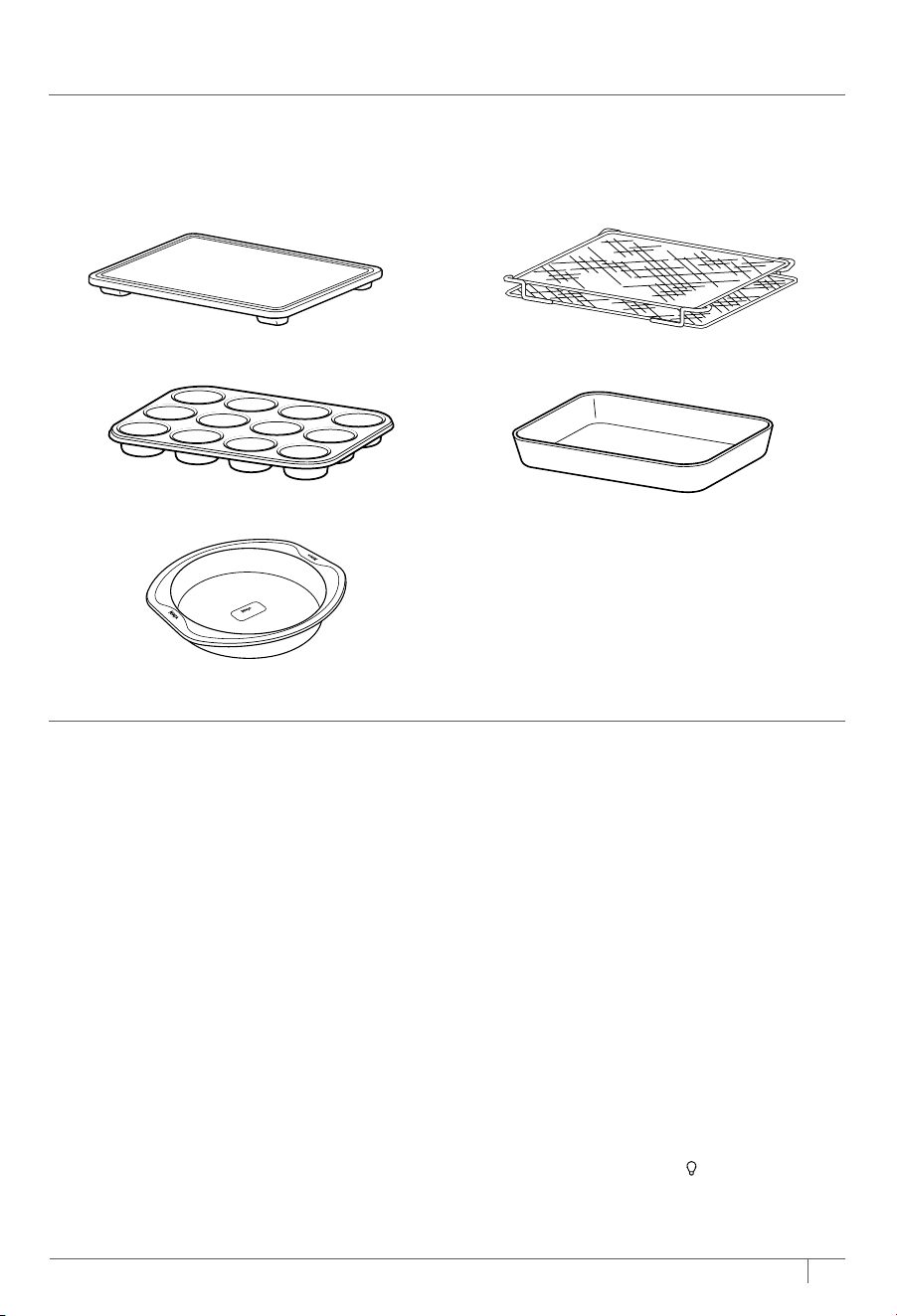
• Cutting Board
• Mun Tray
• 9" Round Neverstick Bakeware
• Dehydrating Kit
• Casserole Dish (9 x 13)
17
ninjakitchen.com
We oer a suite of accessories custom made for your Ninja® Prestige Smart XL Air Fryer
& Countertop Oven with Pro Cook System. Visit ninjaaccessories.com to expand your
capabilities and take your cooking to the next level.
ACCESSORIES FOR PURCHASE
ERROR MESSAGES
“CALL CUSt SrVC” followed by “Er0,” “Er1,” “Er2,” “Er3,” “Er4,” “Er5,” or “Er6”
Power o the unit and call Customer Service at 1-877-646-5288. So we may better assist
you, please register your product online at registeryourninja.com and have the product
on hand when you call.
FAQ
Why won’t the oven turn on?
• Make sure the power cord is securely plugged into the outlet.
• Insert the power cord into a dierent outlet.
• Reset the circuit breaker if necessary.
• Press the power button.
Can I use the sheet pan instead of the air fry basket with Air Fry function?
• Yes, but crispiness results may vary.
Do I need to adjust the cook times and temperatures of traditional oven recipes?
• For best results, keep an eye out on your food while cooking. Refer to cook charts in the
Inspiration Guide for more guidance on cook times and temperatures.
Can I restore the unit to its default settings?
• The oven will remember the last setting used for each function, even if you unplug it.
To restore the oven’s default settings for each function, press the Light
and 2 LEVEL
buttons simultaneously for 5 seconds.
TROUBLESHOOTING & FAQ
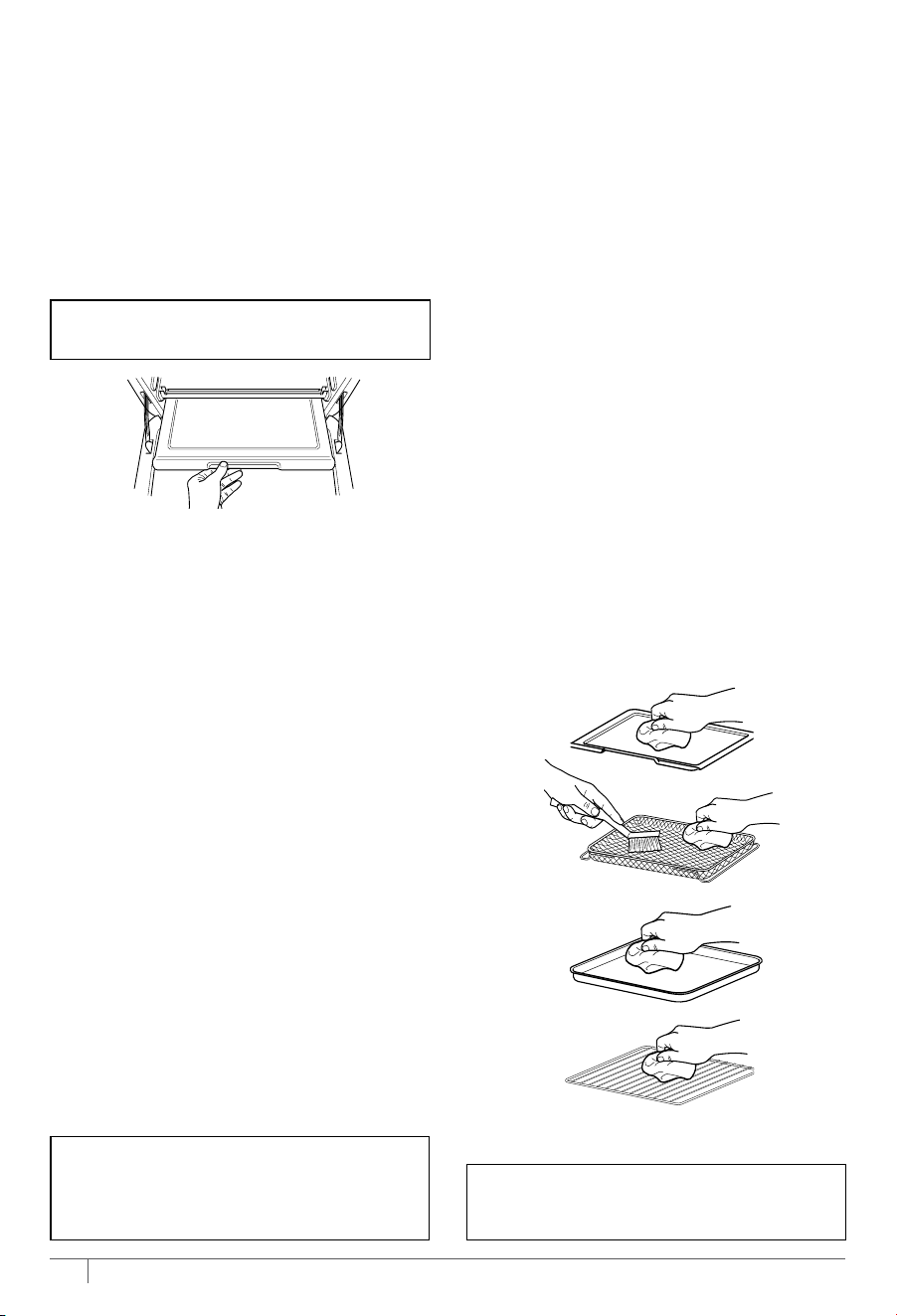
EVERYDAY CLEANING
The unit should be cleaned thoroughly
after every use.
1 Unplug the unit from the outlet and
allow it to cool down before cleaning.
2 Empty crumb tray by sliding it out of
the oven.
3 After every use, wipe away any food
splatter on the interior walls and glass
door of the unit with a soft, damp
sponge.
4 To clean the exterior of the main unit
and the control panel, wipe them clean
with a damp cloth. A non-abrasive liquid
cleanser or mild spray solution may be
used. Apply the cleanser to the sponge,
not the oven surface, before cleaning.
5 When using accessories, we recommend
greasing them with recommended
cooking oil, or covering them with
parchment paper or aluminum foil
before placing food on top. DO NOT
cover roast tray holes with parchment
paper or aluminum foil.
CLEANING THE THERMOMETER
DO NOT place the thermometer or holder
in the dishwasher.
1 Unplug the thermometer from the unit
and allow it to cool down before cleaning.
2 The thermometer and holder are hand-
wash only. DO NOT immerse any part of
the thermometer in water or any other
liquid. We recommend cleaning with a
damp cloth only.
DEEP CLEANING
1 Unplug the unit from the outlet and
allow it to cool down before cleaning.
2 Remove all accessories from the unit,
including the crumb tray, and wash
separately. Use a non-abrasive cleaning
brush to more thoroughly wash the
air fry basket. Accessories are hand-wash
recommended. DO NOT place roast tray,
sheet pan, or crumb tray in dishwasher.
3 Use warm, soapy water and a soft cloth
to wash the oven’s interior and glass
door. DO NOT use abrasive cleaners,
scrubbing brushes, or chemical cleaners,
as they will damage the oven.
CAUTION: NEVER put the main unit in
the dishwasher or immerse it in water
or any other liquid.
4 To remove tough grease, let sheet
pan and roast tray soak overnight in
warm, soapy water, then wash with
a non-abrasive sponge or brush.
5 Thoroughly dry all parts before placing
them back in the oven.
CLEANING & MAINTENANCE
NOTE: Empty crumb tray frequently.
Hand-wash when necessary.
IMPORTANT: Place crumb tray below
lower heating elements. DO NOT slide
into any rack positions.
NOTE: DO NOT use liquid cleaning
solution on or near the thermometer jack.
We recommend using compressed air or a
cotton swab to avoid damaging the jack.
16
ninjakitchen.com
• Cutting Board
• Mun Tray
• 9" Round Neverstick Bakeware
• Dehydrating Kit
• Casserole Dish (9 x 13)
17
ninjakitchen.com
We oer a suite of accessories custom made for your Ninja® Prestige Smart XL Air Fryer
& Countertop Oven with Pro Cook System. Visit ninjaaccessories.com to expand your
capabilities and take your cooking to the next level.
ACCESSORIES FOR PURCHASE
ERROR MESSAGES
“CALL CUSt SrVC” followed by “Er0,” “Er1,” “Er2,” “Er3,” “Er4,” “Er5,” or “Er6”
Power o the unit and call Customer Service at 1-877-646-5288. So we may better assist
you, please register your product online at registeryourninja.com and have the product
on hand when you call.
FAQ
Why won’t the oven turn on?
• Make sure the power cord is securely plugged into the outlet.
• Insert the power cord into a dierent outlet.
• Reset the circuit breaker if necessary.
• Press the power button.
Can I use the sheet pan instead of the air fry basket with Air Fry function?
• Yes, but crispiness results may vary.
Do I need to adjust the cook times and temperatures of traditional oven recipes?
• For best results, keep an eye out on your food while cooking. Refer to cook charts in the
Inspiration Guide for more guidance on cook times and temperatures.
Can I restore the unit to its default settings?
• The oven will remember the last setting used for each function, even if you unplug it.
To restore the oven’s default settings for each function, press the Light
and 2 LEVEL
buttons simultaneously for 5 seconds.
TROUBLESHOOTING & FAQ
EVERYDAY CLEANING
The unit should be cleaned thoroughly
after every use.
1 Unplug the unit from the outlet and
allow it to cool down before cleaning.
2 Empty crumb tray by sliding it out of
the oven.
3 After every use, wipe away any food
splatter on the interior walls and glass
door of the unit with a soft, damp
sponge.
4 To clean the exterior of the main unit
and the control panel, wipe them clean
with a damp cloth. A non-abrasive liquid
cleanser or mild spray solution may be
used. Apply the cleanser to the sponge,
not the oven surface, before cleaning.
5 When using accessories, we recommend
greasing them with recommended
cooking oil, or covering them with
parchment paper or aluminum foil
before placing food on top. DO NOT
cover roast tray holes with parchment
paper or aluminum foil.
CLEANING THE THERMOMETER
DO NOT place the thermometer or holder
in the dishwasher.
1 Unplug the thermometer from the unit
and allow it to cool down before cleaning.
2 The thermometer and holder are hand-
wash only. DO NOT immerse any part of
the thermometer in water or any other
liquid. We recommend cleaning with a
damp cloth only.
DEEP CLEANING
1 Unplug the unit from the outlet and
allow it to cool down before cleaning.
2 Remove all accessories from the unit,
including the crumb tray, and wash
separately. Use a non-abrasive cleaning
brush to more thoroughly wash the
air fry basket. Accessories are hand-wash
recommended. DO NOT place roast tray,
sheet pan, or crumb tray in dishwasher.
3 Use warm, soapy water and a soft cloth
to wash the oven’s interior and glass
door. DO NOT use abrasive cleaners,
scrubbing brushes, or chemical cleaners,
as they will damage the oven.
CAUTION: NEVER put the main unit in
the dishwasher or immerse it in water
or any other liquid.
4 To remove tough grease, let sheet
pan and roast tray soak overnight in
warm, soapy water, then wash with
a non-abrasive sponge or brush.
5 Thoroughly dry all parts before placing
them back in the oven.
CLEANING & MAINTENANCE
NOTE: Empty crumb tray frequently.
Hand-wash when necessary.
IMPORTANT: Place crumb tray below
lower heating elements. DO NOT slide
into any rack positions.
NOTE: DO NOT use liquid cleaning
solution on or near the thermometer jack.
We recommend using compressed air or a
cotton swab to avoid damaging the jack.

18
ninjakitchen.com
19
ninjakitchen.com
The One (1) Year Limited Warranty applies to purchases made from authorized retailers of
SharkNinja Operating LLC. Warranty coverage applies to the original owner and to the original product
only and is not transferable.
SharkNinja warrants that the unit shall be free from defects in material and workmanship for a period
of one (1) year from the date of purchase when it is used under normal household conditions and
maintained according to the requirements outlined in the Owner’s Guide, subject to the following
conditions and exclusions:
What is covered by this warranty?
1. The original unit and/or non-wearable parts deemed defective, in SharkNinja’s sole discretion,
will be repaired or replaced up to one (1) year from the original purchase date.
2. In the event a replacement unit is issued, the warranty coverage ends six (6) months following the
receipt date of the replacement unit or the remainder of the existing warranty, whichever is later.
SharkNinja reserves the right to replace the unit with one of equal or greater value.
What is not covered by this warranty?
1. Normal wear and tear of wearable parts (such as blending vessels, lids, cups, blades, blender
bases, removable pots, racks, pans, etc.), which require regular maintenance and/or replacement
to ensure the proper functioning of your unit, are not covered by this warranty. Replacement parts
are available for purchase at ninjaaccessories.com.
2. Any unit that has been tampered with or used for commercial purposes.
3. Damage caused by misuse, abuse, negligent handling, failure to perform required maintenance
(e.g., failure to keep the well of the motor base clear of food spills and other debris), or damage
due to mishandling in transit.
4. Consequential and incidental damages.
5. Defects caused by repair persons not authorized by SharkNinja. These defects include damages
caused in the process of shipping, altering, or repairing the SharkNinja product (or any of its parts)
when the repair is performed by a repair person not authorized by SharkNinja.
6. Products purchased, used, or operated outside North America.
How to get service
If your appliance fails to operate properly while in use under normal household conditions within the
warranty period, visit ninjakitchen.com/support for product care and maintenance self-help. Our
Customer Service Specialists are also available at 1-877-646-5288 to assist with product support and
warranty service options, including the possibility of upgrading to our VIP warranty service options
for select product categories. So we may better assist you, please register your product online at
registeryourninja.com and have the product on hand when you call.
SharkNinja will cover the cost for the customer to send in the unit to us for repair or replacement. A fee
of $20.95 (subject to change) will be charged when SharkNinja ships the repaired or replacement unit.
How to initiate a warranty claim
You must call 1-877-646-5288 to initiate a warranty claim. You will need the receipt as proof of purchase.
We also ask that you register your product online at registeryourninja.com and have the product on
hand when you call, so we may better assist you. A Customer Service Specialist will provide you with
return and packing instruction information.
How state law applies
This warranty gives you specifi c legal rights, and you also may have other rights that vary from state
to state. Some states do not permit the exclusion or limitation of incidental or consequential damages,
so the above may not apply to you.
ONE (1) YEAR LIMITED WARRANTY
NJA_1_YR_IB_LMTD_WRNTY_US_ENG
TROUBLESHOOTING & FAQ - CONT.
To order additional parts and accessories, visit ninjaaccessories.com or contact
Customer Service at 1-877-646-5288.
So we may better assist you, please register your
product online at registeryourninja.com and have the product on hand when you call.
REPLACEMENT PARTS
Why do the heating elements appear to be turning on and o?
• This is normal. The oven is designed to control temperature precisely for every function
by adjusting the heating elements’ power levels.
Why does the oven have a dierent temperature reading with an external thermometer?
• Convection ovens circulate air dierently than traditional ovens, so when the door is
opened, more heat will escape. This may aect any external temperature reading of the
unit’s interior temperature.
• Since this is a convection oven, it can cook more quickly than a traditional oven.
Convection cooking includes a fan that helps speed up cook time by circulating hot air
and can aect temperatures within the cavity. e time it takes the unit to heat up to the
set temperature will vary based on the amount of food being cooked, the function being
used, and the cook temperature and time. The oven features an algorithm that ensures
temperature and time settings work with most traditional oven recipes. As a result, the
temperature inside the oven may dier from the set temperature. This does not impact
cooking quality. Refer to the Inspiration Guide to learn more about recommended cook
times and temperatures.
Why is my unit not fully preheated when the preheat cycle is completed?
• During preheating, the unit will not reach the intended cooking temperature, but it will
preheat to a level that will start cooking your ingredients. As the cook cycle continues,
the oven will continue to heat up and cook your food to doneness. It may take up to 10
minutes for the unit to reach the intended cook temperature. This does not aect the
cooking quality of most recipes.
Why is steam coming out from the oven door?
• This is normal. Foods with a high moisture content may release steam around the door.
Why is water dripping onto the counter from under the door?
• This is normal. The condensation created by foods with a high moisture content
(such as frozen breads) may run down the inside of the door and drip onto the counter.
Why is the unit generating smoke?
• Ensure you are using the roast tray when cooking all greasy foods or when cooking in Air
Fry, Air Roast, or Whole Roast modes.
• If problem persists, run a Toast cycle on shade 7 with accessories removed; this will burn
o any additional grease on the heating elements that are causing smoke.
Why is my food overcooked or undercooked even though I used the thermometer?
• It is important to insert the thermometer lengthwise into the thickest part of the ingredient
to get the most accurate reading. Make sure to allow food to rest for 3–5 minutes to
complete cooking. For more information on recommended doneness while using the
Manual function and doneness temperatures while using the Preset function, refer to the
Using the Prestige Smart Thermometer section.
Will the thermometer grip melt if it touches the heating elements inside the oven?
• Make sure the grip does not touch any of the heating elements inside the oven.
How can I clean the sheet pan?
• For stuck-on food, let the sheet pan soak before cleaning.
• Line the sheet pan with aluminum foil or parchment paper when cooking to make
clean-up easier.
Why did a circuit breaker trip while using the unit?
• The unit uses 1800 watts of power, so it must be plugged into an outlet on a 15-amp
circuit breaker. It is also important that the unit be the only appliance plugged into an
outlet when in use. To avoid tripping a breaker, make sure the unit is the only appliance
plugged into an outlet on a 15-amp breaker.

18
ninjakitchen.com
19
ninjakitchen.com
The One (1) Year Limited Warranty applies to purchases made from authorized retailers of
SharkNinja Operating LLC. Warranty coverage applies to the original owner and to the original product
only and is not transferable.
SharkNinja warrants that the unit shall be free from defects in material and workmanship for a period
of one (1) year from the date of purchase when it is used under normal household conditions and
maintained according to the requirements outlined in the Owner’s Guide, subject to the following
conditions and exclusions:
What is covered by this warranty?
1. The original unit and/or non-wearable parts deemed defective, in SharkNinja’s sole discretion,
will be repaired or replaced up to one (1) year from the original purchase date.
2. In the event a replacement unit is issued, the warranty coverage ends six (6) months following the
receipt date of the replacement unit or the remainder of the existing warranty, whichever is later.
SharkNinja reserves the right to replace the unit with one of equal or greater value.
What is not covered by this warranty?
1. Normal wear and tear of wearable parts (such as blending vessels, lids, cups, blades, blender
bases, removable pots, racks, pans, etc.), which require regular maintenance and/or replacement
to ensure the proper functioning of your unit, are not covered by this warranty. Replacement parts
are available for purchase at ninjaaccessories.com.
2. Any unit that has been tampered with or used for commercial purposes.
3. Damage caused by misuse, abuse, negligent handling, failure to perform required maintenance
(e.g., failure to keep the well of the motor base clear of food spills and other debris), or damage
due to mishandling in transit.
4. Consequential and incidental damages.
5. Defects caused by repair persons not authorized by SharkNinja. These defects include damages
caused in the process of shipping, altering, or repairing the SharkNinja product (or any of its parts)
when the repair is performed by a repair person not authorized by SharkNinja.
6. Products purchased, used, or operated outside North America.
How to get service
If your appliance fails to operate properly while in use under normal household conditions within the
warranty period, visit ninjakitchen.com/support for product care and maintenance self-help. Our
Customer Service Specialists are also available at 1-877-646-5288 to assist with product support and
warranty service options, including the possibility of upgrading to our VIP warranty service options
for select product categories. So we may better assist you, please register your product online at
registeryourninja.com and have the product on hand when you call.
SharkNinja will cover the cost for the customer to send in the unit to us for repair or replacement. A fee
of $20.95 (subject to change) will be charged when SharkNinja ships the repaired or replacement unit.
How to initiate a warranty claim
You must call 1-877-646-5288 to initiate a warranty claim. You will need the receipt as proof of purchase.
We also ask that you register your product online at registeryourninja.com and have the product on
hand when you call, so we may better assist you. A Customer Service Specialist will provide you with
return and packing instruction information.
How state law applies
This warranty gives you specifi c legal rights, and you also may have other rights that vary from state
to state. Some states do not permit the exclusion or limitation of incidental or consequential damages,
so the above may not apply to you.
ONE (1) YEAR LIMITED WARRANTY
NJA_1_YR_IB_LMTD_WRNTY_US_ENG
TROUBLESHOOTING & FAQ - CONT.
To order additional parts and accessories, visit ninjaaccessories.com or contact
Customer Service at 1-877-646-5288.
So we may better assist you, please register your
product online at registeryourninja.com and have the product on hand when you call.
REPLACEMENT PARTS
Why do the heating elements appear to be turning on and o?
• This is normal. The oven is designed to control temperature precisely for every function
by adjusting the heating elements’ power levels.
Why does the oven have a dierent temperature reading with an external thermometer?
• Convection ovens circulate air dierently than traditional ovens, so when the door is
opened, more heat will escape. This may aect any external temperature reading of the
unit’s interior temperature.
• Since this is a convection oven, it can cook more quickly than a traditional oven.
Convection cooking includes a fan that helps speed up cook time by circulating hot air
and can aect temperatures within the cavity. e time it takes the unit to heat up to the
set temperature will vary based on the amount of food being cooked, the function being
used, and the cook temperature and time. The oven features an algorithm that ensures
temperature and time settings work with most traditional oven recipes. As a result, the
temperature inside the oven may dier from the set temperature. This does not impact
cooking quality. Refer to the Inspiration Guide to learn more about recommended cook
times and temperatures.
Why is my unit not fully preheated when the preheat cycle is completed?
• During preheating, the unit will not reach the intended cooking temperature, but it will
preheat to a level that will start cooking your ingredients. As the cook cycle continues,
the oven will continue to heat up and cook your food to doneness. It may take up to 10
minutes for the unit to reach the intended cook temperature. This does not aect the
cooking quality of most recipes.
Why is steam coming out from the oven door?
• This is normal. Foods with a high moisture content may release steam around the door.
Why is water dripping onto the counter from under the door?
• This is normal. The condensation created by foods with a high moisture content
(such as frozen breads) may run down the inside of the door and drip onto the counter.
Why is the unit generating smoke?
• Ensure you are using the roast tray when cooking all greasy foods or when cooking in Air
Fry, Air Roast, or Whole Roast modes.
• If problem persists, run a Toast cycle on shade 7 with accessories removed; this will burn
o any additional grease on the heating elements that are causing smoke.
Why is my food overcooked or undercooked even though I used the thermometer?
• It is important to insert the thermometer lengthwise into the thickest part of the ingredient
to get the most accurate reading. Make sure to allow food to rest for 3–5 minutes to
complete cooking. For more information on recommended doneness while using the
Manual function and doneness temperatures while using the Preset function, refer to the
Using the Prestige Smart Thermometer section.
Will the thermometer grip melt if it touches the heating elements inside the oven?
• Make sure the grip does not touch any of the heating elements inside the oven.
How can I clean the sheet pan?
• For stuck-on food, let the sheet pan soak before cleaning.
• Line the sheet pan with aluminum foil or parchment paper when cooking to make
clean-up easier.
Why did a circuit breaker trip while using the unit?
• The unit uses 1800 watts of power, so it must be plugged into an outlet on a 15-amp
circuit breaker. It is also important that the unit be the only appliance plugged into an
outlet when in use. To avoid tripping a breaker, make sure the unit is the only appliance
plugged into an outlet on a 15-amp breaker.
1 Read all instructions prior to using the oven and its accessories.
2 This appliance can be used by persons with reduced physical, sensory or mental capabilities or lack of experience and knowledge if they have been
given supervision or instruction concerning use of the appliance in a safe way and understand the hazards involved.
3 If food contents were to catch fire during cooking, DO NOT open the oven door.
• If you can safely do so, unplug the oven immediately.
• DO NOT throw water onto the fire. Food contents may contain grease and water may cause fire growth.
• If fire were to emit from the oven door, call the fire department immediately.
• DO NOT use the oven after it has experienced a fire, it may have been damaged and present a risk of fire or shock.
4 To eliminate a choking hazard for young children, discard all packaging materials immediately upon unpacking.
5 To reduce the risk of fire, DO NOT place appliance on stovetops or other hot surfaces or in a heated oven.
6 Take inventory of all contents to ensure you have all parts needed to properly and safely operate your oven.
7 DO NOT use an extension cord. A short power-supply cord is used to reduce the risk of children grabbing the cord or becoming entangled and to reduce
the risk of people tripping over a longer cord.
8 NEVER use outlet below counter level.
9 Keep the appliance and its cord out of reach of children. DO NOT allow the appliance to be used by children. Close supervision is necessary when used
near children.
10 DO NOT let cord hang over edges of tables or counters or touch hot surfaces, including stoves and other heating ovens.
11 NEVER leave the oven unattended while in use.
12 DO NOT place any object directly onto the heating elements and DO NOT cover crumb tray or any part of the oven with aluminum foil. This will cause the
oven to overheat or cause a fire.
13 DO NOT use the oven with the crumb tray incorrectly installed. Crumb tray MUST be placed below lower heating elements.
14 To protect against electrical shock DO NOT immerse cord, plugs, or main unit housing in water or other liquid.
15 DO NOT use the oven with damage to the power cord or plug. Regularly inspect the oven and power cord. If the oven malfunctions or has been damaged
in any way, immediately stop use and call Customer Service.
16 DO NOT cover the air intake vents or air outlet vents while unit is operating. Doing so will prevent even cooking and may damage the unit or cause it to overheat.
17 DO NOT insert anything in the ventilation slots and do not obstruct them.
Read and review instructions to understand operation and use of product.
Indicates the presence of a hazard that can cause personal injury, death or substantial property damage if
the warning included with this symbol is ignored.
Avoid contact with hot surface. Always use hand protection to avoid burns.
For indoor and household use only
IMPORTANT SAFETY INSTRUCTIONS
INDOOR HOUSEHOLD USE ONLY. READ ALL INSTRUCTIONS BEFORE USE
WARNING
When using electrical appliances, basic safety precautions should always be followed, including the following:
SharkNinja Operating LLC
US: Needham, MA 02494
1-877-646-5288
ninjakitchen.com
Illustrations may dier from actual product. We are constantly striving to improve our products,
therefore the specifications contained herein are subject to change withoutnotice.
FOODI and NINJA are registered trademarks of SharkNinja Operating LLC.
This product may be covered by one or more U.S. patents.
See sharkninja.com/patents for more information.
© 2024 SharkNinja Operating LLC.
DT550Series_IB_REV_Mv3
THANK YOU
for purchasing the Ninja® Prestige Smart XL Air Fryer & Countertop Oven
with Pro Cook System
TECHNICAL SPECIFICATIONS
Voltage: 120V~ 60Hz
Watts: 1800W
RECORD THIS INFORMATION
Model Number: _________________
Serial Number: __________________
Date of Purchase: ________________
(Keep receipt)
Store of Purchase: _______________
REGISTER YOUR PURCHASE
registeryourninja.com
Scan QR code using mobile device
@ninjakitchen
TIP: You can find the model and serial numbers on the QR code label on the
base of the unit.
NINJA® PRESTIGE SMART XL AIR FRYER
& COUNTERTOP OVEN
DT550 Series | Owner’s Guide