www.tsicustomerservice.comA5421
1
www.tsicustomerservice.com
1-866-661-1218
Distributed by:TRACTOR SUPPLY COMPANY
5401 VIRGINIA WAY BRENTWOOD, TN 37027
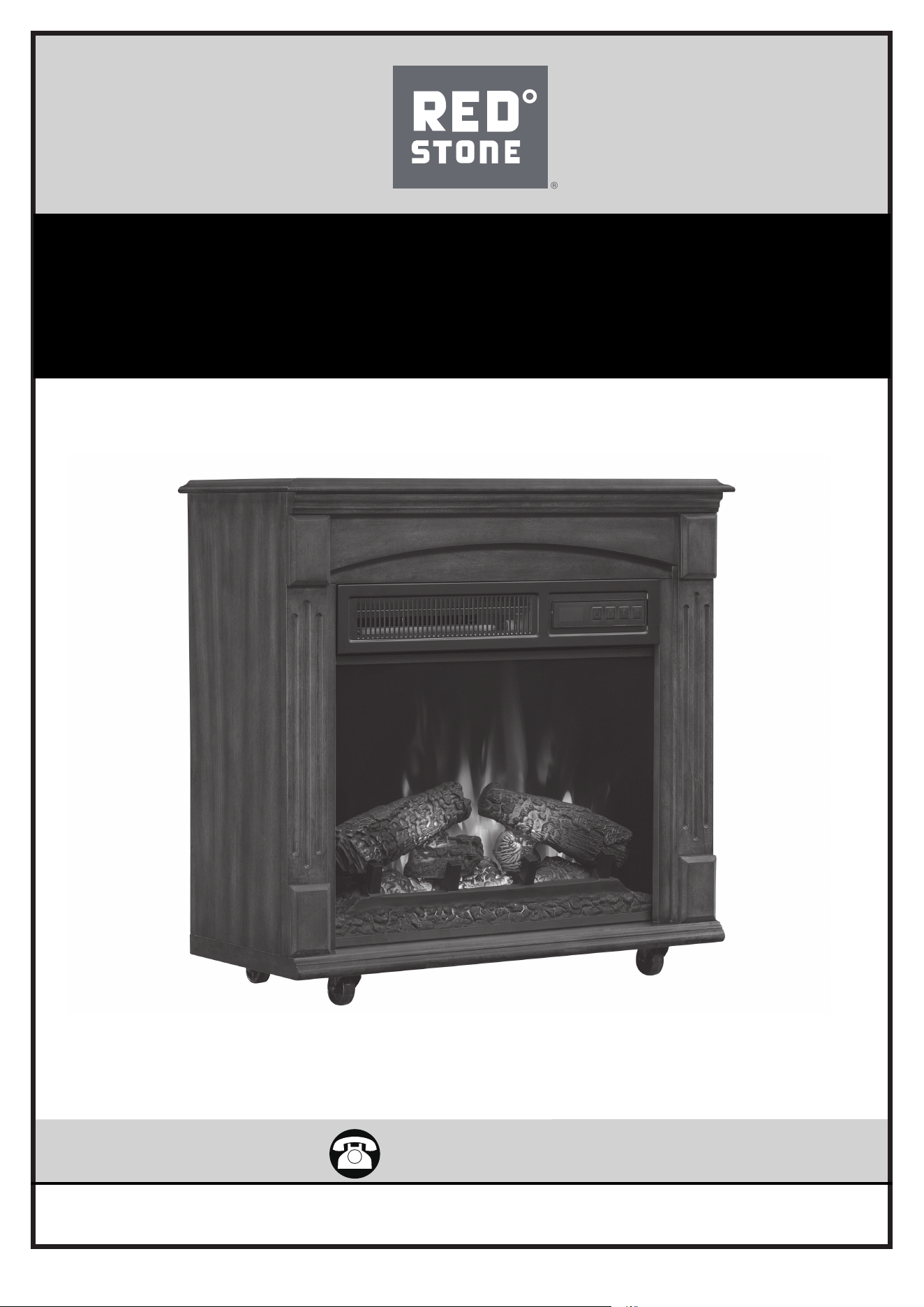
MODEL: 18IRM9984-C247
INSERT MODEL: 18II800GRA
www.tsicustomerservice.com
A5421
2
SAVE THESE INSTRUCTIONS
When using electrical appliances, basic precautions should always be followed to reduce the risk of re, electrical shock, and injury to
persons including the following:
1. Read all instructions before using this appliance.
2. DANGER – High temperatures may be generated under certain abnormal conditions. Do not partially or fully cover or obstruct
the front of this heater. WARNING: In order to avoid overheating, do not cover the heater.
3. CAUTION: Never leave the heater operating unattended. Extreme caution is necessary if unsupervised children or invalids are
nearby.
4. e appliance is not to be used by children or persons with reduced physical, sensory or mental capabilities, or lack of experience
and knowledge, unless they have been given supervision or instruction.
5. Always unplug this appliance when not in use.
6. Do not operate any heater with a damaged cord or plug or aer the appliance malfunctions, or if it has been dropped or damaged
in any manner.
7. If the supply cord is damaged, it must be replaced by the manufacturer, its service agent or similarly qualied persons in order to
avoid a hazard.
8. Do not use outdoors.
9. is heater is not intended for use in bathrooms, laundry areas and similar indoor locations. Never locate this appliance where it
may fall into a bathtub or other water container.
10. Do not run cord under carpeting. Do not cover cord with throw rugs, runners or the like. Arrange cord away from trac areas and
where it will not be tripped over.
11. To disconnect this appliance, turn controls to the o position, then remove plug from outlet.
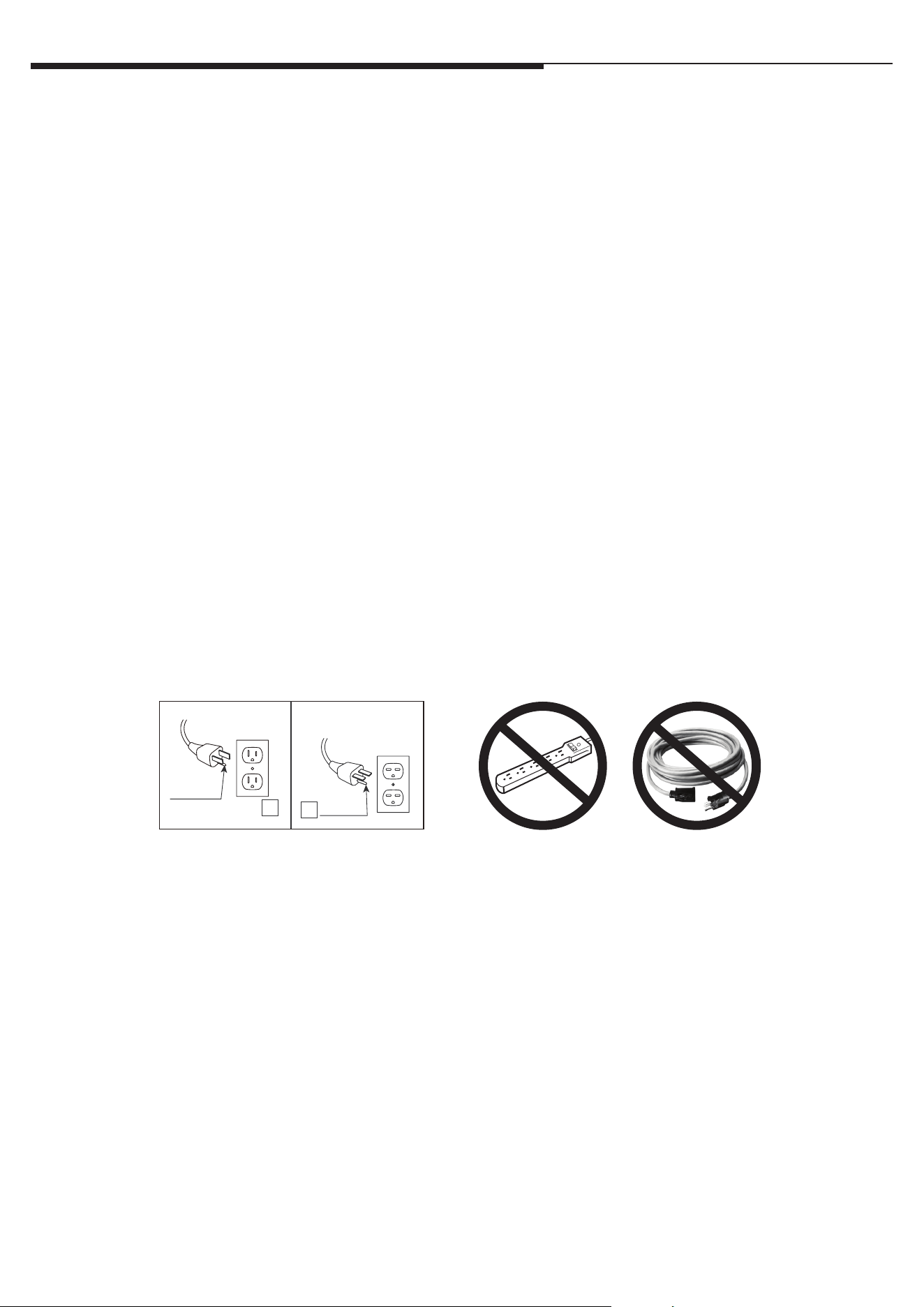
12. Connect to properly grounded outlets only. is heater is for use on 120 volts. e cord has a plug as shown at A in Fig.1 Do not
use a 2 prong adapter. Never use with an extension cord or relocatable power tap (outlet/power strip).
13. is appliance, when installed, must be electrically grounded in accordance with local codes or, in the absence of local codes, with
the current CSA C22.1 Canadian Electrical Code or for U.S.A. installations, follow local codes and the National Electrical Code,
ANSI/NFPA NO.70.
14. Do not insert or allow foreign objects to enter any ventilation or exhaust opening as this may cause an electric shock or re, or
damage the appliance.
15. To prevent a possible re, do not block air intakes or exhaust in any manner. Do not use on so surfaces, like a bed, where opening
may become blocked.
16. is appliance has hot and arcing or sparking parts inside. Do not use it in areas where gasoline, paint or ammable liquids are
used or stored. is replace should not be used as a drying rack for clothing. Christmas stockings or decorations should not be
hung in the area of it.
17. Use this appliance only as described in the manual. Any other use not recommended by the manufacturer may cause re, electric
shock or injury to persons.
18. is heater may include a visual alarm to warn that parts of the heater are getting excessively hot. If the alarm ashes immediately
turn the heater o and inspect for any objects on or adjacent to the heater that may cause high temperatures.
DO NOT OPERATE THE HEATER WITH THE ALARM FLASHING!
1. Read all instructions before using this appliance.
2. This appliance is hot when in use. To avoid burns, do not let bare skin touch hot surfaces. If provided, use handles when moving
this appliance. Keep combustible materials, such as furniture, pillows, bedding, papers, clothes and curtains at least 3 feet
(0.9 m) from the front of this appliance.
WARNING: In order to avoid overheating, do not cover the heater.
3. CAUTION: Whenever the heater is left operating and unattended, extreme caution is necessary if children or invalids are nearby.
4. The appliance is not to be used by children or persons with reduced physical, sensory or mental capabilities, or lack of
experience and knowledge, unless they have been given supervision or instruction.
5. Always unplug this appliance when not in use.
6. Do not operate any heater with a damaged cord or plug or after the appliance malfunctions, or if it has been dropped or
damaged in any manner.
7. If the supply cord is damaged, it must be replaced by the manufacturer, its service agent or similarly qualied persons in order
to avoid a hazard.
8. Do not use outdoors.
9. This heater is not intended for use in bathrooms, laundry areas and similar indoor locations. Never locate this appliance where it
may fall into a bathtub or other water container.
10. Do not run cord under carpeting. Do not cover cord with throw rugs, runners or the like. Arrange cord away from trafc areas
and where it will not be tripped over.
11. To disconnect this appliance, turn controls to the off position, then remove plug from outlet.
12. Connect to properly grounded outlets only, See Fig.1. Do not use a 2 prong adapters.
13. This appliance, when installed, must be electrically grounded in accordance with local codes or, in the absence of local codes,
with the current CSA C22.1 Canadian Electrical Code or for U.S.A. installations, follow local codes and the National Electrical
Code, ANSI/NFPA NO.70.
14. Do not insert or allow foreign objects to enter any ventilation or exhaust opening as this may cause an electric shock or re, or
damage the appliance.
15. To prevent a possible re, do not block air intakes or exhaust in any manner. Do not use on soft surfaces, like a bed, where
opening may become blocked.
16. This appliance has hot and arcing or sparking parts inside. Do not use it in areas where gasoline, paint or ammable liquids are
used or stored. This replace should not be used as a drying rack for clothing. Christmas stockings or decorations should not be
hung in the area of it.22. Use this appliance only as described in the manual. Any other use not recommended by the
manufacturer may cause re, electric shock or injury to persons.
17. Always plug heaters directly into a wall outlet/ receptacle. Never use with an extension cord or relocatable power tap (outlet/
power strip).
IMPORTANT INSTRUCTIONS
When using electrical appliances, basic precautions should always be followed to reduce the risk of re, electrical shock, and injury
to persons including the following:
2
A
B
Fig.1
SAVE THESE INSTRUCTIONS
IMPORTANT INSTRUCTIONS
www.tsicustomerservice.com
A5421
3
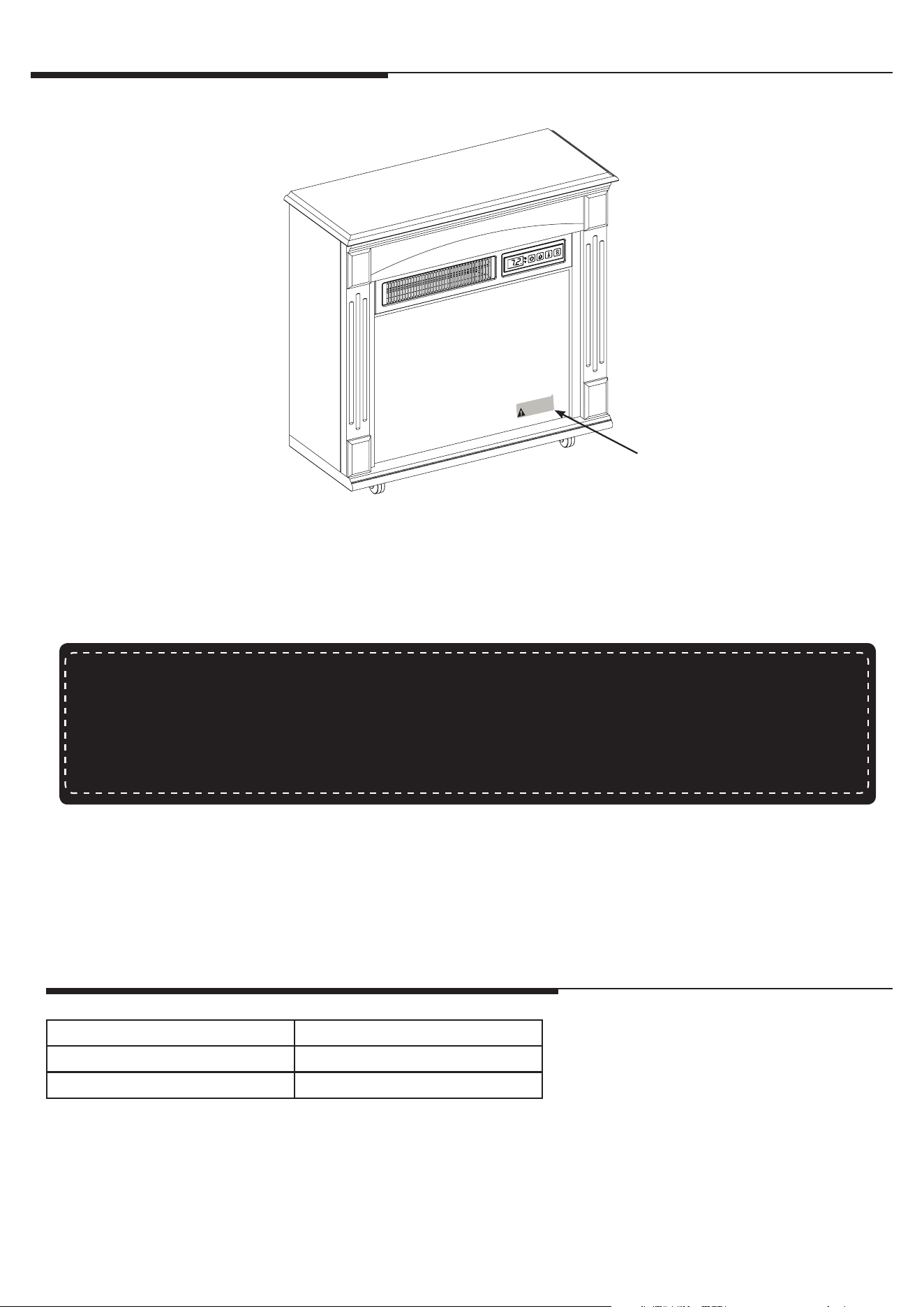
1. Remove the product identication sticker from the front of the insert.
2. Attach the Product Identication Sticker to the Manual below for future reference. is information is
used for product registration and also is necessary for customer service.
3. Go to www.tsicustomerservice.com for product warranty registration. If you are unable to complete
registration, save your proof of purchase for warranty purposes.
Model / Modèle / Modelo: 18II800GRA
SN #: AA-12345-A
Keep this number for service!
Gardez ce numéro pour le service!
Mantega este número para servicio!
Attach Product Identication Sticker Here
Product Identication
Sticker
VOLTAGE 120VAC, 60 Hz
AMPS 12.5 Amps
WAT T S 1500 Watts
GETTING STARTED
PRODUCT SPECIFICATIONS
www.tsicustomerservice.com
A5421
4
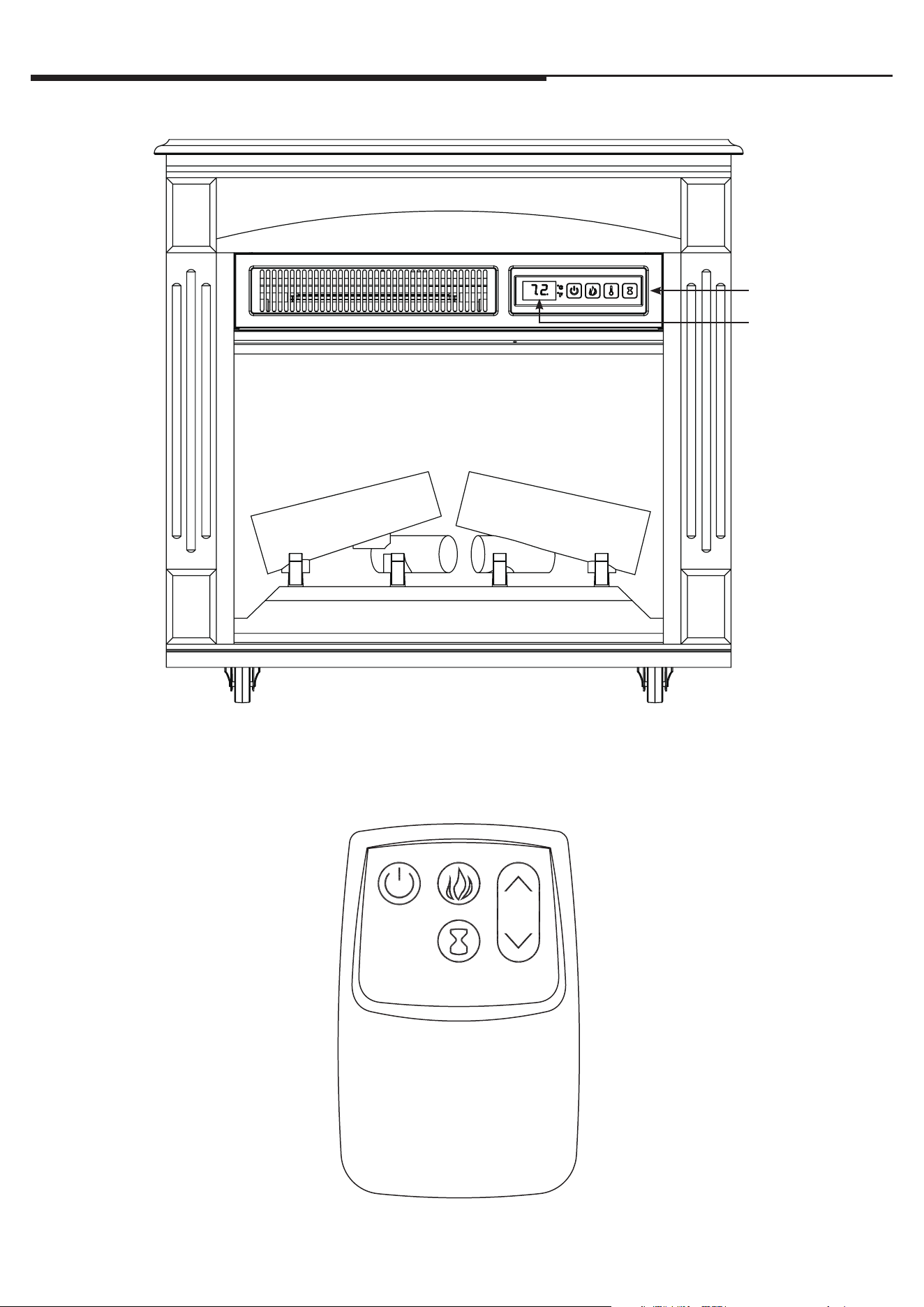
Control Panel
Display
OPERATION INSTRUCTIONS
e heater can be operated by either the remote control or the control panel.
www.tsicustomerservice.com
A5421
5
OPERATION INSTRUCTIONS
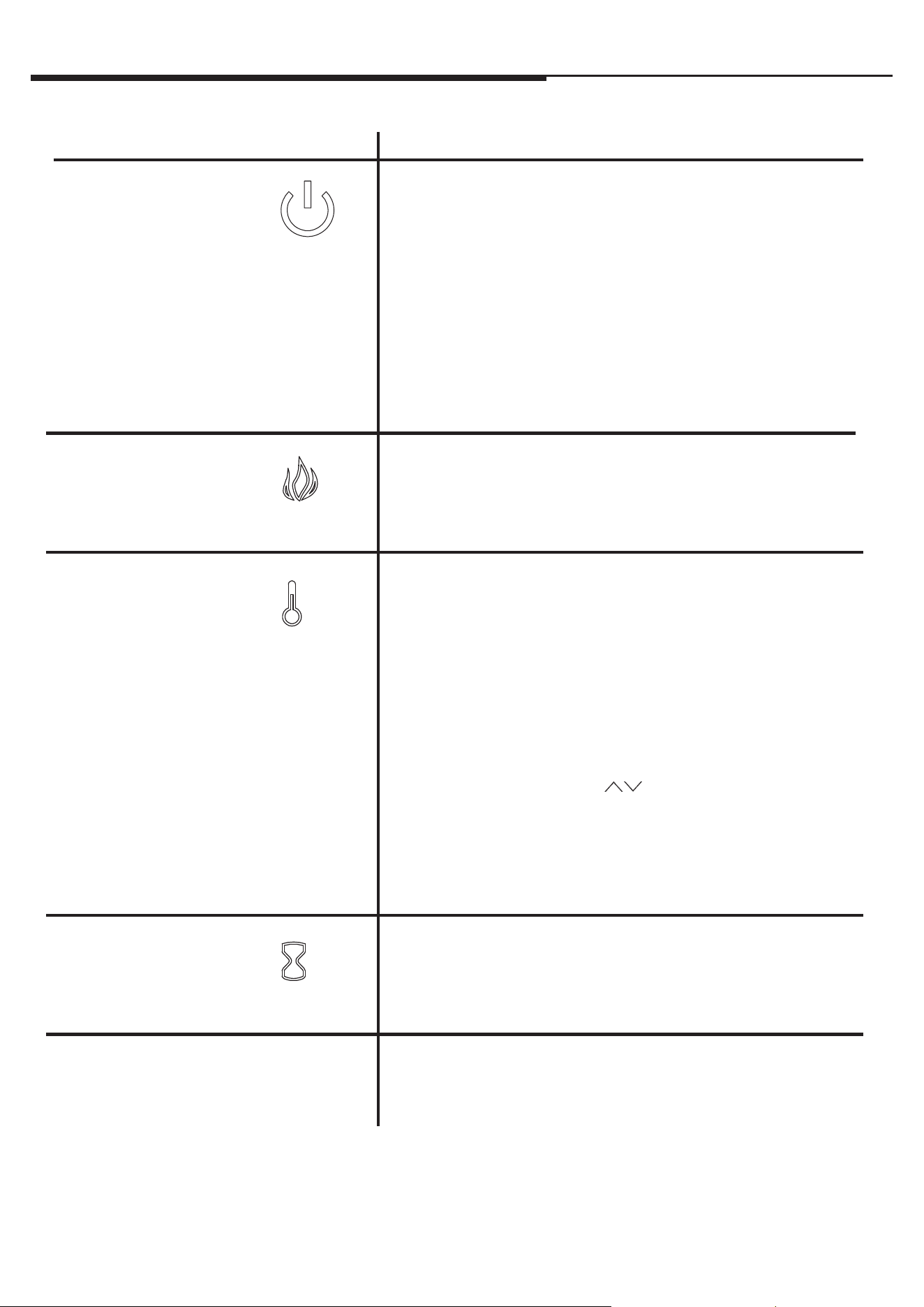
FUNCTION
FLAME
e replace contains three infrared quartz heating
elements.
e thermostat setting range is 62°F - 82°F (17°C - 27°C) or
continuously ON. To set ame eect so that it works without
heat, press the heater button until the display shows “00”.
e thermostat is adjustable by 2°F or 1°C increments.
e up and down buttons “ ” on the remote will increase
/ decrease temperature setting.
To change between °F and °C press and hold the HEATER
button on the control panel for 3 seconds.
Pressing the timer button will cycle through the timer
settings: 30 minutes, 1 Hour, 2H, 3H, 4H, 5H, 6H, 7H, 8H,
9H and o (00).
HEATER
TIMER
ICON DESCRIPTION
Before the heater powers o, the fan will continue to run for
a period of time to cool down the internal parts.
COOL DOWN CYCLE
POWER
e power button supplies power to all of the functions
of the replace. e power button will put the insert in a
standby mode. is will turn o all functions at once but
will hold the settings in the memory. By pressing the
Power button again the unit will turn on at the same
settings.
With the power on press and hold the Power button on
the control panel for 10 seconds to disable or re-enable the
heater function. Once disable or re-enabled the emberbed
lights will ash multiple times.
ere are 5 brightness levels that can be selected .
Settings F5- F1 decrease in brightness.
www.tsicustomerservice.com
A5421
6
TROUBLESHOOTING
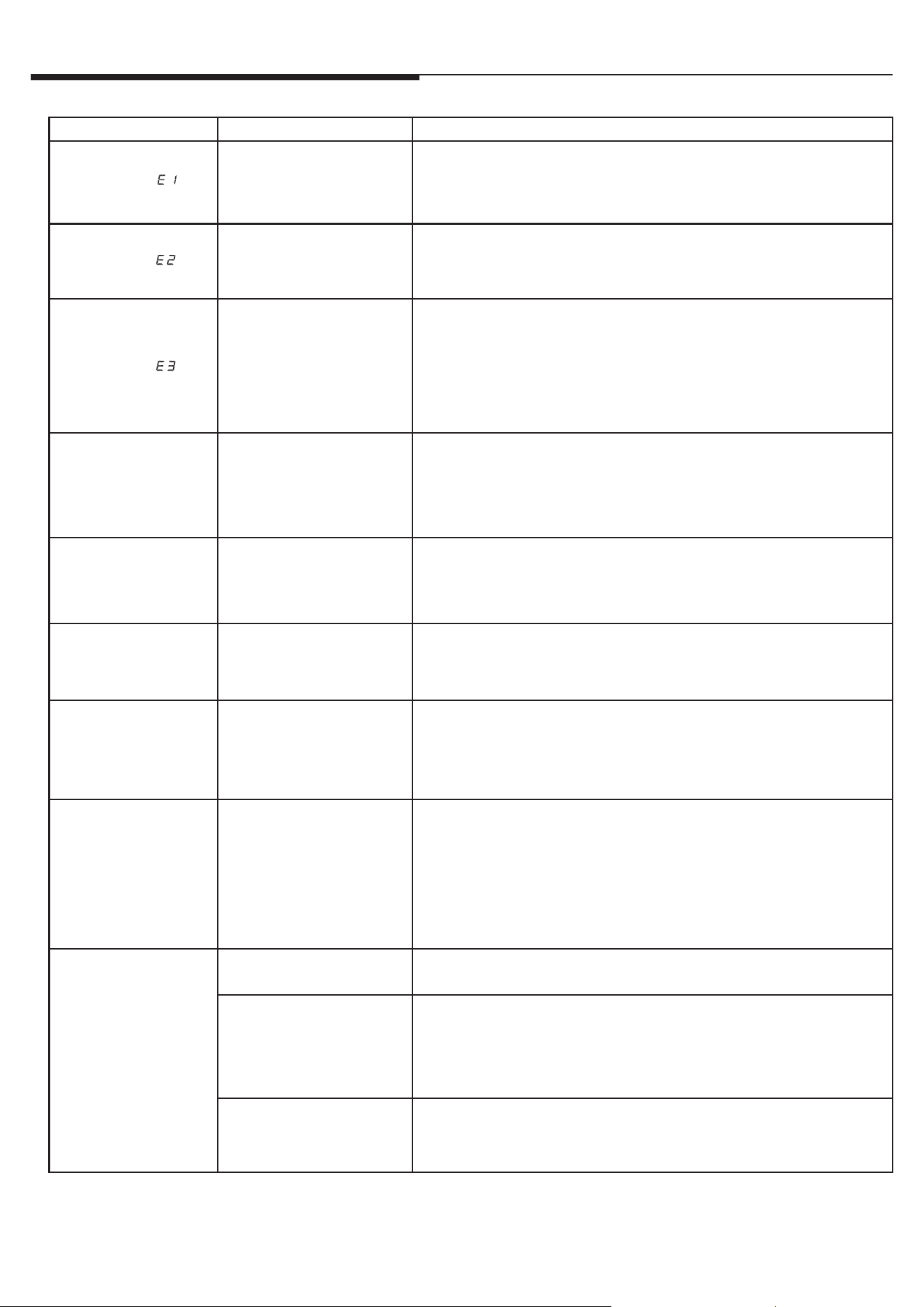
Problem Root Cause Corrective Action
Display shows “ ”
e thermostat sensor is
broken or disconnected.
Unplug the replace, remove the back panel of the replace and check that
the thermostat is plugged into the main circuit board. If this does not solve
the problem, contact customer service for a replacement thermostat sensor.
Display shows “ ”
e thermostat sensor is
broken.
Contact customer service for a replacement thermostat sensor.
Display shows “ ”
Manual Reset overheat
protection has triggered.
Inspect the heater and check that the air inlets and outlets are not blocked
as this may cause overheating. Unplug the heater for 30 minutes and
allow it to cool down. Replug and operate, but monitor the heater for signs
of overheating. If the problem persists, discontinue use of the heater and
contact customer service.
Heater does not blow
warm air.
Cool down cycle.
Normal operation. Heater will continue to run for several minutes before
shutting down. Times will vary based on temperatures. During this time,
cool air will blow.
No power, logs do not
glow.
No power to the unit
Check that unit is plugged into a standard 120V outlet. Press power button
several times, make sure power is set at “ON” position.
Logs glow, but no
ame eect.
Flame eect turned o Press ame button several times.
Heater does not blow
warm air.
ermostat setting is
preventing heater from
turning on.
Adjust the temperature settings to ensure that the thermostat is set higher
than the current room temperature.
Flame eect works, but
heater function does
not and the emberbed
ashes when the heater
button is pressed.
e heater is disabled.
With the power on, press and hold the POWER button on the control panel
for 10 seconds. Once re-enabled, the ember bed lights will ash multiple
times.
Remote control is not
working when buttons
are pressed.
No batteries. Change the remote batteries.
Poor Signal.
Operate remote transmitter at a slow measured pace.
Press the remote control buttons with an even motion and gentle pressure.
Repeatedly pressing buttons in rapid succession may cause the transmitter
to malfunction.
Distance.
Operate the remote at a distance less than 20 feet from the front of the
appliance; point the remote at the control panel.
www.tsicustomerservice.com
A5421
7
1
2
4
3
5
6
7
8
9
10
11
4
5
6
7
8
9
10
11
12
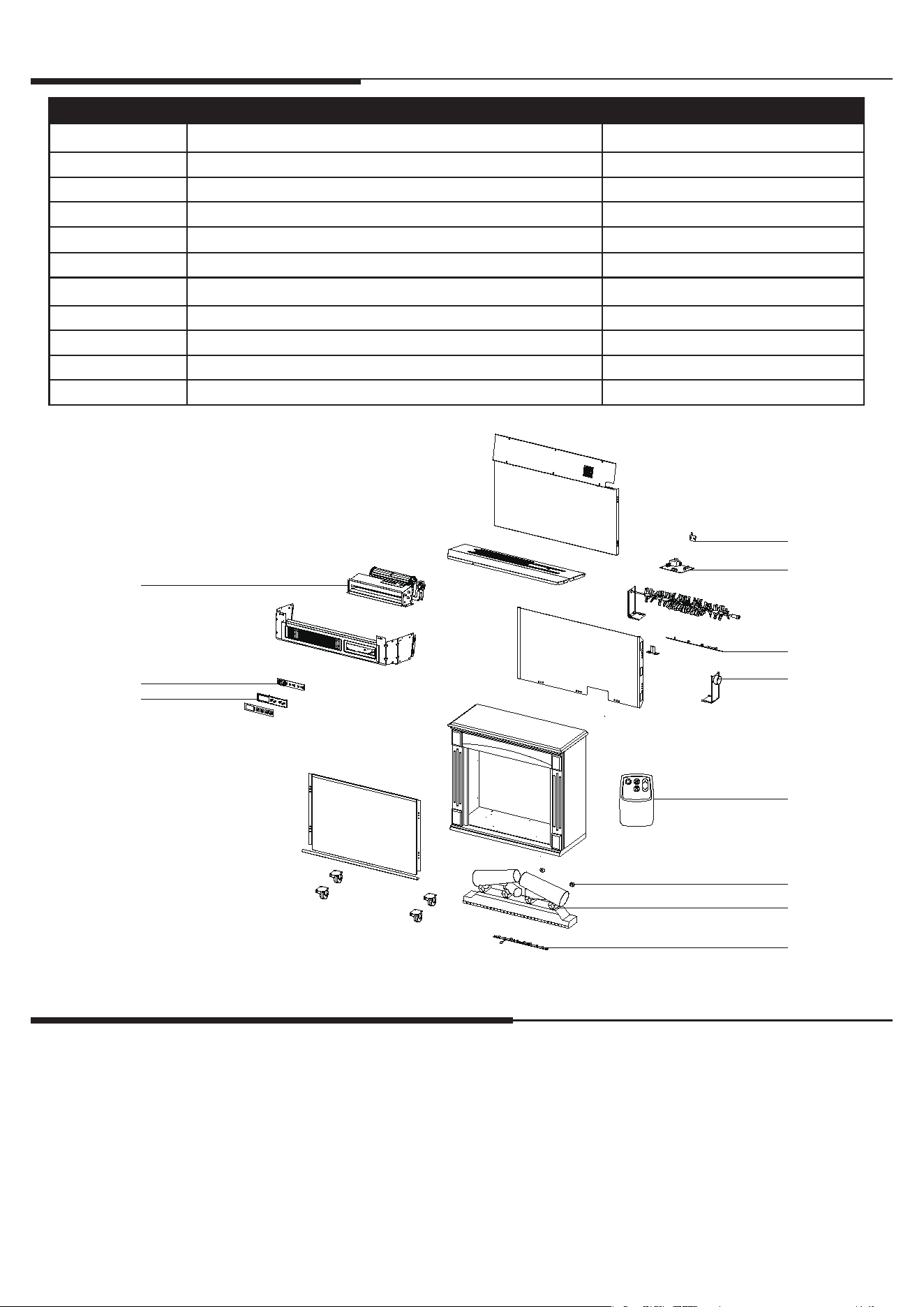
EXPLODED VIEW
CARE AND MAINTENANCE
Part Part Name Part Number
1 Heater/Blower Assembly Y15-S146-P01
2 Control Panel Circuit Board Y15-C70-P32
3 Control Panel Buttons Y15-C70-P85
4 ermostat Sensor INS-NTC
5 Main Circuit Board Y16-S185-P15
6 Flame Circuit Board Y16-S185-P40
7 Flame Generator Drive Motor P10-6-Q
8 Remote Control P115
9 Log Circuit Board Y16-S185-P44L
10 Emberbed with Log Y16-S185-P02
11 Emberbed Circuit Board Y16-S185-P44E
• e motors used on the fan and the ame generator assembly are pre-lubricated for extended bearing life and require no
further lubrication. However, we recommend periodic cleaning/vacuuming of the fan/heater.
• Clean the trim using a so cloth, slightly dampened with citrus oil based product and bu with a clean so cloth.
DO NOT use brass polish or household cleaners as these products will damage the metal trim. Citrus oil based products
can be obtained at supermarkets or hardware stores.
• Make sure the unit is turned OFF and unplugged before cleaning the heater or replace.
www.tsicustomerservice.com
A5421
8
Note:
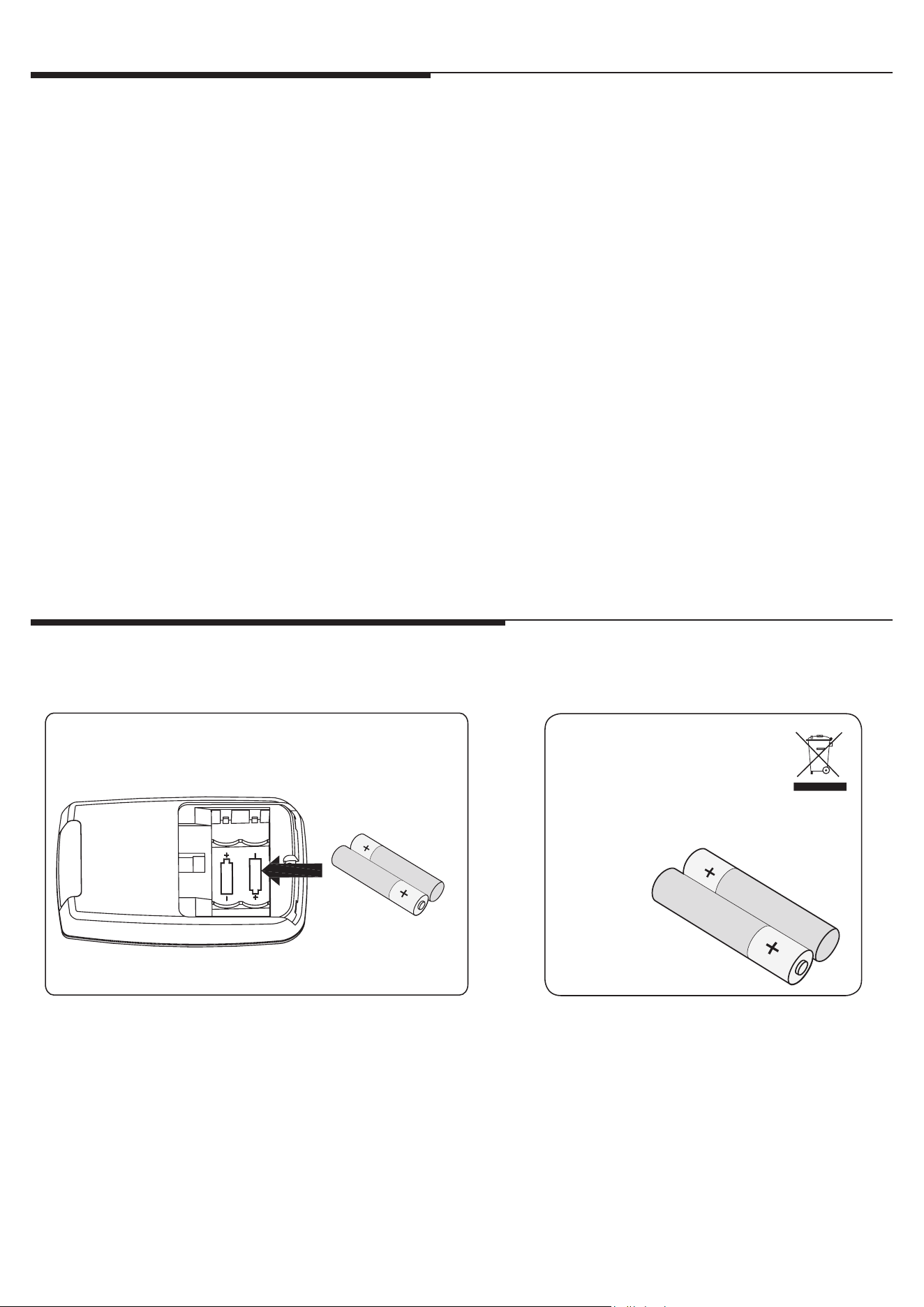
Battery disposal
Please always dispose of batteries
at a suitable recycling point.
AAA 1.5V
AAA 1.5V
FCC/IC INFORMATION
BATTERY REPLACEMENT
NOTE: Do not mix old and new batteries.
Do not mix alkaline, standard (carbon zinc), or rechargable (nicad, nimh, etc.) batteries.
Warning: Changes or modications to this unit not expressly approved by the party responsible for compliance could
void user’s authority to operate the equipment.
NOTE: is equipment has been tested and found to comply with the limits for Class B digital device, pursuant to part
15 of the FCC Rules. ese limits are designed to provide reasonable protection against harmful interference in a
residential installation. is equipment generates, uses, and can radiate radio frequency energy and, if not installed and
used in accordance with the instructions, may cause harmful interference to radio communications.
However, there is no guarantee that interference will not occur in a particular installation. If this equipment does cause
harmful interference to radio or television reception, which can be determined by turning the equipment o and on, the
user is encouraged to try to correct the interference by one or more of the following measures:
• Reorient or relocate the receiving antenna.
• Increase the separation between the equipment and the receiver.
• Connect the equipment into an outlet on a circuit dierent from that to which the receiver is connected.
• Consult the dealer or an experienced radio/TV technician for help.
is device complies with Part 15 of the FCC Rules. Operation is subject to the following two conditions:
(1) is device may not cause harmful interference, and
(2) this device must accept any interference received, including interference that may cause undesired operation.
is Class B digital apparatus complies with Canadian ICES-003.
CAUTION:
• Do not ingest batteries.
• Non-rechargeable batteries are not to be recharged.
• Batteries are to be inserted with the correct polarity.
• Exhausted batteries are to be removed from the product.
• Always purchase the correct size and grade of battery most suitable for the intended use.
• Replace all batteries of a set at the same time.
• Clean the battery contacts and also those of the device prior to battery installation.
• Remove used batteries promptly.

www.tsicustomerservice.com
A5421
9
e manufacturer warrants that your new Electric Fireplace is free from manufacturing and material defects for a period
of one year from date of puchase, subject to the following conditions and limitations.
1. Install and operate this appliance in accordance with the installation and operating instructions furnished with the
product at all times. Any unauthorized repair, alteration, willful abuse, accident, or misuse of the product shall nullify
this warranty.
2. is warranty is non-transferable, and is made to the original owner, provided that the purchase was made through
an authorized supplier of the product.
3. e warranty is limited to the repair or replacement of part(s) found to be defective in material or workmanship,
provided that such part(s) have been subjected to normal conditions of use and service, aer said defect is conrmed
by the manufacturer’s inspection.
4. e manufacturer may, at its discretion, fully discharge all obligations with respect to this warranty by refunding
the wholesale price of the defective part(s).
5. Any installation, labor, construction, transportation, or other related costs/expenses arising from defective part(s),
repair, replacement, or otherwise of same, will not be covered by this warranty, nor shall the manufacturer assume
responsibility for same.
6. e owner/user assumes all other risks, if any, including the risk of any direct, indirect or consequential loss or
damage arising out of the use, or inability to use the product, except as provided by law.
7. All other warranties – expressed or implied –with respect to the product, its components and accessories, or any
obligations/liabilities on the part of the manufacturer are hereby expressly excluded.
8. e manufacturer neither assumes, nor authorizes any third party to assume on its behalf, any other liabilities with
respect to the sale of the product.
9. e warranties as outlined within this document do not apply to non accessories used in conjunction with the
installation of this product.
10.is warranty gives you specic legal rights, and you may also have other rights which vary from state to state.
is warranty is void if:
a. e replace is subjected to prolonged periods of dampness or condensation.
b. Any unauthorized alteration, willful abuse, accident, or misuse of the product.
c. You do not have the original receipt of purchase.
www.tsicustomerservice.com
For Customer Service Call 1-866-661-1218
Questions? Our message centers are available 7 days a week 24 hours a day at our toll-free help line. Our
Consumer Service department is available Monday – Friday 8:30 am – 5:30 pm EST. We can help you with
assembly and if necessary, replace damaged/missing parts.
IMPORTANT:
Before contacting Customer Service, please have this information available:
• Serial Number
• Model Number
• Sales Receipt or Proof of Purchase
1-YEAR LIMITED WARRANTY
CUSTOMER SERVICE

www.tsicustomerservice.com
A5421
10
www.tsicustomerservice.com