User Manual
90 cm Ceramic Cooktop, Model Code: TRC900CT
Please read this manual carefully before using, and keep it for future reference.
P a g e | 2
ONLINE: TRINITYAPPLIANCES.COM.AU
INSTRUCTION MANUAL
90cm Ceramic Cooktop
MODEL TRC900CT
Congratulations on the purchase of your new Ceramic Hob!
We recommend that you spend some time to read this Instruction / Installation Manual in
order to fully understand how to install and operate it correctly. For installation, please
read the installation section. Read all the safety instructions carefully before use and keep
this Instruction / Installation Manual for future reference.

P a g e | 3
ONLINE: TRINITYAPPLIANCES.COM.AU
CONTENTS
1. PACKAGE
.................................................................................................................................................................
4
1.1 IMPORTANT - CHECK FOR ANY DAMAGE OR MARKS
.........................................................................
4
1.2 BEFORE USING YOUR NEW CERAMIC HOB
.............................................................................................
4
2. SAFETY WARNINGS
................................................................................................................................................
5
2.1 IMPORTANT INFORMATION
.........................................................................................................................
5
2.2 WARNING!
.......................................................................................................................................................
5
2.3 USAGE CONDITIONS AND RESTRICTIONS
................................................................................................
5
3. PRODUCT OVERVIEW
............................................................................................................................................
8
3.1 TOP VIEW
.........................................................................................................................................................
8
3.2 CONTROL PANEL/USER INTERFACE
...........................................................................................................
9
3.3 PRODUCT FUNCTIONS
................................................................................................................................
10
4. INSTALLATION
.......................................................................................................................................................
11
4.1 SELECTION OF INSTALLATION EQUIPMENT
............................................................................................
11
4.2 INSTALLATION
...............................................................................................................................................
13
4.3 CAUTIONS
......................................................................................................................................................
14
4.4 CONNECTING THE HOB TO THE MAIN POWER SUPPLY
......................................................................
15
5. USING YOUR COOKTOP
.....................................................................................................................................
17
5.1 CHOOSING THE RIGHT COOKWARE
......................................................................................................
17
5.2 USING TOUCH CONTROLS
........................................................................................................................
18
5.3 START OPERATION
.......................................................................................................................................
19
5.4 USING THE TIMER
..........................................................................................................................................
20
5.5 USING THE DOUBLE RING ZONE
...............................................................................................................
20
5.6 USING THE TRIPPLE RING ZONE
.................................................................................................................
21
5.7 USING THE PAUSE FUNCTION: STOP AND GO
......................................................................................
21
5.8 POWER LIMITATION
.....................................................................................................................................
22
5.9 CHILD LOCK FUNCTION
.............................................................................................................................
22
6. CARE AND MAINTENANCE
................................................................................................................................
24
6.1 CARE
...............................................................................................................................................................
24
6.2 APPLIANCE CLEANLINESS
..........................................................................................................................
25
7. TROUBLESHOOTING
.............................................................................................................................................
26
8. TECHNICAL SPECIFICATIONS
............................................................................................................................
27
9. DISPOSAL
...............................................................................................................................................................
27
10.
CUSTOMER CARE
................................................................................................................................................
28
5.10
Using the Keep Warm Function
..............................................................................................................
23

P a g e | 4
ONLINE: TRINITYAPPLIANCES.COM.AU
1. PACKAGE
When unpacking the appliance, please check that the following items are contained
within the package:
1 Hob
1 Instruction manual
4 Fixing screws
4 Fixing brackets
1 Sealing strip
1.1 IMPORTANT - CHECK FOR ANY DAMAGE OR MARKS
Please thoroughly inspect your goods at the delivery time, if you notice any damage to
your goods:
please notify the delivery team at the time of delivery and DO NOT accept
damaged product;
please notify us immediately, as the problem can be solved, and damaged
product can be returned to the courier.
When you open the package and find the appliance is damaged or marked, you must
report it within 24 hours. Do not install or connect the item and keep the package as it
was originally if you wish to claim for damage/marks under the manufacturer’s warranty.
This does not affect your statutory rights.
Evidence of damage will be required.
1.2 BEFORE USING YOUR NEW CERAMIC HOB
Read this guide, taking special note of the ‘Safety Warnings’ section.
Remove any protective film that may still be on your ceramic hob.

P a g e | 5
ONLINE: TRINITYAPPLIANCES.COM.AU
2. SAFETY WARNINGS
2.1 IMPORTANT INFORMATION
Your safety is important to us. Please read this manual thoroughly before you start using
the Ceramic Cooktop.
The safety precautions instructions reduce the risk of fire, electric shock and injury when
correctly complied to.
Please follow all instructions and take notice of all warnings.
2.2 WARNING!
INSTALLATION: This Cooktop must be installed by a licensed electrician.
Make sure to have this appliance connected to a well-placed earth wiring system.
Before carrying out any work, repairs or maintenance on this appliance, it has to be
disconnected from the mains. If possible, switch of the cooktop from the wall before
cleaning, failure to do so may result in electric shock or death.
During use be sure to avoid any direct contact with the surface as you may get burned.
Always use this appliance with caution. Do not touch any components of the cooktop
as it will be hot. It is highly recommended that you use cooktop gloves when handling
cookware.
Do not leave any items on the cooktop as this is a fire hazard. In the case of a fire do
not use a fire extinguisher with water. It is highly recommended that you switch off the
cooktop and cover the flames with a fire blanket.
2.3 USAGE CONDITIONS AND RESTRICTIONS
Supervision over children is to ensure that they do not play with the appliance. Never
allow them to use, play with or crawl inside the appliance.
Cleaning and maintenance must not be done by children.
This appliance is not to be used by persons (including children) with reduced physical,
sensory or mental capabilities, or lack of experience and knowledge, unless under
responsible supervision and instruction to ensure appliance hazards are understood.
Make sure to read all rules and regulations in this manual. Anyone who is not familiar
with this appliance is not to operate it. These instructions do not cover every possible
situation or condition as with any appliance. Use extreme caution when installing,
operating and maintaining this appliance.
Never leave the cooktop unattended while in use.

P a g e | 6
ONLINE: TRINITYAPPLIANCES.COM.AU
Only for indoor domestic use only. It is not to be used for industrial or commercial use.
Do not use this product for anything other than its intended purpose, and only use it as
described in this manual. Do not attempt to alter or modify this appliance.
This appliance can become extremely hot and therefore children and pets are to be
kept away. If younger family members are in the kitchen, be sure to keep close
supervision at all times. Do not allow children to operate or play with this appliance.
Do not use the cooktop for heating up the area.
Make sure you do not use the appliance if any part has been damaged. It must only
be repaired by a qualified technician. Incorrect repair could expose you to risk of
electric shock, fire or injury. If you continue to use the product in such condition it could
cause fire or electrocution.
The appliance is not intended to be operated by means of an external timer or
separate remote-control system.
Do not store items on the cooking surfaces
Caution: The cooking process has to be supervised; a short-term cooking process has to
be supervised continuously.
Warning: Unattended cooking on a hob with fat or oil can be dangerous and may
result in a fire.
Do not use any unstable or plastic cookware products or aluminium foil containers. No
large cookware is to overlap bench as this can deflect heat back onto the cooktop
and damage the surface. Cookware products can become hot while in use with this
appliance. Be sure to position handles away from reach of children.
Make sure not to switch on hotplate without anything on it, do not use cooktop to
warm up plates.
Do not place anything heavier then 20kgs on the cooktop.
Checking constantly when frying food to ensure that oil is not overheating and
becomes a fire hazard. Do not overfill deep fry pans with oil (more than one third) and
be sure not to leave unattended.
Make sure to switch off all controls when not in use and allow surface to cool before
cleaning.
If accessible, disconnect the appliance from the mains before cleaning.
Do not cover the appliance or power cord in water or other liquids.
Do not use any steam cleaning products for the cleaning of this appliance.
Do not disconnect the appliance by using wet hands, gripping end of plug or forcefully
pulling cord to disconnect. Grip end of plug, and do not pull cord to disconnect.
Do not use appliance if there is a technical fault. All faults must be fixed by a
qualified/authorised person.
Incorrect use can result in property damage, injury or death. We assume no liability for
misuse of the appliance or noncompliance with these instructions.
WARNING! If the surface cracks, switch of the appliance immediately to avoid the
possibility of electric shock and call our customer support.

P a g e | 7
ONLINE: TRINITYAPPLIANCES.COM.AU
Be careful when using this cooktop, as the cooktop complies with all safety regulations,
we do not wish for customers to burn themselves as the surface will become extremely
hot during use and will retain heat after use.
Please remember to allow for the cooktop to cooldown before attempting to clean.
Young children should be kept away from this appliance at all times! Take extreme
caution when using the appliance to ensure they do not come anywhere close the
cooktop.
Do not leave any items on top of the cooktop as these can become a fire hazard.
This appliance is not intended to be operated by means of an external timer or
separated remote control system.
P a g e | 8
ONLINE: TRINITYAPPLIANCES.COM.AU
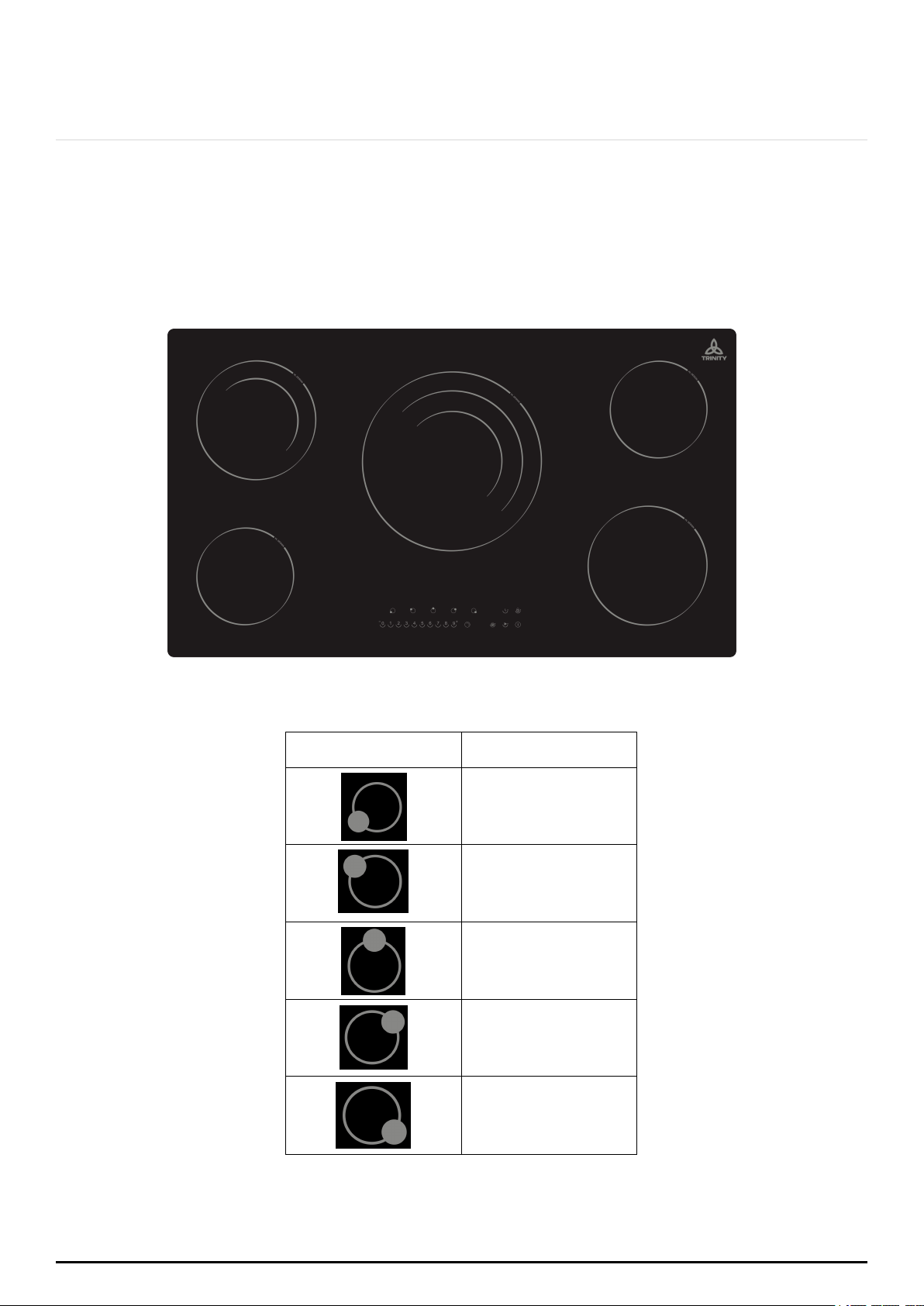
3. PRODUCT OVERVIEW
3.1 TOP VIEW
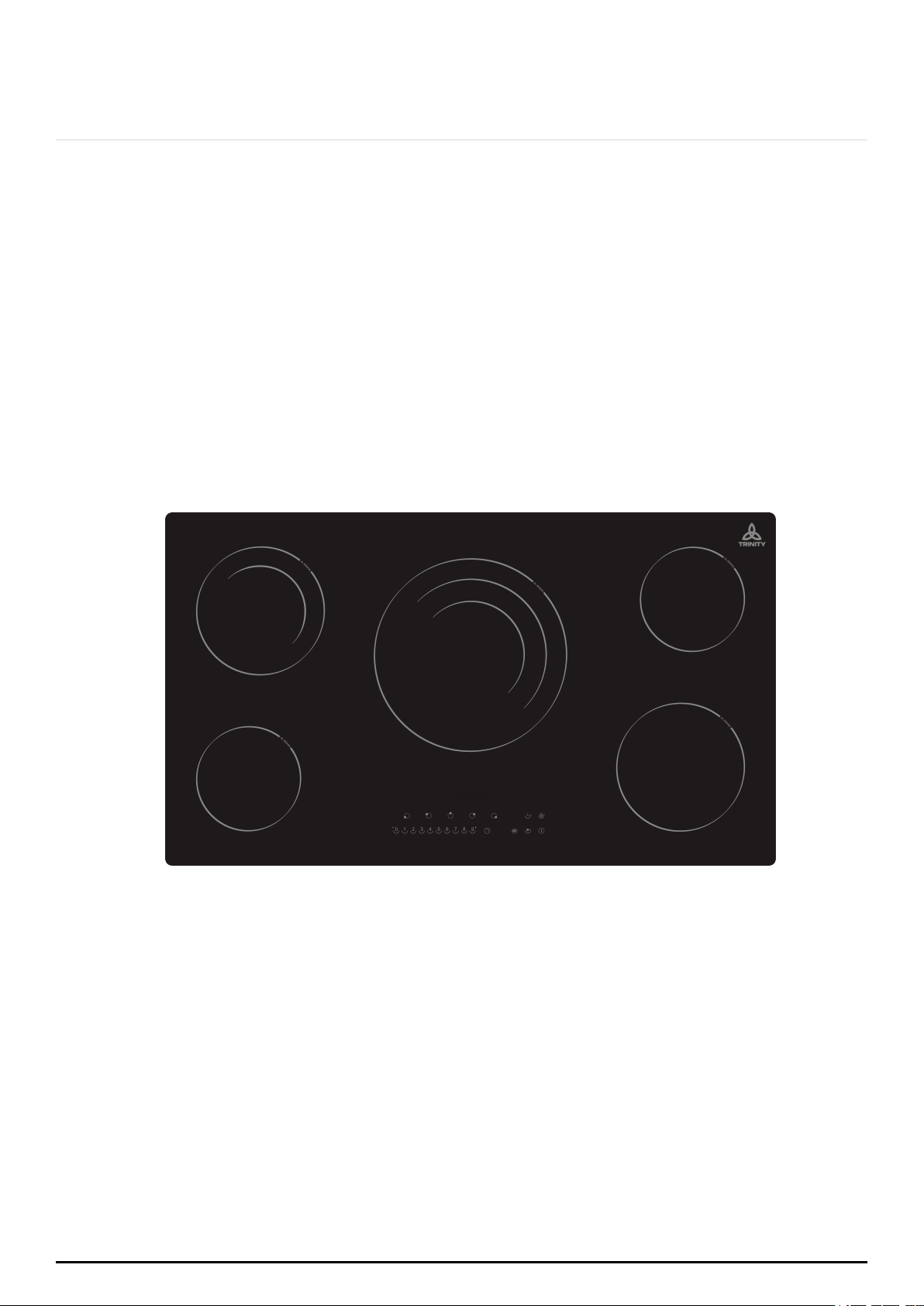
Heating Zone Power
Heating Zone
Power
1200W
1000/2000W
950/1750/2700W
1200W
1800W
P a g e | 9
ONLINE: TRINITYAPPLIANCES.COM.AU
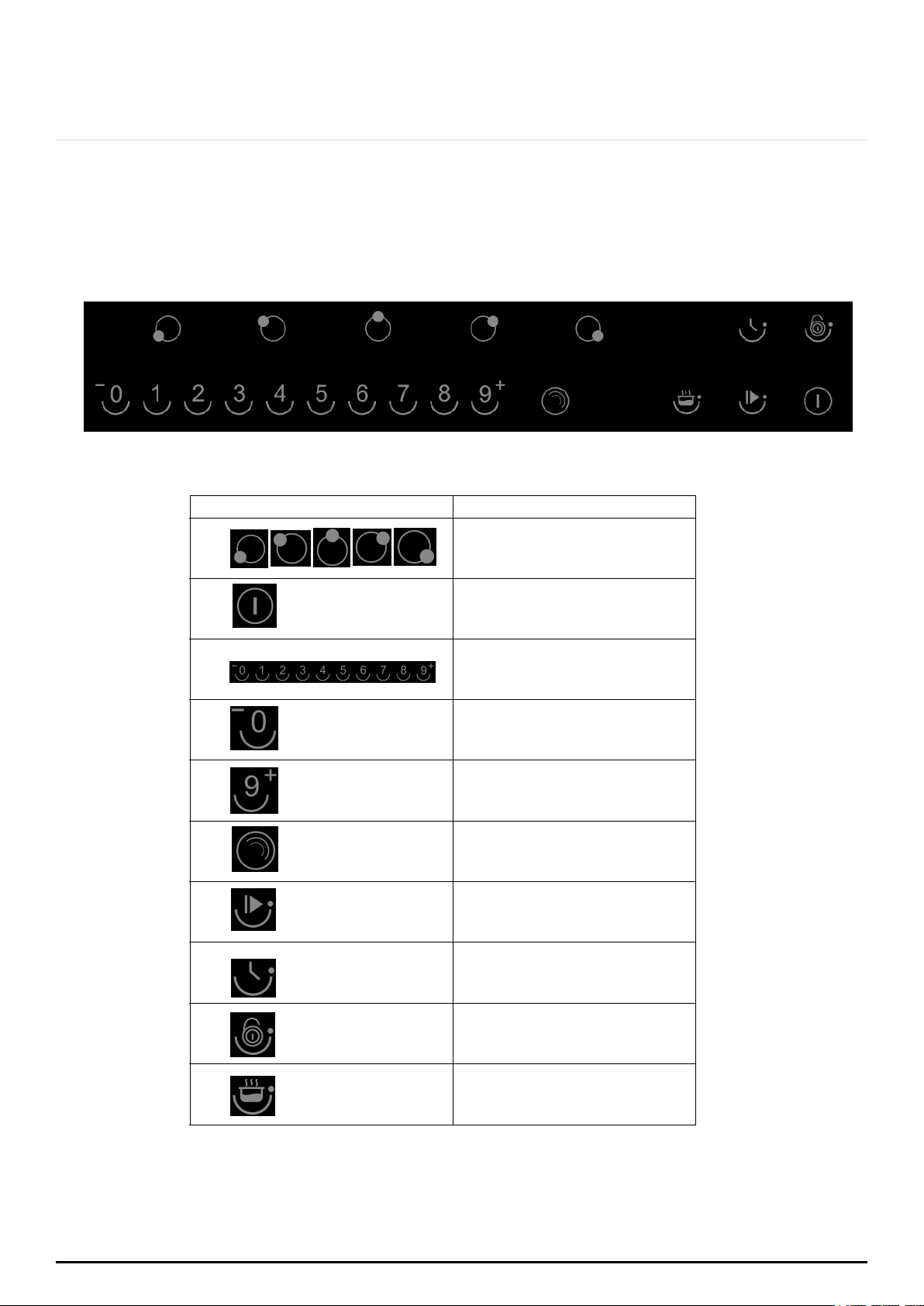
3.2 CONTROL PANEL/USER INTERFACE
Reference
Description
A
Zone select key
B
ON/OFF key
D
Timer regulating key
(reduce)
E
Timer regulating key
(increase)
F
G
Stop & Go function
H
Timer key
Triple ring control key
C
Power Regulating
Key(Level 0~9)
I
Child lock key
J
Keep warm key

P a g e | 10
ONLINE: TRINITYAPPLIANCES.COM.AU
3.3 PRODUCT FUNCTIONS
The ceramic hob caters for all kinds of cooking with its radiant heat cooking zones,
electronic touch controls, and multiple functions making it the ideal choice for the
modern family. The ceramic hob is extremely user-friendly, durable and safe.
Special Functions
Protection from over-heating
A sensor monitors the temperature in the cooking zones. When the temperature exceeds
the safe level, the cooking zone is automatically switched off.
Residual heat indicator
When the hob has been operating for some time, there will be some residual heat. The
letter “H” appears to warn you that it is too hot to touch the surface.
Auto shutdown protection
Auto shutdown is a safety protection function for your ceramic hob. It shuts down
automatically if you ever forget to turn it off. The default working times for various power
levels are shown in the table below:
Power level
1~2
3~4
5
6~9
Default working timer (min)
360
300
240
90
Protection against unintended operation
If the electronic control detects a button being held down for approximately 10 seconds,
the controller sends an audible error signal, warning the sensor to detect the presence of
the object and displays the error code “ER03”. It will shut down automatically. When the
object is removed, it will stop displaying and buzzing and can then be rebooted.
Before using your New Ceramic Hob:
Read this guide, taking special note of the 'Safety Warnings' section.
Remove any protective film that may still be on your Ceramic hob.
P a g e | 11
ONLINE: TRINITYAPPLIANCES.COM.AU
4. INSTALLATION
4.1 SELECTION OF INSTALLATION EQUIPMENT
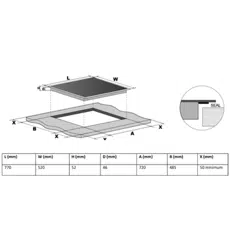
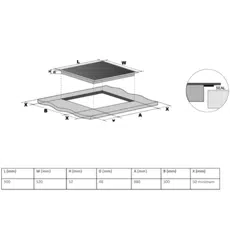
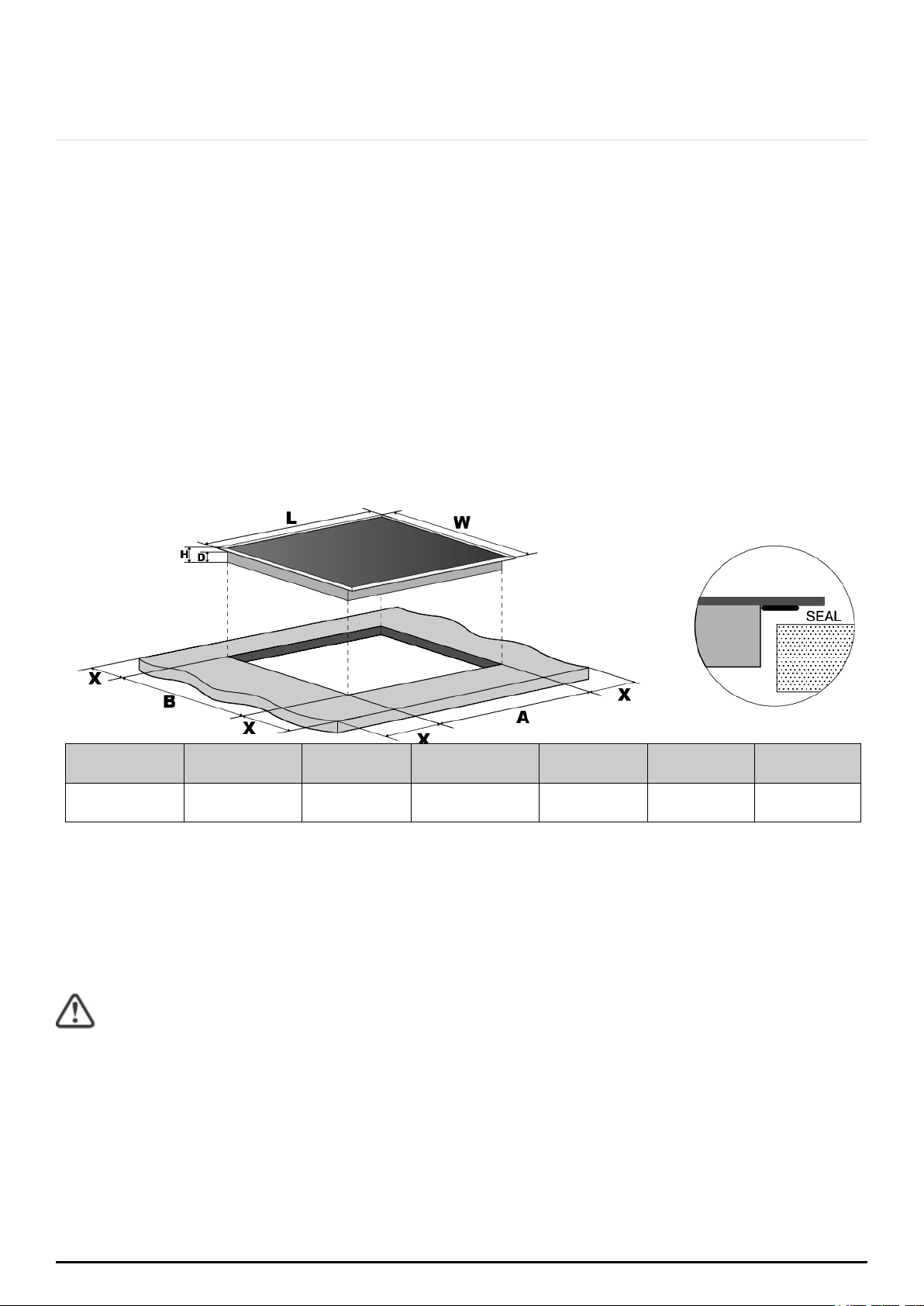
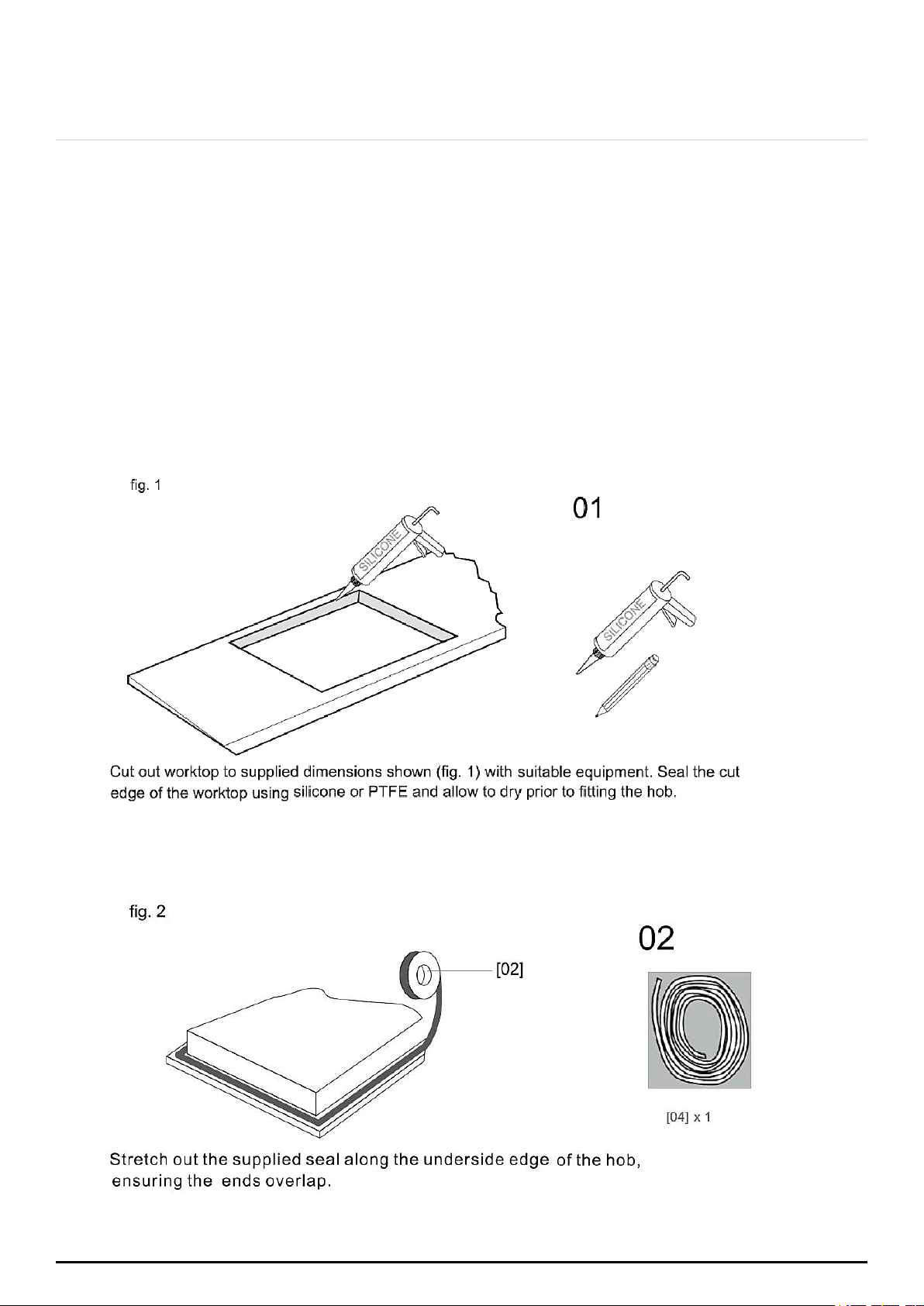
Cut out the work surface according to the sizes shown in the drawing.
For the purpose of installation and use, a minimum of 5 cm space shall be preserved
around the hole.
Be sure the thickness of the work surface is at least 30 mm. Please select heat-resistant
work surface material to avoid larger deformation caused by the heat radiation from the
hotplate. As shown below:
L (mm)
W (mm)
H (mm)
D (mm)
A (mm)
B (mm)
X (mm)
900
510
47
43
880
490
50 minimum
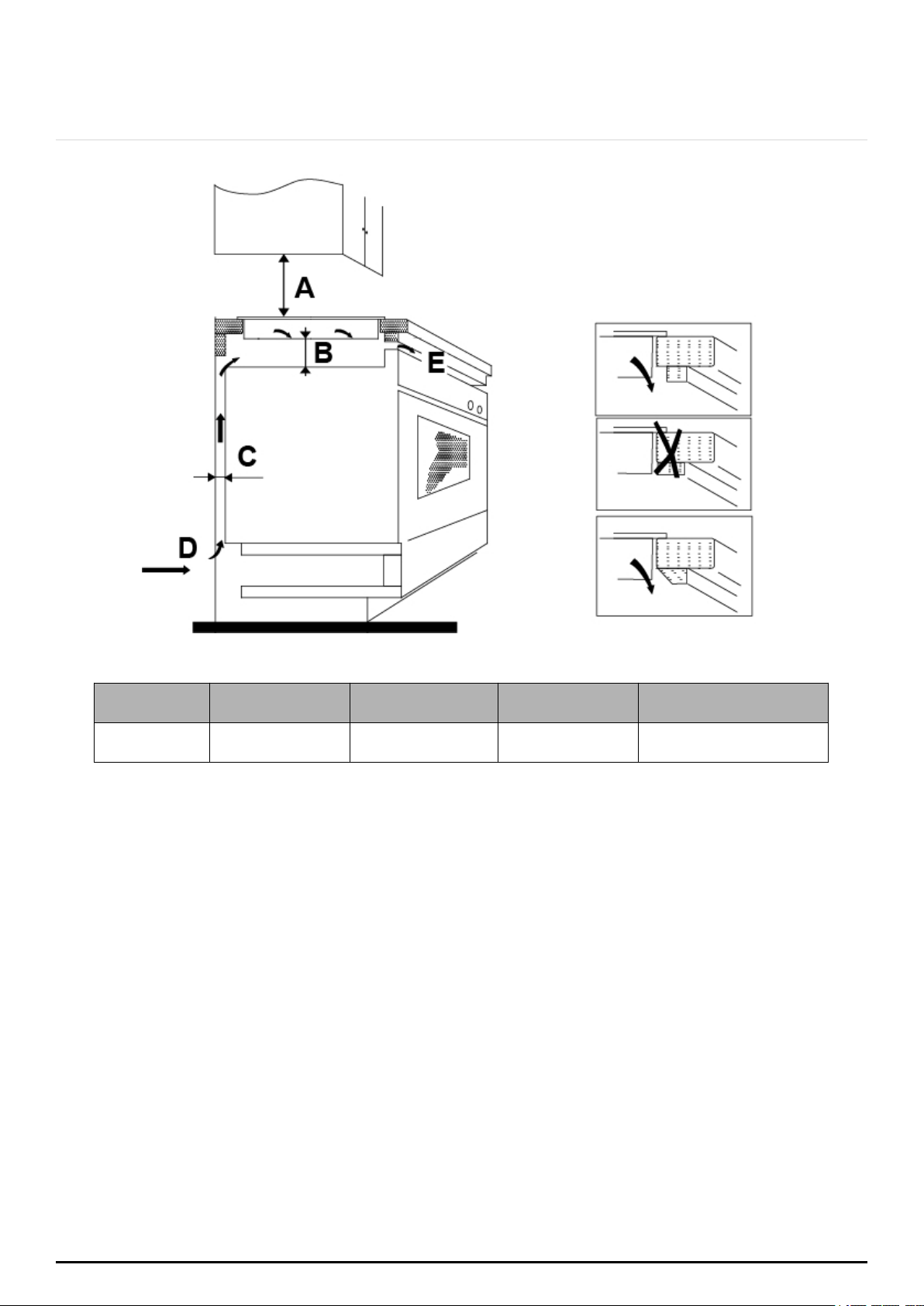
Under any circumstances, make sure the ceramic cooker hob is well ventilated and the
air inlet and outlet are not blocked. Ensure the ceramic cooker hob is in a good work
state. As shown below:
Note: The safety distance between the hotplate and the cupboard above the
hotplate should be at least 650 mm.
P a g e | 12
ONLINE: TRINITYAPPLIANCES.COM.AU
A (mm)
B (mm)
C (mm)
D
E
650
50 minimum
20 minimum
Air intake
Air exit 5 mm
Before you install the hob, make sure that:
the work surface is square and level and no structural members interfere with the space
requirements;
the work surface is made of a heat-resistant material;
if the hob is installed above an oven, the oven has a built-in cooling fan;
the installation will comply with all clearance requirements and applicable standards
and regulations;
a suitable isolating switch providing full disconnection from the main power supply is
incorporated in the permanent wiring, mounted and positioned to comply with the
local wiring rules and regulations. The isolation switch must be of an approved type and
provide a 3 mm air gap contact separation in all poles (or in all active [phase]
conductors if the local wiring rules allow for this variation of the requirements);
the isolating switch will be easily accessible to the customer with the hob installed;
you consult with the local building authorities and by-laws if in doubt regarding the
installation;
you use heat-resistant and easy-to-clean finishes (such as ceramic tiles) for the wall
surfaces surrounding the hob.
P a g e | 13
ONLINE: TRINITYAPPLIANCES.COM.AU
When you have installed the hob, make sure that:
the power supply cable is not accessible through cupboard doors or drawers;
there is adequate flow of fresh air from outside the cabinetry to the base of the hob;
if the hob is installed above a drawer or cupboard space, a thermal protection barrier
is installed below the base of the hob;
the isolating switch is easily accessible.
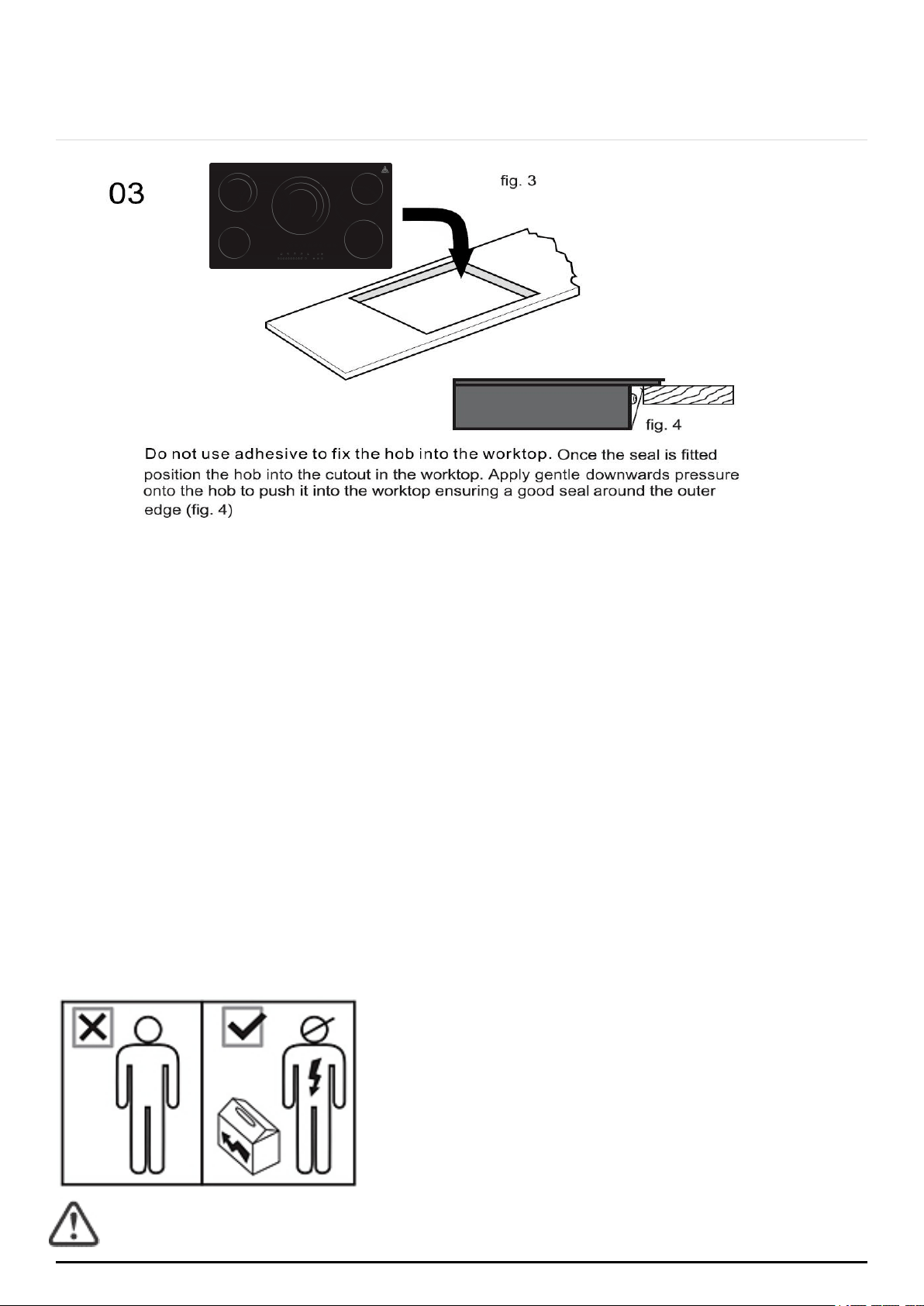
4.2 INSTALLATION
P a g e | 14
ONLINE: TRINITYAPPLIANCES.COM.AU
4.3 CAUTIONS
1. The ceramic cooker hob must be installed by qualified personnel or technicians. We
have professionals at your service. Please never conduct the operation by yourself.
2. The ceramic cooker hob must not be mounted to cooling equipment, dishwashers
and rotary dryers.
3. The ceramic cooker hob must be installed in a way for better heat radiation in
order to ensure and enhance its reliability.
4. The wall and induced heating zone above the work surface shall withstand heat.
5. To avoid any damage, the sandwich layer and adhesive must be resistant to heat.
6. A steam cleaner is not to be used.
7. This ceramic hob can be connected only to a supply with system impedance no
more than 0.427 ohm. In case if necessary, please consult your supply authority for
system impedance information.
4.4 CONNECTING THE HOB TO THE MAIN POWER SUPPLY
All installation work must be carried out by a
competent person or qualified electrician. Before
connecting the main supply, ensure that the mains
voltage corresponds to the voltage on the rating plate
inside the cooker hood.
Warning: THIS APPLIANCE MUST BE EARTHED.
This hob must be connected to the mains power supply only by a suitably qualified person. Before
connecting the hob to the mains power supply, check that:
P a g e | 15
ONLINE: TRINITYAPPLIANCES.COM.AU
1. The domestic wiring system is suitable for the power drawn by the hob.
2. The voltage corresponds to the value given in the rating plate.
3. The power supply cable sections can withstand the load specified on the rating plate.
To connect the hob to the mains power supply, do not use adapters, reducers, or branching devices,
as they can cause overheating and fire.
The power supply cable must not touch any hot parts and must be positioned so that its temperature
will not exceed 75°C at any point.
Check with an electrician whether the domestic wiring system is suitable without alterations. Any
alterations must only be made by a qualified electrician.
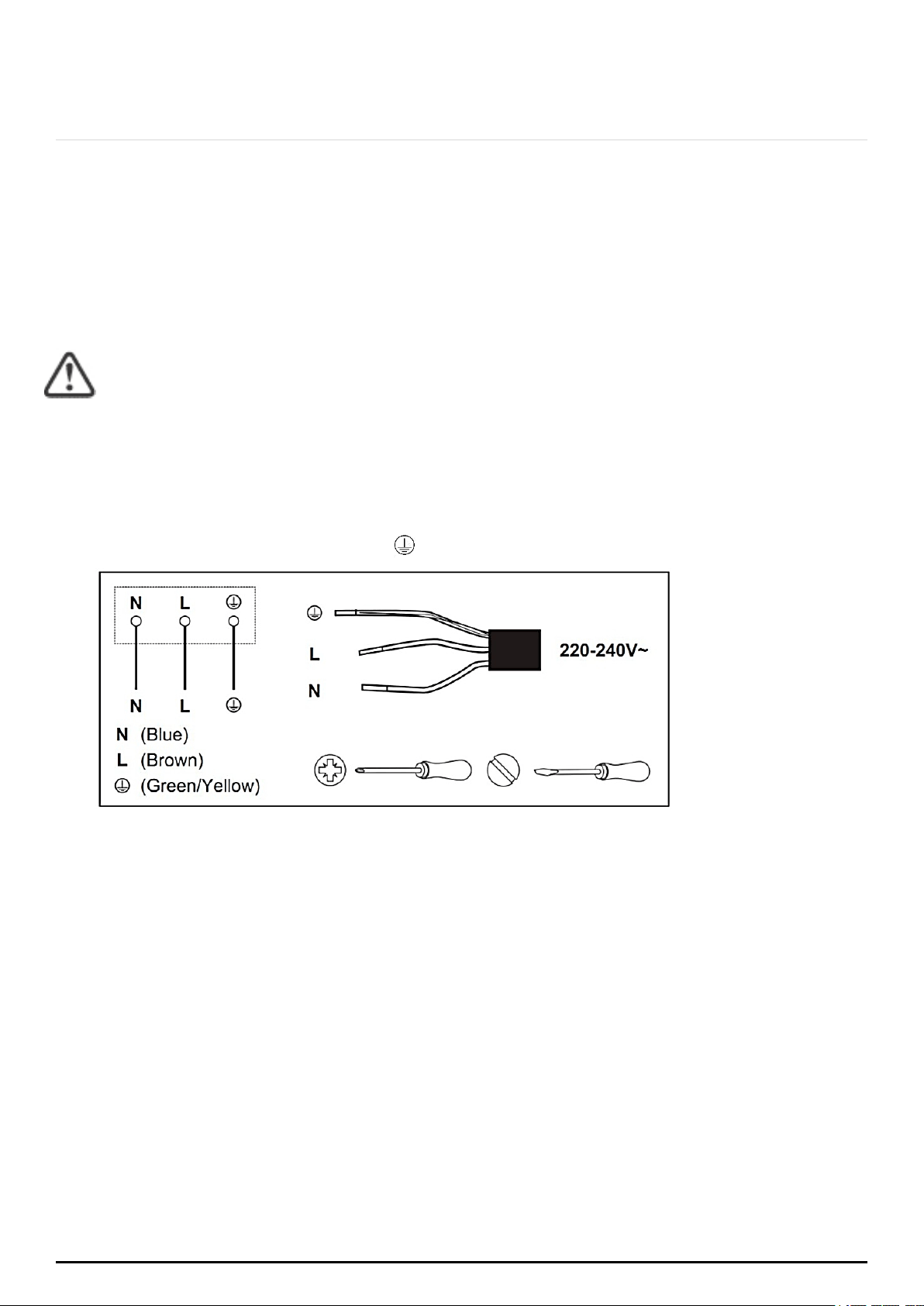
This appliance is supplied with 3 core mains cables coloured as follows:
Brown = L or Live
Blue = N or Neutral
Green and Yellow = E or Earth
This appliance requires a 32 Amp Miniature Circuit Breaker.
IMPORTANT:
If the cable is damaged or needs replacing, the operation must be carried out by
the after-sale agent with dedicated tools to avoid any accidents.
If the appliance is being connected directly to the mains supply, an omni polar
circuit breaker must be installed with a minimum gap of 3 mm between the
contacts.
The installer must ensure that the correct electrical connection has been made and
that it complies with safety regulations.
The cable must not be bent or compressed.
The cable must be checked regularly and replaced by authorised technicians only.
P a g e | 16
ONLINE: TRINITYAPPLIANCES.COM.AU
5. USING YOUR COOKTOP
Before using your new Ceramic Hob
Read this guide taking special note of the “Safety Warnings” section.
Remove any protective film that may still be on your Ceramic Hob.
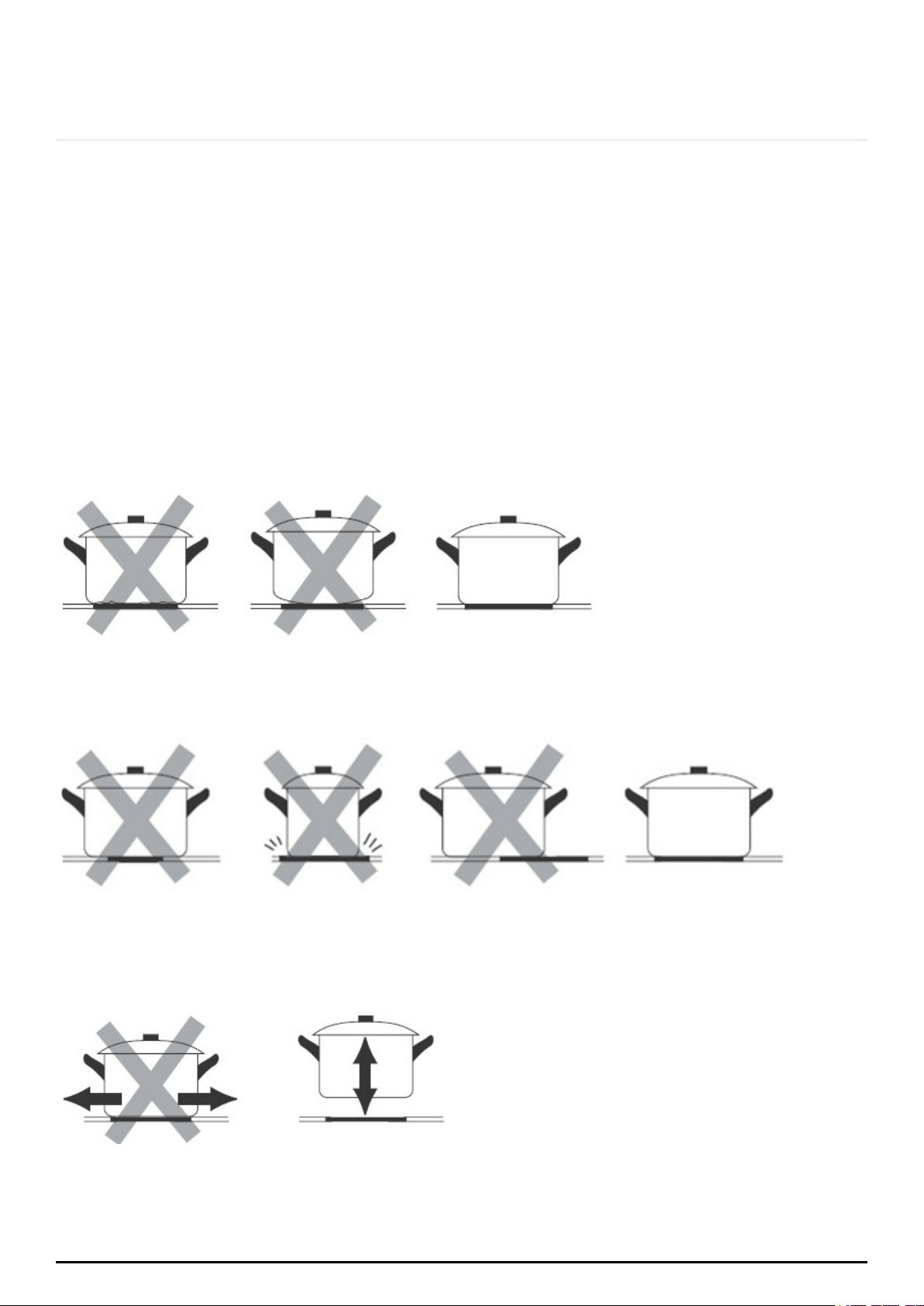
5.1 CHOOSING THE RIGHT COOKWARE
Do not use cookware with jagged edges or a curved base.
Make sure that the base of your pan is smooth, sits flat against the glass, and is the same
size as the cooking zone. Always centre your pan on the cooking zone.
Always lift pans off the ceramic hob – do not slide, or they may scratch the glass.
P a g e | 17
ONLINE: TRINITYAPPLIANCES.COM.AU
5.2 USING TOUCH CONTROLS
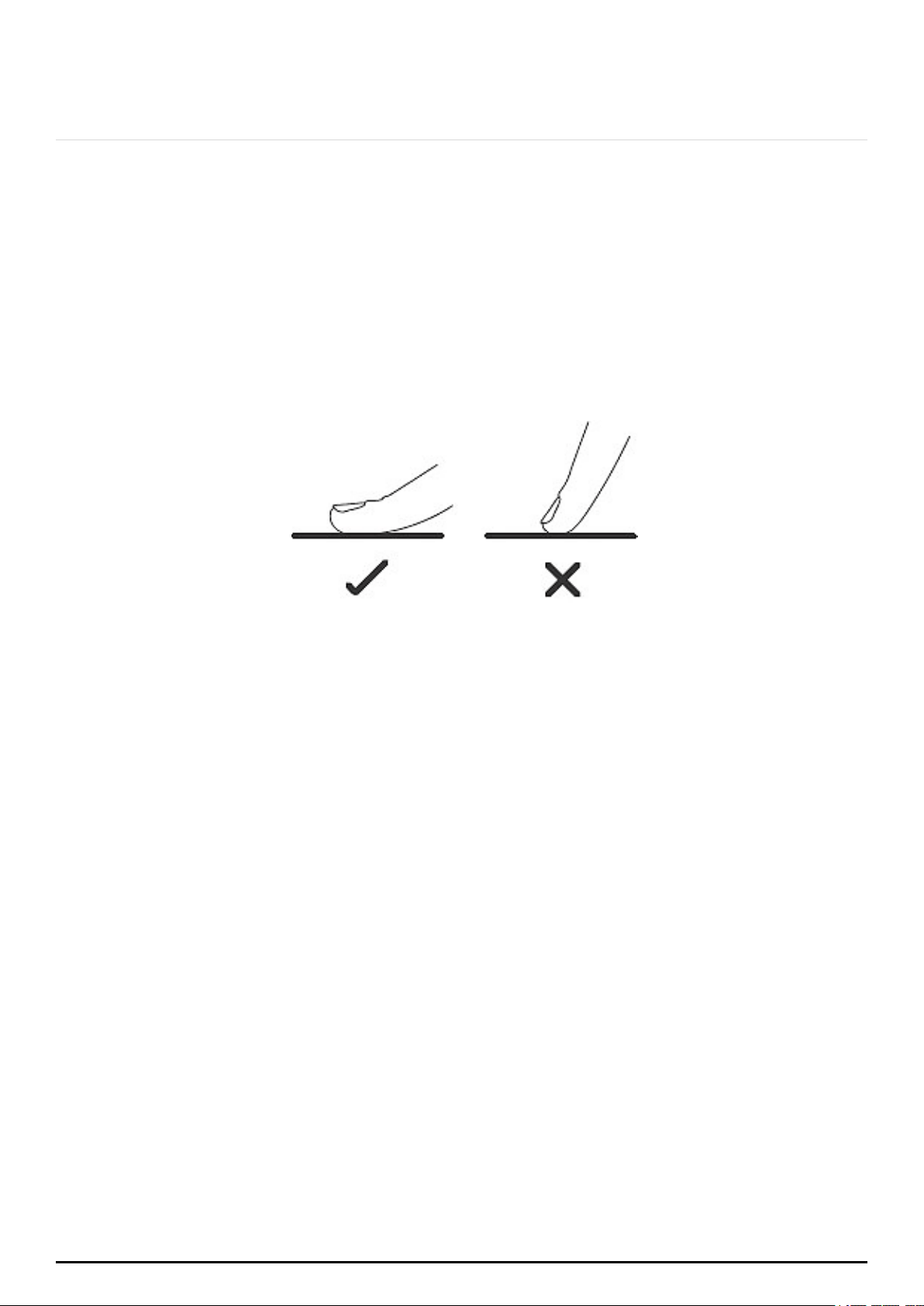
The controls respond to touch, so you don’t need to apply any pressure.
Use the ball of your finger, not the tip.
You will hear a “beep” buzzer sound each time a touch is registered.
Make sure the controls are always clean, dry, and that there is no object (e.g. a
utensil or a cloth) covering them. Even a thin film of water may make the controls
difficult to operate.
P a g e | 18
ONLINE: TRINITYAPPLIANCES.COM.AU
5.3 START OPERATION
To start cooking
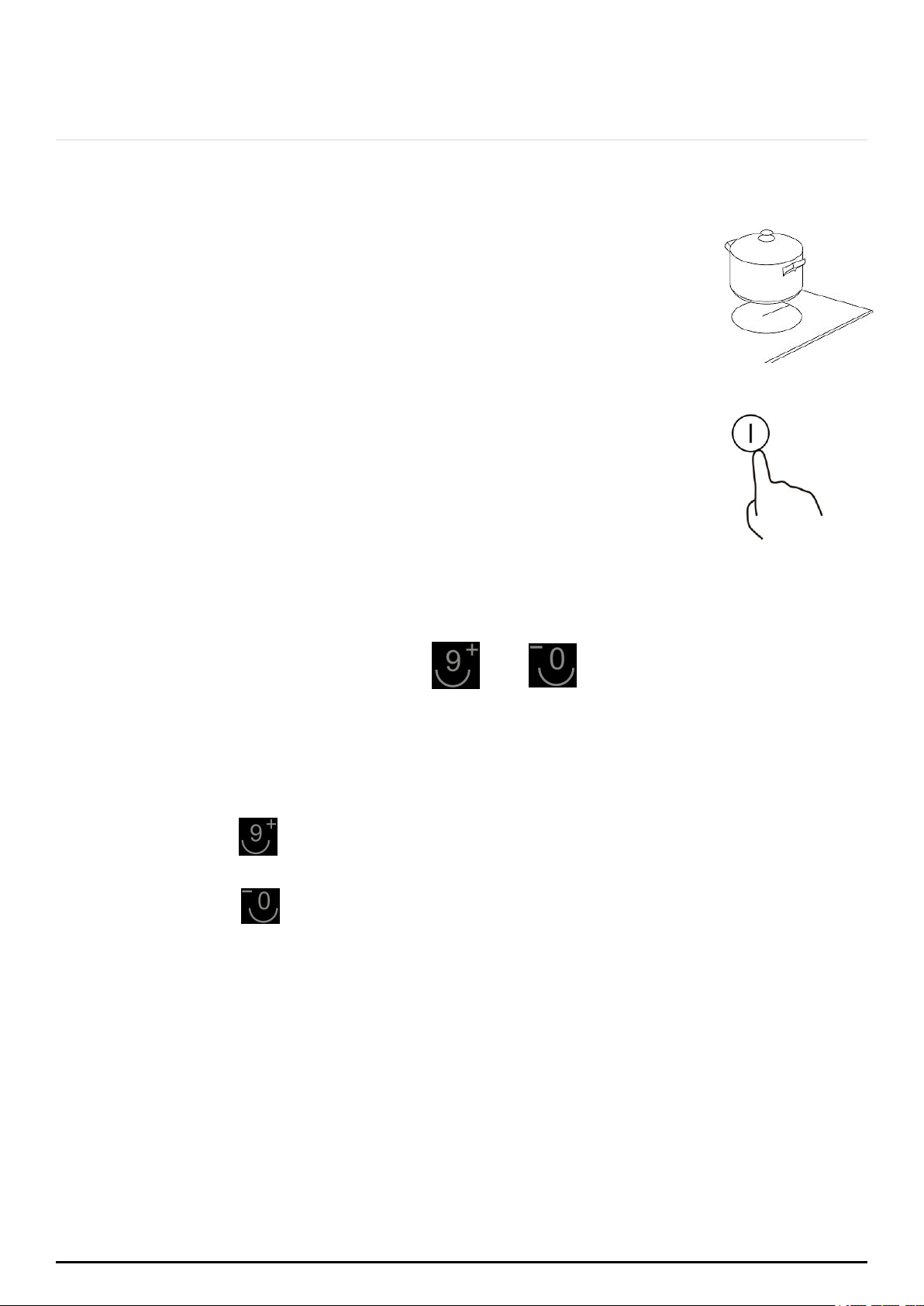
1. Place a suitable pan on the cooking zone that you wish to use.
Make sure the bottom of the pan and the surface of the cooking
zone is clean and dry.
2. Touch the ON/OFF key for 3 seconds.
After power is on, the buzzer beeps once, all displays show “0”
indicating that the ceramic hob has entered the state of standby
mode.
3. According to the heating zone where the pan is placed, press a relevant zone
selection key (A). The symbol 0 will be flashing.
4. Select the power level by pressing
keys.
5. The power level will start at 0.
or
Pressing the key will count up the power levels from 0 to 9 in numerical order.
Pressing the key will take the power straight from 9 to 0.
If you do not choose a heat setting within 20 seconds, the ceramic hob will
automatically switch off. You will need to start again at step 2.
You can modify the heat setting at any time during cooking.
P a g e | 19
ONLINE: TRINITYAPPLIANCES.COM.AU
5.4 USING THE TIMER
You can set it to turn one cooking zone off after the set time is up.
You can set the timer for up to 99 minutes.
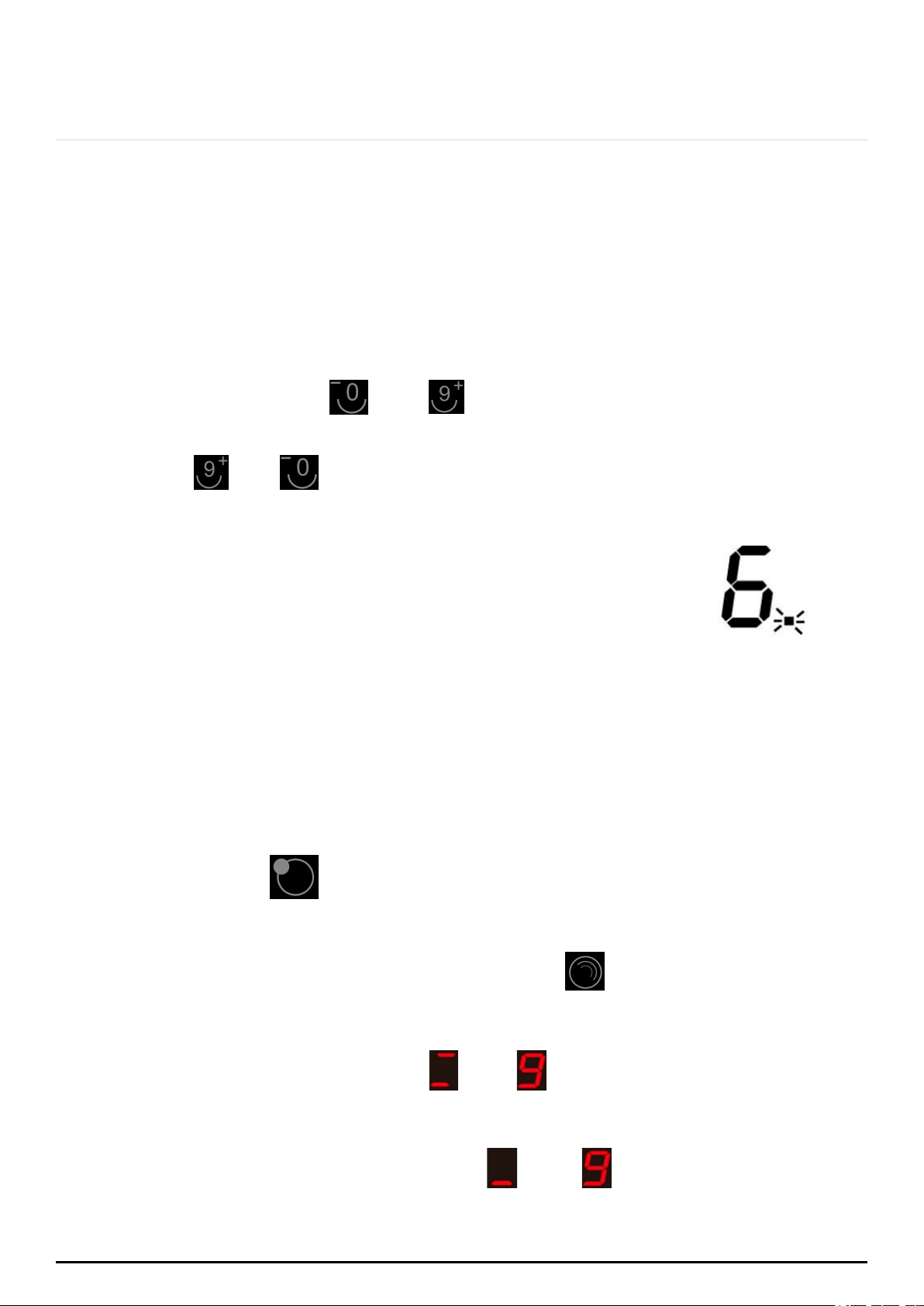
1. Select the relevant cooking zone by touching the zone selection key (A).
and keys. On the right side of two
2. Simultaneously press the
indicators will show “00”.
3. Using the
or buttons you can set the timer from 1 to 99
minutes.
4. When the time is set, it will begin to count down immediately.
The indicator will return to show the power level after 5
seconds. The red dot next to power level indicator will
illuminate indicating that the zone has set timer.
5. If you need to check the remaining time, you can repeat step 1 and step 2 again.
6. When the cooking timer expires, the corresponding cooking zone will be switched
off automatically. Other cooking zones will keep operating if they were turned on
previously.
5.5 USING THE DOUBLE RING ZONE
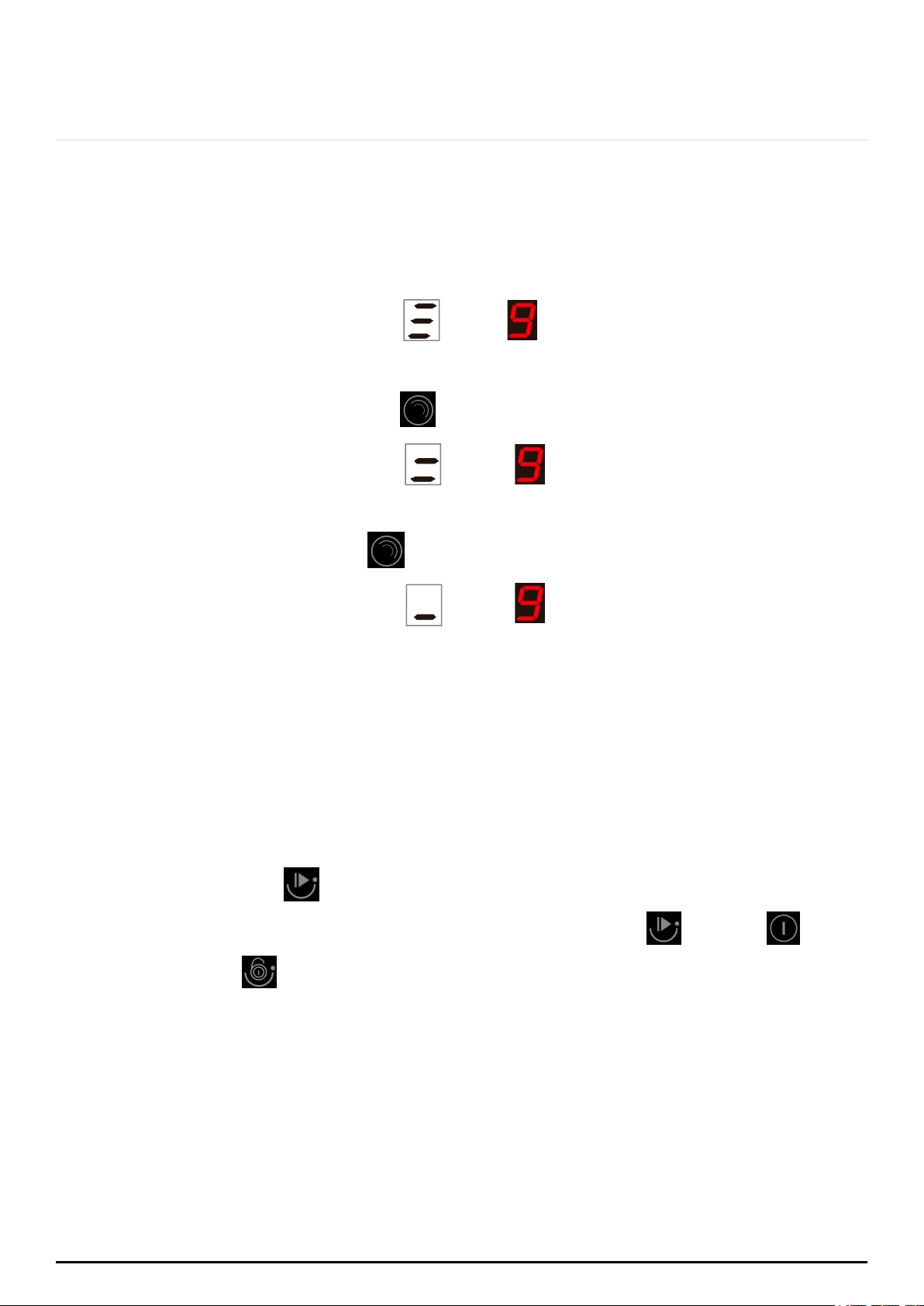
The left heating zone
can be used as two-zone operation. It can be selected
as 2000W (full power) or 1000W operation zone.
to select the operating
alternately, this means the
alternately, this means
1. When the left heating zone is operating, press
power : 2000W or 1000W.
2. When the left zone display shows and
left heating zone is at full power operation (2000W).
3. When the left heating zone display shows and
the left heating zone is at inner ring operation (1000W).
P a g e | 20
ONLINE: TRINITYAPPLIANCES.COM.AU
To lock the controls
5.6 USING THE TRIPPLE RING ZONE
You can set the triple zone after the zone is turned on and started working.
You can set the zone working at triple rings, double rings, or single ring.
and alternately initially. This
and
alternately. This means, only inner
1. The triple zone indicator shows
means, the triple rings work together.
2. Press the triple control key The
triple zone indicator shows
dual rings work together.
3. Press the triple control key again.
.
and alternately. This means, only theThe triple zone indicator shows
inner single ring is working.
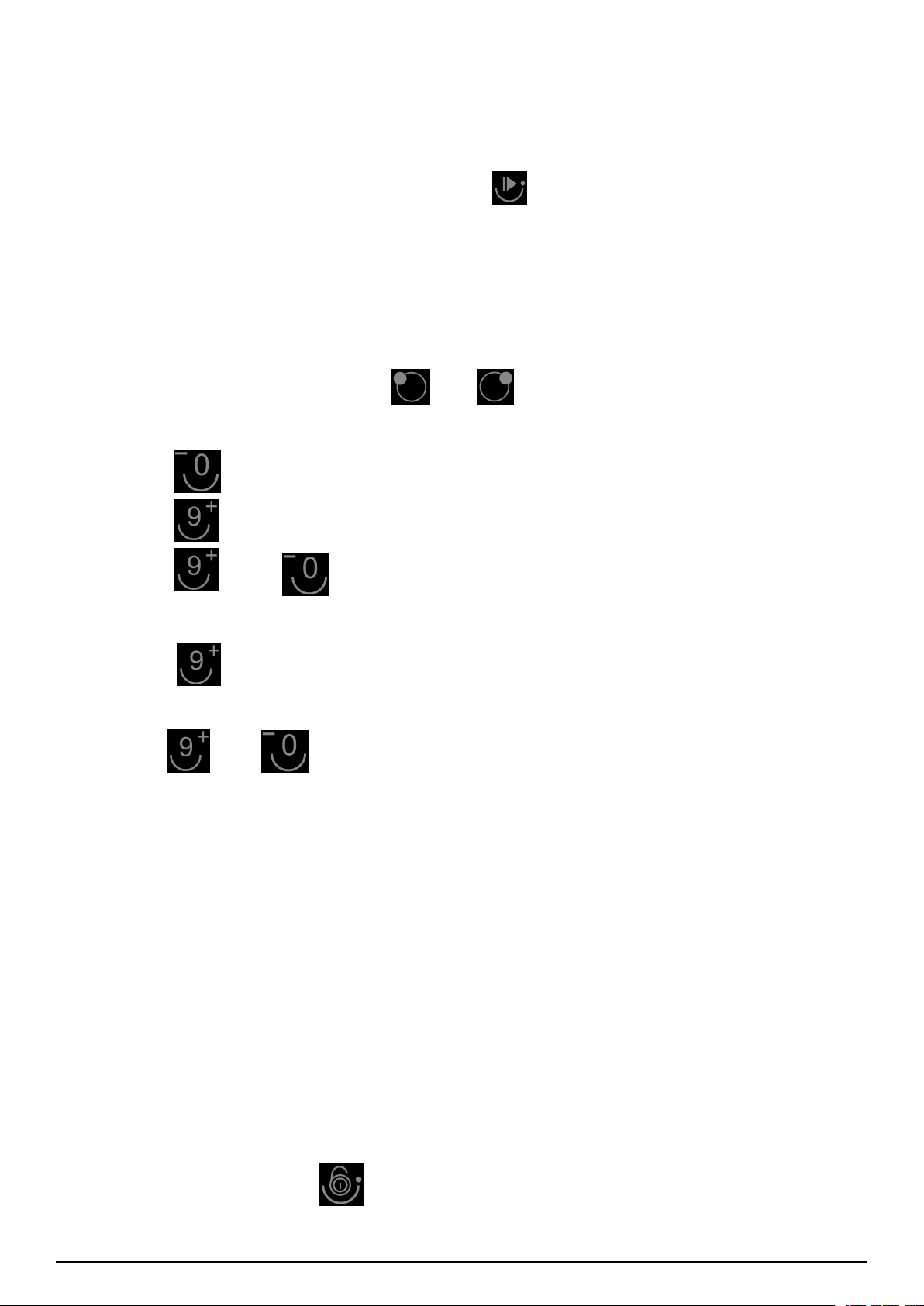
5.7 USING THE PAUSE FUNCTION: STOP AND GO
The pause function can be used at any time during the cooking. It allows to stop the
ceramic hob and restore cooking without losing any adjustments.
1. Make sure the cooking zone is running.
2. Press the Stop &
Go
button. The cooking zone indicators will show “=”. The
cooking plate will be deactivated, except for the Stop & Go , On/Off
,
and Child Lock keys.
P a g e | 21
ONLINE: TRINITYAPPLIANCES.COM.AU
button . The cooking zo
After the setting up is finished, the MCU can remember the power limited settings even in
case of the power cut off.
If power is cut off or the hob is turned off during the set up, the power values will not be
saved.
5.9 CHILD LOCK FUNCTION
3. To cancel the pause, press the Stop & Go Go
will return to the power level you previously set.
5.8 POWER LIMITATION
1. Switch on power and keep the hob on.
2. Press the zone selection keys
togetherand
The indicators will show “P” and “S”.
key. The indicator will show “E”, “P”
and “S”.
key. The indicator will show “E”, “t”, “P” and “S”.
3. Press
4. Press
5. Press
6. Press
and together. The indicator will show the maximum
or
7. Press
and
together again. The hob will save and exit the setting mode.
repeatedly. You can set the maximum output power to 8900W
3600W alternatively.
power value “XX”.
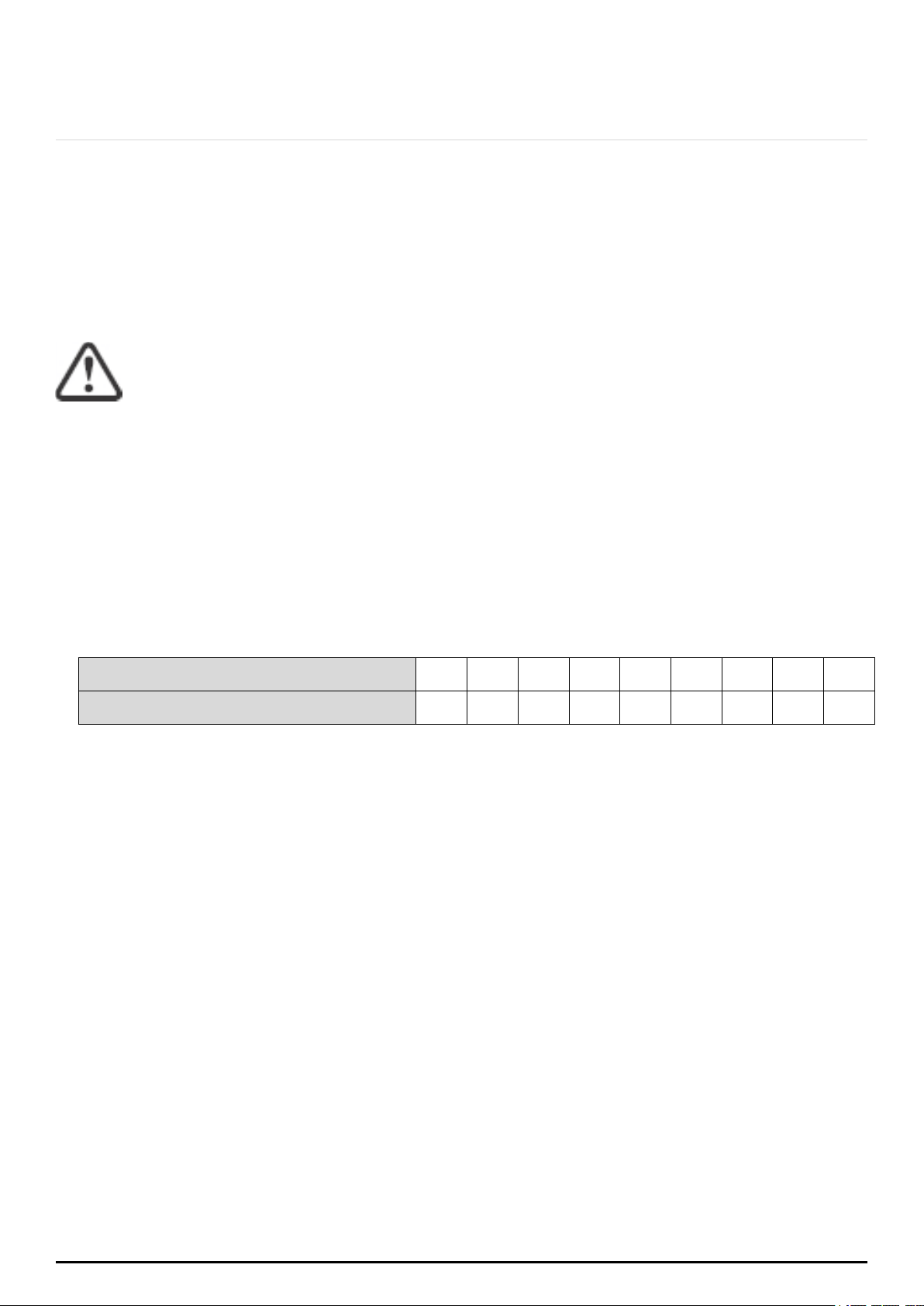
You can lock the controls to prevent unintended use (for example children
accidentally turning the cooking zones on).
When the controls are locked, all the controls except the ON/OFF control are
disabled.
Touch the child lock key for 3 seconds. The indicator above the child lock key
will be on and timer indicator will show “Lo”.
P a g e | 22
ONLINE: TRINITYAPPLIANCES.COM.AU
To unlock the controls
1. Touch and hold the child lock key for a while.
2. You can now start using your ceramic hob.
When the hob is in the lock mode, all the controls are disabled, except the
ON/OFF. You can always turn the ceramic hob off with the ON/OFF control in an
emergency, but you shall unlock the hob first in the next operation
Residual Heat Warning
When the hob has been operating for some time, there will be some residual heat. The
letter will “H” appear to warn you to stay away from it.
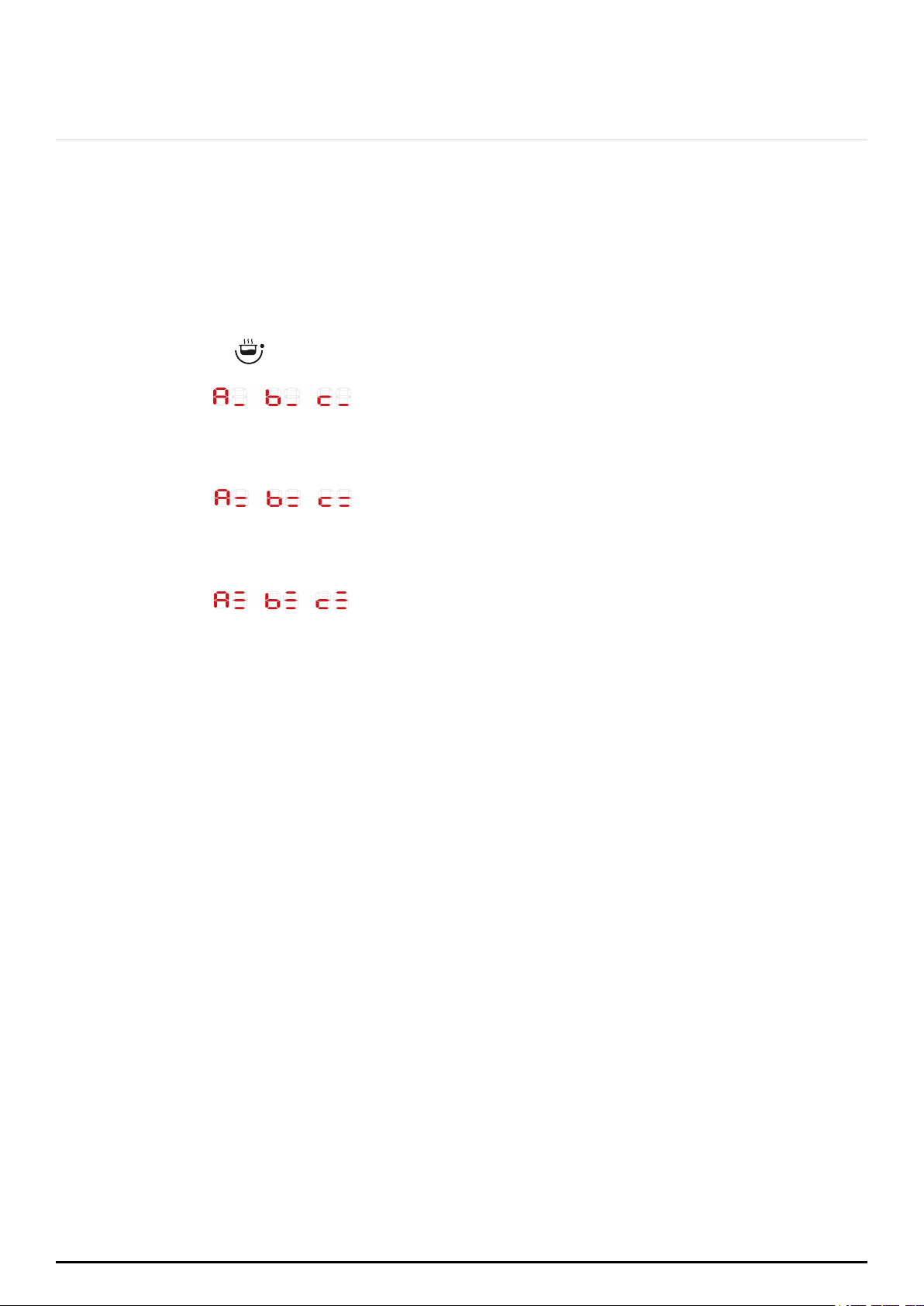
Auto Shutdown
Safety feature of the hob is auto shut down. This occurs whenever you forget to switch off
a cooking zone. The default shutdown times are shown in the table below:
Power level
1 2 3 4 5 6 7 8 9
Default working timer (hour)
2 2 2 2 2 2 2 2 2
P a g e | 23
ONLINE: TRINITYAPPLIANCES.COM.AU
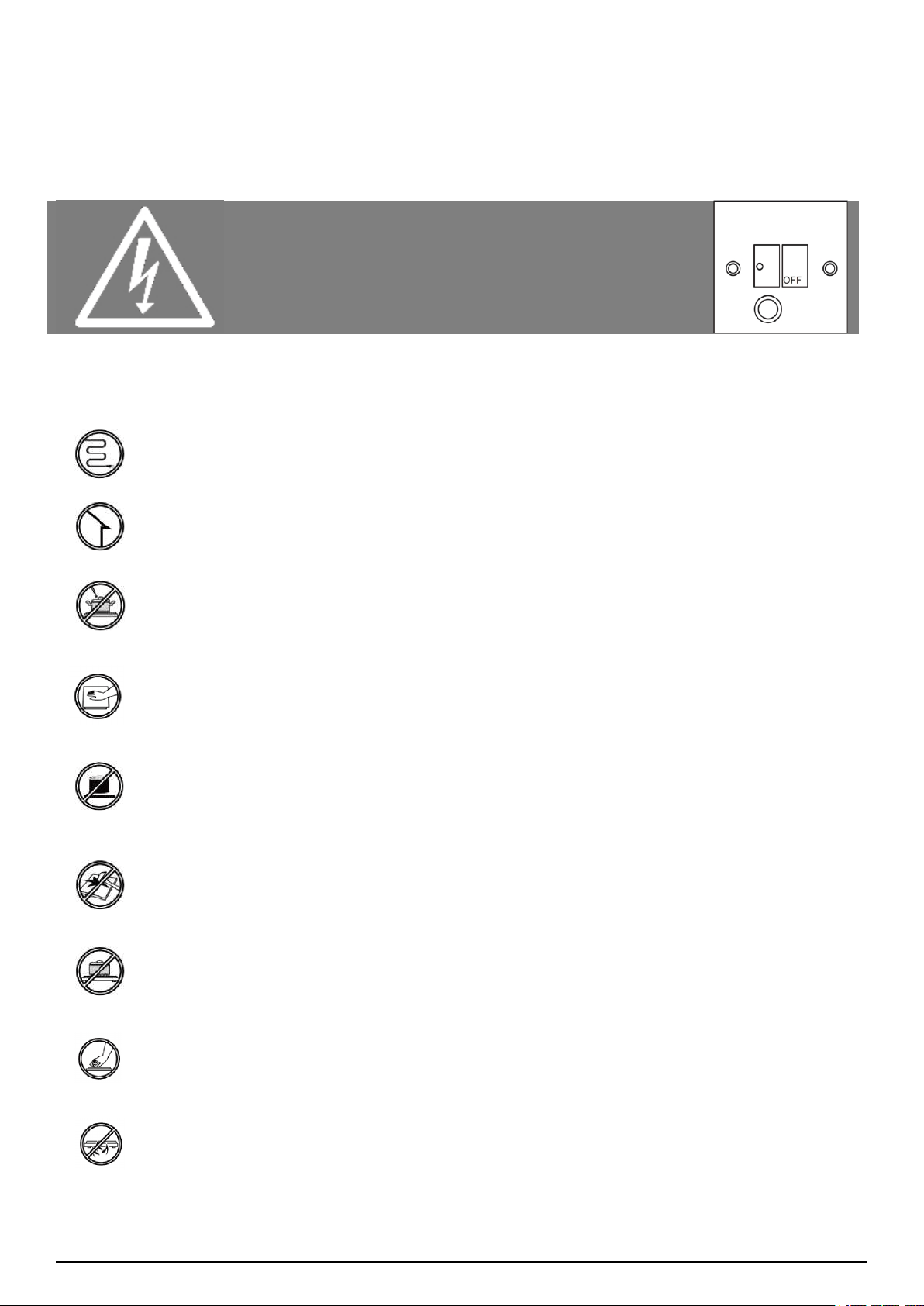
5.10 Using the Keep Warm Function
>
>
>
1.
2.
3.
When using keep warm function, all previous multi-ring setting will be
recognized automatically.
Touch the cooking zone selection button that you wish to use keep warm.
Touch key "
" and the cooking zone indicator will show below icon:
Showing "
" " " "
" alternatively, which means the selected
heating zone is under level A / b / c warm keeping and with only inner
ring is on.
Showing " " " " " " alternatively, which means the selected
heating zone is under level A / b / c warm keeping and with both middle and
inner ring is on.
Showing " " " " " " alternatively, which means the selected
heating zone is under level A / b / c warm keeping and with
all rings working.
P a g e | 24
ONLINE: TRINITYAPPLIANCES.COM.AU
6. CARE AND MAINTENANCE
Warning!
Always switch off the electricity supply
before performing maintenance work. In
the event of a fault, contact customer
service.
6.1 CARE
DAMAGED POWER CABLES SHOULD BE REPLACED BY A COMPETENT PERSON OR QUALIFIED
ELECTRICIAN.
FOR DOMESTIC USE ONLY.
NEVER PLACE AN EMPTY PAN ON THE HOB AS THIS WILL CAUSE AN ERROR MESSAGE TO APPEAR
ON THE CONTROL PANEL.
WHEN A COOKING ZONE HAS BEEN ON FOR A LONG TIME, THE SURFACE REMAINS HOT FOR
SOME TIME AFTERWARDS SO, DO NOT TOUCH THE CERAMIC SURFACE.
FOR SEALED FOODS, PLEASE DO NOT HEAT THEM BEFORE OPENING REMOVING THE LID SO AS TO
AVOID ANY DANGERS OF EXPLOSION DUE TO HEATING EXPANSION.
IF THE SURFACE OF THE HOB IS CRACKED, DISCONNECT FROM POWER SUPPLY TO AVOID ANY
POSSIBILITY OF ELECTRIC SHOCKS.
DO NOT PLACE ROUGH OR UNEVEN PANS ON THE HOB, AS THEY COULD DAMAGE THE CERAMIC
SURFACE.
AVOID BANGING POTS AND PANS DOWN ON THE HOB. THE CERAMIC SURFACE IS TOUGH BUT
NOT UNBREAKABLE.
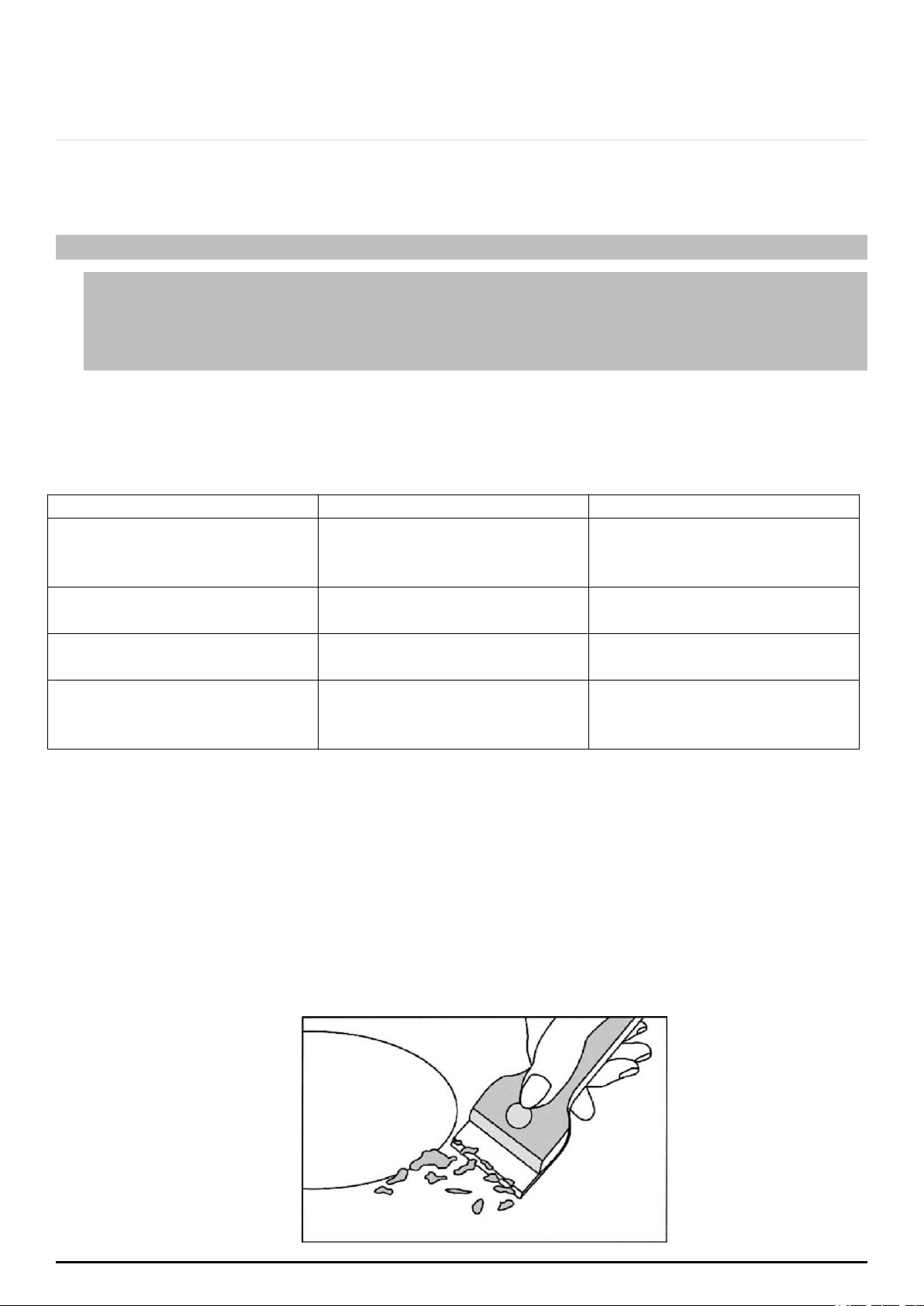
DO NOT PUT DETERGENTS OR FLAMMABLE MATERIALS BENEATH THE HOB.
P a g e | 25
ONLINE: TRINITYAPPLIANCES.COM.AU
6.2 APPLIANCE CLEANLINESS
Caution
Avoid rubbing with any abrasive or with the base of the pans, etc., as this will wear
the markings on the top of the ceramic hob over time.
Clean the ceramic hob on a regular basis to prevent the build-up of food residue.
The appliance should be cleaned after use.
The surface of the ceramic hob may be easily cleaned in the following way:
Type of dirt
Cleaning method
Cleaning materials
Lime scale
Apply white vinegar to the
surface, then wipe it dry
with soft cloth
Special ceramic cleaner
Burnt-on stains
Clean with damp cloth and
dry it with a soft cloth
Special ceramic cleaner
Light stains
Clean with damp cloth and
dry it with a soft cloth
Cleaning sponge
Melted plastics
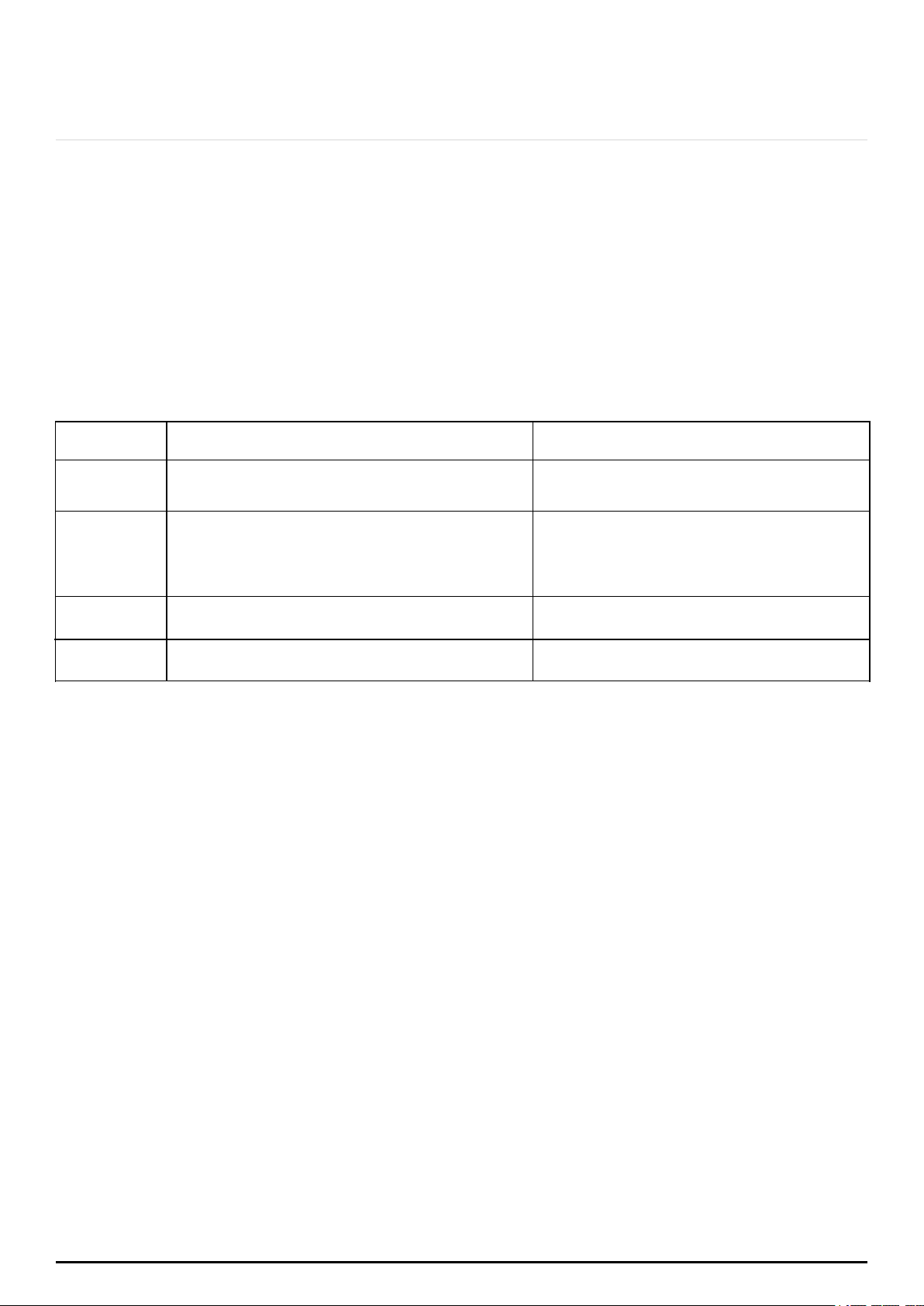
Use a scraper suitable for
ceramic glass to remove
residue
Special ceramic cleaner
Use a scraper to immediately remove any aluminium foil bits, food spills, grease splashes,
sugar marks and other high sugar content food from the surface in order to avoid
damaging the hob. Subsequently, clean the surface with towel and appropriate product
and proceed to rinse with water and dry with a clean cloth. Under no circumstance
should sponges or abrasive cloths be used; also avoid using aggressive chemical
detergents such as oven sprays and spot
removers.
P a g e | 26
ONLINE: TRINITYAPPLIANCES.COM.AU
7. TROUBLESHOOTING
Before calling the customer services, please check that the appliance is correctly
connected, any of the following cases are not covered by the warranty:
Damage caused by improper use, storage or maintenance
Damage caused by unauthorised disassembly and repair
Damage caused by misuse.
Using the ceramic hob for commercial purposes.
If an abnormality occurs, the ceramic hob will enter the protective state automatically
and display corresponding protective codes:
The above are the judgment and inspection of common failures.
Please do not disassemble the unit by yourself to avoid any dangers and damages to the
ceramic hob and please contact the supplier.
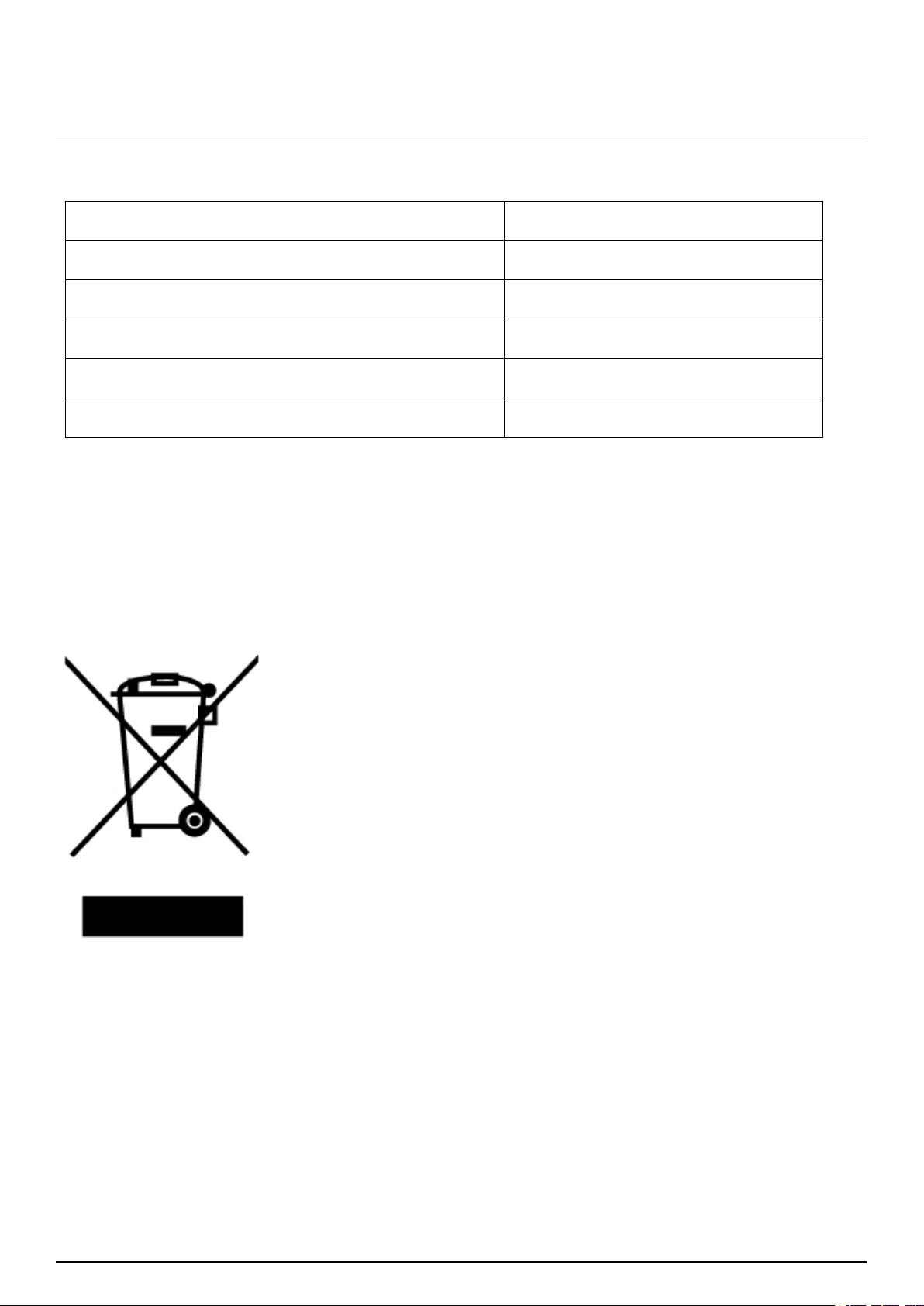
Error
Message
Possible Cause What to do
ER03
Water or pot on the glass over the control Clean the user interface
H
When in standby state "H" and "0" repeatedly
display, when off: always display "H"
High temperature notice is the normal
notice.
It will disappear automatically when the
temperature drops.
E
The temperature inside the produce was too high
Please contact the supplier to reconnect the
thermocouple.
E7
The glass surface of the appliance is too hot Stop and cooling the appliance
P a g e | 27
ONLINE: TRINITYAPPLIANCES.COM.AU
8. TECHNICAL SPECIFICATIONS
Cooktop model
TRC900CT
Cooking Zones
5 Zones
Supply Voltage
220-240V~
Installed Electric Power
8900W(230V~)
Product Size L×W×H (mm)
900X510X47
Building-in Dimensions A×B (mm)
880X490
Weight and Dimensions are approximate. Because we continually strive to improve our
products, we may change specifications and designs without prior notice.
9. DISPOSAL
This appliance requires special waste disposal. For further
information regarding the treatment, recovery and recycling of this
product please contact your local council household waste
disposal service or the store of purchase.
The packaging materials are recyclable.

P a g e | 28
ONLINE: TRINITYAPPLIANCES.COM.AU
10. CUSTOMER CARE
Please be advised that without the proof of purchase, your warranty may not
be valid, keep the receipt.
For your convenience, please record:
STORE NAME/CONTACT DETAILS: .............................................…
PURCHASE DATE: ..........................................................................
PRODUCT MODEL N: …...............................................................….
PRODUCT SERIAL N: .......................................................................
The warranty will be voided, if not installed by a licensed professional.
For your own protection, please record installer’s details:
Installer’s Trade Name: ..................................................................
Trade Licence N: .........................................................................….
Date of Installation: ….................................................................….
Installation Receipt: .......................................................................
For further information on the appliance, service, spare parts or to obtain dimension
and installation information, please contact our customer service or visit website.
Please have above information and documents on hands before contacting customer
service
Phone: 1300 615 001
Email: [email protected]
Web: trinityappliances.com.au