USE & CARE
MANUAL
STOCK NO.
87451
KNOW YOUR UNIT
Read this booklet so
you will be able to
enjoy all the features
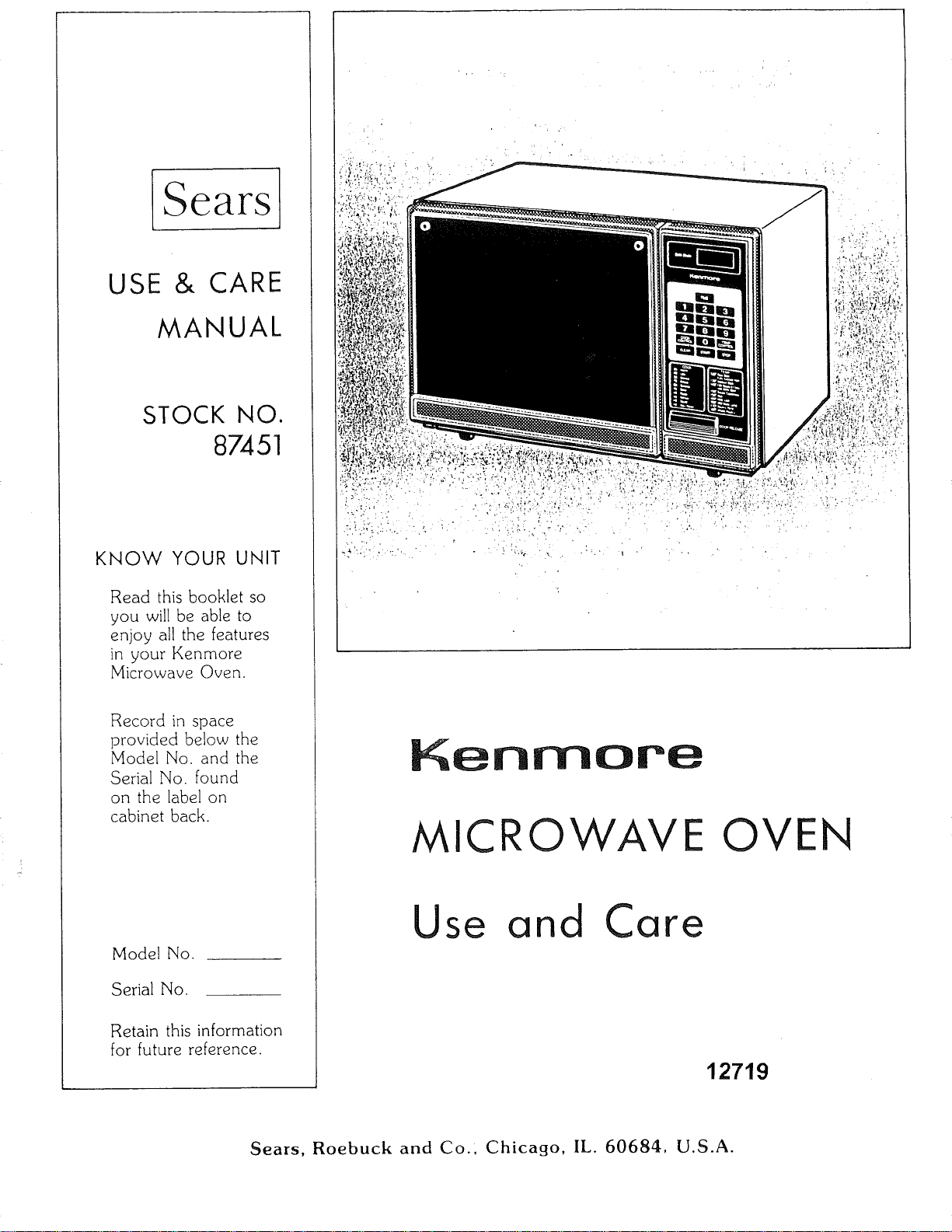
in your Kenmore
Microwave Oven.
Record in space
provided below the
Model No. and the
Serial No. found
on the label on
cabinet back.
Model No.
Serial No.
Retain this information
for future reference.
Kenmore
MICRO VE OVEN
Use and Care
12719
Sears, Roebuck and Co., Chicago, IL. 60684, U.S.A.
YOUR SAFETY FIRST
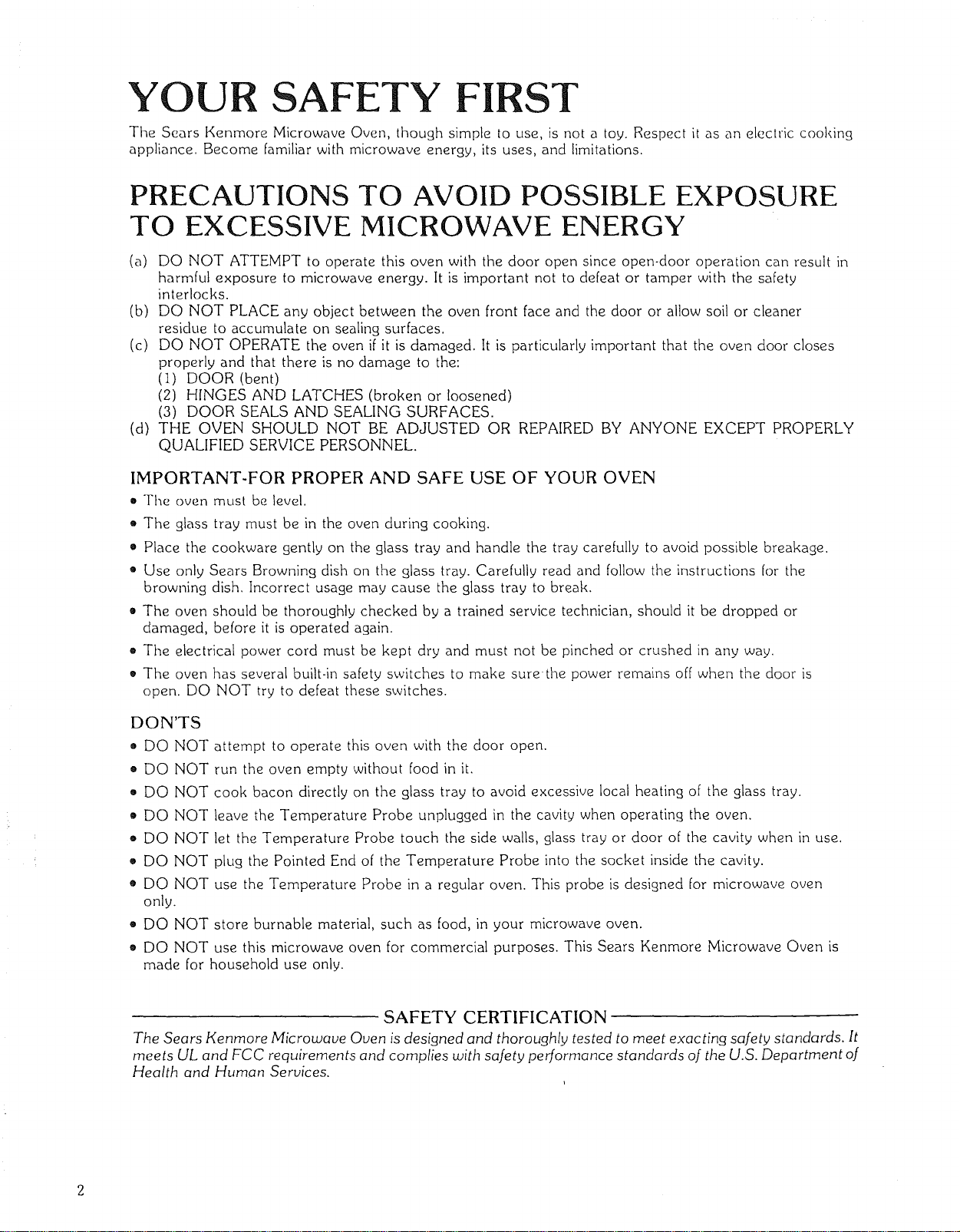
The Sears Kenmore Microwave Oven, though simple to use, is not a toy. Respect it as an electric cooking
appliance. Become familiar with microwave energy, its uses, and limitations.
PRECAUTIONS TO AVOID POSSIBLE EXPOSURE
TO EXCESSIVE MICROWAVE ENERGY
(a) DO NOT ATTEMPT to operate this oven with the door open since open-door operation can result in
harmful exposure to microwave energy. It is important not to defeat or tamper with the safety
interlocks.
(b) DO NOT PLACE any object between the oven front face and the door or allow soil or cleaner
residue to accumulate on sealing surfaces.
(c) DO NOT OPERATE the oven if it is damaged. It is particularly important that the oven door closes
properly and that there is no damage to the:
(I) DOOR (bent)
(2) HINGES AND LATCHES (broken or loosened)
(3) DOOR SEALS AND SEALING SURFACES.
(d) THE OVEN SHOULD NOT BE ADJUSTED OR REPAIRED BY ANYONE EXCEPT PROPERLY
QUALIFIED SERVICE PERSONNEL.
IMPORTANT-FOR PROPER AND SAFE USE OF YOUR OVEN
• The oven must be level.
o The glass tray must be in the oven during cooking.
• Place the cookware gently on the glass tray and handle the tray carefully to avoid possible breakage.
• Use only Sears Browning dish on the glass tray. Carefully read and follow the instructions for the
browning dish. Incorrect usage may cause the glass tray to break.
• The oven should be thoroughly checked by a trained service technician, should it be dropped or
damaged, before it is operated again.
e The electrical power cord must be kept dry and must not be pinched or crushed in any way.
• The oven has several built-in safety switches to make sure-the power remains off when the door is
open. DO NOT try to defeat these switches.
DON'TS
" DO NOT
o DO NOT
" DO NOT
" DO NOT
• DO NOT
• DO NOT
" DO NOT
only.
• DO NOT
o
attempt to operate this oven with the door open.
run the oven empty without food in it.
cook bacon directly on the glass tray to avoid excessive local heating of the glass tray.
leave the Temperature Probe unplugged in the cavity when operating the oven.
let the Temperature Probe touch the side walls, glass tray or door of the cavity when in use.
pklg the Pointed End of the Temperature Probe into the socket inside the cavity.
use the Temperature Probe in a regular oven. This probe is designed for microwave oven
store burnable material, such as food, in your microwave oven.
DO NOT use this microwave oven for commercial purposes. This Sears Kenmore Microwave Oven is
made for household use only.
SAFETY CERTIFICATION
The Sears Kenmore Microwave Oven is designed and thoroughly tested to meet exacting safety standards. It
meets UL and FCC requirements and complies with safety performance standards of the U.S. Department of
Health and Human Services.
IMPORTANT SAFETY INSTRUCTIONS
Wl_en using electrical appliances basic safety precautions should be followed, including the following:
WARNING - Toreducether skofburns,
electric shock, fire, injury to persons or exposure to
excessive microwave energy:
1. Read all instructions before using the appliance.
2. Read and follow the specific "PRECAUTIONS
TO AVOID POSSIBLE EXPOSURE TO EX-
CESSIVE MICROWAVE ENERGY" found on
Page 2,
3. This appliance must be grounded. Connect only
to properly grounded outlet. See "GROUNDING
INSTRUCTIONS" found on Page 6.
q. Install or locate this appliance only in accordance
with the provided installation instructions.
10. Do not cover or block any openings on the
appliance,
II. Do not use outdoors.
12. Do not immerse cord or plug in water.
13. Keep cord away from heated surfaces.
14. Do not let cord hang over edge of table or
counter.
I
15. When cleaning surfaces of door and oven that
comes together on closing the door, use only
mild, non-abrasive soaps or detergents applied
wilh a Sl.)onge or sofl cloth. (See "Care and
Cleaning" instructions on Page 19.)
5. Some products such as whole eggs and sealed
containers--for example, closed glass jars-- may
explode and should not be heated in this oven.
6. Use this appliance only for its intended use as
described in this manual.
16. To
a.
reduce the risk of fire in the oven cavity:
Do not overcook food. Carefully attend appli-
ance if paper, plastic, or other combustible
materials are placed inside the oven to
facilitate cooking.
7. As with any appliance, close supervision is nec-
essary when used by children.
b, Remove wire twist-ties from paper or plastic
bags before placing bag in oven.
S. Do not operate this appliance if it has a damaged
cord or plug, if it is not working properly, or if it
has been damaged or dropped.
9. This appliance should be serviced only by qualified
service personnel. Contact nearest authorized
service facility for examination, repair or adjust-
ment.
C.
If materials inside the oven should ignite,
keep oven door closed, turn oven off, and
disconnect the power cord, or shut off power
at the fuse or circuit breaker panel.
SAVE THESE INSTRUCTIONS
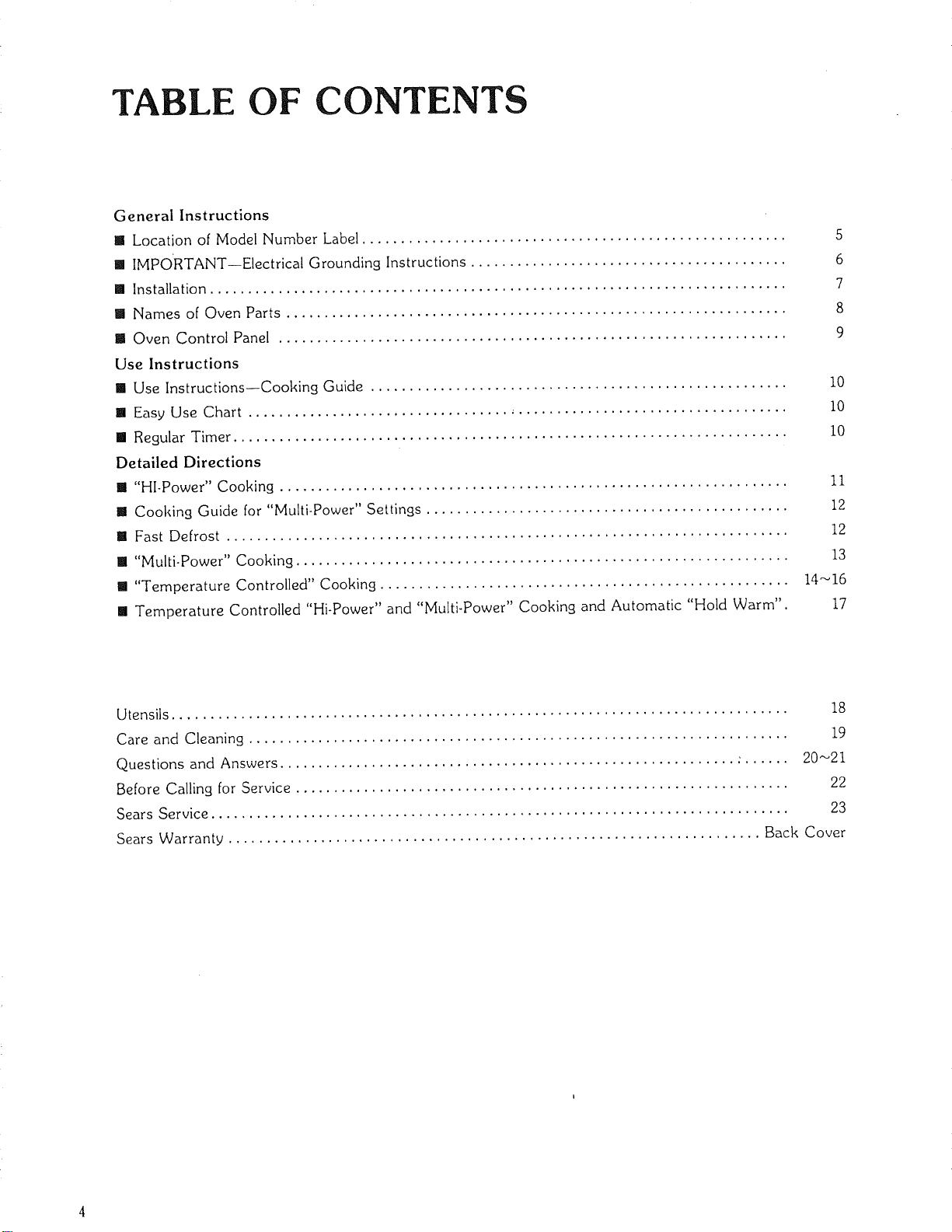
TABLE OF CONTENTS
General Instructions
[] Location of Model Number Label ....................................................... 5
[] IMPORTANT--Electrical Grounding Instructions ......................................... 6
[] Installation ........................................................................... 7
[] Names of Oven Parts ................................................................. 8
[] Oven Control Panel .................................................................. 9
Use Instructions
[] Use Instructions--Cooking Guide ...................................................... I0
[] Easy Use Chart ...................................................................... I0
[] Regular Timer ........................................................................ I0
Detailed Directions
[] "HI-Power" Cooking .................................................................. 11
[] Cooking Guide for "Multi-Power" Settings ............................................... 12
[] Fast Defrost ......................................................................... 12
[] "Multi-Power" Cooking ................................................................ 13
[] "Temperature Controlled" Cooking ..................................................... 14_16
[] Temperature Controlled "Hi-Power" and "Multi-Power" Cooking and Automatic "Hold Warm". 17
Utensils ................................................................................ 18
Care and Cleaning ...................................................................... 19
Questions and Answers ........................................................... : ...... 20_21
Before Calling for Service ................................................................ 22
Sears Service ........................................................................... 23
Sears Warranty ..................................................................... Back Cover
8EARS KENMORE MICROWAVE OVEN
"USE AND CARE MANUAL"-
MICROWAVE OVEN USE INSTRUCTIONS
Enjoy a new cooking experience from Sears. Please read this booklet. It takes
only a few minutes--time well spent to learn how to use all of the features.
Advice on the use and care of Sears appliances is always available at your nearest
Sears store. When seeking information, be sure you have the complete model
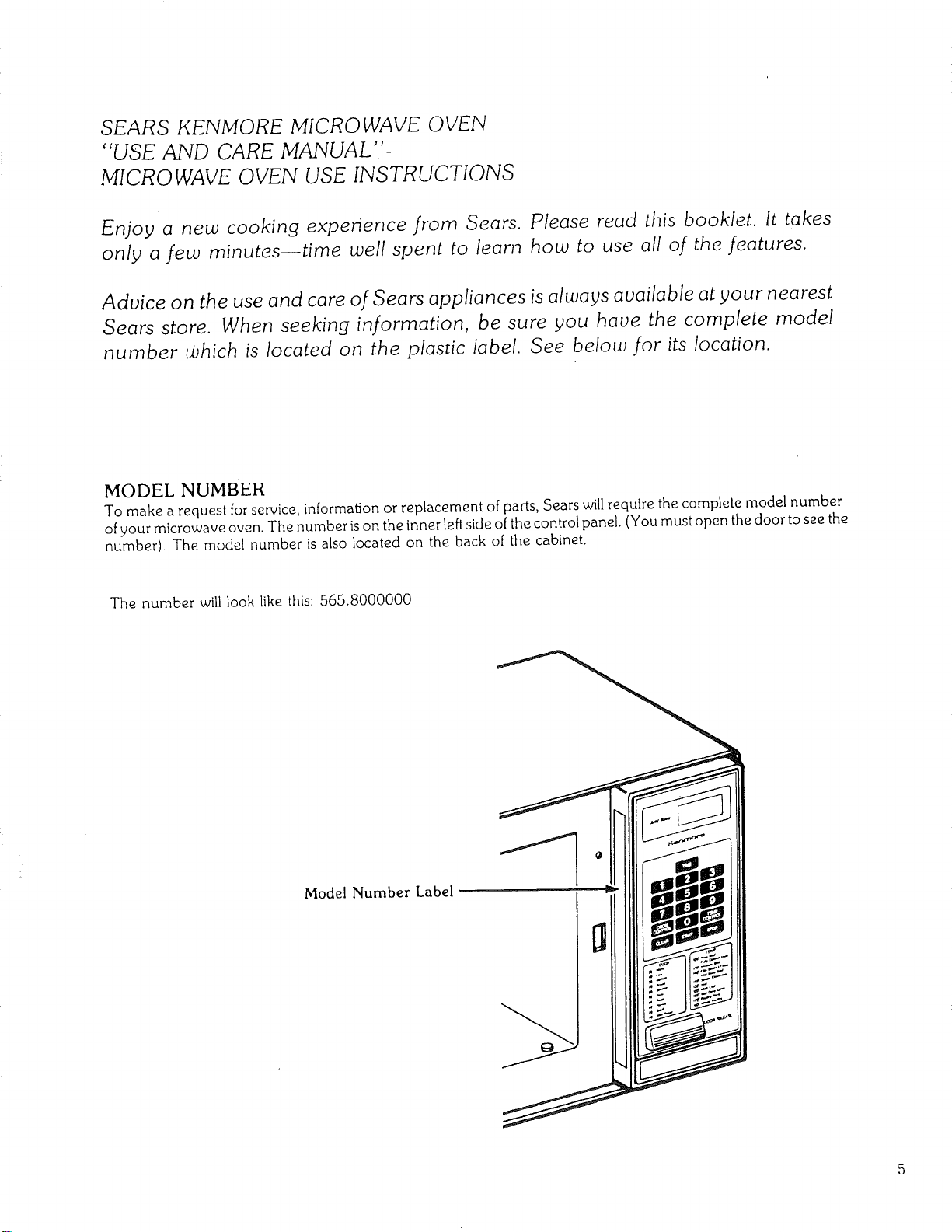
number Which is located on the plastic label. See below for its location.
MODEL NUMBER
To make a request for service, information or replacement of parts, Sears will require the complete model number
ofyour microwave oven. The number is on the inner left side of the control panel. (You must open the door to see the
number). The model number is also located on the back of the cabinet.
The number will look like this: 565.8000000
Model Number Label
IMPORTANT
ELECTRICAL GROUNDING
INSTRUCTIONS
This appliance must be grounded. In the event of an electrical short circuit, grounding reduces the risk
of electric shock by providing an escape wire for the electric current. This appliance is equipped with a
cord having a grounding wire with a grounding plug. The plug must be plugged into an outlet that is
properly installed and grounded.
WARNING - Improper use of the grounding plugcan result in a risk of electric shock.
Consult a qualified electrician or Sears Service Department if the grounding instructions are not
completely understood, or if doubt exists as to whether the appliance is properly grounded.
A short power-supply cord is provided to reduce the risks resulting from becoming entangled in or
tripping over a longer cord.
Longer cord sets or extension cords are available and may be used if care is exercised in their use.
If a long cord or extension cord is used, (1) the marked electrical rating of the cord set or extension
cord should be at least as great as the electrical rating of the appliance, (2) the extension cord must be
a grounding-type 3 wire cord, and (3) the longer cord should be arranged so that it will not drape over
the countertop or tabletop where it can be pulled on by children or tripped over accidentally. The
electrical power cord must be kept dry and must not be pinched or crushed in any way.
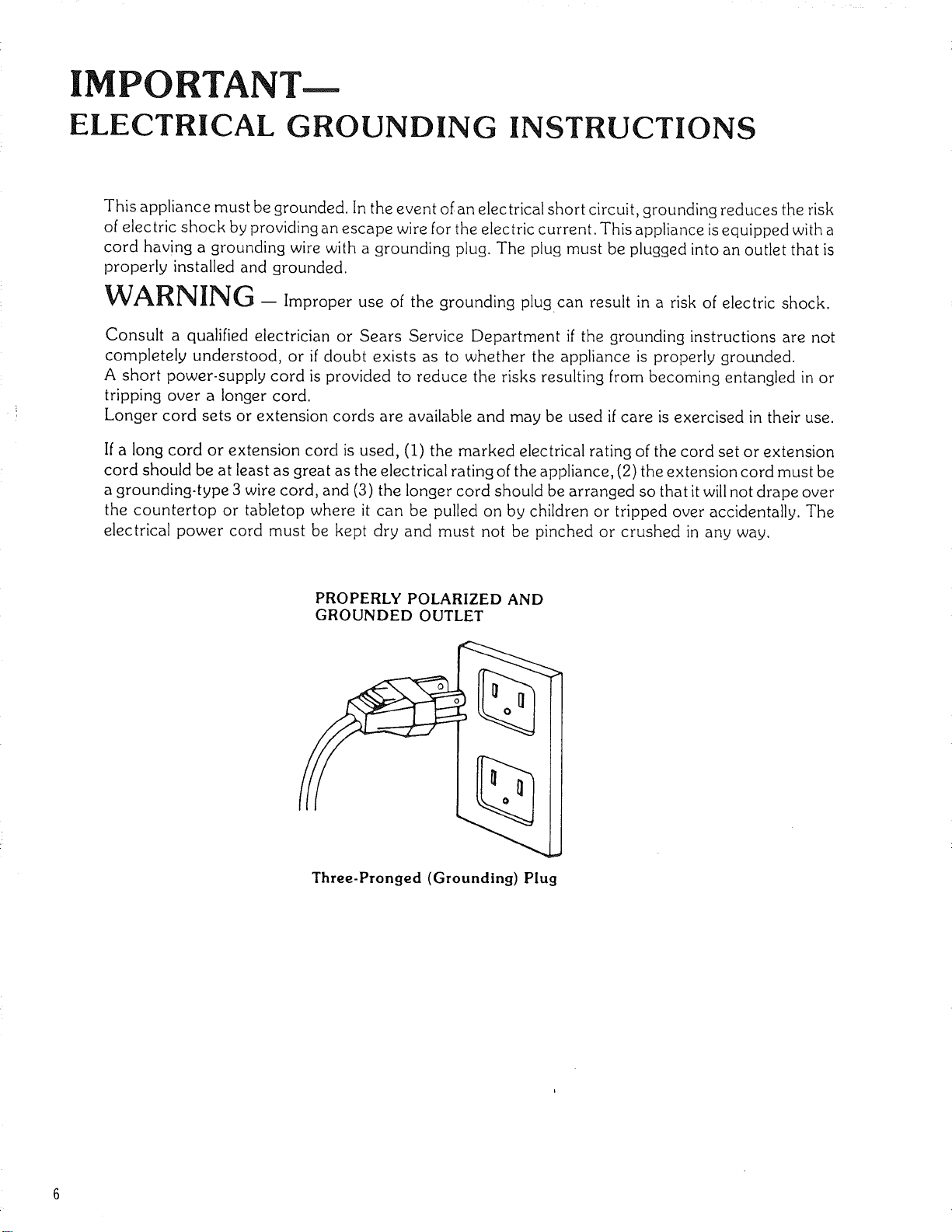
PROPERLY POLARIZED AND
GROUNDED OUTLET
Three-Pronged (Grounding) Plug
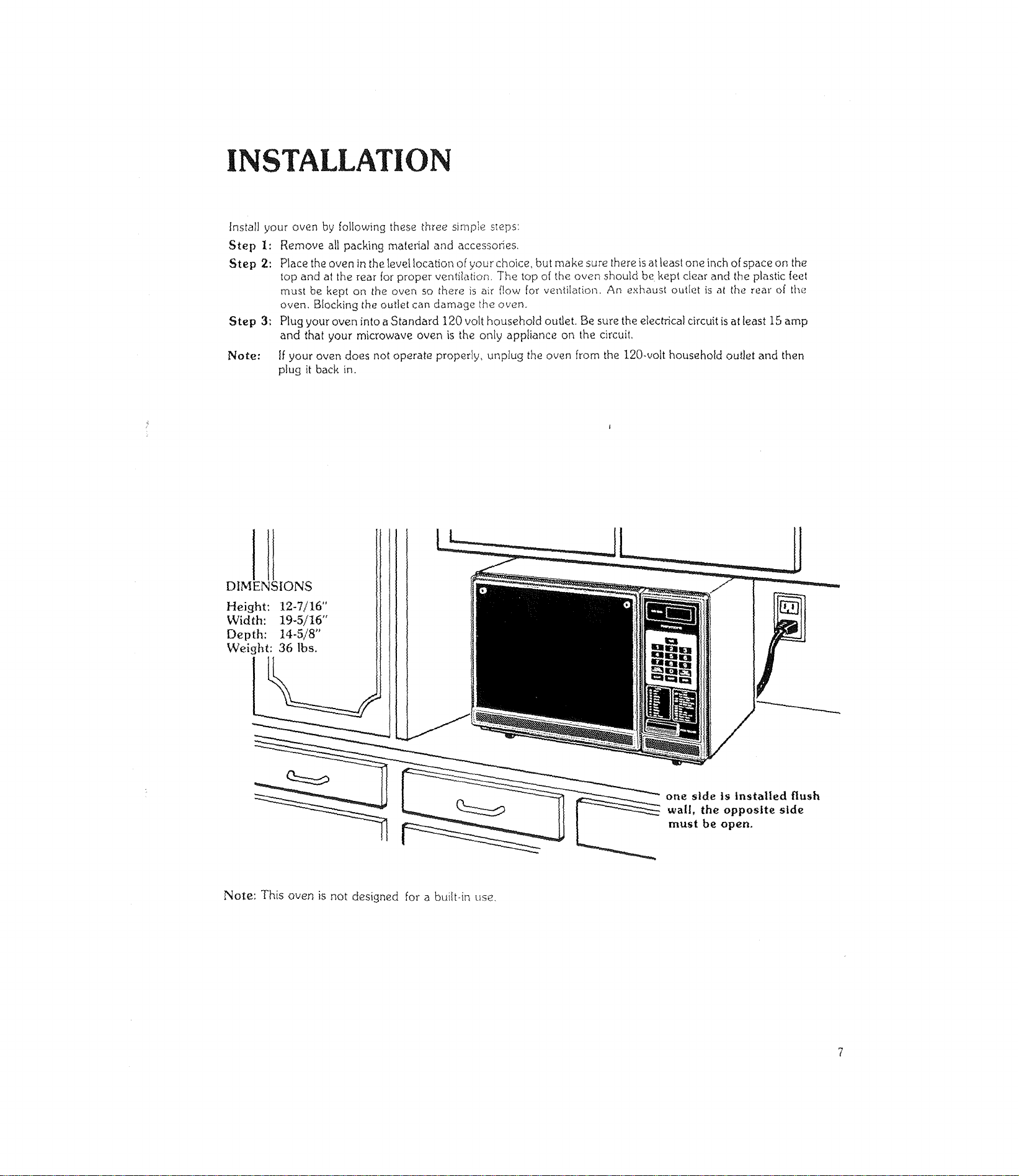
INSTALLATION
Installyour oven by followingthesethreesimple s_eps:
Step I: Remove allpackingmaterialand accessofies_
Step 2: Place the oven in the Ievel location of your choice, but make sure there is at least one inch of space on the
top and at the rear for proper ventilation, The top of the oven should be kept dear and the plastic feet
must be kept on the oven so there is air flow for ventilation. An exhaust outle_ is at the real" of the
oven. Blocking the outlet can damage the o,_,en.
Step 3: Plug your oven into a Standard 120 volt household outlet. Be sure the electrical circuit is at least 15 amp
and that your microwave oven is the only appliance on the circuit,
Note: If your oven does not operate properly, unplug the oven from the 120-volt household outlet and then
plug itback in.
DIMENSIONS
Height: 12-7/16"
Width: 19-5/16"
Depth: 14-5/8"
Weight: 36 lbs.
one side is Installed flush
wall, the opposite side
must be open,
Note: This oven is not designed for a bui!t-in use.
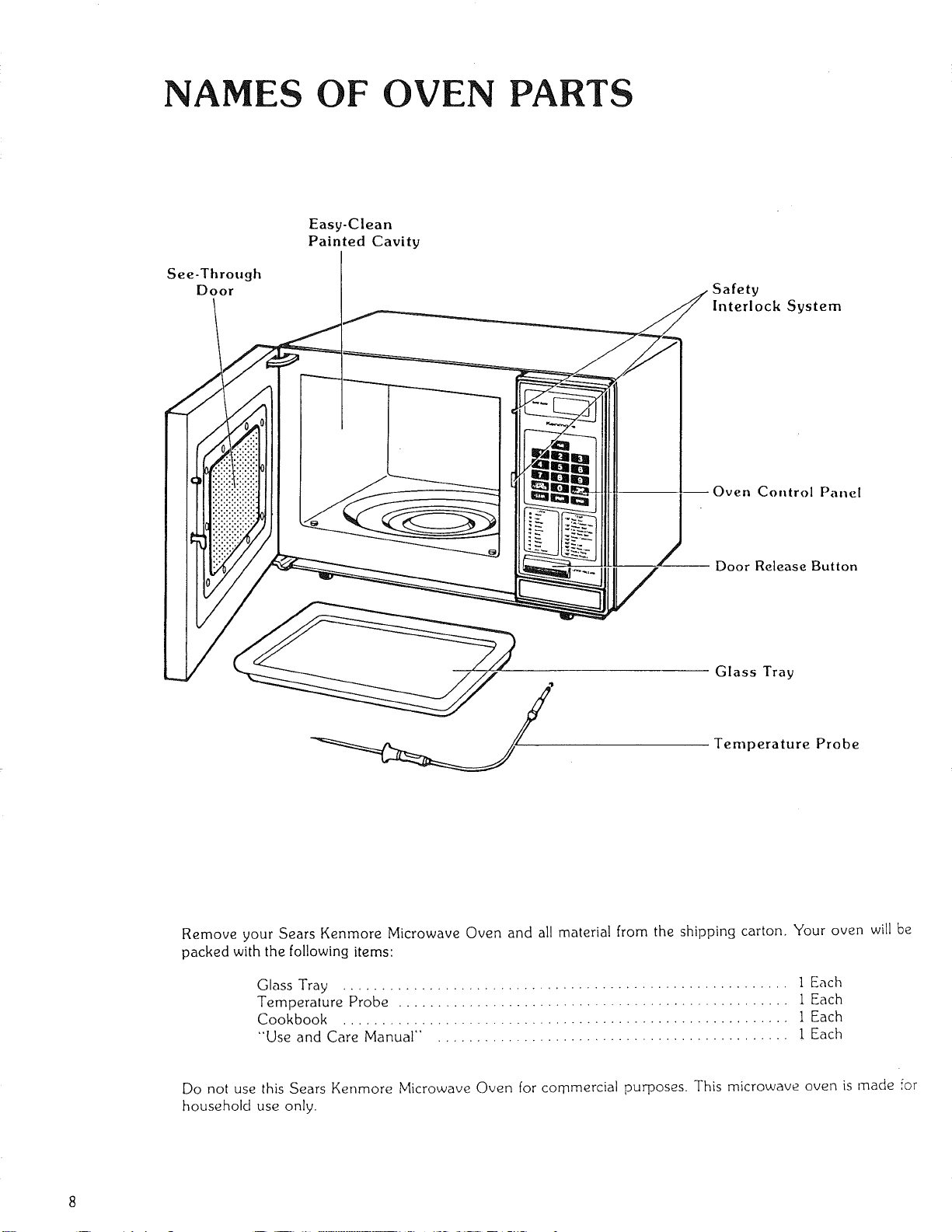
NAMES OF OVEN PARTS
See-Through
Door
Easy-Clean
Painted Cavity
Interlock System
Oven Control Panel
Door Release Button
Glass Tray
Temperature Probe
Remove your Sears Kenmore Microwave Oven and all material from the shipping carton. Your oven will be
packed with the following items:
Glass Tray ......................................................... 1 Each
Temperature Probe .................................................. 1 Each
Cookbook ......................................................... 1 Each
"Use and Care Manual" . ............................................ 1 Each
Do not use this Sears Kenmore Microwave Oven for commercial purposes. This microwave oven is made for
household use only.
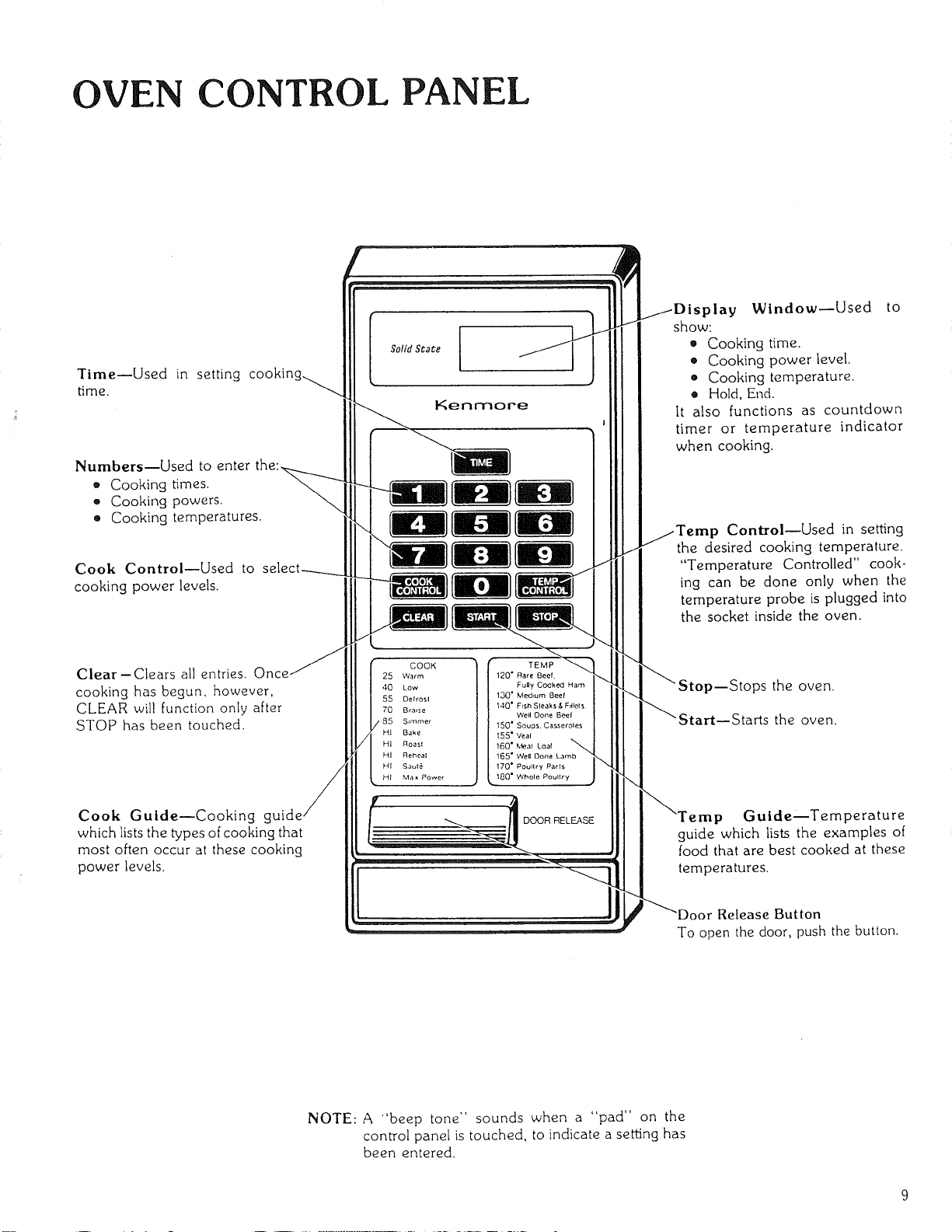
OVEN CONTROL PANEL
Time--Used in setting cookin!
time.
Numbers--Used to enter
• Cooking times.
- Cooking powers.
• Cooking temperatures.
Cook Control--Used to
cooking power levels.
Clear-Clears all entries. One
cooking has begun, however,
CLEAR wil! function only after
STOP has been touched.
Cook Guide--Cooking g
which lists the types of cooking that
most often occur at these cooking
power levels.
Kenmore
COOK
25 Warm
40 Low
55 Defrosl
70 Braise
S,miner
H_ Bake
HI Roasl
HI Reheal
HI Saul_
HI Max Power
DOOR RELEASE
y Window--Used to
show:
• Cooking time.
• Cooking power level.
e Cooking temperature.
• Hold, End.
It also functions as countdown
timer or temperature indicator
when cooking.
ControlmUsed in setting
the desired cooking temperature.
"Temperature Controlled" cook-
ing can be done only when the
temperature probe is plugged into
the socket inside the oven.
ps the oven.
the oven.
p Gulde--Temperature
guide which lists the examples of
food that are best cooked at these
temperatures.
Release Button
To open the door, push the button.
NOTE: A "beep tone" sounds when a "pad" on the
control panel is touched, to indicate a setting has
been entered.
USE STRUCTIONS--.COOKING GU DE
"HI-POWER" COOKING
"HI" gives the highest power cooking possible with your
microwave oven. It is a recommended setting for cooking
foods with a high moisture content or for cooking foods
that need fast cooking to maintain their natural flavor and
texture, Your Kenmore Microwave Cooking cookbook
will tell you which foods are cooked best using the highest
microwave cooking power ("HI"). For detailed directions
on "HI" (maximum power) cooking, see Page 11.
"MULTI-POWER" COOKING
Many foods need slower cooking (at less than fullpower)
in order to give the best results. In addition to "HI", there
are ninety-nine "multi-power" settings. Detailed direc-
tions for "multi-power" cooking are on Page 13.
AUTOMATIC "HOLD WARM"
After reaching the set temperature, the oven switches
into "Hold Warm" to keep the food warm.
"Hold" will show in the display window and will continue
to show for up to sixty minutes or until the door has been
opened or STOP has been touched. See Pages 17.
TEMPERATURE CONTROLLED
"HI-POWER" AND "MULTI-POWER"
COOKING
"HI-Power and/or Multi-Power" with TEMP CONTROL
allows you to cook food to a preset temperature using
maximum or slower microwave cooking speed. Follow
the directions on Page 17 and you will be able to preset
the temperature you desire with the aid of the
"Temperature Controlled" cooking guide.
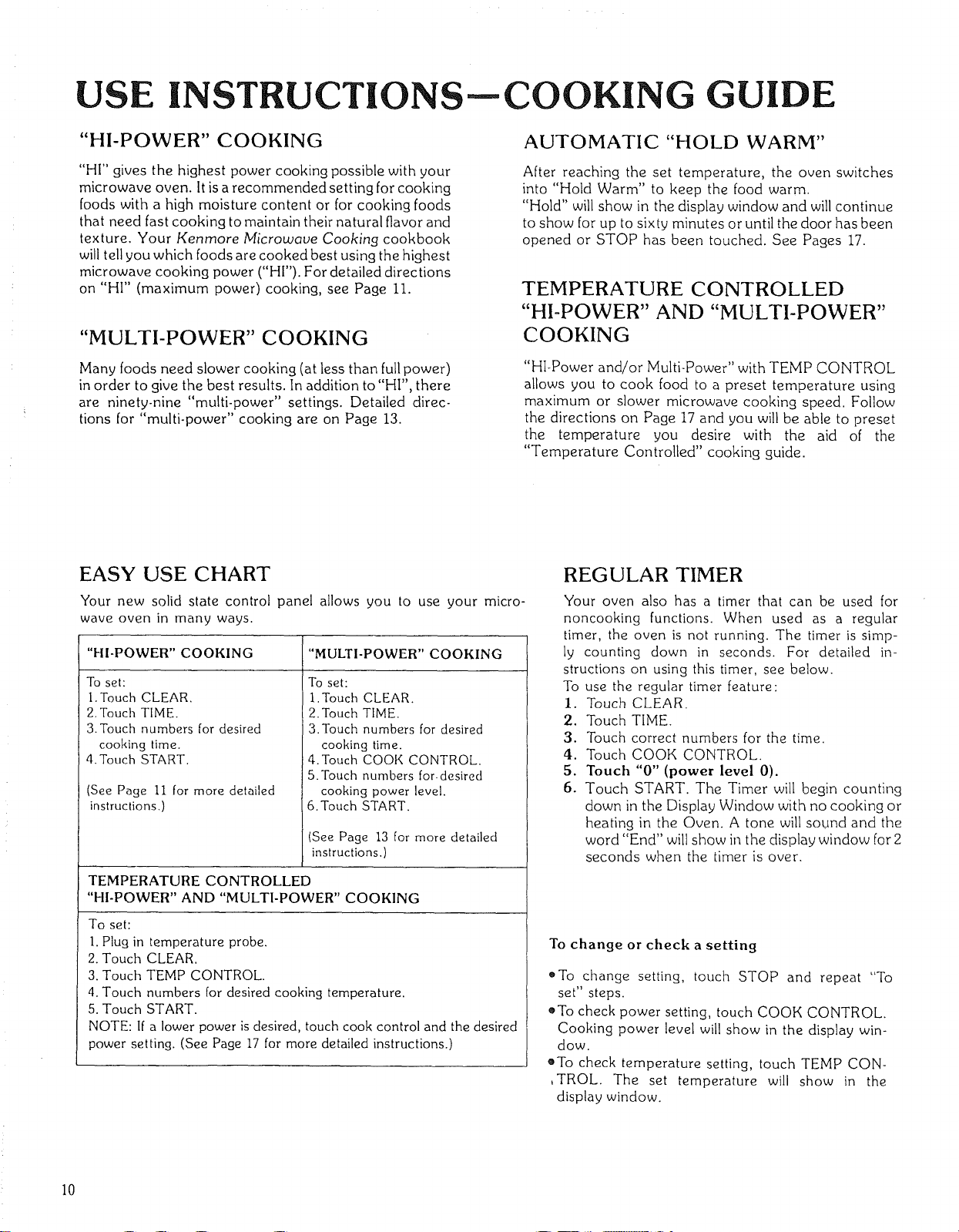
EASY USE CHART
Your new solid state control panel allows you to use your micro-
wave oven in many ways.
"HI-POWER" COOKING
To set:
1. Touch CLEAR.
2. Touch TIME.
3.Touch numbers for desired
cooking time.
4, Touch START.
(See Page Ii for more detailed
instructions,)
"MULTI-POWER" COOKING
To set:
I. Touch CLEAR.
2. Touch TIME.
3.Touch numbers for desired
cooking time.
4. Touch COOK CONTROL.
5. Touch numbers for-desired
cooking power level.
6. Touch START.
(See Page 13 for more detailed
instructions.)
TEMPERATURE CONTROLLED
"HI-POWER" AND "MULTI-POWER" COOKING
To set:
1. Plug in temperature probe.
2. Touch CLEAR.
3. Touch TEMP CONTROL.
4. Touch numbers for desired cooking temperature.
5. Touch START.
NOTE: If a lower power is desired, touch cook control and the desired
power setting. (See Page 17 for more detailed instructions.)
REGULAR TIMER
Your oven also has a timer that can be used for
noncooking functions. When used as a regular
timer, the oven is not running. The timer is simp-
ly counting down in seconds. For detailed in-
structions on using this timer, see below.
To use the regular timer feature:
1. Touch CLEAR.
2. Touch TIME.
3. Touch correct numbers for the time.
4. Touch COOK CONTROL.
5. Touch "0" (power level 0).
6. Touch START. The Timer will begin counting
down in the Display Window with no cooking or
heating in the Oven. A tone will sound and the
word "End" will show in the display window for 2
seconds when the timer is over.
To change or check a setting
o To change setting, touch STOP and repeat "To
set" steps.
oTo check power setting, touch COOK CONTROL.
Cooking power level will show in the display win-
dow.
eTo check temperature setting, touch TEMP CON-
,TROL. The set temperature will show in the
display window.
I0
"HI-POWER" COOKING
I. Touch CLEAR, and a beep tone will be heard. The
CLEAR erases all previous settings.
2. Touch TIME. "0" will show in the display window.
.
Touch the correct ntimbers on the control panel to set
the cooking time. The time set will show in the display
window at the top of the control panel. For example:
o :Fo set 30 seconds, you would touch "3" and then
_0 _' .
• To set 3 minutes, touch "3", "0" and "0".
• To set 31/2 minutes, touch "3", "3" and "0".
Remember, the timer is a digital clock that is divided
into 60 seconds. Therefore, I/2minute is equal to 30
seconds. Touch 30 and not 50 as with a calculator to
indicate i/2.
NOTE: It is not necessary to touch COOK CONTROL
when cooking with the highest power ("HI"). However,
if COOK CONTROL is touched, the word "HI" will
show in the display window. This is to let you know
that the oven will be operating on "HI" power unless a
different power setting is chosen.
4. Touch START. The oven will begin cooking, and the
display window will show the time counting down in
seconds.
A tone will sound and the word "End" will show in the
display window for two seconds when the cooking
time is completed. Then the oven will shut itself off.
NOTE: To stir food during cooking: open the oven
door; stir or turn the food; close the oven door; and
touch START. The oven will automatically continue to
count down the amount of time left on the timer.
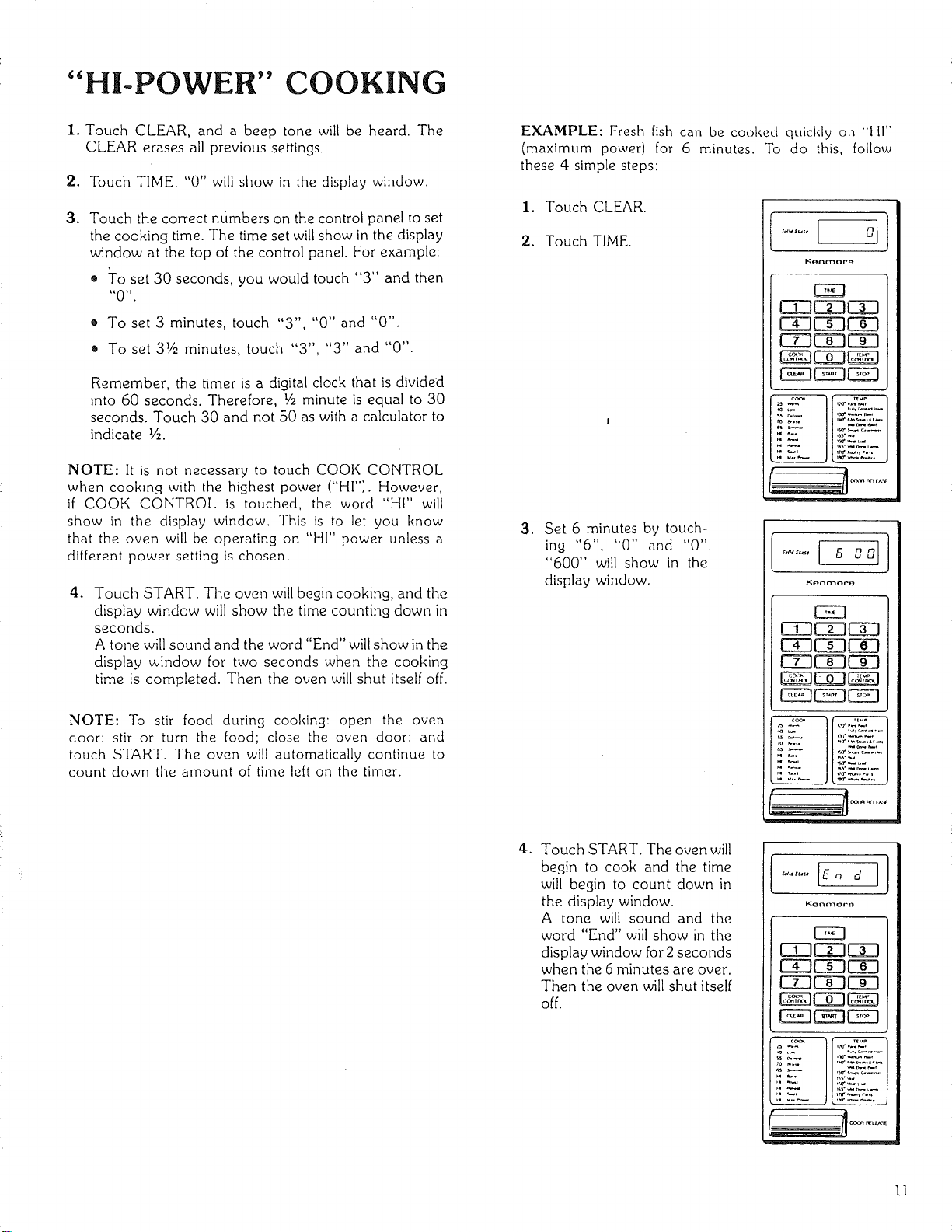
EXAMPLE: Fresh fish can be cooked quickly on "HI'"
(maximum power) for 6 minutes. To do this, follow
these 4 simple steps:
1. Touch CLEAR.
2. Touch TIME.
3. Set 6 minutes by touch-
ing "6", "0" and "0".
"600" will show in the
display window.
4.
Touch START. The oven will
begin to cook and the time
will begin to count down in
the display window.
A tone will sound and the
word "End" will show in the
display window for 2 seconds
when the 6 minutes are over.
Then the oven will shut itself
off.
EE3
CE3E 3 3
CX3EE3C 3
EZ3C 3E 3
EE3EE3EE3
Kenmoro
EE3
EZ3C 3EE3
EE3CE3E 3
Ei3EE3CE3
E 3EE3EE3
EE3
EZ3CE3CE3
CX3CE3E 3
EE3EE3EE3
EE3EE3CE3
11
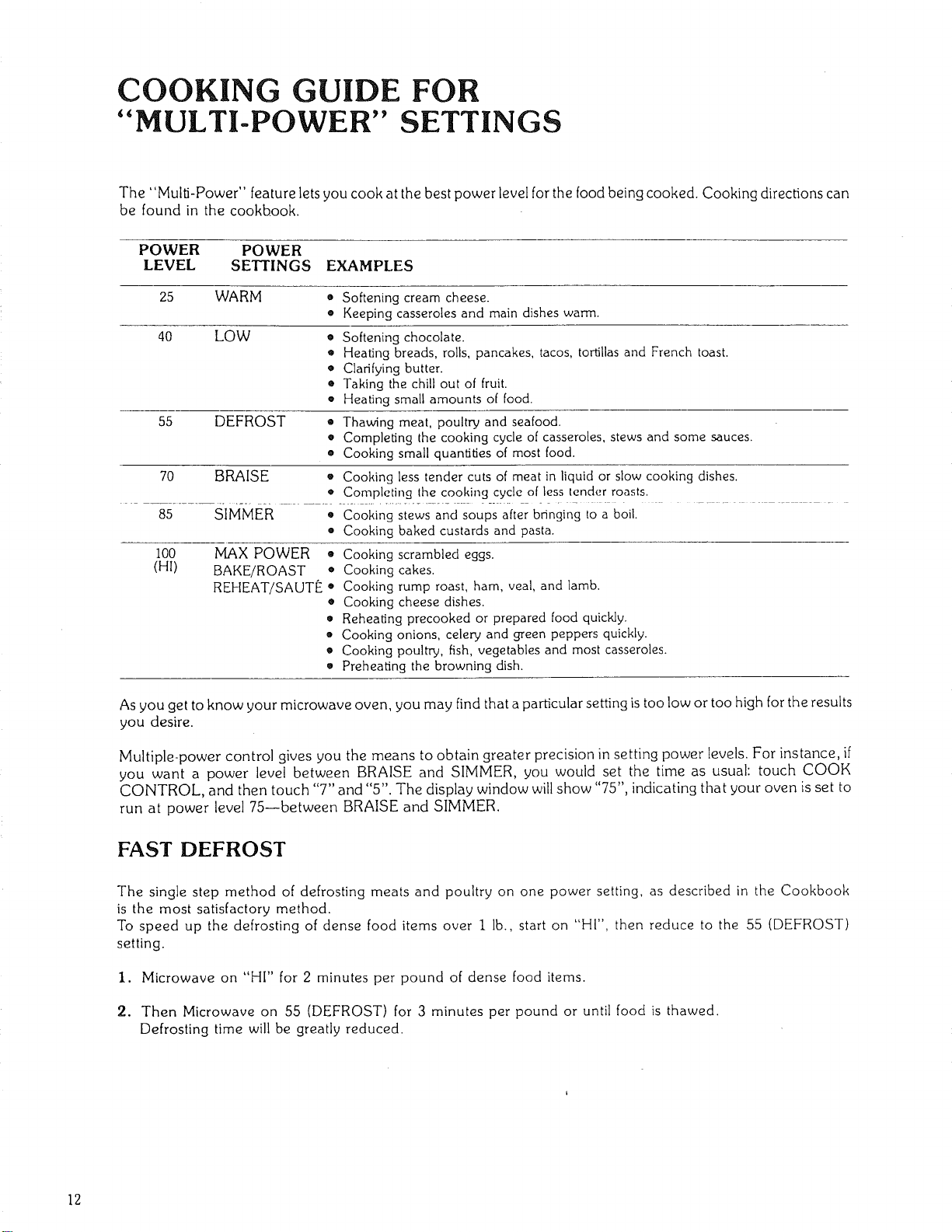
COOKING GUIDE FOR
"MULTI-POWER" SETTINGS
The "Multi-Power" feature lets you cook at the best power level for the food being cooked. Cooking directions can
be found in the cookbook.
POWER POWER
LEVEL SETTINGS EXAMPLES
25 WARM • Softening cream cheese.
e Keeping casseroles and main dishes warm.
40 LOW • Softening chocolate.
• Heating breads, rolls, pancakes, tacos, tortillas and French toast.
• Clarifying butter.
• Taking the chill out of fruit.
o Heating small amounts of food.
55 DEFROST
• Thawing meat, poultry and seafood.
• Completing the cooking cycle of casseroles, stews and some sauces.
• Cooking small quantities of most food.
70 BRAISE o Cooking less tender cuts of meat in liquid or slow cooking dishes.
• Completing Ihe cooking cycle of less lender roasts,
85 SIMMER • Cooking stews and soups after bringing to a boil.
• Cooking baked custards and pasta.
100
(HI)
MAX POWER o
BAKE/ROAST •
REHEAT/SAUTE •
o
o
o
e
o
Cooking scrambled eggs.
Cooking cakes.
Cooking rump roast, ham, veal, and lamb.
Cooking cheese dishes.
Reheating precooked or prepared food quickly.
Cooking onions, celery and green peppers quickly.
Cooking poultry, fish, vegetables and most casseroles.
Preheating the browning dish.
As you get to know your microwave oven, you may find that a particular setting is too low or too high for the results
you desire.
Multiple-power control gives you the means to obtain greater precision in setting power levels. For instance, if
you want a power level between BRAISE and SIMMER, you would set the time as usual: touch COOK
CONTROL, and then touch "7" and "5". The display window will show "75", indicating that your oven is set to
run at power level 75--between BRAISE and SIMMER.
FAST DEFROST
The single step method of defrosting meats and poultry on one power setting, as described in the Cookbook
is the most satisfactory method.
To speed up the defrosting of dense food items over I lb., start on L'HI", then reduce to the 55 (DEFROST)
setting.
I. Microwave on "HI" for 2 minutes per pound of dense food items.
2. Then Microwave on 55 (DEFROST) for 3 minutes per pound or until food is thawed.
Defrosting time will be greatly reduced.
12
"MULTI-POWER" COOKING
Marly foods need slower cooking (at less than full power) in order to give you the best results, In addition to "Hl" there are
ninety-nine multi-power settings. The cookbook tells you which power setting is recommended for the food being cooked.
To Cook with "Multi-Power"
1. Touch CLEAR.
2. Touch TIME, "0" will show in the display window.
3. Touch numbers for the desired cooking time. The time
set will show in the display window.
4. Touch COOK CONTROL. The word "HI" will show
in the display window until a lower setting is
entered. This is to tell you that the oven will be
operating on "HI" power unless a different power
setting is chosen.
5. Touch numbers for desired cooking power level For
example, if the recipe calls for cooking at the "40
(LOW)" setting, you would touch "4" and "0". The
ctisplay window will show "40". "Fhis means that in the
LOW setting, the oven is cooking at power level 40.
6. Touch START. The oven begins to cook and the
display window will show the time counting down.
A tone will sound and the word "End" will show in the
display window for two seconds when the cooking
time is completed. Then the oven will shut itself off.
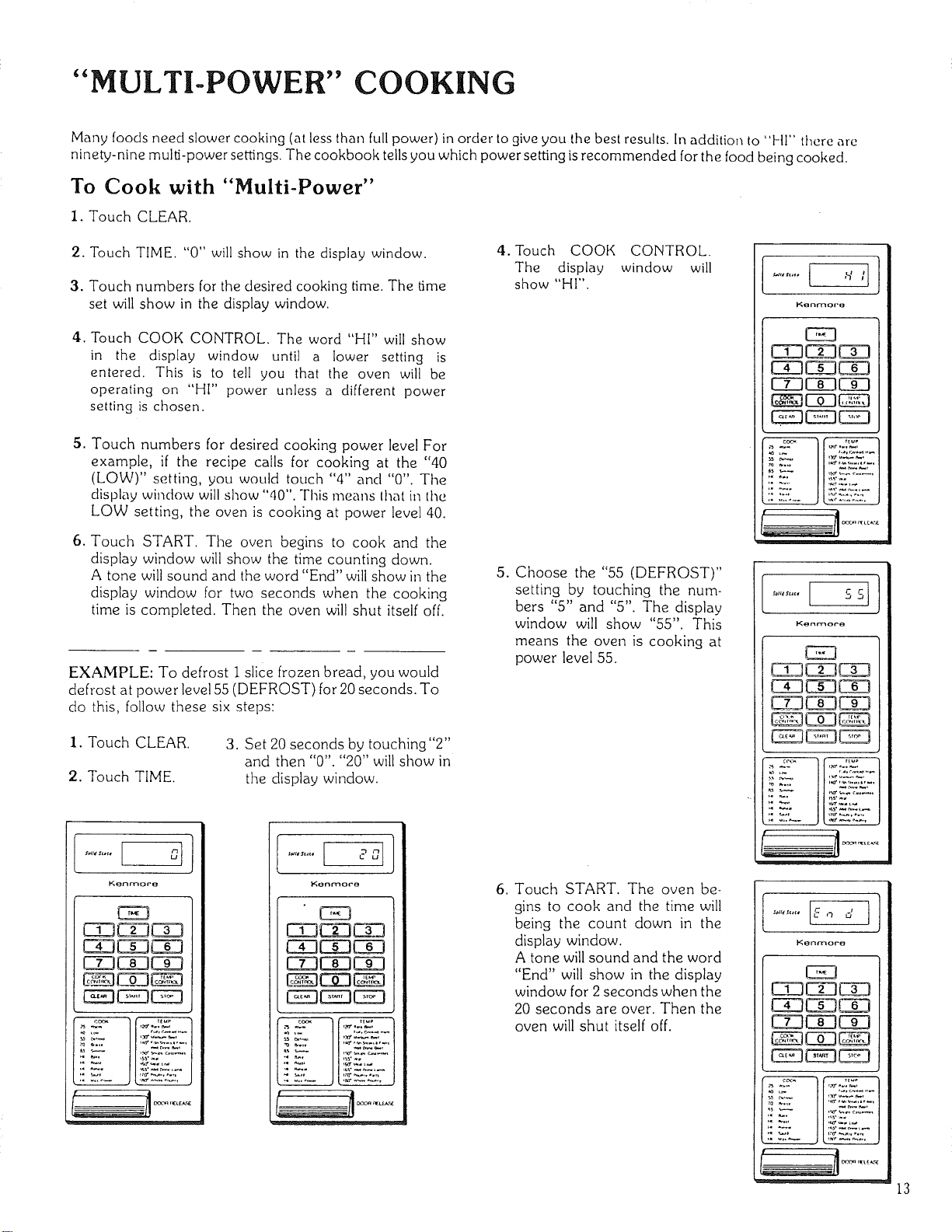
EXAMPLE: To defrost 1 slice frozen bread, you would
defrost at power level 55 (DEFROST) for 20 seconds. To
do this, follow these six steps:
1. Touch CLEAR.
2. Touch TIME.
3. Set 20 seconds by touching"2"
and then "0". "20" will show in
the display window.
CE3CE3CD
C_3CE3CE3
CE3C_3C_3
EEDEEDCED
_:ZJ"
' _j .......
CDC_CD
C_CDCD
C_C_C_
__CZD
4. Touch COOK CONTROL.
The display window will
show "HI".
5. Choose the "55 (DEFROST)"
setting by touching the num-
bers "5" and "5". The display
window will show "55". This
means the oven is cooking at
power level 55.
.
Touch START. The oven be-
gins to cook and the time will
being the count down in the
display window,
A tone will sound and the word
"End" will show in the display
window for 2 seconds when the
20 seconds are over. Then the
oven will shut itself off.
EEJ
CDC_
C_E_C_
CE3
CE3CZ3_
CE3CDCE3
GE3EE3[E_
Kenmoro
CE3
CE3C!3C_3
Cg3CE3C_3
CE3C_3[X3
EEDEED_
13
"TEMPERATURE CONTROLLED" COOKING
The temperature probe is used Co judge doneness when
cooking or reheating food. Set the desired food tempera-
ture with the TEMP CONTROL and the desired power
level with the COOK CONTROL. When the food reaches
the desired temperature, the oven will hold the food at the
desired temperature up to one hour.
TEMPERATURE SETTING &
DISPLAY TEMPERATURE
Temperatures from 115°F to 185°F can be chosen and set
in the oven. The temperature should be set in five-degree
increments. The display window will show the rise in food
temperature in five-degree increments.
For example, when a temperature of 125°F is set, the
display window will show the temperature as it rises from
115°F to 120°F and then to 125°F. The lowest tempera-
ture number that can be displayed is 115°F. Therefore,
even though the food may be less than 115°F, the display
will remain at II5°F until the food is heated to above
115°F.
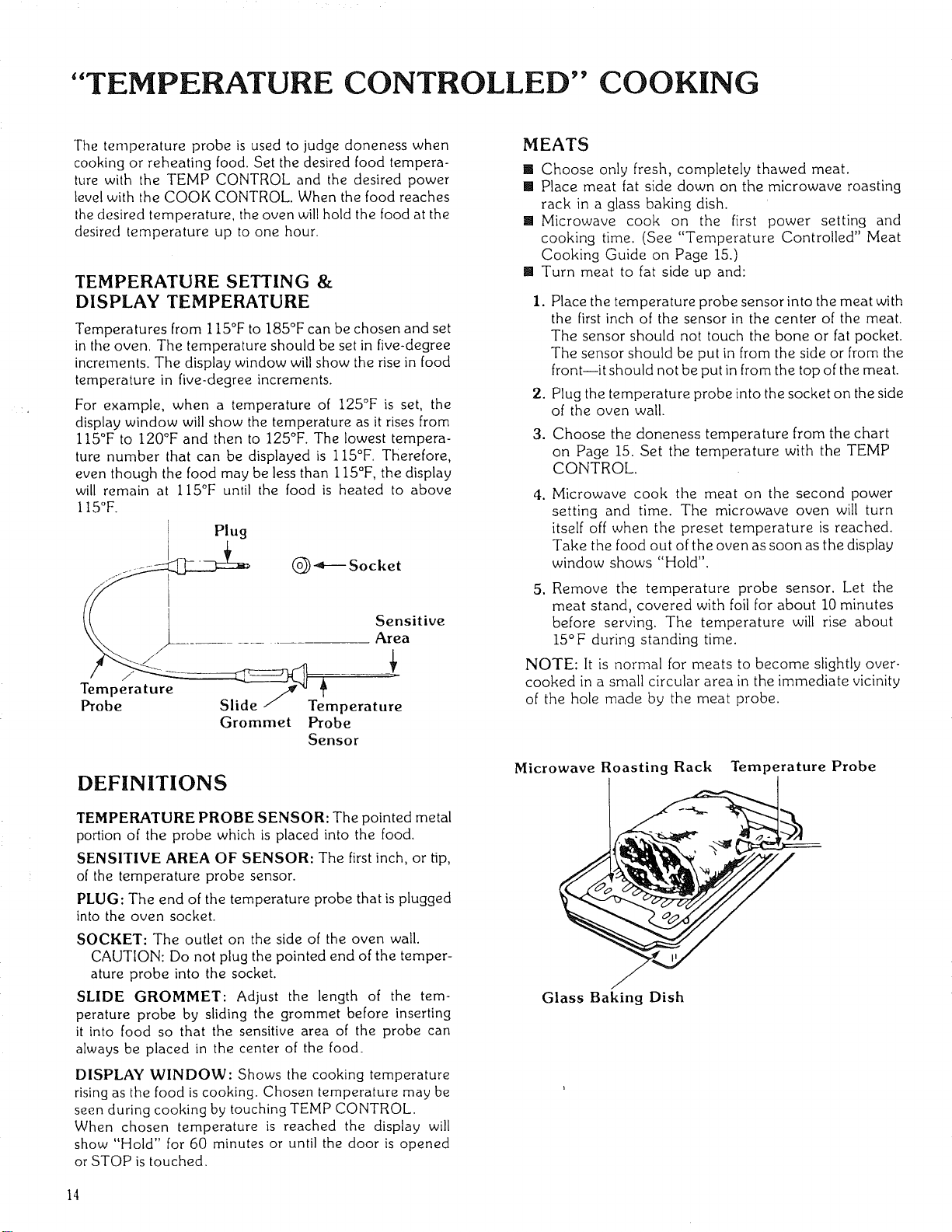
Plug
(_-_--Socket
Sensitive
Area
Tempera ture __/..,,
Probe Slide / Temperature
Grommet Probe
Sensor
DEFINITIONS
TEMPERATURE PROBE SENSOR: The pointed metal
portion of the probe which is placed into the food.
SENSITIVE AREA OF SENSOR: The first inch, or tip,
of the temperature probe sensor.
PLUG: The end of the temperature probe that is plugged
into the oven socket.
SOCKET: The outlet on the side of the oven wall.
CAUTION: Do not plug the pointed end of the temper-
ature probe into the socket.
SLIDE GROMMET: Adjust the length of the tem-
perature probe by sliding the grommet before inserting
it into food so that the sensitive area of the probe can
always be placed in the center of the food.
DISPLAY WINDOW: Shows the cooking temperature
rising as the food is cooking. Chosen temperature may be
seen during cooking by touching TEMP CONTROL.
When chosen temperature is reached the display will
show "Hold" for 60 minutes or until the door is opened
or STOP is touched.
MEATS
[] Choose only fresh, completely thawed meat.
[] Place meat fat side down on the microwave roasting
rack in a glass baking dish.
[] Microwave cook on the first power setting and
cooking time. (See "Temperature Controlled" Meat
Cooking Guide on Page 15.)
[] Turn meat to fat side up and:
i. Place the temperature probe sensor into the meat with
the first inch of the sensor in the center of the meat.
The sensor should not touch the bone or fat pocket.
The sensor should be put in from the side or from the
front--it should not be put in from the top of the meat.
2. Plug the temperature probe into the socket on the side
of the oven wall.
3. Choose the doneness temperature from the chart
on Page 15. Set the temperature with the TEMP
CONTROL.
4. Microwave cook the meat on tile second power
setting and time. The microwave oven will turn
itself off when the preset temperature is reached.
Take the food out of the oven as soon as the display
window shows "Hold".
5, Remove the temperature probe sensor. Let the
meat stand, covered with foil for about 10 minutes
before serving. The temperature will rise about
15°F during standing time.
NOTE: It is normal for meats to become slightly over-
cooked in a small circular area in the immediate vicinity
of the hole made by the meat probe.
Microwave Roasting Rack Temperature Probe
Glass Baking Dish
14
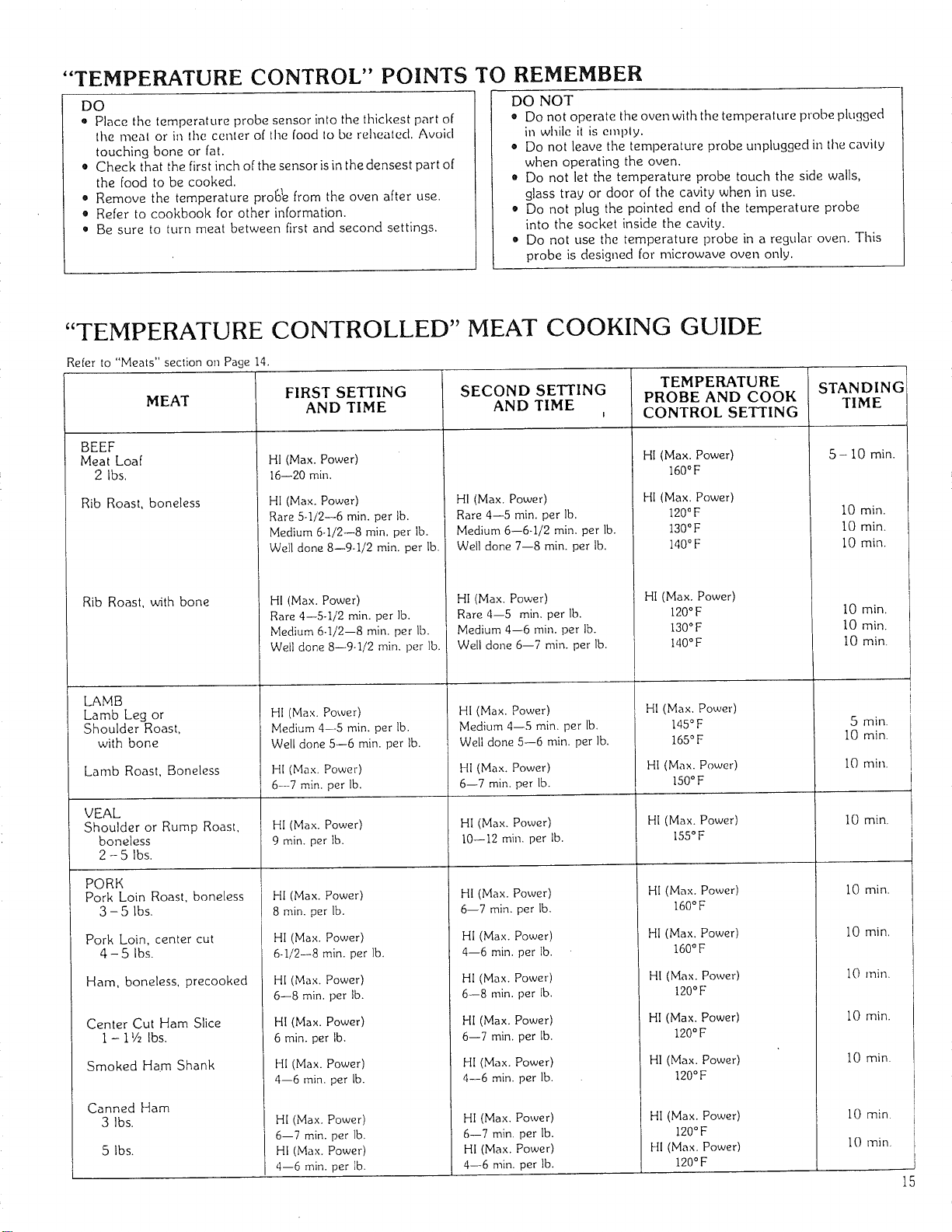
"TEMPERATURE CONTROL" POINTS TO REMEMBER
DO
• Place the temperature probe sensor into the thickest part of
the meal or in lhe center of the food 1o be reheated. Avoicl
touching bone or fat,
• Check that the first inch of the sensor is in the densest part of
the food to be cooked.
• Remove the temperature prola_e from the oven after use.
• Refer to cookbook for other information.
• Be sure to turn meat between first and second settings,
DO NOT
• Do not operate the oven with the temperature probe plugged
in while il is emply.
• Do not leave the temperature probe unplugged in the cavily
when operating the oven.
• Do not let the temperature probe touch the side walls,
glass tray or door of the cavity when in use.
Do not plug the pointed end of the temperature probe
into the socket inside the cavity.
• Do not use the temperature probe in a regular oven. This
probe is designed for microwave oven only.
"TEMPERATURE CONTROLLED" MEAT COOKING GUIDE
Re[er to "Meats" section on Page 14.
TEMPERATURE STANDING
FIRST SETTING SECOND SETTING PROBE AND COOK TIME
AND TIME AND TIME , CONTROL SETTING
MEAT
BEEF
Meat Loaf
2 Ibs.
Rib Roast, boneless
Rib Roast, with bone
LAMB
Lamb Leg or
Shoulder Roast,
with bone
Lamb Roast, Boneless
VEAL
Shoulder or Rump Roast,
boneless
2 - 5 Ibs.
PORK
Pork Loin Roast, boneless
3 - 5 Ibs,
Pork Loin, center cut
4 - 5 Ibs.
Ham, boneless, precooked
HI (Max. Power)
16--20 rain.
HI (Max. Power)
Rare 5-I/2--6 min. per lb.
Medium 6-I/2--8 rain. per lb.
Well done 8--9-I/2 rain. per lb.
HI (Max. Power)
Rare 4--5-I/2 rain. per lb.
Medium 6-I/2--8 rain. per lb.
Well done 8--9-I/2 rain. per lb.
HI (Max. Power)
Medium 4--5 rain. per lb.
Well done 5--6 rain. per lb.
HI (Max. Power)
6--7 rain. per lb.
HI (Max. Power)
Rare 4--5 rain. per Ib.
Medium 6--6-I/2 rain. per lb.
Well done 7--8 rain. per lb.
HI (Max. Power)
Rare 4--5 min. per lb.
Medium 4--6 rain. per lb.
Well done 6--7 rain. per lb.
HI (Max. Power)
Medium 4--5 rain. per lb.
Well done 5--6 rain. per lb.
HI (Max. Power)
6--7 rain. per Ib.
HI (Max. Power)
160°F
HI (Max. Power)
120°F
130°F
140°F
HI (Max. Power)
120°F
130°F
140°F
HI(Max. Power)
145°F
165°F
HI (Max. Power)
150°F
5- i0 min.
I0 rain.
I0 min.
i0 rain.
I0 rain.
I0 min.
i0 min,
5 min.
10 rain.
10 min,
HI (Max. Power) HI (Max. Power) HI (Max. Power) I0 min.
9 rain. per lb. 10--12 rain. per lb. 155°F
HI (Max. Power)
8 rain. per lb.
HI (Max. Power)
6-I/2--8 rain. per lb.
HI (Max. Power)
6--7 rain. per lb.
HI (Max. Power)
160°F
HI (Max, Power)
160 °F
HI (Max. Power)
120°F
HI (Max. Power)
120° F
HI (Max. Power)
6--8 rain. per lb.
Center Cut Ham Slice HI (Max. Power)
I - i V2 Ibs. 6 rain. per lb.
HI (Max. Power)
4--6 rain. per lb.
HI (Max. Power)
4--6 rain. per lb.
HI (Max, Power)
6--8 rain. per lb.
HI (Max. Power)
120°F
HI (Max. Power)
120°F
HI (Max. Power)
120°F
HI (Max. Power)
6--7 rain. per lb.
HI (Max. Power)
4--6 rain. per lb.
HI (Max. Power)
6--7 rain. per lb.
HI (Max. Power)
4--6 rain. per lb.
Smoked Ham Shank
Canned Ham
3 Ibs.
5 Ibs.
HI (Max. Power)
6--7 min. per lb.
HI (Max. Power)
4--6 rain. per lb.
i0 min.
i0 rain,
I0 rain.
i0 min.
I0 rain.
10 rain.
10 rnin.
15
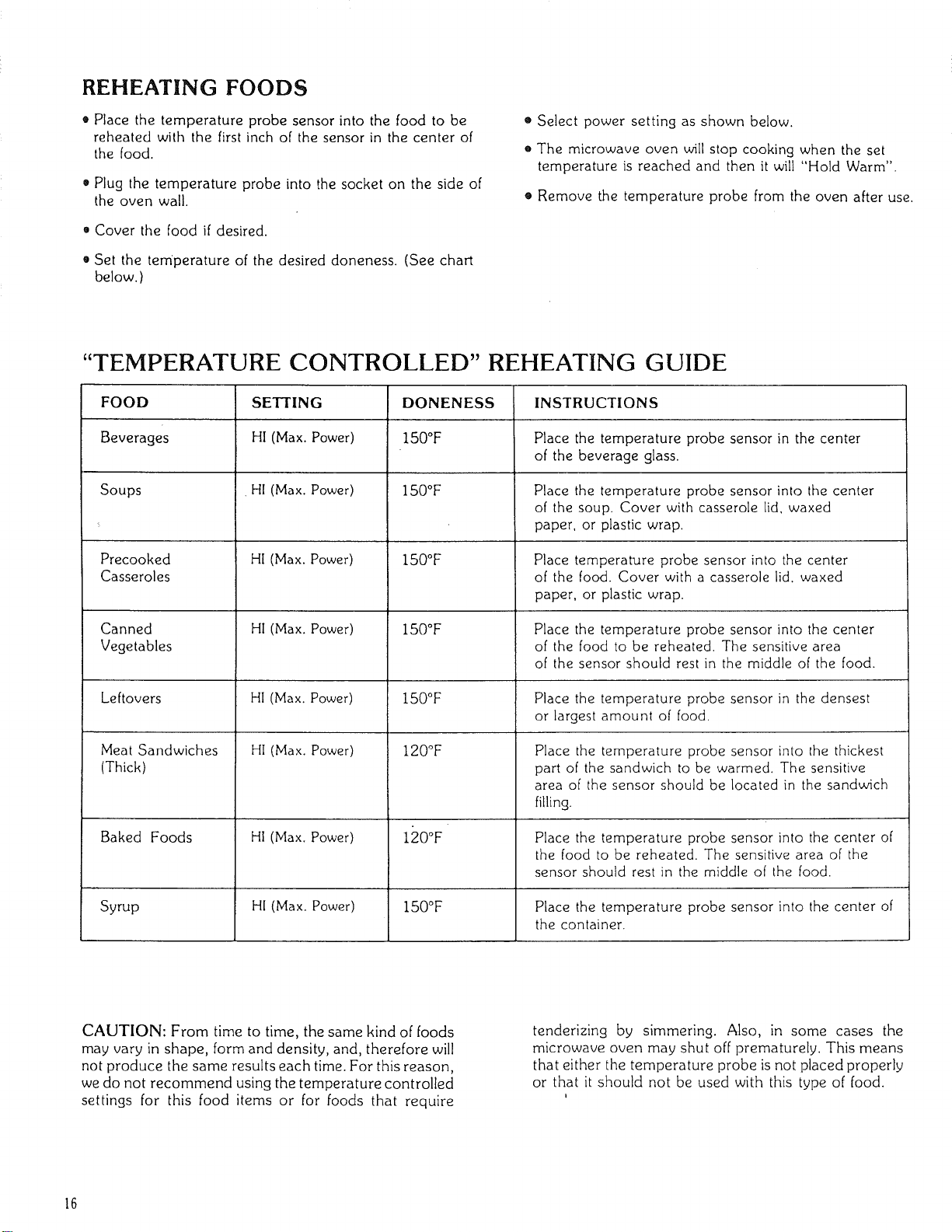
REHEATING FOODS
• Place the temperature probe sensor into the food to be
reheated with the first inch of the sensor in the center of
the food.
• Plug the temperature probe into the socket on the side of
the oven wall.
• Cover the food if desired.
• Set the temperature of the desired doneness. (See chart
below. )
• Select power setting as shown below.
• The microwave oven will stop cooking when the set
temperature is reached and then it will "Hold Warm".
• Remove the temperature probe from the oven after use.
"TEMPERATURE CONTROLLED" REHEATING GUIDE
FOOD
Beverages
Soups
Precooked
Casseroles
Canned
Vegetables
SETTING
HI (Max. Power)
HI (Max. Power)
HI (Max. Power)
HI (Max. Power)
DONENESS
150°F
150°F
150°F
150°F
INSTRUCTIONS
Place the temperature probe sensor in the center
of the beverage glass.
Place the temperature probe sensor into the center
of the soup. Cover with casserole lid, waxed
paper, or plastic wrap.
Place temperature probe sensor into the center
of the food. Cover with a casserole lid. waxed
paper, or plastic wrap.
Place the temperature probe sensor into the center
of the food to be reheated. The sensitive area
of the sensor should rest in the middle of the food.
Leftovers HI (Max. Power) I50°F Place the temperature probe sensor in the densest
or largest amount of food.
HI (Max. Power) 120°F
HI (Max. Power)
Meat Sandwiches
(Thick)
120°FBaked Foods
Place the temperature probe sensor into the thickest
part of the sandwich to be warmed. The sensitive
area of the sensor should be located in the sandwich
filling.
Place the temperature probe sensor into the center of
the food to be reheated. The sensitive area of the
sensor should rest in the middle of the food.
Syrup HI (Max. Power) 150°F Place the temperature probe sensor into the center of
the container.
CAUTION: From time to time, the same kind of foods
may vary in shape, form and density, and, therefore will
not produce the same results each time. For this reason,
we do not recommend using the temperature controlled
settings for this food items or for foods that require
tenderizing by simmering. Also, in some cases the
microwave oven may shut off prematurely. This means
that either the temperature probe is not placed properly
or that it should not be used with this type of food.
16
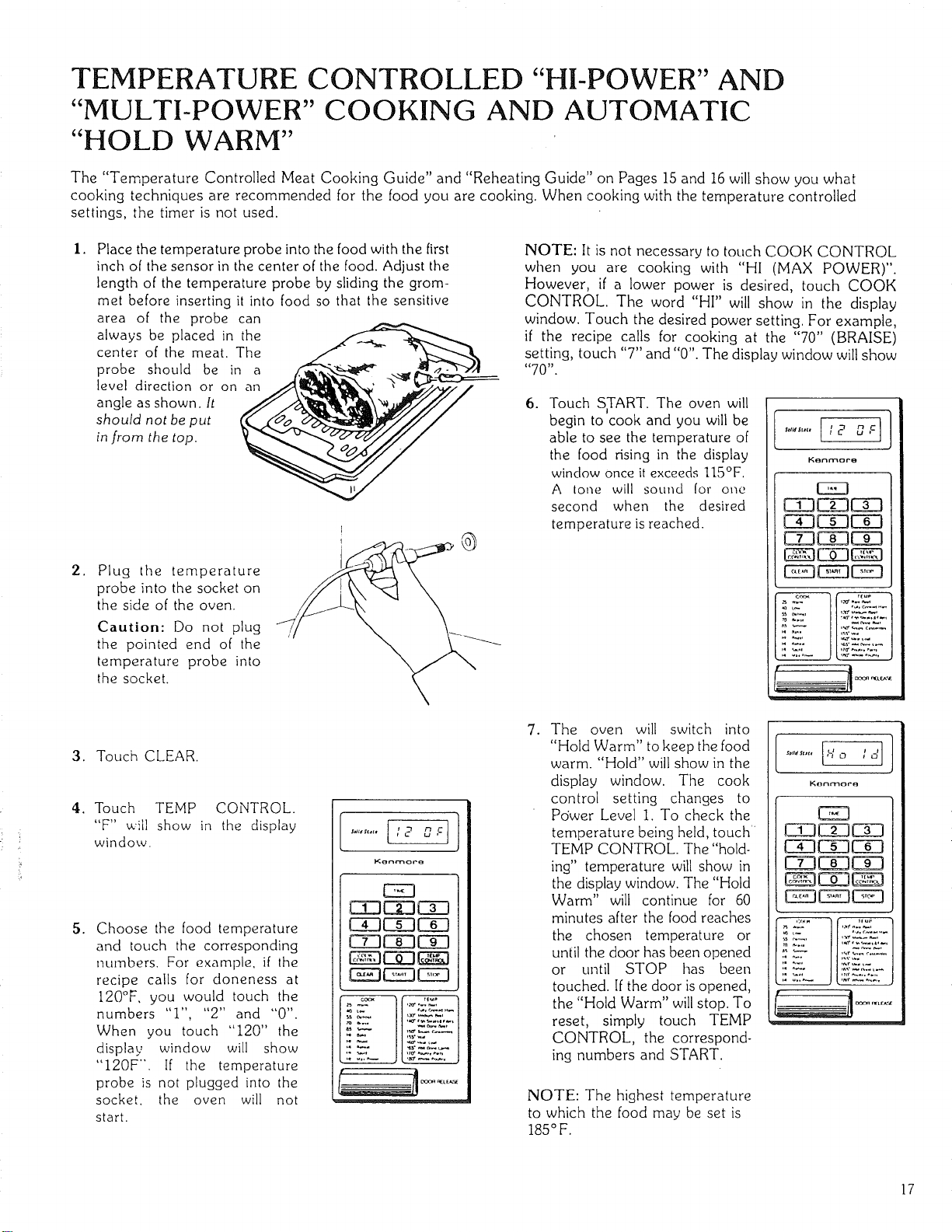
TEMPERATURE CONTROLLED "HI-POWER" AND
"MULTI-POWER" COORING AND AUTOMATIC
"HOLD WARM"
The "Temperature Controlled Meat Cooking Guide" and "Reheating Guide" on Pages 15 and 16 will show you what
cooking techniques are recommended for the food you are cooking. When cooking with the temperature controlled
settings, the timer is not used.
I. Place the temperature probe into the food with the first
inch of the sensor in the center of the food. Adjust the
length of the temperature probe by sliding the grom-
met before inserting it into food so that the sensitive
area of the probe can
always be placed in the __-_e_---------
center of the meat. The
probe should be in a
level direction or on an J.,4._h,_i_',_" ' .._i/,v//
angle as shown. It _x_
should not be put
in from the top. 00.
.
Plug the temperature
probe into the socket on
the side of the oven.
Caution: Do not plug
the pointed end of the
temperature probe into
the socket.
O
NOTE: It is not necessary to touch COOK CONTROL
when you are cooking with "HI (MAX POWER)".
However, if a lower power is desired, touch COOK
CONTROL. The word "HI" will show in the display
window. Touch the desired power setting. For example,
if the recipe calls for cooking at the "70" (BRAISE)
setting, touch "7" and "0". The display window will show
"70".
6. Touch SyART. The oven will
begin to cook and you will be
able to see the temperature of
the food rising in the display
window once it exceeds 115OF,
A tone will sound for one
second when the desired
temperature is reached.
CZ3C 3C!3
Ci3C 3C 3
C 3C 3C 3
3. Touch CLEAR.
4. Touch TEMP CONTROL.
"F" will show in the display
window.
5. Choose the food temperature
and touch the corresponding
numbers. For example, if the
recipe calls for doneness at
120°F, you would touch the
numbers "I", "2" and "0".
When you touch "120" the
display window will show
"I20F". If the temperature
probe is not plugged into the
socket, the oven will not
start.
Kenmore
EZ3
CiDCE3CZ3
C Z3L JL
CE3CE3C 3
8 3EE3
. The oven will switch into
"Hold Warm" to keep the food
warm. "Hold" will show in the
display window. The cook
control setting changes to
Power Level 1. To check the
temperature being held, touch
TEMP CONTROL. The "hold-
ing" temperature will show in
the display window. The "Hold
Warm" will continue for 60
minutes after the food reaches
the chosen temperature or
until the door has been opened
or until STOP has been
touched. If the door is opened,
the "Hold Warm" will stop. To
reset, simply touch TEMP
CONTROL, the correspond-
ing numbers and START.
NOTE: The highest temperature
to which the food may be set is
185°F.
Konmore
CZ3
C 3 3C 3
C 3CE3C 3
CE3C 3C 3
E CZ3
17
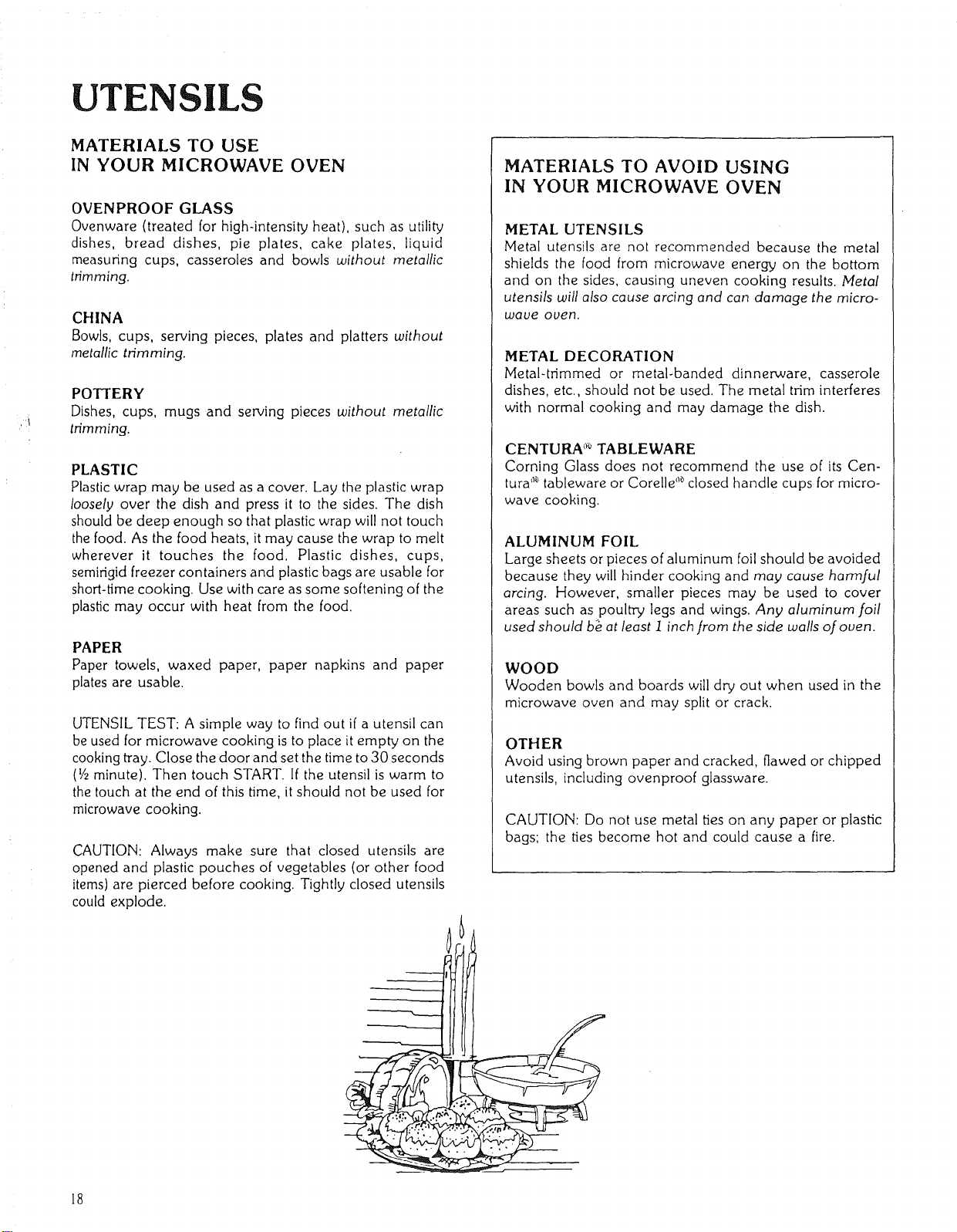
UTENSILS
MATERIALS TO USE
IN YOUR MICROWAVE OVEN
OVENPROOF GLASS
Ovenware (treated for high-intensity heat), such as utility
dishes, bread dishes, pie plates, cake plates, liquid
measuring cups, casseroles and bowls without metallic
trimming.
CHINA
Bowls, cups, serving pieces, plates and platters without
metallic trimming.
POTTERY
Dishes, cups, mugs and serving pieces without metallic
trimming.
PLASTIC
Plastic wrap may be used as a cover. Lay the plastic wrap
loosely over the dish and press it to the sides. The dish
should be deep enough so that plastic wrap will not touch
the food. As the food heats, it may cause the wrap to melt
wherever it touches the food. Plastic dishes, cups,
semirigid freezer containers and plastic bags are usable for
short-time cooking. Use with care as some softening of the
plastic may occur with heat from the food.
PAPER
Paper towels, waxed paper, paper napkins and paper
plates are usable.
UTENSIL TEST: A simple way to find out if a utensil can
be used for microwave cooking is to place it empty on the
cooking tray. Close the door and set the time to 30 seconds
(l/z minute). Then touch START. If the utensil is warm to
the touch at the end of this time, it should not be used for
microwave cooking.
CAUTION: Always make sure that closed utensils are
opened and plastic pouches of vegetables (or other food
items) are pierced before cooking. Tightly closed utensils
could explode.
MATERIALS TO AVOID USING
IN YOUR MICROWAVE OVEN
METAL UTENSILS
Metal utensils are not recommended because the metal
shields the food from microwave energy on the bottom
and on the sides, causing uneven cooking results. Metal
utensils will also cause arcing and can damage the micro-
wave oven,
METAL DECORATION
Metal-trimmed or metal-banded dinnerware, casserole
dishes, etc., should not be used. The metal trim interferes
with normal cooking and may damage the dish.
CENTURA _'°TABLEWARE
Coming Glass does not recommend the use of its Cen-
tufa '_ tableware or Corelle _ closed handle cups for micro-
wave cooking.
ALUMINUM FOIL
Large sheets or pieces of aluminum foil should be avoided
because they will hinder cooking and may cause harmful
arcing. However, smaller pieces may be used to cover
areas such as poultry legs and wings. Any aluminum foil
used should b_ at least i inch from the side walls of oven.
WOOD
Wooden bowls and boards will dry out when used in the
microwave oven and may split or crack.
OTHER
Avoid using brown paper and cracked, flawed or chipped
utensils, including ovenproof glassware.
CAUTION: Do not use metal ties on any paper or plastic
bags; the ties become hot and could cause a fire.
18
CARE AND CLEANING
Wipe the microwave inside and out wilh a soft cloth and a mild detergent solution. Then rinse and wipe dry. This
should be done on a weekly basis--more often if needed. Never use rough powders or pads.
REMOVABLE PARTS
The following removable parts may be removed as described. They should be washed in warm (not hot) water
with a mild detergent and a soft cloth. Once they are clean, rinse them well and dry with a soft cloth. Never use
rough cleaning powders, steel wool or rough cleaning pads.
After each use of the temperature probe, it must be removed .from the socket. Use pot holder, as the wire, plug
and sensor sections may be hot. Wipe food or liquid from the sensor with a soft damp cloth.
The glass tray may be removed for cleaning at the sink. Wipe up spillovers with a paper towel or cloth before
removal of the tray. Be careful not to chip or scratch the edges of the tray as this may cause the tray to break
during use.
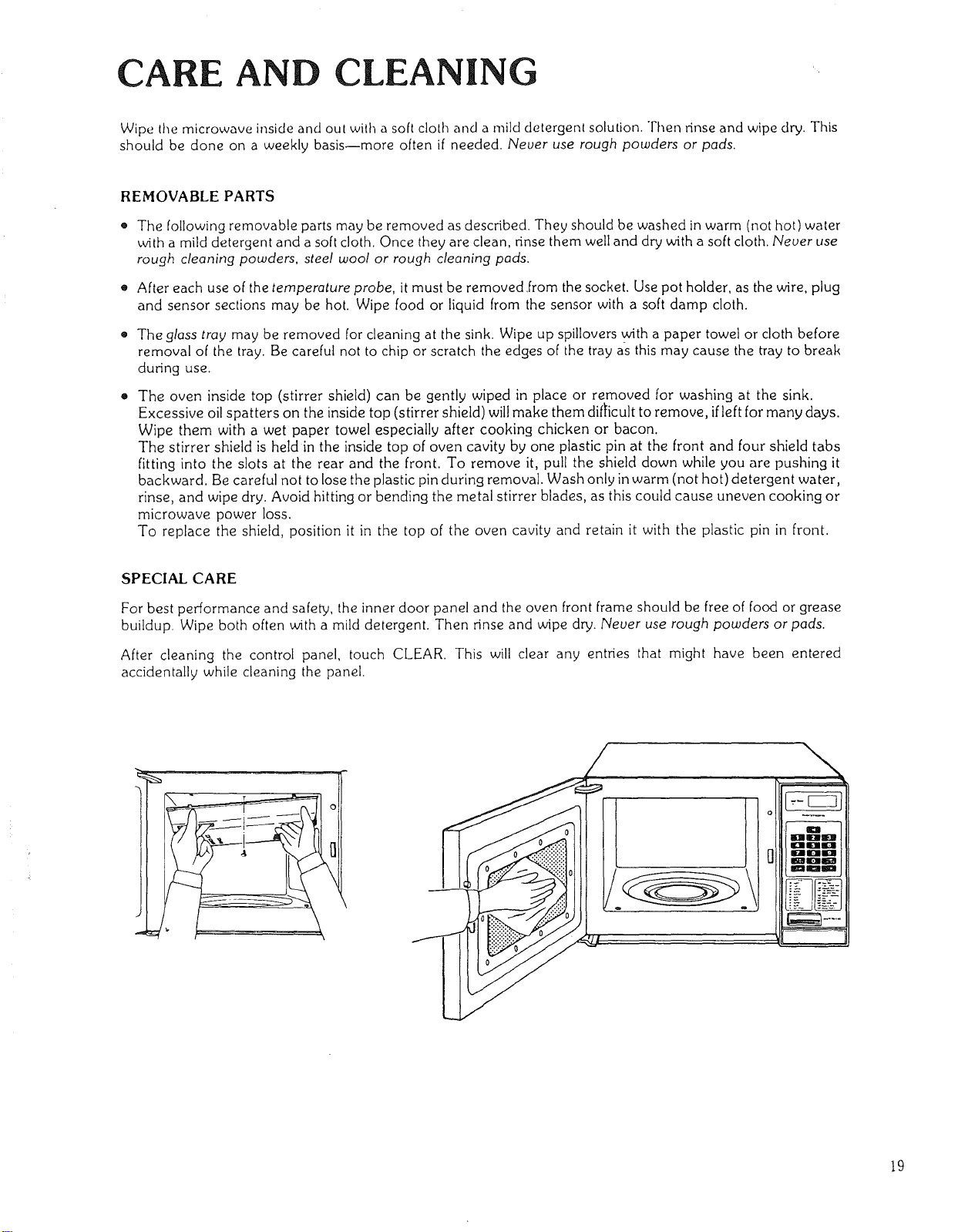
The oven inside top (stirrer shield) can be gently wiped in place or removed for washing at the sink.
Excessive oil spatters on the inside top (stirrer shield) willmake them difficult to remove, ifleft for many days.
Wipe them with a wet paper towel especially after cooking chicken or bacon.
The stirrer shield is held in the inside top of oven cavity by one plastic pin at the front and four shield tabs
fitting into the slots at the rear and the front. To remove it, pull the shield down while you are pushing it
backward. Be careful not to lose the plastic pin during removal. Wash only in warm (not hot) detergent water,
rinse, and wipe dry. Avoid hitting or bending the metal stirrer blades, as this could cause uneven cooking or
microwave power loss.
To replace the shield, position it in the top of the oven cavity and retain it with the plastic pin in front.
SPECIAL CARE
For best performance and safety, the inner door panel and the oven front frame should be free of food or grease
buildup. Wipe both often with a mild detergent. Then rinse and wipe dry. Never use rough powders or pads.
After cleaning the control panel, touch CLEAR. This will clear any entries that might have been entered
accidentally while cleaning the panel.
/
1
\
o
anDiarml_D
m,'aaanti i_
m"lam:'aai_
i_at_ia_3
g_I_IMD
t9
QUESTIONS AND ANSWE
S
OPERATION
Q. What is wrong when the oven light will not glow during cooking or when tile oven door is open?
A.
There may be several reasons why the oven light will not glow. Perhaps:
o TIME has not been set.
® The light bulb has burned out.
a START has not been touched.
Q. Why does steam come out of the air exhaust vent?
A. Steam is normally produced during cooking. The microwave oven has been designed to vent this steam out
the rear vent.
Q. Will the microwave oven be damaged if it operates empty?
A. Yes. Never operate the oven empty or without the glass tray.
Q. Does microwave energy pass through the viewing screen in the door?
A. No. The metal screen bounces back the energy to the oven cavity. The holes (or ports) are made to allow
light to pass through. They do not let microwave energy pass through.
Q. Why does the "beep tone" sound when a "pad" on the control panel is touched?
A. The "beep tone" sounds to assure that the setting is being properly entered.
Q.
A.
Can my microwave oven be damaged if food is cooked for too long a period of time?
Like any other cooking appliance, it is possible to overcook food to the point of destruction which may result
in the food creating smoke and even possible fire damage to the inside of the oven. It is always best to attend
the oven while it is in the cooking process.
Q.
A.
When the oven is plugged into a wall outlet for the first time, it might not work properly. What is wrong?
Only when the oven is plugged in for the first time or when power resumes after a power interruption, the
microcomputer used in the oven control assembly may temporarily become scrambled and fail to function
as programmed.
Unplug the oven from the 120.volt household outlet and then plug it back in. The microcomputer will be
reset for proper function thereafter.
Q. Why do I see light reflection around the outer case?
A. This light is from the oven light which is located outside the oven cavity.
2O
QUESTIONS AND ANSWERS (Cont'd)
FOODS
Q. What is wrong when baked foods have a hard, dry, brown spot?
A. A hard, dry, brown spot shows overcooking. Shorten the cooking or reheating time.
Q.
A.
Why do eggs sometimes pop?
When baking, frying or poaching eggs, the yolk may pop due to steam build-up inside the yolk membrane.
To prevent this, simply pierce the yolk with a toothpick before cooking it.
CAUTION: Never microwave cook eggs in the shell.
Q. Why are scrambled eggs sometimes a little dry after cooking?
A. Eggs dry out if they are overcooked. Though the same recipe is used each time, one may need to vary the
cooking time for one of these reasons:
• Eggs vary in size.
• Eggs are at room temperature one time and at refrigerator temperature another time.
• The shapes of utensils vary, thereby making it necessary to vary the cooking time.
e Eggs continue cooking during standing time.
Q,
A.
Is it possible to pop corn in a microwave oven?
Popping corn in a microwave oven is not recommended. Microwaves pop too few kernels to make the
technique successful. Longer cooking does not yield more popped corn. It can cause fire or cause the
cooking dish to become too hot to handle or to break.
Microwave-popping devices are available. While safe to use, they usually do not give results equal to regular
popping methods. [.[they are used, carefully follow the instructions which come with the popping device and
never leave the oven unattended while popping corn.
Q.
A.
CAUTION: Never use a paper bag for popping corn.
What is wrong when three potatoes bake thoroughly and the fourth one is still not cooked?
The fourth potato may be slightly heavier than the others and should be cooked 30 to 60 seconds longer.
Remember to allow space around each potato when baking. Also, for more even cooking, put potatoes in a
circle.
Q. Why do baked apples sometimes burst during cooking?
A. The peeling has not been removed frorn the top half of each apple to allow for expansion of the interior of the
apple during cooking. As in regular cooking methods, the interior of the apple expands during the cooking
process.
Q. How are boil-overs avoided?
A. When cooking foods that tend to boil over, use a larger utensil than usual for cooking. If you open the oven
door or touch STOP, the food will stop boiling. (Remember to touch START again after closing the door to
restart the cooking cycle.)
Q.
A.
Why is a standing lime recommended after mlcrowave cooking is over?
Standing time is recommended after microwave cooking is over. This is to allow foods to continue cooking
evenly throughout for a few moments after the actual microwave oven cooking cycle. The amount of
standing time depends upon the density of the food.
Q. Why is an additional time required for cooking food stored in refrigerator?
A. As in conventional cooking, the initial temperature of food affects total cooking time. More time is
needed to cook the food just taken out of a refrigerator than food at a room temperature.
21
EFORE CALLING FOR SERVICE
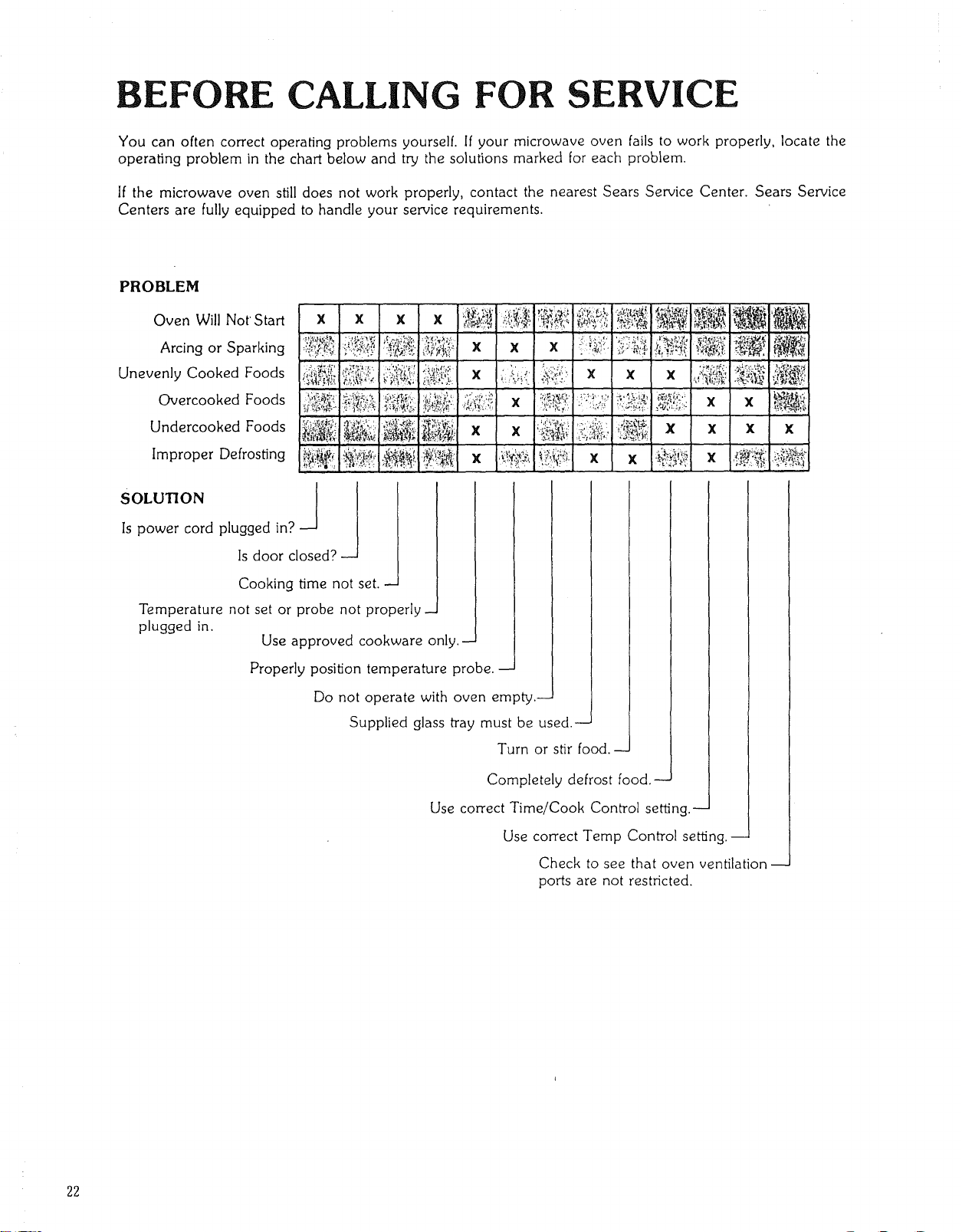
You can often correctoperating problems yourself. If your microwave oven fails to work properly, locate the
operating problem in the chart below and try the solutions marked for each problem.
If the microwave oven still does not work properly, contact the nearest Sears Service Center. Sears Service
Centers are fully equipped to handle your service requirements.
PROBLEM
Oven Will NotStart
Arcing or Sparking
Unevenly Cooked Foods
Overcooked Foods
Undercooked Foods
Improper Defrosting
Is power cord plugged _n_
Is do_r closed?
Cooking time not set.
Temperature not set or probe not properly-
plugged in.
Use approved cookware only.-
Properly position temperature probe.-
Do not operate with oven empty.-
Supplied glass tray must be used.-
Turn or stir food.-
Completely defrost food.-
Use correct Time/Cook Control se_ng.--
Use correct Temp Control se_ng.-
Check to see that oven ventilation
ports are not restricted.
22
SEARS SERVICE
"WE SERVICE WHAT WE SELL"
"We Service What We Sell" is our assurance to you that you can depend on Sears for service because Sears
Service is nationwide.
Your Sears Kenmore Microwave Oven has added value when you consider that Sears has a service unit near you,
staffed'by Sears Trained Technicians-- professional technicians specifically trained on Sears Kenmore Microwave
Ovens, having the parts, tools and equipment to insure that we meet our pledge to you -- "We Service What We
Sell!"
TO FURTHER ADD TO THE VALUE OF YOUR MICROWAVE OVEN,
BUY A SEARS MAINTENANCE AGREEMENT.
Sears Kenmore Microwave Ovens are designed, manufac-
tured, and tested for years of dependable operation. Yet, any
modern appliance may require service from time to time. A
Sears Maintenance Agreement is more than an extension o[
the Warranty.
It provides complete protection from unexpected repair bills
and undue inconvenience, It assures you of maximum effi-
ciency from your microwave oven.
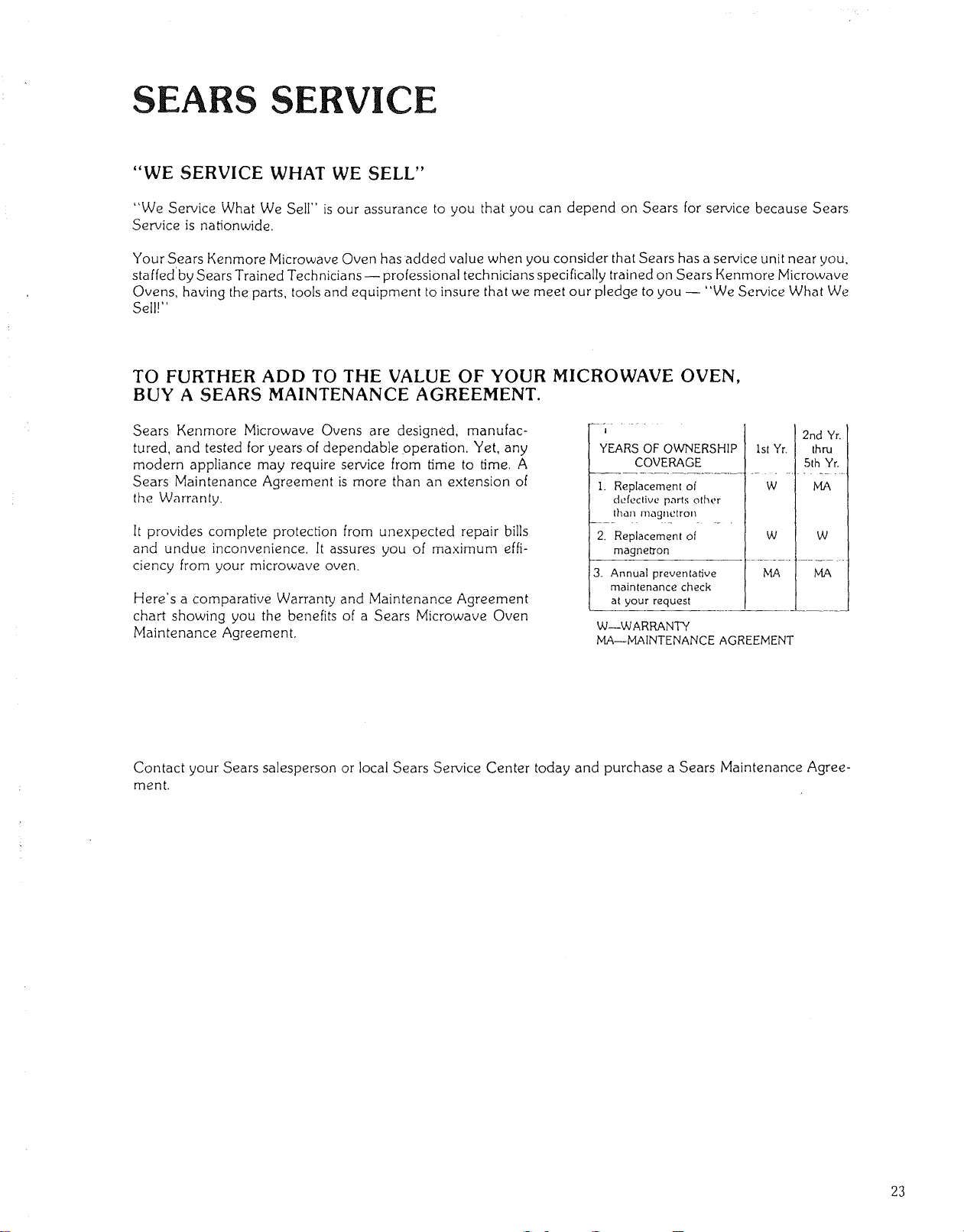
Here's a comparative Warranty and Maintenance Agreement
chart showing you the benefits of a Sears Microwave Oven
Maintenance Agreement.
YEARS OF OWNERSHIP
COVERAGE
I. Replacement of
defective parts other
than magnetron
2. Replacement of
magnetron
ist Yr.
W
W
3. Annual preventative MA
maintenance check
at your request
W--WARRANTY
MA--MAINTENANCE AGREEMENT
2nd Yr.
thru
5th Yr.
MA
W
MA
Contact your Sears salesperson or local Sears Service Center today and purchase a Sears Maintenance Agree-
ment.
23
USE & CARE
MANUAL
STOCK NO.
87451
Kenmore
MICRO E OVEN
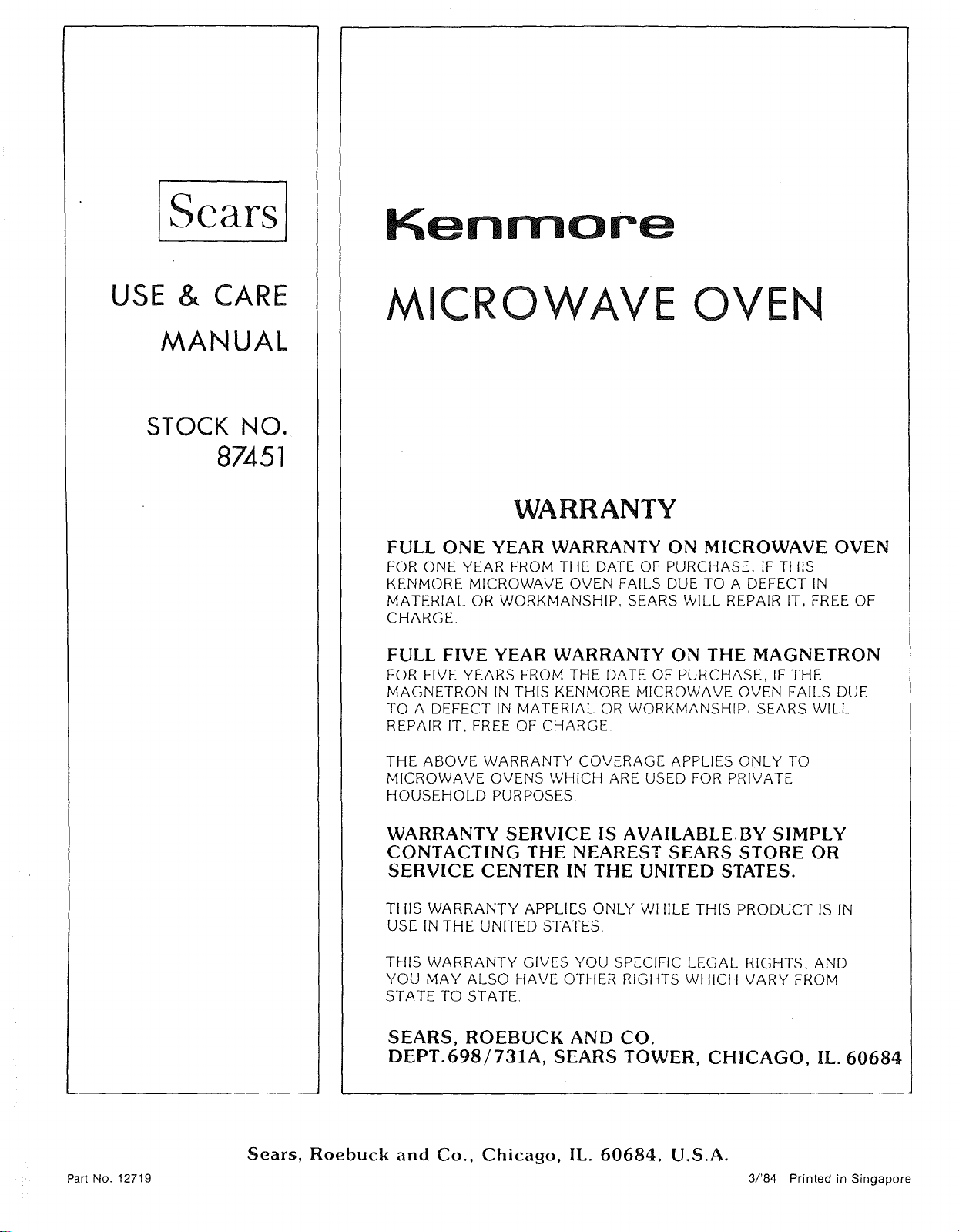
WARRANTY
FULL ONE YEAR WARRANTY ON MICROWAVE OVEN
FOR ONE YEAR FROM THE DATE OF PURCHASE, IF THIS
KENMORE MICROWAVE OVEN FAILS DUE TO A DEFECT IN
MATERIAL OR WORKMANSHIP, SEARS WILL REPAIR IT, FREE OF
CHARGE.
FULL FIVE YEAR WARRANTY ON THE MAGNETRON
FOR FIVE YEARS FROM THE DATE OF PURCHASE, IF THE
MAGNETRON IN THIS KENMORE MICROWAVE OVEN FAILS DUE
TO A DEFECT IN MATERIAL OR WORKMANSHIP, SEARS WILL
REPAIR IT, FREE OF CHARGE.
THE ABOVE WARRANTY COVERAGE APPLIES ONLY TO
MICROWAVE OVENS WHICH ARE USED FOR PRIVATE
HOUSEHOLD PURPOSES.
WARRANTY SERVICE IS AVAILABLE,BY SIMPLY
CONTACTING THE NEAREST SEARS STORE OR
SERVICE CENTER IN THE UNITED STATES.
THIS WARRANTY APPLIES ONLY WHILE THIS PRODUCT ISIN
USE INTHE UNITED STATES.
THIS WARRANTY GIVES YOU SPECIFIC LEGAL RIGHTS, AND
YOU MAY ALSO HAVE OTHER RIGHTS WHICH VARY FROM
STATE TO STATE.
SEARS, ROEBUCK AND CO.
DEPT.698/731A, SEARS TOWER, CHICAGO, IL. 60684
Part No. 12719
Sears, Roebuck and Co., Chicago, IL. 60684, U.S.A.
3/'84 Printed in Singapore