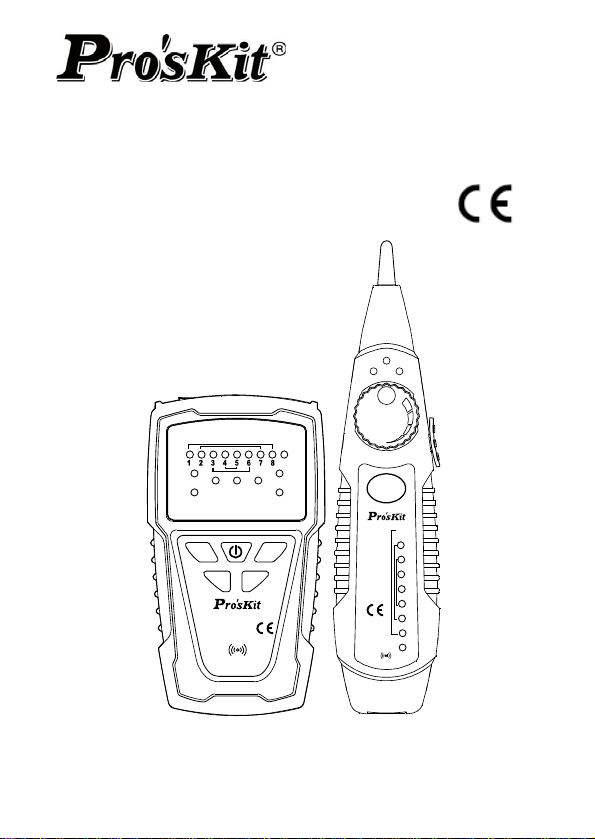
MT-7028
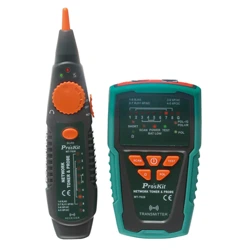
Network Toner & Probe Kit
SCAN
TEST
POL
MT-7028
MT-7028
NETWORK TONER & PROPE
TRANSMITTER
RECEIVER
NETWORK
TONER & PROPE
1
2
3
4
5
6
7
8
G
LED
OFF
NCV
1-8 RJ45
2-7 RJ11 6P/6C
3-6 6P/4C
4-5 6P/2C
POL
-
/G
POL+/R
1-8 RJ45
2-7 RJ11 6P/6C
3-6 6P/4C
4-5 6P/2C
G
POL
TEST
POWER
BAT LOW
SHORT
Ω
Ω
SCAN
SCAN
User’s Manual
1
st
Edition,
©2014 Copyright by Prokit’s Industries Co., Ltd.

1
Thank your for your purchase of Pro’sKit MT-7028 Network Toner &
Probe Kit. The Toner and Probe set is used to quickly trace and
identify cables or wires within a group and also check the operation
of telephone lines. With proper use and care, this instrument will
provide many years of reliable service.
Index
Overview……………………………………………………….……….1
Features………………………..……………………….………….…..1
Unpacking………………………………………………………………3
Specifications………………………………………………..…………3
Safety Information………………..……………………………………5
MT-7028 Transmitter…………………….……………………………6
MT-7028 Receiver…………………………….………………………9
Locating and Isolating Cables………………………………………11
Locating Individual Wire Pairs with the MT-7028 Analog Function
Isolating Cables………………………………………………………12
Cable Map testing……………………………………………………14
Live telecommunication equipment and router test………………18
Coaxial Cable & Continuity Testing…………………….….………19
Validating Telephone Service and Polarity………………..………20
NCV (Non-Contact Voltage) Testing…………………….….………21
Battery Life and Replacement………………………………………22
Maintenance & Trouble shooting……………………………………23
OVERVIEW
The MT-7028 let you easily locate and verify the cable status and
troubleshoot wiring for continuity, shorts, opens and crossover on
RJ45 Lan cable Cat 5、5e、6、7 (UTP/STP)、RJ11/12 Telephone cable
Cat. 3 (2/4/6 pin) & normal solid/Stranded wire by alligator clips
patch cord. Ideal for all installation and maintenance fields of
telecommunication, networking, datacom, Audio/Video, cable TV,
and all weather cabling, etc.
FEATURES
Wire Tracing up to 3KM
• The tone and probe kit lets you easily track wire directly in
connection with live telecommunication equipment and router.
Cable Mapping & status Indication up to 300M
• Fast/Slow scan functions.
• Display the result of pin to pin cable mapping.

2
• Display cable status and troubleshoot wiring for continuity, shorts,
opens and crossover.
Non Contact Voltage detection
• Tests voltage from 90 ~ 1000V, special design to make sure the
power is off before testing for circuit protection.
Polarity indication
• Identify the telephone line polarity easily.
Energy saving
• Automatically powers off after 1 hour of no operation.
ADVANCED FEATURES
• MT-7028 Transmitter generates: 1KHz audio signal with
two-tone (high / low) for selection. The maximum distance of
transmitter is
≧
3 kilometers. Works with MT-7028 receiver
by volume adjustment feature can precisely find the break
point in the range of 10~30cm. The MT-7028 receiver
contains indicated LEDs which is more accurate for testing.
• MT-7028 Transmitter works with the receiver for cable
mapping by LED lights indication. The instrument can verify
cable status for continuity, shorts, opens and crossover on
RJ45 Lan cable and RJ11 telephone cable and test
shielding/ unshielded wire. The maximum length that can be
tested is 300 meters.
• MT-7028 Transmitter: LED indicators to detect the common
wire resistance (> 300Ω) for bad connection.
• MT-7028 Transmitter has 60V AC or DC 48V protection.
Telecommunications equipment and routers can be tested in
live Electrical environments without turning off the power.
The transmitter can also identify the positive and negative
polarity telephone lines.
• MT-7028 Transmitter:with low battery indication function
and will turn off automatically after one hour non-working.
• MT-7028 Receiver:with Non Contact Voltage detection
feature which can detect AC voltage from 90~1000V to avoid
danger and damage by detecting the voltage in advance.
• MT-7028 Receiver:with LED lighting and earphone jack to
allow the product to be used in noisy or dark environments.
3
MT-7028 Transmitter:with dual jacks for RJ45 Lan cable and RJ11
telephone line. The transmitter can be tested with a patch cord for
RJ45 / RJ11. Coaxial cable, general cable and various wiring boards
can be tested by using with alligator clip cable.
PACKING
The MT-7028 product comes with the accessories listed below. If
any accessory is damaged or missing, contact the place of purchase
immediately.
MT-7028 Network Tone and Probe Kit packing:
• MT-7028 Transmitter.
• MT-7028 Receiver.
• RJ45 (8 pin) to RJ45 (8 pin) patch cords.
• RJ11 (6 pin) to RJ11 (6 pin) patch cords.
• RJ11 (6 pin) to alligator clips patch cord.
• Earbud
• Storage bag.
• User’s manual.
SPECIFICATIONS
MT-7028 Transmitter specifications
Tone frequency 1kHz
Max. distance of transmission ≧3km
Max. distance of cable map 300m
Max. working current ≦65mA
Tone mode Hi/Low two-note tone
Compatible connectors
RJ45(8 pin)/RJ11(6 pin) compatible
connectors for RJ45(8 pin)、
RJ11/12(6P/2C/4C/6C) cable map and
RJ45 tone、RJ-11(6 pin) connectors for
RJ11/12(6P/2C/4C/6C) tone
Cable types tested
RJ45 Lan cable Cat 5、5e、6、7
(UTP/STP)、RJ11/12 Telephone cable Cat
3 (6P/2C/4C/6C)
Function selection
5 Push button switch (POWER、SCAN、
TEST、Ω、POL)
Continuity test
1 LED (≦300Ω), Coaxial cable & normal
solid/Stranded wire by alligator clips patch
cord.
Max. signal voltage 8Vp-p
4
Cable map indication 8 LEDs, Fast/Slow dual speed
Shielded indication 1 LED
Phone line polarity indication 1 Dual color LED
Live telecommunication
equipment test and router test
Yes
Voltage protection AC 60V or DC 48V
Auto power off 1 hour
Low battery display 6.5V (Power LED flashes)
Battery type DC 9.0V (NEDA 1604/ 6F22 DC9V ×1pcs)
Dimension (L×W×D) 138×80×35 mm
Weight 140g
MT-7028 Receiver specifications
Frequency 1kHz
The Max. working current ≦50mA
Compatible connectors RJ45(8 pin)/RJ11(6 pin)
Function selection 3 Position mode switch (NCV、OFF、LED)
Earphone jack 1
Signal status indication 1 LED & Buzzer
Cable map indication 8 LEDs
Shielded indication 1 LED
NCV indication 1 LED (AC90~1000V,≥50mm,≤100mm)
LED illumination 1 LED
Battery type DC 9.0V (NEDA 1604/ 6F22 DC9V ×1pcs)
Dimension (L×W×D) 198×45×33 mm
Weight 80g
Transmitter drop test(Shock and Vibration):1 Meter
Operating temperature:0 ~ 50℃ (32 ~ 122℉)
Storage temperature:-10 ~ 60℃ (14 ~ 140℉)
Operating humidity:20% - 75% RH
Storage humidity:10% - 90% RH
Operating altitude:3,000 meters
Storage altitude:10,000 meters
SAFETY INFORMATION
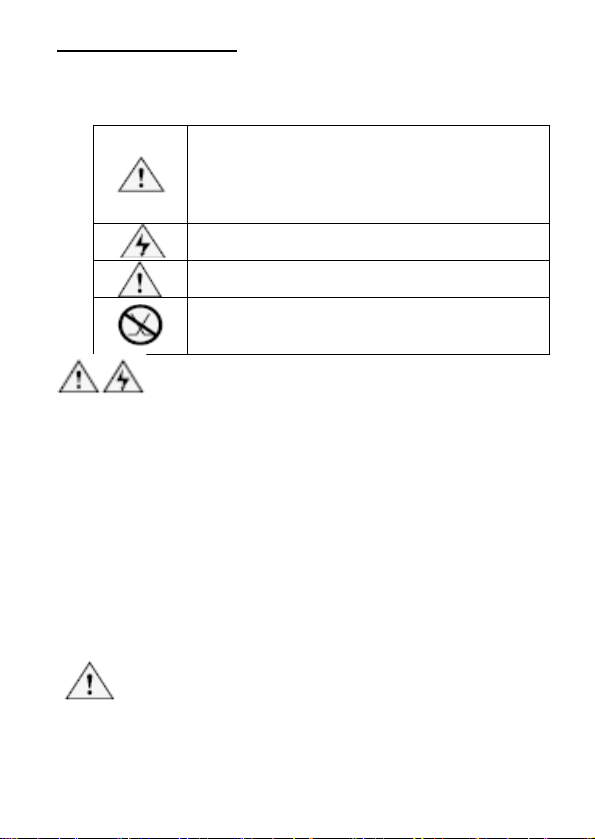
Table 1 describes the international electrical symbols used on the
tester and in this manual.
Table 1. International Electrical Symbols
Warning:Risk of personal injury. See
explanations in the manual.
Caution:Risk of damage or destruction to
equipment or software. See explanations in the
manual.
Warning:Risk of electric shock.
Please keep an eye on the status or function of
the equipment while operating.
This equipment not for connection to public
communications networks, such as active
telephone systems.
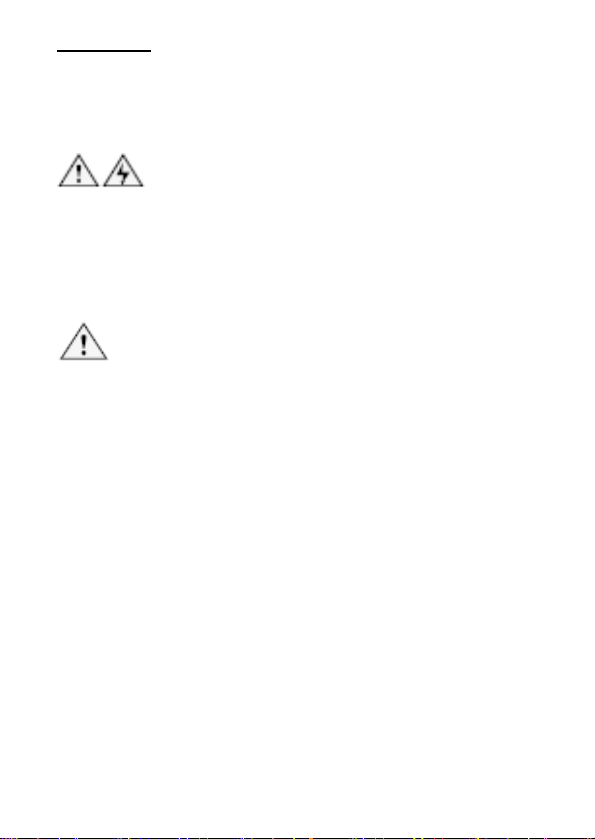
Warning
• Never use the Transmitter or Receiver on circuits of more
than AC 60V or DC 48V.
• Never use the Transmitter, Receiver, or test leads if they
are damaged. Inspect the cases and test leads for
damage before use.
• Disconnect unused test leads and connectors from the
Transmitter when testing telephone circuits.
• Never open the case except to change the battery or the
fuse; no user-serviceable parts are inside.
• Turn off the Transmitter or Receiver and disconnect all
test leads before replacing the battery.
• Use only a 9V battery, properly installed in the case, to
operate the Transmitter and Receiver.
• If this equipment is used in a manner not specified by the
manufacturer, the protection provided by the equipment
may be impaired.
Caution
• Avoid touching the Receiver tip to patch panel
connections and using the tip to dig into cable bundles.
Doing so regularly may damage the Receiver tip over
time.
5
•
To avoid unreliable test results, replace the battery as
soon as the low battery indication appears.
INTRODUCTION
MT-7028 Transmitter:
SCA N TEST
POL
MT-7028
NET W ORK TONER & P R OP E
TRANSMITTER
POL - / G
POL+ /R
1-8 RJ45
2-7 RJ 1 1 6P/6C
3-6 6P/4C
4-5 6P/2C
G
PO L
TEST
POW ER
BAT LOW
SHOR T
Ω
Ω
SCAN
2 1
3
4
5
6
11
12
9
10
8
7
14
13
15
16
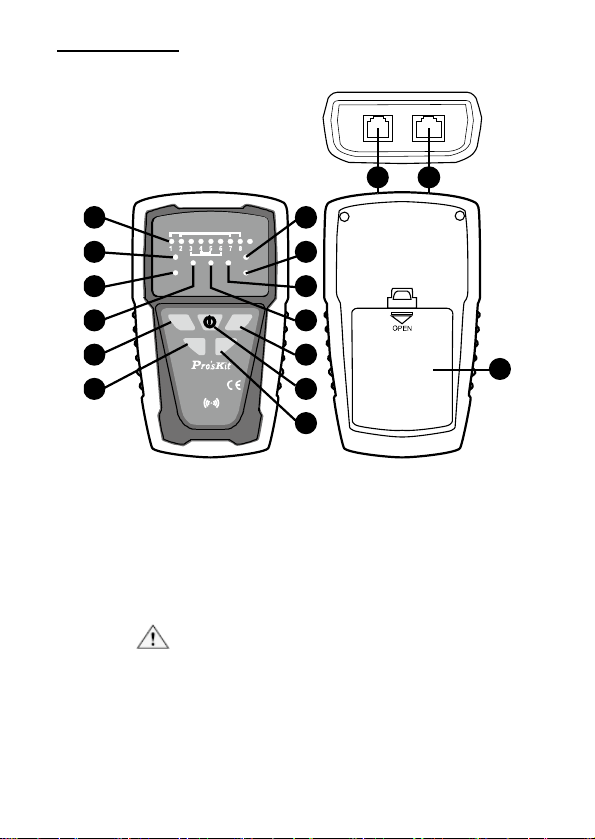
Figure 1 MT-7028 Transmitter Diagram
1. RJ45(8 pin)/RJ11(6/4/2 pin) Compatible connectors:
Used for RJ45/ RJ11 cable mapping and RJ45 cable
tracing. When used for RJ45/ RJ cable mapping, please
connect the cable to RJ45(8 pin)/RJ11(6/4/2 pin)
Compatible connectors of MT-7028 receiver to start the
function.
Caution! Do not plug in any live cable to the
RJ45(8 pin)/RJ11(6/4/2 pin) Compatible
connectors. RJ11 cable tracing can not be
operated by this connector.
6

2. RJ11(6 pin
) Connectors:Used for RJ11 (6P/6C/4C/2C)
cable tracing.
Caution! Do not plug in any live cable over AC
60V/ DC 48V to the transmitter.
3. 「1~8、G」
Cable map & Shielded indication:Work with
MT-7028 receiver for RJ45/ RJ11 cable mapping
indicated by 8 LED and for shielded/unshielded indication.
4. 「SHORT」 Continuity test indication:When the
indication lights up means the resistance of cable is less
than 300Ω or the cable is short. If the indication doesn’t
light up, it means the resistance of the cable is over 300Ω
or the cable is open.
5. 「Ω」 Continuity function indicator:Push “
” button
to start continuity/ short features when the indication light
up.
s
6. 「SCAN」 Locating and Isolating Cables function
indicator:Push “
” button for cable tracing feature.
When the indication LED flickers slowly, it means low-tone
tracing function is working. Push “scan” button again to
switch to high-tone tracing function and the indication LED
will flicker faster.
7. 「POWER/BAT LOW」 Power ON/OFF & Battery low
indicator:Push “
” button to turn on the transmitter.
When the indication lights up, the product is working.
Select different functions by pushing other buttons.
When the battery voltage is less than 6.5V, the indication
LED will flicker, please replace a new battery for the
product.
8. 「TEST」 Cable map & Shielded function indicator:
Pushing “
” for cable mapping and shielded function
indication. When the LED flickers slowly, the low speed
scan is working. Push the TEST button again, the fast
speed scan will be operated.
9. 「POL-/G,POL+/R」 Phone line polarity indication:
This is a dual color LED. When the red alligator clip
connects positive polarity and black alligator clip connects
negative polarity, the LED will be in RED color. If the
7

alligator clips
connect in opposite way, the LED will be in
GREEN color. If the LED did not light up, it means there is
no electrical on the cable.
10. 「POL」 Phone line polarity function indicator:Push
“
” button to operate the feature of phone line polarity
checking.
11. 「
」 Isolating Cables function push button:Push
“
” button for cable tracing feature. When the indication
LED flickers slowly, it means low-tone tracing function is
working. Push “scan” button again to switch to high-tone
tracing function and the indication LED will flicker faster.
12. 「
」 Continuity function push button:Push “Ω”
button to start continuity/ short features when the LED
lights up.
13. 「
」 Power ON/OFF push button:Push “ ” button
to turn on the transmitter. Push the button again to turn off
the transmitter and the “POWER/ BAT LOW” indicator will
be off as well.
14. 「
」 Cable map & Shielded function push button:
Push “
” for cable mapping and shielded function
indication. When the light flickers slowly, the low speed
scan is working. Push the TEST button again, the fast
speed scan will be operated.
15. 「
」 Phone line polarity function push button:Push
“
” button to operate phone line polarity function.
16. Battery cover
8
MT
-7028 Receiver:
MT -7028
RECEIVER
NETWORK
TONER & PROPE
1
2
3
4
5
6
7
8
G
LED
OFF
NCV
1-8 RJ45
2-7 RJ 11 6P/6C
3-6 6P/ 4C
4-5 6P/ 2C
SCAN
1
2
7
4
3
5
11
9
13
12
8
2
6
10
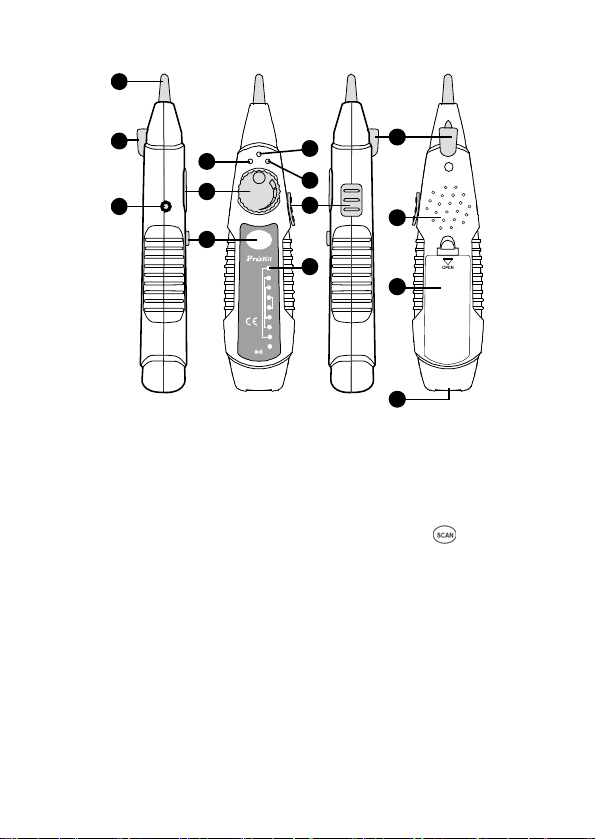
Figure 2 MT-7028 Receiver Diagram
1. Probe:Used for cable tracing and NCV detection.
2. LED illumination:Used for dark working environment.
3. Power ON/OFF indicator:The indicator will be lighted up
when the switch at LED or NCV position and the receiver
started the functions. When the switch at OFF position,
the indicator will be light up when pushing “
” button for
cable tracing.
4. NCV indicator:When the probe closes to the tested
object to detect the voltage, the indicator will light up if the
object carried AC90~1000V. If the indicator did not light up,
there is no voltage detected from the object or the AC
voltage is less than 90V.
5. Signal status indicator:When doing cable mapping by
probe, if the indication LEDs (1~8) more light up, the
signal is stronger.
9
6. V
olume control:By adjusting the volume from high to low
to adjust the sensitivity of probe. Move the position of
receiver from 30 cm to 10cm to find out the cable you are
tracing.

7. Earpho
ne jack Φ3.5mm:Earphone can be used when
the working area is noisy.
8. Function selection:3 Position mode switch (NCV、
OFF、LED)
9. Speaker:When “SCAN” feature is working, if the speaker
is louder, the signal is stronger.
10. 「
」 Locating and Isolating Cables function push
button: When pushing the “
” button, the feature starts
and the battery indicator will be light on.
11. 「1~8、G」 Cable map & Shielded indication:Work with
MT-7028 transmitter for RJ45/ RJ11 cable mapping
indicated by 8 LED and for shielded/ unshielded
indication.
12. RJ45(8 pin)/RJ11(6/4/2 pin) Compatible connectors:
Used for RJ45/ RJ11 cable mapping. When used for
RJ45/ RJ11 cable mapping, please connect the cable to
RJ45(8 pin)/RJ11(6/4/2 pin) Compatible connectors of
MT-7028 transmitter to start the function.
Caution!
Do not plug in any live cable to the RJ45(8
pin)/RJ11(6/4/2 pin) Compatible connectors.
13. Battery cover.
10
OPERATION
Locating and Isolating Cables:
Using MT-7028 Networking Tone & Probe kit to locate and insolate
cables using the 1KHz analog, also trace twisted wires (UTP, STP,
Cat 5e, Cat 6) and telephone line (Cat 3). Use with a patch cord for
RJ45 / RJ11. Coaxial cable, general cable and various wiring boards
can be tested by using with alligator clip cable.
Warning
• It is not intended to be used on live wires with a DC
power source (e.g., live telephone lines), nor will it work
on wire pairs that are carrying AC signals.
• Use RJ45(8 pin)/RJ11(6/4/2 pin) compatible connector
for RJ45 cable tracing. Use RJ11(6 pin) connector for
RJ11(6P/6C/4C/2C) cable tracing. Use RJ11 (6 pin)
connector and work with alligator clips for coaxial cable,
general cable and various wiring boards.
Caution
• To locate and isolate cables using the 1KHz analog
toning mode, please avoid interference sources like
electronic devices with adapter, induction coil, and
motors nearby. White noise from MT-7028 Receiver is
normal when your Transmitter is near any of the
interference. If you cannot locate the signal on
2-conductor cables, the cable may be shorted. Please
keep away from the interference sources or turn off the
electronic devices.
• The position on the MT-7028 Transmitter and Receiver
lets you use the Receiver to trace using an analog 1KHz
tone. When using the Receiver to isolate the tone source
in the cable bundle or at the patch panel, the signal
might be interfered with or decreased and the signal will
not pass through metal tubes.
• It is not necessary to touch the Receiver’s tip to the
cabling or patch panel when searching for the
Transmitter’s signal.
• Make sure the black alligator clip of the Transmitter is
connected to the ground before use.
MT-7028 Transmitter provides two 1 KHz analog toning modes,
Hi/Low two-note tone, for location and isolating cables. Both toning
signals are available at all connectors on the Transmitter.
11
Loca
ting Individual Wire Pairs with the MT-7028 Analog
Function
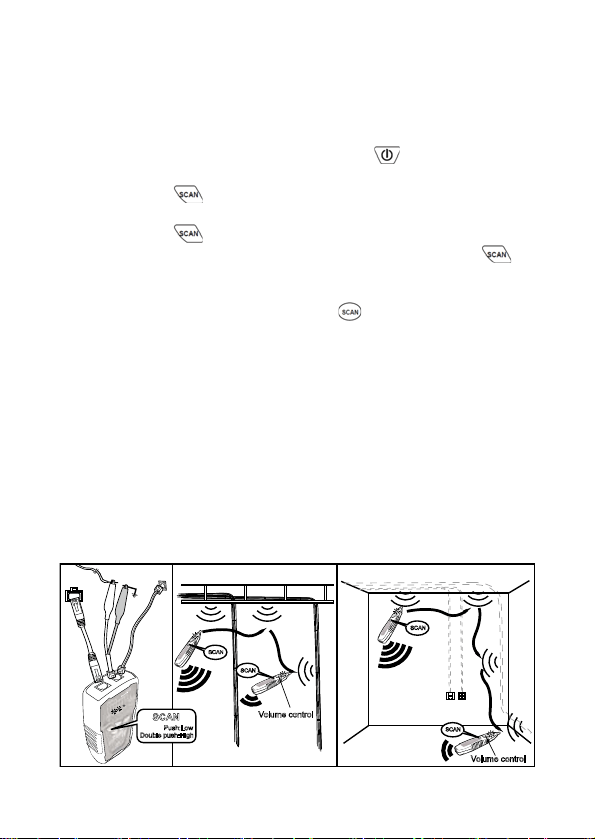
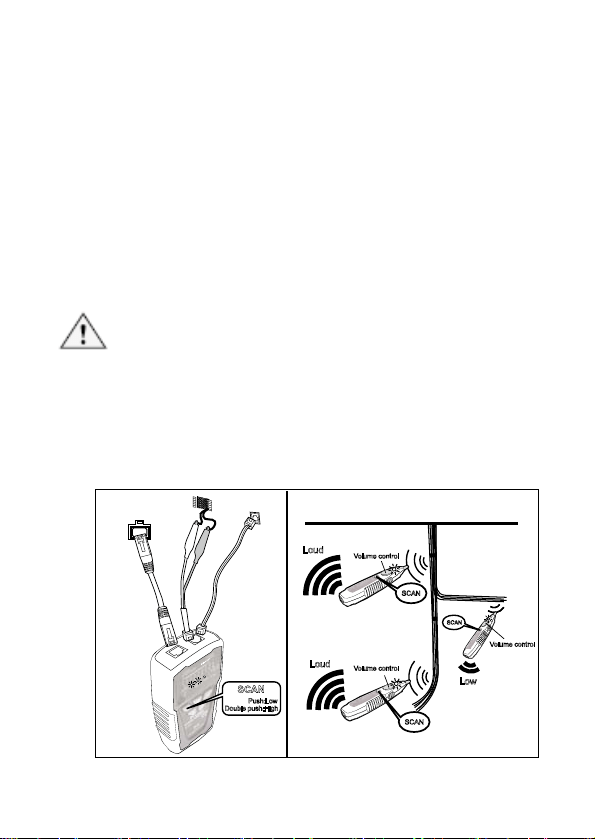
To locate cables, do the following steps (Figure 3):
1. Connect the black alligator clip of the Transmitter to the
ground, and then connect the red clip to a jack or
punch-down block as shown in Figure 3.
2. As the Figure 3 shown, when push
, the indicator of
“POWER/ BAT LOW” will light up and turn on the power.
Push
button for cable tracing. When the RED
indicator flickered, the low-tone cable tracing is working.
Push
button again to feature the high-tone cable
tracing, the RED indicator will flicker faster. Push
button again, the RED indicator will be stopped and
standby for next operation.
3. AS the figure 3 shown, push “
” on receiver to operate
cable tracing function. The tracing sound will be output
from speaker. When put on earphone, there will be no
sound from speaker, but from the earphone.
4. Use the Receiver to find the general location of the tone at
a cable rack, patch panel, or behind a wall. In locating
mode, the Receiver’s LEDs light up in red from 1 to 8, then
wrap back and light up from 1 to 8 again as the signal
strength increases.
5. Adjust the Volume Control on the Receiver to locate the
wire pairs from 10cm to 30cm.
SCAN
SCAN
SCAN
SCAN
SCAN
Push:Low
Double push:High
RJ45
Jack
RJ11 J
ack
Volume cont rol
Volume cont rol
Ground
Figure 3 Locating cables
12
Isolati
ng Cables:
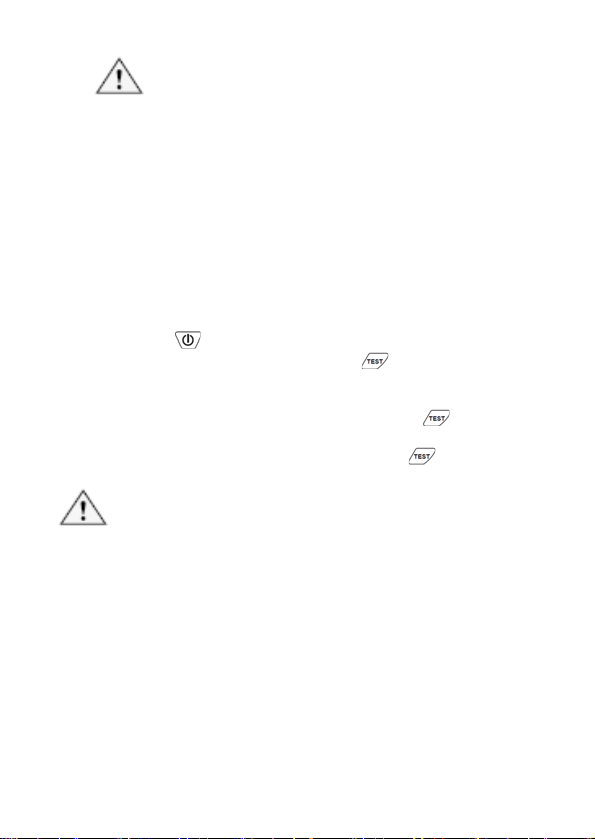
To isolate the tone source in the cable bundle or at the patch panel,
do the steps as described in the previous section of “Locating
Cables”.
1. Strip the cable’s shield to a length of between 30 to 45
centimeters and divide the wires into two parts. Do the
wire separation to isolate the cables to verify the signal of
each part. If the beeper gets louder and LED lights up, you
have located the position you are looking for.
2. Adjust the volume control from high to low to enable
looking for a more difficult to identify wire. Narrowing the
length from 30 to 10 centimeters will help to more
accurately identify the wire pairs.
3. Repeat the steps of 6 and 7 to isolate the bundled cables.
Caution
• If you cannot locate the MT-7028 signal on 2-conductor
cables, the cable may be shorted or opened. Use the
Continuity Test (Fig. 8) to check for shorts or opens on
coax and non-terminated cables.
SCAN
SCAN
SCAN
SCAN
Push:Low
Double push:High
Loud
Loud
Volum e control
Volum e control
Volume control
Low
RJ45 Jack
RJ11 Jack
Telephone
block
Figure 4 Isolating Cable
13
Cable Ma
p Testing:
Caution
• When use the product for RJ45 or RJ11 cable
mapping, please only plug in the cable to
RJ45/RJ11 compatible connector on transmitter.
Do not use RJ11 (6pin) connector.
• You can use the MT-7028 Transmitter or Receiver
to validate the cable map on RJ45/RJ11 by
RJ45/RJ11compatible connector on transmitter.
The cable map function finds the most common
wiring faults on twisted pair cabling: shorts, opens,
and crossed pairs.
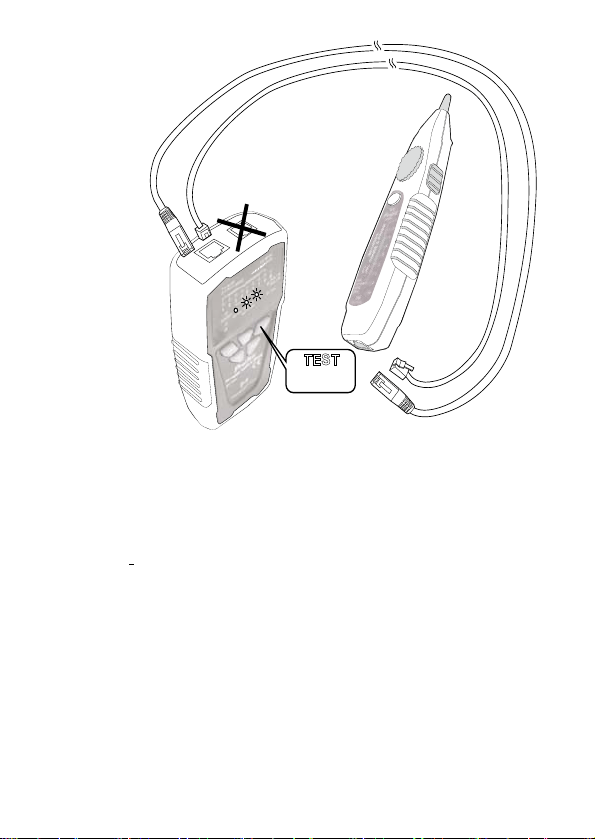
1. Connect the MT-7028 Transmitter or Receiver to RJ45/
RJ11 jacks.
2. Push “
”, the indicator of “POWER/ BAT LOW” will light
up and turn on the power. Push “
” on MT-7028
transmitter for cable mapping and shielded function
indication. When the green LED indicator flickers slowly,
the low speed scan is working. Push the “
” button
again, the green LED indicator flickers faster and the fast
speed scan will be operated. Push the “
” button again,
the product will be standby for next operation.
Caution
• Each LED that corresponding to an active pin flashes
briefly, and then should light for about 1 second. For fast
scan cable mapping, the light will be flicker about 0.5
second, from 1 to 8, G. If the cable is open, the LED
indicator will not light up.
• Before cable map testing, repeat the procedures of
“Locating Cables” on page 7 to identify the correct
connector or wires on the other end of the cable if
necessary.
14
TEST
Push:Slow
Push again:Fast
RJ45/RJ 11 Jack
(8P/8C,6P/6C,6P/4C,6P/2C)
RJ45/RJ 11 Jack
(8P/8C,6P/6C,6P/4C,6P/2C)
Figure 5 Validating Cable Maps
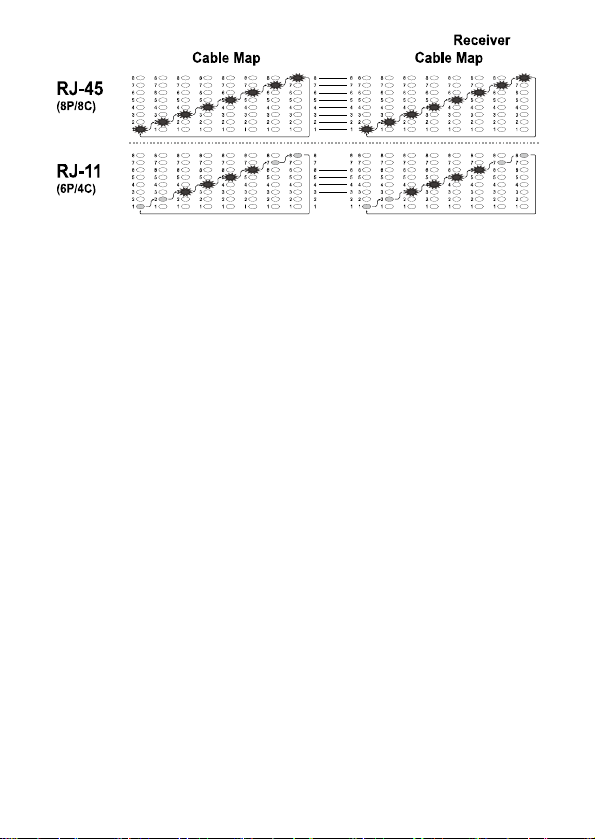
3. Different connectors generate different LED and sound
indications as shown in Figure 6.
• RJ45(8P/8C) LED indication:MT-7028 Transmitter
(from 1-8 seconds in sequence) is synchronized with
the MT-7028 Receiver cable map.
•
RJ11(6P/6C, 6P/4C, 6P/2C) LED indication:MT-7028
Transmitter cable map, 6P/6C each second from 2 to 7
in sequence, 6P/4C each second from 3 to 6 in
sequence, 6P/2C each second from 4 to 5 in sequence
is synchronized with the MT-7028 Receiver cable map.
If it encounters an empty line, the indication will cease.
15
MT-7028 MT-7028Transmitter
Figure 6 Different Connector’s Cable Map
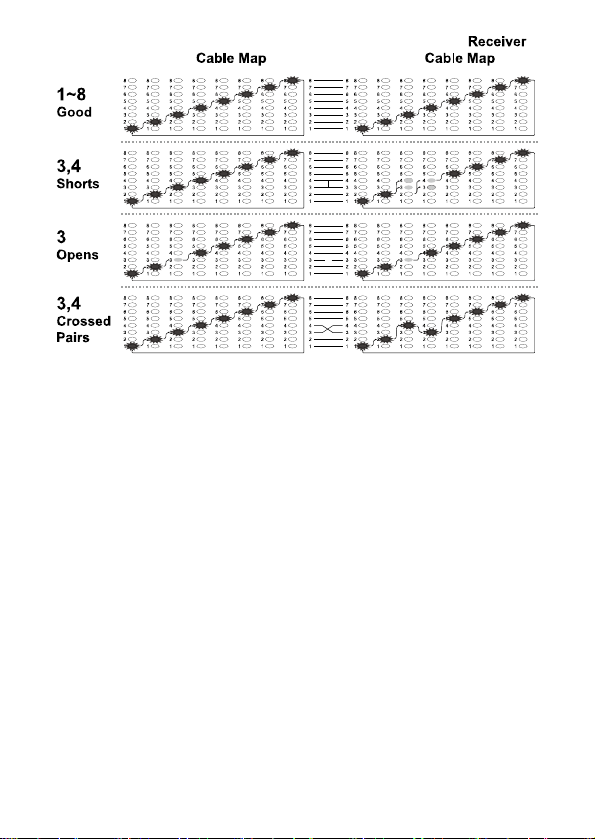
4. You can use the MT-7028 Transmitter and Receiver to validate
the cable map on RJ11 and RJ45 connectors. The cable map
function finds the most common wiring status on twisted pair
cabling: good, shorts, opens, and crossed pairs as shown in
Figure 7.
• Good wiring: Each LED that corresponding to an active
pin flashes briefly and in a stairway order.
• Shorts: If two LEDs turn on for 1 second at the same time,
those two pins are shorted together. If more than 2 wires
are shorted together, the LEDs for the shorted pins
indicate opens.
• Opens: If an LED flashes briefly, then no LEDs turn on,
that pin is open.
• Crossed pairs: If one LED flashes briefly, then another
LED lights for one second, the wire for the first LED is
crossed pairs to the pin for the second LED.
5. Each LED that corresponds to an active pin flashes briefly, it
should light for about 1 second. The brief flash shows which
LED is next in the sequence.
16
MT-7028MT-7028
Transmitte
r
Figure 7 good wiring, shorts, opens, crossed pairs
17
Li
ve telecommunication equipment and router test:
Caution! The feature can only be used for testing cable
continuity and opens, cannot be used for cross over and short.
1. According to Figure 8, connect MT-7028 transmitter and
working router by RJ45(8P/8C).
2. Push
button to turn on the power, “POWER/ BAT
LOW” indicator will light up. Push
button on
transmitter to feature cable map function. When the TEST
indication green LED flickers slowly, the slow cable
mapping is working and the red cable map LED starts
scanning. Push
button again, the TEST indication
green LED twinkled fast, the fast cable mapping is
working and the cable map LED starts scanning. Push the
button again, the TEST green LED light will be off and the
product will be standby for next operation.
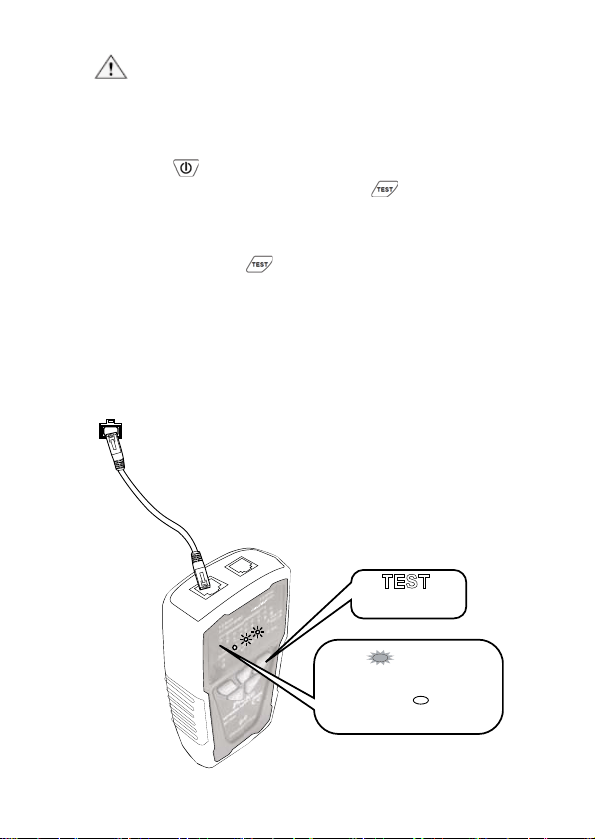
3. When the “1~8, G” LED indicator on MT-7028 transmitter
lighted one by one, the cable (1~8, G) is good. If any of
LED indicator is not lighted, the cable is damaged.
RJ45 Jack
TEST
1~8.G Red
No Light
indicates the cable is good
connection
1~8.G
indicates the cable is damaged
Push:Slow
Push again:Fast
Lights up
Figure 8 Cable testing on working line
18
Coaxial Cable &
Continuity Testing:
DA
NGER:Before testing, please be sure the power
of receiver is OFF.
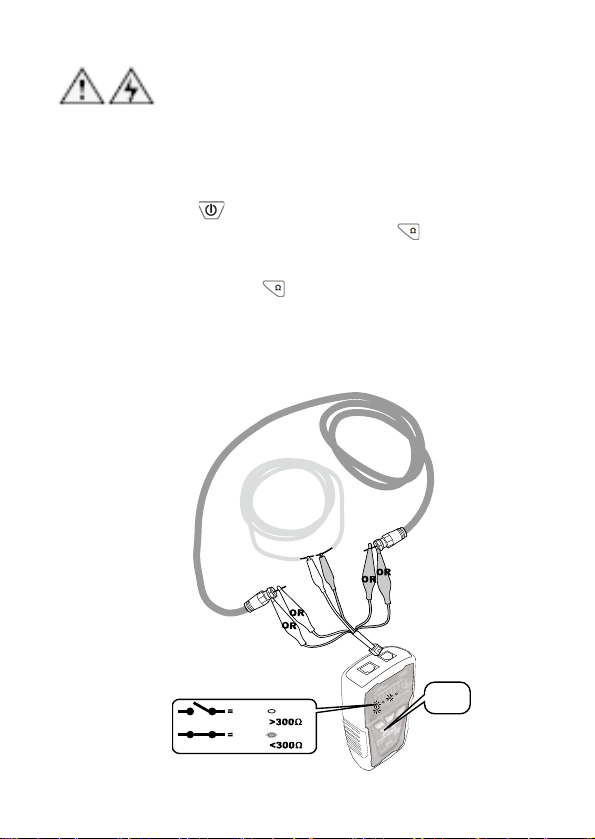
To validate cable shield during cable map tests, do the following as
shown in Figure 9:
1. Connect the Transmitter to the circuit as shown in
Figure 8. Connect the test leads to the coaxial cable to
be tested.
2. Push “
” button to turn on the power, “POWER/ BAT
LOW” indicator will light up. Push “
” button on
transmitter for short/ open function, the green LED
indicator lights up and the short/ open testing is
working. Push “
” again, the green LED lights off and
the product is standby for next operation.
3. When “SHORT” red LED indicator lights up, the cable
is connected. (the resistance of cable is less than
300Ω). If the indicator is off, the cable is short or
resistance of the cable is over 300Ω .
Testing for
continuity
Validating the
cable ’s shield
push
Ω
OPEN
SHORT
Open : Resistance
Short : Resistance
No light
RED
19
Figure 9 Coaxial Cable & Continuity Test
Validati
ng Telephone Service and Polarity:
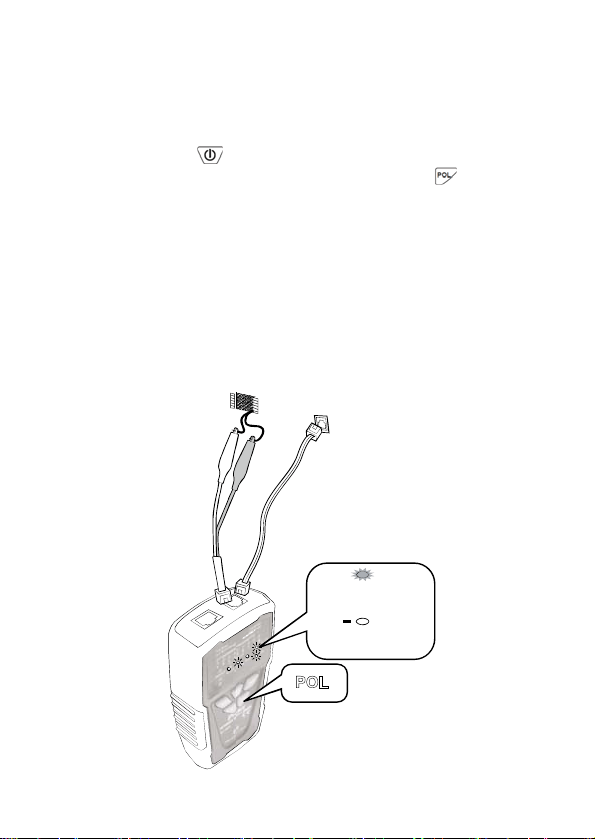
Please follow the following steps to check the polarity of telephone
lines:
1. Connect the Transmitter to the circuit as shown in
Figure 9. Connect the test leads to the telephone
punch-down blocks, RJ11, and RJ45 jacks.
2. Push
button to turn on the power, “POWER/ BAT
LOW” indicator will light up. Then push
to operate
the polarity indication feature and the LED indicator will
light up. Push the button again to get the product back
to standby status.
3. 「POL-/G,POL+/R」LED indicator is dual color
(Red/ Green). The LED indicator of the Transmitter
indicates the status as below:
• Red light:Red test lead at positive (+) polarity;
Black test lead at negative (-) polarity.
• Green light:Red test lead at negative (-)
polarity;Black test lead at positive (+) polarity.
• No Light:Non service or line fault.
POL
POL
RED
Green
Red test lead (+ Polarity)
Black test lead(- Polarity)
Red test lead (- Polarity)
Black test lead(+ Polarity)
+
POL
RJ11 Jack
Telephone
Block
20
Figure 10
Validating Telephone Service and Polarity
NCV (N
on-Contact Voltage) Testing:
Caution
• The feature can be used before locating, isolating,
cable mapping to identify if the tested cable is with
AC voltage. It can not only help to ensure the safety
of user and avoid possible electric shock or personal
injury, but also protect the product from being
damaged by AC power.
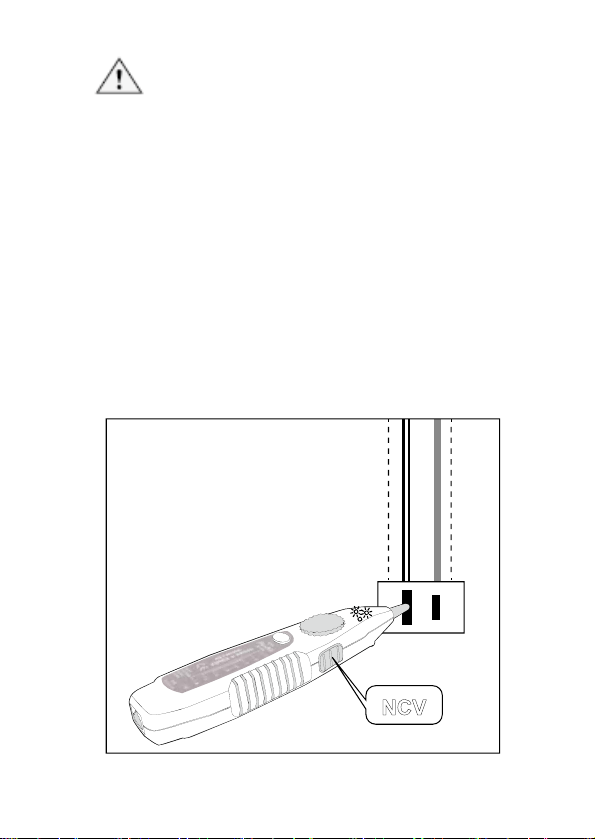
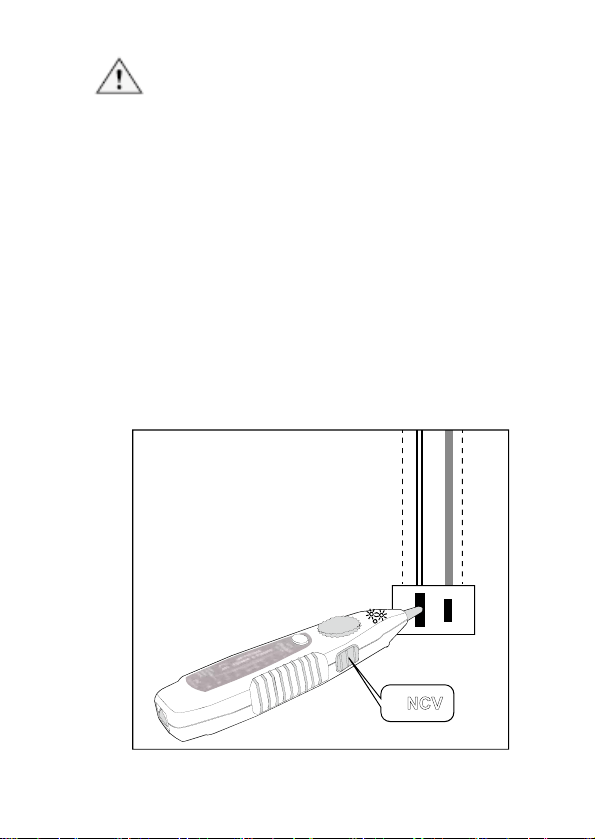
1. Per Figure 11, turn the switch to “NCV”, the function is
started when the power indication is on.
2. When doing the NCV testing, place the probe of MT-7028
receiver to the tested cable, the NCV indicator twinkled fast
and the buzzer sounded it means the tested objective has
AC 90~1000V. If the indicator did not come on and no
buzzer sounded, it means the tested objective has AC
power less than 90V or there is no AC power on it.
AC
Socket
NCV
Figure 11 Non Contact Voltage Test
21
Batter
y Life and Replacement
Caution
To avoid unreliab
le test results, replace the battery as soon
as the low battery indication appears.
Warning
To avoid possible electric shock or personal injury, turn off
the Transmitter or Receiver and disconnect all test leads
before replacing the battery.
Battery Status: ”BAT LOW” LED lights up on the Transmitter
indicates the voltage is under 6.5V for powering up the device.
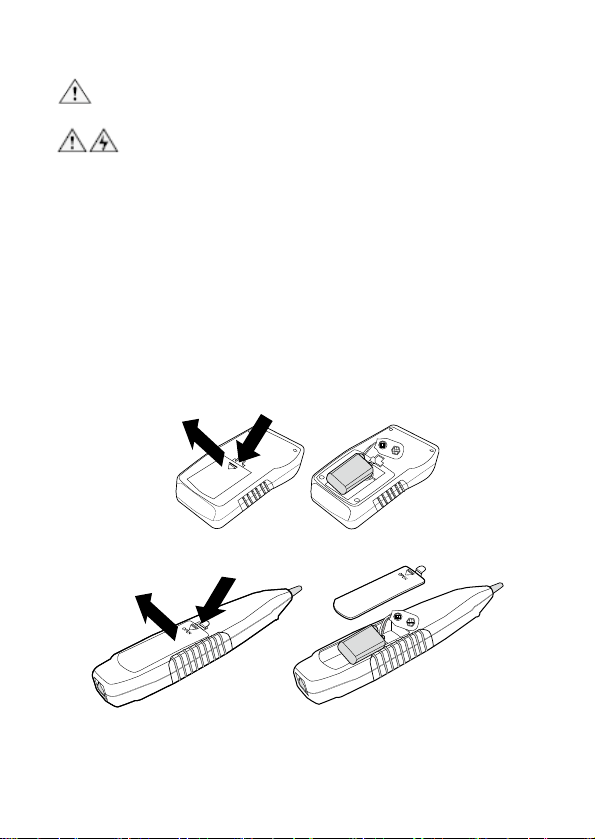
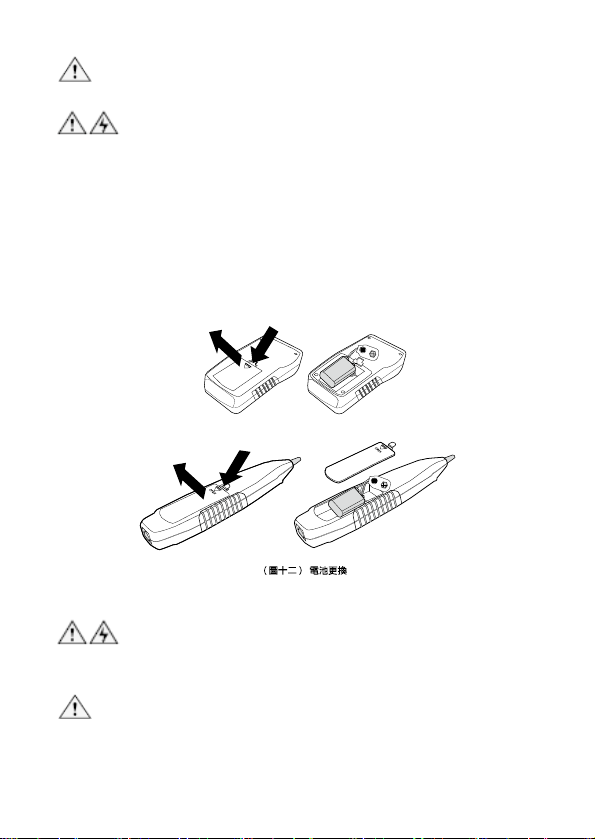
To replace the battery, do the following (Fig 12):
1. Turn off the Transmitter or Receiver and disconnect all
test leads before replacing the battery.
2. Properly installed in the case to power the Transmitter
and Receiver.
3. Use only a 9V (6FF22) battery.
O
P
E
N
Figure 12 Replacement of the Battery
22
Mainte
nance & Trouble shooting:
Warning
Turn off the Transmitter or Receiver and disconnect all test
s before replacing the battery. lead
Caution
To avoid damagi
ng the case, do not use solvents or
abrasive cleansers. Clean the case with a soft cloth
dampened with water or a mild soap solution.
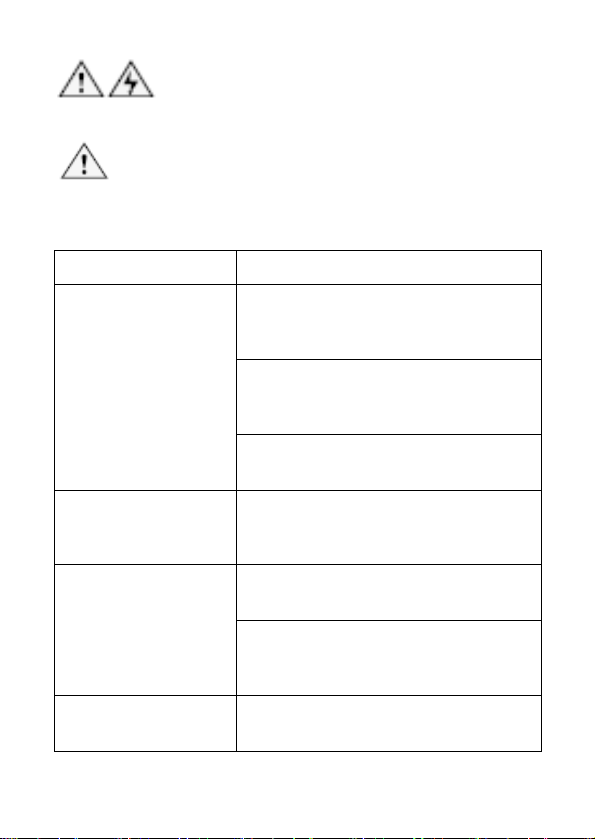
Trouble shooting
Possible Problems Trouble shooting
1. Shortage of battery power: Check the
batter on both transmitter and receiver.
If the battery voltage is less than 6.5V,
please replace with a new battery.
2. Make sure the switch position on
receiver is “OFF” or “LED”. The SCAN
function will not work if the switch is at
“NCV” position.
The signal from
transmitter can not be
detected by receiver
3. Device damaged: please return the
product to the place you purchased the
product for maintenance.
No signal received from
transmitter on Live
telecommunication
device testing
There might be conflict between the signal
from telephone office and the signal from
transmitter. Please turn off the telephone
exchange device.
LED indicator broken: please return the
product to the place you purchased the
aintenance. product for m
Incorrect cable mapping
result
Improper connection of networking or
telephone cables: please reconnect the
cables toRJ45/ RJ11 compatible
connectors.
Others
Device damaged: please return the
product to the place you purchased the
product for maintenance.
23

24
MT-7028 音頻網路測試器
使用說明書
感謝您購買和使用 Pro’sKit MT-7028 音頻網路測試器,使用本儀器前請仔細閱
讀說明書,閱讀後請妥善保存,以備日後查閱。
目錄:
特點概述………………………………………………….………………………24
產品特點………………………………………………………………………….25
功能介紹…………………………………….……………………………………26
包裝內容…………………………………………………….……………………26
產品規格…………………………………………………………………….……26
安全資訊……………………………………………………….…………………27
MT-7028 音頻產生器外觀圖……………………………………………………28
MT-7028 接收器外觀圖…………………………………………………………30
使用 1KHz 音頻信號查找、分離電線………………………….………………31
查找電線………………………….………………………………………………32
分離電線……………………………………….…………………………………34
線對表(Cable Map)測試………………..………………………………………34
工作中的網路檢測………………………………………………………………38
同軸電纜線和電線連通測試……………………………………………………39
電話正負極性測試………………………………………………………………40
NCV 非接觸驗電………………………………..………………………………41
電池狀態與電池更換……………………………………………………………42
維護與簡易故障排除……………………………………………………………43
特點概述:
MT-7028音頻網路測試器--能定位、分離、導通、查找RJ45網路線(UTP、STP、
Cat 5e、Cat 6、Cat 7)、RJ11/12電話線(Cat 3),且能使用戶確認並診斷電纜,
佈線的通路、短路、斷路、交叉…等現象,並確認接線順序線號(線對表(Cable
Map)和電話線的接線極性。還提供視覺和音頻信號強度指示,使測試距離與精
確度更容易精準掌握。和測試一般電線接觸不良所產生的阻抗過大(>300Ω)的問
題。MT-7028音頻網路測試器--提供了完整的配件,讓用戶可以輕易的檢測RJ45
插座、RJ45連接線、RJ11插座、RJ11連接線,並具有鱷魚夾,可應用於測試
同軸電纜線、一般電線和電信/網路接線板。
適用於電信、網路、數據通信、有線電視、室內外配線⋯等專業的裝配、查線、
維修工程人員使用。

25
特點:
尋線長度達 3 公里
• 音頻網路測試器讓你輕鬆尋線,可直接與具有活電的電信設備和路由器連
接。
線序/故障最大測試距離達 300 米
• 具有快速/慢速掃描功能可供選擇。
• 顯示各條線芯的線對表(Cable Map)引腳的結果芯電纜的映射。
• 顯示各線序/故障的通路、短路、斷路、交叉的現象和測試屏蔽/非屏蔽線。
非接觸電壓檢測
• 可測試 AC90~1000V 的電壓,特殊的設計,提醒你在進行測試之前,關
閉電源.保護設備。
電話極性測試
• 輕鬆識別電話線路的極性。
節能
• 當 1 小時無動作後,自動關機節能省電。
功能簡介:
• MT-7028 音頻產生器:具有產生 1KHz 的音頻信號和提供雙音調的
高/低兩種音色可以選擇;音頻發射最大距離≧3 公里,配合 MT-7028
接收器的音量大小調整功能,可經由音量大小控制,精確控制查找
斷線位置在 10~30cm 範圍內;MT-7028 接收器具有 LED 信號強度
指示燈號,使測試距離與精確度更容易精準掌握。
• MT-7028 音頻產生器:配合 MT-7028 接收器的兩端 LED 燈號顯示
線對表(Cable Map),可測試 RJ45 網路線、RJ11 電話線的通路、
短路、斷路、交叉的現象和測試屏蔽/非屏蔽線,線纜故障測試最大
長度 300 米 。
• MT-7028 音頻產生器:具有測試一般電線阻抗(>300Ω)的 LED 燈號
指示,可輕易檢出電線接觸不良的問題。
• MT-7028 音頻產生器:具有交流 60V 或 直流 48V 保護,可在活電
下測試電信設備和路由器,不必關閉電源,可辨識電話線路的正負
極性。
• MT-7028 音頻產生器:具有 1 小時無動作自動關機和電池低電壓指
示功能。
• MT-7028 接收器:具有非接觸驗電(NCV) 交流 90~1000V,可預先
測試設備.線路的電壓,避免觸電危險或損壞設備。
• MT-7028 接收器:
具有 LED 照明和
耳機插座,提供給任何吵雜.光
線不足的環境使用。
• MT-7028 音頻網路測試器:可以配合 RJ45/RJ11 兩用插座,測試
RJ45 網路線和 RJ11 電話線、搭配跳接線可以測試 RJ45/RJ11 插
座的接線,搭配鱷魚夾連接線,可測試同軸電纜線、一般電線和各
種接線板。
26
包裝內容:
MT-7028音頻網路測試器的附件如下。若發現有東西損壞或缺少,請立即與購
買處聯繫。
• MT-7028音頻產生器。
• MT-7028接收器。
• RJ45(8 pin)至RJ45(8 pin)轉接線。
• RJ11(6 pin)至RJ11(6 pin)轉接線。
• RJ11(6 pin)對鱷魚夾線。
• 耳機。
• 攜存袋。
• 使用手冊。
產品規格:
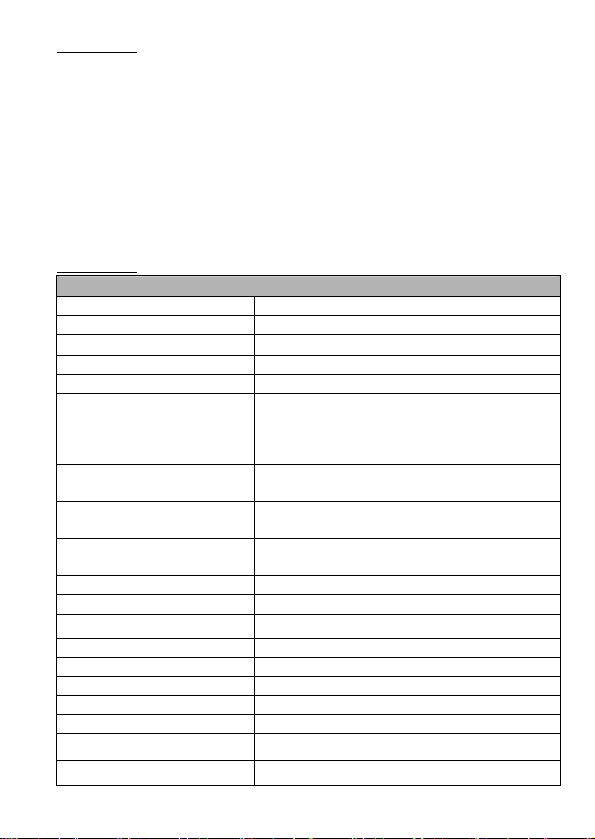
MT-7028 音頻產生器 規格
音頻發射頻率 1kHz
音頻最大測試距離 ≧3 公里
線序/故障最大測試距離 300 米
最大工作電流 ≦65mA
音色 高/低 雙音調
可測試連接阜
RJ45(8 pin)/RJ11(6 pin)兩用插座,提供
RJ45/RJ11 線對測試和 RJ45 音頻尋線用;RJ11(6
pin)插座,提供 RJ11(6P/6C/4C/2C)音頻尋線用。
適用電纜線
RJ45 網路線 Cat 5、5e、6、7 (UTP/STP)、RJ11/12
電話線 Cat 3 (6P/2C/4C/6C)
功能選擇
5 個按式開關 (電源、尋線、線對、短路、電話正
/負極性)
短路/導通測試
1 個 LED (≦300Ω),同軸電纜線和一般單芯/多芯
絞線用鱷魚夾線測試
輸出信號電壓 8Vp-p
線序/故障指示 8個 LED,快/慢雙速測試
網路線 屏蔽/非屏蔽指示 1個 LED
電話線 正/負極性指示 1個雙色 LED
電信設備和路由器活電測試 有
電壓保護 交流 60V 或 直流 48V
自動關機 約 1 小時
電池低壓指示 6.5V (電源指示燈閃爍)
電池 DC 9.0V (NEDA 1604/ 6F22 DC9V ×1pcs)
外觀尺寸 (長×寬×高) 138×80×35 mm
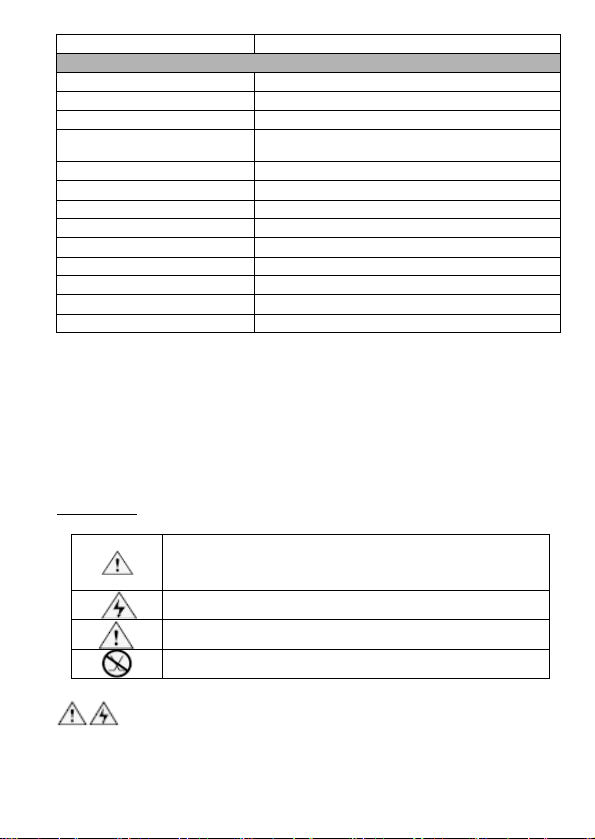
重量 140 公克
MT-7028 接收器 規格
音頻接收頻率 1kHz
最大工作電流 ≦50mA
可測試連接阜 RJ45(8 pin)/RJ11(6 pin) 共用插座
功能選擇 3段滑動開關(非接觸驗電、關機、LED 照明)
耳機座 1個
信號強弱指示 1個 LED & 蜂鳴器
線序/故障指示 8個 LED
網路線 屏蔽/非屏蔽指示 1個 LED
非接觸驗電(NCV)指示 1個 LED (交流 90~1000V)
工作照明 1個 LED
電池 DC 9.0V (NEDA 1604/ 6F22 DC9V ×1pcs)
外觀尺寸 (長×寬×高) 198×45×33 mm
重量 80 公克
主機跌落測試:1 米。
工作溫度:0 ~ 50℃ (32 ~ 122℉)
儲存溫度:-10 ~ 60℃ (14 ~ 140℉)
工作濕度:20% - 75% 相對溼度
儲存濕度:10% - 90% 相對溼度
操作高度:3,000 米
儲存高度:10,000 米
安全資訊:
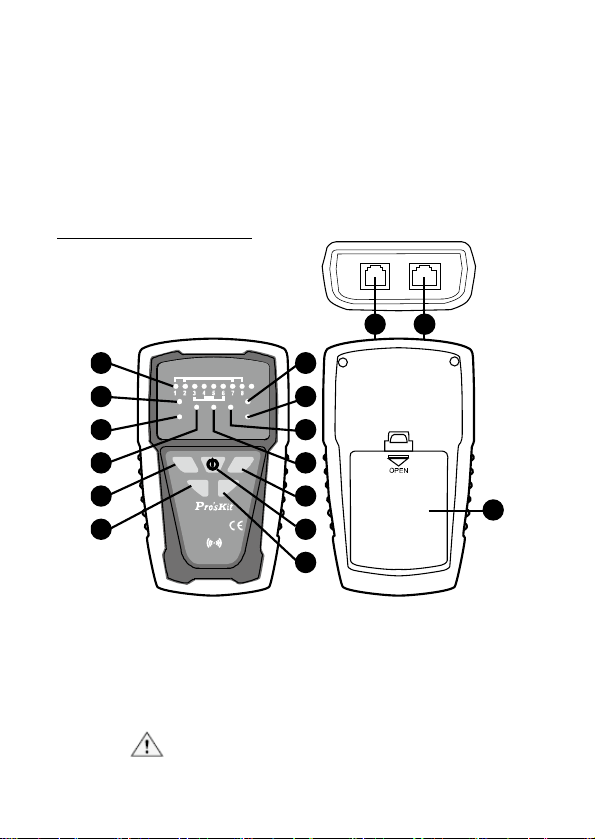
表 1.描述測試儀上或本手冊中,所使用的國際電氣符號。
警告:有人身傷害危險。請參閱手冊中的解釋。
小心:有損害或損壞裝置或軟體的危險。請參閱手冊中的解
釋。
警告:有觸電危險。
注意:須注意操作時的狀態或功能。
本設備不可連接至公用通信網路,如帶電的電話系統。
警告
• 不得在超過AC 60V/DC 48V的帶電電路上使用本產品。
• 不得使用已破損的MT-7028音頻網路測試器測試導線。使用以前,
27
• 在測試電
話電路時,將不使用的測試導線和連接器從MT-7028音頻
網路測試器上斷開連接。
• 除非要更換電池或保險絲,否則不得打開機殼;其中沒有任何用戶
可維修的零件。
• 在更換電池以前,請關機!並斷開所有測試導線的連接。
• 僅使用9V電池,正確安裝在機殼內以提供電源。
• 如果不遵照指定方式使用本設備,則可能影響本產品提供的保護。
MT-7028 音頻產
生器外觀圖
2 1
28
SCA N T EST
POL
3 9
MT -7028
NET W ORK T ONER & P R OPE
TRANSMITTER
POL - / G
POL+ /R
1-8 R J45
2-7 R J 11 6P/6C
3-6 6P/4C
4-5 6P/2C
G
PO L
TEST
POW ER
BAT LOW
SHORT
Ω
Ω
SCAN
4 10
5 8
6 7
11 14
16
12 13
15
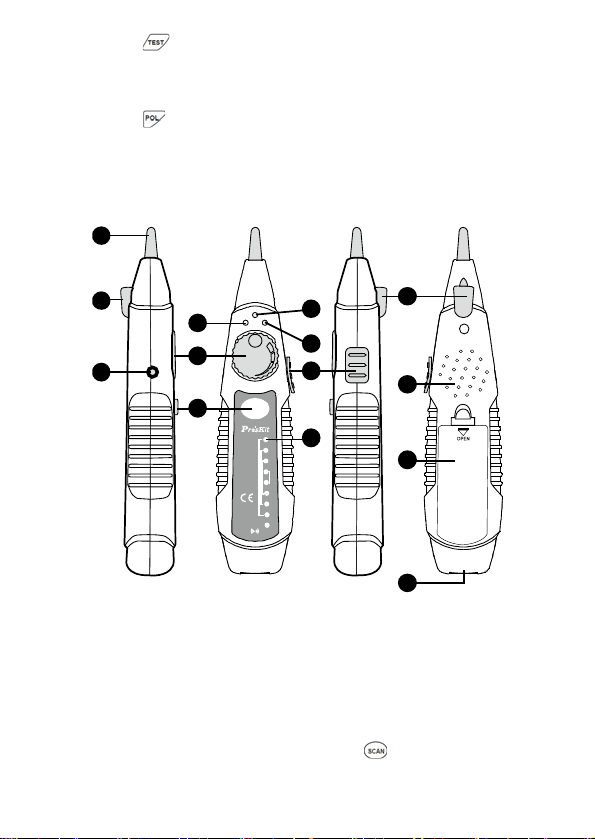
(圖一) MT-7028 音頻產生器 外觀圖
1. RJ45(8 pin)/RJ11(6/4/2 pin)兩用插座:提供RJ45/RJ11線序/故障
測試用、RJ45音頻尋線用。當在RJ45/RJ11線序/故障測試時,需與
MT-7028接收器的RJ45(8 pin)/RJ11(6/4/2 pin)兩用插座,共同搭配
使用。
注意!任何具有活電的線路,不可插入本插座中!RJ11電
話線的音頻尋線不可使用本插座。

2. RJ11(6 pin)插座:僅提供RJ11(6P/6C/4C/2C)音頻尋線用。
注意!在超過AC 60V/DC 48V的活電的線路,不可插入本
插座中!
3. 「1~8、G」測試結
果指示燈:RJ45/RJ11的線對表(Cable Map)和
線序/故障的8個LED指示燈和屏蔽線/非屏蔽線測試結果指示,需與
接收器的燈號搭配使用。
4. 「SHORT」短路測試結果指示燈:當指示燈亮起時,表示線路阻抗
<300Ω或短路。當指示燈不亮時,表示線路阻抗>300Ω或斷路(開
路)。
5. 「Ω」短路/導通功能指示燈:按下「
」短路/導通功能鍵時,指
示燈亮起,表示短路/導通測試的功能啟動。
6. 「SCAN」尋線功能指示燈:按下「
」尋線功能鍵時,當指示
燈慢速閃爍時,表示低音調尋線測試的功能啟動。再按一下「
」
尋線功能鍵時,當指示燈快速閃爍時,表示高音調尋線測試的功能
啟動。
7. 「POWER/BAT LOW」電源指示燈:按下「
」電源開/關鍵時,
指示燈亮起,表示電源開啟,再按其他功能鍵時,才能啟動測試功
能。當指示燈閃爍時,表示電池電壓低於6.5V,需要更換電池。
8. 「TEST」線 序 /故障功能指示燈:按下「
」線 序 /故障功能鍵時,
當指示燈慢速閃爍時,表示線序/故障慢速測試的功能啟動。再按一
下「
」線序/故障功能鍵時,當指示燈快速閃爍時,表示線序/
故障快速測試的功能啟動。
9. 「POL-/G,POL+/R」電話極性測試結果指示燈:這是一個紅/
綠雙色LED指示燈,當紅色指示燈亮起時,代表紅色鱷魚夾接的是
正極,黑色鱷魚接的是負極。當綠色指示燈亮起時,代表紅色鱷魚
夾接的是負極,黑色鱷魚接的是正極。當指示燈不亮時,代表電話
線路無供電。
10. 「POL」電話極性功能指示燈:按下「
」電話極性功能鍵時,指
示燈亮起,表示電話正/負極性測試的功能啟動。
11. 「
」尋線功能鍵:按下此功能鍵後,當「SCAN」尋線功能指
示燈閃爍時,表示低音調尋線測試的功能啟動。再按一下此功能鍵
後,當「SCAN」尋線功能指示燈快速閃爍時,表示高音調尋線測試
的功能啟動。
12. 「
」短路/導通功能鍵:按下此功能鍵後,當「Ω」短路/導通功
能指示燈亮起時,表示短路/導通測試的功能啟動。
29
13. 「
」電源開/關鍵:按下此鍵後,當「POWER/BAT LOW」電源
指示燈亮起時,表示電源開啟。再按一下此鍵時,當「POWER/BAT
LOW」電源指示燈熄滅後,表示電源關閉。
14. 「 」線序/故障功能鍵:按下此功能鍵後,當「TEST」線序/故
障功能指示慢速燈閃爍時,表示慢速線序/故障測試的功能啟動。再
按一下此功能鍵後,當「TEST」線 序 /故障功能指示燈快速閃爍時,
表示快速線序/故障測試的功能啟動。
15. 「
」電話極性功能鍵:按下此功能鍵後,當「POL」電話極性功
能指示燈亮起時,表示電話正/負極性測試的功能啟動。
16. 電池蓋。
8.MT-7028 接收器 外觀圖:
MT -7028
RECEIVER
NETWORK
TONER & PROPE
1
2
3
4
5
6
7
8
G
LED
OFF
NCV
1-8 RJ45
2-7 RJ 11 6P/6C
3-6 6 P/4C
4-5 6 P/2C
SCAN
1
2
7
4
3
5
11
9
13
12
8
2
6
10
(圖二) MT-7028 接收器 外觀圖
1. 音頻信號探頭:「SCAN」尋線功能或是非接觸驗電(NCV)測試功能的
探頭。
2. LED工作照明燈:當工作環境光線不足時,可作為輔助照明使用。
3. 電源指示燈:當3段功能選擇開關,撥切至「LED」或「 NCV」檔位時,
指示燈亮起,表示「LED」或「NCV」測試的功能啟動。當3段功能選
擇開關,撥切至「OFF」檔位時,按下「
」尋線功能鍵時,指示燈
亮起,表示尋線測試的功能啟動。
30
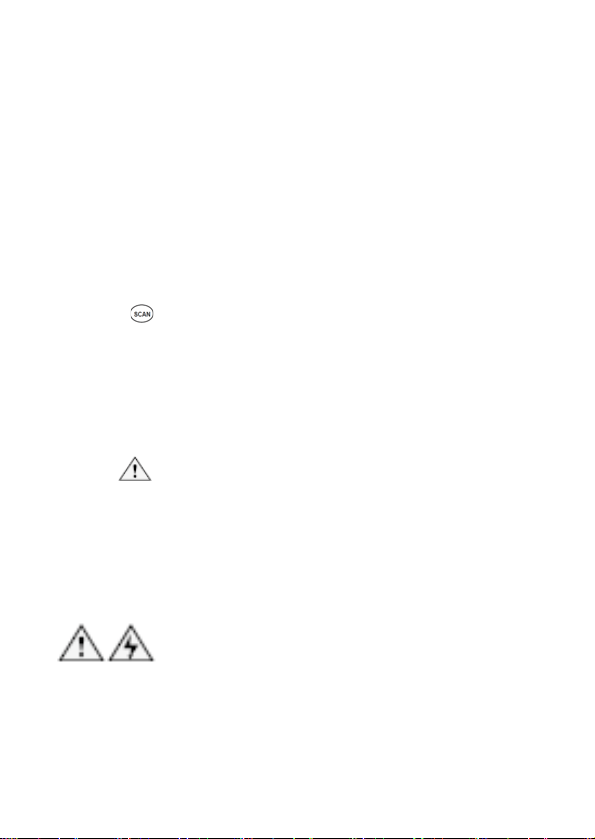
4. 非接觸驗電(NCV)指示燈:將音頻信號探頭靠近被測物,進行非接觸
驗電(NCV)測試,當此指示燈快速閃爍時,代表被測物具有90~1000V
交流電壓。當指示燈不亮時,代表被測物的交流電壓低於90V或是沒
有交流電壓。
5. 信號強弱指示燈:將音頻信號探頭靠近被測物,進行尋線功能測試,
當此指示燈越亮,表示信號越強。
6. 音量旋扭:控制音量由大到小,則可以改變查找電線的靈敏度,將搜
尋位置由30cm縮小到10cm以內,精確找到目標芯線的位置。
7. ø3.5mm耳機座:當工作環境噪音太大時,可插入耳機,方便尋線測
試使用。
8. 3段功能選擇開關:3段滑動開關(非接觸驗電NCV、關機OFF、工作照
明LED)
9. 喇叭:當尋線(SCAN)測試的功能啟動後,喇叭聲音越大,表示信號越
強。
10. 「
」尋線功能鍵:當按下此尋線功能鍵時,電源指示燈亮起,表示
尋線測試的功能啟動。
11. 「1~8、G」測試結果指示燈:RJ45/RJ11的線對表(Cable Map)和線
序/故障的8個LED指示燈和屏蔽線/非屏蔽線測試結果指示,需與音頻
產生器的燈號搭配使用。
12. RJ45(8 pin)/RJ11(6/4/2 pin)兩用插座:提供RJ45/RJ11線序/故障測
試的遠端器用。需與MT-7028音頻產生器的RJ45(8 pin)/RJ11(6/4/2
pin)兩用插座,共同搭配使用。
注意!任何具有活電的線路,不可插入本插座中!
13. 電池蓋。
9.使用1KHz音頻信號查找、分離電線:
使用MT-7028音頻網路測試器的1KHz查找線路時,能定位、分離、查找雙絞線
(UTP、STP、Cat 5e、Cat 6)、電話線(Cat 3),搭配跳接線可以測試RJ45/RJ11
插座的接線,搭配鱷魚夾連接線,可測試同軸電纜線、一般電線和各種接線板。
警告
• 使用MT-7028音頻網路測試器不可以使用在帶電的線路上,操作前
應確實關閉所有電源。
• RJ45音頻尋線時,請使用RJ45(8 pin)/RJ11(6/4/2 pin)兩用插座。
RJ11(6P/6C/4C/2C)音頻尋線時,請使用RJ11(6 pin)插座。使用
RJ11(6 pin)插座,搭配鱷魚夾連接線,可測試同軸電纜線、一般電
線和各種接線板。
31

注意
• 使用MT-7028音頻網路測試器的1KHz查找線路時,應儘量遠離或關
閉干擾源。如.具有變壓器、電感、線圈、馬達的電器設備
⋯
等;如果
接近干擾源,而MT-7028接收器產生接收的雜訊聲音,屬於正常狀
態;但如果影響操作判斷時,應予遠離或關閉干擾源。
• MT-7028音頻網路測試器的1KHz音頻信號,通過電路機板或分岔線
路或整捆電線(絞線)時,會有相互感應傳遞和信號強度的衰減的現
象。且無法穿透金屬配線管。
• 在搜索MT-7028音頻產生器的信號時,沒有必要將MT-7028接收器
的探頭觸及線纜或接線板。
• 在使用MT-7028音頻網路測試器前,應確實檢查MT-7028音頻發射
器的黑色鱷魚夾,確實接地妥善。
MT-7028音頻產生器所產生1KHz的音頻信號,具有雙音調高/低兩種音色可以選
擇,並可以配合所有連接介面和配件,提供這兩種高/低音頻信號。
查找電線
當你需要查找電線佈線位置或查找電線斷路位置時,請依照下列步驟(如圖三)
進行:
1. 如(圖三)所示,先將MT-7028音頻產生器 的黑色鱷魚夾確實接
地,再將紅色鱷魚夾與待測線路的連接線或插座或接線板連接妥
善。
2. 如(圖三)所示,按下「
」電源開/關鍵,「POWER/BAT LOW」
紅色電源指示燈亮起,打開電源。再按下「
」尋線功能鍵後,
當「 SCAN」尋線功能紅色指示燈閃爍時,表示低音調尋線測試的
功能啟動。再按一下此功能鍵後,當「SCAN」尋線功能紅色指示
燈快速閃爍時,表示高音調尋線測試的功能啟動。再按一下此功
能鍵後,當「SCAN」尋線功能紅色指示燈熄滅後,表示回到待機
狀態。
3. 如(圖三)所示,要接收1KHz且有聲音輸出,按下MT-7028接收器
的「
」尋線功能鍵時,紅色指示燈亮起,表示尋線測試的功能
啟動。當放開「
」尋線功能鍵時,紅色指示燈熄滅後,表示,
表示尋線測試的功能關閉。未插上耳機前喇叭有聲音輸出,插上
耳機後則喇叭無聲音輸出,聲音由耳機輸出。
4. 使用MT-7028接收器 將音量旋鈕轉到最大,沿著塑膠配線管、走
線架、接線板或牆壁,查找佈線線路的大致位置。接近時,MT-7028
接收器 的喇叭響起音頻信號聲音,喇叭聲音越大,表示信號越
強;同時信號強弱指示燈LED亮紅色,LED指示燈明暗程度會隨信
32
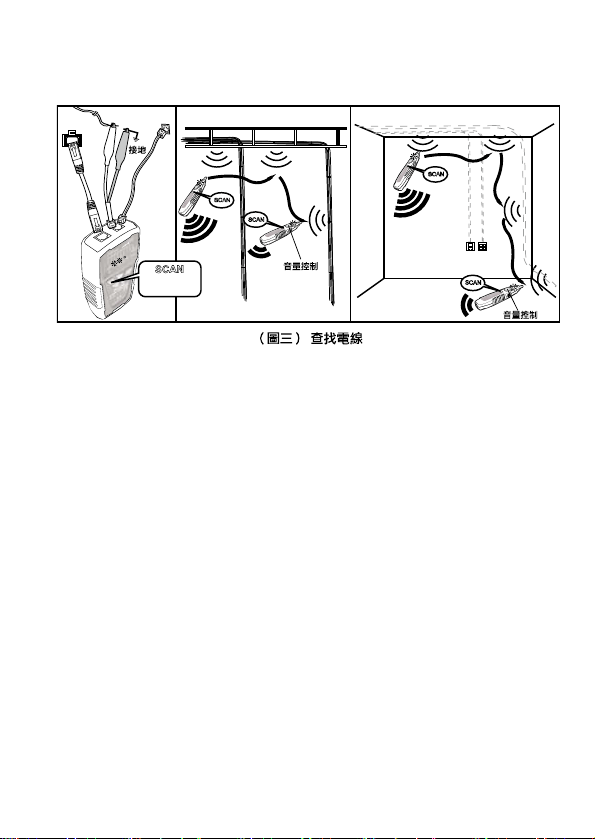
5. 旋轉音量
旋鈕,控制音量由大到小,則可以改變查找電線的靈敏
度,將搜尋位置由30cm縮小到10cm以內,精確查找到電線。
SCAN
SCAN
SCAN
SCAN
SCAN
按一下
:低音
再按一下:高音
RJ45插座
RJ11插座
33
分離
電線
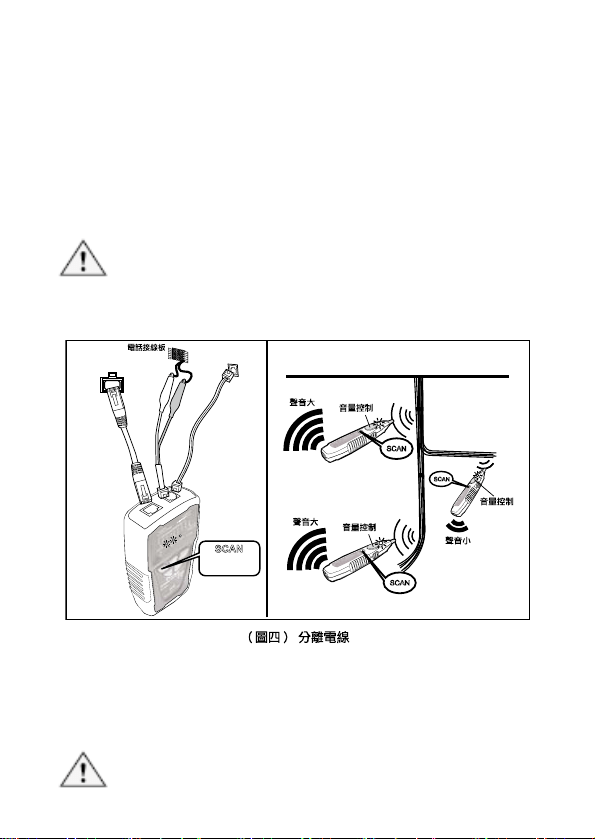
當你需要尋找綑綁在一起的電纜其中一條電線,或多芯電纜中的其中一條芯線
時,請依照前面查找電線的步驟(1.)到(4.)進行(如圖三),然後再依照下列步驟(如
圖四)繼續進行:
6. 將電纜撥開約30~45cm長,採用二分法,將電纜的芯線概略分為左
右各一半,使用MT-7028接收器尋找目標芯線的位置,喇叭聲音較
大和LED燈比較亮(信號較強)的一邊,代表其中包含了你所要尋找的
目標芯線。
7. 旋轉音量旋鈕,控制音量由大到小,則可以改變查找電線的靈敏度,
將搜尋位置由30cm縮小到10cm以內,精確找到目標芯線的位置。
8. 重複前面二分法的(5.)、(6.)步驟,則可輕易找到目標芯線。
注意
如果不能正確分辨兩導線電纜上的音頻信號,可能電纜已短路或斷路。請使用
連通測試,檢查接電纜是否短路或斷路。
SCAN
SCAN
SCAN
RJ11 插座
RJ45 插座
SCAN
按一下:低音
再按一下:高音
10.線對表(Cable Map)測試:
可以使用MT-7028音頻產生器和MT-7028接收器配合RJ45/RJ11兩用插座,測
試RJ45網路線和RJ11電話線的線對表(Cable Map)。搭配跳接線可以測試
RJ45/RJ11插座的線對表(Cable Map)。線對表(Cable Map)的功能可查找各種
電纜佈線上常見的:通路、短路、斷路、交叉的情況。
注意
RJ
45或RJ11線對表(Cable Map)測試時,音頻產生器的接頭,只能
34
使用RJ45/RJ11兩用插座,不可使用RJ11(6 pin)插座。
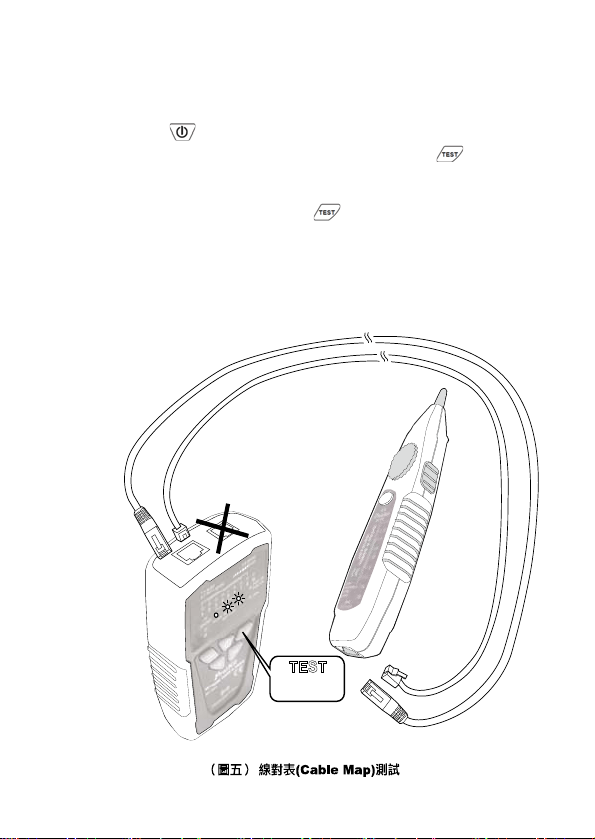
1. 依(圖五)所示,將MT-7028音頻產生器和MT-7028接收器妥善連接
RJ45(8P/8C)、RJ11(6P/6C、6P/4C、6P/2C)的待測線路的連接線
或插座。
2. 按下「
」電源開/關鍵,「POWER/BAT LOW」紅色電源指示燈
亮起,打開電源。再按下MT-7028音頻產生器的「
」線序/故障
功能鍵後,當「TEST」線序/故障功能綠色指示燈慢速閃爍時,表
示慢速線序/故障測試的功能啟動,線對表(Cable Map)的紅色LED
開始慢速掃描顯示。再按一下「
」線序/故障功能鍵後,當「TEST」
線序/故障功能綠色指示燈快速閃爍時,表示快速線序/故障測試的功
能啟動,線對表(Cable Map)的紅色LED開始快速掃描顯示。再按一
下此功能鍵後,當「TEST」線序/故障功能綠色指示燈熄滅後,表
示回到待機狀態。
TEST
按一下
:慢速
再按一下:快速
RJ45/RJ 11共用插座
(8P/8C,6P/6C,6P/4C,6P/2C)
RJ45/RJ 11共用插座
(8P/8C,6P/6C,6P/4C,6P/2C)
35
注意
• 線對表(Cable Map)測試時,LED慢速掃描顯示間隔約1秒鐘,LED
快速掃描顯示間隔約0.5秒鐘,每次由1~8、G順序掃描顯示。如果
遇到2條空線時,會有間歇2秒的現象,依此類推。
• 線對表(Cable Map)測試前,如有必要,可依前面所述方式,使用”
查找電線”的方法,先進行查找另一端正確的連接器或連接線。
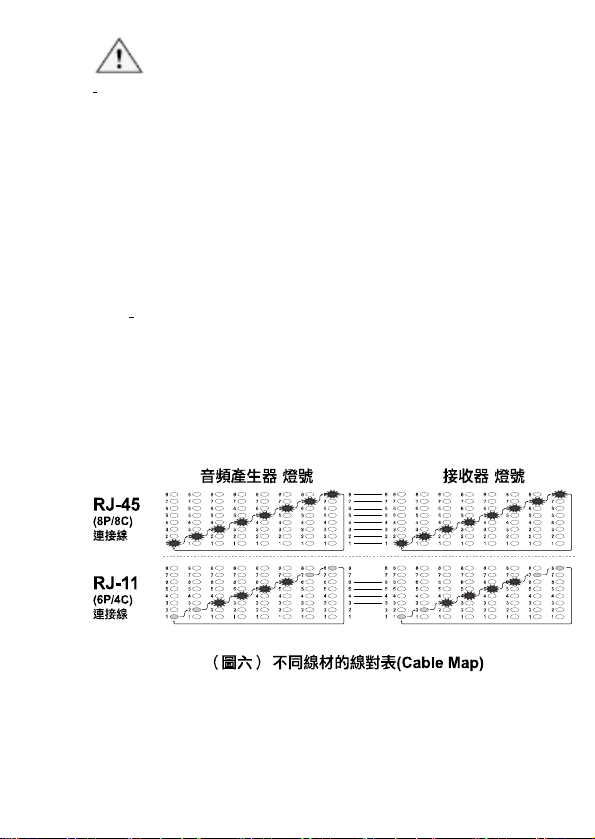
3. MT-7028音頻產生器和MT-7028接收器上的LED輸出,不同線材的
線對表(Cable Map)顯示方式如下:
• RJ45(8P/8C)的LED燈號顯示:MT-7028音頻產生器的線對表
(Cable Map)LED,每1秒由1~8、G的順序,逐步顯示;並依
接線順序,對應MT-7028接收器上的線對表(Cable Map)LED
同步顯示。(如圖六)
•
RJ11(6P/6C、6P/4C、6P/2C)的LED燈號顯示:MT-7028音
頻產生器的線對表(Cable Map)LED,6P/6C每1秒由2~7的順
序;6P/4C每1秒由3~6的順序;6P/2C每1秒由4~5的順序),
逐步顯示;並依接線順序,對應MT-7028接收器上的線對表
(Cable Map)LED同步顯示。如果遇到空線時,會有顯示間歇
的現象。(如圖六)
MT-702
8
MT-702
8
36
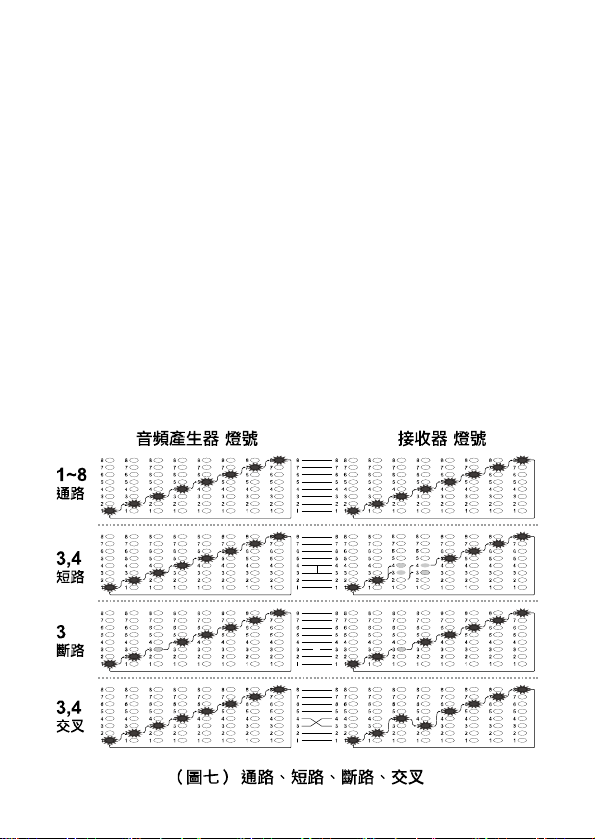
MT-7028音頻產生器和MT-7028接收器上的線對表(Cable Map)LED輸
出,通路、短路、斷路、交叉表示的方式如下:
• 「通路」的LED燈號顯示:MT-7028音頻產生器的LED,第1~8、
G個LED亮燈,對應MT-7028接收器上的LED,第1~8、G個LED
同步顯示。(如圖七)
• 「短路」的LED燈號顯示:MT-7028音頻產生器的LED,第3個和
第4個LED依序亮燈,對應MT-7028接收器上的LED,第3個和第4
個LED同時點亮,但亮度較暗。(如圖七)
• 「斷路」的LED燈號顯示:MT-7028音頻產生器的LED,第 3個LED
不亮,對應MT-7028接收器上的LED,第3個LED不亮。(如圖七)
• 「交叉」的LED燈號顯示:MT-7028音頻產生器的LED,第 3個LED
亮燈,對
應MT-7028接收器上的LED,第4個LED同步顯示;
MT-7028音頻產生器的LED,第4個LED亮燈,對應MT-7028接收
器上的LED,第3個LED同步顯示。(如圖七)
4. 依照MT-7028音頻產生器和MT-7028接收器上的線對表(Cable
Map)LED輸出,反覆測試;並以LED顯示的線對表(Cable Map)確認
接線順序的正確性。
MT-702
8
MT-7028
37
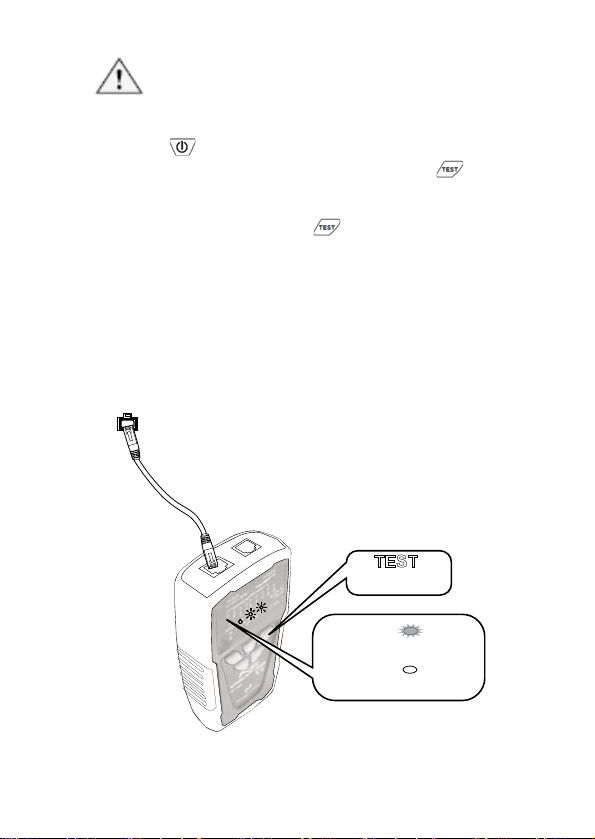
11.工
作中的網路檢測:
注意:此測試方法只能測試網線路通斷,不能檢測交叉或短路。
1. 依(圖八)所示,將MT-7028音頻產生器妥善連接RJ45(8P/8C)網路線
或插座、另一端連接在正在工作的網路交換機上。
2. 按下「
」電源開/關鍵,「POWER/BAT LOW」紅色電源指示燈
亮起,打開電源。再按下MT-7028音頻產生器的「
」線序/故障
功能鍵後,當「TEST」線序/故障功能綠色指示燈慢速閃爍時,表
示慢速線序/故障測試的功能啟動,線對表(Cable Map)的紅色LED
開始慢速掃描顯示。再按一下「
」線序/故障功能鍵後,當「TEST」
線序/故障功能綠色指示燈快速閃爍時,表示快速線序/故障測試的功
能啟動,線對表(Cable Map)的紅色LED開始快速掃描顯示。再按一
下此功能鍵後,當「TEST」線序/故障功能綠色指示燈熄滅後,表
示回到待機狀態。
3. 當MT-7028音頻產生器上的「1~8、G」測試結果指示燈,按先後順
序逐一點亮時,表示網路線1~8、G全部連通,如有燈號未亮,代表
線路故障。
4.
RJ45 插座
TEST
按一下:慢速
再按一下:快速
1~8.G 依序亮起 紅色
任何燈不亮
表示線路全部連通
1~8.G 依序亮起
表示該條線路故障
(圖八) 接入工作中的網路檢測
38
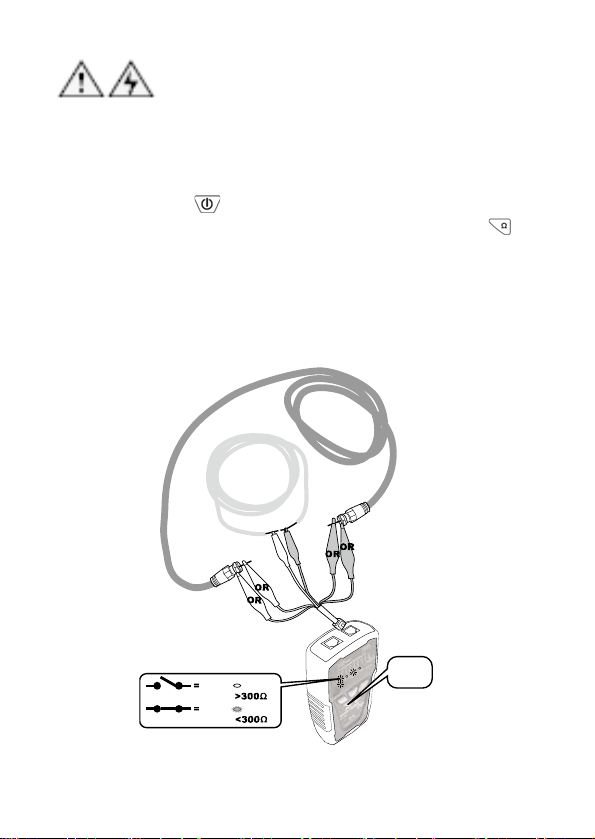
12.
同軸電纜線和電線連通測試:
警告:測試前,應先確認並關閉電源。
當你需要確認同軸電纜線或電線連通是否有接觸不良時,請依照下列步驟(如圖
九)進行:
1. 如(圖九)所示,先將MT-7028音頻產生器的黑色鱷魚夾,確實與
待測電纜的一端接頭、金屬部分連接妥善,再將紅色鱷魚夾,與
待測電纜的另一端接頭、金屬部分連接妥善。
2. 按下「
」電源開/關鍵,「POWER/BAT LOW」紅色電源指
示燈亮起,打開電源。再按下MT-7028音頻產生器的「
」短
路/導通功能鍵後,當「Ω」短路/導通功能綠色指示燈亮起時,
表示短路/導通測試的功能啟動。再按一下此功能鍵後,當「Ω」
短路/導通功能綠色指示燈熄滅後,表示回到待機狀態。
3. 當「SHORT」短路測試結果紅色指示燈亮起時,表示連通(阻抗
<300Ω)。當指示燈不亮時,表示無連通,或是遮蔽不良和連通
不良(阻抗>300Ω)。
單股線連通測試
同軸線連通測試
按Ω
OPEN
SHORT
斷路 : 阻抗
連通 : 阻抗
不亮
亮紅燈
(圖九) 同軸電纜線和電線連通測試
39
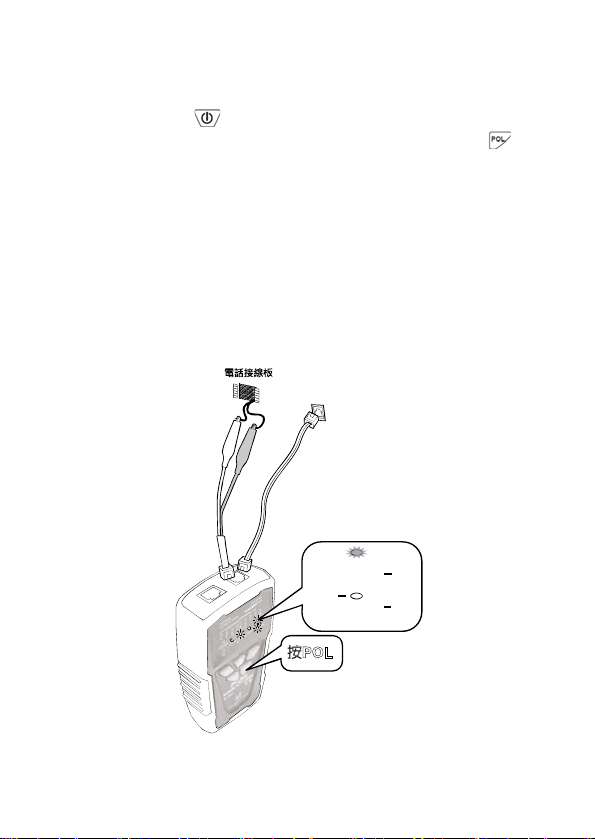
13.
電話正負極性測試:
當你需要確認電話線路的正負極性時,請依照下列步驟(如圖十)進行:
1. 如(圖十)所示,先將MT-7028音頻產生器的紅、黑色鱷魚夾,分
別與待測電話線路的連接線或插座或接線板的兩端連接妥善。
2. 按下「
」電源開/關鍵,「POWER/BAT LOW」紅色電源指
示燈亮起,打開電源。再按下MT-7028音頻產生器的「
」電
話極性功能鍵後,當「POL」電話極性功能指示燈亮起時,表示
電話正/負極性測試的功能啟動。再按一下此功能鍵後,當「POL」
電話極性功能指示燈熄滅後,表示回到待機狀態。
3. 「POL-/G,POL+/R」電話極性測試結果指示燈,是一個紅/
綠雙色LED指示燈:
• 紅色指示燈亮起時,代表紅色鱷魚夾端為電話局線的”十”
極,黑色鱷魚夾端為電話局線的”一”極。
• 綠色指示燈亮起時,代表紅色鱷魚夾端為電話局線的”一”
極,黑色鱷魚夾端為電話局線的”十”極。
• 當指示燈不亮時,代表電話線路無供電或是線路故障。
按POL
POL 亮紅燈
表示紅色鱷魚夾為 極
+
+
黑色鱷魚夾為 極
POL 亮綠燈
表示紅色鱷魚夾為 極
+
黑色鱷魚夾為 極
(圖十) 電話正
負
極性測試
RJ11
插座
40
14.NCV 非接觸
驗電:
注意:
此項測試功能可以被廣泛應用在定位、分離、導通、查找、線對表(Cable
Map)測試前,確認被測線路中是否有交流電壓?除可確保人身安全.避免
觸電外,也可以保護MT-7028音頻網路測試器,不被交流電壓損壞!
1. 如(圖十一)所示,將3段功能選擇開關(非接觸驗電NCV、關機OFF、
工作照明LED),撥 切 至「NCV」檔位後,電源指示燈亮起,表示「NCV」
非接觸驗電測試的功能啟動。
2.
3. 將MT-7028接收器的探頭靠近被測物,進行非接觸驗電(NCV)測試,
當非接觸驗電(NCV)指示燈快速閃爍、同時蜂鳴警報時,代表被測物
具有90~1000V交流電壓。當指示燈不亮、無蜂鳴警報時,代表被測
物的交流電壓低於90V或是沒有交流電壓。
AC
插座
撥NCV
(圖十一) NCV 非接觸驗電測試
41
15.
電池狀態與電池更換:
小心
為避免測試結果不可靠,一旦出現電池不足的指示,請立即更換電池。
警告
為避免可能發生的電擊或人體傷害,更換電池前,應關機並斷開所有測試
導線的連接。
當MT-7028音頻產生器的「POWER/BAT LOW」電源指示燈閃爍時,代表電壓
已低於6.5V,為了確保測試器處於最佳工作狀態和提供準確的測試,應立即更
換新電池。更換電池請依下列步驟進行:(如圖十二)
1. 關機,並斷開所有測試導線的連接。
2. 如(圖十二)所示,輕輕打開電池盒蓋,取出電池,並輕力取下電池扣。
3. 換上新的 9V 電池(6FF22),輕力扣上電池扣,放入電池,蓋上電池
盒蓋。
O
P
E
N
16.維護與簡易故障排除:
維護:
警告
為避免可能發生的電擊或人體傷害,維護前,應關機並斷開所有
測試導線的連接。
小心
為避免損壞機殼,不要使用溶劑或磨蝕性去污粉。
用柔性軟布沾水後擰乾、或柔性軟布沾柔性皂液後擰乾,輕輕的
擦拭機殼。
42
簡易
故障排除:
故障 排除
4. 電池電力不足:檢查音頻產生器和接收器的電池,
如電壓低於 6.5V,需更換電池。
5. 接收器檔位不正確:請撥至 OFF 或 LED 檔,NCV
檔不能探測 SCAN 信號。
接收器無法探測音頻
產生器的信號
6. 儀器故障:返回經銷商維修。
活電下測試電話局
線,接收器無法探測
音頻產生器的信號
可能是電話局線信號頻率,與本音頻產蜂器的信號衝突,
請關閉電話交換機。
LED 指示燈損壞:返回經銷商維修
線序/故障測試結果
顯示不正確
網路線或電話線接觸不良:請將網路線或電話線,重新插
入 RJ45/RJ11 共用插座。
其它功能異常 儀器故障:返回經銷商維修
©2014 Prokit’s Industries Co., LTD. All rights reserved 2014001(C)
43