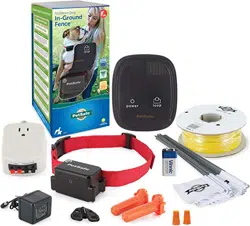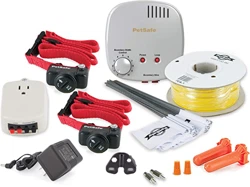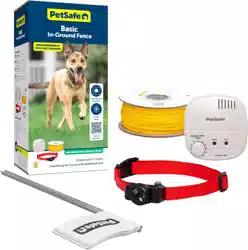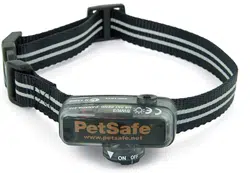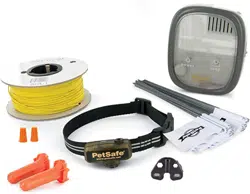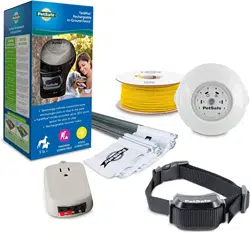
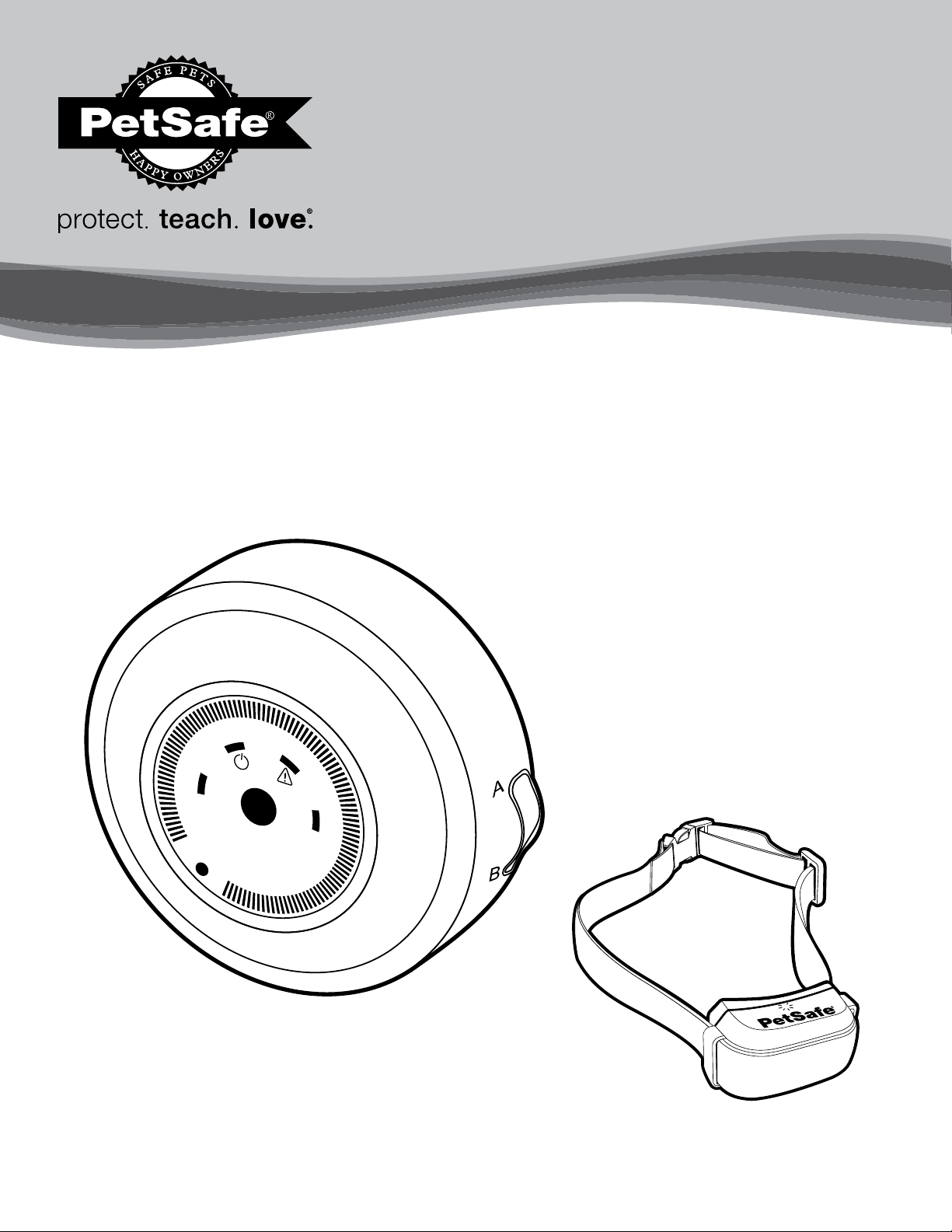
Please read this entire guide before beginning
PIG 0 0 -11115
YardMax
®
Rechargeable In-Ground Fence
™
Operating Guide
1
A B
10
2
5
6
7
8
9
4
3
1-800-732-26772
Thank you for choosing PetSafe
®
Brand. You and your pet deserve a companionship that includes memorable moments and a shared
understanding. Our products provide you with the tools and technologies to successfully train your pet. If you have any questions about our
products or training your pet, please visit our website at www.petsafe.net or contact our Customer Care Center at 1-800-732-2677. To get
the most protection out of your warranty, please register your product within 30 days at www.petsafe.net. By registering and keeping your
receipt, you will enjoy the product’s full warranty and should you ever need to call the Customer Care Center, we will be able to help you
faster. Most importantly, we will never give or sell your valuable information to anyone. Complete warranty information is available online
at www.petsafe.net.
Hereinafter Radio Systems Corporation, Radio Systems PetSafe Europe Ltd., Radio Systems Australia Pty Ltd. and any other affiliate or brand of
Radio Systems Corporation may be referred to collectively as “We” or “Us.”
Important Safety Information
Explanation of attention words and symbols used in this guide:
This is the safety alert symbol. It is used to alert you to potential personal injury hazards. Obey all safety messages that follow this
symbol to avoid possible injury or death.
WARNING indicates a hazardous situation which, if not avoided, could result in death or serious injury.
CAUTION, used with the safety alert symbol, indicates a hazardous situation which, if not avoided, could result in minor
or moderate injury.
CAUTION, used without the safety alert symbol, indicates a hazardous situation which, if not avoided, could result in
harm to your pet.
NOTICE is used to address practices not related to personal injury.
• Not for use with aggressive pets. Do not use this product if your pet is prone to aggressive behavior. Aggressive pets
can cause severe injury or death to their owners and others. If you are not sure that this product is right for your pet,
please talk to your veterinarian or a certified trainer.
• Underground cables can carry high voltage. Have all underground cables marked before you dig to bury your wire.
In most areas this is a free service. Avoid these cables when you dig.
• Follow all safety instructions for your power tools. Be sure to always wear your safety goggles.
• Do not install, connect or remove your system during a lightning storm. If the storm is close enough for you to hear
thunder, it is close enough to create hazardous surges.
• Risk of electric shock. Use the fence transmitter and surge protector indoors in dry location only.
• Turn off the power to the outlet before you install or remove your surge protector.
• Risk of electrical shock or fire. Use the surge protector only with a duplex outlet with a center screw. Attach the unit
using the long screw supplied.
• Risk of injury. Wire on top of the ground may be a trip hazard; use care in how you place your wires.
• Do not install the surge protector if there is not at least 30 ft. (10 m) or more of wire between the electrical outlet and
electrical service panel.
www.petsafe.net 3
This PetSafe
®
In-Ground Fence
™
system is not a solid barrier. This system is designed to act as a deterrent to remind pets
by static correction to remain in the boundary established. It is important that you reinforce training with your pet on a
regular basis. Proper fit of the receiver collar is important. A receiver collar worn for too long or made too tight on your
pet’s neck may cause skin damage, ranging from redness to pressure ulcers. This condition is commonly known as
bed sores.
• Avoid leaving the receiver collar on your pet for more than 12 hours per day.
• When possible reposition the collar on your pet’s neck every 1 to 2 hours.
• Check the fit to prevent excessive pressure; follow the instructions in this manual.
• When using a separate collar for a leash, do not put pressure on the receiver collar.
• Wash your pet’s neck area and the contact points of the receiver collar weekly with a damp cloth.
• Examine the contact area daily for signs of a rash or a sore.
• If a rash or sore is found, discontinue use of the receiver collar until the skin has healed.
• If the condition persists beyond 48 hours, see your veterinarian.
• For additional information on bed sores and pressure necrosis, please visit our website.
These steps will help keep your pet secure and comfortable. Millions of pets are comfortable while they wear stainless
steel contact points. Some pets are sensitive to contact pressure. You may find after some time that your pet is very tolerant
of the receiver collar. If so, you may relax some of these precautions. It is important to continue daily checks of the contact
area. If redness or sores are found, discontinue use until the skin has fully healed.
• You may need to trim the hair in the area of the contact points. Never shave your pet’s neck; this may lead to a rash
or infection.
• The receiver collar should not be on your pet when the system is tested. If it is, your pet may receive an
unintended correction.
• The boundary width of the system must be tested whenever an adjustment is made to the pet area to prevent
unintended corrections to your pet.
• Do not change the transmitter setting from Traditional mode (B) to YardMax
®
mode (A) without verifying that the
receiver collar will still contain your pet.
• If you use a collar and leash for training, be sure the extra collar does not put pressure on the contact points.
• Always remove your pet’s receiver collar before performing any fence transmitter testing.
• If possible, DO NOT use an AC circuit protected with a Ground Fault Circuit Interrupter (GFCI) or Residual Current
Device (RCD). In rare cases, nearby lightning strikes may cause the GFCI or RCD to trip. Without power your pet may
be vulnerable to escape. You will have to reset the GFCI or RCD to restore power to the system.
• If the receiver collar fails the ReadyTest
®
startup, the receiver collar is automatically turned off. Your pet will not
be contained.
• Plug the surge protector into a grounded (3-prong) outlet that is within 5 ft. of the fence transmitter. ALWAYS use a
grounded (3-prong) outlet to ensure maximum protection.
• Do not remove the ground prong from the surge protector plug. Do not use a 3-prong plug to 2-prong outlet
converter. Doing so will make the surge protector ineffective against surges or spikes.
• Use care when mowing or trimming your grass not to cut the loop wire.
• Verify that the boundary loop and transmitter wires connect to the proper surge protector terminals. Reversed
connections will result in an increased risk of surge related damage.
• For added protection, when unused for long periods of time or prior to thunderstorms, unplug from the wall outlet and
disconnect the loop boundary wires. This will prevent damage to the transmitter due to surges.
• Charge your receiver collar when the receiver indicator light blinks red. Do not charge your receiver collar every night.
Charging too often can reduce battery life.
• Avoid damage to the jacket of the loop wire during the install; damage may cause areas of weak signal and lead to
early failure of the loop (wire breaks).
• To prevent an unintended correction, after the boundary flags have been placed, be sure to set the static correction
on the receiver collar back to level 1, which is tone only.

1-800-732-26774
Table of Contents
Components ........................................................................................................................................................................................................................ 5
Other Items You May Need ...........................................................................................................................................................................................5
Overview .............................................................................................................................................................................................................................6
How the System Works ....................................................................................................................................................................................................6
YardMax and Traditional Modes ..................................................................................................................................................................................6
Operating Guide
.......................................................................................................................................................................................8
Step 1: Have Your Utilities Marked .........................................................................................................................................................................8
Step 2: Charge the Receiver Collar ........................................................................................................................................................................8
Step 3: Install the Surge Protector and Transmitter ...............................................................................................................................................8
Step 4: Design Your Boundary Zone ................................................................................................................................................................... 10
Step 5: Position, Twist and Splice the Boundary Wire ......................................................................................................................................13
Step 6: Connect the Wires ..................................................................................................................................................................................... 14
Step 7: Prepare the Receiver Collar ..................................................................................................................................................................... 14
Step 8: Test the Fence Direction ............................................................................................................................................................................ 16
Step 9: Test the Receiver Collar ............................................................................................................................................................................ 17
Step 10: Bury the Boundary Wire ........................................................................................................................................................................ 19
Step 11: Place the Boundary Flags ....................................................................................................................................................................... 20
Step 12: Fit the Receiver Collar ..............................................................................................................................................................................21
Training Guide
.........................................................................................................................................................................................22
Day 1—Tone-only Training for Boundary Awareness ...................................................................................................................................... 23
Days 2 Through 4—Boundary Awareness with Static Correction ................................................................................................................ 23
Days 5 Through 8—Distraction Phase .................................................................................................................................................................. 24
Days 9 Through 14—Unleashed Supervision .................................................................................................................................................... 25
Days 15 Through 30—Pet Monitoring ................................................................................................................................................................. 25
Taking Your Pet Out of the Pet Area ............................................................................................................................................................................ 25
Advanced Features ......................................................................................................................................................................................................... 26
System Test........................................................................................................................................................................................................................27
Wire Break Location Test .............................................................................................................................................................................................. 28
Receiver Collar Status Indicators ............................................................................................................................................................................... 29
Troubleshooting
...................................................................................................................................................................................... 30
Terms of Use and Limitation of Liability ..................................................................................................................................................................... 32
Compliance ...................................................................................................................................................................................................................... 32
Customer Care International ........................................................................................................................................................................................ 32
Battery Disposal .............................................................................................................................................................................................................. 32
Warranty
...................................................................................................................................................................................................33
Layout Grids ..................................................................................................................................................................................................................... 34
www.petsafe.net 5
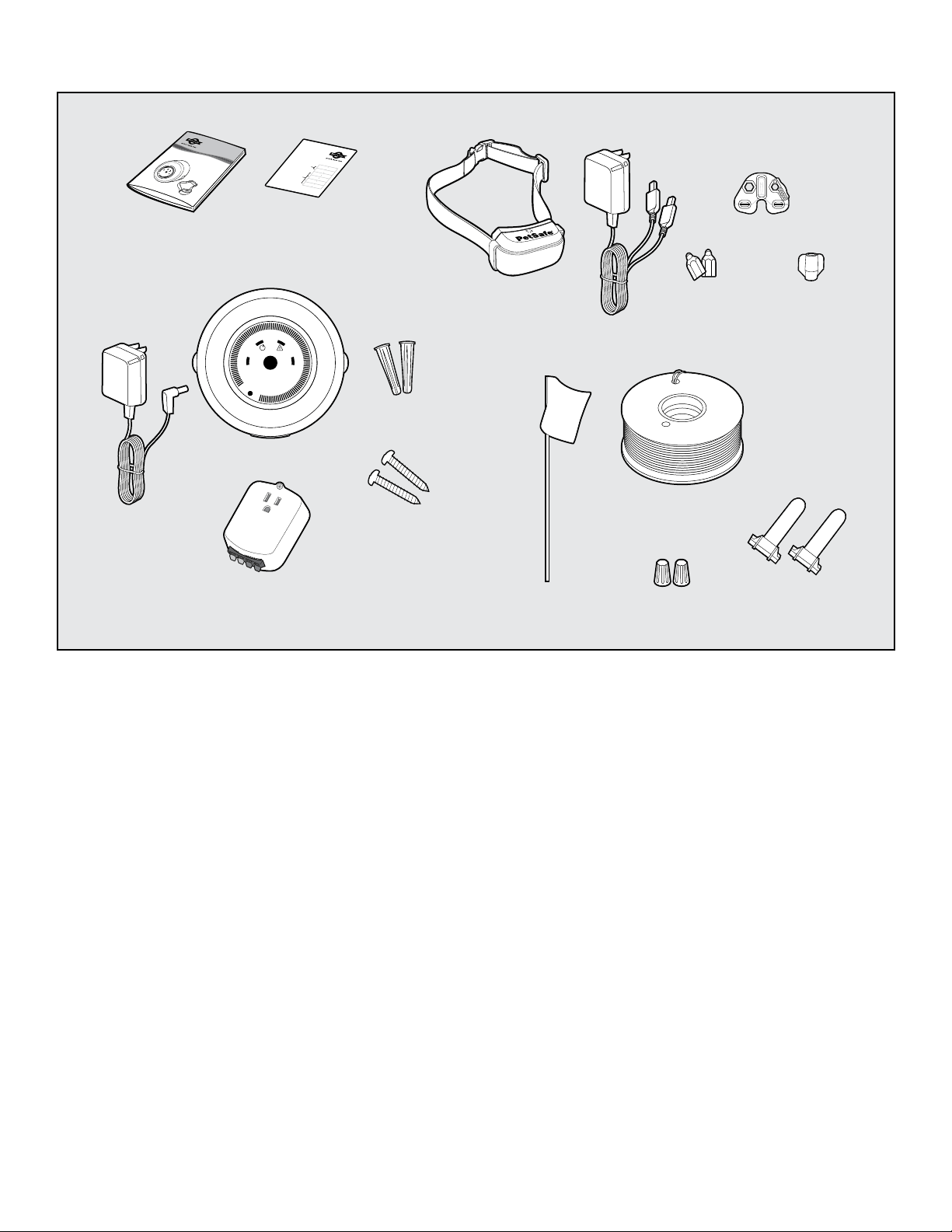
Components
Other Items You May Need
• Additional wire and flags (Part # PIG00-13769)
• Additional wire nuts and gel-filled splice capsules
• Drill
• Tape measure
• Small Phillips screwdriver
• Staple gun
• Scissors
• Lighter
• Pliers
• Spade shovel or lawn edger
• Wire stripping pliers
• Waterproofing compound (e.g. silicone caulk)
• Non-metallic collar and leash
• PVC pipe or water hose
• Circular saw with masonry blade
Setup and training help: www.petsafe.net
1
A B
10
2
5
6
7
8
9
4
3
Red
Black
Loop Right
Loop Left
TX Left
TX Right
402-027
Red
Black
Loop Right
Loop Left
TX Left
TX Right
After verifying Receiver Collar
operation at the boundary, use the
labels to identify the Boundary Wire
connections to the Transmitter and
the Boundary Wire connections
to the Surge Protector.This will be
convenient to have should any of the
wires become disconnected.
Use on
Transmitter
Connections
Use on
Surge
Protector
Connections
Please read this entire guide before beginning
PIG00-11115
YardMax
®
Rechargeable In-Ground Fence
™
Operating Guide
1
A B
10
2
5
6
7
8
9
4
3
Power
Adapter
Mounting
Anchors
Mounting
Screws
Test Light
Tool
Boundary Flags—50
Boundary Wire – 500 ft.
Wire Nuts
Gel-filled
Splice Capsules
Receiver Collar with
Short Contact Points
Fence Transmitter
Contact
Point Wrench
Long
Contact Points
Operating and
Training Guide
Transmitter and
Surge Protector
Labels
Surge Protector
(USA & Canada only)
Receiver
Charger
(6 ft.)

1-800-732-26776
Overview
The YardMax
®
system allows you to safely keep your pet within the boundary you set. Although the technology has come a long way, we have
safely used static correction for decades and helped millions of pets live happier, healthier and more active lives.
An important thing to note, even before we get started, is that you should always remove the receiver collar from your pet while inside or when
the system is not in use. Also, never leave it on your pet for more than 12 consecutive hours, and absolutely never attach a leash to it—use a
separate collar for that. Excessive pressure and continuous use without breaks could hurt your pet’s skin.
Installation time can vary based on the size of your yard and the layout you choose. Training your pet to understand the system typically takes
a couple of weeks. No worries though, we will go through everything you need to know here, and you can always reference our setup videos
or give us a call if you have a question.
Quick tip: By comparison to using a shovel, renting a small trenching or lawn edging tool from a local hardware store can save you a lot
of time.
How the System Works
The system works by sending a radio signal through a buried wire (boundary wire). Your pet wears a receiver collar that picks up the signal. It
warns your pet with a beep when he or she enters the warning zone. If your pet continues to venture out, the collar will issue a safe but startling
correction, similar to the static you feel if you drag your feet across a carpet and then touch a door handle. Of course, different pets respond
to different levels of correction. We have built in 5 levels of correction plus a tone-only setting to accommodate any pet. The only pets that
we do not recommend the system for are aggressive pets and pets below 6 months of age or under 5 lb. Make sure to work through the
boundary training before leaving your pet unattended.
Note: If you buy extra wire, the system is expandable up to 10 acres.
YardMax and Traditional Modes
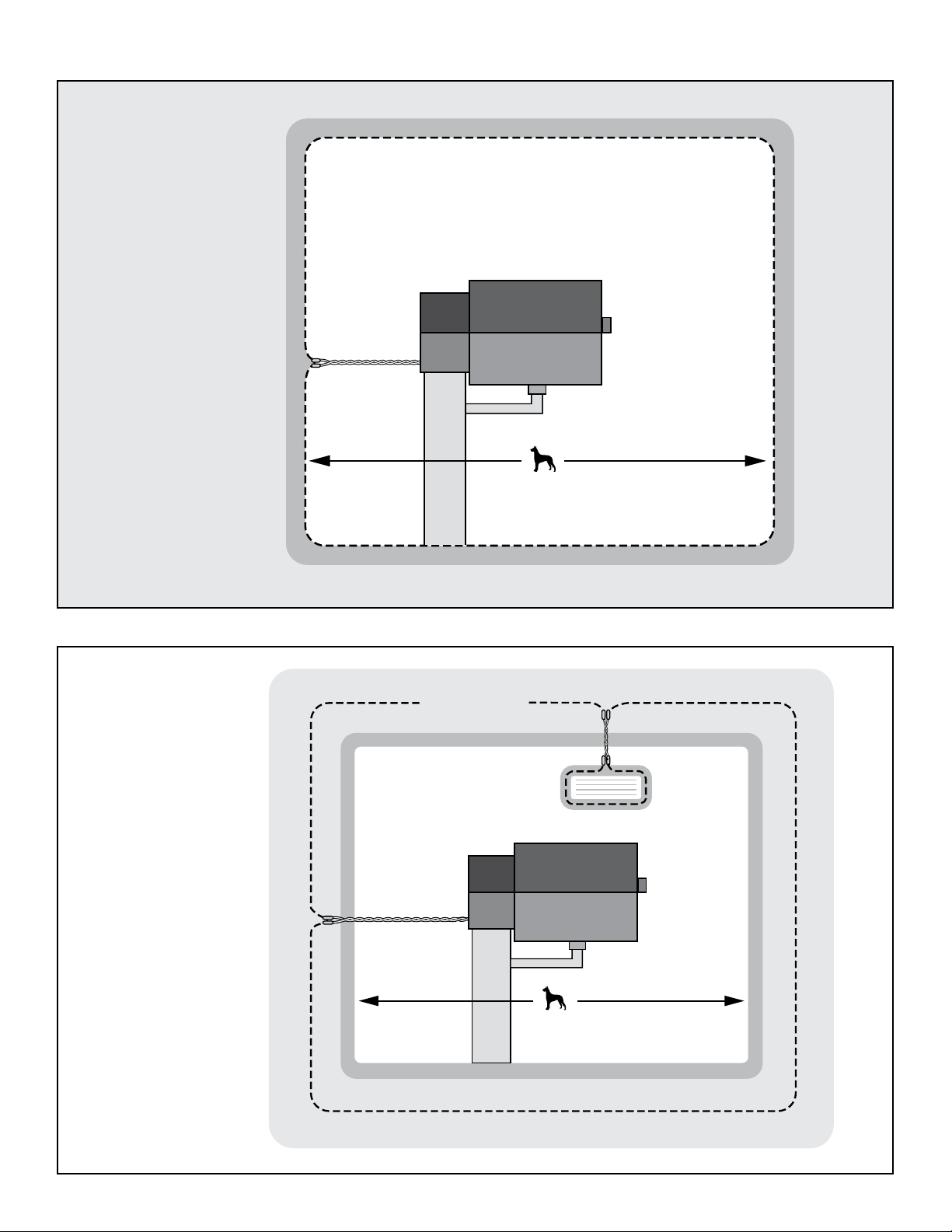
The system has 2 modes: YardMax and Traditional (A/B). In YardMax mode (A), the warning zone begins at the boundary wire, so your pet
can really maximize yard space. In Traditional mode (B), the warning zone begins before the boundary wire. In either mode, the size of the
warning zone is determined by adjusting the boundary width dial on the transmitter from 1 to 10.
Traditional mode has the ability to create off-limits areas to surround things like gardens or pools, but YardMax mode does not. So, if you need
to create off-limits areas within the yard, you will want to use Traditional mode. In Traditional mode, the correction is finite and is set by the
boundary width dial. So if your pet bolts through the entire field, he or she will stop being corrected.
On the other hand, in YardMax mode the correction area is perceived to be infinite. It creates the impression of an endless boundary, so your
pet will be much more inclined to turn and head back. The YardMax mode is ideal for small yards; it allows your pet to use up to 30% more of
the pet area than with Traditional mode.
In either case, after 15 seconds of continuous correction the system will time out. This is to avoid punishing a pet that may be stuck outside his or
her boundaries.
www.petsafe.net 7
YardMax
®
Mode (A)
Traditional Mode (B)
Warning Zone
Static Correction Zone
(Infinite Containment Area)
30% More Yard
Than Traditional Mode
Pet Area
Boundary Wire
Non-Containment Area
Exclusion Area
Static Correction Zone
(Finite Containment Area)
Boundary Wire
Static Correction Zone
Warning Zone
Pet Area
1-800-732-26778
Operating Guide
Step 1: Have Your Utilities Marked
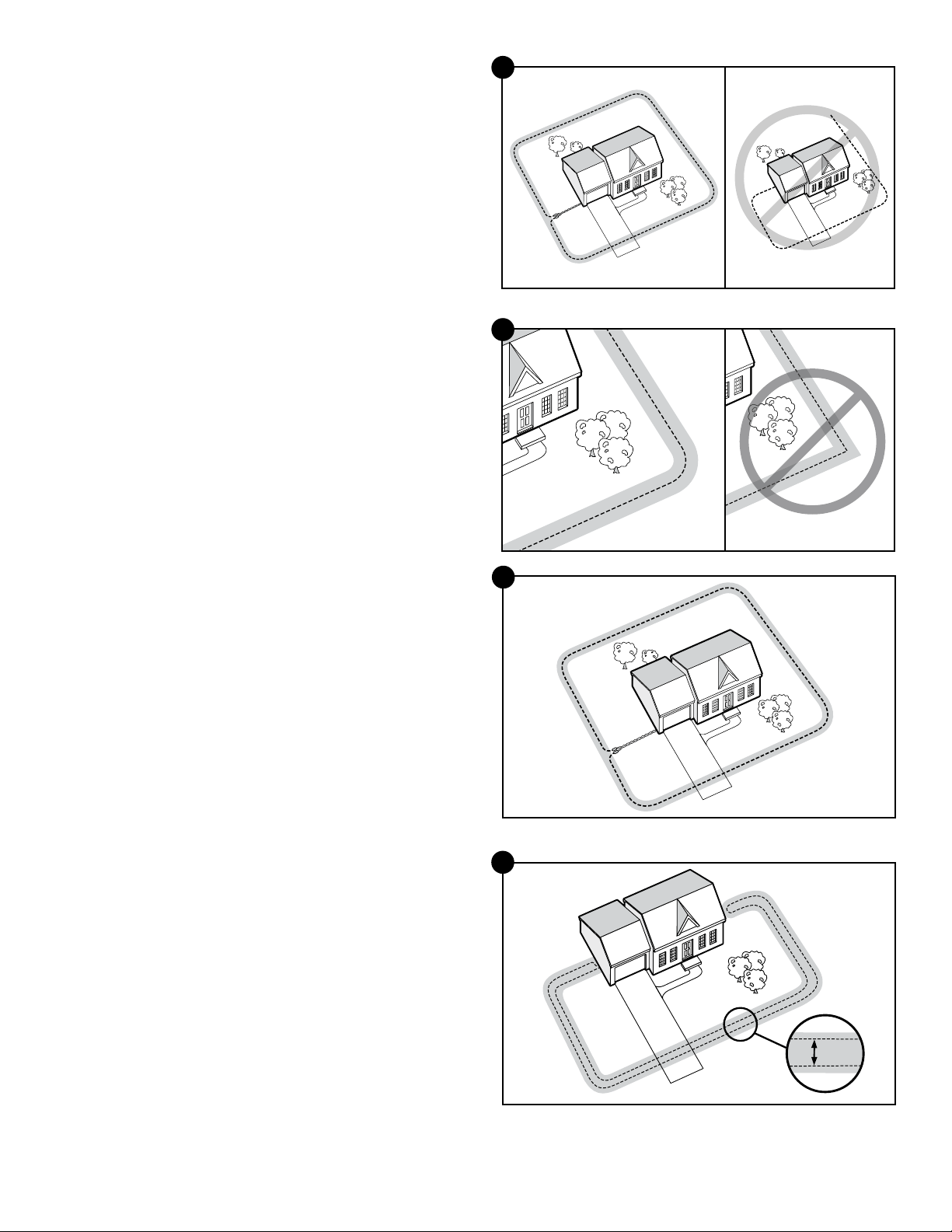
1. Call your utility company to have your utility lines marked. If you
have neighbors using an in-ground pet containment system, you
will want to ask them where the boundary is located. Trust us, you
really do not want to skip this step.
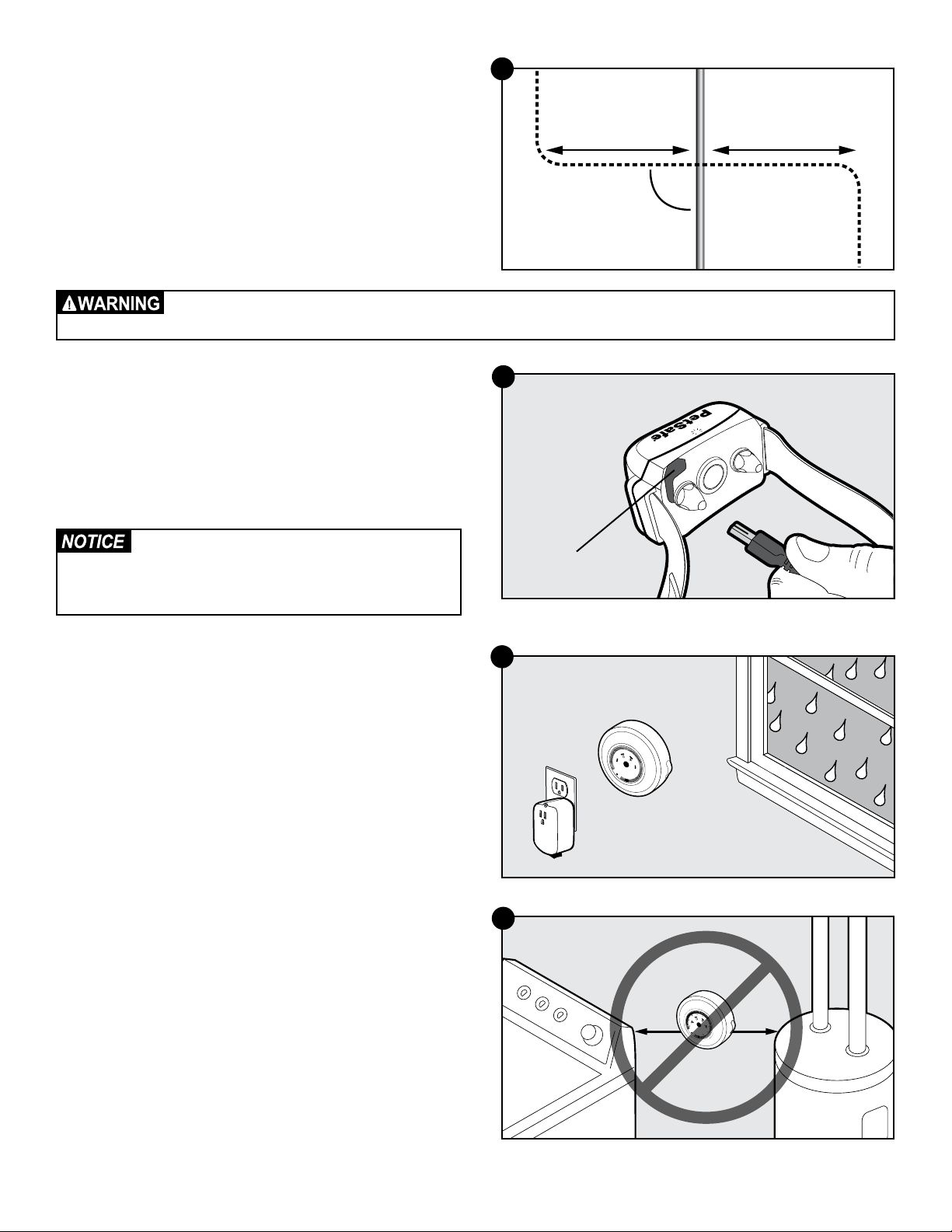
2. Make a plan for how you will work around any large metal
objects (like sheds) or wires. You can cross utility lines but only at
90° angles (1A).
Note: Large metal objects and wires can amplify and/or modulate
radio signals in unpredictable ways.
Underground cables can carry high voltage. Have all underground cables marked before you dig to bury your wire. In
most areas, this is a free service. Avoid these cables when you dig.
Step 2: Charge the Receiver Collar
The receiver charger has two jacks that allow you to charge two
receiver collars at the same time. Open the rubber cap on the back
of the receiver collar (2A). Plug one end of the charger into the outlet
and the other into the receiver collar. The collar light is red while
charging and green when fully charged. The first charge will take
about 2 or 3 hours. Each charge can last up to 3 months depending
on the frequency of use.
Do not charge your receiver collar every night.
Frequent charging can have a negative effect
on the battery. We recommend that the receiver
collar be used until the indicator light blinks red.
Step 3: Install the Surge Protector
and Transmitter
Lightning strikes that occur even several miles away from your
installation can create power surges or spikes which may damage
an unprotected system. The surge protector is included to safeguard
your YardMax
®
system against surges or spikes that can reach it via
your AC power connection and/or boundary wire.
1. Find a place to install the surge protector and transmitter. There
are a few things to consider when choosing an outlet for your
surge protector and transmitter:
• We recommend using an outlet at least 30 ft. from the
breaker box.
• Both the surge protector and transmitter should be indoors, in a
dry, ventilated and protected area.
• You will need to run wire from the transmitter to the boundary
wire, so it must be near window or a wall that you can drill
through (3A). The wire should not be pinched or cross any
utility lines.
• The temperatures in that location should not fall below -10°F
or -23°C.
• Both the surge protector and transmitter should be at least 3 ft.
from large metal objects or appliances (3B). These items may
interfere with the signal consistency.
• In case your system sounds an alarm, place it where you will be
able to hear and access it.
10’
Buried Cable
Boundary Wire
90°
10’
1A
2A
Receiver
Charge Jack
1
A
B
1
0
2
5
6
7
8
9
4
3
3A
B
10
7
8
9
3 ft.
3 ft.
3B
www.petsafe.net 9
2. Once you have chosen an outlet and before plugging anything
in, go to your breaker box and turn the power off to that outlet.
3. Then, back at the outlet, remove the center screw that holds the
outlet cover in place.
4. Plug the surge protector into the lower outlet.
5. Using the large screw provided, secure the surge protector to
the outlet.
6. At the breaker box, turn the power back on to the outlet.
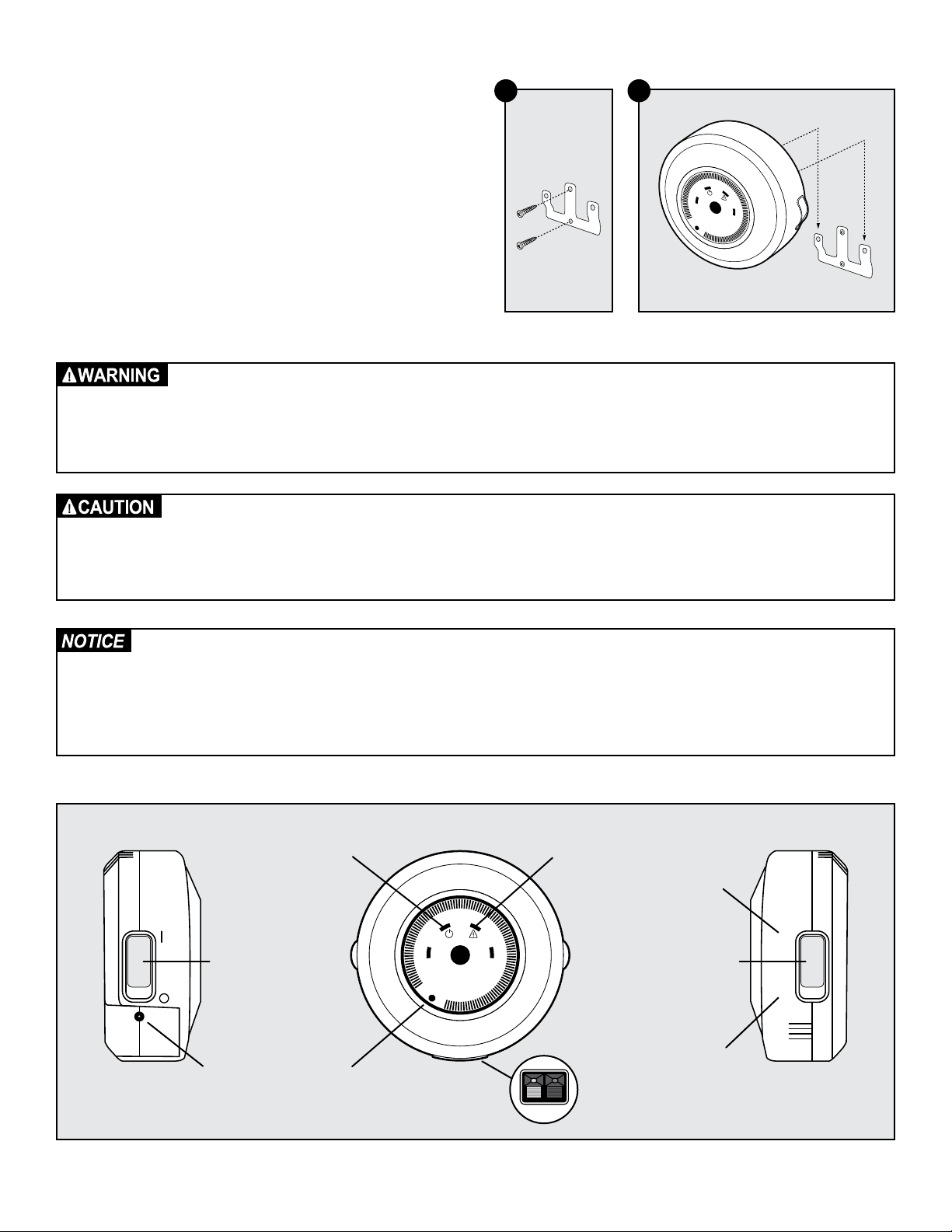
7. Next, you will mount the transmitter somewhere within 5 ft. of the
surge protector. Remove the mounting bracket from the back of
the fence transmitter.
8. Fasten the mounting bracket to the wall using the 2 screws and
anchors provided (3C).
9. Slide the transmitter over the mounting bracket (3D).
• Do not install, connect or remove your system during a lightning storm. If the storm is close enough for you to hear
thunder, it is close enough to create hazardous surges.
• Risk of electric shock. Use the fence transmitter and surge protector indoors in dry location only.
• Turn off power to the outlet before you install or remove your surge protector.
• Risk of electric shock or fire. Use surge protector only with a duplex outlet with center screw.
• Do not install the surge protector if there is not at least 30 ft. (10 m) or more of wire between the electrical outlet
and electrical service panel.
• If possible, DO NOT use an AC circuit protected with a GFCI (ground fault circuit interrupter). Both the surge
protector and the fence system will function. However, in rare cases, nearby lightning may cause the GFCI to trip.
Without power, your pet may escape. You will have to reset the GFCI to restore power to the system.
• Plug the surge protector into a grounded (3-prong) outlet within 5 ft. of the fence transmitter. ALWAYS use a
grounded (3-prong) outlet to ensure protection.
• Do not remove the ground prong from the surge protector plug. Do not use a 3-prong plug to 2-prong outlet
converter. Doing so will make the surge protector ineffective against surges or spikes.
• For added protection, when unused for long periods of time or prior to thunderstorms, unplug from the wall outlet
and disconnect the loop boundary wires. This will prevent damage to the transmitter due to surges.
Mounting
Bracket
1
A B
10
2
5
6
7
8
9
4
3
3C 3D
1
A B
10
2
5
6
7
8
9
4
3
A
B
Power
Indicator Light
Power
Switch
Power
Jack
Wire Break
Warning Light
Boundary
Width Dial
Mode
Selection
Switch
Loop Wire
Terminals
Red Black
YardMax
®
Mode
(Mode A)
Traditional
Mode
(Mode B)
1-800-732-267710
Step 4: Design Your Boundary Zone
Basic Planning Tips
• Always design your layout, position the boundary wire and test
the system as outlined in this guide before burying the boundary
wire. You do not want to find out after burying the wire that there
is a problem with your layout or a loose connection somewhere.
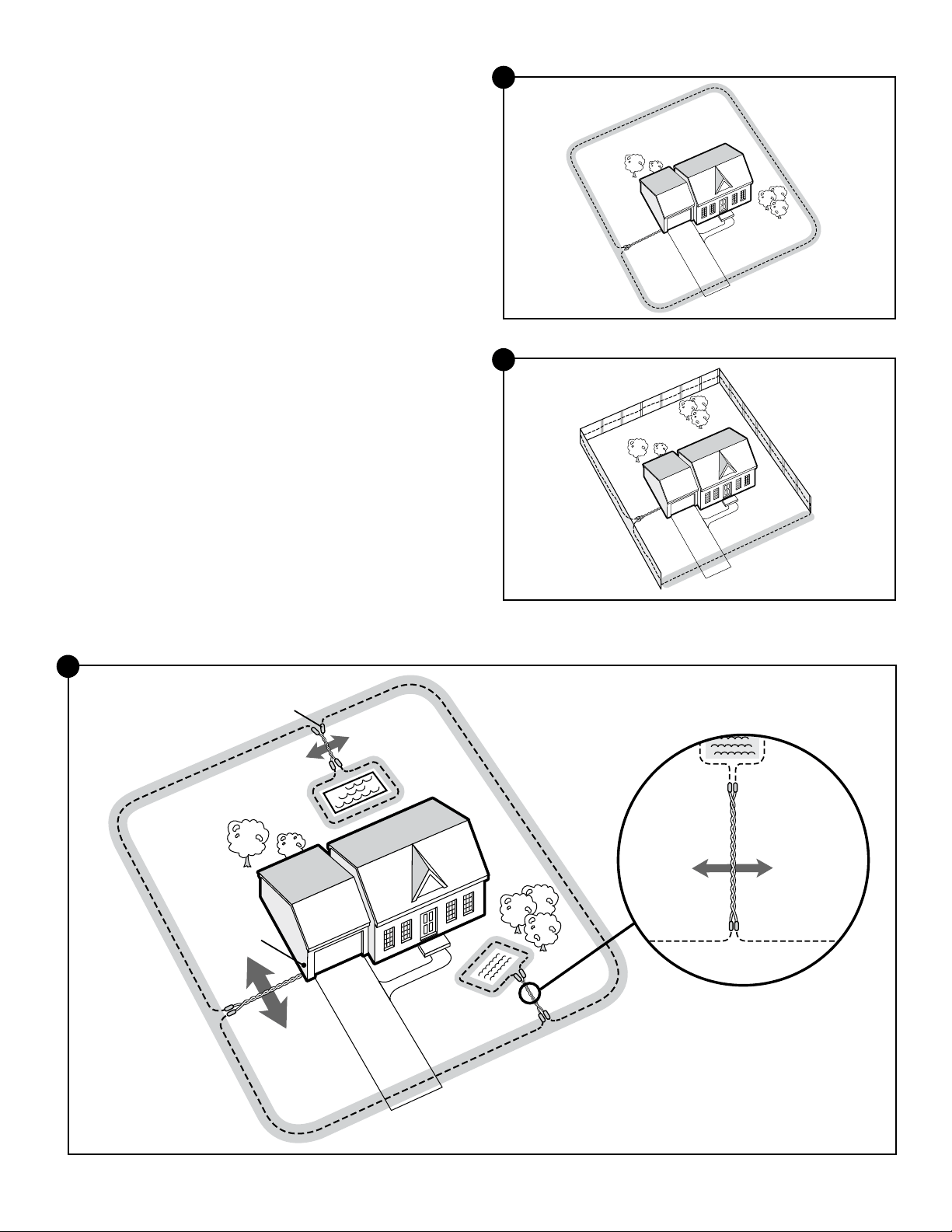
• The boundary wire must start at the fence transmitter and make a
continuous loop back to it (4A).
• Always use gradual turns at the corners with a minimum 3 ft.
radius to produce a more consistent boundary (4B).
• Create areas in your yard that allow your pet to safely cross
over the boundary wire without static correction by twisting
the boundary wires together 10 to 12 times per foot (4G). This
transmission cancels the signal and allows your pet to safely cross
over that area. This will be explained in more detail in Step 5.
• YardMax
®
mode layouts need to be at least 10 ft. from
neighboring YardMax systems.
• Cross any utility lines at a 90° angle.
• Work carefully; a nick in the wire insulation could render it
useless, or create a weak area in the signal field.
• Ensure there is at least 10 ft. between the boundary wire and any
danger zones like roadways.
Single or Double Loop Layout
The containment area can be created by using a single boundary
wire that is placed around the entire property (4C) or by doubling
the boundary wire along the same path (4D).
Single Loop Boundary (4C)
• To create a containment area for the entire property
• Used with YardMax mode (A) or Traditional mode (B)
• For exclusion areas around gardens, landscaping or pools
(Traditional mode only)
With a single loop layout, the boundary wire starts at the fence
transmitter, advances out to the yard, continues all the way around
the perimeter of the property and connects back to the fence
transmitter. This forms a boundary zone with a single wire.
Double Loop Boundary (4D)
• To section off only one boundary area or one section of your
yard (e.g., front yard only, or waterfront property)
• Used with Traditional mode (B) only
• The 2 parallel sections of the double boundary wire must be
separated by a minimum of approximately 5 ft. from each
other in order to avoid canceling out the signal as well as provide
an adequate boundary width (4D)
• A double loop layout requires twice as much wire as a single
loop layout because it doubles back along the same path
With a double loop layout, the boundary wire starts at the fence
transmitter, advances out to the yard and continues to form a
boundary zone in one section of your property (e.g., front yard
only). Then the wire makes a U-turn back along the same path and
connects back to the fence transmitter. This forms a boundary zone
with a double wire.
4A
4B
5’
4C
4D
Single Loop
Double Loop
www.petsafe.net 11
YardMax
®
Mode (A) Layouts
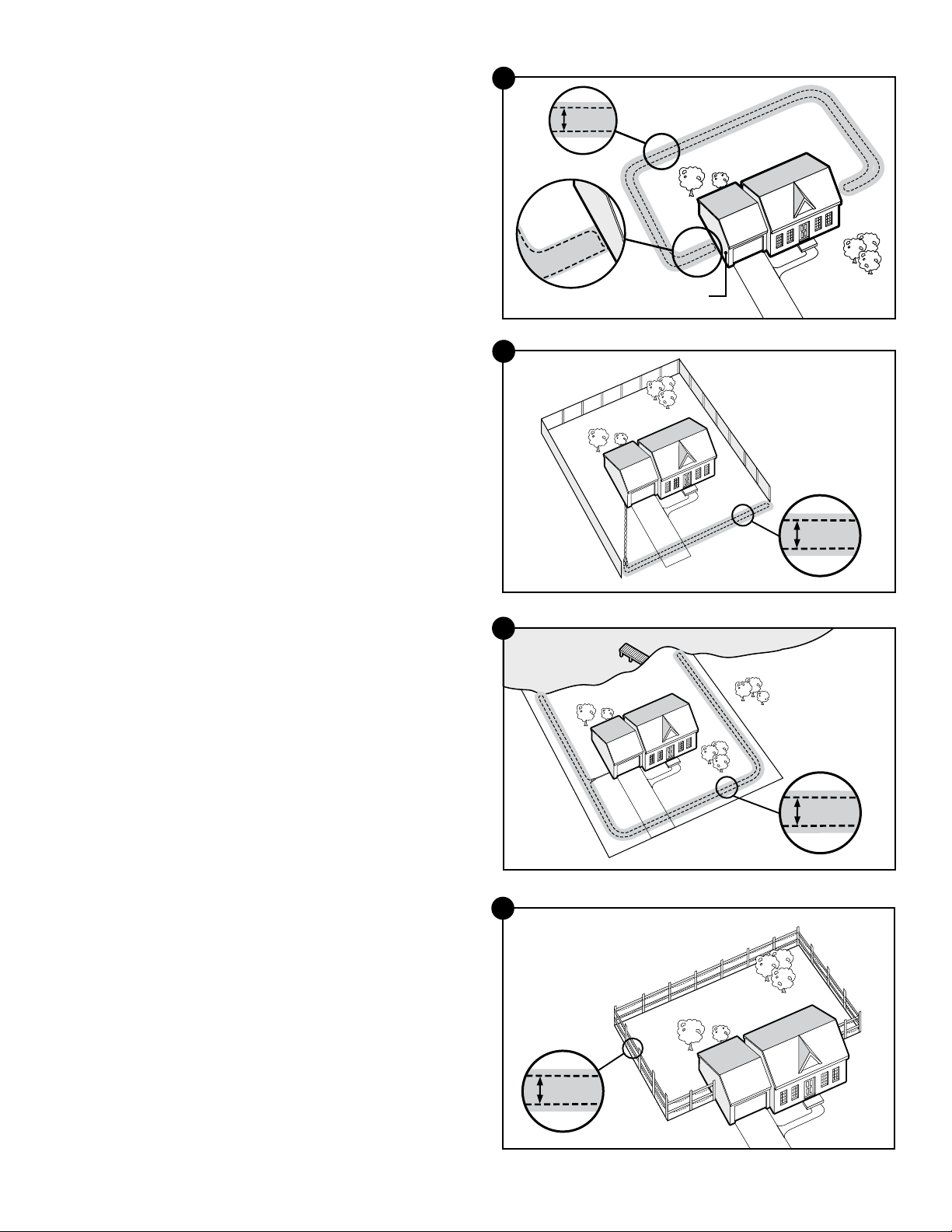
The YardMax Fence system can only be used with a single
loop layout.
Sample 1(4E): Full Perimeter Loop
With a full perimeter loop, YardMax mode allows your pet to
maximize the pet area and roam the entire property freely and safely.
Sample 2 (4F): Full Perimeter Loop Using Existing Fence
This layout allows you to include your existing fence as part of your
layout and keep your pet from jumping out or digging under your
existing fence. This layout also greatly reduces the installation time
since most of the wire will not need to be buried.
Using either sample 1 or 2, run the wire from the fence transmitter
to point A, then to point B and so on (B to C to D to E) all the way
around the entire property until back to point A again. The wires from
point A will then need to be twisted and connected back to the fence
transmitter inside your home.
Traditional Mode Layouts (Setting B)
Traditional mode can be used with either a single loop or a double
loop layout. Sample 1 (4E) and Sample 2 (4F) layouts may be also
be used in Traditional mode.
Sample 3 (4G): Perimeter Loop with Exclusion Areas
(Single Loop)
This layout allows you to keep your pet out of gardens, pools or
landscaping within your yard.
Sample 3
Wire
Splices
Place
Transmitter
Inside
Pets Can
Safely Cross
Twisted Wires
Pets Can
Safely Cross
Twisted Wires
10 Twists/ft.
4G
Sample 1
Sample 2
D
E
A
C
B
D
E
A
C
B
4E
4F
1-800-732-267712
Sample 4 (4H): Front Yard or Back Yard Only
(Double Loop)
From the fence transmitter, run the wire to point A, then to point B and
so on (B to C to D to E to F). Next, make a U-turn and follow your
path all the way back to point G, keeping the wire separated by at
least 5 ft. When you get back to the house (G), make a sharp turn
along the side of the house back to point A. Finally, twist the wires
from point A and connect them back to the fence transmitter.
Sample 5 (4I): Front Boundary Only
(Double Loop)
From the fence transmitter, run the wire to point A, then to point B.
Make a U-turn and follow your path back to point A, keeping the
wire separated by at least 5 ft. Then twist the wires from point A and
connect them back to the fence transmitter.
Sample 6 (4J): Waterfront Property
(Double Loop)
From the fence transmitter, run the wire to point A, then to point B.
Make a U-turn and follow your path to C, then to D, then to E. Next,
make another U-turn and follow the same path all the way back to
point A, keeping the wire separated by at least 5 ft. Finally, twist the
wires from point A and connect them back to the fence transmitter.
Sample 7 (4K): Wire Loop Attached to Existing Fence
(Double Loop)
This layout allows you to include your existing fence as part of your
layout and keep your pet from jumping out or digging under your
existing fence. It reduces the amount of wire which will need to
be buried. From the fence transmitter run the wire to point A, then
to point B and so on (B to C to D to E to F). Next, make a U-turn
and follow your path all the way back to point A, keeping the wire
separated by at least 5 ft. Finally, twist the wires from point A back to
the fence transmitter.
E
F
B
Place Transmitter
Inside
A
A
G
G
D
C
5’
4H
Sample 4
Sample 5
A
B
5’
4I
Sample 6
A
C
D
E
B
5’
4J
Sample 7
A
C
D
E
F
B
5’
4K
www.petsafe.net 13
Step 5: Position, Twist and Splice the
Boundary Wire
Once you have designed your layout, the next step is to position the
wire along your property. Hold off on burying the wire until you have
tested the system first.
1. Start with one end of the wire at the surge protector, but do not
plug it in yet. Run the wire outdoors all the way around your
planned perimeter and back to the surge protector.
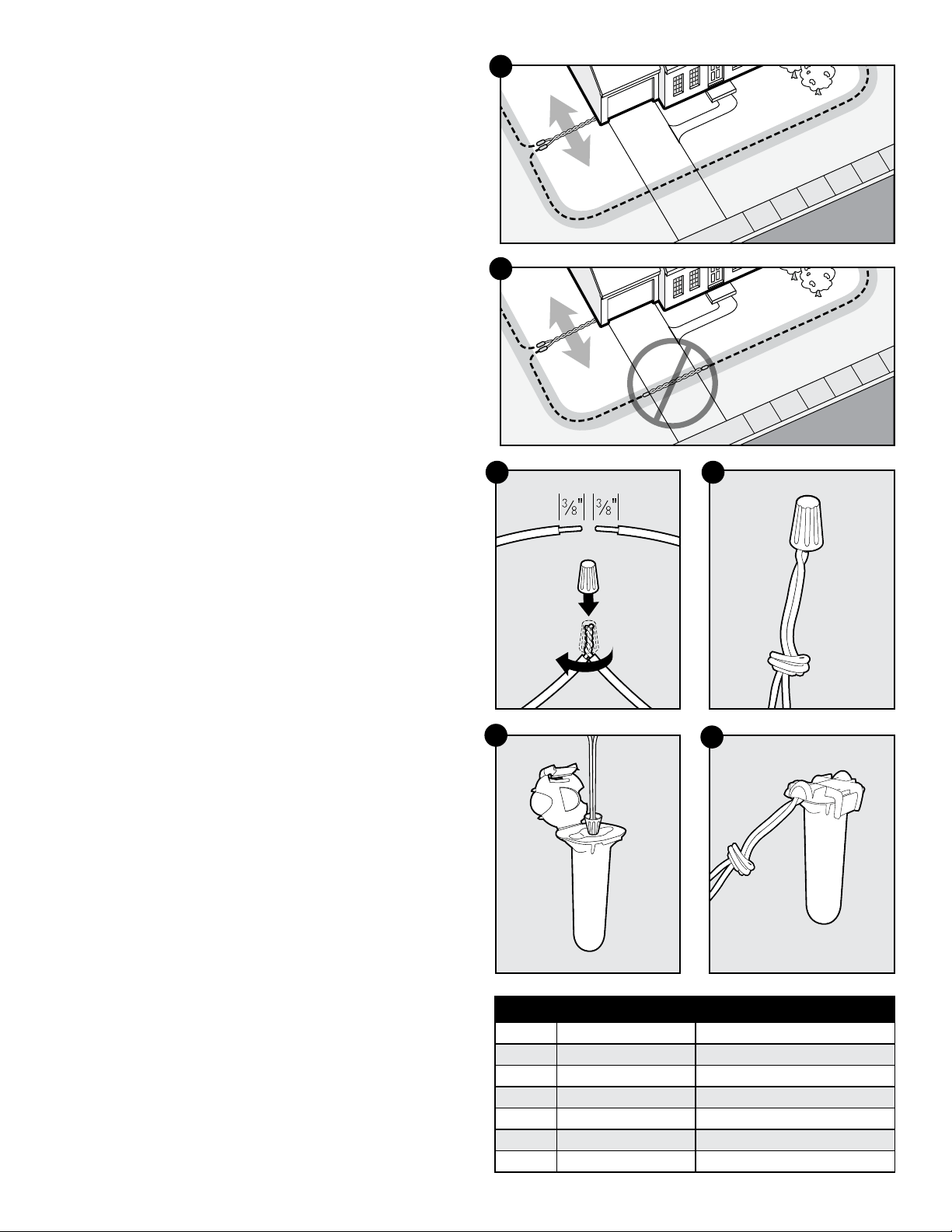
2. You will need to twist the 2 wires together for the area running
from the transmitter inside your home out to the yard so that your
pet can cross this section without a correction (5A). Twisting both
ends of the wire together 10-12 times per ft. cancels the signal.
Keep in mind that crossover areas will only work when set up
within the containment area. Straight crossover breaks along the
perimeter, such as across driveways (5B), cannot be created and
the signal will not be canceled.
Quick tip: The fastest way to twist 2 wires is to cut 2 pieces a little
longer than the length you need, twist them and then “splice” in that
section. Anchor one end of the 2 wires to something secure (or have
a partner hold them), and insert the other end into a power drill. Pull
the wire taut. Then use the drill to twist the wire quickly. Go slowly.
Follow the splicing guide below to learn how to reconnect this
twisted portion back to the main boundary wire.
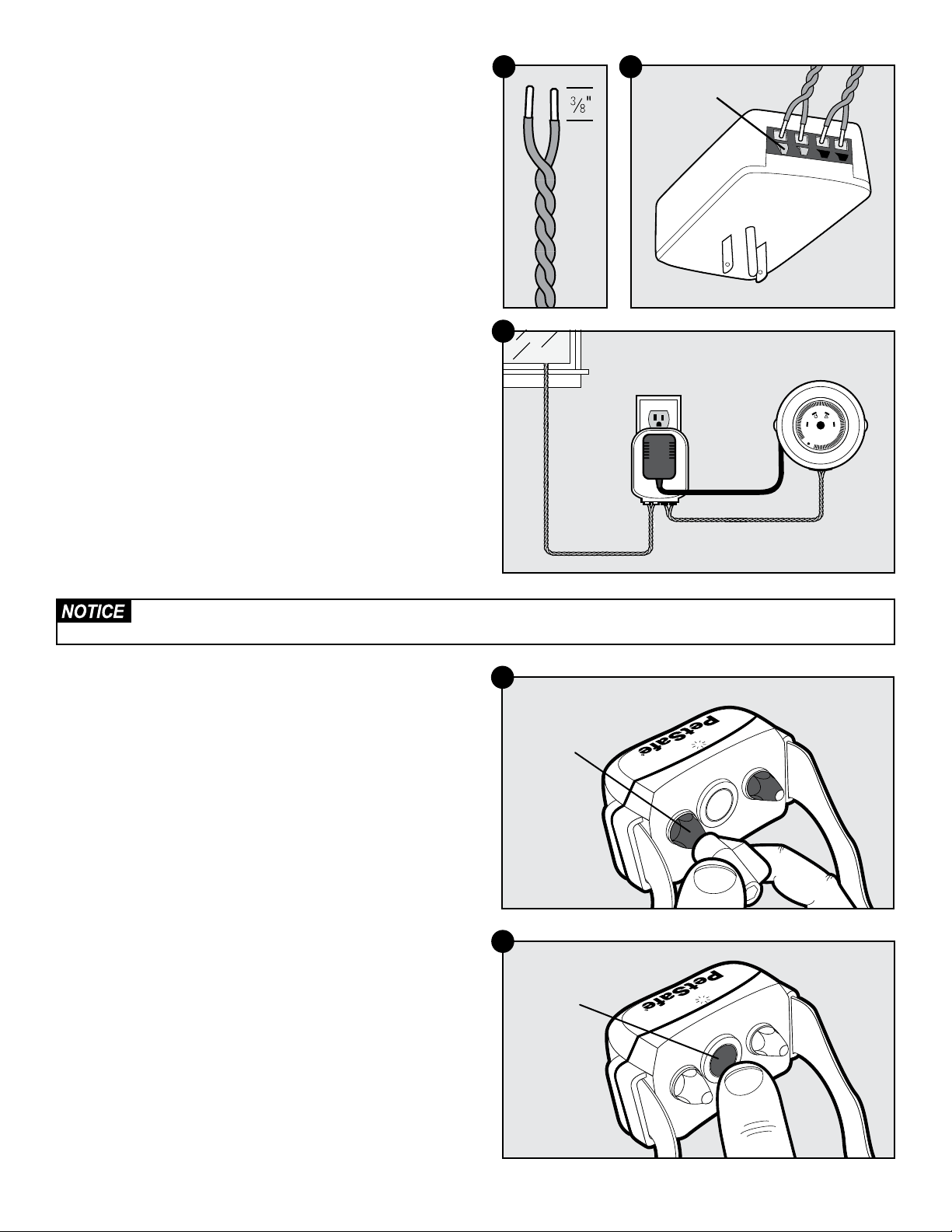
Splicing Guide
Although not required, it is recommended that you cut and splice
the wire between each twisted section. Your YardMax
®
system
comes with 2 gel-filled splice capsules to ensure that your splices are
waterproof. You can give us a call if you would like to purchase more
splice capsules.
a. Strip approximately
3
⁄8 in. of insulation off the ends of the wires
to be spliced (5C).
b. Insert the stripped ends into the wire nut and twist the wire
nut around the wires. Make sure there is no copper exposed
beyond the end of the wire nut.
c. Tie a knot 3 to 4 in. from the wire nut (5D). Ensure that the wire
nut is secure on the wire splice.
d. Once you have securely spliced the wires together, open
the lid of the gel-filled splice capsule and insert the wire
nut as deeply as possible into the waterproof gel inside the
capsule (5E).
e. Snap the lid of the capsule shut (5F).
Additional Boundary Wire
Extra spools of boundary wire can be purchased in lengths of 500
ft. per spool at the store where you purchased the kit or through the
Customer Care Center.
Note: When adding wire, it must act as a continuous loop.
The table on the right indicates the approximate length of boundary
wire needed for a square, single-loop layout. The length will vary
due to the amount of twisted wire and the layout used.
5B
5A
1
2
5D5C
5E
5F
Acres Feet of Wire Needed Number of Extra Spools Needed
1
⁄4 415 -
1
⁄3 480 -
1
⁄2 590 1
1 835 1
2 118 0 2
5 1870 3
10 2800 5
1-800-732-267714
Step 6: Connect the Wires
Now that the boundary wire has been positioned and spliced, the
next step is to connect the wire from inside to the surge protector, and
then to the transmitter.
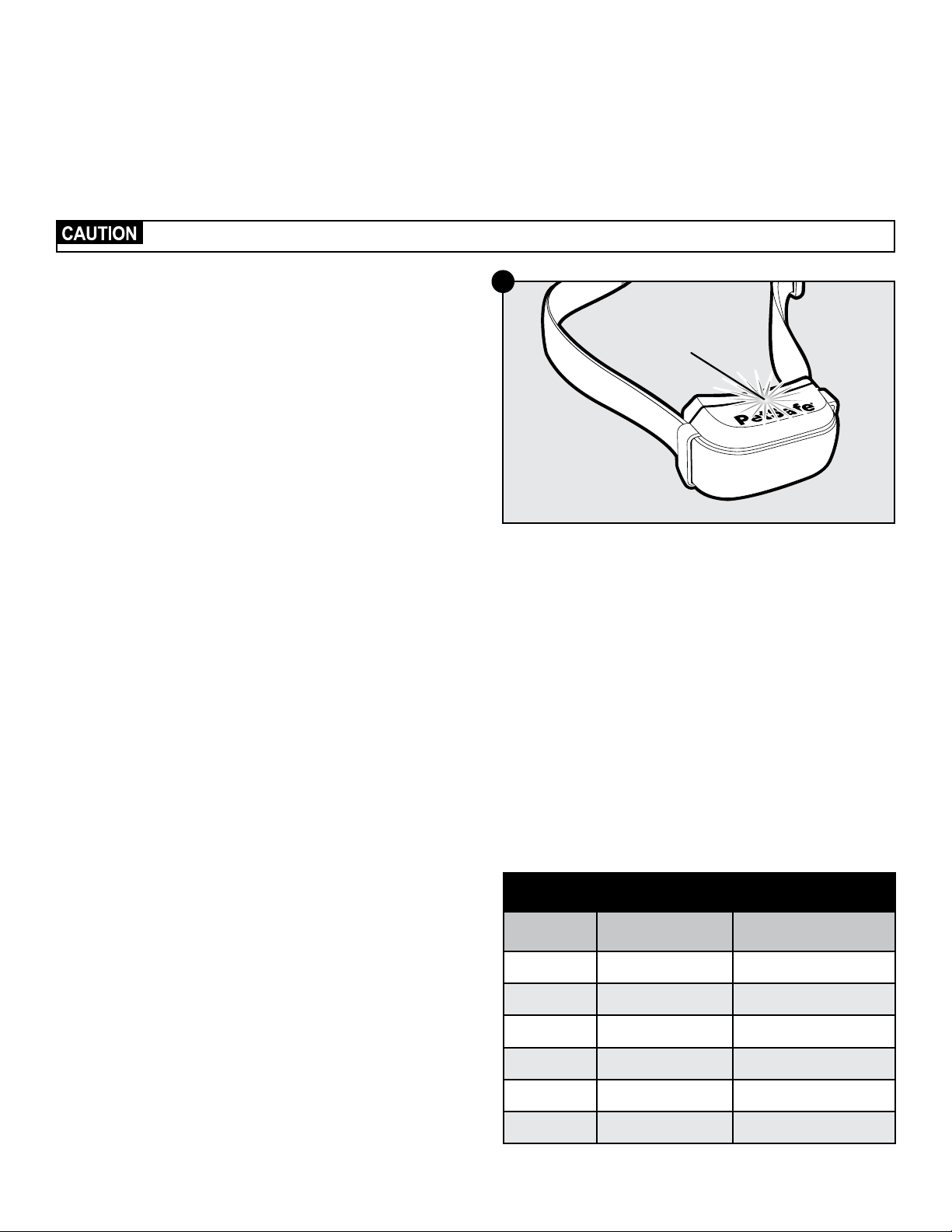
1. Strip
3
⁄8 in. of insulation from the 2 ends of the boundary wires in
order to connect them to the surge protector (6A).
2. Insert the stripped ends into the 2 left red connector holes on the
bottom of the surge protector labeled “LOOP” (6B). Make sure the
copper ends do not touch each other at the terminals.
3. Next, connect the surge protector to the fence transmitter with 2
twisted wires. Measure and cut 2 lengths of wire, then strip
3
⁄8 in. of
insulation at both ends from each.
4. Insert the 2 ends of the wires into the 2 black connectors at the
bottom of the surge protector labeled “TRANSMITTER.”
5. Next, insert one wire into the red tab on the bottom of the
transmitter and insert the other wire into the black tab.
6. Plug the fence transmitter adapter into the outlet on the surge
protector. You are now all connected (6C).
7. Turn the fence transmitter on by sliding the power switch to the
up position.
A green light means you have a continuous loop. If an alarm sounds
and a red warning light illuminates, it means that you do not have a
continuous loop. Make sure the wires are in the terminals and that all
connections are complete. And if you get stumped, you can always
check out our troubleshooting section, watch one of our instructional
videos or give us a call.
Verify that the boundary loop and transmitter wires are connected to the proper surge protector terminals. Reversed
connections will result in an increased risk of surge-related damage.
Step 7: Prepare the Receiver Collar
In order to test the system you will need to use the receiver collar. Your
receiver collar comes installed with short contact points. If your pet has
long or thick hair, use the long contact points instead. Tighten or switch
the contact points by using the contact point wrench (7A).
Turn On the Receiver Collar
The collar will automatically turn on whenever it is removed from the
charger. To turn on the receiver collar when it is not on the charger,
press and hold the mode button for 1 second (7B). Avoid touching the
metal contact points.
Next, the indicator light will flash green once and then go off for
1 second. It will then come back on and glow continuously for 5
seconds—either solid red, solid green, or red+green together to
indicate the status of the battery (7C). Finally, there will be a series
of red flashes which represent the static correction level. This quick,
opening series of tests is part of the ReadyTest
®
startup feature. The
receiver collar will then automatically start the PerfectFit test by flashing
red+green together every second for 90 seconds.
1
A B
10
2
5
6
7
8
9
4
3
Boundary
Wire
Transmitter Wires
6C
Contact
Point
7A
Mode
Button
7B
LOOP TRANSMITTER
BOUCLE ÉMETTEUR
Push Tab
Down to
Insert Wire
6B6A
www.petsafe.net 15
ReadyTest
®
Feature
ReadyTest is a startup feature that lets you know the status of the battery
as well as the current correction level of the receiver collar. It also
checks that all circuits are working correctly. This mode automatically
starts every time you remove the receiver collar from the charger, or
first turn it on. If the receiver collar is on your pet during the ReadyTest
startup, the test will fail and the receiver collar will automatically turn
off. This also means the system will not contain your pet!
If the receiver collar fails the ReadyTest startup, the receiver collar is automatically turned off; your pet will not be contained.
If the ReadyTest feature does detect a problem, the receiver collar
will continually beep and the indicator light will glow solid red for
20 seconds. The receiver collar will automatically turn off. Do not
put the receiver collar on your pet at this time; your pet will not be
contained. Instead, turn the receiver collar back on and repeat the
test. If the receiver collar continues to fail the ReadyTest startup, call
the Customer Care Center.
PerfectFit Test
This test is an added feature to verify a “perfect” fit of the collar
around your pet’s neck; however, it is not required for the system
to function. After the ReadyTest statup finishes with the series of red
flashes that correspond to the static correction, the receiver collar will
automatically start the PerfectFit mode. For 90 seconds the receiver
collar will continually flash red+green together. You must place the
receiver collar on your pet and adjust the fit within the 90 seconds or
it will go back to normal operation mode and flash the status of the
battery (red, green, or red+green together) every 4 seconds.
After you adjust the collar on your pet and the contact points are
touching his or her skin (or if you inadvertently touch both of the
contact points with your fingers), the receiver collar will emit a unique
double tone. You will know you have the proper fit after you hear
5 consecutive double tones and you see 5 green flashes. Then the
receiver collar moves into normal operation mode and flashes the
status of the battery every 4 seconds.
Turn Off the Receiver Collar
To turn off the receiver collar, press and hold the mode button
continuously for 5 seconds until the red light turns off. To extend the
time between charging the receiver collar, consider turning off the
receiver collar when it is not in use.
Set the Static Correction Level
The static correction levels increase in strength from 2 to 6, with level
1 being tone only (no correction), and level 6 being the maximum
setting. Refer to the table to the right to choose the static correction
that best fits your pet.
To set or check the static correction, press and hold the mode button
until you see a red light. Then let go. The collar will then emit a series
of red flashes that correspond to the current correction level (e.g., 4
red flashes means level 4). Press and hold the mode button again
for 1 second to increase the level by one setting. You must count the
number of red flashes to determine the level setting.
Note: Once you count 6 red flashes you are at level 6, and an
additional hold will cycle the receiver collar back to level 1, which is
tone only.
Refer to the table “Receiver Collar Status Indicators” on page
29 for a complete guide to all the status lights and tones for the
receiver collar.
Receiver
Indicator Light
7C
Static Correction Level Table
Level Indicator Light Static Correction
1 1 red flash None—tone only
2 2 red flashes Low
3 3 red flashes Medium-low
4 4 red flashes Medium
5 5 red flashes Medium-high
6 6 red flashes High
1-800-732-267716
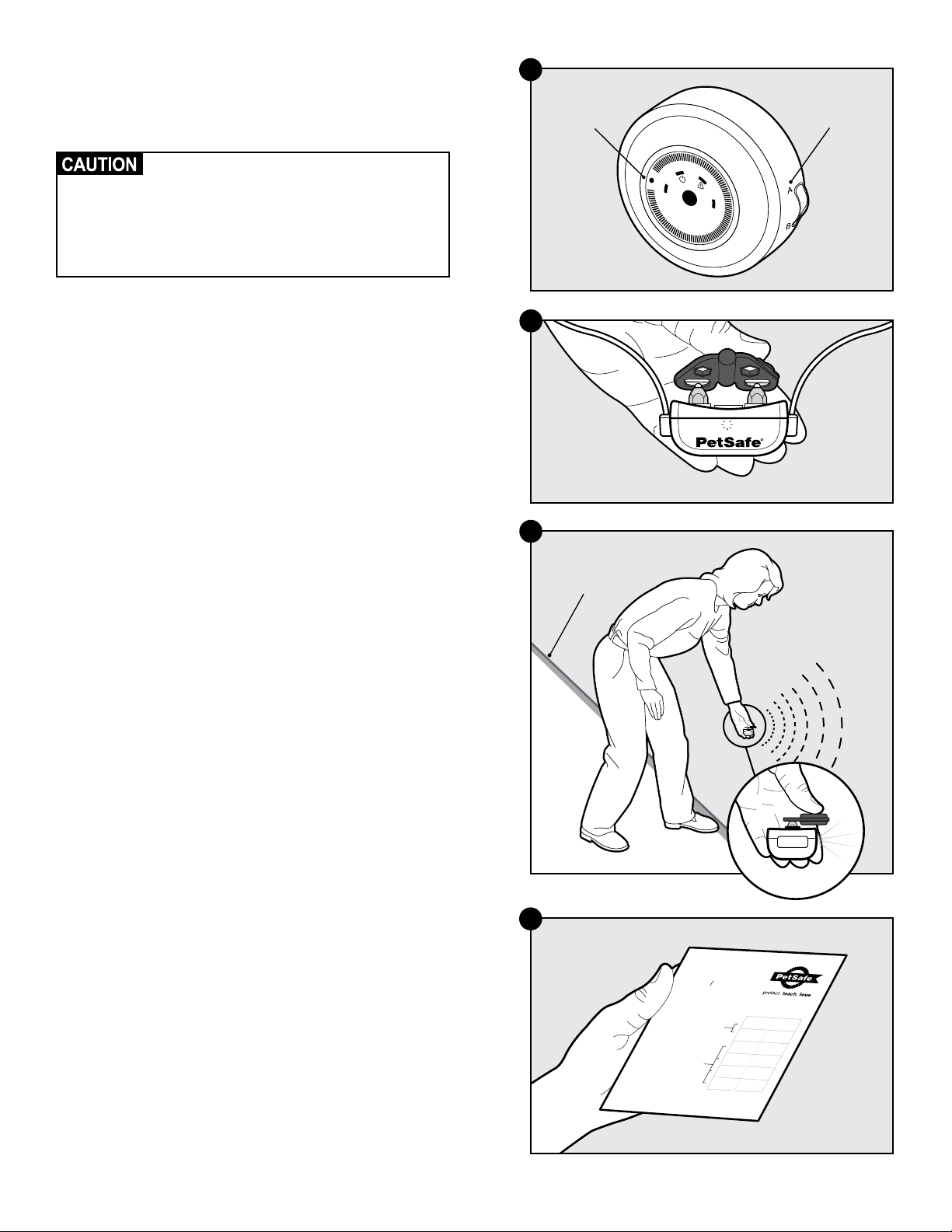
Step 8: Test the Fence Direction
You will want to verify that your fence is transmitting in the right direction
to contain your pet. You will need to do this test in YardMax
®
mode,
regardless of which mode you plan to use.
• The receiver collar should NOT be on your
pet when the system is tested. Your pet may
receive an unintended correction.
• To prevent an unintended correction for your
pet, test the boundary location and width
after any change.
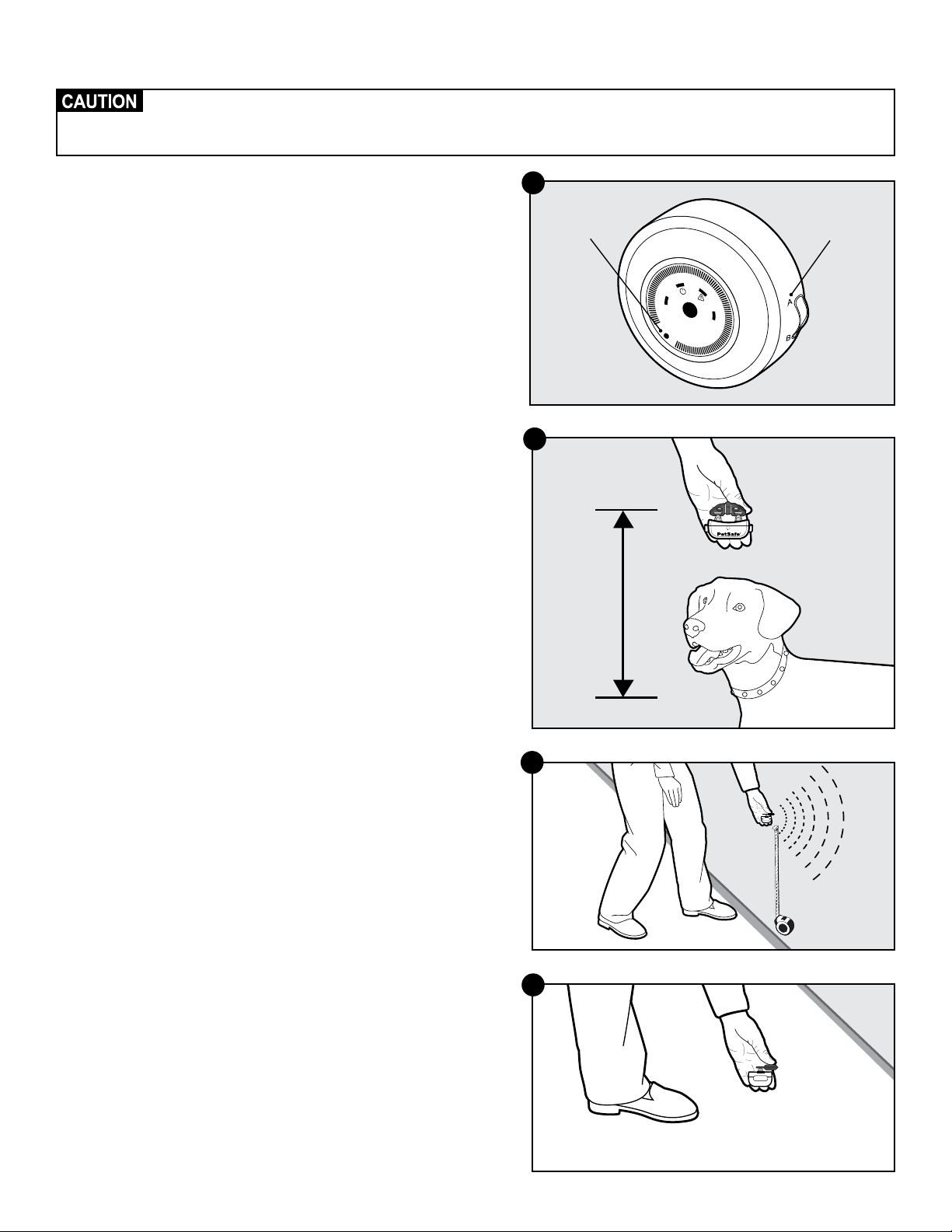
1. Make sure the fence transmitter is on and that the receiver collar
has been charged.
2. Set the fence transmitter to YardMax mode (A) and turn the
boundary width dial to 3 (8A).
3. Turn on the receiver collar by holding the mode button for
1 second.
Note: When you remove the receiver collar from the charger, or first
turn it on, the receiver collar will automatically go into ReadyTest
®
startup mode (Refer to Step 7).
4. Set the static correction on the receiver collar to level 6.
5. Place the test light tool contacts onto the contact points of the
receiver collar (8B).
6. Starting inside the pet area, hold the receiver collar about 1 ft.
above the ground with the contact points facing upwards and
approach a straight section of your boundary wire that is at least
50 ft. long.
7. As you cross the wire (8C), you will hear the warning tone and see
the test light flash as you walk through the correction zone. If the
test light tool does not flash:
a. Move the receiver collar closer to the ground
b. Change the dial to a higher number than 3—especially for a
larger installation
c. Turn around and walk back across the boundary wire into
the pet area to see if it illuminates the test light in that direction
instead. If it does, reverse the wires at the connector to the
fence transmitter. Then repeat the test.
8. Once you have verified that things are working as they should be,
use the labels (8D) to mark the connections to the surge protector
and fence transmitter. If anything gets disconnected, you will be
able to easily reconnect it.
Boundary
Wire
8C
1
A B
10
2
5
6
7
8
9
4
3
Set the dial
to 3
Mode A
8A
Red
Black
Loop Right
Loop Left
TX Left
TX Right
402-027
Red
Black
Loop Right
Loop Left
TX Left
TX Right
After verifying Receiver Collar
operation at the boundary, use the
labels to identify the Boundary Wire
connections to the Transmitter and
the Boundary Wire connections
to the Surge Protector. This will be
convenient to have should any of the
wires become disconnected.
Use on
Transmitter
Connections
Use on
Surge
Protector
Connections
8D
8B
www.petsafe.net 17
Step 9: Test the Receiver Collar
Northern climates can affect the range of the signal. In YardMax
®
mode, excessive snowfall (>1½ ft.) may place
your pet outside the signal field allowing your pet to leave the pet area. You may need to switch to Traditional
mode or increase the boundary width until the snow recedes.
Test the Receiver Collar—YardMax Mode
In YardMax mode (A), the warning zone starts at the boundary wire.
The higher the boundary width setting, the wider (and taller) the warning
zone. So your pet can go further beyond the boundary wire before being
corrected. We recommend setting the boundary width so that the correction
zone begins at least 10 ft. before any potential hazards like roadways.
Lower settings result in a smaller warning zone before correction, are more
battery-efficient and are less likely to couple to other metallic objects.
These steps are very similar to the ones we used in Step 8.
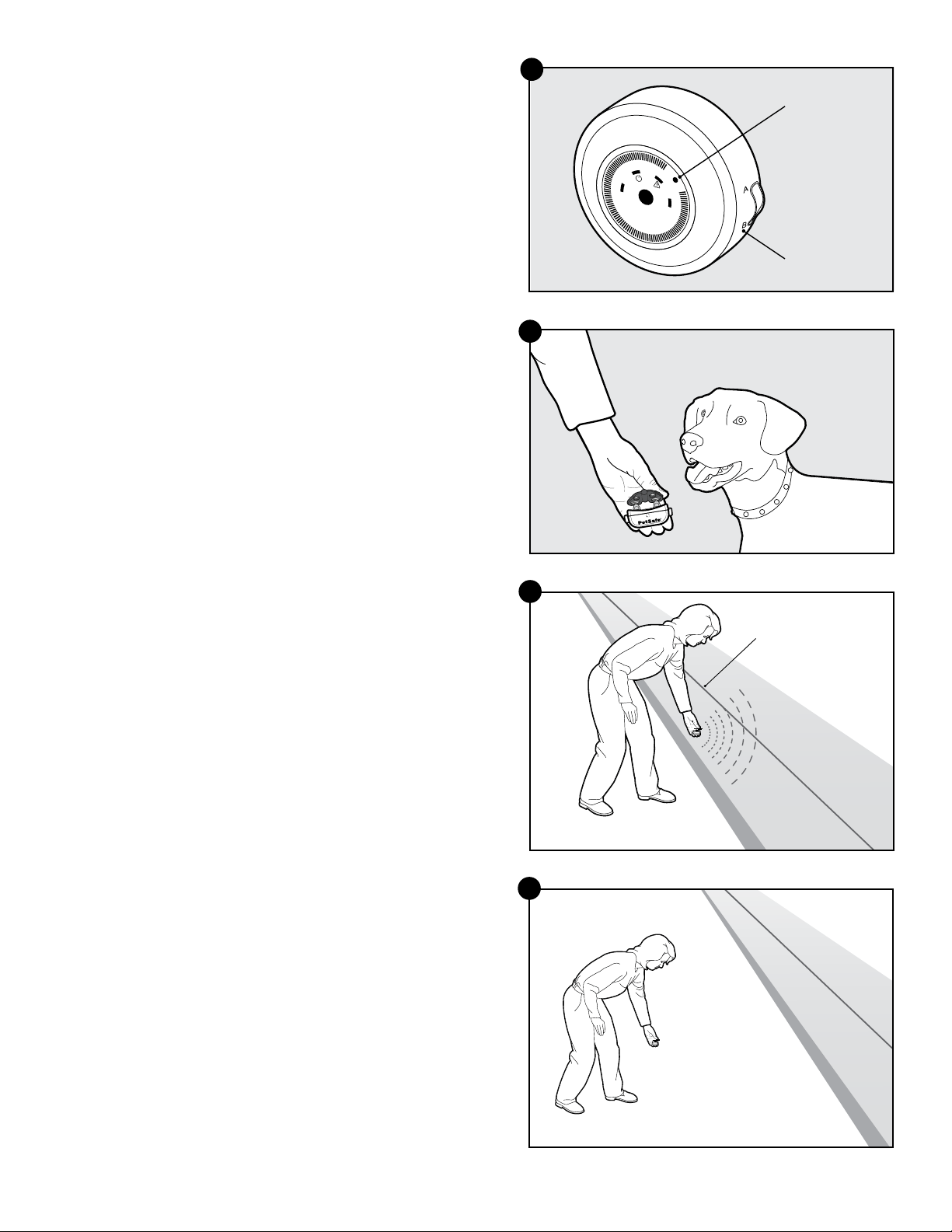
1. Set the fence transmitter to YardMax mode (A), but this time turn the
boundary width dial down to 1 (9A)
2. Make sure that the static correction on the receiver collar is set to
level 6.
3. Place the test light tool against the receiver collar contacts and hold
the contact points facing upwards.
4. Hold the receiver collar about 1 to 1
1
⁄2 ft. above your pet’s neck
height (9B).
Quick tip: At the boundary wire, place a tape measure already set to
the 1–1½ ft. measurement above your pet’s neck (9C). When you walk
over the boundary wire, you want the receiver collar to tone and flash.
Adjust the transmitter dial until this is accomplished.
5. Starting inside the pet area, slowly walk over to the boundary wire.
As you cross the wire, you will hear the warning tone and see the test
light flash as you continue to walk through the correction zone. If you
do not see the test light tool flash, increase the boundary width dial by
one setting and retest.
6. Continue adjusting and retesting until the test light flashes at the
boundary 1 ft. above the height where the receiver collar is
positioned on your pet’s neck.
7. Repeat this test at different places along the boundary wire to verify
that it is working everywhere.
Note: To ensure that the signal is not coupled to any wires or other
metallic objects, we will do one more test inside the pet area.
8. Switch the fence transmitter setting to Traditional mode (B).
9. With the test light tool and receiver collar contact points facing
upward, walk throughout the pet area with the receiver collar as close
to the ground as possible (9D).
10. If the receiver collar does not activate in the pet area (where it should
not) then things are going great. You can switch back to YardMax
mode (A) on the fence transmitter.
11. If the receiver collar does activate within the pet area, it means that
you need to adjust the boundary wire where it crosses a cable or
electrical wire or approaches another metallic object. Refer back
to the instructions in Step 1. Other options include reducing the
static correction zone or switching to Traditional mode (B). After the
adjustment, retest the system.
12. Now that the boundary width is established, set the correction level
on the receiver collar to level 1 for training.
13. Now it is safe to bury your boundary wire!
1– 1½ ft.
Pet Area
9D
9C
9B
1
A B
10
2
5
6
7
8
9
4
3
Set the dial
to 1
Mode A
9A
1-800-732-267718
Test the Receiver Collar—Traditional Mode
These steps are very similar to the ones we used in Step 8.
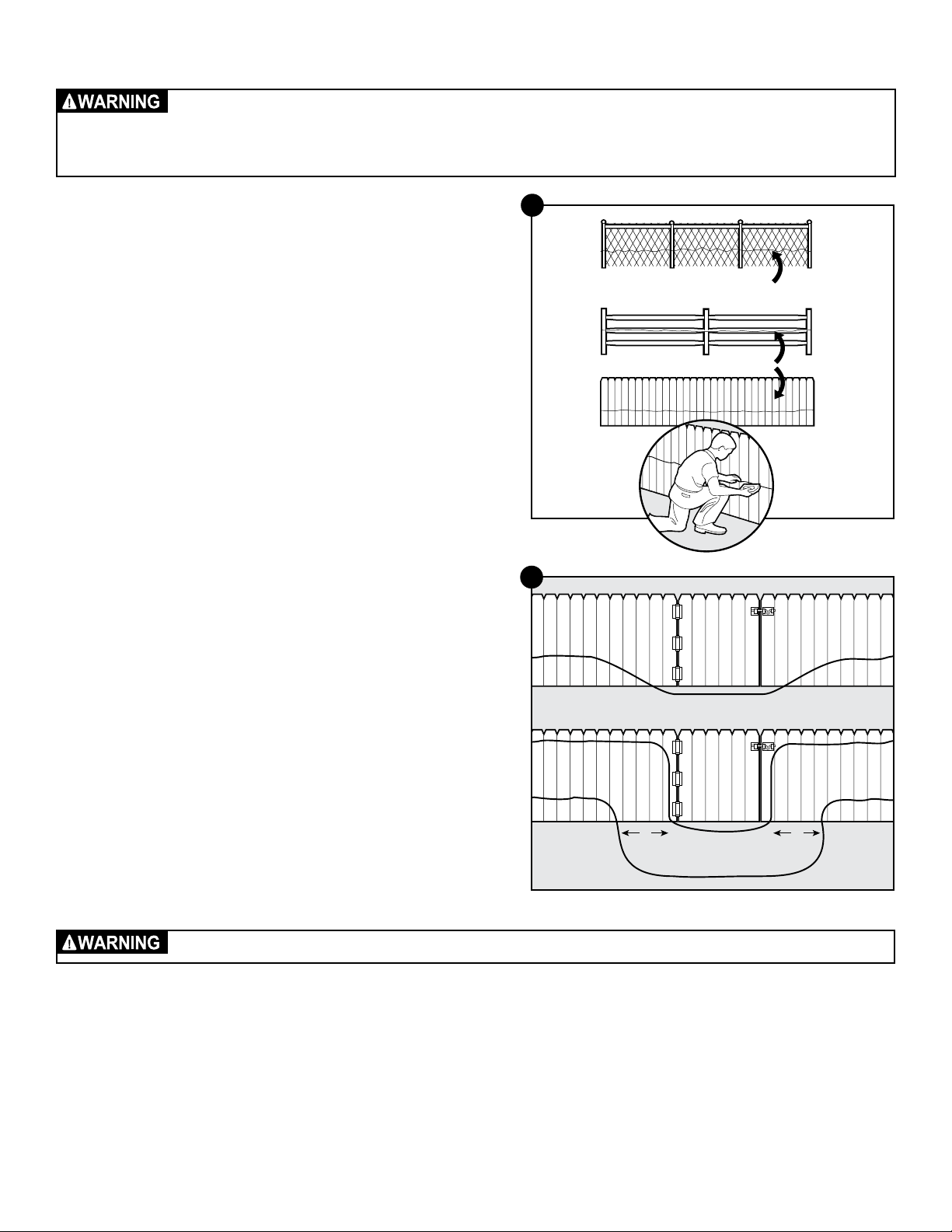
1. Set the fence transmitter to Traditional mode (B) and turn the
boundary width dial up to 7 (9E).
2. Make sure that the static correction on the receiver collar is set to
level 6.
3. Place the test light tool against the receiver collar contact points
and hold the contact points facing upwards.
4. Hold the receiver collar at your pet’s neck height (9F).
5. Starting inside the pet area, slowly approach the boundary
wire until you hear the warning tone (9G). 2 seconds later, the
test light will begin to flash. Walk back into the pet area until the
beeping stops.
6. Adjust the boundary width dial to set the warning zone
appropriately. We recommend setting it so that the warning zone
begins at least 10 ft. before the boundary wire.
7. Repeat this test at different places along the boundary wire to
verify that it is working everywhere.
Note: To ensure that the signal is not coupled to any wires or other
metallic objects, we will do one more test inside the pet area.
8. With the test light tool and receiver collar contact points facing
upward, walk throughout the pet area (9H).
9. If the receiver collar does not activate in the pet area (where it
should not) then things are going great.
10. If the receiver collar does activate within the pet area, it means
that you need to adjust the boundary wire where it crosses a
cable or electrical wire or approaches another metallic object.
Refer back to the instructions in Step 1. After the adjustment, retest
the system.
11. Now that the boundary width is established, set the correction
level on the receiver collar to level 1 for training.
12. Now it is safe to bury your boundary wire!
1
A B
10
2
5
6
7
8
9
4
3
Set the dial
to 7
Mode B
9E
9F
Boundary
Wire
9G
Pet Area
9H
www.petsafe.net 19
Step 10: Bury the Boundary Wire
• Underground cables can carry high voltage. Have all underground cables marked before you dig to bury your
wire. In most areas, this is a free service. Avoid these cables when you dig.
• Before you begin installing the boundary wire, turn the fence transmitter off and unplug the adapter from the
surge protector.
Burying the boundary wire is recommended to protect it and prevent
disabling the system.
1. Cut a trench 1–3 inches deep along your planned boundary. It
only needs to be as wide as the wire.
Quick Tip: We have tried lots of tools. Lawn trenchers, which you
can often rent from a local hardware store, work great and make for
a quick job. You can also use a flat shovel, like a trenching shovel.
2. Place the boundary wire into the trench maintaining some slack to
allow it to expand and contract with temperature variations.
3. Use a blunt tool such as a wooden paint stick to push the
boundary wire into the trench. Be careful not to damage the
boundary wire insulation.
Utilizing an Existing Fence
The boundary wire can be attached to a chain link fence, split
rail fence or a wooden privacy fence. The boundary wire can be
attached as high as needed. However, make sure the boundary
width is set at a high enough range for your pet to receive the signal.
If using a double loop (Traditional mode only) with an existing fence
at least 5 ft. tall, run the boundary wire on top of the fence and return
it on the bottom of the fence to get the 5 ft. separation needed.
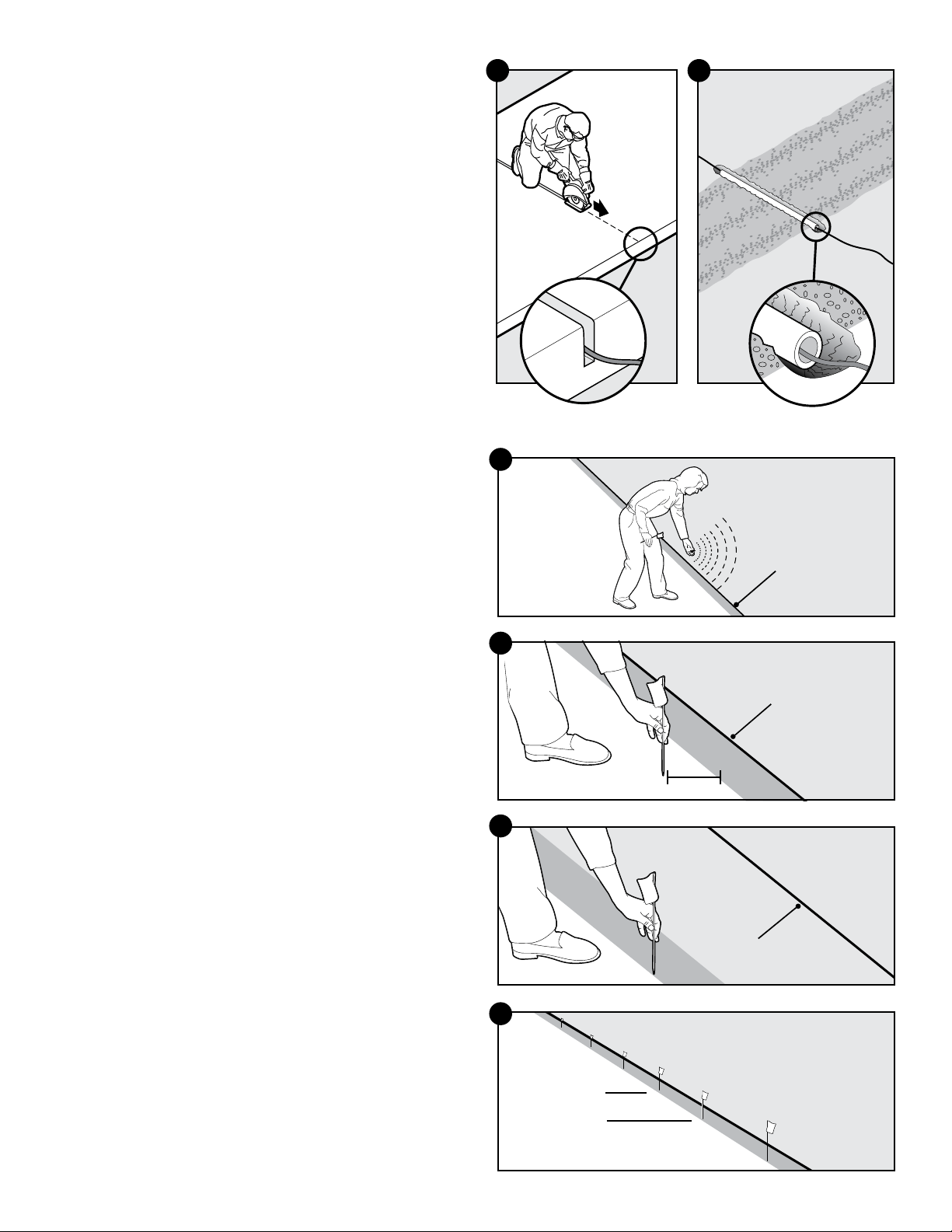
• Chain Link Fence (10A):
Weave the boundary wire through the links or use plastic
quick ties.
• Wooden Split Rail or Privacy Fence (10A):
Use staples to attach the boundary wire. Avoid puncturing the
insulation of the boundary wire.
• Double Loop with an Existing Fence:
Run the boundary wire on top of the fence and return it on the
bottom of the fence to get the 5 ft. separation needed.
• Gate (Single Loop) (10B):
Bury the boundary wire in the ground across the gate opening.
Note: The signal is still active across the gate. Your pet cannot
pass through an open gate.
• Gate (Double Loop) (10B):
Bury both boundary wires across the gate opening while keeping
them 5 ft. apart.
Follow all safety instructions for your power tools. Be sure to always wear your safety goggles.
Single Loop
Double Loop
5' 5'
10B
Weave Wire Into Fence
Staple Wire Into Fence
10A
1-800-732-267720
Cross Hard Surfaces (driveways, sidewalks, etc.)
• Concrete Driveway or Sidewalk (10C): Place the boundary
wire in a convenient expansion joint or create a groove using a
circular saw and masonry blade. Place the boundary wire in the
groove and cover with an appropriate waterproofing compound.
For best results, brush away dirt or other debris before patching.
• Gravel or Dirt Driveway (10D): Place the boundary wire
in a PVC pipe or water hose to protect the boundary wire
before burying.
Step 11: Place the Boundary Flags
The boundary flags are visual reminders for your pet of where the
warning zone is located.
1. Place the test light contacts on the contact points. Hold the
receiver collar at the height of your pet’s neck.
2. Walk towards the warning zone until the receiver collar
beeps (11A).
3. If you are in YardMax
®
mode (A) place the boundary flag
along the boundary wire approximately 6 inches inside the pet
area
(11B).
4. If you are in Traditional mode (B) place the boundary flag where
you hear the beep
(11C).
5. Walk back into the pet area until the beeping stops.
6. Repeat this process along the warning zone until it is marked with
boundary flags every 10 ft.
(11D)
.
10C 10D
Boundary
Wire
YardMax Mode
11A
Boundary
Wire
Pet
Area
6”
11B
Boundary
Wire
Traditional Mode
11C
10 ft.
11D
www.petsafe.net 21
Step 12: Fit the Receiver Collar
Proper fit of the receiver collar is important. A receiver collar worn for too long or made too tight on your pet’s neck
may cause skin damage, ranging from redness to pressure ulcers. This condition is commonly known as bed sores.
• Avoid leaving the receiver collar on your pet for more than 12 hours per day.
• When possible reposition the receiver collar on your pet’s neck every 1 to 2 hours.
• Check the fit to prevent excessive pressure; follow the instructions in this manual.
• Never connect a leash to the receiver collar; it will cause excessive pressure on the contact points.
• When using a separate collar for a leash, do not put pressure on the receiver collar.
• Wash your pet’s neck area and the contact points of the receiver collar weekly with a damp cloth.
• Examine the contact area daily for signs of a rash or a sore.
• If a rash or sore is found, discontinue use of the receiver collar until the skin has healed.
• If the condition persists beyond 48 hours, see your veterinarian.
• For additional information on bed sores and pressure necrosis, please visit our website.
These steps will help keep your pet secure and comfortable. Millions of pets are comfortable while they wear stainless
steel contact points. Some pets are sensitive to contact pressure. You may find after some time that your pet is very
tolerant of the receiver collar. If so, you may relax some of these precautions. It is important to continue daily checks of
the contact area. If redness or sores are found, discontinue use until the skin has fully healed.
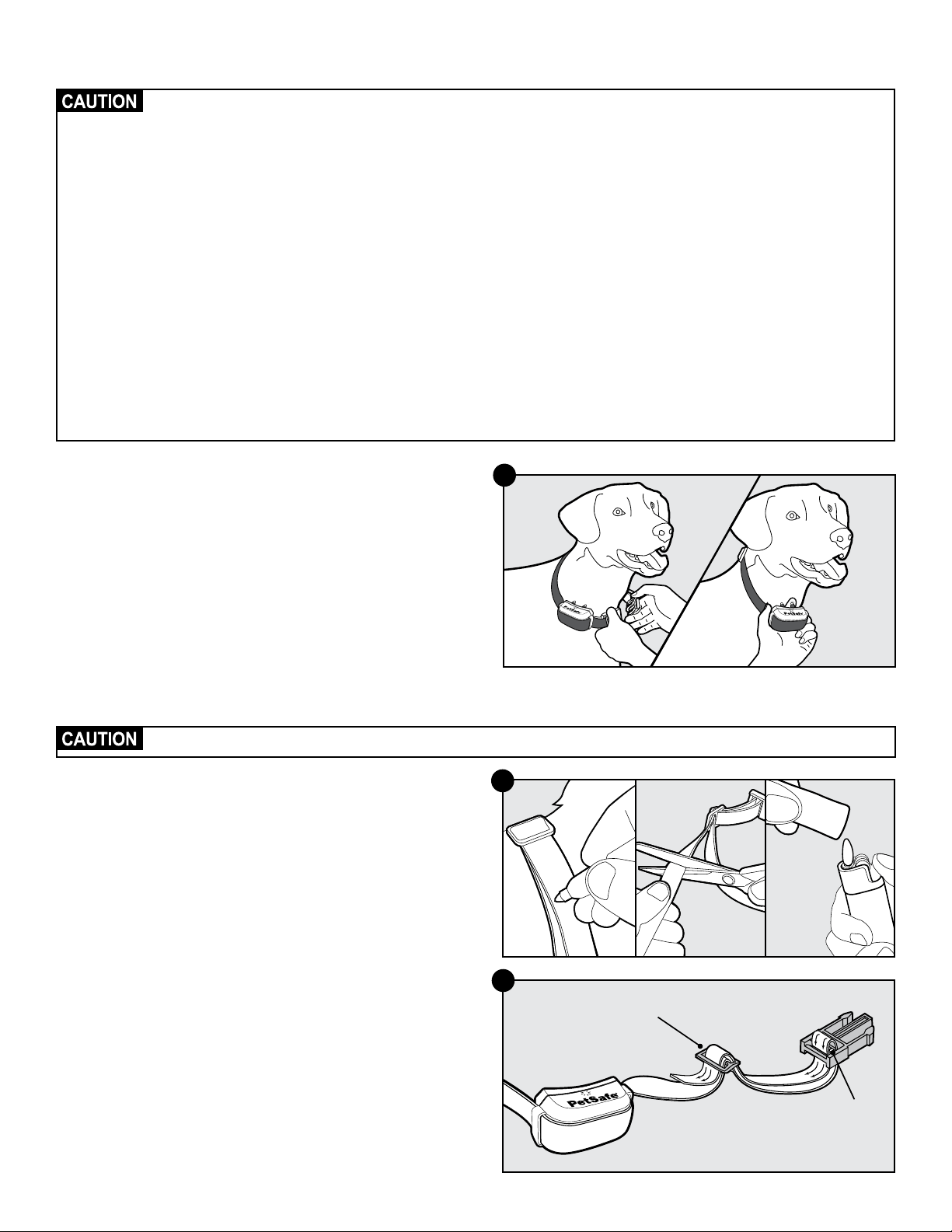
Important: The proper fit and placement of your receiver collar is
important for effective training. The contact points must have direct
contact with your pet’s skin on the underside of his neck.
1. Be sure the receiver collar is off before placing it on your pet.
Then with your pet standing, fit the receiver collar snugly onto
your pet’s neck so that the contact points make contact with your
pet’s skin on the underside of his or her neck. Make sure the
PetSafe
®
logo is right-side up (12A).
2. Check the tightness of the receiver collar by inserting one finger
between the end of a contact point and your pet’s neck. The fit
should be snug but not constricting.
3. Allow your pet to wear the receiver collar for a few minutes, then
check it again.
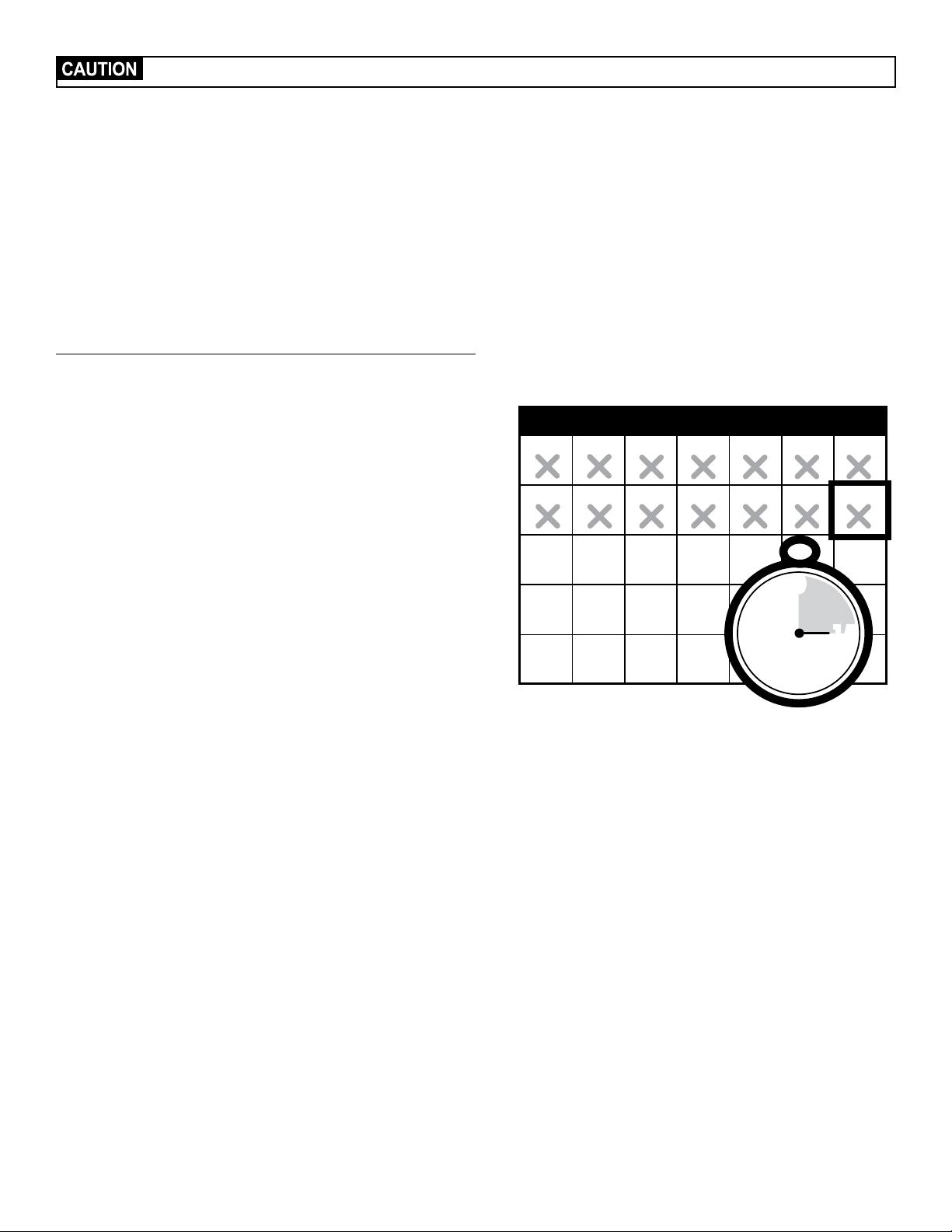
You may need to trim the hair in the area of the contact points. Never shave your pet’s neck; this may lead to a rash or infection.
4. Once you are satisfied with the fit of the receiver collar, remove it
from your pet and trim it, but make sure to allow room for growth
or a thicker winter coat. Use a lighter to seal the cut so that it will
not fray (12B).
5. The collar will slip if it is not properly threaded. The slide buckle
prevents the collar from becoming loose around your pet’s neck
and the ridges must be facing up (12C).
6. While the receiver collar is still off your pet, turn it on by holding
the mode button until a green light comes on. The first thing
your receiver collar does is a ReadyTest
®
startup (Step 7) to
ensure that it is ready for use. You will know it is done when the
indicator flashes the series of red flashes to indicate the current
static correction level. Do not touch the contact points during the
ReadyTest startup.
12A
12B
Slide Buckle
Ridges
12C
1-800-732-267722
If the receiver collar fails the ReadyTest
®
startup, the receiver collar is automatically turned off. Your pet will not be contained.
7. Once the ReadyTest startup is done, the receiver collar will
automatically go through an optional PerfectFit Test (Step 7), which
lasts for 90 seconds. This mode begins with simultaneous flashing
red+ green lights.
8. Place the collar on your pet and adjust the fit.
9. The receiver collar will emit a unique double tone as the contact
points touch your pet’s skin. You will know that you have the proper
fit when you hear the receiver collar emit the double tone and it
flashes green 5 consecutive times.
10. After 90 seconds, the receiver collar moves into normal operation
mode. If you do not hear the 5 consecutive double tone, tighten the
collar and repeat the PerfectFit Test.
Training Guide
Important: Proper training of your pet is essential to the success of the
Petsafe
®
YardMax
®
Rechargeable In-Ground Fence
™
system
. Read this
section completely before beginning to train your pet. Remember that
this PetSafe YardMax Rechargeable In-Ground Fence system is not a
solid barrier.
• Pets respond to our emotions. You should stay upbeat and have fun
with your pet throughout the training process.
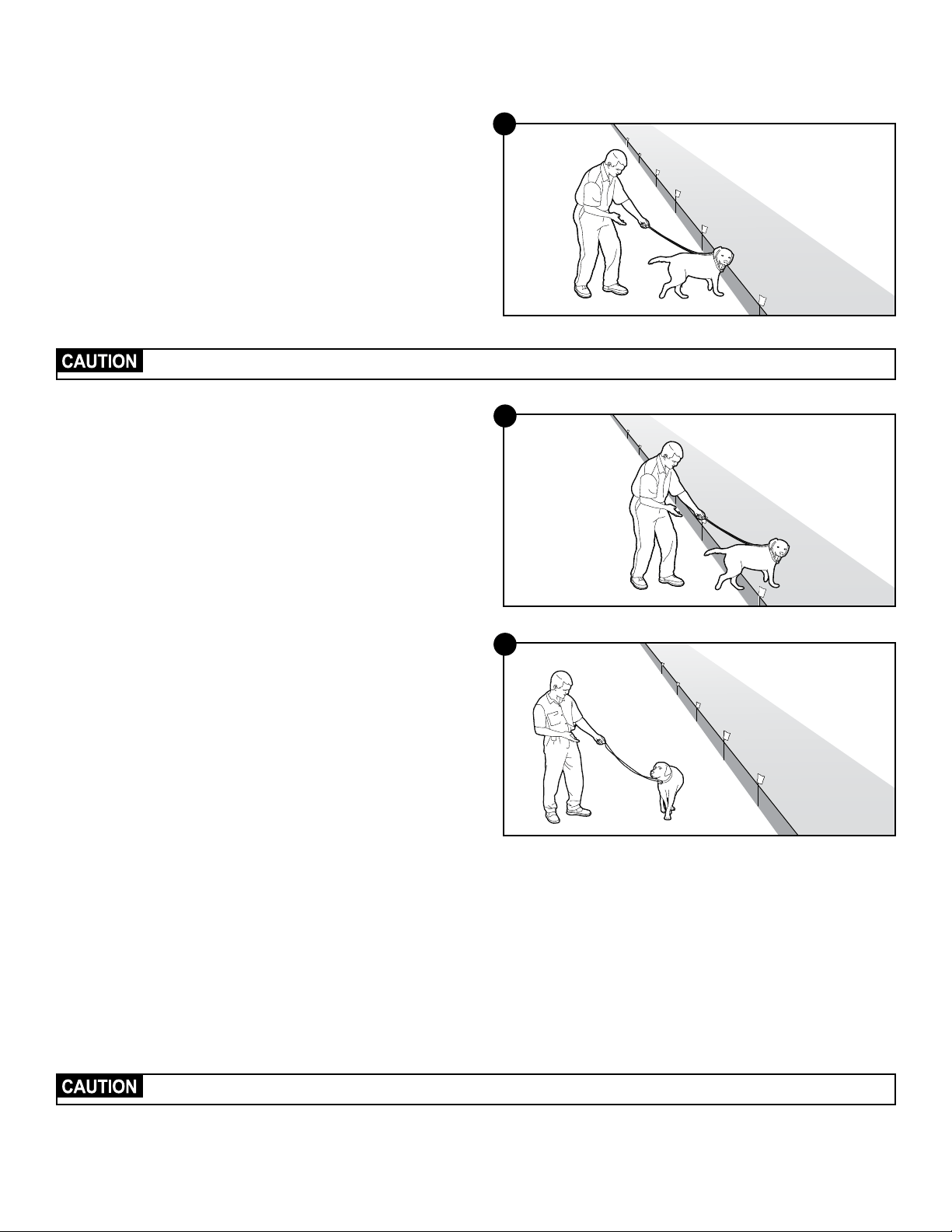
• Train for 15 minutes or less at a time. Do not try to do too much too
quickly. More-frequent short sessions are better than less-frequent
longer sessions.
• We suggest a minimum of 14 days of training. Depending on your
pet and your consistency, the training could take more or less time.
• Always have small pieces of your pet’s favorite treats readily at
hand. Promptly reward your pet for good behavior. If your pet
goes crazy for a certain ball or toy, use that instead or in addition.
Never treat your pet or allow them to eat a treat in the static
correction zone.
• If your pet shows signs of stress, slow down the training schedule,
add additional days of training or increase the amount of play time
with your pet in the pet area. Common stress signals include:
- Pet pulling on leash toward the house
- Ears tucked or pulled back
- Tail down or tucked between legs
- Body lowered
- Nervous/frantic movement or stiffening of pet’s body
- Lip-licking or yawning
• Your pet must be completely comfortable near the boundary flags at the
end of every training session. Spend at least 5 minutes of “play time” at
the completion of each session within 10 ft. of the boundary flags.
• Finish each training session on a positive note with lots of praise
and play.
• Remove the receiver collar after each training session.
• Be sure to contain your pet by another means during the training
period (e.g. pen, tie-out, leash, etc.). If you need to take your pet out
of the pet area, remove the receiver collar and either pick your pet
up or put him in the car to pass out of the pet area. The goal is for
your pet to associate leaving the pet area only with you.
• Even if you think your pet is responding well to the training, complete
the entire training. Consistency is key.
1 2 3 4 5
6 7
8 9 10 11 12
13 14
15 16 17 18 19
20 21
22 23 24 26
27
29 30 31
25
30
0
45 15
S M T W T F S
min.
www.petsafe.net 23
Phase 1
Day 1—Tone-only Training for
Boundary Awareness
Perform 3 training sessions per day, each lasting 10–15 minutes.
Goal:
To have your pet learn that the boundary flags and warning tone
from the receiver collar define the new pet area.
Setup:
• Program the static correction level on the receiver collar to level 1,
which is tone-only training mode.
• Put a separate non-metallic collar on your pet’s neck below the
receiver collar and attach a leash.
Be sure the extra collar does not put pressure on the contact points.
• Have small pieces of your pet’s favorite treats available.
• Have your pet’s favorite play toy available.
Steps:
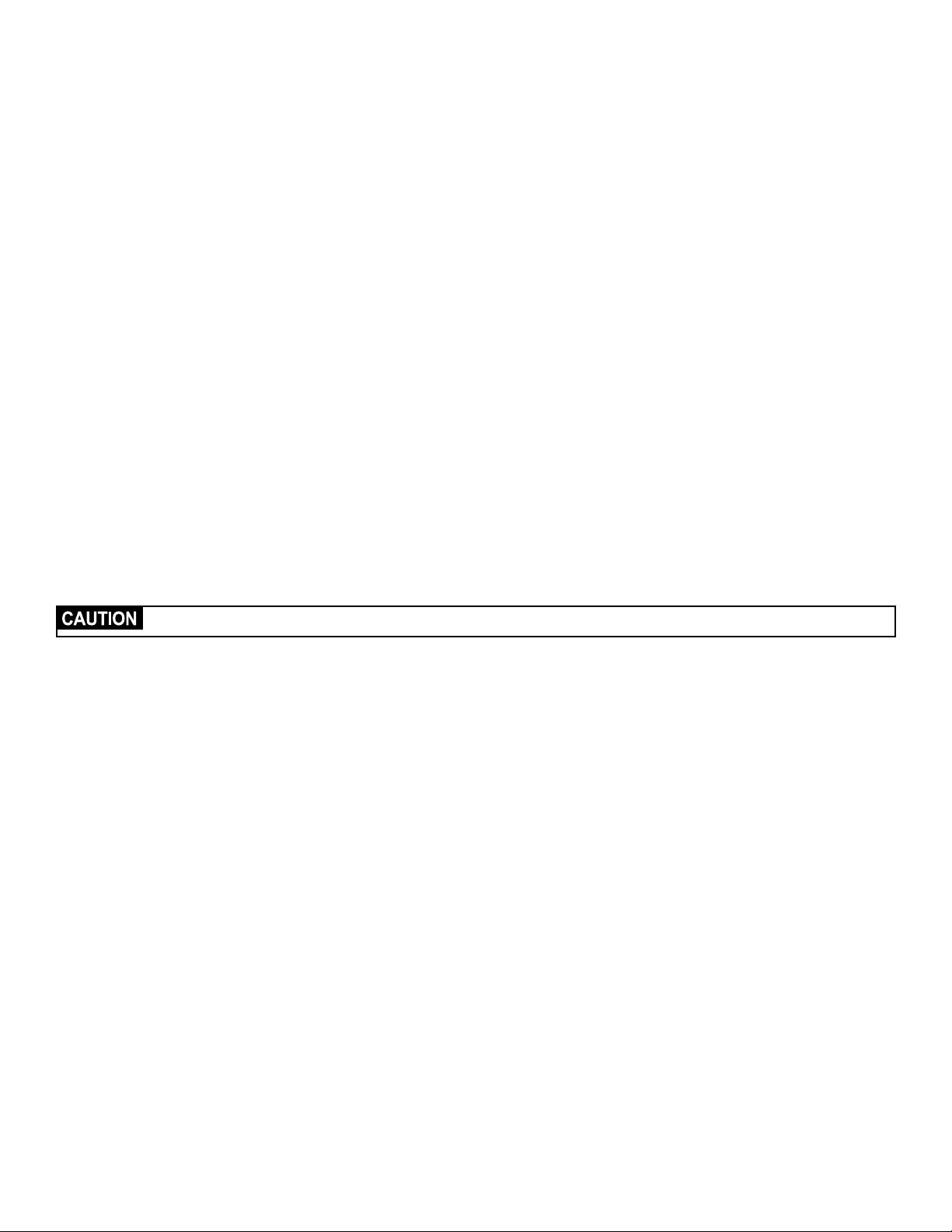
1. Begin by walking your pet on a leash in the pet area. Calmly
praise and talk to your pet.
2. Move toward the boundary flags (13A). Your pet reads your
energy so keep your mood happy.
3. With full control of your pet on a leash, walk past the flags (13B).
Allow your pet to stay in the static correction zone for up to 2
seconds then gently help him or her back into the pet area (13C).
Immediately praise and offer your pet a treat as he or she enters
the pet area, even if you have helped with the leash.
Note: Pulling on the leash is not as effective as encouraging your
pet to come when called.
4. Repeat this process at the same boundary flag until your pet
resists going into the static correction zone.
5. Aim to master 3–4 boundary flags per session. Make this FUN!
Praise your pet if he or she quickly retreats or resists going into the
static correction zone. Note: Never treat your pet or allow them
to eat a treat in the static correction zone.
Phase 2
Days 2 Through 4—Boundary
Awareness with Static Correction
Perform 3 training sessions per day, each lasting 10–15 minutes.
Goal:
To train your pet to stay in the pet area and respect the boundary.
Setup:
• Program the static correction level on the receiver collar to level 2.
• Put a separate non-metallic collar on your pet’s neck below the
receiver collar and attach a leash.
Be sure the extra collar does not put pressure on the contact points.
• Have small pieces of your pet’s favorite treats available.
• Have your pet’s favorite play toy available.
13A
13B
13C
1-800-732-267724
Steps:
1. Repeat steps 1–3 in Phase 1, this time allowing your pet to stay in the
correction zone long enough to be corrected.
2. Observe whether or not your pet seems to feel the correction. A slight
change in your pet’s behavior, such as looking around in curiosity,
scratching at his collar or flicking his ears, indicates your pet’s recognition
level. If your pet does not respond to the static correction, confirm that the
receiver collar is fitting properly according to Step 12 on page 21.
3. If the receiver collar is fitted properly and your pet does not respond to
the static correction, increase the static correction level by one setting.
Continue to observe whether your pet is looking around in curiosity,
scratching at his collar or flicking his ears.
4. Stay at the same flag until your pet resists going into the static
correction zone.
Phase 3
Days 5 Through 8—Distraction Phase
Perform 3 training sessions per day, each lasting 10–15 minutes.
Goal:
To train your pet to stay within the pet area with distractions outside of the
pet area.
Setup:
• Program the static correction level on the receiver collar to level 2 or
higher, depending on the reaction results from days 2 through 4.
• Put a separate non-metallic collar on your pet’s neck below the receiver
collar and attach a leash.
Be sure the extra collar does not put pressure on the contact points.
• Have small pieces of your pet’s favorite treats available.
• Have your pet’s favorite play toy available.
• Stage some distractions to tempt your pet to enter the static correction
zone. Start with temptations that are of lower value for your pet, and work
your way up. It is typically harder for pets to resist temptations that are
close by than those further away:
- Have a family member cross from inside the pet area to outside of it.
- Place a ball, treat or toy outside of the pet area.
- Have a neighbor walk their pet outside of the pet area.
• Gradually increase distraction level.
Never coax or call your pet out of the pet area.
Steps:
1. With full control of your pet on a leash, have the distraction presented.
2. If your pet does not move toward the distraction, praise and offer a treat.
3. If your pet does react to the distraction, allow him or her to go into the
static correction zone while still on the leash.
4. Help your pet back into the pet area if he or she does not turn back after
2 seconds.
5. Treat and praise your pet anytime he or she comes back into the pet area
with or without help.
6. Repeat this process with other distractions. Use other family members
during this process.
7. If your pet does not respond to the static correction, confirm that the
receiver collar is fitting properly according to Step 12 on page 21.
8. If the receiver collar is fitted properly and if your pet does not respond to
the static correction, increase the static correction level by one setting.
www.petsafe.net 25
Phase 4
Days 9 Through 14—Unleashed Supervision
Training sessions should start at 10-15 minutes, gradually increasing to over
an hour.
Your pet is ready for this step only when he or she clearly avoids the entire
static correction zone, regardless of any distractions or temptations. During
this step, do not leave your pet unattended.
Goal:
To give your pet free run of the pet area off the leash.
Setup:
• Adjust the static correction level to the permanent setting appropriate for
your pet.
• Put a separate non-metallic collar on your pet’s neck below the receiver
collar. Keep a leash close by to use in case your pet escapes the
pet area.
Steps:
1. Enter the pet area with your pet wearing the receiver collar.
2. Walk around the yard and play with your pet, staying within the pet
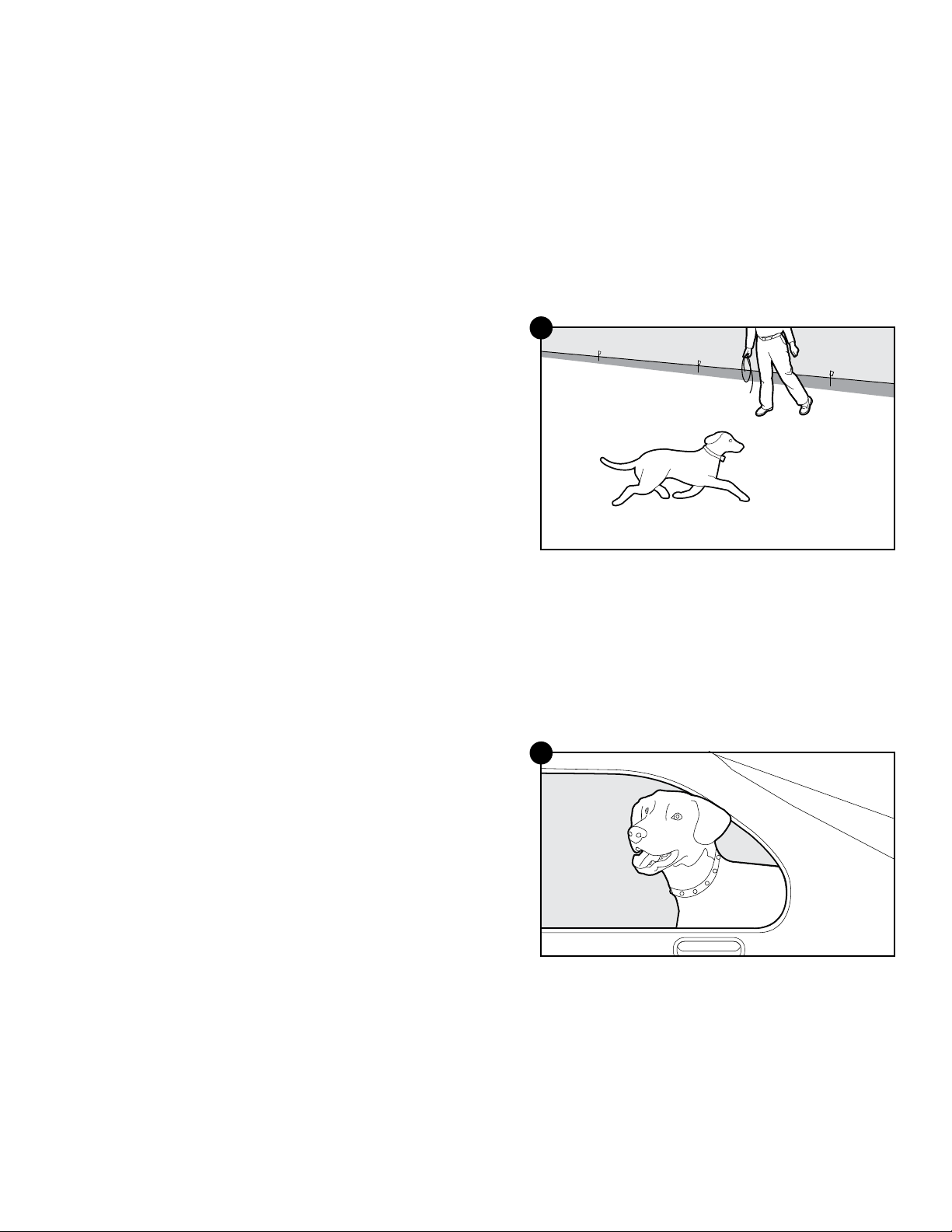
area at all times (13D).
3. Preoccupy yourself with another task in the yard while watching
your pet.
4. Should your pet escape, take the receiver collar off and lead him back
into the pet area.
Phase 5
Days 15 Through 30—Pet Monitoring
Your pet is ready to run! Just make sure to check on your pet at
regular intervals.
Note: After you are satisfied that your pet’s training is complete, remove
every other boundary flag every 4 days until all flags are removed. Save
your boundary flags for future use.
Taking Your Pet Out of the Pet Area
Important: Remove the receiver collar and leave it at home.
Once your pet learns the boundary, he will be reluctant to cross it for walks
or car rides.
Option 1:
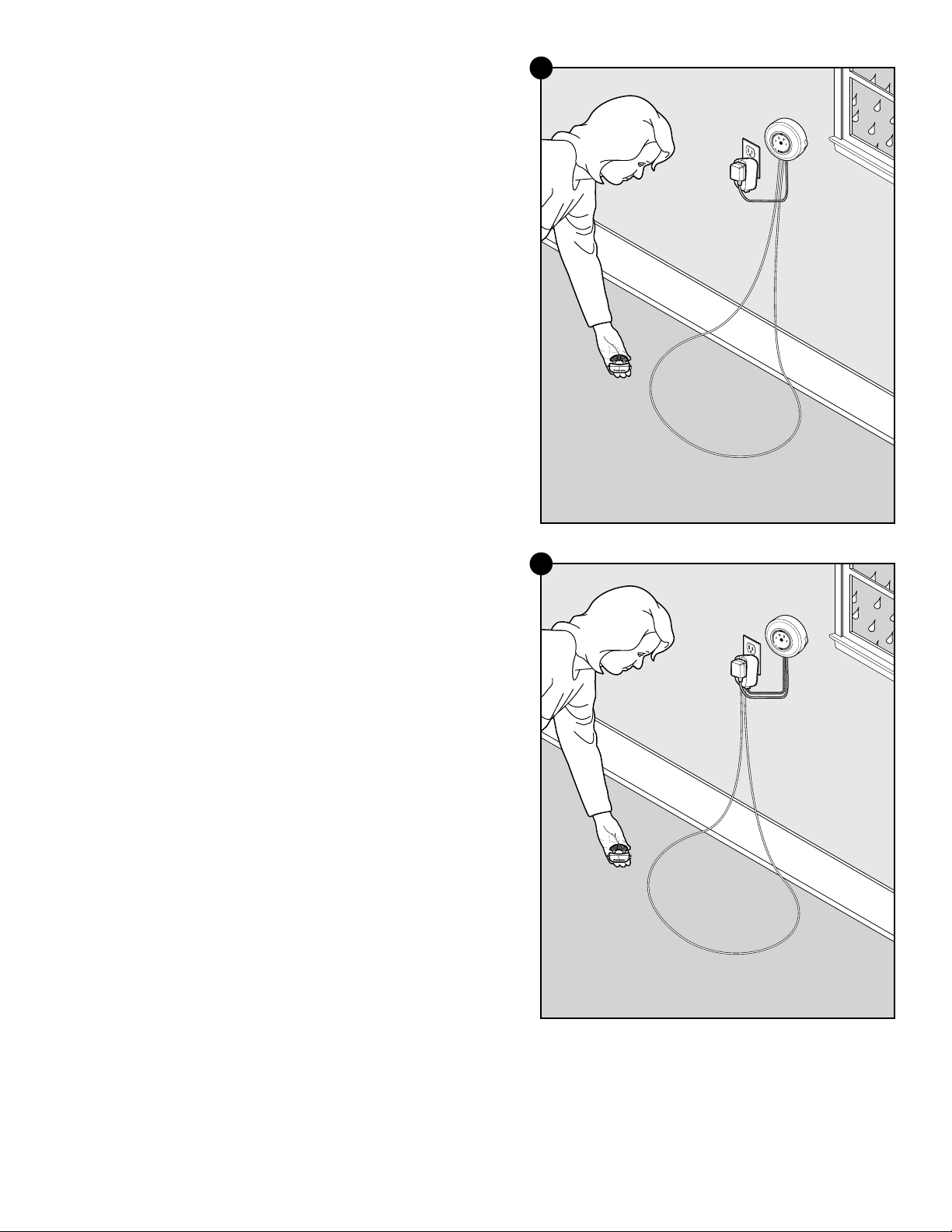
Replace the receiver collar with a regular collar. Put your pet in a car that is
within the pet area and drive him out of the pet area (13E).
Option 2:
Replace the receiver collar with a regular collar and leash. Walk your pet
out of the pet area while giving a command such as “OK” at a specific
place along the boundary (the end of your driveway, sidewalk, etc.).
Always leave the pet area from the same spot in your yard with a leash
and your pet will associate leaving the pet area only on a leash, only at this
spot, and only with a person. You may initially need to convince your pet to
leave the pet area with a treat and lots of praise.
Note: You may also carry your pet out of the pet area.
Congratulations! You have now completed the training program. You are
both ready to enjoy more freedom. Just make sure to continue to check the
tightness of the receiver collar and remove it when it is not in use.
13D
13E

1-800-732-267726
Advanced Features
Anti-Linger Prevention
The Anti-Linger Prevention feature keeps your pet from staying in the warning
zone for long periods of time and draining the receiver collar’s rechargeable
battery. Your pet will hear a 2-second warning tone when he reaches the
warning zone. If your pet does not return to the pet area after 2 seconds, he
will receive a continuous static correction until he returns to the pet area or until
the Over Correction Protection feature is enabled.
Run Through Prevention
This system includes a unique Run Through Prevention feature so that your
pet cannot “run through” the pet area without receiving an increased level
of static correction.
YardMax
®
Mode
When your pet crosses over the wire and passes the warning zone, static
correction is activated at a variable distance dependent on the height
of your pet and the height of the receiver activation distance setting.
The ideal warning zone distance is where the receiver collar activates
between 1 to 1
1
⁄2 ft. above your pet’s neck height.
If you have a very timid pet, you may increase the warning zone distance
to allow more distance before the higher level, run through prevention
static correction is generated. You can accomplish this by increasing the
height of the receiver collar activation.
Traditional Mode
The receiver collar automatically increases the static correction when your
pet continues more than 20% of the way through the boundary width.
For example, if the signal is detected 10 ft. from the wire and your pet
enters the static correction zone, this feature is activated when he is
approximately 8 ft. from the boundary wire. Your pet will then receive a
static correction that is at an increased level corresponding to the static
correction level setting on the receiver collar.
Over Correction Protection
Over Correction Protection is designed to protect your pet from prolonged
static correction if he “freezes” in the static correction zone or runs beyond
the boundary.
YardMax
®
Mode (A)
In the unlikely event that your pet “freezes” or continues beyond the
boundary, the static correction duration continues for 15 seconds. The
receiver collar locks out further static correction and the green light will
remain on for 10 seconds. The receiver collar remains locked out until your
pet re-enters the pet area.
Traditional Mode (B)
In the unlikely event that your pet “freezes” in the static correction zone,
this feature limits the static correction duration to 15 seconds. While the
receiver collar locks out further static correction, the green light will remain
on for 10 seconds. The receiver collar remains locked out until your pet
leaves the static correction zone.
www.petsafe.net 27
System Test
The system test is used to determine the cause of system problems that
have not been addressed elsewhere in this guide. You will need a piece of
boundary wire greater than 15 ft. long with
3
⁄
8
in. of insulation removed from
each end to use as a test loop wire. Make a note of your boundary width dial
setting, and receiver collar setting before beginning the system test.
Follow the steps below to perform the system test:
1. Remove the receiver collar from your pet and make sure it is fully charged.
2. Set the receiver collar static correction level to 6.
3. Disconnect the twisted boundary wire from the boundary wire terminals on
the fence transmitter by pressing the red release levers on the connector
and pulling the wires free (14A).
4. Insert the 2 ends of the test loop wire into the boundary wire terminals on
the transmitter.
5. Set the transmitter to Traditional mode (B) and turn it on.
6. Turn the boundary width dial to 5.
7. Place the test light tool contacts on the contact points of the receiver collar.
While holding the receiver collar with the test light tool in place, approach
the wire from the outside loop 2 inches off the ground. Make a mental note
of the distance where the receiver collar activates from the wire.
8. Turn the boundary width dial to 10 and repeat step 7. The distance where
the receiver collar activates should be greater than the previous result.
9. If more than one receiver collar is used on the system, repeat the above
test on each collar.
10. Interpreting the Results:
a. If the power light or the loop indicator light are not both lit on the fence
transmitter, or the alarm is on, for any of the above tests, there is a
problem with the transmitter. Contact the Customer Care Center.
b. If both the power and loop indicator lights are on, but the receiver
collar does not activate on the test loop wire, the receiver collar is not
working. Contact the Customer Care Center.
c. If the transmitter power and loop indicator lights are on and the
receiver collar is activating at different distances on the test loop wire,
the problem is most likely in the containment boundary wire or surge
protector. Reconnect the transmitter wires to the surge protector and
connect the test loop to the surge protector loop terminals (14B).
Repeat steps 6–9.
11. Interpreting the Results with the surge protector:
a. If both the power and loop indicator lights are on and the receiver
collar is activating at different distances on the test loop wire, the
problem is in the containment boundary wire. Perform the wire break
location test.
b. If the loop indicator light is off with an alarm on the fence transmitter,
there is a problem with the surge protector. Contact the Customer
Care Center.
12. When testing is complete reconnect and verify that the boundary wire is
plugged into the loop terminals on the surge protector and the transmitter is
connected to the surge protector.
13. Return the boundary width dial and receiver collar settings to the position
noted earlier.
14. Set the transmitter mode switch to your original setting—YardMax
®
mode
(A) or Traditional mode (B).
15. Repeat testing in Step 9 for YardMax mode (page 17) or for Traditional
mode (page 18).
1
A B
10
2
5
6
7
8
9
4
3
System Test Surge Protector
Unconnected
14A
1
A B
10
2
5
6
7
8
9
4
3
System Test Surge Protector
Connected
14B
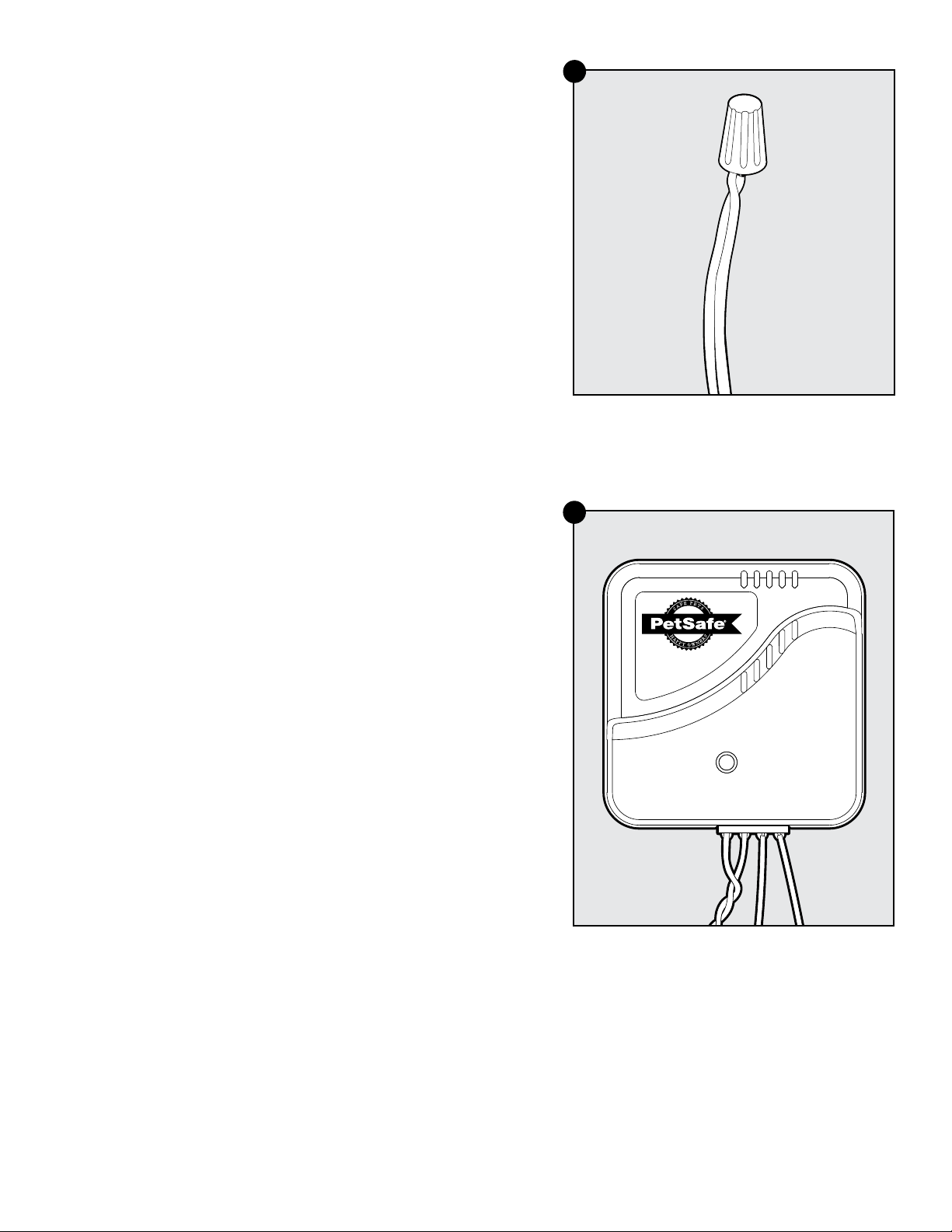
1-800-732-267728
Wire Break Location Test
The following lists identify the common locations where wire breaks occur.
Please inspect these areas for signs of damage.
Wire breaks in the twisted pair are commonly found:
1. At the wire exit point of the house
2. Where the twisted pair of wire enters the ground from the house,
usually caused by string trimmers
3. Where the wires cross sidewalks or driveways due to edging and
string trimmers
4. Around landscaping and flower beds due to digging, or working up
the soil
Wire breaks in the boundary wire are commonly found:
1. In aerated lawns
2. Where the wires cross sidewalks or driveways due to edging and
string trimmers
3. Around landscaping and flower beds due to digging, or working up
the soil
4. At wire splices where gel-filled capsules have not been installed
5. At wire splices without reinforcement knots (15A)
If you still cannot find the break in the boundary wire, there are
2 options for locating it:
Option 1: It is recommended to contact the Customer Care Center to
purchase a wire break locator (RFA-450) (15B)
Option 2: Follow the procedure below:
1. Unplug the fence transmitter.
2. Connect both ends of your twisted boundary wire to one loop
terminal on the surge protector.
3. Measure and cut a test wire which is half the length of your total
boundary wire footage.
4. Connect one end of test wire to the other loop terminal on the
surge protector.
5. Locate the halfway point of your boundary and cut the boundary wire.
6. Splice the other end of the test wire to either side of your boundary
wire where you cut it in half.
7. Plug in the fence transmitter, set the mode to Traditional mode (B), and
check the loop indicator light. If the loop indicator light is on, you can
assume that the break is in the other half of the boundary wire.
8. If the loop indicator light did not come on, you may assume there is a
break in this portion of the boundary wire. However, there is a small
chance of having more than one break in your system. Be sure to check
both halves of your entire loop.
9. Replace the damaged boundary wire with new boundary wire.
10. Reconnect the boundary wire to the surge protector.
11. Check the loop indicator light. If the loop indicator light is on, test the
system with the receiver collar.
15 A
15 B
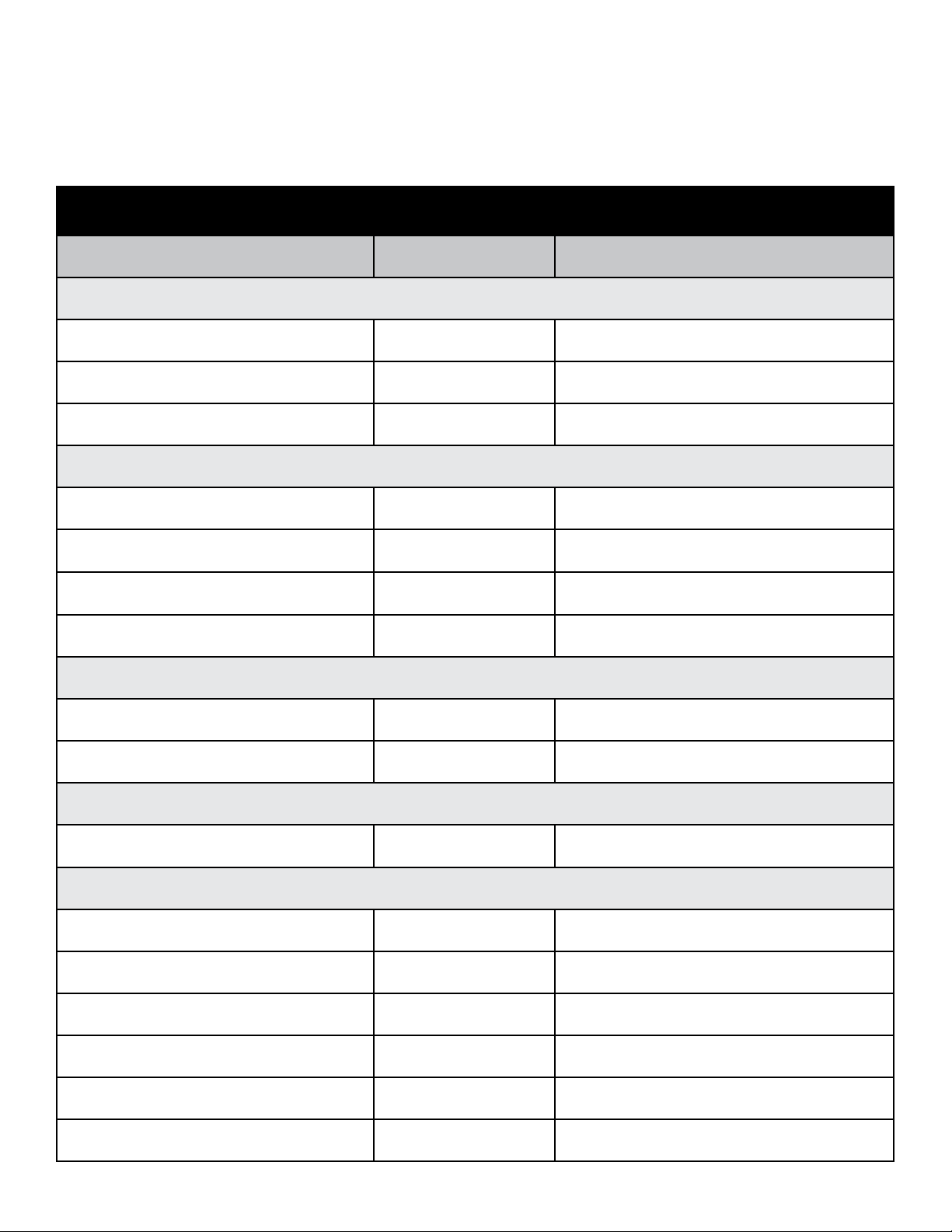
www.petsafe.net 29
Receiver Collar Status Indicators
The receiver collar light and with the alarm tones are used to determine the operational mode, the battery status and the correction level. Refer
to the receiver collar status table below to understand the status lights and tones for the receiver collar. During normal operation, the receiver
collar light will flash every 4 seconds to indicate the battery status as shown in the table below. If your receiver collar has not been moved for
at least 20 seconds, the battery status light will function, but the receiver collar will enter sleep mode to conserve battery life. To wake up the
receiver collar simply pick it up and flip it over or shake it.
Receiver Collar Status Table
Light Status Alarm Tone Condition
While Plugged into the Receiver Charger
Solid red No tone Charge in progress
Solid green No tone Charge complete
No light No Tone Charge failure—contact Customer Care Center
ReadyTest
®
Startup
(After removing the receiver collar from the charger or after first turning it on)
Off for 1 second No tone Unit is starting the ReadyTest startup feature
Continuous red, green, or red+green together
(5 seconds)
No tone Battery charge status
Flashing red from 1 to 6 times No tone
Receiver collar is reporting the
static correction level from 1 to 6
Continuous red 20 seconds
ReadyTest failure;
Unit is not operational—contact Customer Care Center
PerfectFit Test
Flashing red+green together
(every 1 second)
No tone
Unit is in PerfectFit mode for 90 seconds
after the Readytest startup is completed
Flashing green
(every 1 second)
5 consecutive double tones
for a confirmed fit
PerfectFit mode indicates that the collar is making
true contact with the pet’s skin
Static Correction Level
Flashing red from 1 to 6 times No tone
Receiver collar is reporting the
static correction level from 1 to 6
Receiver Activation Status
Fast pulsating green Warning tone Warning tone
Fast pulsating red Duration of the correction
Static correction is being delivered
(up to 10 seconds)
Continuous green
(10 seconds)
No tone
Over Correction Protection feature;
Collar is locked for 10 seconds
Slow blinking green
(every 4 seconds)
No tone Collar battery charge 100%–60%
Slow blinking red+green together
(every 4 seconds)
No tone Collar battery charge 60%–20%
Slow blinking red
(every 4 seconds)
No tone
Collar battery charge 20% or less;
Charge immediately

1-800-732-267730
Troubleshooting
The receiver collar is not beeping
or correcting.
• Make sure the static correction level is set at 2 or above.
• Charge the receiver collar and go through the ReadyTest
®
startup and
PerfectFit diagnostic tests.
• Check that the fence transmitter power is turned on and the transmitter status
light is solid green. If not, perform the “System Test” (page 27).
• In YardMax
®
mode (A), excessive snowfall (>1½ ft.) may place your pet
outside the signal field. You may need to switch to Traditional mode (B) or
increase the boundary width until the snow recedes.
The receiver collar is beeping, but the pet
is not responding to the static correction.
• Make sure the receiver collar is turned on, and the battery status lights are
flashing every 4 seconds.
• Test the receiver collar with the test light by walking toward the boundary
wire. If the test light flashes, adjust the fit of the receiver collar using the
PerfectFit feature.
• Trim your pet’s fur where the contact points touch the neck or use the long
contact points.
• Increase the static correction level.
• Repeat the training steps to reinforce the training.
In YardMax mode (A), the receiver collar
corrects when the pet returns to the
Pet Area.
• Check that the fence mode is set to YardMax mode (A).
• Reverse the wires connected to the fence transmitter. Leave the surge
protector alone.
• Re-test the boundary.
The receiver collar has to be held on top
of the boundary wire to activate.
• Charge the receiver collar.
• Traditional mode (B) only—adjust the boundary width dial clockwise
to increase the distance from the boundary wire that the receiver collar
activates. The recommended distance is 10 ft. from the boundary wire.
• If using a double loop, make sure the boundary wires are separated by at
least 5 ft.
• If the receiver collar still has to be held on top of the boundary wire, perform
the “System Test” (page 27).
The receiver collar activates inside
the house.
• Make sure the boundary wire is not running within 15 ft. of the house. The
signal can transmit through the walls of your house.
• Make sure the boundary wires coming from outside and going to the fence
transmitter are twisted in order to cancel the signal.
• Traditional mode (B) only—turn the boundary width dial to decrease the
distance from the boundary wire that the receiver collar activates.
I have an inconsistent signal.
• Make sure the fence transmitter is at least 3 ft. from large metal objects
or appliances.
• Make sure all the boundary wire turns are gradual.
• Make sure the boundary wire is not running parallel to or within 10 ft.
of electrical wires, neighboring containment systems, telephone wires,
television or antenna cables or satellite dishes.
• If a neighboring containment system may be causing an inconsistent
signal, move the boundary wire farther away from the neighboring
containment system.
Transmitter status light and alarm
indicates that the boundary wire is
broken or disconnected.
• Check the boundary wire connections at the fence transmitter and/or surge
protector for proper connection.
• Check for broken or damaged boundary wires at outside entry to the house.
• Perform the “System Test” (page 27).
• Perform the “Wire Break Location Test” (page 28).

www.petsafe.net 31
Troubleshooting
No status light on the fence transmitter
and alarm is silent.
• Verify that the transmitter power is on.
• Check that the power adapter and/or surge protector are plugged
in properly.
• If the system is plugged into a GFCI outlet, check to see if the circuit has
been tripped. Reset the GFCI circuit if required.
• Verify that the outlet is working properly by plugging in a known working
item such as a radio.
• If a surge protector is installed, unplug the surge protector and plug the
power adapter directly into the outlet. If the transmitter operates without
the surge protector, contact the Customer Care Center for a replacement
surge protector.
Receiver collar is not charging.
• Check that the charger is properly seated into the receiver collar jack.
• If the indicator light on the receiver collar still does not glow red when
connected to charger, there is a problem with the charger. If the indicator
light glows red when placed on the charger but goes out after disconnecting
the receiver collar without performing the ReadyTest
®
startup there is a
problem with the receiver collar. Call the Customer Care Center.
In YardMax
®
mode (A), my pet is
able to cross the boundary wire in
either direction without receiving a
static correction.
• Make sure the fence transmitter is set to YardMax mode (A).
• Starting inside the pet area, when crossing the boundary wire, the receiver
collar should tone at a distance of 1 ft. above the pet’s neck height (Step 9
on page 17).
In YardMax mode (A), the receiver collar
corrects within the pet area.
• Check and make sure that the receiver activation height is not greater than
1½ ft. above the pet’s neck height (Step 9 on page 17) when crossing the
boundary wire.
• There could be an inconsistent signal due to close proximity to telephone
wires or television cables, etc. Readjust the boundary wires where crossing
buried cables as instructed (Step 1 page 8).
My pet reacts strongly to the static
correction and has become fearful.
• Lower the static correction level.
• Make sure you are in control of the situation when your pet receives his first
static corrections (have him on a leash attached to a separate, non-metallic
collar) and lead him into the pet area and praise him. If your pet remains fearful,
suspend training and start again the next day. Make sure to end all training
sessions on a positive note with lots of praise and play.
The receiver collar has injured my
pet’s neck.
• Failing to follow the important safety information at the front of the operating
guide has caused pressure ulcers. Some descriptions of advanced pressure
ulcers describe the sores as looking like burns on the pet’s neck. Be assured
that electronic collars do not use enough energy to create electrical burns. The
energy in an output pulse is only a few thousandths of a Joule; it is similar in
nature to the static pulse that you may feel when getting out of your car. In some
cases, pressure ulcers are described as chemical burns. The battery in your
receiver collar is sealed; in addition, your collar’s housing is also sealed. This
redundant sealing makes it virtually impossible, without misuse or abuse, for your
receiver collar battery to leak onto your pet’s neck. Please review and follow the
important safety information starting on page 2, and the instructions in Step 12
under the heading “Fit the Receiver Collar” on page 21.

1-800-732-267732
Terms of Use and Limitation of Liability
1. Terms of Use
This Product is offered to you conditioned upon your acceptance without modification of the terms, conditions and notices contained herein.
Usage of this Product implies acceptance of all such terms, conditions, and notices.
2. Proper Use
This Product is designed for use with pets where training is desired. The specific temperament of your pet may not work with this Product. If
you are unsure whether this is appropriate for your pet, please consult your veterinarian or certified trainer.
3. No Unlawful or Prohibited Use
This Product is designed for use with pets only. This pet training device is not intended to harm, injure or provoke. Using this Product in a way
that is not intended could result in violation of Federal, State or local laws.
4. Limitation of Liability
In no event shall Radio Systems Corporation be liable for any direct, indirect, punitive, incidental, special or consequential damages, or any
damages whatsoever arising out of or connected with the use or misuse of this Product. Buyer assumes all risks and liability from the use of
this Product.
5. Modification of Terms and Conditions
Radio Systems Corporation reserves the right to change the terms, conditions and notices under which this Product is offered.
Compliance
FCC/IC
This Class B digital apparatus complies with Canadian RSS-310. This equipment has been tested and found to comply with the limits for
a Class B digital device, pursuant to Part 15 of the FCC Rules. These limits are designed to provide reasonable protection against harmful
interference when the equipment is operated in a residential environment. This equipment generates, uses, and can radiate radio frequency
energy and, if not installed and used in accordance with the instruction guide, may cause harmful interference to radio communications.
However, there is no guarantee that interference will not occur in a practical installation. If this equipment causes harmful interference to radio or
television reception, which can be determined by turning the equipment off and on, the user is encouraged to try to correct the interference by
one or more of the following measures:
• Relocate the interfered receiving antenna.
• Increase the separation between the equipment and receiver.
• Connect the equipment into an outlet on a circuit different to that to which the receiver is connected.
• Contact the Customer Care Center at 1-800-732-2677.
This device complies with Industry Canada Rules. This device complies with part 15 of the FCC Rules. Operation is subject to the following two
conditions: (1) This device may not cause harmful interference, and (2) this device must accept any interference received, including interference
that may cause undesired operation.
Unauthorized changes or modifications to the equipment, not approved by Radio Systems Corporation, could result in not meeting compliance
with FCC regulations and could void the user’s authority to operate the equipment.
ACMA/Australia
This device complies with the applicable EMC requirements specified by the ACMA (Australian Communications and Media Authority).
Customer Care International
USA & Canada—Tel: 800-732-2677
Monday–Friday 8 AM – 8 PM / Saturday 9 AM – 5 PM
Australia—Tel: 1800 786 608
Monday–Friday 8:30 AM – 5 PM
New Zealand—Tel: 0800 543 054
Monday–Friday 10:30 AM – 7 PM
Battery Disposal
Separate collection of spent batteries is required in many regions; check the regulations in your area before discarding spent batteries. At
the end of the product life, please contact our Customer Care Center to receive instructions on proper disposal of the unit. Please do not
dispose of the unit in household or municipal waste. For a listing of Customer Care Center telephone numbers in your area, visit our website
at www.petsafe.net.

www.petsafe.net 33
Warranty
One Year Non-Transferrable Limited Warranty
This Product has the benefit of a limited manufacturer’s warranty. Complete details of the warranty applicable to this Product and its terms can
be found at www.petsafe.net and/ or are available by contacting your local Customer Care Center.
United States and Canada—Radio Systems Corporation, 10427 PetSafe Way, Knoxville, TN 37932 USA
Australia/New Zealand—In compliance with the Australian Consumer Law, Warranties Against Defects, effective January 1, 2012,
warranty details of this Product are as follows:
One Year Non-Transferrable Limited Warranty
What is covered: Radio Systems Australia Pty Ltd. (hereinafter referred to as “Radio Systems”) warrants to the original retail purchaser, and
not any other purchaser or subsequent owner, that its product, when subject to normal and proper residential use, will be free from defects in
material or workmanship for a period of one (1) year from the purchase date. An “original retail consumer purchaser” is a person or entity who
originally purchases the Product, or a gift recipient of a new product that is unopened and in its original packaging. When serviced by Radio
Systems Customer Service, Radio Systems covers labour and parts for the first year of ownership; after the first year, a service or upgrade
charge will apply relative to replacement of the product with new or refurbished items at Radio Systems’ sole discretion.
The limited warranty is non-transferrable and shall automatically terminate if the original retail consumer purchaser resells the Radio Systems
product or transfers the property on which the Radio Systems product is installed. This Limited Warranty excludes accidental damage due to
dog chews; lightning damage; or neglect, alteration, and misuse. Consumers who purchase products outside of Australia, New Zealand, or
from an unauthorised dealer will need to return the Product to the original place of purchase for any warranty issues.
Please note that Radio Systems does not provide refunds, replacements, or upgrades for change of mind, or for any other reason outside of
these Warranty terms.
Claims Procedure: Any claim made under this Warranty should be made directly to Radio Systems Australia Pty Ltd. Customer Care Centre at:
Radio Systems Australia Pty Ltd.
PO Box 7266, Gold Coast Mail Centre QLD 9726, Australia
Australia Residents: 1800 786 608
New Zealand Residents: 0800 543 054
Email: [email protected]
To file a claim, a proof of purchase must be provided. Without a proof of purchase, Radio Systems will not repair or replace faulty components.
Radio Systems requests the Consumer to contact the Radio Systems Customer Care Centre to obtain a Warranty Return number, prior to
sending the Product. Failure to do so may delay in the repair or replacement of the Product.
If the Product is deemed to be faulty within 30 days from date of original purchase, Radio Systems will organise for a replacement to be sent in
advance of returning the faulty Product. A Post Bag will be included with the replacement Product for the return of the faulty Product. The Product
must be returned within 7 days of receiving the replacement. If the Product is deemed to be faulty after 30 days from the date of original
purchase, the consumer will be required to return the Product to Radio Systems at the consumer’s own expense. Radio Systems will test and
replace the faulty unit or its components and return to the consumer free of charge, provided the Product is within its said warranty period. This
warranty is in addition to other rights and remedies available to you under the law. Radio Systems goods come with guarantees that cannot be
excluded under the Australia Consumer Law. You are entitled to a replacement or refund for a major failure and for compensation for any other
reasonably foreseeable loss or damage. You are also entitled to have the goods repaired or replaced if the goods fail to be of acceptable
quality and the failure does not amount to a major failure.
Should you have any queries or require any further information, please contact our Customer Care Centre on 1800 786 608 (Australia) or
0800 543 054 (New Zealand).

1-800-732-267734
Layout Grids

www.petsafe.net 35

Radio Systems Corporation
10427 PetSafe Way
Knoxville, TN 37932
1-800-732-2677
www.petsafe.net
For a list of patents protecting this product, please visit:
http://www.petsafe.net/support/policies-and-terms/patents
400-002/3
©
2016 Radio Systems Corporation