EN-1
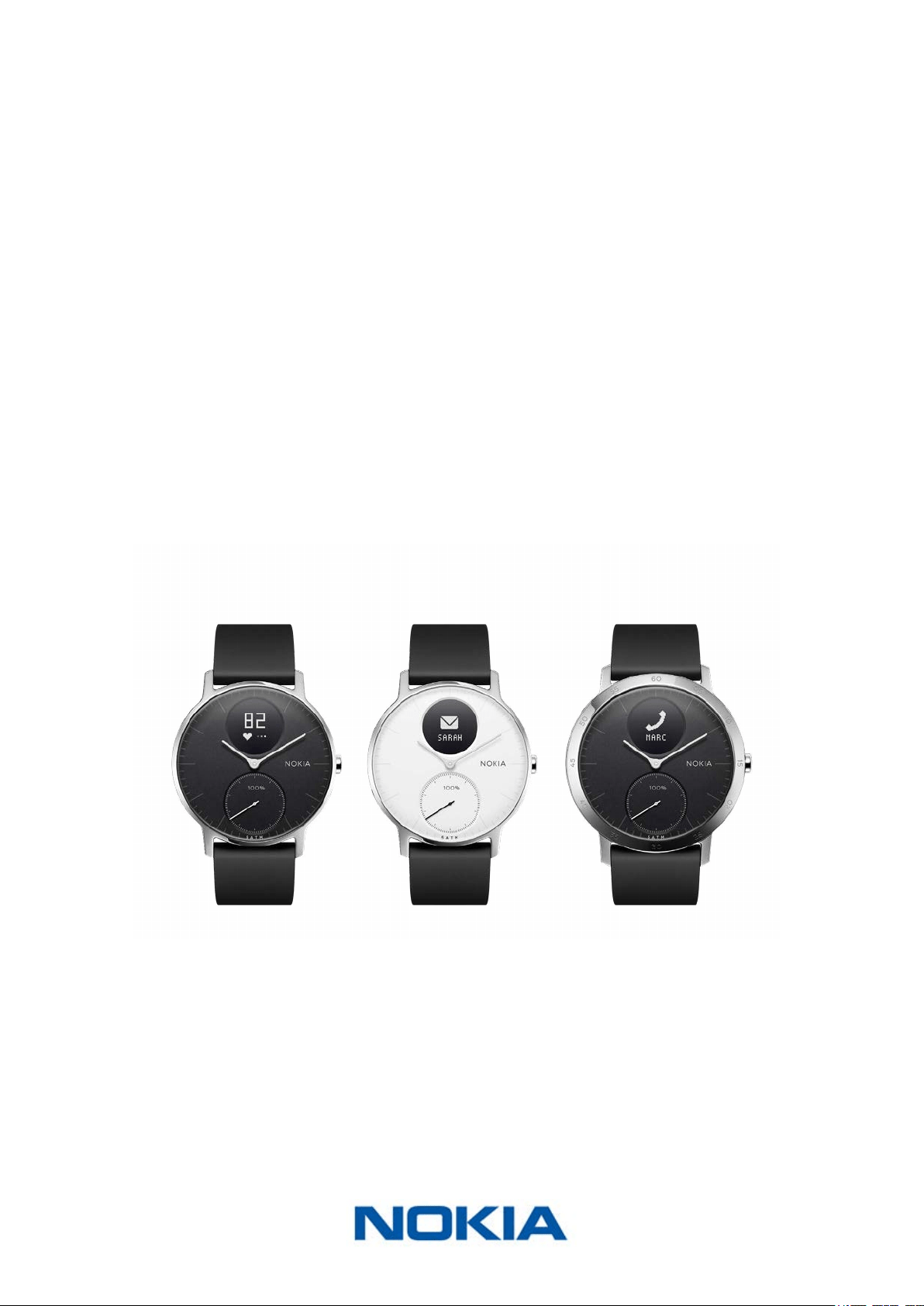
Nokia Steel HR
v3.0 | November, 2017
Nokia Steel HR
Activity - Sleep - Heart Rate
Installation and Operating Instructions
EN-2
Nokia Steel HR
v3.0 | November, 2017
Table of Contents
Minimum Requirements ...................................................................................... 4
Internet access ������������������������������������������������������������������������������������������������������������������� 4
Smartphone or device �������������������������������������������������������������������������������������������������������� 4
OS version ��������������������������������������������������������������������������������������������������������������������������� 4
Nokia Health Mate® app version ��������������������������������������������������������������������������������������� 4
Description ...............................................................................................................5
Overview ����������������������������������������������������������������������������������������������������������������������������� 5
Box Contents ���������������������������������������������������������������������������������������������������������������������� 5
Product description ������������������������������������������������������������������������������������������������������������ 6
Watch screens description ������������������������������������������������������������������������������������������������� 6
Setting Up the Nokia Steel HR ...........................................................................7
Installing the Nokia Health Mate® App ������������������������������������������������������������������������������ 7
Installing my Nokia Steel HR ���������������������������������������������������������������������������������������������� 7
Setting the Time ��������������������������������������������������������������������������������������������������������������� 18
Wearing my Nokia Steel HR ���������������������������������������������������������������������������������������������� 19
Customizing the settings of my Nokia Steel HR ........................................20
Changing the screen order ����������������������������������������������������������������������������������������������� 20
Enabling notications ������������������������������������������������������������������������������������������������������� 21
Tracking my activity ............................................................................................ 23
Overview ��������������������������������������������������������������������������������������������������������������������������� 23
Checking my progress ������������������������������������������������������������������������������������������������������ 23
Changing my activity goal ������������������������������������������������������������������������������������������������ 24
Tracking my swimming sessions �������������������������������������������������������������������������������������� 25
Tracking my sleep ................................................................................................26
Overview ��������������������������������������������������������������������������������������������������������������������������� 26
Retrieving my sleep data �������������������������������������������������������������������������������������������������� 26
Setting an Alarm ��������������������������������������������������������������������������������������������������������������� 27
Tracking my heart rate .......................................................................................30
Overview ��������������������������������������������������������������������������������������������������������������������������� 30
Wearing my Nokia Steel HR ���������������������������������������������������������������������������������������������� 30

EN-3
Nokia Steel HR
v3.0 | November, 2017
Retrieving my heart rate data ������������������������������������������������������������������������������������������ 30
Getting more active ........................................................................................... 32
Syncing your Data ............................................................................................... 35
Dissociating your Nokia Steel HR ....................................................................36
Cleaning and Maintenance ...............................................................................38
Cleaning my Nokia Steel HR ��������������������������������������������������������������������������������������������� 38
Charging the battery �������������������������������������������������������������������������������������������������������� 38
Replacing the Wristband �������������������������������������������������������������������������������������������������� 39
Calibrating the Hands ������������������������������������������������������������������������������������������������������� 40
Updating the Firmware Version ���������������������������������������������������������������������������������������� 41
User Guide Copyright ........................................................................................43
Legal Notice ..........................................................................................................43
Personal Data �������������������������������������������������������������������������������������������������������������������� 43
Safety Instructions .............................................................................................44
Use and Storage ��������������������������������������������������������������������������������������������������������������� 44
Heart Rate Measurement ������������������������������������������������������������������������������������������������� 44
Water Resistance �������������������������������������������������������������������������������������������������������������� 44
Service and Maintenance ������������������������������������������������������������������������������������������������� 44
Specications .......................................................................................................46
Document Release Overview ...........................................................................48
Warranty ................................................................................................................49
Regulatory Statements .....................................................................................50

EN-4
Nokia Steel HR
v3.0 | November, 2017
Important Notice
By using your Nokia Steel HR you expressly agree to the Nokia® Services
Terms and Conditions available on our website.
Minimum Requirements
Internet access
Access to the Internet is required to:
• Download the Nokia Health Mate® app,
• Set up your Nokia Steel HR,
• Upgrade the rmware.
For more details, refer to “Specications” on page46.
Smartphone or device
An iOS device or an Android device (with operational Bluetooth Low Energy and Wi-Fi or
3G/4G) is required to:
• Set up your Nokia Steel HR,
• Retrieve data from your Nokia Steel HR,
• Interact with your Nokia Steel HR,
• Interact with people.
For more details, refer to “Specications” on page46.
OS version
You need iOS 8 (or higher) or Android 6.0 (or higher) on your device to install and run the
Nokia Health Mate® App.
For any device, BLE (Bluetooth Low Energy) compatibility is required to install your
Nokia Steel HR.
Nokia Health Mate® app version
You always need the latest version of the Nokia Health Mate® app to have all the latest
features available.

EN-5
Nokia Steel HR
v3.0 | November, 2017
Description
Overview
The Nokia Steel HR does it all and still manages to look cool and stylish while doing it. Not
only is it able to track your activity and your sleep, it is also water-resistant up to 5ATM,
allowing you to track your swimming sessions. However what sets it apart is that it’s able
to track your heart rate during your workout sessions, or even continuously if you choose
to. Last but not least, it allows you to set a vibration-based alarm that wakes you up
eectively without waking up your entire household.
You can easily check your activity by taking a look at the activity hand which goes from
0% up to 100% when you reach your daily step goal. By default, the daily step goal
is 10,000 steps. You can, however, change that goal anytime you want through the
Nokia Health Mate® app. Whenever you go above your daily step goal, the activity hand
goes back to the 0% mark and starts moving toward the 100% mark all over again.
An OLED screen also allows you to see additional information directly from your watch:
heart rate , calories burned, distance, and alarm time. Any additional information you
might need is available from the Nokia Health Mate® app, along with the full history of the
data collected by your Nokia® products.
Box Contents
(1)Nokia Steel HR (2)Charging cable

EN-6
Nokia Steel HR
v3.0 | November, 2017
Product description
(A)Wristband (B)Display
(D) Heart reate
sensor
(C) Activity dial
Watch screens description
The OLED display of your Nokia Steel HR allows you to display a number of screens
showing additional information. Following are the screens available:
• Date and time: Displays the date and time. This screen cannot be disabled.
• Heart Rate: Displays your latest heart rate measurement.
• Steps: Displays your current number of steps for the day.
• Distance: Displays your current distance for the day.
• Active Calories: Displays the number of calories you’ve actively burned for the day.
• Alarm: Displays the time of your next alarm.

EN-7
Nokia Steel HR
v3.0 | November, 2017
Setting Up the Nokia Steel HR
Installing the Nokia Health Mate® App
If the Nokia Health Mate® app is not already installed on your device, perform the
following steps:
1. Type healthapp.nokia.com in your device’s web browser.
2. Tap Download on the App Store or on the Play Store.
3. Tap Get.
The installation process starts.
Installing my Nokia Steel HR
I’m new to Nokia®
If you don’t already have a Nokia® account, you have to create one in order to set up and
use your Nokia Steel HR.
If you already have an account, refer to “I already have a Nokia® account” on page13.
To install your Nokia Steel HR, perform the following steps:
1. Open the Nokia Health Mate® app.

EN-8
Nokia Steel HR
v3.0 | November, 2017
2. Tap Get started.
3. Tap Start installing my device.
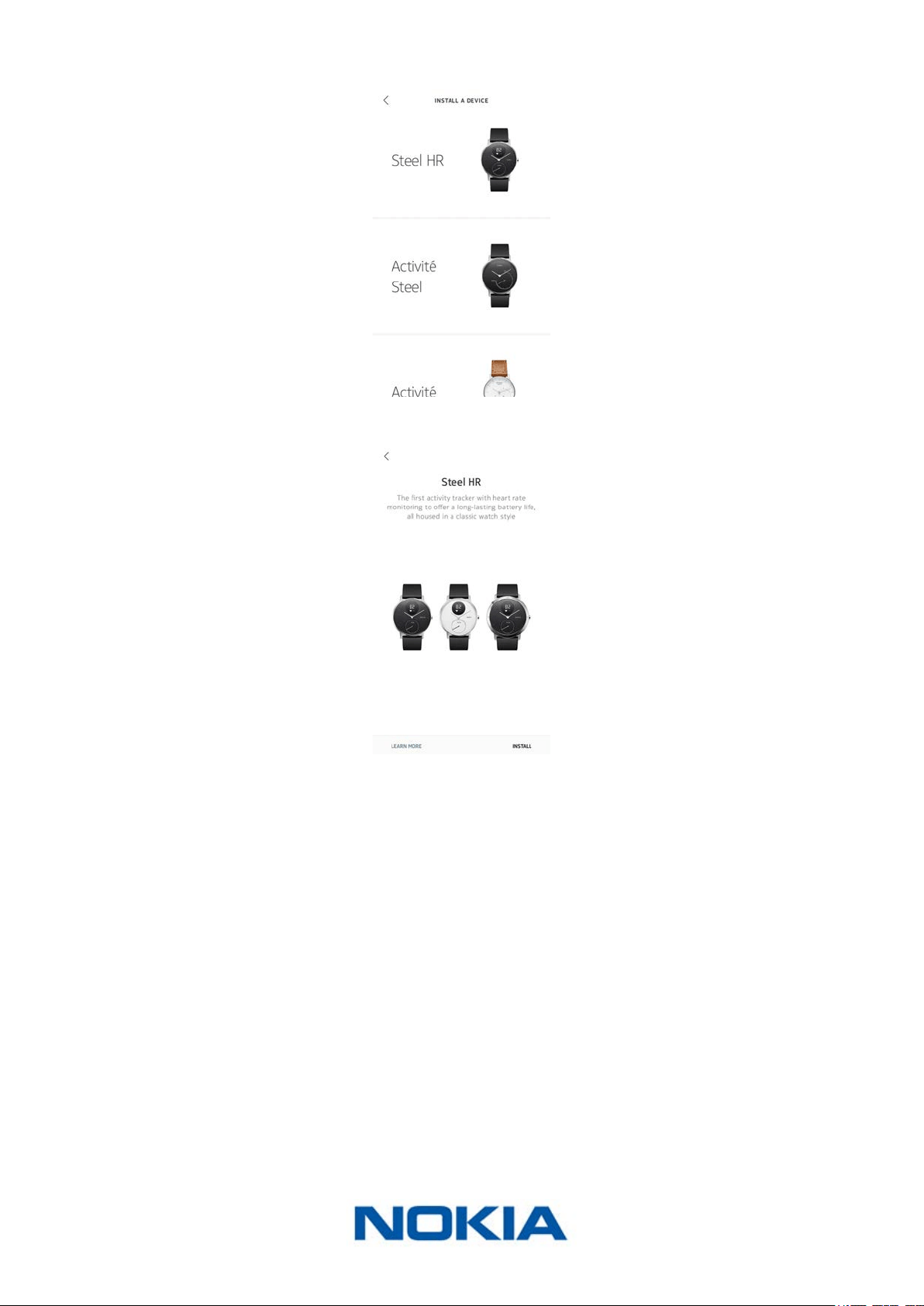
4. Tap Watches.
EN-9
Nokia Steel HR
v3.0 | November, 2017
5. Tap Steel HR.
6. Tap Install.
EN-10
Nokia Steel HR
v3.0 | November, 2017
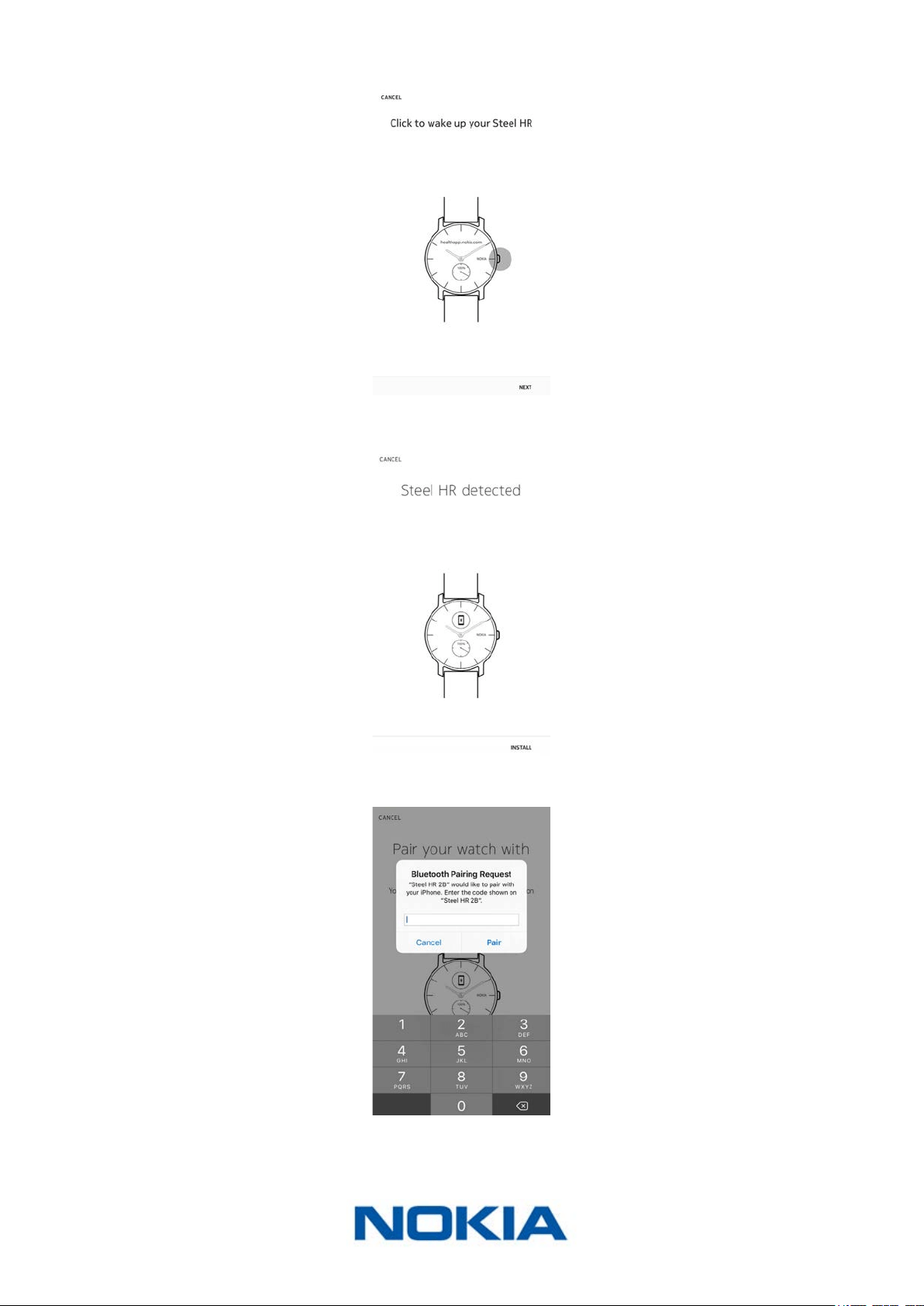
7. Press the button on the side of your Nokia Steel HR and tap Next.
8. Tap Install.
9. Enter the code displayed on your watch and tap Pair.

EN-11
Nokia Steel HR
v3.0 | November, 2017
10. Tap Next.
11. Enter your email address, password, and then conrm your password. Tap Next.
12. Enter your rst name, surname (last name) and birthday. Tap Next.
13. Select your gender and enter your current height and weight. Tap Create.
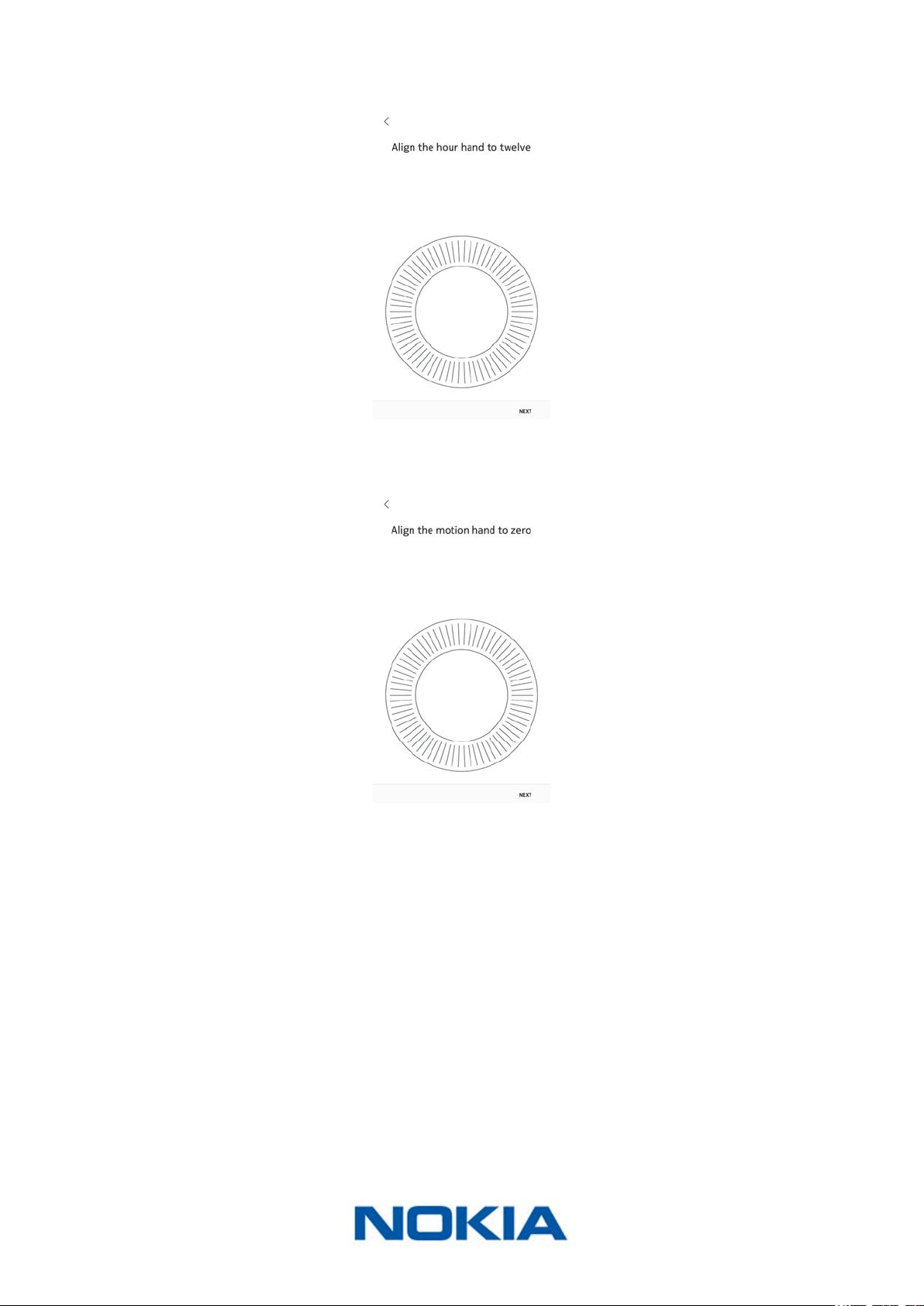
14. When prompted to, slide your nger on the wheel displayed in the app until the minute
hand reaches the 0 mark. Tap Next.
EN-12
Nokia Steel HR
v3.0 | November, 2017
15. Slide your nger on the wheel displayed in the app until the hour hand reaches the 0
mark. Tap Next.
16. Slide your nger on the wheel displayed in the app until the activity hand reaches the 0
mark. Tap Next.
Note that the activity hand only moves in one direction.
17. Tap OK.
18. Tap Next to watch the tutorials.

EN-13
Nokia Steel HR
v3.0 | November, 2017
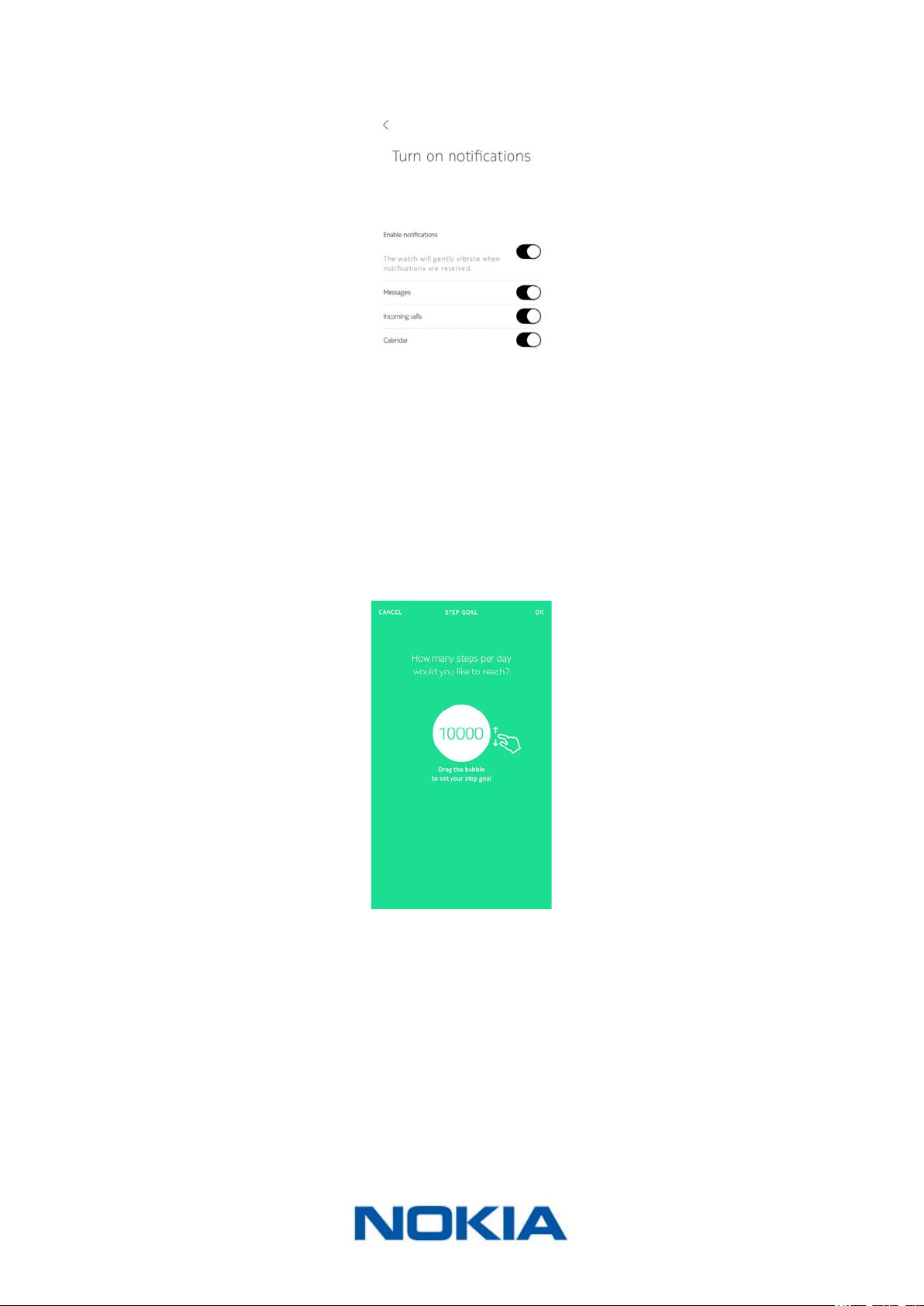
19. Tap Enable notications if you want to receive notications on your watch and tap
Next.
Go to “Enabling notications” on page21 for more information on notications.
20. Tap Close.
Your Nokia Steel HR is now activated.
21. Tap and slide the daily step goal up or down to select the goal you want.
The range for your goal is between 3,000 and 15,000 steps a day.
22. Tap OK.
I already have a Nokia® account
If you already have a Nokia® account, you can get started on the installation process.
To do so, perform the following steps:
1. Open the Nokia Health Mate® app.

EN-14
Nokia Steel HR
v3.0 | November, 2017
2. Tap My devices.
3. Tap +.
4. Tap Watches.
5. Tap Steel HR.

EN-15
Nokia Steel HR
v3.0 | November, 2017
6. Tap Install.
7. Press the button on the side of your Nokia Steel HR and tap Next.
8. Tap Install.

EN-16
Nokia Steel HR
v3.0 | November, 2017
9. Enter the code displayed on your watch and tap Pair.
10. Tap Next.
11. Select the user who will be using the Nokia Steel HR.
12. When prompted to, slide your nger on the wheel displayed in the app until the minute
hand reaches the 0 mark. Tap Next.

EN-17
Nokia Steel HR
v3.0 | November, 2017
13. Slide your nger on the wheel displayed in the app until the hour hand reaches the 0
mark. Tap Next.
14. Slide your nger on the wheel displayed in the app until the activity hand reaches the 0
mark. Tap Next.
Note that the activity hand only moves in one direction.
15. Tap OK.
16. Tap Next to watch the tutorials.
EN-18
Nokia Steel HR
v3.0 | November, 2017
17. Tap Enable notications if you want to receive notications on your watch and tap
Next.
Go to “Enabling notications” on page21 for more information on notications.
18. Tap Close.
Your Nokia Steel HR is now activated.
19. Tap and slide the daily step goal up or down to select the goal you want.
The range for your goal is between 3,000 and 15,000 steps a day.
20. Tap OK.
Setting the Time
The Nokia Steel HR is set up using your mobile device, which allows it to be automatically
set to the current time, based on the time zone you are in. If you ever have to
change time zones while wearing your Nokia Steel HR, all you have to do is open the
Nokia Health Mate® app to sync your watch with your device and the correct time will be
displayed.
EN-19
Nokia Steel HR
v3.0 | November, 2017
Note that you won’t have to worry about daylight savings either. In this case as well,
syncing your Nokia Steel HR with your device will be enough to update to the correct time.
Wearing my Nokia Steel HR
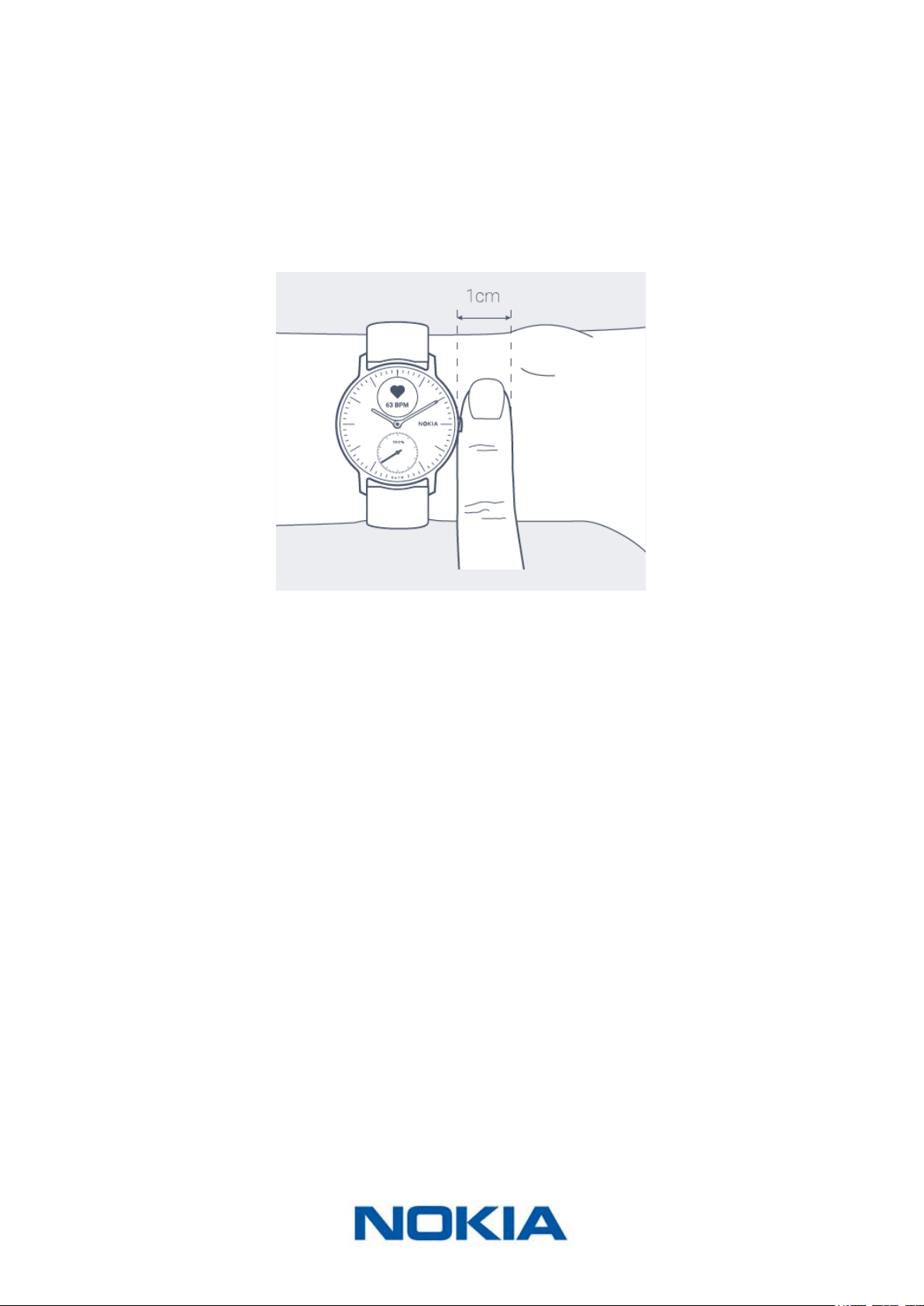
The Nokia Steel HR should be worn about a centimenter below the wristbone. To ensure
that you get accurate heart rate readings, the wristband should be tight around your wrist
in a way that remains comfortable.

EN-20
Nokia Steel HR
v3.0 | November, 2017
Customizing the settings of my Nokia Steel HR
Changing the screen order
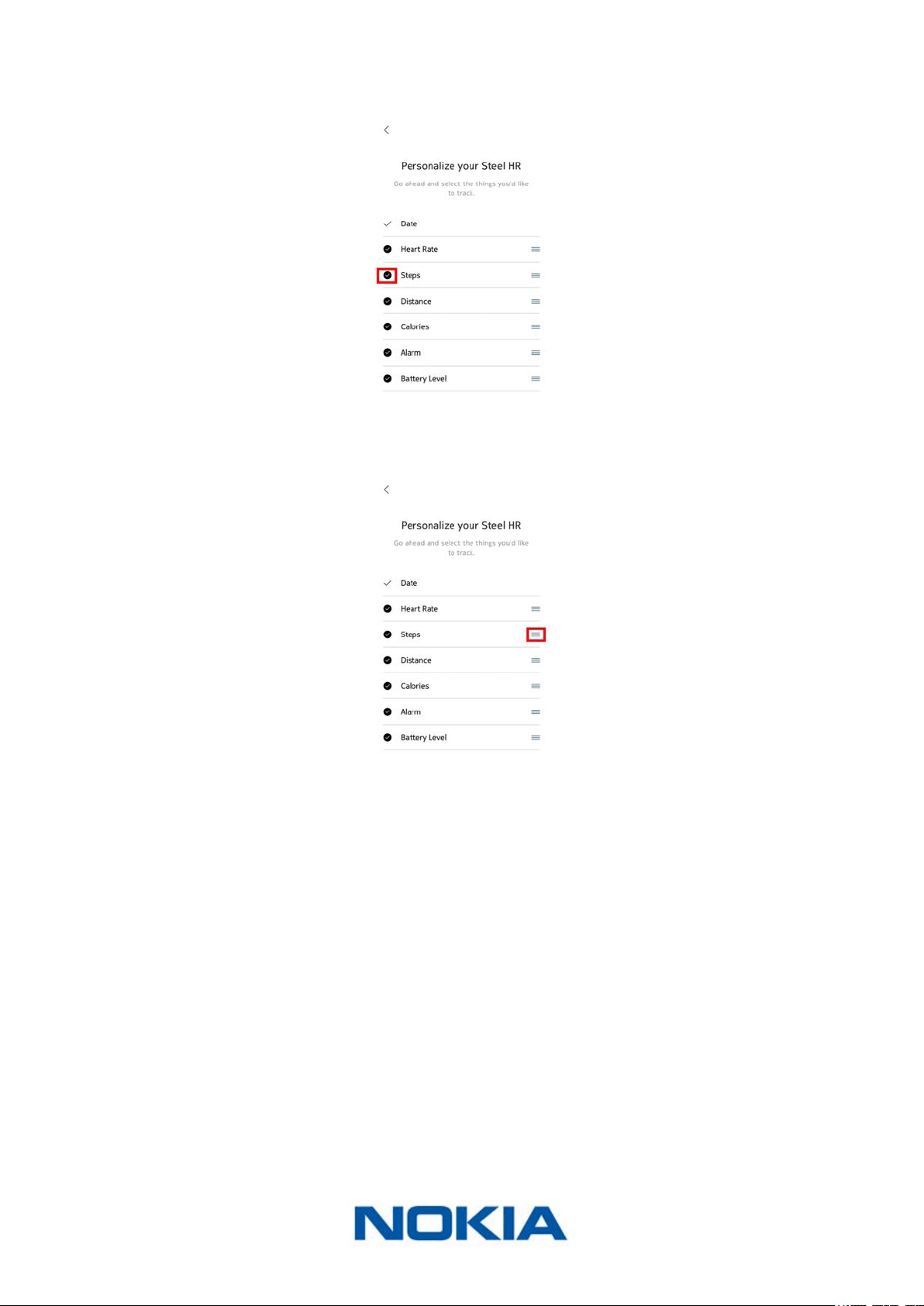
You can change the order of the screens of your Nokia Steel HR, or even remove some of
them if you wish. To do so, perform the following steps:
1. Open the Nokia Health Mate® app.
2. Go to Devices.
3. Tap Steel HR.
4. Tap More settings.
5. Tap Screens customization.
6. Select the screens you want to display:
EN-21
Nokia Steel HR
v3.0 | November, 2017
- Tap the dark circles on the left to hide a screen.
- Tap the empty circles on the left to display a screen.
7. Tap and hold the icon on the right to drag a screen up or down.
8. Tap the back button to conrm.
Enabling notications
If you want to get notied on your Nokia Steel HR whenever you have an incoming call
or when you receive a text message, you can enable the notications option. To do so,
perform the following steps:
1. Open the Nokia Health Mate® app.
2. Go to Devices.
3. Tap Steel HR.

EN-22
Nokia Steel HR
v3.0 | November, 2017
4. Tap Notications.
5. Tap Enable notications and select the notications you want to enable.
6. Tap the back button to conrm.
EN-23
Nokia Steel HR
v3.0 | November, 2017
Tracking my activity
Overview
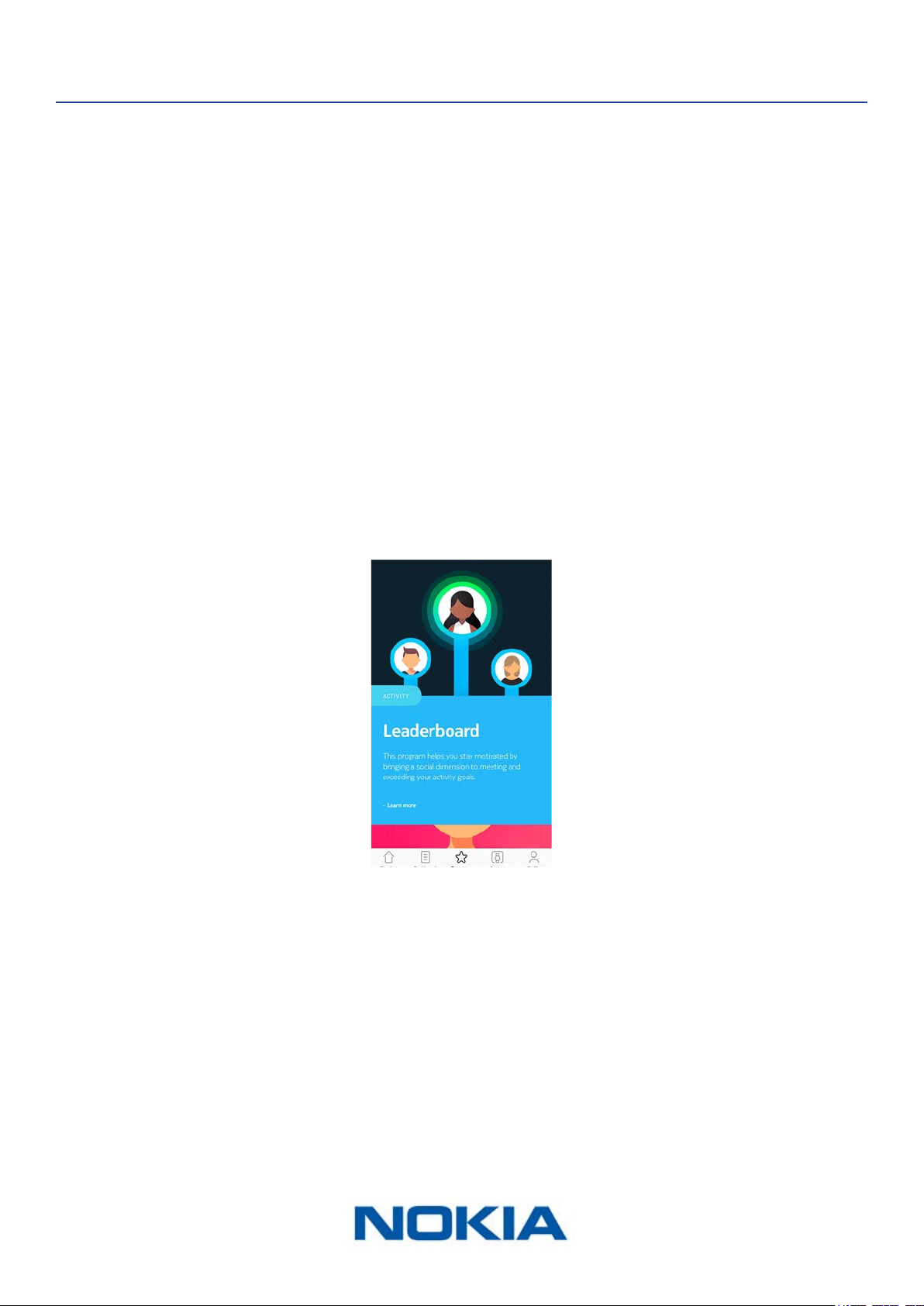
Your Nokia Steel HR allows you to track your activity: number of steps, run tracking and
swim tracking. Whether you are walking, running or swimming, you don’t have to do
anything to start tracking it. All you have to do is wear your Nokia Steel HR, it will do the
rest.
(1)Visual representation
of the number of steps:
each bar corresponds to a
30-minute period
(2)Number of steps during
the day
(3)Percentage of the daily
step goal achieved
(4) Estimated distance
walked during the day
(5)Estimated calories
burned during the day
(active calories and total
number of calories)
(6) Heart rate graph
(7) Day’s activity detail
The integrated accelerometer allows your Nokia Steel HR to automatically count your
number of steps and to recognize when you are running. Your running activity, your
distance and your calories are calculated thanks to an algorithm based on your number of
steps and your personal data (age, height and weight).
Checking my progress
In order to check your progress in terms of number of steps, all you have to do is have a
look at the activity hand. Depending on its position, you can tell what percentage of your
daily step goal you have achieved. Once you reach the 100% mark, your watch vibrates
and the cycle starts all over again, from 0% to 100%.
To get more information (such as the exact number of steps, the distance, or the calories
you have burned), simply press the button located on the right-hand side. The dierent
screens of your Nokia Steel HR will be displayed one after the other.

EN-24
Nokia Steel HR
v3.0 | November, 2017
To get even more details, simply log in to the Nokia Health Mate® app. The app oers
many graphs that allow you to easily see your history and your progress from the very rst
time you use it.
Changing my activity goal
This feature allows you to set a custom daily step goal. To change your daily step goal,
perform the following steps:
1. Open the Nokia Health Mate® app.
2. Go to your Dashboard.
3. Tap on Steps.
4. Tap on the three dots at the top of the screen.
5. Tap Step goal.
Note that you can change your step goal by selecting a step widget in your Timeline
and tapping on the three dots at the top of the screen. You can also go to Prole >
Goals > Daily steps.
6. Tap and slide the daily step goal up or down to select the goal you want.
7. Tap OK.

EN-25
Nokia Steel HR
v3.0 | November, 2017
8. Sync your Nokia Steel HR by opening the Nokia Health Mate® app and refreshing your
Timeline by sliding your nger from top to bottom.
Tracking my swimming sessions
Your Nokia Steel HR allows you to track your swimming sessions. All you have to do is wear
your Nokia Steel HR while swimming. It will automatically detect that you’re swimming and
track your swimming sessions without any action required on your part.
Once you’re done swimming, the Nokia Health Mate® app will let you know how long your
session was and how many calories you’ve burned.

EN-26
Nokia Steel HR
v3.0 | November, 2017
Tracking my sleep
Overview
Your Nokia Steel HR lets you track your sleep without requiring any action on your part. All
you have to do is wear your Nokia Steel HR when you go to sleep: it will do the rest on its
own.
If you do not want to track your sleep, simply don’t wear your Nokia Steel HR to sleep.
Retrieving my sleep data
You can retrieve the sleep data collected by your Nokia Steel HR in your Timeline in the
Nokia Health Mate® app.
(1)Breakdown of your night:
- Time spent awake (grey)
- Duration of light sleep
cycle (light blue)
- Duration of deep sleep
cycle (dark blue)
(2)Time spent laying
(3)Total time spent sleeping
(4)Percentage of the sleep
goal
(5)Time it took you to fall
asleep
(6)Number of wake-ups
(7)Heart rate graph
The Nokia Health Mate® app keeps your entire history, allowing you to easily track how
your sleep data evolves over time.

EN-27
Nokia Steel HR
v3.0 | November, 2017
Setting an Alarm
Enabling the Alarm
In order to enable and set an alarm, perform the following steps:
1. Open the Nokia Health Mate® app.
2. Go to Devices.
3. Select Alarm.
4. Put your Nokia Steel HR close enough to your mobile device.
5. Tap the Alarm toggle to enable the alarm.

EN-28
Nokia Steel HR
v3.0 | November, 2017
6. Tap and slide the wake up time up or down to select the alarm time.
7. If necessary, select a smart wake-up time when setting an alarm.
Your watch will then nd the best moment to wake you up during that time period to
make for a smoother wake-up experience.
8. Tap OK.
9. Tap Repeat on if you want to select on which days the alarm should be triggered.
10. Tap the back button to conrm.

EN-29
Nokia Steel HR
v3.0 | November, 2017
Disabling the Alarm
1. In the Nokia Health Mate® app, go to Devices.
2. Tap Alarm.
3. Put your Nokia Steel HR close enough to your mobile device.
4. Tap the Alarm toggle to disable the alarm.
5. Tap the back arrow at the top left of the screen.
Your alarm is disabled.
Stopping the Alarm
You can stop the alarm by pressing the button of your Nokia Steel HR. It will stop right
away instead of vibrating eight times before stopping on its own.

EN-30
Nokia Steel HR
v3.0 | November, 2017
Tracking my heart rate
Overview
Your Nokia Steel HR can help you track your heart rate. By default, it takes a heart rate
measurement every ten minutes, allowing you to see how your heart rate uctuates during
the day.
You also have the option of using the continuous heart rate mode to get your continuous
heart rate, which is especially interesting during a workout session. In this case, a
measurement is taken every second. Note that the continuous heart rate mode also
enables a timer so that you know exactly how long you’ve been working out.
Wearing my Nokia Steel HR
To make sure your heart rate can be eectively tracked by your Nokia Steel HR, make sure
the wristband of your Nokia Steel HR is tight enough while still remaining comfortable. It
should also be worn about a centimeter (or half an inch) away from your wrist bone.
Retrieving my heart rate data
You can see your latest heart rate measurement directly from your Nokia Steel HR. To do
so, simply press and release the button to go through the screens until the heart rate
screen is displayed.
Note that going to the heart rate screen will trigger a new heart rate measurement.
If you want to see the full history of your heart rate measurement, you can log in to the
Nokia Health Mate® app.

EN-31
Nokia Steel HR
v3.0 | November, 2017
If you wear your Nokia Steel HR every day, you will receive an average heart rate item in
your Timeline. This heart rate item shows your heart rate average and your dierent heart
rate zones during the day.
Launching the continuous heart rate mode
You can easily launch the continuous heart rate mode before a workout session. To do so,
perform the following steps:
1. Press the button of your Nokia Steel HR for about a second until it vibrates.
The continuous heart rate mode is on.
2. Press the button until it vibrates again when you want to stop the continuous heart
rate mode.
Note that only the heart rate screen appears on the display of your Nokia Steel HR when
the continuous heart rate mode is on.
EN-32
Nokia Steel HR
v3.0 | November, 2017
Getting more active
Competing with my friends
Overview
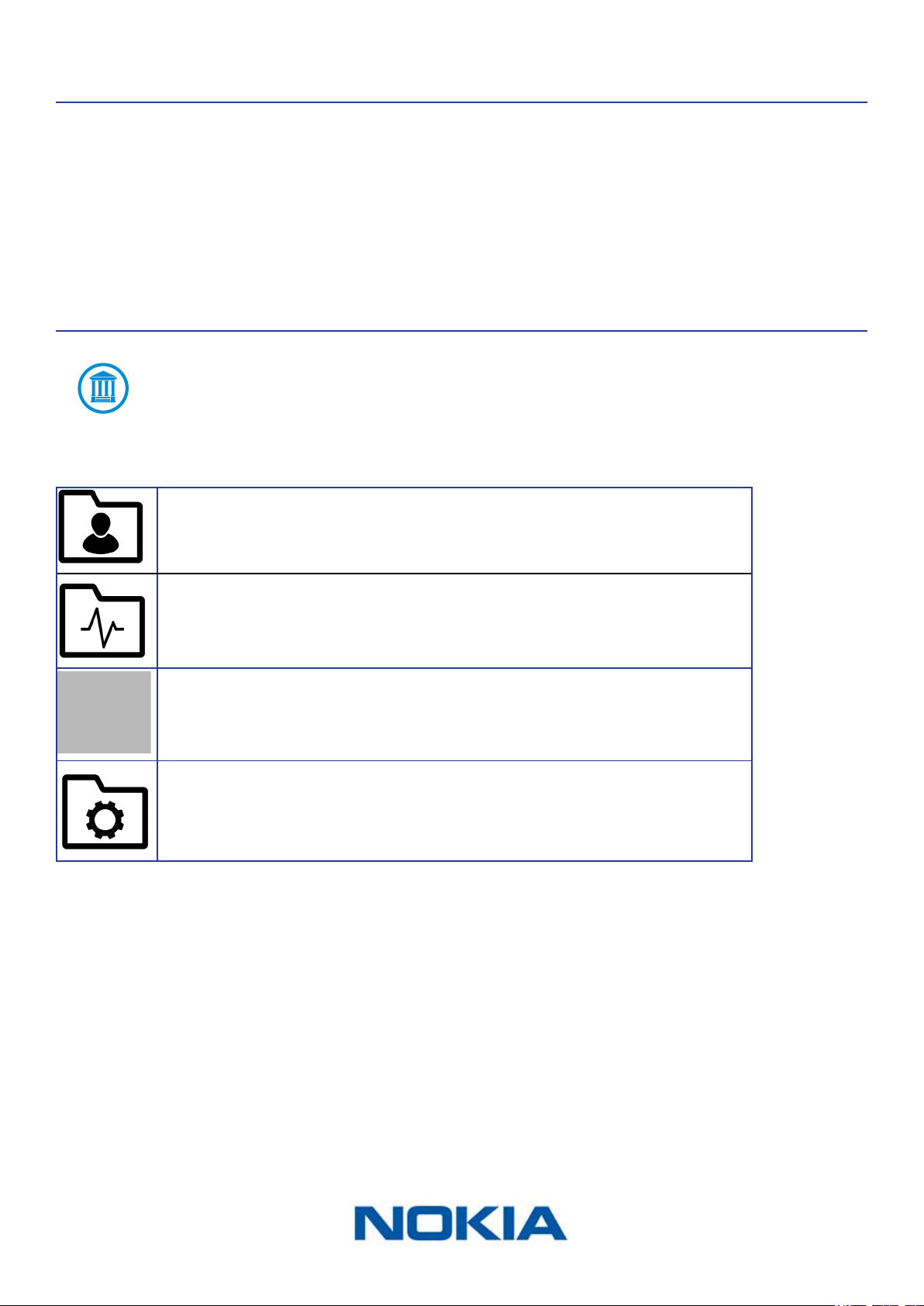
Your Nokia Steel HR and the Nokia Health Mate® app help you stay motivated by bringing a
social dimension to the equation. You can add your friends and family to your leaderboard
and compete with them to be the one who walks the most every week. It doesn’t matter
if they have a Nokia® product or not: you can add anyone as long as they have the
Nokia Health Mate® app on their smartphone, thanks to the in-app tracking that can act
as an activity tracker.
This feature is only available to the main user of the account.
Adding someone to my leaderboard
You can invite people to join your leaderboard. To do so, perform the following steps:
1. In the Nokia Health Mate® app, go to Wellness Programs.
2. Select Leaderbord.
3. Tap Join.
4. Tap Invite.
5. Select how you want to send your invitation.

EN-33
Nokia Steel HR
v3.0 | November, 2017
Several options are available, such as message, email or social media websites.
Interacting with someone in my leaderboard
Once you have friends in your leaderboard, you can interact with them by tapping their
name and selecting one of the three actions available:
• Thumb up to encourage them,
• Thumb down to show o,
• Message to chat with them.
Adding a social component to your activity tracking is a great way to stay motivated and
push your limits.
Competing with myself
Badges
The Nokia Health Mate® app oers a system of badges, virtual rewards that you unlock
after certain achievements. There are two kinds of badges:
• daily steps badges whenever you reach a certain number of steps on a given day,

EN-34
Nokia Steel HR
v3.0 | November, 2017
• cumulative distance badges when you reach an overall distance.
Badges are a fun way to stay motivated and to be rewarded for your eorts.
Insights
Once you have been using your Nokia Steel HR for a few days, the Nokia Health Mate®
app will provide you with Insights. This feature looks at your activity and lets you know
when you are more active than usual. Whenever you are less active than usual, the Insights
encourage you to keep going so that you can reach your health goal.
Note that it is not possible to disable the Insights.

EN-35
Nokia Steel HR
v3.0 | November, 2017
Syncing your Data
Thanks to background synchronization, you should never have to worry about syncing
your data, as long as your Bluetooth is always enabled. Background sync is automatically
triggered when:
• You have taken more than 1,000 steps since the last sync.
• You have reached your daily step goal.
• More than 6 hours have passed since the last sync took place.
• You change time zones or when daylight savings start.
You can also sync your data manually. All you have to do to sync your data is open the
Nokia Health Mate® app. When you do, your Nokia Steel HR automatically syncs your data
with the app. Make sure your Nokia Steel HR is close enough to your mobile device and the
Bluetooth is activated on your device or you will not be able to synchronize your data.
Your Nokia Steel HR has a limited memory. Make sure you open the app
regularly so that you do not lose any of your data.

EN-36
Nokia Steel HR
v3.0 | November, 2017
Dissociating your Nokia Steel HR
Dissociating your Nokia Steel HR allows you to remove it from your account. Once it is no
longer linked to your account, it can be installed on another account or on the prole of
another user of your account.
Dissociating your Nokia Steel HR will not remove any of your data from the
Nokia Health Mate® app.
To dissociate your Nokia Steel HR, perform the following steps:
1. Press the button of your Nokia Steel HR for 5 to 6 seconds.
2. Press the button three times until “Factory reset” is displayed.
3. Press the button for one second until “Reset in 5 clicks” is displayed.
4. Press the button ve times to eectively reset your watch.
5. Go to the Bluetooth settings of your mobile device and “forget” your Nokia Steel HR
(for iOS users only).
6. Open the Nokia Health Mate® app.
7. Go to Devices.
8. Tap Steel HR.

EN-37
Nokia Steel HR
v3.0 | November, 2017
9. Tap Dissociate this product.
10. Tap Remove from my account.

EN-38
Nokia Steel HR
v3.0 | November, 2017
Cleaning and Maintenance
Cleaning my Nokia Steel HR
1. Use a lint-free cloth moistened with water to clean the glass and casing of your
Nokia Steel HR.
2. Run the silicone band under water and rub it with hypoallergenic soap to clean it.
3. Dry the silicone wristband with a soft cloth.
Charging the battery
Your Nokia Steel HR can operate for up to 25 days on a single charge, depending on your
use of the heart rate mode. Using the continuous heart rate mode all the time instead of
just during activities will deplete the battery much faster.
To charge your Nokia Steel HR, perform the following steps:
1. Connect the USB end of the charging cable to a power source .
2. Position the other end of the charging cable on the back of your Nokia Steel HR in such
a way that the magnets align.
You can check the percentage of the battery on the display of the watch while it’s
charging.
Note that if you don’t charge your Nokia Steel HR right away, the power reserve mode will
allow you to keep using it for 20 additional days. However, you will only be able to read the
time and track your activity in this mode. You will need to charge your Nokia Steel HR to
use the heart rate mode.

EN-39
Nokia Steel HR
v3.0 | November, 2017
Replacing the Wristband
You can easily replace the wristband of your Nokia Steel HR thanks to the quick release
spring bars with which it is attached. The 36-mm model requires wristbands that are 18-
mm wide, while the 40-mm model requires wristbands that are 20-mm wide.
To change the wristband, perform the following steps:
1. Turn your Nokia Steel HR over.
2. Locate the knob of each spring bar.
3. Pull the knob of the rst spring bar to the left side and remove the wristband.
4. Insert one side of the spring bar of the new wristband.
5. Put the wristband in place while pulling the knob to the left side.
6. Release the knob.
The wristband is now properly attached to your Nokia Steel HR.
7. Repeat the previous steps for the other side.

EN-40
Nokia Steel HR
v3.0 | November, 2017
Calibrating the Hands
If you ever feel that the time displayed on your Nokia Steel HR is incorrect, you may need
to recalibrate the hands. To do so, perform the following steps:
1. In the Nokia Health Mate® app, go to Devices.
2. Tap your Nokia Steel HR.
3. Tap Set the time.
Make sure that your Nokia Steel HR is placed close enough to your mobile device.
4. When prompted to, slide your nger on the wheel displayed in the app until the minute
hand reaches the 0 mark. Tap Next.
5. Slide your nger on the wheel displayed in the app until the hour hand reaches the 0
mark. Tap Next.

EN-41
Nokia Steel HR
v3.0 | November, 2017
6. Slide your nger on the wheel displayed in the app until the activity hand reaches the 0
mark. Tap Next.
Note that the activity hand only moves in one direction.
7. Tap Done.
Your Nokia Steel HR is now properly calibrated and the hands move to their correct
position to display the current time.
Updating the Firmware Version
We regularly oer new rmware versions so that you can benet from the latest features
we add to our products. When a new rmware version is available, the Nokia Health Mate®
app usually prompts you to install it through your Timeline.
Make sure you sync your Nokia Steel HR before updating the rmware version.
Failing to do so will result in a loss of data.
However, you can check if updates are available and force their installation whenever you
want. To do so, perform the following steps:
1. In the Nokia Health Mate® app, go to Devices.

EN-42
Nokia Steel HR
v3.0 | November, 2017
2. Tap your Nokia Steel HR.
3. Tap Check for updates.
4. Put your Nokia Steel HR close enough to your mobile device.
If your Nokia Steel HR is not up to date, the Nokia Health Mate® app will prompt you to
install a new rmware version.
5. Tap Upgrade.
6. Tap Close when the upgrade is complete.
Note: You can check which rmware version your Nokia Steel HR uses in Devices > Steel
HR.
EN-43
Nokia Steel HR
v3.0 | November, 2017
User Guide Copyright
This User Guide is protected by Intellectual Property laws and copyright. Any reproduction,
modication, representation and/or publication, without Nokia® prior approval is strictly
prohibited. You may print this User Guide for your personal use exclusively.
For any question please contact Nokia Health at : http://nokia.ly/HealthSupport.
Legal Notice
By using your Nokia Steel HR you expressly agree to the Nokia® Services
Terms and Conditions available on our website.
This product us not a medical device and should not be used to diagnose or
treat any medical condition.
Identity data means the data which can directly identify you.
Body metrics data means data which correspond to an accurate
measurement of your physical features and your body activity.
Activity data means data which correspond to a measurement of
your physical/sports activities.
Cookies - technical features mean data, not directly identifying
you, which allows you to use our Products and Services and allow
us improve your personal experience.
Personal Data
• Make sure you have read our privacy policy, which you can nd on our website.
• Make sure your Nokia® account password is secure enough to restrict access to
your account. It should be at least eight-character long, have mixed case, and use a
combination of alphanumeric and special characters.
• We recommend that you protect access to the Nokia Health Mate® app with an
additional passcode and/or Touch ID. You can do so from the app by going to Settings
in the app and activating Touch ID and Passcode (only for iOS).
• We recommend that you export your data on a regular basis to local storage on your
home computer. You can do so from the Nokia Health Mate® web interface by clicking
your Prole picture > Settings > User Preference > Download my data.

EN-44
Nokia Steel HR
v3.0 | November, 2017
Safety Instructions
Use and Storage
• Use the product at temperatures between -10°C and 45°C (14°F and 113°F).
• Product may be stored in a clean, dry location between -20°C and 85°C (4°F and
185°F) when not in use.
• Avoid any extreme temperature changes.
• Avoid any kind of shocks, be they physical, thermal or otherwise. They may damage
internal and external components of your watch.
• Keep the glass case of your Nokia Steel HR away from any sharp or hard objects to
prevent any scratches.
• Keep your Nokia Steel HR and its accessories out of reach from children, as it contains
small parts and may present a choking hazard.
Heart Rate Measurement
• Skin perfusion, or how much blood is owing through the skin, varies among individuals
and according to the environment. In certain circumstances, the Nokia Steel HR may
not be able to provide an accurate heart rate measurement.
• The technology used by the Nokia Steel HR is based on the light absorbed by your skin
and blood. Any permanent or temporary changes to your skin, such as tattoos, sweat,
or even hair on the wrist may aect the measurements.
• Environmental factors may aect the ability of the Nokia Steel HR to take an accurate
measurement. For example, water may obstruct or modify the light dispersion, and
cold weather may impact skin perfusion.
• The Nokia Steel HR needs to stay securely in place to provide a heart rate
measurement. Activities that cause force to the wrist, such as boxing or volleyball, may
not allow the Nokia Steel HR to provide an accurate heart rate measurement.
Water Resistance
• Your Nokia Steel HR can withstand a pressure similar to that of a 50 m (165 ft) depth.
You can, therefore, use it when dishwashing, splashing or swimming. However, it can’t
be used for diving or snorkeling.
• Do not press the button of your watch when it is under water.
• Avoid long exposure to salt water. Make sure you rinse your watch with fresh water
after spending time swimming in salted water.
• Avoid exposure to any chemical products such as solvents, detergents, perfumes or
cosmetics. They may damage the wristband or the casing of the watch.
• Avoid extreme atmospheres (e.g., saunas or steam rooms).
Service and Maintenance
• Do not attempt to repair or modify your Nokia Steel HR yourself. Service and

EN-45
Nokia Steel HR
v3.0 | November, 2017
maintenance not described in this User Guide should be performed by professional
technicians.
• Exposure to high or low temperatures may shorten battery life.
• The aging of the materials may aect the water resistance of the watch. Water
resistance cannot be permanently guaranteed.
EN-46
Nokia Steel HR
v3.0 | November, 2017
Specications
Nokia Steel HR (36 mm)
• Stainless steel case
• Mineral glass
• Watch diameter: 36.3 mm diameter (1.4 in.)
• Watch thickness: 13 mm (0.5 in.)
• Weight: 39 g (1.38 oz)
• Wristbands: Fits wrists up to 200 mm. (7.9 in.)
• Water resistant up to 50 m (165 ft)
Nokia Steel HR (40 mm)
• Stainless steel case
• Mineral glass
• Watch diameter: 39.5 mm (1.6 in) diameter
• Watch thickness: 13 mm (0.5 in.)
• Weight: 49 g (1.72 oz)
• Wristbands: Fits wrists up to 230 mm. (9.1 in.)
• Water resistant up to 50 m (165 ft)
Display
• Analog dial displaying hours and minutes
• Subdial displaying your progress toward your daily step goal
• OLED screen displaying additional information
Metrics and Features
• Steps (distance and calories)
• Running (distance and calories)
• Swimming (session duration and calories)
• Heart rate
• Sleep
• Silent alarm
• Timer
Battery
• Up to 4 days in continuous heart rate mode
• Up to 25 days in normal use
• Power reserve mode of an extra 20 days
EN-47
Nokia Steel HR
v3.0 | November, 2017
Sensors
• Day and night motion sensor
• High precision MEMS 3-axis accelerometer
• Low power consumption
Connectivity
• Bluetooth Low Energy (Bluetooth Smart Ready)
Compatible Devices
• iPhone 4s and higher
• iPod Touch 5th Gen and higher
• iPad 3rd Gen and higher
• BLE (Bluetooth low Energy) compatible Android device
The Nokia Steel HR cannot be set up from a computer.
Compatible OS
• iOS 8.0 and higher
• Android 6.0 and higher

EN-48
Nokia Steel HR
v3.0 | November, 2017
Document Release Overview
Release date Modications
October 2016 v1.0 First release
January 2017 v2.0 Update of:
“Tracking my activity” on page23
November 2017 v3.0 Nokia graphic chart
The screenshots in this manual are used for explanatory purposes. Your actual
screens may dier from the screenshots in this manual.

EN-49
Nokia Steel HR
v3.0 | November, 2017
Warranty
Nokia® One (1) Year Limited Warranty - Nokia Steel HR
Nokia Technologies (France) SA, 2 rue Maurice Hartmann, 92130 Issy-les-Moulineaux
(“Nokia®”) warrants the Nokia® branded hardware product (“Nokia Steel HR”) against
defects in materials and workmanship when used normally in accordance with Nokia®’s
published guidelines for a period of ONE (1) YEAR from the date of original retail purchase
by the end-user purchaser (“Warranty Period”). Nokia®’s published guidelines include but
are not limited to information contained in technical specications, safety instructions or
quick start guide. Withings does not warrant that the operation of the Nokia Steel HR will
be uninterrupted or error-free. Nokia® is not responsible for damage arising from failure
to follow instructions relating to the Nokia Steel HR’s use.
The warranty does not extend to:
• Normal wear and tear such as alteration of the color and/or the material of the
wristband, deteriorated glass case, or peeling of the watch case plating.
• Any damage to the watch and its parts resulting from abnormal or abusive use,
negligence or lack of care, or accidental damage (such as dents).
• Indirect damages of any kind.

EN-50
Nokia Steel HR
v3.0 | November, 2017
Regulatory Statements
FFCC ID: XNAHWA03
This device complies with Part 15 of the FCC Rules and with Industry Canada licence-
exempt RSS standard(s).
Operation is subject to the following two conditions:
(1) This device may not cause harmful interference, and
(2) This device must accept any interference received, including interference that may
cause undesired operation.
Changes or modications made to this equipment not expressly approved by Nokia® may
void the FCC authorization to operate this equipment.
Radiofrequency radiation exposure Information:
The radiated output power of the device is far below the FCC radio frequency exposure
limits. Nevertheless, the device shall be used in such a manner that the potential for
human contact during normal operation is minimized.
This device complies with the R&TTE Directive.
A copy of the EU Declaration of Conformity is available online at https://health.nokia.com/
fr/en/compliance.