
DS500 MOBILELOCK
TM
GPS Locator with Anti-Theft Alarm (Base Unit)
DS505 Indoor Motion Detector, DS510 Extended Run-Time Adapter
Localizador GPS con alarma antirrobo DS500 MOBILELOCK™ (unidad bá sica)
Detector de movimiento para interiores DS505, adaptador de duració n prolongada DS510
INSTRUCTION MANUAL
MANUAL DE INSTRUCCIONES
INSTRUCTIVO DE OPERACIÓ N, CENTROS DE SERVICIO Y PÓ LIZA
DE GARANTÍA. ADVERTENCIA: LÉ ASE ESTE INSTRUCTIVO
ANTES DE USAR EL PRODUCTO.
If you have questions or comments, contact us.
Si tiene dudas o comentarios, contá ctenos.
1-800-4-D
E
WALT • www.dewalt.com
DS500 E,Sp 8/9/06 11:04 AM Page 1

DS500 E,Sp 8/9/06 11:04 AM Page 2
English
1
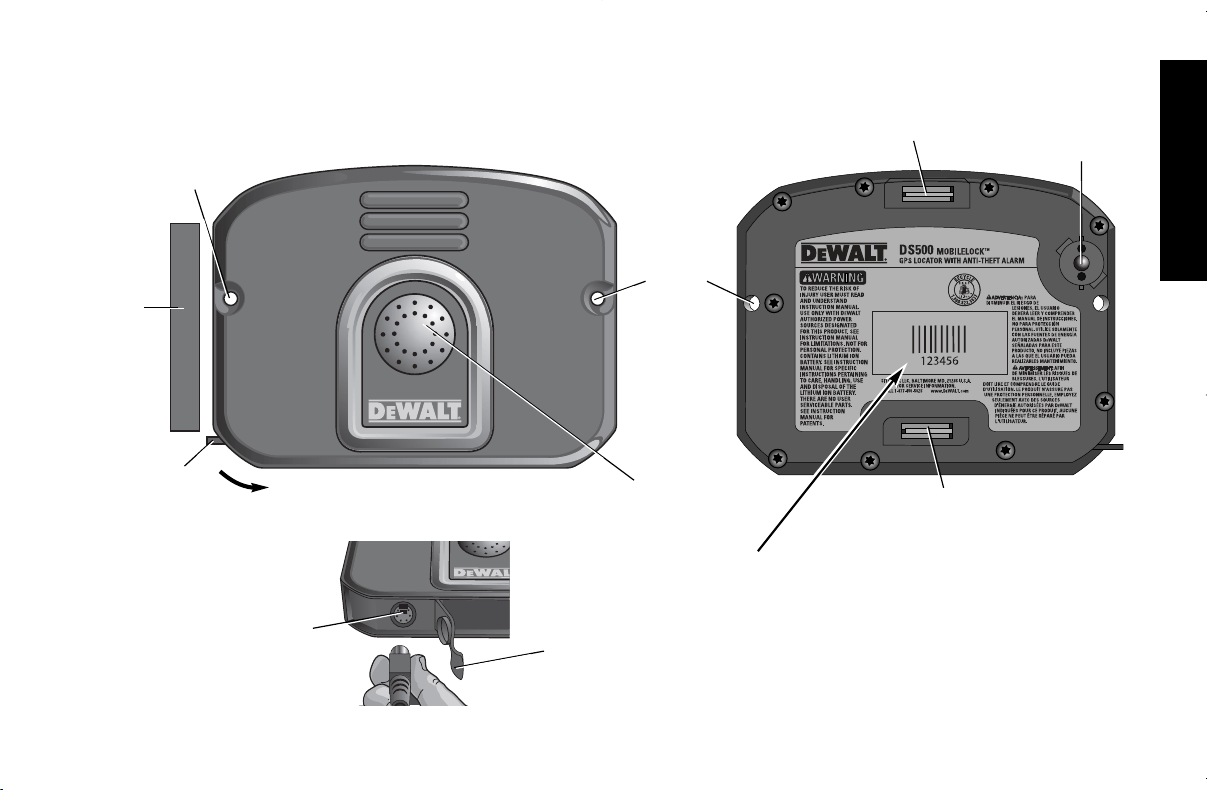
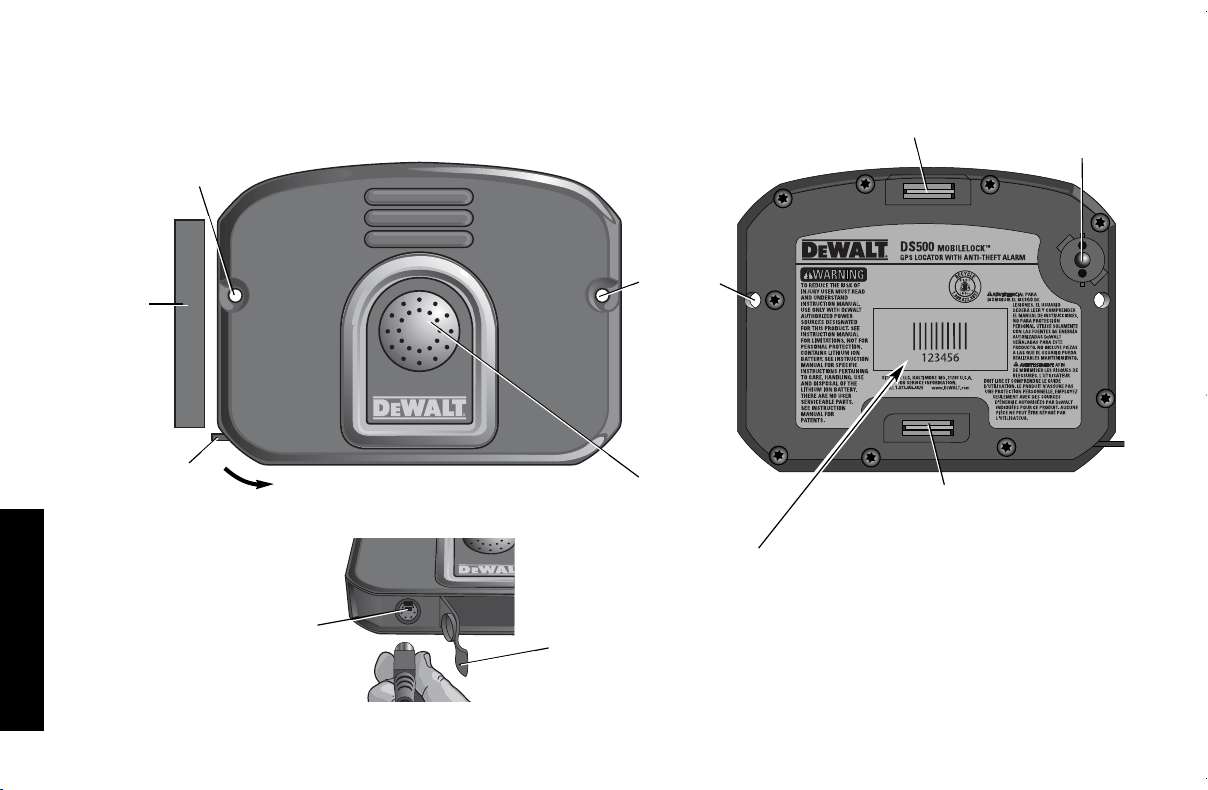
TAMPER*
SWITCH
MOUNTING
HOLE
CHARGING
PORT
DOOR
CHARGING
PORT
DOOR
CHARGING
PORT
MOUNTING
HOLE
(#8 screw
size - not
included)
SPEAKER
* Tamper: Causes an alarm when removed
from mounting surface
DS500 MOBILELOCK
TM
GPS Locator with Anti-theft Alarm
MOUNTING MAGNET
MOUNTING
MAGNET
ESN
(ELECTRONIC SERIAL NUMBER)
DOOR
CONTACT
MAGNET
DS500 E,Sp 8/9/06 11:04 AM Page 1

English
2
Table of Contents
General Safety Rules............................................................3
Important Notices..................................................................4
Product Limitations................................................................4
Regulatory and Safety Notices ............................................5
Product Overview..................................................................6
DS500 MOBILELOCK
TM
GPS Locator
with Anti-theft Alarm ......................................................6
DS505 Extended Run-Time Adapter ............................7
DS510 Indoor Motion Detector......................................7
Technology Overview............................................................7
Assisted GPS ................................................................7
Prevention of False Alarms ..........................................7
Initial Setup............................................................................8
Charging the DS500
Activate ..........................................................................8
Customize Alarm Settings ............................................8
Mounting ........................................................................9
DS500 MOBILELOCK
TM
unit ..................................9
DS505 Extended Run-time Adapter ......................9
DS510 Motion Detector........................................10
Test the System ..........................................................10
DS510 Indoor Motion Detector Coverage Test ..........11
Basic Operations ................................................................11
Arming..........................................................................11
Disarming ....................................................................12
Choosing Sensors ......................................................13
Assisted GPS Location................................................14
More Features & Options ..................................................15
Grouping ......................................................................15
Nicknames ..................................................................15
Change Contact Information ......................................15
Change Password ......................................................15
Change Speaker Settings ..........................................15
Battery Maintenance....................................................15
Status update and system test ..........................................16
Specifications ......................................................................16
Cleaning ..............................................................................17
Contact................................................................................17
Warranty..............................................................................17
DS500 E,Sp 8/9/06 11:04 AM Page 2

English
3
SAVE THESE INSTRUCTIONS
General Safety Rules
WARNING: Read and understand all instructions.
Failure to follow all instructions may result in electric
shock, fire, property damage and/or serious personal injury
or death.
WARNING: SERIOUS INJURY OR DEATH. This product was
designed to provide protection of property only. Do not use this
product to provide protection for life safety and from fire. Any use
other than that suggested in this instruction manual could cause
injury or even death.
WARNING: SERIOUS INJURY OR DEATH. Do not use this
product in hazardous areas. This may include blasting areas and
potentially explosive atmospheres. Sparks in such areas could
cause an explosion or fire resulting in bodily injury or even death.
They include but are not limited to fueling areas such as gas sta-
tions; fuel or chemical transfer or storage facilities; vehicles using
liquefied petroleum gas (such as propane or butane); areas where
the air contains chemicals or particles, such as grain, dust, or metal
powders; and any other area where one would normally be advised
to turn off a vehicle engine.
WARNING: SERIOUS INJURY OR DEATH. Consult with
manufacturers of any medical devices, such as pacemakers,
hearing aids, etc., to determine if they are susceptible to interfer-
ence from cellular devices.
WARNING: FIRE, ELECTRIC SHOCK OR ELECTROCUTION.
Do not use an extension cord unless it is absolutely necessary.
Use of an improper extension cord or an extension cord that has
been worn or damaged could result in risk of fire, electric shock
or electrocution.
• An extension cord must have adequate wire size (AWG or
American Wire Gauge) for safety. The smaller the gauge
number of the wire, the greater the capacity of the cable, that is,
16 gauge has more capacity than 18 gauge. When using more
than one extension cord to make up the total length, be sure
each individual extension cord contains at least the minimum
wire size.
Recommended Minimum Wire Size for Extension Cords
Total Length of Cord
25 ft. 50 ft. 75 ft. 100 ft. 125 ft. 150 ft. 175 ft.
7.6 m 15.2 m 22.9 m 30.5 m 38.1 m 45.7 m 53.3 m
Wire Size AWG
18 18 16 16 14 14 12
• The DS500 is intended for indoor/outdoor use; power supply is
for indoor use only. Charge indoors.
INTERNAL LITHIUM ION BATTERY
WARNING: BATTERIES – EXPLOSION, INJURY OR FIRE.
The DS500 contains a lithium ion battery. Carefully follow all of the
instructions in this manual.
• Never dispose of the DS500 or its battery in a fire. Return to a
D
E
WALT service center to recycle the unit.
• The battery can explode in a fire. Toxic fumes and materials
are created when lithium ion batteries are burned.
• Do not disassemble, open, crush, bend, shred, puncture or
deform the DS500 and its battery.
• If battery contents come into contact with the skin, immediately
wash area with mild soap and water. If battery liquid gets into
the eye, rinse water over the open eye for 15 minutes or until
irritation ceases. If medical attention is needed, the battery
electrolyte is composed of a mixture of liquid organic carbon-
ates and lithium salts.
DS500 E,Sp 8/9/06 11:04 AM Page 3

English
4
• Contents of opened battery cells may cause respiratory irrita-
tion. Provide fresh air. If symptoms persists, seek medical
attention.
EXTERNAL DISPOSABLE BATTERIES
DS505, DS510
CAUTION: DANGER OF EXPLOSION, INJURY, OR FIRE.
Carefully follow all instructions and warnings on the battery label
and package.
• Never use a damaged or worn out battery. Discharged batteries
should be replaced only with high-quality alkaline D-size
batteries for the DS505 or CR123A batteries for the DS510. Do
not use rechargeable batteries or attempt to charge batteries.
• Carefully remove the old, discharged battery. Do not attempt to
open. Do not peel the label from the battery. Never dispose of
a battery in a fire. Dispose of used batteries in accordance with
local regulations.
• Always insert batteries correctly with regard to polarity (+ and -)
marked on the battery and the equipment. When installing the
battery, do not use excessive force. If the battery does not fit,
check to make sure that it matches the polarity markings.
• Never expose the battery terminals to any other metal object.
This can short circuit the battery. Avoid exposure to tempera-
ture extremes. When not in use, store the battery in a cool,
dark, dry place. Keep batteries out of reach of children.
CAUTION: POTENTIAL EQUIPMENT MALFUNCTION OR
FAILURE. Do not operate with a damaged power supply cord or
plug. Damage to the equipment may occur. Protect the power
supply cord from being walked on or pinched particularly at plugs,
convenience receptacles and the point where they exit from the
product. Do not pull on cords or cables. When unplugging the cord
from an electrical outlet, grasp and pull the cord by the plug. If a
cord or plug is damaged, have it replaced immediately.
CAUTION: POTENTIAL EQUIPMENT MALFUNCTION OR
FAILURE. This equipment is supplied with a wall mount power
supply designed specifically to operate on 120 V 60 Hz. If the cord
is missing or damaged, replace only with D
E
WALT power
supply specified for this equipment to avoid product damage.
CAUTION: POTENTIAL EQUIPMENT MALFUNCTION OR
FAILURE. To avoid potential damage caused by a power surge,
utilize a surge protector.
The RBRC™ Seal
The RBRC™ (Rechargeable Battery Recycling
Corporation) Seal on the unit indicates that the costs
to recycle the battery at the end of its useful life have
already been paid by D
E
WALT.
RBRC™ in cooperation with D
E
WALT and other
battery users, has established programs in the
United States and Canada to facilitate the collection of spent
lithium ion batteries. Help protect our environment and conserve
natural resources by returning the unit with the spent battery to an
authorized D
E
WALT service center. You may also contact your
local recycling center for information on where to drop off the unit.
RBRC™ is a registered trademark of the
Rechargeable Battery Recycling
Corporation.
Important Notices
• This product is not user serviceable. There are no user
serviceable parts inside the product. Servicing at a D
E
WALT
authorized service center is required to avoid damage to
static sensitive internal components. Unauthorized service will
void the warranty.
• Clean only with a dry cloth.
• Although the noise level and duration of the siren are below
OSHA limits, the loud noise from the sirens may startle the user.
DS500 E,Sp 8/9/06 11:04 AM Page 4

English
5
• Similar to cellular phone service, the DS500 base unit must be
shut down in accordance with FAA guidelines prior to shipping
by air or bringing aboard an airplane.
• MOBILELOCK
TM
is a Trademark of the SITELOCK LLC. All
other trademarks in this manual are the properties of their
respective owners.
Product Limitations
Although this unit is designed as a personal property protection
device, it does not guarantee protection against burglary or other
emergencies. Any alarm is subject to compromise or failure-to-warn
for a variety of reasons including, but not limited to, the following:
• An intruder may gain access through unprotected openings. An
intruder with criminal intent, technical knowledge, or jamming
devices, may bypass the alarm system.
• This product will not operate without power. The equipment has
a rechargeable battery. If the battery has not been adequately
charged, the product will not operate.
• Signals sent by the cellular radio may be blocked before they
reach the server. Even if the signal path has been recently
checked during a routine test, blockage can occur if the
cellular signal is lost.
• A cellular signal is needed to arm, disarm, accept programming
changes and transmit alarm signals. If reception is not avail-
able, equipment is out of service, or the cellular company
makes changes to its facilities, the signal will not be received.
• A cellular signal is required to provide an assisted-GPS loca-
tion. To provide the most accurate location, the unit must have
line of sight with the GPS satellites.
• If the product cannot find strong satellite signals, the location
provided may be slower, less accurate, or may not work at all.
The MOBILELOCK™ base unit provides only an approximate
location, often within 150 feet (45 meters) but sometimes much
farther from the actual location.
• If the unit is removed from the asset, the GPS location is only
associated with the MOBILELOCK
TM
unit, not the asset.
• The GPS satellites are controlled by the U.S. government and
subject to changes implemented in accordance with
the Department of Defense AGPS user policy and the Federal
Radio Navigation Plan. These changes may affect performance.
• This product is a self-installed alarm. Carefully follow all instruc-
tions. Improper installation may compromise the operation of
this equipment.
• This alarm should be tested regularly to make sure all sensors
and the cellular signal are working properly.
• Even if the product responds to an intrusion as intended, the
users may not receive the alarm phone call if the user’s cell
phone is out of cellular coverage or a problem with cellular
phone provider exists.
• Even if the product responds to an intrusion as intended, the
user may have insufficient time to protect their assets and
property. Even after being contacted, the authorities may not
respond appropriately.
• Warning devices such as sirens may not alert people if they are
out of range or not on the premises. Persons may not hear the
warning if the alarm is muffled by a radio, operating equipment,
appliances or passing traffic. Alarm warning devices, however
loud, may not warn hearing-impaired people.
• Despite advanced design and regular testing, this equipment,
like other electrical devices, is subject to component failure.
• Installing this alarm may make one eligible for lower insurance
rates, but an alarm is not a substitute for insurance.
Federal Communications Commission
(FCC) Part 15 Statement
• This equipment has been tested and complies with Part 15 of
the FCC Rules. Operation is subject to the following two condi-
tions: (1) This device may not cause harmful interference, and
DS500 E,Sp 8/9/06 11:04 AM Page 5

English
6
(2) the device must accept any interference received, including
interference that may cause undesired operation.
• If this equipment does cause harmful interference to radio or
television reception, which can be determined by placing the
equipment in standby mode, try to correct the interference by
one or more of the following measures:
1. Reorient the antenna of the radio/TV experiencing the inter-
ference.
2. Relocate the receiver with respect to the radio/TV.
3. Move the antenna leads away from any wire that runs to the
receiver.
4. Plug the receiver into an outlet on a different electrical circuit
from the radio/TV experiencing the interference.
5. If necessary, consult D
E
WALT or an experienced radio/TV
technician for help.
6. Additional suggestions can be found in the following booklet
prepared by the Federal Communications Commission:
“Interference Handbook” This book is available from the U.S.
Government Printing Office, Washington, DC 20402.
• Any changes or modifications to the equipment, not specifi-
cally approved by D
E
WALT, can void the user's authority to
operate the equipment.
FCC ID: TS56050M-DS500
Industry Canada
• Notice: this equipment meets the applicable Industry Canada
Terminal Equipment Technical Specifications. This is confirmed
by the registration number. The abbreviation, IC, before the
registration number signifies that registration was performed
based on a Declaration of Conformity indicating that Industry
Canada technical specifications were met. It does not imply that
Industry Canada approved the equipment.
• This certification means that the equipment meets certain
telecommunications network protective, operational and safety
requirements as prescribed in the appropriate Terminal
Equipment Technical Requirements documents. The
Department does not guarantee the equipment will operate to
the user's satisfaction.
IC: 6234A-DS500
DS500 MOBILELOCK
TM
GPS Locator
with Anti-theft Alarm
GPS LOCATOR
The assisted GPS technology used in the MOBILELOCK
TM
locator
remotely locates the attached job site assets even in most indoor
environments.
ALARM NOTIFICATION: BUILT-IN SENSORS
The MOBILELOCK
TM
alarm contacts up to three people via phone
call or e-mail.
USER CUSTOMIZABLE FEATURES
Customize online or through a phone menu system based on the
application.
BUILT IN SENSORS
Choose only the sensors needed. More than one sensor can be
used at the same time. Customize online or through the phone
menu.
VIBRATION SENSOR
This sensor detects vibration on a metal container or
movement of heavy equipment.
DOOR CONTACT SENSOR
This sensor detects opening of a door.
TEMPERATURE SENSOR
This sensor detects temperature rise and/or drop.
PRODUCT OVERVIEW
DS500 E,Sp 8/9/06 11:04 AM Page 6

English
7
TAMPER SENSOR
This sensor detects when the MOBILELOCK
TM
base unit or
accessory is removed from mounting surface.
DS505 Extended Run-Time Adapter
(available in DS505 combo kit)
The DS505 adapter is used to protect remote storage containers
and equipment.
• Uses four (4) standard D-size alkaline batteries (no external
power source needed)
• Extends the run-time up to three months (requires fewer battery
recharges)
DS510 Indoor Motion Detector
(available in DS510 combo kit)
The DS510 indoor motion detector is used to protect enclosed
areas, trailers and climate-controlled storage spaces.
CAUTION: POTENTIAL EQUIPMENT MALFUNCTION OR
FAILURE. This equipment is intended for indoor use only. Do not
use near water. Damage to the equipment may occur. Equipment
shall not be exposed to liquids.
• Low-current motion detector is highly sensitive to moving heat
sources.
• 50 ft. (15.24 m) range; looks for movement across detection
zones
• Advanced digital scanning to recognize “human signatures.”
• Increased immunity to outside interference such as radio
frequency interference (RFI), vibration, static, lightning, ambi-
ent temperature changes, and other common causes of false
alarms
The DS510 signals an alarm condition to the MOBILELOCK
TM
unit
when motion is detected by the sensor. If the MOBILELOCK
TM
unit
is armed and the motion detector is enabled, alarm notification is
sent.
Assisted GPS
At any time, the asset can be located through traditional street
maps and aerial photographs on the MOBILELOCK
TM
website
(www.dewalt.com/mobilelock). MOBILELOCK
TM
locator uses state-
of-the-art technology called Assisted GPS to provide location even
in most indoor environments. To do this, MOBILELOCK
TM
locator
combines a GPS receiver and a cellular phone. The location is sent
over the cellular network. When the GPS satellites are not in clear
view, the known location of cellular towers assist in providing the
MOBILELOCK
TM
unit’s location.
Prevention of False Alarms
The majority of alarms that occur are false. These situations
happen everyday due to user error, incorrect installation or improp-
er maintenance of the equipment. False alarms will limit the
responsiveness to the system and become a general inconven-
ience. As the number of false alarms increases, authorities have
become less apt to respond to alarm systems due to this problem.
Many of these situations can be avoided by following some very
simple practices.
• Ensure all users are properly trained on the operation of the
alarm.
• Always turn off the alarm before entering protected area.
• Lock all protected doors, windows, or any other asset attached
to the equipment.
• Check that premises are cleared and assets secured before
setting the alarm.
• Turn off all noise sources: radios, compressors, generators,
heavy equipment, etc.
• Know how to cancel an alarm or disarm the equipment before
activating.
• Test the system on a monthly basis to ensure proper functioning.
• Check cellular signal, battery strength and sensors regularly.
TECHNOLOGY OVERVIEW
DS500 E,Sp 8/9/06 11:04 AM Page 7
English
8
Charging the DS500
IMPORTANT: The unit MUST be connected to a power source to
begin the activation process. The internal battery is not fully
charged when shipped. The battery will take up to 8 hours to
charge completely. Some batteries perform best after several full
charge/discharge cycles.
CAUTION: POTENTIAL EQUIPMENT MALFUNCTION OR
FAILURE. Use only D
E
WALT power supplies marked for use with
this product. Other power supplies may damage the product.
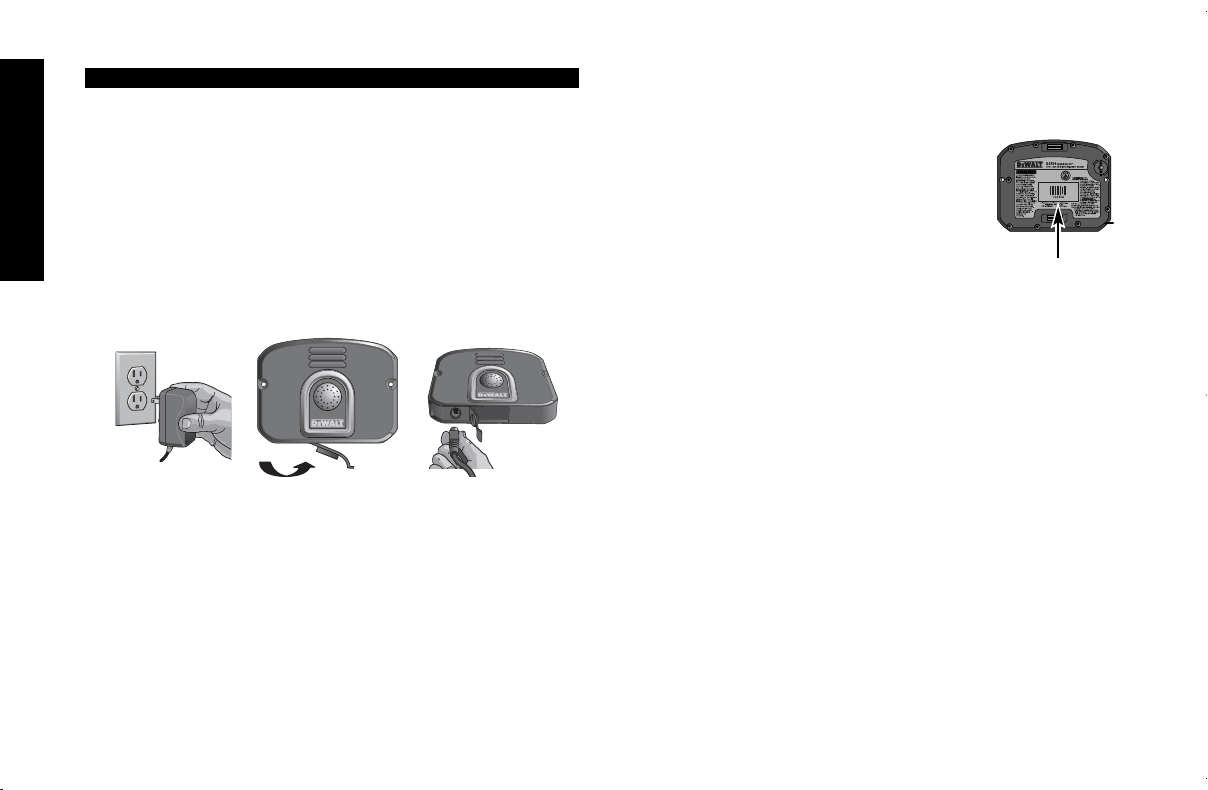
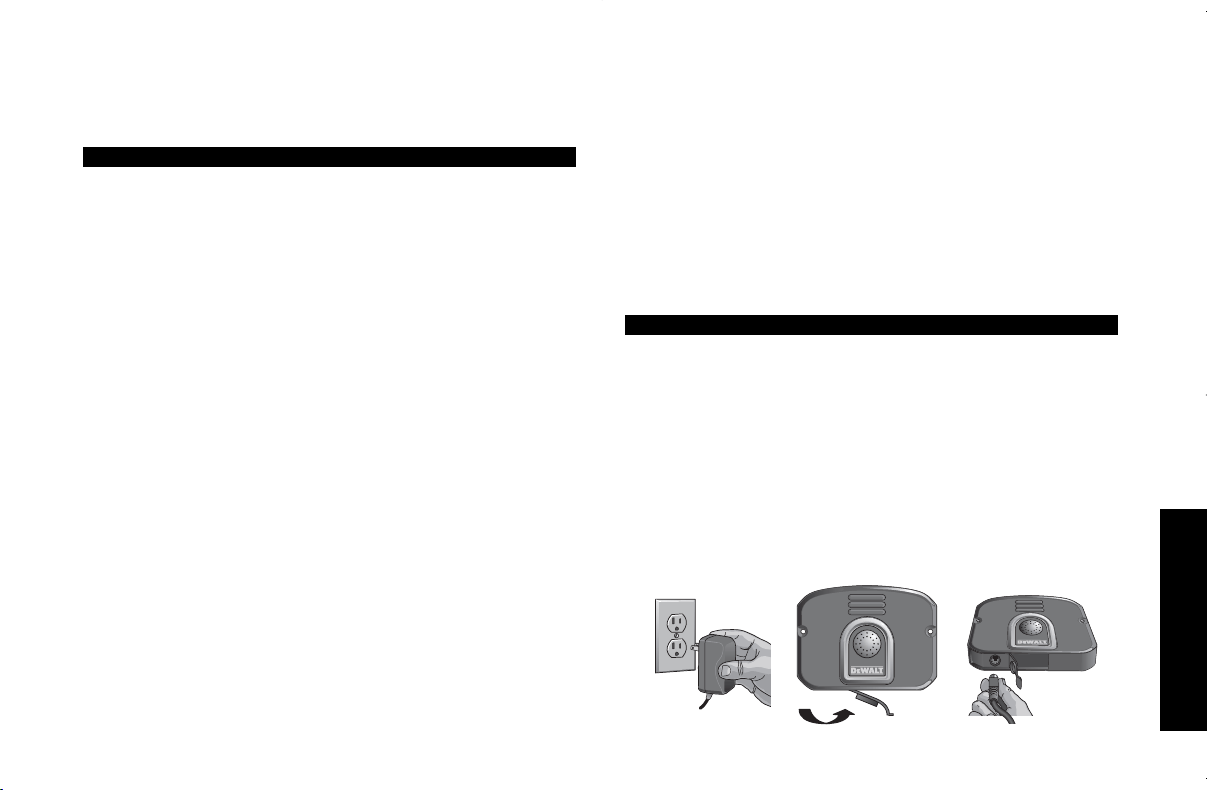
1. Plug other end of the adapter into the appropriate electrical
outlet.
2. Open door to charging port (Fig. 1).
3. Insert adapter with arrow facing up (Fig. 2).
The MOBILELOCK
TM
unit will beep to confirm that the unit is con-
nected to power. You can safely leave the adapter connected to the
MOBILELOCK
TM
after charging is complete. This will not damage
the battery.
NOTE: There is no battery level indicator on the MOBILELOCK
TM
unit. This information is available through the MOBILELOCK
TM
website and phone menu system. After you have activated the
notification service, you will be able to see the battery level on the
MOBILELOCK
TM
website (www.dewalt.com/mobilelock) or hear it
through the phone menu system. In addition, low battery and full
FIG. 1
FIG. 3
FIG. 2
INITIAL SETUP
battery notification will be sent to the phone number and/or e-mail
address(es) provided.
Activate
IMPORTANT: The alarm is non-functional until
the notification service is activated. Be sure the
following necessary information is available
prior to activating:
1. Electronic serial number (ESN) on the
back of the MOBILELOCK
TM
unit.
2. Credit card information.
3. Notification phone numbers and/or e-mail address(es).
The DS500 must be connected to power when the notification
service is activated.
Go online to www.dewalt.com/mobilelock or call customer service
at 1-877-456-LOCK (1-877-456-5625) to activate the
MOBILELOCK
TM
service. During this process you will need to do
the following:
1. Register using the Electronic Serial Number (ESN) on the back
of the MOBILELOCK
TM
unit.
2. Create an account profile.
3. Select a monitoring plan.
Customize Alarm Settings
All customizing can be done online or through the phone menu
system. Go online to www.dewalt.com/mobilelock or call 1-410-329-
9477 to customize the alarm settings. During this process you will
need to do the following:
1. Choose contact phone numbers and/or e-mail address(es).
The MOBILELOCK
TM
notification service will call up to three
people in the event of an alarm. Low battery and full battery
notices can be sent via phone or e-mail.
2. Choose the sensors needed for the asset you want to protect.
DS500 E,Sp 8/9/06 11:04 AM Page 8
English
9
Mounting
DS500 MOBILELOCK
TM
UNIT
HINT: To improve location accuracy, follow these recommendations:
• Best locations are outdoors with line of sight to the sky.
• Keep away from underground locations.
• Avoid structures with metal or concrete roofs, tall buildings, and
dense foliage.
• Windows with sun shielding films can block satellite signals.
• Radios and other electronic equipment may interfere with or
block satellite signals.
Use the magnets on the back of the MOBILELOCK
TM
unit, two #8
screws (not included) or two bolts (not included) as appropriate for
the material to which it is affixed. If removed from the mounting
surface and the tamper switch on the back of the unit has been
selected as ON, a tamper message will be sent. This alarm will be
sent when the unit is both armed and disarmed. To eliminate false
alarms, be sure that the MOBILELOCK
TM
unit is secure or hidden
so it is not removed.
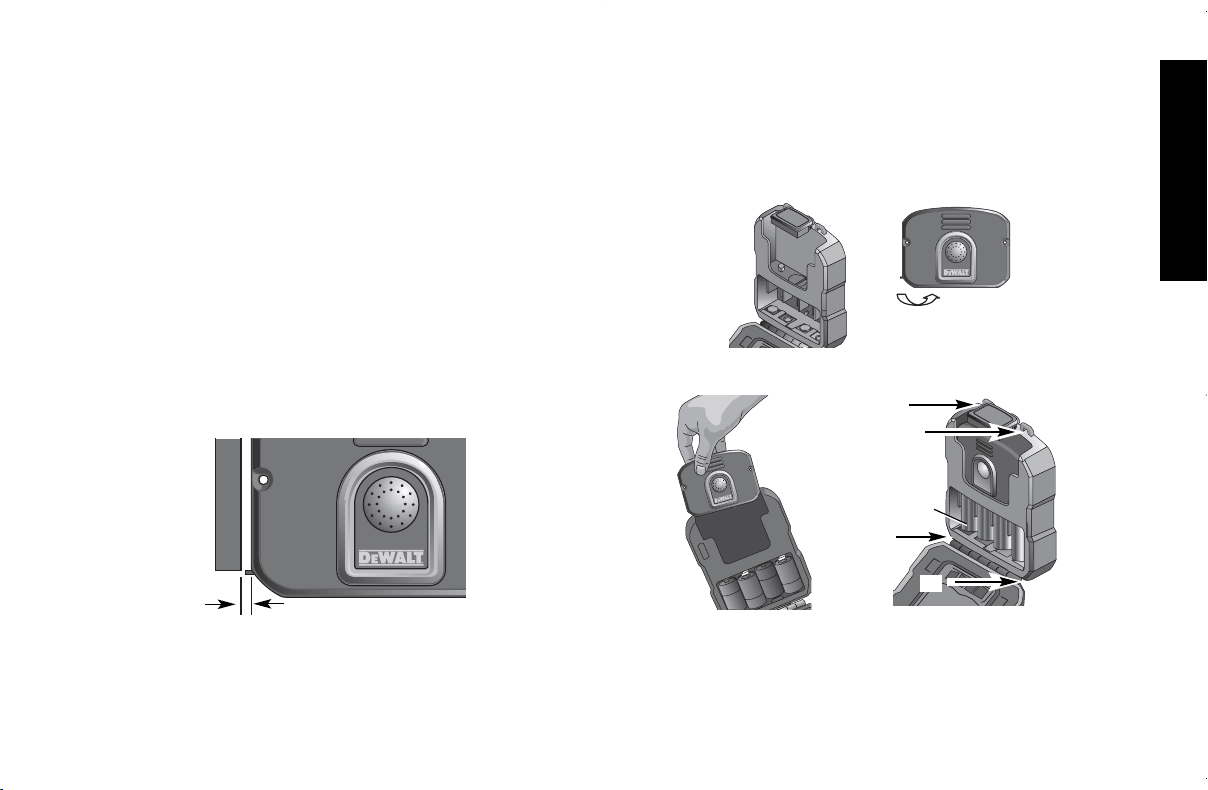
NOTE: If using the door contact sensor, place the magnet on the
door jam no more than 3/8" (9.5 mm) from the magnet icon on the
left side of the MOBILELOCK
TM
unit (mounted on the door).
3/8" (9.5 mm)
To permanently mount the door contact magnet:
1. Remove tape from back of magnet.
2. Remove the cover to expose the two mounting holes.
3. Insert screws (not included) into mounting holes.
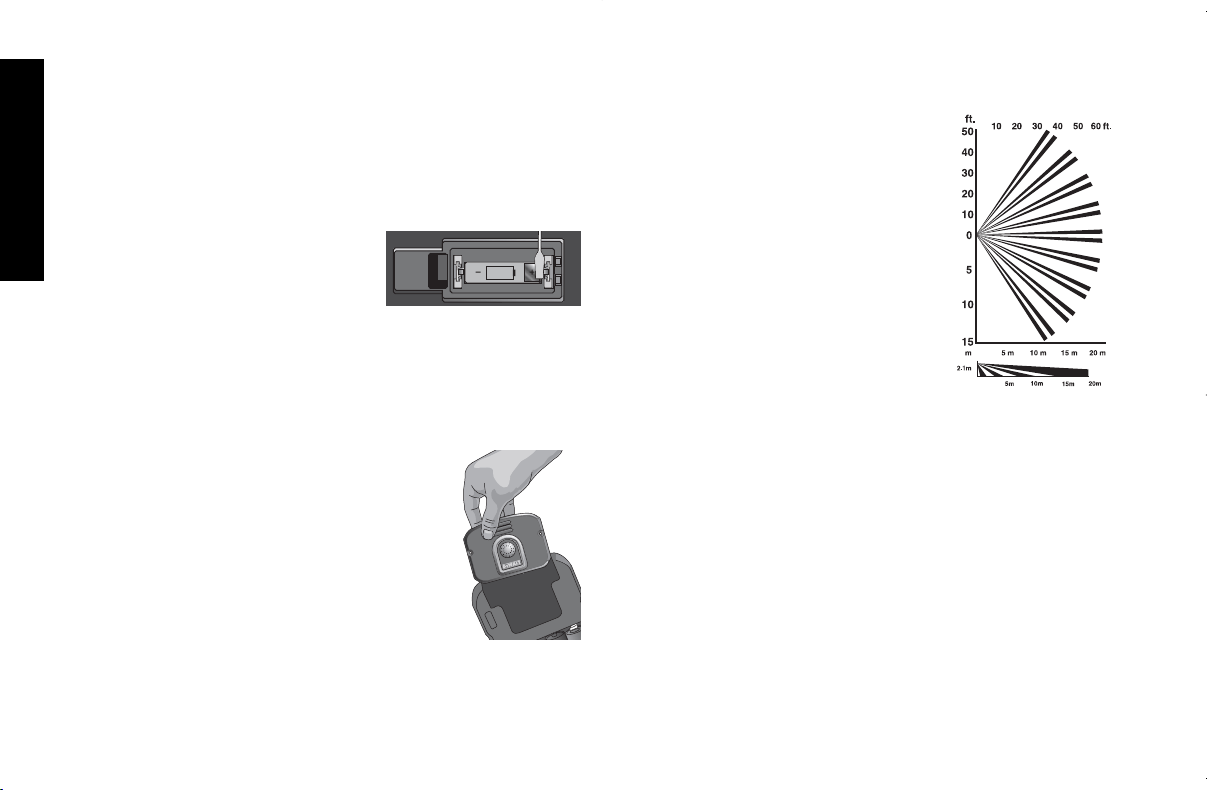
DS505 EXTENDED RUN-TIME ADAPTER
1. Open the DS505 door.
2. Open the DS500 charging port door to access the charging port
as shown.
3. Insert four D-size alkaline batteries (supplied).
4. Insert the DS500 MOBILELOCK
TM
unitas shown. Be sure it has
complete contact with the DS505 connector. The
MOBILELOCK
TM
unit will beep when the batteries and the unit
are properly inserted to indicate power is provided to the
MOBILELOCK
TM
unit.
D-SIZE
ALKALINE
BATTERIES
A
A
A
A
DS500 E,Sp 8/9/06 11:04 AM Page 9
English
10
NOTE: For optimum run-time, do not use rechargeable
batteries. Use only high-quality alkaline batteries. The
DS500 may be fully charged before inserting the unit into
the DS505 for additional run time.
5. Attach the DS505 to your asset by inserting four #8 screws
(not provided.) in the mounting holes (A) as shown.
6. Close door.
DS510 INDOOR MOTION DETECTOR
IMPORTANT: Before inserting battery,
make contact with the gold (+) and the
(+) battery terminal at the same time
with a metal object to reset indoor
motion detector circuitry.
1. Insert the enclosed CR-123 lithium ion battery into the battery
compartment on the back of the DS510. Always insert batteries
correctly with regard to polarity (+ and -) marked on the battery
and the equipment.
2. The DS510 indoor motion detector can be mounted flat against
a wall or in a corner using two # 8 screws.
3. Open the DS500 charging port door to
access the charging port.
4. Insert the DS500 MOBILELOCK
TM
unit as
shown. Be sure it has complete contact with
the DS510 connector.
Recommended locations
• Recommended for use in enclosed areas,
offices, climate controlled storage, and moni-
toring interior spaces.
• The DS510 functions best when areas being
protected are bounded by solid barriers. Walls and floors
provide good backdrops for detecting changes in infrared
energy.
3V
CR123
• The motion detector covers an area 50 feet (15.24 m) out and
over and angle of 105˚. For best detection, locate the motion
sensor so that intruders move across
detection zone patterns, rather than
toward or away from the sensor.
• Check areas for potential sources of
false alarms. Remember that the sen-
sor responds to quick changes in heat
patterns within its coverage pattern.
Avoid placing in direct or reflected
sunlight, or near objects that can be
heated quickly by sunlight. Do not
place the product looking at windows.
Don't place it near heating or cooling
sources, like heater ducts or air condi-
tioners, which might direct hot or cold
air onto the sensor. Avoid appliances
such as space heaters which can rapidly heat up.
• Check that premises are cleared and assets secured before
arming.
• Check that motion detectors are not obstructed. Do not allow
sources of heat in range of the motion sensors.
• Take into consideration the normal use of the area:
Are there bats, mice, or other animals that could activate the
sensor?
• Do not obstruct the coverage pattern with furniture or other
equipment.
Test the System
It is recommended to test the system periodically. This system test
will test each of the active sensors.
NOTE: The MOBILELOCK
TM
website and phone menu is subject
to change.
DS500 E,Sp 8/9/06 11:04 AM Page 10

English
11
Go online to www.dewalt.com/mobilelock or call the phone menu
system (1-410-329-9477) to perform a system test.
TO COMPLETE THE SYSTEM TEST THROUGH THE WEBSITE
1. Go online to www.dewalt.com/mobilelock and enter login and
password.
2. Select
Unit Customization
.
3. Select unit.
4. Select
System Test.
The MOBILELOCK
TM
unit will cycle through
all the ACTIVE sensors in the following order: vibration, door
contact, motion, and tamper. As you trip each sensor, the
MOBILELOCK
TM
unit will sound an alarm. A cellular notification
will not be sent. Continue tripping sensors until the test is
complete. The test will automatically time out after 5 minutes or
when each of the sensors has been tripped.
TO COMPLETE THE SYSTEM TEST THROUGH THE
PHONE MENU
1. Call 1-410-329-9477 and enter login and password.
2. Select
Unit Maintenance
from the main menu.
3. Select
Status Update followed by System Test.
4. Status will offer the following information:
• Armed/disarmed/scheduled
• Battery level
• Cellular signal strength
• Sensor settings
• Alarm siren setting
5. Select
Perform a System Test
. The MOBILELOCK
TM
unit will
cycle through all the ACTIVE sensors in the following order:
vibration, door contact, motion, and tamper. As you trip each
sensor, the MOBILELOCK
TM
unit will sound an alarm. A cellular
notification will not be sent. Continue tripping sensors until the
test is complete. The test will automatically time out after
5 minutes or when each of the sensors has been tripped.
DS510 INDOOR MOTION DETECTOR COVERAGE TEST
While the system is unarmed, performing this test which will
indicate the coverage area without sending an alarm. Hold the
enclosed magnet on the bottom left side of the motion detector
(near lens) until a red LED is shown in the window. This activates
the 1 minute test mode. Within this period, a red LED will light every
time the unit senses motion.
Arming
The MOBILELOCK
TM
unit can be armed via the phone menu
system or the MOBILELOCK
TM
website. For added convenience an
arming and disarming schedule can be set.
NOTE: The MOBILELOCK
TM
website and phone menu is subject
to change.
ARM VIA PHONE
1. Call 1-410-329-9477 and enter login and password.
2. Select
Arm/Disarm
menu from the main menu.
3. If you have more than one MOBILELOCK
TM
unit, you will be
asked to select the correct one, select a group, or select all.
4. Select
Arm
.
5. Wait for the phone menu to provide confirmation that the unit
has been armed. Do not hang up before this confirmation.
NOTE: If you have chosen to activate the arm and disarm confir-
mation chirps, the MOBILELOCK
TM
unit will beep to indicate the unit
is armed.
ARM VIA MOBILELOCK
TM
WEBSITE
1. Go online to www.dewalt.com/mobilelock and enter login and
password.
2. Select
Unit Customization.
BASIC OPERATIONS
DS500 E,Sp 8/9/06 11:04 AM Page 11

English
12
3. If you have more than one MOBILELOCK
TM
unit, you will be
asked to select the correct one, select a group, or select all.
4. Select
Arm.
5. Wait for the website to provide confirmation that the unit has
been armed.
SCHEDULE ARMING AND DISARMING VIA PHONE MENU
Same time each day (weekdays only)
Arms and disarms the same time each day (Monday through
Friday). Remains armed through the weekend.
1. Call 1-410-329-9477 and enter login and password.
2. Select
Arm/Disarm
menu from the main menu.
3. If you have more than one MOBILELOCK
TM
unit, you will be
asked to select the correct one, select a group, or select all.
4. Select
Arm Weekdays
.
5. Choose the time to arm and the time to disarm each day. The
arming time should be just after you leave. The MOBILELOCK
TM
unit will be armed Monday, Tuesday, Wednesday, Thursday
and Friday at the time that you select. The unit will remain
armed through the weekend.
6. Wait for the phone menu to provide confirmation that the
arming schedule has been set. Do not hang up before this
confirmation.
NOTE: To override the schedule, use the one-time arm or disarm
instructions. For example, if you have the unit scheduled to be
armed until 7:00 a.m., you can call through the phone menu and
disarm at 6:45 a.m. if you arrive early. The unit will re-enter the
schedule whenever the next scheduled time arrives (i.e., arming
that evening).
Choose one day at a time
Select arming and disarming schedule one day at a time. Choose
a different time each day if needed.
1. Call 1-410-329-9477 and enter login and password.
2. Select
Arm/Disarm
menu from the main menu.
3. If you have more than one MOBILELOCK
TM
unit, you will be
asked to select the correct one, select a group, or select all.
4. Select
Arm One Day Only
.
5. Select the day of the week.
6. Select the arming time and disarming time.
7. Wait for the phone menu to provide confirmation that the
arming schedule has been set. Do not hang up before this
confirmation.
SCHEDULE ARMING AND DISARMING VIA
MOBILELOCK
TM
WEBSITE
1. Go online to www.dewalt.com/mobilelock and enter login and
password.
2. Select
Unit Customization.
3. If you have more than one MOBILELOCK
TM
unit, you will be
asked to select the correct one, select a group, or select all.
4. Select
Schedule.
5. Choose the arm and disarm time for each day.
6. Wait for the website to provide confirmation that the unit has
been armed.
NOTE: To override the schedule, use the one-time arm or disarm
instructions. For example, if you have the unit scheduled to be
armed until 7:00 a.m., you can call through the phone menu and
disarm at 6:45 a.m. if you arrive early. The unit will re-enter the
schedule whenever the next scheduled time arrives (i.e., arming
that evening).
Disarming
The MOBILELOCK
TM
unit can be disarmed via the phone menu
system or the MOBILELOCK
TM
website. For added convenience,
an arming and disarming schedule can be set.
NOTE: The MOBILELOCK
TM
website and phone menu is subject
to change.
DS500 E,Sp 8/9/06 11:04 AM Page 12

English
13
DISARM VIA PHONE
1. Call 1-410-329-9477 and enter login and password.
2. Select
Arm/Disarm
from the main menu.
3. If you have more than one MOBILELOCK
TM
unit you will be
asked to select the correct one, the correct group or all.
4. Select
Disarm
.
5. Wait for the phone menu to provide confirmation that the unit
has been armed. Do not hang up before this confirmation.
NOTE: If you have chosen to activate the arm and disarm confir-
mation chirps, the MOBILELOCK
TM
unit will beep to indicate the unit
is armed.
DISARM VIA MOBILELOCK
TM
WEBSITE
1. Go online to www.dewalt.com/mobilelock and enter login and
password.
2. Select
Unit Customization.
3. If you have more than one MOBILELOCK
TM
unit, you will be
asked to select the correct one, select a group, or select all.
4. Select
Disarm.
5. Wait for the website to provide confirmation that the unit has
been disarmed.
NOTE: If you have chosen to activate the arm and disarm confir-
mation chirps, the MOBILELOCK
TM
unit will beep to indicate the unit
is armed.
Choosing Sensors
Multiple sensors can be used depending on the application.
TAMPER SENSOR
The tamper sensor is on the back of the MOBILELOCK
TM
unit. It
is used to notify when someone has tampered with the security
system.
IMPORTANT: The tamper sensor will provide notification that the
MOBILELOCK
TM
unit has been removed from the mounting surface
even when the unit is disarmed. The sensor can be deactivated on
the website or phone menu system.
VIBRATION SENSOR
The vibration sensor detects vibration on a metal container or
movement of heavy equipment. The sensitivity setting is
adjustable. The false alarm filter assists in blocking out false alarms
associated with thunder claps, accidental bumping, objects falling
on the equipment or container, etc. The false alarm filter has a high,
low, and off setting.
IMPORTANT: When testing, check for both the strength of the
vibration and the number of times the vibration occurs. The false
alarm filter looks for multiple vibrations over a short period of time
and may require a series of vibrations to trip the sensor.
After an alarm from the vibration sensor, the sensor is turned off for
15 minutes.
DOOR CONTACT SENSOR
The door contact sensor detects the opening of a door. If the door
is open when the MOBILELOCK
TM
unit is armed, an alarm will occur
when the door is closed. After an alarm from the door contact
sensor, the sensor is turned off for 15 minutes. If the door is still
opened after 15 minutes, another alarm will be sent. This will
continue until the MOBILELOCK
TM
unit is disarmed or battery is
depleted.
Place the magnet on the opposite side of the door jam no more
than 3/8" (9.5 mm) from the left side of the MOBILELOCK
TM
unit.
3/8" (9.5 mm)
DS500 E,Sp 8/9/06 11:04 AM Page 13

English
14
NOTE: The door contact sensor is not available in the DS505
Extended Run-Time Adapter. This sensor is used as a tamper
sensor when the battery door is opened.
TEMPERATURE SENSOR
The temperature sensor detects when the temperature rises above
or drops below the pre-set temperature threshold. The
MOBILELOCK
TM
unit has both a high temperature sensor and a low
temperature sensor.
The temperature range is 0˚F–122˚F (-17 ˚C a 50 ˚C).The high
temperature sensor is not to be used for fire protection.
CAUTION: The temperature reading is approximate. The temper-
ature reading will be ignored at times when the MOBILELOCK
TM
unit is in a state known to change its internal temperature (battery
charging, etc).
After an alarm from the temperature sensor, the sensor is turned off
for 60 minutes. If the temperature of the environment still exceeds
the temperature range selected, another alarm will be sent. This
will continue until the MOBILELOCK
TM
unit is disarmed.
MOTION DETECTOR
The motion detector is available in the DS510K combo kit. It detects
movement of heat sources in an enclosed area.
IMPORTANT: Once an alarm condition is signaled, further alarms
are inhibited until no motion is sensed for a period of more than
90 seconds. This feature is designed to conserve battery life by
ignoring the normal occurrence of motion throughout the day.
Assisted GPS Location
The MOBILELOCK
TM
unit can provide asset location via the phone
menu system or the MOBILELOCK
TM
website.
NOTE: The MOBILELOCK
TM
website and phone menu is subject
to change.
LOCATION VIA PHONE
1. Call 1-410-329-9477 and enter login and password.
2. Select
Locate
from the main menu.
3. If you have more than one MOBILELOCK
TM
unit you will be
asked to select the correct one, the correct group or all.
4. After you verify that you have locates available, you will have
the option to record a location MOBILELOCK
TM
website or
speak with a customer service representative for assistance.
5. Wait for the phone menu to provide confirmation that the loca-
tion request has been sent. Do not hang up before this confir-
mation.
LOCATION VIA MOBILELOCK
TM
WEBSITE
1. Go online to www.dewalt.com/mobilelock and enter login and
password.
2. Select
Unit Customization.
3. If you have more than one MOBILELOCK
TM
unit, you will be
asked to select the correct one, select a group, or select all.
4. Select
Locate.
5. The amount of time to receive the location will vary. In most
cases, the location is provided in about one minute. Click
Location (view)
to be linked to the map.
PAGING
If the location has been narrowed down to a single building, the
paging feature can assist in determining the exact location of the
MOBILELOCK
TM
unit and the asset that it is protecting. The paging
feature works similar to finding a cordless telephone handset in the
house. Once activated, the paging will initiate a sound from the
MOBILELOCK
TM
speaker. Walk around towards the noise to find
the MOBILELOCK
TM
unit.
TO INITIATE PAGING VIA PHONE
1. Call 1-410-329-9477 and enter login and password.
DS500 E,Sp 8/9/06 11:04 AM Page 14

English
15
2. Select
Unit Settings
from the MOBILELOCK
TM
menu.
3. If you have more than one MOBILELOCK you will be asked to
select the correct one, the correct group or all.
4. Select
Speaker Settings
.
5. Select
Paging
.
6. If you have not located the MOBILELOCK
TM
unit, you can initi-
ate the paging again.
TO INITIATE PAGING VIA MOBILELOCK
TM
WEBSITE
1. Go online to www.dewalt.com/mobilelock and enter login and
password.
2. Select
Unit Customization.
3. If you have more than one MOBILELOCK
TM
unit, you will be
asked to select the correct one.
4. Select
Page.
5. If you have not located the MOBILELOCK
TM
unit, you can initi-
ate the paging again.
The MOBILELOCK
TM
unit has several customizable features. See
the MOBILELOCK
TM
website for up-to-date information about all of
the customizable features. Many of these features are prepro-
grammed to the most common settings. Before use, understand
the default settings.
NOTE: The MOBILELOCK
TM
website and phone menu is subject
to change.
Grouping
To make for simple arming and disarming of several
MOBILELOCK
TM
units on several sites, group them together.
Nicknames
To avoid using the electronic serial number as the descriptor,
MORE FEATURES & OPTIONS
nicknames can be used for both the MOBILELOCK
TM
website and
the phone menu system. Record the nicknames on the phone
menu system and that same recording will be used during alarm
notification.
Change Contact Information
The MOBILELOCK
TM
notification service will contact up to three
people in the event of an alarm. If the first person is not available
or chooses not to act upon the alarm (on vacation, etc) the notifica-
tion service will call the next user on the list. Low battery notifica-
tion and full battery notification will provide reminders of required
maintenance.
Change Password
The passwords for both the MOBILELOCK
TM
website and phone
menu system are the same. The password can be changed either
on the website or through the phone menu system.
Change Speaker Settings
There are several speaker settings. They are all user-adjustable.
The alarm siren can be silenced. The confirmation chirp on arming
and disarming can also be activated or silenced.
Battery Maintenance
DS500
The MOBILELOCK
TM
unit will not function without power. The unit
has a rechargeable battery. If the battery has not been adequately
charged, the product will not operate. Several factors such as
cellular signal strength, number of location requests, number of
alarms, and other activities affect the battery run-time.
For additional runtime, the DS505 Extended Run-Time Adapter can
be used.
DS500 E,Sp 8/9/06 11:04 AM Page 15

English
16
DS505
The MOBILELOCK
TM
unit will not function without power. If the
internal battery has not been adequately charged, the product will
not operate. When the low battery notification is received, the alka-
line batteries are completely discharged and the MOBILELOCK
TM
unit’s internal rechargeable battery is low. Change the batteries
within 24 hours to limit vulnerability. Several factors such as cellu-
lar signal strength, number of location requests, number of alarms,
and other activities affect the battery run-time.
DS510
The battery is intended to last several years. To ensure proper
security, replace the battery every 12 months.
IMPORTANT: Once an alarm condition is signaled, further alarms
are inhibited until no motion is sensed for a period of more than
90 seconds. This feature is designed to conserve battery life by
ignoring the normal occurrence of motion throughout the day.
It is recommended to test the system periodically. This system test
will test each of the active sensors.
Go online to www.dewalt.com/mobilelock or call the phone menu
system (1-410-329-9477) to perform a system test.
NOTE: The MOBILELOCK
TM
website and phone menu is subject
to change.
TO COMPLETE THE SYSTEM TEST THROUGH THE WEBSITE
1. Go online to www.dewalt.com/mobilelock and enter login and
password.
2. Select
Unit Customization
.
3. Select unit.
4. Select
System Test.
The MOBILELOCK
TM
unit will cycle through
STATUS UPDATE AND SYSTEM TEST
all the ACTIVE sensors in the following order: vibration, door
contact, motion, and tamper. As you trip each sensor, the
MOBILELOCK
TM
unit will sound an alarm. A cellular notification
will not be sent. Continue tripping sensors until the test is
complete. The test will automatically time out after 5 minutes or
when each of the sensors has been tripped.
TO COMPLETE THE SYSTEM TEST THROUGH
THE PHONE MENU
1. Call 1-410-329-9477 and enter login and password.
2. Select
Unit Maintenance
from the main menu.
3. Select
Status Update followed by System Test.
4. Status will offer the following information:
• Armed/disarmed/scheduled
• Battery level
• Cellular signal strength
• Sensor settings
• Alarm siren setting
5. Select
Perform a System Test
. The MOBILELOCK
TM
unit will
cycle through all the ACTIVE sensors in the following order:
vibration, door contact, motion, and tamper. As you trip each
sensor, the MOBILELOCK
TM
unit will sound an alarm. A cellular
notification will not be sent. Continue tripping sensors until the
test is complete. The test will automatically time out after
5 minutes or when each of the sensors has been tripped.
Specifications
Power 120 V AC into power supply
Battery capacity 4400 mAH @ 4.65 V typical
Operating temperature -4˚ to 122˚F (-20˚ to 50˚C)
DS500 E,Sp 8/9/06 11:04 AM Page 16

English
17
Cleaning
WARNING: When cleaning, use only mild soap and a damp
cloth on plastic parts. Many household cleaners contain chemicals
which could seriously damage plastic. Also, do not use gasoline,
turpentine, lacquer or paint thinner, dry cleaning fluids or similar
products which may seriously damage plastic parts. Never let any
liquid get inside the unit; never immerse any part of the tool into a
liquid.
Contact
If you have any questions or comments about this product, call us
toll free at 1-877-456-LOCK (1-877-456-5625) or visit
www.dewalt.com or refer to the monitoring service contract for
additional contact phone numbers.
Full One Year Warranty
The D
E
WALT MOBILELOCK
TM
GPS Locator with Anti-theft Alarm is
warranted for one year from date of purchase. We will repair, with-
out charge, any defects due to faulty materials or workmanship.
For warranty repair information, visit www.dewalt.com/mobilelock
or call 1-877-456-LOCK ( 1-877-456-5625). This warranty does
not apply to accessories or damage caused where repairs have
been made or attempted by others. This warranty gives you specif-
ic legal rights and you may have other rights which vary in certain
states or provinces.
NOTE: Do not return to retailer if service has been activated.
Returning the hardware does not automatically cancel the service
contract. Call 1-877-456-LOCK (1-877-456-5625).
FREE WARNING LABEL REPLACEMENT: If your warning labels
become illegible or are missing, call 1-800-4-D
E
WALT for a free
replacement.
Patent Notification
One or more patents pending.
DS500 E,Sp 8/9/06 11:04 AM Page 17
Españ ol
18
Localizador GPS con alarma antirrobo DS500 MOBILELOCK™
INTERRUPTOR
DE
SEGURIDAD*
ORIFICIO DE
MONTAJE
PUERTO DE
CARGA
PUERTA
PUERTO DE
CARGA
PUERTA
PUERTO DE
CARGA
ORIFICIO DE
MONTAJE
(tornillo
tamañ o Nº 8,
no incluido)
ALTAVOZ
* Seguridad: acciona una alarma al retirarlo
de la superficie de montaje
MONTAJE DE LOS IMANES
MONTAJE DE
LOS IMANES
ESN
(NÚ MERO DE SERIE ELECTRÓ NICO)
IMÁ N DE
CONTACTO
DE LA
PUERTA
DS500 E,Sp 8/9/06 11:04 AM Page 18

Españ ol
19
Índice de temas
Normas generales de seguridad ........................................20
Avisos importantes..............................................................22
Limitaciones del producto ..................................................22
Avisos regulatorios y de seguridad ....................................23
Descripció n general del producto ......................................24
Localizador GPS DS500 MOBILELOCK
TM
con alarma contra robo................................................24
Adaptador de duració n prolongada DS505 ................24
Detector de movimiento para interiores DS510..........24
Descripció n general de la tecnología ................................25
GPS asistida ................................................................25
Prevenció n de falsas alarmas ....................................25
Configuració n inicial............................................................25
Có mo cargar el DS500................................................25
Activar ..........................................................................26
Personalice la configuració n de la alarma..................26
Montaje ........................................................................26
Unidad MOBILELOCK
TM
DS500 ..........................26
Adaptador de duració n prolongada DS505 ........27
Detector de movimiento DS510 ..........................28
Prueba del sistema......................................................28
Prueba de cobertura del detector de
movimiento para interiores DS510..............................29
Operaciones bá sicas ..........................................................29
Activació n ....................................................................29
Desactivació n ..............................................................31
Selecció n de sensores ................................................31
Ubicació n GPS asistida ..............................................33
Má s funciones y opciones ..................................................34
Agrupació n ..................................................................34
Apodos ........................................................................34
Cambiar la informació n de contacto ..........................34
Cambiar la contraseñ a ................................................34
Cambiar la configuració n de altavoces ......................34
Mantenimiento de la batería........................................34
Actualizació n del estado y prueba del sistema..................35
Especificaciones ..............................................................35
Limpieza ..........................................................................36
Contacto ..............................................................................36
Garantía ..............................................................................36
DS500 E,Sp 8/9/06 11:04 AM Page 19

Españ ol
20
CONSERVE ESTAS INSTRUCCIONES
General Safety Rules
ADVERTENCIA: Lea y comprenda todas las
instrucciones. El incumplimiento de cualquiera de
las instrucciones puede provocar descarga elé ctrica,
incendio o lesiones personales graves o dañ os a la
propiedad, e incluso la muerte.
ADVERTENCIA: LESIÓ N GRAVE O MUERTE. Este producto
está diseñ ado para proporcionar protecció n a la propiedad ú nica-
mente. No use este producto para proporcionar protecció n a la vida
y de incendios. El uso de este producto de manera diferente a la
descrita en este manual de instrucciones puede provocar lesiones
o incluso la muerte.
ADVERTENCIA: LESIÓ N GRAVE O MUERTE. No use este
producto en á reas peligrosas. Entre ellas se incluyen á reas
explosivas o atmó sferas con peligro de explosió n. Las chispas en
estas á reas pueden originar explosió n o incendio, que pueden
ocasionar lesiones corporales e incluso la muerte. Pueden incluir,
entre otras, á reas combustibles como estaciones de gasolina,
instalaciones de almacenamiento o transporte de combustible o
sustancias químicas, vehículos que utilicen gas de petró leo líquido
(como propano o butano), á reas en las que el aire esté contami-
nado con sustancias químicas o partículas, como granos, polvo o
polvo metá lico; y cualquier otra á rea en la que normalmente se
recomendaría apagar el motor de un vehículo.
ADVERTENCIA: LESIÓ N GRAVE O MUERTE. Consulte a los
fabricantes de cualquier dispositivo mé dico como marcapasos,
audífonos, etc., para determinar si pueden causar interferencia con
los dispositivos celulares.
ADVERTENCIA: INCENDIO, DESCARGA ELÉ CTRICA O
ELECTROCUCIÓ N. No utilice un cable prolongador a menos
que sea absolutamente necesario. El uso de un cable prolon-
gador incorrecto o un cable prolongador que esté desgastado o
dañ os puede provocar riesgo de incendio, descarga elé ctrica o
electrocució n.
• Para garantizar la seguridad, un cable prolongador debe
tener un tamañ o de cable adecuado (AWG o Calibre de
conductor de Estados Unidos). Cuanto má s pequeñ o sea el
nú mero de calibre del conductor, mayor será la capacidad del
cable; es decir, un calibre 16 tiene má s capacidad que un
calibre 18. Cuando se utiliza má s de un cable prolongador para
lograr la longitud total, asegú rese de que cada prolongació n
tenga la medida mínima del conductor.
Tamañ o del conductor mínimo recomendado
para cables prolongadores
Longitud total del cable
25 ft. 50 ft. 75 ft. 100 ft. 125 ft. 150 ft. 175 ft.
7.6 m 15.2 m 22.9 m 30.5 m 38.1 m 45.7 m 53.3 m
AWG del tamañ o del cable
18 18 16 16 14 14 12
• El DS500 está diseñ ado para uso en interiores/exteriores; el
tomacorriente es para uso en interiores ú nicamente. Cá rguelo
en el interior.
BATERÍA DE IONES DE LITIO INTERNA
ADVERTENCIA: BATERÍAS, EXPLOSIÓ N, LESIÓ N O INCEN-
DIO. El DS500 contiene una batería de iones de litio. Siga cuida-
dosamente todas las instrucciones descritas en este manual.
• Nunca deseche el DS500 o su batería en el fuego. Devuelva a
un centro de mantenimiento D
E
WALT para reciclar la unidad.
• La batería puede explotar en el fuego. Cuando las baterías de
iones de litio se queman, se crean vapores y materiales tó xicos.
• No desarme, abra, aplaste, doble, triture, perfore ni deforme el
DS500 ni su batería.
DS500 E,Sp 8/9/06 11:04 AM Page 20

Españ ol
21
• Si el contenido de las baterías entra en contacto con la piel, lave
el á rea de inmediato con agua y jabó n suave. Si el líquido de la
batería entra en contacto con los ojos, enjuague con agua man-
teniendo los ojos abiertos durante 15 minutos o hasta que la
irritació n cese. Si se necesita atenció n mé dica, el electrolito de
la batería contiene una mezcla de carbonatos orgá nicos líqui-
dos y sales de litio.
• El contenido de las cé lulas de la batería abierta puede generar
irritació n respiratoria. Respire aire fresco. Si los síntomas per-
sisten, busque atenció n mé dica.
BATERÍAS DESECHABLES EXTERNAS
DS505, DS510
PRECAUCIÓ N: PELIGRO DE EXPLOSIÓ N, LESIÓ N O
INCENDIO. Siga cuidadosamente todas las instrucciones y las
advertencias de la etiqueta y el envase de la batería.
• Nunca use una batería dañ ada o agotada. Las baterías
descargadas deben reemplazarse só lo con baterías alcalinas
tamañ o “D” de alta calidad en el caso del DS505 o con baterías
CR123A en el caso del DS510. No use baterías recargables ni
intente cargar las baterías.
• Retire cuidadosamente la batería descargada anterior. No
intente abrir. No despegue la etiqueta de la batería. Nunca
deseche una batería en el fuego. Deseche las baterías usadas
de acuerdo con las normas locales.
• Introduzca siempre las baterías correctamente respetando la
polaridad (+ y -) indicada en la batería y en el equipo. Al
instalar la batería, no utilice fuerza excesiva. Si la batería no se
ajusta, compruebe que coincida con las marcas de polaridad.
• Nunca exponga los terminales de la batería a otros objetos
metá licos. Puede provocar un cortocircuito en la batería. Evite
la exposició n a temperaturas extremas. Al no utilizarla, guarde
la batería en un lugar fresco, oscuro y seco. Mantenga las
baterías fuera del alcance de los niñ os.
PRECAUCIÓ N: POSIBLE MAL FUNCIONAMIENTO O FALLA
DEL EQUIPO. No utilice con un cable de suministro de energía o
un enchufe dañ ado. Pueden producirse dañ os en el equipo. Evite
que pisen o pellizquen el cable adaptador de CA, particularmente
en los enchufes, los receptá culos de conveniencia y en el punto en
que sale del producto. No tire del cable. Al desenchufar el cable de
un tomacorriente, sujete y tire del cable por el enchufe. Si el cable
o el enchufe está n dañ ados, reemplá celos de inmediato.
PRECAUCIÓ N: POSIBLE MAL FUNCIONAMIENTO O FALLA
DEL EQUIPO. Este equipo viene con un tomacorriente para
montar en la pared diseñ ado específicamente para funcionar a
120 V, 60 Hz. Si el cable falta o está dañ ado, reemplace só lo por
tomacorrientes D
E
WALT especificados para este equipo a fin de
evitar dañ os en el producto.
PRECAUCIÓ N: POSIBLE MAL FUNCIONAMIENTO O FALLA
DEL EQUIPO. Para evitar posibles dañ os provocados por una
sobrecarga de energía, utilice un protector contra sobretensió n.
El sello RBRC™
El sello RBRC™ (Corporació n de reciclado de
baterías recargables) que se encuentra en la unidad
indica que los costos para reciclar la batería al
finalizar su período de vida ú til ya han sido pagados
por D
E
WALT.
RBRC™ en cooperació n con D
E
WALT y otros usuarios de
baterías, ha establecido programas en los Estados Unidos y
Canadá para facilitar la recolecció n de baterías de iones de litio
ya usadas. Ayude a proteger el medio ambiente y conservar los
recursos naturales al devolver la unidad con la batería agotada a
un centro de mantenimiento D
E
WALT autorizado. Tambié n
puede comunicarse con el centro de reciclado local para obtener
informació n sobre dó nde dejar la unidad.
RBRC™ es una marca comercial registrada de la
Corporació n de reciclado
de baterías recargables.
DS500 E,Sp 8/9/06 11:04 AM Page 21

Españ ol
22
Avisos importantes
• El mantenimiento de este producto no puede ser realizado por
el usuario. No hay piezas a las que el usuario pueda hacerles
mantenimiento. Se requiere un mantenimiento realizado en un
centro de mantenimiento autorizado D
E
WALT a fin de evitar
dañ os en los componentes internos, sensibles a la está tica. El
mantenimiento no autorizado anulará la garantía.
• Limpie solamente con un pañ o seco.
• Si bien el nivel de ruido y la duració n de la sirena está n por
debajo de los límites de la OSHA, el ruido elevado de las
sirenas puede sobresaltar al usuario.
• Al igual que el servicio de telefonía celular, la unidad bá sica
del DS500 debe apagarse segú n las normas de la FAA antes
de enviarla por vía aé rea o subirla a un avió n.
• MOBILELOCK™ es una marca de SITELOCK LLC. Todas las
demá s marcas comerciales de este manual son propiedad de
sus respectivos dueñ os.
Limitaciones del producto
Si bien esta unidad está diseñ ada como dispositivo de propiedades
personales, no garantiza la protecció n contra robos u otras
emergencias. Cualquier alarma está sujeta a avenencias o falta de
advertencia por una variedad de motivos, entre ellos, los siguientes:
• Es posible que un intruso obtenga acceso a travé s de
aberturas no protegidas. Es posible que un intruso con
intenciones criminales, conocimiento té cnico o dispositivos de
perturbació n omita el sistema de alarma.
• Este producto no funcionará sin energía. El equipo posee una
batería recargable. Si la batería no se cargó adecuadamente,
el producto no funcionará .
• Las señ ales enviadas por la radio celular posiblemente se vean
bloqueadas antes de alcanzar el servidor. Aun si la ruta de la
señ al se ha comprobado recientemente durante una prueba de
rutina, es posible que é sta se bloquee si se pierde la señ al
celular.
• Se necesita una señ al celular para activar, desactivar, aceptar
los cambios de programació n y transmitir señ ales de alarma. Si
no se logra la recepció n, el equipo está fuera de servicio o la
compañ ía de celulares realiza modificaciones en las instala-
ciones, la señ al no podrá recibirse.
• Se necesita una señ al celular para proporcionar una ubicació n
GPS asistida. Para proporcionar la ubicació n má s exacta, la
unidad debe tener una vista clara hacia los saté lites de GPS.
• Si el producto no puede encontrar señ ales satelitales fuertes,
la ubicació n proporcionada puede ser má s lenta, menos
precisa o posiblemente no sea operativa. La unidad bá sica
MOBILELOCK™ proporciona só lo una ubicació n aproximada,
con frecuencia en un radio de 45 metros, pero algunas veces
má s distantes de la ubicació n real.
• Si esta unidad se retira del bien, la localizació n GPS se rela-
ciona solamente con la unidad MOBILELOCK™, no con el
bien.
• Los saté lites de GPS está n controlados por el gobierno de
Estados Unidos y sujetos a modificaciones implementadas de
acuerdo con la política de usuarios de AGPS del Departamento
de Defensa y el Plan Federal de Navegació n de Radio. Estos
cambios pueden afectar el rendimiento.
• Este producto es una alarma de instalació n propia. Siga
detenidamente todas las instrucciones. La instalació n incor-
recta puede comprometer el funcionamiento de este equipo.
• Esta alarma debe probarse con periodicidad para garantizar el
correcto funcionamiento de todos los sensores y la señ al
celular.
• Aun si el producto responde ante una intrusió n como se
pretende, los usuarios pueden no recibir la llamada telefó nica
de alarma si el telé fono celular del usuario se encuentra fuera
DS500 E,Sp 8/9/06 11:04 AM Page 22

Españ ol
23
del á rea de cobertura celular o si existe un problema con el
proveedor del servicio de telefonía celular.
• Aun si el producto responde ante una intrusió n como se
pretende, el usuario puede no tener tiempo suficiente para
proteger sus bienes y propiedades. Incluso despué s de haber
sido contactado, las autoridades posiblemente no brinden la
respuesta adecuada.
• Los dispositivos de advertencia como las sirenas posiblemente
no adviertan a las personas si no se encuentran en el rango
adecuado o en las instalaciones. Las personas quizá s no
escuchen la advertencia si la alarma es atenuada por una
radio, equipo de operaciones, aparatos o trá fico en circulació n.
Los dispositivos de advertencia de alarmas, si bien son
sonoros, posiblemente no adviertan a las personas con
dificultades auditivas.
• A pesar del diseñ o avanzado y las pruebas perió dicas, este
equipo, al igual que otros dispositivos elé ctricos, está sujeto a
fallas en los componentes.
• La instalació n de esta alarma puede significarle tasas má s
bajas del seguro, pero una alarma no reemplaza a un seguro.
Declaració n de la Comisió n Federal de
Comunicaciones de Estados Unidos
(Federal Communications Commission,
FCC) Parte 15
• Este equipo ha sido probado y cumple con la Parte 15 de las
normas de la FCC. La operació n está sujeta a las dos condi-
ciones siguientes: (1) este dispositivo no puede causar interfer-
encia perjudicial, y (2) este dispositivo puede aceptar cualquier
interferencia recibida, incluida la interferencia que puede
provocar una operació n no deseada.
• Si este equipo causa interferencia perjudicial a la recepció n de
radio o televisió n, lo que puede determinarse si se coloca el
equipo en modo de espera, intente corregir la interferencia a
travé s de una o má s de las siguientes medidas:
1. Cambie la orientació n de la antena de radio/televisió n que
causa la interferencia.
2. Cambie la ubicació n del receptor en relació n con la
radio/televisor.
3. Mueva la bajada de la antena lejos del cable conectado al
receptor.
4. Enchufe el receptor en un tomacorriente de un circuito elé c-
trico diferente de aqué l al que está conectado la radio/tele-
visor que causa interferencia.
5. Si es necesario, consulte a D
E
WALT o a un té cnico de
radio/televisió n experimentado para obtener ayuda.
6. Puede encontrar sugerencias adicionales en el siguiente fol-
leto preparado por la Comisió n Federal de Comunicaciones
de Estados Unidos: "Interference Handbook" (Manual de
interferencias). Este libro está disponible en la Imprenta del
gobierno de Estados Unidos, Washington, DC 20402.
• Los cambios o modificaciones de este equipo no aprobados
específicamente por D
E
WALT pueden anular la autoridad del
usuario a operar el equipo.
ID de FCC: TS56O50M-DS500
Industry Canada
• Aviso: este equipo cumple con las Especificaciones té cnicas
del equipo terminal de Industry Canada aplicables. Se sumin-
istra un nú mero de registro como confirmació n. La abreviatura
IC antes del registro significa que el registro fue realizado
sobre la base de una Declaració n de conformidad que indica
que se cumplen las especificaciones té cnicas de Industry
Canada. No implica que Industry Canada haya aprobado el
equipo.
• Esta certificació n significa que el equipo cumple con determi-
nados requisitos de protecció n de redes de telecomunica-
DS500 E,Sp 8/9/06 11:04 AM Page 23

Españ ol
24
ciones, operativos y de seguridad conforme a lo recomenda-
do en los documentos de los Requisitos té cnicos del equipo
terminal. El Departamento no garantiza que el equipo
funcionará a satisfacció n del usuario.
IC: 6234A-DS500
Localizador GPS con alarma antirrobo
DS500 MOBILELOCK™
LOCALIZADOR GPS
La tecnología GPS asistida utilizada en el localizador MOBILE-
LOCK™ localiza de forma remota los bienes del sitio de trabajo
anexos incluso en los entornos má s cubiertos.
NOTIFICACIÓ N DE LA ALARMA: SENSORES
INCORPORADOS
La alarma MOBILELOCK™ se comunica con hasta tres personas
por vía telefó nica o correo electró nico.
FUNCIONES PERSONALIZABLES POR EL USUARIO
Personalice en línea o a travé s del sistema de menú en el telé fono
basado en la aplicació n.
SENSORES INCORPORADOS
Elija só lo los sensores necesarios. Se puede utilizar má s de un
sensor al mismo tiempo. Personalice en línea o a travé s del menú
en el telé fono.
SENSOR DE VIBRACIÓ N
Este sensor detecta la vibració n en un contenedor de metal o
el movimiento de equipos pesados.
SENSOR DE CONTACTO DE LA PUERTA
Este sensor detecta si la puerta se abre.
SENSOR DE TEMPERATURA
Este sensor detecta un incremento o una disminució n de la
temperatura.
DESCRIPCIÓ N GENERAL DEL PRODUCTO
SENSOR DE SEGURIDAD
Este sensor detecta si la unidad bá sica MOBILELOCK™ o el
accesorio se retira de la superficie.
Adaptador de duració n prolongada
DS505
(disponible en el juego combinado DS505)
El adaptador DS505 se utiliza para proteger los contenedores de
almacenamiento remoto y el equipo.
• Utiliza cuatro (4) baterías alcalinas tamañ o “D” está ndar (no
requiere una fuente de energía externa)
• Prolonga la duració n hasta tres meses (requiere menos
recargas de la batería)
Detector de movimiento para interiores
DS510
(disponible en el juego combinado DS510)
El detector de movimiento para interiores DS510 se utiliza para
proteger á reas confinadas, remolques y espacios de almace-
namiento controlados por el clima.
PRECAUCIÓ N: POSIBLE MAL FUNCIONAMIENTO O
FALLA. Este equipo está diseñ ado para uso en interiores ú nica-
mente. No use cerca del agua. Pueden producirse dañ os en el
equipo. El equipo no debe estar expuesto a líquidos.
• El detector de movimiento de baja corriente es altamente sen-
sible a las fuentes de calor en movimiento.
• Detector de movimiento de baja corriente altamente sensible a
las fuentes de calor en movimiento.
• Rango de 15,24 m (50 pies); detecta el movimiento entre las
zonas de detecció n.
• Exploració n digital avanzada para reconocer “indicios
humanos”.
• Inmunidad elevado a la interferencia exterior como interferencia
de radiofrecuencia (RFI), vibració n, está tica, iluminació n,
cambios de la temperatura ambiental y otras causas comunes
de falsas alarmas.
DS500 E,Sp 8/9/06 11:04 AM Page 24
Españ ol
25
El DS510 señ ala una situació n de alarma a la unidad MOBILE-
LOCK™ cuando el sensor detecta movimiento. Si la unidad
MOBILELOCK™ se arma y se activa el detector de movimiento, se
envía la notificació n de alarma.
GPS asistida
En cualquier momento, el bien puede localizarse a travé s de
mapas de calles tradicionales y fotografía aé reas en el sitio Web
de MOBILELOCK™ (www.dewalt.com/mobilelock). El local-
izador MOBILELOCK™ utiliza tecnología moderna denominada
GPS asistida para brindar informació n sobre ubicació n en la
mayoría de los entornos má s cubiertos. Para ello, el localizador
MOBILELOCK™ combina un receptor GPS y un telé fono celu-
lar. La informació n sobre la ubicació n se envía a travé s de la red
celular. Cuando los saté lites GPS no esté n claramente visibles,
la ubicació n reconocida de las torres de celulares ayudará a
proporcionar la ubicació n de la unidad MOBILELOCK™.
Prevenció n de falsas alarmas
La mayoría de las alarmas que se emiten son falsas. Estas situa-
ciones suceden a diario debido a errores del usuario, instalaciones
incorrectas o mantenimiento inadecuado del equipo. Las falsas
alarmas limitará n la capacidad de respuesta del sistema y
constituirá n un inconveniente general. Dado que el nú mero de
falsas alarmas es cada vez mayor, las autoridades ya no pueden
responder a los sistemas de alarmas debido a este problema.
Muchas de estas situaciones pueden evitarse mediante algunas
de las siguientes prá cticas, que son muy simples.
• Asegú rese de que todos los usuarios esté n correctamente
capacitados en el funcionamiento de la alarma.
• Siempre apague la alarma antes de ingresar a un á rea
protegida.
DESCRIPCIÓ N GENERAL DE LA TECNOLOGÍA
• Bloquee todas las puertas protegidas, las ventanas o cualquier
otro bien ajunto al equipo.
• Verifique que las á reas esté n despejadas y los bienes esté n
seguros antes de configurar la alarma.
• Apague todas las fuentes de ruidos: radios, compresores,
generadores, equipos pesados, etc.
• Sepa có mo cancelar una alarma o desactivar el equipo antes
de activarlo.
• Pruebe el sistema mensualmente para garantizar el
funcionamiento correcto.
• Verifique regularmente la señ al celular, el nivel de carga de la
batería y los sensores.
Có mo cargar el DS500
IMPORTANTE: Tla unidad debe estar conectada a una fuente de
energía para comenzar el proceso de activació n. La batería inter-
na no está completamente cargada al enviarse. La batería demor-
ará hasta 8 horas para cargarse completamente. Algunas baterías
funcionan mejor despué s de varios ciclos de carga/descarga..
PRECAUCIÓ N: POSIBLE MAL FUNCIONAMIENTO O FALLA.
Use ú nicamente fuentes de energía D
E
WALT indicadas para su
uso con este producto. Otras fuentes de energía pueden dañ ar el
producto.
1. Abrir la puerta del puerto de carga (Fig. 1).
FIG. 1
FIG. 3
FIG. 2
CONFIGURACIÓ N INICIAL
DS500 E,Sp 8/9/06 11:04 AM Page 25
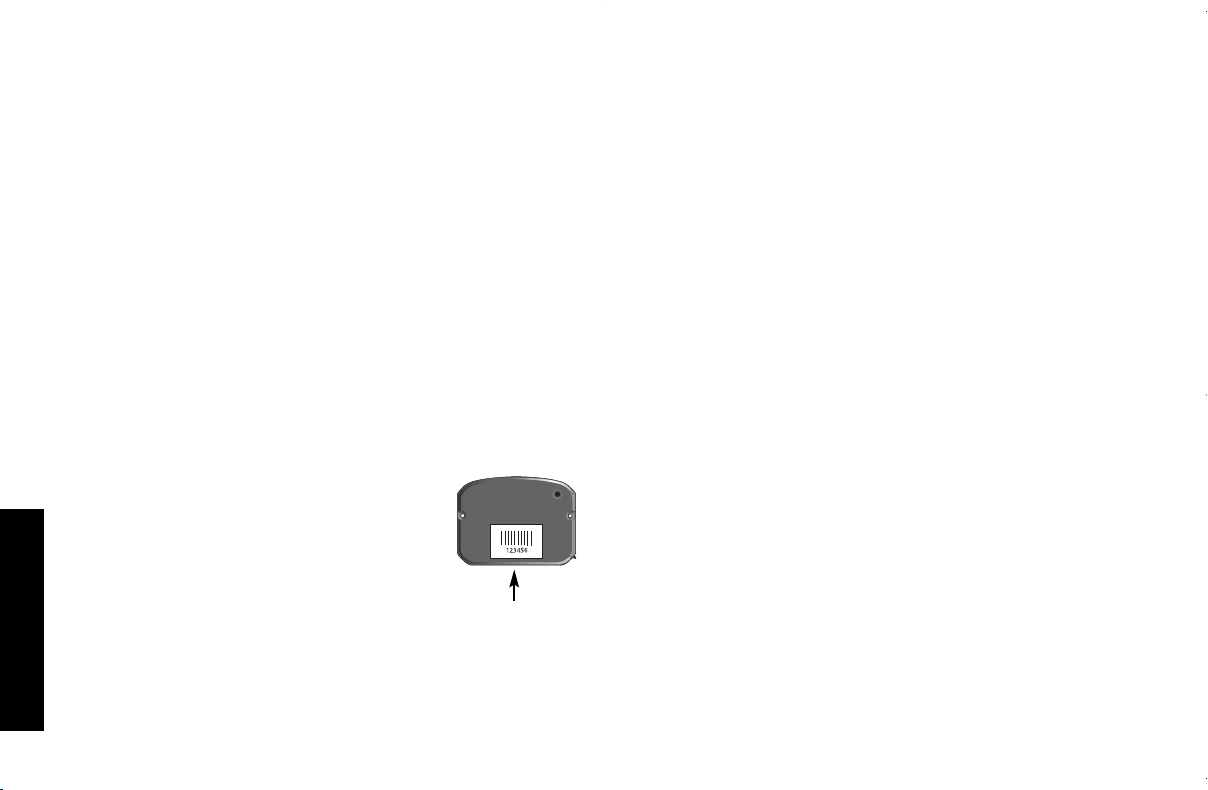
Españ ol
26
2. Enchufe el otro extremo del adaptador al tomacorriente
adecuado.
3. Inserte el adaptador con la flecha hacia arriba (Fig. 2).
La unidad MOBILELOCK™ emitirá un sonido para confirmar que
la unidad está conectada a la energía. Puede dejar el adaptador
conectado con seguridad a la unidad MOBILELOCK™ despué s
de completar la carga. Esta acció n no dañ ará la batería.
NOTA: la unidad MOBILELOCK™ no cuenta con un indicador del
nivel de la batería. Esta informació n está disponible a travé s del
sitio Web de MOBILELOCK™ y el sistema de menú en el telé fono.
Despué s de haber activado el servicio de notificaciones, podrá ver
el nivel de la batería en el sitio Web de MOBILELOCK™
(www.dewalt.com/mobilelock) o escucharlo a travé s del sistema de
menú en el telé fono. Ademá s, la notificació n de batería baja
y batería completa será enviada al nú mero de telé fono y/o la
direcció n de correo electró nico proporcionados.
Activar
IMPORTANTE: la alarma no funcionará hasta que se haya
activado el servicio de notificaciones. Compruebe que la siguiente
informació n necesaria esté disponible antes de la activació n:
1. Nú mero de serie electró nico (ESN)
al dorso de la unidad de MOBILELOCK™.
2. Informació n sobre la tarjeta de cré dito
3. Nú meros de telé fono y/o direcciones de
correo electró nico de notificació n.
El DS500 debe estar conectado a la fuente de
energía en el momento en que se active el ser-
vicio de notificaciones.
Visite en Internet www.dewalt.com/mobilelock o llame a la oficina
de atenció n al cliente al 1-877-456-LOCK (1-877-456-5625) para
activar el servicio MOBILELOCK™. Durante este proceso, nece-
sitará seguir los pasos a continuació n:
1. Registre el nú mero de serie electró nico (ESN) al dorso de la
unidad de MOBILELOCK™.
2. Cree un perfil de cuenta.
3. Seleccione un plan de vigilancia.
Personalice la configuració n de la
alarma
Todas las acciones de personalizació n pueden realizarse en línea o
a travé s del sistema de menú en el telé fono. Visite en Internet
www.dewalt.com/mobilelock o llame al 1-410-329-9477 para per-
sonalizar la configuració n de la alarma. Durante este proceso, nece-
sitará seguir los pasos a continuació n:
1. Elija los nú meros de telé fono y/o direcciones de correo elec-
tró nico de contacto. El servicio de notificaciones de MOBILE-
LOCK™ llamará hasta tres personas en el caso de que la
alarma se active. Los avisos de batería baja y batería
completa pueden enviarse por telé fono o correo electró nico.
2. Seleccione los sensores necesarios para el bien que desee
proteger.
Montaje
UNIDAD MOBILELOCK™ DS500
SUGERENCIA: para mejorar la precisió n, siga estas recomenda-
ciones:
• Las mejores ubicaciones son en el exterior con vista clara al
cielo.
• Mantenga lejos de las ubicaciones subterrá neas.
• Evite las estructuras con techos de metal u hormigó n, edificios
altos y follaje intenso.
• Las ventanas con protectores contra la luz solar pueden
bloquear las señ ales satelitales.
• Los radios y otros equipos electró nicos pueden provocar
interferencia o bloquear las señ ales satelitales.
DS500 E,Sp 8/9/06 11:04 AM Page 26
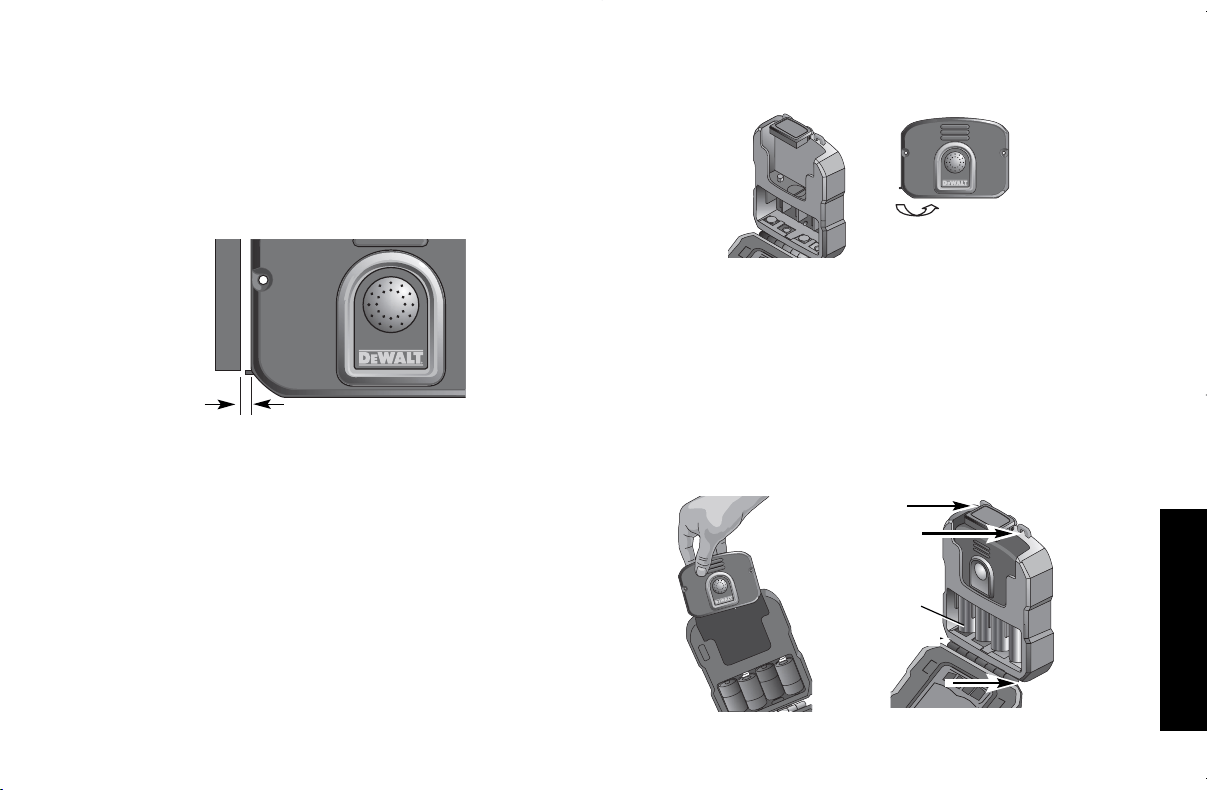
Españ ol
27
Use los magnetos al dorso de la unidad MOBILELOCK™, dos
tornillos Nº 8 (no incluidos) o dos pernos (no incluidos) segú n
corresponda para el material al que lo anexará . Si se retira de la
superficie de montaje y el interruptor de seguridad al dorso de la
unidad está en la posició n de ON, se enviará un mensaje de
seguridad. Esta alarma se enviará cuando la unidad esté activada
y desactivada. Para eliminar las falsas alarmas, compruebe que la
unidad MOBILELOCK™ esté fija u oculta de manera que no
pueda retirarse.
NOTA: Si utiliza el sensor de contacto de la puerta, coloque el imá n
en el marco de la puerta a no má s de 9,5 mm (3/8") del ícono de
imá n que se encuentra del lado izquierdo de la unidad MOBILE-
LOCK™ (montada sobre la puerta).
Para montar el imá n de contacto de la puerta
en forma permanente:
1. Retire la cinta de la parte posterior del imá n.
2. Retire la cubierta para exponer los dos orificios de montaje.
3. Inserte los tornillos (no incluidos) en los orificios de montaje.
9,5 mm (3/8")
ADAPTADOR DE DURACIÓ N PROLONGADA DS505
1. Abra la puerta de DS505.
2. Abra la puerta del puerto de carga DS500 para acceder al puer-
to de carga segú n se muestra.
3. Inserte cuatro baterías alcalinas tamañ o D (suministradas).
4. Inserte la unidad MOBILELOCK™ DS500 segú n se muestra.
Compruebe que haya entrado en contacto con el conector
DS505. La unidad MOBILELOCK™ emitirá un sonido cuando
las baterías y la unidad se inserten adecuadamente para indicar
que la unidad MOBILELOCK™ recibe energía.
NOTA: Para una duració n ó ptima, no use baterías recargables.
Use só lo baterías alcalinas de alta calidad. La unidad DS500
puede estar totalmente cargada antes de insertar la unidad en
el DS505 para un tiempo de funcionamiento extendido.
BATERÍAS
ALCALINAS
DE
TAMAÑ O D
DS500 E,Sp 8/9/06 11:04 AM Page 27
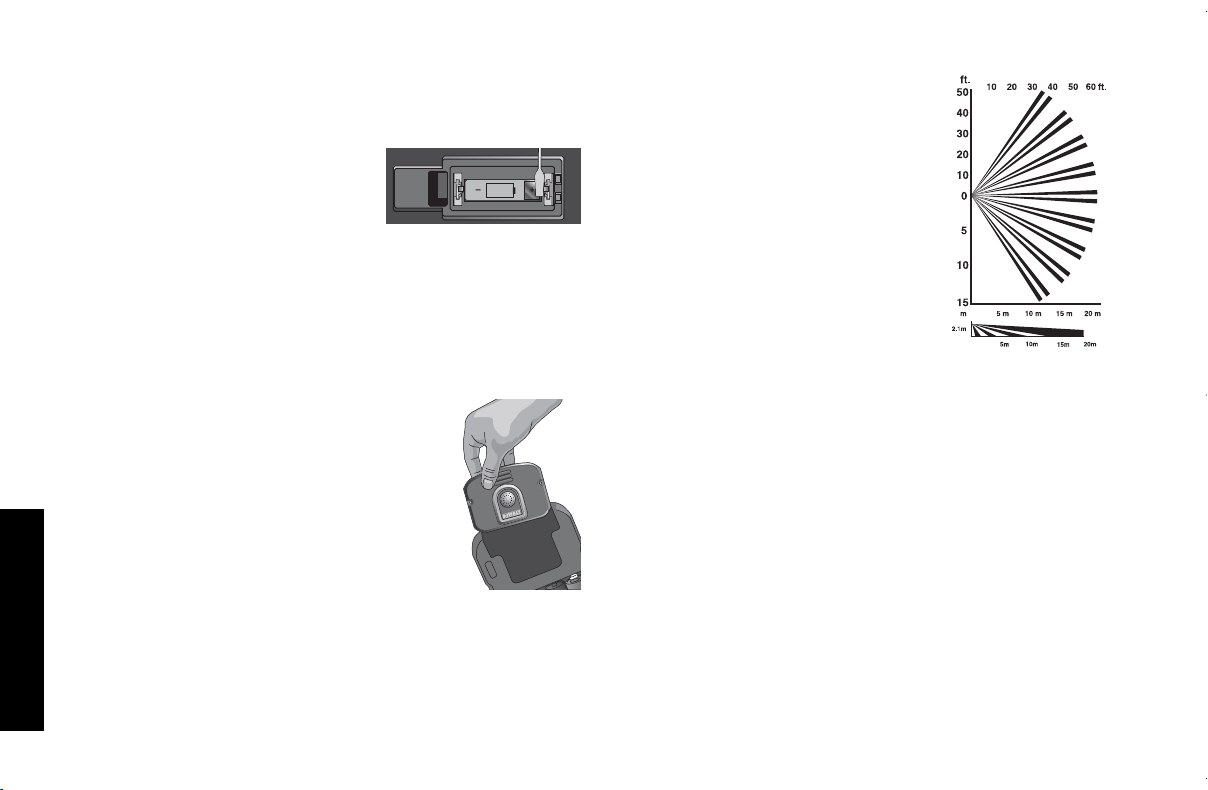
Españ ol
28
5. Conecte el DS505 al bien insertando los cuatro tornillos Nº 8 (no
suministrados) en los orificios de montaje como se muestra.
6. Cierre la puerta.
DETECTOR DE MOVIMIENTO PARA INTERIORES DS510
IMPORTANTE: Antes de insertar la
batería, haga contacto con el terminal
dorado (+) y el de la batería (+)
simultá neamente con un objeto
metá lico para reiniciar el circuito del
detector de movimiento para interiores.
1. Inserte la batería de iones de litio CR-123 adjunta en el com-
partimiento de la batería en la parte posterior del DS510.
Introduzca siempre las baterías correctamente respetando la
polaridad (+ y -) indicada en la batería y en el equipo.
2. El detector de movimiento para interiores DS510 puede
montarse en posició n horizontal contra una pared o en una
esquina utilizando dos tornillos Nº 8.
3. Abra la puerta del puerto de carga DS500
para acceder al puerto de carga.
4. Inserte la unidad MOBILELOCK™ DS500
segú n se muestra. Compruebe que haya
entrado en contacto con el conector DS510.
Ubicaciones recomendadas
• Se recomienda utilizar en á reas confinadas,
oficinas, espacios de almacenamiento
con temperatura controlada e interiores de
vigilancia.
• El DS510 funciona mejor si las á reas protegidas está n delimi-
tadas por
barreras só lidas. Las paredes y los pisos proporcionan buenas
perspectivas para detectar cambios en la energía de infrarrojo.
• El detector de movimiento cubre un á rea de 15,24 m (50 pies)
en un á ngulo de 105º. Para lograr una mejor detecció n,
3V
CR123
localice el sensor de movimiento de
manera que los intrusos se muevan a
travé s de los patrones de zonas de
detecció n en lugar de hacia é l o lejos
de é l.
• Compruebe las á reas en busca de
posibles fuentes de falsas alarmas.
Recuerde que el sensor responde a
cambios rá pidos en los patrones de
calor dentro de su patró n de cobertu-
ra. Evite colocar bajo la luz directa del
sol o el reflejo, o cerca de objetos que
puedan calentarse rá pidamente por la
luz solar. No coloque el producto
mirando hacia una ventana. No lo
coloque cerca de fuentes de calor o frío, como calentadores o
aire acondicionados, que puedan enviar aire caliente o frío
directamente sobre el sensor. Evite los dispositivos como
calefactores, que pueden calentarse rá pidamente.
• Verifique que las á reas esté n despejadas y los bienes esté n
seguros antes de la activació n.
• Compruebe que los detectores de movimiento no esté n blo-
queados. No permita que haya fuentes de calor en el radio de
alcance de los sensores de movimiento.
• Tenga en cuenta el uso habitual del á rea:
¿hay murcié lagos,
ratones u otros animales que puedan activar el sensor?
• No bloquee el patró n de cobertura con muebles u otros
equipos.
Prueba del sistema
Se recomienda probar el sistema perió dicamente. Esta prueba del
sistema comprobará cada uno de los sensores activos.
NOTA: El sitio Web y el menú telefó nico de MOBILELOCK™ está n
sujetos a modificaciones.
DS500 E,Sp 8/9/06 11:04 AM Page 28

Españ ol
29
Visite en Internet www.dewalt.com/mobilelock o llame al sistema
de menú en el telé fono (1-410-329-9477) para ejecutar una
prueba del sistema.
PARA COMPLETAR LA PRUEBA DEL SISTEMA A TRAVÉ S
DEL SITIO WEB
1. Visite en Internet www.dewalt.com/mobilelock e ingrese el
nombre de usuario y la contraseñ a.
2. Seleccione
Unit Customization (Configuració n personalizada
de la unidad).
3. Seleccione la unidad.
4. Seleccione
System Test (Prueba del sistema)
. La unidad
MOBILELOCK™ pasará por todos los sensores activos en el
siguiente orden: vibració n, contacto de la puerta, movimiento y
seguridad. A medida que se desplaza por cada sensor, la
unidad MOBILELOCK™ activará una alarma. Se enviará una
notificació n al celular. Continú e desplazá ndose por los
sensores hasta completar la prueba. La prueba finalizará
automá ticamente despué s de 5 minutos o cuando se haya
desplazado por cada uno de los sensores.
PARA COMPLETAR LA PRUEBA DEL SISTEMA A TRAVÉ S
DEL MENÚ TELEFÓ NICO
1. Llame al 1-410-329-9477 e ingrese el nombre de usuario y la
contraseñ a.
2. Seleccione
Unit Maintenance (Mantenimiento de la unidad)
en
el menú principal.
3. Seleccione
Status Update (Actualizació n de estado)
seguido
de
System Test (Prueba del sistema)
.
4. El estado ofrecerá la siguiente informació n:
• Activada/desactivada/programada
• Nivel de la batería
• Fuerza de la señ al celular
• Configuració n de sensores
• Configuració n de la sirena de la alarma
5. Seleccione
Perform a System Test (Realizar una prueba del
sistema)
. La unidad MOBILELOCK™ pasará por todos los
sensores ACTIVOS en el siguiente orden: vibració n, contacto
de la puerta, movimiento y seguridad. A medida que se
desplaza por cada sensor, la unidad MOBILELOCK™ activará
una alarma. Se enviará una notificació n al celular. Continú e
desplazá ndose por los sensores hasta completar la prueba. La
prueba finalizará automá ticamente despué s de 5 minutos o
cuando se haya desplazado por cada uno de los sensores.
PRUEBA DE COBERTURA DEL DETECTOR DE MOVIMIENTO
PARA INTERIORES DS510
Si bien el sistema está desactivado, ejecutar esta prueba indicará
el á rea de cobertura sin enviar una alarma. Sujete el imá n incluido
en la parte inferior izquierda del detector de movimiento (cerca de
la lente) hasta que se encienda un indicador LED rojo en la
ventana. De esta forma se activa el modo de prueba de 1 minuto.
Durante este período, el indicador LED rojo se encenderá siempre
que la unidad perciba movimiento.
Activació n
La unidad MOBILELOCK™ puede activarse a travé s del sistema
de menú en el telé fono o el sitio Web de MOBILELOCK™. Para
mayor conveniencia, puede definir un programa de activació n y
desactivació n.
NOTA: El sitio Web y el menú telefó nico de MOBILELOCK™ está n
sujetos a modificaciones.
ACTIVAR A TRAVÉ S DEL TELÉ FONO
1. Llame al 1-410-329-9477 e ingrese el nombre de usuario y la
contraseñ a.
2. Seleccione el menú
Arm/Disarm (Activar/desactivar)
en el
menú principal.
BASIC OPERATIONS
DS500 E,Sp 8/9/06 11:04 AM Page 29

Españ ol
30
3. Si posee má s de una unidad MOBILELOCK™, se le solicitará
que seleccione la correcta, seleccione un grupo o seleccione
todas.
4. Seleccione
Arm (Activar)
.
5. Aguarde hasta que el menú en el telé fono le otorgue la
confirmació n de que se ha activado. No cuelgue antes de
escuchar esta confirmació n.
NOTA: si ha seleccionado habilitar los sonidos de confirmació n de
activació n y desactivació n, la unidad MOBILELOCK™ emitirá un
sonido para indicar que la unidad está activada.
ACTIVAR A TRAVÉ S DEL SITIO WEB MOBILELOCK™
1. Visite en Internet www.dewalt.com/mobilelock e ingrese el
nombre de usuario y la contraseñ a.
2. Seleccione
Unit Customization (Configuració n personalizada
de la unidad)
.
3. Si posee má s de una unidad MOBILELOCK™, se le solicitará
que seleccione la correcta, seleccione un grupo o seleccione
todas.
4. Seleccione
Arm (Activar)
.
5. Aguarde hasta que el sitio Web le otorgue la confirmació n de
que se ha activado.
PROGRAMAR LA ACTIVACIÓ N Y DESACTIVACIÓ N A
TRAVÉ S DEL MENÚ EN EL TELÉ FONO
Misma hora todos los días (días de la semana ú nicamente)
Se activa y desactiva a la misma hora todos los días (de lunes a
viernes). Permanece activada durante el fin de semana.
1. Llame al 1-410-329-9477 e ingrese el nombre de usuario y la
contraseñ a.
2. Seleccione el menú
Arm/Disarm (Activar/desactivar)
en el
menú principal.
3. Si posee má s de una unidad MOBILELOCK™, se le solicitará
que seleccione la correcta, seleccione un grupo o seleccione
todas.
4. Seleccione
Arm Weekdays (Activar los días de semana)
.
5. Seleccione la hora para activar y la hora para desactivar la
unidad todos los días. La hora de activació n debe ser
inmediatamente despué s de irse. La unidad MOBILELOCK™
se activará los lunes, martes, mié rcoles, jueves y viernes a la
misma hora que seleccionó . La unidad permanecerá activada
durante el fin de semana.
6. Aguarde hasta que el menú en el telé fono le otorgue la
confirmació n de que se ha definido un programa de activació n.
No cuelgue antes de escuchar esta confirmació n.
NOTA: para anular el programa, use las instrucciones de acti-
vació n o desactivació n por ú nica vez. Por ejemplo, si programó la
unidad para que se active hasta las 7:00 a.m., puede llamar al
menú en el telé fono y desactivarla a las 6:45 a.m. si llega má s
temprano. La unidad volverá a ingresar al programa siempre que
llegue la siguiente hora programada (p. ej., activació n esa tarde).
Elija un día por vez
Seleccione el programa de activació n y desactivació n un día por
vez. Elija una hora diferente todos los días si es necesario.
1. Llame al 1-410-329-9477 e ingrese el nombre de usuario y la
contraseñ a.
2. Seleccione el menú
Arm/Disarm (Activar/desactivar)
en el
menú principal.
3. Si posee má s de una unidad MOBILELOCK™, se le solicitará
que seleccione la correcta, seleccione un grupo o seleccione
todas.
4. Seleccione
Arm One Day Only (Activar só lo por un día)
.
5. Seleccione el día de la semana.
6. Seleccione la hora de activació n y la hora de desactivació n.
7. Aguarde hasta que el menú en el telé fono le otorgue la confir-
mació n de que se ha definido un programa de activació n. No
cuelgue antes de escuchar esta confirmació n.
DS500 E,Sp 8/9/06 11:04 AM Page 30

Españ ol
31
PROGRAMAR LA ACTIVACIÓ N Y DESACTIVACIÓ N A
TRAVÉ S DEL SITIO WEB DE MOBILELOCK™
1. Visite en Internet www.dewalt.com/mobilelock e ingrese el
nombre de usuario y la contraseñ a.
2. Seleccione
Unit Customization (Configuració n personalizada
de la unidad)
.
3. Si posee má s de una unidad MOBILELOCK™, se le solicitará
que seleccione la correcta, seleccione un grupo o seleccione
todas.
4. Seleccione
Schedule (Programar)
.
5. Elija la hora de activació n y desactivació n para cada día.
6. Aguarde hasta que el sitio Web le otorgue la confirmació n de
que se ha activado.
NOTA: para anular el programa, use las instrucciones de acti-
vació n o desactivació n por ú nica vez. Por ejemplo, si programó la
unidad para que se active hasta las 7:00 a.m., puede llamar al
menú en el telé fono y desactivarla a las 6:45 a.m. si llega má s tem-
prano. La unidad volverá a ingresar al programa siempre que
llegue la siguiente hora programada (p. ej., activació n esa tarde).
Desactivació n
La unidad MOBILELOCK™ puede desactivarse a travé s del sis-
tema de menú en el telé fono o el sitio Web de MOBILELOCK™.
Para mayor conveniencia, puede definir un programa de activació n
y desactivació n.
DESACTIVAR A TRAVÉ S DEL TELÉ FONO
NOTA: El sitio Web y el menú telefó nico de MobileLocktm está n
sujetos a modificaciones.
1. Llame al 1-410-329-9477 e ingrese el nombre de usuario y la
contraseñ a.
2. Seleccione
Arm/Disarm (Activar/desactivar)
en el menú
principal.
3. Si posee má s de una unidad MOBILELOCK™, se le solicitará
que seleccione la correcta, seleccione un grupo o todas.
4. Seleccione
Disarm (Desactivar)
.
5. Aguarde hasta que el menú en el telé fono le otorgue la
confirmació n de que se ha activado. No cuelgue antes de
escuchar esta confirmació n.
NOTA: si ha seleccionado habilitar los sonidos de confirmació n de
activació n y desactivació n, la unidad MOBILELOCK™ emitirá un
sonido para indicar que la unidad está activada.
DESACTIVAR A TRAVÉ S DEL SITIO WEB MOBILELOCK™
1. Visite en Internet www.dewalt.com/mobilelock e ingrese el
nombre de usuario y la contraseñ a.
2. Seleccione
Unit Customization (Configuració n personalizada
de la unidad)
.
3. Si posee má s de una unidad MOBILELOCK™, se le solicitará
que seleccione la correcta, seleccione un grupo o seleccione
todas.
4. Seleccione
Disarm (Desactivar)
.
5. Aguarde hasta que el sitio Web le otorgue la confirmació n de
que se ha desactivado.
NOTA: si ha seleccionado habilitar los sonidos de confirmació n de
activació n y desactivació n, la unidad MOBILELOCK™ emitirá un
sonido para indicar que la unidad está activada.
Selecció n de sensores
Se pueden utilizar varios sensores en funció n de la aplicació n.
SENSOR DE SEGURIDAD
El sensor de seguridad se encuentra en la parte posterior de la
unidad MOBILELOCK™. Se utiliza para notificar si alguna per-
sona a violado el sistema de seguridad.
DS500 E,Sp 8/9/06 11:04 AM Page 31

Españ ol
32
IMPORTANTE: el sensor de seguridad proporcionará notificació n
de que la unidad MOBILELOCK™ ha sido retirada de la superficie
de montaje incluso si é sta está desactivada. El sensor puede
desactivarse en el sitio Web o a travé s del sistema de menú en el
telé fono.
SENSOR DE VIBRACIÓ N
El sensor de vibració n detecta la vibració n en un contenedor de
metal o el movimiento de equipos pesados. Puede ajustar la
configuració n de sensibilidad. El filtro de falsas alarmas ayuda a
bloquear falsas alarmas asociadas a truenos, golpes accidentales,
objetos que caen sobre el equipo o el contenedor, etc. El filtro de
falsas alarmas se puede configurar en alto, bajo y apagado.
IMPORTANTE: al realizar la prueba, compruebe la fuerza de la
vibració n y la cantidad de veces que é sta se presenta. El filtro de
falsas alarmas buscar varias vibraciones durante un breve período
y puede requerir una serie de vibraciones para activar el sensor.
Despué s de una alarma ocasionada por el sensor de vibració n,
é ste se apagará durante 15 minutos.
SENSOR DE CONTACTO DE LA PUERTA
El sensor de contacto de la puerta detecta si la puerta se abre. Si
la puerta está abierta al activar la unidad MobileLocktm, se activará
una alarma al cerrarla. Despué s de una alarma ocasionada por el
sensor de contacto de la puerta, é ste se apagará durante 15 min-
utos. Si la puerta aú n está abierta despué s de 15 minutos, se
enviará otra alarma. Esto continuará hasta que se desactive la
unidad MOBILELOCK™ o se agote la batería.
Coloque el magneto en el lado opuesto de la abertura de la puerta
a una distancia no superior a 9,5 mm (3/8") del lado izquierdo de la
unidad MOBILELOCK™.
NOTA: el sensor de contacto de la puerta no está disponible en el
adaptador de duració n prolongada DS505. Este sensor se utiliza
como sensor de seguridad si la puerta de la batería está abierta.
SENSOR DE TEMPERATURA
El sensor de temperatura detecta cambios de temperatura superi-
ores o inferiores al umbral de temperatura predefinido. La unidad
MOBILELOCK™ cuenta con un sensor de temperatura alta y un
sensor de temperatura baja.
El rango de temperatura es -17 ˚C a 50 ˚C (0 ˚F–122 ˚F). El sensor
de alta temperatura no se utiliza para protecció n contra incendios.
PRECAUCIÓ N: la lectura de temperatura es aproximada. La
lectura de temperatura se ignorará a veces si la unidad MOBILE-
LOCK™ está en un estado en el que se sabe que la temperatura
interna cambiará (carga de la batería, etc.).
Despué s de una alarma ocasionada por el sensor de temperatura,
é ste se apagará durante 60 minutos. Si la temperatura ambiental
excede el rango de temperatura seleccionado, se enviará otra
alarma. Este ciclo continuará hasta que se desactive la unidad
MOBILELOCK™.
9,5 mm (3/8")
DS500 E,Sp 8/9/06 11:04 AM Page 32

Españ ol
33
DETECTOR DE MOVIMIENTO
El detector de movimiento está disponible en el juego combinado
DS510K. Detecta el movimiento de fuentes de calor en un á rea
confinada.
IMPORTANTE: una vez que se indique una condició n de alarma,
las demá s alarmas se interrumpen hasta que no se perciba
ningú n movimiento durante un período de má s de 90 segundos.
Esta funció n está diseñ ada para conservar la vida ú til de la batería
ignorando la presencia normal de movimiento durante el día.
Ubicació n GPS asistida
La unidad MOBILELOCK™ puede proporcionar la ubicació n del
bien a travé s del sistema de menú en el telé fono o en el sitio Web
MOBILELOCK™.
NOTA: El sitio Web y el menú telefó nico de MOBILELOCK™ está n
sujetos a modificaciones.
LOCALIZACIÓ N A TRAVÉ S DEL TELÉ FONO
1. CLlame al 1-410-329-9477 e ingrese el nombre de usuario y la
contraseñ a.
2. Seleccione
Locate (Localizar)
en el menú principal.
3. Si posee má s de una unidad MOBILELOCK™, se le solicitará
que seleccione la correcta, seleccione un grupo o todas.
4. Despué s de verificar que hay ubicaciones disponibles, tendrá
la opció n de grabar un sitio Web de MOBILELOCK™ de la
ubicació n o hablar con un representante de atenció n al cliente
para obtener ayuda.
5. Aguarde hasta que el menú en el telé fono le otorgue la confir-
mació n de que se ha enviado la solicitud de ubicació n. No
cuelgue antes de escuchar esta confirmació n.
UBICACIÓ N A TRAVÉ S DEL SITIO WEB DE MOBILELOCK™
1. Visite en Internet www.dewalt.com/mobilelock e ingrese el
nombre de usuario y la contraseñ a.
2. Seleccione
Unit Customization (Configuració n personalizada
de la unidad)
.
3. Si posee má s de una unidad MOBILELOCK™, se le solicitará
que seleccione la correcta, seleccione un grupo o seleccione
todas.
4. Seleccione
Locate (Localizar)
.
5. La cantidad de tiempo que transcurrirá hasta recibir la
ubicació n variará . En la mayoría de los casos, la ubicació n se
proporciona en aproximadamente un minuto. Haga clic en
Location (view) (Ubicació n [ver])
para ser dirigido al mapa.
BÚ SQUEDA
Si la ubicació n se ha limitado a un ú nico edificio, la funció n de
bú squeda puede ayudar a determinar la ubicació n exacta de la
unidad MOBILELOCK™ y el bien al que brinda protecció n. La
funció n de bú squeda funciona de forma similar al localizador del
auricular del telé fono inalá mbrico en el hogar. Una vez activada,
esta funció n comenzará a emitir un sonido desde el altavoz de
MOBILELOCK™. Camine en direcció n a la fuente de ruido para
encontrar la unidad MOBILELOCK™.
PARA INICIAR LA BÚ SQUEDA A TRAVÉ S DEL TELÉ FONO
1. Llame al 1-410-329-9477 e ingrese el nombre de usuario y la
contraseñ a.
2. Seleccione
Unit Settings (Configuració n de la unidad)
en el
menú MOBILELOCK™.
3. Si posee má s de una MOBILELOCK™, se le solicitará que
seleccione la correcta, seleccione un grupo o todas.
4. Seleccione
Speaker Settings (Configuració n de altavoces)
.
5. Seleccione
Paging (Bú squeda)
.
6. Si no ha encontrado la unidad MOBILELOCK™, puede volver
a iniciar la funció n de bú squeda.
PARA INICIAR LA BÚ SQUEDA A TRAVÉ S DEL SITIO
WEB DE MOBILELOCK™
1. Visite en Internet www.dewalt.com/mobilelock e ingrese el
nombre de usuario y la contraseñ a.
DS500 E,Sp 8/9/06 11:04 AM Page 33

Españ ol
34
2. Seleccione
Unit Customization (Configuració n personalizada
de la unidad)
.
3. Si posee má s de una MOBILELOCK™, se le solicitará que
seleccione la correcta, seleccione un grupo o todas.
4. Seleccione
Page (Buscar)
.
5. Si no ha encontrado la unidad MOBILELOCK™, puede volver
a iniciar la funció n de bú squeda.
La unidad MOBILELOCK™ cuenta con varias funciones person-
alizables. Consulte el sitio Web MOBILELOCK™ para obtener
informació n actualizada sobre todas las funciones personaliz-
ables. Muchas de estas funciones está n preprogramadas con la
configuració n má s frecuente. Antes de usar, comprenda cuá l es
la configuració n predeterminada.
NOTA: el sitio Web de MOBILELOCK™ y el menú en el telé fono
está n sujetos a modificaciones.
Agrupació n
Para activar y desactivar varias unidades MOBILELOCK™ en
varios sitios, agrú pelas.
Apodos
Para evitar el uso del nú mero de serie electró nico como factor
descriptivo, puede utilizar apodos para el sitio Web de MOBILE-
LOCK™ y el sistema del menú del telé fono. Grabe los apodos en
el sistema del menú en el telé fono, que luego se utilizará n
durante la notificació n de la alarma.
Cambiar la informació n de contacto
El servicio de notificaciones de MOBILELOCK™ llamará hasta tres
personas en el caso de que la alarma se active. Si la primera per-
sona no está disponible o elige no actuar ante la activació n de la
alarma (de vacaciones, etc.), el servicio de notificaciones llamará
MÁ S FUNCIONES Y OPCIONES
al siguiente usuario en la lista. La notificació n de batería baja y de
batería completa proporcionará recordatorios del mantenimiento
necesario.
Cambiar la contraseñ a
Las contraseñ as para el sitio Web de MOBILELOCK™ y el sistema
de menú en el telé fono son las mismas. La contraseñ a puede
modificarse en el sitio Web o a travé s del sistema de menú en el
telé fono.
Cambiar la configuració n de altavoces
Existen varias configuraciones para los altavoces. El usuario
puede ajustarlas a todas. La sirena de la alarma puede silenciarse.
El sonido de confirmació n de activació n y desactivació n tambié n
puede habilitarse o silenciarse.
Mantenimiento de la batería
DS500
La unidad MOBILELOCK™ no funcionará sin energía. La unidad
posee una batería recargable. Si la batería no se cargó adecuada-
mente, el producto no funcionará . Existen varios factores, como la
fuerza de la señ al celular, la cantidad de solicitudes de
ubicació n, la cantidad de alarmas y otras actividades, que pueden
afectar la duració n de la batería.
Para obtener una duració n adicional, puede utilizar el Adaptador de
duració n prolongada DS505.
DS505
La unidad MOBILELOCK™ no funcionará sin energía. Si la batería
interna no se cargó adecuadamente, el producto no funcionará .
Cuando reciba la notificació n de batería baja, las baterías alcalinas
estará n completamente descargadas y el nivel de carga de la
batería interna recargable de la unidad MOBILELOCK™ será bajo.
Cambie las baterías dentro de las 24 horas para limitar la vulnera-
bilidad. Existen varios factores, como la fuerza de la señ al celular,
DS500 E,Sp 8/9/06 11:04 AM Page 34

Españ ol
35
la cantidad de solicitudes de ubicació n, la cantidad de alarmas y
otras actividades, que pueden afectar la duració n de la batería.
DS510
La batería debe durar varios añ os. Para garantizar una seguridad
correcta, reemplace la batería todos los añ os.
IMPORTANTE: una vez que se indique una condició n de alarma,
las demá s alarmas se interrumpen hasta que no se perciba ningú n
movimiento durante un período de má s de 90 segundos. Esta
funció n está diseñ ada para conservar la vida ú til de la batería
ignorando la presencia normal de movimiento durante el día.
Se recomienda probar el sistema perió dicamente. Esta prueba del
sistema comprobará cada uno de los sensores activos.
Visite en Internet www.dewalt.com/mobilelock o llame al sistema
de menú en el telé fono (1-410-329-9477) para ejecutar una
prueba del sistema.
NOTA: El sitio Web y el menú telefó nico de MOBILELOCK™ está n
sujetos a modificaciones.
PARA COMPLETAR LA PRUEBA DEL SISTEMA A TRAVÉ S
DEL SITIO WEB
1. Visite en Internet www.dewalt.com/mobilelock e ingrese el
nombre de usuario y la contraseñ a.
2. Seleccione
Unit Customization (Configuració n personalizada
de la unidad)
.
3. Seleccione la unidad.
4. Seleccione
System Test (Prueba del sistema)
. La unidad
MOBILELOCK™ pasará por todos los sensores activos en el
siguiente orden: vibració n, contacto de la puerta, movimiento y
seguridad. A medida que se desplaza por cada sensor, la
unidad MOBILELOCK™ activará una alarma. Se enviará una
notificació n al celular. Continú e desplazá ndose por los
ACTUALIZACIÓ N DEL ESTADO Y
PRUEBA DEL SISTEMA
sensores hasta completar la prueba. La prueba finalizará
automá ticamente despué s de 5 minutos o cuando se haya
desplazado por cada uno de los sensores.
PARA COMPLETAR LA PRUEBA DEL SISTEMA A TRAVÉ S
DEL MENÚ TELEFÓ NICO
1. Llame al 1-410-329-9477 e ingrese el nombre de usuario y la
contraseñ a.
2. Seleccione
Unit Maintenance (Mantenimiento de la unidad)
en
el menú principal.
3. Seleccione
Status Update (Actualizació n de estado) seguido
de System Test (Prueba del sistema)
.
4. El estado ofrecerá la siguiente informació n:
• Activada/desactivada/programada
• Nivel de la batería
• Fuerza de la señ al celular
• Configuració n de sensores
• Configuració n de la sirena de la alarma
5. Seleccione
Perform a System Test (Realizar una prueba del
sistema).
La unidad MOBILELOCK™ pasará por todos los
sensores activos en el siguiente orden: vibració n, contacto de
la puerta, movimiento y seguridad. A medida que se desplaza
por cada sensor, la unidad MOBILELOCK™ activará una
alarma. Se enviará una notificació n al celular. Continú e
desplazá ndose por los sensores hasta completar la prueba. La
prueba finalizará automá ticamente despué s de 5 minutos o
cuando se haya desplazado por cada uno de los sensores.
Especificaciones
Potencia 120 V CA en el suministro
de energía
Capacidad de la batería 4400 mAH a 4,65 V (normal)
Temperatura de funcionamiento -20˚ a 50˚ C (-4˚ a 122˚ F)
DS500 E,Sp 8/9/06 11:04 AM Page 35

Españ ol
36
Limpieza
ADVERTENCIA: Para limpiar la unidad, só lo utilice jabó n suave
y un pañ o hú medo. Muchos limpiadores para uso domé stico
pueden contener sustancias químicas que podrían dañ ar el plá sti-
co considerablemente. Tampoco utilice gasolina, aguarrá s, barniz
ni solvente, líquidos para limpieza en seco o productos similares.
Nunca permita que penetre líquido dentro de la unidad ni sumerja
las piezas en un líquido.
Contacto
Si tiene alguna duda o comentario sobre este producto, llá menos
al nú mero gratuito 1-800-456-LOCK (1-877-456-5625) o visite
www.dewalt.com o consulte el contrato de servicio de vigilancia
para conocer los nú meros de telé fono de contactos adicionales.
Garantía completa de un añ o
El Localizador GPS D
E
WALT MOBILELOCK™ con alarma antir-
robo cuenta con una garantía de un añ o a partir de la fecha de
compra. Repararemos, sin cargo, cualquier defecto debido a fallas
en los materiales o la mano de obra. Para obtener informació n
sobre reparaciones en garantía, visite www.dewalt.com/mobilelock
o llame al 1-800-456-LOCK (1-877-456-5625). Esta garantía no se
extiende a los accesorios o a los dañ os causados por terceros al
intentar realizar reparaciones. Esta garantía le concede derechos
legales específicos; usted goza tambié n de otros derechos que
varían segú n el estado o provincia..
NOTA: No devuelva al comerciante minorista si el servicio se ha
activado. La devolució n del equipo no cancela automá ticamente el
contrato de servicios. Llame al 1-800-456-LOCK (1-877-456-5625).
REEMPLAZO GRATUITO DE LA ETIQUETA DE PRECAU-
CIONES: Si sus etiquetas de advertencia se vuelven ilegibles o
faltan, llame al 1-800-4-D
E
WALT para que se le reemplacen
gratuitamente.
Notificació n de patente
Una o má s patentes pendientes.
DS500 E,Sp 8/9/06 11:04 AM Page 36

DS500 E,Sp 8/9/06 11:04 AM Page 37

SITELOCK LLC, 701 East Joppa Road, Baltimore, MD 21286 (AUG06) Form No. 632873-00 DS500, DS505, DS510
Copyright © 2006 D
E
WALT
The following are trademarks for one or more D
E
WALT power tools: the yellow and black color scheme; the “D” shaped air intake grill; the
array of pyramids on the handgrip; the kit box configuration; and the array of lozenge-shaped humps on the surface of the tool.
DS500 E,Sp 8/9/06 11:04 AM Page 38