
User Manual
2.4 GHz Wireless Microphone System
Vlink2

Statement
Please read this manual carefully before use and operate and store in
strict accordance with the instructions provided. Please retain for
future reference.
For any issues that cannot be resolved with the user manual, please
refer to your retailer for help or contact us at: [email protected].
Cautions
1. Take care not to use the unit underwater or unprotected in rainy
conditions. Store in a cool, dry place.
2. Designed for use and storage at normal temperatures. Do not move
the unit from overheated to cold conditions frequently, and keep
away from heat sources such as heaters and ovens.
3. When in use, or when storing, avoid contact with dust and moisture.
4. Do not subject to device to violent collisions, as this can damage the
device.
5. In order to avoid acoustic feedback, do not hold the microphone
close to loudspeakers.
6. For optimal sound detection, do not hold your hand against the
microphone head.
01

General Introduction
The Saramonic Vlink2 wireless microphone system provides a premium
2-person wireless audio solution for vloggers, mobile journalists and
content creators
.
It is an easy-to-use, high-quality and flexible 2.4
GHz system. The external microphone input allows the receiver to
be connected to a mic device. The system can be powered through
its USB-C ports, allowing it to run for numerous hours on a USB-C 5V
power bank.
Portable Receiver Vlink2 RX
Introduction
The Saramonic Vlink2 RX is a camera-mountable dual-channel 2.4GHz
wireless receiver. It features a high-contrast OLED display and talkback
function to transmitter. The two detachable antennas can be rotated
360° for better reception. The receiver's output can be toggled
between mono and stereo modes. The talkback and monitor function
on the receiver allows camera operators to select individually if desired,
and communication can be controlled by a mute button.
02
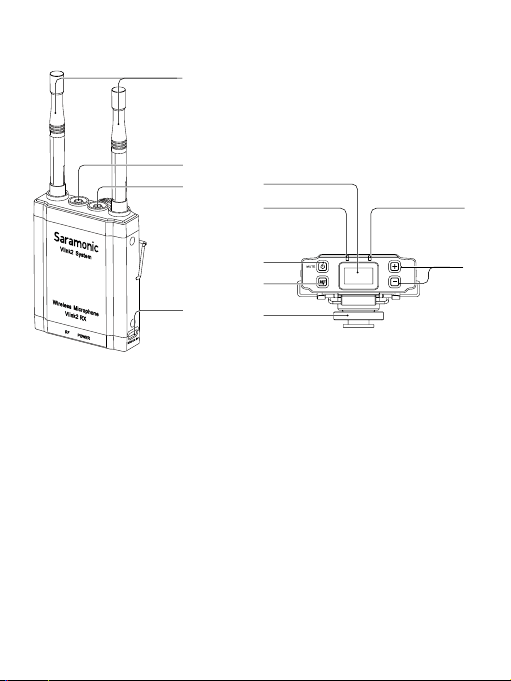
Product Structure
①
Antennas
②
LINE OUT Jack
Connect the Vlink2 RX to a DLSR camera, smartphone with a 3.5mm
headphone jack, mixer or amplifier with the supplied output cable.
③
3.5mm Talkback and Headphone Jack
Using the talkback function with the supplied headphone, the
receiver can monitor the real-time feedback and deliver talkback
communication with transmitter.
④
USB-C Charging Port (DC 5V)
⑤
Cold Shoe Mount Adapter
①
⑪
⑨
⑩
⑦
⑥
⑧
⑤
②
③
④
03

⑥
SET Button
Long press the SET button to enter the displayed menu. Then, short
press the SET button to confirm your setting change, or long press
again to exit without saving.
⑦
Power / Mute Button
Status Operation
Power ON Long press for at least three seconds
Power OFF Long press until it turns off
Mute ON
Short press
Mute OFF
⑧
RF Indicator
Status Indicators
Disconnected Lights off
Pairing Quickly flashing blue light
Paired Successfully Solid blue light
Mute ON (Paired Successfully) Slowly flashing blue light
⑨
OLED Display
⑩
POWER Indicator
Status Indicators
Power On / Fully charged Solid blue light
Low battery / Charging Solid red light
Low battery warning
Flashing red light
(the unit shutdowns whitin 10 mins)
04
⑪
+/- button (Pair button)
Press the buttons “+” and “-“ for 3 seconds at the same time, entering
pairing mode.
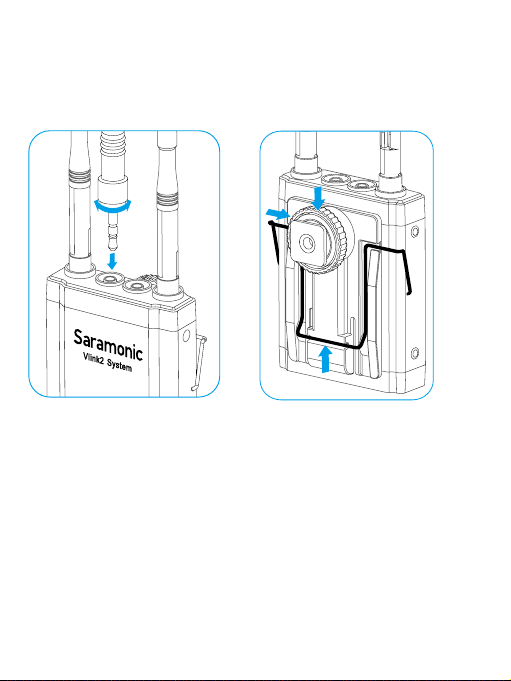
Attaching Accessories
Connect the supplied cable to the output jack.
①
Plug the supplied cable into the LINE OUT jack.
②
For a secure connection, turn to lock the connector.
05

Attach the shoe mount adapter
③
Please attach the belt clip as shown before attaching the shoe mount
adapter.
④
Press the bottom of the belt clip to make some space between the
belt clip and the receiver.
⑤
Align the belt clip with the two vertical grooves on the shoe mount
adapter and insert the adapter in the direction of the arrow.
⑥
Push the shoe mount adapter in fully until the belt clip fits into the
horizontal groove on the adapter holds.
06
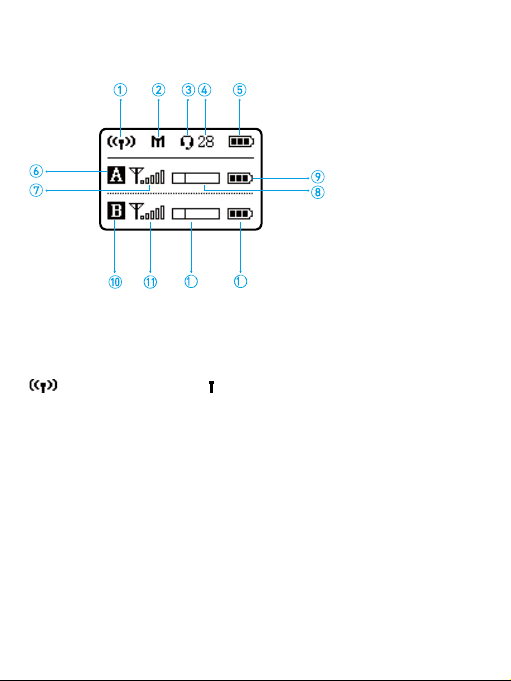
OLED Display Operation Guide
Home screen: If no operation is performed for 20 seconds on the
other screens, the display will automatically return to the home screen.
①
Pairing Indicator
Paired Successfully
Disconnected
②
Output Mode Indicator
M: Mono S: Stereo
③
Mic & Audio Monitoring Icon
Mute Off
Mute On
④
Headphone Volume
⑤
RX's Battery Level Indicator
Displays the RX battery level. Please recharge the device immediately
when the indicator starts flashing.
2
3
07
⑥
Channel A Icon
⑦
RF Level Indicator (Channel A)
Indicates the current reception level.
⑧
Audio Input Level Meter (Channel A)
Displays the audio input level.
⑨
TX's Battery Level Indicator (Channel A)
Displays the TX battery level. Please recharge the device immediately
when the indicator starts flashing.
⑩
Channel B Icon
⑪
RF Level Indicator (Channel B)
Indicates the current reception level.
12
Audio Input Level Meter (Channel B)
Displays the audio input level.
13
TX's Battery Level Indicator (Channel B)
Displays the TX battery level. Please recharge the device immediately
when the indicator starts flashing.
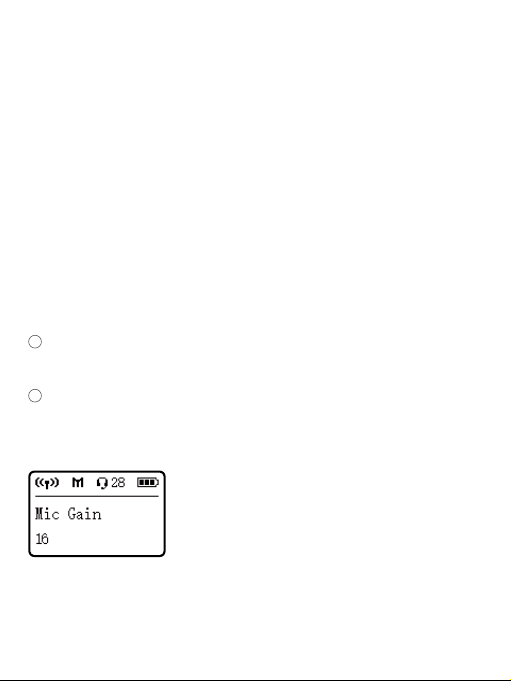
Mic Gain
Adjust the external microphone’s gain level (0-19). Default is “16”.
08
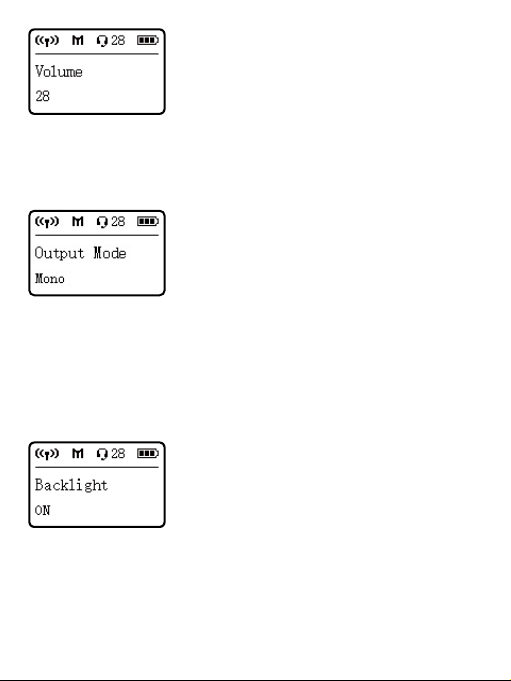
Set Output Volume
Set the volume of output audio within the range of 0 to 31. The setting
is retained even after the power is turned off. Default volume is 28.
Output Mode
The output mode can be set to mono or stereo. When the output mode
is in mono, the audio from the left and right channel will be mixed.
When in stereo, receiver A's and receiver B's audio output will be
separated to the left and right of the stereo output.
System default is mono.
Set Backlight
Set backlight to Always On or On for 10, 30, or 60 seconds. Default is
"On".
09
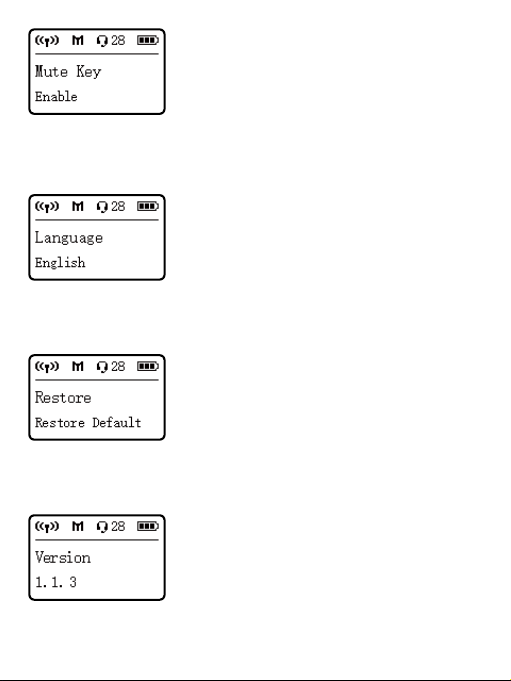
Set Mute Key
Enable or Disable Mute key button function. Default is “Enable”.
Language
English or
(Chinese) are available. Default is English.
Restore Default Setting
Yes: restores default settings, No: exits restore default settings.
Version of the Vlink2 RX's firmware
10
Body-pack Transmitter Vlink2 TX
Introduction
The Saramonic Vlink2 TX is a compact body-pack transmitter. It features
an easy-to-read OLED display, a detachable antenna and built-in
rechargeable battery. With the 3.5mm headphone and mic input jacks,
it can accept audio from the included 3.5mm locking mic, and supports
efficient two-way communication with the receiver
.
A short press of the
power button mutes the mic between takes.
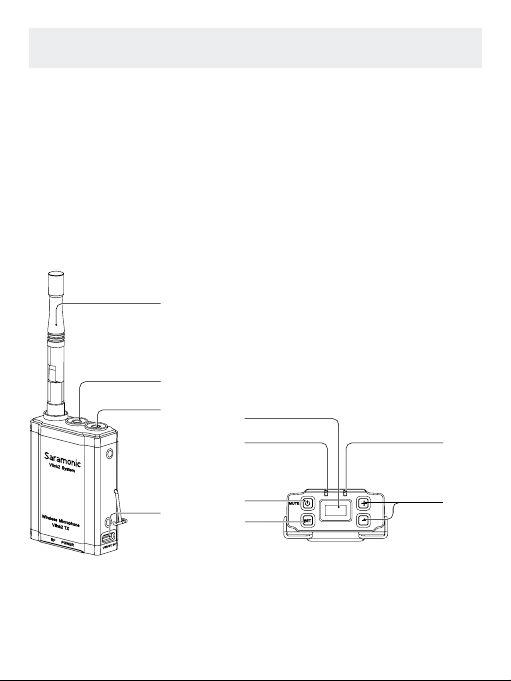
Product Structure
⑩
⑧
⑨
⑤
⑥
⑦
①
②
③
④
11

Antennas
c'v
Connect headphones for monitoring communication from the receiver.
MIC IN/LINE IN Jack
The transmitter can be connected to a 3.5mm microphone or other
line-level devices.
USB-C Charging Port (DC 5V)
Power / Mute Button
Status Operation
Power ON Long press for at least three seconds
Power OFF Long press until it turns off
Mute ON
Short press
Mute OFF
SET Button
RF Indicator
Status Indicators
Disconnected Lights off
Pairing Quickly flashing blue light
Paired Successfully Solid blue light
Mute ON (Paired Successfully) Slowly flashing blue light
12

OLED display
Display menus, please refer to "OLED Display Operation Guide" for
more details.
POWER indicator
Status Indicators
Power On / Fully charged Solid blue light
Low battery / Charging Solid red light
Low battery warning
Flashing red light
(the unit shutdowns whitin 10 mins)
+/- button (Pair button)
Press the buttons “+” and “-“ for 3 seconds at the same time, entering
pairing mode.
13
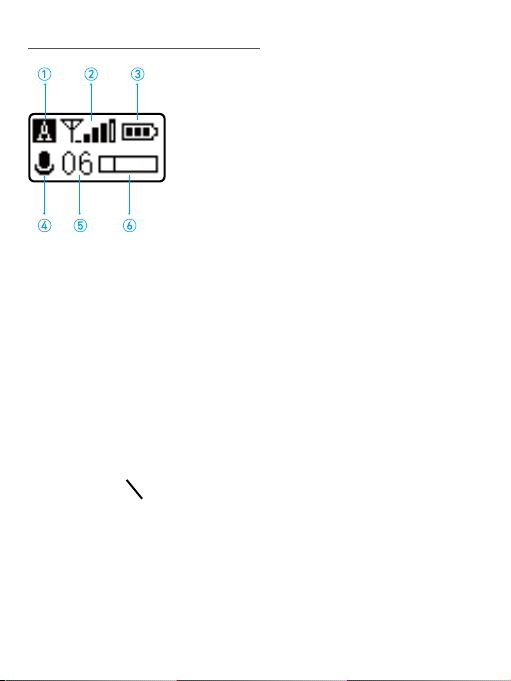
OLED Display Operation Guide
Home screen: If no operation is performed for 20 seconds on the
other screens, the display will automatically return to the home screen.
①
Pairing Indicator
Paired Successfully
Disconnected
②
RF Level Indicator
③
Battery Level Indicator
Displays the TX battery level. Please recharge the device immediately
when the indicator starts flashing.
④
Mute Indicator
Mute Off Mute On
⑤
Mic Gain
⑥
Audio Input Level Meter
Displays the audio input level.
14
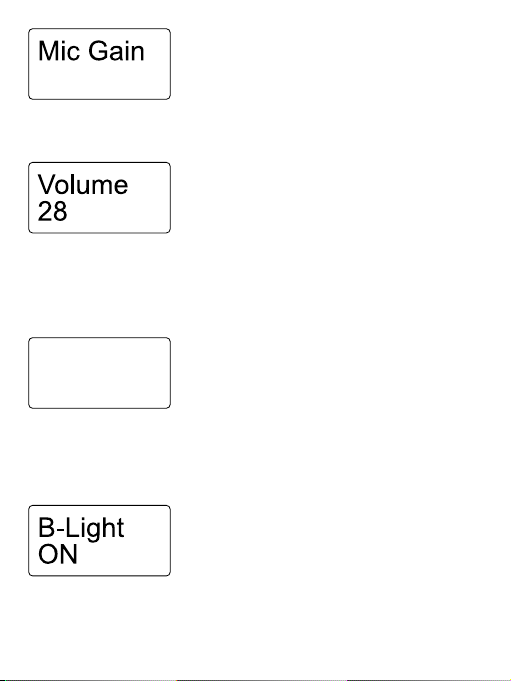
MIC GAIN
Adjust the external microphone’s gain level (0-9). Default is “06”.
Set Output Volume
Set the volume of output audio within the range of 0 to 31. The setting
is retained even after the power is turned off.
Default volume is 28.
Input Setting
The input mode can be set to Mic In or Line In.
Mic In: for connecting a 3.5mm microphone to the transmitter.
Line In: for connecting a line level device to the transmitter.
Set Backlight
Set backlight to Always On or On for 10, 30, or 60 seconds. Default is
"On".
Input
Mic In
06
15
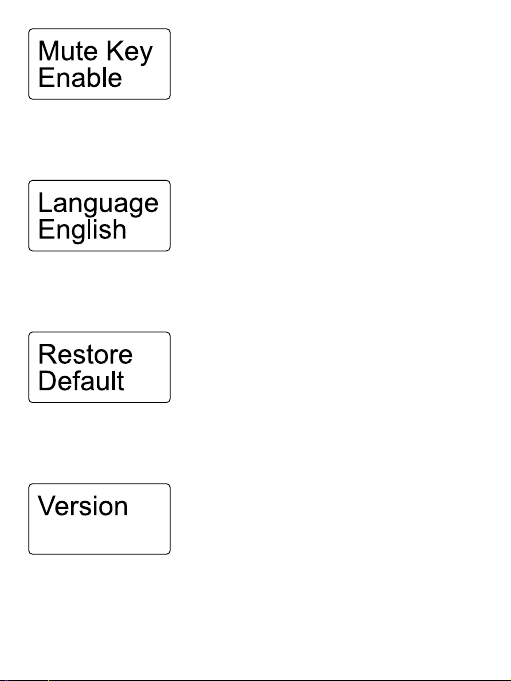
Set Mute Key
Enable or Disable Mute key button function.Default is “Enable”.
Language Setting.
English or
(Chinese) are available. Default is "English".
Restore Default Setting.
Yes: restores default settings, No: exits restore default settings.
Version of the Vlink2 TX's firmware.
1.1.3
16
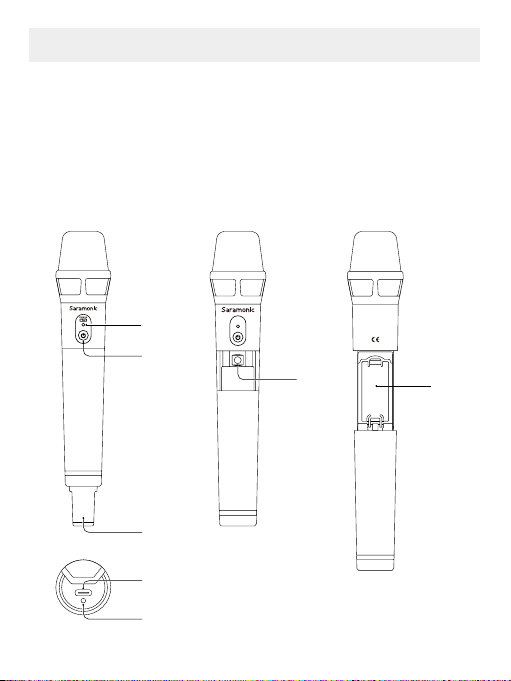
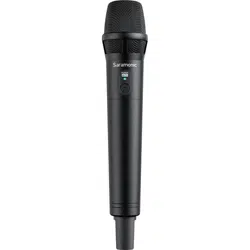
Handheld Transmitter Vlink2 HU
The Vlink2 HU is a 2.4GHz wireless handheld microphone transmitter
that features a lightweight and durable aluminum alloy body, built-in
antenna and easy operation. It can be powered by a rechargeable Li-
ion battery or two AA batteries. The Vlink2 HU works with the Vlink2 RX
on various audio capturing occasions.
Product Structure
PPairair
①
⑤
⑦
②
③
⑥
④
Vlink2 HU
Made in China
17

Power Indicator
Status Indicators
Disconnected Slowly flashing blue light
Pairing Quickly flashing blue light
Paired Successfully Solid blue light
Mute ON (Paired Successfully) Flashing red light
Low Battery Solid red light
Power/Mute Button
Status Operation
Power ON Long press for at least three seconds
Power OFF Long press until it turns off
Mute ON
Short press
Mute OFF
Antenna
For optimal sound detection, please do not hold the antenna.
Pair Button
Battery Compartment
Accepts two AA batteries or an customized rechargeable Li-ion battery.
Charging Indicator
Status Indicators
Fully charged Solid blue light
Charging Solid red light
Error occurs Flashing red light
USB-C Charging Port (DC 5V)
18
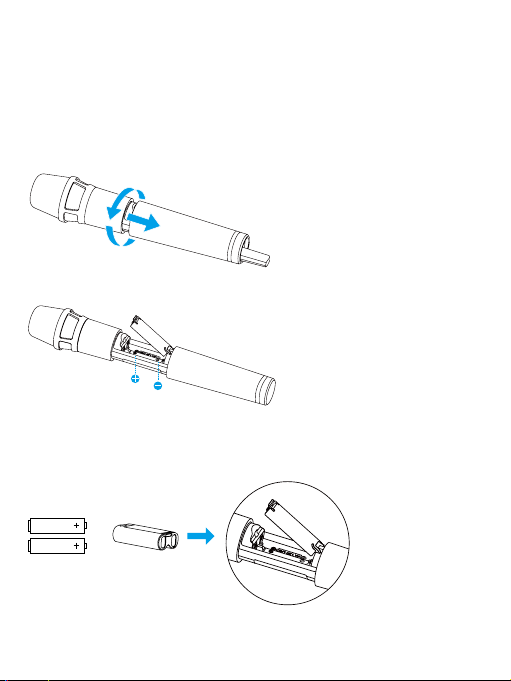
Battery Installation
The transmitter is powered by a rechargeable Li-ion battery or two AA
batteries. To install batteries, please follow these steps:
1. Turn the grip anti-clockwise, and pull the grip down until the battery
compartment is visible.
2. Open the battery cover as shown.
3.Insert two two AA batteries or the supplied Li-ion battery into the
battery compartment, respecting the polarity indicated inside the
compartment.
4.Close the battery cover, and turn the grip clockwise to tighten it.
19
or

Note:
1. Replacing the batteries during operation may generate a large
noise. Be sure to turn off the unit before replacing the batteries.
2. When not using the device for a long period of time, remove the
batteries.
3. AA batteries can not be charged with this unit. Please do not charge
the unit when two AA batteries are inserted. The charging indicator
will blink red light when this error occurs.
Operation Guide
How to connect the Vlink2 TX with the Vlink2 RX
Before leaving factory, the transmitter and the receiver of a set are
pre-paired. Therefore, the connection will be established once they
are powered on. If transmitters and receiver are disconnected, please
follow below steps:
1. Turn on the receiver and the transmitter.
2. Press the buttons “+” and “-“ for 3 seconds at the same time to enter
pairing mode. The RF lights of receiver and transmitter flash quickly.
3. The system is paired successfully when the RF lights of the TX and RX
turn solid blue.
20
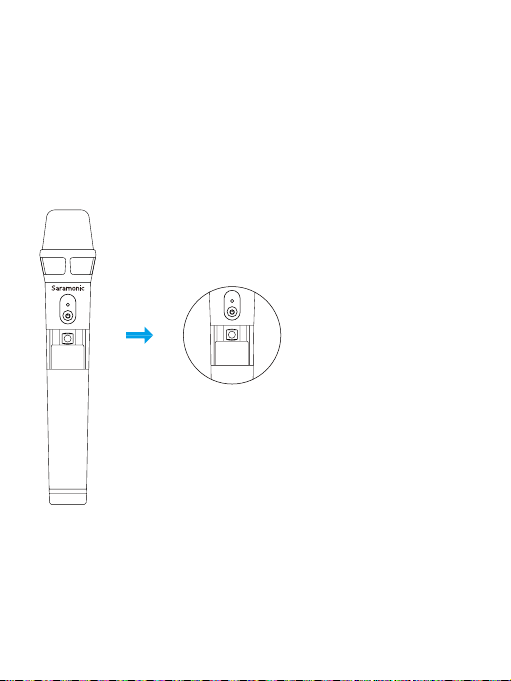
How to connect the Vlink2 HU with the Vlink2 RX
1. Long press the Power button to turn on the Vlink2 RX and the Vlink2
HU.
2. Long press the Pair button of the Vlink2 RX (press the buttons “+”
and “-” at the same time) to enter pairing mode. The RF indicator will
flash rapidly in blue.
3. Unscrew the grip and press the Pair button of the Vlink2 HU to enter
pairing mode. The indicator will flash rapidly in blue.
4. The system is paired successfully when the indicators of the RX and
HU turn solid blue.
PPairair
PPair
21
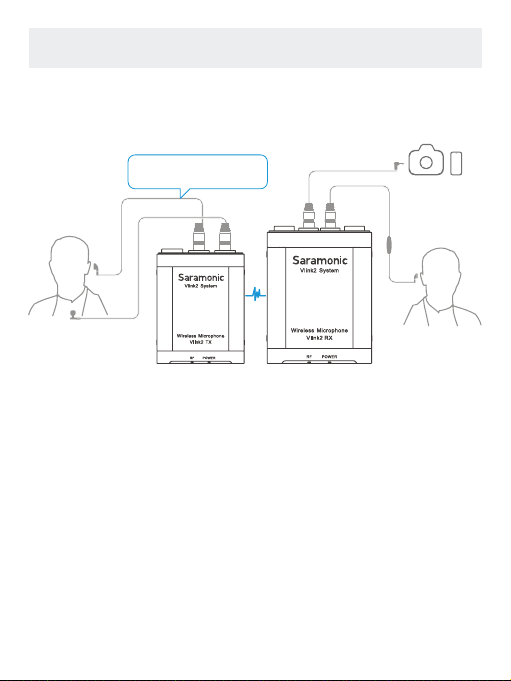
TX+RX
Connection Example
22
Compatible with TRS/TRRS
headphones (not included)
MIC
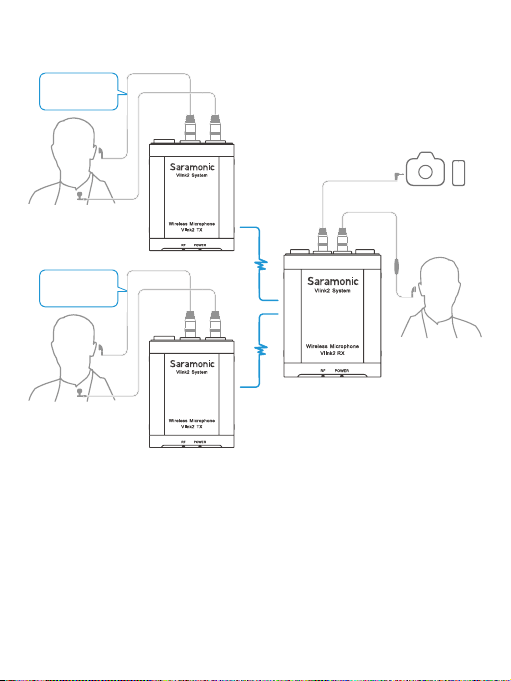
TX+
TX+
RX
23
Compatible with
TRS/TRRS headphones
(not included)
MIC
Compatible with
TRS/TRRS headphones
(not included)

Vlink2 Kit1 (TX+RX)
• Transmitter (1)
• Receiver (1)
• DK3 Omnidirectional Lavalier Microphone Kit (1)
• Headphone (talkback and monitoring function) (1)
• USB-C Charging Cable (2)
• 3.5mm TRS Locking-type Plug Audio Cable for Cameras (1)
• 3.5mm TRRS Locking-type Plug Audio Cable for Smartphone (1)
• Cold Shoe Mount Adapter (1)
• Detachable Antenna (3)
• Belt clip (2)
• Hard Protective Case (1)
Vlink2 Kit2 (TX+TX+RX)
• Transmitter (2)
• Receiiver (1)
• DK3 Omnidirectional Lavalier Microphone Kit (2)
• Headphone (talkback and monitoring function) (1)
• USB-C Charging Cable (3)
• 3.5mm TRS Locking-type Plug Audio Cable for Cameras (1)
• 3.5mm TRRS Locking-type Plug Audio Cable for Smartphone (1)
• Cold Shoe Mount Adapter (1)
• Detachable Antenna (4)
• Belt clip (3)
• Hard Protective Case (1)
Vlink2 HU
• Vlink2 HU Handheld Microphone Transmitter (1)
• Type-C Charging Cable (1)
• Rechargeable Li-ion Battery (1)
Packing Lists
24

Oscillator type GFSK
Carrier frequencies 2.4GHz (2404-2476MHz)
Operating range Up to 328'(100m)
Audio connector
3.5 mm LINE OUT jack
3.5mm MIC IN & 3.5mm headphone output jack
Built-in battery capacity 3000mAh
Continuous use time 19 hrs
Power requirements Built-In Li-ion Battery or USB-C DC 5V
Signal-to-noise ratio 75 dB or more
Headphone output level 30mW (32 Ω)
RF output power
<
10mW
Frequency response 35Hz-18KHz
Dimensions 88x69x23mm
Weight 189g(6.6oz)
Operating temperature -10 °C to 50 °C
Storage temperature –20 °C to +55°C
Specifications
Vlink2 RX
25

Oscillator type GFSK
Carrier frequencies 2.4GHz (2404-2476MHz)
Operating range Up to 328'(100m)
Audio output connector 3.5mm headphone output
Audio input connector 3.5mm MIC IN/LINE IN jack
Built-in battery capacity 2000mAh
Continuous use time 20 hrs
Power requirements Built-In Li-ion Battery or USB-C DC 5V
Signal-to-noise ratio 75 dB or more
Sensitivity Lavalier microphone: -40dB.
Headphone output level 30mW (32 Ω)
RF output power
<
10mW
Frequency response 35Hz-18KHz
Dimensions 70x52x23mm
Weight 121g(4.3oz)
Operating temperature -10 °C to 50 °C
Storage temperature –20 °C to +55°C
Vlink2 TX
26

Oscillator type GFSK
Carrier frequencies 2.4GHz (2404-2476MHz)
Operating range Up to 164'(50m)
Battery capacity 1600mAh Li-ion battery or 2*AA battery
Continuous use time
With the supplied Li-ion battery: 22 hrs
With 2 AA batteries: 20 hrs
Power requirements
Li-ion battery or 2*AA batteries or USB-C
DC 5V
Signal-to-noise ratio 75 dB or more
Microphone type Condenser microphone
Sensitivity -35dB
RF output power
<
10mW
Frequency response 35Hz-18KHz
Dimensions 49.2x263.1x49.2mm
Weight 225g(7.9oz)
Operating temperature -10 °C to 50 °C
Storage temperature –20 °C to +55°C
Vlink2 HU
27
40611096
Shenzhen Jiayz Photo Industrial., Ltd
S
For better recording experience, the application
is recommended.

