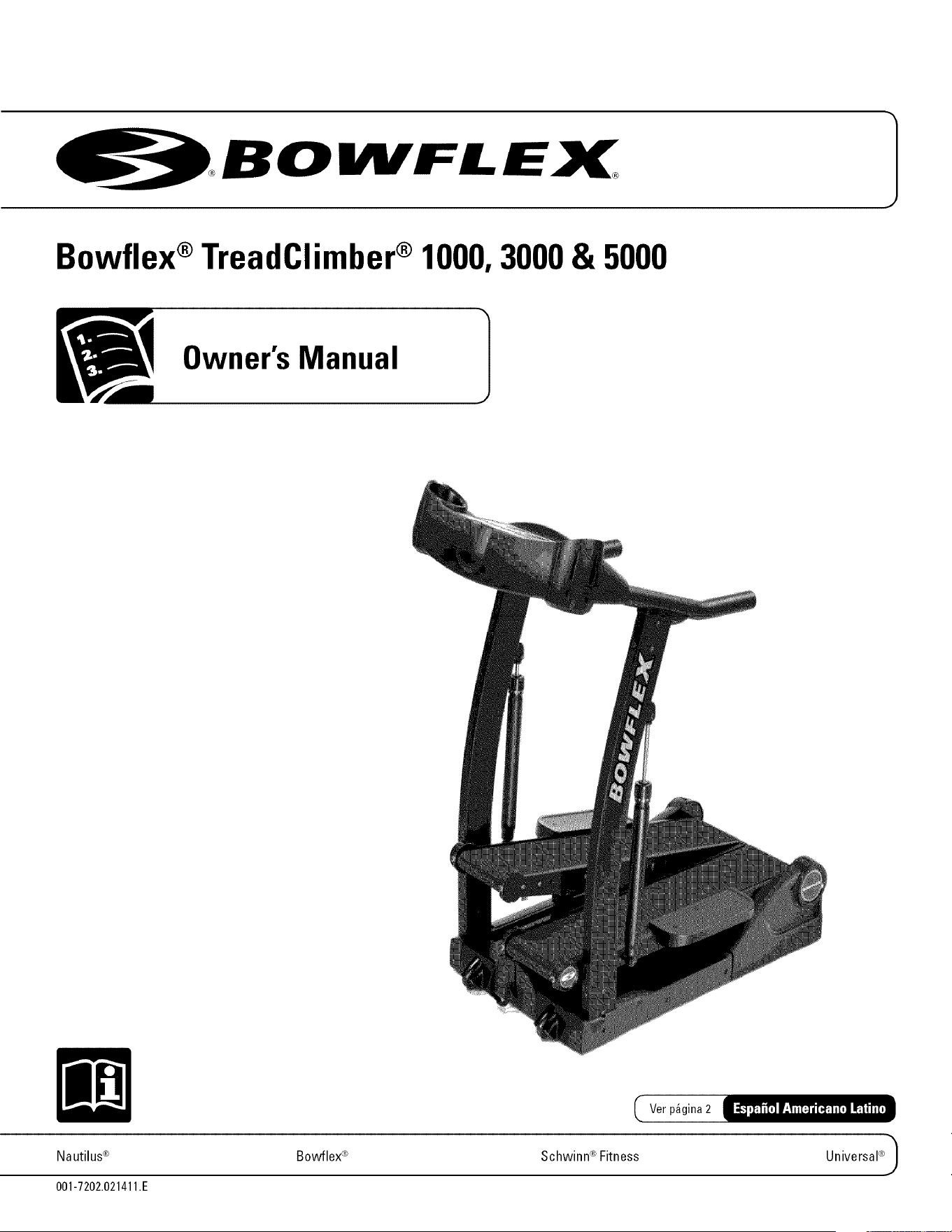
Bowflex ®TreadClimber ® 1000, 3000 & 5000
Owner's Manual
Nautilus ®
001-7202.021411.E
Ver p_gina 2
Bowflex ®
®
Schwinn Fitness
Universal®_
Preface
CONGRATULATIONS!
Thank you for making the Bowflex ® TreadClimber ®fitness machine a part of your exercise and fitness activities.
For years to come, you will be able to rely on Bowflex ® craftsmanship and durability as you pursue your personal
fitness goals.
The Bowflex ®TreadClimber ®fitness machine enables you to shape and monitor your workouts to:
Increase your energy level
Increase cardiovascular and aerobic fitness
Increase your muscle strength
Decrease your overall percentage of body fat
Whether you are just getting started in an exercise program or are already in good shape, the Bowflex ®
TreadOlimber ® fitness machine is designed to be an efficient, easy and fun way to achieve an enhanced level of
fitness. Accurately monitor your progress while you exercise your wayto a slimmer and healthier body.
This Owner's Manual contains all the information you need to operate and enjoy your Bowflex ®TreadClimber ®
fitness machine. Please read this Owner's Manual before getting onto the Bowflex ® TreadOlimber ® fitness
machine and working out.
Take your time and have fun!
Tovalidate warranty support,keep the original proofof purchaseandrecordthe following information:
Serial Number Date of Purchase
To register your product warranty, go to: www.bowflex.com/register
Or call 1 (800)605-3369.
If you have questions or problems with your product, please call 1(800)605-3369.
Para obtener este manual en Espa_ol Latino Americano vaya a:
http://www.bowflex.c om
Nautilus, Inc., (800)NAUTILUS/ (800)628-8458,www.Nautiluslnc.com - Customer Service: North America (800)605-3369,tcinquiries@
nautilus.com I outside U.S.+01-360-859-5180I Printed in China I © 2007Nautilus, Inc., All rights reserved. TM and ® indicate a trademark
or registered trademark. Nautilus, Inc. (www.Nautiluslnc.com) trademarks include NAUTILUS®, B0WFLEX®, SCHWlNN® and
UNIVERSAL®and respective Iogos. Other trademarks are the property of their respective owners.
Table of Contents
Important Safety Instructions .........................................................................................................................................1
Emergency Stop Procedures ............................................................................................................................2
Grounding Instructions ......................................................................................................................................2
Safety Warning Labels and Serial Number ....................................................................................................3
Product Specifications ....................................................................................................................................................4
Product Features ...............................................................................................................................................................
Care of the Machine .........................................................................................................................................................
Helpful Hints .........................................................................................................................................................
Initial Service .......................................................................................................................................................
Accessories .........................................................................................................................................................
Cleaning ................................................................................................................................................................
Inspecting .............................................................................................................................................................
Moving and Storage ...........................................................................................................................................7
Getting Started ..................................................................................................................................................................8
Before You Start ..................................................................................................................................................8
Hydraulic Cylinder Adjustment (Workout Level) ............................................................................................9
Pausing or Stopping .........................................................................................................................................10
TC 5000 Displays ................................................................................................................................................11
Quick Start .................................................................................................................................................11
Remote Heart Module (TC 5000 0nly) ....................................................................................................12
Information About Heart Rate Calculations .........................................................................................13
TC3000 Features ................................................................................................................................................14
TC3000 Displays ........................................................................................................................................14
TCl000 Features ................................................................................................................................................14
TCl000 Displays ........................................................................................................................................14
Setting English or Metric Measurement Units (TC3000 and TC5000).......................................................15
Workout Instructions .....................................................................................................................................................16
Determining Your Fitness Level ......................................................................................................................16
Treadmill Workout .............................................................................................................................................18
Locking the Treadles for Treadmill Workout ........................................................................................18
Starting a Treadmill Workout ..........................................................................................................................19
Starting a Stair-Stepper Workout ...................................................................................................................20
Bowflex ®TreadClimber ®Workout .................................................................................................................21
Preliminary TreadClimber ® Workout ..............................................................................................................23
Maintenance ...................................................................................................................................................................25
Routine Maintenance .......................................................................................................................................25
Walking Belt and Deck Lubrication ...............................................................................................................25
Walking Belt Adjustment .................................................................................................................................26
Belt Alignment ...........................................................................................................................................26
Belt Tension ...............................................................................................................................................26
Walking Belt Electrostatic Reduction ............................................................................................................27
Speed Sensor Verification (TCl000 only) ......................................................................................................28
Calibration (TC3000 and TC5000 only) ............................................................................................................29
If Calibration Fails (Screen Displays "Cal Fail" Message) .................................................................30
Explanation of Calibration Display Messages (for information only) ...............................................30
Determining Hours Used ..................................................................................................................................30
Troubleshooting ..............................................................................................................................................................31
Hot or Burning Odors ........................................................................................................................................31
Getting Access to the TC5000/3000 Motor Control Board (MCB) .............................................................31
Troubleshooting Procedures ...........................................................................................................................32
Parts .....................................................................................................................................................................36
Bowflex ®TreadClimber ®100% Satisfaction Guarantee .........................................................................................39
Important Safety Instructions
This icon means a potentially hazardous situation which, if not avoided, could result in death or serious injury.
Before using this equipment, obey the following warnings:
To decrease the risk of burns, electric shock, or injury to persons, read and understand the complete Owner's
Manual. Failure to follow these guidelines can cause a serious or possibly fatal electrical shock or other
serious injury. Keep Owner's Manual for future reference.
Read and understand all warnings on this machine. If at any time the Warning stickers become loose,
unreadable or dislodged, contact Nautilus ® Customer Service for replacement stickers.
• To reduce the risk of electrical shock or unsupervised usage of the equipment, always
unplug the power cord from the wall outlet and/or the machine and wait5 minutes
before cleaning, maintaining or repairing the machine. Place the power cord in a secure
location.
• Children must not be let on or near to this machine. Moving parts and other features of the machine can be
dangerous to children.
• Not intended for use by anyone under 14years of age.
• Consult a physician before you start an exercise program. Stop exercising if you feel pain or tightness in your
chest, become short of breath, or feel faint. Contact your doctor before you use the machine again. Use the
values calculated or measured bythe machine's computer for reference purposes only.
• Before each use, examine this machine for damage to power cord, power receptacle, loose parts or signs of
wear. Do not use if found in this condition. Contact Nautilus ® Customer Service for repair information.
• Maximum user weight limit: 300 lb. (136 kg). Bo not use if you are over this weight.
• This machine is for home use only.
• Do not wear loose clothing or jewelry. This machine contains moving parts. Do not put fingers or other
objects into moving parts of the exercise equipment.
• Always wear rubber soled athletic shoes when you use this machine. Bo not use the machine with bare feet or
only wearing socks.
• Set up and operate this machine on a solid, level, horizontal surface.
• Use caution when you step on and off the machine. Use the supplied foot support platforms for stability
before walking on the moving belt.
• Do not operate this machine outdoors or in moist or wet locations.
• Keep at least 39" (1 m) on each side of the machine and 79" (2 m) behind the machine clear. This is the
recommended safe distance for access and passage around and emergency dismounts from the machine.
Keep third parties out of this space when machine is in use.
• Bo not over exert yourself during exercise. Operate the machine in the manner described in this manual.
• Read, understand, and test the Emergency Stop Procedure before use.
• Keep the walking belt clean and dry.
• Keep power cord away from heat source and hot surfaces.
• Bo not drop or put objects into any opening of the machine.
Owner's Manual 1
Important Safety Instructions
• Always connect the power cord to a circuit capable of handling 10 amperes with no other loads applied.
• Connect this machine to a correctly grounded outlet; consult a licensed electrician for assistance.
• Bo not operate where aerosol products are being used.
• Do not let liquid touch the electronic controller. If it does, the controller must be inspected and tested for safety
by an approved technician before it can be used again.
• The electrical wiring for the residence in which the machine will be used must obey the applicable local and
provincial requirements.
• This machine is designed for walking. Do not try to run on this machine.
Emergency Stop Procedures
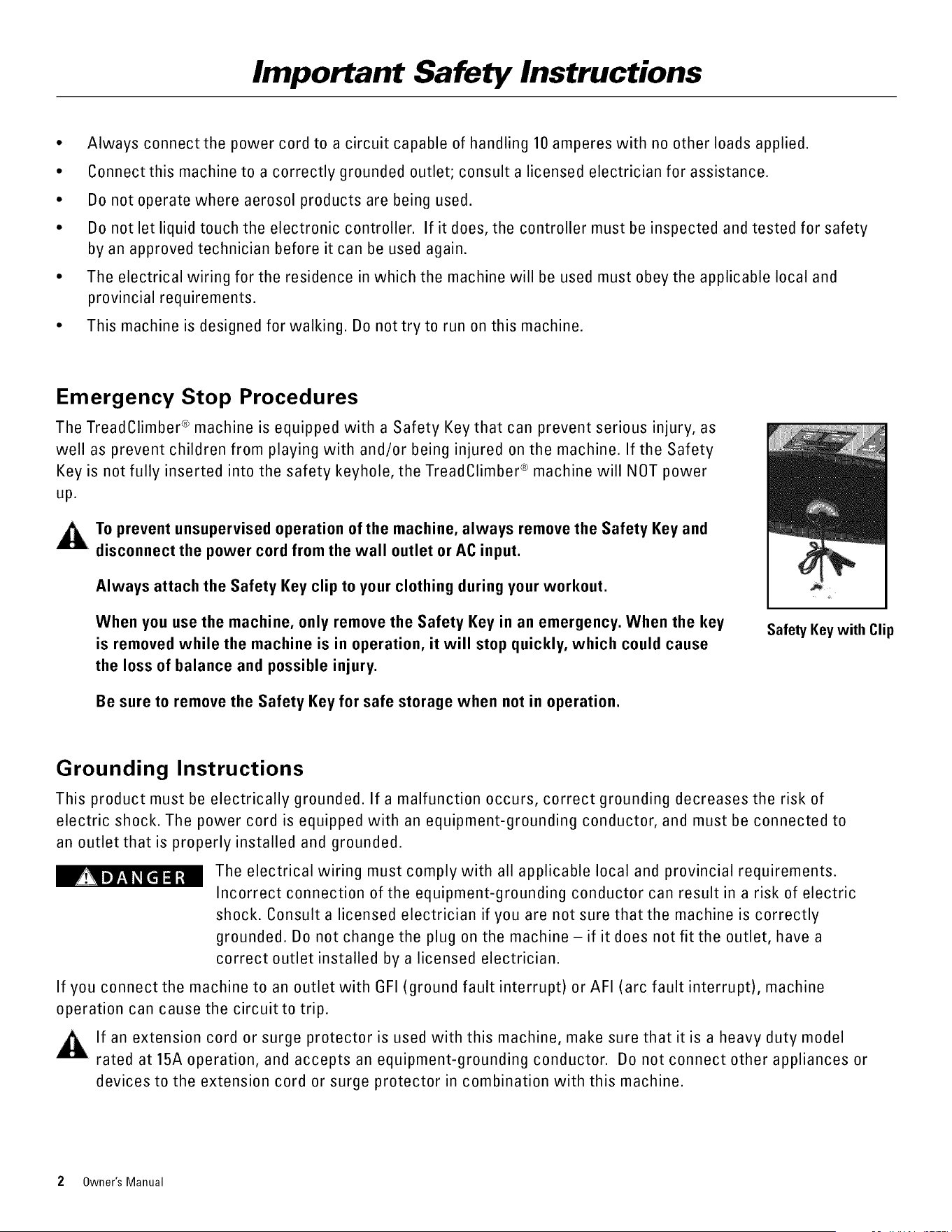
The TreadClimber ® machine is equipped with a Safety Key that can prevent serious injury, as
well as prevent children from playing with and/or being injured on the machine. If the Safety
Key is not fully inserted into the safety keyhole, the TreadClimber ® machine will NOT power
up.
To prevent unsupervised operation of the machine, always remove the Safety Key and
disconnect the power cord from the wall outlet or AC input.
Always attach the Safety Key clip to your clothing during your workout.
When you use the machine, only remove the Safety Key in an emergency. When the key
is removed while the machine is in operation, it will stop quickly, which could cause
the loss of balance and possible injury.
Be sure to remove the Safety Key for safe storage when not in operation.
SafetyKeywith Clip
Grounding Instructions
This product must be electrically grounded. If a malfunction occurs, correct grounding decreases the risk of
electric shock. The power cord is equipped with an equipment-grounding conductor, and must be connected to
an outlet that is properly installed and grounded.
The electrical wiring must comply with all applicable local and provincial requirements.
Incorrect connection of the equipment-grounding conductor can result in a risk of electric
shock. Consult a licensed electrician if you are not sure that the machine is correctly
grounded. Bo not change the plug on the machine-if it does not fit the outlet, have a
correct outlet installed by a licensed electrician.
If you connect the machine to an outlet with GFI (ground fault interrupt) or AFI (arc fault interrupt), machine
operation can cause the circuit to trip.
If an extension cord or surge protector is used with this machine, make sure that it is a heavy duty model
rated at 15A operation, and accepts an equipment-grounding conductor. Bo not connect other appliances or
devices to the extension cord or surge protector in combination with this machine.
2 Owner's Manual
Important Safety Instructions
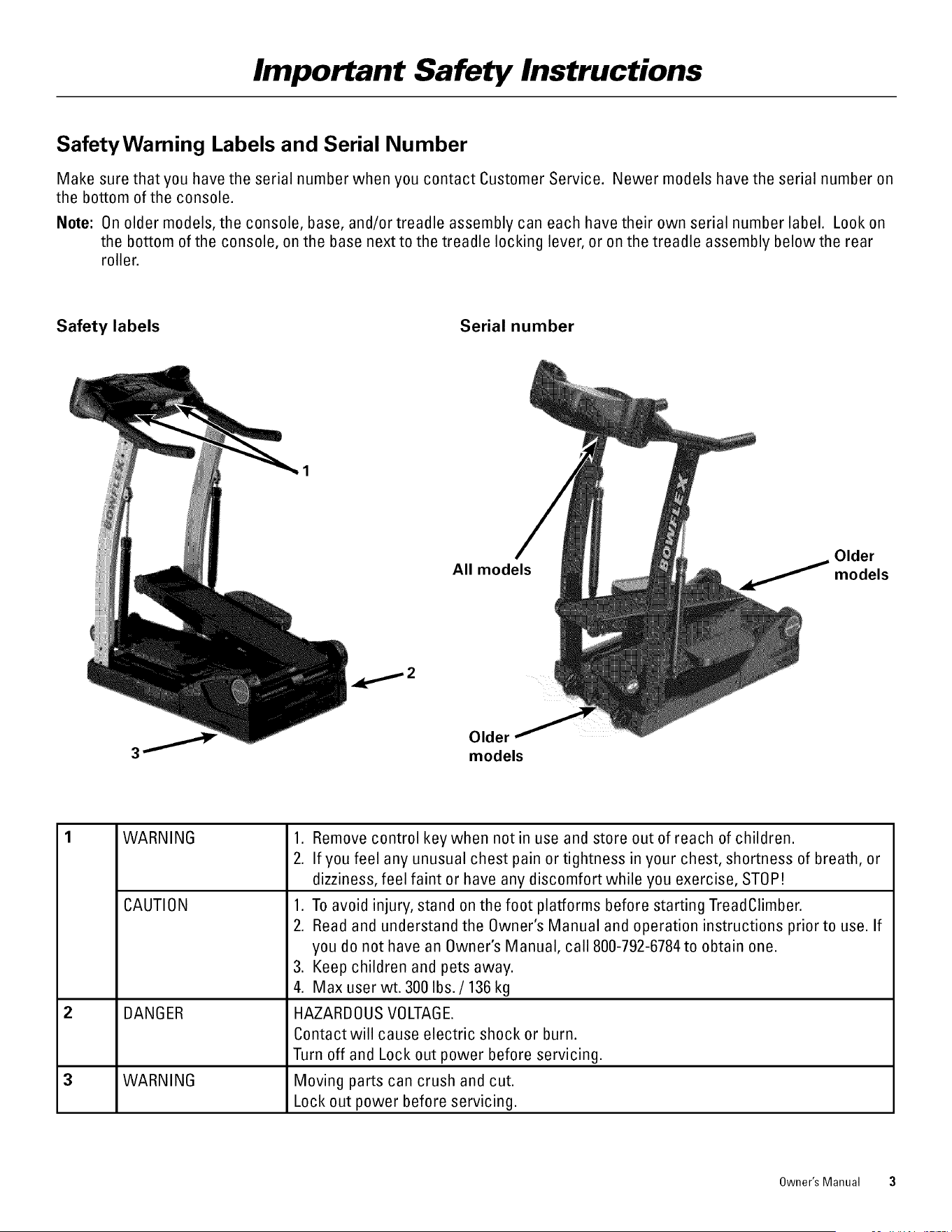
SafetyWarning Labels and Serial Number
Make sure that you have the serial number when you contact Customer Service. Newer models have the serial number on
the bottom of the console.
Note: On older models, the console, base, and/or treadle assembly can each have their own serial number label. Look on
the bottom of the console, on the base next to the treadle locking lever, or on the treadle assembly below the rear
roller.
Safety labels
Serial number
All models
Older
._//models
Older
models
WARNING
CAUTION
DANGER
3 WARNING
1. Remove control key when not in use and store out of reach of children.
2. If you feel any unusual chest pain or tightness in your chest, shortness of breath, or
dizziness, feel faint or have any discomfort while you exercise, STOP!
1. To avoid injury, stand on the foot platforms before starting TreadClimber.
2. Read and understand the Owner's Manual and operation instructions prior to use. If
you do not have an Owner's Manual, call 800-792-6784 to obtain one.
3. Keep children and pets away.
4. Max user wt. 300 Ibs./136 kg
HAZARE)0US VOLTAGE
Contact will cause electric shock or burn.
Turn off and Lock out power before servicing.
Moving parts can crush and cut.
Lock out power before servicing.
Owner's Manual 3
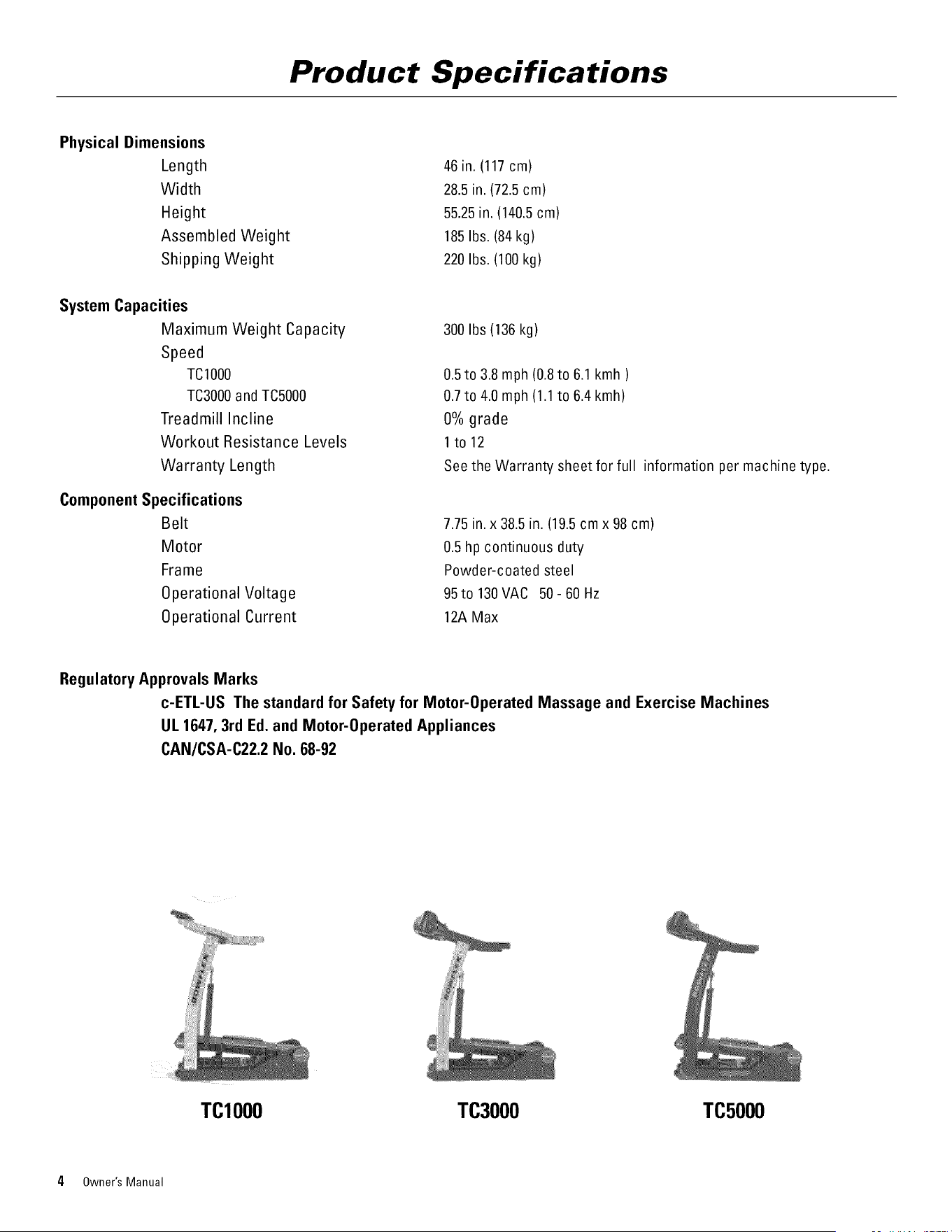
Product Specifications
Physical Dimensions
Length
Width
Height
Assembled Weight
Shipping Weight
System Capacities
Maximum Weight Capacity
Speed
TCIO00
TC3000and TC5000
Treadmill Incline
Workout Resistance Levels
Warranty Length
Component Specifications
Belt
Motor
Frame
Operational Voltage
Operational Current
46 in. (117cm)
28.5in. (72.5cm)
55.25in. (140.5cm)
185Ibs. (84kg)
220Ibs. (100 kg)
300Ibs (136 kg)
0.5to 3.8 mph (0.8to 6.1 kmh )
0.7to 4.0 mph (1.1to 6.4 kmh)
0% grade
1to 12
See the Warranty sheet for full information per machine type.
7.75in. x 38.5in. (19.5cmx 98 cm)
0.5 hp continuous duty
Powder-coated steel
95to 130VAC 50- 60Hz
12AMax
Regulatory Approvals Marks
c-ETL-US The standard for Safety for Motor-0perated Massage and Exercise Machines
UL 1647, 3rd Ed. and Motor-0perated Appliances
CAN/CSA-C22.2 No. 68-92
TCIO00 TC3000 TC5000
4 Owner's Manual
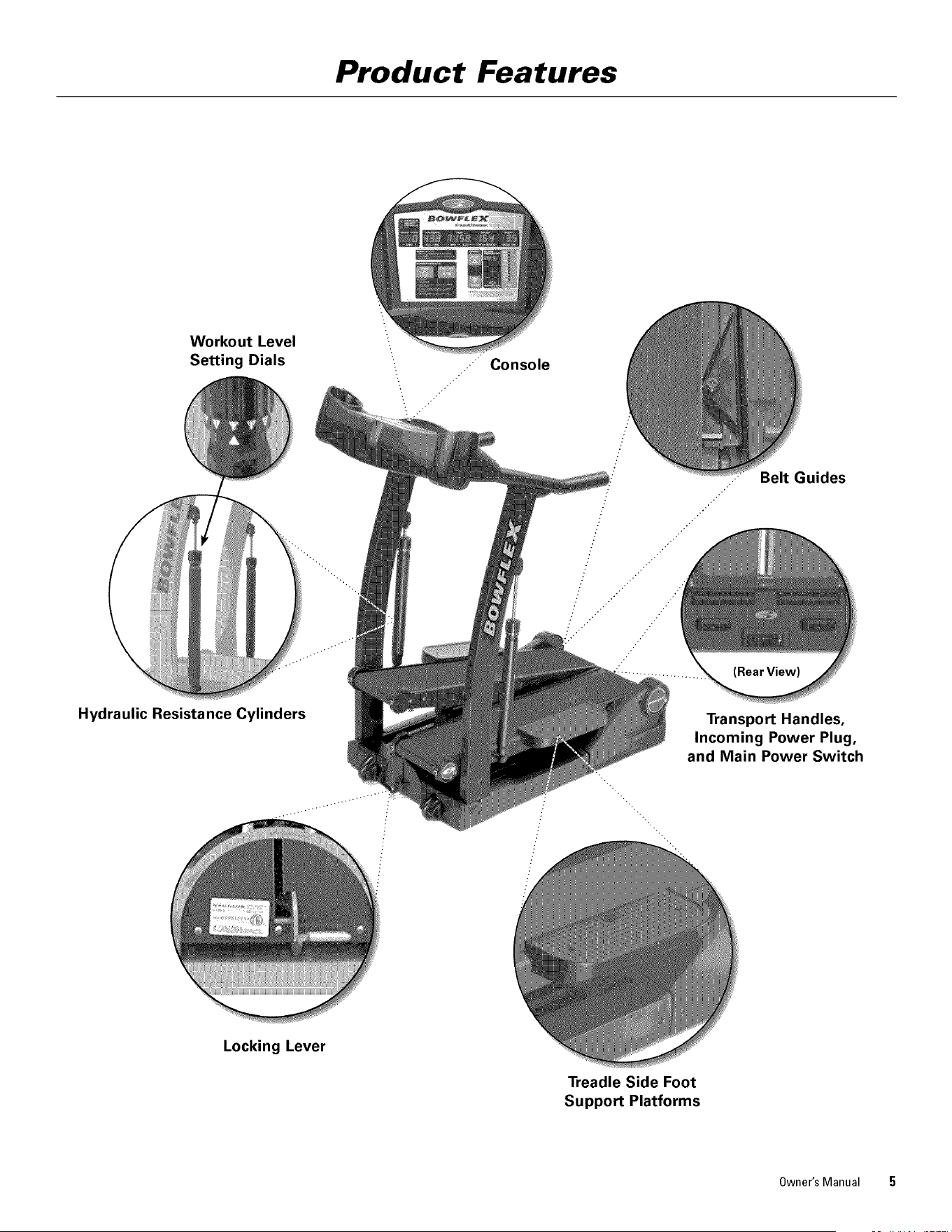
Product Features
Workout Level
Setting Dials
Belt Guides
Hydraulic Resistance Cylinders
Locking Lever
Transport Handles,
Incoming Power Plug,
and Main Power Switch
Treadle Side Foot
Support Platforms
Owner's Manual 5
Care of the Machine
The safety and integrity designed into a machine can only be maintained when the equipment is regularly
examined for damage and repaired. It is the sole responsibility of the owner to ensure that regular maintenance is
performed. The owner is responsible to make sure that regular maintenance is done. Worn or damaged
components must be repaired or replaced immediately. 0nly manufacturer supplied components should be used to
maintain/repair the equipment.
To reduce the risk of electrical shock or unsupervised usage of the equipment, always unplug the power cord
from the wall outlet and/or the machine and wait 5 minutes before cleaning, maintaining or repairing the machine.
Place the power cord in a secure location.
Helpful Hints
Read all of the maintenance instructions thoroughly before assembling or using the TreadClimber® exercise machine. In some
cases, an assistant is required to perform the necessary maintenance tasks. All references to the right or left side, and to the
front or back are made as if you were on the TreadClimber ® machine ready to exercise.
Initial Service
Use a soft, clean towel to wipe off the dust that may have accumulated during shipping. The TreadClimber ® machine will
require minor assembly. Refer to the Assembly Manual for details.
Accessories
For the best performance, we recommend that the TreadClimber ® machine be placed on a rubber mat. The rubber mat will
help keep dust and debris away from the TreadClimber ® machine's motor and belts, reduce noise and increase stability.
The Bowflex ®TreadClimber ® Machine Mat is professional quality and is designed specifically to fit under the Bowflex ®
TreadClimber ® fitness machine. The mat protects floors from scratches and perspiration and it gives workout areas a
clean, finished look.
For more information on this accessory and other Bowflex ® products available from Nautilus, Inc. visit:
www.bowflex.com or www.treadclimber.com.
Cleaning
General cleaning of the TreadClimber ® machine will prolong the life of the machine and improve performance. Keep the unit
clean by dusting regularly. Be sure to dust the exposed part of the deck on either side of the walking belts and the side rails.
Clean the top of the belt with a damp, soapy cloth and wipe carefully and thoroughly with a dry cloth. Be careful to keep
liquid away from inside the base frame and beneath the belts.
NOTICE: Bo not clean with a petroleum based solvent or an automotive cleaner. Be sure to keep the Console free of
moisture.
Bo not use the machine until the Walking Belts are dry.
Inspecting
1. Visually inspect the TreadClimber ® machine every time you use itfor wear, damage, or loose parts.
2. Inspect the frame for any rust, bubbling, or paint chips during the weekly cleaning. The salt in perspiration can
damage the unpainted surfaces.
3. Inspect the belts for excessive wear during lubrication. Adjust the belt tension if necessary.
6 Owner's Manual
Care of the Machine
Moving and Storage
The TreadClimber® machine weighs 185 pounds (84 kg.) when fully assembled, and should never be moved or lifted
without taking some precautionary care.
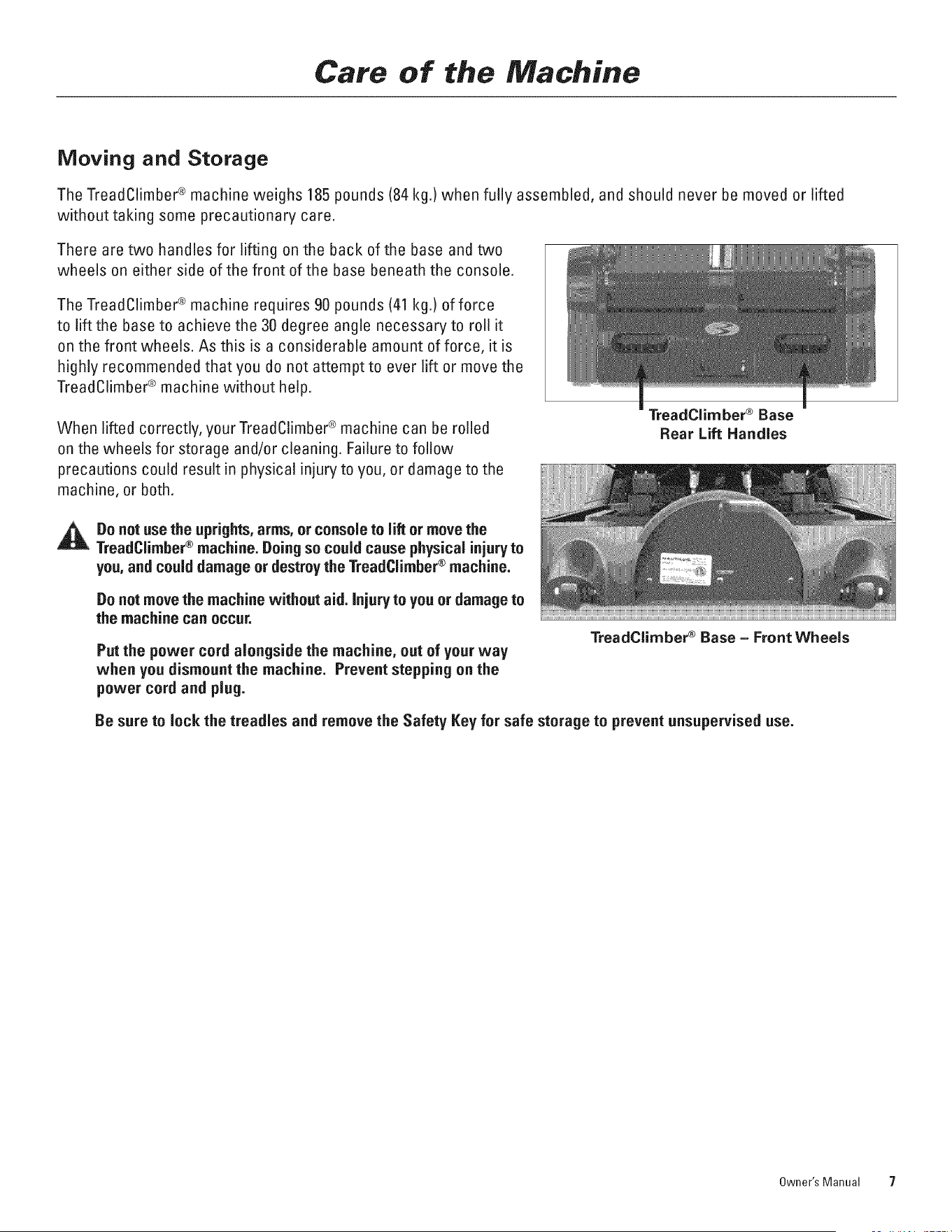
There are two handles for lifting on the back of the base and two
wheels on either side of the front of the base beneath the console.
The TreadClimber ® machine requires 90 pounds (41 kg.) of force
to lift the base to achieve the 30 degree angle necessary to roll it
on the front wheels. As this is a considerable amount of force, it is
highly recommended that you do not attempt to ever lift or move the
TreadClimber ® machine without help.
When lifted correctly, your TreadClimber ® machine can be rolled
on the wheels for storage and/or cleaning. Failure to follow
precautions could result in physical injury to you, or damage to the
machine, or both.
TreadClimber ® Base
Rear Lift Handles
Do not use the uprights,arms, or console to lift or move the
TreadClimber® machine. Doing so could cause physical injury to
you, and could damage or destroy the TreadClimber® machine.
Do not move the machine without aid. injury to you or damage to
the machine can occur.
Put the power cord alongside the machine, out of your way
when you dismount the machine. Prevent stepping on the
power cord and plug.
TreadCiirnber ® Base - Front Wheels
De sure to lock the treadles and remove the Safety Key for safe storage to prevent unsupervised use.
Owner's Manual 7
Getting Started
Read and follow the Important Safety Information in this manual. Make sure that any other machine users review
the same Important Safety Information and that the manual is available to them.
Before You Start
1. Make sure you have verified or calibrated your machine as outlined in Step 19 of the Assembly Manual or the
"Maintenance" section in this manual before using your Bowflex ® TreadClimber ® exercise machine for the first time.
2. Betermine your workout mode (treadmill, stair-stepper or TreadClimber ® mode).
Note: If you are working out in treadmill mode, you must lock the treadles by following the locking procedure in the
Locking the Treadles section in this manual.
.
Follow the procedure in the Adjusting Workout Level Settings section in this manual to adjust the workout level
settings on the Hydraulic Cylinders.
Do not stand on the machine while adjusting hydraulic resistance settings.
,
,
If you are using the Heart Rate Monitor, obey the heart rate transmitter chest-strap directions in the Remote Heart
Module section in this manual.
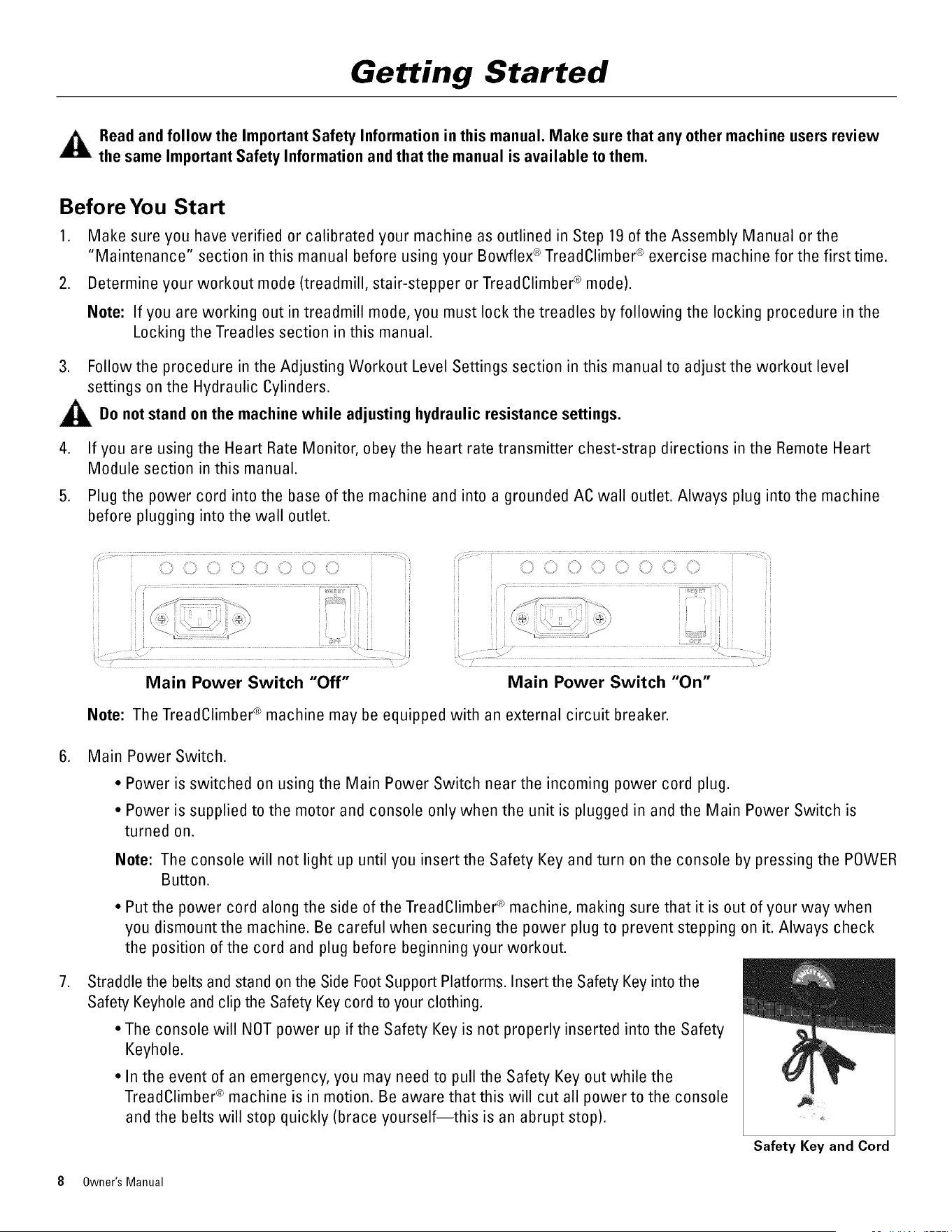
Plug the power cord into the base of the machine and into a grounded AC wall outlet. Always plug into the machine
before plugging into the wall outlet.
_iiii__iii_C_ _i_,_iiiiii__iiii_,,_iii_,_iii__¸,
Main Power Switch "Off"
.......................................................................................................................
i /_ i ¸ : ¸¸ _ i ¸ i i
Main Power Switch "On"
Note: The TreadClimber ® machine may be equipped with an external circuit breaker.
,
,
Main Power Switch.
• Power is switched on using the Main Power Switch near the incoming power cord plug.
• Power is supplied to the motor and console only when the unit is plugged in and the Main Power Switch is
turned on.
Note: The console will not light up until you insert the Safety Key and turn on the console by pressing the POWER
Button.
• Put the power cord along the side of theTreadClimber ® machine, making sure that it is out of your way when
you dismount the machine. Be careful when securing the power plug to prevent stepping on it. Always check
the position of the cord and plug before beginning your workout.
Straddle the belts and stand on the Side Foot Support Platforms. Insert the Safety Key into the
Safety Keyhole and clip the Safety Key cord to your clothing.
• The console will NOT power up if the Safety Key is not properly inserted into the Safety
Keyhole.
• lnthe event of an emergency, you may need to pull the Safety Key out while the
TreadClimber ® machine is in motion. Be aware that this will cut all power to the console
and the belts will stop quickly (brace yourself--this is an abrupt stop).
Safety Key and Cord
8 Owner's Manual
Getting Started
• Always wear the Safety Key clip attached to your clothing during workouts to be prepared to stop the belts quickly, if
ever necessary.
8. Begin your workout using the appropriate instructions for your selected workout mode.
Note: Resistance and weight settings are what your Bowflex ® TreadClimber®exercise machine uses to calculate
your calories burned. If your Workout Level or weight changes, you must remember to change your settings
on the console to ensure accurate calorie burn calculation.
Keep your hands on the support Handlebars and stay as near the front of the machine as is comfortable in order to
stay in balance on the Treadles.
Keep your foot in the center of each Treadle. Do not let your feet cross in front of your body as you increase the
speed.
When you are experienced and comfortable with the action of the machine, you can allow your arms to swing freely in
a natural walking motion. This workout will activate your core muscles. It should only be done by those comfortable with
not holding on to the Handlebars.
Hydraulic Cylinder Adjustment (Workout Level)
CONSULTYOUR PHYSICIAN BEFORESTARTING ANY EXERCISE PROGRAM.
Only he or she can determine the exercise program that is appropriate for
your particular age and condition. If you are new to exercise, are
pregnant, have a heart condition or any physical limitation, failure to
consult your physician before engaging in physical exercise, such as
using the Bowflex TreadClimber ® exercise machine, could result in
serious injury or death. If while using the Bowflex ® TreadClimber ®
exercise machine you have any pain, tightness in your chest, an irregular
heartbeat, shortness of breath, feel faint, light-headed, dizzy or have any
pain or discomfort, STOP and consult your physician immediately.
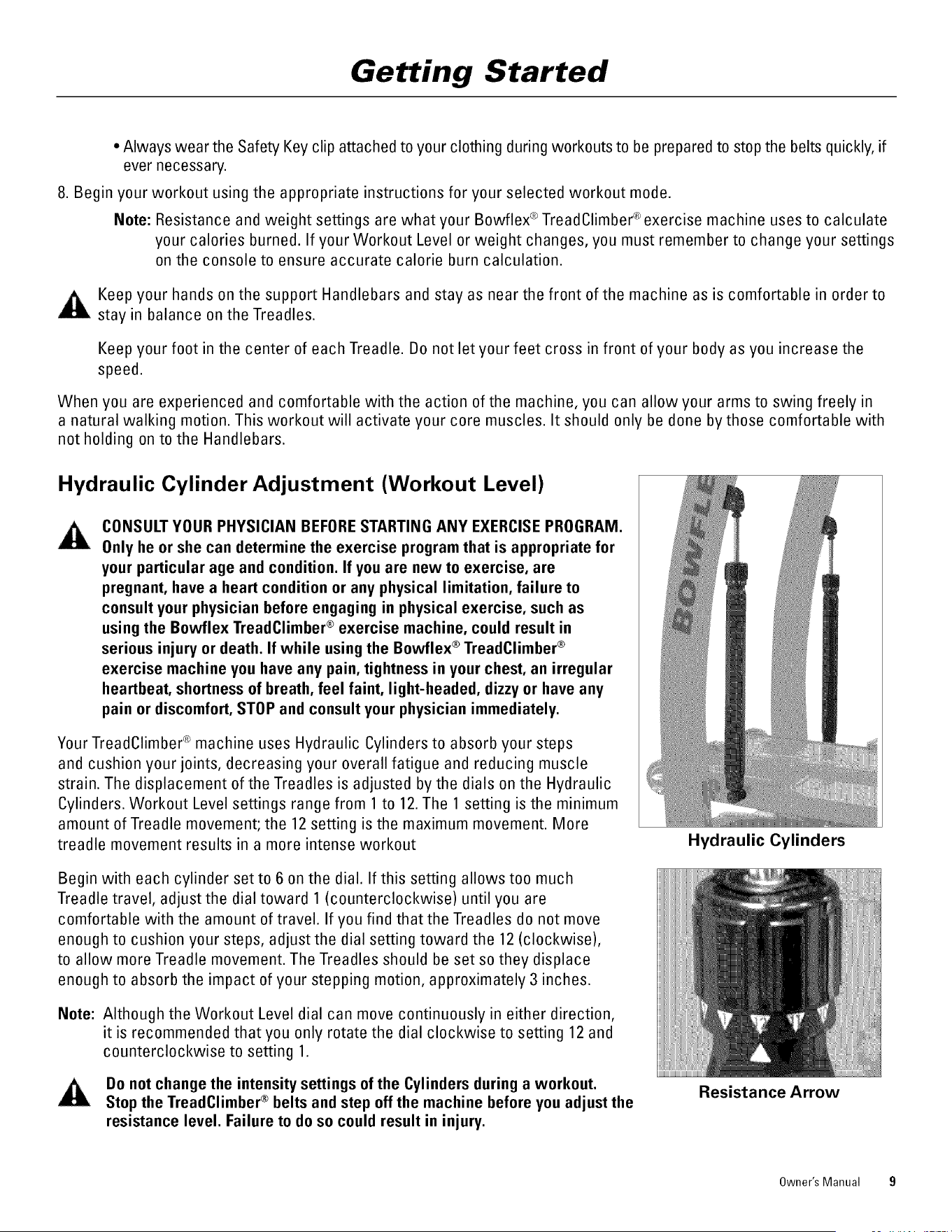
Your TreadClimber ® machine uses Hydraulic Cylinders to absorb your steps
and cushion your joints, decreasing your overall fatigue and reducing muscle
strain. The displacement of the Treadles is adjusted by the dials on the Hydraulic
Cylinders. Workout Level settings range from 1 to 12. The 1 setting is the minimum
amount of Treadle movement; the 12 setting is the maximum movement. More
treadle movement results in a more intense workout
Begin with each cylinder set to 6 on the dial. If this setting allows too much
Treadle travel, adjust the dial toward 1 (counterclockwise) until you are
comfortable with the amount of travel. If you find that the Treadles do not move
enough to cushion your steps, adjust the dial setting toward the 12 (clockwise),
to allow more Treadle movement. The Treadles should be set so they displace
enough to absorb the impact of your stepping motion, approximately 3 inches.
Note: Although the Workout Level dial can move continuously in either direction,
it is recommended that you only rotate the dial clockwise to setting 12 and
counterclockwise to setting 1.
Do not change the intensity settings of the Cylinders during a workout.
Stop the TreadClimber ® belts and step off the machine before you adjust the
resistance level. Failure to do so could result in injury.
Hydraulic Cylinders
Resistance Arrow
Owner's Manual 9
Getting Started
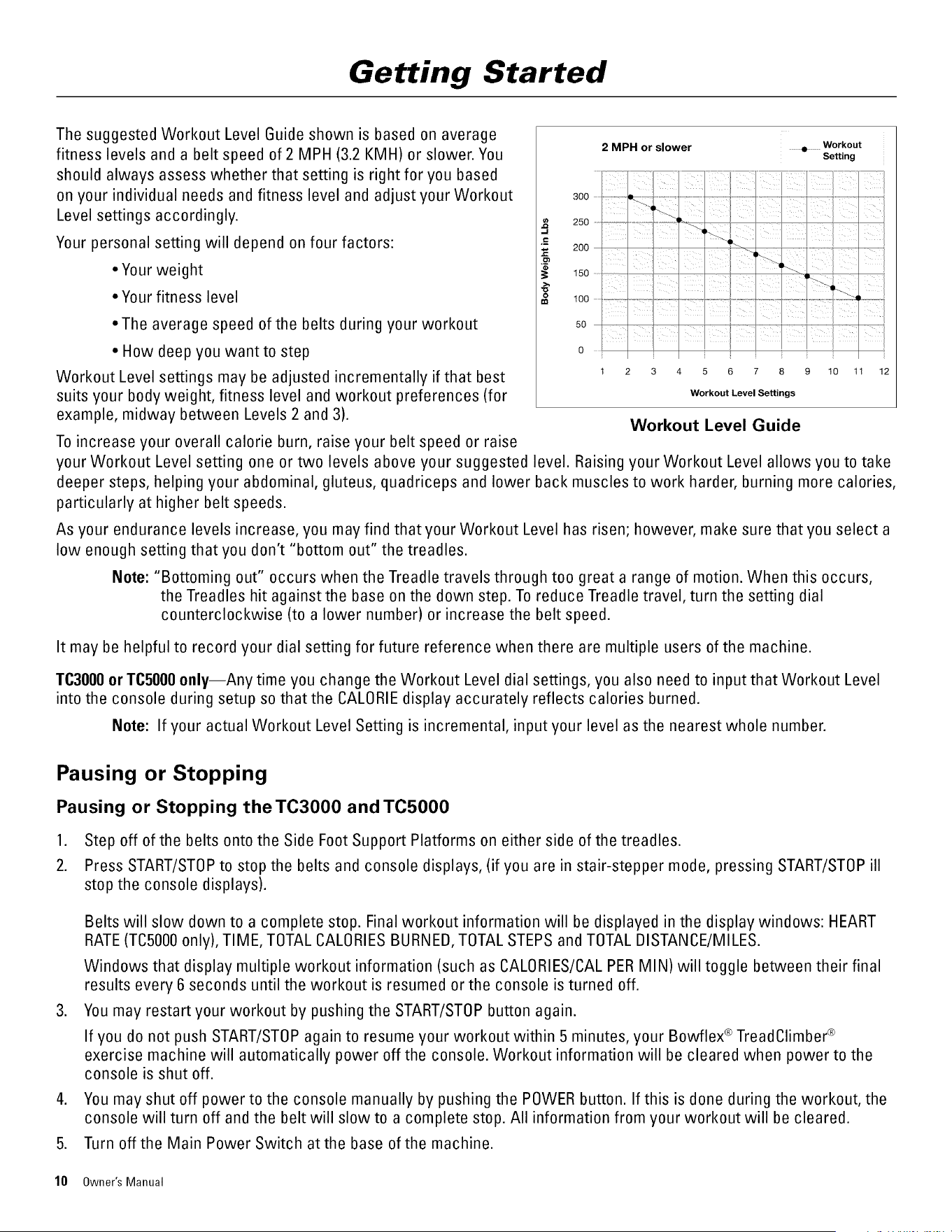
The suggested Workout Level Guide shown is based on average
fitness levels and a belt speed of 2 MPH (3.2 KMH) or slower. You
should always assess whether that setting is right for you based
on your individual needs and fitness level and adjust your Workout
Level settings accordingly.
Your personal setting will depend on four factors:
• Your weight
• Your fitness level
• The average speed of the belts during your workout
• How deep you want to step
Workout Level settings may be adjusted incrementally if that best
suits your body weight, fitness level and workout preferences (for
example, midway between Levels 2 and 3).
To increase your overall calorie burn, raise your belt speed or raise
..I
.T=
o
2 MPH or slower • Workout
Setting
300 ........
250
I//
3 6 7 8 9 t0 tl 12
Workout Level Settings
Workout Level Guide
your Workout Level setting one or two levels above your suggested level. Raising your Workout Level allows you to take
deeper steps, helping your abdominal, gluteus, quadriceps and lower back muscles to work harder, burning more calories,
particularly at higher belt speeds.
As your endurance levels increase, you may find that your Workout Level has risen; however, make sure that you select a
low enough setting that you don't "bottom out" the treadles.
Note: "Bottoming out" occurs when the Treadle travels through too great a range of motion. When this occurs,
the Treadles hit against the base on the down step. To reduce Treadle travel, turn the setting dial
counterclockwise (to a lower number) or increase the belt speed.
It may be helpful to record your dial setting for future reference when there are multiple users of the machine.
TC3000 or TC5000 only--Any time you change the Workout Level dial settings, you also need to input that Workout Level
into the console during setup so that the CALORIE display accurately reflects calories burned.
Note: If your actual Workout Level Setting is incremental, input your level as the nearest whole number.
Pausing or Stopping
Pausing or Stopping the TC3000 and TC5000
1. Step off of the belts onto the Side Foot Support Platforms on either side of the treadles.
2. Press START/STOP to stop the belts and console displays, (if you are in stair-stepper mode, pressing START/STOP ill
stop the console displays).
.
Belts will slow down to a complete stop. Final workout information will be displayed in the display windows: HEART
RATE (TO5000 only), TIME, TOTAL CALORIES BURNED, TOTAL STEPS and TOTAL DISTANCE/MILES.
Windows that display multiple workout information (such as CALORIES/CAL PER MIN) will toggle between their final
results every 6 seconds until the workout is resumed or the console is turned off.
You may restart your workout by pushing the START/STOP button again.
If you do not push START/STOP again to resume your workout within 5 minutes, your Bowflex ® TreadClimber ®
exercise machine will automatically power off the console. Workout information will be cleared when power to the
console is shut off.
4. You may shut off power to the console manually by pushing the POWER button. If this is done during the workout, the
console will turn off and the belt will slow to a complete stop. All information from your workout will be cleared.
5. Turn off the Main Power Switch at the base of the machine.
10 Owner's Manual
Getting Started
6. Lock the treadles and remove the Safety Key for safe storage when not in use.
Note: In case of emergency, you may shut off power by pulling out the Safety Key but this will abruptly stop the belts as
well as clearing all workout information from the display windows.
Pausing or Stopping the TO1000
1. Step off the treadles onto the side foot support platforms.
2. Press START/STOP to slow the belts to a stop.
3. If you wish to reset your workout numbers, press the RESET button. RESETonly works when the belts are not moving.
4. Make sure to turn off the base power switch and unplug the TreadClimber ® machine when you have finished your
workout.
5. Lock the treadles and remove the Safety Key for safe storage when not in use.
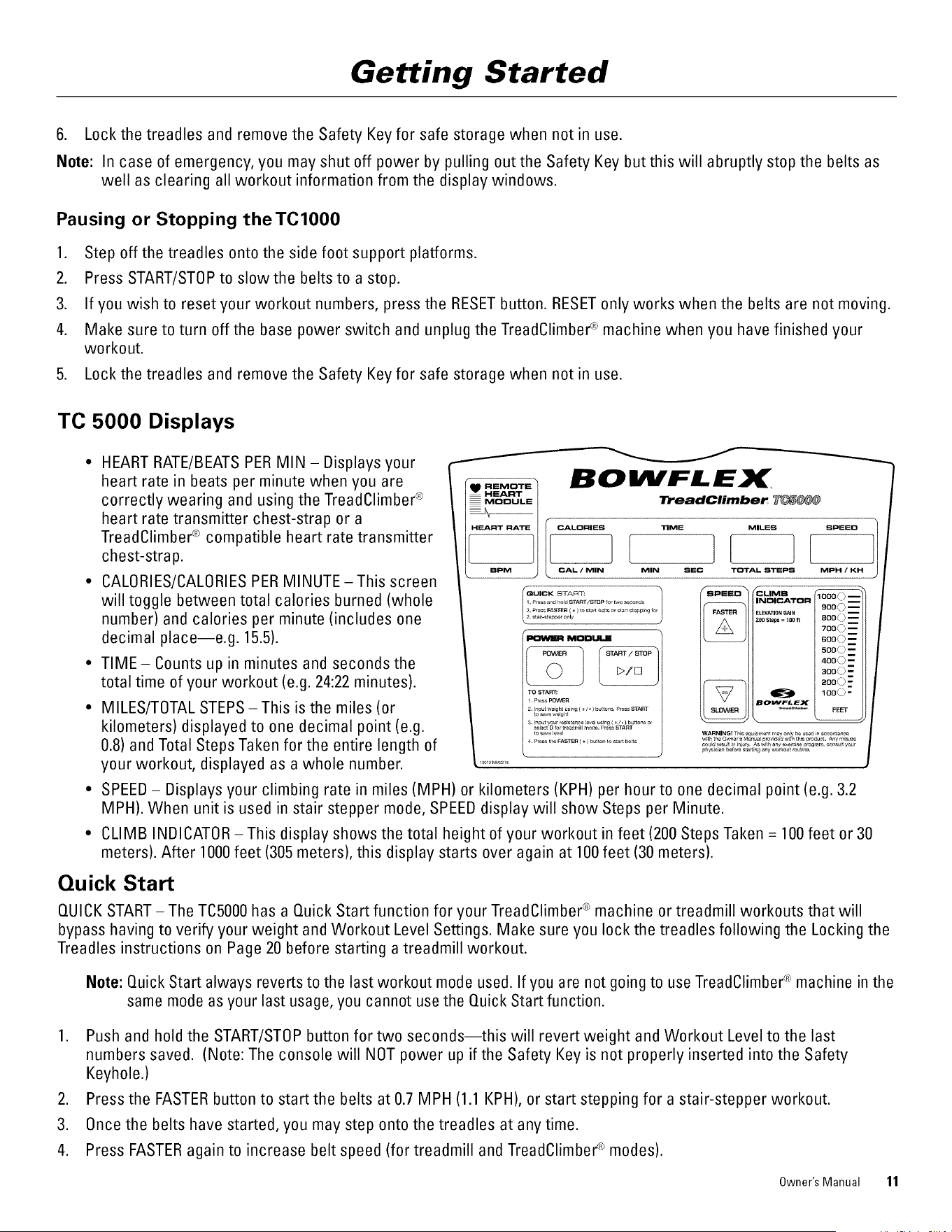
TO 5000 Displays
HEART RATE/BEATS PER MIN - Displays your
heart rate in beats per minute when you are
correctly wearing and using the TreadClimber ®
heart rate transmitter chest-strap or a
TreadClimber ® compatible heart rate transmitter
chest-stra p.
CALORIES/CALORIES PER MINUTE-This screen
will toggle between total calories burned (whole
number) and calories per minute (includes one
decimal place--e.g. 15.5).
TIME- Counts up in minutes and seconds the
total time of your workout (e.g. 24:22 minutes).
MILES/TOTAL STEPS -This is the miles (or
kilometers) displayed to one decimal point (e.g.
0.8) and Total Steps Taken for the entire length of
your workout, displayed as a whole number.
BOIIVFLEX
"_eadClimbe_ _
CALORIES TIME MILES SPEED
CAL / MIN MIN SEC TOTAL STEPS MPH / KH
QUICK £TA FRT:
1. ProsandholdSTART/_P fortwoseconds
2. P,_s FASTER{÷) to s_ beltso, st_ steppingre,
2. staJr-_t_pp_only
TO STAR_
1. PressPOWER
2. Iput w_ight usEn9 ( +/ • ) butte_s, PRESSSTART
to save_e_¢,t
3, Input yo_r resistance level usng ( ÷/. ) buttons or
select O for treadmill mo_e, Press START
to save level
4. Press the FASTER ( + ) butturt to starl belts
SPEED CLIMB
INDICATOR
I FASTER [ ELEVATIONGAIN
200St_ps= I00ft
BOWFLEX
I SLOWER I _
soo© m
7fXIO m
8_ 0 _---
50o© --
a_©-
a_ 0 _=
loo©-
FEEt
SPEED - Displays your climbing rate in miles (MPH) or kilometers (KPH) per hour to one decimal point (e.g. 3.2
MPH). When unit is used in stair stepper mode, SPEED display will show Steps per Minute.
CLIMB INDICATOR -This display shows the total height of your workout in feet (200 Steps Taken = 100 feet or 30
meters). After 1000 feet (305 meters), this display starts over again at 100feet (30 meters).
Quick Start
QUICK START - The TC5000 has a Quick Start function for your TreadClimber ® machine or treadmill workouts that will
bypass having to verify your weight and Workout Level Settings. Make sure you lock the treadles following the Locking the
Treadles instructions on Page 20 before starting a treadmill workout.
Note: Quick Start always reverts to the last workout mode used. If you are not going to use TreadClimber ® machine in the
same mode as your last usage, you cannot use the Quick Start function.
1. Push and hold the START/STOP button for two seconds--this will revert weight and Workout Level to the last
numbers saved. (Note: The console will NOT power up if the Safety Key is not properly inserted into the Safety
Keyhole.)
2. Press the FASTER button to start the belts at 0.7 MPH (1.1 KPH), or start stepping for a stair-stepper workout.
3. Once the belts have started, you may step onto the treadles at any time.
4. Press FASTER again to increase belt speed (for treadmill and TreadClimber ® modes).
Owner's Manual 11
Getting Started
Remote Heart Module (TC5000 Only)
The Remote Heart Module and Heart Rate Transmitter are features on the TC5000 only.
You may use the TC5000 Heart Rate Transmitter or any other Heart Rate Transmitter that is
compatible with the TreadClimber ® TC5000to help keep yourself within your target fat-burning
heart rate zone during your workout.
Note: A Heart Rate Strap with a non-replaceable battery is included. It will work with
Polar® watches. To promote contact it should be wet with perspiration, gel or
saliva. To promote maximum life, it must be rinsed with clean water and dried
after each use. A one year life is expected, replacement part T41 is available
from Polar® or Nautilus, Inc.
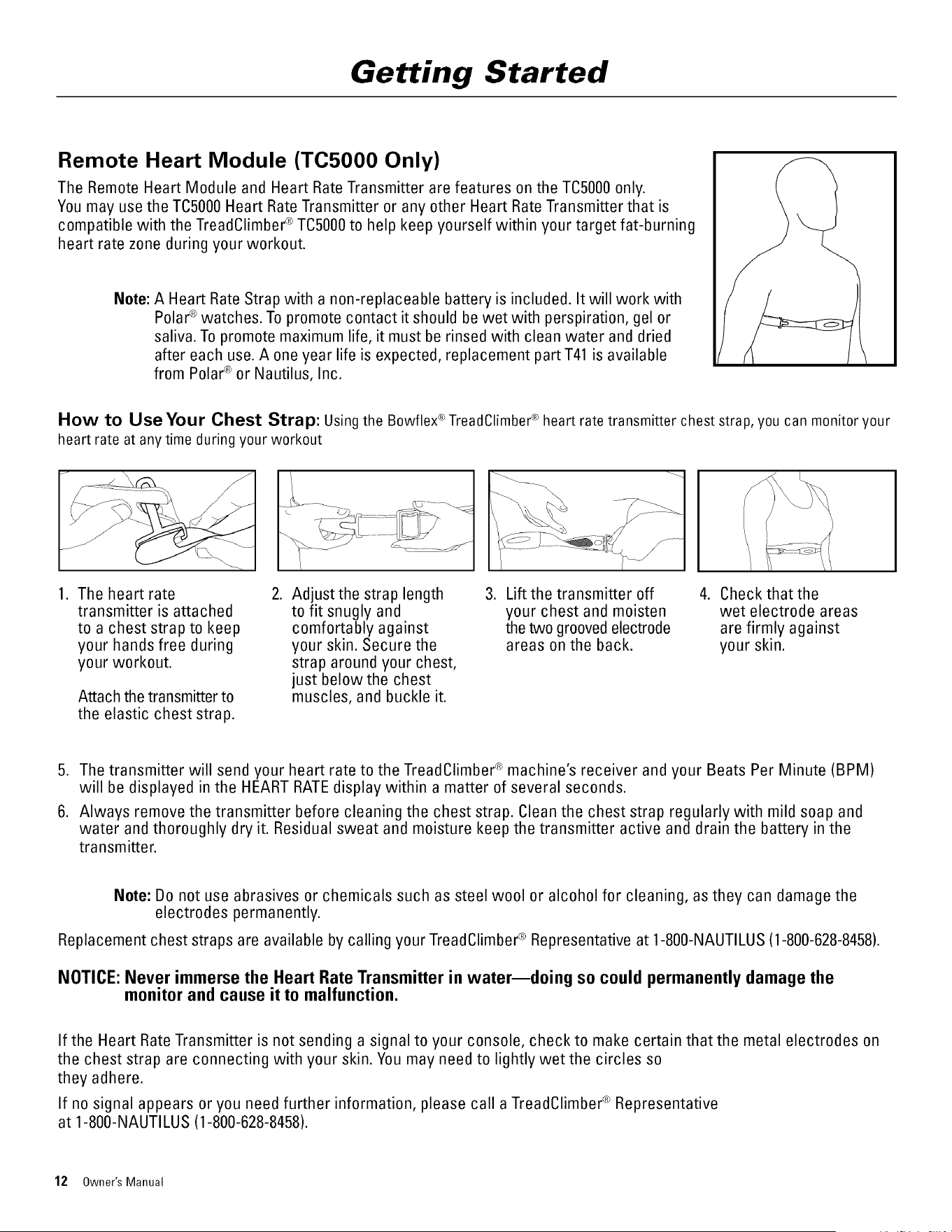
How to Use Your Chest Strap: Using the Bowflex_ TreadClimber_>heart rate transmitter chest strap, you can monitor your
heart rate at any time during your workout
1. The heart rate 2. Adjust the strap length 3. Lift the transmitter off 4.
transmitter is attached to fit snugly and your chest and moisten
to a chest strap to keep comfortably against the two grooved electrode
your hands free during your skin. Secure the areas on the back.
your workout, strap around your chest,
just below the chest
muscles, and buckle it.
Attach the transmitter to
the elastic chest strap.
Check that the
wet electrode areas
are firmly against
your skin.
5. The transmitter will send your heart rate to the TreadClimber ® machine's receiver and your Beats Per Minute (BPM)
will be displayed in the HEART RATEdisplay within a matter of several seconds.
6. Always remove the transmitter before cleaning the chest strap. Clean the chest strap regularly with mild soap and
water and thoroughly dry it. Residual sweat and moisture keep the transmitter active and drain the battery in the
transmitter.
Note: Do not use abrasives or chemicals such as steel wool or alcohol for cleaning, as they can damage the
electrodes permanently.
Replacement chest straps are available by calling your TreadClimber ® Representative at 1-800-NAUTILUS (1-800-628-8458).
NOTICE: Never immerse the Heart Rate Transmitter in water--doing so could permanently damage the
monitor and cause it to malfunction.
If the Heart Rate Transmitter is not sending a signal to your console, check to make certain that the metal electrodes on
the chest strap are connecting with your skin. You may need to lightly wet the circles so
they adhere.
If no signal appears or you need further information, please call a TreadClimber ® Representative
at 1-800-NAUTILUS (1-800-628-8458).
12 Owner's Manual
Getting Started
Information About Heart Rate Calculations
Your maximum heart rate generally declines with age from about 220 Beats Per Minute (BPM) in childhood to about
160 BPM at age 60. This fall in heart rate is fairly linear, decreasing by approximately one BPM per year. There is no
strong evidence to suggest that training influences the decline in maximum heart rate. It should be remembered that
individuals of the same age might have quite different maximum heart rates. It is more accurate to calculate this value by
undergoing a stress test than by using an age-related formula.
On the other hand, your resting heart rate is greatly influenced by endurance training. The typical adult has a resting
heart rate of about 72 BPM whereas highly trained runners may have readings of 40 BPM
or lower.
The heart rates below are based on average fitness of persons of the age indicated. You may be more or less fit, and
your actual maximum heart rate and zones may be correspondingly higher or lower. You should therefore consult your
physician for the maximum heart rate that is right for you and the heart rates that you can safely exercise at.
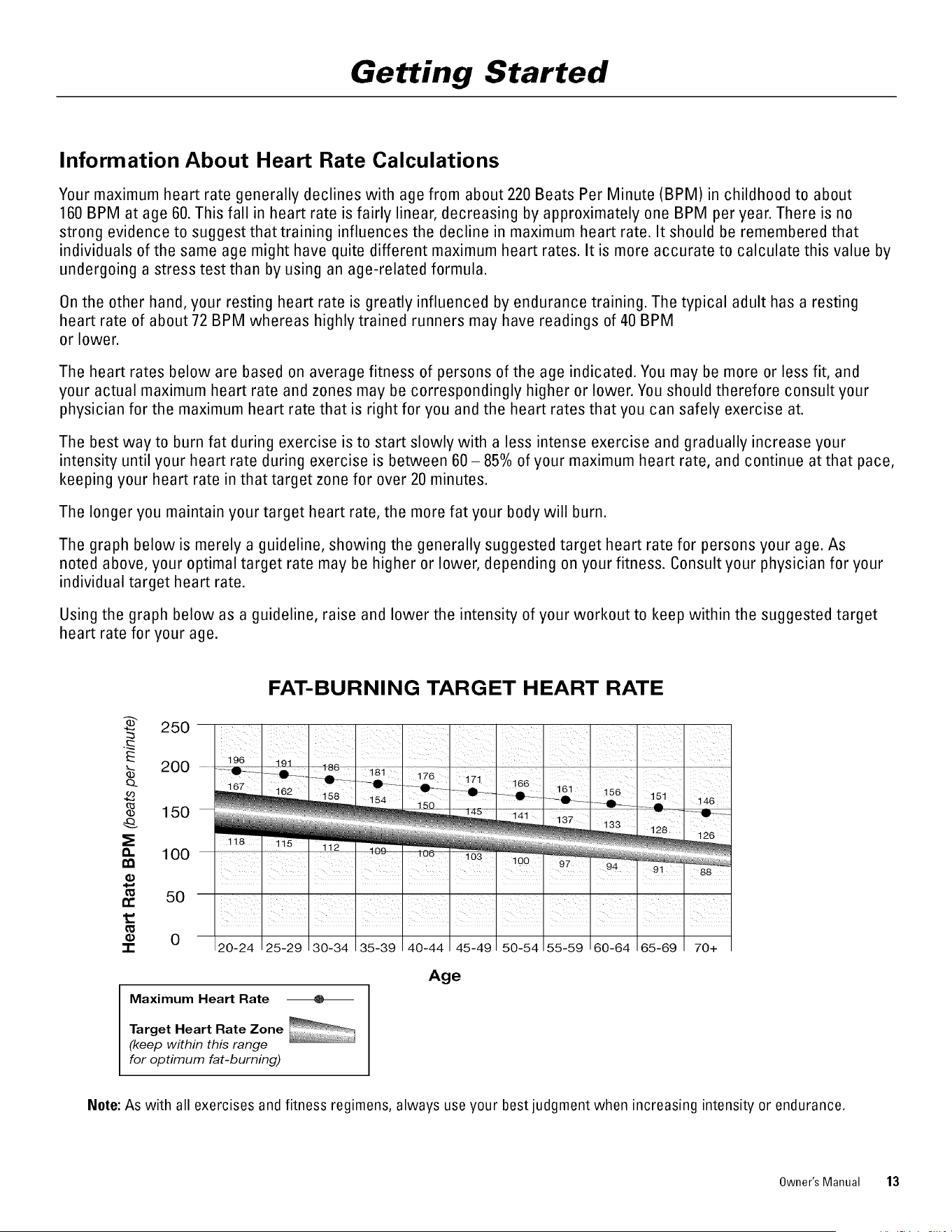
The best way to burn fat during exercise is to start slowly with a less intense exercise and gradually increase your
intensity until your heart rate during exercise is between 60 - 85% of your maximum heart rate, and continue at that pace,
keeping your heart rate in that target zone for over 20 minutes.
The longer you maintain your target heart rate, the more fat your body will burn.
The graph below is merely a guideline, showing the generally suggested target heart rate for persons your age. As
noted above, your optimal target rate may be higher or lower, depending on your fitness. Consult your physician for your
individual target heart rate.
Using the graph below as a guideline, raise and lower the intensity of your workout to keep within the suggested target
heart rate for your age.
FAT-BURNING TARGET HEART RATE
250
E
b_ 200
,_ 15o
e. 100
50
0
-r
Age
Maximum Heart Rate
Target Heart Rate Zone
(keep within this range
for optimum fat-burning)
Nete: As with all exercises and fitness regimens, always use your best judgment when increasing intensity or endurance.
Owner's Manual 13
Getting Started
TC3000 Features
TC3000 Displays
BOWFLEX
TreadClimber TC3000
_ TO'At STEPS [ INFORMATION MODULE ] _.lJ.
r
TOSTAR_
WARNI_GIT,,__u_,_, _y o_lyb__ i__00or
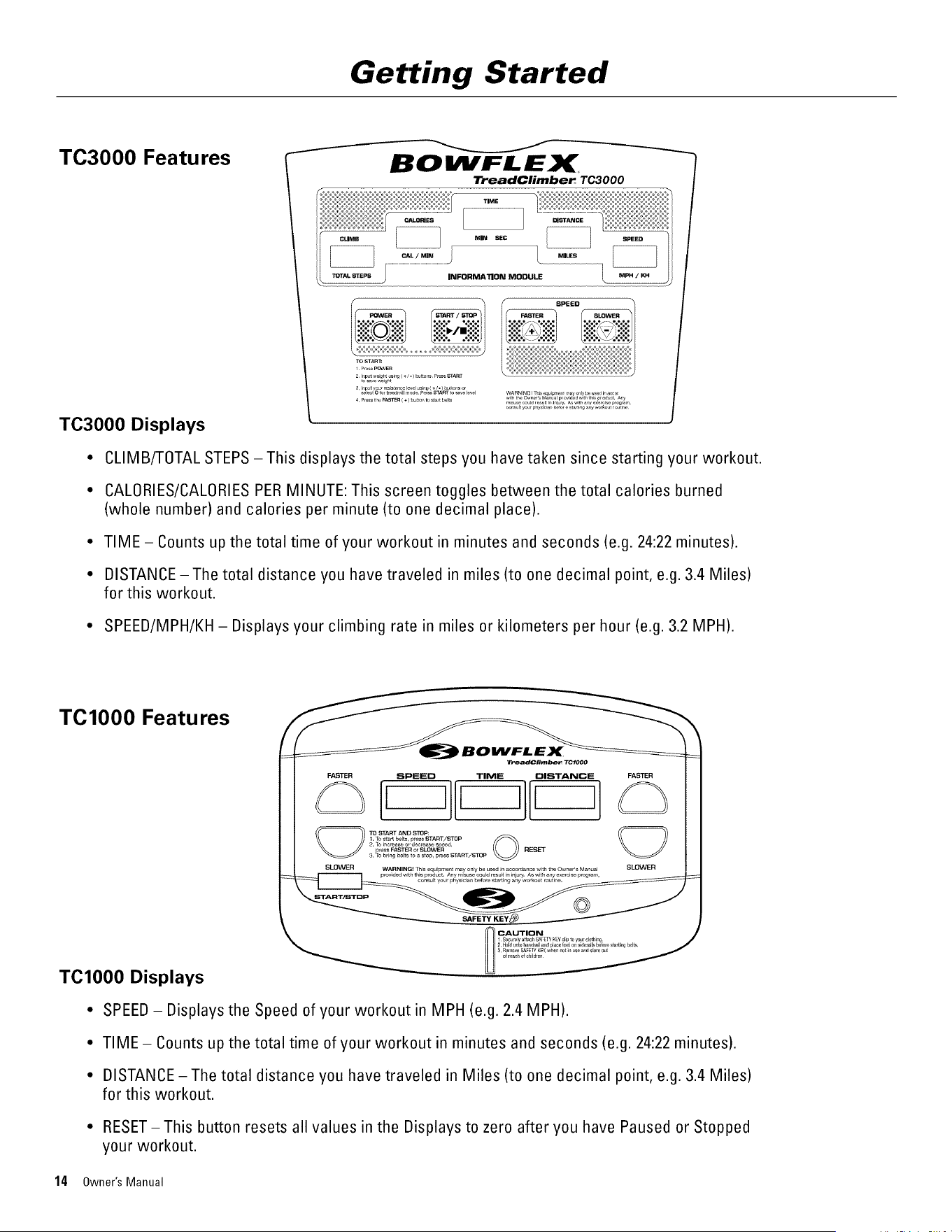
• CLIMB/TOTAL STEPS -This displays the total steps you have taken since starting your workout.
• CALORIES/CALORIES PER MINUTE: This screen toggles between the total calories burned
(whole number) and calories per minute (to one decimal place).
• TIME - Counts up the total time of your workout in minutes and seconds (e.g. 24:22 minutes).
• DISTANCE -The total distance you have traveled in miles (to one decimal point, e.g. 3.4 Miles)
for this workout.
• SPEED/MPH/KH - Displays your climbing rate in miles or kilometers per hour (e.g. 3.2 MPH).
TClO00 Features
TO1000 Displays
• SPEED- Displays the Speed of your workout in MPH (e.g. 2.4 MPH).
• TIME - Counts up the total time of your workout in minutes and seconds (e.g. 24:22 minutes).
• DISTANCE -The total distance you have traveled in Miles (to one decimal point, e.g. 3.4 Miles)
for this workout.
• RESET-This button resets all values in the Displays to zero after you have Paused or Stopped
your workout.
14 Owner's Manual
Getting Started
Setting English or Metric Measurement Units (TC3000 and TC5000)
You can configure the TC5000 and TC3000 Consoles to display in Miles or Kilometers:
1. Turn the Main Power Switch on the Bowflex ®Treadclimber ® base to 'On'.
2. Remove the Safety Key.
3. Press and hold the START/STOP button.
4. Insert the Safety Key while holding down the START/STOP button.
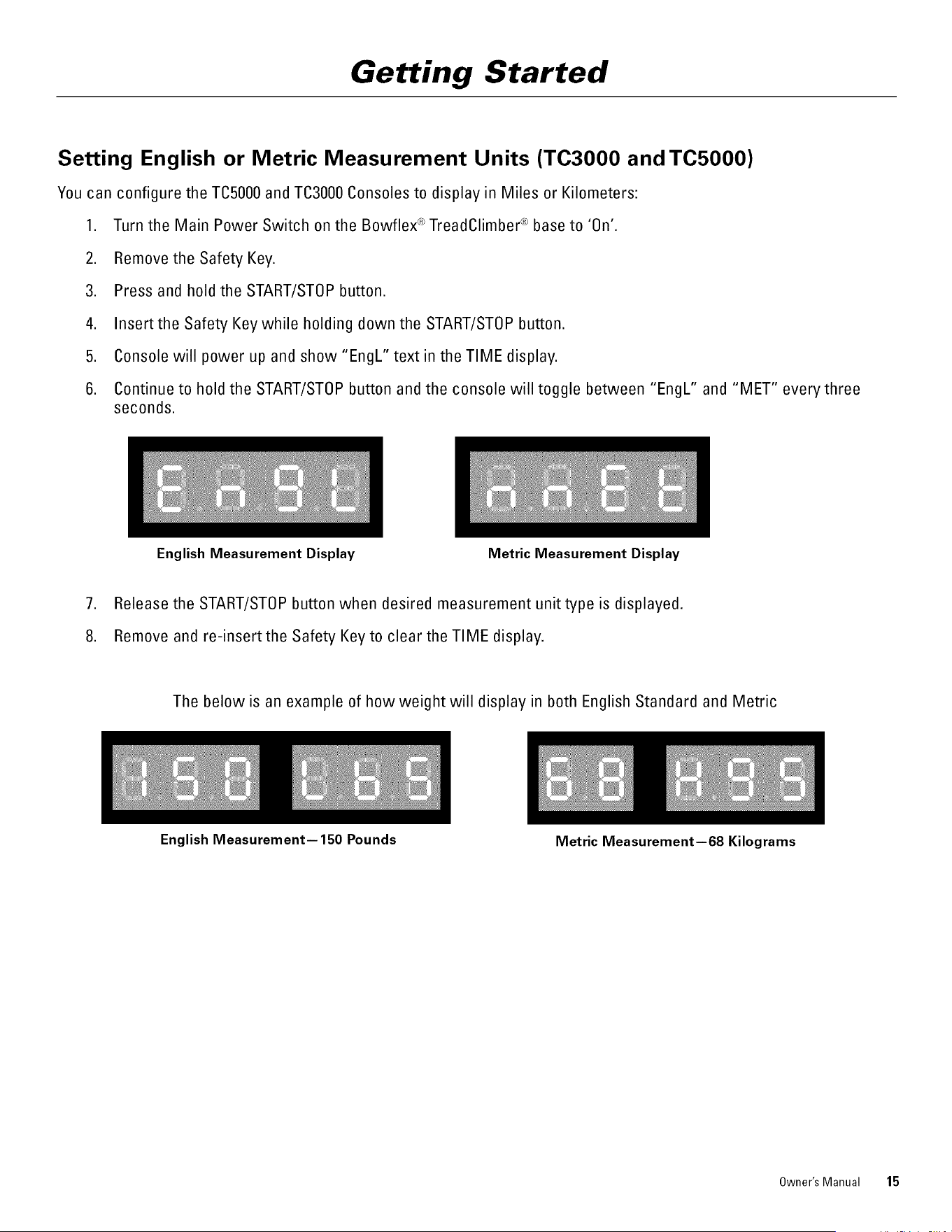
5. Console will power up and show "EngL" text in the TIME display.
6. Continue to hold the START/STOP button and the console will toggle between "EngL" and "MET" every three
seconds.
English Measurement Display Metric Measurement Display
7. Release the START/STOP button when desired measurement unit type is displayed.
8. Remove and re-insert the Safety Key to clear the TIME display.
The below is an example of how weight will display in both English Standard and Metric
English Measurement--150 Pounds
Metric Measurement--68 Kilograms
Owner's Manual 15
Workout Instructions
Determining Your Fitness Level
Endurance is an important way to determine your fitness level. Before you begin exercising on your Bowflex ®
TreadClimber ® exercise machine, you will want to benchmark your current endurance level, based on how well you feel
after you take these quick tests on your TreadClimber ® machine. To do these tests, you'll need to use your TreadClimber ®
machine in all exercise modes (TreadClimber ®, treadmill and stair-stepper modes).
CONSULT YOUR PHYSICIAN BEFORESTARTING ANY EXERCISE PROGRAM. Only he or she can determine the
exercise program that is appropriate for your particular age and condition. If you are new to exercise, are
pregnant, have a heart condition or any physical limitation, failure to consult your physician before engaging in
physical exercise, such as using the Bowflex TreadClimber ® exercise machine, could result in serious injury or
death. If while using the Bowflex ® TreadClimber ® exercise machine you have any pain, tightness in your chest,
an irregular heartbeat, shortness of breath, feel faint, light-headed, dizzy or have any pain or discomfort, STOP and
consult your physician immediately.
These three quick tests should help you determine at what level you should start training:
Test 1
1.
.
.
Start a TreadClimber ® workout (belts and treadles engaged) at 0.7 MPH (0.5 for TCl000), using the easiest
Workout Level Setting for your weight (see the Workout Level Settings table on Page 10), and gradually increase
your speed for the next 30 seconds until you reach 2 MPH or until you feel that you are at your personal maximum
exertion.
Continue for another 15 seconds at that speed, then step off the treadles onto the Side Foot Support Platforms
and press START/STOP to stop the belts.
Once the belts have stopped, breathe in and out slowly a few times, and then review your level of exertion based
on the below scale:
RATEOF PERCEIVEB EXERTION SCALE
1. Sluggish- heart rate not raised
2. Comfortable - strolling rather than exercising
3. Alert and moving - not exerting yourself
4. Heart rate up-feel activated
5. Moderate exercise-feel aerobic and warmed up
6. Invigorated and healthy but could tire out soon
7. Breathing heavier- pushing yourself
8. Panting hard-feeling muscle burn
9. Sharp increase in exertion - almost at maximum effort
0. Maximum effort- could collapse if pace continued
Based on the above scale:
• Beginner Level perceives exertion at 8,9 or 10
• Intermediate Level perceives their exertion at 4, 5, 6 or 7
• Advanced Level perceives exertion at 1,2 or3
16 Owner's Manual
Workout Instructions
Test 2
1.
.
.
Change over to Treadmill mode (see Locking the Treadles section in this manual) and begin a workout at 0.7 MPH
(0.5 for TO1000), gradually increasing your speed for the next 30 seconds, raising speed until you reach 2 MPH or
until you feel that you are at your personal maximum exertion.
Continue for another 15 seconds at that speed, then step off the treadles onto the Side Foot Support Platforms
and press START/STOP to stop the belts.
Once the belts have stopped, breathe in and out slowly a few times, and then review your level of exertion based
on the Perceived Exertion Scale listed under Test 1 of the Workout Instructions section of this manual.
Test 3
1.
.
.
Change over to the Stair-Stepper mode using the easiest workout resistance for your weight (see the Workout
Level Guide table in the Select Your Workout Level section of this manual), and gradually increase your rate of
stepping for the next 30 seconds, taking steps at a moderate depth and height while stepping more quickly until
you feel that you are at your personal maximum exertion.
Continue for another 15 seconds at that speed and then stop stepping and step off the treadles and onto the Side
Foot Support Platforms.
Breathe in and out slowly a few times, and then review your level of exertion based on the Perceived Exertion
Scale listed under Test 1 of the Workout Instructions section of this manual.
Assessment
After finishing all endurance tests, add the totals of your perceived exertion for Tests 1, 2 and 3 together and divide by
three. If your score is:
8- 10: use the BEGINNER LEVELworkouts on Page 24.
4 - 7: use the INTERMEDIATE LEVELworkouts on Page 24.
1 -3: use the ADVANCED LEVEL workouts on Page 24.
If at any time you wish to raise your endurance, you should retest your Perceived Exertion Level.
If you follow our workout program, you should see a marked improvement in your endurance after just a few workouts on
your Bowflex ® TreadClimber ® exercise machine.
Owner's Manual 17
Workout Instructions
Treadmill Workout
Treadles
Each Bowflex ® TreadClimber ®treadle is a separate treadmill with its own belt, however both treadles are driven by the
same axle and motor. This assures that each belt travels at the same speed. Further, the treadles are interconnected, which
provides a balanced relationship between the left and right sides during the workout to give the most cushioned effect to your
joints.
Keep your foot in the center of each Treadle. Do not let your feet cross in front of your body as you increase the
speed.
Locking the Treadles for Treadmill Workout
The right and left treadles can be locked together to get a treadmill workout.
Do not change from or into treadmill mode while the belts are in movement or the machine is powered up. To
change the modes, stop the power. Unplug the cord from the wall outlet, line up the Treadles, and then lock or
release the Treadle Locking Lever.
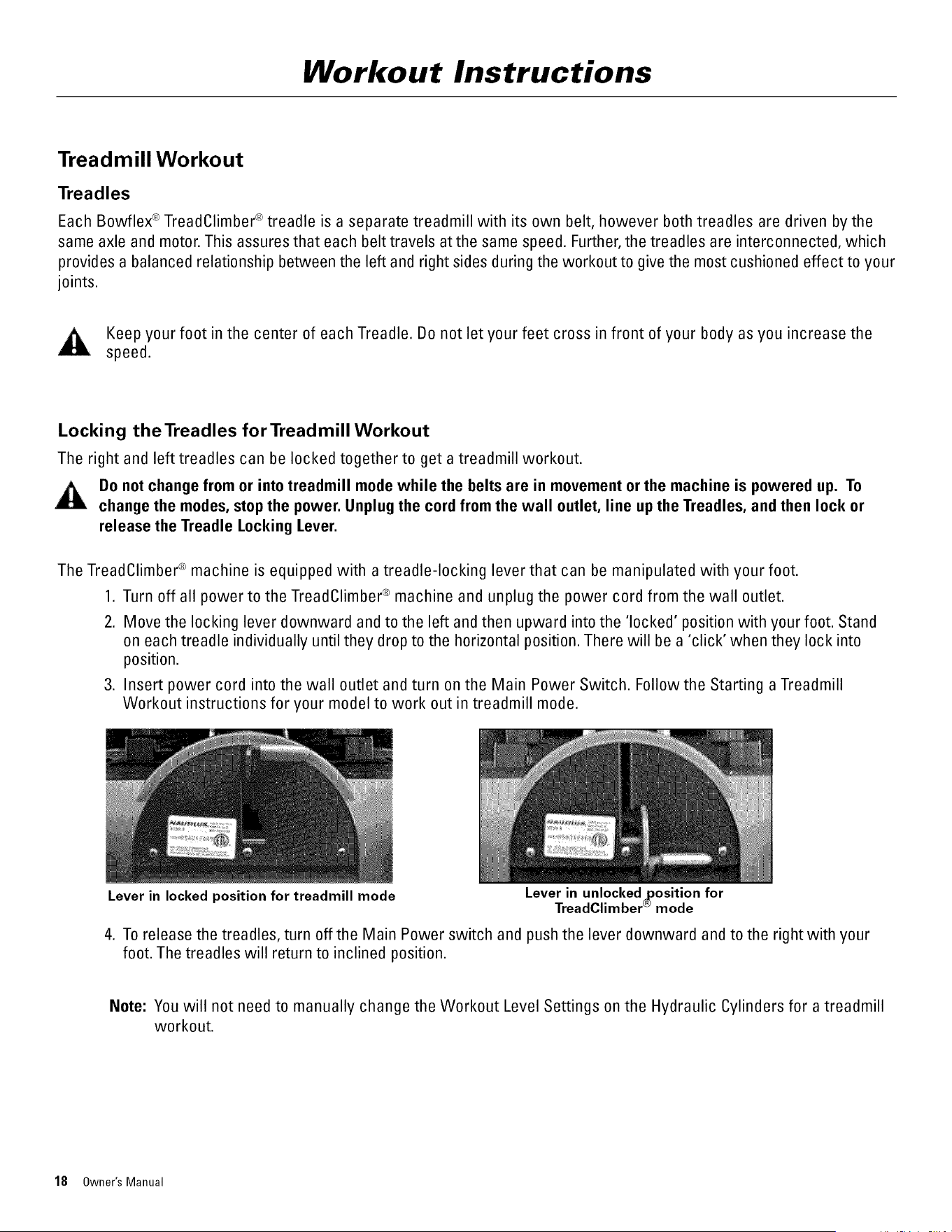
The TreadClimber ® machine is equipped with a treadle-locking lever that can be manipulated with your foot.
1. Turn off all power to the TreadClimber ® machine and unplug the power cord from the wall outlet.
2. Move the locking lever downward and to the left and then upward into the 'locked' position with your foot. Stand
on each treadle individually until they drop to the horizontal position. There will be a 'click' when they lock into
position.
3. Insert power cord into the wall outlet and turn on the Main Power Switch. Followthe Starting a Treadmill
Workout instructions for your model to work out in treadmill mode.
Lever in unlocked_osition for
TreadClimber_mode
Lever in locked position for treadmill mode
4. To release the treadles, turn off the Main Power switch and push the lever downward and to the right with your
foot. The treadles will return to inclined position.
Note: You will not need to manually change the Workout Level Settings on the Hydraulic Cylinders for a treadmill
workout.
18 Owner's Manual
Workout Instructions
Starting a Treadmill Workout (TC3000 and TC5000)
1. Make sure you have locked the treadles, following the guidelines in the Lockingthe Treadles section in this manual.
2. Push POWER to turn on the Console. The console will NOT power up if the Safety Key is not properly inserted into
the Safety Keyhole.
To avoid injury, do not stand on the walking belts while starting or stopping them.
3. Input your weight. For first time use, follow the weight-input instructions for Starting a TreadClimber ®Workout.
4. When your weight is displayed accurately, push START/STOP one time.
5. Input a Workout Level Setting of 0 for treadmill workout once you have locked the treadles. Remember to change
your Workout Level Setting to 0 every time you work out in treadmill mode in order to insure that the CALORIE
display accurately shows your calories burned.
6. When your Workout Level is displayed accurately, push START/STOP once again. This will start the clock counting
your workout TIME.
7. Press FASTERto startthe belts. Starting belt speed is 0.7 mph.
8. Once the belts have started, you may step onto the treadles at any time.
Note: If you are new to the TreadClimber ® machine, make sure to start your workout at a slower speed, gradually
increasing belt speed as your endurance and fitness levels increase.
9. Press FASTER or SLOWER to increase or decrease belt speed as needed.
Starting a Treadmill Workout (TClO00)
1. Make sure you have locked the treadles, following the guidelines in the Locking the Treadles section in this
manual.
2. Push START/STOP to start the walking belts (the console will NOT power up if the Safety Key is not properly
inserted into the Safety Keyhole)--TIME starts counting as soon as you start the belts. Starting belt speed is 0.5
mph.
3. Once the belts have started, you may step onto the treadles at any time.
Note: If you are new to the TreadClimber ® machine, make sure to start your workout at a slower speed, gradually
increasing belt speed as your endurance and fitness levels increase.
4. Press FASTER or SLOWER to increase or decrease belt speed as needed.
Owner's Manual 19
Workout Instructions
Starting a Stair-Stepper Workout (TC3000 and TC5000)
1. Push POWER to turn on the Console (the console will NOT power up if the Safety Key is not properly inserted into
the Safety Keyhole).
2. Input your weight. For first time use, follow the weight-input instructions for Starting a TreadClimber ®Workout.
3. When your weight is displayed accurately, push START/STOP one time.
4. Input your Workout Level Setting. For first time use, follow the Workout Level-input instructions for Starting a
TreadClimber ® Workout.
5. When your Workout Level is displayed accurately, push START/STOP once again. This will startthe clock counting
your workout TIME.
6. Do not press the FASTER button to start the belts. Instead, start stepping for your stair-stepper workout.
The console will calculate your calories burned for a stair-stepper workout, and the MILES/TOTAL STEPS will
show total steps taken.
Note: Miles/Total Steps display will toggle between miles and total steps every 6 seconds.
Starting a Stair-Stepper Workout (TO1000)
1. DO NOT press START/STOP.
2. Begin stepping, however, remember that the TIME, SPEED and DISTANCE displays will not display your workout
information.
20 Owner's Manual
Workout Instructions
Bowflex®TreadClimber®Workout
A TreadClimber ® workout combines stair-stepping with moving belts and gently supported resistance, providing you a
workout that burns calories faster than almost any cardiovascular exercise machine you have ever experienced. While
you may use your TreadClimber ® machine in treadmill and stair-stepping modes in addition to the TreadClimber ® mode,
you will experience the best calorie and fat-burning when working out in TreadClimber ® mode.
Starting a TreadClimber ®Workout (TO3000 and TO5000)
To avoid injury, do not stand on the walking belts while starting or stopping them.
.
2.
Push POWER to turn on the Console. The console will NOT power up if the Safety Key is not properly inserted into the
Safety Keyhole.
Input your weight.
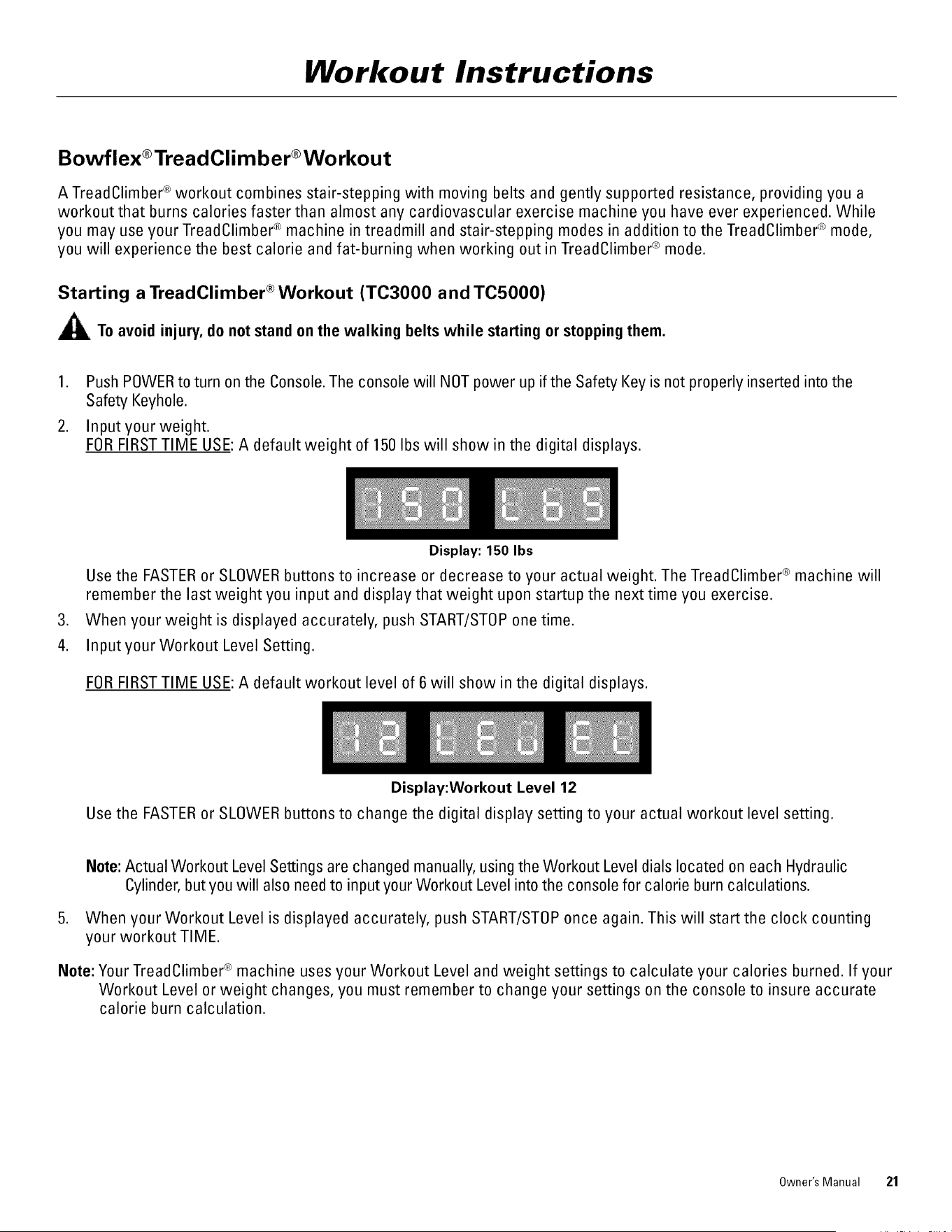
FOR FIRSTTIME USE: A default weight of 150 Ibs will show in the digital displays.
.
4.
Display: 150 Ibs
Use the FASTER or SLOWER buttons to increase or decrease to your actual weight. The TreadClimber ® machine will
remember the last weight you input and display that weight upon startup the next time you exercise.
When your weight is displayed accurately, push START/STOP one time.
Input your Workout Level Setting.
FOR FIRSTTIME USE: A default workout level of 6 will show in the digital displays.
Display:Workout Level 12
Use the FASTER or SLOWER buttons to change the digital display setting to your actual workout level setting.
Note: Actual Workout Level Settings are changed manually, using the Workout Level dials located on each Hydraulic
Cylinder, but you will also need to input your Workout Level into the console for calorie burn calculations.
5. When your Workout Level is displayed accurately, push START/STOP once again. This will start the clock counting
your workout TIME.
Note: Your TreadClimber ® machine uses your Workout Level and weight settings to calculate your calories burned. If your
Workout Level or weight changes, you must remember to change your settings on the console to insure accurate
calorie burn calculation.
Owner's Manual 21
Workout Instructions
6. Press FASTERto start the belts. Starting belt speed is 0.7 MPH (1.1 KPH).
Note: Belts may take two to three seconds to start.
7. Once the belts have started, you may step onto the treadles at any time.
Note: If you are new to the Bowflex ®TreadClimber ® machine, make sure to start your workout at a slower speed,
gradually increasing belt speed as your endurance and fitness levels increase.
8. Press FASTER or SLOWER to increase or decrease belt speed as needed.
Starting a TreadClimber ®Workout (TClO00)
Toavoid injury,do notstandon the walking belts while startingor stoppingthem.
1. Push START/STOP to startthe walking belts--TIME starts counting as soon as you startthe belts.
Note: The console will NOT power up if the Safety Key is not properly inserted into the Safety Keyhole.
2. Once the belts have started, you may step onto the treadles at any time.
3. Press FASTERto increase your speed. Starting belt speed is 0.5 MPH (0.8 KPH).
Note: If you are new to the TreadClimber ® machine, make sure to start your workout at a slower speed, gradually
increasing belt speed as your endurance and fitness levels increase.
4. Press FASTER or SLOWER to increase or decrease belt speed as needed.
22 Owner's Manual
Workout Instructions
Preliminary TreadClimber ® Workout
First 4 Weeks
Based on your Perceived Exertion Level(see the Determining Your Fitness Level section at the beginning of
the Workout Instructions section of this manual), follow the Preliminary Workout guidelines to ease yourself
into a weekly Bowflex ® TreadClimber ® regimen. This regimen may include varying stair-stepper, treadmill
and TreadOlimber® modes (combination elliptical, stair-stepping and treadmill) workouts or any one of those
workouts that suits your own unique and ever-changing exercise-regimen needs.
Remember to always use your own, best personal judgment and the advice of your physician or health
care professional to determine how intense and how long your daily workout should be.
Warming Up
Before you begin any workout, you should prepare your body for increased activity by slowly raising your
heart rate.
Stair-stepping is one way to warm up your body slowly without fatiguing. Follow the directions in the Stair-
Stepper Workout section in this manual to begin a stair-stepper warm-up. When you are ready to begin
your TreadOlimber ® workout, all you will need to do is:
a) Step off the treadles onto the Side Foot Support Platforms
b) Engage the belts by pressing the FASTER button (START/STOP for the TO1000)
Beginning Your Workout
Interval Training and Steady State are two types of workouts that you may perform on the TreadClimber ®
machine while in TreadClimber ® mode (stepping and using the belts atthe same time). You may also wish
to combine Interval Training with Steady State Training to get a varied workout.
Interval Training involves adjusting your speed for specific lengths of time to raise and lower your heart
rate and calorie burn. Interval training varies the intensity of your workout during one exercise session.
Alternating high-intensity training with low-intensity rest periods will boost your metabolism and help you
continue to burn calories even after your workout is over.
Interval training also helps prevent the injuries often associated with repetitive endurance exercise, and
allows you to increase your training intensity without over-training or burning out.
Try varying your belt speed or rate of stepping from fast speeds to slower recovery speeds to begin
building your own Interval Training regimen.
Steady State workout involves performing one exercise at the same speed and intensity for a long period
of time. While there are risks to repetitive workouts, the TreadClimber ® machine is designed to cushion
your joints and muscles from those stress injuries. Further, repetitive workouts can help you build your
endurance, stamina and strength while continuing to hone and improve the tone and lean muscle mass in
your long muscles.
Owner's Manual 23
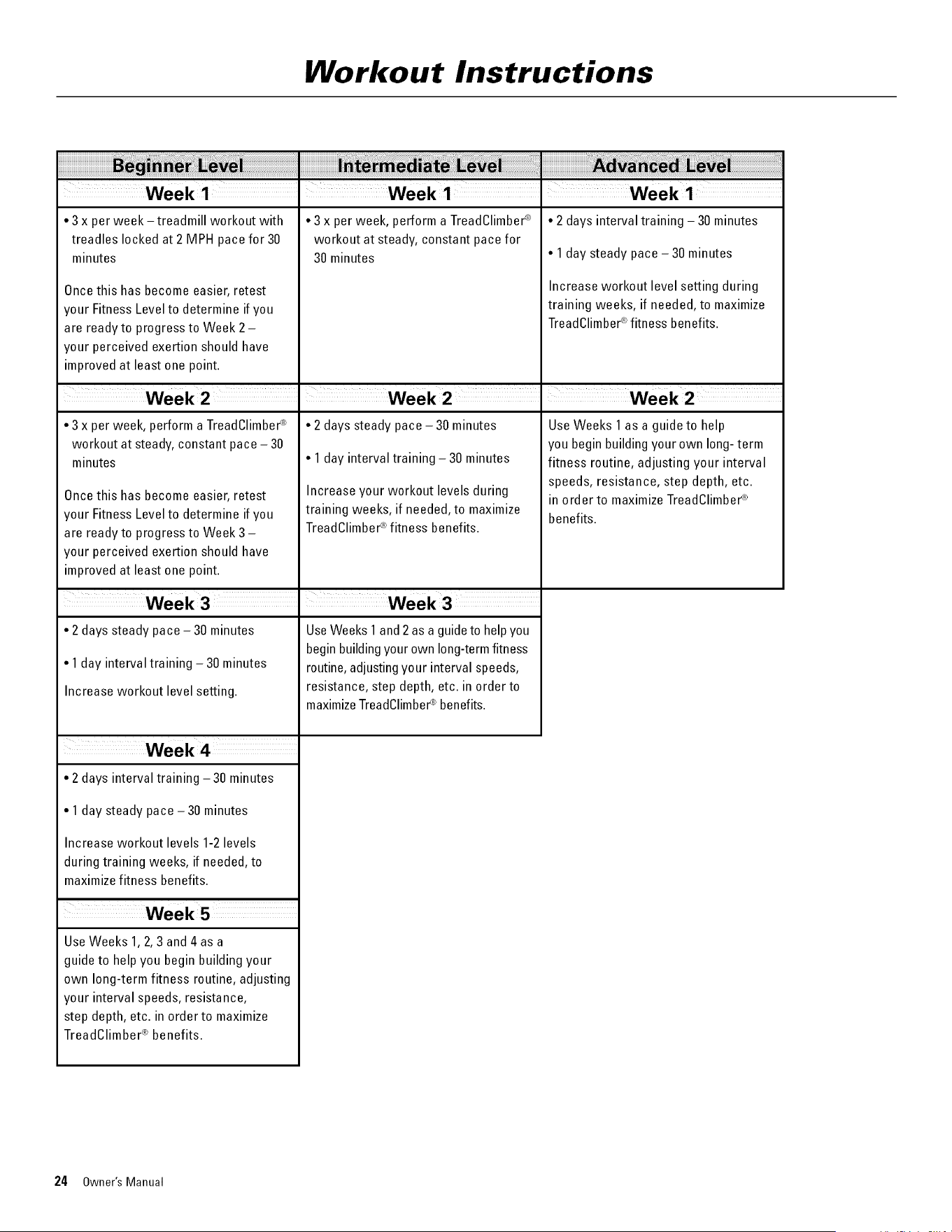
Workout Instructions
• 3 x per week -treadmill workout with
treadles locked at 2 MPH pace for 30
minutes
Once this has become easier, retest
your Fitness Level to determine if you
are readyto progress to Week 2-
your perceived exertion should have
improved at least one point.
• 3 x per week, perform a TreadClimber®
workout at steady, constant pace - 30
minutes
Once this has become easier, retest
your Fitness Level to determine if you
are ready to progress to Week 3 -
your perceived exertion should have
improved at least one point.
• 2 days steady pace - 30 minutes
• 1 day interval training - 30 minutes
Increase workout level setting.
• 2 days interval training -30 minutes
• 1day steady pace -30 minutes
Increase workout levels 1-2 levels
during training weeks, if needed, to
maximize fitness benefits.
Use Weeks 1, 2, 3 and 4 as a
guide to help you begin building your
own long-term fitness routine, adjusting
your interval speeds, resistance,
step depth, etc. in order to maximize
TreadClimber ® benefits.
• 3 x per week, perform a TreadClimber®
workout at steady, constant pace for
30 minutes
• 2 days steady pace -30 minutes
• 1 day interval training - 30 minutes
Increase your workout levels during
training weeks, if needed, to maximize
TreadClimber®fitness benefits.
UseWeeks 1 and 2as a guide to help you
begin buildingyour own long-term fitness
routine, adjusting your interval speeds,
resistance, step depth, etc. in order to
maximizeTreadClimber_ benefits.
• 2 days interval training - 30 minutes
• 1 day steady pace - 30 minutes
Increase workout level setting during
training weeks, if needed, to maximize
TreadClimber®fitness benefits.
UseWeeks 1 as a guide to help
you begin building your own long- term
fitness routine, adjusting your interval
speeds, resistance, step depth, etc.
in order to maximize TreadClimber®
benefits.
24 Owner's Manual
Maintenance
The safety and integrity designed into a machine can only be maintained when the equipment is regularly
examined for damage and repaired. It is the sole responsibility of the owner to ensure that regular maintenance is
performed. The owner is responsible to make sure that regular maintenance is done. Worn or damaged
components must be repaired or replaced immediately. Only manufacturer supplied components should be used to
maintain/repair the equipment.
This product, its packaging, and components contain chemicals known to the State of California to cause cancer,
birth defects, or reproductive harm. This Notice is provided in accordance with California's Proposition 65. If you
would like additional information, please refer to our website at www.nautilus.com/prop65.
Always unplug your TreadClimber ® machine from the outlet and let sit for 5 minutes before cleaning or servicing
the unit. To prevent unsupervised operation of the machine always remove the Safety Key and disconnect the
power cord from the wall outlet or machine AC inlet.
Routine Maintenance
For general routine maintenance and cleaning see the Care of the Machine section of this manual.
Walking Belt and Deck Lubrication
The TreadClimber ® machine is equipped with a pre-lubricated, low maintenance deck and belt system. Belt friction may
affect the function and life of the TreadClimber ® machine. For the best results from the TreadClimber ® machine, lubricate the
treadles periodically with a silicone lubricant, using the following instructions:
1. Unplug the TreadClimber ® machine completely from the wall outlet, and remove the power cord from the incoming
power plug.
Always unplug the power cord from the wall outlet and wait 5 minutes after unplugging the
machine before removing or installing parts to avoid the risk of electrocution, shock or
mechanical injury.
2. While the TreadClimber ® machine's treadle surfaces are still warm (not hot), apply a very thin layer of silicone
lubricant directly onto the treadle beneath each belt. Gently lift each side of the belt and apply a few drops of the
lubricant.
Always use a silicone-based lubricant. Never use a de greaser like WD-40 ® on the Bowflex ® TreadClimber ®
exercise machine as this could seriously impact performance.
3. Plug the TreadClimber ® machine back into the machine base and then into the wall outlet.
4. Stand to one side of your TreadClimber ® machine.
5. Turn on your TreadClimber ®, and start the belts at the slowest speed. Let the belts run for approximately 15
seconds.
6. Turn off your TreadClimber ® machine.
7. Take care to wipe up any excess lubricant from the treadles and and surrounding floor. We also recommend a
periodic inspection of the treadle surfaces under the belts. If the decks appear worn, contact contact Nautilus ®
Customer Service.
To reduce the possibility of slipping, be sure the treadle area is free from grease or oil. Wipe off any excess oil
from the machine surfaces.
Use the following timetable as a guide to lubricate the decks:
Owner's Manual 25
Maintenance
• Light user (fewer than 3 hours/week): every 6 months
• Medium user (3-5 hours/week): every 3 months
• Heavy user (more than 5 hours/week): every month
We recommend that you use the following:
• Lube-N-Walk ®Treadmill Lubrication Kit, available from Nautilus, Inc.
• 100% pure silicone spray, available at most hardware and auto parts stores.
Walking Belt Adjustment
The walking belts need to be adjusted if they are out of center
enough to cause a rubbing or scraping sound. Adjustments can
be made at the front roller of each treadle.
Belt Alignment
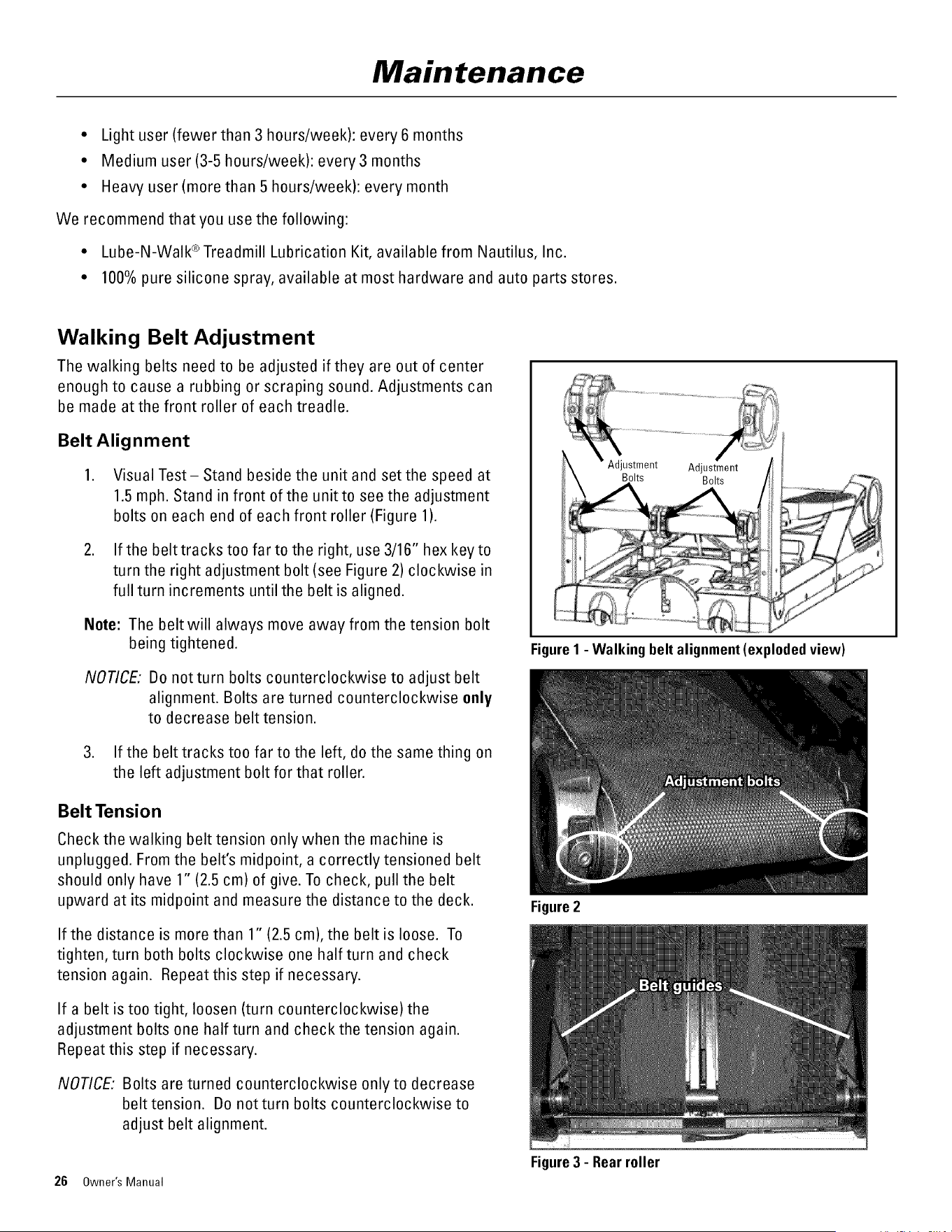
1. Visual Test-Stand beside the unit and set the speed at
1.5 mph. Stand in front of the unit to see the adjustment
bolts on each end of each front roller (Figure 1).
2. If the belttrackstoo far to the right, use 3/16" hexkeyto
turn the right adjustment bolt (see Figure 2) clockwise in
full turn increments until the belt is aligned.
Note: The belt will always move away from the tension bolt
being tightened.
NOTICE: Do notturn bolts counterclockwise to adjust belt
alignment. Bolts are turned counterclockwise only
to decrease belt tension.
3. If the belt tracks too far to the left, do the same thing on
the left adjustment bolt for that roller.
Belt Tension
Check the walking belt tension only when the machine is
unplugged. From the belt's midpoint, a correctly tensioned belt
should only have 1" (2.5 cm) of give. To check, pull the belt
upward at its midpoint and measure the distance to the deck.
If the distance is more than 1" (2.5 cm), the belt is loose. To
tighten, turn both bolts clockwise one half turn and check
tension again. Repeat this step if necessary.
If a belt is too tight, loosen (turn counterclockwise) the
adjustment bolts one half turn and check the tension again.
Repeat this step if necessary.
NOTICE: Bolts are turned counterclockwise only to decrease
belt tension. Do not turn bolts counterclockwise to
adjust belt alignment.
Figure1 - Walking belt alignment(explodedview)
26 Owner's Manual
Figure2
Figure3 - Rear roller
Maintenance
Walking Belt Electrostatic Reduction
This procedure provides important instructions on how to apply
anti-static spray to the walking belts on your TreadClimber ®
machine. This will reduce static electric charges caused by the
movement of the walking belts.
Do not operate where aerosol products are being used.
Read and understand all Warnings for the anti-static spray
in the product information from the manufacturer.
Tools
* 3/16" Hex Key
* Anti-static spray--aerosol (for example, Static Guard ® spray)
or liquid pump-spray
Unplug the machine from the wall.
To reduce the risk of electrical shock,
always unplug the power cord from the
wall outlet and/or the machine, and wait 5
minutes before cleaning, maintaining or
repairing the machine. Place the power
cord in a secure location.
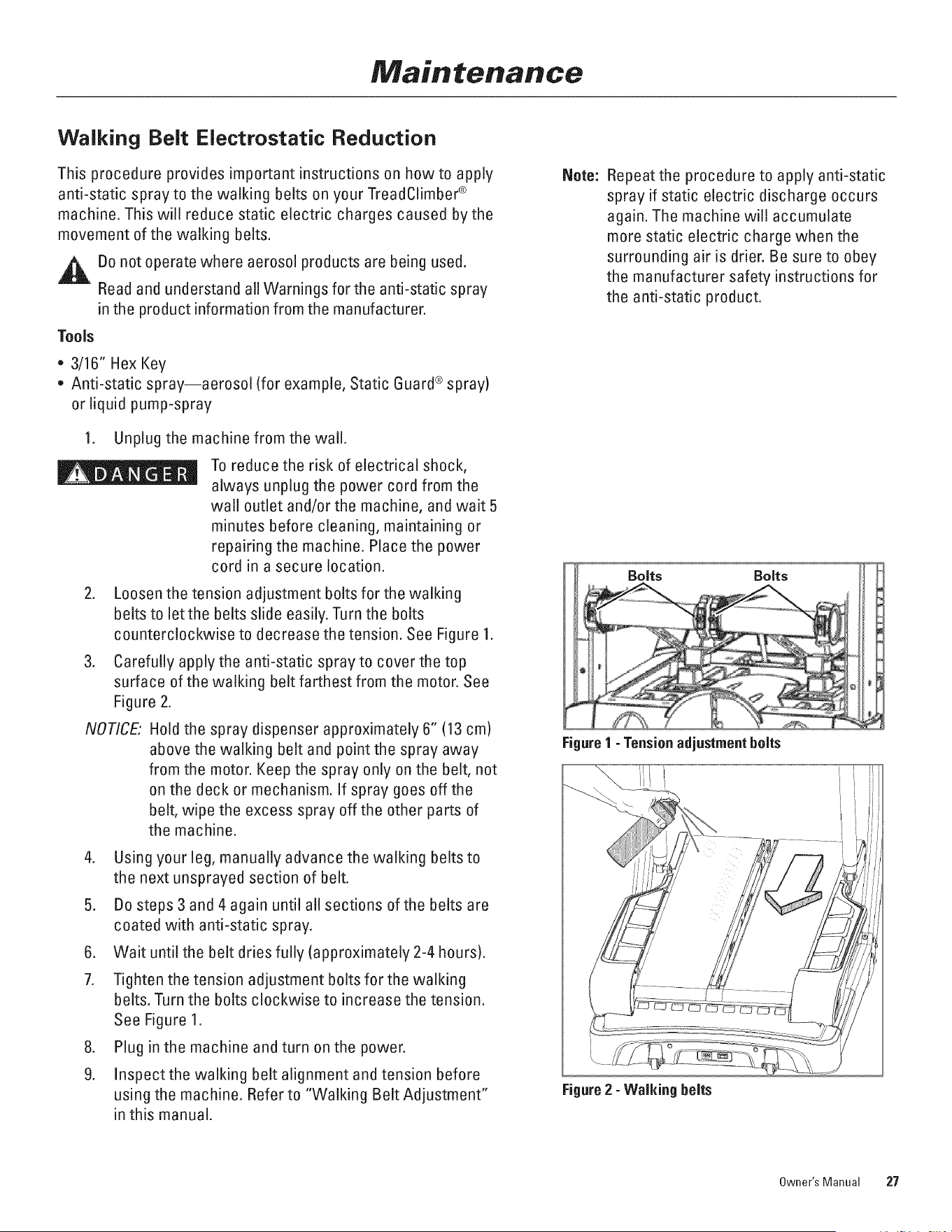
2. Loosen the tension adjustment bolts for the walking
belts to letthe belts slide easily. Turn the bolts
counterclockwise to decrease the tension. See Figure 1.
3. Carefully apply the anti-static spray to cover the top
surface of the walking belt farthest from the motor. See
Figure 2.
NOTICE: Hold the spray dispenser approximately 6" (13 cm)
above the walking belt and point the spray away
from the motor. Keep the spray only on the belt, not
on the deck or mechanism. If spray goes off the
belt, wipe the excess spray off the other parts of
the machine.
4. Using your leg, manually advance the walking belts to
the next unsprayed section of belt.
5. Do steps 3 and 4 again until a!l sections ofthe belts are
coated with anti-static spray.
6. Wait until the belt dries fully (approximately 2-4 hours).
7. Tighten the tension adjustment bolts for the walking
belts. Turn the bolts clockwise to increase the tension.
See Figure 1.
8. Plug in the machine and turn on the power.
9. Inspect the walking belt alignment and tension before
using the machine. Refer to "Walking Belt Adjustment"
in this manual.
Note: Repeat the procedure to apply anti-static
spray if static electric discharge occurs
again. The machine will accumulate
more static electric charge when the
surrounding air is drier. Be sure to obey
the manufacturer safety instructions for
the anti-static product.
Bolts Bolts
Figure1 - Tensionadjustmentbolts
I
Figure2 -Walking belts
Owner's Manual 27
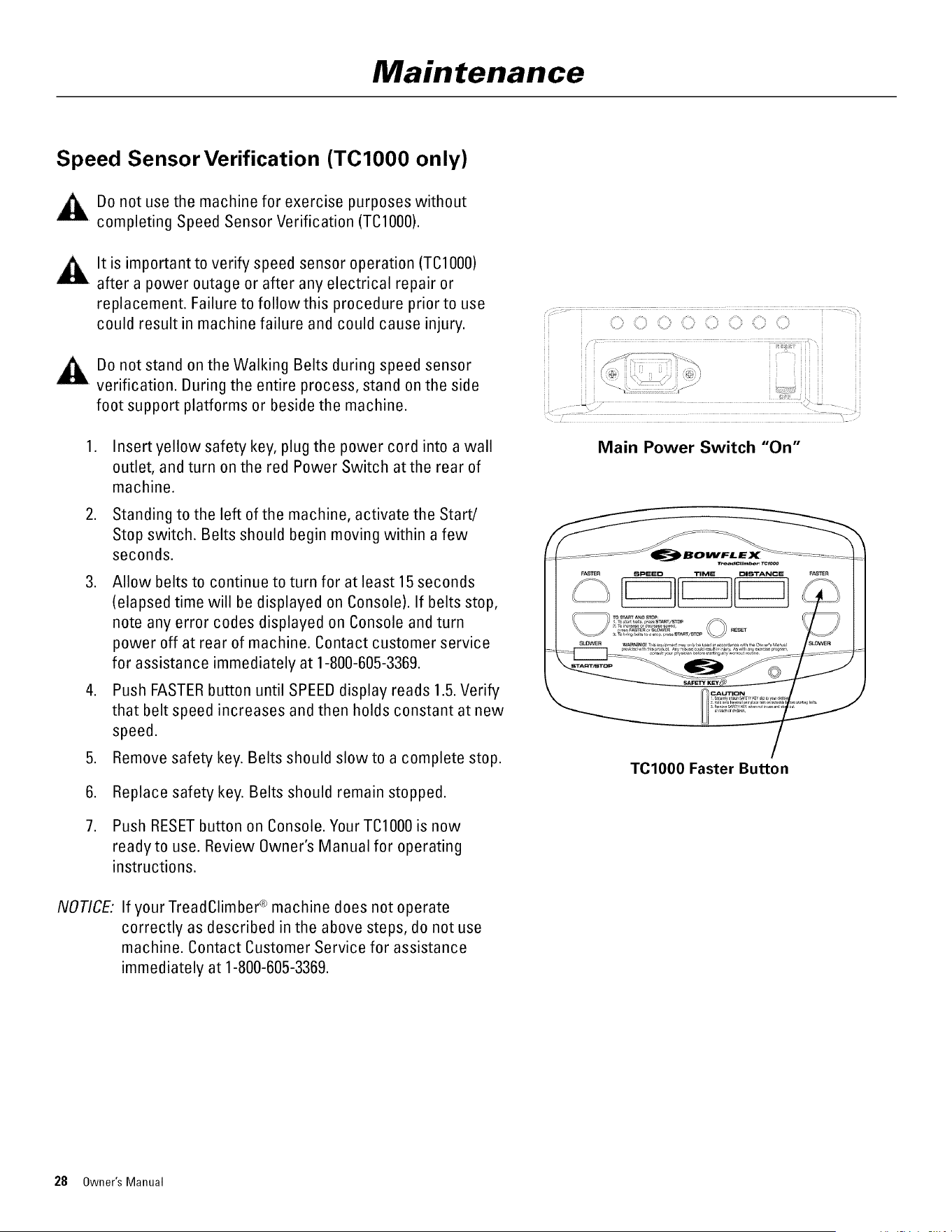
Maintenance
Speed Sensor Verification (TCIO00 only)
Do not use the machine for exercise purposes without
completing Speed Sensor Verification (TO1000).
It is important to verify speed sensor operation (TCl000)
after a power outage or after any electrical repair or
replacement. Failure to follow this procedure prior to use
could result in machine failure and could cause injury.
Bo not stand on the Walking Belts during speed sensor
verification. Buring the entire process, stand on the side
foot support platforms or beside the machine.
.
.
Insert yellow safety key, plug the power cord into a wall
outlet, and turn on the red Power Switch atthe rear of
machine.
Standing to the left of the machine, activate the Start/
Stop switch. Belts should begin moving within a few
seconds.
3. Allow belts to continue to turn for at least 15seconds
(elapsed time will be displayed on Console). If belts stop,
note any error codes displayed on Console and turn
power off at rear of machine. Contact customer service
for assistance immediately at 1-800-605-3369.
4. Push FASTER button until SPEEB display reads 1.5.Verify
that belt speed increases and then holds constant at new
speed.
Remove safety key. Belts should slow to a complete stop.
.
6.
7.
Replace safety key. Belts should remain stopped.
Push RESETbutton on Console. Your TCl000 is now
readyto use. Review Owner's Manual for operating
instructions.
NO_CE
If your TreadClimber ® machine does not operate
correctly as described in the above steps, do not use
machine. Contact Customer Service for assistance
immediately at 1-800-605-3369.
C_,¸ O C_ ,iii_:¸ C_,__iiii__¸,_iii?:_ii_,¸¸
...................................................................................................
Main Power Switch "On"
TClO00 Faster Button
28 Owner's Manual
Maintenance
Calibration (TC3000 &TC5000)
Note:
Do not use the machine for exercise purposes without
completing Calibration (T03000/5000).
It is important to calibrate (TC3000/5000) after a power
outage or after any electrical repair or replacement.
Failure to follow this procedure prior to use could result
in machine failure and could cause injury.
Do not stand on the Walking Belts during calibration.
During the entire process, stand on the side foot support
platforms or beside the machine.
During calibration, observe the walking belt alignment.
Belts do not need to be perfectly centered, but if they
are far enough from center to cause a scraping sound,
follow the Belt Alignment instructions in the Owner's
Manual.
1. Plug the power cord into the the wall outlet. Turn on
the red Power Switch at the rear of the machine.
2. Stand on the side foot support platforms or beside the
machine. D0 NOT STAND ON THE WALKIN6 BELTS.
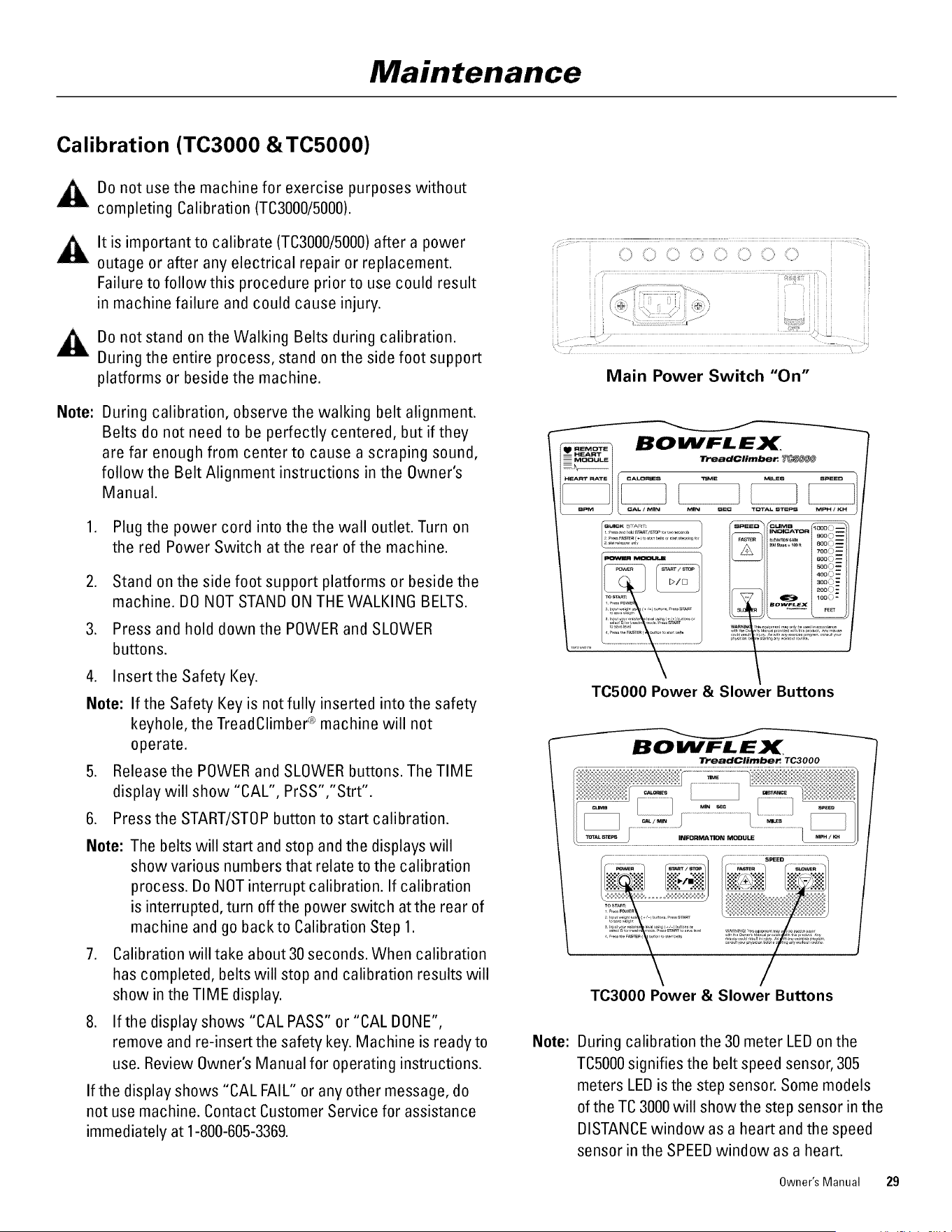
3. Press and hold down the POWER and SLOWER
buttons.
4. Insertthe Safety Key.
Note: If the Safety Key is not fully inserted into the safety
keyhole, the TreadClimber ® machine will not
operate.
5. Release the POWER and SLOWER buttons. The TIME
display will show "CAL", PrSS","Strt".
6. Press the START/STOP button to start calibration.
Note: The belts will start and stop and the displays will
show various numbers that relate to the calibration
process. Do NOT interrupt calibration. If calibration
is interrupted, turn off the power switch at the rear of
machine and go backto Calibration Step 1.
7. Calibration will take about 30 seconds. When calibration
has completed, belts will stop and calibration results will
show in the TIME display.
8. If the display shows "CAL PASS" or "CAL DONE",
remove and re-insert the safety key. Machine is readyto
use. Review Owner's Manual for operating instructions.
If the display shows "CAL FAIL" or any other message, do
not use machine. Contact Customer Service for assistance
immediately at 1-800-605-3369.
Main Power Switch "On"
TO5000 Power & Slower Buttons
BOItVFLEX
TreadClimber TC3000
TO3000 Power & Slower Buttons
Note: During calibration the 30 meter LED on the
TO5000signifies the belt speed sensor, 305
meters LED is the step sensor. Some models
of the TC 3000 will show the step sensor in the
DISTANCE window as a heart and the speed
sensor in the SPEEDwindow as a heart.
Owner's Manual 29
Maintenance
If Calibration Fails (Screen Displays "Cal Fail" Message):
This error usually indicates that the console is unable to determine the speed of the belts. Take the following steps:
1. Unplug the unit and remove the three back covers.
2. Leave plastic covers off and contact contact customer care for assistance immediately at 1-800-605-3369.
Explanation of Calibration Display Messages (for information only):
During calibration, the TIME display will show you text messages updating you as to the status of calibration. When
there is no text message in the TIME display window, the other displays will show the following:
HEART RATE (TC5000 0nly) - will show the status of the motor control relay.
• "ON" signifies the power relay is on and energizing the motor.
• "OFF" signifies the motor control relay is off and not energizing the motor.
CALORIES/CAL PER MIN - will show the version number of the software.
TIME - will show either a text message regarding auto-calibration ("dOnE", "Strt", etc.) or the actual Pulse Width
Modulation (PWM) number (a number that provides digital information about base unit functions to the
console) if START/STOP, FASTERor SLOWER is pressed during calibration.
MILES/TOTAL STEPS (DISTANCE/MILES for TO3000)- will show the calibration of the total step count.
SPEED - will display the actual belt speed during the calibration function.
Determining Hours Used
To determine the number of hours you have used your TreadClimber ® machine:
1. Stand on the side foot support platforms with the TreadClimber ® Main Power Switch turned on.
2. Remove and re-insert the SAFETY KEY.
3. The total whole hours used will be displayed in the TIME display window. No fractions of, or partial hours will
be displayed.
4. The software version will also be displayed in the MILES display window.
5. The display will only be visible for 3-5 seconds. Repeat removing and re-inserting the SAFETY KEYto view the
display again.
30 Owner's Manual
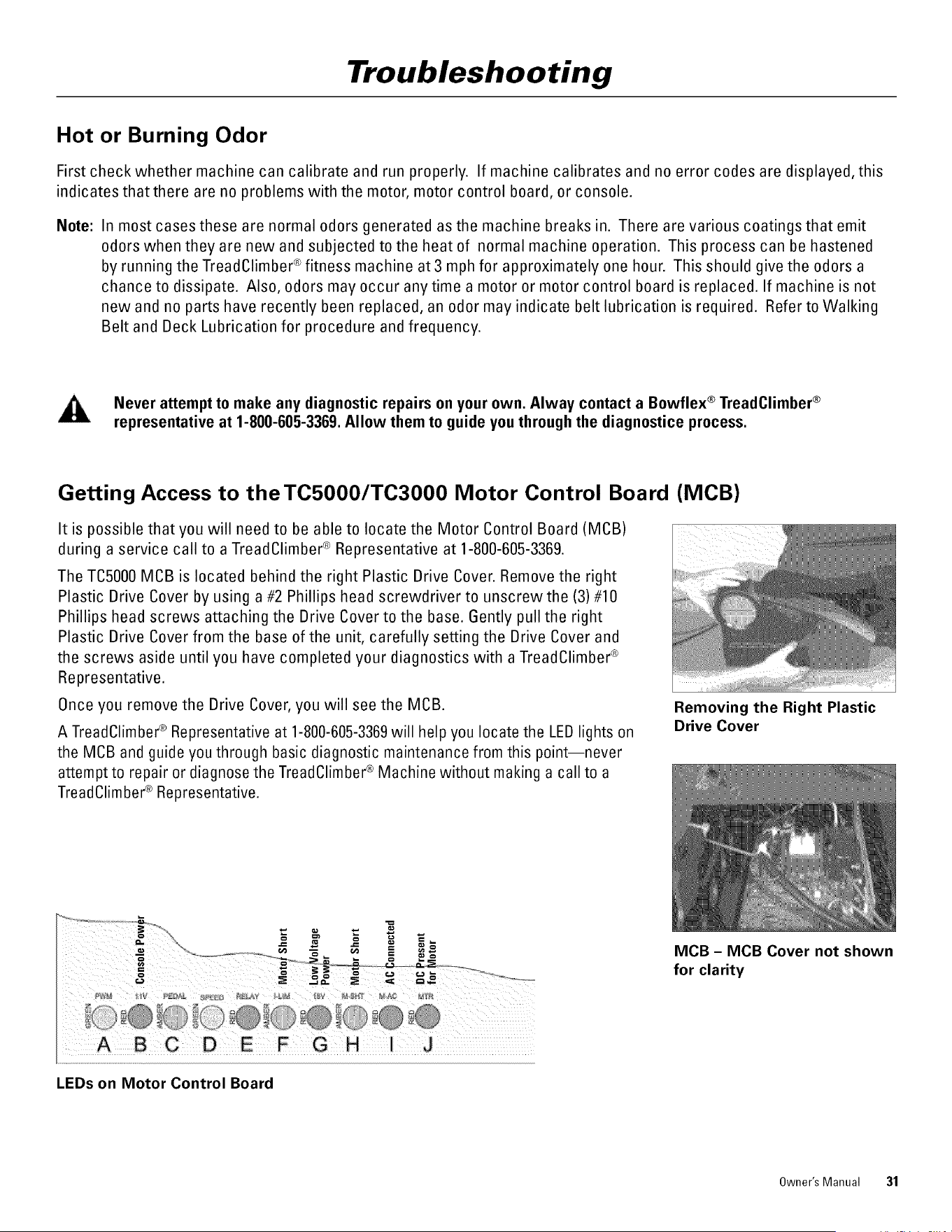
Troubleshooting
Hot or Burning Odor
First check whether machine can calibrate and run properly. If machine calibrates and no error codes are displayed, this
indicates that there are no problems with the motor, motor control board, or console.
Note:
In most cases these are normal odors generated as the machine breaks in. There are various coatings that emit
odors when they are new and subjected to the heat of normal machine operation. This process can be hastened
by running the TreadClimber ® fitness machine at 3 mph for approximately one hour. This should give the odors a
chance to dissipate. Also, odors may occur any time a motor or motor control board is replaced. If machine is not
new and no parts have recently been replaced, an odor may indicate belt lubrication is required. Refer to Walking
Belt and Beck Lubrication for procedure and frequency.
Never attempt to make any diagnostic repairs on your own. Alway contact a Bowflex ® TreadClimber ®
representative at 1-800-605-3369. Allow them to guide you through the diagnostice process.
Getting Access to theTC5OOO/TC3000 Motor Control Board (MOB)
It is possible that you will need to be able to locate the Motor Control Board (MCB)
during a service call to a TreadClimber ® Representative at 1-800-605-3369.
The TC5000 MCB is located behind the right Plastic Brive Cover. Remove the right
Plastic Brive Cover by using a #2 Phillips head screwdriver to unscrewthe (3) #10
Phillips head screws attaching the Brive Cover to the base. Gently pull the right
Plastic Brive Cover from the base of the unit, carefully setting the Brive Cover and
the screws aside until you have completed your diagnostics with a TreadClimber ®
Representative.
Once you remove the Brive Cover, you will see the MOB.
A TreadClimber ® Representative at 1-800-605-3369will help you locate the LED lights on
the MOB and guide you through basic diagnostic maintenance from this point--never
attempt to repair or diagnose the TreadClimber ® Machine without making a call to a
TreadClimber ® Representative.
=
A B C D E F G H I J
LEDs on Motor Control Board
Removing the Right Plastic
Drive Cover
MOB - MOB Cover not shown
for clarity
Owner's Manual 31
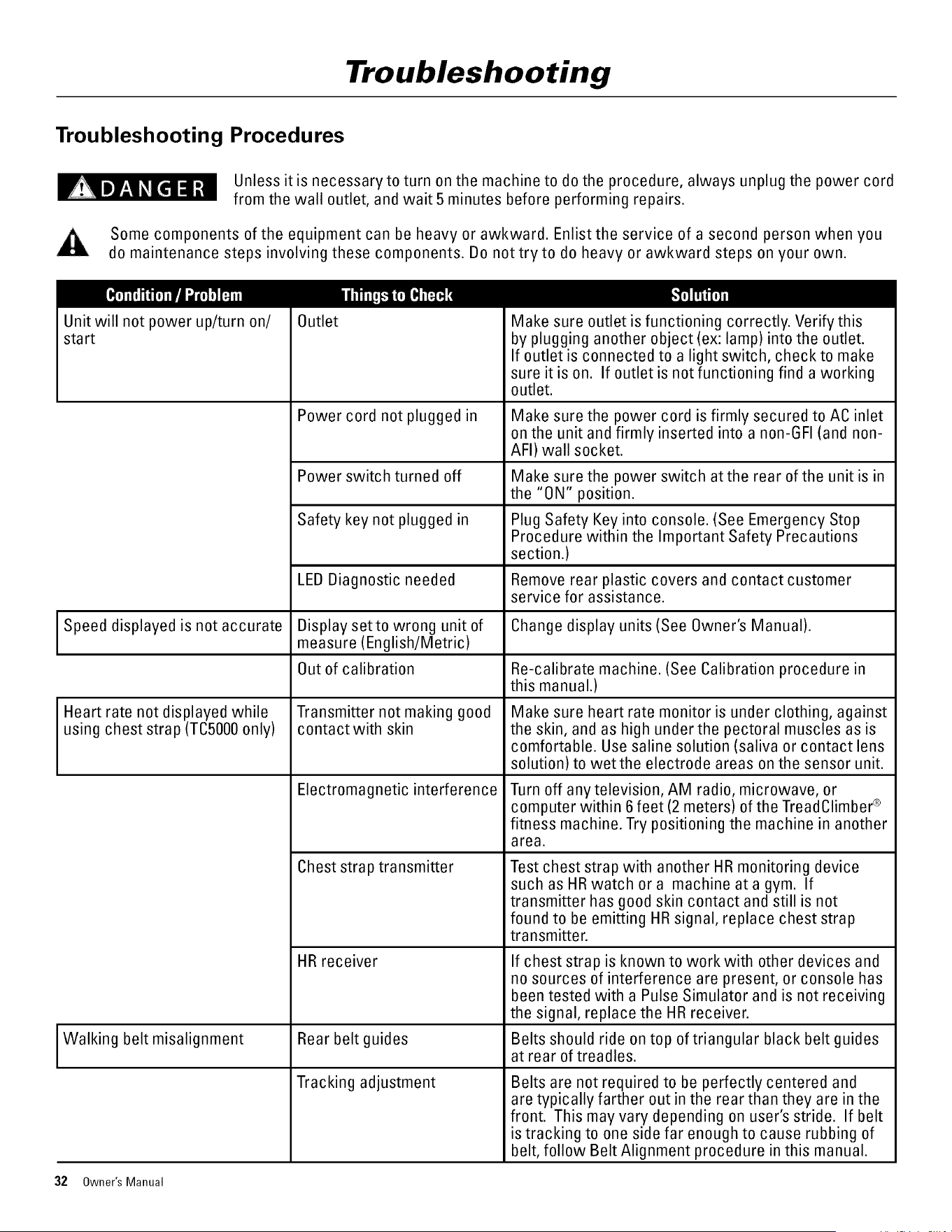
Troubleshooting
Troubleshooting Procedures
Unless it is necessary to turn on the machine to do the procedure, always unplug the power cord
from the wall outlet, and wait 5 minutes before performing repairs.
Some components of the equipment can be heavy or awkward. Enlist the service of a second person when you
do maintenance steps involving these components. Do not tryto do heavy or awkward steps on your own.
Unit will not power up/turn on/
start
Outlet
Power cord not plugged in
Make sure outlet is functioning correctly. Verify this
by plugging another object (ex: lamp) into the outlet.
If outlet is connected to a light switch, check to make
sure it is on. If outlet is not functioning find a working
outlet.
Make sure the power cord is firmly secured to AC inlet
on the unit and firmly inserted into a non-GFI (and non-
AFI) wall socket.
Power switch turned off Make sure the power switch at the rear of the unit is in
the "ON" position.
Safety key not plugged in Plug Safety Key into console. (See Emergency Stop
Procedure within the Important Safety Precautions
section.)
Remove rear plastic covers and contact customer
service for assistance.
LEB Biagnostic needed
Display setto wrong unit of
measure (English/Metric)
Out of calibration
Transmitter not making good
contact with skin
Speed displayed is not accurate Change display units (See Owner's Manual).
Re-calibrate machine. (See Calibration procedure in
this manual.)
Heart rate not displayed while Make sure heart rate monitor is under clothing, against
using chest strap (TO5000 only) the skin, and as high under the pectoral muscles as is
comfortable. Use saline solution (saliva or contact lens
solution) to wetthe electrode areas on the sensor unit.
Electromagnetic interference
Chest strap transmitter
HR receiver
Turn off any television, AM radio, microwave, or
computer within 6 feet (2 meters) of the TreadClimber ®
fitness machine. Try positioning the machine in another
area.
Test chest strap with another HR monitoring device
such as HR watch or a machine at a gym. If
transmitter has good skin contact and still is not
found to be emitting HR signal, replace chest strap
transmitter.
If chest strap is known to work with other devices and
no sources of interference are present, or console has
been tested with a Pulse Simulator and is not receiving
the signal, replace the HR receiver.
I Walking belt misalignment Rear belt guides Belts should ride on top of triangular black belt guidesat rear of treadles.
Tracking adjustment Belts are not required to be perfectly centered and
are typically farther out in the rear than they are in the
front. This may vary depending on user's stride. If belt
is tracking to one side far enough to cause rubbing of
belt, follow Belt Alignment procedure in this manual.
32 Owner's Manual
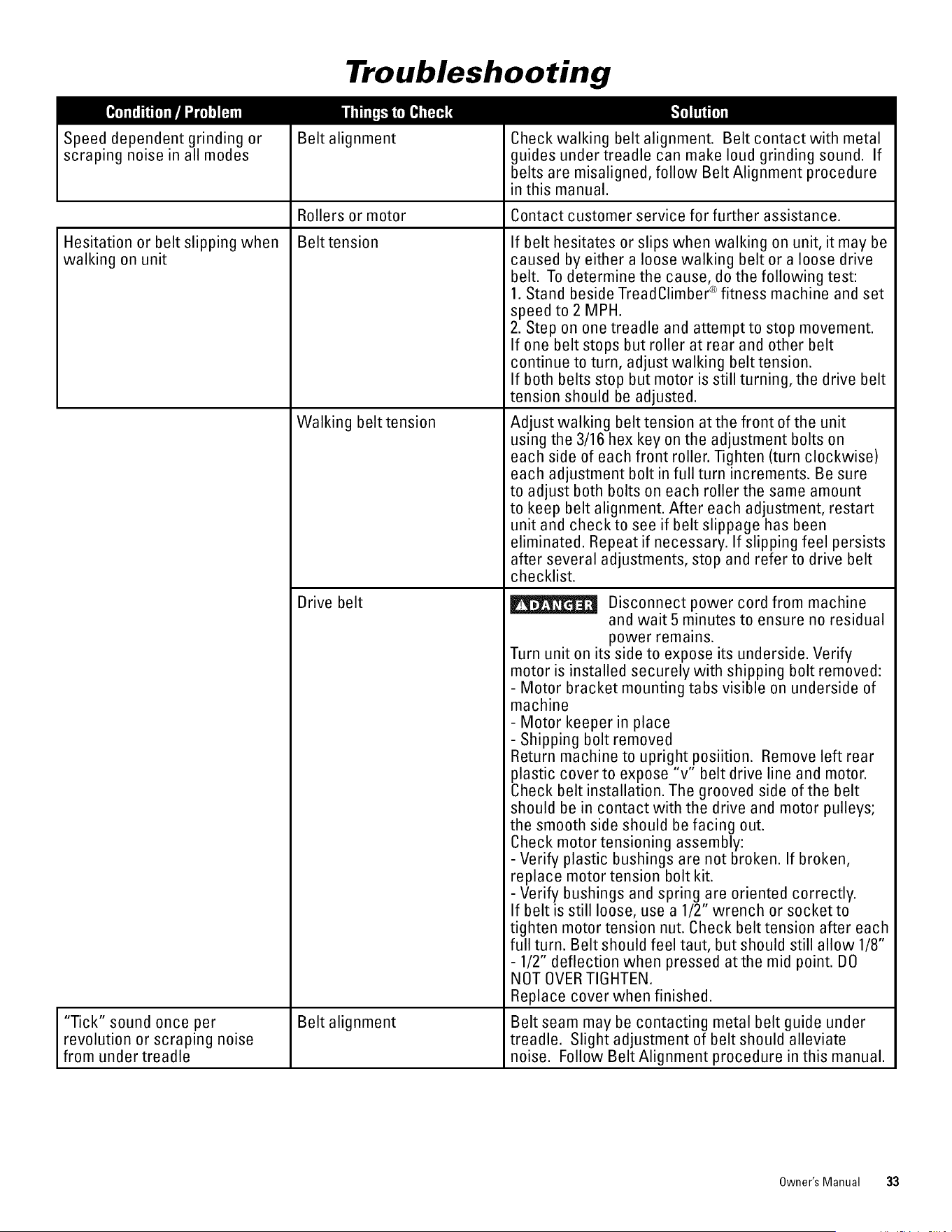
Troubleshooting
Speed dependent grinding or
scraping noise in all modes
Belt alignment
Rollers or motor
Belt tension
Hesitation or belt slipping when
walking on unit
I Tick" sound once per
revolution or scraping noise
from under treadle
Walking belt tension
Drive belt
Belt alignment
Check walking belt alignment. Belt contact with metal
guides under treadle can make loud grinding sound. If
belts are misaligned, follow Belt Alignment procedure
in this manual.
Contact customer service for further assistance.
If belt hesitates or slips when walking on unit, it may be
caused by either a loose walking belt or a loose drive
belt. To determine the cause, do the following test:
1. Stand beside TreadClimber ®fitness machine and set
speed to 2 MPH.
2. Step on one treadle and attempt to stop movement.
If one belt stops but roller at rear and other belt
continue to turn, adjust walking belt tension.
If both belts stop but motor is still turning, the drive belt
tension should be adjusted.
Adjust walking belt tension at the front of the unit
using the 3/16 hex key on the adjustment bolts on
each side of each front roller. Tighten (turn clockwise)
each adjustment bolt in full turn increments. Be sure
to adjust both bolts on each roller the same amount
to keep belt alignment. After each adjustment, restart
unit and check to see if belt slippage has been
eliminated. Repeat if necessary. If slipping feel persists
after several adjustments, stop and refer to drive belt
checklist.
Disconnect power cord from machine
and wait 5 minutes to ensure no residual
power remains.
Turn unit on its side to expose its underside. Verify
motor is installed securely with shipping bolt removed:
- Motor bracket mounting tabs visible on underside of
machine
- Motor keeper in place
- Shipping bolt removed
Return machine to upright posiition. Remove left rear
plastic cover to expose "v" belt drive line and motor.
Check belt installation. The grooved side of the belt
should be in contact with the drive and motor pulleys;
the smooth side should be facing out.
Check motor tensioning assembly:
- Verify plastic bushings are not broken. If broken,
replace motor tension bolt kit.
- Verify bushings and spring are oriented correctly.
If belt is still loose, use a 1/2" wrench or socket to
tighten motor tension nut. Check belt tension after each
full turn. Belt should feel taut, but should still allow 1/8"
- 1/2" deflection when pressed atthe mid point. DO
NOT OVERTIGHTEN.
Replace cover when finished.
Belt seam may be contacting metal belt guide under
treadle. Slight adjustment of belt should alleviate
noise. Follow Belt Alignment procedure in this manual.
Owner's Manual 33
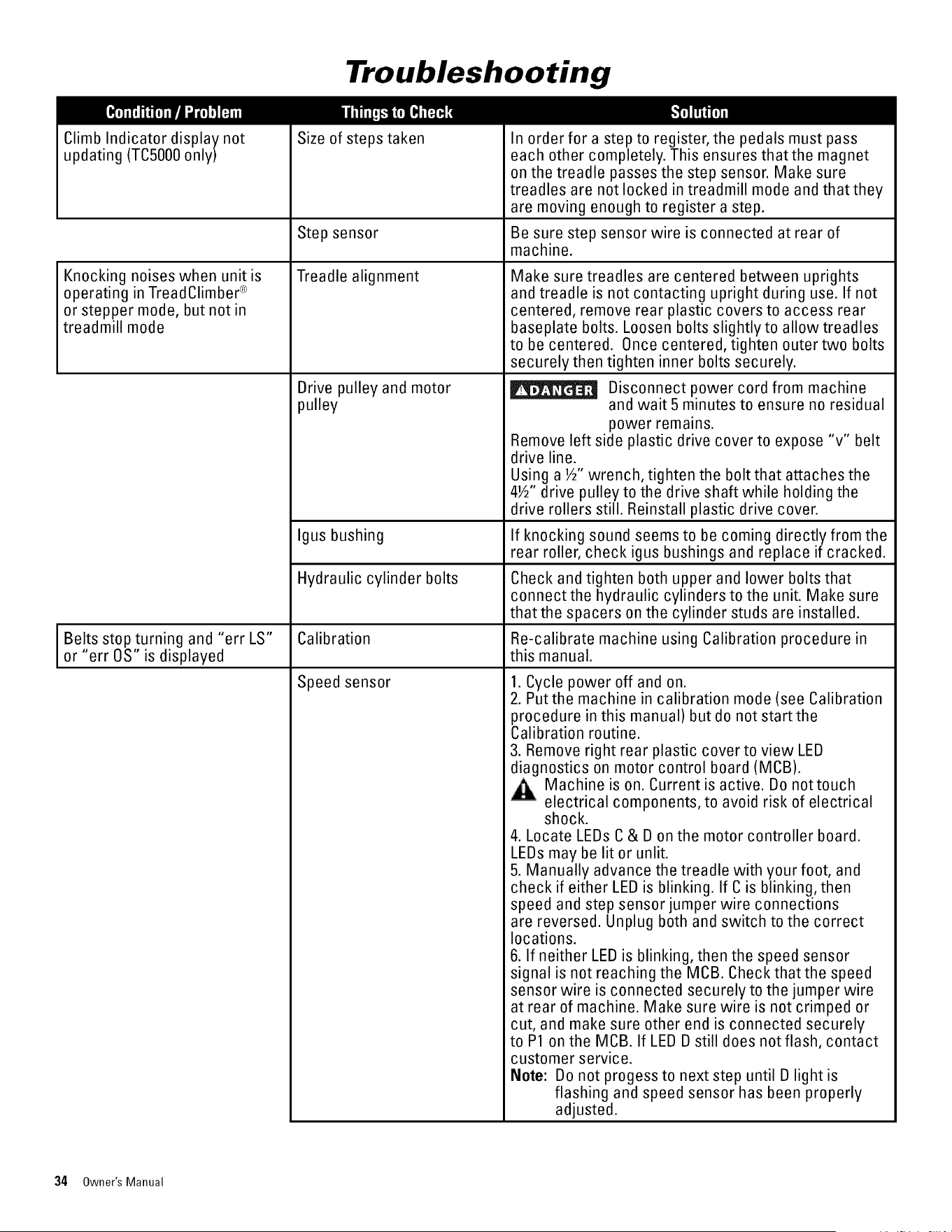
Troubleshooting
Size of steps takenClimb Indicator display not
updating (TC5000 only)
Knocking noises when unit is
operating in TreadClimber ®
or stepper mode, but not in
treadmill mode
In order for a step to register, the pedals must pass
each other completely. This ensures thatthe magnet
on the treadle passes the step sensor. Make sure
treadles are not locked in treadmill mode and that they
are moving enough to register a step.
Step sensor Be sure step sensor wire is connected at rear of
machine.
Treadle alignment
Drive pulley and motor
pulley
Make sure treadles are centered between uprights
and treadle is not contacting upright during use. If not
centered, remove rear plastic covers to access rear
baseplate bolts. Loosen bolts slightly to allow treadles
to be centered. Once centered, tighten outer two bolts
securely then tighten inner bolts securely.
Disconnect power cord from machine
and wait 5 minutes to ensure no residual
power remains.
Remove left side plastic drive cover to expose "v" belt
drive line.
Using a ½" wrench, tighten the bolt that attaches the
4½" drive pulley to the drive shaft while holding the
drive rollers still. Reinstall plastic drive cover.
Igus bushing If knocking sound seems to be coming directly from the
rear roller, check igus bushings and replace if cracked.
Hydraulic cylinder bolts
Check and tighten both upper and lower bolts that
connect the hydraulic cylinders to the unit. Make sure
that the spacers on the cylinder studs are installed.
Belts stop turning and "err LS" Calibration Re-calibrate machine using Calibration procedure in
or "err OS" is displayed this manual.
Speed sensor 1. Cycle power off and on.
2. Put the machine in calibration mode (see Calibration
procedure in this manual) but do not start the
Calibration routine.
3. Remove right rear plastic cover to view LED
diagnostics on motor control board (MOB).
,t_,n Machine is on. Current is active. Do nottouch
electrical components, to avoid risk of electrical
shock.
4. Locate LEDs C & D on the motor controller board.
LEDs may be lit or unlit.
5. Manually advance the treadle with your foot, and
check if either LED is blinking. If C is blinking, then
speed and step sensor jumper wire connections
are reversed. Unplug both and switch to the correct
locations.
6. If neither LED is blinking, then the speed sensor
signal is not reaching the MCB. Check that the speed
sensor wire is connected securely to the jumper wire
at rear of machine. Make sure wire is not crimped or
cut, and make sure other end is connected securely
to P1 on the MCB. If LED D still does not flash, contact
customer service.
Note: Do not progess to next step until D light is
flashing and speed sensor has been properly
adjusted.
34 Owner's Manual
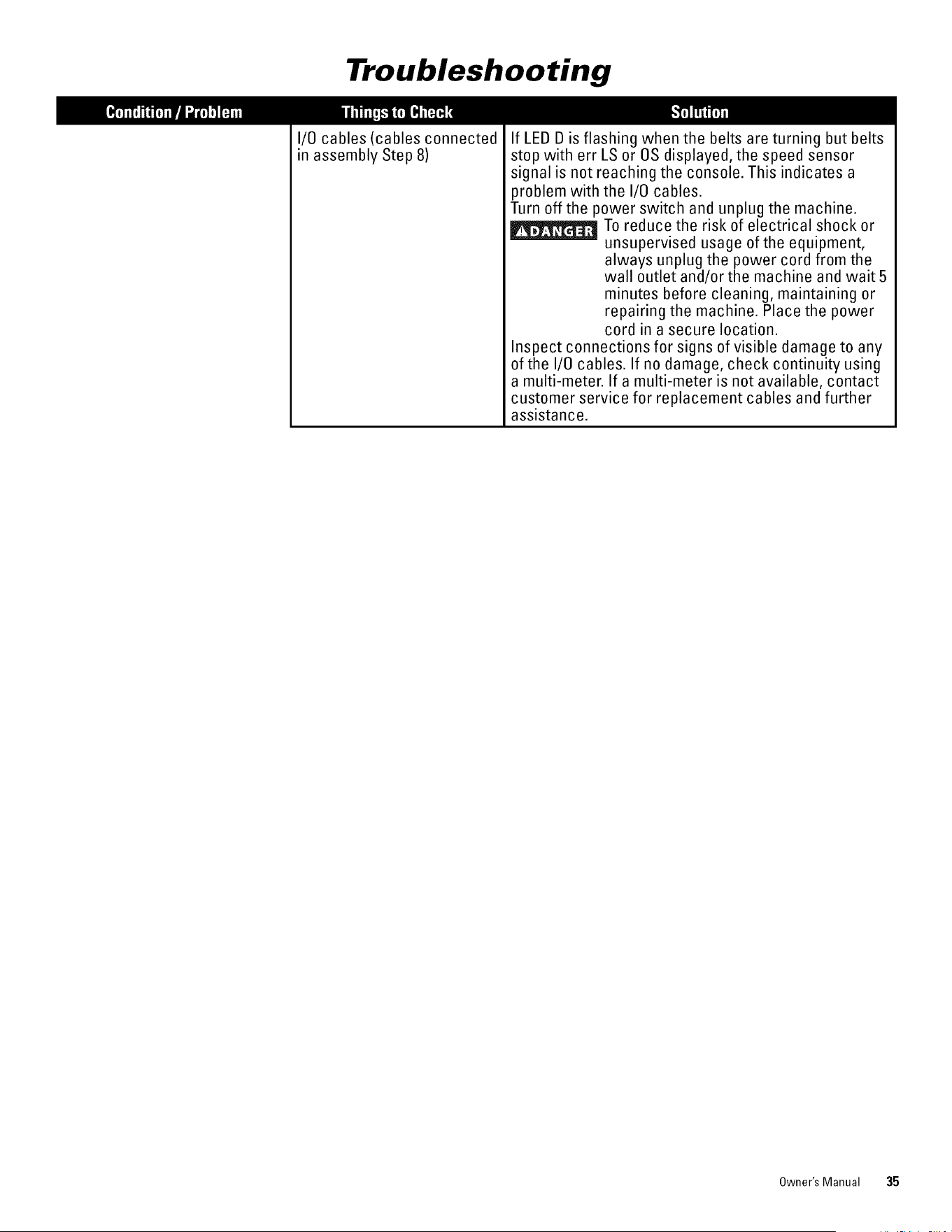
Troubleshooting
I/0 cables (cables connected
in assembly Step 8)
If LED D is flashing when the belts are turning but belts
stop with err LS or OS displayed, the speed sensor
signal is not reaching the console. This indicates a
problem with the I/0 cables.
Turn off the power switch and unplug the machine.
To reduce the risk of electrical shock or
unsupervised usage of the equipment,
always unplug the power cord from the
wall outlet and/or the machine and wait 5
minutes before cleaning, maintaining or
repairing the machine. Place the power
cord in a secure location.
Inspect connections for signs of visible damage to any
of the I/0 cables. If no damage, check continuity using
a multi-meter. If a multi-meter is not available, contact
customer service for replacement cables and further
assistance.
Owner's Manual 35
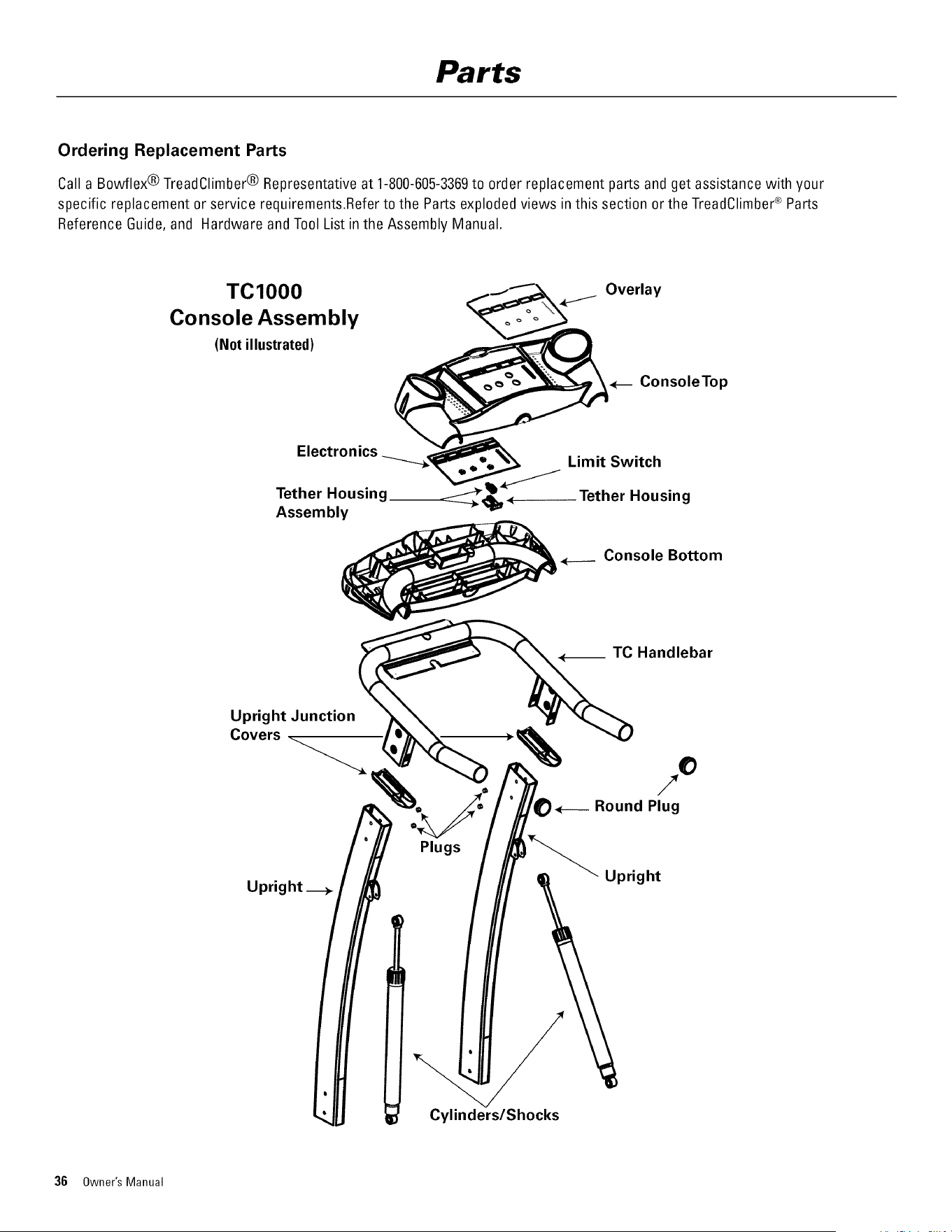
Parts
Ordering Replacement Parts
Call a Bowflex® TreadClimber® Representative at 1-800-605-3369to order replacement parts and get assistance with your
specific replacement or service requirements.Refer to the Parts exploded views in this section or the TreadClimber_;Parts
Reference Guide, and Hardware andTool List in the Assembly Manual.
TC1000 <___ Overlay
Console Assembly "_
(Not illustrated)
_ ConsoleTop
Electronics ___ Limit Switch
Tether Housing__ • Tether Housing
Assembly
Console Bottom
Upright _
Plugs
Upright
Cylinders/Shocks
36 Owner's Manual
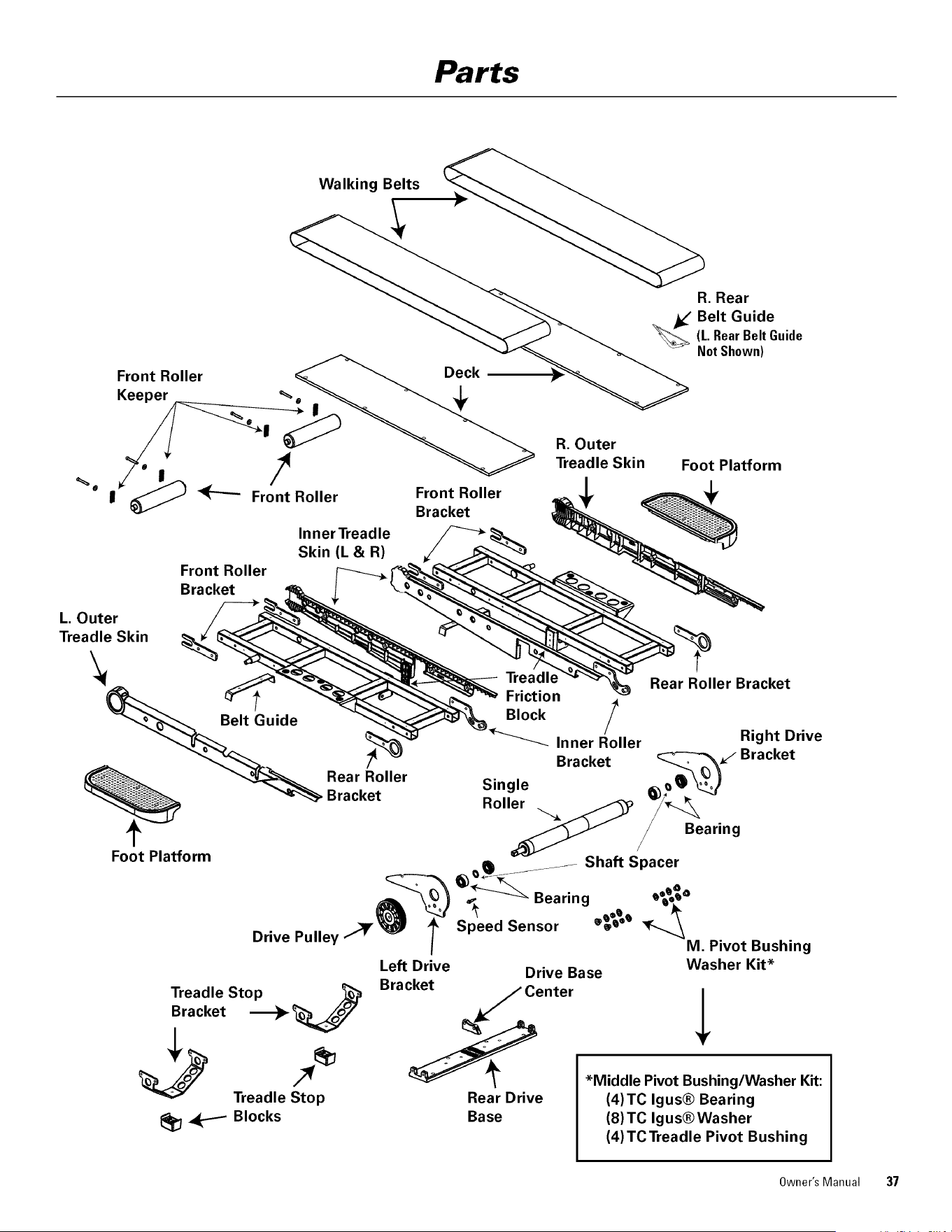
Parts
Walking Belts
Front Roller
Keeper
@
I
I
Front Roller
Front Roller
Bracket
InnerTreadle
Skin (L & R)
Front Roller
Bracket
R. Rear
Belt Guide(L.RearBeltGuide
NotShown)
R. Outer
Treadle Skin Foot Platform
L. Outer
Treadle Skin
Rear Roller
Bracket
Treadle
Friction
Inner Roller
Bracket
Single
Roller
Rear Roller Bracket
Right Drive
Bracket
w'_: Bearing
Foot Platform
_ ....... Shaft Spacer
,_ _ Bearing Q_oo
Speed
Sensor
Drive Pulley ''_M. Pivot Bushing
Treadle Stop
Bracket _
_ Treadle Sto/_pl_
Blocks
Left Drive Drive Base
Bracket
Center
Rear Drive
Base
Washer Kit*
*Middle Pivot Bushing/Washer Kit:
(4)TC Igus® Bearing
(8)TC Igus®Washer
(4)TCTreadle Pivot Bushing
Owner's Manual 37
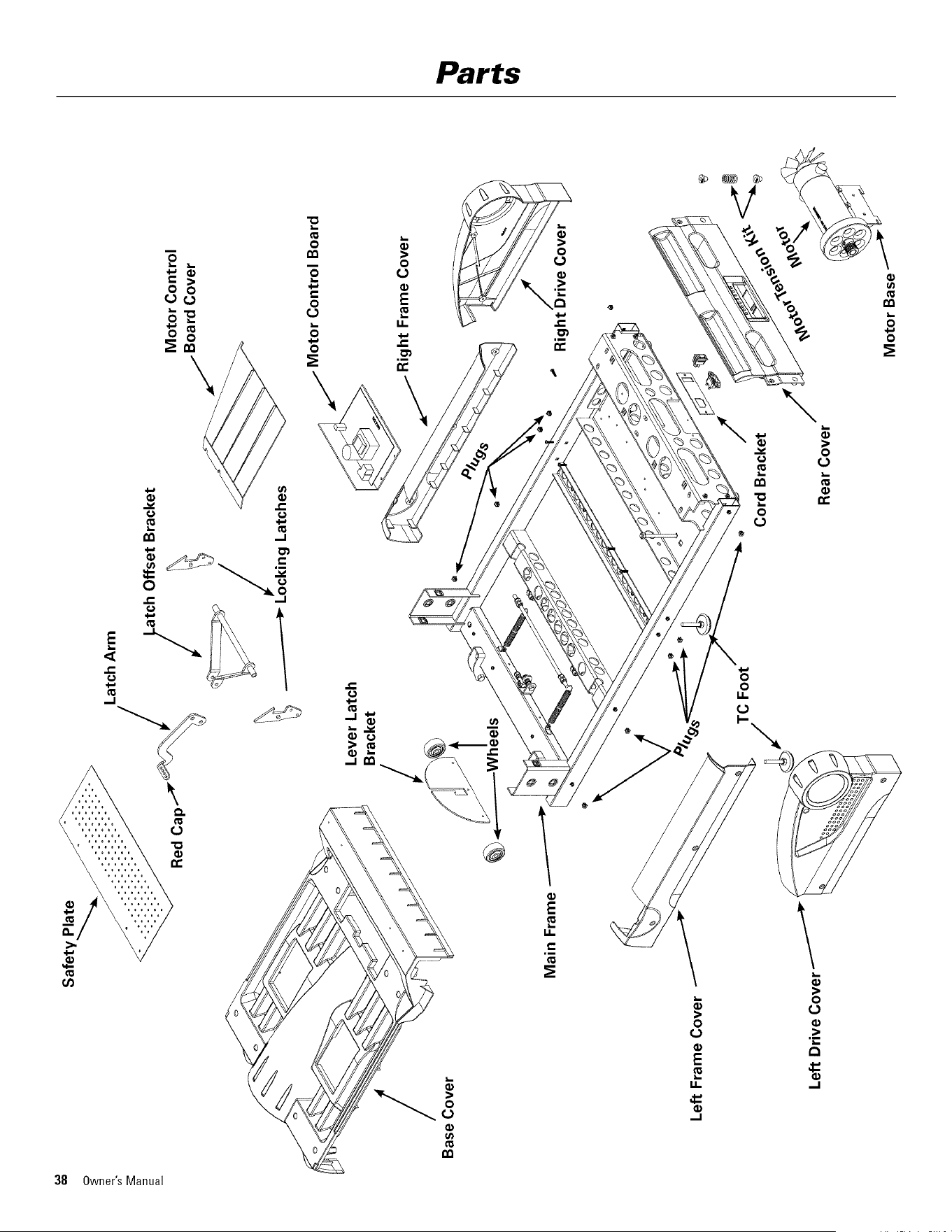
oo
¢D
==
/
Base Cover
Safety_
Latch Arm
Bed __ iatch Offset Bracket
Cap _" ,/ _ Motor Control
__ /_ J_ //Board Cover
- -_ ocking Latches
Main Frame
Lever Latch
Bracket
/
.......Wh!els
/ Motor Control Board
Frame Cover
Rig /
/
Cord Bracket
Rear Cover
Bowflex®TreadClimber ®100% Satisfaction Guarantee
We want you to knowthat your Bowflex®TreadClimber®machine is a superior product. Your
satisfaction is guaranteed. If, for any reason,you are not 100%satisfied with your TreadOlimber®
machine, please follow the instructions belowto return your merchandise and receive a refund of
the purchase price, less shipping and handling.
This TreadClimber® Satisfaction 6uarantee applies only to merchandise purchased by consumers
directly from Nautilus, Inc. This guarantee does not apply to sales made by dealers or distributors.
1. Call a TreadClimber® Representative at 1-800-NAUTILUS(1-800-628-8458)for a
Return Authorization Number (RMA). An RMAwill be granted if:
a. The Bowflex®TreadClimber® exercise machine was purchased directly from
Nautilus, Inc.
b. The requestto return the product is within 6 weeks of the delivery date of your
merchandise.
2. If an RMA is granted, the following instructions will prevent delays in the processing of
your refund.
a. The merchandise must be returned to the address given to you atthe time of the Return
Authorization Call.
b. All returned merchandise must be properly packaged in good condition, preferably in the
original boxes.
c. The exterior of the boxes should be marked clearly with:
• Return Authorization Number
• Your Name
• Your Address
• Your Phone Number
d. Additionally, a piece of paper with your name, address and phone number or copies of
your original invoice should be placed in each box of merchandise.
e. YourRMA number is time sensitive. Your shipment must be post markedwithin two
weeks from the date the TreadOlimber® Representative issued the Return Authorization
Number.
NOTE:You are responsible for return shipping and for any damage or loss to merchandise that
occur during return shipment. Nautilus recommends that you obtain tracking numbers
and insure your shipment.
UnauthorizedReturns
Nautilus, Inc. defines an unauthorized return as any merchandise returned to our facilities without
a valid and current Return Merchandise Authorization (RMA) number issued by Nautilus. Failure
to properly mark packages with avalid RMA number,or allowing an RMA nurnber to expire, will
cause Nautilus, Inc. to consider a return unauthorized. Any merchandise returned without a RMA
number will not be subject to a refund or credit and Nautilus will discard the product. The cus-
tomer assumes all shipping and handling charges for any unauthorized return.
-Nautilus®
Bowflex ®
®
Schwinn Fitness Universal®