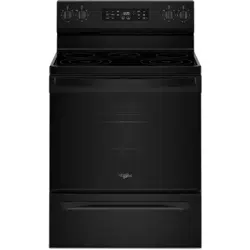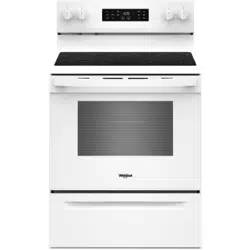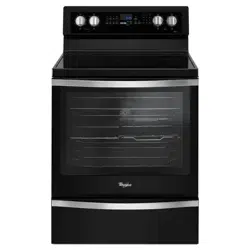
30-1NCH SET-INCONTINUOUS-CLEANING
ELECTRICRANGE
Models RS6300XK;
RS630PXK
tlse
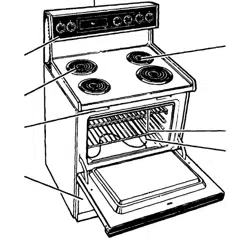
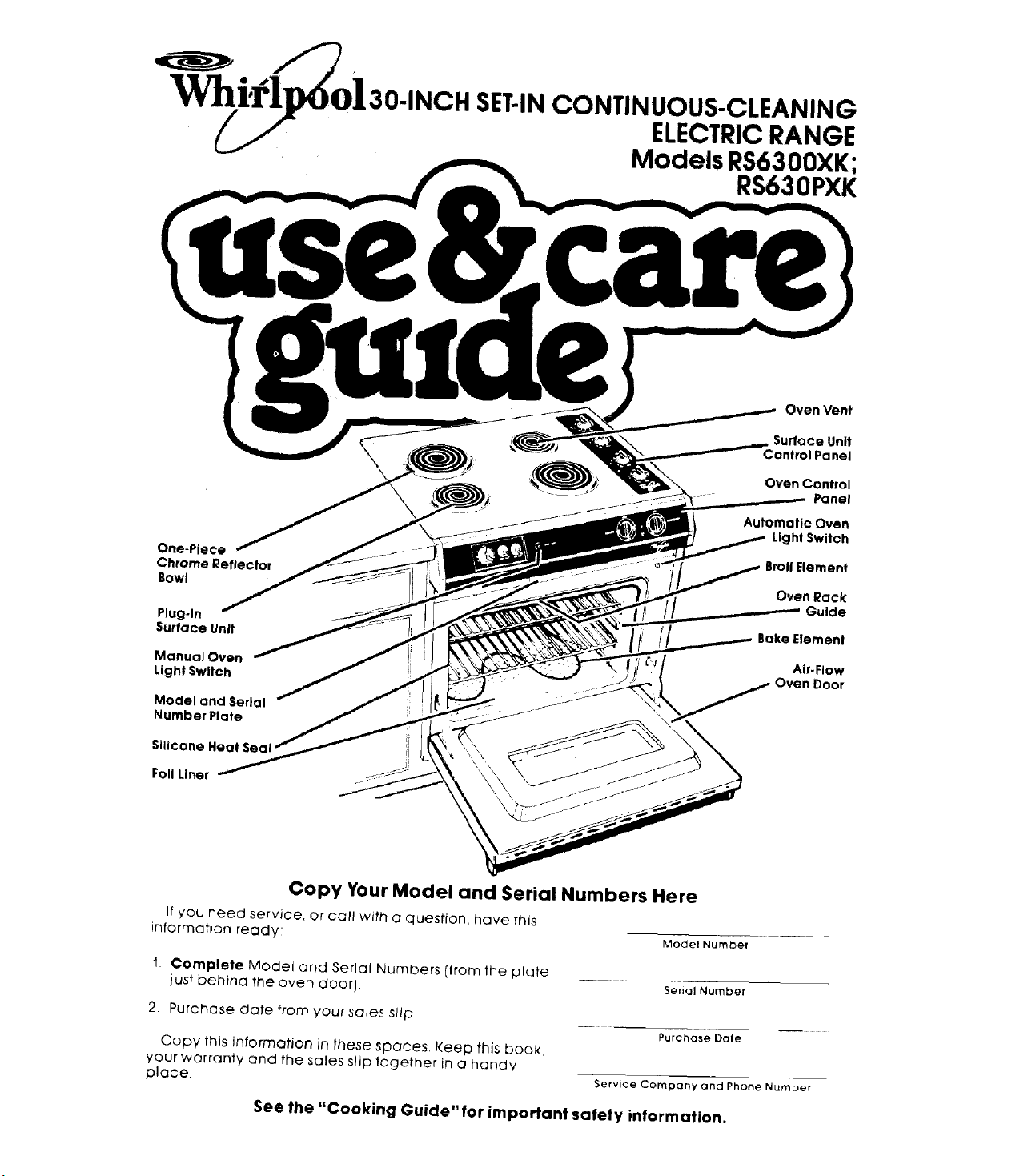
One-Piece
Chrome Reflector
Bowl
Piug-ln
Surface Unit
Monuo_ Oven
Light Switch
Model anti Serial
Number Plate
Sillcone
Fall Liner
Oven Vent
Surface Unit
Control Panel
Oven Control
Panel
Automatic Oven
Light Switch
Broil Element
Oven Rack
Guide
Bake Element
Air-Flow
Oven Door
Copy Your Model and Serial Numbers Here
If you need service, or call with a question, have this
information ready Model Number
1 Complete Model and Serial Numbers [from the plate
just behind the oven door}.
2. Purchase date from your sales slip
Copy this information in these spaces. Keep this book,
your warranty and the sales slip together in a handy
place,
Serial Number
Purchase Dale
Service Company and Phone Number
See the "Cooking Guide" for important safety information.
Your responsibilities...
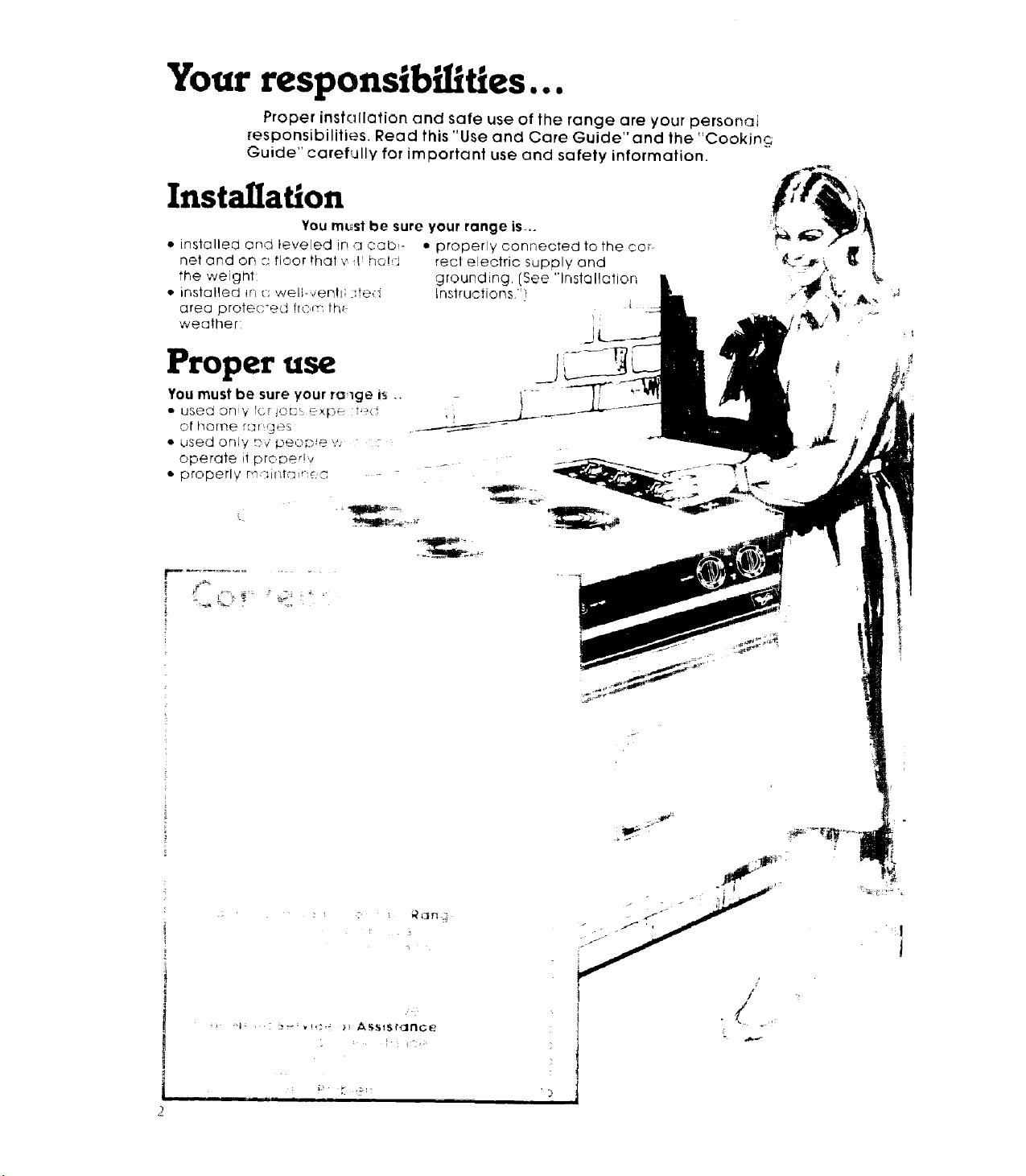
Proper installation and safe use of the range are your personai
responsibilities. Read this "Use and Care Guide" and the "Cooking
Guide" carefullyforimportant use and safety information.
Installation
YoumL_stbe sure your ronge is...
• installed and leveled in ,u cabs- • properly connected to the cor-
net and on :_'floor that '_ L ho!d rect electric supply and
the weight: grounding, (See "Installation
• installed in (:: weli-,,,entl ted !nstruetions."]
area protec*ed from th_
weather: j|
Proper use
')
/
J
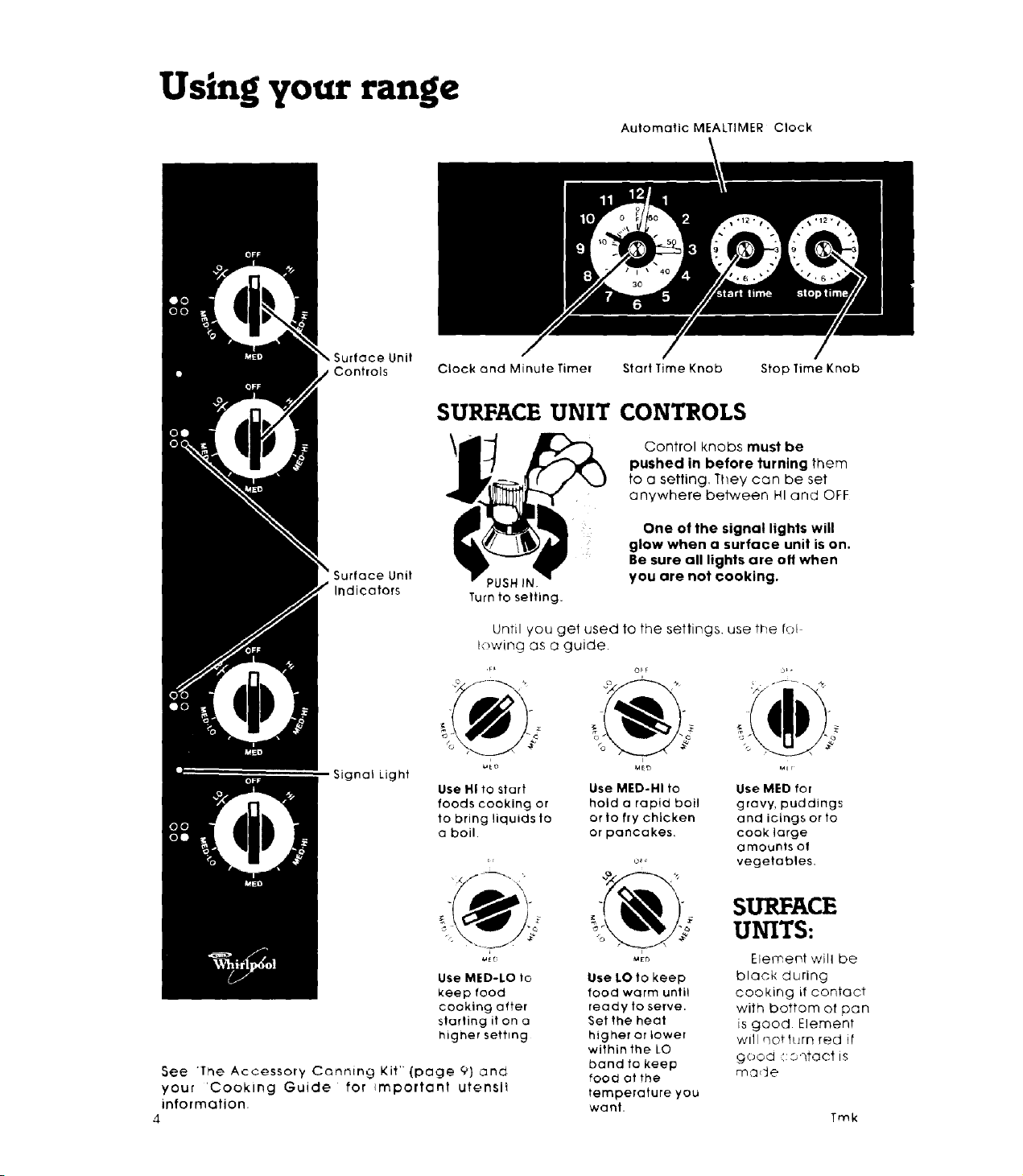
Using your range
AutomaticMEALTIMER Clock
Surface Unit
Controls Clock and Minute Timer StartTime Knob
Stop Time Knob
SURFACE UNIT CONTROLS
Controlknobs must be
pushed in before turning them
to a setting, They can be set
anywhere between HI and OFF
Indicators
PUSH IN
Turn to setting.
One of the signal lights will
glow when a surface unit is on.
Be sure all lights are o11when
you are not cooking.
Until you get used to the settings, use the to!
lowing as a guide•
Signal Light
°V
_ o _o
Usei"llto start Use MED-HI to Use MED for
foods cooking or hold a rapid boil gravy, puddings
to bring liquidsto or to frychicken and icingsor to
a boil. or pancakes, cook large
a mounts of
o_ vegetables,
UNITs:SURFACE
_,> -_ Element will be
Use MED-LO to
keep food
cooking after
startingiton a
higher setting
See The Accessory Canning Kit' {page 9) and
your 'Cooking Guide for _mportant utensi_
information.
4
Use LO to keep
food warm until
ready to serve.
Set the heat
higher or lower
withinthe LO
band to keep
food ot the
temperature you
want.
black during
cooking if contact
with bottom of pan
is good Element
will Qot torn red it
_ood _':Orqtaot IS
made
Trek
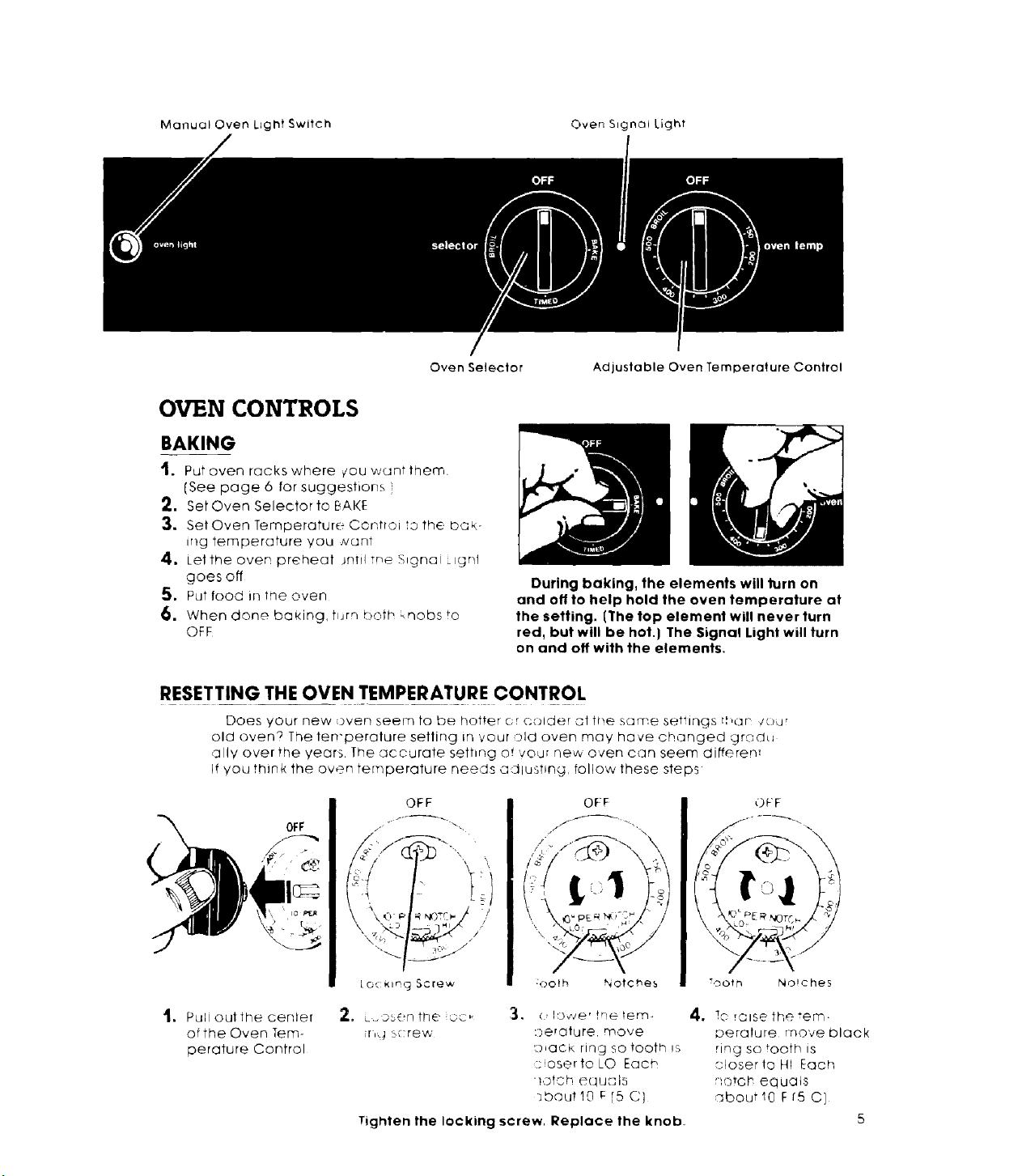
Manual Oven Light Switch Oven Signal Light
Oven Selector
OVEN CONTROLS
BAKING
t. Put oven rackswhere ¢ou w_untthern.
[See page 6 for suggestions )
2. Set Oven Selector to BAKE
:3. Set Oven Temperature Controi to the bQk
ir_g temperature you _vc_nt
4. Let the oven preheat Jrltiitne Signal ignl
goesofl
S. Put food in tne oven
6. When done baking, turn _:)oth knobs to
OFF
Adjustable Oven Temperature Control
During baking, the elements will turn on
and o11to help hold the oven temperature at
the setting. [The top element will never turn
red, but will be hot.) The Signal Light will turn
on and off with the elements.
RESETTING THE OVEN TEMPERATURE CONTROL
Does your new oven seem to be hotter cr C'older at the some settings t,nan /our
old oven? The len'perature setting in vour :rid oven may have changed grodu
ally over the years The "accurate sethng of voor Dew oven can seem differen:
if you think the oven temperature needs adlushng, follow these steps
OFF
OFF
[o, _lng Screw
OFF
// ,-'_ \
:oo_h Notches
OFF
Tooth Noiche5
.
Pull out the cenlef
ofthe Oven Tem-
oerature Control
2, L..osonthe oc,, _, (,!D_ve'tneter,'n
ir,_ b{:rew ::)erature move
L_ack ring So tooth !s
:;,osertoLO Each
_otch equc,'Is
}bout!O F[5 C]
Tighten the locking screw. Replace the knob_
4. 1C rOlSe the "err'.
©eralure rnoveblQck
ring so tooth ts
oloserle Hi Each
i10toh eq UC1tS
sbout10 F r5 C}
5
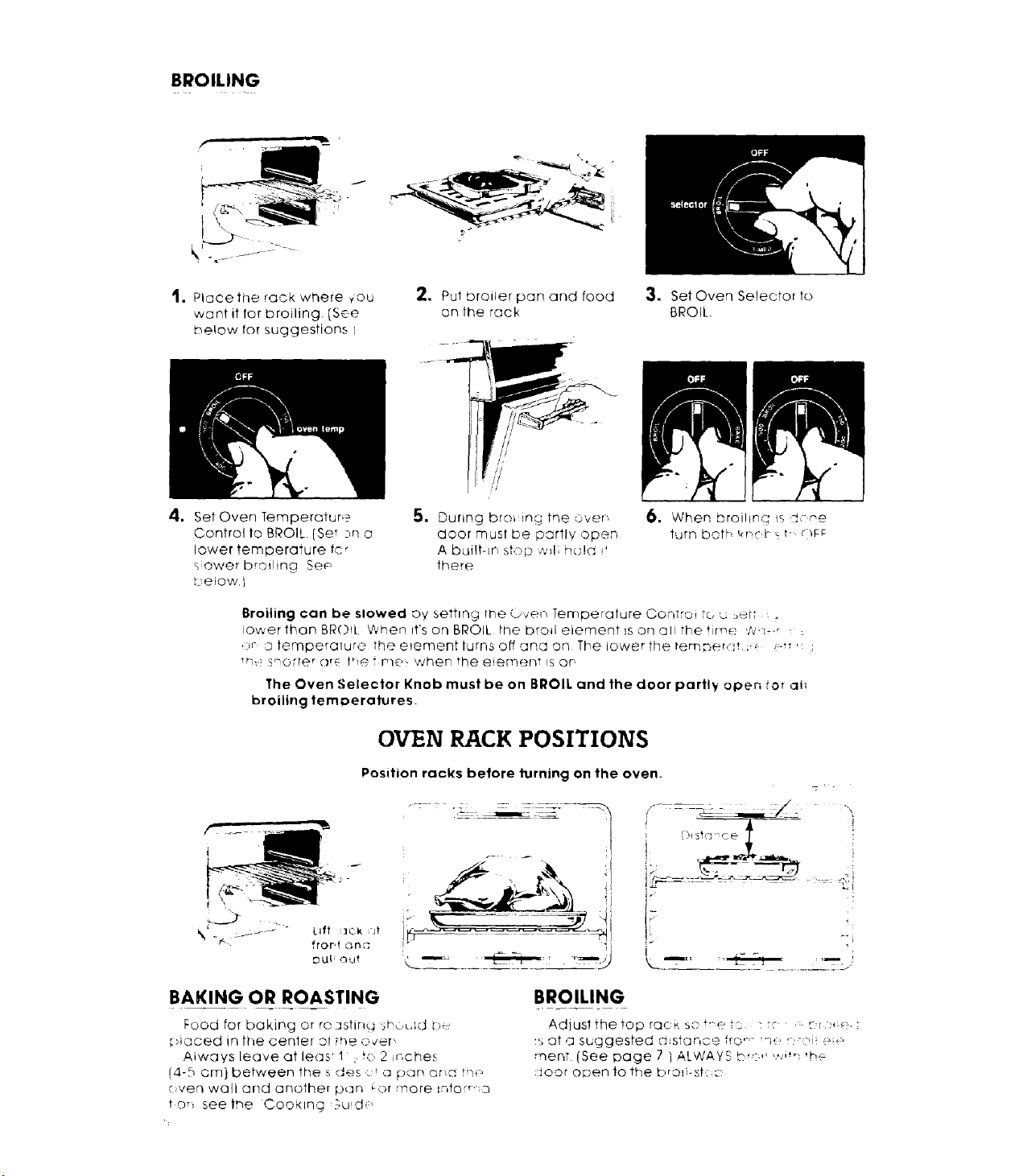
BROILING
1. Plaeethe rack where _'ou
want it for broiling. [See
below for suggestions /
4. Set Oven Temperature _
Control to BROIL. (Set :,n o
lower temperature fcr
sower broiling Se_
t elow.I
2. PuI broiler pan and food
on the rock
//
i!
il
!!
5. During broL ing the over",
door must be partly open
A built-in stop wfl; hcJ!d i'
there
3. Set Oven Selector to
BROIL
6. When broiling ISi:-'e
turn both !,_n:b_ t-. __r_;
Broiling can be slowed o17setting rne (_ven Temperature ConTroi .o c, :_÷rT ,
lower than BRO!L Vvhen ff's on BROIL the broil element is on o li the time W'_-_r : :
,:)r _temperaluro the e_ement turns off and on The lower the lem_erdt ; _ .-, ;
_. s-orl@ror_: thetmet: when the eiernent ls or,
The Oven Selector Knob must be on BROIL and the door partl_- open tot aii
broiling tem_)eratures.
OVEN RACK POSITIONS
_ Lift :_qk jr
DU_; O'd
Position racks before turning on the oven.
I
J, [ )l St("] -:CO
I
i--
i
BAKING OR ROASTING
Food for baking or reastin_ sh..._,ld c_u
placed in the cenler oi the o,,er,
Aiways Leave at leas 1 ;.to 2 inches
(4-5 cm) between the s des .::da pan ar_a tn_
oven wall and another p_an _or more '.r,forr" a
ton see the Coo_lng ,u_d,
BROILING
Adiustthetoprac_,so'r-eto : ,* ,:-t-r_e,;
_, ot a suggested q_star, ce fro _ _7',' r'-,i _'_
rnent (See page 7 i ALWAYS Dr<:'' ,*_,i_ _he:
:_oor odor/to the brod-st<;:-_
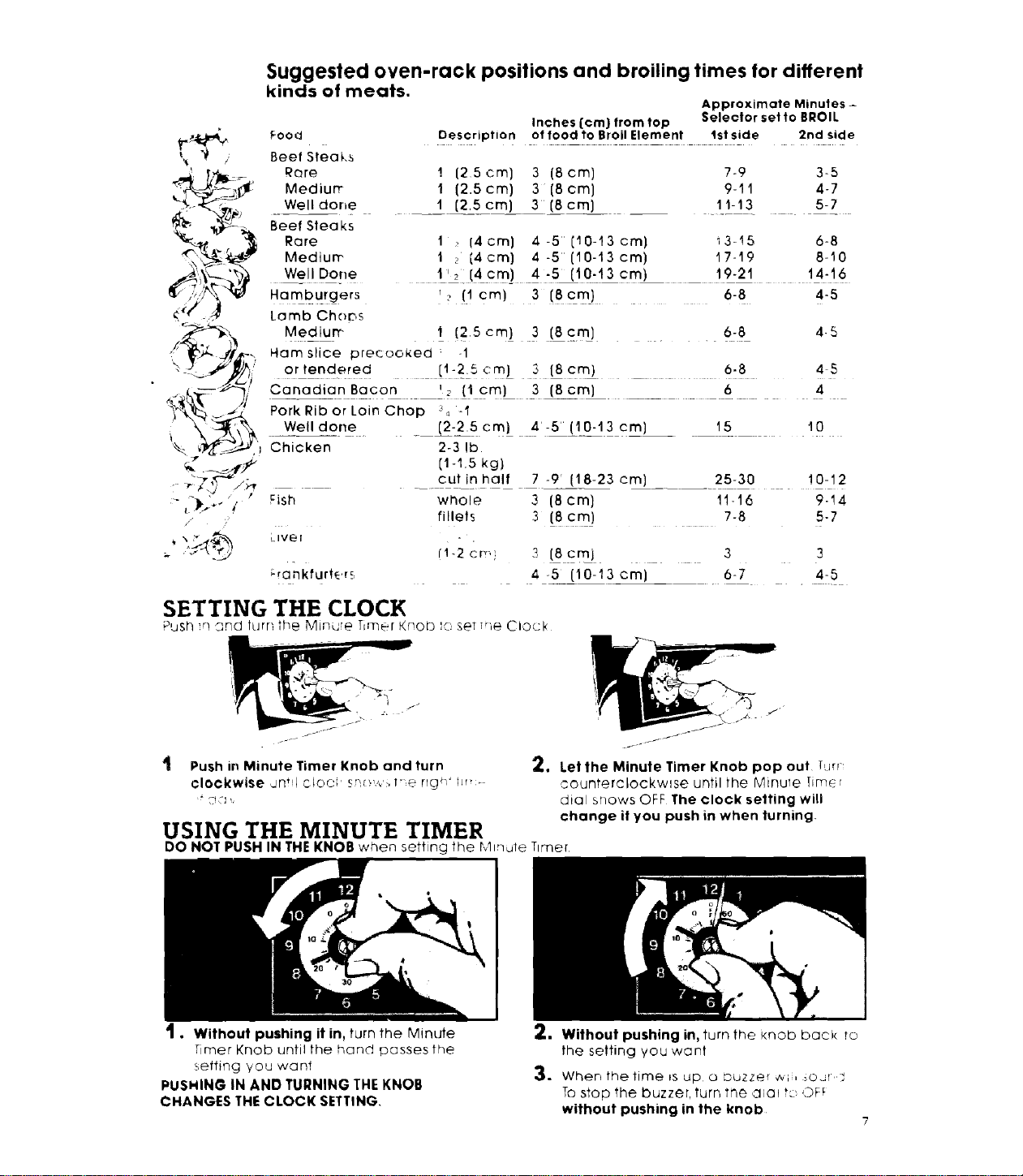
Suggested oven-rack positions and broiling times for different
kinds of meats.
Approximate Minutes-
Inches {cm} from top Selector set to BROIL
Description of food to Broil Element Ist side 2rid side
Food
Beef Steaks
RQre
Medium
Well done
Beef Steaks
Rare
Mediurr,
Well Done
! {25cm] 3 {8cm] 7-9 3-5
t (2.5cm) 3 [8cm) 9-11 4-7
1 (2,5cm) 3 (8cm) 11-13 5-7
1 14oral 4-5 [10-13cm) i3-15 6-8
t ; [4ore] 4 -5 (I0-13cm) I7-19 6-t0
t' 2 {4 cm] 4 -5 (10-t3 cm) 19-21 14-16
Hamburgers _ [lcm) 3 [8cm} . 6-8 4-5
Lomb Chops
Mediurr- I (2,5 cm) 3 [8 .cm_] . . 6-8 4-5
Ham slice precooked : -1
or tendered [t -25cm} 3 (Scm) 6-8 45
Canodia_nBa_or, '_ _i Cm)- 3 (scm) 6 4
Pork Rib or Loin Chop 34 -I
Well done [2-2.5cm) 4-5 (10-13 cm) 15__ t0
Chicken 2-3 lb.
[1-I.5 kg}
_ cutin half 7 -9 (18-23 era) ..... 25-30 10-12
whole 3 (8 cm) 1!16 0-14
fillets 3 (Scm) 7-8 5-7
fi-2cm 3 [ScmJ 3 3
4 -5 (10-t3 cm} 6-7 415
SETTING THE CLOCK
PUS_q 'q _rqd tLJrn the Minute Tim_:÷r Knoto _o set Trie Clock
Push in Minute Timer Knob and turn 2, Let the Minute Timer Knob pop out Tun-
clockwise dnt!l CIOC' qr',ow:_ t'e rlgh' hr_> counterclockwise until the Minute lim_r
'_ ":_,:,', dial snows OFF The clock setting will
change if you push in when turning
USING THE MINUTE TIMER
DO NOT PUSH IN THE KNOB when setting the Minute Timer
. Without pushing it in, turn the Minute
Timer Knob until the hand passes the
setting you want
PUSHINO IN AND TURNING THE KNOB
CHANGES THE CLOCK SETTING
_. Without pushing in, turn the knob back to
the setting you want
3. When thetime _s up o buzzer @il o.J[ _
To stop the buzzer, turn the d_a_ tc LDF_
without pushing in the knob
7
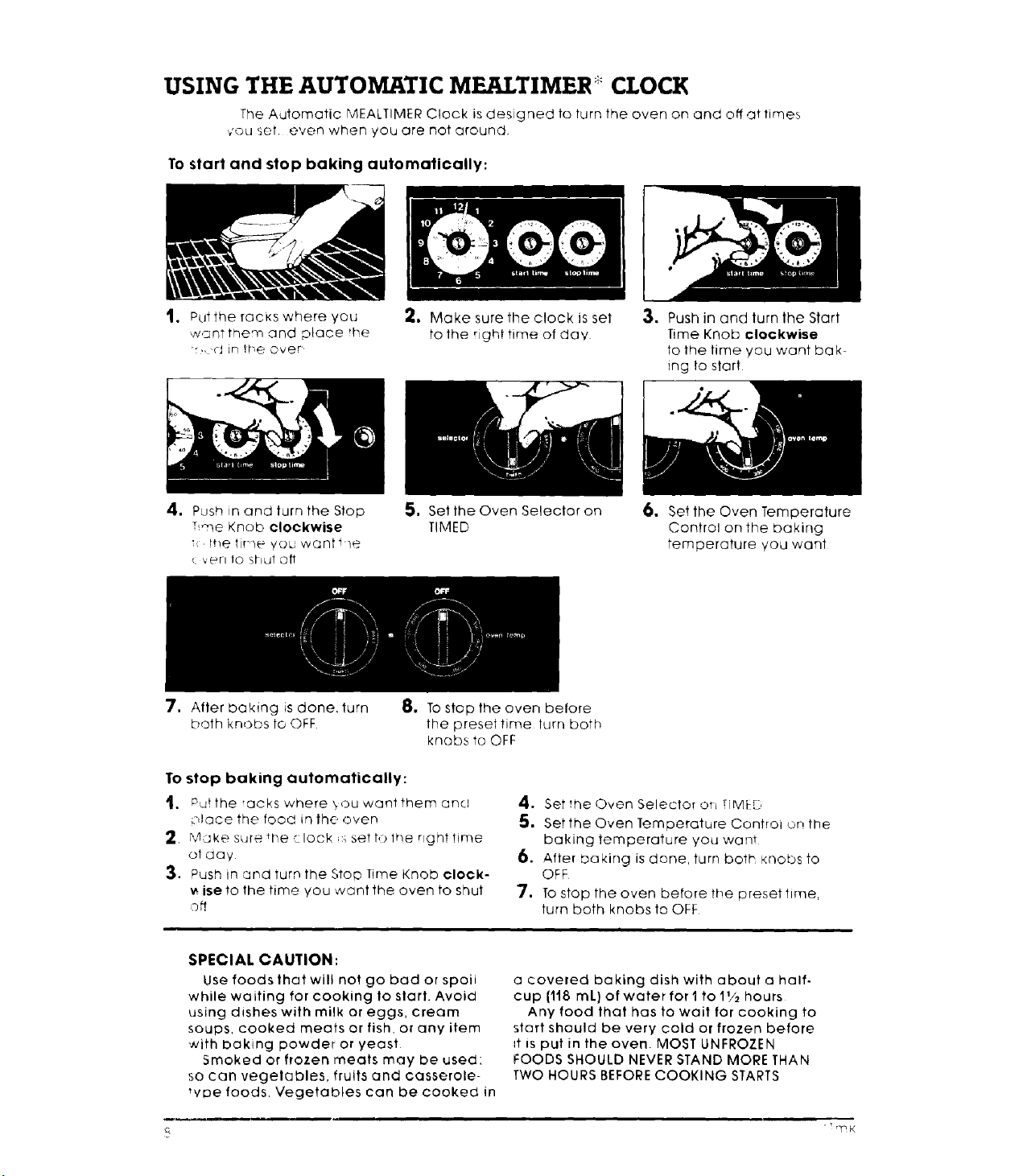
USING THE AUTOMATIC MEALTIMER CLOCK
The Automatic MEALTIMER Clock is designed to turn the oven on and off at times
vouset even when you are not around
To start and stop baking automatically:
1. Put the rOCKS where you
w'znt them and place the
,,cJ in _heover
_. Make sure the clock is set
to the qghttime of day
3. Push in and turn the Start
Time Knob clockwise
to the time you want bak-
ing to start
=
Push in and turn the Stop
Tree Knob clockwise
!t!e tJ!-_(_ you want i-/e
<:verl 1o shut oft
5, Set the Oven Selector on
TIMED
6. Set the Oven Temperature
Control on the baking
temperature you want
7. After baking is done turn
both knobs to OFF
8. To stop the oven before
the preset time turn both
knobs to OFF
To stop baking automatically:
t. Putthe ackswhere,,ouwantthemand
olace the food in the oven
2 Make sure _l_e _ lock _>_set to 1he nghf time
at day
3, Push in :and turn the Stop lime Knob clock-
wiseto the time you want the oven to shut
off
4, Set 1he Oven Selector or_ riMEb
5. Set the Oven Temperature Control ,on the
baking temperature you ,want
6. After baking is done, turn both Knobs to
OFF
7. To stop the oven before the preset time
turn both knobs to OFF
SPECIAL CAUTION:
Use foods that will not go bad or spoii
while waiting for cooking to slart. Avoid
using dishes with milk or eggs, cream
soups, cooked meats or fish, or any item
with baking powder or yeast
5rooked or frozen meats may be used:
so can vegelables, fruits and casserole-
wDe foods Vegetables can be cooked in
a coveled baking dish with about a half.
cup 1118 mL) of water for I to 1_/2 hours
Any food that has to wait for cooking to
start should be very cold or frozen before
_t is put in the oven. MOST UNFROZEN
FOODS SHOULD NEVER STAND MORE THAN
TWO HOURS BEFORE COOKING STARTS
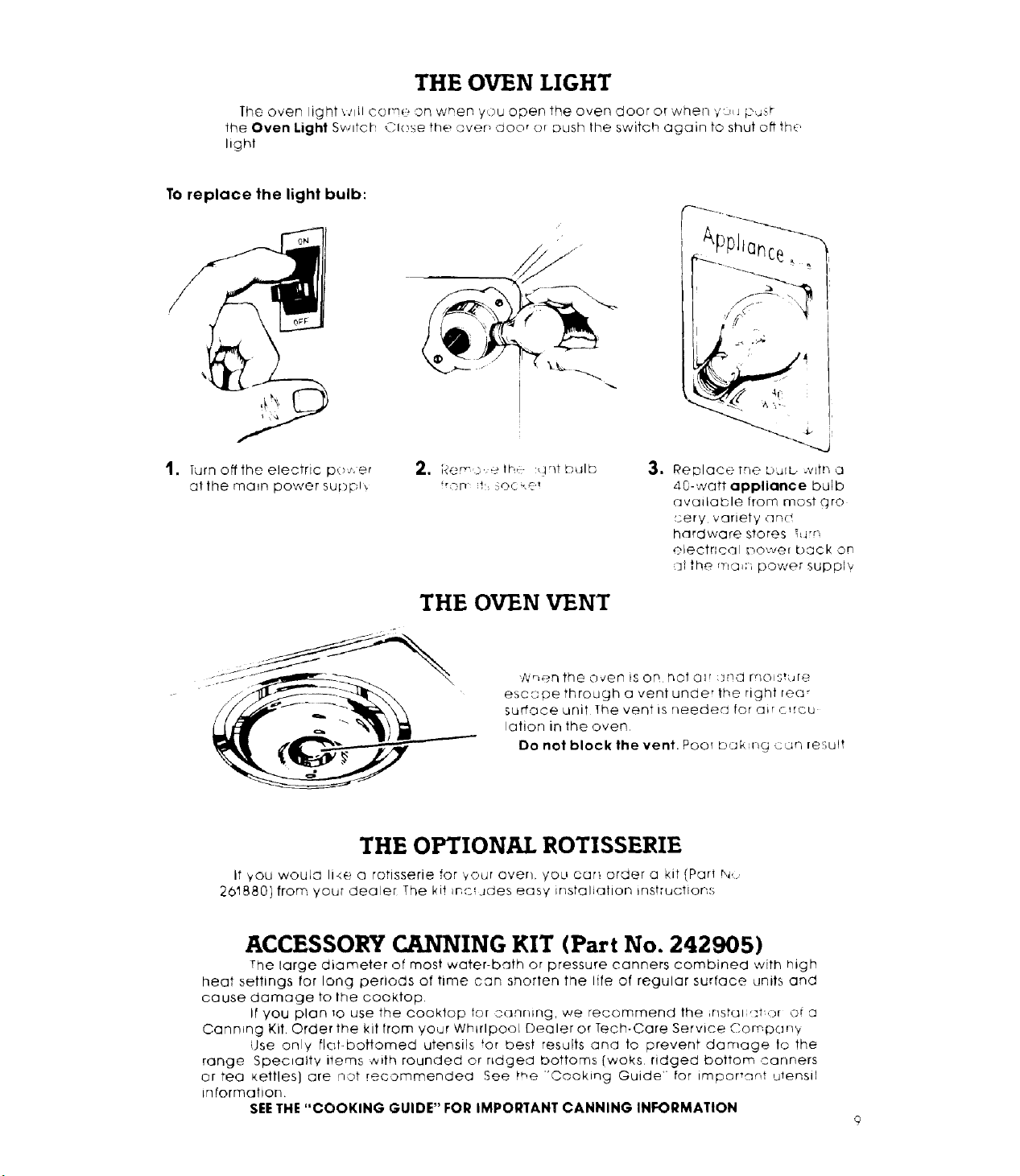
THE OVEN LIGHT
The oven light _..qil cor'nP on wr, en you open the oven door or when yoq p_jst
the Oven Light Swllct Close the avert door or push the switch again to shut oft the.,
light
To replace the light bulb:
I. Turnoff the electric p(;p_er
althe ma_n power supph
2, por_-_,et['_ :- _!ntbulb
frDr_ !' ::OCkO_
THE OVEN VENT
3. Replaeeme buJb .vffn a
40-watt appliance bulb
available from most (_ro
_.:ery variety and
hardware StOreS _r',
electrlcal Dower back on
7_ithema_r power supply
_,nen the oven is ON InOt air :]Nd moisture
esc,q pe through a vent under the right rea_
surface unit The vent is needer] !or a_r c,rcu
!ation in the oven
Do not block the vent. Poor bak ng con result
THE OPTIONAL ROTISSERIE
If _ou would 1i4e a rotisserie for your oven. you car_ order a kit (Part N_
, ,-c_Jdes easy instaliatJon instruction:s
261880] from your dealer The ki_ m
ACCESSORY CANNING KIT (Part No. 242905)
The large diameter of most water-bath or pressure canners combined with high
heat settings for long periods of time can snorfen the life of regular surface units and
cause damage to the cooktop,
It you plan Io use the oooktop for _.;(]nrllAg, we recommend the fflsbJi It aroi a
Cannmng Kit. Order the kit from your Whirlpool Dealer or Tech-Care Service Cornpany
Use only riot-bottomed utensils for best results and to prevent damage to the
range Specialty items with rounded or ndgea bottoms[woks ridged bottom canners
or tea Kettles} are Rot recommended See the "Cooking Guide" for important utensil
intormation
SEE THE "COOKING GUIDE" FOR IMPORTANT CANNING INFORMATION
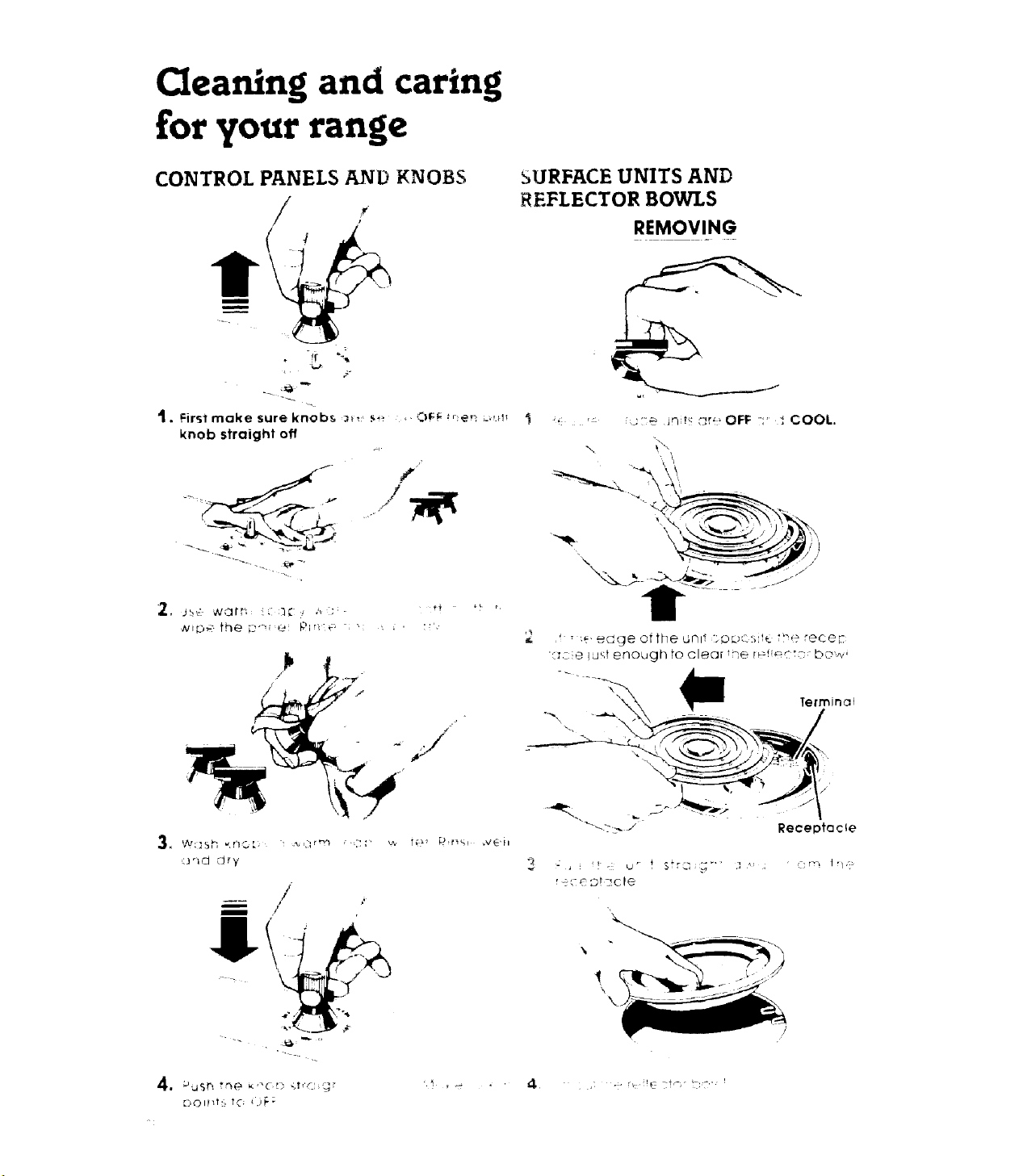
Cleaning and caring
for your range
CONTROL PANELS AND KNOBS
I
t. Firslmoke sure knobs _:, _ _,d._;:_ _qe_ _;m_
knob straight off
.i
,f
L i _'"
SURFACE UNITS AND
REFLECTOR BOWLS
REMOVING
f _',e eoge otthe unl! toDr :;,__me receF:
X:z:e luf!t enough to clear _qe r_ _:nr bo,_,_
\
3"_d (_ry
m /r
' _<: e ;.bt-; C le
, - r_ !_ f_-" tT:2' '
Receptacle
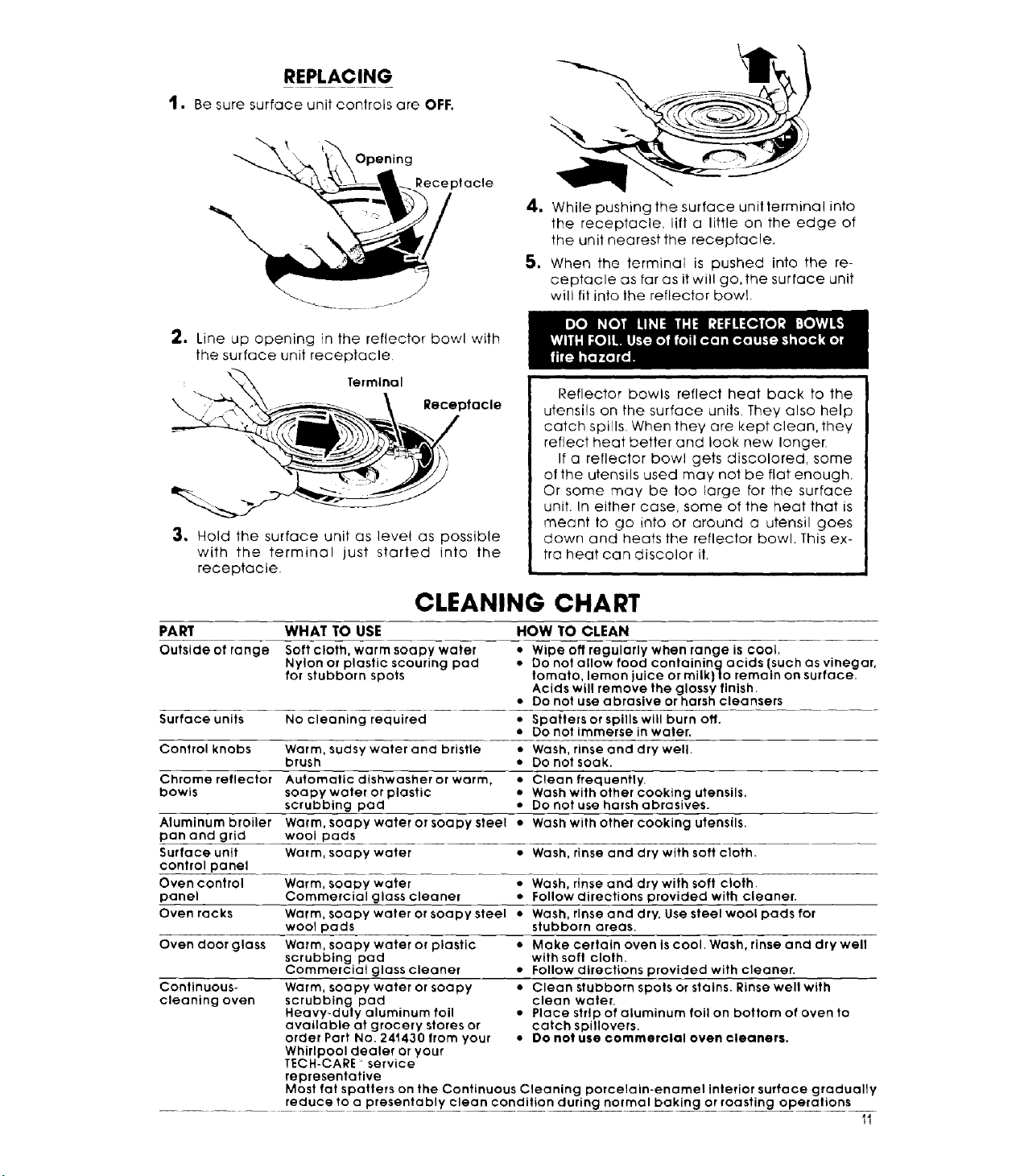
REPLACING
1. Be sure surface unit controls are OFF.
Opening
#ecepfacle
4. While pushing the surface unil terminal into
the receptacle, lift a little on the edge of
the unit nearest the receptacqe.
S. When the terminal is pushed into the re-
ceptacle as far as it will go, the surface unit
will fit into the reflector bowl.
2. Line up opening in the reflector bowl with
the surface unit receptacle.
Terminal
Receptacle
3. Hold the surface unit as level as possible
with the terminal just started into the
receptacle.
Reflector bowls reflect heat back to the
utensils on the surface units, They Qlso help
catch spills. When they are kept clean, they
reflect heat better and look new longer
If a reflector bowl gets discolored, some
of the utensils used may not be flat enough.
Or some may be too large for the surface
unit. In either case, some of the heat that is
meant to go into or around a utensil goes
down and heats the reflector bowl. This ex-
tra heat can discolor it
CLEANING CHART
Continuous-
cleaning oven
PART WHAT TO USE HOW TO CLEAN
Outside of range Soft cloth, warm soapy water • Wipe off regularly when range is cool,
Nylon or plastic scouring pad • Do not allow food containing acids (such as vinegar,
for stubborn spots tomato, lemon juice or milk)to remain on surface.
Acids will remove the glossy finish.
• Do not use abrasive or harsh cleansers
Surface units No cleaning required • Spatters or spills will burn off.
• Do not immerse in water.
Control knobs Warm, sudsy water and bristle • Wash, rinse and dry well.
brush • Do not soak.
Chrome reflector Automatic dishwasher or warm, • Clean frequently.
bowls soapy water or plastic • Wash with other cooking utensils.
scrubbing pad • Do not use harsh abrasives.
Aluminum broiler Warm, soapy water or soapy steel • Wash with other cooking utensils.
pan and grid wool pads
Surface unit Warm, soapy water • Wash, rinse and dry with sott cloth.
conlrol panel
Oven control Warm, soapy water • Wash, rinse and dry with soft cloth.
panel Commercial glass cleaner • Follow directions provided with cleaner.
Oven racks Warm, soapy water or soapy steel • Wash, rinse and dry. Use steel wool pads for
wool pads stubborn areas.
Oven door glass Warm, soapy water or plastic • Make certain oven is cool. Wash, rinse and drywell
scrubbing pad with soft cloth.
Commercial glass cleaner • Follow directions provided with cleaner.
Warm, soapy water or soapy • Clean stubborn spots or stains. Rinse well with
scrubbing pad clean water.
Heavy-duty aluminum foil • Place strip of aluminum foil on bottom of oven to
available at grocery stores or catch spillovers.
order Part No. 241430 from your * Oo not use commerclal even cleaners.
Whirlpool dealer or your
TECH-CARE service
representative
Most fat spatters on the Continuous Cleaning porcelain-enamel interior surface gradually
reduce to a presentably clean condition during normal baking or roasting operations
11
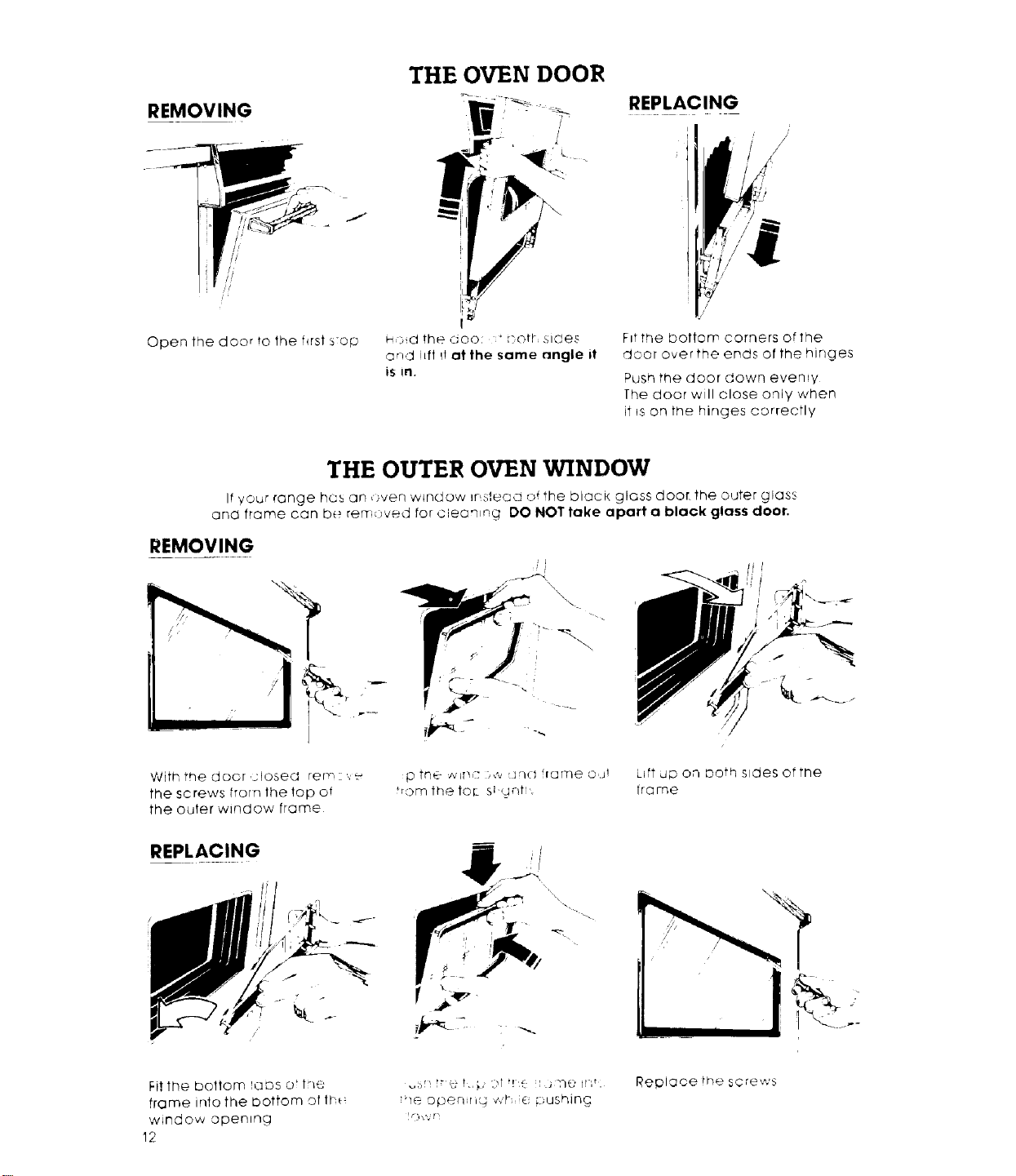
REMOVING
i
/
Open the door to the first s:op
THE OVEN DOOR
H)dthed00 :+r'OH sides
arid ilft I! atthe same _ngle it
iS in.
REPLACING
i
)
F_tthe bottom corners of the
door over the ends of the hinges
Push the door down everuy
[he door will close only when
it ,s on the hinges correctly
THE OUTER OVEN WINDOW
It your range hcs an ,)yen window instead of the black glass door. the outer glas',
and frame can be rer7 oved tar cieon,ng DO NOT take apart a black glass door,
REMOVING
With the door <losed rem ',._€
the screws from the top of
the outer window frame
REPLACING
p trl@ ¢,'if]C )¢_ (Jrl(J lame oat
from the for- Sb<u_!tl'.
L_ft UP on oath s_des oftne
frame
Fit tile boftom ads or t_e
frame into the Dottom of tf_
window openng
12
+" ,, :!t" ': l.j-Nt:iN t.
_br! u t 7,
lie opeqJfl_ Cdl',iC i:;dshlNc
Replace !he screws
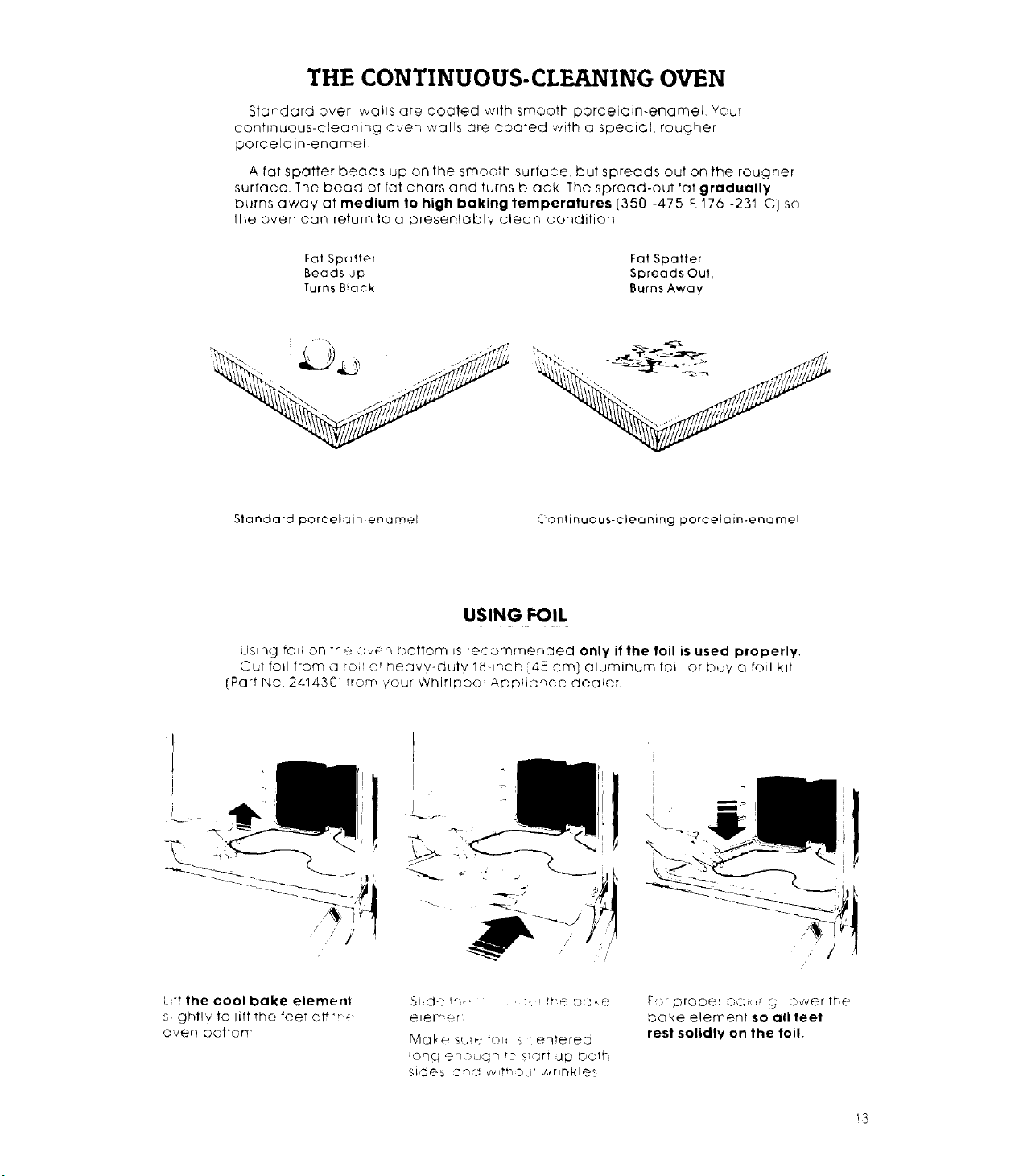
THE CONTINUOUS-CLEANING OVEN
Standard over wails are coated with smooth porcelain-enamel Your
continuous-cleaning oven walls are coated with a special, rougher
porcelain-enarr ei
A fat spotter beads up on the smooth surface, but spreads out on the rougher
surface The bead of fat chars and turns black The spread-out tat gradually
burns away at medium to high baking temperatures (350 -475 F,176 -231 C] so
the oven can return to a presentably clean condition
Fat Spcdre_ Fat SDatter
Beads Jp Spreads Oul,
Turns B*ack Burns Away
Standardporcel3Jn enamel "Continuous-cleaning porcelain-enamel
USING FOIL
Llsmg fcm on tr _ _,_e,_ :)ot|om Js reqommer,:ued only if the foil is used properly,
CuT foil from a o; o t neavv-auly 18qnch 45 cm] aluminum foii or b,_v a foil kit
(Part No 241430 from €our Whirlpoo Aopik:qce dealer
!
\
I
/
/
[_it! the cool bake element
shghtly to lift the feel off',_.
oven barton-
elemer
Mal, e s_Jrq-t(Sl S @nterea
_on{; ,_rqo(Jgn !'2 s;srt Up both
sides :snd wltrq:DiJ" wrinkles
F:;=rprop_._r O(:u,_ _ owerthE'
bake element so all feet
rest solidly on the toil.
13
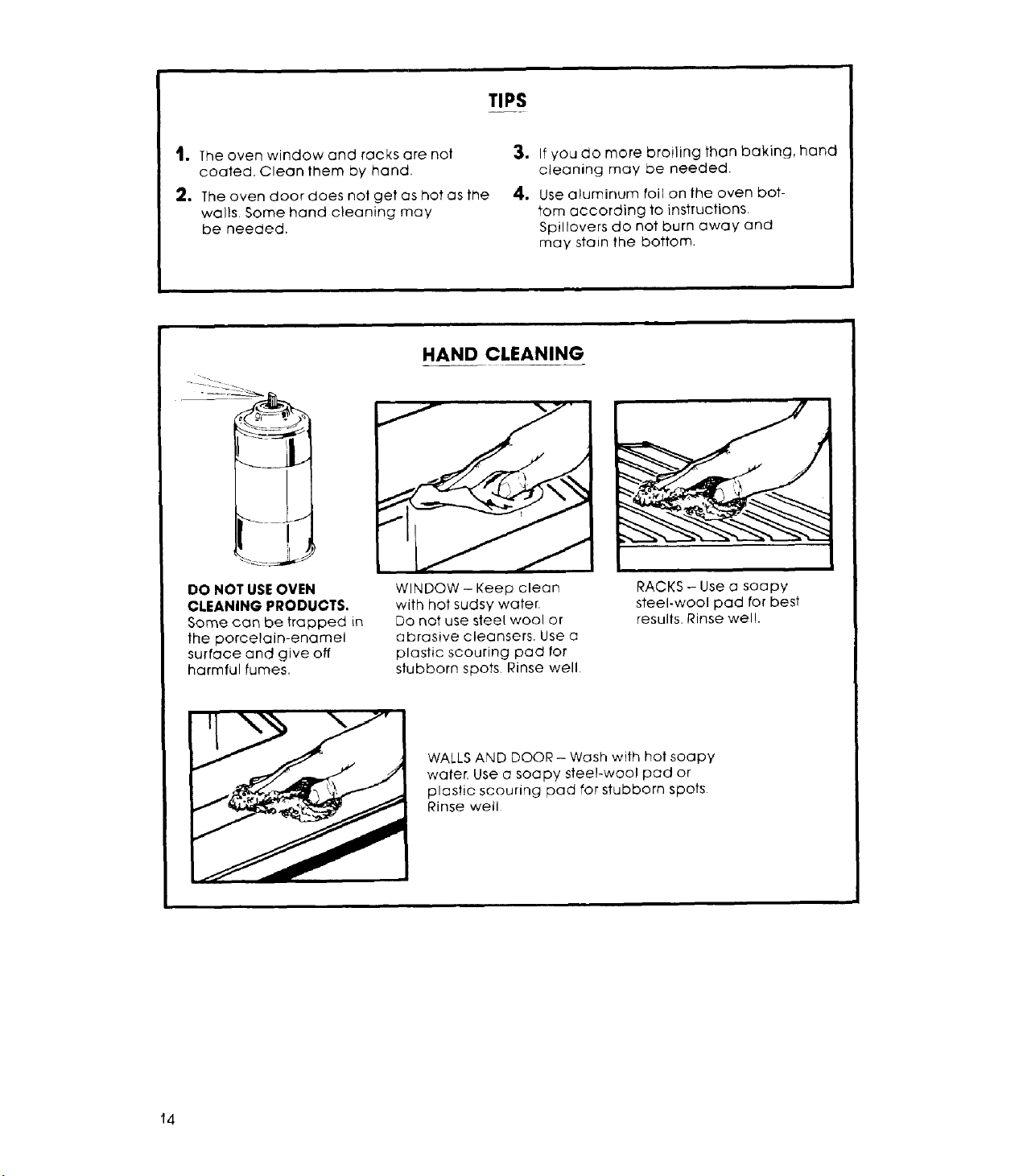
TIPS
t, The oven window and racks are not
coated. Clean them by hand.
2, The oven door does not get as hot as fi_e
walls+ Some hand cleaning may
be needed.
3. If you do more broiling than baking, hand
cleaning may be needed.
4. Use aluminum foil on the oven bot-
tom according to instructions,
Spillovers do not burn away and
may stain the bottom.
-
I
DO NOT USEOVEN
CLEANING PRODUCTS,
Some can be trapped in
the porcelain-enamel
surface and give off
harmful fumes,
HAND CLEANING
J fS"
WINDOW- Keep clean
with hot sudsy water.
Do not use steel wool or
abrasive cleansers. Use a
plastic scouring pad for
stubborn spots+ Rinse well+
RACKS- Use a soapy
steel-wool pad tot best
results, Rinse wel!.
WALLS AND DOOR - Wash with hot soapy
water+ Use a soapy steel-wool pad or
plastic scouring pad for stubborn spots
Rinse well
14
Ifyou need service or assistance,
we suggest you follow these
four steps:
1.Before _ng for assistance...
Performance problems often result from
little things you can find and fix yourself with-
out tools of any kind.
If nothing operates:
• Is the range plugged into an operating
outlet or wired into a live circuit with the
proper voltage? [See Installation
Instructions,)
• Have you checked the main fuse or circuit-
breaker box?
It the oven will not operate:
• Is the Oven Selector Knob turned to a set-
ting [BAKE or BROIL, but not TIMED)?
• Isthe Oven Temperature Control turned to a
temperature setting?
It surface units will not operate:
• Have you checked the main fuse or circuit-
breaker box?
• Are surface units plugged in al! the way?
• Do the control knobs turn?
It surface unit control knob or knobs will not
turn:
• Did you push in before trying to turn?
It soil is visible on continuous-cleaning
oven finish:
• The special finish is designed to gradually
reduce oven soil during normal baking
or roasting. It is not designed to keep your
oven spotless...only presentably clean.
• If you broil often, you may see oven soil.
• The door is cooler than oven walls. Soil will
be more visible on the door than other
areas in the oven. See page 14, "Hand
Cleaning"
If cooking results aren't what you expect:
• isthe range level?
• Are you using pans recommended in the
Cooking Guide?
• If baking, have you allowed 11/2to 2 inches
14-5 cm] on all sides of the bans for air
circulation?
• Does the oven temperature seem too low or
too high? See page 5, "Resetting the oven
temperature control"
• Have you preheated the oven as the rec-
ipe calls for?
• Are lhe pans the size called for in
the recipe?
• Are you following a tested recipe from a
reliable source?
• Do the cooking utensils have smooth, flat
bottoms?
• Do the cooking utensils fit the surface unit
being used?
See the Cooking Guide for more information
on cooking problems and how to solve them.
2. Ifyou need assistance:_ ...
Call the Whirlpool COOL-LINE" service as-
sistance telephone number. Dial tree from:
Continental U.S......... (800) 253-I 301
Michigan ................ (800) 632-2243
Alaska & Hawaii ........ (500) 253-1121
and talk with one of our trained Consultants.
The Consultant can instruct you in how to ob-
tain satisfactory operation from your appli-
ance or, if service is necessary, recommend a
qualified service company in your area.
3. If you need ....serwce ...
- Jo
I TE H- ARE
L FRANCHISED SERVICE
Whirlpool has a
nationwide net-
work of franchised
TECH CARE _ Ser-
vice Companies
TECH-CARE service
technicians are
trained to fulfill the
product warranty
and provide after-
warranty service, anywhere in the United
States To locate TECH-CARE service in your
area, call our COOL-LINE service assistance
telephone number [see Step 2] or look in your
telephone directory Yellow Pages under:
APPLIANCE_ - HOUSEHOLD - ELECTRICAL APPLIANCES
MAJOR SERVICE & REPAIR MAJOR REPAIRING & PARTS
OR
,_1 ALl 0L _, PL _CES WHIRLP0[]L _,PPI IAN{E$
rqAr4 H_EB T-_ ]_,R_ _R',r E _R,_NCI_ SED _[]k CAI4_ SFRVI{f
kt /:!I( t _ IJIH)I \!J: _, <F.I_I !I'_. I _)li/ A \IF._'
X_'!S_R_ CE C. _YZ EAYC C
'23 _ar 9!:__ 23 M:!le 999 9999
OR
WASHING MACHINES DRYERS
& IRONERS SERVICING
_ tlFLPQOL _,PPL _(, S
_qANCHI£ED T 81 CAA EAV
XYZ SERYI(E '0
12/MJD'," 999 9999
15
4. If you have a problem ...
Call our COOL-LINE service assistance tele-
phone number [see Step 2} and talk with one
of our Consultants, or if you prefer, write to
Mr. Robert EGunts, Vice President
Whirlpool Corporation
Administrative Center
2000 US-33 North
Benton Harbor, M149022
If you must call or write, please prowde mode_
number, serial number, dole of purchase, and
a complete description _f the problem This
information is needed in order to better re-
spond to your request for (]ssistanoe.
P'SP ,s ] registered lrademark
of Whirlpool CorporohOn for
quality pa[t_ Look for this
symbo{ Of quc_hty wherlever
you need e feplooemerlt par!
lot your Whirlpool appliance
FSP replocemeni parls
Wl! i tlf righl Qnd WOrK right because they ate
_" ride to the same exachng specifications
tl,ed Io build every new Whirlpool aDphence
Whrrl ol
e_q _ _--v_, ,'__._J
Part No 311410 Rev B
Benton Harbor M=ehlgan. Automali: Washers CIolhes Dryers
F[eezers Hefrlgeraler Freezers¸ If;e Makers¸ Dishwashers¸
Bu,lt-ln Ovens and Surlace Units, Ranges Microv/ave Ovens
Compaelors Room Air Conditioners Dehumidiliers Central
Heating and Air CondiNonin@ Systems
Printed in U S A