Device of this mark is a trademark of Sharp Corporation.
“Plasmacluster” and “Device of a cluster of grapes” are
trademarks of Sharp Corporation.
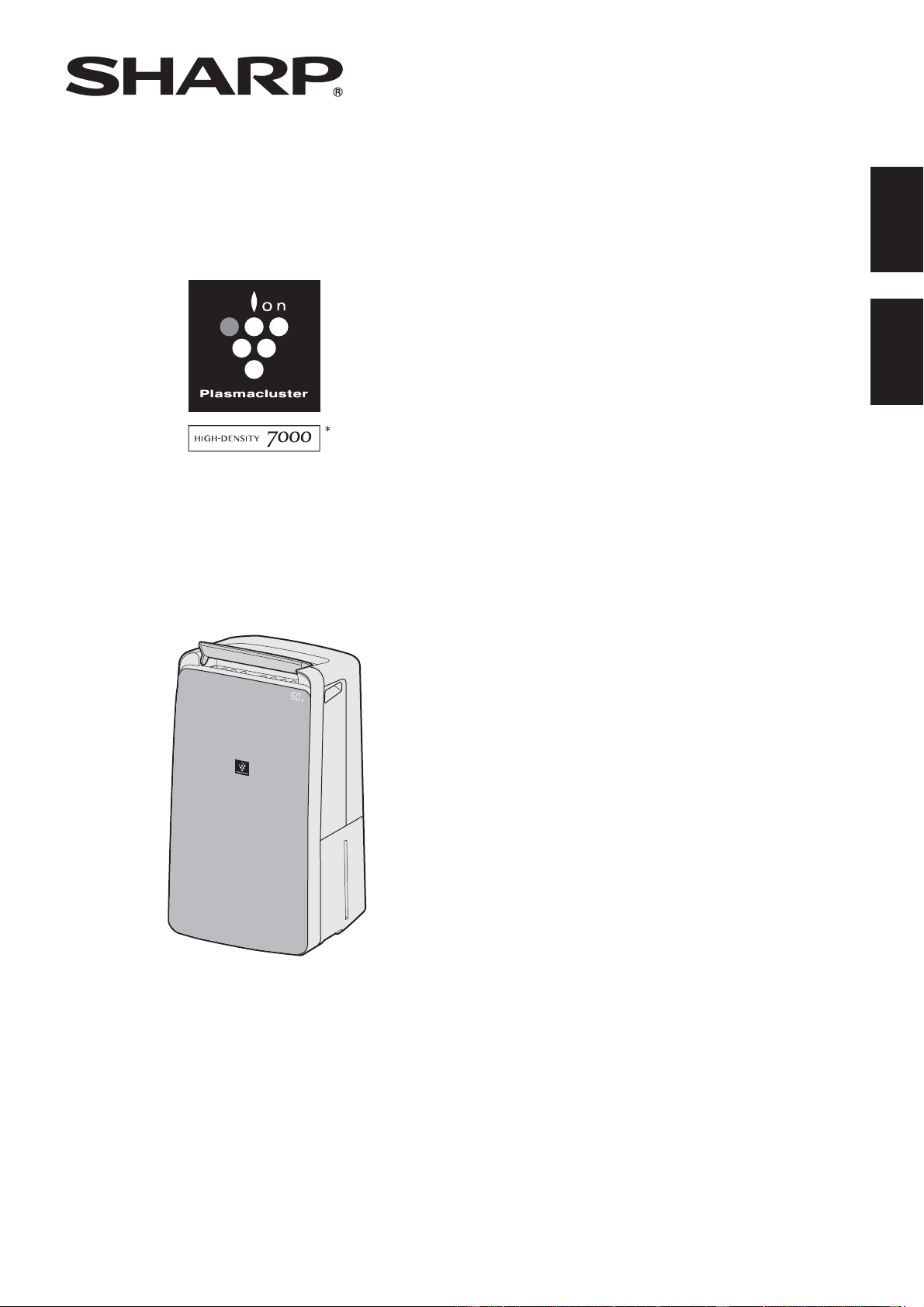
DW-J27FA
DW-J20FA
AIR PURIFYING DEHUMIDIFIER
OPERATION MANUAL
空氣淨化抽濕機
使用說明書
ENGLISH
中文
* The number in this technology mark indicates an
approximate number of ions supplied into air of 1 cm
3
, which
is measured around the center of a room with the “high-
density plasmacluster 7000” applicable fl oor area (at 1.2
m height above the fl oor) when the product is placed close
to a wall at the LAUNDRY Operation “DEODORIZE mode
setting.
DW-J27FAJ20FAEN.indd1 2018/08/3115:36:35
CONTENTS
IMPORTANT SAFETY INSTRUCTIONS .........................................................
2
PART NAMES ..................................................................................................
4
PREPARATION ................................................................................................
6
OPERATION
START/STOP
...............................................................................................
6
DEHUMIDIFY OPERATION
.........................................................................
7
HUMIDITY SELECT
.....................................................................................
7
LAUNDRY OPERATION
.............................................................................
7
AIR PURIFY OPERATION
...........................................................................
7
MOLD CONTROL OPERATION
..................................................................
8
TIMER OPERATION
....................................................................................
8
SWING LOUVER
.........................................................................................
9
INTERNAL DRY OPERATION
.....................................................................
9
CHILD LOCK
................................................................................................
9
SELECTING DISPLAY
.................................................................................
9
HOW TO CHANGE VARIOUS SETTING
....................................................
10
HOW TO DRAIN .............................................................................................
11
CARE AND MAINTENANCE ..........................................................................
12
TROUBLESHOOTING ....................................................................................
15
SPECIFICATIONS ...........................................................................................
16
Thank you for purchasing this SHARP Air Purifying Dehumidifi er.
Please read this manual carefully before using the product.
This manual should be kept in a safe place for handy reference.
ENGLISH
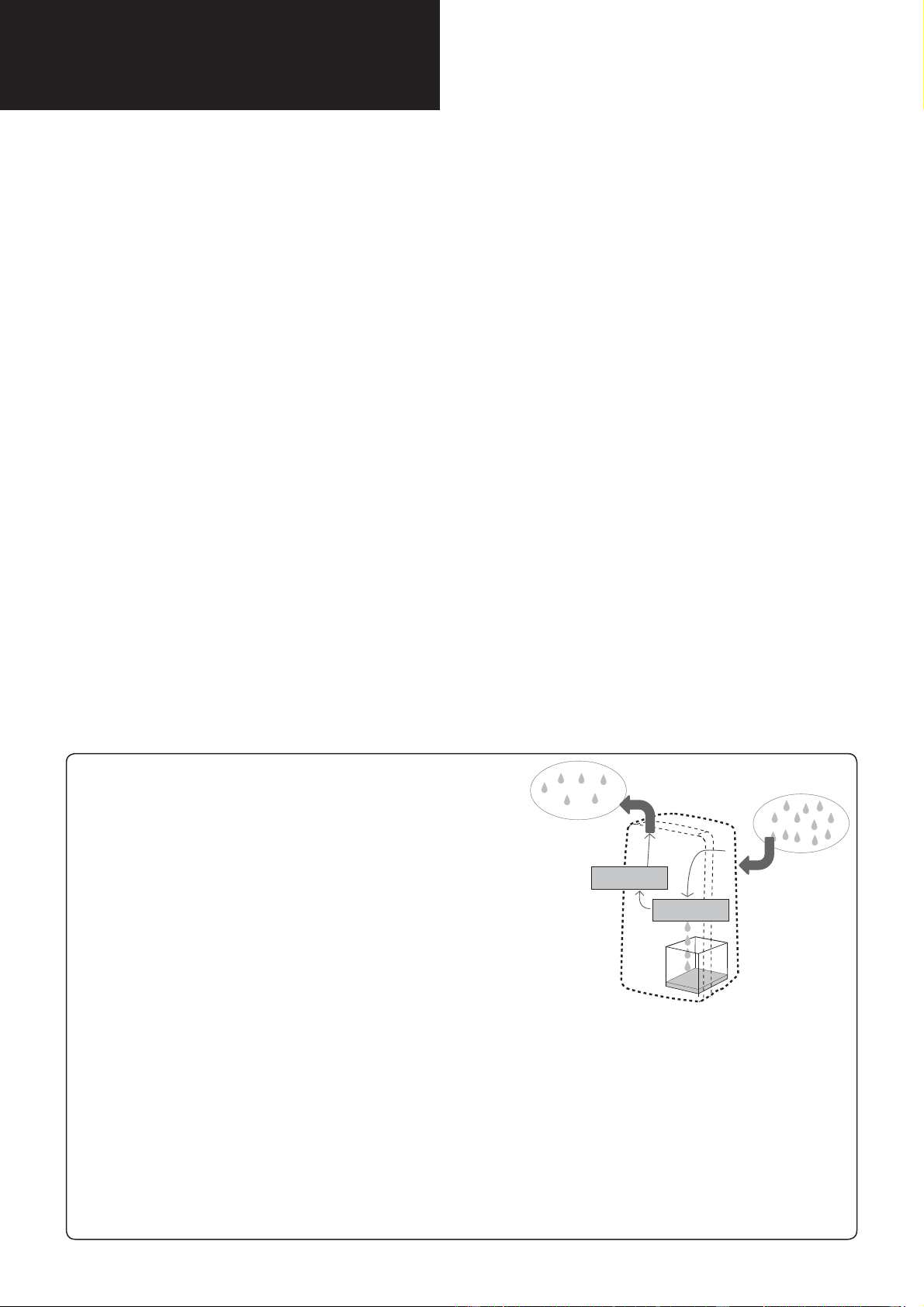
Dehumidify
In accordance with the principle of generating water droplets
when warm air with much moisture gets contact with cold
items, wet air is blown in a evaporator to remove moisture.
In the following cases, the compressor will stop and will not
dehumidify.
• When the room temperature is lower than 4°C or higher than 38°C.
• The 3 minutes when the Main Unit operated again in the following
to protect the Main Unit.
* Immediately after the power plug is inserted.
* Immediately after the Laundry Drying/
Dehumidifying operation is stopped.
• When the room temperature falls below 18°C, the compressor will
stop and “HIGH” air fl ow mode will operate for about 12 minutes once every 45 minutes to prevent
frost damage inside the Main Unit. (DEFROST mode / The DEFROST Indicator Light is turned on. )
Air Purify
The Air Purifying Dehumidifi er draws in room air through the air intake, circulates it through a Pre-Filter, a Active
Carbon Deodorizing Filter and a HEPA Filter inside the Main Unit, and then discharges it through the air outlet.
The HEPA Filter can remove 99.97% of dust particles as small as 0.3 microns that pass through the fi lter and also
helps absorb odors.The Active Carbon Deodorizing Filter gradually absorbs odors as they pass through the fi lter.
Some odors absorbed by the fi lters will break down over time, causing additional odors. Depending on
usage conditions, and especially if the Main Unit is used in environments signifi cantly more severe than
a normal household, these odors may become noticeable sooner than expected. If these odors persist,
replace the fi lters.
①
④
②
③
Dry air
Damp air
Water Tank
Evaporator
Condenser
DW-J27FAJ20FAEN.indd2 2018/08/3115:37:19
EN-1
ENGLISH
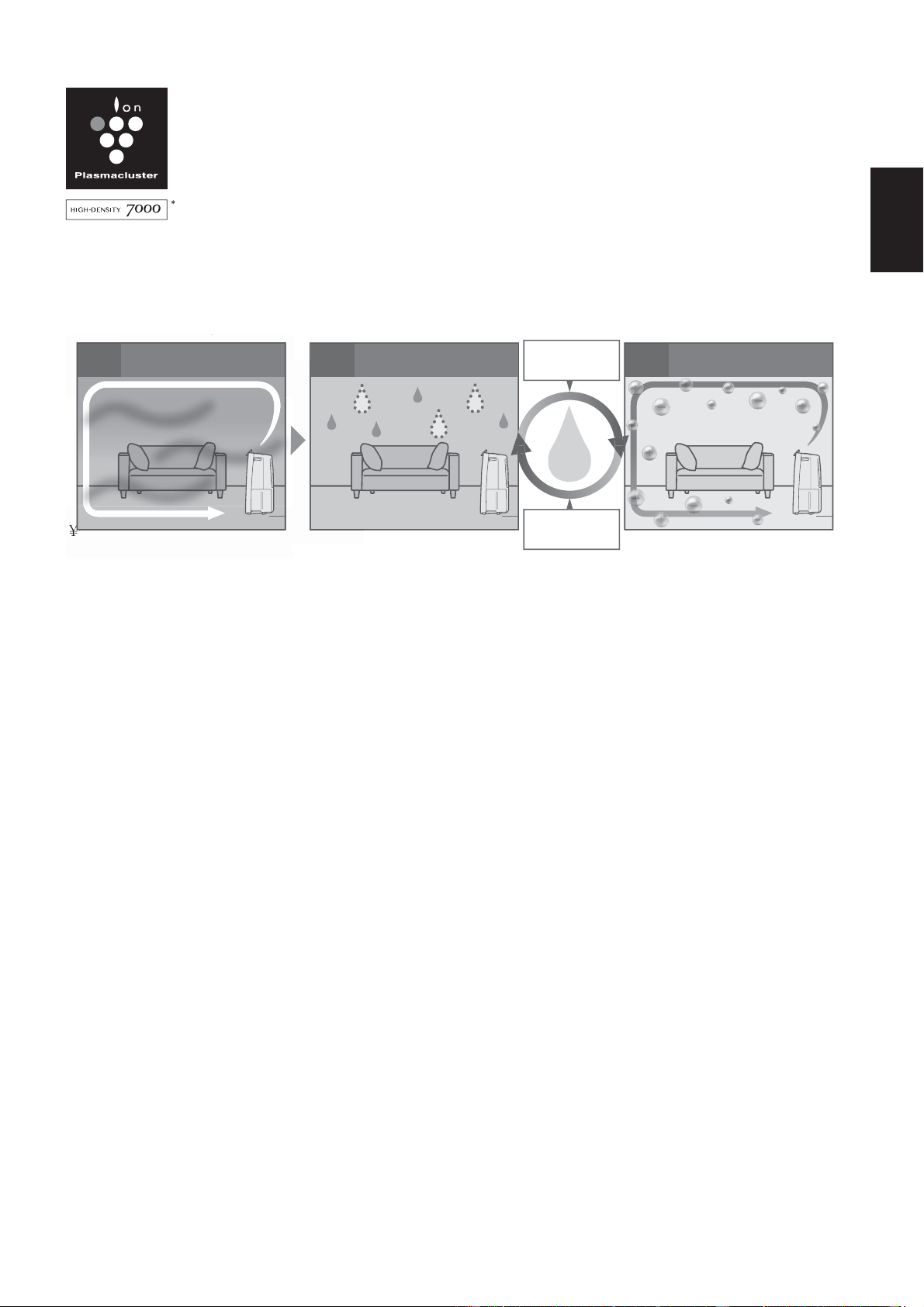
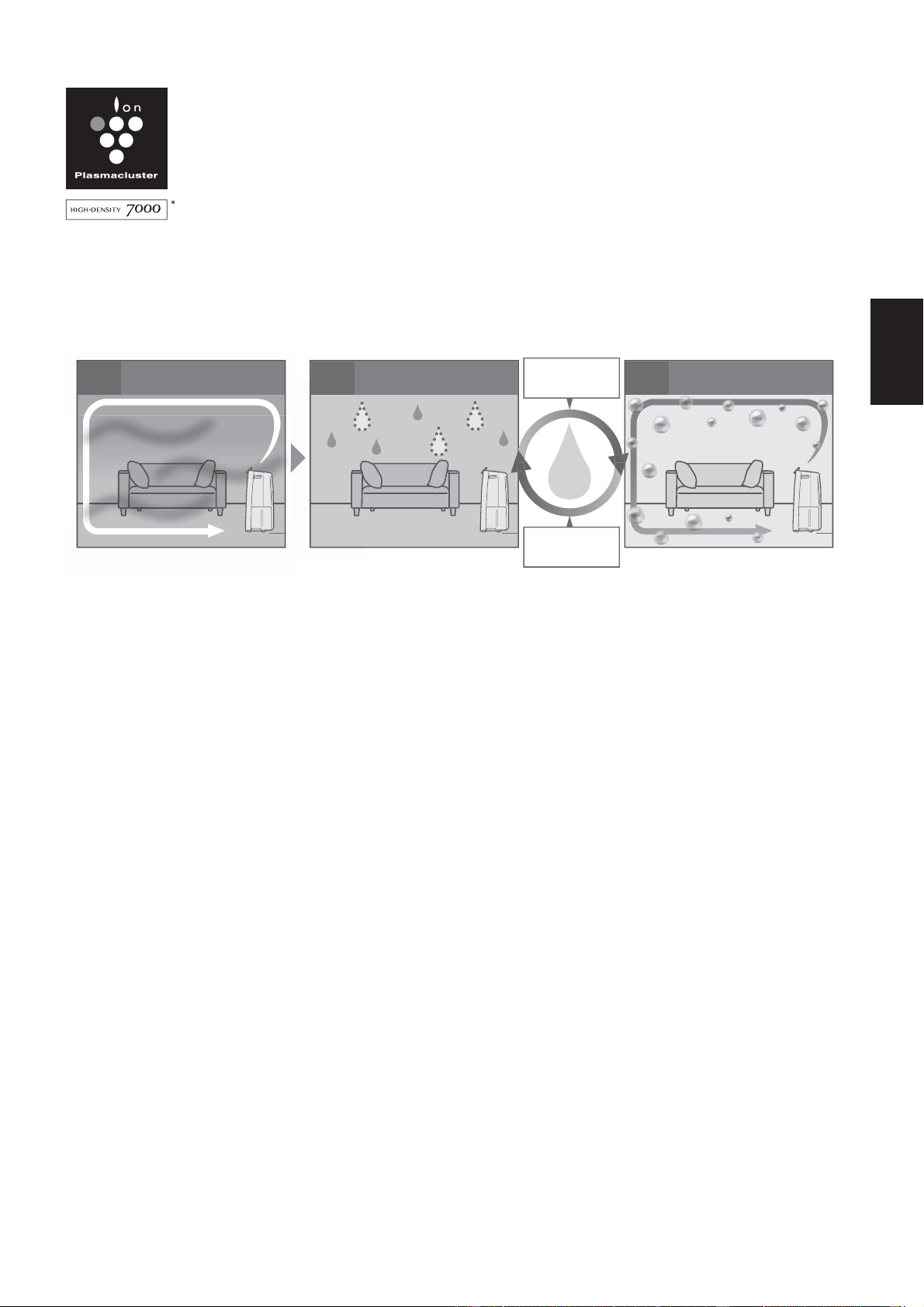
A powerful Dehumidifi er with a High Concentration of
Plasmacluster Ions, a high performance HEPA fi lter, and
a active carbon deodorizing fi lter for Room Air Purifying,
Laundry Deodorizing, Quick Drying, and Dehumidifying.
MOLD CONTROL OPERATION
It prevents the propagation of the mold by releasing Plasmacluster and dehumidifi ed air into the room.
¥
LAUNDRY Drying
Wide angle louver swings to both top and bottom / left and right wards and provides wide-area air fl ow.
AIR PURIFYING
It collects toxic substances such as dust, pollen, airborne mold, unpleasant odor and purify the air through SHARP’s
triple fi lters (HEPA Filter, Active Carbon Deodorizing Filter and Pre-fi lter)
PM2.5 Monitor
It shows the approximate amount of PM2.5 by changing the color on the indicator and numbers on the monitor.
Large Tank 4.6L
It realizes continuous dehumidifi cation.
g
¥
¥
12 3
Circulate Room Air
With High Air Volume
Dehumidifi cation Air Purifi cation
Air Purify in
fewer than 50%
of humidity
Dehumidify in
more than 60%
DW-J27FAJ20FAEN.inddEN-1 2018/08/3115:37:20

EN-2
IMPORTANT SAFETY INSTRUCTIONS
Always follow basic safety precautions
when using electrical appliances, including
the following:
WARNING
– Always observe the following
to reduce the risk of electrical shock, fi re, or
injury:
• Read all instructions before using the Main
Unit.
• Use only a 220-240 volt outlet.
• This appliance is not intended for use
by persons (including children) with
reduced physical, sensory or mental
capabilities, or lack of experience and
knowledge, unless they have been given
supervision or instruction concerning
use of the appliance by a person
responsible for their safety. Children
should be supervised to ensure they do
not play with the appliance.
• If the power cord is damaged, it must be
replaced by the manufacturer, its service
agent, a Sharp authorized Service
Center or similarly qualifi ed persons in
order to avoid a hazard.
• Be sure to remove the power plug when
draining the water, before performing
maintenance, when removing and
attaching and replacing the fi lter and
when not using for a long time. Failure
to do so can cause a short circuit
resulting in electrical shock or fi re.
• Do not use the Main Unit if the power cord
or plug is damaged or if the connection to
the wall outlet is loose.
• Periodically remove dust from the plug.
• Do not insert fi ngers or foreign objects into
the air intake or air outlet.
• When removing the power plug, always
hold the plug and never pull on the cord.
Failure to do so can cause a short circuit
resulting in electrical shock or fi re.
• When removing the Main Unit, do not
damage the power cord with the casters.
Failure to do so can cause electric shock,
heat generation, or fi re.
• Be careful not to damage the power cord,
it may cause electric shock, excess heat or
fi res.
• Do not remove the plug when your hands
are wet.
• Do not place the Main Unit near gas
appliances or fi replaces.
• Only a Sharp Authorized Service
Center should service this air purifying
dehumidifi er. Contact the nearest Service
Center for any problems, adjustments, or
repairs.
• Do not operate the Main Unit in rooms
where aerosol insecticides are present. Do
not operate the Main Unit in rooms where
there is oily residue, incense, sparks from
lit cigarettes, or chemical fumes in the air.
Do not operate the Main Unit in places
where it may get wet, such as a bathroom.
• Be cautious when cleaning the Main Unit.
Strong corrosive cleansers can damage the
exterior.
• When carrying the Main Unit, fi rst remove
the Water Tank, and then hold the Main
Unit by the handles on both sides.
• Do not drink the water in the Water Tank.
• Do not expose the Main Unit to water.
Doing so can cause a short circuit or
electrical shock.
• Clean the Water Tank regularly. When the
Main Unit is not in use, dispose of the water
in the Water Tank. Leaving water in the
Water Tank can cause mold, bacteria, and
bad odors. In rare cases, such bacteria can
be a health hazard.
• Check for bent hose/falling height when
you want to drain continuous, and place the
hose where it will securely drain.
• Keep the temperature around the hose
above freezing point when using the hose.
Inner water may leak in the room and
dampen the furniture or may cause electric
shock/leakage, fi re.
NOTE
- What to do if the Main Unit interferes
with radio or TV reception.
If the Air Purifying Dehumidifi er interferes with
radio or television reception, try one or more
of the following measures:
• Adjust or reposition the receiving antenna.
• Increase the distance between the Main
Unit and the radio or TV.
• Connect the equipment into an outlet on a
circuit different from that of the radio or TV
receiver.
• Consult the dealer or a qualifi ed radio or
TV technician.
DW-J27FAJ20FAEN.inddEN-2 2018/08/3115:37:21

EN-3
ENGLISH
CAUTIONS CONCERNING
OPERATION
• Do not block the air intake or air outlet.
• Do not place the Main Unit near or on
hot objects, such as stoves or heaters, or
where it may come into contact with steam.
• Always operate the Main Unit in an upright
position.
• When moving the Main Unit, use the
handles on both sides. Do not move the
Main Unit when it is in operation.
• If the Main Unit is on easily damaged
fl ooring, an uneven surface, or thick-piled
carpet, lift it up when moving.
• When moving the Main Unit by its casters,
move it slowly and in a horizontal direction.
• Turn the Main Unit off and remove the
Water Tank before moving, take care not to
catch your fi ngers.
• Do not operate the Main Unit without the
fi lters and the Water Tank properly installed.
• Do not wash and reuse the HEPA fi lter and
the Active Carbon Deodorizing Filter. Doing
so will not improve fi lter performance and
can also cause electric shock or operating
malfunctions.
• Clean the exterior with a soft cloth only.
Do not use volatile fl uids or detergents.
The Main Unit surface may be damaged
or cracked with Benzene paint thinner or
polishing powder. In addition, the sensors
may malfunction as a result.
• Keep the Main Unit away from water.
• Be sure to wipe off any excess water on the
outside of the Water Tank.
• Do not shake the Water Tank with holding
the carrying handle.
• Avoid spilling water when removing or
cleaning the Water Tank.
• Do not remove the Float.
• Do not use the detergents for maintenance
of the Water Tank and Tank Cover. If cause
deformation, tarnishing, cracking (water
leakage).
• Do not scrub the Back Panel hard during its
maintenance.
INSTALLATION GUIDELINES
• Avoid locations where the sensors are
exposed to direct wind. Doing so can cause
the Main Unit to malfunction.
• Avoid locations where furniture, fabrics, or
other objects can come in contact with the
Main Unit and interfere with the intake and
outtake of air.
• Avoid locations where the Main Unit
is exposed to condensation or drastic
changes in temperature. Appropriate room
temperature is between 4 - 38
°C
.
• Place the Main Unit on a level and stable
surface with suffi cient air circulation. When
placed on heavy carpet, the Main Unit may
vibrate slightly. Place the Main Unit on a
level surface to avoid water leakage from
the Water Tank.
• Avoid locations that generate grease or
oily smoke. Doing so can cause the Main
Unit exterior to crack and the sensors to
malfunction.
• The dust collecting ability of the Main Unit
is effective even when the Main Unit is as
close to 3 cm from the wall,the surrounding
walls and fl oor may get dirty. Please place
the Main Unit at a distance from the wall.
The wall directly behind the air outlet may
become dirty over time. When using the
Main Unit for an extended period of time
at the same location, periodically clean the
walls adjacent to it.
FILTER GUIDELINES
• Follow the instructions in this manual for
proper fi lter care and maintenance.
DW-J27FAJ20FAEN.inddEN-3 2018/08/3115:37:21
EN-4
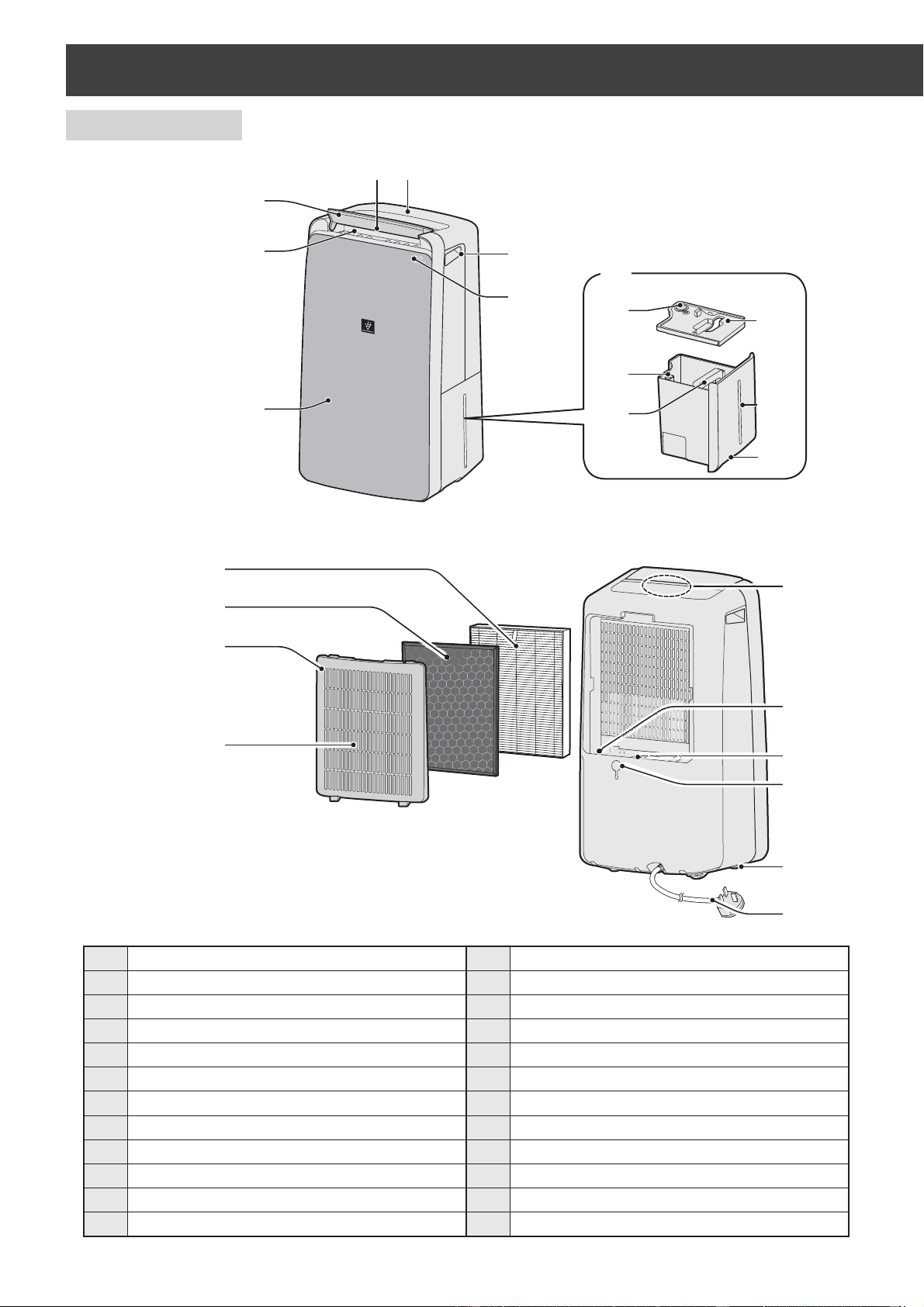
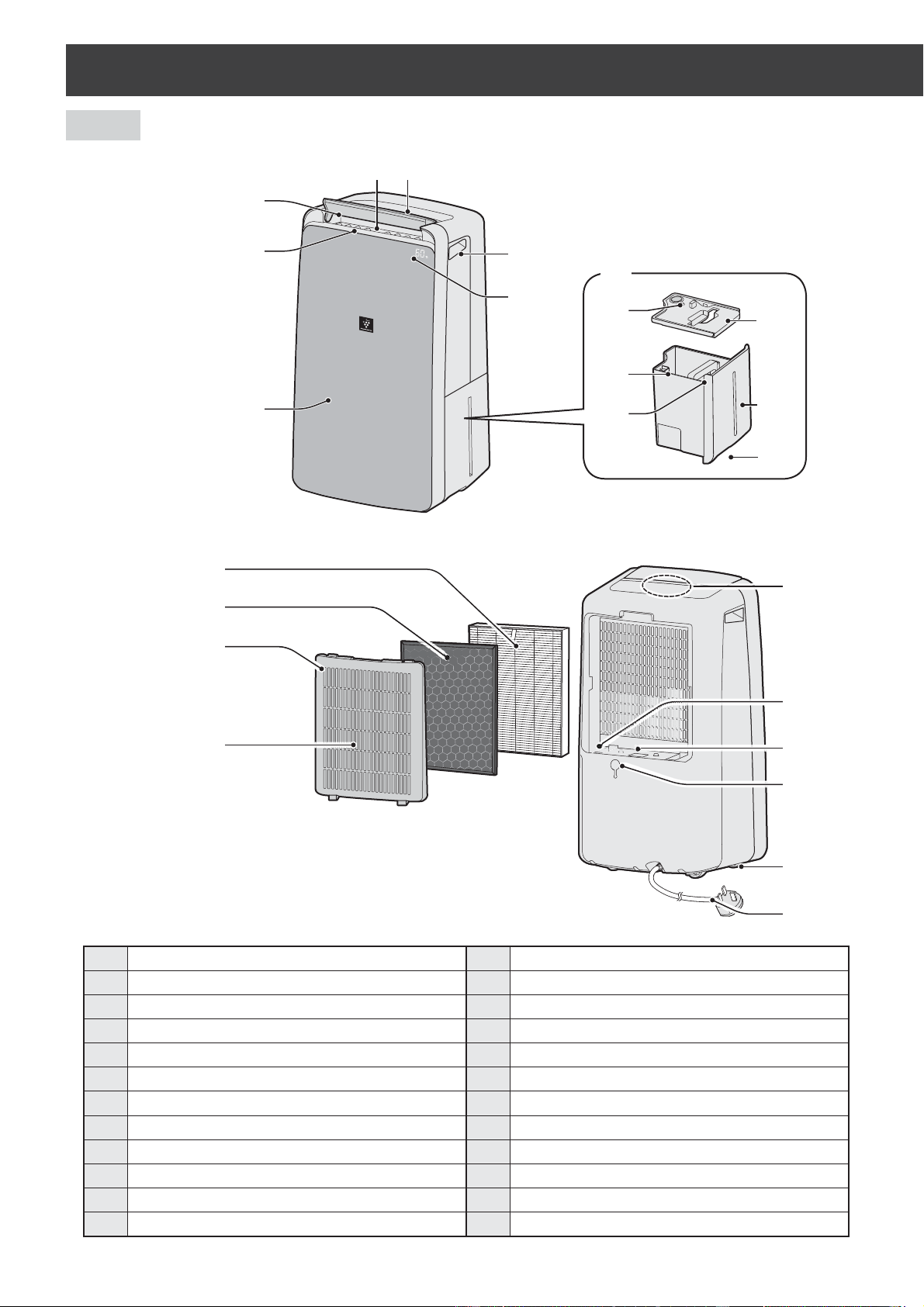
MAIN UNIT
PART NAMES
1
3
4
5
6
7
15
16
17
20
21
22
24
23
18
19
1
Operation Panel
13
Water Level Window
2
Air Outlet
14
Tank Knob
3
Vertical Louver
15
HEPA Filter
4
Horizontal Louver
16
Active Carbon Deodorizing Filter
5
Main Unit
17
Back Panel (Pre-Filter)
6
Handle
(2 Locations)
18
Air Inlet
7
Front Display
19
Odor Sensor
8
Water Tank
20
Temperature/Humidity Sensor
9
Drain Outlet
21
Dust Sensitive Sensor, Sensor Filter
10
Float
22
Drainage Hole, Rubber Cap
11
Tank Handle
23
Caster
(4 Locations)
12
Tank Cover
24
Power Cord, Plug
2
8
9
10
11
12
13
14
(FRONT)
(BACK)
DW-J27FAJ20FAEN.inddEN-4 2018/08/3115:37:21
EN-5
ENGLISH
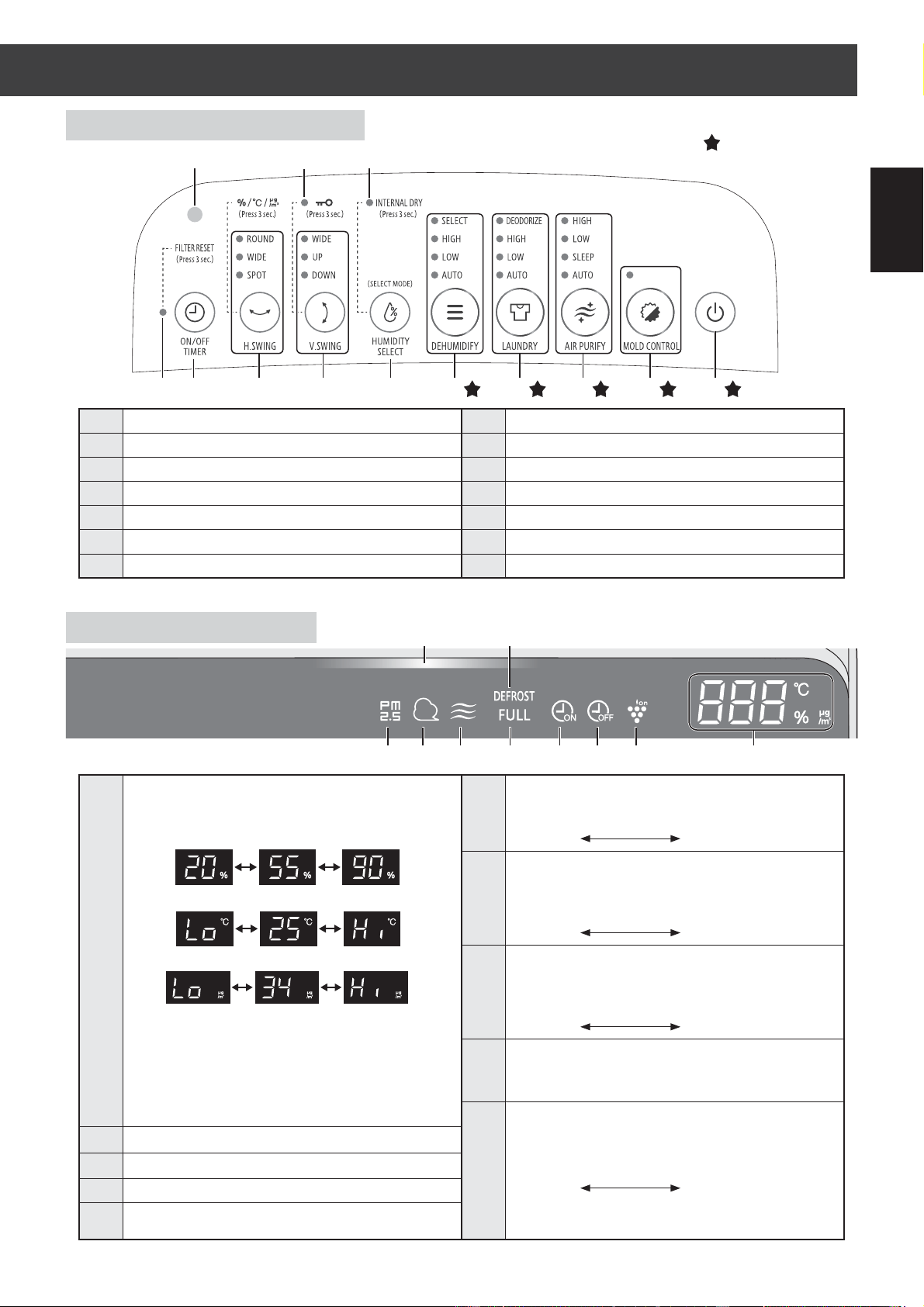
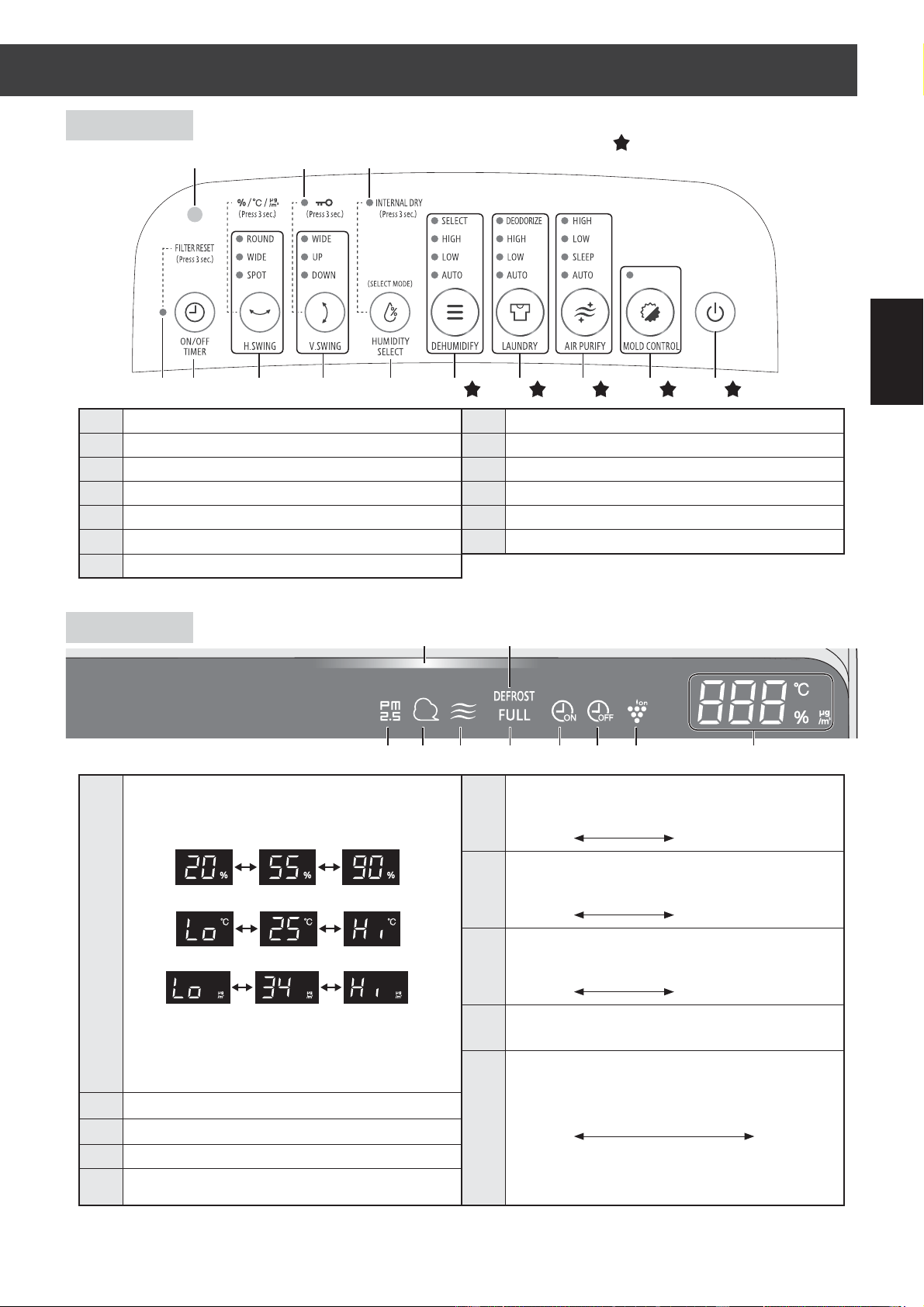
OPERATION PANEL
FRONT DISPLAY
1
Power ON/OFF Button
8
H.SWING Button, Indicator Light
2
MOLD CONTROL Button, Indicator Light
9
ON/OFF TIMER Button
3
AIR PURIFY Button, Indicator Light
10
FILTER RESET Indicator Light
4
LAUNDRY Button, Indicator Light
11
INTERNAL DRY Indicator Light
5
DEHUMIDIFY Button, Indicator Light
12
Child-Lock Indicator Light
6
HUMIDITY SELECT Button
13
Light Sensor
7
V.SWING Button, Indicator Light
1
Humidity / Temperature / PM2.5 Monitor
Indicates the approximate humidity level or
temperature or PM2.5 level in the room.
Timer Monitor
Indicates setting time or remaining time of ON/
OFF timer.
HUMIDITY SELECT Monitor
Indicates setting humidity of HUMIDITY
SELECT mode.
6
Odor Indicator Light
Indicates the Odor Sensor detects odors.
OFF Orange Red
Clean Impure
7
Dust Indicator Light
Indicates the Dust(sensitive) Sensor detects
usual dust.
OFF Orange Red
Clean Impure
8
PM2.5 Indicator Light
Indicates the Dust(sensitive) Sensor detects
microscopic dust.
OFF Orange Red
Clean Impure
9
DEFROST Indicator Light
Indicates the Main Unit operates the
DEFROST mode.
10
Cleanliness Monitor
Indicates the air purity of the room in 3 levels
with color changes.
Blue Yellow Red
Clean Impure
When mold control mode
It will indicate with Purple.
2
Plasmacluster Ion Indicator Light
(Blue)
3
OFF Timer Indicator Light
4
ON Timer Indicator Light
5
Tank FULL Indicator Light
(Red)
Blinking when the Water Tank is Full.
16910 23457
13 12 11
8
12345678
910
Humidity 20% to 90% is displayed.
Temperature 0
o
C to
5
0
o
C is displayed.
PM2.5 Density 10μg/m
3
to
499
μg/m
3
is displayed.
20%
or less
90%
or more
50
o
C
or more
500μg/m
3
or more
-1
o
C
or less
9μg/m
3
or less
Press the button with " " to start.
DW-J27FAJ20FAEN.inddEN-5 2018/08/3115:37:24
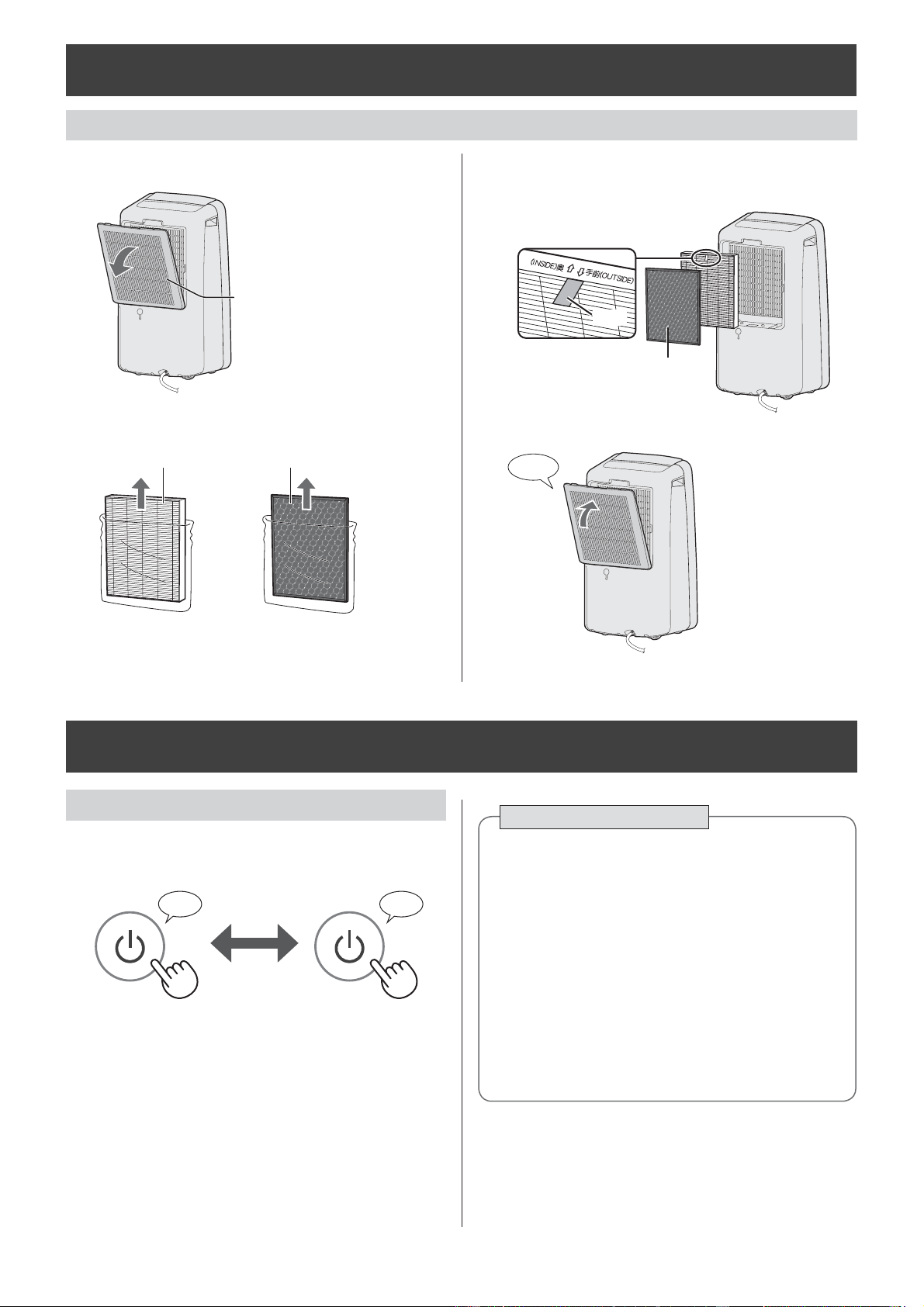
EN-6
OPERATION
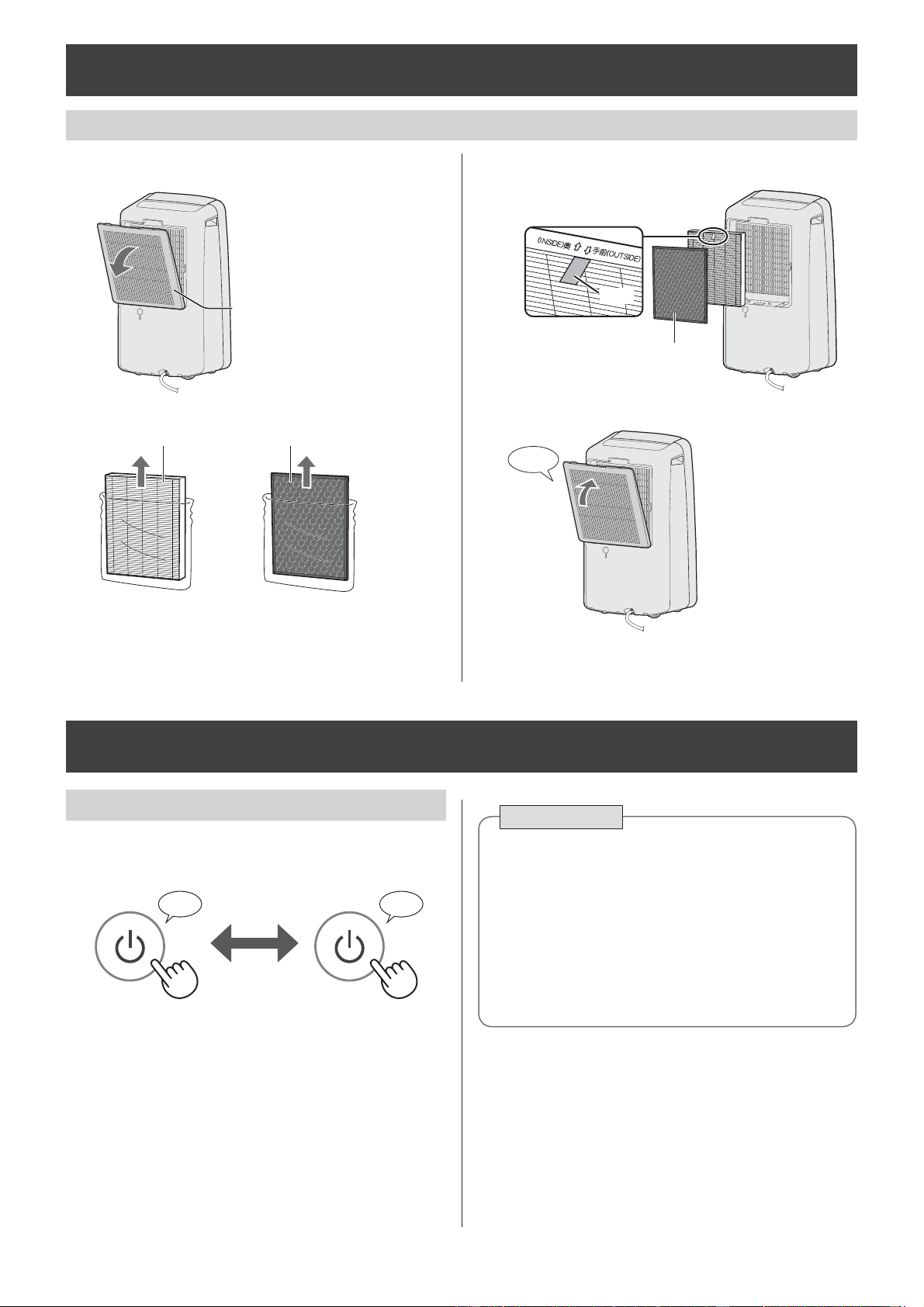
FILTER INSTALLATION
START / STOP
PREPARATION
♪ ♪
〜
START STOP
AUTO OFF Function
The operation will stop automatically after 12
hours in case the Main Unit has been forgotten
to be turned off.
When you want to run the Main Unit for more
than 12 hours continuously or drain water
continuously, turn off the Auto Off function.
(page 10)
The operation is not stopped while operating with
"Air purifi cation operation" and "Deodorization
operation".
1.
Remove the Back Panel.
Back Panel
2.
Remove the plastic bag from the
each fi lter.
HEPA Filter Active Carbon Deodorizing Filter
3.
Install the fi lters in the correct order as
shown.
HEPA Filter
Active Carbon Deodorizing Filter
Tag
4.
Install the Back Panel.
Click
DW-J27FAJ20FAEN.inddEN-6 2018/08/3115:37:26
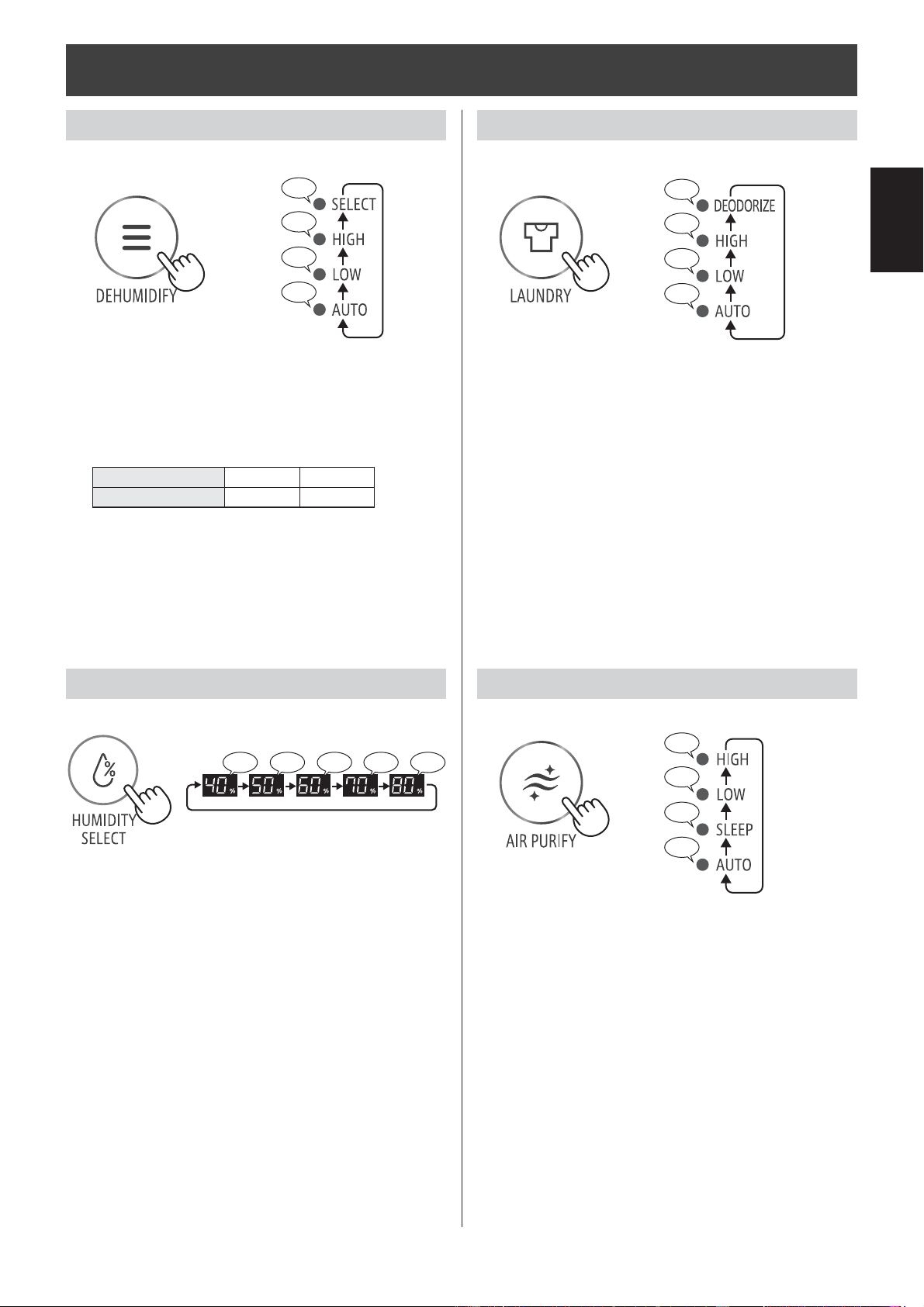
EN-7
ENGLISH
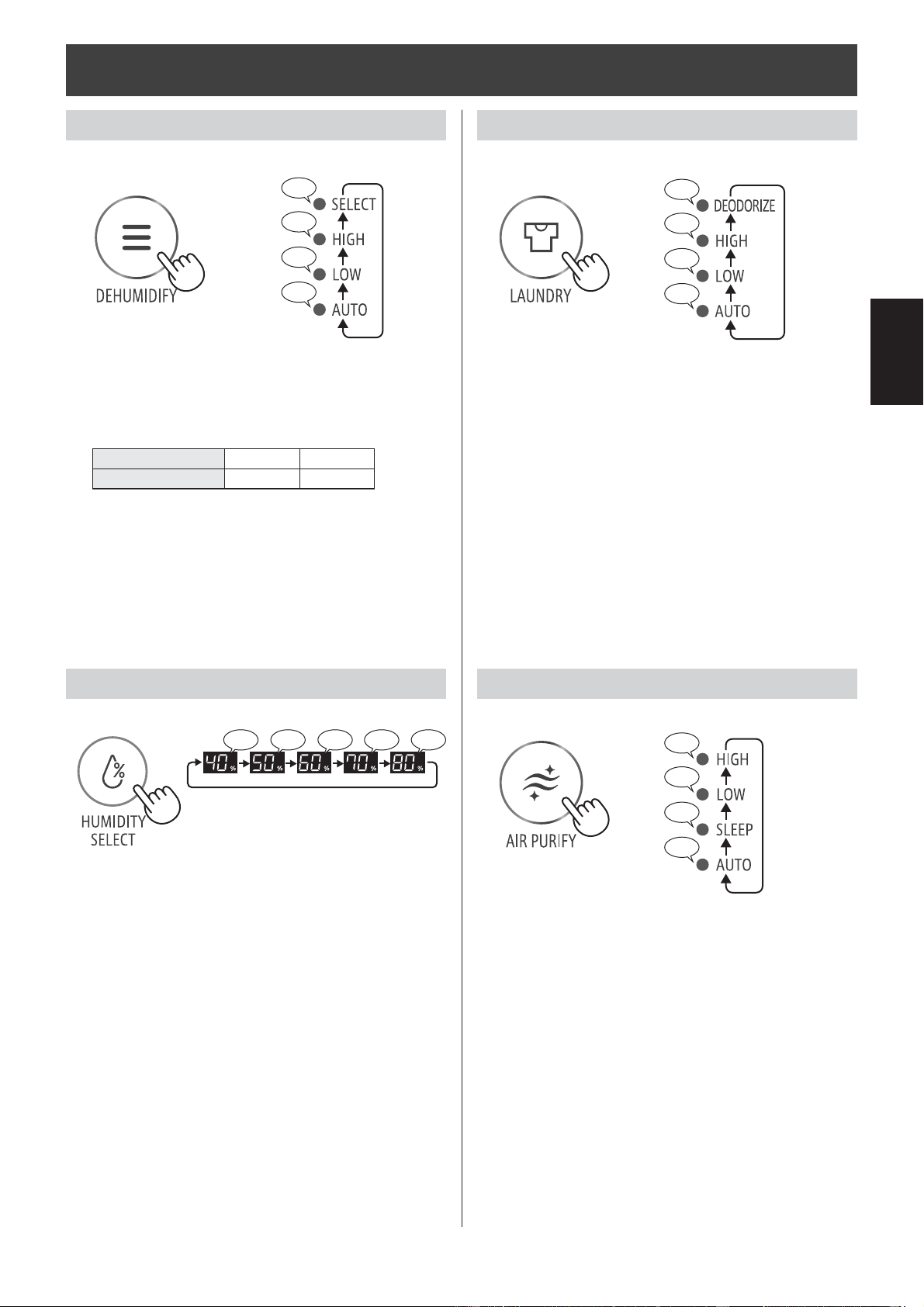
AUTO :
The humidity and the fan speed are automatically
controlled by the "temperature and humidity
sensor".
SELECT :
You can select your favorite humidity.
(See below)
When you press the DEFUMIDIFY button to set
SELECT mode, target humidity level can be
changed to cycle among 60%, 70%, 80%, 40% and
50%RH in seguence.
* HUMIDITY SELECT can be works only when in
SELECT mode.
OPERATION
DEHUMIDIFY OPERATION
HUMIDITY SELECT
♪
♪
♪
♪♪
Temperature 4-26
o
C 26-38
o
C
Humidity 60% 55%
♪♪ ♪ ♪
♪♪
AUTO :
When you want to dry with less power
consumption, the Main Unit will repeat the
Dehumidifying operation and the Air Flow mode
to dry the laundry.
DEODORIZE :
When you want to deodorize your laundry, the
Main Unit operates at "HIGH" fan speed.
Make sure the air blowing out from air outlet is
directed to your laundry.
It operates automatically the Plasmacluster Ion
“ON”.
AUTO :
The fan speed is automatically changed according
to amount of impurities in the air.
SLEEP :
The Main Unit will operate very quietly, and the
fan speed is automatically changed depending on
amount of impurities in the air.
The light of Front Monitor gets off automatically.
LAUNDRY OPERATION
AIR PURIFY OPERATION
♪
♪
♪
♪♪
♪
♪
♪
♪♪
DW-J27FAJ20FAEN.inddEN-7 2018/08/3115:37:30
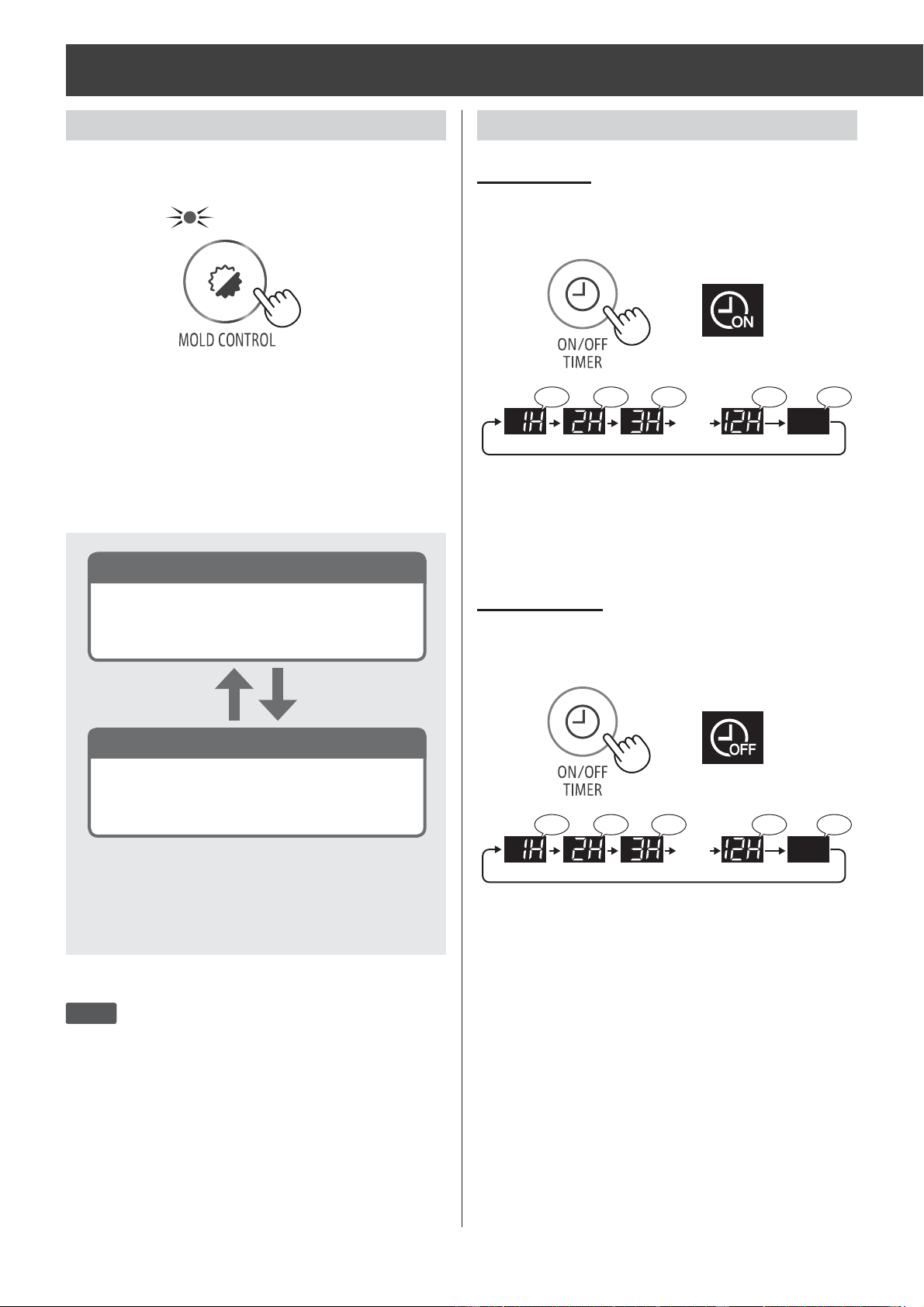
EN-8
OPERATION
TIMER OPERATION
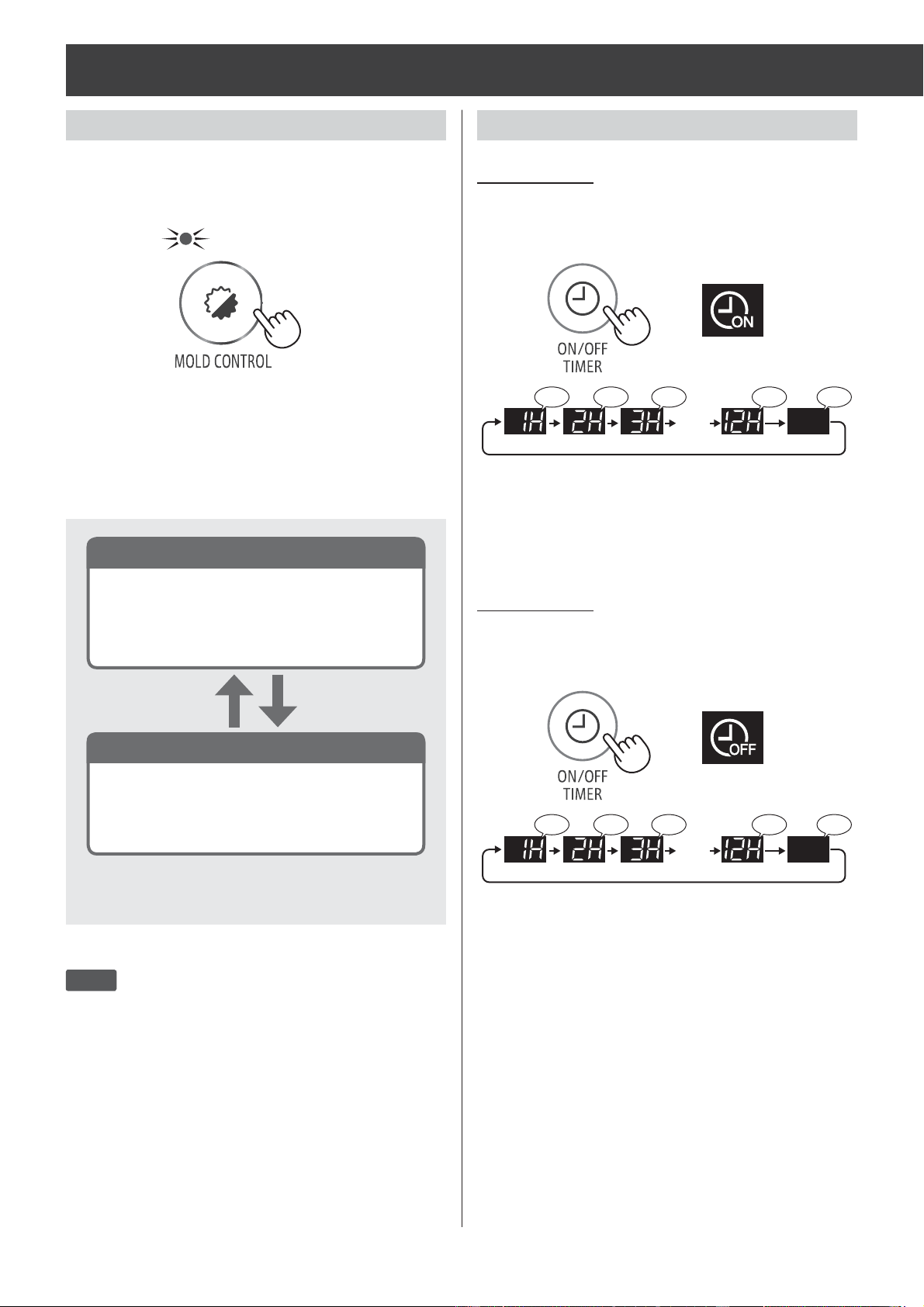
The Main Unit automatically starts once the
selected time passes.
The Main Unit automatically stops once the
selected time comes.
ON TIMER
OFF TIMER
(with the Main Unit OFF)
(with the Main Unit ON)
Front Display
Front Display
……
♪ ♪ ♪ ♪ ♪♪
1hour 2hour 3hour 12hour Cancel
……
♪ ♪ ♪ ♪ ♪♪
1hour 2hour 3hour 12hour Cancel
MOLD CONTROL OPERATION
【
for about 80 minutes
】
(Cleanliness Monitor: blinking with Purple)
※
Operating time depends on the room environment,
usage conditions, and location of the Main Unit.
NOTE
• When the air in the room is purifi ed and the humidity
becomes low, the main unit operates with “Low” air
fl ow. (
Cleanliness Monitor :
lighting in Blue)
• If the humidity becomes high again, it will switch to
the above operation under the condition of “in a high
humidity”.
In a low humidity
In a high humidity
It operates in “HIGH” mode of dehumidifi cation
until the humidity of the room decreases to
the level which the mold less likely appears.
Once the humidity in room becomes low, the
model switches the operation with maximum
airfl ow.
This mode is used to suppress the mold through
strong air fl ow with Plasmacluster Ion.
When turned ON, it fi rstly starts ventilation for 10
minutes with maximum air fl ow, and then repeats
following operation.
(Cleanliness monitor shows actual operating mode.
Purple: high air volume, Blue: low air volume.)
It operates automatically the Plasmacluster Ion
“ON”.
After 8 seconds, the beep sounds.
After 8 seconds, the beep sounds.
DW-J27FAJ20FAEN.inddEN-8 2018/08/3115:37:34
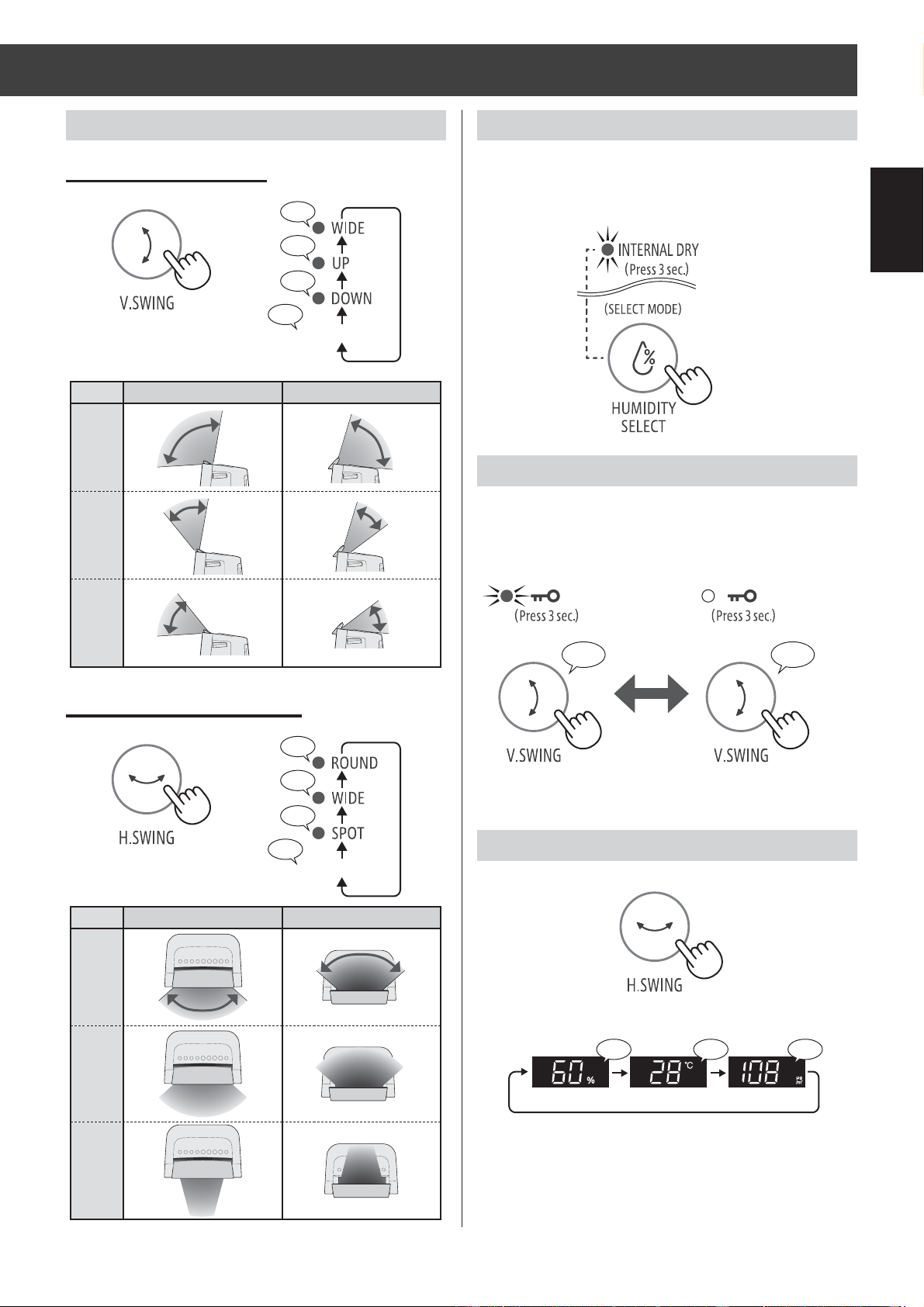
EN-9
ENGLISH
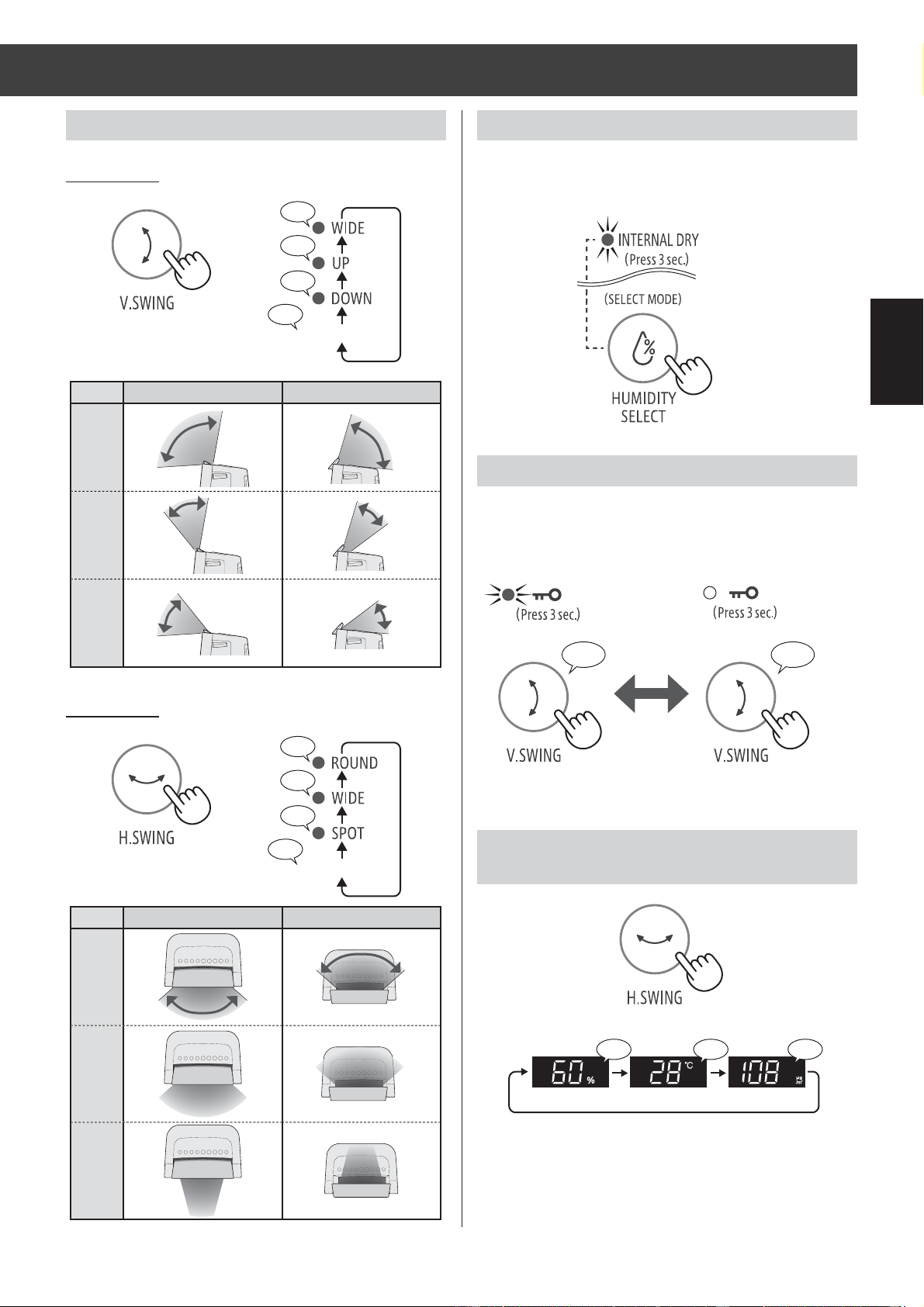
CHILD LOCK
SELECTING DISPLAY
SWING LOUVER
INTERNAL DRY OPERATION
When you set the Internal Dry operation, the Main
Unit automatically operate the Air Flow mode it for
approximate 90 minutes after stopping.
The operation of the operation panel will be locked.
more 3 sec.
more 3 sec.
more 3 sec.
more 3 sec.
VERTICAL SWING
DRY, DEODORIZE
AIR PURIFY, DEHUMIDIFY
WIDE
UP
DOWN
♪
♪
♪
♪♪
♪
♪
♪
♪♪
DRY, DEODORIZE
AIR PURIFY, DEHUMIDIFY
ROUND
WIDE
SPOT
♪ ♪
〜
ON CANCELLATION
♪ ♪
♪♪
Humidity Temperature PM2.5
CANCEL(OFF)
CANCEL(OFF)
HORIZONTAL SWING
After 8 seconds, the beep sounds.
(with the Main Unit ON)
(with the Main Unit ON)
DW-J27FAJ20FAEN.inddEN-9 2018/08/3115:37:38
EN-10
OPERATION
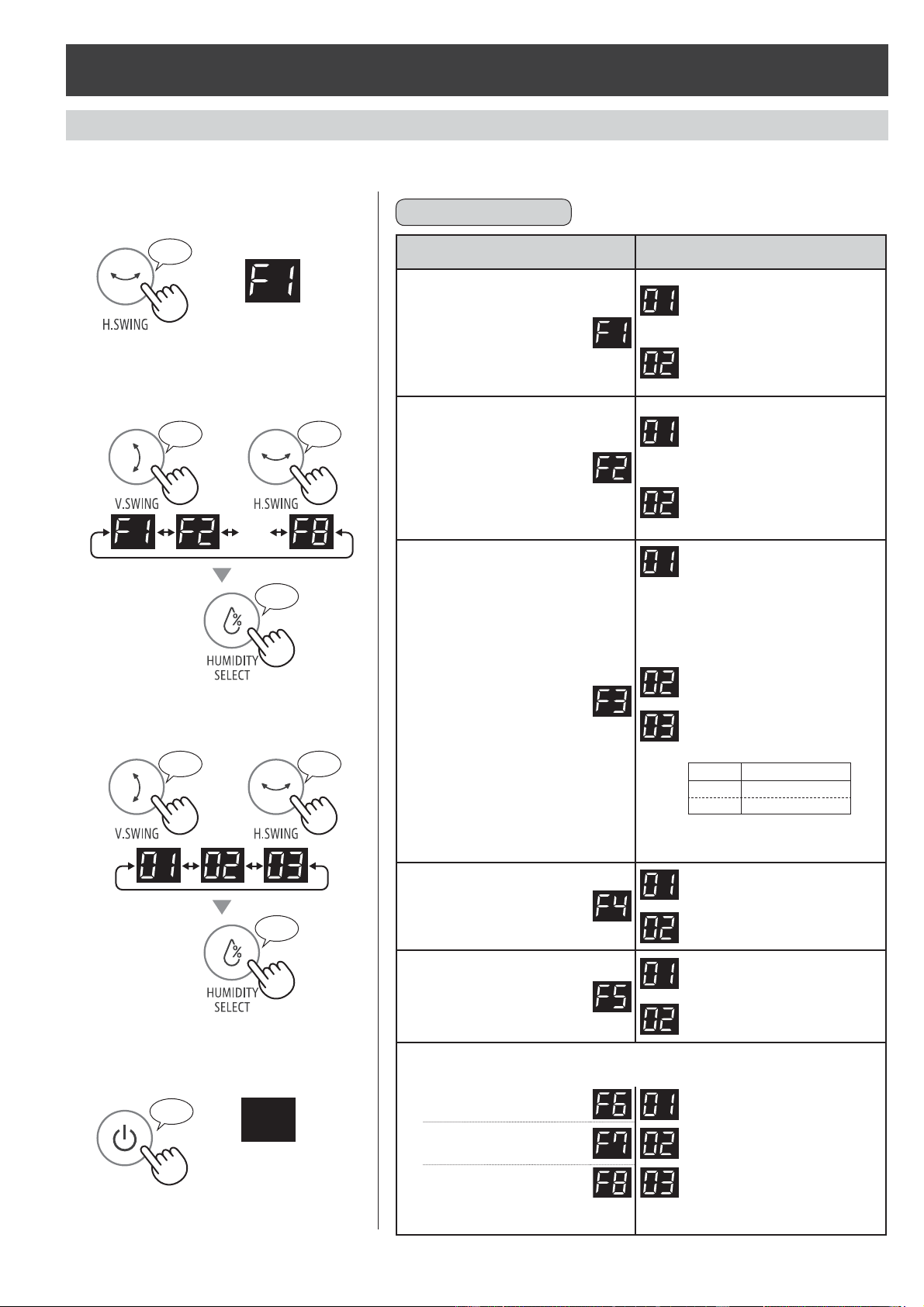
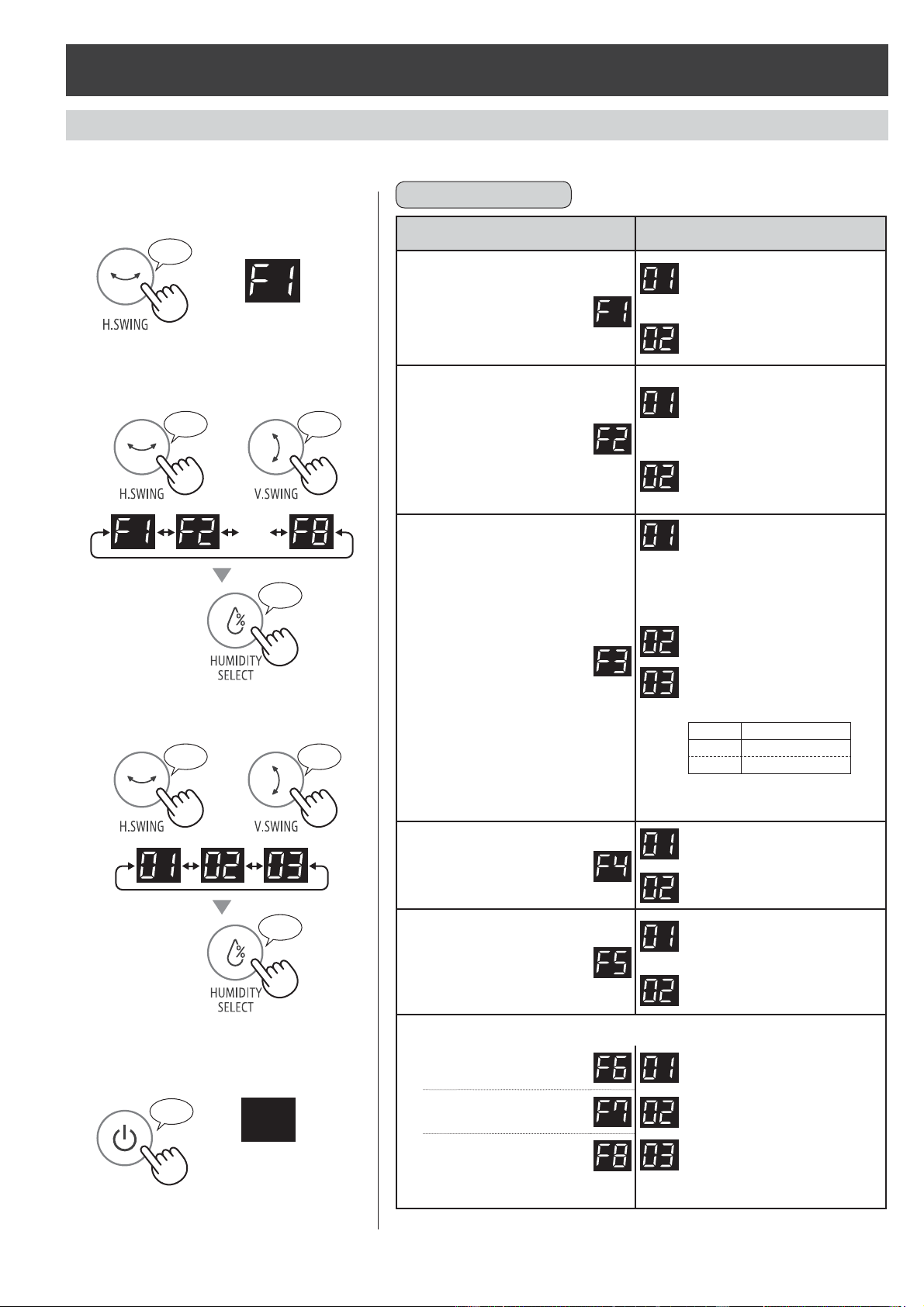
HOW TO CHANGE VARIOUS SETTING
Type of setting
Function Setting
Auto Restart
If the Main Unit is
unplugged or if there is a
power failure, the Main Unit
will resume operation with
the previous settings after
power is restored.
Cancellation
ON
(default)
Sound Indicator Setting
You can turn off the beeping
sound when the Main Unit
stops perating as follows.
When the Main Unit stops
operating as the following
situation, you can turn off
the beeping sound.
Cancellation
ON
(default)
Light Control
You can select the
brightness of the Front
Display.
Turn off
When set to “Turn off”, the
“Darker” light illuminates for 8
seconds after operation starts
and then the light turns off.
The FULL Light fl ashes darker
only when the Water Tank is full.
Darker
Auto
(default)
Light automatically switches
based on room brightness.
Room
Front Display
bright brighter
dark darker
* When "SLEEP" mode operate;
Room is bright : light is darker
Room is dark : light is OFF
PLASMACLUSTER ION
ON/OFF
OFF
ON
(default)
Auto Off
The operation will stop
automatically after 12 hours in
case the Main Unit has been
forgotten to be turned off.
Cancellation
ON
(default)
Adjusting Sensor Sensitivity (F6-F8)
Light Sensor
Low
Dust(sensitive)
Sensor
Standard
(default)
Odor Sensor High
* Light Sensor : Default is "Middle".
Dust(sensitive) and Odor Sensor : Default is "High".
You can change the functions in the table "Type of setting".
1.
Turn off the Main Unit power.
2.
more 3 sec.
♪
3.
Select "Function number".
Forward Reverse
or
・・・・
Set
♪
4.
Select "Setting number".
Forward Reverse
or
Set
♪
5.
Press Power ON/OFF Button to
fi nish the setting mode.
♪
〜
Turn off
♪
♪
♪
♪
DW-J27FAJ20FAEN.inddEN-10 2018/08/3115:37:52
EN-11
ENGLISH
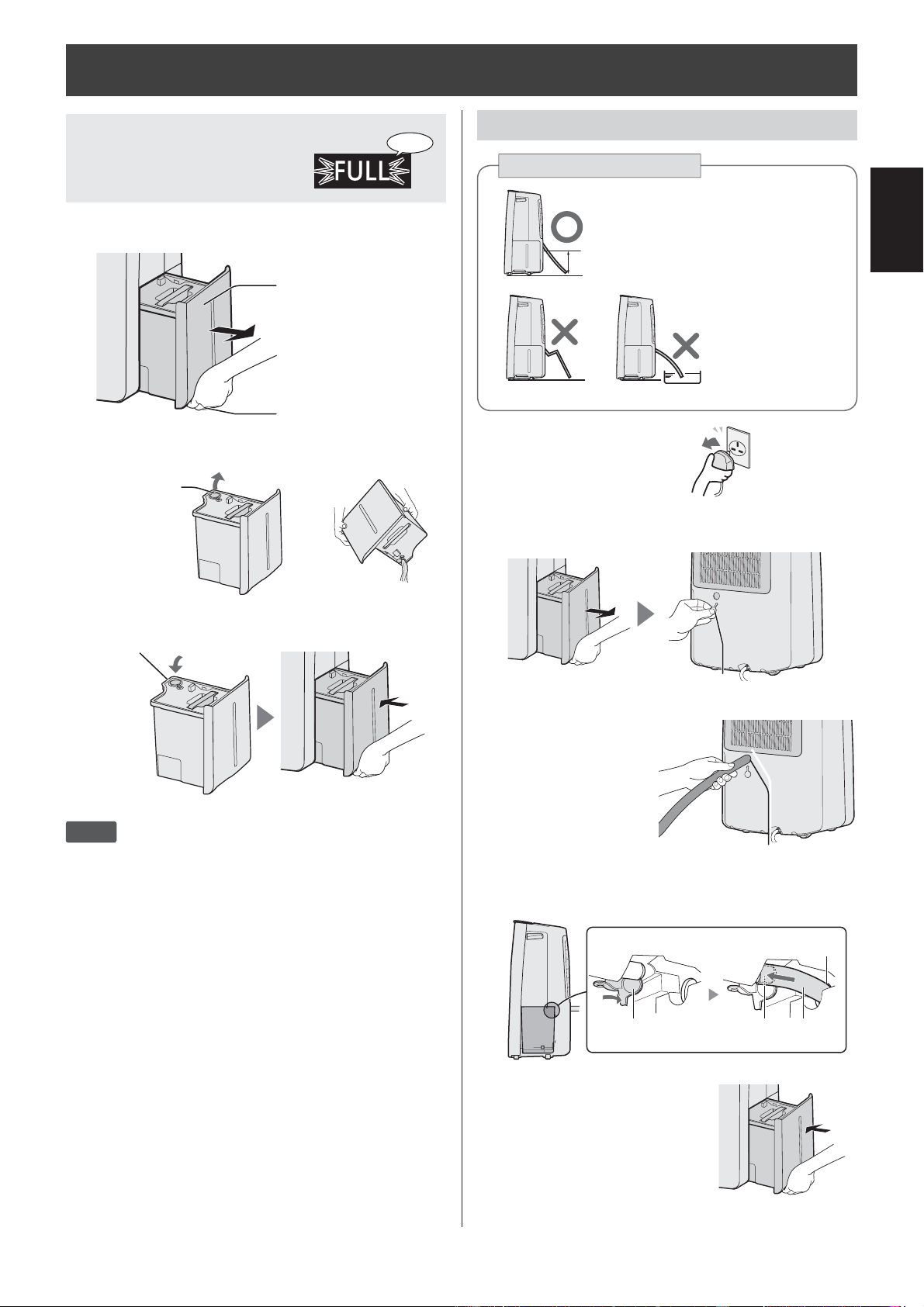
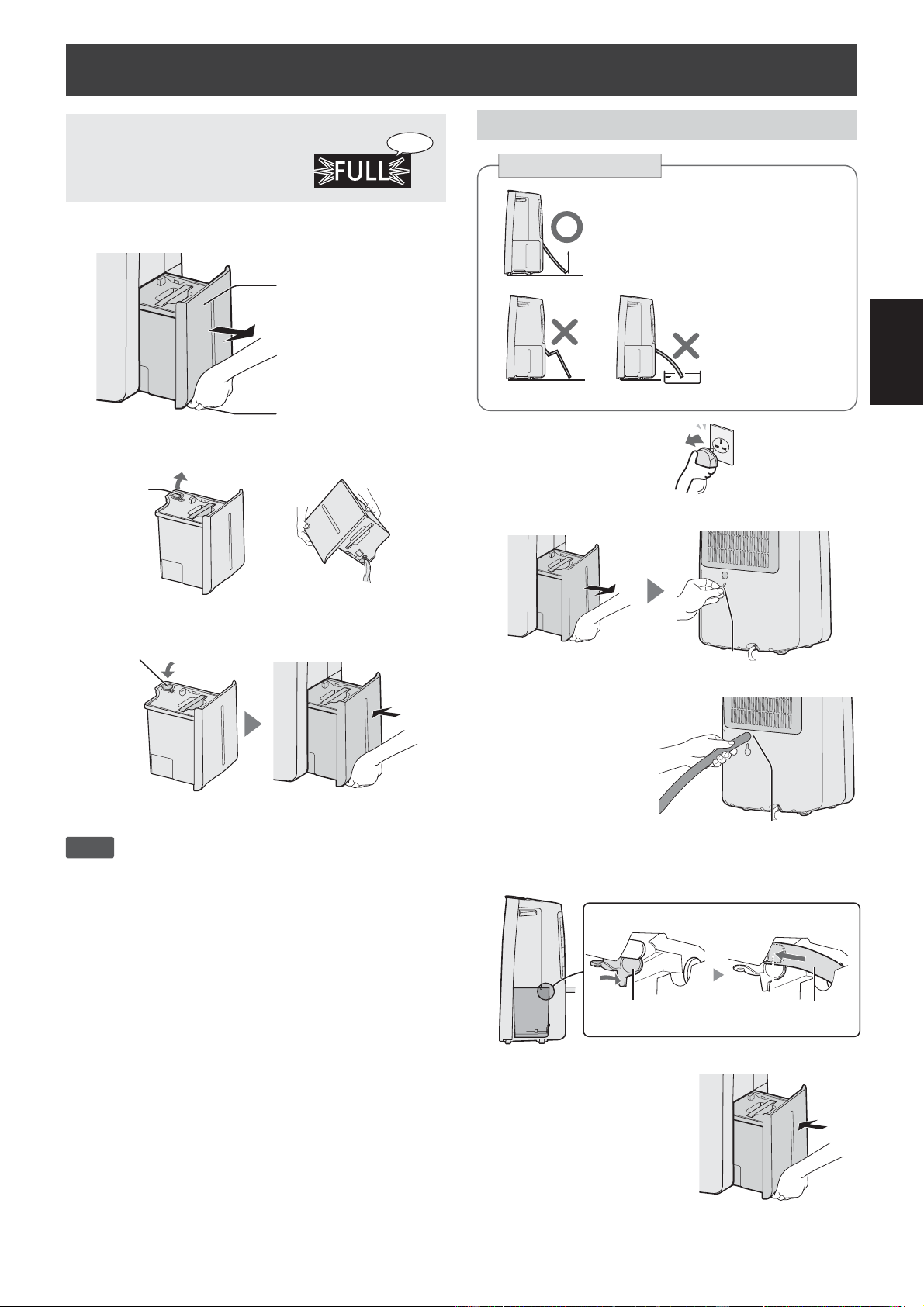
1.
Remove the Plug.
2.
Remove the Water Tank and the
Rubber Cap.
Rubber Cap
3.
Set the hose in the Back Hole.
Back Hole
Commercial hose :
inner diameter 15mm
(outer diameter up to
21mm)
4.
Insert the hose fi rmly to bottom in the
Drain Hole.
HoseDrain OutletDrain Stopper
Back Hole
5.
Install the Water Tank.
When you want to drain continuous
HOW TO DRAIN
How to pipe the hose
♪♪・・・
When the Water Tank
is Full, the TANK FULL
Indicator Light is blinking.
Always have the tip slanted.
Do not bend.
Under cold weather,
do not put the hose
into the water.
1.
Remove the Water Tank.
Tank knob
Water Tank
2.
Dispose the water of the Water Tank.
▶
Drain Outlet
3.
Install the Water Tank.
Drain Outlet
NOTE
• Clean the Water Tank about once a week. If you
do not clean the Water Tank, it can cause mold,
bacteria, and bad odors.
DW-J27FAJ20FAEN.inddEN-11 2018/08/3115:38:01
EN-12
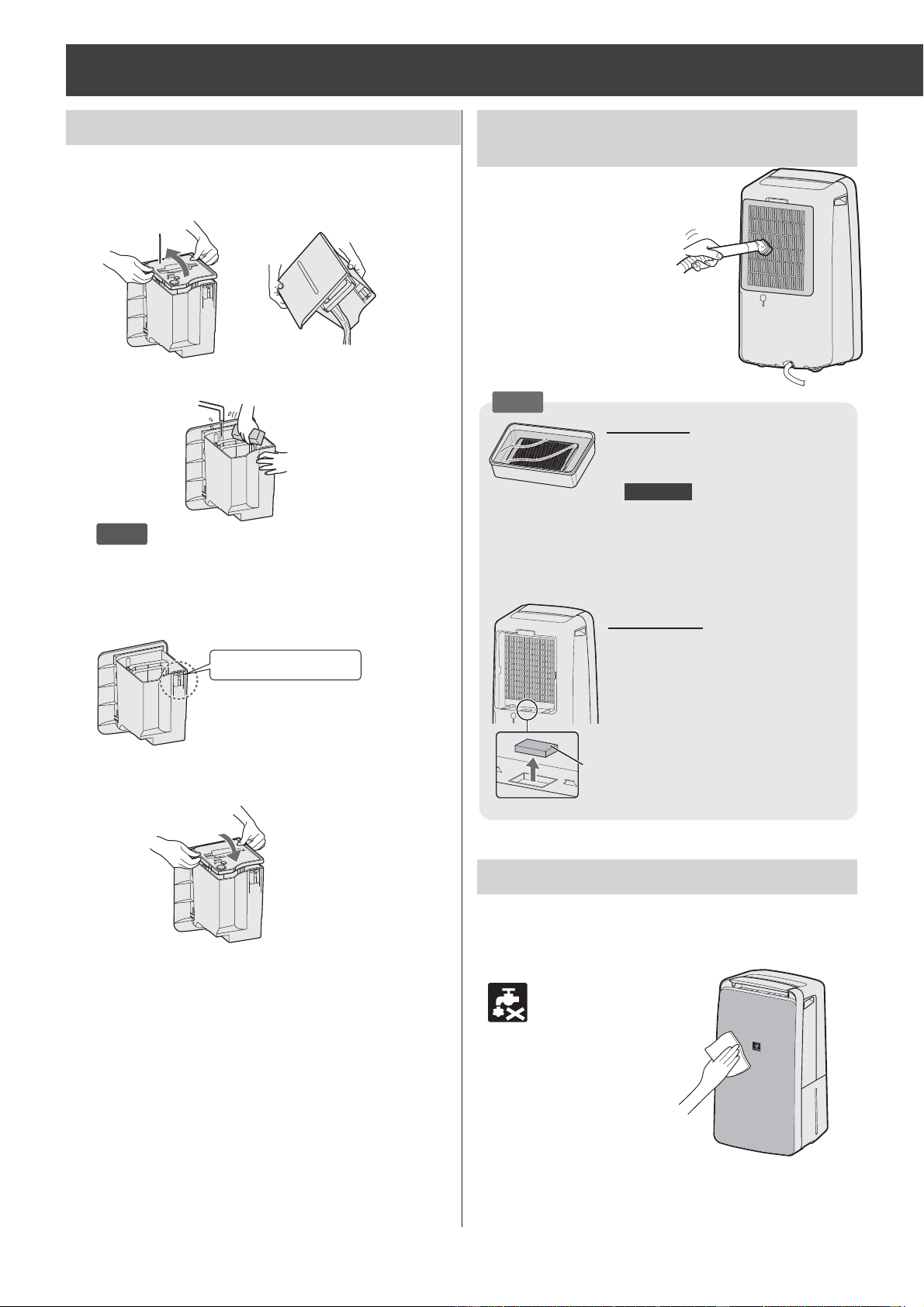
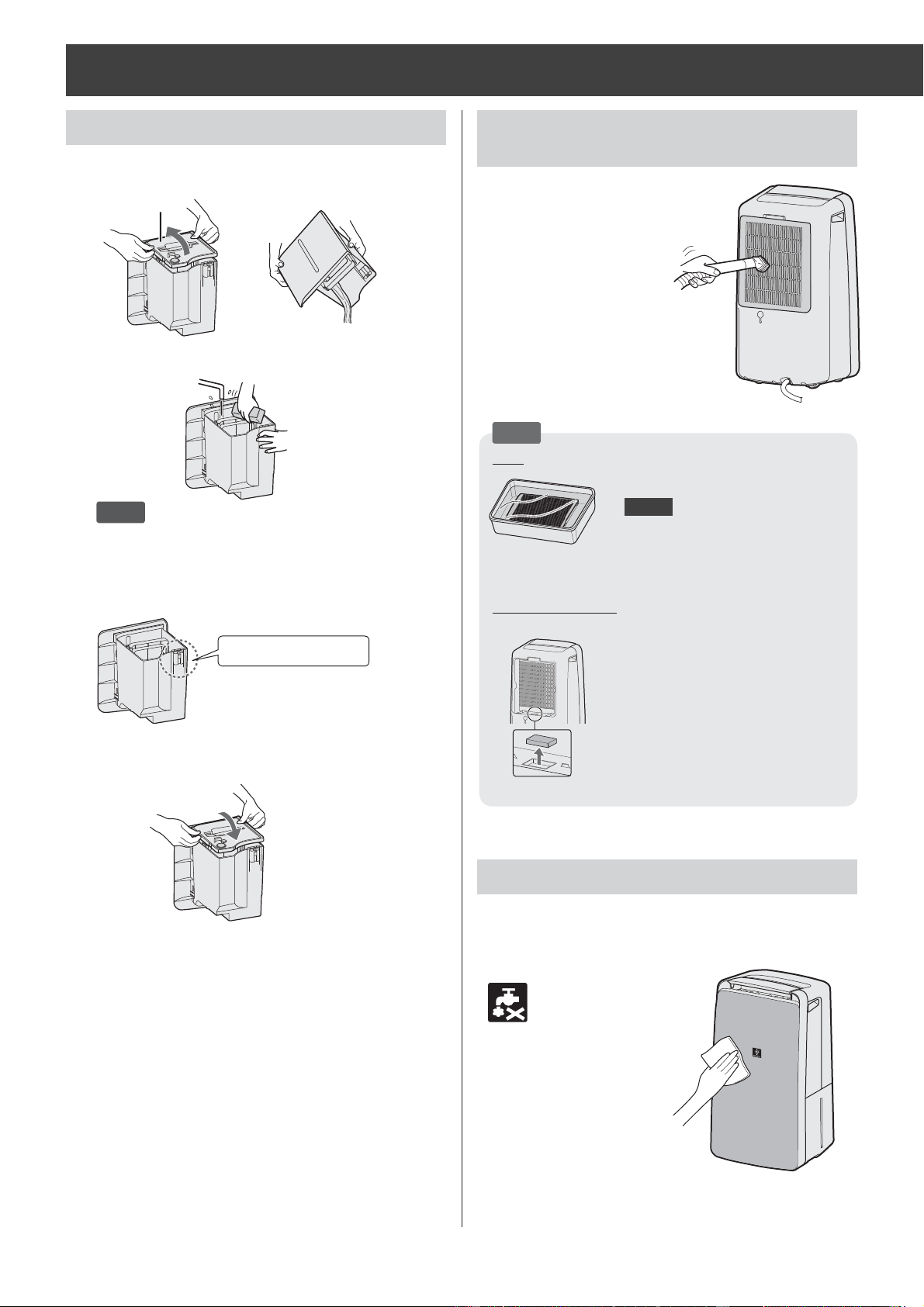
NOTE How to clean and remove a heavy dirt.
Back Panel
1. Add a small amount of neutral
detergent to water and soak for
about 10 minutes.
CAUTION
Do not give excessive pressure to
the back panel when scrubbing it.
2. Rinse off the neutral detergent with
clean water.
3. Completely dry the fi lter in a well-
ventilated area.
Sensor Filter
1. Remove the Back Panel.
2. Remove the sensor fi lter.
3. If the sensor fi lter is very dirty, wash
it with water and dry it thoroughly.
WATER TANK (About once a week) BACK PANEL / SENSOR
(About once every 2 weeks)
MAIN UNIT (About once a month)
CARE AND MAINTENANCE
Remove the dust
gently with a
cleaning tool such
as a vacuum cleaner.
Wipe with a dry, soft cloth.
Do not wash with water.
1.
Remove the Tank Cover, and dispose
of the water.
▶
Tank Cover
2.
Wash the inside of the Water Tank.
NOTE
• If the dirt is heavy, please dissolve neutral
detergent in lukewarm water and wash.
3.
Dry the tank with a soft cloth.
Check the fl oat.
4.
Install the Tank Cover.
Sensor Filter
DW-J27FAJ20FAEN.inddEN-12 2018/08/3115:38:07
EN-13
ENGLISH
HEPA FILTER / Active
Carbon Deodorizing Filter
(About once a month)
LIFE OF FILTERS
Filter life varies depending on the room environment,
usage conditions, and location of the Main Unit.
Lifespan of HEPA fi lter and Active Carbon
Deodorizing Filter and replacement suggestions are
based on purifying a room in which 5 cigarettes are
smoked per day and the Main Unit's dust collection
and deodorizing performance has declined to half
the level of a new fi lter.
We recommend replacing the fi lter more frequently if
the Main Unit is used in conditions signifi cantly more
severe (PM2.5 etc.,) than a normal household.
•HEPA Filter
About 10 years after opening
•Active Carbon Deodorizing Filter
About 10 years after opening
Replacement Filter Model
Consult your dealer when purchasing a replacement
fi lter.
HEPA Filter
(1 unit)
FZ-J20HFE
Active Carbon Deodorizing Filter
(1 unit)
FZ-J20DFE
Disposing of fi lters
Dispose of used fi lters according to local laws and
regulations.
HEPA Filter material:
• Polypropylene
• Polyethylene
Active Carbon Deodorizing Filter material:
• Polypropylene
• Polyethylene
• Activated carbon
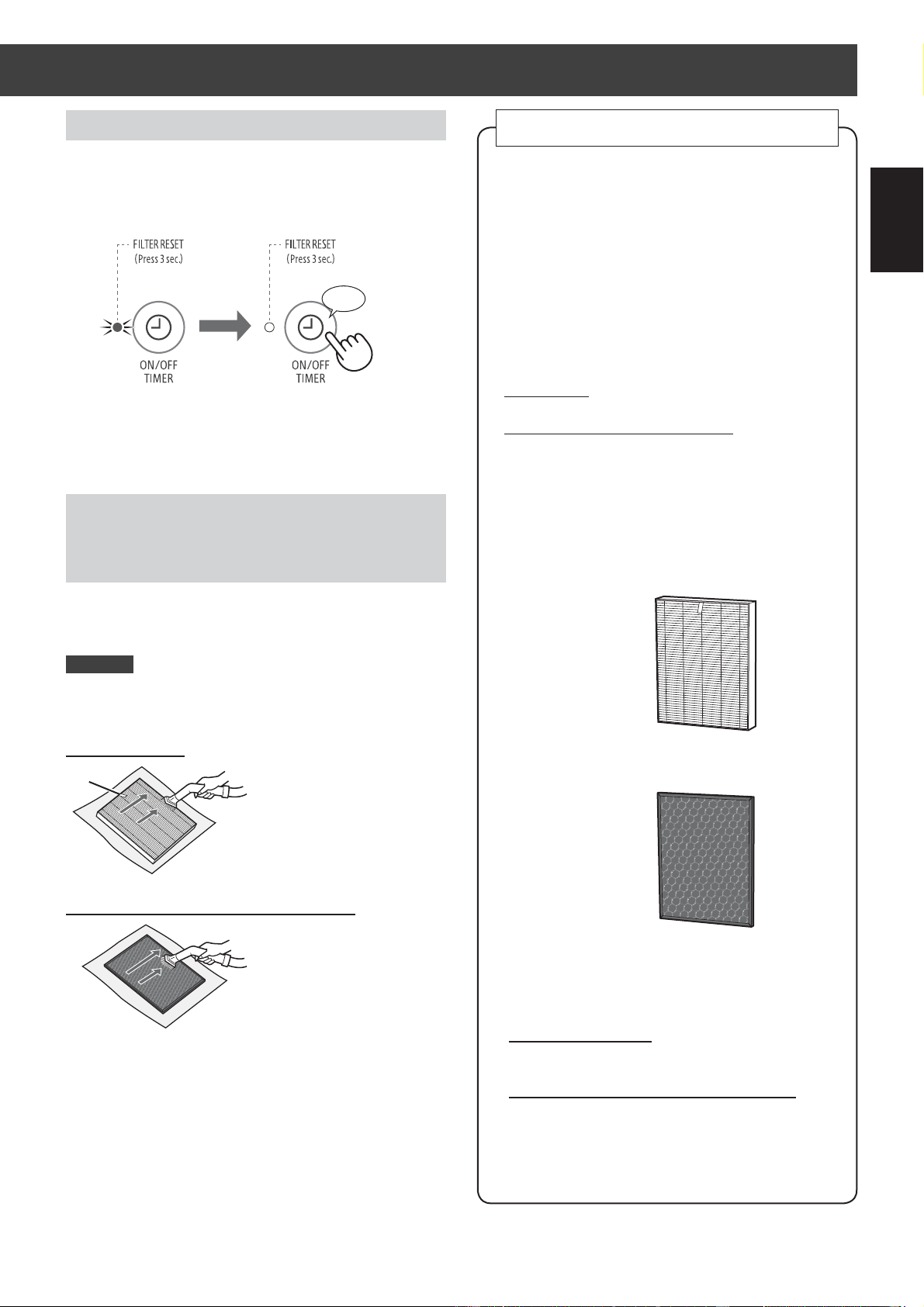
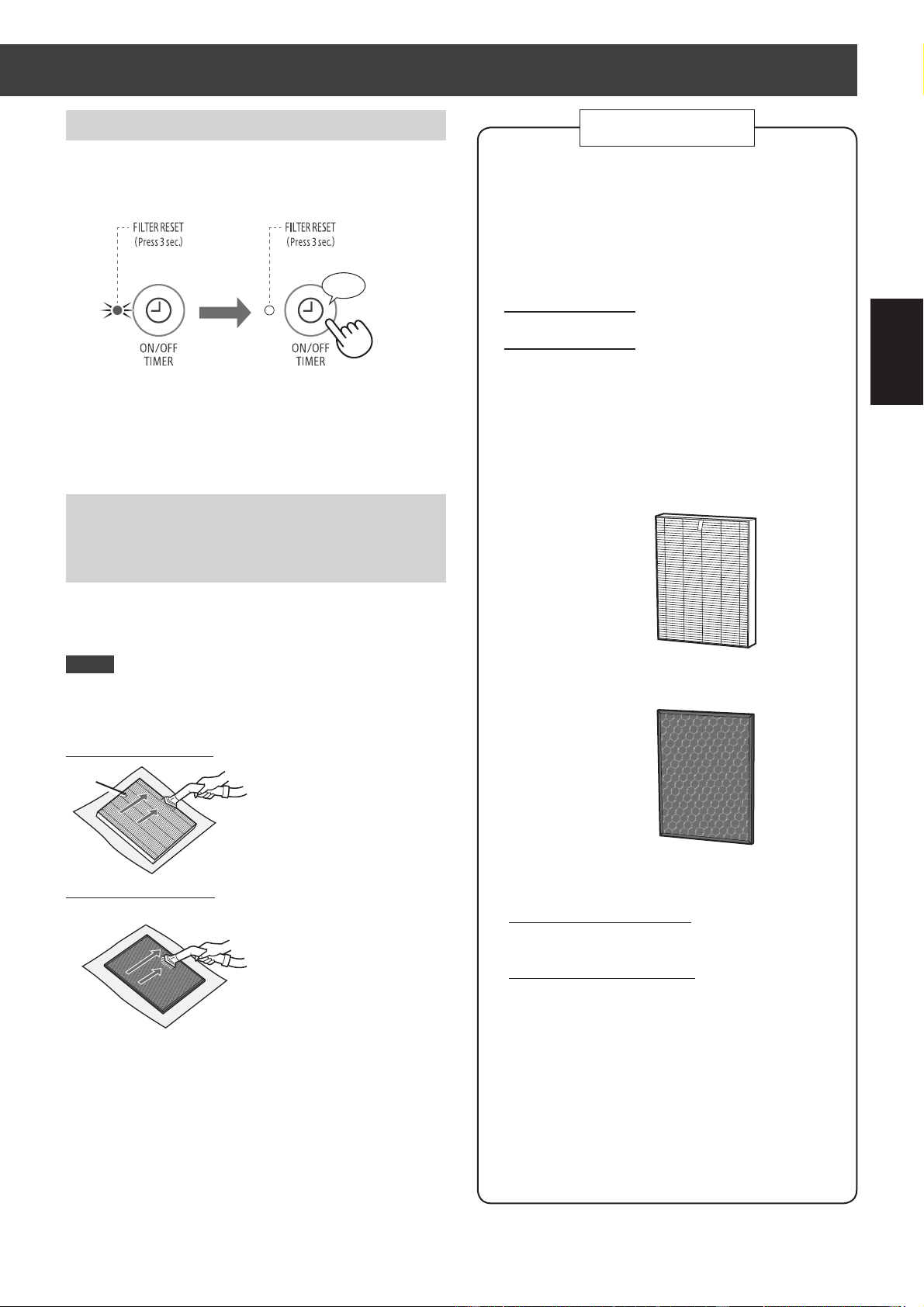
FILTER REPLACEMENT
The FILTER RESET Indicator light will turn on after
approximately 720 hours operating. (30 days × 24 hours
=720 hours)
This is a reminder to perform the maintenance described
below. After performing maintenance, reset the FILTER
RESET Indicator.
FILTER INDICATOR
RESET
more 3 sec.
♪
Remove the dust on the HEPA Filter and
Active Carbon Deodorizing Filter.
CAUTION
Do not wash the fi lters. Do not expose to sunlight.
(Otherwise these fi lters may lose effi cacy.)
HEPA FILTER
Clean only the tagged
surface. Do not clean up the
opposite surface. The fi lter is
fragile, so be careful not to
give too much pressure.
Active Carbon Deodorizing Filter
Both surfaces can be
cleaned.
The fi lter may be broken if
being too much pressure is
applied on it, so please
handle it with care.
Some odors absorbed by the fi lters will break down over time,
causing additional odors. Depending on usage conditions,
and especially if the Main Unit is used in environments
signifi cantly more severe than a normal household, these
odors may become noticeable sooner than expected.
Replace the fi lter in those cases or if dust is unable to be
removed after maintenance.
Tag
DW-J27FAJ20FAEN.inddEN-13 2018/08/3115:38:12
EN-14
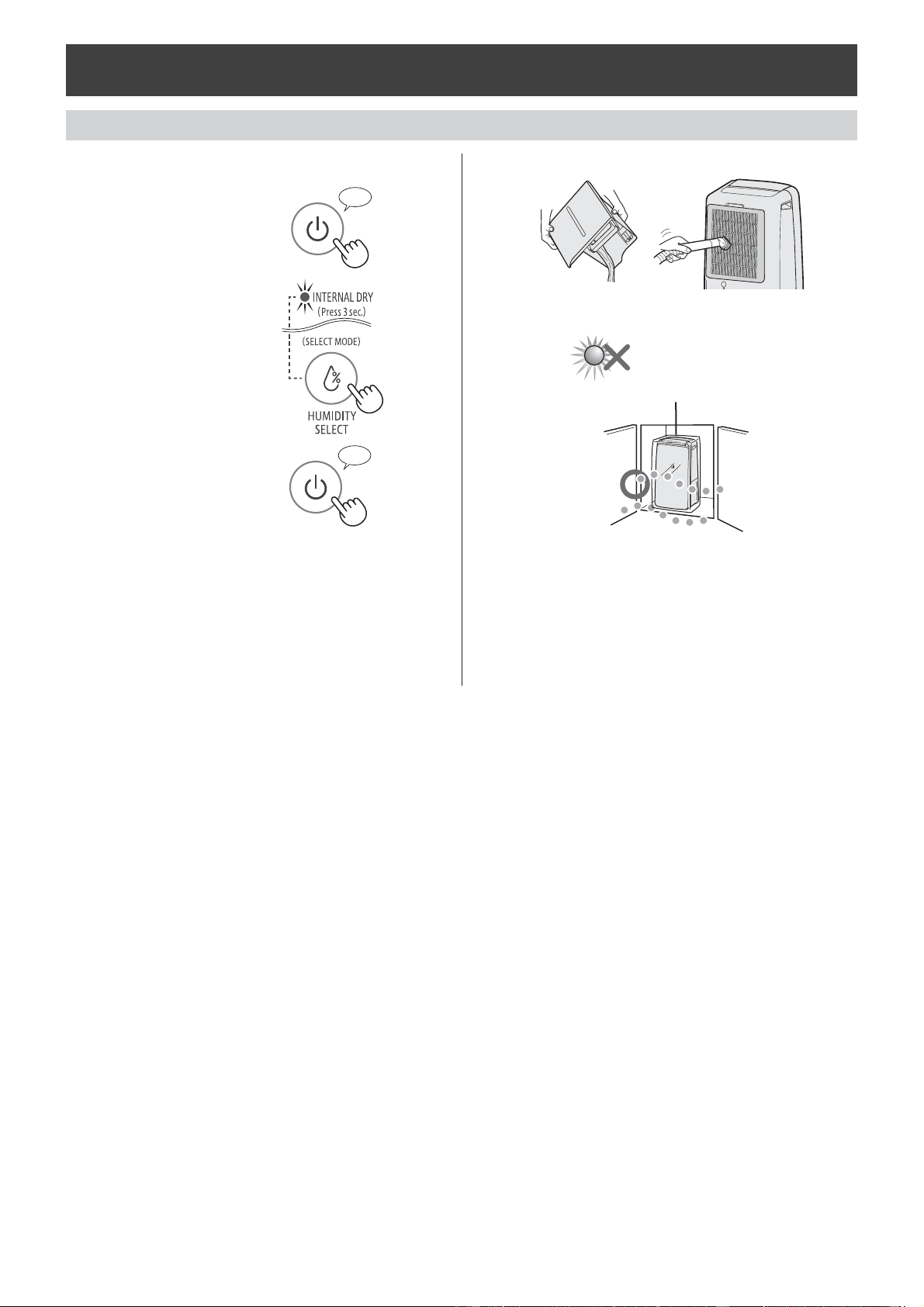
When storing for a long period (not in use)
CARE AND MAINTENANCE
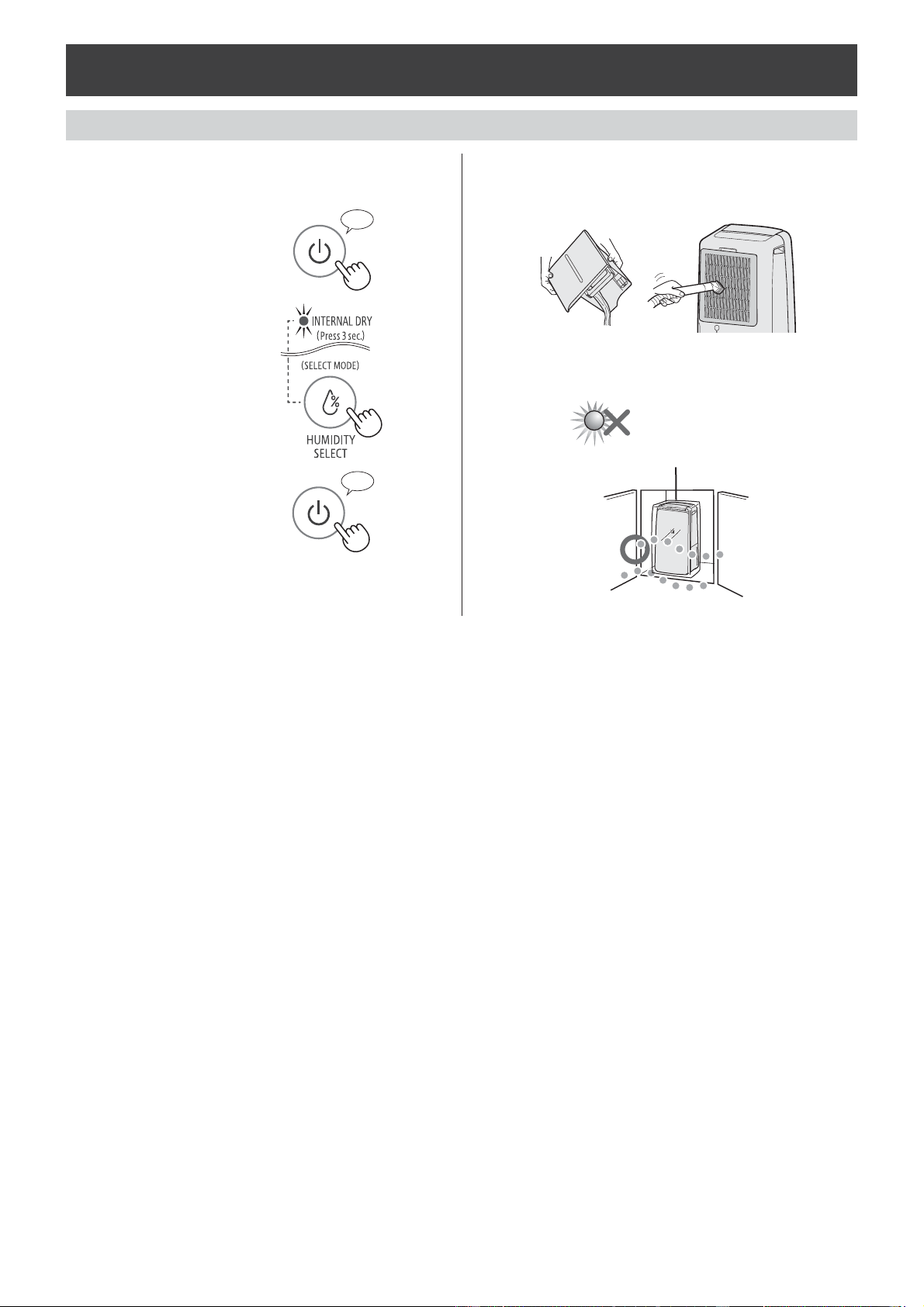
1.
Operate the INTERNAL DRY
OPERATION.
①
Start operation.
②
Select the Internal
Dry Operation.
③
Stop Operation.
*Start the Internal Dry Operation, and
stop automatically after approximate 90
minutes.
2.
Dispose tank water and care the Main
Unit.
3.
Store in a dry place away from direct
sunlight.
Plastic bag
♪
more 3 sec.
♪
〜
DW-J27FAJ20FAEN.inddEN-14 2018/08/3115:38:17
EN-15
ENGLISH
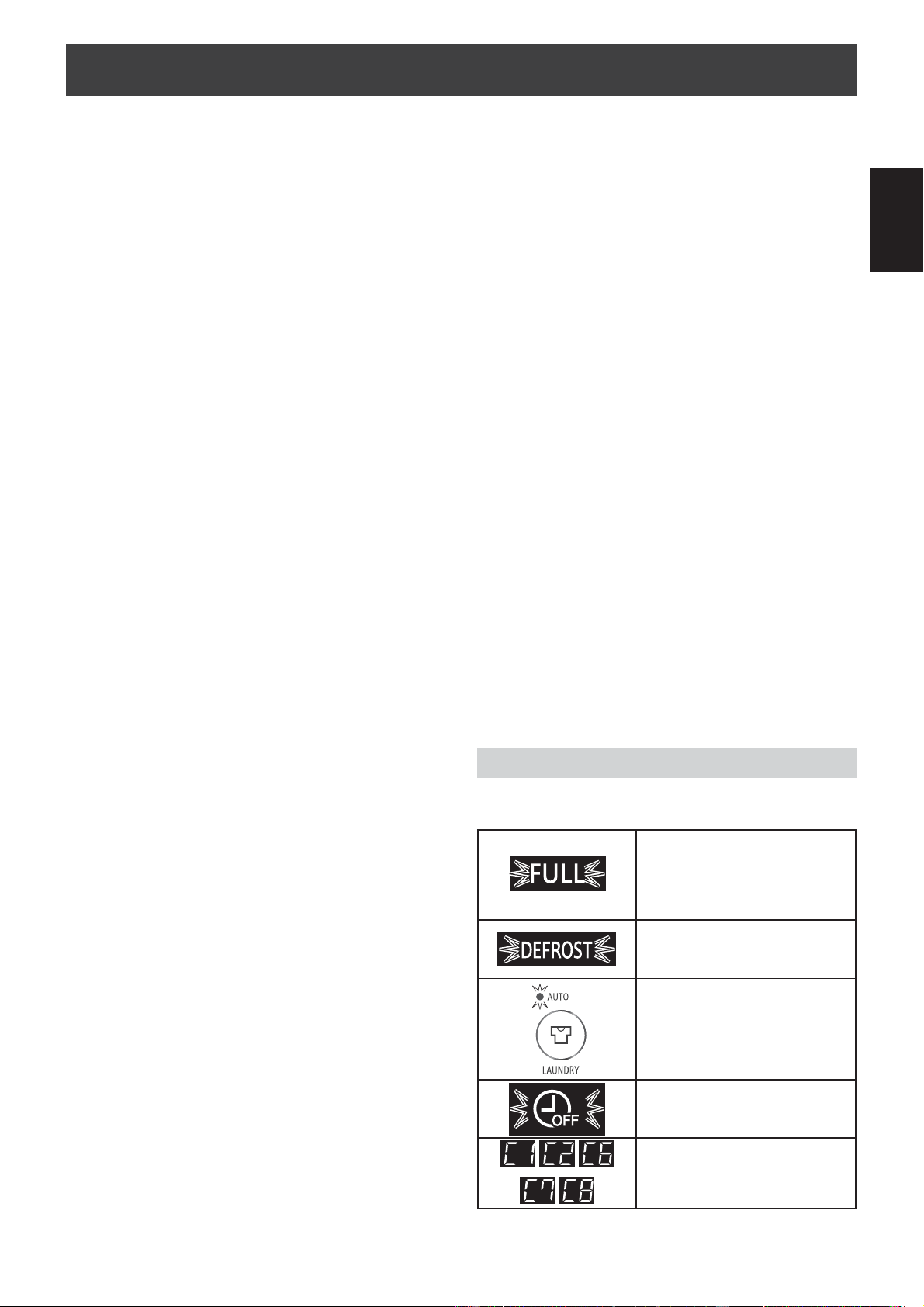
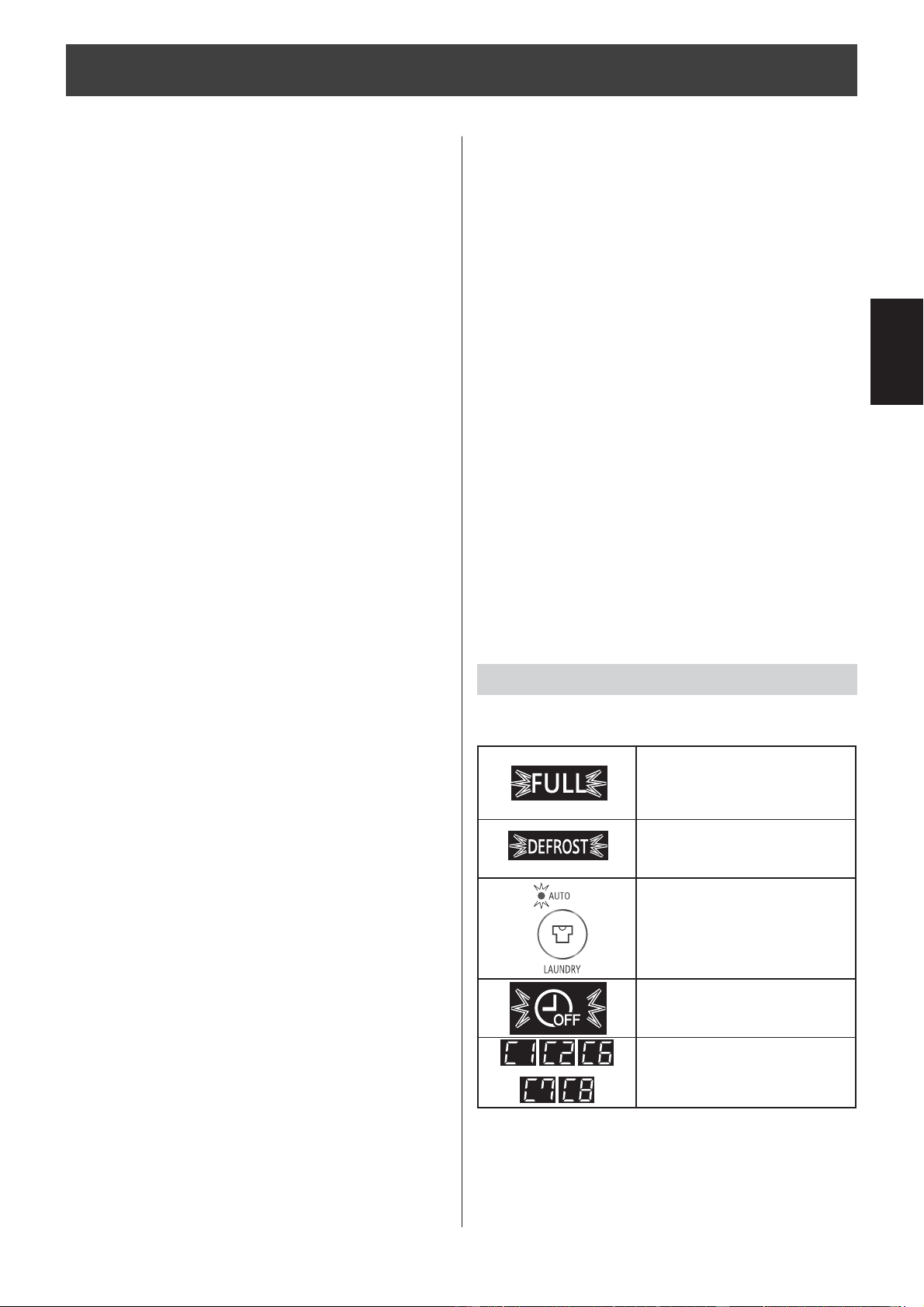
ERROR DISPLAY
TROUBLESHOOTING
Before contact for service, check the following points to make sure that the problem is not a Main Unit malfunction.
If error occurs repeatedly, contact the Sharp Service
Center.
The room becomes hot.
• The Main Unit generates heat during LAUNDRY DRY
operation and DEHUMIDIFY operation and the room
temperature will rise. Warm air will be come out from
the air outlet, but this is normal and does not indicate
a problem with the Main Unit.
The Main Unit does not dehumidify.
• The performance of dehumidifi cation level varies with
the size, structure, temperature and humidity level of
the room. When room temperature or humidity level
is low, the performance will become low in general.
• Check whether the Back Panel is clean.
• Check whether the air outlet or air inlet is not
blocked.
Sounds
• The Main Unit may make clicking or ticking sounds
when it is generating ions.
• The Main Unit may seem rather loud for the fi rst 2 to
3 minutes when the Main Unit is turned on. This is the
sound of the compressor starting-up and is perfectly
normal.
• A soft, swishing noise can be heard immediately after
the Main Unit is turned on or off, and also during
operation. This is the sound of the refrigerant fl owing
inside the Main Unit.
The sound is too loud.
• The Main Unit will sound loudly for the fi rst few seconds
upon power-on when the room temperature is low.
• Check whether the Main Unit is placed on a stable
and level fl oor.
• Check whether the Back Panel is not clogged.
Odor and smoke persists.
Air discharged from the Main Unit has an
odor.
• Check whether the fi lters are extremely dirty.
• Clean or replace the fi lters.
The Cleanliness Monitor light is not
blue even when the air is clean.
• Dirty or clogged dust(sensitive) sensor openings
interfere with sensor operation. Gently clean the
sensor fi lter or the back panel.
• When the Main Unit is operating MOLD CONTROL
operation, the light indicates the operation mode of
the MOLD CONTROL operation.
The Main Unit does not operate when
cigarette smoke is in the air.
• Make sure the Main Unit is installed in a location in
which the sensors can detect cigarette smoke.
• Check whether the dust(sensitive) sensor openings
are blocked or clogged. If they are blocked or
clogged, clean the sensor fi lter or the back panel.
The FILTER RESET Indicator Light is on.
• Whenever after performing maintenance or replacing
the fi lters, connect the power cord to an outlet and
then press the ON/OFF Timer Button. (page
13
)
There is a discrepancy between the
Main Unit’s Humidity Monitor and
another hygrometer in the room.
• There is a difference in the humidity level within the
same room.
• The sensor have different measurement parameters.
• If the monitor indicates temperature or PM2.5 level,
switch the display by pressing the DISPLAY SELECT
button. (page
9
)
The Main Unit PM2.5 monitor does
not match weather report or other
local PM2.5 data.
• Ambient / Indoor air condition or home environment
vary in each place. This may cause the discrepancy
of each reported number. Please take note PM2.5
monitor shows reference numbers.
The water leaks.
• Check whether the main unit is placed horizontally.
• When draining continuous, check whether the hose is
inserted all the way seated.
• If the Water Tank is full, drain
the water.
• If the Water Tank is not
properly placed, place the
Water Tank correctly.
• The Main Unit is operating
with the DEFROST mode.
• Laundry DRY (Auto)
operation has completed, and
the operation has stopped.
• The operation has stopped
with the Auto Off function.
• Unplug the Main Unit, wait
one minute, and then plug
the Main Unit in again.
DW-J27FAJ20FAEN.inddEN-15 2018/08/3115:38:21
EN-16
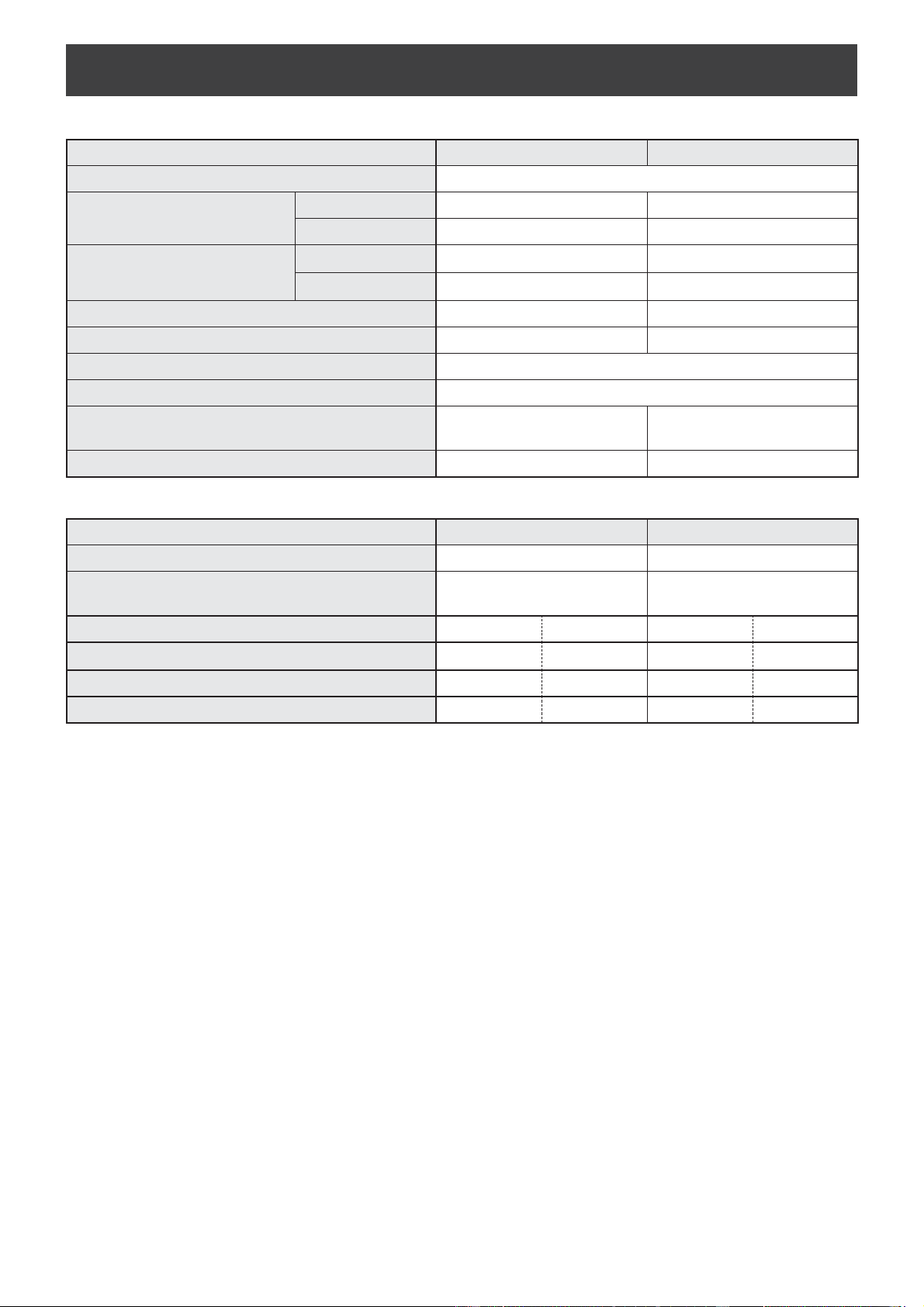
SPECIFICATIONS
Model DW-J27FA DW-J20FA
Power Supply 220V-240V/50Hz
Dehumidifying Capacity
※
1
30°C/80%RH 27 L/day 20 L/day
26.7°C/60%RH 16 L/day 12.5 L/day
Power Consumption
※
2
30°C/80%RH 420 W 340 W
26.7°C/60%RH 345 W 260 W
Standby Power
※
3
0.9 W 0.9 W
Recommended Room Size for Dehumidifying
※
4
33-67 m
2
26-52 m
2
Water Tank Capacity Approx. 4.6 L
Cord Length Approx. 2 m
Dimensions
359 mm(W) × 303 mm(D) ×
665 mm(H)
359 mm(W) × 301 mm(D) ×
665 mm(H)
Weight 17.8 kg 16.7 kg
Model DW-J27FA DW-J20FA
Recommended Room Size for Air Purifying
※
4
32 m
2
28 m
2
Recommended Room Size for High density
Plasmacluster ion
※
5
33 m
2
23 m
2
Fan Speed Adjustment LOW HIGH LOW HIGH
Fan Speed 90 m
3
/h 306 m
3
/h 90 m
3
/h 258 m
3
/h
Rated Power 7.3 W 67 W 7.3 W 50 W
Noise Level 29 dB 53 dB 29 dB 51 dB
Dehumidifying Specifi cations
Air Purifying Specifi cations
※
1 The amount of humidity that a dehumidifi er removes from the air in a day when room temperature and relative humidity are
kept at 30°C/80%RH and 26.7°C/60%RH respectively.
※
2 The consumption value when fan speed reaches the highest.
※
3 When the Main Unit’s power plug is inserted in a wall outlet it consumes the standby power in order to operate electrical
circuits.
※
4 Based on standards of JEMA.
※
5 Recommended Room Size for High density Plasmacluster ion in which approximately 7000 ions per cubic centimeter can
be measured in the center of the room when the Main Unit is placed next to a wall, is running at LAUNDRY Operation
"DEODORIZE" mode settings, and is at a height of approximately 1.2 meters from the fl oor.
DW-J27FAJ20FAEN.inddEN-16 2018/08/3115:38:26

ENGLISH
MEMO
DW-J27FAJ20FAEN.inddEN-17 2018/08/3115:38:27
安全注意事項 ..................................................................................................
2頁
各部分名稱 ......................................................................................................
4頁
使用前 .............................................................................................................
6頁
操作方法
運行開始 / 停止 ............................................................................................
7頁
除濕模式 ......................................................................................................
7頁
濕度設定 ......................................................................................................
7頁
乾衣除濕模式 ..............................................................................................
7頁
空氣淨化模式 ..............................................................................................
7頁
抑菌防霉模式 ..............................................................................................
8頁
定時開 / 關機 ...............................................................................................
8頁
搖擺送風 ......................................................................................................
9頁
內部除濕模式 ..............................................................................................
9頁
兒童安全鎖 ..................................................................................................
9頁
濕度 / 溫度 / PM 2.5 濃度偵測指示燈顯示切換 ............................................
9頁
各種功能的變更設定 ...................................................................................
10 頁
排水方法 ........................................................................................................
11 頁
保養與清潔 .....................................................................................................
12 頁
故障時的檢查事項 ..........................................................................................
15 頁
規格 ...............................................................................................................
16 頁
目錄
感謝您購買 SHARP 空氣淨化抽濕機。
在使用本產品之前,請先詳細閱讀本使用說明書。
在閱讀後,請妥善保存本使用說明書,以便於日後有需要時查閱。
除濕
根據高濕度的溫暖空氣接觸冰冷物品時會產生水滴的原理,
將潮濕空氣吸入蒸發器中,去除水分。
在下列情況中,壓縮機將會停止,且不會除濕。
• 室溫低於 4°C 或高於 38°C。
• 在下列情況中,主機會再次運行 3 分鐘,以保護主機。
* 插上電源插頭後立即運行。
* 在乾衣除濕/除濕模式停止後立即進行。
• 當室溫低於 18°C 時,壓縮機可能會停止,進行除霜模式,且每
45 分鐘,會運行約 12 分鐘「強」風量模式,以避免主機內部
受到結霜的傷害(除霜模式/除霜指示燈亮起)。
空氣淨化
空氣淨化抽濕機是經由吸氣口吸入室內空氣,然後空氣會通過主機內的前置過濾網、活性碳除臭過濾網和HEPA
集塵過濾網,從吹出口排出。
當空氣通過時,HEPA 集塵過濾網能去除高達 99.97% 之 0.3 微米的大小灰塵粒子,同時能協助吸收異味。當異
味成分通過活性碳除臭過濾網時,會被逐步吸收。
過濾網吸收的一些異味會隨時間分解,而產生其他異味。根據使用狀況,特別是在氣味比普通家庭氣味強烈的環境
中使用主機時,這些異味可能會比預期更強烈。如果這些異味持續存在,請更換過濾網。
①
④
②
③
乾空氣
潮濕空氣
儲水箱
蒸發器
冷凝器
中文
DW-J27FAJ20FACN.indd2 2018/08/3115:39:17
ZH-1
中文
此款高效能的抽濕機配備高濃度PCI、高效能 HEPA 集塵過濾網
以及活性碳除臭過濾網,可淨化室內空氣、洗衣除臭、快速乾燥
及除濕。
抑菌防霉模式
在房間釋放PCI及除濕空氣,以防止霉菌擴散。
12 3
強風量送風 除濕 空氣淨化
濕度低於 50%RH,
啟動空氣淨化功能
濕度高於 60%RH,
啟動除濕功能
乾衣除濕
透過廣角導風板上下左右擺動,促使大面積的空氣流動,迅速乾燥衣物。
空氣淨化
透過 SHARP 的三重過濾網( HEPA 集塵過濾網、活性碳除臭過濾網及前置過濾網)收集有毒物質,例如灰塵、花
粉、空氣霉菌、難聞的氣味等,並淨化空氣。
PM2.5 濃度偵測指示燈
面板上的指示燈的顏色和數字會變更,以顯示出 PM2.5 的大約數值。
4.6L 大容量儲水箱
可持續除濕。
*
請參考封面的注釋。
DW-J27FAJ20FACN.inddZH-1 2018/08/3115:39:31

ZH-2
繁體中文
安全注意事項
使用電器時,務必遵守以下各方面的基本安全
預防措施,包括:
警告
- 請務必遵守下列事項,以降低觸電、
火災或受傷風險:
• 在使用主機之前,請先閱讀所有注意事項。
• 僅能使用 220-240V 插座。
• 除在監護人或負責其安全人士的適當監督或
指導下使用外,主機不適合身體機能或心智
能力退化者,或缺乏操作經驗和知識的人士
(包括兒童)使用。應適當監管兒童,確保
不會將此機器做為玩具。
• 如果電源線損壞時,必須由製造商或其代
理、SHARP 公司特約服務中心,或具有同
等資格的人員負責更換,以免發生危險。
• 在進行排水、維護、拆卸、安裝及更換過濾
網之前,以及長時間不使用時,請務必拔掉
電源插頭,以避免可能會因為短路而導致觸
電或引起火災。
• 如果電源線或插頭已損壞,或牆上的電源插
座已鬆脫,請勿使用主機。
• 定期清除電源插頭上的灰塵。
• 請勿將手指或異物插入吸氣或吹出口。
• 在拔掉電源插頭時,請務必緊握插頭拔出,
絕不可拉扯電線,以避免可能會因短路而導
致觸電或引起火災。
• 在移動主機時,請小心腳輪,勿損壞電源
線,以避免可能會導致觸電、發熱或火災。
• 請小心不要損壞電源線,以免導致觸電、過
熱或發生火災。
• 請勿以潮濕的手拔除電源插頭。
• 請勿在氣體設備或壁爐附近使用主機。
• 此空氣淨化抽濕機僅可由 SHARP 公司授權
之服務中心進行維修。若主機出現任何問
題、需要調校或修理,請聯絡客戶服務中
心。
• 請勿在噴灑噴霧殺蟲劑後使用主機。請勿在
有油性殘餘物、焚香、點燃香菸的火花、空
氣中有化學煙霧的空間中使用主機。
請勿在潮濕的環境(例如浴室) 中使用主
機。
• 在清潔主機時請注意。具強力腐蝕性的清潔
劑可能會損壞外殼。
• 在搬運主機時,請先取出儲水箱,並握住主
機兩側的把手搬運。
• 切勿飲用儲水箱內的水。
• 切勿使主機接觸水源,以免可能會導致短路
或觸電。
• 定期清潔儲水箱(請參閱
12頁
)。在不使
用主機時,請倒空儲水箱中的水,若不倒空
可能會發霉、滋生細菌及產生惡臭,在少數
情況下,此類細菌可能會損害健康。
• 在想要連續排水時,請先檢查彎曲軟管/排
水的高度,並將軟管設置在安全排放位置。
• 在使用軟管時,請使軟管周圍的溫度保持在
冰點以上。內部的水可能會洩漏至室內及弄
濕家具,或導致觸電及火災。
注意
- 主機干擾收音機或電視接收時的相關
措施。
如果本空氣淨化抽濕機對收音機或電視接收造
成干擾時,請嘗試採取下列一項或多項措施修
正干擾:
• 調整或重新放置接收天線。
• 增加主機與收音機或電視之間的距離。
• 將主機與收音機或電視接收器連接至不同電
路的電源插座。
• 若需要協助,請諮詢經銷商或合格的收音機
或電視技術人員。
DW-J27FAJ20FACN.inddZH-2 2018/08/3115:39:33

ZH-3
繁體中文
中文
操作注意事項
• 請勿堵塞吸氣口或吹出口。
• 請勿在熱源物體附近或在熱源物體上(例如
爐灶或暖爐,或可能會接觸到蒸汽的場所)
使用主機。
• 主機僅能直立使用,切勿平放。
• 在移動主機時,請緊握兩側的把手。切勿移
動正在運行中的主機。
• 在易損、不平坦的地面及較厚的地毯上
應將主機抬起移動。
• 在推動腳輪,移動設備時,請以水平方向慢
慢移動。
• 在移動之前,應先關閉主機及拆除儲水箱,
請小心,不要夾傷手指。
• 在正確安裝過濾網和水箱之前,切勿運行主
機。
• 切勿清洗和重複使用 HEPA 集塵過濾網和活
性碳除臭過濾網,此做法無法改善過濾網的
效能,且可能會導致觸電或在運作時發生故
障。
• 僅可使用柔軟的布清潔主機外部,切勿使用
揮發性液體或清潔劑。
苯塗料稀釋劑或拋光粉可能會損壞主機表面
或使表面裂開,此外,亦可能會導致感測器
發生故障。
• 請使主機保持遠離水源。
• 請務必徹底擦除儲水箱外面多餘的水。
• 請勿握住把手搖晃儲水箱。
• 在拆卸或清潔儲水箱時,應避免水溢出。
• 請勿拆除浮板。
• 在保養儲水箱和儲水箱蓋時,請勿使用清潔
劑,以免導致變形、變色、龜裂(漏水)。
• 在保養時,請勿用力擦洗背板。
安裝指南
• 請勿將主機(感測器)安裝在直接面對出風口
的位置,以免可能會影響主機正常工作。
• 請避免在可能會與傢俱、織物或其他物品接
觸的位置使用主機,以免可能無法確保吸氣
口或吹出口暢通。
• 請勿在溫差極大,或會導致主機直接暴露
於冷凝環境的位置使用。主機僅適合在 4 -
38°C 之間的室溫下使用。
• 安裝時必須穩固,且通風良好。將主機放置
於鋪設厚地毯的位置,可能會導致主機微微
震動。請將主機置於平整的表面,以避免儲
水箱漏水。
• 請避免在會產生油脂或油煙的場所使用主
機,以免可能會導致主機表面裂開以及感測
器發生故障。
• 即使離牆 3 cm,主機的集塵功能也不會發
生任何問題,但是可能會因距離太近而弄髒
周圍的牆壁或地板。請盡量使主機遠離牆
壁,以免在經過一段時間後,可能會導致直
接位於吹出口後面的牆壁變髒。在相同位
置長時間使用主機時,應定期清潔相鄰的牆
壁。
過濾網指南
• 請依據本手冊之指示,了解正確保養和維護
過濾網的方法。
DW-J27FAJ20FACN.inddZH-3 2018/08/3115:39:33
ZH-4
繁體中文
主機
各部分名稱
1
3
4
5
6
7
15
16
17
20
21
22
24
23
18
19
1
操作面板
13
水位窗
2
吹出口
14
儲水箱拉槽
3
上下導風板
15
HEPA 集塵過濾網
4
左右導風板
16
活性碳除臭過濾網
5
主機
17
背板(前置過濾網)
6
把手(
左右兩處
)
18
吸氣口
7
顯示面板
19
異味感測器
8
儲水箱
20
溫/濕度感測器
9
排水口
21
高感度灰塵感測器、灰塵感測器過濾網
10
浮板
22
排水孔、塞頭
11
儲水箱手柄
23
腳輪(
4個
)
12
儲水箱蓋
24
電源線、電源插頭
2
8
9
10
11
12
13
14
(正面)
(背面)
DW-J27FAJ20FACN.inddZH-4 2018/08/3115:39:33
ZH-5
繁體中文
中文
操作面板
顯示面板
1
電源(開/關)按鍵
8
左右擺風按鍵、指示燈
2
抑菌防霉按鍵、指示燈
9
定時(開/關)按鍵
3
空氣淨化按鍵、指示燈
10
過濾網重置指示燈(橙色)
4
乾衣除濕按鍵、指示燈
11
機體防霉指示燈
5
除濕模式按鍵、指示燈
12
兒童安全鎖指示燈
6
濕度設定按鍵
13
亮度感測器
7
上下擺風按鍵、指示燈
1
濕度/溫度/PM2.5 濃度偵測指示燈
指示房間內的近似濕度數值、溫度或 PM2.5 數
值。
定時(開/關)指示燈
顯示定時(開/關)的設定時間或剩餘時間。
濕度設定
顯示濕度設定模式所設置的濕度。
6
異味偵測指示燈
指示異味感測器偵測異味。
關 橙色 紅色
乾淨
髒污
7
灰塵偵測指示燈
指示高感度灰塵感測器偵測一般灰塵。
關 橙色 紅色
乾淨
髒污
8
PM2.5 偵測指示燈
指示高感度灰塵感測器偵測微塵。
關 橙色 紅色
乾淨
髒污
9
除霜指示燈
顯示主機在除霜模式下運行。
10
空氣品質指示燈
指示 3 個等級的房間空氣品質,顏色會改變。
藍色 黃色 紅色
乾淨
髒污
開啟抑菌防霉模式時
會以紫色表示。
2
PCI指示燈(藍色)
3
定時關機指示燈
4
定時開機指示燈
5
滿水指示燈(紅色)
當儲水箱滿水時會閃爍。
16910 23457
13 12 11
8
12345678
910
顯示 20% 至 90% 的濕度。
顯示溫度 0
o
C 至
5
0
o
C。
顯示 PM2.5 的濃度 10
μ
g/m
3
至
499
μ
g/m
3
。
20%
以下
90%
以上
51
o
C
以上
500
μ
g/
m
3
以上
-1
o
C
以下
9
μ
g/m
3
以下
按一下「 」的按鍵,以開始。
DW-J27FAJ20FACN.inddZH-5 2018/08/3115:39:36
ZH-6
繁體中文
操作方法
安裝過濾網
運行開始 / 停止
使用前
♪ ♪
〜
運行 停止
自動關機功能
如果忘記關閉主機時,將會在 12 小時後自動停止運
行。
若想連續運行主機超過 12 小時或連續排水時,請關
閉自動關機功能。(請參閱
10 頁
)
在「空氣淨化模式」下運行時,不會停止運行。
1.
拆下背板。
背板
2.
拆下每一個過濾網上的塑膠袋。
HEPA 集塵過濾網 活性碳除臭過濾網
3.
如圖所示,依據正確的順序安裝過濾網。
HEPA 集塵過濾網
活性碳除臭過濾網
標籤
4.
安裝背板。
按一下
DW-J27FAJ20FACN.inddZH-6 2018/08/3115:39:39
ZH-7
繁體中文
中文
自動:
由「溫/濕度感測器」自動控制濕度和風量。
自訂:
您可以選取喜愛的濕度。(請參閱下方)
當您按下除濕模式按鍵,並設定自訂模式時,可將濕
度數值更改為依序在 60%、70%、80%、40% 和
50%RH 之間循環。
*
僅有在自訂模式下,濕度設定才能有效運行。
操作方法
除濕模式
濕度設定
♪
♪
♪
♪♪
溫度 4-26
o
C 26-38
o
C
濕度 60% 55%
♪♪ ♪ ♪
♪♪
自動:
當您想要以低耗電量進行乾衣時,主機會重複進行除
濕和送風模式,藉此烘乾衣物。
衣物除臭:
當您想要為衣物除臭時,主機會以「強」風量運行,
確保從吹出口吹出的空氣會直接吹入您的衣物。
主機運行時,會「開」PCI。
自動:
風量會根據感測器偵測空氣中的污染物量而自動改變。
睡眠:
主機運行時安靜無聲,且風量會根據感測器偵測空氣
中的污染物量而自動改變。
前端監視器的燈會自動啟動。
乾衣除濕模式
空氣淨化模式
♪
♪
♪
♪♪
♪
♪
♪
♪♪
DW-J27FAJ20FACN.inddZH-7 2018/08/3115:39:43
ZH-8
操作方法
定時
主機將會在選定的時間結束後自動啟動。
主機將會在選定的時間到達時自動停止。
開機定時器
關機定時器
(主機關閉時)
(主機開啟時)
顯示面板
顯示面板
……
♪ ♪ ♪ ♪ ♪♪
1 小時 2 小時 3 小時 12 小時 取消
……
♪ ♪ ♪ ♪ ♪♪
1 小時 2 小時 3 小時 12 小時 取消
抑菌防霉模式
使用抑菌防霉模式,主機會透過強風量送風方式,將
PCI擴散至房間的寬廣區域,以抑制霉菌。
在開啟時,會先以強風量送風 10 分鐘,然後自動進行
以下情況的運行。
(空氣品質指示燈會顯示出實際的運行模式。)
主機運行時會「開」PCI。
濕度高
濕度低
在高濕度的情況下,主機會以「強」除濕
模式運行,直至房間的濕度降到幾乎不會
出現霉菌的程度。
當濕度數値降低後,主機會透過強風量
送風。
【大約 80 分鐘】 [ 紫色/閃爍 ]
※ 運行時間會因使用方法及環境條件而有所差異
注意
• 空氣淨化後且室內濕度降低,主機會以弱風量運行。
• [藍色/亮起]
若濕度上升時會再切換至高濕度情況的除濕模式。
8秒後發出嗶聲完成切換。
8秒後發出嗶聲完成切換。
DW-J27FAJ20FACN.inddZH-8 2018/08/3115:39:46
ZH-9
中文
兒童安全鎖
濕度 / 溫度 / PM 2.5 濃度
偵測指示燈顯示切換
搖擺送風 內部除濕模式
當您設定內部除濕模式時,主機會持續運行約 90 分
鐘,自動以送風模式運行。
鎖定操作面板的操作。
超過 3 秒。
超過 3 秒。
超過 3 秒。
超過 3 秒。
上下擺風
左右擺風
乾衣、除臭 除濕
廣域
上
下
♪
♪
♪
♪♪
♪
♪
♪
♪♪
乾衣、除臭 除濕
廣域
廣角
集中
♪ ♪
〜
開取消
♪ ♪
♪♪
濕度 溫度 PM2.5
取消(關)
取消(關)
8秒後發出嗶聲完成切換。
(主機開啟時)
(主機開啟時)
DW-J27FAJ20FACN.inddZH-9 2018/08/3115:39:50
ZH-10
繁體中文操作方法
各種功能的變更設定
設定類型
您可以更改「設定類型」表中的功能。
1.
關閉主機電源。
2.
超過 3 秒。
♪
3.
選取「功能號碼」。
逆向 順向
或
・・・・
設定
♪
4.
選取「設定號碼」。
逆向 順向
或
設定
♪
5.
按下電源(開/關)按鍵,完成設
定模式。
♪
〜
關閉
♪ ♪
♪ ♪
功能 設定
自動記憶功能
如果拔掉主機插頭或停電,
則主機將會在電源恢復後以
先前的設定繼續運行。
取消
開(預設)
關閉提示音
當主機停止運行時,可以關
閉提示音。如下所示,在主
機停止運行時,可以關閉提
示音。
取消
開(預設)
亮度調教
您可以選擇顯示面板的亮
度。
關閉
當設定為「關閉」時,在操作
開始後,「較暗」指示燈會亮
起 8 秒鐘 ,然後熄滅。
僅有在儲水箱滿水時,FULL(滿
水)指示燈才會以較暗方式閃爍。
較暗
自動(預設)
會根據房間的亮度自動切換燈
光。
房間
顯示面板
亮較亮
暗較暗
* 當「睡眠」模式運行時;
房間明亮:燈光較暗
房間較暗:燈光關閉
PCI開/關
關
開(預設)
自動關機功能
如果忘記關閉主機時,將
會在 12 小時後自動停止運
行。
取消
開(預設)
調校感測器的靈敏度 (F6-F8)
亮度感測器
低
高感度灰塵感測器 中
異味感測器
高
* 亮度感測器:預設為「中」。
高感度灰塵感測器和異味感測器:預設為「高」。
DW-J27FAJ20FACN.inddZH-10 2018/08/3115:40:02
ZH-11
中文
繁體中文
1.
拔下電源插頭。
2.
拆下儲水箱和塞頭。
塞頭
3.
將軟管接在排水孔上。
排水孔
市售軟管:
內徑 15mm
(外徑可達 21mm)
4.
將軟管穩固地插入排水孔底部。
排水塞
軟管
排水口
排水孔
5.
安裝儲水箱。
在想要連續排水時
排水方法
如何使用軟管排水
♪♪・・・
當儲水箱滿水時,滿水指
示燈會閃爍。
前端須向下傾斜。
請勿彎曲。
在寒冷的天氣下,
請勿將軟管放入水
中。
1.
拆下儲水箱。
儲水箱拉槽
儲水箱
2.
倒掉儲水箱中的水。
▶
排水口
3.
安裝儲水箱。
排水口
注意
• 每週清潔一次儲水箱。若未清潔儲水箱,則可能會發
霉、滋生細菌及產生惡臭。
DW-J27FAJ20FACN.inddZH-11 2018/08/3115:40:11
ZH-12
注意
如何清潔與去除污垢。
背板
1. 將少量中性清潔劑加入水中,並浸泡
大約 10 分鐘。
警示
擦洗時,請勿在背板上過度施力。
2. 使用清水洗去中性清潔劑。
3. 將過濾網置於通風良好的位置以徹底
乾燥。
灰塵感測器過濾網
1. 拆下背板。
2. 拆下灰塵感測器過濾網。
3. 如果灰塵感測器過濾網過度髒污,請
用水清洗,並徹底乾燥。
儲水箱(大約每週一次) 背板/感測器
(大約每 2 週一次)
主機(大約每月一次)
保養與清潔
使用清潔工具(例如
吸塵機)輕輕除塵。
使用乾軟布擦拭。
請勿用水清洗。
1.
拆下儲水箱蓋,將水倒掉。
▶
儲水箱蓋
2.
清洗儲水箱內部。
注意
• 如果過度髒污時,請將中性清潔劑溶於溫水中後
進行清洗。
3.
使用軟布擦乾儲水箱。
檢查浮板。
4.
安裝儲水箱蓋。
灰塵感測器過濾網
DW-J27FAJ20FACN.inddZH-12 2018/08/3115:40:20
ZH-13
中文
HEPA 集塵過濾網/活性碳除臭過
濾網
(大約每月一次)
過濾網之使用壽命
過濾網之使用壽命取決於房間的環境、使用條件及主
機位置,可能需提早更換。
HEPA 集塵過濾網和活性碳除臭過濾網的壽命以及更
換建議,是以淨化每天抽 5 支香煙的房間,且主機的
集塵和除臭效能下降至新過濾網等級之一半為依據。
• HEPA 集塵過濾網
開啟後大約 10 年
•活性碳除臭過濾網
開啟後大約 10 年
更換過濾網型號
若想要購買濾網進行更換時,請諮詢客戶服務中心。
HEPA 集塵過濾網
(1 塊)
FZ-J20HFE
活性碳除臭過濾網
(1 塊)
FZ-J20DFE
處置過濾網
請根據當地之法律和法規處置使用過的過濾網。
HEPA 集塵過濾網的材質:
• 聚丙烯
• 聚乙烯
活性碳除臭過濾網的材質:
• 聚丙烯
• 聚乙烯
• 活性碳
更換過濾網
過濾網重置指示燈將會在大約運行 720 小時後亮起(30 天 ×
24 小時 =720 小時)。
提醒您執行以下說明的維護。在執行維護後,請重置過濾網指
示燈。
過濾網指示燈
重置
超過 3 秒。
♪
清除HEPA 集塵過濾網和活性碳除臭過濾網上
的灰塵。
警示
請勿清洗過濾網。請勿置於陽光下曝曬
(過濾網可能會失去功效)。
HEPA 集塵過濾網
僅清潔標示標籤的一面,請勿
清潔另一面。請小心清潔過濾
網,切勿過度施力。
活性碳除臭過濾網
兩面都要清潔。
如果過度施力可能會弄破過濾
網,因此請務必小心。
過濾網吸收的一些異味會隨時間分解,而產生其他異味。根據
使用狀況而定,特別是在氣味比普通家庭強烈的環境中使用主
機時,這些異味可能會比預期更強烈。
若發生此類情況或於維護後無法清除灰塵時,請更換過濾網。
標籤
DW-J27FAJ20FACN.inddZH-13 2018/08/3115:40:26
ZH-14
長時間存放不使用時
保養與清潔
1.
以內部除濕模式運行。
①
開始運行。
②
選擇內部除濕。
③
停止運行。
*
啟動內部除濕模式,大約 90 分鐘後會自
動停止。
♪
♪
〜
超過 3 秒。
2.
倒掉儲水箱的水及清潔主機。
3.
存放在乾燥的位置,避免陽光直射。
塑膠袋
DW-J27FAJ20FACN.inddZH-14 2018/08/3115:40:31
ZH-15
中文
顯示錯誤
故障時的檢查事項
在聯絡要求維修之前,請先檢查下列事項,以確保該問題非主機故障引起。
如果重複出現錯誤,請聯絡客戶服務中心。
房間變熱。
• 主機在乾衣除濕運行和除濕運行期間會產生熱能,導
致室溫升高。暖空氣從吹出口排出,但是此為正常現
象,不代表主機有問題。
主機無法除濕。
• 除濕等級的效能會隨房間大小、結構、溫度及濕度等
級而異。當室溫或濕度較低時,效能通常也會降低。
• 檢查背板是否乾淨。
• 檢查吹出口或吸氣口是否堵塞。
有異常聲音。
• 主機在產生離子時可能會發出咔嗒聲或滴答聲,此為
正常現象。
• 主機開啟後 2 到 3 分鐘內,運行聲音比較大。這是壓
縮機啟動的聲音,非常正常。
• 在主機開啟或關閉後以及運行期間,會立即聽到嗖嗖
聲。這是冷媒在主機內流動的聲音。
聲音太大聲。
• 室內溫度較低時,主機在開啟後數秒鐘內發出很大的
聲音。
• 檢查主機是否放置在平穩的地面上。
• 檢查背板是否堵塞。
異味和煙霧仍然存在。
主機排出的空氣有異味。
• 檢查過濾網是否過度髒污。
• 清潔或更換過濾網。
即使空氣已淨化,空氣品質指示燈仍不會亮起
藍色。
• 高感度灰塵感測器開口髒污或堵塞會干擾感測器操
作。請輕輕地清潔灰塵感測器過濾網或背板。
• 當主機以抑菌防霉模式運行時,指示燈會顯示出抑菌
防霉的運行模式。
香菸的煙霧已飄在空中,主機卻未運行。
• 請確認主機安裝的位置是否能讓感測器偵測到香菸煙
霧。
• 檢查高感度灰塵感測器的開口是否塞住或堵塞。如果
開口塞住或堵塞,請清潔灰塵感測器過濾網或背板。
過濾網重置指示燈亮起。
• 在每一次維護或更換過濾網後,請將電源線接到插座
上,然後按下定時(開/關)按鍵。(請參閱13頁)
主機的濕度偵測指示燈與房間內另一個濕度計
的顯示不同。
• 同一個房間內的濕度等級不同。
• 感測器有不同的測量參數。
• 如果指示燈顯示出溫度或 PM2.5 等級時,請按下顯示
切換按鍵,以切換顯示。(請參閱 9頁)
主機 PM2.5 濃度偵測指示燈不符合天氣報告或
其他當地的 PM2.5 資料。
• 環境/室內空氣條件或家庭環境會因地而異,即可能
會導致每一份報告的數字有差異。請注意,PM2.5 濃
度偵測指示燈顯示的是參考數值。
漏水。
• 檢查主機是否水平放置。
• 在連續排水時,檢查軟管是否已完全插入。
• 如果儲水箱滿水時,請將水
倒掉。
• 如果儲水箱未正確放置,請
正確放置儲水箱。
• 主機在除霜模式下運行。
• 乾衣除濕(自動)操作已完
成,且已停止運行。
• 使用之自動關機功能已停止
運行。
• 拔下主機電源插頭,等待一
分鐘,然後重新插上主機電
源插頭。
DW-J27FAJ20FACN.inddZH-15 2018/08/3115:40:34
ZH-16
繁體中文 規格
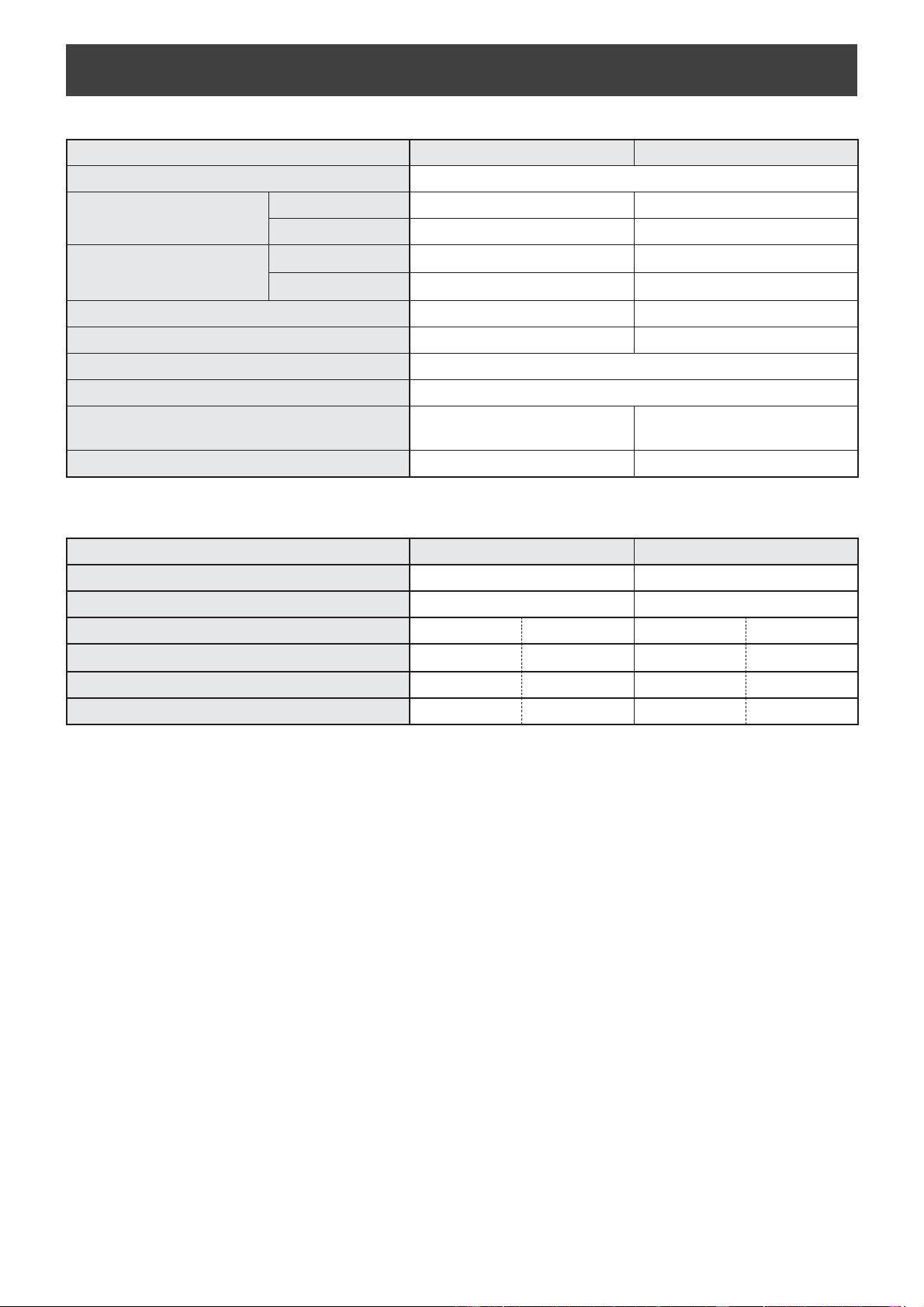
抽濕規格
空氣淨化規格
型號
DW-J27FA DW-J20FA
電源
220V-240V/50Hz
抽濕能力
※
1
30°C/80%RH 27
公升
/
日
20
公升
/
日
26.7°C/60%RH 16
公升
/
日
12.5
公升
/
日
耗電量
※
2
30°C/80%RH 420
瓦
340
瓦
26.7°C/60%RH 345
瓦
260
瓦
備用狀態
※
3
0.9
瓦
0.9
瓦
抽濕面積
※
4
33-67
平方米
26-52
平方米
儲水箱容量 約
4.6
公升
電源線長度 約
2
米
外形尺寸
359
毫米
(
闊
) × 303
毫米
(
深
)
× 665
毫米
(
高
)
359
毫米
(
闊
) × 301
毫米
(
深
)
× 665
毫米
(
高
)
重量
17.8
公斤
16.7
公斤
型號
DW-J27FA DW-J20FA
適用面積
※
4
32
平方米
28
平方米
高濃度 PCI 之適用面積
※
5
33
平方米
23
平方米
風速 低高低高
空氣流量
90
立方米
/
小時
306
立方米
/
小時
90
立方米
/
小時
258
立方米
/
小時
耗電量
7.3
瓦
67
瓦
7.3
瓦
50
瓦
噪音
29
分貝
53
分貝
29
分貝
51
分貝
※
1
抽濕能力是指連續保持室溫及相對濕度於 30℃ /80%RH 及 26.7℃ /60%RH 時的每天抽濕量
※
2
耗電量是在最大風速下的數值
※
3
備用狀態是指將電源插頭插入電源插座後而電源開關鍵設定在關的狀態
※
4
根據 JEMA 標準。
※
5
當主機靠牆壁放置時,能於房間中央測得每 1 立方公分大約 7000 個離子的房間大小內,以衣物除臭模式設定運行下,測量
高度大約為離地 1.2 公尺。
DW-J27FAJ20FACN.inddZH-16 2018/08/3115:40:38

中文
MEMO
DW-J27FAJ20FACN.indd1 2018/08/3115:40:38

MEMO
DW-J27FAJ20FACN.indd2 2018/08/3115:40:38

MEMO
DW-J27FAJ20FACN.indd3 2018/08/3115:40:38

SHARP CORPORATION
OSAKA, JAPAN
Printed in China
TINS-A014FBRZ 18H-
①
DW-J27FAJ20FAEN.inddEN-18 2018/08/3115:38:27