OPERATION MANUAL
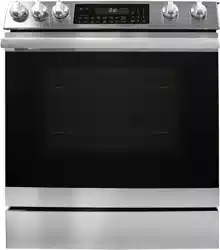
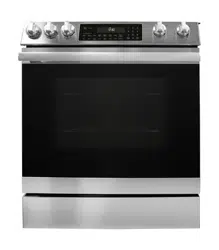
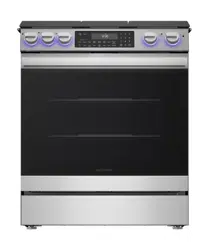
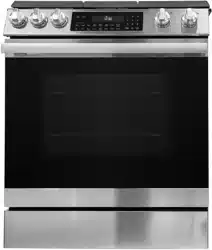
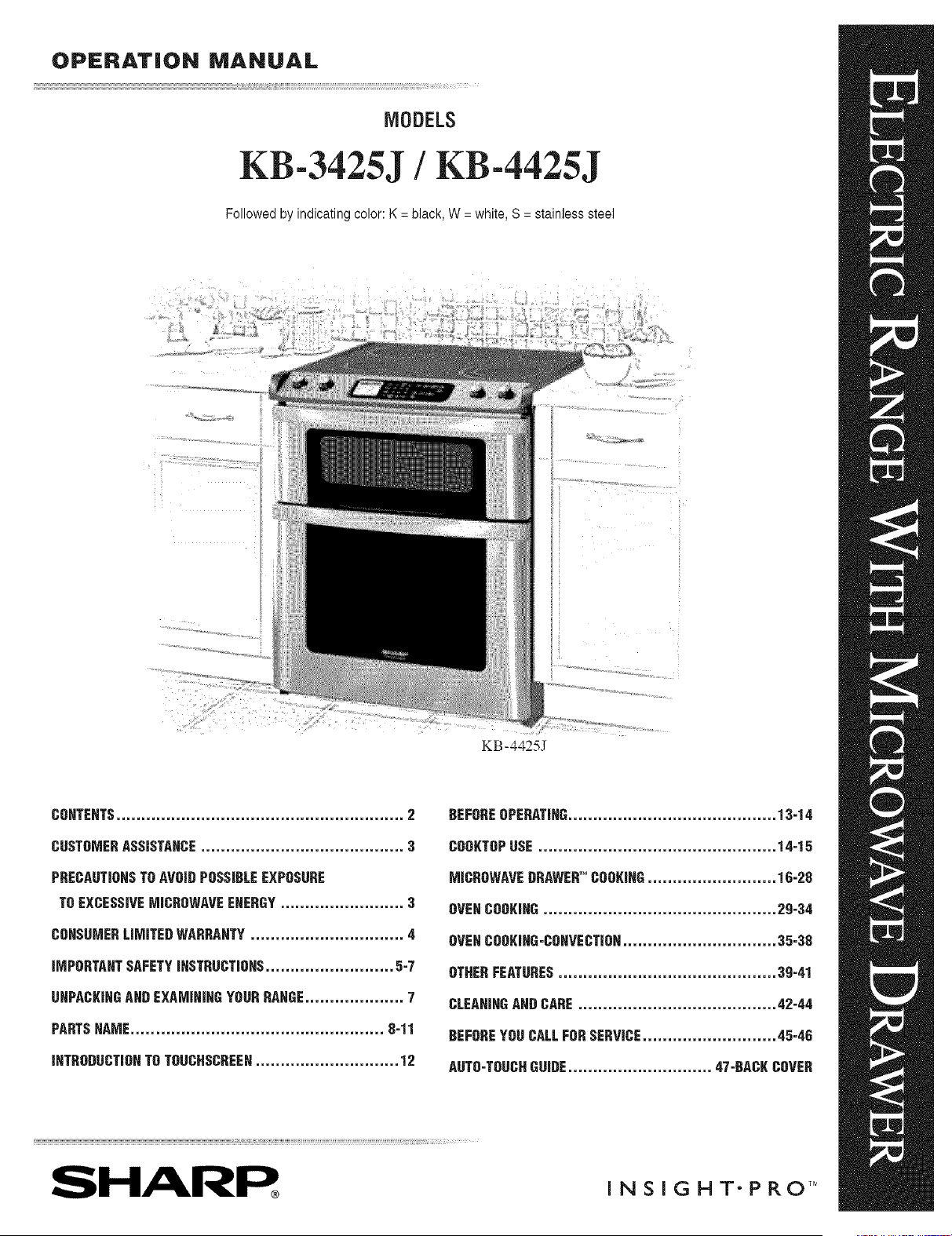
MODELS
KB-3425J / KB-4425J
Followedby indicatingcolor:K = black,W = white,S= stainlesssteel
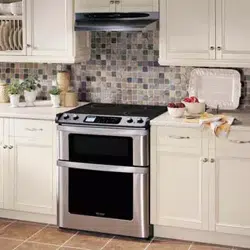
KB-4425J
CONTENTS.......................................................... 2
CUSTOMERASSISTANCE......................................... 3
PRECAUTIONSTOAVOIDPOSSIBLEEXPOSURE
TOEXCESSIVEMICROWAVEEHEBGY......................... 3
CDHSUMEBLiMiTEDWABBAHTY............................... 4
INPORTAHTSAFETYIHSTBUCTIOHS.......................... 5-7
DNPACKIHGANDEXAMIHIHGYOURRANGE.................... 7
PARTSNAME................................................... 8=11
IHTRODDCTIBHTOTOUCHSCDEEN............................. 12
BEFOREOPERATING.......................................... 13=14
CBBKTBPUSE................................................ 14=15
MICROWAVEDRAWEB'MCOOKlHG.......................... 16=28
OVENCOOKJHG............................................... 29=34
OVENCOOKiHG=COHVECTIBH............................... 35=38
OTHERFEATURES............................................ 3g=41
CLEAHINGAHDCARE........................................ 42-44
BEFOREYOUCALLFORSERVICE........................... 45=46
AUTO=TOUCHGUIDE............................. 47-BACKCOVER
SHARP ,_, __T.P_OZ_
CONTENTS
CONTENTS.......................................................... 2
CUSTOMERASSISTANCE......................................... 3
PRECAUTIONSTOAVOIDPOSSIBLEEXPOSURE
TOEXCESSIVEMICROWAVEENERGY......................... 3
CONSUMERLIMITEDWARRANTY............................... 4
PRODUCTINFORMATIONCARD.................................. 4
IMPORTANTSAFETYINSTRUCTIONS.......................... 5-7
IMPORTANT SAFETY NOTICE AND WARNING ....................... 5
SAFETY PRECAUTIONS ............................................................... 5
RADIANT SURFA(E UNITS ....................................................... 5-6
MICROWAVE DRAWER TM .......................................................... 6-7
OVEN ................................................................................................ 7
SELF-CLEANING OVEN ................................................................ 7
UNPACKINGANDEXANIRIRGYOURRANGE.................... 7
PARTSNAME................................................... 8-11
ELECTRIC RANGE WITH MICROWAVE DRAWER ................ 8-9
ADJUSTABLE HEIGHT BACKSPLASH ....................................... 9
EZ PULL OVEN RA(K INSTRUCTIONS .................................. 10
GLASS CERAMIC (OOKTOR (ONTROL PANEL
AND KEYSHEET ...................................................................... 11
iNTRODUCTiONTOTOUCHSCREER............................. 12
BEFOREOPERATING.......................................... 13-14
TO SET DATE AND TIME ............................................................ 13
STOP/CLEAR ................................................................................. 14
OPEN OR (LOSE MICROWAVE DRAWER ............................... 14
COORTOPUSE................................................. 14-15
INFORMATION YOU NEED TO KNOW ..................................... 14
RADIANT SURFA(E UNITS ........................................................ 15
SUGGESTED HEAT SETTINGS ................................................... 15
( OOKTOP WARM ZONE ............................................................. 15
MICROWAVEBRAWERCOORIRR............................ 16-28
INFORMATION YOU NEED TO KNOW ................................ 16-17
MANUAL OPERATION ........................................................... 18-19
TIME COOKING ............................................................... 18-19
TO SET POWER LEVEL .................................................. 18-19
SENSOR SETTINGS ................................................................. 20-25
REHEAT ............................................................................. 20-21
POPCORN .............................................................................. 21
AUTOMATIC (OOKING ................................................. 22-25
DEFROST ....................................................................................... 26
MANUAL DEFROST ..................................................................... 26
OTHER ( ONVENIENT FEATURES ....................................... 27-28
MINUTE PLUS T_.................................................................... 27
(USTOM HELP ................................................................... 27
MORE / LESS TIME ADJUSTMENT ................................... 28
OVENCOORIRR............................................... 29-34
INFORMATION YOU NEED TO KNOW ..................................... 29
BEFORE USING OVEN ................................................................ 29
OVEN BAKING AND BROILING ................................................ 29
HOW TO SET OVEN TEMPERATURE FOR BAKE ................... 30
HOW TO PROOF ........................................................................... 30
HOW TO SET TIMED COOK ....................................................... 3t
HOW TO SET DELAY START ...................................................... 32
HOW TO SET BROIL ............................................................... 33-34
BROILING (HART ........................................................................ 34
OVENCOORIRG-CORVECTIOR............................... 35-33
(ONVE(TION COOKING ............................................................ 35
HOW TO SET OVEN TEMPERATURE FOR
CONVECTION BAKE .......................................................... 35-36
(ONVE(TION ROAST ................................................................. 36
HOW TO SET CONVECTION ROAST ................................... 36-37
HOW TO SET DELAY START ...................................................... 37
( ONVE( TION BROIL .................................................................. 38
HOW TO SET CONVECTION BROIL ......................................... 38
(ONVE(TION BROILING CHART ............................................. 38
OTHERFEATURES............................................ 39-41
HOW TO START SELF-CLEAN ................................................... 39
HOW TO SET SELF-(LEAN DELAY START............................. 39
OVEN LIGHT ................................................................................. 40
KITCHEN TIMER .......................................................................... 40
( ONTROL LOCK .......................................................................... 40
SETUP ........................................................................................ 40-41
PAGE FORWARD AND BA(KWARD .......................................... 41
3 MINUTE PLUS ............................................................................ 41
CLEANINGANDCARE ........................................ 42-44
NON-COOKTOP SURFACES ....................................................... 42
(OOKTOP ................................................................................. 42-43
MICROWAVE DRAWER ............................................................... 43
OVEN .............................................................................................. 43
REMOVE AND REPLA(E OVEN DOOR ................................... 43
OVEN RACKS ................................................................................ 44
BROILER PAN, GRID AND ROAST/BROIL RA(K ................... 44
OVEN LIGHT REPLACEMENT ................................................... 44
BEFOREYOU CALLFORSERVICE........................... 45-46
AUTO-TOUCHGUIDE ............................ 47-BACH COVER
KEEP WARM .......................................................................... 27
CUSTOMER ASSISTANCE
To aid in reporting this electric range, please record below the model number and serial number located on the unit.
We also suggest you record all the information listed and retain for future reference.
MODELNUMBER
DATEOFPURCRASE
DEALER
/ /
SERIALNUMBER
TELEPHONE
SERVICER TELEPHONE
TO PHONE:
DIAL
1-800-BE-SHARP (237-4277) for:
SERVICE (for your nearest Sharp Authorized Servicer)
PARTS (for your authorized parts distributor)
ADDITIONAL CUSTOMER INFORMATION
ADDITIONAL OVEN RACKS
TO WRITE:
Sharp Electronics Corporation
Customer Assistance Center
1300 Naperville Drive
Romeoville, IL 60446-1091
Please provide the follox_ing information xxhen you xxrite or call: model number, serial number, date of purchase, your complete
mailing address (including zip code), your daytime telephone number (including area code) and description of the problem.
TO ACCESS INTERHET: www.sharpusa.com
Tl TO AVI LE EXPq
TO GY
{a) Do not attempt to operate this oven with the door open since open-door operation can result in harmful
exposure to microwave energy. It is important not to defeat or tamper with the safety interlocks.
{b) Do not place any object between the oven front face and the door or allow soil or cleaner residue to accumu-
late on sealing surfaces.
{c) Do not operate the oven if it is damaged. It is particularly important that the oven door close properly and
that there is no damage to the: (1) door (bent), (2) hinges and latches (broken or loosened), (3) door seals and
sealing surfaces.
{d) The oven should not be adjusted or repaired by anyone except properly qualified service personnel.
These precautions apply to the Microxxave Dra_xer only.
CONSUMER LiMiTED WARRANTY
SHARP ELECTRONICS CORPORATION warrants to the first consumer purchaser that this Sharp brand product (the
"Product"), when shipped in its original container, will be free from defective workmanship and materials, and agrees that it
will, at its option, either repair the defect or replace the defective Product or part thereof with a new or remanufactured equivalent
at no charge to the purchaser for parts or labor for the period(s) set forth below.
This warranty does not apply to any appearance items of the Product nor to the additional excluded item(s) set forth below nor
to any Product the exterior of which has been damaged or defaced, which has been subjected to misuse, abnormal service or
handling, or x_hich has been altered or modified in design or construction.
In order to enforce the rights under this limited warranty, the purchaser should follow the steps set forth below and provide
proof of purchase m the servicer.
The limited warranty described herein is in addition to whatever implied warranties may be granted to purchasers by law.
ALL IMPLIED WARRANTIES INCLUDING THE WARRANTIES OF MERCHANTABILITY AND FITNESS FOR USE
ARE LIMITED TO THE PERIOD(S) FROM THE DATE OF PURCHASE SET FORTH BELOW. Some states do not allow
limitations on ho_ long an implied x_arranty lasts, so the above limitation may not apply to you.
Neither the sales personnel of the seller nor any other person is authorized to make any warranties other than those described
herein, or to extend the duration of any warranties beyond the time period described above on behalf of Sharp.
The warranties described herein shall be the sole and exclusive warranties granted by Sharp and shall be the sole and exclusive
remedy available to the purchaser. Correction of defects, in the manner and for the period of time described herein, shall
complete fulfillment of all liabilities and responsibilities of Sharp to the purchaser with respect to the Product, and shall constitute
full satisfaction of all claims, whether based on contract, negligence, strict liability or otherwise. In no event shall Sharp be
liable, or in any way responsible, for any damages or defects in the Product which were caused by repairs or attempted repairs
performed by anyone other than an authorized servicer. Nor shall Sharp be liable or in any way responsible for any incident or
consequential economic or property damage. Some states do not allow the exclusion of incidental or consequential damages,
so the above exclusion may not apply to you.
THIS WARRANTY GIVES YOU SPECIFIC LEGAL RIGHTS. YOU MAY ALSO HAVE OTHER RIGHTS WHICH VARY
FROM STATE TO STATE.
Your product model
number & description
Warranty period for this
product:
Additional item(s) excluded
from warrantycoverage
(ifany):
Where to obtain service:
What to do to obtain
service:
KB-3425J or KB-4425J Home Use Electric Range with Microwave Drawer. (Be sure to have
this information available when you need service for your Product.)
One (1) year parts and labor including in-home service. The warranty period continues for an
additional four (4) years, for a total of five (5) years, with respect to the glass ceramic cooktop,
radiant surface units and magnetron tube in the Product for parts only; labor and service are
not provided free of charge for this additional period.
Non-functional accessories and light bulbs.
From a Sh_p Authorized Servicer located in the United States. To find the location of the nearest
Sharp Authorized Servicer, call Sharp toll free at 1-800-BE-SHARP (1-800-237-4277).
In-home service is provided for one year from date of purchase. In-home service can be arranged
by calling 1-800-BE-SHARR Be sure to have Proof of Purchase available.
TO OBTAIN SUPPLY, ACCESSORY OR PRODUCT INFORMATION, CALL 1-800-BE-SHARP or visit www.sharpusa.com.
SAVE THE PROOF OF PURCHASE AS IT IS NEEDED SHOULD YOUR OVEN EVER REQUIRE WARRANTY
SERVICE.
PRODUCT INFORIVlATION CARD
The Product Information Card should be completed within ten days of purchase and returned. We will keep it on file and help
you access the information if needed. This will also enable us to contact you in the unlikely event that any adjustments or
modifications are ever required for your range.
iMPORTANTSAFETYiNSTRUCTiONS
READ ALL INSTRUCTIONS BEFORE USING
JNPORTANTSAFETYNOTICEAHD
WARNING
The California Safe Drinking Water and l_xic Enforcement
Act of 1986 (Proposition 65) requires the Governor of
California to publish a list of substances known to the State
of California to cause cancer or reproductive harm and
requires businesses to warn customer of potential exposures
to such substances.
Users of this appliance are hereby warned that when it
is engaged in the self-clean cycle, there may be low level
exposure to carbon monoxide, a chemical known to the State
of California to cause reproductive harm. Exposure can be
minimized by properly venting the oven to the outdoors
during the self-clean cycle, by opening a window and/or door
in the room where the appliance is located.
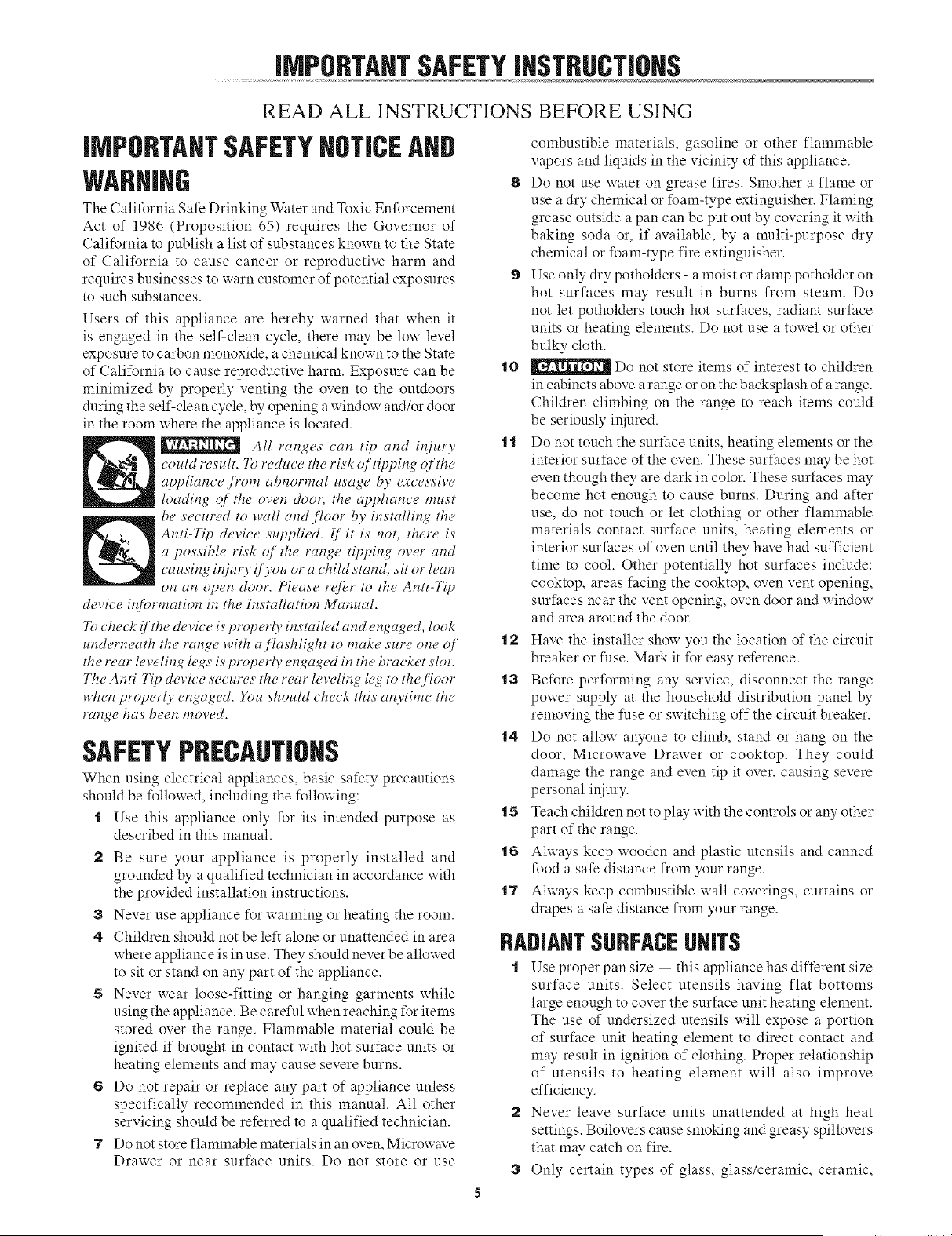
All ranges can tip and injury
could result. 7b reduce the risk c_/tipl)ing c_ the
applian_ e,_)'om abnormal usage by excessive
loading c_[the oven door, the appliance must
be secured to wall and _loor by installing the
Anti-Tip devi_e supplied. 1]'it is not, there is
a possible risk q[ the range tipping over and
_ausing injur? !]) ou or a chiht stand, sit or lean
on an open door. Please refer to the Anti-Tip
device iq[k)rmation in the Installation Manual.
7_)check !/'the device is properl 3 installed and engaged, look
underneath the range with aflashlight to make sure one _[
the rear leveling legs is properly engaged in the bracket slot.
The Anti-Tip devi_ e secures the rear leveling leg to the j7oor
when properl 3 engaged, gou should _heck this an3time the
range has been moved.
SAFETYPRECAUTIONS
When using electrical appliances, basic safety precautions
should be followed, including the following:
t Use this appliance only for its intended purpose as
described in this manual.
2 Be sure your appliance is properly installed and
grounded by a qualified technician in accordance with
the provided installation instructions.
3 Never use appliance for warming or heating the room.
4 Children should not be left alone or unattended in area
where appliance is in use. They should never be allowed
to sit or stand on any part of the appliance.
5 Never wear loose-fitting or hanging garments while
using the appliance. Be careful when reaching for items
stored over the range. Flammable material could be
ignited if brought in contact x_ith hot surface units or
heating elements and may cause severe burns.
6 Do not repair or replace any part of appliance unless
specifically recommended in this manual. All other
servicing should be referred to a qualified technician.
7 Do not store flammable materials in an oven, Microwave
Drawer or near surface units. Do not store or use
combustible materials, gasoline or other flammable
vapors and liquids in the vicinity of this appliance.
8 Do not use water on grease fires. Smother a flame or
use a dry chemical or foam-type extinguisher. Flaming
grease outside a pan can be put out by covering it with
baking soda or, if available, by a multi-purpose dry
chemical or foam-type fire extinguisher.
9 Use only dry potholders - a moist or damp potholder on
hot surfaces may" result in burns from steam. Do
not let potholders touch hot surfaces, radiant surface
units or heating elements. Do not use a towel or other
bulky cloth.
t0 _ Do not store items of interest to children
in cabinets above a range or on the backsplash of arange.
Children climbing on the range to reach items could
be seriously injured.
"lt Do not touch the surface units, heating elements or the
interior surface of the oven. These surfaces may be hot
even though they are dark in color. These surfaces may
become hot enough to cause burns. During and after
use, do not touch or let clothing or other flammable
materials contact surface units, heating elements or
interior surfaces of oven until they have had sufficient
time to cool. Other potentially hot surfaces include:
cooktop, areas facing the cooktop, oven vent opening,
surfaces near the vent opening, oven door and window
and area around the door.
"l2 Have the installer show you the location of the circuit
breaker or fuse. Mark it for easy reference.
ta Before performing any service, disconnect the range
power supply at the household distribution panel by
removing the fuse or sx_itching off the circuit breaker.
t4 Do not allow anyone to climb, stand or hang on the
door, Microwave Drawer or cooktop. They could
damage the range and even tip it over, causing severe
personal injury.
t5 Teach children not to play with the controls or any other
part of the range.
t6 Always keep wooden and plastic utensils and canned
food a safe distance from your range.
t7 Always keep combustible wall coverings, curtains or
drapes a safe distance from your range.
RADIANTSURFACEUNITS
t Use proper pan size -- this appliance has different size
surface units. Select utensils having flat bottoms
large enough to cover the surface unit heating element.
The use of undersized utensils will expose a portion
of surface unit heating element to direct contact and
may result in ignition of clothing. Proper relationship
of utensils to heating element xxill also improve
efficiency.
2 Never leave surface units unattended at high heat
settings. Boilovers cause smoking and greasy spillovers
that may catch on fire.
3 Only certain types of glass, glass/ceramic, ceramic,
iMPORTANTSAFETYJNSTRUCTJOHS
earthx_are or other glazed utensils are suitable for
cooktop service without breaking due to the sudden
change in temperature.
4 To reduce the risk of burns, ignition of flammable
materials and spillage due to unintentional contact with
utensils, the handle of a utensil should be positioned so
that it is turned inward and does not extend over adjacent
surface units.
5 Do not cook on broken cooktop. If cooktop should
break, cleaning solutions and spillovers may penetrate
the broken cooktop and create a risk of electric shock.
Contact a qualified technician immediately.
6 Clean cooktop with caution. If a wet sponge or cloth is
used to wipe spills on a hot surface unit, be careful to
avoid steam bmn. Some cleaners can produce noxious
fmnes if applied to a hot surface. Please see cleaning
the glass cooktop section.
7 Clean ventilating hoods frequently. Grease should not
be allowed to accumulate on hood or filter.
8 When flaming foods under the hood, turn the fan on.
9 Deep fat fryers - use extreme caution when moving the
grease kettle or disposing of hot grease.
t0 Always turn the surface units off before removing
cookware.
.1.1 Keep an eye on foods being fried at high or medimn
high heat settings.
"12 Food for frying should be as dry as possible. Frost on
frozen foods or moisture on fresh foods can cause hot
fat to bubble up and over the sides of the pan.
"13 Use little fat for effective shallow or deep fat frying.
Filling the pan too full of fat can cause spillovers when
food is added.
If a combination of oils or fats will be used in frying,
stir together before heating or as fats melt sloxxly.
"14 Ahvays heat fat slowly and watch as it heats.
"15 Use a deep fat thermometer whenever possible to prevent
heating fat beyond the smoking point.
"16 Avoid scratching the glass cooktop. The cooktop can
be scratched with items such as sharp instrmnents, rings
or other jewelry and rivets on clothing.
"17 Large scratches or impacts to glass doors or cooktop
can lead to broken or shattered glass.
"18 Never use the glass cooktop surface as cutting board.
"19 Do not place or store items that can melt or catch fire
on the glass cooktop, even x_hen it is not being used.
20 Be careful when placing spoons or other stirring utensils
on glass cooktop surface when it is in use. They may
become hot and could cause burns.
NICROWAVEDRAWER
When using the Microwave Drawer, basic safety precautions
should be followed, including the following:
72)reduce lhe risk _f burns, eleclric shock,
./?'re,injur 3 !o persons or (,aposure to excessive micro_*'ave
"1 Read all instructions before using the appliance.
2 Read and follow the specific "PRECAUTIONS TO
AVOID POSSIBLE EXPOSURE TO EXCESSIVE
MICROWAVE ENERGY" on page 3.
a This appliance must be properly grounded. See
Installation Instructions for grounding instructions.
4 Install or locate this appliance only in accordance with
the provided Installation Manual.
5 Some products such as whole eggs and sealed containers
- for example, closed glass jars--are able to explode
and should not be heated in the Microwave Drawer.
6 Use this appliance only for its intended use as described
in this manual. Do not use corrosive chemicals or vapors
in this appliance. This Microwave Drawer is specifically
designed to heat, cook or dry food. It is not designed for
industrial or laboratory use.
7 As with any appliance, close supervision is necessary
when used by children.
8 Do not operate this appliance if it has a damaged cord
or plug, if it is not working properly or if it has been
damaged or dropped.
9 This appliance should be serviced only by qualified
service personnel. Contact nearest Sharp Authorized
Servicer for examination, repair or adjustment.
"10 Do not cover or block any openings on the appliance.
"1"1 Do not store or use this appliance outdoors. Do not use
this product near water-- for example, in a wet basement,
near a swimming pool or similar locations.
"12 Do not immerse cord or plug in water. Keep cord axxay
from heated surfaces.
"13 Do not climb or sit on the Microwave Drawer. The range
could tip and cause il_juries to persons.
"14 Be sure that fingers or other objects or materials are not
around the Microwave Drawer opening when the
Microwave Drawer is closed.
"15 Do not put fingers or clothes around the drawer guides
when the Microwave Drawer is opened or closed. They
could be caught in the guides xxhen the Micro_xave
Drawer is closed.
"16 Be sure that the food and container are shorter than the
Microx_ave Drax_er before closing it. You can refer to
the height of the side xxalls of the Microwave Drinker.
"17 When cleaning Microwave Drawer sealing surfaces that
come together on closing the drawer, use only mild,
nonabrasive soaps or detergents applied with a sponge
or soft cloth. See cleaning instructions on page 43.
"18 To reduce the risk of fire in the Microwave Drawer
cavity:
a Do not overcook food. Carefully attend appliance
when paper, plastic or other combustible materials are
placed inside the Microwave Drawer to facilitate cooking.
b Remove wire twist-ties from paper or plastic bags
before placing bag in Microwave Drawer.
c If materials inside the Microwave Drawer ignite,
keep Microwave Drawer door closed, turn microwave off
and shut off power at the fuse or circuit breaker panel.
iMPORTANTSAFETYiNSTRUCTiONS
t9
d Do not use the Microwave Drawer for storage
purposes. Do not leave paper products, cooking utensils,
or food in the Microwave Drawer when not in use.
Liquids, such as water, coffee or tea are able to be
overheated beyond the boiling point without appearing
to be boiling due to surface tension of the liquid.
Visible bubbling or boiling when the container is
removed from the Microwave Drawer is not always
present. THIS COULD RESULT IN VERY HOT
LIQUIDS SUDDENLY BOILING OVER WHEN A
SPOON OR OTHER UTENSIL IS INSERTED
INTO THE LIQUID.
To reduce the risk of injury to persons:
a Do not overheat the liquid.
b Stir the liquid both before and halfway through
heating it.
c Do not use straight-sided containers with narrow
necks. Use a wide-mouthed container.
d After heating, allow the container to stand in the
Microwave Drawer at least for 20 seconds before
removing the container.
e Use extreme care xxhen inserting a spoon or other
utensil into the container.
OVEH
t Use care _hen opening door-- let hot air or steam escape
before removing or replacing food.
2 Do not heat unopened food containers. Build-up of
pressure may cause container to burst and result in injury.
a Keep oven vent unobstructed.
4 Always place oven racks in desired locations while oven
is cool. If rack must be moved while oven is hot, do not
let potholder contact hot heating element.
5 Do not use aluminum foil to line oven bottom, as use
may result in a risk of electric shock or fire.
6 Keep the oven free from grease buildup.
7 When using cooking or roasting bags in the oven, follow
the manufacturer's directions.
8 Pulling out the rack to the stop-lock is a convenience
in lifting heavy foods. It is also aprecaution against burns
from touching hot surfaces of the door or oven xxalls.
9 Do not use the oven to dry newspapers. If overheated,
they can catch fire.
t0 Do not use the oven for a storage area. Items stored in
oven can ignite.
t t Do not leave paper products, cooking utensils or food
in the oven when not in use.
SELF-CLEANINGOVEN
1 Do not clean door gasket. The door gasket is essential
for a good seal. (;are should be taken not to rub, damage
or move the gasket.
2 Do not use oven cleaners. No commercial oven cleaner
or oven liner protective coating of any kind should be
used in or around any part of the oven. Residue from
oven cleaners will damage the inside of the oven when
the self-clean cycle is used.
a Clean only parts listed in this manual.
4 Before self-cleaning the ovem remove broiler pan, racks,
and other utensils.
5 If the self-cleaning mode malfunctions, turn the oven
off and disconnect the power supply. Have it serviced
by a qualified technician.
SAVE THESE INSTRUCTIONS
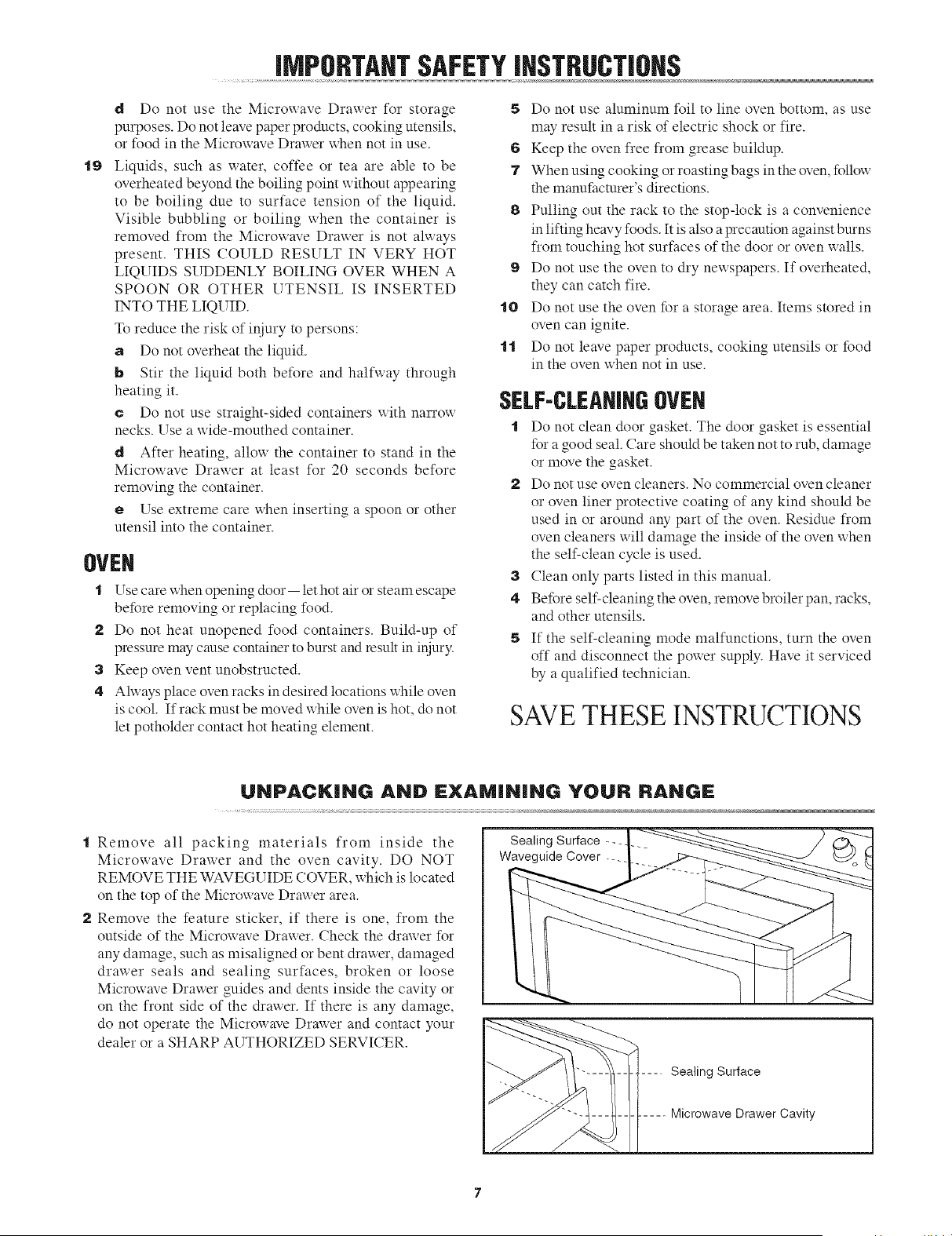
UNPACK|NG AND l:XAM|N|NG YOUR RANGl:
t Remove all packing materials from inside the
Microwave Drawer and the oven cavity. DO NOT
REMOVE THE WAVEGUIDE COVER, which is located
on the top of the Microwave Drawer area.
2 Remove the feature sticker, if there is one, from the
outside of the Microwave Drawer. Check the drawer for
any damage, such as misaligned or bent drawer, damaged
drawer seals and sealing surfaces, broken or loose
Microwave Drawer guides and dents inside the cavity or
on the front side of the drawer. If there is any damage,
do not operate the Microwave Drawer and contact your
dealer or a SHARP AUTHORIZED SERVICER.
Sealing Surface
Waveguide Cover
Sealing Surface
Microwave Drawer Cavity
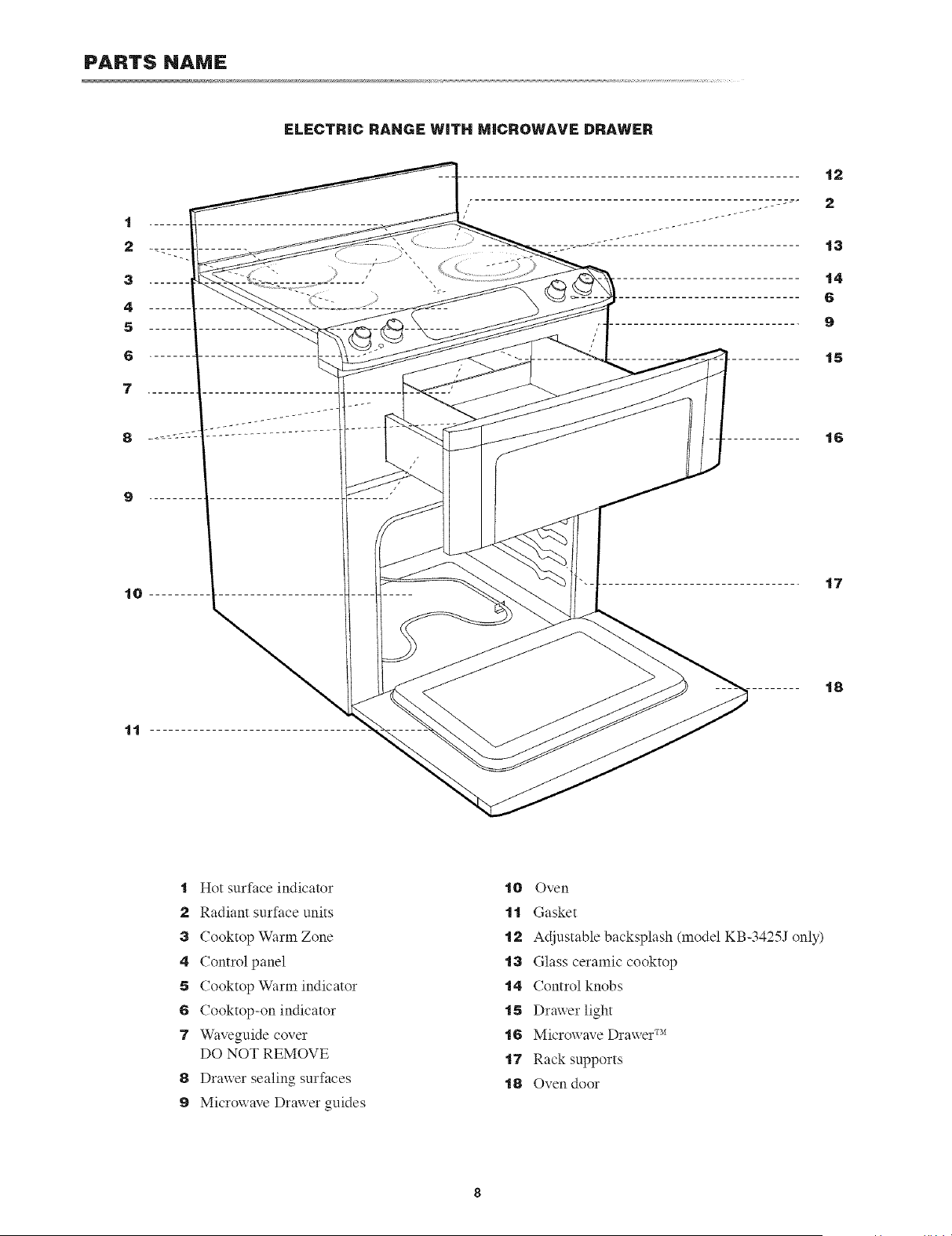
PARTS NAMe:
ELECTRIC RANGE WITH MICROWAVE DRAWm:R
t Hot surface indicator
2 Radiant surface units
3 Cooktop Warm Zone
4 Control panel
5 Cooktop Warm indicator
6 Cooktop-on indicator
7 Waveguide cover
DO NOT REMOVE
8 Drax_er sealing surfaces
9 Microwave Drawer guides
t0 Oven
t t Gasket
t2 Adjustable backsplash (model KB-3425J only)
t3 Glass ceramic cooktop
t4 Control knobs
t5 Drawer light
t6 Microwave Drawer TM
t7 Rack supports
t8 Oven door
PARTS NAMJ:
t9
20
...... 2t
...... 22
....... 23
....... t0
....... 24
28
25
26
27
29
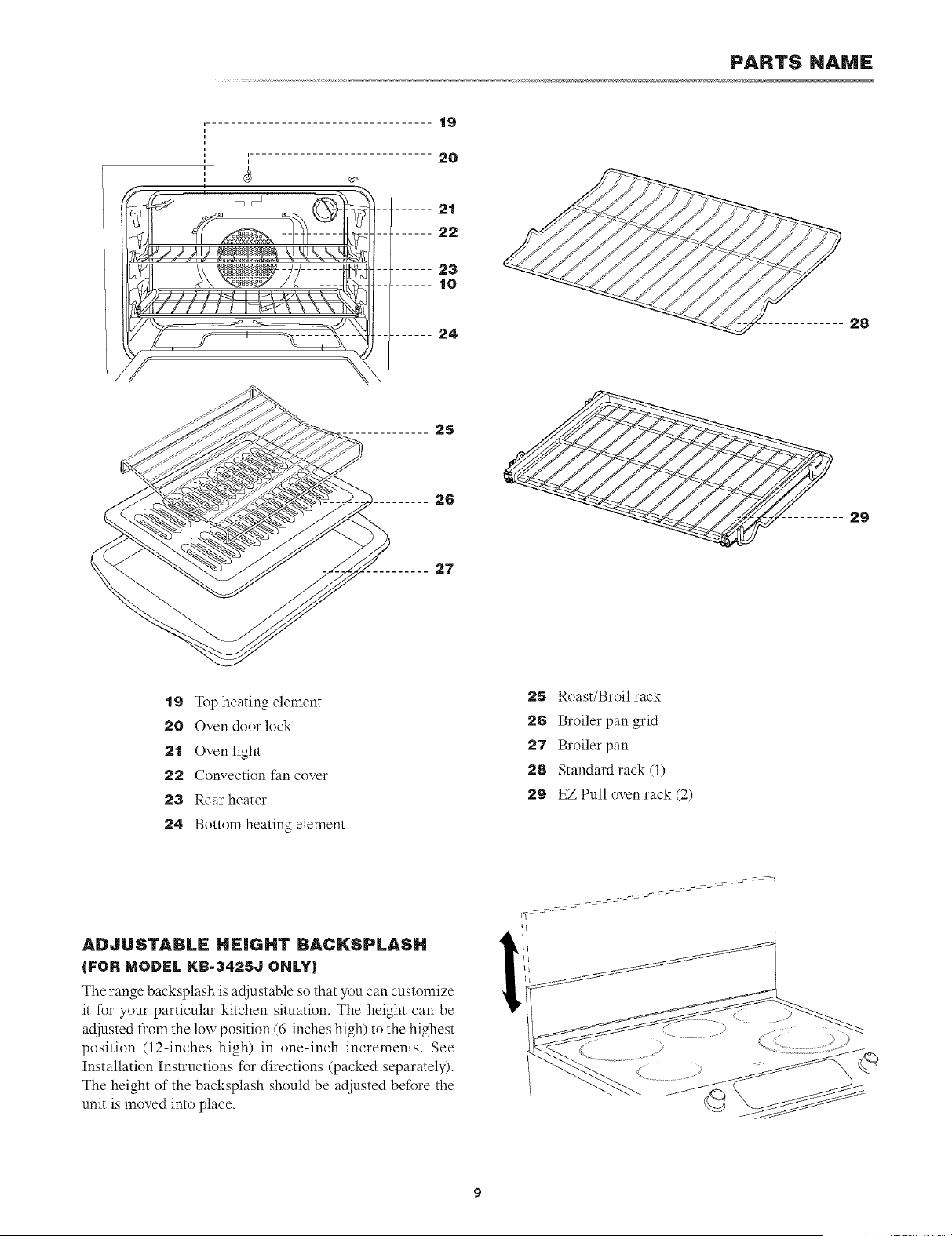
t9 Top heating element
20 Oven door lock
2t Oven light
22 Convection fan cover
23 Rear heater
24 Bottom heating element
25 Roast/Broil rack
26 Broiler pan grid
27 Broiler pan
28 Standard rack (1)
29 EZ Pull oven rack (2)
ADJUSTABLE HEIGHT BACKSPLASH
{FOR MODEL KB.3425J ONLY)
The range backsplash is adjustable so that you can customize
it for your particular kitchen situation. The height can be
adjusted from the low position (6-inches high) to the highest
position (12-inches high) in one-inch increments. See
Installation Instructions for directions (packed separately).
The height of the backsplash should be adjusted before the
unit is moved into place.
PARTS NAME
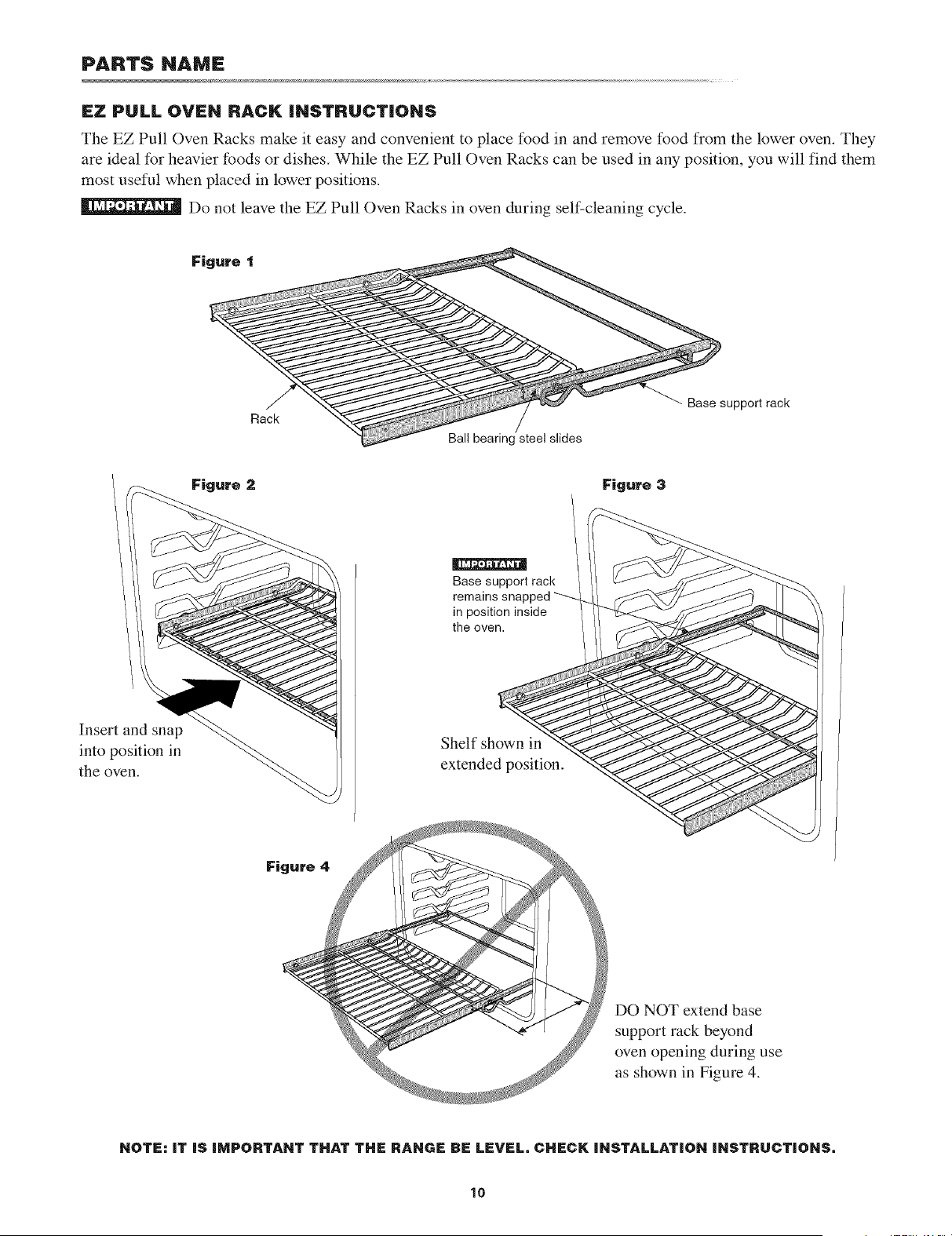
IFZ PULL OVEN RACK INSTRUCT|ONS
The EZ Pull Oven Racks make it easy and convenient to place food in and remove food from the lower oven. They
are ideal for heavier foods or dishes. While the EZ Pull Oven Racks can be used in any position, you will find them
most useful when placed in lower positions.
Do not leave the EZ Pull Oven Racks in oven during self-cleaning cycle.
Rack
Ball bearing steel slides
Base support rack
Figure 2 Figure 3
Insert and snap
into position in
the oven.
i[I2aiN111_1_
Base support rack
remains snapped ""--
in position inside
the oven.
Shelf shown in
extended position.
Figure 4
DO NOT extend base
support rack beyond
oven opening during use
as shown in Figure 4.
NOTE: IT IS IMPORTANT THAT THE RANGE BE LEVEL, CHECK INSTALLATION INSTRUCTIONS,
10
PARTS NAME
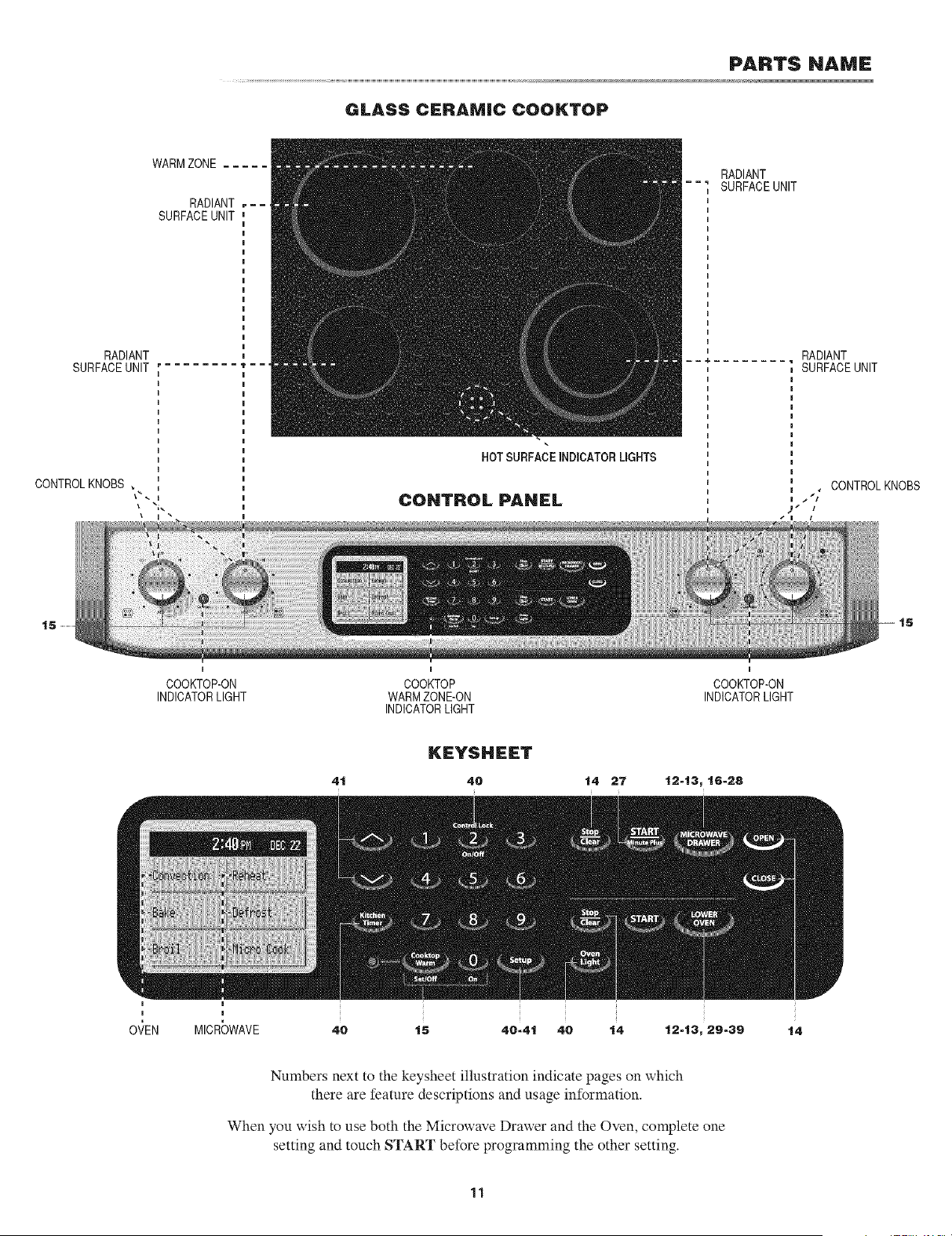
GLASS CERAMIC COOKTOP
WARMZONE .....
RADIANT
SURFACEUNIT
RADIANT
SURFACEUNIT " -
CONTROLKNOBS
HOT SURFACEINDICATORUGNTS
CONTROL PANEL
RADIANT
SURFACEUNIT
RADIANT
SURFACEUNIT
, CONTROLKNOBS
-- 15
I
COOKTOP-ON
INDICATORLIGHT
I
COOKTOP
WARMZONE-ON
INDICATORLIGHT
I
COOKTOP-ON
INDICATORLIGHT
KEYSHEET
4t 40 14 27 t2-13,16-28
OVEN MICR_)WAVE
40 t5 40-4t 40 t4 t2-13, 29-39 14
Numbers next to the keysheet illustration indicate pages on which
there are feature descriptions and usage information.
When you wish to use both the Microwave Drawer and the Oven, complete one
setting and touch START before programming the other setting.
11
iNTRODUCTiON TO TOUCHSCR_:EN
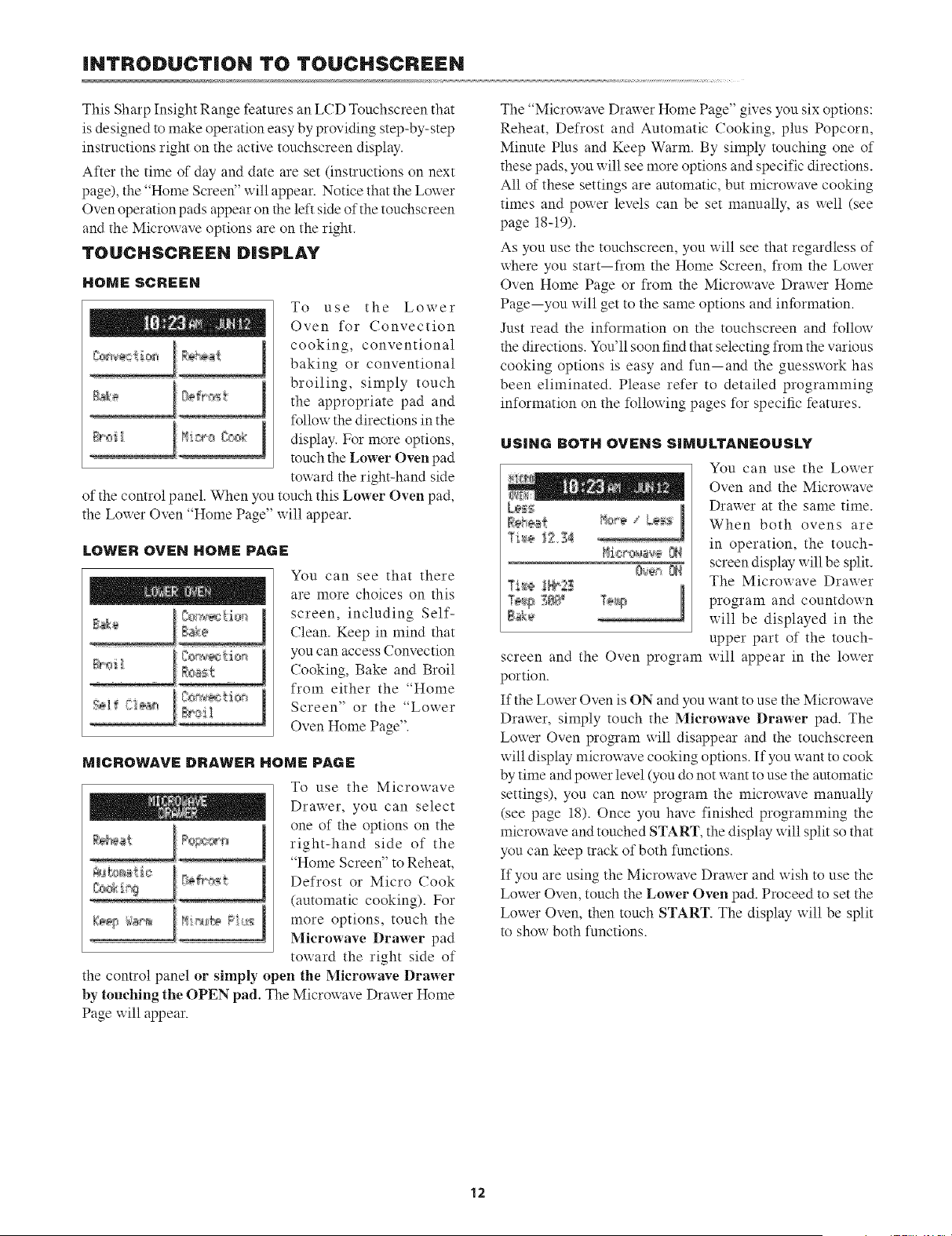
This Sharp Insight Range features an LCD Touchscreen that
is designed to make operation easy by providing step-by-step
instructions right on the active touchscreen display.
After the time of day and date are set (instructions on next
page), the "Home Screen" will appear. Notice that the Lower
Oven operation pads appear on the left side of the touchscreen
and the Microwave options are on the right.
TOUCHSCREEN DISPLAY
HOME SCREEH
To use the Lower
Oven for Convection
cooking, conventional
baking or conventional
broiling, simply touch
the appropriate pad and
follow the directions in the
display. For more options,
touch the Lower Oven pad
ronsard the right-hand side
of the control panel. When you touch this Lower Oven pad,
o ' *
the Louer Oven "Home Pa_e u 111appear.
LOWER OVEH HOME PAGE
N'sil
You can see that there
are more choices on this
screen, including Self-
Clean. Keep in mind that
you can access Convection
Cooking, Bake and Broil
from either the "Home
Screen" or the "Lower
Oven Home Page".
MICROWAVE DRAWER HOME PAGE
To use the Microwave
Drawer, you can select
one of the options on the
right-hand side of the
"Home Screen" to Reheat,
Defrost or Micro Cook
(automatic cooking). For
more options, touch the
Microwave Drawer pad
ronsard the right side of
the control panel or simply open the Microwave Drawer
by touching the OPEN pad. The Microwave Drawer Home
Page will appear.
The "Microx_ave Drawer Home Pa_,e _l_es you six opuons
Reheat, Defrost and Automatic Cooking, plus Popcorn,
Minute Plus and Keep Warm. By simply touching one of
these pads, you will see more options and specific directions.
All of these settings are automatic, but microx_ave cooking
times and power levels can be set manually, as well (see
page 18-19).
As you use the touchscreen, you will see that regardless of
where you start--from the Home Screen, from the Lower
Oven Home Page or from the Microwave Drawer Home
Page--you will get to the same options and information.
Just read the information on the touchscreen and follow
the directions. You'll soon find that selecting from the various
cooking options is easy and fun--and the guesswork has
been eliminated. Please refer to detailed programming
information on the following pages for specific features.
USING BOTH OVENS SIMULTANEOUSLY
L_
_i_ _
screen and the Oven program
portion.
You can use the Lower
Oven and the Microwave
Drawer at the same time.
When both ovens are
in operation, the touch-
screen display will be split.
The Microwave Drawer
program and countdown
will be displayed in the
upper part of the touch-
will appear in the lower
If the Lower Oven is ON and you want to use the Microwave
Drawer, simply touch the Mierowave Drawer pad. The
Lo_er Oven program _ill disappear and the touchscreen
x_ill display microwave cooking options. If you want to cook
by time and power level (you do not want to use the automatic
settings), you can now program the microwave manually
(see page 18). Once you have finished programming the
microwave and touched START, the display will split so that
you can keep track of both functions.
If you are using the Microx_ave Drawer and x_ish to use the
Lower Oven, touch the Lower Oven pad. Proceed to set the
Lower Oven, then touch START. The display will be split
to show both functions.
12
BEFORE OPERATING
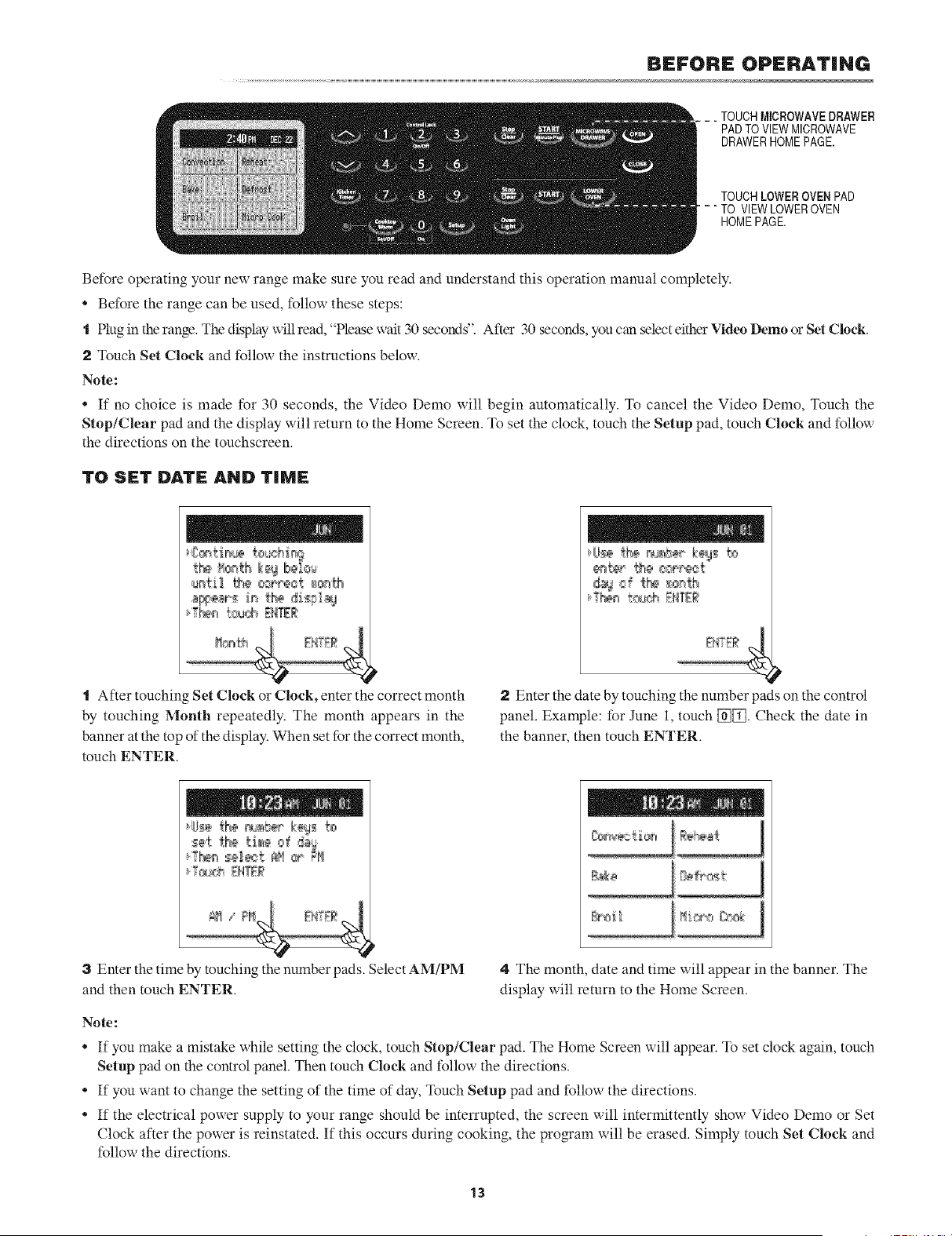
. TOUCHMICROWAVEDRAWER
PADTO VIEWMICROWAVE
DRAWERHOMEPAGE.
TOUCHLOWEROVEN PAD
" TO VIEWLOWEROVEN
HOMEPAGE.
Before operating your new range make sure you read and understand this operation manual completely.
* Before the range can be used, follow these steps:
t Plug in the range. The display will read, "Please _ alt 30 seconds. After 30 seconds, you can select either Video I)emo or Set Clock.
2 Touch Set Clock and follow the instructions below.
Note:
* If no choice is made for 30 seconds, the Video Dome will begin automatically. To cancel the Video Dome, Touch the
Stop/Clear pad and the display will return to the Home Screen. To set the clock, touch the Setup pad, touch Clock and follow
the directions on the touchscreen.
TO SET D&TE AND TiME
t_ _c_th keg Ib@b:,'_
"1 After touching Set Clock or Clock, enter the correct month
by touching Month repeatedly. The month appears in the
banner at the top of the display. When set for the correct month,
touch ENTER.
d_d f tte _q_
2 Enter the date by touching the number )ads on the control
panel. Example: for June 1, touch [_. Check the date in
the banner, then touch ENTER.
3 Enter the time by touching the number pads. Select AMiPM
and then touch ENTER.
4 The month, date and time will appear in the banner. The
display will return to the Home Screen.
Note:
If you make a mistake while setting the clock, touch Stop/Clear pad. The Home Screen will appear. To set clock again, touch
Setup pad on the control panel. Then touch Clock and follow the directions.
* If you want to change the setting of the time of day, Touch Setup pad and follow the directions.
If the electrical power supply to your range should be interrupted, the screen will intermittently show Video Dome or Set
Clock after the power is reinstated. If this occurs during cooking, the program will be erased. Simply touch Set Clock and
follow the directions.
13
BEFORE OPERATING
STOP/CLEAR
Touch the Stop/Clear pad to:
t Erase if you make a mistake during programming.
2 Stop the Oven or Microwave Drawer temporarily during
timed cooking.
3 To cancel a program during cooking, touch twice for timed
cooking.
OPEN OR CLOSE MICROWAVE DRAWER
ALWAYS touch the OPEN or CLOSE pad on the control
panel to open or close the Microwave Drawer.
Do not push or pull the Microwave Drawer by hand,
except in case of emergency such as a power failure.
COOKTOP US;:
INFORMATION YOU NEED TO KNOW
ABOUT COOKING UTENSILS
ABOUT THECOOKTOP
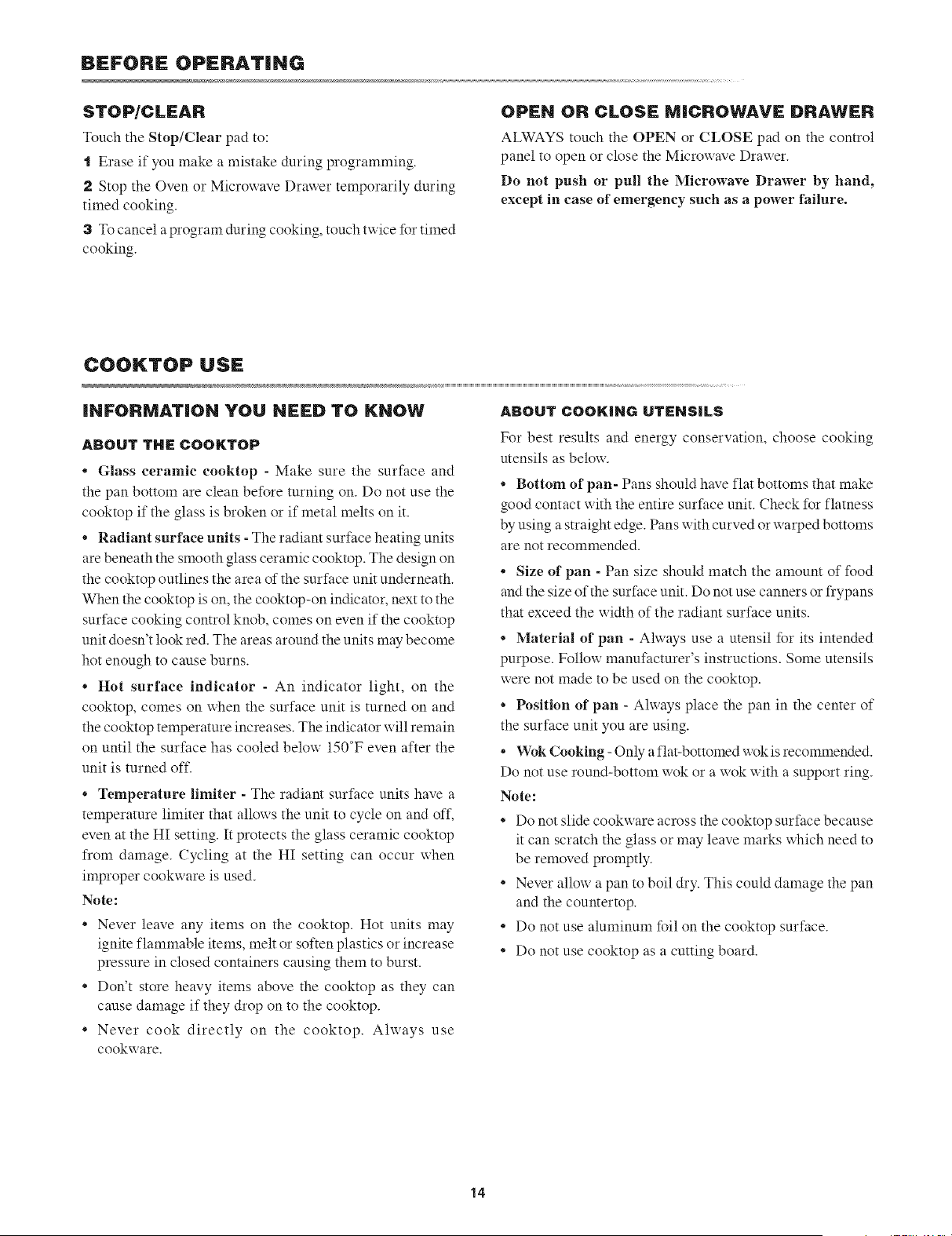
* Glass ceramic cooktop - Make sure the surface and
the pan bottom are clean before turning on. Do not use the
cooktop if the glass is broken or if metal melts on it.
* Radiant surface units - The radiant surface heating units
are beneath the smooth glass ceramic cooktop. The design on
the cooktop outlines the area of the surface unit underneath.
When the cooktop is on, the cooktop-on indicator, next to the
surface cooking control knob, comes on even if the cooktop
unit doesn't look red. The areas around the units may become
hot enough to cause burns.
. Hot surface indicator - An indicator light, on the
cooktop, comes on when the surface unit is turned on and
the cooktop temperature increases. The indicator will remain
on until the surface has cooled below 150°F even after the
unit is turned off.
* Temperature limiter - The radiant surface units have a
temperature limiter that allows the unit to cycle on and off,
even at the HI setting. It protects the glass ceramic cooktop
from damage. Cycling at the HI setting can occur when
improper cookware is used.
Note:
. Never leave any items on the cooktop. Hot units may
ignite flammable items, melt or soften plastics or increase
pressure in closed containers causing them to burst.
. Don't store heavy items above the cooktop as they can
cause damage if they drop on to the cooktop.
. Never cook directly on the cooktop. Always use
cookware.
For best results and energy conservation, choose cooking
utensils as below.
• Bottom of pan- Pans should have flat bottoms that make
good contact xxith the entire surface unit. Check for flatness
by using a straight edge. Pans xxith curved or xxarped bottoms
are not recommended.
• Size of pan - Pan size should match the amount of food
and the size of the surface unit. Do not use canners or frypans
that exceed the width of the radiant surface units.
• Material of pan - Ahvays use a utensil %r its intended
purpose. Follow manufacturer's instructions. Some utensils
were not made to be used on the cooktop.
• Position of pan - Ahvays place the pan in the center of
the surface unit you are using.
• Wok Cooking - Only a flat-bottomed wok is recommended.
Do not use round-bottom wok or a wok with a support ring.
Note:
• Do not slide cookware across the cooktop surface because
it can scratch the glass or may leave marks which need to
be removed promptly.
• Never allow a pan to boil dry. This could damage the pan
and the countertop.
• Do not use aluminum foil on the cooktop surface.
• Do not use cooktop as a cutting board.
14
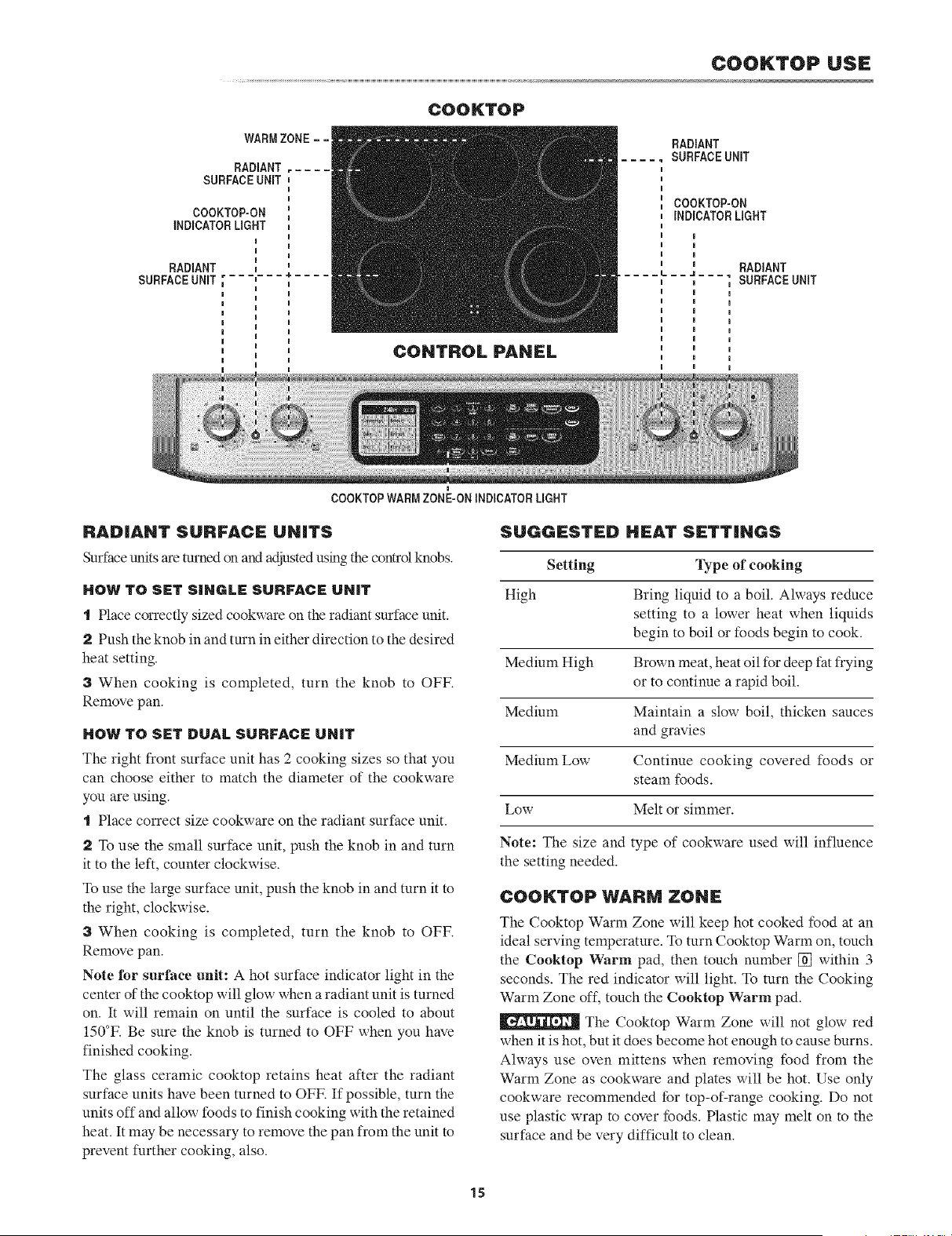
COOKTOP USE
COOKTOP
WARMZONE ==
RADIANT
SURFACEUNIT
COOKTOP-ON
INDICATORLIGHT
RADIANT
SURFACEUNIT "= _=
CONTROL PANEL
I
COOKTOPWARMZONE-ON mNDICATORLIGHT
RADIANT
SURFACEUNiT
COOKTOP-ON
iNDiCATORLIGHT
m
i
i
" RADIANT
===L==_===_
,SURFACEUNIT
I
a
I
a
I
I
I
I
RADIANT SURFACE UNITS
Surface units are turned on and adjusted using the control knobs.
HOW TO SET SINGLE SURFACE UNiT
t Place correctly sized cookware on the radiant surface unit.
2 Push the knob in and turn in either direction to the desired
heat setting.
3 When cooking is completed, turn the knob to OFF.
Remove pan.
HOW TO SET DUAL SURFACE UNiT
The right front surface unit has 2 cooking sizes so that you
can choose either to match the diameter of the cookware
you are using.
t Place correct size cookware on the radiant surface unit.
2 To use the small surface unit, push the knob in and turn
it to the left, counter clockwise.
To use the large surface unit, push the knob in and turn it to
the right, clockwise.
3 When cooking is completed, turn the knob to OFF.
Remove pan.
Note for surface unit: A hot surface indicator light in the
center of the cooktop will glow when a radiant unit is turned
on. It will remain on until the surface is cooled to about
150°K Be sure the knob is turned to OFF when you have
finished cooking.
The glass ceramic cooktop retains heat after the radiant
surface units have been turned to OFK If possible, turn the
units off and allow foods to finish cooking with the retained
heat. It may be necessary to remove the pan from the unit to
prevent further cooking, also.
SUGGESTED HEAT SETTINGS
Setting Type of cooking
High Bring liquid to a boil. Always reduce
setting to a lower heat when liquids
begin to boil or foods begin to cook.
Medium High Brown meat, heat oil for deep fat frying
or to continue a rapid boil.
Medium Maintain a slow boil, thicken sauces
and gravies
Medium Low Continue cooking covered foods or
steam foods.
Low Melt or simmer.
Note: The size and type of cookware used will influence
the setting needed.
COOKTOP WARM ZONE
The Cooktop Warm Zone will keep hot cooked food at an
ideal serving temperature. To turn Cooktop Warm on, touch
the Cooktop Warm pad, then touch number [] within 3
seconds. The red indicator will light. To turn the Cooking
Warm Zone off, touch the Cooktop Warm pad.
The Cooktop Warm Zone will not glow red
when it is hot, but it does become hot enough to cause burns.
Always use oven mittens when removing food from the
Warm Zone as cookware and plates will be hot. Use only
cookware recommended for top-of-range cooking. Do not
use plastic wrap to cover foods. Plastic may melt on to the
surface and be very difficult to clean.
15
MICROWAVE DRAWER COOKING
iNFORMATiON YOU NEED TO KNOW
ALWAYS have food in the Microwave Drawer when it is on
to absorb the micro_ave energy.
When using the Microwave Drawer at power levels below
100%, you may hear the magnetron cycling on and oft. It is
normal for the exterior of the Microwave Drawer to be warm
to the touch when cooking or reheating.
Condensation is a normal part of microwave cooking.
Room humidity and the moisture in food will influence the
amount of moisture that condenses in the Microwave Drawer.
Generally, covered foods will not cause as much condensation
as uncovered ones. Vents between Microwave Drawer and
oven must not be blocked.
The Microwave Drawer is for food preparation only. It should
not be used to dry clothes or newspapers.
Your Microwave Drawer is rated 1000 watts by using the
IEC Test Procedure. In using recipes or package directions,
check food a minute or two before the minimum time and
add time accordingly.
When opening or closing the Microx_ave Dra_er quickly,
food in the Microwave Drawer may be spilled. To clean,
please refer m the Cleaning and Care section on page 43.
RADIO OR TV iNTERFERENCE
Should there be any interference caused by the Microwave
Drawer to your radio or TV, relocate the radio or TV as far
away from the range as feasible or check position and signal
of receiving antenna.
ABOUT MICROWAVE COOKING
* Arrange food carefully. Place thickest areas towards
outside of dish.
* Watch cooking time. Cook for the shortest amount of time
indicated and add more as needed. Food severely overcooked
can smoke or ignite.
* Cover foods while cooking. Check recipe or cookbook
for suggestions: paper towels, x_axpaper, microx_ave plastic
wrap or a lid. Covers prevent spattering and help foods to
cook evenly.
* Shield with small flat pieces of aluminum foil any thin
areas of meat or poultry to prevent overcooking before dense,
thick areas are cooked thoroughly.
* Stir foods from outside to center of dish once or twice
during cooking, if possible.
* Turn foods over once during microwaving to speed cooking
of such foods as chicken and hamburgers. Large items like
roasts must be turned over at least once.
* Rearrange foods such as meatballs halfway through
cooking both from top to bottom and from right to left.
* Add standing time. Remove food from Microwave Drawer
and stir, if possible. Cover for standing time which allows
the food to finish cooking without overcooking.
* Check for doneness. Look for signs indicating that
cooking temperatures have been reached.
Doneness signs include:
Food steams throughout, not just at edge.
Center bottom of dish is very hot to the touch.
Poultry thigh joints move easily.
Meat and poultry show no pinkness.
Fish is opaque and flakes easily with a fork.
ABOUT UTENSILS AND COVERINGS
It is not necessary to buy all new cookware. Many pieces
already in your kitchen can be used successfully in your new
Microwave Drawer. Make sure the utensil does not touch the
interior walls during cooking.
Use these utensils for safe microwave cooking and
reheating:
* glass ceramic (Pyroceram_), such as Corningware ®.
* heat-resistant glass (Pyrex _)
* microwave-safe plastics
* microwave-safe paper plates
* microwave-safe pottery, stoneware and porcelain
* browning dish (Do not exceed recommended preheating
time. Follow manufacturer's directions.)
These items can be used for short time reheating of foods
that have little fat or sugar in them:
* wood, straw, wicker
DO NOT USE
* metal pans and bakeware
* dishes with metallic trim
* non-heat-resistant glass
* non-microwave-safe plastics (margarine tubs)
* recycled paper proclucts
* brown paper bags
* food storage bags
* metal twist-ties
Should you wish to check if a dish is safe for microwaving,
place the empty dish in the oven and microwave on HIGH
for 30 seconds. A dish which becomes very hot should not
be used.
The following coverings are ideal:
* Paper towels are good for covering foocls for reheating and
absorbing fat while cooking bacon.
* Wax paper can be used for cooking and reheating.
* Plastic wrap that is specially marked for microwave use
can be used for cooking and reheating. DO NOT allow plastic
wrap to touch food. Vent so steam can escape.
* Lids that are microwave-safe are a good choice because
heat is kept near the food to hasten cooking.
* Oven cooking bags are good for large meats or foods that
16
need tenderizing. DO NOT use metal twist ties. Remember
to slit bag so steam can escape.
How to use aluminum foil in your Microwave Drawer:
* Small flat pieces of aluminum foil placed smoothly on the
food can be used to shield areas that are either defrosting or
cooking too quickly.
* Foil should not come closer than one inch to any surface
of the Microwave Drawer.
Should you have questions about utensils or coverings, check
a good microwave cookbook or follow recipe suggestions.
ACCESSORIES There are many microwave accessories
available for purchase. Evaluate carefully before you purchase
so that they meet your needs. A microwave-safe thermometer
will assist you in determining correct doneness and assure
you that foods have been cooked to safe temperatures. Sharp
is not responsible for any damage to the Microwave Drawer
when accessories are used.
ABOUT CHILDREN AND THE MICROWAVE
Children below the age of 7 should use the Microwave
Drawer with a supervising person very near to them.
Between the ages of 7 and 12, the supervising person should
be in the same room.
The child must be able to reach the Microwave Drawer
comfortably.
At no time should anyone be allowed to lean or swing on the
Microwave Drawer.
Children should be taught all safety precautions: use
potholders, remove coverings carefully, pay special attention
to packages that crisp food because they may be extra hot.
Don't assume that because a child has mastered one cooking
skill he/she can cook everything.
Children need to learn that the Microwave Drawer is not a
toy. See page 40 for Control Lock feature.
ABOUT SAFETY
* Check foods to see that they are cooked to the United States
Department of Agriculture's recommended temperatures.
160°F - For fresh pork, ground meat, boneless white poultry,
fish, seafood, egg dishes and frozen prepared food.
165°F- Forleftover, ready-to-reheatrefrigerated, anddeliand
carry-out "fresh" food.
170°F - White meat of poultry.
180°F - Dark meat of poultry.
To test for doneness, insert a meat thermometer in a thick
or dense area away from fat or bone. NEVER leave the
thermometer in the food during cooking, unless it is approved
for microwave use.
* ALWAYS use potholders to prevent burns when handling
utensils that are in contact with hot food. Enough heat from
the food can transfer through utensils to cause skin burns.
MICROWAVE DRAWER COOKING
* Avoid steamburns by directing steam away from the face
and hands. Slowly lift the farthest edge of a dish's covering
and carefully open popcorn and oven cooking bags away
from the face.
* Stay near the Microwave Drawer ;_hile it's in use and
check cooking progress frequently so that there is no chance
of overcooking food.
* NEVER use the Microwave Drawer for storing cookbooks
or other items.
* Select, store and handle food carefully to preserve its high
quality and minimize the spread of foodborne bacteria.
* Keep waveguide cover clean. Food residue can cause arcing
and/or fires. See page 43.
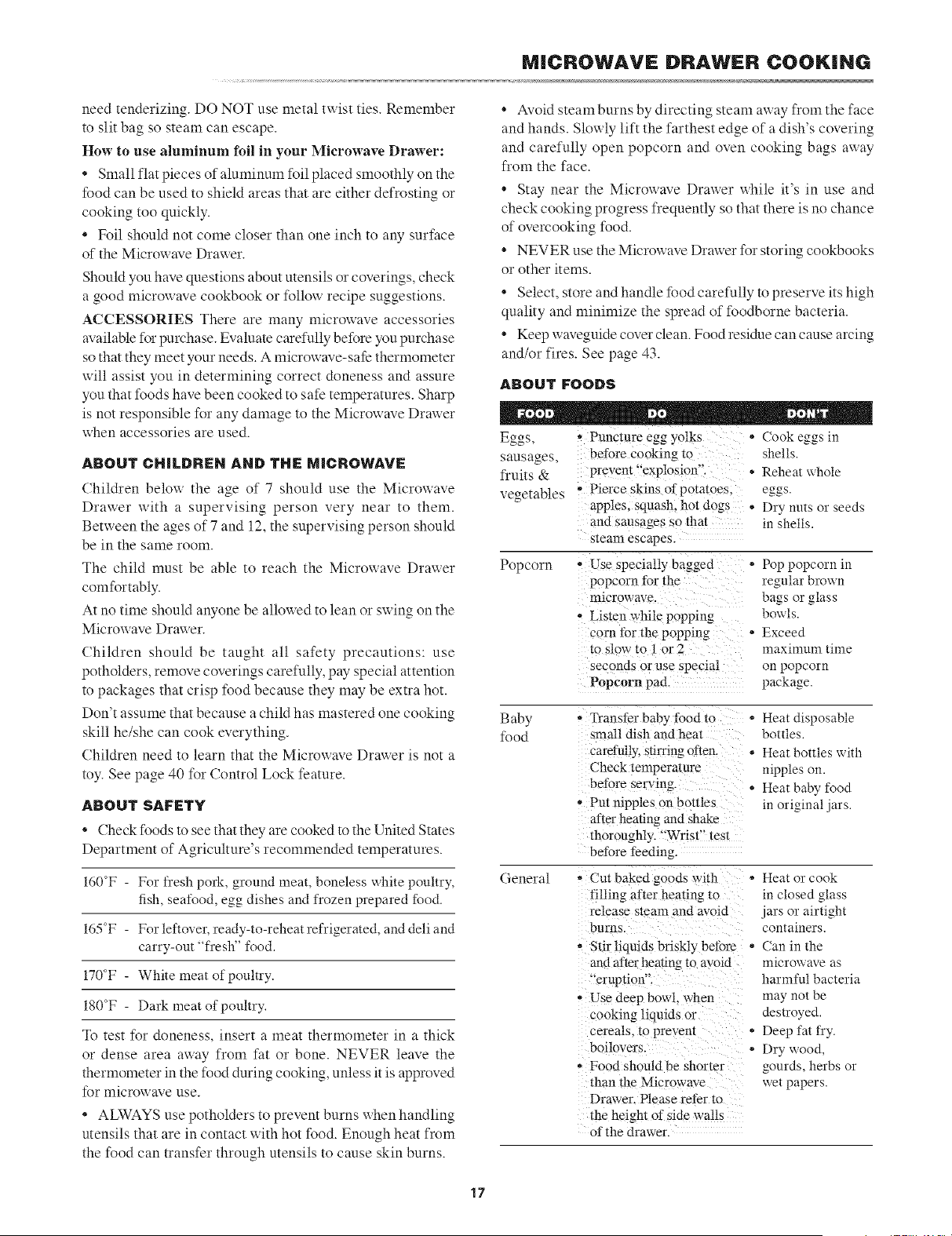
ABOUT FOODS
Eggs,
sausages,
fruits &
vegetables
Popcorn
• Puncture egg yolks
before cooking to
prevent "explosion".
, Pierce skins of potatoes,
apples, squash, hot dogs
and sausages so that
steam escapes.
- Use specially bagged
popcorn for the
microwave
• Listen while popping
corn for the popping
to slow to 1 or 2
seconds or use special
Popcorn pad.
(ook eggs in
shells.
* Reheat whole
eggs.
Dry nuts or seeds
in shells.
* Pop popcorn in
regular brown
bags or glass
bowls.
* Exceed
maximum time
on popcorn
package.
Baby
%od
General
.............. food to
small dish and heat
carefully, stirring often
Check temperature
before serving.
- Put nipples on bottles
after heating and shake
thoroughly. "Wrist'" test
before feeding.
- Cut baked goods with
filling after heating to
release steam and avoid
burns.
- Stir liquids briskly before
and after heating to avoid
"'eruptioff-
- Use deep bowl, when
cooking liquids oi
cereals, to prevem
boilovers.
• Food should be shorter
than the Microwave
Drawer. Please refer to
the height of side walls
of the drawer.
* Heat disposable
bottles.
° Heat bottles with
nipples on.
Heat baby food
in original jars.
o Heat or cook
in closed glass
jars or airtight
containers.
. Can in the
microwave as
harmful bacteria
may not be
destroyed.
. Deep fat fry.
° Dry wood,
gourds, herbs or
wet papers.
17
MICROWAVE DRAWER COOKING
MANUAl. OPERATION
TiME COOKING
Your Microwave Drawer can be programmed for 99 minutes 99 seconds (99.99). Always enter the seconds after the minutes,
even if they are both zeros.
HiGH POWER COOKING
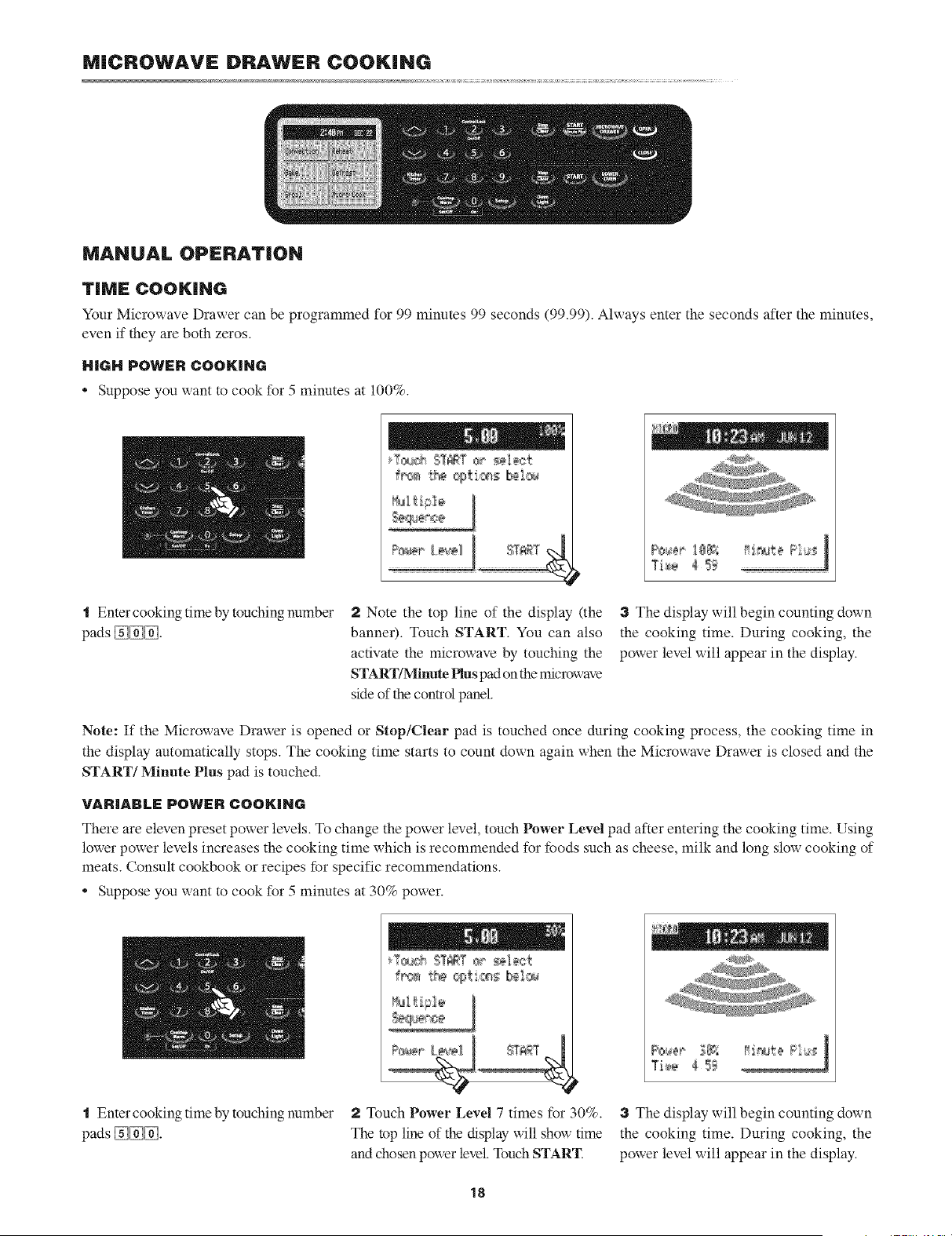
Suppose you want to cook for 5 minutes at 100%.
t
J
"1 Enter cooking time by touching number
pads [_[_[_.
2 Note the top line of the display (the
banner). Touch START. You can also
activate the microwave by touching the
START/Minute Plus pad onthe microwave
side of the control panel.
3 The display will begin counting down
the cooking time. During cooking, the
power level will appear in the display.
Note: If the Microwave Drawer is opened or Stop/Clear pad is touched once during cooking process, the cooking time in
the display automatically stops. The cooking time starts to count down again when the Microwave Drawer is closed and the
START/Minute Plus pad is touched.
VARIABLE POWER COOKING
There are eleven preset power levels. To change the power level, touch Power Level pad after entering the cooking time. Using
lower power levels increases the cooking time which is recommended for foods such as cheese, milk and long slow cooking of
meats. Consult cookbook or recipes for specific recommendations.
• Suppose you want to cook for 5 minutes at 30% power.
frf_ t_ cgt c¢_ Ibm1®
t Enter cooking time by touching number 2 Touch Power Level 7 times for 30%. 3 The display will begin counting down
pads [_[_[_. The top line of the display will show time the cooking time. During cooking, the
and chosen power level. Touch START. power level will appear in the display.
18
MICROWAVE DRAWER COOKING
MULTIPLE Se:QLtENCE COOKING
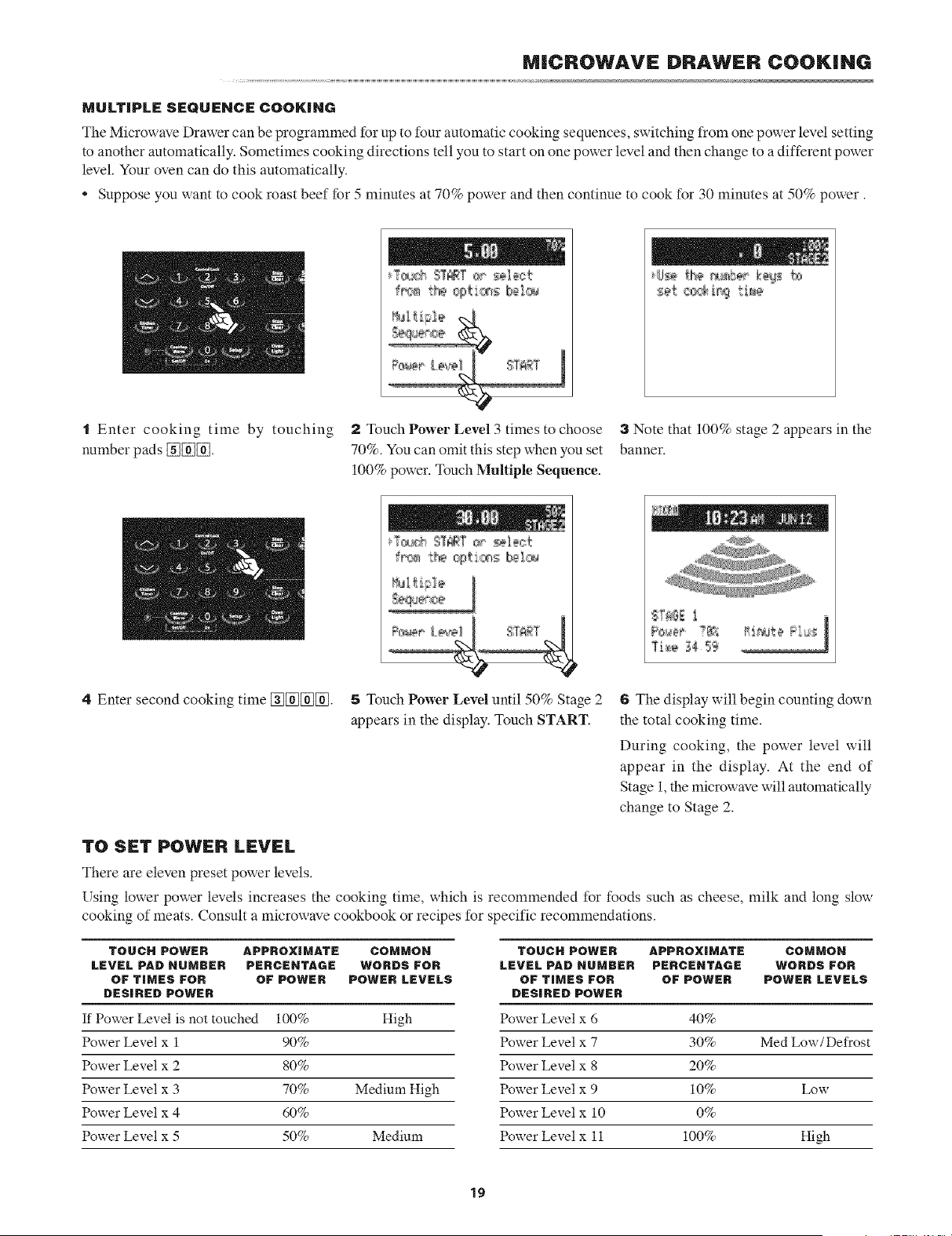
The Microwave Drawer can be programmed for up to four automatic cooking sequences, switching from one power level setting
to another automatically. Sometimes cooking directions tell you to start on one power level and then change to a different power
level. Your oven can do this automatically.
Suppose you want to cook roast beef for 5 minutes at 70% power and then continue to cook for 30 minutes at 50% power.
"1Enter cooking time by touching 2 Touch Power Level 3 times to choose 3 Note that 100% stage 2 appears in the
number pads [_[_[_. 70%. You can omit this step when you set banner.
100% power. Touch Multiple Sequence.
Ti_e _4 S_
4 Enter second cooking time E_E_E_E_. 5 Touch Power Level until 50% Stage 2
appears in the display. Touch START.
6 The display will begin counting down
the total cooking time.
During cooking, the power level will
appear in the display. At the end of
Stage 1,the microwave will automatically
change to Stage 2.
TO SET POWER LEVEl.
There are eleven preset power levels.
Using lower power levels increases the cooking time, which is recommended for foods such as cheese, milk and long slow
cooking of meats. Consult a microwave cookbook or recipes for specific recommendations.
TOUCH POWER APPROXIMATE COMMON TOUCH POWER APPROXIMATE COMMON
LEVEL PAl:)NUMBER PERCENTAGE WORDS FOR LEVEL PAl:) NUMBER PERCEHTAGE WORDS FOR
OF TIMES FOR OF POWER POWER LEVELS OF TIMES FOR OF POWER POWER LEVELS
DESIRED POWER DESIRED POWER
If Power Level is not touched 100% High Power Level × 6 40%
Power Level × 1 90% Power Level × 7 30% Med Low/Defrost
Power Leve] x 2 80% Power Leve] x 8 20%
Power Leve] x 3 70% Medium High Power Leve] x 9 10% Low
Power Leve] x 4 60% Power Leve] x 10 0%
Power Leve] x 5 50% Medium Power Leve] x 11 100% High
19
MICROWAVE DRAWER COOKING
SENSOR SETTINGS
Sharp's Sensor is a semi-conductor device that detects the
vapor (moisture and humidity) emitted from the food as it
heats. The sensor adjusts the cooking times and power levels
for various foods and quantities.
USING SENSOR SETTINGS:
t After the range is plugged in, wait 2 minutes before
using any sensor setting.
2 Be sure the exterior of the cooking container and the
interior of the Microwave Drawer are dry. Wipe off any
moisture with a dry cloth or paper towel.
a The sensor works with foods at normal storage
temperature. For example, popcorn would be at room
temperature.
4 Any sensor selection can be programmed with
More/Less Time Adjustment. See page 28.
5 More or less food than the quantity listed in the charts
should be cooked following the guidelines in any
microwave cookbook.
6 During the first part of sensor use "Sensing" will flash
on the display. Do not open the Microwave Drawer
or touch Stop/Clear during this part of the cycle.
The measurement of vapor will be interrupted. If this
occurs, an error message will appear. To continue
cooking, touch the Stop/Clear pad and cook manually.
When the sensor detects the vapor emitted from the
food, the remainder of cooking/reheating time will
appear. The Microwave Drawer may be opened when
the remaining time appears on the display. At this time,
you may stir or season food, as desired.
7 If the sensor does not detect vapor properly when
cooking or reheating foods, error messages xxill be
displayed, and the microwave will turn off.
8 Check food temperature after cooking. If additional
time is needed, continue to cook manually.
9 Some foods have additional cooking tips in "Custom
Help". Touch the Custom Help pad when it is showing
in the display for additional cooking tips.
COVERING FOODS:
Some foods work best when covered. Use the cover
recommended in the procedure for these foods. You may refer
to the hints by touching the Custom Help pad.
"l Casserole lid.
2 Plastic wrap: Use plastic wrap recommended for
microwave cooking. Cover dish loosely; allow
approximately 1/2 inch to remain uncovered to allow
steam to escape. Plastic wrap should not touch food.
3 Wax paper: Cover dish completely; fold excess wrap
under dish m secure. If dish is wider than paper, overlap
two pieces at least one inch to cover.
Be careful uhen removing any covering to alloxx steam to
escape away from you.
REHEAT
You can reheat many foods without the need to calculate cooking times or power levels.
When you select Reheat from either the Home Screen or the Microwave Drawer Home Page, you will see six options. Most of
these foods are reheated using the sensor. The foods that use the sensor are indicated with "*" in the chart on page 21. When
reheating foods x_ith the sensor, it is not necessary to enter quantity or x_eight. See the sensor cooking information above.
Some foods are best reheated without using the sensor. For reheating these foods, simply follow the directions on the touchscreen
to enter quantity or weight. Either way, you'll get automatic cooking without the guesswork.
See next page for programming instructions.
20
MICROWAVE DRAWER COOKING
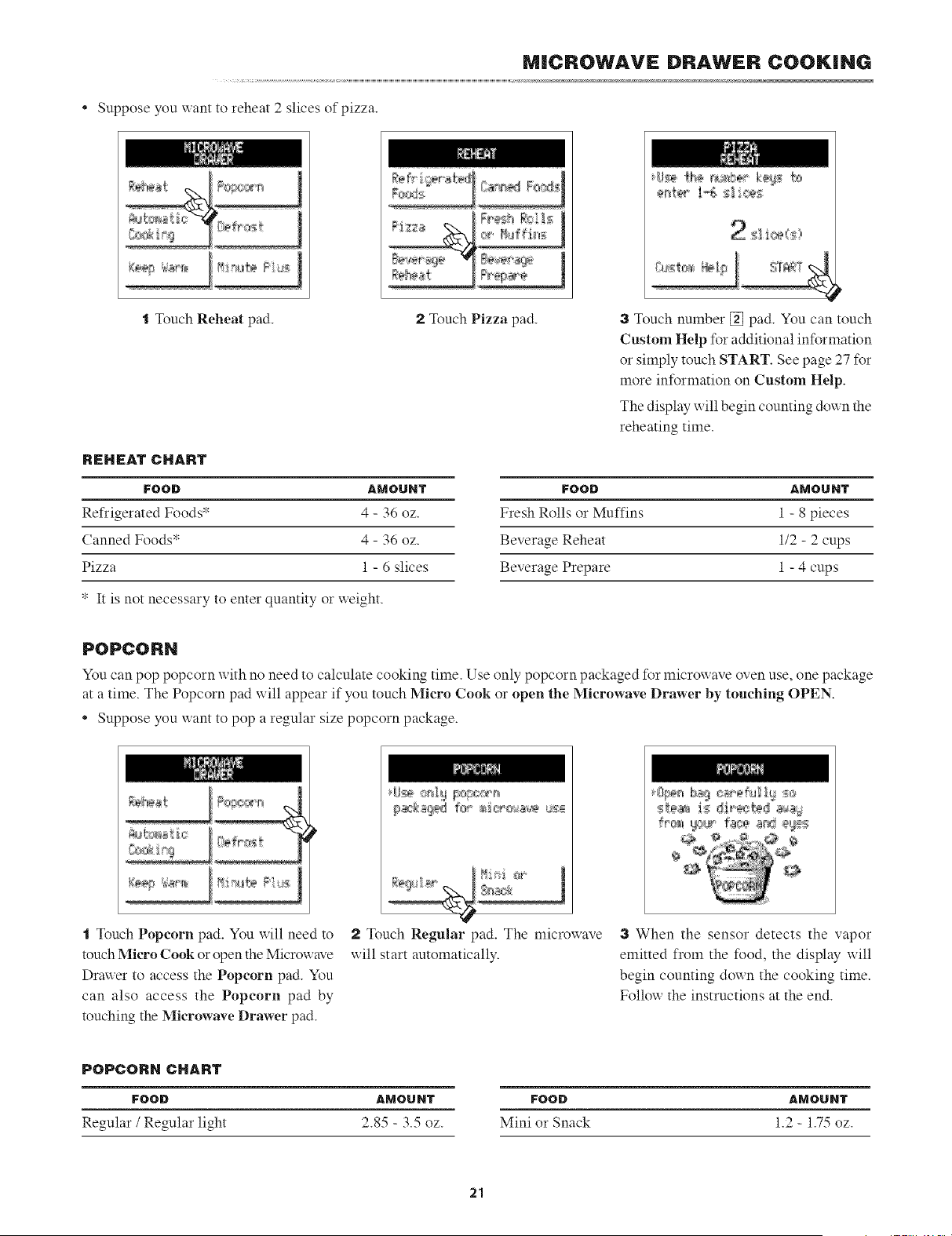
* Suppose you xxant to reheat 2 slices of pizza.
t Touch Reheat pad. 2 Touch Pizza pad. 3 Touch number [] pad. You can touch
Custom Help %r additional information
or simply touch START. See page 27 for
more information on Custom Help.
The display will begin counting down the
reheating time.
REHEAT CHART
FOOD AMOUNT FOOD AMOUNT
Refrigerated Foods v 4 - 36 oz. Fresh Rolls or Muffins 1 - 8 pieces
Canned Foods" 4 - 36 oz. Beverage Reheat 1/2 - 2 cups
Pizza 1 - 6 slices Beverage Prepare 1 - 4 cups
* It is not necessary to enter quantity or xxeight.
POPCORN
You can pop popcorn with no need to calculate cooking time. Use only popcorn packaged for microwave oven use, one package
at a time. The Popcorn pad will appear if you touch Micro Cook or open the Microwave Drawer by touching OPEN.
* Suppose you want to pop a regular size popcorn package.
t Touch Popcorn pad. You will need to
touch Micro Cook or open the Microwave
Drawer to access the Popcorn pad. You
can also access the Popcorn pad by
touching the Microwave Drawer pad.
2 Touch Regular pad. The microxxave
will start automatically.
3 When the sensor detects the vapor
emitted from the %od, the display will
begin counting down the cooking time.
Follow the instructions at the end.
POPCORN CHART
FOOD
Regular / Regular light
AMOUNT FOOD AMOUNT
2.85 - 3.5 oz. Mini or Snack 1.2 - 1.75 oz.
21
MICROWAVE DRAWER COOKING
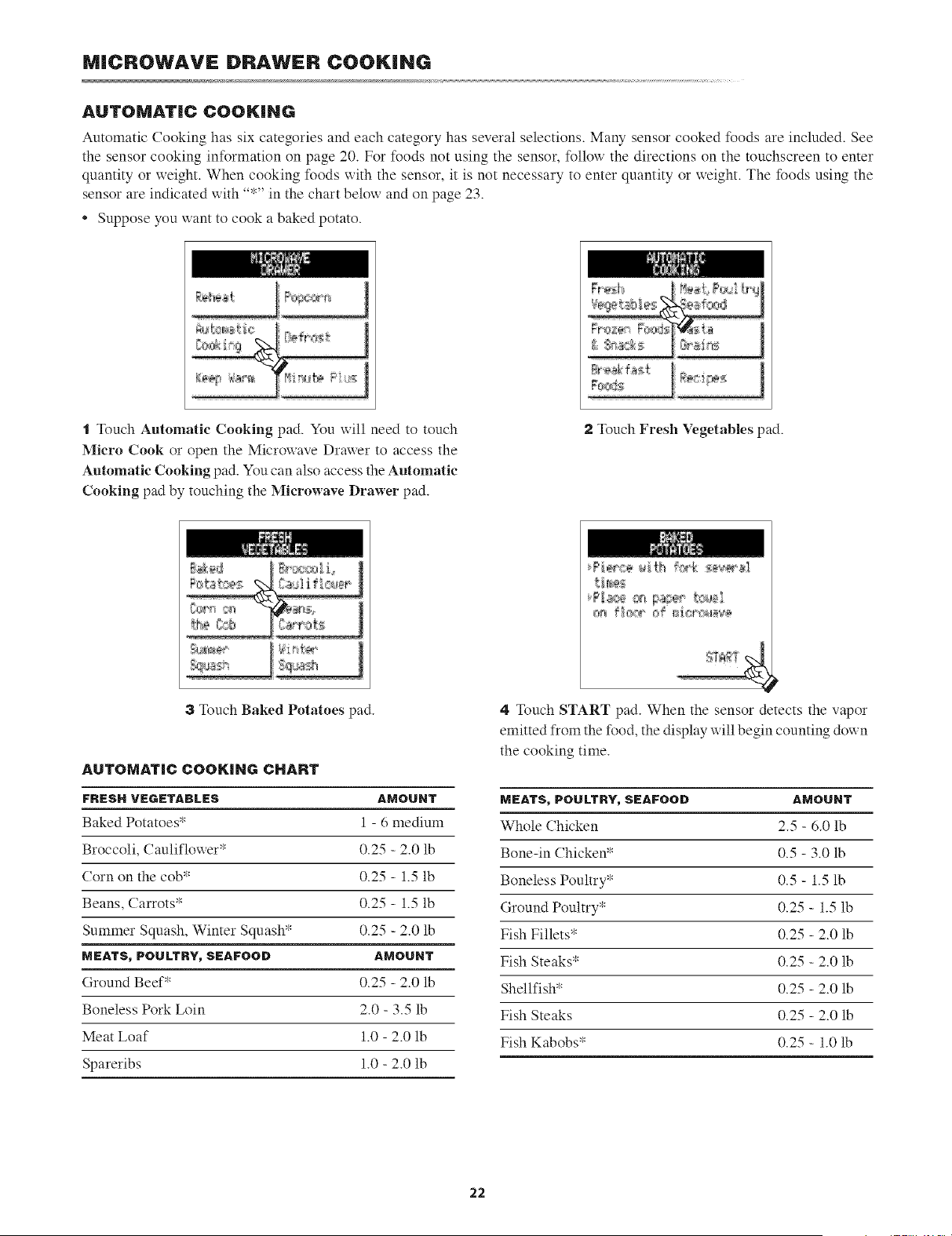
AUTOMATIC COOKING
Automatic Cooking has six categories and each category has several selections. Many sensor cooked foods are included. See
the sensor cooking information on page 20. For foods not using the sensor, follox_ the directions on the touchscreen to enter
quantity or weight. When cooking foods x_ith the sensor, it is not necessary to enter quantity or weight. The foods using the
sensor are indicated with "*" in the chart below and on page 23.
* Suppose you want to cook a baked potato.
......:----s-------;- ;:::--=-;-;----;
o--_:== ;;;;....
Rr_k fa;{
"1Touch Automatic Cooking pad. You will need to touch
Micro Cook or open the Microwave Drawer to access the
Automatic Cooking pad. You can also access the Automatic
Cooking pad by touching the Microwave Drawer pad.
2 Touch Fresh Vegetables pad.
!:_,_g_÷_
3 Touch Baked Potatoes pad.
AUTOMATIC COOKING CHART
FRESH VEOETADLES
Baked Potatoes*
Broccoli, Cauliflower*
Corn on the cob*
Beans, Carrots*
Summer Squash, Winter Squash*
MEATS, POULTRY, SEAFOOD
Ground Beef*
Boneless Pork Loin
Meat Loaf
Spareribs
4 Touch START pad. When the sensor detects the vapor
emitted from the food, the display uill begin counting doxxn
the cooking time.
AMOUNT MEATS, POULTRY, SEAFOOD AMOUNT
1 - 6 medium Whole Chicken 2.5 - 6.0 lb
0.25 - 2.0 lb Bone-in Chicken* 0.5 - 3.0 lb
0.25 - 1.5 lb Boneless Poultry* 0.5 - 1.5 lb
0.25 - 1.5 lb Ground Poultry* 0.25 - 1.5 lb
0.25 - 2.0 lb Fish Fillets* 0.25 - 2.0 lb
AMOUNT Fish Steaks* 0.25 - 2.0 lb
0.25 - 2.0 lb Shellfish* 0.25 - 2.0 lb
2.0 - 3.5 lb Fish Steaks 0.25 - 2.0 lb
1.0 - 2.0 lb Fish Kabobs* 0.25 - 1.0 lb
1.0 - 2.0 lb
22
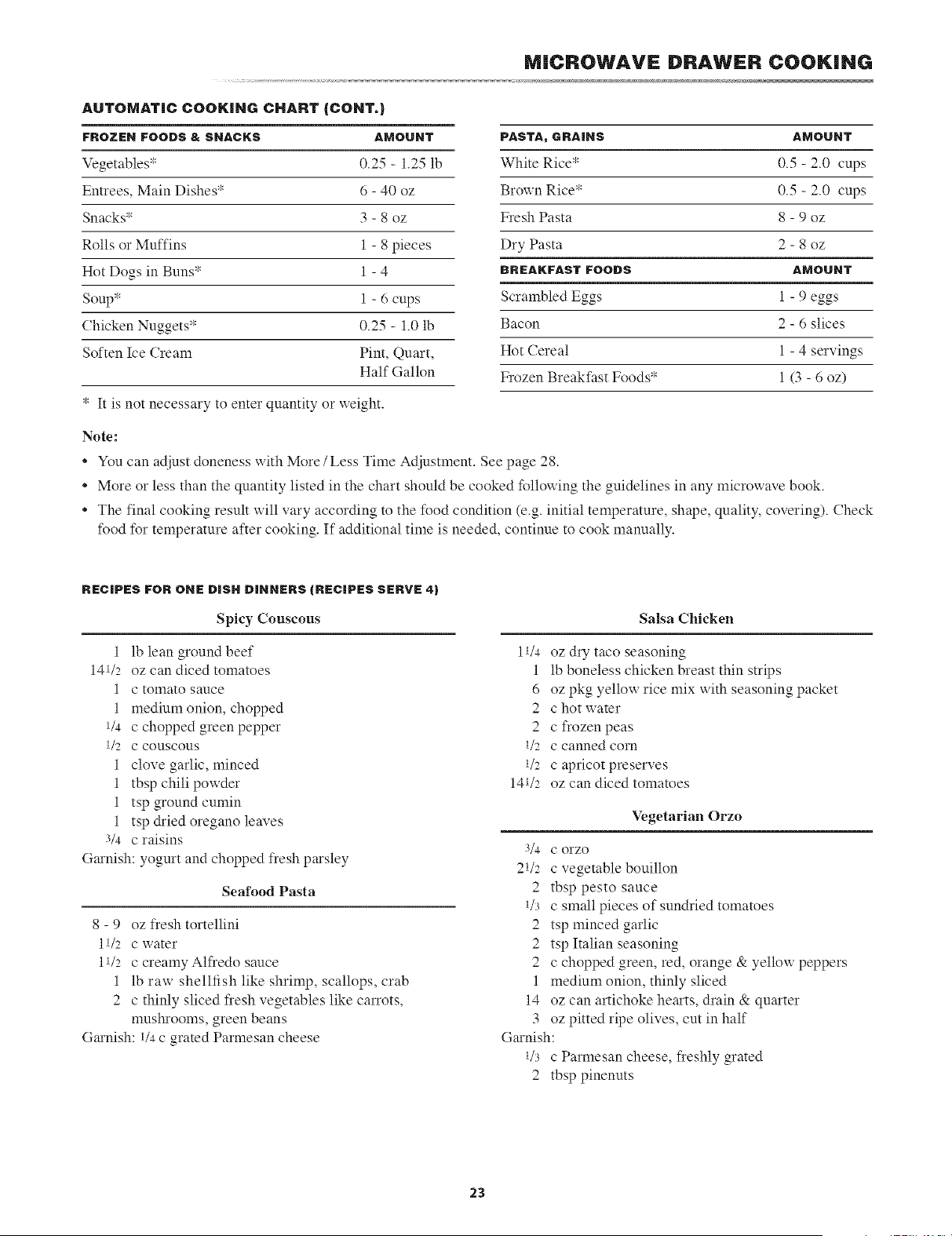
AUTOMATIC COOKING CHART {CONT.)
MICROWAVE DRAWER COOKING
FROZEN FOODS & SNACKS AMOUNT PASTA, GRAINS AMOUNT
Vegetables _ 0.25 - 1.25 lb White Rice* 0.5 - 2.0 cups
Entrees, Main Dishes* 6 - 40 oz Brown Rice* 0.5 - 2.0 cups
Snacks* 3 - 8 oz Fresh Pasta 8 - 9 oz
Rolls or Muffins 1 - 8 pieces Dry Pasta 2 - 8 oz
Hot Dogs in Buns" 1 - 4 BREAKFASTFOODS AMOUNT
Soup* 1 - 6 cups Scrambled Eggs 1 - 9 e_,os_,_
Chicken Nuggets* 0.25 - 1.0 lb Bacon 2 - 6 slices
Soften Ice Cream Pint, Quart, Hot Cereal 1 - 4 servings
Half Gallon Frozen Breakfast Foods* 1 (3 - 6 oz)
* It is not necessary to enter quantity or weight.
Note:
* You can adjust doneness with More/Less Time Adjustment. See page 28.
o
o
More or less than the quantity listed in the chart should be cooked following the guidelines in any microwave book.
The final cooking result will vary according to the food condition (e.g. initial temperature, shape, quality, covering). Check
food for temperature after cooking. If additional time is needed, continue to cook manually.
RECIPES FOR ONE DiSH DINNERS iRECBPES SERVE 4)
Spicy Couscous
Salsa Chicken
1 lb lean ground beef 11/4 oz dry taco seasoning
141/2 oz can diced tomatoes 1 lb boneless chicken breast thin strips
1 c tomato sauce 6 oz pkg yellow rice mix with seasoning packet
1 medium onion, chopped 2 c hot water
1/4 c chopped green pepper 2 c frozen peas
1/2 c couscous 1/2 c canned corn
1 clove garlic, minced 1/2 c apricot preserves
1 tbsp chili powder 141/2 oz can diced tomatoes
1 tsp ground cumin
1 tsp &ied oregano leaves Vegetarian Orzo
3/4 c raisins
G_unish: yogurt and chopped fresh parsley
Seafood Pasta
8 - 9 oz fresh tortellini
11/2 c water
11/2 c creamy Alfredo sauce
1 lb raw shellfish like shrimp, scallops, crab
2 c thinly sliced fresh vegetables like carrots,
mushrooms, green beans
G_u-nish:1/4c grated Parmesan cheese
3/4 C orzo
21/2 c vegetable bouillon
2 tbsp pesto sauce
1/3 c small pieces of sundried tomatoes
2 tsp minced garlic
2 tsp Italian seasoning
2 c chopped green, red, orange & yellow peppers
1 medium onion, thinly sliced
14 oz can artichoke hearts, drain & quarter
3 oz pitted ripe olives, cut in half
G_unish:
1/3 c Parmesan cheese, freshly grated
2 tbsp pinenuts
23
MICROWAVE DRAWER COOKING
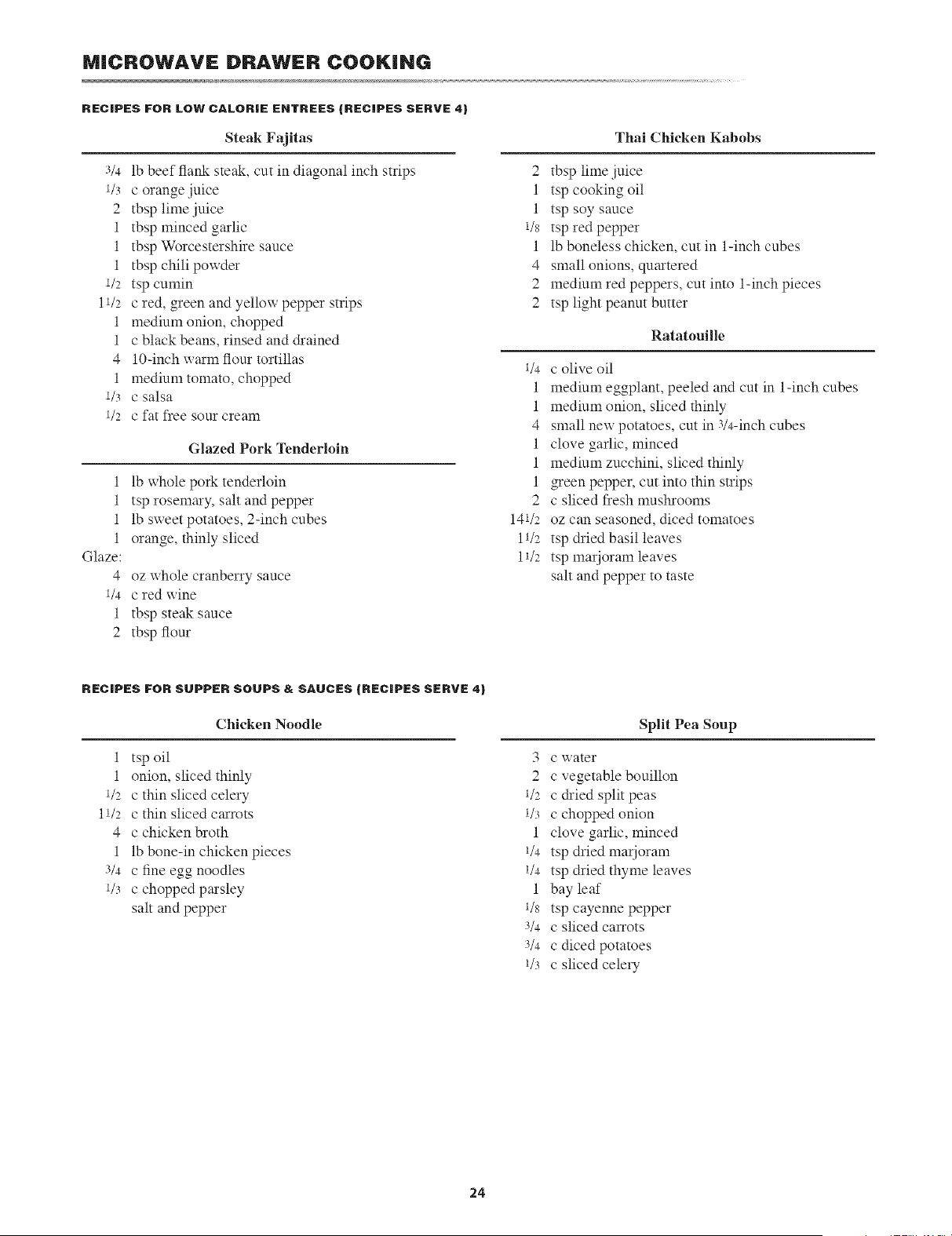
RECIPES FOR LOW CALORIE EHTREES (RECIPES SERVE 4)
Steak Fajitas
Thai Chicken Kabobs
1
1
1
1
Glaze:
4
1/4
1
2
3/4 lb beef flank ste_d;, cut in diagonal inch strips
1/3 c orange juice
2 tbsp lime juice
1 tbsp minced garlic
1 tbsp Worcestershire sauce
1 tbsp chili powder
1/2 tsp cumin
11/2 c red, green and yellow pepper strips
1 medimn onion, chopped
1 c black beans, rinsed and &ained
4 lO-inch wm_mflour tortillas
1 medium tomato, chopped
1/3 c salsa
1/2 c fat free sour cream
Glazed Pork Tenderloin
lb whole pork tenderloin
tsp rosem_y, salt and pepper
lb sweet potatoes, 2-inch cubes
orange, thinly sliced
oz whole cranberry sauce
c red wine
tbsp steak sauce
tbsp flour
2 tbsp lime juice
1 tsp cooking oil
1 tsp soy sauce
1/s tsp redpepper
1 lb boneless chicken, cut in 1-inch cubes
4 small onions, qu_tered
2 medium red peppers, cut into 1-inch pieces
2 tsp light peanut butter
Ratatouille
1/4 C olive oil
1 medium eggplant, peeled and cut in 1-inch cubes
1 medium onion, sliced thinly
4 small new potatoes, cut in 3/4-inch cubes
1 clove garlic, minced
1 medium zucchini, sliced thinly
1 green pepper, cut into thin strips
2 c sliced fresh mushrooms
141/2 oz can seasoned, diced tomatoes
11/2 tsp dried basil leaves
11/2 tsp marioram leaves
salt and pepper to taste
RECIPES FOR SUPPER SOUPS & SAUCES (RECIPES SERVE 4)
Chicken Noodle
1 tsp oil
1 onion, sliced thinly
1/2 c thin sliced celery
11/2 c thin sliced carrots
4 c chicken broth
1 lb bone-in chicken pieces
3/4 Cfine ego noodles
1/3 c chopped parsley
salt and pepper
Split Pea Soup
3 c water
2 c vegetable bouillon
1/2 c &ied split peas
1/3 c chopped onion
1 clove garlic, minced
1/4 tsp dried marjoram
1/4 tsp dried thyme leaves
1 bay leaf
1/8 tsp cayenne pepper
3/4 C sliced carrots
3/4 c dicedpotames
1/3 c sliced celery
24
MICROWAVE DRAWER COOKING
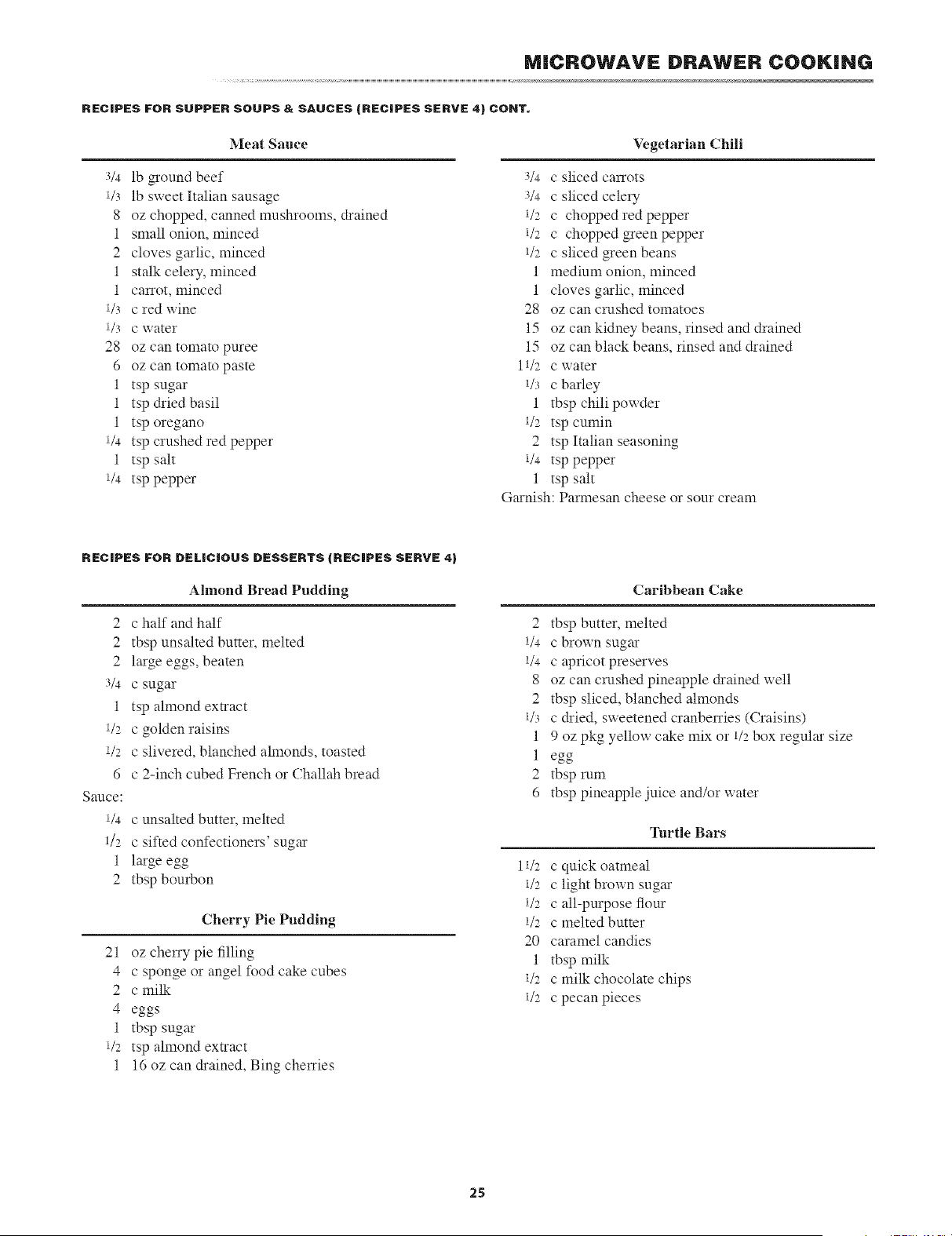
RECIPES FOR SUPPER SOUPS & SAUCES (RECIPES SERVE 4) COHT.
Meat Sauce
Vegetarian Chili
3/4 lb groundbeef
1/3 lb sweet Italian sausage
8 oz chopped, canned mushrooms, drained
1 small onion, minced
2 cloves g_lic, minced
1 stalk celery, minced
1 carrot, minced
1/3 c red wine
1/3 C water
28 oz can tomato puree
6 oz can tomato paste
1 tsp sugar
1 tsp &ied basil
1 tsp oregano
1/4 tsp crushed red pepper
1 tsp salt
1/4 tsp pepper
3/4 C sliced carrots
3/4 c sliced celery
1/2 c chopped red pepper
1/2 c chopped green pepper
i/2 c sliced green beans
1 medium onion, minced
1 cloves garlic, minced
28 oz can crashed tomatoes
15 oz can kidney beans, rinsed and drained
15 oz can black beans, rinsed and drained
11/2 c water
1/3 c barley
1 tbsp chili powder
1/2 tsp cumin
2 tsp Italian seasoning
1/4 tsp pepper
1 tsp salt
G_unish: Parmesan cheese or sour cream
RECIPES FOR DELiCiOUS DESSERTS (RECIPES SERVE 4)
Almond Bread Pudding
2
2
2
3/4
1
1/2
1/2
6
Sauce:
1/4
1/2
1
2
c half and half
tbsp unsalted butter, melted
large eoos_,beaten
c sugar
tsp almond extract
c golden raisins
c slivered, blanched almonds, toasted
c 2-inch cubed French or Challah bread
c unsalted butter, melted
c sifted confectioners' sugar
large egg
tbsp bourbon
Cherry Pie Pudding
21 oz cheny pie filling
4 c sponge or angel food cake cubes
2 c milk
4 eoos
1 tbsp sug;u
1/2 tsp almond extract
1 16 oz can drained, Bing chelTies
Caribbean Cake
2 tbsp butter, melted
1/4 C brown sugar
1/4 C apricot preserves
8 oz can crashed pineapple drained well
2 tbsp sliced, blanched almonds
1/3 c dried, sweetened cranbenies (Craisins)
1 9 oz pkg yellow c;d;e mix or 1/2box regular size
1 eoo
2 tbsp rum
6 tbsp pineapple juice and/or water
Turtle Bars
11/2 c quick oatmeal
1/2 c light brown sugar
1/2 c all-purpose flour
1/2 c melted butter
20 caramel candies
1 tbsp milk
1/2 c milk chocolate chips
1/2 c pecan pieces
25
MICROWAVE DRAWER COOKING
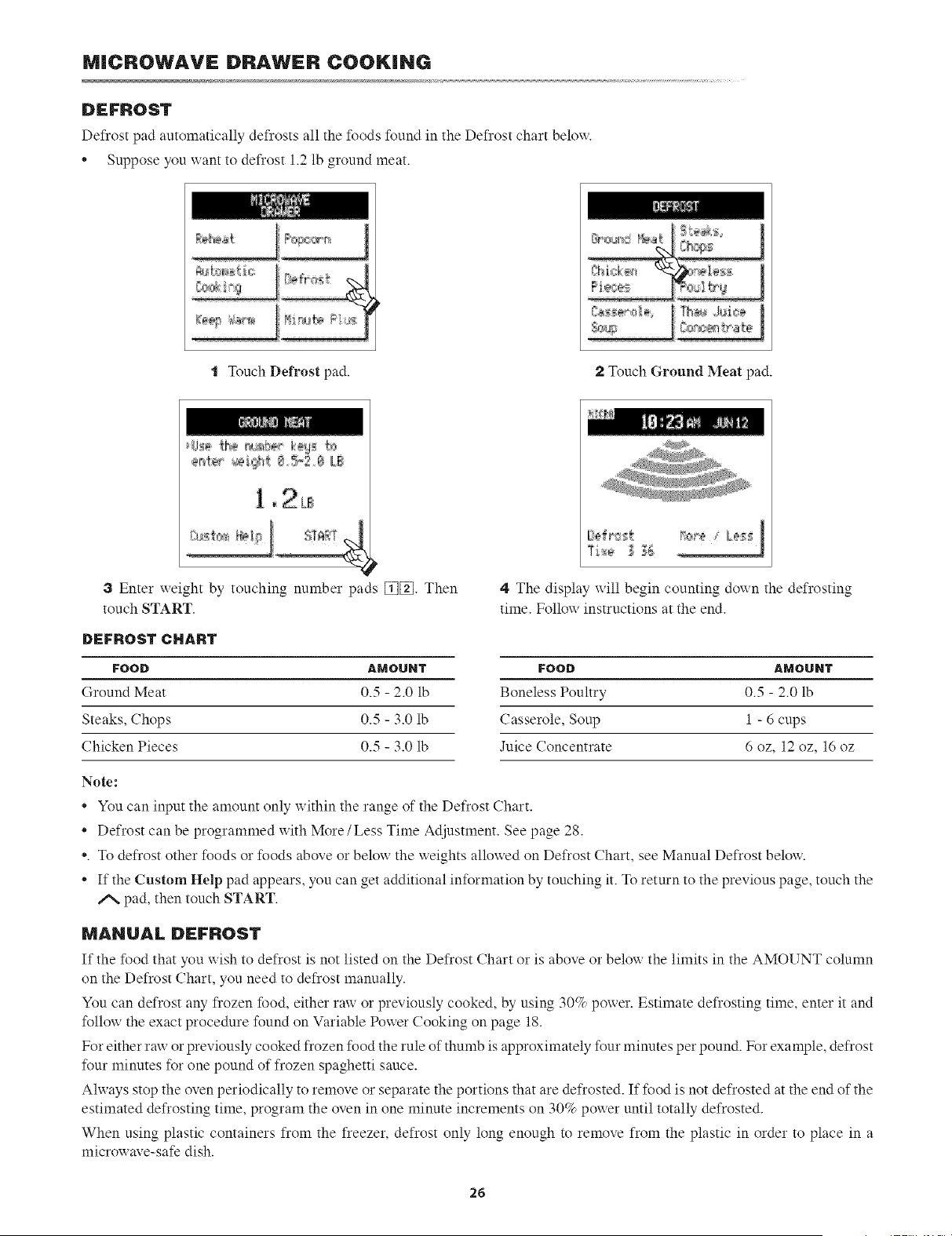
DEFROST
Defrost pad automatically defrosts all the foods found in the Defrost chart belong.
* Suppose you xxant to defrost 1.2 lb ground meat.
t Touch Defrost pad. 2 Touch Ground Meat pad.
1 _2LB
3 Enter weight by touching number
touch START.
DEFROST CHART
FOOD
Ground Meat
Steaks, Chops
Chicken Pieces
_ads [_[_]. Then
4 The display x_ill begin counting doxxn the defrosting
time. Follow instructions at the end.
AMOUNT FOOD AMOUNT
0.5 - 2.0 lb Boneless Poultry 0.5 - 2.0 lb
0.5 - 3.0 lb Casserole, Soup 1 - 6 cups
0.5 - 3.0 lb Juice Concentrate 6 oz, 12 oz, 16 oz
Note:
* You can input the amount only within the range of the Defrost Chart.
* Defrost can be programmed with More/Less Time Adjustment. See page 28.
*. To defrost other foods or foods above or below the weights allowed on Defrost Chart, see Manual Defrost below.
* If the Custom Help pad appears, you can get additional information by touching it. To return to the previous page, touch the
/% pad, then touch START.
MANUAL DEFROST
If the food that you wish to defrost is not listed on the Defrost Chart or is above or below the limits in the AMOUNT column
on the Defrost Chart, you need to defrost manually.
You can defrost any frozen food, either raw or previously cooked, by using 30% power. Estimate defrosting time, enter it and
follow the exact procedure found on Variable Power Cooking on page 18.
For either raw or previously cooked frozen food the rule of thumb is approximately four minutes per pound. For example, defrost
four minutes for one pound of frozen spaghetti sauce.
Ahvays stop the oven periodically to remove or separate the portions that are defrosted. If food is not defrosted at the end of the
estimated defrosting time, program the oven in one minute increments on 30% power until totally defrosted.
When using plastic containers from the freezer, defrost only long enough to remove from the plastic in order to place in a
microwave-safe dish.
26
MICROWAVE DRAWER COOKING
OTHER CONVENIENT FEATURES
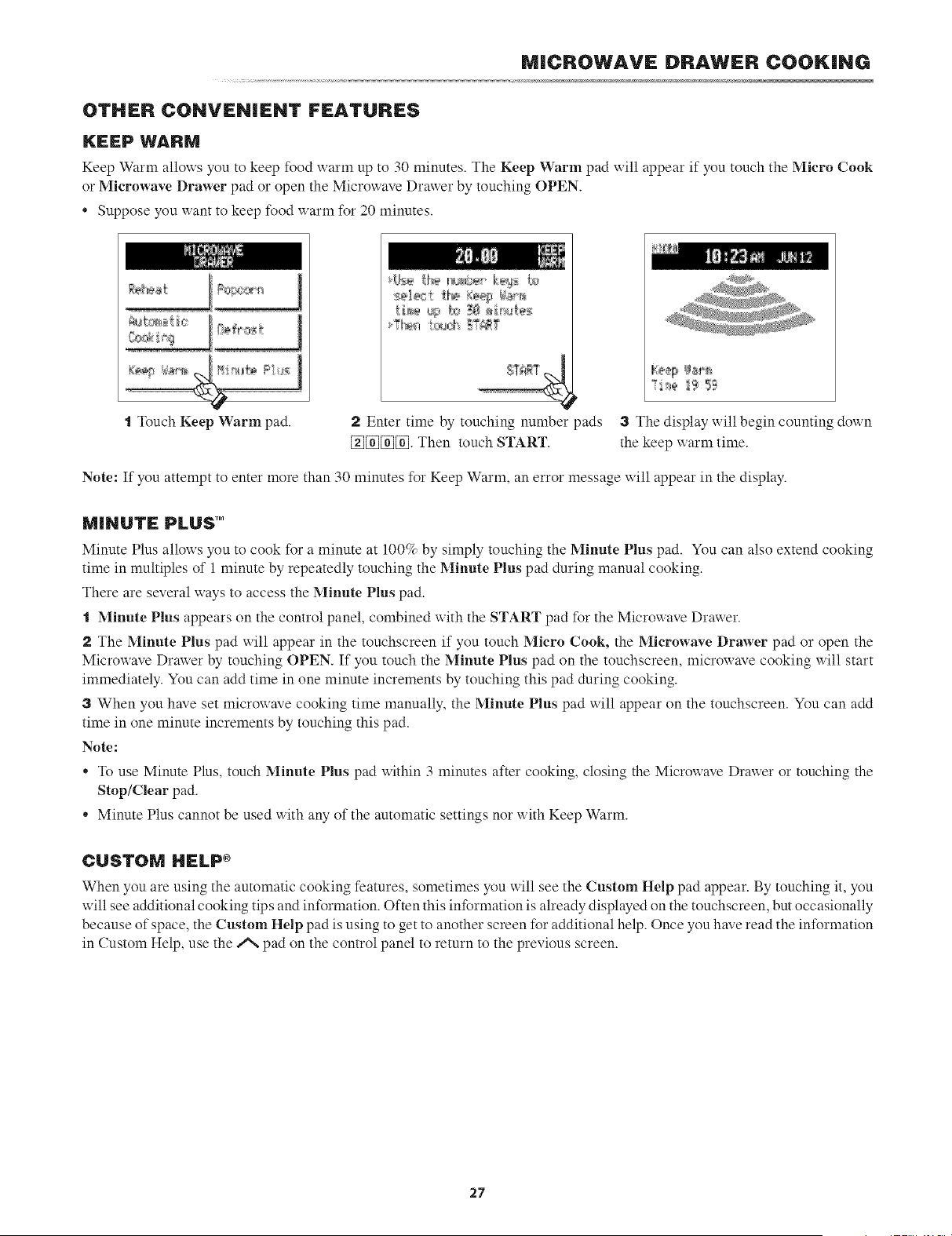
KEEP WARM
Keep Warm alloxxs you to keep food warm up to 30 minutes. The Keep Warm pad will appear if you touch the Micro Cook
or Microwave Drawer pad or open the Micro_ ave Drax_er by touching OPEN.
* Suppose you xxant to keep food xxarm for 20 minutes.
\ .....................................
t Touch Keep Warm pad.
?I'÷_l'_"'
2 Enter time by touching number
[_][_][_[_]. Then touch START.
)ads 3 The display will begin counting down
the keep warm time.
Note: If you attempt to enter more than 30 minutes for Keep Warm, an error message will appear in the display.
MINUTE PLUS"
Minute Plus allows you to cook %r a minute at 100% by simply touching the Minute Pins pad. You can also extend cooking
time in multiples of 1 minute by repeatedly touching the Minute Plus pad during manual cooking.
There are several ways to access the Minute Plus pad.
"1 Minute Plus appears on the control panel, combined with the START pad for the Microwave Drawer.
The Minute Plus pad will appear in the touchscreen if you touch Micro Cook, the Microwave Drawer pad or open the
Microwave Drawer by touching OPEN. If you touch the Minute Plus pad on the touchscreen, microwave cooking will start
immediately. You can add time in one minute increments by touching this pad during cooking.
When you have set microwave cooking time manually, the Minute Plus pad will appear on the touchscreen. You can add
time in one minute increments by touching this pad.
Note:
o To use Minute Plus, touch Minute Plus pad within 3 minutes after cooking, closing the Microwave Drawer or touching the
Stop/Clear pad.
o Minute Plus cannot be used with any of the automatic settings nor with Keep Warm.
CUSTOM HELP ÷
When you are using the automatic cooking features, sometimes you will see the Custom Help pad appear. By touching it, you
will see additional cooking tips and information. Often this information is already displayed on the touchscreen, but occasionally
because of space, the Custom Help pad is using to get to another screen for additional help. Once you have read the information
in Custom Help, use the ,,% pad on the control panel to return to the previous screen.
27
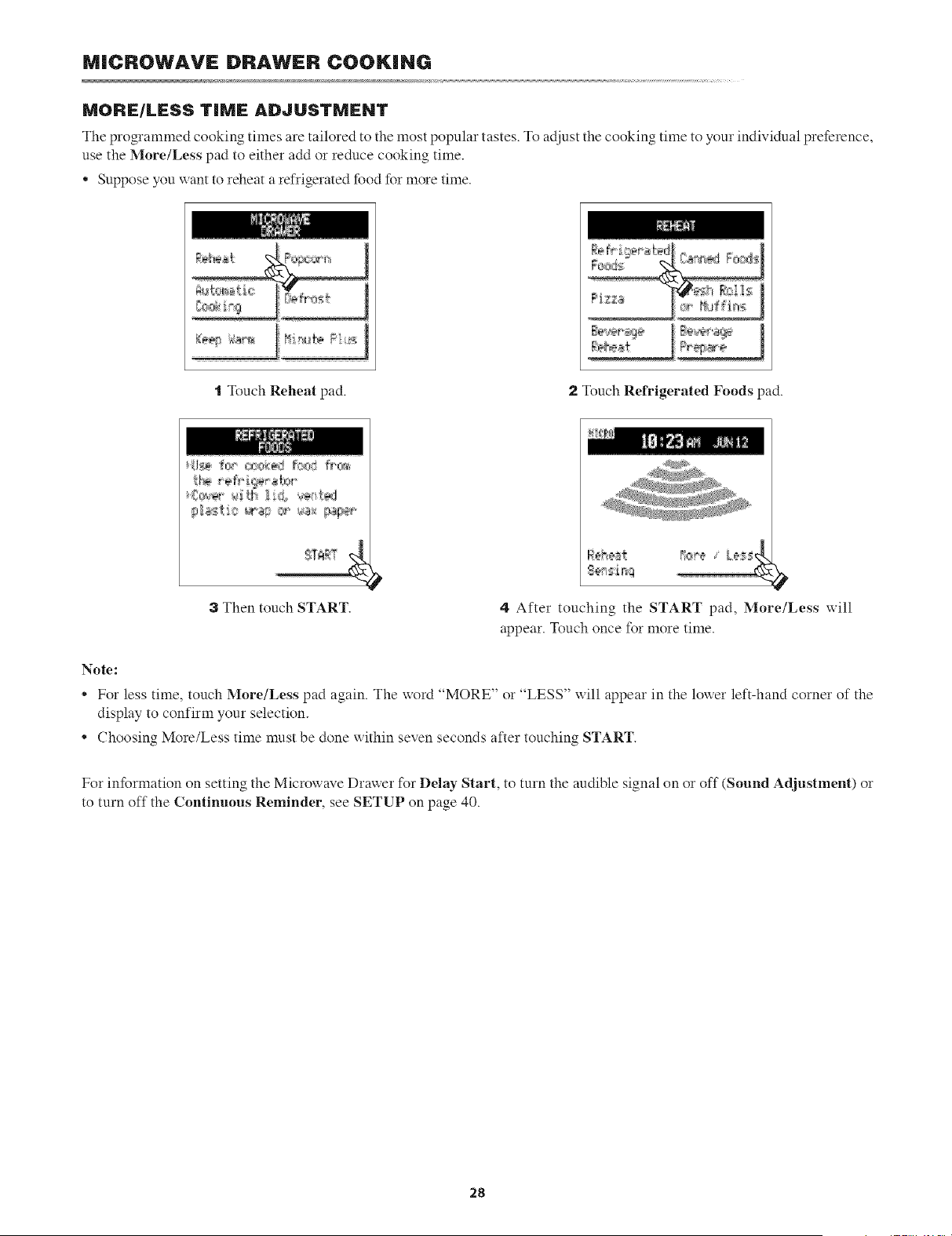
MICROWAVE DRAWER COOKING
MORE/LESS TiME ADJUSTMENT
The programmed cooking times are tailored to the most popular tastes. To adjust the cooking time to your individual preference,
use the More/Less pad to either add or reduce cooking time.
• Suppose you want to reheat a refrigerated food for more time.
t Touch Reheat pad. 2 Touch Refrigerated Foods pad.
3 Then touch START.
4 After touching the START pad, More/Less x:ill
appear. Touch once for more time.
Note:
For less time, touch More/Less pad again. The xxord "MORE" or "LESS" ::ill appear in the lox:er left-hand corner of the
display to confirm your selection.
* Choosing More/Less time must be done uithin seven seconds after touching START.
For information on setting the Microwave Drax: er for Delay Start, to turn the audible signal on or off (Sound Adjustment) or
to turn off the Continuous Reminder, see SETUP on page 40.
28
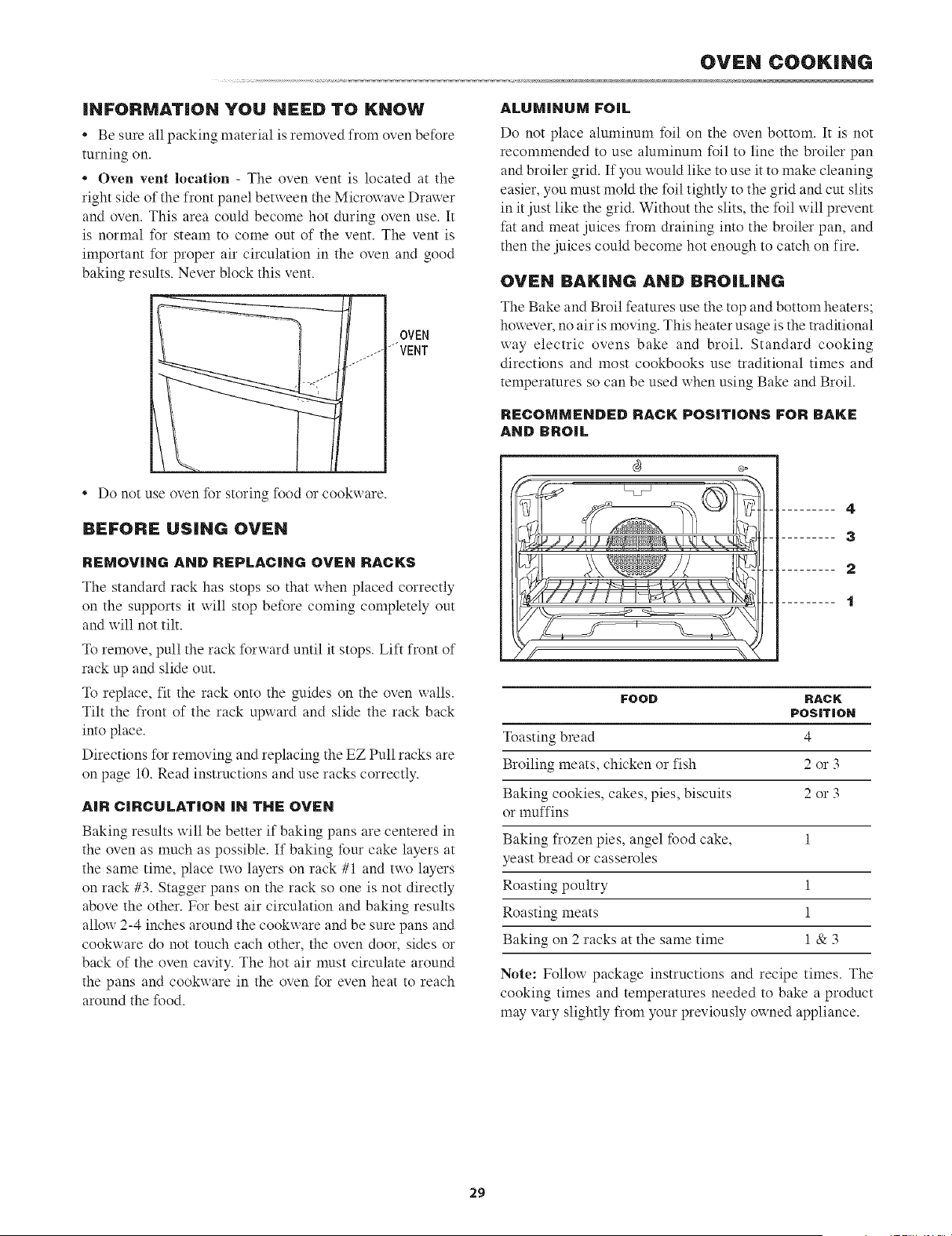
iNFORMATiON YOU NEED TO KNOW
• Be sure all packing material is removed from oven before
turning on.
• Oven vent location - The oven vent is located at the
right side of the front panel between the Microx_ave Drawer
and oven. This area could become hot during oven use. It
is normal for steam to come out of the vent. The vent is
important for proper air circulation in the oven and good
baking results. Never block this vent.
r
OVEN
...... JVENT
j-
• Do not use oven for storing food or cookxxare.
BEFORE USING OVEN
REMOVING AND REPLACING OVEN RACKS
The standard rack has stops so that when placed correctly
on the supports it will stop before coming completely out
and will not tilt.
To remove, pull the rack forward until it stops. Lift front of
rack up and slide out.
To replace, fit the rack onto the guides on the oven walls.
Tilt the front of the rack upward and slide the rack back
into place.
Directions for removing and replacing the EZ Pull racks are
on page 10. Read instructions and use racks correctly.
AIR CIRCULAT|ON IN THE OVEN
Baking results will be better if baking pans are centered in
the oven as much as possible. If baking four cake layers at
the same time, place two layers on rack #1 and two layers
on rack #3. Stagger pans on the rack so one is not directly
above the other. For best air circulation and baking results
allow 2-4 inches around the cookware and be sure pans and
cookware do not touch each other, the oven door, sides or
back of the oven cavity. The hot air must circulate around
the pans and cookware in the oven for even heat to reach
around the food.
OVEN COOKING
ALUMINUM FOiL
Do not place aluminum foil on the oven bottom. It is not
recommended to use almninum foil to line the broiler pan
and broiler grid. If you would like to use it to make cleaning
easier, you must mold the foil tightly to the grid and cut slits
in it just like the grid. Without the slits, the foil x_ill prevent
fat and meat juices from draining into the broiler pan, and
then the juices could become hot enough to catch on fire.
OVEN BAKING AND BROiLiNG
The Bake and Broil features use the top and bottom heaters;
hoxxever, no air is moving. This heater usage is the traditional
way electric ovens bake and broil. Standard cooking
directions and most cookbooks use traditional times and
temperatures so can be used when using Bake and Broil.
RECOMMENDED RACK POB|T|ONS FOR BAKE
AND BROIL
......... 4
......... 3
2
t
FOOD RACK
POSiTiON
4
2 or 3
2 or 3
Toasting bread
Broiling meats, chicken or fish
Baking cookies, cakes, pies, biscuits
or muffins
Baking frozen pies, angel food cake, 1
yeast bread or casseroles
Roasting poultry 1
Roasting meats 1
Baking on 2 racks at the same time 1 & 3
Note: Follow package instructions and recipe times. The
cooking times and temperatures needed to bake a product
may vary slightly from your previously oxxned appliance.
29
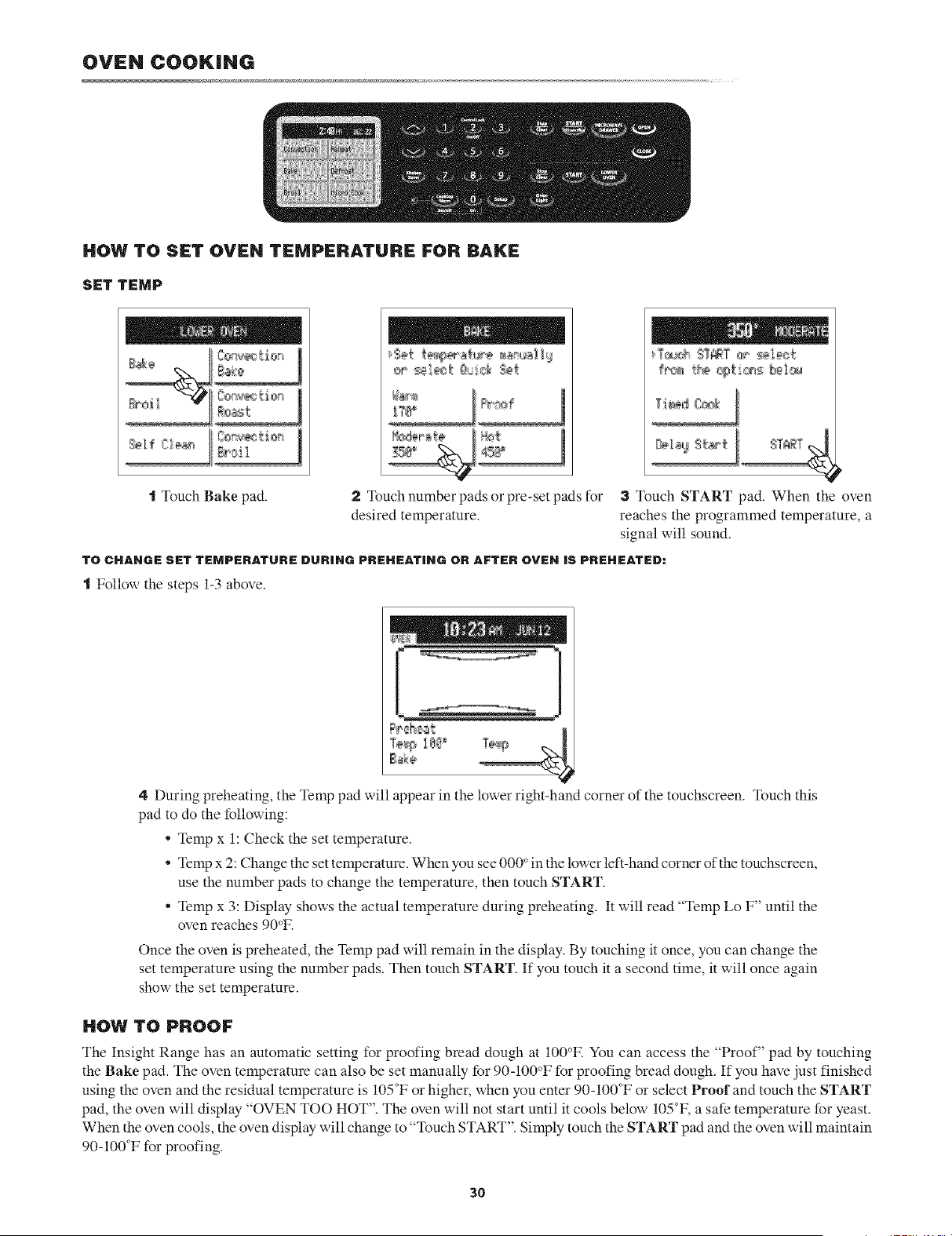
OVEN COOKING
HOW TO SET OVEN TEMPERATURE FOR BAKE
SET TEMP
t Touch Bake pad. 2 Touch number pads or pre-set pads for
desired temperature.
3 Touch START pad. When the oven
reaches the programmed temperature, a
signal will sound.
TO CHAHGE SET TEMPERATURE DUR|HG PREHEATiHG OR AFTER OVEH iS PREHEATED:
t Follow the steps 1-3 above.
Te_pI_ _
B_k÷
4 During preheating, the Temp pad will appear in the lower right-hand corner of the touchscreen. Touch this
pad to do the following:
• Temp x 1: Check the set temperature.
• Temp x 2: Change the set temperature. When you see 000 ° in the lower left-hand corner of the touchscreen,
use the number pads to change the temperature, then touch START.
• Temp x 3: Display shows the actual temperature during preheating. It will read "Temp Lo F" until the
oven reaches 90°F.
Once the oven is preheated, the Temp pad will remain in the display. By touching it once, you can change the
set temperature using the number pads. Then touch START. If you touch it a second time, it will once again
show the set temperature.
HOW TO PROOF
The Insight Range has an automatic setting for proofing bread dough at 100°E You can access the "Proof" pad by touching
the Bake pad. The oven temperature can also be set manually for 90-100°F for proofing bread dough. If you have just finished
using the oven and the residual temperature is 105°F or higher, when you enter 90-100°F or select Proof and touch the START
pad, the oven will display "OVEN TOO HOT". The oven will not start until it cools below 105°F, a safe temperature for yeast.
When the oven cools, the oven display will change to "Touch START". Simply touch the START pad and the oven will maintain
90-100°F for proofing.
30
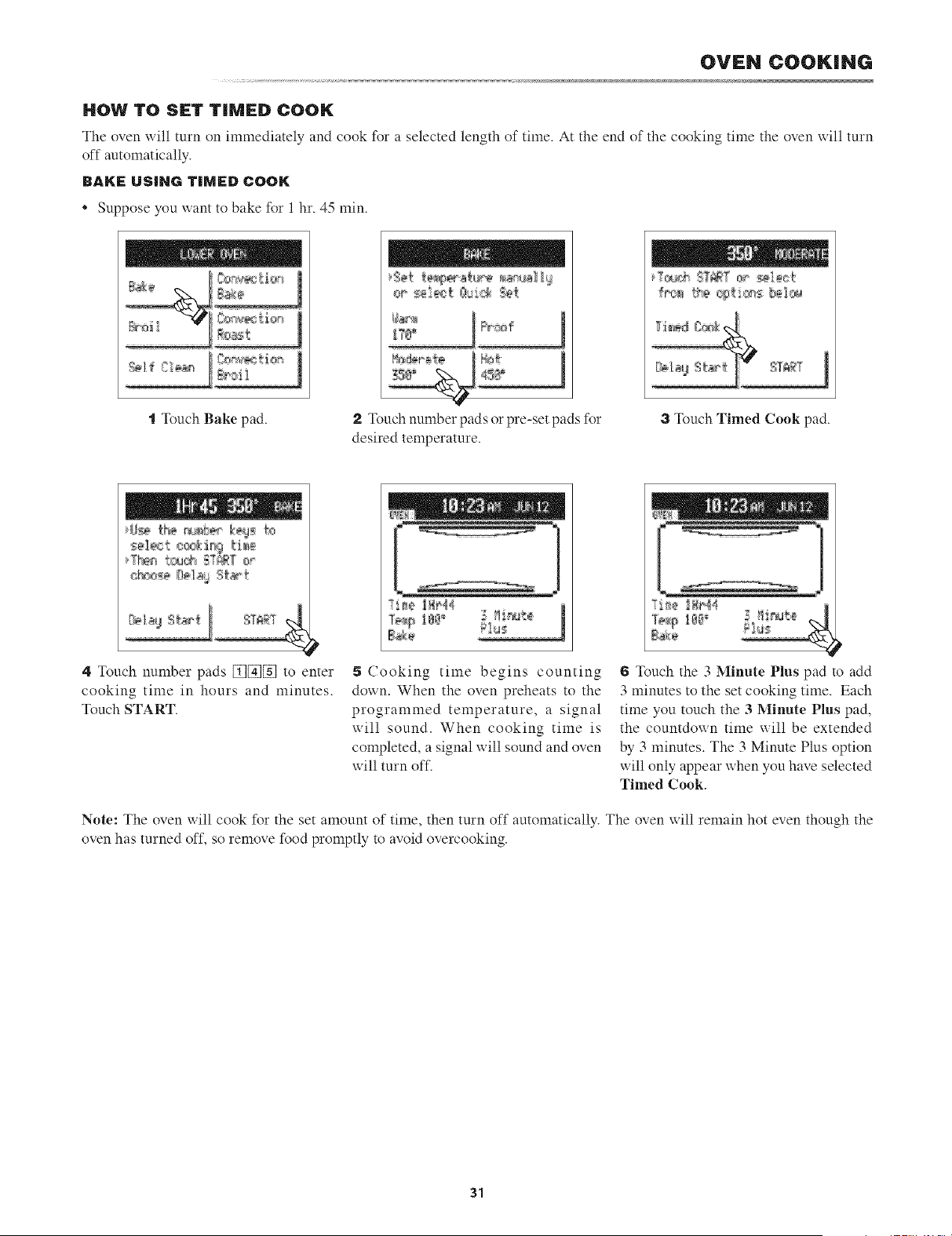
OVEN COOKING
HOW TO SET T|IVIED COON;
The oven will turn on immediately and cook for a selected length of time. At the end of the cooking time the oven will turn
off automatically.
BAKE USING TIMED COOK
* Suppose you want to bake for 1 hr. 45 min.
t Touch Bake pad. 2 ]_uch number pads or pre-set pads for
desired temperature.
3 Touch Timed Cook pad.
4 Touch number pads [_[_][_ to enter
cooking time in hours and minutes.
Touch START.
i_om
?i_ !_e44 1
5 Cooking time begins counting
down. When the oven preheats to the
programmed temperature, a signal
will sound. When cooking time is
completed, a signal will sound and oven
will turn oft.
6 ]_uch the 3 Minute Plus pad to add
3 minutes to the set cooking time. Each
time you touch the 3 Minute Plus pad,
the countdown time will be extended
by 3 minutes. The 3 Minute Plus option
will only appear when you have selected
Timed Cook.
Note: The oven will cook for the set amount of time, then turn off automatically. The oven xxill remain hot even though the
oven has turned off, so remove food promptly to avoid overcooking.
31
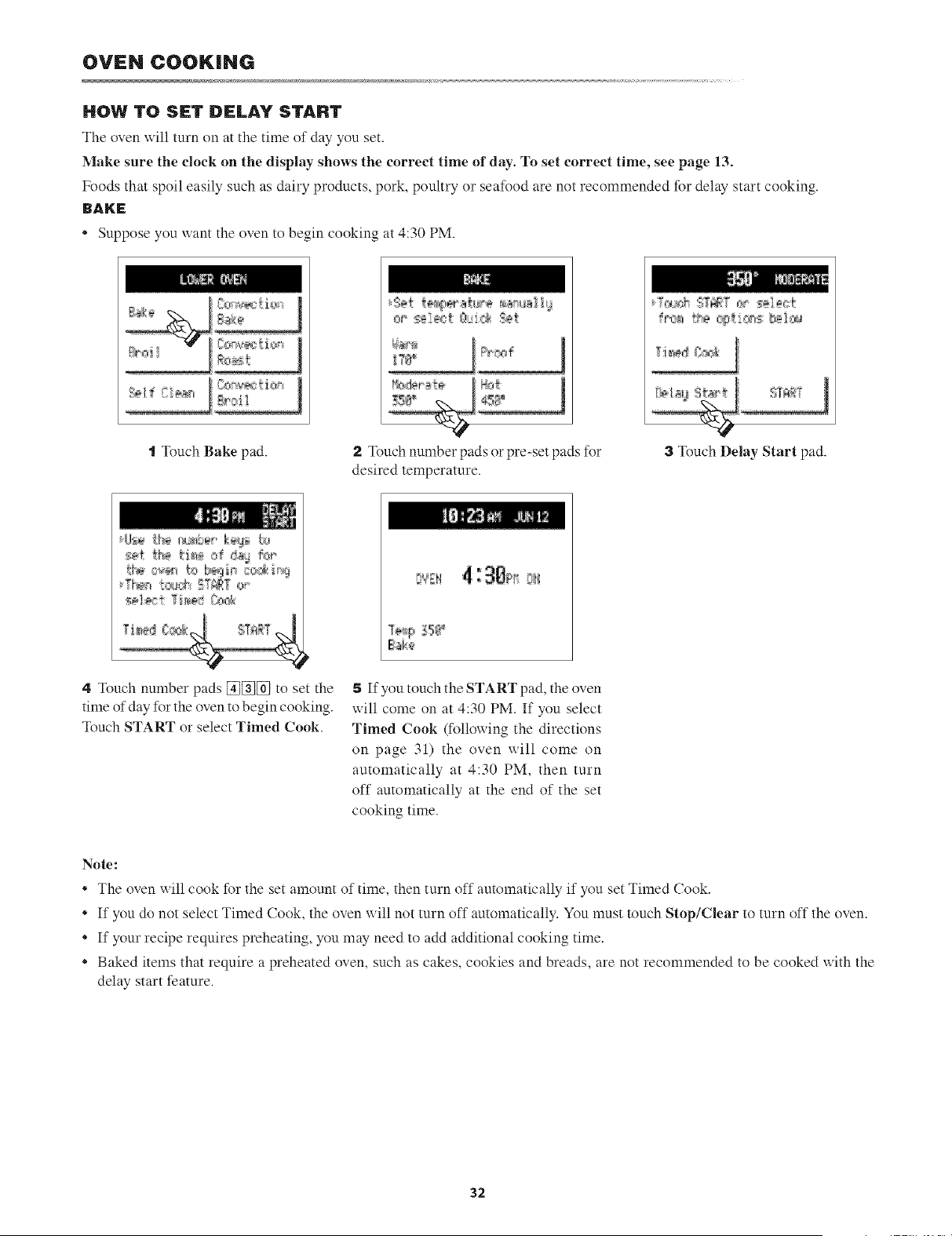
OVEN COOKING
HOW TO SET DELAY START
The oven will turn on at the time of day you set.
Make sure tile clock oll the display shows the correct time of day. To set correct time, see page 13.
Foods that spoil easily such as dairy products, pork, poultry or seafood are not recommended for delay start cooking.
BAKE
Supposeyou want the oven to begin cooking at 4:30 PM.
t Touch Bake pad.
t
2 l_uch number pads or pre-set pads for
desired temperature.
3 Touch Delay Start pad.
4 l_uch number pads [_[_[_ to set the
time of day for the oven to begin cooking.
Touch START or select Timed Cook.
If you touch the START pad, the oven
will come on at 4:30 PM. If you select
Timed Cook (folloxxing the directions
on page 31) the oven will come on
automatically at 4:30 PM, then turn
off automatically at the end of the set
cooking time.
Note:
* The oven will cook for the set amount of time, then turn off automatically if you set Timed Cook.
* If you do not select Timed Cook, the oven will not turn off automatically. You must touch Stop/Clear to turn off the oven.
* If your recipe requires preheating, you may need to add additional cooking time.
* Baked items that require a preheated oven, such as cakes, cookies and breads, are not recommended to be cooked with the
delay start feature.
32
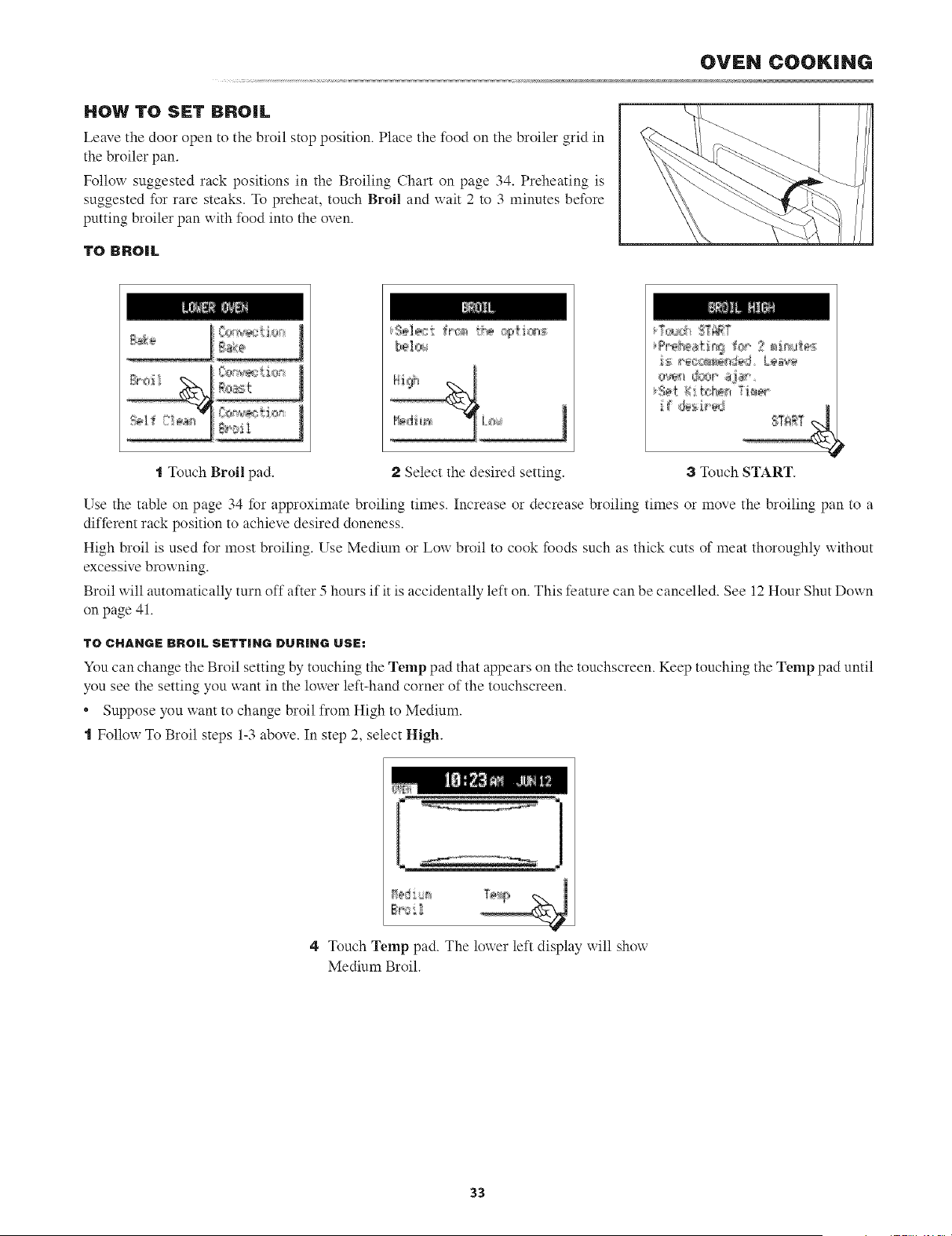
OVEN COOKING
HOW TO SET BROIL
Leave the door open to the broil stop position. Place the food on the broiler grid in
the broiler pan.
Follow suggested rack positions in the Broiling Chart on page 34. Preheating is
suggested for rare steaks, l_ preheat, touch Broil and wait 2 to 3 minutes before
putting broiler pan uith food into the oven.
TO BROIL
Os _,_xrio
£:oast
{70>e,_;{ion
g#il
#rr_i cg,[ie_
bei_>_
"_Touch Broil pad. Select the desired setting.
3 Touch START.
Use the table on page 34 for approximate broiling times. Increase or decrease broiling times or move the broiling pan to a
different rack position to achieve desired doneness.
High broil is used for most broiling. Use Medimn or Low broil to cook foods such as thick cuts of meat thoroughly without
excessive browning.
Broil will automatically turn off after 5 hours if it is accidentally left on. This feature can be cancelled. See 12 Hour Shut Down
on page 41.
TO CHANGE BROIL SETTING DURING USE:
You can change the Broil setting by touching the Temp pad that appears on the touchscreen. Keep touching the Temp pad until
you see the setting you want in the lower left-hand corner of the touchscreen.
* Suppose you want to change broil from High to Medium.
"1Follow To Broil steps 1-3 above. In step 2, select High.
4 Touch Temp pad. The louer left display uill shou
Medium Broil.
33
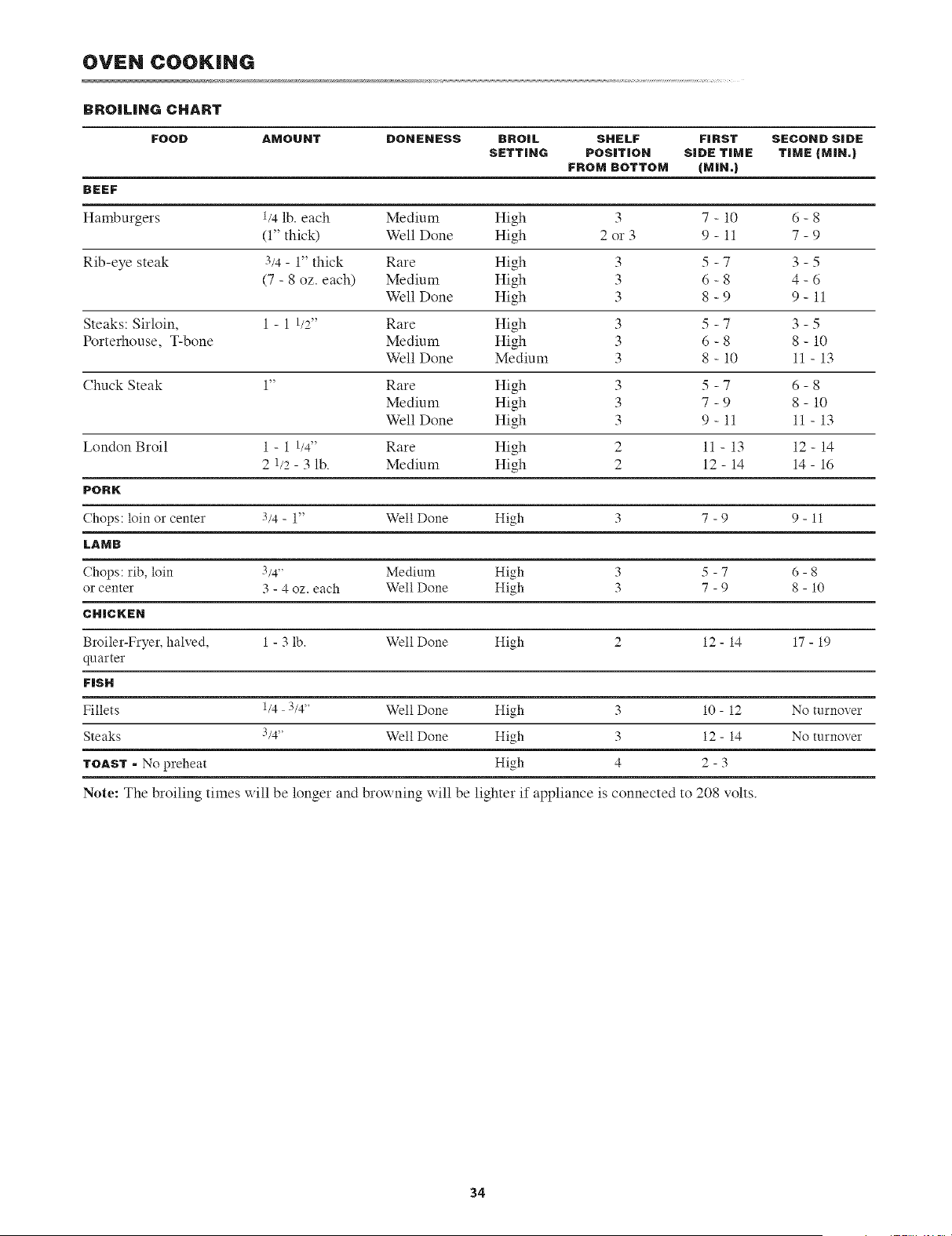
OVEN COOKING
BROILIHG CHART
FOOD AMOUNT DONENESS BROIL SHELF FIRST SECOND SIDE
SETTING POSITION SIDE TIME TIME (MIN,)
FROM BOTTOM (MIN.)
BEEF
Hamburgers t/4 lb. each Medium High 3 7 - 10 6 - 8
(1" thick) Well Done High 2 or 3 9 - 11 7 - 9
Rib-eye steak 3/4 - 1" thick Rare High 3 5 - 7 3 - 5
(7 - 8 oz. each) Medium High 3 6 - 8 4 - 6
Well Done High 3 8 - 9 9 - 11
Steaks: Sirloin, 1 - 1 t/2" Rare High 3 5 - 7 3 - 5
Porterhouse, T-bone Medium High 3 6 - 8 8 - 10
Well Done Medium 3 8 - 10 11 - 13
Chuck Steak 1" Rare High 3 5 - 7 6 - 8
Medium High 3 7 - 9 8 - 10
Well Done High 3 9 - 11 11 - 13
London Broil 1 - 1 1/4" Rare High 2 11 - 13 12- 14
2 1/2 - 3 lb. Medium High 2 12 - 14 14 - 16
PORK
(hops: loin or center 3/4 - 1" Well Done High 3 7 - 9 9 - 11
LAMB
Chops: rib, loin 3/4" Medium High 3 5 - 7 6 - 8
or center 3 - 4 oz. each Well Done High 3 7 - 9 8 - 10
CHICKEN
Broiler-Fryer, halved, 1 - 3 lb. Well Done High 2 12 - 14 17 - 19
quarter
FISH
Fillets t/4 3/4' Well Done High 3 10 - 12 No turnover
Steaks 3/4" Well Done High 3 12 - 14 No turnover
TOAST - No preheat High 4 2 - 3
Note: The broiling times will be longer and browning will be lighter if appliance is connected to 208 volts.
34
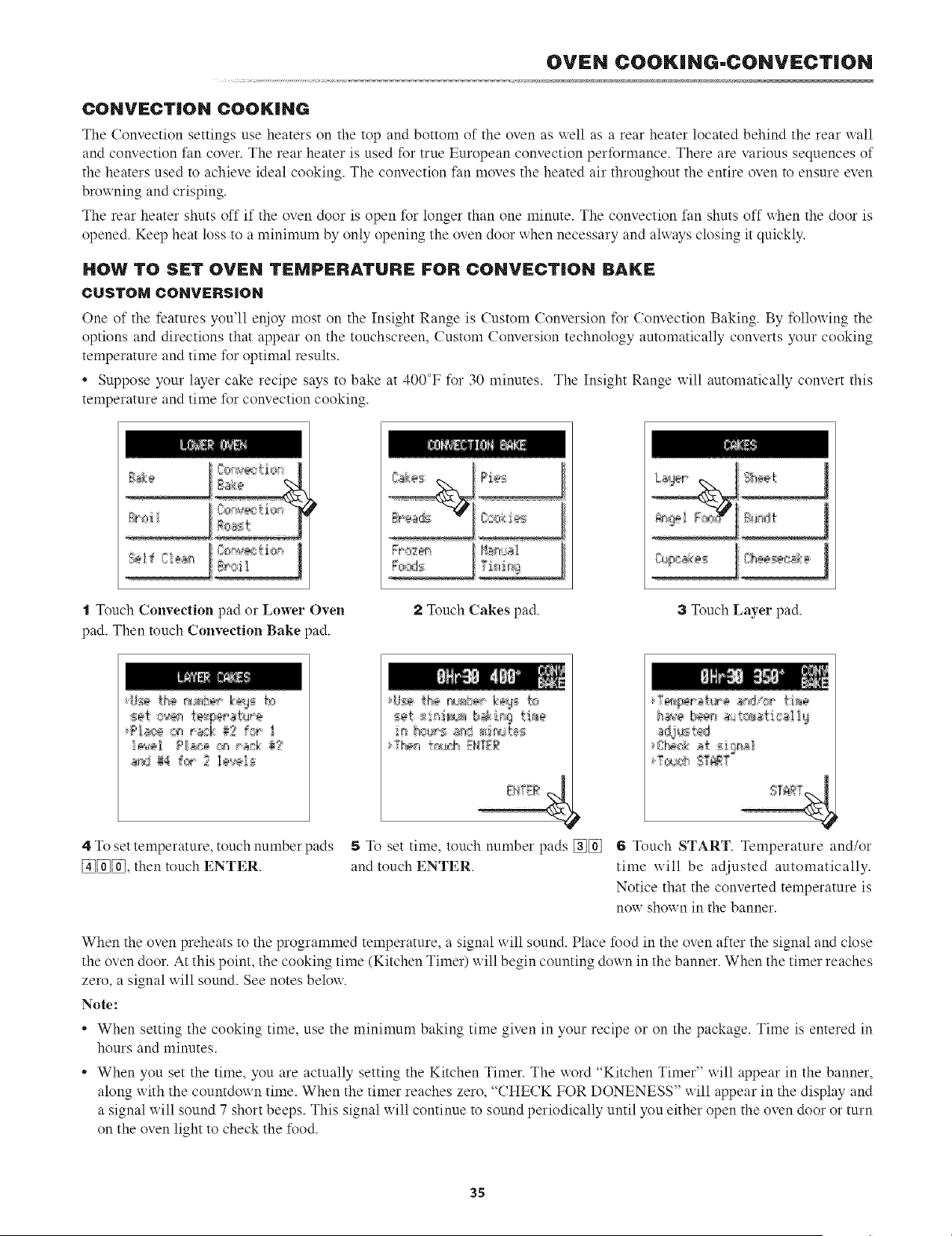
OVEN COOKING-CONVECTION
CONVECTION COOKING
The Convection settings use heaters on the top and bottom of the oven as well as a rear heater located behind the rear wall
and convection fan cover. The rear heater is used for true European convection performance. There are various sequences of
the heaters used to achieve ideal cooking. The convection fan moves the heated air throughout the entire oven to ensure even
browning and crisping.
The rear heater shuts off if the oven door is open for longer than one minute. The convection fan shuts off when the door is
opened. Keep heat loss to a minimum by only opening the oven door when necessary and always closing it quickly.
HOW TO SFT OVEN TFMPI:RATURF FOR CONVECTION BAKE
CUSTOM CONV;:RSION
One of the features you'll enjoy most on the Insight Range is Custom Conversion for Convection Baking. By following the
options and directions that appear on the touchscreen, Custom Conversion technology automatically converts your cooking
temperature and time for optimal results.
* Suppose your layer cake recipe says to bake at 400°F for 30 minutes. The Insight Range will automatically convert this
temperature and time for convection cooking.
%,
-.%.
....................................- =
N' 1
l
t Touch Convection pad or Lower Oven
pad. Then touch Convection Bake pad.
..................!
2 Touch Cakes pad. 3 Touch Layer pad.
4 To set temperature, touch nmnber pads
[_[_[_, then touch ENTER.
5 To set time, touch number pads [_[_] 6 Touch START. Temperature and/or
and touch ENTER. time will be adjusted automatically.
Notice that the converted temperature is
now shown in the banner.
When the oven preheats to the programmed temperature, a signal will sound. Place food in the oven after the signal and close
the oven door. At this point, the cooking time (Kitchen Timer) will begin counting down in the banner. When the timer reaches
zero, a signal will sound. See notes below.
Note:
• When setting the cooking time, use the minimum baking time given in your recipe or on the package. Time is entered in
hours and minutes.
• When you set the time, you are actually setting the Kitchen Timer. The word "Kitchen Timer" will appear in the banner,
along with the countdox_ n time. When the timer reaches zero, "CHECK FOR DONENESS" x_ill appear in the display and
a signal will sound 7 short beeps. This signal will continue to sound periodically until you either open the oven door or turn
on the oven light to check the food.
3S
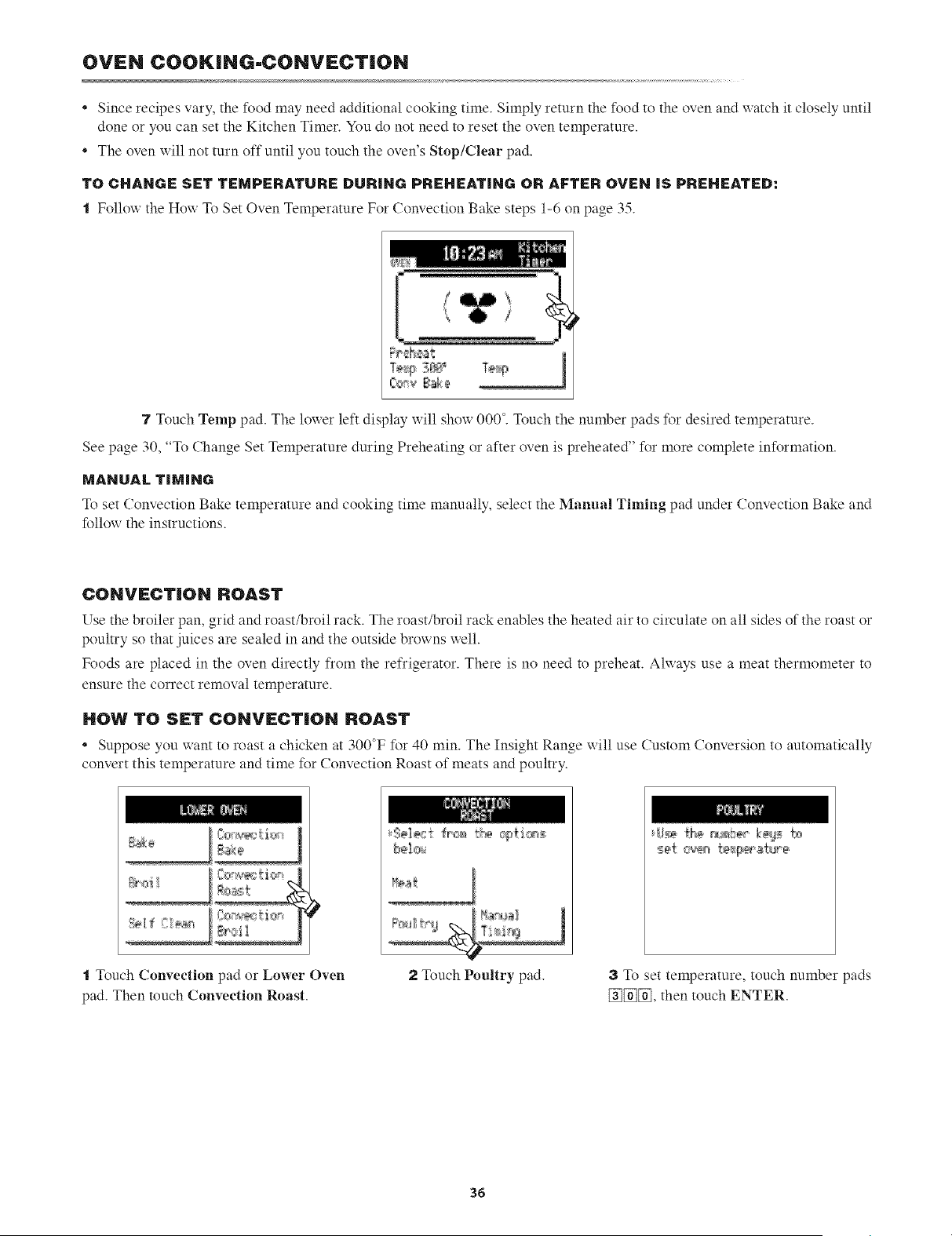
OVEN COOK|NG-CONV_:CT|ON
* Since recipes vary, the food may need additional cooking time. Simply return the food to the oven and watch it closely until
done or you can set the Kitchen Timer. You do not need to reset the oven temperature.
* The oven will not turn off until you touch the oven's Stop/Clear pad.
TO CHAHGE SET TEMPERATURE DURIHG PREHEATING OR AFTER OVEN IS PREHEATED:
t Follo_ the Ho_ To Set Oven Temperature For Convection Bake steps 1-6 on page 35.
7 Touch Temp pad. The lox_er left display x_ill shoxx000 °. Touch the number pads %r desired temperature.
See page 30, "To Change Set Temperature during Preheating or after oxen is preheated' for more complete information.
MAHUAL TIMING
To set Convection Bake temperature and cooking time manually, select the Manual Timing pad under Convection Bake and
folloxx the instructions.
CONVf:CT|ON ROAST
Use the broiler pan, grid and roast/broil rack. The roast/broil rack enables the heated air to circulate on all sides of the roast or
poultry so that juices are sealed in and the outside browns well.
Foods are placed in the oven directly from the refrigerator. There is no need to preheat. Always use a meat thermometer to
ensure the correct removal temperature.
HOW TO SET CONVECTION ROAST
* Suppose you want to roast a chicken at 300°F for 40 min. The Insight Range will use Custom Conversion to automatically
convert this temperature and time for Convection Roast of meats and poultry.
t Touch Convection pad or Lower Oven
pad. Then touch Convection Roast.
3e]_:i _r'e_,rs cg{i,cp,s:
2 Touch Poultry pad. 3 To set temperature, touch nmnber pads
[_[_[_, then touch ENTER.
36
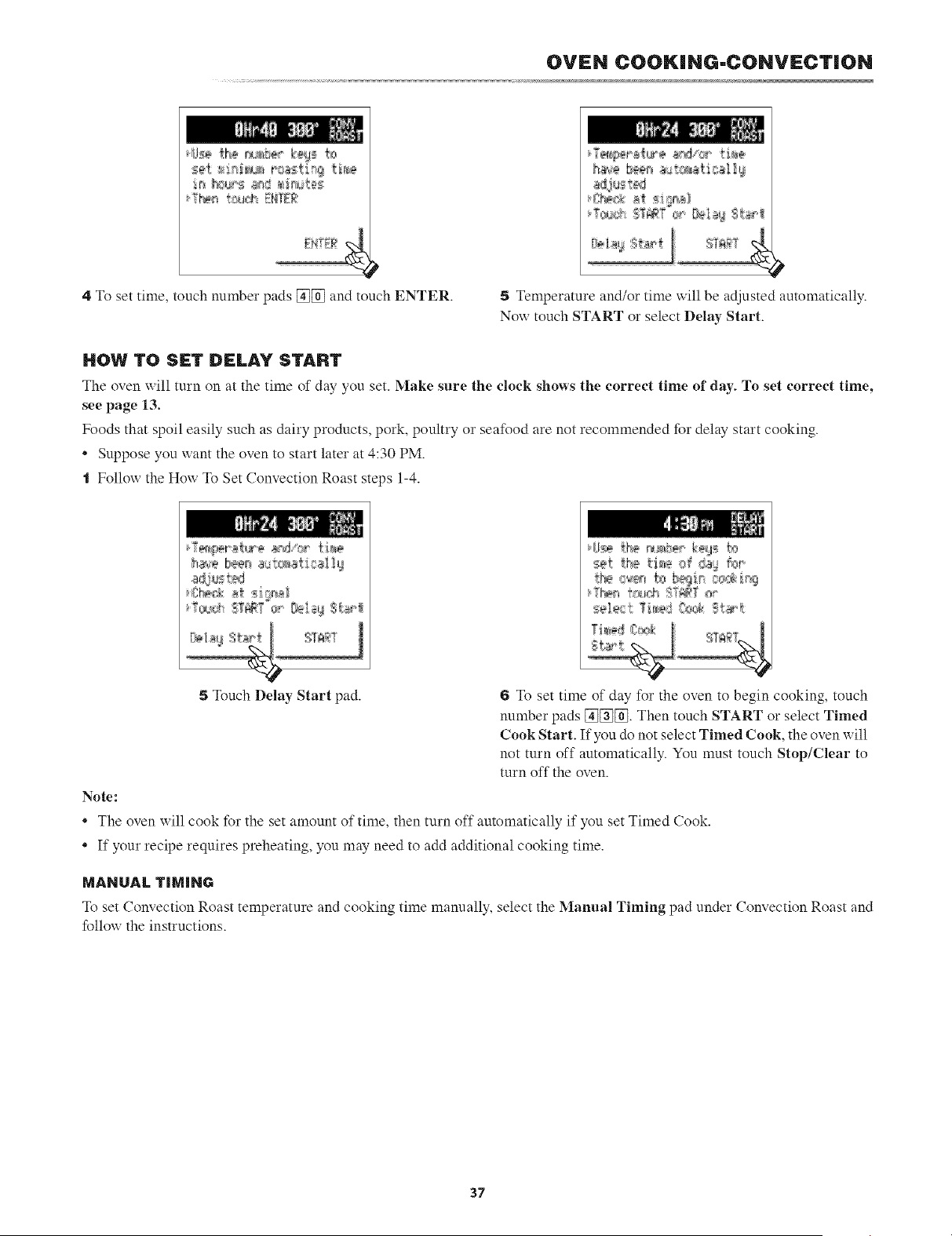
OVEN COOKING-CONVECTION
set t4:_;_ roasti_9 tbs
4 To set time, touch number pads [_[_ and touch ENTER.
a_j_s t_
5 Temperature and/or time will be adjusted automatically.
No:: touch START or select Delay Start.
HOW TO S|:T D_:LAY START
The oven will turn on at the time of day you set. Make sure the clock shows the correct time of day. To set correct time,
see page 13.
Foods that spoil easily such as dairy products, pork, poultry or seafood are not recommended for delay start cooking.
* Suppose you want the oven to start later at 4:30 PM.
t Follow the How To Set Convection Roast steps 1-4.
5 Touch Delay Start pad. 6 To set time of day for the oven to begin cooking, touch
number pads [_[_[_. Then touch START or select Timed
Cook Start. If you do not select Timed Cook, the oven will
not turn off automatically. You must touch Stop/Clear to
turn off the oven.
Note:
• The oven will cook for the set amount of time, then turn off automatically if you set Timed Cook.
• If your recipe requires preheating, you may need to add additional cooking time.
MANUAL TIMING
To set Convection Roast temperature and cooking time manually, select the lYannal Timing pad under Convection Roast and
follou the instructions.
37
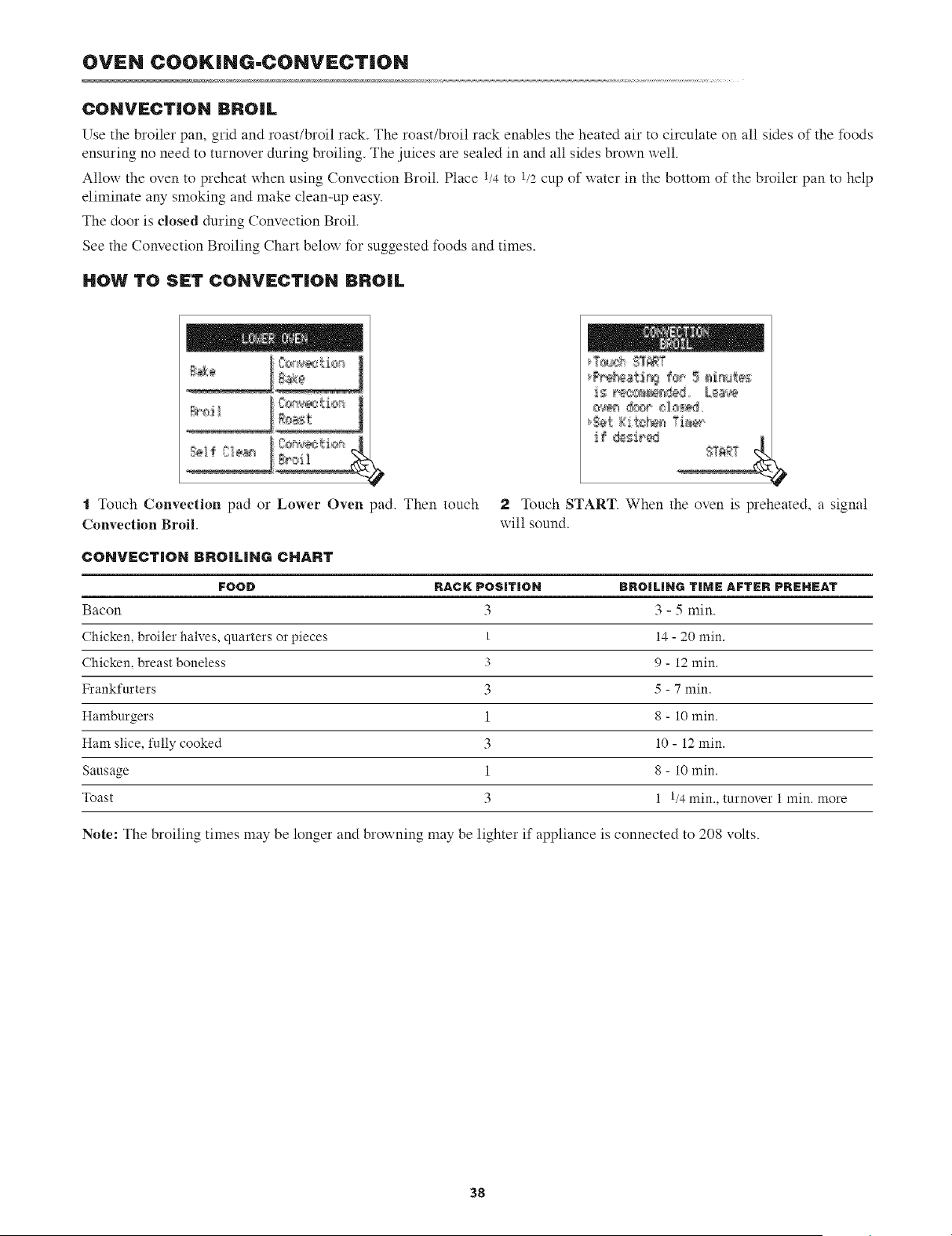
OVEN COOKING-CONVECTION
CONVECTION BROIL
Use the broiler pan, grid and roast/broil rack. The roast/broil rack enables the heated air to circulate on all sides of the foods
ensuring no need to turnover during broiling. The juices are sealed in and all sides brown well.
Allow the oven to preheat xxhen using Convection Broil. Place t/4 to 1/2cup of water in the bottom of the broiler pan to help
eliminate any smoking and make clean-up easy.
The door is dosed during Convection Broil.
See the Convection Broiling (;hart below for suggested foods and times.
HOW TO SI:T CONVF:CTION BROIL
t Touch Convection pad or Lower Oven pad. Then touch
Convection Broil.
f _ ®_i_ _,;[_ &
2 J_uch START. When the oven is preheated, a signal
will sound.
COHVFCTIOH 13RO[LIHG CHART
FOOD RACK POSiTiON BROILING TIME AFTER PREHEAT
Bacon 3 3 - 5 min.
Chicken, broiler halves, quarters or pieces 1 14 - 20 min.
Chicken, breast boneless 3 9 - 12 min.
Frankfurters 3 5 - 7 min.
Hamburgers 1 8 - 10 min.
Ham slice, fully cooked 3 10 - 12 min.
Sausage 1 8 - 10 min.
Toast 3 1 1/4 min., turnover 1 min. more
Note: The broiling times may be longer and broxxning may be lighter if appliance is connected to 208 volts.
38
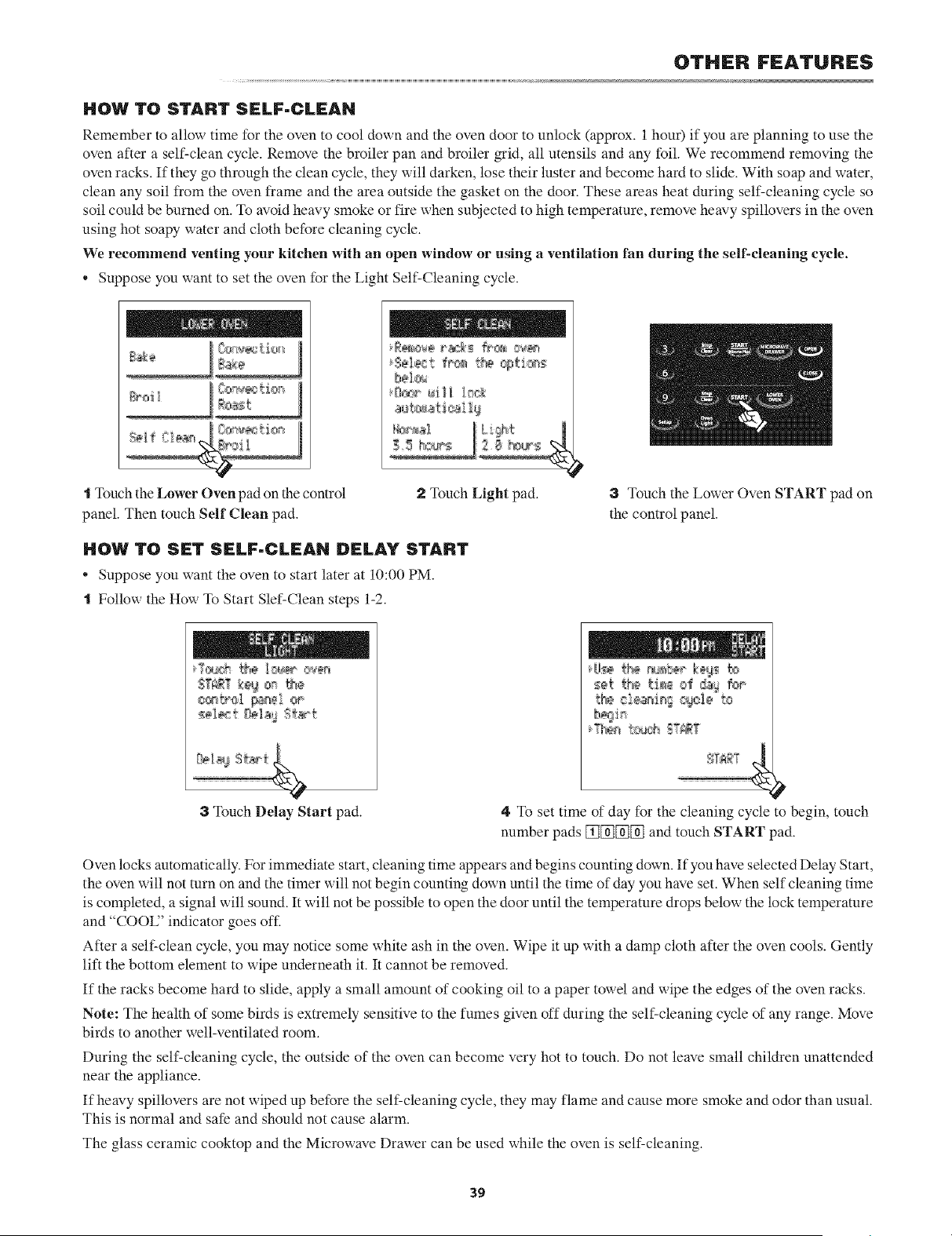
OTHER FEATURES
HOW TO START SELF-CLEAN
Remember to allow time for the oven to cool down and the oven door to unlock (approx. 1 hour) if you are planning to use the
oven after a self-clean cycle. Remove the broiler pan and broiler grid, all utensils and any foil. We recommend removing the
oven racks. If they go through the clean cycle, they will darken, lose their luster and become hard to slide. With soap and water,
clean any soil from the oven frame and the area outside the gasket on the door. These areas heat during self-cleaning cycle so
soil could be burned on. To avoid heavy smoke or fire when subjected to high temperature, remove heavy spillovers in the oven
using hot soapy water and cloth before cleaning cycle.
We recommend venting your kitchen with an open window or using a ventilation fan during the sell-cleaning cycle.
• Suppose you want to set the oven for the Light Self-Cleaning cycle.
Sel_:t fr_ t_ cgti_s
bel_<
t Touch the Lower Oven pad on the control
panel. Then touch Self Clean pad.
2 Touch Light pad.
HOW TO SET SELF-CLEAN DELAY START
• Suppose you want the oven to start later at 10:00 PM.
t Follow the How To Start Slef-Clean steps 1-2.
3 Touch the Lower Oven START pad on
the control panel.
3TouchDelay Start pad.
t_ ciear4n[ _tel_' to
4 To set time of day for the cleaning cycle to begin, touch
number pads [_[_[_[_ and touch START pad.
Oven locks automatically. For immediate start, cleaning time appears and begins counting down. If you have selected Delay Start,
the oven will not turn on and the timer will not begin counting down until the time of day you have set. When self cleaning time
is completed, a signal will sound. It will not be possible to open the door until the temperature drops below the lock temperature
and "COOU' indicator goes off.
After a self-clean cycle, you may notice some white ash in the oven. Wipe it up with a damp cloth after the oven cools. Gently
lift the bottom element to wipe underneath it. It cannot be removed.
If the racks become hard to slide, apply a small amount of cooking oil to a paper towel and wipe the edges of the oven racks.
Note: The health of some birds is extremely sensitive to the fumes given off during the self-cleaning cycle of any range. Move
birds to another well-ventilated room.
During the self-cleaning cycle, the outside of the oven can become very hot to touch. Do not leave small children unattended
near the appliance.
If heavy spillovers are not wiped up before the self-cleaning cycle, they may flame and cause more smoke and odor than usual.
This is normal and safe and should not cause alarm.
The glass ceramic cooktop and the Microwave Drawer can be used while the oven is self-cleaning.
39
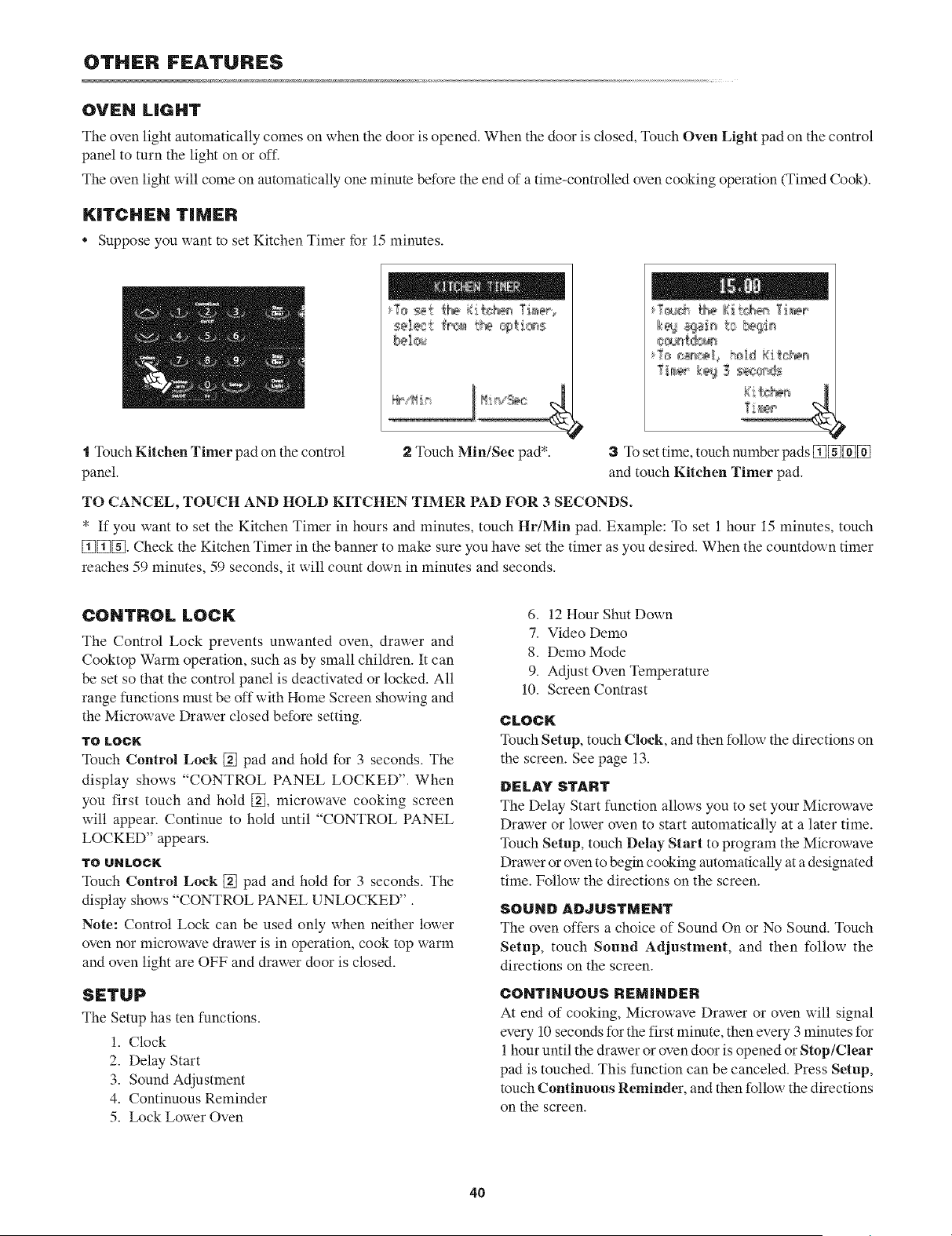
OTHER FEATURES
OVEN LIGHT
The oven light automatically comes on when the door is opened. When the door is closed, Touch Oven Light pad on the control
panel to turn the light on or off.
The oven light will come on automatically one minute before the end of a time-controlled oven cooking operation (Timed Cook).
KITCHEN TIMER
Suppose you want to set Kitchen Timer for 15 minutes.
ssls_t fr_a_t_a @tb_s
bal_u
T[t_ _ _ 3 s_;0cds
"1Touch Kitchen Timer pad on the control
panel.
2 Touch MiniSec pad*. 3 To set time, touch number pads _[_[][]
and touch KRehen Timer pad.
TO CANCEL, TOUCH AND HOLD KITCHEN TIMER PAD FOR 3 SECONDS.
* If you want to set the Kitchen Timer in hours and minutes, touch HriMin pad. Example: To set 1 hour 15 minutes, touch
[j][j][_. Check the Kitchen Timer in the banner to make sure you have set the timer as you desired. When the countdown timer
reaches 59 minutes, 59 seconds, it will count down in minutes and seconds.
CONTROL LOCi(
The Control Lock prevents unwanted oven, drawer and
Cooktop Warm operation, such as by small children. It can
be set so that the control panel is deactivated or locked. All
range functions must be off with Home Screen showing and
the Microwave Drawer closed before setting.
TO LOCN
Touch Control Lock [] pad and hold for 3 seconds. The
display shows "CONTROL PANEL LOCKED". When
you first touch and hold [], microwave cooking screen
will appear. Continue to hold until "CONTROL PANEL
LOCKED" appears.
"lrO IJHLOC_
Touch Control Lock [] pad and hold for 3 seconds. The
display shows "CONTROL PANEL UNLOCKED",
Note: Control Lock can be used only when neither lower
oven nor microwave drawer is in operation, cook top warm
and oven light are OFF and drawer door is closed.
SETUP
The Setup has ten functions.
1. Clock
2. Delay Start
3. Sound Adjustment
4. Continuous Reminder
5. Lock Lower Oven
6. 12 Hour Shut Down
7. Video Demo
8. Demo Mode
9. Adjust Oven Temperature
10. Screen Contrast
CLOCK
Touch Setup, touch Clock, and then follow the directions on
the screen. See page 13.
DELAY START
The Delay Start function allows you to set your Microwave
Drawer or lower oven to start automatically at a later time.
Touch Setup, touch Delay- Start to program the Microwave
Drawer or oven to begin cooking automatically at a designated
time. Follow the directions on the screen.
SOUND ADdUSTMENT
The oven offers a choice of Sound On or No Sound. Touch
Setup, touch Sound Adjustment, and then follow the
directions on the screen.
CONTINUOUS REMINDER
At end of cooking, Microwave Drawer or oven will signal
every 10 seconds for the first minute, then every 3 minutes for
1 hour until the drawer or oven door is opened or Stop/Clear
pad is touched. This function can be canceled. Press Setup,
touch Continuous Reminder, and then follow the directions
on the screen.
4O
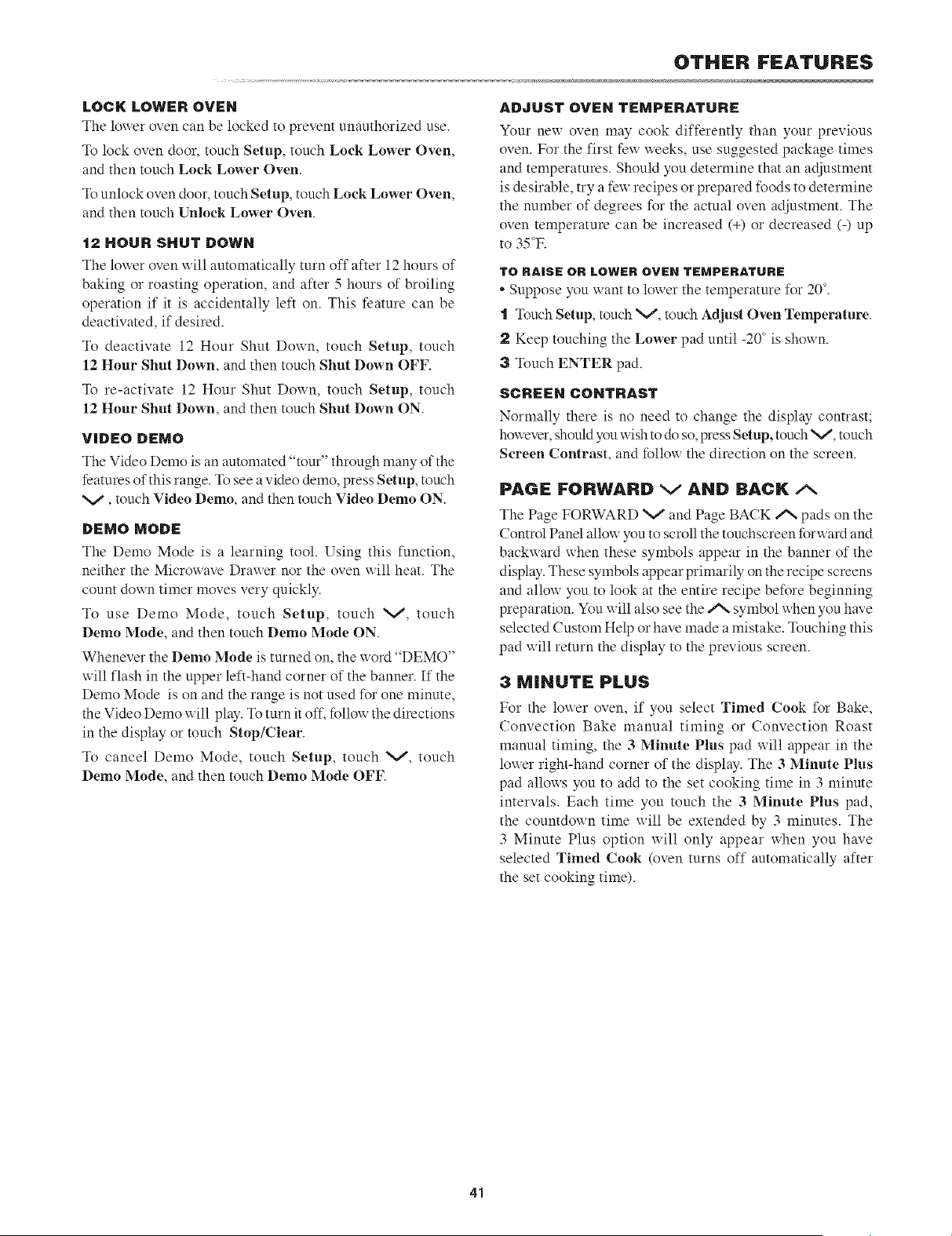
LOCK LOWER OVEN
The lower oven can be locked to prevent unauthorized use.
To lock oven door, touch Setup, touch Lock Lower Oven,
and then touch Lock Lower Oven.
To unlock oven door, touch Setup, touch Lock Lower Oven,
and then much Unlock Lower Oven.
12 HOUR SHUT DOWN
The lower oven will automatically turn off after 12 hours of
baking or roasting operation, and after 5 hours of broiling
operation if it is accidentally left on. This feature can be
deactivated, if desired.
To deactivate 12 Hour Shut Down, touch Setup, touch
12 Hour Shut Down, and then touch Shut Down OFF.
To re-activate 12 Hour Shut Down, touch Setup, touch
12 Hour Shut Down, and then touch Shut Down ON.
VIDEO DEMO
The Video Demo is an automated "tom"' through many of the
features of this range, q_ see a video demo, press Setup, touch
V, much Video Demo, and then much Video Demo ON.
DEMO MODE
The Demo Mode is a learning tool. Using this function,
neither the Microwave Drawer nor the oven will heat. The
count down timer moves very quickly.
To use Demo Mode, touch Setup, touch V, touch
Demo Mode, and then touch Demo Mode ON.
Whenever the Demo Mode is turned on, the word "DEMO"
will flash in the upper left-hand corner of the banner. If the
Demo Mode is on and the range is not used for one minute,
the Video Demo will play. To turn it off, follow the directions
in the display or much Stop/Clear.
To cancel Demo Mode, touch Setup, touch V, touch
Demo Mode, and then touch Demo Mode OFF.
OTHER FEATURES
ADJUST OVEN TEMPERATURE
Your new oven may cook differently than your previous
oven. For the first few weeks, use suggested package times
and temperatures. Should you determine that an adjustment
is desirable, try a few recipes or prepared foods to determine
the number of degrees for the actual oven adjustment. The
oven temperature can be increased (+) or decreased (-) up
to 35°E
TO RAISE OR LOWER OVEN TEMPERATURE
* Suppose you want to lower the temperature for 20 °.
"1 l_uch Setup, touch V, much Adjust Oven Temperature.
2 Keep touching the Lower pad until -20 ° is shown.
3 Touch ENTER pad.
SCREEN CONTRAST
Normally there is no need m change the display contrast;
however, should you wish m do so, press Setup, much V, touch
Screen Contrast, and follow the direction on the screen.
PAGF FORWARD V AND BACK/x
The Page FORWARD V and Page BACK A pads on the
Control Panel allow you to scroll the touchscreen forward and
backward when these symbols appear in the banner of the
display. These symbols appear primarily on the recipe screens
and allow you to look at the entire recipe before beginning
preparation. You will also see the/% symbol when you have
selected Custom Help or have made a mistake. Touching this
pad will return the display to the previous screen.
3 MINUTE PLUS
For the lower oven, if you select Timed Cook for Bake,
Convection Bake manual timing or Convection Roast
manual timing, the 3 Minute Plus pad will appear in the
lower right-hand corner of the display. The 3 Minute Plus
pad allows you to add to the set cooking time in 3 minute
intervals. Each time you touch the 3 Minute Plus pad,
the countdown time will be extended by 3 minutes. The
3 Minute Plus option will only appear when you have
selected Timed Cook (oven turns off automatically after
the set cooking time).
41
CLEANING AND CARE
Be%re cleaning any part of the range, be sure all controls
are turned OFF and all surfaces are cool.
NON-COOKTOP SURFACES
EXTERIOR
The outside surface is precoated metal and plastic. Clean
the outside with mild soap and water; rinse and dry with
a soft cloth. Do not use any type of household or abrasive
cleaner.
STAINLESS STEEL SURFACE
(SELECT MODELS)
The exterior should be wiped often with a soft damp cloth and
polished with a soft dry cloth to maintain its beauty. There
are also a variety of products designed especially for cleaning
and shining the stainless exterior of the oven. We recommend
that the cleaner be applied to a soft cloth and then carefully
used on the stainless exterior rather than sprayed directly on
m it. Follow package directions carefully.
OUTSIDE OF THE DOOR
Wipe the window on both sides with a soft damp cloth to
remove any spills or spatters. Metal parts will be easier to
maintain if wiped frequently with a soft damp cloth. Avoid
the use of spray and other harsh cleaners as they may stain,
streak or dull the door surface.
CONTROL KNOBS
The control knobs may be removed for easier cleaning. Before
removing the knobs, make sure the knobs are in the OFF
position. (;lean with a soft cloth dampened with mild soap
and water; rinse and dry with a soft cloth. When replacing the
knobs, check the OFF position to insure proper placement.
TOUCH CONTROL PANEL
If desired, the touch pads may be deactivated before cleaning.
See the Control Lock information on page 40 of this manual.
Wipe the panel with a cloth dampened slightly with water
only. Dry with a soft cloth. Do not scrub or use any sort of
chemical cleaners. Close door and touch Stop/Clear.
COOKTOP
If the cooktop should crack or break, do not use or attempt
to clean it. Call an authorized servicer.
NORMAL DAILY USE CLEARING
Only use cleaning products that have been specifically
designed for glass ceramic cooktops. Read and follow all
instructions and xxarnings on the cleaning cream label. A
sample cleaner cream is supplied with your range.
Before using the cooktop, clean the cooktop with the cleaner
cream, q_ avoid possible damage to the cooking surface, do
not apply cleaning cream to the glass surface when it is hot.
We recommend that you avoid wiping any surface unit areas
until they have cooled and the hot surface indicator light has
gone off. Sugar spills are the exception to this.
"[ Apply a few drops of cleaner cream to the cooktop that is
not hot.
2 Dampen clean paper towel and clean top.
3 Wipe off with another clean, damp paper towel, then
wipe dry.
Note:
. Make sure bottom of cookware and cooking area are clean
and dry before turning on the cookmp.
* Wipe up food spills and spatters before they burn on the
surface.
* Do not mix cleaning products. Mixtures may interact and
damage the surface.
SUGARY SP|LLOVERS (JELLIES, FUDGE,
CANDY, SYRUPS ETC.), MELTED PLASTICS OR
HEAVY BURNED ON RESIDUE
Sugary spillovers, melted plastics or heavy bmned on residue
can cause pitting of the surface of your cooktop unless the
spill is removed while still hot.
You must begin cleaning the spills uhile the cooktop is
still hot.
"1Turn off all surface units and remove all pans immediately.
2 Wearing an oven mitt, use a razor blade scraper at a 30
degree angle against the glass ceramic surface and scrape
from hot surface to a cooler area.
3 Remove the spills with paper towels.
Note:
• Do not use a dull or nicked blade. Be sure to use a new,
sharp razor scraper.
• Do not use the razor blade for daily cleaning as it may
wear the pattern on the glass.
METAL MARKS OR BURNED ON RESIDUE
Metal marks and burned on residue should be removed
immediately after the cooktop has cooled. Metal marks can
become permanent if not removed prior to future use.
"1Dampen a "scratchless" or "never scratch" pad that is safe
for non-stick cookvxare. The pattern and glass uill be damaged
if the pad is not damp or is soiled or if another type of pad is
used. Apply a cleaner cream for glass ceramic cooktops.
2 Scrub to remove as much soil as possible.
3 Apply the cleaner cream over the soil, cover with a damp
paper towel and let stand 30 minutes to 1 hour. Keep moist
by covering the paper tox_el with plastic wrap.
4 Scrub again and x_ipe off xxith another clean, damp paper
towel. Then wipe dry.
Note:
* Do not use aluminum foil on the cooktop.
* If pots or pans of aluminum or copper are allowed to
42
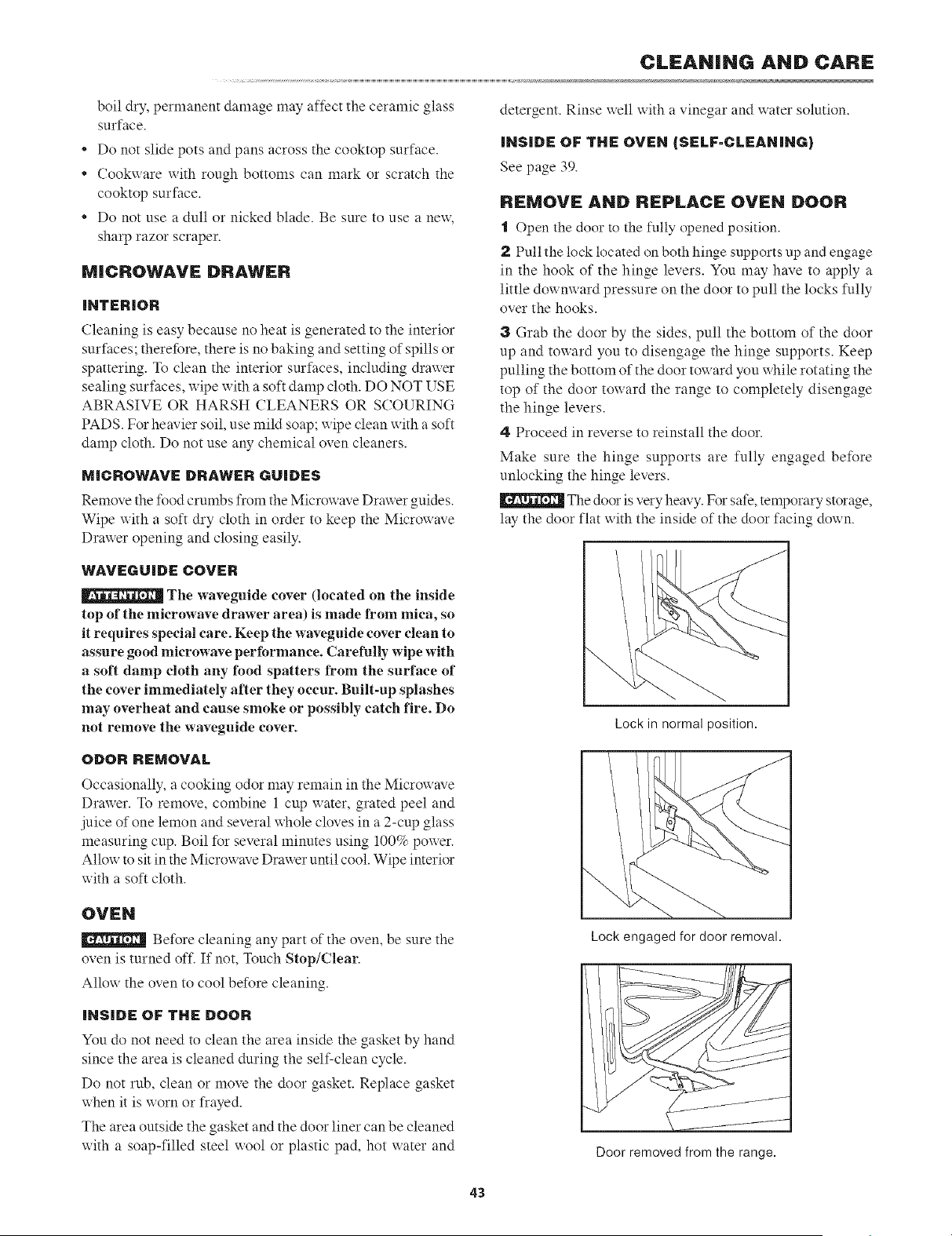
CLEANING AND CARE
boil dry, permanent damage may affect the ceramic glass
surface.
* Do not slide pots and pans across the cooktop surface.
* Cookx_are with rough bottoms can mark or scratch the
cooktop surface.
* Do not use a dull or nicked blade. Be sure to use a new,
sharp razor scraper.
MICROWAVE DRAWER
iNTERIOR
Cleaning is easy because no heat is generated to the interior
surfaces; therefore, there is no baking and setting of spills or
spattering, l_) clean the interior surfaces, including drawer
sealing surfaces, wipe with a soft damp cloth. DO NOT USE
ABRASIVE OR HARSH CLEANERS OR SCOURING
PADS. For heavier soil, use mild soap; wipe clean with a soft
damp cloth. Do not use any chemical oven cleaners.
MICROWAVE DRAWER GUIDES
Remove the food crumbs from the Microwave Drawer guides.
Wipe with a soft dry cloth in order to keep the Microwave
Draxxer opening and closing easily.
detergent. Rinse well with a vinegar and water solution.
INSIDE OF THE OVEN (SELF-CLEANING)
See page 39.
Rr:MOVi: AND RF:PLACE OVEN DOOR
I ()pen the door to the fully opened positkm.
2 Pull the lock located on both hinge supports up and engage
in the hook of the hinge levers. You may have to apply a
little dowmvard pressure on the door to pull the locks fully
over the hooks.
3 Grab the door by the sides, pull the bottom of the door
up and toward you to disengage the hinge supports. Keep
pulling the bottom of the door toward you while rotating the
top of the door toward the range to completely disengage
the hinge levers.
4 Proceed in reverse to reinstall the door.
Make sure the hinge supports are fully engaged before
unlocking the hinge levers.
The door is very heavy. For safe, temporary storage,
lay the door flat with the inside of the door facing down.
WAVEGUiDE COVER
The waveguide cover (located on the inside
top of the microwave drawer area) is made from mica, so
it requires special care. Keep the waveguide cover clean to
assure good microwave peribrmanee. Carefully wipe with
a soft damp cloth any food spatters from the surface of
the cover immediately after they occur. Built=up splashes
may overheat and cause smoke or possibly catch fire. Do
not remove the waveguide cover.
Lock in normal position.
ODOR REMOVAL
Occasionally, a cooking odor may remain in the Microwave
Drawer. To remove, combine 1 cup water, grated peel and
juice of one lemon and several whole cloves in a 2-cup glass
measuring cup. Boil for several minutes using 100% pox_er.
Allow to sit in the Microwave Drawer until cool. Wipe interior
with a soft cloth.
OVI:N
Before cleaning any part of the oven, be sure the
oven is turned off. If not, ]2mch Stop/Clear.
Allow the oven to cool before cleaning.
iNSIDE OF THE DOOR
You do not need to clean the area inside the gasket by hand
since the area is cleaned during the self-clean cycle.
Do not rub, clean or move the door gasket. Replace gasket
when it is worn or frayed.
The area outside the gasket and the door liner can be cleaned
with a soap-filled steel wool or plastic pad, hot water and
Lock engaged for door removal.
jJ
Door removed from the range.
43
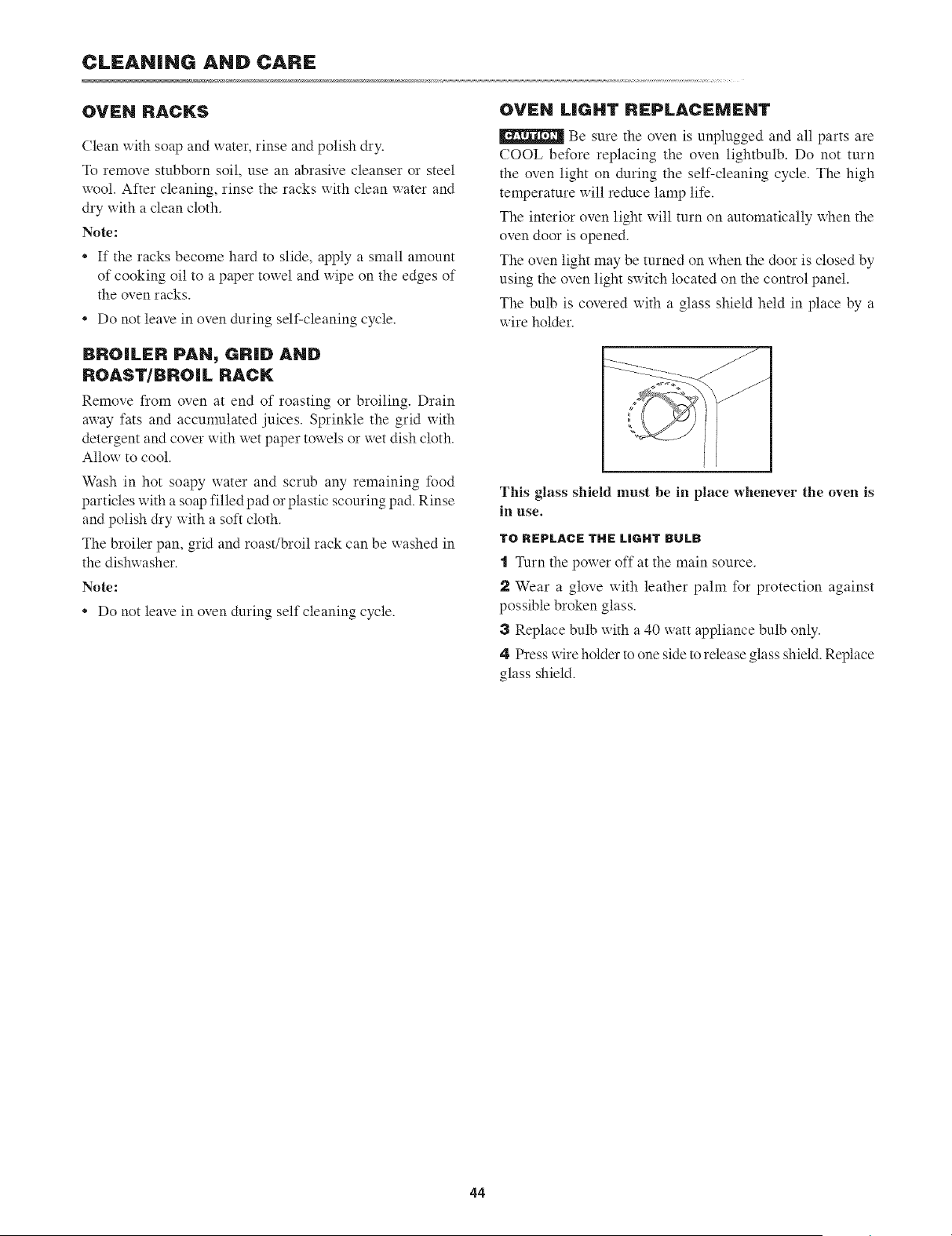
CLEANING AND CARE
OVEN RACKS
Clean with soap and water, rinse and polish dry.
To remove stubborn soil, use an abrasive cleanser or steel
wool. After cleaning, rinse the racks with clean water and
dry with a clean cloth.
Note:
• If the racks become hard to slide, apply a small amount
of cooking oil to a paper towel and wipe on the edges of
the oven racks.
• Do not leave in oven during self-cleaning cycle.
OVEN LIGHT REPLACEMENT
Be sure the oven is unplugged and all parts are
COOL before replacing the oven lightbulb. Do not turn
the oven light on during the self-cleaning cycle. The high
temperature will reduce lamp life.
The interior oven light will turn on automatically when the
oven door is opened.
The oven light may be turned on when the door is closed by
using the oven light sxxitch located on the control panel.
The bulb is covered with a glass shield held in place by a
wire holder.
BROILER PAN, GRiD AND
ROAST/BROIL RACK
Remove from oven at end of roasting or broiling. Drain
away fats and accmnulated juices. Sprinkle the grid with
detergent and cover with wet paper toxxels or wet dish cloth.
Allow to cool.
Wash in hot soapy water and scrub any remaining food
particles with a soap filled pad or plastic scouring pad. Rinse
and polish dry with a soft cloth.
The broiler pan, grid and roast/broil rack can be washed in
the dishwasher.
Note:
* Do not leave in oven during self cleaning cycle.
m
This glass shield must be in place whenever the oven is
in use.
TO REPLACE THE LIGHT BULB
"1 Turn the power off at the main source.
2 Wear a glove with leather pahn for protection against
possible broken glass.
a Replace bulb with a 40 watt appliance bulb only.
4 Press wire holder to one side m release glass shield. Replace
glass shield.
44
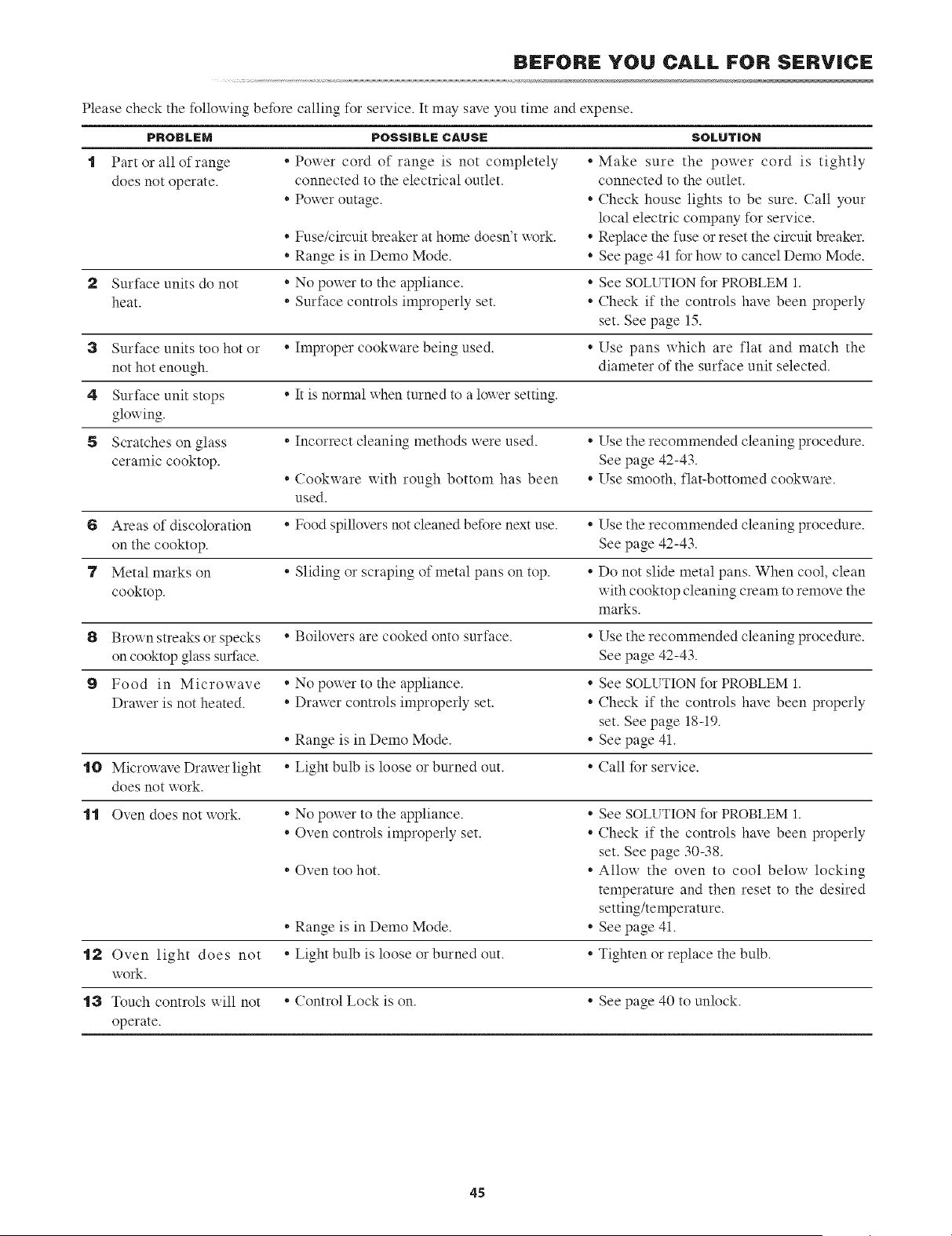
BEFORE YOU CALL FOR S_:RV|CE
Please check the %llowing be%re calling %r service. It may save you time and expense.
SOLUTIOH
1 * Make sure the power cord is tightly"
connected to the outlet.
• Check house lights to be sure. Call your
local electric company for service.
• Fuse/circuit breaker at home doesn't work. * Replace the fuse or reset the circuit breaker.
• Range is in Demo Mode. * See page 41 for hou to cancel Demo Mode.
2 Surface units do not * No power to the appliance. * See SOLI_ TION for PROBLEM 1.
heat. * Surface controls improperly set. * Check if the controls have been properly
set. See page 15.
3 Surface units too hot or * Improper cookware being used. * Use pans which are flat and match the
not hot enough, diameter of the surface unit selected.
4 Surface unit stops * It is normal when turned to a lower setting.
glowing.
5 Scratches on glass * Incorrect cleaning methods were used. * Use the recommended cleaning procedure.
ceramic cooktop. See page 42-43.
• Cookuare uith rough bottom has been * Use smooth, flat-bottomed cookxxare.
used.
6 Areas of discoloration * Food spillovers not cleaned before next use. * Use the recommended cleaning procedure.
on the cooktop. See page 42-43.
7 Metal marks on * Sliding or scraping of metal pans on top. * Do not slide metal pans. When cool, clean
cooktop, with cooktop cleaning cream to remove the
marks.
8 Brown streaks or specks * Boilovers are cooked onto surface. * Use the recommended cleaning procedure.
on cooktop glass surface. See page 42-43.
9 Food in Microwave * No power to the appliance. * See SOLUTION for PROBLEM 1.
Drawer is not heated. * Drawer controls improperly set. * Check if the controls have been properly
set. See page 18-19.
• Range is in Demo Mode. * See page 41.
.10 Microx_ave Drauer light * Light bulb is loose or burned out. * Call for service.
does not work.
.1.1 Oven does not work. * No power to the appliance. * See SOLUTION for PROBLEM 1.
• Oven controls improperly set. * Check if the controls have been properly
PROBLEM
Part or all of range
does not operate.
set. See page 30-38.
* Allow the oven to cool below locking
temperature and then reset to the desired
setting/temperature.
* See page 41.
* Tighten or replace the bulb.
POSSIBLE CAUSE
* Power cord of range is not completely
connected to the electrical outlet.
* Poxxer outage.
* Oven too hot.
* Range is in Demo Mode.
.1'/_ Oven light does not * Light bulb is loose or burned out.
work.
"13 Touch controls will not * Control Lock is on. * See page 40 to unlock.
operate.
45
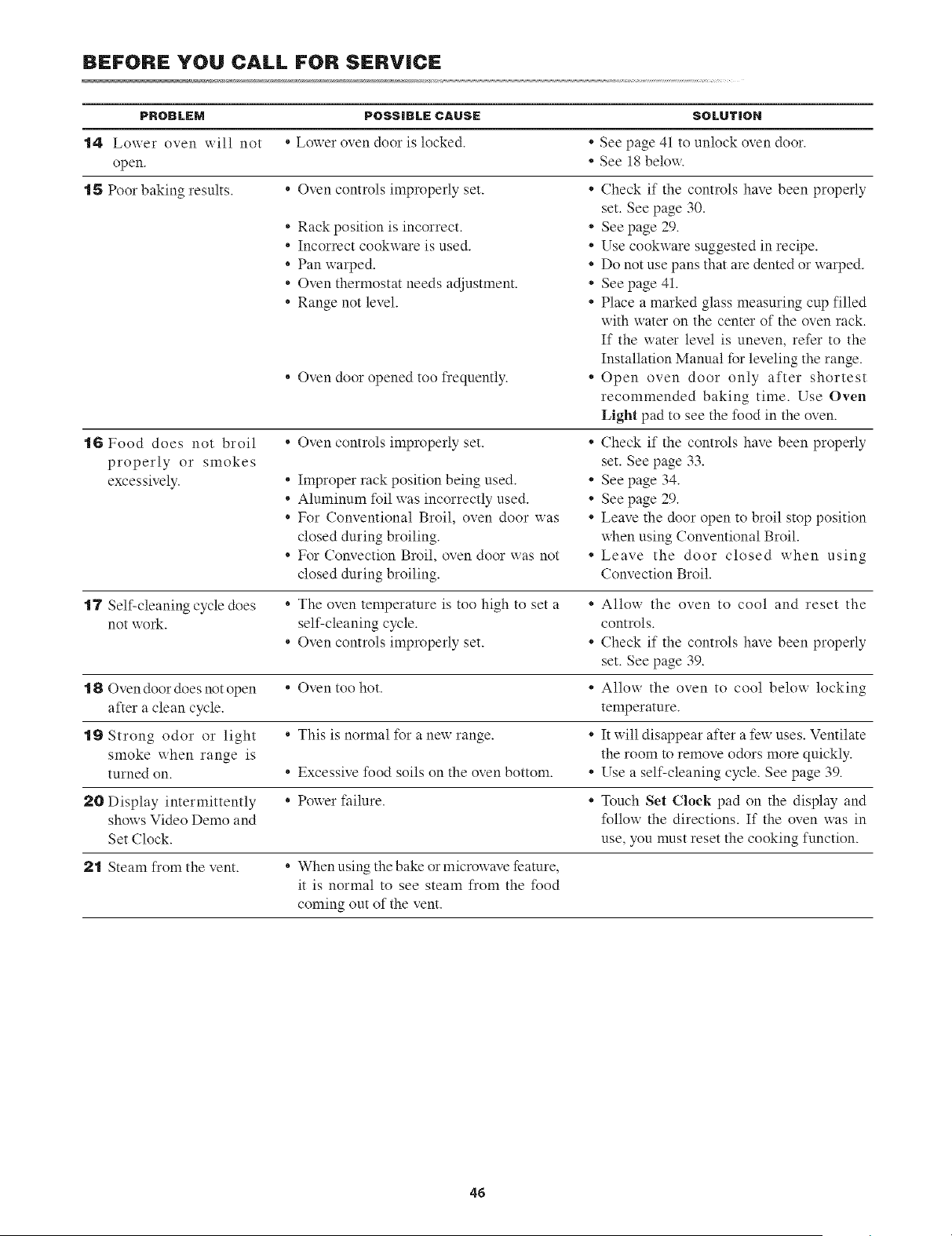
BEFORE YOU CALL FOR SERV|CE
PROBLEM POSSIRL r: CAUSE SOLUTION
14 Lower oven will not * Lower oven door is locked. * See page 41 to unlock oven door.
open. * See 18 below.
15 Poor baking results. * Oven controls improperly set. * Check if the controls have been properly
IG Food does not broil *
properly or smokes
excessively. *
o
o
set. See page 30.
* See page 29.
* Use cookware suggested in recipe.
* Do not use pans that are dented or warped.
* See page 41.
* Place a marked glass measuring cup filled
with water on the center of the oven rack.
If the water level is uneven, refer to the
Installation Manual for leveling the range.
* Open oven door only after shortest
recommended baking time. Use Oven
Light pad to see the food in the oven.
* Check if the controls have been properly
set. See page 33+
See page 34.
See page 29.
Leave the door open to broil stop position
_hen using Conventional Broil.
Leave the door closed when using
Convection Broil.
* Rack position is incorrect.
* Incorrect cookware is used.
* Pan warped.
* Oven thermostat needs adjustment.
* Range not level.
* Oven door opened too frequently.
Oven controls improperly set.
Improper rack position being used.
Aluminum foil was incorrectly used.
For Conventional Broil, oven door was
closed during broiling.
* For Convection Broil, oven door was not *
closed during broiling.
o
o
o
"17 Self-cleaning cycle does * The oven temperature is too high to set a * Allow the oven to cool and reset the
not work. self-cleaning cycle, controls.
• Oven controls improperly set. * Check if the controls have been properly
set. See page 39.
.18 Ovendoordoesnotopen * Oven too hot. * Allow the oven to cool below locking
after a clean cycle, temperature.
.19 Strong odor or light * This is normal for anewrange. * It will disappear after afewuses. Ventilate
smoke when range is the room to remove odors more quickly.
turned on. * Excessive food soils on the oven bottom. * Use a self-cleaning cycle. See page 39.
20 Display intermittently * Power failure. * Touch Set C|oel{ pad on the display and
shows Video Demo and follow the directions. If the oven was in
Set Clock. use, you must reset the cooking function.
2"1 Steam from the vent. * When using the bake or microwave feature,
it is normal to see steam from the food
coming out of the vent.
46
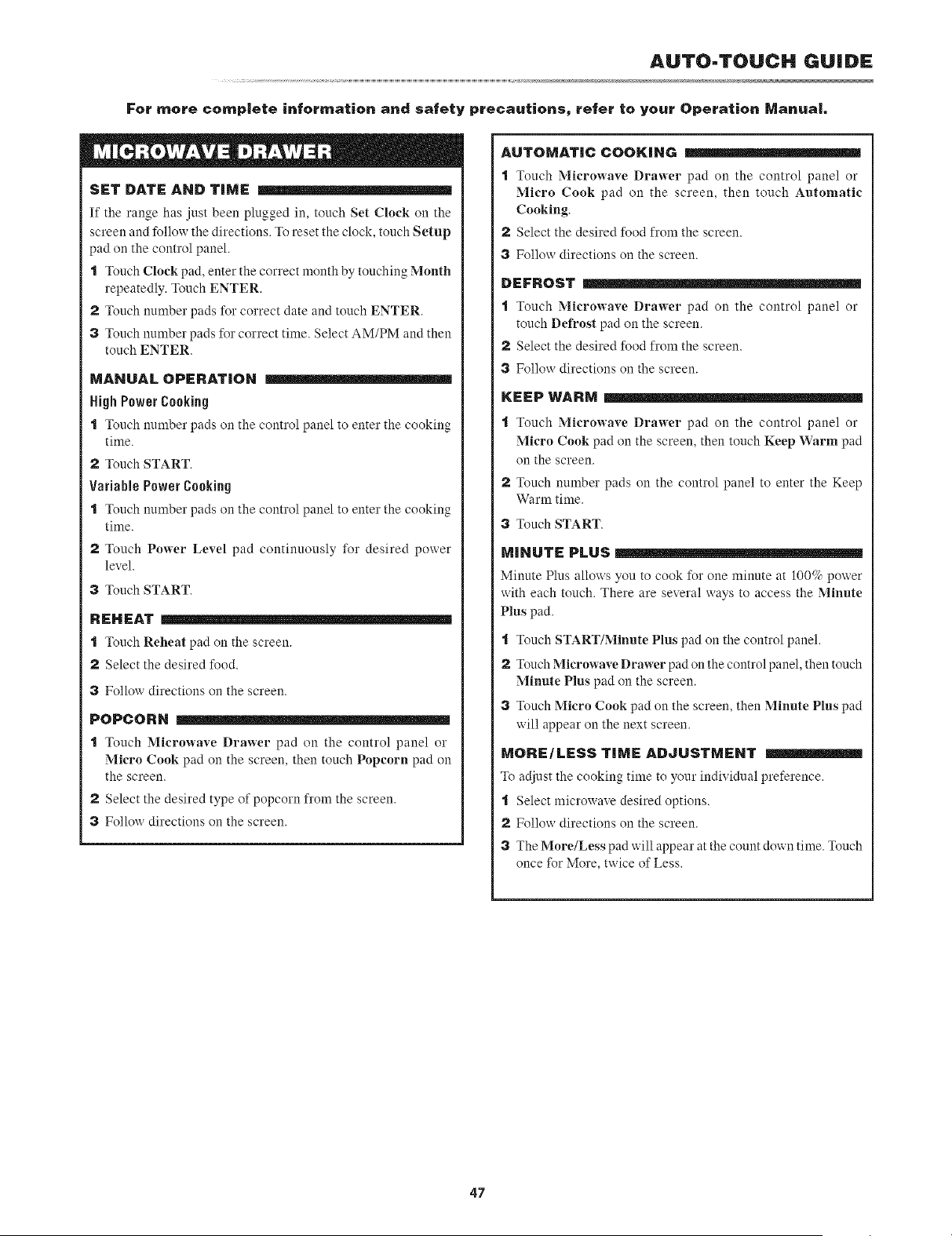
AUTO=TOUCH GUIDE
For more comp|ete information and safety precautions, refer to your Operation Manual
SET DATE AND TIME
If the range has just been plugged in, touch Set Clock on the
screen and Ibllow the directions. To reset the clock, touch Setup
pad on the control panel.
I Touch Clock pad, enter the correct month by touching Month
repeatedly. Touch ENTER.
2 Touch number pads for correct date and touch ENTER.
3 Touch number pads Ik)rcorrect time. Select AM/PM and then
touch ENTER.
MANUAL OPERATION
High Power Cooking
I Touch number pads on the control panel to enter the cooking
time.
2 Touch START.
Variable Power Cooking
I Touch number pads on the control panel to enter the cooking
time.
2 Touch Power Level pad continuously for desired power
level.
3 Touch START.
REHEAT
I Touch Reheat pad on the screen.
2 Select the desired I_od.
3 Follow directions on the screen.
POPCORN
I Touch Microwave Drawer pad on the control panel or
Micro Cook pad on the screen, then touch Popeorn pad on
the screen.
2 Select the desired type of popcorn from the screen.
3 Follow directions on the screen.
AUTOMATIC COOKING
I Touch Micro',_-ave Drawer pad on the control panel or
Micro Cook pad on the screen, then touch Automatic
Cooking.
2 Select the desired Ik_odfrom the screen.
3 Follow directions on the screen.
DEFROST
I Touch Microwave Drawer pad {_)11the control panel or
touch Defrost pad on the screen.
2 Select the desired fk_odfrom the screen.
3 Follow directions on the screen.
KEEP WARM
"l Touch Microwave Drawer pad on the control panel or
Micro Cook pad on the screen, then touch Keep Warm pad
on the screen.
2 Touch number pads on the control panel to enter the Keep
Warm time.
3 Touch START.
MINUTE PLUS
Minute Plus allows you to cook for one minnte at 100_ power
with each touch. There are several ways to access the Minute
Plus pad.
"l Touch START/Minute Plus pad on the control panel.
2 Touch Microwave Drawer pad on the control panel, then touch
Min,te Plus pad on the screen.
3 Touch Micro Cook pad on the screen, then Minnte Pl,s pad
will appear on the next screen.
MORE/LESS TiME ADJUSTMENT
To adjust the cooking time to yonr individual preference.
t Select microwave desired options.
2 Follow directions on the screen.
3 The More/Less pad will appear at the count down time. Touch
once for More, twice of Less.
47
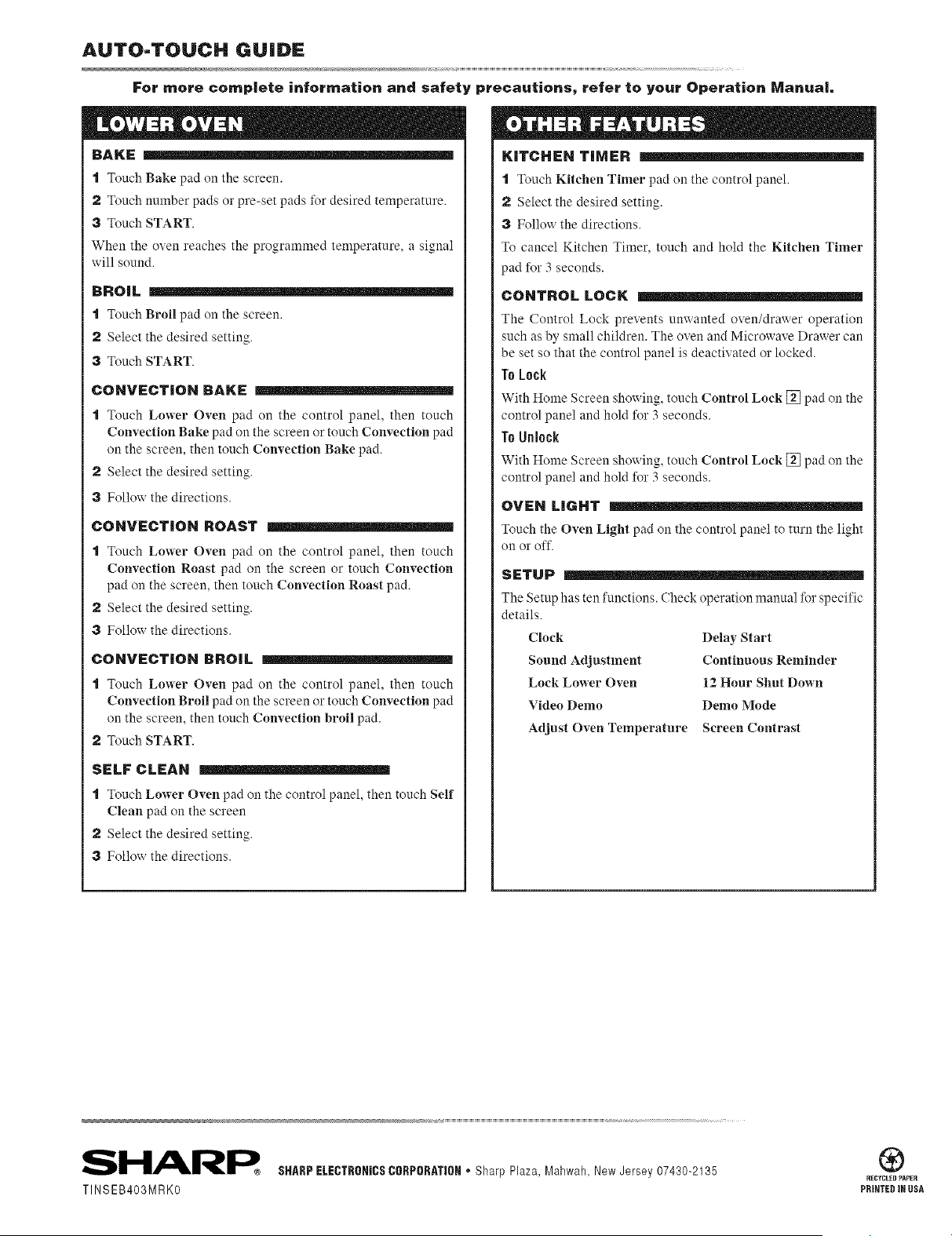
AUTO-TOUCH GUIDE
For mere complete information and safety precautions_ refer to your Operation Manual
BAKE
I Touch Bake pad on the screen.
2 Touch number pads or pre-set pads t_)r desired temperature.
3 Touch START.
When the oven reaches the programmed temperature, a signal
will sonnd.
BROIL
I Touch Broil pad on the screen.
2 Select the desired setting.
3 Touch START.
CONVECTION BAKE
"1 Touch Lower Oven pad on the control panel, then touch
Convection Bake pad on the screen or touch Convection pad
on the screen, then touch Convection Bake pad.
2 Select the desired setting.
3 Follow the directions.
CONVECTION ROAST
"1 Touch Lower Oven pad on the control panel, then touch
Convection Roast pad on the screen or touch Convection
pad on the screen, then touch Convection Roast pad.
2 Select the desired setting.
3 Follow the directions.
CONVECTION BROIL
"1 Touch Lower Oven pad on the control panel, then touch
Convection Broil pad on the screen or touch Convection pad
on the screen, then touch Convection broil pad.
2 Touch START.
SELF CLEAN
"1 Touch Lower Oven pad on the control panel, then tonch Self
Clean pad on the screen
2 Select the desired setting.
3 Follow the directions.
KITCHEN TIMER
I Touch Kitchen Timer pad on the control panel.
2 Select the desired setting.
3 Follow the directions.
To cancel Kitchen Timer, touch and hold the Kitchen Timer
pad for 3 seconds.
CONTROL LOCK
The Control Lock prevents umvanted oven/drawer operation
such as by small children. The oven and Microwave Drawer can
be set so that the control panel is deactivated or locked.
To Lock
With Home Screen showing, tonch Control Lock [] pad on the
control panel and hold for 3 seconds.
To Unlock
With Home Screen showing, tonch Control Lock [] pad on the
control panel and hold %r 3 seconds.
OVEN LIGHT
Tonch the Oven Light pad on the control panel to turn the light
on or off.
SETUP
The Setup has ten functions. Check operation mannal for specific
details.
Clock
Sound Adjustment
Lock Lower Oven
Video Demo
Adjust Oven Temperature
Delay Start
Continuous Reminder
12 Hour Shut Down
Demo Mode
Screen Contrast
TINSEB403MRKO
SHARPELECTRORICSCORPORATIOR* Sharp Plaza, Mahwah, New Jersey 07430-2135
®
RECYCLED PAPER
PRINTED MNUSA