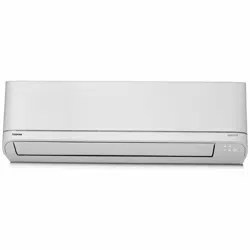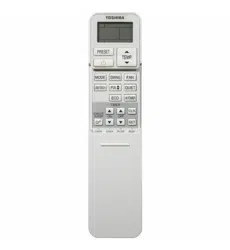
AIR CONDITIONER (SPLIT TYPE)
For general public use
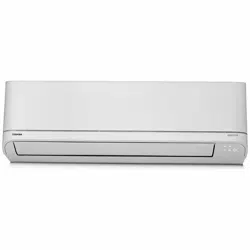
lndoor unit
RAS-22, 24E2KV2G-A
Outdoor unit
RAS-22, 24E2AVG-A
1120650281
OWNER’S MANUAL
1120650281_00_S01_182x257_8p_S_p70_210329.indd 1 21/04/01 1:22:58 PM
PRECAUTIONS FOR SAFETY
Read the precautions in
this manual carefully before
operating the unit.
This appliance is lled with R32.
●
Keep this manual where the operator can easily nd it.
●
Read the precautions in this manual carefully before operating the unit.
●
This appliance is intended to be used by expert or trained users in shops, in light
industry and on farms, or for commercial use by lay persons.
●
The precautions described herein are classied as DANGER, WARNING and
CAUTION. They both contain important information regarding safety. Be sure to
observe all precautions without fail.
DANGER
● Do not install, repair, open or remove the cover. It may expose you to
dangerous voltages. Ask the dealer or the specialist to do this.
●
Turning o the power supply will not prevent potential electric shock.
●
The appliance shall be installed in accordance with national wiring regulation.
●
Means for disconnection from the supply having a contact separation of at least
3 mm in all poles must be incorporated in the xed wiring.
●
The appliance must be stored in a room without continuously operating ignition
sources (for example, open ames, an operating gas appliance or an operating
electric heater).
●
In order to avoid re, explosion or injury, do not operate the unit when harmful
gases (e.g. ammable or corrosive) are detected near the unit.
WARNING
●
Do not expose your body directly to cool or warm air for a long time.
●
Do not insert your nger or any article into the air inlet/outlet.
●
When an abnormality (burning smell, etc.) occurs, stop the air conditioner and
disconnect the power supply or turn o the breaker.
●
This appliance can be used by children aged from 8 years and above and
persons with reduced physical, sensory or mental capabilities or lack of
experience and knowledge if they have been given supervision or instruction
concerning use of the appliance in a safe way and understand the hazards
involved. Children shall not play with the appliance. Cleaning and user
maintenance shall not be made by children without supervision.
●
This appliance is not intended for use by person (including children) with
reduced physical, sensory or mental capabilities, or lack of experience and
knowledge, unless they have been given supervision or instruction concerning
use of the appliance by a person responsible for their safety.
●
The air conditioner must be installed, maintained, repaired and removed by a
qualied installer or qualied service person. When any of these jobs is to be
done, ask a qualied installer or qualied service person to do them for you.
●
Children should be supervised to ensure that they do not play with the
appliance.
1120650281_00_S01_182x257_8p_S_p70_210329.indd 2 21/04/01 1:22:58 PM
PRECAUTIONS FOR SAFETY
●
Do not use any refrigerant dierent from the one specied (R32) for
complement or replacement. Otherwise, abnormally high pressure may be
generated in the refrigeration cycle, which may result in a failure or explosion of
the product or an injury to your body.
● Do not use means to accelerate the defrosting process or to clean, other than
those recommended by the manufacturer.
● The appliance shall be stored in a room without continuously operating ignition
sources (for example: open ames, an operating gas appliance or an operating
electric heater).
● Be aware that refrigerants may not contain an odour.
● Do not pierce or burn as the appliance is pressurized. Do not expose the
appliance to heat, ames, sparks, or other sources or ignition. Else, it may
explode and cause injury or death.
CAUTION
● Do not wash the unit with water. It may cause an electric shock.
● Do not use this air conditioner for other purposes such as preserving food,
breeding animal, etc.
● Do not step or put anything on the indoor/outdoor unit. It may cause an injury or
damage the unit.
● Do not touch aluminium n because it may cause an injury.
● Before cleaning the unit, turn o the main switch or the circuit breaker.
● When the unit won’t be used for a long time, turn o the main switch or the
circuit breaker.
● It is recommended that maintenance be performed by a specialist when the unit
has been operated for a long time.
● The manufacturer shall not assume any liability for the damage caused by not
observing the description of this manual.
1120650281_00_S01_182x257_8p_S_p70_210329.indd 3 21/04/01 1:22:58 PM
1
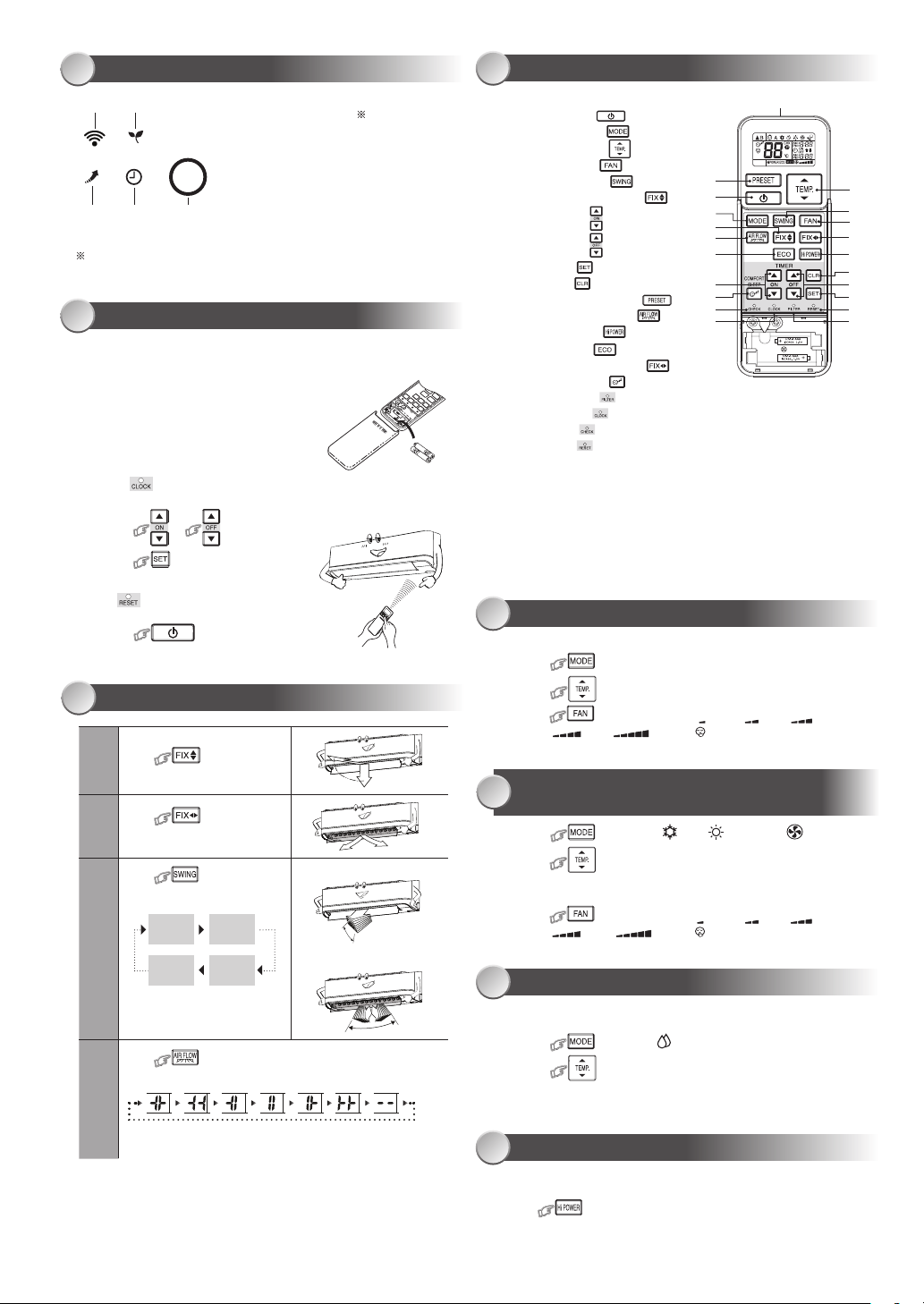
INDOOR UNIT DISPLAY
Note:
●
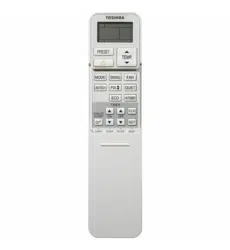
The provided Remote Controller is a wireless type, which also can be
used as a wire. Please see “How to Connect The Remote Controller
for Wired Operation”, located in installation instruction, in case of wired
control is required.
●
In wire operation, remote controller will return to initial condition
(PRESET, TIMER and CLOCK will return to initial condition) when user
shutdown power supply of Air conditioner.
1
Infrared signal emitter
2
Start/Stop button ( )
3
Mode select button ( )
4
Temperature button ( )
5
Fan speed button ( )
6
Swing louver button ( )
7
Set louver Up-Down button ( )
8
On timer button ( )
9
O timer button ( )
0
Setup button ( )
!
Clear button ( )
@
Memory and Preset button ( )
#
AIR FLOW selection button ( )
$
High power button ( )
%
Economy button ( )
^
Set louver Left-Right button ( )
&
Comfort sleep button ( )
*
Filter reset button ( )
(
Set clock button ( )
)
Check button ( )
-
Reset button ( )
2
PREPARATION BEFORE USE
4
REMOTE CONTROL
● Display brightness can be adjusted, follow procedure on !.
Require Wireless LAN connecting adapter which available as
accessory.
1
3 4
5
2
1 ECO (White)
2 Wi-Fi access (White)
3 Hi Power (White)
4 Timer (White)
5 Operation mode
- Cool (Blue)
- Heat (Orange)
Preparing Filters
1. Open the air inlet grille and remove the air lters.
2. Attach the lters. (
see detail in the Installation Manual
).
Loading Batteries (when use wireless operation.)
1. Remove the slide cover.
2. Insert 2 new batteries (AAA type)
following the (+) and (–) positions.
1
4
@
2
3
7
#
%
8
&
)
(
6
5
^
$
!
9
0
-
*
Clock Setup
1. Push by tip of the pencil.
If timer indication is ashing, go to the next step 2.
2. Press
or
: adjust the time.
3. Press
: Set the time.
Remote Control Reset
Push by tip of the pencil or
1. Remove the batteries.
2. Press
.
3. Insert the batteries.
5
AUTOMATIC OPERATION
To automatically select cooling, heating, or fan only operation
1. Press
: Select Auto A.
2. Press : Set the desired temperature. Min. 17°C, Max. 30°C,
3. Press : Select AUTO, LOW , LOW+ , MED ,
MED+ , HIGH or Quiet
.
6
COOLING / HEATING / FAN ONLY
OPERATION
1. Press : Select Cool , Heat , or Fan only .
2. Press
: Set the desired temperature.
Min. 17°C, Max. 30°C,
Fan Only: No temperature indication
3. Press : Select AUTO, LOW , LOW+ , MED ,
MED+ , HIGH or Quiet
.
8
Hi POWER OPERATION
To automatically control room temperature and airow for faster cooling or
heating operation (except in DRY and FAN ONLY mode)
Press : Start and stop the operation.
7
DRY OPERATION
For dehumidication, a moderate cooling performance is controlled
automatically.
1. Press
: Select Dry .
2. Press : Set the desired temperature. Min. 17°C, Max. 30°C.
Note: Dry mode fan speed is set to Auto only.
Press
: Move the louver
in the desired vertical direction.
Press
: Move the
louver in the desired horizontal
direction.
Press
: For select
louver swing operation.
Press
: To select provided air ow direction
Wide
center
Wide
right
Wide
left
Spot
left
Spot
right
Return to
manually setting
Spot
center
Note:
●
Do not move the louver manually by hands or others.
●
The louver may automation positioning by some operation mode.
3
1
2
3
4
AIR FLOW DIRECTION
Vertical
(Up-Down)
Swing
Swing o
Pi
Pi
Pi Pi
Horizontal
(Left-Right)
Swing
Up-Down
Left-Right
Swing
●
Vertical (Up-Down) swing
●
Horizontal (Left-Right) swing
“Pi” sound when air ow direction is set and “Pi Pi” sound when
air ow direction is canceled and return to manually setting.
1120650281_00_S01_182x257_8p_S_p70_210329.indd 4 21/04/01 1:23:00 PM
To automatically control room temperature to save energy (except in DRY and
FAN ONLY mode)
Press : Start and stop the operation.
Note: Cooling operation; the set temperature will increase automatically 1
degree/hour for 2 hours (maximum 2 degrees increase). For heating
operation the set temperature will decrease.
9
ECO OPERATION
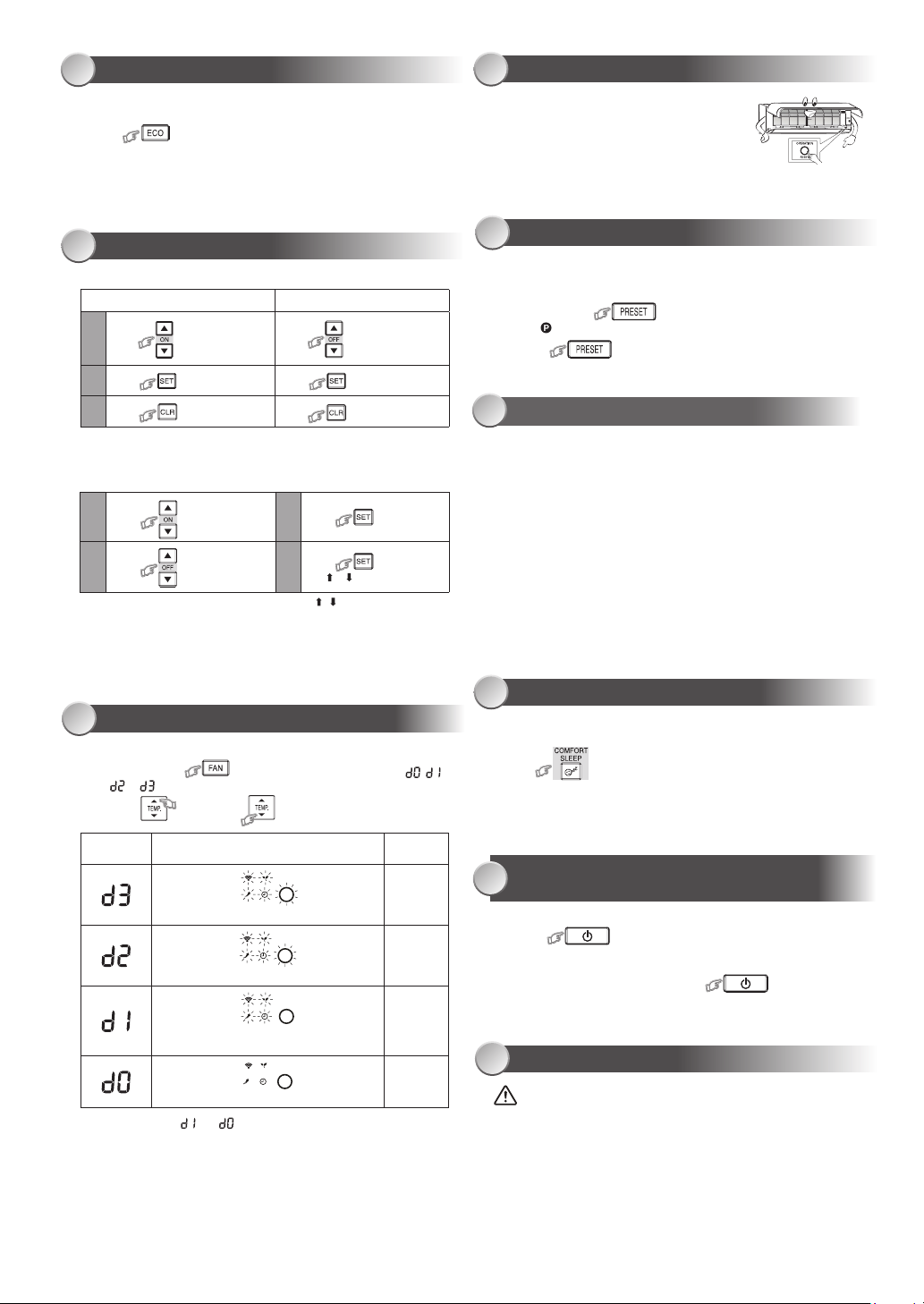
10
TIMER OPERATION
Set the timer when the air conditioner is operating.
Daily timer allows the user to set both the ON & OFF timers and will be
activated on a daily basis.
Setting Daily Timer
Press : Set the ON timer.
1 3
2 4
Press : Set the OFF timer.
Press
.
Press
button during
the ( or ) mark ashing.
●
During daily timer is activating, both arrows ( , ) are indicated.
Note:
●
Keep the remote control in accessible transmission to the indoor unit;
otherwise, the time lag of up to 15 minutes will occur.
●
The setting will be saved for the next same operation.
11
DISPLAY LAMP BRIGHTNESS ADJUSTMENT
To decrease the display lamp brightness or turn it o.
1. Press and hold for 3 seconds until brightness level ( , ,
or ) is shown on remote control LCD then release the button.
2. Press
or to adjust brightness in 4 levels.
Rise
Decrease
●
In the examples of and , the lamp illuminates for 5 seconds before
going o.
Remote control
LCD
Operation display Brightness
Lamp illuminates full brightness.
100%
Lamp illuminates 50% brightness.
50%
Lamp illuminates 50% brightness and the
operation lamp is turned o.
50%
All lamps are turned o.
All turned o
In case of the misplaced or discharged remote control
●
Pressing the RESET button, the unit can start or
stop without using the remote control.
●
Operation mode is set on AUTOMATIC operation,
preset temperature is 24°C and fan operation is
automatic speed.
12
TEMPORARY OPERATION
13
PRESET OPERATION
Set your preferred operation for future use. The setting will be memorized by
the unit for future operation (except airow direction).
1. Select your preferred operation.
2. Press and hold for 3 seconds to memorize the setting.
The mark displays.
3. Press : Operate the preset operation.
15
COMFORT SLEEP OPERATION
For comfortable sleep, automatically control air ow and automatically turn
OFF.
Press : Select 1, 3, 5 or 9 hrs for OFF timer operation.
Note: The cooling operation, the set temperature will increase automatically
1 degree/hour for 2 hours (maximum 2 degrees increase). For heating
operation, the set temperature will decrease.
16
SELF CLEANING OPERATION
(COOL AND DRY OPERATION ONLY)
To protect bad smell caused by the humidity in the indoor unit.
1. If the button is pressed once during “Cool” or “Dry” mode,
the fan will continue to run for other 30 minutes, then it will turn o
automatically. This will reduce the moisture in the indoor unit.
2. To stop the unit immediately, press the more 2 times
within 30 seconds.
17
MAINTENANCE
Firstly, turn o the circuit breaker.
Indoor Unit and Remote Control
●
Clean the indoor unit and the remote control with a wet cloth when
needed.
●
No benzine, thinner, polishing powder or chemically-treated duster.
Air lters
Clean every 2 weeks.
1. Open the air inlet grille.
2. Remove the air lters.
3. Vacuum or wash and then dry them.
4. Reinstall the air lters and close the air inlet grille.
Press
: Set the desired ON
timer.
Setting the ON Timer Setting the OFF Timer
1
2
3
Press : Set the timer.
Press : Cancel the timer.
Press : Set the desired
OFF timer.
Press : Set the timer.
Press : Cancel the timer.
AUTO RESTART FUNCTION SETTING
14
This product is designed so that, after a power failure, it can restart
automatically in the same operating mode as before the power failure.
Information
The product is shipped with Auto Restart function in the ON position.
Turn it OFF if this function is not required.
How to turn OFF the Auto Restart Function
• Press and hold the [OPERATION] button on the indoor unit for 3 seconds
(3 beep sounds but OPERATION lamp does not blink).
How to turn ON the Auto Restart Function
• Press and hold the [OPERATION] button on the indoor unit for 3 seconds
(3 beep sounds and OPERATION lamp blink 5 time/sec for 5 seconds).
Note:
• In case of ON timer or OFF timer are set, AUTO RESTART OPERATION
does not activate.
• Default setting of AUTO RESTART OPERATION is ON.
1120650281_00_S01_182x257_8p_S_p70_210329.indd 5 21/04/01 1:23:00 PM
20
REMOTE CONTROL A-B SELECTION
19
TROUBLESHOOTING (CHECK POINT)
18
OPERATION AND PERFORMANCE
1. Three-minute protection feature: To prevent the unit from being
activated for 3 minutes when suddenly restarted or switched to ON.
2. Preheating operation: Warm up the unit for 5 minutes before the heating
operation starts.
3. Warm air control: When the room temperature reaches the set
temperature, the fan speed is automatically reduced and the outdoor
unit will stop.
4. Automatic defrosting: Fans will stop during defrost operation.
5. Heating capacity: Heat is absorbed from outdoors and released into
the room. When the outdoor temperature is too low, use another
recommended heating apparatus in combination with the air conditioner.
6. Consideration for accumulated snow: Select the position for outdoor unit
where it will not be subjected to snow drifts, accumulation of leaves or
other seasonal debris.
7. Some minor cracking sound may occur when unit operating. This is
normal because the cracking sound may be caused by expansion/
contraction of plastic.
Note: Item 2 to 6 for Heating model
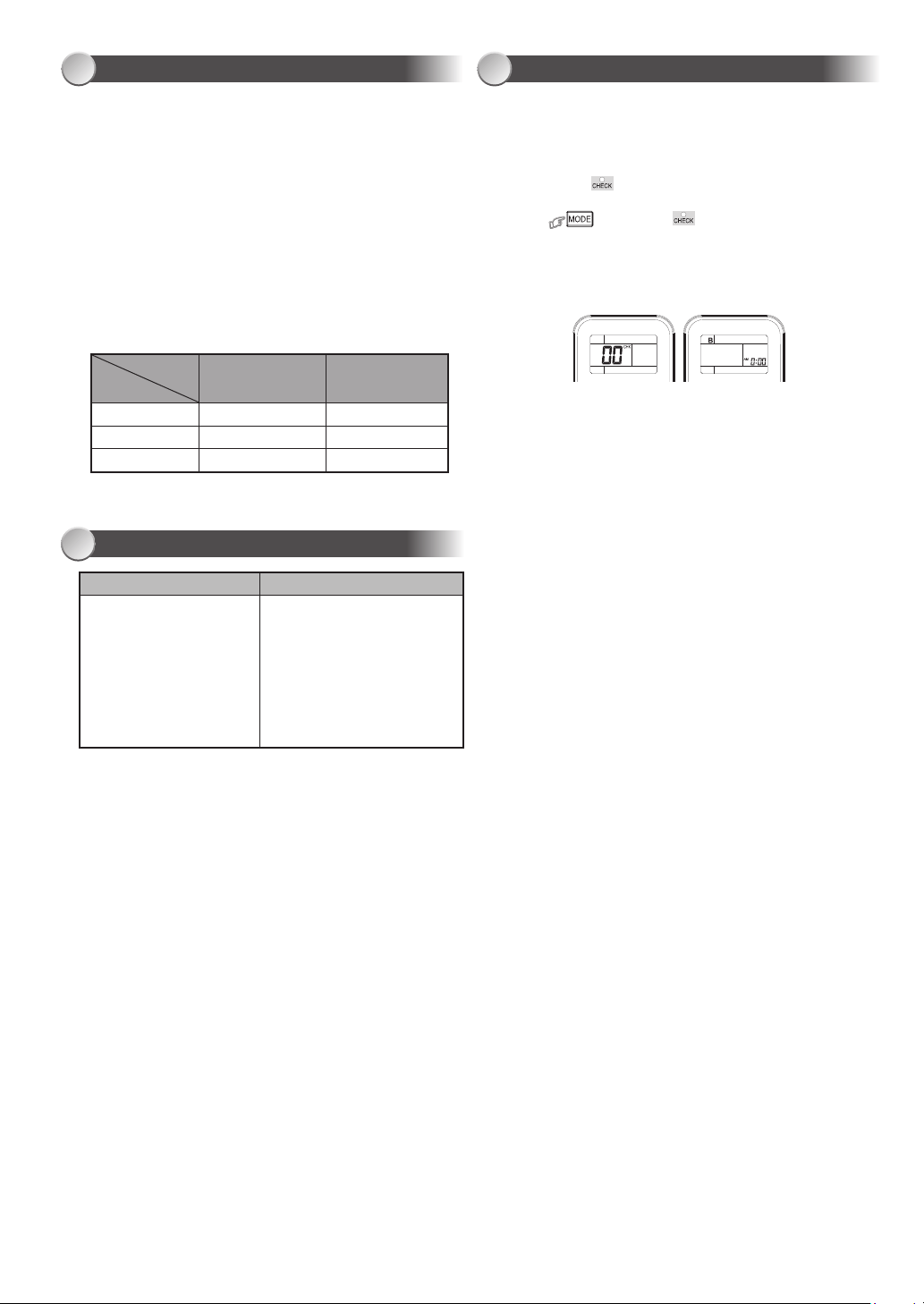
Air conditioner operating conditions
Operation
Temp.
Outdoor Temperature
Room Temperature
Heating
Cooling
Dry
-15°C ~ 24°C
-10°C ~ 46°C
-10°C ~ 46°C
0°C ~28°C
21°C ~ 32°C
17°C ~ 32°C
1 2
To separate using of remote control for each indoor unit in case of 2 air
conditioners are installed nearly.
Remote Control B Setup.
1. Press RESET button on the indoor unit to turn the air conditioner ON.
2. Point the remote control at the indoor unit.
3. Push and hold button on the Remote Control by the tip of the
pencil. “00” will be shown on the display. (Picture 1)
4. Press during pushing . “B” will show on the display and
“00” will disappear and the air conditioner will turn OFF. The Remote
Control B is memorized. (Picture 2)
Note: 1. Repeat above step to reset Remote Control to be A.
2. Remote Control A has not “A” display.
3. Default setting of Remote Control from factory is A.
The unit does not operate.
●
The power main switch is
turned o.
●
The circuit breaker is activated
to cut o the power supply.
●
Stoppage of electric current
●
ON timer is set.
●
The lters are blocked with dust.
●
The temperature has been set
improperly.
●
The windows or doors are opened.
●
The air inlet or outlet of the outdoor
unit is blocked.
●
The fan speed is too low.
●
The operation mode is FAN or DRY.
●
POWER SELECTION function is
set 75% or 50% (This function is
depend on remote controller).
Cooling or Heating is abnormally low.
1120650281_00_S01_182x257_8p_S_p70_210329.indd 6 21/04/01 1:23:00 PM

1120650281_00_S01_182x257_8p_S_p70_210329.indd 7 21/04/01 1:23:00 PM
1120650281
1120650281_00_S01_182x257_8p_S_p70_210329.indd 8 21/04/01 1:23:00 PM