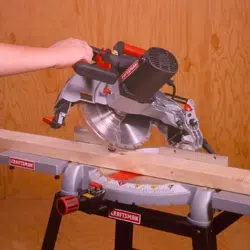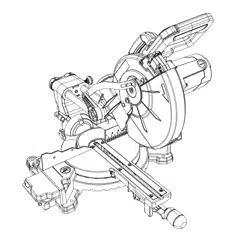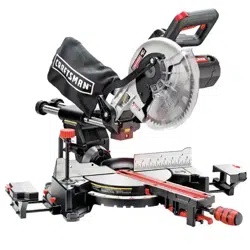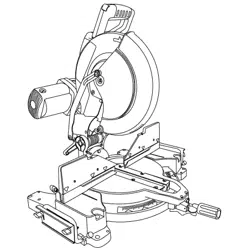
Operator's Manual
CRAFTSMAN
15 Amp - 3 HP (Max. Developed)
12" Blade
4000 R.P.M.
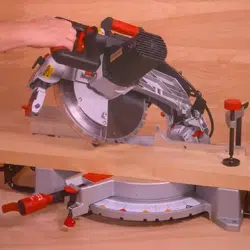
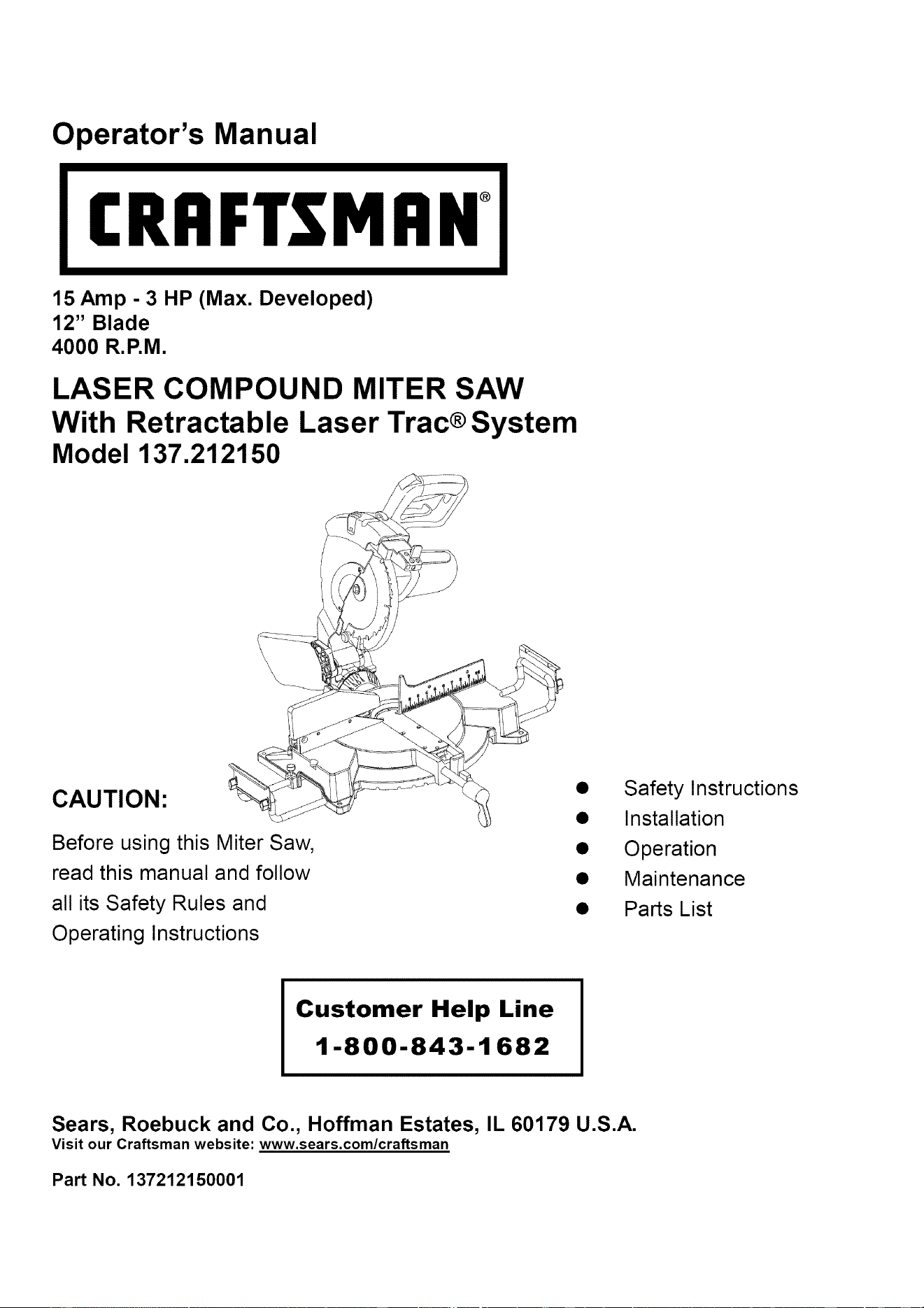
LASER COMPOUND MITER SAW
With Retractable Laser Trac® System
Model 137.212150
CAUTION:
\
\
Before using this Miter Saw,
read this manual and follow
all its Safety Rules and
Operating Instructions
Safety Instructions
Installation
Operation
Maintenance
Parts List
Customer Help Line
1-800-843-1682
Sears, Roebuck and Co., Hoffman Estates, IL 60179 U.S.A.
Visit our Craftsman website: www.sears.com/craftsman
Part No. 137212150001
SECTION PAGE
Warranty ........................................ 2
Product Specifications ....................... 2
Power Tool Safety ............................ 3
Compound Miter Saw Safety ............... 4
Electrical Requirements and Safety ...... 4-5
Accessories and Attachments .............. 6
Tools Needed For Assembly ................ 6
Carton Contents .............................. 7
SECTION PAGE
Know Your Compound Miter Saw ........ 8
Glossary of Terms ............................ 9
Assembly ....................................... 10
Assembly & Adjustments ................... 11
Operation ....................................... 16
Maintenance ................................... 22
Troubleshooting Guide ....................... 23
Parts List ......................................... 24
FULL ONE YEAR WARRANTY
If this tool fails due to a defect in material or workmanship within one year of date of purchase, Sears will
at its option repair or replace it free of charge.
Return this tool to a Sears Service Center for repair, or to place of purchase for replacement.
This warranty gives you specific legal rights, and you may also have other rights which may vary from
state to state.
Sears, Roebuck and Co., Dept. 817 WA, Hoffman Estates, IL 60179
Some dust created by power sanding, sawing, grinding, drilling and other construction activities contains chemicals known
(to the State of California) to cause cancer, birth defects or other reproductive harm. Some examples of these chemicals
are:
• Lead from lead-based paints
• Crystalline silica from bricks, cement and other masonry products
• Arsenic and chromium from chemically treated lumber
Your risk from these exposures varies, depending on how often you do this type of work. To reduce your exposure to
these chemicals, work in a well ventilated area and work with approved safety equipment such as dust masks that are
specially designed to filter out microscopic particles.
MOTOR
Power Source ......................... 120 V AC, 60HZ, 15 Amp
Horsepower ............................ 3HP (Max. Developed)
Speed ..................................... 4000 RPM (No load)
Brake ..................................... Electric
Double Insulated ........................ Yes
Motor Arbor Shaft Size .............. 5/8"
MITER SAW
Cutting Capacity:
Crosscut ............................ 2-1/2" x 7-7/8" ;
Miter 45° R.& L ................... 2-1/2" x 5-1/2" ;
Bevel 45° L ........................ 1-3/4" x 7-7/8";
45° Miter and 45° Bevel ......... 1-3/4" x 5-1/2";
3-7/8" x 5-7/8"
3-7/8" x 4-1/8"
2-3/4" x 5-7/8"
2-3/4" x 4-1/8"
BLADE SIZE
Diameter .............................. 12"
Blade Arbor Size .................... 1" w/a 5/8" Reducer
Rotating Table:
Diameter .............................. 13-1/2"
Miter Detent Stops ..... 0, 15, 22.5, 31.6, 45 °
............. R&L
Bevel Positive Stops ............... 0, 33.9, 45° Left
Base Dimensions ................... 23" x 16-3/4"
Dust Bag ............................... Yes
Extension Wings .................... Yes
Sliding Fence ........................ Yes
Net Weight 47 Ibs
To avoid electrical hazards, fire hazards or damage to the tool, use proper circuit protection.
This tool is wired at the factory for 110-120 Volt operation. It must be connected to a 110-120 Volt / 15 Ampere time delay
fuse or circuit breaker. To avoid shock or fire, replace power cord immediately if it is worn, cut or damaged in any way.
Before using your tool, it is critical that you read and understand these safety rules. Failure to follow these rules could
result in serious injury to you or damage to the tool.
GENERAL SAFETY INSTRUCTIONS
BEFORE USING THE MITER SAW
Safety is a combination of common sense, staying alert
and knowing how to use your miter saw.
To avoid mistakes that could cause serious injury, do not
plug the tool in until you have read and understood the
following.
.
.
3.
.
READ and become familiar with the entire Operators
Manual. LEARN the tool's application, limitations and
possible hazards.
KEEP GUARDS IN PLACE and in working order.
REMOVE ADJUSTING KEYS AND WRENCHES.
Form the habit of checking to see that keys and
adjusting wrenches are removed from the tool before
turning ON.
KEEP WORK AREA CLEAN. Cluttered areas and
benches invite accidents.
5. DON'T USE IN DANGEROUS ENVIRONMENTS.
Don't use power tools in damp locations, or expose
them to rain or snow. Keep work area well lighted.
6. KEEP CHILDREN AWAY. All visitors and bystanders
should be kept a safe distance from work area.
7. MAKE WORKSHOP CHILD PROOF with padlocks,
master switches, or by removing starter keys.
8. DON'T FORCE THE TOOL. It will do the job better
and safer at the rate for which it was designed.
9. USE THE RIGHT TOOL. Do not force the tool or an
attachment to do a job for which it was not designed.
10.USE PROPER EXTENSION CORDS. Make sure
your extension cord is in good condition. When using
an extension cord, be sure to use one heavy enough
to carry the current your product will draw. An
undersized cord will result in a drop in line voltage
and in loss of power which will cause the tool to
overheat. The table on page 5 shows the correct size
to use depending on cord length and nameplate
ampere rating. If in doubt, use the next heavier gauge.
The smaller the gauge number, the heavier the cord.
11.WEAR PROPER APPAREL. Do not wear loose
clothing, gloves, neckties, rings, bracelets, or other
jewelry which may get caught in moving parts.
Nonslip footwear is recommended. Wear protective
hair covering to contain long hair.
12.ALWAYS WEAR EYE PROTECTION. Any power tool
can throw foreign objects into the eyes and
could cause permanent eye damage.
ALWAYS wear Safety Goggles (not
glasses) that comply with ANSI Safety
standard Z87.1 Everyday eyeglasses
have only impact-resistance lenses.
They ARE NOT safety glasses. Safety Goggles are
available at Sears. NOTE: Glasses or goggles not in
compliance with ANSI Z87.1 could seriously injure
you when they break.
13.WEAR A FACE MASK OR DUST MASK. Sawing
operation produces dust.
14.SECURE WORK. Use clamps or a vise to hold work
when practical. It's safer than using your hand and it
frees both hands to operate tool.
15.DISCONNECT TOOLS before the servicing, and
when changing accessories such as blades, bits and
cutters.
16.REDUCE THE RISK OF UNINTENTIONAL
STARTING. Make sure switch is in the OFF position
before plugging the tool in.
17.USE RECOMMENDED ACCESSORIES. Consult this
Operators Manual for recommended accessories.
The use of improper accessories may cause risk of
injury to yourself or others.
18.NEVER STAND ON THE TOOL. Serious injury could
occur if the tool is tipped or if the cutting tool is
unintentionally contacted.
19.CHECK FOR DAMAGED PARTS. Before further use
of the tool, a guard or other part that is damaged
should be carefully checked to determine that it will
operate properly and perform its intended function -
check for alignment of moving parts, binding of
moving parts, breakage of parts, mounting, and any
other conditions that may affect its operation. A guard
or other part that is damaged should be properly
repaired or replaced.
20.NEVER LEAVE THE TOOL RUNNING UNATTENED.
TURN THE POWER "OFF". Don't walk away from a
running tool until the blade comes to a complete stop
& unplug the unit.
21. DON'T OVERREACH. Keep proper footing and
balance at all times.
22. MAINTAIN TOOLS WITH CARE. Keep tools sharp
and clean for best and safest performance. Follow
instructions for lubricating and changing accessories.
23.WARNING: Dust generated from certain materials
can be hazardous to your health. Always operate saw
in well-ventilated area and provide for proper dust
removal.
. USE ONLY CROSS-CUTTING SAW BLADES. When
using carbide tipped blades, make sure they have a
negative hook angle. IMPORTANT: DO NOT USE
THIN KERF BLADES- they can deflect and contact
guard and can cause possible injury to the operator.
2. DO NOT operate the miter saw until it is completely
assembled and installed according to these
instructions.
.
.
.
IF YOU ARE NOT thoroughly familiar with the
operation of miter saws, seek guidance from your
supervisor, instructor, or other qualified person.
ALWAYS hold the work firmly against the fence and
table. DO NOT perform any operation free hand (use
clamp wherever possible).
KEEP HANDS out of the path of the saw blade. If the
workpiece you are cutting would cause your hands to
be within 8-1/2" inches of the saw blade, the
workpiece should be clamped in place before making
the cut.
6. BE SURE the blade is sharp, runs freely, and is free
of vibration.
7. ALLOW the motor to come up to full speed before
starting a cut.
8. KEEP THE MOTOR AIR SLOTS CLEAN and free of
chips or dust.
9. ALWAYS MAKE SURE all handles are tight before
cutting, even if the table is positioned in one of the
positive stops.
10.BE SURE both the blade and the collar are clean and
the arbor bolt is tightened securely.
11. USE only blade collars specified for your saw.
12. NEVER use blades larger or smaller in diameter
than 12-inches.
13. NEVER apply lubricants to the blade when it is
running.
14. ALWAYS check the blade for cracks or damage
before operation. Replace a cracked or damaged
blade immediately.
15. NEVER use blades recommended for operation at
less than 4000 RPM.
16. USE the blade guards at all times.
17.ALWAYS keep the blade guards in place.
18.NEVER reach around the saw blade.
19.MAKE SURE the blade is not contacting the
workpiece before the switch is turned ON.
20. IMPORTANT: After completing the cut, release the
power switch and wait for the blade to stop before
returning the saw to the raised position.
21.MAKE SURE the blade has come to a complete stop
before removing or securing the workpiece, changing
the workpiece angle, or changing the angle of the
blade.
22. NEVER cut metals or masonry products with this tool.
This miter saw is designed for use on wood and
wood-like products.
23.NEVER cut small pieces. If the workpiece being cut
would cause your hand or fingers to be within 8-1/2"
inches of the saw blade the workpiece is too small.
24.PROVIDE adequate support to the sides of the saw
table for long work pieces.
25.NEVER use the miter saw in an area with flammable
liquids or gases.
26.NEVER use solvents to clean plastic parts. Solvents
could possibly dissolve or otherwise damage the
material.
27.SHUT OFF the power before servicing or adjusting
the tool.
28. DISCONNECT the saw from the power source and
clean the machine when finished using.
29.MAKE SURE the work area is clean before leaving
the machine.
30.SHOULD any part of your miter saw be missing,
damaged, or fail in any way, or any electrical
component fail to perform properly, shut off the switch
and remove the plug from the power supply outlet.
Replace missing, damaged, or failed parts before
resuming operation.
ELECTRICAL REQUIREMENTS
POWER SUPPLY AND MOTOR
SPECIFICATIONS
The AC motor used in this saw is a universal,
nonreversible type. See "MOTOR" in the "PRODUCT
SPECIFICATIONS" section on page 2.
To avoid electrical hazards, fire hazards, or damage to
the tool, use proper circuit protection. Your saw is wired
at the factory for 120V operation. Connect to a 120V, 15
Amp circuit and use a 15 amp. time delay fuse or circuit
breaker. To avoid shock or fire, if power cord is worn or
cut, or damaged in any way, have it replaced
immediately.
DOUBLEINSULATED[]
Thepowertoolisdoubleinsulatedtoprovideadouble
thicknessof insulationbetweenyouandtool'selectrical
system.Allexposedmetalpartsareisolatedfromthe
internalmetalmotorcomponentswithprotectinginsulation.
Replacementparts- Whenservicinguseonlyidentical
replacementparts.
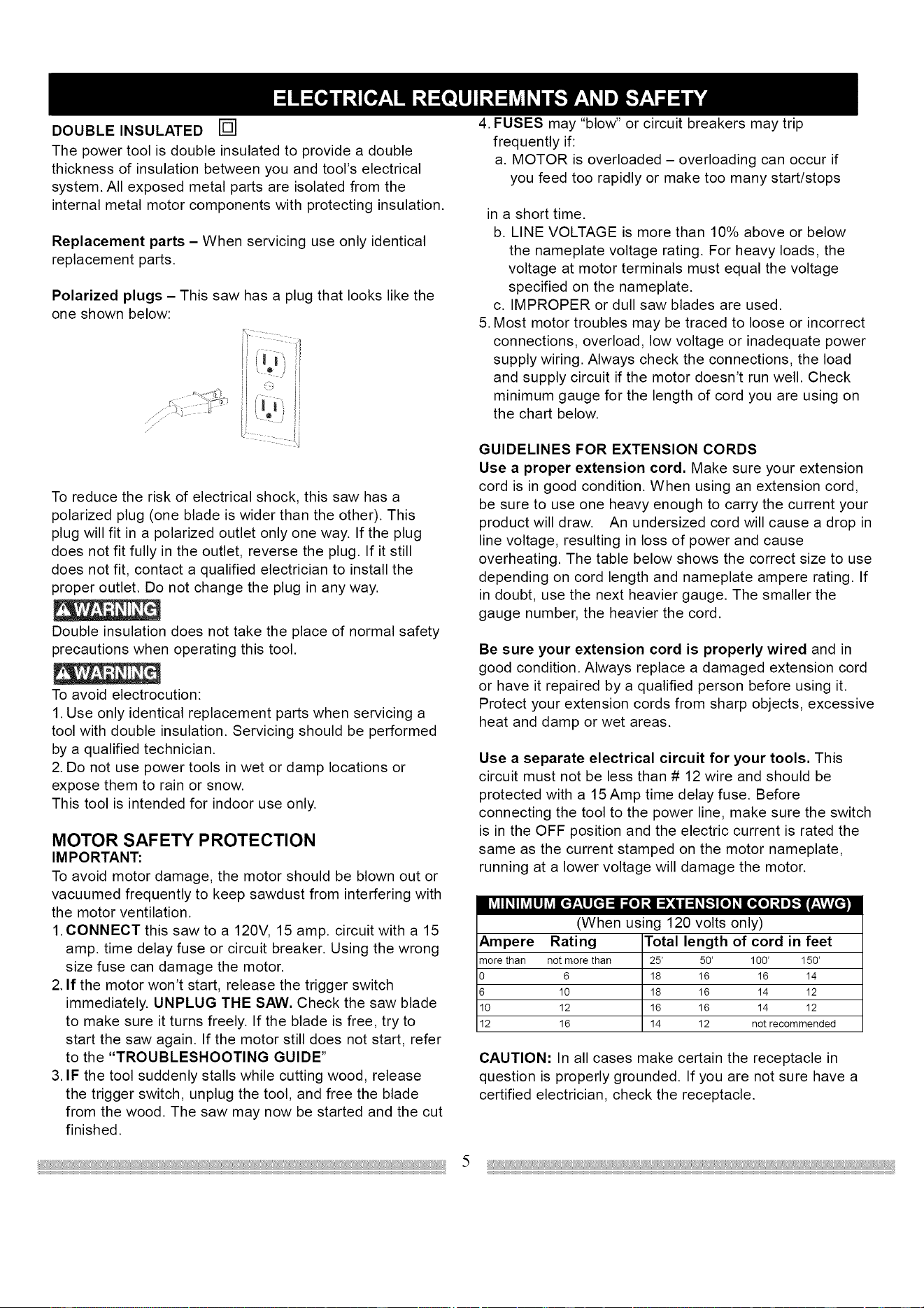
Polarizedplugs- Thissawhasa plugthatlookslikethe
oneshownbelow:
.....
,J
To reduce the risk of electrical shock, this saw has a
polarized plug (one blade is wider than the other). This
plug will fit in a polarized outlet only one way. If the plug
does not fit fully in the outlet, reverse the plug. If it still
does not fit, contact a qualified electrician to install the
proper outlet. Do not change the plug in any way.
Double insulation does not take the place of normal safety
precautions when operating this tool.
To avoid electrocution:
1. Use only identical replacement parts when servicing a
tool with double insulation. Servicing should be performed
by a qualified technician.
2. Do not use power tools in wet or damp locations or
expose them to rain or snow.
This tool is intended for indoor use only.
MOTOR SAFETY PROTECTION
IM PORTANT:
To avoid motor damage, the motor should be blown out or
vacuumed frequently to keep sawdust from interfering with
the motor ventilation.
1. CONNECT this saw to a 120V, 15 amp. circuit with a 15
amp. time delay fuse or circuit breaker. Using the wrong
size fuse can damage the motor.
2. If the motor won't start, release the trigger switch
immediately. UNPLUG THE SAW. Check the saw blade
to make sure it turns freely. If the blade is free, try to
start the saw again. If the motor still does not start, refer
to the "TROUBLESHOOTING GUIDE"
3. IF the tool suddenly stalls while cutting wood, release
the trigger switch, unplug the tool, and free the blade
from the wood. The saw may now be started and the cut
finished.
4. FUSES may "blow" or circuit breakers may trip
frequently if:
a. MOTOR is overloaded - overloading can occur if
you feed too rapidly or make too many start/stops
in a short time.
b. LINE VOLTAGE is more than 10% above or below
the nameplate voltage rating. For heavy loads, the
voltage at motor terminals must equal the voltage
specified on the nameplate.
c. IMPROPER or dull saw blades are used.
5. Most motor troubles may be traced to loose or incorrect
connections, overload, low voltage or inadequate power
supply wiring. Always check the connections, the load
and supply circuit if the motor doesn't run well. Check
minimum gauge for the length of cord you are using on
the chart below.
GUIDELINES FOR EXTENSION CORDS
Use a proper extension cord. Make sure your extension
cord is in good condition. When using an extension cord,
be sure to use one heavy enough to carry the current your
product will draw. An undersized cord will cause a drop in
line voltage, resulting in loss of power and cause
overheating. The table below shows the correct size to use
depending on cord length and nameplate ampere rating. If
in doubt, use the next heavier gauge. The smaller the
gauge number, the heavier the cord.
Be sure your extension cord is properly wired and in
good condition. Always replace a damaged extension cord
or have it repaired by a qualified person before using it.
Protect your extension cords from sharp objects, excessive
heat and damp or wet areas.
Use a separate electrical circuit for your tools. This
circuit must not be less than # 12 wire and should be
protected with a 15 Amp time delay fuse. Before
connecting the tool to the power line, make sure the switch
is in the OFF position and the electric current is rated the
same as the current stamped on the motor nameplate,
running at a lower voltage will damage the motor.
(When using 120 volts only)
Ampere Rating Total length of cord in feet
morethan not more than 25' 50' 100' 150'
0 6 18 16 16 14
6 10 18 16 14 12
10 12 16 16 14 12
12 16 14 12 not recommended
CAUTION: In all cases make certain the receptacle in
question is properly grounded. If you are not sure have a
certified electrician, check the receptacle.
RECOMMENDED ACCESSORIES
• Use only accessories recommended for this miter saw.
Follow instructions that accompany accessories. Use
of improper accessories may cause hazards.
• The use of any cutting tool except 12 inch saw blades
that meet the requirements under recommended
accessories is prohibited. Do not use accessories such
as shaper cutters or dado sets. Ferrous metal cutting,
the use of abrasive wheels and the cutting of masonry
products are prohibited.
• Do not attempt to modify this tool or create
accessories not recommended for use with this tool.
Any such alteration or modification is misuse and could
result in a hazardous condition leading to possible
serious injury.
ACCESSORIES
Visit your Sears Hardware Department or see the Sears
Power and Hand Tool Catalog to purchase recommended
accessories for this power tool.
To avoid the risk of personal injury, do not modify this
power tool or use accessories not recommended by Sears.
Read warnings and conditions on your CARBIDE TIPPED
SAW BLADE. Do not operate the saw without the proper
saw blade guard in place. Carbide is a very hard but brittle
material. Care should be taken while mounting, using, and
storing carbide tipped blades to prevent accidental
damage. Slight shocks, such as striking the tip while
handling, can seriously damage the blade. Foreign objects
in the workpiece, such as wire or nails, can also cause tips
to crack or break off. Before using, always visually
examine the blade and tips for bent teeth, cracks,
breakage, missing or loose tips, or other damage. Do not
use if damage is suspected. Failure to heed safety
instructions and warnings can result in serious bodily
injury.
Phillips scre_river
UNPACKING YOUR MITER SAW
To avoid injury from unexpected starting or electrical
shock, do not plug the power cord into a source of power
during unpacking and assembly. This cord must remain
unplugged whenever you are working on the saw.
1. Remove the miter saw from the carton. IMPORTANT:
Do not lift the miter saw by the switch handle or
miter table handle. It may cause misalignment.
Always lift the machine by the built in carry handle.
2. Place the saw on a secure stationary work surface.
.
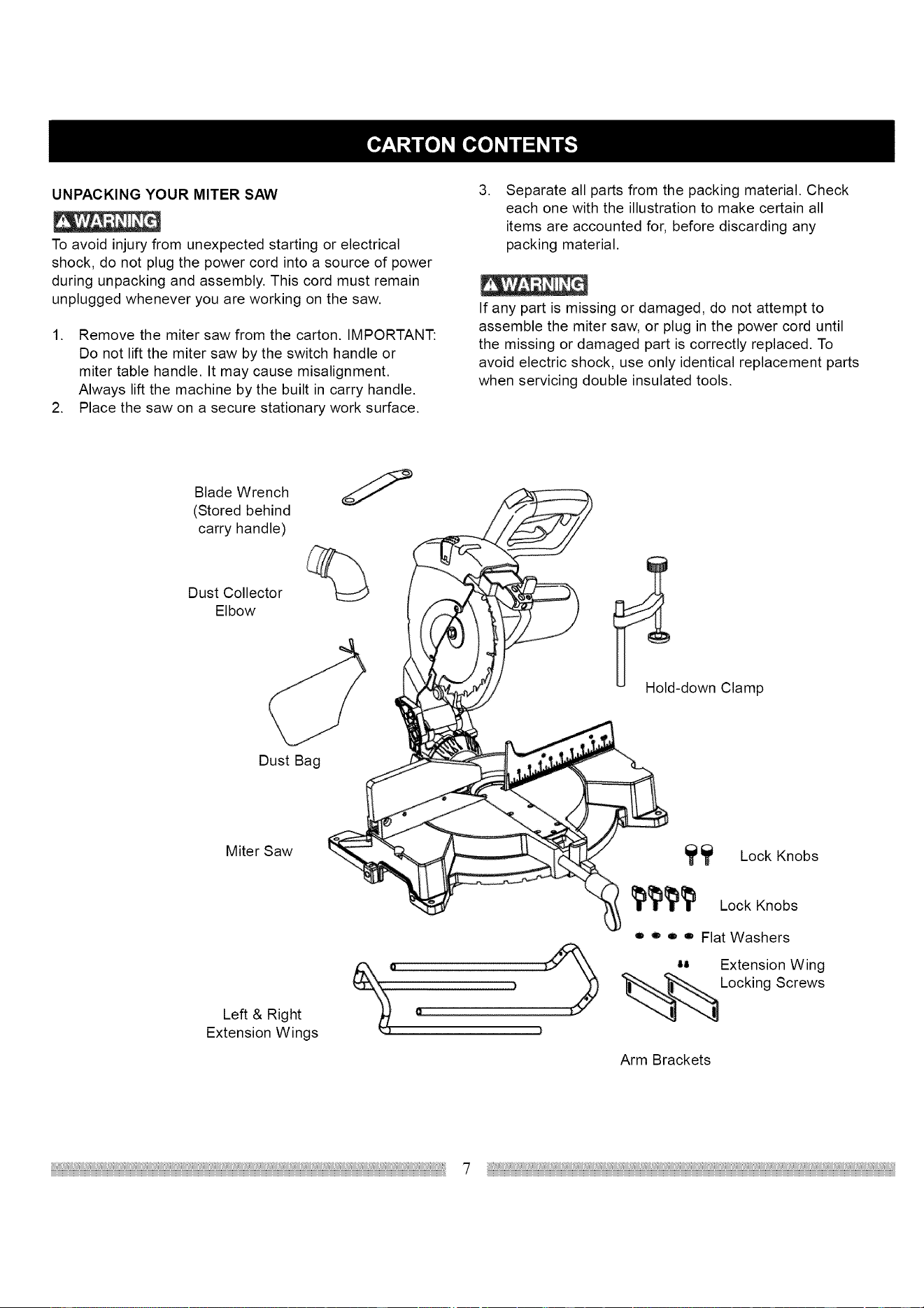
Separate all parts from the packing material. Check
each one with the illustration to make certain all
items are accounted for, before discarding any
packing material.
If any part is missing or damaged, do not attempt to
assemble the miter saw, or plug in the power cord until
the missing or damaged part is correctly replaced. To
avoid electric shock, use only identical replacement parts
when servicing double insulated tools.
Blade Wrench
(Stored behind
carry handle)
Dust Collector
Elbow
Hold-down Clamp
Dust Bag
Miter Saw
_ Lock Knobs
Left & Right
Extension Wings
Lock Knobs
o e o o Flat Washers
-- Extension Wing
Screws
Arm Brackets
7
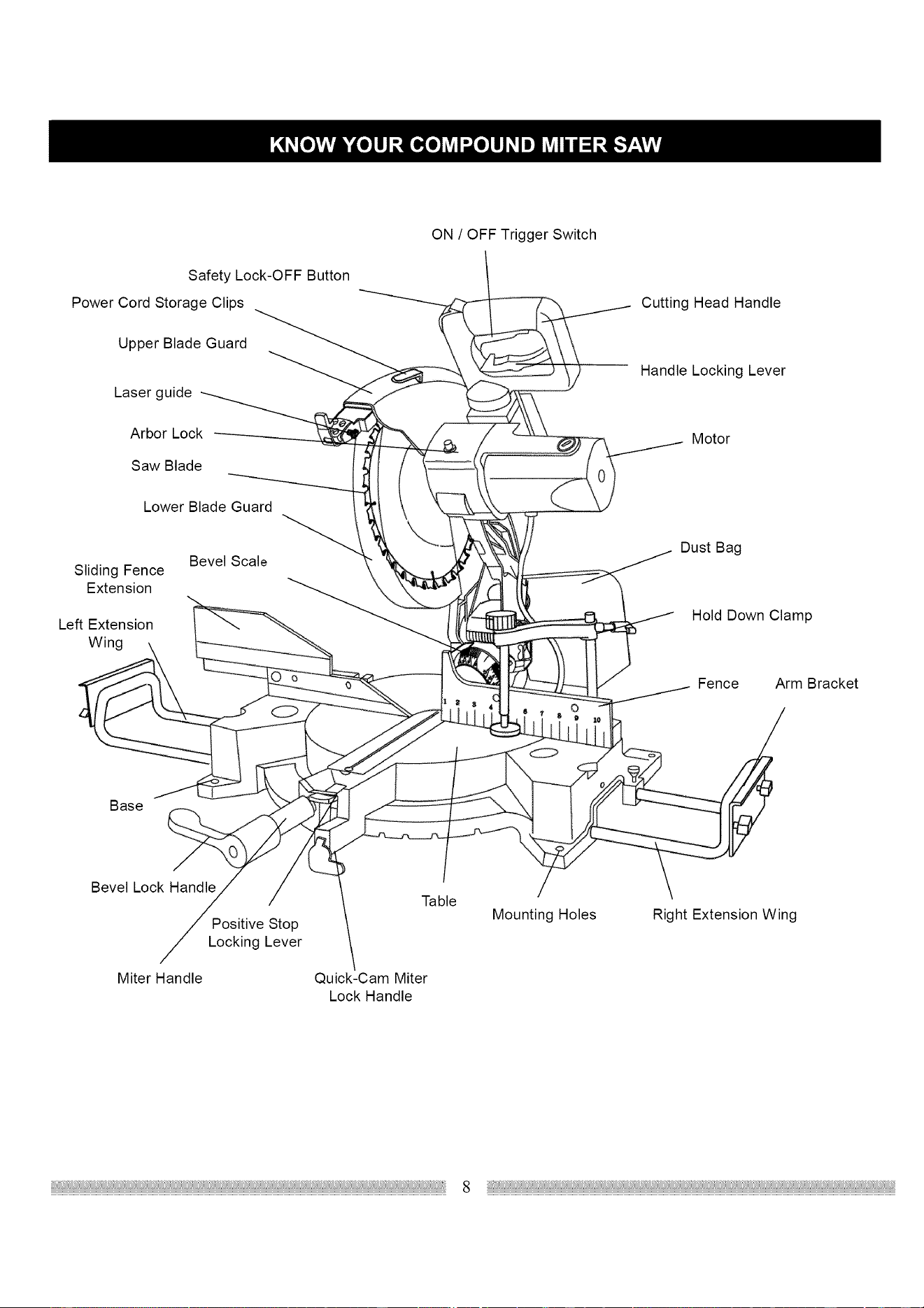
Safety Lock-OFF Button
Power Cord Storage Clips
Upper Blade Guard
Laser guide
Arbor Lock
Saw Blade
Lower Blade Guard
Sliding Fence
Extension
Left Extension
ig
Bevel Scale
ON / OFF Trigger Switch
o
Cutting Head Handle
Handle Locking Lever
Motor
Dust Bag
Hold Down Clamp
Fence Arm Bracket
Base
Bevel Lock Handle
Positive Stop
Locking Lever
Miter Handle
/
Table
Quick-Cam Miter
Lock Handle
Mounting Holes Right Extension Wing
8
CRAFTSMAN COMPOUND MITER SAW
TERMS
ARBOR LOCK - Allows the user to keep the blade from
rotating while tightening or loosening the arbor locking bolt
during blade replacement or removal.
BASE - Supports the table, holds accessories and allows
for workbench or leg set mounting.
BEVEL LOCKING HANDLE - Locks the miter saw at a
desired bevel angle.
BEVEL SCALE - To measure the bevel angle of the saw
blade 0 ° to 45 ° left.
COVER PLATE SCREW - Loosen this screw and rotate
the plate for access to the blade arbor locking bolt.
DUST CHUTE - Exhausts debris away from the user.
EXTENSION WING - Extends the width of the work table
for support while cutting long work pieces. They can be
used with or without a stop block as an additional side
fence.
FENCE - Helps to keep the workpiece from moving when
sawing. Scaled to assist with accurate cutting.
SAFETY LOCK-OFF BUTTON - Yellow button on handle
must be pushed forward to activate the trigger switch.
LOWER BLADE GUARD - Helps protect your hands from
the blade in the raised position, it retracts as the blade is
lowered.
MITER HANDLE - Used to rotate the saw to the right or
left cutting position.
MITER SCALE - To measure the miter angle 0° to 45° left,
0° to 45° right.
MOUNTING HOLES - To mount the miter saw to a stable
surface.
ON/OFF TRIGGER SWITCH - To prevent the trigger from
being accidentally engaged, a lock-off slide switch is
provided. To start the tool, push the lock-off slide switch
forward and squeeze the trigger. Release the trigger to
stop the miter saw.
POSITIVE STOP LOCKING LEVER- Used in combination
with the miter handle, it locks the miter saw at a preset
positive stop for the desired miter angle.
STOP LATCH - Locks the miter saw in the lowered
position for compact storage and transportation.
SWITCH HANDLE - The cutting head handle contains the
trigger switch and a safety lock-off slide switch. The
blade is lowered into the workpiece by pushing down on
the handle. The saw will return to its upright position when
the handle is released.
WARNING LABELS - Read and understand for your own
safety. Always make certain these are in place & legible.
WRENCH STORAGE - Convenient storage to prevent
misplacing the blade wrench.
WOODWORKING TERMS
ARBOR - The shaft on which a blade is mounted.
BEVEL CUT - An angle cut made through the face of the
workpiece.
COMPOUND CUT- A simultaneous bevel and miter cut.
CROSS CUT - A cut made across the width or grain of the
workpiece.
FREEHAND - Performing a cut without using a fence
(guide), hold down or other proper device to prevent the
workpiece from twisting during the cutting operation.
GUM -A sticky sap from wood products.
HEEL - Misalignment of the blade.
KERF - The amount of material removed by blade cut.
MITER CUT - An angle cut made across the width or grain
of the workpiece.
RESIN -A sticky sap that has hardened.
REVOLUTIONS PER MINUTE (RPM) - The number of
turns completed by a spinning object in one minute.
SAW BLADE PATH - The area of the workpiece or table
top directly in line with the travel of the blade or the part of
the workpiece which will be cut.
SET - The distance between two saw blade tips, bent
outward in opposite directions to each other. The further
apart the tips are, the greater the set.
WORKPIECE - The item being cut. The surfaces of a
workpiece are commonly referred to as faces, ends, and
edges.
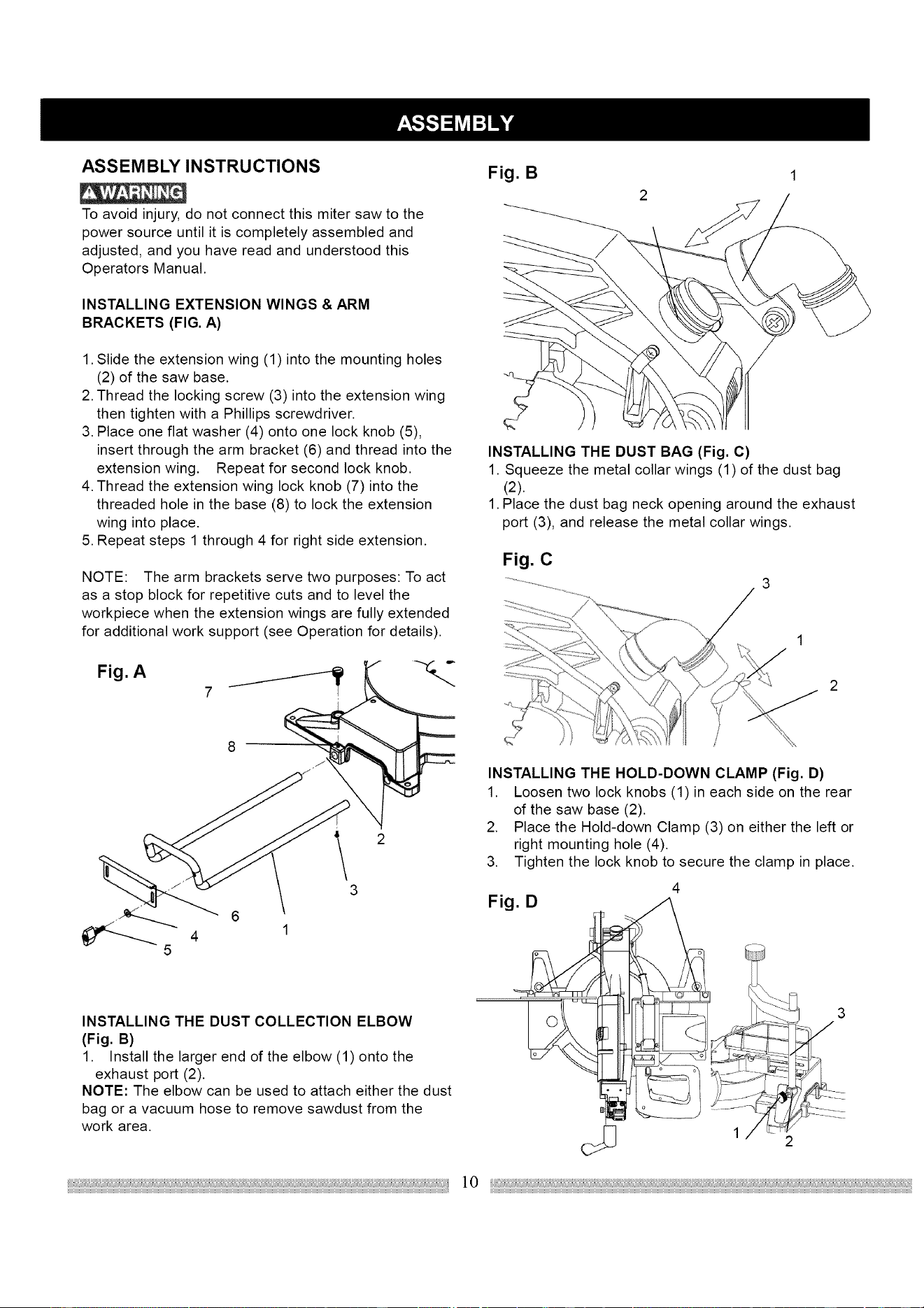
ASSEMBLY INSTRUCTIONS
To avoid injury, do not connect this miter saw to the
power source until it is completely assembled and
adjusted, and you have read and understood this
Operators Manual.
INSTALLING EXTENSION WINGS & ARM
BRACKETS (FIG. A)
1. Slide the extension wing (1) into the mounting holes
(2) of the saw base.
2. Thread the locking screw (3) into the extension wing
then tighten with a Phillips screwdriver.
3. Place one flat washer (4) onto one lock knob (5),
insert through the arm bracket (6) and thread into the
extension wing. Repeat for second lock knob.
4. Thread the extension wing lock knob (7) into the
threaded hole in the base (8) to lock the extension
wing into place.
5. Repeat steps 1 through 4 for right side extension.
NOTE: The arm brackets serve two purposes: To act
as a stop block for repetitive cuts and to level the
workpiece when the extension wings are fully extended
for additional work support (see Operation for details).
Fig. A
J
7
6
4 1
5
\
3
INSTALLING THE DUST COLLECTION ELBOW
(Fig. B)
1. Install the larger end of the elbow (1) onto the
exhaust port (2).
NOTE: The elbow can be used to attach either the dust
bag or a vacuum hose to remove sawdust from the
work area.
Fig. B
INSTALLING THE DUST BAG (Fig. C)
1. Squeeze the metal collar wings (1) of the dust bag
(2).
1. Place the dust bag neck opening around the exhaust
port (3), and release the metal collar wings.
Fig. C
INSTALLING THE HOLD-DOWN CLAMP (Fig. D)
1. Loosen two lock knobs (1) in each side on the rear
.
3.
Fig. D
of the saw base (2).
Place the Hold-down Clamp (3) on either the left or
right mounting hole (4).
Tighten the lock knob to secure the clamp in place.
©
4
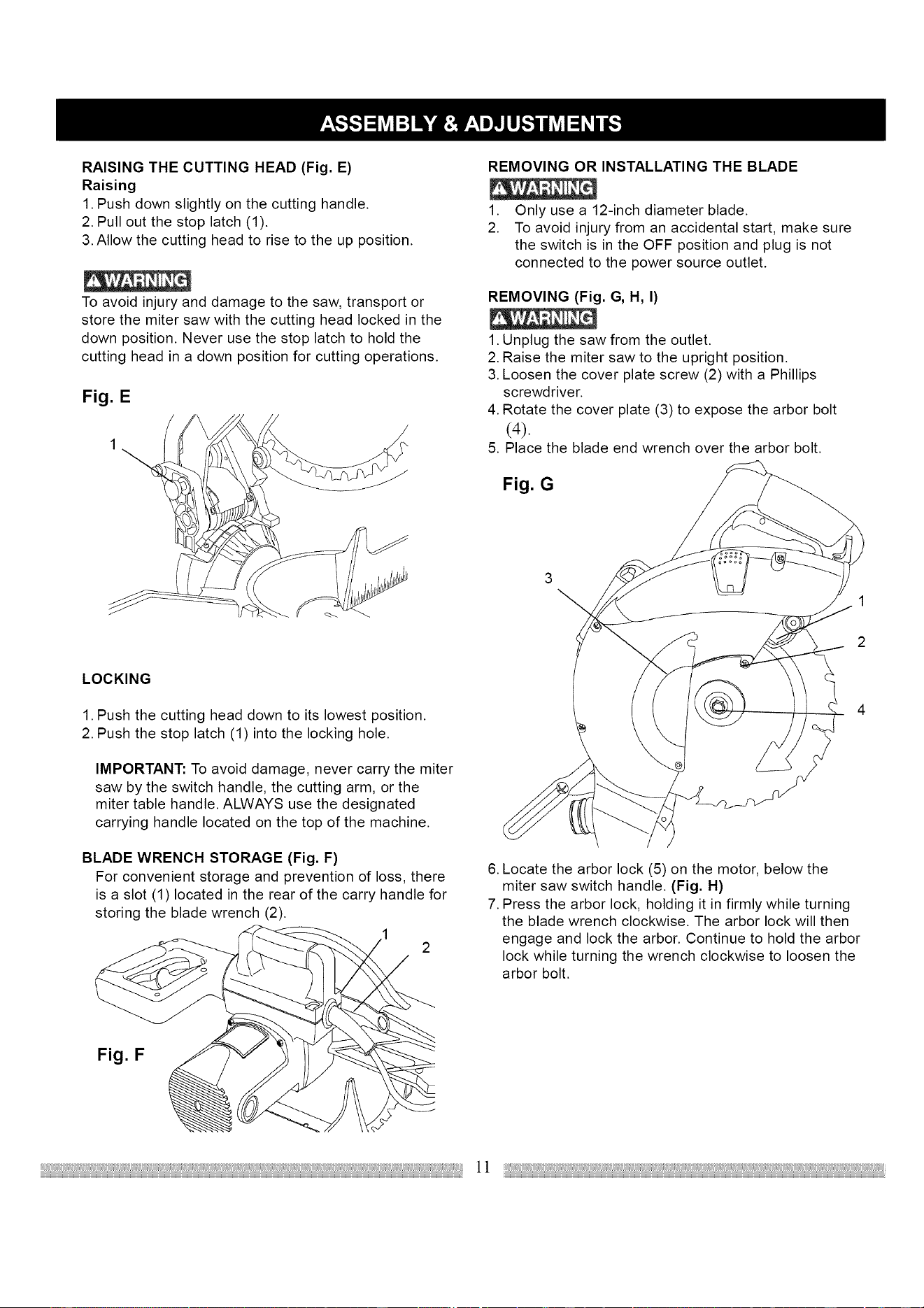
RAISING THE CUTTING HEAD (Fig. E)
Raising
1. Push down slightly on the cutting handle.
2. Pull out the stop latch (1).
3. Allow the cutting head to rise to the up position.
To avoid injury and damage to the saw, transport or
store the miter saw with the cutting head locked in the
down position. Never use the stop latch to hold the
cutting head in a down position for cutting operations.
Fig. E
REMOVING OR INSTALLATING THE BLADE
1. Only use a 12-inch diameter blade.
2. To avoid injury from an accidental start, make sure
the switch is in the OFF position and plug is not
connected to the power source outlet.
REMOVING (Fig. G, H, I)
1. Unplug the saw from the outlet.
2. Raise the miter saw to the upright position.
3. Loosen the cover plate screw (2) with a Phillips
screwdriver.
4. Rotate the cover plate (3) to expose the arbor bolt
(4).
5. Place the blade end wrench over the arbor bolt.
Fig. G
3
\
LOCKING
1. Push the cutting head down to its lowest position.
2. Push the stop latch (1) into the locking hole.
IMPORTANT: To avoid damage, never carry the miter
saw by the switch handle, the cutting arm, or the
miter table handle. ALWAYS use the designated
carrying handle located on the top of the machine.
BLADE WRENCH STORAGE (Fig. F)
For convenient storage and prevention of loss, there
is a slot (1) located in the rear of the carry handle for
storing the blade wrench (2).
Fig. F
6. Locate the arbor lock (5) on the motor, below the
miter saw switch handle. (Fig. H)
7. Press the arbor lock, holding it in firmly while turning
the blade wrench clockwise. The arbor lock will then
engage and lock the arbor. Continue to hold the arbor
lock while turning the wrench clockwise to loosen the
arbor bolt.
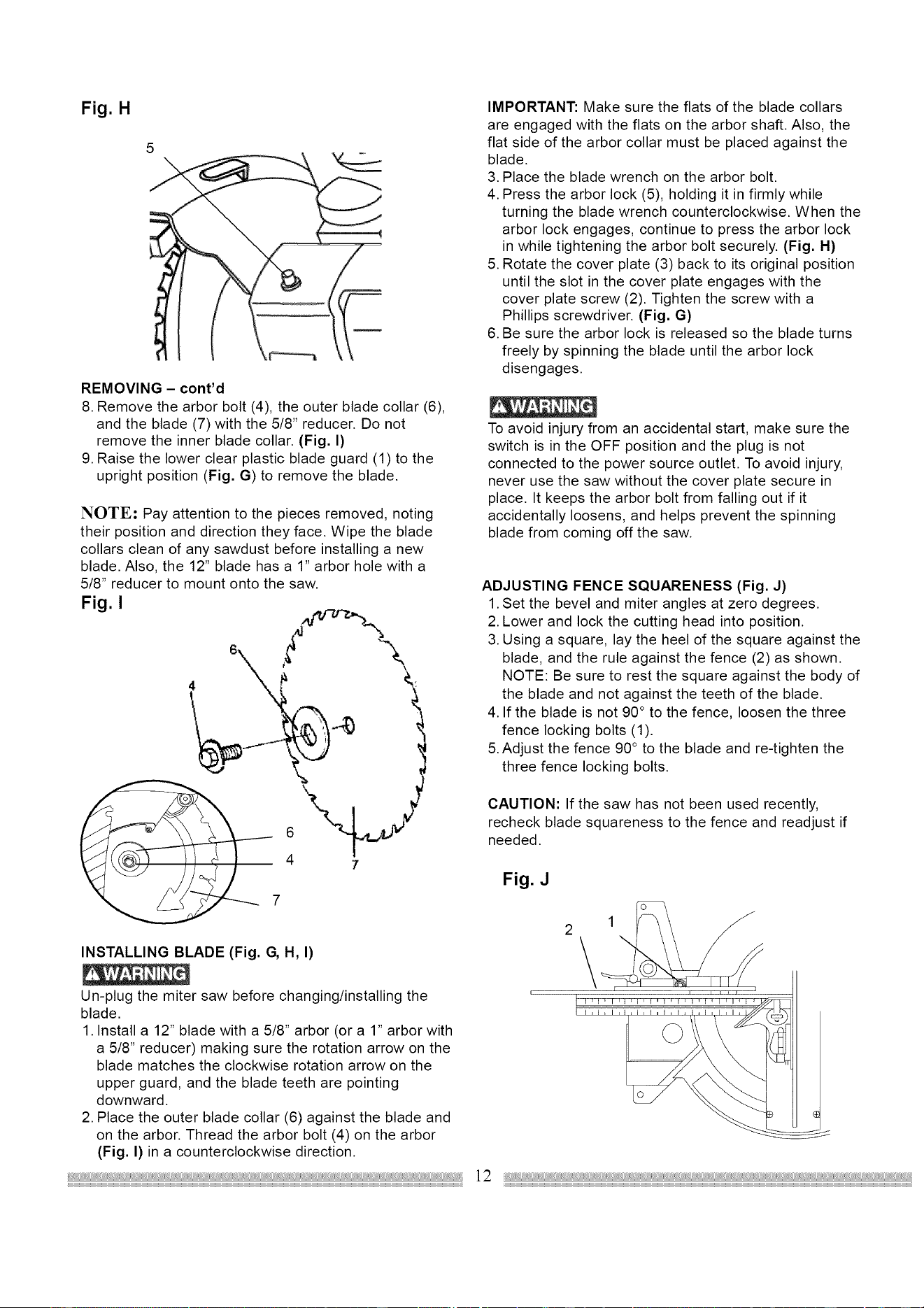
Fig. H
5
REMOVING - cont'd
8. Remove the arbor bolt (4), the outer blade collar (6),
and the blade (7) with the 5/8" reducer. Do not
remove the inner blade collar. (Fig. I)
9. Raise the lower clear plastic blade guard (1) to the
upright position (Fig. G) to remove the blade.
NOTE: Pay attention to the pieces removed, noting
their position and direction they face. Wipe the blade
collars clean of any sawdust before installing a new
blade. Also, the 12" blade has a 1" arbor hole with a
5/8" reducer to mount onto the saw.
Fig. I
6
4 7
INSTALLING BLADE (Fig. G, H, I)
Un-plug the miter saw before changing/installing the
blade.
1. Install a 12" blade with a 5/8" arbor (or a 1" arbor with
a 5/6" reducer) making sure the rotation arrow on the
blade matches the clockwise rotation arrow on the
upper guard, and the blade teeth are pointing
downward.
2. Place the outer blade collar (6) against the blade and
on the arbor. Thread the arbor bolt (4) on the arbor
(Fig. I} in a counterclockwise direction.
IMPORTANT: Make sure the flats of the blade collars
are engaged with the flats on the arbor shaft. Also, the
flat side of the arbor collar must be placed against the
blade.
3. Place the blade wrench on the arbor bolt.
4. Press the arbor lock (5), holding it in firmly while
turning the blade wrench counterclockwise. When the
arbor lock engages, continue to press the arbor lock
in while tightening the arbor bolt securely. (Fig. H)
5. Rotate the cover plate (3) back to its original position
until the slot in the cover plate engages with the
cover plate screw (2). Tighten the screw with a
Phillips screwdriver. (Fig. G)
6. Be sure the arbor lock is released so the blade turns
freely by spinning the blade until the arbor lock
disengages.
To avoid injury from an accidental start, make sure the
switch is in the OFF position and the plug is not
connected to the power source outlet. To avoid injury,
never use the saw without the cover plate secure in
place. It keeps the arbor bolt from falling out if it
accidentally loosens, and helps prevent the spinning
blade from coming off the saw.
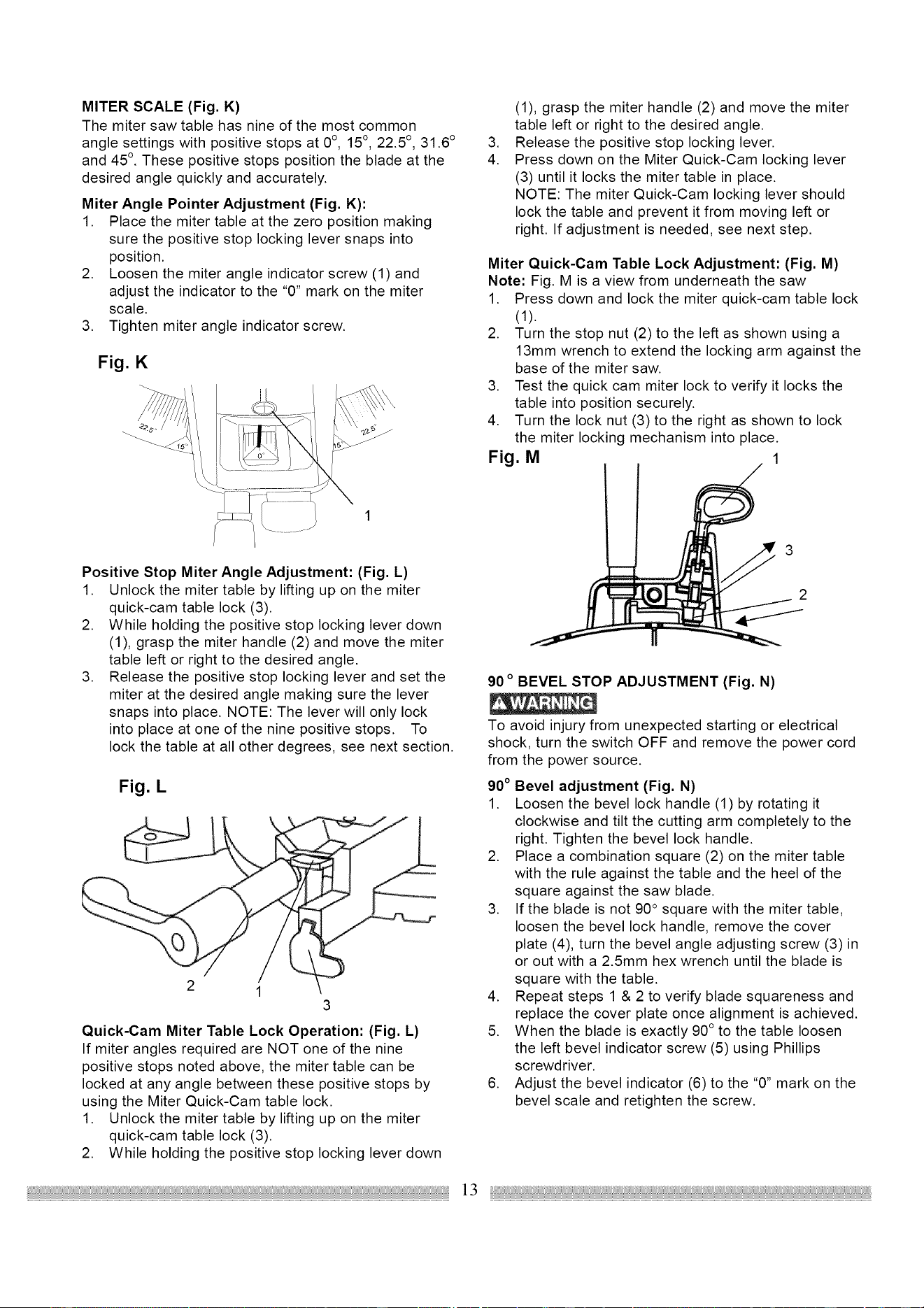
ADJUSTING FENCE SQUARENESS (Fig. J)
1. Set the bevel and miter angles at zero degrees.
2. Lower and lock the cutting head into position.
3. Using a square, lay the heel of the square against the
blade, and the rule against the fence (2) as shown.
NOTE: Be sure to rest the square against the body of
the blade and not against the teeth of the blade.
4. If the blade is not 90 ° to the fence, loosen the three
fence locking bolts (1).
5. Adjust the fence 90 ° to the blade and re-tighten the
three fence locking bolts.
CAUTION: If the saw has not been used recently,
recheck blade squareness to the fence and readjust if
needed.
Fig. J
MITER SCALE (Fig, K)
The miter saw table has nine of the most common
angle settings with positive stops at 0°, 15 °, 22.5 °, 31.6 °
and 45 °. These positive stops position the blade at the
desired angle quickly and accurately.
Miter Angle Pointer Adjustment (Fig. K):
1. Place the miter table at the zero position making
sure the positive stop locking lever snaps into
position.
2. Loosen the miter angle indicator screw (1) and
adjust the indicator to the "0" mark on the miter
scale.
3. Tighten miter angle indicator screw.
Fig. K
Positive Stop Miter Angle Adjustment: (Fig. L)
1. Unlock the miter table by lifting up on the miter
quick-cam table lock (3).
2. While holding the positive stop locking lever down
(1), grasp the miter handle (2) and move the miter
table left or right to the desired angle.
3. Release the positive stop locking lever and set the
miter at the desired angle making sure the lever
snaps into place. NOTE: The lever will only lock
into place at one of the nine positive stops. To
lock the table at all other degrees, see next section.
Fig. L
2 1
3
Quick-Cam Miter Table Lock Operation: (Fig. L)
If miter angles required are NOT one of the nine
positive stops noted above, the miter table can be
locked at any angle between these positive stops by
using the Miter Quick-Cam table lock.
1. Unlock the miter table by lifting up on the miter
quick-cam table lock (3).
2. While holding the positive stop locking lever down
,
4.
(1), grasp the miter handle (2) and move the miter
table left or right to the desired angle.
Release the positive stop locking lever.
Press down on the Miter Quick-Cam locking lever
(3) until it locks the miter table in place.
NOTE: The miter Quick-Cam locking lever should
lock the table and prevent it from moving left or
right. If adjustment is needed, see next step.
Miter Quick-Cam Table Lock Adjustment: (Fig. M)
Note: Fig. M is a view from underneath the saw
1. Press down and lock the miter quick-cam table lock
(1).
2. Turn the stop nut (2) to the left as shown using a
13mm wrench to extend the locking arm against the
base of the miter saw.
3. Test the quick cam miter lock to verify it locks the
table into position securely.
4. Turn the lock nut (3) to the right as shown to lock
the miter locking mechanism into place.
Fig. M 1
90 o BEVEL STOP ADJUSTMENT (Fig. N)
To avoid injury from unexpected starting or electrical
shock, turn the switch OFF and remove the power cord
from the power source.
90° Bevel adjustment (Fig. N)
1. Loosen the bevel lock handle (1) by rotating it
clockwise and tilt the cutting arm completely to the
right. Tighten the bevel lock handle.
2. Place a combination square (2) on the miter table
with the rule against the table and the heel of the
square against the saw blade.
3. If the blade is not 90 ° square with the miter table,
loosen the bevel lock handle, remove the cover
plate (4), turn the bevel angle adjusting screw (3) in
or out with a 2.5mm hex wrench until the blade is
square with the table.
4. Repeat steps 1 & 2 to verify blade squareness and
replace the cover plate once alignment is achieved.
5. When the blade is exactly 90 ° to the table loosen
the left bevel indicator screw (5) using Phillips
screwdriver.
6. Adjust the bevel indicator (6) to the "0" mark on the
bevel scale and retighten the screw.
]3
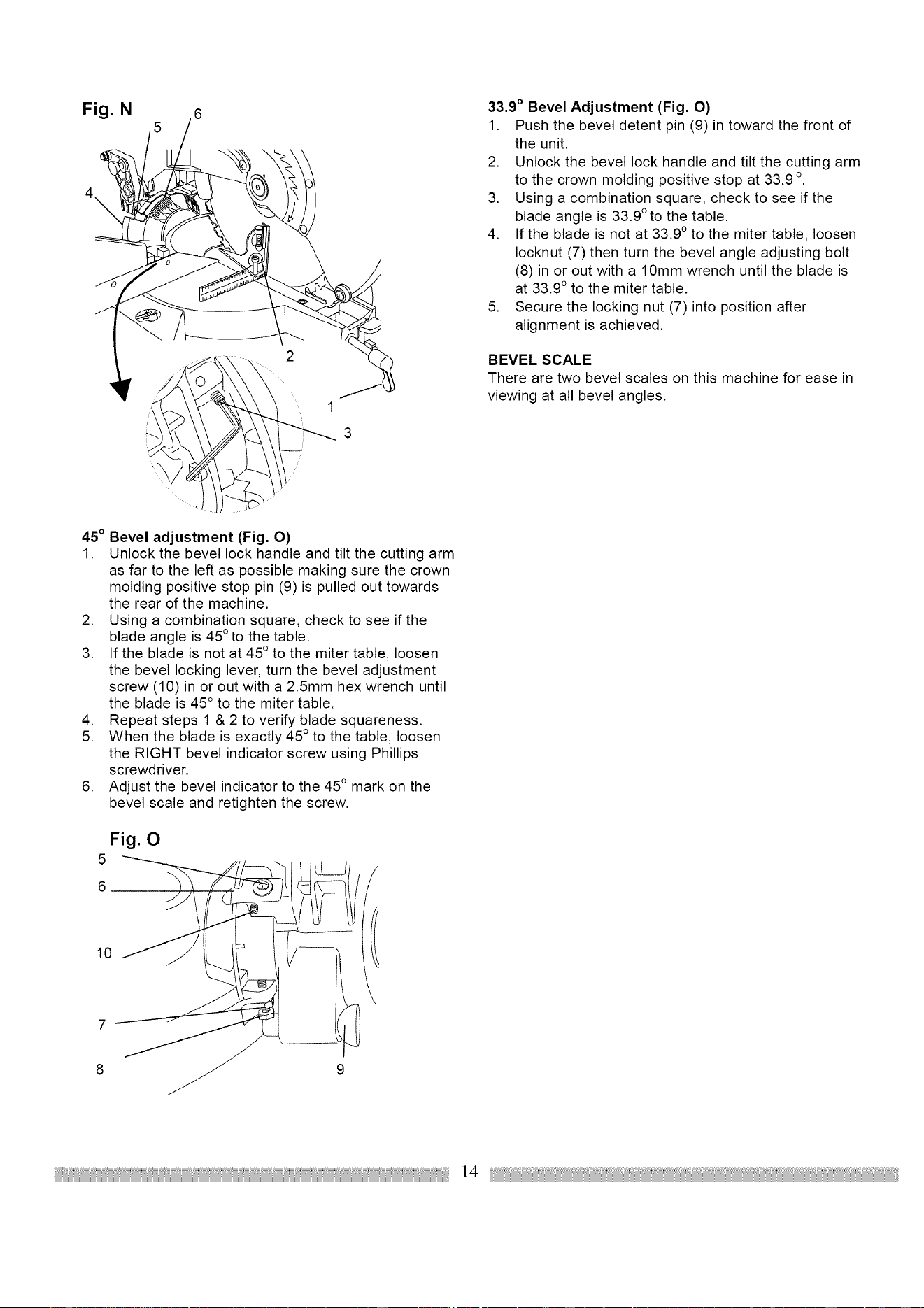
Fig. N
1
3
33.9 ° Bevel Adjustment (Fig. O)
1. Push the bevel detent pin (9) in toward the front of
the unit.
2. Unlock the bevel lock handle and tilt the cutting arm
to the crown molding positive stop at 33.9 o
3. Using a combination square, check to see if the
blade angle is 33.9 ° to the table.
4. If the blade is not at 33.9 ° to the miter table, loosen
Iocknut (7) then turn the bevel angle adjusting bolt
(8) in or out with a 10mm wrench until the blade is
at 33.9 ° to the miter table.
5. Secure the locking nut (7) into position after
alignment is achieved.
BEVEL SCALE
There are two bevel scales on this machine for ease in
viewing at all bevel angles.
45 ° Bevel adjustment (Fig. O)
1. Unlock the bevel lock handle and tilt the cutting arm
as far to the left as possible making sure the crown
molding positive stop pin (9) is pulled out towards
the rear of the machine.
2. Using a combination square, check to see if the
blade angle is 45 ° to the table.
3. If the blade is not at 45 ° to the miter table, loosen
the bevel locking lever, turn the bevel adjustment
screw (10) in or out with a 2.5mm hex wrench until
the blade is 45 ° to the miter table.
4. Repeat steps 1 & 2 to verify blade squareness.
5. When the blade is exactly 45 ° to the table, loosen
the RIGHT bevel indicator screw using Phillips
screwd river.
6. Adjust the bevel indicator to the 45 ° mark on the
bevel scale and retighten the screw.
Fig. 0
5
10
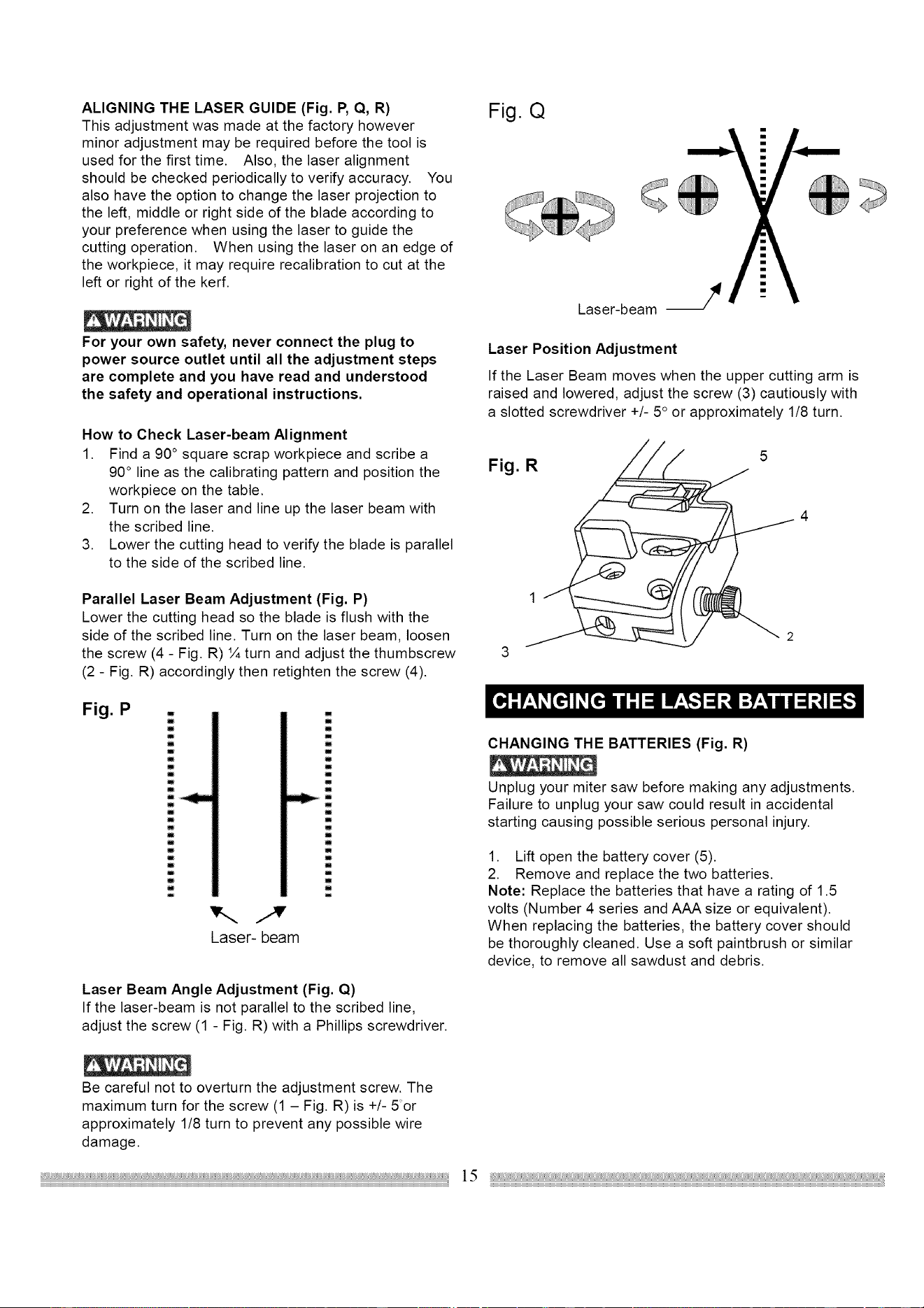
ALIGNING THE LASER GUIDE (Fig. P, Q, R)
This adjustment was made at the factory however
minor adjustment may be required before the tool is
used for the first time. Also, the laser alignment
should be checked periodically to verify accuracy. You
also have the option to change the laser projection to
the left, middle or right side of the blade according to
your preference when using the laser to guide the
cutting operation. When using the laser on an edge of
the workpiece, it may require recalibration to cut at the
left or right of the kerf.
For your own safety, never connect the plug to
power source outlet until all the adjustment steps
are complete and you have read and understood
the safety and operational instructions.
How to Check Laser-beam Alignment
1. Find a 90 ° square scrap workpiece and scribe a
90 ° line as the calibrating pattern and position the
workpiece on the table.
2. Turn on the laser and line up the laser beam with
the scribed line.
3. Lower the cutting head to verify the blade is parallel
to the side of the scribed line.
Parallel Laser Beam Adjustment (Fig. P)
Lower the cutting head so the blade is flush with the
side of the scribed line. Turn on the laser beam, loosen
the screw (4 - Fig. R) ¼ turn and adjust the thumbscrew
(2 - Fig. R) accordingly then retighten the screw (4).
Fig. Q
Laser-beam J
Laser Position Adjustment
If the Laser Beam moves when the upper cutting arm is
raised and lowered, adjust the screw (3) cautiously with
a slotted screwdriver +/- 5 ° or approximately 1/8 turn.
Fig. R
5
Fig. P .
m
n
m
m
m
i
m
m
i
m
w
i
Laser- beam
I
w
m
m
u
m
m
m
m
m
m
u
i
m
m
Laser Beam Angle Adjustment (Fig. Q)
If the laser-beam is not parallel to the scribed line,
adjust the screw (1 - Fig. R) with a Phillips screwdriver.
CHANGING THE BATTERIES (Fig. R)
Unplug your miter saw before making any adjustments.
Failure to unplug your saw could result in accidental
starting causing possible serious personal injury.
1. Lift open the battery cover (5).
2. Remove and replace the two batteries.
Note: Replace the batteries that have a rating of 1.5
volts (Number 4 series and AAA size or equivalent).
When replacing the batteries, the battery cover should
be thoroughly cleaned. Use a soft paintbrush or similar
device, to remove all sawdust and debris.
Be careful not to overturn the adjustment screw. The
maximum turn for the screw (1 - Fig. R) is +/- 5or
approximately 1/8 turn to prevent any possible wire
damage.
SAFETY INSTRUCTIONS FOR BASIC SAW
OPERATION
BEFORE USING THE MITER SAW
To avoid mistakes that could cause serious, permanent
injury, do not plug the tool in until the following steps
are completed:
• Completely assemble and adjust the saw, following
the instructions. (ASSEMBLY AND
ADJUSTMENTS)
• Learn the use and function of the ON/OFF switch,
lock-off switch, upper and lower blade guards, stop
latch, bevel lock handle, and cover plate screws.
• Review and understand all safety instructions and
operating procedures in this Operator's Manual.
(SAFETY & OPERATIONS)
• Review the MAINTENANCE and
TROUBLESHOOTING GUIDE for your miter saw.
• To avoid injury or possible death from electrical
shock:
Make sure your fingers do not touch the plug's
metal prongs when plugging or unplugging your
miter saw. (ELECTRICAL REQUIREMENTS AND
SAFETY)
BEFORE EACH USE
Inspect your saw.
• Disconnect the miter saw. To avoid injury from
accidental starting, unplug the saw before any
adjustments, including set-up and blade changes.
• Compare the direction of rotation arrow on the
guard to the direction arrow on the blade. The
blade teeth should always point downward at the
front of the saw.
• Tighten the arbor bolt.
• Tighten the cover plate screw.
• Check for damaged parts. Check for:
• Alignment of moving parts
• Damaged electric cords
• Binding of moving parts
• Mounting holes
• Function of arm return spring and lower
guard:
Push the cutting arm all the way down, then
let it rise until it stops. The lower guard
should fully close. Follow instructions in
TROUBLESHOOTING GUIDE for
adjustment.
• Other conditions that may affect the way the
miter saw works.
• Keep all guards in place, in working order and
proper adjustment.
If any part of this miter saw is missing, bent
damaged or broken in any way, or any electrical
parts don't work, turn the saw off and unplug it.
Replace damaged, missing, or defective parts
before using the saw again.
Maintain tools with care. Keep the miter saw clean
for best and safest performance. Follow
instructions for lubricating. Don't put lubricants on
the blade while it's spinning.
Remove all adjusting wrenches from the tool
before turning it on.
USE ONLY RECOMMENDED ACCESSORIES
Consult the ACCESSORIES and ATTACHMENTS
section of this Operators Manual for recommended
accessories. Follow the instructions that come with
the accessory. The use of improper accessories
may cause risk of injury to persons.
• Choose the correct 12 inches diameter blade for
the material and the type of cutting you plan to do.
Do not use Thin Kerf blades,
• Make sure the blade is sharp, undamaged and
properly aligned.
• Make sure the blade and arbor collars are clean.
• Make sure all clamps and locks are tight and there
is no excessive play in any parts.
KEEP YOUR WORK AREA CLEAN
Cluttered areas and benches invite accidents.
To avoid burns or other fire damage, never use the
miter saw near flammable liquids, vapors, or gases.
• Plan ahead to protect your eyes, hands, face
and ears.
• Know your miter saw.
Read and understand the Operator's Manual and labels
affixed to the tool. Learn its application and limitations
as well as the specific potential hazards peculiar to this
tool. To avoid injury from accidental contact with moving
parts, don't do layout, assembly, or setup work on the
miter saw.
• Avoid accidental starting
Make sure the switch is OFF before plugging the
miter saw into a power outlet.
16
PLAN YOUR WORK
Use the right tool. Don't force a tool or attachment
to do a job it was not designed to do. Use a
different tool for any workpiece that can't be held in
a solidly braced, fixed position.
CAUTION: This machine is NOT designed for cutting
masonry, masonry products & ferrous metals (steel,
iron, and iron-based metals.) Use this miter saw to cut
only wood, wood-like products, or soft metals like
aluminum. Other material may shatter, bind the blade,
or create other dangers. Remove all nails that may be
in the workpiece to prevent sparking that could cause a
fire.
DRESS FOR SAFETY
Any power tool can throw foreign objects into the eyes.
This can result in permanent eye damage. Everyday
eyeglasses have only impact resistant lenses and are
not safety glasses. Glasses or goggles not in
compliance with ANSI Z87.1 could seriously injure you
when they break.
• Do not wear loose clothing, gloves, neckties or
jewelry (rings, watches). They can get caught and
draw you into moving parts.
• Wear non-slip footwear.
• Tie back long hair.
• Roll long sleeves above the elbow.
• Noise levels vary widely. To avoid possible hearing
damage, wear ear plugs when using any miter
saw.
• For dusty operations, wear a dust mask along with
safety goggles.
INSPECT YOUR WORKPIECE
Make sure there are no nails or foreign objects in the
part of the workpiece being cut.
Plan your work to avoid small pieces that may bind,
or that are too small to clamp and get a solid grasp
on,
Plan the way you will grasp the workpiece from start to
finish. Avoid awkward operations and hand positions.
A sudden slip could cause your fingers or hand to move
into the blade.
DON'T OVER-REACH
Keep good footing and balance. Keep your face and
body to one side, out of the line of a possible kickback.
NEVER stand in the line of the blade.
Never cut freehand:
• Brace your workpiece firmly against the fence and
table stop so it will not rock or twist during the cut.
• Make sure there is no debris between the
workpiece and the table or fence.
• Make sure there are no gaps between the
workpiece, fence and table that will let the
workpiece shift during the cut.
• Keep the cut off piece free to move sideways after
it is cut off. Otherwise, it could get wedged against
the blade and thrown, possibly causing injury.
• Only the workpiece should be on the saw table.
• Secure work. Use clamps or a vise to help hold
the work when it's practical.
USE EXTRA CAUTION WITH LARGE OR ODD
SHAPED WORKPIECES.
• Use extra supports (tables, sawhorses, blocks, etc.)
for workpieces large enough to tip.
• Never use another person as a substitute for a
table extension, or as an additional support for a
workpiece that is longer or wider than the basic
miter saw table, or to help feed, support, or pull the
workpiece.
• Do not use this saw to cut small pieces. If the
workpiece being cut would cause your hand or
fingers to be within 8-1/2" inches of the saw blade
workpiece is too small. Keep hands and fingers out
of the "no hands zone" area marked on the saws
table.
• When cutting odd shaped workpieces, plan your
work so it will not bind in the blade and cause
possible injury. Molding, for example, must lie flat
or be held by a fixture or jig that will not let it move
when cut.
• Properly support round material such as dowel
rods, or tubing, which have a tendency to roll when
cut, causing the blade to "bite".
To avoid injury, follow all applicable safety instructions,
when cutting non-ferrous metals:
• Use only saw blades specifically recommended for
non-ferrous metal cutting.
• Do not cut metal workpieces that must be hand
held. Clamp workpieces securely.
• Cut non-ferrous metals only if you are under the
supervision of an experienced person.
WHEN SAW IS RUNNING
Don't allow familiarity from frequent use of your miter
saw to result in a careless mistake. A careless fraction
of a second is enough to cause a severe injury.
Before cutting, if the saw makes an unfamiliar noise or
vibrates, stop immediately. Turn the saw OFF. Unplug
the saw. Do not restart until finding and correcting the
problem.
17
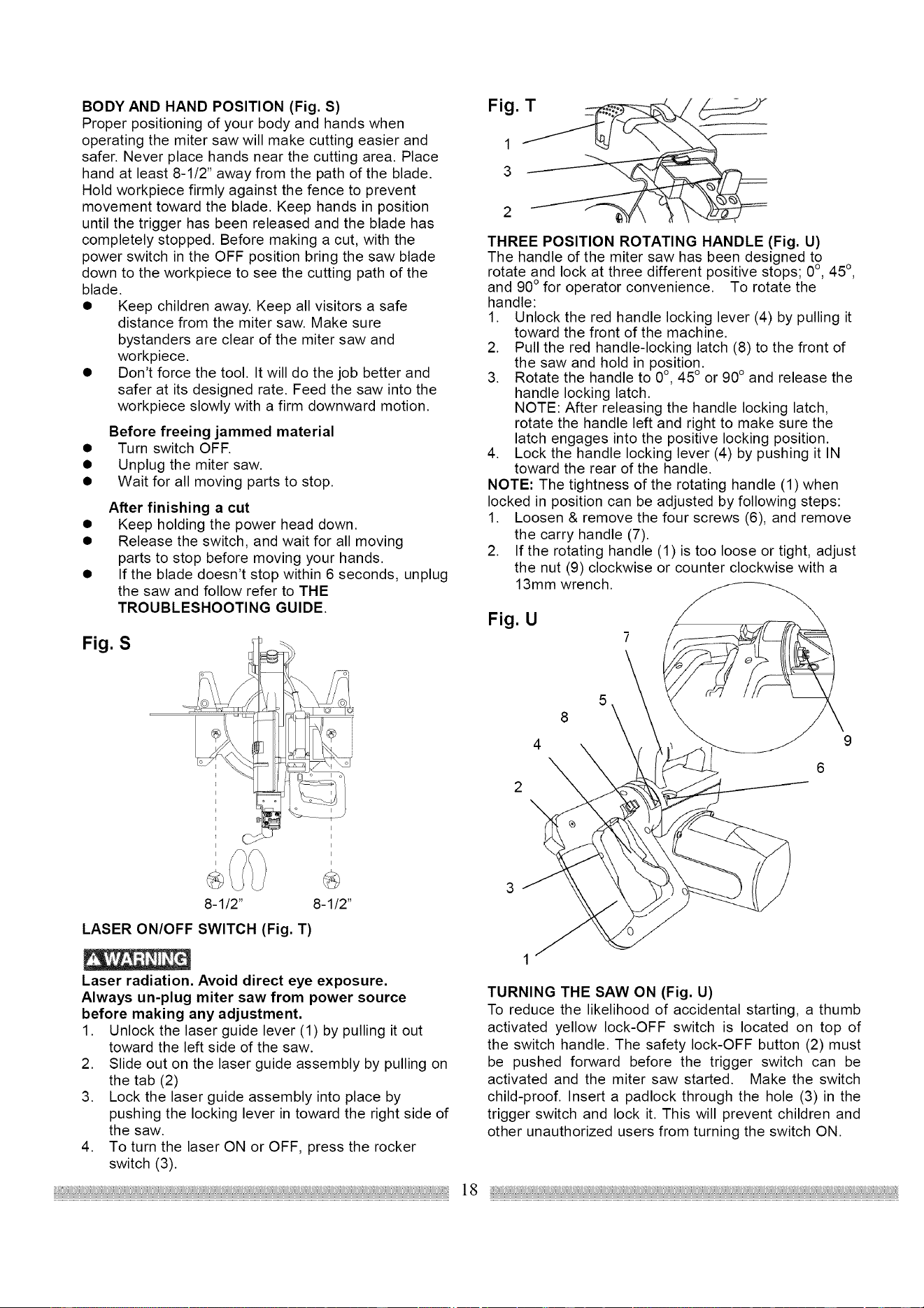
BODY AND HAND POSITION (Fig. S)
Proper positioning of your body and hands when
operating the miter saw will make cutting easier and
safer. Never place hands near the cutting area. Place
hand at least 8-1/2" away from the path of the blade.
Hold workpiece firmly against the fence to prevent
movement toward the blade. Keep hands in position
until the trigger has been released and the blade has
completely stopped. Before making a cut, with the
power switch in the OFF position bring the saw blade
down to the workpiece to see the cutting path of the
blade.
• Keep children away. Keep all visitors a safe
distance from the miter saw. Make sure
bystanders are clear of the miter saw and
workpiece.
• Don't force the tool. It will do the job better and
safer at its designed rate. Feed the saw into the
workpiece slowly with a firm downward motion.
Before freeing jammed material
• Turn switch OFF.
• Unplug the miter saw.
• Wait for all moving parts to stop.
After finishing a cut
• Keep holding the power head down.
• Release the switch, and wait for all moving
parts to stop before moving your hands.
• If the blade doesn't stop within 6 seconds, unplug
the saw and follow refer to THE
TROUBLESHOOTING GUIDE.
Fig. S
8-1/2" 8-1/2"
LASER ON/OFF SWITCH (Fig. T)
Laser radiation. Avoid direct eye exposure.
Always un-plug miter saw from power source
before making any adjustment.
1. Unlock the laser guide lever (1) by pulling it out
toward the left side of the saw.
2. Slide out on the laser guide assembly by pulling on
the tab (2)
3. Lock the laser guide assembly into place by
pushing the locking lever in toward the right side of
the saw.
4. To turn the laser ON or OFF, press the rocker
switch (3).
THREE POSITION ROTATING HANDLE (Fig. U)
The handle of the miter saw has been designed to
rotate and lock at three different positive stops; 0°, 45 °,
and 90° for operator convenience. To rotate the
handle:
1. Unlock the red handle locking lever (4) by pulling it
toward the front of the machine.
2. Pull the red handle-locking latch (8) to the front of
the saw and hold in position.
3. Rotate the handle to 0°, 45 ° or 90° and release the
handle locking latch.
NOTE: After releasing the handle locking latch,
rotate the handle left and right to make sure the
latch engages into the positive locking position.
4. Lock the handle locking lever (4) by pushing it IN
toward the rear of the handle.
NOTE: The tightness of the rotating handle (1)when
locked in position can be adjusted by following steps:
1. Loosen & remove the four screws (6), and remove
the carry handle (7).
2. If the rotating handle (1) is too loose or tight, adjust
the nut (9) clockwise or counter clockwise with a
13mm wrench.
Fig. U
7
8
4
3
TURNING THE SAW ON (Fig. U)
To reduce the likelihood of accidental starting, a thumb
activated yellow lock-OFF switch is located on top of
the switch handle. The safety lock-OFF button (2) must
be pushed forward before the trigger switch can be
activated and the miter saw started. Make the switch
child-proof. Insert a padlock through the hole (3) in the
trigger switch and lock it. This will prevent children and
other unauthorized users from turning the switch ON.
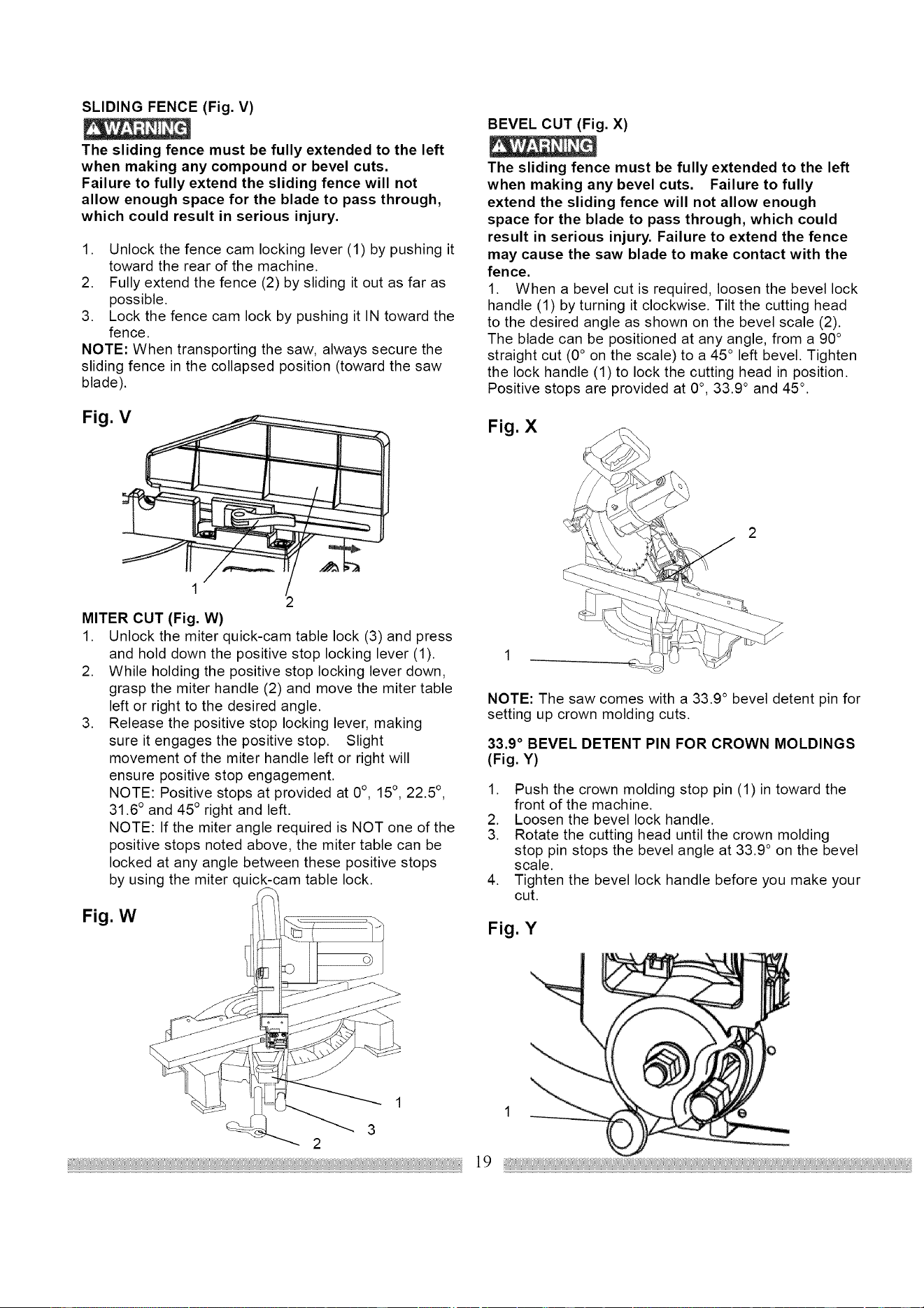
SLIDING FENCE (Fig. V)
The sliding fence must be fully extended to the left
when making any compound or bevel cuts.
Failure to fully extend the sliding fence will not
allow enough space for the blade to pass through,
which could result in serious injury.
1. Unlock the fence cam locking lever (1) by pushing it
toward the rear of the machine.
2. Fully extend the fence (2) by sliding it out as far as
possible.
3. Lock the fence cam lock by pushing it IN toward the
fence.
NOTE: When transporting the saw, always secure the
sliding fence in the collapsed position (toward the saw
blade).
Fig. V
1
2
MITER CUT (Fig. W)
1. Unlock the miter quick-cam table lock (3) and press
and hold down the positive stop locking lever (1).
2. While holding the positive stop locking lever down,
grasp the miter handle (2) and move the miter table
left or right to the desired angle.
3. Release the positive stop locking lever, making
sure it engages the positive stop. Slight
movement of the miter handle left or right will
ensure positive stop engagement.
NOTE: Positive stops at provided at 0°, 15°, 22.5 °,
31.6 ° and 45 ° right and left.
NOTE: If the miter angle required is NOT one of the
positive stops noted above, the miter table can be
locked at any angle between these positive stops
by using the miter quick-cam table lock.
Fig. W
BEVEL CUT (Fig. X)
The sliding fence must be fully extended to the left
when making any bevel cuts. Failure to fully
extend the sliding fence will not allow enough
space for the blade to pass through, which could
result in serious injury. Failure to extend the fence
may cause the saw blade to make contact with the
fence.
1. When a bevel cut is required, loosen the bevel lock
handle (1) by turning it clockwise. Tilt the cutting head
to the desired angle as shown on the bevel scale (2).
The blade can be positioned at any angle, from a 90°
straight cut (0 ° on the scale) to a 45 ° left bevel. Tighten
the lock handle (1)to lock the cutting head in position.
Positive stops are provided at 0 °, 33.9 ° and 45 °.
Fig. X
NOTE: The saw comes with a 33.9 ° bevel detent pin for
setting up crown molding cuts.
33.9° BEVEL DETENT PIN FOR CROWN MOLDINGS
(Fig. Y)
1. Push the crown molding stop pin (1) in toward the
front of the machine.
2. Loosen the bevel lock handle.
3. Rotate the cutting head until the crown molding
stop pin stops the bevel angle at 33.9 ° on the bevel
scale.
4. Tighten the bevel lock handle before you make your
cut.
Fig. Y
\
1
3
2
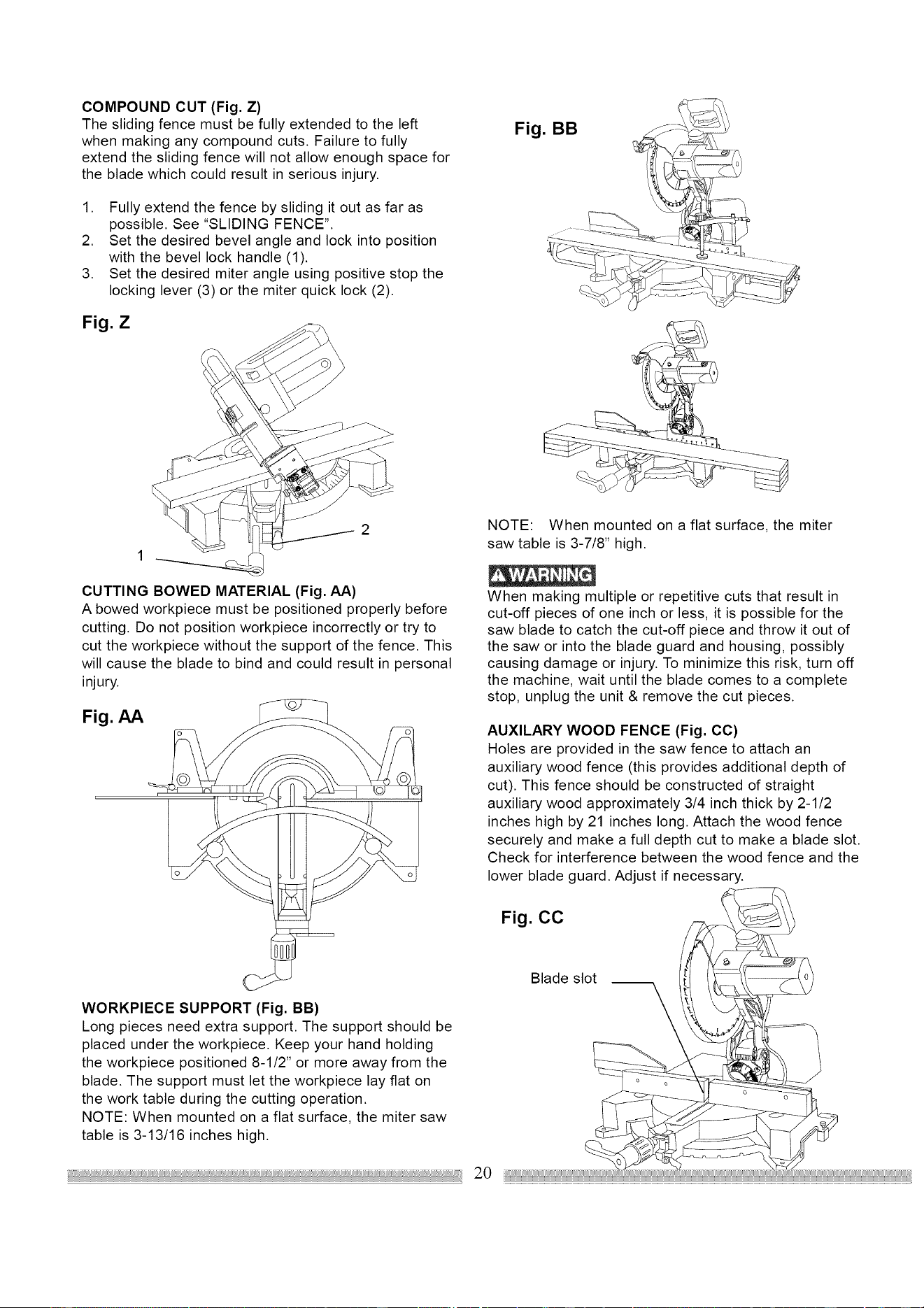
COMPOUND CUT (Fig. Z)
The sliding fence must be fully extended to the left
when making any compound cuts. Failure to fully
extend the sliding fence will not allow enough space for
the blade which could result in serious injury.
1. Fully extend the fence by sliding it out as far as
possible. See "SLIDING FENCE".
2. Set the desired bevel angle and lock into position
with the bevel lock handle (1).
3. Set the desired miter angle using positive stop the
locking lever (3) or the miter quick lock (2).
Fig. Z
Fig.
BB
CUTTING BOWED MATERIAL (Fig. AA)
A bowed workpiece must be positioned properly before
cutting. Do not position workpiece incorrectly or try to
cut the workpiece without the support of the fence. This
will cause the blade to bind and could result in personal
injury.
Fig. AA
WORKPIECE SUPPORT (Fig. BB)
Long pieces need extra support. The support should be
placed under the workpiece. Keep your hand holding
the workpiece positioned 8-1/2" or more away from the
blade. The support must let the workpiece lay flat on
the work table during the cutting operation.
NOTE: When mounted on a flat surface, the miter saw
table is 3-13/16 inches high.
NOTE: When mounted on a flat surface, the miter
saw table is 3-7/8" high.
When making multiple or repetitive cuts that result in
cut-off pieces of one inch or less, it is possible for the
saw blade to catch the cut-off piece and throw it out of
the saw or into the blade guard and housing, possibly
causing damage or injury. To minimize this risk, turn off
the machine, wait until the blade comes to a complete
stop, unplug the unit & remove the cut pieces.
AUXILARY WOOD FENCE (Fig. CC)
Holes are provided in the saw fence to attach an
auxiliary wood fence (this provides additional depth of
cut). This fence should be constructed of straight
auxiliary wood approximately 3/4 inch thick by 2-1/2
inches high by 21 inches long. Attach the wood fence
securely and make a full depth cut to make a blade slot.
Check for interference between the wood fence and the
lower blade guard. Adjust if necessary.
Fig. CC
Blade slot
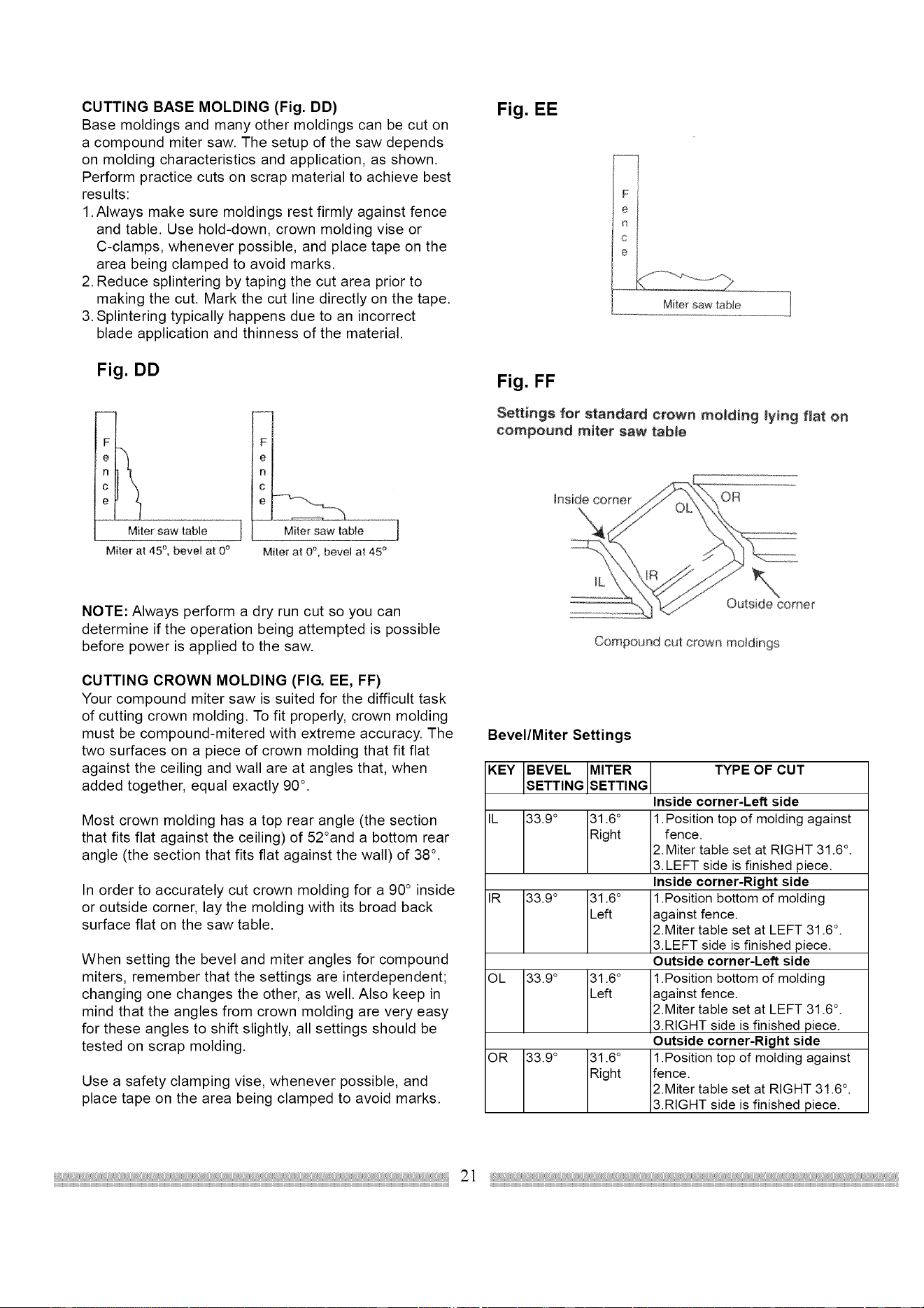
CUTTINGBASEMOLDING(Fig.DD)
Basemoldingsandmanyothermoldingscanbecuton
acompoundmitersaw.Thesetupofthesawdepends
onmoldingcharacteristicsandapplication,asshown.
Performpracticecutsonscrapmaterialtoachievebest
results:
1.Alwaysmakesuremoldingsrestfirmlyagainstfence
andtable.Usehold-down,crownmoldingviseor
C-clamps,wheneverpossible,andplacetapeonthe
areabeingclampedtoavoidmarks.
2.Reducesplinteringbytapingthecutareapriorto
makingthecut.Markthecutlinedirectlyonthetape.
3.Splinteringtypicallyhappensdueto anincorrect
bladeapplicationandthinnessofthematerial.
Fig. DD
Miter saw table
Miter at 45 °, bevel at 0 _
F
]
Miter at 0°, bevel at 45 °
NOTE: Always perform a dry run cut so you can
determine if the operation being attempted is possible
before power is applied to the saw.
CUTTING CROWN MOLDING (FIG. EE, FF)
Your compound miter saw is suited for the difficult task
of cutting crown molding. To fit properly, crown molding
must be compound-mitered with extreme accuracy. The
two surfaces on a piece of crown molding that fit flat
against the ceiling and wall are at angles that, when
added together, equal exactly 90 °.
Most crown molding has a top rear angle (the section
that fits flat against the ceiling) of 52°and a bottom rear
angle (the section that fits flat against the wall) of 38 ° .
In order to accurately cut crown molding for a 90 ° inside
or outside corner, lay the molding with its broad back
surface flat on the saw table.
When setting the bevel and miter angles for compound
miters, remember that the settings are interdependent;
changing one changes the other, as well. Also keep in
mind that the angles from crown molding are very easy
for these angles to shift slightly, all settings should be
tested on scrap molding.
Use a safety clamping vise, whenever possible, and
place tape on the area being clamped to avoid marks.
Fig. EE
Miter saw table i]
Fig. FF
Settings for standard crown mo_ding tying flat on
compound miter saw table
_nside corner OR
Outside corner
Compound cut crown moldings
Bevel/Miter Settings
KEY BEVEL MITER TYPE OF CUT
SETT NG SETT NG
Inside corner-Left side
IL 33.9 ° 31.6 ° 1. Position top of molding against
Right fence.
2. Miter table set at RIGHT 31.6 °.
3. LEFT side is finished piece.
Inside corner-Right side
IR 33.9 ° 31.6 ° 1 .Position bottom of molding
Left against fence.
2.Miter table set at LEFT 31.6 °.
3.LEFT side is finished piece.
Outside corner-Left side
OL 33.9 ° 31.6 ° 1.Position bottom of molding
Left against fence.
2.Miter table set at LEFT 31.6 °.
3.RIGHT side is finished piece.
Outside corner-Right side
OR 33.9 ° 31.6 ° 1.Position top of molding against
Right fence.
2.Miter table set at RIGHT 31.6 °.
3.RIGHT side is finished piece.
MAINTENANCE
DANGER
Never put lubricants on the blade while it is spinning.
To avoid fire or toxic reaction, never use gasoline,
naphtha acetone, lacquer thinner or similar highly
volatile solvents to clean the miter saw.
To avoid injury from unexpected starting or electrical
shock, unplug the power cord before working on the
saw.
For your safety, this saw is double-insulated. To avoid
electrical shock, fire or injury, use only parts identical to
those identified in the parts list. Reassemble exactly as
the original assembly to avoid electrical shock.
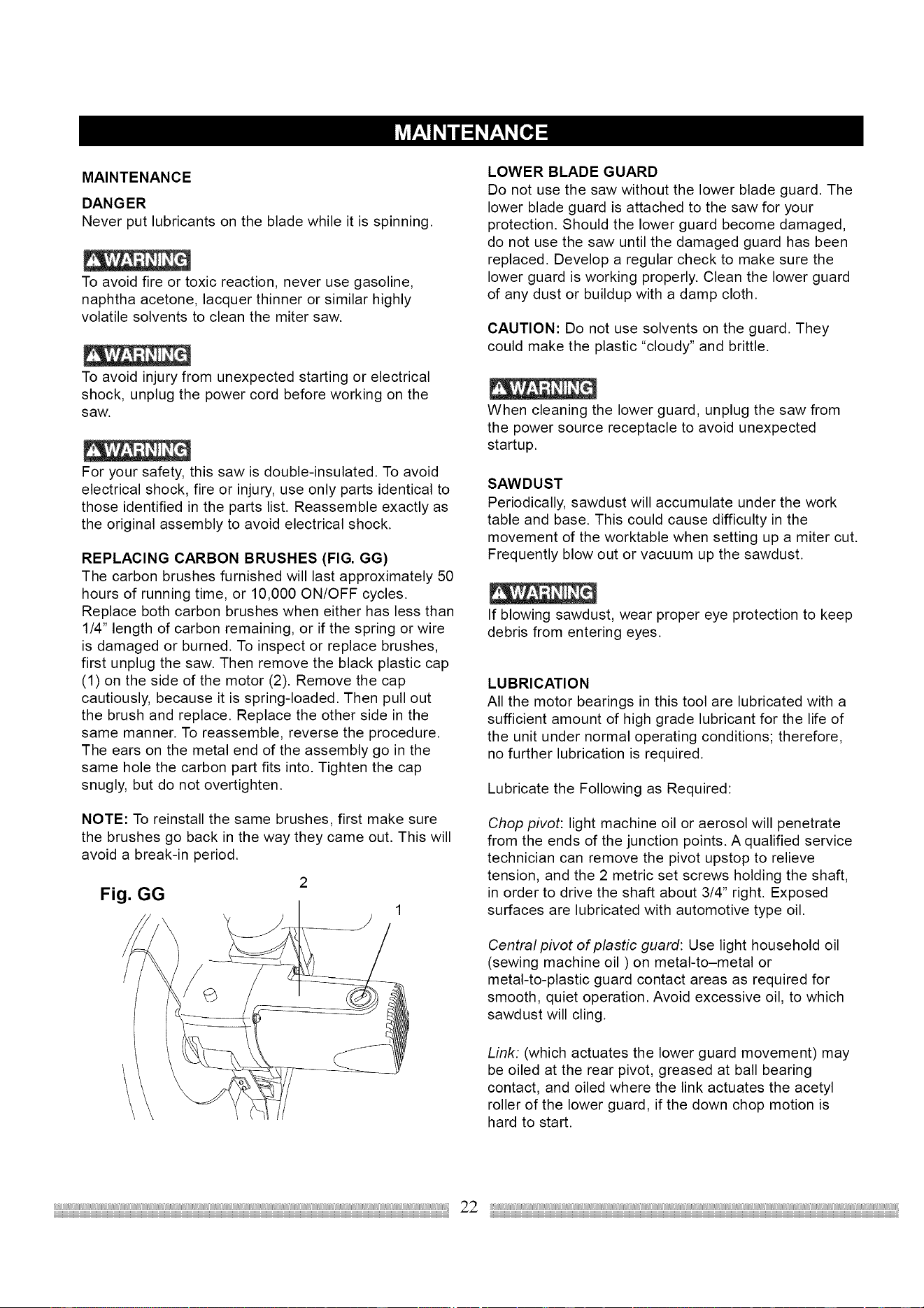
REPLACING CARBON BRUSHES (FIG. GG)
The carbon brushes furnished will last approximately 50
hours of running time, or 10,000 ON/OFF cycles.
Replace both carbon brushes when either has less than
1/4" length of carbon remaining, or if the spring or wire
is damaged or burned. To inspect or replace brushes,
first unplug the saw. Then remove the black plastic cap
(1) on the side of the motor (2). Remove the cap
cautiously, because it is spring-loaded. Then pull out
the brush and replace. Replace the other side in the
same manner. To reassemble, reverse the procedure.
The ears on the metal end of the assembly go in the
same hole the carbon part fits into. Tighten the cap
snugly, but do not overtighten.
NOTE: To reinstall the same brushes, first make sure
the brushes go back in the way they came out. This will
avoid a break-in period.
Fig. GG
LOWER BLADE GUARD
Do not use the saw without the lower blade guard. The
lower blade guard is attached to the saw for your
protection. Should the lower guard become damaged,
do not use the saw until the damaged guard has been
replaced. Develop a regular check to make sure the
lower guard is working properly. Clean the lower guard
of any dust or buildup with a damp cloth.
CAUTION: Do not use solvents on the guard. They
could make the plastic "cloudy" and brittle.
When cleaning the lower guard, unplug the saw from
the power source receptacle to avoid unexpected
startup.
SAWDUST
Periodically, sawdust will accumulate under the work
table and base. This could cause difficulty in the
movement of the worktable when setting up a miter cut.
Frequently blow out or vacuum up the sawdust.
If blowing sawdust, wear proper eye protection to keep
debris from entering eyes.
LUBRICATION
All the motor bearings in this tool are lubricated with a
sufficient amount of high grade lubricant for the life of
the unit under normal operating conditions; therefore,
no further lubrication is required.
Lubricate the Following as Required:
Chop pivot: light machine oil or aerosol will penetrate
from the ends of the junction points. A qualified service
technician can remove the pivot upstop to relieve
tension, and the 2 metric set screws holding the shaft,
in order to drive the shaft about 3/4" right. Exposed
surfaces are lubricated with automotive type oil.
Central pivot of plastic guard: Use light household oil
(sewing machine oil ) on metal-to-metal or
metal-to-plastic guard contact areas as required for
smooth, quiet operation. Avoid excessive oil, to which
sawdust will cling.
Link: (which actuates the lower guard movement) may
be oiled at the rear pivot, greased at ball bearing
contact, and oiled where the link actuates the acetyl
roller of the lower guard, if the down chop motion is
hard to start.
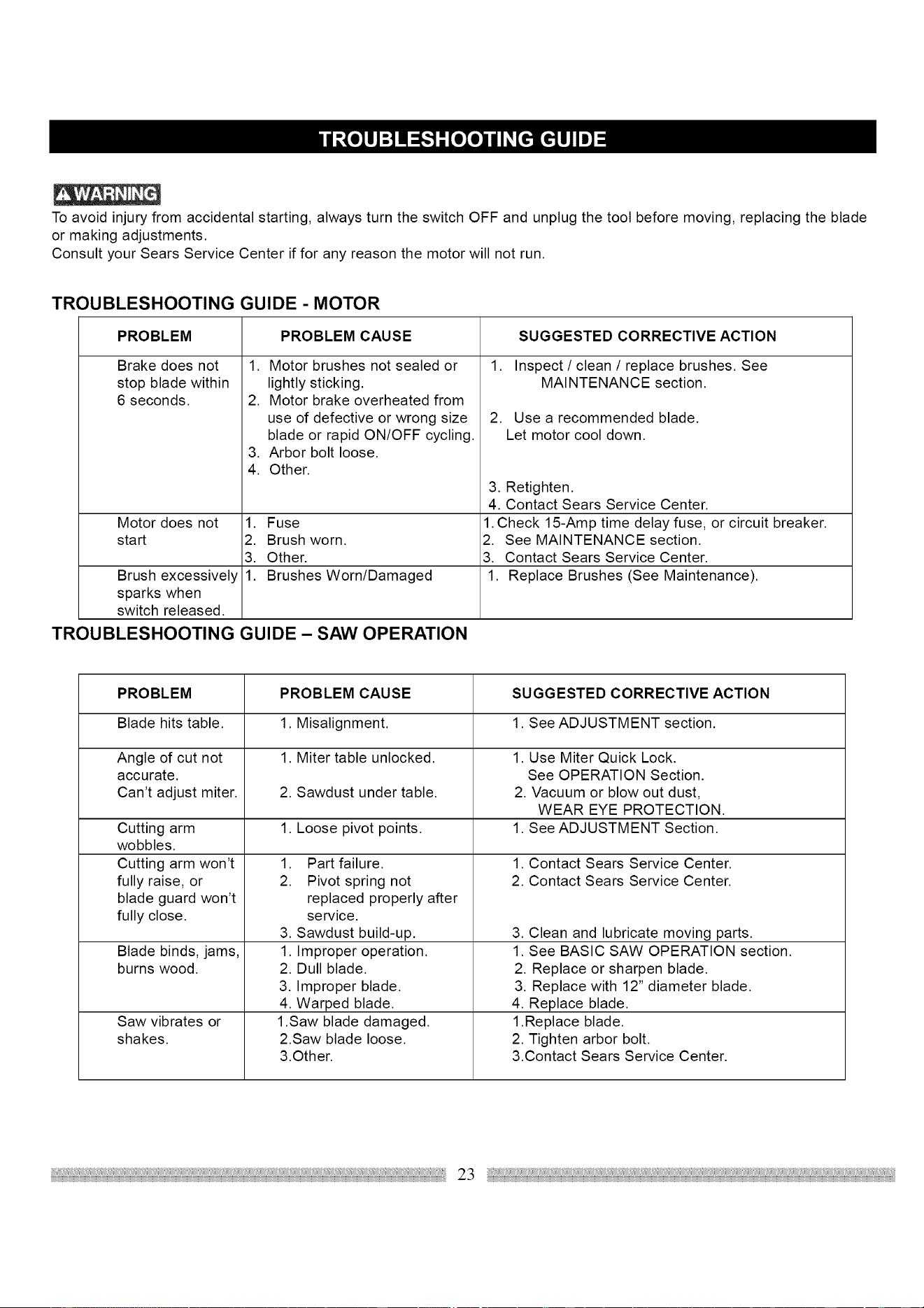
Toavoidinjuryfromaccidentalstarting,alwaysturntheswitchOFFandunplugthetoolbeforemoving,replacingtheblade
ormakingadjustments.
ConsultyourSearsServiceCenterifforanyreasonthemotorwillnotrun.
TROUBLESHOOTING GUIDE - MOTOR
PROBLEM
Brake does not
stop blade within
6 seconds.
PROBLEM CAUSE
1. Motor brushes not sealed or
lightly sticking.
2. Motor brake overheated from
use of defective or wrong size
blade or rapid ON/OFF cycling.
3. Arbor bolt loose.
4. Other.
SUGGESTED CORRECTIVE ACTION
1. Inspect / clean / replace brushes. See
MAINTENANCE section.
2. Use a recommended blade.
Let motor cool down.
3. Retighten.
4. Contact Sears Service Center.
Motor does not 1. Fuse 1. Check 15-Amp time delay fuse, or circuit breaker.
start 2. Brush worn. 2. See MAINTENANCE section.
3. Other. 3. Contact Sears Service Center.
Brush excessively 1. Brushes Worn/Damaged 1. Replace Brushes (See Maintenance).
sparks when
switch released.
TROUBLESHOOTING GUIDE - SAW OPERATION
PROBLEM PROBLEM CAUSE SUGGESTED CORRECTIVE ACTION
Blade hits table. 1. Misalignment. 1. See ADJUSTMENT section.
Angle of cut not 1. Miter table unlocked. 1. Use Miter Quick Lock.
accurate. See OPERATION Section.
Can't adjust miter. 2. Sawdust under table. 2. Vacuum or blow out dust,
WEAR EYE PROTECTION.
1. Loose pivot points. 1. See ADJUSTMENT Section.Cutting arm
wobbles.
Cutting arm won't
fully raise, or
blade guard won't
fully close.
Blade binds, jams,
burns wood.
Saw vibrates or
shakes.
1. Part failure.
2. Pivot spring not
replaced properly after
service.
3. Sawdust build-up.
1. Improper operation.
2. Dull blade.
3. Improper blade.
4. Warped blade.
1 .Saw blade damaged.
2.Saw blade loose.
3.Other.
1. Contact Sears Service Center.
2. Contact Sears Service Center.
3. Clean and lubricate moving parts.
1. See BASIC SAW OPERATION section.
2. Replace or sharpen blade.
3. Replace with 12" diameter blade.
4. Replace blade.
1.Replace blade.
2. Tighten arbor bolt.
3.Contact Sears Service Center.
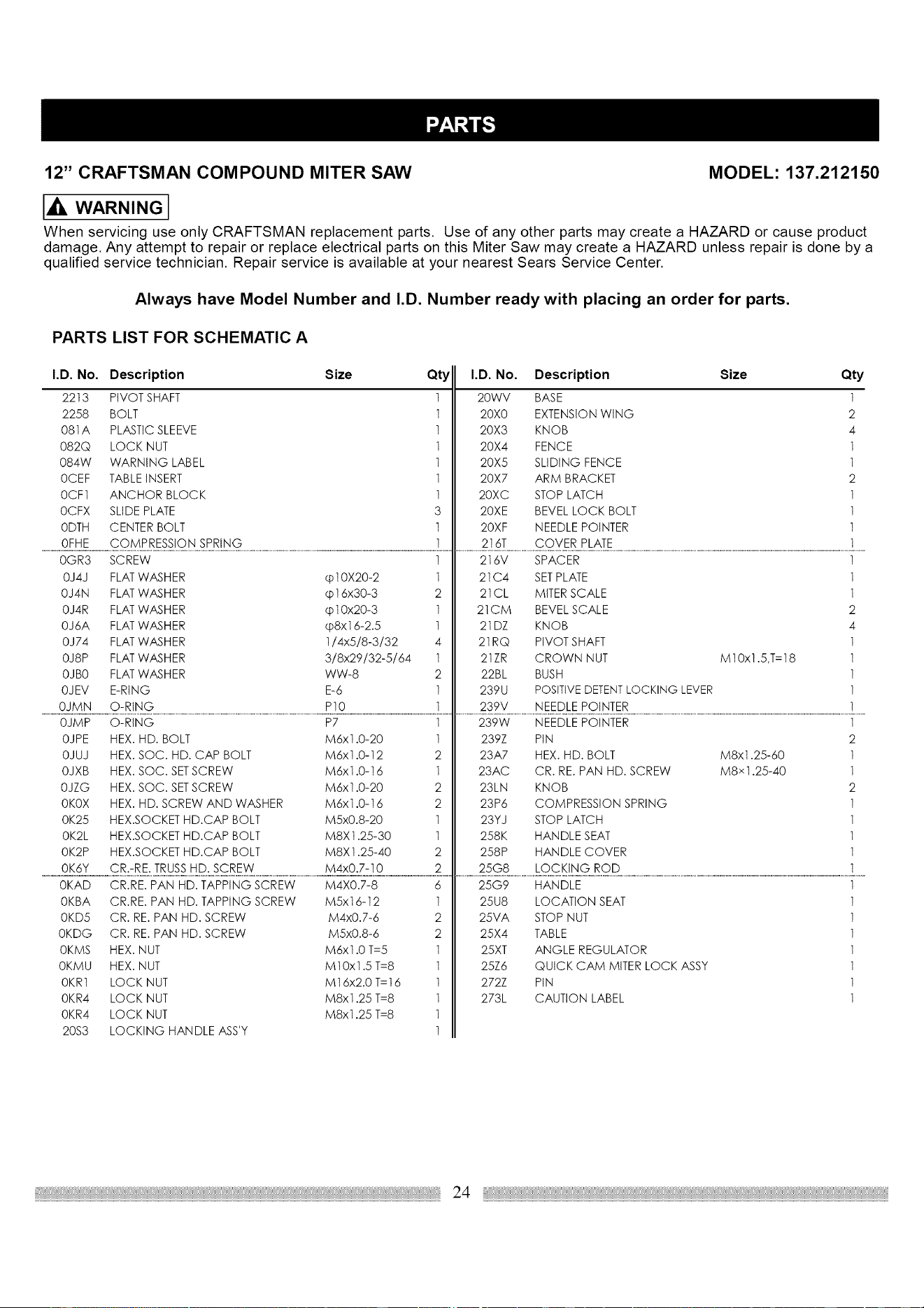
12" CRAFTSMAN COMPOUND MITER SAW MODEL: 137.212150
I_ WARNING]
When servicing use only CRAFTSMAN replacement parts. Use of any other parts may create a HAZARD or cause product
damage. Any attempt to repair or replace electrical parts on this Miter Saw may create a HAZARD unless repair is done by a
qualified service technician. Repair service is available at your nearest Sears Service Center.
Always have Model Number and I.D. Number ready with placing an order for parts.
PARTS LIST FOR SCHEMATIC A
I.D. No. Description
2213 PIVOT SHAFT
2258 BOLT
081A PLASTICSLEEVE
082Q LOCK NUT
084W WARNING LABEL
0CEF TABLEINSERT
0CF1 ANCHOR BLOCK
0CFX SLIDE PLATE
0DTH CENTER BOLT
0FHE COMPRESSION SPRING
Size
Qty I.D. No.
1 20WV
1 20X0
1 20X3
1 20X4
1 20X5
1 20X7
1 20XC
3 20XE
1 20XF
1 216T
Description Size Qty
BASE 1
EXTENSION WING 2
KNOB 4
FENCE 1
SLIDING FENCE 1
ARM BRACKET 2
STOP LATCH 1
BEVEL LOCK BOLT 1
NEEDLE POINTER 1
COVER PLATE 1
0GR3 SCREW
0J4J FLAT WASHER cpl0X20-2
0J4N FLAT WASHER @16x30-3
0J4R FLATWASHER cpI 0x20-3
0J6A FLATWASHER cp8xt 6-2.5
0J74 FLATWASHER 1/4x5/8-3/32
0J8P FLAT WASHER 3/8x29/32-5/64
OJBO FLATWASHER WW-8
OJEV E-RING E-6
OJMN O-RING PIO
1
1
2
1
1
4
1
2
1
1
216V SPACER
21C4 SETPLATE
21CL MITER SCALE
21CM BEVEL SCALE
21DZ KNOB
21RQ PIVOT SHAFT
21ZR CROWN NUT
22BL BUSH
239U POSITIVEDETENTLOCKING LEVER
239V NEEDLE POINTER
M10x1.5,T=18
1
1
1
2
4
1
1
1
1
1
0JMP O-RING
OJPE HEX. HD. BOLT
OJUJ HEX. SOC. HD. CAP BOLT
OJXB HEX. SOC. SETSCREW
OJZG HEX. SOC. SETSCREW
OKOX HEX. HD. SCREW AND WASHER
0K25 HEX.SOCKET HD.CAP BOLT
OK2L HEX.SOCKET HD.CAP BOLT
OK2P HEX.SOCKET HD.CAP BOLT
OK6Y CR.-RE. TRUSSHD. SCREW
P7
M6x1.0-20
M6x1.0-12
M6xl.0-16
M6x1.0-20
M6xl.0-16
M5x0.8-20
M8X t .25-30
M8X 1.25-40
M4x0.7-10
1
1
2
1
2
2
1
1
2
2
239W NEEDLE POINTER
239Z PIN
23A7 HEX. HD. BOLT
23AC CR. RE. PAN HD. SCREW
23LN KNOB
23P6 COMPRESSION SPRING
23YJ STOP LATCH
258K HANDLE SEAT
258P HANDLE COVER
25G8 LOCKING ROD
M8x1.25-60
M8 x 1.25-40
1
2
1
1
2
1
1
1
1
1
0KAD CR.RE. PAN HD. TAPPING SCREW M4X0.7-8
0KBA CR.RE. PAN HD. TAPPING SCREW M5xt6-12
0KD5 CR. RE. PAN HD. SCREW M4x0.7-6
0KDG CR. RE. PAN HD. SCREW M5x0.8-6
0KMS HEX. NUT M6x1.0 T=5
0KMU HEX. NUT M10x1.5 T=8
0KR1 LOCK NUT M16x2.0 T=16
0KR4 LOCK NUT M8x1.25 T=8
0KR4 LOCK NUT M8x1.25 T=8
20S3 LOCKING HANDLE ASS'Y
6
1
2
2
1
1
1
1
1
1
25G9 HANDLE
25U8 LOCATION SEAT
25VA STOP NUT
25X4 TABLE
25XT ANGLE REGULATOR
25Z6 QUICK CAM MITER LOCK ASSY
272Z PIN
273L CAUTION LABEL
1
1
1
1
1
1
1
1
24
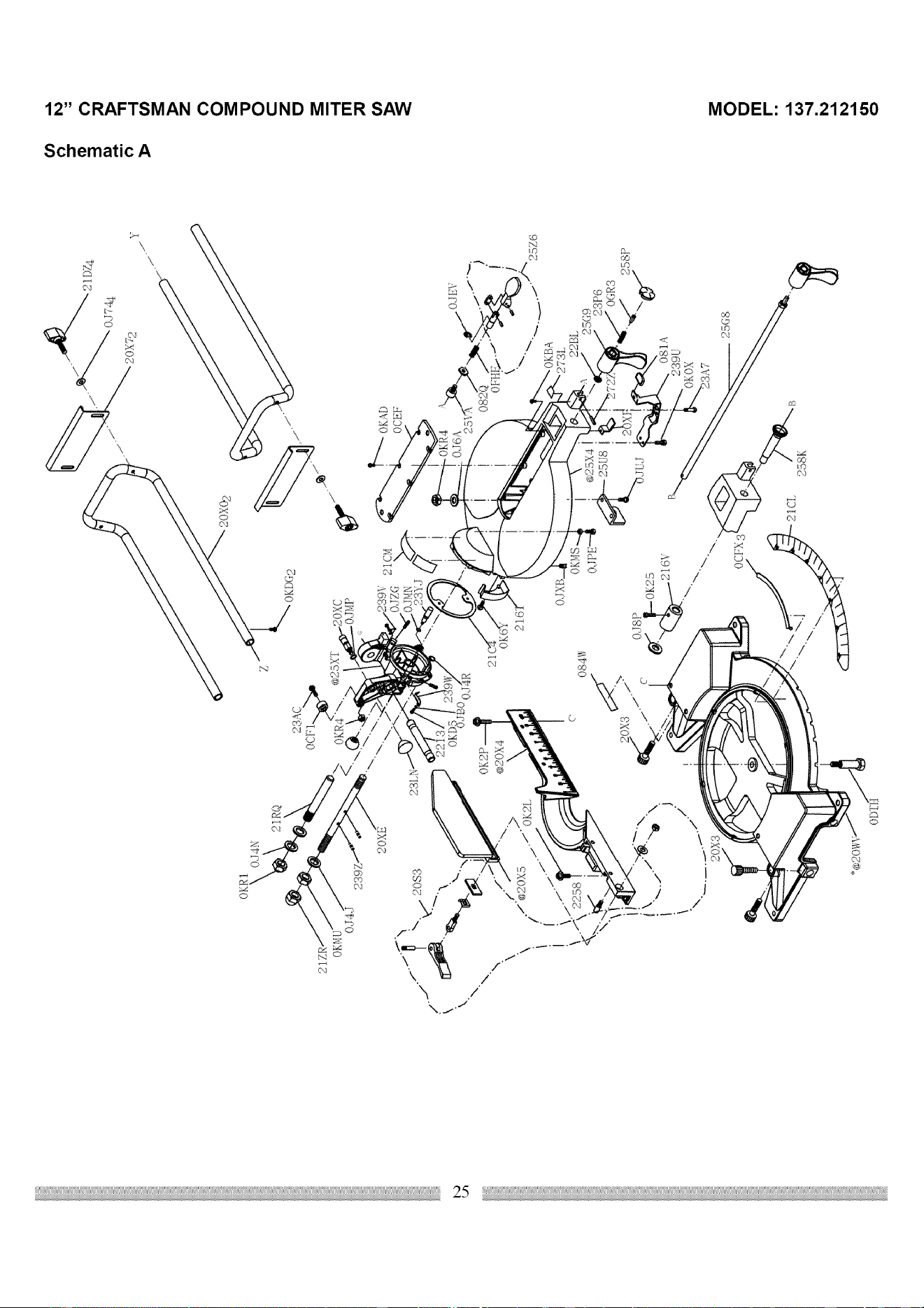
I,O
t,.tl
OKR1
OJ4N
21R9
OJ4J
23
20XE
23AC
•OKDG2
OCEF
• 0
o -I
Z
t")
0
0
C
Z
-I
rrl
;;;0
\
\
I
\
.>
./®20X5 / OK2L
/ /-
\
20X3
ODTIt
084W
OJSP
OCFX
258K
22BI,
25(}9
23P6
258P
O81A
239U
OKOX
0
I'N
I--
¢¢
",,I
0
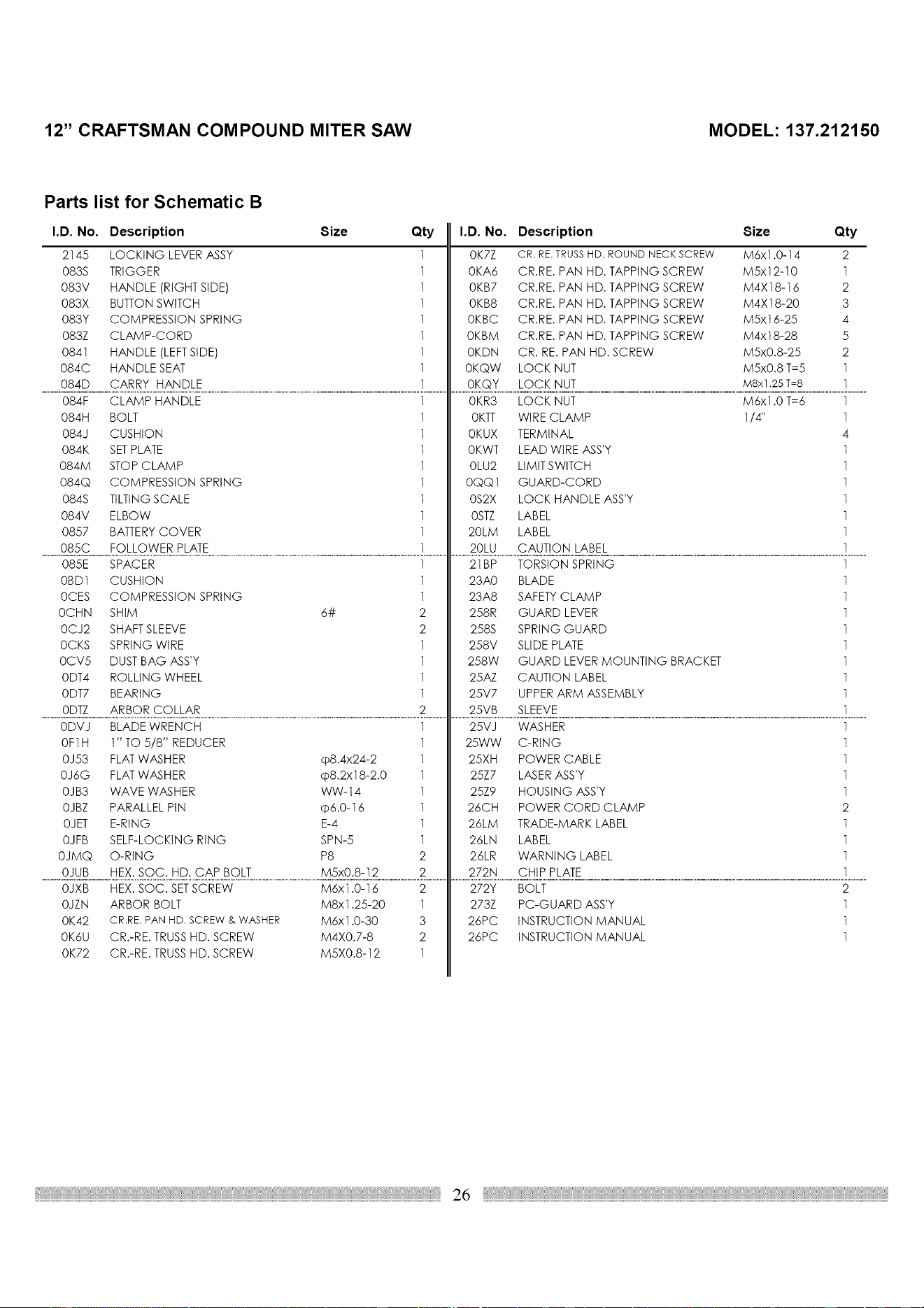
12" CRAFTSMAN COM POUND MITER SAW MODEL: 137.212150
Parts list for Schematic B
I.D. No. Description Size Qty
2145 LOCKING LEVER ASSY 1
083S TRIGGER 1
083V HANDLE (RIGHT SIDE) 1
083X BUTTON SWITCH 1
083Y COMPRESSION SPRING 1
083Z CLAMP-CORD 1
0841 HANDLE (LEFTSIDE) 1
084C HANDLE SEAT 1
084D CARRY HANDLE 1
I.D. No. Description Size Qty
0K7Z CR. RE. TRUSS HD. ROUND NECK SCREW M6x1.0-14 2
0KA6 CR.RE. PAN HD. TAPPING SCREW M5x12-10 1
0KB7 CR.RE. PAN HD. TAPPING SCREW M4X18-16 2
0KB8 CR.RE. PAN HD. TAPPING SCREW M4X18-20 3
0KBC CR.RE. PAN HD. TAPPING SCREW M5xt 6-25 4
0KBM CR.RE. PAN HD. TAPPING SCREW M4x18-28 5
0KDN CR. RE. PAN HD. SCREW M5x0.8-25 2
0KQW LOCK NUT M5x0.8 T=5 1
0KQY LOCK NUT M8x1.25 T=8 1
084F CLAMP HANDLE
084H BOLT
084J CUSHION
084K SETPLATE
084M STOP CLAMP
084Q COMPRESSION SPRING
084S TILTING SCALE
084V ELBOW
0857 BATTERYCOVER
085C FOLLOWER PLATE
1
1
1
1
1
1
1
1
1
1
0KR3 LOCK NUT
0KTT WIRE CLAMP
0KUX TERMINAL
0KWT LEAD WIRE ASS'Y
0LU2 LIMIT SWITCH
0QQ1 GUARD-CORD
0S2X LOCK HANDLE ASS'Y
0STZ LABEL
20LM LABEL
20LU CAUTION LABEL
M6x1.0 T=6
1/4"
1
1
4
1
1
1
1
1
1
1
085E SPACER
6#
0BD1 CUSHION
0CES COMPRESSION SPRING
0CHN SHIM
0C J2 SHAFT SLEEVE
0CKS SPRING WIRE
0CV5 DUSTBAG ASS'Y
0DT4 ROLLING WHEEL
0DT7 BEARING
0DTZ ARBOR COLLAR
1
1
1
2
2
1
1
1
1
2
21BP TORSION SPRING
23A0 BLADE
23A8 SAFETYCLAMP
258R GUARD LEVER
258S SPRING GUARD
258V SLIDE PLATE
258W GUARD LEVER MOUNTING BRACKET
25AZ CAUTION LABEL
25V7 UPPERARM ASSEMBLY
25VB SLEEVE
1
1
1
1
1
1
1
1
1
1
0DVJ BLADE WRENCH 1 25VJ WASHER 1
OF1H 1" TO 5/8" REDUCER
0J53 FLATWASHER cp8.4x24-2
0J6G FLATWASHER cp8.2xl 8-2.0
0JB3 WAVE WASHER WW-14
0JBZ PARALLEL PIN cp6.0-16
0JET E-RING E-4
0JFB SELF-LOCKING RING SPN-5
0JMQ O-RING P8
0JUB HEX. SOC. HD. CAP BOLT M5x0.8-12
1 25WW
1 25XH
1 25Z7
1 25Z9
1 26CH
1 26LM
1 26LN
2 26LR
2 272N
C-RING
POWER CABLE
LASERASS'Y
HOUSING ASS'Y
POWER CORD CLAMP
TRADE-MARK LABEL
LABEL
WARNING LABEL
CHIP PLATE
1
1
1
1
2
1
1
1
1
0JXB HEX. SOC. SETSCREW M6x1.0-16 2 272Y BOLT 2
0JZN ARBOR BOLT M8x1.25-20 1 273Z PC-GUARD ASS'Y 1
0K42 CR.RE.PANHD. SCREW& WASHER M6x1.0-30 3 26PC INSTRUCTION MANUAL 1
0K6U CR.-RE. TRUSSHD. SCREW M4X0.7-8 2 26PC INSTRUCTION MANUAL 1
0K72 CR.-RE. TRUSSHD. SCREW M5X0.8-12 1
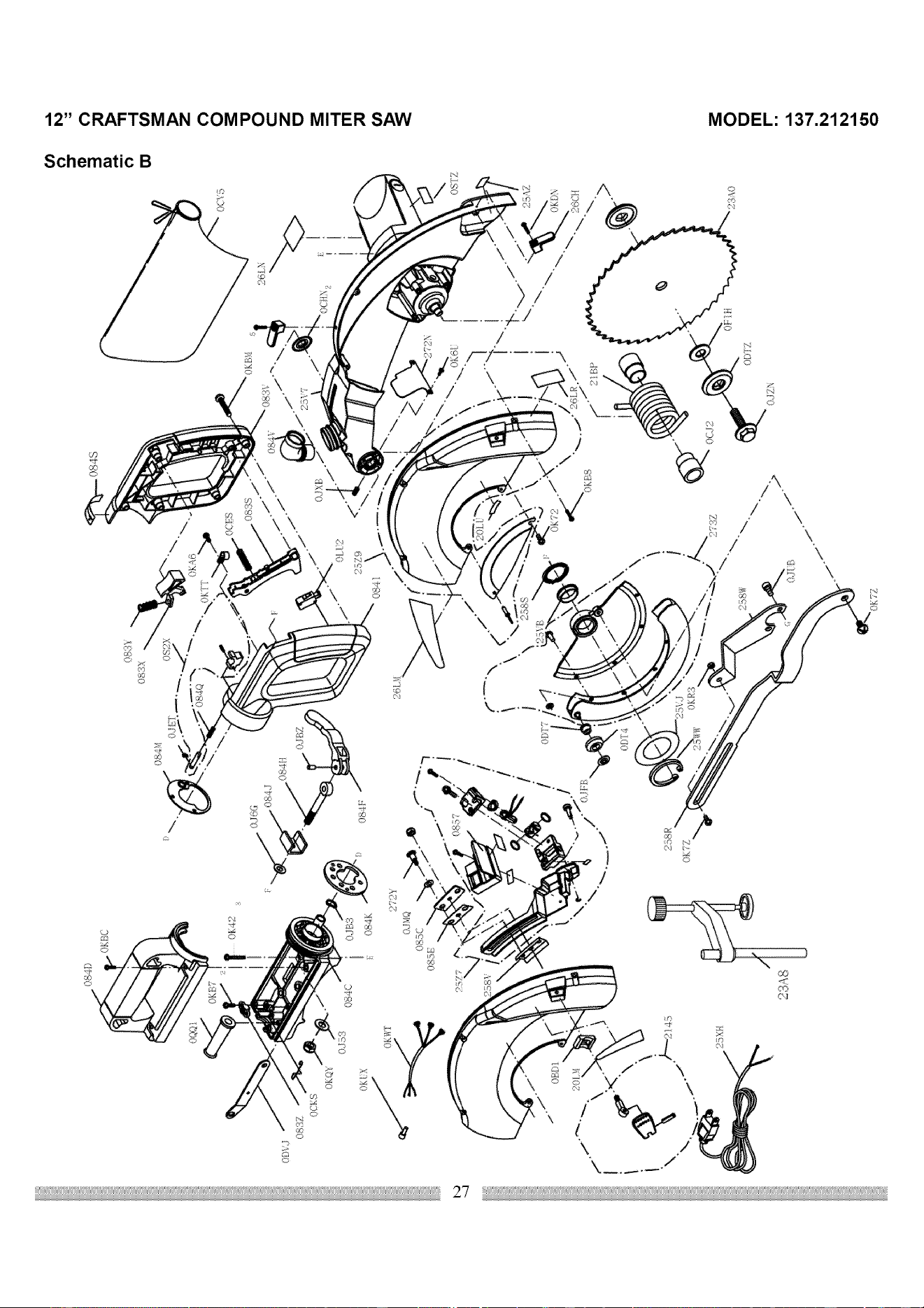
,,-,4
0_ _',,I
\
084C
t
23?,8
t
i
\
I
_?SZ
,,h
i +
J
d
)CYB
o
0
0
Z
m
oo
0
111
r"
,,,,,I
i,,a
12" CRAFTSMAN COM POUND MITER SAW MODEL: 137.212150
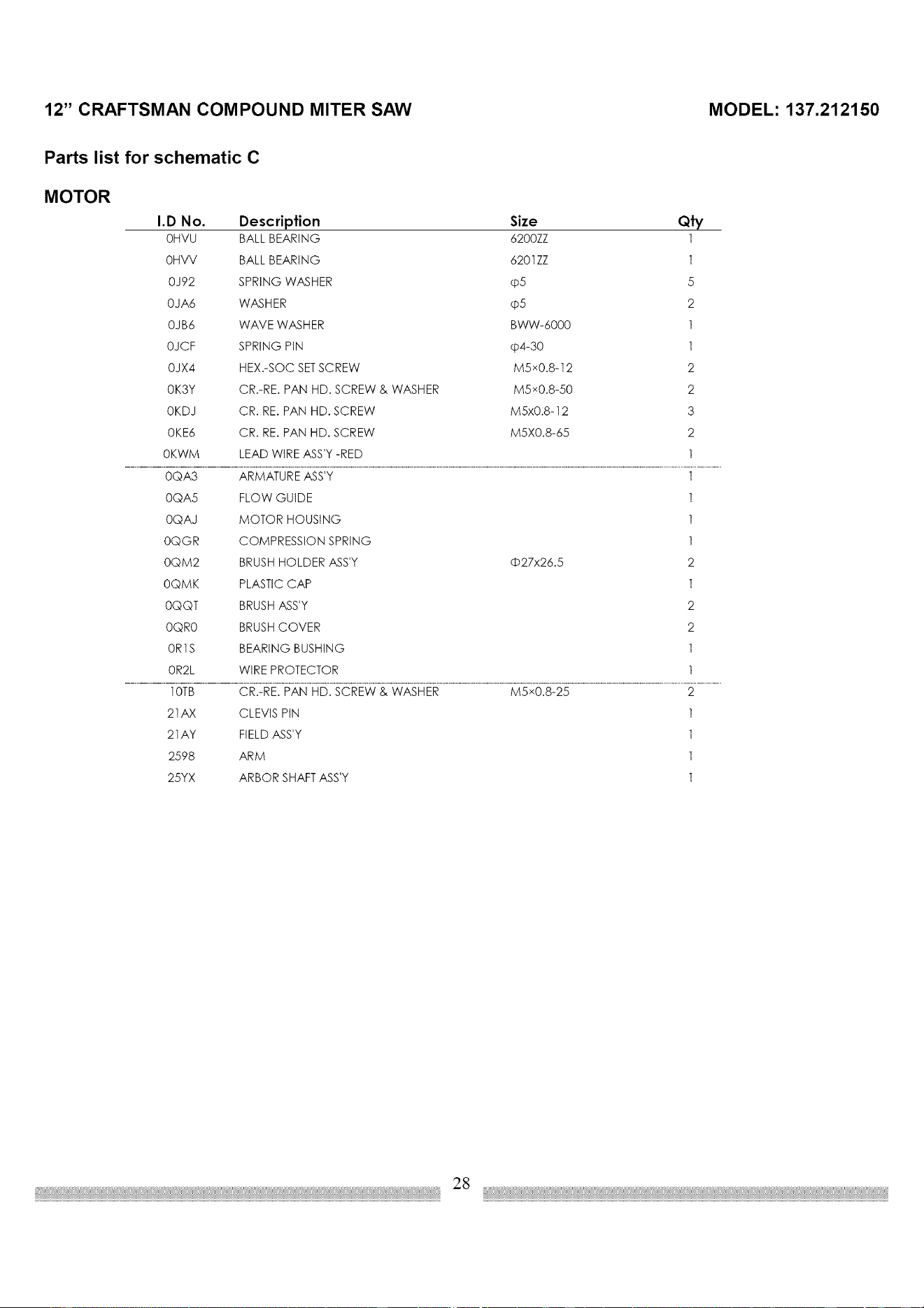
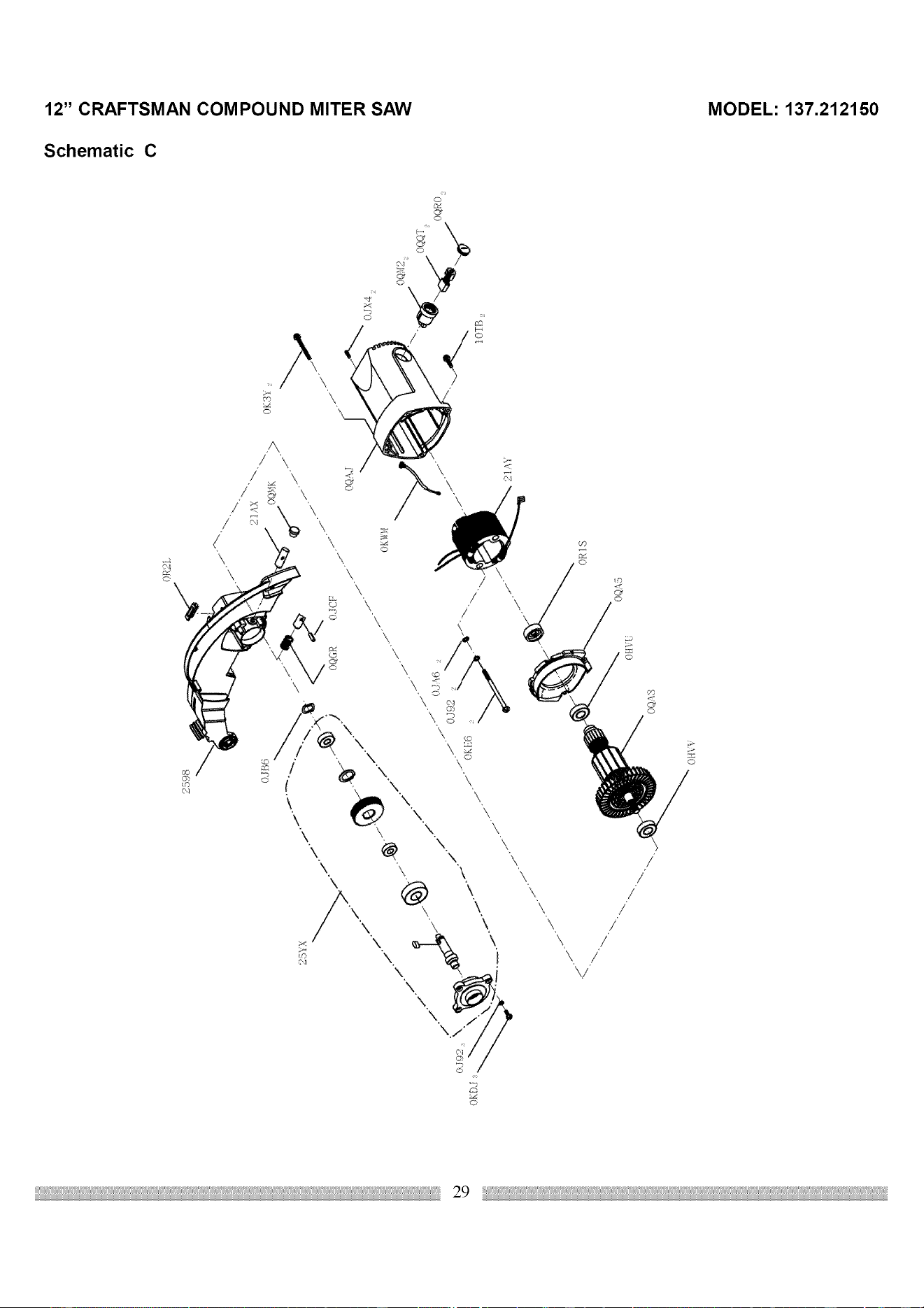
Parts list for schematic C
MOTOR
I.D No. Description Size Qty
0HVU BALL BEARING 6200ZZ 1
0HVV BALL BEARING 6201ZZ 1
0J92 SPRING WASHER @5 5
0JA6 WASHER @5 2
0JB6 WAVE WASHER BWW-6000 1
0JCF SPRING PIN @4-30 1
0JX4 HEX.-SOC SETSCREW M5x0.8-12 2
0K3Y CR.-RE. PAN HD. SCREW & WASHER M5x0.8-50 2
0KDJ CR. RE. PAN HD. SCREW M5x0.8-12 3
0KE6 CR. RE. PAN HD. SCREW M5X0.8-65 2
0KWM LEAD WIRE ASS'Y-RED 1
0QA3 ARMATURE ASS'Y 1
0QA5 FLOW GUIDE
0QAJ MOTOR HOUSING
0QGR COMPRESSION SPRING
0QM2 BRUSHHOLDER ASS'Y
0QMK PLASTIC CAP
0QQT BRUSHASS'Y
0QR0 BRUSHCOVER
0R1S BEARING BUSHING
0R2L WIRE PROTECTOR
O27x26.5
1
1
1
2
1
2
2
1
1
10TB CR.-RE. PAN HD. SCREW & WASHER M5x0.8-25 2
21AX CLEVIS PIN 1
21AY FIELD ASS'Y 1
2598 ARM 1
25YX ARBOR SHAFT ASS'Y 1
28
OR2I....
251X .,/
7'
()_1S
OK3Y
j"
./"
IOTBz
m 0
3 ;tl
_" "11
o -I
0
Z
0
0
1:1
0
Z
-I
rn
;;u
0} \',,
0
rn
r"-
==
¢,¢
".MI
o'1


3!
Your Home
For repair-in your home-of all major brand appliances,
lawn and garden equipment, or heating and cooling systems,
no matter who made it, no matter who sold it!
For the replacement parts, accessories and
Operator's Manuals that you need to do-it-yourself.
For Sears professional installation of home appliances
and items like garage door openers and water heaters.
1-800-4-MY-HOME ® (1-800-469-4663)
Call anytime, day or night (U.S.A. and Canada)
www,sears,com www,sears,ca
Our Home
For repair of carry-in items like vacuums, lawn equipment,
and electronics, call or go on-line for the location of your nearest
Sears Parts & Repair Center.
1-800-488-1222
Call anytime, day or night (U.S.A. only)
www.sears.com
To purchase a protection agreement on a product serviced by Sears:
1-800-827-66,55 (U.S.A.) 1-800-361-666,5 (Canada)
Para pedir servicio de reparaci6n
a domicilio, y para ordenar piezas:
1-888-SU-HOGAR SM
(1-888-784-6427)
Au Canada pour service en fran_:ais:
1-800-LE-FOYER M°
(1-800-533-6937)
www.sears.ca
SEARS
TM
® Registered Trademark / Trademark / SM Service Mark of Sears, Roebuck and Co.
SM
® Marca Registrada / TM Marca de F&bdca / Marca de Servicio de Sears, Roebuck and Co.
MCMarque de commerce / MDMarque depos6e de Sears, Roebuck and Co. © Sears, Roebuck and Co.