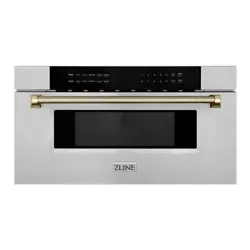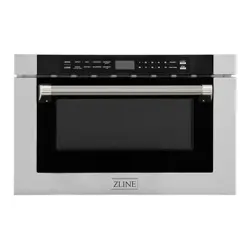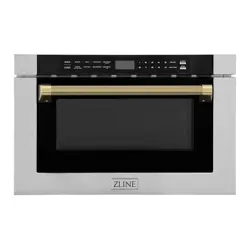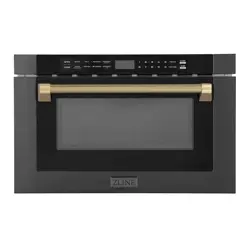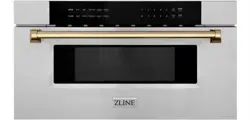

MICROWAVE DRAWER
www.zlinekitchen.com
User Manual

ZLINE Kitchen and Bath provides Attainable Luxury, where the kitchen and bath of your dreams
is never out of reach. Through our unique designs and unparalleled quality, we’re dedicated to
providing you an elevated experience in the heart of your home. With an endless selection of
features and finishes, our inspiration is your reality.
WARNING: This product can expose you to chemicals including nickel, which is known to the
State of California to cause cancer. For more information, go to www.P65Warnings.ca.gov.
ZLINE is fueled by a passion for innovation; A relentless pursuit of bringing the highest end luxury
designs and professional features into everyone’s homes. Because we continually strive to improve
our products, we may change specifications and designs without prior notice.


1
General Safety
WARNING
• Before installation and operation, please read and follow
these important instructions for the safety of your home
and the people living in it.
• Installation and service must be performed by a qualified
installer. The oven should not be adjusted or repaired by
anyone except properly qualified service personnel.
• IMPORTANT: Save this installation manual for local
electrical inspector’s use and for your own future
reference.
• This device complies with part 18 of the FCC Rules.
• Do not attempt to operate this oven with the door open
since open-door operation can result in harmful exposure
to microwave energy. It is important not to destroy or
tamper with the safety interlocks.
• Do not place any object between the oven front face and
the door or allow soil or cleaner residue to accumulate
on sealing surfaces.
• Do not operate the oven if it is damaged. It is particularly
important that the oven door closes properly and that
there is no damage to the:
• Door (bent or broken)
• Hinges and latches (broken or loosened)
• Door seals and sealing surfaces (dirty or
eroding)
• When using electrical appliances, basic safety
precautions should be followed.
• To reduce the risk of burns, electric shock, fire, personal
injury, or exposure to excessive microwave energy, read
all instructions before using the appliance.
IMPORTANT SAFETY INSTRUCTIONS

2
General Safety
• This appliance must be grounded or connected to a
properly grounded outlet.
• Install this appliance only in accordance with the
provided installation instructions.
• Some products such as whole eggs and sealed
containers (i.e. closed glass jars) should not be heated in
this oven.
• Use this appliance only for its intended use as described
in the manual. Do not use corrosive chemicals or
vapors in this appliance. This type of oven is specifically
designed to heat, cook, or defrost food.
• As with any appliance, close supervision is necessary
when used by children.
• Cleaning and user maintenance shall not be made by
children without supervision. Keep the appliance and its
cord out of reach of children.
• Do not operate this appliance if it has a damaged
electrical cord or plug, if it is not working properly, or if
the entire unit has been damaged.
• Do not cover or block any openings on the appliance.
• Do not immerse cord or plug in water.
• Keep cord away from heated surfaces.
• Do not let cord hang over edge of table or counter.
• Do not use paper products when appliance is operated in
the convection or baking mode.
• Do not store this appliance outdoors. Do not use this
product near water for example, near a kitchen sink,
in a wet basement, near a swimming pool, or similar
locations.
IMPORTANT SAFETY INSTRUCTIONS

3
General Safety
• When cleaning surfaces of the door and oven that
come together when closing the door, use only mild,
nonabrasive soaps or kitchen-safe cleaners applied with
a sponge or soft cloth. Do not clean with metal scouring
pads. Pieces can burn off the pad and touch electrical
parts, increasing risk of electric shock.
• To reduce the risk of fire inside the oven:
• Do not overcook food. Carefully oversee
appliance when paper, plastic, or other
combustible materials are placed inside the oven
to facilitate cooking.
• Remove wire twist-ties from paper or plastic bags
before placing bag in oven.
• If material inside of the oven ignites, keep oven
door closed, turn oven off, and disconnect the
power cord, or shut off power at the fuse or
circuit breaker panel.
• Do not use the microwave for storage purposes.
Do not leave paper products, cooking utensils, or
food inside when not in use.
• Do not store any materials, other than
manufacturer’s recommended accessories, in this
oven when not in use.
• Liquids such as water, coffee, or tea may be heated
beyond the boiling point without appearing to be boiling.
• Visible bubbling or boiling when the container is removed
from the microwave oven is not always present. THIS
COULD RESULT IN VERY HOT LIQUID SUDDENLY
BOILING OVER WHEN THE CONTAINER IS
DISTURBED.
IMPORTANT SAFETY INSTRUCTIONS

4
General Safety
• To reduce the risk of injury:
• Do not overheat liquid.
• Stir the liquid before and halfway through
heating it.
• Do not use straight sided containers with narrow
necks.
• After heating, allow the container to stand in the
microwave oven for a short time before removing
the container.
• Use extreme care when inserting a spoon or
other utensils into the container.
• Oversized food or oversized metal utensils should not be
inserted in a microwave oven as they may create a fire or
risk of electric shock.
• Do not cover racks or any other part of the oven with
metal foil. This will cause over-heating of the oven.
• Do not use the microwave if the oven is empty.
• Do not use items with metal trim, as this may cause arcing
(sparking) withing the oven, which can damage the
product and increase risk of fire or injury.
• Regularly clean the interior of your appliance. Food
debris or crumbs may cause arcing. See Maintenance
and Cleaning, pages 19-21, for more.
IMPORTANT SAFETY INSTRUCTIONS
5
Interference
OPERATION
RADIO INTERFERENCE
• Operation of the microwave oven may cause interference to your radio,
TV, or similar equipment.
• When there is interference, it may be reduced or eliminated by taking the
following measures:
• Clean the door and sealing surface of the oven.
• Reorient the receiving antenna of the radio or TV.
• Move the microwave oven away from the receiver.
• Plug the microwave oven into a different outlet so the
appliance and receiver are on different branch circuits.
CAUTION
UTENSILS
• Tightly-closed utensils could explode. Closed containers should be
opened and plastic pouches should be pierced before cooking.
• Carefully review the instructions on the next page regarding what
materials to use in the microwave.
• Please note there may be certain non-metallic utensils that are not safe
to use for microwaving. If in doubt, you can test the utensil in question by
following the procedure below:
• Fill a microwave-safe container with 1 cup of cold water,
along with the utensil in question.
• Cook on maximum power for 1 minute.
• Carefully feel the utensil. If the empty utensil is warm, do not
use it for microwave cooking.
• Do not exceed 1 minute cooking time.
6
Material Usage
OPERATION
MATERIAL USAGE
Browning dish Follow manufacturer instructions.
Dinnerware Microwave-safe only. Follow manufacturer’s instructions. Do
not use cracked or chipped dishes.
Glass jars Always remove lid. Use only to heat food until just warm. Most
glass jars are not heat resistant and may break.
Oven cooking
bags
Follow manufacturer instructions. Do not close with metal tie.
Make slits to allow steam to escape.
Paper plates and
cups
Use for short term cooking/warming only. Do not leave oven
unattended while cooking.
Paper towels Use to cover food for reheating and absorbing fat. Use with
supervision for a short-term cooking only.
Parchment and
wax paper
Use as a cover to prevent splattering or a wrap for steaming.
Plastic Microwave-safe only. Follow the manufacturer’s instructions.
Some plastic containers soften as the food inside gets hot.
“Boiling bags” and tightly closed plastic bags should be slit,
pierced, or vented as directed by package.
Plastic wrap Microwave-safe only. Use to cover food during cooking to
retain moisture. Do not allow plastic wrap to touch food.
Thermometers Microwave-safe only (meat and candy thermometers.)
WARNING
WARNING: Do not use aluminum, metal or metal trimmed
utensils, metal twist ties, paper bags, plastic foam, wood, or
stainless steel mugs.

7
Controls
OPERATION 24” Microwaves
1. Open
2. Setup
3. Auto Menu
4. Defrost Weight
5. Close
6. Clock/Kitchen Timer
7. Defrost Time
8. Number Keys
9. Power
10. Start/+30 sec
11 . Time Cook
12. Stop/Cancel
POWER ON
• When the microwave oven is plugged into an outlet, buzzer sounds once.
Screen displays “WELCOME.” Then the oven turns into waiting state. The screen
displays “00:00.”
• In waiting state, the screen will display the current time if the clock has been
set. Otherwise, “00:00” will display.
• Press “OPEN” button to open the drawer, and screen displays “OPEN.” The
screen will display “PLEASE CLOSE” when the drawer is fully opened.
• Press “CLOSE” button to close the drawer, and the screen displays “CLOSE.” The
screen will display the current time or “00:00” when the drawer is fully
closed. If there are errors opening or closing the drawer, buzzer will sound
5 times, and the screen will display “CLOSE OR OPEN.”
CLOCK SETTING
• Press “CLOCK/KITCHEN TIMER” button once. The first hour figure will flash and
other “0” will light. A clock symbol will light up.
• Press the number buttons to enter the correct time. The input should be between
01:00-12:59.
• Press “CLOCK/KITCHEN TIMER” to finish the setting. “:” will flash.
• Note: In the process of clock setting, if the “STOP/CANCEL” button is pressed or
if there is no operation within 1 minute, the oven will revert to former setting.
8
OPERATION 24” Microwaves
Cooking Functions
KITCHEN TIMER
• Press “CLOCK/KITCHEN TIMER” button twice. Screen will display 00:00.
“FUNCTION” will light.
• Press the number buttons to enter the time. The maximum time is 99 minutes 99
seconds.
• Press “START/+30SEC.” to confirm the setting. The timer will count down.
• When the timer expires, buzzer will ring 5 times. The oven turns into waiting state.
Screen will display the current time if the clock has been set. Otherwise, Screen
will display “00:00.”
• When the timer is in operation, cooking programs cannot be operated. “STOP/
CANCEL” can be pressed to cancel the timer.
MICROWAVE COOKING FUNCTION
• 11 power levels are available.
• Press “TIME COOK” button. Screen will display “00:00.” “FUNCTION” will
light. Press number buttons to input the cooking time. The maximum cooking time
is 99 minutes 99 seconds.
• Press “POWER” button to set the power. The default power level is “PL100.”
• Press number buttons to select different power levels.
• Press “START/+30SEC.” to start cooking. Buzzer sounds once. The cooking
time begins to count down. When cooking finished, buzzer sounds 5 times and
“FINISH” displays.
Level 10 9 8 7 6 5 4 3 2 1 0
Power 100% 90% 80% 70% 60% 50% 40% 30% 20% 10% 0%
Display PL100 PL90 PL80 PL70 PL60 PL50 PL40 PL30 PL20 PL10 PL00
NOTE: In the process of setting, if the “STOP/CANCEL” button is pressed or if there is
no operation within 1 minute, the oven will revert to former setting.
9
OPERATION 24” Microwaves
Cooking Functions
MICROWAVE COOKING FUNCTION
• In waiting state, instant cooking at 100% power level with 30 seconds cooking time can
be started by pressing “START/+30SEC.” Each press on the same button will increase
cooking time by 30 seconds.
• During microwave and Defrost Time mode, “START/+30SEC.” can be pressed to increase
cooking or defrosting time. Each press will increase 30 seconds.
• Note: “START/+30SEC.” cannot be pressed to increase cooking time for Defrost Weight
and Auto Menu cooking modes.
WEIGHT DEFROST FUNCTION
• Press “DEFROST WEIGHT” button. Screen displays “WEIGHT DEFROST” and
“FUNCTION” will light.
• Press number buttons to input the weight to be defrosted.
• The input weight should be between 0.1-6.0 lbs.
• Press “START/+30SEC.” to start defrosting. Buzzer sounds once. The defrosting time
begins to count down. When defrosting is finished, buzzer sounds 5 times and “FINISH”
displays.
• NOTE: Buzzer will sound to remind you to turn the food over during defrosting. The oven
will continue working if you don’t stop the oven to turn food over.
TIME DEFROST FUNCTION
• Press “DEFROST TIME” button. Screen displays “TIME DEFROST” and “FUNCTION” will
light.
• Press number buttons to enter the defrosting time between 00:01-99:99.
• Press “START/+30SEC.” to start defrosting. Buzzer sounds once. The defrosting time
begins to count down. When defrosting is finished, buzzer sounds 5 times and “FINISH”
displays.
• NOTE: The defrosting power level is PL30.
AUTO MENU: BEVERAGE
• Press “BEVERAGE” button. Screen displays “1.” “AUTO MENU” and “
“ indicators
will light. Continue to press “BEVERAGE” button, “1” or “2” will display in order.
• Press “START/+30SEC.” to start cooking. Buzzer sounds once. The cooking time begins to
count down. When cooking is finished, buzzer sounds 5 times and “FINISH” displays.
10
Auto Menu
OPERATION 24” Microwaves
AUTO MENU: POPCORN
• Press “POPCORN” button. Screen displays “1.75.” “AUTO MENU” and “OZ”
indicators will light.
• Continue to press “POPCORN” button, “1.75,” “3.0,” or “3.5” will display in
order.
• Press “START/+30SEC.” to start cooking. Buzzer sounds once. “OZ” will go
out. The cooking time begins to count down. When cooking is finished, buzzer
sounds 5 times and “FINISH” displays.
AUTO MENU: MELT
• Press “MELT” button. Screen displays “BUTTER.” “AUTO MENU” indicator will
light.
• Continue to press “MELT” button, “BUTTER,” “CHOCOLA,” “CHEESE,” or
“MARSHMA” will display in order.
• Press “START/+30SEC.” to confirm the selection.
• Press “MELT” button to select the weight. “OZ” will light.
• Press “START/+30SEC.” to start cooking. Buzzer sounds once. “OZ” will go
out. The cooking time begins to count down. When cooking is finished, buzzer
sounds 5 times and “FINISH” displays.
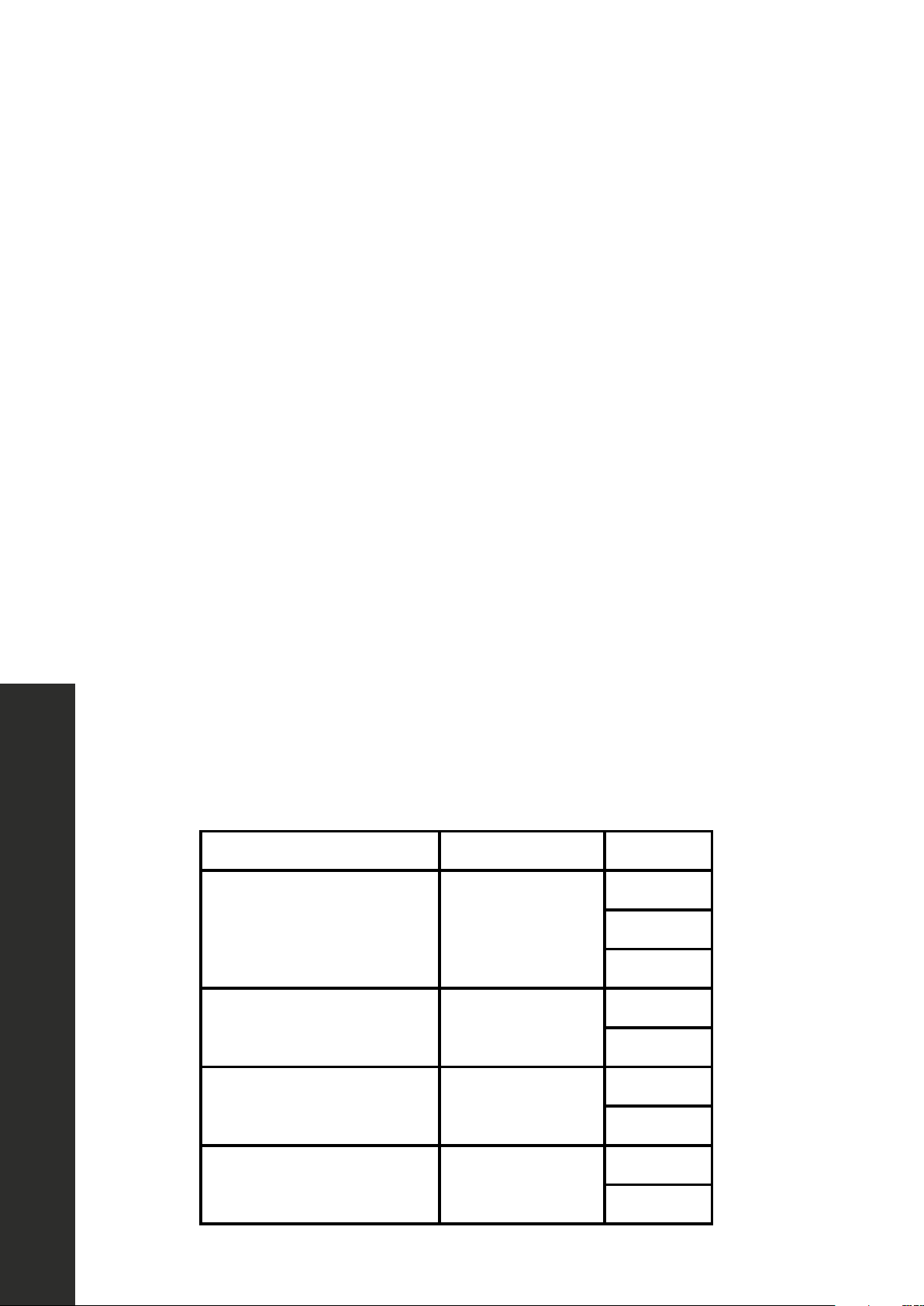
Menu Display Weight
Butter/Margarine BUTTER
1
2
3
Chocolate CHOCOLA
4
8
Cheese CHEESE
8
16
Marshmallows MARSHMA
5
10
11
Auto Menu
OPERATION 24” Microwaves
AUTO MENU: SOFTEN
Press “SOFTEN” button. Screen displays “BUTTER.” “AUTO MENU” indicator will
light.
• Continue to press “SOFTEN” button, “BUTTER,” “ICE-CRE,” or “CHEESE” will
display in order.
• Press “START/+30SEC.” to confirm the selection.
• Press “SOFTEN” button to select the weight. “OZ” will light except butter menu.
• Press “START/+30SEC.” to start cooking. Buzzer sounds once. “OZ” will go
out. The cooking time begins to count down. When cooking is finished, buzzer
sounds 5 times and “FINISH” displays.
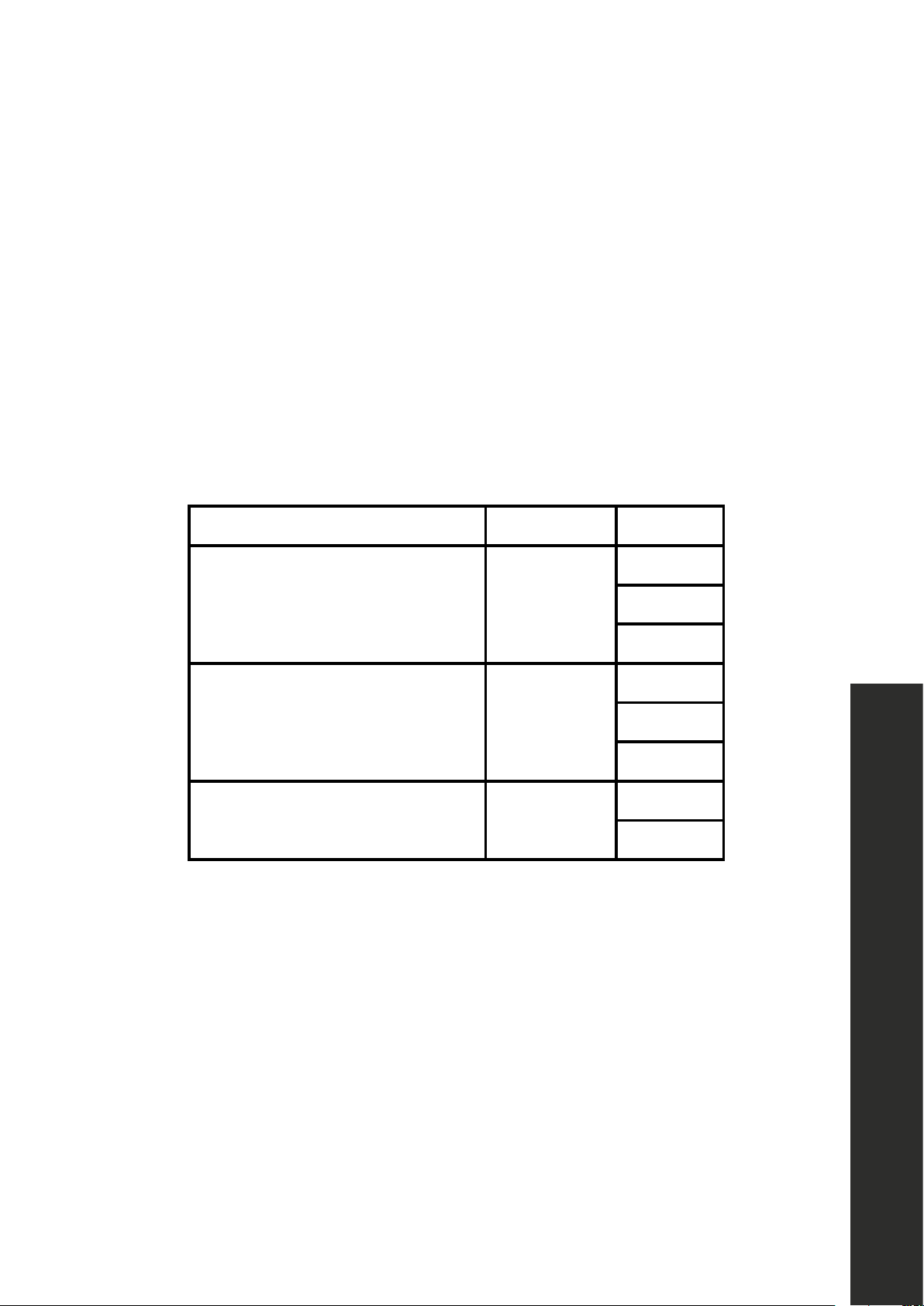
Menu Display Weight
Butter BUTTER
1
2
3
Ice cream/Frozen juice ICE-CRE
8
16
32
Cream cheese CHEESE
3
8
BUZZER ON/OFF (MUTE):
• Press “SETUP” button. Screen displays “BUZ OFF.”
• Press “START/+30SEC.” button. The oven will turn to waiting state. Buzzer is
turned off. No beep will sound.
• Press “SETUP” button. Screen displays “BUZ ON.”
• Press “START/+30SEC.” button. The oven will turn to waiting state. Buzzer is
turned on. Buzzer will sound normally.

12
OPERATION 24” Microwaves
PANEL LOCK
• Lock: In waiting state, press “STOP/CANCEL” for 3 seconds; the oven will enter
into the panel lock state. Screen will display the current time if the clock has been
set. Otherwise, “00:00” will display.
• Lock release: In locked state, press “STOP/CANCEL” for 3 seconds to release
the lock.
INQUIRING FUNCTION
• In cooking state, press “CLOCK/KITCHEN TIMER ” button to check the clock.
The current time will display for 3 seconds before changing back to cooking
time.
• In cooking state, press “POWER” button to check the microwave power. The
current microwave power will display for 3 seconds before changing back to
cooking time.
• NOTE: In defrosting state and auto menu, power level cannot be inquired.
OTHER SPECIFICATIONS
• In cooking state, “OPEN” cannot be pressed to open the drawer unless “STOP/
CANCEL” button is pressed to pause the cooking. Press “CLOSE” button to close
the drawer. Then “START/+30SEC.” button must be pressed to continue cooking.
• If the cooking program has been set and “START/+30SEC.” is not pressed in 1
minute, the current time will be displayed. The setting will be canceled.
• If the oven door is open, the lamp will light until the oven is powered off.
12
Other Specifications
13
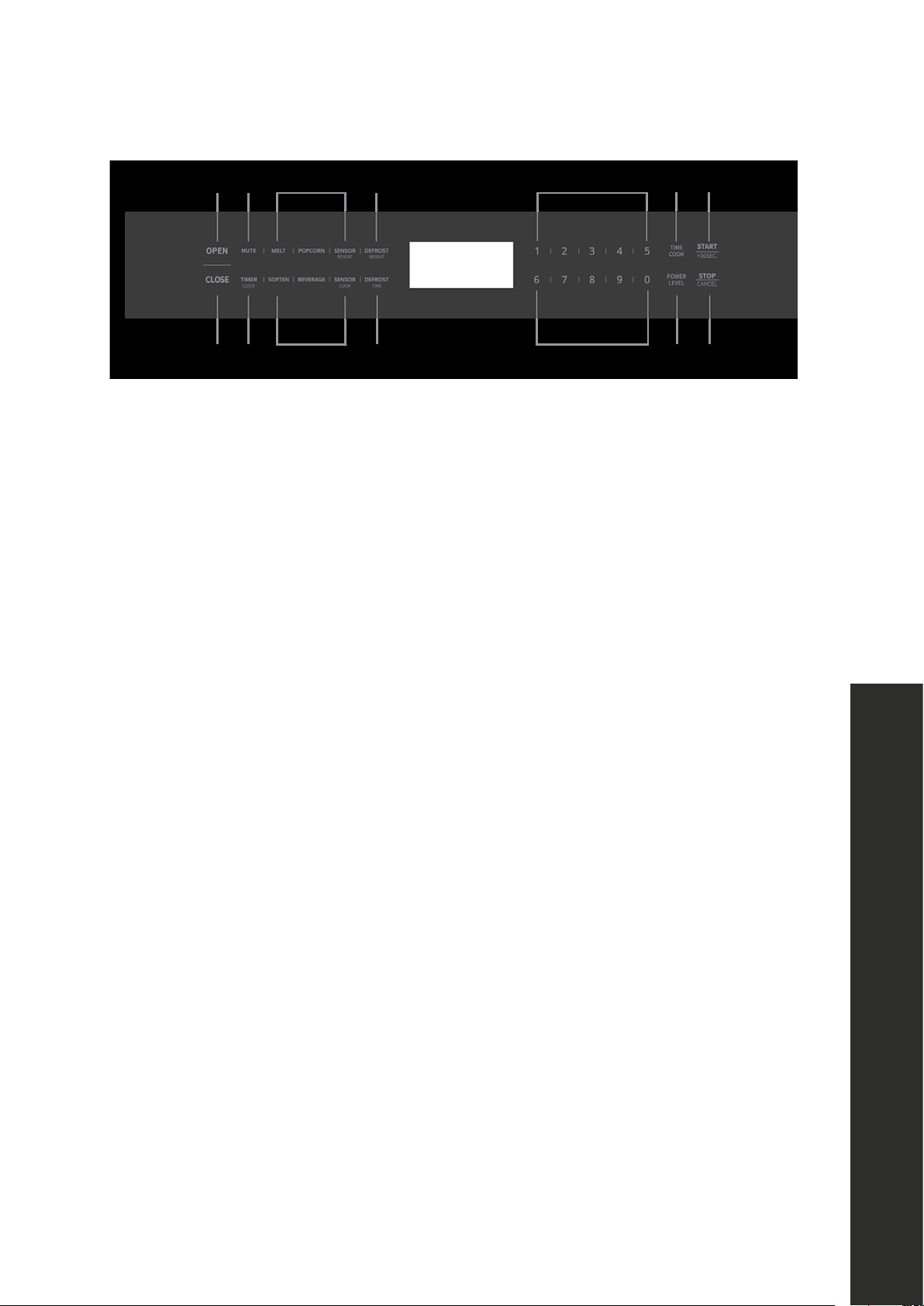
Controls
1. Open
2. Mute
3. Auto Menu
4. Defrost Weight
5. Close
6. Timer/Clock
7. Defrost Time
8. Number Keys
9. Time Cook
10. Start/+30 sec
11 . Power Level
12. Stop/Cancel
POWER ON
• When the microwave oven is plugged into an outlet, buzzer sounds once. Then
the oven turns into waiting state. The screen displays “00:00.”
• In waiting state, the screen will display the current time if the clock has been
set. Otherwise, “00:00” will display.
CLOCK SETTING
• Press “TIMER/CLOCK” button twice. “12:00” will flash.
• Press the number buttons to enter the correct time. The input should be between
1:00-12:59.
• Press “START+30SEC.” or “TIMER/CLOCK” to finish the setting.
• Note: In the process of clock setting, if the “STOP/CANCEL” button is pressed or
if there is no operation within 1 minute, the oven will revert to former setting.
OPERATION 30” Microwaves
14
Cooking Functions
KITCHEN TIMER
• Press “TIMER/CLOCK” button once. “00:00” will display.
• Press number keys to set the clock; it should be within 00:01-99:99.
• Press “START+30SEC.” to begin the timer.
• When the timer expires, buzzer will ring 4 times. The oven turns into waiting state.
Screen will display the current time if the clock has been set. Otherwise, screen
will display “00:00”.
MICROWAVE TIME COOK
• 10 power levels are available.
• Press “TIME COOK” button; screen will display “00:00.”
• Press number keys to set the cook time; it should be within 00:01-99:99.
COOK POWER
• Press “POWER LEVEL” once to confirm and then press “POWER LEVEL”
repeatedly or press number key to set the power level.
• Press “START+30SEC.” to start cooking.
• If no power level is set, the default power level is “L10.”
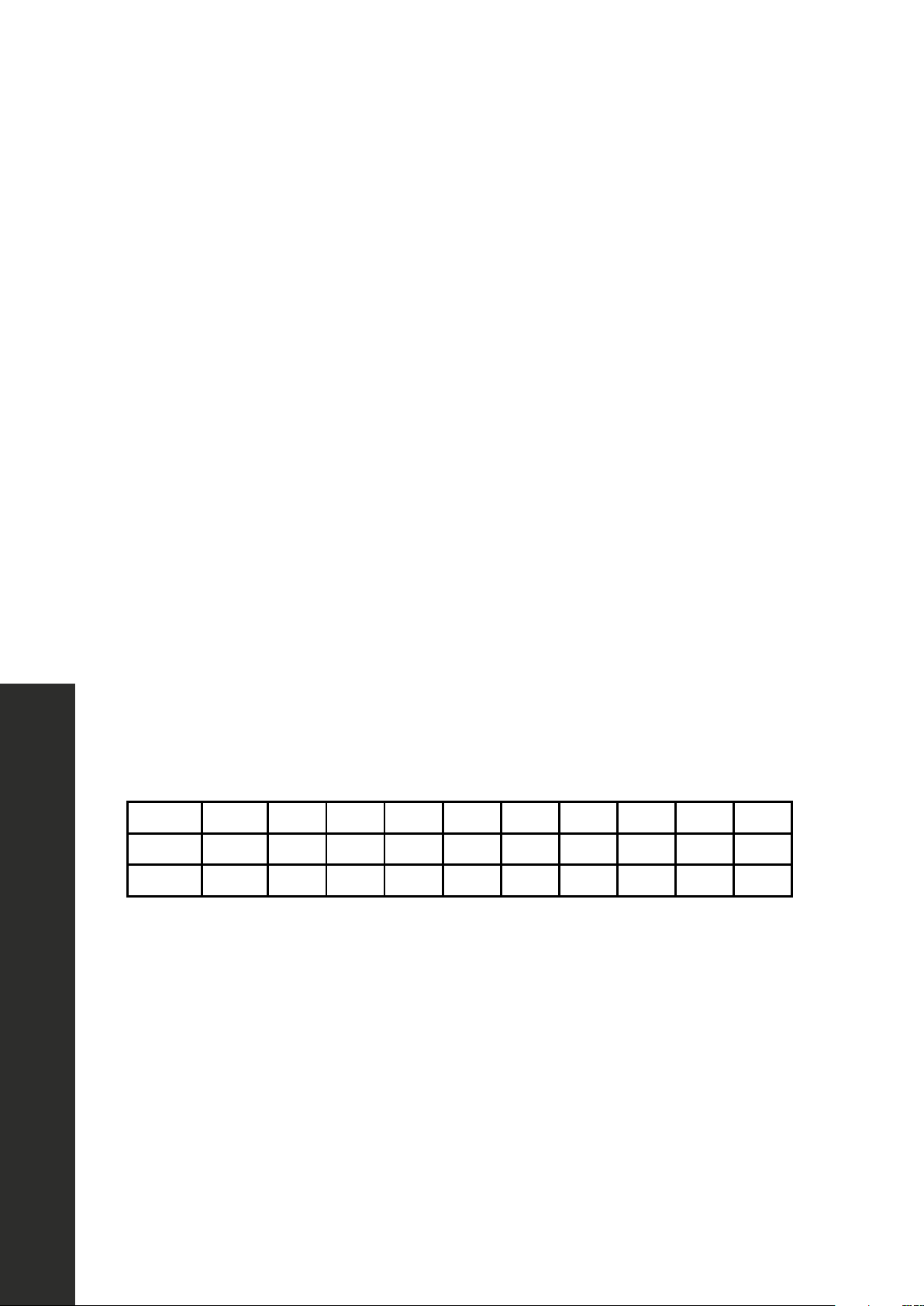
Level 10 9 8 7 6 5 4 3 2 1
Power 100% 90% 80% 70% 60% 50% 40% 30% 20% 10%
Display L10 L09 L08 L07 L06 L05 L04 L03 L02 L01
ADD 30 SECONDS
• In waiting state, instant cooking at 100% power level with 30 seconds cooking
time can be started by pressing “START/+30SEC.” Each press on the same
button will increase cooking time by 30 seconds.
• During microwave and defrost time, “START/+30SEC.” can be pressed to
increase time. Each press will increase 30 seconds.
OPERATION 30” Microwaves

15
DEFROST WEIGHT FUNCTION
• Press “DEFROST WEIGHT” button. Screen displays the defrost icon, and “0.0
lbs” will light.
• Press number buttons to input the weight to be defrosted. The input weight should
be between 0.1-6.0 lbs.
• Press “START/+30SEC.” to start defrosting. Buzzer sounds once.
NOTE: The buzzer will sound twice to remind you of turning over the food during
defrosting.
DEFROST TIME FUNCTION
• Press “DEFROST TIME” button. Screen displays defrost icon and “00:00” will
light.
• Press number buttons to enter the defrosting time between 00:01-99:99.
• Press “START/+30SEC.” to start defrosting.
NOTE: The defrosting power level is L03. It cannot be changed. The buzzer will
sound twice to remind you of turning over the food during defrosting.
AUTO MENU: POPCORN
• Press “POPCORN” button to start cooking directly, when the oven door is
closed.
AUTO MENU: SENSOR REHEAT
• In waiting state, press “Sensor Reheat” once, and “Sr-1” will display.
• Press “Sensor Reheat” repeatedly or press “1-4” to choose the menu.
• Press “START+30SEC.” to start cooking.
Cooking Functions
OPERATION 30” Microwaves
16
Cooking Functions
OPERATION 30” Microwaves
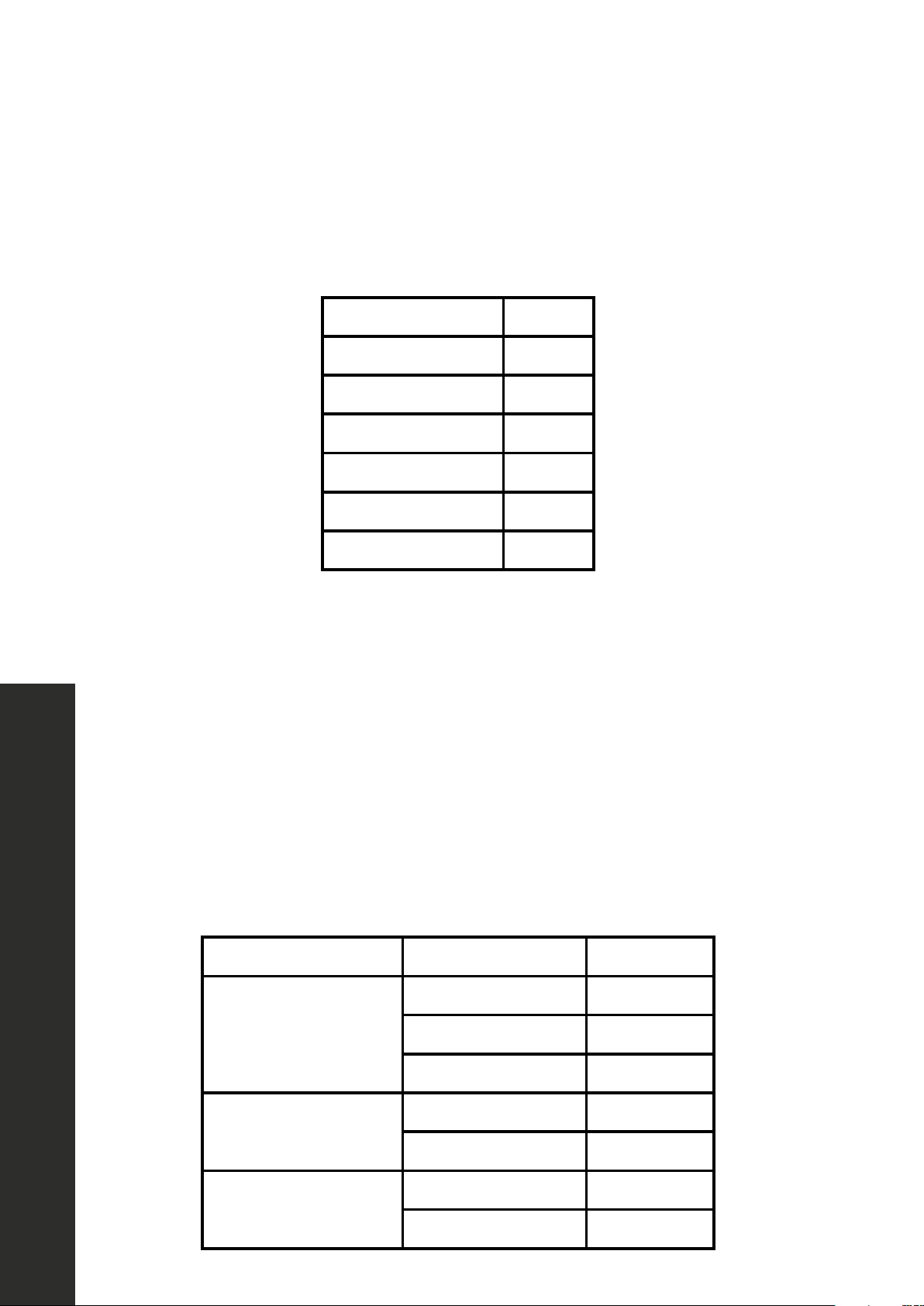
AUTO MENU: SENSOR COOK
• In waiting state, press “Sensor Cook” once, and “Sc-1” will display.
• Press “Sensor Cook” repeatedly or press “1-7” to choose the menu.
• Press “START+30SEC.” to start cooking.
Potato Sc-1
Chicken Sc-2
Fish Sc-3
Ground meat Sc-4
Fresh veggies Sc-5
Frozen veggies Sc-6
Canned veggies Sc-7
AUTO MENU: BEVERAGE
• In waiting state, press “Beverage” once,”1”,”01:30” will display.
• Press “Beverage” repeatedly or press “1”or “2” to choose the menu.
• Press “START+30SEC.” to start cooking.
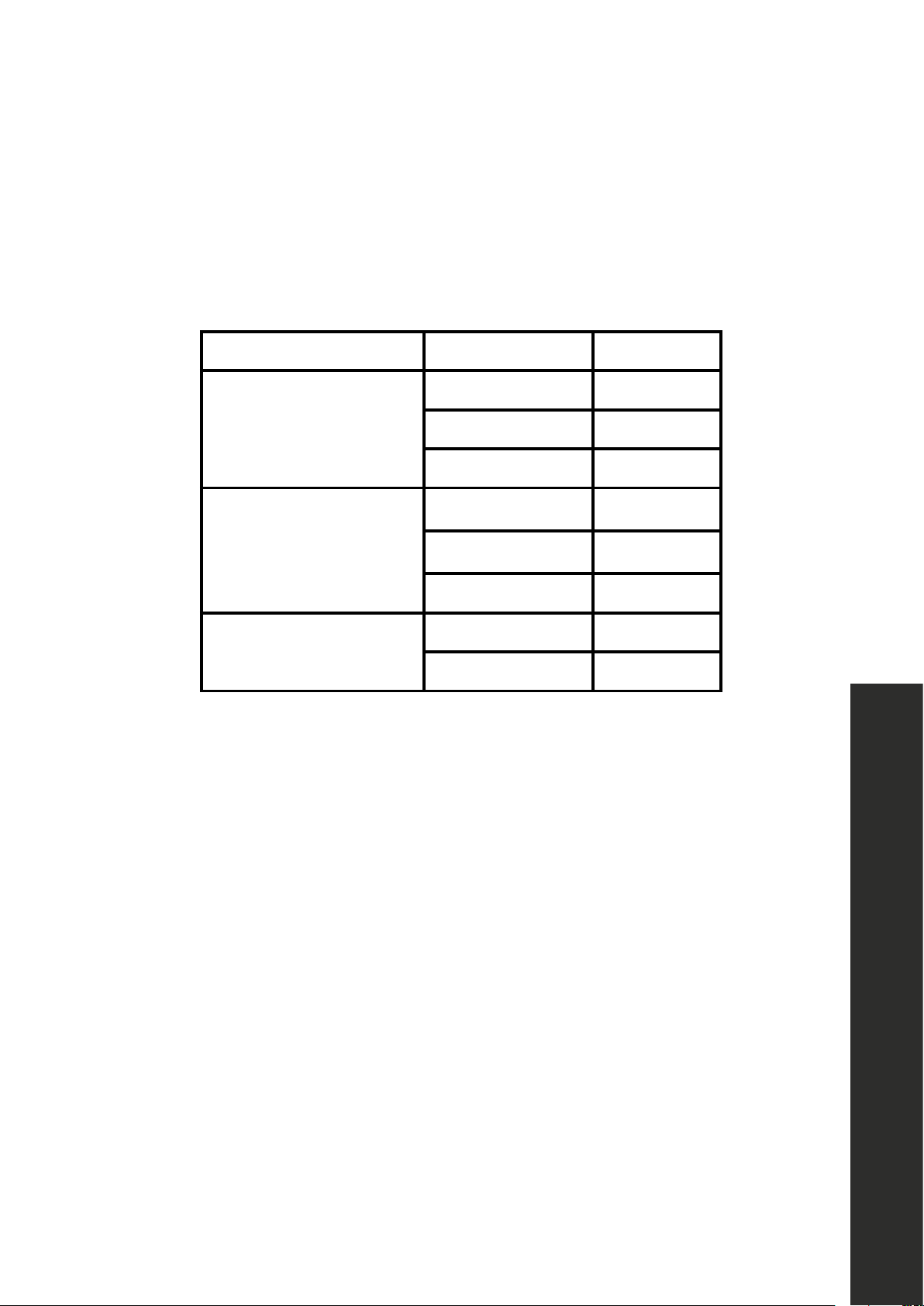
AUTO MENU: MELT
• In waiting state, press “MELT” once, and “1buTT” will display.
• Press “MELT” repeatedly to choose the menu.
• Press “1”or “2” to choose the correspond weight.
• Press “START+30SEC.” to start cooking.
Menu Display Weight
Butter/Margarine
1 buTT 1 (stick)
2 buTT 2 (stick)
3 buTT 3 (stick)
Chocolate
4 oz Choc 4 oz
8 oz Choc 8 oz
Cheese
8 oz CHEE 8 oz
16 oz CHEE 16 oz
17
Cooking Functions
AUTO MENU: SOFTEN
• In waiting state, press “SOFTEN” once, and “1buTT” will display.
• Press “SOFTEN” repeatedly to choose the menu.
• Press “1”or “2” to choose the correspond weight.
• Press “START+30SEC.” to start cooking.
Menu Display Weight
Butter/Margarine
1 buTT 1 (stick)
2 buTT 2 (stick)
3 buTT 3 (stick)
Ice cream/Frozen juice
8 oz ICE 8 oz
16 oz ICE 16 oz
32 oz ICE 32 oz
Cream cheese
3 oz CHEE 3 oz
8 oz CHEE 8 oz
MULTIPLE COOK
• In waiting state, press “DEFROST WEIGHT” once, and “0.0 lbs” will display.
• Press number buttons to input the weight to be defrosted. The input weight should
be between 0.1-6.0 lbs.
• Press “TIME COOK” button once. “00:00” will display.
• Then, press number keys to set the cook time; it should be within 00:01-99:99.
• Press “POWER LEVEL” once to confirm and then press “POWER LEVEL”
repeatedly or press number key to set the power level.
• Press “START+30SEC.” to start cooking.
NOTE: The defrost function can only be one stage of a multiple cook. Two stage
cooking can be set at most levels.
OPERATION 30” Microwaves

18
Cooking Functions
OPERATION 30” Microwaves
BUZZER ON/OFF
To enter silent mode
• Press “MUTE” button. Screen displays silent icon.
To cancel silent mode
• In silent mode, press “MUTE” button. The buzzer will sound twice.
PANEL LOCK
• Lock: In waiting state, press “STOP/CANCEL” for 3 seconds, then oven will enter
into the panel lock state. Screen will display “Loc.”
• Unlock: In locked state, press “STOP/CANCEL” for 3 seconds to release the
lock. Screen will display “UnLo.”
ECO MODE
To enter eco mode:
• The microwave will enter eco mode when the oven door is closed and the unit
sits in waiting state for longer than 1 minute.
• When in eco-mode, the stand-by power will be 0.9W.
To cancel eco mode:
• In eco mode, open the door or press any key to cancel it.
INQUIRING FUNCTION
• In cooking state, press “TIMER/CLOCK” button to check the clock. The current
time will display for 3 seconds before changing back to cooking time.

19
CARE AND CLEANING
• Microwave energy may escape if the cooking compartment drawer, side rails,
or drawer guide rollers are damaged, which can be a serious health risk. Never
use the appliance if any portion of the drawer is damaged. If you see damage,
contact ZLINE at 1-614-777-5004.
NEVER use high-pressure cleaners or steam cleaners. This increases the
chance of moisture penetrating inside the unit’s mechanical and electrical
systems, which may cause an electric shock.
• Slight differences in color on the front of the appliance are caused by the use of
different materials, such as glass, plastic, and metal. Shadows on the door panel
that look like streaks are caused by reflections made by the oven light.
• Unpleasant odors, e.g. after fish has been prepared, can be removed easily.
Add a few drops of lemon juice to a cup of water. Place a wooden spoon into
the container to prevent superheating. Heat the water for 1 to 2 minutes at
maximum microwave power.
CLEANING AGENTS
• To ensure that the different surfaces are not damaged by using the wrong
cleaning agent, observe the information in the table on page 20. Do not use:
• Sharp or abrasive cleaning agents
• Metal or glass scrapers to clean the glass in the drawer
• Metal or glass scrapers to clean the area where the microwave drawer
and frame touch when closed
• Hard scouring pads and sponges
• Cleaning agents with high concentrations of alcohol
• Wash new sponge cloths thoroughly before use.
• Allow all surfaces to dry thoroughly before using the appliance again.
MAINTENANCE AND CLEANING
Care and Cleaning
WARNING
20
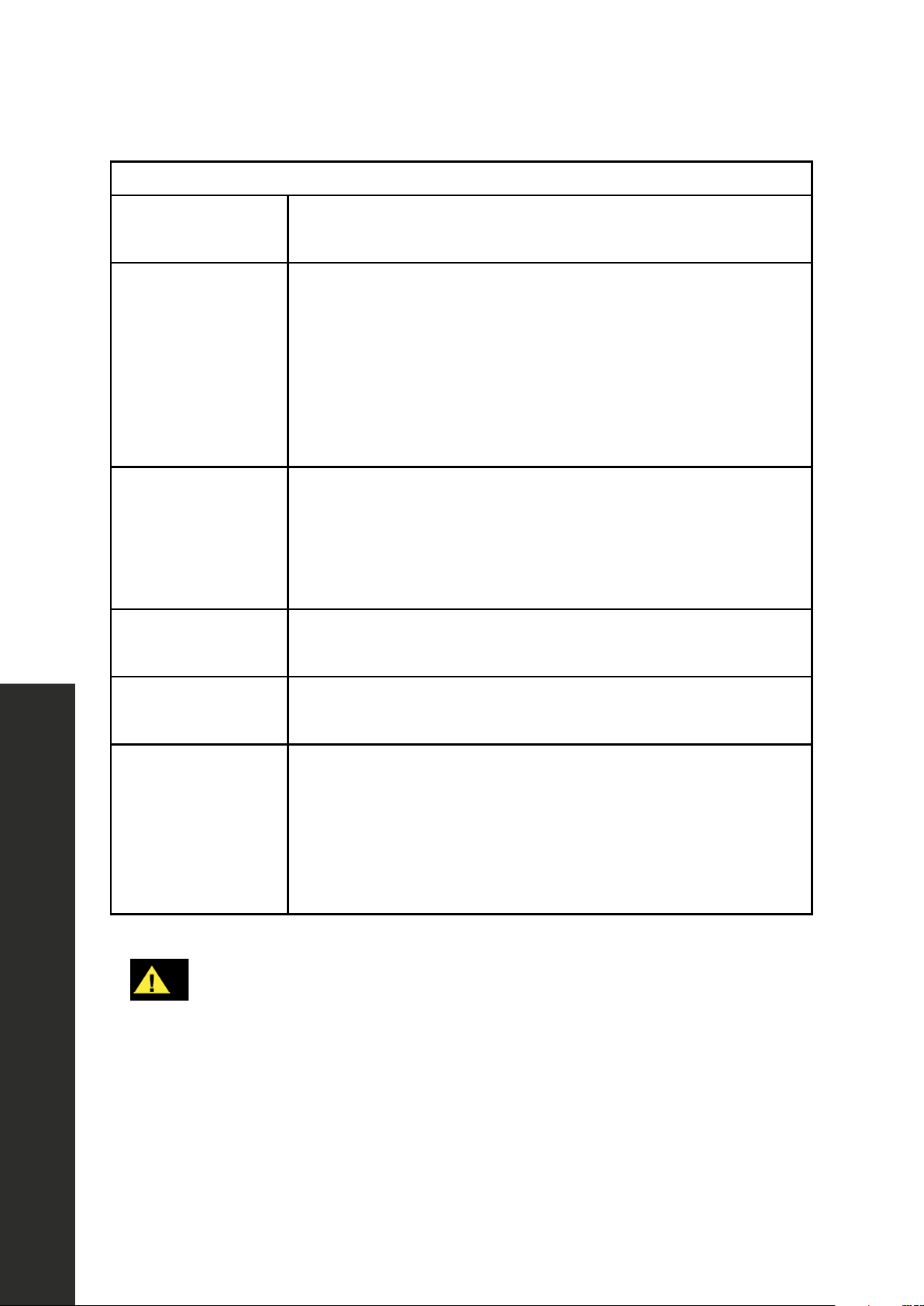
CLEANING GUIDE
Appliance front
and exterior
Hot soapy water: Clean with a dish cloth and dry with a soft
cloth. Do not use glass cleaners or metal or glass scrapers.
Appliance front
with stainless steel
Hot soapy water: Clean with a dish cloth and dry with a soft
cloth. Remove flecks of limescale, grease, starch, and albumin
(e.g. egg white) immediately. Corrosion can form under
such residues. Special stainless steel cleaning agents can be
obtained at appliance stores and other vendors. Do not use
glass cleaners or metal or glass scrapers for cleaning.
Cooking
compartment and
microwave interior
Hot soapy water: Clean with a dish cloth and dry with a soft
cloth. Remove flecks of limescale, grease, starch and albumin
(e.g. egg white) immediately. Corrosion can form under such
residues. Do not use glass cleaners or metal or glass scrapers.
Control panel
Damp cloth: Ensure that no water seeps into the appliance
interior. Dry with a soft cloth.
Drawer glass
Kitchen-safe glass cleaner: Clean with a dish cloth and dry
with a soft cloth. Do not use a glass scraper.
Drawer guides,
rails and rollers
Soft dry cloth: Remove crumbs and food debris and wipe
with a soft dry cloth so the door may open and close
smoothly. Pay special attention to the white rollers that help
guide the microwave drawer. Open the drawer fully to
thoroughly clean these rollers to avoid arcing.
WARNING
NEVER clean the appliance immediately after switching off, as you risk
being burned. Let the appliance cool down before cleaning. Disconnect
power before cleaning or leave the door open to inactivate the
microwave during cleaning.
MAINTENANCE AND CLEANING
Cleaning Guide
21
Cleaning Guide
MAINTENANCE AND CLEANING
CLEANING GUIDE
IMPORTANT:
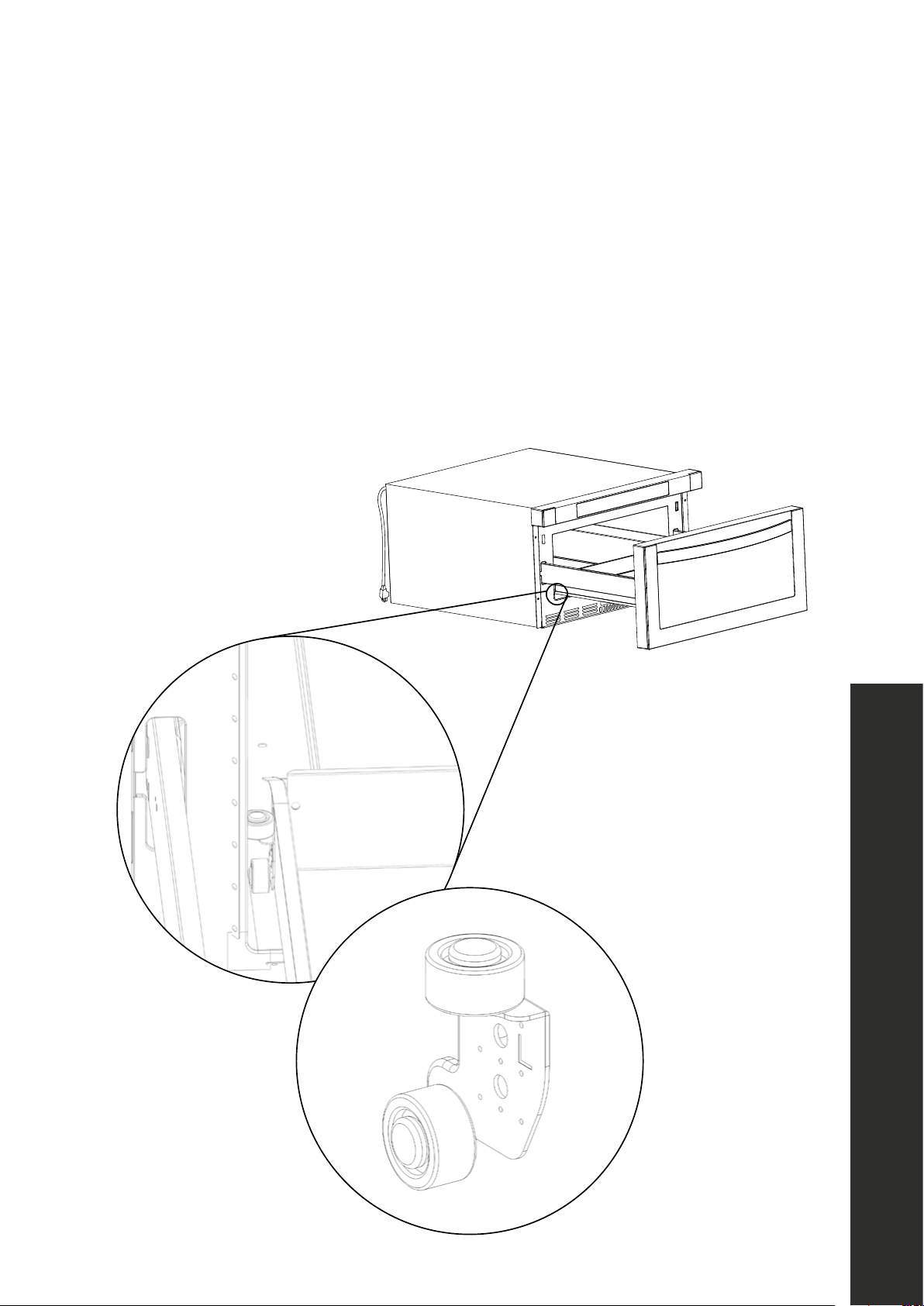
• It’s recommended to thoroughly clean the interior of your microwave drawer at
least once a week. If the appliance is not cleaned often, food and grease can
build up on the ceramic base plate and in hard-to-reach locations along the
white drawer guide rollers and the sliding side rails — as outlined in the images
below — which may cause arcing.
22
Troubleshooting
TROUBLESHOOTING
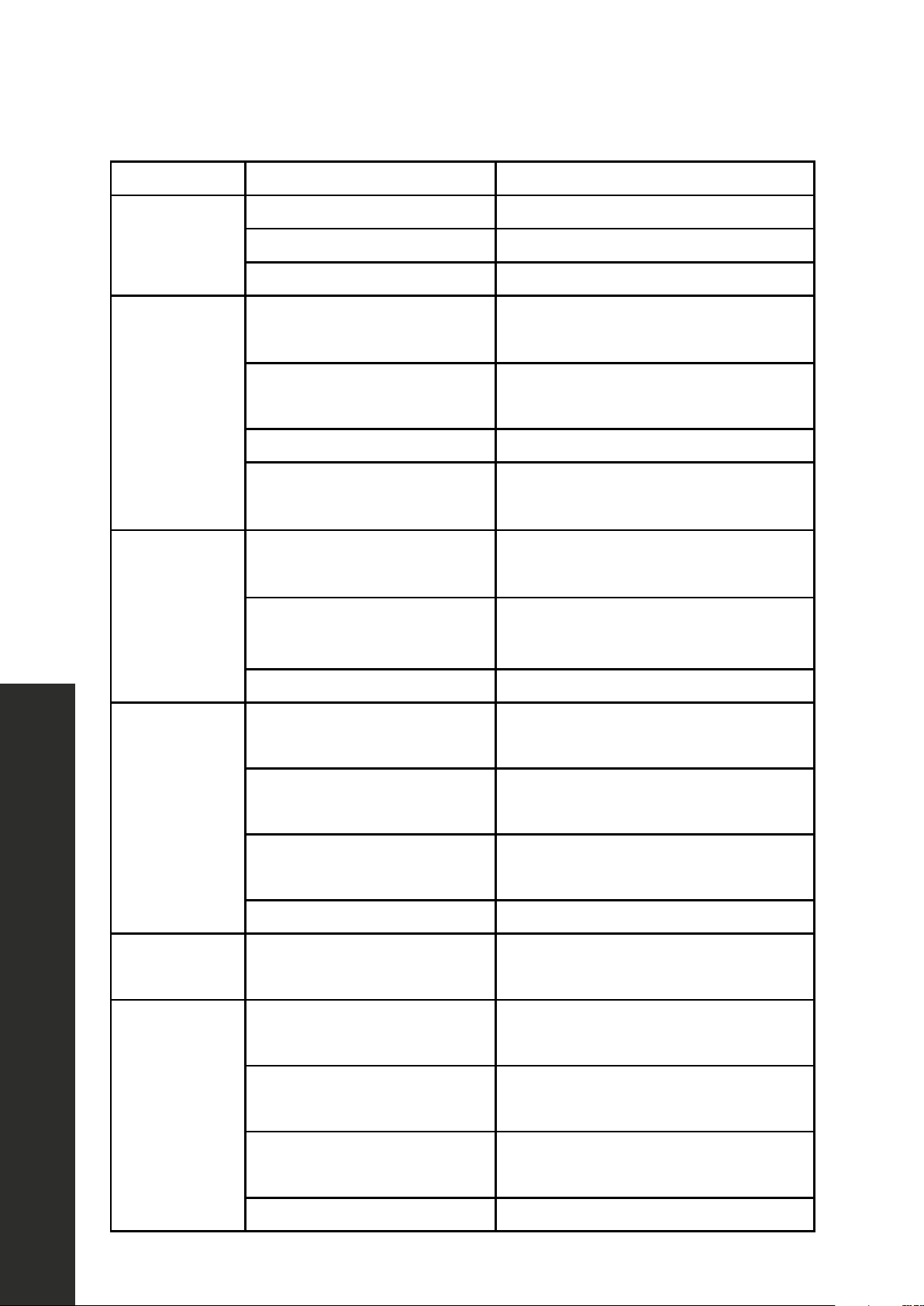
ISSUE POSSIBLE CAUSE TROUBLESHOOTING
Oven won’t
start.
Electrical cord is unplugged. Plug into the outlet.
Door is open. Close the door and retry.
Wrong operation is set. Check instructions
Arcing or
sparking.
Materials to be avoided in the
microwave oven were used.
Use microwave-safe cookware only.
The oven is operated when
empty.
Do not operate with oven empty.
Spilled food is in the oven. Clean inside the oven frequently.
Certain foods high in iron can
cause a spark.
Example: Broccoli, potatoes, butter, etc.
Improper
defrosting.
Materials to be avoided in
microwave oven were used.
Use microwave-safe
cookware only.
Cooking time and/or power is
not suitable.
Use correct cooking time and/or power.
Food is not turned or stirred. Turn or stir food.
Unevenly
cooked food.
Materials to be avoided in
microwave oven were used.
Use microwave-safe cookware only.
Food is not defrosted
completely.
Completely defrost food.
Cooking time and/or power
level is not suitable.
Use correct cooking time and/or power
level.
Food is not turned or stirred. Turn or stir food.
Overcooked
food.
Cooking time and/or power
level is not suitable.
Use correct cooking time and/or power
level.
Undercooked
food.
Materials to be avoided in
microwave were used.
Use microwave-safe cookware only.
Oven ventilation ports are
restricted.
Check to see that oven ventilation ports
are not restricted.
Cooking time and/or power
level is not suitable.
Use correct cooking time and/or power
level.
Food is not turned or stirred. Turn or stir food.

WARRANTY
COVERAGE
ZLINE Kitchen and Bath microwave parts will be warrantied for two years from the original
purchase date for the original purchaser of the product.
TERMS
This warranty applies only to the original purchaser of the product installed for normal
residential use. This is defined as a single-family, residential dwelling in a non-commercial
setting. Commercial settings include but are not limited to: schools, churches, hotels,
restaurants, vacation rentals such as Airbnb, day care centers, private clubs, fire stations,
common areas in multi-family dwellings, nursing homes, food service locations, and
institutional food service locations such as hospitals or correction facilities. This warranty
is non-transferable and will not be extended based on the date of installation. The
warranty applies only to products installed in the contiguous United States and the District
of Columbia. Warranty shall not apply and ZLINE Kitchen and Bath is not responsible
for damage resulting from negligence, improper maintenance, misuse, abuse, alteration
of or tampering with the appliance, accident, natural disaster, improper electric supply,
unauthorized service or repair, improper installation, or installation not in accordance with
the instructions contained in the manual or with the local government codes..
WHAT IS NOT COVERED
1. Installation or start-up damages or problems caused by improper installation or use.
2. Damage related to unauthorized service or unauthorized parts.
3. Installation in any commercial or non-residential application.
4. Aesthetic damage, scratches, or natural wear caused by normal use.
5. Second-hand, open box products, or products purchased from an unauthorized retailer.
SERVICE
For warranty service, please contact our Customer Service team at
1-614-777-5004 or visit www.zlinekitchen.com/contact to utilize
our online Customer Experience Portal.
WARRANTY
The rating tag shows the model and serial number of your
microwave. The tag is located below the control pad on the
microwave. The tag is visible when the microwave door is
open. Do not remove permanently affixed labels, warnings,
or plates from the product. This will void the warranty.
Scan the QR code to view the most up-to-date version of our Installation
Manual and User Manual.
Need to purchase a part or accessory for your ZLINE product?
Visit www.zlineparts.com, ZLINE’s official parts distribution partner.