Owner's Manual
Manual Del Propietario
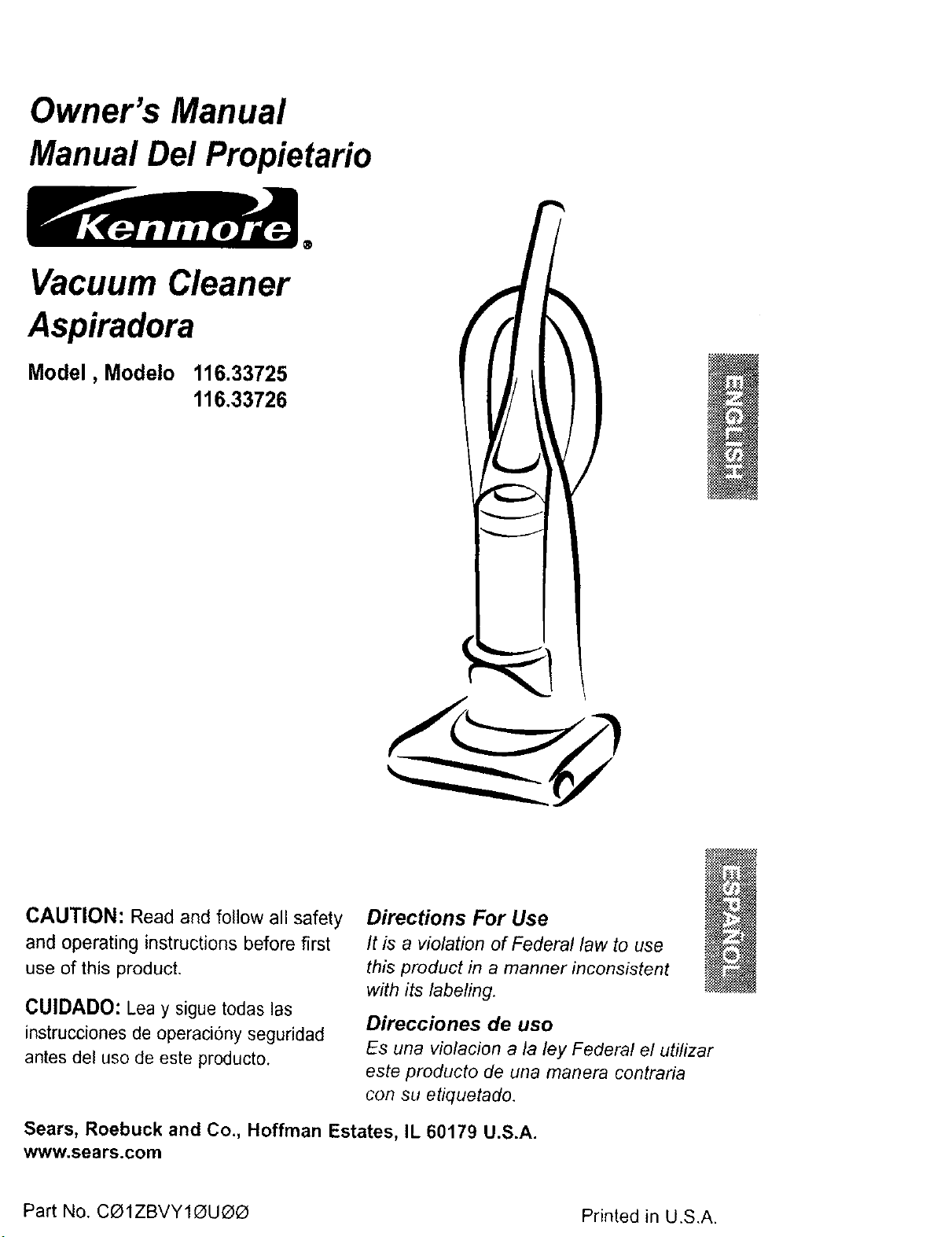
Vacuum Cleaner
Aspiradora
Model, Modelo 116.33725
116.33726
/
CAUTION: Read and follow all safety
and operating instructionsbefore first
use of this product.
CUIDADO: Lea y sigue todas las
instrucciones de operaciony seguridad
antes del uso de este producto.
Directions For Use
It is a violation of Federal law to use
this product in a manner inconsistent
with its labeling.
Direcciones de uso
Es una vio/acion a/a/ey Federal el uti/izar
este producto de una manera contraria
con su etiquetado,
Sears, Roebuck and Co., Hoffman Estates, IL 60179 U.S.A.
www.sears.com
Part No. CO1ZBVY1_UO_ Printed in U.S.A.
Before Using Your New Vacuum ...... 2
Kenmore Vacuum Cleaner Warranty... 2
Important Safety Instructions ......... 3
Parts and Features .................. 4
Assembly Instructions ............. 5-6
Operating Instructions ............... 7
Pile Height Selection and Setting ........ 7
Carpet/Bare FloorSelector ............ 8
Releasingthe Handle ................. 8
ON/OFF Switch ..................... 8
Attachments ..................... 9-10
Attachment Use Chart ............... 10
Vacuuming Tips .................... 11
Performance Features ............... 11
Vacuum Cleaner Care ............... 12
Vacuum Storage ................... 12
Cleaning Exteriorand Attachments ...... 12
Dust Bin Cleaning ................ 13-14
Secondary Filter Cleaning ............ 14
FilterChanging/Cleaning ............. 15
Belt Changing andAgitator Cleaning .. 16-18
Clog Removal ..................... 21
Motor Protector ..................... 19
Headlight Bulb Changing .............. 20
Agitator Servicing ................... 21
Agitator Assembly .................. 21
Troubleshooting .................... 23
Please read this guide. It will help you assemble and operate your new Kenmore vacuum in
the safest and most effective way.
For more information about vacuum cleaner care and operation, call your nearest Sears
store, You will need the complete model and serial numbers when requesting information.
Your vacuum's model and serial numbers are located on the Model and Serial Number Plate.
Use the space below to record the model number and serial number of your new Kenmore
vacuum.
Model No ............................................
Serial No. .............................................
Date of Purchase .....................................
Keep this book and your sales check (receipt) in a safe place for future reference.
LIMITED ONE YEAR WARRANTY ON KENMORE VACUUM CLEANER
This warranty is for one year from the date of purchase, and includes only private household
vacuum cleaner use. During the warranty year, when this vacuum cleaner is operated and
maintained according to the owner's manual instructions, Sears will repair any defects in
material or workmanship free of charge.
This warranty excludes vacuum bags, belts, light bulbs, and filters, which are expendable parts
and become worn during normal use.
For warranty service, return this vacuum cleaner to the nearest Sears Service Center in
the United States.
This warranty applies only while this product is in use in the United States. This warranty gives
you specific legal rights, and you may also have other rights which vary from state to state.
Sears, Roebuck and Co., D/817 WA, Hoffman Estates, IL 60179
Your safety is important to us. To reduce the risk of fire, electrical shock, injury
to persons or damage when using your vacuum cleaner, follow basic safety pre-
cautions including the following:
Read this manual before assembling or
using your vacuum cleaner.
Use your cleaner only as described in
this manual. Use only with Sears recom-
mended attachments.
To reduce the risk of electrical shock -
Do not use outdoors or on wet surfaces.
Disconnect electrical supply before any
servicing or cleaning. Failure to do so
could result in electrical shock or per-
sonal injury.
Always turn cleaner off before unplug-
ging.
Do not unplug by pulling on cord. To
unplug, grasp the plug, not the cord.
Do not use with damaged cord or plug.
tf cleaner is not working as it should,
has been dropped, damaged, left out-
doors, or dropped into water, return it to
a Sears Service Cdnter.
Do not pull or carry by cord, use cord
as a handle, close door on cord, or pull
cord around sharp edges or corners.
Do not run cleaner over cord. Keep cord
away from heated surfaces.
Do not leave cleaner when plugged in.
Unplug from outlet when not in use and
before servicing.
Do not allow to be used as a toy. Close
attention is necessary when used by or
near children.
Do not handle plug or cleaner with wet
hands.
Do not put any objects into openings.
Do not use with any opening blocked;
keep free of dust, lint,hair and anything
that may reduce air flow.
Keep hair, loose clothing, fingers, and
all parts of body away from openings
and moving parts.
Do not use cleaner without dust bin
and/or filters in place.
Always clean the dust bin after vacuum-
ing carpet cleaners or freshener, pow-
ders and fine dust. These products clog
the filters, reduce airflow and can cause
damage to the cleaner. Failure to clean
the dust bin could cause permanent
damage to the cleaner.
Do not use the cleaner to pick up sharp
hard objects, small toys, pins, paper
clips, etc. They may damage the clean-
er or dust bin.
Do not pick up anything that is burning
or smoking, such as cigarettes, match-
es, or hot ashes.
Do not use cleaner to pick up flamma-
ble or combustible liquids (gasoline,
cleaning fluids, perfumes, etc.), or use in
areas where they may be present. The
fumes from these substances can create
a fire hazard or explosion.
Use extra care when cleaning on stairs.
Do not put on chairs, tables, etc. Keep
on floor.
You are responsible for making sure
that your vacuum cleaner is not used by
anyone unable to operate it properly.
SAVE THESE INSTRUCTIONS
Proper assembly and safe use of your vacuum cleaner are your responsibilities. Your
cleaner is intended only for household use. Read this Owner's Manual carefully for
impo.rtant use and safety information. This guide contains safety statements under
warning and caution symbols. Please pay special attention to these boxes and follow
any instructions given. WARNING statements alert you to such dangers as fire, elec-
trical shock, burns and personal injury. CAUTION statements alert you to such dan-
gers as personal injury andlor property damage.
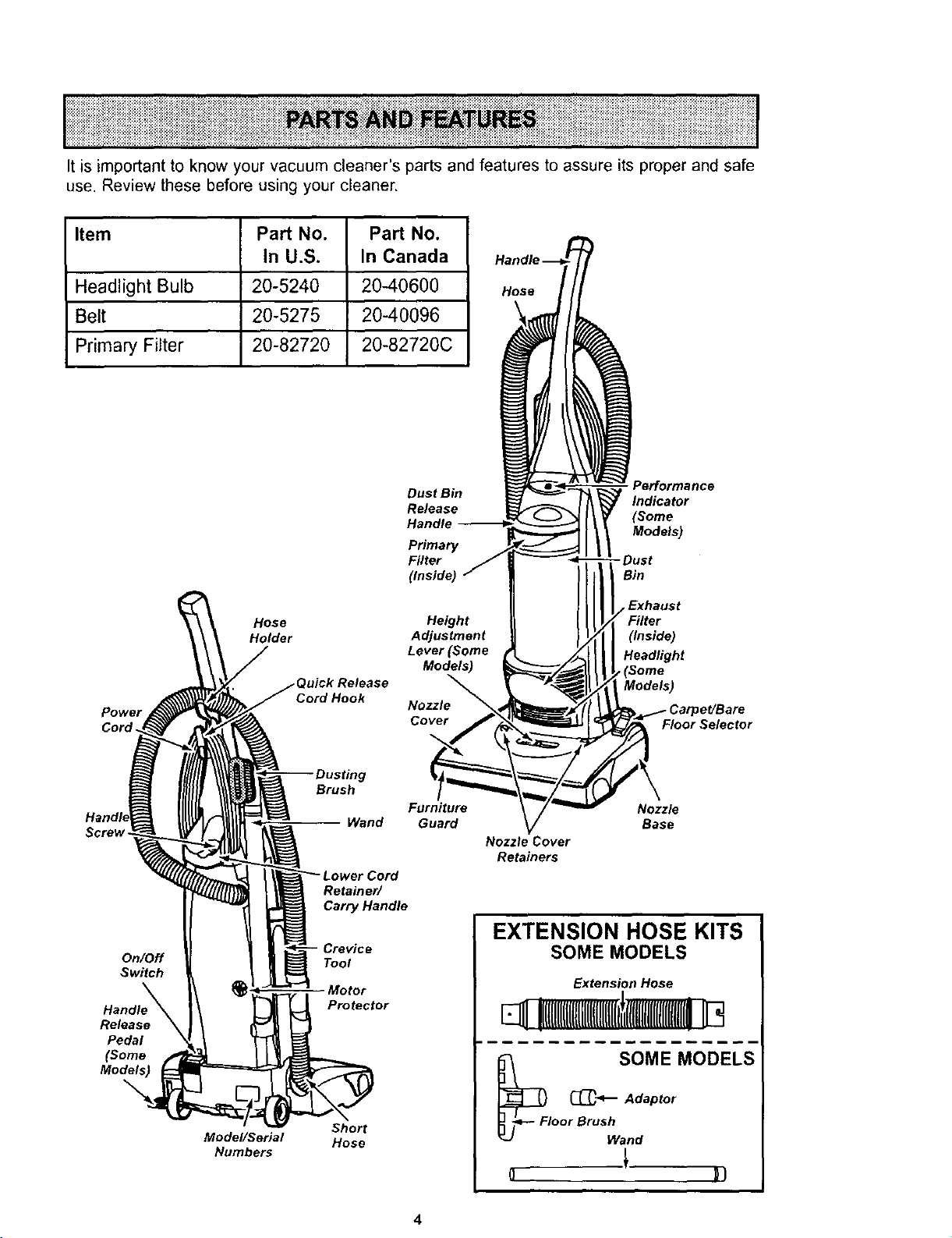
Itisimportanttoknowyourvacuumcleaner'spartsandfeaturestoassureitsproperandsafe
use.Reviewthesebeforeusingyourcleaner,
Item Part No. Part No.
In U.S. In Canada
Headlight Bulb 20-5240 20-40600
Belt 20-5275 20-40096
Primary Filter 20-82720 20-82720C
Hose
Power
Cord.
Hose
Holder
uick Release
Cord Hook
Dust Bin
Release
Handle --
Primary
Filter
(Inside)
Height
Adjustment
Lever (Some
Models)
Nozzle
Cover
Porforma nce
Indicator
(Some
Models)
-Dust
Bin
Exhaust
(Inside)
Headlight
_(Some
Models)
Floor Selector
Screw -
On/Off
Switch
Handle
Release
Pedal
(Some
Models)
Model/Serial
Numbers
Brush
Wand
Retained
Carry Handle
Crevice
Tool
Motor
Protector
Short
Hose
Furniture
Guard Nozzle
Base
Nozzle Cover
Retainers
EXTENSION HOSE KITS
SOME MODELS
Extension Hose
El !IItlIIIIIIIlUlIIlUlIIIII i
_Fi SOME MODELS
_-_-- Adaptor
oor BrUShan d
Before assembling vacuum, check the
PACKING LIST on the cover of the separate
Repair Parts List. Use this list to verify that
you have received all the components of
your new Kenmore vacuum,
Electrical Shock Hazard
Do not plug into the electrical sup-
ply until the assembly is complete.
Failure to do so could result in elec-
trical shock or injury.
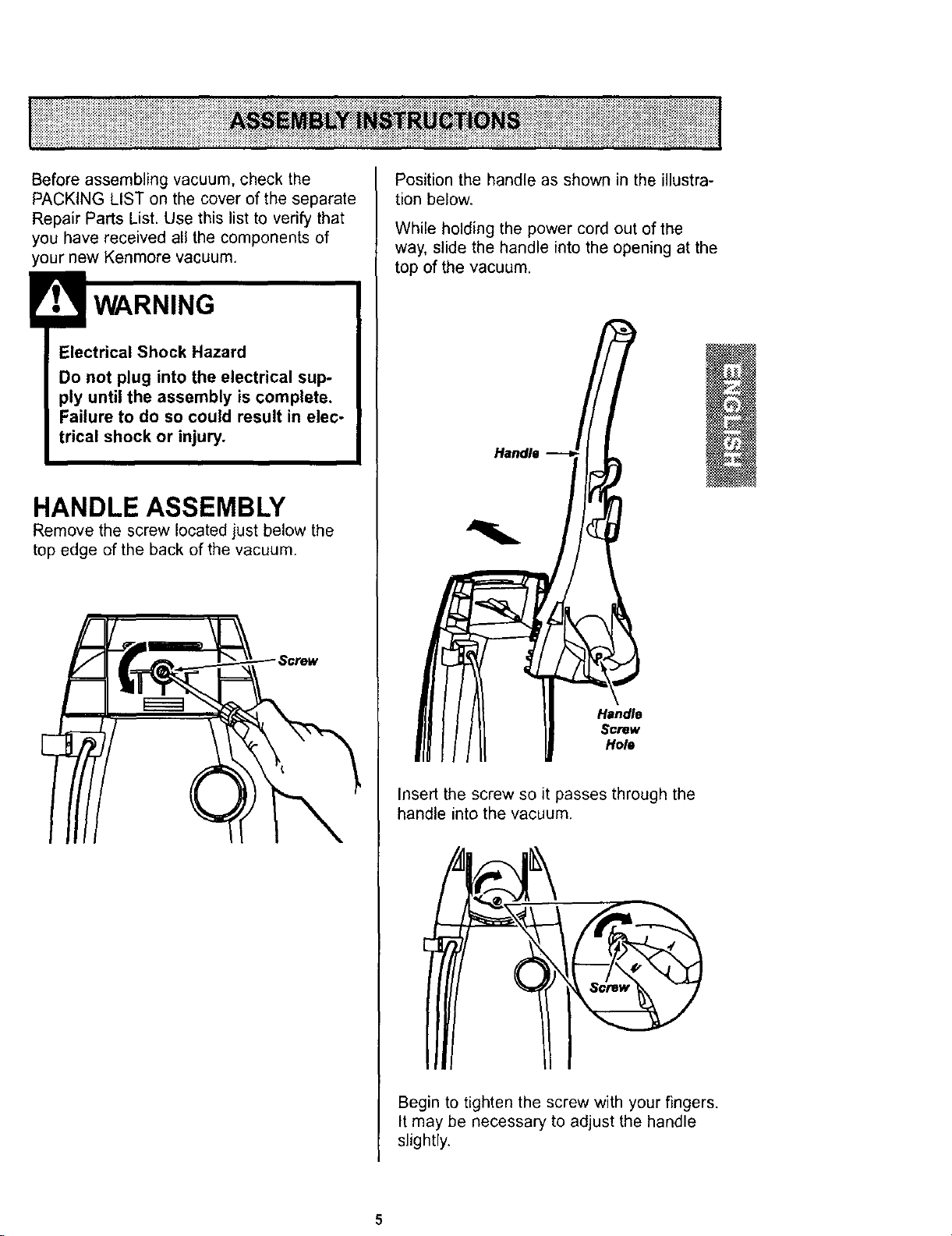
HANDLE ASSEMBLY
Remove the screw located just below the
top edge of the back of the vacuum.
Position the handle as shown in the illustra-
tion below.
While holding the power cord out of the
way, slide the handle into the opening at the
top of the vacuum,
Handle
Handle
Screw
Hole
Insert the screw so it passes through the
handle into the vacuum.
Begin to tighten the screw with your fingers.
It may be necessary to adjust the handle
slightly.
5
CAUTION
Do not overtighten.
Overtightening could strip the screw
holes.
Do not operate the cleaner without
the screw in place.
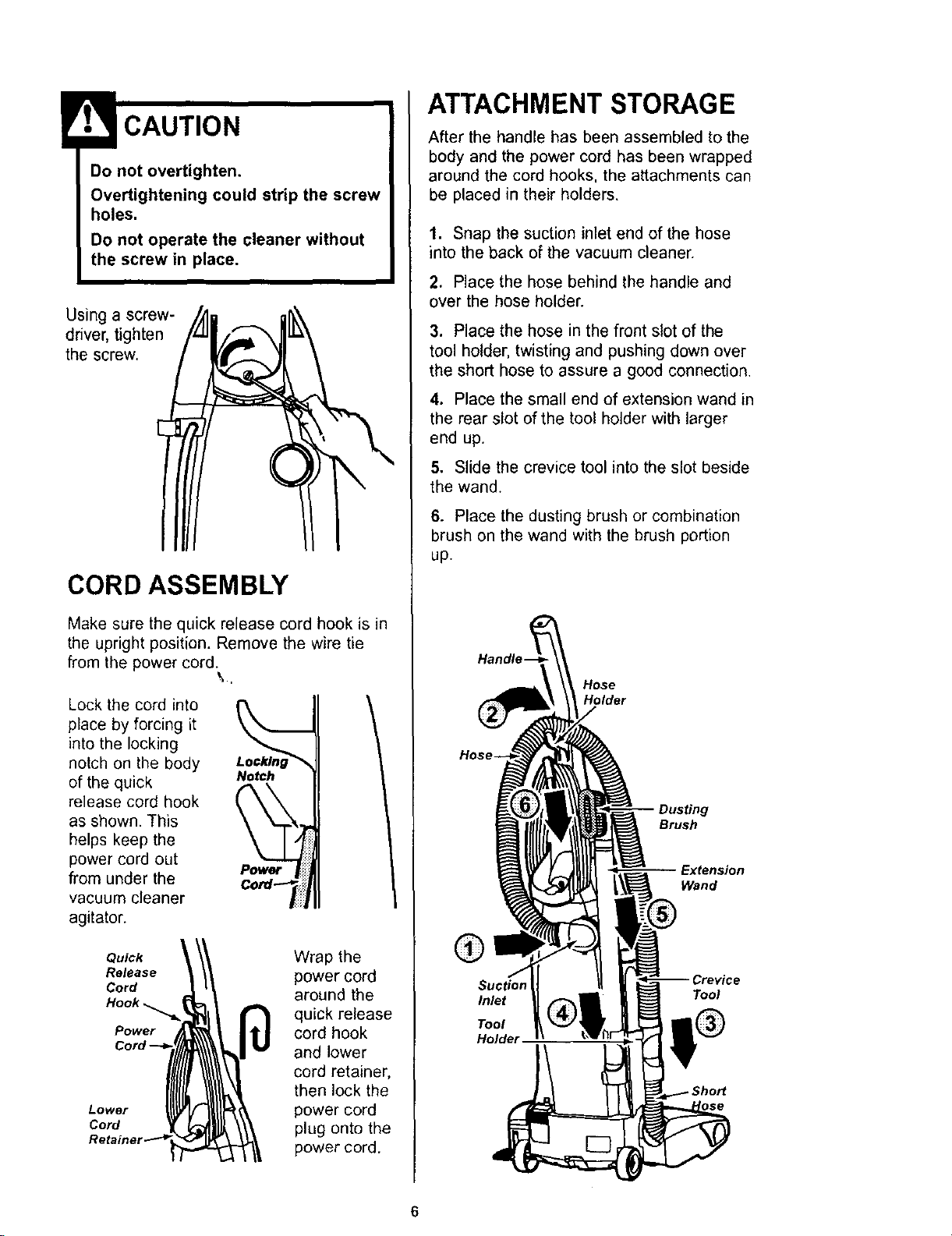
Using a screw-
driver, tighten
the screw.
CORD ASSEMBLY
Make sure the quick release cord hook is in
the upright position. Remove the wire tie
from the power cord. \.
Lock the cord into I'_
place by forcing it
into the locking
notch on the body
of the quick Notch
release cord hook
as shown. This
helps keep the
power cord out
from under the Cord :ii_l
vacuum cleaner
agitator.
Quick
Release
Cord
Power
Lower
Cord
Wrap the
power cord
around the
quick release
cord hook
and lower
cord retainer,
then lock the
power cord
plug onto the
power cord.
ATTACHMENT STORAGE
After the handle has been assembled to the
body and the power cord has been wrapped
around the cord hooks, the attachments can
be placed in their holders.
1. Snap the suction inlet end of the hose
into the back of the vacuum cleaner.
2. Place the hose behind the handle and
over the hose holder.
3. Place the hose in the front slot of the
tool holder, twisting and pushing down over
the short hose to assure a good connection.
4. Place the small end of extension wand in
the rear slot of the tool holder with larger
end up.
5. Slide the crevice tool into the slot beside
the wand.
6. Place the dusting brush or combination
brush on the wand with the brush portion
up.
Handle-
Hose
Holder
g
Brush
Wand
®
Inlet
Tool
Holde_
Tool
6
HOW TO START
CordHook
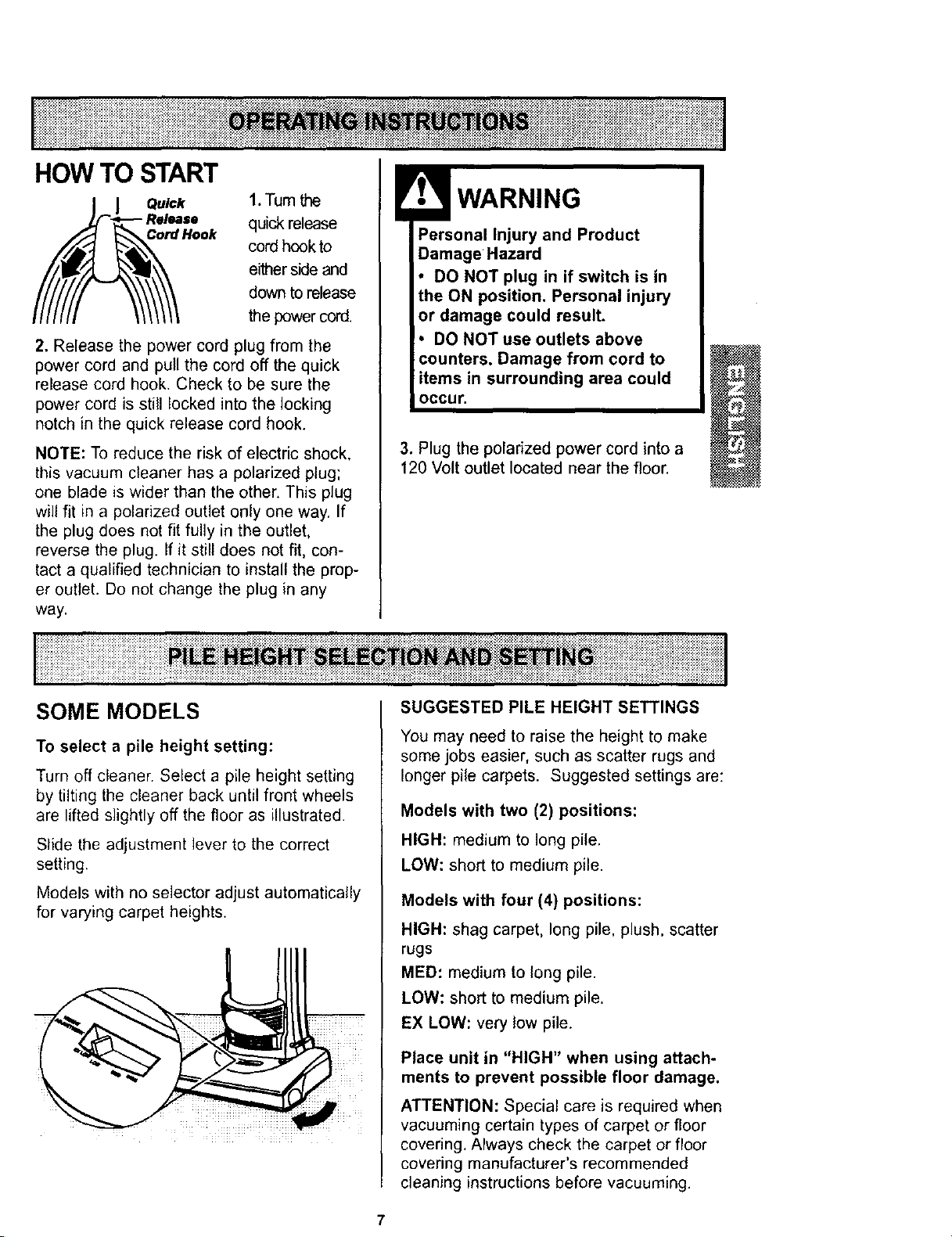
1.Turn the
quick release
cord hook to
either side and
down to release
the power cord.
2. Release the power cord plug from the
power cord and pull the cord off the quick
release cord hook. Check to be sure the
power cord is still locked into the locking
notch in the quick release cord hook.
NOTE: To reduce the risk of electric shock,
this vacuum cleaner has a polarized plug;
one blade is wider than the other. This plug
will fit in apolarized outlet only one way. If
the plug does not fit fully in the outlet,
reverse the plug. If it still does not fit, con-
tact a qualified technician to install the prop-
er outlet. Do not change the plug in any
way.
Personal Injury and Product
Damage Hazard
• DO NOT plug in if switch is in
the ON position. Personal injury
or damage could result.
DO NOT use outlets above
Damage from cord to
items in surrounding area could
occur.
3. Plug the polarized power cord into a
120 Volt outlet located near the floor.
SOME MODELS
To select a pile height setting:
Turn off cleaner. Select a pile height setting
by tilting the cleaner back until front wheels
are lifted slightly off the floor as illustrated.
Slide the adjustment lever to the correct
setting.
Models with no selector adjust automatically
for varying carpet heights.
SUGGESTED PILE HEIGHT SETTINGS
You may need to raise the height to make
some jobs easier, such as scatter rugs and
longer pile carpets. Suggested settings are:
Models with two (2) positions:
HIGH: medium to long pile.
LOW: short to medium pile.
Models with four (4) positions:
HIGH: shag carpet, long pile, plush, scatter
rugs
MED: medium to long pile.
LOW: short to medium pile.
EX LOW: very low pile.
Place unit in "HIGH" when using attach.
ments to prevent possible floor damage.
ATTENTION: Special care is required when
vacuuming certain types of carpet or floor
covering. Always check the carpet or floor
covering manufacturer's recommended
cleaning instructions before vacuuming.
7
SOME MODELS
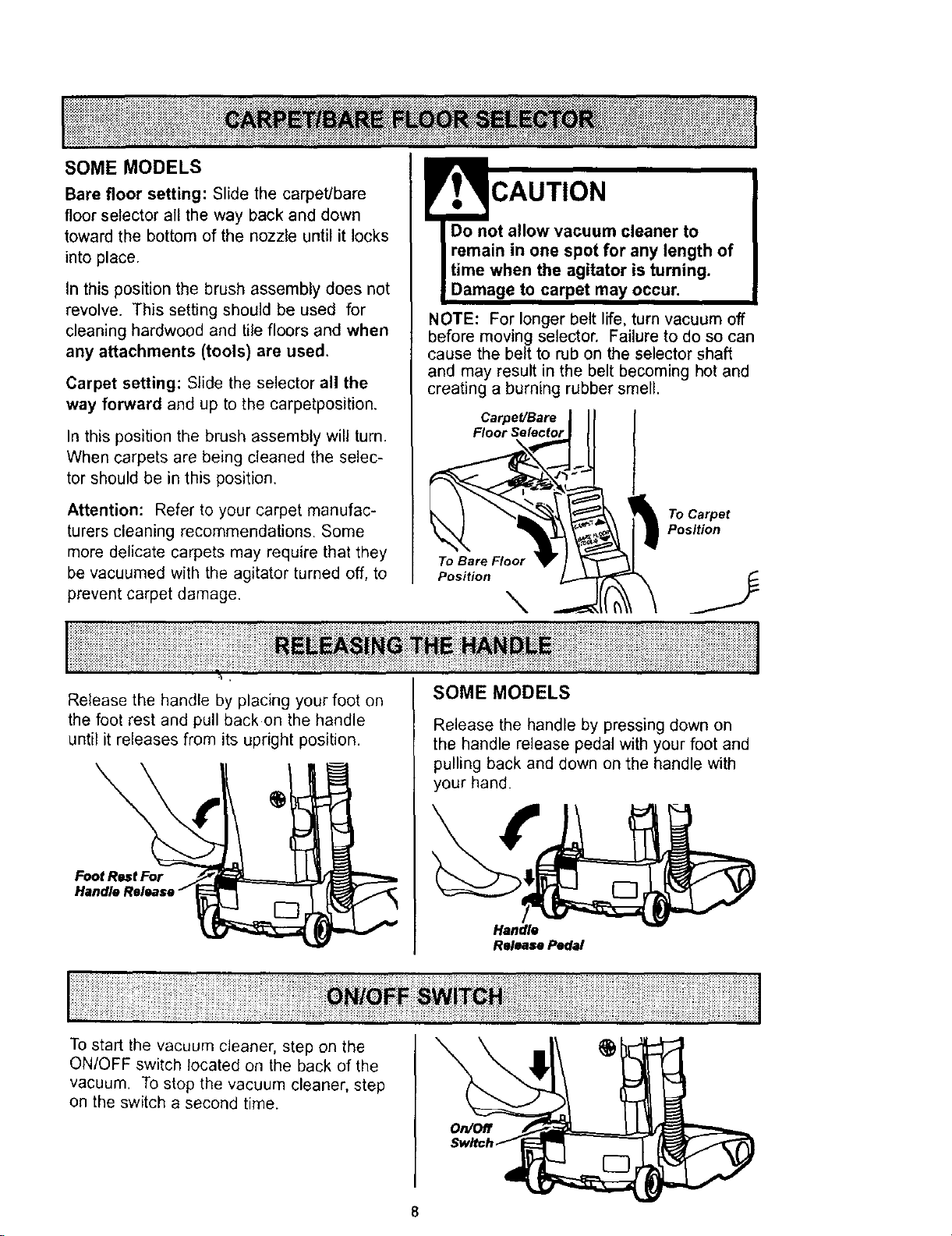
Bare floor setting: Slide the carpet/bare
floor selector all the way back and down
toward the bottom of the nozzle until it locks
into place.
in this position the brush assembly does not
revolve. This setting should be used for
cleaning hardwood and tile floors and when
any attachments (tools) are used,
Carpet setting: Slide the selector all the
way forward and up to the carpetposition.
In this position the brush assembly will turn.
When carpets are being cleaned the selec-
tor should be in this position.
Attention: Refer to your carpet manufac-
turers cleaning recommendations. Some
more delicate carpets may require that they
be vacuumed with the agitator turned off, to
prevent carpet damage.
!'I? CAUTION
Do not allow vacuum cleaner to
remain in one spot for any length of
time when the agitator is turning.
Damage to carpet may occur.
NOTE: For longer belt life, turn vacuum off
before moving selector. Failure to do so can
cause the belt to rub on the selector shaft
and may result in the belt becoming hot and
creating a burning rubber smell.
Carpet/Bare
Floor Selector
To Bare Floor
Position _
To Carpet
Position
Release the handle by placing your foot on
the foot rest and pull back on the handle
until it releases from its upright position.
\
Foot Rest For
Handle
SOME MODELS
Release the handle by pressing down on
the handle release pedal with your foot and
pulling back and down on the handle with
your hand.
Handle
Release Pedal
To start the vacuum cleaner, step on the
ON/OFF switch located on the back of the
vacuum. To stop the vacuum cleaner, step
on the switch a second time.
On/Off
8
•iiiiiiiiiiiiiiiii!iiiiiiiiii__ii__iiiiil;iiiii!iii!ii_,!!iiiiiiii!i__!ilJii;i;iiiiiiiiiiiii_HM_N_ ii_!ii_iiiiiiili!i!i!iiiiiii!i!ii_!_i_iii_!ili!iiiliiiiiiii_!i_!i!i!iiiiiiiiiiiiiiii_!_ili;ili!!iiiiiiiii!_i_ilili!ii
Personal Injury Hazard and Property
Hazard
DO NOT place hands or feet under-
neath the unit at any time. When
using attachments, the agitator con-
tinues rotating. Do not allow the
cleaner to remain in just one place
for a period of time as the agitator
may damage the floor surface.
Avoid placing the cleaner on furni-
ture, the fringed area of rugs, deep
pile carpeting, or carpeted stairs.
The ideal position for the cleaner
when using attachments is for the
unit to be on a level area with the
handle in the f_ position.
TO USE ATTACHMENTS
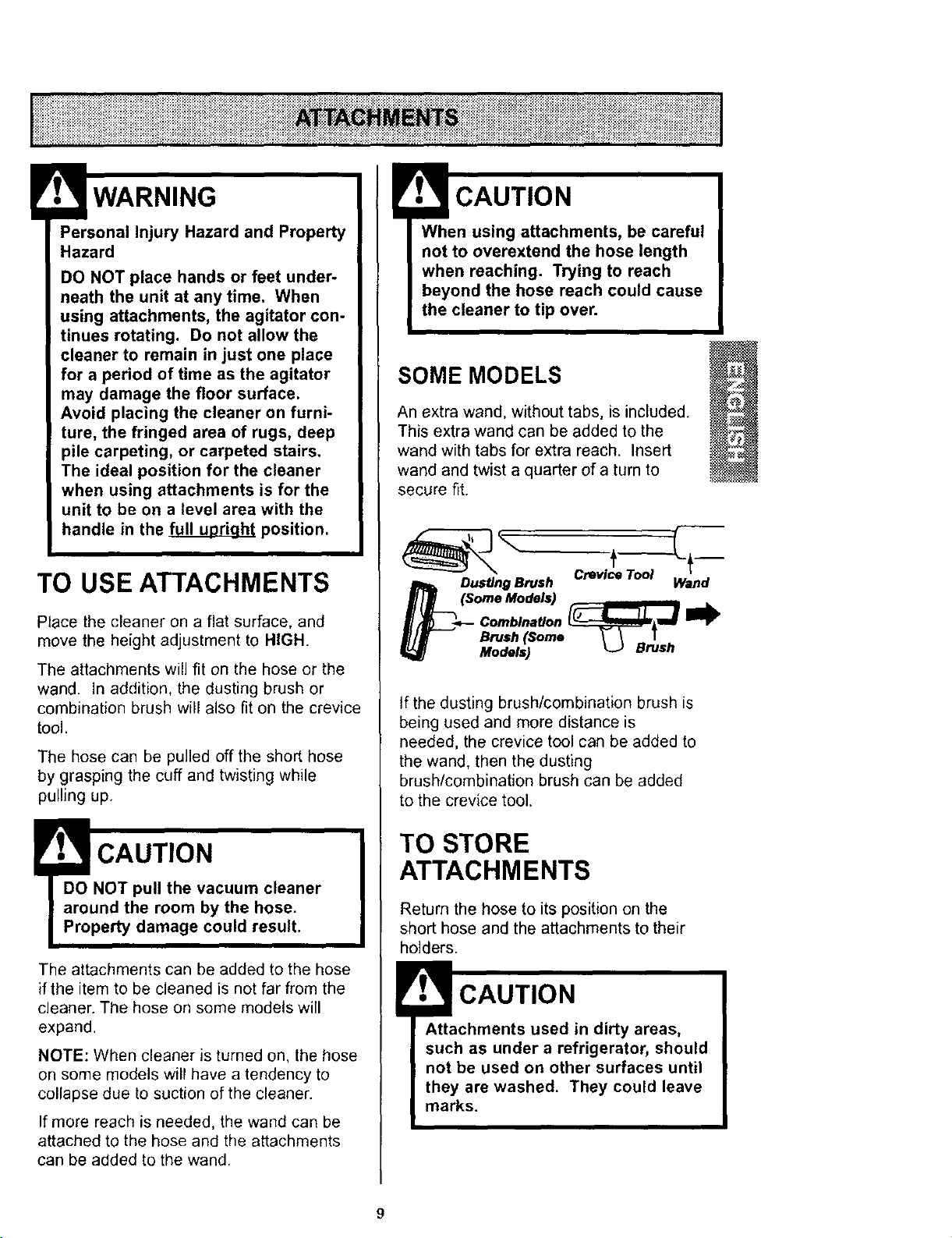
Place the cleaner on a flat surface, and
move the height adjustment to HIGH.
The attachments will fit on the hose or the
wand. In addition, the dusting brush or
combination brush will also fit on the crevice
tool.
The hose can be pulled off the short hose
by grasping the cuff and twisting while
pulling up,
!t,_ CAUTION
DO NOT pull the vacuum cleaner
around the room by the hose.
Property damage could result.
The attachments can be added to the hose
if the item to be cleaned is not far from the
cleaner. The hose on some models will
expand.
NOTE: When cleaner is turned on, the hose
on some models will have a tendency to
collapse due to suction of the cleaner.
If more reach is needed, the wand can be
attached to the hose and the attachments
can be added to the wand.
When using attachments, be careful
not to overextend the hose length
when reaching. Trying to reach
beyond the hose reach could cause
the cleaner to tip over.
SOME MODELS
An extra wand, without tabs, is included.
This extra wand can be added to the
wand with tabs for extra reach. Insert
wand and twist a quarter of a turn to
secure fit.
Dus_ng Brush Wand
(Some Models) ,u
Combination _J_,_
Brush (Some _- _ T
Models) L.J Brush
If the dusting brush/combination brush is
being used and more distance is
needed, the crevice tool can be added to
the wand, then the dusting
brush/combination brush can be added
to the crevice tool.
TO STORE
ATTACHMENTS
Return the hose to its position on the
short hose and the attachments to their
holders.
CAUTION
Attachments used in dirty areas,
such as under a refrigerator, should
not be used on other surfaces until
they are washed. They could leave
marks.
9
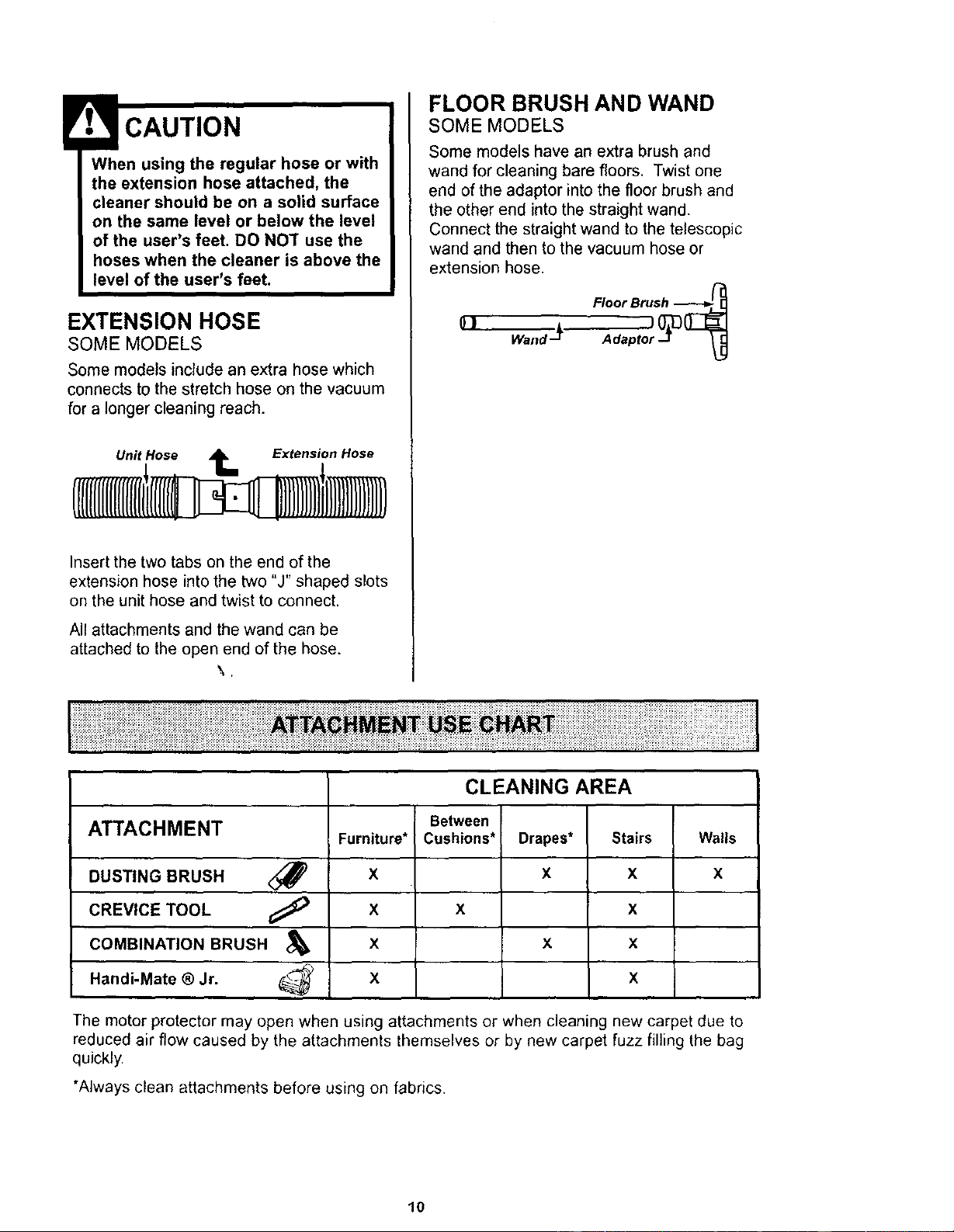
When using the regular hose or with
the extension hose attached, the
cleaner should be on a solid surface
on the same level or below the level
of the user's feet. DO NOT use the
hoses when the cleaner is above the
level of the user's feet.
EXTENSION HOSE
SOME MODELS
Some models include an extra hose which
connects to the stretch hose on the vacuum
for a longer cleaning reach.
Unit Hose 1_ Extension Hose
Insert the two tabs on the end of the
extension hose into the two "J" shaped slots
on the unit hose and twist to connect.
All attachments and the wand can be
attached to the open end of the hose.
\.
FLOOR BRUSH AND WAND
SOME MODELS
Some models have an extra brush and
wand for cleaning bare floors. Twist one
end of the adaptor into the floor brush and
the other end into the straight wand.
Connect the straight wand to the telescopic
wand and then to the vacuum hose or
extension hose,
0]Wand-JL
CLEANING AREA
Between
ATTACHMENT Furniture* Cushions* Drapes* Stairs Wails
DUSTING BRUSH <_ X X X X
CREVICE TOOL _X X X
COMBINATION BRUSH &X X x
Handi-Mate ®Jr. _- X X
The motor protector may open when using attachments or when cleaning new carpet due to
reduced air flow caused by the attachments themselves or by new carpet fuzz filling the bag
quickly.
*Always clean attachments before using on fabrics.
10
::::::_::::_:::::_::::_:_:::::_::::_:::::_:_:_;:::;_:_:::::::_:::::::: :::: _:;::::::;;::_;:::::::::._:::,: ;,_::;;;: _::::;_::::_, :;:_ :::_: :::: :;; ::: _._::::_ :::::::::::::::::;;: ::::::::_::::;_::::::::::_:;_;:;::_::::::::::::::::;:;;:; :_::::::::: :::::;;: :
:::::::::::_:; ;; ::;;::::_;::::: _ ;::_::::: ::::_::;;:::_.;;; _;:: _::_::__ _'" • ,,: .,.-.., :.... .:., _.-.,:,.. ,...; :,,. • ,-,.,.•...: ::: : :::::;:_:;;;::::_:::::::::::: _;:: ::_ :::::::: ::: :: :::::
t_::_:::_:_:_::_::::_:_:_:_:::::_:::_:_:_:_:::::_:::_:_:_:_:_::::_:_:_:_:_$_:_:_:_:_:_;_:_:i_:!_!:_:_:_:_:_:_:_:_:_:_:_:_:i:i:i_i:i:_i:i_i_i:i:i_i_!_!:i:_:i:_$;:_:_:_$_:!i_:_:_:_:_ii_ii_ii_iiiiii_i_i_i_i_i_i_i_!_;_;_i_i_i;_;_!_!_i_i_i_i;i_i_ii_ii_i_i_i_i_i_i_i_!_i_!_!_i_i_i_i_i_i_i_i_i_i_iii_i_i!i_!_!_!_!_i_!_i_i%_i_i_i_i_i_i%I
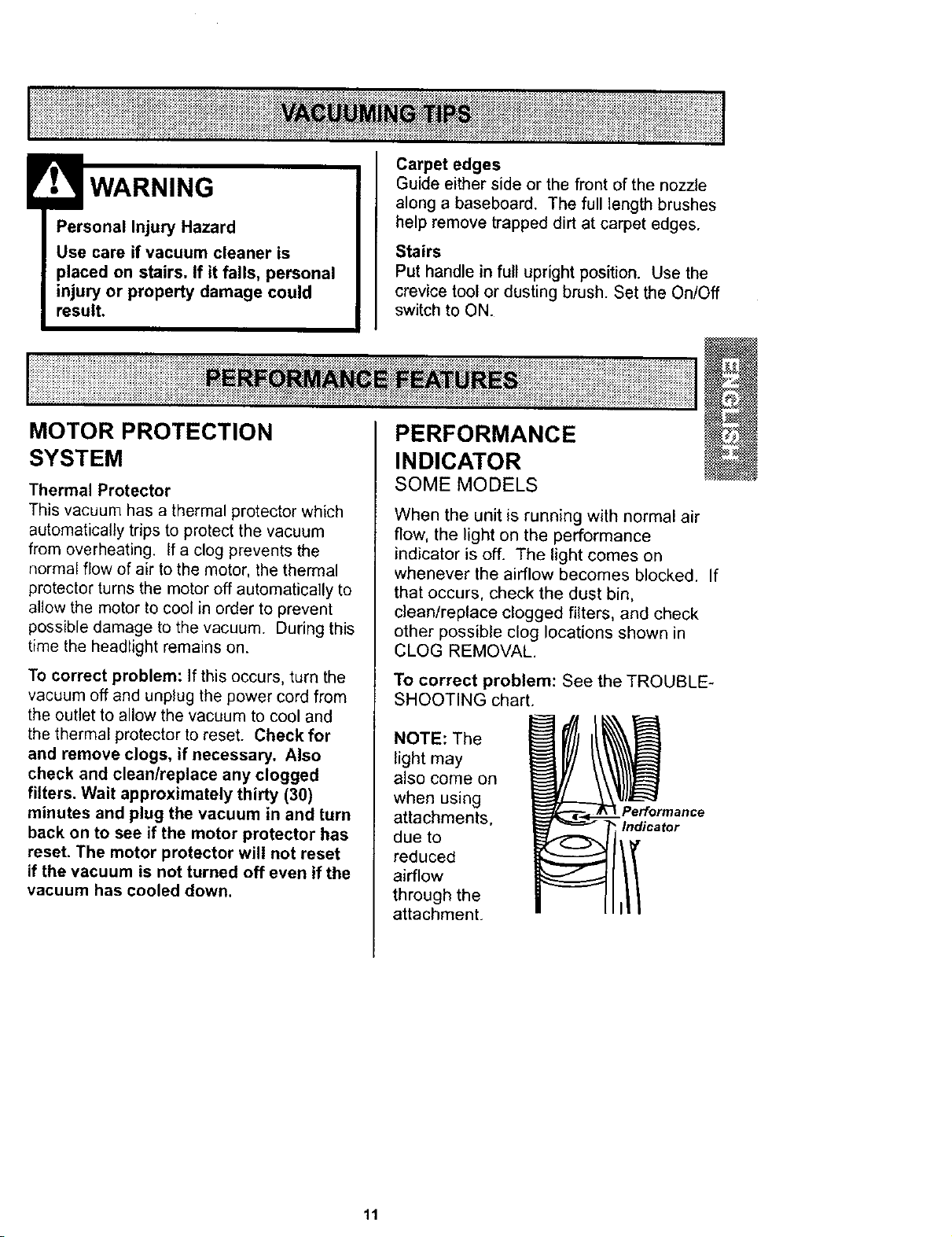
Personal Injury Hazard
Use care if vacuum cleaner is
placed on stairs. If it falls, personal
injury or property damage could
result.
Carpet edges
Guide either side or the front of the nozzle
along a baseboard, The full length brushes
help remove trapped dirt at carpet edges.
Stairs
Put handle in full upright position. Use the
crevicetoolor dustingbrush. Set the On/Off
switch to ON.
i !il ..............................
MOTOR PROTECTION
SYSTEM
Thermal Protector
This vacuum has a thermal protector which
automatically trips to protect the vacuum
from overheating. If a clog prevents the
normal flow of air to the motor, the thermal
protector turns the motor off automatically to
allow the motor to cool in order to prevent
possible damage to the vacuum. During this
time the headlight remains on.
To correct problem: If this occurs, turn the
vacuum off and unplug the power cord from
the outlet to allow the vacuum to cool and
the thermal protector to reset. Check for
and remove clogs, if necessary. Also
check and clean/replace any clogged
filters. Wait approximately thirty (30)
minutes and plug the vacuum in and turn
back on to see if the motor protector has
reset. The motor protector will not reset
if the vacuum is not turned off even if the
vacuum has cooled down.
PERFORMANCE
INDICATOR
SOME MODELS
When the unit is running with normal air
flow, the light on the performance
indicator is off. The light comes on
whenever the airflow becomes blocked. If
that occurs, check the dust bin,
clean/replace clogged filters, and check
other possible clog locations shown in
CLOG REMOVAL.
To correct problem: See the TROUBLE-
SHOOTING chart.
NOTE: The
light may
also come on
when using
attachments,
due to
reduced
airflow
through the
attachment.
Performance
Indicator
11
Always follow all safety precautions when
cleaning and servicing the vacuum
cleaner.
Electrical Shock And Personal Injury
Hazard
Disconnect electrical supply before
servicing or cleaning the unit.
Failure to do so could result in elec-
trical shock or personal injury from
cleaner suddenly starting.
_i_i_i_ii_iii_i_iiiiiiiiiiiiiiiiiiiiii'iil i _i_ _i _ _ i i I
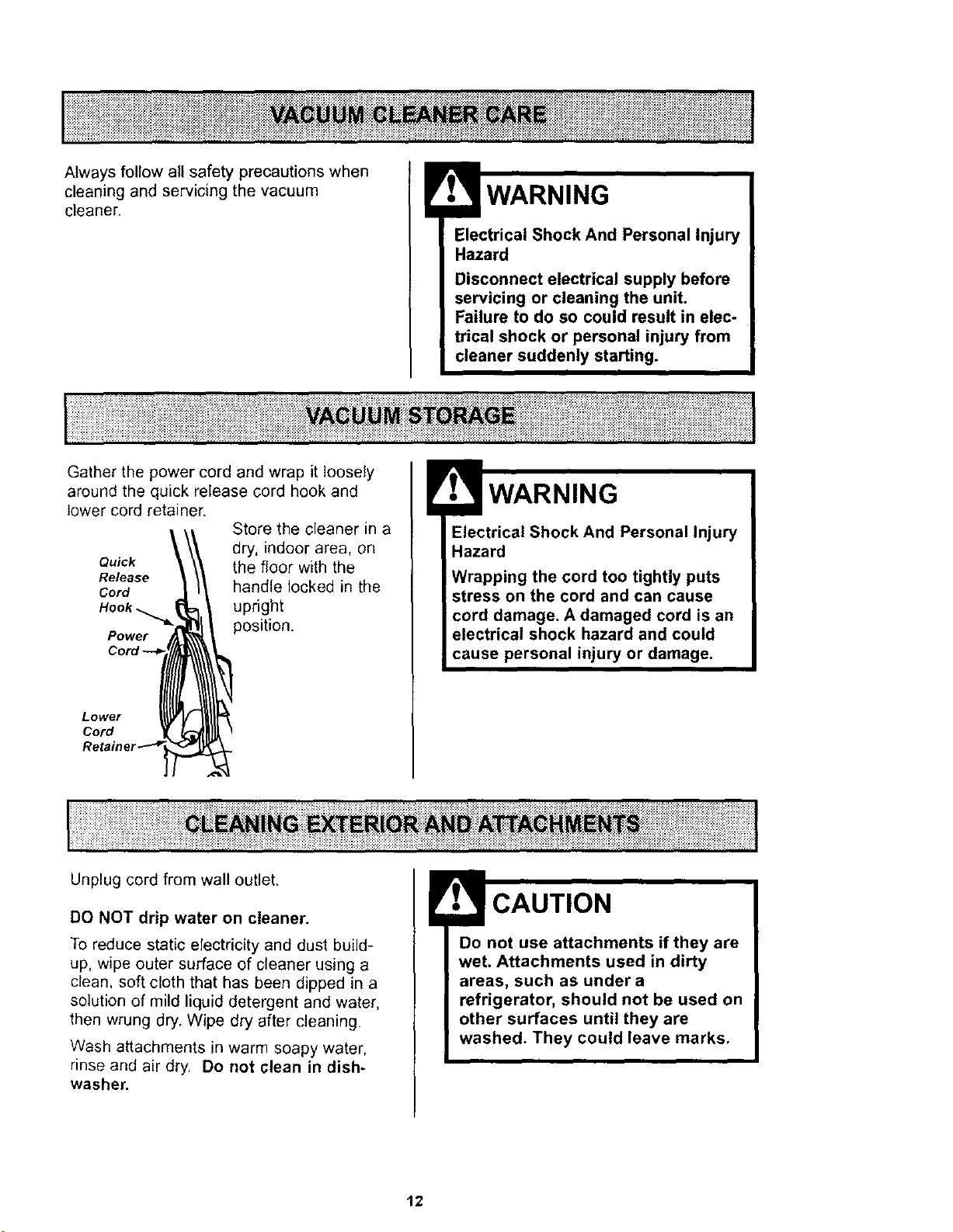
Gather the power cord and wrap it loosely
around the quick release cord hook and
lower cord retainer. Store the cleaner in a
dry, indoor area, on
Quick the floor with the
Release
Cord handle locked in the
Hook _upright
Power position.
Lower
Cord
Electrical Shock And Personal Injury
Hazard
Wrapping the cord too tightly puts
stress on the cord and can cause
cord damage. A damaged cord is an
electrical shock hazard and could
cause personal injury or damage.
I!!iii!ililiiiiiiiiiiiiiiii i ¸iiiiiiiiii i ii i!i!i i iJ it
Unplug cord from wall outlet.
DO NOT drip water on cleaner.
To reduce static electricity and dust build-
up, wipe outer surface of cleaner using a
clean, soft cloth that has been dipped in a
solution of mild liquid detergent and water,
then wrung dry. Wipe dry after cleaning.
Wash attachments in warm soapy water,
rinse and air dry. Do not clean in dish-
washer.
Do not use attachments if they are
wet. Attachments used in dirty
areas, such as under a
refrigerator, should not be used on
other surfaces until they are
washed. They could leave marks,
12
iiiiiiiiiiiiiiiiiiiiiii!iiiiiii!iiiiiiiiiiiiiii¸ii_i;_;_i_i__iii_iiiiii_i__i_i__ii¸_i_ii_i_ _!i_i_iI_ii_i_i_ili!iiiii_i!i:i_i_i_i_i_i_iiiii_i_i!_i:i_i_i_ii:::::iiii_
Li!iiiiiiiii!iiiiiiiiiiiiiiiiiiiiiiiiiiiiiiiiiii!!ii!i!i!!iiiiiiili_iiiiiiiii!_i_iii_iii_i_i_i_i_i_iiii!!_i_i_i!iii_i_ii_ii_i_i_iii_iiii!_;i_i_ii_iiiililililiiiii_i!iiiiiililili!iiiiiiiiiiliiii!ili!ii_ii_iiiilili!i _iliiiill_iiiii ii i_i__iii il i ill
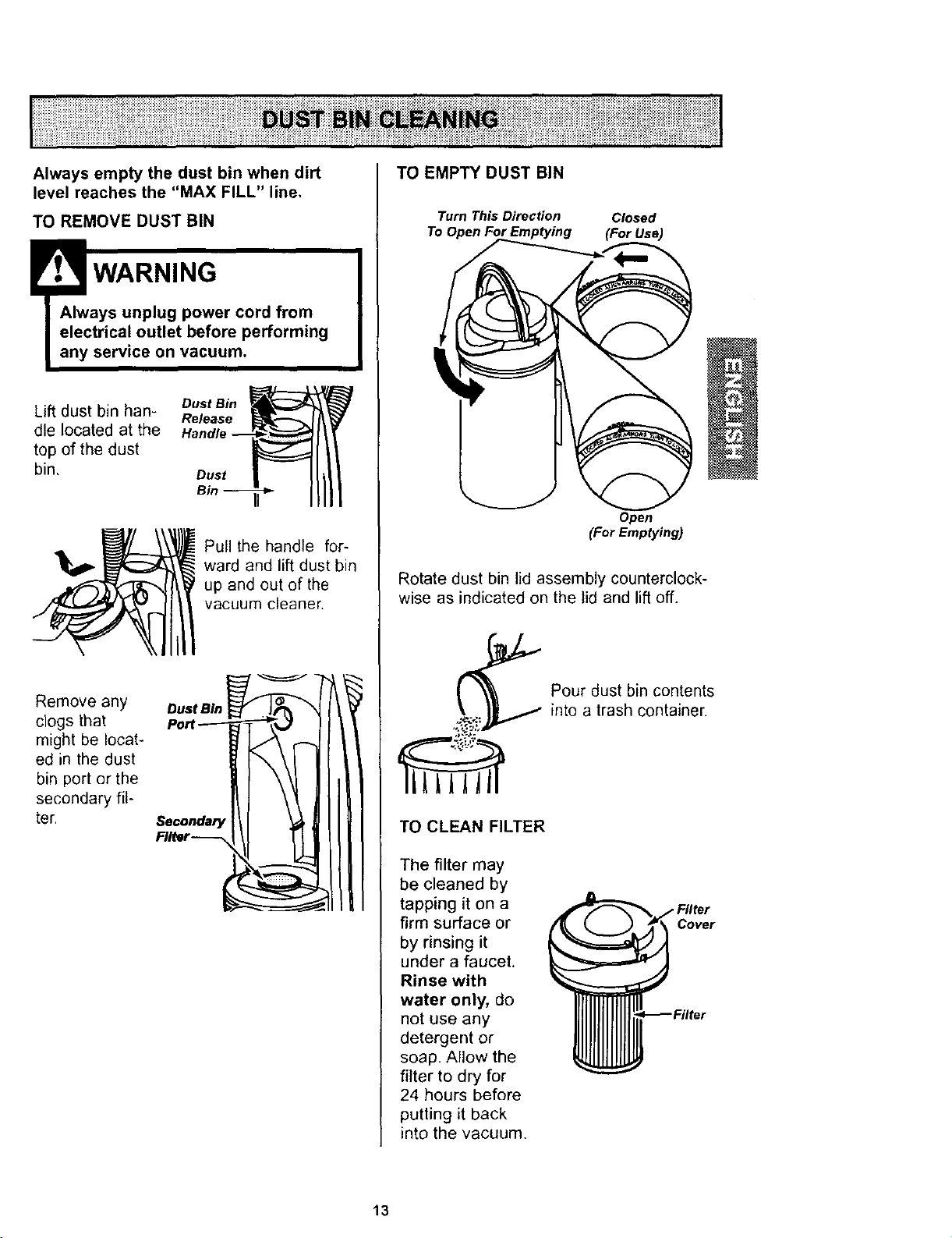
Always empty the dust bin when dirt
level reaches the "MAX FILL" line,
TO REMOVE DUST BIN
!rV.,_WARNING
IAlways unplug power cord from
electrical outlet before performing
any service on vacuum.
I
Lift dust bin han- Dust si.
Release
die located at the
top of the dust
bin, Dust
Pull the handle for-
ward and lift dust bin
up and out of the
vacuum cleaner.
Remove any
clogs that
might be locat-
ed in the dust
bin port or the
secondary fil-
ter. so=ona=,yI :_ _1II II
.,.r__ _1 ILlIll
TO EMPTY DUST BIN
Turn This Direction Closed
Open
(For Emptying)
Rotate dust bin lid assembly counterclock-
wise as indicated on the lid and lift off.
TO CLEAN FILTER
The filter may
be cleaned by
tapping it on a
firm surface or
by rinsing it
under a faucet.
Rinse with
water only, do
not use any
detergent or
soap. Allow the
filter to dry for
24 hours before
putting it back
into the vacuum.
Pour dust bin contents
into a trash container.
Cover
13
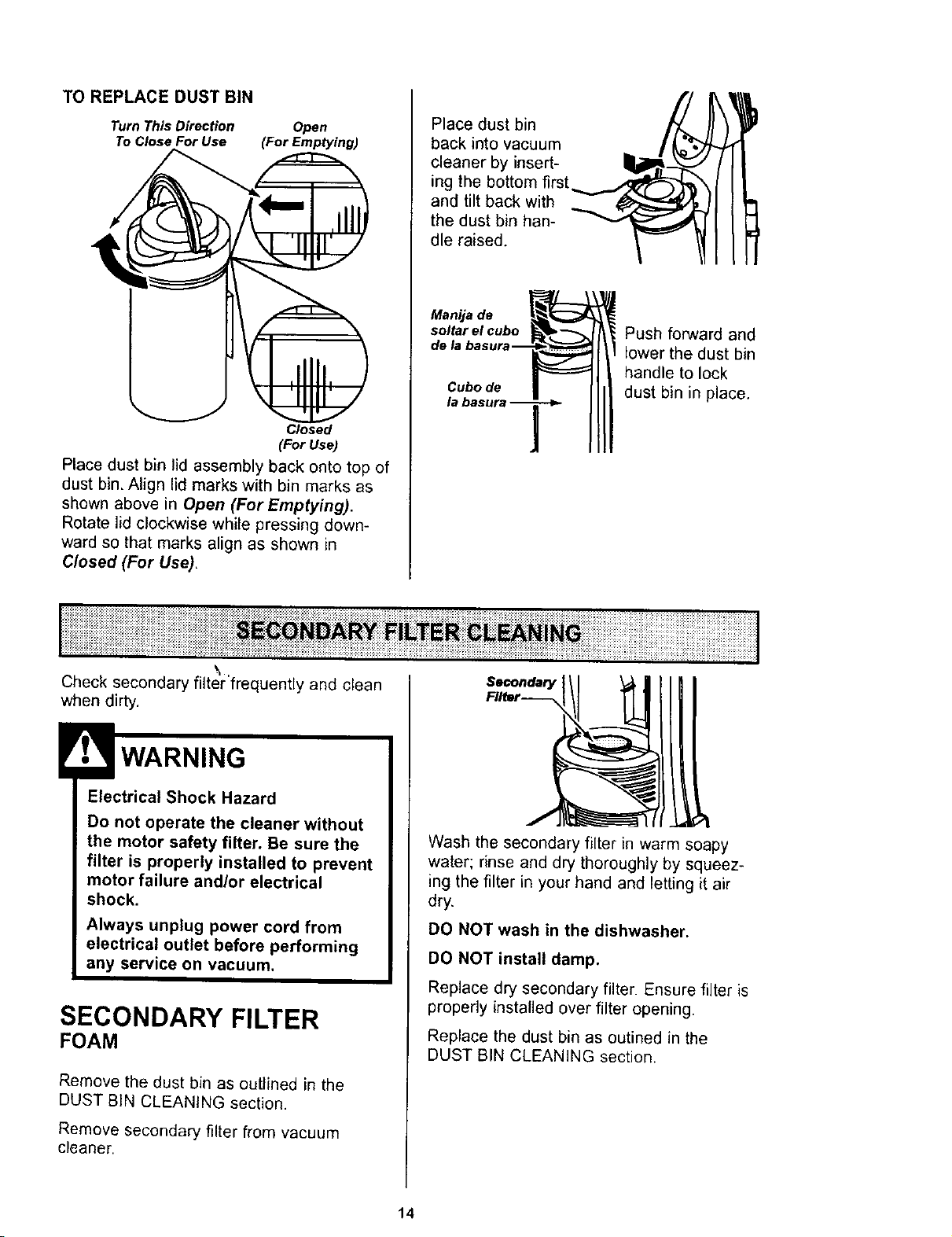
TO REPLACE DUST BIN
Turn This Direction Open
To Close For Use (For Emptying)
Closed
(For Use)
Place dust bin lid assembly back onto top of
dust bin. Align lid marks with bin marks as
shown above in Open (For Emptying).
Rotate lid clockwise while pressing down-
ward so that marks align as shown in
Closed (For Use),
7/
Place dust bin
back into vacuum
cleaner by insert-
ing the bottom first
and tilt back with
the dust bin han-
dle raised.
Manija de
soltar el cubo
dela
Cubode
Push forward and
lower the dust bin
handle to lock
dust bin in place.
\
Check secondary fiiter'frequently and clean
when dirty.
Electrical Shock Hazard
Do not operate the cleaner without
the motor safety filter. Be sure the
filter is properly installed to prevent
motor failure and/or electrical
shock.
Always unplug power cord from
electrical outlet before performing
any service on vacuum.
SECONDARY FILTER
FOAM
Remove the dust bin as outlined in the
DUST BiN CLEANING section,
Remove secondary filter from vacuum
cleaner.
Secondary
Filter--
Wash the seconda[y filter in warm soapy
water; rinse and dry thoroughly by squeez-
ing the filter in your hand and letting it air
dry.
DO NOT wash in the dishwasher.
DO NOT install damp.
Replace dry secondary filter. Ensure filter is
properly installed over filter opening.
Replace the dust bin as ootined in the
DUST BIN CLEANING section.
14
Electrical Shock Hazard
Unplug power cord from electrical
outlet. Do not operate the cleaner
without the primary or exhaust filters.
Be sure the filters are properly
installed to prevent motor failure
and/or electrical shock.
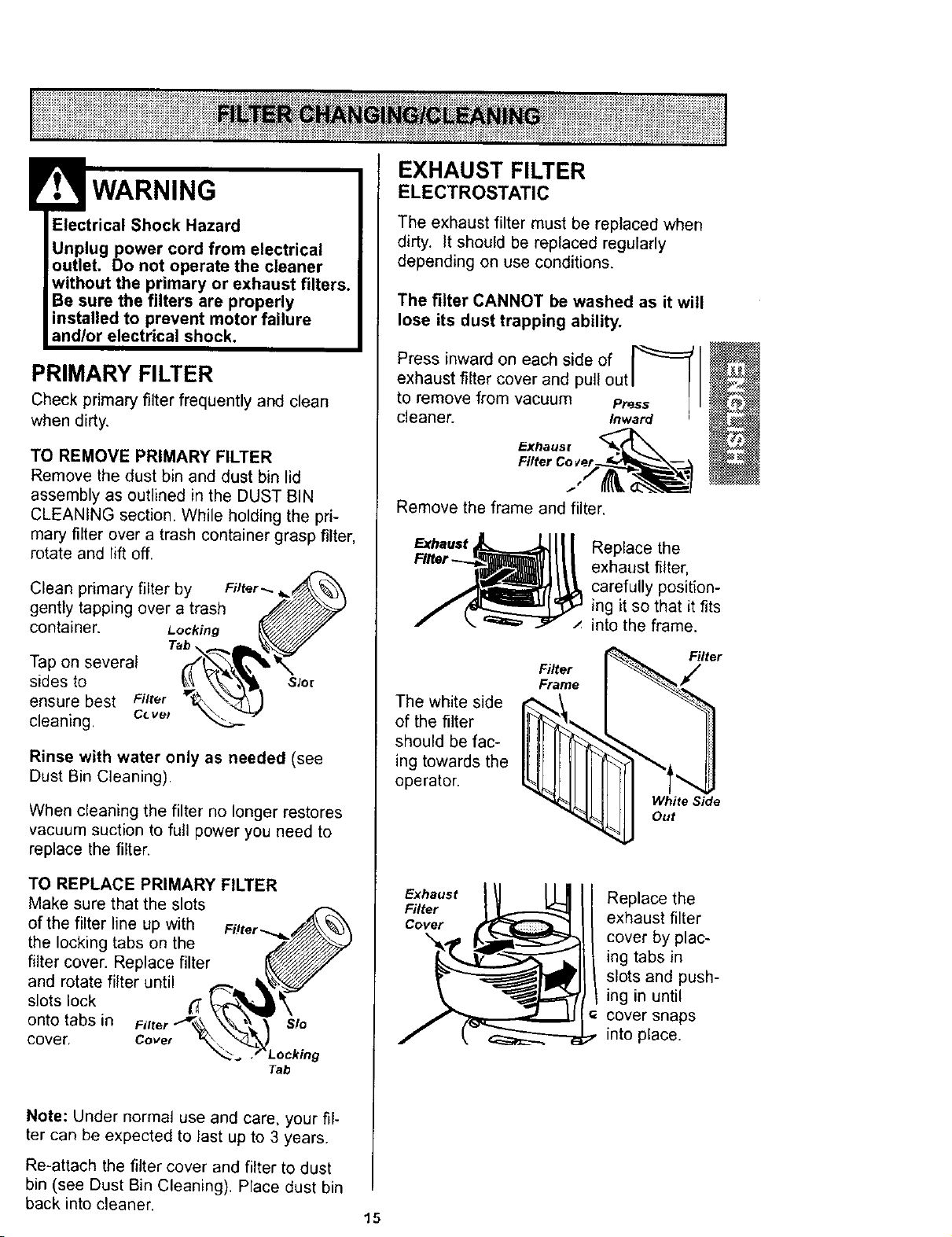
PRIMARY FILTER
Check primary filter frequently and clean
when dirty.
TO REMOVE PRIMARY FILTER
Remove the dust bin and dust bin lid
assembly as outlined in the DUST BIN
GLEANING section• While holding the pri-
mary filter over a trash container grasp filter,
rotate and lift off.
Clean primary filter by
gently tapping over a trash
container. Locking
Tab
Tap on several
sides to
ensure best Filter
cleaning, c_ ve_
Filter _.
Slot
Rinse with water only as needed (see
Dust Bin Cleaning).
When cleaning the filter no longer restores
vacuum suction to full power you need to
replace the filter.
TO REPLACE PRIMARY FILTER
Make sure that the slots
of the filter line up with
the locking tabs on the
filter cover. Replace filter
and rotate filter until
slots lock
onto tabs in
cover. Cove_
Tab
Note: Under normal use and care, your fil-
ter can be expected to last up to 3 years.
Re-attach the filter cover and filter to dust
bin (see Dust Bin Cleaning). Place dust bin
back into cleaner. 15
EXHAUST FILTER
ELECTROSTATIC
The exhaust filter must be replaced when
dirty. It should be replaced regularly
depending on use conditions.
The filter CANNOT be washed as it will
lose its dust trapping ability.
Press inward on each side of
exhaust filter cover and pull out I[ I
to remove from vacuum Press._ ] I
cleaner. Inward
Remove the frame and filter.
Replace the
exhaust filter,
carefully position-
ing it so that it fits
into the frame.
The white side
of the filter
should be fac-
ing towards the
operator.
Filter
Frame
Filter
White Side
Out
Exhaust
Filter
Cover
Replace the
exhaust filter
cover by plac-
ing tabs in
slots and push-
ing in until
cover snaps
into place.
Electrical Shock Or Personal Injury
Hazard
Disconnect electrical supply before
servicing or cleaning the unit.
Failure to do so could result in elec-
trical shock or personal injury from
cleaner suddenly starting.
Frequently check and remove hair, string
and lint build-up in the brush area, If build-
up becomes excessive, follow the steps
below. Should the belt become loose or
should it break, follow the Belt Removal
Instructions,
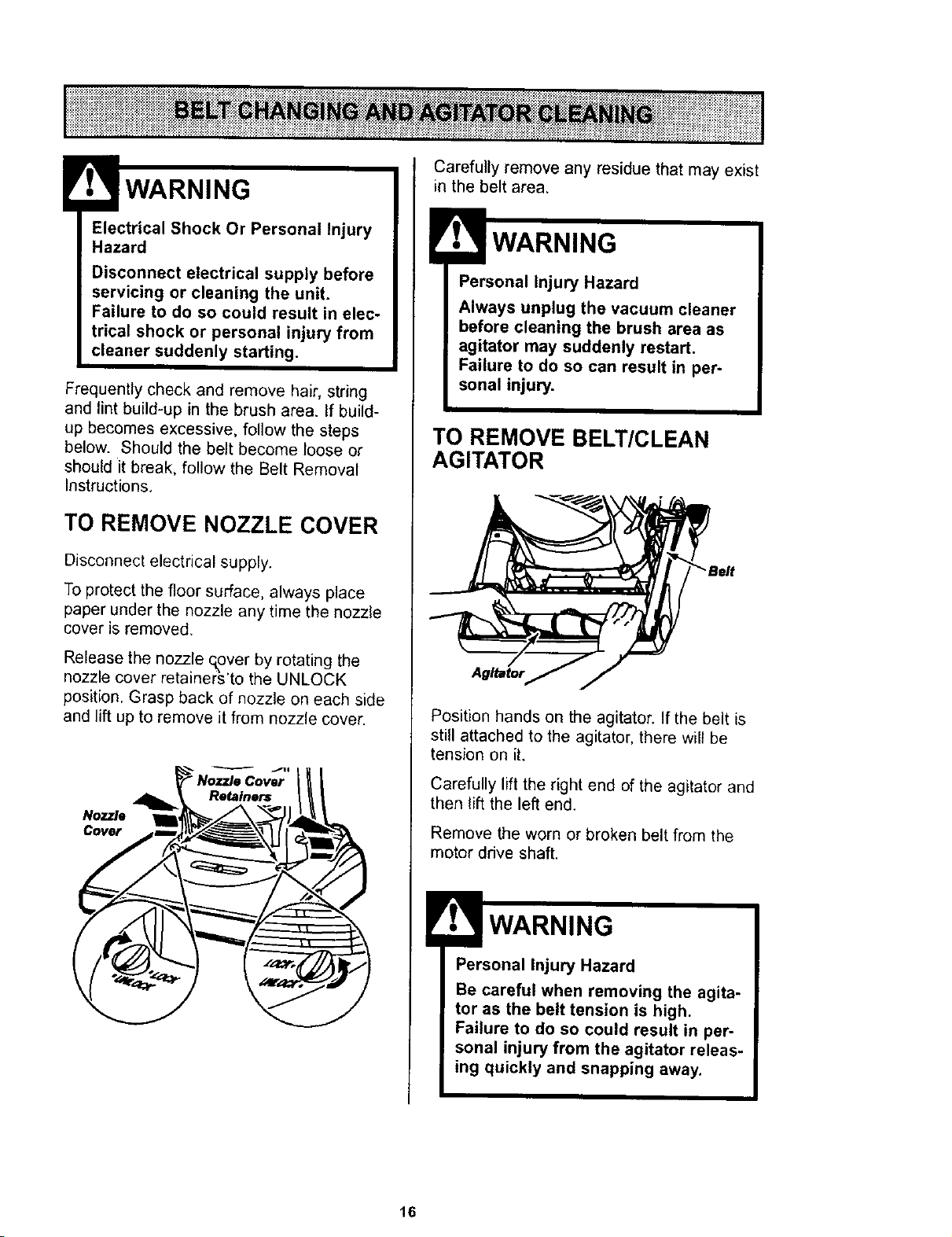
TO REMOVE NOZZLE COVER
Disconnect electrical supply.
To protect the floor surface, always place
paper under the nozzle any time the nozzle
cover is removed,
Release the nozzle q,over by rotating the
nozzle cover retainer;_'to the UNLOCK
position. Grasp back of nozzle on each side
and lift up to remove it from nozzle cover.
Nozzle
Cover
Carefully remove any residue that may exist
in the belt area.
Personal Injury Hazard
Always unplug the vacuum cleaner
before cleaning the brush area as
agitator may suddenly restart,
Failure to do so can result in per-
sonal injury.
TO REMOVE BELT/CLEAN
AGITATOR
Position hands on the agitator. If the belt is
still attached to the agitator, there will be
tension on it.
Carefully lift the right end of the agitator and
then lift the left end.
Remove the worn or broken belt from the
motor drive shaft.
Personal Injury Hazard
Be careful when removing the agita-
tor as the belt tension is high.
Failure to do so could result in per-
sonal injury from the agitator releas-
ing quickly and snapping away.
16
TO CLEAN AGITATOR
NOTE: In order to keep cleaning efficiency
high and to prevent damage to your vacu-
um, the agitator must be cleaned every time
the belt is chanaed.
The agitator must be cleaned according to
the following schedule:
V_quum Use
HEAVY
(used daily)
MODERATE
(used 2-3 times/week)
Clean Aaitator
every week
every month
LIGHT
(used 1 time/week) every 2 months
Remove any dirt or debris in the belt path
area or in the agitator area.
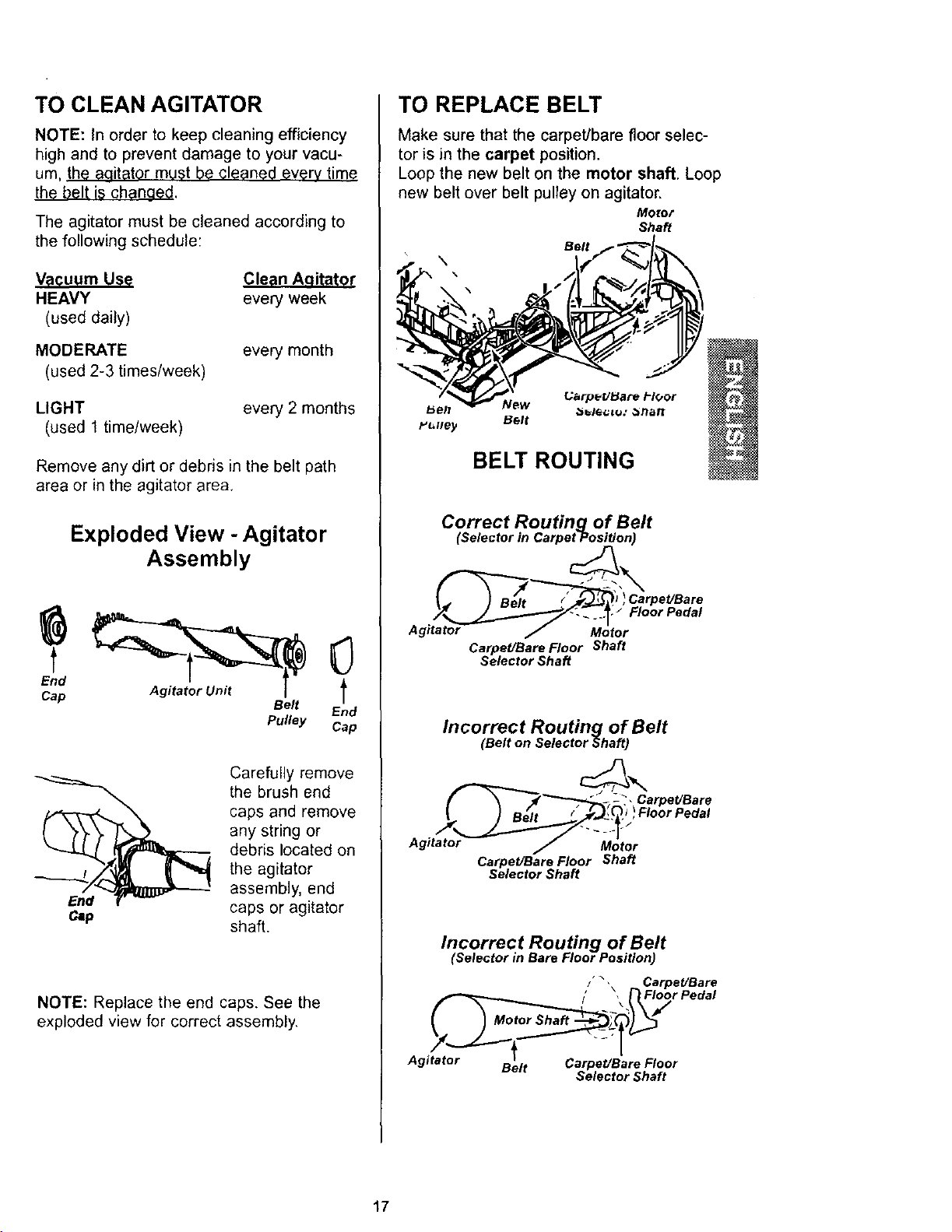
Exploded View - Agitator
Assembly
Belt End
Pulley Cap
Carefully remove
the brush end
caps and remove
any string or
debris located on
the agitator
assembly, end
caps or agitator
shaft.
NOTE: Replace the end caps. See the
exploded view for correct assembly.
TO REPLACE BELT
Make sure that the carpet/bare floor selec-
tor is in the carpet position.
Loop the new belt on the motor shaft. Loop
new belt over belt pulley on agitator.
Motor
Shaft
Belt
\
Uarp_UBare i-IGor
Y_lley Belt
BELT ROUTING
Correct Routing of Belt
(Selector in Carpet Position)
Carpet/Bare Floor Shaft
Selector Shaft
Incorrect Routing of Belt
(Belt on Selector Shaft)
f_d_-_,, arpet/Bare
Agitator _Motor
Carpet/Bare Floor Shaft
Selector Shaft
Incorrect Routing of Belt
(Selector in Bare Floor Position)
I,\ C rpet/Bare
I' ,FI Floor Pedal
Agitator Carpet/Bare Floor
Belt Selector Shaft
17
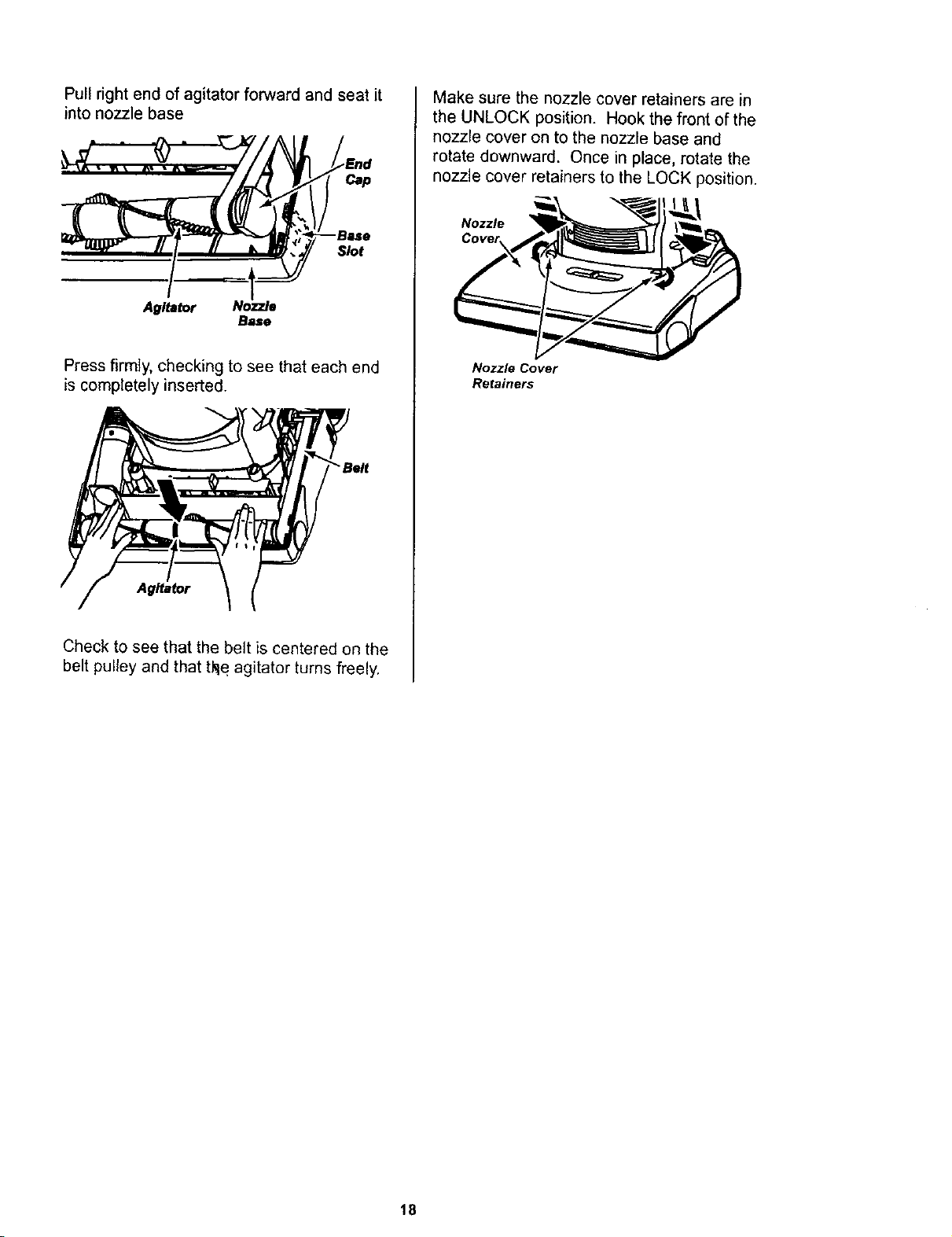
Pull right end of agitator forward and seat it
into nozzle base
Agitator Nozzle
Base
Press firmly, checking to see that each end
is completely inserted.
'Belt
Agitator
Check to see that the be;t is centered on the
belt pulley and that tke agitator turns freely,
Make sure the nozzle cover retainers are in
the UNLOCK position. Hook the front of the
nozzle cover on to the nozzle base and
rotate downward. Once in place, rotate the
nozzle cover retainers to the LOCK position.
Nozzle
Nozzle Cover
Retainers
18
Electrical Shock Or Personal Injury
Hazard
Disconnect electrical supply before
servicing or cleaning the unit.
Failure to do so could result in elec-
trical shock or personal injury from
cleaner suddenly starting.
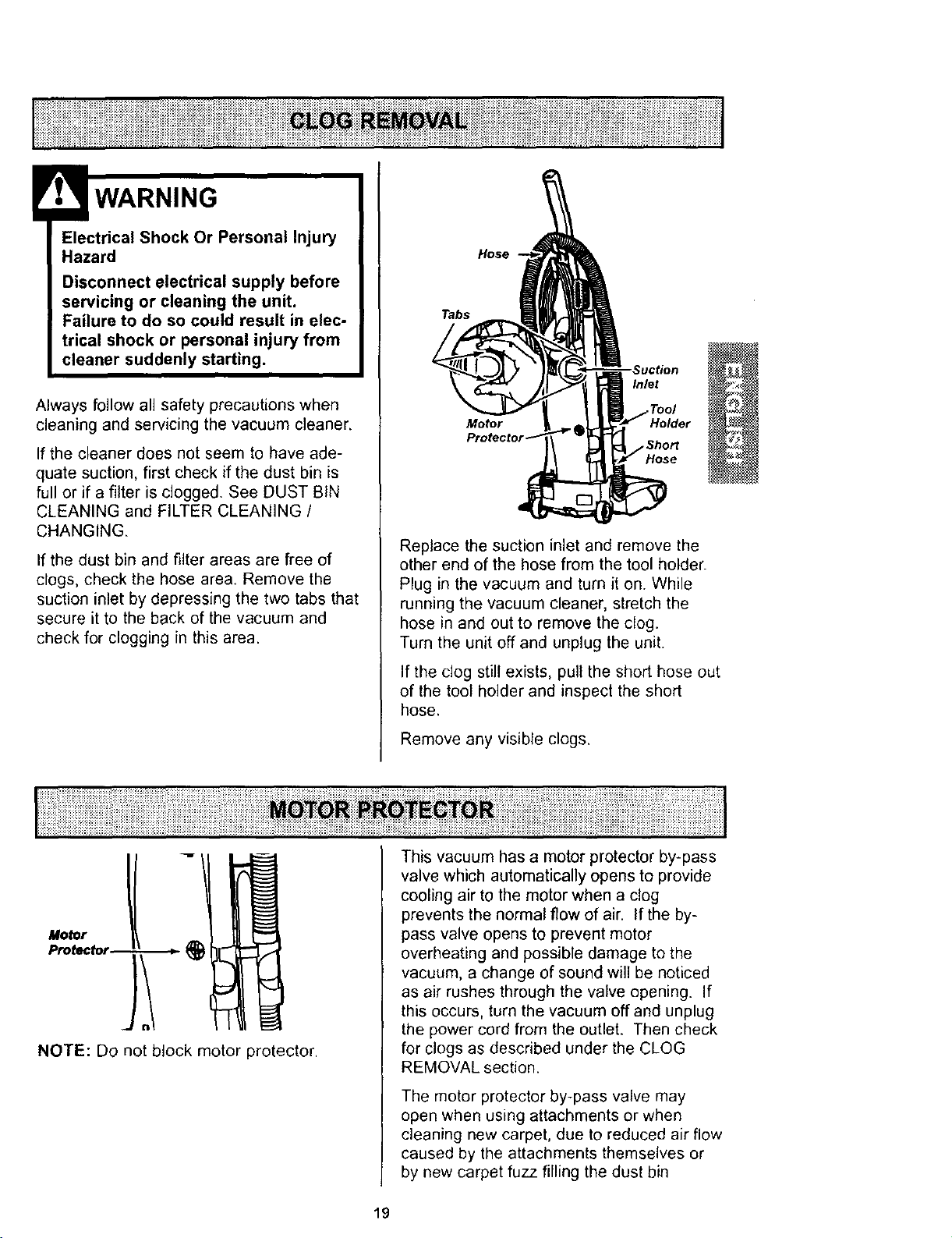
Always follow all safety precautions when
cleaning and servicing the vacuum cleaner.
If the cleaner does not seem to have ade-
quate suction, first check if the dust bin is
full or if a filter is clogged. See DUST BIN
CLEANING and FILTER CLEANING /
CHANGING.
If the dust bin and filter areas are free of
clogs, check the hose area. Remove the
suction inlet by depressing the two tabs that
secure it to the back of the vacuum and
check for clogging in this area.
Hose
Tabs
Inlet
Motor Holder
Replace the suction inlet and remove the
other end of the hose from the tool holder.
Plug in the vacuum and turn it on. While
running the vacuum cleaner, stretch the
hose in and out to remove the clog.
Turn the unit off and unplug the unit.
If the clog still exists, pull the short hose out
of the tool holder and inspect the short
hose.
Remove any visible clogs.
NOTE: Do not block motor protector.
This vacuum has a motor protector by-pass
valve which automatically opens to provide
cooling air to the motor when a clog
prevents the normal flow of air. If the by-
pass valve opens to prevent motor
overheating and possible damage to the
vacuum, a change of sound will be noticed
as air rushes through the valve opening. If
this occurs, turn the vacuum off and unplug
the power cord from the outlet. Then check
for clogs as described under the CLOG
REMOVAL section.
The motor protector by-pass valve may
open when using attachments or when
cleaning new carpet, due to reduced air flow
caused by the attachments themselves or
by new carpet fuzz filling the dust bin
19
_i_i_iiiiii_i_i_!ii_!i_iii!ii_!_ii_iii_!i!ii!_!i_!_!i_i_i_!_ii_iiiiii_!_!i_i_i_iii_!i_;_ii_iiii_i_!_i!_!_i_i!_!i_!_i_!_i_i_i_!_!ii_ii_iii_iiii_i!i_!ii_i_i_i`!ill_ii_!_!_!_!i_ii_iQ!_!ii_i_ii_!ii_i_ii!iiiiii_ii!iiii!_i_ii'iiiii!iiii_il_ii_iiii
SOME MODELS
Electrical Shock Or Personal Injury
Hazard
Disconnect electrical supply before
servicing or cleaning the unit.
Failure to do so could result in elec-
trical shock or personal injury from
cleaner suddenly starting.
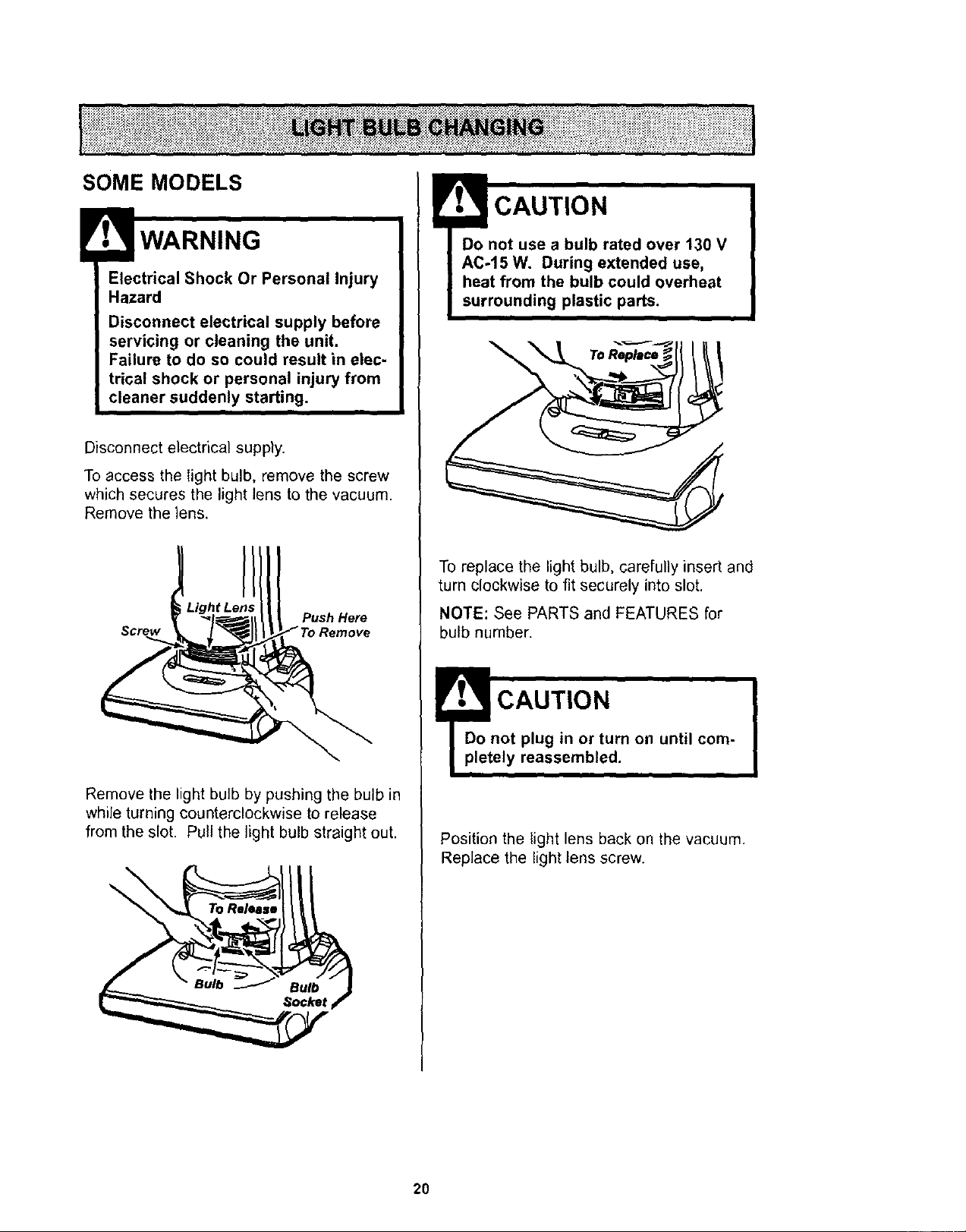
Disconnect electrical supply.
To access the light bulb, remove the screw
which secures the light lens to the vacuum.
Remove the lens.
Push Here
Screw Remove
Remove the light bulb by pushing the bulb in
while turning counterclockwise to release
from the slot. Pull the light bulb straight out.
\
CAUTION
Do not use a bulb rated over 130 V
AC-15 W. During extended use,
heat from the bulb could overheat
surrounding plastic parts.
\
To replace the light bulb, carefully insert and
turn clockwise to fit securely into slot.
NOTE: See PARTS and FEATURES for
bulb number.
!'_._ CAUTION "
Do not plug in or turn on until com-
pletely reassembled.
i
Position the light lens back on the vacuum.
Replace the light lens screw.
2O
i_i_i_!ii_i_:_:_:i_:_:i_:_i_i_i_:_!_:_ii_i_i_:_:_i_i_i_iiiii:_:,i_ _:_i_=i_ii_:_:_:i:_:_:_:_i_=_:ii_:_iii_:_i_:_:_i_=:_:_i_:_i_i_=_:_i_
li_iii_i_i_i_i_!ii_i_i_iii_i_i_iiiii;i_i_i_i_i_iiiii_i_i_i_i_iii_i_iiiii_i_i_ii_!_!_!_i_!i_i_iiii!!!_i_i_i_i_i_i_i_iiiii!_i_i_i_i_!_i_i_ii_iii;!!;!i_;_i_i_!i_;i_iiiii;i;ili!i!iiiiii_i_i_i_iiiii_;!i;!i!iiiiliiiiiiiiii_ii!iiii;ii_i;!!iiliiiliiiliiiiiii!i!i!!ililililiiiiiiiiii!!iilliiiiiiii!!!iliil
Electrical Shock Or Personal Injury
Hazard
Disconnect electrical supply before
servicing or cleaning the unit. Failure
to do so could result in electrical
shock or personal injury from clean-
er suddenly starting.
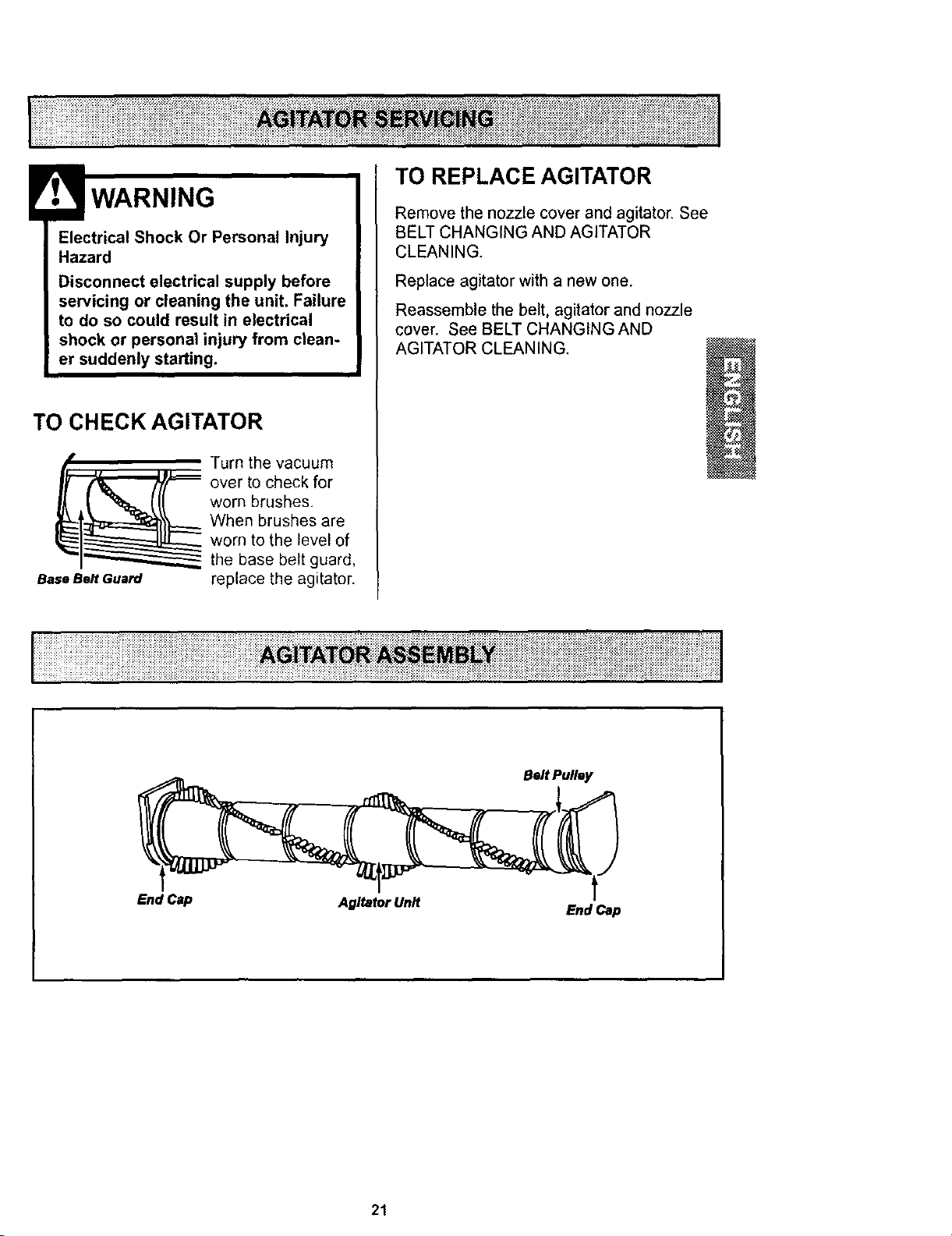
TO CHECK AGITATOR
_l Turn the vacuum
over to check for
worn brushes.
When brushes are
worn to the level of
the base belt guard,
BaseBe# euard replace the agitator.
TO REPLACE AGITATOR
Remove the nozzle cover and agitator, See
BELT CHANGING AND AGITATOR
CLEANING.
Replace agitator with a new one.
Reassemble the belt, agitator and nozzle
cover. See BELT CHANGING AND
AGITATOR CLEANING.
End Cap Agitator Unit End Cap
21
_i_iliiiliii!_iii_iiiiiiiii'iiiiiiil_iiiiii_iiii_iiii!iiiii_i_i ii_i_iiiiii_i_iiii_!!ii_iiiiiii_ii!!iiliii_!!i!!i_iiiiii_!_!iii_!iiJi_iiiii_illiiii_
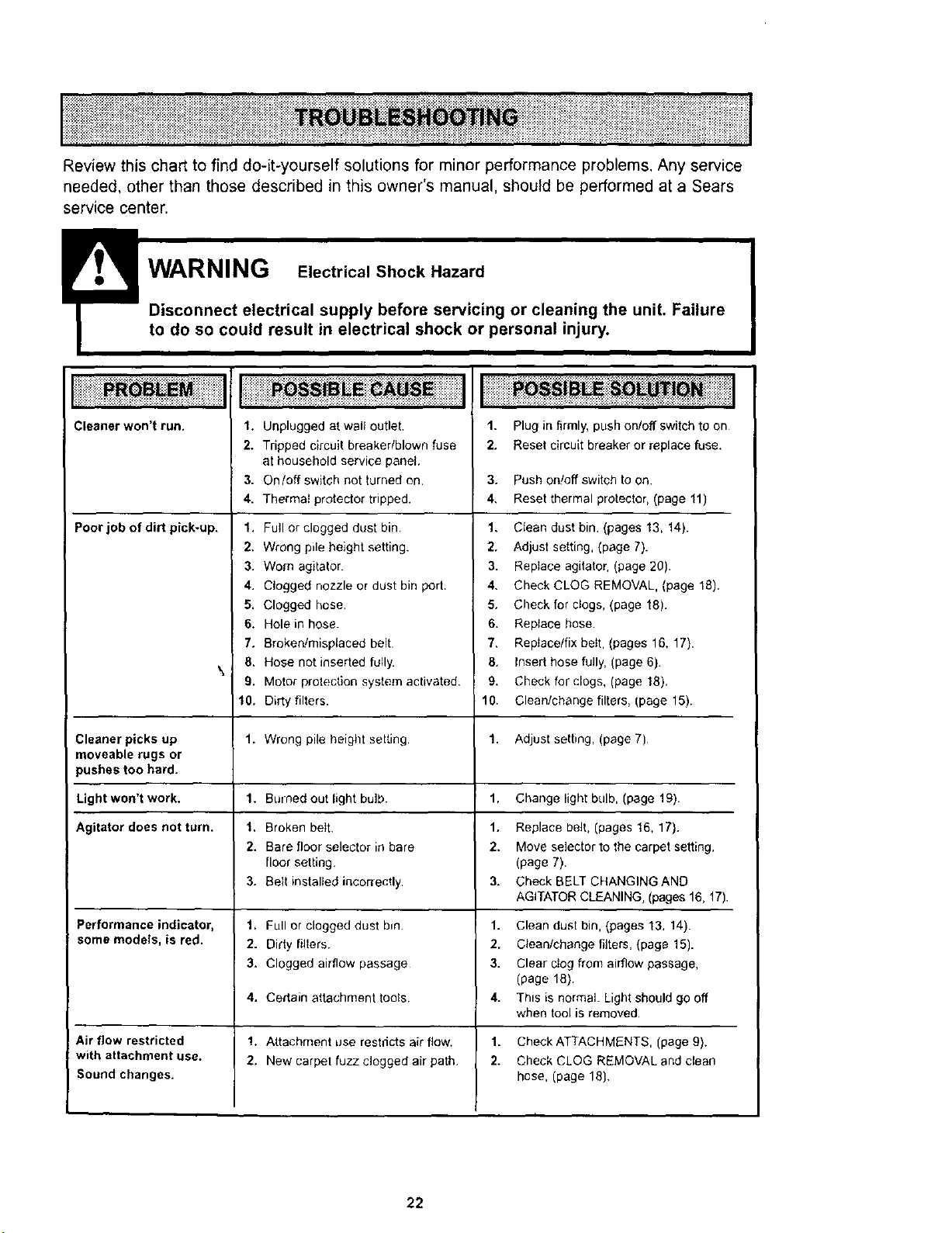
Review this chart to find do-it-yourself solutions for minor performance problems. Any service
needed, other than those described in this owner's manual, should be performed at a Sears
service center.
!Disconnect electrical supply before servmmg or cleaning the unit. Failure
to do so could result in electrical shock or personal injury.
Cleaner won't run.
Poor job of dirt pick-up.
1. Unplugged at wal outlet,
2. Tripped circuit breaker/blown fuse
at household service panel,
3. On/off switch not turned on.
4. Thermal protector tripped.
1. Full or clogged dust bin.
2. Wrong pile height setting.
3. Worn agitator.
4. Clogged nozzle or dust bin port.
5. Clogged hose.
6, Hole in hose.
7. Broken!misplaced belt
8. Hose not inserted fully.
9. Motor protection system activated,
10. Dirty filters.
1. Plug in firmly, push on/off switch to on
2. Reset circuit breaker or replace fuse.
3. Push on!off switch to on.
4, Reset thermal protector, (page 11)
1. Ctean dust bin. (pages 13, 14).
2. Adjust setting, (page 7).
3. Reptace agitator, (page 20).
4. Check CLOG REMOVAL, (page 18).
5. Check for clogs, (page 18).
6. Reptace hose
7, Replace/fix bet, (pages 16, 17).
8, Insert hose fully, (page 6)
9. Check for clogs, (page 18),
10. Clean/change filters, (page 15).
\
Cleaner picks up t. Wrong pile height setting, 1. Adjust setting, (page 7)
moveable rugs or
pushes too hard.
Light won't work. 1. Burned out light bulb. 1, Change light bulb, (page t9).
Agitator does not turn. 1, Broken belt. 1. Replace belt, (pages 16, 17).
2. Bare floor selector in bare 2. Move selector to the carpet setting,
floor setting. (page 7).
3. Belt installed incorrectly. 3. Check BELT CHANGING AND
AGITATOR CLEANING, (pages 16, 17).
Performance indicator, 1, Full or clogged dust bin. 1. Clean dust bin, (pages 13, 14).
some models, is red, 2. Didy fl{ers. 2, Cleanfchange filters, (page 15).
3. Clogged airflow passage 3. Clear ctog from airflow passage,
(page 18)
4, Certain attachment tools. 4. This is normal. Light should go off
when tool is removed.
Air flow restricted 1. Attachment use restdcts air flow. 1. Check ATTACHMENTS, (page 9).
with attachment use. 2, New carpet fuzz. clogged air path 2. Check CLOG REMOVAL and clean
Sound changes, hose, (page 18)
22
i i i i E i i%!iiiiii;iiiii z ii %iiiiiil i iiiii i
I iiii i ii;i iii!;i ii ;iiii@i i!!i i ;!ii!i!iiiiiii i ;iiiii iii!iiiiiiiiiii!i iiiiiiiiiiii!!!! i!!iiii iiii!i!i!i!i!i!ii
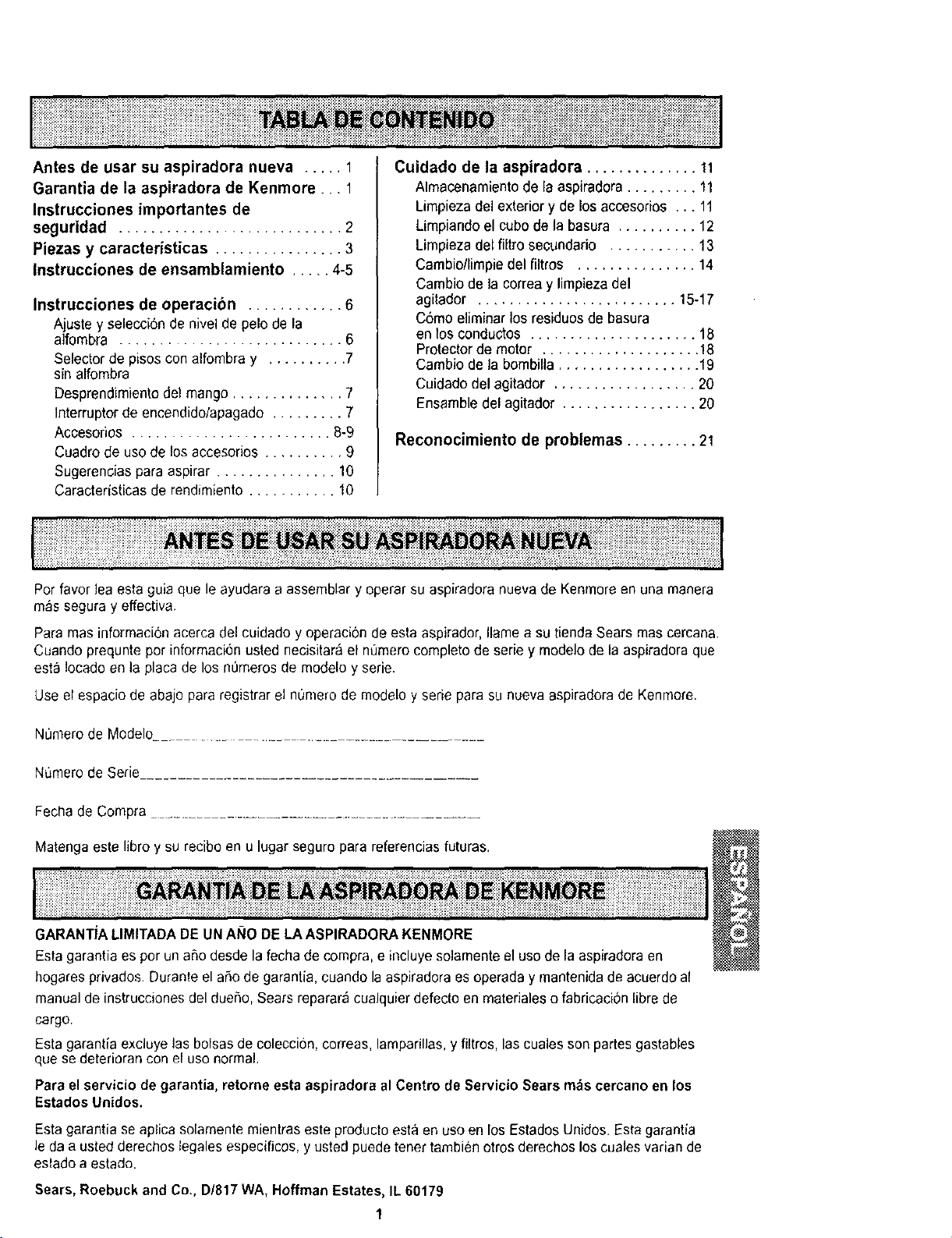
Antes de usar su aspiradora nueva ..... 1
Garantia de la aspiradora de Kenmore ... 1
Instrucciones importantes de
seguridad ............................ 2
Piezas y caracteristicas ................ 3
Instrucciones de ensamblamiento ..... 4-5
Instrucciones de operacibn ............ 6
Ajuste y selecci6nde nivel de pelode la
alfombra ............................ 6
Selector de pisos con alfombra y .......... 7
sin alfombra
Desprendimientodel mango .............. 7
Interrupterde encendido/apagado ......... 7
Accesorios ......................... 8-9
Cuadrode use de los accesorios .......... 9
Sugerencias para aspirar ............... 10
Caracteristicas de rendirniento ........... 10
Cuidado de la aspiradora .............. 11
Almacenamiento de la aspiradora ......... 11
Limpiezadel exterior y de los accesorios ... 11
Limpiandoel cube de la basura .......... 12
Limpiezadel filtro secundario ........... 13
Cambio/limpie del filtros ............... 14
Cambio de la correa y limpieza del
agitador ......................... 15-17
C6mo eliminar los residues de basura
enlos conductos ..................... 18
Protectorde motor .................... 18
Cambio de la bombilla .................. 19
Cuidadodel agitador .................. 20
Ensamble del agitador ................. 20
Reconocimiento de problemas ......... 21
Per favor lea esta guia que le ayudara a assemblar y eperar su aspiradora nueva de Kenmorean una manera
mas seguray effectiva.
Para mas informacionacerca del cuidado y operaci6n de esta aspirador, Ilame a su tiendaSears mas cercana.
Cuando prequnte per informaci6nusted necisitar_el n_mero complete de serie y modelo de la aspiradora que
est;_!ocado en la placa de los n=Jmerosde modelo y serie.
Use el espacio de abajo para registrar el nOmerode rnodelo y serie para su nueva aspiradorade Kenmore.
Numero de Modelo......................................
Numero de Serie
Fecha de Compra ....................................
Matengaeste libro ysu recibo en u lugar seguro para referenciasfuturas.
GARANTIALIMITADADE UN ANO DE LAASPIRADORA KENMORE
Estagarantia es per un a_o desde la fecha de compra, e incluye solamenteel usede la aspiradoraen
hogares privados. Duranteel aSode garantia, cuando la aspiradora esoperada y rnantenidade acuerdoal
manualde instrucciones del dueSo,Sears reparar_ cualquierdefecto en materiales o fabricacion libre de
cargo.
Esta garantia excluye las bolsas de coleccion, correas,lamparillas, yfiltros, las cuales son partes gastables
que se deteriorancon el use normal.
Para el servicio degarantia, retorne esta aspiradora al Centre de Servicio Sears m_scercano en los
Estados Unidos.
Esta garantia se aplica solamente mientraseste producto esta en useen los EstadosUnidos. Esta garantia
le da a usted derechos tegales especificos, yusted puede tenertambien otros derechos los cuales varian de
estado a estado.
Sears, Roebuck and Co., D/817 WA,Hoffman Estates,IL 60179
1
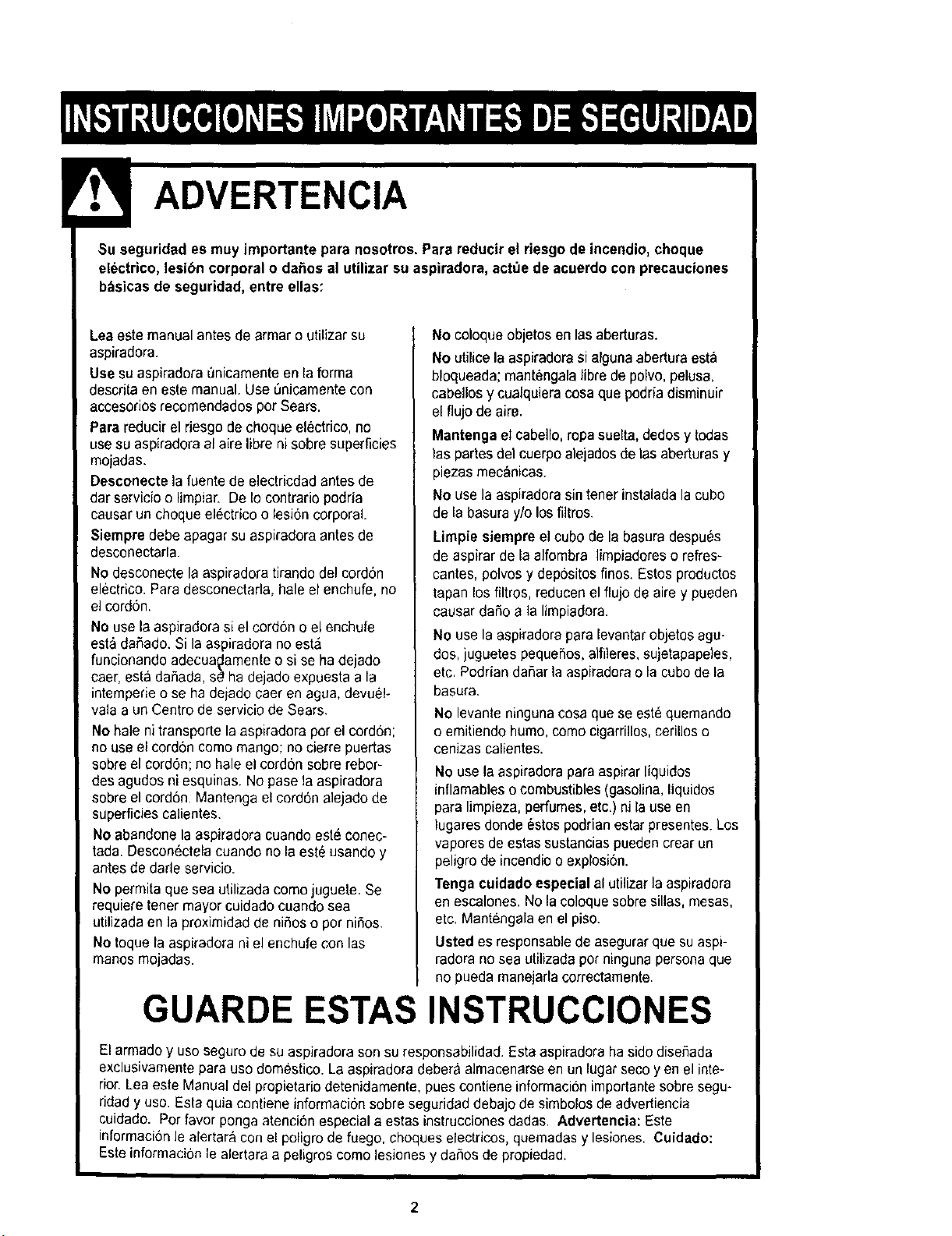
ADVERTENCIA
guridad es muy importante para nosotros, Para reducir el riesgo de incendio, choque
ico, lesibn corporal o daSos al utilizar su aspiradora, act_e deacuerdo con precauciones
b_sicas de seguridad, entre elias:
Lea eatemanual antes de armar o utilizar su
aspiradora.
Use su aspiradora 0nicamenteen la forma
descdta en este manual. Use Onicamentecon
accesorios recomendados per Sears.
Para reducir el riesgo de choque electrico, no
use su aspiradora al aire Iibreni sobre superficies
mojaclas.
Desconecte la fuente de electricdad antes de
dar servicioo limpiar. DeIo contrario podrJa
causar un choque el_ctrico o lesi6ncorporal.
Siempre debe apagar su aspiradora antes de
desconectarla.
No desconecte la aspiradora tirando del cord6n
electrico. Para desconectarla,hale el enchufe, no
elcord6n,
No use la aspiradora si el cord6no el enchufe
esta dafiado. Si la aspiradora no esta
funcionando adecua_lamenteo si se ha dejado
caer, est&dahada, s_ ha dejado expuesta a la
intemperieo se ha dejado caer en agua, devue!-
vala a un Centro de servicio de Sears.
No hale ni transporte la aspiradora por el cordon;
no useel cordon como mango; no cierre puertas
sobreel cord6n; no hale el cord6n sobrerebor-
desagudos ni esquinas. No pase la aspiradora
sebreel cordon. Mantenga el cord6n alejado de
superficies calientes.
Noabandone la aspiradora cuando este conec-
tada. Descon6ctelacuando no la est_ usando y
antes de darle servicio.
No permita que sea utilizada como juguete. Se
requiefe tenet mayor cuidado cuando sea
utilizada en la proximidad de niSoso pot ni5os.
Notoque la aspiradora ni el enchufe con las
manos mojadas.
No coloque objetos en lasaberturas.
No utilice la aspiradorasi alguna aberturaesta
bloqueada; mant_ngalalibre de polvo, pelusa,
cabellos y cualquieracosa que podriadisminuir
el flujo de aire.
Mantenga el cabello,ropa suelta, dedosy todas
las partes del cuerpoalejadosde las aberturas y
piezas mecanicas.
No usela aspiradorasin tener instalada la cubo
de la basura y/o losfiltros.
Lirnpie siempre el cubo de la basura despu#s
de aspirar de la alfombra limpiadores o refres-
cantes, polvos y depositos finos. Estos productes
tapan los filtros, reducen el flujo de aire y pueden
causar da5o a la limpiadora.
No use Is aspiradora paralevantarobjetos agu-
dos, juguetespequehos,alfileres,aujetapapeles,
etc. Podrian dahar la aspiraderao la cubede la
basura.
No levanle ninguna cosa que se este quemando
o emitiendo humo, como cigarriIIos,ceriUoso
cenizas calientes.
No use la aspiradorapara aspirarliquidos
inflamableso combustibles (gasolina,liquidos
para limpieza, perfumes,etc.) ni la use en
lugares dende 6stos podrian estar presentes.Los
vapores de estas sustanciaspueden crear un
peligro de incendioo explosi6n.
Tenga cuidadoespecial al utilizar la aspiradora
en escalones. No la coloque sobresillas, mesas,
etc, Mantengala en el piso.
Usted es responsable de asegurarque su aspl-
radora no seaufilizada pot ningunapersona que
no pueda manejariacorrectamente.
GUARDE ESTAS INSTRUCCIONES
El armadoy usoseguro de suaspiradora son su responsabilidad. Esta aspiradoraha sido diseSada
exclusivamente para uso domestico. La aspiradoradebera almacenarseen un lugar seco yen el inte-
rior. Leaeste Manual del propietario detenidamente, puescontiene informaci6nimportantesobresegu-
rJdadyuse. Esta quia contiene inforrnaci6n sobre seguridaddebajo de simbolos de advertiencia
cuidado. Pot favor ponga atenci6n especial a estas instrucciones dadas. Advertencia: Este
informaci6nle alertara con el poligrode fuego, ehoqueselectriccs, quemadasy lesiones. Cuidado:
Este informacion le alertara a peligros como lesiones y da5os de propiedad.
i:: ::::::::::::::::::::_::::::;_: :_::::::::::::::::::::;:::::::::::::,: ::::::: :::::::::::;::::::::::;;:::: :;:::::;;;:::: ::: ::+::;::::;_;;; :,_;::::: :::::::::;:::::;;:: :,,,::::::::::::::_::,:::::::::: ::::::::::::::|
:_:_;_;_:ii_:_:_:_:_:!:!:_:_:_:_31:_:_:_:_:i_3_:_:_:_:_:_:_:_i:_:_:_:_:_:_:_:_;_:_:_:_:_:_:_:_:!:!:_!:_:_i_¢_:_::I;::::_:_:_:;:::::_:::_:::::_:::i_:_i::::::_:::_:;:_3::_:_:_!_"_::_:__:::_¢:_::i:_::::_::_:::_:_:_::::_:_:_::;:_:_::::_:_:_:_:_:_:_!:::::::_i_:_:_:_:_:_:_:_:_:_i_!i_!_!i_:_:_:_:_:_iii_:ii:_:_:_:_:_:_:_:_:_:_:_:!:iii:_:
I
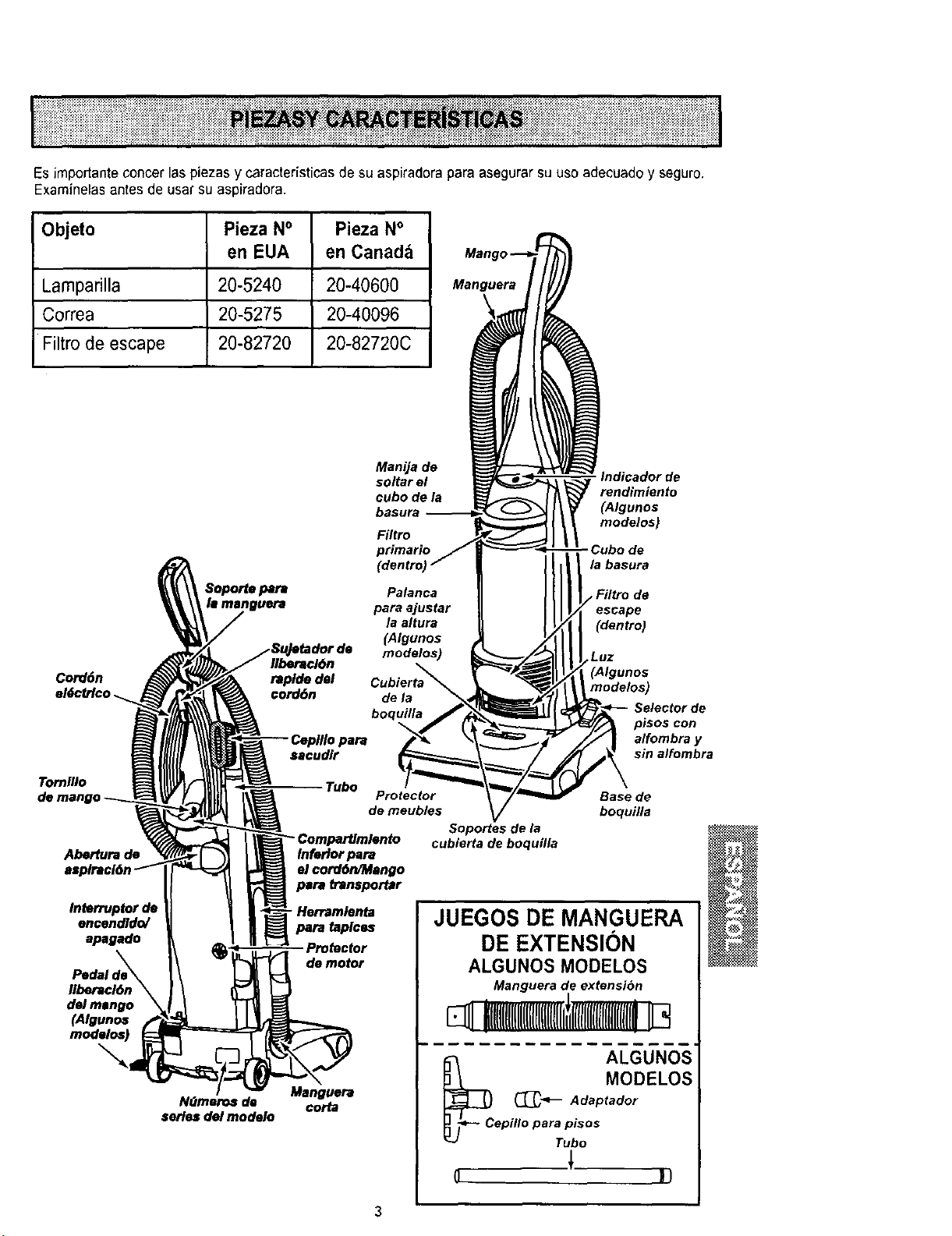
Es impor/anteconcer las piezas y caracteristicas de su aspiradorapare asegurarsu use adecuadoy seguro.
Examinelasantes de usar su aspiradora.
Objeto Pieza N° Pieza N°
en EUA en Canad_
Lamparilla 20-5240 20-40600
Correa 20-5275 20-40096
Filtro de escape 20-82720 20-82720C
Manguera
Cord6n
eldctrlco._
Tornl/Io
Abertura de
Interruptor de
encendldo/
apagado
Pedal de_
Ilberacl6n \
del mango \
(Algunos
\
Nt3meros de
aeries del modelo
Manija de
soltar el
cube de la
Filtro
Palanca
pare ajustar
/a altura
(Algunos
modelos)
Ilberacl6n
raplde del
€orddn de la
boquilla
sacudlr
Tube Protector
de meubles Soportes de la
cubierta de boquilla
Inferlor para
el cord6n/Mango
para transportar
- Herramlenta
pare taplcu
Pro_ctor
de motor
Manguera
corta
Indicador de
rendimiento
(Atgunos
modeles}
de
la basura
Filtro de
(dentro)
,Luz
(Algunos
modelos)
Selector de
pisos con
alfombra y
sin altombra
Base de
boquifa
JUEGOS DE MANGUERA
DE EXTENSION
ALGUNOS MODELOS
Manguera de extensi6n
mm(mll(ml
_c ALGUNOS
_- MODELOS
Adaptador
epillopar;p::s +
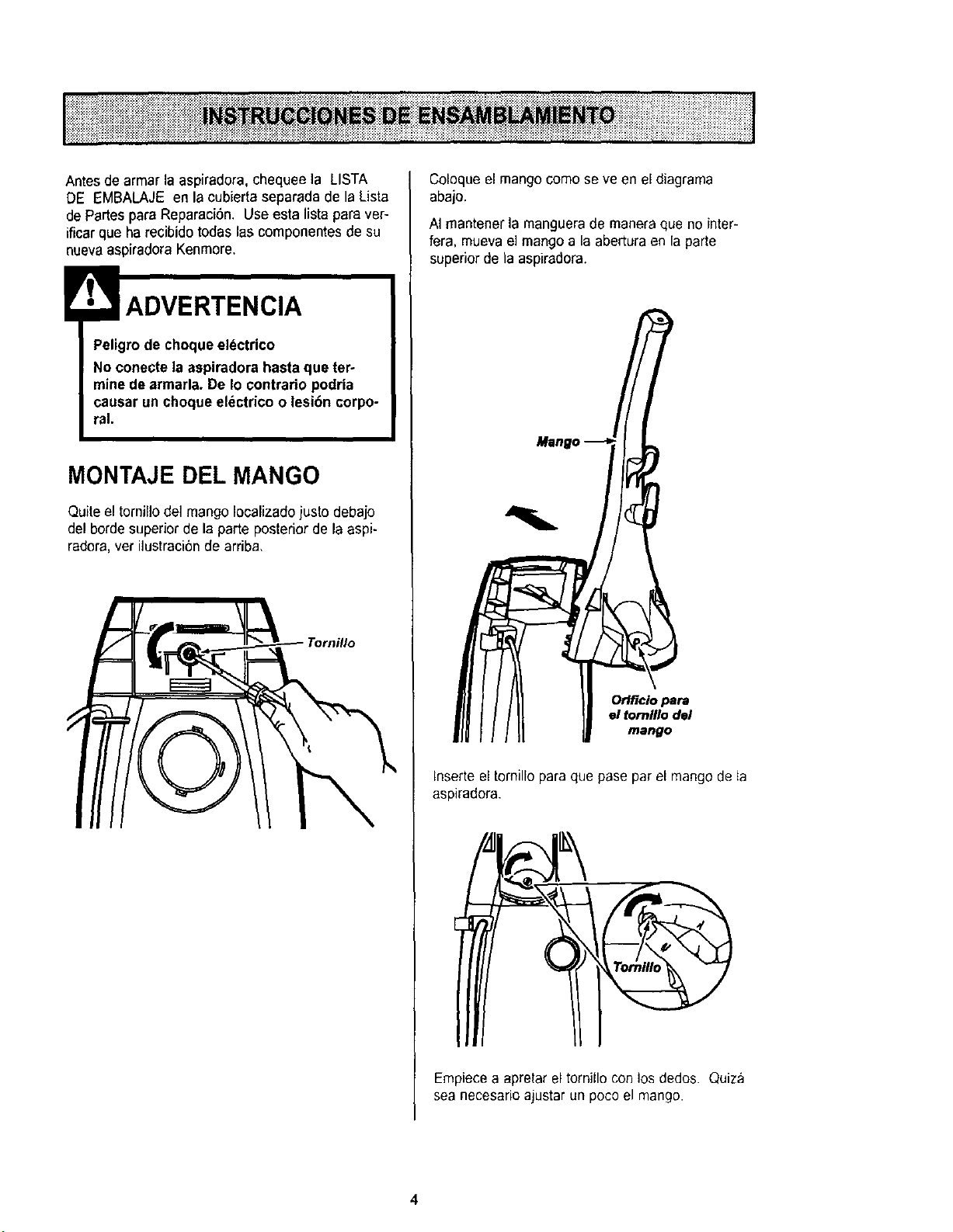
Antes de armar la aspiradora, chequee la LISTA
DE EMBALAJE en la cubierta separada de la Lista
de partes para Reparac[Sn. Use esta lista para ver-
ificar que ha recibido todas las componentes de su
nuevaaspiradora Kenmore.
Peligrode choque eldctrico
No conecte la aspiradora hasta que ter-
mine de armada°De Io contrario podria
causar un choque electrico o lesiSn corpo-
ral.
MONTAJE DEL MANGO
Quite el tornillo de] mango [ocalizadojustodeba]o
del borde superior de la parte posterior de la aspi-
radora, ver ilustraci6nde arriba.
Coloque el mangocomo se ve en el diagrama
abajo.
AI mantener la manguerade manera que no inter-
fera, mueva e] mangoa la abertura en la parte
superiorde la aspiradora.
Orlflcio pera
el tornlllo del
mango
Inserteel tomillo para que pase par el mangode ta
aspiradora.
Empiecea apretar el tornillo con los dedos. Quiza
sea necesario ajustar un poco el mango.
4
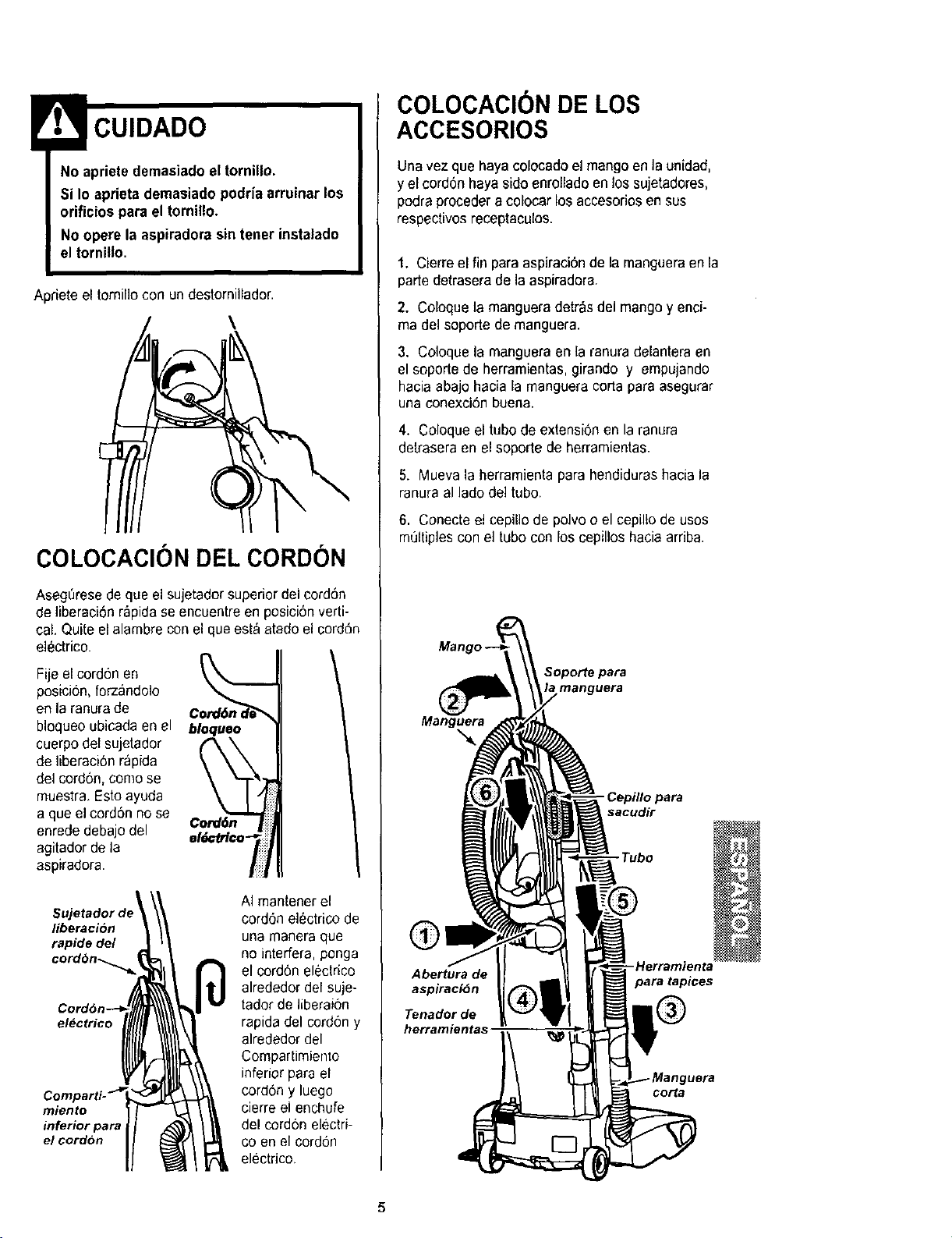
No apriete demasiado el tornillo.
Si Io aprieta demasiado podria arruinar los
orificios para el tornillo.
No opere la aspiradora sin tener instalado
el tornitlo.
Apriete el tornil]ocon un destomillador.
\
COLOCAClON DEL CORDON
AsegL_resede que el sujetador superiordel cord6n
de ]iberaci6n r_pida se encuentreen posiciOnverti-
cal. Quite el alambre conel queest_ atado el cord6n
electrico.
Fije el cordon en
posicion, forzando]o
en la ranura de
bloqueo ubicada en el
cuerpodel sujetador
de Iiberaci6nrapida
del cord6n, como se
muestra, Estoayuda
a que el cord6n no se
enrede debajodel
agitador de la
aspiradora
Cord6n j
el6cfrico7
el_ctrico
miento
inferior para
el cordbn
AI mantener el
cord6n el_ctrico de
una manera que
no interfera, ponga
el cord6n electrico
alrededor del suje-
tador de liberai6n
rapida del cord6ny
alrededor del
Compartimiento
inferior para el
cord6n y luego
cierre el enchufe
del cordon electri-
co en el cordon
electrico.
COLOCACION DE LOS
ACCESORIOS
Unavez que haya colocado el mango en la unidad,
y el cord6nhaya side enrollado en los sujetadores,
podra procedera colocar los accesoriosen sus
respectivos receptaculos.
1. Cierreel fin paraaspiraci6n de la mangueraenla
partedetrasera de la aspiradora.
2. Coloquela manguera detr&sdel mangoy enci-
ma del soporte de manguera.
3. Coloque la manguera en la ranura delantera en
el soporte de herramientas,girando y empujando
hacia abajo hacia la mangueracorta para asegurar
una conexciOnbuena.
4. Coloque el tubo deextension en la ranura
detrasera en el soporte de herramientas.
5. Mueva la herramienta para hendidurashacia la
ranura al lade de] tubo,
6. Conecte el cepillo de polvo oel cepiltode uses
multiplescon el tubo con los cepillos hacia arriba.
manguera
Manguera
-Cepillo para
sacudir
-Tubo
®- Herramienta
Abertura de para tapices
aspiraciOn
Tenador de
herramientas
corta
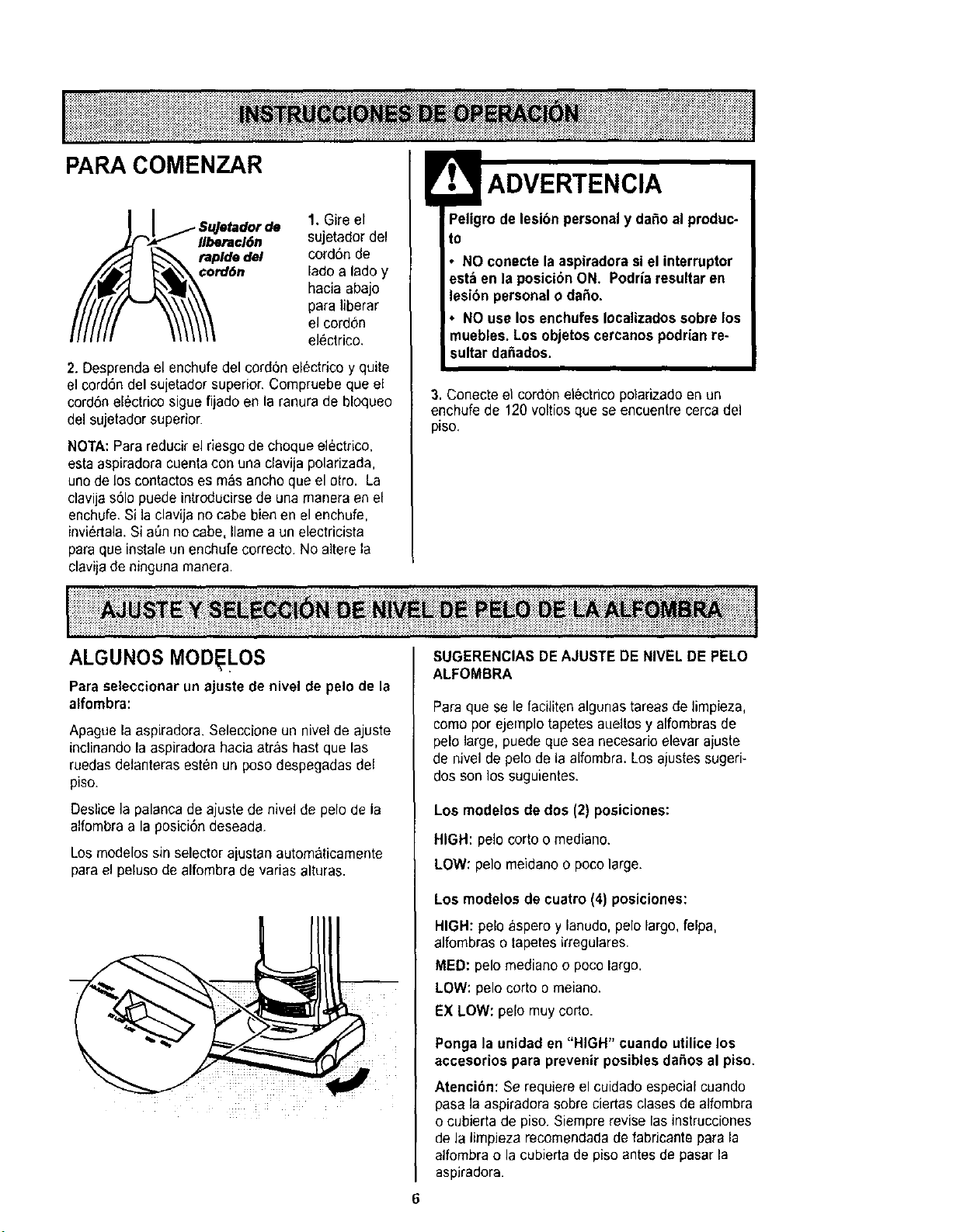
PARA COMENZAR
rde 1. Gire el
Ilberacl6n sujetador del
taplde del cord6n de
¢ord6n lado a ladoy
hacia abajo
para liberar
el cordon
el_ctrico.
2. Desprenda el enchufedel cord6n eDctrico y quite
el cord6n del sujetador superior. Compruebe que el
cord6n el6ctricesigue fijado en la ranura de bloqueo
del sujetador superior.
NOTA: Para reducir elriesgo de choque electrico,
esta aspiradoracuenta con una clavija polarizada,
uno de loscontactos es mas ancho que el otto. La
clavija s61opuede introducirsede una maneraen el
enchufe.Si la clavija no cabe bien en el enchufe,
invi6rtala.Si a6n no cabe, Ilame a un electricista
paraque instale un enchufe correcto. No altere la
clavijade ninguna manera.
ADVERTENCIA
ro de lesibnpersonaly dafio al produc-
to
• NOconecte la aspiradorasiel interruptor
est_ en la posicibnON, Podria resultar en
lesibn personal o daSo.
•NO use los enchufesIocalizadossobrelos
muebles. Los objetos cercanospodrian re-
sultar da6ados.
3. Conecteel cordon electrico polarizadoen un
enchufe de 120 voltios que se encuentre ¢ercadel
piso.
Lii iiiiiiiiiii!i!i!i ii!i!iiiii i!i!iiiiiiiiii!iiiii!i ii!i!i!i iiiiiiiiiii i i iiiiii!i! i iiiiii!i i! !!!iii ! ! i!i i ii iiiii!iii! ! ii i iii!i! iiliiii!iiii i iii!i!i!i!i!iii!ilililiiii!iii!iiiii!!!i!iii!
ALGUNOS MOD LOS
Paraseleccionar un ajuste de nivel de pelo de la
alfombra:
Apague la aspiradora. Seleccione un nivelde ajuste
inclinandolaaspiradora hacia atras hast que las
ruedasdelanteras est#n un poso despegadas del
piso.
Deslice la palanca de ajustede nivel de pelo de ia
alfombra a la pesici6n deseada.
Losmodelos sin selector ajustan autom&ticamente
parael peluso de alfombra de varias alturas.
SUGERENCIAS DEAJUSTE DE NIVEL DE PELO
ALFOMBRA
Para que se le faciliten algunastareasde limpieza,
como por ejemplo tapetesaueltos y alfombrasde
pelo large, puede que sea necesarie elevar ajuste
de nivel de pelo de la alfombra,Los ajustessugeri-
dos son los suguientes.
Los modelos de dos (2) posiciones:
HIGH: pelo corto omediano.
LOW: pelo meidano o pocolarge.
Los modelos de cuatro (4) posiciones:
HIGH: peloaspero y lanudo,pelolargo,felpa,
alfombras otapetesirregulares.
MED: pelo mediano opocolargo.
LOW: pelo corto o meiano.
EX LOW: pelo muy corto.
Ponga la unidad en "HIGH" cuando utilice los
accesorios para prevenirposibles da_oe al piso.
Atenci6n: Se requiereel cuidado especial cuando
pasa ]a aspiradorasobre ciertas clases de alfombra
o cubierta de piso. Siemprerevise lasinstrucciones
de la limpJezarecomendadade fabficante para la
alfombra o la cubierta de piso antes de pasarla
aspiradora.
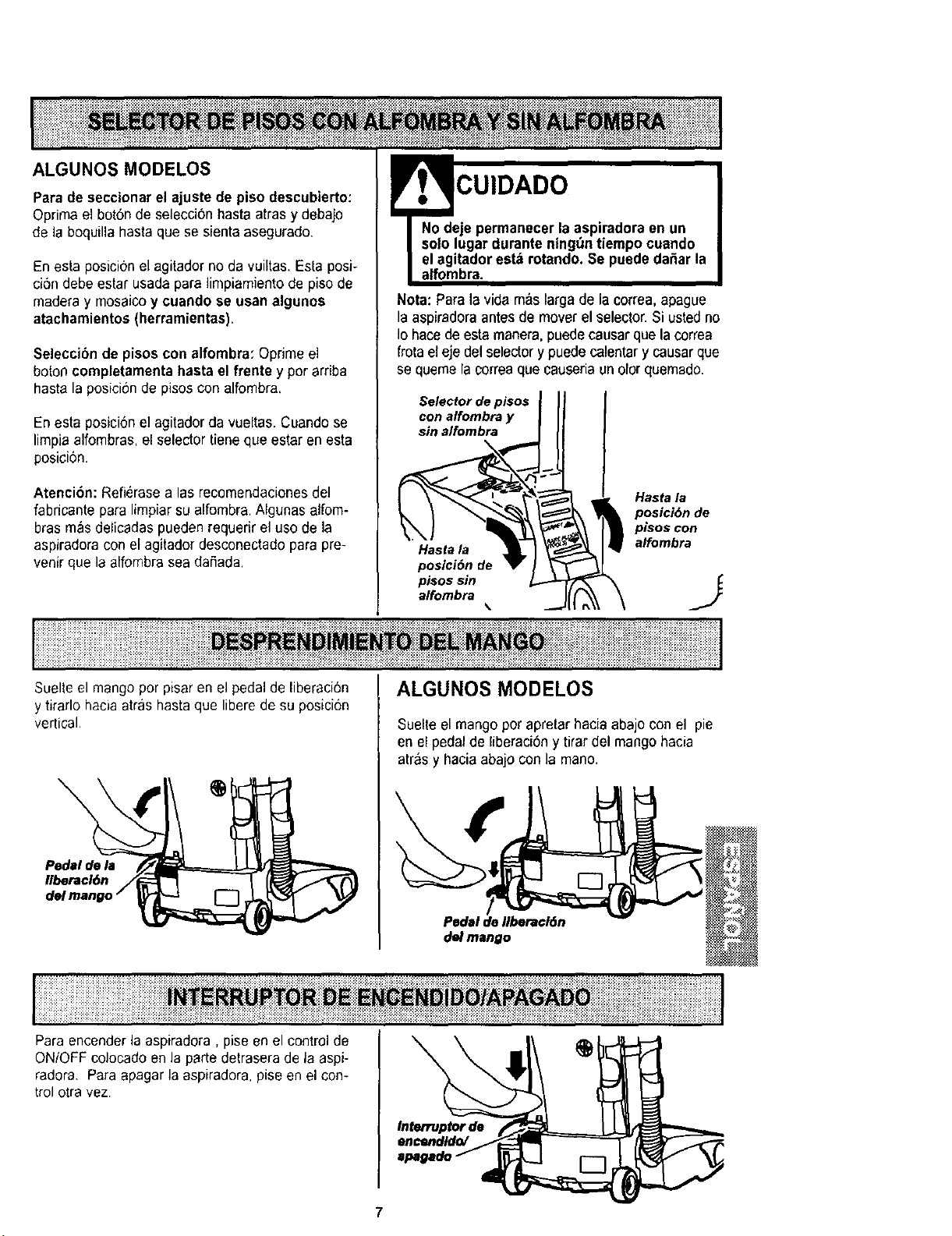
ALGUNOS MODELOS
Para de seccionar el ajuste de piso descubierto:
Optima el bot6n de selecci6n hasta atras y debajo
de la boquilla hasta que se sienta asegurado,
En esta posici0n el agitadorno da vuiltas.Esta posi-
ci6n debe estar usadapara limpiamiento de piso de
madera y mosaicoy cuando se usan algunos
atachamientos (herramientas).
Seleccibn de pisos con alfombra: Oprime el
boton completamenta hastael frente yporardba
hasta la posicionde pisos con alfombra,
En esta posici6nel agitadorda vueltas. Cuandose
limpia alfombras, el selector tiene que estar en esta
posici0n.
Atenci6n: Refierasealas recomendaciones del
fabricante para limpiarsu alfombra.Algunas atfom-
bras mas delicadas pueden requedr el uso de la
aspiradora con el agitador desconectado para pre-
venir que la alfombra seadaRada,
E CUIDADO
No deje permanecer la aspiradora en un
solo lugar durante ningt_ntiempo cuando
elagitador est_ rotando. Se puede da_ar la
alfombra.
Nota: Para la vida m&slarga de la correa,apague
la aspiradoraantes de mover el selector. Si ustedno
Io hacede esta manera, puedecausar que la correa
frota el eje del selectory puede calentary causarque
se quemela eorreaque causeriaun olor quemado.
Selector de pisos III I
con alfombra y ]I_I
sin a/fombra _Hasta la
posicibn de
pisos con
alfombra
i;;iiii!!J ]
i i!ilil;i i!i!ii!ili!iliiii i ;ii!i!!!ii!i!i!i!!ilililili!i i! !i!ii iil;
Suelteel mango por pisar en el pedal de liberaci6n ALGUNOS MODELOS
y tirarlo hacia arrashasta que libere de su posici6n
vertical. Suelteel mango por apretar hacia abajo con el pie
en el pedal de liberaci6ny tirar del mango hacia
arrasy haciaabajo conla man&
(
Pedal de flbera¢16n
del mango
Para encenderla aspiradora, pise en el control de
ON/OFF colocado en la parte detrasera de la aspi-
radora. Para apagar la aspiradora, pise en el con-
trol otra vez
Interruptor de
encendldo/
7
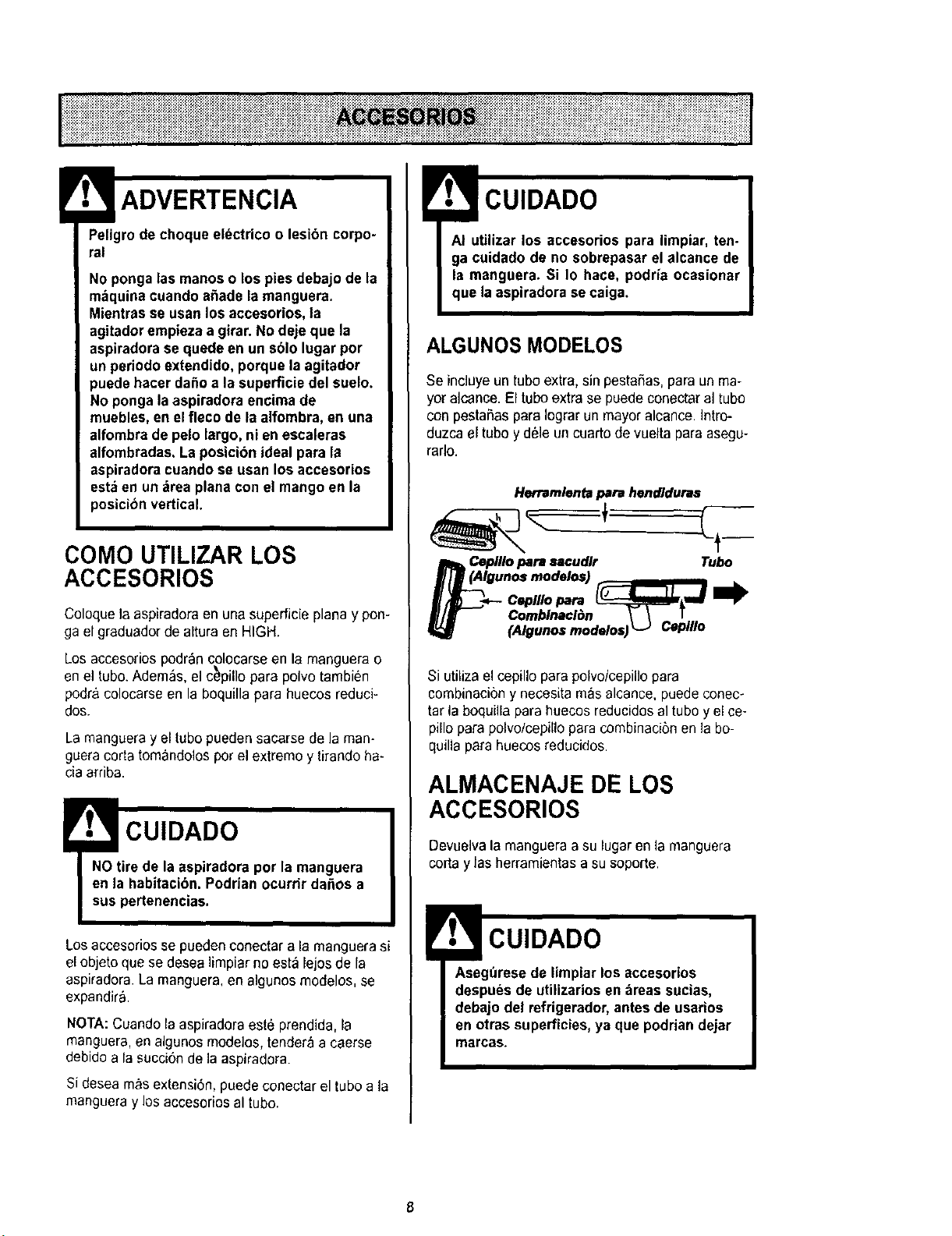
Peligro de choque electdco o lesibn corpo-
ral
No ponga las manos o los pies debajo de la
m_quina cuando a_ade la manguera.
Mientras se usan los accesorios, la
agitadorempieza a girar.No deje que la
aspiradora se quede en un sblo lugar por
un periodo extendido, porquela agitador
puede hacer daSoa la superficie del suelo.
No ponga laaspiradora encima de
muebles, en elfleco de la alfombra, en una
alfombra de pelo largo, ni en escaleras
alfombradas. La posicion ideal para la
aspiradoracuando se usan los accesorios
esta en un drea planacon el mangoen la
posicibnvertical.
COMO UTILIZAR LOS
ACCESORIOS
Coloquela aspiradoraen unasuperficie plana y pon-
ga el graduador de alturaen HIGH.
Los accesorios pod#,n colocarse en lamanguera o
en el tubo.Adem_s, el c_pillo para polvo tambien
podr&colocarse en la boquilla para huecos reduci-
dos.
La mangueray el tubo pueden saearse de la man-
gueracorta tom_ndolos pot el extremoy tirando ha-
ciaarriba.
!CUIDADO
NOtire de la aspiradora por la manguera
en la habitacibn. Podrian ocurrir da£tosa
sus pertenencias.
Losaccesorios $e pueden conectar a la manguerasi
el objeto que se desealimpiarno esta lejos de la
aspiradora La manguera, en algunos modelos, se
expandir&
NOTA:Cuandola aspiradoraeste prendida, la
manguera, en algunosmodelos, tendera a caerse
debido a la succion de la aspiradora.
Si desea mas extension, puede conectar el tubo a la
mangueray los accesoriosal tubo.
CUIDADO
AI utilizar los accesorios para limpiar, ten-
ga cuidado de no sobrepasar el alcance de
la manguera. Si Io hace, podda ocasionar
que laaspiradora se caiga.
ALGUNOS MODELOS
Se ineluyeun tubo extra,sin pestaSas,para un ma-
yor alcance. El tubo extra se puede conectaral tubo
con pestaSaspara Iograrun mayor alcance.]ntro-
duzca el tubo ydele un cuarto de vuelta para asegu-
rarlo.
Herramlentapardhendiduras
N_ (AIgCeplllopara sacudlr Tubo
unosmodelos)
Elf Combinacl_n \- \ T
(Algunosmodelos)L_ CeplUo
Si utilizael cepillo para polvo/cepillopara
combinacibny necesitamas alcance, puede conec-
tar la boquilla para huecos reducidosal tubo yel ce-
pillo para polvo/cepillo para combinacibnen la bo-
quilla para huecos reducidos.
ALMACENAJE DE LOS
ACCESORIOS
Devuelvala mangueraa su lugar en la manguera
corta y las herramientasa su soporte.
CUIDADO
Asegt_resede limpiar los accesorios
despues de utilizarios en areas sucias,
debajo del refrigerador,antesde usarfos
en otras superficies,ya que podrian dejar
marcas.
8
CUIDADO
Cuando use la manguera en forma normal o
con la manguera de extensi6n instalada, la
aspiradora debe mantenerse sobre una
superficiefirme al mismo nivelo aun nivel
inferior que los pies del usuario. NO use las
mangueras cuando la aspiradora est_ a un
nivel m_s alto que los pies del usuario.
MANGUERA DE EXTENSI6N
ALGUNOS MODELOS
Unos modelos incluyen una mangueraauxiliar que
conecta con la manguerade estirar en la aspiradora
para una extensi6nmas larga para limpiar,
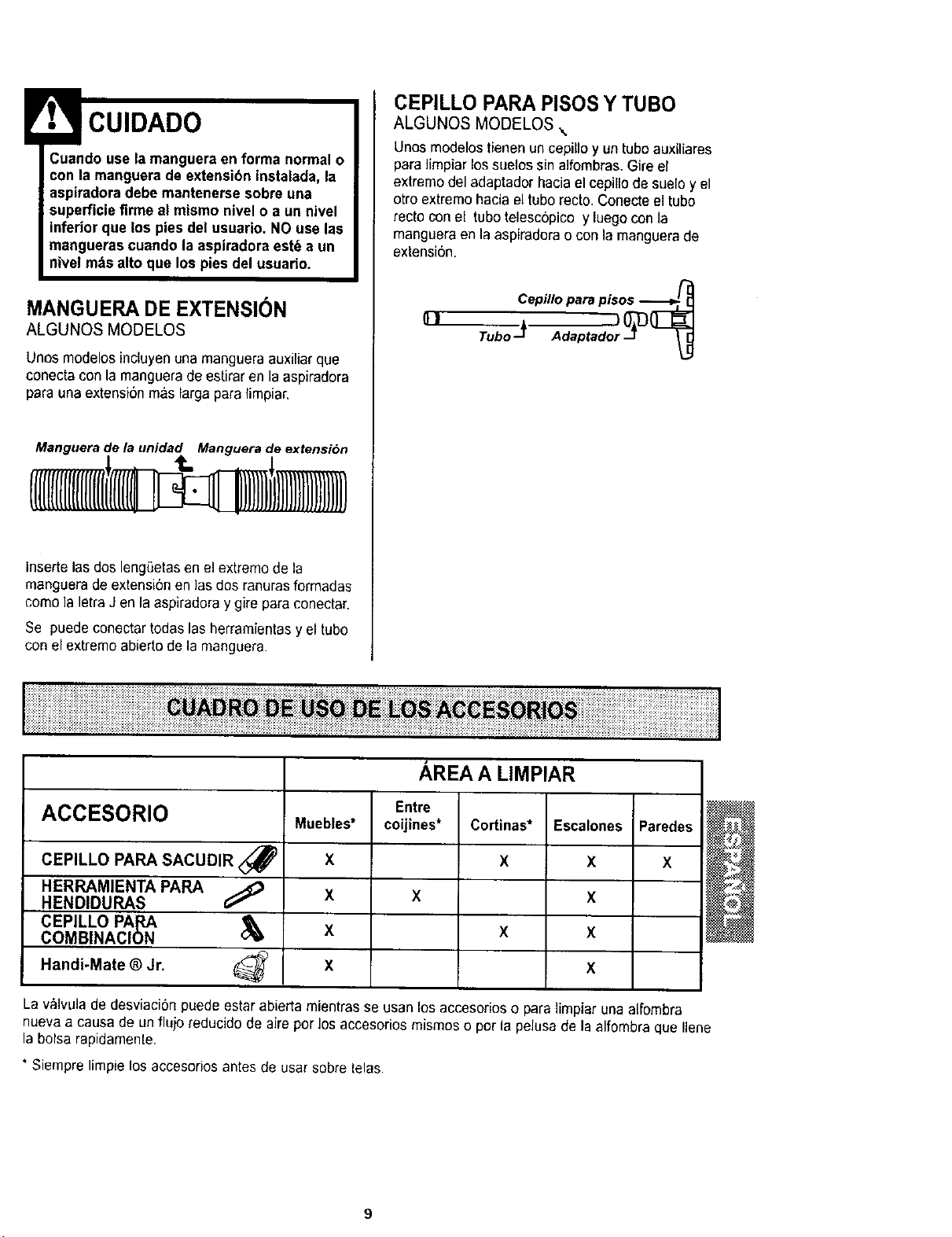
Manguera de la unidad Manguera de extensibn
insertelasdos lengSetasen el extremede la
manguerade extensi6n en ]as dos ranurasformadas
come la letraJ en laaspiradora y gire para conectar.
Se puede conectartodas las herramientasy el tube
con el extremeabierto dela manguera.
CEPILLO PARA PISOSY TUBO
ALGUNOS MODELOS \
Unes modelos tienen un cepillo y un tube auxiliares
para ]impiar lossuelos sin alfombras.Gire el
extremedel adaptador haciael cepillo de suelo y el
otro extremehacia el tube recto. Conecteel tube
recto con el tube telesc6pico y luego conla
mangueraen la aspiradorao con la manguerado
extensi6n.
[1! Cepillopara pisos --_
AREA A LIMPIAR
Entre
ACCESORIO auebles* coijines* Cortinas* Escalones Paredes
CEPILLO PARA SACUDIR <_ X X X X
HERRAMIENTA PARA
HENDIDURAS G;_ X X X
CEPILLO PApJ_ _X X X
COMBINACION
Handi-Mate ®Jr. _X X
La v,_lvulade desviacion puede estar abierta mientras se usan los accesorios o para limpiar una alfombra
nueva acausa de un flujo reducido de aire per los accesorios mismos o por la pelusa de la alfombra que Ilene
la bolsa rapidamente.
* Siempre limpie los accesorios antes de usar sobre lelas.
I !iiiiii!iiiili!iiiiiiiiiiii!ii!!iiililiiii i !ii £ii i ii iiiiiiiiiiiiiiiiiiiiiiiiii;iiiiiiiii!iiiiil;iiiiiiiiiiiiiiiii;iiiiiiillI
iiiiiiiiiiliiiiiiiiiiiiiiiiiii!!!!!iiiiiiiiiiiiiiiiiiiiii!ii!!i!iiilli iiiiiiiiiiiiiiiiiii i iiiiiiiiiiii ili iii iii i iii iiiiiiil
Peligrode lesibn personal
Actue con precaucibn si coloca la aspira-
dora sobre escalones. Si se cae, podria
causar lesibn personalo da£ma la propie-
dad.
Orillas de alfombras.
Guie unode los costados o la parteanterior de la
boquila aIo largo del borde de la pared. Los cepi-
]loslargos ayudan a aspirarla tierra atrapadaen las
orillas de las alfornbras.
Escalones.
Coloque el mangoen ]a posicibnvertical.Use la
herramienta para hendiduraso el cepillo para
sacudir. Coloqueel interruptor de encendido/apaga-
do en ON.
SISTEMA DE PROTECTION
DE MOTOR
Protector Termal
Esta aspiradoratiene un protector termal que se
ajusta autom_ticamente para protegera la
aspiradoradel sobrecalentamiento. Si una
obstruccion impideel flajo normalde aire al motor,el
protectortermal apaga e] motor automaticamente
parapermilr que el motor se enfrie a fin de evitar
posiblesdaSosa la aspiradora. Duranle este tiempo
la ]uzdelantera se mantiene prendida.
Paracorregir el proble_na:Si esto ocurre, apague
la aspiradoray desenchufe el cordon de]
tomacorrientepara permitir que la aspiradora se
enfrie y que el protectortermal se reajusle. Busque
y saque las obstrucciones, si es necesario.
Examinetambi_n y reemplace/limpie cualquier
filtro obstruido. Espere aproximadamente treinta
(30) minutos y enchufe la aspiradora y volt_ela
para ver si el protector del motor se ha
reajustado. El protectordel motor no se
reajustar& si no se ha apagado la aspiradora aun
cuando la aspiradora se haya enfriado.
INDICADOR DE RENDIMIENTO
ALGUNOS MODELOS
Cuando la unidad este funcionando con el flujo
normal de aire, el indicador de rendimiento esta
apagado. Se enciende la luz cuando el flujo de
aire este obstruido. Si eso ocurre, chequee el
cubo de la basura, limpie/reemplace filtros
tapados, y chequee otros lugares posibles de
atascaduras que se muestran en COMO
ELIMINAR LOS RESlDUOS DE BASURA EN
LOS CONDUCTOS.
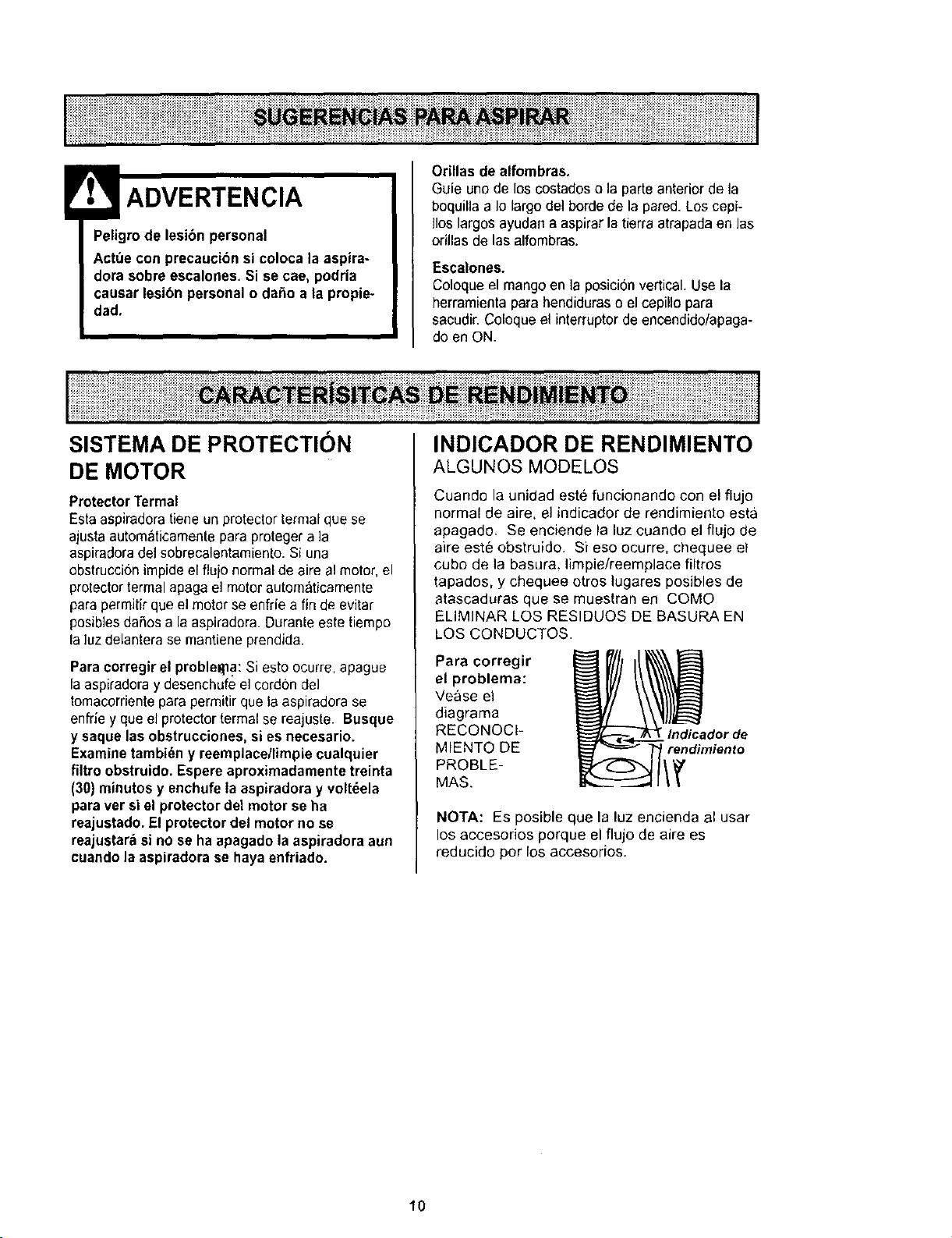
Para corregir
el problema:
Vease el
diagrama
RECONOCI-
MIENTQ DE
PROBLE-
MAS.
rendimiento
NOTA: FS posible que la luz encienda al usar
los accesorios porque el flujo de aire es
reducido pot los accesorios.
10
Sigasiempretodaslasinstruccionesdeseguridad
allimpiarydarleservicioasu aspiradora.
Peligro decheque el6ctrico olesi6n corpo-
ral
Desconectela unidad antes de limpiarla o
darle servicio. De Io contrario podriapro-
ducirse un cheque el6ctrico o causar
lesibn corporal si la aspiradora arranca de
manera imprevista.
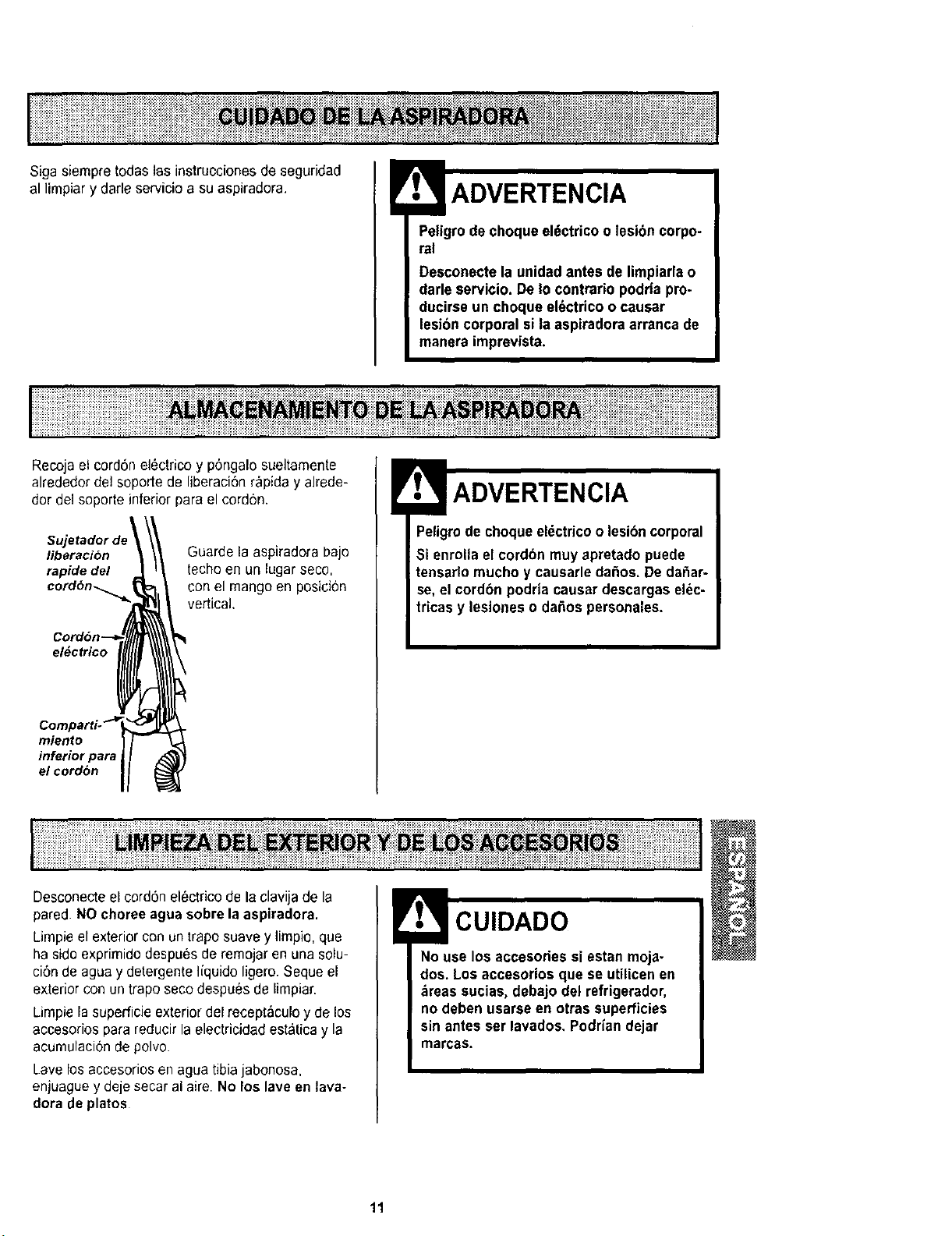
Recoja el cord6n el_ctricoy p6ngalo sueltamente
alrededor del soporte de liberaci6nrapida y alrede-
dor del soporte inferior pars el cordon.
s.j
liberacibn
rapide del
cord6n....._,
Guarde la aspiradora bajo
techo eo un lugar seco,
con el mango en posieion
vertical,
el#ctrico
miento
inferior para ,
el cord6n
Peligro de chequeeldctricoo lesibn corporal
Si enrollael cordbn muyapretado puede
tensarlo mucho y causarle daSos. De dafiar-
se, el cordbn podrla causar descargas el_c-
tricas y lesiones o da£=ospersonales.
I!!iiiiilililiiiiiiiiiiiiiiiiiiiiii!ii!iiiii!!_!!i!_i_i_i_ii_iiiii_ii_i_;_i_i_iiiiiii!i!_!i!i!!i_i_i_iii_i_!i!iii!i!i!i!!!iiiiili!_i_i_i_iii!i!i!iiii_i!i!i!i!i!i!_!_!_!_i_iii_i_iii!i!iiii!i!!!i_!_iiii!ili_i_!ii!i_iii!iii!!i!_!ii!!iliy!i_i_i!ii!_i_iiii_iiii!iiiiii_i_i_i_i_ii!i!i!ii!_iii!i;!i!i!i!i!_!i_i_i!ii!i_iiiii!!!!!!i!iiiiiiiiiiii!i!!!!l
Desconecteel cordon electrico de la clavija de la
pared. NOchoree agua sobre la aspiradora.
Limpie el exterior con un trapo suave y limpio, que
ha side exprimido despues de remojar en una solu-
ci6nde agua y detergente I[quido ligero. Seque el
exterior con un trapo seco despu_s de limpiar.
Limpie la superficieexterior del recept_culoy de los
accesorios para reducir la electricidad estatica y la
acumulacionde polvo.
Lave los accesorios en agua tibia jabonosa.
enjuague y deje secar al aire. No los lave en lava-
dora de plates
No use los accesories si estan moja-
dos. Los accesorios que se utilicen en
,_reassucias, debajo del refrigerador,
no deben usarse en otras superficies
sin antes ser lavados, Podriandejar
marcas.
11
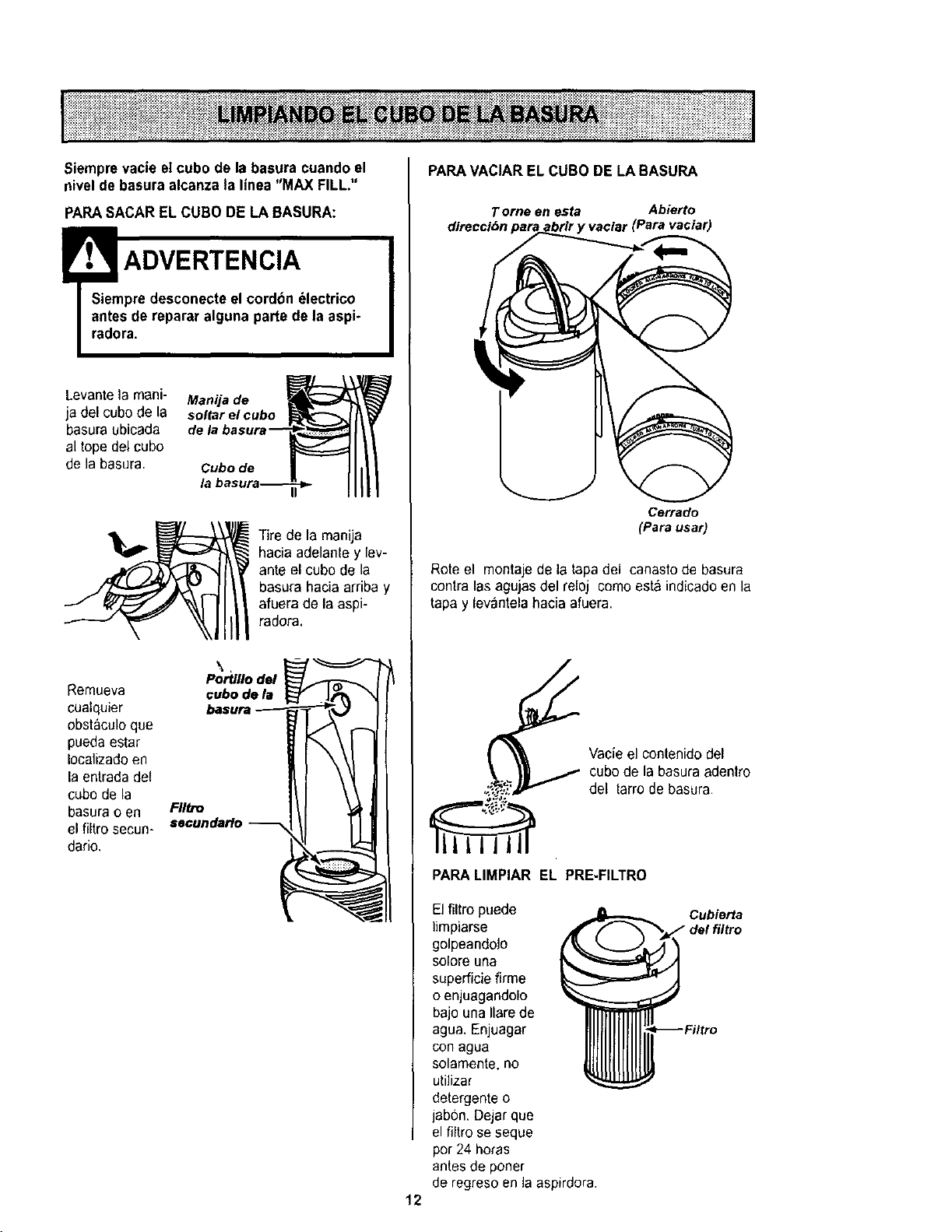
Siemprevacie el cube de la basura cuando el
nivelde basura alcanza la linea "MAX FILL."
PARASACAR EL CUBO DE LA BASURA:
!ADVERTENCIA
Siempredesconecte el cordbn _lectrico
antesde reparar alguna parte de la aspi-
radora.
Levantela mani- Manija de
ja del cubede la soltarel cube
basura ubicada
al tope del cube
de la basura, Cubede
/,1
Tire de la manija
hacia adelante y lev-
ante el cube de la
basura hacia arriba y
afuera de la aspi-
radora.
Portlllodel
Remueva cube de la
cualquier basura
obstC*culoque
pueda estar
Iocalizadoen
la entradadel
cube de la
basura o en FIItte
seculldario
el filtro secun-
dado.
PARAVACIAR EL CUBO DE LA BASURA
Torne en esta Abierto
direccibn 'vaclar (Para vaciar)
Cerrado
(Para usar)
Rote el montaje de la tapadel canastode basura
contra lasagujas del reloj comeest_ indicadoen la
tapa y levantela hacia afuera.
Vacieel contenido del
cube de la basura adentro
del tarro de basura
12
PARALIMPIAR EL PRE-FILTRO
El filtro puede
limpiarse
golpeandolo
solore una
superficiefirme
o enjuagandolo
bajo una Ilarede
agua. Enjuagar
con agua
solamente, no
utilizar
detergente o
jabsn. Dejarque
el filtro seseque
per 24 horas
antes de porter
de regresoen la aspirdora.
Cubierta
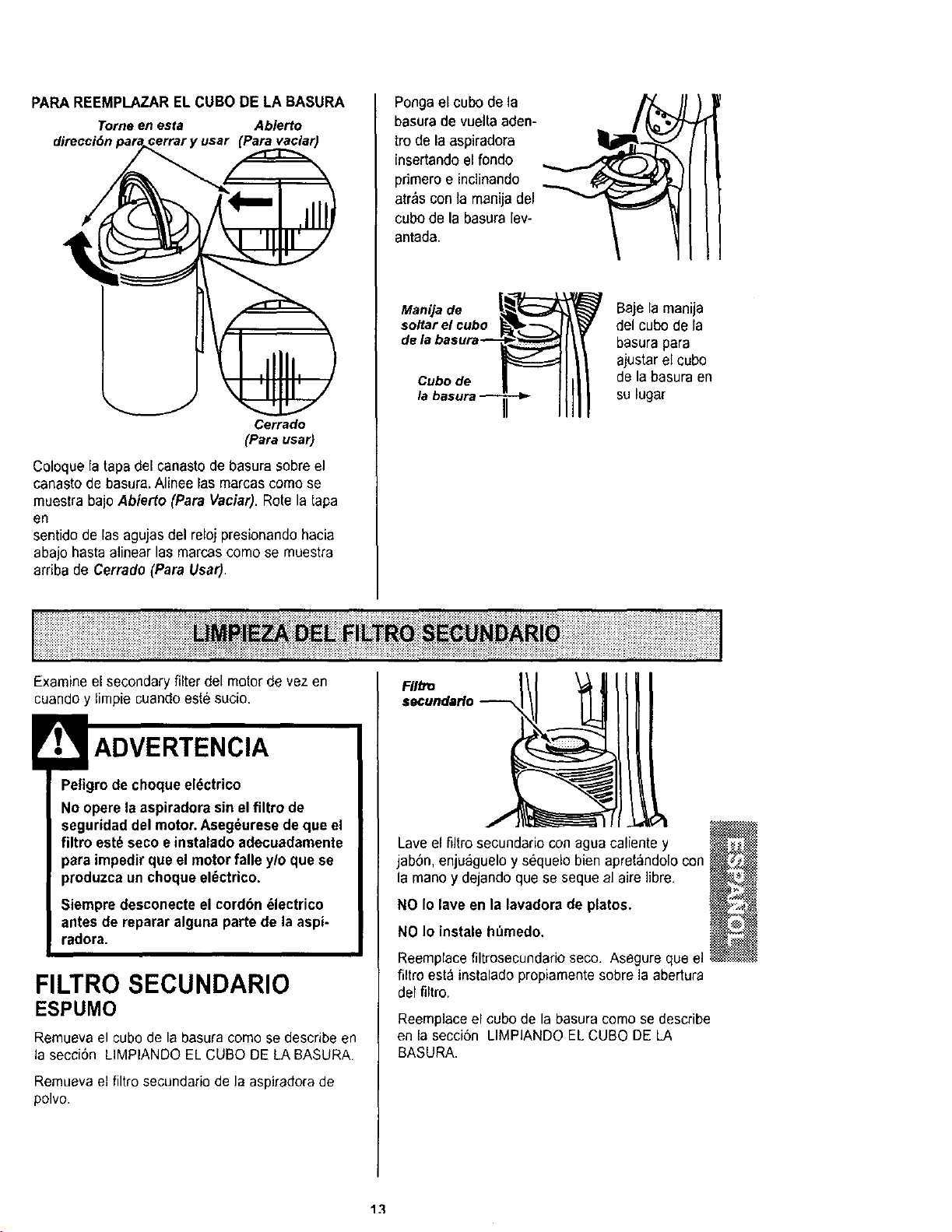
PAPA REEMPLAZAR EL CUBO DE LA BASURA
Tome en esta Abierto
direcci6n (Pare vaciar)
Cerrado
(Parausar)
Coloque la tapa del canastode basura sobreel
canasto de basura.Alinee las marcascome se
muestra bajo Abierto (Pare Vaciar). Rote la tapa
en
sentido de las agujas del reloj presionandohacia
abajo hasta alinear las marcascome se muestra
arriba de Cerrado (Pare Uear).
Ponga el cube de la
basurade vuelta aden-
tro de la aspiradora
insertando el rondo
primero e inclinando
atr_s con la manijadel
cube de la basuralev-
antada.
Manijade Baje la manija
soltarel cube del cube de la
basurapara
ajuetarel cube
Cubede de la basura en
su lugar
Examine el secondaryfilter del motor de vez en
cuando y lirnpiecuandoeste sucio.
Peligrode cheque el_ctrico
No opere la aspiradorasin elfiltro de
seguridad del motor.Aseg_urese de que el
filtro est_ seeoe inetalado adecuadamente
para impedir que el motorfalle y/o que se
produzca un choque el(_ctrico.
Siempre desconecteel cordbn _lectrico
antes de reparar alguna parte de la aspi-
radora.
FILTRO SECUNDARIO
ESPUMO
Remuevael cubo de la basura como sedescribe en
la secci6n LIMPIANDO EL CUBO DE LA BASURA,
Remueva el filtro secundafio de la aspiradora de
polvo.
FIItto
secundarlo
Lave el nitro secundario con ague caliente y
jab6n, enjuaguelo y s_quelo bien apret&ndolocon
la rnanoy dejando que se seque al aire libre.
NO Io lave en la lavadorade plates.
NO Io instaleh_medo.
Reemplacefiltrosecundedo seco. Asegure que el
filtro est_ instalado propiamentesobre la abertura
del filtro.
Reemplaceel cube de la basura come se describe
en la seccion LIMPIANDO EL CUBO DE LA
BASURA.
v_
E '
@
13
::::: : ::: :::::_:::: : : ::::::;._. ,_::._._.._.::......-..,::.,./,,..::_...:::-:...::-:.....+-:..,,_ ,..:: "', ;:-,'::: ._ .._:.....,,-.,::...,:.....:::;: ;::::: ;:::;;::::::::::: :;;::::::::::::: ::::::::
: _ ...... _::;ii_ _::: _:_;i_:ki::: t::_:: _!_:_!_ _,,___i_;_;_i_
Peligrode choque el_ctrico
Desenchufe el cable de poder del tomacor-
riente, No opere la limpiadora sin el filtro
primario o el filtro de escape. Est_ seguro
que el filtros este instalado propiamente
para prevenirfalla del motor y/o sacudida
el_ctrica.
FILTRO PRIMARIO
Examineel filtro pdmariode vez en cuandoy limpie
cuando este sucio.
PARASACAR EL FtLTROPRIMARIO
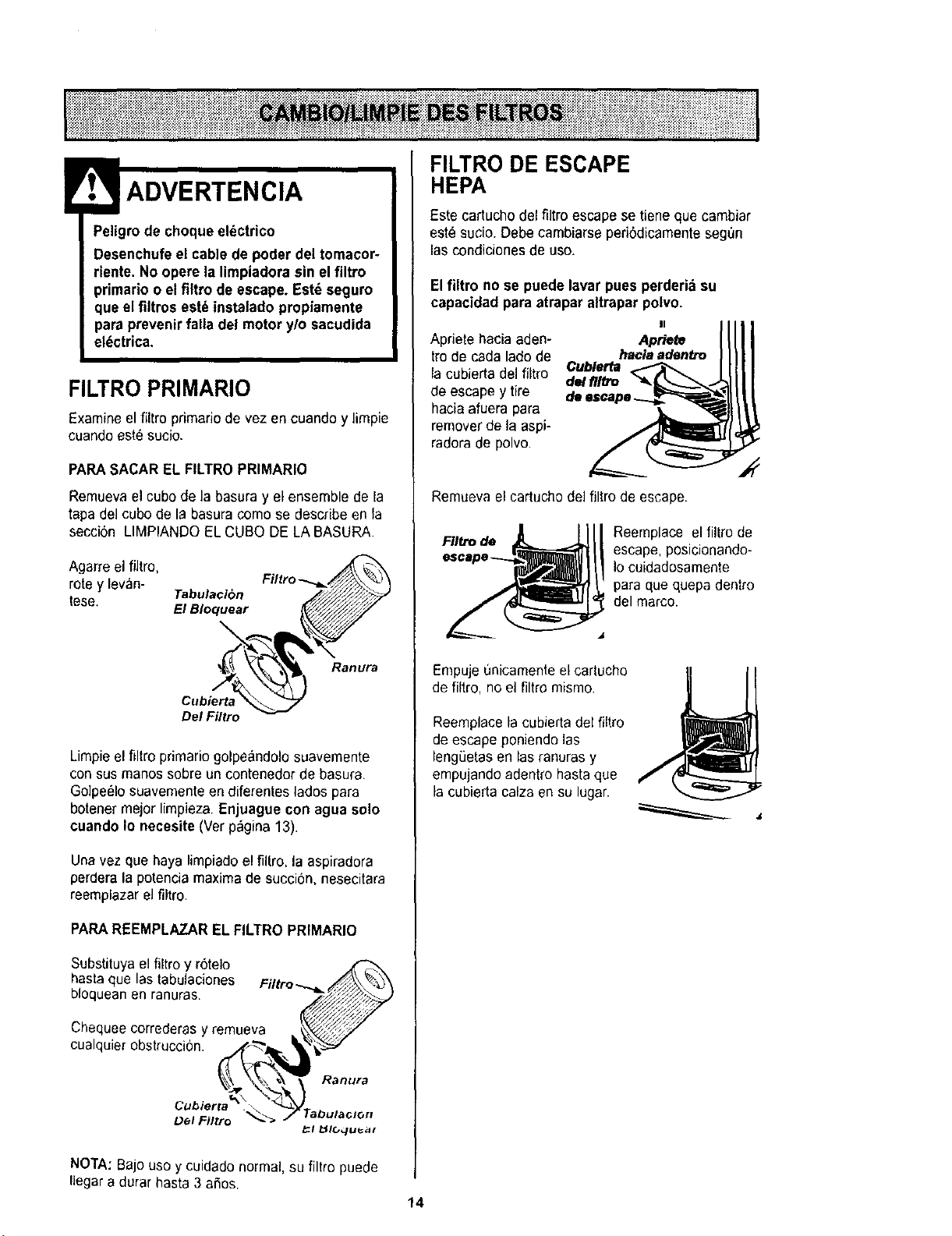
Remuevael cubode la basura y el ensemble de la
tapa del cubo de la basura comose describe en la
secci6n LIMPIANDO EL CUBO DE LA BASURA.
Agarre el fiJtro,
rote y levan-
tese. Tabulaci6n
El Bloquear
Ranura
Cubierta
Del Filtro
Limpieel filtro primario golpe_ndolo suavemente
consus manos sobre un contenedor de basura.
Golpe_lo suavementeen diferentes lados para
botenermejor limpieza. Enjuague con agua solo
cuando Io neeesite(Ver p_gina13).
Una vez que haya limpiadoel filtro, la aspiradora
perdera la potencia maximade succiSn, nesecitara
reemplazar el filtro.
PARA REEMPLAZAREL FILTROPRIMARIO
Substituya el filtro y r6telo
hasta que las tabulaciones Filtro_..//./_\_...p._.,_,
bloquean en ranuras. _
Chequeecorredera.sy remuev._a k_'_# "
oualqu,erobstrucc,on, i.___1 _1_
Lo°,oo,o.,
L_el Eilrro _"_l _IC, quea_
FILTRO DE ESCAPE
HEPA
Este cartucho del filtro escape se tiene que cambiar
est_ sucio. Debe cambiarse periSdicamentesegt_n
lascondicionesde use.
Elfiltro no se puede lavar pues perderia su
capacidad para atraparaltrapar polvo. (
Apriete hacia aden- Apt_t_
tro de cada lado de haclaa#en#e
la cubierta del filtro Cubl_r_a
de/fl/tro
de escape y tire
hacia afuera para
remover de la aspi-
radora de polvo.
Remuevael cartuchodel filtro de escape•
FIItro de Reemplace el filtro de
escape, posicionando-
Io cuidadosamente
para que quepa dentro
del marco.
Empuje unicamente el cartucho
de filtro, no el filtro mismo.
Reemplacela cubierta del fiitro
de escape poniendo las
lengSetasen las ranuras y
empujando adentro hasta que
la cubierta calza en su lugar.
NOTA:Bajo uso y cuidado normal, su filtro puede
Ilegara durar hasta 3 aSos. 14
Peligrode choque el_ctrico o lesibn corpo-
ral
Desconectela unidadantes de limpiarla o
darleservicio. De Io contrario podria pro-
ducirse un choque el_ctrico o causar
lesibn corporal si la aspiradoraarranca de
manera imprevista.
Frecuentementerevise el &readel cepillo y quite
redo pelo, cord6n o pelusa que se haya acumulado.
Di la acumulacibnes excesiva, siga las instruc-
clones a continuaci6n. Si la correa se aflojara o
rompiera, siga las instruccionespara quitar la cor-
tea.
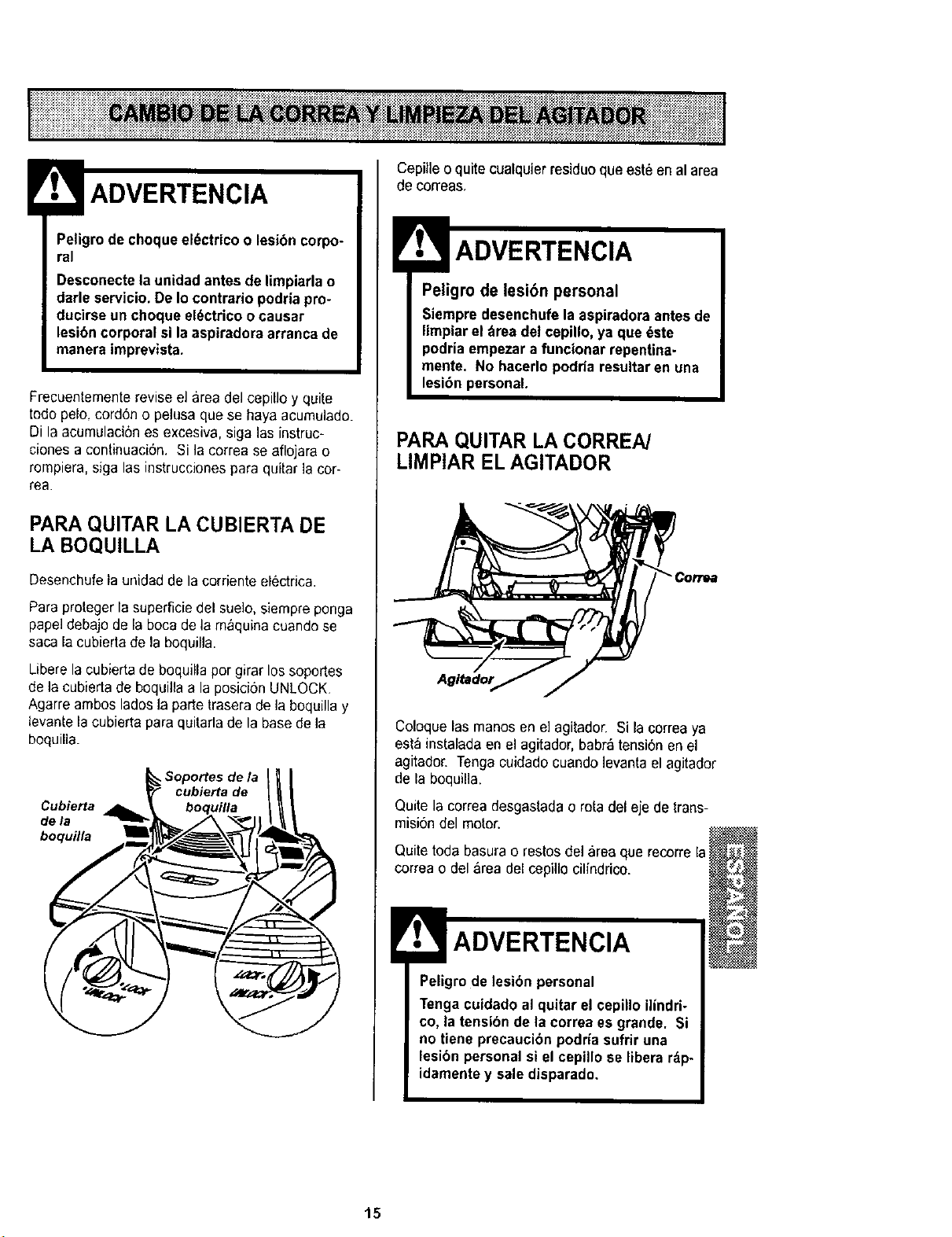
PARAQUITAR LA CUBIERTA DE
LA BOQUILLA
Desenchufela unidad de la corriente el_ctrica.
Para proteger la superficiedel sue]o,siempre ponga
papel debajo de la boca de la m_quina cuando se
saca la cubierta de la boquilla.
Libere la cubierta de boquilla por girar lossoportes
de la cubierta de boquilla a la posici6n UNLOCK,
Agarre ambos lados la parte trasera de la boquilla y
levante lacubierta para quitarlade la base de la
boquilla.
Soportes de la
cubierta de
Cubierta
de la
boquflla
Cepille o quite cualquJerresiduo que est6 en al area
de correas,
Peligro de lesibn personal
Siempre desenchufe la aspiradora antesde
limpiar el _rea del cepillo, ya que _ste
podria empezara funcionar repentina-
mente. No hacerlo podria resultaren una
lesi6n personal.
PARA QUITAR LA CORREA/
LIMPIAR EL AGITADOR
Agltador
Coloque las manos en el agitador. Si la correaya
esta instalada en el agitador, babr&tensi6n en el
agitador. Tengacuidado cuando levanta el agitador
de la boquilla.
Quite la correa desgastada o rotadel eje de trans-
misi6n del motor.
Quitetoda basurao restos de]area que recorre la
correa o del area del cepillo cilfndrico.
ADVERTENCIA
Peligrode lesi6n personal
Tenga cuidadoal quitar el cepillo ilindri-
co, la tensibn de la correa es grande. Si
no tiene precauci6n podria sufrir una
lesi6n personal si el cepillo se libera r_p-
idamentey sale disparado.
15
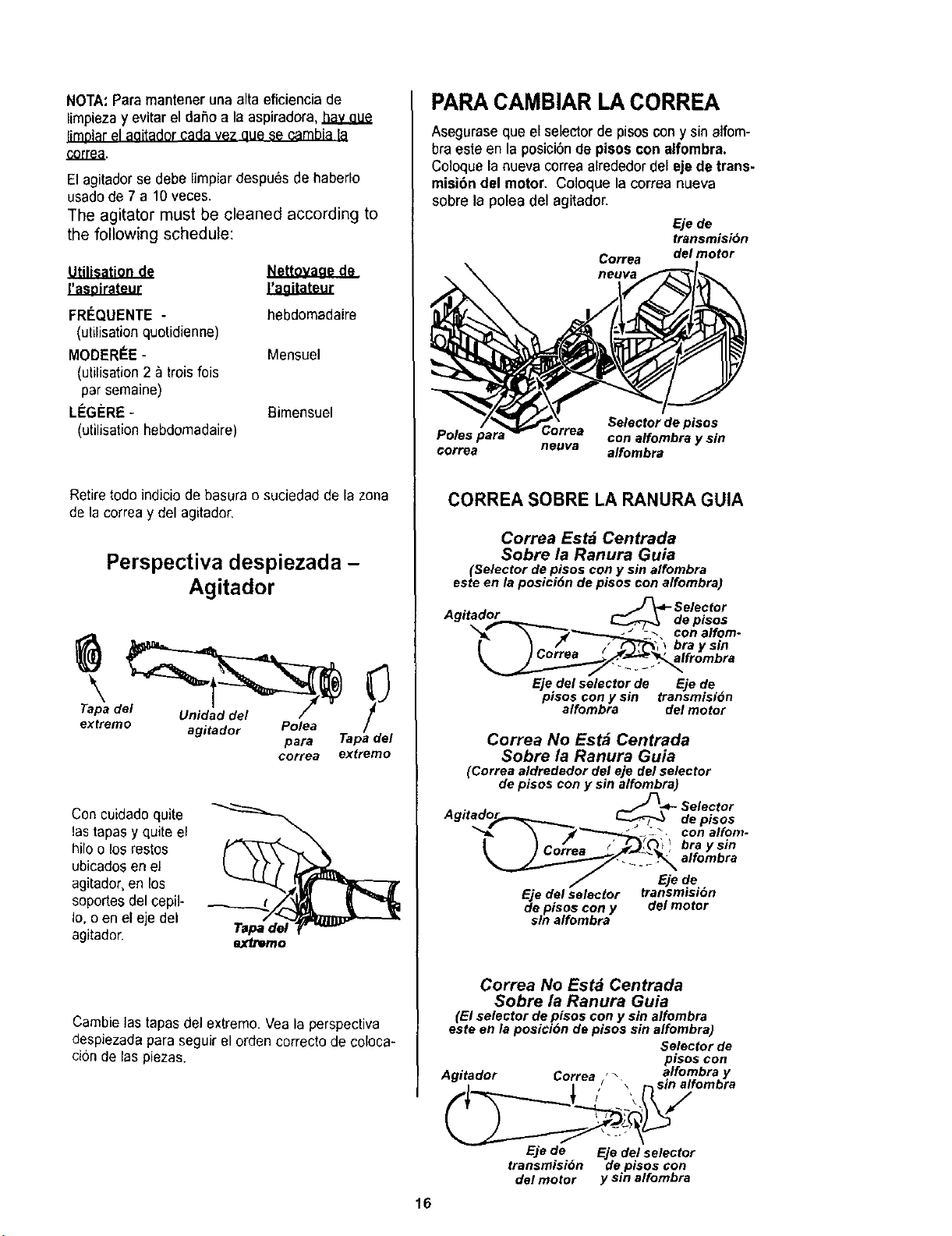
NOTA:Paremantenerunaaltaeficienciade
limpiezayevitareldafioalaaspiradora,hayaue
limoiarel aaitador cada vez eue se cambia ta
co,tea,
El agitadorse debe limpiar despu6s de haberlo
usadode 7 a 10 veces.
The agitator must be cleaned according to
the following schedule:
Utilisationde
FR#QUENTE -
(utilisationquotidienne)
MODERC:E-
(utilisation2 _ trois fois
par semaine)
L_G#RE -
(utilisationhebdomadaire)
Nettovaae de
ILagitat_
hebdomadaire
Mensuel
Bimensuel
Retiretodo indicio de basura o suciedad de la zona
de la correay del agitador,
Perspectiva despiezada -
Agitador
et emo agitador Polea /
pare Tape del
correa extreme
Concuidado quite
lastapasy quite el
hilo o los restos
ubicadosen el
agitador,en los
seportesdel cepil-
Io, o en el eje del
agitador. extreme
Cambie las tapesdeJextreme. Vea la perspective
despiezada paraseguir el orden correcto de coloca-
cion de laspiezas.
PARA CAMBIAR LA CORREA
Asegurase que el selectorde pisos cony sin alfom-
bra este en la posicibn de pisoscon alfombra.
Coloque lanueva correa aErededordel ejede trans-
misibn del motor. Coloque la correa nueva
sobre la polea del agitador.
£je de
transmision
Correa del motor
rteova
Selector de pisos
Poles pare Correa con elfombra y sin
correa neuva alfombra
CORREA SOBRE LA RANURA GUIA
Correa Estd Centrada
Sobre la Ranura Guia
(Selector de pisos con y sin alfombra
este en la posici6n de pisos con alfombra)
A. - _Selector
getaaor _de pisos
h_'_ _:. con alfom-
• " _ /" / f_F'q"_','l bra y sin
Ejedel selectorde Ejede
pisos con y sin transmisidn
alfombra del motor
Correa No Est_ Centrada
Sobre la Ranura Guia
(Correa aldrededor del eje del selector
de pisos con y sin alfombra)
•_.._"_-_- Selector
Agttado_..__ _de pisos
_-'_"""'-_ _ • conalfom-
I),-'-_./,_.=_ 1'.4¢f_,_0'_)bray sin
:\sl,om.ro
Eje de
EdJedel selector transmisi6n
e pisoscony del motor
sin alfombra
16
Correa No Est_ Centrada
Sobre la Ranura Guia
(El selector de pisos con y sin alfombra
este en la posi¢i6n de pisos sin alfombra)
Selector de
pisoscon
Agitador Correa "_alfombra y
r\sin alromora
Eje de Eje del selector
transmisi6n de pisos con
del motor y sin alfombra
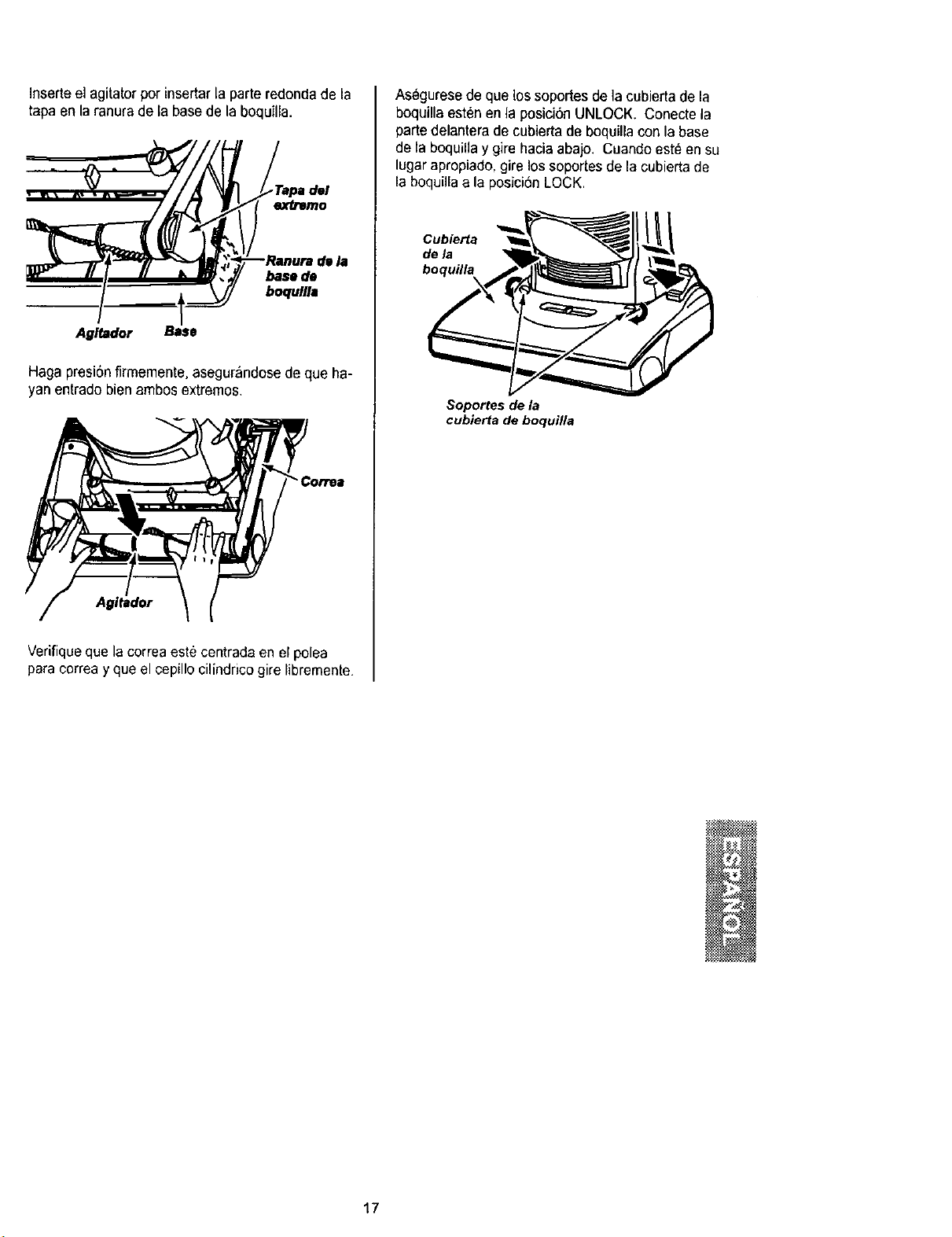
Inserteel agitator por insertar la parteredonda de la
tapa en la ranura de la base de la boquJlla.
dl la
base de
boqullla
Agltador
Haga presi0nfirmemente,asegur_ndose de que ha-
yanentrado bien ambos extremos.
Agltador
Verifiqueque la correaeste centrada en el polea
para correa y que el cepillo cilindrico gire libremenle.
Asegurese de que lossoportes de ]a cubierta de la
boquilla esten en la posici6n UNLOCK• Conecle la
partedelantera de cubierta de boquilla con la base
de la boquilla y gire hacia abajo. Cuandoesteen su
lugar apropiado,gire los soporles de la cubierta de
la boquillaa la posici6nLOCK.
Cub_a
dela
boqufl_
Soportes de la
cubierta de boquilla
N
17
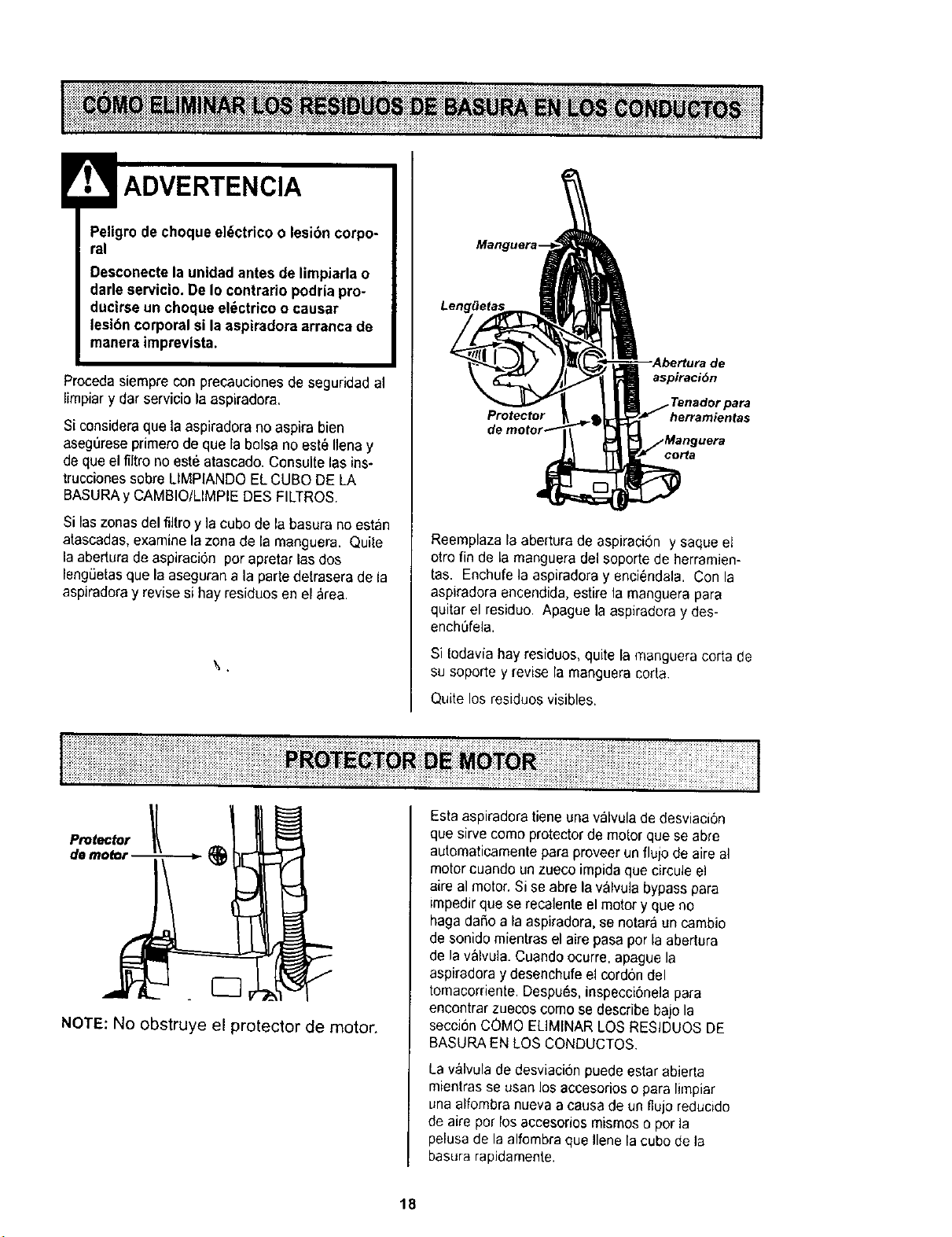
ADVERTENCIA
Peligro dechoque el_ctrico o lesion corpo-
ral
Desconectela unidadantes de limpiarla o
dade servicio. De Io contrario podria pro-
ducirse un choque el_ctrieo oeausar
lesibn corporal si la aspiradora arranca de
manera imprevlsta.
Proceda siempre con precauciones de seguridad al
limpiary dar servicio la aspiradora.
Si consideraque la aspiradora no aspira bien
aseg0rese primerode que la balsa no est_ Ilenay
de que el filtrono est6 atascado. Consulte las ins-
trucciones sabre LIMPIANDO EL CUBa DE LA
BASURAy CAMBIO/LIMPIEDES FILTROS.
Si las zonasdel filtra y la cuba de la basara no astan
atascadas,examine la zona de la manguera. Quite
la aberturade aspiraci0n par apretar lasdos
lengLietasqua la aseguran a la partedetrasera de la
aspiradoray revise si hay residuos en el _rea.
aspiraci6n
Protector herramientas
Reemplaza la abedura de aspiraci6n y saqueel
otro fin de la manguera del seporte de herramien-
tas. Enchufe la aspiradoray enci_ndala. Con la
aspiradora encendida, estire la manguera para
quitar el residuo Apague la aspiradora y des-
ench6fela.
Si todavia hay residuos,quite la msnguera corta de
su soporte y revise la mangueracarts.
Quite los residuos visibles.
NOTE: No obstruye el protector de motor.
Esta aspiradoratiene una vaNula de desviaci6n
que sirve coma protectorde motor que se abre
autematicamente para proveerun flujo de aire al
motor cuando un zueco impida qua circule el
aire al motor.Si se abre la valvula bypass para
impedirqua se recalente el motor y que no
haga dafio a la aspiradora, se notara un cambio
de sonido mientrasel aire pasapar Is abertura
de la valvula. Cuandoocurre, apague la
aspiradoray desenchufeel cordon del
tomacorriente.Despu6s, inspecoi6nelapara
encontrar zuecoscoma se describe bajo la
secci6nCOMO ELIMINARLOS RESIDUOS DE
BASURAEN LOS CONDUCTOS.
La v&lvulade desviacionpuede estar abierta
mientrasse usan losaccesorios o para limpiar
una affombranueva a causa de un %jo reducido
de aire par los accesorios mismoso per la
pelusade la alfombra que liana la cuba de Is
basurarapidamente.
18
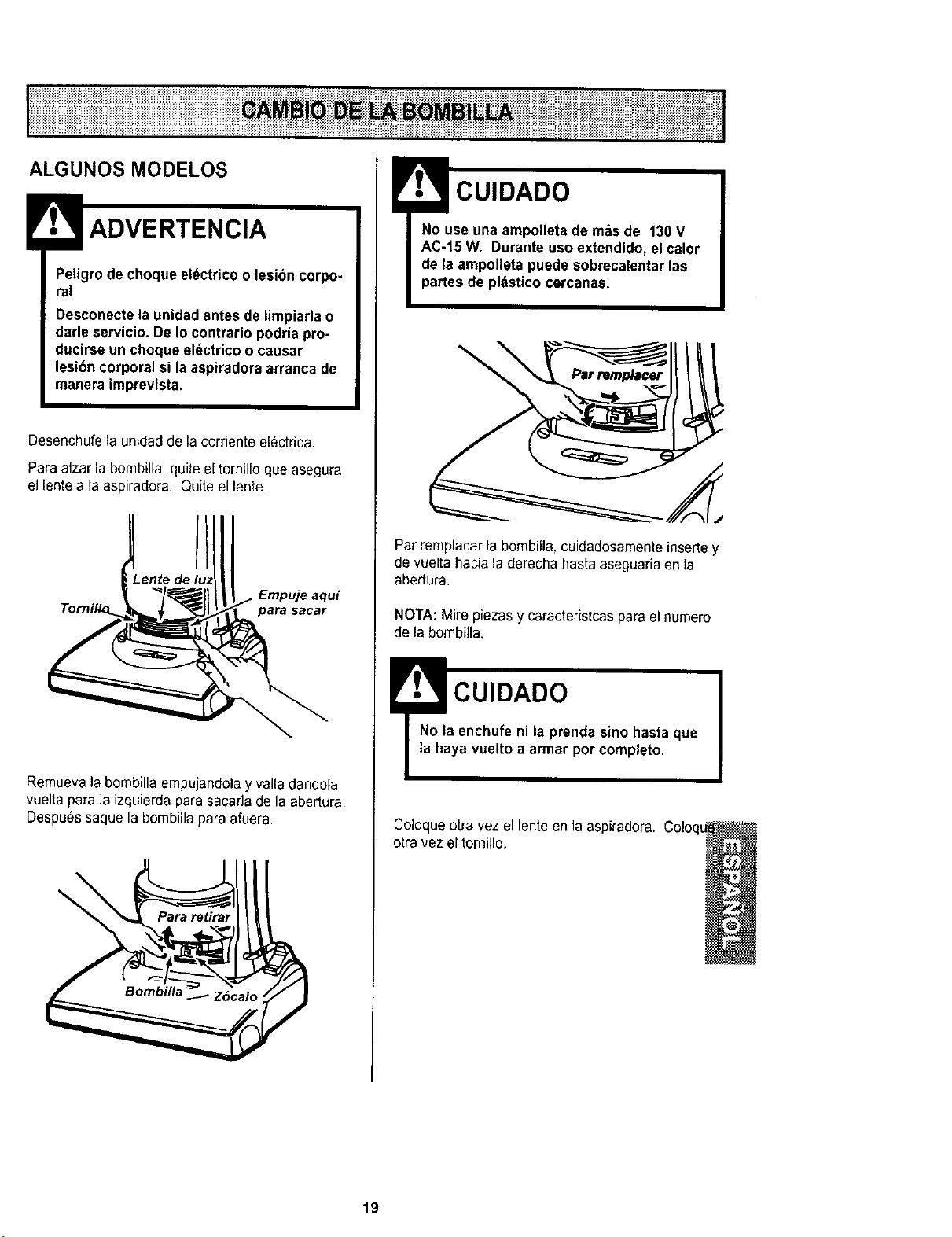
ALGUNOS MODELOS
Peligro de choque electrico o lesibn corpo-
ral
Desconectela unidad antes de limpiarla o
darle servicio.De Io contrario podriapro-
ducirse un choque el_ctrico o causar
lesibn corporal si la aspiradoraarranca de
manera imprevista.
Desenchufela unidad de la corriente electrica.
Paraalzar la bombilla, quiteel tornillo que asegura
el lentea la aspiradora Quiteel lente.
'ente de Empuje aqui
Remuevala bombilla empujandolay valla dandola
vuelta para la izquierdapara sacada de la abertura.
Despuessaque la bombilla para afuera.
\
CUIDADO
No use una ampolleta de m_s de 130 V
AC-15 W. Durante uso extendido, elcalor
de laampolleta puede sobrecalentar las
partes de pl_stico cercanas.
\
Par remplacar la bombilla, cuidadosamente insertey
de vuelta hacia la derecha hasta aseguariaen la
abertura.
NOTA:Mire piezas y caracteristcas parael numero
de la bombilla.
!CUIDADO
No la enchufe ni la prenda sino hasta que
la haya vuelto a armar porcompleto.
Coloqueotra vez el lente en la aspiradora.
otravez el tornillo.
19
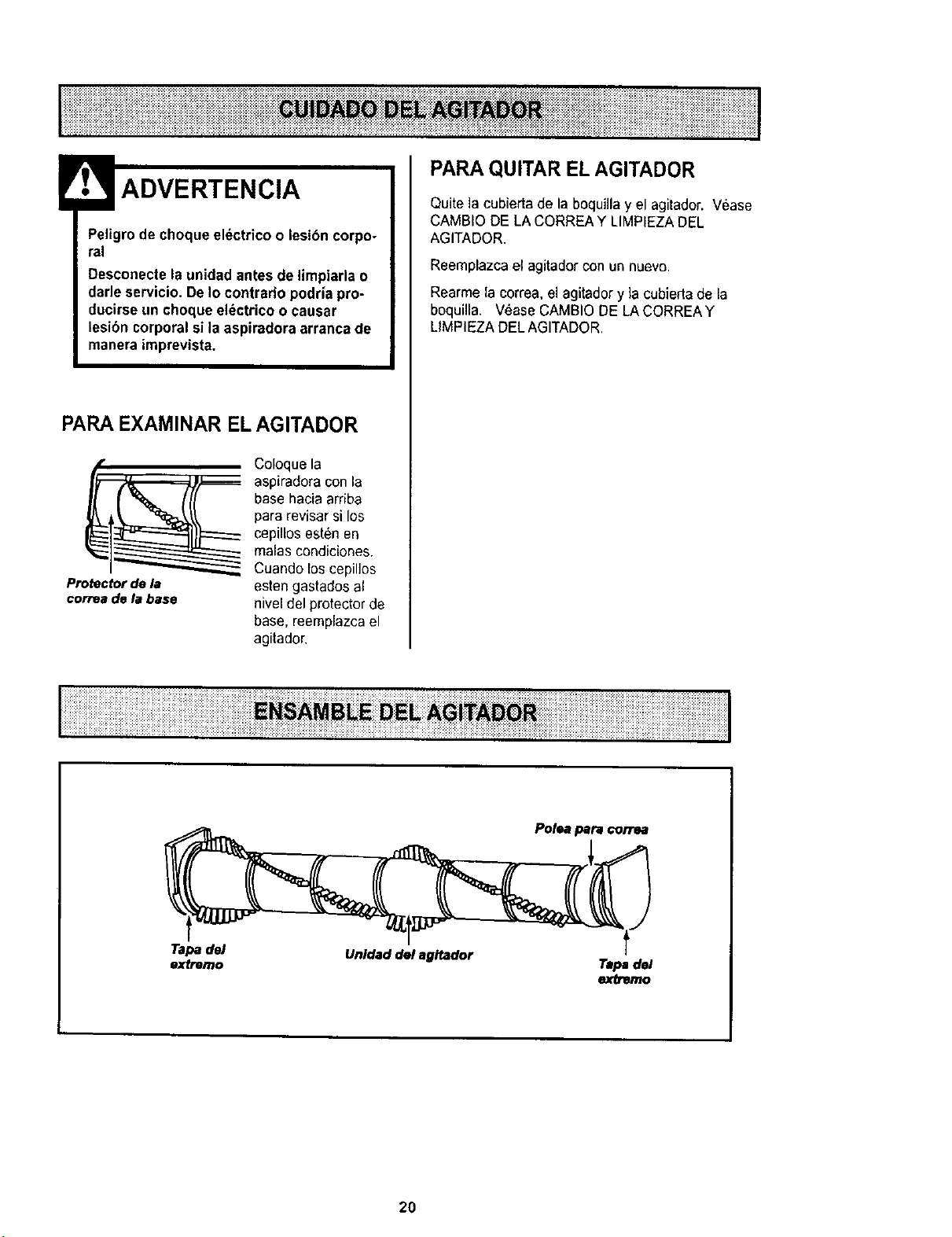
Peligrodechoqueeldctricoolesibncorpo-
ral
Desconectelaunidadantesdelimpiarlao
darleservicio.DeIocontrariopodriapro-
ducirseunchoqueel_ctricoocausar
lesi6ncorporalsilaaspiradoraarrancade
maneraimprevista.
PARAEXAMINAR ELAGITADOR
Protectorde la
correade labase
Coloquela
aspiradora con la
basehacia arriba
para revisar si los
cepillos est_n en
malas condiciones.
Cuando los cepillos
esten gastados al
nivel del protector de
base, reemplazcael
agitador.
PARA QUITAR EL AGITADOR
Quite la cubierta de la boquilla y el agitador. Vease
CAMBIO DE LA CORREAY LIMPIEZADEL
AGITADOR.
Reemplazca el agitador con un nuevo.
Rearme lacorrea,el agitador y ]acubierta de la
boquilla. Vease CAMBIODE LACORREAY
LIMPIEZA DELAGITADOR,
Polea para€orrea
t
2O
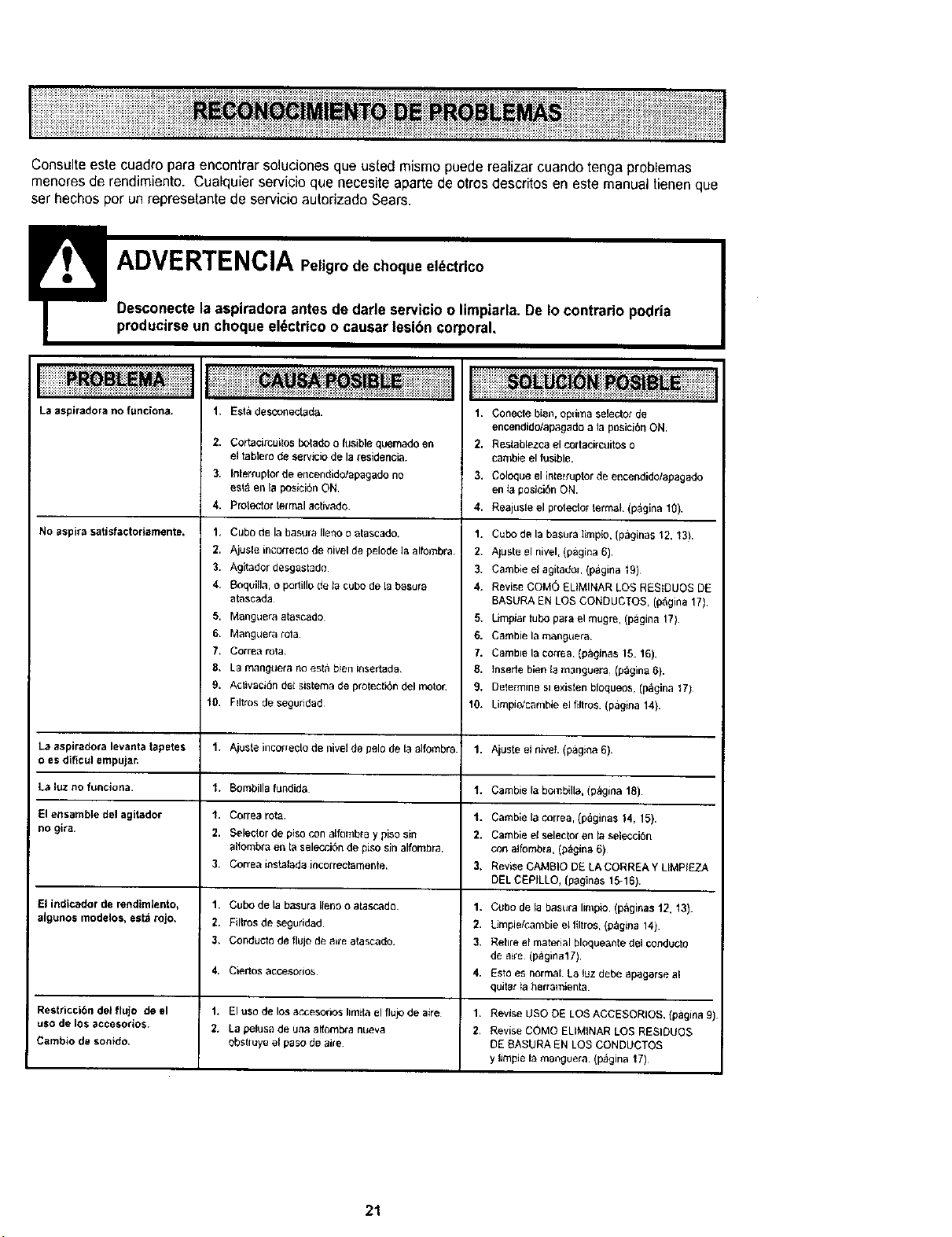
I" _: ii_i_i_i i i i_i_ ___i_ii_i___ii_iii_iii'i_'_____i_i_ii:J!__!!ii_i!"_'
iiii!i;iiiiii!!i_iiiiiii_i!_iiiiiiiiiiiiiiiiiiiiiiiii!i!iii!iii!i!iiiiiii_i!iiiii!iiiiiiiilil!iiiii!!iiiiiiiiii!i_iiiiiiiiiiiiiiiiiiii!!i!ilIiiiiiiliiliiiiiii!iiiiiiiiiili_iiiiiiiiiiiiiiiiiiiiiiiiiii!ii 1
Consulteeste cuadro para encontrar solucionesque usted mismopuede realizar cuando tenga problemas
menoresde rendimiento. Cualquier servicio que necesite aparte de otros descritos en este manual tienen que
ser hechos per un represetante de servicioautorizado Sears.
La asplradora no funciona.
No aspira satisfactoriamente,
La aspiradora levanta tapetes
o es dificul empujar,
La luz no funcJona.
El ensambledelagttador
no gira.
El indicador de rendimiento,
aJgunos modelos, est_ rojo,
Restricci6n det flujo de el
use de los accesodos.
Cambio de sonido,
I
1. Esta desconectada.
2, Cortacirculos botado ofusible quemado en
el tabtero de servicio de la residencia.
3. Inler_uptor de encendido/apagado no
esl_ en la posiciSn ON.
4. Protector termal aclvado.
1. Cube de la basura Ileno o atascado.
2. Ajus_e incorrecto de nivel de pelode la alfombra.
3. Agitador desgastado
4, Boquila, o porlillo de ta cube de [a basura
atascada
5. Manguera atascado
6, Manguera rota
7. Correa rota
8. La manguela no esta bien insertada,
9. Activad&n det sistema de protecti6n del motor.
10. Filtros de seguridad
1. Ajuste incorrec[o de nivel de pelo de la a]fombra.
1. Bombilla fundida
1, Correa ro_,
2. Selecler de piso con alfombra y piso sin
aifomb_a en la selecci6n de piso sin alfombra,
3. Correa i;_stalada incorrectarnente.
1. Cubo de la basura lleno oalascado.
2. Filtros de seguridad
3. Conductodeflujodeaireatascado
4, Cier_os acGesorlos
1. El use de los ac,cesorios limita el flujo de aire
2. La pelusa de una aff_ml_a nueva
obsbuye el paso de aire
1. Conecle bien, opdma selectot de
enoendid01apagado a la pDsici{_rlON,
2, Reslablezca el corlaciro]ito$ 0
call}ble el fusiblE.
3. Coloque el interrupter de encendido/apagado
en ta posiciOn ON.
4. Reajuste el protecto_ termal. (p_gina 10).
1. Cube de la basura Iimpio. (paginas 12, 13).
2. Aluste el nivel, (p&gina 6),
3. Cambie el agilador. (pagina 19)
4. Revise COM(_ ELIMINAR LOS REStDUOS DE
BASURA EN LOS CONDUC;OS, (p_gina 17).
5. Limpiar tube para el mugre, (pagina 17).
6. Cambie la manguera.
7. Camble la correa. (pagJnas 15. 16).
8. tnserte bien la rnanguera, (p_gina 6).
9. Delermine sl existen bloqueos, (l_gina 17)
10. LimpieJcambie el filtros. (pagina 14}.
1. Ajuste et nivet. (pagina 6),
1. Cambie la bombilla, (p_gina 18).
1. Cambielacorrea,(pagina$14. 15).
2. Cambie el selector en la selecci6n
con alfombra, (p;_glna 6)
3. Revise CAivIBIO DE LA CORREA YLIMPIEZA
DEL CEPILLO, {paginas 15-16).
1. Cube de la basura limpio. (p,_ginas 12. 13).
2. Limpiek'.ambie eHttros,(p_gina 14).
3. Rehre el material bloqueante del conducto
de aire (paginalTJ
4. Esto es normal La luz debe apagarse a!
quit_r fa herramienta.
1,
2. Revise USO DE LOS ACCESORIOS, (pagina 9)
Revise COMO ELIMINAR LOS RESIDUOS
DE BASURA EN LOS CONDUCTOS
y limpie la ma_guera. (p_gina 17)
21
_fiX_, _at y_r :home or_m!
Your Home
F_ rep_ - in y_" home - oi aB ma|or _r_ _Rpt_r_eso
lawn _nd gar_ _ipmem, _ he_ing _nd Cooling systems.
no matte_ who _it. _o matter who s_ld It!
i_i_i_i_ii_
i_I _
Our Horl_
_nd e|_cl_r_ni<_, ce;ll o_r_o _qn-line,-_or th_ _neares_
Sea_ Pa_s a_d Repa_it C_rt,|_¢.,
_iiiiiiii
_i_ _SII _
_ i _
1_800-827=6655 (u_._4 t=800-361_665 _-,_,
AuC_anad_I;_r _L_a e__: