USER MANUAL
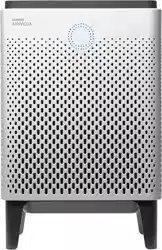
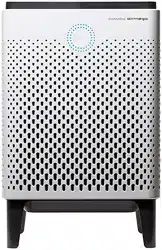
Air Purier Airmega 250/250S
Symbols Used in This Manual
The following symbols are used in this manual to explain procedures, restrictions, handling precautions, and
instructions that should be observed for safety.
Safety Instructions
Read and follow all the safety tips and warnings before using the product.
READ AND SAVE THESE
INSTRUCTIONS
WARNING
Warning indicates a potentially hazardous situation that may result in death or severe injury to the user or others.
CAUTION
Caution indicates a potentially hazardous situation that may result in injury to the user or others, or the loss of property.
NOTE
Note indicates useful tips or additional information for procedures and product use.
[]
This square bracket represents control buttons and indicators on the product.
e.g., [Power]
• Do not exceed the voltage and power rating of the
power outlet or connection device. This may generate
excessive heat and cause electric shock or fire.
• Only use the appropriate type of electric socket for the
product. Connecting the product to an incorrect socket
may result in damage.
• Do not immerse the product or any of its parts in water.
Operate the product only after a qualified technical
examines and replaces the parts that were under water.
• Do not touch the power plug with wet hands.
• If the electric outlet is wet, do not connect the power
plug of the product. Wait till the electric outlet dries
completely before use.
• Do not operate the product if the motor fan fails to
operate or is damaged.
• Disconnect the power plug from the electric outlet
if strange sounds, smells, or smoke come from
the product. Contact the customer service center
immediately for instructions.
• Disconnect the power plug from the electric outlet
when the product is not in use and before cleaning,
inspecting, or replacing parts.
• Use a dedicated electric outlet for the product. Do
not connect the product to a power strip that has
connections to several other products.
• Do not operate the product if the power plug or cords
are damaged.
• Do not forcibly bend, twist, pinch, or damage the power
cord.
• Do not force the power plug into an incorrect electric
outlet or into a loose electric outlet. Contact a qualified
technician to install a proper electric outlet.
• A damaged power plug or cord must be replaced by the
manufacturer or a qualified technician
• Remove the power plug from the electric outlet by
grasping the power plug and pulling it gently. Never pull
the cord to remove the power plug.
WARNING
7
EN
01BEFORE USING THE PRODUCT

Safety Instructions
Read and follow all the safety tips and warnings before using the product.
• Keep the electric cord away from heat sources.
• Do not repair the product unless this manual
recommends it. Doing so will void your warranty. All
repair work must be carried out by a qualified technician.
• This product has a polarized plug (one blade is wider
than the other). To reduce the risk of electric shock, this
plug is intended to fit in a polarized outlet only one way.
If the plug does not fit fully in the outlet, reverse the
plug. If it still does not fit, contact a qualified electrician.
Do not attempt to defeat this safety feature.
• Do not use this product in industrial areas or factories
where oil, grease, or dust particles may be present. This
product is for household use only.
• Do not change the filter while the product is operating.
Always turn off the product and unplug the power plug
before accessing the components inside the product.
• Do not place the product near a humidifier or in humid
areas, such as bathrooms or laundry rooms, where the
product may come into contact with water.
• Do not place the product near flammable gases,
cigarettes, incense, and other combustible materials.
• Do not place the product on a bed or against soft
objects, such as curtains.
• Do not clean the product using detergents, paint
thinner, or other household solvents.
• Do not spray insecticides or other flammable materials
near the product.
• This product should not be used by children under 8
without supervision.
• This product should not be used by persons with
reduced physical, sensory, or mental capabilities or
lack of experience without supervision or instruction
concerning to the use of the product in a safe way and
understand the hazards involved.
• Do not allow children to play with the plastic wrapping
and product.
• Do not use this product with any solid-state speed
control device, as it may result in electric shock or fire.
• Do not use an adapter or extension cord, as it may cause
fire, shock, or personal injury.
• Do not use attachments or filters not recommended by
the manufacturer.
• Exercise caution while removing the components from
the product. Ensure that your body parts do not get
stuck or scratched while servicing the product.
• Do not insert any objects or finger into the openings
of the product. If any objects fall into the openings,
immediately turn off the product and unplug the power
plug. Contact a qualified technician or the manufacturer
to remove the object.
• Do not wash or reuse the Max2 filter.
• Do not block the air outlet of the product. Doing so may
decrease the efficiency of the product and increase the
risk of injury.
• This product is for household use as described in this
manual. Using it in an industrial environment or any
other place not recommended by the manufacturer and
may result in electric shock, fire, and injury to person.
• Do not place anything on top of the product.
• Do not run the power cord under carpets or cover it with
rugs.
• Change the filters at the recommended intervals so that
excess dust does not accumulate.
• Do not place the product where the both sides of
product are blocked.
• Do not place the product in direct sunlight.
• Do not place the product next to or on windows.
• Place the product on a firm, flat, and dry surface that
provides sufficient air circulation.
• Keep the product and its cord out of way, where it
cannot be stepped on or tripped over.
• The end user has to be informed to keep at least 20 cm
separation with the antenna while this end product is
installed and operated.
• Operation is subject to the following two conditions:
(1) this device may not cause harmful interference and
(2) this device must accept any interference received,
including interference that may cause undesired
operation.
WARNING
CAUTION
READ AND SAVE THESE
INSTRUCTIONS
8
01BEFORE USING THE PRODUCT
Parts Diagram
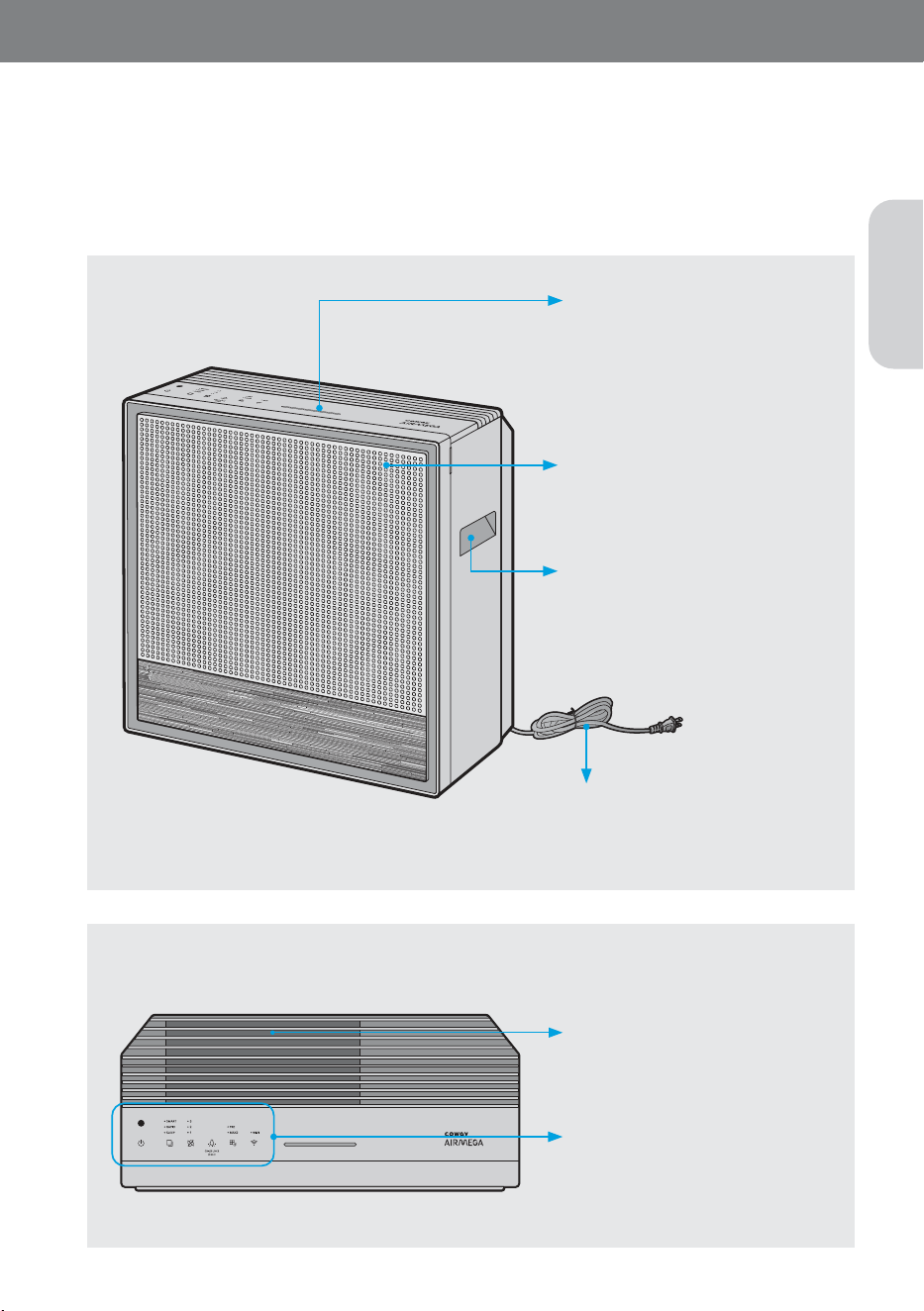
Check the parts of the product (exterior in the front and top view and control panel) and how they function.
Exterior
Check the parts and functions of the exterior of the product.
Air outlet cover
Open this cover when removing any
fallen foreign objects and cleaning the
air outlet.
Control panel
These controls allow you to operate
the
product and monitor the current
operation status.
Air quality indicator
This shows the air pollution level
around the product in real time.
The color changes depending on the
pollution level.
Front cover
Open this cover when cleaning the
pollution sensor.
Handles (left, right)
Hold these handles to lift or transport
the air purifier.
Power cord
Plug the end of the power cord into
a po
wer outlet (120 V~ 60 Hz).
Side View
Top View
9
EN
02PREPARATION
Parts Diagram
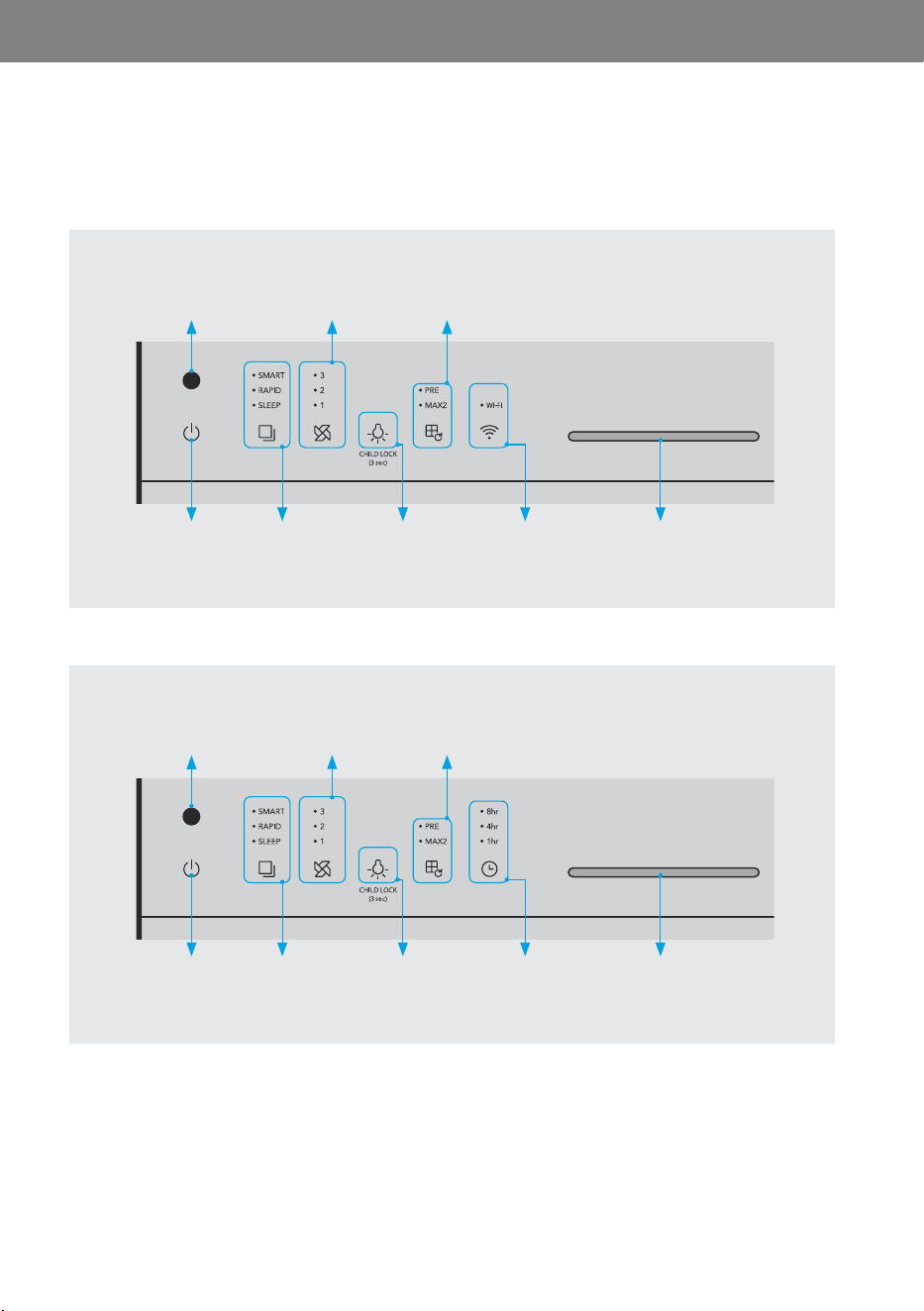
Check the parts of the product (exterior in the front and top view and control panel) and how they function.
10
02PREPARATION
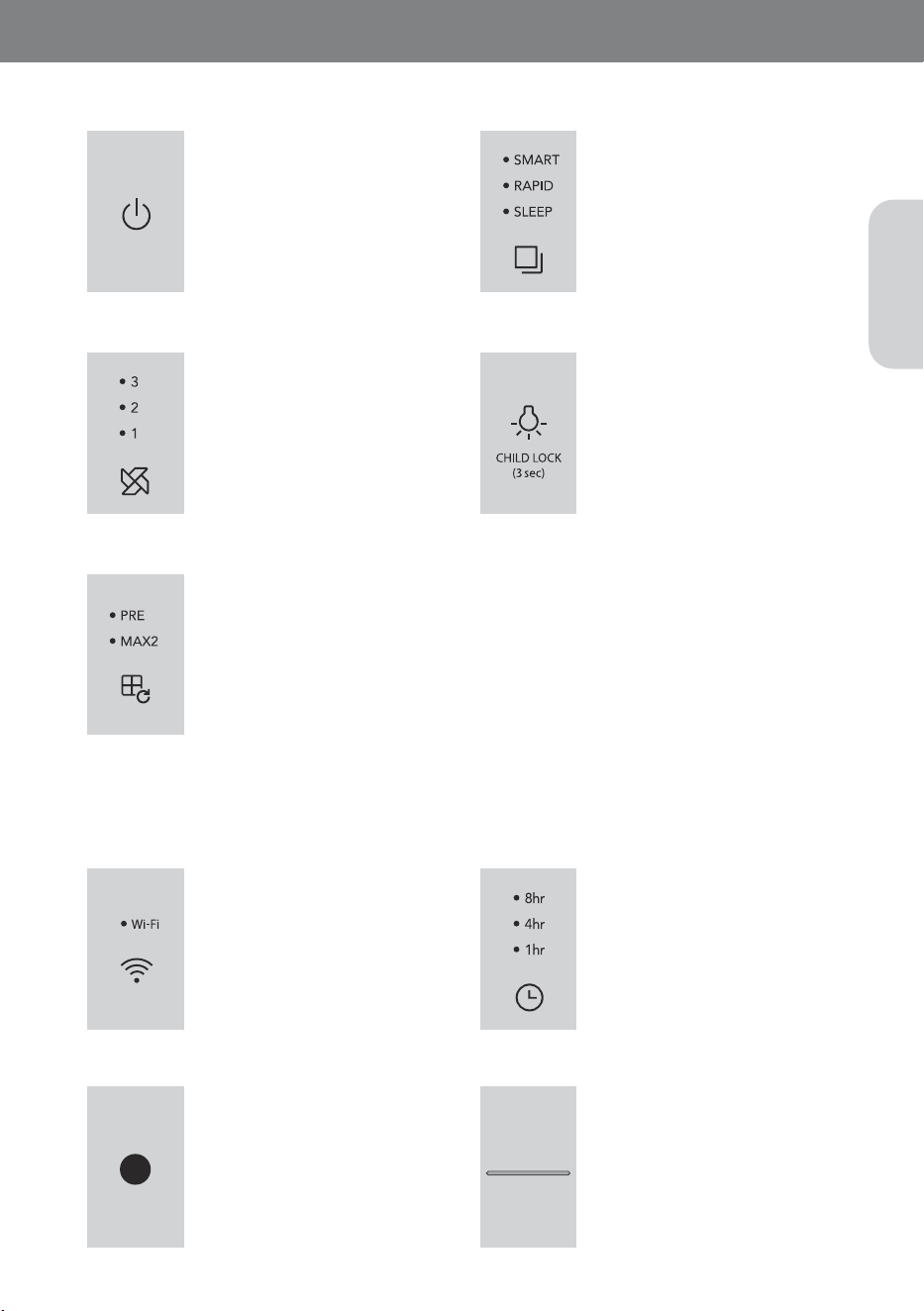
Control Panel (250S)
8
Air quality indicator
1
Power button
2
Mode button /
indicator
4
Light button
6
Wi-Fi button /
indicator
7
Light sensor
3
Speed button / indicator
5
Filter reset button / indicator
Control Panel (250)
8
Air quality indicator
1
Power button
2
Mode button /
indicator
4
Light button
6
Timer button /
indicator
7
Light sensor
3
Speed button / indicator
5
Filter reset button / indicator
11
EN
button/indicator
1
Power button
Use the button to turn the product
on and off.
-
When the product operates for
the first time, it is operated in the
smart mode. If you turn off the
product during operation and
turn it on again, it is operated
in the mode active before the
product was turned off.
3
Speed button / indicator
Press the speed button to select
the level 1 → level 2 → level 3.
The indicator is turned on when
the speed level 1/level 2/level 3 is
selected.
5
Filter reset button / indicator
When the filter replacement indicator is turned on, press the corresponding button for more
than 3 seconds after cleaning and replacing the filter.
The indicator stays on during the filter cleaning/replacement cycle. When the cleaning cycle or
life becomes less than 2%, the corresponding indicator will emit an orange color light.
- If both indicators(PRE and MAX2) turn on at the same time, the filters can be reset at once.
- If the filter replacement indicator is not turned on, the related button functions do not operate.
- If you have replaced or repaired the filter before the filter replacement indicator was turned
on, refer to page 18.
- The cleaning and replacement cycle of the pre-filter and combined filter is recommended and
may vary depending on the use environment.
2
Mode button / indicator
Press the mode button to select
the smart mode → rapid mode →
sleep mode.
4
Light button
Use this button to turn on and
off the indicator and air quality
indicator. If you press the [Light]
button while all indicators and the
air quality indicator are turned
on, you can turn on and off the
indicators in the following order:
Air quality indicator off → all
indicators off → all indicators on.
6
Wi-Fi button / indicator
(Only 250S)
Touch the Wi-Fi button to connect
to a Wi-Fi network.
When connected to Wi-Fi, the
status indicator's light will turn on.
7
Light sensor
This sensor detects light around
the pr
oduct.
8
Air quality indicator
This indicator displays the indoor
air quality in LED c
olors.
Good (blue) → Moderate (green) →
Unhealthy (yellow) → Very unhealthy
(Red)
6
Timer button / indicator
(Only 250)
Press the timer button to set the
timer.
CAUTION
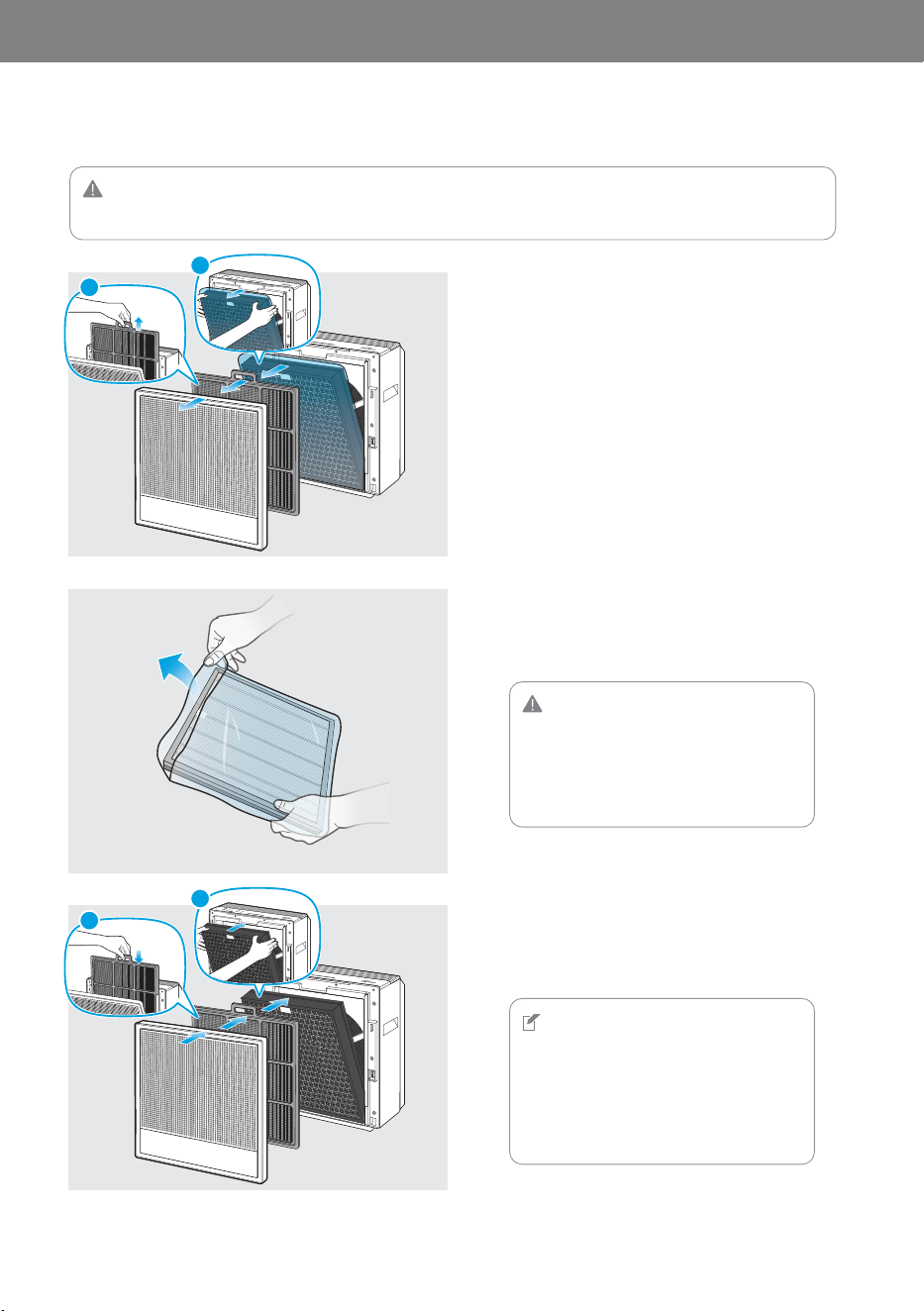
Make sure that the power cord is unplugged before opening the covers.
1
2
3
Open the cover located at the front
ofthe product.
Cover ▶ Pre-filter ▶ Max2 filter
Remove the plastic wrapping for Max2
filter.
Discard the plastic wrapping for Max2 filter.
Return the filter and cover in reverse
order at the first step.
Max2 filter ▶ Pre-filter ▶ Cover
CAUTION
•
When removing the plastic wrapping from
the filter, be careful not to damage the
surface of filter.
•
Do not allow children to play with the
plastic wrapping.
NOTE
•
Place the Max2 filter into the filter case
with the green side facing the product.
Reversed placement may affect the filter
lifetime.
•
The product will not turn on If the cover is
installed in correctly.
FRONT/전면/前
2
1
1
2
12
Setting Up the Product
Before using the product, you must remove the plastic wrapping of the inserted Max2 filter.
03INSTALLATION
1
2
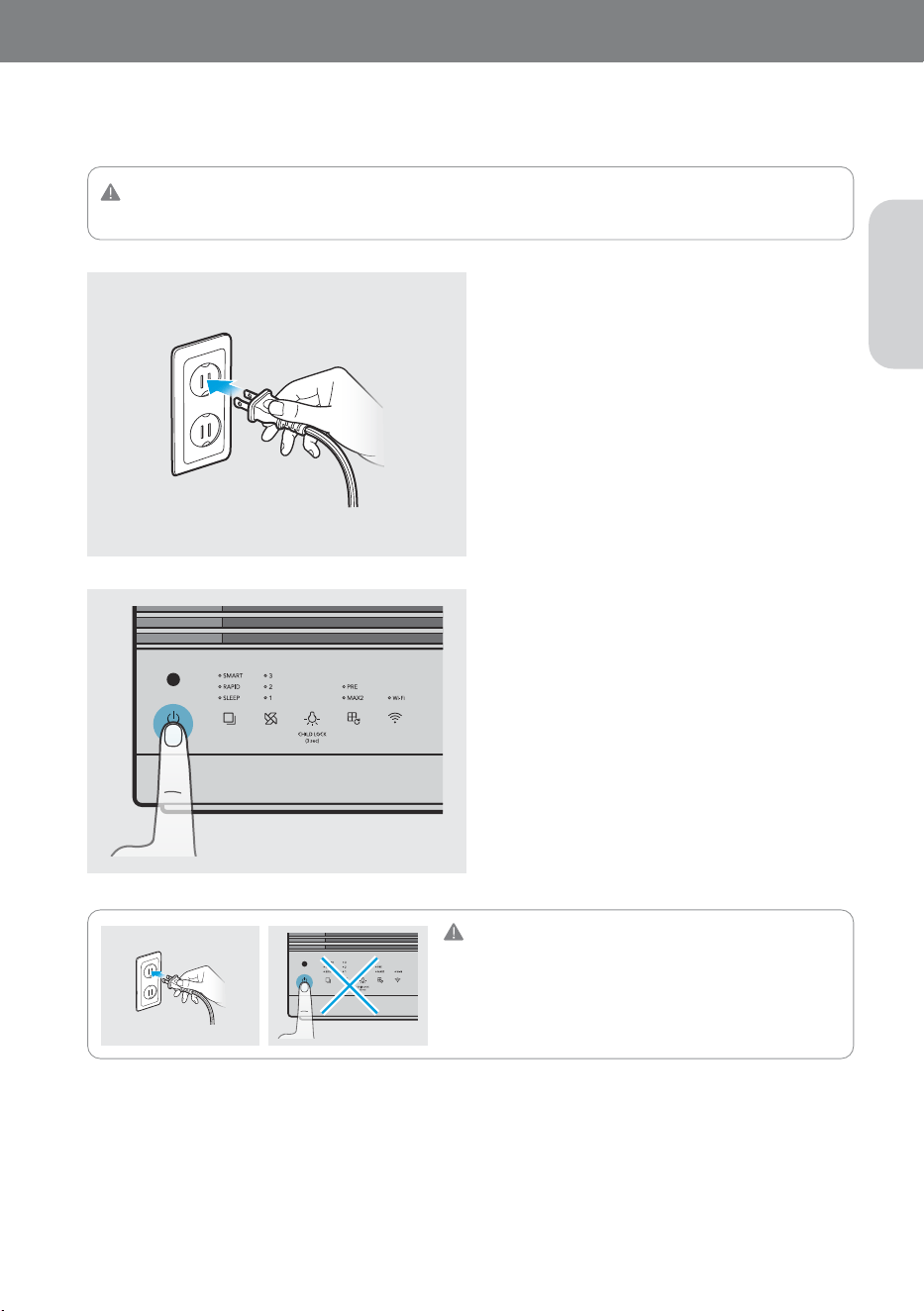
Insert the power plug into a power
outlet.
The indicators on the air purifier will blink.
Touch the [Power] button to turn the
air purifier on.
You will hear a chime sound when the air purifier
starts to operate.
CAUTION
•
Do not touch the control panel while connecting the power.
•
Buttons may not work for a certain period of time.
•
If the buttons do not work, unplug the power cord for
about 10 minutes to discharge, and then connect it again.
CAUTION
This product is for 120 V~ 60 Hz use only. Make sure your power supply meets these requirements.
13
EN
Connecting the Power and Turning On the Air Purifier
When your filters are prepared, connect the power and turn on the air purifier.
Connecting the Air Purifier to the Wi-Fi Network
(250S Only)
Find out the applic
ation pairing guide with the link provided below :
https://iocare.coway.com/manual/us/air/airmega250s.html
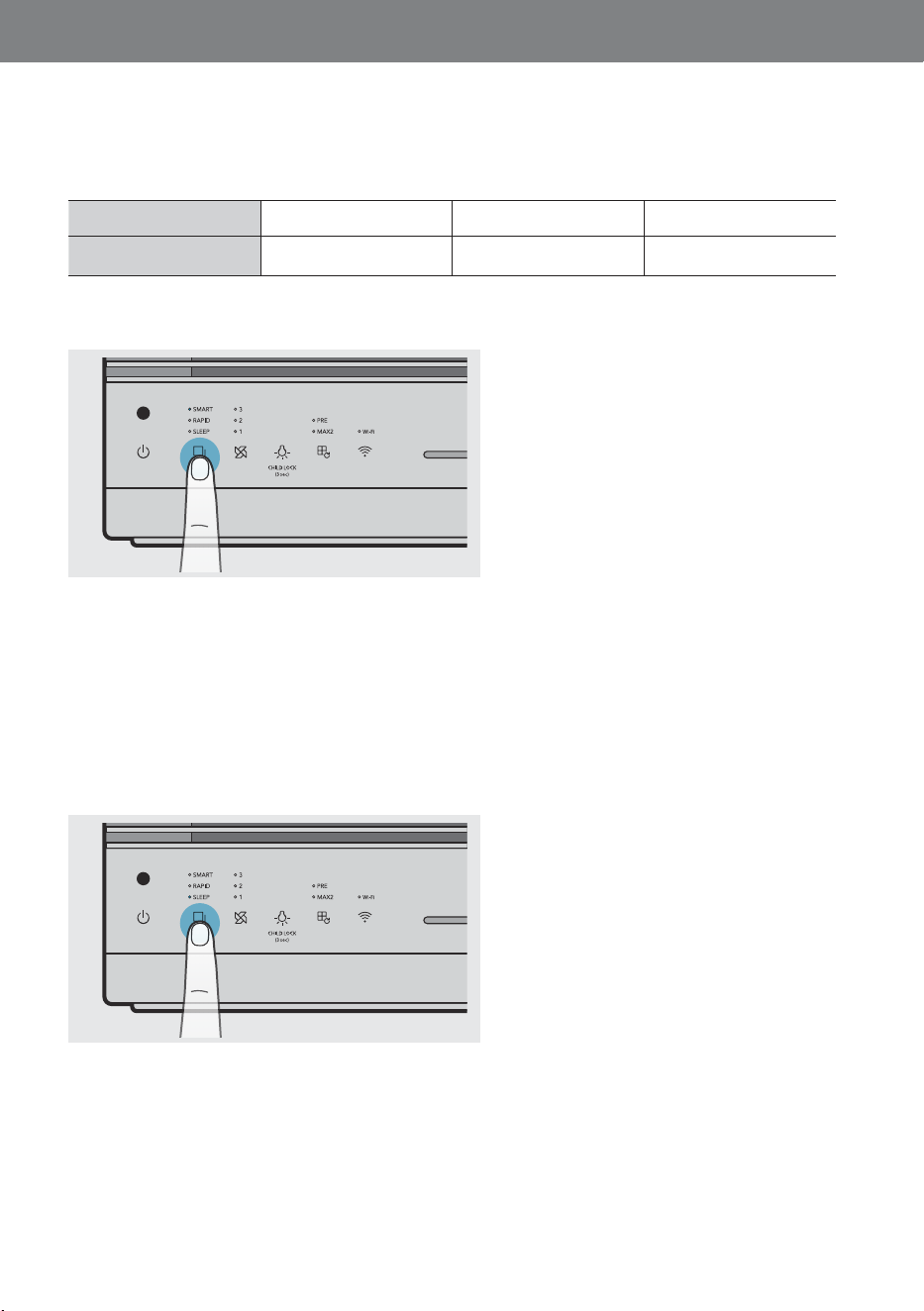
Press the [Mode] button to select the
smart mode.
Press the [Mode] button to select the
sleep mode. This mode minimizes the
speed during operation for a quiet and
pleasant environment.
Smart Mode - Sleep
If the product is set to Smart mode, Sleep mode is activated automatically, so that it can reduce noise and power
consumption. It activates when the room is dark and the air quality is Good(Level 1) for 3 minutes.
If the light sensor detects light for 5 minutes or longer and/or if the air quality level in the room is Moderate(Level
2) or worse. The Smart mode will activate automatically.
250S/250
14
04OPERATION
Smart Mode - Auto
If the product is set to Smart mode, it automatically adjusts the air speed according to the current air quality
around the product. The air speed is adjusted as shown in the table below:
Air Quality
GoodModerate/unhealthyVery unhealthy
Air SpeedLevel 1Level 2Level 3
250S/250
250S/250
250S250
15
EN
Smart Mode - ECO
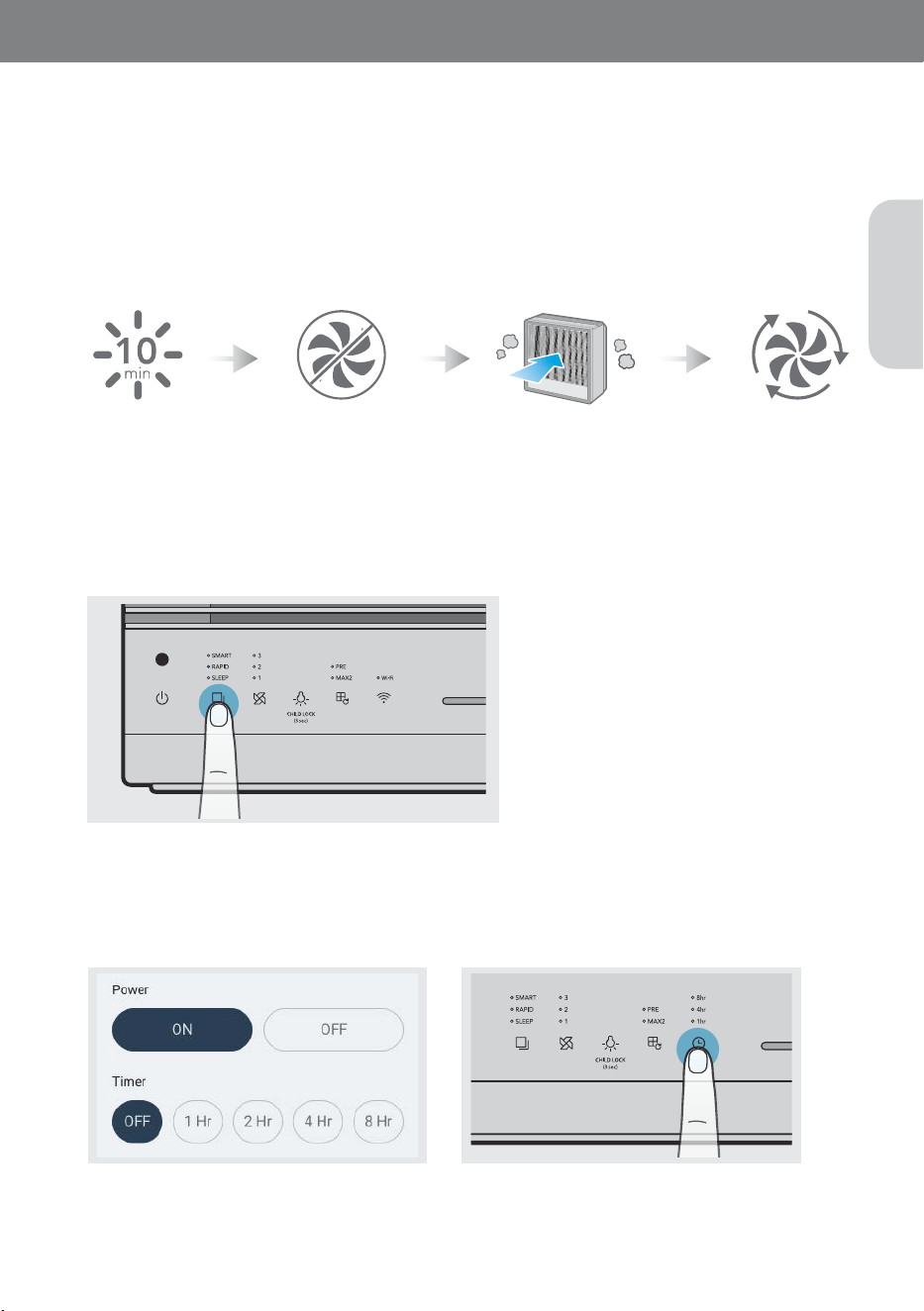
When set to Smart Mode, if the pollution level remains Good(Level 1) for more than 10 minutes, the fan stops
automatically to conserve energy. If the product detects air pollution, the fan will automatically restart again.
If the pollution level remains Good(Level 1) for more than 10 minutes in smart mode, the fan stops automatically
to save energy.
If the product detects air pollution, the fan will automatically restart. Also, if the ECO mode maintains for 30
minutes, the fan will restart as well. If the pollution level remains Good for more than 10 minutes after restarting,
the ECO mode will be activated again.
Setting the Timer
You can set the product to automatically turn off after an hour, 4 hours, or 8 hours. Use this feature to save energy
when you leave home or go to bed.
Rapid Mode
Press the [Mode] button to select rapid mode. When the air quality is maintained at level 1 for more than 5
minutes, it is switched to the smart mode. When the product continues to operate for more than a maximum of
60 minutes, it is switched to the smart mode.
- The maximum fan speed in the rapid mode is the same as level 3.
Fresh AirEnter Eco ModeDetecting Air Pollution
For 250S users, you can set the
timer and scheduler using Airme
ga
application.
Touch the [Timer] button until the
indicator light displays the desired
time.
Air quality indicator
This indicator displays the indoor air quality in
LED colors.
Good (blue) → Moderate (green) → Unhealthy
(yellow) → Very unhealthy (Red)
2
3
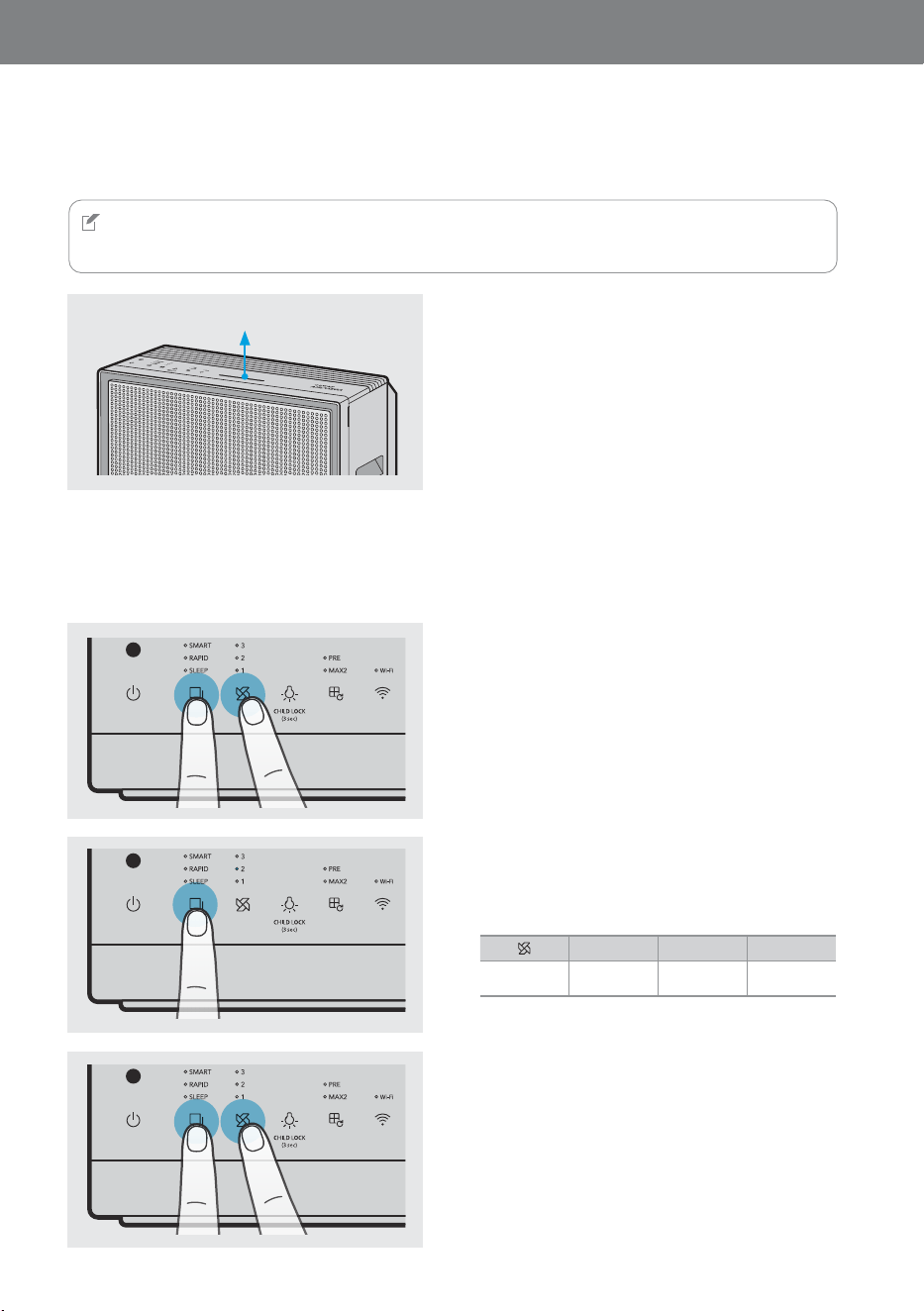
Press the [Mode] button to adjust it to the
desired sensitivity.The mode indicator
blinks as shown below once sensor
sensitivity has been selected.
Press the [Mode] button and the [Speed]
button at the same time for more than
about 2 seconds, the selected sensitivity
will be inputted and the product will start
operating normally.
· If the [Speed] button are not pressed for 10
seconds,the selected sensitivity of the sensor is
automatically entered.
123
SensitivitySensitiveNormal
Less
sensitive
Air quality indicator
16
04OPERATION
Checking the Air Quality
You can easily check the current air quality around the product using the air quality indicator on the front of the
product.
Adjusting the Sensor Sensitivity
You can adjust the pollution sensor's sensitivity.
NOTE
For 250S/250 users, you can also check the current air quality in the smart phone application.
1
While the product is operating, press the
[Mode] button and the [Speed] button at
the same time for more than 2 seconds.
The speed indicator blinks to display the
current sensor sensitivity level.
· Initial sensor sensitivity is at the normal level.
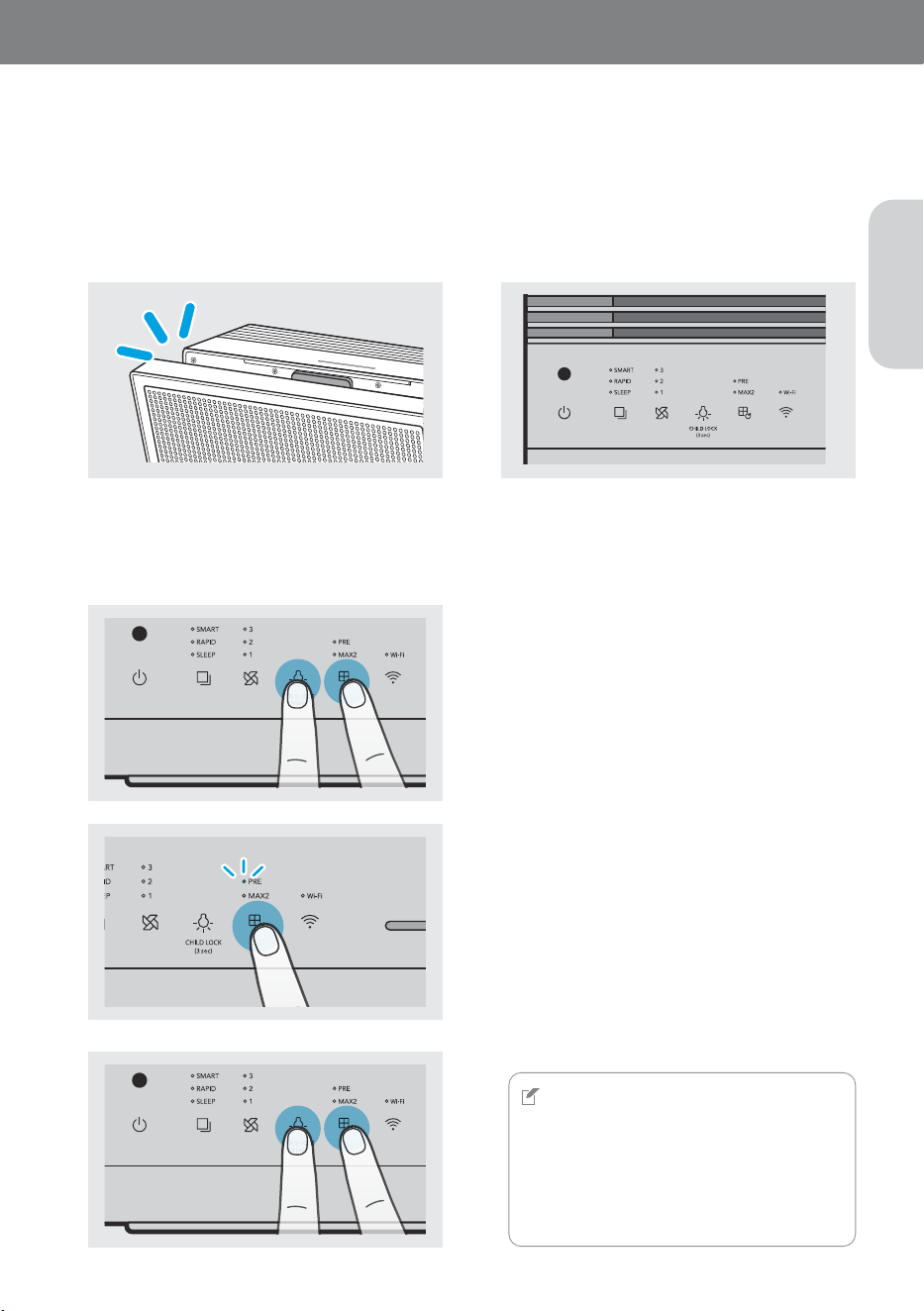
When the front cover is detected open for more than 2 seconds, all indicators will turn off and the
product stops all operation. When the front cover is detected closed for more than 1 second, the
product returns to the previous operation mode.
2
The pre-filter indicator will start blinking. Then
press the [Filter reset] button to select the filter
that needs to be replaced or cleaned. Also, if
you press the [Filter reset] button for more than
2 seconds, the selected filter option will reset.
· A filter is selected in the following order.
Pre-filter → max2 filter → pre-filter & max2 filter →
pre-filter
·
If you do not reset the filter and press the [Light]
button and the [Filter reset] button again at the same
time for about more than 2 seconds, or if you do not
press the [Mode] button or the [Filter reset] button
for 10 seconds, the filter is automatically canceled.
1
Press the [Filter reset] button and [Light]
button at the same time for more than 2
seconds.
NOTE
•
If you replaced or managed the filter before a filter
replacement alarm is displayed, reset the filter
replacement cycle using the user-selected filter
replacement cycle reset function.
•
Adjusting the sensitivity of air quality sensor and
resetting the user-selected filter replacement cycle
have the same entering and canceling method.
IndicatorsareIndicatorsare
turnedoturnedo
FlashFlash
17
EN
Cover Open Notification Display
When opening the cover while using the product
Reset The User-Selected Filter Replacement Cycle
This instruction is a guide for the next filter replacement maintenance. The filter replacement and cleaning
cycle selected by the user when the user replaces or cleans a filter by themselves before the filter replacement
notification is displayed.