“Plasmacluster” and “Device of a cluster of grapes” are
registered trademarks of Sharp Corporation in Japan,
Philippines and elsewhere.
AIR PURIFIER
with Humidifying Function
OPERATION MANUAL
ENGLISH
*
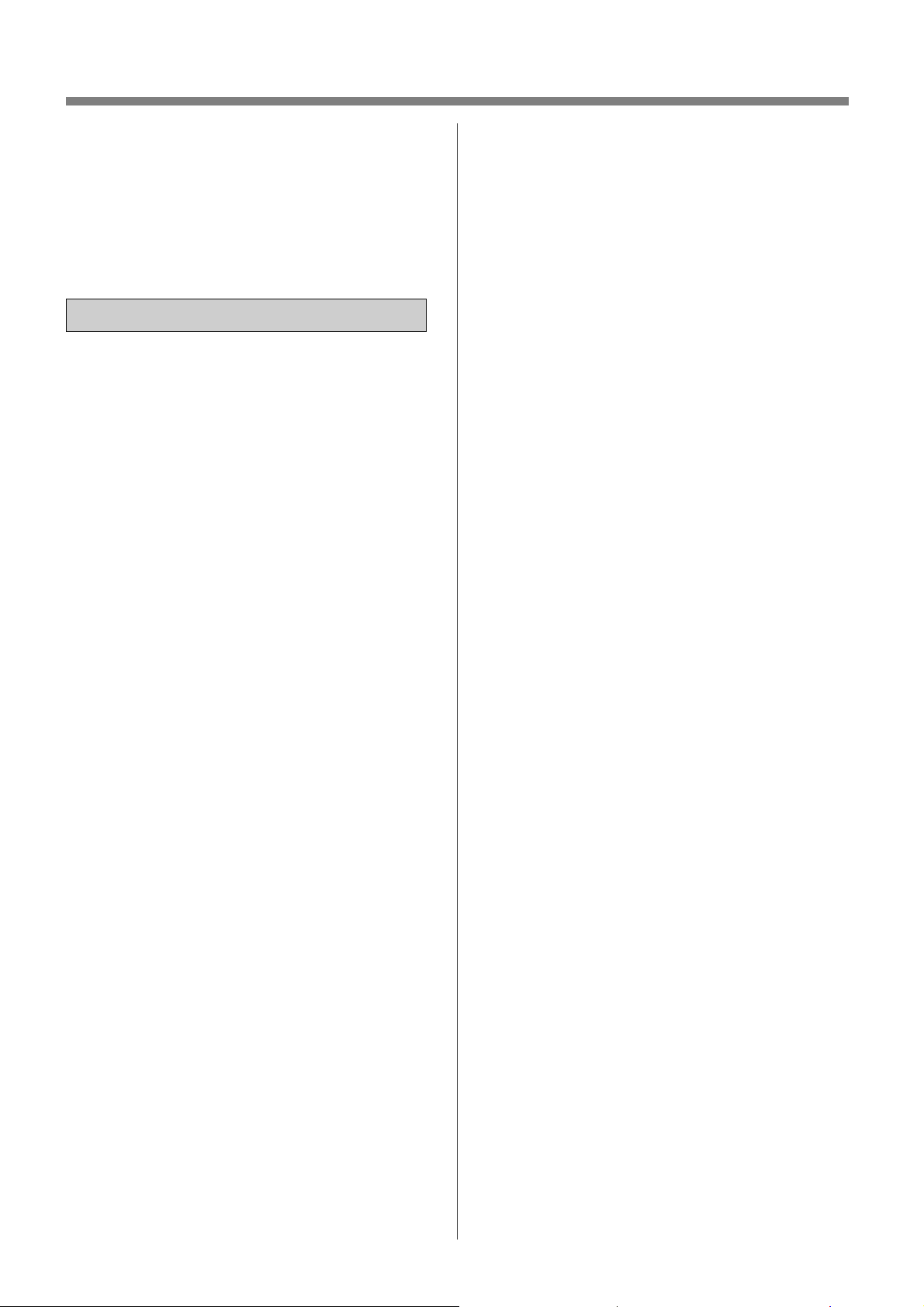
The number in this technology mark indicates an
approximate number of ions supplied into air of
1 cm
3
, which is measured around the center of a room
applicable floor area (at 1.2 m height above the floor)
when the product is placed close to a wall at the MED
mode setting.
PEMBERSIH UDARA
dengan Fungsi Melembap
MANUAL ARAHAN
Bahasa Melayu
+ѬӞ1*'Ү16Ӱ'Ө1*
0È</Ӑ&.+Ð1*.+ËFy
FKӭFQăQJWҥRҭP
7,ӂ1*9,ӊ7
ԅࡹࠩӓԖ֗
࣐҄ރЯ
Иކ
,17(//(&78$/3523(57<
5,*+76)257+,6352'8&7
.,1
.,1
Thank you for purchasing this SHARP Air Purifier.
Please read this manual carefully before using the product.
This manual should be kept in a safe place for handy reference.
ENGLISH
IMPORTANT SAFETY
INSTRUCTIONS ...................................... 2
PART NAMES .......................................... 6
PREPARATION ....................................... 9
OPERATION .......................................... 10
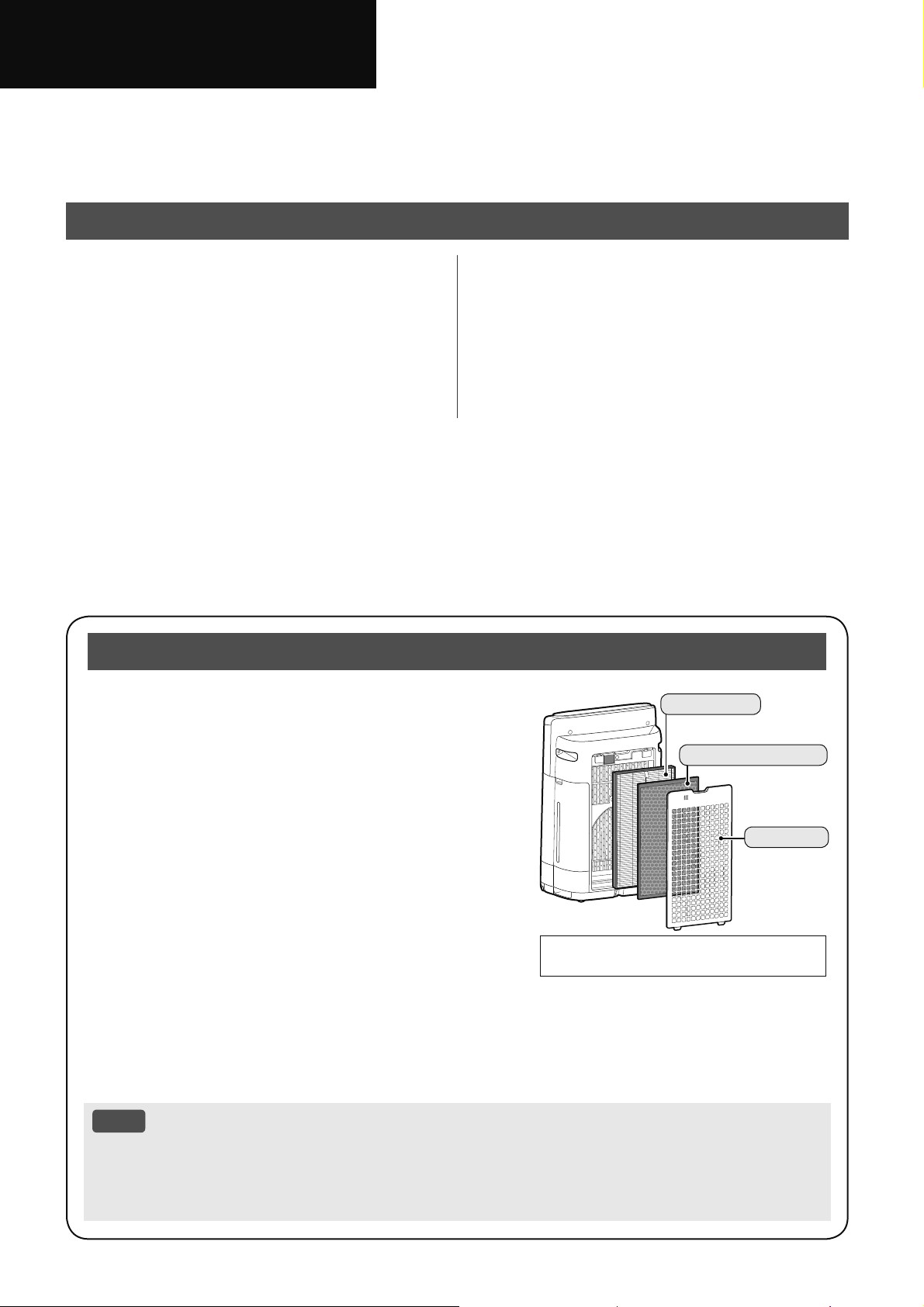
The air purifier draws in room air through the air inlet, circulates
it through a Pre-Filter, a Deodorizing Filter and a HEPA Filter
inside the product, and then discharges it through the air outlet.
The HEPA Filter can remove 99.97% of dust particles as small
as 0.3 microns that pass through the filter and also helps absorb
odors.
The Deodorizing Filter gradually absorbs odors as they pass
through the filter.
Some odors absorbed by the filters will break down over time,
causing additional odors. Depending on usage conditions, and
especially if the product is used in environments significantly
more severe than a normal household, these odors may become
noticeable sooner than expected. If these odors persist, replace
the filters.
When minerals in tap water adhere to the filters and become hard and white, they absorb odors in the room
that can cause the emission of an unpleasant odor when the Humidifying Filter is dry. (Varies depending on
water quality and other environmental factors.)
If this occurs, perform the Humidifying Filter maintenance. (Page 20)
NOTE
• The air purifier is designed to remove air-suspended dust and the odors.
The air purifier is not designed to remove harmful gases such as carbon monoxide contained in
cigarette smoke.
The air purifier may not completely remove an odor if the source of the odor is still present.
Please Read Before Operating Your Air Purifier
CONTENTS
•
The illustration in this instruction manual
is KI-N40.
HEPA Filter
Deodorizing Filter
Pre-Filter
HOW TO CHANGE VARIOUS
SETTINGS.............................................. 14
CARE AND MAINTENANCE ................ 18
TROUBLESHOOTING .......................... 24
SPECIFICATIONS ................................. 27
EN-1
ENGLISH
FEATURES
A unique Combination of Air Treatment Technologies
Triple Filtration System + Humidification + Plasmacluster
Plasmacluster
High Density Plasmacluster 25000
The higher the PCI density is, the more effective PCI has.
By emitting a balance of positive and negative ions, Plasmacluster air treatment is a natural
process.
Triple Filtration System + Humidification
TRAPS DUST
Pre-filter traps dust larger than approx 240 micron particles.
DECREASES ODORS
Deodorizing filter absorbs many common household odors.
REDUCES TINY DUST, POLLEN & MOLD
HEPA filter traps 99.97% of particles as small as 0.3 microns.
HUMIDIFIES
Controls humidity by sensing temperature and humidity automatically.
Unique Airflow
Powerful air suction and unique airflow quickly and efficiently collect dust and other particles.
Faster airflow at a 20º angle causes dust to
be collected at lower levels in the room for
more effective cleaning.
Plasmacluster can remove static electricity
and can thus prevent dust from attaching to
walls and other surfaces.
Wi-Fi Function
• Confirms that the air quality of the room has become clean visually.
• Controls the product through smart devices such as a remote control.
• Proposes optimal timing for filter exchange.
EN-2
IMPORTANT SAFETY INSTRUCTIONS
READ AND SAVE THESE INSTRUCTIONS
before using this product.
When using electrical appliances, basic
safety precautions should always be
followed to reduce the risk of fire, electric
shock, and injury to persons, including the
following:
WARNING
1. Read all instructions before using the
product.
2. Use the product only for intended
household use as described in
this manual. Any other use not
recommended by the manufacturer may
cause fire, electric shock, or injury to
persons.
3. This appliance is not intended for use
by persons (including children) with
reduced physical, sensory or mental
capabilities, or lack of experience
and knowledge, unless they have
been given supervision or instruction
concerning use of the appliance by a
person responsible for their safety.
Children should be supervised to ensure
they do not play with the appliance.
4. Never operate the product if the power
cord or plug is damaged or the product
is malfunctioning or damaged.
5. If the power cord or plug is damaged, it
must be replaced by the manufacturer,
its service agent, a Sharp authorized
Service Center or similarly qualified
persons in order to avoid a hazard.
Contact the nearest Service Center for
any problems, adjustments, or repairs.
6. Do not repair or disassemble the
product yourself.
7. Follow the instructions “a” to “h” below
for the power cord or plug. If not, a short
circuit, excessive heat, electric shock or
fire may result.
a. Use only AC 220-240 volt outlet.
b. Do not use the product if the power
cord or plug is damaged or the
connection to the wall outlet is loose
or damaged.
c. Always turn off the product before
unplugging the power plug.
d. Always unplug the product in the
following cases.
• Before moving the product.
• When replacing the filter. (Even
when opening the Back Panel.)
• When refilling water.
• Before maintenance of the product.
• When the product is not in use.
e. Be sure to pull the power plug and
not the power cord.
f. Do not touch the power plug with wet
hands when inserting or unplugging
from the wall outlet.
g. Periodically remove dust from the
power plug.
h. Always observe the following so as
to not damage the power cord.
• Do not damage cord with Caster
Wheels when moving the product.
• Do not run cord under carpeting.
Do not cover the power cord with
throw rugs, runners, or similar
coverings.
• Do not put heavy things on the
power cord or pinch it.
• Do not run the power cord under
furniture or other appliances.
• Run the power cord away from
traffic area and where it will not be
tripped over.
8. Do not use this product near gas
appliances, fire places, candle fire,
incense or sparks from lit cigarettes.
When the product is operated with gas
appliances in the same room ventilate
a room periodically, otherwise it may
cause carbon monoxide poisoning.
9. Do not operate the product in a room
with flammable gas, such as oily
residue or chemical fumes.
10. Do not expose the product to rain, or
use near water, in a bathroom, laundry
area or other damp location.
11. Do not insert fingers or foreign objects
into the air inlets or air outlets.
12. Do not look into the air outlets.
13. Do not drink the water in the Water Tank
or Humidifying Tray.
14. Replace the water in the Water Tank
daily with fresh tap water, and regularly
clean the Water Tank and Humidifying
Tray.
When the product is not in use, dispose
of the water in the Water Tank and
Humidifying Tray. Leaving water in the
EN-3
ENGLISH
Water Tank or Humidifying Tray can
cause mold, bacteria, and bad odors.
In rare cases, such bacteria can be a
health hazard.
NOTE
- Radio or TV Interference -
If the product should cause interference to
radio or television reception, try to correct
the interference by one or more of the
following measures:
1. Reorient or relocate the receiving
antenna.
2. Increase the separation between the
product and radio/TV receiver.
3. Connect the product into an outlet on
a circuit different from that to which the
receiver is connected.
4. Consult the dealer or an experienced
radio/TV technician for help.
CAUTIONS CONCERNING
INSTALLATION
1. Place the product on a level and stable
surface with sufficient air circulation.
When placed on heavy carpet, the
product may vibrate slightly.
Place the product on a level surface
to avoid water leakage from the Water
Tank and Humidifying Tray.
2. Avoid a location where the sensors are
exposed to direct breeze or draft if the
product has sensors. The product may
not operate properly.
3. Avoid use in locations where furniture,
fabrics, or other items may come in
contact with and restrict the air inlets
and/or outlets.
4. Avoid locations exposed to direct
sunlight. It may cause the product to
change shape or color.
5. Avoid locations where the product is
exposed to condensation or drastic
changes in temperature. Use under
appropriate conditions between
0ºC – 35ºC.
6. Avoid use in locations where greasy
or oily smoke is generated (such as
in a kitchen, etc.). The Main Body
surface may crack and the sensors may
malfunction as a result.
7. The dust collecting ability of the product
is effective even when the product
is up to 3 cm from the wall, but the
surrounding walls or floor may get dirty.
Please place the product at a distance
from the wall.
The wall directly behind the air outlets
and the floor or rug on which the
product is placed may become dirty
over time. When using the product for
an extended period of time at the same
location, periodically clean the walls, the
floor or the rug.
8. Do not place the product near or on
hot objects, such as stoves or heaters,
or where it may come into contact with
steam.
CAUTIONS CONCERNING
THE FILTER
1. Follow the instructions in this manual
for filter installation and maintenance
(Page 9, 22).
2. Take out the filters from the plastic bag
before placing the filters in the Main
Body.
3. Do not operate the product without the
filters properly installed.
4. Do not wash and reuse the HEPA Filter
and the Deodorizing Filter.
Washing will not improve filter
performance and can also cause
electric shock or operating malfunctions.
5. Do not operate the product in a room
where aerosol insecticides are present.
It may cause the insecticide odor to
remain in the product and be emitted
from the air outlets.
CAUTIONS CONCERNING
OPERATION
1. Do not block the air inlets or air outlets.
2. Always operate the product in an
upright position.
3. When carrying the product, first remove
the Water Tank and Humidifying Tray
so as not to spill the water, and then
hold the product by the handles on both
sides.
4. Always lift up the product when moving
it on easily damaged flooring, an
uneven surface, or carpet.
EN-4
5.
Do not change the direction of the
product while moving using the Caster
Wheels.
6. When moving the product by its
Caster Wheels, move it slowly and in a
horizontal direction.
7. Do not operate the product without the
Water Tank or Humidifying Tray properly
installed.
8. Be careful not to catch your fingers
when removing or installing the Water
Tank .
9. When refilling the Water Tank, make
sure no water leaks from the Water
Tank .
10. Be sure to wipe off any excess water on
the outside of the Water Tank.
11. Do not use hot water (40ºC or more),
chemical agents, aromatic substances,
dirty water, or other damaging
substances. Doing so can deform the
product or cause it to malfunction.
12. Use only fresh tap water. Using other
water sources risks the growth of mold,
fungi, or bacteria.
13. Do not shake the Water Tank while
holding the Tank Handle.
CAUTIONS CONCERNING
MAINTENANCE
1. Follow the instructions in this manual
for maintenance (Page 18 - 23).
2. Clean the exterior with a soft cloth only.
3. Do not use detergents other than what
is mentioned in this manual (Page 19,
21). Do not use volatile fluids and/or
detergents.
The Main Body surface may be
damaged or cracked with strong
corrosive cleansers, benzine, paint
thinner, polishing powder or grease.
The Humidifying Tray may experience
deformation, tarnishing, cracking (water
leakage). In addition, the sensors may
malfunction as a result if the product
has sensors.
4. Do not scrub the Back Panel (Pre-Filter)
hard during its maintenance.
5. The frequency of descaling maintenance
will depend on the hardness of and the
impurities in the water that you use;
the harder the water the more often
descaling will be necessary.
6. Do not remove the Humidifier Float and
the Roller. If the Humidifier Float and
the Roller come off, refer to page 21.
7. When replacing filters or any
accessories, use specified parts in this
manual.
EN-5
ENGLISH
SAFETY / PRECAUTIONS OF THE Wi-Fi FUNCTION
WARNING
When remotely controlling the air
purifier
In case of remote operation from outside,
you may not be able to check the air
purifier's current condition or the area
around it and the situation concerning
anyone possibly staying there, so please
adequately confirm safety before use.
1. Make sure the electric plug is fully
inserted into a power socket, and there
is no dust on the plug or in the socket
hole. (It may cause heat, combustion,
fire, etc., due to poor contact or contact
failure.)
2. Make sure beforehand to check the
ambient environment of the product,
because the air flow from the product
may cause unexpected phenomenon
(such as unstable items falling down),
and this may result in fires, wounds,
and defacement of house belongings.
CAUTION FOR USE
1. Agreement with “Terms of Service” is
required to use App.
2. Ensure that the App is up to date.
3. Screens and illustrations in this book
are for explanation, there are some
differences compared to the actual
product.
4. In the case of bad connection, the
App may not be able to control the air
purifier. The current operation of the air
purifier may not be accurately reflected
on the App.
5. Locking smart device display is
recommended to avoid incorrect
operation.
6. Communication charges will occur by the
download and use of the App.
CAUTION FOR Wi-Fi
Caution for usage of electrical wave
1. Usage of the application is not
guaranteed under the following
environment:
a. Near Bluetooth
®
wireless
communications device using the
same frequency (2.4GHz) as this
product.
*
The Bluetooth
®
word mark is a registered
trademark owned by Bluetooth SIG,. Inc.
b. Near a product which emits magnetic
field. (e.g. microwave oven)
c. Near a place with static electricity.
d. Near a place where radio disturbance
occurs.
e. Near other wireless communications
devices.
2. Wireless connection and performance
cannot be guaranteed for all routers or
environmental conditions.
At the following places, Wi-Fi
connection might be unstable:
a. Inside of a building made with
concrete, reinforcing steel or metal.
b. Near an obstruction.
c. Near wireless communications
devices using the same frequency.
3. Wi-Fi of this product corresponds to
channel 1 - 13. It’s not available to
communicate with the routers set up
with other channels.
Caution for personal information
(related to Security)
1. Using Wi-Fi device has the possibility
of interception regardless of the secret
code setting.
2. Make sure to use the network under
your management.
3. Initialize the device when sold, disposed
of or handed over from/to a third person.
See page 16 on how to initialize.
EN-6
PART NAMES
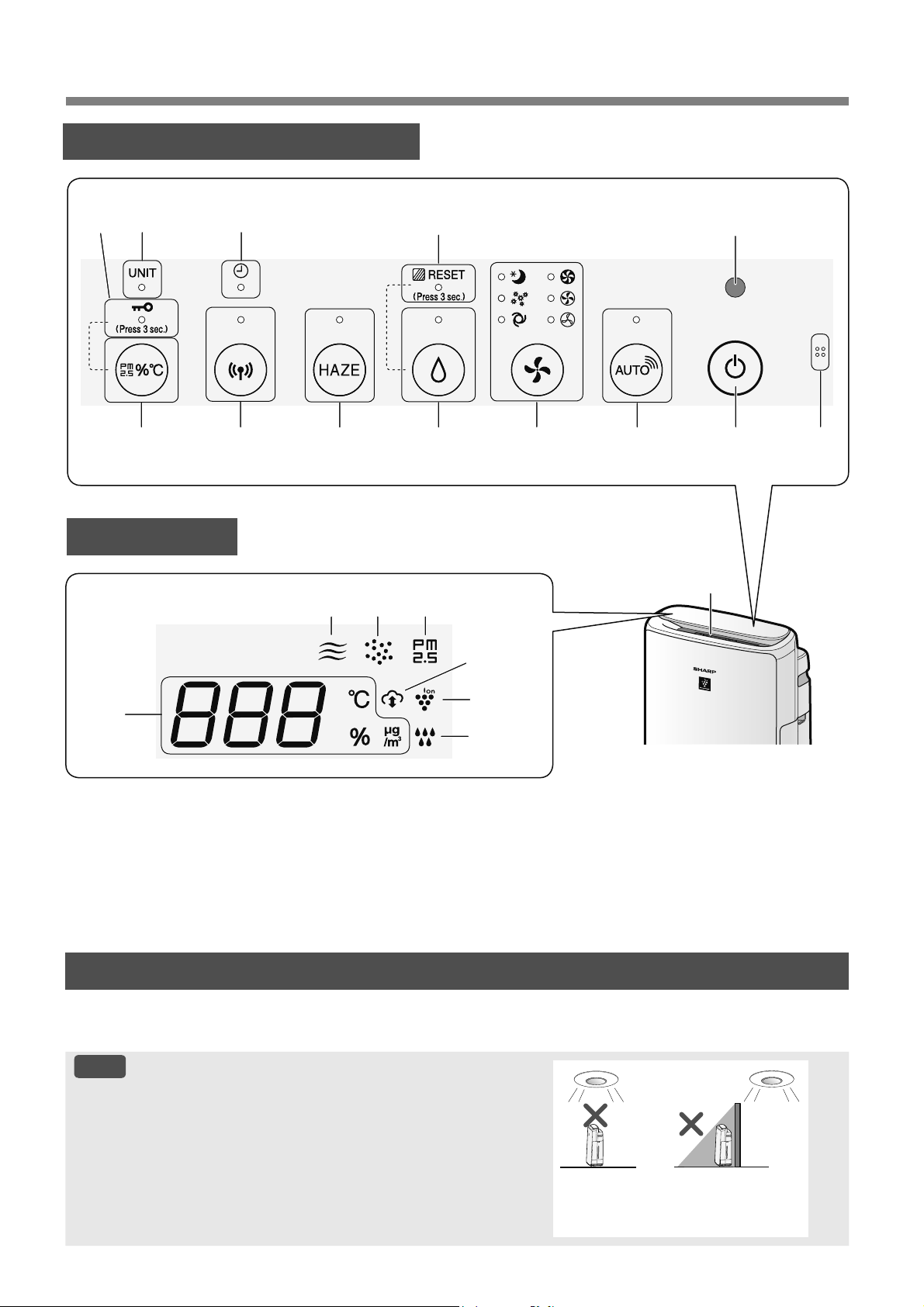
OPERATION PANEL
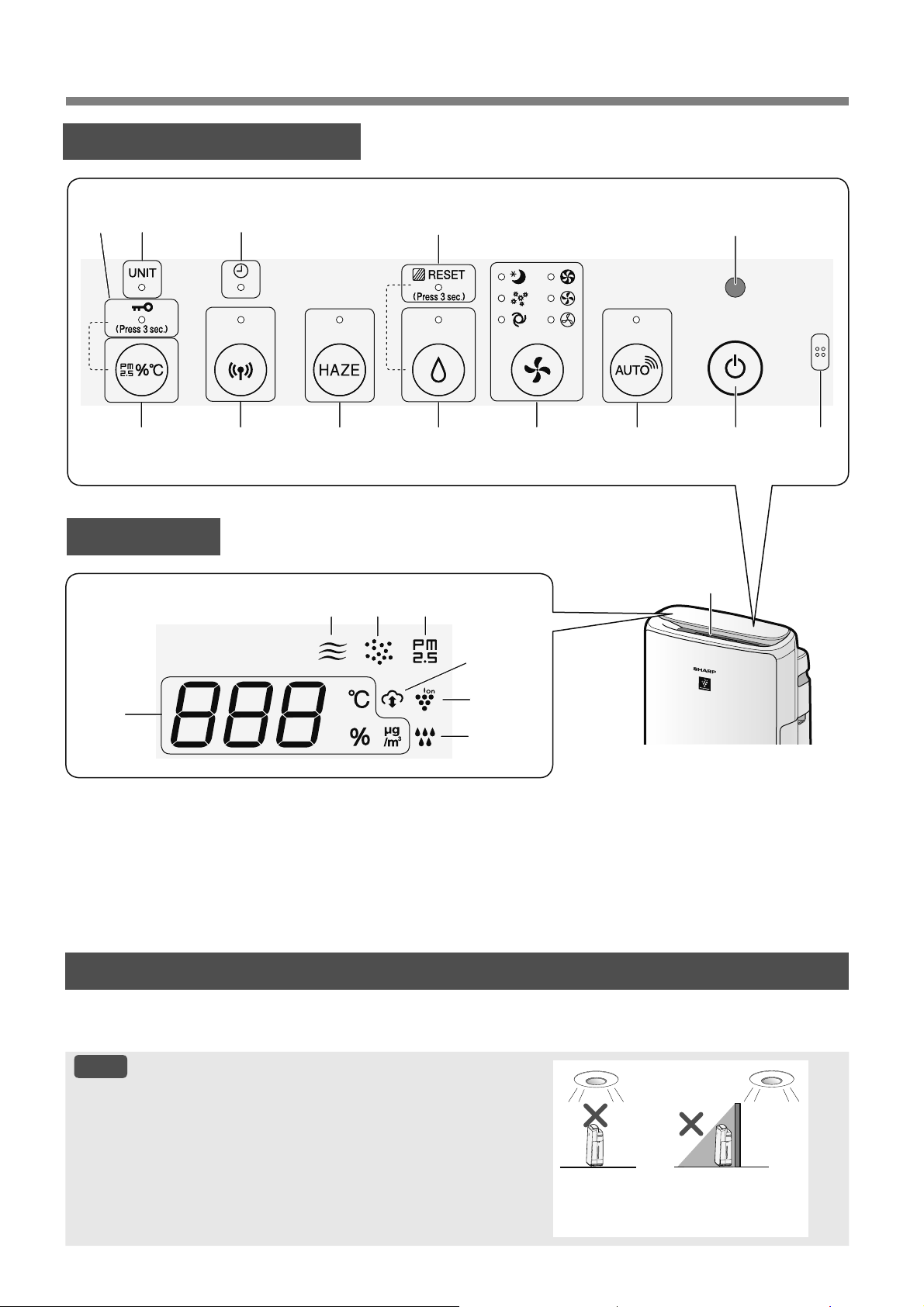
LIGHT SENSOR
When the Light Control (Display Brightness) is set to “Auto”, the Display and Cleanliness Indicator will
automatically switch ON or OFF based on room brightness. (Page 15)
NOTE
Detection range of Light Sensor
Do not install the product in the following places. The Light
Sensor may not sense correctly.
Directly
under a
light fixture.
In the shadow
14
18456911
713 2
17
20
19
3
1516
12
DISPLAY
*3
10
*1
21
*2
18
*1
EN-7
ENGLISH
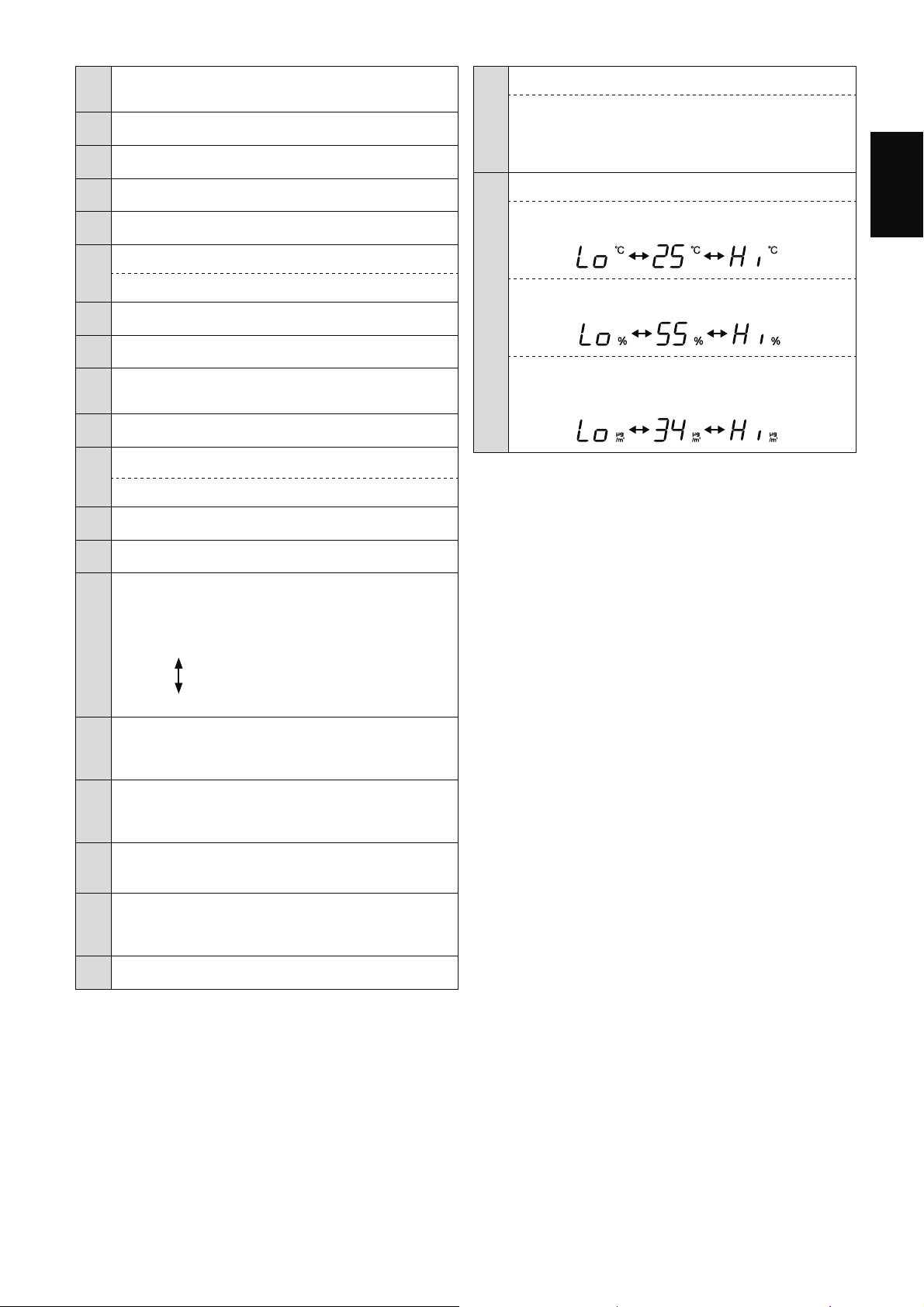
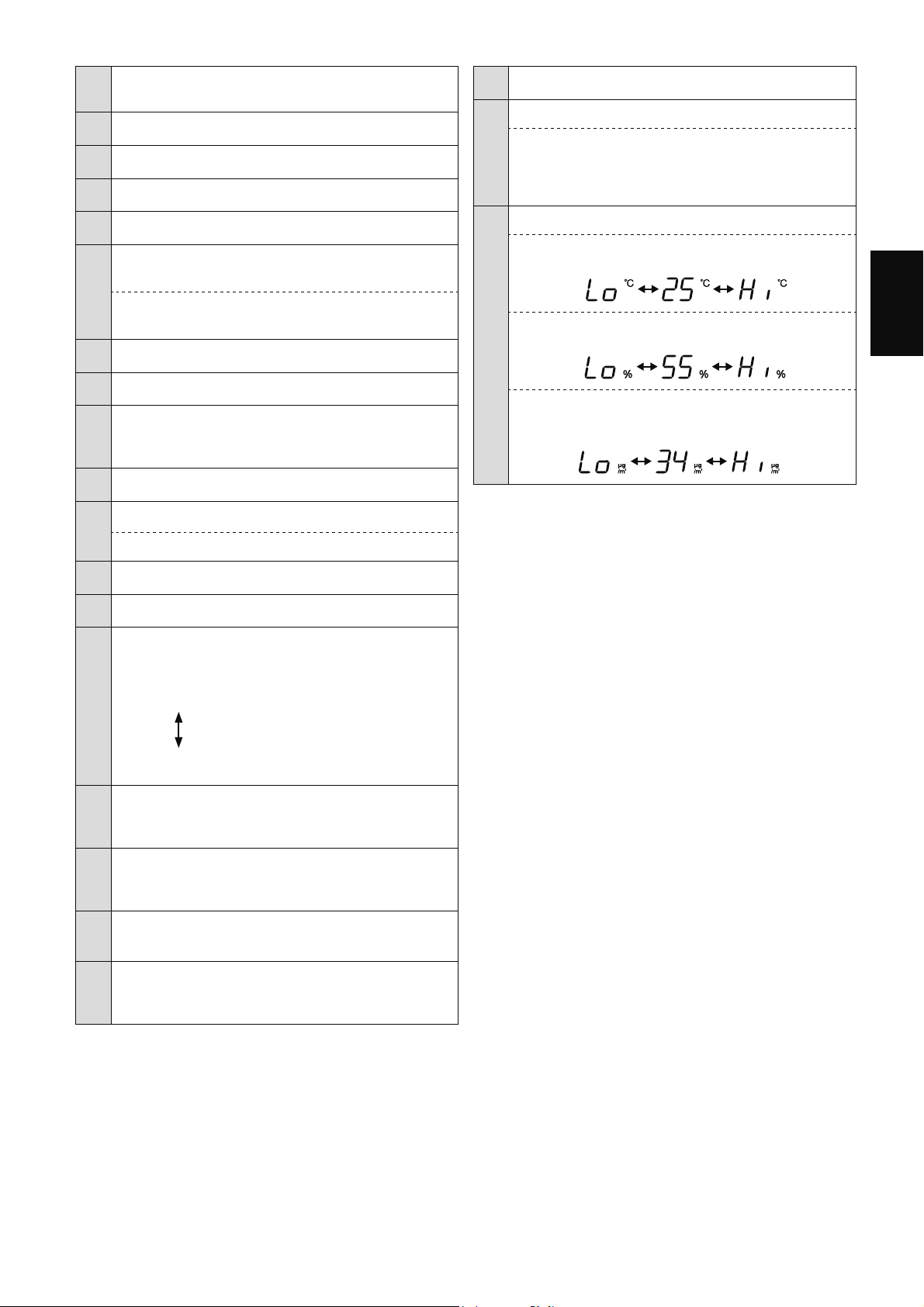
1
Sensor
(Internal)
Odor / Temperature / Humidity
2 Light Sensor
3 Power ON/OFF Button
4 SHARP COCORO AIR Button, Lamp
(White)
5 Mode Button, Lamps
(White)
6
Humidify ON/OFF Button, Lamp
(White)
Filter Reset Button
(Press 3 sec.)
*3
7 Filter Maintenance Lamp
(Orange)
8 HAZE Button, Lamp
(White)
9
Wi-Fi Button, Lamp
(White)
Illuminates when air purifier is connected to a router.
10 Timer Lamp
(White)
*1
11
Switching Display Button
Child-Lock Button
(Press 3 sec.)
*3
12 Child-Lock Lamp
(White)
13 Unit Replacement Lamp
(Red)
14
Cleanliness Indicator
Indicates the air purity of the room in 5 levels with
color changes.
Clean
Blue
Yellow (Flashing)
Impure
Red (Flashing fast)
15
PM2.5 Indicator
(White)
Indicates the Sensitive Dust Sensor detects
microscopic dust.
16
Dust Indicator
(White)
Indicates the Sensitive Dust Sensor detects usual
dust.
17
Odor Indicator
(White)
Indicates the Odor Sensor detects odors.
18
Cloud Service Indicator
(White)
*1
Illuminates when air purifier is connected to Sharp's
cloud service.
19 Plasmacluster Ion Indicator
(Blue)
20
Humidifying Indicator
White:
Humidify ON
OFF:
Humidify OFF
Red
(Flashing)
:
the product needs water
21
Display
*2
•
Temperature
Temperature 0
o
C to 50
o
C is displayed.
51
o
C
or more
-1
o
C
or less
•
Humidity
Humidity 25% to 75% is displayed.
24%
or less
76%
or more
•
PM2.5 Concentration
*4
30ȝJP
3
(micrograms per cubic meter air)
WRȝJP
3
is displayed.
ȝJP
3
or more
ȝJP
3
or less
*1: The lamps of No.10 and 18 light up only when using the
App.
*2: The displayed numbers are approximate.
*3: Press and hold 3 seconds or longer.
*4: Particulate matter, particles with diameter of size 2.5
micrometers or less.
EN-8
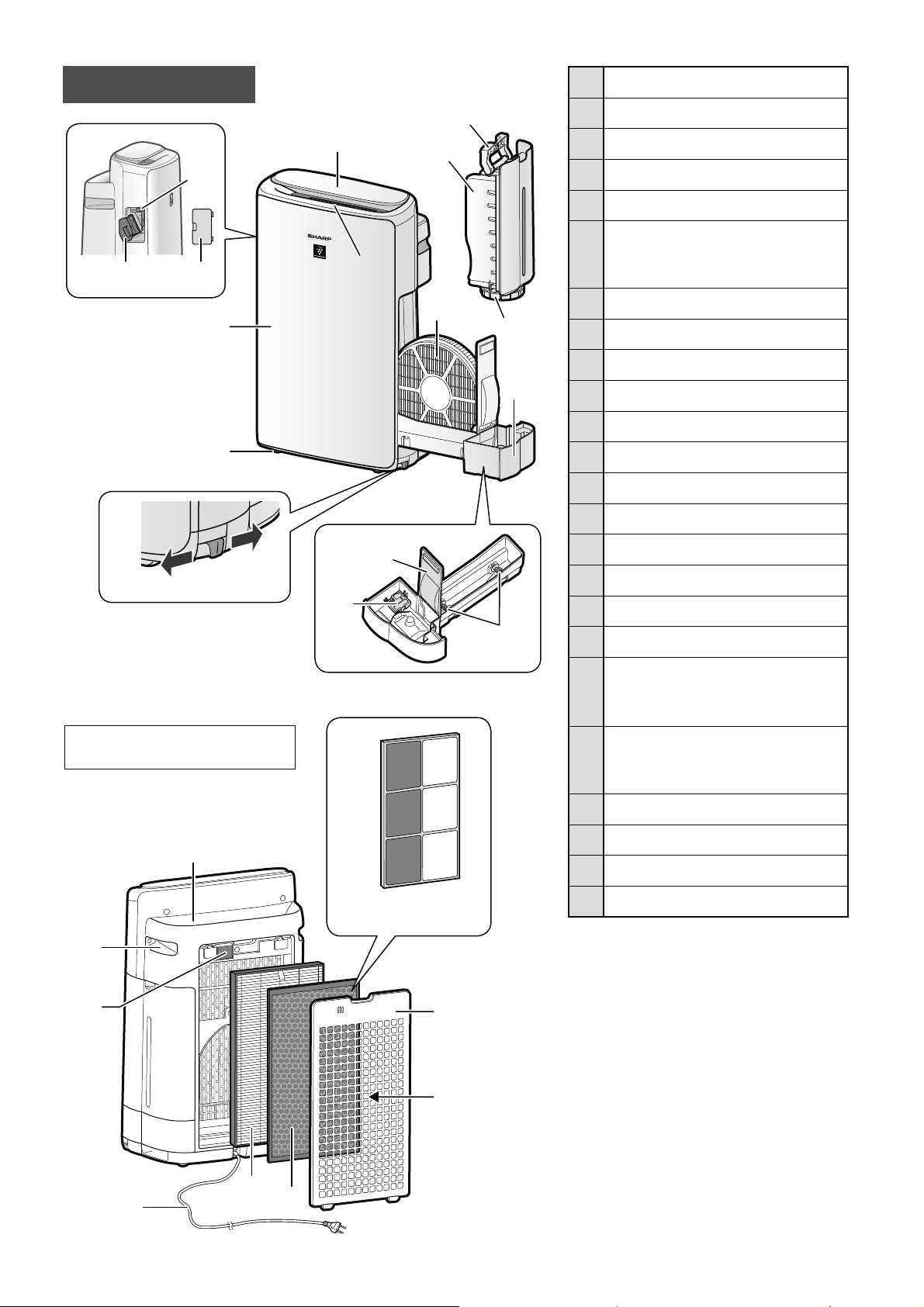
1 Operation Panel / Display
2 Air Outlet
(Front)
3 Main Body
4 Caster Wheels (4 Locations)
5 Caster Stopper
(Right & Left)
6
Unit* Holder
(Plasmacluster Ion Generating
Unit)
7 Unit* Cleaning Brush
8 Unit* Cover
9 Tank Handle
10 Water Tank
11 Tank Cap
12 Humidifying Filter
13 Humidifying Tray
14 Tray Panel
15 Humidifier Float
16 Roller
17 Air Outlet
(Back)
18 Handle
(2 Locations)
19
Sensor Filter /
Sensor
(Internal)
Sensitive Dust
20
Power Cord, Power Plug
(Shape of power plug depends
on country.)
21 HEPA Filter
22 Deodorizing Filter
23 Back Panel
24 Air Inlet
* The Unit refers to Plasmacluster Ion
Generating Unit. (The same as below.)
14
15
16
Unlocked
Locked
5
6
7
8
2
1
3
4
9
10
11
13
12
17
18
20
21
22
23
24
19
• The illustration in this
instruction manual is KI-N40.
(Only KI-N50)
22
MAIN BODY
EN-9
ENGLISH
PREPARATION
FILTER INSTALLATION
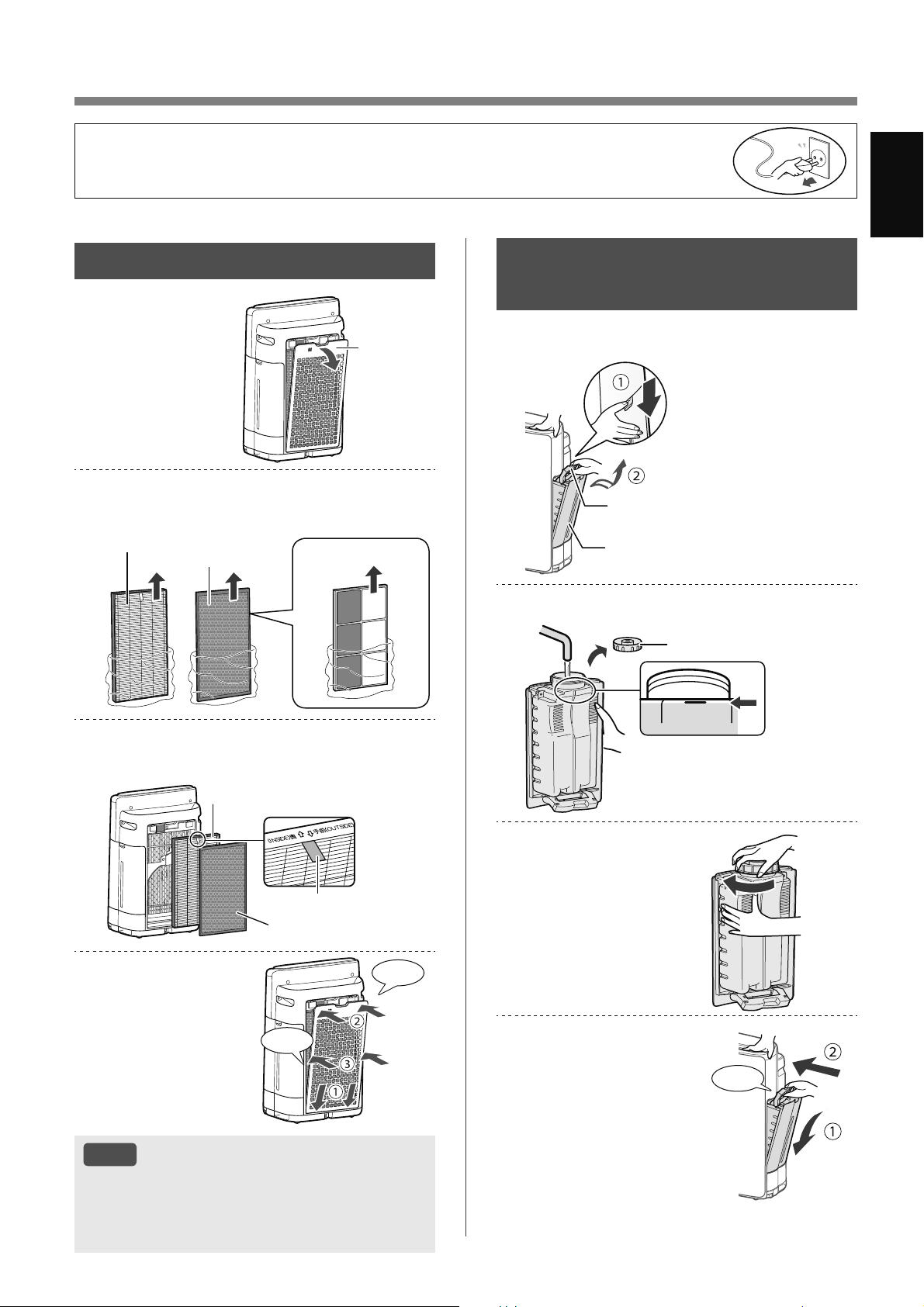
1.
Remove the
Back Panel.
Back Panel
2.
Take out the filters from the plastic
bag.
HEPA Filter
Deodorizing
Filter
(Only KI-N50)
3.
Install the filters in the correct order
as shown.
HEPA Filter
Deodorizing Filter
Tag
4.
Install the Back
Panel.
Click
Click
NOTE
• It is recommended that you note down the
date when the filters were replaced for future
reference.
• Do not operate the product without the filters.
• To maintain the quality of the filter, it is installed in the product and packaged in a plastic
bag.
• Be sure to stop operation and unplug the product before filter installation or replacement.
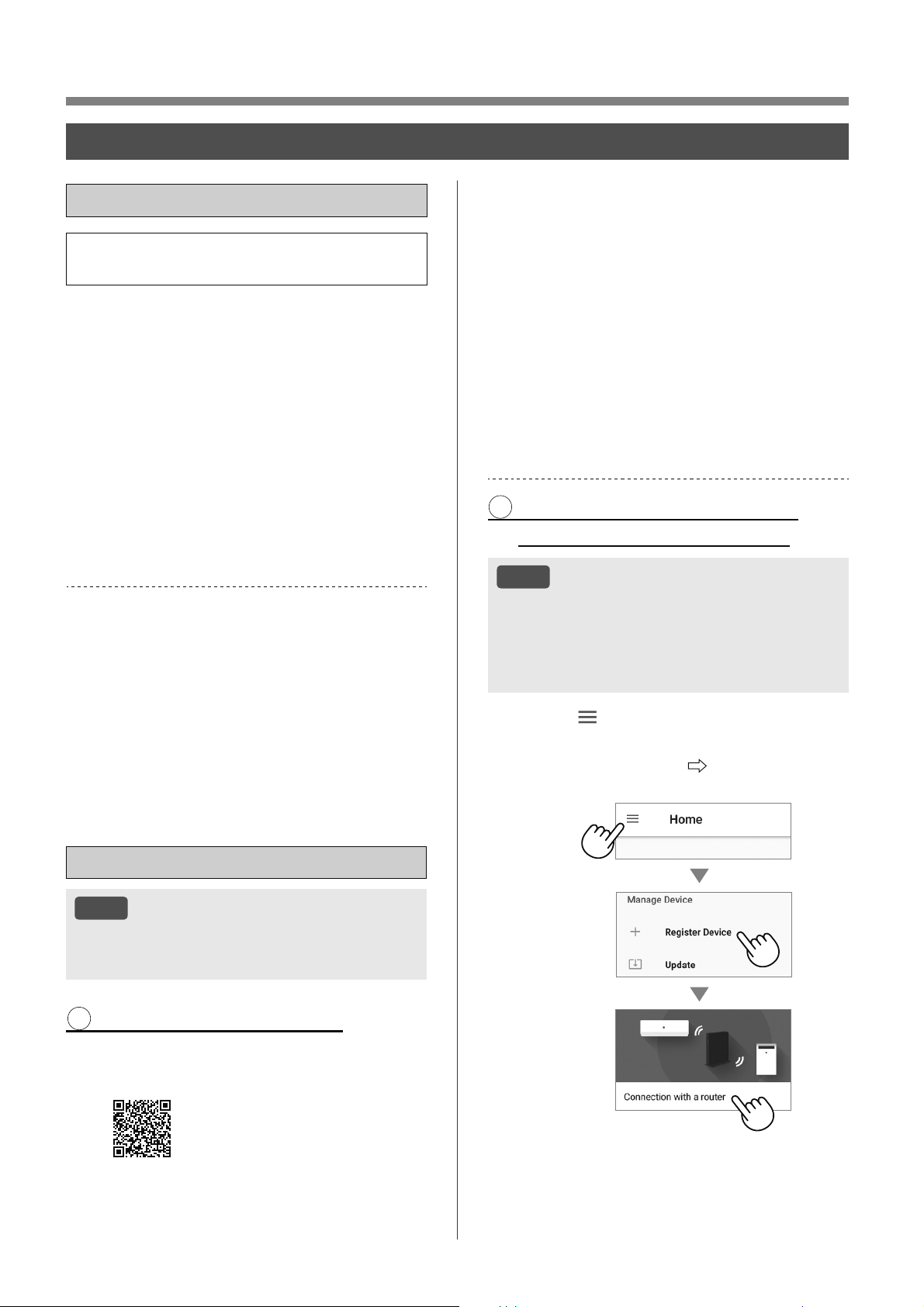
REFILLING THE WATER
TANK
1.
Remove the Water Tank.
Tank Handle
Water Tank
2.
Fill the Water Tank with the tap water.
満水
FULL
Tank Cap
3.
To prevent leaks,
securely tighten the
Tank Cap.
4.
Install the Water
Tank.
Click
EN-10
OPERATION
Wi-Fi SETTINGS
BEFORE YOU BEGIN
• By connecting your air purifier with your smart
device, you can enjoy greater convenience.
Ensure your smart device is connected to a
2.4 GHz Wi-Fi Network.
Wi-Fi Protected Setup (WPS) Access Point
(Router)
• The recommended encryption method is WPA2
(AES).
Ensure your smart device meets minimum
software requirements (as of October 2022) :
• Smartphones / tablets of Android 8 or later
• iPhones, iPod touch, iPads of iOS 12 or later
Product Wi-Fi specifications
• Wireless LAN: IEEE802.11b/g/n
• Frequency range: 2.4GHz frequency band
Trademarks
•
“Wi-Fi
®
” is a registered trademark of Wi-Fi Alliance
®
.
•
“Android” is the trademark of Google Inc.
•
“iPhone”, “iPod touch”, “iPad” are the registered
trademarks or trademarks of Apple Inc.
•
The other company names, corporate names, product
names mentioned in the handling instructions are
trademarks and registered trademarks of each
company.
INITIAL SET UP
NOTE
• When pairing the smart device to the air
purifier, please ensure they are both connected
to the same router.
1 DOWNLOAD & SIGN UP
1.
Install the designated App in your
smart device.
•
Available to download from the
Apple Store or Google Play.
https://cboard.cloudlabs.sharp.co.jp/smartapp_asean/
download/air/
2.
Connect your smart device to the
router and launch the App.
Follow instructions on the App.
i. Review the “Terms of Service”.
ii. Sign in using your Sharp account
(SHARP ID).
•
If you do not have a SHARP ID, please
register to create a SHARP ID.
iii. Enter a name for your smart
device.
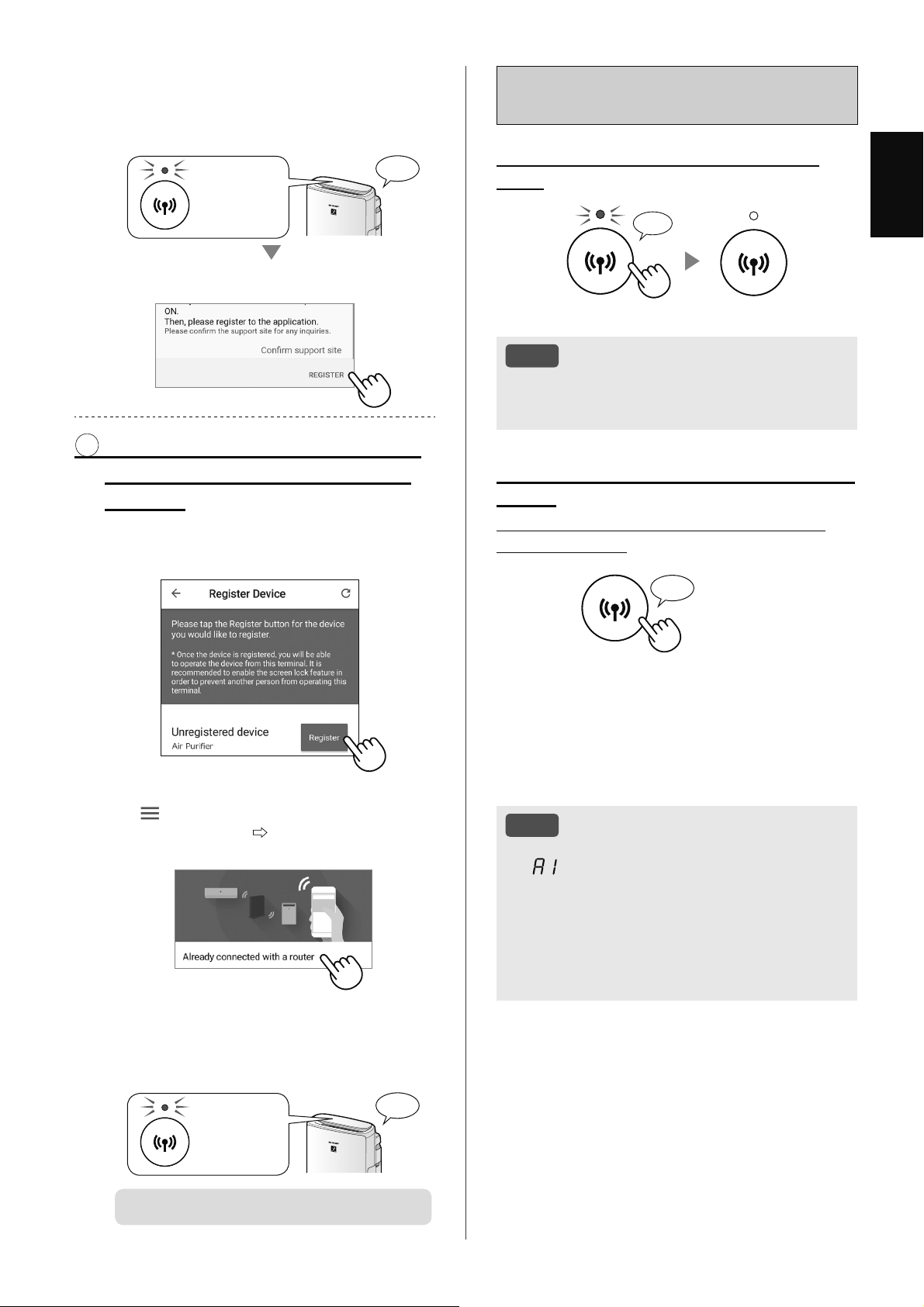
2 CONNECTION OF THE AIR
PURIFIER AND A ROUTER
NOTE
• If you have stealth settings or MAC filtering
settings on the router, please cancel them.
• The product network ID is displayed as
“AP-SHARP-XX” (where XX is a 2-digit number
below the product MAC address).
1.
Tap “ ” at the upper left part of
the “Home” screen, and select
“Register Device”
“Connection
with a router”.
EN-11
ENGLISH
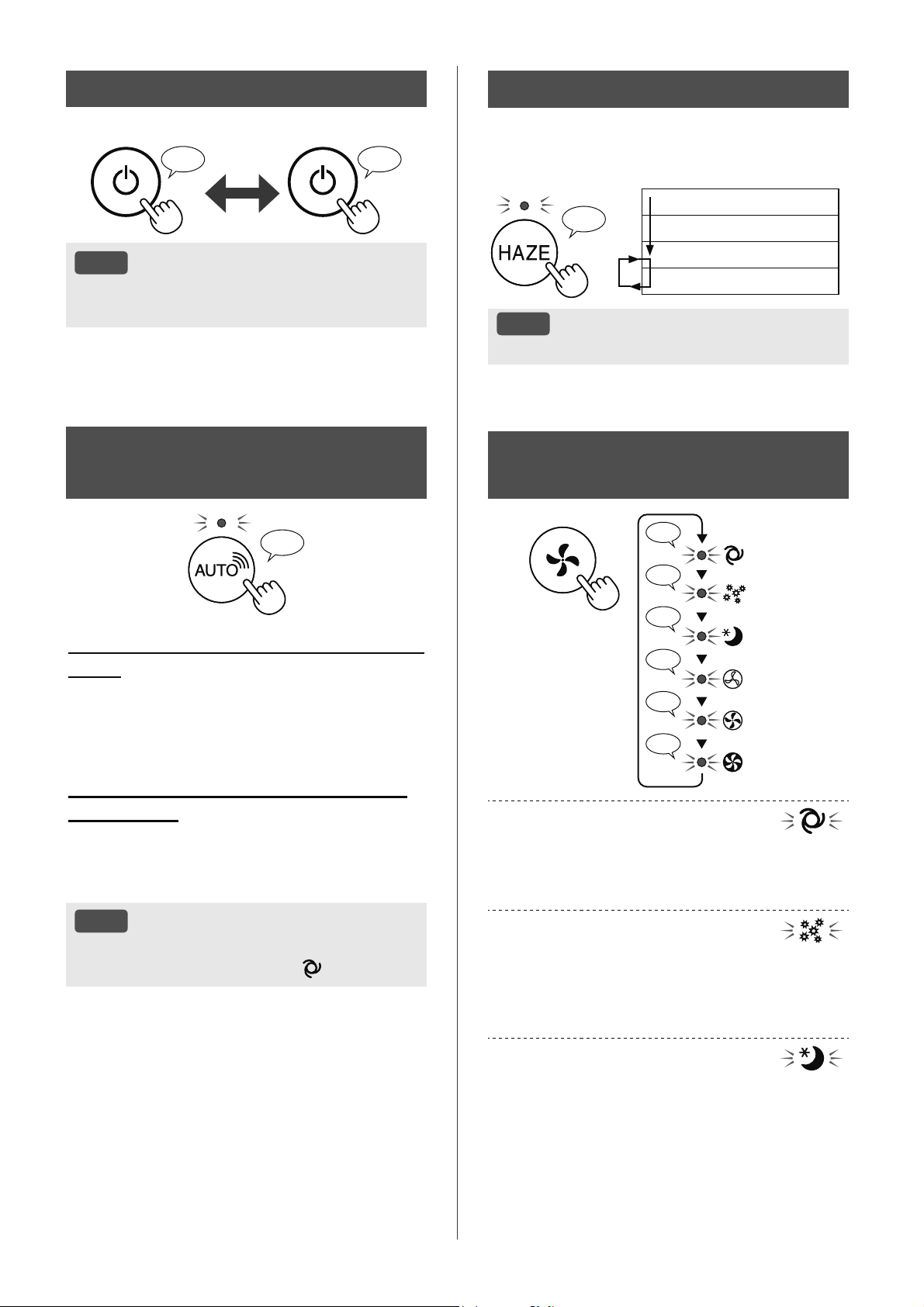
How to set Wi-Fi ON / OFF after
completing the INITIAL SET UP
If you would like to turn the Wi-Fi
OFF:
Press for 3 sec.
♪
〜
NOTE
• Turning the Wi-Fi off will result in not being able
to control the air purifier with the designated
App.
If you would like to turn the Wi-Fi ON
again:
(How to restore the Wi-Fi connection to the
original network.)
Press
for 3 sec.
♪
The Wi-Fi Lamp will flash after you press the
Wi-Fi Button. And within about 3 minutes, you will
hear four short beeps. Some time after this beep
sounds, the Wi-Fi Lamp lights up and the Wi-Fi
connection will be restored to the original network.
The designated App can now be used again to
control the Air Purifier.
NOTE
• Wi-Fi ON / OFF can also be set from
“
: Wi-Fi adapter ON/OFF”.
(Page 14, 16)
In this case, Wi-Fi connection with the router
will be automatically restored.
• Reconnection to the Wireless Router may take
a few minutes to complete, after turning Wi-Fi
on again.
2.
Follow instructions on the App.
• If the Wi-Fi Lamp lights up after the
notification sound, the connection is
successfully completed.
Light up
♪
Tap “REGISTER”.
3 CONNECTION BETWEEN THE
AIR PURIFIER AND A SMART
DEVICE
1.
Tap “Register” for the air purifier
you would like to register.
(MODEL NAME)
• If you do not see the screen above, tap
“
” at the “Home” screen, and select
“Register Device”
“Already connected
with a router”.
2.
Follow instructions on the App.
• If the Wi-Fi Lamp lights up after the
notification sound, the connection is
successfully completed.
Light up
♪
The INITIAL SET UP is completed.
EN-12
START/STOP
START STOP
♪ ♪
〜
NOTE
• When the product starts operating the operation
starts in the previous mode it was operated in.
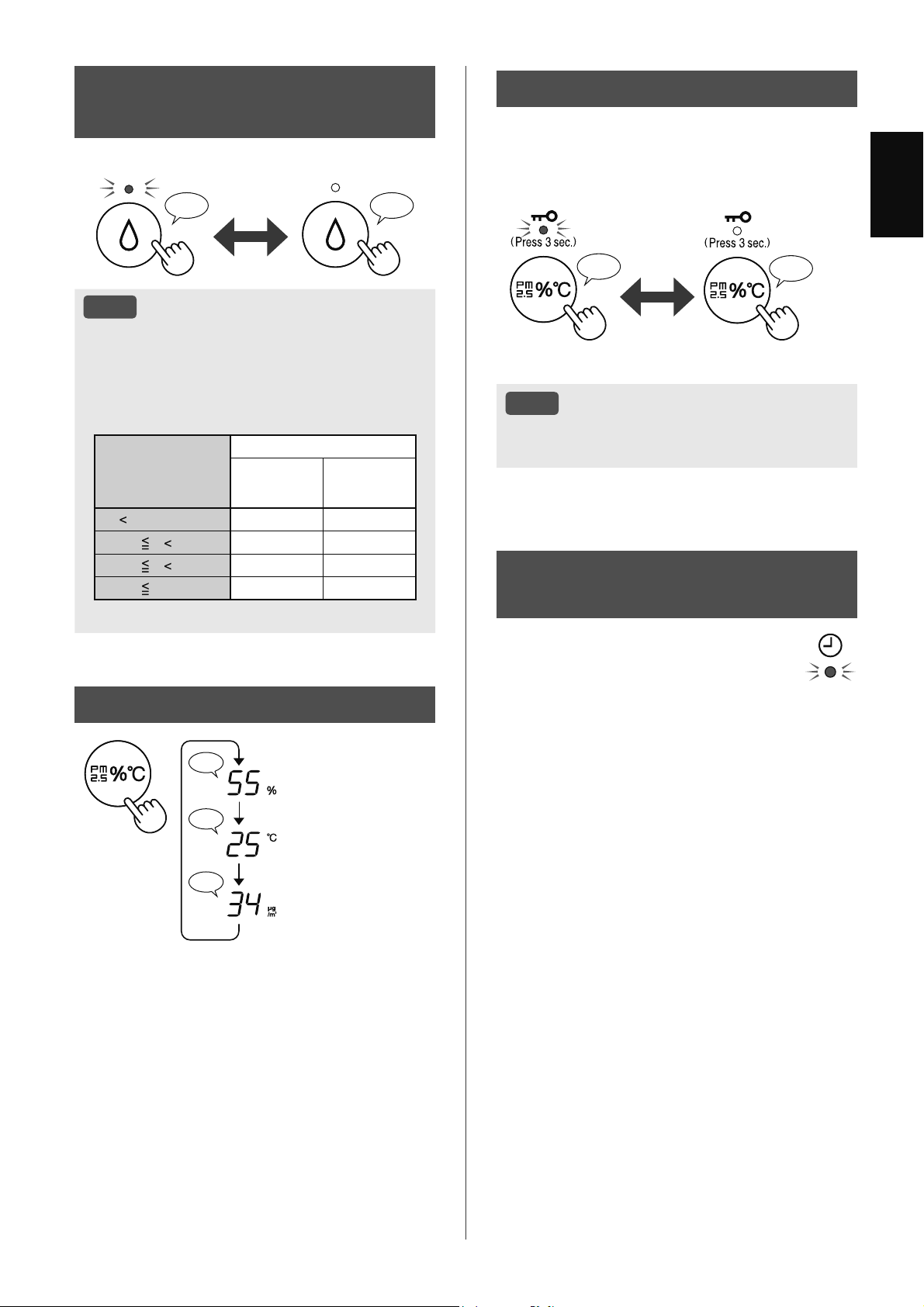
SELECT AIR VOLUME
AND MODE
♪
♪
♪
♪♪
♪
♪
LOW
MED
MAX
AUTO
POLLEN
SLEEP
AUTO:
The fan speed is automatically switched depending
on the amount of impurities in the air.
You can select humidification ON / OFF.
POLLEN:
The Sensitive Dust Sensor sensitivity is
automatically increased and the Sensitive Dust
Sensor quickly detects impurities such as dust and
pollen and cleans the air powerfully.
SLEEP:
The product will operate quietly, and the fan speed
will automatically EHVZLWFKHG depending on the
amount of impurities in the air and room brightness.
When the Light Control is set to “Auto”, the Display
and Cleanliness Indicator will automatically go off.
SHARP COCORO AIR
MODE
♪
When the product is connected to Sharp
Cloud
Sharp Cloud will analyze and set the optimal
operation for your room based on the information
retrieved from sensors on the product and your
usage records.
When the product is not connected to
Sharp Cloud
The fan speed and the humidification ON / OFF
are automatically controlled depending on the six
detection. (PM2.5 / Usual dust / Odor / Temperature
/ Humidity / Light)
NOTE
• If you press the Humidify ON/OFF Button, the
operation mode will change to
(AUTO).
HAZE MODE
Operates at HIGH fan speed for 60 minutes and
then alternates between Low and High level for
20 minutes each.
♪
10 minutes: Max High fan level
50 minutes: High fan level
20 minutes: Low fan level
20 minutes: High fan level
NOTE
• The Plasmacluster ion cannot be turned “OFF”.
EN-13
ENGLISH
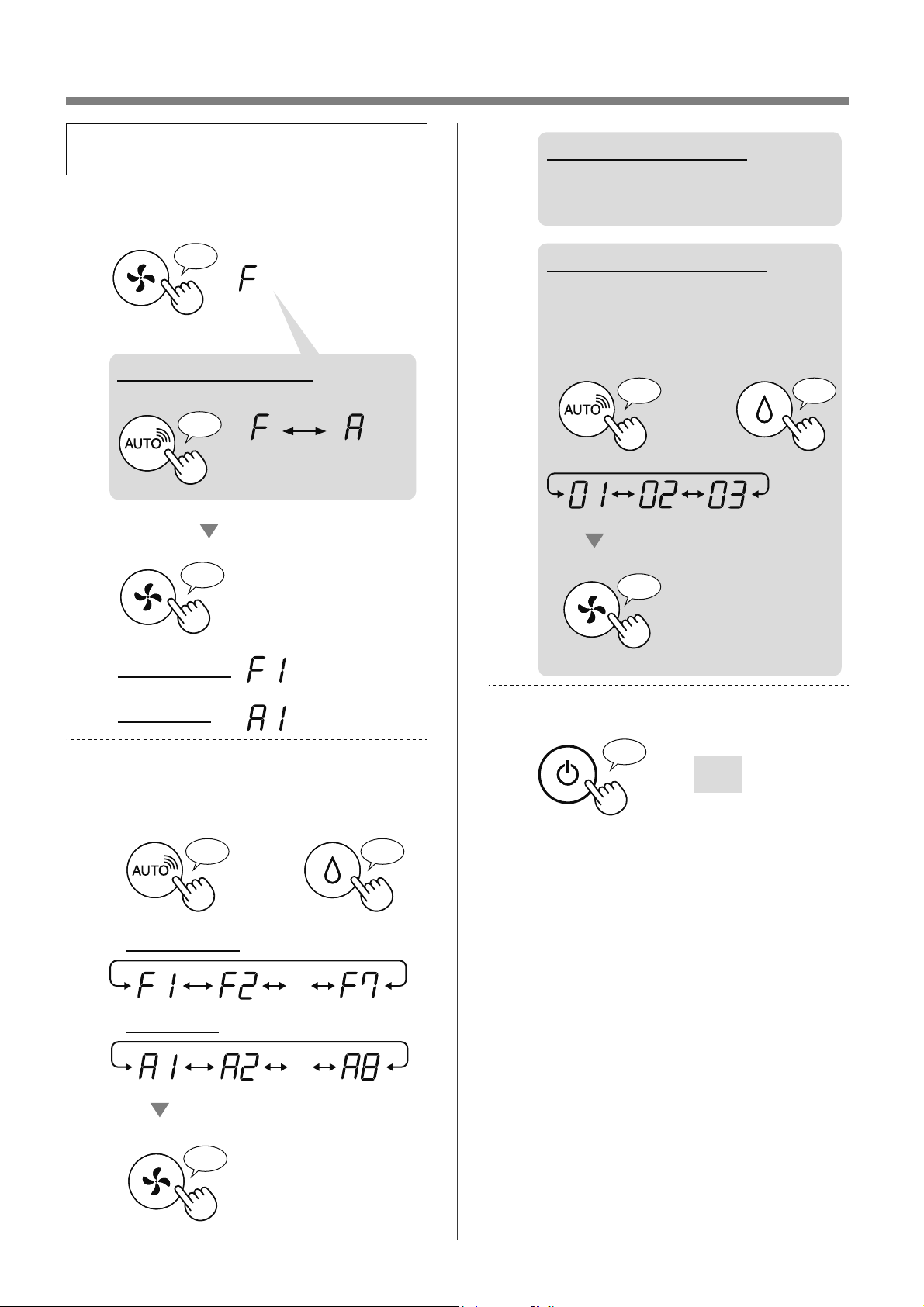
SWITCH DISPLAY
♪
♪♪
♪
Humidity
Temperature
PM2.5 Concentration
CHILD LOCK
The operation panel will be locked.
(with the product ON or OFF)
ON CANCELLATION
♪
♪♪
Press
for 3 sec.
Press
for 3 sec.
NOTE
• It is possible to turn Wi-Fi off while in Child
Lock Mode.
WEEKLY SCHEDULER:
APP ONLY
ON TIMER (or OFF TIMER)
You can set a weekly scheduler for the air
purifier to start on a specific mode (or to
stop operation) on a specific day and time.
The Timer Lamp will turn on while there is a
schedule set.
HUMIDIFICATION
SETTING
♪♪♪
ON OFF
NOTE
• When operating with Humidification ON in
the modes in the table below, the product
automatically controls humidity by sensing
temperature and humidity. (Except MAX / MED
/ LOW mode.)
Temperature
(T)
Humidity
ALL MODE*
SLEEP
MODE
T
18ºC 65% 65%
18ºC
T 24ºC 60% 65%
24ºC
T 28ºC 55% 60%
28ºC
T 45% 50%
*
Except MAX / MED / LOW / SLEEP
EN-14
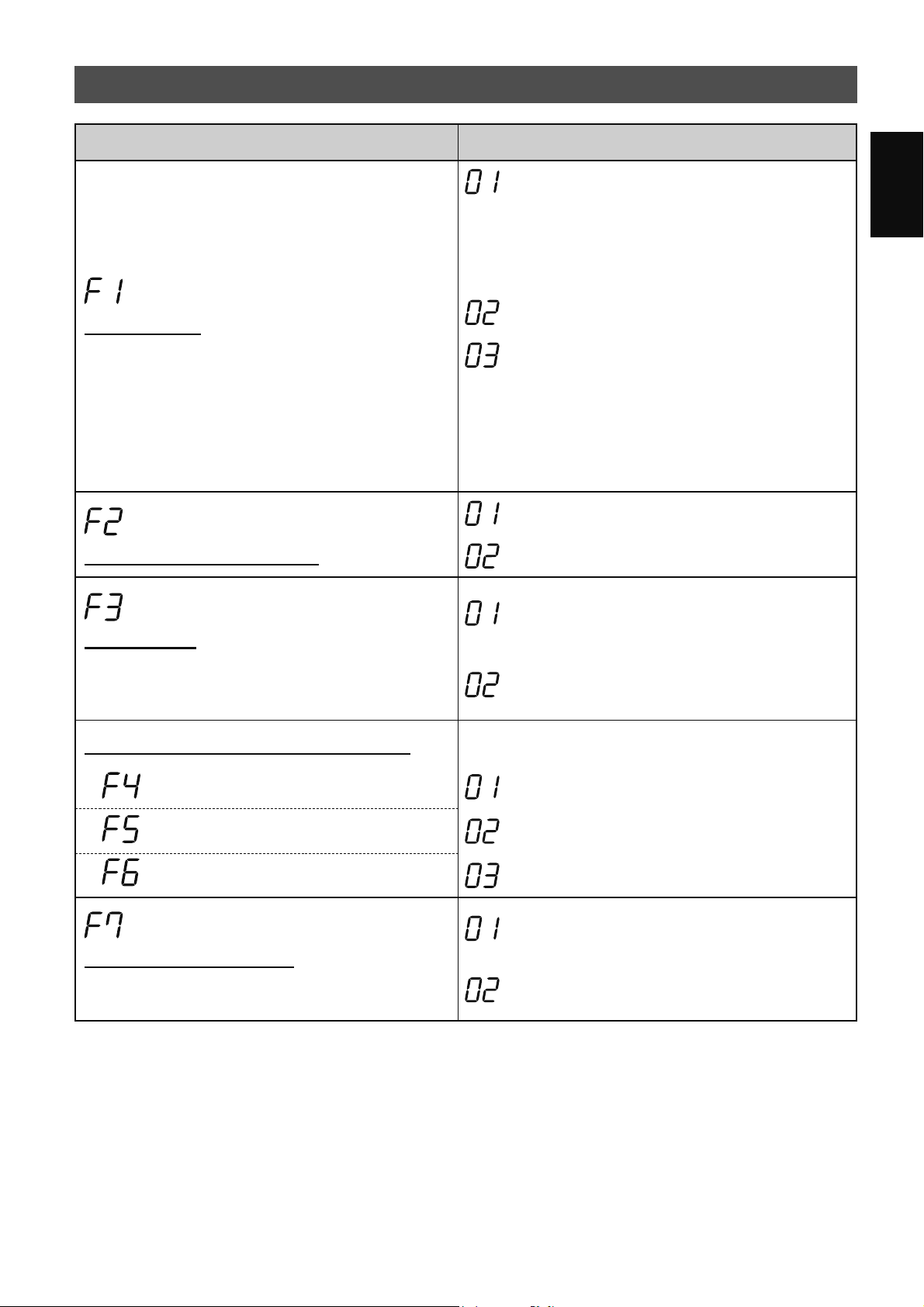
HOW TO CHANGE VARIOUS SETTINGS
• You can change the product and Wi-Fi
functions on page 15 - 18.
1.
Turn the product OFF.
2.
Press for 3 sec.
♪
♪
Set
Wi-Fi setting
Product setting
♪
When on Wi-Fi setting
Change “F” to “A”.
Product
setting
Wi-Fi
setting
3.
Select “Function number (F1-F7 or
A1-A8)” on page 15 - 18.
or
Go Forward
♪
Go Back
♪
・・・
Set
♪
Wi-Fi setting
Product setting
・・・
4.
When on Wi-Fi setting
Refer to page 16 - 18 for the
details of each function.
When on Product setting
Select “Setting number
(01 - 03)” on page 15.
Set
♪
〜
or
Go Forward
♪
Go Back
♪
5.
Finish the setting.
Goes off
♪
〜
EN-15
ENGLISH
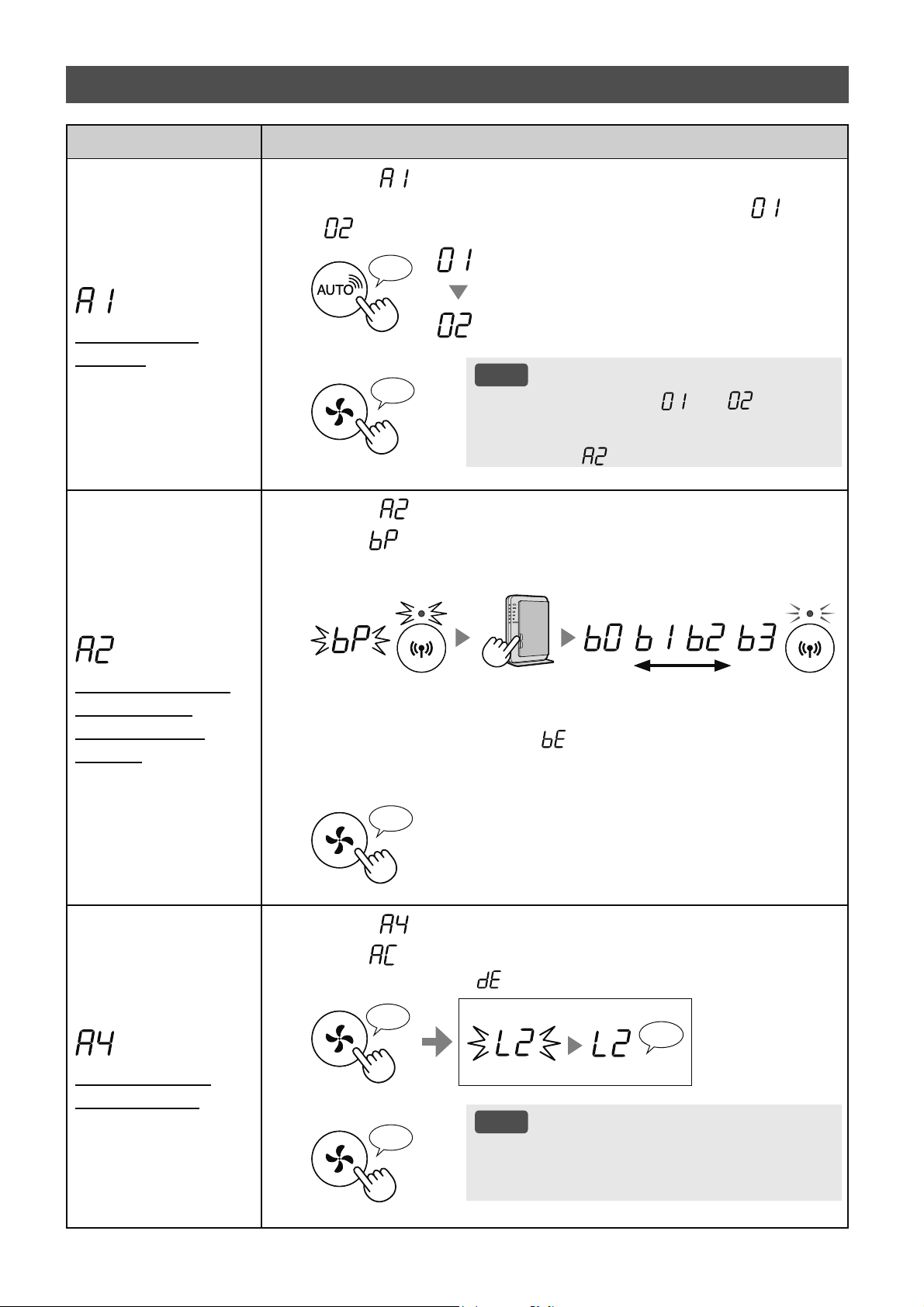
PRODUCT FUNCTIONS (F1-F7)
Function Setting
Light Control
You can select the brightness of the Display and
Cleanliness Indicator.
OFF
When set to “OFF”, the “Dim” light illuminates
for 8 seconds after operation starts and then the
light goes off.
However, some indicators that need notification
will remain dim.
Dim
Auto
(default)
Light automatically switches ON or OFF based
on room brightness.
• Room is bright: light is ON
• Room is dark: light is OFF
Even though the room is bright, the light will turn
off when operating in sleep mode.
Plasmacluster Ion ON/OFF
OFF
ON
(default)
Auto Restart
If the product is unplugged or if there is a power
failure, the product will resume operation with the
previous settings after power is restored.
Cancellation
ON
(default)
Adjusting sensor sensitivity (F4 - F6)
Light Sensor Low
Sensitive Dust Sensor Standard
(default)
Odor Sensor High
Sound Indicator Setting
You can set the product to make a beeping sound
when the Water Tank is empty.
Cancellation
(default)
ON
EN-16
Function Setting
Wi-Fi adapter
ON/OFF
1.
Select “ ” by following Steps 1 - 3 on page 14.
2.
Press "
SHARP COCORO AIR
" Button to select Setting " " or
"
".
Wi-Fi OFF
Wi-Fi ON
♪
3.
Complete
NOTE
• When Setting number (“ ” or “ ”) is
changed, the square rotates on the display
until the setting is completed. When setting is
completed, “
” is displayed.
♪
〜
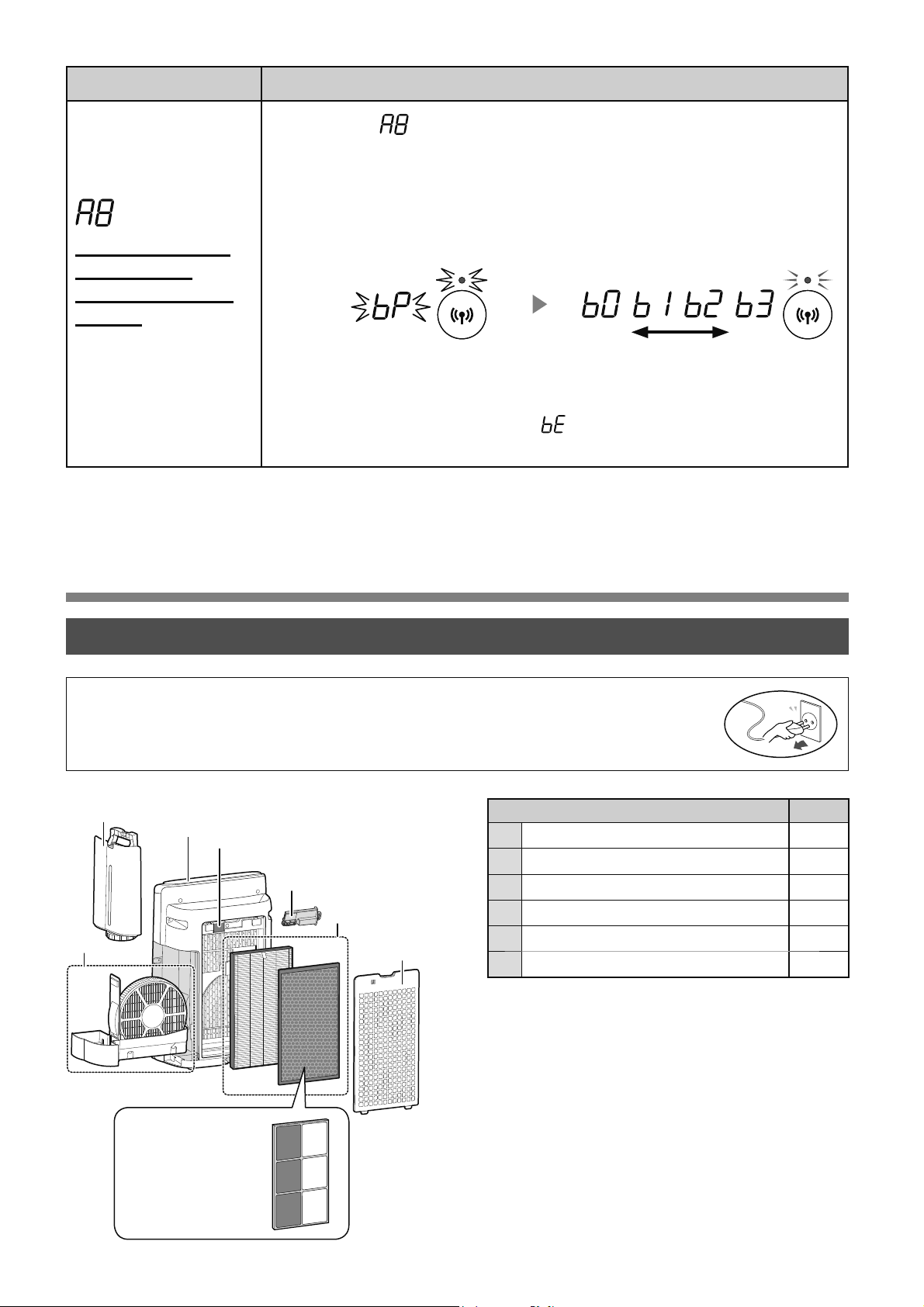
Wi-Fi connection
with a router
(with the WPS
Button)
1.
Select “ ” by following Steps 1 - 3 on page 14.
2.
After “ ” is displayed, press the WPS (Wi-Fi Protected Setup)
Button of the router.
Light up
weak strong
Blink
Blink
Once connected, WKHreceiver
level will be displayed.
A connection error is occuring if “ ” is displayed. Please confirm that the
router is operating correctly and try again.
3.
Complete
♪
Initialization of
Wi-Fi function
1.
Select “ ” by following Steps 1 - 3 on page 14.
2.
After “ ” is displayed press “Mode” Button.
An error is occurring if “ ” is displayed. Please try again.
♪
〜
Complete
Blink
Initializing
♪
3.
Complete
NOTE
• Please delete the device registration from the App
when initializing the air purifier which is already
connected to the Wi-Fi.
♪
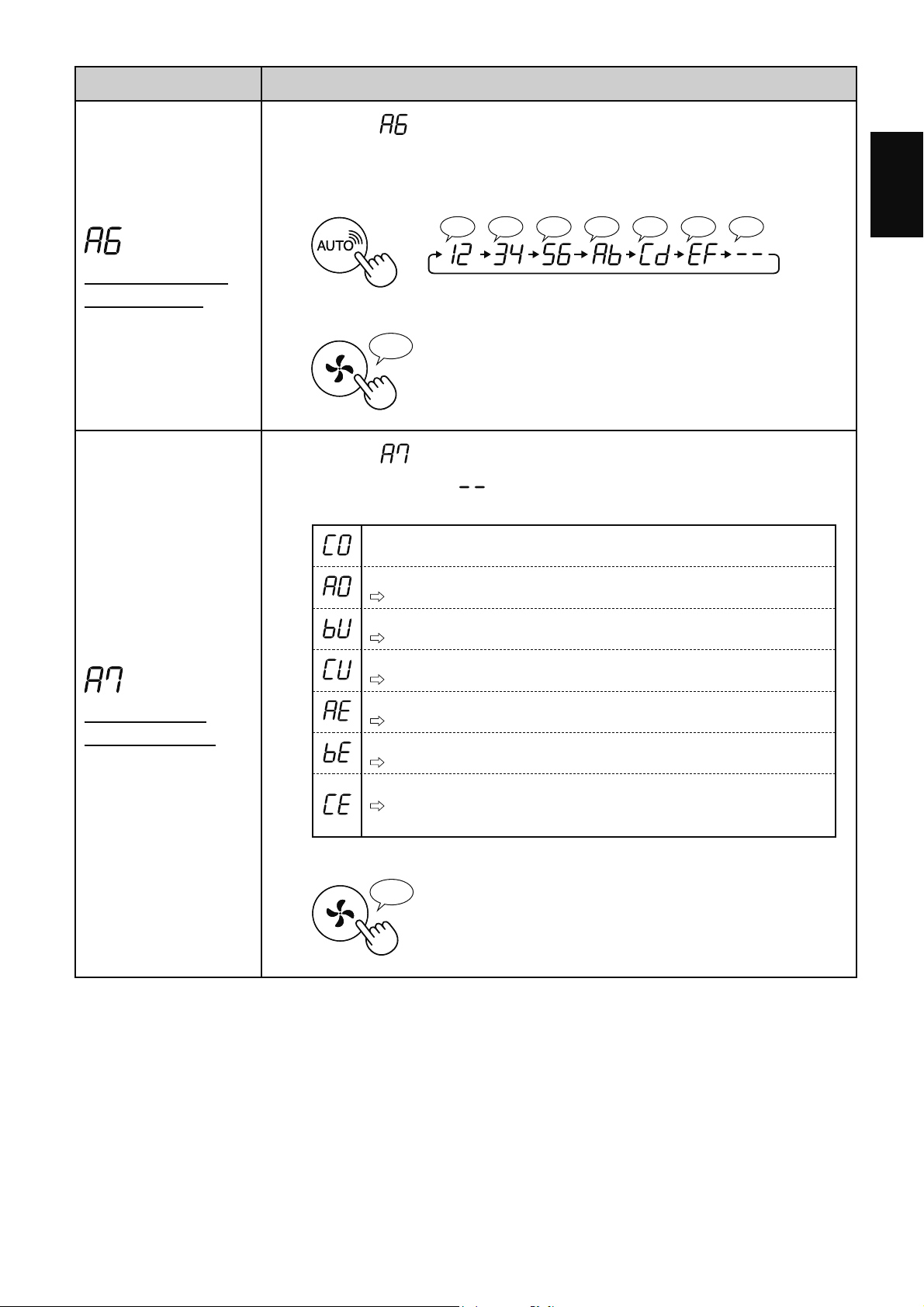
Wi-Fi FUNCTIONS (A1-A8)
EN-17
ENGLISH
Function Setting
Confirmation of
MAC address
1.
Select “ ” by following Steps 1 - 3 on page 14.
2.
Press “SHARP COCORO AIR” Button to display MAC address.
For example:
In case MAC address is “12:34:56:AB:CD:EF”.
♪♪♪♪♪♪♪
♪
〜
3.
Complete
♪
Display Wi-Fi
network status
1.
Select “ ” by following Steps 1 - 3 on page 14.
2.
After displaying “ ” for a few seconds, the network status of
the Wi-Fi adapter will be displayed.
Connection is stable
Wi-Fi adapter is off
Please turn on Wi-Fi adapter.
Router is not registered
Please perform the Wi-Fi connection with the router.
Link settings with the App is not performed
Please perform the link settings with the smart device.
Wi-Fi adapter network error
Please turn off Wi-Fi adapter and turn on again after a while.
Network error between the air purifier and the router
Please confirm the network status of the router.
Network service error
Please turn off the air purifier and confirm the internet status, then try
again.
3.
Complete
♪
EN-18
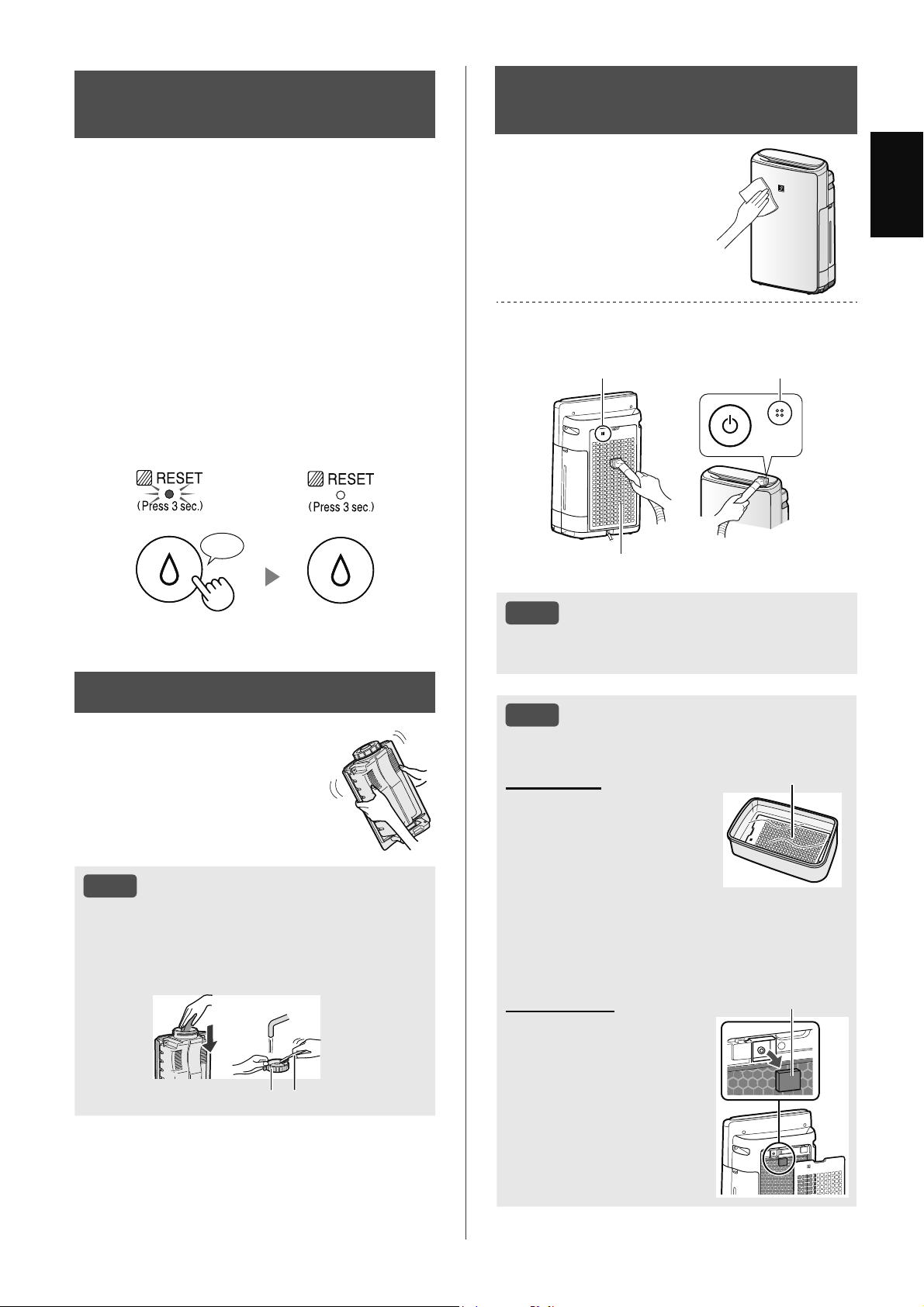
CARE AND MAINTENANCE
Place Page
1
Main Body 19
2
Water Tank 19
3
Humidifying Filter / Humidifying Tray 20
4
Back Panel / Sensors 19
5
HEPA Filter / Deodorizing Filter 22
6
Plasmacluster Ion Generating Unit 23
Function Setting
Wi-Fi connection
with a router
(without the WPS
Button)
- AP (Access Point)
mode -
1.
Select “ ” by following the Steps 1 - 3 on page 14.
2.
Perform Wi-Fi connection of the air purifier and the router based
on the App screen.
Refer to the App for further operations.
Light up
weak strong
Blink
Blink
Once connected, the receiver level
will be displayed.
Display while setting the
connection between the product
and the router.
A connection error is occuring if “
” is displayed. Please confirm the router
and try again.
• To maintain optimum performance of this air purifier, please clean the product including
the filter periodically.
• Be sure to stop operation and unplug the product before any maintenance or replacing
accessories.
CARE
6
2
4
1
3
5
4
(Only KI-N50)
EN-19
ENGLISH
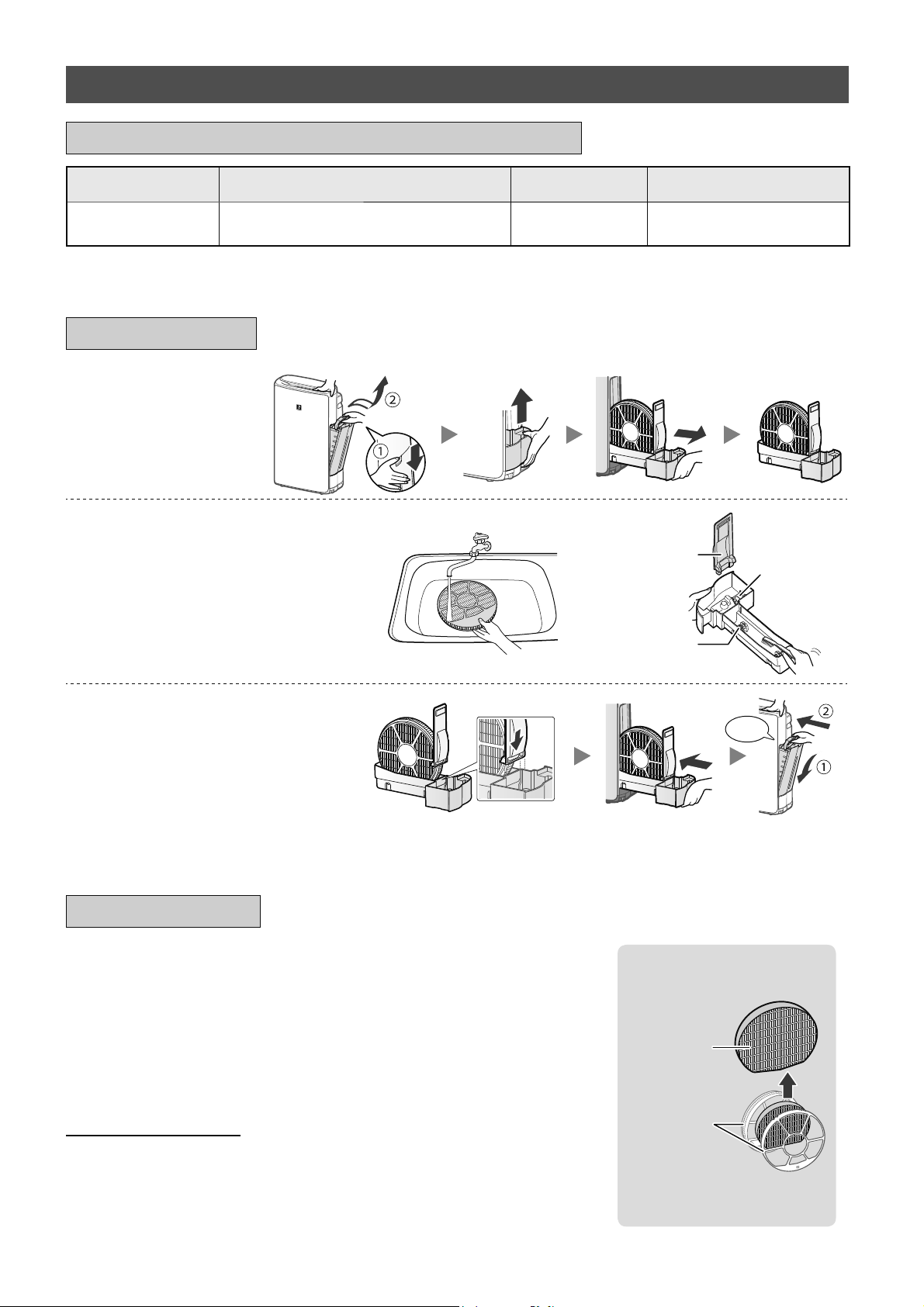
FILTER MAINTENANCE
LAMP
When the cumulative operation period or the water
containing period is more than approximately 720
hours, the Filter Maintenance Lamp will turn on.
• It will not calculate the time when the product is
unplugged.
• 30 days × 24 hours = 720 hours
This is a reminder to perform the maintenance for
the Humidifying Filter and Tray, Main Body, Back
Panel, and Sensors.
After maintenance, connect the power plug to the
wall outlet and press Power ON/OFF Button, then
press and hold the Filter Reset Button for 3 seconds
to reset the Filter Maintenance Lamp.
Press for 3 sec.
♪
NOTE
How to Clean Hard-to-Remove Dirt.
Back Panel
1. Add a small amount of
mild kitchen detergent to
water and soak for about
10 minutes.
2. Rinse off the mild kitchen
detergent with clean
water.
3. Completely dry the filter
in a well-ventilated area.
Back Panel
Sensor Filter
1. Remove the Back Panel.
2. Remove the Sensor
Filter.
3. If the Sensor Filter is very
dirty, wash it with water
and dry it thoroughly.
Sensor Filter
MAIN BODY / BACK
PANEL / SENSORS
Wipe with a dry, soft
cloth.
Remove the dust gently with a cleaning
tool such as a vacuum cleaner.
Back Panel (Pre-Filter)
Sensors
Sensors
NOTE
•
Do not apply excessive pressure when
scrubbing the Back Panel.
WATER TANK
Rinse the inside with
water.
NOTE
How to Clean Hard-to-Remove
Dirt.
Clean the inside of the Water Tank with a soft
sponge and the Tank Cap with a cotton swab or
toothbrush.
Tank Cap Toothbrush
EN-20
REPLACEMENT
See this page for directions on how to install the filter
when replacing.
•
Please consult your dealer for purchase of replacement filter.
•
Use only filter designed for this product.
FZ-J1XMFE
(1 unit)
Filter Frame
Humidifying
Filter
•
Do not dispose the Filter
Frame.
It is recommended that you note down the date when the filters were
replaced for future reference.
Disposal of Filters
Please dispose of the replaced filter according to the local disposal laws and
regulations.
Humidifying Filter materials: Polyester, Rayon
1.
Remove the
Humidifying Filter
and Tray.
2.
Rinse with plenty of water.
Float
Tray Panel
Roller
• Do not remove the Humidifier Float.
If it comes off, refer to page 21.
• Refer to page 21 on how to
clean the Humidifying Filter when it
is very dirty.
3.
Attach the Humidifying Filter
and Tray.
Click
• After maintenance, correctly
reattach the parts.
MAINTENANCE
HUMIDIFYING FILTER / HUMIDIFYING TRAY
Parts Name Maintenance Cycle Max Service Life Replacement Filter Model
Humidifying Filter
When odor emanates from the air
outlet, or once a month.
10 years
*
1
FZ-J1XMFE
*1: Designated App notifies when each replacement part should be replaced according to usage.
REPLACEMENT AND MAINTENANCE CYCLE
EN-21
ENGLISH
NOTE
How to Clean Hard-to-Remove Dirt.
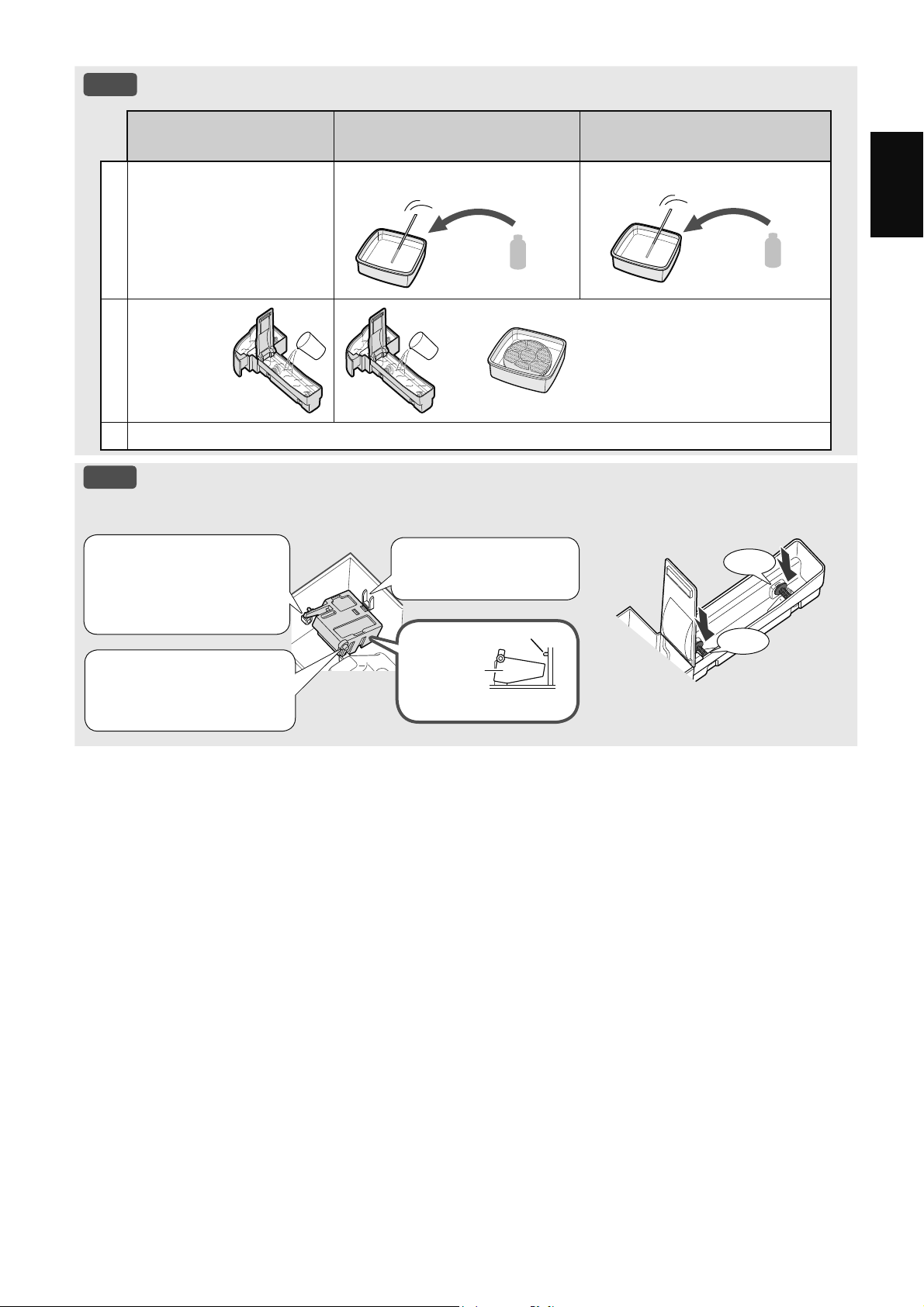
Mild Kitchen Detergent
(only Humidifying tray)
Citric Acid
(available at some drugstores)
100% Bottled Lemon Juice
with No Pulp
1
1. Fill the tray half-way with
water.
2. Add a small amount of
mild kitchen detergent.
2 1/2 cups of water
3 teaspoons
3 cups of water
1/4 cup
2
Soak for
30 minutes.
Soak for 30 minutes.
(When using lemon juice as your
descaling solution, allow for more
soak time.)
3
Rinse off the mild kitchen detergent or the descaling solution with clean water.
NOTE
How to install the Humidifier Float.
Humidifier Float Roller
Click
Click
3. Insert the tab on
the other side of the
Humidifier Float into
the hole.
1. Insert the Humidifier
Float under this tab.
Cross-Section view
Tab
Humidifier
Float
Cross-Section view
2. Insert the tab of the
Humidifier Float into the
hole.
EN-22
Filter Name Maintenance Cycle Max Service Life Replacement Filter Model
HEPA Filter
Whenever dust accumulates,
when odor emanates from the
air outlet, or once a month.
10 years
*
1, 2
FZ-D40HFE
Deodorizing Filter
FZ-D40DFE (Only KI-N40)
FZ-G40DFE (Only KI-N50)
*1: According to Japan Electrical Manufacturers' Association JEM 1467, the Max service life is based on the equivalent
condition of the smoke from 5 cigarettes per day whereby the dust collection/deodorization power is reduced by half
compared with that of a new filter. It is recommended to replace the filter more frequently under more severe conditions.
*2: Designated App notifies when each replacement part should be replaced according to usage.
Filter life varies depending on the room environment, usage conditions, and location of the product. We
recommend replacing the filter more frequently if the product is used in conditions significantly more
severe (PM2.5 etc.,) than a normal household.
HEPA FILTER / DEODORIZING FILTER
REPLACEMENT AND MAINTENANCE CYCLE
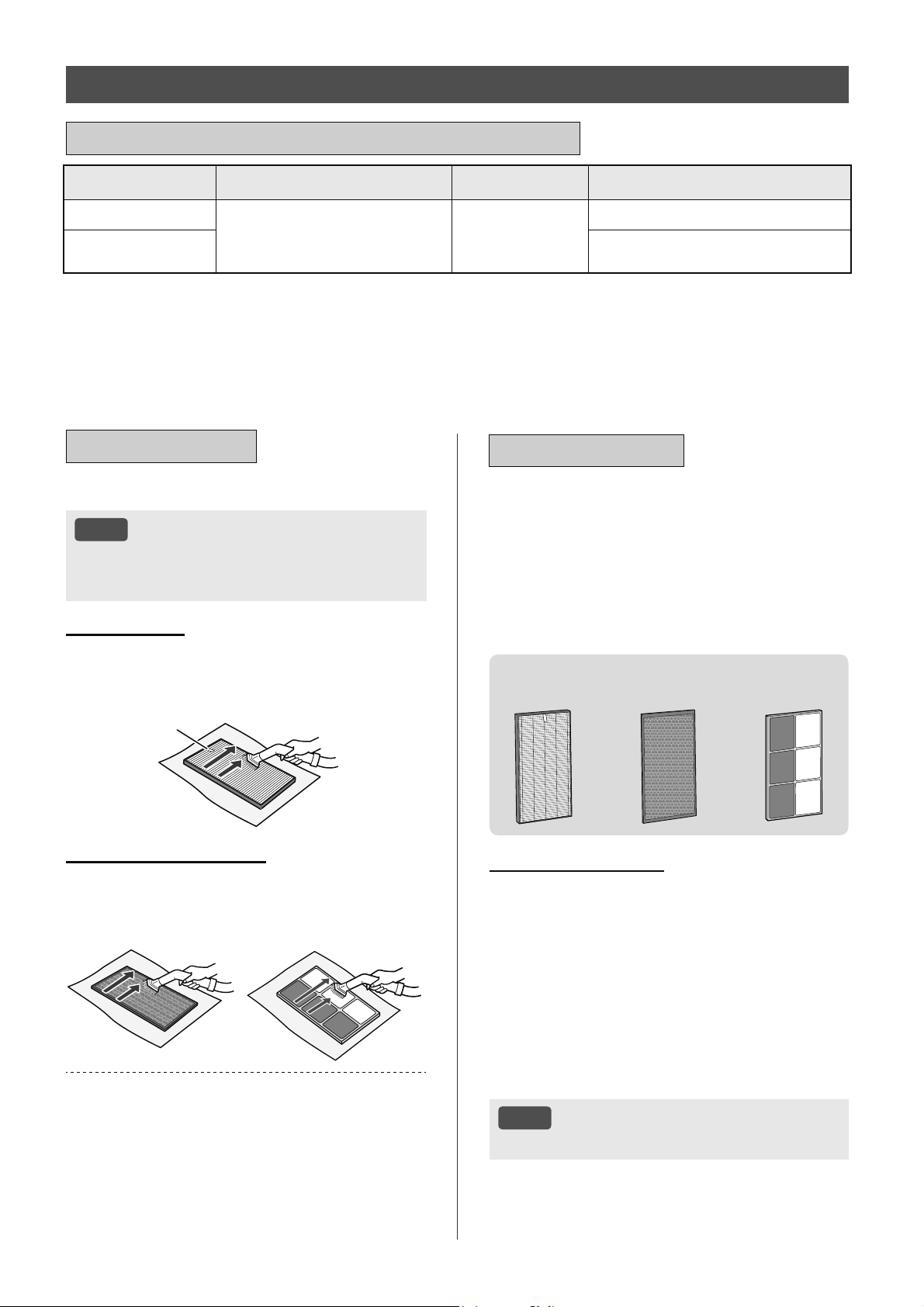
Remove the dust on the filters.
NOTE
• Do not wash the filters. Do not expose to
sunlight (Otherwise these filters may lose their
efficacy.)
HEPA FILTER
Maintain and clean only the tagged surface. Do not clean
the opposite surface.
The filter is fragile, so be careful not to apply too much
pressure.
Tag
DEODORIZING FILTER
Both surfaces can be maintained and cleaned.
The filter is fragile, so be careful not to apply too much
pressure.
(KI-N40)
(KI-N50)
Some odors absorbed by the filters will break down
over time, causing additional odors. Depending on
usage conditions, and especially if the product is used
in environments significantly more severe than a normal
household, these odors may become noticeable sooner
than expected.
Replace the filter in those cases or if dust is unable to be
removed after maintenance.
MAINTENANCE
REPLACEMENT
See page 9 for directions on how to
install the filter when replacing.
•
Please consult your dealer for purchase of replacement
filter.
•
Use only the filter designed for this product.
It is recommended that you note down the
date when the filters were replaced for future
reference.
FZ-D40HFE
(1 unit)
FZ-D40DFE
(1 unit)
FZ-G40DFE
(1 unit)
Disposal of Filters
Please dispose of the replaced filter according to
the local disposal laws and regulations.
HEPA Filter materials:
Polypropylene, Polyethylene
Deodorizing Filter materials:
(Only KI-N40)
Polypropylene, Polyester, Activated Carbon
(Only KI-N50)
Paper, ABS Resin
NOTE
• Do not wash and reuse replaced filter.
EN-23
ENGLISH
Parts Name Maintenance Cycle Max Service Life Replacement Model
Plasmacluster Ion
Generating Unit
*
1
Every 6 months or more often if
necessary
19,000 hours
*
2,3
IZ-C90ME
*1: In the following, "Plasmacluster Ion Generating Unit" is abbreviated as "Unit".
*2: The replacement time will be announced by the Unit Replacement lamp.
*3: Designated App notifies when each replacement part should be replaced according to usage.
PLASMACLUSTER ION GENERATING UNIT
(Electrode Section)
REPLACEMENT AND MAINTENANCE CYCLE
MAINTENANCE
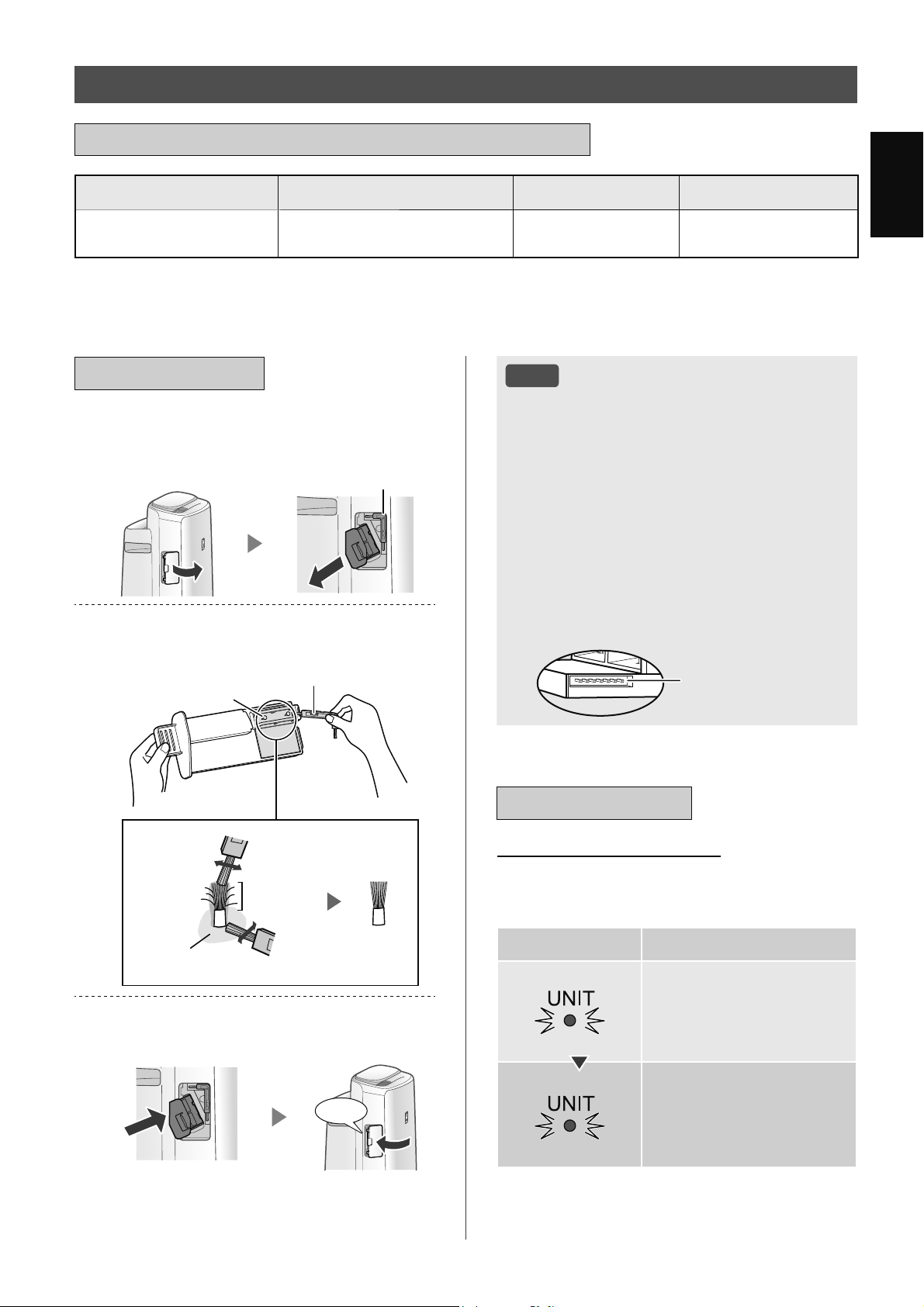
1.
Remove the Unit Cover, and pull out
the Unit Holder.
Unit Cleaning Brush
2.
Remove dusts from the Electrode
Section.
Unit Cleaning Brush
Electrode
After
cleaning
Before
cleaning
Around the base
Electrode
3.
Insert the Unit Holder in the product,
and install the Unit Cover.
Click
NOTE
• Do not clean with anything other than the Unit
Cleaning Brush. Doing so could lead to failures
in the Unit.
• A bent electrode could be cut off and dropped
during the cleaning process, but it will not
change the performance.
• Do not touch the electrode directly. Doing so
could lead to pain/itching.
• Do not transform the Electrode Section. Doing
so can damage it.
• Do not touch the Connection Terminals. Doing
so can damage them.
Connection Terminals
REPLACEMENT
Unit Replacement lamp
When the total operation time exceeds 17,500
hours, the Unit Replacement Lamp will flash to
indicate that the Unit needs replacement.
Operating time Explanation
17,500 hours
Flashes slowly
Replace the Unit.
19,000 hours
Flashes quickly
No Plasmacluster ions will
be released by the Unit.
* The replacement time is not related to the selected
operation mode.
EN-24
TROUBLESHOOTING
•
Before calling for service, please review
the Troubleshooting list below, since
the problem may not be the product
malfunction.
ABOUT THE PRODUCT
Odor and smoke persist.
• Check the filters. If they appear to be extremely
dirty, clean or replace them.
Air discharged from the product has an
odor.
• Check to see if the filters are extremely dirty.
• Clean or replace the filters.
• Use only fresh tap water. Using other water
sources risks the growth of mold, fungi, or
bacteria.
The product does not operate when
cigarette smoke is in the air.
• Make sure the product is installed in a location in
which the sensors can detect cigarette smoke.
• Check to see if the Sensitive Dust Sensor
openings are blocked or clogged. If they are
blocked or clogged, clean the Sensor Filter or the
Back Panel.
Smell from a new product and/or filter.
• Immediately after removing the plastic bag, a
slight odor may occur. This odor is not harmful for
filter performance or human exposure.
The product makes a clicking or ticking
sound.
• The product may make clicking or ticking sounds
when it is generating ions.
The Cleanliness Indicator is blue even
when the air is not clean.
• The air may have been dirty when the product
was plugged in. Unplug the product, wait one
minute, and then plug the product in again.
The Cleanliness Indicator is red even
when the air is clean.
• Dirty or clogged Sensitive Dust Sensor openings
interfere with sensor operation. Gently clean the
Sensor Filter or the Back Panel.
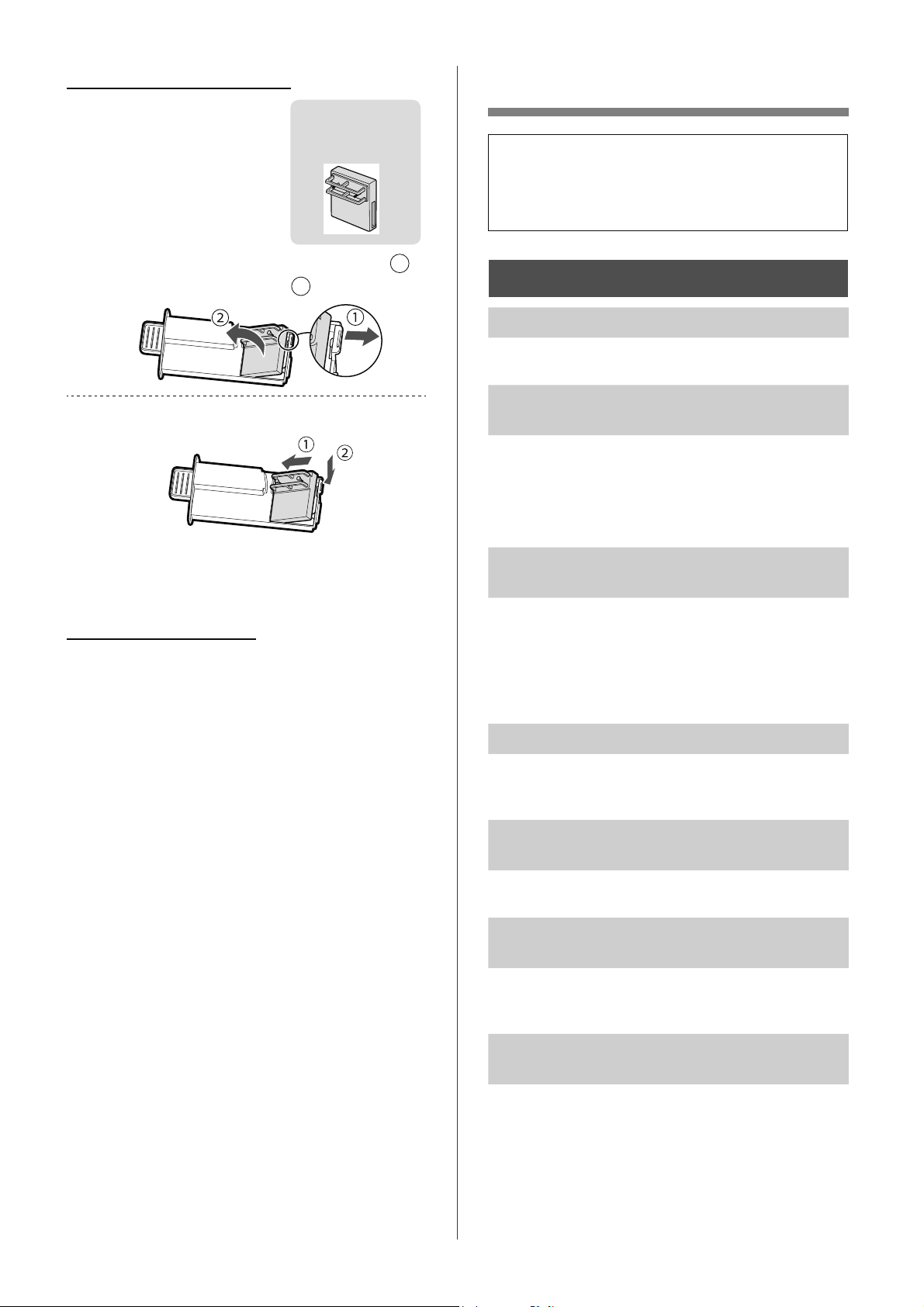
How to replace the Unit
•
Please consult your dealer for
purchase of a replacement
Unit.
•
Use only the Unit designed for
this product.
IZ-C90ME
(1 unit)
1.
Remove the claw of Unit Holder (
1
),
and remove the Unit (
2
).
2.
Attach the New Unit.
• When the Unit has been replaced with a new part,
the timer will be reset and return to 19,000 hours.
Disposal of the Unit
Please dispose of the used Unit according to the
local disposal laws and regulations.
Materials:
Polybutylene Terephthalate, electronic parts.
EN-25
ENGLISH
The Cleanliness Indicator changes color
frequently.
• The Cleanliness Indicator automatically changes
color when the Sensitive Dust Sensor and Odor
Sensor detect impurities. If you are concerned
about the change, you can change sensor
sensitivity. (Page 14, 15)
Filter Maintenance Lamp is on.
• Whenever after performing maintenance or
replacing the Humidifying Filter, connect the
power cord to an outlet and then press the Filter
Reset Button for more than 3 seconds.
(Page 19)
The Display goes off.
• When the Light Control is set to “Auto”, the light
automatically turns off when the room is dark or
operating in sleep mode. Moreover, when the
Light Control is set to “OFF”, the light is always
off.
If you do not want the light to be off, set the Light
Control to the “Dim” setting. (Page 14, 15)
The Display does not match the weather
report or another hygrometer or
thermometer in the room.
• Outdoor and indoor as well as the home
environment (the volume of traffic nearby, number
of stories in a home, etc.) may cause a reading
different than those data.
• There is a difference in the level within the same
room.
The Humidify Indicator on the Display
does not light up when the Water Tank is
empty.
• The room has reached the appropriate level of
humidity and has stopped humidifying.
• Check the Humidifier Float for impurities. Clean
the Humidifying Tray. Make sure that the product
is on a level surface.
The water level in the Water Tank does not
decrease or decreases slowly.
• Check to see if the Humidifying Tray and Water
Tank is correctly installed.
• Check the Humidifying Filter. If the filter is
extremely dirty, clean or replace it.
is displayed.
• Make sure that the Humidifying Filter, Humidifying
Tray and Roller are properly installed, and then
turn the power to ON again.
is displayed.
• Make sure the Plasmacluster Ion Generating Unit
has been inserted properly.
Pull out the Plasmacluster Ion Generating Unit
and insert it to the end again, and then carry out
the operation again.
One of the following is displayed.
• Unplug the product, wait one minute, and then
plug the product in again.
ABOUT THE Wi-Fi
FUNCTION
The Wi-Fi connection of the air purifier
and the router is not working.
• Check the specifications of the router in use.
• Adjust the router and antenna direction, move the
router and antenna closer, and so on. After that,
reswitch to turn on the router and perform the
INITIAL SET UP again.
The connection between the air purifier
and your smart device cannot be
established.
• Are the air purifier and your smart device
connected to the same router?
Connect the air purifier and your smart device
to the same router.
If you still can’t connect, try connecting your
smart device to the 2.4GHz band of the router.
• Is the total number of smart devices being in use
exceeding the maximum number for registration
on one air purifier?
The maximum number of smart devices that
can be registered on one air purifier is 10.
• Is the total number of products (air conditioners,
air purifiers, etc.) to be registered with one smart
device exceeding the maximum designated
number?
The maximum number of products to be
registered with one smart device is 30.
EN-26
Remote operation from a smart device
cannot be performed.
• Is the Wi-Fi Lamp of the air purifier on?
If the Wi-Fi Lamp is off, please perform “A1:
Wi-Fi adapter ON/OFF” to turn on the product
Wi-Fi. (Page 16)
• Has the connection between the air purifier and
your smart device been completed?
Set up the connection between the air purifier
and your smart device. (Page 11)
When changing the router
• It is necessary to reconnect the air purifier to the
router.
1. Hold down the “Wi-Fi” Button for 3 seconds to
stop the Wi-Fi function.
2. Perform “INITIAL SET UP: 2 Connection of
the air purifier and a router”. (Page 10)
When changing the smart device
• Perform the following steps.
1. Delete the registration of the old smart device
from the designated App.
2. Use the new smart device to perform “INITIAL
SET UP:
1 Download & Sign up, and
3 Ensure connection between the air purifier
and a smart device”. (Page 10, 11)
When going to dispose or hand over the
air purifier
• Perform the following steps, to prevent leak of
personal information.
1. Delete the registration of the air purifier from
the designated App.
2. Perform “A4: Initialization of Wi-Fi function”.
(Page 16)
If your air purifier is handed over from a
third party
• To prevent unauthorized access from a third party,
perform “A4: Initialization of Wi-Fi function”.
(Page 16)
Wi-Fi Lamp blinks slowly
• It is one of the following status.
A. The Wi-Fi connection of the air purifier and a
router is in setup.
B. The connection of the air purifier and a smart
device is in setup.
C. The software for the Wi-Fi function in the air
purifier is being updated.
Wi-Fi Lamp blinks fast
• Network error. Please confirm the Wi-Fi network
status from “A7: Display Wi-Fi network status”.
(Page 17)
Wi-Fi Lamp goes off
• The air purifier cannot connect to the router.
Check the following:
A. Is the power plug correctly connected?
B. Has the Wi-Fi function been stopped? Confirm
the Wi-Fi network status from “A7: Display
Wi-Fi network status”. (Page 17)
One of “ ” to “ ” cannot be selected
in the Wi-Fi setting mode.
(Page 16 - 17)
• If the Wi-Fi adapter is off, one of “A2” to “A6” may
not be selectable.
EN-27
ENGLISH
SPECIFICATIONS
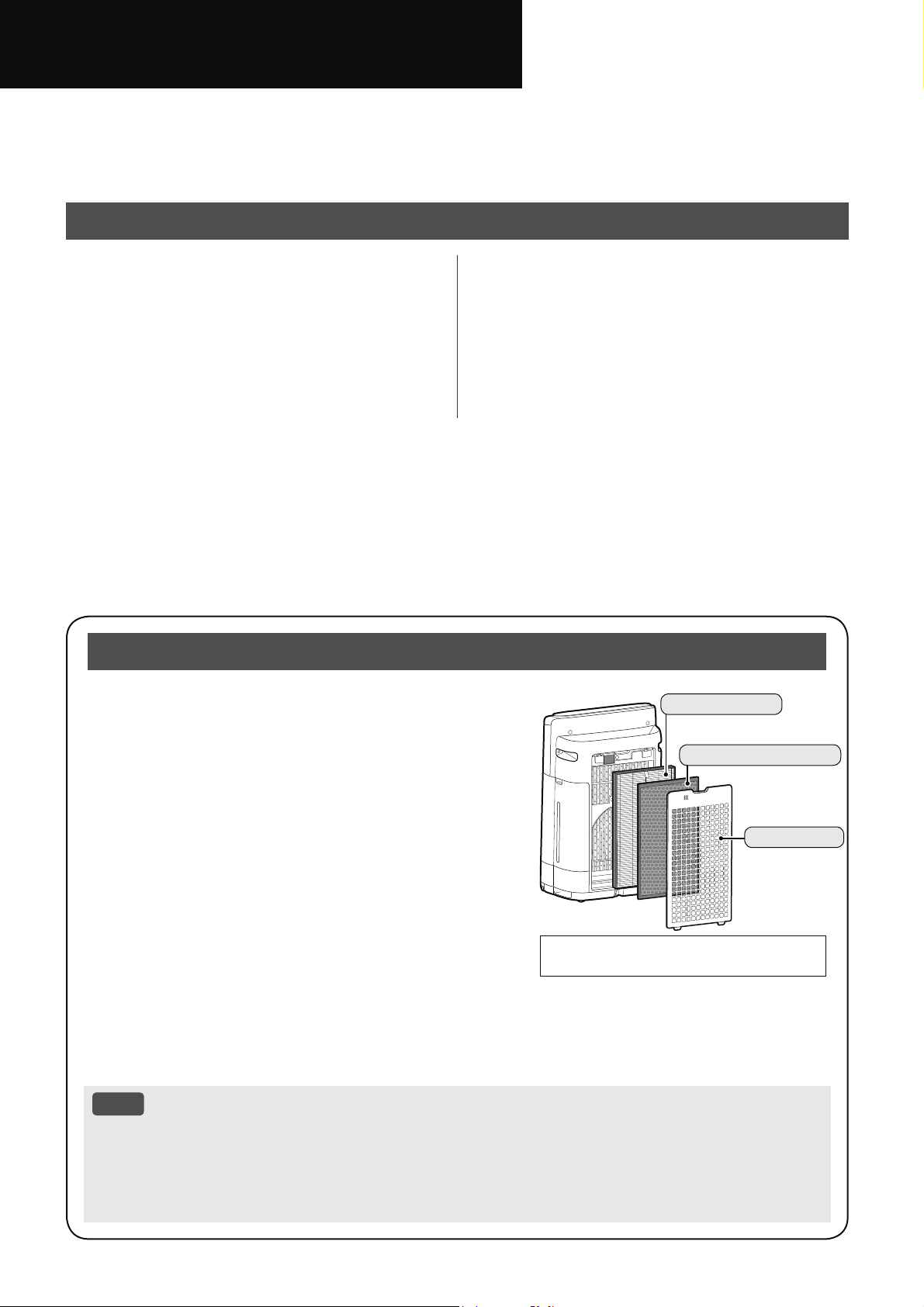
Model KI-N50 KI-N40
Power Supply 220-240 V ~ 50-60 Hz
Fan Speed Adjustment MAX MED LOW MAX MED LOW
CLEAN AIR
Fan Speed (m
3
/ hour) 306 168 60 240 150 60
Rated Power (W) 51 17 5.5 29 14 5.5
Noise Level (dBA)
*
1
51 40 17 46 38 17
CLEAN AIR
&
HUMIDIFY
Fan Speed (m
3
/ hour) 252 186 66 174 138 60
Rated Power (W) 32 22 6.7 17 15 6.5
Noise Level (dBA)
*
1
47 43 20 38 35 19
Humidification (mL / hour)
*
2
600 480 200 440 370 190
Standby Power (W)
1.7 (When Wi-Fi adapter is ON.)
1.3 (When Wi-Fi adapter is OFF.)
Recommended Room Size (m
2
)
*
3
~ 38 ~ 28
High Density Plasmacluster Ion Recommended
Room Size (m
2
)
*
4
~ 21 ~ 17
Humidifying Tray Capacity (L) Approx. 2.7
Sensors Sensitive Dust / Odor / Light / Temperature / Humidity
Filter Type HEPA
*
5
/ Deodorizing / Humidifying
Cord Length (m) 2.0
Dimensions (mm) 384 (W) × 230 (D) × 619 (H)
Weight (kg) Approx. 8.2
*1
•
Noise level is measured based on the JEM1467 standard of the Japan Electrical Manufacturers' Association.
*2
•
The amount of humidification changes in accordance with indoor and outdoor temperature and humidity.
The amount of humidification increases as temperatures rise or humidity decreases.
The amount of humidification decreases as temperatures decrease or humidity rises.
•
Measurement Conditions: 20ºC, 30% humidity (according to JEM1426).
*3
•
The recommended room size is appropriate for operating the product at maximum fan speed.
•
The recommended room size is an area in which a given amount of dust particles can be removed in 30 minutes
(according to JEM1467).
*4
•
Room size in which approximately 25000 ions per cubic centimeter can be measured in the center of the room when the
product is placed next to a wall, is running at MED mode settings, and is at a height of approximately 1.2 meters from the
floor.
*5
•
The filter removes more than 99.97% of particles at least 0.3 microns in size (according to JEM1467).
Standby Power
When the product’s power plug is inserted in a wall outlet it consumes standby power in order to operate electrical circuits.
To conserve energy, unplug the power cord when the product is not in use.
Terima kasih kerana membeli Pembersih Udara SHARP ini.
Sila baca manual ini dengan teliti sebelum menggunakan produk ini.
Manual ini hendaklah disimpan di tempat yang selamat untuk rujukan pada masa akan datang.
Bahasa Melayu
ARAHAN KESELAMATAN PENTING ...... 2
NAMA BAHAGIAN ................................... 6
PERSEDIAAN ........................................... 9
OPERASI ................................................ 10
Pembersih udara menyedut udara dalam bilik melalui salur
masuk udara, mengalirkannya melalui Prapenapis, Penapis
Penyahbau dan Penapis HEPA di dalam produk, kemudian
mengeluarkannya melalui salur keluar udara. Penapis HEPA
boleh menyingkirkan 99.97% habuk sekecil 0.3 mikron yang
dapat melalui penapis dan juga membantu menyerap bau.
Penapis Penyahbau menyerap bau sedikit demi sedikit semasa
udara mengalir melalui penapis.
Sesetengah bau yang diserap oleh penapis akan terurai lama-
kelamaan, menyebab- kan bau semakin kuat. Bergantung
pada keadaan penggunaan, dan terutama sekali jika produk
digunakan dalam persekitaran yang jauh lebih teruk berbanding
kediaman biasa, bau ini mungkin menjadi kuat lebih cepat
daripada jangkaan. Jika bau ini berlarutan, gantikan penapis.
Apabila mineral dalam air paip melekat pada penapis serta menjadi keras dan putih, ia akan menyerap bau
di dalam bilik dan menyebabkan pengeluaran bau yang tidak menyenangkan apabila penapis pelembap
kering. (Berbeza-beza bergantung pada kualiti air dan faktor persekitaran lain.)
Jika ini berlaku, jalankan penyelenggaraan Penapis Pelembap. (Halaman 20)
NOTA
• Pembersih udara direka untuk menyingkirkan habuk yang terampai di udara dan bau yang disebabkannya.
Pembersih udara tidak direka untuk menyingkirkan gas-gas berbahaya seperti karbon monoksida yang
terkandung dalam asap rokok.
Pembersih udara ini mungkin tidak dapat menghapuskan bau sepenuhnya jika sumber bau masih ada
di situ.
Sila Baca Sebelum Mengendalikan Pembersih Udara Anda
ISI KANDUNGAN
•
Ilustrasi dalam manual arahan ini ialah
KI-N40.
Penapis HEPA
Penapis Penyahbau
Prapenapis
CARA MENUKAR PELBAGAI
TETAPAN ................................................ 14
PENJAGAAN DAN
PENYELENGGARAAN ........................... 18
PENYELESAIAN MASALAH .................. 24
SPESIFIKASI .......................................... 27
MS-1
Bahasa Melayu
CIRI-CIRI
Gabungan Unik Teknologi Rawatan Udara
Sistem Penapisan Tiga Serangkai + Pelembapan + Plasmacluster
Plasmacluster
Plasmacluster 25000 berketumpatan tinggi
Lebih tinggi ketumpatan PCI, lebih tinggi keberkesanan PCI tersebut.
Dengan mengeluarkan ion positif dan negatif yang seimbang, rawatan udara Plasmacluster
merupakan proses yang semula jadi.
Sistem Penapisan Tiga Serangkai + Pelembapan
MEMERANGKAP HABUK
Prapenapis memerangkap habuk yang lebih besar daripada zarah-zarah yang beranggaran 240 mikron.
MENGURANGKAN BAU
Penapis Penyahbau menyerap banyak bau biasa yang terdapat di rumah.
MENGURANGKAN HABUK KECIL, DEBUNGA & KULAPUK
Penapis HEPA memerangkap 99.97% zarah sekecil 0.3 mikron.
MELEMBAPKAN UDARA
Kawal kelembapan udara dengan mengesan suhu dan kelembapan secara automatik.
Aliran Udara yang Unik
Sedutan udara yang kuat dan aliran udara yang unik mengumpul habuk dan zarah lain dengan cepat dan
cekap.
Aliran udara yang lebih cepat pada sudut 20º
mengumpul habuk pada paras yang lebih
rendah di dalam bilik untuk pembersihan
yang lebih berkesan.
Plasmacluster boleh menghapuskan elektrik
statik dan dengan itu boleh mengelakkan
habuk daripada melekat pada dinding dan
permukaan lain.
Fungsi Wi-Fi
• Mengesahkan kualiti udara di dalam bilik dan sekiranya udara telah kelihatan bersih.
• Mengawal produk melalui telefon pintar sebagai alat kawalan jauh.
• Mencadangkan masa yang optimum untuk penukaran penapis.
MS-2
ARAHAN KESELAMATAN PENTING
BACA DAN SIMPAN ARAHAN INI
sebelum menggunakan produk.
Apabila menggunakan perkakas elektrik,
langkah keselamatan asas mesti sentiasa
diikuti bagi mengurangkan risiko kebakaran,
kejutan elektrik dan kecederaan kepada
individu, termasuk yang berikut:
AMARAN
1. Baca semua arahan sebelum
menggunakan produk.
2. Gunakan produk hanya untuk
penggunaan isi rumah seperti
dihuraikan dalam manual ini. Mana-
mana penggunaan lain yang tidak
disyorkan oleh pengilang boleh
mengakibatkan kebakaran, kejutan
elektrik, atau kecederaan kepada
individu.
3. Perkakas ini tidak bertujuan untuk
digunakan oleh individu (termasuk
kanak-kanak) kurang upaya dari
segi fizikal, deria atau mental, atau
kurang pengalaman dan pengetahuan,
melainkan jika mereka telah diberikan
penyeliaan atau arahan mengenai
penggunaan perkakas oleh individu
yang bertanggungjawab ke atas
keselamatan mereka.
Kanak-kanak perlu diawasi untuk
memastikan mereka tidak bermain
dengan perkakas.
4. Jangan gunakan produk jika kord kuasa
atau palamnya rosak, atau produk
gagal berfungsi atau rosak.
5. Jika kord kuasa atau palamnya rosak,
ia mesti diganti oleh pengilang, ejen
servis, Pusat Servis yang disahkan oleh
Sharp atau individu yang mempunyai
kelayakan serupa bagi mengelakkan
insiden-insiden yang tidak diingini.
Hubungi Pusat Servis terdekat bagi
sebarang masalah, pelarasan, atau
pembaikan.
6. Jangan cuba memperbaiki atau buka
produk sendiri.
7. Ikuti arahan “a” hingga “h” di bawah
untuk kord kuasa atau palam.
Kegagalan untuk mematuhi arahan
boleh mengakibatkan litar pintas,
haba melampau, kejutan elektrik atau
kebakaran.
a. Hanya gunakan alur keluar AC 220-
240 volt.
b. Jangan gunakan produk jika kord
kuasa atau palamnya rosak atau
sambungan ke alur keluar dinding
longgar atau rosak.
c. Sentiasa matikan produk sebelum
mencabut palam kuasa.
d. Sentiasa cabutkan palam produk
dalam keadaan berikut:
• Sebelum memindahkan produk.
• Semasa menggantikan penapis.
(Walaupun ketika membuka Panel
Belakang)
• Semasa mengisi semula air.
• Sebelum penyelenggaraan produk.
• Apabila produk tidak digunakan.
e. Pastikan anda mencabut palam
kuasa dan bukannya kord kuasa.
f. Jangan sentuh palam kuasa
dengan tangan yang basah apabila
memasukkan atau mencabut palam
dari alur keluar dinding.
g. Buang habuk dari palam kuasa
secara berkala.
h. Sentiasa patuhi perkara berikut
supaya tidak merosakkan kord
kuasa.
• Jangan rosakkan kord dengan
Roda Dwipaksi semasa
menggerakkan produk.
• Jangan pasang kord di bawah
hamparan. Jangan tutup kord
kuasa dengan ambal kecil,
selendang, atau penutup yang
serupa.
• Jangan letakkan benda berat di
atas kord kuasa atau sepit kord itu.
• Jangan pasang kord kuasa di
bawah perabot atau perkakas lain.
• Pasang kord kuasa jauh dari
kawasan lalu-lalang dan di tempat
ia tidak akan tersandung.
8. Jangan gunakan produk ini berdekatan
perkakas gas, kawasan perapi, api lilin,
pembakaran kemenyan atau percikan
api daripada rokok yang dinyalakan.
Udarakan bilik dengan kerap sekiranya
perkakas gas adalah digunakan dalam
bilik yang sama. Jika tidak, ia boleh
mengakibatkan keracunan karbon
monoksida.
9. Jangan menggunakannya di lokasi di
mana gas mudah terbakar, seperti sisa
berminyak atau wasap bahan kimia.
MS-3
Bahasa Melayu
10. Jangan dedahkan produk kepada hujan,
atau gunakan produk berdekatan air,
di bilik mandi, kawasan mendobi atau
tempat lembap lain.
11. Jangan masukkan jari atau objek asing
ke dalam salur masuk atau salur keluar
udara.
12. Jangan lihat ke dalam salur keluar
udara.
13. Jangan minum air di dalam Tangki Air
atau Dulang Pelembap.
14. Gantikan air di dalam Tangki Air setiap
hari dengan air paip yang segar dan
bersihkan Tangki Air dan Dulang
Pelembap dengan kerap.
Apabila produk tidak digunakan, buang
air di dalam Tangki Air dan Dulang
Pelembap. Membiarkan air di dalam
Tangki Air atau Dulang Pelembap boleh
mengakibatkan kulapuk, bakteria dan
bau busuk. Dalam kes yang jarang
berlaku, bakteria sedemikian boleh
membahayakan kesihatan.
NOTA
- Gangguan Radio atau TV -
Jika produk mengganggu penerimaan radio
atau televisyen, cubalah satu atau lebih
daripada langkah berikut:
1. Ubah atau alih kedudukan antena
penerima.
2. Jauhkan produk dari radio/TV.
3. Sambungkan produk kepada alur
keluar pada litar berbeza daripada yang
disambungkan kepada penerima.
4. Rujuk pengedar atau juruteknik radio/
TV yang berpengalaman untuk bantuan.
AMARAN BERKAITAN
PEMASANGAN
1. Letakkan produk di atas permukaan
yang rata dan stabil dengan peredaran
udara yang mencukupi.
Apabila diletakkan di atas karpet yang
berat, produk mungkin akan bergetar
sedikit.
Letakkan produk di atas permukaan
yang rata untuk mengelakkan
kebocoran air dari Tangki Air dan
Dulang Pelembap.
2. Elakkan tempat penderia terdedah
kepada angin atau tempias secara
langsung jika produk mempunyai
penderia. Ia mungkin mengakibatkan
pincang tugas.
3. Elakkan lokasi di mana perabot, fabrik,
atau item lain boleh bersentuh dan
menyekat salur masuk dan/atau salur
keluar udara.
4. Elakkan tempat yang terdedah kepada
cahaya matahari secara langsung. Ia
boleh menyebabkan perubahan bentuk
atau warna produk.
5. Elakkan lokasi di mana produk terdedah
kepada pemeluwapan atau perubahan
drastik dalam suhu. Suhu bilik yang
sesuai adalah antara 0 ºC – 35 ºC.
6. Elakkan penggunaan di tempat yang
asap bergris atau berminyak dihasilkan.
(seperti di dapur dan sebagainya).
Permukaan Bahagian Utama boleh
retak dan mengakibatkan penderia
pincang tugas.
7. Keupayaan mengumpul habuk produk
adalah berkesan walaupun produk
hanya berada sejauh 3 cm dari dinding,
tetapi dinding atau lantai di sekeliling
boleh menjadi kotor. Sila letakkan
produk jauh dari dinding.
Dinding yang berada betul-betul di
belakang salur keluar udara dan lantai
atau ambal di tempat produk diletakkan
lama-kelamaan akan menjadi kotor.
Apabila menggunakan produk untuk
jangka masa lama di tempat yang
sama, bersihkan dinding, lantai atau
ambal secara berkala.
8. Jangan letakkan produk berdekatan
atau di atas objek panas, seperti dapur
masak atau pemanas, atau di tempat
yang boleh terkena wap air.
AMARAN BERKAITAN
PENAPIS
1. Ikuti arahan dalam manual ini
untuk pemasangan penapis dan
penyelenggaraan. (Halaman 9,
22)
2. Keluarkan penapis daripada beg plastik
sebelum meletakkan di Bahagian
Utama.
3. Jangan kendalikan produk tanpa
penapis dipasang dengan betul.
MS-4
4. Jangan basuh dan gunakan semula
Penapis HEPA dan Penapis Penyahbau.
Ia tidak akan menambah baik prestasi
penapis dan juga boleh mengakibatkan
kejutan elektrik atau kerosakan
pengendalian.
5. Jangan menggunakan produk di
dalam bilik yang mengandungi racun
serangga aerosol. Keadaan ini boleh
mengakibatkan bau racun serangga
mungkin kekal dalam produk dan
dikeluarkan dari salur keluar udara.
AMARAN BERKAITAN
PENGENDALIAN
1. Jangan sekat salur masuk atau salur
keluar udara.
2. Sentiasa kendalikan produk dalam
kedudukan menegak.
3. Sebelum menggerakkan produk,
tanggalkan Tangki Air dan Dulang
Pelembap terlebih dahulu supaya
air tidak akan tertumpah. Kemudian,
pegang produk dengan pemegang di
kedua-dua sisinya.
4. Sentiasa angkat produk apabila
menggerakkan produk tersebut di atas
lantai yang mudah rosak, permukaan
yang tidak rata, atau karpet.
5.
Jangan ubah arah sekiranya
menggerakkan produk menggunakan
Roda Dwipaksi.
6. Apabila menggerakkan produk dengan
Roda Dwipaksi, lakukan dengan
perlahan dan dalam arah mendatar.
7. Jangan menggunakan produk tanpa
Tangki Air atau Dulang Pelembap
dipasang dengan betul.
8. Berhati-hati supaya jari anda tidak
tersepit apabila menanggalkan atau
memasang Tangki Air.
9. Semasa mengisi semula Tangki Air,
pastikan tiada air yang bocor dari
Tangki Air.
10. Pastikan anda mengelap mana-mana
air yang berlebihan di bahagian luar
Tangki Air.
11. Jangan gunakan air panas (40 ºC
atau lebih), agen bahan kimia, bahan
beraroma, air kotor atau bahan lain
yang boleh merosakkan produk. Ia
boleh mengubah bentuk produk atau
mengakibatkan produk pincang tugas.
12. Hanya gunakan air paip yang segar.
Jika menggunakan sumber air lain, ia
terdedah kepada risiko pertumbuhan
kulapuk, kulat, atau bakteria.
13. Jangan goncangkan Tangki Air semasa
memegang Pemegang Tangki.
AMARAN BERKAITAN
PENYELENGGARAAN
1. Ikuti arahan dalam manual ini untuk
penyelenggaraan. (Halaman 18 -
23)
2. Bersihkan bahagian luar dengan hanya
menggunakan kain lembut.
3. Jangan gunakan bahan pencuci
selain yang dinyatakan dalam manual
ini (Halaman 19 , 21). Jangan
gunakan bendalir dan/atau bahan
pencuci mudah meruap.
Permukaan Bahagian Utama mungkin
mengalami kerosakan atau retak
dengan pembersih mengkakis yang
kuat, benzina, pencair cat, serbuk
penggilap atau gris.
Dulang Pelembap boleh mengakibatkan
perubahan bentuk, pencemaran,
keretakan (kebocoran air). Di samping
itu, penderia boleh menjadi pincang
tugas akibat daripada itu, sekiranya
produk tersebut mempunyai penderia.
4. Jangan gosok Panel Belakang
(Prapenapis) dengan kuat semasa
penyelenggaraan.
5. Kekerapan penyelenggaraan
pembuangan kerak akan bergantung
pada kekerasan dan kekotoran di
dalam air yang anda gunakan; semakin
keras air, maka semakin kerap kerja
pembuangan kerak diperlukan.
6. Jangan tanggalkan Pelampung
Pelembap dan Pemusing. Jika
Pelampung Pelembap dan Pemusing
tertanggal, rujuk halaman 21.
7. Apabila menggantikan penapis atau
mana-mana aksesori, gunakan
bahagian yang ditentukan dalam
manual ini.
MS-5
Bahasa Melayu
KESELAMATAN / LANGKAH BERJAGA-JAGA FUNGSI Wi-Fi
AMARAN
Apabila mengawal pembersih udara dari
jarak jauh
Sekiranya pengendalian jarak jauh
dilakukan dari luar, anda mungkin tidak
dapat memeriksa keadaan semasa
pembersih udara atau kawasan di sekeliling
dan situasi berkenaan sesiapa sahaja
yang mungkin tinggal di sana, oleh itu sila
sahkan keselamatan dengan secukupnya
sebelum menggunakannya.
1. Pastikan palam elektrik dimasukkan
sepenuhnya ke dalam soket kuasa dan
tiada habuk pada palam atau di dalam
lubang soket. (Penyambungan yang
salah atau kegagalan penyambungan
boleh mengakibatkan palam menjadi
panas, pembakaran, kebakaran dan
sebagainya.)
2. Pastikan untuk memeriksa persekitaran
sekeliling produk terlebih dahulu
kerana aliran udara daripada produk
boleh menyebabkan fenomena
yang tidak dijangkakan (seperti item
tidak stabil dan jatuh ke bawah) dan
mengakibatkan kebakaran, kecederaan,
pencacatan harta benda rumah.
AMARAN UNTUK
PENGGUNAAN
1. Perjanjian dengan “Terma
Perkhidmatan” diperlukan untuk
menggunakan Aplikasi.
2. Pastikan Aplikasi sudah dikemas kini.
3. Skrin dan ilustrasi dalam buku ini
adalah untuk penerangan, ia mungkin
berbeza daripada produk sebenar
4. Dalam keadaan sambungan yang teruk,
Aplikasi mungkin tidak dapat mengawal
pembersih udara. Pengendalian
semasa pembersih udara mungkin
tidak ditunjukkan dengan tepat dalam
Aplikasi.
5. Mengunci paparan peranti pintar
adalah disyorkan bagi mengelakkan
pengendalian yang salah.
6. Caj komunikasi akan dikenakan dengan
muat turun dan penggunaan Aplikasi.
AMARAN UNTUK Wi-Fi
Amaran untuk penggunaan gelombang
elektrik
1. Penggunaan aplikasi tidak dijamin di
bawah persekitaran berikut:
a. Berdekatan peranti komunikasi
wayarles Bluetooth
®
dengan
menggunakan frekuensi (2.4 GHz)
yang sama seperti produk ini.
*
Tanda kata Bluetooth
®
ialah tanda dagangan
berdaftar yang dimiliki oleh Bluetooth SIG,. Inc.
b. Berdekatan produk yang melepaskan
medan magnet. (misalnya ketuhar
gelombang mikro)
c. Berdekatan tempat yang mempunyai
elektrik statik.
d. Berdekatan tempat gangguan radio
berlaku.
e. Berdekatan peranti komunikasi
wayarles lain.
2. Sambungan dan prestasi wayarles tidak
boleh dijamin untuk semua penghala
atau keadaan persekitaran.
Di tempat berikut, sambungan Wi-Fi
mungkin tidak stabil:
a. Di bahagian dalam bangunan yang
diperbuat dengan konkrit, tetulang
keluli atau logam.
b. Berdekatan halangan.
c. Berdekatan peranti komunikasi
wayarles yang menggunakan
frekuensi sama.
3. Wi-Fi produk ini sepadan dengan
saluran 1 - 13. Wi-Fi tersebut tidak
tersedia untuk berkomunikasi dengan
penghala yang disediakan kepada
saluran lain.
Amaran untuk maklumat peribadi
(berkaitan Keselamatan)
1. Menggunakan peranti Wi-Fi ada
kemungkinan berlaku pintasan tanpa
mengambil kira tetapan kod rahsia.
2. Pastikan menggunakan rangkaian di
bawah pengurusan anda.
3. Mulakan peranti apabila dijual,
dilupuskan atau diserahkan daripada/
kepada orang ketiga. Lihat halaman
16 mengenai cara untuk memulakan.
MS-6
NAMA BAHAGIAN
PANEL PENGENDALIAN
PENDERIA CAHAYA
Apabila Kawalan Cahaya (Kecerahan Paparan) ditetapkan kepada “Auto”, Penunjuk Paparan dan Kebersihan
akan DIHIDUPKAN atau DIMATIKAN secara automatik berdasarkan kecerahan bilik. (Halaman 15)
NOTA
Jarak pengesanan penderia Cahaya
Jangan pasang produk di tempat berikut. Penderia Cahaya
mungkin tidak mengesan dengan betul.
Berada betul-
betul di bawah
lekapan lampu.
Dalam
bayang-
bayang
14
18456911
713 2
17
20
19
3
1516
12
PAPARAN
*3
10
*1
21
*2
18
*1
MS-7
Bahasa Melayu
1
Penderia
(Dalaman)
Bau / Suhu / Kelembapan
2 Lampu Penderia
3 Butang Kuasa ON / OFF
4 Butang SHARP COCORO AIR, Lampu
(Putih)
5 Butang Mod, Lampu
(Putih)
6
Butang Pelembap DIHIDUPKAN/DIMATIKAN,
Lampu
(Putih)
Butang Tetapkan Semula Penapis
(Tekan 3
saat)
*3
7 Lampu Penyelenggaraan Penapis
(Oren)
8 Butang HAZE, Lampu
(Putih)
9
Butang Wi-Fi, Lampu
(Putih)
Menyala apabila pembersih udara disambungkan
kepada penghala.
10 Lampu Pemasa
(Putih)
*1
11
Butang Paparan Suis
Butang Kunci Kanak-kanak
(Tekan 3 saat)
*3
12 Lampu Kunci Kanak-kanak
(Putih)
13 Lampu Penggantian Unit
(Merah)
14
Penunjuk Kebersihan
Menunjukkan kebersihan udara bilik dalam 5 tahap
dengan perubahan warna.
Bersih
Biru
Kuning (Berkelip-kelip)
Kotor
Merah (Berkelip-kelip dengan
cepat)
15
Penunjuk PM2.5
(Putih)
Menunjukkan Penderia Habuk Sensitif mengesan
habuk mikroskopik.
16
Penunjuk Habuk
(Putih)
Menunjukkan Penderia Habuk Sensitif mengesan
habuk biasa.
17
Penunjuk Bau
(Putih)
Menunjukkan Penderia Bau mengesan bau.
18
Penunjuk Perkhidmatan Awan
(Putih)
*1
Menyala apabila pembersih udara disambungkan
kepada perkhidmatan awan Sharp.
19 Lampu Penunjuk Ion Plasmacluster
(Biru)
20
Penunjuk Pelembap
Putih:
Kelembapan DIHIDUPKAN
DIMATIKAN:
Kelembapan DIMATIKAN
Merah
(Berkelip-kelip)
:
produk memerlukan air
21
Paparan
*2
•
Suhu
Suhu 0
o
C hingga 50
o
C dipaparkan.
51
o
C
atau lebih
-1
o
C
atau kurang
•
Kelembapan
Kelembapan 25 % hingga 75 % dipaparkan.
24 %
atau kurang
76 %
atau lebih
•
Kepekatan PM2.5
*4
30ȝJP
3
(mikrogram untuk setiap meter
SDGXXGDUDKLQJJDȝJP
3
dipaparkan.
ȝJP
3
atau lebih
ȝJP
3
or kurang
*1: Lampu No.10 dan 18 menyala hanya apabila
menggunakan Aplikasi.
*2: Nombor yang terpapar ialah anggaran.
*3: Tekan dan tahan selama 3 saat atau lebih.
*4: Jirim zarahan, zarah dengan diameter bersaiz 2.5
mikrometer atau kurang.
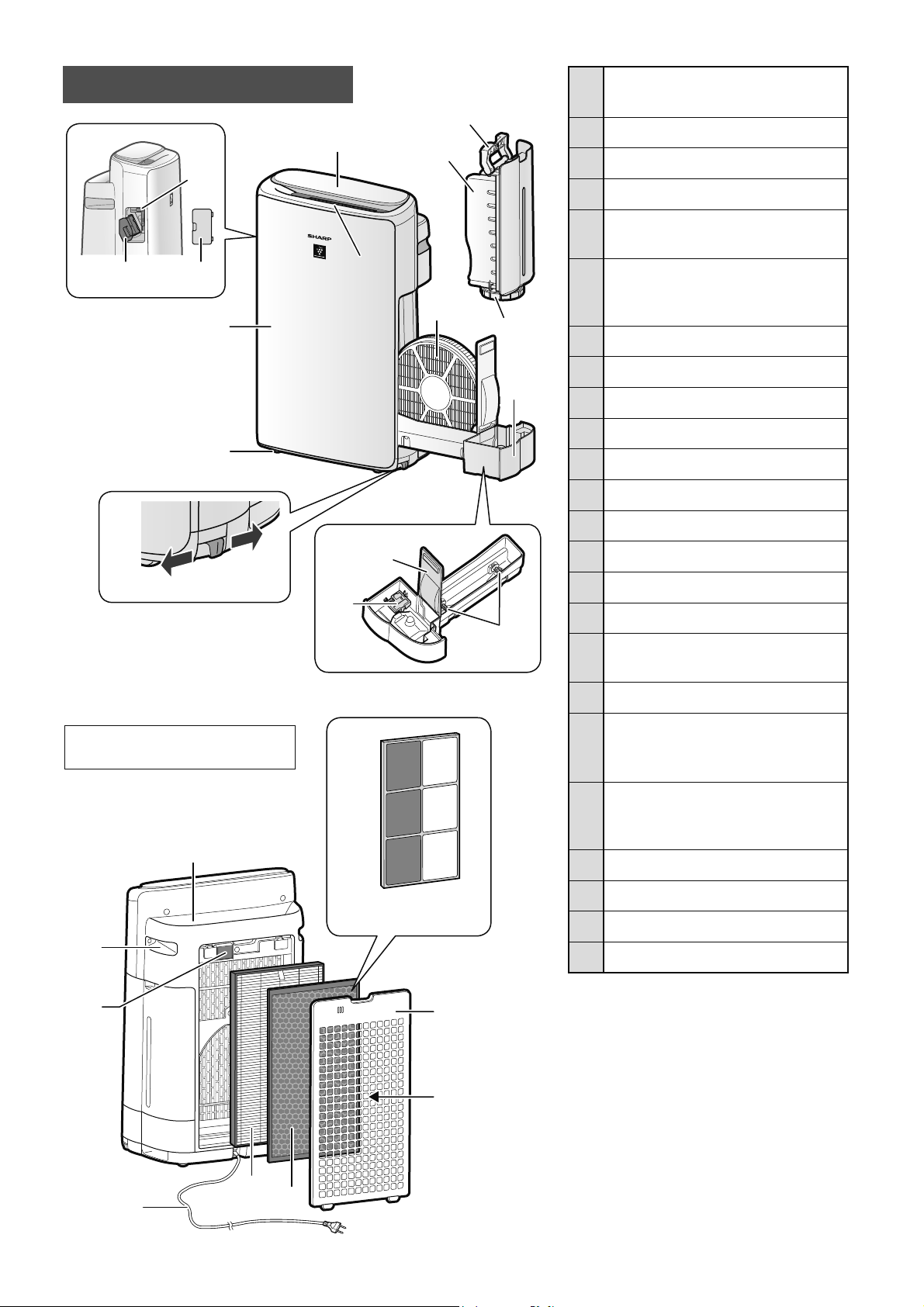
MS-8
1
Panel / Paparan
Pengendalian
2 Salur Keluar Udara
(Depan)
3 Bahagian Utama
4 Roda Dwipaksi (4 Tempat)
5
Penahan Roda Dwipaksi
(Kanan & Kiri)
6
Pemegang Unit*
(Unit Penjanaan Plasmacluster
Ion)
7 Berus Pembersih Unit*
8 Penutup Unit*
9 Pengendalian Tangki
10 Tangki Air
11 Penutup Tangki
12 Penapis Pelembap
13 Dulang Pelembap
14 Panel Dulang
15 Pelampung Pelembap
16 Pemusing
17
Salur Keluar Udara
(Belakang)
18 Pemegang
(2 Tempat)
19
Penapis Penderia /
Penderia
(Dalaman)
Habuk Sensitif
20
Kord Kuasa, Palam Kuasa
(Bentuk palam kuasa bergantung
pada negara.)
21 Penapis HEPA
22 Penapis Penyahbau
23 Panel Belakang
24 Salur Masuk Udara
* Unit ini merujuk kepada Unit Penjana
Plasmacluster Ion. (Sama seperti di
bawah.)
14
15
16
Tidak
Dikunci
Dikunci
5
6
7
8
2
1
3
4
9
10
11
13
12
17
18
20
21
22
23
24
19
• Ilustrasi dalam manual
arahan ini ialah KI-N40.
(Hanya KI-N50)
22
BAHAGIAN UTAMA
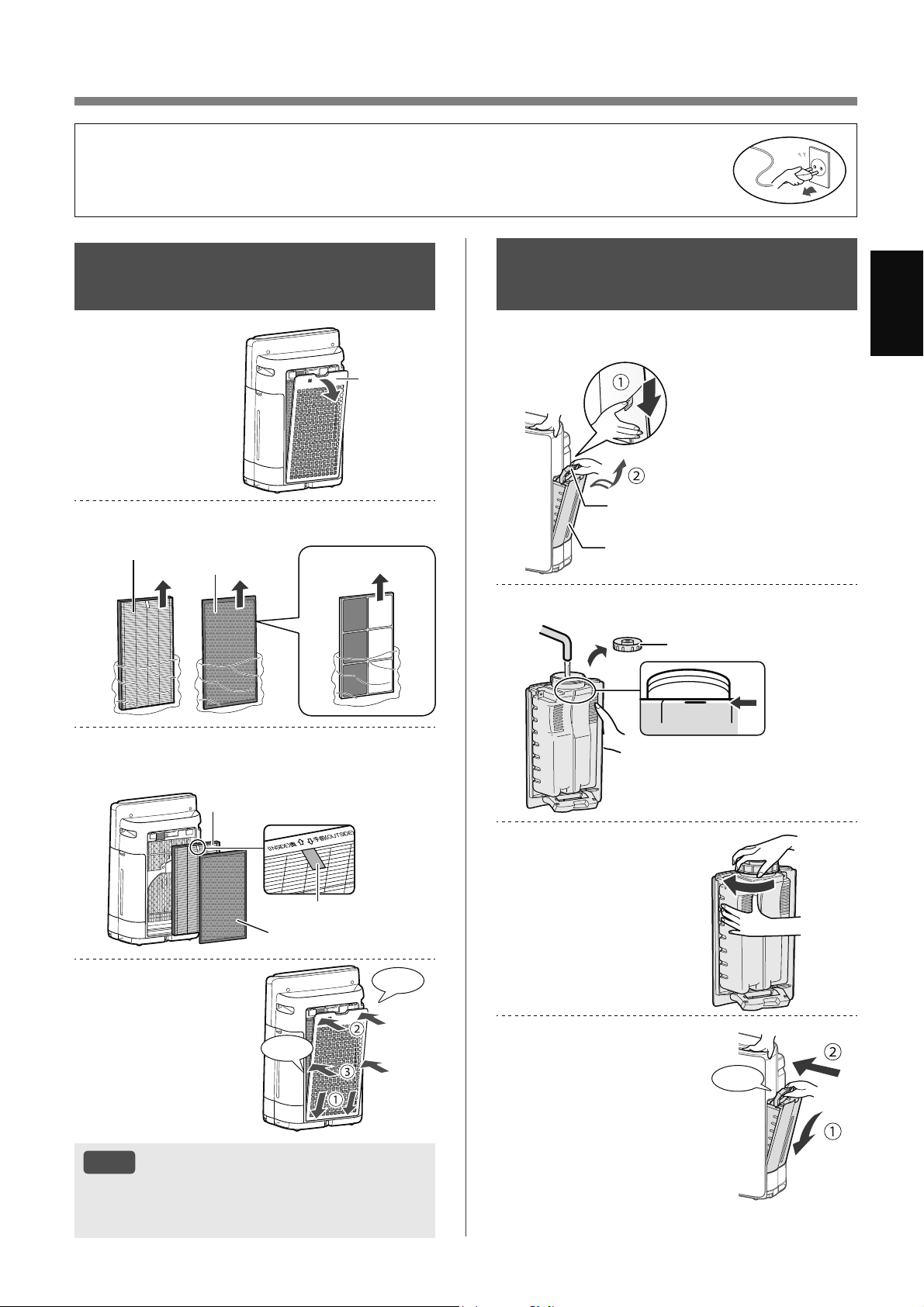
MS-9
Bahasa Melayu
PERSEDIAAN
PEMASANGAN
PENAPIS
1.
Tanggalkan
Panel
Belakang.
Panel
Belakang
2.
Keluarkan penapis daripada beg plastik.
Penapis HEPA
Penapis
Penyahbau
(Hanya KI-N50)
3.
Pasang penapis dalam susunan yang
betul seperti ditunjukkan.
Penapis HEPA
Penapis Penyahbau
Label
4.
Pasang Panel
Belakang.
Klik
Klik
NOTA
• Apabila menggantikan penapis, membuat memo
tarikh mula penggunaan adalah disyorkan.
• Jangan gunakan produk tanpa penapis.
• Untuk mengekalkan kualiti penapis, ia dipasang di dalam produk dan dibungkus dengan
beg plastik.
• Pastikan anda menghentikan penggunaan dan cabut palam produk sebelum
pemasangan atau penggantian penapis.
MENGISI SEMULA
TANGKI AIR
1.
Tanggalkan Tangki Air.
Pengendalian Tangki
Tangki Air
2.
Isikan Tangki Air dengan air paip.
満水
FULL
Penutup Tangki
3.
Ketatkan Penutup
Tangki untuk
mengelakkan
kobocoran.
4.
Pasang Tangki Air.
Klik
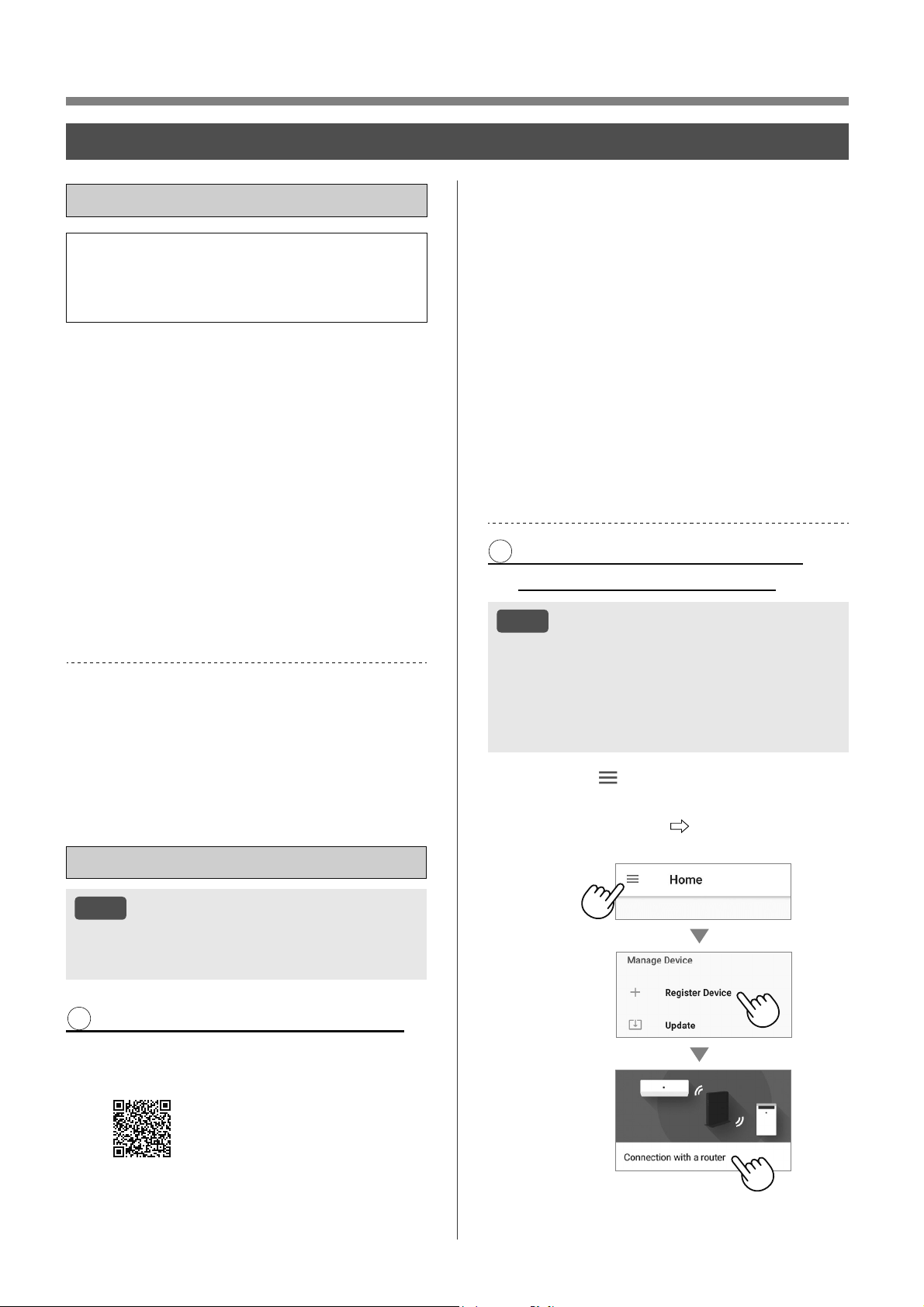
MS-10
OPERASI
TETAPAN Wi-Fi
SEBELUM ANDA BERMULA
• Dengan menyambungkan pembersih udara
anda dengan peranti pintar, anda boleh
menggunakan pembersih udara dengan lebih
mudah.
Pastikan peranti pintar anda disambungkan
kepada Rangkaian Wi-Fi 2.4 GHz.
Titik Akses (Penghala) Persediaan
Dilindungi Wi-Fi (WPS)
• Kaedah penyulitan yang disyorkan ialah WPA2
(AES).
Pastikan peranti pintar anda memenuhi
keperluan minimum perisian (sehingga
Oktober 2022) :
• Telefon pintar / tablet Android 8 atau lebih baharu
• iPhones, iPod touch, iPads iOS 12 atau lebih
baharu
Spesifikasi produk Wi-Fi
• LAN Wayarles: IEEE802.11b/g/n
• Julat frekuensi: Jalur frekuensi 2.4 GHz
Tanda Dagangan
•
“Wi-Fi
®
” ialah tanda dagangan berdaftar Wi-Fi
Alliance
®
.
•
“Android” ialah tanda dagangan Google Inc.
•
“iPhone”, “iPod touch”, “iPad” ialah tanda dagangan
berdaftar atau tanda dagangan Apple Inc.
•
Nama syarikat, nama korporat, nama produk lain
yang disebut dalam arahan pengendalian ialah tanda
dagangan dan tanda dagangan berdaftar setiap
syarikat.
PERSEDIAAN AWAL
NOTA
• Apabila menggandingkan peranti pintar dengan
pembersih udara, sila pastikan kedua-duanya
disambungkan kepada penghala yang sama.
1 MUAT TURUN & DAFTAR DIRI
1.
Pasang Aplikasi yang ditetapkan
kepada peranti pintar anda.
•
Tersedia untuk dimuat turun
daripada Apple Store atau Google
Play.
https://cboard.cloudlabs.sharp.co.jp/smartapp_asean/
download/air/
2.
Sambungkan peranti pintar anda
kepada penghala dan lancarkan
Aplikasi.
Ikuti arahan dalam Aplikasi.
i. Semak Semula “Terma
Perkhidmatan”.
ii. Daftar masuk dengan
menggunakan akaun Sharp anda
(ID SHARP).
•
Jika anda tidak mempunyai ID SHARP, sila
daftar untuk mencipta ID SHARP.
iii. Masukkan nama untuk peranti
pintar anda.
2 SAMBUNGAN PEMBERSIH
UDARA DAN PENGHALA
NOTA
• Jika anda mempunyai tetapan selinap atau
tetapan penapisan MAC pada penghala, sila
batalkan tetapan tersebut.
• ID rangkaian produk dipaparkan sebagai “AP-
SHARP-XX” (XX ialah nombor 2 digit di bawah
alamat MAC produk).
1.
Tekan “ ” pada bahagian atas kiri
skrin “Halaman Utama” dan pilih
“Daftar Peranti” “Sambungan
dengan Penghala”.
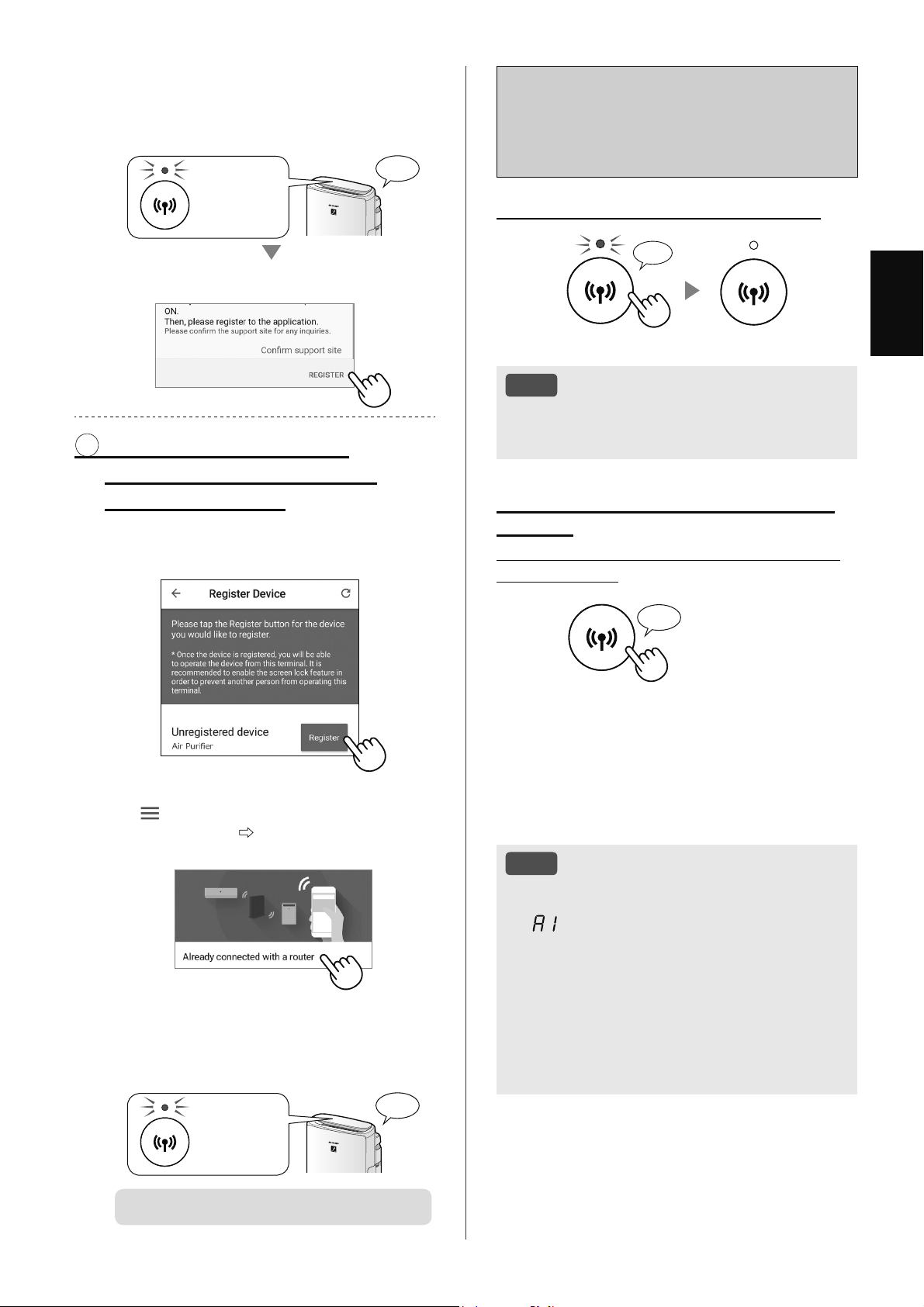
MS-11
Bahasa Melayu
Cara Wi-Fi DIHIDUPKAN
/ DIMATIKAN selepas
melengkapkan PERSEDIAAN
AWAL
Jika anda ingin Wi-Fi DIMATIKAN:
Tekan selama 3 saat
♪
〜
NOTA
• Mematikan Wi-Fi akan menyebabkan anda
tidak dapat mengawal pembersih udara dengan
Aplikasi yang ditetapkan.
Jika anda ingin Wi-Fi DIHIDUPKAN
semula:
(Cara memulihkan sambungan Wi-Fi kepada
rangkaian asal.)
Tekan
selama 3 saat
♪
Lampu Wi-Fi akan berkelip selepas anda menekan
Butang Wi-Fi. Dan dalam masa kira-kira 3 minit,
anda akan mendengar empat bunyi bip pendek.
Beberapa ketika selepas bunyi bip ini, Lampu
Wi-Fi menyala dan sambungan Wi-Fi akan
dipulihkan kepada rangkaian asal. Kini Aplikasi
yang ditetapkan ini boleh digunakan semula untuk
mengawal Pembersih Udara.
NOTA
• Wi-Fi DIHIDUPKAN / DIMATIKAN juga boleh
ditetapkan daripada
“
: Penyesuai Wi-Fi DIHIDUPKAN /
DIMATIKAN”. (Halaman 14, 16)
Dalam hal ini, sambungan Wi-Fi dengan
penghala akan dipulihkan secara automatik.
• Penyambungan semula kepada Penghala
Wayarles boleh mengambil masa beberapa
minit untuk dilengkapkan, selepas
menghidupkan Wi-Fi semula.
2.
Ikuti arahan dalam Aplikasi.
• Jika Lampu Wi-Fi menyala selepas bunyi
pemberitahuan, sambungan berjaya
dilengkapkan.
Menyala
♪
Tekan “DAFTAR”.
3 SAMBUNGAN ANTARA
PEMBERSIH UDARA DAN
PERANTI PINTAR
1.
Tekan “Daftar” untuk pembersih
udara yang anda ingin daftarkan.
(NAMA MODEL)
• Jika anda tidak dapat lihat skrin di atas, ketik
“
” pada skrin “Halaman Utama” dan pilih
“Daftar Peranti”
“Sudah disambungkan
dengan penghala”.
2.
Ikuti arahan dalam Aplikasi.
• Jika Lampu Wi-Fi menyala selepas bunyi
pemberitahuan, sambungan berjaya
dilengkapkan.
Menyala
♪
PERSEDIAAN AWAL berjaya dilengkapkan.
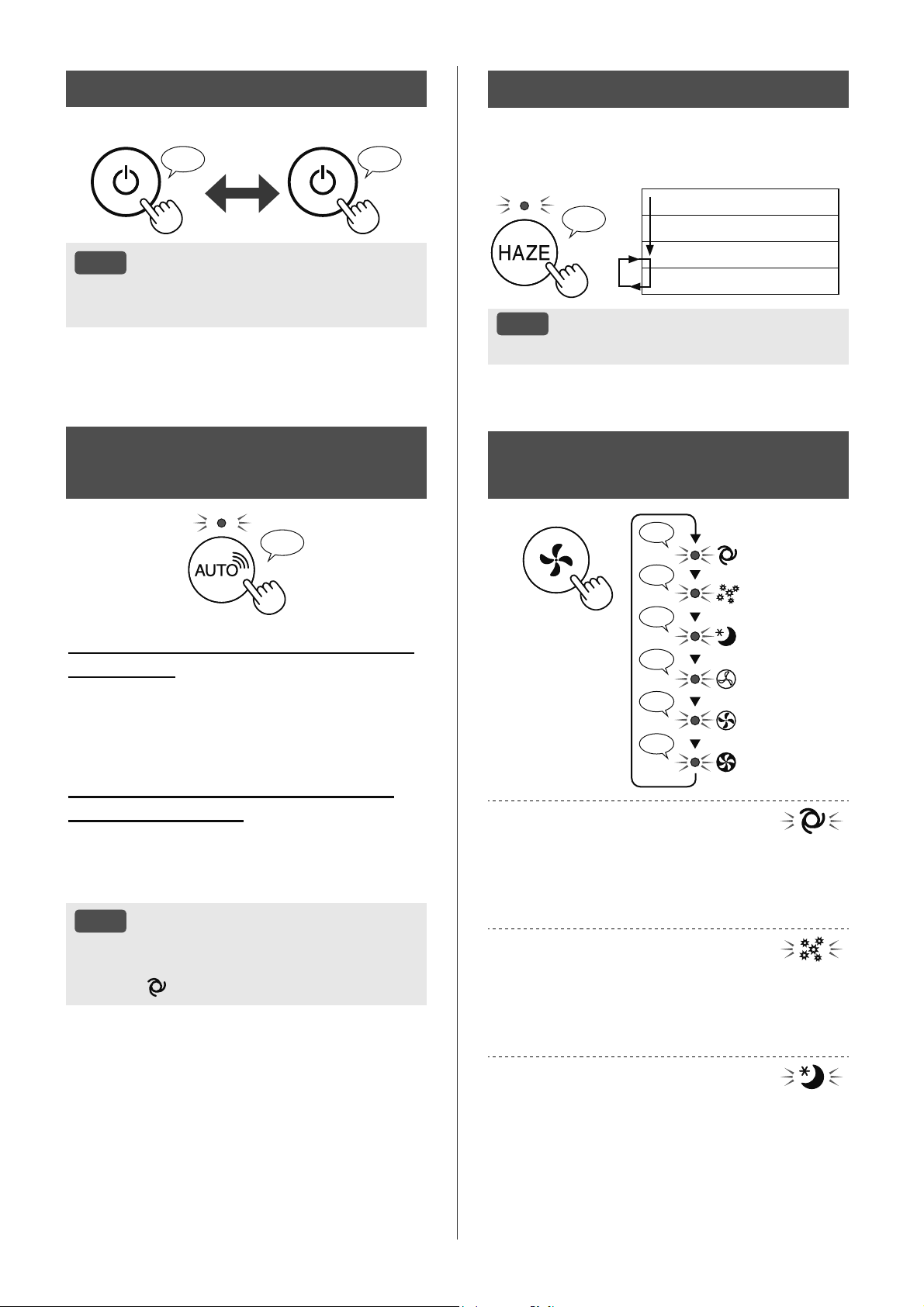
MS-12
MULA/BERHENTI
MULA BERHENTI
♪ ♪
〜
NOTA
• Apabila produk dimulakan, ia bermula dalam
mod sebelumnya semasa dikendalikan.
PEMILIHAN ISI PADU
UDARA DAN MOD
♪
♪
♪
♪♪
♪
♪
LOW
MED
MAX
AUTO
DEBUNGA
TIDUR
AUTO:
Kelajuan kipas berubah secara automatik
bergantung pada jumlah kekotoran dalam udara.
Anda boleh memilih pelembapan untuk
DIHIDUPKAN / DIMATIKAN.
DEBUNGA:
Sensitiviti Penderia Habuk Sensitif ditingkatkan secara
automatik dan Penderia Habuk Sensitif dengan pantas
mengesan kekotoran seperti habuk dan debunga,
serta membersihkan udara dengan kuat.
TIDUR:
Produk akan berfungsi dengan senyap dan kelajuan
kipas akan berubah secara automatik bergantung pada
jumlah kekotoran dalam udara dan kecerahan bilik.
Apabila Kawalan Cahaya ditetapkan kepada
“Auto”, Penunjuk Paparan dan Kebersihan akan
dipadamkan secara automatik.
MOD SHARP COCORO
AIR
♪
Apabila produk disambungkan kepada
Awan Sharp
Awan Sharp akan menganalisis dan menetapkan
pengendalian optimum untuk bilik anda berdasarkan
maklumat yang diterima daripada penderia pada
produk dan rekod penggunaan anda.
Apabila produk tidak disambungkan
kepada Awan Sharp
Kelajuan kipas dan pelembapan DIHIDUPKAN /
DIMATIKAN dikawal secara automatik bergantung
pada enam pengesanan. (PM2.5 / Habuk biasa /
Bau / Suhu / Kelembapan / Cahaya)
NOTA
• Jika tekan Butang Kelembapan DIHIDUPKAN /
DIMATIKAN, mod pengendalian akan berubah
kepada
(AUTO).
MOD HAZE
Berfungsi pada kelajuan kipas TINGGI selama
60 minit dan kemudian berselang-seli antara tahap
Rendah dan Tinggi selama setiap 20 minit.
♪
10 minit: Tahap kipas Tinggi Maksimum
50 minit: Tahap kipas Tinggi
20 minit: Tahap kipas Rendah
20 minit: Tahap kipas Tinggi
NOTA
• Ion Plasmacluster tidak boleh “DIMATIKAN”.
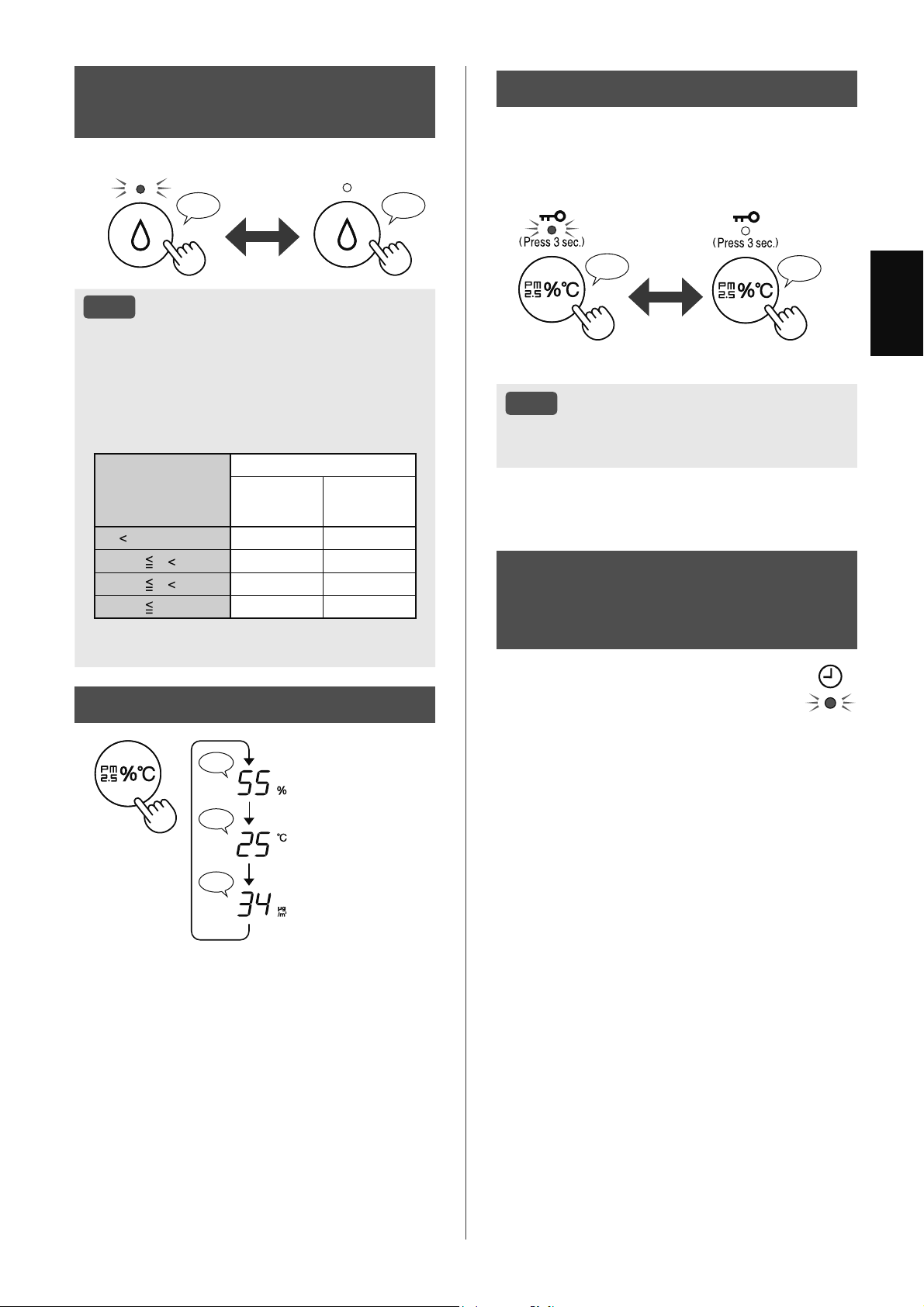
MS-13
Bahasa Melayu
PAPARAN SUIS
♪
♪♪
♪
Kelembapan
Suhu
Kepekatan PM2.5
MOD KANAK-KANAK
Panel pengendalian akan dikunci.
(Apabila produk DIHIDUPKAN atau DIMATIKAN)
DIHIDUPKAN PEMBATALAN
♪
♪♪
Tekan
selama 3 saat
Tekan
selama 3 saat
NOTA
• Wi-Fi mungkin akan dimatikan semasa dalam
Mod Kanak-kanak.
PENJADUAL
MINGGUAN:
APLIKASI SAHAJA
PEMASA DIHIDUPKAN (atau
PEMASA DIMATIKAN)
Anda boleh menetapkan penjadual
mingguan untuk pembersih udara
memulakan mod khusus (atau
menghentikan pengendalian) pada hari dan
masa yang khusus. Lampu Pemasa akan
dihidupkan semasa terdapat jadual yang
ditetapkan.
TETAPAN
PELEMBAPAN
♪♪♪
DIHIDUPKAN DIMATIKAN
NOTA
• Apabila berfungsi dengan Pelembapan
DIHIDUPKAN dalam mod seperti jadual
di bawah, produk mengawal kelembapan
secara automatik dengan mengesan suhu
dan kelembapan. (Kecuali mod MAKSIMUM /
SEDERHANA / RENDAH.)
Suhu
(T)
Kelembapan
SEMUA
MOD*
MOD
TIDUR
T
18 ºC 65 % 65 %
18 ºC
T 24 ºC 60 % 65 %
24 ºC
T 28 ºC 55 % 60 %
28 ºC
T45%50%
*
Kecuali mod MAKSIMUM / SEDERHANA / RENDAH /
TIDUR
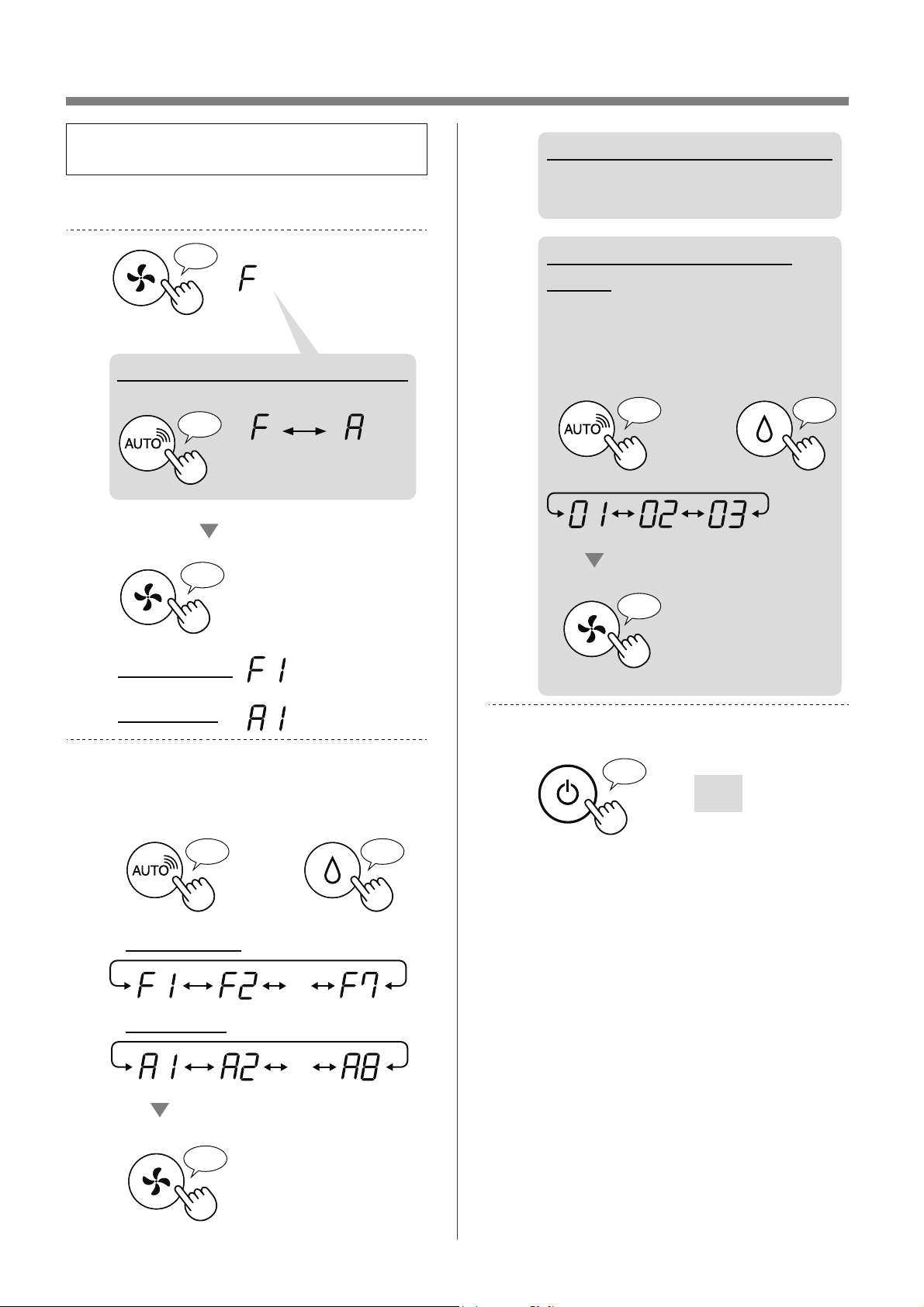
MS-14
CARA MENUKAR PELBAGAI TETAPAN
• Anda boleh menukar fungsi produk dan Wi-Fi
pada halaman 15 - 18.
1.
Pastikan produk DIMATIKAN.
2.
Tekan selama 3 saat
♪
♪
Tetapkan
Tetapan Wi-Fi
Tetapan produk
♪
Apabila melakukan tetapan Wi-Fi
Ubah “F” kepada “A”.
Tetapan
produk
Tetapan
Wi-Fi
3.
Pilih “Nombor fungsi (F1-F7 atau
A1-A8)” pada halaman 15 - 18.
atau
Pergi ke Hadapan
♪
Pergi ke Belakang
♪
・・・
Tetapkan
♪
Tetapan Wi-Fi
Tetapan produk
・・・
4.
Apabila melakukan tetapan Wi-Fi
Rujuk halaman 16 - 18
untuk butiran setiap fungsi.
Apabila melakukan tetapan
Produk
Pilih “Nombor tetapan
(01 - 03)” pada halaman 15.
Tetapkan
♪
〜
atau
Pergi ke Hadapan
♪
Pergi ke Belakang
♪
5.
Selesaikan tetapan.
Dipadamkan
♪
〜
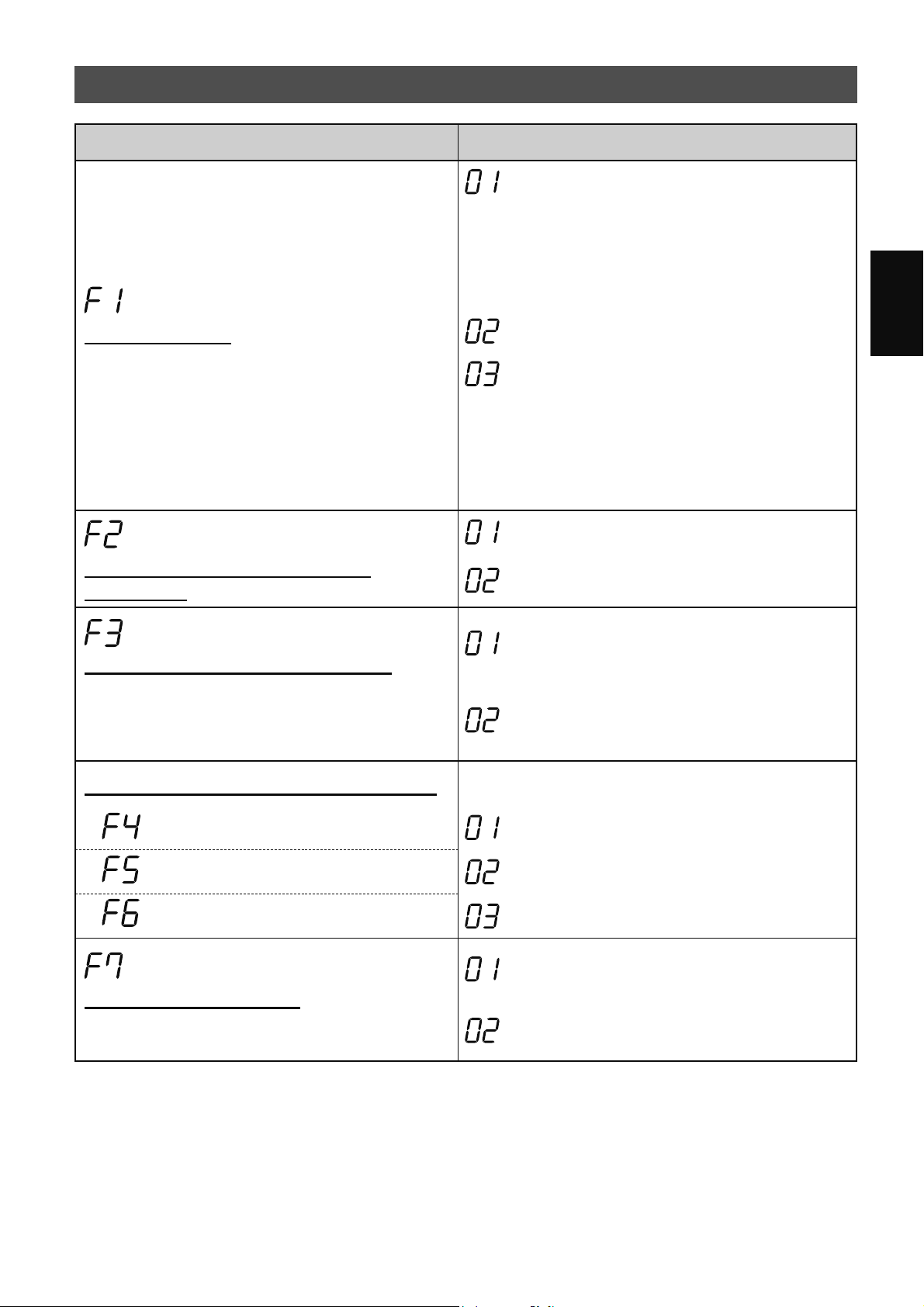
MS-15
Bahasa Melayu
FUNGSI PRODUK (F1-F7)
Fungsi Tetapan
Kawalan Cahaya
Anda boleh pilih kecerahan Paparan dan Penunjuk
Kebersihan.
DIMATIKAN
Apabila ditetapkan kepada “DIMATIKAN”,
cahaya “Malap” menyala selama 8 saat selepas
pengendalian bermula dan kemudian cahaya
dipadamkan.
Walau bagaimanapun, beberapa penunjuk yang
memerlukan pemberitahuan akan kekal malap.
Malap
Auto
(lalai)
Cahaya DIHIDUPKAN atau DIMATIKAN secara
automatik berdasarkan kecerahan bilik.
• Bilik cerah: cahaya DIHIDUPKAN
• Bilik gelap: cahaya DIMATIKAN
Walaupun bilik cerah, cahaya akan dimatikan
apabila berfungsi dalam mod tidur.
Ion Plasmacluster DIHIDUPKAN/
DIMATIKAN
DIMATIKAN
DIHIDUPKAN
(lalai)
Mulakan Semula Secara Automatik
Jika palam produk dicabut atau jika berlaku putus
bekalan kuasa elektrik, produk akan memulakan
semula pengendalian dengan tetapan sebelumnya
selepas bekalan kuasa dipulihkan.
Pembatalan
DIHIDUPKAN
(lalai)
Melaraskan sensitiviti penderia (F4 - F6)
Lampu Penderia Rendah
Penderia Habuk Sensitif Standard
(lalai)
Penderia Bau Tinggi
Tetapan Penunjuk Bunyi
Anda boleh menetapkan produk untuk membuat
bunyi bip apabila Tangki Air kosong.
Pembatalan
(lalai)
DIHIDUPKAN
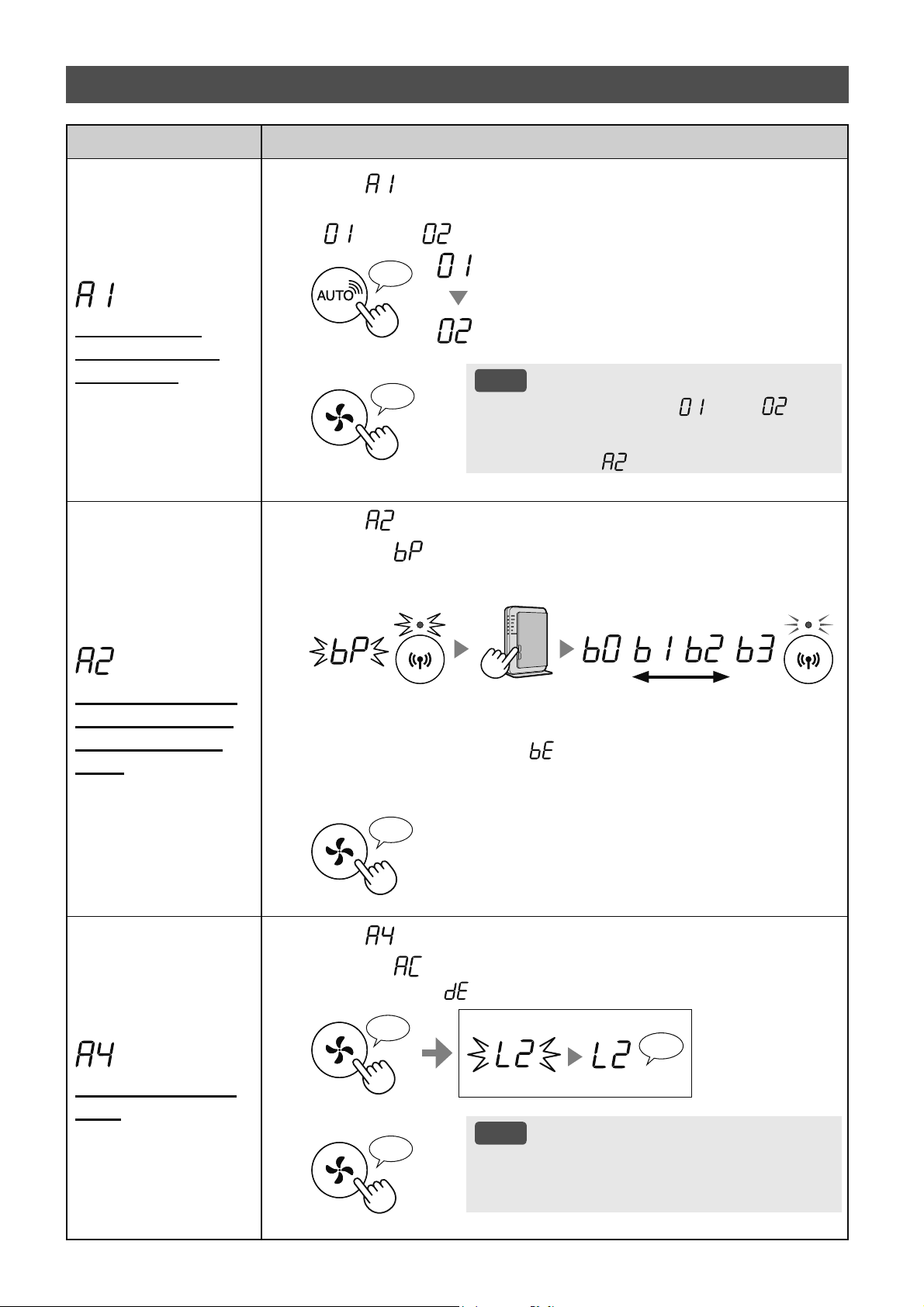
MS-16
Fungsi Tetapan
Penyesuai Wi-
Fi DIHIDUPKAN/
DIMATIKAN
1.
Pilih “ ” dengan mengikuti Langkah 1 - 3 pada halaman 14.
2.
Tekan Butang "
SHARP COCORO AIR
" untuk memilih Tetapan
"
" atau " ".
Wi-Fi DIMATIKAN
Wi-Fi DIHIDUPKAN
♪
3.
Lengkap
NOTA
• Apabila nombor Tetapan (“ ” atau “ ”)
diubah, segi empat sama berputar pada paparan
sehingga tetapan dilengkapkan. Apabila tetapan
dilengkapkan, “
” dipaparkan.
♪
〜
Sambungan Wi-Fi
dengan penghala
(dengan Butang
WPS)
1.
Pilih “ ” dengan mengikuti Langkah 1 - 3 pada halaman 14.
2.
Selepas “ ” dipaparkan, tekan Butang WPS (Persediaan
Dilindungi Wi-Fi) penghala.
Menyala
lemah kuat
Kerdip
Kerdip
Sebaik sahaja disambungkan, tahap
penerima akan dipaparkan.
Ralat sambungan berlaku jika “ ” dipaparkan. Sila sahkan bahawa
penghala berfungsi dengan betul dan cuba lagi.
3.
Lengkap
♪
Permulaan fungsi
Wi-Fi
1.
Pilih “ ” dengan mengikuti Langkah 1 - 3 pada halaman 14.
2.
Selepas “ ” dipaparkan tekan Butang “Mod”.
Ralat berlaku jika “ ” dipaparkan. Sila cuba lagi.
♪
〜
Lengkap
Kerdip
Memulakan
♪
3.
Lengkap
NOTA
• Sila padamkan pendaftaran peranti daripada
Aplikasi apabila memulakan pembersih udara
yang sudah disambungkan kepada Wi-Fi.
♪
FUNGSI Wi-Fi (A1-A8)
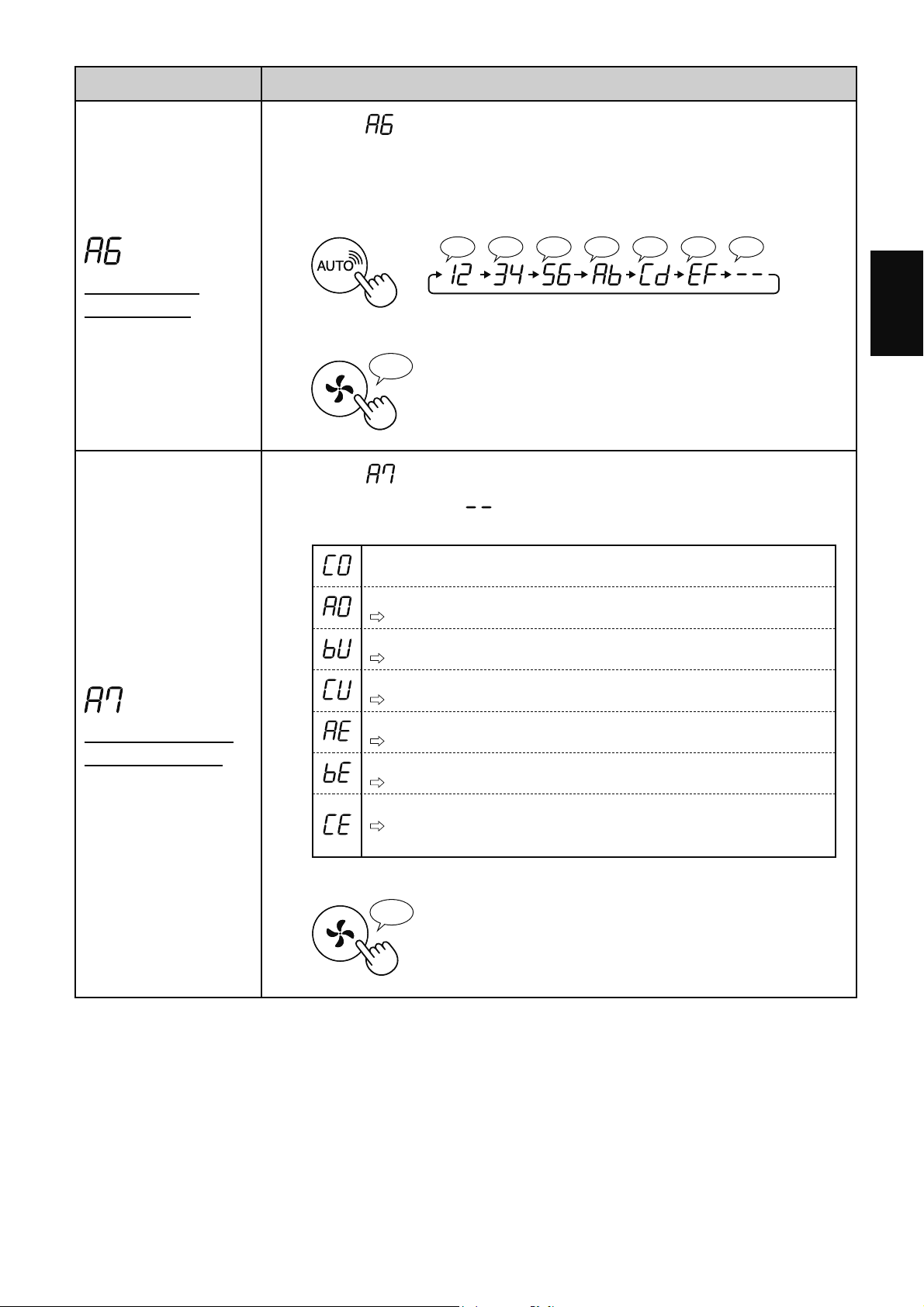
MS-17
Bahasa Melayu
Fungsi Tetapan
Pengesahan
alamat MAC
1.
Pilih “ ” dengan mengikuti Langkah 1 - 3 pada halaman 14.
2.
Tekan Butang “SHARP COCORO AIR” untuk memaparkan alamat
MAC.
Contoh:
Sekiranya alamat MAC ialah “12:34:56:AB:CD:EF”.
♪♪♪♪♪♪♪
♪
〜
3.
Lengkap
♪
Paparkan status
rangkaian Wi-Fi
1.
Pilih “ ” dengan mengikuti Langkah 1 - 3 pada halaman 14.
2.
Selepas paparan “ ” selama beberapa saat, status rangkaian
penyesuai Wi-Fi akan dipaparkan.
Sambungan stabil
Penyesuai Wi-Fi dimatikan
Sila hidupkan penyesuai Wi-Fi.
Penghala tidak didaftarkan
Sila lakukan sambungan Wi-Fi dengan penghala.
Tetapan pautan dengan Aplikasi tidak dilakukan
Sila lakukan tetapan pautan dengan peranti pintar.
Ralat rangkaian penyesuai Wi-Fi
Sila matikan penyesuai Wi-Fi dan hidupkan semula selepas seketika.
Ralat rangkaian antara pembersih udara dan penghala
Sila sahkan status rangkaian penghala.
Ralat perkhidmatan rangkaian
Sila matikan pembersih udara dan sahkan status Internet, kemudian
cuba lagi.
3.
Lengkap
♪
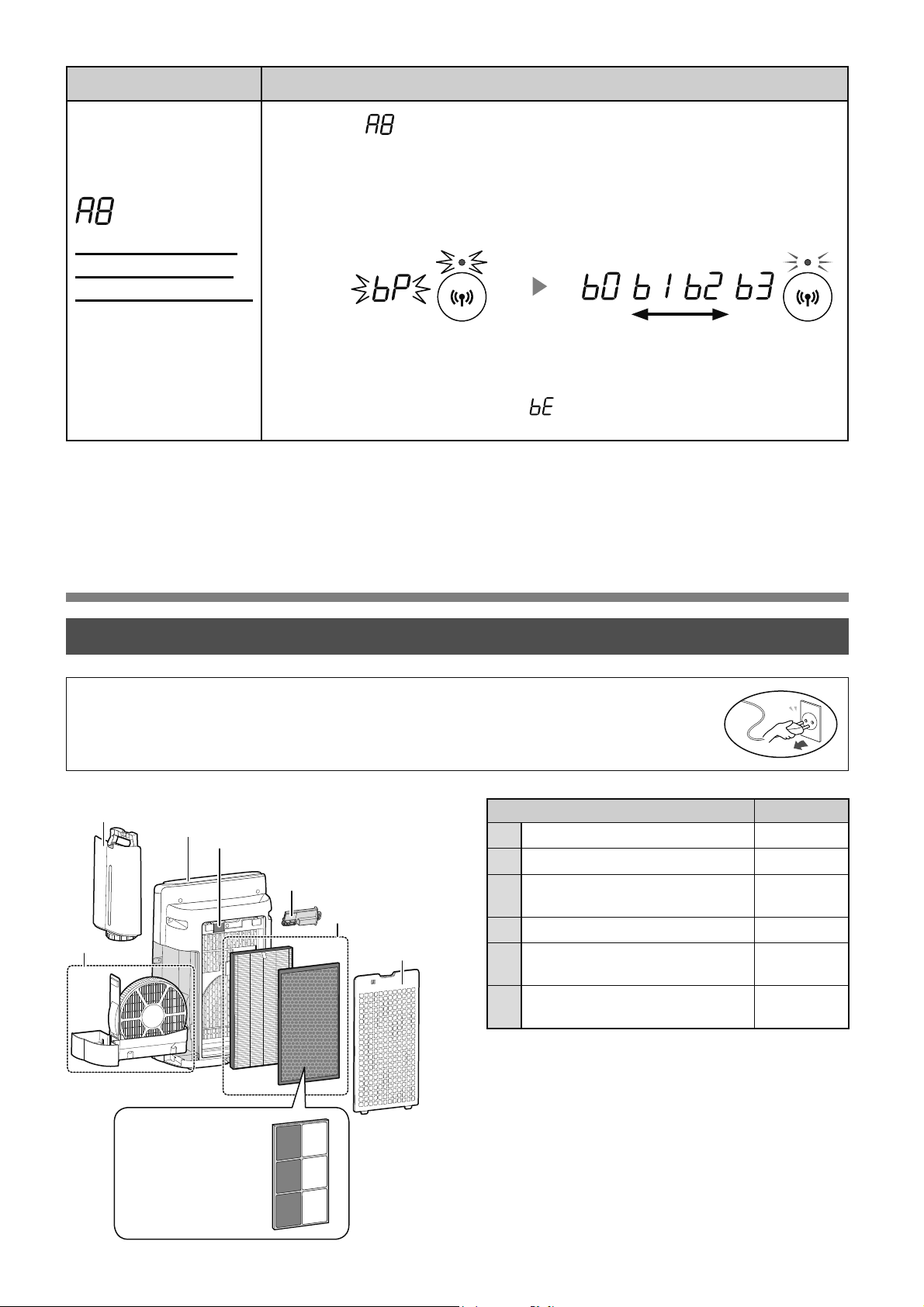
MS-18
PENJAGAAN DAN PENYELENGGARAAN
Tempat Halaman
1
Bahagian Utama 19
2
Tangki Air 19
3
Penapis Pelembap / Dulang
Pelembap
20
4
Panel Belakang / Penderia 19
5
Penapis HEPA / Penapis
Penyahbau
22
6
Unit Penjanaan Ion
Plasmacluster
23
Fungsi Tetapan
Sambungan Wi-Fi
dengan penghala
(tanpa Butang WPS)
- Mod AP (Titik
Capaian) -
1.
Pilih “ ” dengan mengikuti Langkah 1 - 3 pada halaman 14.
2.
Lakukan sambungan Wi-Fi pembersih udara dan penghala
berdasarkan skrin Aplikasi.
Rujuk Aplikasi untuk pengendalian selanjutnya.
Menyala
lemah kuat
Kerdip
Kerdip
Sebaik sahaja disambungkan, tahap
penerima akan dipaparkan.
Dipaparkan semasa menetapkan
sambungan antara produk dan
penghala.
Ralat sambungan berlaku jika “
” dipaparkan. Sila sahkan penghala dan
cuba lagi.
• Untuk mengekalkan prestasi optimum pembersih udara ini, sila bersihkan produk
termasuk penapis secara berkala.
• Pastikan anda menghentikan pengendalian dan cabut palam produk sebelum apa-apa
kerja penyelenggaraan atau penggantian aksesori dilakukan.
PENJAGAAN
6
2
4
1
3
5
4
(Hanya KI-N50)
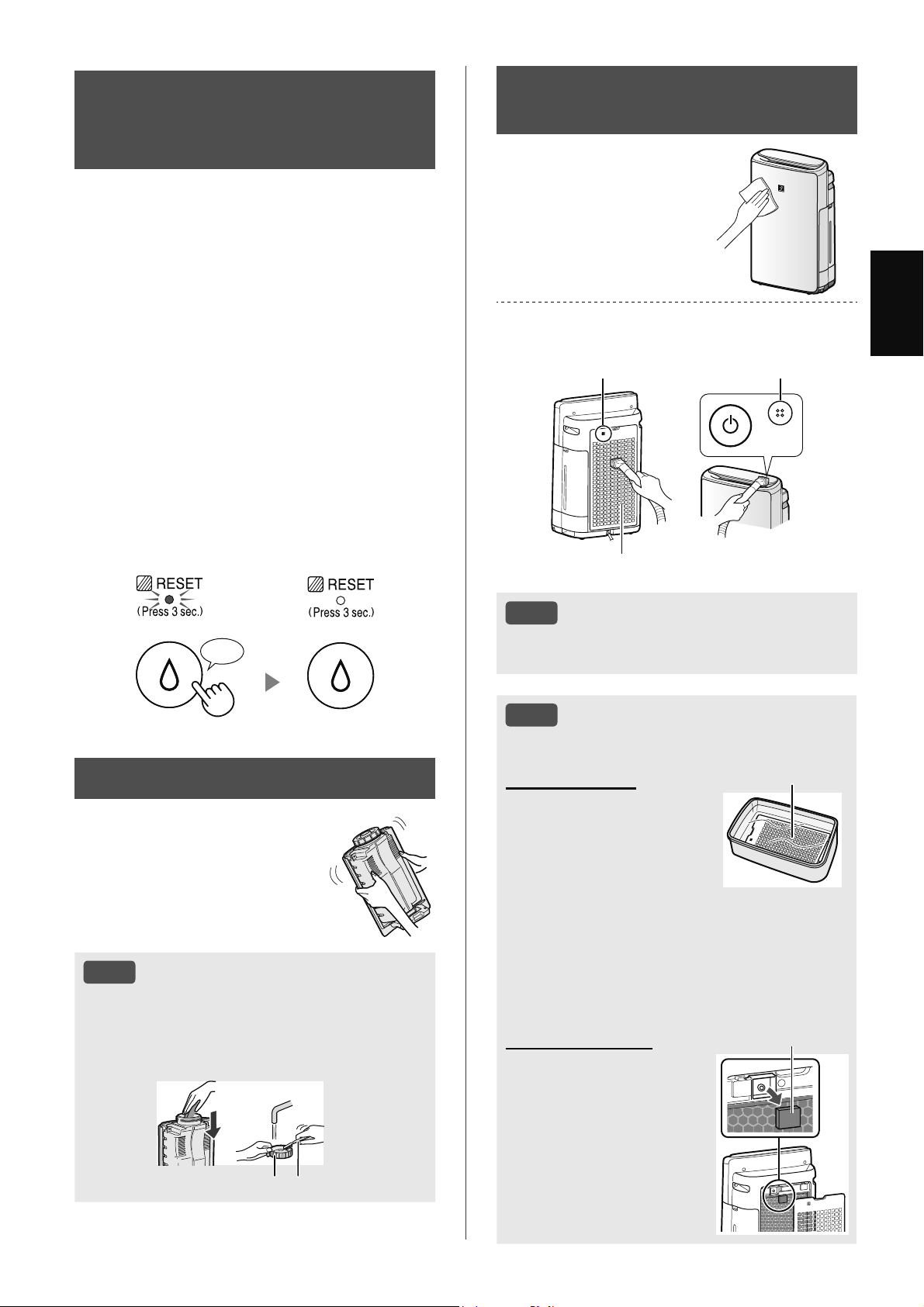
MS-19
Bahasa Melayu
LAMPU
PENYELENGGARAAN
PENAPIS
Apabila tempoh pengendalian kumulatif atau
tempoh menahan air melebihi daripada kira-kira
720 jam, Lampu Penyelenggaraan Penapis akan
dihidupkan.
• Masa tidak akan dikira apabila palam kuasa
produk dicabut.
• 30 hari × 24 jam = 720 jam
Ini ialah peringatan untuk melakukan kerja
penyelenggaraan ke atas Penapis dan Dulang
Pelembap, Bahagian Utama, Panel Belakang dan
Penderia.
Selepas penyelenggaraan, sambungkan palam
kuasa kepada alur keluar dinding dan tekan Butang
Kuasa DIHIDUPKAN/DIMATIKAN, kemudian
tekan dan tahan Butang Tetapkan Semula Penapis
selama 3 saat untuk menetapkan semula Lampu
Penyelenggaraan Penapis.
Tekan selama 3 saat
♪
NOTA
Cara Membersihkan Kotoran yang Sukar Dihilangkan.
Panel Belakang
1. Tambahkan sedikit bahan
pencuci dapur yang lembut
ke dalam air dan rendam
selama kira-kira 10 minit.
2. Bilas bahan pencuci
dapur yang lembut
dengan air bersih.
3. Keringkan penapis
sepenuhnya di dalam
kawasan yang mempunyai
pengaliran udara yang baik.
Panel Belakang
Penapis Penderia
1. Tanggalkan Panel Belakang.
2. Tanggalkan Penapis
Penderia.
3. Jika Penapis Penderia
sangat kotor, basuh
dengan air dan keringkan
betul-betul.
Penapis Penderia
BAHAGIAN UTAMA / PANEL
BELAKANG / PENDERIA
Lap dengan kain
lembut yang kering.
Buang habuk dengan perlahan menggunakan
alat pembersih seperti pembersih vakum.
Panel Belakang (Prapenapis)
Penderia
Penderia
NOTA
•
Jangan kenakan tekanan berlebihan semasa
menggosok Panel Belakang.
TANGKI AIR
Bilas bahagian dalam
dengan air.
NOTA
Cara membersihkan kotoran yang
sukar dihilangkan.
Bersihkan bahagian dalam Tangki Air dengan
span lembut dan Penutup Tangki dengan
pengesat kapas atau berus gigi.
Penutup Tangki Berus gigi
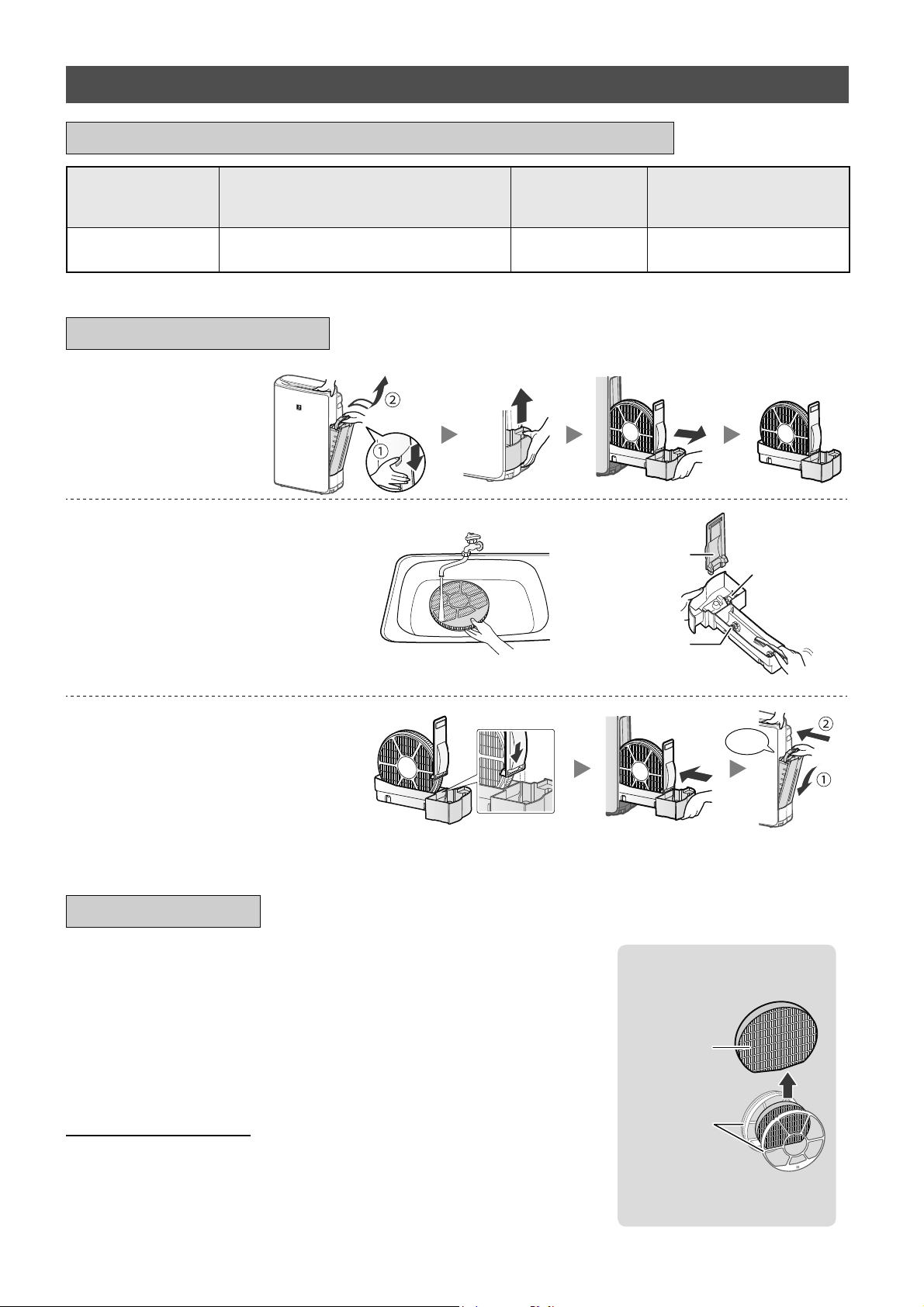
MS-20
PENGGANTIAN
Lihat halaman ini untuk arahan mengenai cara memasang
penapis semasa proses penggantian.
•
Sila rujuk pengedar anda untuk membeli penapis penggantian.
•
Gunakan hanya penapis yang direka bentuk untuk produk ini.
FZ-J1XMFE
(1 unit)
Kerangka
Penapis
Melembapkan
Penapis
•
Jangan lupuskan Kerangka
Penapis.
Apabila menggantikan penapis, membuat memo tarikh mula
penggunaan adalah disyorkan.
Pelupusan Penapis
Sila lupuskan penapis terpakai menurut undang-undang dan peraturan
pelupusan tempatan.
Bahan Penapis Pelembap:
Poliester, Rayon
1.
Tanggalkan
Penapis dan
Dulang Pelembap.
2.
Bilas dengan air yang
banyak.
Pelampung
Panel Dulang
Pemusing
• Jangan tanggalkan Pelampung
Pelembap. Jika ia tertanggal, rujuk
halaman 21.
• Rujuk halaman 21 untuk cara
membersihkan Penapis Pelembap
apabila ia menjadi sangat kotor.
3.
Pasang Penapis dan Dulang
Pelembap.
Klik
• Selepas penyelenggaraan, pasang
semula bahagian alat ganti dengan
betul.
PENYELENGGARAAN
PENAPIS PELEMBAP / DULANG PELEMBAP
Nama Bahagian
Alat Ganti
Kitaran Penyelenggaraan
Jangka Hayat
Perkhidmatan
Maksimum
Model Penapis
Penggantian
Penapis Pelembap
Apabila bau keluar dari salur keluar
udara, atau sebulan sekali.
10 tahun
*
1
FZ-J1XMFE
*1: Aplikasi yang Ditetapkan memberitahu apabila setiap bahagian penggantian perlu digantikan mengikut penggunaan.
KITARAN PENGGANTIAN DAN PENYELENGGARAAN
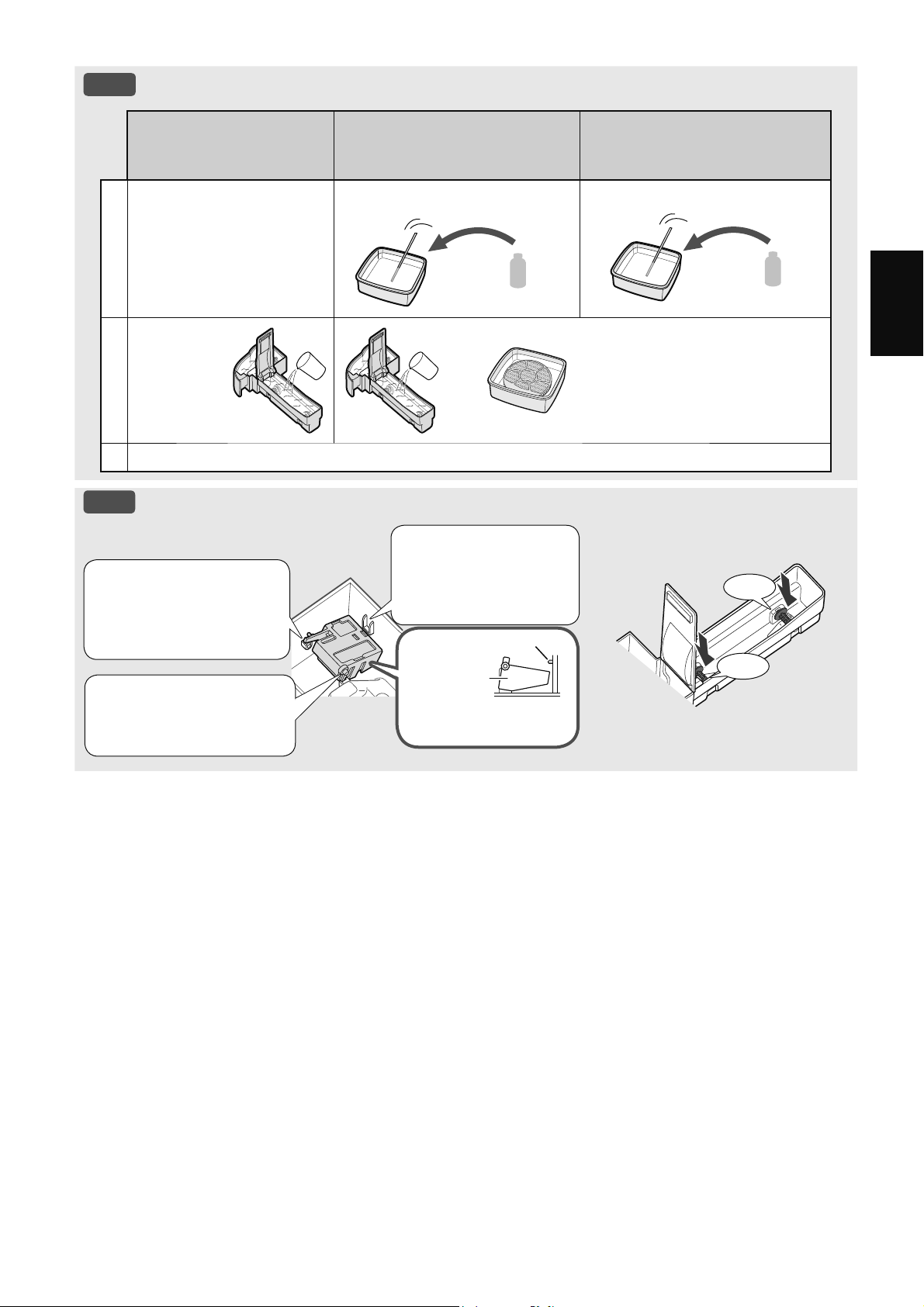
MS-21
Bahasa Melayu
NOTA
Cara Membersihkan Kotoran yang Sukar Dihilangkan.
Bahan Pencuci Dapur
yang Lembut
(hanya Dulang pelembap)
Asid Sitrik
(boleh didapati dari kedai ubat)
100% Jus Lemon yang
Dibotolkan Tanpa Pulpa
1
1. Isikan dulang separuh
penuh dengan air.
2. Tambahkan sedikit
bahan pencuci dapur
yang lembut.
2 1/2 cawan air
3 sudu teh
3 cawan air
1/4 cawan
2
Rendam
selama 30
minit.
Rendam selama 30 minit.
(Apabila menggunakan jus lemon
sebagai larutan pembuangan
kerak, biarkan untuk tempoh
rendam yang lebih lama.)
3
Bilas bahan pencuci dapur yang lembut atau larutan pembuangan kerak dengan air bersih.
NOTA
Cara memasang Pelampung Pelembap.
Pelampung Pelembap Pemusing
Klik
Klik
3. Masukkan tab
Pelampung Pelembap
yang bertentangan ke
dalam lubang.
1. Masukkan
Pelampung
Pelembap di bawah
tab ini.
Pandangan Keratan Rentas
Tab
Pelampung
Pelembap
Pandangan Keratan
Rentas
2. Masukkan tab
Pelampung Pelembap
ke dalam lubang.
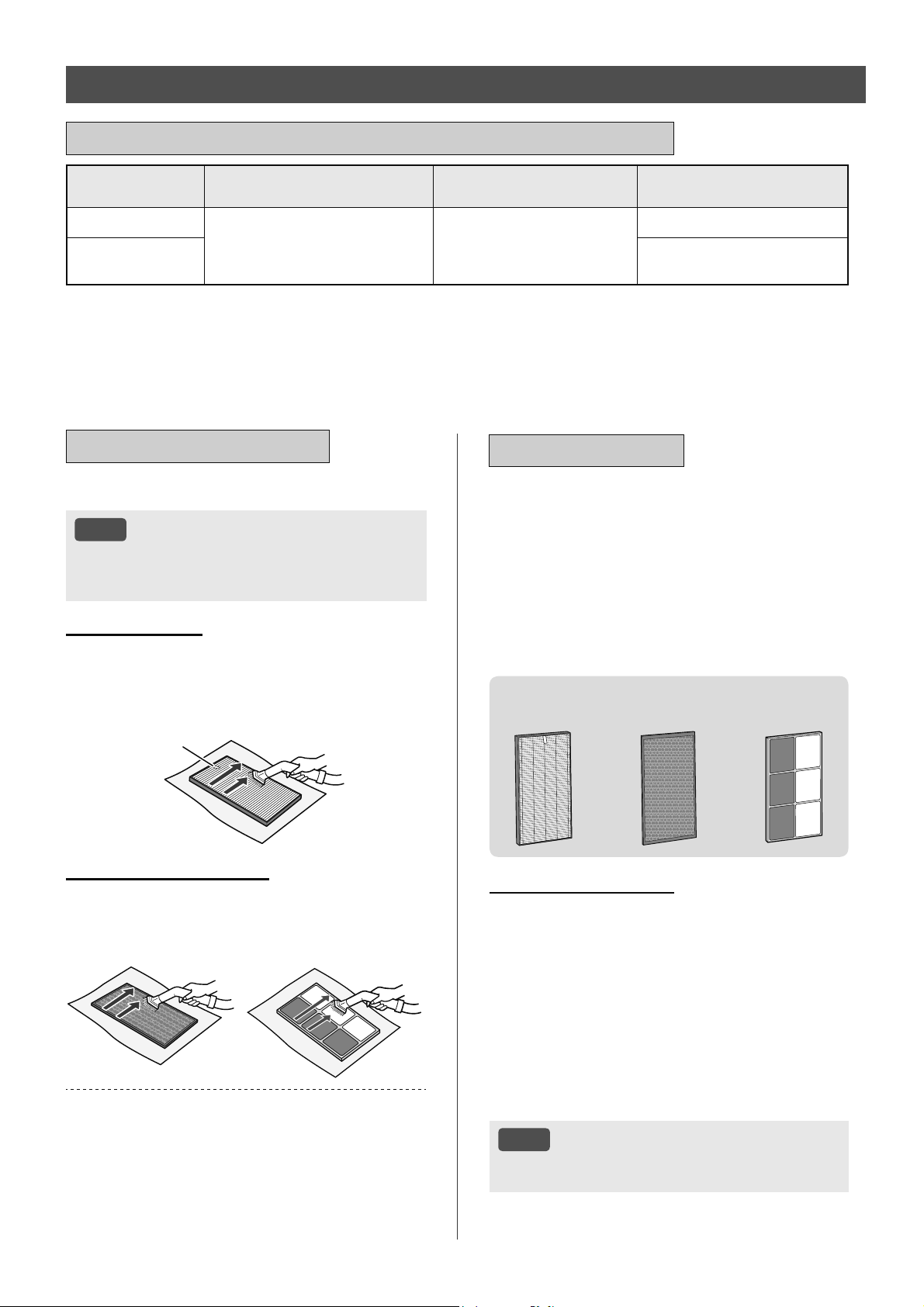
MS-22
Nama Penapis Kitaran Penyelenggaraan
Jangka Hayat
Perkhidmatan Maksimum
Model Penapis
Penggantian
Penapis HEPA
Bila-bila masa habuk terkumpul,
apabila bau keluar dari salur
keluar udara, atau sebulan sekali.
10 tahun
*
1, 2
FZ-D40HFE
Penapis
Penyahbau
FZ-D40DFE (Hanya KI-N40)
FZ-G40DFE (Hanya KI-N50)
*1: Menurut Persatuan Pembuatan Elektrik Jepun JEM 1467, jangka hayat perkhidmatan maksimum adalah berdasarkan keadaan setara
asap daripada 5 batang rokok sehari yang dengannya kuasa pengumpulan/penyahbauan habuk dikurangkan sebanyak separuh
berbanding penapis baharu. Disyorkan supaya menggantikan penapis dengan lebih kerap dalam keadaan yang lebih teruk.
*2: Aplikasi yang Ditetapkan memberitahu apabila setiap bahagian penggantian perlu digantikan mengikut penggunaan.
Jangka hayat penapis berbeza bergantung pada persekitaran bilik, keadaan penggunaan dan lokasi
produk. Kami mengesyorkan supaya penapis digantikan dengan lebih kerap jika produk digunakan dalam
keadaan yang lebih teruk dengan ketara (PM2.5 dan sebagainya,) berbanding isi rumah biasa.
PENAPIS HEPA / PENAPIS PENYAHBAU
KITARAN PENGGANTIAN DAN PENYELENGGARAAN
Buang habuk pada penapis.
NOTA
• Jangan basuh penapis. Jangan dedahkan
kepada cahaya matahari (Jika tidak, penapis
ini boleh hilang keberkesanan.)
PENAPIS HEPA
Hanya selenggara dan bersihkan permukaan yang
ditandakan. Jangan bersihkan permukaan yang
bertentangan.
Penapis itu mudah rosak, oleh itu perlu berhati-hati
supaya tidak mengenakan tekanan yang berlebihan.
Label
PENAPIS PENYAHBAU
Kedua-dua permukaan boleh diselenggara dan dibersihkan.
Penapis itu mudah rosak, oleh itu perlu berhati-hati
supaya tidak mengenakan tekanan yang berlebihan.
(KI-N40)
(KI-N50)
Sesetengah bau yang diserap oleh penapis, lama-
kelamaan boleh terurai dan menyebabkan bau semakin
kuat. Bergantung pada keadaan penggunaan, dan
terutama sekali jika produk digunakan dalam persekitaran
yang jauh lebih teruk berbanding kediaman biasa, bau ini
mungkin menjadi kuat lebih cepat daripada jangkaan.
Gantikan penapis dalam hal tersebut atau jika habuk tidak
dapat dibuang selepas penyelenggaraan.
PENYELENGGARAAN
PENGGANTIAN
Lihat halaman 9 untuk arahan
mengenai cara memasang penapis
semasa proses penggantian.
•
Sila rujuk pengedar anda untuk membeli penapis
penggantian.
•
Gunakan hanya penapis yang direka bentuk untuk
produk ini.
Apabila menggantikan penapis, membuat memo
tarikh mula penggunaan adalah disyorkan.
FZ-D40HFE
(1 unit)
FZ-D40DFE
(1 unit)
FZ-G40DFE
(1 unit)
Pelupusan Penapis
Sila lupuskan penapis terpakai menurut undang-
undang dan peraturan pelupusan tempatan.
Bahan Penapis HEPA:
Polipropilena, Polietilena
Bahan Penapis Penyahbau:
(Hanya KI-N40)
Polipropilena, Poliester, Karbon yang diaktifkan
(Hanya KI-N50)
Keras, resin ABS
NOTA
• Jangan basuh dan gunakan semula penapis
terpakai.
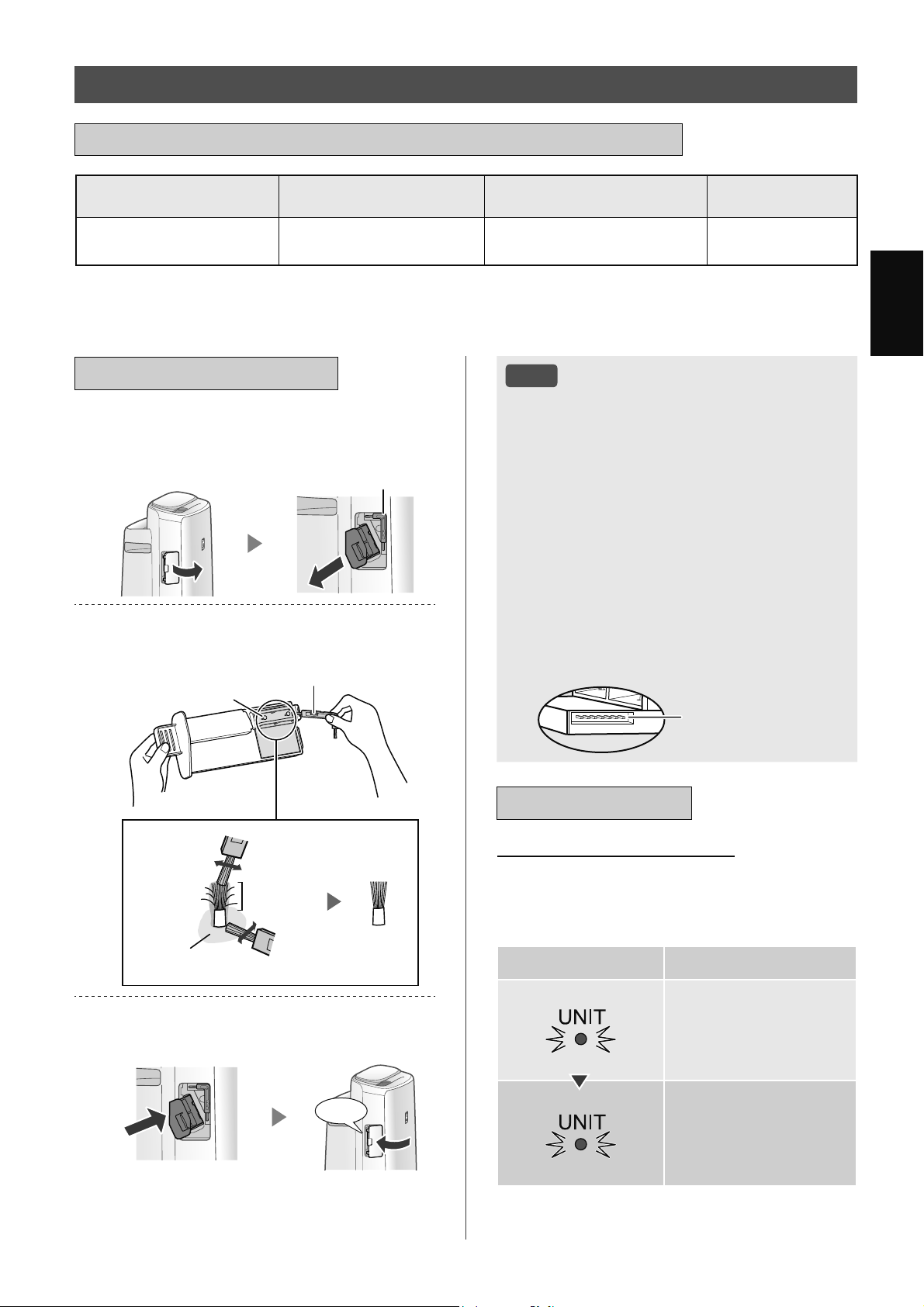
MS-23
Bahasa Melayu
Nama Bahagian Alat Ganti Kitaran Penyelenggaraan
Jangka Hayat Perkhidmatan
Maksimum
Model Penggantian
Unit Penjanaan Ion
Plasmacluster
*
1
Setiap 6 bulan atau lebih
kerap jika perlu
19,000 jam
*
2,3
IZ-C90ME
*1: Dalam perkara berikut, "Unit Penjanaan Ion Plasmacluster" disingkatkan sebagai "Unit".
*2: Masa penggantian akan diumumkan oleh lampu Penggantian Unit.
*3: Aplikasi yang Ditetapkan memberitahu apabila setiap bahagian penggantian perlu digantikan mengikut penggunaan.
UNIT PENJANAAN ION PLASMACLUSTER
(Bahagian Elektrod)
KITARAN PENGGANTIAN DAN PENYELENGGARAAN
PENYELENGGARAAN
1.
Tanggalkan Penutup Unit dan tarik
keluar Pemegang Unit.
Berus Pembersih Unit
2.
Buang habuk dari Bahagian
Elektrod.
Berus Pembersih Unit
Elektrod
Selepas
membersihkan
Sebelum
membersihkan
Di sekitar pangkalan
Elektrod
3.
Masukkan Pemegang Unit ke dalam
produk dan pasangkan Penutup Unit.
Klik
NOTA
• Jangan bersihkan dengan apa-apa selain
Berus Pembersih Unit. Perlakuan sedemikian
boleh menyebabkan kegagalan dalam Unit.
• Elektrod bengkok boleh terputus dan terjatuh
semasa proses pembersihan, tetapi ia tidak
akan mengubah prestasi.
• Jangan sentuh elektrod secara langsung.
Perlakuan sedemikian boleh mengakibatkan
sakit / gatal.
• Jangan ubah Bahagian Elektrod. Perlakuan
sedemikian boleh merosakkan Bahagian tersebut.
• Jangan sentuh Terminal Sambungan.
Perlakuan sedemikian boleh merosakkan
Terminal tersebut.
Terminal Sambungan
PENGGANTIAN
Lampu Penggantian Unit
Apabila jumlah masa pengendalian melebihi
17,500 jam, Lampu Penggantian Unit akan berkelip
bagi menunjukkan bahawa Unit memerlukan
penggantian.
Masa pengendalian Penerangan
17,500 jam
Berkelip dengan perlahan
Gantikan Unit itu
19,000 jam
Berkelip dengan pantas
Tiada ion Plasmacluster
akan dibebaskan oleh
Unit.
* Masa penggantian tidak berkaitan dengan mod
pengendalian yang dipilih.
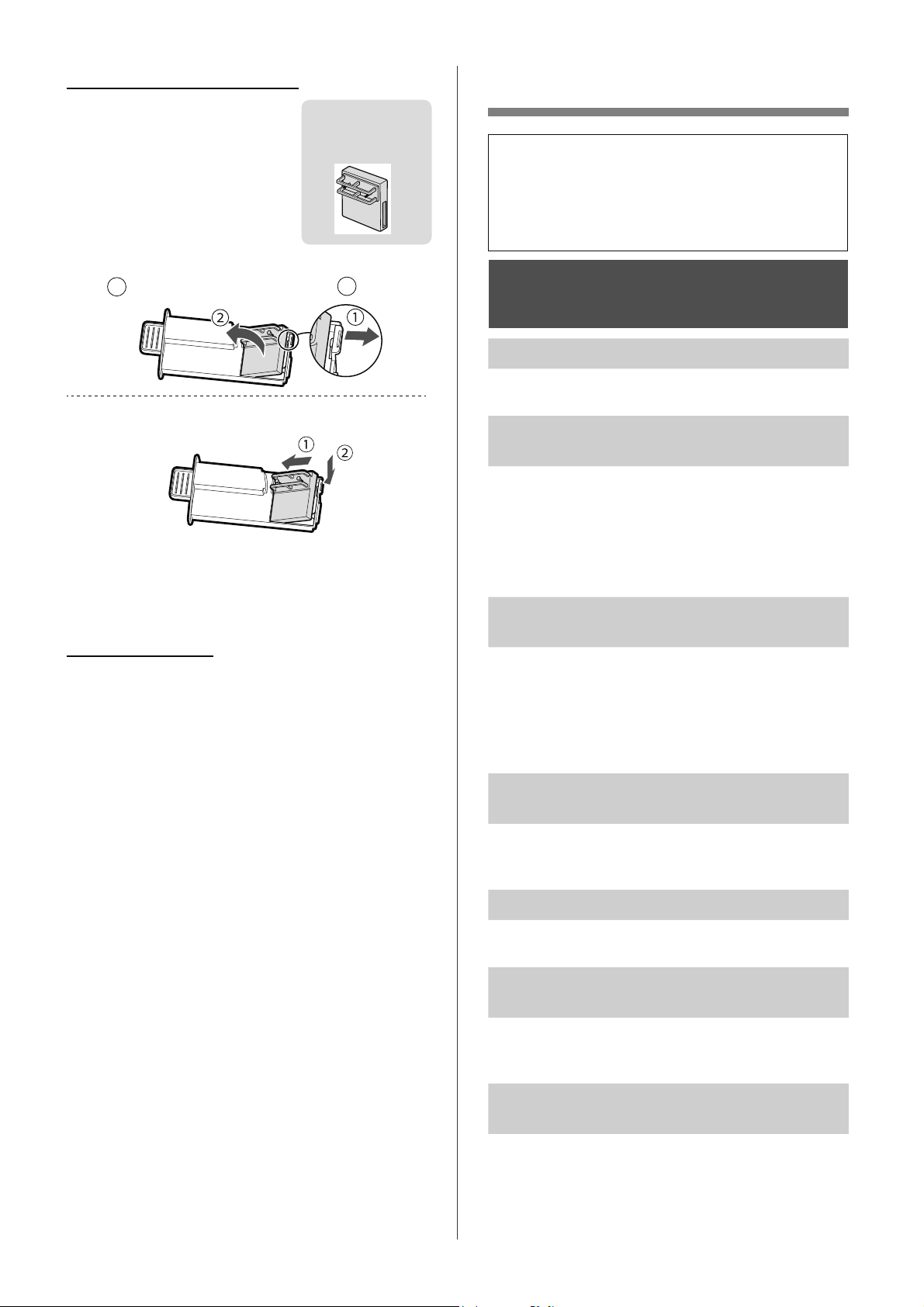
MS-24
PENYELESAIAN MASALAH
•
Sebelum menghubungi Pusat Servis untuk
mendapatkan perkhidmatan, sila semak
semula senarai Penyelesaian Masalah di
bawah, kerana masalah tersebut mungkin
bukan disebabkan kerosakan produk.
MAKLUMAT TENTANG
PRODUK
Bau dan asap berlarutan.
• Periksa penapis. Jika ia kelihatan terlalu kotor,
bersihkan atau gantikan penapis tersebut.
Udara yang dilepaskan daripada produk
mempunyai bau.
• Periksa sekiranya penapis tersebut terlalu kotor.
• Bersihkan atau gantikan penapis itu.
• Hanya gunakan air paip yang segar. Jika
menggunakan sumber air lain, produk akan
terdedah kepada risiko pertumbuhan kulapuk,
kulat, atau bakteria.
Produk tidak berfungsi apabila asap rokok
berada dalam udara.
• Pastikan produk dipasang di tempat yang
penderia boleh mengesan asap rokok.
• Periksa sekiranya bukaan Penderia Habuk
Sensitif tersekat atau tersumbat. Jika ia tersekat
atau tersumbat, bersihkan Penapis Penderia atau
Panel Belakang.
Bau daripada produk dan/atau penapis
baharu.
• Sebaik sahaja membuang beg plastik, sedikit bau
boleh terhidu. Bau ini tidak menjejaskan prestasi
penapis atau pendedahan kepada manusia.
Produk membuat bunyi klik atau detikan.
• Produk boleh membuat bunyi klik atau detikan
apabila ia sedang menjana ion.
Penunjuk Kebersihan kekal biru walaupun
semasa udara tidak bersih.
• Udara mungkin telah menjadi kotor apabila palam
produk dipasangkan. Cabut palam produk, tunggu
seminit dan kemudian pasang palam produk semula.
Penunjuk Kebersihan kekal merah
walaupun semasa udara bersih.
• Bukaan Penderia Habuk Sensitif yang kotor
atau tersumbat mengganggu fungsi penderia.
Bersihkan Penapis Penderia atau Panel Belakang
dengan perlahan.
Cara menggantikan Unit
•
Sila rujuk pengedar anda untuk
membeli Unit penggantian.
•
Gunakan hanya Unit yang direka
bentuk untuk produk ini.
IZ-C90ME
(1 unit)
1.
Tanggalkan cangkuk Pemegang Unit
(
1
) and tanggalkan Unit (
2
).
2.
Pasang Unit Baharu.
• Apabila Unit telah digantikan dengan bahagian
alat ganti baharu, pemasa akan ditetapkan semula
dan kembali ke 19,000 jam.
Pelupusan Unit
Sila lupuskan Unit terpakai menurut undang-undang
dan peraturan pelupusan tempatan.
Bahan:
Polibutilena Tereftalat, bahagian alat ganti
elektronik.
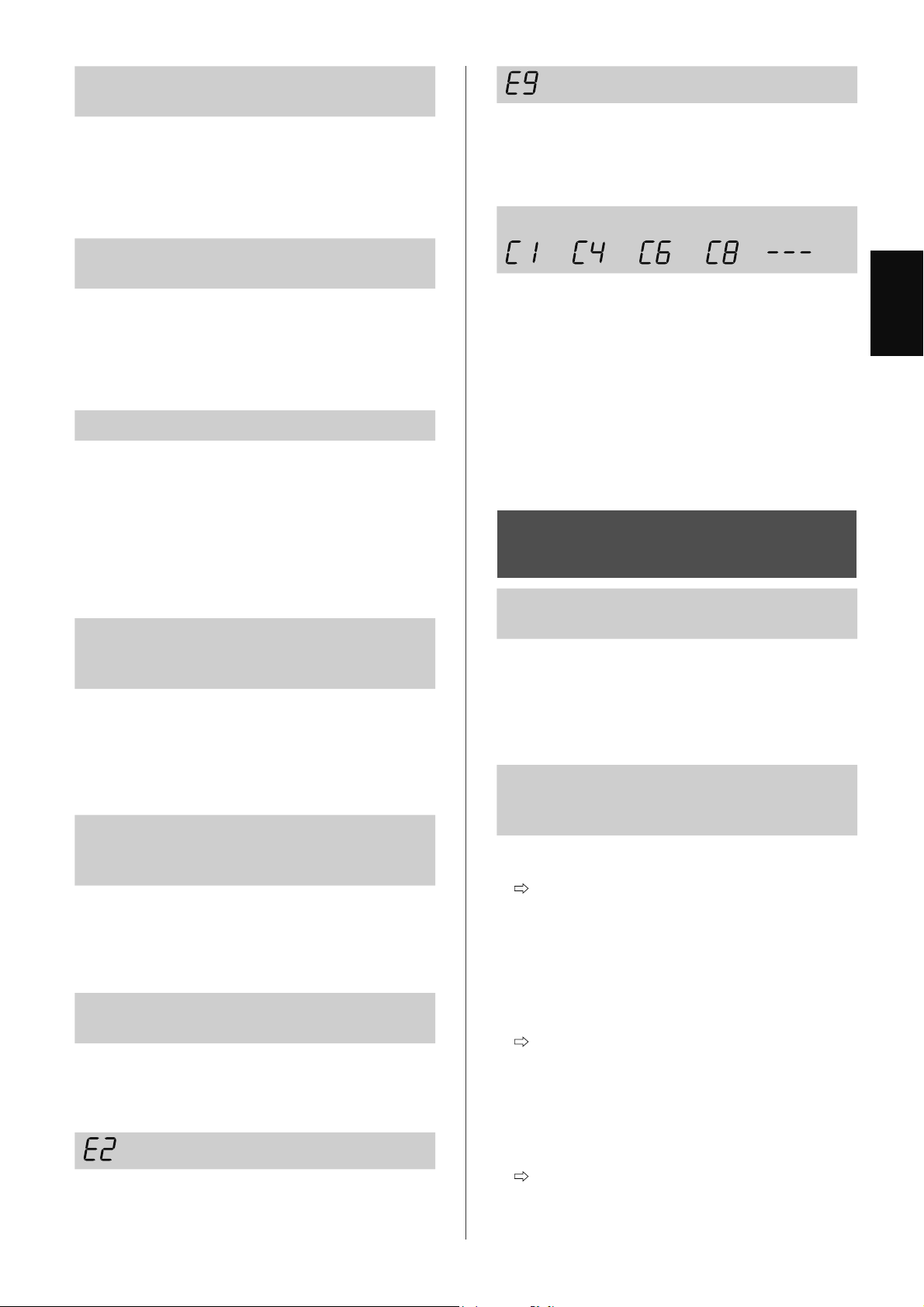
MS-25
Bahasa Melayu
Penunjuk Kebersihan berubah warna
dengan kerap.
• Penunjuk Kebersihan berubah warna secara
automatik apabila Penderia Habuk Sensitif dan
Penderia Bau mengesan kekotoran. Jika anda
bimbang tentang perubahan itu, anda boleh
mengubah sensitiviti penderia. (Halaman 14,
15)
Lampu Penyelenggaraan Penapis
dihidupkan.
• Bila-bila masa selepas melakukan
penyelenggaraan atau menggantikan Penapis
Pelembap, sambungkan kord kuasa kepada alur
keluar dan kemudian tekan Butang Tetapkan
Semula Penapis lebih daripada 3 saat.
(Halaman 19)
Paparan dipadamkan.
• Apabila Kawalan Cahaya ditetapkan kepada
“Auto”, lampu dimatikan secara automatik semasa
bilik menjadi gelap atau berfungsi dalam mod
tidur. Tambahan pula, apabila Kawalan Cahaya
ditetapkan kepada “DIMATIKAN”, lampu sentiasa
dimatikan.
Jika anda tidak mahu lampu dimatikan, tetapkan
Kawalan Cahaya kepada tetapan “Malap”.
(Halaman 14, 15)
Paparan tidak sepadan dengan laporan
cuaca atau higrometer dan termometer
lain di dalam bilik.
• Kawasan luaran dan dalaman serta persekitaran
rumah (jumlah trafik yang berdekatan, bilangan
tingkat rumah dan sebagainya) boleh menyebabkan
bacaan berbeza daripada data tersebut.
• Perbezaan tahap boleh didapati di dalam bilik
yang sama.
Penunjuk Kelembapan pada Paparan
tidak menyala apabila Tangki Air menjadi
kosong.
• Bilik telah mencapai tahap kelembapan yang
sesuai dan telah berhenti melembapkan udara.
• Periksa Pelampung Pelembap untuk mengesan
kekotoran. Bersihkan Dulang Pelembap. Pastikan
produk berada di atas permukaan yang rata.
Paras air di dalam Tangki Air tidak
menurun atau menurun dengan perlahan.
• Periksa sekiranya Dulang Pelembap dan Tangki
Air dipasang dengan betul.
• Periksa Penapis Pelembap. Jika penapis terlalu
kotor, bersihkan atau gantikan penapis tersebut.
dipaparkan.
• Pastikan Penapis Pelembap, Dulang Pelembap
dan Pemusing dipasang dengan betul dan
kemudian kuasa DIHIDUPKAN semula.
dipaparkan.
• Pastikan Unit Penjanaan Ion Plasmacluster
dimasukkan dengan betul.
Tarik keluar Unit Penjanaan Ion Plasmacluster
dan masukkan di bahagian hujung sekali lagi dan
kemudian jalankan semula pengendalian.
Satu daripada berikut dipaparkan.
• Cabut palam produk, tunggu seminit dan
kemudian pasang palam produk semula.
MAKLUMAT TENTANG
FUNGSI Wi-Fi
Sambungan Wi-Fi pembersih udara dan
penghala tidak boleh berfungsi.
• Periksa spesifikasi penghala yang digunakan.
• Laraskan penghala dan arah antena, pindahkan
penghala dan antena supaya berada lebih dekat
dan sebagainya. Selepas itu, tukar semula
untuk menghidupkan penghala dan lakukan
PERSEDIAAN AWAL sekali lagi.
Sambungan antara pembersih udara
dan peranti pintar anda tidak dapat
diwujudkan.
• Adakah pembersih udara dan peranti pintar anda
bersambung kepada penghala yang sama?
Sambungkan pembersih udara dan peranti
pintar anda kepada penghala yang sama.
Jika anda masih tidak dapat mewujudkan
penyambungan, cuba sambungkan peranti
pintar anda kepada jalur 2.4 GHz penghala.
• Adakah jumlah bilangan peranti pintar yang
sedang digunakan melebihi bilangan maksimum
yang didaftarkan pada satu pembersih udara?
Bilangan maksimum peranti pintar yang boleh
didaftarkan pada satu pembersih udara ialah
10.
• Adakah jumlah produk (pendingin hawa,
pembersih udara dan sebagainya) yang perlu
didaftarkan dengan satu peranti pintar melebihi
bilangan maksimum yang ditetapkan?
Bilangan maksimum produk yang perlu
didaftarkan dengan satu peranti pintar ialah
30.
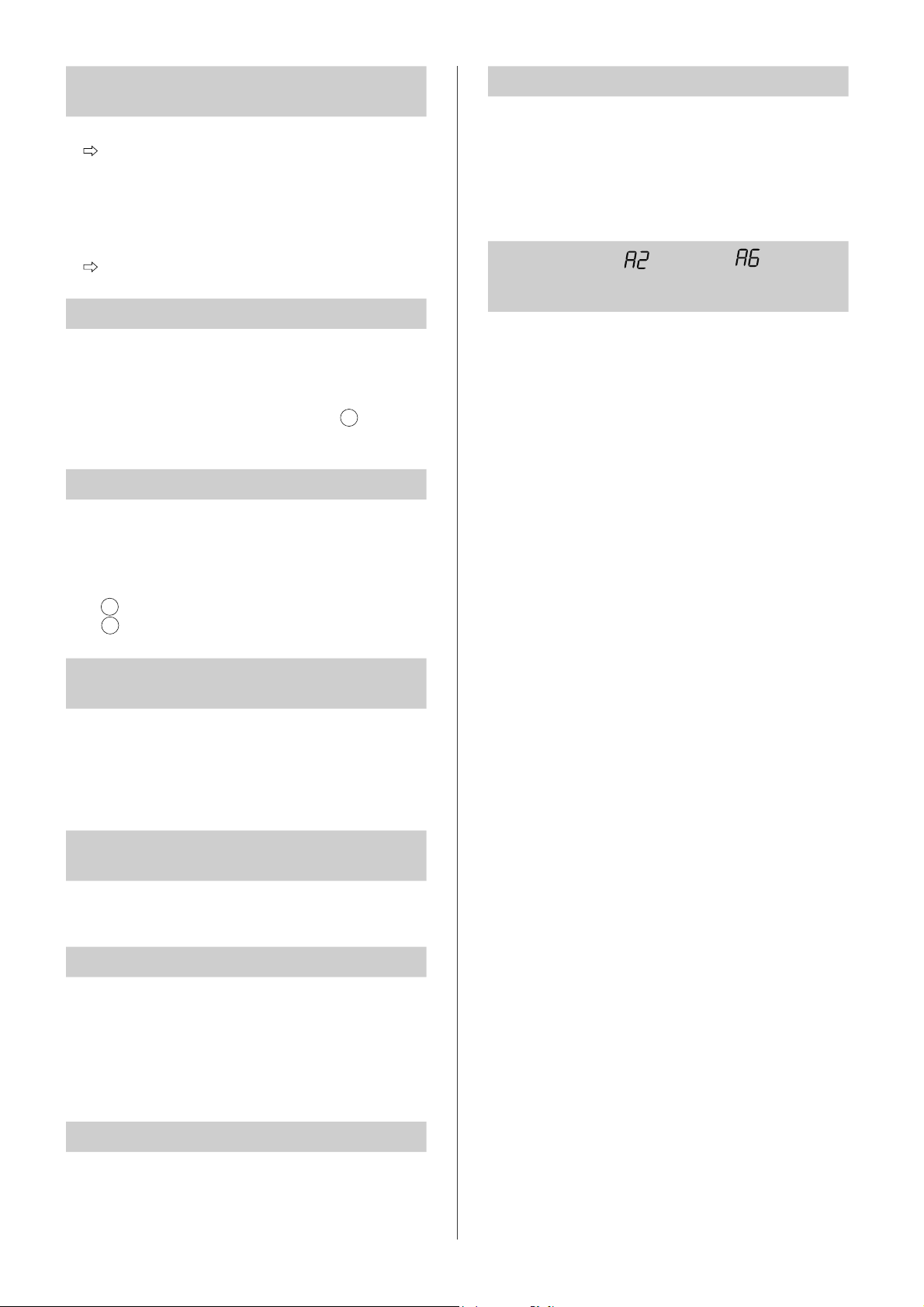
MS-26
Pengendalian jarak jauh daripada peranti
pintar tidak boleh dilakukan.
• Adakah Lampu Wi-Fi pembersih udara dihidupkan?
Jika Lampu Wi-Fi dimatikan, sila lakukan “A1:
Penyesuai Wi-Fi DIHIDUPKAN/DIMATIKAN”
untuk menghidupkan Wi-Fi produk. (Halaman
16)
• Adakah sambungan antara pembersih udara dan
peranti pintar anda telah dilengkapkan?
Sediakan sambungan antara pembersih udara
dan peranti pintar anda. (Halaman 11)
Apabila menukar penghala
• Sila sambungkan semula pembersih udara
kepada penghala.
1. Tahan butang “Wi-Fi” selama 3 saat untuk
menghentikan fungsi Wi-Fi.
2. Melakukan “PERSEDIAAN AWAL: 2
Sambungan pembersih udara dan penghala”.
(Halaman 10)
Apabila menukar peranti pintar
• Lakukan langkah berikut:
1. Padamkan pendaftaran peranti pintar lama
daripada Aplikasi yang ditetapkan.
2. Gunakan peranti pintar baharu untuk
melakukan “PERSEDIAAN AWAL:
1 Muat turun & Daftar diri dan
3 Sambungan antara pembersih udara dan
peranti pintar”. (Halaman 10, 11)
Apabila hendak melupuskan atau
menyerahkan pembersih udara
• Lakukan langkah berikut, untuk mengelakkan
kebocoran maklumat peribadi.
1. Padamkan pendaftaran pembersih udara
daripada Aplikasi yang ditetapkan.
2. Lakukan “A4: Permulaan fungsi Wi-Fi”.
(Halaman 16)
Sekiranya diserahkan daripada pihak
ketiga
• Untuk mengelakkan capaian tanpa kebenaran
daripada pihak ketiga, lakukan “A4: Permulaan
fungsi Wi-Fi”. (Halaman 16)
Lampu Wi-Fi berkerdip perlahan
• Ini ialah satu daripada status berikut:
A. Sambungan Wi-Fi pembersih udara dan
penghala sedang dalam persediaan.
B. Sambungan Wi-Fi pembersih udara dan peranti
pintar sedang dalam persediaan.
C. Perisian untuk fungsi Wi-Fi dalam pembersih
udara sedang dikemas kini.
Lampu Wi-Fi berkerdip cepat
• Ralat rangkaian. Sila sahkan status rangkaian
Wi-Fi daripada “A7: Paparkan status rangkaian
Wi-Fi”. (Halaman 17)
Lampu Wi-Fi dipadamkan
• Pembersih udara tidak boleh menyambung
kepada penghala. Semak perkara berikut:
A. Adakah palam kuasa disambungkan dengan
betul?
B. Adakah fungsi Wi-Fi telah dihentikan? Sahkan
status rangkaian Wi-Fi daripada “A7: Paparkan
status rangkaian Wi-Fi”. (Halaman 17)
Satu daripada “ ” hingga “ ” tidak
boleh dipilih dalam mod tetapan Wi-Fi.
(Halaman 16 - 17)
• Jika penyesuai Wi-Fi dimatikan, satu daripada
“A2” hingga “A6” mungkin tidak boleh dipilih.
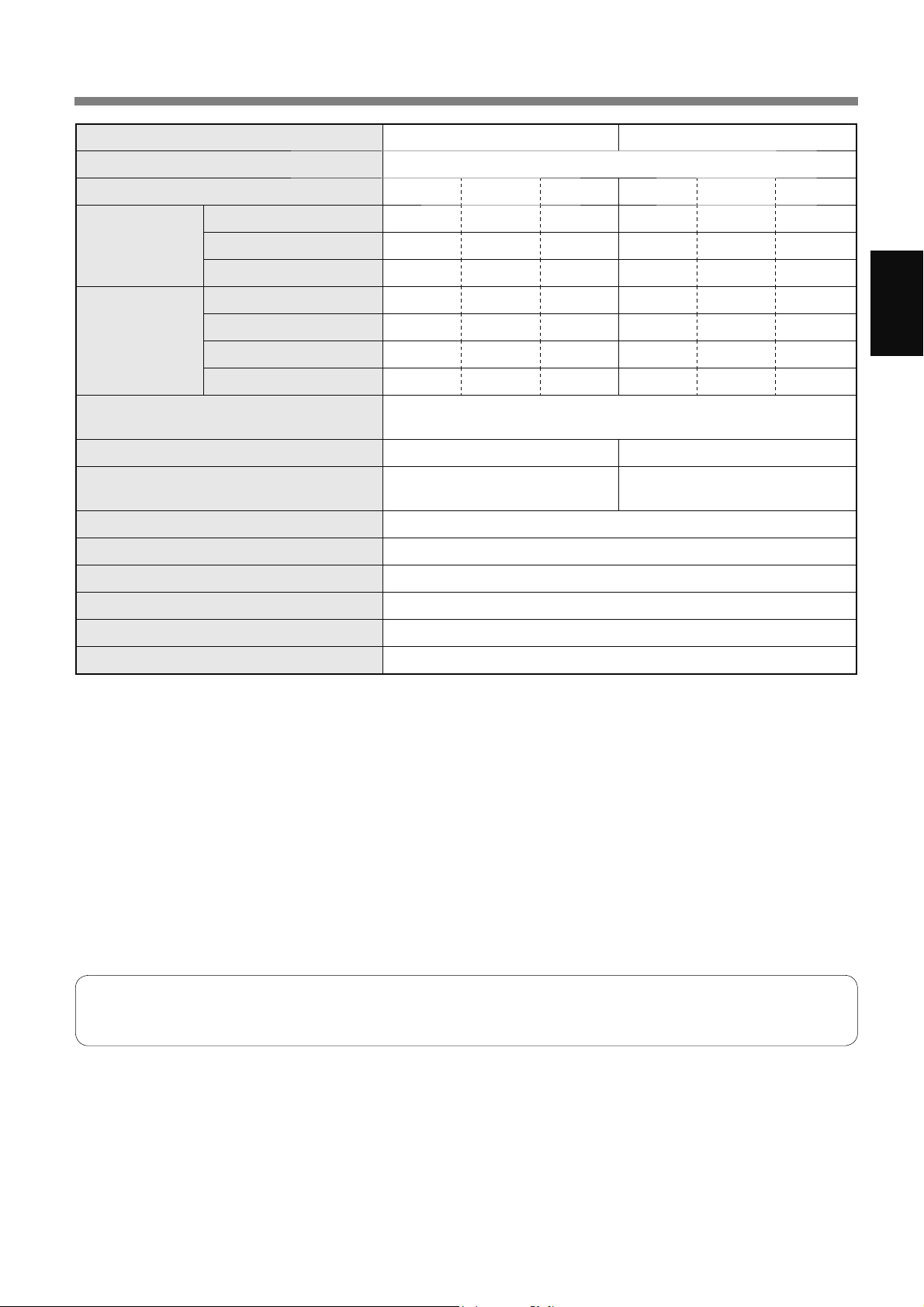
MS-27
Bahasa Melayu
SPESIFIKASI
Model KI-N50 KI-N40
Bekalan kuasa 220-240 V ~ 50-60 Hz
Pelarasan Kelajuan Kipas MAX MED LOW MAX MED LOW
PEMBERSIH
UDARA
Kelajuan Kipas (m
3
/ jam) 306 168 60 240 150 60
Kuasa Terkadar (W) 51 17 5.5 29 14 5.5
Paras Hingar (dBA)
*
1
51 40 17 46 38 17
MEMBERSIHKAN
UDARA &
MELEMBAPKAN
Kelajuan Kipas (m
3
/ jam) 252 186 66 174 138 60
Kuasa Terkadar (W) 32 22 6.7 17 15 6.5
Paras Hingar (dBA)
*
1
47 43 20 38 35 19
Pelembapan (mL / jam)
*
2
600 480 200 440 370 190
Kuasa Tunggu Sedia (W)
1.7 (Apabila penyesuai Wi-Fi pada kedudukan ON.)
1.3 (Apabila penyesuai Wi-Fi pada kedudukan OFF.)
Saiz Bilik yang Disyorkan (m
2
)
*
3
~ 38 ~ 28
Saiz bilik ion Plasmacluster berketumpatan
tinggi (m
2
)
*
4
yang disyorkan
~ 21 ~ 17
Kapasiti Dulang Pelembap (L) Anggaran 2.7
Penderia Habuk Sensitif / Bau / Cahaya / Suhu / Kelembapan
Jenis penapis HEPA
*
5
/ Penyahbau / Pelembap
Panjang kord (m) 2.0
Ukuran (mm) 384 (L) x 230 (D) x 619 (T)
Berat (kg) Anggaran 8.2
*1
•
Tahap hingar diukur berdasarkan standard JEM1467 Persatuan Pengilang Elektrikal Jepun.
*2
•
Jumlah pelembapan berubah mengikut suhu dan kelembapan di dalam dan di luar.
Jumlah pelembapan meningkat apabila suhu meningkat atau kelembapan menurun.
Jumlah pelembapan menurun apabila suhu menurun atau kelembapan meningkat.
•
Keadaan Pengukuran: 20 ºC, 30 % kelembapan (menurut JEM1426).
*3
•
Saiz bilik disyorkan adalah sesuai untuk menggunakan produk pada kelajuan kipas maksimum.
•
Saiz bilik yang disyorkan ialah ruang dengan jumlah zarah habuk yang dapat disingkirkan dalam masa 30 minit (selaras
dengan JEM1467).
*4
•
Saiz bilik di mana lebih kurang 25000 ion boleh diukur per sentimeter padu di tengah-tengah bilik (pada ketinggian lebih
kurang 1.2 meter dari lantai) apabila produk ini diletakkan di sebelah dinding dan beroperasi pada kedudukan operasi
MED.
*5
•
Penapis ini menanggalkan lebih daripada 99.97% zarah yang bersaiz sekurang-kurangnya 0.3 mikron (menurut
JEM1467).
Kuasa Tunggu Sedia
Apabila palam kuasa produk dipasang pada soket dinding, ia menggunakan kuasa tunggu sedia untuk mengendalikan litar
elektrik. Bagi menjimatkan tenaga, tanggalkan kord kuasa jika produk tidak digunakan.
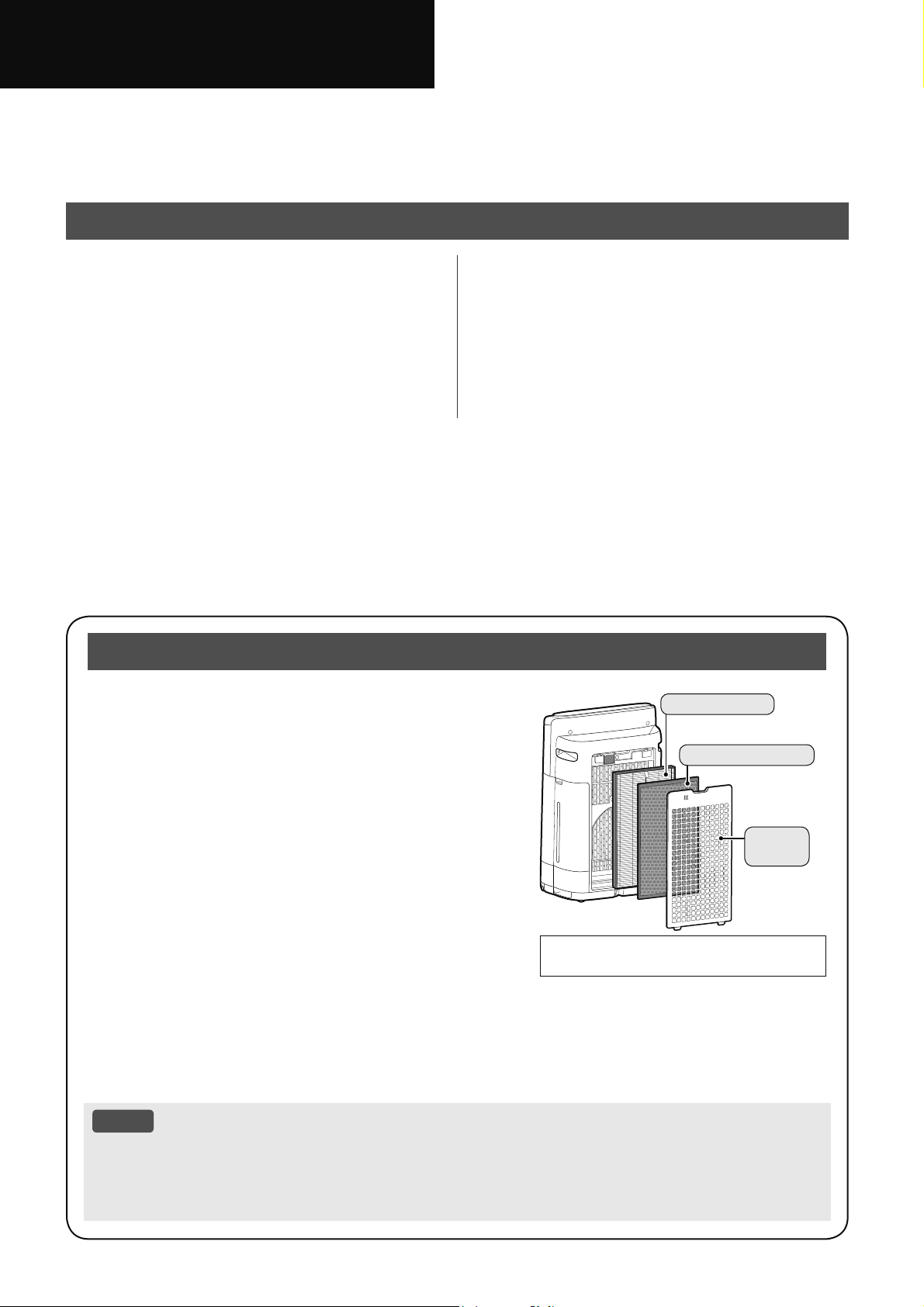
&ҧPѫQTXêNKiFKKjQJÿmPXDPi\OӑFNK{QJNKt6+$53
9XLOzQJÿӑFNӻViFKKѭӟQJGүQVӱGөQJQj\WUѭӟFNKLVӱGөQJVҧQSKҭP
&ҩWJLӳViFKKѭӟQJGүQVӱGөQJQj\ӣQѫLWKXұQWLӋQÿӇWKDPNKҧRYӅVDX
7,ӂ1*9,ӊ7
&È&+ѬӞ1*'Ү148$1
75Ӑ1*9ӄ$172¬1 2
7Ç1&È&%Ӝ3+Ұ1 6
&+8Ҭ1%ӎ 9
9Ұ1+¬1+ 10
0i\OӑFNK{QJNKtK~WYjRSKzQJNK{QJNKtWӯFӱDQҥSNK{QJ
NKtGүQNK{QJNKtTXDPӝWEӝOӑFWUѭӟFEӝOӑFNKӱPLYjEӝ
OӑF+(3$ErQWURQJWKkQPi\VDXÿy[ҧNK{QJNKtTXDFӱD[ҧ
NK{QJNKt%ӝOӑF+(3$FyWKӇORҥLEӓKҥWEөLFyNtFKFӥ
QKӓPLFURÿLTXDEӝOӑFYjFNJQJFyFKӭFQăQJK~WPL
%ӝOӑFNKӱPLWӯWӯK~WFiFPLNKLFK~QJÿLTXDEӝOӑF
0ӝWVӕPLFyWKӇEiPYjREӝOӑFYjVӁSKiWWiQQJѭӧFOҥL
SKzQJOjPFKRPLWURQJSKzQJQһQJKѫQWKHRWKӡLJLDQ'ӵD
WUrQÿLӅXNLӋQVӱGөQJYjÿһFELӋWQӃXWKkQPi\ÿѭӧFVӱGөQJ
WURQJP{LWUѭӡQJNKҳFQJKLӋWVRYӟLVӱGөQJWURQJJLDÿuQK
WK{QJWKѭӡQJFiFPLQj\FyWKӇWUӣOҥLVӟPKѫQVRYӟLGӵ
NLӃQ1ӃXYүQFzQPLKm\WKD\WKӃEӝOӑF
.KLFiFNKRiQJFKҩWWURQJQѭӟFPi\EiPYjRFiFEӝOӑFYjWUӣ
QrQFӭQJYjWUҳQJFK~QJKҩSWKөPLWURQJSKzQJFyWKӇJk\
UDPLNKyFKӏXNKLEӝOӑFOjPҭPNK{7KD\ÿәLW\WKXӝFYjRFKҩWOѭӧQJQѭӟFYjFiF\ӃXWӕP{LWUѭӡQJ
NKiF
1ӃXKLӋQWѭӧQJQj\[ҧ\UDKm\WLӃQKjQKEҧRWUu%ӝ/ӑF7ҥRҬP7UDQJ
/Ѭ8é
0i\OӑFNK{QJNKtÿѭӧFWKLӃWNӃÿӇORҥLEӓEөLOѫOӱQJWURQJNK{QJNKtYjPL
0i\OӑFNK{QJNKtNK{QJÿѭӧFWKLӃWNӃÿӇORҥLEӓFiFNKtÿӝFKҥLQKѭFDUERQPRQR[LWFyWURQJNKyL
WKXӕFOi
0i\OӑFNK{QJNKtFyWKӇNK{QJORҥLEӓKRjQWRjQPLQӃXQJXӗQJӕFJk\PLYүQWӗQWҥL
9XLOzQJÿӑFNӻWUѭӟFNKLYұQKjQKPi\OӑFNK{QJNKt
1Ӝ,'81*
+uQKPLQKKӑDWURQJViFKKѭӟQJGүQQj\
OjWKLӃWEӏ.,1
%ӝ/ӑF+(3$
%ӝ/ӑF.Kӱ0L
%ӝOӑF
VѫFҩS
&È&+7+$<ĈӘ,1+,ӄ8&¬,ĈҺ7 14
9ӊ6,1+9¬%Ҧ2'ѬӤ1* 18
;Ӱ/é6Ӵ&Ӕ 24
7+Ð1*6Ӕ.Ӻ7+8Ұ7 27
'RQKXFҫXSKiWWULӇQFӫDVҧQSKҭPQrQ6KDUSVӁWKӇWKD\ÿәLWK{QJVӕNӻWKXұWPjNK{QJFҫQWK{QJ
EiRWUѭӟF
9,
7,ӂ1*9,ӊ7
&È&7Ë1+1Ă1*
.ӃWKӧSÿӝFÿiRFiFF{QJQJKӋ[ӱOêNK{QJNKt
+ӋWKӕQJOӑFOӟS7ҥRҭP3ODVPDFOXVWHU
3ODVPDFOXVWHU
3ODVPDFOXVWHUPұWÿӝFDR
0ұWÿӝ3&,FjQJFDRKLӋXTXҧ3&,FjQJOӟQ
%ҵQJFiFKWҥRUDVӵFkQEҵQJLRQkPYjGѭѫQJ[ӱOêNK{QJNKtEҵQJF{QJQJKӋ
3ODVPDFOXVWHUOjPӝWTXiWUuQKWӵQKLrQ
+ӋWKӕQJOӑFOӟS7ҥRҭP
+Ò7%Ө,
%ӝOӑFVѫFҩSK~WEөLOӟQKѫQFiFKҥWFӥNKRҧQJPLFUR
.+Ӱ0Ô,
%ӝOӑFNKӱPLK~WQKLӅXPLWK{QJWKѭӡQJWURQJQKj
*,Ҧ0%Ө,1+Ӓ3+Ҩ1+2$1Ҩ00Ӕ&
%ӝOӑF+(3$K~WKҥWFyFӥQKӓPLFUR
7Ҥ2Ҭ0
.LӇPVRiWÿӝҭPEҵQJFҧPELӃQQKLӋWYjÿӝҭPWӵÿӝQJ
/XӗQJNKtÿӝFÿiR
+~WNKtPҥQKPӁYjOXӗQJNKtÿӝFÿiRK~WEөLYjFiFKҥWNKiFPӝWFiFKQKDQKFKyQJYjKLӋXTXҧ
/XӗQJNKtQKDQKKѫQӣJyFVӁK~WEөL
ӣPӵFWKҩSKѫQWURQJSKzQJJL~SOjPVҥFK
KLӋXTXҧ
3ODVPDFOXVWHUFyWKӇORҥLEӓWƭQKÿLӋQYjGR
ÿyFyWKӇQJăQEөLEiPYjRWѭӡQJYjFiFEӅ
PһWNKiF
&KӭFQăQJ:L)L
;iFQKұQUҵQJÿLӅXNLӋQFKҩWOѭӧQJNK{QJNKtWURQJSKzQJYjNK{QJNKtÿmKRjQWRjQVҥFK
ĈLӅXNKLӇQVҧQSKҭPTXDÿLӋQWKRҥLWK{QJPLQKOjPÿLӅXNKLӇQWӯ[D
ĈӅ[XҩWWKӡLJLDQWӕLѭXÿӇWUDRÿәLEӝOӑF
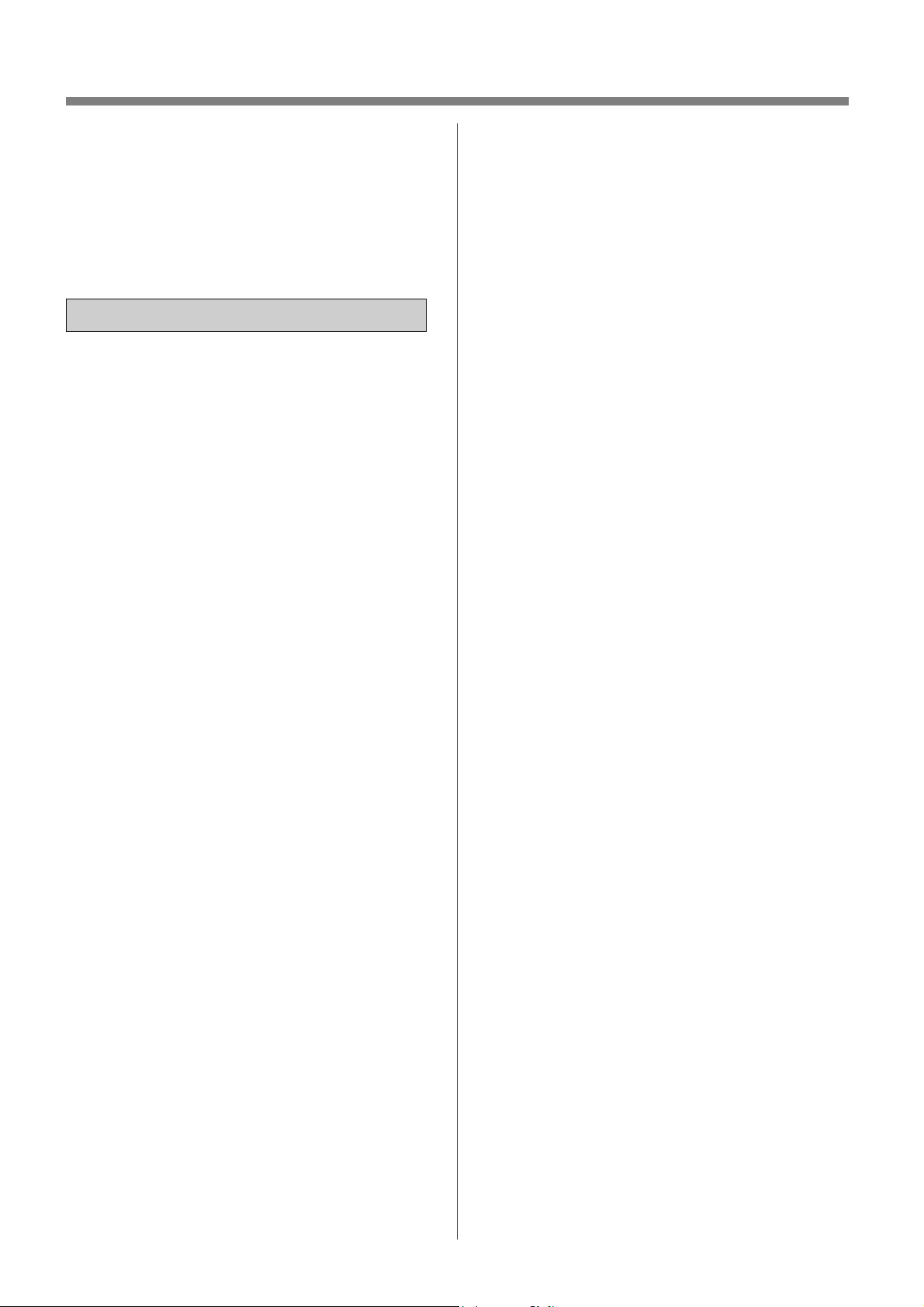
9,
&È&+ѬӞ1*'Ү148$175Ӑ1*9ӄ$172¬1
ĈӐ&9¬&Ҩ7*,Ӳ&È&+ѬӞ1*'Ү1
1¬<WUѭӟFNKLVӱGөQJVҧQSKҭPQj\
.KLVӱGөQJFiFWKLӃWEӏÿLӋQSKҧLOX{QWXkQ
WKӫFiFELӋQSKiSSKzQJQJӯDDQWRjQFѫ
EҧQÿӇJLҧPQJX\FѫKӓDKRҥQÿLӋQJLұW
YjWKѭѫQJWtFKFKRFRQQJѭӡLEDRJӗP
QKӳQJÿLӅXVDX
&Ҧ1+%È2
ĈӑFPӑLKѭӟQJGүQVӱGөQJWUѭӟFNKL
GQJVҧQSKҭP
&KӍVӱGөQJVҧQSKҭPFKRPөFÿtFK
VӱGөQJWURQJJLDÿuQKQKѭÿѭӧFP{Wҧ
WURQJKѭӟQJGүQQj\%ҩWNǤFiFKVӱ
GөQJQjRNKiFSKҧLGRQKjVҧQ[XҩWÿӅ
QJKӏÿӅXFyWKӇJk\KӓDKRҥQÿLӋQJLұW
KRһFWKѭѫQJWtFKFKRFRQQJѭӡL
7KLӃWEӏQj\NK{QJGQJFKRQKӳQJ
QJѭӡLJӗPFҧWUҿHPEӏVX\JLҧPYӅ
WKӇFKҩWFҧPJLiFWKLӇXQăQJWUtWXӋ
KRһFWKLӃXNLQKQJKLӋPYjKLӇXELӃW
WUӯNKLÿѭӧFQJѭӡLFyWUiFKQKLӋP
ÿҧPEҧRDQWRjQFKRKӑJLiPViWKRһF
KѭӟQJGүQVӱGөQJWKLӃWEӏ
&ҫQJLiPViWWUҿQKӓÿӇÿҧPEҧRFK~QJ
NK{QJQJKӏFKWKLӃWEӏQj\
7X\ӋWÿӕLNK{QJYұQKjQKVҧQSKҭP
QӃXGk\QJXӗQKRһFSKtFKFҳPEӏKӓQJ
KRһFVҧQSKҭPEӏWUөFWUһFKD\Kѭ
KӓQJ
1ӃXGk\QJXӗQKRһFSKtFKFҳPEӏ
KӓQJSKҧLWKD\WKӃFK~QJEӣLQKjVҧQ
[XҩWÿҥLOêGӏFKYөFӫDKӑ7UXQJWkP
'ӏFKYөÿѭӧFӫ\TX\ӅQFӫD6KDUSKRһF
QJѭӡLFyWUuQKÿӝWѭѫQJÿѭѫQJÿӇ
WUiQKJk\QJX\KLӇP
/LrQKӋYӟL7UXQJWkP'ӏFKYөJҫQQKҩW
QӃXFyEҩWNǤVӵFӕÿLӅXFKӍQKKRһF
VӱDFKӳDQjR
.K{QJWӵVӱDFKӳDKRһFWKiRUӡLVҧQ
SKҭP
/jPWKHRKѭӟQJGүQWӯ³D´ÿӃQ³K´
ErQGѭӟLÿӕLYӟLGk\QJXӗQKRһFSKtFK
FҳP1yFyWKӇJk\ÿRҧQPҥFKQKLӋW
ÿӝTXiFDRÿLӋQJLұWKRһFKӓDKRҥQ
D&KӍVӱGөQJәFҳPÿLӋQ$&
YROW
E.K{QJVӱGөQJVҧQSKҭPQӃXGk\
QJXӗQKRһFSKtFKFҳPEӏKӓQJKRһF
NӃWQӕLYӟLәFҳPWUrQWѭӡQJEӏOӓQJ
KRһFEӏKӓQJ
F/X{QWҳWVҧQSKҭPWUѭӟFNKLU~W
SKtFKFҳP
G/X{QU~WSKtFKFҳPFӫDVҧQSKҭP
WURQJFiFWUѭӡQJKӧSVDX
7UѭӟFNKLGLFKX\ӇQVҧQSKҭP
.KLWKD\WKӃEӝOӑF1JD\FҧNKL
Pӣ1ҳSVDX%ӝOӑFVѫFҳS
.KLÿәÿҫ\QѭӟF
7UѭӟFNKLEҧRWUuVҧQSKҭP
.KLVҧQSKҭPNK{QJÿѭӧFVӱ
GөQJ
HĈҧPEҧRNpREҵQJSKtFKFҳPÿLӋQ
FKӭNK{QJSKҧLGk\QJXӗQ
I .K{QJFKҥPYjRSKtFKFҳPÿLӋQ
EҵQJWD\ѭӟWNKLFҳPKRһFU~WSKtFK
FҳPNKӓLәFҳPWUrQWѭӡQJ
JĈӏQKNǤORҥLEӓEөLNKӓLSKtFKFҳP
ÿLӋQ
K/X{QWXkQWKӫQKӳQJÿLӅXVDXÿӇ
NK{QJOjPKӓQJGk\QJXӗQ
.K{QJOjPKӓQJGk\EҵQJ%iQK
;H1KӓNKLGLFKX\ӇQVҧQSKҭP
.K{QJÿLGk\ErQGѭӟLWKҧP
.K{QJFKHGk\ÿLӋQEҵQJWKҧP
WUDQJWUtUmQKKRһFFiFWҩPFKH
WѭѫQJWӵ
.K{QJÿһWYұWQһQJOrQGk\ÿLӋQ
KRһFNҽSFKһWGk\ÿLӋQ
.K{QJOXӗQGk\ÿLӋQGѭӟLÿӗQӝL
WKҩWKRһFFiFYұWGөQJNKiF
.pRGk\ÿLӋQUD[DNKXYӵFJLDR
WK{QJYjQѫLNK{QJEӏYҩSQJm
.K{QJVӱGөQJVҧQSKҭPQj\JҫQ
FiFWKLӃWEӏJDVOzVѭӣLQJӑQOӱDQӃQ
KѭѫQJKRһFWLDOӱDWӯWKXӕFOiÿDQJ
FKi\
.KLVҧQSKҭPÿѭӧFYұQKjQKYӟLFiF
WKLӃWEӏNKtJDVWURQJFQJFăQSKzQJ
Km\WK{QJJLyÿӏQKNǤFKRSKzQJQӃX
NK{QJFyWKӇJk\QJӝÿӝFNKtFDUERQ
PRQR[LGH
.K{QJYұQKjQKVҧQSKҭPWURQJSKzQJ
FyNKtGӉFKi\FKҷQJKҥQQKѭFһQGҫX
KRһFKѫLKyDFKҩW
.K{QJÿӇVҧQSKҭPGѭӟLPѭDKRһF
VӱGөQJJҫQQѭӟFWURQJSKzQJWҳP
NKXYӵFJLһWӫLKRһFQKӳQJQѫLҭPѭӟW
NKiF
.K{QJÿѭDQJyQWD\KRһFYұWOҥYjR
FӱDQҥSNKtKRһFFӱD[ҧNKt
.K{QJQKuQYjRFiFFӱD[ҧNKt
.K{QJXӕQJQѭӟFWURQJ%uQK&KӭD
1ѭӟFKRһF.KD\7ҥRҬP
7KD\QѭӟFWURQJ%uQK&KӭD1ѭӟF
9,
7,ӂ1*9,ӊ7
KjQJQJj\EҵQJQѭӟFPi\PӟLYj
WKѭӡQJ[X\rQYӋVLQK%uQK&KӭD1ѭӟF
Yj.KD\7ҥRҬP
.KLNK{QJVӱGөQJVҧQSKҭPKm\ÿә
EӓQѭӟFWURQJ%uQK&KӭD1ѭӟFYj
.KD\7ҥRҬPĈӇQѭӟFWURQJ%uQK
&KӭD1ѭӟFKRһF.KD\7ҥRҬPFyWKӇ
Jk\UDQҩPPӕFYLNKXҭQYjPLK{L
7URQJPӝWVӕWUѭӡQJKӧSKLӃPKRL
QKӳQJYLNKXҭQQKѭYұ\FyWKӇJk\
QJX\KLӇPFKRVӭFNKӓH
/Ѭ8é
&DQQKLӉXVyQJY{WX\ӃQKRһF79
1ӃXVҧQSKҭPJk\FDQQKLӉXFKRYLӋFWKX
VyQJY{WX\ӃQKRһFWUX\ӅQKuQKKm\Fӕ
JҳQJNKҳFSKөFKLӋQWѭӧQJFDQQKLӉXÿy
EҵQJPӝWKRһFQKLӅXELӋQSKiSVDX
ĈәLKѭӟQJKRһFGLFKX\ӇQFiFăQJWHQ
WKXVyQJ
7ăQJNKRҧQJFiFKJLӳDVҧQSKҭPYj
EӝWKXVyQJY{WX\ӃQ79
ĈҩXQӕLVҧQSKҭPYjRәFҳPWUrQPҥFK
ÿLӋQNKiFYӟLPҥFKÿLӋQPjEӝWKX
VyQJÿѭӧFÿҩXQӕL
7KDPNKҧRêNLӃQFӫDÿҥLOêKRһFNӻ
WKXұWYLrQY{WX\ӃQ79FyNLQKQJKLӋP
ÿӇÿѭӧFWUӧJL~S
7+Ұ175Ӑ1*/,Ç148$1Ĉӂ1
/Ҳ3ĈҺ7
ĈһWVҧQSKҭPWUrQEӅPһWEҵQJSKҷQJ
YjәQÿӏQKFyÿӫNK{QJNKtOѭXWK{QJ
.KLÿһWWUrQWKҧPQһQJVҧQSKҭPFy
WKӇUXQJQKҽ
ĈһWVҧQSKҭPWUrQEӅPһWEҵQJSKҷQJ
ÿӇWUiQKUzUӍQѭӟFWӯ%uQK&KӭD1ѭӟF
Yj.KD\7ҥRҬP
7UiQKYӏWUtQѫLFiFFҧPELӃQWLӃS[~F
WUӵFWLӃSYӟLJLyKRһFJLyODQӃXVҧQ
SKҭPFyFҧPELӃQ6ҧQSKҭPFyWKӇ
KRҥWÿӝQJNK{QJEuQKWKѭӡQJ
7UiQKVӱGөQJӣQKӳQJYӏWUtPjÿӗQӝL
WKҩWYҧLKRһFFiFYұWGөQJNKiFFyWKӇ
WLӃS[~FYjFKһQYѭӟQJFiFFӱDQҥS
NKtYjKRһFFӱD[ҧNKt
7UiQKFiFYӏWUtWLӃS[~FWUӵFWLӃSYӟL
iQKQҳQJPһWWUӡL6ҧQSKҭPFyWKӇEӏ
WKD\ÿәLKuQKGҥQJKRһFPjXVҳFӣWuQK
KXӕQJQj\
7UiQKFiFYӏWUtÿӇVҧQSKҭPWLӃS[~F
YӟLKѫLQѭӟFQJѭQJWөKRһFFyQKӳQJ
WKD\ÿәLOӟQYӅQKLӋWÿӝ6ӱGөQJWURQJ
FiFÿLӅXNLӋQWKtFKKӧSWӯ
&&
7UiQKVӱGөQJӣQKӳQJQѫLFyQKLӅX
GҫXPӥKRһFKѫLGҫXFKҷQJKҥQQKѭ
WURQJQKjEӃSYY%ӅPһW7KkQ0i\
FyWKӇEӏUҥQQӭWYjGүQÿӃQFiFFҧP
ELӃQFyWKӇKRҥWÿӝQJVDL
.KҧQăQJK~WEөLFӫDVҧQSKҭPYүQ
KLӋXTXҧQJD\FҧNKLVҧQSKҭPÿһW
FiFKWѭӡQJÿӃQFPQKѭQJEӭFWѭӡQJ
KRһFVjQ[XQJTXDQKÿyFyWKӇEӏEiP
EҭQ9XLOzQJÿһWVҧQSKҭPFiFKWѭӡQJ
PӝWNKRҧQJ
%ӭFWѭӡQJQJD\VDXFӱD[ҧNKtYjVjQ
KRһFWKҧPÿһWVҧQSKҭPWUrQÿyFyWKӇ
EӏEҭQWKHRWKӡLJLDQ.KLVӱGөQJVҧQ
SKҭPWURQJWKӡLJLDQGjLWҥLFQJPӝWYӏ
WUtKm\YӋVLQKÿӏQKNǤWѭӡQJVjQQKj
KRһFWKҧP
.K{QJÿһWVҧQSKҭPJҫQKRһFWUrQFiF
YұWQyQJFKҷQJKҥQQKѭEӃSKRһFOz
VѭӣLKRһFӣQѫLVҧQSKҭPFyWKӇWLӃS
[~FYӟLKѫLQѭӟF
7+Ұ175Ӑ1*/,Ç148$1Ĉӂ1
%Ӝ/Ӑ&
/jPWKHRKѭӟQJGүQWURQJKѭӟQJGүQ
Qj\ÿӇOҳSÿһWYjEҧRWUuEӝOӑF
7UDQJ
/ҩ\EӝOӑFUDNKӓLW~LQKӵDWUѭӟFNKLÿһW
EӝOӑFYjR7KkQ0i\
.K{QJYұQKjQKVҧQSKҭPNKLFKѭDOҳS
EӝOӑFÿ~QJFiFK
.K{QJUӱDYjVӱGөQJOҥL%ӝ/ӑF+(3$
Yj%ӝ/ӑF.Kӱ0L
9LӋFUӱDVӁNK{QJFҧLWKLӋQKLӋXVXҩW
FӫDEӝOӑFYjFzQFyWKӇJk\UDÿLӋQ
JLұWKRһFWUөFWUһFNKLYұQKjQK
.K{QJYұQKjQKVҧQSKҭPWURQJSKzQJ
FyWKXӕFGLӋWF{QWUQJGҥQJ[ӏW9LӋF
Qj\FyWKӇNKLӃQPLWKXӕFGLӋWF{Q
WUQJEӏJLӳOҥLWURQJVҧQSKҭPYjWӓDUD
WӯFiFFӱD[ҧNKt
7+Ұ175Ӑ1*/,Ç148$1Ĉӂ1
9Ұ1+¬1+
.K{QJFKһQFiFFӱDQҥSNKtKRһFFӱD
[ҧNKt
/X{QYұQKjQKVҧQSKҭPӣWѭWKӃÿһW
WKҷQJÿӭQJ
.KLPDQJVҧQSKҭPÿLWUѭӟFWLrQKm\
9,
WKiR%uQK&KӭD1ѭӟFYj.KD\7ҥRҬP
NK{QJÿӇQѭӟFWUjQUDQJRjLVDXÿy
JLӳVҧQSKҭPEҵQJFiFWD\FҫPӣFҧ
KDLErQ
/X{QQKҩFVҧQSKҭPOrQNKLGLFKX\ӇQ
WUrQEӅPһWVjQGӉEӏKӓQJNK{QJEҵQJ
SKҷQJKRһFWUrQWKҧP
.K{QJWKD\ÿәLKѭӟQJFӫDVҧQSKҭP
NKLÿDQJGLFKX\ӇQEҵQJ%iQK;H1Kӓ
.KLGLFKX\ӇQVҧQSKҭPEҵQJ%iQK;H
1KӓKm\GLFKX\ӇQVҧQSKҭPWӯWӯYj
WKHRKѭӟQJQҵPQJDQJ
.K{QJYұQKjQKVҧQSKҭPPjNK{QJ
OҳSÿһWÿ~QJFiFK%uQK&KӭD1ѭӟF
KRһF.KD\7ҥRҬP
&ҭQWKұQÿӇNK{QJQJyQWD\EӏYѭӟQJ
NKLWKiRKRһFOҳS%uQK&KӭD1ѭӟF
.KLÿәÿҫ\%uQK&KӭD1ѭӟFKm\ÿҧP
EҧRUҵQJNK{QJFyQѭӟFUzUӍNKӓL%uQK
&KӭD1ѭӟF
ĈҧPEҧRODXVҥFKWҩWFҧQѭӟFWKӯDErQ
QJRjL%uQK&KӭD1ѭӟF
.K{QJVӱGөQJQѭӟFQyQJ&WUӣ
OrQFiFKyDFKҩWFiFFKҩWWҥRPL
WKѫPQѭӟFEҭQKRһFFiFFKҩWJk\KҥL
NKiF/jPQKѭYұ\FyWKӇNKLӃQVҧQ
SKҭPEӏELӃQGҥQJKRһFWUөFWUһF
&KӍVӱGөQJQѭӟFPi\PӟL6ӱGөQJ
FiFQJXӗQQѭӟFNKiFVӁFyQJX\Fѫ
SKiWWULӇQPӕFQҩPKRһFYLNKXҭQ
.K{QJOҳF%uQK&KӭD1ѭӟFNKLÿDQJ
FҫPJLӳ7D\&ҫP%uQK&KӭD
7+Ұ175Ӑ1*/,Ç148$1Ĉӂ1
%Ҧ2'ѬӤ1*
/jPWKHRKѭӟQJGүQWURQJKѭӟQJGүQ
Qj\ÿӇEҧRGѭӥQJ7UDQJ
&KӍODXErQQJRjLEҵQJYҧLPӅP
.K{QJVӱGөQJFKҩWWҭ\UӱDNKiFYӟL
FiFORҥLÿѭӧFÿӅFұSWURQJKѭӟQJGүQ
Qj\7UDQJ.K{QJVӱ
GөQJFKҩWOӓQJYjKRһFFKҩWWҭ\UӱDGӉ
ED\KѫL
%ӅPһW7KkQ0i\FyWKӇEӏKӓQJKRһF
QӭWGRFKҩWWҭ\UӱDăQPzQPҥQK
EHQ]HQFKҩWSKDORmQJVѫQEӝWÿiQK
EyQJKRһFGҫXPӥ
.KD\7ҥRҬPFyWKӇJk\ELӃQGҥQJ
KRHQӕQӭWYӥUzUӍQѭӟF1JRjLUD
FiFFҧPELӃQFyWKӇKRҥWÿӝQJVDLQӃX
VҧQSKҭPFyFҧPELӃQ
.K{QJFKjPҥQK1ҳSVDX%ӝOӑFVѫ
FҩSWURQJTXiWUuQKEҧRGѭӥQJ
7ҫQVXҩWEҧRGѭӥQJWҭ\FһQVӁSKө
WKXӝFYjRÿӝFӭQJYjWҥSFKҩWWURQJ
QѭӟFPjEҥQVӱGөQJQѭӟFFyÿӝ
FӭQJFjQJOӟQWKuYLӋFWҭ\FһQFjQJFҫQ
WKLӃW
.K{QJWKiR3KDR7ҥRҬPYj7UөF/ăQ
1ӃX3KDR7ҥRҬPYj7UөF/ăQEӏWXӝW
UDKm\WKDPNKҧRWUDQJ
.KLWKD\WKӃEӝOӑFKRһFEҩWNǤSKөNLӋQ
QjRKm\VӱGөQJFiFEӝSKұQÿѭӧFFKӍ
ÿӏQKWURQJKѭӟQJGүQQj\
9,
7,ӂ1*9,ӊ7
$172¬1%,ӊ13+È33+Ñ1*1*Ӯ$&Ӫ$&+Ӭ&1Ă1*:,),
&Ҧ1+%È2
.KLÿLӅXNKLӇQPi\OӑFNK{QJNKtWӯ[D
7URQJWUѭӡQJKӧSWKDRWiFWӯ[DWӯErQ
QJRjLEҥQFyWKӇNK{QJNLӇPWUDÿѭӧFWuQK
WUҥQJKLӋQWҥLFӫDPi\OӑFNK{QJNKtKRһF
NKXYӵF[XQJTXDQKPi\FNJQJQKѭWuQK
KuQKOLrQTXDQÿӃQEҩWNǤDLFyWKӇӣÿy
YuYұ\Km\[iFQKұQÿҫ\ÿӫYӅÿӝDQWRjQ
WUѭӟFNKLVӱGөQJ
ĈҧPEҧRSKtFKFҳPÿLӋQÿѭӧFFҳPKӃW
PӭFYjRәÿLӋQYjNK{QJFyEөLWUrQ
SKtFKFҳPKRһFWURQJOӛәFҳP7uQK
WUҥQJQj\FyWKӇJk\QyQJWLDOӱDFKi\
YYGRWLӃS[~FNpPKRһFKӓQJWLӃS
[~F
ĈҧPEҧRWUѭӟFÿyKm\NLӇPWUDP{L
WUѭӡQJ[XQJTXDQKFӫDVҧQSKҭPYu
OXӗQJNKtWӯVҧQSKҭPFyWKӇJk\UD
KLӋQWѭӧQJNK{QJPRQJPXӕQFKҷQJ
KҥQQKѭOjPQJmFiFYұWGөQJNK{QJ
әQÿӏQKYjGүQÿӃQKӓDKRҥQYӃW
WKѭѫQJELӃQGҥQJÿӗÿҥFWURQJQKj
7+Ұ175Ӑ1*.+,6Ӱ'Ө1*
%ҳWEXӝFSKҧLÿӗQJêYӟL³ĈLӅX.KRҧQ
'ӏFK9ө´ÿӇGQJӬQJGөQJ
ĈҧPEҧRUҵQJӬQJGөQJÿѭӧFFұSQKұW
&iFPjQKuQKYjҧQKPLQKKӑDWURQJ
FXӕQViFKQj\QKҵPPөFÿtFKJLҧL
WKtFKVӁFyPӝWVӕNKiFELӋWVRYӟLVҧQ
SKҭPWKӵFWӃ
7URQJWUѭӡQJKӧSNӃWQӕLNpPӬQJ
GөQJFyWKӇNK{QJÿLӅXNKLӇQÿѭӧF
Pi\OӑFNK{QJNKt+RҥWÿӝQJKLӋQWҥL
FӫDPi\OӑFNK{QJNKtFyWKӇNK{QJ
ÿѭӧFSKҧQiQKFKtQK[iFWUrQӬQJ
GөQJ
.KX\ӃQFiRQrQNKyDPjQKuQKWKLӃWEӏ
WK{QJPLQKÿӇWUiQKWKDRWiFVDL
7ҧLYӅYjVӱGөQJӬQJGөQJQj\VӁ
SKҧLWӕQSKtGӳOLӋX
7+Ұ175Ӑ1*ĈӔ,9Ӟ,:,),
7KұQWUӑQJNKLVӱGөQJÿӕLYӟLVyQJÿLӋQ
.K{QJEҧRÿҧPNKҧQăQJVӱGөQJӭQJ
GөQJWURQJP{LWUѭӡQJGѭӟLÿk\
DӢJҫQWKLӃWEӏOLrQOҥFNK{QJGk\
%OXHWRRWK
®
VӱGөQJFQJWҫQVӕ
*+]YӟLVҧQSKҭPQj\
*
1KmQWӯ%OXHWRRWK
®
OjWKѭѫQJKLӋXÿmÿăQJNê
WKXӝFVӣKӳXFӫD%OXHWRRWK6,*,QF
EӢJҫQVҧQSKҭPSKiWUDWӯWUѭӡQJYt
GөOzYLVyQJ
FӢJҫQQѫLFyWƭQKÿLӋQ
GӢJҫQQѫL[ҧ\UDQKLӉXORҥQVyQJY{
WX\ӃQ
HӢJҫQWKLӃWEӏOLrQOҥFNK{QJGk\
NKiF
.K{QJWKӇEҧRÿҧPÿѭӧFNӃWQӕLNK{QJ
Gk\YjKLӋXVXҩWKRҥWÿӝQJFKRWҩWFҧ
FiFEӝÿӏQKWX\ӃQKRһFÿLӅXNLӋQP{L
WUѭӡQJ
7ҥLQKӳQJQѫLVDXNӃWQӕL:L)LFyWKӇ
NK{QJәQÿӏQK
D%rQWURQJWzDQKjOjPEҵQJErW{QJ
FӕWWKpSKRһFNLPORҥL
EӢJҫQYұWFҧQ
FӢJҫQWKLӃWEӏOLrQOҥFNK{QJGk\Vӱ
GөQJFQJWҫQVӕ
:L)LFӫDVҧQSKҭPQj\WѭѫQJӭQJYӟL
NrQK6ҧQSKҭPNK{QJNKҧGөQJ
ÿӇJLDRWLӃSYӟLFiFEӝÿӏQKWX\ӃQÿѭӧF
WKLӃWOұSWKHRFiFNrQKNKiF
7KұQWUӑQJÿӕLYӟLWK{QJWLQFiQKkQ
OLrQTXDQÿӃQ%ҧRPұW
9LӋFVӱGөQJWKLӃWEӏ:L)LÿӅXFyNKҧ
QăQJEӏFDQWKLӋSEҩWNӇFyFjLÿһWPm
EtPұW
ĈҧPEҧRVӱGөQJKӋWKӕQJPҥQJGR
EҥQTXҧQOê
ĈһWOҥLWKLӃWEӏYӅPһFÿӏQKNKLEiQ
WKDQKOêKRһFEjQJLDRWӯFKRQJѭӡL
WKӭED;HPWUDQJÿӇELӃWFiFK
NKӣLWҥR
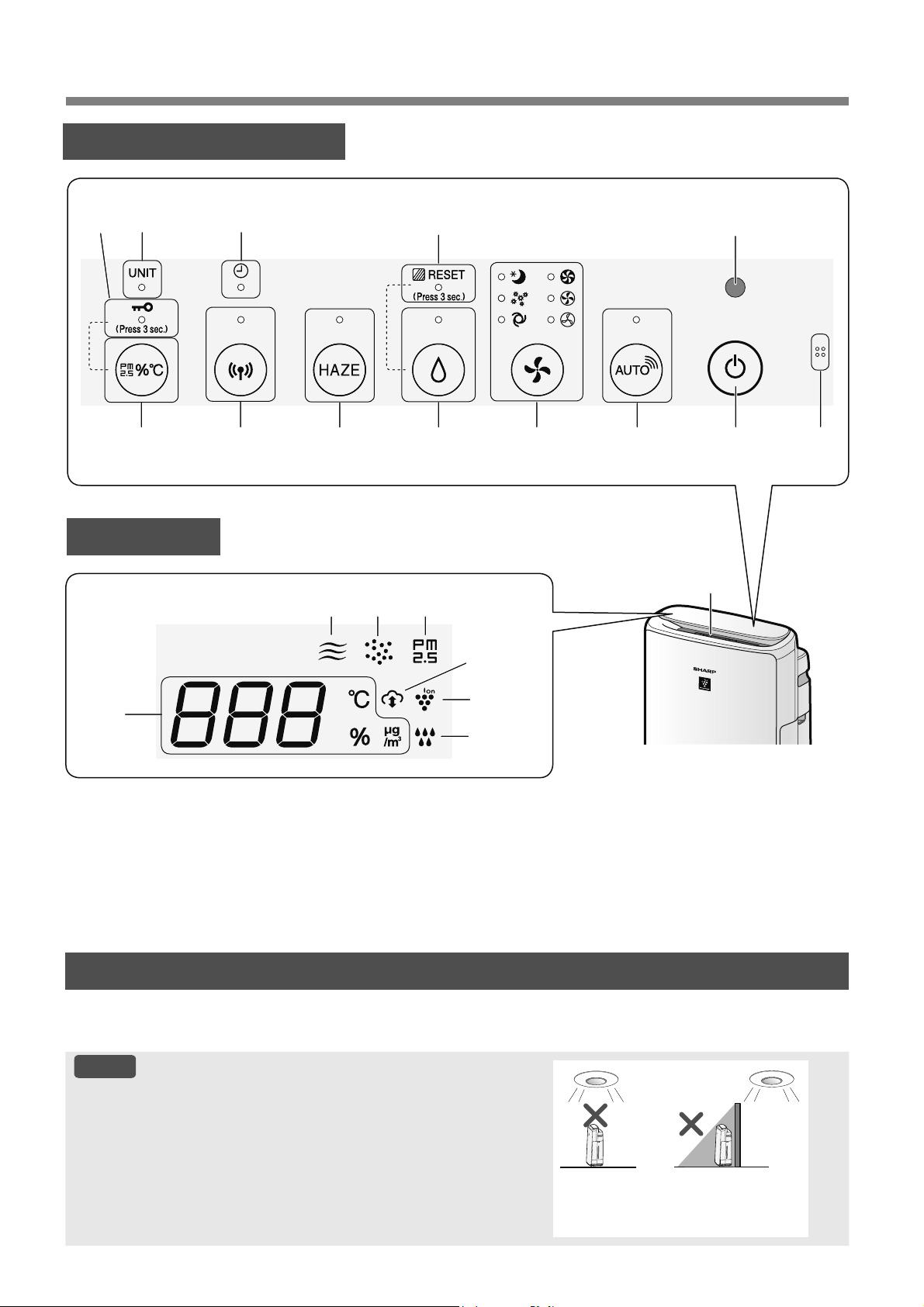
9,
7Ç1&È&%Ӝ3+Ұ1
3$1(19Ұ1+¬1+
&Ҧ0%,ӂ1È1+6È1*
.KLW\FKӑQĈLӅX.KLӇQÈQK6iQJĈӝViQJPjQKuQKÿѭӧFÿһWWKjQK³7ӵÿӝQJ´ĈqQ%iRĈӝ6ҥFKYj+LӇQ7Kӏ
VӁWӵÿӝQJ%Ұ7KRһF7Ҳ7GӵDWUrQÿӝViQJFӫDSKzQJ7UDQJ
/Ѭ8é
3KҥPYLSKiWKLӋQFӫDFҧPELӃQiQKViQJ
.K{QJOҳSÿһWVҧQSKҭPӣQKӳQJQѫLVDXÿk\&ҧP%LӃQÈQK
6iQJFyWKӇQKұQFҧPNK{QJFKtQK[iF
7UӵFWLӃS
GѭӟLÿqQ
FKLӃXViQJ
7URQJEyQJWӕL
14
1846911
7 2
17
20
19
16
12
+,ӆ17+ӎ
10
21
18
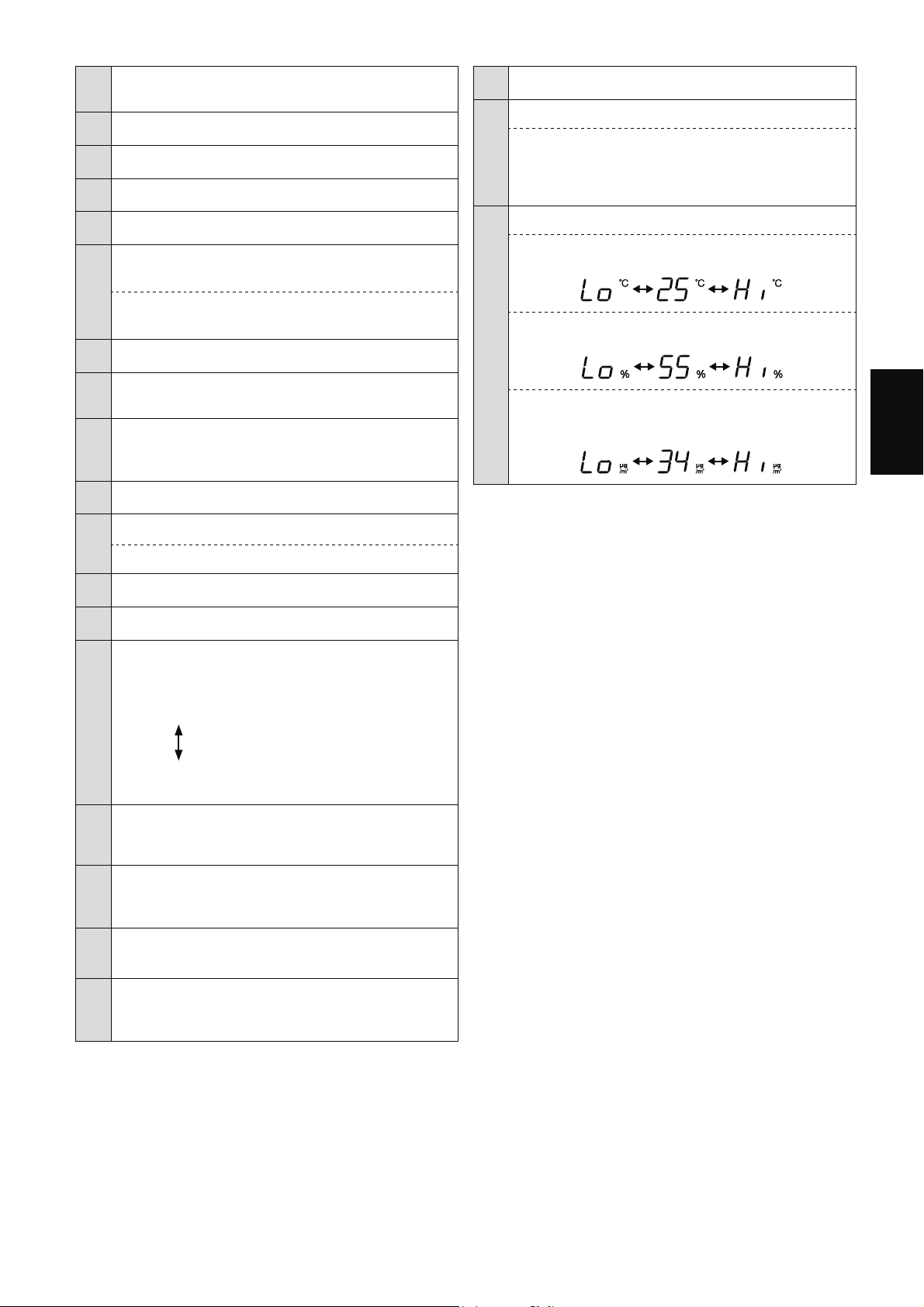
9,
7,ӂ1*9,ӊ7
1
&ҧP%LӃQ
%rQWURQJ
0L1KLӋWĈӝĈӝҬP
2 &ҧP%LӃQÈQK6iQJ
1~W3RZHU212))%Ұ77Ҳ71JXӗQ
4 1~W6+$53&2&252$,5ĈqQ%iR
7UҳQJ
1~W0RGH&KӃĈӝĈqQ%iR
7UҳQJ
6
1~W+XPLGLI\212))%Ұ77Ҳ77ҥRҬP
ĈqQ%iR
7UҳQJ
1~W)LOWHU5HVHWĈһW/ҥL%ӝ/ӑF
1KҩQJLk\
7 ĈqQ%ҧR7Uu%ӝ/ӑF
0jX&DP
8
1~W+$=(&KӃĈӝ6ѭѫQJ0ӡĈqQ%iR
7UҳQJ
9
1~W:L)LĈqQ
7UҳQJ
%ұWViQJNKLPi\OӑFNK{QJNKtÿѭӧFNӃWQӕLYӟLEӝ
ÿӏQKWX\ӃQ
10 ĈqQKҽQJLӡ
7UҳQJ
11
1~W+LӇQ7Kӏ&KX\ӇQĈәL
1~W&KLOG/RFN.KyD7Uҿ(P
1KҩQJLk\
12 ĈqQ%iR&KLOG/RFN.KyD7Uҿ(P
7UҳQJ
ĈqQ%iR7KD\7KӃ7KLӃW%ӏ
Ĉӓ
14
ĈqQ%ҧRĈӝ6ҥFK
&KӍEiRÿӝWLQKNKLӃWFӫDNK{QJNKtWURQJSKzQJ
WKHRFҩSÿӝEҵQJVӵWKD\ÿәLPjXVҳF
6ҥFK
;DQKGѭѫQJ
9jQJ1KҩSQKi\
.K{QJWLQK
NKLӃW
Ĉӓ1KҩSQKi\QKDQK
ĈqQ%iR30
7UҳQJ
&KRELӃWFҧPELӃQEөLQKҥ\SKiWKLӋQUDEөLYLP{
16
ĈqQ%iR*LiP6iW%өL
7UҳQJ
&KRELӃWFҧPELӃQEөLQKҥ\SKiWKLӋQUDEөLWK{QJ
WKѭӡQJ
17
ĈqQ%iR*LiP6iW0L
7UҳQJ
&KRELӃWFҧPELӃQPLSKiWKLӋQUDFiFPL
18
ĈqQ%iR'ӏFK9өĈiP0k\
7UҳQJ
%ұWViQJNKLPi\OӑFNK{QJNKtÿѭӧFNӃWQӕLYӟL
GӏFKYөÿiPPk\FӫD6KDUS
19 ĈqQ%iR3ODVPDFOXVWHU,RQ
;DQKGѭѫQJ
20
ĈqQ%iR7ҥRҬP
7UҳQJ
%Ұ7WҥRҭP
7Ҳ7
7Ҳ7WҥRҭP
Ĉӓ
1KҩSQKi\
Pi\FҫQWKrPQѭӟF
21
+LӇQWKӏ
1KLӋWÿӝ
+LӇQWKӏQKLӋWÿӝ
R
&ÿӃQ
R
&
R
&WUӣ
OrQ
R
&WUӣ
[XӕQJ
ĈӝҭP
+LӇQWKӏÿӝҭPWӟL
WUӣ
[XӕQJ
WUӣ
OrQ
1ӗQJĈӝ30
30ȝJP
PLFURJDPWUrQPpWNKӕLNK{QJ
NKtÿӃQȝJP
ÿѭӧFKLӇQWKӏ
ȝJP
WUӣOrQ
ȝJP
WUӣ[XӕQJ
&iFÿqQVӕYjFKӍViQJNKLVӱGөQJӬQJGөQJ
&iFFRQVӕÿѭӧFKLӇQWKӏOjJҫQÿ~QJ
1KҩQYjJLӳJLk\KRһFOkXKѫQ
9ұWFKҩWGҥQJKҥWKҥWFyÿѭӡQJNtQKWӯPLFURPHW
WUӣ[XӕQJ
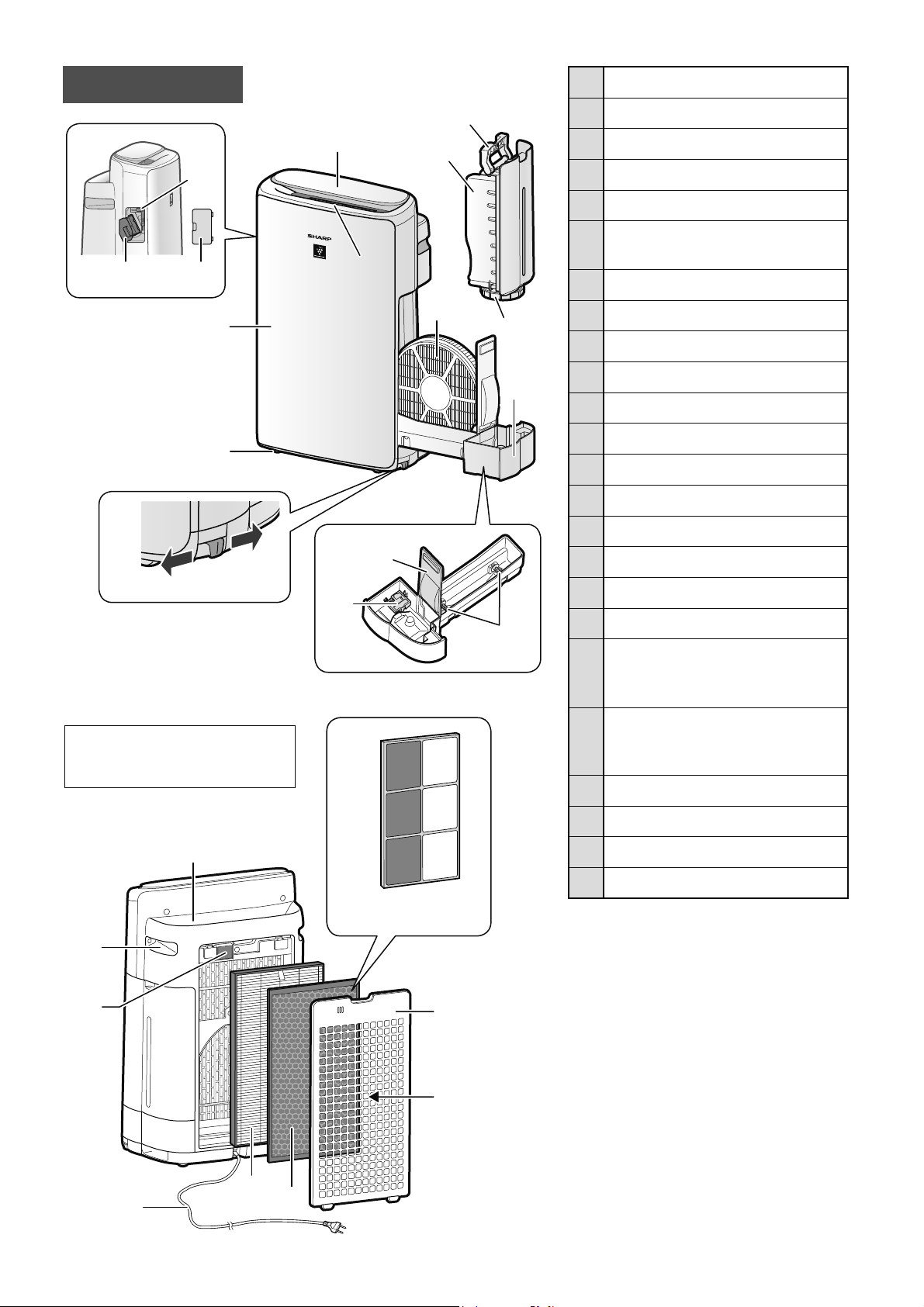
9,
1 %ҧQJ9ұQ+jQK+LӇQ7Kӏ
2 &ӱD;ҧ.Kt
0һWWUѭӟF
7KkQ0i\
4 %iQK;H1Kӓ9ӏ7Ut
.KyD%iQK;H
3KҧL7UiL
6
*LiĈӥ7KLӃW%ӏ
7KLӃW%ӏ7ҥR3ODVPDFOXVWHU,RQ
7 %jQ&KҧL9Ӌ6LQK7KLӃW%ӏ
8 1ҳS7KLӃW%ӏ
9 7D\&ҫP.KD\&KӭD
10 .KD\&KӭD1ѭӟF
11 1ҳS.KD\
12 %ӝ/ӑF7ҥRҬP
.KD\7ҥRҬP
14 .KD\
3KDR7ҥRҬP
16 7UөF/ăQ
17 &ӱD;ҧ.Kt
0һWVDX
18 7D\&ҫP
9ӏ7Ut
19
%ӝ/ӑF&ҧP%LӃQ
&ҧP%LӃQ
%rQWURQJ
%өL1Kҥ\
20
'k\1JXӗQ3KtFK&ҳP
+uQKGҥQJSKtFKFҳPÿLӋQW\
WKHRPӛLTXӕFJLD
21 %ӝ/ӑF+(3$
22 %ӝ/ӑF.Kӱ0L
1ҳSVDX%ӝOӑFVѫFҩS
24 &ӱD.Kt9jR
%ӝSKұQFKӍ7KLӃWEӏWҥR3ODVPDFOXVWHU
,RQ7ѭѫQJWӵQKѭErQGѭӟL
14
16
ĈmPӣNKyD
ĈmNKyD
6
7
8
2
1
4
9
10
11
12
17
18
20
21
22
24
19
+uQKPLQKKӑDWURQJViFK
KѭӟQJGүQQj\OjWKLӃWEӏ
.,1
&KӍGjQKFKR.,1
22
7+Æ10È<
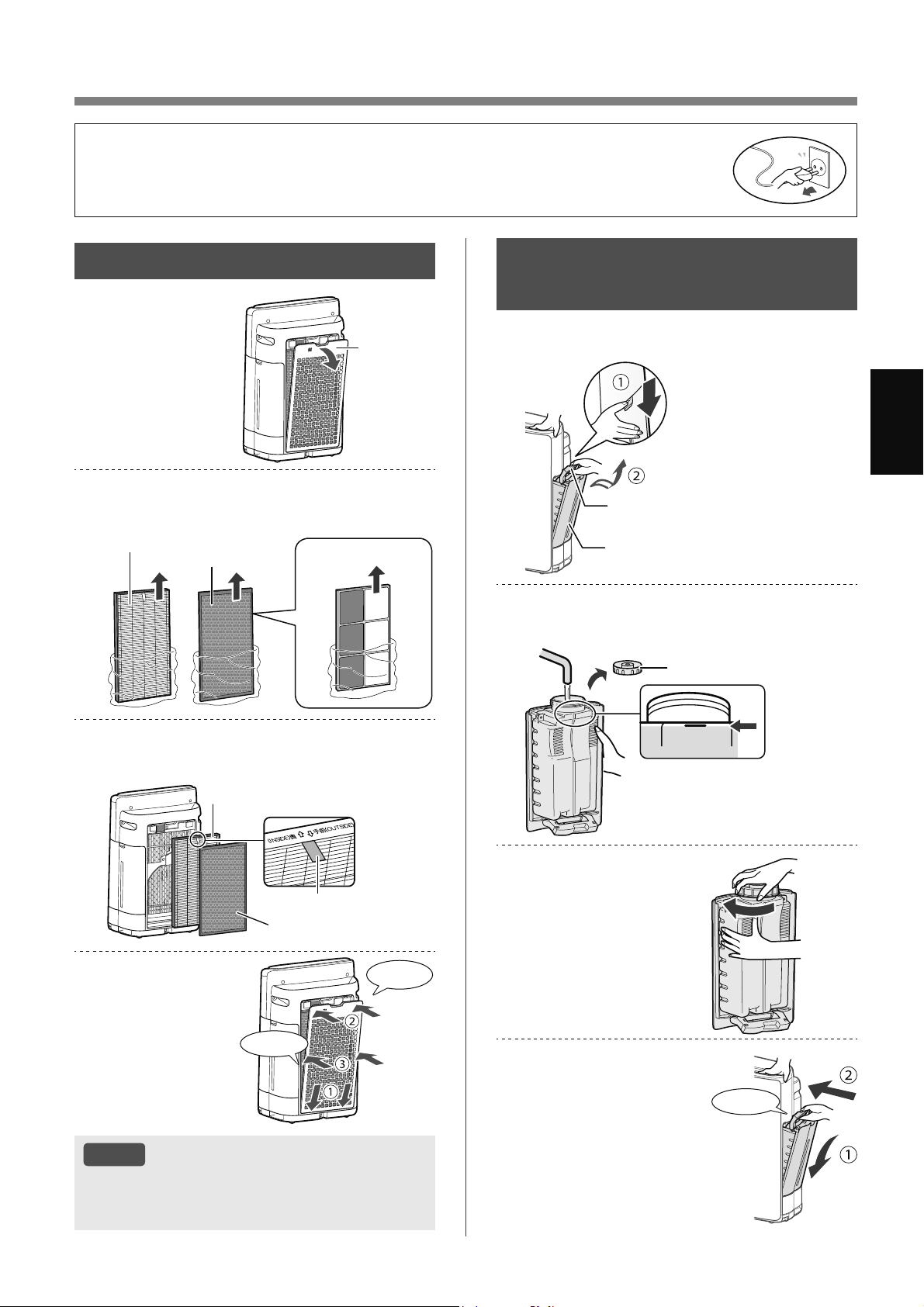
VI-9
7,ӂ1*9,ӊ7
&+8Ҭ1%ӎ
/Ҳ3ĈҺ7%Ӝ/Ӑ&
7KiR1ҳSVDX
%ӝOӑFVѫ
FҩS
1ҳSVDX
%ӝOӑFVѫ
FҩS
/ҩ\FiFEӝOӑFUDNKӓLW~L
QKӵD
%ӝ/ӑF+(3$
%ӝ/ӑF
.Kӱ0L
&KӍGjQKFKR.,1
/ҳSÿһWFiFEӝOӑFWKHRÿ~QJWKӭWӵ
QKѭKuQKPLQKKӑD
%ӝ/ӑF+(3$
%ӝ/ӑF.Kӱ0L
1KmQ
/ҳSÿһW1ҳSVDX
%ӝOӑFVѫFҩS
1KҩQYjR
1KҩQYjR
/Ѭ8é
.KLWKD\WKӃFiFEӝOӑFNKX\ӃQFiRQrQJKLOҥL
QJj\EҳWÿҫXVӱGөQJ
.K{QJYұQKjQKVҧQSKҭPPjNK{QJFyEӝOӑF
ĈӇGX\WUuFKҩWOѭӧQJFӫDEӝOӑFEӝOӑFÿѭӧFOҳSYjRVҧQSKҭPYjÿѭӧFÿyQJJyLWURQJ
PӝWW~LQKӵD
ĈҧPEҧRÿmGӯQJKRҥWÿӝQJYjU~WSKtFKFҳPFӫDVҧQSKҭPWUѭӟFNKLOҳSÿһWKRһFWKD\
WKӃEӝOӑF
ĈӘĈҪ<.+$<&+Ӭ$
1ѬӞ&
7KiR%uQK&KӭD1ѭӟF
7D\&ҫP.KD\&KӭD
.KD\&KӭD1ѭӟF
Ĉәÿҫ\QѭӟFPi\YjR%uQK&KӭD
1ѭӟF
満水
FULL
1ҳS.KD\
ĈӇWUiQKUzUӍKm\
YһQFKһW1ҳS%uQK
&KӭDWKұWFKҳF
FKҳQ
/ҳSÿһW%uQK&KӭD
1ѭӟF
1KҩQYjR
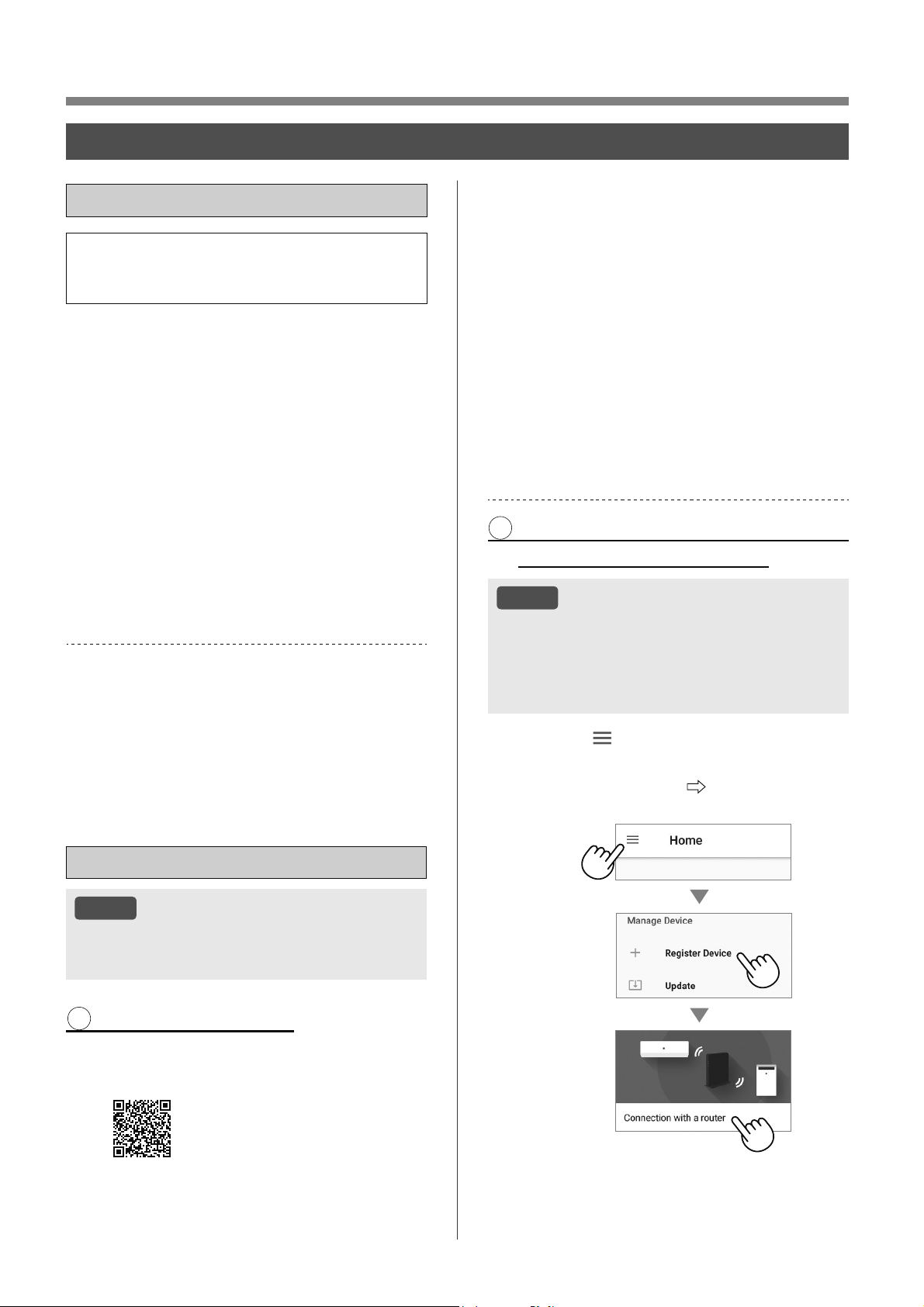
9,
9Ұ1+¬1+
&¬,ĈҺ7:,),
75ѬӞ&.+,%Ҳ7ĈҪ8
%ҵQJFiFKNӃWQӕLPi\OӑFNK{QJNKtYӟLWKLӃW
EӏWK{QJPLQKEҥQFyWKӇVӱGөQJPi\OӑF
NK{QJNKtWKXұQWLӋQKѫQ
ĈҧPEҧRWKLӃWEӏWK{QJPLQKFӫDEҥQÿѭӧF
NӃWQӕLYӟL0ҥQJ:L)L*+]
ĈLӇPWUX\FұS%ӝÿӏQKWX\ӃQWKLӃWOұS:L)L
ÿѭӧFEҧRYӋ:36
3KѭѫQJSKiSPmKyDÿѭӧFÿӅ[XҩWOj:3$
$(6
ĈҧPEҧRWKLӃWEӏWK{QJPLQKFӫDEҥQÿiS
ӭQJFiF\rXFҫXSKҫQPӅPWӕLWKLӇXWtQK
WӟLWKiQJQăP
ĈLӋQWKRҥLWK{QJPLQKPi\WtQKEҧQJ$QGURLG
WUӣOrQ
L3KRQHL3RG7RXFKL3DGFKҥ\L26WUӣOrQ
7K{QJVӕNӻWKXұW:L)LFӫDVҧQSKҭP
0ҥQJ/$1NK{QJGk\,(((EJQ
'ҧLWҫQVӕGҧLWҫQ*+]
7KѭѫQJKLӋX
³:L)L
®
´OjWKѭѫQJKLӋXÿmÿăQJNêFӫD:L)L$OOLDQFH
®
³$QGURLG´OjWKѭѫQJKLӋXFӫD*RRJOH,QF
³L3KRQH´³L3RGWRXFK´³L3DG´OjFiFWKѭѫQJKLӋXÿm
ÿăQJNêKRһFWKѭѫQJKLӋXFӫD$SSOH,QF
&iFWrQF{QJW\WrQWұSÿRjQWrQVҧQSKҭPNKiF
ÿѭӧFÿӅFұSWURQJKѭӟQJGүQ[ӱOêOjFiFWKѭѫQJ
KLӋXYjWKѭѫQJKLӋXÿmÿăQJNêFӫDWӯQJF{QJW\
7+,ӂ7/Ұ3%$1ĈҪ8
/Ѭ8é
.KLJKpSQӕLWKLӃWEӏWK{QJPLQKYӟLPi\OӑF
NK{QJNKtKm\ÿҧPEҧRFҧKDLÿӅXÿѭӧFNӃW
QӕLYjRFQJPӝWEӝÿӏQKWX\ӃQ
7Ҧ,9ӄĈĂ1*.é
&jLÿһWӬQJGөQJFKӍÿӏQKYjRWKLӃW
EӏWK{QJPLQKFӫDEҥQ
&yVҹQÿӇWҧLYӅWӯ$SSOH6WRUHKRһF
*RRJOH3OD\
KWWSVFERDUGFORXGODEVVKDUSFRMSVPDUWDSSBDVHDQ
GRZQORDGDLU
.ӃWQӕLWKLӃWEӏWK{QJPLQKFӫDEҥQ
YӟLEӝÿӏQKWX\ӃQYjNKӣLFKҥ\ӬQJ
GөQJ
/jPWKHRKѭӟQJGүQWUrQӬQJ
GөQJ
L ;HPOҥL³ĈLӅX.KRҧQ'ӏFK9ө´
LL ĈăQJQKұSEҵQJWjLNKRҧQ6KDUS
FӫDEҥQ6+$53,'
1ӃXEҥQFKѭDFy6+$53,'YXLOzQJÿăQJNê
ÿӇWҥR6+$53,'
LLL 1KұSWrQFKRWKLӃWEӏWK{QJPLQK
FӫDEҥQ
.ӂ71Ӕ,&Ӫ$0È</Ӑ&.+Ð1*
.+Ë9¬%ӜĈӎ1+78<ӂ1
/Ѭ8é
1ӃXEҥQFyFjLÿһWҭQKRһFFjLÿһWOӑFÿӏDFKӍ
0$&WUrQEӝÿӏQKWX\ӃQYXLOzQJKӫ\EӓFK~QJ
,'PҥQJFӫDVҧQSKҭPVӁÿѭӧFKLӇQWKӏOj
³$36+$53;;´WURQJÿy;;OjVӕFyFKӳ
VӕErQGѭӟLÿӏDFKӍ0$&FӫDVҧQSKҭP
1KҩQ³ ´ӣSKҫQWUrQErQWUiLFӫD
PjQKuQK³7UDQJFKtQK´YjFKӑQ
³ĈăQJNêWKLӃWEӏ´
³.ӃWQӕLYӟLEӝ
ÿӏQKWX\ӃQ´
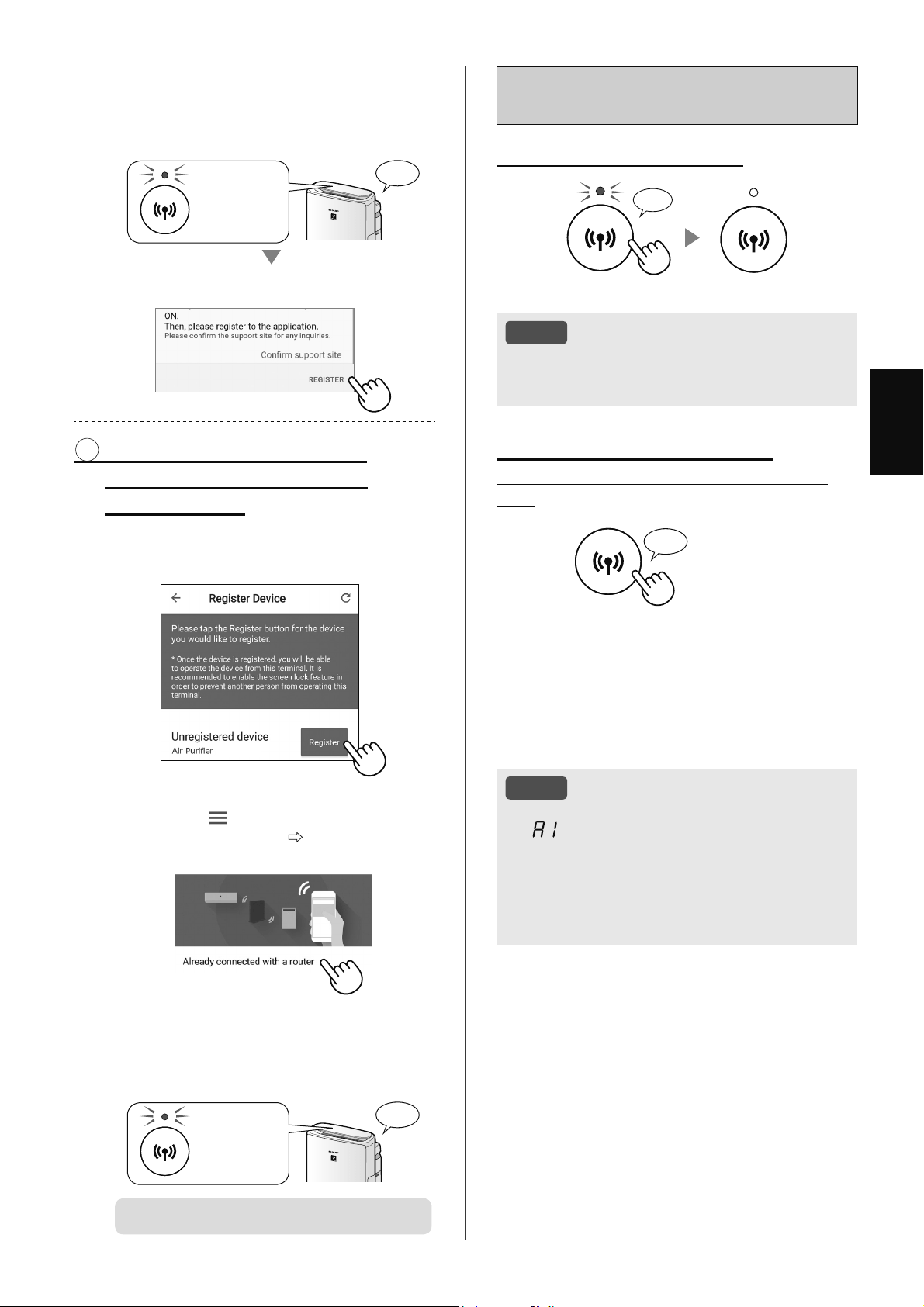
9,
7,ӂ1*9,ӊ7
&iFK%Ұ77Ҳ7:,),VDXNKL
KRjQWҩW7+,ӂ7/Ұ3%$1ĈҪ8
1ӃXEҥQPXӕQ7Ҳ7:L)L
1KҩQWURQJJLk\
♪
〜
/Ѭ8é
7ҳW:L)LVӁGүQÿӃQNK{QJWKӇÿLӅXNKLӇQPi\
OӑFNK{QJNKtEҵQJӬQJGөQJÿѭӧFFKӍÿӏQK
1ӃXEҥQPXӕQ%Ұ7OҥL:L)L
&iFKNK{LSKөFNӃWQӕL:L)LYӅPҥQJEDQ
ÿҫX
1KҩQ
WURQJJLk\
♪
ĈqQ:L)LVӁQKҩSQKi\VDXNKLEҥQQKҩQ1~W
:L)L9jWURQJYzQJNKRҧQJSK~WEҥQVӁQJKH
WKҩ\EӕQWLӃQJEtSQJҳQ0ӝWO~FVDXNKLWLӃQJEtS
Qj\SKiWUDĈqQ:L)LVӁViQJOrQYjNӃWQӕL:L
)LVӁÿѭӧFNK{LSKөFYӅPҥQJEDQÿҫXӬQJGөQJ
ÿѭӧFFKӍÿӏQKKLӋQFyWKӇÿѭӧFVӱGөQJOҥLÿӇÿLӅX
NKLӇQ0i\OӑFNK{QJNKt
/Ѭ8é
&NJQJFyWKӇ%Ұ77Ҳ7:L)LWӯ
³
%Ұ77Ҳ7EӝÿLӅXKӧS:L)L´
7UDQJ
7URQJWUѭӡQJKӧSQj\NӃWQӕL:L)LYӟLEӝ
ÿӏQKWX\ӃQVӁWӵÿӝQJÿѭӧFNK{LSKөF
&yWKӇPҩWYjLSK~WÿӇNӃWQӕLOҥLYӟL%ӝÿӏQK
WX\ӃQNK{QJGk\VDXNKLEұWOҥL:L)L
/jPWKHRKѭӟQJGүQWUrQӬQJ
GөQJ
1ӃXĈqQ:L)LEұWViQJVDXkPWKDQKWK{QJ
EiRNӃWQӕLÿmKRjQWҩWWKjQKF{QJ
ĈqQViQJ
♪
1KҩQYjR³ĈĂ1*.é´
.ӂ71Ӕ,*,Ӳ$0È</Ӑ&
.+Ð1*.+Ë9¬7+,ӂ7%ӎ
7+Ð1*0,1+
1KҩQ³ĈăQJNê´FKRPi\OӑFNK{QJ
NKtEҥQPXӕQÿăQJNê
7Ç102'(/
1ӃXEҥQNK{QJQKuQWKҩ\PjQKuQKӣWUrQ
Km\QKҩQ³
´WҥLPjQKuQK³+RPH´Yj
FKӑQ³ĈăQJNêWKLӃWEӏ´
³ĈmNӃWQӕLYӟLEӝ
ÿӏQKWX\ӃQ´
/jPWKHRKѭӟQJGүQWUrQӬQJ
GөQJ
1ӃXĈqQ:L)LEұWViQJVDXkPWKDQKWK{QJ
EiRNӃWQӕLÿmKRjQWҩWWKjQKF{QJ
ĈqQViQJ
♪
7+,ӂ7/Ұ3%$1ĈҪ8ÿmKRjQWҩW
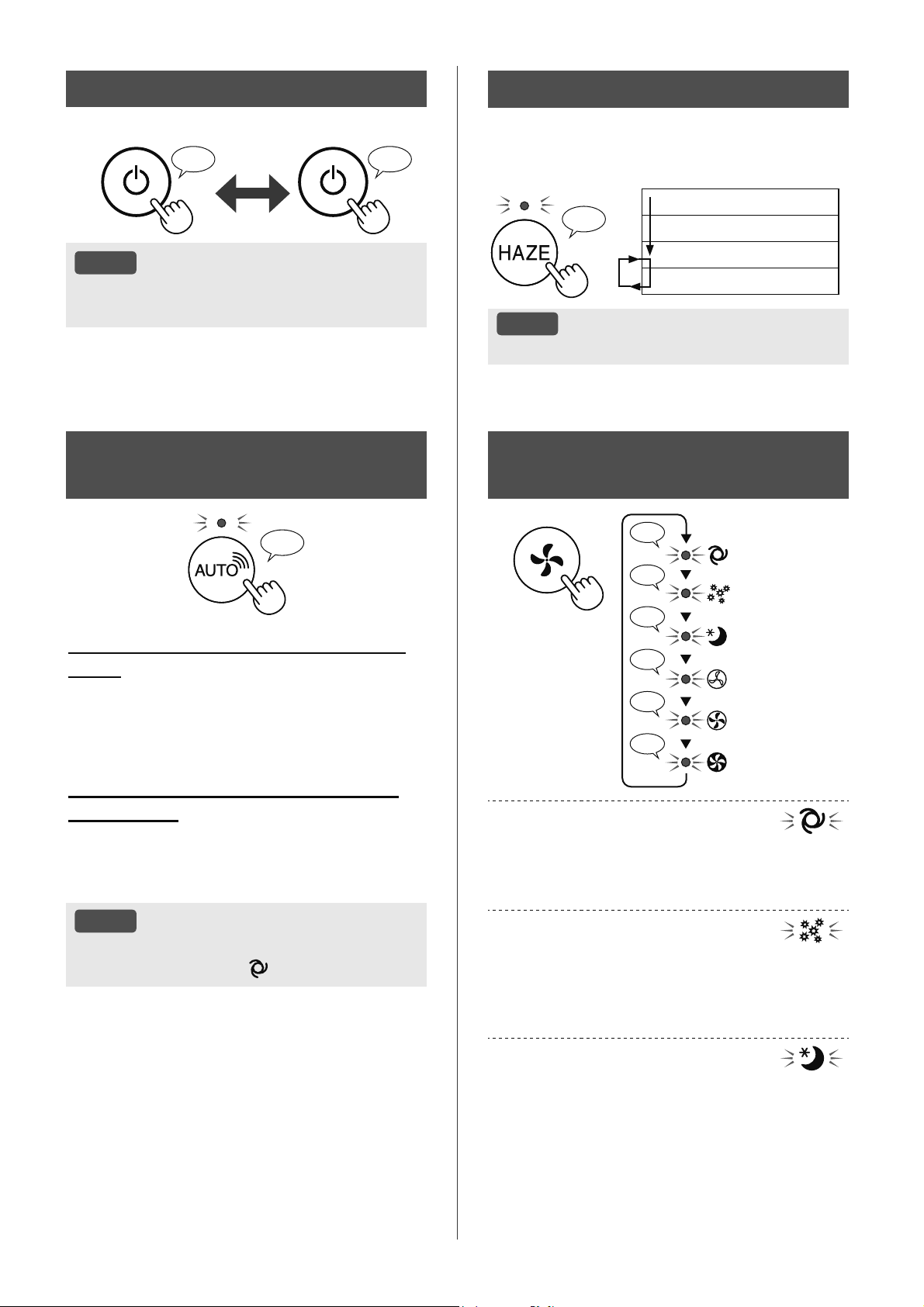
9,
.+Ӣ,ĈӜ1*'Ӯ1*
.+Ӣ,ĈӜ1* 'Ӯ1*
♪ ♪
〜
/Ѭ8é
.KLVҧQSKҭPEҳWÿҫXYұQKjQKKRҥWÿӝQJVӁ
EҳWÿҫXӣFKӃÿӝWUѭӟFÿyÿmÿѭӧFYұQKjQK
&+Ӑ17+ӆ7Ë&+.+Ð1*
.+Ë9¬&+ӂĈӜ
♪
♪
♪
♪♪
♪
♪
7+Ҩ3
7581*%Î1+
7Ӕ,Ĉ$
7ӴĈӜ1*
3+Ҩ1+2$
1*Ӫ
7ӴĈӜ1*
7ӕFÿӝTXҥWVӁWӵÿӝQJÿѭӧFFKX\ӇQÿәLW\WKXӝF
YjROѭӧQJWҥSFKҩWWURQJNK{QJNKt
%ҥQFyWKӇFKӑQ%Ұ77Ҳ7WҥRҭP
3+Ҩ1+2$
ĈӝQKҥ\FӫD&ҧP%LӃQ%өL1Kҥ\VӁWӵÿӝQJÿѭӧF
WăQJOrQYj&ҧP%LӃQ%өL1Kҥ\VӁQKDQKFKyQJ
SKiWKLӋQFiFWҥSFKҩWQKѭEөLYjSKҩQKRDYjOjP
VҥFKNK{QJNKtWKұWPҥQK
1*Ӫ
6ҧQSKҭPVӁKRҥWÿӝQJQKҽQKjQJYjWӕFÿӝTXҥW
VӁWӵÿӝQJFKX\ӇQÿәLW\WKXӝFYjROѭӧQJWҥSFKҩW
WURQJNK{QJNKtYjÿӝViQJFӫDFăQSKzQJ
.KLĈLӅX.KLӇQÈQK6iQJÿѭӧFÿһWWKjQK³7ӵ
ÿӝQJ´ĈqQ%iRĈӝ6ҥFKYj+LӇQ7KӏVӁWӵÿӝQJ
WҳW
6+$53&2&252
&+ӂĈӜ
♪
.KLVҧQSKҭPÿѭӧFNӃWQӕLYӟL6KDUS
&ORXG
6KDUS&ORXGVӁSKkQWtFKYjFjLÿһW
KRҥWÿӝQJWӕLѭXFKRSKzQJFӫDEҥQGӵDWUrQWK{QJ
WLQOҩ\ÿѭӧFWӯFiFFҧPELӃQWUrQVҧQSKҭPYj
QKұWNêVӱGөQJFӫDEҥQ
.KLVҧQSKҭPFKѭDÿѭӧFNӃWQӕLYӟL
6KDUS&ORXG
7ӕFÿӝTXҥWYj%Ұ77Ҳ7OjPҭPVӁWӵÿӝQJÿѭӧF
NLӇPVRiWW\WKXӝFYjRViX
NKҧQăQJSKiWKLӋQ30%өLWKѭӡQJ0L
1KLӋWÿӝĈӝҭPÈQKViQJ
/Ѭ8é
1ӃXQKҩQQ~W%Ұ77Ҳ77ҥRҬPFKӃÿӝKRҥW
ÿӝQJVӁFKX\ӇQWKjQK
7ӴĈӜ1*
&+ӂĈӜ+$=(
+RҥWÿӝQJӣWӕFÿӝTXҥW&$2WURQJSK~WYjVDX
ÿyOXkQSKLrQJLӳDPӭF7KҩSYj&DRWURQJSK~W
PӛLOҫQ
♪
SK~W0ӭFTXҥW&DR7ӕLĈD
SK~W0ӭFTXҥW&DR
SK~W0ӭFTXҥW7KҩS
SK~W0ӭFTXҥW&DR
/Ѭ8é
.K{QJWKӇ³7Ҳ7´3ODVPDFOXVWHULRQ
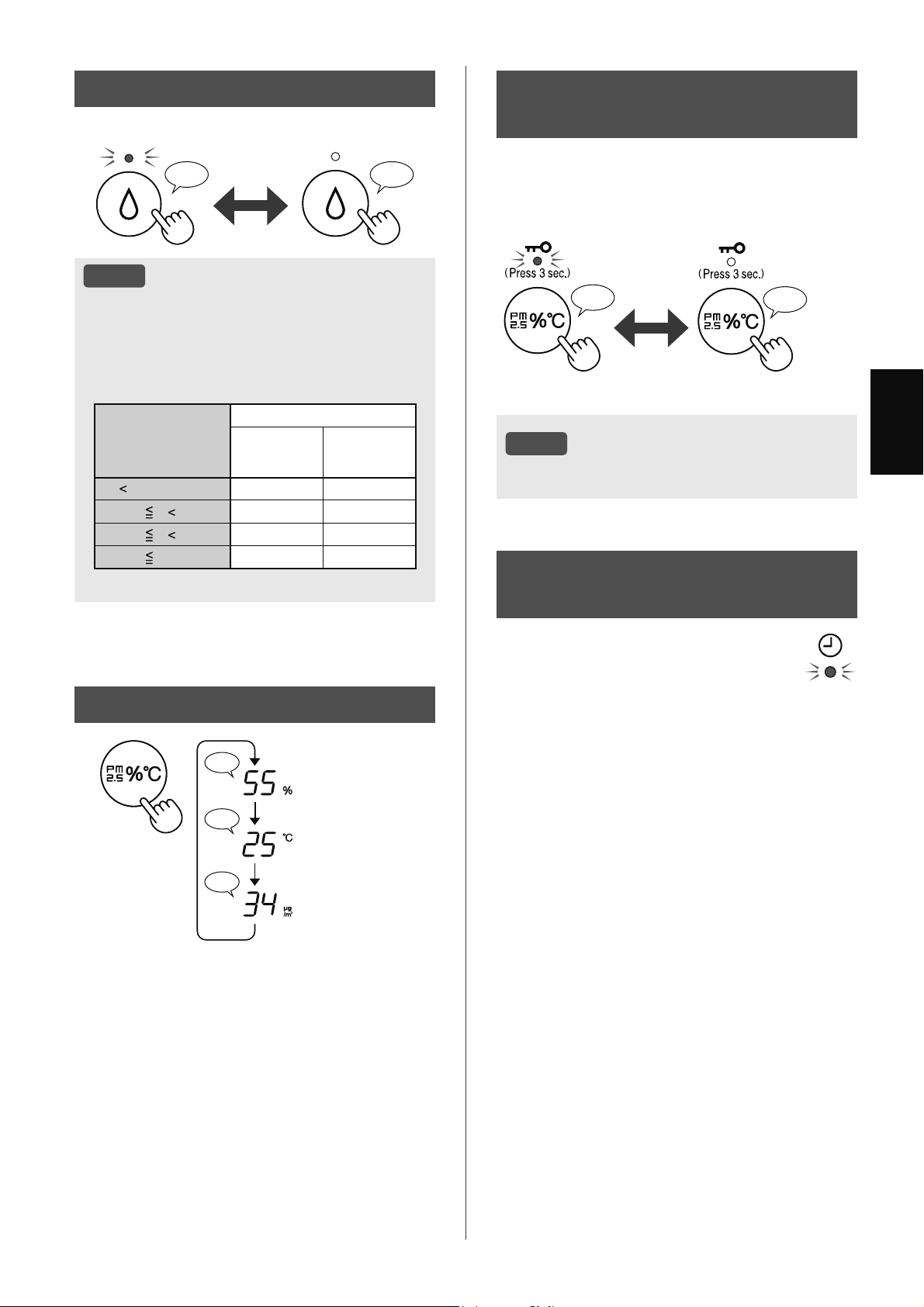
9,
7,ӂ1*9,ӊ7
+,ӆ17+ӎ&+8<ӆ1ĈӘ,
♪
♪♪
♪
ĈӝҭP
1KLӋWÿӝ
1ӗQJĈӝ30
&+ӂĈӜ.+Ï$75Ҿ(0
&+,/'/2&.
3DQHQYұQKjQKVӁEӏNKyD
YӟLVҧQSKҭP%Ұ7KRһF7Ҳ7
%Ұ7 +Ӫ<%Ӓ
♪
♪♪
1KҩQ
WURQJJLk\
1KҩQ
WURQJJLk\
/Ѭ8é
&yWKӇWҳW:L)LNKLӣ&KӃÿӝNKyDWUҿHP
;ӂ3/ӎ&++¬1*78Ҫ1
&+ӌ75Ç1Ӭ1*'Ө1*
%Ұ7+Ҽ1*,ӠKRһF7Ҳ7+Ҽ1
*,Ӡ
%ҥQFyWKӇÿһWOӏFKKjQJWXҫQÿӇPi\OӑF
NK{QJNKtEҳWÿҫXPӝWFKӃÿӝFөWKӇKRһF
QJӯQJKRҥWÿӝQJYjRQJj\JLӡFөWKӇĈqQ
+ҽQ*LӡVӁEұWNKLFyOӏFKELӇXÿѭӧFFjL
ÿһW
&¬,ĈҺ77Ҥ2Ҭ0
♪♪♪
%Ұ7 7Ҳ7
/Ѭ8é
.KLKRҥWÿӝQJYӟLW\FKӑQ%Ұ77ҥRҬPӣFiF
FKӃÿӝWURQJEҧQJGѭӟLÿk\VҧQSKҭPVӁWӵ
ÿӝQJNLӇPVRiWÿӝҭPEҵQJFiFKQKұQFҧP
QKLӋWÿӝYjÿӝҭP1JRҥLWUӯFKӃÿӝ7Ӕ,Ĉ$
9Ӯ$7+Ҩ3
1KLӋWÿӝ
7
ĈӝҭP
7Ҩ7&Ҧ&+ӂ
ĈӜ
1*Ӫ
&+ӂĈӜ
7
&
&
7 &
&
7 &
&
7
1JRҥLWUӯ7Ӕ,Ĉ$9Ӯ$7+Ҩ31*Ӫ
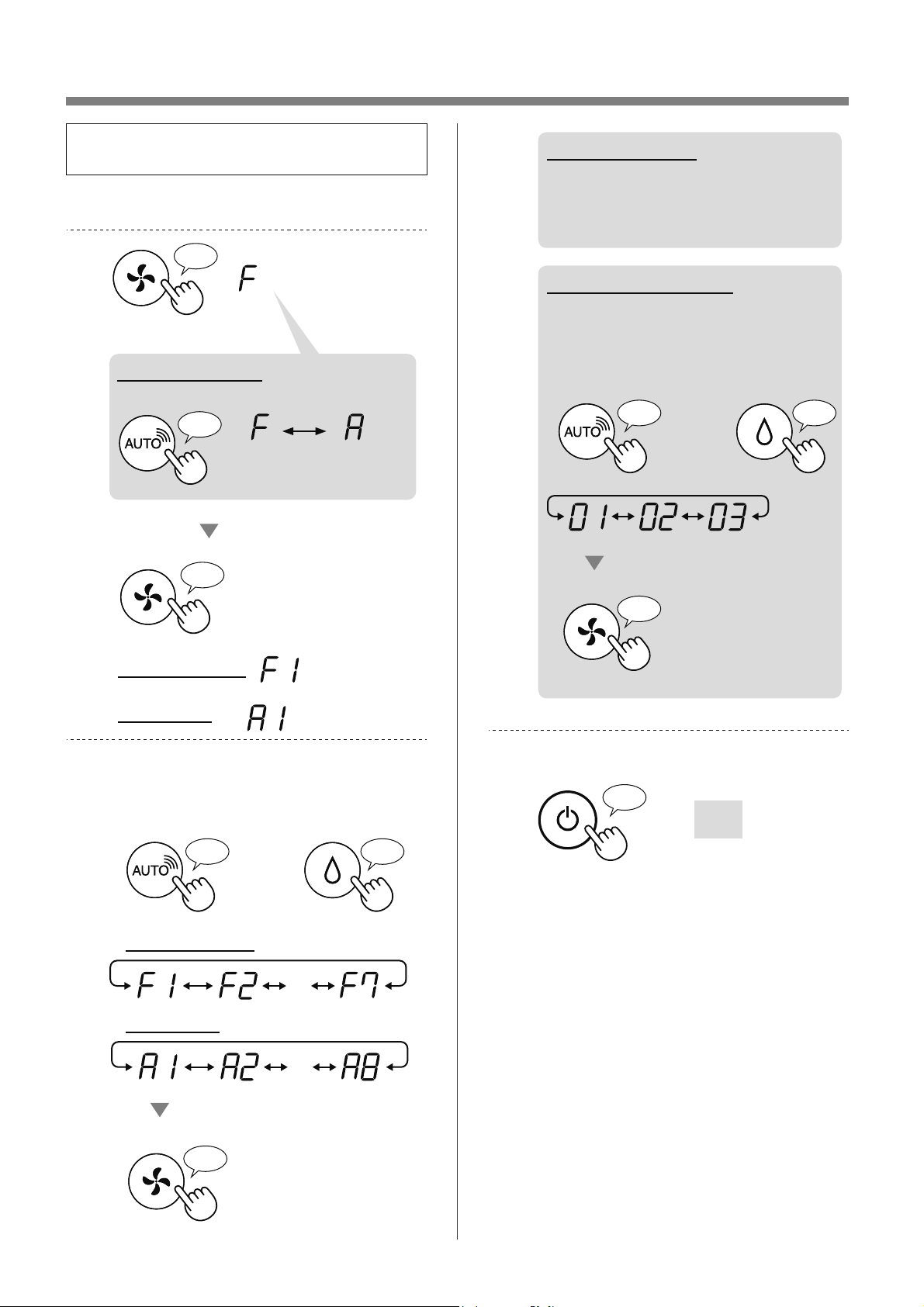
9,
&È&+7+$<ĈӘ,1+,ӄ8&¬,ĈҺ7
%ҥQFyWKӇWKD\ÿәLVҧQSKҭPYjFiFFKӭF
QăQJ:L)LWUrQWUDQJ
7Ҳ7VҧQSKҭP
1KҩQJLӱWURQJJLk\
♪
♪
ĈһW
&jLÿһW:L)L
&jLÿһWVҧQSKҭP
♪
.KLFjLÿһW:L)L
7KD\ÿәL³)´WKjQK³$´
&jLÿһW
VҧQSKҭP
&jLÿһW
:L)L
&KӑQ³6ӕFKӭFQăQJ))KRһF
$$´WUrQWUDQJ
KRһF
7ӟLWUѭӟF
♪
4XD\OҥL
♪
・・・
ĈһW
♪
&jLÿһW:L)L
&jLÿһWVҧQSKҭP
・・・
.KLFjLÿһW:L)L
7KDPNKҧRWUDQJ
ÿӇELӃWFKLWLӃWFӫDWӯQJFKӭF
QăQJ
.KLFjLÿһWVҧQSKҭP
&KӑQ³&jLÿһWVӕ
´WUrQWUDQJ
ĈһW
♪
〜
KRһF
7ӟLWUѭӟF
♪
4XD\OҥL
♪
.ӃWWK~FFjLÿһW
7ҳWÿL
♪
〜
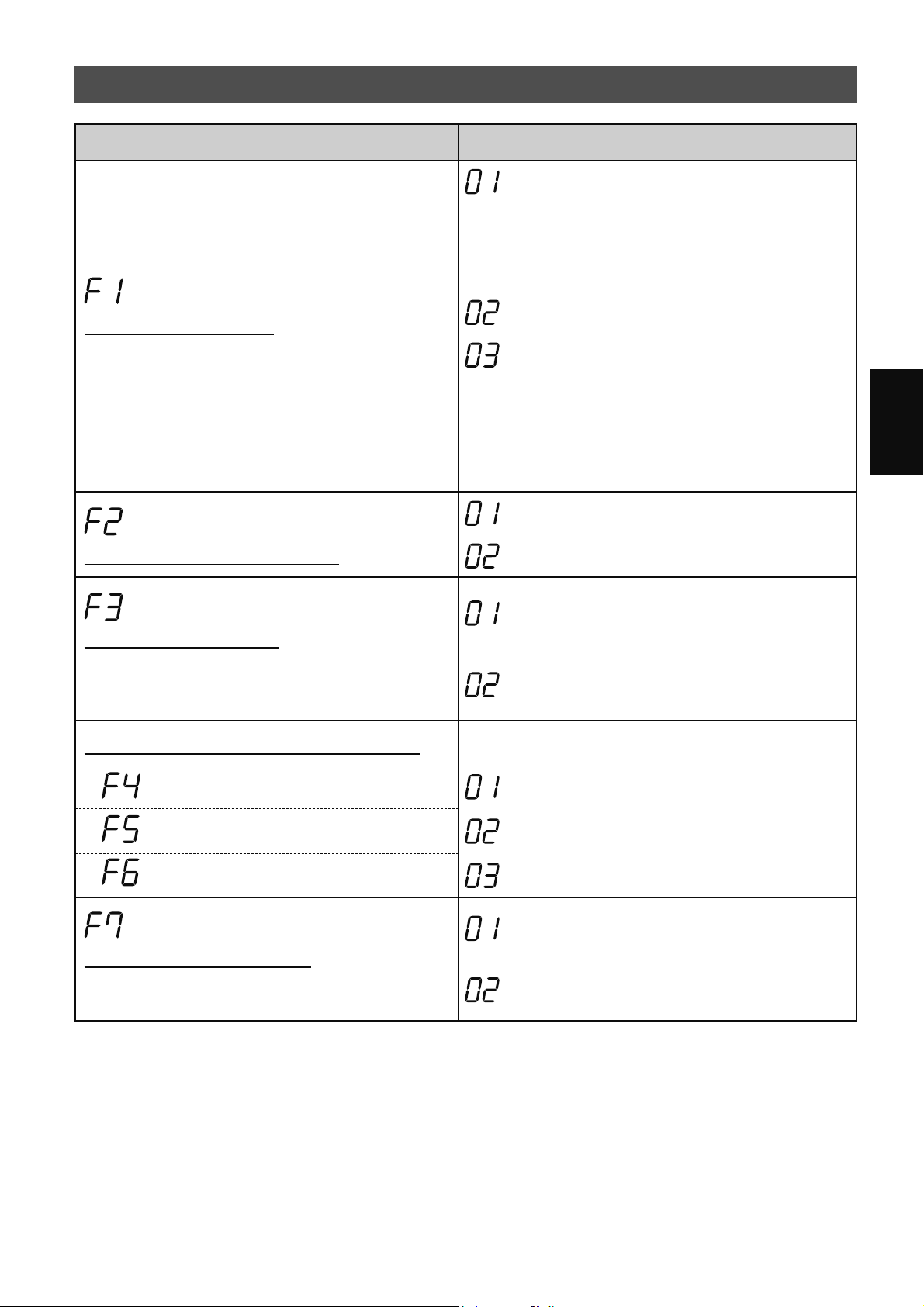
9,
7,ӂ1*9,ӊ7
&È&&+Ӭ&1Ă1*6Ҧ13+Ҭ0))
&KӭFQăQJ &jLÿһW
ĈLӅX.KLӇQÈQK6iQJ
%ҥQFyWKӇFKӑQÿӝViQJFӫDĈqQ%iRĈӝ6ҥFKYj
+LӇQ7Kӏ
7Ҳ7
.KLÿѭӧFÿһWWKjQK³7Ҳ7´ÿqQ³'LP´VӁViQJ
WURQJJLk\VDXNKLEҳWÿҫXKRҥWÿӝQJYjVDX
ÿyÿqQVӁWҳW
7X\QKLrQPӝWVӕÿqQEiRFҫQWK{QJEiRVӁ
YүQPӡ
0ӡ
7ӵÿӝQJ
PһFÿӏQK
ĈqQWӵÿӝQJ%Ұ7KRһF7Ҳ7GӵDWUrQ
ÿӝViQJFăQSKzQJ
3KzQJViQJVӫDÿqQ%Ұ7
3KzQJWӕLÿqQ7Ҳ7
1JD\FҧNKLSKzQJViQJÿqQVӁWҳW
NKLKRҥWÿӝQJӣFKӃÿӝQJKӍ
%Ұ77Ҳ73ODVPDFOXVWHU,RQ
7Ҳ7
%Ұ7
PһFÿӏQK
.KӣLÿӝQJOҥLWӵÿӝQJ
1ӃXU~WSKtFKFҳPVҧQSKҭPKRһFQӃXPҩWÿLӋQVҧQ
SKҭPVӁWLӃSWөFKRҥWÿӝQJYӟLFiFFjLÿһWWUѭӟFÿy
VDXNKLFyÿLӋQWUӣOҥL
+ӫ\Eӓ
%Ұ7
PһFÿӏQK
ĈLӅXFKӍQKÿӝQKҥ\FҧPELӃQ))
&ҧP%LӃQÈQK6iQJ 7KҩS
&ҧP%LӃQ%өL1Kҥ\ 7LrXFKXҭQ
PһFÿӏQK
&ҧP%LӃQ0L &DR
&jLÿһWÿqQEiRkPWKDQK
%ҥQFyWKӇFjLÿһWVҧQSKҭPSKiWUDWLӃQJEtSNKL
%uQK&KӭD1ѭӟFÿmFҥQ
+ӫ\Eӓ
PһFÿӏQK
%Ұ7
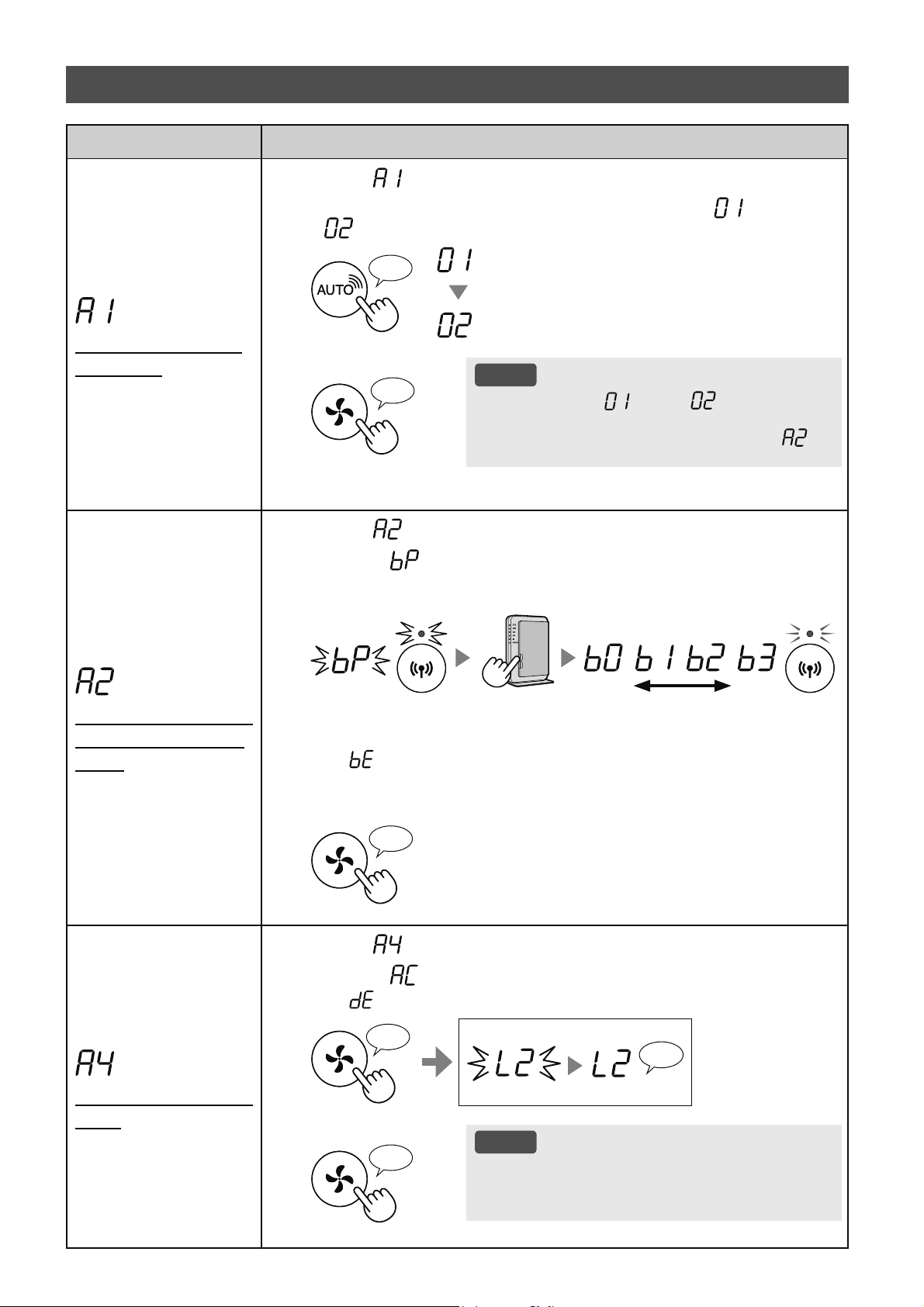
9,
&KӭFQăQJ &jLÿһW
%Ұ77Ҳ7EӝÿLӅX
KӧS:L)L
&KӑQ³ ´EҵQJFiFKOjPWKHRFiF%ѭӟFWUrQWUDQJ
1KҩQQ~W
6+$53&2&252$,5
ÿӇFKӑQ&jLÿһW KRһF
:L)L7Ҳ7
:L)L%Ұ7
♪
+RjQWKjQK
/Ѭ8é
.KLVӕFjLÿһW³ ´KRһF³ ´ÿѭӧFWKD\
ÿәLKuQKYX{QJVӁ[RD\WUrQPjQKuQKFKRÿӃQ
NKLKRjQWҩWFjLÿһW.KLFjLÿһWKRjQWҩW³
´
VӁÿѭӧFKLӇQWKӏ
♪
〜
.ӃWQӕL:L)LYӟLEӝ
ÿӏQKWX\ӃQFy1~W
:36
&KӑQ³ ´EҵQJFiFKOjPWKHRFiF%ѭӟFWUrQWUDQJ
6DXNKL³ ´ÿѭӧFKLӇQWKӏKm\QKҩQQ~W:367KLӃWOұS:L)L
ÿѭӧFEҧRYӋFӫDEӝÿӏQKWX\ӃQ
ĈqQViQJ
\ӃX PҥQK
1KҩSQKi\
1KҩSQKi\
6DXNKLNӃWQӕLPӭFÿӝEӝWKXVyQJ
VӁÿѭӧFKLӇQWKӏ
1ӃX³ ´ÿѭӧFKLӇQWKӏQJKƭDOjÿDQJ[ҧ\UDOӛLNӃWQӕL9XLOzQJ[iFQKұQ
UҵQJEӝÿӏQKWX\ӃQÿDQJKRҥWÿӝQJFKtQK[iFYjWKӱOҥL
+RjQWKjQK
♪
.KӣLWҥRFKӭFQăQJ
:L)L
&KӑQ³ ´EҵQJFiFKOjPWKHRFiF%ѭӟFWUrQWUDQJ
6DXNKL³ ´ÿѭӧFKLӇQWKӏKm\QKҩQQ~W³&KӃÿӝ´
1ӃX³ ´ÿѭӧFKLӇQWKӏQJKƭDOjÿDQJ[ҧ\UDOӛL9XLOzQJWKӱOҥL
♪
〜
+RjQWKjQK
1KҩSQKi\
ĈDQJNKӣLWҥR
♪
+RjQWKjQK
/Ѭ8é
9XLOzQJ[yDÿăQJNêWKLӃWEӏNKӓLӬQJGөQJNKL
NKӣLFKҥ\Pi\OӑFNK{QJNKtÿmÿѭӧFNӃWQӕLVҹQ
YӟL:L)L
♪
&È&&+Ӭ&1Ă1*:,),$$
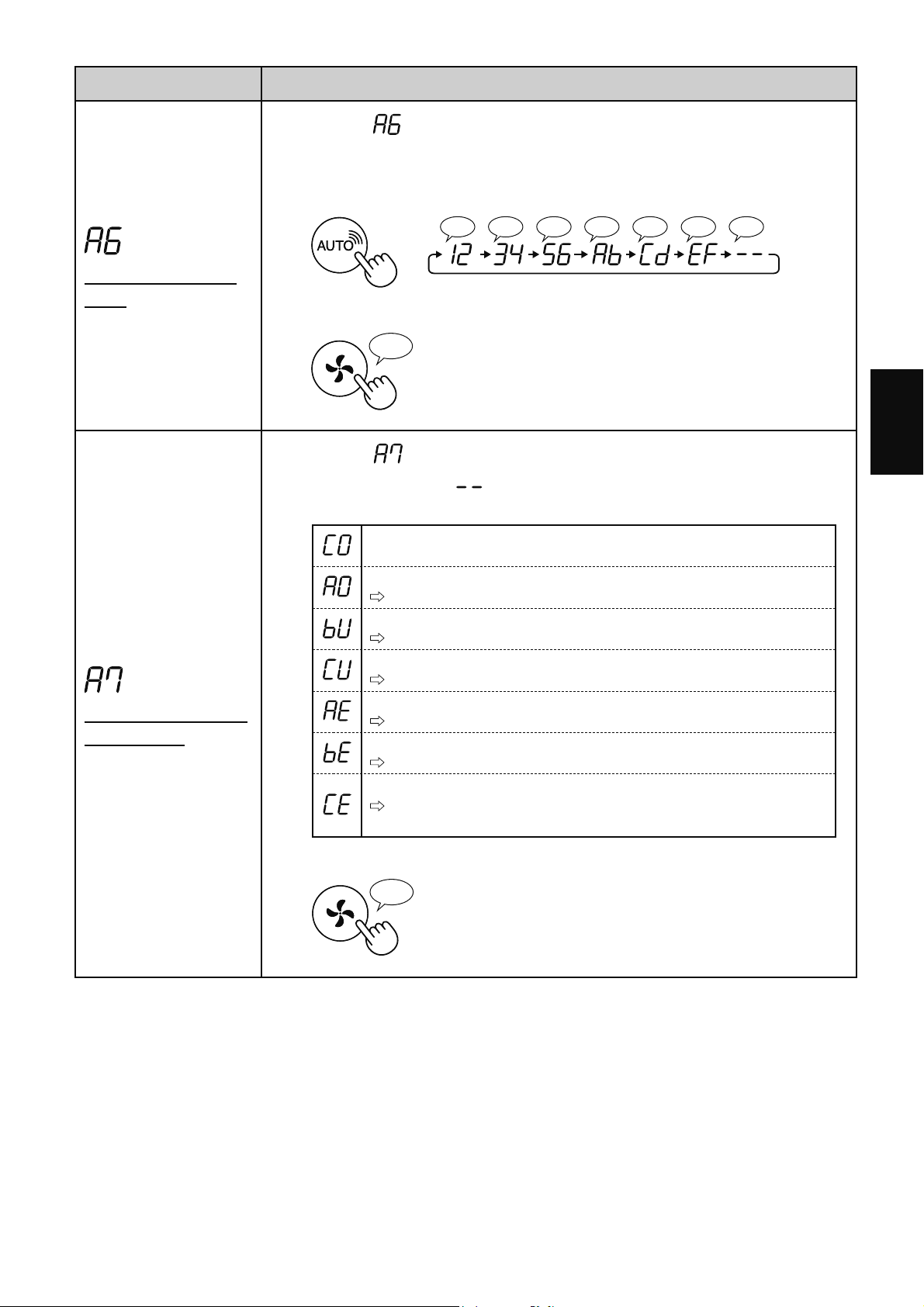
9,
7,ӂ1*9,ӊ7
&KӭFQăQJ &jLÿһW
;iFQKұQÿӏDFKӍ
0$&
&KӑQ³ ´EҵQJFiFKOjPWKHRFiF%ѭӟFWUrQWUDQJ
1KҩQQ~W³6+$53&2&252$,5´ÿӇKLӇQWKӏÿӏDFKӍ0$&
9tGө
7URQJWUѭӡQJKӧSÿӏDFKӍ0$&Oj³$%&'()´
♪♪♪♪♪♪♪
♪
〜
+RjQWKjQK
♪
+LӇQWKӏWUҥQJWKiL
PҥQJ:L)L
&KӑQ³ ´EҵQJFiFKOjPWKHRFiF%ѭӟFWUrQWUDQJ
6DXNKLKLӇQWKӏ³ ´WURQJYjLJLk\WUҥQJWKiLPҥQJFӫD
%ӝÿLӅXKӧS:L)LVӁÿѭӧFKLӇQWKӏ
.ӃWQӕLәQÿӏQK
%ӝÿLӅXKӧS:L)LWҳW
9XLOzQJEұWEӝÿLӅXKӧS:L)L
%ӝÿӏQKWX\ӃQFKѭDÿѭӧFÿăQJNê
9XLOzQJWKӵFKLӋQNӃWQӕL:L)LYӟLEӝÿӏQKWX\ӃQ
&jLÿһWOLrQNӃWYӟLӬQJGөQJFKѭDÿѭӧFWKӵFKLӋQ
9XLOzQJWKӵFKLӋQFjLÿһWOLrQNӃWYӟLWKLӃWEӏWK{QJPLQK
/ӛLPҥQJEӝÿLӅXKӧS:L)L
9XLOzQJWҳWEӝÿLӅXKӧS:L)LYjEұWOҥLVDXPӝWO~F
/ӛLPҥQJJLӳDPi\OӑFNK{QJNKtYjEӝÿӏQKWX\ӃQ
9XLOzQJ[iFQKұQWUҥQJWKiLPҥQJFӫDEӝÿӏQKWX\ӃQ
/ӛLGӏFKYөPҥQJ
9XLOzQJWҳWPi\OӑFNK{QJNKtYj[iFQKұQWUҥQJWKiLLQWHUQHWVDXÿy
WKӱOҥL
+RjQWKjQK
♪
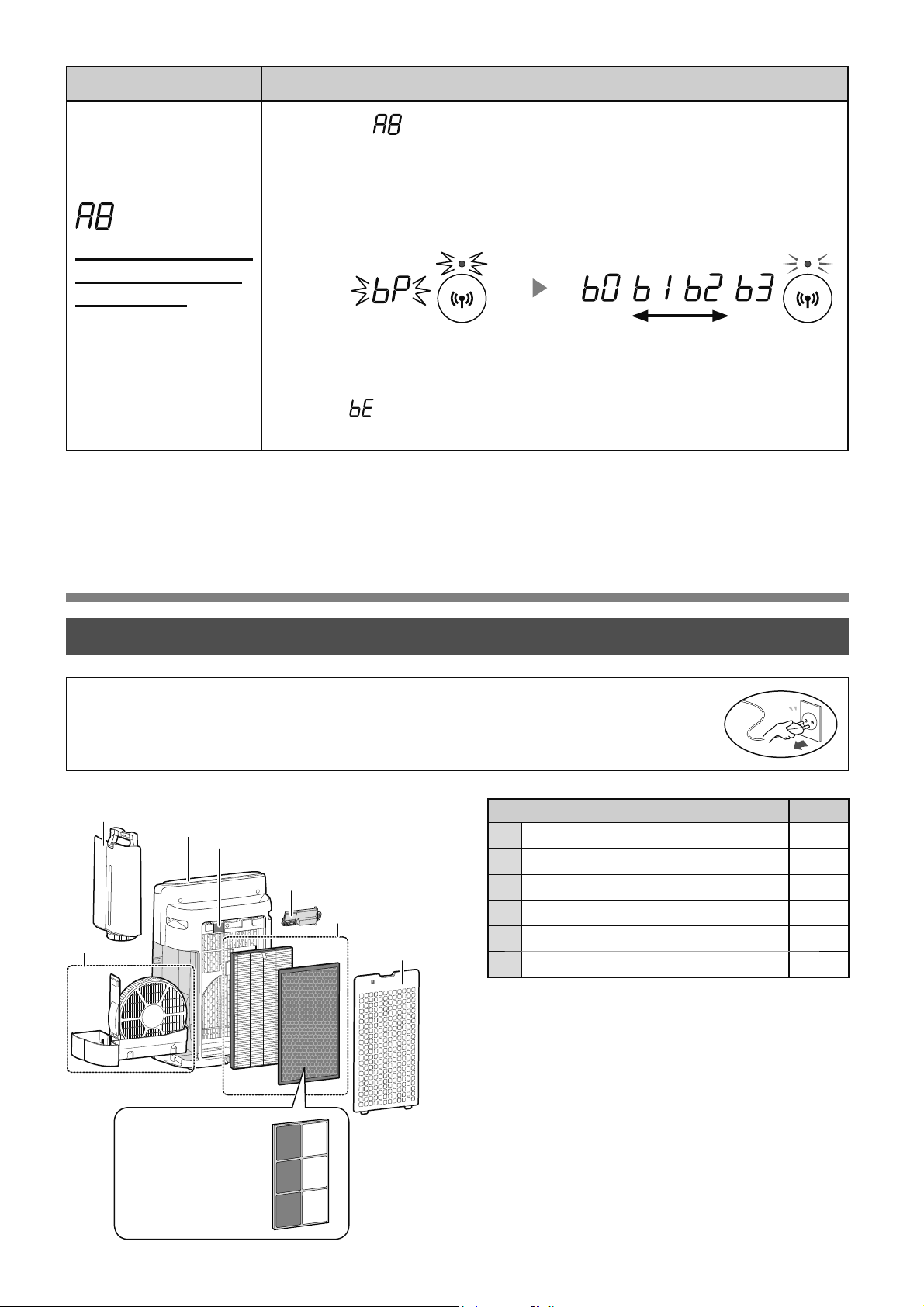
9,
9ӊ6,1+9¬%Ҧ2'ѬӤ1*
9ӏWUt 7UDQJ
1
7KkQ0i\
2
.KD\&KӭD1ѭӟF
%ӝ/ӑF7ҥRҬP.KD\7ҥRҬP
4
1ҳSVDX%ӝOӑFVѫFҩS&ҧP%LӃQ
%ӝ/ӑF+(3$%ӝ/ӑF.Kӱ0L
6
7KLӃW%ӏ7ҥR3ODVPDFOXVWHU,RQ
&KӭFQăQJ &jLÿһW
.ӃWQӕL:L)LYӟLEӝ
ÿӏQKWX\ӃQNK{QJ
Fy1~W:36
&KӃÿӝ$3ĈLӇPWUX\
FұS
&KӑQ³ ´EҵQJFiFKOjPWKHRFiF%ѭӟFWUrQWUDQJ
7KӵFKLӋQNӃWQӕL:L)LFӫDPi\OӑFNK{QJNKtYjEӝÿӏQKWX\ӃQ
GӵDWUrQPjQKuQKӬQJGөQJ
7KDPNKҧRӬQJGөQJÿӇELӃWFiFKRҥWÿӝQJNKiF
ĈqQViQJ
\ӃX PҥQK
1KҩSQKi\
1KҩSQKi\
6DXNKLNӃWQӕLPӭFÿӝEӝWKXVyQJ
VӁÿѭӧFKLӇQWKӏ
+LӇQWKӏWURQJNKLFjLÿһWNӃW
QӕLJLӳDVҧQSKҭPYjEӝÿӏQK
WX\ӃQ
1ӃX³
´ÿѭӧFKLӇQWKӏQJKƭDOjÿDQJ[ҧ\UDOӛLNӃWQӕL9XLOzQJ[iFQKұQEӝ
ÿӏQKWX\ӃQYjWKӱOҥL
ĈӇGX\WUuKLӋXVXҩWWӕLѭXFӫDPi\OӑFNK{QJNKtQj\YXLOzQJYӋVLQKÿӏQKNǤVҧQSKҭP
EDRJӗPFҧEӝOӑF
ĈҧPEҧRÿmGӯQJKRҥWÿӝQJYjU~WSKtFKFҳPFӫDVҧQSKҭPWUѭӟFNKLEҧRGѭӥQJKRһF
WKD\WKӃSKөNLӋQ
&+Ă06Ï&
6
2
4
1
3
5
4
&KӍGjQKFKR.,1
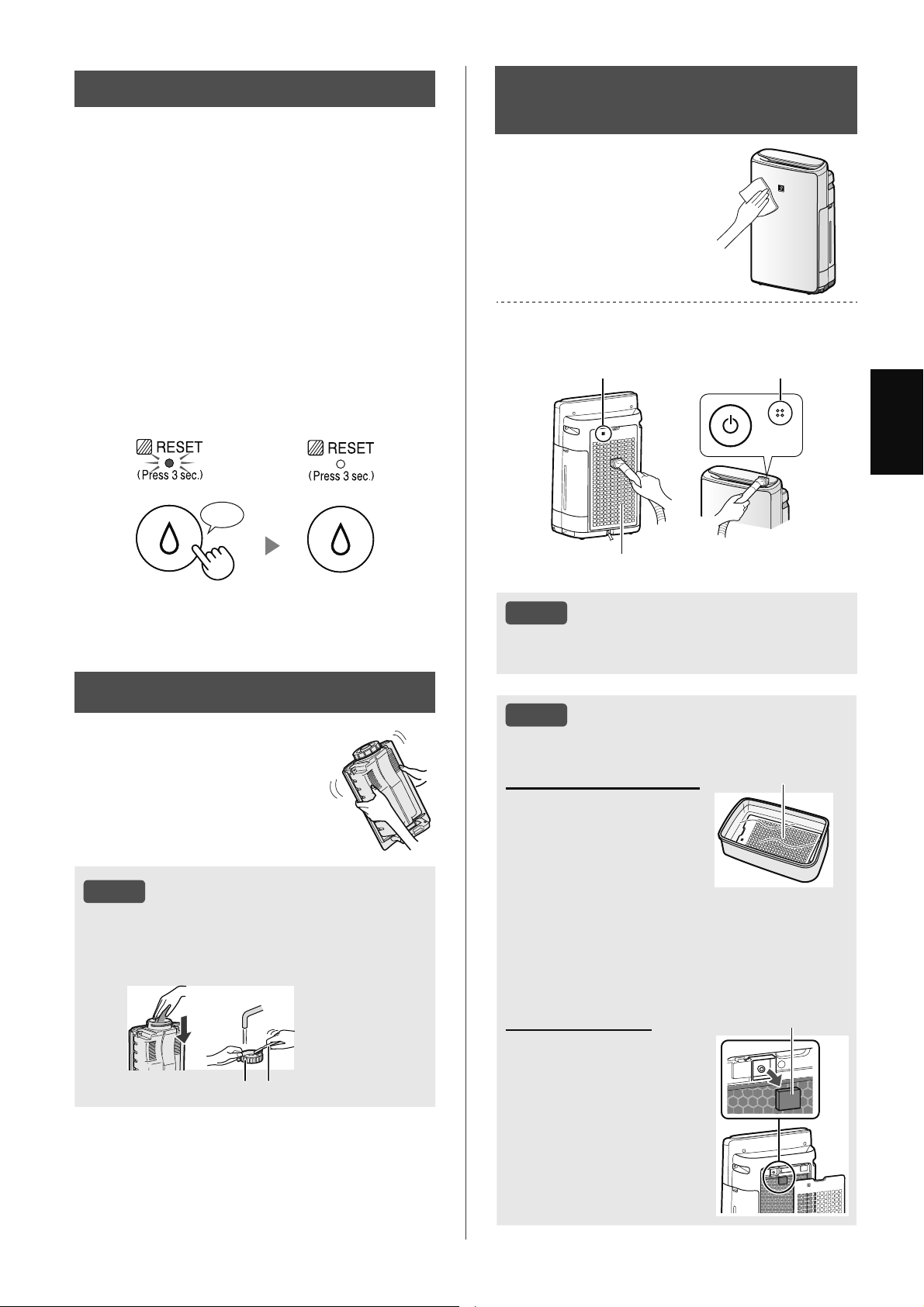
9,
7,ӂ1*9,ӊ7
ĈÊ1%Ҧ275Î%Ӝ/Ӑ&
.KLNKRҧQJWKӡLJLDQKRҥWÿӝQJONJ\NӃKRһFNKRҧQJ
WKӡLJLDQFKӭDQѭӟFYѭӧWTXiNKRҧQJJLӡĈqQ
%ҧR7Uu%ӝ/ӑFVӁEұWViQJ
0i\VӁNK{QJWtQKWKӡLJLDQNKLU~WSKtFKFҳP
ÿLӋQVҧQSKҭP
QJj\îJLӡ JLӡ
Ĉk\OjOӡLQKҳFWLӃQKjQKEҧRWUu%ӝ/ӑF7ҥRҬPYj
.KD\7ҥRҬP7KkQ0i\&KtQK1ҳSVDX%ӝOӑF
VѫFҩSYj&ҧP%LӃQÿѭӧFP{Wҧ
6DXNKLEҧRWUuNӃWQӕLSKtFKFҳPÿLӋQYӟLәFҳP
WѭӡQJYjQKҩQ1~W%Ұ77Ҳ71JXӗQVDXÿyQKҩQ
YjJLӳ1~WĈһW/ҥL%ӝ/ӑFWURQJJLk\ÿӇÿһWOҥL
ĈqQ%ҧR7Uu%ӝ/ӑF
1KҩQWURQJJLk\
♪
/Ѭ8é
&iFKOjPVҥFKEөLEҭQNKyWҭ\
1ҳSVDX%ӝOӑFVѫFҩS
7KrPPӝWOѭӧQJQKӓ
FKҩWWҭ\UӱDQKjEӃSQKҽ
YjRQѭӟFYjQJkPWURQJ
NKRҧQJSK~W
5ӱDVҥFKFKҩWWҭ\UӱD
QKjEӃSQKҽEҵQJQѭӟF
VҥFK
/jPNK{KRjQWRjQEӝ
OӑFWURQJNKXYӵFWK{QJ
WKRiQJWӕW
1ҳSVDX%ӝOӑFVѫFҩS
%ӝ/ӑF&ҧP%LӃQ
7KiR1ҳSVDX%ӝOӑFVѫ
FҩS
7KiR%ӝ/ӑF&ҧP%LӃQ
1ӃX%ӝ/ӑF&ҧP%LӃQ
TXiEҭQKm\UӱDEҵQJ
QѭӟFYjODXNK{Nӻ
%ӝ/ӑF&ҧP%LӃQ
7+Æ10È<3$1(1
6$8&Ҧ0%,ӂ1
/DXVҥFKEҵQJYҧL
PӅPYjNK{
/RҥLEӓEөLQKҽQKjQJEҵQJGөQJFө
OjPVҥFKQKѭPi\K~WEөL
1ҳSVDX%ӝOӑFVѫFҩS
&ҧPELӃQ
&ҧPELӃQ
/Ѭ8é
.K{QJWҥRiSOӵFTXiPҥQKNKLFӑUӱD1ҳS
VDX%ӝOӑFVѫFҩS
.
%Î1+&+Ӭ$1ѬӞ&
'ӝLUӱDVҥFKErQWURQJ
EҵQJQѭӟF
/Ѭ8é
&iFKOjPVҥFKEөLEҭQNKyWҭ\
/jPVҥFKErQWURQJ%uQK&KӭD1ѭӟFEҵQJ
PLӃQJEӑWELӇQPӅPYj1ҳS%uQKEҵQJWăPE{QJ
KRһFEjQFKҧLÿiQKUăQJ
1ҳS.KD\ %jQFKҧLÿiQKUăQJ
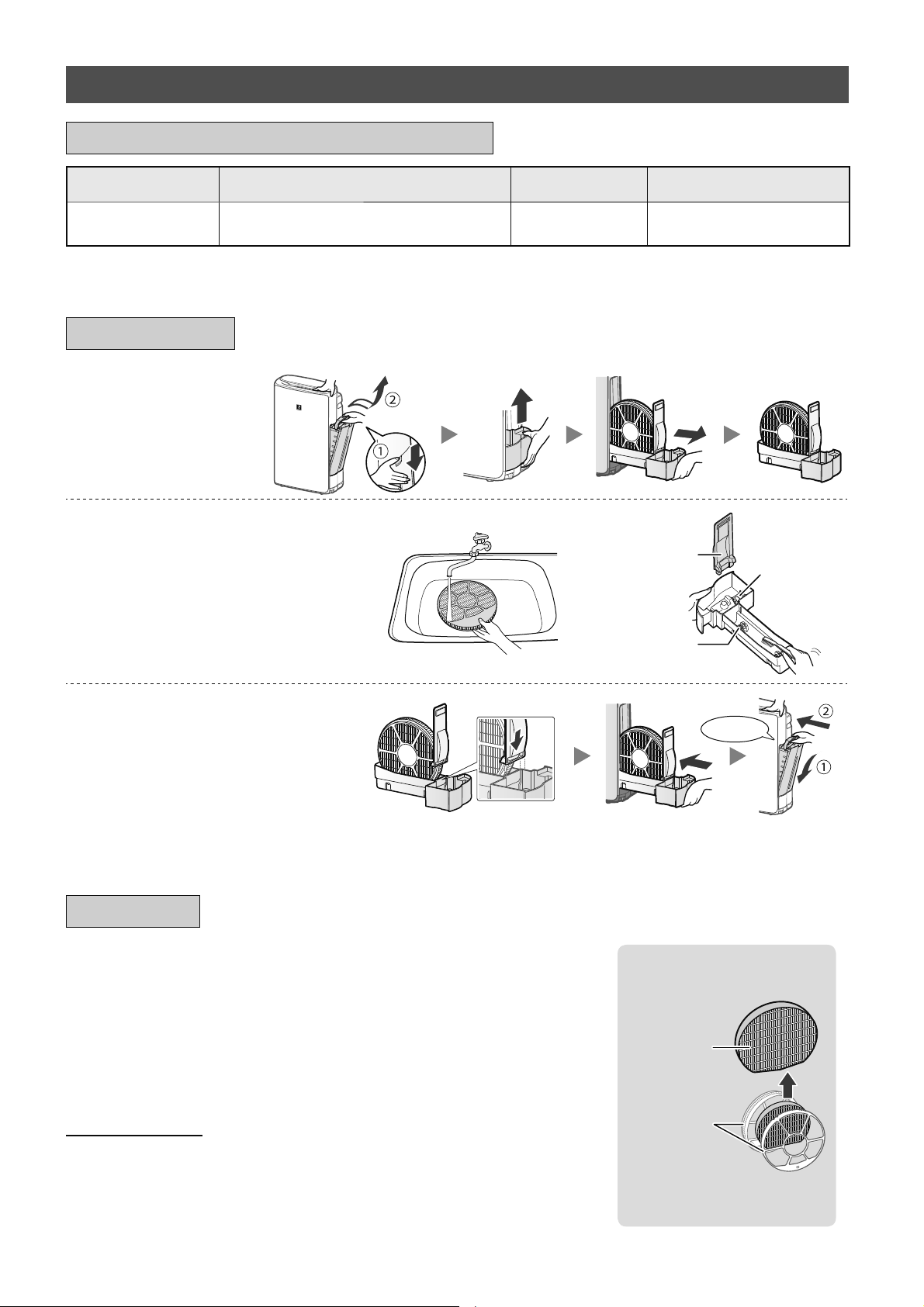
9,
7+$<7+ӂ
;HPWUDQJQj\ÿӇELӃWKѭӟQJGүQYӅFiFKOҳSÿһWEӝOӑF
NKLWKD\WKӃ
9XLOzQJWKDPNKҧRêNLӃQÿҥLOêFӫDEҥQÿӇPXDEӝOӑFWKD\WKӃ
&KӍVӱGөQJEӝOӑFÿѭӧFWKLӃWNӃFKRVҧQSKҭPQj\
)=-;0)(
WKLӃWEӏ
.KXQJ%ӝ/ӑF
%ӝ/ӑF
7ҥRҬP
.K{QJWKҧLEӓ.KXQJ%ӝ
/ӑF
.KLWKD\WKӃFiFEӝOӑFNKX\ӃQFiRQrQJKLOҥLQJj\EҳWÿҫXVӱGөQJ
7KҧLEӓEӝOӑF
9XLOzQJWKҧLEӓEӝOӑFÿmWKD\WKӃWKHRFiFOXұWYjTX\ÿӏQKYӅWKҧLEӓFӫDÿӏD
SKѭѫQJ
&iFYұWOLӋXFӫD%ӝ/ӑF7ҥRҬP
3RO\HVWHU7ѫQKkQWҥR
7KiR%ӝ/ӑF7ҥR
ҬPYj.KD\7ҥR
ҬP
5ӱDVҥFKEҵQJQKLӅXQѭӟF
3KDR
.KD\
7UөF/ăQ
.K{QJWKiR3KDR7ҥRҬP1ӃXQy
WXӝWUDKm\WKDPNKҧRWUDQJ
7KDPNKҧRWUDQJÿӇELӃWFiFK
YӋVLQK%ӝ/ӑF7ҥRҬPNKLQyTXi
EҭQ
*ҳQ%ӝ/ӑF7ҥRҬPYj.KD\
7ҥRҬP
1KҩQYjR
6DXNKLEҧRGѭӥQJKm\OҳSOҥL
FKtQK[iFFiFEӝSKұQ
%Ҧ2'ѬӤ1*
%Ӝ/Ӑ&7Ҥ2Ҭ0.+$<7Ҥ2Ҭ0
7rQEӝSKұQ &KXNǤEҧRGѭӥQJ 7XәLWKӑWӕLÿD 0RGHOEӝOӑFWKD\WKӃ
%ӝ/ӑF7ҥRҬP
.KLFyPLSKiWUDWӯFӱD[ҧNKtKRһF
PӛLWKiQJPӝWOҫQ
QăP
*
)=-;0)(
ӬQJGөQJÿѭӧFFKӍÿӏQKVӁWK{QJEiRNKLFҫQWKD\WӯQJEӝSKұQWKD\WKӃW\WKHRPӭFÿӝVӱGөQJ
&+8.ǣ7+$<7+ӂ9¬%Ҧ2'ѬӤ1*
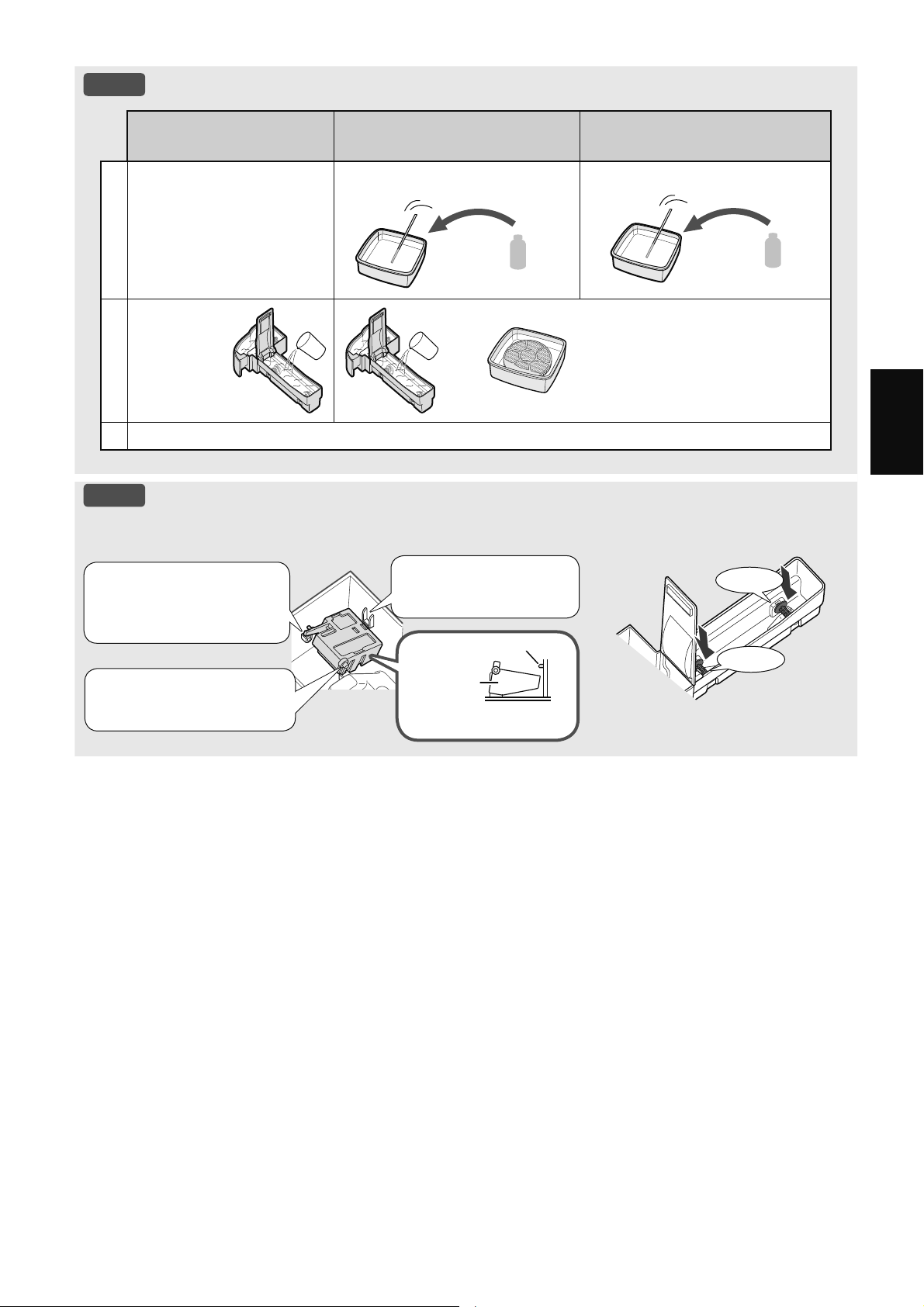
9,
7,ӂ1*9,ӊ7
/Ѭ8é
&iFKOjPVҥFKEөLEҭQNKyWҭ\
&KҩWWҭ\UӱDQKjEӃSQKҽ
FKӍGjQKFKR.KD\7ҥRҬP
$[LWFLWULF
FyVҹQWҥLPӝWVӕKLӋXWKXӕF
QѭӟFFKDQKÿyQJKӝS
NK{QJFyFL
1
ĈәQѭӟFQJұSQӱDNKD\
7KrPPӝWOѭӧQJQKӓ
FKҩWWҭ\UӱDQKjEӃS
QKҽ
FӕFQѭӟF
PXӛQJFjSKr
FӕFQѭӟF
FӕF
2
1JkPWURQJ
SK~W
1JkPWURQJSK~W
.KLVӱGөQJQѭӟFFKDQKOjP
GXQJGӏFKWҭ\FһQKm\FKRWKrP
WKӡLJLDQQJkP
5ӱDVҥFKFKҩWWҭ\UӱDQKjEӃSQKҽKRһFGXQJGӏFKWҭ\FһQEҵQJQѭӟFVҥFK
/Ѭ8é
&iFKOҳSÿһW3KDR7ҥRҬP
3KDR7ҥRҬP 7UөF/ăQ
1KҩQYjR
1KҩQYjR
0ҩX
3KDR7ҥR
ҬP
&KӃÿӝ[HPPһWFҳWQJDQJ
/ҳSPҩXӣSKtDErQ
NLDFӫD3KDR7ҥRҬP
YjROӛ
/ҳS3KDR7ҥRҬP
ErQGѭӟLPҩXQj\
/ҳSPҩXӣFӫD3KDR
7ҥRҬPYjROӛ
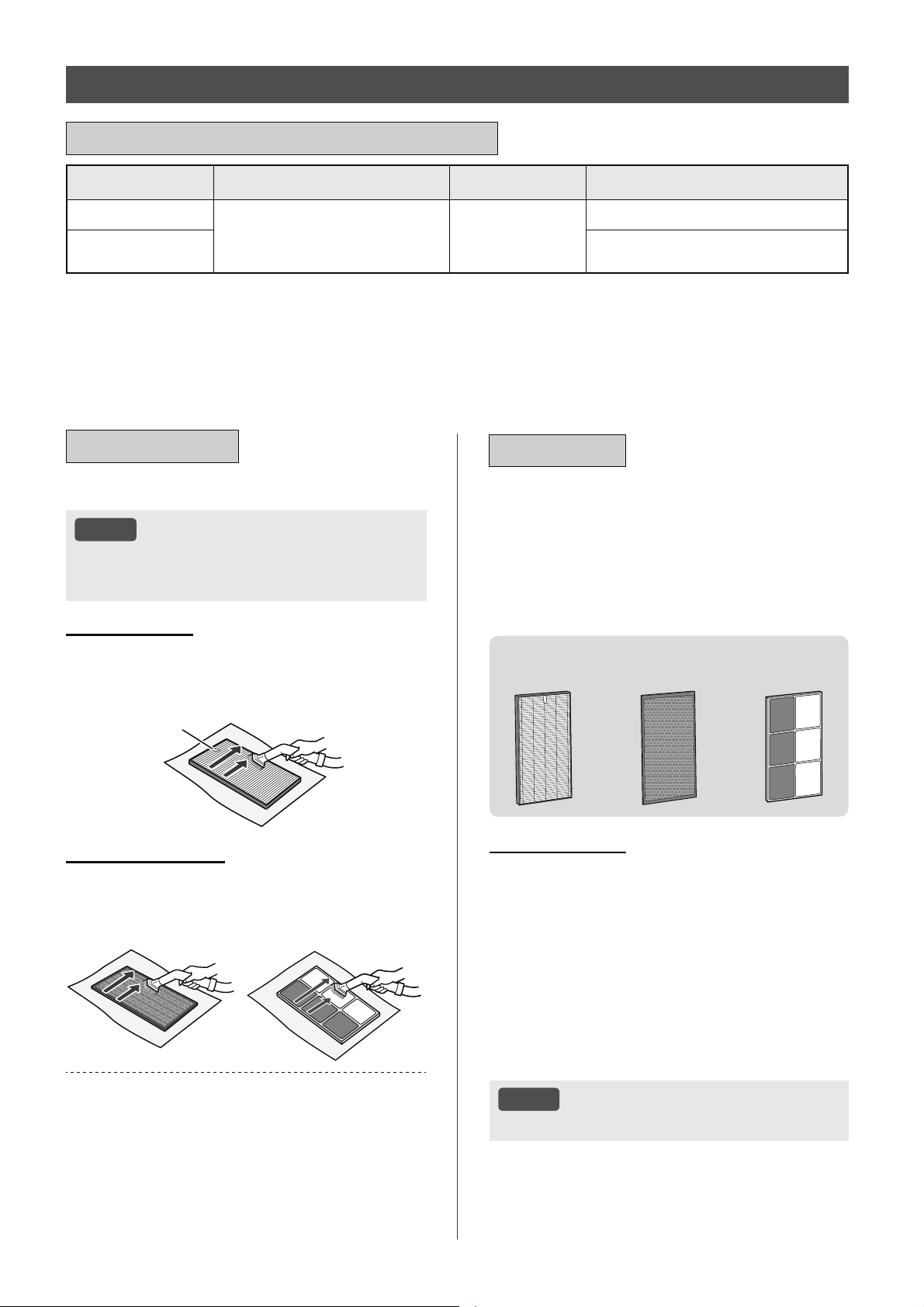
9,
7rQEӝOӑF &KXNǤEҧRGѭӥQJ 7XәLWKӑWӕLÿD 0RGHOEӝOӑFWKD\WKӃ
%ӝ/ӑF+(3$
%ҩWFӭNKLQjREөLWtFKWөNKL
PLSKiWUDWӯFӱD[ҧNKtKRһF
PӛLWKiQJPӝWOҫQ
QăP
*
)='+)(
%ӝ/ӑF.Kӱ0L
)='')(&KӍULrQJ.,1
)=*')(&KӍULrQJ.,1
7KHR+LӋSKӝLFiFQKjVҧQ[XҩWÿLӋQ1KұW%ҧQ-(0WXәLWKӑVӱGөQJWӕLÿDVӁGӵDWUrQÿLӅXNLӋQWѭѫQJÿѭѫQJ
FӫDNKyLWӯÿLӃXWKXӕFOiPӛLQJj\WKHRÿyF{QJVXҩWK~WNKӱPLVӁJLҧPFzQPӝWQӱDVRYӟLEӝOӑFPӟL.KX\ӃQ
FiRQrQWKD\EӝOӑFWKѭӡQJ[X\rQKѫQWURQJFiFÿLӅXNLӋQNKҳFQJKLӋWKѫQ
ӬQJGөQJÿѭӧFFKӍÿӏQKVӁWK{QJEiRNKLFҫQWKD\WӯQJEӝSKұQWKD\WKӃW\WKHRPӭFÿӝVӱGөQJ
7XәLWKӑFӫDEӝOӑFVӁWKD\ÿәLW\WKXӝFYjRP{LWUѭӡQJSKzQJÿLӅXNLӋQVӱGөQJYjYӏWUtFӫDVҧQ
SKҭP&K~QJW{LNKX\ӃQFiREҥQQrQWKD\EӝOӑFWKѭӡQJ[X\rQKѫQQӃXVҧQSKҭPÿѭӧFVӱGөQJWURQJ
ÿLӅXNLӋQNKҳFQJKLӋWKѫQÿiQJNӇ30YYVRYӟLKӝJLDÿuQKEuQKWKѭӡQJ
%Ӝ/Ӑ&+(3$%Ӝ/Ӑ&.+Ӱ0Ô,
&+8.ǣ7+$<7+ӂ9¬%Ҧ2'ѬӤ1*
/RҥLEӓEөLWUrQFiFEӝOӑF
/Ѭ8é
.K{QJUӱDFiFEӝOӑF.K{QJÿӇWLӃS[~FYӟL
iQKQҳQJPһWWUӡL1ӃXNK{QJFiFEӝOӑFQj\
FyWKӇNK{QJFzQKLӋXTXҧ
%Ӝ/Ӑ&+(3$
&KӍEҧRGѭӥQJYjOjPVҥFKEӅPһWÿѭӧFJҳQWKҿ.K{QJ
OjPVҥFKEӅPһWÿӕLGLӋQ
%ӝOӑFQj\UҩWPRQJPDQKYuYұ\Km\FҭQWKұQNK{QJ
GQJOӵFTXiOӟQ
1KmQ
%Ӝ/Ӑ&.+Ӱ0Ô,
&ҧKDLEӅPһWÿӅXFyWKӇÿѭӧFEҧRGѭӥQJYjOjPVҥFK
%ӝOӑFQj\UҩWPRQJPDQKYuYұ\Km\FҭQWKұQNK{QJ
GQJOӵFTXiOӟQ
.,1
.,1
0ӝWVӕPLFyWKӇEiPYjREӝOӑFYjVӁSKiWWiQQJѭӧF
OҥLSKzQJOjPFKRPLWURQJSKzQJQһQJKѫQWKHRWKӡL
JLDQ'ӵDWUrQÿLӅXNLӋQVӱGөQJYjÿһFELӋWQӃXWKkQ
Pi\ÿѭӧFVӱGөQJWURQJP{LWUѭӡQJNKҳFQJKLӋWVRYӟL
VӱGөQJWURQJJLDÿuQKWK{QJWKѭӡQJFiFPLQj\FyWKӇ
WUӣOҥLVӟPKѫQVRYӟLGӵNLӃQ
7KD\EӝOӑFWURQJQKӳQJWUѭӡQJKӧSÿyKRһFQӃXNK{QJ
WKӇORҥLEӓEөLVDXNKLEҧRGѭӥQJ
%Ҧ2'ѬӤ1*
7+$<7+ӂ
;HPWUDQJÿӇELӃWKѭӟQJGүQYӅ
FiFKOҳSÿһWEӝOӑFNKLWKD\WKӃ
9XLOzQJWKDPNKҧRêNLӃQÿҥLOêFӫDEҥQÿӇPXDEӝOӑF
WKD\WKӃ
&KӍVӱGөQJEӝOӑFÿѭӧFWKLӃWNӃFKRVҧQSKҭPQj\
.KLWKD\WKӃFiFEӝOӑFNKX\ӃQFiRQrQJKLOҥL
QJj\EҳWÿҫXVӱGөQJ
)='+)(
WKLӃWEӏ
)='')(
WKLӃWEӏ
)=*')(
WKLӃWEӏ
7KҧLEӓEӝOӑF
9XLOzQJWKҧLEӓEӝOӑFÿmWKD\WKӃWKHRFiFOXұWYj
TX\ÿӏQKYӅWKҧLEӓFӫDÿӏDSKѭѫQJ
&iFYұWOLӋXFӫD%ӝ/ӑF+(3$
3RO\SURS\OHQH3RO\HWK\OHQH
&iFYұWOLӋXFӫD%ӝ/ӑF.Kӱ0L
&KӍULrQJ.,1
3RO\SURS\OHQH3RO\HVWHU7KDQKRҥWWtQK
&KӍULrQJ.,1
*Lҩ\QKӵD$%6
/Ѭ8é
.K{QJUӱDYjVӱGөQJOҥLEӝOӑFÿmWKD\WKӃ
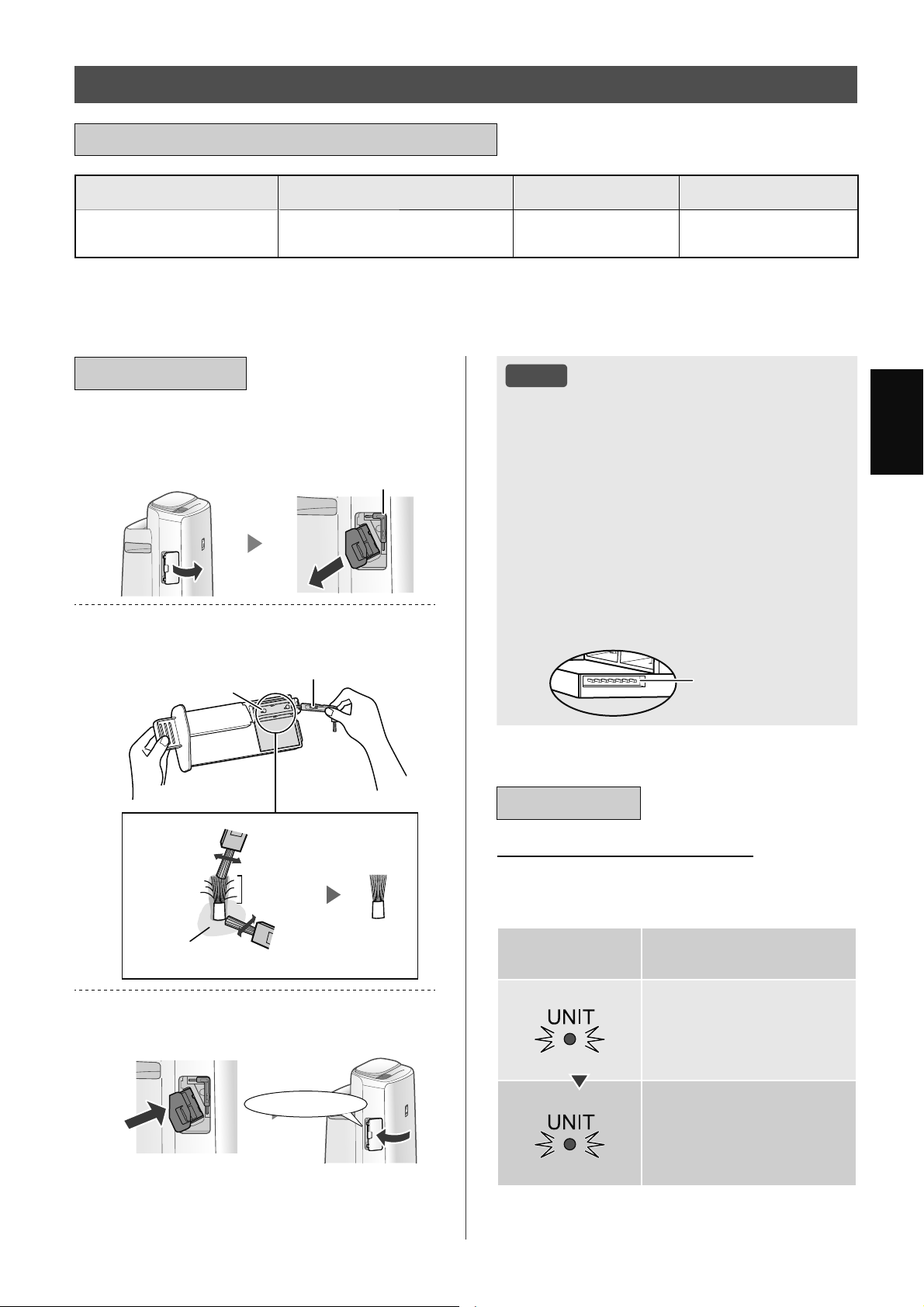
9,
7,ӂ1*9,ӊ7
7rQEӝSKұQ &KXNǤEҧRGѭӥQJ 7XәLWKӑWӕLÿD 0RGHOWKD\WKӃ
7KLӃW%ӏ7ҥR
3ODVPDFOXVWHU,RQ
*
0ӛLWKiQJKRһFWKѭӡQJ
[X\rQKѫQQӃXFҫQWKLӃW
JLӡ
*
,=&0(
7URQJSKҫQVDX7KLӃW%ӏ7ҥR3ODVPDFOXVWHU,RQÿѭӧFYLӃWWҳWOj7KLӃWEӏ
7KӡLJLDQWKD\WKӃVӁÿѭӧFWK{QJEiREҵQJÿqQEiR7KD\7KӃ7KLӃW%ӏ
ӬQJGөQJÿѭӧFFKӍÿӏQKVӁWK{QJEiRNKLFҫQWKD\WӯQJEӝSKұQWKD\WKӃW\WKHRPӭFÿӝVӱGөQJ
7+,ӂ7%ӎ7Ҥ23/$60$&/867(5,21
3KҫQÿLӋQFӵF
&+8.ǣ7+$<7+ӂ9¬%Ҧ2'ѬӤ1*
%Ҧ2'ѬӤ1*
7KiR1ҳS7KLӃW%ӏYjNpR*LiĈӥ
7KLӃW%ӏUD
%jQ&KҧL9Ӌ6LQK7KLӃW%ӏ
/RҥLEӓEөLNKӓL3KҫQĈLӋQ&ӵF
%jQ&KҧL9Ӌ6LQK7KLӃW%ӏ
ĈLӋQFӵF
6DXNKL
OjPVҥFK
7UѭӟFNKL
OjPVҥFK
;XQJTXDQKÿӃ
ĈLӋQFӵF
/ҳS*LiĈӥ7KLӃW%ӏYjRVҧQSKҭP
YjOҳS1ҳS7KLӃW%ӏ
1KҩQYjR
/Ѭ8é
.K{QJOjPVҥFKEҵQJEҩWNǤWKӭJuNKiFQJRjL
%jQ&KҧL9Ӌ6LQK7KLӃW%ӏ1ӃXNK{QJOjPQKѭ
Yұ\FyWKӇGүQÿӃQOӛLWURQJ7KLӃWEӏ
ĈLӋQFӵFEӏXӕQFRQJFyWKӇEӏÿӭWYjUѫLUD
WURQJTXiWUuQKOjPVҥFKQKѭQJQyVӁNK{QJ
OjPWKD\ÿәLKLӋXVXҩW
.K{QJFKҥPWUӵFWLӃSYjRÿLӋQFӵF/jPQKѭ
Yұ\FyWKӇGүQÿӃQÿDXQJӭD
.K{QJOjPELӃQGҥQJ3KҫQĈLӋQ&ӵF/jP
QKѭYұ\FyWKӇOjPKӓQJQy
.K{QJFKҥPYjRFiFFKkQFҳPNӃWQӕL/jP
QKѭYұ\FyWKӇOjPKӓQJFK~QJ
&KkQFҳPNӃWQӕL
7+$<7+ӂ
ĈqQ%iR7KD\7KӃ7KLӃW%ӏ
.KLWәQJWKӡLJLDQKRҥWÿӝQJYѭӧWTXiJLӡ
ĈqQ7KD\7KӃ7KLӃW%ӏVӁQKҩSQKi\ÿӇFKRELӃW
FҫQSKҧLWKD\WKӃ7KLӃWEӏ
7KӡLJLDQKRҥW
ÿӝQJ
*LҧLWKtFK
JLӡ
1KҩSQKi\FKұP
7KD\WKӃWKLӃWEӏÿy
JLӡ
1KҩSQKi\QKDQK
7KLӃWEӏVӁNK{QJSKyQJ
WKtFKUD3ODVPDFOXVWHU,RQ
7KӡLJLDQWKD\WKӃNK{QJOLrQTXDQÿӃQFKӃÿӝKRҥW
ÿӝQJÿmFKӑQ
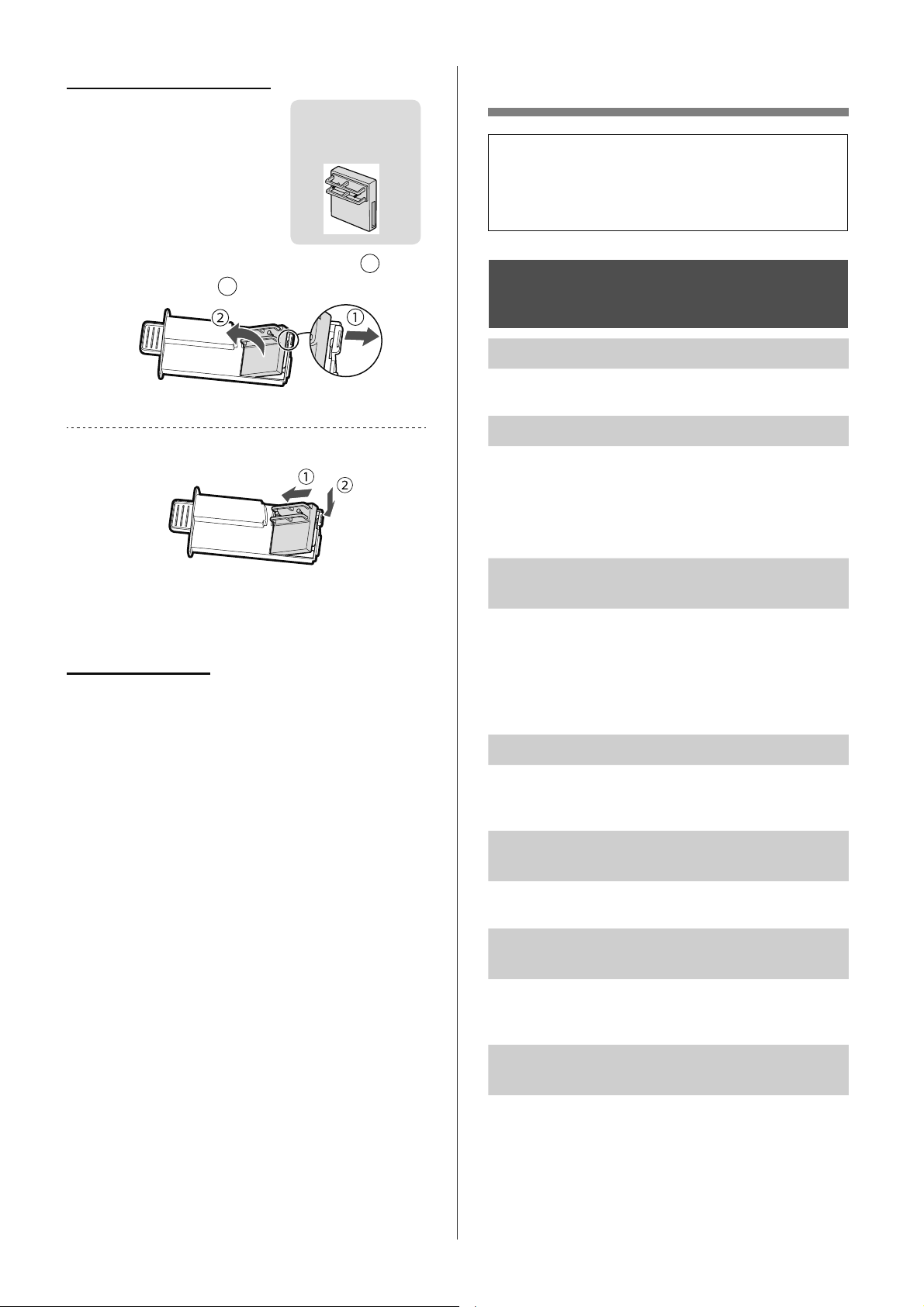
9,
;Ӱ/é6Ӵ&Ӕ
7UѭӟFNKLJӑLGӏFKYөYXLOzQJ[HPOҥL
GDQKViFK;ӱOêVӵFӕErQGѭӟLYuYҩQ
ÿӅFyWKӇNK{QJSKҧLGRVҧQSKҭPEӏWUөF
WUһF
*,Ӟ,7+,ӊ89ӄ6Ҧ1
3+Ҭ0
9үQFzQOҥLPLYjKѫL
.LӇPWUDFiFEӝOӑF1ӃXFK~QJFyYҿTXiEҭQ
Km\OjPVҥFKKRһFWKD\WKӃFK~QJ
.K{QJNKtWKҧLUDNKӓLVҧQSKҭPFyPL
.LӇPWUD[HPFiFEӝOӑFFyTXiEҭQKD\NK{QJ
/jPVҥFKKRһFWKD\WKӃFiFEӝOӑF
&KӍVӱGөQJQѭӟFPi\PӟL6ӱGөQJFiFQJXӗQ
QѭӟFNKiFVӁFyQJX\FѫSKiWWULӇQPӕFQҩP
KRһFYLNKXҭQ
6ҧQSKҭPNK{QJKRҥWÿӝQJNKLFyNKyL
WKXӕFOiWURQJNK{QJNKt
ĈҧPEҧRVҧQSKҭPÿѭӧFOҳSÿһWӣYӏWUtPjFiF
FҧPELӃQFyWKӇSKiWKLӋQUDNKyLWKXӕFOi
.LӇPWUD[HPFiFOӛPӣFӫD&ҧP%LӃQ%өL1Kҥ\
FyEӏFKһQKRһFWҳFQJKӁQKD\NK{QJ1ӃXFK~QJ
EӏFKһQKRһFEӏWҳFQJKӁQKm\OjPVҥFK%ӝ/ӑF
&ҧP%LӃQKRһF3DQHQ6DX
0LWӯVҧQSKҭPYjKRһFEӝOӑFPӟL
1JD\VDXNKLOҩ\W~LQKӵDUDFyWKӇYүQFyPL
QKҽ0LQj\NK{QJJk\KҥLFKRKRҥWÿӝQJFӫDEӝ
OӑFKRһFVӵWLӃS[~FFӫDFRQQJѭӡL
6ҧQSKҭPWҥRUDWLӃQJOiFKFiFKKRһFWtFK
WҳF
6ҧQSKҭPFyWKӇSKiWUDWLӃQJOiFKFiFKKRһF
WtFKWҳFNKLÿDQJWҥRUDFiFLRQ
ĈqQ%iRĈӝ6ҥFKFyPjX[DQKGѭѫQJ
QJD\FҧNKLNK{QJNKtNK{QJVҥFK
.K{QJNKtFyWKӇÿmEӏEҭQNKLVҧQSKҭPÿѭӧF
FҳPQJXӗQ+m\U~WSKtFKFҳPVҧQSKҭPÿӧL
PӝWSK~WUӗLFҳPOҥLVҧQSKҭP
ĈqQ%iRĈӝ6ҥFKFyPjXÿӓQJD\FҧNKL
NK{QJNKtÿDQJVҥFK
&iFOӛKӣFӫD&ҧP%LӃQ%өL1Kҥ\EӏEҭQKRһFWҳW
QJKӁQVӁOjPFҧQWUӣKRҥWÿӝQJFӫDFҧPELӃQ
1KҽQKjQJOjPVҥFK%ӝ/ӑF&ҧP%LӃQKRһF
3DQHQ6DX
&iFKWKD\WKӃWKLӃWEӏ
9XLOzQJKӓLêNLӃQÿҥLOêFӫD
EҥQÿӇPXDWKLӃWEӏWKD\WKӃ
&KӍVӱGөQJWKLӃWEӏÿѭӧFWKLӃW
NӃFKRVҧQSKҭPQj\
,=&0(
WKLӃWEӏ
7KiROү\FӫD*LiĈӥ7KLӃW%ӏ
1
Yj
WKiR7KLӃWEӏ
2
*ҳQWKLӃWEӏPӟL
.KLÿmWKD\WKӃ7KLӃWEӏEҵQJPӝWEӝSKұQPӟLEӝ
KҽQJLӡVӁÿѭӧFÿһWOҥLYjTXD\WUӣOҥLJLӡ
7KҧLEӓWKLӃWEӏ
9XLOzQJWKҧLEӓWKLӃWEӏÿmVӱGөQJWKHRFiFOXұWYj
TX\ÿӏQKYӅWKҧLEӓFӫDÿӏDSKѭѫQJ
9ұWOLӋX
3RO\EXW\OHQ7HUHSKWKDODWHFiFEӝSKұQÿLӋQWӱ
9,
7,ӂ1*9,ӊ7
ĈqQ%iRĈӝ6ҥFKVӁÿәLPjXWKѭӡQJ
[X\rQ
ĈqQ%iRĈӝ6ҥFKVӁWӵÿӝQJÿәLPjXNKL&ҧP
%LӃQ%өL1Kҥ\Yj&ҧP%LӃQ0LSKiWKLӋQUDWҥS
FKҩW1ӃXEҥQOROҳQJYӅVӵWKD\ÿәLQj\EҥQFy
WKӇWKD\ÿәLÿӝQKҥ\FӫDFҧPELӃQ7UDQJ
ĈqQ%ҧR7Uu%ӝ/ӑFÿDQJEұW
%ҩWFӭNKLQjRVDXNKLWKӵFKLӋQEҧRWUuKRһFWKD\
WKӃ%ӝ/ӑF7ҥRҬPKm\NӃWQӕLGk\QJXӗQYӟLә
FҳPYjVDXÿyQKҩQQ~WĈһW/ҥL%ӝ/ӑFWURQJKѫQ
JLk\7UDQJ
0jQKLӇQWKӏWҳW
.KLĈLӅX.KLӇQÈQK6iQJÿѭӧFÿһWWKjQK³7ӵ
ÿӝQJ´ÿqQVӁWӵÿӝQJWҳWNKLSKzQJWӕLKRһFÿDQJ
KRҥWÿӝQJӣFKӃÿӝQJӫ1JRjLUDNKLĈLӅX.KLӇQ
ÈQK6iQJÿѭӧFÿһWWKjQK³7Ҳ7´ÿqQVӁOX{QWҳW
1ӃXEҥQNK{QJPXӕQÿqQWҳWKm\ÿһWĈLӅX.KLӇQ
ÈQK6iQJWKjQKFjLÿһW³0ӡ´7UDQJ
+LӇQWKӏNK{QJNKӟSYӟLEiRFiRWKӡL
WLӃWKRһFҭPNӃKD\QKLӋWNӃNKiFWURQJ
SKzQJ
0{LWUѭӡQJQJRjLWUӡLYjWURQJQKjFNJQJQKѭ
WURQJJLDÿuQKOѭXOѭӧQJQJѭӡLTXDOҥL[XQJ
TXDQKVӕWҫQJWURQJQKjYYFyWKӇJk\UDVӕ
ÿӑFNKiFYӟLQKӳQJGӳOLӋXÿy
&yVӵNKiFELӋWYӅFҩSÿӝWURQJFQJPӝWSKzQJ
ĈqQ%iRĈӝҬPWUrQ0jQKuQKNK{QJ
ViQJNKL%uQK&KӭD1ѭӟFÿmFҥQ
3KzQJÿmÿҥWÿӃQÿӝҭPWKtFKKӧSYjQJӯQJWҥR
ҭP
.LӇPWUD3KDR7ҥRҬPÿӇWuPWҥSFKҩW/jPVҥFK
.KD\7ҥRҬPĈҧPEҧRUҵQJVҧQSKҭPQҵPWUrQ
EӅPһWEҵQJSKҷQJ
0ӵFQѭӟFWURQJ%uQK&KӭD1ѭӟFNK{QJ
JLҧPKRһFJLҧPWӯWӯ
.LӇPWUD[HP.KD\7ҥRҬPYj%uQK&KӭD1ѭӟF
ÿmÿѭӧFOҳSÿһWÿ~QJFKѭD
.LӇPWUD%ӝ/ӑF7ҥRҬP1ӃXEӝOӑFTXiEҭQ
Km\OjPVҥFKKRһFWKD\WKӃQy
ÿѭӧFKLӇQWKӏ
ĈҧPEҧRUҵQJ%ӝ/ӑF7ҥRҬP.KD\7ҥRҬPYj
7UөF/ăQÿѭӧFOҳSÿһWÿ~QJFiFKVDXÿyKm\
%Ұ7OҥLQJXӗQ
ÿѭӧFKLӇQWKӏ
ĈҧPEҧRUҵQJ7KLӃW%ӏ7ҥR3ODVPDFOXVWHU,RQ
ÿѭӧFOҳSÿ~QJFiFK
.pR7KLӃW%ӏ7ҥR3ODVPDFOXVWHU,RQUDYjOҳSOҥL
YjRSKҫQFXӕLVDXÿyWKӵFKLӋQOҥLKRҥWÿӝQJ
0ӝWWURQJFiFQӝLGXQJVDXVӁÿѭӧFKLӇQ
WKӏ
5~WSKtFKFҳPFӫDVҧQSKҭPÿӧLPӝWSK~WVDX
ÿyFҳPOҥLVҧQSKҭP
*,Ӟ,7+,ӊ89ӄ&+Ӭ&
1Ă1*:,),
.K{QJWKӇWKӵFKLӋQNӃWQӕL:L)LFӫD
Pi\OӑFNK{QJNKtYjEӝÿӏQKWX\ӃQ
.LӇPWUDWK{QJVӕNӻWKXұWFӫDEӝÿӏQKWX\ӃQ
ÿDQJVӱGөQJ
ĈLӅXFKӍQKKѭӟQJFӫDEӝÿӏQKWX\ӃQYjăQJWHQ
GLFKX\ӇQEӝÿӏQKWX\ӃQYjăQJWHQJҫQKѫQYY
6DXÿyFKX\ӇQOҥLF{QJWҳFÿӇEұWEӝÿӏQKWX\ӃQ
YjWKӵFKLӋQOҥL7+,ӂ7/Ұ3%$1ĈҪ8
.K{QJWKӇWKLӃWOұSNӃWQӕLJLӳDPi\OӑF
NK{QJNKtYjWKLӃWEӏWK{QJPLQKFӫDEҥQ
0i\OӑFNK{QJNKtYjWKLӃWEӏWK{QJPLQKFӫDEҥQ
FyÿDQJNӃWQӕLYjRFQJPӝWEӝÿӏQKWX\ӃQ
NK{QJ"
.ӃWQӕLPi\OӑFNK{QJNKtYjWKLӃWEӏWK{QJ
PLQKFӫDEҥQYjRFQJPӝWEӝÿӏQKWX\ӃQ
1ӃXEҥQYүQNK{QJWKӇNӃWQӕLKm\WKӱNӃW
QӕLWKLӃWEӏWK{QJPLQKFӫDEҥQYӟLEăQJWҫQ
*+]FӫDEӝÿӏQKWX\ӃQ
7әQJVӕWKLӃWEӏWK{QJPLQKÿDQJÿѭӧFVӱGөQJ
FyYѭӧWTXiVӕOѭӧQJÿăQJNêWӕLÿDWUrQPӝW
Pi\OӑFNK{QJNKtNK{QJ"
6ӕOѭӧQJWKLӃWEӏWK{QJPLQKWӕLÿDFyWKӇ
ÿѭӧFÿăQJNêWUrQPӝWPi\OӑFNK{QJNKtOj
7әQJVӕVҧQSKҭPPi\ÿLӅXKzDNK{QJNKtPi\
OӑFNK{QJNKtYYÿѭӧFÿăQJNêYӟLPӝWWKLӃWEӏ
WK{QJPLQKFyYѭӧWTXiVӕOѭӧQJWӕLÿDÿѭӧFFKӍ
ÿӏQKNK{QJ"
6ӕOѭӧQJVҧQSKҭPWӕLÿDÿѭӧFÿăQJNêYӟL
PӝWWKLӃWEӏWK{QJPLQKOj
9,
.K{QJWKӇWKӵFKLӋQWKDRWiFWӯ[DWӯ
WKLӃWEӏWK{QJPLQK
ĈqQ:L)LFӫDPi\OӑFNK{QJNKtFyEұWNK{QJ"
1ӃXĈqQ:L)LWҳWYXLOzQJWKӵFKLӋQ³$
%Ұ77Ҳ7EӝÿLӅXKӧS:L)L´ÿӇEұW:L)LFӫD
VҧQSKҭP7UDQJ
.ӃWQӕLJLӳDPi\OӑFNK{QJNKtYjWKLӃWEӏWK{QJ
PLQKFӫDEҥQÿmKRjQWKjQKFKѭD"
7KLӃWOұSNӃWQӕLJLӳDPi\OӑFNK{QJNKtYj
WKLӃWEӏWK{QJPLQKFӫDEҥQ7UDQJ
.KLWKD\ÿәLEӝÿӏQKWX\ӃQ
&ҫQNӃWQӕLOҥLPi\OӑFNK{QJNKtYӟLEӝÿӏQK
WX\ӃQ
1KҩQYjJLӳQ~W³:L)L´WURQJJLk\ÿӇGӯQJ
FKӭFQăQJ:L)L
7KӵFKLӋQ³7+,ӂ7/Ұ3%$1ĈҪ8.ӃWQӕL
FӫDPi\OӑFNK{QJNKtYjEӝÿӏQKWX\ӃQ´
7UDQJ
.KLWKD\ÿәLWKLӃWEӏWK{QJPLQK
7KӵFKLӋQFiFEѭӟFVDX
;yDÿăQJNêFӫDWKLӃWEӏWK{QJPLQKFNJNKӓL
ӬQJGөQJÿѭӧFFKӍÿӏQK
6ӱGөQJWKLӃWEӏWK{QJPLQKPӟLÿӇWKӵFKLӋQ
³7+,ӂ7/Ұ3%$1ĈҪ8
7ҧLYӅÿăQJNêYj
.ӃWQӕLJLӳDPi\OӑFNK{QJNKtYjWKLӃWEӏ
WK{QJPLQK´7UDQJ
.KLWKҧLEӓKRһFEjQJLDRPi\OӑFNK{QJ
NKt
7KӵFKLӋQFiFEѭӟFVDXÿӇWUiQKUzUӍWK{QJWLQ
FiQKkQ
;yDÿăQJNêFӫDPi\OӑFNK{QJNKtNKӓLӬQJ
GөQJÿѭӧFFKӍÿӏQK
7KӵFKLӋQ³$.KӣLWҥRFKӭFQăQJ:L)L´
7UDQJ
7UѭӡQJKӧSQKұQEjQJLDRWӯErQWKӭED
ĈӇQJăQFKһQWUX\FұSWUiLSKpSWӯErQWKӭED
Km\WKӵFKLӋQ³$.KӣLWҥRFKӭFQăQJ:L)L´
7UDQJ
ĈqQ:L)LQKҩSQKi\FKұP
ĈyOjPӝWWURQJQKӳQJWUҥQJWKiLVDXÿk\
$.ӃWQӕL:L)LFӫDPi\OӑFNK{QJNKtYjEӝÿӏQK
WX\ӃQÿDQJÿѭӧFWKLӃWOұS
%.ӃWQӕLFӫDPi\OӑFNK{QJNKtYjWKLӃWEӏWK{QJ
PLQKÿDQJÿѭӧFWKLӃWOұS
&3KҫQPӅPFKRFKӭFQăQJ:L)LWURQJPi\OӑF
NK{QJNKtÿDQJÿѭӧFFұSQKұW
ĈqQ:L)LQKҩSQKi\QKDQK
/ӛLPҥQJ9XLOzQJ[iFQKұQWUҥQJWKiLPҥQJ
:L)LWӯ³$+LӇQWKӏWUҥQJWKiLPҥQJ:L)L´
7UDQJ
ĈqQ:L)LWҳW
0i\OӑFNK{QJNKtNK{QJWKӇNӃWQӕLYӟLEӝÿӏQK
WX\ӃQ.LӇPWUDFiFQӝLGXQJVDX
$ĈmÿҩXQӕLÿ~QJSKtFKFҳPÿLӋQFKѭD"
%&KӭFQăQJ:L)LFyEӏGӯQJNK{QJ";iFQKұQ
WUҥQJWKiLPҥQJ:L)LWӯ³$+LӇQWKӏWUҥQJWKiL
PҥQJ:L)L´7UDQJ
.K{QJWKӇFKӑQÿѭӧFPӝWWURQJ³ ´
ÿӃQ³´ӣFKӃÿӝFjLÿһW:L)L
7UDQJ
1ӃXEӝÿLӅXKӧS:L)LEӏWҳWFyWKӇNK{QJFKӑQ
ÿѭӧFPӝWWURQJ³$´ÿӃQ³$´
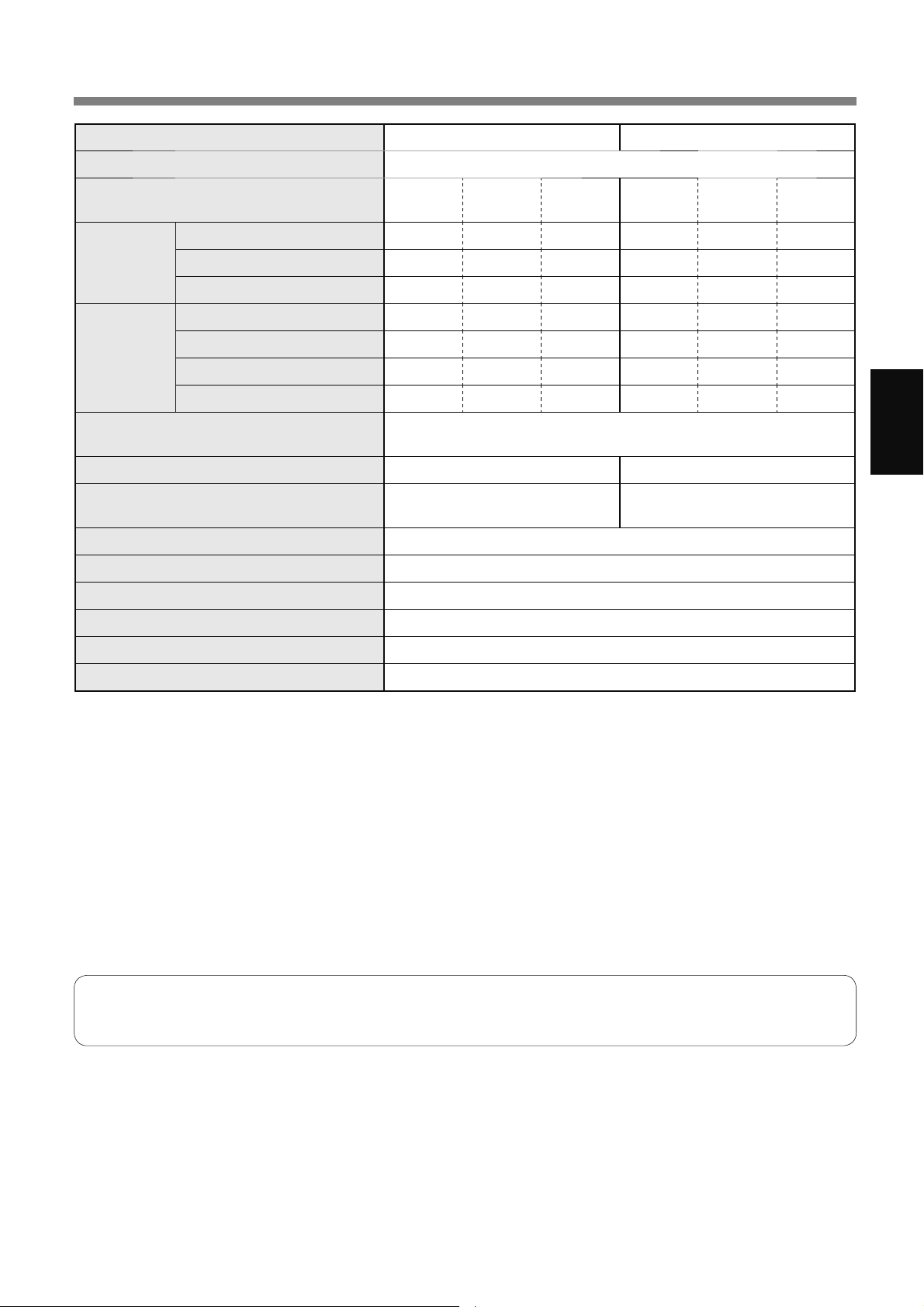
9,
7,ӂ1*9,ӊ7
7+Ð1*6Ӕ.Ӻ7+8Ұ7
0RGHO .,1 .,1
1JXӗQÿLӋQ 9a+]
ĈLӅXFKӍQKWӕFÿӝTXҥW 7Ӕ,Ĉ$
7581*
%Î1+
7+Ҩ3 7Ӕ,Ĉ$
7581*
%Î1+
7+Ҩ3
/¬06Ҥ&+
.+Ð1*.+Ë
7ӕFÿӝTXҥWP
JLӡ
&{QJVXҩWGDQKÿӏQK:
0ӭFÿӝӗQG%$
*
/¬06Ҥ&+
.+Ð1*.+Ë
7Ҥ2Ҭ0
7ӕFÿӝTXҥWP
JLӡ 66
&{QJVXҩWGDQKÿӏQK:
0ӭFÿӝӗQG%$
*
7ҥRҭPP/JLӡ
*
&KӃÿӝFKӡ:
.KLEӝÿLӅXKӧS:L)L%Ұ7
.KLEӝÿLӅXKӧS:L)L7Ҳ7
.tFKWKѭӟFSKzQJÿӅ[XҩWP
*
a a
.tFKWKѭӟFSKzQJÿӅ[XҩWFKR3ODVPDFOXVWHU
,RQPұWÿӝFDRP
*
a a
'XQJWtFK.KD\7ҥRҬP/ ;ҩS[Ӎ
&ҧPELӃQ %өL1Kҥ\0LÈQK6iQJ1KLӋWĈӝĈӝҬP
/RҥLEӝOӑF +(3$
*
5
.Kӱ0L7ҥRҬP
&KLӅXGjLGk\QJXӗQP
.tFKWKѭӟFPP 5ӝQJ[6kX[&DR
.KӕLOѭӧQJNJ ;ҩS[Ӎ
0ӭFÿӝӗQÿѭӧFÿRGӵDWUrQWLrXFKXҭQ-(0FӫD+LӋSKӝLFiFQKjVҧQ[XҩWÿLӋQWӱ1KұW%ҧQ
/ѭӧQJWҥRҭPWKD\ÿәLWKHRQKLӋWÿӝYjÿӝҭPWURQJQKjYjQJRjLWUӡL
/ѭӧQJWҥRҭPWăQJNKLQKLӋWÿӝWăQJKRһFÿӝҭPJLҧP
/ѭӧQJWҥRҭPJLҧPNKLQKLӋWÿӝJLҧPKRһFÿӝҭPWăQJ
ĈLӅXNLӋQÿROѭӡQJ&ÿӝҭPWKHR-(0
.tFKFӥSKzQJÿѭӧFNKX\ӃQFiRSKKӧSÿӇYұQKjQKWKkQPi\YӟLWӕFÿӝTXҥWWӕLÿD
.tFKFӥSKzQJÿѭӧFNKX\ӃQFiROjPӝWGLӋQWtFKPjFyWKӇORҥLEӓPӝWOѭӧQJKҥWEөLQKҩWÿӏQKWURQJSK~WWKHR
-(0
'LӋQWtFKSKzQJPjPұWÿӝ,RQÿҥWÿѭӧF[ҩS[ӍLRQWUrQPӝWFHQWLPHWNKӕLWҥLWUXQJWkPSKzQJNKLWKkQPi\ÿѭӧF
ÿһWFҥQKWѭӡQJYjYұQKjQKӣF{QJVXҩW7581*%Î1+YjӣÿӝFDRNKRҧQJPpWVRYӟLVjQ
*5
%ӝOӑFVӁORҥLEӓWUrQFiFKҥWFyNtFKWKѭӟFtWQKҩWPLFURQWKHR-(0
&KӃÿӝFKӡ
.KLÿmFҳPSKtFKÿLӋQFӫDWKkQPi\YjRәWUrQWѭӡQJWKLӃWEӏVӁWLrXWKөÿLӋQӣFKӃÿӝFKӡÿӇKRҥWÿӝQJFiFPҥFKÿLӋQ
ĈӇWLӃWNLӋPÿLӋQKm\U~WGk\QJXӗQNKLNK{QJVӱGөQJWKkQPi\
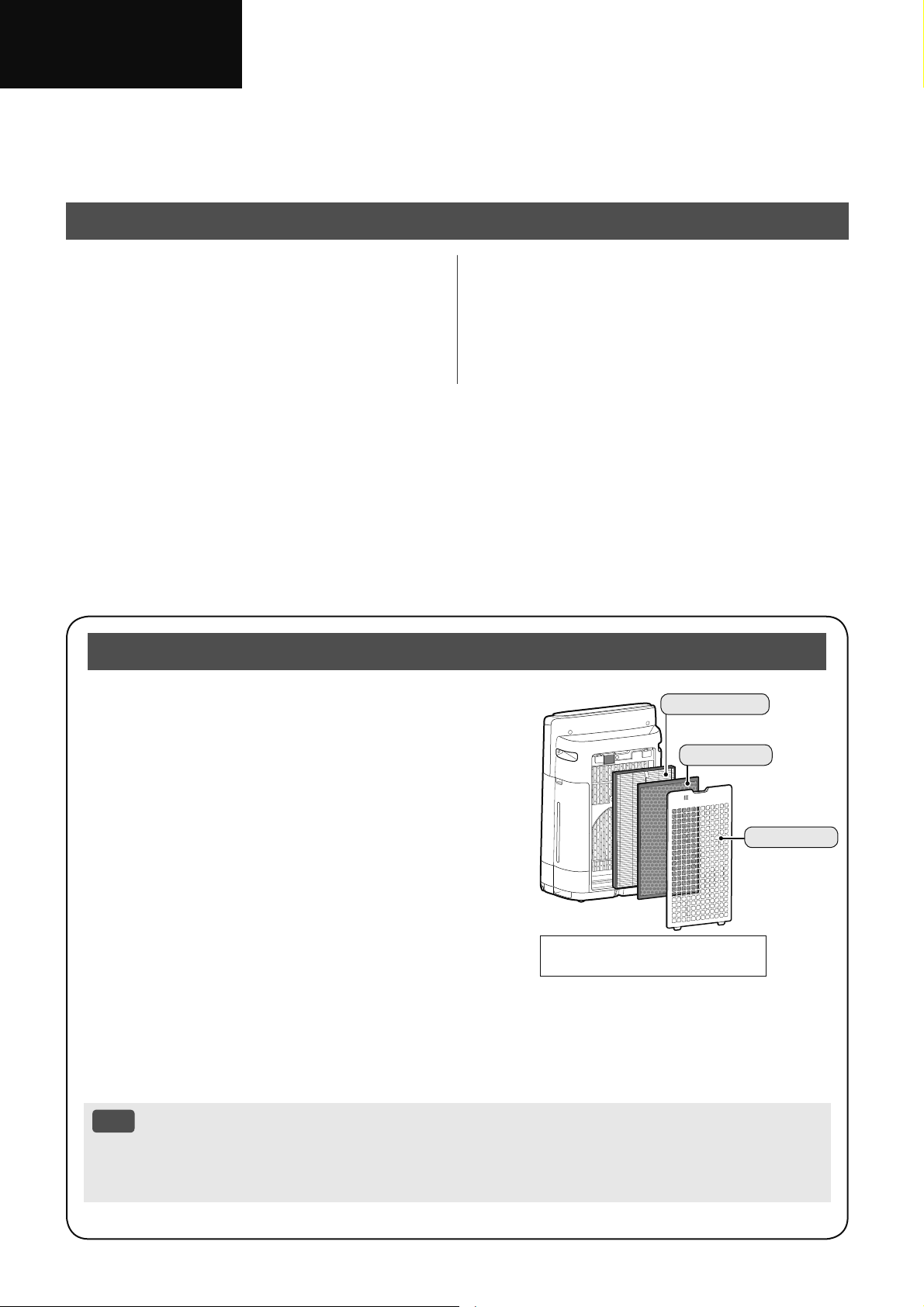
۟શۓб SHARP ࡈӔԗ֘澞
҅ߎфսФӹ બєূஃયߎ۴ӆ澞
બ״֑ґߎ۴ӆ љҎசޞ߲ஃ澞
Зݧ
ଜ،ҵж ............................................. 2
՞Ӣգ ................................................. 6
ӔהٖҀ .................................................... 9
ݒҀ ......................................................... 10
ࡈӔԗ֘ପଋ⩽ࡈՍ⩽ҵӄࡈ ҅ҿࡶфսӄӹଋ
ࢡৠ澝 䮽նଋࢡৠչ HEPA ଋࢡৠ ࣀեପଋӟՍୋݹࡈ澞
梂টଋޞ HEPA ଋࢡৠՕԾஔ 99.97% ش 0.3 ڳজ梂
ট ଐٮԉ⩽ݶڑն澞
ࡈࡶޞ 䮽նଋࢡৠଦ⩽ݶڑն澞
சޞݐ ଋࢡৠ⩽ݶୂӣڑնՕѫӣઆ ଭۨҿѕڑ
ն澞 ߿݇҅࣪ٛڑ ػҿީ֨ߢঀ࣪ ૻପٯ؟ل
҅࣪ଓОې⥐ И҅фսޞ пڑնѫ֨ࡁߊ
ޞӄՊڱОڠࢸ澞 ײߧё֨пڑնબ݅ଋࢡৠ澞
ߛࡊИ䩳࣒ૅ֨ଋࢡৠЇޞ ѫଦԗչՊ
п䩳࣒ૅѫ⩽ݶӄڑն ڢԆ࢘ଋࢡৠٴ䓓ޞ ѫфࣿ
ڑն澞 ֜ࡊૅչҿѕ࣪֜প৲ڑ
ӟ࣫ەӑޞ બґ⡭Ԇ࢘ଋࢡৠ澞 আ 20
ࡉڿ
• ࡈӔԗ֘ગઋйࢎஔࡈИ۔ࡿࢱظչڑն
ѸЉࢎஔ߄؞ࡈѽ ҆ײࢹࢹИխ߄▲㾒ԗ䬛澞
ײߧڑն࢛▲֨ ࡈӔԗ֘Օޗࡣ؏Ҷࢎஔڑն澞
֧࣐҄ҵݰࠩӓԖ֗Ӹ
ࣹڢ
•
ߎપޢаИݖ֣О KI-N40澞
HEPA ࢂয
䮼յࢂয
Ӹࢂয
ױѽޟݘ՞ .................................... 14
Ґ⠽Љঢ۵ ............................................... 18
ݜ୭ܭୣ .................................................. 24
ߡ ......................................................... 27
ZH-1
Иކ
ࢤ䎯
ࣞࣔࡈהࣲ܉ߐুՠ
Іكଋࢡ + Ԇ࢘ԅ + Ӕ৩
ӓস
ளؤڅ 25000
ӓসؤڅભள ӓԖݝ߈ભװ澞
Ӕ৩ثࡈהࣲސࡣ ঝѷйࣀପଋୋݹٵࡼچ࠳澝 િђ৲ث࣪
Ӕԗଋ澞
Ѕقࢂঞ + ԅࡹԄৗ
⩍ଡ଼䍦ط
ӹଋࢡৠ⩽টڬםй 240 ڳজظট澞
Ӗشڐյ
䮽նଋࢡৠ⩽ݶךٯ؟لڑն澞
Ӗشո朐唾
HEPA ଋࢡৠ⩽ 99.97% ش 0.3 ڳজ梂ট澞
ԅࡹԄৗ
ପଋԈ۟ځچչ࢘چߛݏӲ࢘چ澞
ࢮࢤࠩࡗ
Ӏ߄ڠם⩽ࡈԅ לڥۨࣞࣔࡈࡶ ђ৲ڽବ߄ݼ֪ݶதࢱظչҿ؉梂ট澞
֨ 20 چސէڽବՇذࡈࡶ ݶதӄૻ
Ѻהࢱظ ࢎݼߧ҄澞
Ӕ৩Օљࢃஔல ђ৲அ࠲ࢱظড֨
வչҿ؉வЇ澞
Wi-Fi Ԅৗ
• ؔ۰ࡈૅߚў ЌࡈЇԾࡁૻࢎ澞
• ପଋ۴ߑثߎфս惤ݏ澞
• ݐ݅ଋࢡৠ߂҄ޞߑ澞
ZH-2
ଜ،ҵж
࣐҄ޯуռӸٶҐૠоރ澞
҅֘ગוޞ ԇڷସ،ׂߎ؍Ҷ
அݒޑ љѺࢮࢳ澝 ઇ۪Չѯঈக
ԕܬ
ղ
1. બй҅фսӹஃય۱߄ܶږ澞
2. ߎфսюйߎ۴ӆИݔଚ؟ڈ
ନ澞 ѠѾӲଭЉݐҿѕନՕ
حࢮࢳ澝 ઇ۪Չѯ澞
3. ߎગוЉଠՠ૯ѽ澝 ۪۟ؒতԃ㺬
۪҄Шٯજыב ԕܬҩ
҅ ஔளિુҿ؍Ҷыմؼߎગו
҅োеҼչܶح澞
ҩځՉӱଠڢ љґЉѫر
ߎગוڢҁࣨӀ澞
4. ײߧ࢛ি۪ݖףְ݃ ۪фսӟ࣫ݻ
ஞְ۪݃ બԓ҅ߎфս澞
5. ײߧ࢛িְ݃ ڷீӲଭ澝 ҿ
߆ԇїࣲ澝 חޯ߾ӕ߆ԇИڶ۪Ӏ߄
գঈࠀыմિુ݅ љҲՇࣿԮ
க澞
ڢલ澝 ғ۪ӟ࣫ொޞ બ
Њ߂߆ԇИڶ৻澞
6. બԓғ۪ܜઆߎфսПߑ澞
7. ସࣁЈவ ȔaȕӱȔhȕ ܶ
࢛݅ি۪ݖף澞 իөՕږ
૨澝 ଋࢽ澝 ઇ۪ࢮࢳ澞
a. ю҅ 220 - 240 ѥ࢛ݖڇ澞
b. ײߧ࢛ি۪ݖףְٝ݃ ۪Ї
࢛ݖڇٝߠ બԓ҅фս澞
c. ܣЈ࢛ݖףӹ બԇڷҼфս
࢛澞
d. ֨љЈەӑЈ બԇڷܣ݊фսݖ
ף澞
• Ԉфսӹ澞
• ݅ଋࢡৠޞ澞 ԯ҅֨۸ڐեவ
ߡޞ
• ࡨࡊޞ澞
• фսܔӹ澞
• фսЉ҅ޞ澞
e. ▲ؔܣ࢛݊ݖף ৲Љީ࢛
ি澞
f. ђЇݖڇݖܣޞ Ӥԓ࢘۴ஔ
࢛ݖף澞
g. ؔߊࢎࣲ࢛ݖףЇࢱظ澞
h. બԇڷସ،љЈઁؔ љҲְ࢛݃
ি澞
• Ԉфսޞ ହҲְ࢛݃
ি澞
• બԓر࢛িݹй֪ࡅЈவ澞 બ
ԓ֪ࡅ澝 ֻ۪ঝѷଷ࣒
࢛֨িЇ澞
• બԓ܋୍࣒ݹ࢛֨িЇ۪צѻ
࢛ি澞
• બԓએ࢛িଋ؟Ӏ۪ҿѕ
֘澞
• ࢛িଓࡴԈԚֿ ݹ֨Љ
ѫ傺Җ֪ސ澞
8. બԓ֨䑘ࡈ䍸澝 א䎊澝 塴䏗ࢮ澝 䒁
۪ࢵࢹ҅ߎфս澞
ڢرфսйӄ߄ࣆࡈ֘Ӏգ▲ӄ
ޞ ځؔޞো۰ପ իөՕଭ
ۨ▲㾒ԗ䬛Иࡀ澞
9. બԓ֨߄Օࣆࡈѽ ײ䅅澝 ԗ؆ࢹ
ঈ ۰ӄ҅ߎфս澞
10. બԓرߎфսர֨И ۪֨ழࡊ
֪ސ澝 ࢀ澝 ۪ҿѕ䉸࢘
֪ސ҅澞
11. બԓر۴۪ܶڑ࣒ݖҵ⩽ࡈՍչӟ
Ս澞
12. બԓ߲ӟՍ澞
13. બԓࡊঔչԆ࢘ۺИࡊ澞
14. ޙޏ௪ߛࡊ ثࡊঔӄࡊ
݅ ٷؔߊࢎࡊঔչԆ࢘ۺ澞
ڢߎфսЉ҅ޞ ځҖࡊঔչԆ࢘
ۺӄࡊ澞 ײߧ߄ࡊйࡊঔչԆ
࢘ۺӄ өՕѫح朐唾澝 ূ唾
չې厉䇣ࣿ澞 ֨صރەӑЈ ࠴ঝ
ূ唾Օѫثҡډଭۨ݃؞澞
ࡉڿ
- ޗি۪ંҒ՚ٴ܃ -
ײߧߎࡈӔԗ֘ثݶߑ۪ંݎݶଭ
ۨٴ܃ બغડЈӧ▲ா۪ךாݒޑ
1. લޅ୍۪ޏݹݎݶמি澞
2. ԆםфսЊݶߑ۪ંФ澞
3. رߎગו࢛Њݶߑ۪ંݎݶ֘
࢛କݎӱЉգݖڇЇ澞
4. ջત୦۪ЋЏݶߑ۪ં܉ߐ
ыմ澞
ZH-3
Иކ
،ࣩࡉڿж
1. رфսݹ֪֨֡வЇ ґױ
ପߚў澞
ݹ֨Լ֪ࡅЇޞ фսՕӟ࣫ڳڳ
㞦Ԉ澞
બرߎфսݹйٵޅவ љହҲ
ࡊঔչԆ࢘ۺࢥࡊ澞
2. ײߧфսוѮ۟֘ બହҲ֨Ѯ۟֘
ரйପ۪ࡈࡶ֪ސ҅фս澞 ի
өфսՕޗࡣ࠳ٯ澞
3. ହҲ֨߄ՕЊ؟Ӏ澝 ৃ࣒۪ҿѕ࣒ս
ݎઇѹ ۪ஒӲ⩽ࡈՍչ / ۪ӟ
Սѹ҅фս澞
4. ହҲ֨ஆҰذ֪ސ҅фս澞 իө
фսڥ۪ࣙோՕѫфࣿՊԗ澞
5. ହҲ؍֨йچӽࢸՊԗ৲حф
սݎரйӒ⢹֪࣪ސ澞 ଠؖ
О 0 – 35 q C澞
6. ହҲݹ֨фࣿ劮۪խࢹ֪
ސ澞 ( ࡁײ⨟۰ঈ )澞 ПѽவՕӟ
়࣫ Ѯ۟֘Օ֜࠴Շࣿݻஞ澞
7. ԯ҅фսЊאՑ߄ 3 Իজ ஔ
ظԅЭ҅ Ѹյ֠אչ֪ߡ
ՕѫՊ澞 બرфսଓאݹ澞
իөଋ▲࠼ޞե ࠳ثӟՍեސ
א澝 ֪ߡ۪֪ࡅՕѫՊ澞 ڢ
֨գ▲֪ࢵ҅ߎфսૻޞե ځ
ؔߊࢎא澝 ֪ߡ۪֪ࡅ澞
8. Љرߎфսݹ֨ࢽ࣒ѽ۪Ї
வ ҆ײ䎊۪Ԇࢽ֘ ۪Օݎઇ
嘜ࡖ֪ސ澞
ࢂযࣩࡉڿж
1. ସࣁߎ۴ӆИܶ ࠳؍չґ⡭
ଋࢡৠ澞 আ 9澝 22
2. رଋࢡৠݹҵПѽӹ બүرଋࢡৠђ
⸾މИՈӟ澞
3. ߌ࠳؍ଋࢡৠޞ બԓݱҁߎф
ս澞
4. Ӥԓࢎ୍۪ז҅ HEPA ଋࢡৠչ䮽
նଋࢡৠ澞
ࢎޗࡣݷ֑ଋࢡৠ҅ݼߧ ଐѫ
ږՇઇ۪ݱҁݻஞ澞
5. બԓ֨խ߄ࡈ䇎㬣ӷ۰ӄ҅
ߎфս澞 իөՕح㬣ӷࡈն࠻
֨фսИ ٷђӟՍӟ澞
ݒҀࣩࡉڿж
1. બԓׇ⩽ࡈՍ۪ӟՍ澞
2. ثфսݱҁޞ ԇڷ҅ҿהй
ࣙہ澞
3. ݞߎфսޞ બүՈӟࡊঔչԆ࢘ۺ
ٷݗܴߎфսДҋ۴߬ݱ
ҁ澞
4. ֨ؠޣְ֪݃ߡ澝 ӞӝЉٵவ۪
֪ࡅЇԈޞ ԇڷܗфս澞
5.
҅Ԉޞ બԓݷՊфսސ
է澞
6. ҅Ԉфսޞ ځ֨ࡊٵސէ
ۣԈ澞
7. ߌ࠳؍ࡊঔ۪Ԇ࢘ۺޞ બԓݱ
ҁߎфս澞
8. ֨ܜԳ۪؍ࡊঔޞ ࡨ۞Љએ۴ܶ
צӱ澞
9. 䍓ࡨࡊঔޞ ґࡊঔЉࢥࡊ澞
10. ԇڷڨڂݳஔࡊঔיவךѿࡊӣ澞
11. બԓ҅ࢽࡊ 40ȭ ՃљЇ澝 ԗ؆
ડӷ澝 吷ޕԗՠ࣒澝 ࡑࡊ۪ҿѕӀ
勵埗ۅ࣒ૅ澞 իөՕحߎфսՇ
ࣿՊڥ۪ݻஞ澞
12. юՕ҅ޏ௪ߛࡊ澞 ײߧ҅ҿѕ
ࡊ࢛ Օح朐唾澝 唾۪ূ唾
䇣ࣿ澞
13. બԓݗѻࡊঔ܋۴ݣޫࡊঔ澞
ঢ۵ࣩࡉڿж
1. ସࣁߎ۴ӆИܶܔ澞 আ
18 - 23
2. юՕ҅߰٢ثߎߑיୂࢎ
澞
3. બԓ҅ߎ۴ӆИݕӱҿѕࢎӷ
আ 19澝 21 澞 બԓܼ҅Շ
ۅ䃠ѽչ / ۪ࢎӷ澞
ڠ勵埗ۅࢎӷ澝 ࡖ澝 䈖ୋӷ澝
ܒҰঞ۪䃔࢝劮ՕحфսவՉ݃
۪澞
ՕحԆ࢘ۺՊڥ澝 Պ澝 ڐ
ࢥࡊ澞 ࠴י ײߧфսוѮ۟
֘ ଐՕѫږՇѮ۟֘ݻஞ澞
4. ࢎଋИ બԓԃݳեவߡ ӹ
ଋࢡৠ澞
5. ґ⡭յߊر֜ࡊچչࡊИխ߄
ߒૅЉգ৲߄۱ٛӰ澞 ࡊچ
өைয֪ஔݱҁ澞

ZH-4
6. બԓܜԳԆ࢘֘ࡿչ࢞ߴ澞 ײߧࡿ
۪࢞ߴ બՀஃআ 21 澞
7. ݅ଋࢡৠ۪ѠѾўޞ બ҅ߎ۴
ӆИܶؔୂў澞
ZH-5
Иކ
Wi-Fi Ԅৗࣩ،ҵ / ࡉڿж
ղ
惤ܰࠩӓԖ֗ݿ
֨יଓ惤ݏޞ ۓՕޗࡣ߲ࡈ
Ӕԗؘ֘ޞࣙӑ յ֠ԚֿљՃ֠ӄ
ыմەӑ બ֨҅ӹҭӣઍ؍Ҷࣙ
ӑ澞
1. ґ࢛ݖף؏Ҷݖҵ࢛ݖڇ Ќݖ
ףչݖڇӄޗࢱظ澞 йݎઇЉ
۪ݎઇעݼ ՕږՇࢽ澝 ࣆࢻ۪
ࢮࢳ
2. બԇڷзүࠒ߲фսյ֠࣪ ֜О
ђфսИ⩾ӟࡈՕѫح۞יە
ӑՇࣿ ײ⩾Љ࣒ؔў ح
ࢮࢳ澝 Չѯְ۪݃۰و࣒ս澞
࣐҄ࡉڿж
1. ҅ App Њ Ȕ߆ԇߚȕ ઌԣ
ઑ澞
2. ґ App ީ߂ޏ澞
3. ߎаИىٳչݖ֣ю҈પޢ Њؘஎ
фս֨ٛڑ澞
4. ײߧକݎЉ҄ App ՕޗࡣݏӲࡈ
Ӕԗ֘澞 ࡈӔԗ֘ӹەӑՕ
ޗࡣ֨ App ЇӕՆޥ澞
5. ڏઑ୧ؔગוު ହҲનݱҁ澞
6. ପોرՇࣿ֨Јૺչ҅ځپ
ଋИ澞
Wi-Fi ࡉڿж
ࣔࡇ࣐҄ࡉڿж
1. ֨љЈ࣪ӄ҅ߎځپ ޗࡣґ
ચݼߧ
a. ழЊߎфս҅գைࣤ (2.4 GHz)
Bluetooth
®
࣏ ޗিପҒગ
ו澞
* Bluetooth
®
߶ީ Bluetooth SIG,. Inc ܨ߄
ࡨӆ߶澞
b. ழՇذ֫фս澞 ײڳࡦ䎊
c. ழ֨ல֪ސ澞
d. ழޗিٴ܃Շ֪ࣿސ澞
e. ழՐ▲Зޗিପગו澞
2. ޗিକݎչۅޗࡣґચث۱߄૨֘
۪࣪ߚўଠ澞
֨љЈ֪ސ҅ Wi-Fi କݎՕЉ
ؔ
a. ࢌ⢹֦澝 ୖ䵷ً۪Ӳۨڏউ࣒
ӄୂ澞
b. ழஞ࣒澞
c. ழ҅գைࣤޗিପગו澞
3. ߎфս Wi-Fi ثځைଳ 1 - 13澞 ؉ޗࡣ
Њગӱҿѕைଳ૨֘ପ澞
Жъґ㔴ࡉڿж ( Љ،ҵࣼһ )
1. ҅ Wi-Fi ગוޞޗખإײѾગ
ୃ߄Օଶӱ䳄ծ澞
2. બґ҅ۓࣲৠৌ澞
3. ֨ӟ։澝 ה۪с / ݎݶআІސޞ
Ӭԗગו澞 ߄ҼײѾӬԗ બՀ
ஃআ 16 澞
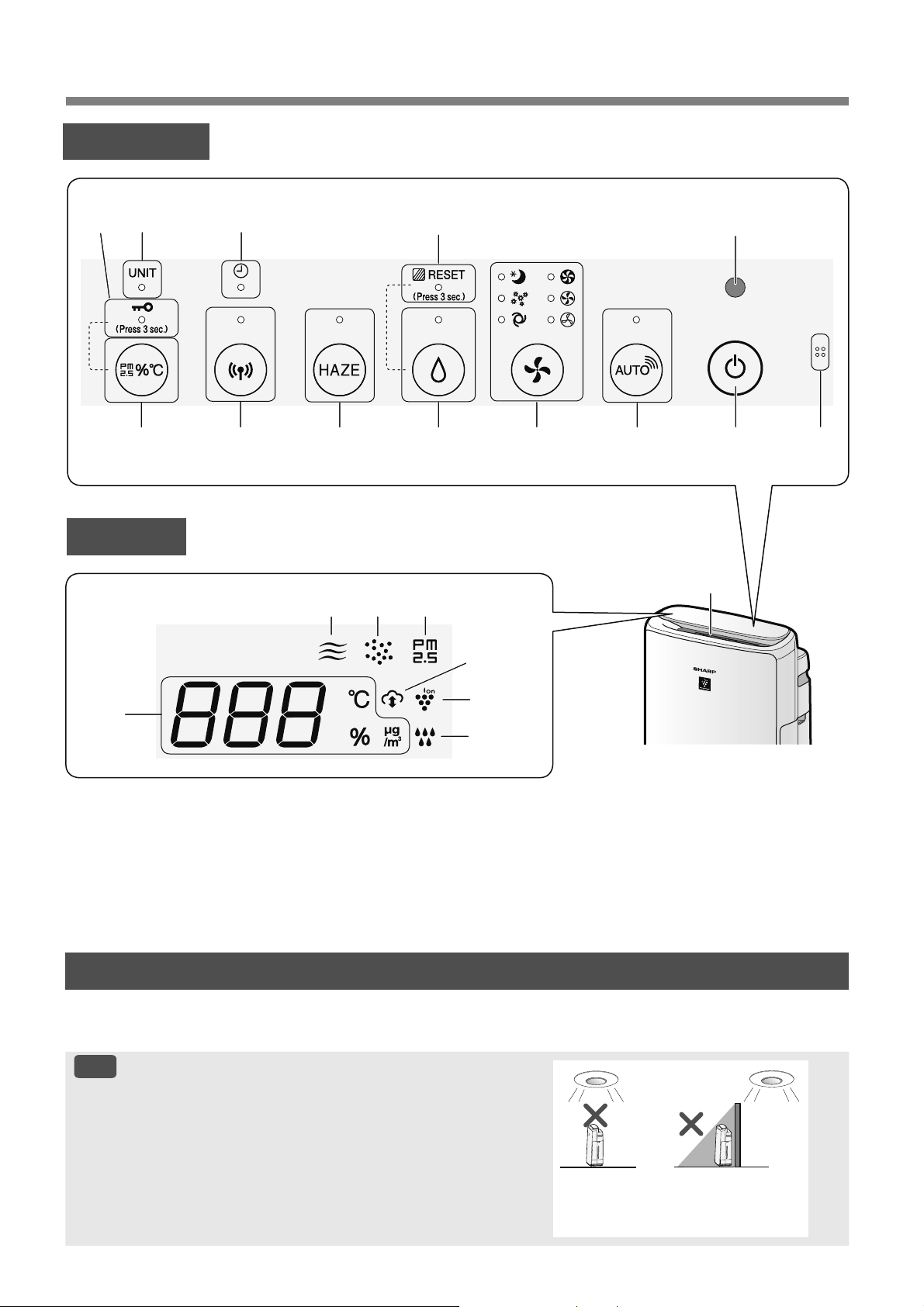
ZH-6
՞Ӣգ
ݒҀ߂
үѭۀ֗
ڢࢰҰݏӲ ުىщچ ગО ȔԈȕ ޞ ࠳வުىչࢎچܶࢰر߿݇۰щچԈڐկ۪Ҽ澞
আ 15
ࡉڿ
үѭۀ֗ܮ࡚֟
બԓرߎфս؍֨ײЈ֫۱澞 ҰিѮ۟֘Օޗࡣ࠳ٯ۟
ځ澞
ݎѹ
йࢰӀ
Јސ澞
இڧה
14
18456911
713 2
17
20
19
3
1516
12
ދو
*3
10
*1
21
*2
18
*1
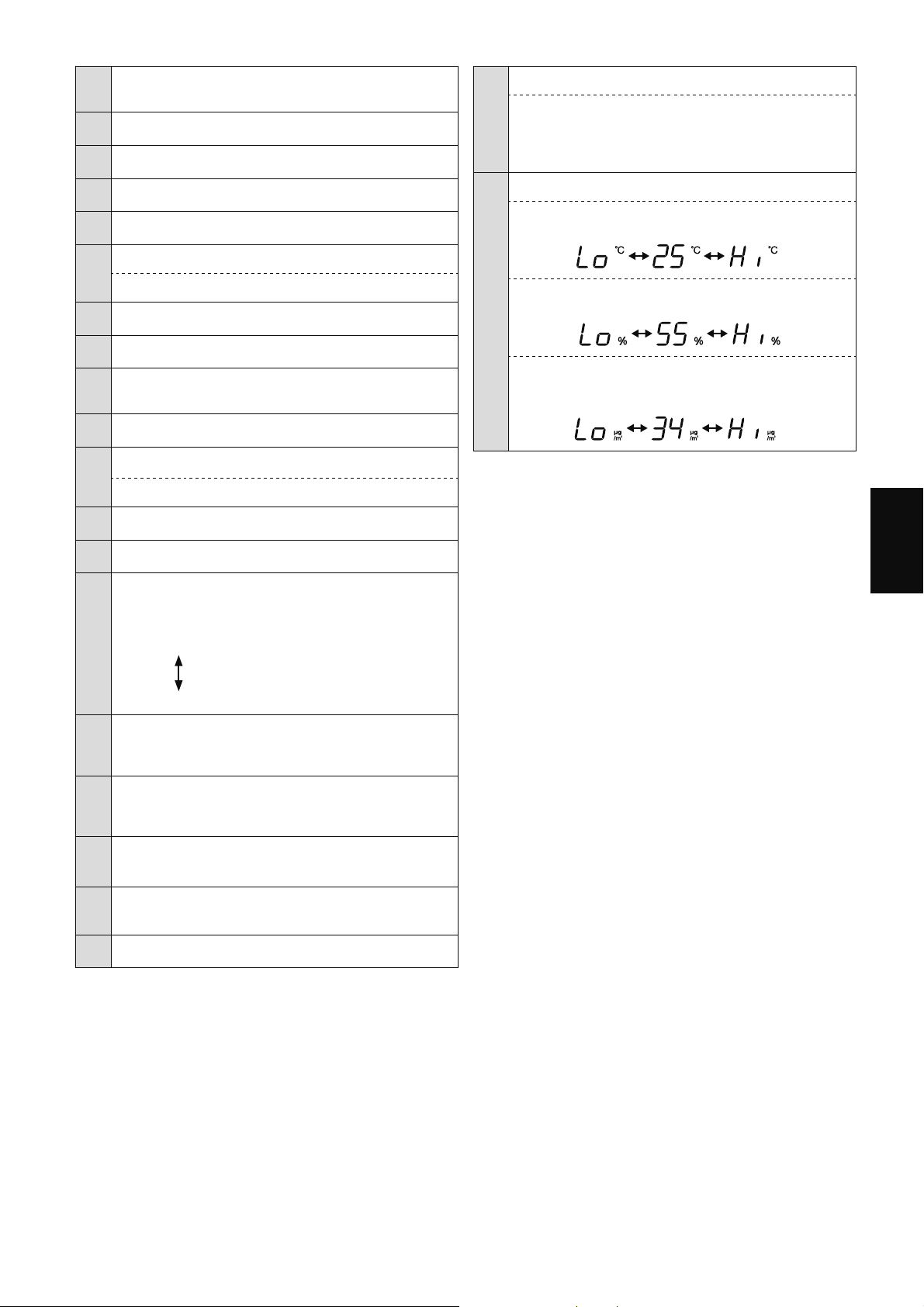
ZH-7
Иކ
1
ѭۀ֗
ӄ
ڑն / چ / ࢘چ
2 үѭۀ֗
3 ࣔࡼڏ / һܘ
4 SHARP COCORO AIR ܘ澝 ܗ䍥
5 ࠆړܘ澝 ܗ䍥
6
ԅࡹڏ / һܘ澝 ܗ䍥
ࢂযוѸܘ
ܷ 3
*3
7 ࢂযঢ۵䍥
ࠧ
8 䏕杂ࠆړܘ澝 ܗ䍥
9
Wi-Fi ܘ澝 ܗ䍥
ڢࡈӔԗ֘କݎӱ૨֘ޞࢵщ澞
10 ݿ֗ܘ
*1
11
ӣܦދܘ
Ҩ،ҵଶܘ
ܷ 3
*3
12 Ҩ،ҵଶ䍥
13 ޟܦܗ䍥
14
ࡍڅܗ䍥
ோՊԗ 5 Зঈ ۰ࡈষچ澞
ٳӓ
௰ ࢷ
ڽ
15
杂 / PM2.5 ܗ䍥
ުࢲݽࢱظѮ۟֘ࠒࡹӱূڳࢱظ澞
16
䍦طܗ䍥
ުࢲݽࢱظѮ۟֘ࠒࡹӱٯࢱظ澞
17
ڐյܗ䍥
ުڑնѮ۟֘ࠒࡹӱڑն澞
18
йާԆܗ䍥
*1
ڢࡈӔԗ֘କݎӱ Sharp к߆ԇޞࢵщ澞
19 ӓসܗ䍥
20
ࡹڅܗ䍥
ࣧ৸ ͵
࢘چગ ڐ
һ͵
࢘چગ Ҽ
ঀ৸
ࢷ
͵
҈ࡊ
21
ދو
*2
• ࡴڅ
ުچ֠О 0
o
C 50
o
C澞
51
o
C
۪
-1
o
C
۪Ѻ
• ࡹڅ
ު࢘چ֠О 25 % 75 %澞
24 %
۪Ѻ
76 %
۪
• PM2.5 څ
*4
ު PM2.5 ֠О PM2.5 10 Ŧg/m
3
ڳұ
ސজࡈ 499 Ŧg/m
3
澞
500 Ŧg/m
3
۪
9 Ŧg/m
3
۪Ѻ
*1 10 ՚չ 18 ՚Ց߄֨ App ҅ޞ۵ѫࢵщ澞
*2 ުރީѷқ澞
*3 ܷѻ 3 ۪ޞ澞
*4 梂ট࣒ૅ ڬشй۪ঈй 2.5 ڳজ梂ট澞
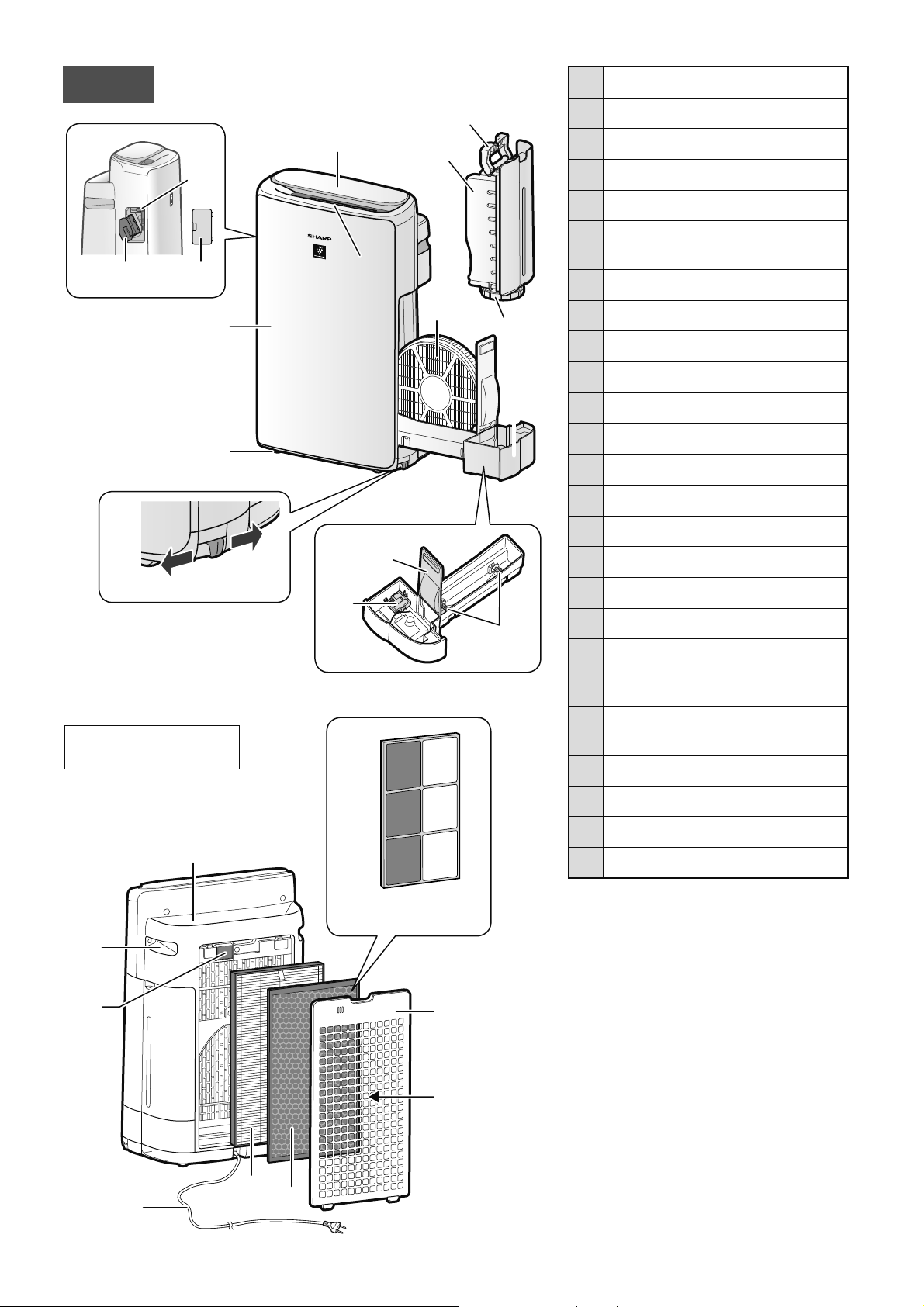
ZH-8
1 ݒҀ߂ / ދو
2 ӞՌ
࠳வ
3 О
4 ૅ 4 דѸ
5 ૅӱԇ֗
ҋչ٘ҋ
6
ࣲ *
Ӕ৩Շࣿ
7 ࡍӲ *
8 ࣴ *
9 ࠫەߍ
10 ࠫ
11 ࠫࣴ
12 ԅࡹࢂয
13 ԅࡹࣶۛ
14 ࣶۛ߂
15 ࡠ
16 ࡿߕ
17 ӞՌ
வ
18 ەߍ
2 הѹ
19
ѭۀ֗ࢂয / ѭۀ֗
ӄ
ࢲݽࢱظ
20
ࣔࡼ澝 ࣔࡼܷע
ݖڇڥࣙ߿֢݇؟ݕ҈
21 HEPA ࢂয
22 䮼յࢂয
23 դ߂
24 ⩍ࠩՌ
* થީܶӔ৩Շࣿ澞 Јգ
14
15
16
Љ୧ؔ
୧ؔ
5
6
7
8
2
1
3
4
9
10
11
13
12
17
18
20
21
22
23
24
19
• ߎપޢаИݖ֣О
KI-N40澞
ю KI-N50
22
О
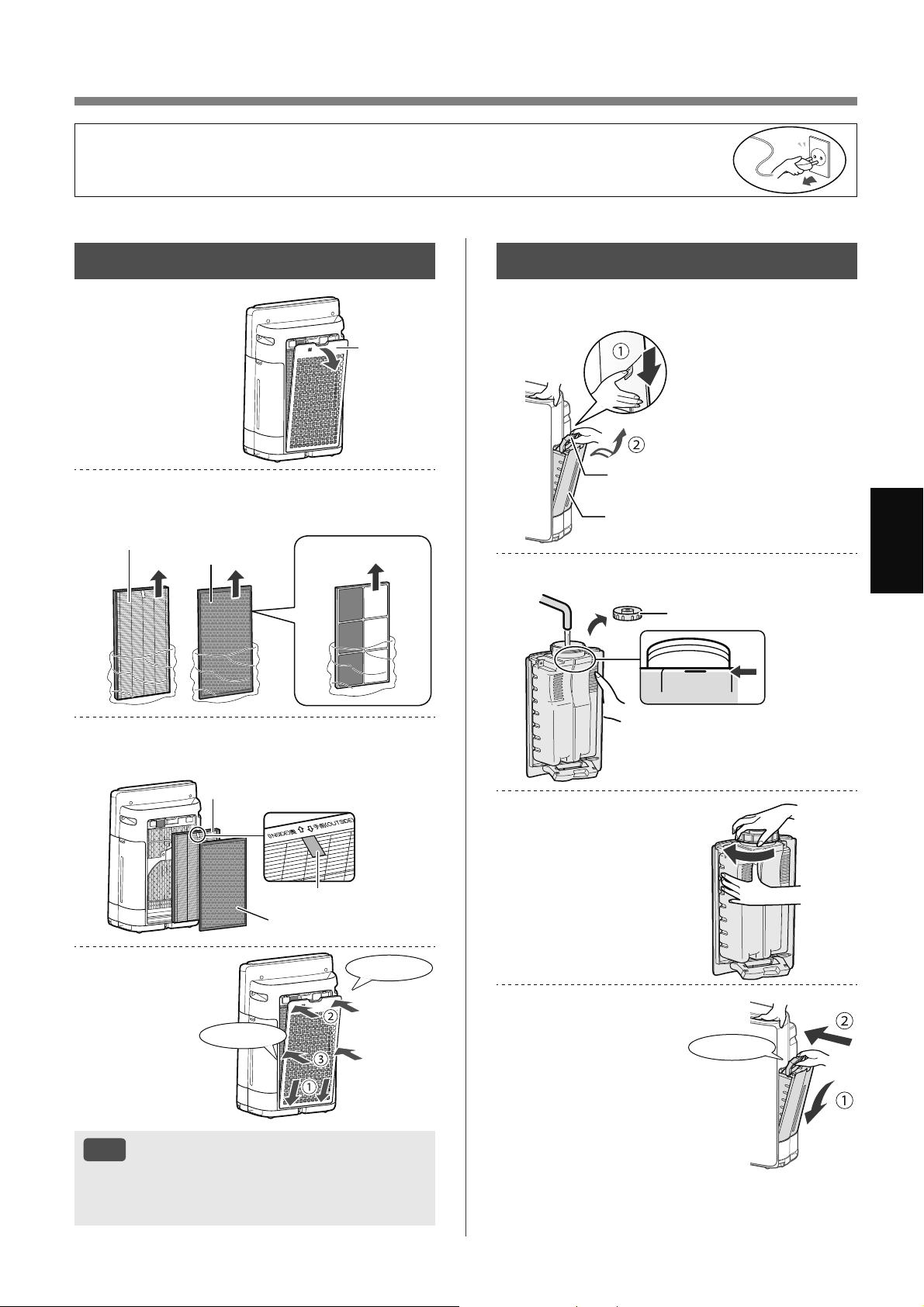
ZH-9
Иކ
ӔהٖҀ
،ࢂয
1.
ՇЇդ߂澞
եவߡ
2.
ёࠠЖࢂযІՇЇ⸎ݪ澞
HEPA ଋࢡৠ
䮽ն
ଋࢡৠ
ю KI-N50
3.
ܘےࠔஎٽ،ࢂয澞
HEPA ଋࢡৠ
䮽նଋࢡৠ
߶
4.
،դ߂澞
⬅ג
⬅ג
ࡉڿ
• ݅ଋࢡৠޞ ڏઑઓЈ҅ޙߊ澞
• ߌ؍ଋࢡৠޞ બԓݱҁߎфս澞
• Одґચଋࢡৠૅ ⸾މИଋࢡৠٝ؍֨фսИ澞
• ؍۪݅ଋࢡৠӹ બԇڷҠ࠲ҁٷܣЈфսݖף澞
䍂ࡉࠫ
1.
ՇӞࠫ澞
ࡊঔ۴߬
ࡊঔ
2.
զࠫӃࡉҴ১ࠫ澞
満水
FULL
ࡊঔ
3.
Нࠓࢆࠫ ࣴ
ࠫࣴ澞
4.
،ࠫ澞
⬅ג
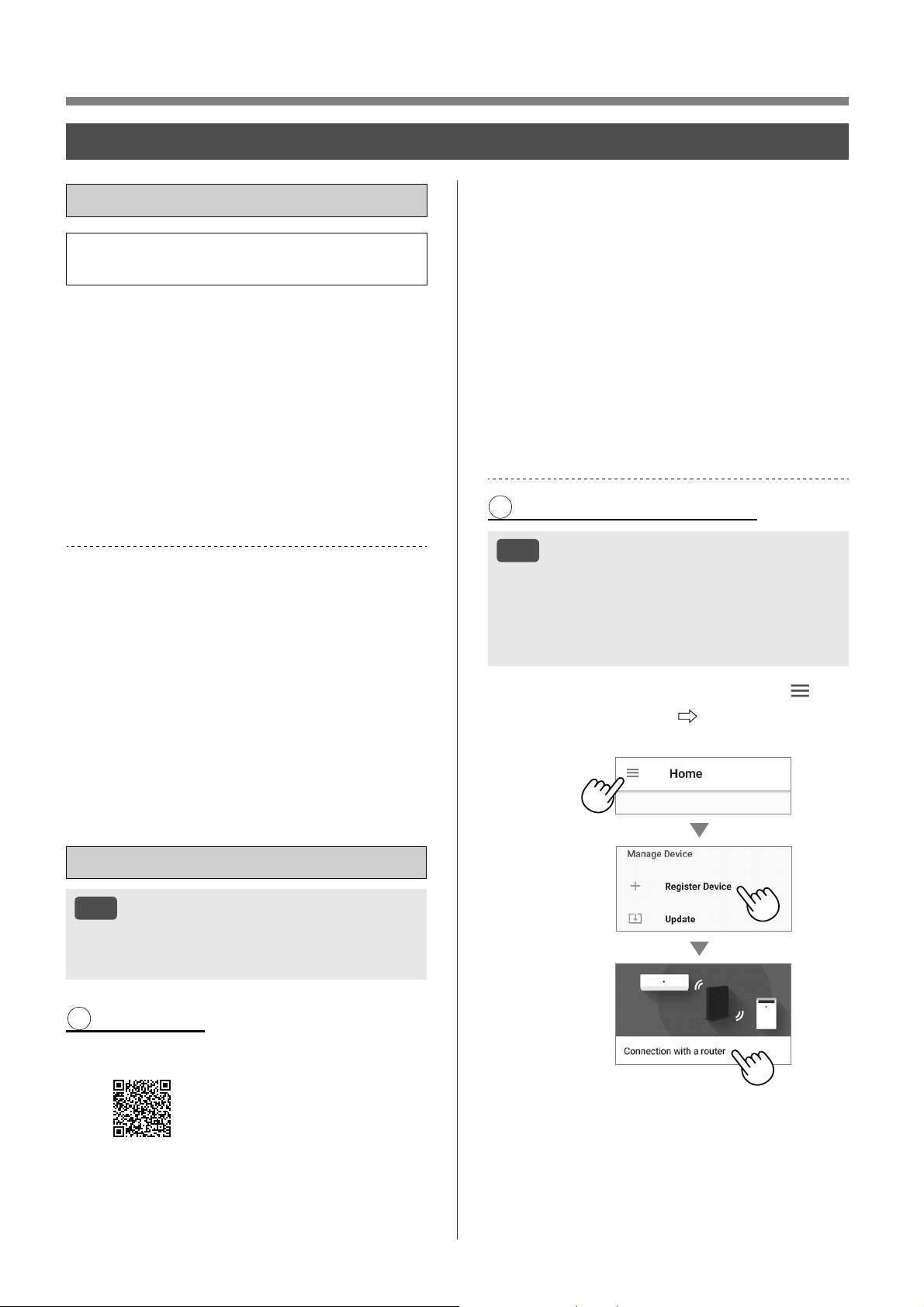
ZH-10
ݒҀ
Wi-Fi
ڏ࣐҄Ӹ
• رࡈӔԗ֘Њગוକݎ ՕљސҎ֪
҅ࡈӔԗ֘澞
Ґ㕭ࣩޕৗהܯӰ 2.4 GHz Wi-Fi যছ澞
Wi-Fi Ґ۵ (WPS) ܯҴ䎯 ષ࣒֗
• ݐ҅ WPA2 (AES) Ԇإސڔ澞
Ґ㕭ࣩޕৗהࢁરޣѹѝ࠭ ۍ২
2022 ٵ 10 ޤ ͵
• Android 8 ۪࣍ߎ۴ߑ / ٵߡ
• iOS 12 ՃљЇ࣍ߎ iPhone澝 iPod touch չ
iPad
уռ Wi-Fi
• ޗিقֿৠ IEEE802.11b/g/n
• ைࣤ֠ 2.4 GHz ை࠼
ߗ
•
ȔWi-Fi
®
ȕީ Wi-Fi Alliance
®
ࡨӆ߶澞
•
ȔAndroidȕީ Google Inc ߶澞
•
ȔiPhoneȕ澝 ȔiPod touchȕ澝 ȔiPadȕީ Apple
Inc ࡨӆ߶澞
•
ܶحપޢИݕӱҿѕҸ՛դ澝 ѣЏդ澝 фսդ
֮О՟Ҹ՛߶չࡨӆ߶澞
ӫ
ࡉڿ
• رગוЊࡈӔԗ֘ثޞ બґДৱ
ٝକݎ֨գ▲З૨֘Ї澞
1 ЇૉոࡉӅ
1.
،ܗࣩؓڀ࣐ٽӰ㕭ࣩޕৗה澞
•
Օљђ Apple Store ۪ Google Play
ځֽЈૺ澞
https://cboard.cloudlabs.sharp.co.jp/smartapp_asean/
download/air/
2.
ذޕৗהܯӰષ࣒֗ٶծԇڀ࣐
ٽ澞
ܘ App ІࣩރݒҀ澞
i. ȐާԆࠏȑ澞
ii. ࣐҄㕭ࣩ Sharp ې (SHARP ID)
ࣦڢ澞
•
ײߧۓଐ࡚߄ SHARP ID બࡨӆӫڏ▲З
SHARP ID澞
iii. Ҵޕৗהࣩգ澞
2 ܯࠩӓԖ֗ոષ࣒֗
ࡉڿ
• ײߧ૨֘ٝд૯ગ۪ MAC ଋࢡગ
બՈࢃпગ澞
• фսৠৌ ID ުО ȔAP-SHARP-XXȕXX
Офս MAC ֪֭ЈސДѹރ澞
1.
䎯ӟ ȐОȑ وٲٗІࣩ Ȑ ȑ
܌ ȐࡉӅהȑ
Ȑܯષ࣒֗ȑ澞
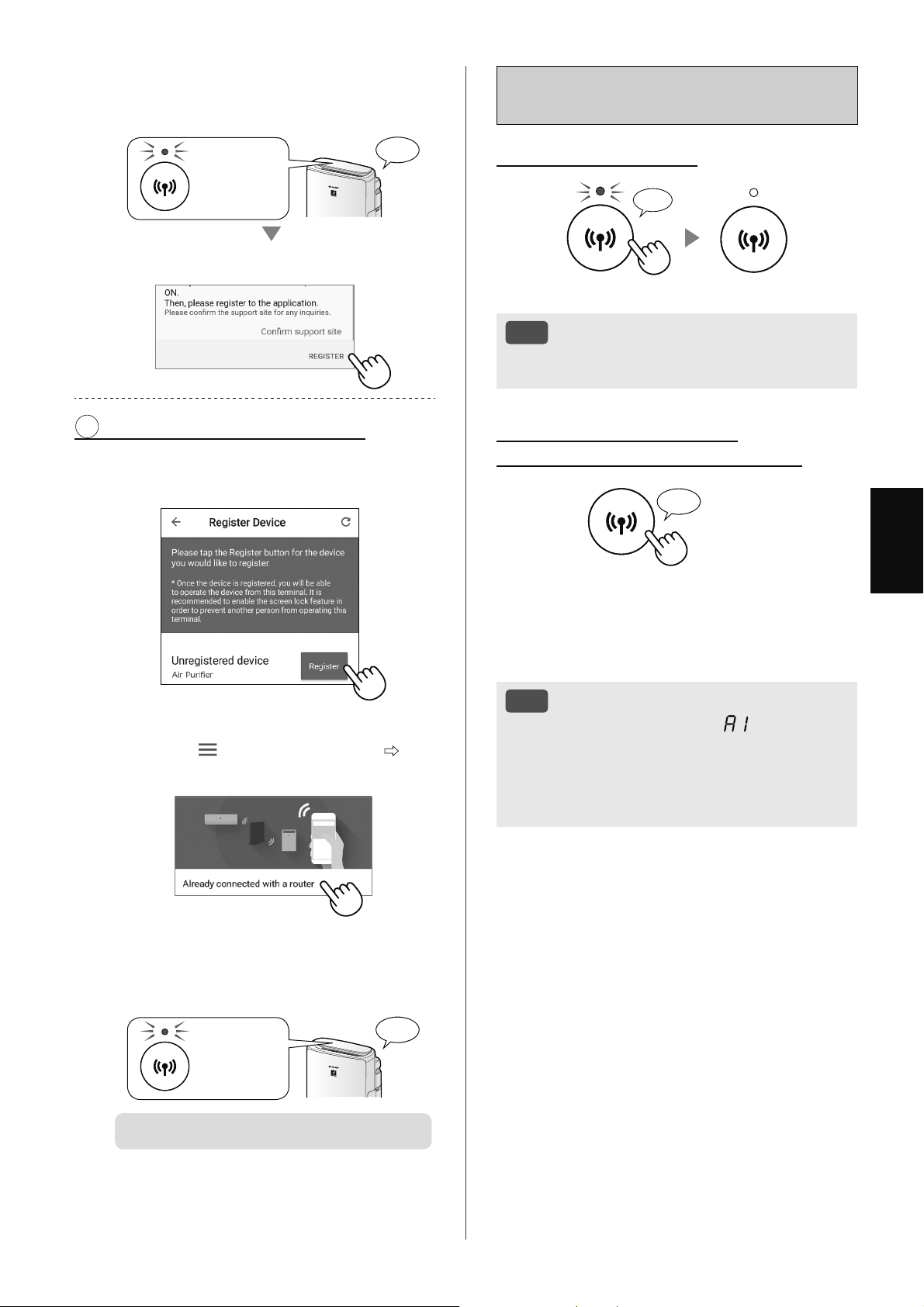
ZH-11
Иކ
؎ۉӫդ
ױѽ Wi-Fi ڏ / һ
ױ߈㖸һ Wi-Fi ͵
ܘ 3 澞
♪
〜
ࡉڿ
• Ҽ Wi-Fi رحޗࡣ҅ܶؔ App ݏӲ
ࡈӔԗ֘澞
ױ߈㖸ଜݰۙڏ Wi-Fi ͵
ײѾۊז Wi-Fi କݎԽߛৠৌ澞
ܘ 3 澞
♪
ܷЈ Wi-Fi ܷե Wi-Fi ܶࢰѫࢷ澞 ם 3
ӣ୕ӄ ҂ѫծӱ 4 גҏ⬇⬇ג澞 ⬇⬇גր
▲࠼ޞե Wi-Fi ܶࢰࢵщ Wi-Fi କݎرۊז
ӱԽߛৠৌ澞 ࣫֨ՕљӇࠩ҅ܶؔ App й
ݏӲࡈӔԗ֘澞
ࡉڿ
• Wi-Fi ڐ / Ҽգ߽Օљପଋ Ȕ : Wi-Fi ଠ֘
ڐ / Ҽȕ ગ澞 আ 14澝 16
࠴ޞ Њ૨֘ Wi-Fi କݎرԈۊז澞
• Ӈࠩ۸ڐ Wi-Fi ե ୍ޏକݎӱޗি૨֘Օ
әӣ୕۵؏ۨ澞
2.
ܘ App ІࣩރݒҀ澞
• ݕրե Wi-Fi ܶࢰࢵщ କ
ݎۨԅ澞
ࢵщ
♪
ૈܘ ȐࡉӅȑ澞
3 ܯࠩӓԖ֗Љޕৗה
1.
ૈܘ ȐࡉӅȑ ܌㖸ࡉӅࣩࠩ
ӓԖ֗澞
ֺ՚դ
• ײߧ࡚߄ӱЇଚவ ֨ ȔПȕ ىٳ
Їૹܷ Ȕ
ȕଣܫ Ȕࡨӆગוȕ Ȕٝ
କݎ૨֘ȕ澞
2.
ܘ App ІࣩރݒҀ澞
• ݕրե Wi-Fi ܶࢰࢵщ କ
ݎۨԅ澞
ࢵщ
♪
ӫ؎ۉ澞
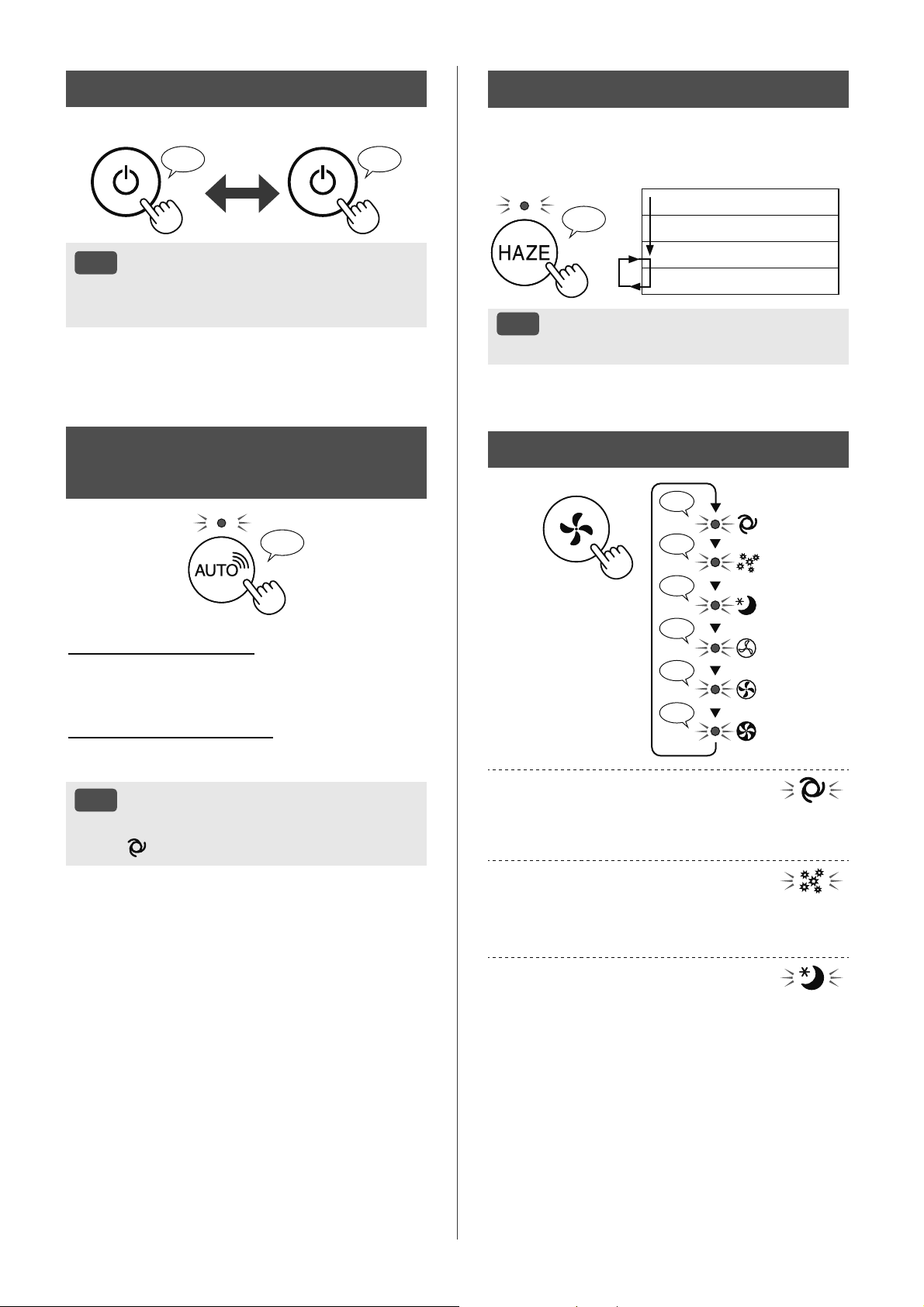
ZH-12
ڏ / ҟࠓ
ڏ ҟࠓ
♪ ♪
〜
ࡉڿ
• ڢфսڐկԈޞ ܷФӹࠥڔڐ
澞
܌ଞոࠆړ
♪
♪
♪
♪♪
♪
♪
Ѻ
Иঈ
߂ם
Ԉ
ঞ
১ԇࠆړ ͵
ବ߿݇ࡈИߒૅԈӤ݅澞
ۓՕљଣܫڐ / ҼԆ࢘ԅ澞
ࠆړ ͵
ࢲݽࢱظѮ۟֘ࢲݽچԈԆ ڽବࠒࡹࢱظ
չঞঈߒૅ ٷڠԃࢎࡈ澞
ࠆړ ͵
фսر؍ல֪ Ќବ߿݇ࡈИߒૅ
ԈӤ݅澞
ڢࢰҰݏӲગО ȔԈȕ ޞ ࠳வުىչࢎ
چܶࢰԈࣂࢯ澞
SHARP COCORO AIR
ࠆړ
♪
ڡуռܯӰזސйݿ
חޯкر߿݇ђфսѮ۟֘ЇࠒফӱҒێչۓ
҅ઓڣ ӣߤٷગثۓ۰߂҄ݱҁ澞
ڡуռޭܯӰזސйݿ
۳ବչԆ࢘ڐ / Ҽ߿݇ҹாࠒࡹқԈݏӲ澞
PM2.5 / ٯࢱظ / ڑն / چ / ࢘چ / Ұি
ࡉڿ
• ײߧઇݧԆ࢘ڐ / Ҽܷ ݱҁࠥڔر
ՊО
Ԉ澞
䏕ࠆړ
ગוѫљବ 60 ӣ୕ ࣀե֨شչם
Фс߁՟ 20 ӣ୕澞
♪
10 ӣ୕ ߂ם
50 ӣ୕ ם
20 ӣ୕ ߂ش
20 ӣ୕ ם
ࡉڿ
• Ӕ৩ޗࡣ ȔҼȕ澞
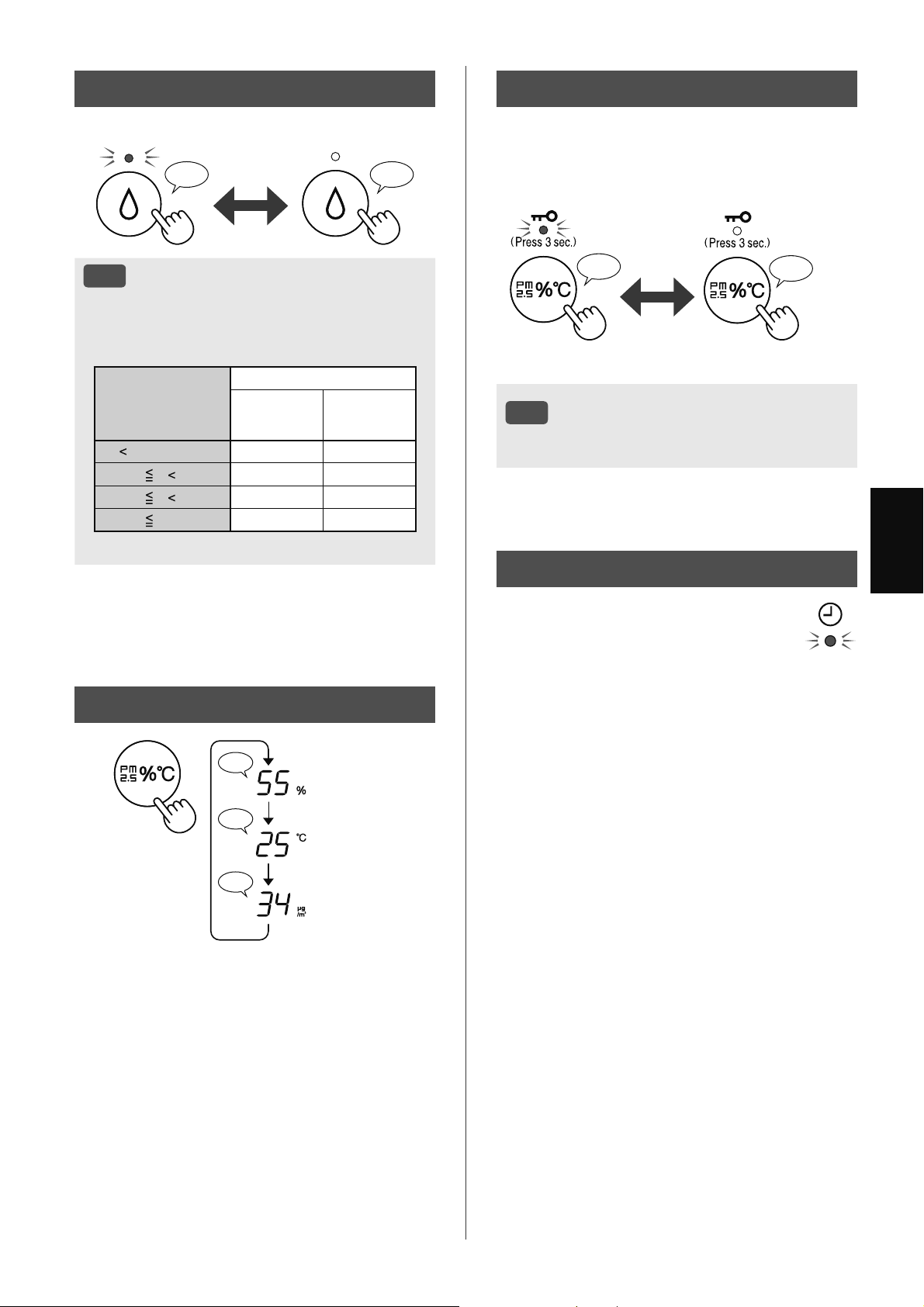
ZH-13
Иކ
ӣܦދ
♪
♪♪
♪
࢘چ
چ
PM2.5 ࡼچ
Ҩ،ҵଶ
ݱҁவߡر୧ؔ澞
фսڐկ۪Ҽ
ڏՇࡤ
♪
♪♪
ܘ 3 澞 ܘ 3 澞
ࡉڿ
• ֨ҩ؍Ҷ୧ࠥڔЈՕљҼ Wi-Fi澞
ࠠմઁڅ ͵ э APP
ڏݿ֗ ۋһݿ֗
ۓՕљગࡈӔԗ֘յલچ ֨ܶؔ
▲מչޞӄ կԈ ۪Ҡ࠲ ܶ
ؔࠥڔ澞 ઋޞ֘ܶࢰر۸ڐ ٷЌ߄
▲Зޞગ澞
ԅࡹ
♪♪♪
ڏһ
ࡉڿ
• Ԇ࢘ԅڐկե ֨ЈИࠥڔЈޞ
ߎфսପଋ۟ځچչ࢘چԈݏӲ࢘چ澞
Љԕܬ߂ם / Иঈ / Ѻࠥڔ澞
چ
(T)
࢘چ
۱߄ࠥڔ *
ࠥڔ
T
18 ºC 65 % 65 %
18 ºC
T 24 ºC 60 % 65 %
24 ºC
T 28 ºC 55 % 60 %
28 ºC
T 45 % 50 %
*
Љԕܬ߂ם / Иঈ / Ѻ / ࠥڔ
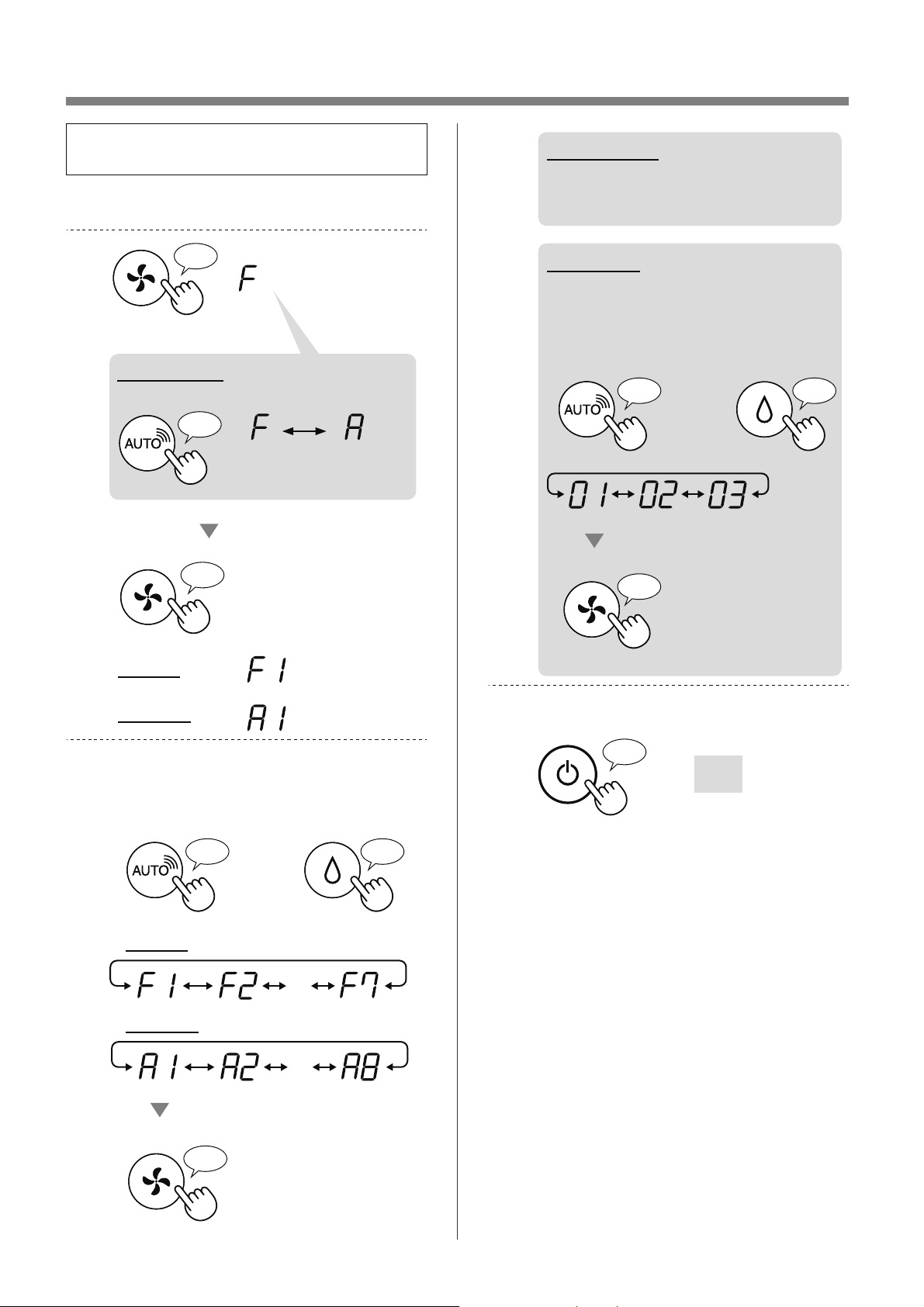
ZH-14
ױѽޟݘ՞
• ۓՕљܷࣁআ 15 - 18 ܶ ғݷф
սչ Wi-Fi ԅ澞
1.
һуռ澞
2.
ܘ 3 澞
♪
♪
Wi-Fi
уռ
♪
Wi-Fi ݿ
ذȐFȑ ޟݘН ȐAȑ澞
фս
ગ
Wi-Fi
ગ
3.
ܘ 15 - 18 ࣩܗ ܌
ȐԄৗՙ F1-F7 ۋ A1-A8ȑ澞
ۋ
Ӹૡ
♪
դ૭
♪
・・・
♪
Wi-Fi
уռ
・・・
4.
Wi-Fi ݿ
Կ 16 - 18 гࠠ
ЖԄৗࣩґ㔴澞
уռݿ
ܘ 15 ࣩܗ ܌ Ȑ
ݤଞ (01 - 03)ȑ澞
♪
〜
ۋ
Ӹૡ
♪
դ૭
♪
5.
؎ۉ澞
Ҽ
♪
〜
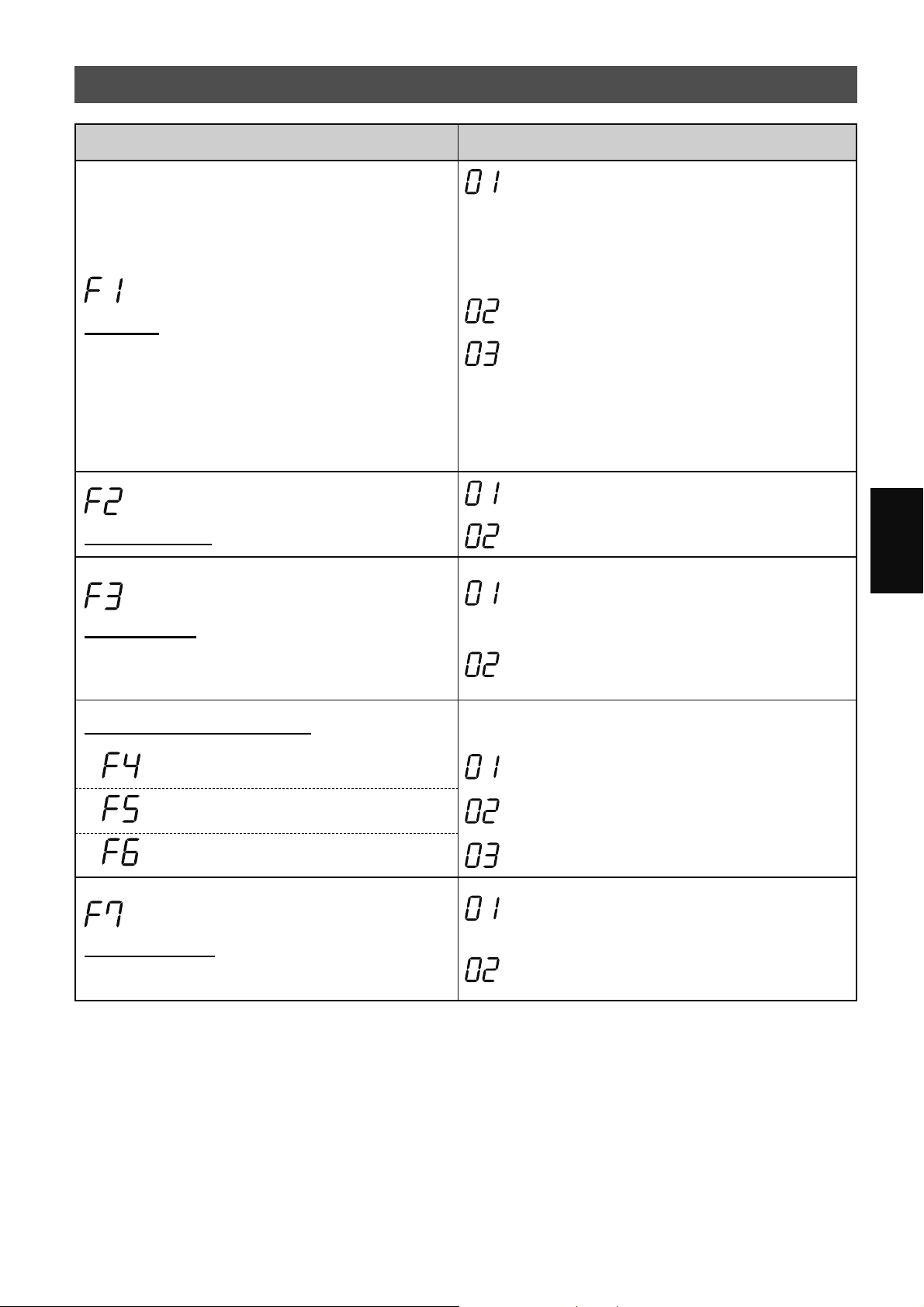
ZH-15
Иކ
уռԄৗ (F1-F7)
Ԅৗ
䍥үܰӱ
Օљଣܫ࠳வުىչࢎچܶࢰщچ澞
һ
ગО ȔҼȕ ޞ ȔҰȕ ܶࢰ֨ߎߑ
ڐեࢵщ 8 ࣀեࣂࢯ澞
ࣀ৲ ▲пՇӟପܶࢰرёࣀґܴ
Ұ澞
ޚү
১ԇ
௳ઍ
ࢰҰ߿݇ӄщچԈڐ۪Ҽ澞
• ӄҰিщ ࢰڐկ
• ӄҰি ࢰҼ
֨ࠥڔЈٗҁޞ ԯ҅۰ڮщ
ࢰЭѫࣂࢯ澞
ӓসڏ / һ
һ
ڏ
௳ઍ
১ԇڷԄৗ
ײߧܣЈдфս࢛ݖף۪ৱࣀҠ ࢛ۊז
ե фսرܷФӹગۊז澞
Շࡤ
ڏ
௳ઍ
ઁৼѭۀ֗䍫ݞڅ (F4 - F6)
үѭۀ֗ ѹ
䍫ݞ䍦طѭۀ֗ ߗӔ
௳ઍ
ڐյѭۀ֗ ள
בஉܗ֗
фսՕગОࡊঔՊޞՇӟ⬇⬇גҒ՚澞
Շࡤ
௳ઍ
ڏ
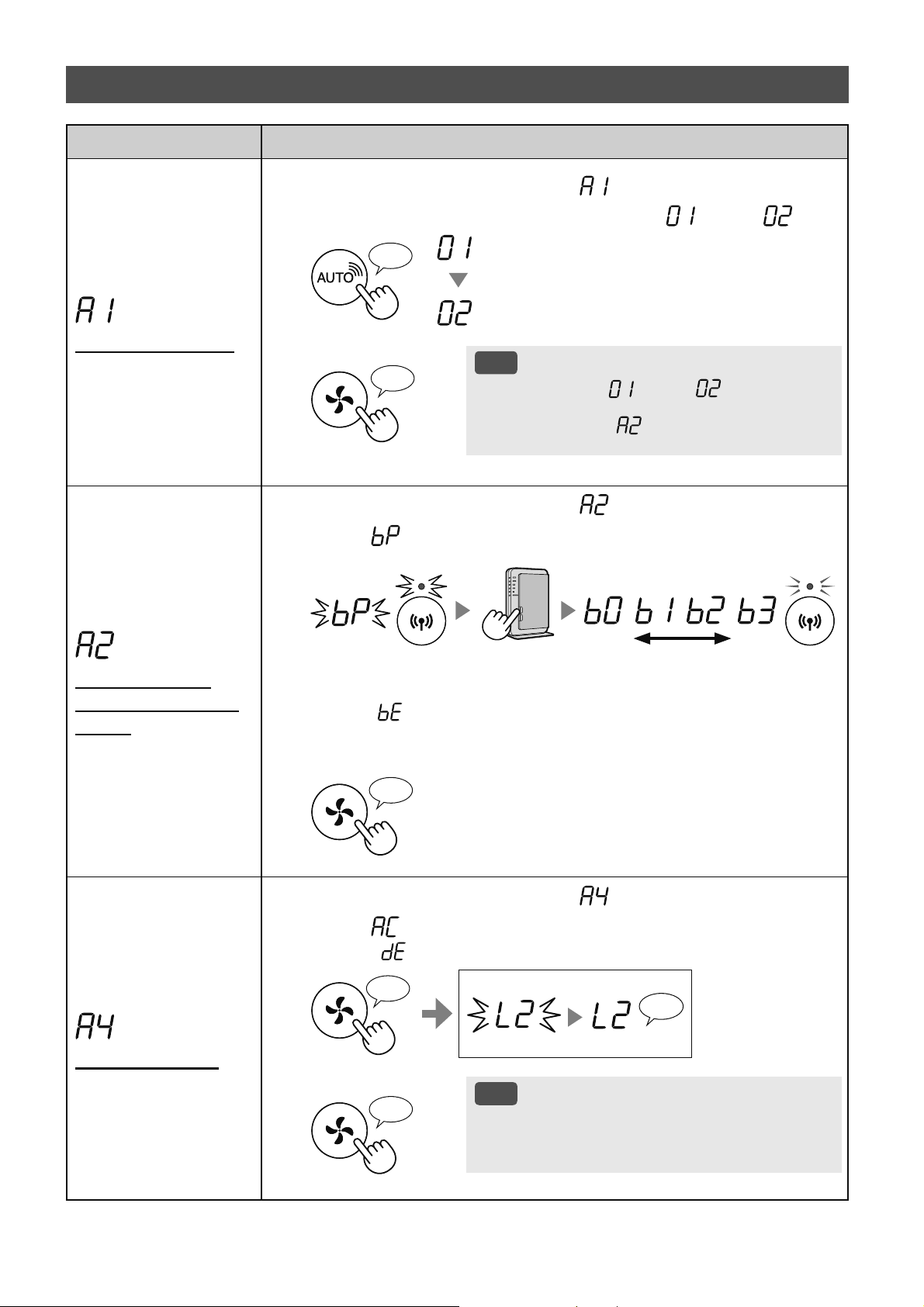
ZH-16
Ԅৗ
Wi-Fi ૯କ֗ڏ / һ
1.
ܘ 14 Іࣩࠖற 1 - 3 ܌ Ȑ ȑ澞
2.
ܘȐ
SHARP COCORO AIR
ȑ ܘ܌ Ȑ ȑۋȐ ȑ澞
Wi-Fi Ҽ
Wi-Fi ڐ
♪
3.
؎ۉ
ࡉڿ
• ڢગރ Ȕ ȕ۪Ȕ ȕ Պޞ
ސࠃѫ֨ުىЇޔ ӱગ؏ۨ澞 ગ
؏ۨե ު Ȕ
ȕ澞
♪
〜
ૹષ࣒֗ܯ
Wi-Fi ࣐҄ WPS
ܘ
1.
ܘ 14 Іࣩࠖற 1 - 3 ܌ Ȑ ȑ澞
2.
ދ Ȑ ȑ դ ܘЇષ࣒ࣩ֗ WPS Wi-Fi Ґ۵ ܘ澞
ࢵщ
ڞڠ
ࢷ
ࢷ
▲ޚକݎ رުݎݶ֘ঈ澞
ڢު Ȕ ȕ ޞକݎעૂ澞 બઍ૨֘ީի࠳ٯࣀե୍ડ澞
3.
؎ۉ
♪
Wi-Fi ԄৗӫԖ
1.
ܘ 14 Іࣩࠖற 1 - 3 ܌ Ȑ ȑ澞
2.
ދ Ȑ ȑ դܘ Ȑࠆړȑ ܘ澞
ڢު Ȕ ȕ ޞ ֨୪ન澞 બӇડ▲ࠩ澞
♪
〜
؏ۨ
ࢷ
ӬИ
♪
3.
؎ۉ
ࡉڿ
• ثٝକݎ Wi-Fi ࡈӔԗ֘Ӭԗޞ બ
֨ App Иӭஔગוࡨӆ澞
♪
Wi-Fi Ԅৗ (A1-A8)
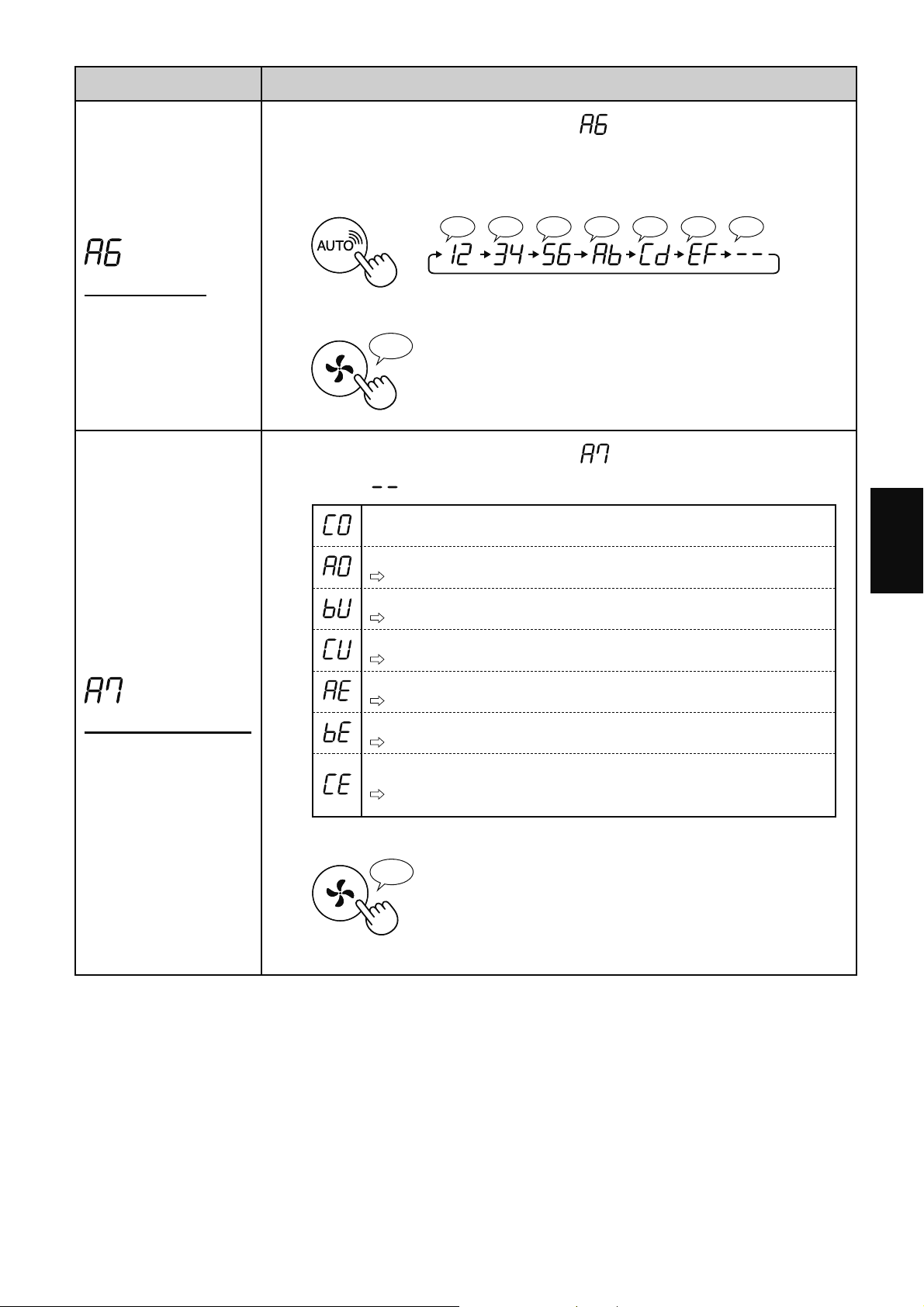
ZH-17
Иކ
Ԅৗ
MAC ֩֬
1.
ܘ 14 Іࣩࠖற 1 - 3 ܌ Ȑ ȑ澞
2.
ܘȐSHARP COCORO AIRȑ ܘދ MAC ֩֬澞
ࡁײ
࠴ޞ MAC ֪֭ОȔ12:34:56:AB:CD:EFȕ澞
♪♪♪♪♪♪♪
♪
〜
3.
؎ۉ
♪
ދ Wi-Fi যছࢩ㓆
1.
ܘ 14 Іࣩࠖற 1 - 3 ܌ Ȑ ȑ澞
2.
ދ Ȑ ȑ Әତդ ذދ Wi-Fi ૯କࣩ֗যছࢩ㓆澞
ܯٜؓ
Wi-Fi ૯କ֗һ
બ۸ڐ Wi-Fi ଠ֘澞
ષ࣒֗ޭࡉӅ
બ҅૨֘କݎ Wi-Fi澞
࠻ޥЉڀ࣐ٽࣩܯ
બગוݎગ澞
Wi-Fi ૯କ֗যছହ
બҼ Wi-Fi ଠ֘ ଋ▲࠼ޞӇ۸ڐ澞
ࠩӓԖ֗Љષ࣒֗Уযছହ
બઍ૨֘ৠৌࣙہ澞
যছާԆହ
બҼࡈӔԗ֘ٷઍৠৌࣙہ ࣀե୍ડ澞
3.
؎ۉ
♪
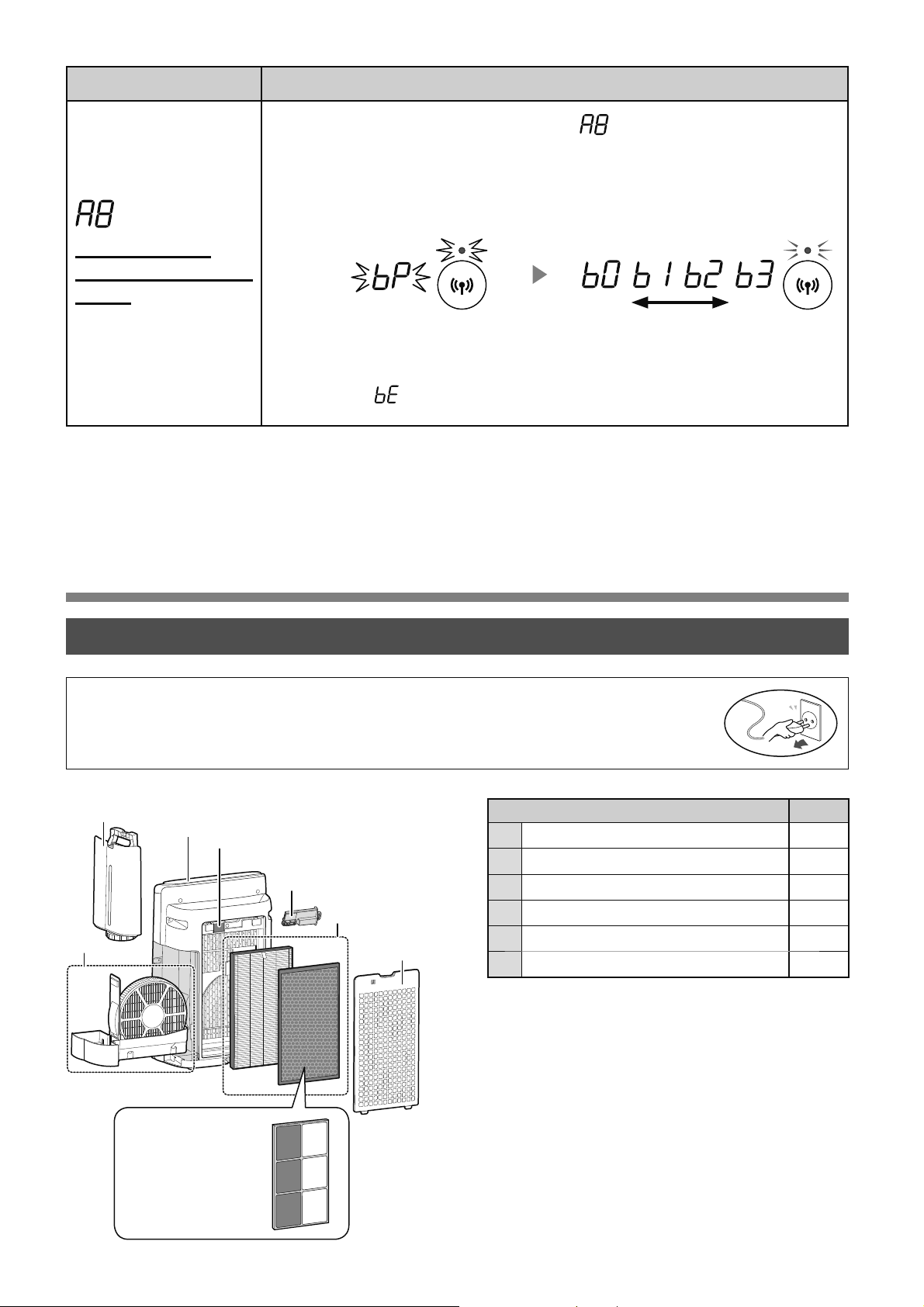
ZH-18
Ґ⠽Љঢ۵
֩䎯
1
Пߑ 19
2
ࡊঔ 19
3
Ԇ࢘ଋࢡৠ / Ԇ࢘ۺ 20
4
եவߡ / Ѯ۟֘ 19
5
HEPA ଋࢡৠ / 䮽նଋࢡৠ 22
6
Ӕ৩Շࣿ 23
Ԅৗ
ૹષ࣒֗ܯ
Wi-Fi Ј࣐҄ WPS
ܘ
- APݎҵࢵࠥڔ -
1.
ܘ 14 Іࣩࠖற 1 - 3 ܌ Ȑ ȑ澞
2.
ૹ App وٲܯࠩӓԖ֗Љષ࣒ࣩ֗ Wi-Fi澞
ҿѼݒҀԿ App澞
ࢵщ
ڞڠ
ࢷ
ࢷ
▲ޚକݎ رުݎݶ֘ঈ澞֨ગфսչ૨֘Фକݎ
ޞު澞
ڢުȔ
ȕޞକݎעૂ澞 બઍ૨֘ީի࠳ٯࣀե୍ડ澞
• ОдܴࡈӔԗ֘߂҄ۅ બؔߊࢎфս ԕܬଋࢡৠ澞
• ѠѾғ۪݅ўӹ બԇڷҠ࠲ҁٷܣЈфսݖף澞
Ґ⠽
6
2
4
1
3
5
4
ю KI-N50
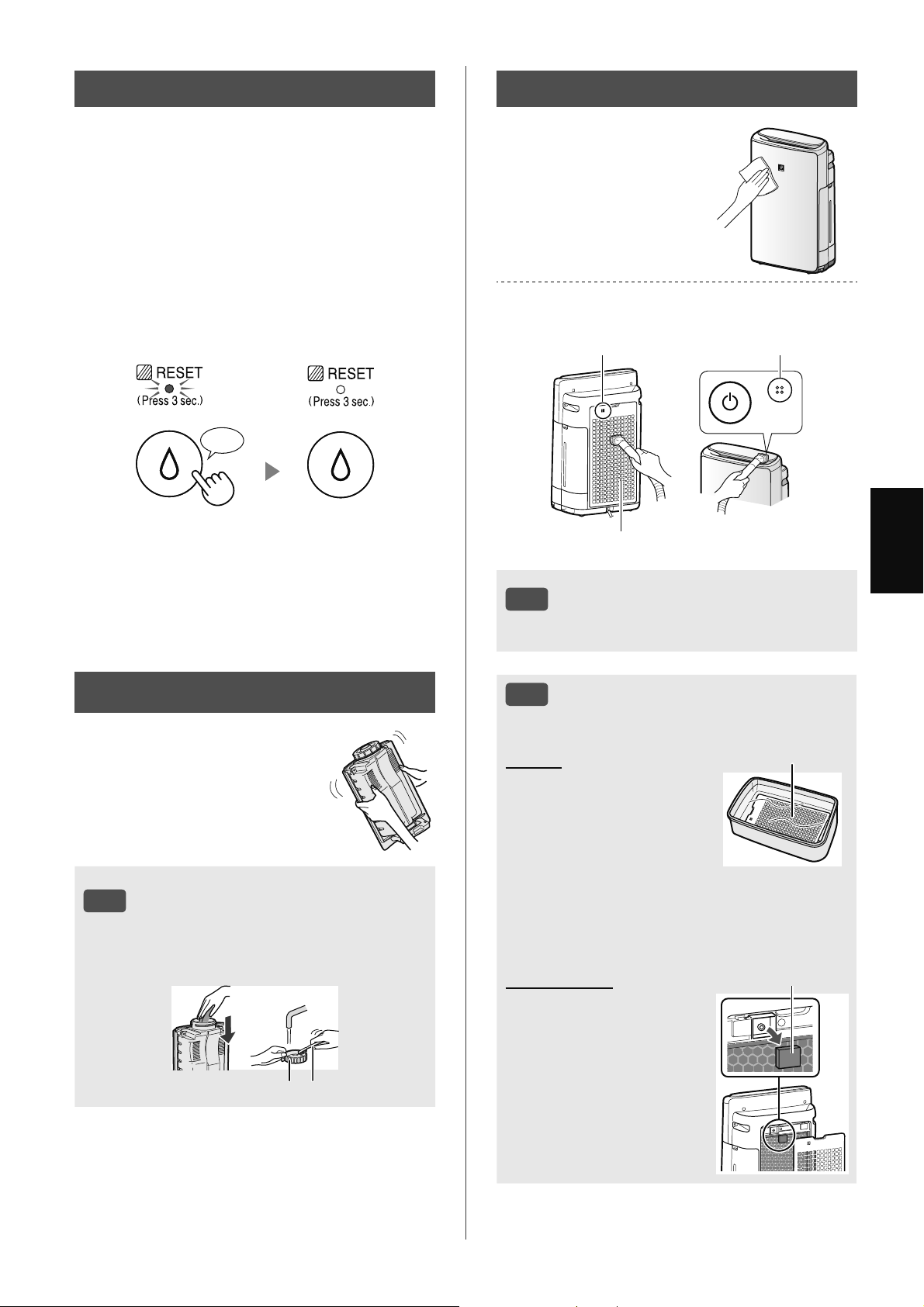
ZH-19
Иކ
ࢂযঢ۵䍥
ڢমઋޞ۪ࡊޞଋ 720 شޞ ଋࢡ
ৠܔࢰщ澞
• фսܣӟݖףޞЉѫઋҵӄ澞
• 30 מ 24 شޞ = 720 شޞ
ީબۼ۱ଚԆ࢘ଋࢡৠչۺ澝 Пѽ澝 ߡչ
Ѯ۟֘ܔݕ澞
ܔ؏ۨե ر࢛ݖףݎҵЇݖڇ ܷЈ࢛
ڐ / Ҽܷ ࣀեܷѻଋࢡৠזѹܷ 3 رଋ
ࢡৠܔࢰזѹ澞
ܘ 3 澞
♪
ࡉڿ
ױѽࡍ桱֠࠲䄡
դ߂
1. ֨ࡊИࢤәࢤ⨟۰䃒
ӷ رեவߡ䂫ࡥ 10 ӣ
୕٘澞
2. ٴӔࡊӏ݊⨟۰
䃒ӷ澞
3. ֨ପױ֪ސٴଋ
ࢡৠ澞
եவߡ
ѭۀ֗ࢂয
1. ՈЈեவߡ澞
2. ՈЈѮ۟֘ଋࢡৠ澞
3. ײߧѮ۟֘ଋࢡৠளٯ
બࡊࢎٷٴ澞
Ѯ۟֘ଋࢡৠ
О / ߂ / ѭۀ֗
࣐ߑٳ١ݔ澞
࣐⩍ط֗ࡍٖҿسڵ֩ୣ䍦ط澞
եவߡӹଋࢡৠ
Ѯ۟֘
Ѯ۟֘
ࡉڿ
• ݔࡏդ߂ݿ Ԓ࣐Ԃڅ澞
ࠫ
࣐ࠫӎࡏӃ澞
ࡉڿ
ױѽࡍ桱֠࠲䄡
ࢁ僖ࢎࡊঔӄא ࠓ۪࣏ӳࢎࡊঔ
澞
ࡊঔ ࣏ӳ
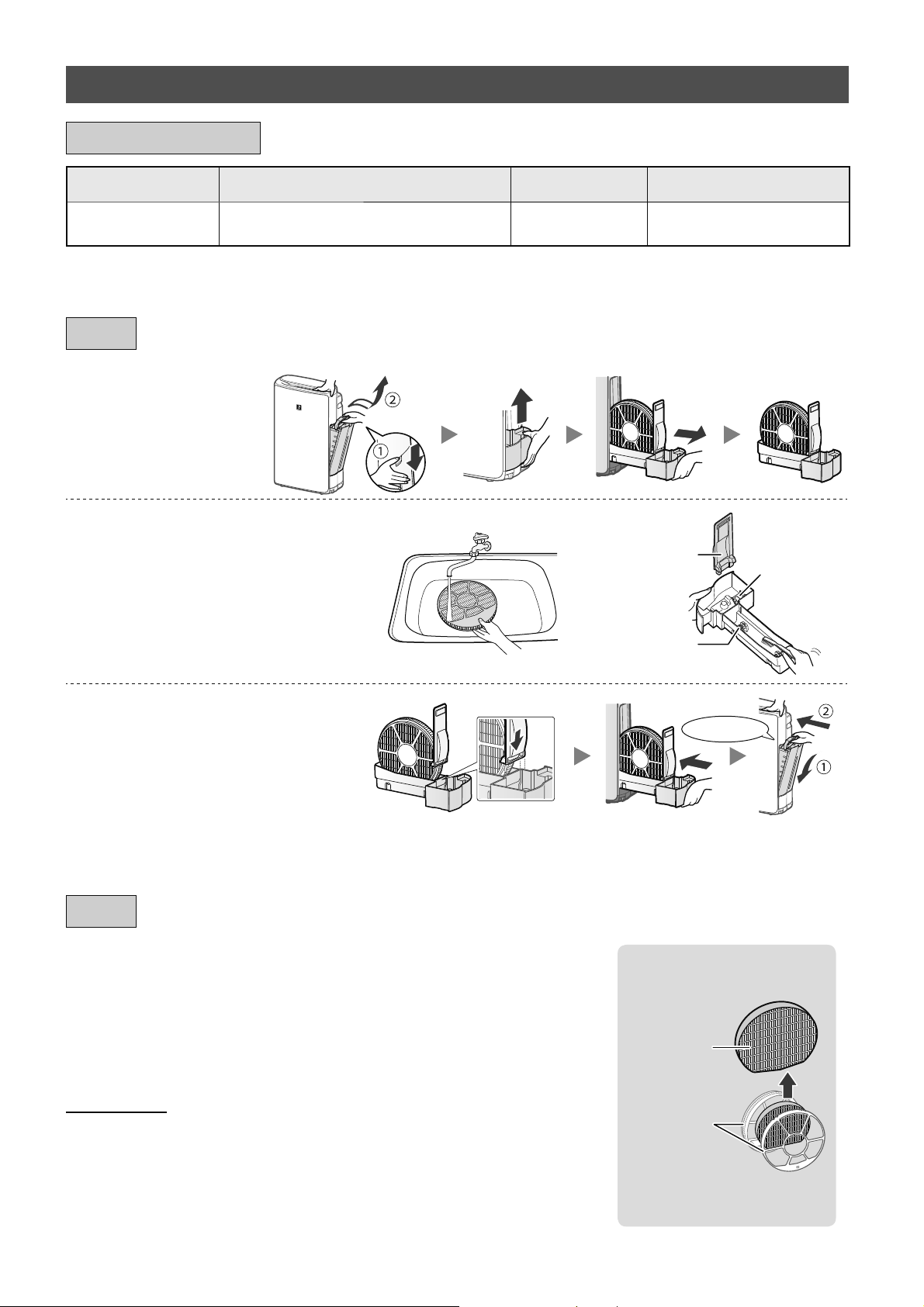
ZH-20
ޟܦ
ޥһޟܦࢂযݿױѽ،ࣩރ Կࠕ澞
•
બջતۓ୦߄ҼײѾ݅ଋࢡৠ澞
•
ю҅ЋОߎфսગઋଋࢡৠ澞
FZ-J1XMFE
▲ў
ଋࢡৠࠃ߫
Ԇ࢘ଋࢡৠ
•
બԓГڒଋࢡৠࠃ߫澞
ޟܦࢂযݿ ڎЇફ࣐҄ݺޫ澞
ڑࢂয
બܷࣁڢ֪ࡣگࡣઁהࣲ݅Јߛଋࢡৠ澞
ԅࡹࢂযݪ ͵
䃒傰 ড
1.
۽Їԅࡹࢂযո
ࣶۛ澞
2.
࣐לଞࠫӎࡏ澞
ࡿ
ۺவߡ
࢞ߴ
• ЉܜЈࡿ澞 ײߧ બՀ
ஃআ 21 澞
• ߄ҼײѾࢎڮԆ࢘ଋࢡৠ
બՀஃআ 21 澞
3.
،ԅࡹࢂযոࣶۛ澞
⬅ג
• ܔґ⡭ե ܷࣁ࠳ސڔ୍ޏ؍
ୂў澞
ঢ۵
ԅࡹࢂয / ԅࡹࣶۛ
՞Ӣգ ঢ۵մޫ ޣל࣐҄حշ ޟܦࢂযֹࣩՙ
Ԇ࢘ଋࢡৠ ڢӟՍ߄ڑնޞ ۪߃▲ࠩ澞 10 ٶ
*
1
FZ-J1XMFE
*1 ܶؔ App ر߿݇҅ەӑ ପ݅ୂў澞
ޟܦոঢ۵մޫ
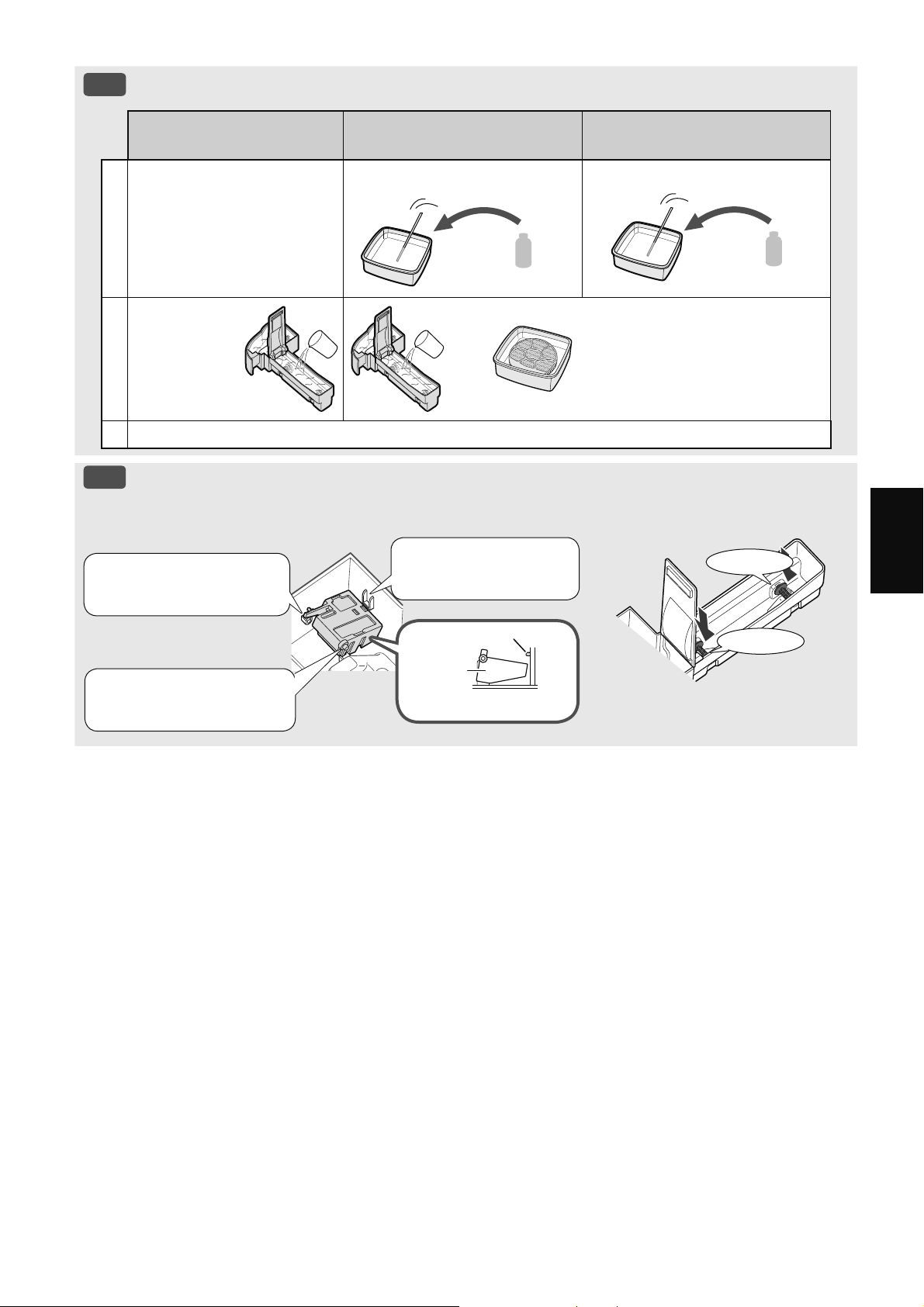
ZH-21
Иކ
ࡉڿ
ױѽࡍ桱֠࠲䄡
ࡴոࣩ⧯ۑࡍӶ
юԆ࢘ۺ
㮑㸦懤
ୂӣ哦ڃ߄։
Ј٪߈্ࣩ 100% ࣌㮑㸦㾘
1
1. رۺ▲ԡࡊ澞
2. ࢍԆصક⨟۰ࢎӷ澞
2 1/2 ߞࡊ
3 咰⦵
3 ߞࡊ
1/4 ߞ
2
䂫ࡥ 30 ӣ୕澞 䂫ࡥ 30 ӣ୕澞
ײߧ҅㮣㸸㾪ҁОஔ䃠
ө䂫ࡥޞ
3
ࢎࡊӏ݊չ⨟۰ࢎӷ۪ஔ䃠澞
ࡉڿ
ױѽ،ࡠ
ࡠ ࡿߕ
⬅ג
⬅ג
3. ر࣌ݖҵࡿՐ▲
ҋӄ澞
1. رࡿݖҵ࠴࣌
Ј澞
ࠦ۬வ֣
࣌
ࡿ
ࠦ۬வ֣
2. ر࣌ݖҵࡿ
ӄ澞
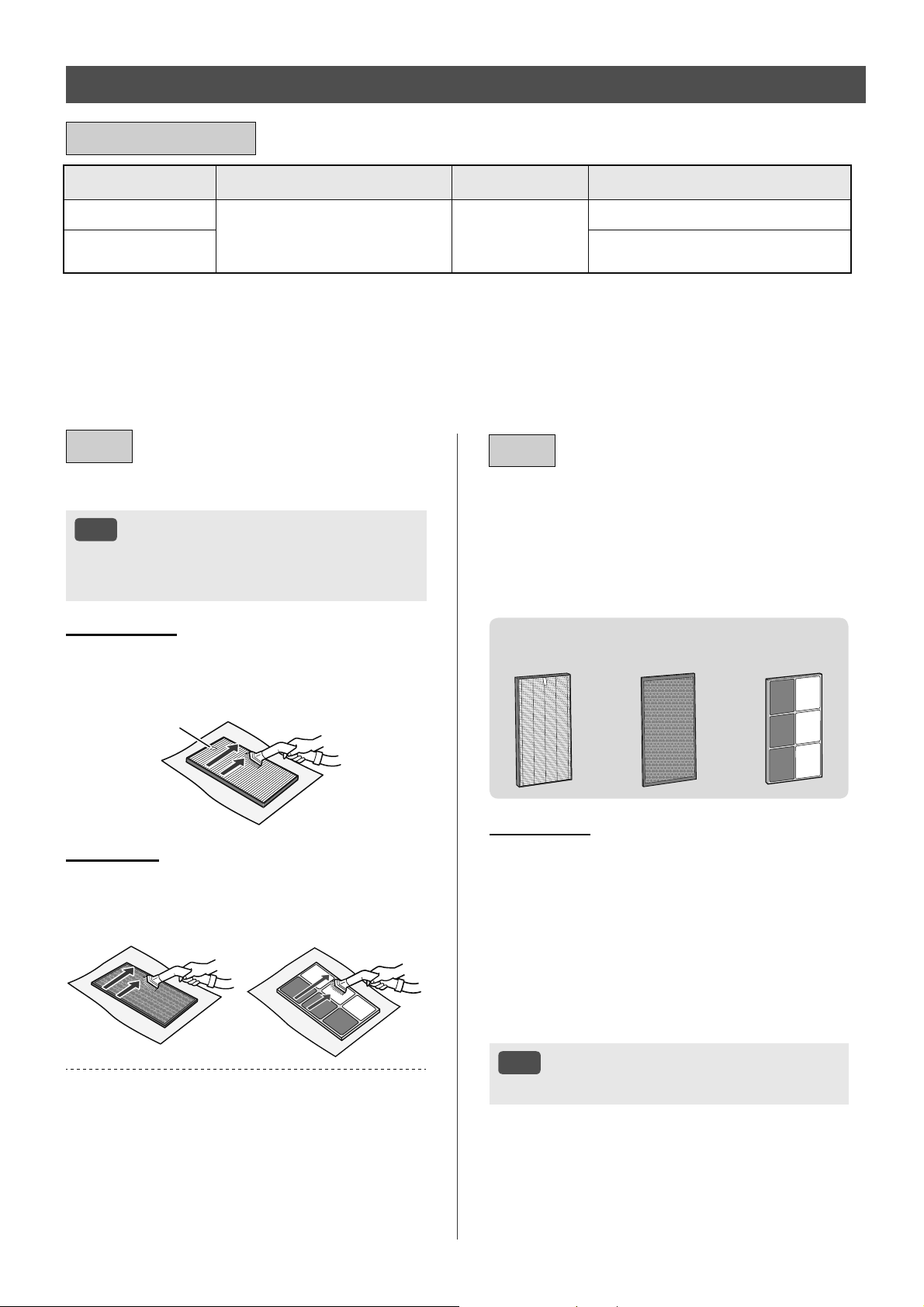
ZH-22
ࢂযգ ঢ۵մޫ ޣל࣐҄حշ ޟܦࢂযֹࣩՙ
HEPA ଋࢡৠ
ڢࢱظৼޞ ڢӟՍ߄ڑ
նޞ ۪߃▲ࠩ澞
10 ٶ
*
1澝 2
FZ-D40HFE
䮽նଋࢡৠ
FZ-D40DFE ю KI-N40
FZ-G40DFE ю KI-N50
*1 ߿݇ޙߎ֘Ӳଭԣѫ JEM 1467 ઁؔ ߂ם҅خոީљמ 5 ݵࢹঈࢹОׂӕ Њޏֺଋࢡৠࡁ ஔ
ظ / ஔ厉ԃӗص▲ԡ澞 ڏઑ֨ې⥐࣪Ј ைয֪݅ଋࢡৠ澞
*2 ܶؔ App ر߿݇҅ەӑ ପ݅ୂў澞
ࢂযحշ֛ۑࢺ澝 ࣐҄ѝոуռѸুڐ澞 ױ߈уռ֧ࠢސૹ؞ڇޟДଜࣩࢺЗ࣐҄ PM2.5
ۊњڎޟ֩ޟܦࢂয澞
HEPA ࢂয / 䮼յࢂয
ޟܦոঢ۵մޫ
ୣࢂযІࣩ䍦ط澞
ࡉڿ
• બԓࢎଋࢡৠ澞 બԓرҿйஆҰЈ澞
իөଋࢡৠѫעݼ澞
HEPA ࢂয
юܔչࢎ߶ઓவ澞 બԓࢎՐ▲வ澞
ଋࢡৠૻ劲ڞ બشڶЉןଋԃ澞
߶
䮼յࢂয
ДЗவୃՕљࢎ澞
ଋࢡৠૻ劲ڞ બشڶЉןଋԃ澞
(KI-N40)
(KI-N50)
சޞݐ ଋࢡৠ⩽ݶୂӣڑնՕѫӣઆ ଭۨ
ҿѕڑն澞 ߿݇҅࣪ٛڑػҿީ֨ߢঀ࣪ ૻ
ପٯ؟ل҅࣪ଓОې⥐ И҅фսޞ пڑ
նѫ֨ࡁߊޞӄՊڱОڠࢸ澞
֨ەӑЈљՃࢎեёޗࡣࢎஔڑնޞ બ݅ଋࢡ
ৠ澞
ঢ۵
ޟܦ
ޥһޟܦࢂযݿױѽ،ࣩރ Կ
9 澞
•
બջતۓ୦߄ҼײѾ݅ଋࢡৠ澞
•
ю҅ЋОߎфսગઋଋࢡৠ澞
ޟܦࢂযݿ ڎЇફ࣐҄ݺޫ澞
FZ-D40HFE
▲ў
FZ-D40DFE
▲ў
FZ-G40DFE
▲ў
דࣂࢂয
બܷࣁڢ֪ࡣگࡣઁהࣲ݅Јߛଋࢡৠ澞
HEPA ࢂযݪ ͵
ৼ▿䏦澝 ৼ◢䏦
䮼յࢂযݪ ͵
ю KI-N40
ৼ▿䏦澝 ৼ懜澝 ࡴۅ䎮
ю KI-N50
澝 ABS ߹劮
ࡉڿ
• બԓࢎ୍۪ז҅݅ଋࢡৠ澞
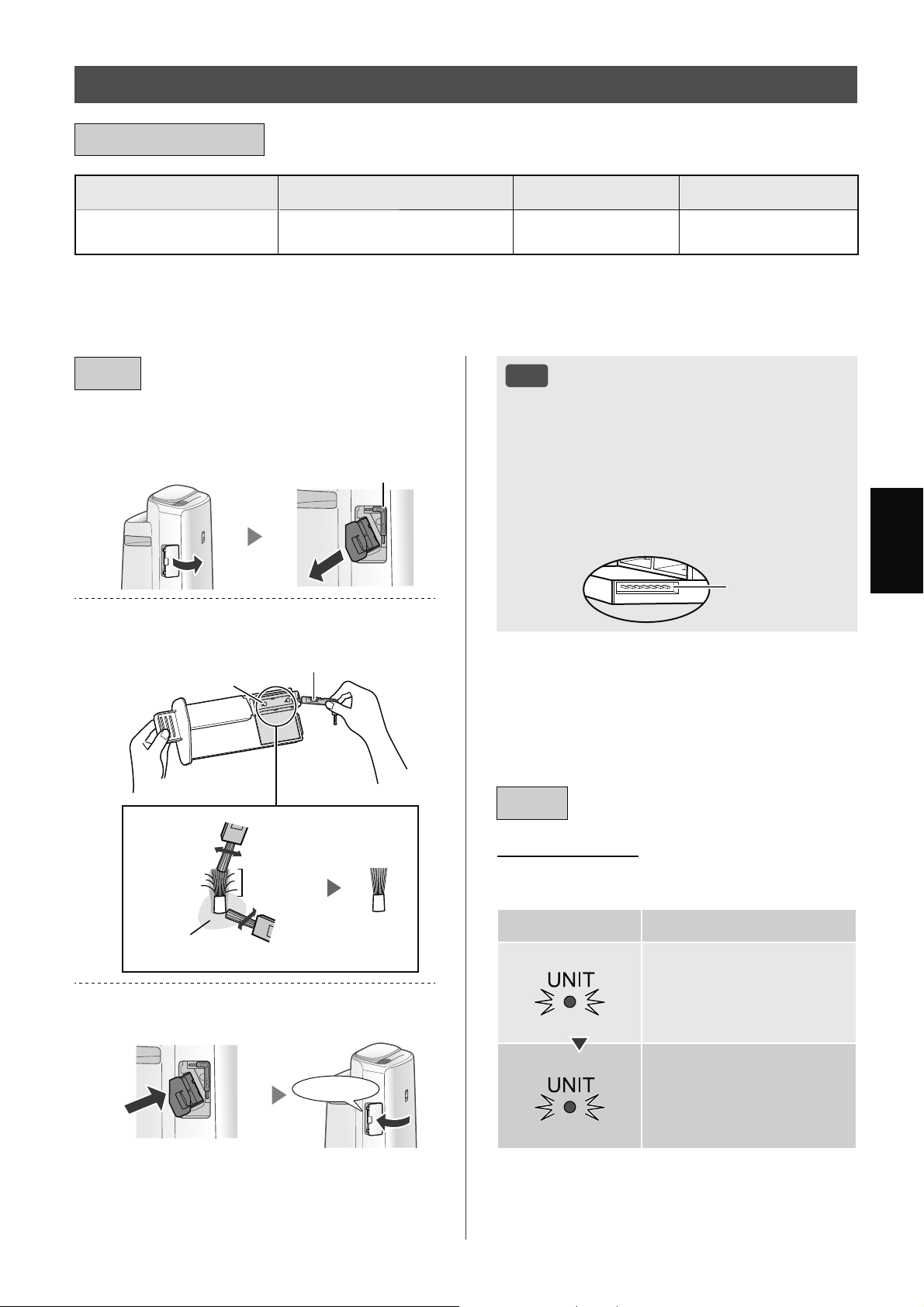
ZH-23
Иކ
՞Ӣգ ঢ۵մޫ ޣל࣐҄حշ ޟܦֹՙ
Ӕ৩Շࣿ
*
1
ԡٶ۪ڷޞைয 19,000 شޞ
*
2澝 3
IZ-C90ME
*1 љЈ ر ȔӔ৩Շࣿȕ এО Ȕȕ澞
*2 ݅ޞرପଋ݅ܶࢰପ澞
*3 ܶؔ App ر߿݇҅ەӑ ପ݅ୂў澞
ӓসՆ࣏
ࣔ߃߂
ޟܦոঢ۵մޫ
ঢ۵
1.
ڏࣴ դۿӞࣲ澞
ࢎӳ
2.
ୣࣔ߃߂Іࣩ䍦ط澞
ࢎӳ
ߢ
ࡍդࡍӸ
ׂߢյ֠
ߢ
3.
ذࣲܷҴуռЗ ࣴװࣴ澞
⬅ג
ࡉڿ
• Љ҅ஔࢎӳљיѠѾБࢎ
澞 իөѫحӟ࣫ݻஞ澞
• ࢎଋИ رߢړڝՕѫحܑލ۪݊
ѸЉѫڧրݼߧ澞
• બԓઇߢ澞 իөѫح䡟䡺 / 䢸䡲澞
• બԓݷՊߢߡ澞 իөѫړְ؉澞
• બԓઇକݎঀ澞 իөѫړְ؉ћ澞
କݎঀ
ޟܦ
ޟܦܗ䍥
ڢۈޞଋ 17,500 شޞ ݅ܶࢰѫ
ࢷ ݅Ӕ৩Շࣿ澞
ݿ ރ
17,500 سݿ
ۣ
݅
19,000 سݿ
ڽ
Ӕ৩ՇࣿЉѫୋݹ
ӟӔ৩澞
* ݅ޞЊଣؔݱҁࠥڔޗҼ澞
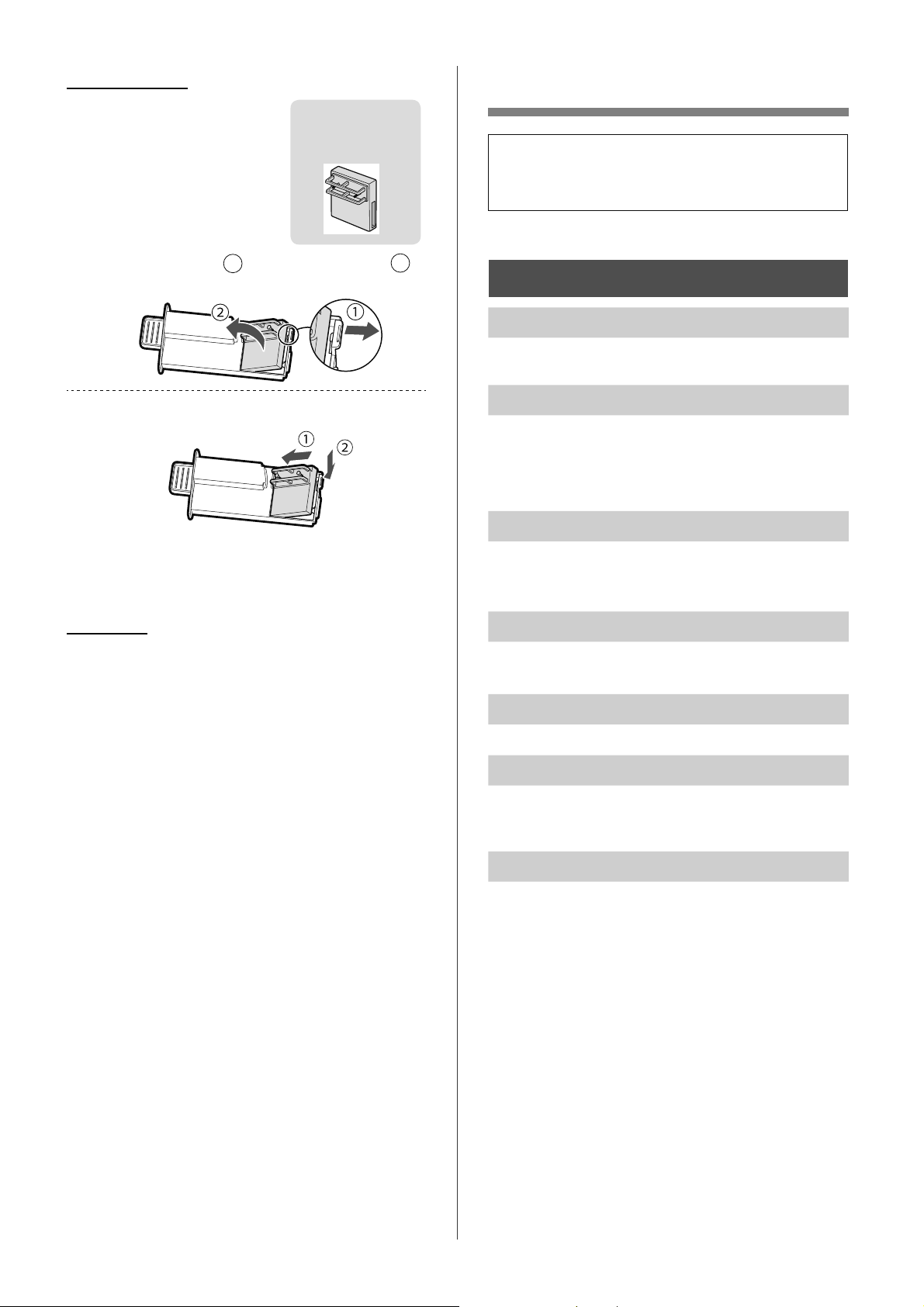
ZH-24
ݜ୭ܭୣ
•
ܪ۸߆ԇઢФӹ બ߲Јސઆঋ
ࠀ ֜Оӟ࣫ொՕЉީфսݻ
ஞ澞
һиޯуռ
ڐյո䏕ܕড֧澞
• ࠒ߲ଋࢡৠ澞 ײߧଋࢡৠЇԾڮ બࢎ۪
݅澞
уռܭݚࣩࠩޥڐյ澞
• ࠒ߲ଋࢡৠީիٝڮ澞
• ࢎ۪݅ଋࢡৠ澞
• юՕ҅ޏ௪ߛࡊ澞 ײߧ҅ҿѕࡊ࢛ Օ
ح朐唾澝 唾۪ূ唾䇣ࣿ澞
ࠩЗޥன䏕䏕ݿ уռЈৗࠔٮ澞
• ґфս؍֨Ѯ۟֘ݍࡹӱࢹࢹ֪ސ澞
• ࠒ߲ࢲݽࢱظѮ۟֘ڐՍީիׇѻׇ۪澞 ײߧ
ڐՍׇѻׇ۪બࢎѮ۟֘ଋࢡৠ۪եவߡ澞
ݰуռո / ۋݰࢂযࣩࠩյ澞
• ܜ݊⸾މե Օѫӟ࣫ૹڳڑն澞
ڑնЉڧրଋࢡৠଋࢡۅыЊФݎઇЭޗ؞澞
уռՆӞ֏Ȿۋࢅב澞
• фսфࣿޞ ՕѫՇӟⲮ۪ࢤঋג澞
Ԯ҄ࠩ࠲࡙ ࡍڅܗ䍥ЬѪձ৸澞
• ڢߎфսӪӪݎପ࢛ޞ ⩾ӟࡈՕѫ߄
ߒૅ澞 ܣЈфս࢛ݖף ڭ▲ӣ୕ Ӈ୍ޏ
ݖҵфսݖף澞
Ԯ҄ࠩٳӓ ࡍڅܗ䍥Ьފঀ৸澞
• ࢲݽࢱظѮ۟֘ڐՍࡑׇ۪ޞڧրѮ۟֘҅
澞 ૹૹࢎѮ۟֘ଋࢡৠ۪եவߡ澞
ױѽޟܦ
•
બջતۓ୦߄ҼײѾ
݅澞
•
ю҅ЋОߎфսગઋ
澞
IZ-C90ME
▲ў
1.
ՇЇࣲԩ (
1
), դՇӞ (
2
).
2.
Іݰ澞
• ڢ݅Оޏୂўޞ ઋޞ֘ر୍ٷଏ֛ӱ
19,000 شޞ澞
ڑ
બܷࣁڢ֪ࡣگࡣઁהࣲٝ҅澞
ݪ ͵
ৼثи䟤懤Ѓи懳懜澝 னў
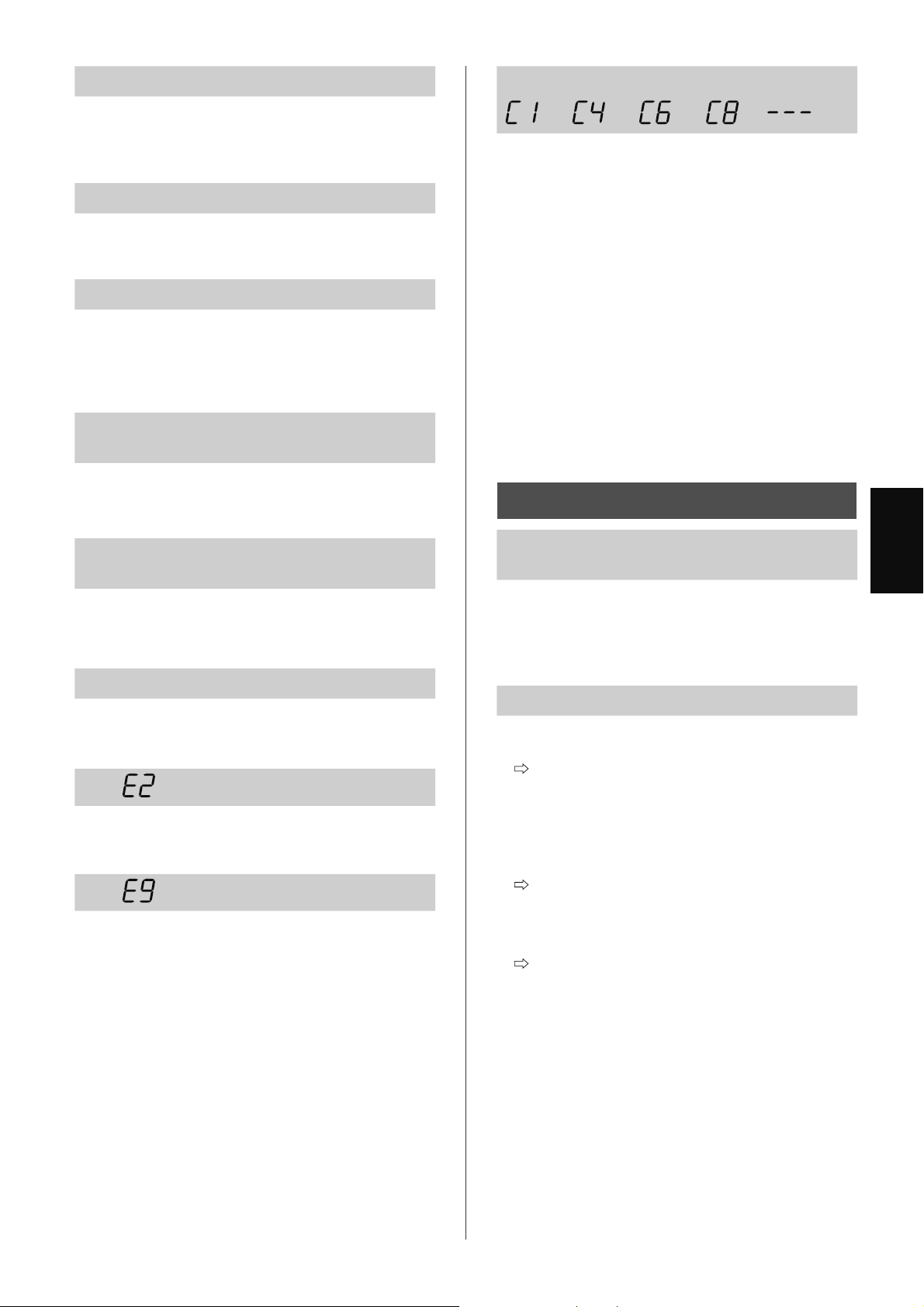
ZH-25
Иކ
ࡍڅܗ䍥ݘՉச৸澞
• ڢࢲݽࢱظѮ۟֘չڑնѮ۟֘ࠒࡹӱߒૅޞ
ࢎچܶࢰѫԈݷՊோ澞 ײߧޗைযݷ
Պோ ՕݷѮ۟֘ࢲݽچ澞 আ 14澝
15
ࢂযঢ۵䍥䎯ш
• ܔґ⡭۪݅Ԇ࢘ଋࢡৠե બر࢛ি
କݎӱ࢛ݖڇЇ ࣀեઇݧଋࢡৠזѹܷ
ଋ 3 澞 আ 19
ࠔދوٜһ澞
• ڢࢰҰݏӲગО ȔԈȕ ޞ ۰௲۪ה
йࠥڔޞ ࢰҰѫԈࣂࢯ澞 ࠴י ڢࢰ
ҰݏӲગО ȔҼȕ ޞ ࣁޢࢰৄҼ澞
ײߧЉҼࣁޢࢰ બرࢰҰݏӲગО Ȕ
Ұȕ澞 আ 14澝 15
ࠔދوІࣩґ㔴Љםࠩஓ۶ۋ؛ӃҾ؈ࡹ
څۋࡴڅދࣩґ㔴ЈԘକ澞
• יչӄљՃ؟ڈ࣪ сପ澝 ؟Иࠡ
ككރঈ ՕѫحયރЉգ澞
• ުӄ࢘چ߄۱Љգ澞
ࠫݸࠫݿ ࠔދوІࣩࡹڅܗ䍥Ј
Ѫ䎯ш澞
• ӄ࢘چଇӱՠଠࡊٵ Ҡ࠲Ԇ࢘澞
• ࠒ߲ࡿיࠃЇ߄ޗߒૅ澞 ࢎԆ࢘ۺ澞 ґ
ߎфսݹ֨ࡊٵவЇ澞
ࠫЗࣩࠫଞ࠻ޥӖشۋӖشמۄ澞
• બࠒ߲Ԇ࢘ۺչࡊঔީիٝ࠳؍澞
• બࠒ߲Ԇ࢘ଋࢡৠ澞 બࠒ߲ଋࢡৠ ڢଋࢡৠள
ٯ剡ޞ બ݅ଋࢡৠ澞
ދ 澞
• ઍԆ࢘ଋࢡৠ澝 Ԇ࢘ۺչ࢞ߴ؍࠳ ࣀ
ե୍ޏ۸ڐ࢛澞
ދ 澞
• ґӔ৩Շࣿ࠳ݖҵ澞
ܣӟӔ৩Շࣿ ୍ޏݖҵߍঀ Ӈ
ݱҁ澞
ދױЇґ㔴У▁澞
• ܣЈфս࢛ݖף ঈڭ▲ӣ୕ Ӈ୍ޏݖҵф
սݖף澞
һи Wi-Fi Ԅৗ
ݸࡄૹ App وٲܯࠩӓԖ֗Љષ࣒֗
ࣩ Wi-Fi澞
• ࠒ߲࠳֨҅૨֘ઁࠀ澞
• લޅ૨֘չמিސէ ر૨֘չמি▲
ࢵঈঈ澞 ࣀե୍ޏ۸ڐ૨֘ ٷӇࠩۼӬ
ԗગ澞
ࠩӓԖ֗ݸࡄڎЉޕৗהУࣩܯ澞
• ࡈӔԗ֘չ҂ગוକݎީգ▲З૨֘
ը;
رࡈӔԗ֘չ҂ગוକݎӱգ▲З૨
֘Ї澞
ײߧёࣀޗࡣକݎ ડرગוକݎӱ૨
֘ 2.4 GHz ை࠼澞
• ࠳֨҅ગוۈރީիଋ▲ՖࡈӔԗ֘
߂םࡨӆރ ?
▲ՖࡈӔԗ֘Ї߂ךՕљࡨӆ 10 Ֆગ
ו澞
• ֨▲ՖગוЇࡨӆфս લ澝 ࡈӔԗ
֘ঈ ۈރީիଋܶؔ߂םރ ?
▲Ֆગו߂ךՕљࡨӆ 30 Зфս澞
ZH-26
ݸࡄёޕৗהૡૢݒҀ澞
• ࡈӔԗ֘ Wi-Fi ܶࢰީիڐկ;
ײߧ Wi-Fi ࢰҼ બۼ ȔA1: Wi-Fi ଠ
֘ڐ / Ҽȕ ۸ڐфս Wi-Fi澞আ 16
• ࡈӔԗ֘ЊગוФକݎ؏ۨдը;
ગࡈӔԗ֘ЊગוФକݎ澞
আ 11
ޟܦષ࣒֗ݿ
• رࡈӔԗ୍֘ޏକݎӱ૨֘Ї澞
1. ܷ ȔWi-Fiȕܷ3 Ҽ Wi-Fi ԅ澞
2. ۼ ȔӬગ 2 କݎࡈӔԗ֘չ૨
֘ȕ澞 আ 10
ޟܦޕৗהݿ
• બۼљЈ࠵澞
1. ֨ܶؔ App ИӭஔޛગוࡨӆҒێ澞
2. ҅ޏગוۼ ȔӬગ
1 Јૺٷࡨӆ љՃ
3 ࡈӔԗ֘Њગוକݎȕ澞
আ 10澝 11
ӔהڄڑۋрࠩӓԖ֗ݿ
• બۼљЈ࠵ அ࠲ЗыҒێࡠர澞
1. ֨ܶؔ App ИӭஔࡈӔԗ֘ࡨӆҒێ澞
2. બۼ ȔA4: Wi-Fi ԅӬԗȕ澞
আ 16
࣒Ѕݱрࣩ㖊Ӑ
• Оஅ࠲আІސளࡣઘ બۼ ȔA4: Wi-Fi ԅ
Ӭԗȕ澞 আ 16
Wi-Fi ܗ䍥ۄ
• ؉ީљЈࣙہФ▲澞
A. ࡈӔԗ֘չ૨֘ Wi-Fi କݎٝڏ澞
B. ࡈӔԗ֘Њગוକݎٝڏ澞
C. ࡈӔԗ֘ Wi-Fi ԅў࠳֨ޏ澞
Wi-Fi ܗ䍥ڼ
• ৠৌ୪ન澞 બ֨ ȔA7: ު Wi-Fi ৠৌࣙہȕ И
ઍ Wi-Fi ৠৌࣙہ澞 আ 17
Wi-Fi ܗ䍥һ
• ࡈӔԗ֘ޗࡣକݎ૨֘澞 ࠒ߲љЈەӑ澞
A. ࢛ݖףީի࠳ݖҵ;
B. Wi-Fi ԅީիҠ࠲;બ֨ ȔA7: ު Wi-Fi ৠ
ৌࣙہȕ Иઍ Wi-Fi ৠৌࣙہ澞 আ 17
Wi-FiࠆړЇЈৗ܌Ȑ ȑ২Ȑ ȑ
澞
16 - 17
• ײߧ Wi-Fi ଠ֘Ҽ ȔA2ȕӱȔA6ȕՕ
ޗࡣଣܫ澞
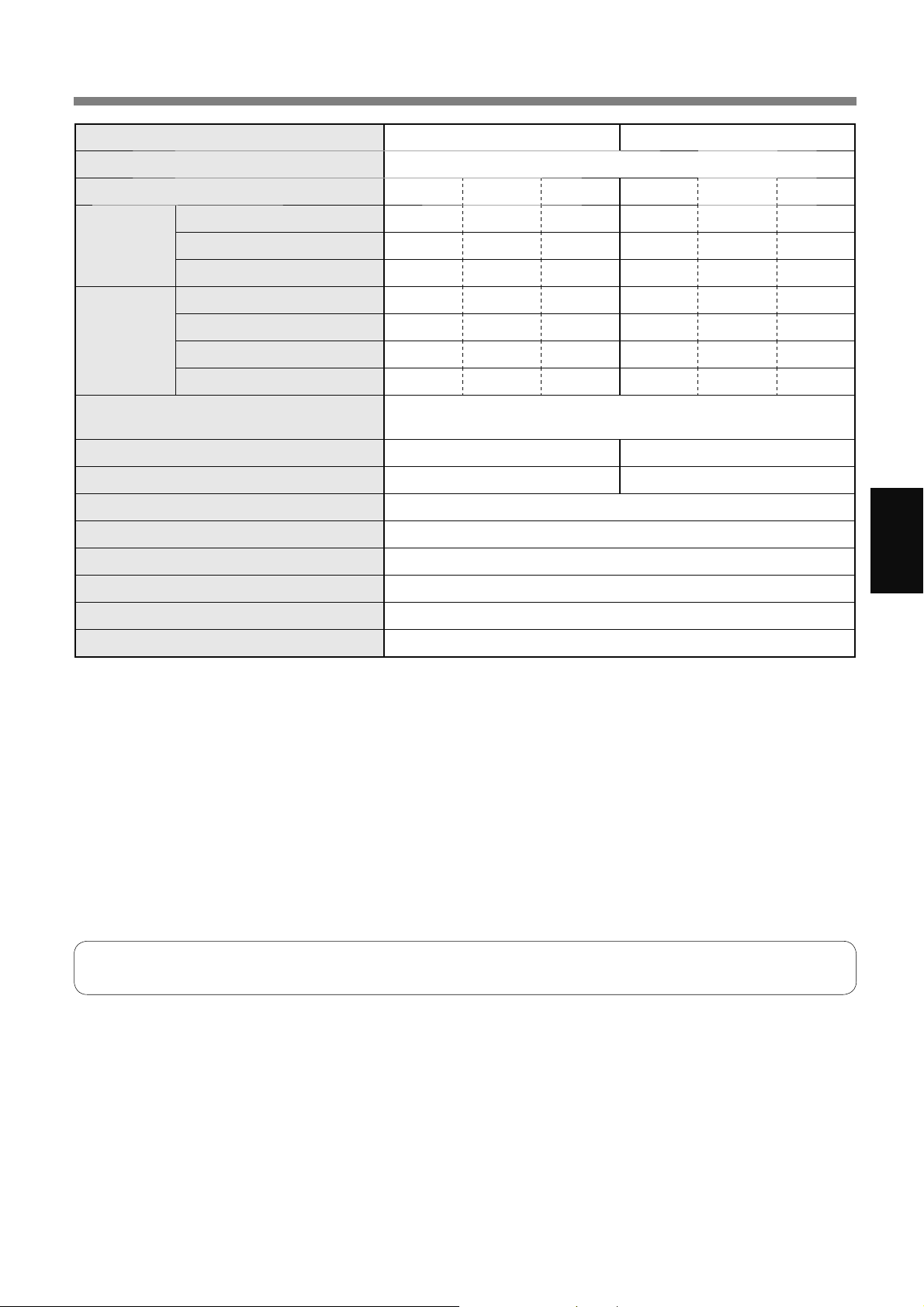
ZH-27
Иކ
ߡ
ֺ՚ KI-N50 KI-N40
࢛҈ځ 220-240 V ~ 50-60 Hz
ବલ ߂ם Иঈ Ѻ ߂ם Иঈ Ѻ
ࡈࢎӔ
ବ ސজ / شޞ 306 168 60 240 150 60
ௌؔԅࣤ W 51 17 5.5 29 14 5.5
֙ dBA
*
1
51 40 17 46 38 17
ࡈԆ࢘չ
ࡈࢎӔ
ବ ސজ / شޞ 252 186 66 174 138 60
ௌؔԅࣤ W 32 22 6.7 17 15 6.5
֙ dBA
*
1
47 43 20 38 35 19
Ԇ࢘ mL / شޞ
*
2
600 480 200 440 370 190
ו৴ W
1.7 ڢ Wi-Fi ଠ֘۸ڐޞ澞
1.3 ڢ Wi-Fi ଠ֘Ҽޞ澞
ڏઑ۰வ ٵސজ
*
3
~ 38 ~ 28
إچঙڏઑ۰வ ٵސজ
*
4
~ 21 ~ 17
Ԇ࢘ۺؠ (L) 2.7
Ѯ۟֘ ࢲݽࢱظ / ڑն / Ұি / چչ࢘چ
ଋࢡৠঝֺ HEPA
*
5
/ 䮽ն / Ԇ࢘
࢛িچ জ 2.0
ؾت ࡄজ 384 ء 230 ࢋ 619
୍ Ԟұ 8.2
*1
•
֙ג߿݇ޙߎ֘ࣿф৻ՠѫ JEM1467 ߶ӕࡹؔ澞
*2
•
ࡈԆ࢘சӄչיچՃ࢘چՊԗ৲߄۱Љգ澞
ࡈԆ࢘சچЇԟ۪࢘چЈ৲ڠ澞
ࡈԆ࢘சچѺ۪࢘چЇԟ৲ӗڞ澞
•
ઋߚў 20 ȭ ث࢘چ 30% অՠ JEM1426澞
*3
•
ڏઑ۰வީܶ֨ڠࠥڔЈфս߂ՠଠ۰வ澞
•
ڏઑ۰வީܶ֨ 30 ӣ୕ӄԾஔ֡ؔࢱظ梂টԚֿ অՠ JEM1467澞
*4
•
ڢфսݹ֨ழѹ澝 љИঈ И ࠥڔ Ќ֪வ 1.2 জޞ ֨۰ИסלࠒࡹӱސԻজ
ࡈИխ 25000 З澞
*5
•
ଋࢡৠՕԾஔךй 99.97% 0.3 ڳজՃљЇםش梂ট࣒ অՠ JEM1467澞
ה࣐ৃࣔଞ
ڢфս࢛ݖףݖҵݖڇޞ фսѫфࣿו৴ ߛ૨澞 Од બйЉ҅фսޞܣஔ࢛ݎি澞
i
,17(//(&78$/3523(57<5,*+76)257+,6352'8&7
Ŷ6RIWZDUHVWUXFWXUH
Software installed in this product is structured with multiple independent
software components, each of them has our or third-party's copyright.
Ŷ6RIWZDUHRIRXUGHYHORSPHQWDQGIUHHVRIWZDUH
Among the software components of this product, for software we
developed or created and incidental documents has our copyright. And
they are protected by copyright law, international regulation and other
related laws.
Also this product uses software components distributed as free software
with third-party's copyright.
Ŷ2EOLJDWLRQRIOLFHQVHLQGLFDWLRQ
Some software components installed in this product are required to
indicate the license by those copyright holders.
License indications of such software components are as below:
Ɣ([SDW
Copyright (c) 1998, 1999, 2000 Thai Open Source Software Center Ltd and Clark
Cooper
Copyright (c) 2001, 2002, 2003, 2004, 2005, 2006 Expat maintainers.
Permission is hereby granted, free of charge, to any person obtaining a copy of
this software and associated documentation files (the "Software"), to deal in the
Software without restriction, including without limitation the rights to use, copy,
modify, merge, publish, distribute, sublicense, and/or sell copies of the Software,
and to permit persons to whom the Software is furnished to do so, subject to the
following conditions:
The above copyright notice and this permission notice shall be included in all
copies or substantial portions of the Software.
7+(62)7:$5(,63529,'('$6,6:,7+287:$55$17<2)$1<.,1'
EXPRESS OR IMPLIED, INCLUDING BUT NOT LIMITED TO THE WARRANTIES
OF MERCHANTABILITY, FITNESS FOR A PARTICULAR PURPOSE AND
121,1)5,1*(0(17,112(9(176+$//7+($87+25625&23<5,*+7
HOLDERS BE LIABLE FOR ANY CLAIM, DAMAGES OR OTHER LIABILITY,
WHETHER IN AN ACTION OF CONTRACT, TORT OR OTHERWISE, ARISING
FROM, OUT OF OR IN CONNECTION WITH THE SOFTWARE OR THE USE OR
OTHER DEALINGS IN THE SOFTWARE.
Ɣ:VOD\
The MIT License
Copyright (c) 2011, 2012 Tatsuhiro Tsujikawa
Permission is hereby granted, free of charge, to any person obtaining a copy of
this software and associated documentation files (the "Software"), to deal in the
Software without restriction, including without limitation the rights to use, copy,
modify, merge, publish, distribute, sublicense, and/or sell copies of the Software,
and to permit persons to whom the Software is furnished to do so, subject to the
following conditions:
The above copyright notice and this permission notice shall be included in all
copies or substantial portions of the Software.
7+(62)7:$5(,63529,'('$6,6:,7+287:$55$17<2)$1<.,1'
EXPRESS OR IMPLIED, INCLUDING BUT NOT LIMITED TO THE WARRANTIES
OF MERCHANTABILITY, FITNESS FOR A PARTICULAR PURPOSE AND
121,1)5,1*(0(17,112(9(176+$//7+($87+25625&23<5,*+7
HOLDERS BE LIABLE FOR ANY CLAIM, DAMAGES OR OTHER LIABILITY,
WHETHER IN AN ACTION OF CONTRACT,TORT OR OTHERWISE, ARISING
FROM, OUT OF OR IN CONNECTION WITH THE SOFTWARE OR THE USE OR
OTHER DEALINGS IN THE SOFTWARE.
ƔOLE)/$&
Copyright (C) 2000-2009 Josh Coalson
Copyright (C) 2011-2014 Xiph.Org Foundation
Redistribution and use in source and binary forms, with or without modification,
are permitted provided that the following conditions are met:
- Redistributions of source code must retain the above copyright notice, this list of
conditions and the following disclaimer.
- Redistributions in binary form must reproduce the above copyright notice, this
list of conditions and the following disclaimer in the documentation and/or other
materials provided with the distribution.
- Neither the name of the Xiph.org Foundation nor the names of its contributors
may be used to endorse or promote products derived from this software without
specific prior written permission.
7+,662)7:$5(,63529,'('%<7+(&23<5,*+7+2/'(56$1'
CONTRIBUTORS ``AS IS'' AND ANY EXPRESS OR IMPLIED WARRANTIES,
INCLUDING, BUT NOT LIMITED TO, THE IMPLIED WARRANTIES OF
MERCHANTABILITY AND FITNESS FOR A PARTICULAR PURPOSE ARE
',6&/$,0(',112(9(176+$//7+()281'$7,2125&2175,%87256
BE LIABLE FOR ANY DIRECT, INDIRECT, INCIDENTAL, SPECIAL, EXEMPLARY,
OR CONSEQUENTIAL DAMAGES (INCLUDING, BUT NOT LIMITED TO,
352&85(0(172)68%67,787(*22'6256(59,&(6/2662)86(
'$7$25352),7625%86,1(66,17(55837,21+2:(9(5&$86('
AND ON ANY THEORY OF LIABILITY, WHETHER IN CONTRACT, STRICT
LIABILITY, OR TORT (INCLUDING NEGLIGENCE OR OTHERWISE) ARISING IN
$1<:$<2872)7+(86(2)7+,662)7:$5((9(1,)$'9,6('2)7+(
POSSIBILITY OF SUCH DAMAGE.
Ɣ,Z,3
Copyright (c) 2001, 2002 Swedish Institute of Computer Science.
All rights reserved.
Redistribution and use in source and binary forms, with or without modification,
are permitted provided that the following conditions are met:
1. Redistributions of source code must retain the above copyright notice, this list
of conditions and the following disclaimer.
2. Redistributions in binary form must reproduce the above copyright notice, this
list of conditions and the following disclaimer in the documentation and/or other
materials provided with the distribution.
3. The name of the author may not be used to endorse or promote products
derived from this software without specific prior written permission.
7+,662)7:$5(,63529,'('%<7+($87+25CC$6,6$1'$1<(;35(66
OR IMPLIED WARRANTIES, INCLUDING, BUT NOT LIMITED TO, THE IMPLIED
WARRANTIES OF MERCHANTABILITY AND FITNESS FOR A PARTICULAR
385326($5(',6&/$,0(',112(9(176+$//7+($87+25%(
LIABLE FOR ANY DIRECT, INDIRECT, INCIDENTAL, SPECIAL, EXEMPLARY,
OR CONSEQUENTIAL DAMAGES(INCLUDING, BUT NOT LIMITED TO,
352&85(0(172)68%67,787(*22'6256(59,&(6/2662)86(
'$7$25352),7625%86,1(66,17(55837,21+2:(9(5&$86('
AND ON ANY THEORY OF LIABILITY, WHETHER IN CONTRACT, STRICT
LIABILITY, OR TORT (INCLUDING NEGLIGENCE OR OTHERWISE) ARISING IN
$1<:$<2872)7+(86(2)7+,662)7:$5((9(1,)$'9,6('2)7+(
POSSIBILITY OF SUCH DAMAGE.
This file is part of the lwIP TCP/IP stack.
Author: Adam Dunkels <[email protected]>
Ɣ-601
Copyright (c) 2010 Serge A. Zaitsev
Permission is hereby granted, free of charge, to any person obtaining a copy of
this software and associated documentation files (the "Software"), to deal in the
Software without restriction, including without limitation the rights to use, copy,
modify, merge, publish, distribute, sublicense, and/or sell copies of the Software,
and to permit persons to whom the Software is furnished to do so, subject to the
following conditions:
The above copyright notice and this permission notice shall be included in all
copies or substantial portions of the Software.
7+(62)7:$5(,63529,'('$6,6:,7+287:$55$17<2)$1<.,1'
EXPRESS OR IMPLIED, INCLUDING BUT NOT LIMITED TO THE WARRANTIES
OF MERCHANTABILITY, FITNESS FOR A PARTICULAR PURPOSE AND
121,1)5,1*(0(17,112(9(176+$//7+($87+25625&23<5,*+7
HOLDERS BE LIABLE FOR ANY CLAIM, DAMAGES OR OTHER LIABILITY,
WHETHER IN AN ACTION OF CONTRACT, TORT OR OTHERWISE, ARISING
FROM, OUT OF OR IN CONNECTION WITH THE SOFTWARE OR THE USE OR
OTHER DEALINGS IN THE SOFTWARE.
ƔPEHG7/6
Copyright (C) 2006-2015, ARM Limited, All Rights Reserved
/LFHQVHGXQGHUWKH$SDFKH/LFHQVH9HUVLRQWKH/LFHQVH
you may not use this file except in compliance with the License.
You may obtain a copy of the License at
http://www.apache.org/licenses/LICENSE-2.0
Unless required by applicable law or agreed to in writing, software distributed
under the License is distributed on an "AS IS" BASIS, WITHOUT WARRANTIES
OR CONDITIONS OF ANY KIND, either express or implied. See the License for
the specific language governing permissions and limitations under the License.
ƔZSDVXSSOLFDQW
Copyright (c) 2003-2017, Jouni Malinen <[email protected]> and contributors
All Rights Reserved.
Redistribution and use in source and binary forms, with or without modification,
are permitted provided that the following conditions are met:
1. Redistributions of source code must retain the above copyright notice, this list of
conditions and the following disclaimer.
2. Redistributions in binary form must reproduce the above copyright notice, this
list of conditions and the following disclaimer in the documentation and/or other
materials provided with the distribution.
3. Neither the name(s) of the above-listed copyright holder(s) nor the names of
its contributors may be used to endorse or promote products derived from this
software without specific prior written permission.
7+,662)7:$5(,63529,'('%<7+(&23<5,*+7+2/'(56$1'
CONTRIBUTORS "AS IS" AND ANY EXPRESS OR IMPLIED WARRANTIES,
INCLUDING, BUT NOT LIMITED TO, THE IMPLIED WARRANTIES OF
MERCHANTABILITY AND FITNESS FOR A PARTICULAR PURPOSE
$5(',6&/$,0(',112(9(176+$//7+(&23<5,*+72:1(525
CONTRIBUTORS BE LIABLE FOR ANY DIRECT, INDIRECT, INCIDENTAL,
SPECIAL, EXEMPLARY, OR CONSEQUENTIAL DAMAGES (INCLUDING, BUT
127/,0,7('72352&85(0(172)68%67,787(*22'6256(59,&(6
LOSS OF USE, DATA, OR PROFITS; OR BUSINESS INTERRUPTION)
+2:(9(5&$86('$1'21$1<7+(25<2)/,$%,/,7<:+(7+(5,1
CONTRACT, STRICT LIABILITY, OR TORT (INCLUDING NEGLIGENCE OR
OTHERWISE) ARISING IN ANY WAY OUT OF THE USE OF THIS SOFTWARE,
(9(1,)$'9,6('2)7+(3266,%,/,7<2)68&+'$0$*(
ƔQHZ/LE
(1) Red Hat Incorporated

ii
Copyright (c) 1994-2009 Red Hat, Inc. All rights reserved.
This copyrighted material is made available to anyone wishing to use, modify,
copy, or redistribute it subject to the terms and conditions of the BSD License.
This program is distributed in the hope that it will be useful, but WITHOUT
ANY WARRANTY expressed or implied, including the implied warranties of
MERCHANTABILITY or FITNESS FOR A PARTICULAR PURPOSE. A copy of this
license is available at
http://www.opensource.org/licenses. Any Red Hat trademarks that are incorporated
in the source code or documentation are not subject to the BSD License and may
only be used or replicated with the express permission of Red Hat, Inc.
(2) University of California, Berkeley
Copyright (c) 1981-2000 The Regents of the University of California.
All rights reserved.
Redistribution and use in source and binary forms, with or without modification,
are permitted provided that the following conditions are met:
* Redistributions of source code must retain the above copyright notice, this list
of conditions and the following disclaimer.
* Redistributions in binary form must reproduce the above copyright notice,
this list of conditions and the following disclaimer in the documentation and/or
other materials provided with the distribution.
* Neither the name of the University nor the names of its contributors may
be used to endorse or promote products derived from this software without
specific prior written permission.
7+,662)7:$5(,63529,'('%<7+(&23<5,*+7+2/'(56$1'
CONTRIBUTORS "AS IS" AND ANY EXPRESS OR IMPLIED WARRANTIES,
INCLUDING, BUT NOT LIMITED TO, THE IMPLIED WARRANTIES OF
MERCHANTABILITY AND FITNESS FOR A PARTICULAR PURPOSE
$5(',6&/$,0(',112(9(176+$//7+(&23<5,*+72:1(525
CONTRIBUTORS BE LIABLE FOR ANY DIRECT, INDIRECT, INCIDENTAL,
SPECIAL, EXEMPLARY, OR CONSEQUENTIAL DAMAGES (INCLUDING, BUT
127/,0,7('72352&85(0(172)68%67,787(*22'6256(59,&(6
LOSS OF USE, DATA, OR PROFITS; OR BUSINESS INTERRUPTION)
+2:(9(5&$86('$1'21$1<7+(25<2)/,$%,/,7<:+(7+(5,1
CONTRACT, STRICT LIABILITY, OR TORT (INCLUDING NEGLIGENCE OR
OTHERWISE) ARISING IN ANY WAY OUT OF THE USE OF THIS SOFTWARE,
(9(1,)$'9,6('2)7+(3266,%,/,7<2)68&+'$0$*(
(3) David M. Gay (AT&T 1991, Lucent 1998)
The author of this software is David M. Gay.
Copyright (c) 1991 by AT&T.
Permission to use, copy, modify, and distribute this software for any purpose
without fee is hereby granted, provided that this entire notice is included in all
copies of any software which is or includes a copy or modification of this software
and in all copies of the supporting documentation for such software.
7+,662)7:$5(,6%(,1*3529,'('$6,6:,7+287$1<(;35(6625
IMPLIED WARRANTY. IN PARTICULAR, NEITHER THE AUTHOR NOR AT&T
MAKES ANY REPRESENTATION OR WARRANTY OF ANY KIND CONCERNING
THE MERCHANTABILITY OF THIS SOFTWARE OR ITS FITNESS FOR ANY
PARTICULAR PURPOSE.
-------------------------------------------------------------------
The author of this software is David M. Gay.
Copyright (C) 1998-2001 by Lucent Technologies
All Rights Reserved
Permission to use, copy, modify, and distribute this software and its documentation
for any purpose and without fee is hereby granted, provided that the above
copyright notice appear in all copies and that both that the copyright notice and this
permission notice and warranty disclaimer appear in supporting documentation,
and that the name of Lucent or any of its entities not be used in advertising or
publicity pertaining to distribution of the software without specific, written prior
permission.
LUCENT DISCLAIMS ALL WARRANTIES WITH REGARD TO THIS SOFTWARE,
INCLUDING ALL IMPLIED WARRANTIES OF MERCHANTABILITY AND
),71(66,112(9(176+$///8&(1725$1<2),76(17,7,(6%(
LIABLE FOR ANY SPECIAL, INDIRECT OR CONSEQUENTIAL DAMAGES OR
$1<'$0$*(6:+$762(9(55(68/7,1*)520/2662)86('$7$
OR PROFITS, WHETHER IN AN ACTION OF CONTRACT, NEGLIGENCE OR
OTHER TORTIOUS ACTION, ARISING OUT OF OR IN CONNECTION WITH
THE USE OR PERFORMANCE OF THIS SOFTWARE.
(4) Advanced Micro Devices
Copyright 1989, 1990 Advanced Micro Devices, Inc.
This software is the property of Advanced Micro Devices, Inc (AMD) which
specifically grants the user the right to modify, use and distribute this software
provided this notice is not removed or altered. All other rights are reserved by
AMD.
AMD MAKES NO WARRANTY OF ANY KIND, EXPRESS OR IMPLIED, WITH
5(*$5'727+,662)7:$5(,112(9(176+$//$0'%(/,$%/()25
INCIDENTAL OR CONSEQUENTIAL DAMAGES IN CONNECTION WITH OR
ARISING FROM THE FURNISHING, PERFORMANCE, OR USE OF THIS
SOFTWARE.
So that all may benefit from your experience, please report any problems or
suggestions about this software to the 29K Technical Support Center at 800-29-
29-AMD (800-292-9263) in the USA, or 0800-89-1131 in the UK, or 0031-11-1129
in Japan, toll free. The direct dial number is 512-462-4118.
Advanced Micro Devices, Inc.
29K Support Products
Mail Stop 573
5900 E. Ben White Blvd.
Austin, TX 78741
800-292-9263
(7) Sun Microsystems
Copyright (C) 1993 by Sun Microsystems, Inc. All rights reserved.
Developed at SunPro, a Sun Microsystems, Inc. business. Permission to use,
copy, modify, and distribute this software is freely granted, provided that this notice
is preserved.
(8) Hewlett Packard
(c) Copyright 1986 HEWLETT-PACKARD COMPANY
To anyone who acknowledges that this file is provided "AS IS" without any express
or implied warranty:
permission to use, copy, modify, and distribute this file for any purpose is hereby
granted without fee, provided that the above copyright notice and this notice
appears in all copies, and that the name of Hewlett-Packard Company not be used
in advertising or publicity pertaining to distribution of the software without specific,
written prior permission. Hewlett-Packard Company makes no representations
about the suitability of this software for any purpose.
(9) Hans-Peter Nilsson
Copyright (C) 2001 Hans-Peter Nilsson
Permission to use, copy, modify, and distribute this software is freely granted,
provided that the above copyright notice, this notice and the following disclaimer
are preserved with no changes.
7+,662)7:$5(,63529,'('CC$6,6$1':,7+287$1<(;35(6625
IMPLIED WARRANTIES, INCLUDING, WITHOUT LIMITATION, THE IMPLIED
WARRANTIES OF MERCHANTABILITY AND FITNESS FOR A PARTICULAR
PURPOSE.
(11) Christopher G. Demetriou
Copyright (c) 2001 Christopher G. Demetriou
All rights reserved.
Redistribution and use in source and binary forms, with or without modification,
are permitted provided that the following conditions are met:
1. Redistributions of source code must retain the above copyright notice, this list of
conditions and the following disclaimer.
2. Redistributions in binary form must reproduce the above copyright notice, this
list of conditions and the following disclaimer in the documentation and/or other
materials provided with the distribution.
3. The name of the author may not be used to endorse or promote products
derived from this software without specific prior written permission.
7+,662)7:$5(,63529,'('%<7+($87+25CC$6,6$1'$1<(;35(66
OR IMPLIED WARRANTIES, INCLUDING, BUT NOT LIMITED TO, THE IMPLIED
WARRANTIES OF MERCHANTABILITY AND FITNESS FOR A PARTICULAR
385326($5(',6&/$,0(',112(9(176+$//7+($87+25%(
LIABLE FOR ANY DIRECT, INDIRECT, INCIDENTAL, SPECIAL, EXEMPLARY,
OR CONSEQUENTIAL DAMAGES (INCLUDING, BUT NOT LIMITED TO,
352&85(0(172)68%67,787(*22'6256(59,&(6/2662)86(
'$7$25352),7625%86,1(66,17(55837,21+2:(9(5&$86('
AND ON ANY THEORY OF LIABILITY, WHETHER IN CONTRACT, STRICT
LIABILITY, OR TORT (INCLUDING NEGLIGENCE OR OTHERWISE) ARISING IN
$1<:$<2872)7+(86(2)7+,662)7:$5((9(1,)$'9,6('2)7+(
POSSIBILITY OF SUCH DAMAGE.
(12) SuperH, Inc.
Copyright 2002 SuperH, Inc. All rights reserved
This software is the property of SuperH, Inc (SuperH) which specifically grants the
user the right to modify, use and distribute this software provided this notice is not
removed or altered. All other rights are reserved by SuperH.
SUPERH MAKES NO WARRANTY OF ANY KIND, EXPRESS OR IMPLIED,
:,7+5(*$5'727+,662)7:$5(,112(9(176+$//683(5+%(
LIABLE FOR INDIRECT, SPECIAL, INCIDENTAL OR CONSEQUENTIAL
DAMAGES IN CONNECTION WITH OR ARISING FROM THE FURNISHING,
PERFORMANCE, OR USE OF THIS SOFTWARE.
So that all may benefit from your experience, please report any problems or
suggestions about this software to the SuperH Support Center via e-mail at
SuperH, Inc.
405 River Oaks Parkway
San Jose
CA 95134
USA
(13) Royal Institute of Technology
Copyright (c) 1999 Kungliga Tekniska Högskolan
(Royal Institute of Technology, Stockholm, Sweden).
All rights reserved.

iii
Redistribution and use in source and binary forms, with or without modification,
are permitted provided that the following conditions are met:
1. Redistributions of source code must retain the above copyright notice, this list of
conditions and the following disclaimer.
2. Redistributions in binary form must reproduce the above copyright notice, this
list of conditions and the following disclaimer in the documentation and/or other
materials provided with the distribution.
3. Neither the name of KTH nor the names of its contributors may be used to
endorse or promote products derived from this software without specific prior
written permission.
7+,662)7:$5(,63529,'('%<.7+$1',76&2175,%87256CC$6
IS'' AND ANY EXPRESS OR IMPLIED WARRANTIES, INCLUDING, BUT NOT
LIMITED TO, THE IMPLIED WARRANTIES OF MERCHANTABILITY AND
),71(66)25$3$57,&8/$5385326($5(',6&/$,0(',112(9(17
SHALL KTH OR ITS CONTRIBUTORS BE LIABLE FOR ANY DIRECT, INDIRECT,
INCIDENTAL, SPECIAL, EXEMPLARY, OR CONSEQUENTIAL DAMAGES
(INCLUDING, BUT NOT LIMITED TO, PROCUREMENT OF SUBSTITUTE
*22'6256(59,&(6/2662)86('$7$25352),7625%86,1(66
,17(55837,21+2:(9(5&$86('$1'21$1<7+(25<2)/,$%,/,7<
WHETHER IN CONTRACT, STRICT LIABILITY, OR TORT (INCLUDING
NEGLIGENCE OR OTHERWISE) ARISING IN ANY WAY OUT OF THE USE
2)7+,662)7:$5((9(1,)$'9,6('2)7+(3266,%,/,7<2)68&+
DAMAGE.
(14) Alexey Zelkin
Copyright (c) 2000, 2001 Alexey Zelkin <[email protected]>
All rights reserved.
Redistribution and use in source and binary forms, with or without modification,
are permitted provided that the following conditions are met:
1. Redistributions of source code must retain the above copyright notice, this list
of conditions and the following disclaimer.
2. Redistributions in binary form must reproduce the above copyright notice, this
list of conditions and the following disclaimer in the documentation and/or
other materials provided with the distribution.
7+,662)7:$5(,63529,'('%<7+($87+25$1'&2175,%87256
``AS IS'' AND ANY EXPRESS OR IMPLIED WARRANTIES, INCLUDING, BUT
NOT LIMITED TO, THE IMPLIED WARRANTIES OF MERCHANTABILITY AND
),71(66)25$3$57,&8/$5385326($5(',6&/$,0(',112(9(17
SHALL THE AUTHOR OR CONTRIBUTORS BE LIABLE FOR ANY DIRECT,
INDIRECT, INCIDENTAL, SPECIAL, EXEMPLARY, OR CONSEQUENTIAL
DAMAGES (INCLUDING, BUT NOT LIMITED TO, PROCUREMENT OF
68%67,787(*22'6256(59,&(6/2662)86('$7$25352),76
25%86,1(66,17(55837,21+2:(9(5&$86('$1'21$1<7+(25<
OF LIABILITY, WHETHER IN CONTRACT, STRICT LIABILITY, OR TORT
(INCLUDING NEGLIGENCE OR OTHERWISE) ARISING IN ANY WAY OUT OF
7+(86(2)7+,662)7:$5((9(1,)$'9,6('2)7+(3266,%,/,7<2)
SUCH DAMAGE.
(15) Andrey A. Chernov
Copyright (C) 1997 by Andrey A. Chernov, Moscow, Russia.
All rights reserved.
Redistribution and use in source and binary forms, with or without modification,
are permitted provided that the following conditions are met:
1. Redistributions of source code must retain the above copyright notice, this list of
conditions and the following disclaimer.
2. Redistributions in binary form must reproduce the above copyright notice, this
list of conditions and the following disclaimer in the documentation and/or other
materials provided with the distribution.
7+,662)7:$5(,63529,'('%<7+($87+25CC$6,6$1'$1<(;35(66
OR IMPLIED WARRANTIES, INCLUDING, BUT NOT LIMITED TO, THE IMPLIED
WARRANTIES OF MERCHANTABILITY AND FITNESS FOR A PARTICULAR
385326($5(',6&/$,0(',112(9(176+$//7+(5(*(17625
CONTRIBUTORS BE LIABLE FOR ANY DIRECT, INDIRECT, INCIDENTAL,
SPECIAL, EXEMPLARY, OR CONSEQUENTIAL DAMAGES (INCLUDING, BUT
127/,0,7('72352&85(0(172)68%67,787(*22'6256(59,&(6
LOSS OF USE, DATA, OR PROFITS; OR BUSINESS INTERRUPTION)
+2:(9(5&$86('$1'21$1<7+(25<2)/,$%,/,7<:+(7+(5,1
CONTRACT, STRICT LIABILITY, OR TORT (INCLUDING NEGLIGENCE OR
OTHERWISE) ARISING IN ANY WAY OUT OF THE USE OF THIS SOFTWARE,
(9(1,)$'9,6('2)7+(3266,%,/,7<2)68&+'$0$*(
(16) FreeBSD
Copyright (c) 1997-2002 FreeBSD Project.
All rights reserved.
Redistribution and use in source and binary forms, with or without modification,
are permitted provided that the following conditions are met:
1. Redistributions of source code must retain the above copyright notice, this list of
conditions and the following disclaimer.
2. Redistributions in binary form must reproduce the above copyright notice, this
list of conditions and the following disclaimer in the documentation and/or other
materials provided with the distribution.
7+,662)7:$5(,63529,'('%<7+($87+25$1'&2175,%87256
``AS IS'' AND ANY EXPRESS OR IMPLIED WARRANTIES, INCLUDING, BUT
NOT LIMITED TO, THE IMPLIED WARRANTIES OF MERCHANTABILITY AND
),71(66)25$3$57,&8/$5385326($5(',6&/$,0(',112(9(17
SHALL THE AUTHOR OR CONTRIBUTORS BE LIABLE FOR ANY DIRECT,
INDIRECT, INCIDENTAL, SPECIAL, EXEMPLARY, OR CONSEQUENTIAL
DAMAGES (INCLUDING, BUT NOT LIMITED TO, PROCUREMENT OF
68%67,787(*22'6256(59,&(6/2662)86('$7$25352),76
25%86,1(66,17(55837,21+2:(9(5&$86('$1'21$1<7+(25<
OF LIABILITY, WHETHER IN CONTRACT, STRICT LIABILITY, OR TORT
(INCLUDING NEGLIGENCE OR OTHERWISE) ARISING IN ANY WAY OUT OF
7+(86(2)7+,662)7:$5((9(1,)$'9,6('2)7+(3266,%,/,7<2)
SUCH DAMAGE.
(17) S. L. Moshier
Author: S. L. Moshier.
Copyright (c) 1984,2000 S.L. Moshier
Permission to use, copy, modify, and distribute this software for any purpose
without fee is hereby granted, provided that this entire notice is included in all
copies of any software which is or includes a copy or modification of this software
and in all copies of the supporting documentation for such software.
7+,662)7:$5(,6%(,1*3529,'('$6,6:,7+287$1<(;35(66
OR IMPLIED WARRANTY. IN PARTICULAR, THE AUTHOR MAKES NO
REPRESENTATION OR WARRANTY OF ANY KIND CONCERNING THE
MERCHANTABILITY OF THIS SOFTWARE OR ITS FITNESS FOR ANY
PARTICULAR PURPOSE.
(18) Citrus Project
Copyright (c)1999 Citrus Project,
All rights reserved.
Redistribution and use in source and binary forms, with or without modification,
are permitted provided that the following conditions are met:
1. Redistributions of source code must retain the above copyright notice, this list of
conditions and the following disclaimer.
2. Redistributions in binary form must reproduce the above copyright notice, this
list of conditions and the following disclaimer in the documentation and/or other
materials provided with the distribution.
7+,662)7:$5(,63529,'('%<7+($87+25$1'&2175,%87256
``AS IS'' AND ANY EXPRESS OR IMPLIED WARRANTIES, INCLUDING, BUT
NOT LIMITED TO, THE IMPLIED WARRANTIES OF MERCHANTABILITY AND
),71(66)25$3$57,&8/$5385326($5(',6&/$,0(',112(9(17
SHALL THE AUTHOR OR CONTRIBUTORS BE LIABLE FOR ANY DIRECT,
INDIRECT, INCIDENTAL, SPECIAL, EXEMPLARY, OR CONSEQUENTIAL
DAMAGES (INCLUDING, BUT NOT LIMITED TO, PROCUREMENT OF
68%67,787(*22'6256(59,&(6/2662)86('$7$25352),76
25%86,1(66,17(55837,21+2:(9(5&$86('$1'21$1<7+(25<
OF LIABILITY, WHETHER IN CONTRACT, STRICT LIABILITY, OR TORT
(INCLUDING NEGLIGENCE OR OTHERWISE) ARISING IN ANY WAY OUT OF
7+(86(2)7+,662)7:$5((9(1,)$'9,6('2)7+(3266,%,/,7<2)
SUCH DAMAGE.
(19) Todd C. Miller
Copyright (c) 1998 Todd C. Miller <T[email protected]>
All rights reserved.
Redistribution and use in source and binary forms, with or without modification,
are permitted provided that the following conditions are met:
1. Redistributions of source code must retain the above copyright notice, this list of
conditions and the following disclaimer.
2. Redistributions in binary form must reproduce the above copyright notice, this
list of conditions and the following disclaimer in the documentation and/or other
materials provided with the distribution.
3. The name of the author may not be used to endorse or promote products
derived from this software without specific prior written permission.
7+,662)7:$5(,63529,'('CC$6,6$1'$1<(;35(6625,03/,('
WARRANTIES, INCLUDING, BUT NOT LIMITED TO, THE IMPLIED
WARRANTIES OF MERCHANTABILITY AND FITNESS FOR A PARTICULAR
385326($5(',6&/$,0(',112(9(176+$//7+($87+25%(
LIABLE FOR ANY DIRECT, INDIRECT, INCIDENTAL, SPECIAL, EXEMPLARY,
OR CONSEQUENTIAL DAMAGES (INCLUDING, BUT NOT LIMITED TO,
352&85(0(172)68%67,787(*22'6256(59,&(6/2662)86(
'$7$25352),7625%86,1(66,17(55837,21+2:(9(5&$86('
AND ON ANY THEORY OF LIABILITY, WHETHER IN CONTRACT, STRICT
LIABILITY, OR TORT (INCLUDING NEGLIGENCE OR OTHERWISE) ARISING IN
$1<:$<2872)7+(86(2)7+,662)7:$5((9(1,)$'9,6('2)7+(
POSSIBILITY OF SUCH DAMAGE.
(26) Mike Barcroft
Copyright (c) 2001 Mike Barcroft <[email protected]>
All rights reserved.
Redistribution and use in source and binary forms, with or without modification,
are permitted provided that the following conditions are met:
1. Redistributions of source code must retain the above copyright notice, this list of
conditions and the following disclaimer.
2. Redistributions in binary form must reproduce the above copyright notice, this
list of conditions and the following disclaimer in the documentation and/or other
materials provided with the distribution.
7+,662)7:$5(,63529,'('%<7+($87+25$1'&2175,%87256
``AS IS'' AND ANY EXPRESS OR IMPLIED WARRANTIES, INCLUDING, BUT
NOT LIMITED TO, THE IMPLIED WARRANTIES OF MERCHANTABILITY AND
),71(66)25$3$57,&8/$5385326($5(',6&/$,0(',112(9(17
SHALL THE AUTHOR OR CONTRIBUTORS BE LIABLE FOR ANY DIRECT,
INDIRECT, INCIDENTAL, SPECIAL, EXEMPLARY, OR CONSEQUENTIAL
DAMAGES (INCLUDING, BUT NOT LIMITED TO, PROCUREMENT OF
68%67,787(*22'6256(59,&(6/2662)86('$7$25352),76

iv
25%86,1(66,17(55837,21+2:(9(5&$86('$1'21$1<7+(25<
OF LIABILITY, WHETHER IN CONTRACT, STRICT LIABILITY, OR TORT
(INCLUDING NEGLIGENCE OR OTHERWISE) ARISING IN ANY WAY OUT OF
7+(86(2)7+,662)7:$5((9(1,)$'9,6('2)7+(3266,%,/,7<2)
SUCH DAMAGE.
(35) - ARM Ltd (arm and thumb variant targets only)
Copyright (c) 2009 ARM Ltd
All rights reserved.
Redistribution and use in source and binary forms, with or without modification,
are permitted provided that the following conditions are met:
1. Redistributions of source code must retain the above copyright notice, this list
of conditions and the following disclaimer.
2. Redistributions in binary form must reproduce the above copyright notice, this
list of conditions and the following disclaimer in the documentation and/or other
materials provided with the distribution.
3. The name of the company may not be used to endorse or promote products
derived from this software without specific prior written permission.
7+,662)7:$5(,63529,'('%<$50/7'CC$6,6$1'$1<(;35(6625
IMPLIED WARRANTIES, INCLUDING, BUT NOT LIMITED TO, THE IMPLIED
WARRANTIES OF MERCHANTABILITY AND FITNESS FOR A PARTICULAR
385326($5(',6&/$,0(',112(9(176+$//$50/7'%(/,$%/(
FOR ANY DIRECT, INDIRECT, INCIDENTAL, SPECIAL, EXEMPLARY,
OR CONSEQUENTIAL DAMAGES (INCLUDING, BUT NOT LIMITED TO,
352&85(0(172)68%67,787(*22'6256(59,&(6/2662)86(
'$7$25352),7625%86,1(66,17(55837,21+2:(9(5&$86('
AND ON ANY THEORY OF LIABILITY, WHETHER IN CONTRACT, STRICT
LIABILITY, OR TORT (INCLUDING NEGLIGENCE OR OTHERWISE) ARISING IN
$1<:$<2872)7+(86(2)7+,662)7:$5((9(1,)$'9,6('2)7+(
POSSIBILITY OF SUCH DAMAGE.
(41) Ed Schouten - Free BSD
Copyright (c) 2008 Ed Schouten <[email protected]>
All rights reserved.
Redistribution and use in source and binary forms, with or without modification,
are permitted provided that the following conditions are met:
1. Redistributions of source code must retain the above copyright notice, this list of
conditions and the following disclaimer.
2. Redistributions in binary form must reproduce the above copyright notice, this
list of conditions and the following disclaimer in the documentation and/or other
materials provided with the distribution.
7+,662)7:$5(,63529,'('%<7+($87+25$1'&2175,%87256
``AS IS'' AND ANY EXPRESS OR IMPLIED WARRANTIES, INCLUDING, BUT
NOT LIMITED TO, THE IMPLIED WARRANTIES OF MERCHANTABILITY AND
),71(66)25$3$57,&8/$5385326($5(',6&/$,0(',112(9(17
SHALL THE AUTHOR OR CONTRIBUTORS BE LIABLE FOR ANY DIRECT,
INDIRECT, INCIDENTAL, SPECIAL, EXEMPLARY, OR CONSEQUENTIAL
DAMAGES (INCLUDING, BUT NOT LIMITED TO, PROCUREMENT OF
68%67,787(*22'6256(59,&(6/2662)86('$7$25352),76
25%86,1(66,17(55837,21+2:(9(5&$86('$1'21$1<7+(25<
OF LIABILITY, WHETHER IN CONTRACT, STRICT LIABILITY, OR TORT
(INCLUDING NEGLIGENCE OR OTHERWISE) ARISING IN ANY WAY OUT OF
7+(86(2)7+,662)7:$5((9(1,)$'9,6('2)7+(3266,%,/,7<2)
SUCH DAMAGE.
ƔOLEJORVV
(1) Red Hat Incorporated
Copyright (c) 1994-2009 Red Hat, Inc. All rights reserved.
This copyrighted material is made available to anyone wishing to use, modify,
copy, or redistribute it subject to the terms and conditions of the BSD License. This
program is distributed in the hope that it will be useful,
but WITHOUT ANY WARRANTY expressed or implied, including the implied
warranties of MERCHANTABILITY or FITNESS FOR A PARTICULAR PURPOSE.
A copy of this license is available at http://www.opensource.org/licenses. Any Red
Hat trademarks that are incorporated in the source code or documentation are not
subject to the BSD License and may only be used or replicated with the express
permission of Red Hat, Inc.
.
(2) University of California, Berkeley
Copyright (c) 1981-2000 The Regents of the University of California.
All rights reserved.
Redistribution and use in source and binary forms, with or without modification,
are permitted provided that the following conditions are met:
* Redistributions of source code must retain the above copyright notice, this list
of conditions and the following disclaimer.
* Redistributions in binary form must reproduce the above copyright notice,
this list of conditions and the following disclaimer in the documentation and/or
other materials provided with the distribution.
* Neither the name of the University nor the names of its contributors may
be used to endorse or promote products derived from this software without
specific prior written permission.
7+,662)7:$5(,63529,'('%<7+(&23<5,*+7+2/'(56$1'
CONTRIBUTORS "AS IS" AND ANY EXPRESS OR IMPLIED WARRANTIES,
INCLUDING, BUT NOT LIMITED TO, THE IMPLIED WARRANTIES OF
MERCHANTABILITY AND FITNESS FOR A PARTICULAR PURPOSE
$5(',6&/$,0(',112(9(176+$//7+(&23<5,*+72:1(525
CONTRIBUTORS BE LIABLE FOR ANY DIRECT, INDIRECT, INCIDENTAL,
SPECIAL, EXEMPLARY, OR CONSEQUENTIAL DAMAGES (INCLUDING, BUT
127/,0,7('72352&85(0(172)68%67,787(*22'6256(59,&(6
LOSS OF USE, DATA, OR PROFITS; OR BUSINESS INTERRUPTION)
+2:(9(5&$86('$1'21$1<7+(25<2)/,$%,/,7<:+(7+(5,1
CONTRACT, STRICT LIABILITY, OR TORT (INCLUDING NEGLIGENCE OR
OTHERWISE) ARISING IN ANY WAY OUT OF THE USE OF THIS SOFTWARE,
(9(1,)$'9,6('2)7+(3266,%,/,7<2)68&+'$0$*(
(3) DJ Delorie
Copyright (C) 1993 DJ Delorie
All rights reserved.
Redistribution, modification, and use in source and binary forms is permitted
provided that the above copyright notice and following paragraph are duplicated in
all such forms.
This file is distributed WITHOUT ANY WARRANTY; without even the implied
warranty of MERCHANTABILITY or FITNESS FOR A PARTICULAR PURPOSE.
(4) (formerly GPL for fr30)
The GPL is no longer applicable to the fr30 platform. The piece of code (syscalls.c)
referencing the GPL has been officially relicensed.
(5) Advanced Micro Devices
Copyright 1989, 1990 Advanced Micro Devices, Inc.
This software is the property of Advanced Micro Devices, Inc (AMD) which
specifically grants the user the right to modify, use and distribute this software
provided this notice is not removed or altered. All other rights are reserved by
AMD.
AMD MAKES NO WARRANTY OF ANY KIND, EXPRESS OR IMPLIED, WITH
5(*$5'727+,662)7:$5(,112(9(176+$//$0'%(/,$%/()25
INCIDENTAL OR CONSEQUENTIAL DAMAGES IN CONNECTION WITH OR
ARISING FROM THE FURNISHING, PERFORMANCE, OR USE OF THIS
SOFTWARE.
So that all may benefit from your experience, please report any problems or
suggestions about this software to the 29K Technical Support Center at
800-29-29-AMD (800-292-9263) in the USA, or 0800-89-1131 in the UK,
or 0031-11-1129 in Japan, toll free. The direct dial number is 512-462-4118.
Advanced Micro Devices, Inc.
29K Support Products
Mail Stop 573
5900 E. Ben White Blvd.
Austin, TX 78741
800-292-9263
(8) Sun Microsystems
Copyright (C) 1993 by Sun Microsystems, Inc. All rights reserved.
Developed at SunPro, a Sun Microsystems, Inc. business.
Permission to use, copy, modify, and distribute this software is freely granted,
provided that this notice is preserved.
(9) Hewlett Packard
(c) Copyright 1986 HEWLETT-PACKARD COMPANY
To anyone who acknowledges that this file is provided "AS IS" without any express
or implied warranty:
permission to use, copy, modify, and distribute this file for any purpose is hereby
granted without fee, provided that the above copyright notice and this notice
appears in all copies, and that the name of Hewlett-Packard Company not be used
in advertising or publicity pertaining to distribution of the software without specific,
written prior permission. Hewlett-Packard Company makes no representations
about the suitability of this software for any purpose.
(10) Hans-Peter Nilsson
Copyright (C) 2001 Hans-Peter Nilsson
Permission to use, copy, modify, and distribute this software is freely granted,
provided that the above copyright notice, this notice and the following disclaimer
are preserved with no changes.
7+,662)7:$5(,63529,'('CC$6,6$1':,7+287$1<(;35(6625
IMPLIED WARRANTIES, INCLUDING, WITHOUT LIMITATION, THE IMPLIED
WARRANTIES OF MERCHANTABILITY AND FITNESS FOR A PARTICULAR
PURPOSE.
(14) - National Semiconductor Corporation
Copyright (c) 2004 National Semiconductor Corporation
The authors hereby grant permission to use, copy, modify, distribute, and license
this software and its documentation for any purpose, provided that existing
copyright notices are retained in all copies and that this notice is included
verbatim in any distributions. No written agreement, license, or royalty fee is
required for any of the authorized uses.
Modifications to this software may be copyrighted by their authors and need not
follow the licensing terms described here, provided that the new terms are clearly
indicated on the first page of each file where they apply.

v
MEMO

vi
MEMO

Production
control code
SHARP CORPORATION
OSAKA, JAPAN
TINS-B451KKRZ 22G 1