Operation Guide 3346
1
MA0406-EA
Power Saving causes the watch to automatically enter a sleep state and save power whenever the watch is left in the dark. The Power
Saving feature of the watch is turned on at the factory.
• Note that the watch may also enter the sleep state if the watch is blocked from light by your sleeve.
❚
How the sleep state works
Display sleep state
The display sleep state is triggered whenever the watch is left in the
dark for about one hour between the times of 10:00 p.m. and 6:00 a.m.
• The display sleep state causes the display to go blank, except for a
flashing Power Saving indicator. Alarms and the hourly time signal
continue to operate normally while the watch is in the display sleep
state. Even when the watch is in the display sleep state, digital-
analog time coordination and auto signal receive are both performed.
• The watch will not enter the sleep state if it is in the Timer Mode or
Stopwatch Mode.
Function sleep state
The function sleep state is triggered whenever the watch is left in
the dark for six or seven days.
• Alarms and the hourly time signal are disabled while the watch is
in the function sleep state. Analog timekeeping and calibration
signal auto time calibration signal receive is not performed in the
function sleep state.
• Digital timekeeping functions continue to operate normally in the
function sleep state.
Power Saving
Indicator
❚
To recover from the sleep state
Move the watch to a brightly lit location or press any button. The
watch will also recover from the sleep state if you angle it towards
your eyes for reading (see “Positioning Your Arm Correctly”).
• It can take up to two seconds before display figures re-appear
after you place the watch in a well-lit area.
❚
To turn Power Saving on and off
Use the procedure under “To configure home time settings” to turn
Power Saving on or off.
Leaving the watch in a drawer or anywhere else it is dark can
cause Power Saving to trigger in order to conserve battery
power.
Power Saving
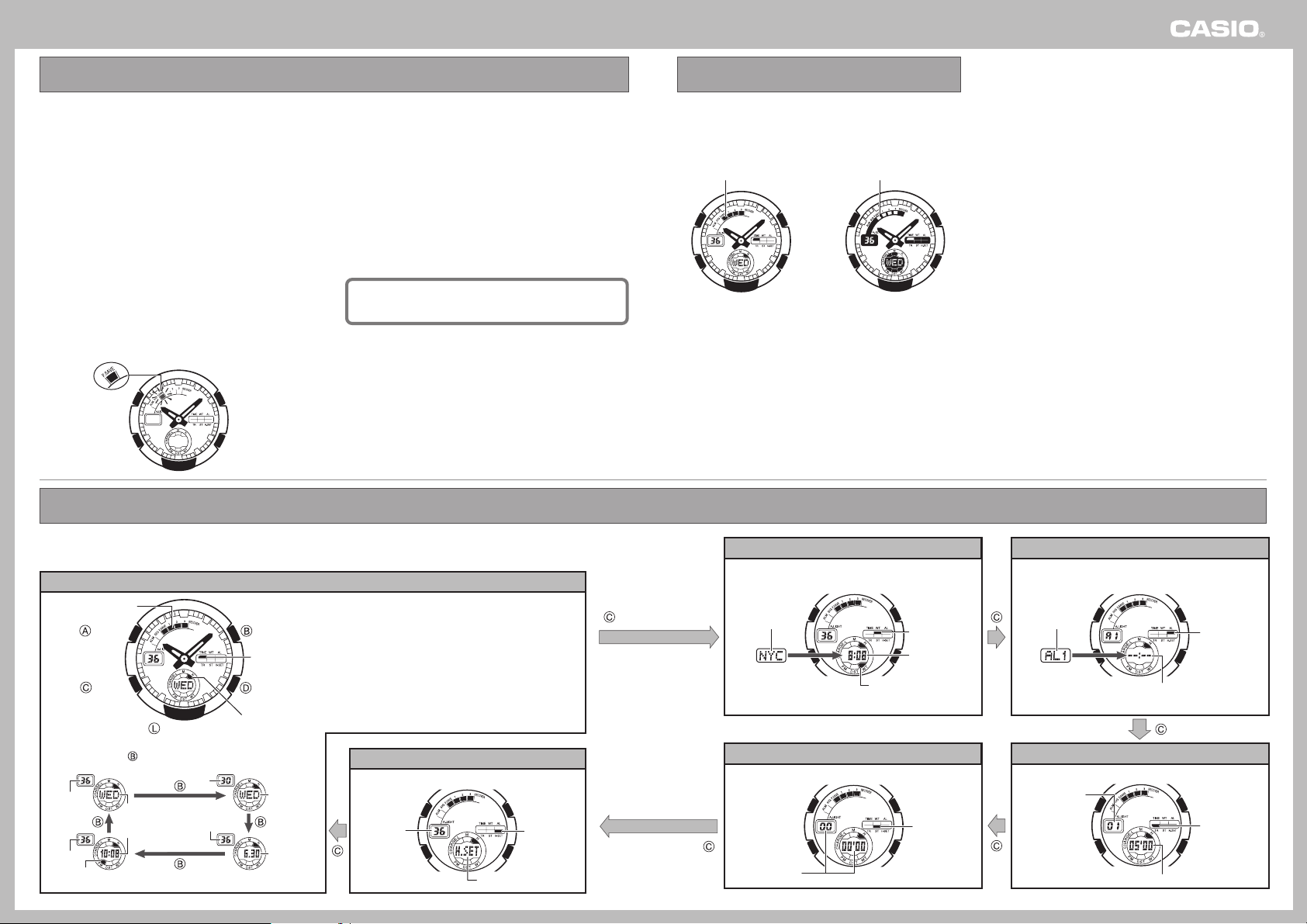
This watch is available with either of two different LCD types: light
background with dark figures (black-on-white) or dark background
with light figures (white-on-black).
Note that all of the samples in this manual show the black-on-
white type LCD.
Black-On-White White-On-Black
LCD Types
Each press of the
CC
CC
C button sounds a confirmation tone and cycles through available modes in the sequence shown below.
• The display will automatically revert to the Timekeeping screen if you leave the Alarm or Hand Setting screen displayed without performing
any operation for about two or three minutes.
Timekeeping Mode
Hand Setting Mode
PM Indicator
(No indicator displayed for AM.)
Seconds
Seconds
Day
Day of the Week
Day of
the Week
Date
(Month/Day)
Current Time
(Hour/Minute)
Seconds
Mode Indicator
Battery Indicator
(Screen Switching)
(Mode switching)
(Light)
Mode
Indicator
Mode Name
Seconds
Receive Indicator
Button Button
Button Button
Button
Changing Display Screen Contents
Each press of the button cycles display contents in the
sequence shown below.
Days of the Week
SUN: Sunday MON: Monday TUE: Tuesday
WED: Wednesday T HU: Thursday FR I : Friday
SAT: Saturday
• See “Battery Level Screen” for information about the
battery indicator, and “Receive Indicator” for
information about the receive indicator.
World Time Mode Alarm Mode
Stopwatch Mode Timer Mode
Current Time
in Selected City
Elapsed Time
Mode Indicator
Alarm Number
City Code
• Alarm off
Alarm Time
Timer Time
Mode Indicator
Number of
Repeats
Mode Indicator
Mode Indicator
Mode Indicator
• Auto Repeat Timer
Modes and Display Screens

Operation Guide 3346
2
The power supply of this watch uses a solar cell to generate
electrical power, which is stored by a rechargeable battery. Using
or storing the watch where it is not regularly exposed to light, or
allowing it to be blocked from light by your sleeve for long periods
as you are wearing it can cause the power of the rechargeable
battery to run down. To ensure stable operation, be sure to allow
the watch to be exposed to light as much as possible when you
are wearing or storing it.
Note that all data in memory and all settings are cleared
whenever you allow the level of the rechargeable battery
to drop to Level 4.
❚
Flashing RECOVER Indicator
If you use the light or alarms a number of times during a short
period, a RECOVER indicator flashes on the display and the
following operations become disabled as battery power recovers.
• Face illumination
• Alarm and hourly time signal
• Time calibration signal reception
Normal operation will return after the
battery recovers.
❚
Battery Level Screen
Normal operation enabled.
Normal operation enabled.
Level 1
Black-On-
White
White-On-
Black
Level 2
Level 3
Level 4
Digital display, face illumination,
alarms, tones (alarms, hourly time
signal), signal reception, and
analog timekeeping disabled.
All functions, including timekeeping,
disabled.
• Exposing the watch to direct sunlight or other strong light may cause
the battery level indicator to momentarily indicate a level that is higher
than the actual battery level. Because of this, you should wait for a
short while after charging to check the battery level indicator.
• Even after the battery drops to Level 4, you will be able to resume
normal operation by charging the battery.
• When charging from Level 4, the display will start operating when
the battery reaches Level 3. At this time you will be able to
configure digital time and date settings, but you should keep the
watch exposed to light until the battery reaches Level 2 or Level 1.
❚
Start charging at Level 3!
Battery Level 3 indicates that remaining battery power is very low.
Be sure to expose the watch to light for recharging as soon as
possible after the Level 3 indicator starts to flash.
RECOVER
Indicator
❚
Charging Guide
Starting from a full charge, the watch
should be able to continue operating
for about seven months without
further charging under the conditions
described below.
Daily Use (All time values are
approximate.)
• Face Illumination:
1.5 seconds
• Alarms: 10 seconds
• Signal reception: 5 times
• Digital Display: 18 hours
Making sure the watch is regularly
exposed to light ensures stable
operation.
• Charge Times Required to Advance to a Higher Level.
Approximate Exposure Time
Level 4 \ Level 3 \ Level 2 \ Level 1
– – – – – –
2 hours
5 hours19 hours
7 hours
11 hours
113 hours
22 hours97 hours
36 hours157 hours
Exposure Level
(Brightness)
Outdoor Sunlight
(50,000 lux)
Daylight Through a Window on
an Overcast Day (5,000 lux)
Indoor Fluorescent
Lighting (500 lux)
Sunlight Through a
Window (10,000 lux)
• Note that the above charging times are for reference only. Actual
charging time depends on a variety of environmental factors.
Required Daily Charging Time
•
The following is the daily
amount of charging required
each day to support the
operations under “Daily Use”.
Exposure Level
(Brightness)
Outdoor Sunlight
(50,000 lux)
6 minutes
30 minutes
48 minutes
8 hours
Sunlight Through
a Window
(10,000 lux)
Daylight Through a
Window on an Overcast
Day (5,000 lux)
Indoor
Fluorescent
Lighting (500 lux)
Approximate
Exposure
Time
Power Supply
An LED light is used to illuminate the face of the watch for easy
reading in the dark. An auto light switch automatically illuminates
the face when you angle the watch towards your eyes for reading.
❚
To illuminate the face manually
Press the
LL
LL
L button in any
mode to illuminate the face of
the watch.
• You can use the procedure under
“To specify the illumination
duration” to configure the
illumination duration as
approximately 1.5 seconds or
2.5 seconds.
• Pressing the L button
illuminates the face regardless of
whether the auto light switch is
on or off.
You may hear a faint rattling sound when you move the watch
around. This sound is caused by the movement of a metal
bulb that controls operation of the auto light switch, and does
not indicate malfunction.
❚
To illuminate the face with the auto light
switch
The auto light switch automatically illuminates the face
whenever you angle the watch towards your eyes for reading,
but only when it is dark.
• The auto light switch does not illuminate the face when
surrounding light is bright.
You can use the procedure under “To specify the illumination
duration” to configure the illumination duration as
approximately 1.5 seconds or 2.5 seconds.
❚
To turn the auto light switch on and off
In any mode, hold down the L button for about two seconds to
toggle the auto light switch on (auto light switch on indicator
displayed) and off (no indicator displayed).
Auto Light Switch
On Indicator
❚
Positioning Your Arm Correctly
• You should be wearing the watch on the outside of your wrist
when using the auto light switch.
• Make sure that the left (9 o’clock)
and right (3 o’clock) sides of the
watch are within ±15 degrees of
being parallel with the ground.
The auto light switch may not
operate properly if the angle is
greater.
Important!
• The light may be difficult to see if you turn it on under bright
sunlight.
• If you press the L button or if an alarm operation starts while the
face is illuminated, illumination will turn off.
Auto Light Precautions
• Frequent use of the auto light can run down the battery.
• The auto light switch may cause the face to illuminate when your
sleeve covers the face of the watch.
• The face may not illuminate immediately when you angle the
watch towards your face. This does not indicate malfunction.
• The face remains illuminated for the currently set duration (1.5 or
2.5 seconds) only, even if you leave the watch angled towards
your face.
• The auto light switch is automatically disabled whenever battery
power is at Level 3 or lower.
• The face may illuminate unintentionally when you wear the watch
on the inside of your wrist, when you shake your arm, or when
you raise your arm. Be sure to turn off the auto light switch
whenever you do not need illumination.
• Keep the auto light switch turned off whenever you are wearing
the watch on the inside of your wrist.
• Electro-static charge and magnetism can interfere with auto light
operation and even make operation impossible. If this happens
lower your arm to the starting position and then raise it again. If
you still have trouble with illumination, try lowering your arm down
to your side and then raise it to your face for reading.
Rotate your arm so the watch
is angled at about 40 degrees,
so you can read its face.
With the watch on
your wrist, position it
level with the ground.
11
11
1
22
22
2
Face Illumination
❚
Charging Precautions
Avoid charging the watch in the following locations, and anywhere
else where the watch may become very hot.
• On the dashboard of an automobile parked in the sun
• Very close to an incandescent light source or other sources of
heat
• In a location exposed to direct sunlight for long periods
Note that the display panel may become black under very high
temperatures. This is temporary, and the display will appear
normal again at lower temperatures.
Depending on the light source you are using, the case
of the watch may become quite hot during charging.
Take care to guard against burn injury after charging.
❚
To charge the battery
Point the solar panel (face) of the watch at a light source.
• Remember that even a partial blockage of the solar cell reduces
charging efficiency.
Example: Positioning the watch
Solar Cell
• The illustration shows the resin band model.
At least
40
degrees

Operation Guide 3346
3
❚
To specify the illumination duration
1. In the Timekeeping Mode,
hold down the
AA
AA
A button
for about one second.
• This will cause your city code
to flash on the display.
2. Press the
CC
CC
C button three
times to display the
flashing seconds count.
3. Press the
BB
BB
B button to
toggle the illumination
duration between about
1.5 seconds ( indicator)
and 2.5 seconds
( indicator).
4. After the setting is the way
you want, press the
AA
AA
A
button to exit the setting
screen.
• The watch will also exit the
setting screen automatically if
you do not perform any
operation for about two or
three minutes.
City Code
Seconds
(3 times)
What is a radio-controlled watch?
Your radio-controlled watch is designed to receive a time
calibration signal that contains standard time data, and adjust its
current time setting accordingly.
Signal data
Cesium
atomic clock
Transmitter
Internally
Decode
Watch
Time data
Signal is received
using built-in antenna.
Watch decodes
received data and
converts it to time
data.
Time is adjusted
according to time
data.
Long-
wave time
calibration
signal
After the watch receives the Standard Time signal, it performs
internal calculations to determine the current time. Because of
this, there may be an error of up to one second in the
displayed time.
Calibration Signal
• The Japanese calibration signal (Call Sign: JJY) is maintained by
the National Institute of Information and Communications
Technology (NICT). It is a long wave signal transmitted 24 hours a
day from the Mt. Otakadoya transmitter (40kHz) located in
Tamura-gun, Fukushima Prefecture, and from the Mt. Hagane
transmitter (60kHz) located on the border between Saga
Prefecture and Fukuoka Prefecture.
• The U.S. calibration signal (Call Sign: WWVB) is transmitted by
the National Institute of Standards and technology from Fort
Collins, Colorado.
Note that transmission of the standard wave may be
interrupted occasionally due to maintenance, lightening, etc.
How a Radio-controlled Watch Works
Reception Range
This watch is designed to receive the standard time calibration signal of Japan (JJY) or of the United States (WWVB). The signal that is
received depends on the current Home City setting.
• For information about selecting a Home City, see “Configuring Home Time Settings”. For information about city codes, see the “World Time
City Code List”.
Home City
TYO
LAX, DEN, CHI, NYC
Transmitter
Either the Mt. Otakadoya signal (40kHz) or the Mt. Hagane signal (60kHz)
Fort Collins, Colorado signal
1000km
Mt. Hagane
(60kHz)
Mt. Otakadoya
(40kHz)
500km
1000km
500km
Japan Transmitter
Locations
• Under optimum conditions, the calibration signal should be
receivable up to 1,000 kilometers from the transmitter. Note
that the wave is relatively weak at distances greater than
500km, so reception may be poor at long distances.
U.S. Transmitter
Location
3000km
1000km
Fort Collins
• Under optimum conditions, the calibration signal should be
receivable up to 3,000 kilometers from the transmitter. Note
that the wave is relatively weak at distances greater than
1,000km, so reception may be poor at long distances.
• Geographic contours, nearby buildings, seasonal conditions, the time of day, can even make reception impossible even when you are within
range of the transmitter.
• Best reception is possible late at night.

Operation Guide 3346
4
Location
Reception is difficult and may even be impossible in the locations
described below. Avoid such locations when performing signal
reception.
• You should think of your watch operating like a radio or TV when it
is receiving the calibration signal.
If you are experiencing problems with reception, move away
from the types of locations described above to a location with
better reception, and try again.
Near high-voltage lines
Among or near buildings
Receiving the Calibration Signal
There are two methods you can use to receive the time calibration signal.
• Auto receive (Reception is performed automatically at
midnight, 1:00, 2:00, 3:00 and 4:00 each morning.)
• Manual receive (You initiate reception using a button
operation.)
• If reception is not successful for any of the normal auto receive
operations shown above, auto receive is performed one more
time at 5:00 a.m.
• The watch is set up for auto receive at the factory, so all you need to
do is to place it in a location that allows good reception each night.
❚
To position the watch for optimum reception
Remove the watch from your wrist and place it somewhere so its
top (12 o’clock side, where the antenna is located) is facing
approximately in the direction of the signal transmitter. Keep the
watch away from metal objects.
Resin band
Metal band
• Orienting the watch so it is sideways to the transmitter makes it
more difficult to receive the signal.
• Do not move the watch while it is receiving the calibration signal.
Near mountains
Inside a vehicle
(automobile, train, plane, etc.)
In a location where there is
radio interference
(construction site, airport, etc.)
Next to a household appliance or
office equipment (TV, speaker, fax,
computer, cell phone, etc.)
❚
Time Required for Reception
A calibration signal receive operation takes anywhere from about
two to six minutes.
• Note that when “AUTO” (Auto Select) is specified as the transmitter
selection mode, signal reception can take up to 12 minutes.
• See “Configuring Auto Receive Settings” for more information.
❚
To perform manual receive
In the Timekeeping Mode, hold
down the
DD
DD
D button for about
one second.
• The watch will beep and
reception will start. An indicator
will appear on the display to
indicate reception conditions.
❚
To interrupt reception
Press the
DD
DD
D button.
• All other buttons besides D are disabled during signal reception.
When reception is successful
The watch terminates reception and adjusts the current time. Next
it beeps and then displays the date and time that the adjustment
was performed.
•
The receive indicator remains displayed after reception is successful.
Reception Error (ERR Indicator)
The watch does not adjust its current time setting, and displays
“ERR” when signal reception is unsuccessful for some reason.
• The watch will return to the Timekeeping Mode automatically if
you do not perform any operation for about one or two minutes.
❚
Receive Indicator
The receive indicator cycles from
“Unstable” through “Stable” as
shown below while reception is in
progress. How far it cycles depends
on the signal strength. Keep the
watch in a location where reception
is stable while reception is in
progress.
Unstable Stable
• Even under optimum reception conditions, it can take about 10
seconds for reception to stabilize.
• Use the receive indicator to check reception status and to
determine the best location for signal reception.
• Note that weather, the time of day, surroundings, and other
factors can all affect reception.
Receiving
Indicator
Receive Indicator
Configuring Auto Receive Settings
Use the procedure below to turn auto receive of the time
calibration signal on or off. When TYO (Tokyo) is selected as your
Home City, you can also specify the transmitter selection mode,
which controls which Japanese transmitter signal should be used
for time calibration.
• For information about selecting your Home City, see “Configuring
Home Time Settings”.
• The initial factory default settings for auto receive are Home City =
TYO (Tokyo); Auto Receive = AUTO (auto transmiter selection)
• The following procedure can be performed only when TYO, LAX,
DEN, CHI, or NYC is selected as the Home City.
❚
To configure auto receive settings
1. In the Timekeeping Mode,
press the
DD
DD
D button.
• This causes the display to
start cycling through the last
reception date and time
screens.
• The watch will return to the
Timekeeping Mode
automatically if you do not
perform any operation for
about one or two minutes.
2. Hold down the
AA
AA
A button
for about one second.
• This will cause the currently
auto receive setting to flash
on the display.
❚
To view the last reception date and time
In the Timekeeping Mode, press the
DD
DD
D button.
• This causes the display to start cycling through the “GET” screen,
last reception date screen, and last reception time screen at two-
second intervals.
• To return to the Timekeeping Mode, press the D button again.
• The watch will return to the Timekeeping Mode automatically if
you do not perform any operation for about one or two minutes.
Last Reception Date
Last Reception Time
Auto Receive Settings when the Home City is TYO
AUTO
Auto receive turned on with automatic selection of either the
Mt. Otakadoya signal (40kHz) or the Mt. Hagane signal
(60kHz), whichever is strongest.
40
Auto receive turned on for the Mt. Otakadoya signal (40kHz).
60
Auto receive turned on for the Mt. Hagane signal (60kHz).
OFF
Auto receive turned off.
Auto Receive Settings when the Home City is NYC,
CHI, DEN, or LAX
ON
Auto receive turned on for the Ft. Collins, Colorado signal.
OFF
Auto receive turned off.
3. Press the
DD
DD
D or
BB
BB
B button
to cycle through the
available auto receive
settings.
4. When the setting is the
way you want, press the
AA
AA
A button.
• This will exit the setting
screen and return to the last
reception date and time
screens.
• To return to the Timekeeping
Mode, press the D button
again.
• The watch will return to the
Timekeeping Mode
automatically if you do not
perform any operation for
about one or two minutes.

Operation Guide 3346
5
Troubleshooting
Cannot perform manual reception.
Cause: • Manual receive can be performed in the
Timekeeping Mode only.
• Manual receive cannot be performed
while a timer operation is in progress.
• The Home City is set to a city other than
TYO (Tokyo), NYC (New York), CHI
(Chicago), DEN (Denver), or LAX (Los
Angeles).
Corrective Measures: • Perform manual receive in the
Timekeeping Mode.
• Change the Home City to TYO (Tokyo),
NYC (New York), CHI (Chicago), DEN
(Denver), or LAX (Los Angeles).
Correctly set the Home City as detailed
under “Configuring Home Time Settings”.
The receive indicator is not on the display even though auto
signal reception is turned on.
Cause: • The receive indicator appears after the
watch successfully receives the
calibration signal and adjusts the current
time setting.
• A single receive operation was not
successful.
• The watch is not in the Timekeeping
Mode or World Time Mode when an auto
reception time is reached.
• You performed manual reception, which
clears the receive indicator from the
display.
Corrective Measures: • Check to make sure the watch is in a
location where it can receive the signal.
• Place the watch in a location where
reception conditions are good.
• Make sure that the watch is in the
Timekeeping Mode or World Time Mode
during the auto reception times.
Calibration Signal Reception
Precautions
• Auto reception can be performed while the watch is in the
Timekeeping Mode or World Time Mode only.
• Signal reception is not performed while a timer operation is being
performed.
• When a time calibration signal is received, the watch corrects its
digital time setting first, and then adjusts the analog time setting
accordingly. In order to ensure that the analog time matches the
digital time, make sure you adjust the analog time to match the
digital time before signal reception is performed.
• Pressing any button while auto reception is in progress will cause
the watch to beep and then exit the receive operation.
• Make sure you are within the range of the calibration signal
transmitter before performing the reception operation. Remember
that geographic contours, nearby buildings, seasonal conditions,
the time of day, can even make reception impossible even when
you are within range of the transmitter.
• Proper reception may be impossible if there is something blocking
the signal. If reception is unsuccessful, try again.
• This watch is designed to adjust its current time setting in
accordance with the calibration signal transmitted in Japan and
the United States only. It operates like a standard (non-radio
controlled) watch outside of the range of the receivable time
calibration signal transmitters.
• When the watch is unable to adjust its time signal using the
calibration signal for some reason, timekeeping accuracy is within
±
15 seconds per month.
• Strong electrostatic charge can cause timekeeping error.
• Signal reception is cancelled if an alarm starts to sound while it is
being performed.
• The watch’s calendar shows dates up to the year 2099.
Attempting a receive operation after that causes an error.
World time lets you display the current time in any one of 30 cities
(29 time zones) around the world.
• When you enter the World Time Mode, the screen for the city that
was displayed when you last exited the mode appears first.
• The seconds count in the World Time Mode is linked with the
Timekeeping Mode seconds count.
• The same 12-hour/24-hour format you select for the Timekeeping
Mode time is also applied in the World Time Mode.
Important!
If the World Time Mode time is incorrect, correct the setting of the
current time in the Timekeeping Mode.
• For information about selecting a Home City, see “Configuring
Home Time Settings”.
❚
To search for a city code
In the World Time Mode, press the
DD
DD
D (scroll east) or
BB
BB
B
(scroll west) button.
• A short while after a city code appears, the display will change to
show the current time in that city.
• Holding down the D or B button scrolls at high speed.
(Scrolls East)
(Scrolls West)
City Code
Current Time in Selected Zone
• Pressing the A button in the World Time Mode displays the city
code of the currently selected city for about one second.
World Time Mode
Using Summer Time (DST)
Summer time, or Daylight Saving Time (DST) as is it is known in
some countries, calls for setting clocks ahead one hour during the
summer season. Note that the use of summer time depends on
the country and even the local area.
❚
To turn summer time on or off
1.
In the World Time Mode, use the
DD
DD
D and
BB
BB
B buttons to
display the screen for the city code whose summer time
setting you want to change.
2. Hold down the
AA
AA
A button
for about two seconds.
• This toggles summer time on
and off.
• The “DST” indicator appears
on the display and
timekeeping is advanced by
one hour when summer time
is turned on.
• You can turn summer time on
or off independently for each
World Time Mode city. Note,
however, that you cannot turn
on summer time for the “GMT”
city code.
World Time City Code List
City
Code
City Name
– – –
HNL
ANC
LAX
DEN
CHI
NYC
CCS
RIO
– – –
– – –
GMT
LON
PAR
BER
ATH
CAI
Honolulu
Anchorage
Los Angeles
Denver
Chicago
New York
Caracas
Rio de Janeiro
Greenwich Mean Time
London
Paris
Berlin
Athens
Cairo
–11
–10
–9
–8
–7
–6
–5
–4
–3
–2
–1
+0
+0
+1
+1
+2
+2
GMT
Differential
City
Code
City Name
GMT
Differential
JRS
JED
THR
DXB
KBL
KHI
DEL
DAC
RGN
BKK
HKG
SEL
TYO
ADL
SYD
NOU
WLG
Jerusalem
Jeddah
Teheran
Dubai
Kabul
Karachi
Delhi
Dakar
Yangon
Bangkok
Hong Kong
Seoul
Tokyo
Adelaide
Sydney
Noumea
Wellington
+2
+3
+3.5
+4
+4.5
+5
+5.5
+6
+6.5
+7
+8
+9
+9
+9.5
+10
+11
+12
• The contents of the above table are current as of December 2003.
• Time differentials in the above table are in accordance with
Universal Time Coordinated (UTC).
DST Indicator
Time setting is incorrect following signal reception.
Cause: • If the current time is advanced by one
hour, it probably means that summer time
is turned on (indicated by the DST
indicator).
• If there is a large error in the setting, it
probably means that the wrong Home
City is selected.
Corrective Measures: • Correctly configure the summer time
setting as detailed under “Configuring
Home Time Settings”.
• Correctly configure the Home City
settings as detailed under “Configuring
Home Time Settings”.
Cannot configure signal reception settings.
Cause: • The Home City is set to a city other than
TYO (Tokyo), NYC (New York), CHI
(Chicago), DEN (Denver), or LAX (Los
Angeles).
Corrective Measures: • Select one of the above as the Home City
as detailed under “Configuring Home
Time Settings”.
• If you cannot receive the calibration signal or if the current time
setting is incorrect after signal reception, check the current setup
of the watch.
• The following are the watch’s factory default settings, which are
configured automatically whenever you have the battery of the
watch replaced.
Transmitter
Mode
Home City
Summer Time
Tokyo
Auto Japan transmitter select
(40kHz/ 60kHz)
Auto switching
(according to signal data)
Operation Guide 3346
6
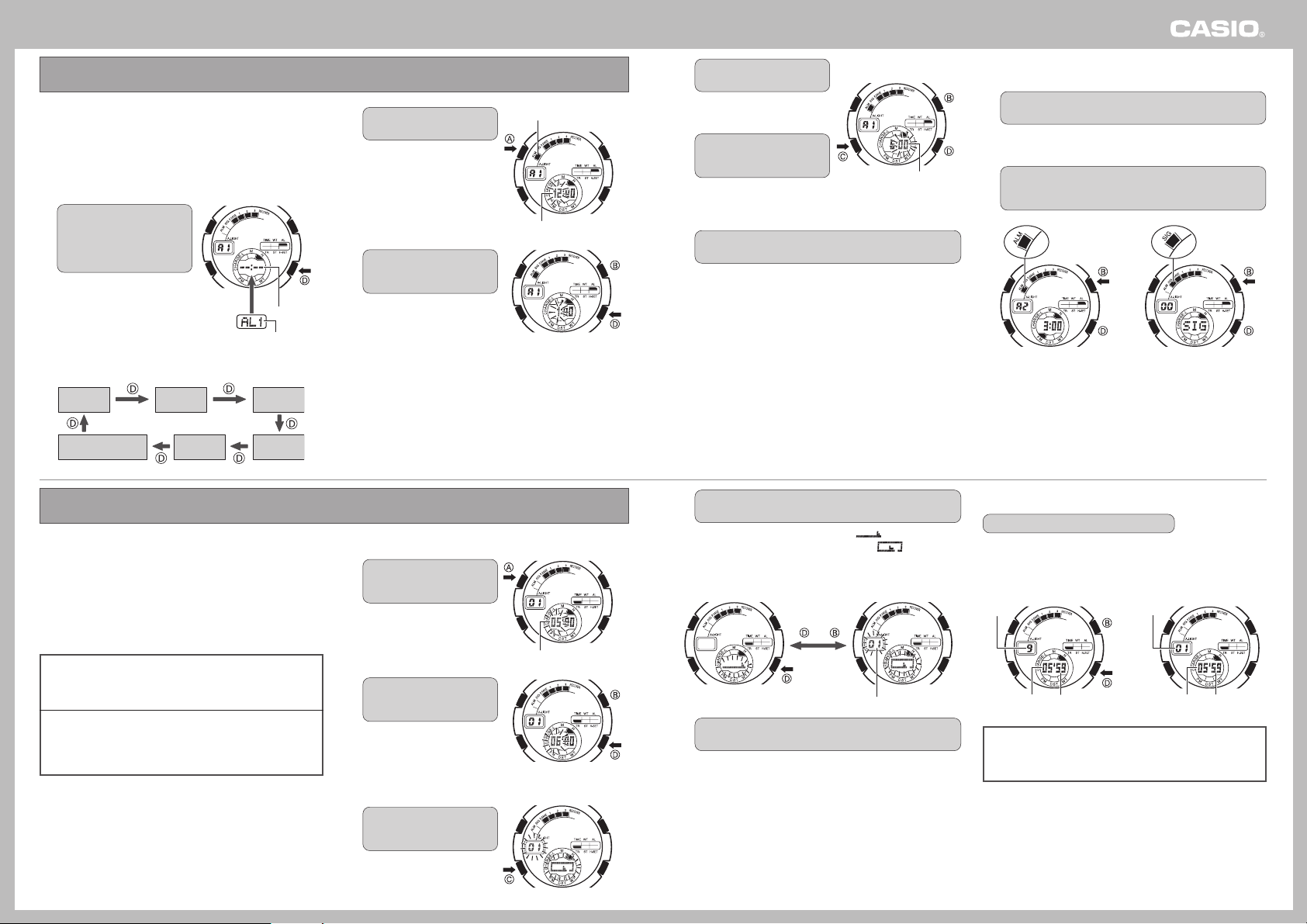
You can set the daily alarms in 1-minute increments. The watch
beeps for 10 seconds when the current time in the Timekeeping
Mode reaches the alarm time you set. There are five independent
alarms, and all of them operate the same way.
The Hourly Time signal causes the watch to beep every hour on
the hour.
❚
To set an alarm time
1. In the Alarm Mode, use the
DD
DD
D button to display the
screen for the alarm
whose setting you want to
change.
• Each press of the D button
scrolls through alarm screens
in the sequence shown below.
• Scrolling to an alarm screen
causes the applicable alarm
number to appear first, followed
by the current alarm time
setting. The alarm time shows
“––:––” if an alarm is turned off.
Alarm 3
(AL3)
Alarm 1
(AL1)
Alarm 2
(AL2)
Alarm 4
(AL4)
Hourly Time Signal
(SIG)
Alarm 5
(AL5)
2. Hold down the
AA
AA
A button
for about one second.
• This will cause the hour digits
of the displayed alarm time to
flash.
• Displaying the setting screen
automatically turns on the
alarm.
3. Use the
DD
DD
D (+) and
BB
BB
B (–)
buttons to change the
hour setting.
• Holding down either button
changes the setting at high
speed.
• When setting the hour, make
sure you specify AM (no
indicator) or PM (P) correctly
when using 12-hour
timekeeping, or that you
specify the correct 24-hour
time.
• The same 12-hour/24-hour
format you select for the
Timekeeping Mode home time
is also applied in the Alarm
Mode.
(Forward)
Alarm Time
Alarm Number
Alarm On Indicator
Hour
(Forward)
(Back)
Using the Alarms and Hourly Time Signal
❚
To turn an alarm or the Hourly Time
Signal on or off
1. Use the
DD
DD
D button to display the screen for the alarm
whose setting you want to change.
• If you want to turn the Hourly Time Signal on or off, select the
Hourly Time Signal (SIG) screen.
2. Press the
BB
BB
B button to toggle the displayed setting on
(on indicator displayed) or off (on indicator not
displayed).
Alarm 2 Screen
Alarm On
Indicator
Hourly Time
Signal On
Indicator
Hourly Time Si
g
nal Screen
❚
To stop the alarm beeper
Press any button.
❚
To test the alarm
In the Alarm Mode, hold down the B button to sound the alarm.
(Forward)
Minute
(Back)
You can set the start time of the timer in the range of 1 to 60
minutes, in units of one minute. The watch beeps for 10 seconds
when the end of the countdown is reached. Turning on the auto
repeat feature causes the countdown to restart from the start time
whenever the end of the countdown is reached.
Timer Types
There are two different settings that you can use to configure the
timer as describe below.
• Repeat
With Repeat, the countdown stops, the original start time
appears, and the watch beeps for 10 seconds when the end of
the countdown is reached.
• Auto Repeat
Auto Repeat causes timing to restart from the start time when
the end of the countdown is reached.
• The countdown repeats up to 10 times, or until you stop it
manually.
❚
To configure timer settings
1. In the Timer Mode, hold
down the
AA
AA
A button for
about one second.
• This will cause the minute
digits of the timer start time to
flash.
2. Use the
DD
DD
D (+) and
BB
BB
B (–)
buttons to change the
start time minutes.
• Holding down either button
scrolls the start time setting at
high speed.
3. Press the
CC
CC
C button to
change to the timer type
setting.
Minutes
(Forward)
(Back)
Timer Mode
Using the Timer
In the Timer Mode, press the
DD
DD
D button.
• Each press of the D button starts or stops the countdown.
• The Repeat Timer counts down in 1/10-second units, while the
Auto Repeat Timer counts down in 1-second units.
Repeat Timer
(Start/Stop)
(Reset)
Minutes
1/10
second
Seconds
Minutes Seconds
Auto Repeat Timer
Number of
Repeats
• Pressing the B button while the countdown is stopped
resets the display to the start time.
• Pressing the D button again while the timer countdown is
stopped restarts the countdown.
End of Countdown
The watch beeps for 10 seconds when the end of the countdown
is reached.
• Pressing any button while the beeper is sounding stops it.
4. Press the
CC
CC
C button to
select the minute setting.
• This causes the minute digits
to flash.
5. Use the
DD
DD
D (+) and
BB
BB
B (–)
buttons to change the
minute setting.
• Holding down either button
changes the setting at high
speed.
6. When the setting is the way you want, press the
AA
AA
A
button.
• This exits the setting screen.
• The display also will exit the setting screen automatically if
you do not perform any operation for about two or three
minutes.
4. Use the
DD
DD
D and
BB
BB
B buttons to select the type of timer
you want to use.
• To select the Repeat Timer, display “ ”.
• To select the Auto Repeat Timer, display “ ”. Selecting
the Auto Repeat Timer also displays a value in the left window
indicating the current number of repeats.
or
Number of Repeats
Auto Repeat Timer Repeat Timer
5. After the settings are configured the way you want,
press the
AA
AA
A button.
• This exits the setting screen.
• The watch will also exit the setting screen automatically if you
do not perform any operation for about two or three minutes.

Operation Guide 3346
7
The stopwatch measures elapsed time in units of 1/100 second up to 99 minutes, 59.99 seconds (100 minutes total). When the maximum
limit is reached, the elapsed time automatically returns to zero and timing continues from there.
❚
To perform elapsed time measurement
In the Stopwatch Mode, press the
DD
DD
D button to start and
stop elapsed time measurement.
(Start/Stop)
(Split/Reset)
Minutes Seconds
1/100 second
❚
Elapsed Time Measurement
Start Stop Reset
Cumulative Time Measurement
Pressing the D button to restart the stopwatch without resetting it
to all zeros causes the elapsed time measurement to resume from
where it was last stopped.
❚
Split Time Measurement
Record Split Clear Split ResetStopStart
❚
1st and 2nd Place Finishers
Start 1st Finish
(Displays time
of 1st finisher.)
2nd finish Displays time
of 2nd finisher.
Reset
• Pressing the B button while timing is being performed displays the split time screen (with SPL indicator), but timing continues
internally.
• Changing to another mode while a split time is displayed clears the split time operation.
• To reset the stopwatch to all zeros, stop the elapsed time operation and then press the B button.
Stopwatch Mode
Home time settings include your Home City (the city where you will
normally use the watch), the current time and date in your Home
City, and other settings.
• Use the Timekeeping Mode to configure home time settings.
• Also use the following procedure when you want to turn Power
Saving on or off.
If you are planning to adjust both the digital and analog
settings, be sure to adjust the digital setting first.
❚
To configure home time settings
1. In the Timekeeping Mode,
hold down the
AA
AA
A button
for about one second.
• This will cause the city code
currently selected as the
Home City to flash on the
display.
2. Use the
DD
DD
D (scroll east)
and
BB
BB
B (scroll west)
buttons to scroll through
the city codes until the
one you want to select is
displayed.
• See the “World Time City
Code List” for information
about city codes.
• Holding down either button
scrolls at high speed.
3. When the city code you
want is displayed, press
the
CC
CC
C button.
• This will display the summer
time (DST) setting screen.
City Code
(Forward)
(Back)
TYO = Tokyo
Configuring Home Time Settings
4. Press the
DD
DD
D button to
cycle through the
available summer time
(DST) settings until the
one you want to select is
displayed.
• AUTO
This setting enables the auto summer time setting, which
turns summer time on or off in accordance with the received
time calibration signal.
• This setting uses Japan summer time data when TYO is
selected as the Home City, and U.S. summer time data
when NYC, CHI, DEN, or LAX is selected as the Home
City.
• Note that “AUTO” can be selected only when TYO, LAX,
DEN, CHI, or NYC is selected as the Home City.
• OFF
This setting turns off summer time and returns to normal
timekeeping.
• ON
This setting turns on summer time and advances the current
time by one hour. The DST indicator appears on the display
when this setting is selected.
5. When the summer time
setting is the way you
want, use the
CC
CC
C button to
cycle the display through
the settings shown below.
Summer Time
Home City
Code
Power Saving
12/24-hour
Timekeeping
Hour
Minute
Month Year
Day
Seconds
(Forward)
(Back)
Hour Minutes
6. While the 12/24-hour
timekeeping setting is
flashing, press the
DD
DD
D
button to toggle between
12-hour (“12H”) and 24-
hour (“24H”) timekeeping.
7. While the seconds are
selected, press the
DD
DD
D
button to reset them to 00
in accordance with the
time signal on the radio,
TV, etc.
• Pressing the D button while
the seconds count is in the
range of 30 to 59 resets it to
00 and also adds 1 to the
minutes. Pressing the D
button in the range of 00 to 29
resets the seconds count
without changing the minutes.
8. While the hour, minutes,
year, month, or day setting
is flashing, use the
DD
DD
D (+)
and
BB
BB
B (–) buttons to
change the setting.
• Holding down either button
changes the setting at high
speed.
• When setting the hour, make sure you specify AM (no indicator)
or PM (P) correctly, or that you specify the correct 24-hour time.
• You can set a year in the range of 2000 to 2099. The day of the
week is set automatically in accordance with the date you set.
• The watch automatically makes adjustments for leap years and
month lengths.
9. While the Power Saving
setting is flashing, press
the
DD
DD
D button to toggle it
on (ON) or off (OF).
• The Power Saving indicator
will be on the display when
you exit the setting screen
after turning on Power Saving.
Use the
CC
CC
C button to select each of the settings and the
DD
DD
D and
BB
BB
B buttons to change them.
Indicates 12-hour or
24-hour timekeepin
g
.
Seconds reset to 00.

Operation Guide 3346
8
10
. When all of the settings are the way you want, press the
AA
AA
A button.
• This exits the setting screen.
• The display also will exit the setting screen automatically if
you do not perform any operation for about two or three
minutes.
Digital-Analog Synchronization
After adjustment of the digital time, the watch automatically
adjusts its analog setting to match.
• When adjusting the analog time, the hands move clockwise.
• Depending on how many hours different the digital and analog
time settings are, it may take some time for the analog hand
setting procedure to be finished.
Adjusting the Analog Time Setting
You can use the Hand Setting Mode to manually adjust the analog
time when it does not match the digital time.
1. In the Hand Setting Mode,
hold down the
AA
AA
A button
for about one second.
• This will cause the hour and
minute setting of the digital
time to flash on the display.
2. Use the
DD
DD
D (+) button to
adjust the hour and
minute hands so they
match the digital time.
• Each press of the D button
moves the hands 20 seconds
clockwise.
• Holding down the D button
moves the hands at high
speed.
(Forward)
High-speed Lock
• While holding down the D button to start high-speed clockwise
movement of the hands, press the B button to lock the
high-speed hand movement. You can then release the buttons.
• High-speed hand movement will continue until it completes a
12-hour cycle, or until you press any button to stop it.
• High-speed hand movement will also stop momentarily if an alarm
starts to sound. High-speed movement will resume after the alarm
stops.
3. When the setting is the way you want, press the
AA
AA
A
button.
• This exits the setting screen and automatically synchronizes
the minute hand with the current seconds count.
• The display also will exit the setting screen automatically if
you do not perform any operation for about two or three
minutes.

