V
ersion 2.0
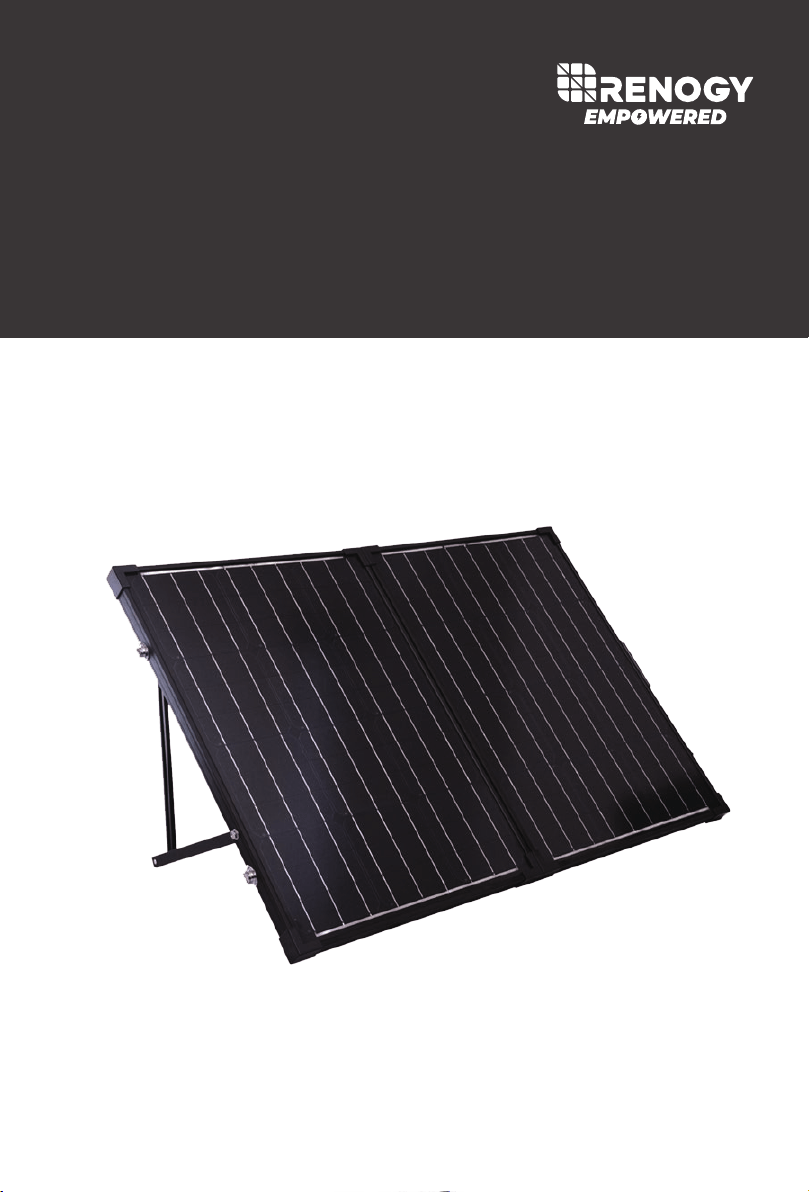
SOLAR
SUITCASE
100W
Solar Suitcase w/ Voyager
01
Important Safety Instructions
Please save these instructions.
This manual contains important safety, installation, and operating instructions for the charge
controller. The following symbols are used throughout the manual to indicate potentially
dangerous conditions or important safety information.
Indicates a potentially dangerous condition. Use extreme caution when
performing this task.
Indicates a critical procedure for safe and proper operation of the controller
Indicates a procedure or function that is important to the safe and proper
operation of the controller.
CAUTION
NOTE
WARNING
General Safety Informat
ion
Read and follow all instructions and precautions mentioned in this user manual before
beginning the installation.
There are no serviceable parts for this controller. Do NOT disassemble or attempt to repair
the controller.
Make sure all connections going into and from the controller are tight.
Battery Safety
Use only sealed lead-acid, flooded, gel or lithium (LFP) batteries which must be deep cycle.
Explosive battery gases may be present while charging. Be certain there is enough
ventilation to release the gases.
Be careful when working with large lead acid batteries. Wear eye protection and have
fresh water available in case there is contact with the battery acid.
Carefully read battery manuals before operation.
Do NOT let the positive (+) and negative (-) terminals of the battery touch each other.
Recycle battery when it is replaced.
Over-charging and excessive gas precipitation may damage the battery plates and
activate material shedding on them. Too high of an equalizing charge or too long of one
may cause damage. Please carefully review the specific requirements of the battery used in
the system.
Equalization is carried out only for nonsealed / vented/ flooded / wet cell lead acid batteries.
Do NOT equalize sealed / VRLA type AGM / Gel cell batteries UNLESS permitted by
battery manufacturer.

02
Table of Contents
General Information
03
Included Components
05
Identification of Parts
06
Installation
07
Operation
09
Selecting Battery Type
09
AMP/VOLT Button
10
10
LED Display
System Status Icons
11
LED Behavior
11
LED Error Behavior
12
Maintenance 13
Frequently Asked Questions
14
Solar Panel Parameters
14
Charge Controller Parameters
15
Battery Charging Parameters
16
Charging Parameters Glossary
16
Dimensions
18
14
Technical Specifications
13
System Status Troubleshooting

03
General Information
Negative ground controller.
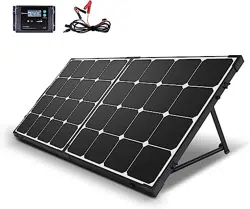
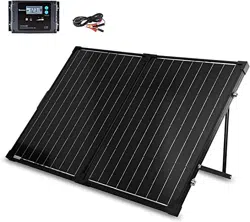
The Renogy Solar Suitcase combine highly efficient monocrystalline solar panels with a 20A
Voyager charge controller to create an easy-to-use, ‘plug and play’ system.
The alligator clips included in this package make it easy to connect the panel to a battery in
seconds. If one ever needs to connect a battery with a different type of end terminal, the
alligator clips are attached via MC4 Connectors.
This system is specifically designed for mobile off-grid applications, where space and weight
limitations are abundant. The Solar Suitcase models support 12V deep cycle battery varieties
such as sealed-lead acid, gel, and flooded. With built-in tilting stands, these panels can be
adjusted at different angles to maximize the power output throughout the seasons.
Easy to read LCD displaying solar charge information
4 Stage charging: Bulk, Boost. Float, and Equalization
Temperature compensation and correcting the charging and discharging parameters
automatically, improving battery lifetime.
7 Battery Type Compatible – Lithium-ion, LiFePO4, LTO, Gel, AGM, Flooded, and Calcium
Protection against: overcharging, over-discharging, overload, short-circuit, and reverse
polarity.
Tilting stand for maximum solar generating potential.
Convenient storage case for easy transportation.
PWM Technology
Key Features
The Voyager utilizes Pulse Width Modulation (PWM) technology for battery charging. Battery
charging is a current based process so controlling the current will control the battery voltage.
For the most accurate return of capacity, and for the prevention of excessive gassing pressure,
the battery is required to be controlled by specified voltage regulation set points for Absorption,
Float, and Equalization charging stages. The charge controller uses automatic duty cycle
conversion, creating pulses of current to charge the battery. The duty cycle is proportional to
the difference between the sensed battery voltage and the specified voltage regulation set
point. Once the battery reached the specified voltage range, pulse current charging mode
allows the battery to react and allows for an acceptable rate of charge for the battery level.
04
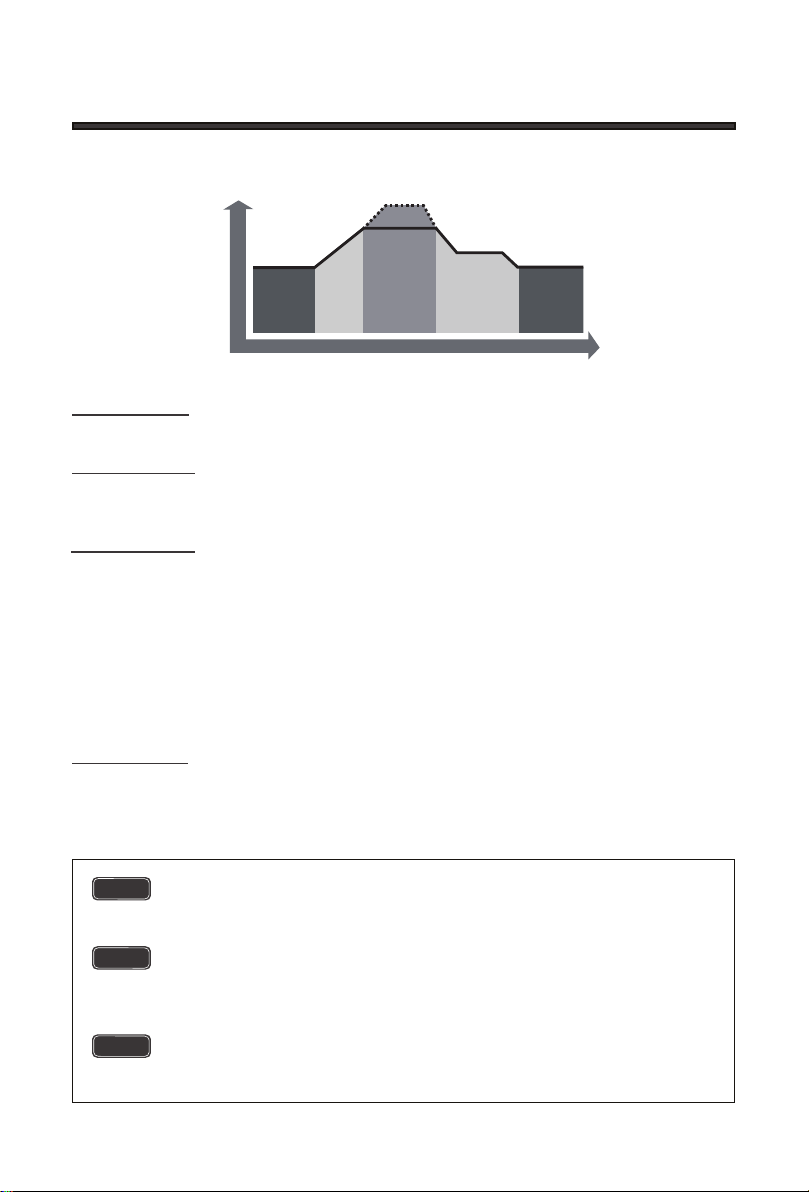
Four Charging Stages
Equalization: Is carried out every 28 days of the month. It is intentional overcharging of the
battery for a controlled period of time. Certain types of batteries benefit from periodic equalizing
charge, which can stir the electrolyte, balance battery voltage and complete chemical reaction.
Equalizing charge increases the battery voltage, higher than the standard complement voltage,
which gasifies the battery electrolyte.
Bulk Charge: This algorithm is used for day to day charging. It uses 100% of available solar
power to recharge the battery and is equivalent to constant current.
Float Charge: After Boost Charge, the controller will reduce the battery voltage to a float
voltage set point. Once the battery is fully charged, there will be no more chemical reactions and
all the charge current would turn into heat or gas. Because of this, the charge controller will
reduce the voltage charge to smaller quantity, while lightly The Voyager charge controller has a
4-stage battery charging algorithm for a rapid, efficient, and safe battery charging. They include:
Bulk Charge, Boost Charge, Float Charge, and Equalization.charging the battery. The purpose
for this is to offset the power consumption while maintaining a full battery storage capacity. In the
event that a load drawn from the battery exceeds the charge current, the controller will no longer
be able to maintain the battery to a Float set point and the controller will end the float charge
stage and refer back to bulk charging.
Boost Charge: When the battery has charged to the Boost voltage set-point, it undergoes an
absorption stage which is equivalent to constant voltage regulation to prevent heating and
excessive gassing in the battery. The default time for this is 120 minutes for the Voyager.
Once equalization is active in the battery charging, it will not exit this stage unless
there is adequate charging current from the solar panel. There should be NO load
on the batteries when in equalization charging stage.
Over-charging and excessive gas precipitation may damage the battery plates
and activate material shedding on them. Too high of equalizing charge or for too
long may cause damage. Please carefully review the specific requirements of the
battery used in the system.
Equalization may increase battery voltage to a level damaging to sensitive DC
loads. Ensure that all load allowable input voltages are greater than the equalizing
charging set point volta.
WARNUNG
WARNUNG
WARNUNG
TIME
NIGHT
BOOST
EQUALIZE
FLOAT
NIGHT
BULK
CHARGE
VOLTAGE
05
Included Components
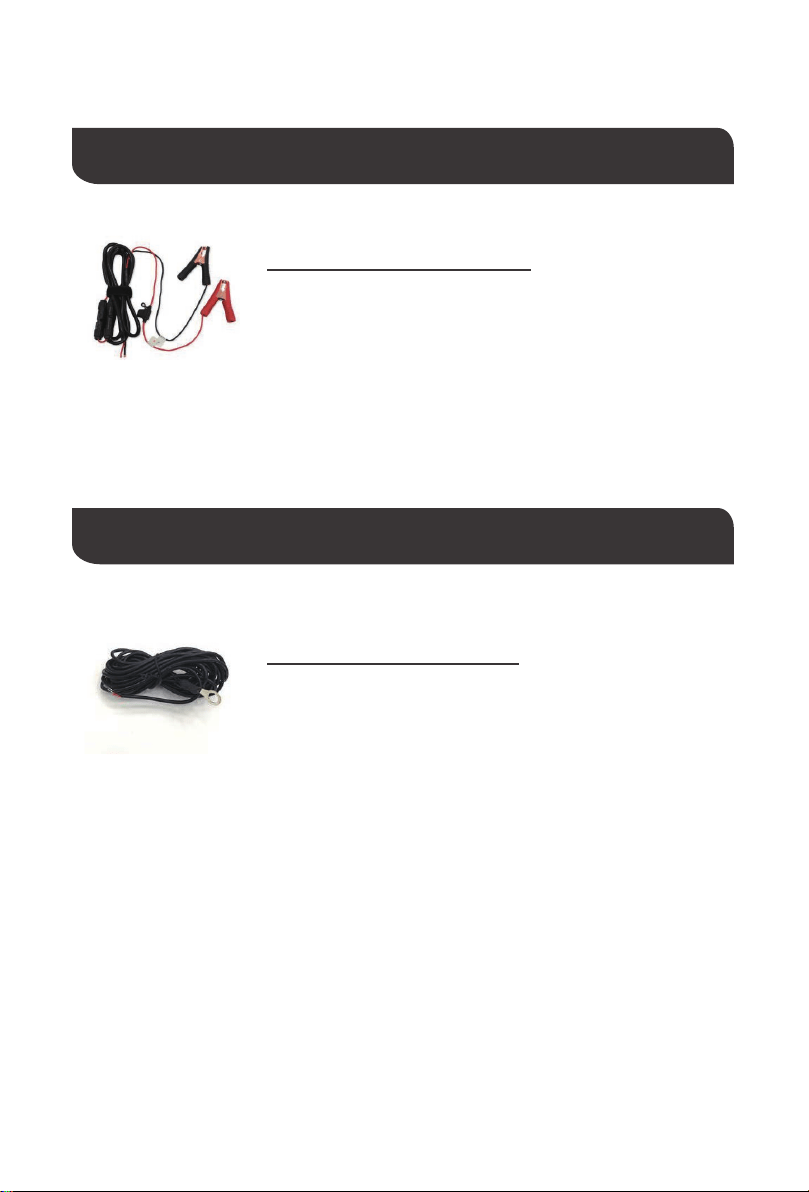
Used for connecting charge controller to battery. The entire cable
from the charge controller to the alligator clips measures 9.9 feet
with an inline fuse of 10A
MC4 to Alligator Clips w/ Fuse
Optional Components
Measures the temperature at the battery and uses this data for very
accurate temperature compensation. The sensor is supplied with a
9.9 feet cable length that connects to the charge controller.
Remote Temperature Sensor
Optional components that require a separate purchase:
06
Key Parts
Key Parts
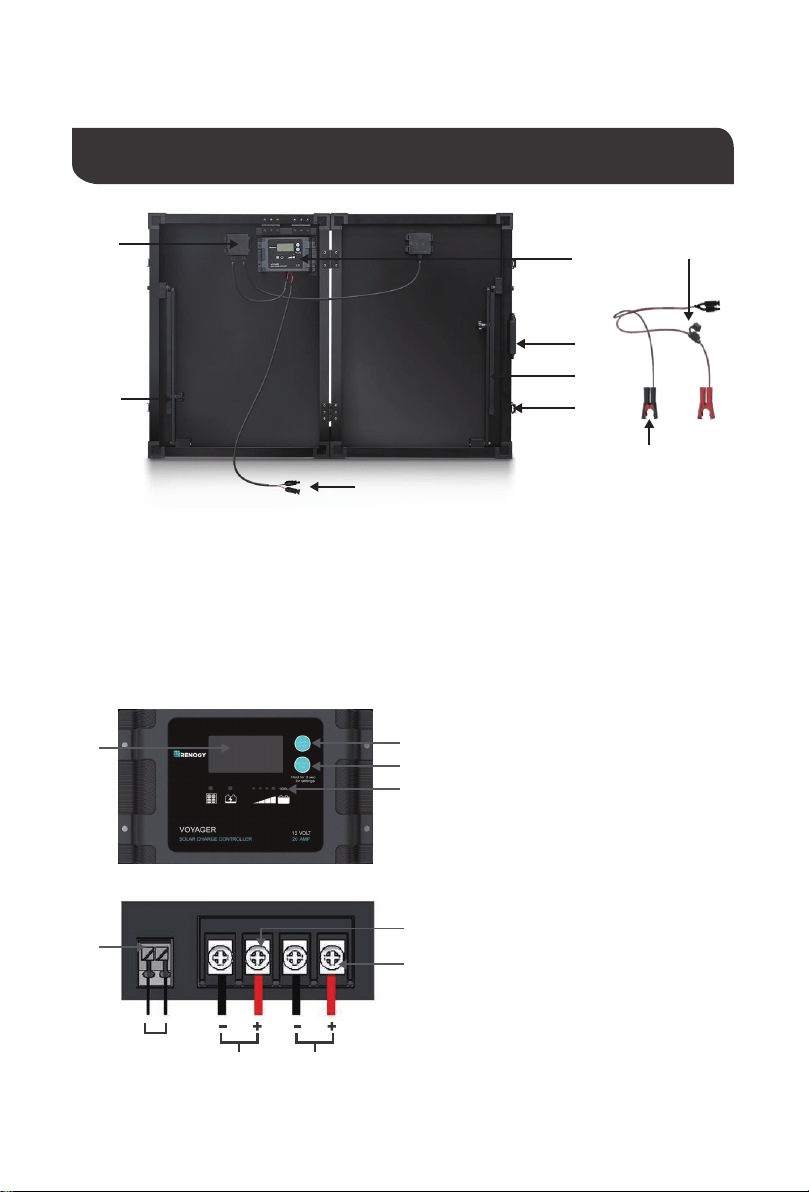
Identification of Parts
1. 20A Voyager Charge Controller
2. Junction Box
3. MC4 Connectors
4. Tilt Stands
5. Battery Alligator Clips
6. In-line fuse (10A)
①
⑧
②
②
④
③
④
③
④
⑦
⑦
⑤
①
⑤
⑥
⑥
7. Latch
8. Handle
9. Case (Not pictured)
1. Backlit LCD
2. AMP/VOLT Button
3. BATTERY TYPE Button
4. LED Bar
5. Remote Temperature Sensor Port
6. Battery Terminals
7. Solar Terminals
Battery
Temp
Sensor Solar
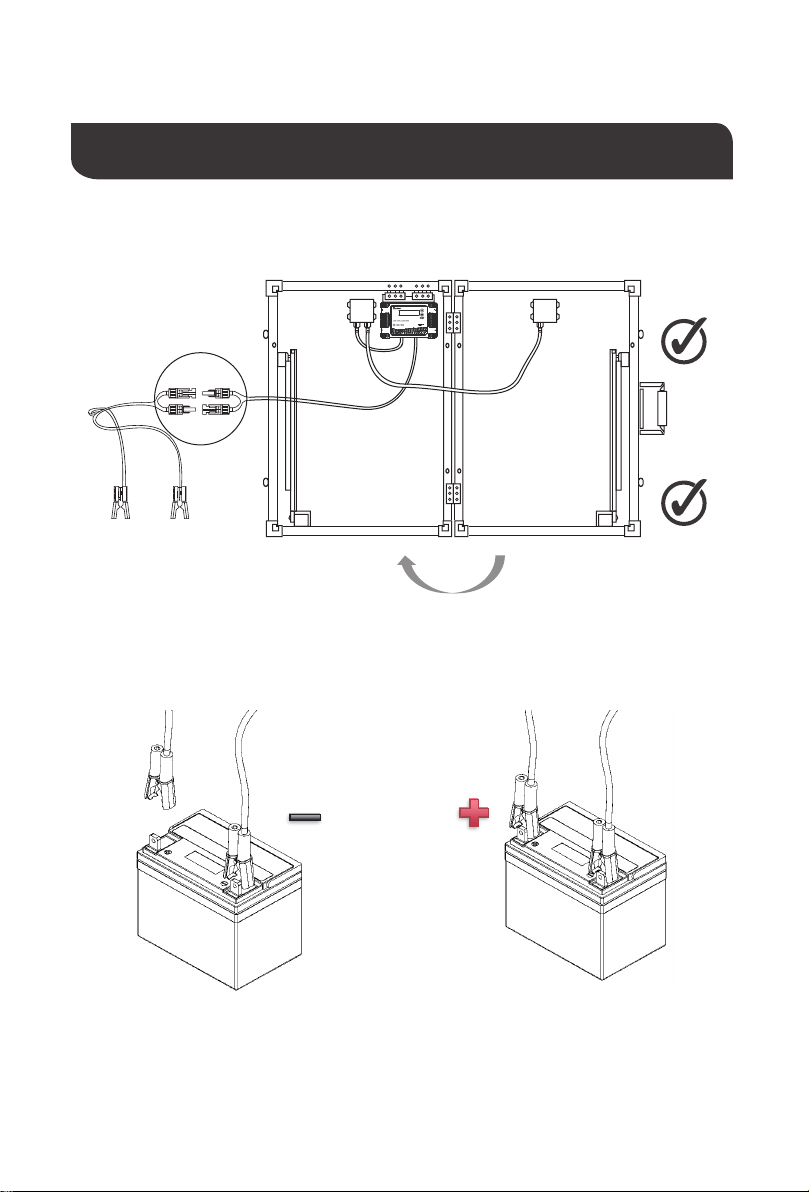
1. Unlatch and unfold unit then connect MC4 Connectors
2. Connect Battery Alligator Clips to 12V Battery
Installation
07
VOYAGER
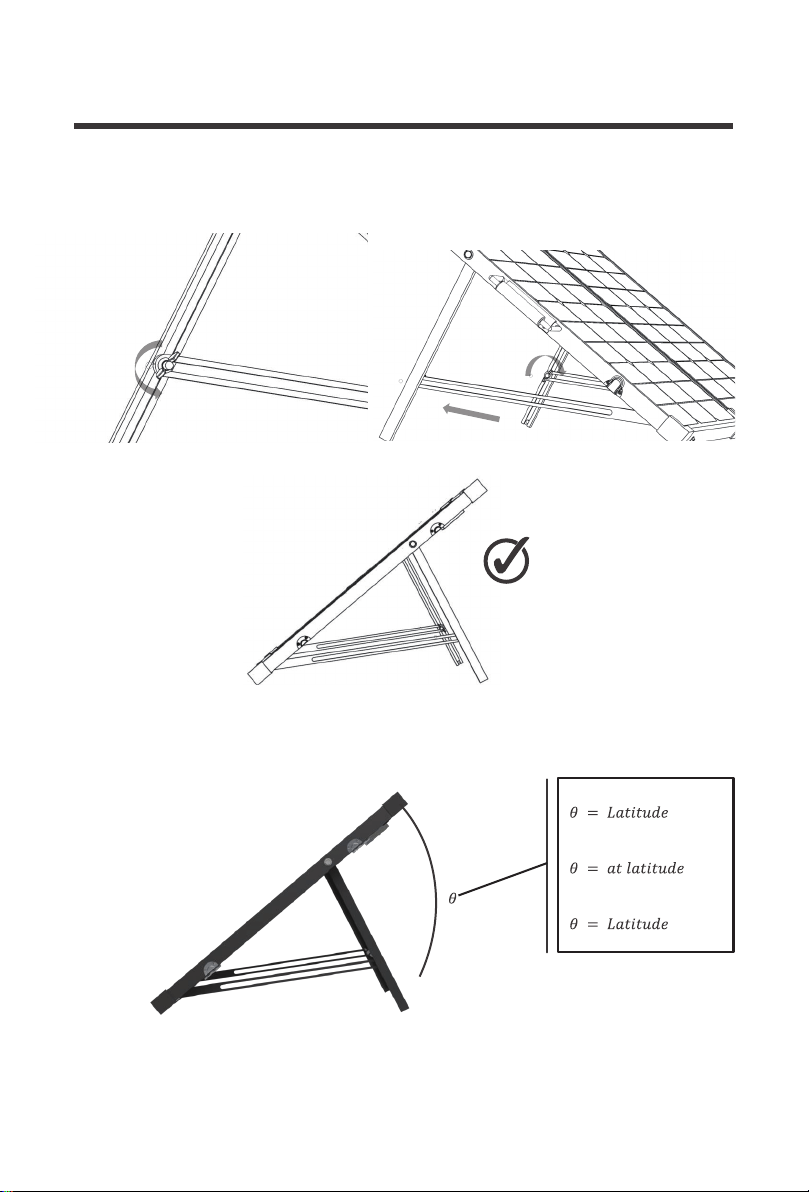
3. Unscrew butterfly nut tilt to desired angle and lock butterfly nut
To maximize the output, adjust the angle of the suitcase regularly to track the sun’s movement
throughout the season
Summer
– 15°
Fall and Spring
Winter
+ 15°
08
Selecting Battery Type
NOTE
WARNING
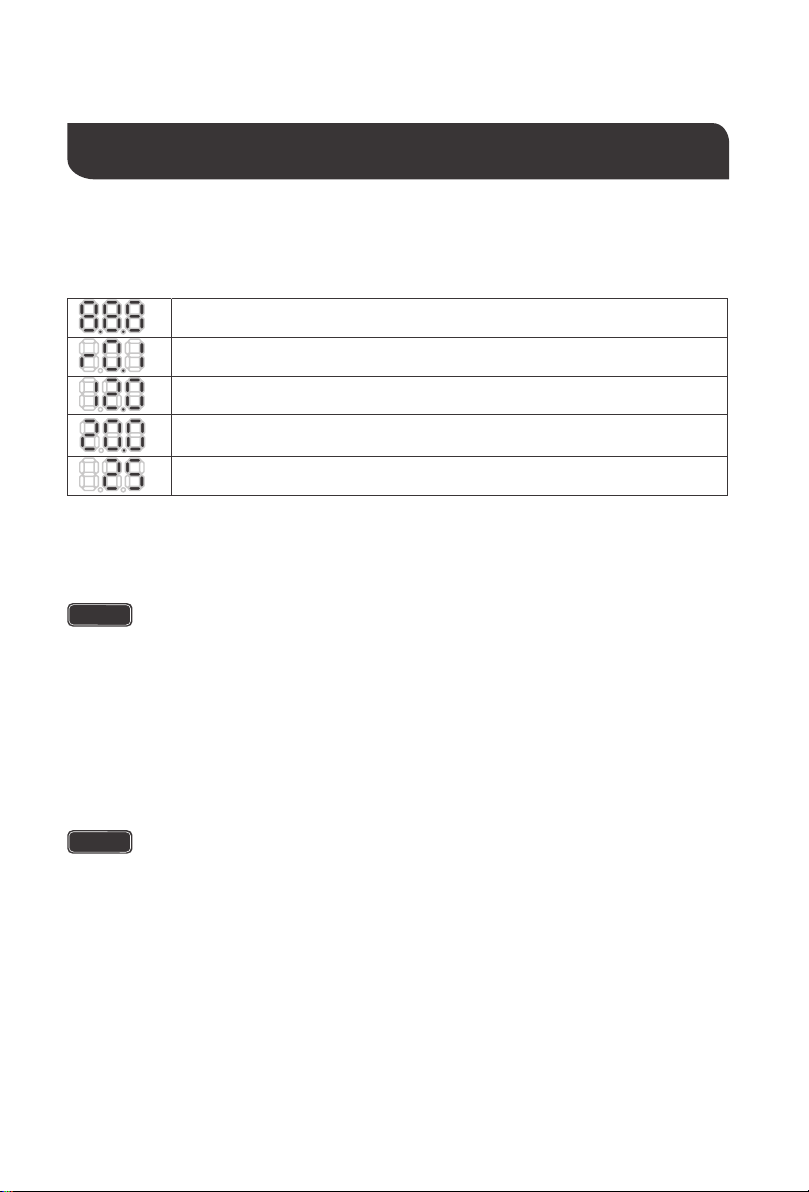
When the controller powers on, the Voyager will run a self-quality check mode and
automatically display the figures on LCD before going into auto work.
Incorrect battery type setting may damage your battery. Please check your
battery manufacturer’s specifications to when selecting battery type.
Lithium ion batteries shown in the LCD indicate different types shown below:
LiFePO4 battery indicates Lithium-iron Phosphate or LFP Battery
Lithium Cobalt Oxide LiCoO2 (LCO) battery
Lithium Manganese Oxide LiMn2O4 (LMQ) battery
Lithium Nickel Manganese Cobalt Oxide LiNiMnCoO2 (NMC) battery
Lithium Nickel Cobalt Aluminum Oxide LiNiCoAlo2 (NCA) battery
The Voyager provides 7 battery types for selection: Lithium-ion, LiFePO4, LTO, Gel, AGM,
Flooded, and Calcium Battery.
Press and hold the BATTERY TYPE Button for 3 seconds to go into battery selection mode.
Press the BATTERY TYPE Button until the desired battery is displayed. After a few seconds,
the highlighted battery type will automatically be selected.
Operation
Self-test starts, digital meter segments test
Software version test
Rated voltage Test
Rated Current Test
External battery temperature sensor test (if connected)
LTO Battery indicates Lithium Titanate Oxidized, Li4Ti5O12 Battery
09
AMP/VOLT Button
Normal Sequencing Display
LED Display
NOTE
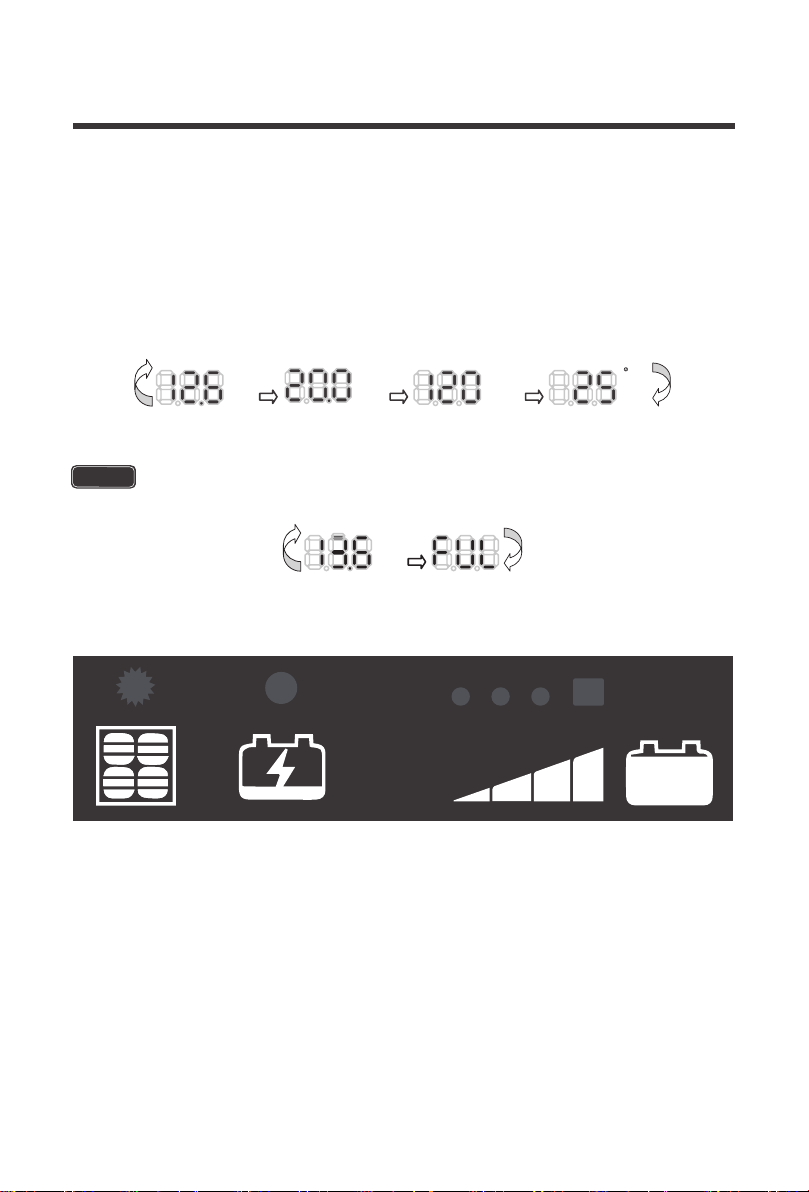
Pressing the AMP/VOLT Button will sequence through the following display parameters:
Battery Voltage, Charging Current, Charged Capacity (Amp-hour), and Battery
Temperature (if external temperature sensor connected)
The following is an alternative display voltage for when the battery is Fully
charged
V
A
AA HH
ºC
V
100%
10
LED Behavior
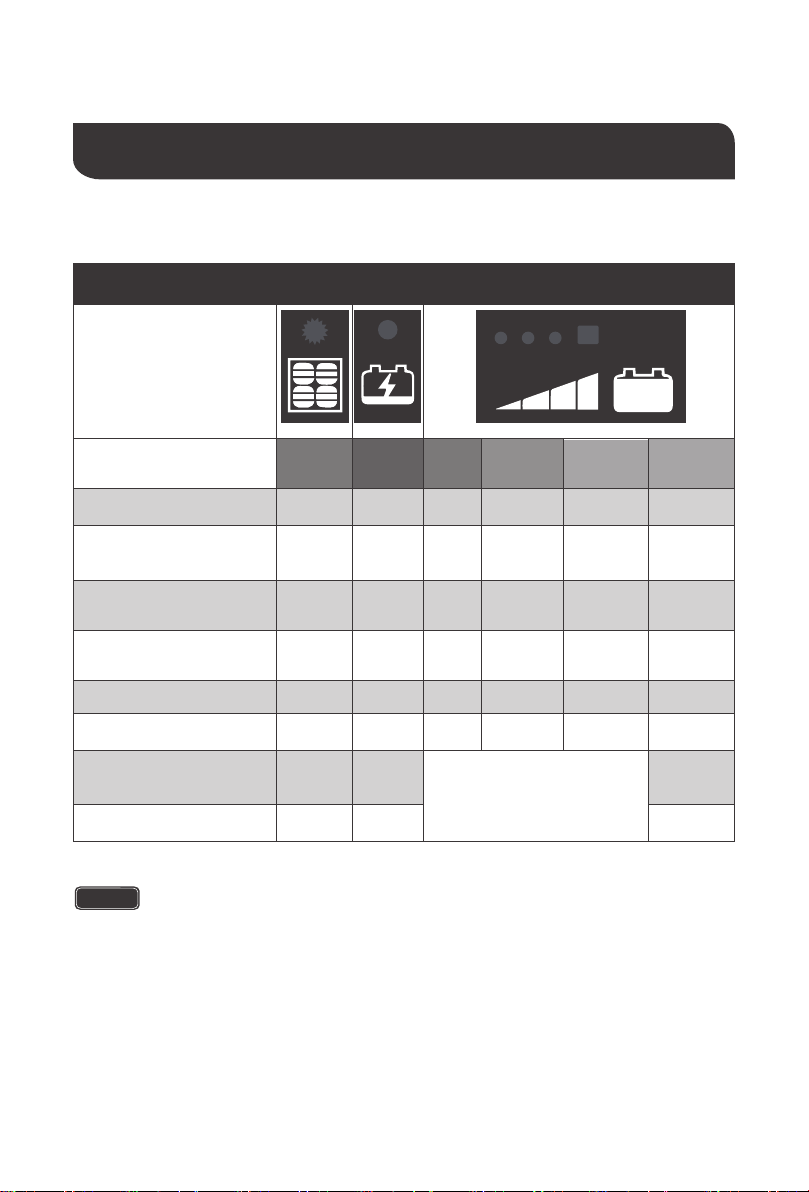
BV = Battery Voltage
LED Color
RED
ON
ON
ON
ON
ON
ON
ON
ON
Blitz
BLUE
ON
ON
FLASH
Aus
RED ORANGE GREEN GREEN
ON OFF
OFF
Aus
Aus
Aus Aus
OFF
OFF
OFF
OFF
OFF
OFF
OFF
OFF
OFF
OFF
ON
ON
ON
ON
ON
OFF
According to BV
Aus
Aus
Aus
Aus
OFF
OFF
Soft-chargeing
Bulk charging
( BV < 11.5V )
Bulk charging
( 11.5V < BV < 12.5V )
Bulk charging
( BV > 12.5V )
Absorption charging
Float charging
Solar weak
( Dawn or Dusk )
In the night
NOTE
System Status Icons
100%
LED Indicators
11
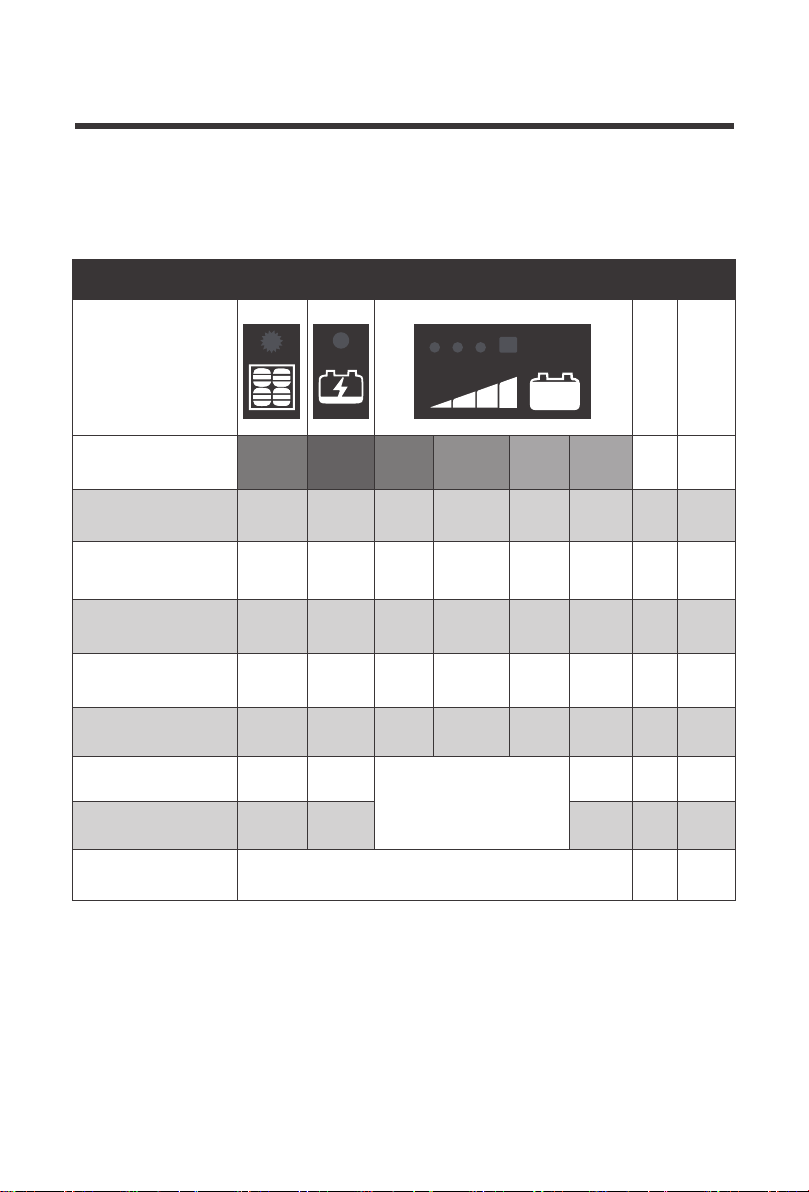
LED-Anzeige Fehlerbeschreibung
LED Color
Error
Code
Screen
RED
ON
ON
ON
OFF
BLUE
ON
FLASH
FLASH
RED ORANGE GREEN GREEN
OFF
OFF
FLASH
FLASH
OFF
OFF
OFF
OFF
FLASH‘otP’
‘PO2’
‘PO1’
‘b04’
‘b03’
‘b01’
‘b02’
‘b03’
FLASH
FLASH
FLASH
FLASH
FLASH
FLASH
OFF
OFF
OFF
FLASH
OFF
OFF
FLASH
FLASH
FLASH
FLASH
FLASH
FLASH
FLASH
FLASH
FLASH
According to BV
OFF
OFF
OFF
OFF
OFF
OFF
OFF
Solar good,
BV < 3V
Solar good
battery reversed
Solar good,
battery over-voltage
Solar off,
battery over-voltage
Solar good,
battery over 65℃
Battery good,
solar reversed
Battery good,
solar overvoltage
Over Temperature
Protection
100%
LED Indicators
LED Error Behavior
12

Battery over voltage
For best controller performance, it is recommended to preform maintenance tasks
occasionally.
1. Check wiring going into the charge controller. Make sure there is no wire damage or
wear.
2. Tighten all terminals and inspect any loose, broken, or burnt connections
3. Confirm LCD and LED readings are consistent.
System Status Troubleshooting
Maintenance
Description Troubleshoot
Use a multi-meter to check the voltage of the battery.
Make sure the battery voltage is not exceeding the
rated specification of the charge controller.
Disconnect battery.
Confirm that there is a tight and correct connection
from the battery bank to the charge controller and the
solar panels to the charge controller. Use a
multi-meter to check if the polarity of the solar
modules has been reversed on the charge
controller’s solar terminals.
Check the rated battery voltage. The LCD will not
display on the charge controller unless there is at
least 9V coming from the battery bank.
Charge controller does not
charge during daytime when
the sun is shining on the
solar panels.
Everything is connected
correctly, but the LCD on the
controller does not turn on
13

Description 100 W Parameters
Frequently Asked Questions
Q. Can the kit charge two or more 12V batteries connected in parallel?
A. Yes, it’s possible if the batteries have the same type and capacity and are wired in parallel
as a single 12V battery bank.
Q. Is there any risk that the solar kit will overcharge my battery?
A. One of the functions of the solar charge controller is to ensure that your battery is not
overcharged; therefore there is no risk of overcharge.
Q. Can I extend the battery leads?
A.
Yes, it’s possible – please choose the same size of cable for extension. However, there
longer the extension, the greater the line loss. A bigger gauge will be required for longer runs.
Q. Do I need to clean the solar panels?
A. Yes, it is recommended to clean glass surface for better performance. Dust and dirt
should first be swept off the panel surface using a soft brush. When the sweeping is
complete, use a wet cloth to wipe the panel surface to remove the remaining dirt and grime.
Q. Can rain damage the solar kit?
A. The solar panels and charge controller are both fully waterproof (IP66, IP65).
Technical Specifications
Solar Panel Parameters
Maximum Power
Open Circuit Voltage (Voc)
Short Circuit Current (Isc)
Maximum Power Voltage (Vmp)
Maximum Power Current (Imp)
Cell Type
Operating Temperature
Folded Size
Net Weight
100 W
24.3 V
2 x 2.73 A
20.3 V
2 x 2.47 A
Monocrystalline
−40°F to +185°F
24.8x 20.0 x 2.8 inches
21.2 lb
14
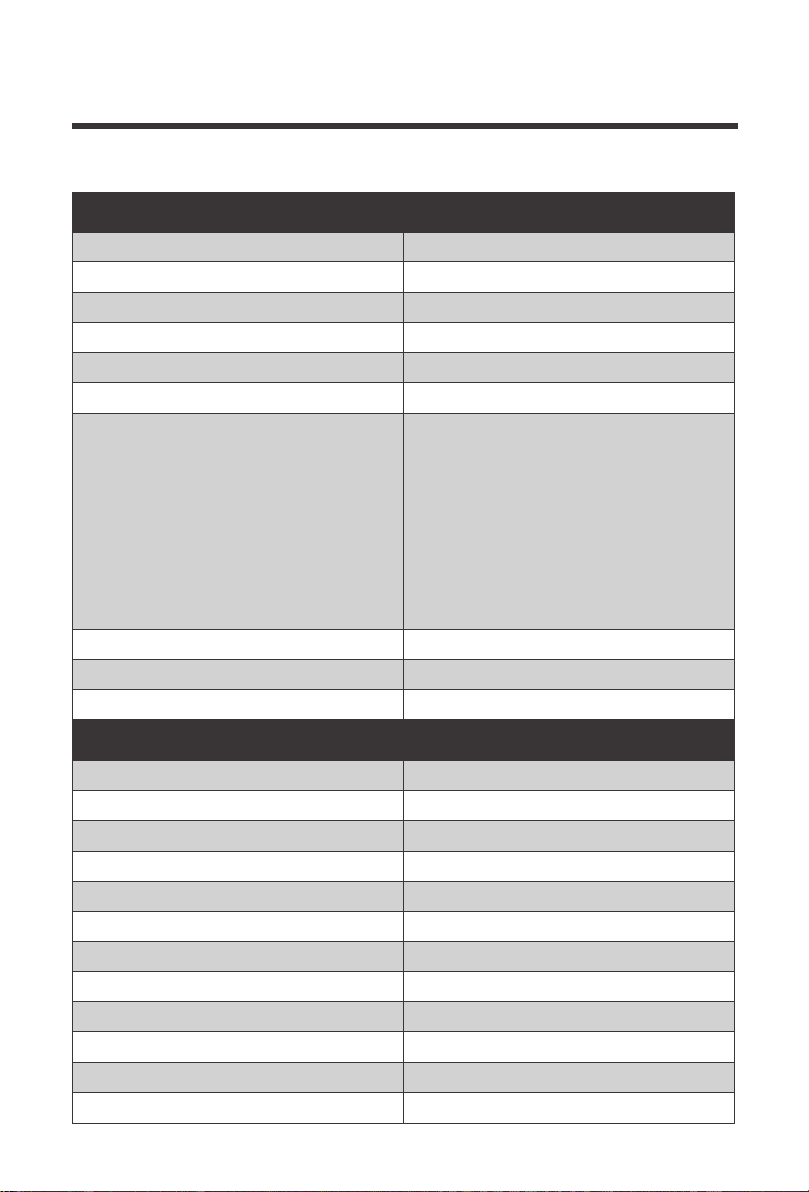
Charge Controller Parameters
Electrical Parameters
Model Rating
Normal Battery Voltage
Maximum Solar Voltage(OCV)
Maximum Battery Voltage
Rated Charging Current
Battery Start Charging Voltage
Electrical Protection and Feature
Grounding
EMC Conformity
Self-consumption
Common Negative
FCC Part-15 class B compliant; EN55022:2010;
< 8mA
20A
12V
26V
17V
20A
3V
Spark-free protection.
Reverse polarity solar and battery connection
Dimensions
Weight
Mounting
Ingress Protection Rating
Maximum Terminals Wire Size
Terminals Screw Torque
Operating Temperature
Meter Operating Temperature -4 ℉ to +140 ℉
-40 ℉ to +140 ℉
13 lbf·in
10AWG ( 5 mm
2
)
IP65
Vertical Wall Mounting
0.88 lbs.
L6.38 x W3.82 x H1.34 inches
--40 ℉ to +185 ℉
-24mV / °C
-4°F ~ 122°F
100% ( No condensation )
Storage Temperature Range
Temp. Comp. Coefficient
Temp. Comp. Range
Operating Humidity
Mechanical Parameters
Reverse current from battery to solar panel
protection at night
Over temperature protection with derating
charging current
Transient overvoltage protection, at the
solar input and battery output protects
against surge voltage
15
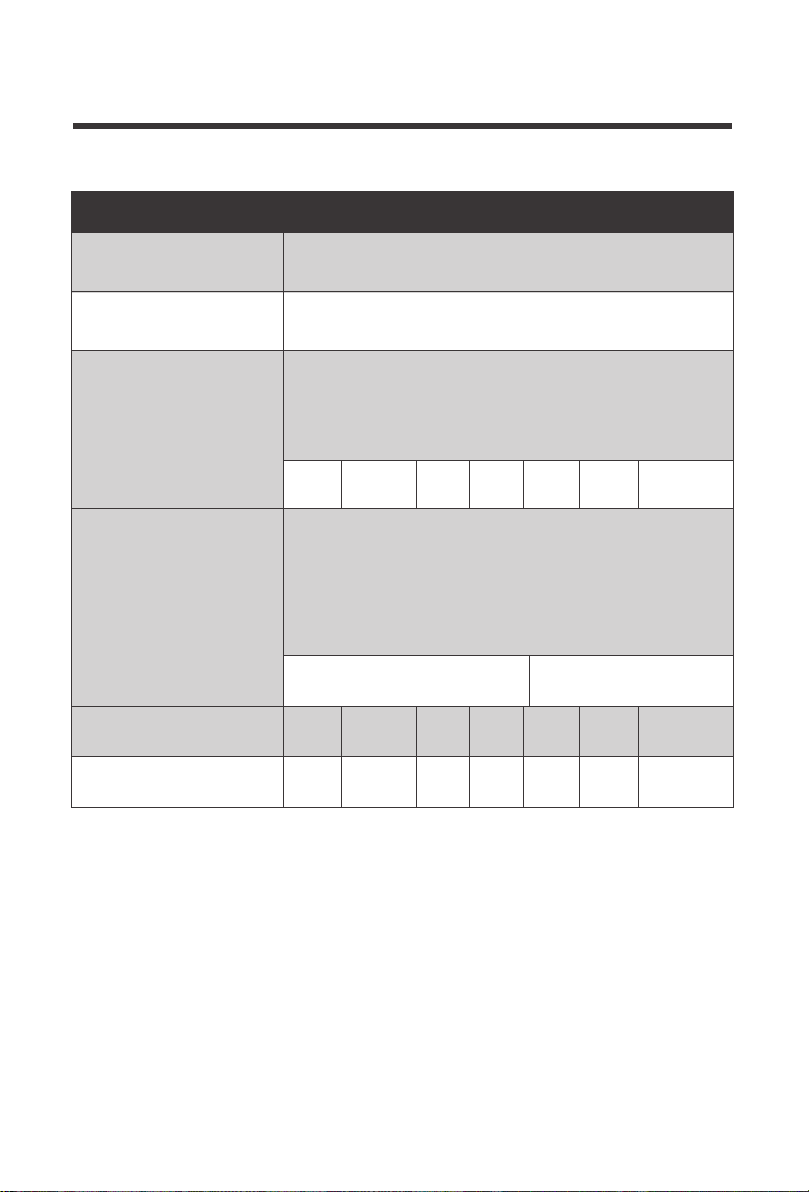
Equalization Voltage—equalization voltage is a corrective over-charge of the battery. The
user should consult their battery manufacturer regarding specific battery equalization capacity.
This parameter sets the equalization voltage to set the battery at when it reaches the
equalization state.
Boost Voltage—users should check with their battery manufacturer for proper charging
parameters. In this stage, users set the boost voltage where the battery will reach a voltage level
and remain there until the battery undergoes an absorption stage
Float Voltage—once the charge controller recognizes the set float voltage, it will commence
floating. The battery is supposed to be fully charged in his state, and the charge current is
reduced to maintain battery stability levels.
Charging Parameters Glossary
Charging Stages
Battery Charging Parameters
Soft-Charge
Bulk
Absorption
@ 25°C
Equalization
Calcium = every charging cycle
Float
Under Voltage Recharging
Wet (Flooded)
15.5V
Calcium
15.5V
Li-ion
N/A
LiFePO4
N/A
LTO
N/A
GEL
13.6V
AGM
13.6V
WET
13.6V
CALCIUM
13.6V
Li-ion
12.0V
LiFePO4
13.4V
LTO
13.4V
GEL
12.8V
AGM
12.8V
WET
12.8V
CALCIUM
12.8V
Output battery voltage is 3V-10VDC,
Current = half of the solar panel current
10VDC to 14VDC
Current = Rated Charge Current
Li-ion
12.6V
LiFePO4
14.4V
LTO
14.0V
AGM
14.4V
WET
14.7 V
CALCIUM
14.9 V
GEL
14.1V
Constant voltage until current drops to 0.75/1.0 amps and
holds for 30s.Minimum 2 hours charging time and maximum
4 hours’ time out If charging current < 0.2A, stage will end.
Only Wet (Flooded) or Calcium Batteries will equalize, 2
hours maximum
Wet (Flooded) = if discharge below 11.5V OR every 28
days charging period.
16
17
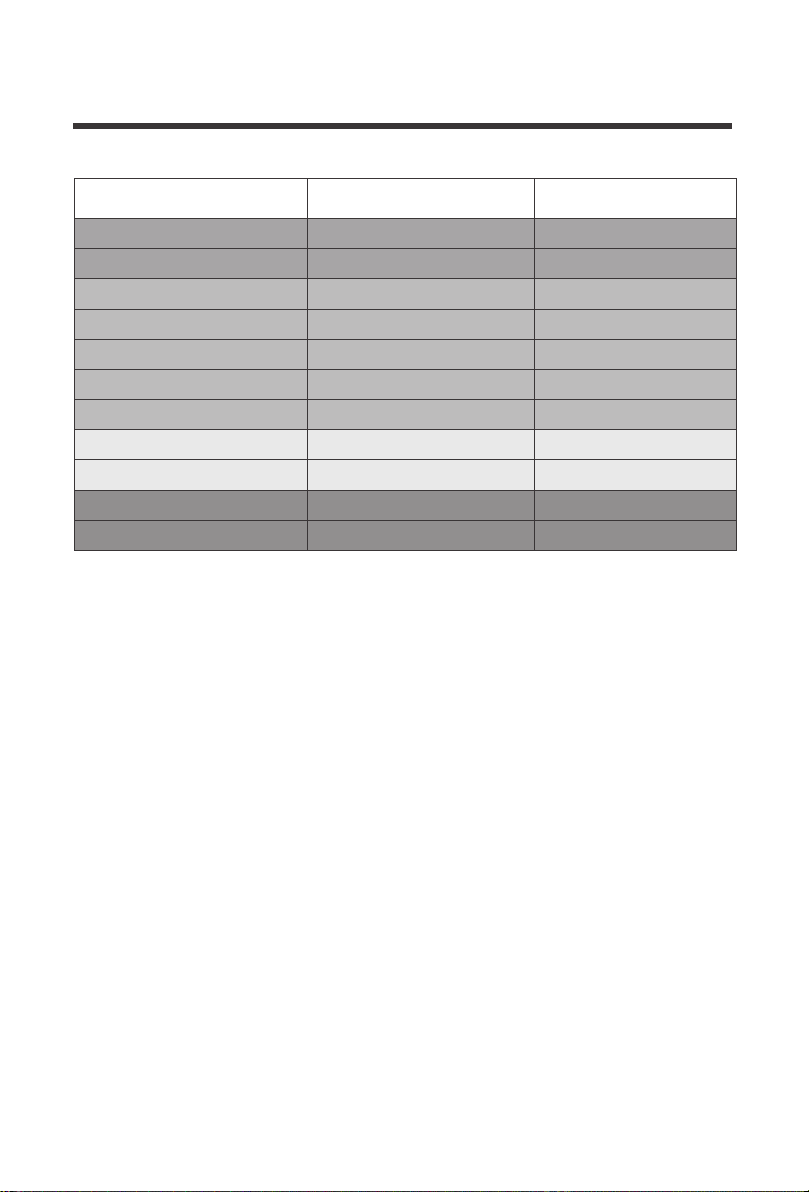
100%
State of Charge 12 V Battery Volts per Cell
90%
80%
70%
60%
50%
40%
30% 11.75
11.9
12.06
12.20
12.32
12.42
12.5
12.7
11.58
11.31
10.5
1.96
1.98
2.01
2.03
2.05
2.07
2.08
2.12
1.93
1.89
1.75
20%
10%
0
18
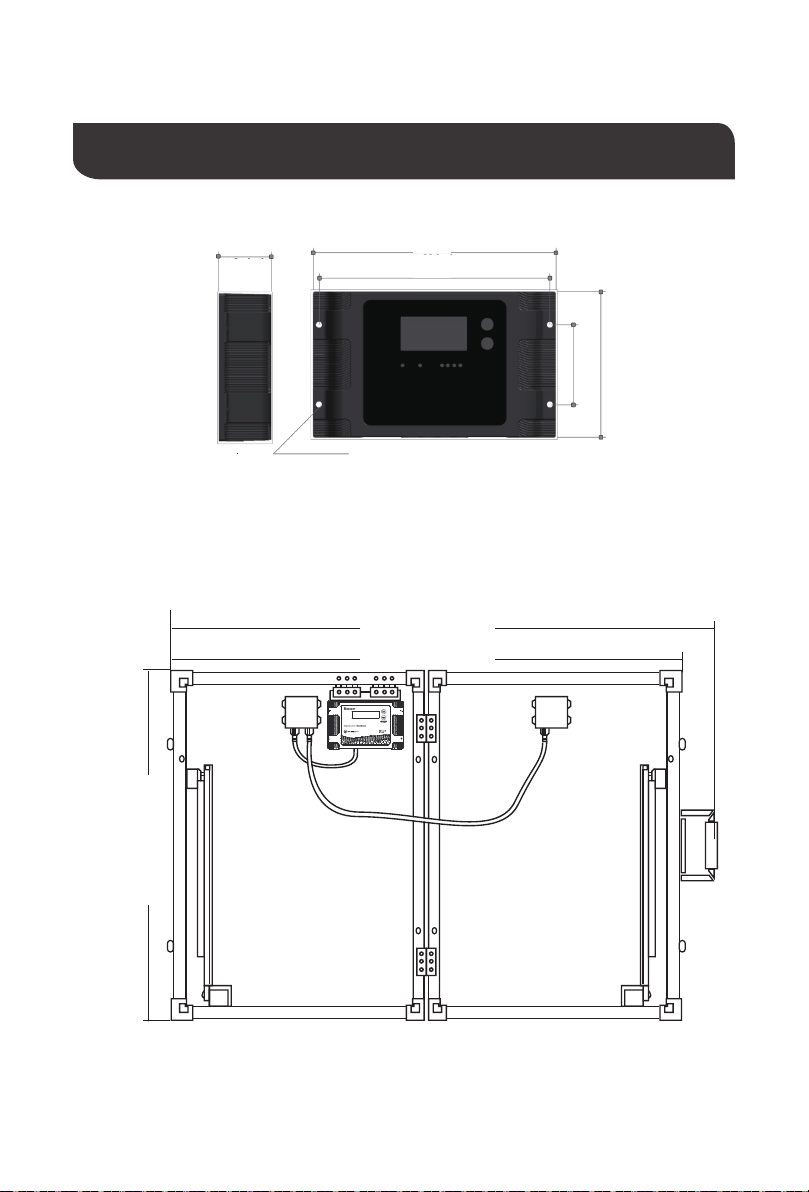
100W Suitcase
1334 mm
1260 mm
Dimensions
Voyager
4.0mm[0.2in]
[6.4in]
[52.5 in]
[49.6 in]
509 mm
[
2
0
.
0
i
n
]
[6.0in]
[3.8in]
[2.1in]
162 mm
154 mm
97 mm
53 mm
[1.3in]34 mm
VOYAGE R

Renogy reserves the right to change
the contents of this manual without notice.
RENOGY.COM
US
2775 E Philadelphia St, Ontario, CA 91761, USA
909-287-7111
www.renogy.com
customerservice@renogy.com
https://www.renogy.cn
sales@renogy.cn
CN
400-6636-695
苏州高新区科技城培源路1号5号楼-4
CA
https://ca.renogy.com
onlinestoreca@renogy.com
https://au.renogy.com
onlinestoreau@renogy.com
AU
JP
https://www.renogy.jp
onlinestorejp@renogy.com
https://uk.renogy.com
onlinestoreuk@renogy.com
UK
https://de.renogy.com
onlinestorede@renogy.com
DE
https://fr.renogy.com
onlinestorefr@renogy.com
FR