t
91
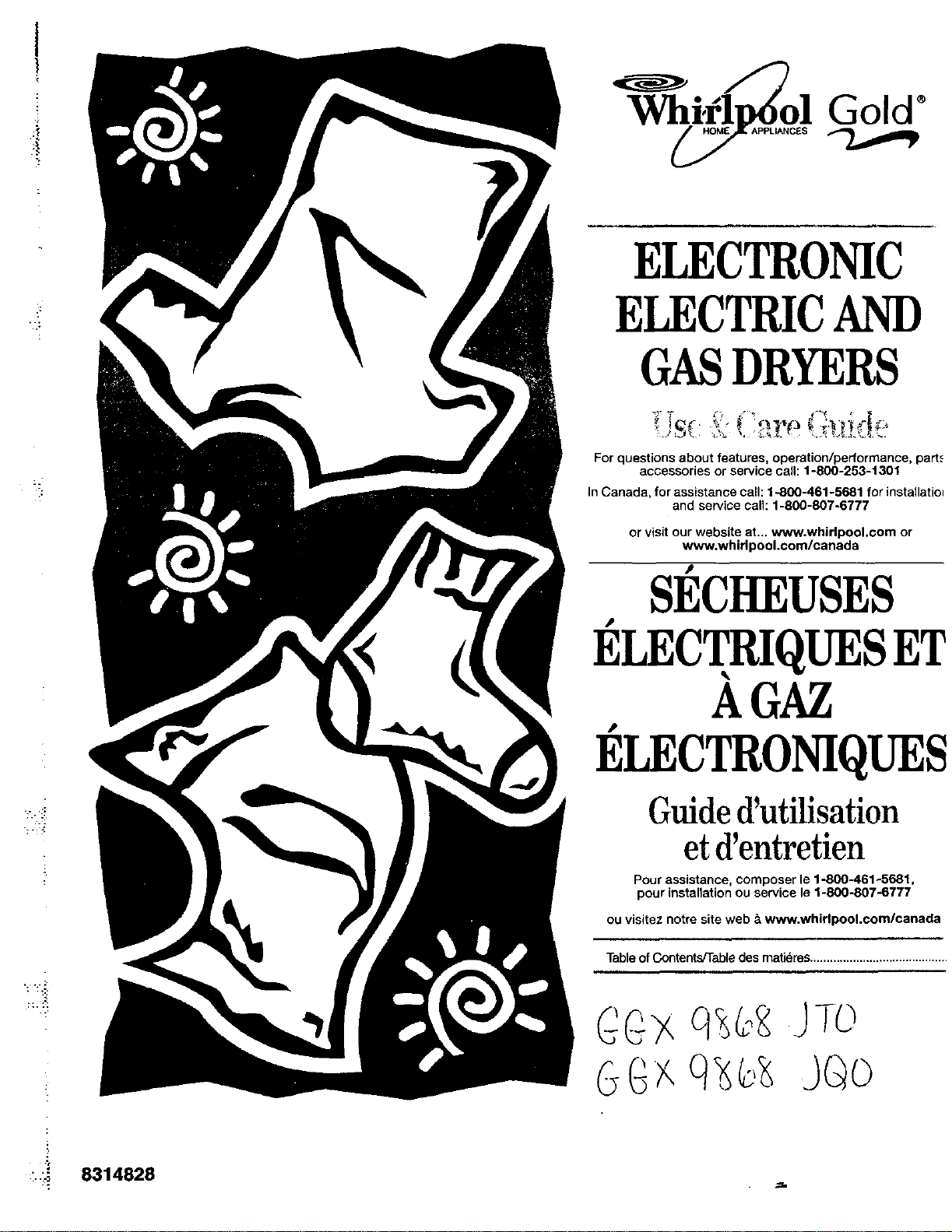
ELECTRONIC
ELECTRICAND
GASDRYERS
For questions about features, operation/performance, part._
accessories or service call: 1-800-253-1301
In Canada, for assistance call: 1-800-461-5681 for installatio_
and service call: 1-800-807-6777
or visitour website at... www.whirlpool.vom or
www.whid pool.corn/canada
S]_CHEUSES
]_LECTRIQUESET
AGAZ
I_LECTRONIQUES
Guide d'utilisation
et d'entretien
Pour assistance, composer le 1-800461-8681,
pour installationou service le 1-800-807-8777
ou visitez notre site web &www.whirlpool.com/canada
TableofContents/Tabledesmatidres..........................................
-..-._ 8314828
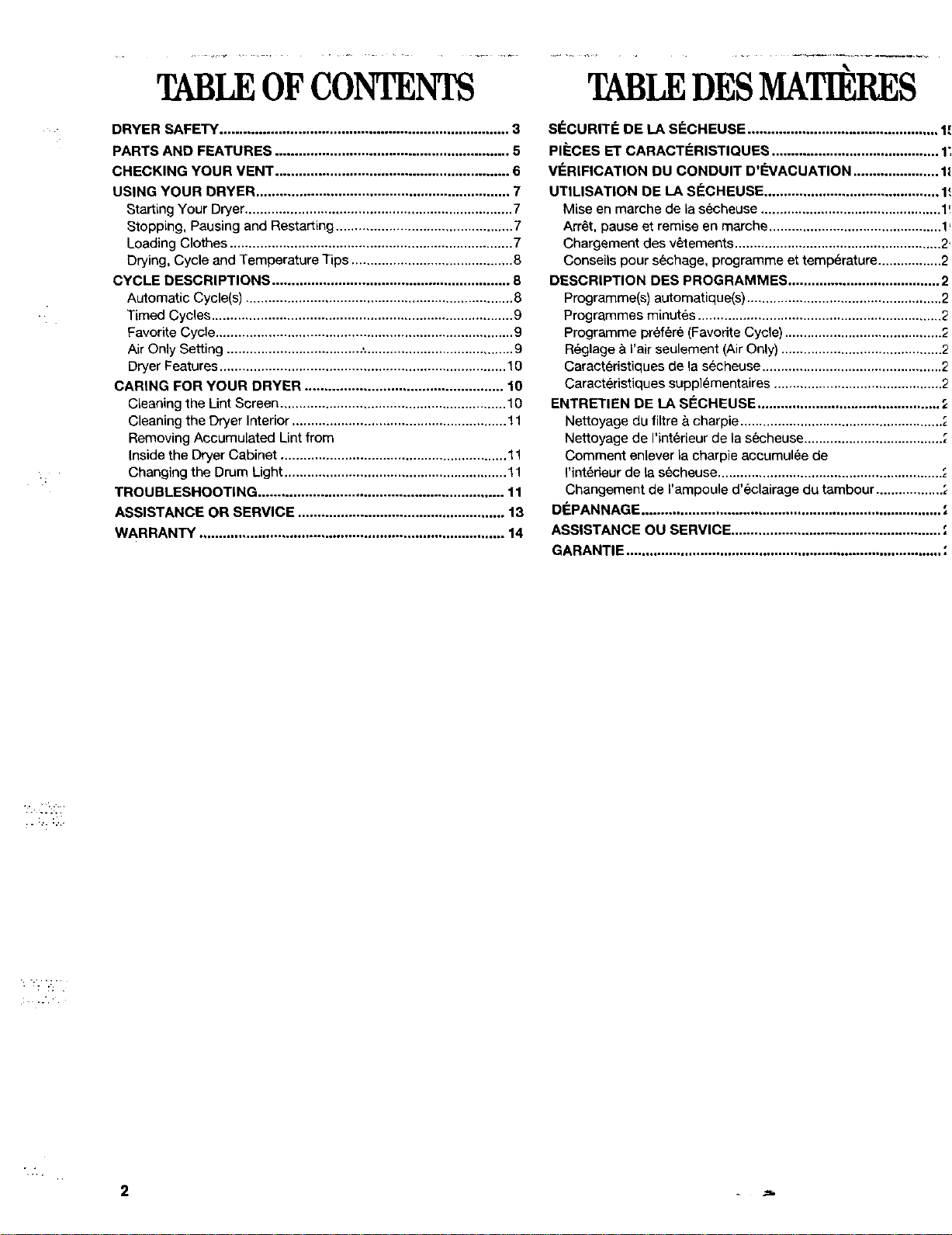
TABLEOFCONTENTS
DRYER SAFETY .......................................................................... 3
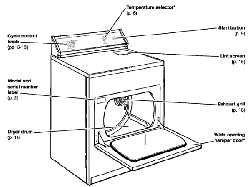
PARTS AND FEATURES ............................................................ 5
CHECKING YOUR VENT ............................................................ 6
USING YOUR DRYER ................................................................. 7
Starting Your Dryer ....................................................................... 7
Stopping, Pausing and Restarting ............................................... 7
Loading Clothes ........................................................................... 7
Drying, Cycle and Temperature Tips ........................................... 8
CYCLE DESCRIPTIONS ............................................................. 8
Automatic Cycle(s) ....................................................................... 8
Timed Cycles ................................................................................ 9
Favorite Cycle ............................................................................... 9
Air Only Setting .................................... ,........................................ 9
Dryer Features ............................................................................ 10
CARING FOR YOUR DRYER ................................................... 10
Cleaning the Lint Screen ............................................................ 10
Cleaning the Dryer Interior ......................................................... 11
Removing Accumulated Lint from
Inside the Dryer Cabinet ............................................................ 11
Changing the Drum Light ........................................................... 11
TROUBLESHOOTING ............................................................... 11
ASSISTANCE OR SERVICE ..................................................... 13
WARRANTY .............................................................................. 14
......... _ ........... ..k__ ..........
TABLEDESMATIERES
SI_CURITF: DE LA SteCHEUSE ................................................. 1'.
PI_CES ET CARACTIeRISTIQUES ........................................... 1;
V_:RIFICATION DU CONDUIT D'_'VACUATION ...................... 1_
UTILISATION DE LA SECHEUSE ............................................. 1_,
Mise en marche de la secheuse ................................................ 1!
Arret, pause et remise en marche .............................................. 1_
Chargement des vetements ....................................................... 2'
Conseils pour sechage, programme et temperature ................. 2
DESCRIPTION DES PROGRAMMES ....................................... 2
Programme(s) automatique(s) .................................................... 2
Programmes minutes ................................................................. 2
Programme prefere (Favorite Cycle) .......................................... 2
Reglage & Fair seulement (Air Only) ........................................... 2
Caracteristiques de la secheuse ................................................ 2
Caracteristiques supplementaires ............................................. 2
ENTRETIEN DE LA SI_CHEUSE ............................................... ;
Nettoyage du filtre & charpie ...................................................... ;
Nettoyage de I'int_deur de la secheuse..................................... ;
Comment enlever la charpie accumulee de
I'int_deur de ta s6cheuse ............................................................ ",
Changement de I'ampoule d'eclairage du tambour .................. ",
DI_PANNAGE ............................................................................. ;
ASSISTANCE OU SERVICE ...................................................... ;
GARANTIE ................................................................................. "
DRYERSAFETY
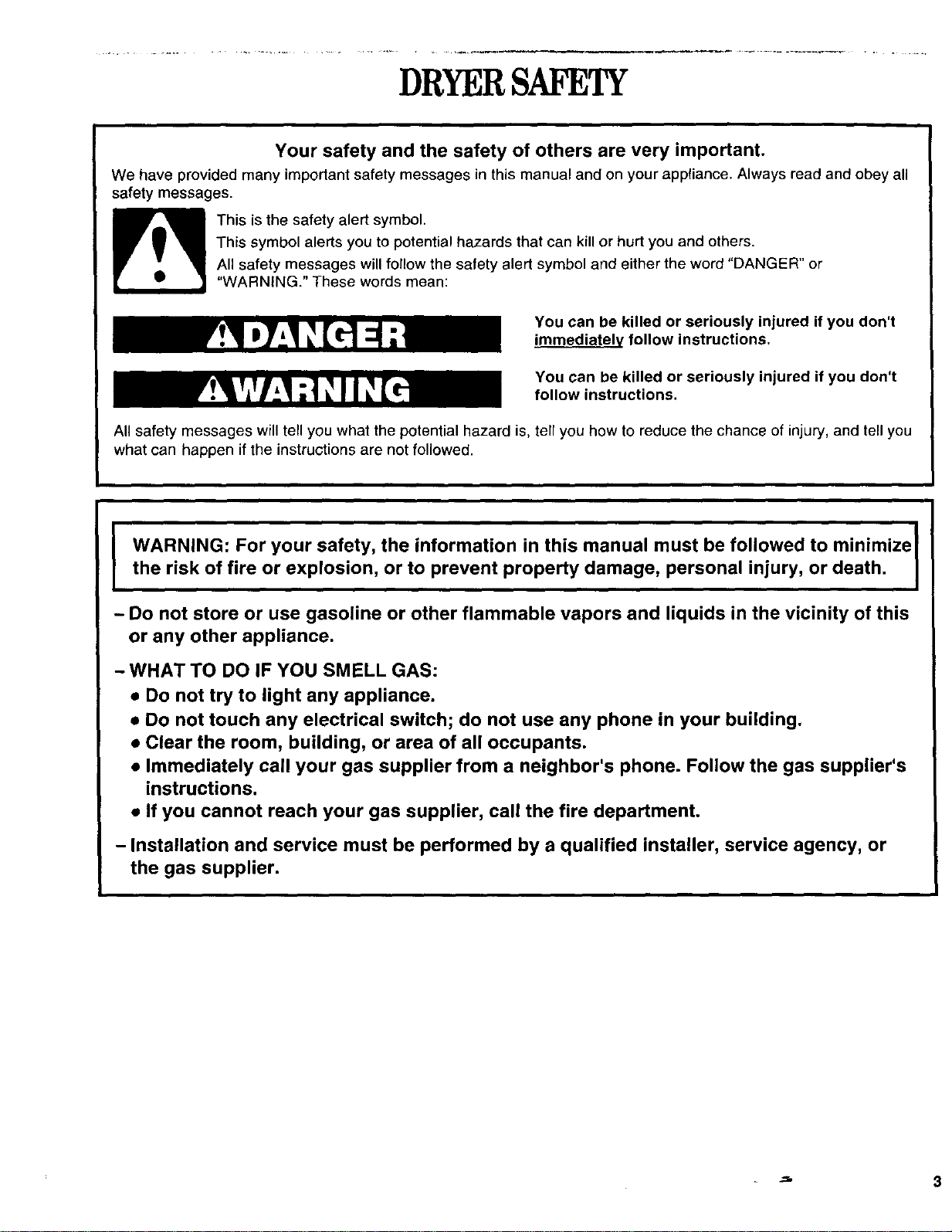
Your safety and the safety of others are very important.
We have provided many important safety messages in this manual and on your appliance• Always read and obey all
safety messages.
This is the safety alert symbol.
This symbol alerts you to potential hazards that can kill or hurt you and others.
All safety messages will follow the safety alert symbol and either the word "DANGER" or
"WARNING." These words mean:
You can be killed or seriously injured if you don't
immediately follow instructions.
You can be killed or seriously injured if you don't
follow instructions.
All safety messages will tell you what the potential hazard is, tell you how to reduce the chance of injury, and tell you
what can happen if the instructions are not followed.
WARNING: For your safety, the information in this manual must be followed to minimize I
the risk of fire or explosion, or to prevent property damage, personal injury, or death. J
- Do not store or use gasoline or other flammable vapors and liquids in the vicinity of this
or any other appliance.
- WHAT TO DO IF YOU SMELL GAS:
• Do not try to light any appliance.
• Do not touch any electrical switch; do not use any phone in your building.
• Clear the room, building, or area of all occupants.
• Immediately call your gas supplier from a neighbor's phone. Follow the gas suppiier's
instructions.
• If you cannot reach your gas supplier, call the fire department.
- Installation and service must be performed by a qualified installer, service agency, or
the gas supplier.
=_ 3
2
IMPORTANT SAFETY INSTRUCTIONS
WARNING: To reduce the risk of fire, electric shock, or injury to persons when using the dryer, follow basic
precautions, including the following:
Read all instructions before using the dryer.
Do not place items exposed to cooking oils in
your dryer. Items contaminated with cooking oils
may contribute to a chemical reaction that could
cause a load to catch fire.
Do not dry articles that have been previously
cleaned in, washed in, soaked in, or spotted with
gasoline, dry-cleaning solvents, other flammable,
or explosive substances as they give off vapors
that could ignite or explode.
Do not allow children to play on or in the dryer.
Close supervision of children is necessary when
the dryer is used near children.
Before the dryer is removed from service or dis-
carded, remove the door to the drying compart-
ment.
Do not reach into the dryer if the drum is moving.
Do not install or store the dryer where it will be
exposed to the weather.
Do not tamper with controls.
• Do not repair or replace any part of the dryer or
attempt any servicing unless specifically recom-
mended in this Use and Care Guide or in published
user-repair instructions that you understand and have
the skills to carry out.
• Do not use fabric softeners or products to eliminate
static unless recommended by the manufacturer of
the fabric softener or product.
• Do not use heat to dry articles containing foam rubber
or similarly textured rubber-like materials.
• Clean lint screen before or after each load.
• Keep area around the exhaust opening and adjacent
surrounding areas free from the accumulation of lint,
dust, and dirt.
• The interior of the dryer and exhaust vent should be
cleaned periodically by qualified service personnel.
• See Installation Instructions for grounding require-
ments.
SAVETHESEINSTRUCTIONS
..T:
i
'--_ 4
PARTSANDFFATU_S
4,
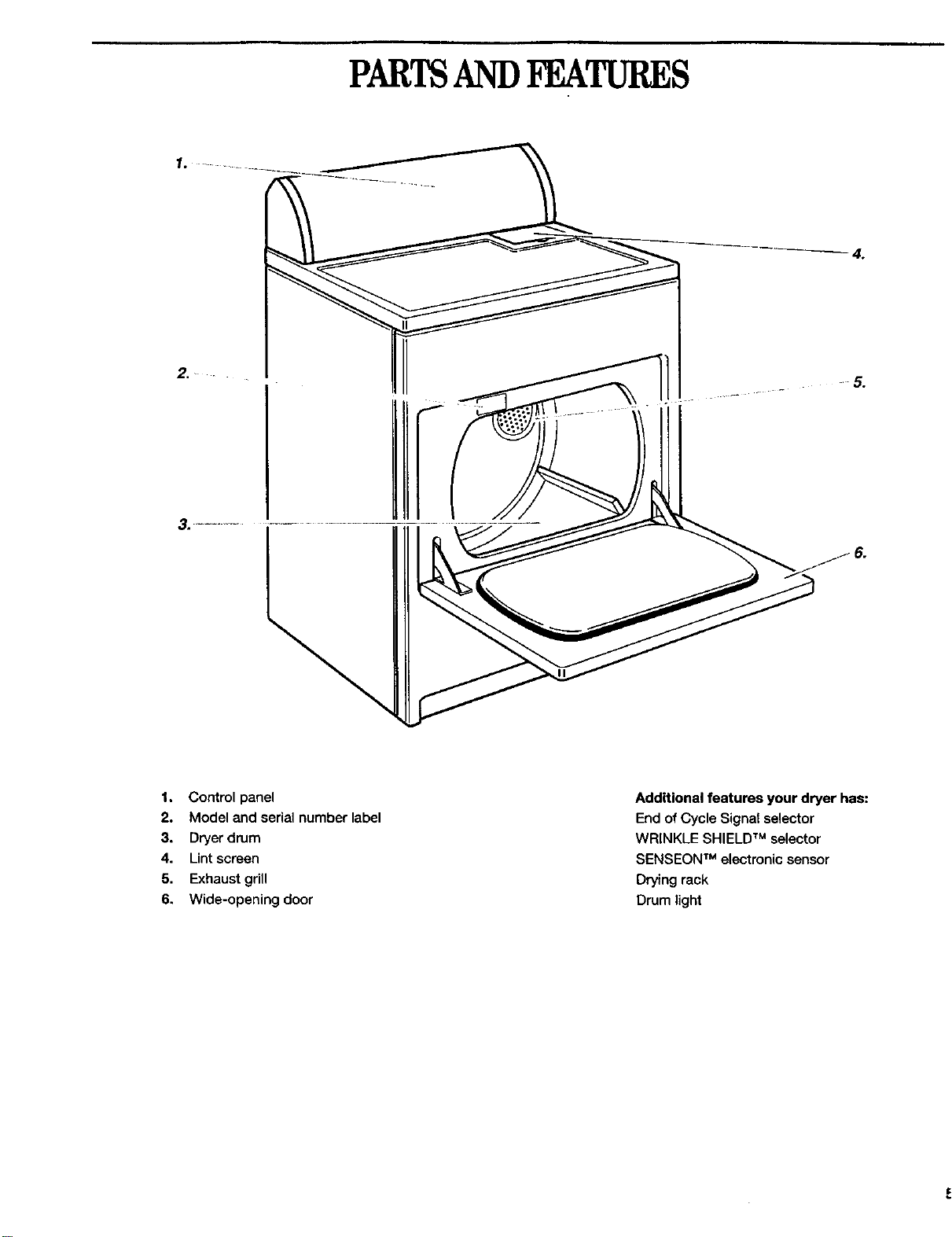
1. Control panel
2. Model and serial number label
3. Dryer drum
4. Lint screen
5. Exhaust gdll
6. Wide-opening door
Additional features your dryer has:
End of Cycle Signal selector
WRINKLE SHIELD TM selector
SENSEON TM electronic sensor
Drying rack
Drum light
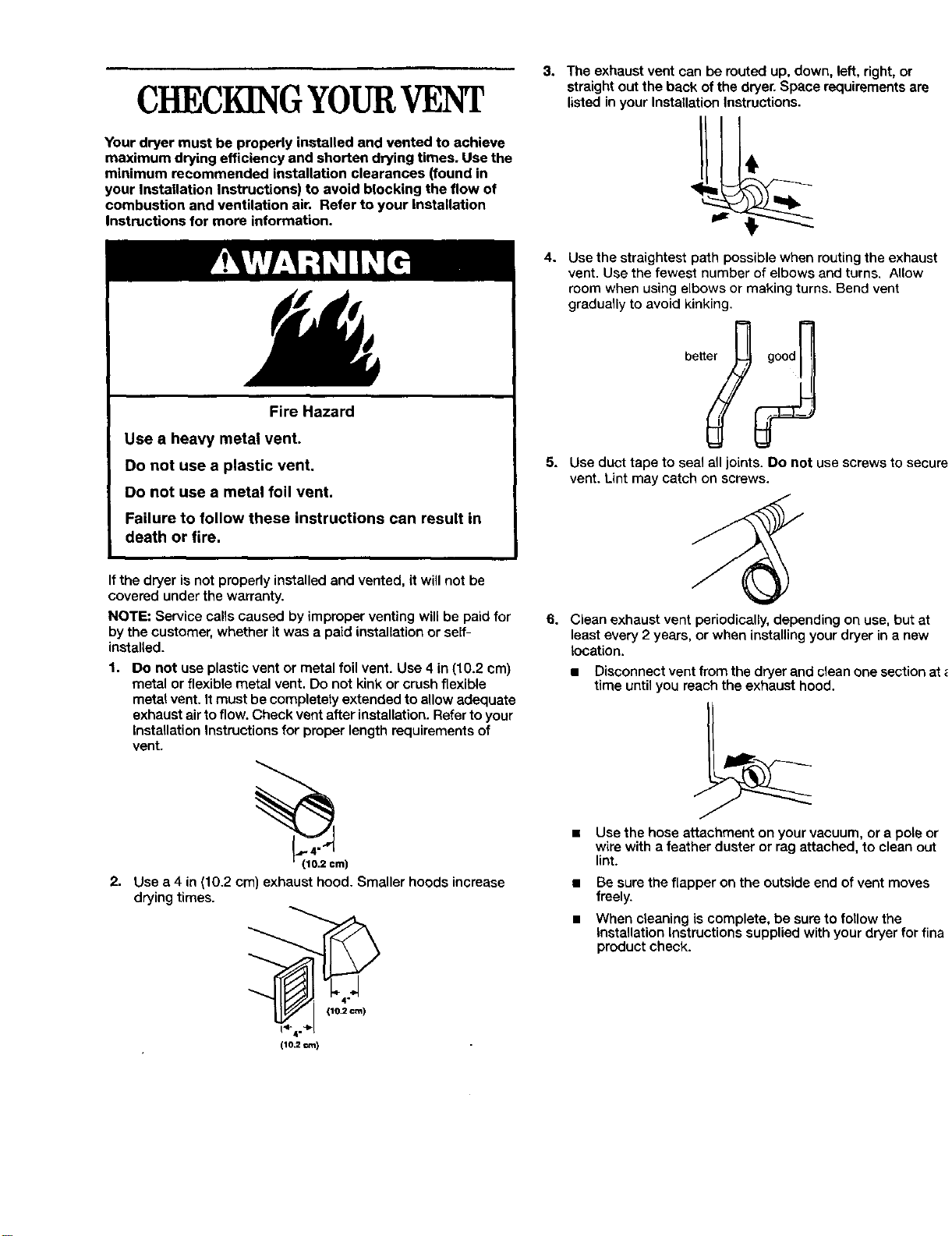
CHECKINGYOURVENT
Your dryer must be properly installed and vented to achieve
maximum drying efficiency and shorten drying times. Use the
minimum recommended installation clearances (found in
your Installation Instructions) to avoid blocking the flow of
combustion and ventilation air. Refer to your Installation
Instructions for more information.
Fire Hazard
Use a heavy metal vent.
Do not use a plastic vent.
Do not use a metal foil vent.
Failure to follow these instructions can result in
death or fire,
3. The exhaust vent can be muted up, down, left, right, or
straight out the back of the dryer. Space requirements are
listed in your Installation Instructions.
4. Use the straightest path possible when routing the exhaust
vent. Use the fewest number of elbows and turns. Allow
room when using elbows or making turns. Bend vent
gradually to avoid kinking.
5. Use duct tape to seal all joints. Do not use screws to secure
vent. Lint may catch on screws.
If the dryer is not properly installed and vented, it will not be
covered under the warranty.
NOTE: Service calls caused by improper venting will be paid for
by the customer, whether it was a paid installation or self-
installed.
1. Do not use plastic vent or metal foil vent. Use 4 in (10.2 cm)
metal or flexible metal vent. Do not kink or crush flexible
metal vent. It must be completely extended to allow adequate
exhaust air to flow. Check vent after installation. Refer to your
Installation Instructions for proper length requirements of
vent.
_rn)
2. Use a 4 in (10.2 cm) exhaust hood. Smaller hoods increase
drying times.
1_4.,_1 110.2 cm)
(10,2 ¢m)
6. Clean exhaust vent periodically, depending on use, but at
least every 2 years, or when installing your dryer in a new
location,
• Disconnect vent from the dryer and clean one section at
time until you reach the exhaust hood.
• Use the hose attachment on your vacuum, or a pole or
wire with a feather duster or rag attached, to clean out
lint.
• Be sure the flapper on the outside end of vent moves
freely.
• When c_eaning is complete, be sure to follow the
Installation Instructions supplied with your dryer for fina
product check.
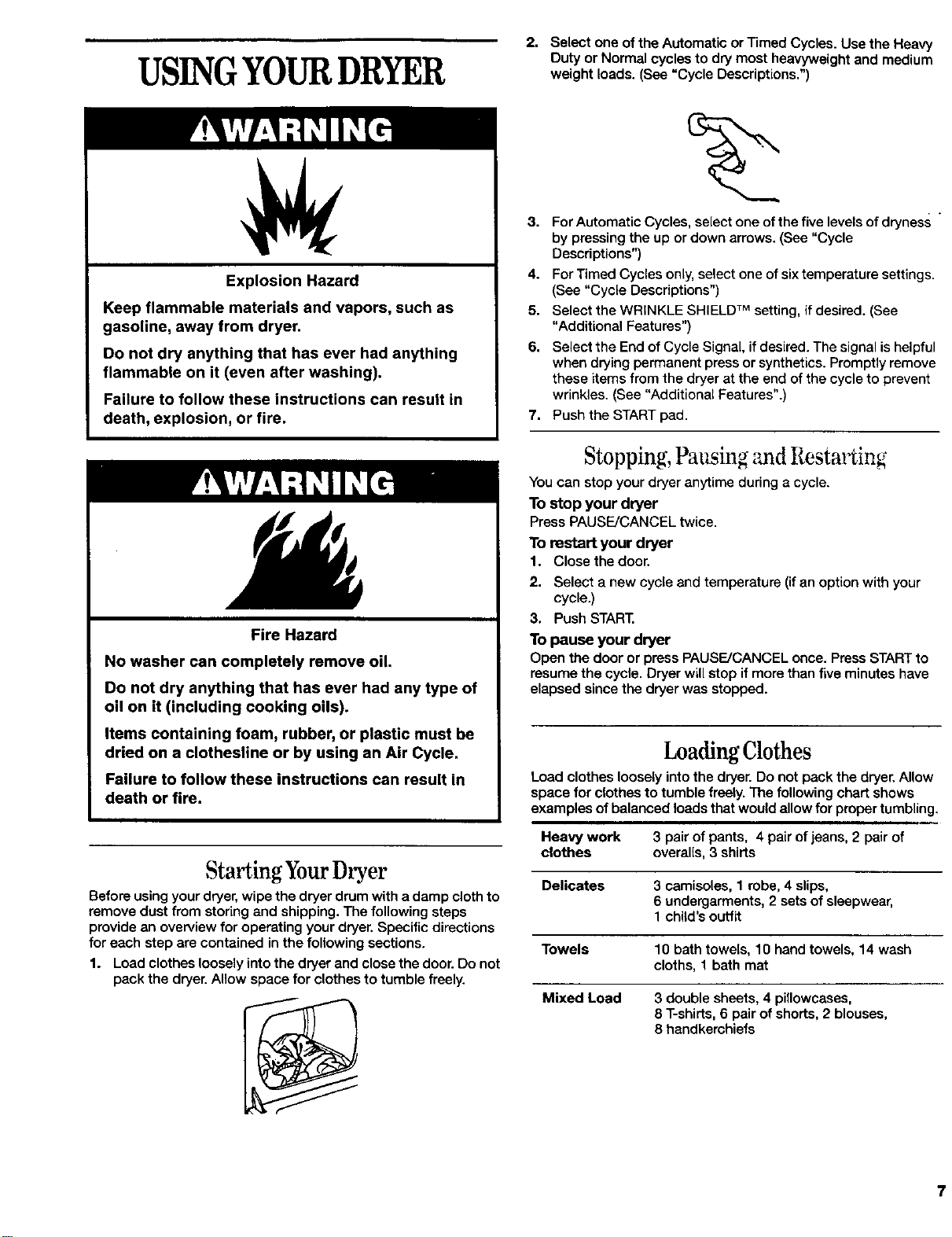
USINGYOURDRYER
2. Select one of the Automatic or Timed Cycles. Use the Heavy
Duty or Normal cycles to dry most heavyweight and medium
weight loads. (See "Cycle Descriptions.")
Explosion Hazard
Keep flammable materials and vapors, such as
gasoline, away from dryer.
Do not dry anything that has ever had anything
flammable on it (even after washing).
Failure to follow these instructions can result in
death, explosion, or fire.
Fire Hazard
No washer can completely remove oil.
Do not dry anything that has ever had any type of
oil on it (including cooking oils).
Items containing foam, rubber, or plastic must be
dried on a clothesline or by using an Air Cycle.
Failure to follow these instructions can result in
death or fire.
Starting YourDryer
Before using your dryer, wipe the dryer drum with a damp cloth to
remove dust from storing and shipping. The following steps
provide an overview for operating your dryer. Specific directions
for each step are contained in the following sections.
1. Load clothes loosely into the dryer and close the door. Do not
pack the dryer. Allow space for clothes to tumble freely.
3. For Automatic Cycles, select one of the five levels of dryness "
by pressing the up or down arrows. (See "Cycle
Descriptions")
4. For Timed Cycles only, select one of six temperature settings.
(See "Cycle Descriptions")
5. Select the WRINKLE SHIELD TM setting, if desired. (See
"Additional Features")
6. Select the End of Cycle Signal, if desired. The signal is helpful
when drying permanent press or synthetics. Promptly remove
these items from the dryer at the end of the cycle to prevent
wrinkles. (See "Additional Features".)
7. Push the START pad.
Stopping, Pausing :rodRestarting
You can stop your dryer anytime during a cycle.
To stop your dryer
Press PAUSE/CANCEL twice.
To restart your dryer
1. Close the door,
2. Select a new cycle and temperature (if an option with your
cycle.)
3. Push START,
To pause your dryer
Open the door or press PAUSE/CANCEL once. Press START to
resume the cycle, Dryer will stop if more than five minutes have
elapsed since the dryer was stopped.
LoadingClothes
Load clothes loosely into the dryer. Do not pack the dryer. Allow
space for clothes to tumble freely. The following chart shows
examples of balanced loads that would allow for proper tumbling,
Heavy work 3 pair of pants, 4 pair of jeans, 2 pair of
clothes overal[s, 3 shirts
Delicates 3 camisoles, 1 robe, 4 slips,
6 undergarments, 2 sets of sleepwear,
1 child's outfit
Towels 10 bath towels, 10 hand towels, 14 wash
cloths, 1 bath mat
Mixed Load 3 double sheets, 4 pillowcases,
8 T-shirts, 6 pair of shorts, 2 blouses,
8 handkerchiefs
7
Drying,CycleandTemperatureTips
Select the correct cycle and temperature for your load.
Dryer tips
• Press firmly in the center of the pad.
• The indicator light next to the pad will light up when a
selection is valid.
• A short tone will sound when a selection is valid.
• Three short tones will sound when a selection is not valid.
• After your first use, your dryer "remembers" the Dryness
level, WRINKLE SHIELD TM setting and End of Cycle Signal
setting you selected•
• If you press and hold the pad with either the Temperature
selector, the End of Cycle Signal selector or the More Dry or
Less Dry arrows, you will advance the settings.
• If you press and hold the Less Time or More Time arrows in
the Timed Cycles, the time will advance in five minute
inte_,als.
Drying tips
• Followcarelabeldirections whentheyareavailable,
•• If you use fabric softener sheets, use only ones labeled as
"dryer safe." Follow package instructions.
• Remove the load from the dryer as soon as tumbling stops to
reduce wrinkling. This is especially important for permanent
press, knits, and synthetic fabrics.
• Cool Down tumbles the load without heat during the last few
minutes of all cycles. Cool Down makes the loads easier to
handle.
Cycle tips
• Use the TimedDry cyclewiththeAir Only(no heat)
Temperaturesettingfor rubber,plasticor heatsensitive
fabrics.
Temperature tips
If your dryer has multiple heat settings:
• Use a high heat setting for drying heavyweight items such as
towels and work clothes.
• Use a medium heat setting for drying medium-weight items
such as sheets, underwear, permanent press fabrics, and
some knits.
• Use a low heat setting for drying lightweight items such as
lingerie, blouses, dresses, and some knits.
• Use a no heat (air) setting for rubber, plastic or heat sensitive
fabrics.
• Line dry bonded or laminated fabrics.
If you are unsure of the temperature to select for a load, select
the lower setting rather than the higher setting
NOTE: If you have questions about drying temperatures for
various loads, refer to the care label directions.
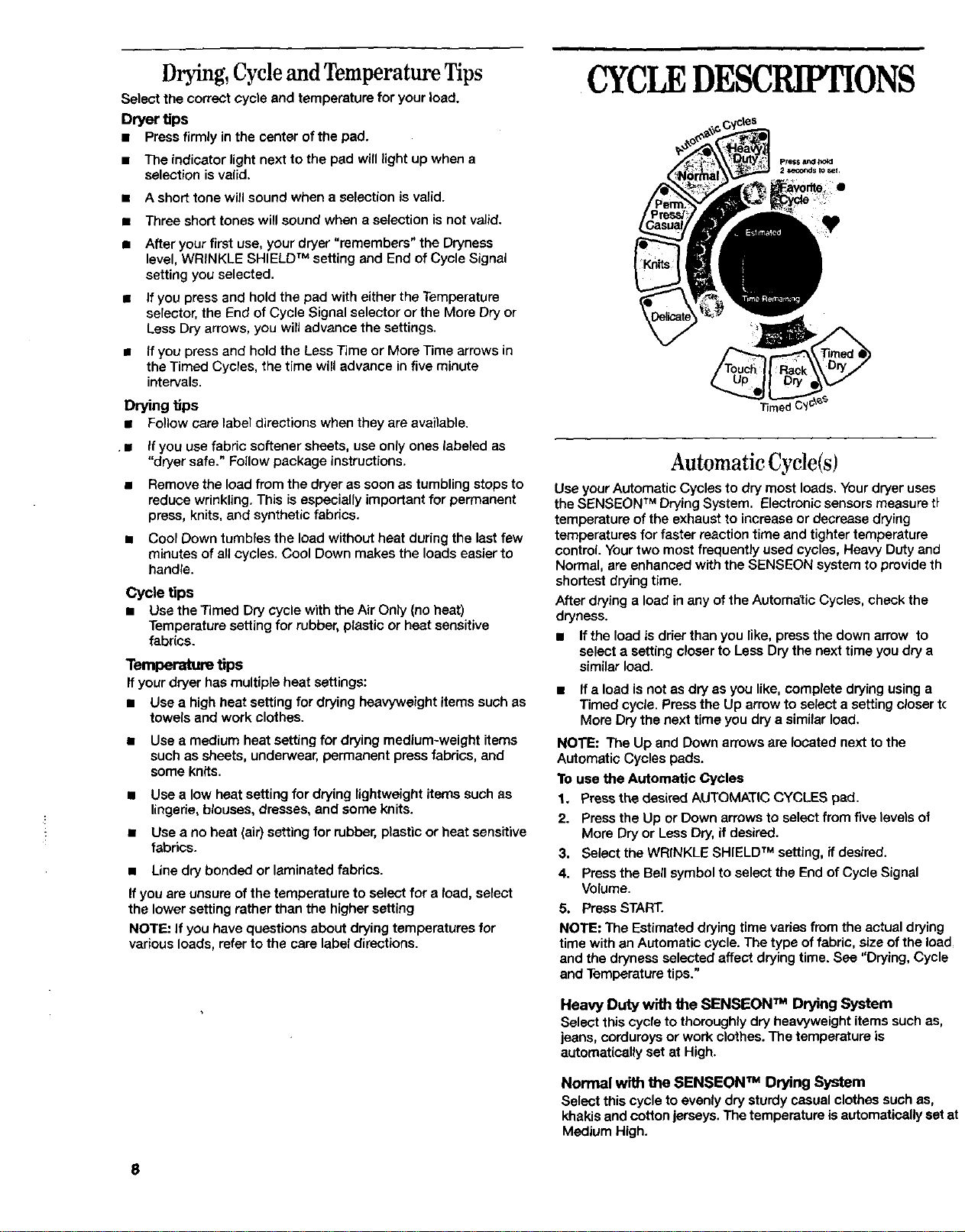
CYCLEDESCRIPTIONS
Automatic Cycle(s)
Use your Automatic Cycles to dry most loads. Your dryer uses
the SENSEON TM Drying System. Electronic sensors measure tt
temperature of the exhaust to increase or decrease drying
temperatures for faster reaction time and tighter temperature
control. Your two most frequently used cycles, Heavy Duty and
Normal, are enhanced with the SENSEON system to provide th
shortest drying time.
After drying a load in any of the Automalic Cycles, check the
dryness.
• Ifthe load is drier than you like, press the down arrow to
select a setting closer to Less Dry the next time you dry a
similar load.
• If a load is not as dry as you like, complete drying using a
Timed cycle• Press the Up arrow to select a setting closer t(
More Dry the next time you dry a similar load.
NOTE: The Up and Down arrows are located next to the
Automatic Cycles pads.
To use the Automatic Cycles
1. Press the desired AUTOMATIC CYCLES pad.
2. Press the Up or Down arrows to select from five levels of
More Dry or Less Dry, if desired.
3. Select the WRINKLE SHIELD TM setting, it desired.
4. Press the Bell symbol to select the End of Cycle Signal
Volume•
5. Press START.
NOTE: The Estimated drying time vades from the actual drying
time with an Automatic cycle. The type of fabric, size of the load
and the dryness selected affect drying time. See "Drying, Cycle
and Temperature tips."
Heavy Duty with the SENSEON TM Drying System
Select this cycle to thoroughly dry heavyweight items such as,
jeans, corduroys or work clothes. The temperature is
automatically set at High.
Normal with the SENSEON TM Drying System
Select this cycle to evenly dry sturdy casual clothes such as,
khakis and cotton jerseys. The temperature is automatically set at
Medium High.
8
Permanent Press/Casual
Select this cycle to dry medium to lightweight synthetic or no-iron
items such as, sheets, shirts or dresses. The temperature is
automatically set at Medium•
Knits
Select this cycle to gently dry washable knit items such as,
blouses, sweaters and lingerie. The temperature is automatically
set at Low.
Delicates
Select this cycle to extra gently dry heat-sensitive items such as,
exercise wear, sheer curtains or lace. The temperature is
automatically set at Extra Low.
Timed Cycles
Your dryer has three Timed Cycles: Touch Up, Rack Dry and
Timed Dry. Each cycle has a preset time and temperature setting.
You can customize your Timed Cycles by adding options.
NOTE: If the load is not wet, several of the Drying Status lights
will not be activated when using the Timed Cycles.
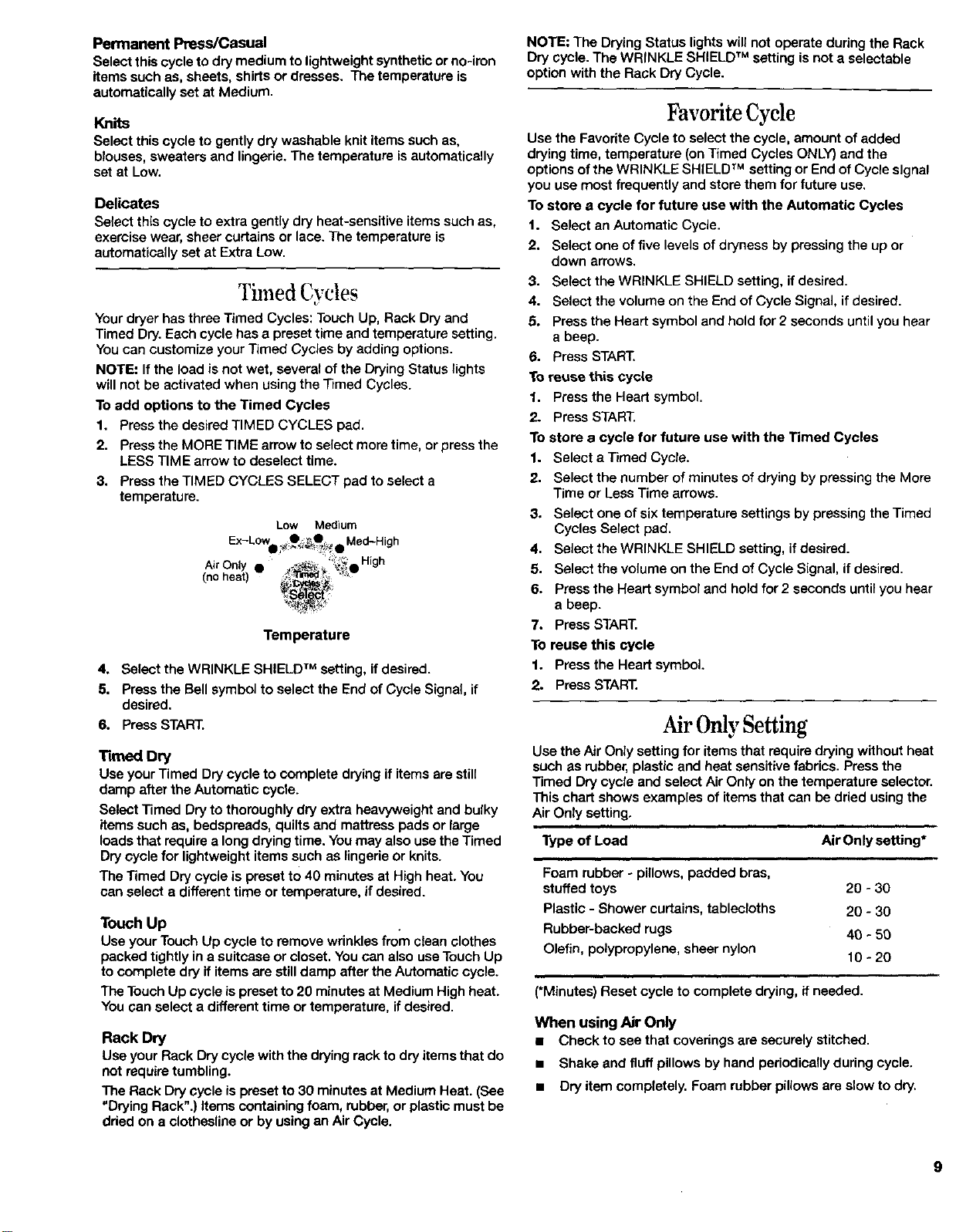
To add options to the Timed Cycles
1. Press the desired TIMED CYCLES pad.
2. Press the MORE TIME arrow to select more time, or press the
LESS TIME arrow to deselect time.
3. Press the TIMED CYCLES SELECT pad to select a
temperature.
Low Medium
Ex-Low O_,_Q Med-H nh
Air Only • ++_++__;_O High
Temperature
4. Select the WRINKLE SHIELD TM setting, if desired.
5. Press the Bell symbol to select the End of Cycle Signal, if
desired.
6. Press START.
"rm_edDry
Use your Timed Dry cycle to complete drying if items are still
damp after the Automatic cycle.
Select Timed Dry to thoroughly dry extra heavyweight and bulky
items such as, bedspreads, quilts and mattress pads or large
loads that require a long drying time. You may also use the Timed
Dry cycle for lightweight items such as lingerie or knits.
The Timed Dry cycle is preset to 40 minutes at High heat. You
can select a different time or temperature, if desired.
Touch Up
Use your Touch Up cycle to remove wrinkles from clean clothes
packed tightly in a suitcase or closet. You can also use Touch Up
to complete dry if items are still damp after the Automatic cycle.
The Touch Up cycle ispreset to 20 minutes at Medium High heat.
You can select a different time or temperature, if desired•
Rack Dry
Use your Rack Dry cycle with the drying rack to dry items that do
not require tumbling.
The Rack Dry cycle is preset to 30 minutes at Medium Heat. (See
"Drying Rack"•) items containing foam, rubber, or plastic must be
dried on a clothesline or by using an Air Cycle.
NOTE: The Drying Status lights will not operate during the Rack
Dry cycle. The WRINKLE SHIELD TM setting is not a selectable
option with the Rack Dry Cycle.
Favorite Cycle
Use the Favorite Cycle to select the cycle, amount of added
drying time, temperature (on Timed Cycles ONLY) and the
options of the WRINKLE SHIELD TM setting or End of Cycle signal
you use most frequently and store them for future use.
To store a cycle for future use with the Automatic Cycles
1. Select an Automatic Cycle.
2. Select one of five levels of dryness by pressing the up or
down arrows.
3. Select the WRINKLE SHIELD setting, if desired.
4. Select the volume on the End of Cycle Signal, if desired.
5. Press the Heart symbol and hold for 2 seconds until you hear
a beep.
6. Press START.
To reuse this cycle
1. Press the Heart symbol
2. Press START.
To store a cycle for future use with the Timed Cycles
1. Select a Timed Cycle.
2. Select the number of minutes of drying by pressing the More
Time or Less Time arrows.
3. Select one of six temperature settings by pressing the Timed
Cycles Select pad.
4. Select the WRINKLE SHIELD setting, if desired.
5. Select the volume on the End of Cycle Signal, if desired.
6. Press the Heart symbol and hold for 2 seconds until you hear
a beep.
7. Press START.
To reuse this cycle
1. Press the Heart symbol.
2. Press START.
AirOnlySetting
Use the Air Only setting for items that require drying without heat
such as rubber, plastic and heat sensitive fabrics. Press the
Timed Dry cycle and select Air Only on the temperature selector.
This chart shows examples of items that can be dried using the
Air Only setting.
Type of Load
Foam rubber - pillows, padded bras,
stuffed toys 20 - 30
Plastic - Shower curtains, tablecloths 20 =30
Rubber-backed rugs 40 * 50
Olefin, polypropylene, sheer nylon 10 =20
Air Only setting*
(*Minutes) Reset cycle to complete drying, if needed.
When using Air Only
• Check to see that coverings are securely stitched.
• Shake and fluff pillows by hand periodically during cycle.
• Dry item completely. Foam rubber pillows are slow to dry.
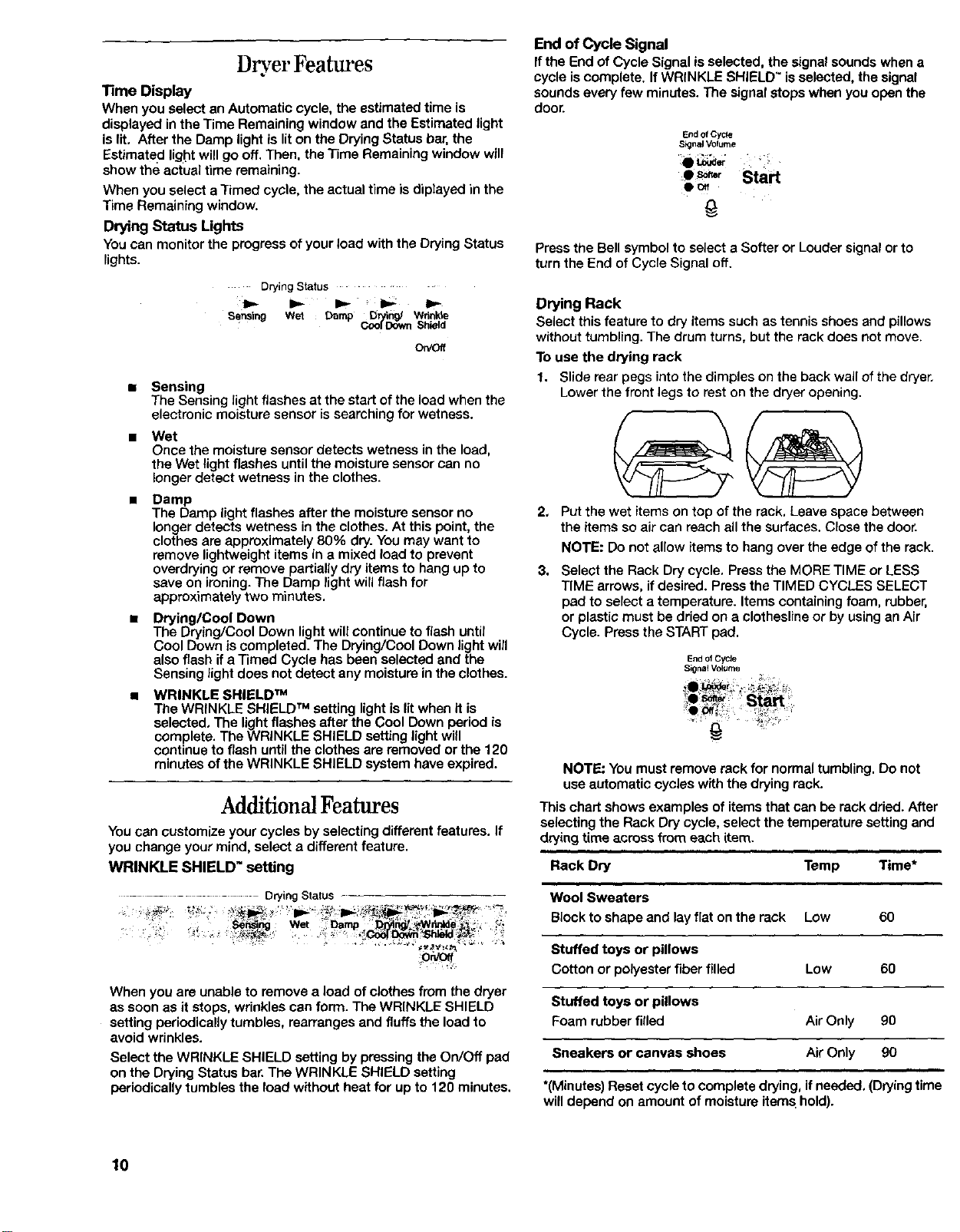
D ,er Featm'es
Time Display
When you select an Automatic cycle, the estimated time is
displayed in the Time Remaining window and the Estimated light
is lit, After the Damp light is lit on the Drying Status bar, the
Estimated light will go off. Then, the Time Remaining window will
show the actual time remaining.
When you select a Timed cycle, the actual time is diplayed in the
Time Remaining window.
Drying Status Lights
You can monitor the progress of your load with the Drying Status
lights.
Drying Status ....
sensing Wet Damp Drying/ Wri_le
• CoolDown Shield
On/off
• Sensing
The Sensing light flashes at the start of the load when the
electronic moisture sensor is searching for wetness.
Wet
Once the moisture sensor detects wetness in the load,
the Wet light flashes until the moisture sensor can no
longer detect wetness in the clothes.
• Damp
The Damp light flashes after the moisture sensor no
longer detects wetness in the clothes. At this point, the
clothes are approximately 80% dry. You may want to
remove lightweight items in a mixed load to prevent
overdrying or remove partially dry items to hang up to
save on ironing. The Damp light will flash for
approximately two minutes.
• DryinglCool Down
The Drying/Cool Down light will continue to flash until
Cool Down is completed. The Drying/Cool Down light will
also flash if a Timed Cycle has been selected and the
Sensing light does not detect any moisture in the clothes.
• WRINKLE SHIELD TM
The WRINKLE SHIELD TM setting light is lit when it is
selected. The light flashes after the Cool Down period is
complete. The WRINKLE SHIELD setting light will
continue to flash until the clothes are removed or the 120
minutes of the WRINKLE SHIELD system have expired.
Additional Features
You can customize your cycles by selecting different features. If
you change your mind, select a different feature•
WRINKLE SHIELD" setting
...................... Drying Status
SeN]0g Wet Darnp _ _[yll_,_Wdrdde _ 't
When you are unable to remove a load of clothes from the dryer
as soon as it stops, wrinkles can form. The WRINKLE SHIELD
setting periodically tumbles, rearranges and fluffs the load to
avoid wrinkles.
Select the WRINKLE SHIELD setting by pressing the On/Off pad
on the Drying Status bar. The WRINKLE SHIELD setting
periodically tumbles the load without heat for up to 120 minutes.
End of Cycle Signal
If the End of Cycle Signal is selected, the signal sounds when a
cycle is complete. If WRINKLE SHIELD" is selected, the signal
sounds every few minutes. The signal stops when you open the
door.
End of Cycle
S_na4 Volume
• so.,. Start
Do.
Press the Bell symbol to select a Softer or Louder signal or to
turn the End of Cycle Signal off.
Drying Rack
Select this feature to dry items such as tennis shoes and pillows
without tumbling. The drum turns, but the rack does not move.
To use the drying rack
1. Slide rear pegs into the dimples on the back wall of the dryer,
Lower the front legs to rest on the dryer opening.
2,
Put the wet items on top of the rack, Leave space between
the items so air can reach all the surfaces. Close the door.
NOTE: Do not allow items to hang over the edge of the rack.
3. Select the Rack Dry cycle. Press the MORE TIME or LESS
TIME arrows, if desired. Press the TIMED CYCLES SELECT
pad to select a temperature. Items containing foam, rubber,
or plastic must be dried on a clothesline or by using an Air
Cycle. Press the START pad.
End of CyCle
Signai Volume
NOTE: Youmustremove rackfornormal tumbling. Donot
useautomaticcycleswiththe drying rack.
This chart shows examples of items that can be rack dried. After
selecting the Rack Dry cycle, select the temperature setting and
drying time across from each item.
Rack Dry
i
Wool Sweaters
Block to shape and lay flat on the rack
i
Temp Time*
Low 60
Stuffed toys or pillows
Cotton or polyester fiber filled Low 60
Stuffed toys or pillows
Foam rubber filled Air Only 90
Sneakers or canvas shoes Air Only 90
*(Minutes) Reset cycle to complete drying, if needed, (Drying time
will depend on amount of moisture items hold).
10
NOTE: If your model does not have a drying rack you can order
one by calling: (inthe USA)t-800-253-1301 or (inCanada)
t-800-807-6777 or by contacting the dealer from whom you
bought your appliance.
CARINGFORYOURDRYER
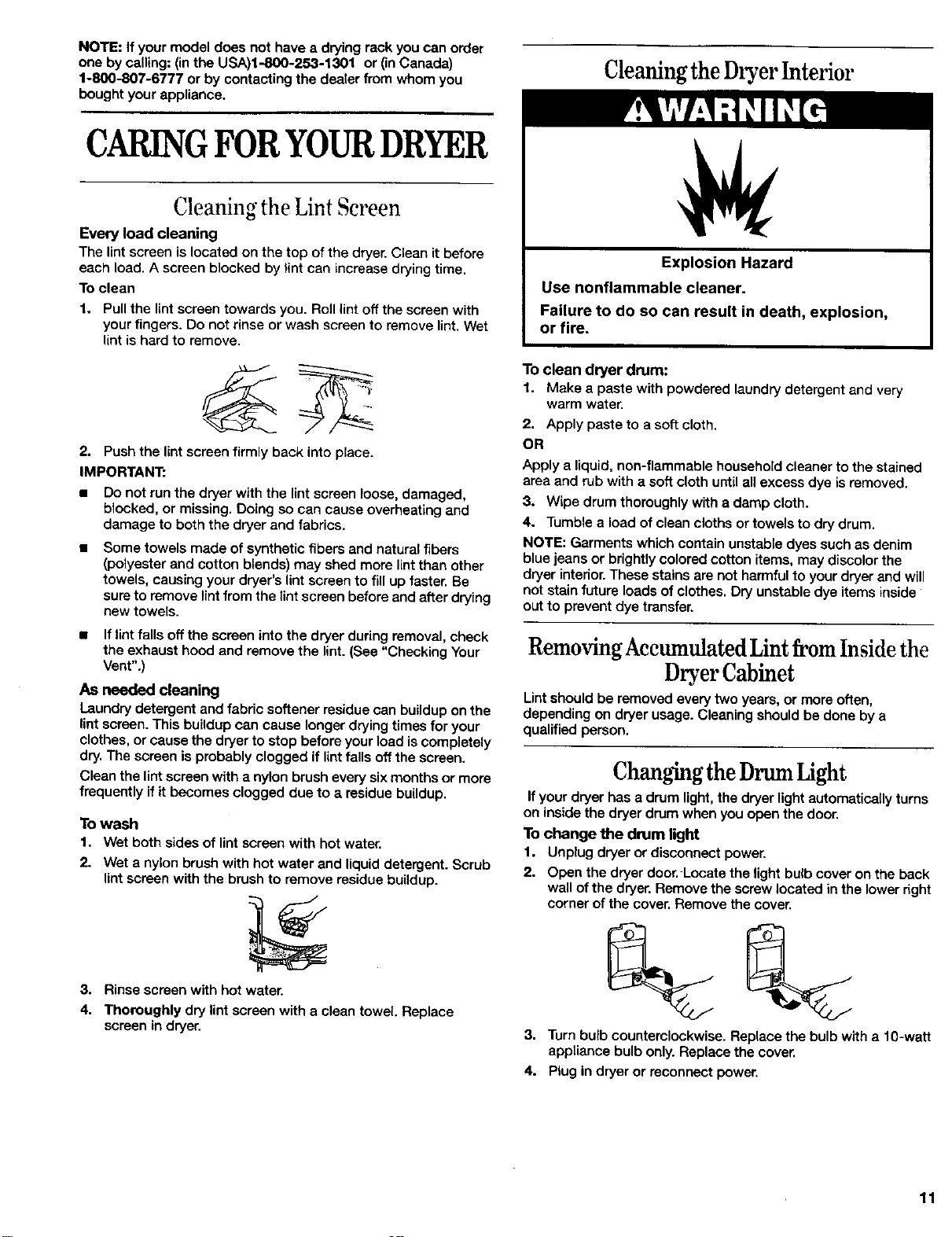
Cleaning the Lint Screen
Every load cleaning
The lint screen is located on the top of the dryer. Clean it before
each load. A screen blocked by lint can increase drying time.
To clean
1. Pull the lint screen towards you. Roll lint off the screen with
your fingers. Do not rinse or wash screen to remove lint. Wet
lint is hard to remove.
2. Push the lint screen firmly back into place.
IMPORTANT:
• Do not run the dryer with the lint screen loose, damaged,
blocked, or missing. Doing so can cause overheating and
damage to both the dryer and fabrics.
• Some towels made of synthetic fibers and natural fibers
(polyester and cotton blends) may shed more lint than other
towels, causing your dryer's lint screen to fill up faster. Be
sure to remove lint from the lint screen before and after drying
new towels.
• If lint falls off the screen into the dryer during removal, check
the exhaust hood and remove the lint. (See "Checking Your
Vent".)
AS needed cleaning
Laundry detergent and fabric softener residue can buildup on the
lint screen. This buildup can cause longer drying times for your
clothes, or cause the dryer to stop before your load iscompletely
dry, The screen is probably clogged if lint falls off the screen.
Clean the lint screen with a ny!on brush every six months or more
frequently if it becomes clogged due to a residue buildup,
To wash
1. Wet both sides of lint screen with hot water.
2. Wet a nylon brush with hot water and liquid detergent. Scrub
lint screen with the brush to remove residue buildup.
3. Rinse screen with hot water.
4. Thoroughly dry lint screen with a clean towel, Replace
screen in dryer.
Cleaningthe DryerInterior
Explosion Hazard
Use nonflammable cleaner.
Failure to do so can result in death, explosion,
or fire.
To clean dryer drum:
1. Make a paste with powdered laundry detergent and very
warm water.
2. Apply paste to a soft cloth,
OR
Apply a liquid, non-flammable household cleaner to the stained
area and rub with a soft cloth until all excess dye is removed.
3. Wipe drum thoroughly with a damp cloth.
4. Tumble a load of clean cloths or towels to dry drum.
NOTE: Garments which contain unstable dyes such as denim
blue jeans or brightly colored cotton items, may discolor the
dryer interior. These stains are not harmful to your dryer and will
not stain future loads of clothes. Dry unstable dye items inside
out to prevent dye transfer.
Removing Accumulated Lint from Inside the
Dryer Cabinet
Lintshould be removed every two years, or more often,
depending on dryer usage. Cleaning should be done by a
qualified person.
Changingthe DrumLight
If your dryer has a drum light, the dryer light automatically turns
on inside the dryer drum when you open the door.
To change the drum light
1. Unplug dryer or disconnect power.
2. Open the dryer door, Locate the light bulb cover on the back
wall of the dryer, Remove the screw located in the lower right
corner of the cover. Remove the cover,
3. Turn bulb counterclockwise. Replace the bulb with a 10-watt
appliance bulb only. Replace the cover.
4. Plug in dryer or reconnect power.
11
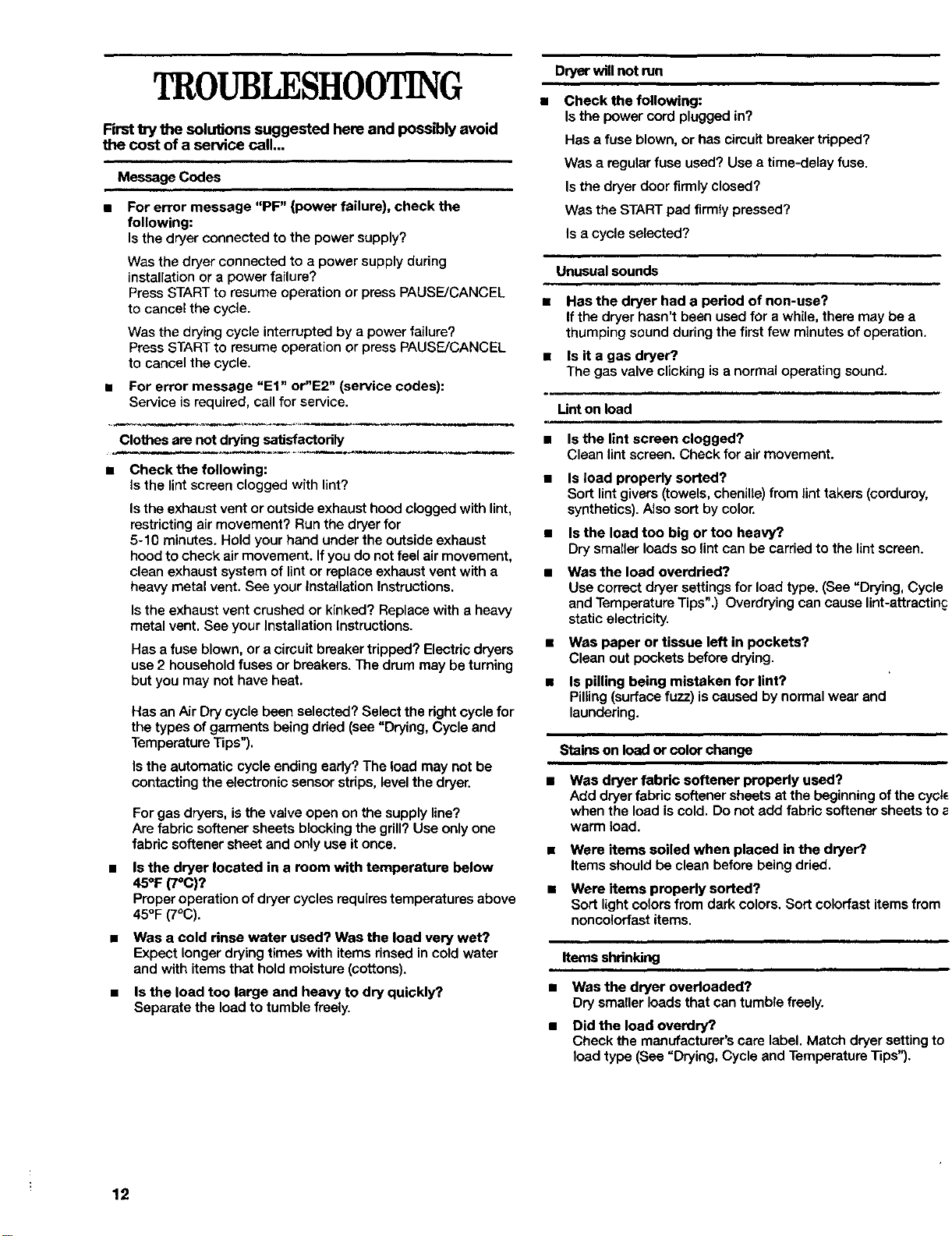
TROUBLESHOOTING
First try the solutions suggested here and possibly avoid
the cost of a service call...
Message Codes
l For error message "PF" (power failure), check the
following:
Is the dryer connected to the power supply?
Was the dryer connected to a power supply during
installation or a power failure?
Press START to resume operation or press PAUSE/CANCEL
to cancel the cycle.
Was the drying cycle interrupted by a power failure?
Press START to resume operation or press PAUSE/CANCEL
to cancel the cycle.
For error message "El" or"E2" (service codes):
Service is required, call for service.
Clothes are not drying satisfactorily
a Check the following:
Is the lint screen clogged with lint?
Is the exhaust vent or outside exhaust hood clogged with lint,
restricting air movement? Run the dryer for
5-10 minutes. Hold your hand under the outside exhaust
hood to check air movement. If you do not feel air movement,
clean exhaust system of lint or replace exhaust vent with a
heavy metal vent. See your Installation Instructions.
Isthe exhaust vent crushed or kinked? Replace with a heavy
metal vent. See your Installation Instructions.
Has a fuse blown, or a circuit breaker tripped? Electric dryers
use 2 household fuses or breakers. The drum may be turning
but you may not have heat.
Has an Air Dry cycle been selected? Select the right cycle for
the types of garments being dded (see "Drying, Cycle and
Temperature Tips").
Is the automatic cycle ending early? The load may not be
contacting the electronic sensor stdps, level the dryer.
a
For gas dryers, is the valve open on the supply line?
Are fabric softener sheets blocking the grill? Use only one
fabric softener sheet and only use it once.
Is the dryer located in a room with temperature below
45°F (7°C)?
Proper operation of dryer cycles requires temperatures above
45OF(7°(3).
Was a cold rinse water used? Was the load very wet?
Expect longer drying times with items rinsed in cold water
and with items that hold moisture (cottons).
Is the load too large and heavy to dry quickly?.
Separate the load to tumble freely.
Dryer will not run
= Check the following:
Is the power cord plugged in?
Has a fuse blown, or has circuit breaker tripped?
Was a regular fuse used? Use a time-delay fuse.
Isthe dryer door firmly closed?
Was the START pad firmly pressed?
Is a cycle selected?
Unusual sounds
a Has the dryer had a period of non-use?
If the dryer hasn't been used for a while, there may be a
thumping sound during the first few minutes of operation.
Is it a gas dryer?.
The gas valve clicking is a normal operating sound.
Lint on load
• Is the lint screen clogged?
Clean lint screen. Check for air movement.
• Is load properly sorted?
Sort lint givers (towels, chenille) from lint takers (corduroy,
synthetics). Also sort by color.
• Isthe loadtoo bigor too heavy?
Dry smaller loads so lint can be carriedto thelintscreen.
Was the load overdried?
Use correct dryer settings for load type. (See "Drying, Cycle
and Temperature Tips".) Overdrying can cause lint-attractinc
static electricity.
• Waspaper or tissue left in pockets?
Cleanout pockets before drying.
• Is pilling being mistaken for lint?
Pilling (surface fuzz) iscaused by normal wear and
laundering.
Stains on load or color change
Was dryer fabric softener properly used?
Add dryer fabric softener sheets at the beginning ofthe cycl_
when the load is cold. Do not add fabric softener sheets to
warm load.
Were items soiled when placed in the dryer?
Items should be clean before being dried.
Were items properly sorted?
Sort light colors from dark colors. Sort colorfast items from
noncolorfast items.
kemsshdn_ng
Wasthe dryer overloaded?
Drysmallerloads thatcantumblefreely.
Did the load overdry?
Cheek the manufacturer's care label. Match dryer setting to
load type (See =Drying, Cycle and Temperature Tips").
12
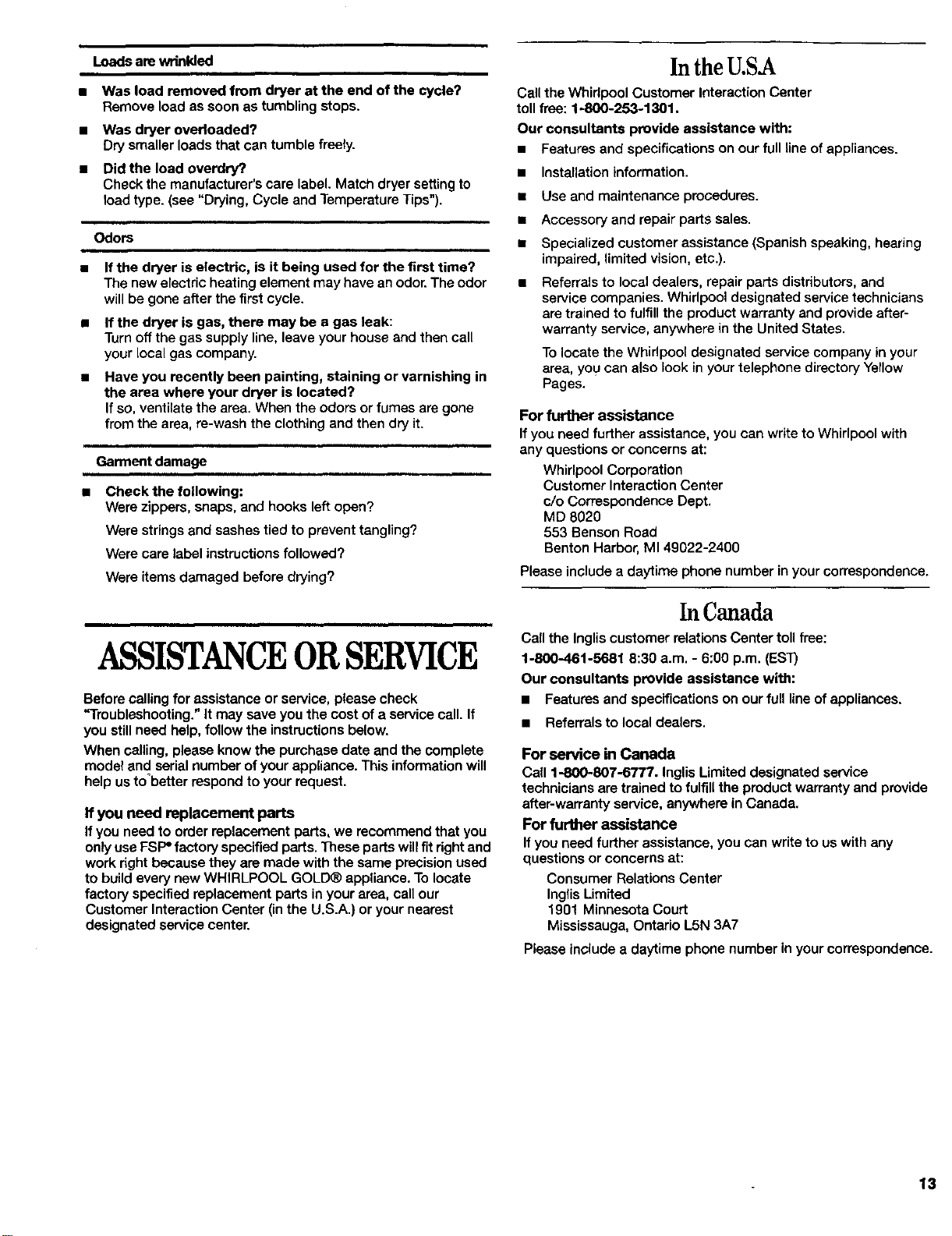
Loads are wrinkled
• Was load removed from dryer at the end of the cycle?
Remove load as soon as tumbling stops.
• Was dryer overloaded?
Dry smaller loads that can tumble freely.
• Did the load overdry?
Check the manufacturer's care label. Match dryer setting to
load type. (see "Drying, Cycle and Temperature Tips").
Odors
If the dryer is electric, is it being used for the first time?
The new electric heating element may have an odor. The odor
will be gone after the first cycle.
If the dryer is gas, there may be a gas leak:
Turn off the gas supply line, leave your house and then call
your local gas company.
Have you recently been painting, staining or varnishing in
the area where your dryer is located?
Ifso, ventilate the area. When the odors or fumes are gone
from the area, re-wash the clothing and then dry it.
Garment damage
Check the following:
Were zippers, snaps, and hooks left open?
Were strings and sashes tied to prevent tangling?
Were care label instructions followed?
Were items damaged before drying?
ASSISTANCEORSERVICE
Before calling for assistance or service, please check
"Troubleshooting." It may save you the cost of a service call. If
you still need help, follow the instructions below.
When calling, please know the purchase date and the complete
model and serial number of your appliance. This information will
help us to'better respond to your request.
If you need replacement parts
If you need to order replacement parts, we recommend that you
only use FSP" factory specified parts. These parts will fit rightand
work right because they are made with the same precision used
to build every new WHIRLPOOL GOLD® appliance. To locate
factory specified replacement parts in your area, call our
Customer Interaction Center (inthe U,S.A.) or your nearest
designated service center,
In the U.S.A
Call the Whirlpool Customer Interaction Center
toll free: 1-800-253-1301.
Our consultants provide assistance with:
• Features and specifications on our full line of appliances.
• Installation information.
• Use and maintenance procedures.
• Accessory and repair parts sales.
• Specialized customer assistance (Spanish speaking, hearing
impaired, limited vision, etc.).
• Referrals to local dealers, repair parts distributors, and
service companies. Whidpool designated service technicians
are trained to fulfill the product warranty and provide after-
warranty service, anywhere in the United States.
To locate the Whirlpool designated service company in your
area, you can also look in your telephone directory Yellow
Pages.
For further assistance
If you need further assistance, you can write to Whirlpool with
any questions or concerns at:
Whirlpool Corporation
Customer Interaction Center
c/o Correspondence Dept,
MD 8020
553 Bensen Road
Benton Harbor, M149022-2400
Please include a daytime phone number in your correspondence.
In Canada
Call the Inglis customer relations Center toll free:
1-800-461-5681 8:30 a.m. - 6:00 p.m. tEST)
Our consultants provide assistance with:
• Features and specifications on our full line of appliances.
• Referrals to local dealers.
For service in Canada
Call 1-800-807-6777. Inglis Limited designated service
technicians are trained to fulfill the product warranty and provide
after-warranty service, anywhere in Canada.
For further assistance
If you need further assistance, you can write to us with any
questions or concerns at:
Consumer Relations Center
Inglis Limited
190! Minnesota Court
Mississauga, Ontario L5N 3A7
Please include a daytime phone number in your correspondence.
13
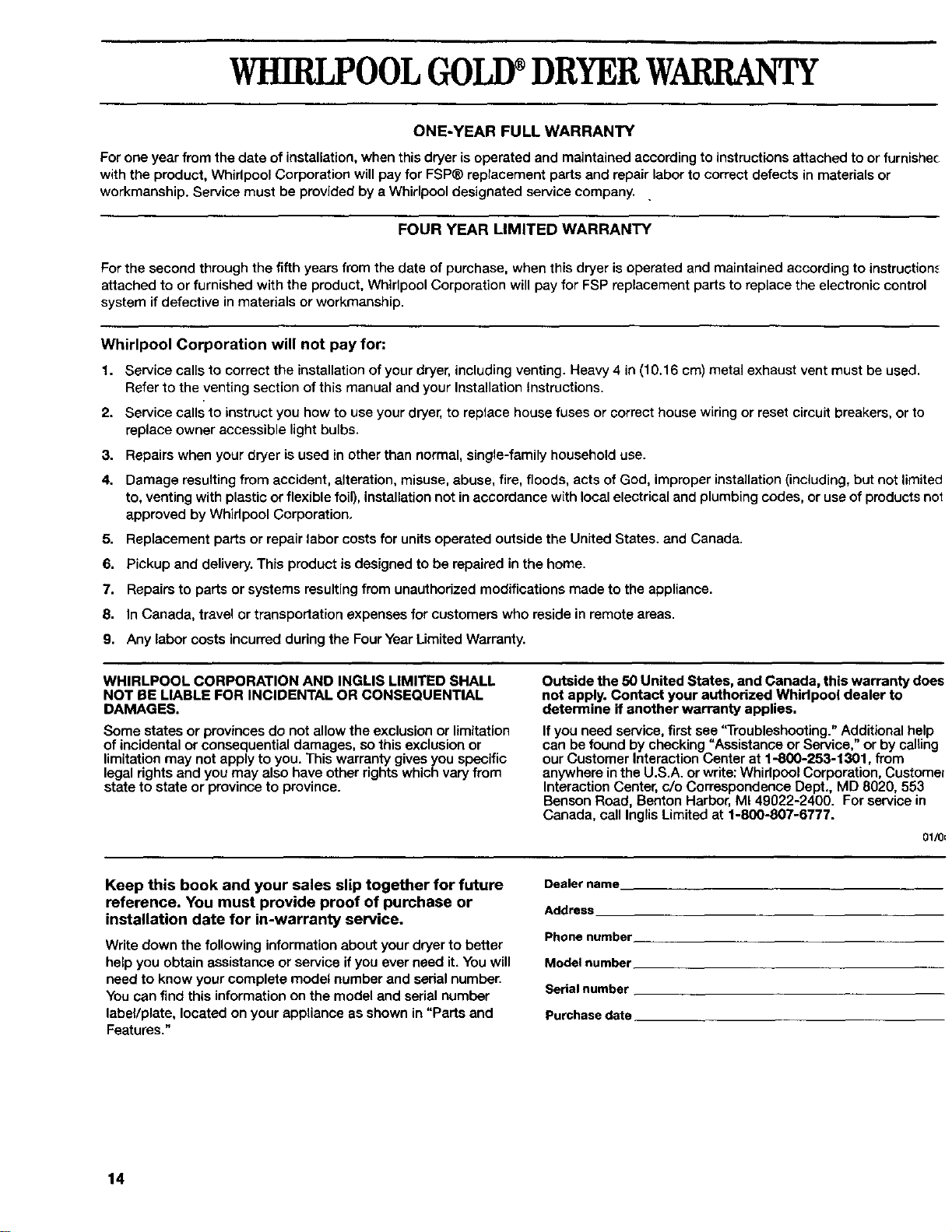
WHIRLPOOLGOLD®DRYERWARRANI
ONE-YEAR FULL WARRANTY
For one year from the date of installation, when this dryer is operated and maintained according to instructions attached to or furnishec
with the product, Whirlpool Corporation will pay for FSP® replacement parts and repair labor to correct defects in materials or
workmanship. Service must be provided by a Whirlpool designated service company..
FOUR YEAR LIMITED WARRANTY
For the second through the fifth years from the date of purchase, when this dryer is operated and maintained according to instruction_
attached to or furnished with the product, Whirlpool Corporation will pay for FSP replacement parts to replace the electronic control
system if defective in materials or workmanship.
Whirlpool Corporation will not pay for:
1. Service calls to correct the installation of your dryer, including venting. Heavy 4 in (10.16 cm) metal exhaust vent must be used.
Refer to the venting section of this manual and your Installation Instructions.
2. Service calls to instruct you how to use your dryer, to replace house fuses or correct house wiring or reset circuit breakers, or to
replace owner accessible light bulbs.
3. Repairs when your dryer is used in other than normal, single-family household use.
4. Damage resulting from accident, alteration, misuse, abuse, fire, floods, acts of God, improper installation (including, but not limited
to, venting with plastic or flexible foil), installation not in accordance with local electrical and plumbing codes, or use of products no_
approved by Whirlpool Corporation.
5. Replacement parts or repair labor costs for units operated outside the United States. and Canada.
6. Pickup and delivery. This product is designed to be repaired in the home.
7. Repairs to parts or systems resulting from unauthorized modifications made to the appliance.
8. In Canada, travel or transportation expenses for customers who reside in remote areas.
9. Any labor costs incurred during the Four Year Limited Warranty.
WHIRLPOOL CORPORATION AND INGLIS LIMITED SHALL
NOT BE LIABLE FOR INCIDENTAL OR CONSEQUENTIAL
DAMAGES.
Some states or provinces do not allow the exclusion or limitation
of incidental or consequential damages, so this exclusion or
limitation may not apply to you. This warranty gives you specific
legal rights and you may also have other rights which vary from
state to state or province to province.
Outside the 50 United States, and Canada, this warranty does
not apply. Contact your authorized Whirlpool dealer to
determine if another warranty applies.
If you need service, first see 'q'roubleshooting." Additional help
can be found by checking "Assistance or Service," or by calting
our Customer Interaction Center at 1-800-253-1301, from
anywhere in the U.S.A. or write: Whirlpool Corporation, Custome_
Interaction Center, c/o Correspondence Dept., MD 8020, 553
Benson Road, Benton Harbor, MI 49022-2400. For service in
Canada, call Inglis Limited at 1-800-807-6777.
01/0E
Keep this book and your sales slip together for future
reference. You must provide proof of purchase or
installation date for in-warranty sentice.
Write down the following information about your dryer to better
help you obtain assistance or service if you ever need it. You will
need to know your complete model number and serial number.
You can find this information on the model and serial number
labeVplate, located on your appliance as shown in "Parts and
Features."
Dealer name
Address
Phone number
Model number
Serial number
Purchase date
14