UseAndCare
Table of Contents
(complete) .................. 2
A Note to You ................. 3
Range Safety ............... 4-6
Getting to Know
Your Range .................... 7
Using Your Range ......... 8
Using the Self-
Cleaning Cycle ............. 35
Caring for Your
Range ............................ 43
Troubleshooting .......... 47
Requesting
Assistance
or Service ..................... 49
Index ............................. 51
Warranty ....................... 52
1-800-253-1301
Call us with questions or comments.
SELF-CLEANING ELECTRIC RANGE
PART NO. 3189073 Rev. B I0/_ MODEL RF386PXD
Table of Contents
A Note to You ............................................ 3
Range Safety ......................................... 4-6
Getting to Know Your Range ................... 7
Using Your Range .................................... 8
Using the surface units ......................... 8
Positioning racks and pans ................ 10
For best air circulation ........................ 11
Using aluminum foil for baking ........... 11
The electronic oven control ................ 12
Setting the clock ................................ 13
Using the electronic Minute "lqmer ...... 14
Starting a function .............................. 15
Canceling a function .......................... 15
Audible signals .................................. 15
Baking/roasting .................................. 16
Adjusting the oven
temperature control ............................ 18
Broiling .............................................. 19
Broiling tips ........................................ 21
Energy saving tips ............................. 22
Using the electronic
MEALTIMER TM control ....................... 22
The oven vent .................................... 33
The storage drawer ............................ 33
The anti-tip bracket ............................ 34
Optional door panel pac ..................... 34
Using the Self-Cleaning Cycle ............... 35
Before you start ................................. 35
Before settingthe controls .................. 36
Settingthe controls ............................ 36
Special tips ........................................ 42
How the cycle works .......................... 42
Caring for Your Range ........................... 43
Cleaning the cooktop ......................... 43
Cleaning other range parts ................. 45
The oven light .................................... 46
Troubleshooting ..................................... 47
Requesting Assistance or Service ........ 49
Index ....................................................... 51
Warranty .................................................. 52
A Note to You
Thank you for buying a WHIRLPOOL ® appliance.
Because your life is getting busier and more complicated, WHIRLPOOL ranges are easy to
use, save time, and help you manage your home better. To ensure that you enjoy years of
trouble-free operation, we developed this Use and Care Guide. It is full of valuable informa-
tion about how to operate and maintain your appliance properly and safely. Please read it
carefully.
Also, please complete and mail in the Ownership Registration Card provided with your
appliance. The card helps us notify you about any new information on your appliance.
Please record your model's information.
Whenever you call to request service for
your appliance, you need to know your
complete model number and serial number.
You can find this information on the model
and serial number plate (see diagram on
page 7 for location of plate).
Please also record the purchase date of
your appliance and your dealer's name,
address, and telephone number.
Model Number
Serial Number
Purchase Date
Dealer Name
Dealer Address
Dealer Phone
Keep this book and the sales slip together in a safe place for future reference.
I Our Consumer Assistance Center
number is toll-free 24 hours a day. 1-800-253-1301
I
Range Safety
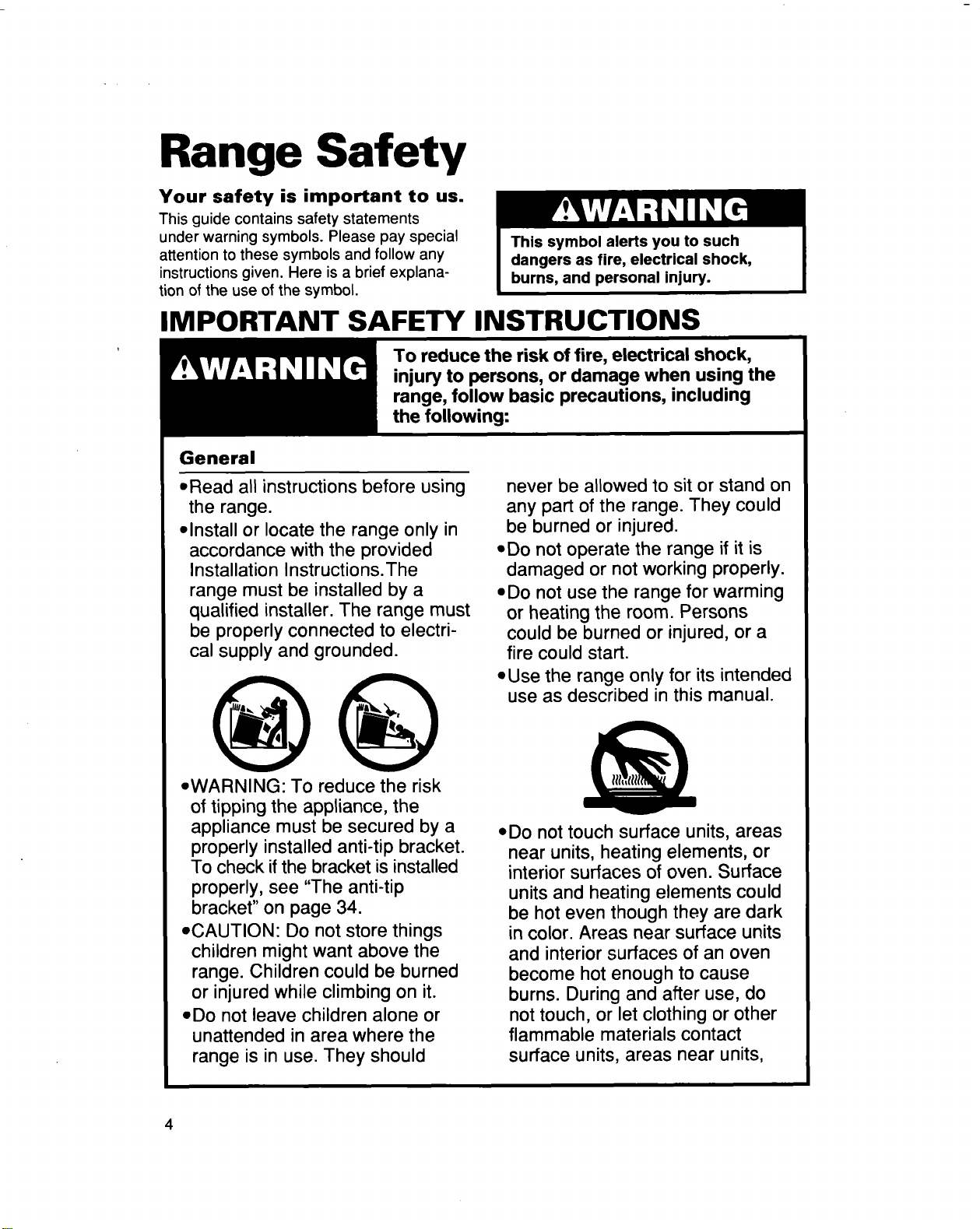
Your safety is important to us.
This guide contains safety statements
under warning symbols. Please pay special
attention to these symbols and follow any
instructions given. Here is a brief explana-
tion of the use of the symbol.
IMPORTANT SAFETY INSTRUCTIONS
To reduce the risk of fire, electrical shock,
injury to persons, or damage when using the
range, follow basic precautions,
General
• Read all instructions before using
the range.
• Install or locate the range only in
accordance with the provided
Installation Instructions.The
range must be installed by a
qualified installer. The range must
be properly connected to electri-
cal supply and grounded.
• WARNING: To reduce the risk
of tipping the appliance, the
appliance must be secured by a
properly installed anti-tip bracket.
To check ifthe bracket is installed
properly, see "The anti-tip
bracket" on page 34.
• CAUTION: Do not store things
children might want above the
range. Children could be burned
or injured while climbing on it.
• Do not leave children alone or
unattended in area where the
range is in use. They should
never be allowed to sit or stand on
any part of the range. They could
be burned or injured.
• D0 not operate the range if it is
damaged or not working properly.
• Do not use the range for warming
or heating the room. Persons
could be burned or injured, or a
fire could start.
• Use the range only for its intended
use as described in this manual.
,,Do not touch surface units, areas
near units, heating elements, or
interior surfaces of oven. Surface
units and heating elements could
be hot even though they are dark
in color. Areas near surface units
and interior surfaces of an oven
become hot enough to cause
burns. During and after use, do
not touch, or let clothing or other
flammable materials contact
surface units, areas near units,
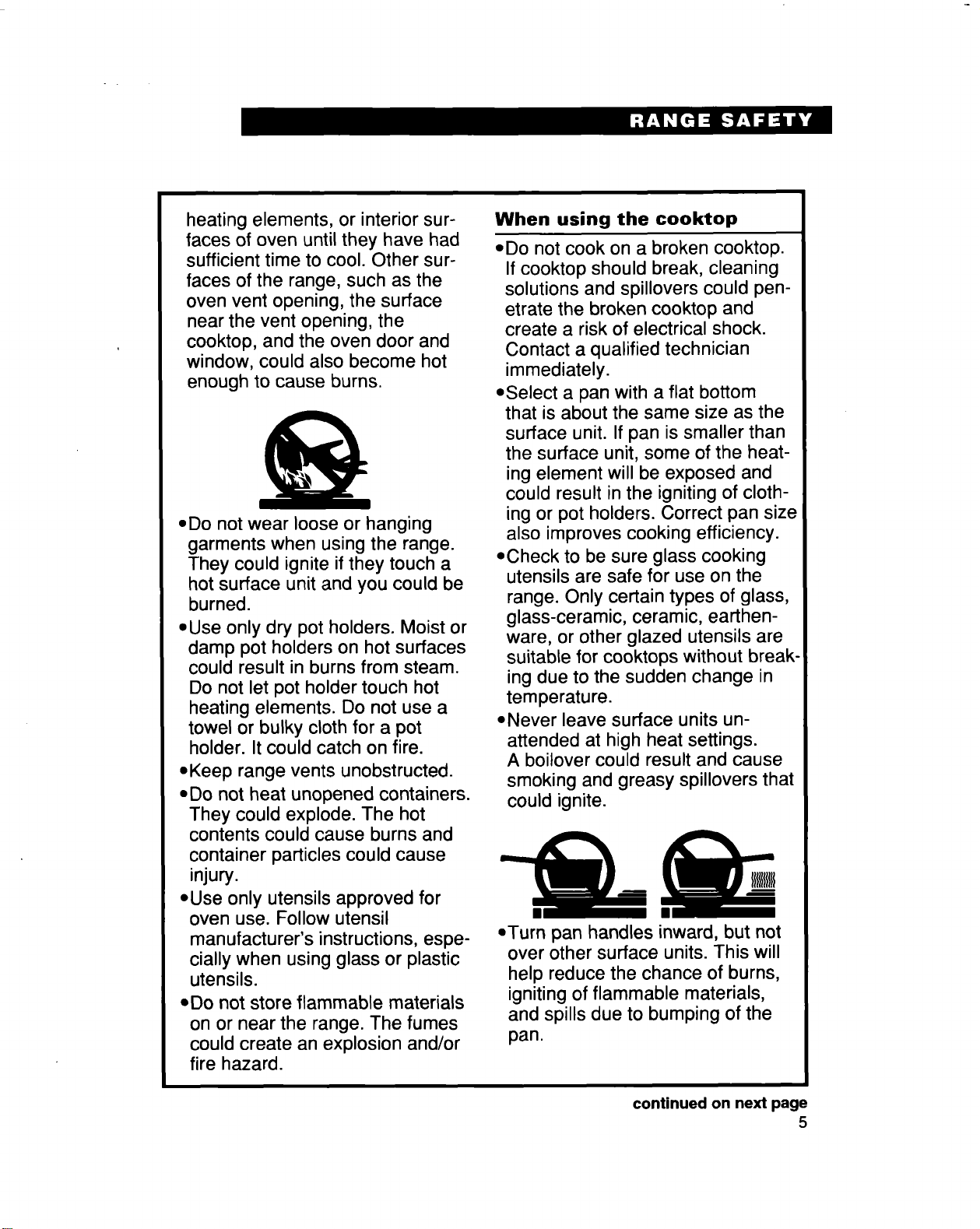
heating elements, or interior sur-
faces of oven until they have had
sufficient time to cool. Other sur-
faces of the range, such as the
oven vent opening, the surface
nearthe vent opening, the
cooktop, and the oven door and
window, could also become hot
enough to cause burns.
• Do not wear looseor hanging
garments when using the range.
They could ignite ifthey touch a
hotsurface unit and you could be
burned.
• Use only dry pot holders. Moist or
damp pot holders on hot surfaces
could result in burns from steam.
Do not let pot holder touch hot
heating elements. Do not use a
towel or bulky cloth for a pot
holder. It could catch on fire.
• Keep range vents unobstructed.
• Do not heat unopened containers.
They could explode. The hot
contents could cause burns and
container particles could cause
injury.
• Use only utensils approved for
oven use. Follow utensil
manufacturer's instructions, espe-
cially when using glass or plastic
utensils.
• Do not store flammable materials
on or near the range. The fumes
could create an explosion and/or
fire hazard.
When using the cooktop
• Do not cook on a broken cooktop.
If cooktop should break, cleaning
solutions and spillovers could pen-
etrate the broken cooktop and
create a risk of electrical shock.
Contact a qualified technician
immediately.
• Select a pan with a flat bottom
that is about the same size as the
surface unit. If pan is smaller than
the surface unit, some of the heat-
ing element will be exposed and
could result in the igniting of cloth-
ing or pot holders. Correct pan size
also improves cooking efficiency.
• Check to be sure glass cooking
utensils are safe for use on the
range. Only certain types of glass,
glass-ceramic, ceramic, earthen-
ware, or other glazed utensils are
suitable for cooktops without break-
ing due to the sudden change in
temperature.
• Never leave surface units un-
attended at high heat settings.
A boilover could result and cause
smoking and greasy spillovers that
could ignite.
• Turn pan handles inward, but not
over other surface units. This will
help reduce the chance of burns,
igniting of flammable materials,
and spills due to bumping of the
pan.
continued on next page
5
When using the oven
• Always position oven rack(s)in
desired location while oven is
cool. If a rack must be removed
while oven is hot, do not let pot
holder contact hot heating ele-
ment in oven.
• Use care when opening oven
door. Let hot air or steam escape
before removing or replacing
food.
Grease
• Grease is flammable. Do not
allow grease to collect around
cooktop or in vents. Wipe spill-
overs immediately.
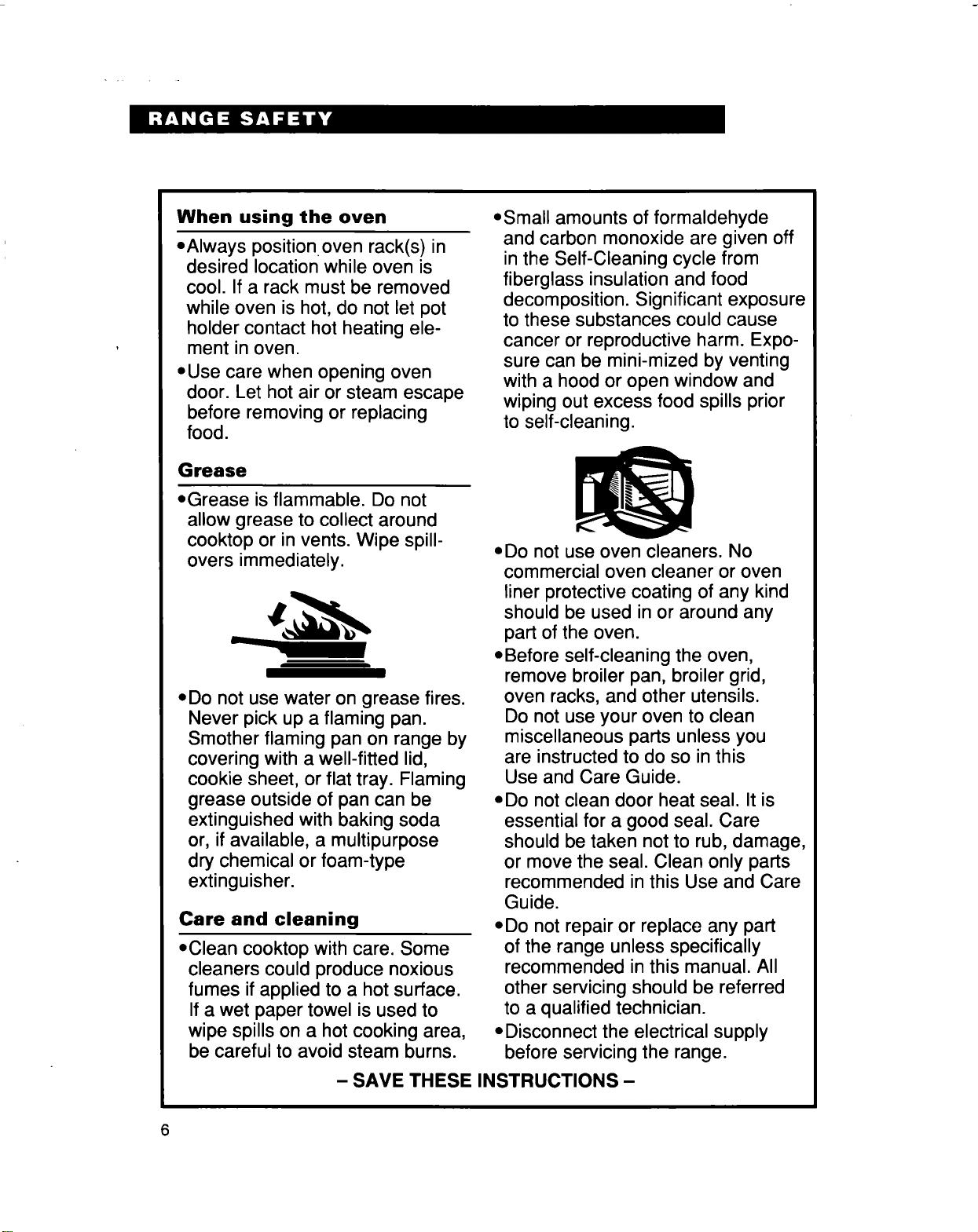
• Do not use water on grease fires.
Never pick up a flaming pan.
Smother flaming pan on range by
covering with a well-fitted lid,
cookie sheet, or flat tray. Flaming
grease outside of pan can be
extinguished with baking soda
or, if available, a multipurpose
dry chemical or foam-type
extinguisher.
Care and cleaning
,,Clean cooktop with care. Some
cleaners could produce noxious
fumes if applied to a hot surface.
If a wet paper towel is used to
wipe spills on a hot cooking area,
be careful to avoid steam burns.
• Small amounts of formaldehyde
and carbon monoxide are given off
in the Self-Cleaning cycle from
fiberglass insulation and food
decomposition. Significant exposure
to these substances could cause
cancer or reproductive harm. Expo-
sure can be mini-mized by venting
with a hood or open window and
wiping out excess food spills prior
to self-cleaning.
• Do not use oven cleaners. No
commercial oven cleaner or oven
liner protective coating of any kind
should be used in or around any
part of the oven.
• Before self-cleaning the oven,
remove broiler pan, broiler grid,
oven racks, and other utensils.
Do not use your oven to clean
miscellaneous parts unless you
are instructed to do so in this
Use and Care Guide.
• Do not clean door heat seal. It is
essential for a good seal. Care
should be taken not to rub, damage,
or move the seal. Clean only parts
recommended in this Use and Care
Guide.
• Do not repair or replace any part
of the range unless specifically
recommended in this manual. All
other servicing should be referred
to a qualified technician.
• Disconnect the electrical supply
before servicing the range.
-SAVE THESEINSTRUCTIONS-
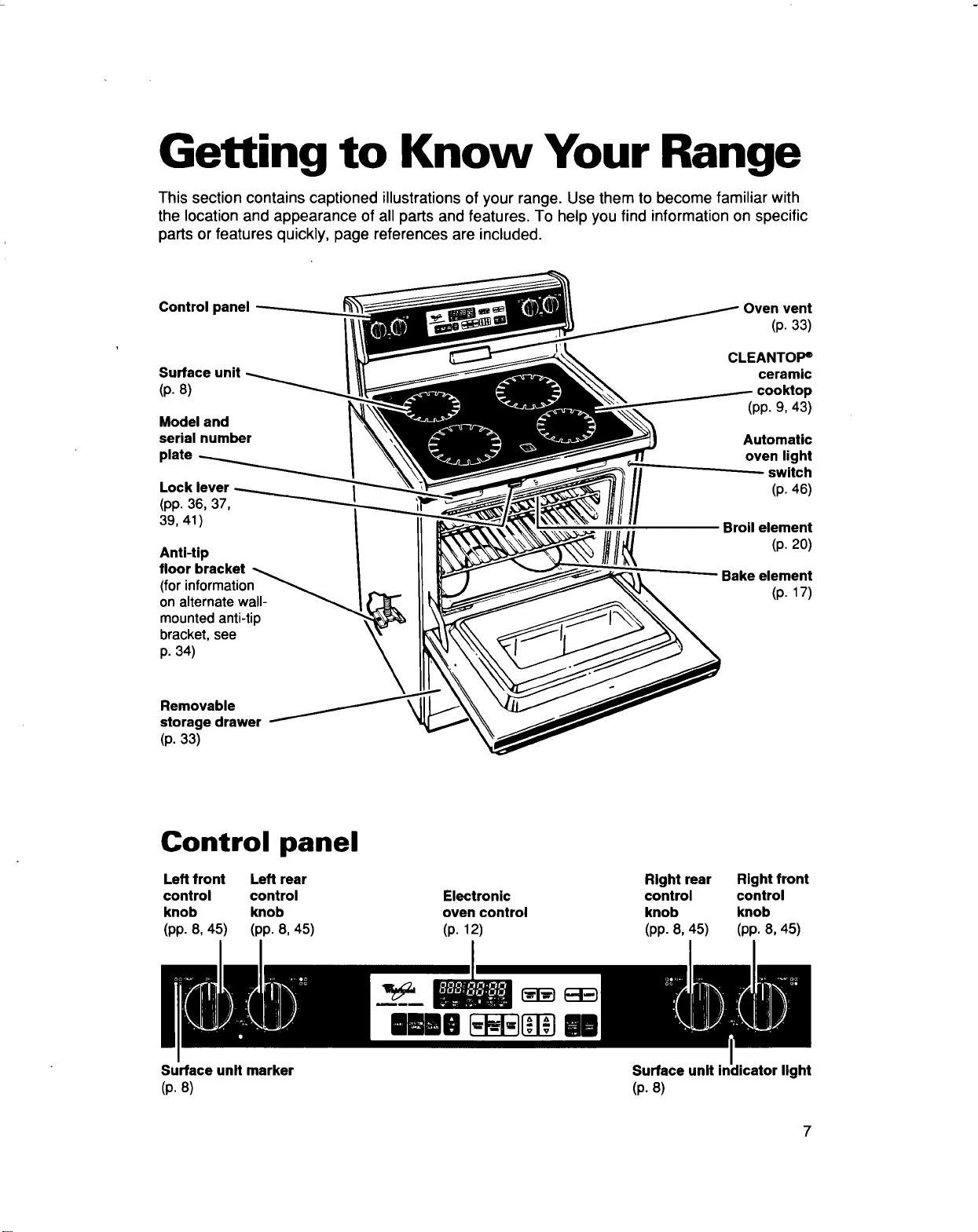
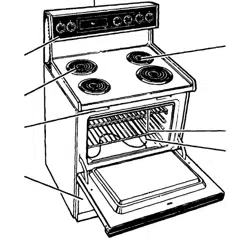
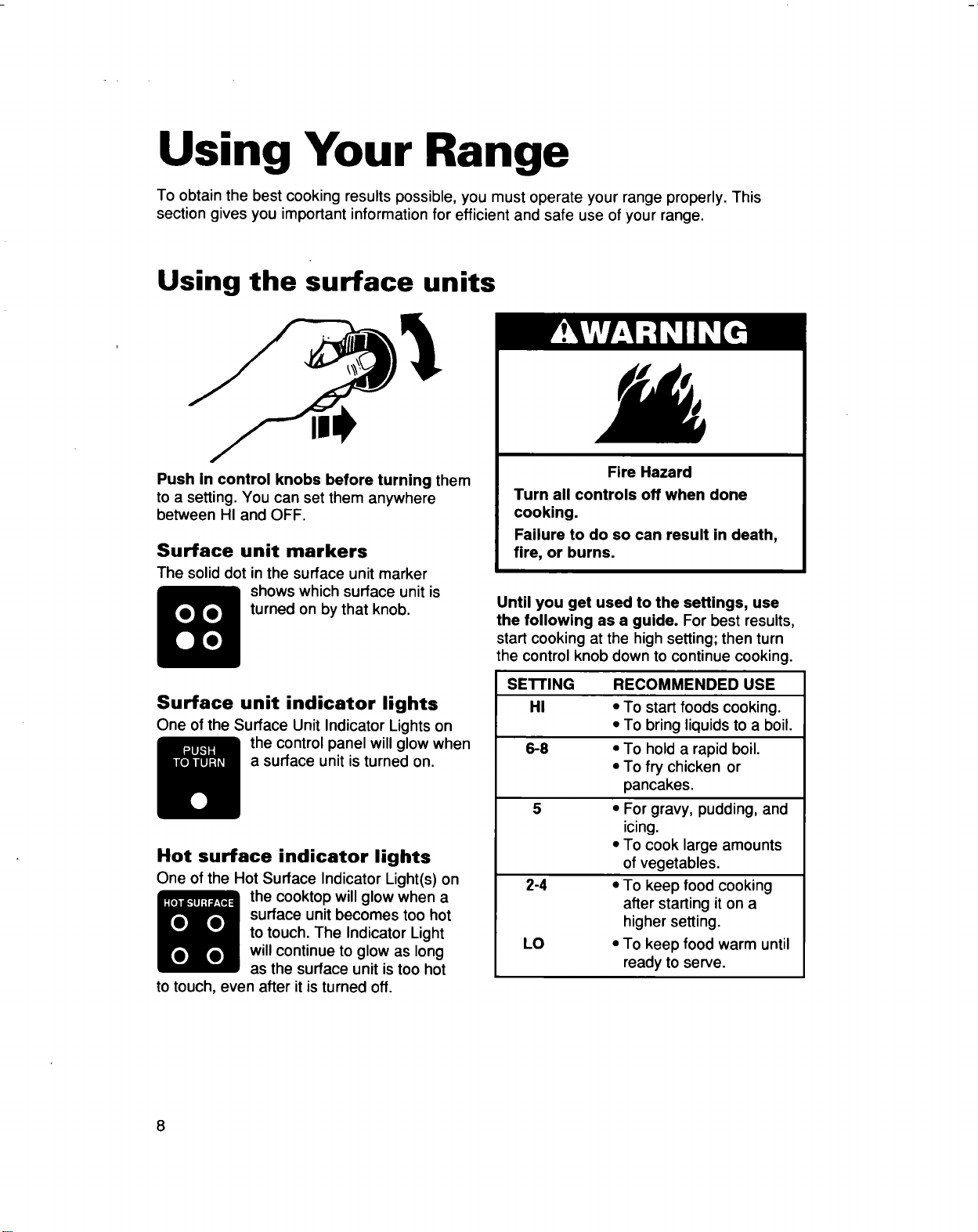
Getting to Know Your Range
This section contains captioned illustrations of your range. Use them to become familiar with
the location and appearance of all parts and features. To help you find information on specific
parts or features quickly, page references are included.
Control panel Oven vent
(p. 33)
Surface unit
(p. 8)
Model and
serial number
plate
Lock lever
(pp. 36, 37,
39, 41)
Anti-tip
floor bracket
(for information
on alternate wall-
mounted anti-tip
bracket, see
p. 34)
CLEANTOP e
ceramic
(pp. 9, 43)
Automatic
oven light
switch
(p. 46)
Broil element
(p. 20)
Bake element
(p. 17)
Removable
storage drawer
(p. 33)
Control panel
Left front Left rear
control control
knob knob
(pp. 8, 45) (pp. 8, 45)
Electronic
oven control
(p. 12)
Right rear
control
knob
(pp. 8, 45)
Right front
control
knob
(pp. 8, 45)
Surface unit marker
(p. 8)
mRml [_F_[_ m
Surface unit
(p. 8)
Jicator light
Using Your Range
To obtain the best cooking results possible, you must operate your range properly. This
section gives you important information for efficient and safe use of your range.
Using the surface units
Push in control knobs before turning them
to a setting. You can set them anywhere
between HI and OFF.
Surface unit markers
The solid dot in the surface unit marker
shows which surface unit is
turned on by that knob.
Surface unit indicator lights
One of the Surface Unit Indicator Lights on
the control panel will glow when
a surface unit is turned on.
Hot surface indicator lights
One of the Hot Surface Indicator Light(s) on
the cooktop will glow when a
surface unit becomes too hot
to touch. The Indicator Light
will continue to glow as long
as the surface unit is too hot
to touch, even after it is turned off.
Fire Hazard
Turn all controls off when done
cooking.
Failure to do so can result in death,
fire, or burns.
Until you get used to the settings, use
the following as a guide. For best results,
start cooking at the high setting; then turn
the control knob down to continue cooking.
SE'n'ING RECOMMENDED USE
HI • To startfoods cooking.
• To bring liquidsto a boil.
6-8 • To hold a rapid boil.
• To fry chicken or
pancakes.
5 • For gravy, pudding, and
icing.
• To cook large amounts
of vegetables.
2-4 • To keep food cooking
after starting it on a
higher setting.
LO • To keep food warm until
ready to serve.
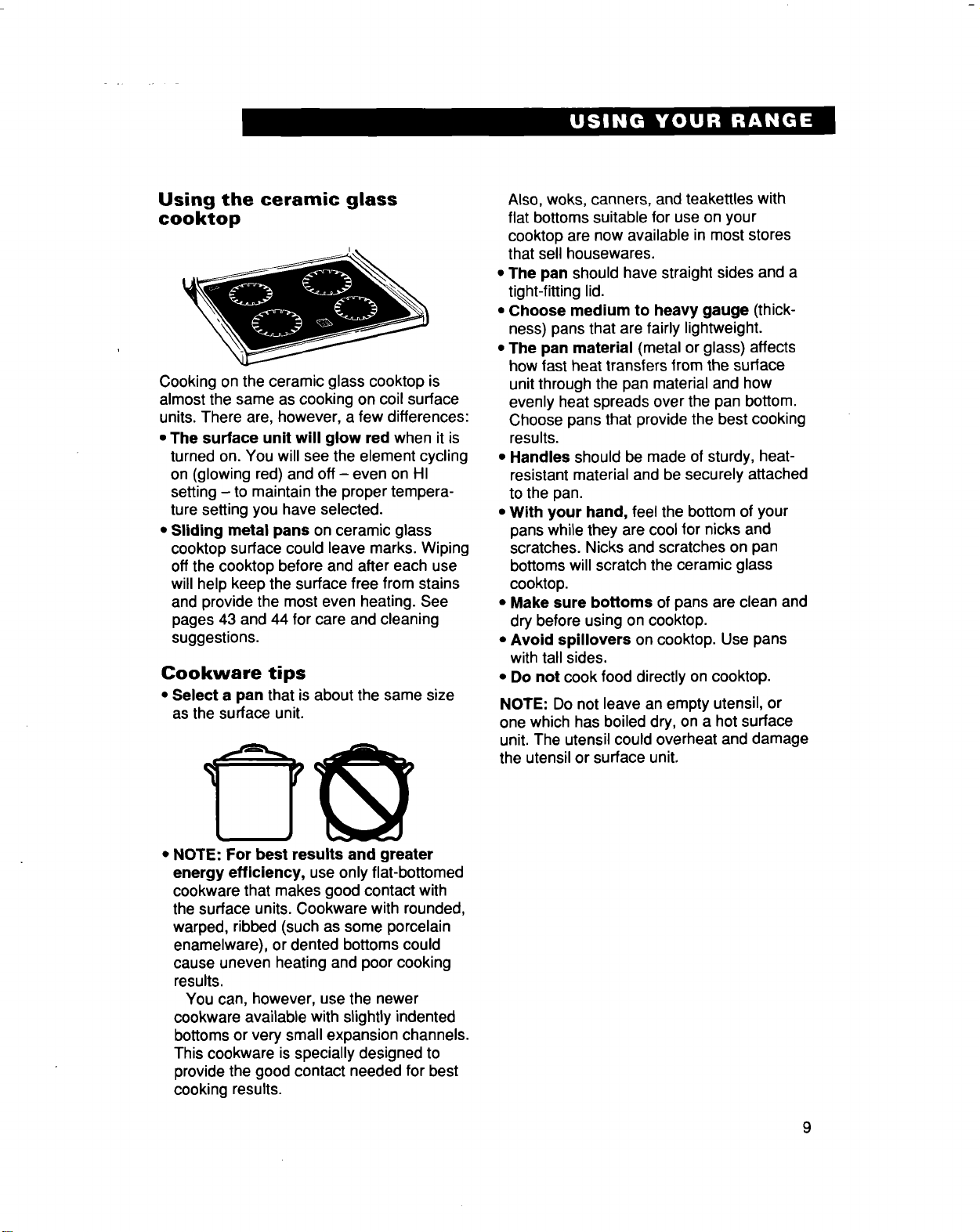
Using the ceramic glass
cooktop
Cooking on the ceramic glass cooktop is
almost the same as cooking on coil surface
units. There are, however, a few differences:
• The surface unit will glow red when it is
turned on. You will see the element cycling
on (glowing red) and off- even on HI
setting - to maintain the proper tempera-
ture setting you have selected.
• Sliding metal pans on ceramic glass
cooktop surface could leave marks. Wiping
off the cooktop before and after each use
will help keep the surface free from stains
and provide the most even heating. See
pages 43 and 44 for care and cleaning
suggestions.
Cookware tips
• Select a pan that is about the same size
as the surface unit.
• NOTE: For best results and greater
energy efficiency, use only flat-bottomed
cookware that makes good contact with
the surface units. Cookware with rounded,
warped, ribbed (such as some porcelain
enamelware), or dented bottoms could
cause uneven heating and poor cooking
results.
You can, however, use the newer
cookware available with slightly indented
bottoms or very small expansion channels.
This cookware is specially designed to
provide the good contact needed for best
cooking results.
Also, woks, canners, and teakettles with
flat bottoms suitable for use on your
cooktop are now available in most stores
that sell housewares.
• The pan should have straight sides and a
tight-fitting lid.
• Choose medium to heavy gauge (thick-
ness) pans that are fairly lightweight.
• The pan material (metal or glass) affects
how fast heat transfers from the surface
unit through the pan material and how
evenly heat spreads over the pan bottom.
Choose pans that provide the best cooking
results.
• Handles should be made of sturdy, heat-
resistant material and be securely attached
to the pan.
• With your hand, feel the bottom of your
pans while they are cool for nicks and
scratches. Nicks and scratches on pan
bottomswill scratch the ceramic glass
cooktop.
• Make sure bottoms of pans are clean and
dry before using on cooktop.
• Avoid spillovers on cooktop. Use pans
with tall sides.
• Do not cook food directly on cooktop.
NOTE: Do not leave an empty utensil, or
one which has boiled dry, on a hot surface
unit. The utensil could overheat and damage
the utensil or surface unit.
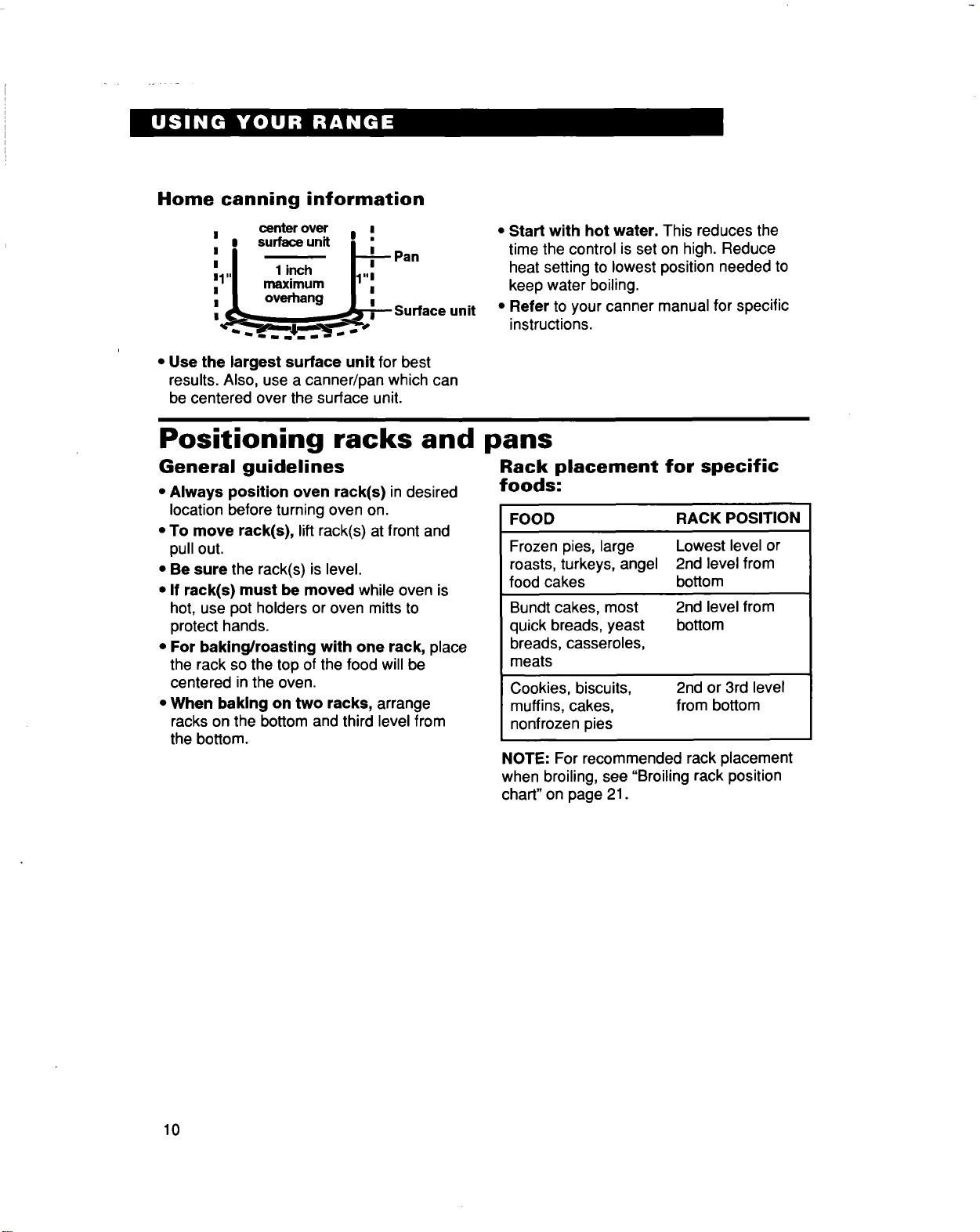
Home canning information
I center over _ i
, , su_e.n, i ;
, I _ I-P: P"n
I ,,i 1inch II,,I
,1I maximum I1":
I / overhang J i
u_Surface unit
• Use the largest surface unit for best
results. Also, use a canner/pan which can
be centered over the surface unit.
• Start with hot water. This reduces the
time the control is set on high. Reduce
heat setting to lowest position needed to
keep water boiling.
• Refer to your canner manual for specific
instructions.
Positioning racks and pans
General guidelines
• Always position oven rack(s) in desired
location before turning oven on.
• To move rack(s), lift rack(s) at front and
pull out.
• Be sure the rack(s) is level.
• If rack(s) must be moved while oven is
hot, use pot holders or oven mitts to
protect hands.
• For baking/roasting with one rack, place
the rack so the top of the food willbe
centered in the oven,
• When baking on two racks, arrange
racks on the bottom and third level from
the bottom.
Rack placement for specific
foods:
FOOD RACK POSITION
Frozen pies, large
roasts, turkeys, angel
food cakes
Bundt cakes, most
quick breads, yeast
breads, casseroles,
meats
Cookies, biscuits,
muffins, cakes,
nonfrozen pies
Lowest level or
2nd level from
bottom
2nd level from
bottom
2nd or 3rd level
from bottom
NOTE: For recommended rack placement
when broiling, see "Broiling rack position
chart"on page 21.
10
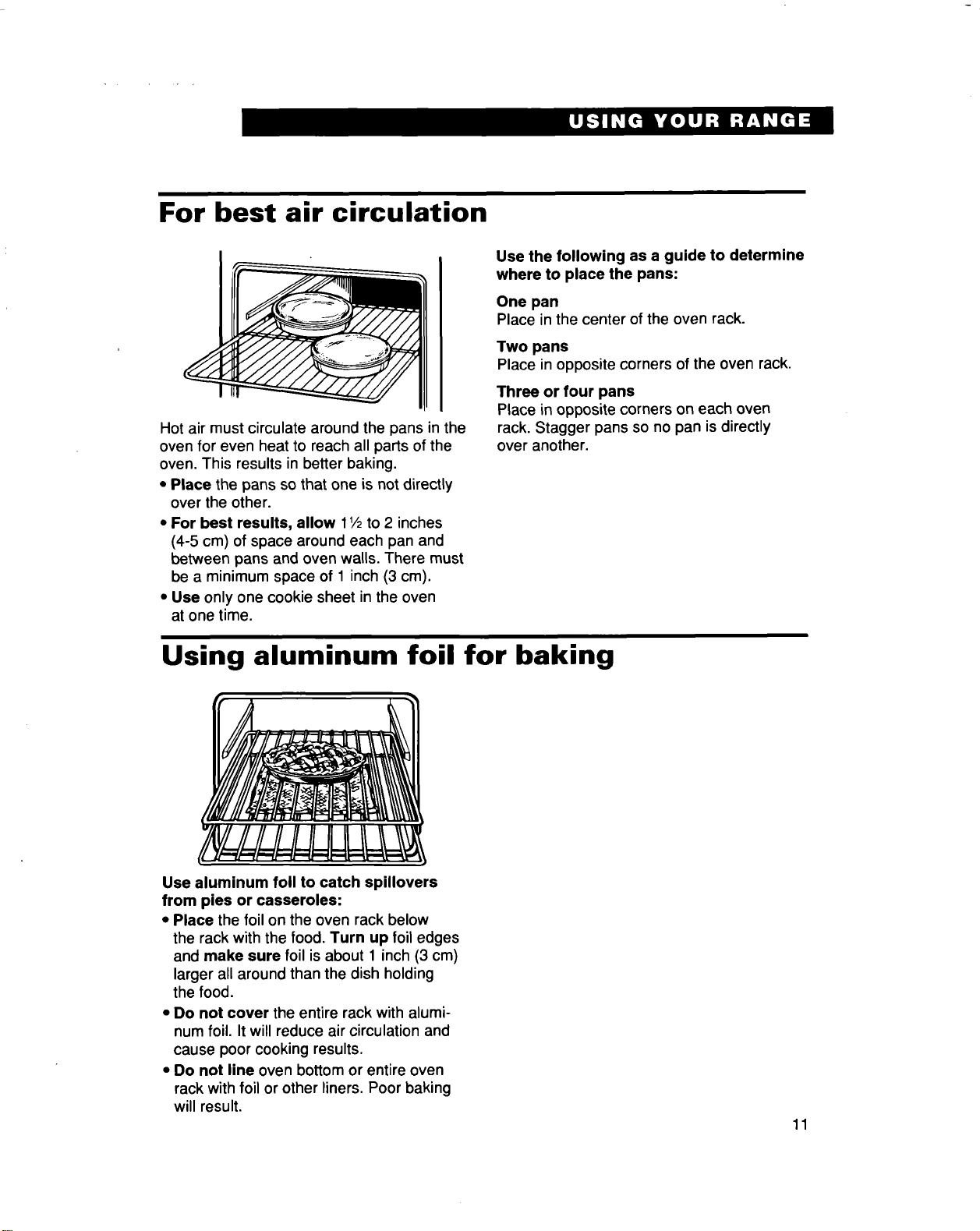
For best air circulation
Hot air must circulate around the pans in the
oven for even heat to reach all parts of the
oven. This results in better baking.
• Place the pans so that one is not directly
over the other.
• For best results, allow 11/2to 2 inches
(4-5 cm) of space around each pan and
between pans and oven walls. There must
be a minimum space of 1 inch (3 cm).
• Use only one cookie sheet in the oven
at one time.
Use the following as a guide to determine
where to place the pans:
One pan
Place in the center of the oven rack.
Two pans
Place in opposite corners of the oven rack.
Three or four pans
Place in opposite corners on each oven
rack. Stagger pans so no pan is directly
over another.
Using aluminum foil for baking
Use aluminum foil to catch spillovers
from pies or casseroles:
• Place the foil on the oven rack below
the rack with the food. Turn up foil edges
and make sure foil is about 1 inch (3 cm)
larger all around than the dish holding
the food.
• Do not cover the entire rack with alumi-
num foil. It will reduce air circulation and
cause poor cooking results.
• Do not line oven bottom or entire oven
rack with foil or other liners. Poor baking
will result.
11
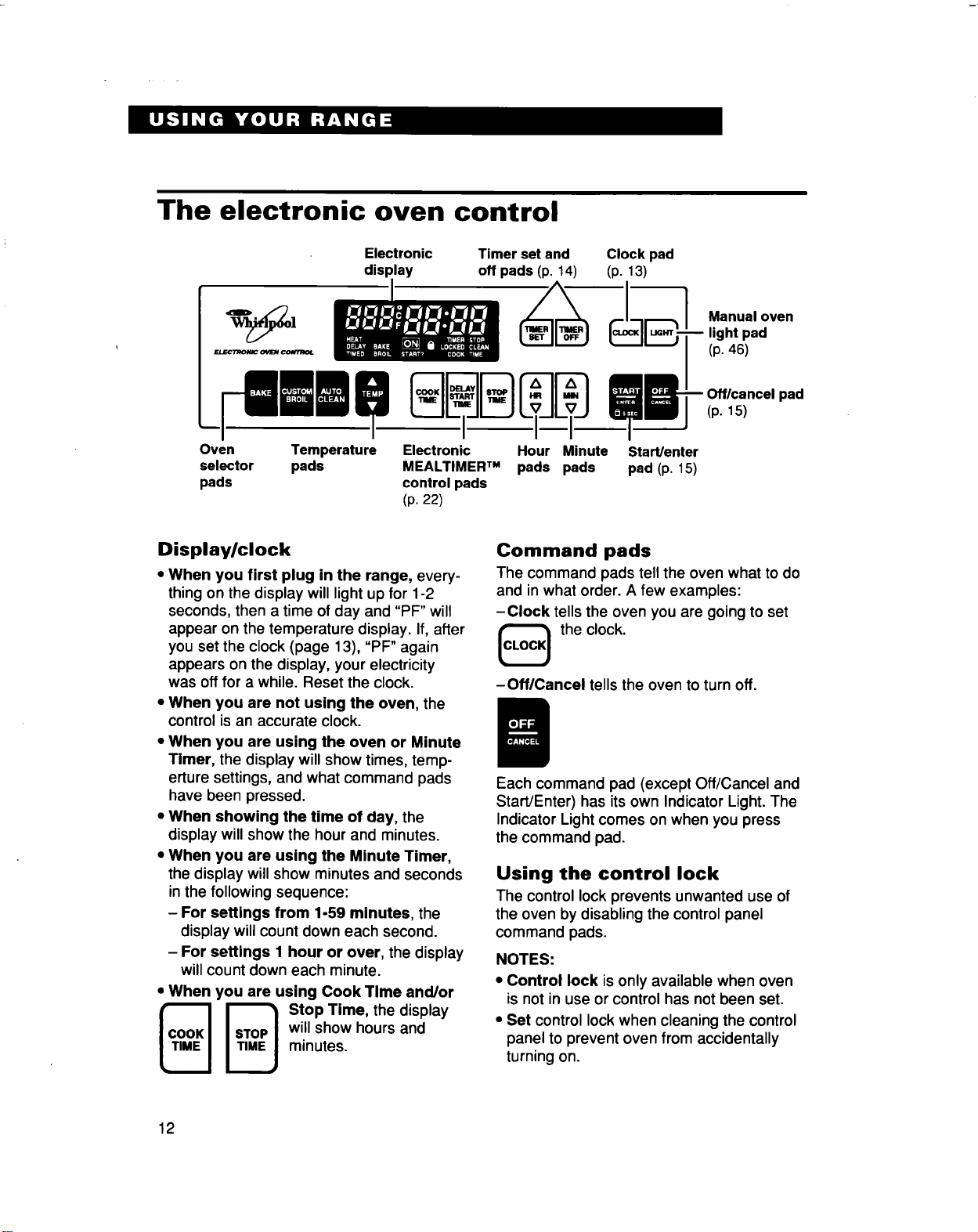
The electronic oven control
Oven
selector
pads
Electronic
display
Clock pad
(p. 13)
Temperature
pads
Timer set and
off pads (p. 14)
-_) ____J__ Manual oven
light pad
(p. 46)
" L___JL_'c°°"11_ _11"r°P1 L_L__'11_E J __ Offlcsncelpad(p.15)
Electronic Hour Minute Start/enter
MEALTIMER TM pads pads pad (p. 15)
control pads
(p. 22)
Display/clock
• When you first plug in the range, every-
thing on the display will light up for 1-2
seconds, then a time of day and "PF" will
appear on the temperature display. If, after
you set the clock (page 13), "PF" again
appears on the display, your electricity
was off for a while. Reset the clock.
• When you are not using the oven, the
control is an accurate clock.
• When you are using the oven or Minute
Timer, the display will show times, temp-
erture settings, and what command pads
have been pressed.
• When showing the time of day, the
display will show the hour and minutes.
• When you are using the Minute Timer,
the display will show minutes and seconds
in the following sequence:
- For settings from 1-59 minutes, the
display will count down each second.
- For settings 1 hour or over, the display
will count down each minute.
• When you are using Cook Time and/or
_ _ StopTime, thedisplay
will show hours and
minutes.
Command pads
The command pads tell the oven what to do
and in what order. A few examples:
-Clock tells the oven you are going to set
the clock.
-Off/Cancel tells the oven to turn off.
Each command pad (except Off/Cancel and
Start/Enter) has its own Indicator Light. The
Indicator Light comes on when you press
the command pad.
Using the control lock
The control lock prevents unwanted use of
the oven by disabling the control panel
command pads.
NOTES:
• Control lock is only available when oven
is not in use or control has not been set.
• Set control lock when cleaning the control
panel to prevent oven from accidentally
turning on.
12
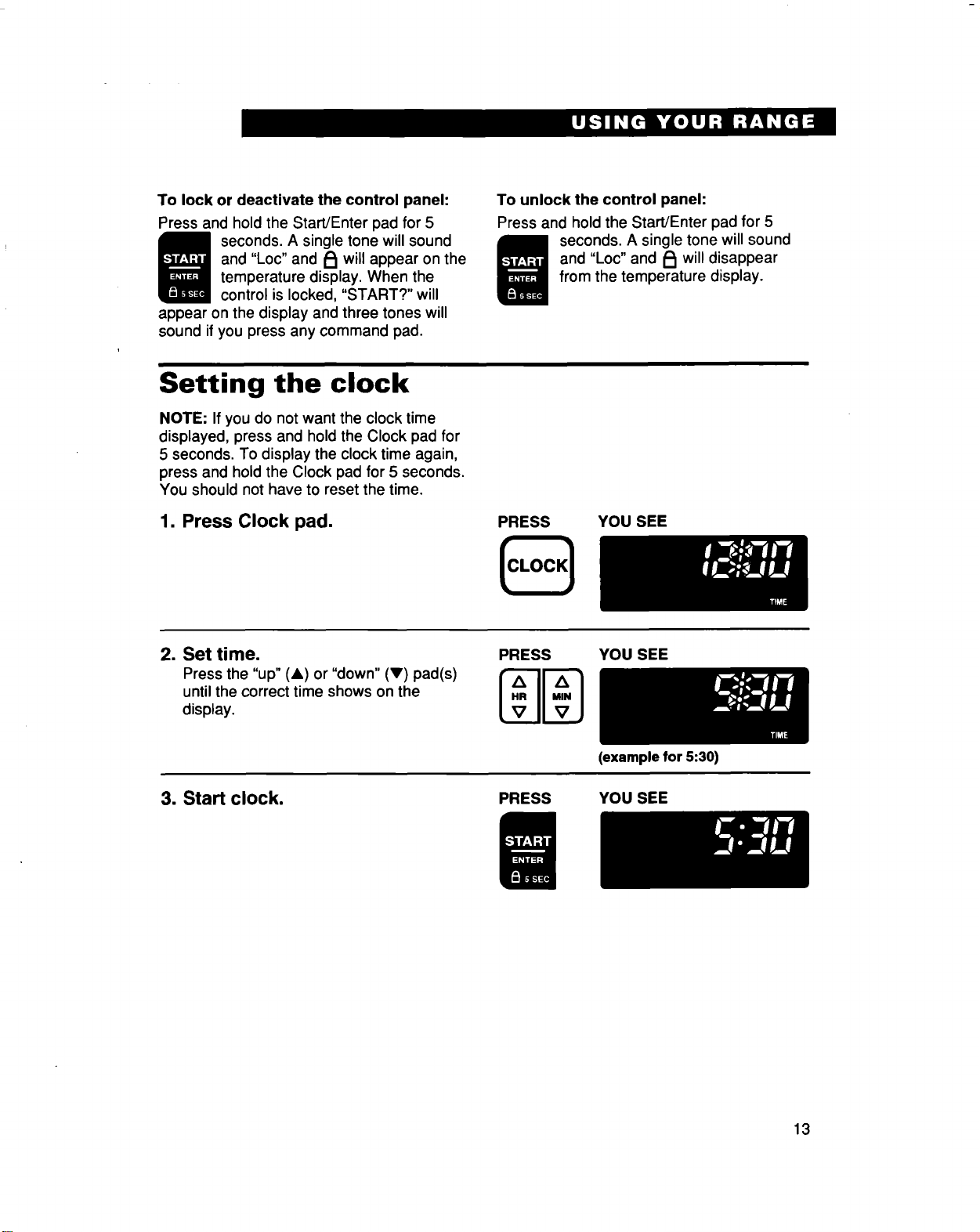
Tolockordeactivatethecontrolpanel:
Pressandhold the Start/Enter pad for 5
seconds. A single tone will sound
and "Loc" and _ will appear on the
temperature display. When the
control is locked, "START?" will
appear on the display and three tones will
sound if you press any command pad.
To unlock the control panel:
Press and hold the Start/Enter pad for 5
seconds. A single tone will sound
and "Loc" and _1 willdisappear
from the temperature display.
Setting the clock
NOTE: If you do not want the clock time
displayed, press and hold the Clock pad for
5 seconds. To display the clock time again,
press and hold the Clock pad for 5 seconds.
You should not have to reset the time.
1. Press Clock pad.
PRESS YOU SEE
CLOCK
2. Set time.
Press the "up" (A) or "down" (V) pad(s)
untilthe correct time shows on the
display.
PRESS
Z_ A
[,.II-i
[v IlVJ
YOU SEE
3. Start clock.
(example for 5:30)
PRESS YOU SEE
13
Using the electronic Minute Timer
The Minute Timer does not start or stop the
oven. It works like a kitchen timer. Itcan be
set in hours and minutes up to 12 hours.
The Minute Timer will display minutes and
seconds for settings under one hour. You
will hear four 2-second tones when the set
time is up.
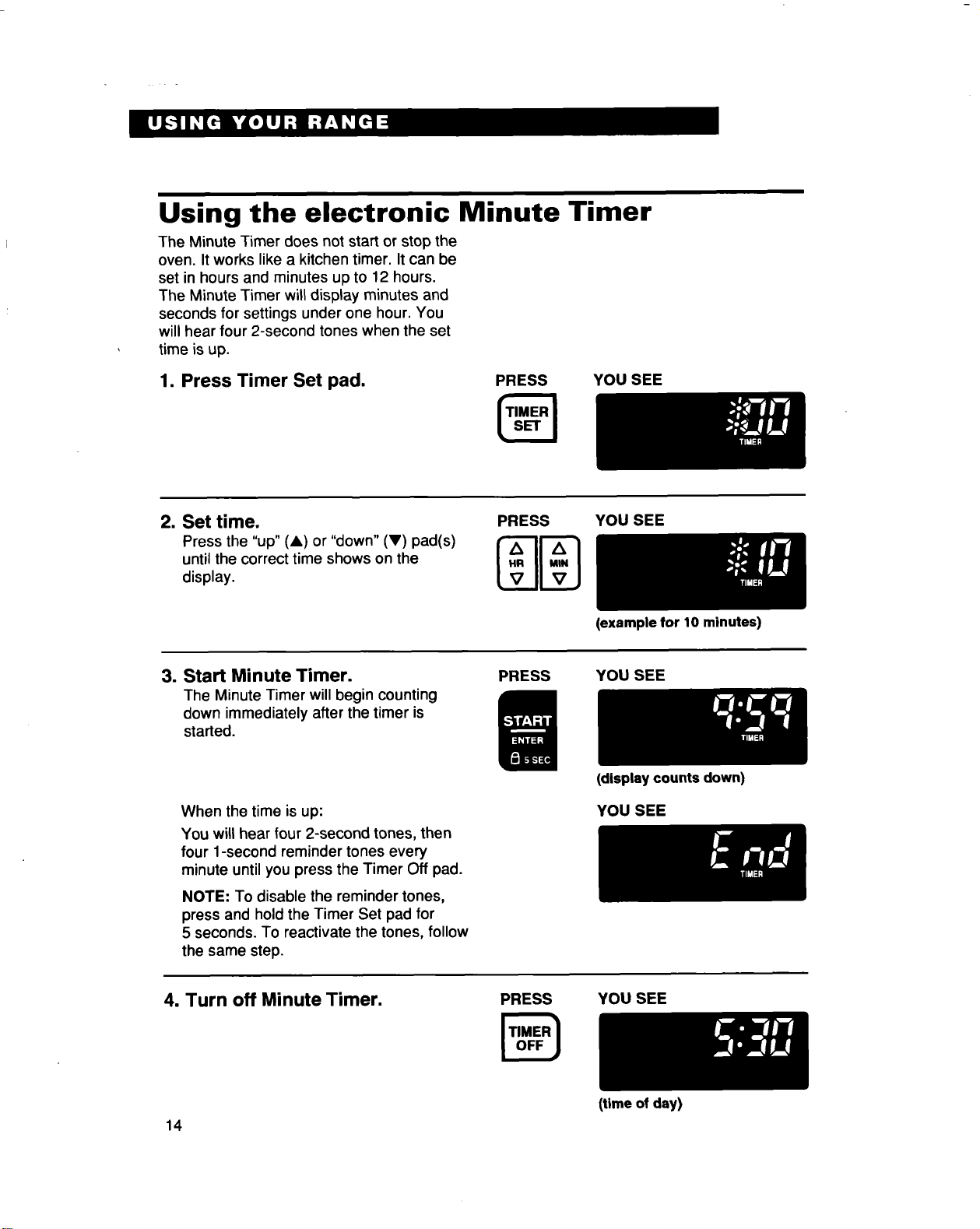
1. Press Timer Set pad.
PRESS YOU SEE
2. Set time.
Press the "up" (&) or "down" (V) pad(s)
until the correct time shows on the
display.
PRESS
Mm
YOU SEE
3. Start Minute Timer.
The Minute Timer will begin counting
down immediately after the timer is
started.
PRESS
(example for 10 minutes)
YOU SEE
When the time is up:
You will hear four 2-second tones, then
four 1-second reminder tones every
minute until you press the Timer Off pad.
NOTE: To disable the reminder tones,
press and hold the Timer Set pad for
5 seconds. To reactivate the tones, follow
the same step.
(display counts down)
YOU SEE
4. Turn off Minute Timer. PRESS
YOU SEE
14
(time of day)
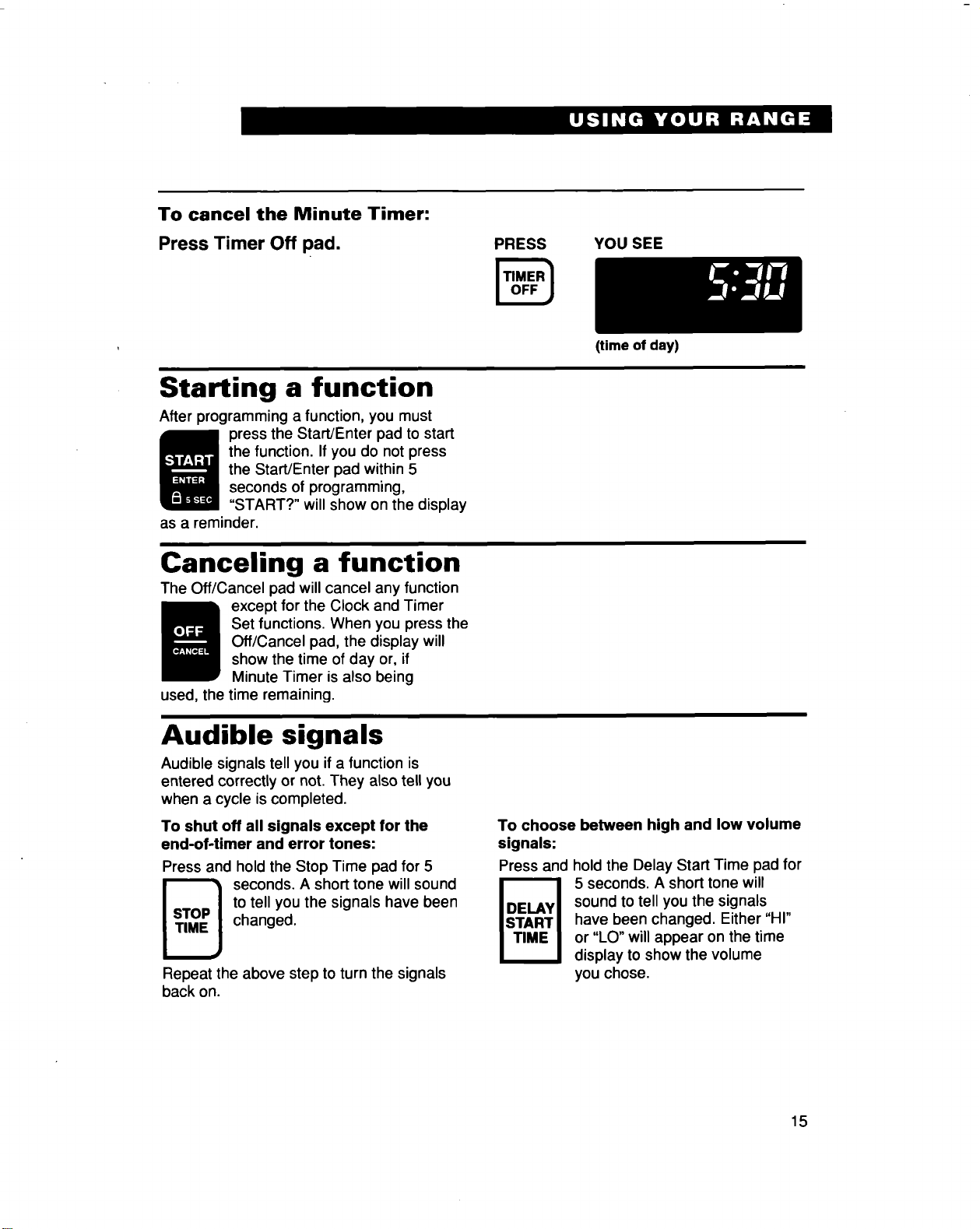
To cancel the Minute Timer:
Press Timer Off pad.
PRESS YOU SEE
Starting a function
After programming a function, you must
press the Start/Enter pad to start
the function. If you do not press
the Start/Enter pad within 5
seconds of programming,
"START?" will show on the display
as a reminder.
Canceling a function
The Off/Cancel pad will cancel any function
except for the Clock and Timer
Set functions. When you press the
Off/Cancel pad, the display will
show the time of day or, if
Minute Timer is also being
used, the time remaining.
Audible signals
Audible signals tell you if a function is
entered correctly or not. They also tell you
when a cycle is completed.
To shut off all signals except for the
end-of-timer and error tones:
Press and hold the Stop Time pad for 5
_ seconds. A short tone will sound
to tell you the signals have been
changed.
Repeat the above step to turn the signals
back on.
(time of day)
To choose between high and low volume
signals:
Press and hold the Delay Start Time pad for
5 seconds. A short tone will
sound to tell you the signals
have been changed. Either "HI"
or "LO" will appear on the time
display to show the volume
you chose.
15
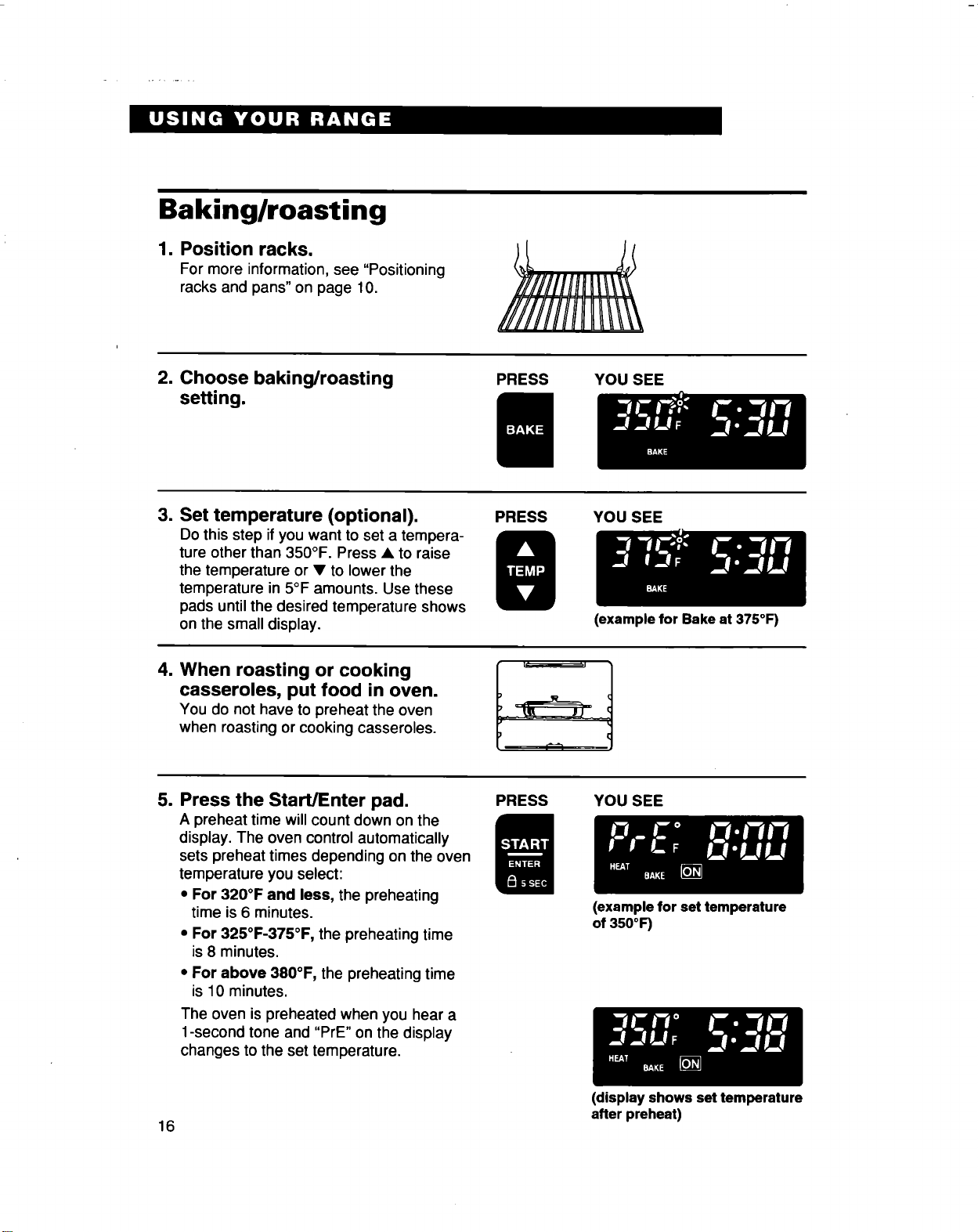
Baking/roasting
1. Position racks.
For more information, see "Positioning
racks and pans" on page 10.
2. Choose baking/roasting
setting.
PRESS YOU SEE
3. Set temperature (optional).
Do this step if you want to set a tempera-
ture other than 350°F. Press • to raise
the temperature or • to lower the
temperature in 5°F amounts. Use these
pads until the desired temperature shows
on the small display.
PRESS
YOU SEE
(example for Bake at 375°F)
=
When roasting or cooking
casseroles, put food in oven.
You do not have to preheat the oven
when roasting or cooking casseroles.
5. Press the Start/Enter pad.
A preheat time willcount down on the
display. The oven control automatically
sets preheat times depending on the oven
temperature you select:
• For 320°F and less, the preheating
time is 6 minutes.
• For 325°F-375°F, the preheating time
is 8 minutes.
• For above 380°F, the preheating time
is 10 minutes.
The oven is preheated when you hear a
1-second tone and "PrE" on the display
changes to the set temperature.
PRESS YOU SEE
(example for set temperature
of 350°F)
(display shows set temperature
after preheat)
16
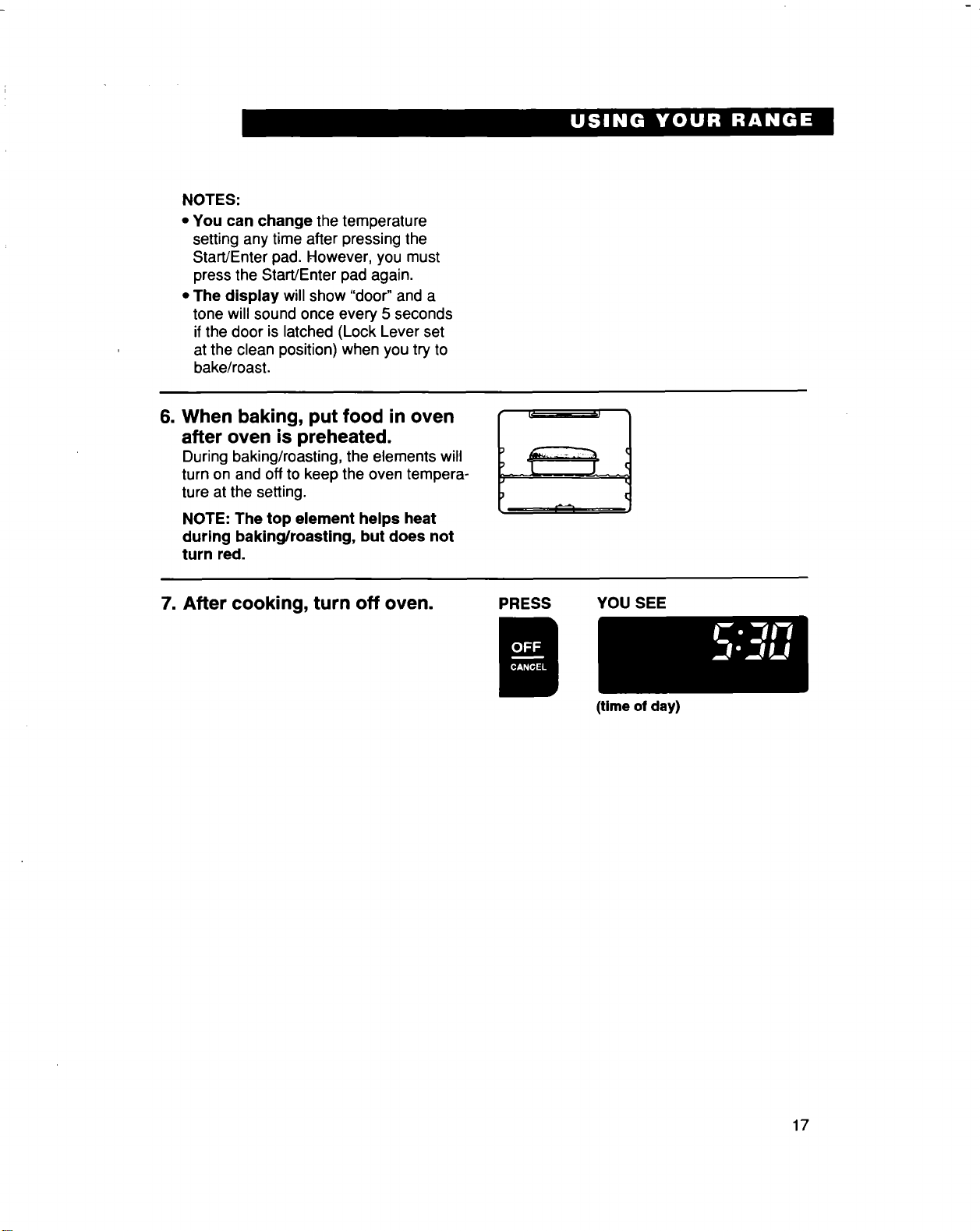
NOTES:
• Youcanchangethetemperature
settinganytimeafterpressingthe
Start/Enterpad.However,youmust
presstheStart/Enterpadagain.
• The display will show "door" and a
tone willsound once every 5 seconds
ifthe door is latched (Lock Lever set
at the clean position) when you try to
bake/roast.
6. When baking, put food in oven
after oven is preheated.
During baking/roasting, the elements will
turn on and offto keep the oven tempera-
ture at the setting.
NOTE: The top element helps heat
during baking/roasUng, but does not
turn red.
7. After cooking, turn off oven.
PRESS YOU SEE
(time of day)
17
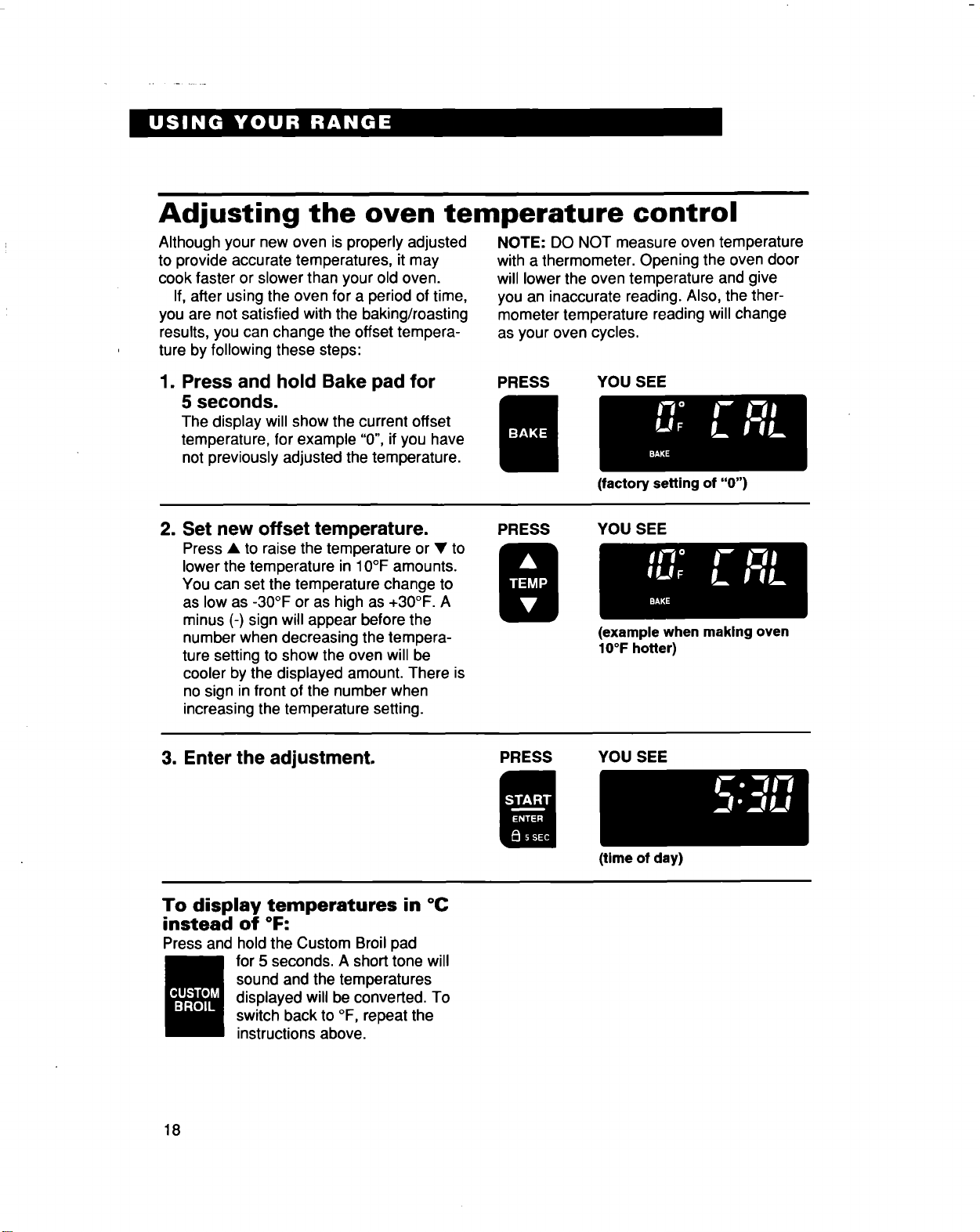
Adjusting the oven temperature control
Although your new oven is properly adjusted
to provide accurate temperatures, it may
cook faster or slower than your old oven.
If, after using the oven for a period of time,
you are not satisfied with the baking/roasting
results, you can change the offset tempera-
ture by following these steps:
NOTE: DO NOT measure oven temperature
with a thermometer. Opening the oven door
will lower the oven temperature and give
you an inaccurate reading. Also, the ther-
mometer temperature reading will change
as your oven cycles.
1. Press and hold Bake pad for
5 seconds.
The display will show the current offset
temperature, for example "0", if you have
not previously adjusted the temperature.
PRESS YOU SEE
(factory setting of "0")
2. Set new offset temperature.
Press • to raise the temperature or • to
lower the temperature in 10°F amounts.
You can set the temperature change to
as low as -30°F or as high as +30°F. A
minus (-) sign will appear before the
number when decreasing the tempera-
ture settingto show the oven will be
cooler by the displayed amount. There is
no sign in front of the number when
increasing the temperature setting.
PRESS YOU SEE
3. Enter the adjustment.
(example when making oven
IO°F hotter)
PRESS YOU SEE
To display temperatures in °C
instead of °F:
Press and hold the Custom Broil pad
for 5 seconds. A short tone will
sound and the temperatures
displayed will be converted. To
switch back to °F, repeat the
instructions above.
18
(time of day)
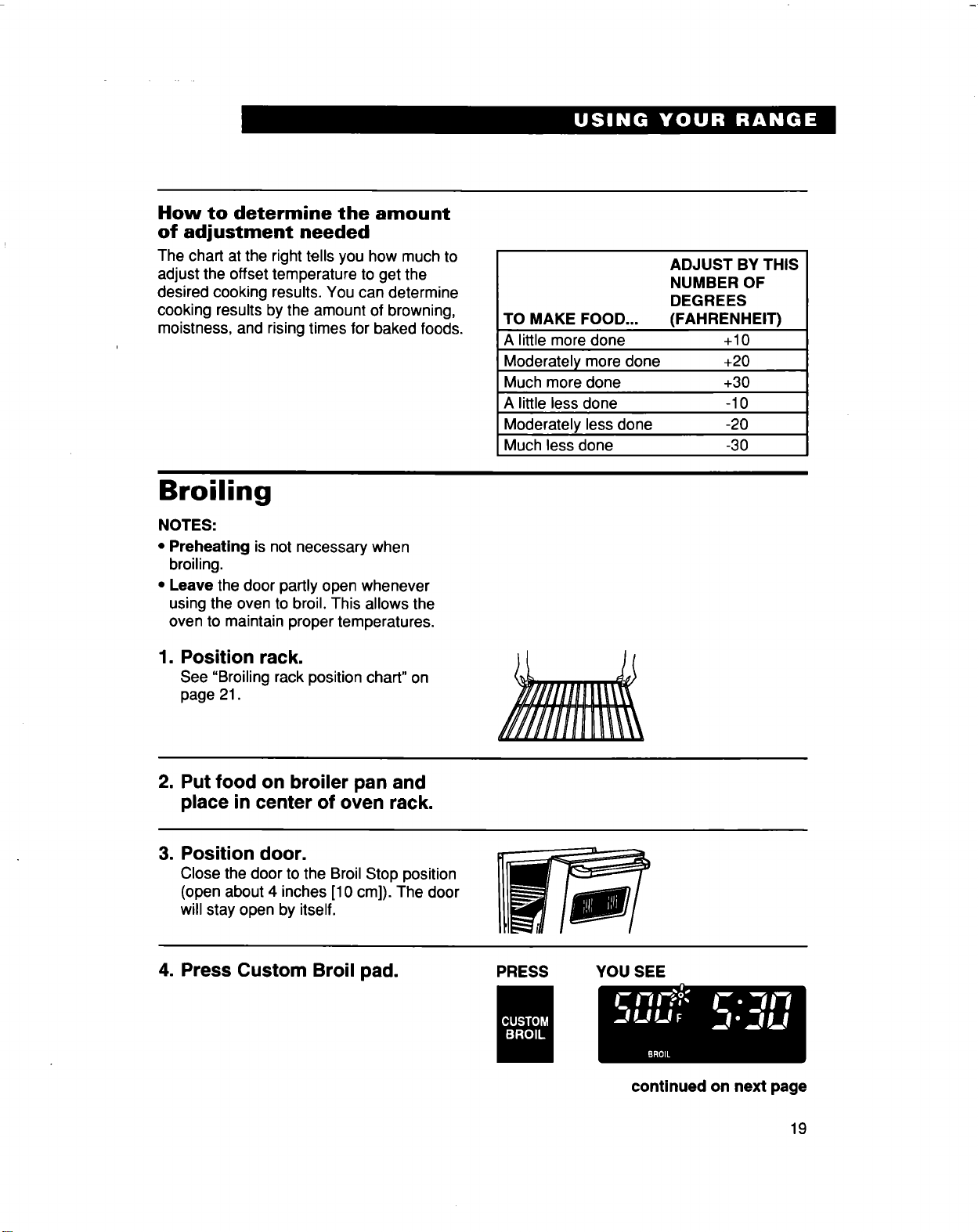
How to determine the amount
of adjustment needed
The chart at the right tells you how much to
adjust the offset temperature to get the
desired cooking results. You can determine
cooking results by the amount of browning,
moistness, and rising times for baked foods.
TO MAKE FOOD...
A little more done
Moderately more done
Much more done
A littleless done
Moderately less done
Much less done
ADJUST BY THIS
NUMBER OF
DEGREES
(FAHRENHEIT)
+10
+20
+30
-10
-20
-30
Broiling
NOTES:
• Preheating is not necessary when
broiling.
• Leave the door partly open whenever
using the oven to broil. This allows the
oven to maintain proper temperatures.
1. Position rack.
See "Broiling rack position chart" on
page 21.
2. Put food on broiler pan and
place in center of oven rack.
3. Position door.
Close the door to the Broil Stop position
(open about 4 inches [10 cm]). The door
will stay open by itself.
4. Press Custom Broil pad.
PRESS YOU SEE
continued on next page
19
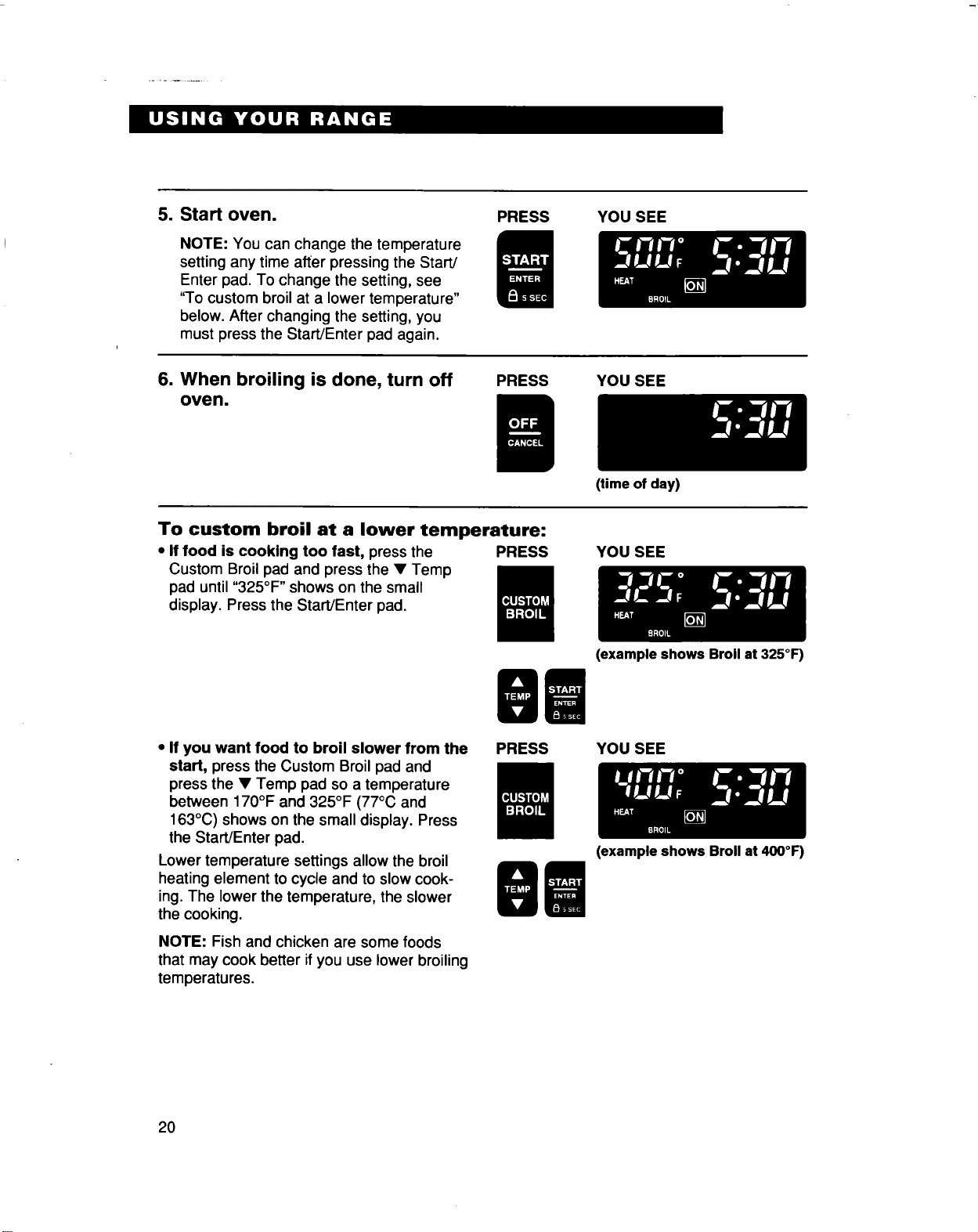
5. Start oven.
NOTE: You can change the temperature
setting any time after pressing the Start/
Enter pad. To change the setting, see
"To custom broil at a lower temperature"
below. After changing the setting, you
must press the Start/Enter pad again.
PRESS
YOU SEE
6. When broiling is done, turn off
oven.
PRESS YOU SEE
To custom broil at a lower temperature:
• If food is cooking too fast, press the PRESS
Custom Broil pad and press the • Temp
pad until "325°F " shows on the small
display. Press the Start/Enter pad.
(time of day)
YOU SEE
• If you want food to broil slower from the
start, press the Custom Broil pad and
press the • Temp pad so a temperature
between 170°F and 325°F (77°C and
163°C) shows on the small display. Press
the Start/Enter pad.
Lower temperature settings allow the broil
heating element to cycle and to slow cook-
ing. The lower the temperature, the slower
the cooking.
NOTE: Fish and chicken are some foods
that may cook better if you use lower broiling
temperatures.
PRESS
(example shows Broil at 325°F)
YOU SEE
2O
(example shows Broil at 400°F)
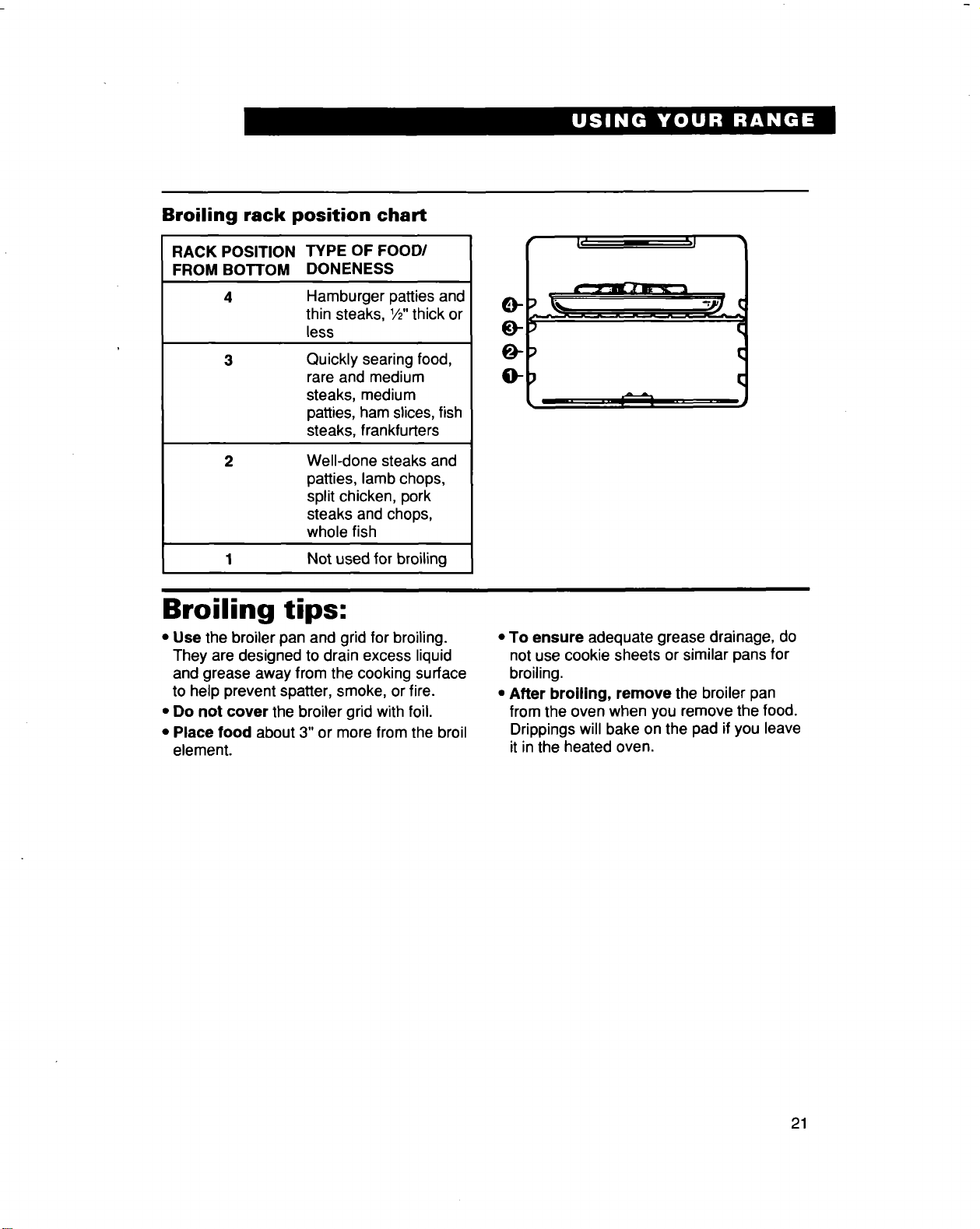
Broiling rack position chart
RACK POSITION TYPE OF FOOD/
FROM BOTTOM DONENESS
4 Hamburger patties and
thin steaks, 1/2"thick or
less
3 Quickly searing food,
rare and medium
steaks, medium
patties, ham slices, fish
steaks, frankfurters
Well-done steaks and
patties, lamb chops,
split chicken, pork
steaks and chops,
whole fish
1 Not used for broiling
c-
o
• I,' ',l
::) \,,.._ -_ €
{;
;) €
Broiling tips:
• Use the broiler pan and grid for broiling.
They are designed to drain excess liquid
and grease away from the cooking surface
to help prevent spatter, smoke, or fire.
• Do not cover the broiler grid with foil.
• Place food about 3" or more from the broil
element.
• To ensure adequate grease drainage, do
not use cookie sheets or similar pans for
broiling.
• After broiling, remove the broiler pan
from the oven when you remove the food.
Drippings will bake on the pad ifyou leave
it in the heated oven,
21
Energy saving tips
Although the energy used for cooking is
usually a very small percentage of the total
energy used in the home, cooking energy
can be used efficiently. Here are some tips
to help you save energy when using your
cooking product:
• Use pans with flat bottoms, straight sides,
and tight-fitting lids.
• Match the pan to the surface unit size.
• Cook with a minimum of liquid or fat to
help shorten cooking time.
• Preheat pans only when recommended
and for the shortest time possible.
• Start food on higher heat settings, then set
surface unit control on low or off to finish
cooking. Use retained heat for cooking
when possible.
• Use the more efficient surface units
instead of the oven when possible.
• Turn on the surface unit only after placing
filled pan on the unit.
• "Oven peeking" may cause heat loss,
longer cooking times, and unsatisfactory
baking results. Rely on your timer to keep
track of the cooking time.
• Bake cakes, pies, or cookies when oven is
warm. Best time to bake is right after a
meal has been cooked in oven.
• Preheat the oven no longer than
necessary.
• Plan your meals for the most efficient use
of the range. When using the oven to cook
one food, try to cook the rest of the meal in
it also.
• Do not preheat when broiling, roasting, or
cooking items such as casseroles.
Using the electronic MEALTIMEW" control
The electronic MEALTIMER control will turn
the oven on and off at times you set, even
when you are not around.
Delayed time baking/roasting is ideal for
foods which do not require a preheated
oven, such as meats and casseroles. Do
not use delayed time cooking for cakes,
cookies, etc. - they will not rise properly.
This section discusses two methods for
starting baking/roasting now and stopping
automatically later, and three methods for
starting and stopping baking/roasting
automatically, Read this section carefully to
choose which method(s) is best for you.
Before using the electronic
MEALTIMER control, make sure the clock
Is set to the correct time of day. (See
"Setting the clock" on page 13.)
Food Poisoning Hazard
Do not let food sit in oven more than
one hour before or after cooking.
Failure to follow the above can result
in death, food poisoning, or sickness.
22
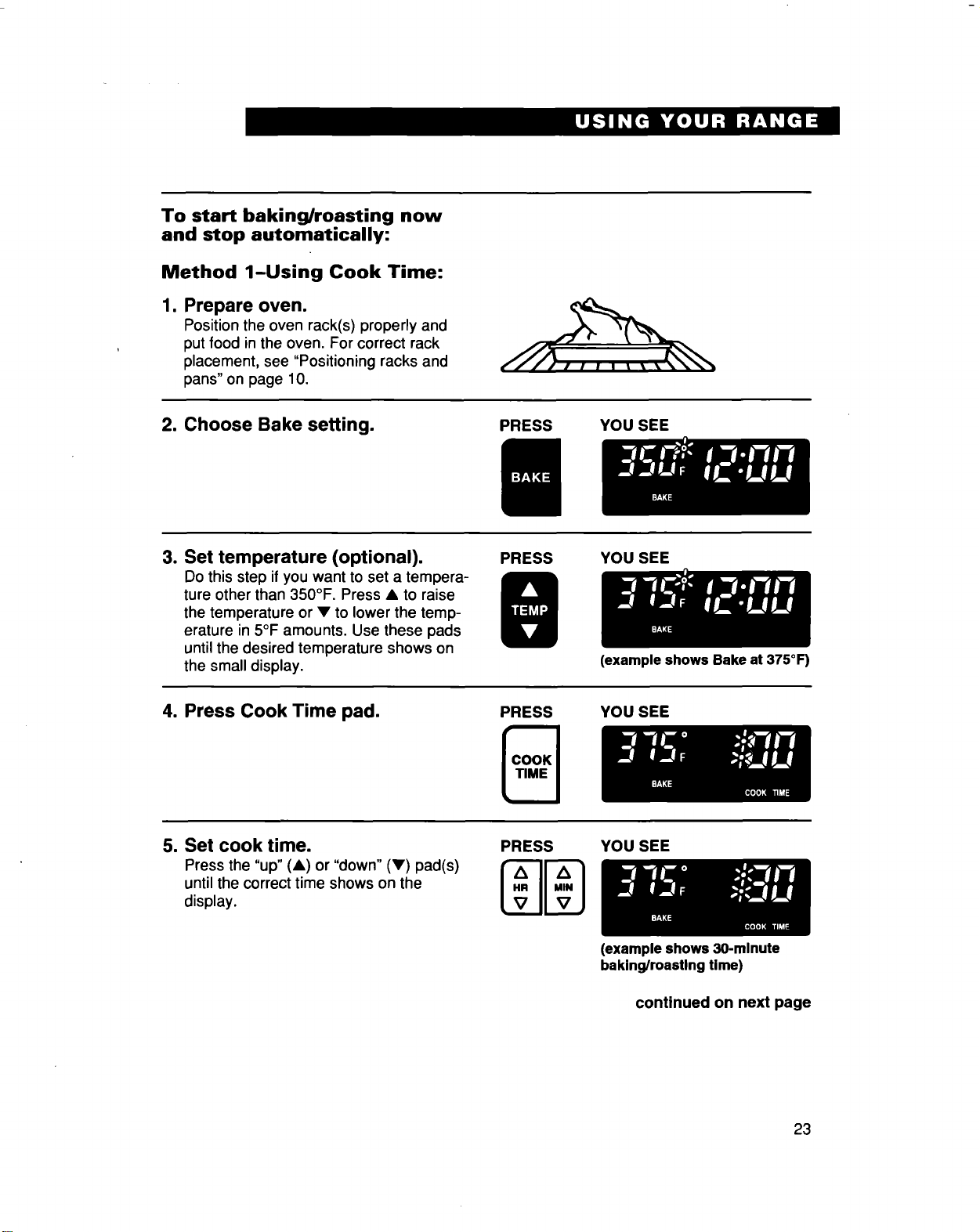
To start baking/roasting now
and stop automatically:
Method 1-Using Cook Time:
1. Prepare oven.
Position the oven rack(s) properly and
put food in the oven. For correct rack
placement, see "Positioning racks and
pans" on page 10.
2. Choose Bake setting.
PRESS YOU SEE
3. Set temperature (optional).
Do this step ifyou want to set a tempera-
ture other than 350°F. Press • to raise
the temperature or • to lower the temp-
erature in 5°F amounts, Use these pads
until the desired temperature shows on
the small display,
PRESS YOU SEE
(example shows Bake at 375°F)
4. Press Cook Time pad.
PRESS YOU SEE
5. Set cook time.
Press the "up" (•) or "down" (•) pad(s)
untilthe correct time shows on the
display.
PRESS
YOU SEE
(example shows 30-minute
baking/roasting time)
continued on next page
23
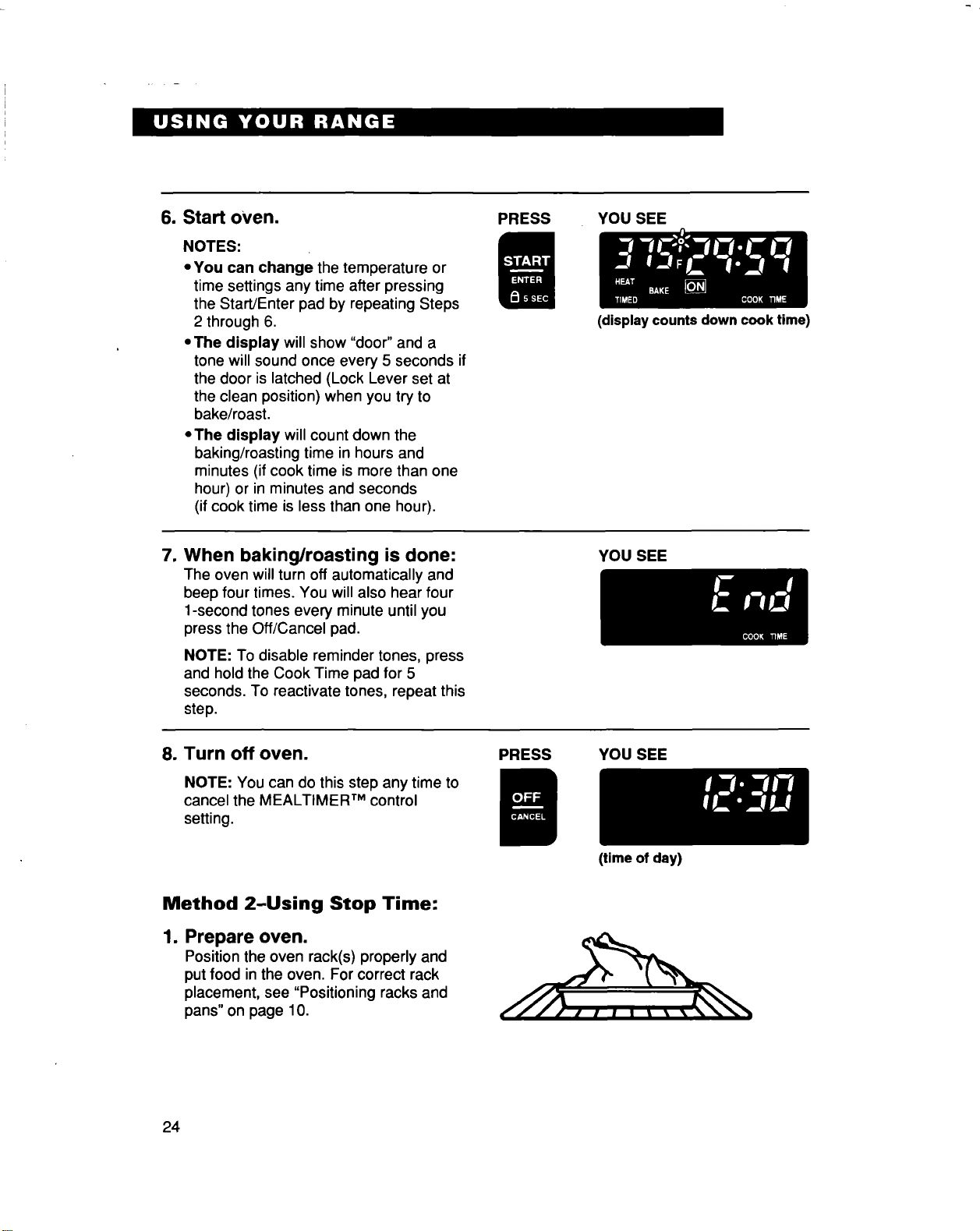
6. Start oVen.
NOTES:
• You can change the temperature or
time settings any time after pressing
the Start/Enter pad by repeating Steps
2 through 6.
• The display will show "door" and a
tone will sound once every 5 seconds if
the door is latched (Lock Lever set at
the clean position) when you try to
bake/roast.
• The display willcount down the
baking/roasting time in hours and
minutes (if cook time is more than one
hour) or in minutes and seconds
(ifcook time is less than one hour).
PRESS YOU SEE
(display counts down cook time)
7. When baking/roasting is done:
The oven willturn off automatically and
beep four times. You will also hear four
1-second tones every minute until you
press the Off/Cancel pad,
NOTE: To disable reminder tones, press
and hold the Cook Time pad for 5
seconds. To reactivate tones, repeat this
step.
YOU SEE
8. Turn off oven.
NOTE: You can do this step any time to
cancel the MEALTIMER TM control
setting.
PRESS YOU SEE
(time of day)
Method 2-Using Stop Time:
1. Prepare oven.
Positionthe oven rack(s) properly and
put food in the oven. For correct rack
placement, see "Positioning racks and
pans"on page 10.
24
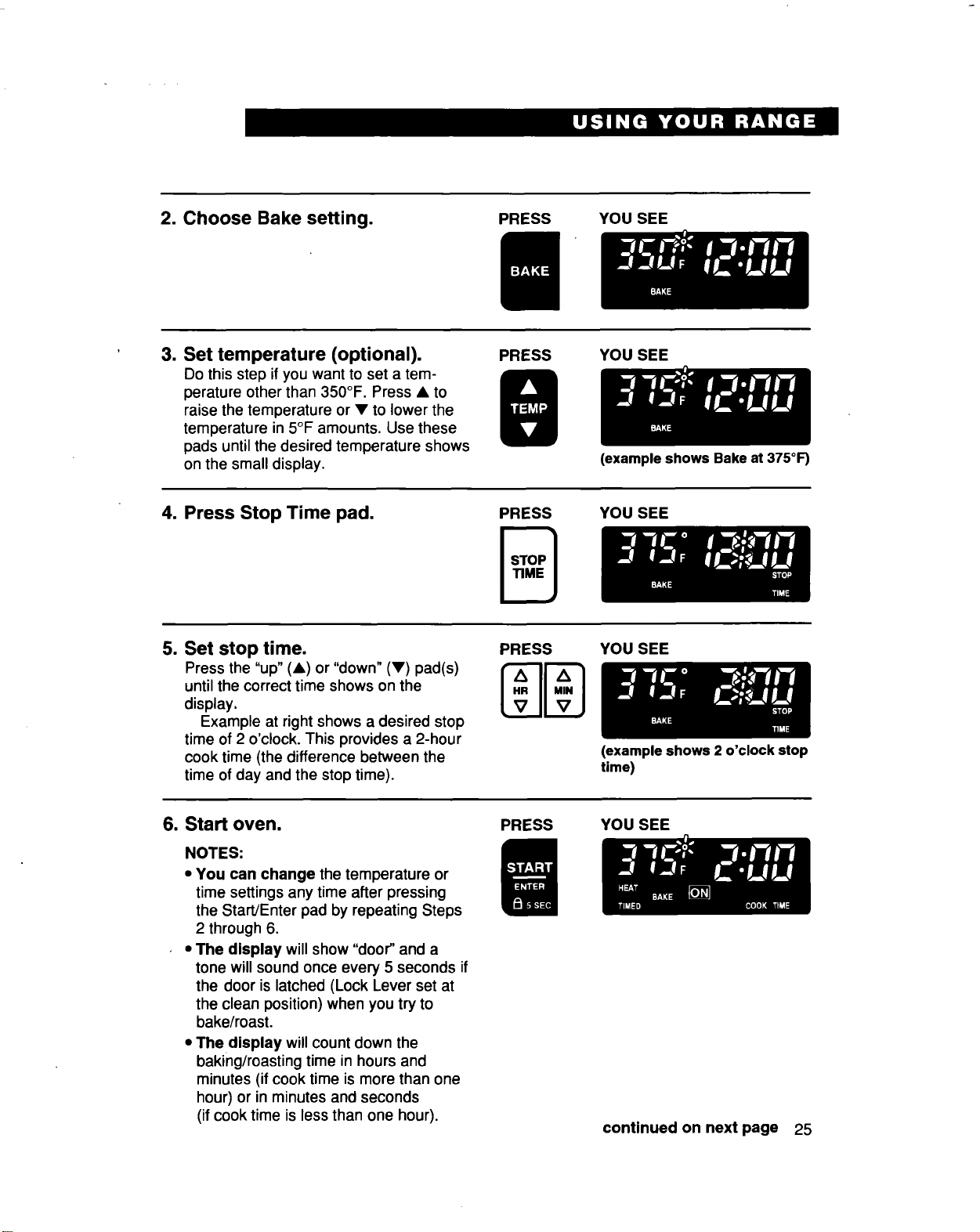
2. Choose Bake setting.
PRESS YOU SEE
3. Set temperature (optional).
Do this step if you want to set a tem-
perature other than 350°F. Press • to
raise the temperature or • to lower the
temperature in 5°F amounts. Use these
pads until the desired temperature shows
on the small display.
PRESS YOU SEE
4. Press Stop Time pad.
PRESS
(example shows Bake at 375°1=)
YOU SEE
5. Set stop time.
Press the "up" (A) or "down" (•) pad(s)
untilthe correct time shows on the
display.
Example at right shows a desired stop
time of 2 o'clock. This provides a 2-hour
cook time (the difference between the
time of day and the stop time).
PRESS
A
VIIVj
YoU SEE
6. Start oven.
NOTES:
• You can change the temperature or
time settings any time after pressing
the Start/Enter pad by repeating Steps
2 through 6.
,, The display will show "door" and a
tone will sound once every 5 seconds if
the door is latched (Lock Lever set at
the clean position) when you try to
bake/roast.
• The display will count down the
baking/roasting time in hours and
minutes (if cook time ismore than one
hour) or in minutes and seconds
(ifcook time is less than one hour).
PRESS
(example shows 2 o'clock stop
time)
YOU SEE
continued on next page 25
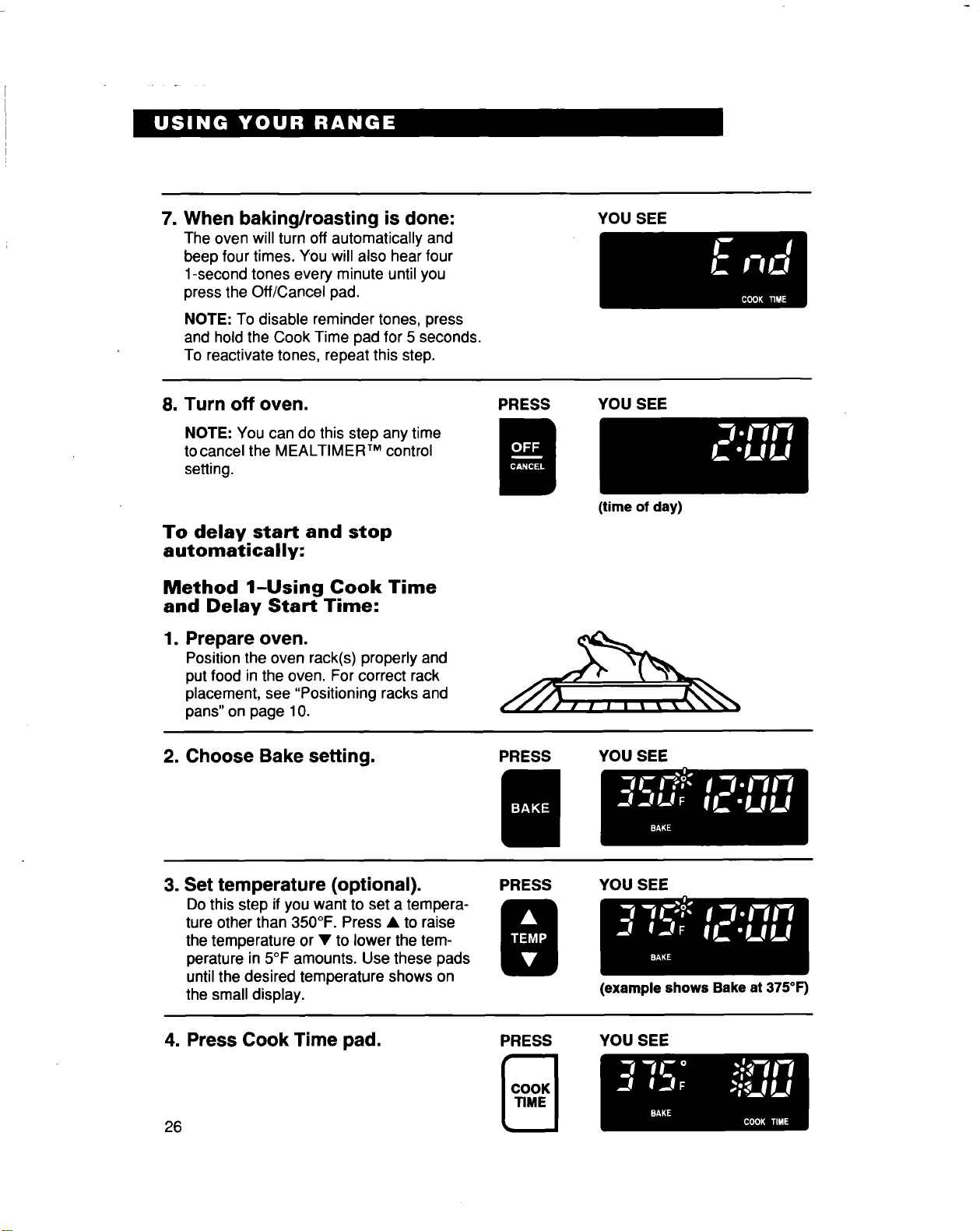
7. When baking/roasting is done:
The oven will turn off automatically and
beep four times. You will also hear four
1-second tones every minute until you
press the Off/Cancel pad.
NOTE: To disable reminder tones, press
and hold the Cook Time pad for 5 seconds.
To reactivate tones, repeat this step.
YOU SEE
8. Turn off oven.
NOTE: You can do this step any time
to cancel the MEALTIMER TM control
setting.
PRESS YOU SEE
To delay start and stop
automatically:
Method 1-Using Cook Time
and Delay Start Time:
1. Prepare oven.
Position the oven rack(s) properly and
put food in the oven. For correct rack
placement, see "Positioning racks and
pans"on page 10.
(time of day)
2. Choose Bake setting.
PRESS YOU SEE
3. Set temperature (optional).
Do this step ifyou want to set a tempera-
ture other than 350°F. Press • to raise
the temperature or • to lower the tem-
perature in 5°F amounts, Use these pads
untilthe desired temperature shows on
the small display,
PRESS YOU SEE
4. Press Cook Time pad.
26
(example shows Bake at 375°F)
PRESS YOU SEE
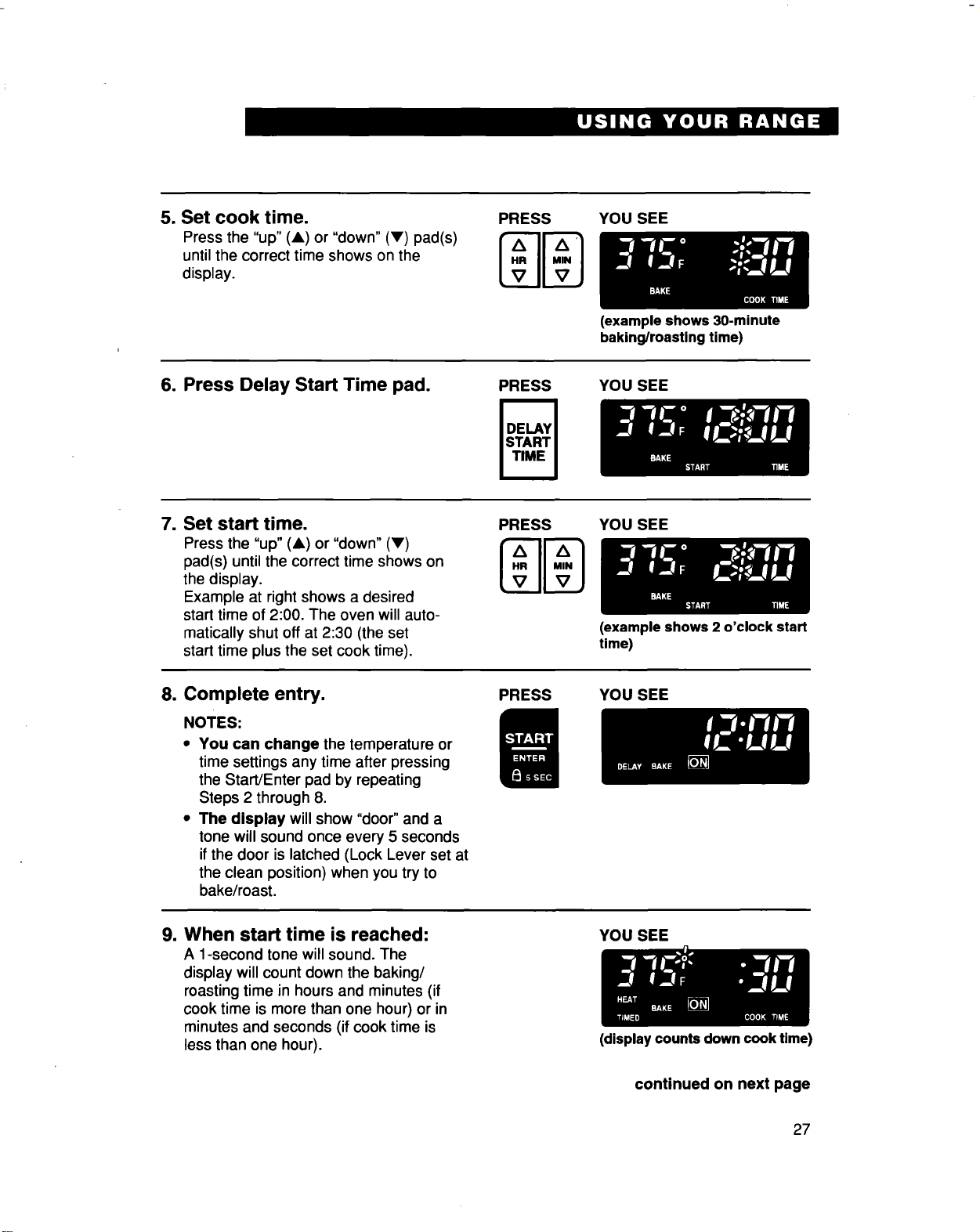
5. Set cook time.
Press the "up" (A) or "down" (V) pad(s)
until the correct time shows on the
display.
PRESS YOU SEE
6. Press Delay Start Time pad.
PRESS
(example shows 30-minute
baking/roasting time)
YOU SEE
7. Set start time.
Press the "up" (&) or "down" (V)
pad(s) until the correct time shows on
the display.
Example at right shows a desired
start time of 2:00. The oven will auto-
matically shut off at 2:30 (the set
start time plus the set cook time).
PRESS YOU SEE
8. Complete entry.
NOTES:
• You can change the temperature or
time settings any time after pressing
the Start/Enter pad by repeating
Steps 2 through 8.
• The display will show "door" and a
tone will sound once every 5 seconds
ifthe door is latched (Lock Lever set at
the clean position) when you try to
bake/roast.
PRESS
(example shows 2 o'clock start
time)
YOU SEE
9. When start time is reached:
A 1-second tone will sound. The
display will count down the baking/
roasting time in hours and minutes (if
cook time is more than one hour) or in
minutes and seconds (ifcook time is
less than one hour).
YOU SEE
(displaycountsdown cook time)
continued on next page
27
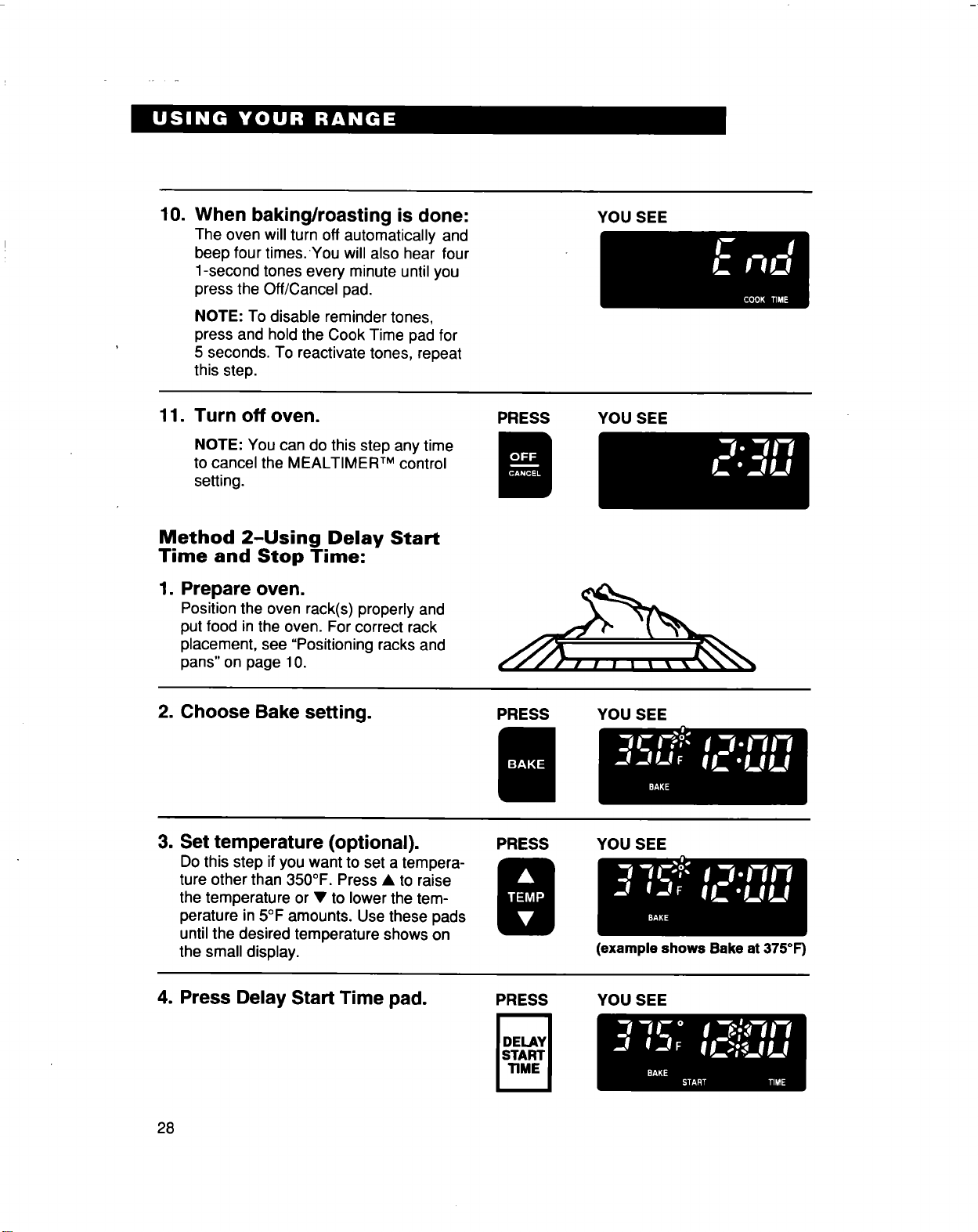
10.
When baking/roasting is done:
The oven will turn off automatically and
beep four times. You will also hear four
1-second tones every minute untilyou
press the Off/Cancel pad.
NOTE: To disable reminder tones,
press and hold the Cook Time pad for
5 seconds. To reactivate tones, repeat
this step.
YOU SEE
11.
Turn off oven.
NOTE: You can do this step any time
to cancel the MEALTIMER TM control
setting.
PRESS YOU SEE
Method 2-Using Delay Start
Time and Stop Time:
1. Prepare oven.
Position the oven rack(s) properly and
put food in the oven. For correct rack
placement, see "Positioning racks and
pans" on page 10.
2. Choose Bake setting.
PRESS YOU SEE
3. Set temperature (optional).
Do this step ifyou want to set a tempera-
ture other than 350°F. Press • to raise
the temperature or • to lower the tem-
perature in 5°F amounts. Use these pads
until the desired temperature shows on
the small display.
PRESS YOU SEE
4. Press Delay Start Time pad.
(example shows Bake at 375°F)
PRESS YOU SEE
28
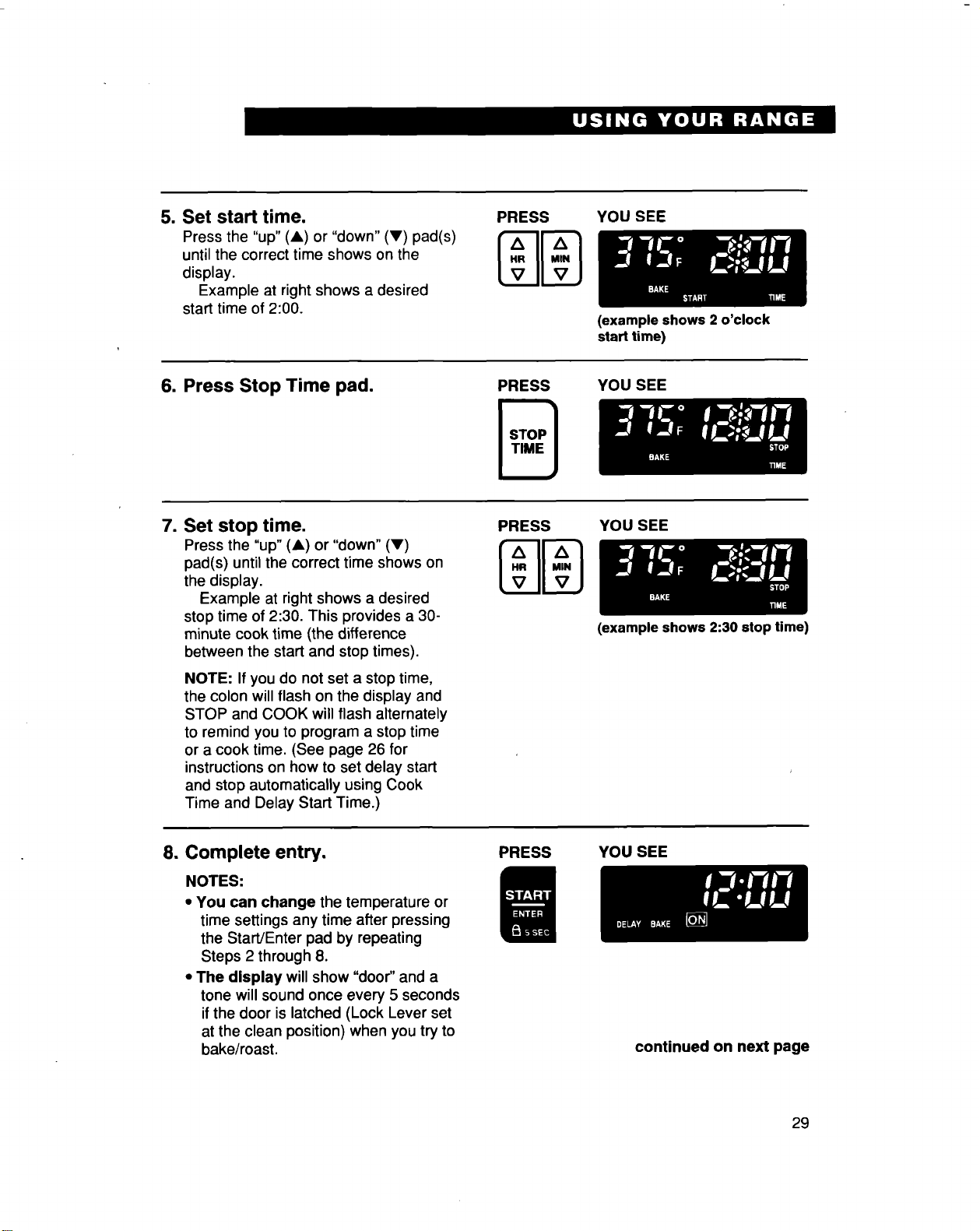
5. Set start time.
Press the "up" (A) or "down" (V) pad(s)
until the correct time shows on the
display.
Example at right shows a desired
start time of 2:00.
YOU SEE
(example shows 2 o'clock
start time)
6. Press Stop Time pad.
PRESS
YOU SEE
7. Set stop time.
Press the "up" (A) or "down" (V)
pad(s) until the correct time shows on
the display.
Example at right shows a desired
stop time of 2:30. This provides a 30-
minute cook time (the difference
between the start and stop times).
NOTE: Ifyou do not set a stop time,
the colon will flash on the display and
STOP and COOK will flash alternately
to remind you to program a stop time
or a cook time. (See page 26 for
instructionson how to set delay start
and stop automatically using Cook
Time and Delay Start Time.)
YOU SEE
(example shows 2:30 stop time)
8. Complete entry.
NOTES:
• You can change the temperature or
time settings any time after pressing
the Start/Enter pad by repeating
Steps 2 through 8.
• The display will show "door" and a
tone will sound once every 5 seconds
if the door islatched (Lock Lever set
at the clean position) when you tryto
bake/roast.
PRESS YOU SEE
continued on next page
29
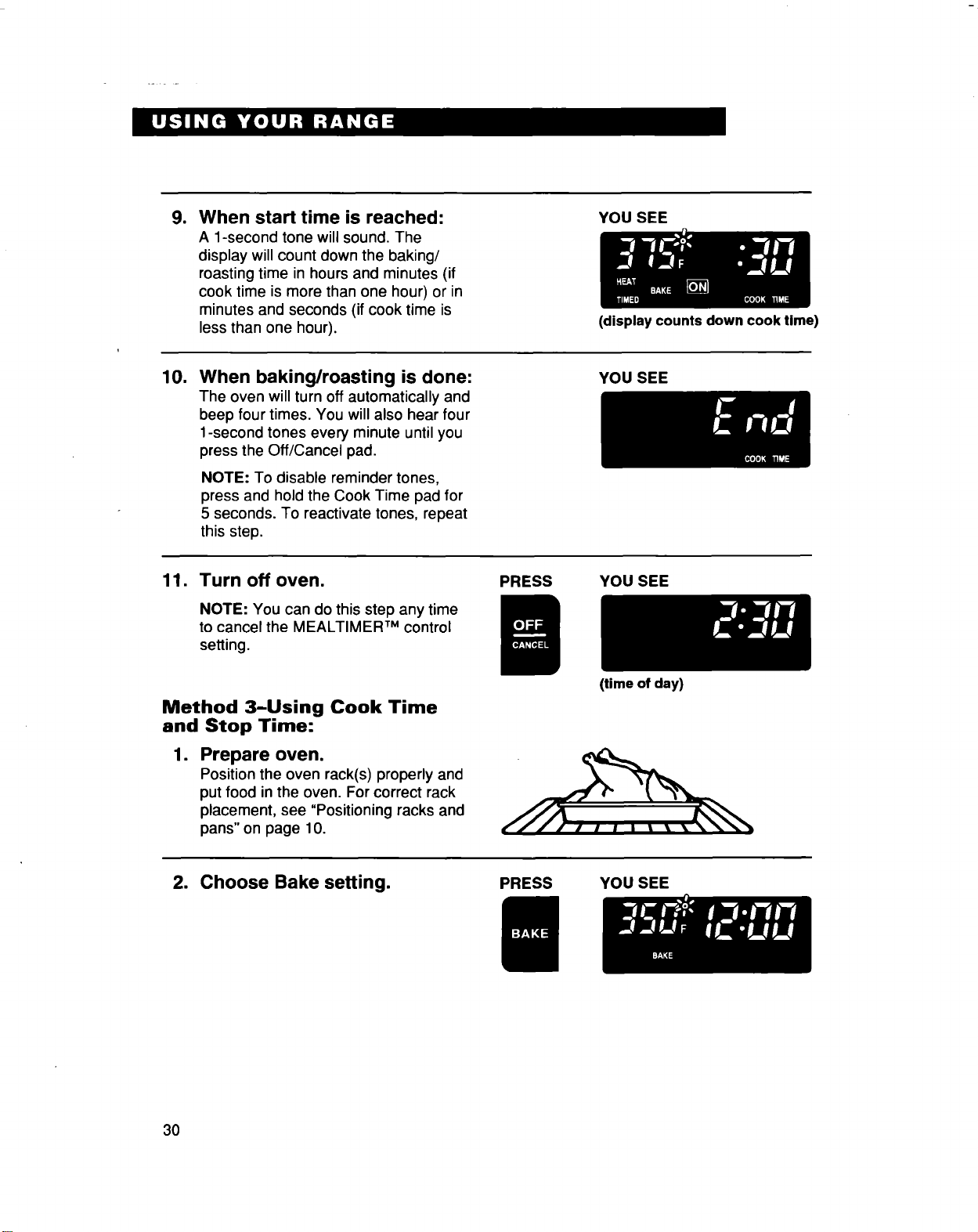
=
When start time is reached:
A 1-second tone will sound, The
display willcount down the baking/
roasting time in hours and minutes (if
cook time is more than one hour) or in
minutes and seconds (if cook time is
less than one hour).
YOU SEE
(display counts down cook time)
10.
When baking/roasting is done:
The oven will turn off automatically and
beep four times. You will also hear four
1-second tones every minute until you
press the Off/Cancel pad,
NOTE: To disable reminder tones,
press and hold the Cook Time pad for
5 seconds. To reactivate tones, repeat
this step.
YOU SEE
11, Turn off oven.
NOTE: You can do this step any time
to cancel the MEALTIMER TM control
setting.
Method 3-Using Cook Time
and Stop Time:
=
Prepare oven.
Position the oven rack(s) properly and
put food in the oven. For correct rack
placement, see "Positioning racks and
pans"on page 10.
PRESS YOU SEE
(time of day)
2. Choose Bake setting.
PRESS YOU SEE
3O
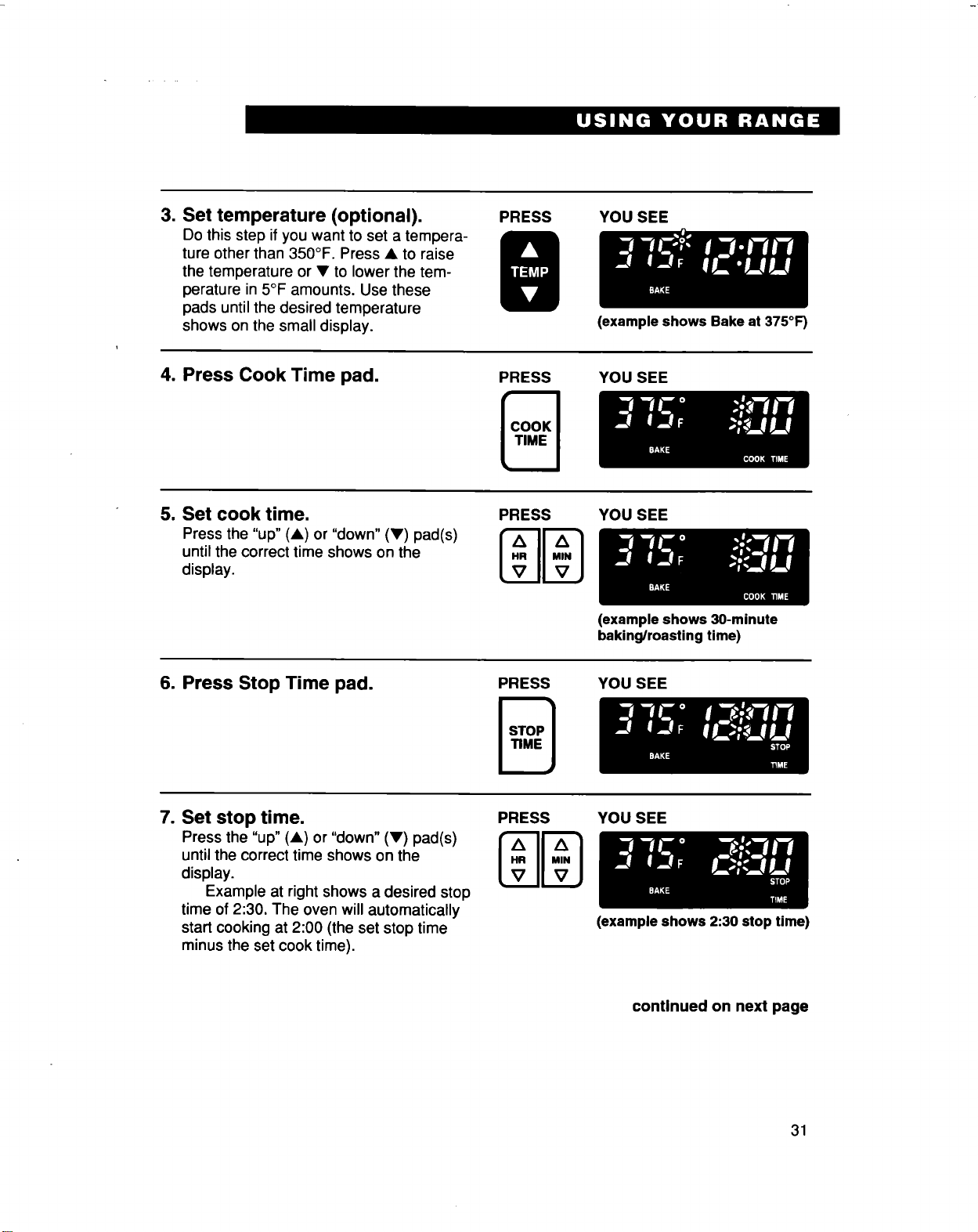
3. Set temperature (optional).
Do this step if you want to set a tempera-
ture other than 350°F. Press • to raise
the temperature or • to lower the tem-
perature in 5°F amounts. Use these
pads until the desired temperature
shows on the small display.
PRESS YOU SEE
4. Press Cook Time pad. PRESS
(example shows Bake at 375°F)
YOU SEE
5. Set cook time.
Press the "up" (•) or "down" (•) pad(s)
until the correct time shows on the
display.
PRESS
mN
YOU SEE
(example shows 30-minute
baking/roasting time)
6. Press Stop Time pad.
PRESS YOU SEE
7. Set stop time.
Press the "up" (A) or "down" (•) pad(s)
until the correct time shows on the
display.
Example at right shows a desired stop
time of 2:30. The oven will automatically
start cooking at 2:00 (the set stop time
minus the set cook time),
PRESS
MN
YOU SEE
(example shows 2:30 stop time)
continued on next page
31
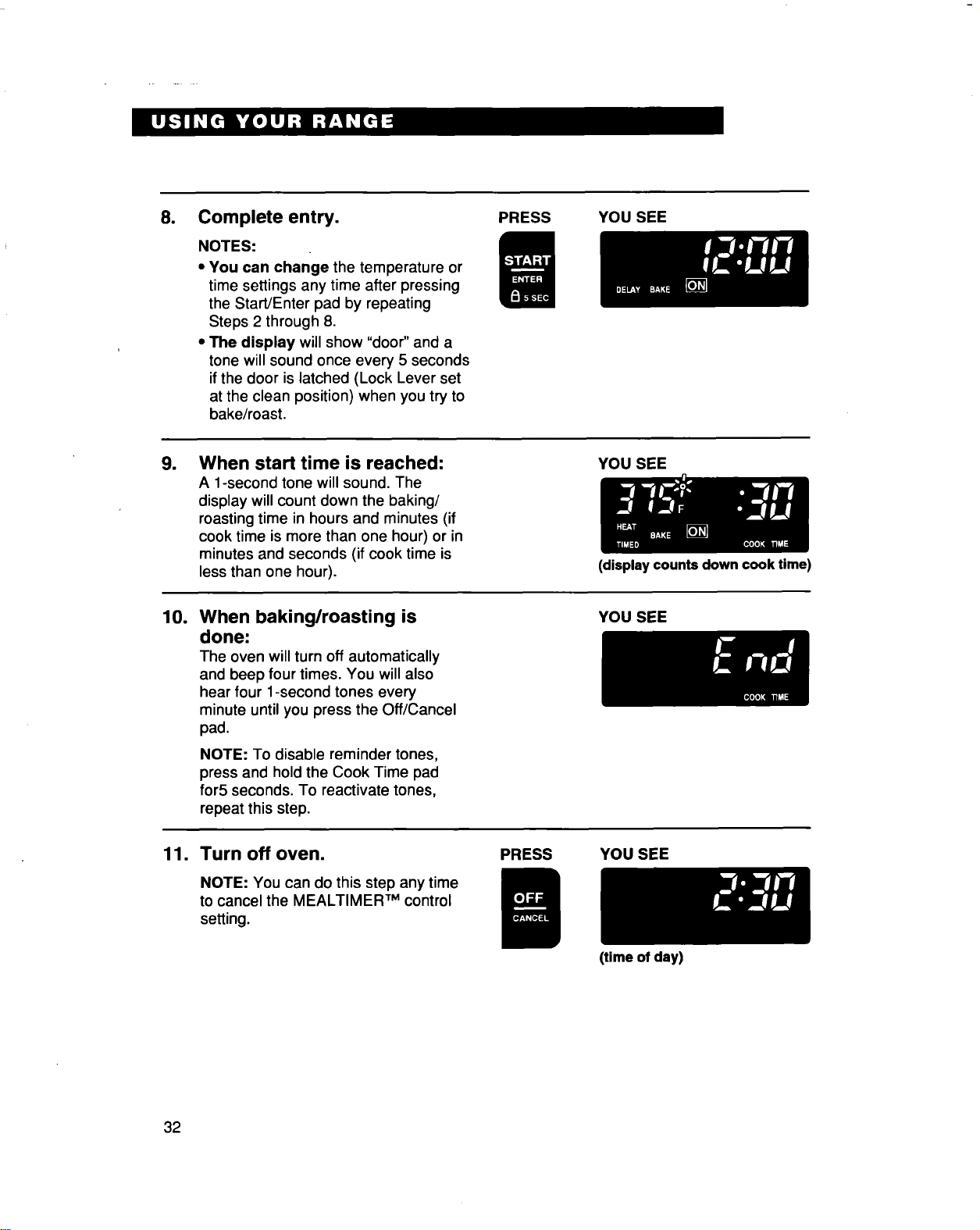
8. Complete entry.
NOTES:
• You can change the temperature or
time settings any time after pressing
the Start/Enter pad by repeating
Steps 2 through 8.
• The display will show "door" and a
tone willsound once every 5 seconds
ifthe door is latched (Lock Lever set
at the clean position) when you try to
bake/roast.
PRESS YOU SEE
1
10.
11.
When start time is reached:
A 1-second tone will sound. The
display will count clownthe baking/
roasting time in hours and minutes (if
cook time is more than one hour) or in
minutes and seconds (if cook time is
less than one hour).
YOU SEE
(display counts down cook time)
When baking/roasting is
done:
The oven willturn off automatically
and beep four times, You will also
hear four 1-second tones every
minute until you press the Off/Cancel
pad.
NOTE: To disable reminder tones,
press and hold the Cook Time pad
for5 seconds. To reactivate tones,
repeat this step.
YOU SEE
Turn off oven.
NOTE: You can do this step any time
to cancel the MEALTIMER TM control
setting.
PRESS YOU SEE
(time of day)
32
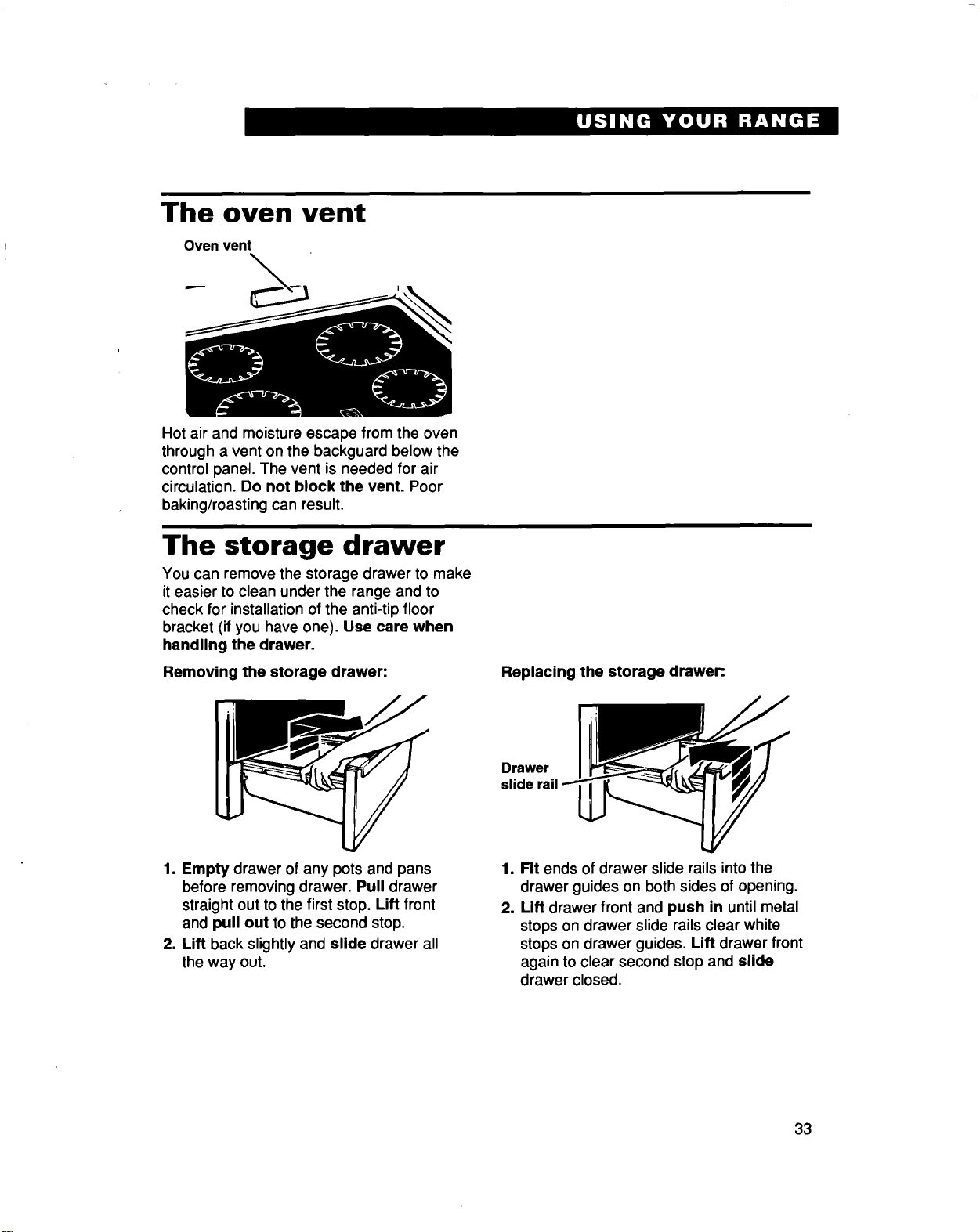
The oven vent
Oven vent
Hot air and moisture escape from the oven
through a vent on the backguard below the
control panel. The vent is needed for air
circulation. Do not block the vent. Poor
baking/roasting can result.
The storage drawer
You can remove the storage drawer to make
it easier to clean under the range and to
check for installation of the anti-tip floor
bracket (if you have one). Use care when
handling the drawer.
Removing the storage drawer: Replacing the storage drawer:
Drawer
1. Empty drawer of any pots and pans
before removing drawer. Pull drawer
straight out to the first stop. Lift front
and pull out to the second stop.
2. Lift back slightly and slide drawer all
the way out.
1. Fit ends of drawer slide rails into the
drawer guides on both sides of opening.
2. Lift drawer front and push in until metal
stops on drawer slide rails clear white
stops on drawer guides. Lift drawer front
again to clear second stop and slide
drawer closed.
33
The anti-tip bracket
The range will not tip during normal use. However, tipping can occur if you apply too much
force or weight to the open door without the anti-tip bracket properly secured.
Tip Over Hazard
Connect anti-tip bracket to the range feet.
Reconnect anti-tip bracket, if the range is moved.
Do not push down on the open oven door.
Follow the installation instructions.
Do not let children climb onto the oven door.
Failure to do so can result in death, burns, or other injury.
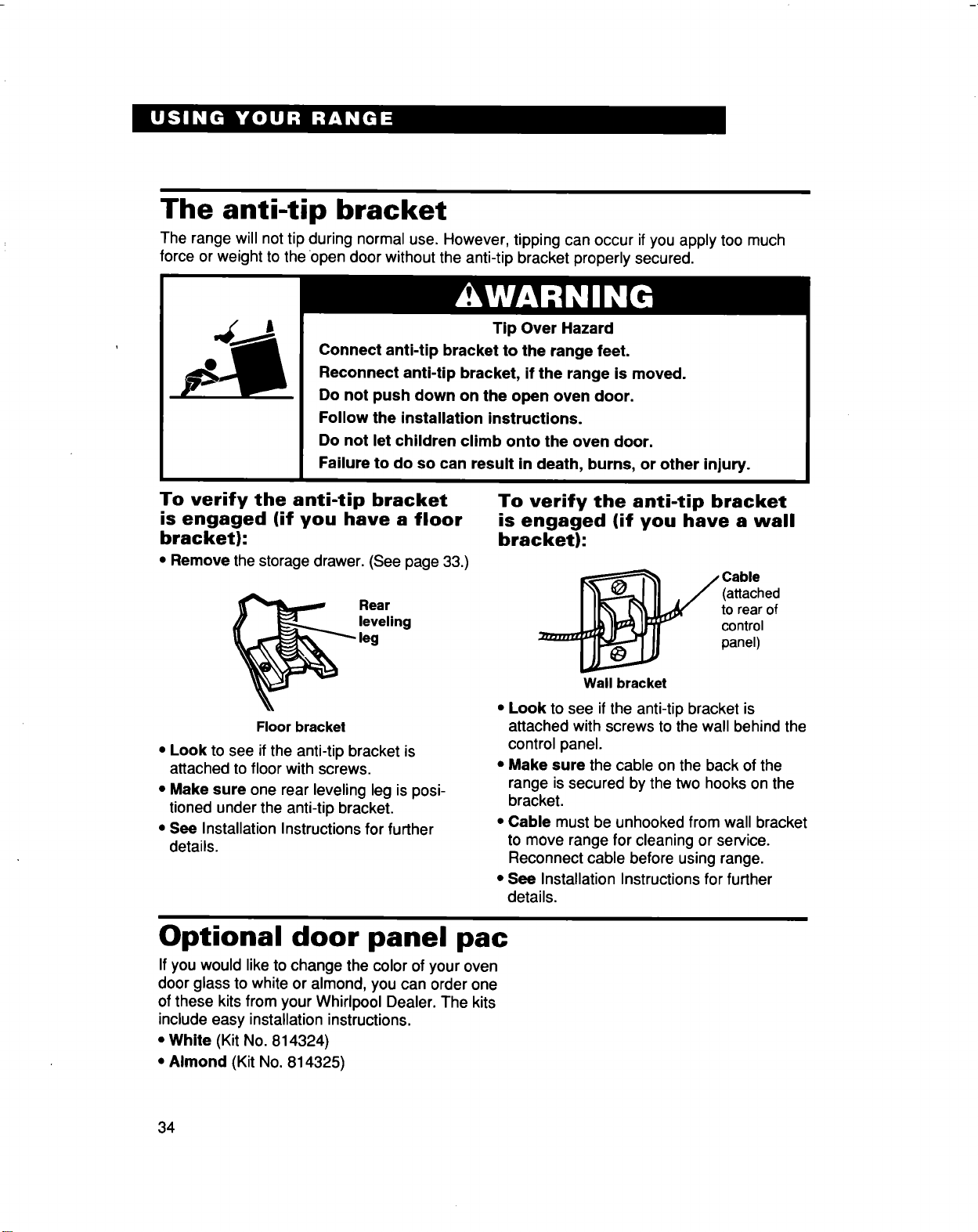
To verify the anti-tip bracket
is engaged (if you have a floor
bracket):
• Remove the storage drawer. (See page 33.)
Rear
leveling
Floor bracket
• Look to see if the anti-tip bracket is
attached to floor with screws.
• Make sure one rear leveling leg is posi-
tioned under the anti-tip bracket,
• See Installation Instructions for further
details.
To verify the anti-tip bracket
is engaged (if you have a wall
bracket):
__ Cable
(attached
to rear of
control
panel)
Wall bracket
• Look to see if the anti-tip bracket is
attached with screws to the wall behind the
control panel.
• Make sure the cable on the back of the
range issecured by the two hooks on the
bracket,
• Cable must be unhooked from wall bracket
to move range for cleaning or service.
Reconnect cable before using range,
• See Installation Instructionsfor further
details.
Optional door panel pac
If you would like to change the color of your oven
door glass to white or almond, you can order one
ofthese kitsfrom your Whirlpool Dealer. The kits
include easy installation instructions.
• White (Kit No. 814324)
• Almond (Kit No. 814325)
34
Using the Self-Cleaning Cycle
The Self-Cleaning cycle saves you from the toil and mess that often come with hand-cleaning
the oven interior. Like the other functions of your range, you operate the Self-Cleaning cycle
with the easy-to-use electronic control. Please review the instructions in this section to keep
your oven spotless.
Burn Hazard
Do not touch the oven during the Self-Cleaning cycle.
Keep children away from oven during Self-Cleaning cycle.
Do not use commercial oven cleaners in your oven.
Failure to follow the above can result in burns, or illness from
inhaling dangerous fumes.
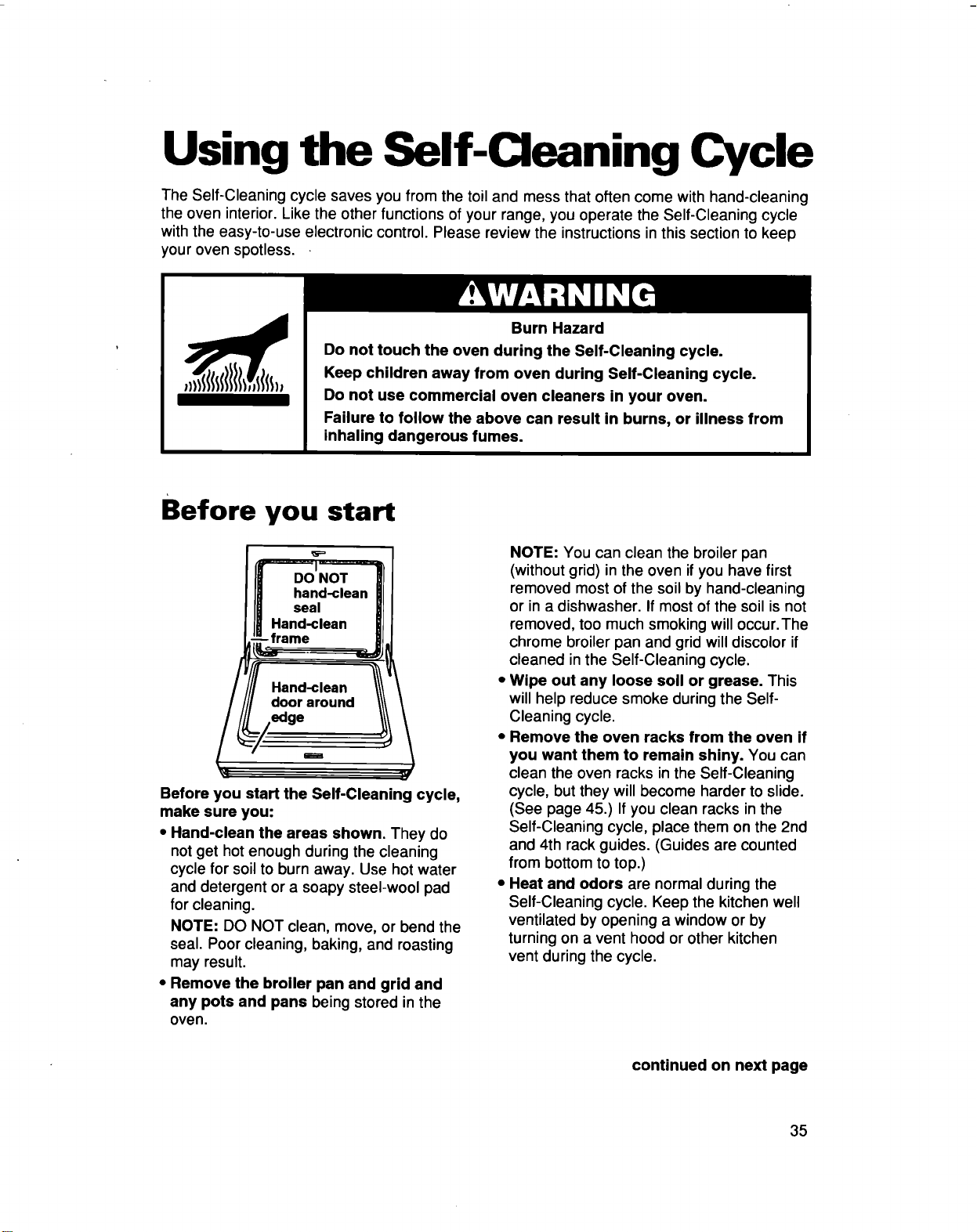
Before you start
DO NOT
hand-clean
seal
Hand-clean
-frame
Hand-clean
door around
edge
i
Before you start the Self-Cleaning cycle,
make sure you:
• Hand-clean the areas shown. They do
not get hot enough during the cleaning
cycle for soil to burn away. Use hot water
and detergent or a soapy steel-wool pad
for cleaning.
NOTE: DO NOT clean, move, or bend the
seal. Poor cleaning, baking, and roasting
may result.
• Remove the broiler pan and grid and
any pots and pans being stored in the
oven.
NOTE: You can clean the broiler pan
(without grid) in the oven if you have first
removed most of the soil by hand-cleaning
or in a dishwasher. If most of the soil is not
removed, too much smoking will occur.The
chrome broiler pan and grid will discolor if
cleaned in the Self-Cleaning cycle.
Wipe out any loose soil or grease. This
will help reduce smoke during the Self-
Cleaning cycle.
Remove the oven racks from the oven if
you want them to remain shiny. You can
clean the oven racks in the Self-Cleaning
cycle, but they will become harder to slide.
(See page 45.) If you clean racks in the
Self-Cleaning cycle, place them on the 2nd
and 4th rack guides. (Guides are counted
from bottom to top.)
Heat and odors are normal during the
Self-Cleaning cycle. Keep the kitchen well
ventilated by opening a window or by
turning on a vent hood or other kitchen
vent during the cycle.
continued on next page
35
NOTES:
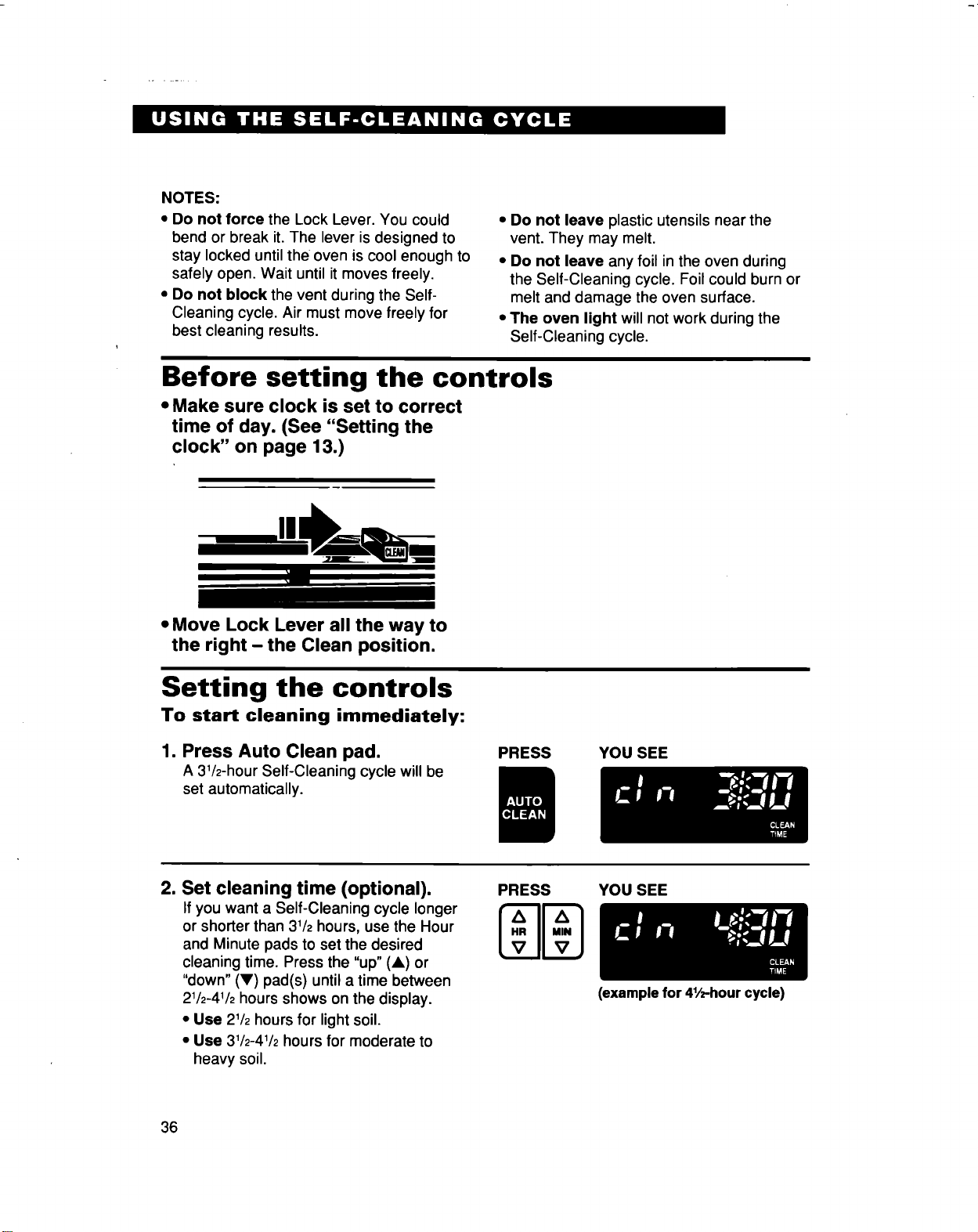
• Do not force the Lock Lever. You could
bend or break it. The lever is designed to
stay locked until the oven is cool enough to
safely open. Wait until itmoves freely.
• Do not block the vent during the Self-
Cleaning cycle. Air must move freely for
best cleaning results.
• Do not leave plastic utensils near the
vent. They may melt.
• Do not leave any foil in the oven during
the Self-Cleaning cycle. Foil could burn or
melt and damage the oven surface.
• The oven light will not work during the
Self-Cleaning cycle.
Before setting the controls
• Make sure clock is set to correct
time of day. (See "Setting the
clock" on page 13.)
• Move Lock Lever all the way to
the right - the Clean position.
Setting the controls
To start cleaning immediately:
1. Press Auto Clean pad.
A 31/2-hour Self-Cleaning cycle will be
set automatically.
PRESS YOU SEE
2. Set cleaning time (optional).
If you want a Self-Cleaning cycle longer
or shorter than 31/2hours, use the Hour
and Minute pads to set the desired
cleaning time. Press the "up" (A) or
"down" (V) pad(s) until a time between
21/2-41/2hours shows on the display.
• Use 21/2hours for light soil.
• Use 31/2-41/2hours for moderate to
heavy soil.
PRESS
NN
YOU SEE
36
(example for 41/2-hourcycle)
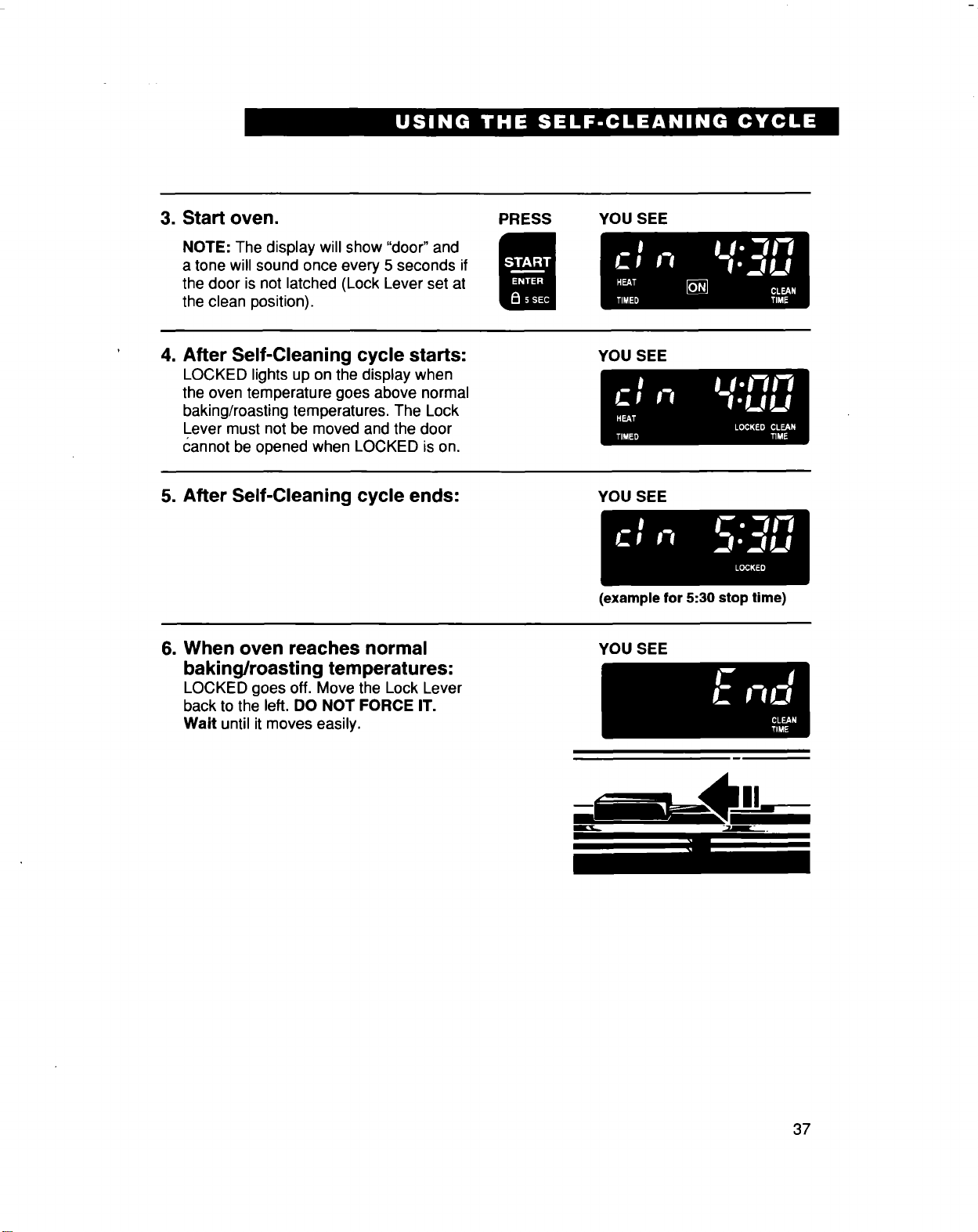
3. Start oven.
NOTE: The display will show "door" and
a tone willsound once every 5 seconds if
the door is not latched (Lock Lever set at
the clean position).
PRESS YOU SEE
4. After Self-Cleaning cycle starts:
LOCKED lights up on the display when
the oven temperature goes above normal
baking/roasting temperatures, The Lock
Lever must not be moved and the door
cannot be opened when LOCKED is on.
YOU SEE
5. After Self-Cleaning cycle ends:
YOU SEE
(example for 5:30 stop time)
6. When oven reaches normal
baking/roasting temperatures:
LOCKED goes off, Move the Lock Lever
back to the left. DO NOT FORCE IT.
Wait until it moves easily.
YOU SEE
li li il.-.!!--
37
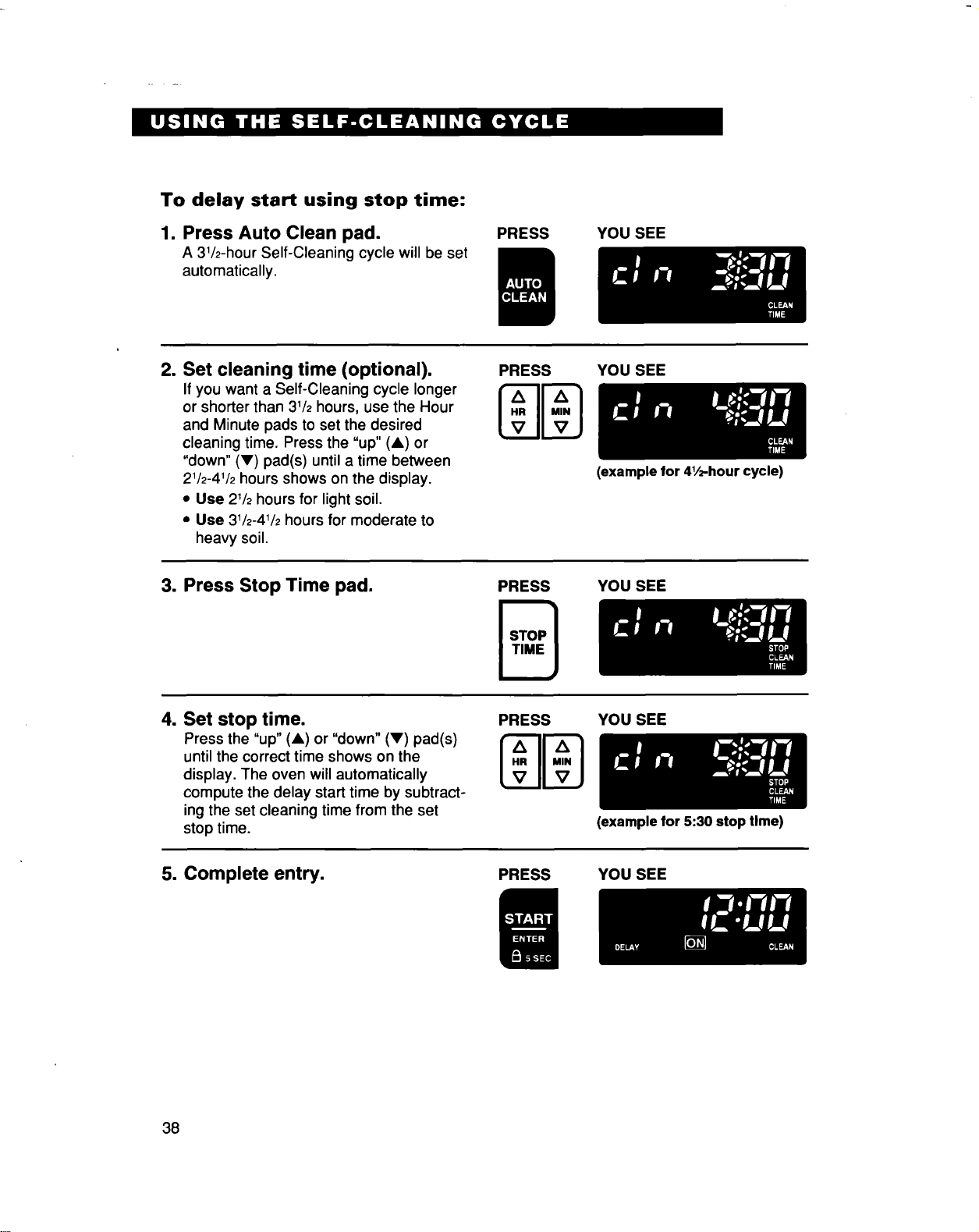
To delay start using stop time:
1. Press Auto Clean pad.
A 31/2-hourSelf-Cleaning cycle will be set
automatically.
PRESS
YOU SEE
2. Set cleaning time (optional).
If you want a Self-Cleaning cycle longer
or shorter than 31/2hours, use the Hour
and Minute pads to set the desired
cleaning time. Press the "up" (&) or
"down" (V) pad(s) until a time between
21/2-41/2hours shows on the display.
• Use 21/2hours for light soil.
• Use 31/2-41/2hours for moderate to
heavy soil.
PRESS
z_ z_
I..I1-1
tv II v )
YOU SEE
3. Press Stop Time pad.
PRESS
(example for 41/_-hour cycle)
YOU SEE
4. Set stop time.
Press the "up" (A) or "down" (V) pad(s)
untilthe correct time shows on the
display. The oven will automatically
compute the delay starttime by subtract-
ingthe set cleaning time from the set
stop time.
PRESS YOU SEE
(example for 5:30 stop Ume)
5. Complete entry.
PRESS YOU SEE
38
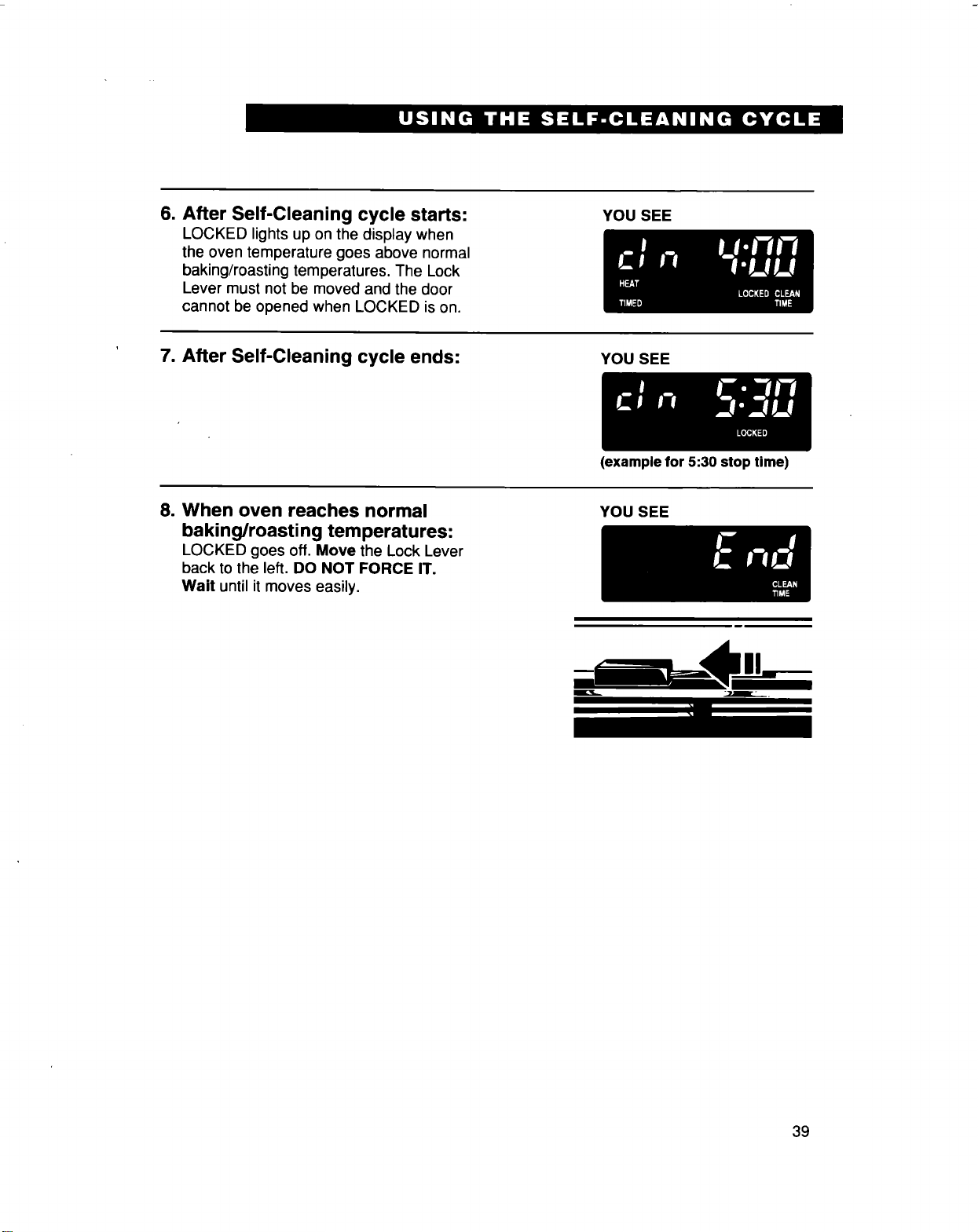
6. After Self-Cleaning cycle starts:
LOCKED lights up on the display when
the oven temperature goes above normal
baking/roasting temperatures. The Lock
Lever must not be moved and the door
cannot be opened when LOCKED ison.
YOU SEE
7. After Self-Cleaning cycle ends: YOU SEE
(example for 5:30 stop time)
8. When oven reaches normal
baking/roasting temperatures:
LOCKED goes off. Move the Lock Lever
back to the left. DO NOT FORCE IT.
Wait until itmoves easily.
YOU SEE
39
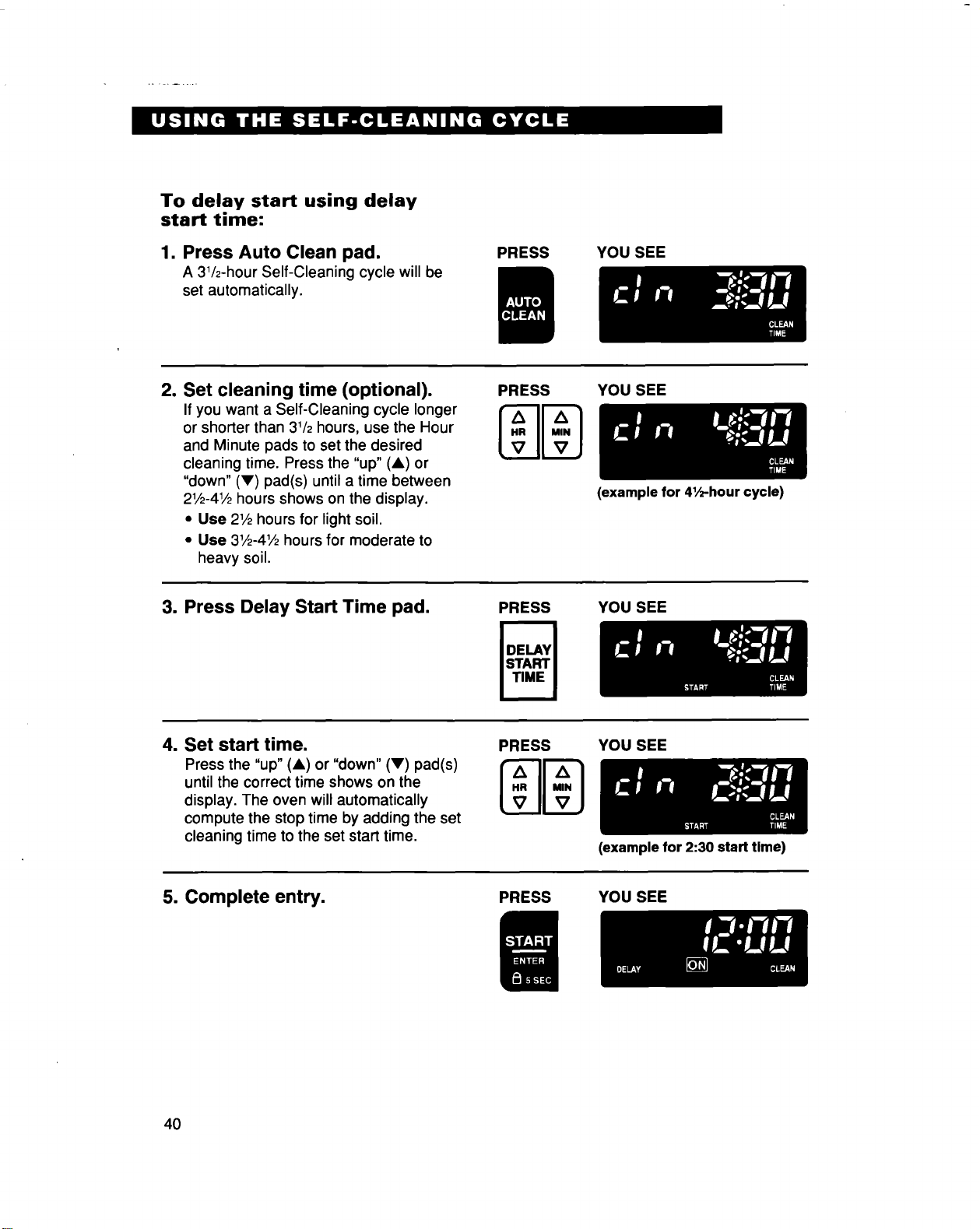
To delay start using delay
start time:
1. Press Auto Clean pad.
A 31/2-hourSelf-Cleaning cycle will be
set automatically.
PRESS YOU SEE
2. Set cleaning time (optional).
If you want a Self-Cleaning cycle longer
or shorter than 31/2hours, use the Hour
and Minute pads to set the desired
cleaning time. Press the "up" (A) or
"down" (V) pad(s) until a time between
21/2-41/2hours shows on the display.
• Use 21/2hours for light soil.
• Use 31/2-41/2hours for moderate to
heavy soil.
PRESS
[..I1..1
Lv !lVJ
YOU SEE
(example for 41/2-hour cycle)
3. Press Delay Start Time pad.
PRESS YOU SEE
4. Set start time.
Press the "up" (A) or "down" (V) pad(s)
until the correct time shows on the
display. The oven will automatically
compute the stop time by adding the set
cleaning time to the set start time,
PRESS
Zl A
[..Jl..1
v IIvJ
YoU SEE
5. Complete entry.
PRESS
(example for 2:30 start time)
YOU SEE
4O
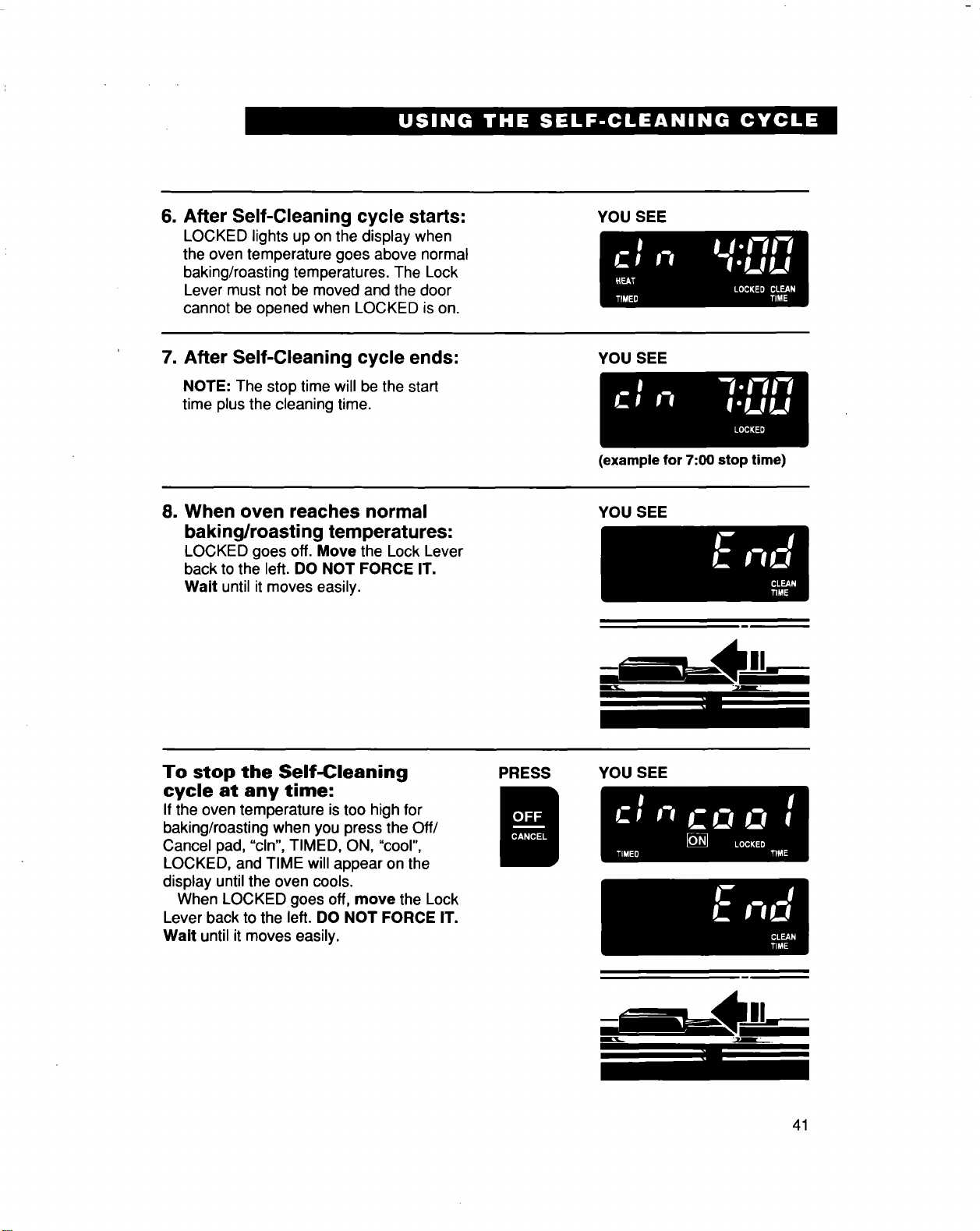
6. After Self-Cleaning cycle starts:
LOCKED lights up on the display when
the oven temperature goes above normal
baking/roasting temperatures. The Lock
Lever must not be moved and the door
cannot be opened when LOCKED is on.
YOU SEE
7. After Self-Cleaning cycle ends:
NOTE: The stop time will be the start
time plusthe cleaning time,
YOU SEE
(example for 7:00 stop time)
8. When oven reaches normal
baking/roasting temperatures:
LOCKED goes off. Move the Lock Lever
back to the left. DO NOT FORCE IT.
Wait until it moves easily.
YOU SEE
L
To stop the Self-Cleaning
cycle at any time:
Ifthe oven temperature is too high for
baking/roasting when you press the Off/
Cancel pad, "cln", TIMED, ON, "cool",
LOCKED, and TIME will appear on the
display until the oven cools.
When LOCKED goes off, move the Lock
Lever back to the left. DO NOT FORCE IT.
Wait until it moves easily.
PRESS
YOU SEE
41
Special tips
• Keep the kitchen well ventilated during the
Self-Cleaning cycle to help get rid of heat,
odors, and smoke.
• After the oven is cool, wipe up any
residue or ash with a damp cloth or
sponge. Ifany spots remain, clean with a
mild abrasive cleanser or cleaning sponge.
• Clean the oven before it gets heavily
soiled. Cleaning a very soiled oven takes
longer and results in more smoke than
usual.
• If the Self-Cleaning cycle does not get
the oven as clean as you expected, the
cycle may not have been set long enough
or you may not have prepared the oven
properly. Set the Self-Cleaning cycle
longerthe next time and hand clean areas
noted on page 35.
How the cycle works
The Self-Cleaning cycle uses very high heat
to burn away soil and grease. During the
cycle, the oven gets much hotter than it
does for normal baking or broiling. This high
heat breaks up the soil or grease and burns
it away.
Your oven is preset for a 31/2-hour Self-
Cleaning cycle. However, you can adjust the
cycle time to the amount of soil in your oven.
You can set the cycle anywhere between
21/2and 41/2hours. (See "Setting the con-
trols" on page 36.)
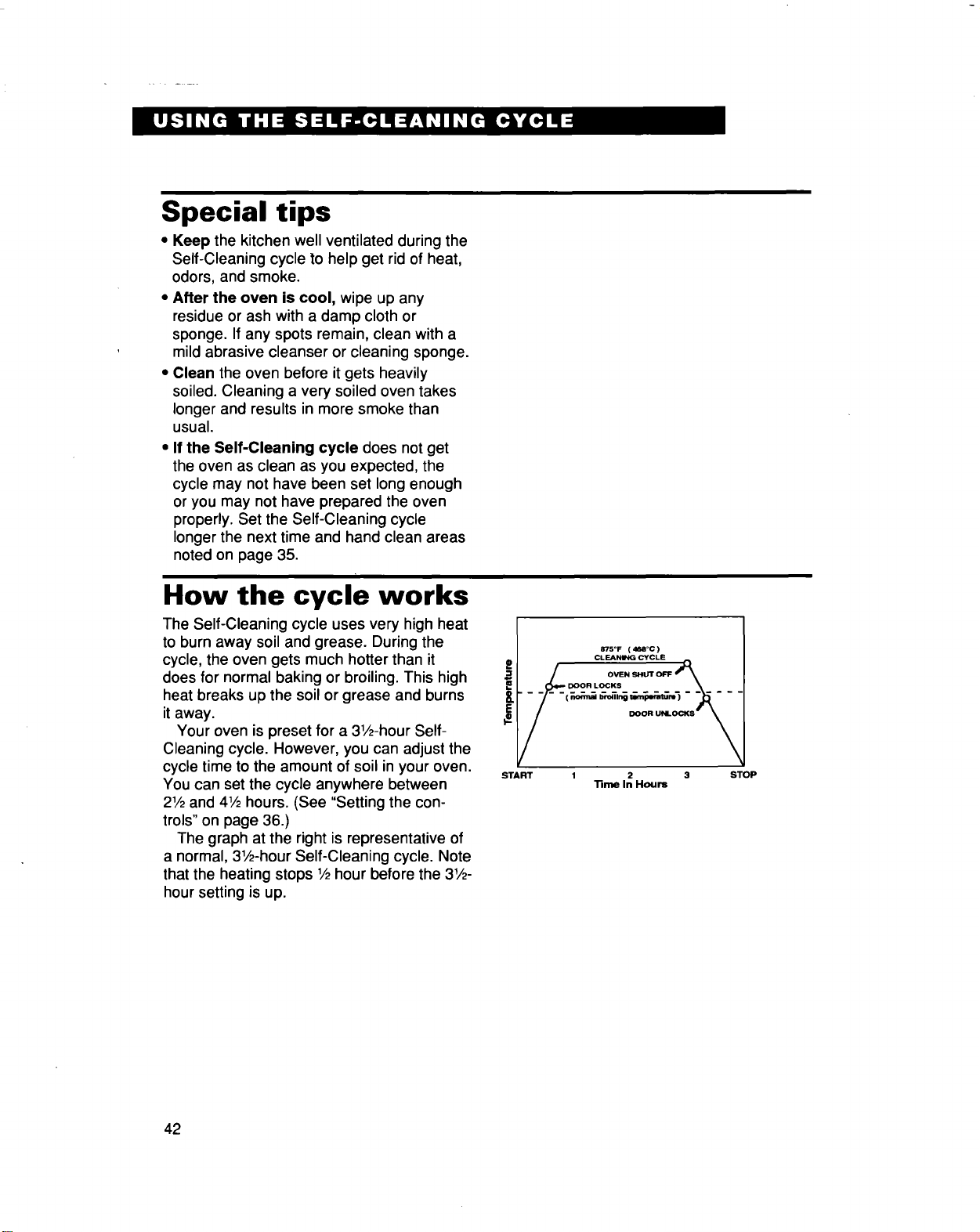
The graph at the right is representative of
a normal, 31/2-hourSelf-Cleaning cycle. Note
that the heating stops 1/_hour before the 3!/2-
hour setting is up.
i
875°F ( 4_1°C )
(_ _T_T,,_
DOOR UNLOCKS
START 1 2 3
_me In Hours
STOP
42
Caring for Your Range
Your range is designed for easy care. You can do most cleaning with items found around
your home. Cleaning your range whenever spills or soiling occurs will help to keep it looking
and operating like new.
Cleaning the cooktop
This cooktop is designed for easy care.
However, ceramic cooktops need to be
maintained differently than standard electric
open-coil elements. Foods spilled directly on
the cooktop will not burn off as on open-coil
elements. Because of this, the surface
should be dust free and soil free before
heating.
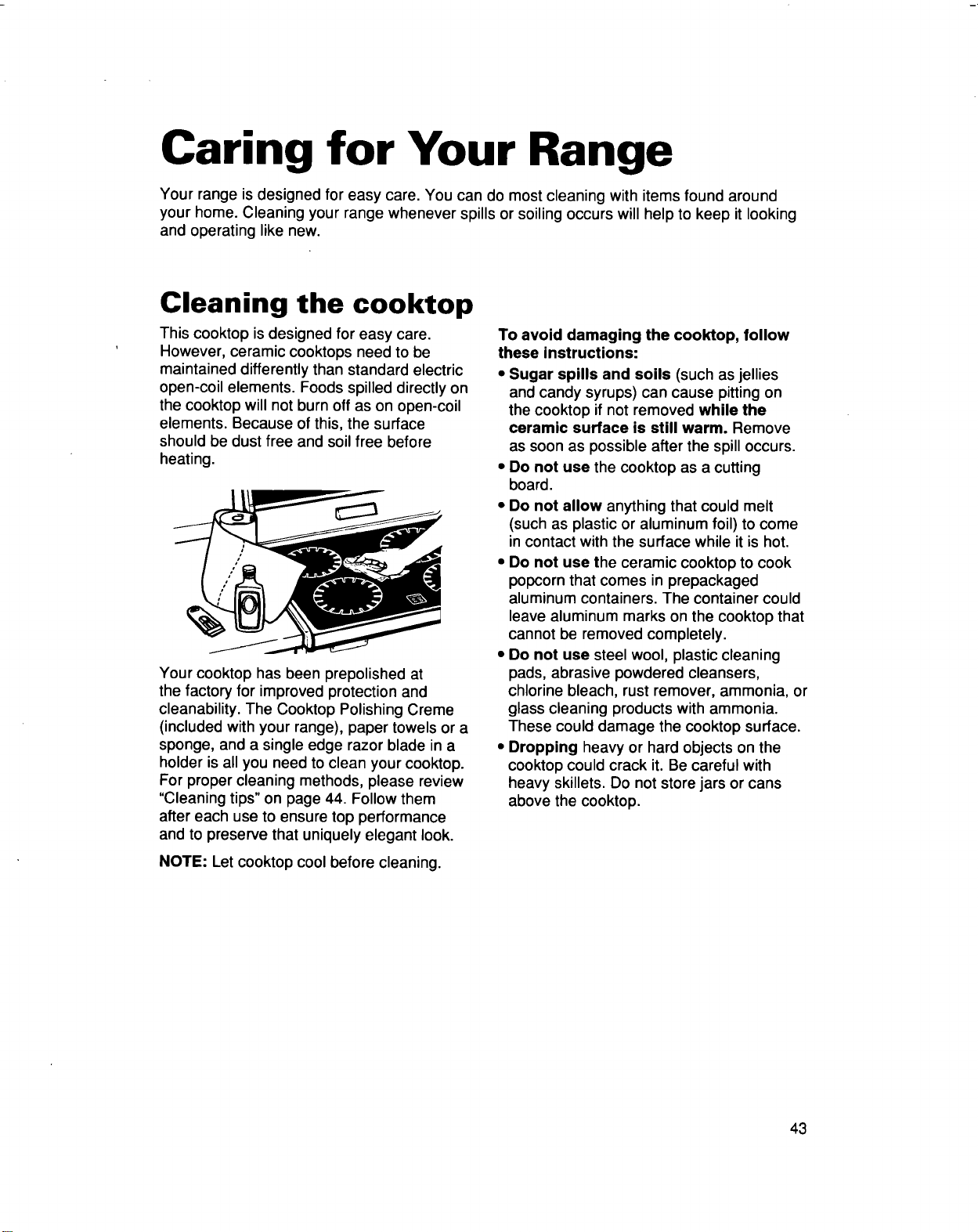
Your cooktop has been prepolished at
the factory for improved protection and
cleanability. The Cooktop Polishing Creme
(included with your range), paper towels or a
sponge, and a single edge razor blade in a
holder is all you need to clean your cooktop.
For proper cleaning methods, please review
"Cleaning tips" on page 44. Follow them
after each use to ensure top performance
and to preserve that uniquely elegant look.
NOTE: Let cooktop cool before cleaning.
To avoid damaging the cooktop, follow
these instructions:
• Sugar spills and soils (such as jellies
and candy syrups) can cause pittingon
the cooktop if not removed while the
ceramic surface is still warm. Remove
as soon as possible after the spill occurs.
• Do not use the cooktop as a cutting
board.
• Do not allow anything that could melt
(such as plastic or aluminum foil) to come
in contact with the surface while it is hot.
• Do not use the ceramic cooktop to cook
popcorn that comes in prepackaged
aluminum containers. The container could
leave aluminum marks on the cooktop that
cannot be removed completely.
• Do not use steel wool, plastic cleaning
pads, abrasive powdered cleansers,
chlorine bleach, rust remover, ammonia, or
glass cleaning products with ammonia.
These could damage the cooktop surface.
• Dropping heavy or hard objects on the
cooktop could crack it. Be careful with
heavy skillets. Do not store jars or cans
above the cooktop.
43
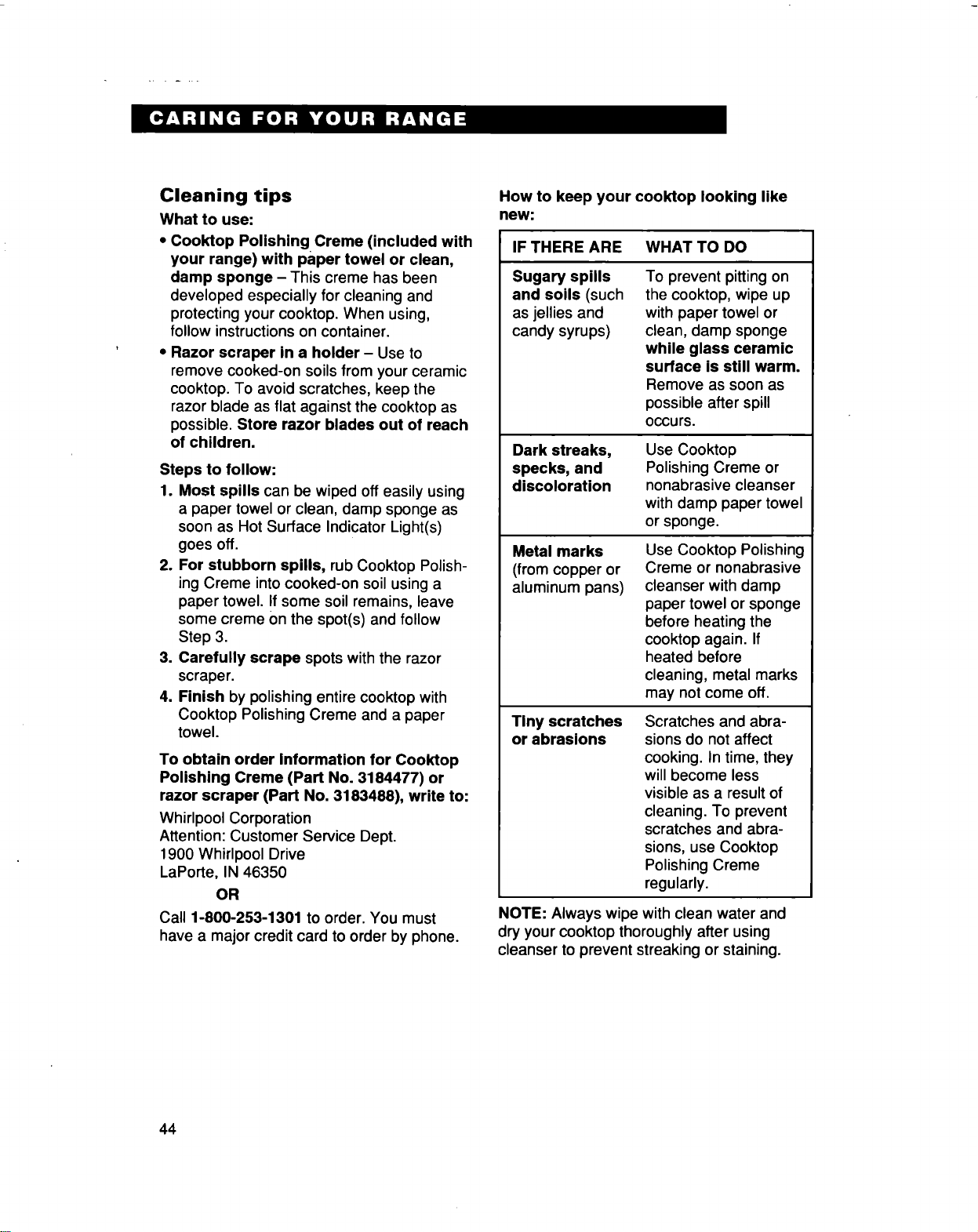
Cleaning tips
What to use:
• Cooktop Polishing Creme (included with
your range) with paper towel or clean,
damp sponge - This creme has been
developed especially for cleaning and
protecting your cooktop. When using,
follow instructions on container.
• Razor scraper in a holder - Use to
remove cooked-on soils from your ceramic
cooktop. To avoid scratches, keep the
razor blade as flat against the cooktop as
possible. Store razor blades out of reach
of children.
Steps to follow:
1. Most spills can be wiped off easily using
a paper towel or clean, damp sponge as
soon as Hot Surface Indicator Light(s)
goes off.
2. For stubborn spills, rub Cooktop Polish-
ing Creme intocooked-on soil using a
paper towel. If some soil remains, leave
some creme Onthe spot(s) and follow
Step 3.
3. Carefully scrape spots with the razor
scraper.
4. Finish by polishing entire cooktop with
Cooktop Polishing Creme and a paper
towel.
To obtain order Information for Cooktop
Polishing Creme (Part No. 3184477) or
razor scraper (Part No. 3183488), write to:
Whirlpool Corporation
Attention: Customer Service Dept.
1900 Whirlpool Drive
LaPorte, IN 46350
OR
Call 1-800-253-1301 to order. You must
have a major credit card to order by phone.
How to keep your cooktop looking like
new:
IF THERE ARE WHAT TO DO
Sugary spills
and soils (such
as jellies and
candy syrups)
To prevent pitting on
the cooktop, wipe up
with paper towel or
clean, damp sponge
while glass ceramic
surface is still warm.
Remove as soon as
possible after spill
occurs.
Dark streaks,
specks, and
discoloration
Metal marks
(from copper or
aluminum pans)
Tiny scratches
or abrasions
Use Cooktop
Polishing Creme or
nonabrasive cleanser
with damp paper towel
or sponge.
Use Cooktop Polishing
Creme or nonabrasive
cleanser with damp
paper towel or sponge
before heating the
cooktop again. If
heated before
cleaning, metal marks
may not come off.
Scratches and abra-
sions do not affect
cooking. In time, they
will become less
visible as a result of
cleaning. To prevent
scratches and abra-
sions, use Cooktop
Polishing Creme
regularly.
NOTE: Always wipe with clean water and
dry your cooktop thoroughly after using
cleanser to prevent streaking or staining.
44
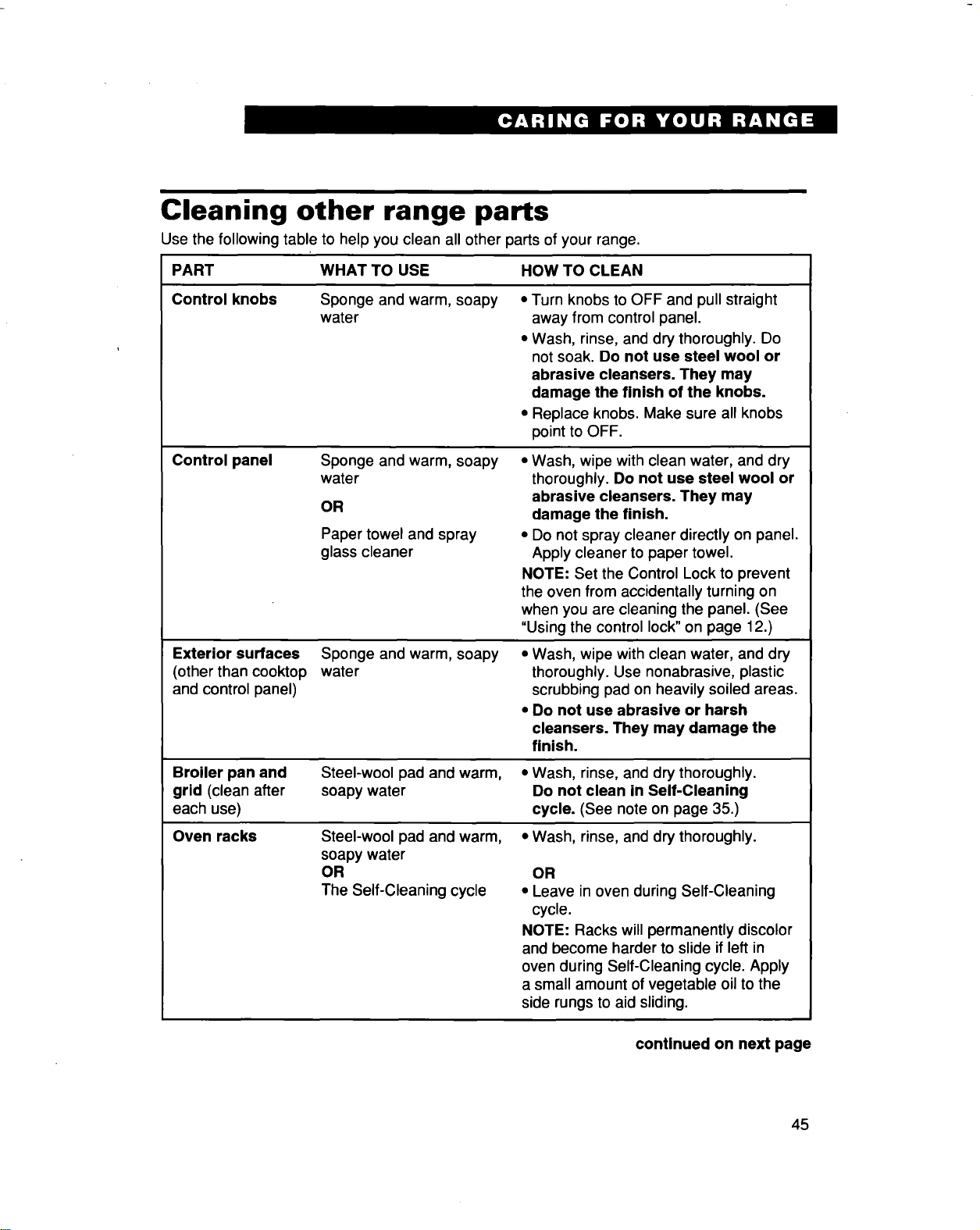
Cleaning other range parts
Use the following table to help you clean all other parts of your range.
PART WHAT TO USE HOW TO CLEAN
Control knobs Sponge and warm, soapy •
water
Control panel
Exterior surfaces
(other than cooktop water
and control panel)
Turn knobs to OFF and pull straight
away from control panel.
• Wash, rinse, and dry thoroughly. Do
not soak. Do not use steel wool or
abrasive cleansers. They may
damage the finish of the knobs.
• Replace knobs. Make sure all knobs
point to OFF.
Sponge and warm, soapy
water
OR
Paper towel and spray
glass cleaner
• Wash, wipe with clean water, and dry
thoroughly. Do not use steel wool or
abrasive cleansers. They may
damage the finish.
• Do not spray cleaner directly on panel.
Apply cleaner to paper towel.
NOTE: Set the Control Lock to prevent
the oven from accidentally turning on
when you are cleaning the panel. (See
"Using the control lock" on page 12.)
Sponge and warm, soapy • Wash, wipe with clean water, and dry
thoroughly. Use nonabrasive, plastic
scrubbing pad on heavily soiled areas.
Do not use abrasive or harsh
cleansers. They may damage the
finish.
Broiler pan and
grid (clean after
each use)
Oven racks
Steel-wool pad and warm, • Wash, rinse, and dry thoroughly.
soapy water Do not clean in Self-Cleaning
cycle. (See note on page 35.)
Steel-wool pad and warm,
soapy water
OR
The Self-Cleaning cycle
• Wash, rinse, and dry thoroughly.
OR
• Leave in oven during Self-Cleaning
cycle.
NOTE: Racks will permanently discolor
and become harder to slide if left in
oven during Self-Cleaning cycle. Apply
a small amount of vegetable oil to the
side rungs to aid sliding.
continued on next page
45
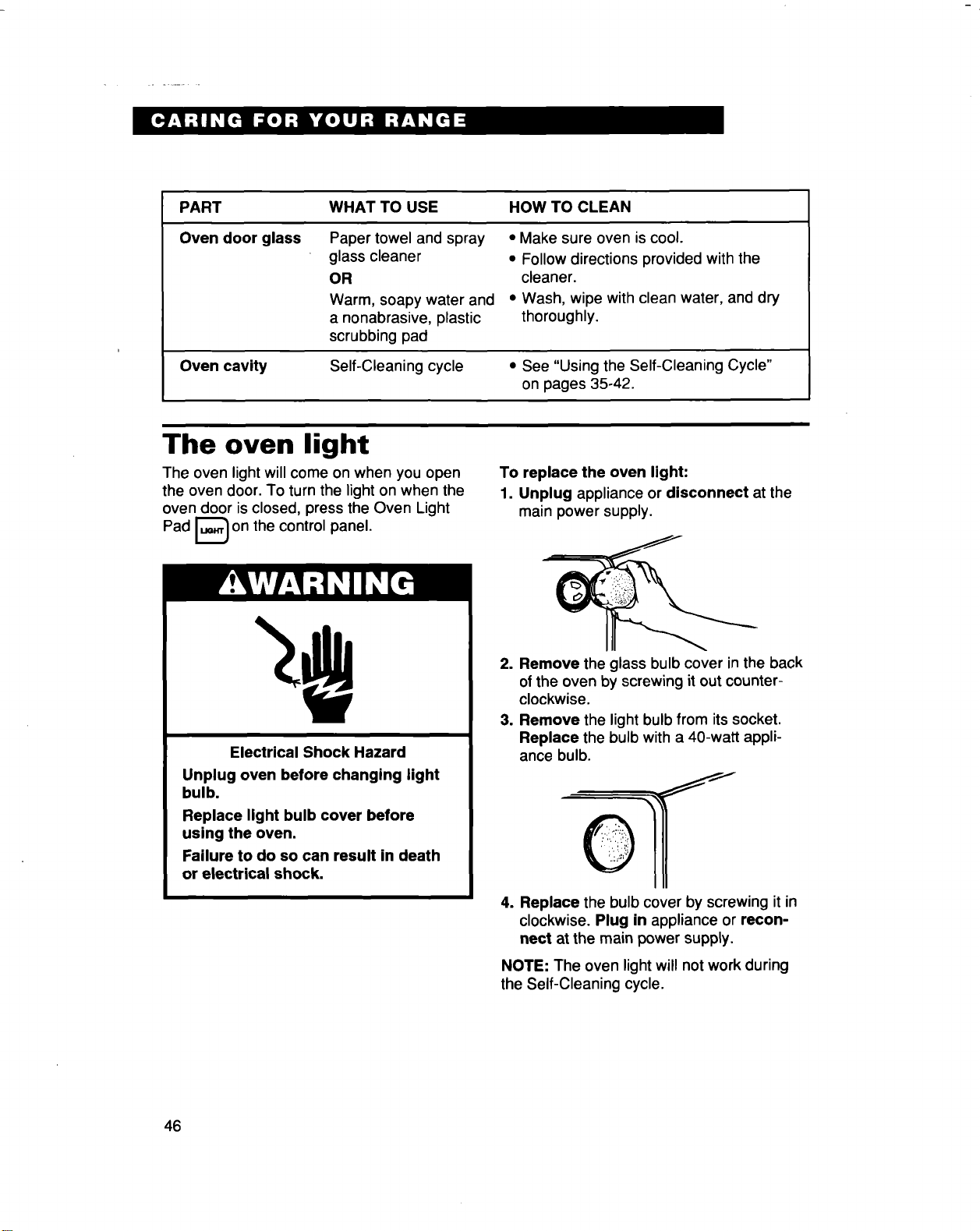
PART WHAT TO USE HOW TO CLEAN
Oven door glass Paper towel and spray
glass cleaner
OR
Warm, soapy water and
a nonabrasive, plastic
scrubbing pad
• Make sure oven is cool.
• Follow directions provided with the
cleaner.
• Wash, wipe with clean water, and dry
thoroughly.
Oven cavity Self-Cleaning cycle • See "Using the Self-Cleaning Cycle"
on pages 35-42.
The oven light
The oven light will come on when you open
the oven door. To turn the light on when the
oven door is closed, press the Oven Light
Pad _ on the control panel.
To replace the oven light:
1. Unplug appliance or disconnect at the
main power supply.
Electrical Shock Hazard
Unplug oven before changing light
bulb.
Replace light bulb cover before
using the oven.
Failure to do so can result in death
or electrical shock,
2. Remove the glass bulb cover in the back
ofthe oven by screwing it out counter-
clockwise.
3. Remove the light bulb from itssocket,
Replace the bulb with a 40-watt appli-
ance bulb.
4. Replace the bulb cover by screwing it in
clockwise. Plug in appliance or recon-
nect at the main power supply.
NOTE: The oven light will not work during
the Self-Cleaning cycle.
46
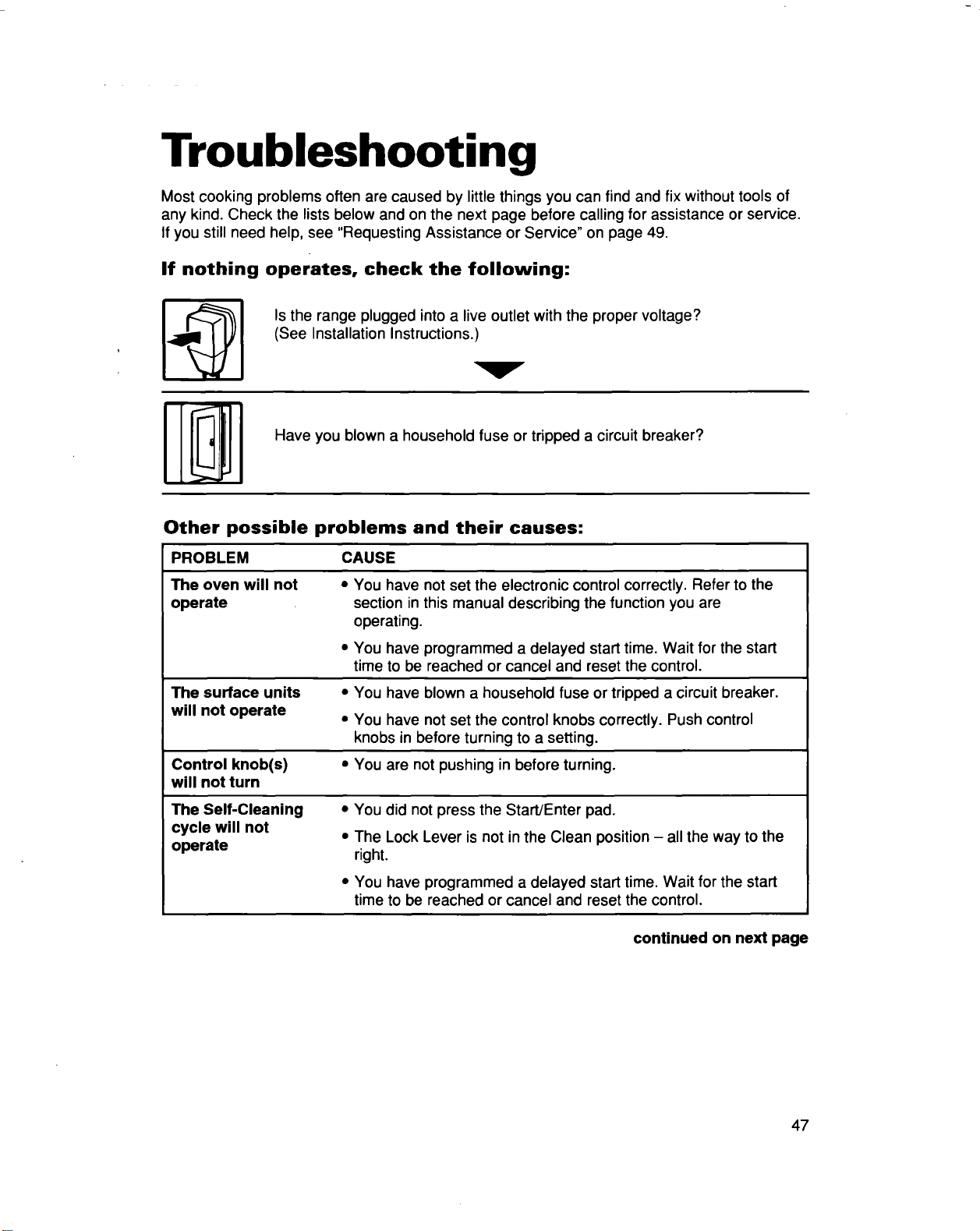
Troubleshooting
Most cooking problems often are caused by little things you can find and fix without tools of
any kind. Check the lists below and on the next page before calling for assistance or service.
If you still need help, see "Requesting Assistance or Service" on page 49.
If nothing operates, check the following:
Is the range plugged into a live outlet with the proper voltage?
(See Installation Instructions.)
Have you blown a household fuse or tripped a circuit breaker?
Other possible problems and their causes:
PROBLEM CAUSE
The oven will not
operate
The surface units •
will not operate •
Control knob(s) •
will not turn
You have not set the electronic control correctly. Refer to the
section in this manual describing the function you are
operating.
You have programmed a delayed start time. Wait for the start
time to be reached or cancel and reset the control.
You have blown a household fuse or tripped a circuit breaker.
You have not set the control knobs correctly. Push control
knobs in before turning to a setting.
You are not pushing in before turning.
The Self-Cleaning
cycle will not
operate
• You did not press the Start/Enter pad.
• The Lock Lever is not in the Clean position - all the way to the
right.
You have programmed a delayed start time. Wait for the start
time to be reached or cancel and reset the control.
continued on next page
47
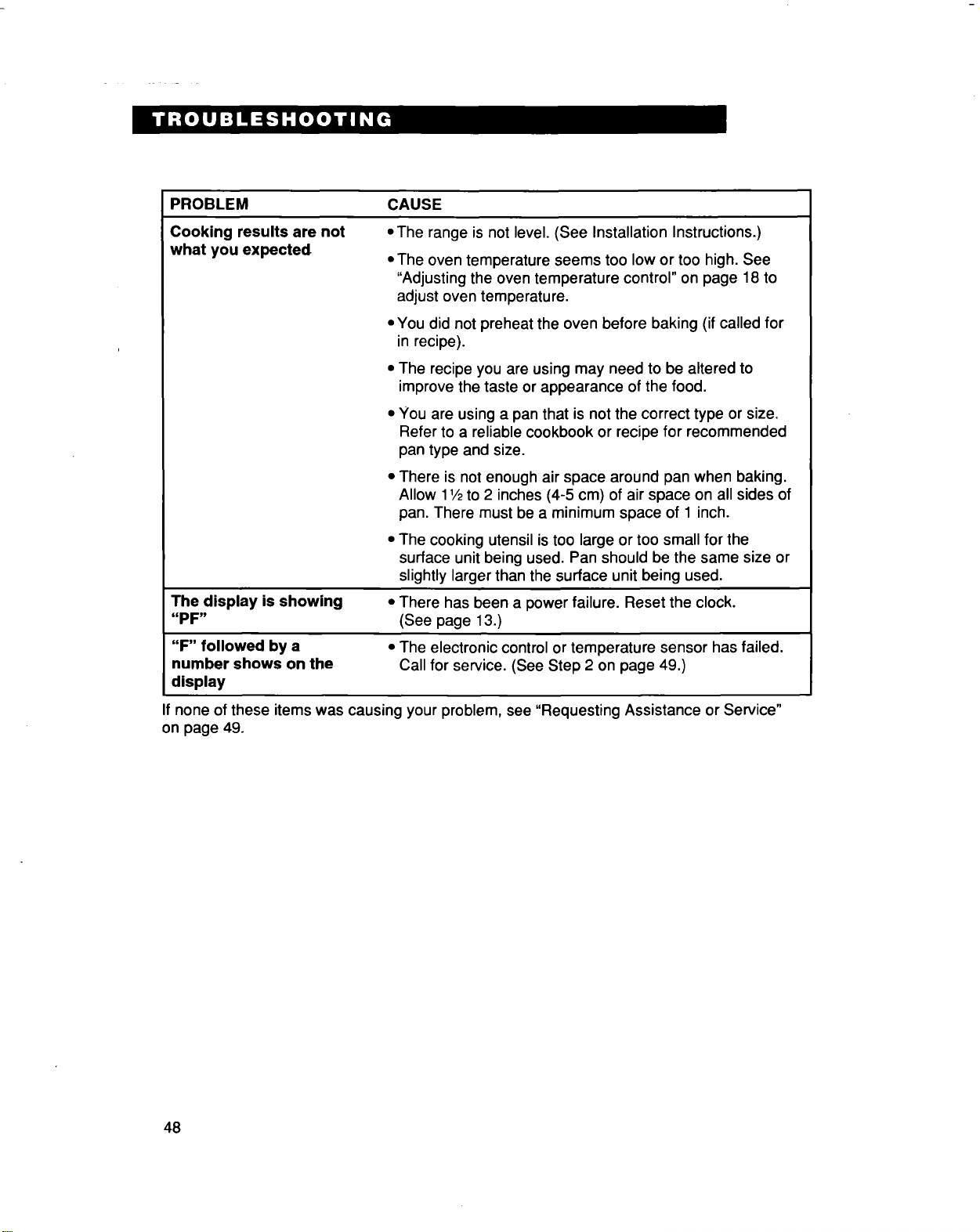
PROBLEM CAUSE
Cooking results are not oThe range is not level. (See Installation Instructions.)
what you expected
The oven temperature seems too low or too high. See
"Adjusting the oven temperature control" on page 18 to
adjust oven temperature.
• You did not preheat the oven before baking (if called for
in recipe).
• The recipe you are using may need to be altered to
improve the taste or appearance of the food.
• You are using a pan that is not the correct type or size.
Refer to a reliable cookbook or recipe for recommended
pan type and size.
• There is not enough air space around pan when baking.
Allow 11/2to 2 inches (4-5 cm) of air space on all sides of
pan. There must be a minimum space of 1 inch.
• The cooking utensil is too large or too small for the
surface unit being used. Pan should be the same size or
slightly larger than the surface unit being used.
The display is showing • There has been a power failure. Reset the clock.
"PF" (See page 13.)
"F" followed by a • The electronic control or temperature sensor has failed.
number shows on the Call for service. (See Step 2 on page 49.)
display
If none of these items was causing your problem, see "Requesting Assistance or Service"
on page 49.
48
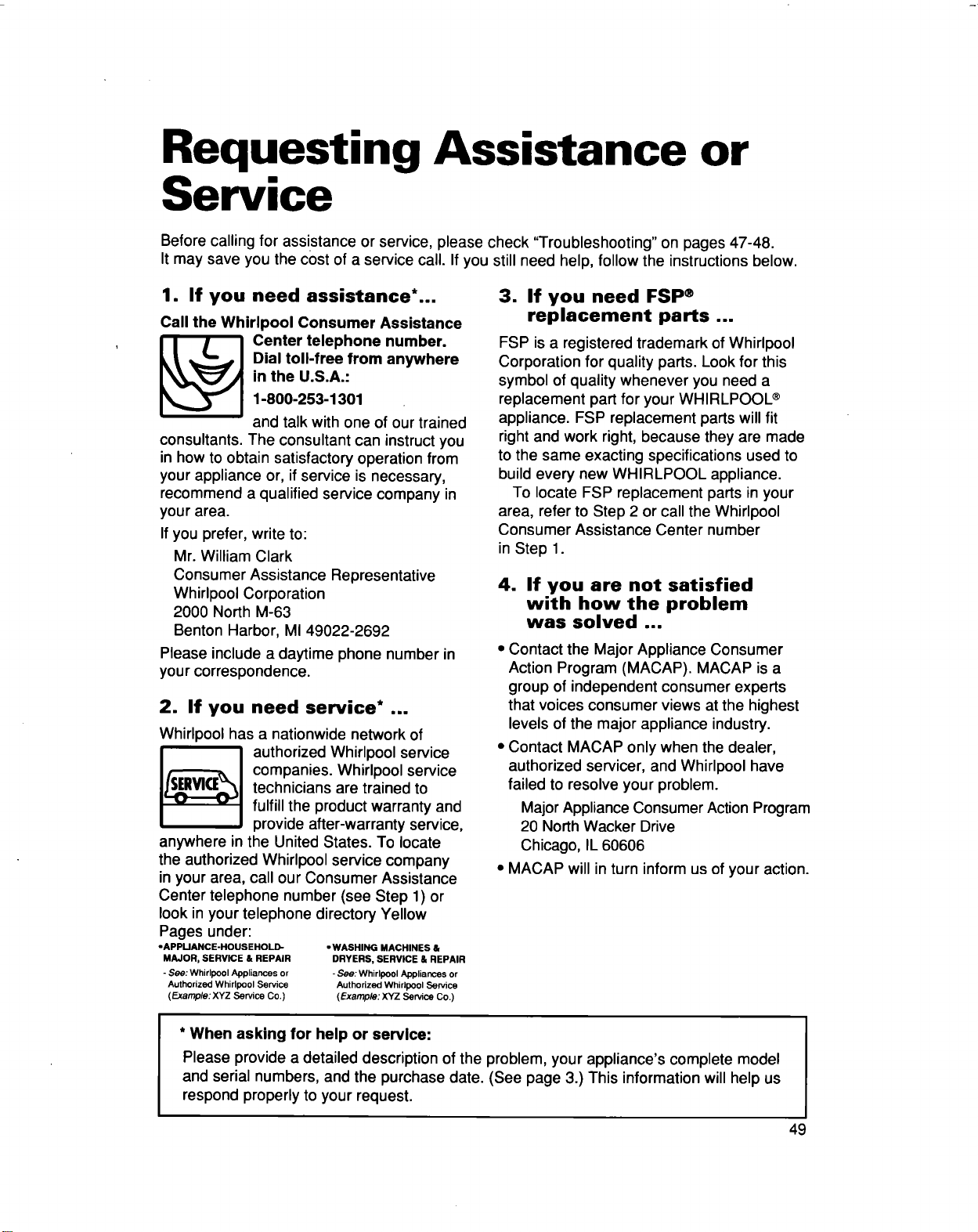
Requesting Assistance or
Service
Before calling for assistance or service, please check "Troubleshooting" on pages 47-48.
It may save you the cost of a service call. If you still need help, follow the instructions below.
1. If you need assistance*...
Call the Whirlpool Consumer Assistance
_ enter telephone number.
Dial toll-free from anywhere
in the U.S.A.:
1-800-253-1301
and talk with one of our trained
consultants. The consultant can instruct you
in how to obtain satisfactory operation from
your appliance or, if service is necessary,
recommend a qualified service company in
your area.
If you prefer, write to:
Mr. William Clark
Consumer Assistance Representative
Whirlpool Corporation
2000 North M-63
Benton Harbor, MI 49022-2692
Please include a daytime phone number in
your correspondence.
2. If you need service* ...
Whirlpool has a nationwide network of
authorized Whirlpool service
companies. Whirlpool service
technicians are trained to
fulfill the product warranty and
provide after-warranty service,
anywhere in the United States. To locate
the authorized Whirlpool service company
in your area, call our Consumer Assistance
Center telephone number (see Step 1) or
look in your telephone directory Yellow
Pages under:
oAPPUANCE-HOUSEHOLD- -WASHING MACHINES &
MAJOR, SERVICE & REPAIR DRYERS, SERVICE & REPAIR
- See: Whirlpool Appliances or - See: Whirlpool Appliances or
Authorized Whirlpool Service Authorized Whirlpool Service
(Example: XYZ Service Co.) (Example: XYZ Service Co.)
3. If you need FSP ®
replacement parts ...
FSP is a registered trademark of Whirlpool
Corporation for quality parts. Look for this
symbol of quality whenever you need a
replacement part for your WHIRLPOOL ®
appliance. FSP replacement parts will fit
right and work right, because they are made
to the same exacting specifications used to
build every new WHIRLPOOL appliance.
To locate FSP replacement parts in your
area, refer to Step 2 or call the Whirlpool
Consumer Assistance Center number
in Step 1.
4. If you are not satisfied
with how the problem
was solved ...
• Contact the Major Appliance Consumer
Action Program (MACAP). MACAP isa
group of independent consumer experts
that voices consumer views at the highest
levels of the major appliance industry.
• Contact MACAP only when the dealer,
authorized servicer, and Whirlpool have
failed to resolve your problem.
Major Appliance Consumer Action Program
20 North Wacker Drive
Chicago, IL 60606
• MACAP will in turn inform us of your action.
* When asking for help or service:
Please provide a detailed description of the problem, your appliance's complete model
and serial numbers, and the purchase date. (See page 3.) This information will help us
respond properly to your request.
49
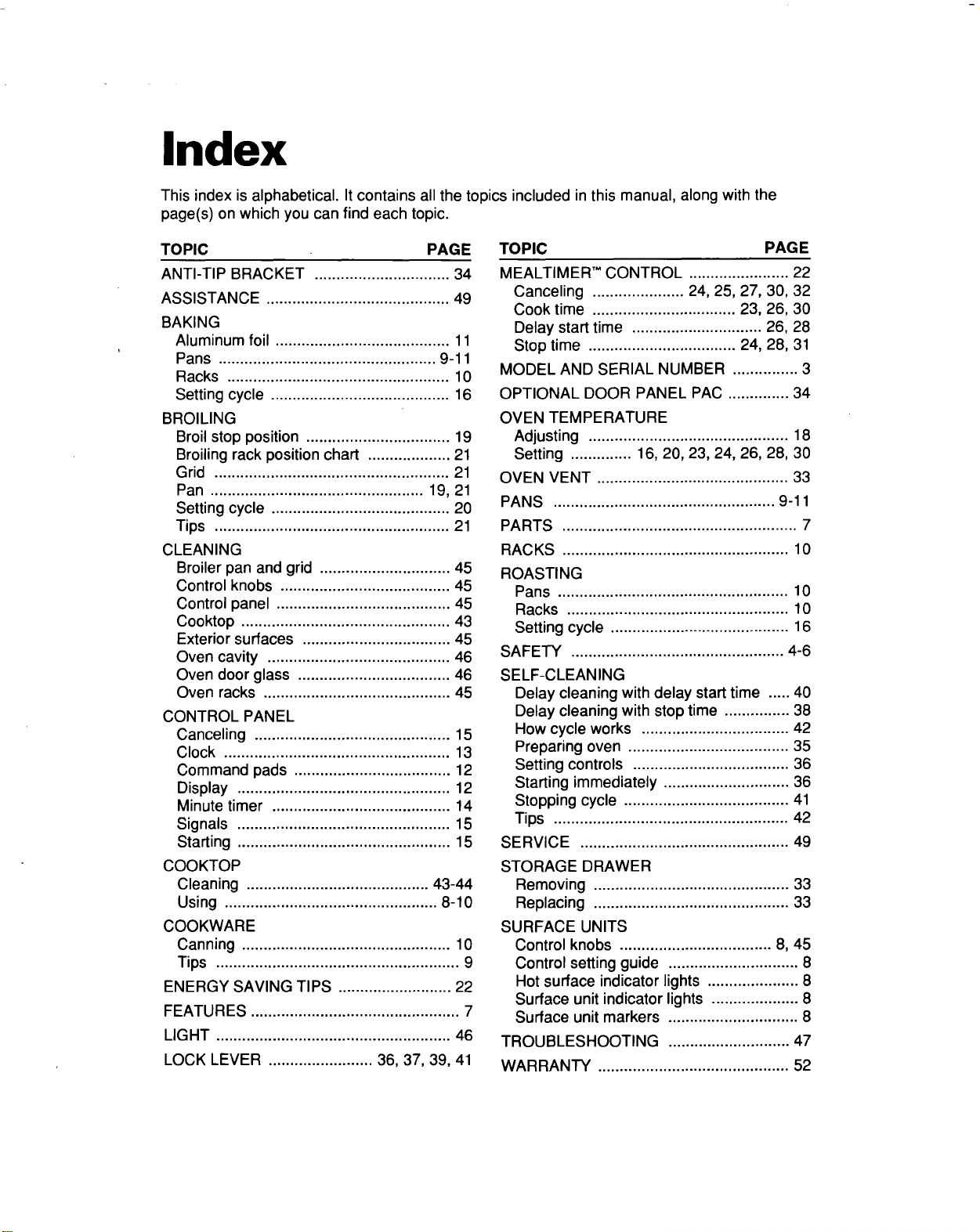
Index
This index is alphabetical. It contains all the topics included in this manual, along with the
page(s) on which you can find each topic.
TOPIC PAGE TOPIC
ANTI-TIP BRACKET ............................... 34
ASSISTANCE .......................................... 49
BAKING
Aluminum foil ........................................ 11
Pans .................................................. 9-11
Racks ................................................... 10
Setting cycle ......................................... 16
BROILING
Broil stop position ................................. 19
Broiling rack position chart ................... 21
Grid ...................................................... 21
Pan ................................................. 19, 21
Setting cycle ......................................... 20
Tips ...................................................... 21
CLEANING
Broiler pan and grid .............................. 45
Control knobs ....................................... 45
Control panel ........................................ 45
Cooktop ................................................ 43
Exterior surfaces .................................. 45
Oven cavity .......................................... 46
Oven door glass ................................... 46
Oven racks ........................................... 45
CONTROL PANEL
Canceling ............................................. 15
Clock .................................................... 13
Command pads .................................... 12
Display ................................................. 12
Minute timer ......................................... 14
Signals ................................................. 15
Starting ................................................. 15
COOKTOP
Cleaning .......................................... 43-44
Using ................................................. 8-10
COOKWARE
Canning ................................................ 10
Tips ........................................................ 9
ENERGY SAVING TIPS .......................... 22
FEATURES ................................................ 7
LIGHT ...................................................... 46
PAGE
MEALTIMER" CONTROL ....................... 22
Canceling ..................... 24, 25, 27, 30, 32
Cook time ................................. 23, 26, 30
Delay start time .............................. 26, 28
Stop time .................................. 24, 28, 31
MODEL AND SERIAL NUMBER ............... 3
OPTIONAL DOOR PANEL PAC .............. 34
OVEN TEMPERATURE
Adjusting .............................................. 18
Setting .............. 16, 20, 23, 24, 26, 28, 30
OVEN VENT ............................................ 33
PANS ................................................... 9-11
PARTS ...................................................... 7
RACKS .................................................... 10
ROASTING
Pans ..................................................... 10
Racks ................................................... 10
Setting cycle ......................................... 16
SAFETY ................................................. 4-6
SELF-CLEANING
Delay cleaning with delay start time ..... 40
Delay cleaning with stop time ............... 38
How cycle works .................................. 42
Preparing oven ..................................... 35
Setting controls .................................... 36
Starting immediately ............................. 36
Stopping cycle ...................................... 41
Tips ...................................................... 42
SERVICE ................................................ 49
STORAGE DRAWER
Removing ............................................. 33
Replacing ............................................. 33
SURFACE UNITS
Control knobs ................................... 8, 45
Control setting guide .............................. 8
Hot surface indicator lights ..................... 8
Surface unit indicator lights .................... 8
Surface unit markers .............................. 8
TROUBLESHOOTING ............................ 47
LOCK LEVER ........................ 36, 37, 39, 41 WARRANTY ............................................ 52
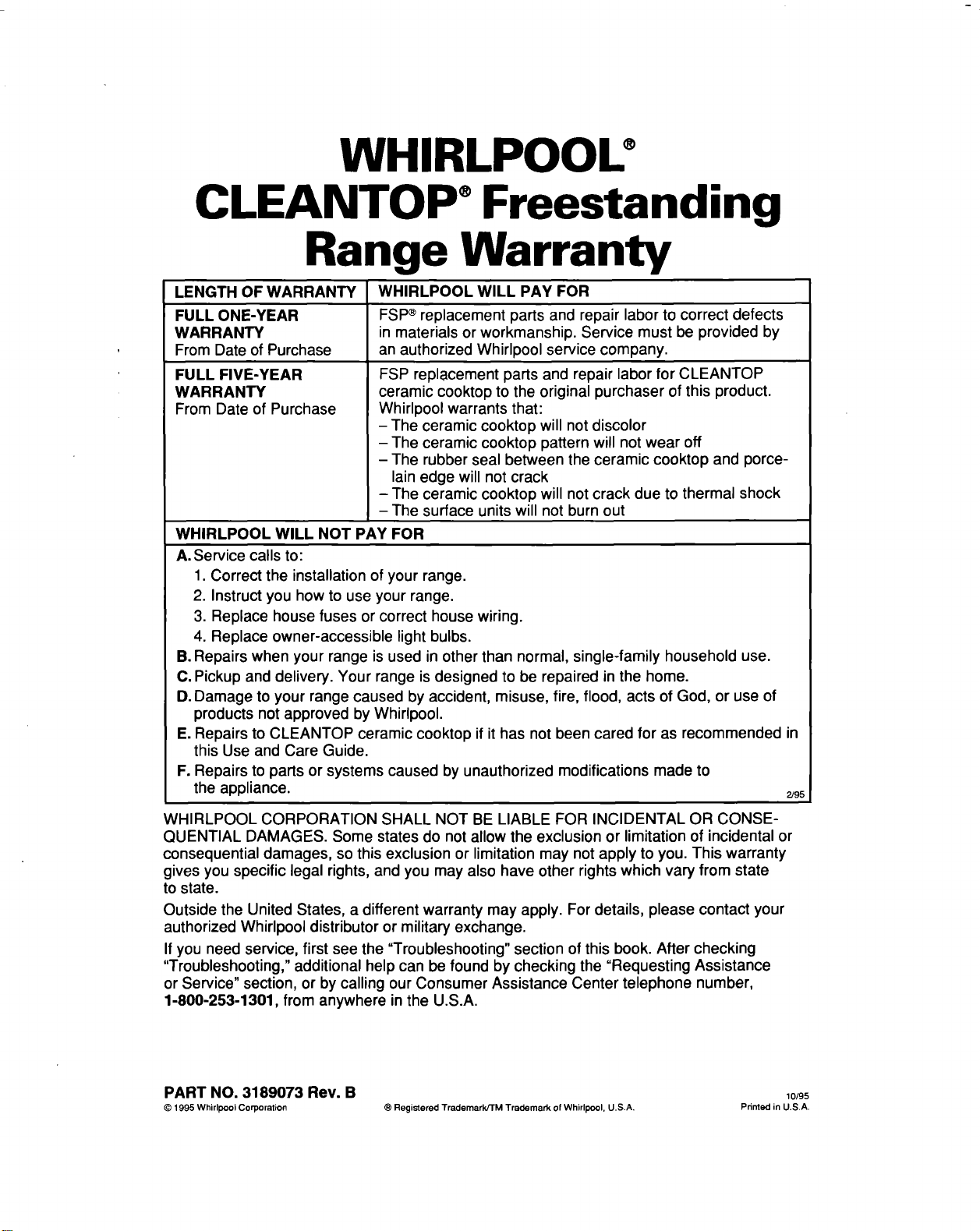
WHIRLPOOU
CLEANTOP ®Freestanding
Range Warranty
LENGTH OF WARRANTY WHIRLPOOL WILL PAY FOR
FULL ONE-YEAR FSP®replacement parts and repair labor to correct defects
WARRANTY in materials or workmanship. Service must be provided by
From Date of Purchase an authorized Whirlpool service company,
FULL FIVE-YEAR
WARRANTY
From Date of Purchase
FSP replacement parts and repair labor for CLEANTOP
ceramic cooktop to the original purchaser of this product.
Whirlpool warrants that:
- The ceramic cooktop will not discolor
- The ceramic cooktop pattern will not wear off
- The rubber seal between the ceramic cooktop and porce-
lain edge will not crack
- The ceramic cooktop will not crack due to thermal shock
- The surface units will not burn out
WHIRLPOOL WILL NOT PAY FOR
A. Service calls to:
1. Correct the installation of your range.
2. Instruct you how to use your range.
3. Replace house fuses or correct house wiring.
4. Replace owner-accessible light bulbs.
B. Repairs when your range is used in other than normal, single-family household use.
C. Pickup and delivery. Your range is designed to be repaired in the home.
D. Damage to your range caused by accident, misuse, fire, flood, acts of God, or use of
products not approved by Whirlpool.
E. Repairs to CLEANTOP ceramic cooktop if it has not been cared for as recommended in
this Use and Care Guide.
F. Repairs to parts or systems caused by unauthorized modifications made to
the appliance. 2/95
WHIRLPOOL CORPORATION SHALL NOT BE LIABLE FOR INCIDENTAL OR CONSE-
QUENTIAL DAMAGES. Some states do not allow the exclusion or limitation of incidental or
consequential damages, so this exclusion or limitation may not apply to you. This warranty
gives you specific legal rights, and you may also have other rights which vary from state
to state.
Outside the United States, a different warranty may apply. For details, please contact your
authorized Whirlpool distributor or military exchange.
If you need service, first see the "Troubleshooting" section of this book. After checking
"Troubleshooting," additional help can be found by checking the "Requesting Assistance
or Service" section, or by calling our Consumer Assistance Center telephone number,
1-800-253-1301, from anywhere in the U.S.A.
PART NO. 3189073 Rev. B lo/95
© 1995 Whirlpool Corporation ® Registered Trademark/TM Trademark of Whirlpool. U.S.A, Pdnted in U,S,A.