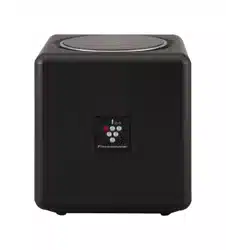

IG-EX20B
“Plasmacluster” and “Device of a
cluster of grapes” are trademarks
of Sharp Corporation.
* The number in this technology mark indicates
an approximate number of ions supplied into air
of 1 cm
3
, which is measured around the center
of a room applicable floor area (at 1.2 m height
above the floor) when the product is placed
close to a wall at the MED mode setting.
PLASMACLUSTER
ION GENERATOR
OPERATION MANUAL
IG-EX20B_EN(Singapore).indd 1 2020/07/22 11:58:39
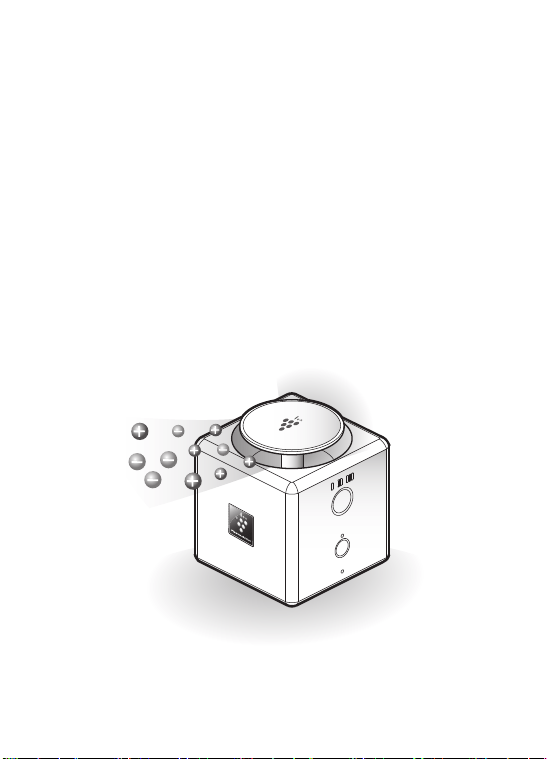
Thank you for purchasing this Plasmacluster ion generator.
Please read this manual carefully before using the product.
Please be sure to read “IMPORTANT SAFETY
INSTRUCTIONS” before using the product.
This manual should be kept in a safe place for future reference.
IG-EX20B_EN(Singapore).indd 2 2020/07/22 11:58:41

1
CONTENTS
IMPORTANT SAFETY INSTRUCTIONS ................. 2
PART NAMES .......................................................... 4
PREPARATION BEFORE USE ............................... 6
OPERATION ............................................................ 8
CARE AND MAINTENANCE / REPLACEMENT ..... 9
TROUBLESHOOTING ............................................. 14
SPECIFICATIONS .................................................... 16
IG-EX20B_EN(Singapore).indd 1 2020/07/22 11:58:41

2
IMPORTANT SAFETY INSTRUCTIONS
Please be sure
to follow.
WARNING
To prevent electric shock, an accident or
injury caused by electric leakage or ignition
•
For USB cable, Do not damage it, do not deform it, do not
process it, do not bend it forcibly, do not twist it, do not place
heavy load on it.
(It could cause a damage to the cord and it could cause of a fire and
an electric shock. )
•
Do not remove the plug when your hands are wet.
(Otherwise, it could lead to electric shock or injury)
•
Do not connect many USB cables to one USB adapter.
(Otherwise, it could lead to fire.)
•
Do not use the USB cable if it is damaged or loose.
(Otherwise, it could lead to electric shock, short circuit or fire.)
•
Be sure to connect the included USB cable to the PC or USB
adapter. (Otherwise, it could lead to fire, electric shock or malfunction.)
•
Insert the USB cable connection terminal firmly into the PC or
USB adapter. (Otherwise, it could lead to electric shock, smoke or fire.)
•
Periodically remove dust from the USB cable.
(Otherwise, it could lead to fire.)
•
Be sure to disconnect the USB cable when cleaning or replacing
the unit. (Otherwise, it could lead to electric shock or injury.)
•
When thunder starts, stop operation and unplug the USB cable.
(Otherwise, it could lead to fire, electric shock or malfunction.)
•
If the power cord is damaged, it must be replaced by the
manufacturer, its service agent, a Sharp authorized Service
Center or similarly qualified persons in order to avoid a hazard.
Contact the nearest Service Center for any problems, adjustments
or repairs.
•
Do not apply liquid such as water. When water is applied to the
product, remove from the body the USB cable. (Otherwise, it
could lead to heat generating, fire, electric shock or failure.)
•
Do not insert such as a pin or a wire into the air intake or air outlet.
(Otherwise, it could lead to electric shock, injury or abnormal action.)
•
Do not let a child use it by himself/herself.
(Otherwise, it could lead to electric shock or injury.)
IG-EX20B_EN(Singapore).indd 2 2020/07/22 11:58:41

CAUTION
To prevent an accident or injury
such as electric shock and fire
•
Unplug the USB cable when not in use. Also, when plugging
and unplugging the USB cable, hold the USB cable plug.
(Otherwise, electric shock, electric leakage, or fire due to insulation
deterioration is generated.)
•
Do not climb or put anything on the product.
(Otherwise, it could cause injury or damage.)
•
When installing the product on the wall, do not pass through or
place anything under the product.
(Otherwise, it could cause leading to injury or failure.)
•
Do not use the product at the following places:
• Places that are wet or humid, such as bathrooms.
• Where the oil component such as edible oil is floating.
• Places where sprays and chemicals are used, such as
hairdressing and beauty salons and laundry shops.
(Otherwise, it could cause electric shock or damage.)
•
Do not use fluororesin or silicone-containing
products* near the product.
* Hair care products (split end coatings, hair mousses,
hair treatments, etc.), cosmetics, antiperspirants,
antistatic agents, waterproofing sprays, polishes, glass
cleaners, chemical impregnated cloths, wax, etc.
•
This product is not designed to be waterproof or
moisture-proof. Do not use it in places where it
may spill into water or moisture.
The fluororesin or silicone could get stuck inside the
product, preventing it from producing Plasmacluster
ions. If this happens, remove the taint from the
electrode section of the Plasmacluster Ion Generating
Unit. (Page 12)
NOTE
3
IG-EX20B_EN(Singapore).indd 3 2020/07/22 11:58:41
4
PART NAMES
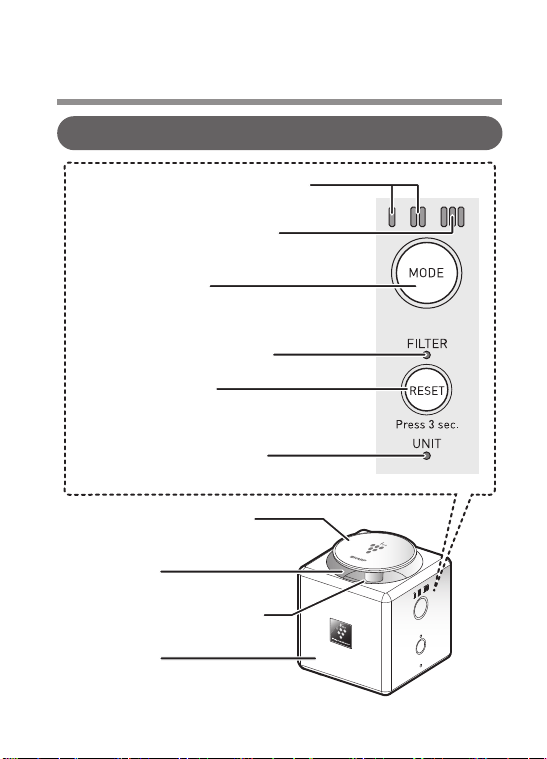
Top / Control panel / Indication
“LOW”, ”MED” operation light
(Blue)
“FULL POWER” operation
light (Purple)
Filter clean light (Orange)
Air outlet
Operation button
Power button (Louver)
Filter reset button
Plasmaclueter ion sign
(Blue)
Main unit
Unit replacing light (Red)
IG-EX20B_EN(Singapore).indd 4 2020/07/22 11:58:46
5
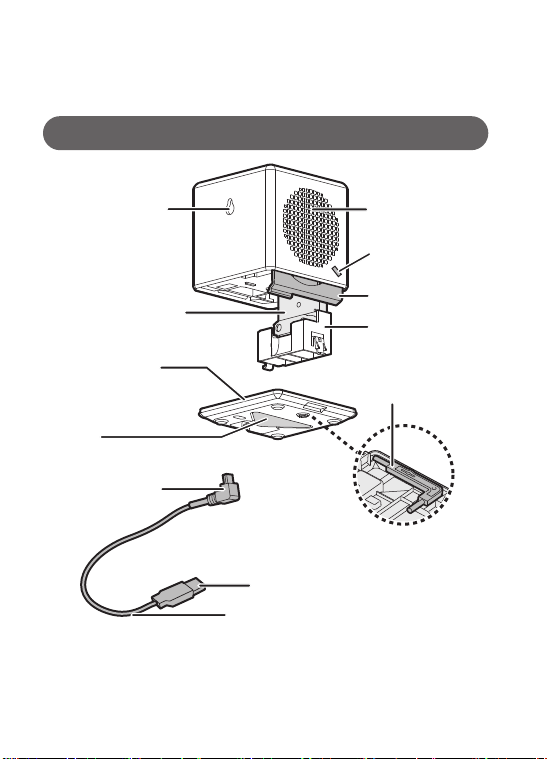
Wall hook hole
Air inlet
Stand
mounting hole
Bottom cover
Filter
Stand
Power supply
input terminal
USB cable
USB connection terminal
(The inside of the bottom cover)
Bottom / Side / Back
* 1 Unit means Plasmacluster Ion Generating Unit. (It means the same thereafter.)
Do not remove except the cleaning of the electrode or exchanging.
* 2 Do not use the unit cleaning brush, except when you clean the Plasmacluster
Ion Generating Unit.
Plasmacluster Ion
Generating Unit *
1
Unit holder
Unit cleaning brush *
2
IG-EX20B_EN(Singapore).indd 5 2020/07/22 11:58:52

6
PREPARATION BEFORE USE
Precautions on installation
Please observe the following:
Connecting the USB cable
•
Be sure to place the product on a stable flat surface.
•
When installing the product on the wall, hang the product on
a firmly fixed hook. Use a hook with a screw head diameter
of 5 mm to 7 mm. When installing on gypsum board, use the
gypsum board hook.
•
Do not install the product at 120 cm or higher.
•
Do not block the air inlet and the air outlet.
•
Keep away the product from the TV, the radio or the atomic
clock when the TV or the radio are influenced by noise or
the atomic clock time is not displayed correctly.
•
To use in a room at 0
o
C to 35
o
C.
•
Do not install in a location where it may spill into water or moisture.
•
Connecting to a commercially
available USB adapter
•
Connecting to PC
When connected to a
PC, it will operate in
conjunction with the
PC power ON / OFF.
IG-EX20B_EN(Singapore).indd 6 2020/07/22 11:58:55
7
Precautions on installation
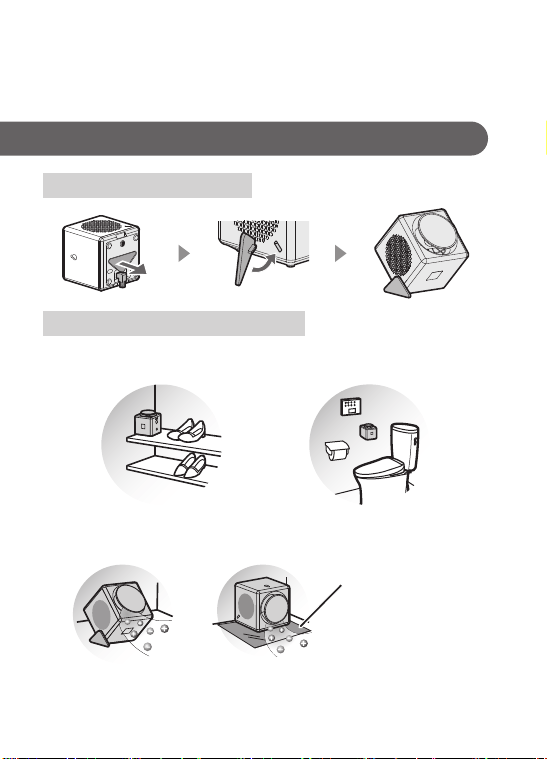
Attaching the stand
How to place the product
•
It is even more effective to use the air outlet toward a
place where odors are a concern.
•
When used in place
•
When hanging on the wall
When you use to
defeat the product, lay
a rug slip under the
product to fix the
product. (Do not block
the air inlet and
outlet.)
IG-EX20B_EN(Singapore).indd 7 2020/07/22 11:59:08
8
OPERATION
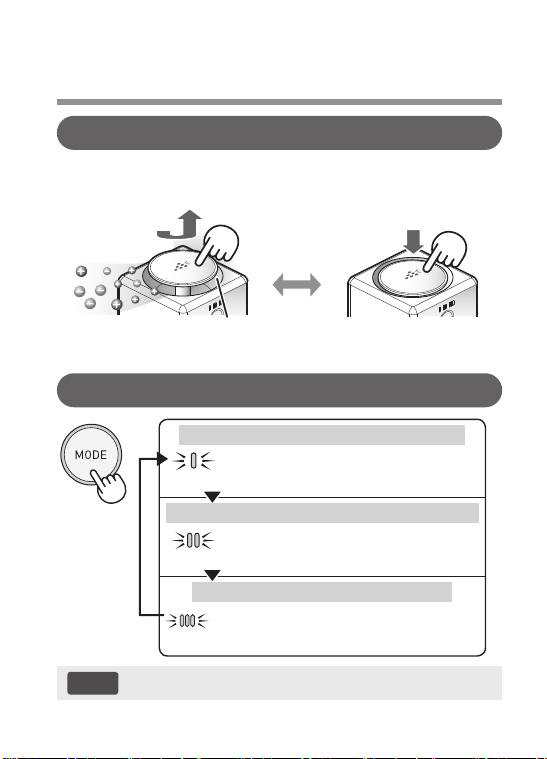
Press (Power button raised)
Operation Start
Blue light is emitted
Stop
Press
(Power button down state)
Operation Start / Stop
Operation switching
•
The product restarts operation in the previously selected mode.
(Blue)
LOW
Reduce the operation sound and
release high-density
Plasmacluster ions quietly.
(Blue)
MED
Release high-density of
Plasmacluster ion more to improve
the effect of the Plasmacluster ion.
(Purple)
FULL
Release high-density of
Plasmacluster ion to approx. 2
times of “MED” at strong flow rate.
•
When the product is fixed on the wall, remove it and operate.
NOTE
If you want to operate the product quietly
If you want to operate the product with strong flow rate
If you want to remove an odor rapidly
IG-EX20B_EN(Singapore).indd 8 2020/07/22 11:59:20
9
CARE AND MAINTENANCE / REPLACEMENT 1
Total operation time
After about 17,500 hours
Total operation time
After about 19,000 hours
•
Please replace.
•
Operation stops.
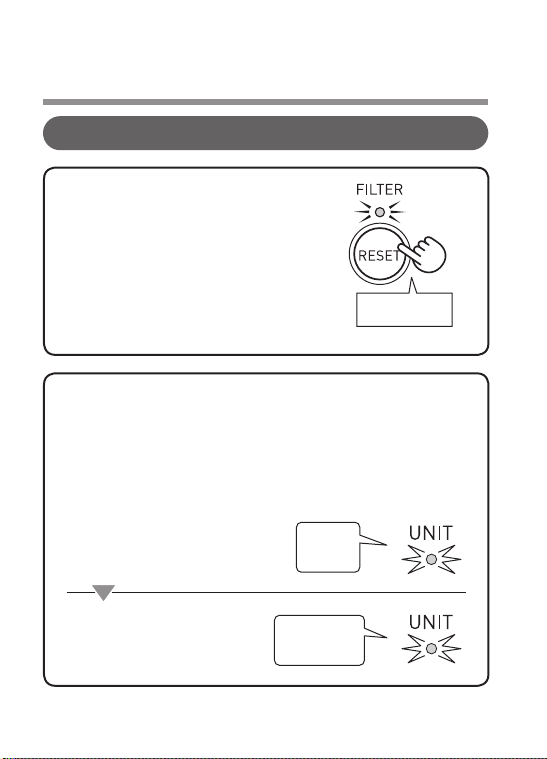
Filter clean light / Unit replacing light
Press for 3
sec. or more
(2 flashes→Turned off)
Filter clean light will be lit after
approx. 1 month (approx. 720 hours),
when operated 24 hours a day. Once
cleaning is completed, then press
and hold in the Filter reset button for
at least 3 sec. to turn off the Filter
clean light. (Page 10, 11)
If the total operating time passes approx. 17,500 hours
(approx. 2 years if the product is operated 24 hours a day),
Unit replacing light flashes to notify you of the replacement
time of the unit. When you replace with a new unit, the light
goes off. (Page13)
Filter clean light
Unit replacing light
Flashing
(Red)
Fast flashing
(Red)
IG-EX20B_EN(Singapore).indd 9 2020/07/22 11:59:25
10
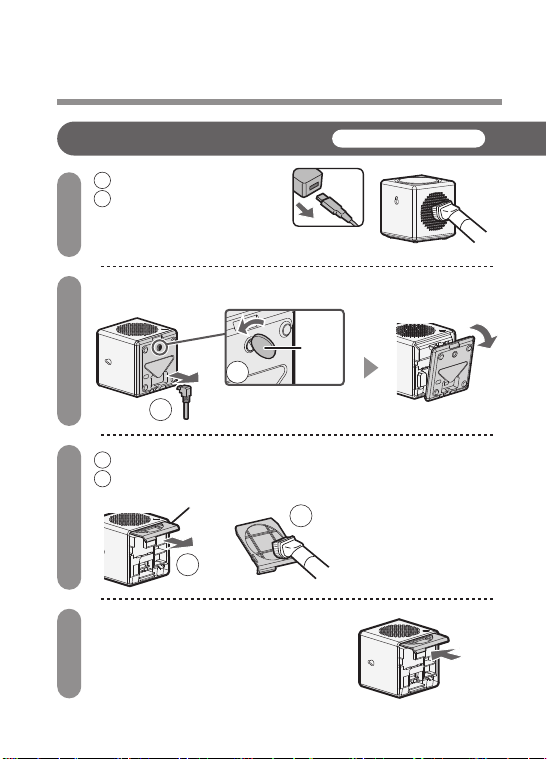
CARE AND MAINTENANCE / REPLACEMENT 2
Filter (Air inlet)
1
2
3
4
1 Unplug the USB cable
2 Vacuum the dust
from the air inlet with
a vacuum cleaner
Remove the bottom cover
1 Remove the filter
2 Remove dust with a vacuum
cleaner
Attach the filter after cleaning
•
Do not over-press the
filter with the suction
port of the vacuum
cleaner.
•
If the filter is very dirty,
wash it with water and
dry it in the shade.
Coin
Filter
1
2
About once a month
1
2
IG-EX20B_EN(Singapore).indd 10 2020/07/22 11:59:45
11
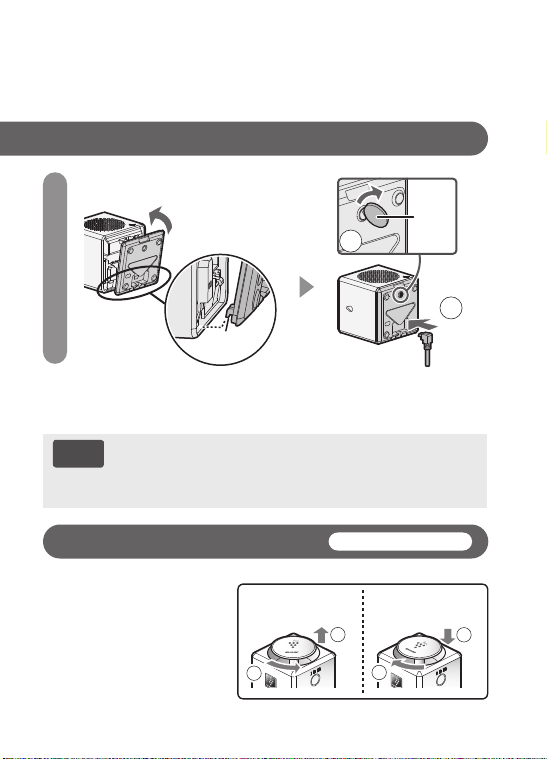
Filter (Air inlet)
5
Attach the bottom cover
Wipe with a soft cloth.
To maintain the ion concentration, clean the filter frequently even
if the Filter clean light is not lit. After cleaning, press the Filter
reset button for 3 seconds or more.
•
For stubborn dirt:
Use water and a mild
detergent. And then, wipe
with a wet cloth. Make
sure to dry out the main
unit.
2
Coin
•
Do not turn on the product while the bottom cover is
open.
•
If you want to clean it in a place where it is easily
scratched, place a cloth under the product.
Main unit / Air outlet (louver)
About once a month
1
2
1
2
Removing Attaching
NOTE
Tab
(2 places)
1
IG-EX20B_EN(Singapore).indd 11 2020/07/22 11:59:53
12
CARE AND MAINTENANCE / REPLACEMENT 3
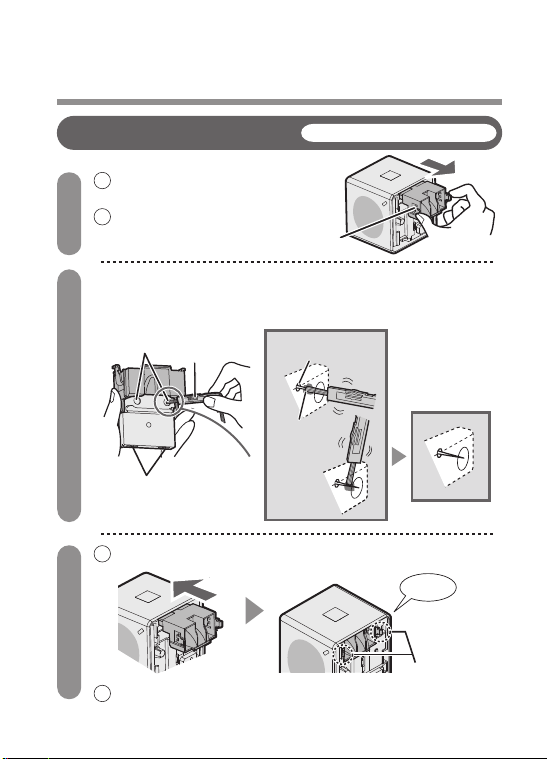
Plasmacluster Ion Generating Unit
(electrode section)
About once every 6 months
Unit cleaning
brush (Page 5)
Connection
terminals
Electrode
section
After cleaning
Electrode (needle)
Root of the
electrode
Click
Tab (2 places)
Unit holder
1 Remove the bottom
cover. (Page 10)
2 Pull out the unit holder.
1 Inserted securely unit holder to the end.
2 Attach the bottom cover. (Page 11)
1
2
3
Remove the dust attached to the electrode section
of the unit with an included unit cleaning brush or
commercially-available cotton applicator.
IG-EX20B_EN(Singapore).indd 12 2020/07/22 12:00:03
13
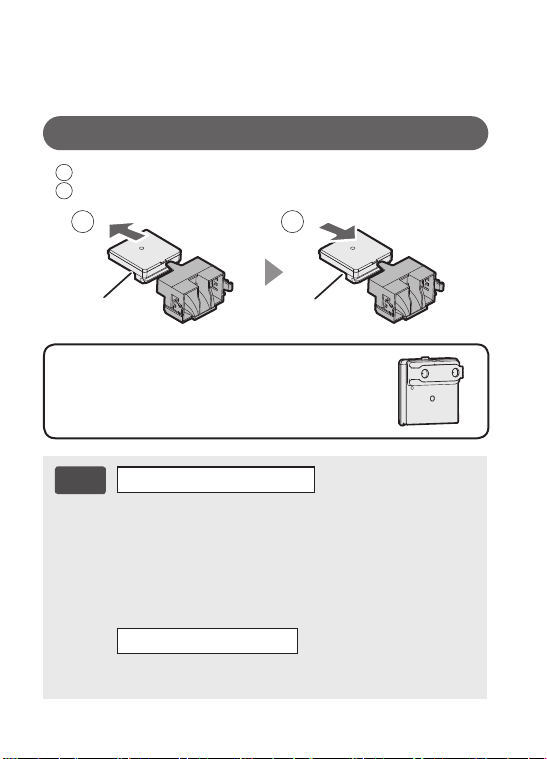
How to replace the Plasmacluster Ion Generating Unit
1 Remove the unit holder from the main unit. (Page 12)
2 Replace with a new unit.
New unit
Old unit
•
Do not touch the electrodes.
(Otherwise, it could lead to injury.)
•
Do not transform the electrode section.
(Otherwise, it could lead to damage.)
•
Do not touch the connection terminals.
(Otherwise, it could lead to damage.)
•
If the taint is hard to remove, water a commercially
available cotton applicator slightly and wipe off the taint.
•
Please dispose of as garbage do not burn the old unit.
* In areas with waste separation rules, follow those rules.
Replacement Plasmacluster Ion Generating Unit
(1 unit)
Model: IZ-C75CE
When caring for the unit
When replacing a unit
NOTE
1
2
•
Replacement period: approx. 2 years after opening
IG-EX20B_EN(Singapore).indd 13 2020/07/22 12:00:16

14
TROUBLESHOOTING
Does the Plasmacluster Ion Generating Unit need to be
replaced regularly?
•
The Plasmacluster Ion Generating Unit must be replaced
regularly in order to maintain the ion density.
The Plasmacluster Ion Generator does not work.
•
Is the Power button in the state of OFF? (Page 8)
•
Is a USB cable inserted properly? (Page 6)
•
Is a Plasmacluster Ion Generating Unit inserted correctly?
(Page12, 13)
A clicking or ticking sound is heard from the product.
•
Clicking or ticking sound may be audible when the unit is
generating ions.
By use environment and a operation mode, feeling a sound to
be big or faint, but there will be no difference in the effect of the
Plasmacluster ions.
The discharged air has an odor.
•
Filter is getting dirty. Clean the filter.
After cleaning, press the Filter reset button for 3 sec. or more.
(Page 9)
Filter clean light (orange) is lighting.
•
Clean the filter and press the Filter reset button for 3 sec. or
more. (Page 9, 10, 11)
IG-EX20B_EN(Singapore).indd 14 2020/07/22 12:00:16

15
Unit replacing light (red) is flashing rapidly, and operation
is stopped.
•
It is over the usage period of Plasmacluster Ion Generating
Unit.
Replace with new one. (Page 9, 13)
Operation lights (“LOW”, “MED” and “FULL POWER”) are
flashing simultaneously, and operation is stopped.
Plasmacluster Ions are not released.
•
Is the Plasmacluster Ion Generating Unit installed correctly?
Remove the unit, fully insert it again and press the Operation
button. (Page 12, 13)
•
Isn't dust attached to the electrode of the unit?
Clean the electrode section of the unit. (Page 12)
Other indication
•
Failure.
Unplug and contact the store you purchased.
IG-EX20B_EN(Singapore).indd 15 2020/07/22 12:00:16
16
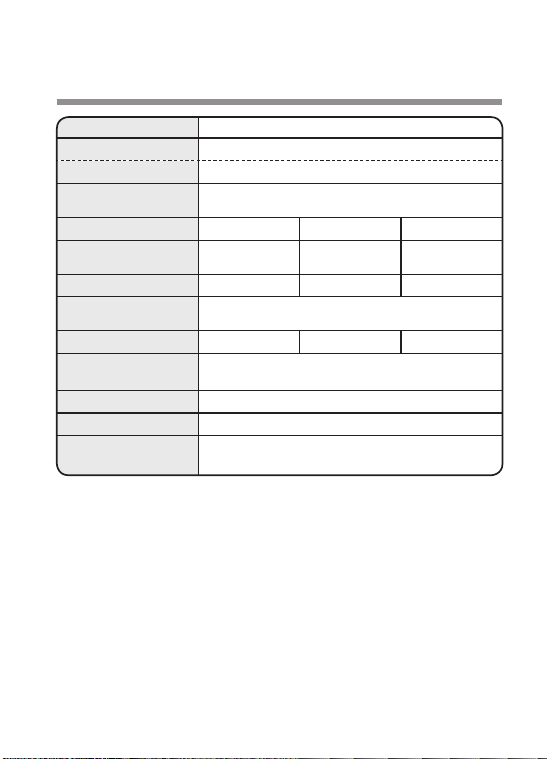
SPECIFICATIONS
*1 The product does not include a USB adapter.
*2 The target floor area in which approximately 25000 ions per cubic centimeter can
be measured in the center of the room when the product is placed close to a
wall, is operating on MED mode, and is at a height of approximately 1.2 meters
from the floor.
Model IG-EX20B
Voltage USB cable *
1
Rated input DC5V / 1A
Applicable floor
area*
2
Approx. 1.8 m × 0.9 m
Operation mode LOW MED FULL POWER
Air volume
Approx.
0.05 m
3
/min
Approx.
0.06 m
3
/min
Approx.
0.08 m
3
/min
Power consumption 2.1 W 2.4 W 3.0 W
Current value when
using a USB cable
470 mA (max)
Operating noise 22 dB 25 dB 31 dB
Dimensions
(W) 90 mm (D) 90 mm (H) 95 mm
(Excluding USB cable and protrusion of the louver)
Weight Approx. 315 g (Excluding USB cable)
Length of USB cable
Approx. 1.8 m
Accessories
(each 1)
●USB cable ●Unit cleaning brush
●Operation Manual ●Stand
IG-EX20B_EN(Singapore).indd 16 2020/07/22 12:00:16

17
MEMO
IG-EX20B_EN(Singapore).indd 17 2020/07/22 12:00:16

TINSEA008KKRZ 20K− 1
SHARP CORPORATION
OSAKA, JAPAN
IG-EX20B_EN(Singapore).indd 18 2020/07/22 12:00:18