
www.eufylife.com
For FAQs and more information, please visit:
51005001447 V03

Lighting
Welcome Guide
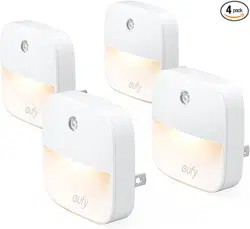
Lumi Stick-On
Night Light
Bedienungsanleitung
|
Guía de bienvenida
取扱説明書

01 English
10 Deutsch
19
Español
28
日本語

Table of Content
01 Important Safety Instructions
01 Introduction
02 At a Glance
02 Installing the Batteries
03 Installing Your Lumi
06 Using Your Lumi
07 Troubleshooting
07 Specifications
09 Customer Service

01 English
Important Safety Instructions
Read and follow all the safety instructions:
• This device is for indoor use only.
• This device should not be exposed to dripping or splashing
water.
• This device is powered by three AAA batteries (not
included). Do not attempt to recharge them when using non-
rechargeable batteries.
• This device uses a non-replaceable light source. When the
light source reaches the end of its life cycle, the device should
be replaced.
• Do not install near any heat sources.
• Do not place any sources of danger on this device (e.g. liquid
filled objects, lighted candles).
• Do not mix different types of batteries together, e.g. lithium-
ion (Li-ion) and nickel-metal hydride (NiMH) batteries.
• Do not mix new and used batteries.
• Do not use metal objects to connect the terminals of the
battery.
• A
n exhausted battery should be disposed of according to
local environmental regulations.
Introduction
Thank you for purchasing Lumi Stick-On Night Light (hereafter
called "Lumi"). Lumi uses light and motion-sensing technology
to temporarily illuminate dark spaces with a soft light.
English 02
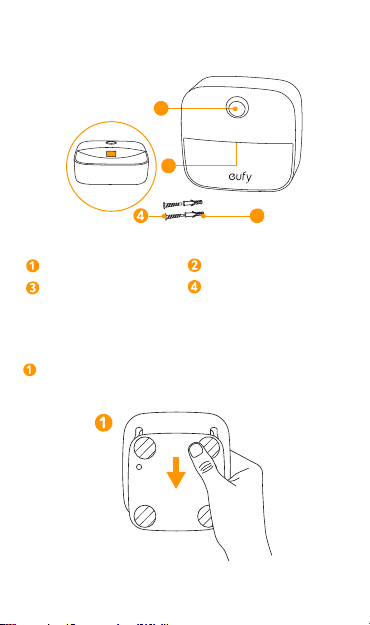
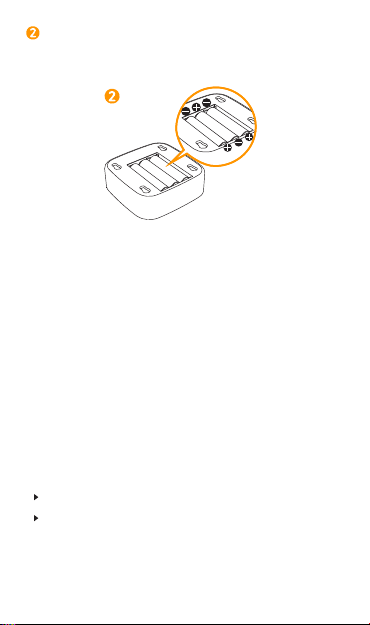
At a Glance
2
1
3
Motion sensor LED light
Wall plugs x2 Screws x2
Installing the Batteries
Slide down to remove the mounting bracket on the back of
your Lumi.
03 English
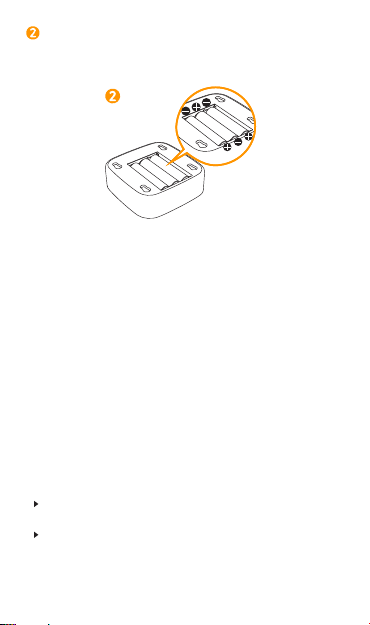
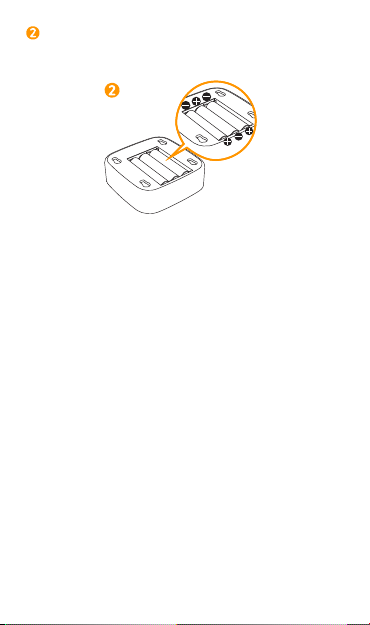
Insert three AAA batteries. Make sure the positive and
negative ends are facing the correct polarity direction as
marked in the battery compartment.
Installing Your Lumi
After installing the batteries, there are two ways to install
your Lumi. When choosing a suitable location for your Lumi,
remember that:
• It should be installed in a dark area.
• Do not install Lumi in a location that can interfere with your
work or rest.
• Do not install Lumi in a location that directly faces an infrared
beam.
• The motion sensor is designed to cover an arc of
approximately 120 degrees horizontally and to detect motion
up to 3 meters/10 feet away;
The effective distance and range are subject to the ambient
temperature.
Make sure the area in front of the motion sensor is obstruction-
free.
English 04
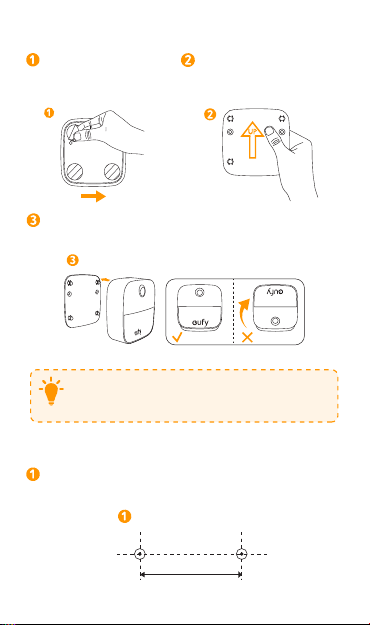
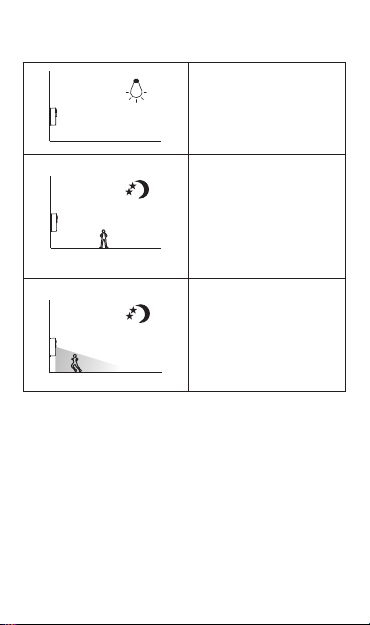
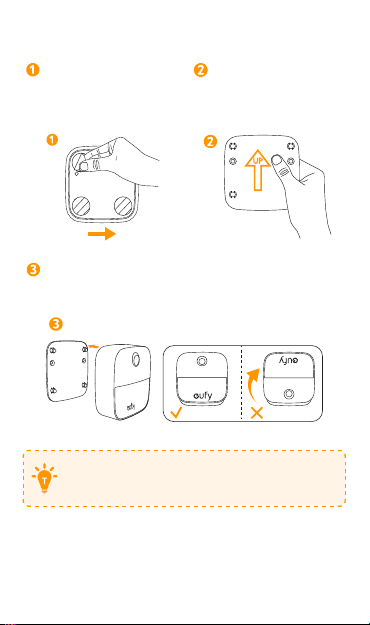
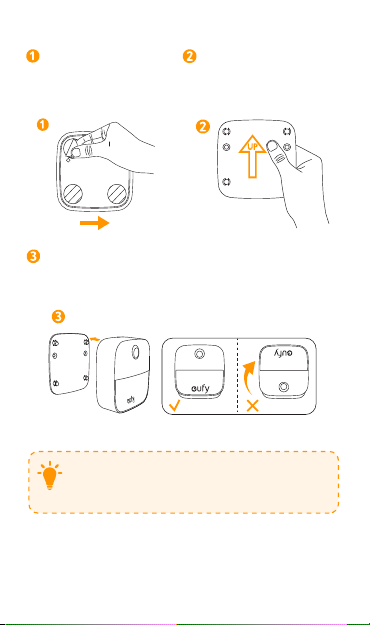
Option A: Installing Lumi with the adhesive mounting bracket:
Remove the protective
film on the back of the
bracket.
Stick the bracket onto the
wall. Make sure the arrow on
the bracket is pointing up.
UP
Align the holes on the back of Lumi with the pins on
the bracket; slide down to mount Lumi.
T
Select the type of surface you will adhere the mounting
bracket to carefully. Removing the mounting bracket
may cause damage to the surface if removed.
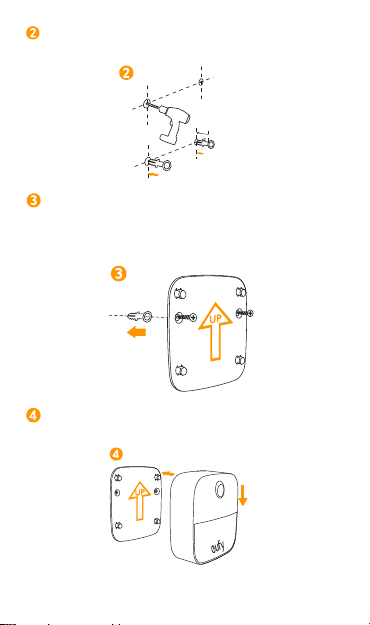
Option B: Installing Lumi with the supplied screws:
Measure a distance of 1.97in (50mm) between two points
for the wall plugs. Use a pen to mark
the drill points.
1.97in/50mm
05 English
Use a drill bit to drill two 0.9in (23mm) deep holes and
fully insert the wall plugs into the holes.
0.9in/23mm
Align the mounting bracket with the wall plugs and hold
against the wall. Insert the screws through the fixing holes
and screw firmly into the wall plugs. Make sure the arrow
on the mounting bracket is pointing up when installing.
UP
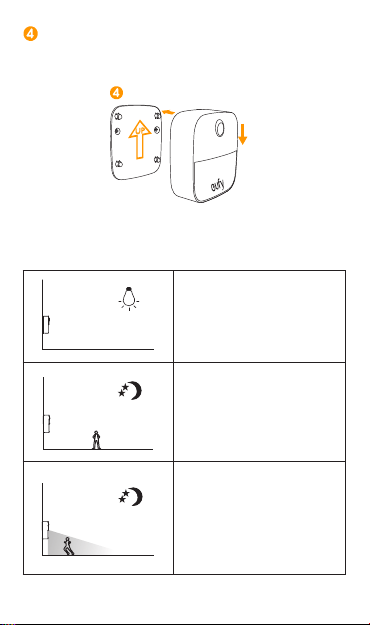
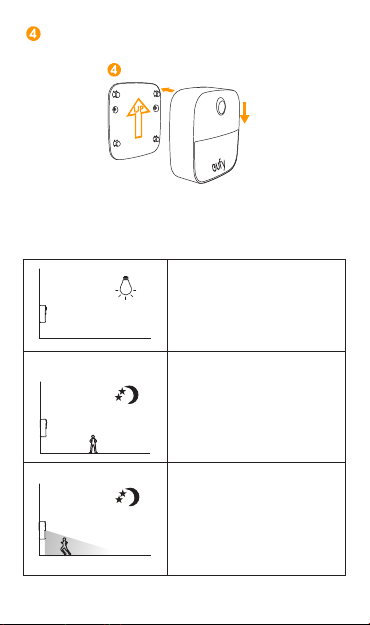
Align the mounting holes on the back of Lumi with the
pins on the mounting bracket; slide down to mount Lumi.
UP
English 06
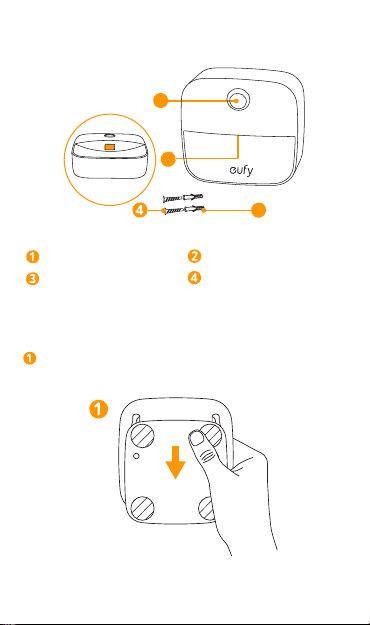
Using Your Lumi
Lumi
T
Lumi does not turn on in
bright areas.
Lumi
In dark areas, Lumi does
not turn on if motion is not
detected within its effective
range.
Lumi
In dark areas, Lumi
automatically turns on if
motion is detected within
its effective range. The light
automatically turns off if
motion is not detected for 15
seconds.

07 English
Troubleshooting
The light does
not turn on.
• Lumi is installed in an area with too much
light. Move Lumi to an area with less light
exposure.
• Lumi is not able to detect motion within
its effective range. Make sure there are
no obstructions blocking Lumi’s motion
sensor.
• Batteries are out of power.
Replace
batteries.
The light is dim. • The batteries are low. Replace batteries.
The light does
not turn off in
bright areas.
• When Lumi lights up due to motion in the
dark and then another bright light source
is turned on, Lumi will remain lit and only
turn off if the sensor does not detect
motion for 15 seconds.
Specifications
Model T1301
Light Wattage 0.1 W
Battery 3 AAA batteries (not included)
Dimensions 72 × 72 × 32 mm / 2.8 × 2.8 × 1.3 in
Weight 40 g / 1.4 oz
Specifications are subject to change without notice.

English 08
Notice
This symbol means the product must not be discarded
as household waste, and should be delivered to an
appropriate collection facility for recycling. Proper
disposal and recycling helps protect natural resources,
human health and the environment. For more
information on disposal and recycling of this product,
contact your local municipality, disposal service, or
the shop where you bought this product.
FCC Statement
This device complies with Part 15 of the FCC Rules. Operation
is subject to the following two conditions: (1) This device may
not cause harmful interference, and (2) this device must accept
any interference received, including interference that may cause
undesired operation.
Warning: Changes or modifications not expressly approved
by the party responsible for compliance could void the user's
authority to operate the equipment.
Note: This equipment has been tested and found to comply
with the limits for a Class B digital device, pursuant to Part 15 of
the FCC Rules. These limits are designed to provide reasonable
protection against harmful interference in a residential
installation.
This equipment generates, uses and can radiate radio
frequency energy and, if not installed and used in accordance
with the instructions, may cause harmful interference to
radio communications. However, there is no guarantee
that interference will not occur in a particular installation. If
this equipment does cause harmful interference to radio or
television reception, which can be determined by turning the
equipment o and on, the user is encouraged to try to correct
the interference by one or more of the following measures: (1)
Reorient or relocate the receiving antenna. (2) Increase the
separation between the equipment and receiver. (3) Connect
the equipment into an outlet on a circuit dierent from that to
which the receiver is connected. (4) Consult the dealer or an
experienced radio / TV technician for help.

09 English
Declaration of Conformity
Hereby, Anker Technology Co., Ltd. declares that the product type T1301 is in
compliance with Directives 2014/35/EU & 2014/30/EU.
The full text of the EU declaration of conformity is available at the following
internet address: https://www.eufylife.com/
Anker Technology Co., Ltd.
Room 1318-19, Hollywood Plaza, 610 Nathan Road, Mongkok, Kowloon,
Hong Kong
Customer Service
18-month limited warranty
Lifetime technical support
(US) +1 (800) 988 7973 Mon-Fri 9:00am - 5:00pm (PT)
(UK) +44 (0) 1604 936200 Mon-Fri 6:00 - 11:00 (GMT)
(DE) +49 (0) 69 9579 7960 Mo-Fr 6:00 - 11:00
(
中国
) +86 400 0550 036
周一至周五
9:00 - 17:30
(
日本
) +81 03 4455 7823
月 - 金
9:00 - 17:00
@EufyOcial
@EufyOcial
@EufyOcial
@EufyOcial

Deutsch 10
Inhaltsverzeichnis
11 Wichtige Sicherheitshinweise
11 Einleitung
12 Auf einen Blick
12 So legen Sie die Batterien ein
13 So Installieren Sie Lumi
16 So Verwenden Sie Lumi
17 Problembehebung
17 Technische Daten
18 Kundenservice

11 Deutsch
Wichtige Sicherheitshinweise
Lesen Sie die Bedienungsanleitung vor dem ersten Gebrauch
und bewahren Sie diese als Referenz auf.
• Das Gerät ist ausschließlich für den Gebrauch in
geschlossenen Räumen geeignet.
• Setzen Sie das Gerät keinen Flüssigkeiten oder Spritzwasser
aus.
• Dieses Gerät wird mit drei AAA-Batterien betrieben (nicht
im Lieferumfang enthalten). Versuchen Sie nicht reguläre
Batterien erneut aufzuladen.
• Die Lichtquelle dieser Lampe ist nicht wechselbar. Alsbald
die Lichtquelle ihre Lebensdauer überschritten hat, muss die
gesamte Lampe gewechselt werden.
• Stellen Sie Lumi nicht in der Nähe von Hitzequellen auf.
• Stellen Sie keine Gefahrenquellen auf dieses Gerät (z. B.
flüssigkeitsgefüllte Gegenstände, brennende Kerzen).
• Mischen Sie keine unterschiedlichen Arten von Batterien,
z.B. Lithium-Ionen- (Li-Ion) und Nickel-Metallhydrid (NiMH)
-Batterien.
• Mischen Sie keine neuen und gebrauchten Batterien.
• Verwenden Sie keine Metallgegenstände, um die Klemmen
der Batterie anzuschließen.
• LeereBatterienmüssenentsprechenddenörtlichen
Umweltvorschriftenentsorgtwerden.
Einleitung
Vielen Dank, dass Sie sich für das Lumi Stick-On Nachtlicht
(nachstehend "Lumi" genannt) entschieden haben. Lumi nutzt
Licht-und Bewegungsmeldetechnik, um dunkle Räume mit
einem weichen Licht vorübergehend zu beleuchten.
Deutsch 12
Auf einen Blick
2
1
3
Bewegungssensor LED-Licht
Zwei Dübel Zwei Schrauben
So legen Sie die Batterien ein
Schieben Sie diesen Teil nach unten, um die
Montagehalterung auf der Rückseite zu entfernen.
13 Deutsch
Legen Sie drei AAA-Batterien ein. Vergewissern Sie sich,
dass die positiven und negativen Enden in die korrekte
Polaritätsrichtung weisen, wie im Batteriefach markiert.
So Installieren Sie Lumi
Nach der Installation der Batterien gibt es zwei Möglichkeiten,
um Lumi zu installieren. Bei der Auswahl eines geeigneten Ortes
für Lumi, denken Sie an folgende Punkte:
• Sie sollte in einem dunklen Bereich installiert werden.
• Installieren Sie Lumi nicht an Orten, die Ihre Arbeit oder
Ruhephasen beeinträchtigen.
• Installieren Sie Lumi nicht an Orten, die direkt einem
Infrarotsignal gegenüber stehen.
• Der Bewegungssensor ist so ausgelegt, dass er einen Bogen
von etwa 120 Grad horizontal abdeckt und Bewegungen bis
zu drei Metern entfernt erkennt.
Die Reichweite ist von der Umgebungstemperatur abhängig.
Vergewissern Sie sich, dass der Bereich vor dem
Bewegungssensor frei von Gegenständen ist.
Deutsch 14
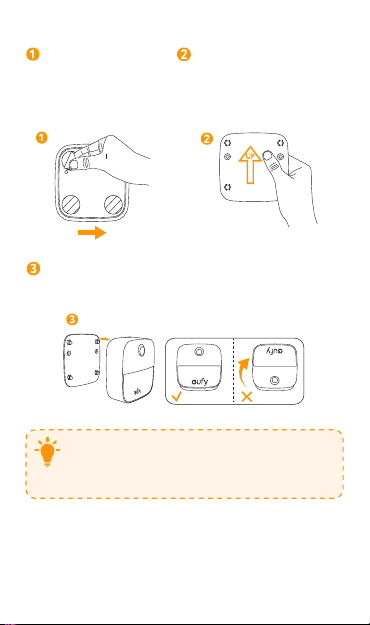
Option A: Lumi mit der Kleberhalterung befestigen.
Entfernen Sie die
Schutzfolie auf
der Rückseite der
Halterung.
Stecken Sie die Halterung
auf die Wand. Vergewissern
Sie sich, dass der Pfeil auf
der Halterung nach oben
zeigt.
UP
Richten Sie die Löcher auf der Rückseite von Lumi an den
Stiften der Halterung aus. Schieben Sie Lumi nach unten,
um sie zu befestigen.
T
Wählen Sie die Art der Oberfläche auf der Sie die
Montagehalterung befestigen sorgfältig aus. Das
Entfernen der Montagehalterung kann zu
Beschädigungen der Oberfläche führen, wenn sie
entfernt wird.

15 Deutsch
Option B: Lumi mit den mitgelieferten Schrauben befestigen.
Messen Sie einen Abstand von 50 mm zwischen zwei
Punkten für die Dübel. Verwenden Sie einen Stift, um die
Bohrpunkte zu markieren.
50mm
Verwenden Sie einen 5 mm Bohrer, um zwei 2,3 cm tiefe
Löcher zu bohren und schieben Sie die Dübel vollständig
in die Löcher.
23mm
Befestigen Sie die Montagehalterung mit den Dübeln und
halten Sie sie an der Wand fest. Setzen Sie die Schrauben
durch die Befestigungslöcher ein und schrauben Sie sie
fest in die Dübel. Vergewissern Sie sich, dass der Pfeil auf
der Montagehalterung bei der Installation nach oben zeigt.
UP
Deutsch 16
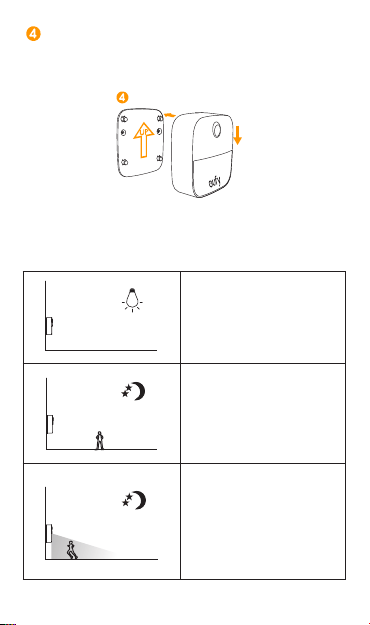
Richten Sie die Befestigungslöcher auf der Rückseite
von Lumi mit den Stiften an der Montagehalterung aus.
Schieben Sie Lumi nach unten, um sie zu befestigen.
UP
So Verwenden Sie Lumi
Lumi
T
Lumi schaltet sich nicht in
hellen Umgebungen ein.
Lumi
In dunklen Bereichen schaltet
sich Lumi nicht ein, wenn
innerhalb von drei Metern
des Sensors keine Bewegung
erkannt wird.
Lumi
In dunklen Bereichen schaltet
sich Lumi automatisch
ein, wenn
innerhalb von
drei Metern des Sensors
Bewegungen erkannt werden.
Das Licht schaltet sich
automatisch aus, wenn 15
Sekunden lang keine Bewegung
erkannt wird.

17 Deutsch
Problembehebung
Das Licht
schaltet sich
nicht ein.
• Lumi ist in einem Bereich mit zu viel Licht
installiert. Stellen Sie Lumi in einen Bereich
mit weniger Licht auf.
• Lumi ist nicht in der Lage, Bewegungen
innerhalb seines effektiven Bereichs zu
erkennen. Stellen Sie sicher, dass es keine
Hindernisse gibt, die den Bewegungssensor
von Lumi blockieren.
• Die Batterien sind leer. Ersetzen Sie die
Batterien.
Das Licht ist zu
dunkel.
• Die Batterien sind fast leer. Ersetzen Sie die
Batterien.
Das Licht
schaltet sich in
hellen Räumen
nicht aus.
• Wenn Lumi durch Bewegungen im
Dunkeln aufleuchtet und eine weitere helle
Lichtquelle eingeschaltet wird, leuchtet Lumi
und schaltet sich nur aus, wenn der Sensor
15 Sekunden lang keine Bewegung erkennt.
Technische Daten
Modell T1301
Lumen 0.1 W
Batterie 3 AAA Batterien (nicht enthalten)
Maße 72 × 72 × 32 mm / 2.8 × 2.8 × 1.3 in
Gewicht 40 g / 1.4 oz
Technische Daten können ohne vorherige
Ankündigung geändert werden.

Deutsch 18
Notice
Dieses Symbol bedeutet, dass das Produkt nicht mit
dem Hausmüll entsorgt werden darf, sondern bei einer
geeigneten Sammelstelle für das Recycling abgegeben
werden muss. Die ordnungsgemäße Entsorgung und das
Recycling tragen dazu bei, die natürlichen Ressourcen,
die Gesundheit und die Umwelt zu schützen. Weitere
Informationen zur Entsorgung und zum Recycling dieses
Produkts erhalten Sie von Ihrer zuständigen Kommune,
Ihrem Entsorgungsdienst oder dem Geschäft, in dem
Sie dieses Produkt gekauft haben.
Kundenservice
18MonatebeschränkteHerstellergarantie
LebenslangertechnischerSupport
(US) +1 (800) 988 7973 Mon-Fri 9:00am - 5:00pm (PT)
(UK) +44 (0) 1604 936200 Mon-Fri 6:00 - 11:00 (GMT)
(DE) +49 (0) 69 9579 7960 Mo-Fr 6:00 - 11:00
(
中国
) +86 400 0550 036
周一至周五
9:00 - 17:30
(
日本
) +81 03 4455 7823
月 - 金
9:00 - 17:00
@EufyOcial
@eufy_de
@EufyOcial
@EufyOcial

19 Español
Tabla de contenidos
20 Lámpara de noche adhesiva Lumi
20 Introducción
21 Resumen
21 Colocación de las pilas
22 Colocación de su Lumi
25 Uso de su Lumi
26 Resolución de problemas
26 Especificaciones
27 Servicio de atención al cliente

Español 20
Lámpara de noche adhesiva Lumi
Instrucciones de seguridad importantes:
• Lea y siga todas las instrucciones de seguridad:
• Este dispositivo es solo para uso en interiores.
• Este dispositivo no debe exponerse a agua de goteo ni a
salpicaduras de agua.
• Este dispositivo funciona con tres pilas AAA (no incluidas).
No intente recargarlas si usa pilas no recargables.
• Este dispositivo usa una fuente de luz no reemplazable.
Cuando la fuente de luz llega al final de su vida útil, el
dispositivo debe reemplazarse.
• No la coloque cerca de ninguna fuente de calor.
• No coloque ninguna fuente de peligro sobre este
dispositivo (p.ej., objetos que contengan líquido, velas
encendidas).
• No mezcle diferentes tipos de pilas juntas, p.ej., pilas de
ion de litio (Li-ion) y de níquel e hidruro metálico (NiMH).
• No mezcle pilas nuevas y usadas.
• No use objetos metálicos para conectar los polos de la
pila.
• Las pilas agotadas deben desecharse de acuerdo con las
normas ambientales locales.
Introducción
Gracias por comprar la lámpara de noche adhesiva Lumi
(de aquí en adelante llamada «Lumi»). Lumi usa una luz y
tecnología de detección del movimiento para iluminar espacios
oscuros de manera temporal con una luz tenue.
21 Español
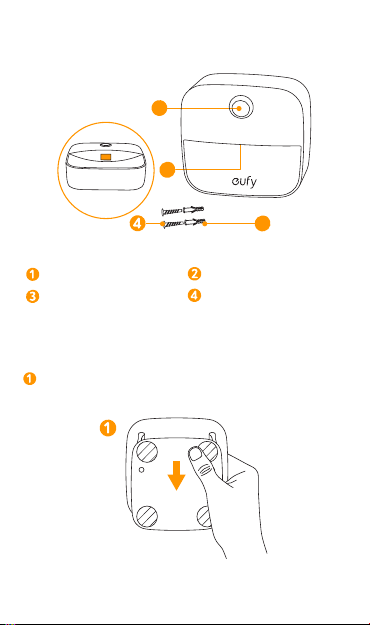
Resumen
2
1
3
Sensor de movimiento Luz LED
2 tarugos 2 tornillos
Colocación de las pilas
Deslice hacia abajo el soporte de montaje de la parte
posterior de su Lumi para retirarlo.
Español 22
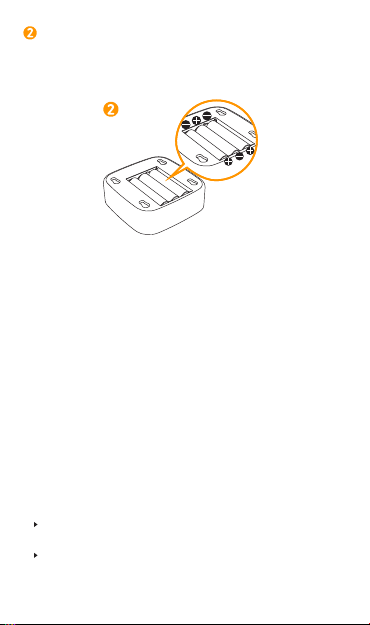
Coloque tres pilas AAA. Asegúrese de que los polos
positivo y negativo se encuentren en la dirección correcta
de polaridad, según se indica en el compartimiento para
las pilas.
Colocación de su Lumi
Después de colocar las pilas, tiene dos maneras de instalar su
Lumi. Al elegir un lugar adecuado para su Lumi, recuerde lo
siguiente:
• Debe colocarse en un lugar oscuro.
• No debe colocar su Lumi en un lugar que pueda interferir con
su trabajo o descanso.
• No debe colocar su Lumi en un lugar que mire directamente
hacia un haz infrarrojo.
• El sensor de movimiento está diseñado para cubrir un arco
de aproximadamente 120 grados de manera horizontal y
para detectar el movimiento de hasta 3 metros/10 pies de
distancia.
La distancia y el alcance eficaces están sujetos a la temperatura
del ambiente.
Asegúrese de que el área que se encuentra en frente del sensor
de movimiento no tenga obstrucciones.
23 Español
Opción A: Colocación de la Lumi con el soporte de montaje
adhesivo:
Quite la lámina protectora
de la parte posterior del
soporte.
Coloque el soporte en
la pared. Asegúrese de
que la flecha del soporte
apunte hacia arriba.
UP
Alinee los orificios de la parte posterior de la Lumi con
los pernos del soporte; deslice la Lumi hacia abajo para
colocarla.
Seleccione el tipo de superficie en la que colocará el
soporte de montaje con cuidado. Si quita el soporte de
montaje, es posible que se dañe la superficie.

Español 24
Opción B: Colocación de la Lumi con los tornillos suministrados:
Mida una distancia de 1,97in (50mm) entre dos puntos
para los tarugos. Use una lapicera para marcar los puntos a
perforar.
1.97in/50mm
Use una broca para realizar dos perforaciones profundas
de 0,9in (2,3cm) y coloque los tarugos dentro de los
orificios por completo.
0,9 in / 2,3 cm
Alinee el soporte de montaje con los tarugos y sosténgalo
contra la pared. Inserte los tornillos en los orificios de
fijación y atorníllelos con firmeza dentro de los tarugos.
Asegúrese de que la flecha del soporte de montaje apunte
hacia arriba al colocarlo.
UP
25 Español
Alinee los orificios de montaje de la parte posterior de la
Lumi con los pernos del soporte de montaje; deslice la
Lumi hacia abajo para colocarla.
UP
Uso de su Lumi
Lumi
T
La Lumi no se enciende en
lugares iluminados.
Lumi
En lugares oscuros, la Lumi no
se enciende si no se detecta
movimiento dentro de su alcance
eficaz.
Lumi
En lugares oscuros, la Lumi se
enciende automáticamente si
se detecta movimiento dentro
de su alcance eficaz. La luz
se apaga automáticamente
si no se detecta movimiento
durante 15 segundos.

Español 26
Resolución de problemas
La luz no
enciende.
• La Lumi se encuentra en un lugar con
mucha luz. Mueva la Lumi a un lugar con
menos exposición a la luz.
• La Lumi no detecta el movimiento dentro
de su alcance eficaz. Asegúrese de que no
haya obstrucciones que bloqueen el sensor
de movimiento de la Lumi.
• Las pilas se agotaron. Reemplácelas.
La luz es tenue. • Las pilas tienen poca carga. Reemplácelas.
La luz no
se apaga
en lugares
iluminados.
• • Cuando la Lumi se enciende por el
movimiento en la oscuridad y luego se
enciende otra fuente de luz intensa, la Lumi
seguirá encendida y solo se apagará si el
sensor no detecta movimiento durante 15
segundos.
Especificaciones
Modelo T1301
Vataje de la luz 0,1 W
Pila 3 pilas AAA (no incluidas)
Dimensiones 72 × 72 × 32 mm/2,8 × 2,8 × 1,3 in
Peso 40 g/1,4 oz
Las especificaciones están sujetas a cambios sin previo aviso.

27 Español
Aviso
Este símbolo significa que el producto no debe
desecharse como residuo doméstico y debe entregarse
a una instalación de recolección apropiada para
reciclarlo. El desecho adecuado y el reciclaje ayudan a
proteger los recursos naturales, la salud humana y el
medio ambiente. Para obtener más información sobre
el desecho y el reciclaje de este producto, comuníquese
con su municipio local, el servicio de desechos o el
comercio en el que compró este producto.
Servicio de atención al cliente
Garantíalimitadade18meses
Soportetécnicoilimitado
(US) +1 (800) 988 7973 Mon-Fri 9:00am - 5:00pm (PT)
(UK) +44 (0) 1604 936200 Mon-Fri 6:00 - 11:00 (GMT)
(DE) +49 (0) 69 9579 7960 Mo-Fr 6:00 - 11:00
(
中国
) +86 400 0550 036
周一至周五
9:00 - 17:30
(
日本
) +81 03 4455 7823
月 - 金
9:00 - 17:00
@EufyOcial
@EufyOcial
@EufyOcial
@EufyOcial

日本語 28
目次
29 安全上のご注意
29 ご案内
30 外観
30 電池の取り付け方
31 Lumi の設置方法
34 Lumi の使用方法
35 トラブルシューティング
35 仕様
36 カスタマーサポート

29 日本語
安全上のご注意
必ずこの「安全上のご注意」をお読みの上、正しく安全にお
使いください。
• 本製品は屋内でのみ使用できます。
• 本製品に水がかからないようにしてください。
• 本製品をご使用の際には、単 4 形電池が 3 本必要となります
( 本製品に付属はしておりません )。充電式でない電池をご使
用の際は、再充電を実施しないでください。
• 本製品の光源は交換ができません。光源が切れたら本製品は
交換する必要があります。
• 本製品を熱源の近くに設置しないでください。
• 本製品の上に、危険の原因になる物 ( 液体の入った容器や火の
ついたろうそくなど ) を置かないでください。
• リチウムイオン電池とニッケル水素電池など、異なる電池を
組み合わせて使用しないでください。
• 新しい電池と使用済みの電池を合わせて使用しないでくださ
い。
• 金属性の物体を使って、乾電池の端子に接続しないでくださ
い。
• 使わなくなったバッテリー ( 電池 ) は、各自治体のごみの分
別方法に従って安全に処理してください。
ご案内
LumiStick-OnNightLight( 以下 Lumi) をご購入いただきあり
がとうございます。
Lumi はライトおよびモーションセンサー技術を採用し、暗い
場所を優しい光で必要な時だけ照らします。

日本語 30
外観
2
1
3
モーションセンサー LED ライト
取り付け用プラグ (2
個)
ねじ(2本)
電池の取り付け方
Lumi の背面にある取り付け用ブラケットをスライドして
取り外してください。
31 日本語
単 4 電池 3 本を+と-の電極をそれぞれ正しい位置に取り付
けてください。
Lumi の設置方法
電池取り付け後、Lumi を設置する際に、下記の 2 種類の
設置方法を選ぶことができます。また Lumi の設置場所
を選ぶ際に、次の項目を参考にしてください。
• 暗い場所に設置してください。
• 仕事や睡眠を干渉するような場所には設置しないで
ください。
• 直接赤外線が当たるような場所には設置しないでく
ださい。
• モーションセンサーは Lumi から水平に約 120 度の孤
内かつ 3m の範囲内での動作を検知します。
検知する距離や範囲は周囲の気温によって変化しま
す。
モーションセンサーの前方に障害物を置かないでく
ださい。
日本語 32
設置方法 A:粘着式取り付け用ブラケットを使用する。
ブラケット背面の保
護フィルムを外して
ください。
壁にブラケットを留めてく
ださい。その際に、ブラケッ
トの矢が上を向くようにし
てください。
UP
Lumi の背面にある取り付け用の穴と取り付け用ブラケ
ットのピンを合わせ、スライドしながら取り付けてくだ
さい。
T
取り付け用ブラケットを接着する表面の材質を
慎重に選んでください。
ブラケットを取り外す際に、表面に傷がつくおそ
れ があります。

33 日本語
設置方法 B:同梱のねじを用いて Lumi を設置する。
プラグ設置のため、ペンなどで穴を空ける部分に印を付
けてください (2 つのポイント間の距離は 50mm としま
す )。
50mm
手順 1 で印をつけた 2 か所にドリルを使って、深さ 2.3
㎝の穴を開けてください。そこにプラグをしっかりと挿
入してください。
23mm
取り付け用ブラケットをプラグに合わせ、壁に固定しま
す。ネジを挿してしっかりとプラグを固定してください。
設置するときに取り付け用ブラケットの矢が上を向くよ
うにしてください。
UP
日本語 34
Lumi の背面にある取り付け用の穴と取り付け用ブラケットの
ピンを合わせ、スライドしながら取り付けてください。
UP
Lumi の使用方法
Lumi
T
Lumi は明るい場所では点灯しま
せん。
Lumi
暗い場所であっても、モーショ
ンセンサーの検知可能範囲内で
動作を検知できない場合には
Lumi は点灯しません。
Lumi
Lumi は暗い場所でモーションセ
ンサー検知可能範囲内で動作を
検知すると自動で点灯します。
点灯中に動作が 15 秒間検知され
なかった場合、自動で消灯しま
す。

35 日本語
トラブルシューティング
ライトが点灯しま
せん。
• Lumi が明るすぎるところに設置されてい
ます。光にさらされない場所に移動させて
ください。
• 検知可能範囲内で動作が検知できません。
モーションセンサーの機能を妨げる障害物
がないか確認してください。
• 電池残量がありません。乾電池を交換して
ください。
ライトが暗い。
• 電池残量が少なくなっています。乾電
池を交換してください。
明るい場所でも消
灯しない。
• Lumi が暗い場所で動作を検知して点灯
している時に他の光源が点灯した場合、
Lumi は点灯し続け、15 秒間動きが検知
できなかった場合のみ消灯します。
仕様
品番 T1301
ライトのワット数 0.1W
バッテリー ( 乾電池 ) 単4電池3本(別売)
サイズ 72×72×32mm
重さ 40g/1.4oz
仕様は予告なく変更されることがあります。

日本語 36
カスタマーサポート
18 ヶ月保証
テクニカルサポート
03-4455-7823|Mon-Fri9:00-17:00( 日本 )
@EufyOcial
@EufyOcial
@EufyOcial
@EufyOcial