


3
CONTENTS
Safety and warnings 4
Control panel 6
Safety features 7
First use 8
Wash cycles 10
Wash preparation 12
Wash modifiers 15
Auto Dose 18
Favourites 19
Option Adjustment mode 20
Saving water, energy and the environment 26
Wi-Fi and remote 27
Care and cleaning 28
Before you call for service 31
Fault codes 32
Troubleshooting 33
Manufacturer’s warranty 38
Customer care 40
4
SAFETY AND WARNINGS
!
WARNING!
Electrical Shock Hazard
Failure to follow this advice may result in
electrical shock or death.
• If you are using an extension cord or a portable
electrical outlet device (eg multi-socket outlet
box), ensure that it is positioned so that it does
not come into contact with water or moisture.
READ AND SAVE THIS GUIDE
When using your clothes washer, follow basic precautions, including thefollowing:
General
z
This product has been designed for personal, family or household use. This product is
not designed for any commercial use. Any commercial use will terminate this products
manufacturer’s warranty.
z
A damaged power cord must be replaced by a Fisher&Paykel trained and supported
service technician or similarly qualified person in order to avoid a hazard. Do not use
the appliance until it has been repaired to avoid a risk of electric shock.
z
Do not operate this machine if it has been damaged during transport. Contact your
Fisher&Paykel dealer or Fisher&Paykel trained and supported service technician.
z
This clothes washer is not intended for use by persons (including children)
with reduced physical, sensory or mental capabilities, or lack of experience and
knowledge,unless they are supervised or given instructions on how to use the
washerby someone responsible for their safety.
z
Keep children away from the washer while it is in operation.
z
Supervise children to ensure they do not play with the washer or climb inside thedrum.
z
The washer should only be used for washing and rinsing of textiles where this
isindicated on the care label.
z
Do not add petrol, dry-cleaning solvents, or other flammable or explosive substances to
the wash water. These substances give off vapours that could ignite or explode.
z
Do not wash articles that have been previously cleaned in, washed in, soaked in,
or spotted with gasoline, dry-cleaning solvents, or other flammable or explosive
substances as they give off vapours that could ignite or explode.
z
The lid will be locked when is pressed at the start of the cycle for safety reasons.
To unlock the lid and open it during the cycle (not recommended), press . Never
force the lid open.
z
Do not touch or operate the machine with wet hands or with bare-feet.
z
Read and follow the detergent manufacturers’ instructions carefully. Instructions on
how to use the detergent will be clearly indicated on the pack. Remember to store your
detergents out of the reach of children.

5
SAFETY AND WARNINGS
MODEL CODE MAX CAPACITY* (KG)
WL1064P1 10
WL1264P1 12
*Capacity refers to the maximum dry weight of items the washer can wash at any one time.
(Note: Cycle dependent)
z
Do not overload your washing machine beyond its rated capacity.
z
Do not wash an electric blanket in your washer unless the care label specifically states
it is safe to do so.
z
Do not wash curtains in this washer, as sunlight makes them brittle and they may
disintegrate during washing.
z
The only user-removable parts of the washer are the inlet hose(s), the drain hose, the
dispenser funnels (tops) and lint filters. No other parts are designed to be removed by
anyone other than a Fisher&Paykel trained and supported service technician.
Installation
z
For guidance on how to install your product, please refer to installation instructions
provided with your product.
Water supply requirements:
z
Inlet water static pressure: Max. 1MPa (145psi), Min. 50kPa (7.3psi).
z
Inlet water flow rate at tap: Min. 8 litres /min.
z
A pressure-reducing valve must be installed if pressure is higher than 1MPa.
z
For optimum wash performance check the supply pressure is within the
recommendedrange.
z
New hose sets provided with the washer should be used to connect the washer to the
water mains. Old hose sets should not be re-used.
z
We recommend the inlet hose(s) are changed every 5 years. WARNING: Failure to do so
may result in a flood and damage to property.
z
The hot water temperature should not exceed 65°C and the cold water temperature
not exceed35°C. Temperatures above these may cause the machine to fault or cause
damage to the machine.
z
Install the machine on a solid and level floor surface ensuring it has at least 20mm
clearance on each side. The washer must not be installed on any textured floor
coverings (eg carpet, rugs).
Disposal
z
When disposing of the washer, it is recommended that the lid is removed to
avoidchildren getting trapped inside, and that the electrical cable is cut off
close to thewasher.

6
CONTROL PANEL
1 POWER Press to turn the washer ON/OFF.
2 Wash Cycles Turn the dial to select the desired cycle for your load.
3 Remote Press and hold to control washer from the Fisher & Paykel app
when Wi-Fi is enabled.
4 Delay Start Press to delay start time.
5 Display Shows the following:
z
The remaining time in the cycle that is currently running.
z
The estimated completion time of the cycle when the
machine is turned on.
z
Delayed start time of wash cycle.
z
Notifications if an error is detected or a warning is necessary.
z
Secondary option information.
6 Wash progress
indicators
Indicates the current status of the wash cycle.
z
All lights are illuminated at the start of the wash cycle.
z
The light of the current status flashes, and then turns off
once completed.
7 Auto Dose Press to select
MANUAL or AUTO dispensing of detergent.
8 Optimise Wash Press to select
SANITISE and/or ECO.
9 Water Level Press to increase or decrease water level.
!0 Wash Temp Press to increase or decrease water temperature.
!1 Spin Speed Press to increase or decrease washer spin speed.
!2 Wash Options Press to select
SOAK or RINSE +.
!3 Wash Boost Press to select
PRE WASH or WASH +.
!4 Keylock Press and hold for three seconds to disable all buttons on the
control panel.
POWER will not be disabled when KEYLOCK is active.
!5 START/PAUSE Press to start or pause the selected wash cycle.
1 2 3 4
5
7 8 9 !1!0 !2 !3
6 !5
!4
7
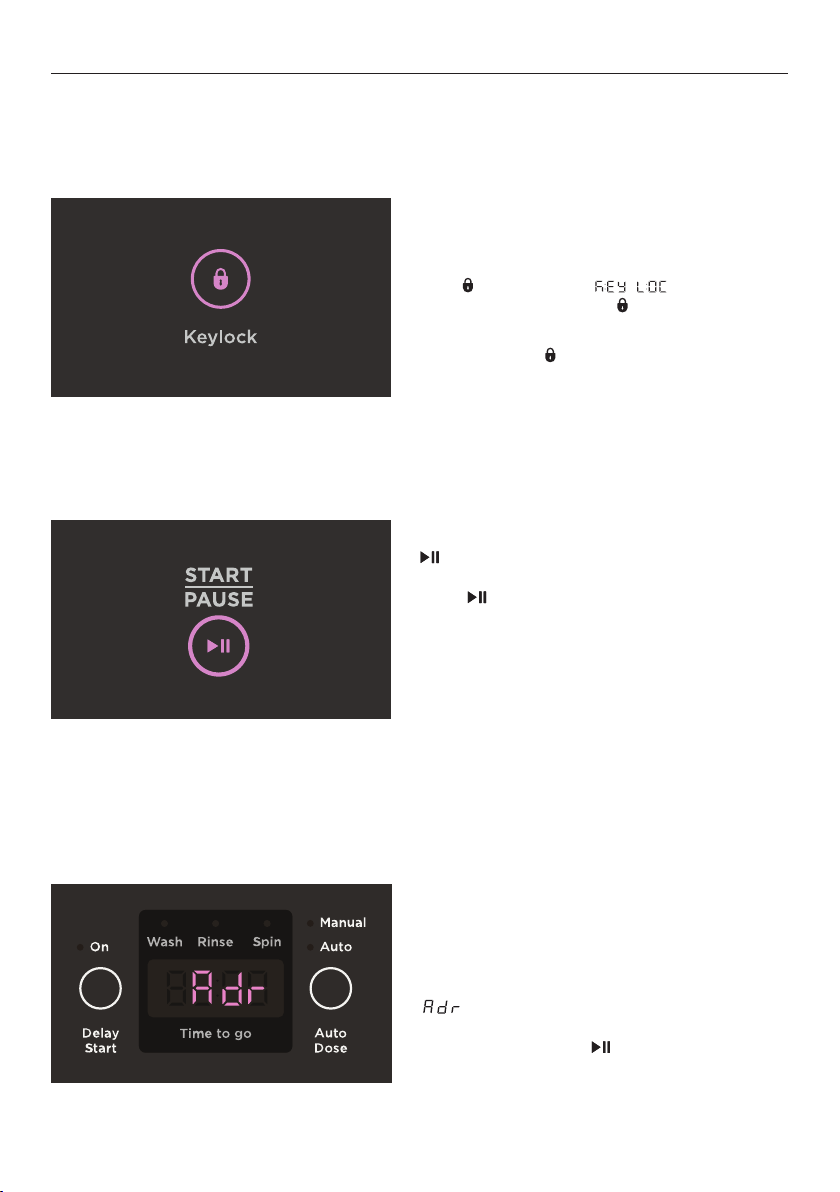
will illuminate when the LID LOCK is active.
To unlock the lid at any time during the cycle,
press . In some circumstances, there may
be a delay before the lid can be opened, for
safety reasons.
Do not obstruct the lid lock slot. Do not try
to disable the lid lock.
Turn
KEYLOCK on:
After starting your selected cycle, press and
hold
for 3 seconds. will flash
twice in the display and will illuminate.
Turn
KEYLOCK off:
Press and hold
for 3 seconds.
If you pause your washer with water in
the drum,
AUTO DRAIN will activate after 3
minutes. This will drain the water in the drum
to a safe level.
will be displayed while AUTO DRAIN is
in operation. The cycle can be restarted at
anytime by pressing .
SAFETY FEATURES
Keylock
Keylock can be used to lock the control panel when not in use. Everything except
POWER
will be locked when active. If washer is turned off while KEYLOCK is active, KEYLOCK will
remain active when the washer is turned back on.
Lid lock
The lid of your washer will be locked during the wash cycle to ensure safety for you and
your family.
Auto Drain
Unsupervised clothes washers filled with water can present a drowning hazard to small
children. In order to minimise any risk of this type of accident, your washer has been pre-
programmed to know when this potential hazard is created and drains the wash water to a
safe level.
8
FIRST USE
All controls only require a gentle press to activate. For best results, avoid repeated
interruptions to the cycle, such as pressing , and ensure all items are removed as soon as
the cycle has finished.
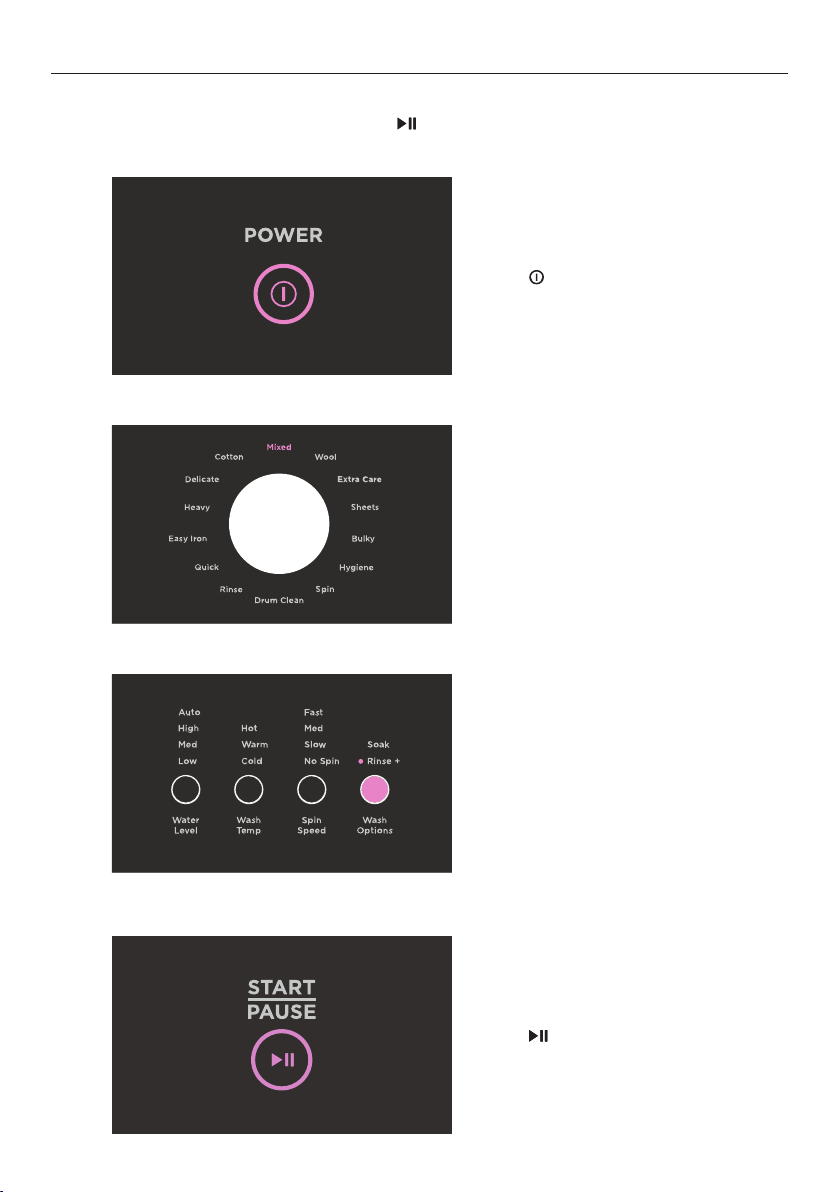
1
2
4
3
Press to activate your washer.
Select your desired wash cycle using
the dial. The default cycle is
MIXED.
Press
to begin the cycle.
Select wash modifiers. Refer to ‘Wash
Modifiers’ for more details.

9
FIRST USE
1
1
1
To pause your washer during the
cycle, press .
To cancel a cycle or power the washer
off at any time, press
.
During a cycle, the progress indicators
will illuminate to show the stage of
the cycle that is being performed.
Pausing a cycle
Cancelling a cycle
Progress indicators

10
WASH CYCLES
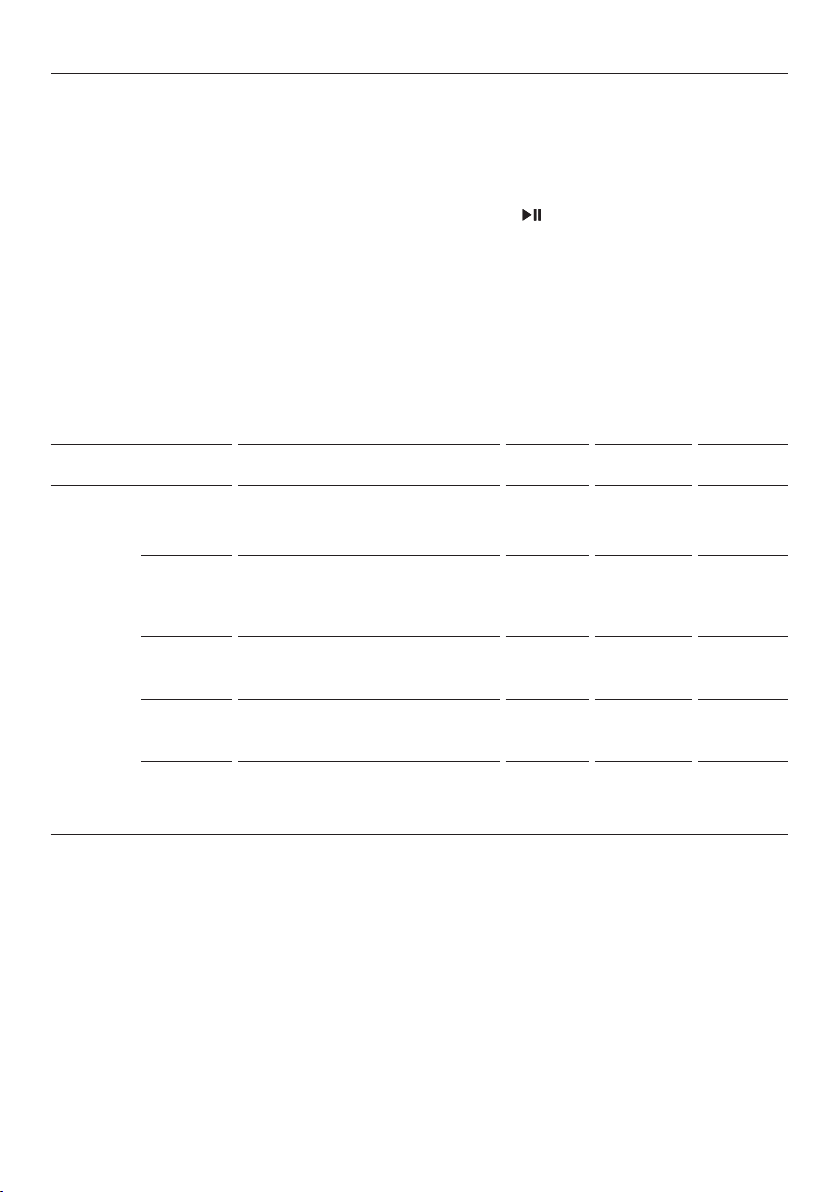
Wash cycle guide
Your washer has a number of wash cycles to suit your needs. Selecting the most
appropriate cycle for each wash load will help ensure you get the best wash result.
CYCLE WASH DESCRIPTION
MAX LOAD
(KG)
WASH TEMP SPIN SPEED
Mixed
A wash for mixed everyday loads
including cottons and blends.
10 or 12 Warm/Cold Fast
Cotton*
A cycle for normally soiled cotton
items.
10 or 12 Warm Fast
Delicate A gentle wash with slow spin speed. 5 Warm / Cold Slow
Heavy
A stronger wash for heavily soiled,
durable items.
10 or 12 Warm Fast
Easy Iron
Reduced spin speed to minimise
creasing.
4 Warm / Cold
Medium
(MED)
Quick
Quick wash of around 30 minutes for
smaller lightly soiled loads and brand
new clothes.
4 Warm Fast
Wool
Extra gentle wash and a medium
spin.
5 Warm / Cold
Medium
(MED)
Sheets
A wash tailored to washing bed
linen.
8 Warm Fast
Bulky
A warm, gentle wash with more
water and a slow spin speed.
4 Warm Slow
Hygiene
A hot concentrated wash with
multiple rinses.
6 Hot Fast
Rinse
Designed for items that only require
rinsing and spinning.
10 or 12 Cold only Fast
Spin
Designed for spinning water out of
wet items.
10 or 12 n/a Fast
Drum clean
A hot cycle with a soak to clean the
build up of dirt in the washer.
n/a Hot
Medium
(MED)
11
Washing bulky items
The
BULKY cycle takes special care of bulky items. Bulky garments and bedding wash most
effectively when they can move freely. Ensure that there is sufficient room in the bowl for
the load to move during the wash.
When washing a single bulky item add a large beach towel to the wash, to ensure the load
is balanced for an effective spin.
Bulky items may include: duvet inners, blankets, throws, sleeping bags, jackets, bedding
underlays and comforters.
*
COTTON cycle with MANUAL, ECO, HIGH, WARM and FAST selected is the recommended water
and energy saving cycle for normally soiled everyday washing.
This cycle has a 2-step water fill to achieve the required water level and temperature for the
best cleaning result.
First Fill - Once cycle and wash modifiers are selected and
is pressed, both hot and cold
water will flow into the inner drum. It is recommended when using this cycle to dissolve
the detergent in 1 litre of warm water and add straight onto the clothes immediately when
the machine starts. The warm water temperature helps to dissolve detergent quickly. The
washing operation starts at the end of the hot water fill and is followed by a 5-minute
(approximately) soak-agitation session to help the detergent mix completely with
the laundry.
Second Fill - The second fill is in order to reach the selected water level and make the
clothes completely soaked in water to achieve a better wash result.
** You can select a different sub-cycle from the default within
EXTRA CARE by using the app.
The cycle selected will become the default extra care cycle for all future cycles, this can be
changed at anytime by using the app.
WASH CYCLES
CYCLE WASH DESCRIPTION
MAX LOAD
(KG)
WASH TEMP SPIN SPEED
Extra
Care**
Towels
(default)
A cycle designed for washing towels. 10 or 12 Warm Fast
Denim
A wash with low temperatures to
reduce denim from fading.
3 Cold Fast
Sports
A wash tailored to washing sports
type clothing.
4 Warm / Cold Fast
Outdoor
Cycle designed for washing outdoor
wear, like jackets.
4 Warm Slow
Synthetic
Designed for your everyday
synthetics and poly-cotton blends.
4 Warm Fast

12
WASH PREPARATION
Sorting
Sort items according to colour, fabric type, and soil type. Wash fine, delicate fabrics
separately from thick, heavy fabrics. Always separate coloured items from whites, especially
when they are new. Colour run could be an issue if you wash items at highertemperatures.
Some soils, like mud and blood are best washed in cold water. Oilysoils (eg some foods
and marks on shirt collars) are best washed in warm water. Separate out sheets and towels,
wash these separately on the
SHEETS and EXTRA CARE (TOWELS) cycles.
The care label will tell you about the fabric of the garment and how it should be washed.
Before you load
z
Check pockets for items that could damage your clothes or get caught in the washer.
z
Close zippers, hooks and eyes, and other fastenings (ie fasten the opening of duvet/
doona covers) and remove loose bra wires. All these can damage both your washer
andyour clothes.
z
Place delicate items, such as lingerie, in a mesh laundry bag before placing in
the washer.
z
Pre-treat any stains, taking care not to spray pre-treaters on your washer as they can
cause damage to the plastic surfaces.
Selecting the right detergent
z
Your washer is a High Efficiency clothes washer and needs a low sudsing detergent to
prevent over-sudsing problems. This is the same type of detergent Front Loaders use.
z
We recommend the use of liquid detergents in most washing situations to achieve the
best results. This is particularly important when washing dark garments.
z
When washing woollens, use a wool detergent but use it sparingly as these are usually
very high foaming.
z
Do not use soap flakes or granulated soap powders.

13
WASH PREPARATION
Auto Dose
Where do I put my detergent?
Open the cover of the Auto Dose dispenser and fill to
‘Max’ with liquid detergent. Close the cover.
z
Only liquid detergent must be used
in the dispenser.
z
Do not fill past ‘Max’.
z
The amount of detergent dispensed per wash can
be adjusted. Refer to ‘Detergent adjustment’ below.
z
When the detergent level gets low, Lo will flash on
the display to prompt you to fill up the Autodose
detergent compartment.
Detergent adjustment
When using
AUTO you can increase or decrease the dosage for each cycle.
1
2
3
Press and hold AUTO DOSE for 3
seconds.
Turn the dial to increase or decrease
level. The default level is 3.
Press and hold
KEYLOCK for 3 seconds
to save adjustment.

14
Fabric Softener
Fabric softener should not be added when
ECO option is selected or for a RINSE cycle. The
softener will not be dispensed.
If you wish to use fabric softener we recommend:
z
Using it sparingly. Measure it carefully to ensure you do not fill above the ‘Max’ level
of the dispenser.
z
Using a fabric softener that is of a thinner consistency.
z
Clean the dispenser as soon as the cycle has finished.
z
Clean your washer regularly using the DRUM CLEAN cycle, refer to ‘Care and cleaning’.
z
Cold water washing increases the chance of scrud build-up occurring. We recommend a
warm or hot wash at regular intervals, eg every 5th wash.
Adding the fabric softener
Always follow the manufacturer’s guidance for the
correct dosage. Measure the softener out into the
cap and pour into the fabric softener dispenser. The
softener will remain in the dispenser until the deep
rinse where water flushes it into the drum.
If you fill beyond the ‘Max’ mark, the fabric softener
will dispense into the drum prematurely and may stain
clothes, and also contribute to scrud.
A small volume of water remaining in the dispenser at
the end of the cycle is normal.
Manual Dose
Where do I put my detergent?
Place your detergent into the detergent dispenser,
located on the left side of the washer. We recommend
that you measure your detergent first.
You will notice that most of the detergent placed in
the dispenser will fall into the washer. As the washer
fills, the dispenser will be flushed of any residue. The
detergent is then mixed with water at the bottom
of the washer, dissolving and activating it to ensure
optimum wash performance.
DO NOT use your washer to soak items in bleach or sanitiser. If you have soaked items in
a bucket, do not tip the contents of the bucket into your washer. The chemicals in these
products are very corrosive to metal surfaces and can damage your washer. Rinse and
wring items out thoroughly before placing them in your washer.
WASH PREPARATION
How much detergent?
Follow the instructions on the back of the detergent packet as a guide. The correct amount
of detergent will vary depending on the amount of soil in your clothes and the size of your
load. Jeans and work clothes may need more and towels usually less.
z
If you have over-foaming problems, reduce your dosage.
z
If your clothes are not clean enough, try using a bit more.

15
WASH MODIFIERS
Once you have selected your wash cycle you may wish to change the default wash options.
Press
WASH TEMP to increase or decrease the
wash temperature.
Press
WATER LEVEL to increase or decrease
the water level.
Water Level
The washer defaults to
AUTO for most cycles. If preferred, the water level can be manually
set to one of the other available options: LOW, LOW MEDIUM (MED), MEDIUM (MED), MEDIUM
(MED) HIGH
or HIGH.
Wash Temp
Your washer offers 5 wash temperatures,
COLD, WARM COLD, WARM, WARM HOT and HOT.
Actual wash temperature settings vary per cycle. Some temperatures are not available on
some cycles.
Spin Speed
Your washer offers three spin speeds:
FAST, MEDIUM (MED) and SLOW, plus an additional
NO SPIN option.
Press
SPIN SPEED to increase or decrease the
spin speed. NO SPIN will pause the washer
at the end of the rinse, allowing you to
remove items before the final spin. Press
to restart.

16
WASH MODIFIERS
Press WASH OPTIONS to select the desired
wash modifier.
Press
WASH BOOST to select the desired
wash modifier.
Wash Options
This option allows you to add a combination of
SOAK and/or RINSE + to your cycle.
Wash Boost
This option allows you to add a combination of
PRE WASH and/or WASH + to your cycle.
WASH MODIFIER MODIFIER DESCRIPTION
Soak
Will perform a one hour soak sequence in the middle of the wash phase,
agitating periodically every minute to help remove loosened dirt and stains.
Rinse +
Adds an additional rinse to the default number of rinses to help remove any
residual detergent or soil.
WASH MODIFIER MODIFIER DESCRIPTION
Pre Wash
Starts the wash with a shorter cool wash to remove excess soil before beginning
the selected cycle. Not available using
MANUAL dose.
Wash +
Adds a short soak/wash sequence half way through the wash to boost dirt and
stain removal.
17
WASH MODIFIERS
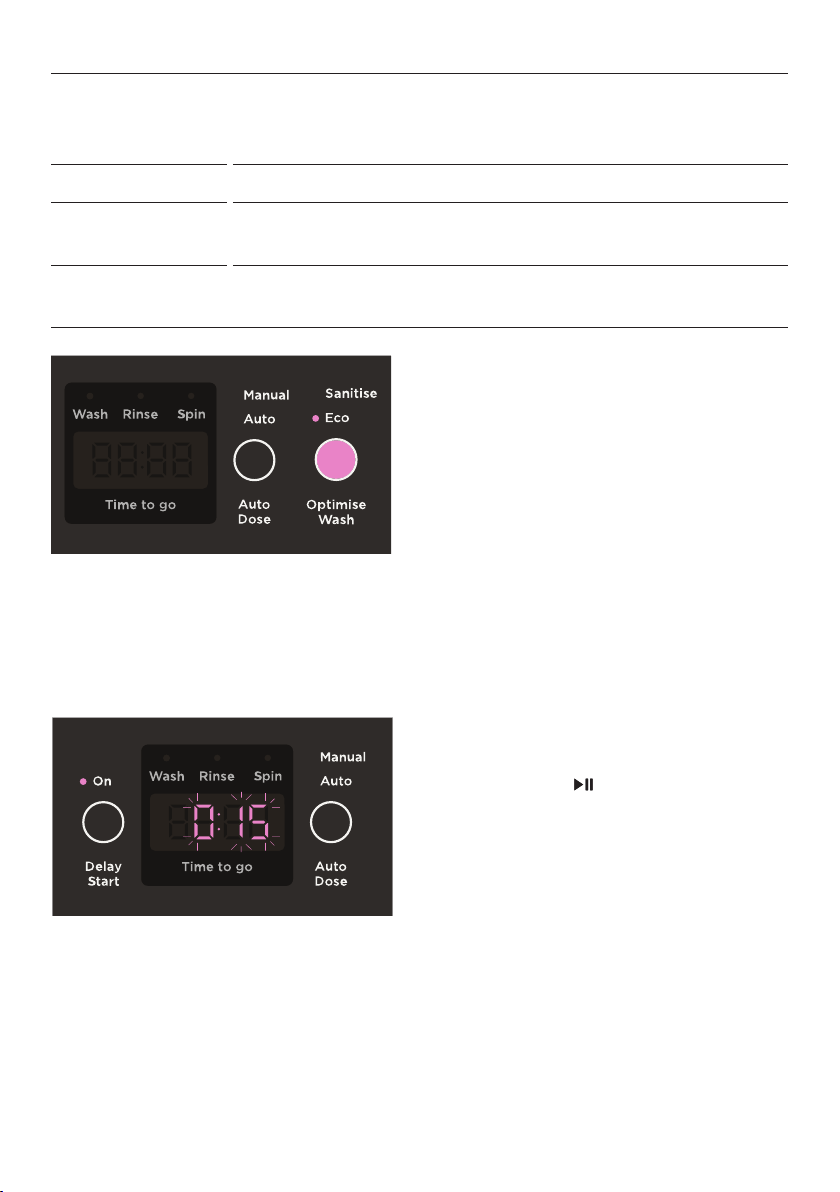
Press DELAY START to cycle through the
delay times. Press to start the countdown.
When DELAY START has begun, the time will
begin counting down.
If
DELAY START is paused, the indicator and
remaining time will illuminate solidly.
Delay Start
The
DELAY START option can delay the start of the wash cycle between 15 minutes and
12hours. Avoid using DELAY START for damp, non-colourfast items as this may cause dye run
to occur.
Press OPTIMISE WASH to select the
desired modifiers.
Optimise Wash
This option allows you to add
ECO and/or SANITISE to your cycle.
WASH MODIFIER MODIFIER DESCRIPTION
Eco
Saves energy and water by reducing the wash temperature and utilising a water-
efficient spray rinse.
Sanitise
Uses UV sanitisation during the wash and rinse phase of the cycle to
eliminate bacteria.

18
AUTO DOSE
Open the cover of the Auto Dose
dispenser and fill to ‘Max’ with liquid
detergent. Close the cover.
When using
AUTO DOSE, the amount of detergent dispensed can be increased or decreased
if required. Refer to ‘Detergent adjustment’ for details.
Ensure Auto Dose is set to
AUTO.
Liquid detergent will be dosed
automatically. Do not add detergent
to the manual dispenser when
using
AUTO.
Lo will be displayed if detergent
dispenser is low and needs refilled.
1
2

19
FAVOURITES
1
2
3
4
Using the dial, select the desired
wash cycle.
Press and hold the desired wash
modifier for 3 seconds. A long
tone will sound and SET will
display onscreen.
Adjust the desired wash modifiers.
Press
for 3 seconds to save the
selected settings. A long tone
will sound to confirm setting has
been saved.
Your washer can be programmed to remember your preferred wash modifiers for each
wash cycle.

20
OPTION ADJUSTMENT MODE
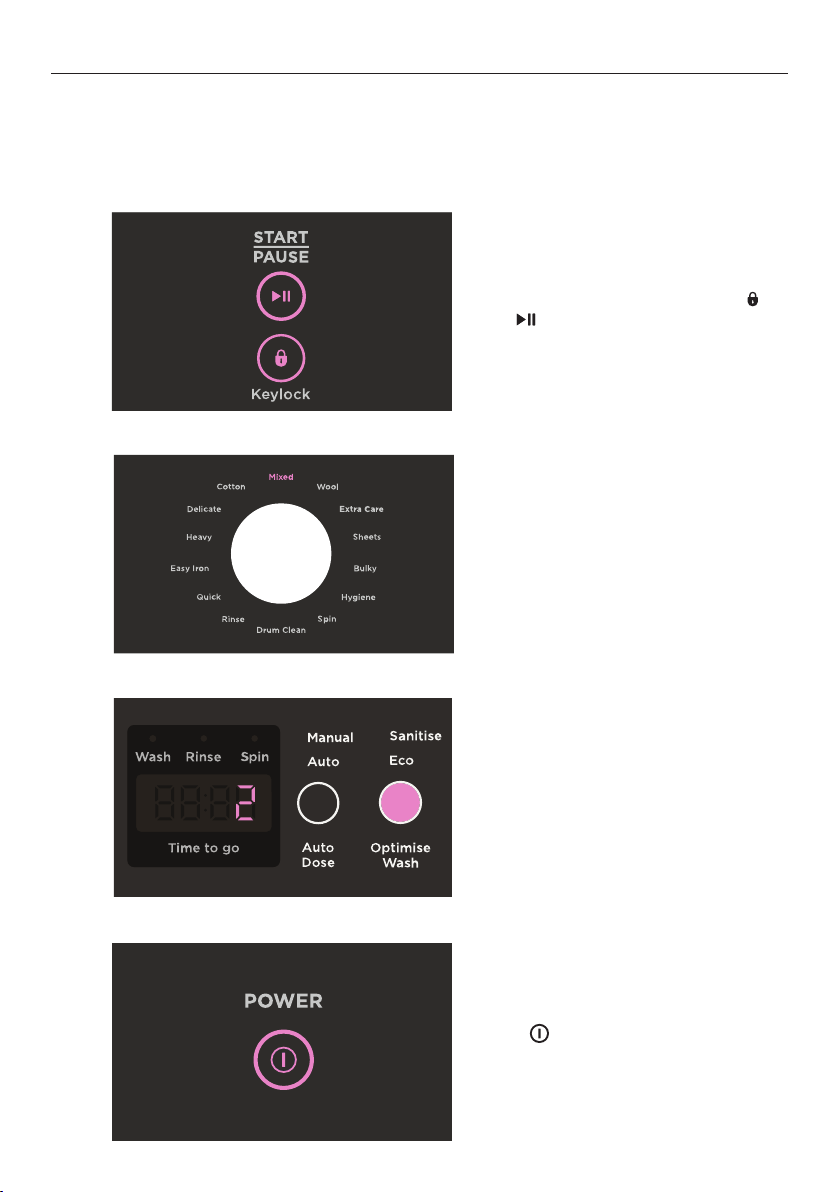
To enter Option Adjustment mode:
After using your washer a number of times you may want to personalise some of the
options to suit your wash needs.
There are a number of pre-set options, which can be changed:
z
The wash temperatures, including changing COLD to CONTROLLEDCOLD.
z
The out of balance recovery routine.
z
The number of beeps at the end of the cycle.
z
Resetting to factory default settings.
1
2
3
With the washer on at the wall, but
off at the display, press and hold
and together for 3 seconds.
oPAd will show on the display.
Use the dial and control panel to
make changes to the pre-set options.
Refer to following sections for
more detail.
Press
to save changes and exit
OPTION ADJUSTMENT MODE.
21
OPTION ADJUSTMENT MODE
Wash temperature adjustment
COLD, WARM COLD, WARM and WARM HOT can be adjusted by increments of 1°C using the
wash temperature adjustment feature. To adjust COLD further refer to ‘Controlled Cold’ over
page. HOT will be set by the hot water supply temperature and cannot be adjusted.
1
2
3
4
With the washer on at the wall, but
off at the display, press and hold
and together for 3 seconds.
oPAd will show on the display.
Select
MIXED using the dial, and
press WASH TEMP to select the wash
temperature you wish to adjust.
Press
OPTIMISE WASH to adjust the
wash temperature between -3 and 4.
0 is the default.
Press
to save changes and exit
OPTION ADJUSTMENT MODE.
22
OPTION ADJUSTMENT MODE
Controlled Cold
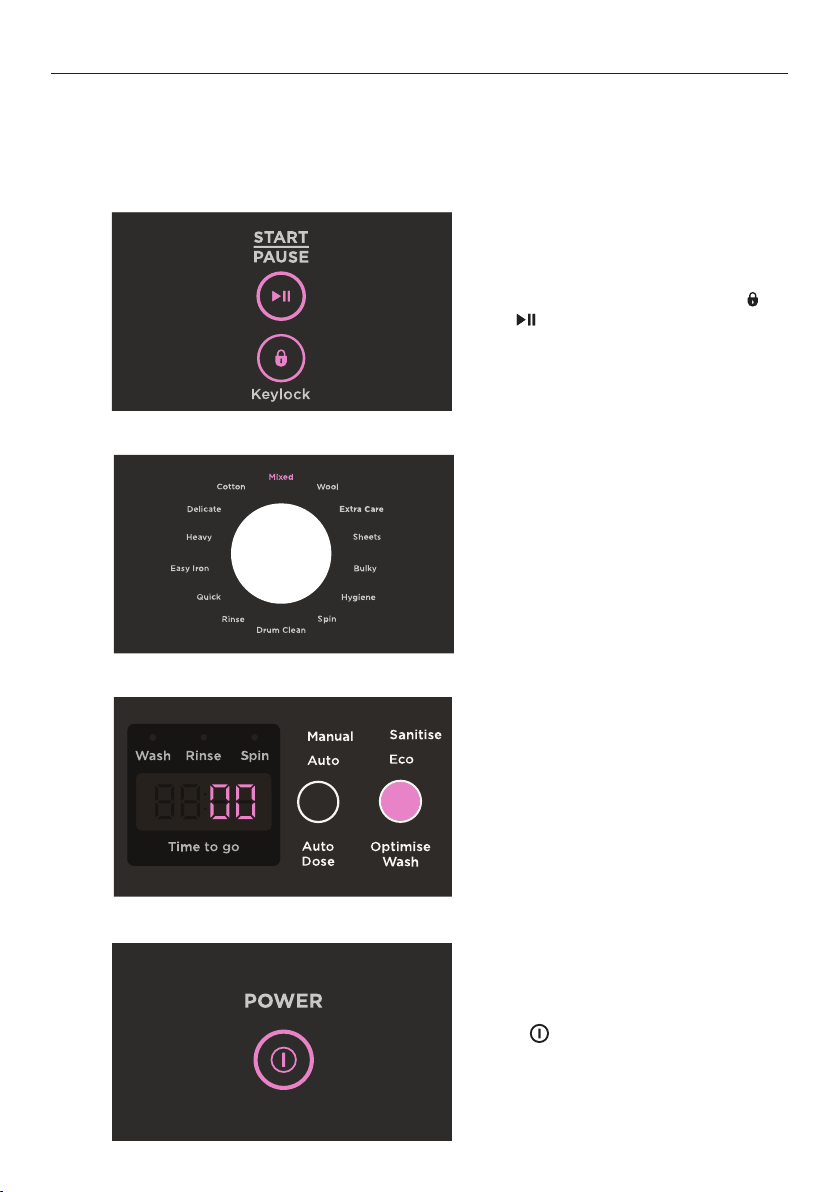
CONTROLLED COLD adds a small amount of hot water to the cold wash to raise the water
temperature to approximately 20°C. This can be effective if your water supply temperature
is very low or if the cold wash performance is not meeting your needs.
1
2
3
4
With the washer on at the wall, but
off at the display, press and hold
and together for 3 seconds.
oPAd will show on the display.
Select
MIXED using the dial,
and press WASH TEMP to select
COLD temperature.
Press
OPTIMISE WASH until 00 is
displayed on the screen. Your washer
will now adjust the cold temperature
to approximately 20°C.
Press
to save changes and exit
OPTION ADJUSTMENT MODE.
23
OPTION ADJUSTMENT MODE
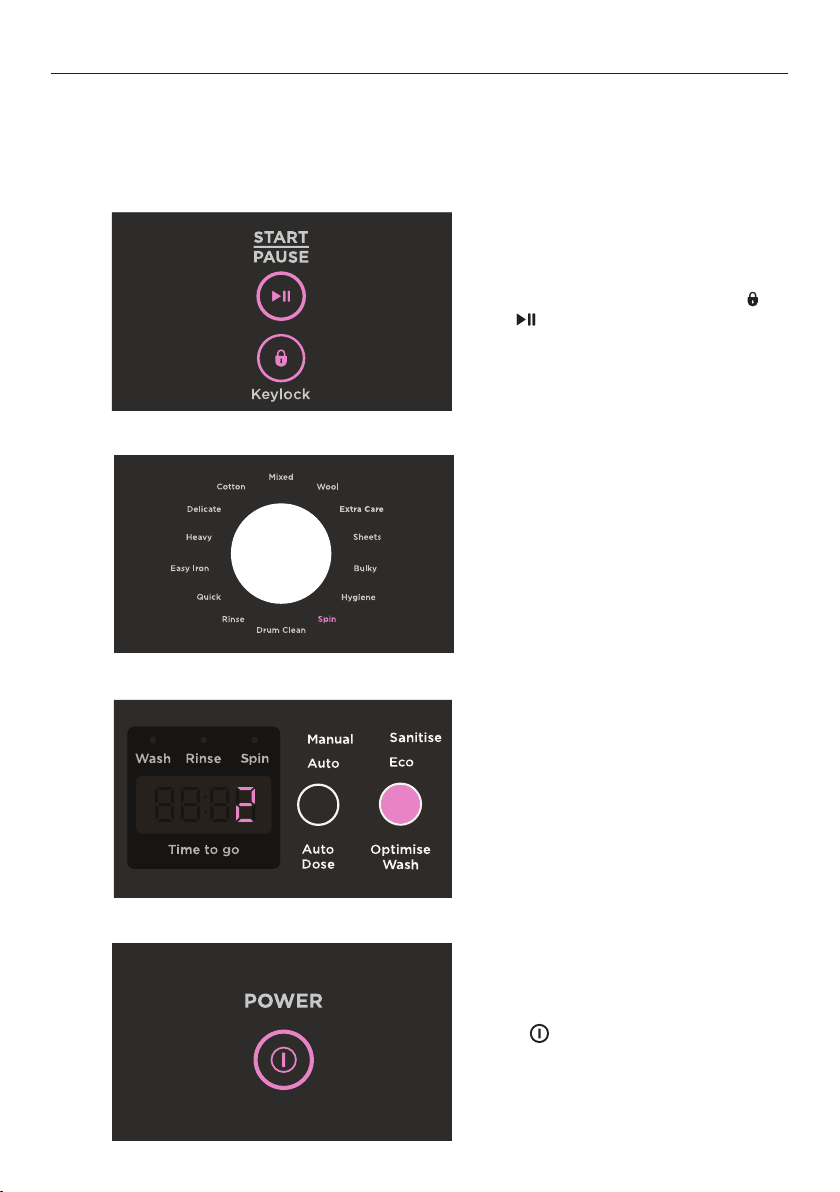
Out of balance recovery
If an out of balance load is detected, the washer will stop and try to redistribute the load.
To adjust the number of times the washer attempts to re-fill,
OUT OF BALANCE RECOVERY
can be used.
1
2
3
4
With the washer on at the wall, but
off at the display, press and hold
and together for 3 seconds.
oPAd will show on the display.
Select
SPIN using the dial.
Press
OPTIMISE WASH to set the
number of recovery cycles to 2 or 3.
Press
to save changes and exit
OPTION ADJUSTMENT MODE.
24
OPTION ADJUSTMENT MODE
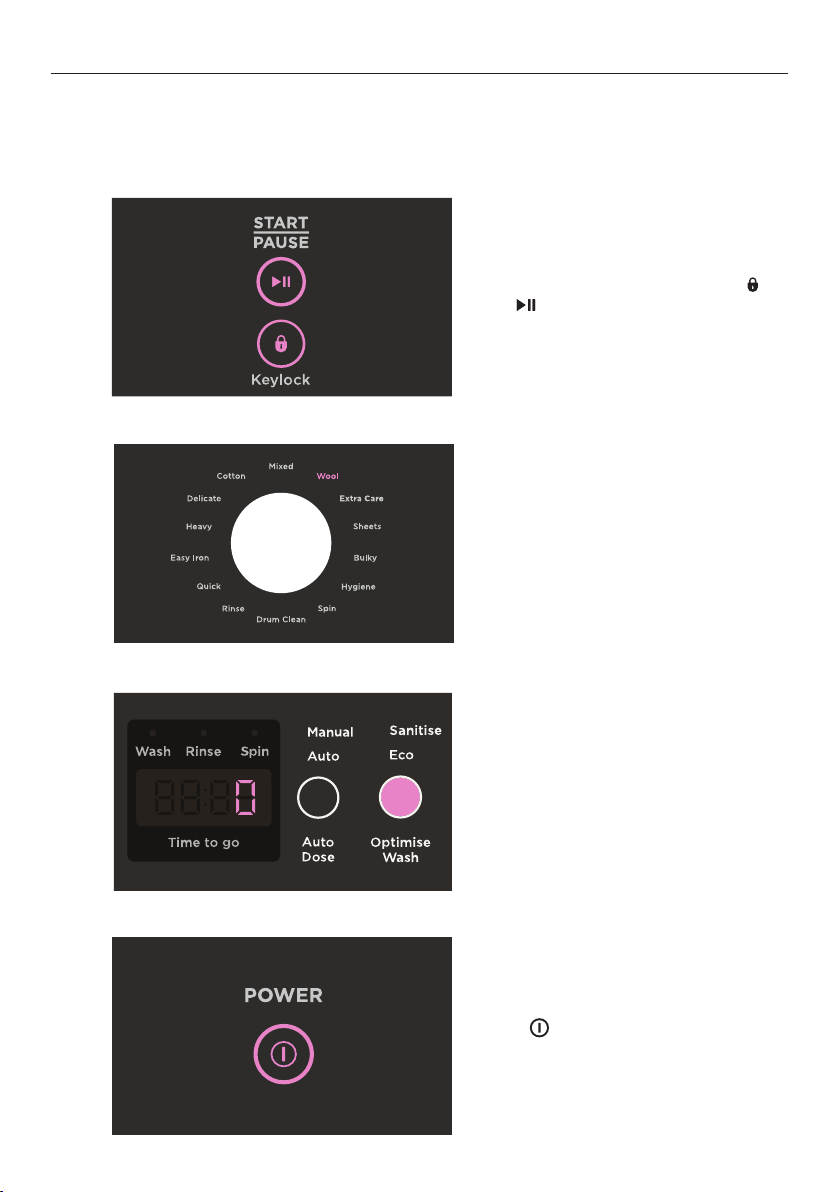
End of cycle beeps
The beeps signalling the end of a cycle can be increased or decreased using the
END OF
CYCLE BEEPS
adjustment menu.
1
With the washer on at the wall, but
off at the display, press and hold
and together for 3 seconds.
oPAd will show on the display.
4
Press to save changes and exit
OPTION ADJUSTMENT MODE.
2
Select WOOL using the dial.
3
Press OPTIMISE WASH to set the
number of beeps to 5, 15 or 0.

25
OPTION ADJUSTMENT MODE
Factory reset
Factory reset will clear any favourites saved by the user and any custom settings applied.
2
3
Select DELICATE using the dial.
The display will show rSt.
1
With the washer on at the wall, but
off at the display, press and hold
and together for 3 seconds.
oPAd will show on the display.
4
Press and hold for 3 seconds to
reset the washer to factory settings.

26
Water efficient washing machines will save you money, but it is also worth thinking about
energy use, recycling water and the environment.
z
Use ECO.
z
Use AUTO WATER LEVEL.
z
Wash larger loads instead of several smaller loads.
z
Reduce the wash temperature.
z
Follow instructions on the detergent packet – do not overdose.
z
Use concentrated detergent – it costs less per wash.
z
Consider re-using the washing machine’s grey water on the garden or for flushing your
toilet – more information can be found on government websites promoting energy
and water saving.
SAVING WATER, ENERGY AND THE ENVIRONMENT

27
WI-FI AND REMOTE
Ensure the washer is powered on.
Press and hold
REMOTE and DELAY START
until APP shows onscreen. will flash while
connecting and will show as solid when
connected.
Follow the instructions in the app
to complete the connection.
Press and hold
REMOTE for 3 seconds.
will illuminate to show REMOTE is enabled.
Certain functions of your washer can now be
accessed via the app. For safety reasons, the
lid will be locked when
REMOTE is enabled.
To exit remote mode, press and hold
REMOTE
for 3 seconds.
Your appliance may be connected to your home wireless network and operated remotely
using the app.
Connect your appliance to ensure it stays up to date with the latest software and features.
Getting started
z
Ensure your home Wi-Fi network is turned on.
z
You will be given step by step guidance on your mobile device.
z
It may take up to 10 minutes to connect your appliance.
z
For further guidance and troubleshooting, please refer to the app.
On your mobile device:
1 Download the app from www.fisherpaykel.com/connect
2 Register and create an account.
3 Add your appliance and set up the Wi-Fi connection.
Connecting to your home Wi-Fi
Enabling Remote mode

28
CARE AND CLEANING
Before you start cleaning your washer, ensure that it is disconnected from the power.
Cleaning the control panel, topdeck and lid
Use a soft damp cloth to wipe all surfaces, and wipe dry. Avoid using chemical or scouring
cleaners, as these will damage the paint and plastic surfaces of your washer.
The dial and soft close lid are not designed to be removable for cleaning. Do not attempt
to remove the dial or lid.
Cleaning the detergent and fabric softener dispensers
Wipe out the detergent dispenser with a damp cloth. The fabric softener and detergent
funnels remove easily, simply lift from the centre and reclip into place once cleaned. If the
siphon tube on the fabric softener dispenser looks blocked, use a cotton bud to clean.
Cleaning your low-profile agitator
If your low-profile agitator becomes stained we recommend you use household bleach to
clean it. Ensure you wear gloves. Tip a small amount of household bleach onto a soft cloth
and apply to the stain. Be careful to avoid metal surfaces of your washer. Leave it to soak in
for 10 minutes and repeat. Then put your washer through the
DRUM CLEAN cycle to remove
any residual bleach, refer to ‘Drum Clean’ over the page for details.
Lint filters
The lint filters in your washer should be cleaned every cycle to ensure best wash
performance. To clean, unclip the lint filters from the drum, remove any lint and reclip back
into place.
Products that might damage your washer
z
Concentrated bleaches, laundry pre-soakers/sanitisers, stain removers and hydrocarbon
solvents (eg petrol and paint thinners) can cause damage to the surfaces eg control
panel, and components of your washer.
z
Be careful when washing garments stained with solvents as they are flammable. DO NOT
put them in your dryer.
z
Use of dyes in your washer may cause staining of the plastic components. The dye will
not damage the washer but we suggest you thoroughly clean your washer afterwards.
We do not recommend the use of dye strippers in your washer.
Scrud
Scrud is the name of the waxy build-up that can occur within any washer when fabric
softener comes into contact with detergent. This build-up is not brought about by a fault
in the washer. If scrud is allowed to build up in the washer it can result in stains on clothes
and/or an unpleasant smell in your washer. Scrud can be kept under control by using the
DRUM CLEAN cycle regularly.

29
CARE AND CLEANING
Drum Clean
It is important that you regularly clean the inside of your washer. Your washer has a
DRUM CLEAN cycle designed for this purpose. We recommend the use of commercial
washing machine cleaners only. Ensure the cleaner used is compatible with your waste
water system, i.e. safe for use if you have a septic tank. We suggest running this cycle with
an empty drum.
2
1
3
Press to turn your washer on and
select the DRUM CLEAN cycle.
Add the washing machine cleaner
directly into the drum. Ensure
manufacturers guidance is followed.
Press to begin the cycle.

30
CARE AND CLEANING
Auto Dose Tank Clean
If
AUTO is not frequently used, detergent in the tank can become viscous, dry out and
cause inaccurate dosing. Use the Tank Clean cycle when you experience poor cleaning
performance.
2
1
3
After 7 minutes add 750ml of warm
water to the Auto Dose dispenser as
prompted.
With the display panel turned off,
press and hold
AUTO DOSE and
OPTIMISE WASH for 3 seconds.
The cycle will start.
Press to continue the cycle.
The cycle will be complete in
approximately 1 hour.

31
BEFORE YOU CALL FOR SERVICE
User warnings
Please read the following pages before you call for service.
Your washer is capable of diagnosing its own problems. If your washer gives a musical
series of beeps every 10 seconds it is telling you that it has a problem which you can solve
using the checklist below.
PROBLEM DISPLAYED AS WHAT TO DO
The lid is not
closed when
machine is on
and in the
washing process.
LId
Close the lid and press
The washer has
detected an
Out Of Balance
event.
oo8
Balance the load and Press to continue the cycle
Machine has
detected water
in the drum
while in a
paused state.
Adr
Your washer has performed the AutoDrain functionality. Close
the lid and press
to continue with the cycle - note you may
need to add more detergent if the machine was in the washing
phase.
Water inlet
abnormal.
no taPs
Ensure hot and cold taps are turned on, and water pressure
meets minimum requirements. Press
. If the hot and cold taps
are already on, there is a danger of flooding. Call for service.
Potential for
excess suds has
been detected.
SUdS
Nothing, the washer has the ability to recover from the issue
itself.
Detergent level
in AUTO DOSE
tank is low
Lo
Add detergent to the AUTO DOSE tank. Or press MANUAL to
use the manual detergent pocket.
The machine
has detected
an abnormally
high water level
and is in flood-
protect mode.
FLd
Turn off the machine, and inlet taps and call for service.
*The beeps are the same sound your washer makes when you turn it on at the wall.

32
FAULT CODES
If a continuous series of beeps sound, all the lights turn off on the control panel and a
number appears on the display, a fault has occurred. The washer automatically enters
this mode when there is a fault. To stop the beeps, touch any button then perform the
following steps:
1 Turn your machine off at the wall.
2 Wait for 60 seconds and turn it back on.
3 Check the machine is level, refer to ‘Levelling instructions’.
4 Remove load and retry.
5 Complete a
RINSE cycle.
6 If the fault re-occurs repeat Steps 1 and 2.
If the machine still will not work call your Fisher & Paykel Dealer or Fisher & Paykel trained
and supported service teachnician to arrange service.

33
TROUBLESHOOTING
Operating problems
PROBLEM POSSIBLE CAUSES WHAT TO DO
Washer not
turning on
Power not switched on at
the wall.
Switch the power on at the wall.
Then press
.
Household power supply
not working.
Try plugging in another electrical appliance.
Washer not filling
with water when
pressed
Machine is completing load
sensing in the beginning stages
of the wash cycle.
Wait for 1 minute, if the machine still has
not started filling check below for more
potential causes.
Inlet taps not turned on. Check that both the hot and cold taps are
turned on.
Blocked inlet hose filters. Clear blockages from inlet hose filters.
DELAY START is set. Refer to ‘Delay Start’ for information.
Washer is filling
continuously
Drain hose is not
installed correctly.
Ensure drain hose is located in standpipe
or tub.
Ensure standpipe is at least 900mm high
but no more than 1200mm high.
Washer could be siphoning. To prevent siphoning ensure the drain hose
does not extend more than 20mm from the
end of the hose guide, refer to ‘Draining’ in
your Installation guide.
Washer is not
spinning properly
The load could be out of balance. Pause washer and manually redistribute
the load.
Washer is not level. Check the washer is level and does
not rock in any direction, refer to
‘Levelling instructions’ in your Installation
guide.
Washer is continually
going out of balance
Washer may not be level. Check the washer is level and does
not rock in any direction, refer to
‘Levelling instructions’ in the installation
guide.
Refer to ‘Option Adjustment mode’ to
change the out of balance recovery mode.
Ensure the load size is less than the
capacity stated for that cycle.
Towels causing out
of balance
Heavy, wet towels have become
unevenly distributed.
Try washing a mixture of large towels and
smaller towels.
Reduce the size of your load with a
minimum of two towels to balance
the drum.
The following is a list of problems you may encounter when using this appliance and some
suggestions that may help to correct the problem. If you still have problems, please contact
your Fisher & Paykel Authorised Repairer.

34
TROUBLESHOOTING
Operating problems
PROBLEM POSSIBLE CAUSES WHAT TO DO
Too much or too little
water when filling
Machine has been set to a Manual
Water level rather than Auto.
Your washer has been designed
to automatically sense load size
and minimise water use, therefore
the water level may look different
to your previous washer.
Ensure Auto Water Level is set rather than
setting the water level yourself.
Wash water
temperature is
not warm
The unique high efficiency wash
system used 2 wash phases on
the
COTTON, ECO, HIGH, FAST
cycle. The second phase will be
cooler than the first to minimise
energy use.
This is normal and will not affect wash
performance.
If
ECO is selected the wash
temperature will be cooler to
save energy during the wash
cycle.
Pre wash may have been
selected. A short, cooler wash will
be performed before the main
wash cycle starts.
Allow cycle to complete.
Too many soap suds Incorrect detergent being used. Ensure you are using a Low Suds detergent.
Try using a little less detergent, especially if
garments are only lightly soiled.
Your washer is
making noises
Load is out of balance.
Press
and redistribute the load.
There is a fault indicated by
continuous beeping or a series
of beeps.
Refer to ‘Fault codes’.
Small puddle
coming from under
the washer
A dispenser may be blocked. Refer to ‘Care and cleaning’.
Odour coming from
Auto Dose dispenser
AUTO DOSE has not been
used for a long time. Residue
remaining creating odour.
Wipe the inside of the Auto Dose dispenser
cover. Run an Auto Dose Tank Clean cycle.
Refer to ‘Care and Cleaning’.

35
Wash problems
PROBLEM POSSIBLE CAUSES WHAT TO DO
Wash cycle time
longer than usual
If water pressure is low, cycle
time will increase due to longer
fill times.
Ensure that inlet hose filters are
not blocked.
The out of balance automatic
recovery setting may be set to 3.
Refer to ‘Option Adjustment mode’.
Wash cycle time is approximate
and may be affected by a
number of factors including load
size, water pressure, and which
options are selected.
Refer to ‘Wash cycles’.
Small amount of
water in drum at end
of cycle
A small amount of water may
discharge from the fill nozzle
after a wash.
This is normal.
Liquid remaining
in fabric softener
dispenser at end of
cycle
After flushing the dispenser,
a small amount of water may
remain in the dispenser at the
end of the cycle.
This is normal.
Dispenser may be blocked. Try cleaning your fabric softener dispenser
to remove any blockages, refer to ‘Care and
cleaning’.
Creasing Overloading of the washer. Try reducing load size.
Inappropriate cycle selection. Choose
EASY IRON as this cycle has been
designed to minimise creasing.
Spin speed too high. Try selecting a lower spin speed.
Wash temperature too high
for items.
Try selecting a lower wash temperature.
Other. Sort your load so that items of similar
weight are washed together.
Do not leave wet clothes to sit in the
washer or laundry basket.
TROUBLESHOOTING

36
Wash problems
PROBLEM POSSIBLE CAUSES WHAT TO DO
Poor soil removal Wash cycle selected not suited to
soil level in load.
Check you are using the appropiate cycle
for the amount of dirt.
Warm wash water is too cold. Refer to ‘Wash Temp’.
Not enough detergent for load
size or amount of soil.
Refer to ‘Wash preparation’.
If using
AUTO DOSE, the detergent amount
can be adjusted. Refer to ‘Detergent
Adjustment’ for details.
White clothes are better
washed separately.
Separate light and heavily soiled items,
as clothes can pick up soil from dirty
wash water.
Cold water wash is too cold. Refer to ‘Wash Temp’.
Blood and mud are better
washed in cold water, while
oily soils are better washed in
warmer water.
Select the wash temperature according to
soil type.
Overloading the washer. Try reducing your load size.
Hard water requires more
detergent than soft water.
If you have hard water, try adding
more detergent.
AUTO DOSE has not been
used regularly, detergent has
become viscous and may not be
dispensing correctly.
Complete a Tank Clean cycle. Refer to 'Care
and cleaning'.
Other. Loads made up of articles of varying sizes
will wash better.
Tangling Incorrect loading. Place items, especially sheets, in the drum
as loose parcels.
Wash cycle selected not suited
to load.
Try using
EASY IRON cycle to wash shirts.
Wash sheets separately using the
SHEETS cycle.
Linting Some items in load are more
likely to release or pick uplint.
Wash lint givers (eg towels, flannelette
sheets) separately from lint collectors (eg
synthetic fabrics).
Overloading the washer. Try reducing your load size.
Not enough detergent to hold
the lint in suspension.
Try using more detergent.
Over-drying in a dryer can cause
a build-up of static electricity in
synthetic fabrics and cause them
to attract lint.
Try not to over dry items when using
your dryer.
TROUBLESHOOTING
37
TROUBLESHOOTING
Wash problems
PROBLEM POSSIBLE CAUSES WHAT TO DO
Detergent residue Overloading the washer. Try reducing your load size.
Incorrect detergent dosage. Try using less detergent.
Check the detergent instructions.
Cold ambient temperatures,
cold washes and/or short
agitation times may not allow the
detergent to dissolve properly.
Try pre-dissolving the detergent before
adding it to the washer.
Try using a liquid detergent.
Black or grey marks
on clothes
A build up caused by the
interaction of fabric softener
and detergent can flake off and
mark clothes.
Empty washer and put through a
DRUM CLEAN cycle.
If you use fabric softener, thinner
consistencies work better, try diluting it.
Insufficient detergent for the
amount of soil on the clothes, can
result in grey marks on clothes.
Make sure you are using enough detergent
for the amount of dirt in your wash load.
Dye transfer Washing dark coloured and light
coloured items together.
Remember to separate whites and colours.
Non-colourfast clothes left sitting
in a washer or laundry basket can
transfer dye onto other clothes.
Wash and dry non-colourfast
clothes separately.
Sheets and
duvet / doona covers
tangling or engulfing
each other
Wash cycle selected is not the
most appropriate.
Wash sheets and duvet / doona covers on
their own on the
SHEETS cycle.
Incorrect loading. Place sheets and duvet / doona covers into
the drum individually, to the side of the low
profile agitator (ensure each item does not
cover more than half of the drum area).
Load the items in layers around the drum
(2 sheets or duvet / doona covers per layer).
Ensure duvet / doona covers are buttoned
or domed closed before washing.
Bulky items very wet
at end of cycle.
Default spin speed of Bulky cycle
is
SLOW to best care for all bulky
items.
Check the load is suitable to be spun at a
higher speed and select
MEDIUM spin speed
prior to cycle start. At the end of the cycle,
select
SPIN, then MEDIUM (MED) spin speed.
Ensure items sit below the top of the lint
filters beforehand and press
to remove
more water from the load.
Items feel very wet at
end of cycle, or are
wetter than expected.
The default spin speed of a
number of cycles is lower, i.e.
SLOW to best care for items
washed on those cycles.
Select a higher spin speed, if available on
the cycle. Check load is suitable to be spun
at a higher speed.
At the end of the cycle, select SPIN and
a higher spin speed (if available). Note:
ensure the items can withstand a higher
spin speed.

38
MANUFACTURER’S WARRANTY
These Manufacturer’s Warranties DO NOT cover
A Service calls which are not related to any defect in the product. The cost
of a servicecallwill be charged if the problem is not found to be a product
fault. Forexample:
1 Correcting the installation, eg removal of bottom packer and transit bolts
(frontloading washers), levelling the washer, adjustment of the drain to correct
siphoning, noises, crossed, kinked or leaking inlet hose connections, turning on
water,noises caused by the waterhammer or power supplies.
2 Providing instruction on use of the product or changing the set-up of the product,
eginstruction on correct use of detergents and fabric softeners.
3 Replacing fuses in, or correcting house wiring or correcting house plumbing,
egunblockingdrains.
4 Correcting fault(s) caused by the user.
5 Noise or vibration that is considered normal, eg spin sounds, user warning beeps.
6 Correcting damage caused by pests, eg rats, cockroaches, etc.
7 Water on the floor due to incorrect loading or excessive suds.
8 Blocked pumps, removal of foreign objects/substances from the washer, including the
pump and inlet hose filters, eg bra wires, bread tags, nails, grit, scrud, etc.
9 Correcting corrosion or discolouration due to chemical attack.
B Defects caused by factors other than:
1 Normal domestic use; or
2 Use in accordance with the product’s user guide.
C Defects to the product caused by accident, neglect, misuse or ‘act of God’.
D The cost of repairs carried out other than by a Fisher&Paykel trained and supported
service technician or the cost of correcting such repairs.
E Normal recommended maintenance as set out in the product’s user guide.
F Repairs when the appliance has been dismantled, repaired or serviced by other than
aFisher&Paykel trained and supported service technician or the selling dealer.
Fisher&Paykel undertakes to:
Repair or, at its option, replace without cost to the owner either for material or labour any
part of the product, the serial number of which appears on the product, which is found to
be defective within two years of the date of purchase.
You also receive an additional eight-year parts only Manufacturer’s Warranty on your
Direct Drive motor. This additional eight-year Manufacturer’s Warranty commences on the
day following the expiry of the two-year Manufacturer’s Warranty and excludes the motor
controller, gearbox and labour. Fisher&Paykel will repair (as to parts) or, at its option,
replace any Direct Drive motor (but not the motor controller or gearbox) which is found to
be defective within this additional Manufacturer’s Warranty period. You will be responsible
for any labour costs.
Note: These Manufacturer’s Warranties are an extra benefit and do not affect your
legalrights.
For New Zealand and Australia only. You automatically receive a two-year Manufacturer’s
Warranty with the purchase of this clothes washer covering parts and labour for servicing
within the country ofpurchase.

39
MANUFACTURER’S WARRANTY
G Pick-up and delivery.
H Transportation or travelling costs involved in the repair when the product is
installed outside the Fisher&Paykel trained and supported service technician’s
normal servicearea.
Nothing in this Manufacturer’s Warranty is intended to, nor limits, any rights you mayhave
under law to recover the costs of inspecting or returning the goods to us.
This product has been designed for use in a normal domestic (residential) environment. This
product is not designed for any commercial use (whatsoever). Any commercial useby a
customer will affect this product’s Manufacturer’s Warranty.
Service under these Manufacturer’s Warranties must be provided by a Fisher&Paykel
trained and supported service technician, refer to ‘Customer care
’. Suchservice shall be
provided during normal business hours. ThisManufacturer’s Warranty certificate should be
shown when making any claim.
For Australian customers
This Manufacturer’s Warranty is an extra benefit and does not affect your legal rights. Our
goods come with guarantees that cannot be excluded under the Australian Consumer
Law. You are entitled to a replacement or refund for a major failure and compensation for
any other reasonably foreseeable loss or damage. You are also entitled to have the goods
repaired or replaced if the goods fail to be of acceptable quality and the failure does not
amount to a major failure.
Keep this user guide in a safe place.

40
CUSTOMER CARE
In New Zealand if you need service or assistance:
Go online to our website and book a service or call the Fisher&Paykel Customer Care
Centre and talk to one of our Customer CareConsultants.
Toll Free: 0800 FP CARE or 0800 372 273
Email: customer.care@fisherpaykel.com
Website: fisherpaykel.com
Postal address: Fisher&Paykel Appliances Ltd, PO Box 58546, Botany, Auckland 2163
In Australia if you need service or assistance:
Go online to our website and book a service or call the Fisher&Paykel Customer Care
Centre and talk to one of our Customer CareConsultants.
Toll Free: 1300 650 590
Email: customer.care@fisherpaykel.com
Website: fisherpaykel.com
Postal address: Fisher&Paykel Appliances Australia Pty Ltd, PO Box 798,
ClevelandQLD4163
If after checking these points you still need assistance or parts, you can go online to our
website and book a service with your nearest Fisher&Paykel trained and supported service
technician. Our Customer Care team is also available to offer you assistance.
Fisher&Paykel has a network of Fisher&Paykel trained and supported service technicians
who can carry out any service necessary on your appliance. Visit our website and book a
service with a Fisher&Paykel trained and supported service technician in your area.
Fisher&Paykel has a network of Fisher&Paykel trained and supported service technicians
who can carry out any service necessary on your appliance.
Visit our website and book a service with a Fisher&Paykel trained and supported service
technician in your area.
If you call, write to or contact us via our website, please provide your name and address,
model number, serial number, date of purchase and a complete description of the problem.
This information is needed in order to better respond to your requestforassistance.
Product details can be found on the rear of the washing machine.
Before you call for service or assistance:
Check our website, fisherpaykel.com, for ‘Product Help’ to see the latest updates, hintsand
tips, and information about your product.
We recommend that you also refer to your User and installation guide to ensure:
1 Your product is correctly installed.
2 You are familiar with its normal operation.
3 You have read the ‘Before you call for service’, ‘Fault codes’ and ‘Troubleshooting’
attheback of the book.


41552C 10.2
FISHERPAYKEL.COM
© Fisher & Paykel Appliances 2023. All rights reserved.
The models shown in this guide may not be available in all markets
and are subject to change at any time.
The product specifications in this guide apply to the specific products and
models described at the date of issue. Under our policy of continuous product
improvement, these specifications may change at any time.
For current details about model and specification availability in your country,
please go to our website or contact your local Fisher&Paykel dealer.