USER MANUAL
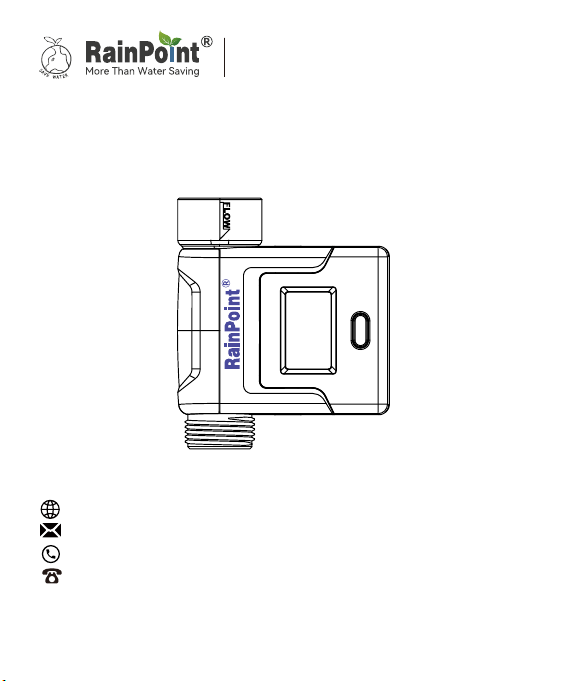
Model No. HCS008FRF
Water Flow Meter
Sma Garden Irrigation System
+
Web: www.rainpointonline.com
Email:seice@rainpointus.com
WhatsApp: +1 626-780-5952
US Free Hotline(English): +1 833-381-5659
(MON-FRI 9�30 AM-5�30 PM PST)
EU Free Hotline(English Deutsch): +44 800-808-5337
(MON-FRI 9�00 AM-5�00 PM CET )
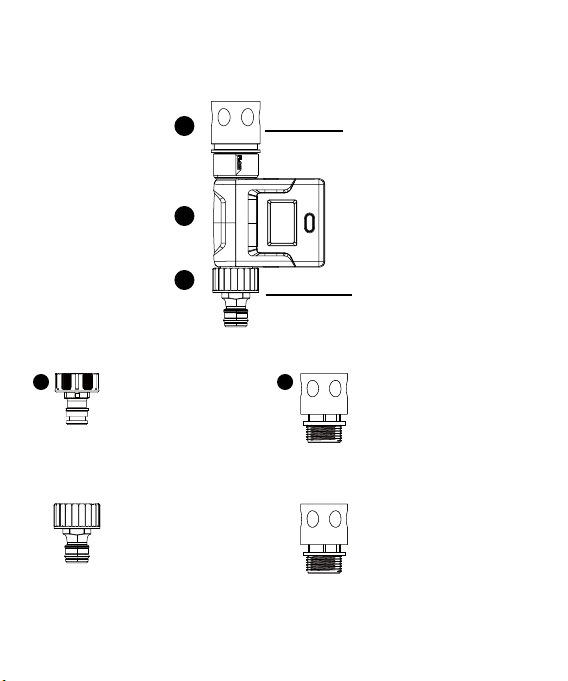
What in the box
3/4" Faucet Adapter
BSP Thread/ EU-type
(gray screw thread)
3/4" Faucet End
Connector
BSP Thread/ EU-type
3/4" Faucet End
Connector (NH
Thread/ USA-type)
3/4" Faucet Adapter
NH Thread/ USA-type
(black screw thread)
3/4" Faucet End
Connector (BSP
thread/ EU-type)
3/4" Faucet Adapter
BSP thread/ EU-type
( gray screw thread)
Note: B and C will be presented according to the count region, two
sets of accessories will not be included in the product at the same
time.
A. HCS008FRF Water Flow Meter
B.(For NH thread/ USA-type)
C.(For BSP thread/ EU-type)
2
3
4
1 5

1. INTRODUCTION
1.1 Product Oveiew
1.2 Specication
1.3 Product Features
2. CONNECTION AND INSTALLATION
2.1 Flow Meter Connection
2.2 Installation
3. APP FEATURES AND FUNCTIONS
3.1 Device Home Page
3.2 Basic Setting
3.3 Statistics
3.4 Chas
4. TROUBLESHOOTING
5. NOTES
6. WARRANTY POLICY
7. FCC STATEMENT
8. CUSTOMER SUPPORT
01
01
01
01
02
02
05
06
06
07
07
08
09
10
10
11
12
CONTENT
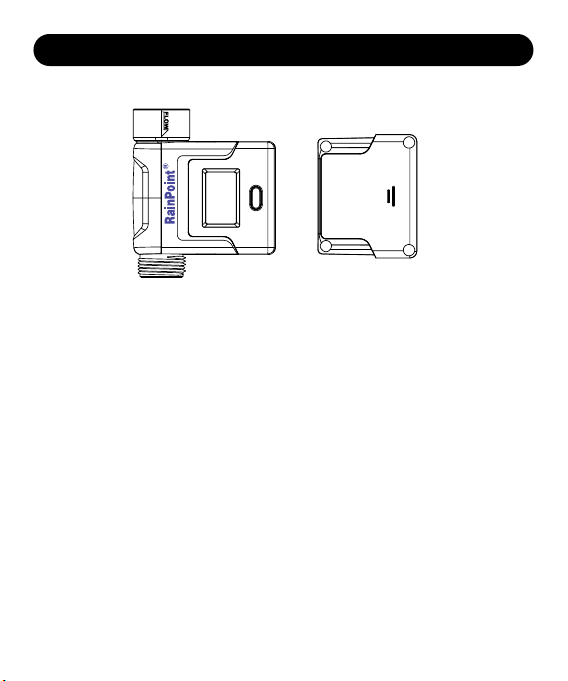
1. INTRODUCTION
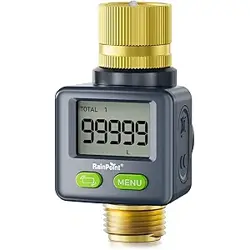
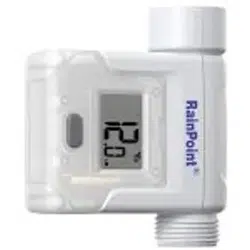
Front Back
1.2 Specication
• inlet and outlet 3/4”
• water rate 20 L/H to 2400 L/H
• working water pressure 0.5 bar to 8 bar (7-116 psi)
• accuracy ±5%
• communication distance with hub about 60m
• powered by 3*AAA alkaline batteries
• waterproof IPX6
1.3 Product Features
• current water ow rate and consumption checking on both LCD and APP
• hourly, daily and monthly water consumption checking via APP
• split type design
• Liter and Gallon switchable
• sleep mode for saving power
• low power ale notication
• water usage warning and correction on APP
1.1 Product Oveiew
- 01 -
2. CONNECTION AND INSTALLATION
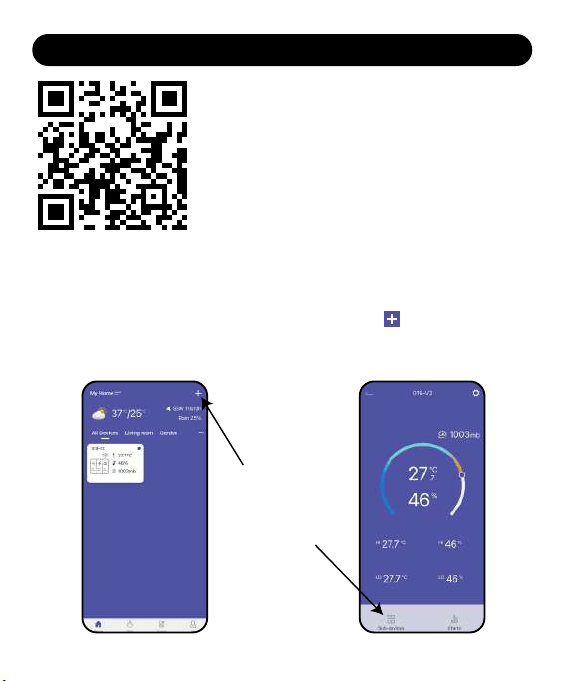
2.1 Flow Meter Connection
1. After the hub is successfully connected. Select the button on the top
right corner of the APP home page to add device, or you can go to the
hub’s home page and use “Sub-devices” to add devices.
- 02 -
This device is a sub-device, please connect the hub of Rainpoint Sma+
series before connecting this device.
Please scan the QR code or search the link to access
the video to connect the device quickly and easily.
Set Video:
https://www.youtube.com/watch?v=P2yXpW3ewkI
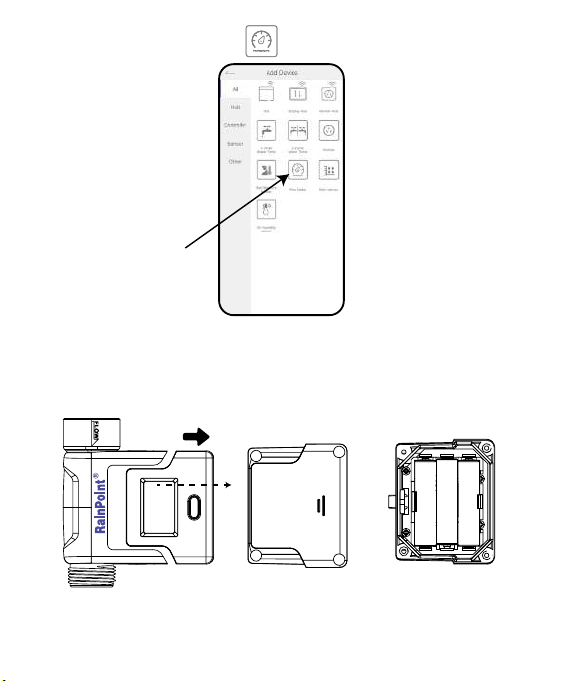
2. Find “Flow Meter” or the icon to add the sensor.
3. Inse the batteries, and then the indicator will quickly blink in red.
Tips:Pull out the detector and use the tool to unscrew the four screws of
the back cover.
- 03 -
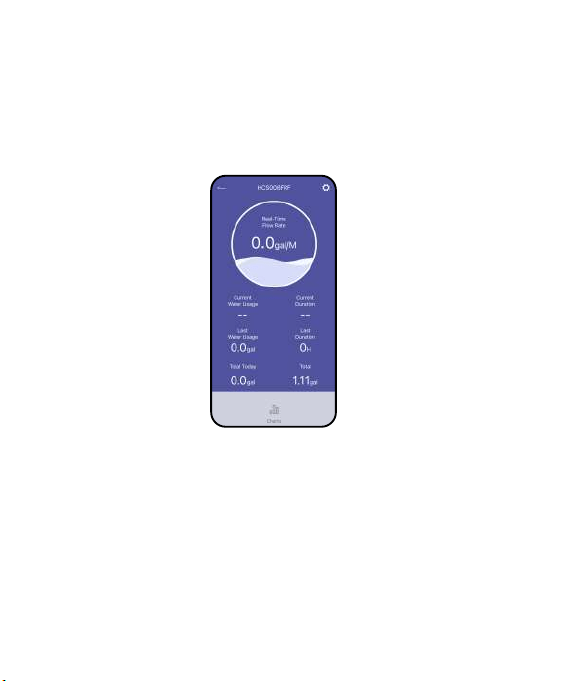
4. At the same time, select “NEXT” on the APP and sta searching devices.
5. Keep the sensor and the hub close to each other to connect automatically.
6. Besides that, you can also re-inse the batteries to reset and reconnect if
you fail to connect for the rst time.
7. After successfully connecting, the real-time water ow rate and other
information will show on the device home page.
- 04 -
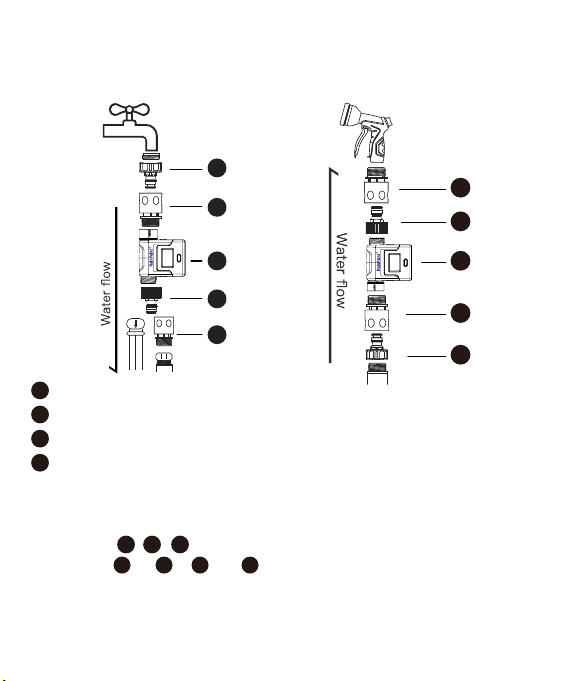
2.2 Installation
Option 1: Install the ow meter on
the faucet and tighten it hard.
Option 2: Connect the ow meter
with tubes or hose nozzle.
Note:
1. 1 and 5 are available in dierent type and will be dierentiated by region.
2. Please do not remove the connectors while using.
3. The tting are indivisible pas. Do not split them.
4. The tting and , and are dierent in the type of thread. Do not
change the installation sequence of the ttings.
5. Please follow the ow direction point out on the meter’s body.
6. The work distance is within 320 feet in open area. Please do not leave the
sensor so far from the hub.
- 05 -
1
2
3
4
5
1
1
1
2
2
2
2 3 4
3
4
4
4
5
5
5
3/4" Faucet End Connector (NH Thread/ USA-type)
3/4" Faucet Adapter BSP Thread/ EU-type (gray screw thread)
3/4" Faucet End Connector (BSP Thread/ EU-type)
3/4" Faucet Adapter NH Thread/ USA-type (black screw thread)
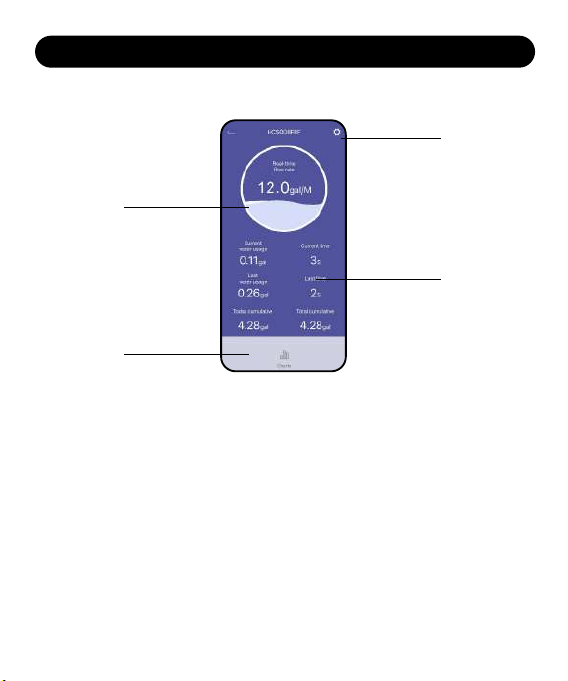
1. Setting: Basic settings for the sensor
2. Real-time ow rate
3. Data display:
• Current water usage
• Last water usage
• Current time
• Last time
• Totay cumulative
• Total cumulative
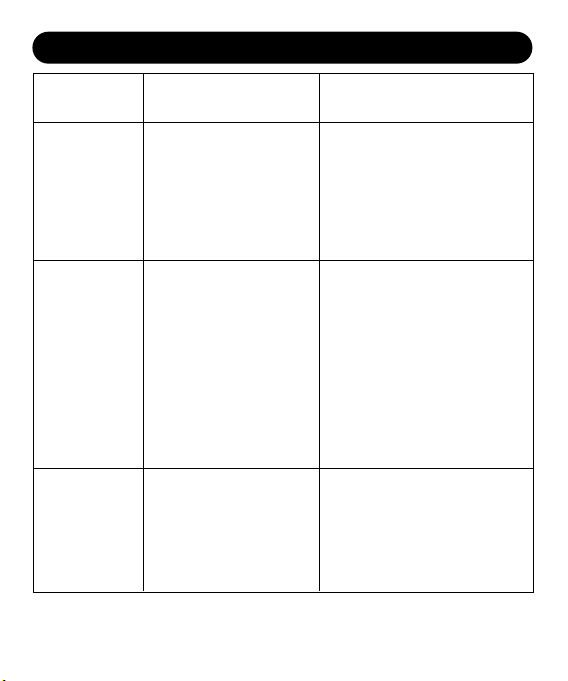
4. Chas: Check the water ow in 24 hours, 30 days, and 12 months
3.1 Device Home Page
3. APP FEATURES AND FUNCTIONS
1
2
3
4
- 06 -
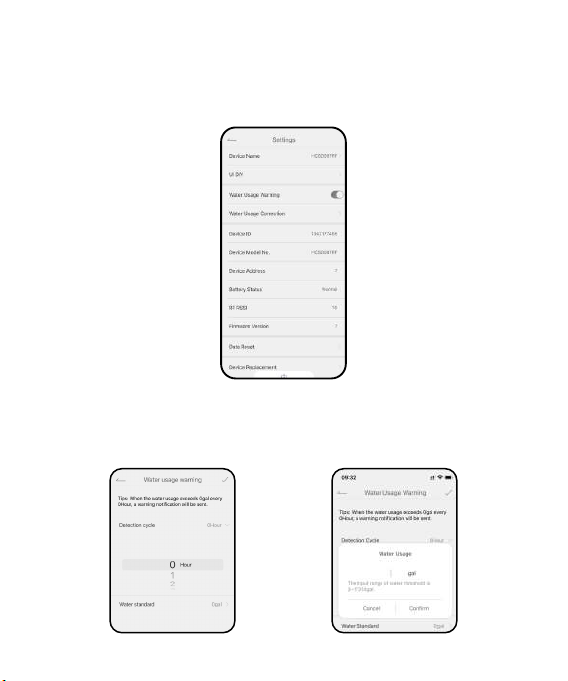
3.2 Basic Setting
Find the icon on the top right corner of the APP home page to"Settings"
page. In the basic settings, you can check and manage the device
information, such as name and inteace.
3.3 Special features
Water Usage Warning: Detect the water usage in hours and send a warning
notication if the water usage exceeds the standard.
- 07 -
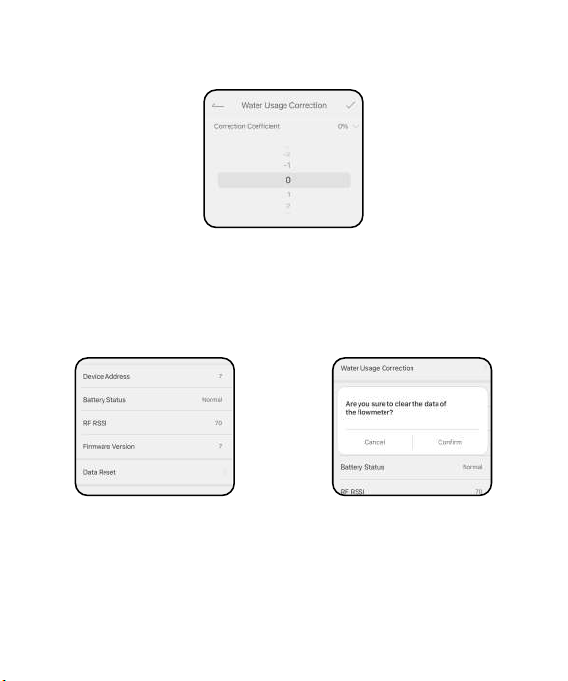
Water Usage Correction: Correct the water usage value in percentage if
needed.
Data Reset: Clear the water usage record in this device.
- 08 -
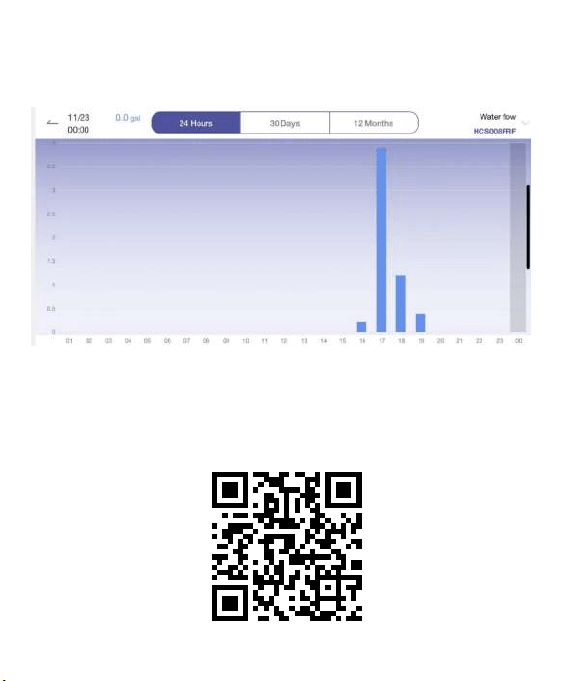
3.4 Chas
Select Chas to review your water consumption hourly, daily and monthly
in a bar graph.
If you need more detail information about the operation, please scan the
QR code or search the link to access the video to check the device quickly
and easily.
Setup Video: http://bit.ly/3WMKuYF
4. TROUBLESHOOTING
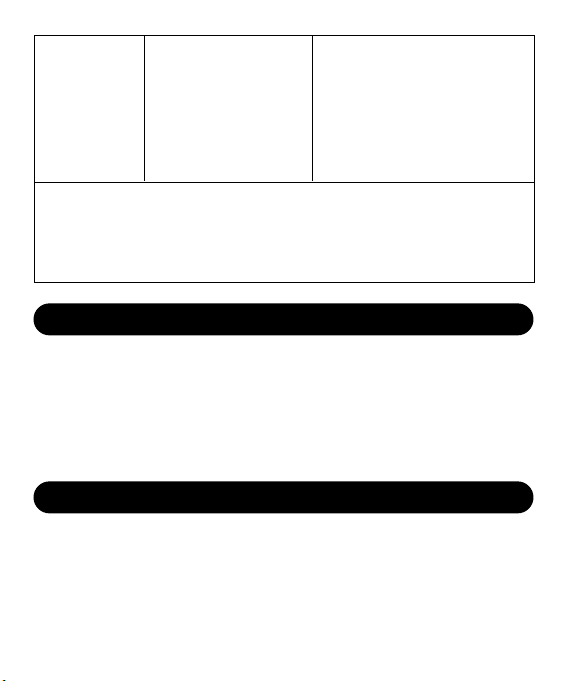
Problem Possible Factors Solution may help
Fail to connect
with the hub
Lose
connection or
get oine on
the APP
Data
inaccurate or
incorrect
1. Wi-Fi signal unstable.
2. Distance between
sensor and hub is
too far.
3. WiFi is not 2.4GHz
1. Low batte.
2. Hub disconnected.
3. Wi-Fi signal
unstable.
1. Insucient water
ow in the water
pipe.
2. Not follow the
recommended
ow direction.
1. Wait a little bit and t to
connect one more time by
re-inse the batteries.
2. Stay closer to the hub while
connecting.
3. Please connect 2.4GHz WiFi
before connecting to hub.
1. Change brand new
batteries.
2. Check the hub and
reconnect it if
disconnected.
Then run the water
through out the ow
meter a little bit.
3. Re-inse the batteries
to get into pairing mode
again.
1. Increase the water pressure
or water ow to ll the pipe
diameter.
2. Re-install the ow meter
following the ow direction.
- 09 -
1. The quick
connector is not
tightened on the
ow meter.
2. Batte cover
screws not
tightened.
Water
leakage
Tighten the connectors and
screws before installation.
•Please make sure to use 2.4GHz band WIFI to connect to this product.
•Must tighten the screws before installing.
•Do not mix old and new batteries or dierent types of batteries.
•Under freezing temperatures, please keep the sensor away from snow to
avoid potential freezing damage.
•T to use it following the water ow direction.
RAINPOINT provides a 3-year limited warranty on this product against
manufacturing defects in materials and workmanship.
If you need more help about the product or anything about us, please
contact us US: 1-833-381-5659 (EN)(MON-FRI9�30AM-5�30PMPST)
EU: +44 800-808-5337 (EN DE)(MON-FRI9�00AM-5�00PMCET)
Email:seice@rainpointus.com
5. NOTES
6. WARRANTY
- 10 -

This device complies with Pa 15 of the FCC Rules. Operation is subject to
the following two conditions:
(1) This device may not cause harmful inteerence, and
(2) this device must accept any inteerence received, including inteerence
that may cause undesired operation.
FCC Warning: Any changes or modications not expressly approved by the
pay responsible for
compliance could void the user’s authority to operate this equipment.
Note: This equipment has been tested and found to comply with the limits for
a Class B digital device, pursuant to Pa 15 of the FCC Rules. These limits are
designed to provide reasonable protection against harmful inteerence in a
residential installation. This equipment generates, uses, and can radiate radio
frequency energy and, if not installed and used in accordance with the
instructions, may cause harmful inteerence to radio communications.
However, there is no guarantee that inteerence will not occur in a paicular
installation. If this equipment does cause harmful inteerence to radio or
television reception, which can be determined by turning the equipment o
and on, the user is encouraged to t to correct the inteerence by one of
the following measures:
• Reorient or relocate the receiving antenna.
• Increase the separation between the equipment and the receiver.
• Connect the equipment into an outlet on a circuit dierent from that to
which the receiver is connected.
• Consult the dealer or an experienced radio/TV technician for help.
Note: The manufacturer is not responsible for any radio or TV inteerence
caused by unauthorized modications to this equipment. Such modications
could void the user’s authority to operate the equipment.
ECREP
NAME:VIAJEELECTRONICCOMPANYLIMITED
ADDRESS:E588,13ADELAIDEROAD,DUBLIN,D02P950,IRELAND
Email:[email protected]
7. FCC STATEMENT:
(FCC ID:2AWDBHCS008FRF)
- 11 -
If you nd it dicult to set up and want to watch the setting
tutorial video, please subscribe to our channel RainPoint on
YouTube.
If the app and the user manual don’t have what you’re looking for,
and need some help about Rainpoint, please contact us by
LOT NO.: XXXXX (on the back of the device)
US Free Hotline(English): +1 833-381-5659
(MON-FRI 9�30 AM-5�30 PM PST)
EU Free Hotline(English Deutsch): +44 800-808-5337
(MON-FRI 9�00 AM-5�00 PM CET )
Email:seice@rainpointus.com
WhatsApp: +1 626-780-5952
8. CUSTOMER SUPPORT
- 12 -
Or scan the QR code to visit the
RainPoint channel on YouTube quickly.