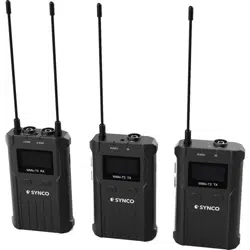
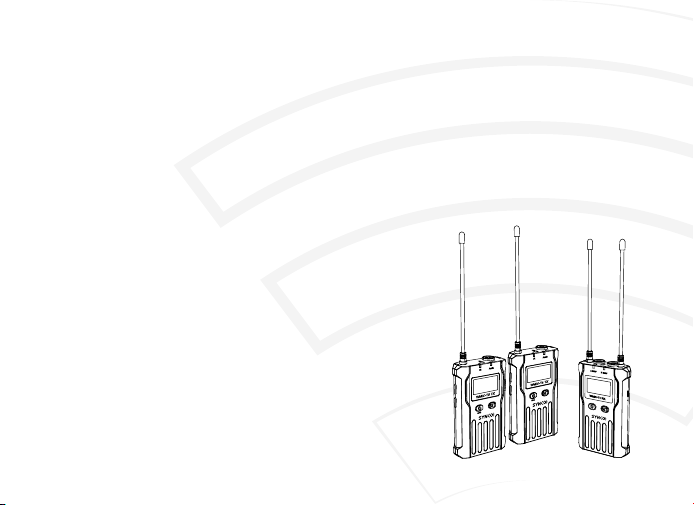
Thank you for choosing SYNCO WMic-T3,
Please read this manual carefully before use and follow all instructions mentioned herein.
WMic-T3 Microphone
User Manual
Block 15th, No.200 Fangcun Avenue East, Liwan District, Guangzhou, China, 510000
support@syncoaudio.com
www.syncoaudio.com
https://www.facebook.com/syncomicrophones
Guangzhou Zhiying Technology Co., Ltd

Package List.....................................................................................................................................1
Main Features...................................................................................................................................2
Notice for Using SYNCO WMic-T3 Microphone...........................................................................3
Components and Instruction........................................................................................................4
① Transmitter and Receiver
② Function Button Instruction
③ Indicator Light Instruction
④ Screen Display
Specications..................................................................................................................................9
Warranty.........................................................................................................................................11
Contents
1 www.syncoaudio.com www.syncoaudio.com 2
Main Features
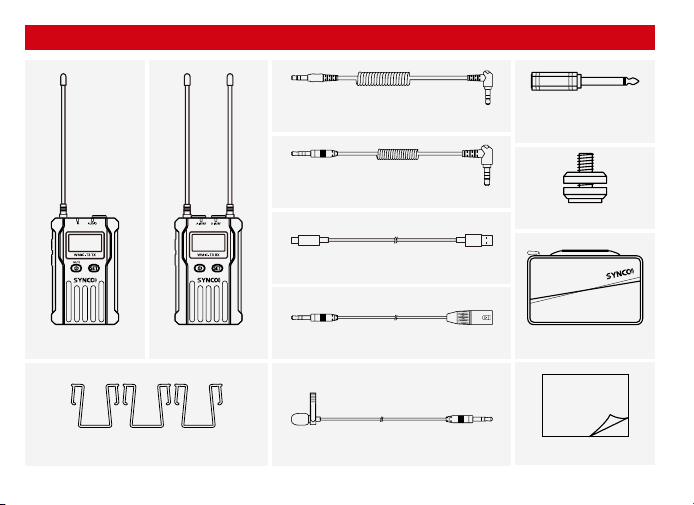
Package List
Total 100 channels for your choices
75Hz / 150Hz low-cut lter for noise reduction
Suitable for dierent scenarios
Reset function to restore the initial settings
Mono / Stereo output
180m working distance in the line-of-sight area, 100m in obstacle area
Dual-channel receiver can work with two transmitters
All metal housing for excellent shielding performance
Receiver (RX) x1
Lavalier Mic x2
3.5mm TRS Camera Cable x1
3.5mm TRRS Phone Cable x1
3.5mm-6.3mm
Adapter x1
3.5mm-XLR Cable x1
Type-C Charging Cable x3
Belt Clip x3
Cold Shoe x1
Carry Bag x1
Transmitter (TX) x2
User Manual x1
(Package includes the following items)
User Manual

1 www.syncoaudio.com www.syncoaudio.com 2
Main Features
Package List
Total 100 channels for your choices
75Hz / 150Hz low-cut lter for noise reduction
Suitable for dierent scenarios
Reset function to restore the initial settings
Mono / Stereo output
180m working distance in the line-of-sight area, 100m in obstacle area
Dual-channel receiver can work with two transmitters
All metal housing for excellent shielding performance
Receiver (RX) x1
Lavalier Mic x2
3.5mm TRS Camera Cable x1
3.5mm TRRS Phone Cable x1
3.5mm-6.3mm
Adapter x1
3.5mm-XLR Cable x1
Type-C Charging Cable x3
Belt Clip x3
Cold Shoe x1
Carry Bag x1
Transmitter (TX) x2
User Manual x1
(Package includes the following items)
User Manual

3 www.syncoaudio.com www.syncoaudio.com 4
Notice for Using SYNCO WMic-T3 Microphone
The transmitters and receiver should keep a distance of more than 20cm with each other while using.
Otherwise, the wireless signal receiving part of the receiver will perform a protective action, turning o the
wireless signal reception, and the audio may be interrupted. This is a normal phenomenon;
When using auto IR sync, please keep the product within 30cm, otherwise the signal may be too weak and
the sync will fail;
In the case of stereo/mono mode switch, please preset the mode before using to avoid the transient
interference caused by switching during usage;
The antennas will aect the working distance. Please protect the antenna and avoid any man-made
damage;
When using this product in a short distance, it is recommended to set RF strength at ‘LOW’ to reduce the
power consumption;
Please keep this product in dry environment;
Do not expose the device in rain or humid environment, otherwise there will be a danger of short circuit;
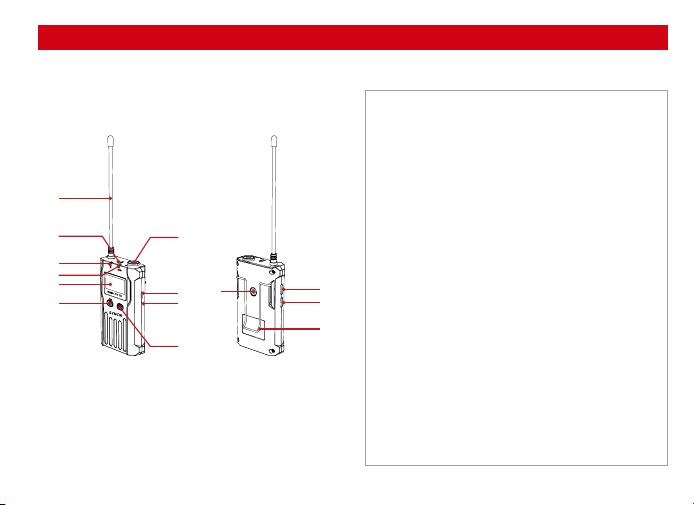
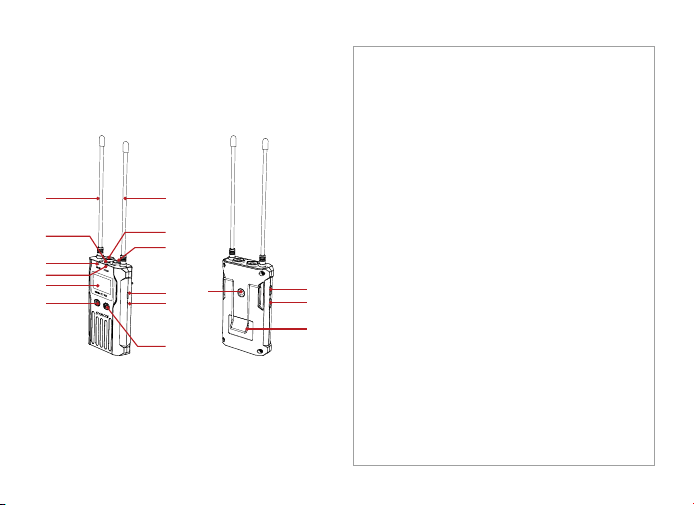
Components and Instruction
①
②
③
④
⑤
⑥
⑦
⑧
⑨
⑩
⑪
⑫
⑬
⑭
Antenna
IR Frequency Matching
IR Indicator
Audio Indicator
LCD Screen
Power Button (MUTE)
MIC / LINE IN Input
Type-C Port
Forced Shutdown
"SET" Menu Button
1/4" Mounting Hole
Function Selection Button △
Function Selection Button ▽
Belt Clip
Transmitter (TX)
⑨
⑧
⑫
⑬
⑭
⑪
⑩
⑦
⑥
①
②
③
④
⑤
1. Structure
3 www.syncoaudio.com www.syncoaudio.com 4
Notice for Using SYNCO WMic-T3 Microphone
The transmitters and receiver should keep a distance of more than 20cm with each other while using.
Otherwise, the wireless signal receiving part of the receiver will perform a protective action, turning o the
wireless signal reception, and the audio may be interrupted. This is a normal phenomenon;
When using auto IR sync, please keep the product within 30cm, otherwise the signal may be too weak and
the sync will fail;
In the case of stereo/mono mode switch, please preset the mode before using to avoid the transient
interference caused by switching during usage;
The antennas will aect the working distance. Please protect the antenna and avoid any man-made
damage;
When using this product in a short distance, it is recommended to set RF strength at ‘LOW’ to reduce the
power consumption;
Please keep this product in dry environment;
Do not expose the device in rain or humid environment, otherwise there will be a danger of short circuit;
Components and Instruction
①
②
③
④
⑤
⑥
⑦
⑧
⑨
⑩
⑪
⑫
⑬
⑭
Antenna
IR Frequency Matching
IR Indicator
Audio Indicator
LCD Screen
Power Button (MUTE)
MIC / LINE IN Input
Type-C Port
Forced Shutdown
"SET" Menu Button
1/4" Mounting Hole
Function Selection Button △
Function Selection Button ▽
Belt Clip
Transmitter (TX)
⑨
⑧
⑫
⑬
⑭
⑪
⑩
⑦
⑥
①
②
③
④
⑤
1. Structure
5 www.syncoaudio.com www.syncoaudio.com 6
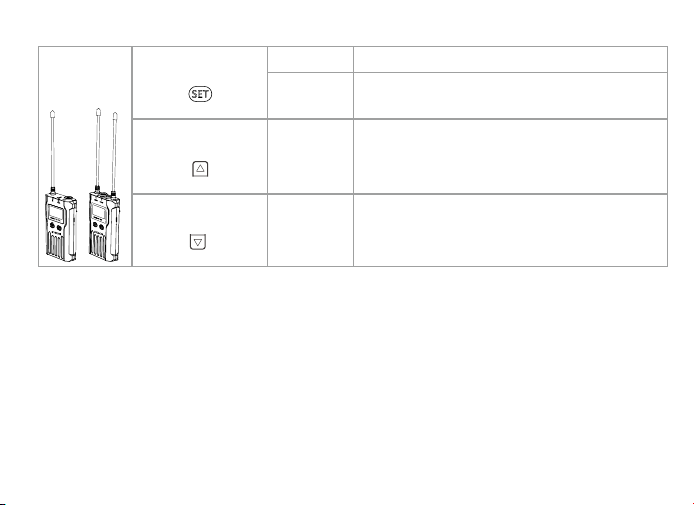
Enter the function adjustment menu
1.Conrm the selected function
2.Exit the function adjustment menu
Function Adjustment ( △ )
Function Adjustment ( ▽ )
①
②
③
④
⑤
⑥
⑦
⑧
⑨
⑩
⑪
⑫
⑬
⑭
⑮
⑯
Antenna
IR Frequency Matching
Group A Working Status Indicator
Group B Working Status Indicator
LCD Screen
Power Button
Antenna
3.5mm Audio Monitoring Socket
3.5mm Audio Output Socket
Type-C Port
Forced Shutdown
"SET" Menu Button
1/4" Mounting Hole
Function Selection Button △
Function Selection Button ▽
Belt Clip
Transmitter
/Receiver
SET Function Menu
Long Press
Short Press
Short Press
Short Press
△ Button
▽ Button
Receiver (RX) 2. Function Button Instruction
⑪
⑩
⑧
⑨
⑭
⑮
⑯
⑬
⑫
⑦
⑥
①
②
③
④
⑤
5 www.syncoaudio.com www.syncoaudio.com 6
Enter the function adjustment menu
1.Conrm the selected function
2.Exit the function adjustment menu
Function Adjustment ( △ )
Function Adjustment ( ▽ )
①
②
③
④
⑤
⑥
⑦
⑧
⑨
⑩
⑪
⑫
⑬
⑭
⑮
⑯
Antenna
IR Frequency Matching
Group A Working Status Indicator
Group B Working Status Indicator
LCD Screen
Power Button
Antenna
3.5mm Audio Monitoring Socket
3.5mm Audio Output Socket
Type-C Port
Forced Shutdown
"SET" Menu Button
1/4" Mounting Hole
Function Selection Button △
Function Selection Button ▽
Belt Clip
Transmitter
/Receiver
SET Function Menu
Long Press
Short Press
Short Press
Short Press
△ Button
▽ Button
Receiver (RX) 2. Function Button Instruction
⑪
⑩
⑧
⑨
⑭
⑮
⑯
⑬
⑫
⑦
⑥
①
②
③
④
⑤

7 www.syncoaudio.com www.syncoaudio.com 8
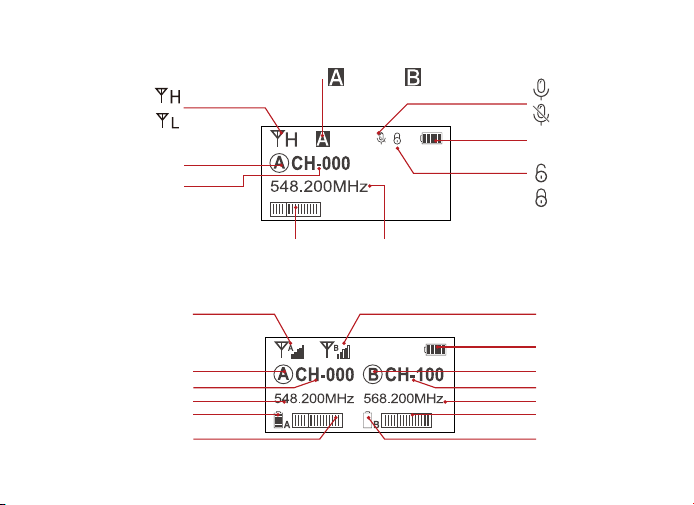
Signal Strength High
Group A Group B
Muting
Normal Recording
Muting(Locking)
Muting(Unlocking)
Power Indicator
Audio Dynamic Display Bar Channel Frequency
Signal Strength Low
Group A/B
Channel
4. Screen Display
Transmitter
Receiver
Group A Signal Strength
Display Bar
Group B Signal Strength
Display Bar
Power Indicator
Group A Receiving Audio
Status Indicator
Group B Receiving Audio
Status Indicator
Group A
Frequency
Group B
Channel of Group A
Group A Transmitter Power
Group B Transmitter
Power
Channel of Group B
Frequency
Transmitter
AUDIO
Green Light Keeps On Normal recording status
Muting mode
Channel doesn’t match
IR matching
Normal working status after the channel
matches
Red Light Keeps On
Red Light Flicker
Green Light Keeps On
Green Light Flicker
IR
A IR/RF
B IR/RF
Receiver
3. Indicator Light Instruction
7 www.syncoaudio.com www.syncoaudio.com 8
Signal Strength High
Group A Group B
Muting
Normal Recording
Muting(Locking)
Muting(Unlocking)
Power Indicator
Audio Dynamic Display Bar Channel Frequency
Signal Strength Low
Group A/B
Channel
4. Screen Display
Transmitter
Receiver
Group A Signal Strength
Display Bar
Group B Signal Strength
Display Bar
Power Indicator
Group A Receiving Audio
Status Indicator
Group B Receiving Audio
Status Indicator
Group A
Frequency
Group B
Channel of Group A
Group A Transmitter Power
Group B Transmitter
Power
Channel of Group B
Frequency
Transmitter
AUDIO
Green Light Keeps On Normal recording status
Muting mode
Channel doesn’t match
IR matching
Normal working status after the channel
matches
Red Light Keeps On
Red Light Flicker
Green Light Keeps On
Green Light Flicker
IR
A IR/RF
B IR/RF
Receiver
3. Indicator Light Instruction

9 www.syncoaudio.com www.syncoaudio.com 10
Specications
Channels
Group A Wireless Frequency
Group B Wireless Frequency
Antenna
Transmitting Power
Stray Radiation
Sound Delay
Low-cut Filter
Audio Output
Screen
Audio Distortion
Working Distance
Channels
Group A Wireless Frequency
Group B Wireless Frequency
Signal / Noise
Sensitivity
Antenna
Sound Delay
Headphone Output Power
Audio Output
Volume
Screen
Audio Distortion
100
UHF 512~537MHz
UHF 564~589MHZ
1/4 Wavelength Wire
Antenna
10mW/30mW
<-60dBc
<20ms
75Hz/150Hz
Mono/Stereo
LCD Display
<0.5%@1KHz
180m in line-of-sight
area, about 100m in
barrier area
100
UHF 512~537MHz
UHF 564~589MHZ
≥85dB
–95dBm
1/4 Wavelength Wire
Antenna
<20ms
100mW@32Ω
Mono/Stereo
0-15 Level
LCD Display
<0.5%@1KHz
Transmitter (TX) Receiver (RX)
Power
Battery
Working Time
Material
Compatibility
Dimension
Operating Temperature
Storage Temperature
Working Distance
Power
Battery
Working Time
Material
Compatibility
Dimension
Operating Temperature
Storage Temperature
Type-C Charging≤3.5H,
DC5V@≥1000mA
Built-in Li-ion Battery,
3.7V@1800mA/H
10 Hours
Aluminum Alloy
For Camera/Camcorder/
Smartphone
94×58×20.3mm
0℃ ~ 50℃
-20℃ ~ 60℃
180m in line-of-sight area,
about 100m in barrier area
Type-C Charging≤3.5H,
DC5V@≥1000mA
Built-in Li-ion Battery,
3.7V@1800mA/H
10 Hours
Aluminum Alloy
For Camera/Camcorder/
Smartphone
94×58×20.3mm
0℃ ~ 50℃
-20℃ ~ 60℃

9 www.syncoaudio.com www.syncoaudio.com 10
Specications
Channels
Group A Wireless Frequency
Group B Wireless Frequency
Antenna
Transmitting Power
Stray Radiation
Sound Delay
Low-cut Filter
Audio Output
Screen
Audio Distortion
Working Distance
Channels
Group A Wireless Frequency
Group B Wireless Frequency
Signal / Noise
Sensitivity
Antenna
Sound Delay
Headphone Output Power
Audio Output
Volume
Screen
Audio Distortion
100
UHF 512~537MHz
UHF 564~589MHZ
1/4 Wavelength Wire
Antenna
10mW/30mW
<-60dBc
<20ms
75Hz/150Hz
Mono/Stereo
LCD Display
<0.5%@1KHz
180m in line-of-sight
area, about 100m in
barrier area
100
UHF 512~537MHz
UHF 564~589MHZ
≥85dB
–95dBm
1/4 Wavelength Wire
Antenna
<20ms
100mW@32Ω
Mono/Stereo
0-15 Level
LCD Display
<0.5%@1KHz
Transmitter (TX) Receiver (RX)
Power
Battery
Working Time
Material
Compatibility
Dimension
Operating Temperature
Storage Temperature
Working Distance
Power
Battery
Working Time
Material
Compatibility
Dimension
Operating Temperature
Storage Temperature
Type-C Charging≤3.5H,
DC5V@≥1000mA
Built-in Li-ion Battery,
3.7V@1800mA/H
10 Hours
Aluminum Alloy
For Camera/Camcorder/
Smartphone
94×58×20.3mm
0℃ ~ 50℃
-20℃ ~ 60℃
180m in line-of-sight area,
about 100m in barrier area
Type-C Charging≤3.5H,
DC5V@≥1000mA
Built-in Li-ion Battery,
3.7V@1800mA/H
10 Hours
Aluminum Alloy
For Camera/Camcorder/
Smartphone
94×58×20.3mm
0℃ ~ 50℃
-20℃ ~ 60℃

11 www.syncoaudio.com www.syncoaudio.com 12
WARRANTY
Warranty Period
Thank you for purchasing SYNCO products.
1. Customers are entitled to free replacement or repair service in case of quality defect(s) found in the
product under normal use within 30 days upon receipt of the product.
2. Original SYNCO products are entitled to 12-month limited warranty service. The warranty period begins
on the date of purchase of brand new, unused products by the rst end-user.
Within the warranty period, if product defect or failure is attributable to material defection or
technological problem, the defective product or defective part will be repaired or replaced without charge
(service and materials fee).
Warranty Exclusions and Limitations
Faults resulted from inappropriate use of a product without following its operation specication
Articial damage, e.g. crash, squeeze, scratch, or soaking
Modications to a product by its user or a third party without prior written consent of SYNCO, e.g.
replacement of element or circuit, label alteration
The code on product is inconsistent with that of warranty certicate, or the code on the product or
warranty certicate is altered or torn o
All consumable accessory attached to a product, like cable, wind mu, battery
Faults as a result of force majeure, such as re, ood, lightning, etc.
Warranty Claim Procedure
If failure or any problem occurs to your product after purchase, please contact a local agent for
assistance, or you can always contact SYNCO’s customer service through email at
support@syncoaudio.com.
Please retain your sales receipt and warranty certicate as proof of purchase. If any of these documents
is missing, only sales return or chargeable service will be provided.
If the SYNCO product is out of the warranty coverage, the service and the parts cost will be charged.

11 www.syncoaudio.com www.syncoaudio.com 12
WARRANTY
Warranty Period
Thank you for purchasing SYNCO products.
1. Customers are entitled to free replacement or repair service in case of quality defect(s) found in the
product under normal use within 30 days upon receipt of the product.
2. Original SYNCO products are entitled to 12-month limited warranty service. The warranty period begins
on the date of purchase of brand new, unused products by the rst end-user.
Within the warranty period, if product defect or failure is attributable to material defection or
technological problem, the defective product or defective part will be repaired or replaced without charge
(service and materials fee).
Warranty Exclusions and Limitations
Faults resulted from inappropriate use of a product without following its operation specication
Articial damage, e.g. crash, squeeze, scratch, or soaking
Modications to a product by its user or a third party without prior written consent of SYNCO, e.g.
replacement of element or circuit, label alteration
The code on product is inconsistent with that of warranty certicate, or the code on the product or
warranty certicate is altered or torn o
All consumable accessory attached to a product, like cable, wind mu, battery
Faults as a result of force majeure, such as re, ood, lightning, etc.
Warranty Claim Procedure
If failure or any problem occurs to your product after purchase, please contact a local agent for
assistance, or you can always contact SYNCO’s customer service through email at
support@syncoaudio.com.
Please retain your sales receipt and warranty certicate as proof of purchase. If any of these documents
is missing, only sales return or chargeable service will be provided.
If the SYNCO product is out of the warranty coverage, the service and the parts cost will be charged.
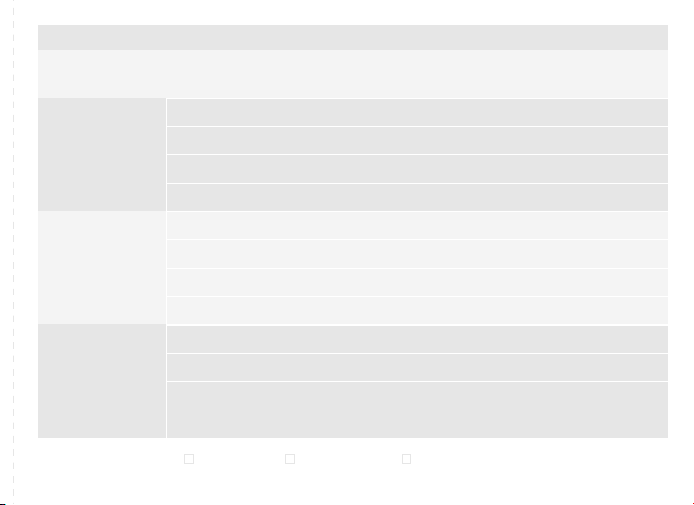
WARRANTY CERTIFICATE
USER
INFORMATION
SALES
INFORMATION
REPAIR
RECORD
RESULT
Please register your warranty. Meanwhile, you are welcomed to contact us via Email:
support@syncoaudio.com
Customer Name:
Phone Number:
Email:
Address:
Sales Date:
Model:
Product Code:
Dealer:
Service Date:
Technician:
Issue:
Solved Unsolved Returned(Replaced)

Thank you for choosing SYNCO WMic-T3,
Please read this manual carefully before use and follow all instructions mentioned herein.
WMic-T3 Microphone
User Manual
Block 15th, No.200 Fangcun Avenue East, Liwan District, Guangzhou, China, 510000
support@syncoaudio.com
www.syncoaudio.com
https://www.facebook.com/syncomicrophones
Guangzhou Zhiying Technology Co., Ltd
