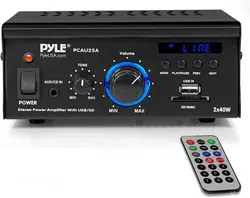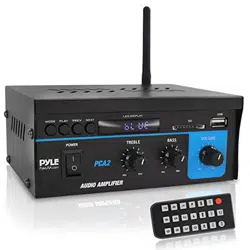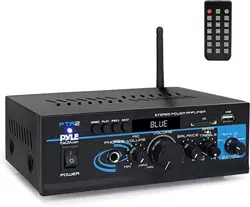
PTA2
Mini Stereo Power Amplifier
with USB/SD/FM/ Wireless BT
2 x 40 Watt with AUX, CD & Mic Inputs
Questions? Issues?
We are here to help!
Phone: (1) 718-535-1800
Email: suppor[email protected]
FOREWORD
Your New Pyle Pro Amplier gives you the power and versatility you need in
a professional sound system. The amplier's wide frequency response makes
it suitable for amplifying music or vocal program material. It can be used
in meeting halls, house, restaurant, schools, stores, or for paging systems.
Please read this manual thoroughly before you attempt to set up and use
the amplier. It contains a range of installation suggestions as well as
instructions to ensure safe usage.
Installed properly, you can expect years of trouble-free service from this
product.
FEATURES AND CONTROLS
FRONT PANEL
BACK PANEL
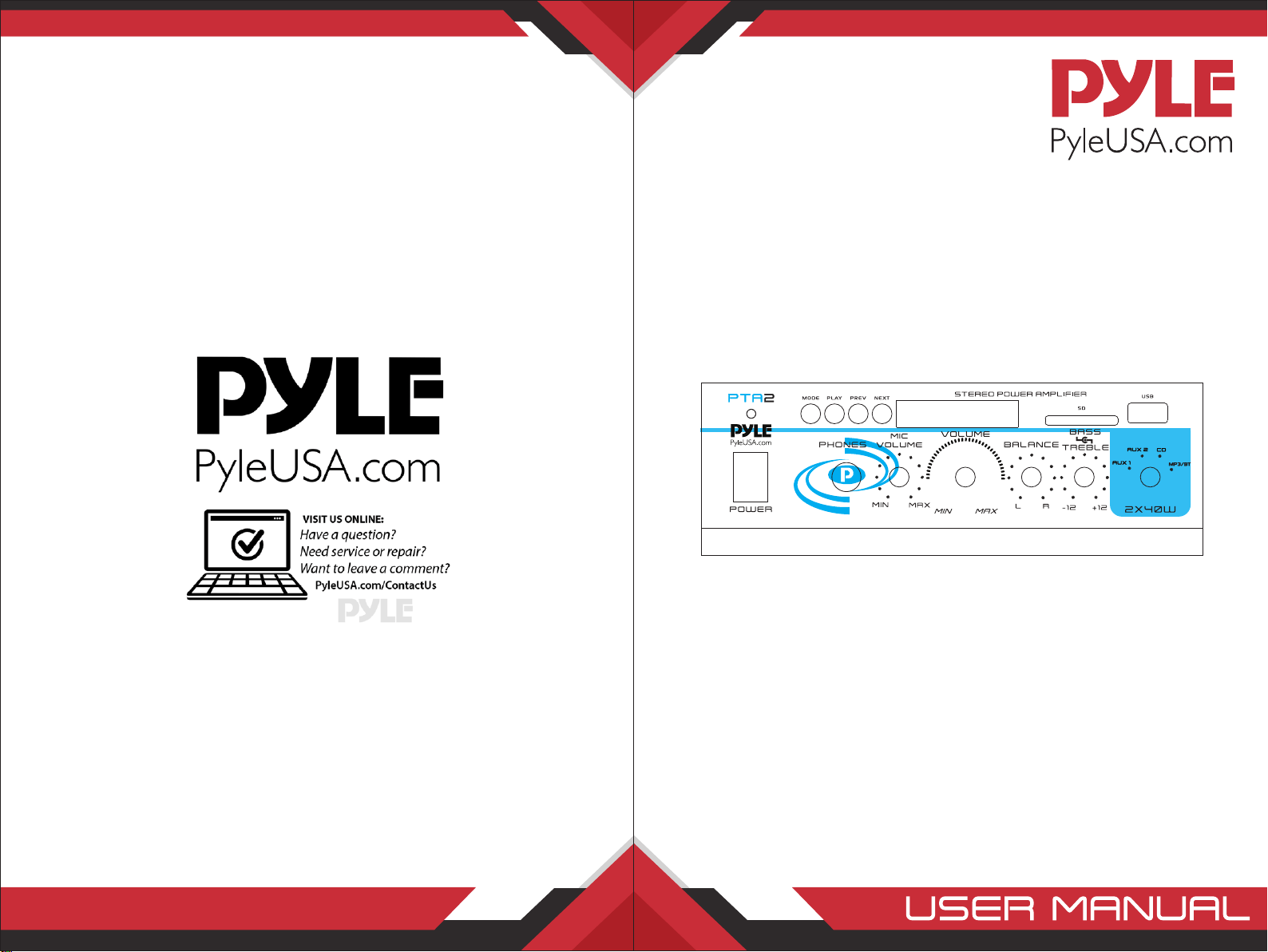
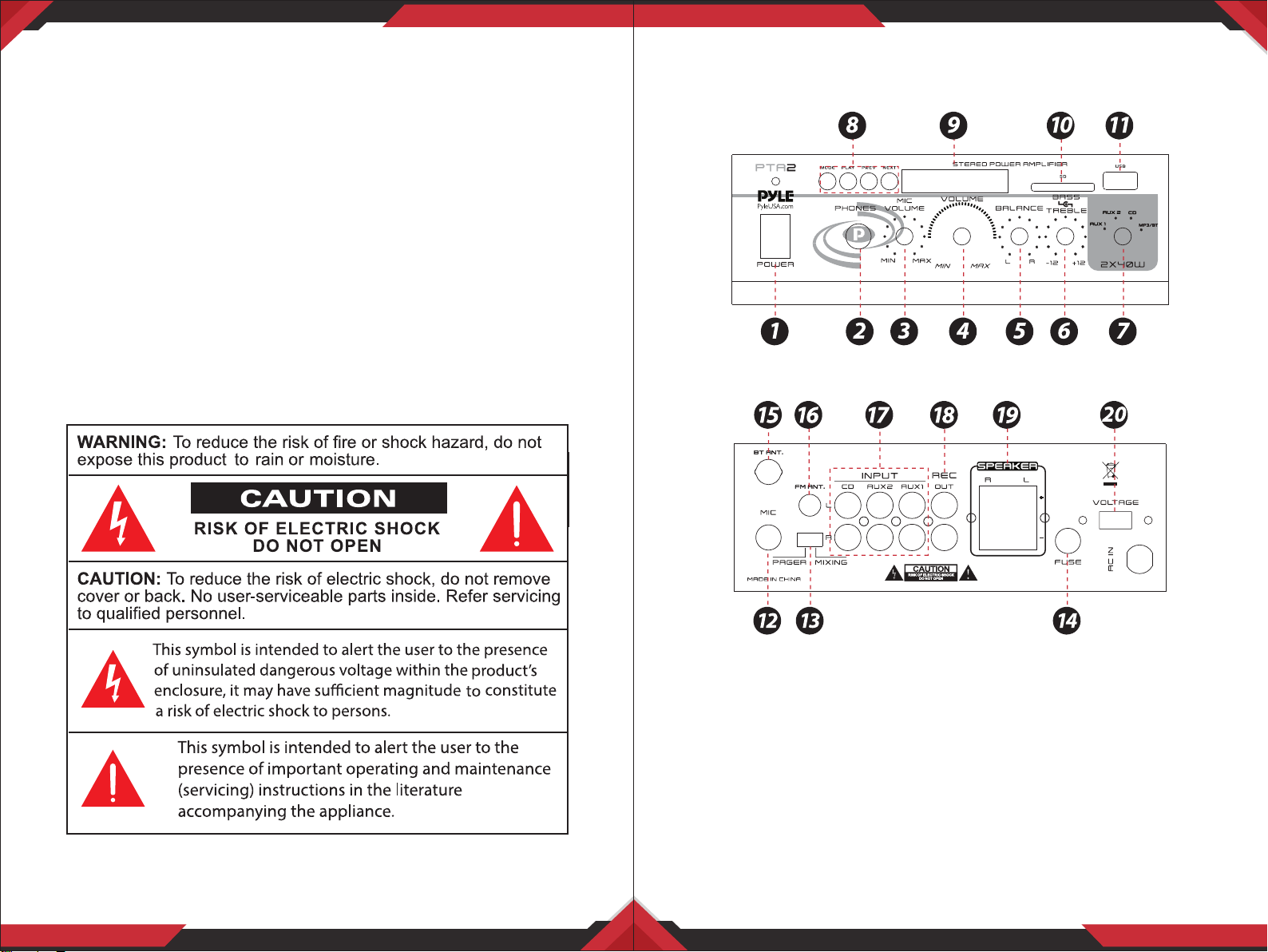
1. Main Power ON Switch: Switch ON/OFF the amplier by using this switch.
2. 1/4” Phone Jack: Accepts headphones with 1/4” plug.
3. Mic Volume Control: Adjusts the volume of the connected MIC to proper
setting.
4. Music Volume Control: Adjusts the music volume output from AUX 1,
AUX 2, or CD source. It doesn’t aect the MIC volme.
5. Balance Control: Adjusts the balance of sound between left and right
amplier output.
6. Bass and Treble Tone Control: Lets you boost or attenuate your desired
bass and treble sound.
7. AUX 1/AUX 2/CD INPUT Selector: Select the desired music souce input.
www.PyleUSA.com
2
www.PyleUSA.com
3
IMPORTANT
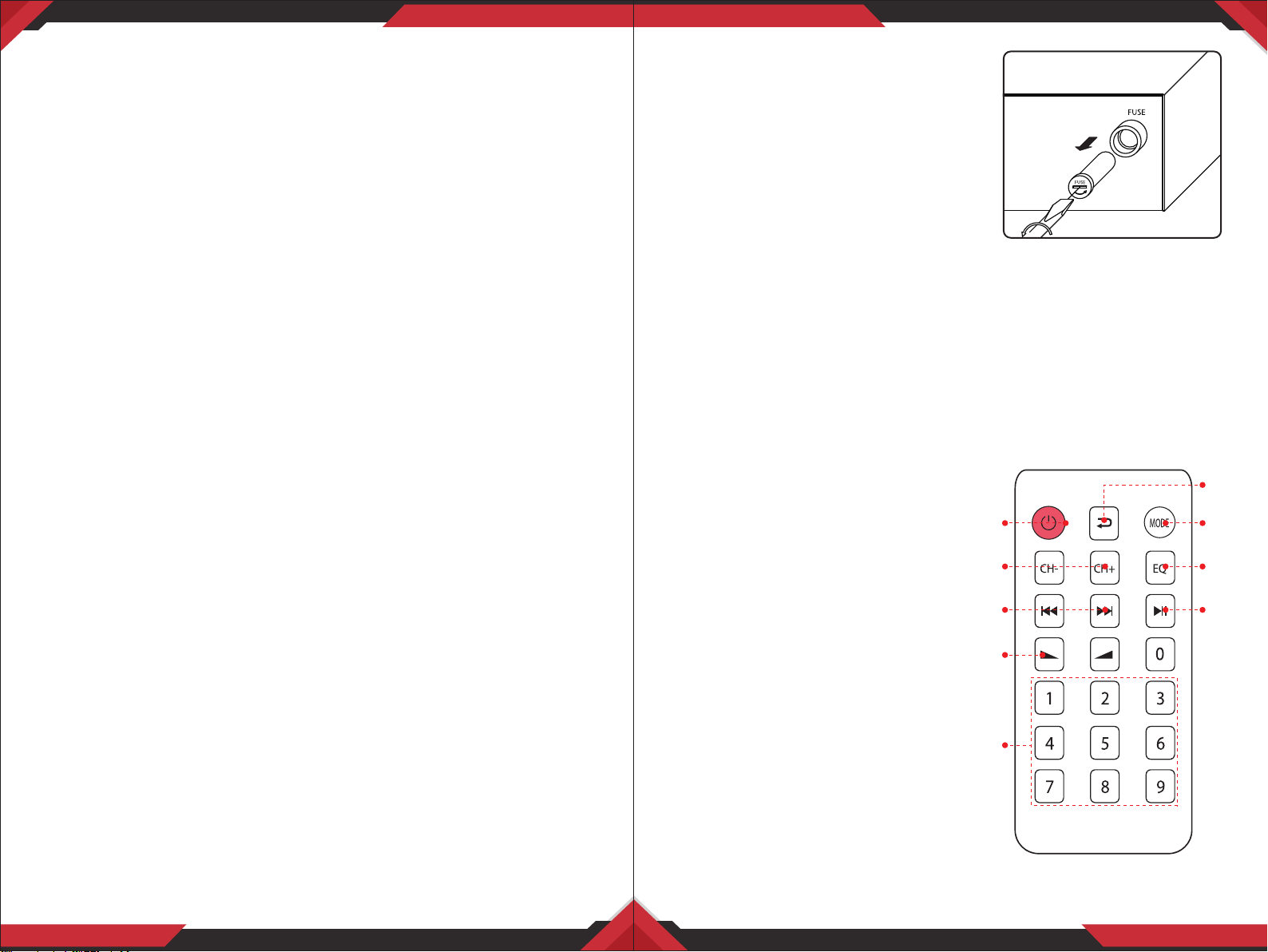
Replacing a fuse
This amplier requires fuse with the proper
rating for protection from power surges and
short circuits. If the amplier suddenly turns
o or would not turn on, the fuse is properly
blown.
• Let the amplier cool down and
see if it starts again before you assume a fuse needs to be replaced.
• Unplug the amplier from the AC outlet.
• Turn the fuse holder cap and pull out the cap.
• Remove the old fuse and replace it with an identical one.
CAUTION: Never use a fuse with a higher rating
Remote control
1. Press this button to turn on the MP3
2. In FM mode, press this two buttons
to select previous or next channel.
3. Press these two buttons to select the
previous or next track in USB or SD
or Wireless BT mode
4. Volume up or down
5. Press the numbers to select the tracks
directly. The unit takes 1-2 seconds to
response in USB or SD mode.
6. Press this button to select the dierent
repeat mode. Pressing this button for
more than 3 seconds will enter into
FOLDER searching
7. Press this button to select the playing
mode, such as USB/SD/FM/WIRELESS BT
8. EQ function, if the mp3 with EQ
9. Play and pause function for MP3
8. MODE, PLAY, PREV and NEXT Function Control buttons:
• MODE Button: For audio selection like WIRELESS BT/SD/LINE IN
• PLAY/PAUSE BUTTON: Play and Pause control button
• PREV/NEXT: Quick backward or next song
9. LED Display: Displays the output level and selected input
10. SD Card Input
11. USB Flash Drive Input
12. 1/4” Mic Input Jack: Lets you connect a microphone with a 1/4” plug.
13. Switchable Mic Pager and Mixing modes:
• Set to PAGER: allows a voice to be heard clearly through microphone by
attenuating automatically all the audio input sources. This is good to use
when paging a person in oce, store or restaurant.
• Set to MIXING: Both voices from microphone and music will exist at the
same time. Similar as singing in karaoke events.
14. Fuse: The amplier uses fuse for protection against surges and short
circuit. If the amplier suddenly turns o and will not turn on, check the
fuse. If necessary, replace it with a 1-amp, 250-volt, fast-acting, 5x20mm
fuse (not supplied).
15. Wireless BT Antenna: Wireless BT Streaming receiver
16. FM ANTENNA CONNECTOR
17. AUX 1/AUX 2/CD RCA INPUT: Connect your most high-level audio
sources such as CD player, tape deck, tuner, camcorder or VCR.
18. REC RCA Output: Connect the amplier to a tape deck for recording.
19. Speaker L/R Terminals: Lets you easily connect speaker wires
directly to the Amplifer. Speaker impedance can range from 8 to 4 ohms
for general stereo output. Please see the next instruction for using four
8-ohm speakers for stereo mode connection.
20. Voltage Selector: Select the voltage of AC power input source. The amplifer
has selectable input voltage from 110V/60Hz which is the standard in USA
and CANADA. You can also switch the input voltage to 230V/50Hz for
EUROPEAN operation. Please make sure the switch is in the proper position
before operating otherwise severe damage will result which is not covered
by the warranty. Please also replace the fuse with proper rating in this
situation.
www.PyleUSA.com
4
www.PyleUSA.com
5
1
2
3
4
5
6
7
8
9
TROUBLESHOOTING
Care and Maintenance
Your Pyle Pro Amplier is an example of superior design and craftsmanship.
The following suggestions will help you care for your amplier so you can
enjoy years of use:
• Keep the amplier dry. If it gets wet, wipe immediately.
• Use the amplier only in well-ventilated installations.
• Handle the amplier gently and carefully - do not drop!
• Keep the amplier away from dust adn dirt.
• Wipe occasionally with a damp cloth to keep it looking new.
• Do not use harsh chemicals, solvents or detergents!
WIRELESS BT STREAMING OPERATION INSTRUCTION
External devices which have a built-in BT feature can be connected to this
amplier wirelessly to play through the amplier's speakers. If your amp is
connected to speakers, you will hear audible tones which will help for
connecting.
1. At rst be sure that the amplier is powered ON, and turn the volume to
low. Pull out the BT Antenna at the back panel for better receiving signal.
Press MODE button on the front panel then the BT Indicator light will be lit.
(The unit is automatically ready to pair with your device)
2. Turn ON the Wireless BT function of your external device.
3. Search for available devices within range of your external Wireless BT device.
4. Wait for a while then nd the “PYLEUSA” on the paired devices list on your
external device and select “PYLEUSA”, or nd the “BT” on the paired devices
list on your external device and select “BT”.
5. Your amplier will beep and the lights will ash once when pairing is
successful.
6. You can now play music and other audio on your external device through
your amplier.
7. The amplier will beep and the lights will ash once again when the
external device is turned o or unpaired.
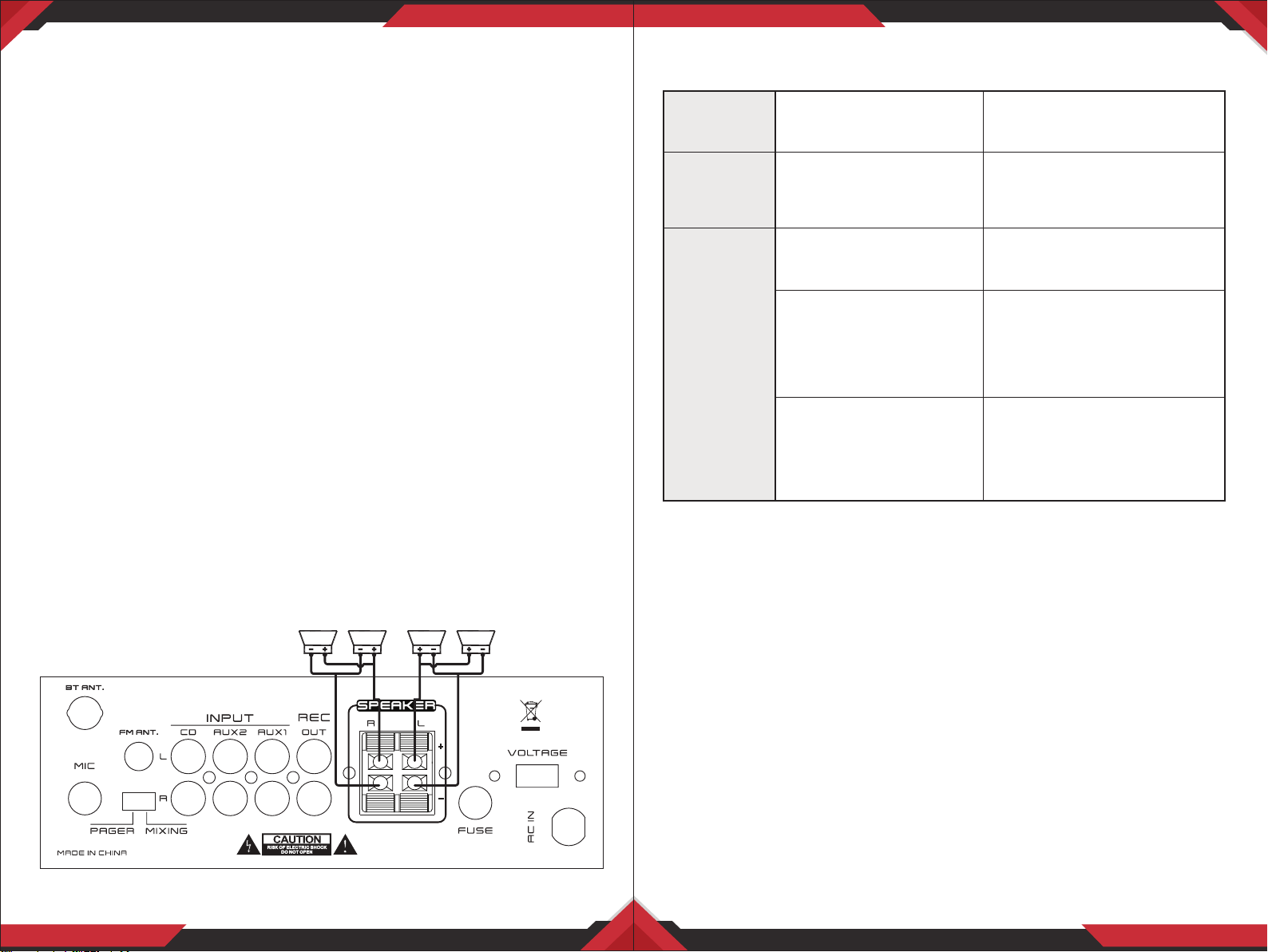
Connecting four 8 ohm speakers in stereo mode
www.PyleUSA.com
6
www.PyleUSA.com
7
NO POWER
The fuse might be blown
Check the amplier's fuse
and replace it if necessary.
NO SOUND
Sound source or speakers
may not be connected
properly
Check all connections
Master volume control
may be set to a minimum
Adjust the volume control
to a higher setting
The speaker's wire
might have the wrong
impedance
Make sure that the speakers
that you have connected to
the amp are matching in
impedance
The amplier is shutting
down or powering o
Turn the amplier o and let it
cool, make sure that the
amplier is properly ventilated,
and then tum it back on

What's in the Box:
• FM Antenna
• Remote Control
• Amplier Receiver
Technical Specs:
• Power Output: 2 x 40 Watt
• Power Supply: 120/240V Voltage Selector
• Impedance: 4-8 Ohm
• Fuse:1A
• THD: 1%
• Harmonic Distortion: 0.3%
• Input sensitivity: 150mV (Max Output: 6000mV)
• Bass: +/-10dB (100 Hz), Treble: +/-10dB (10KHz)
• Frequency Response: 20Hz-20KHz
• Signal to Noise Ratio: > 78dB
• Battery Operated Remote Control, Requires (1) x ‘CR-2032’ Battery (Included)
• vProduct Dimension: 5.39'' x 7.48'' x 2.76'' –inches
Features:
• Blue LED Screen for Media Playback Information
• Double Decoder Digital Media Function with Remote Control
• Compatible with MP3/WMA Files
• Wireless BT Streaming, FM Radio
• Built-in USB & SD Card Readers
• RCA REC Output
• Balance Control
• 1/4" Mic Input Jack
• Speaker L/R Terminals
• Power On LED Indicator
• Headphone Output Jack
• Four Push Type Speaker L/R Terminals
• Switchable Mic Pager And Mixing Modes
• Switchable RCA Inputs: AUX1, AUX2 & CD
• Bass, Treble, Master Volume & Mic Controls
Wireless BT Connectivity:
• Built-in Wireless BT Music Streaming Receiver
• Compatible with All of Your Favorite Wireless BT Devices
(iPhone, Androids, Smartphones, iPad, Tablets, etc.)
• Wireless BT Version: 5.0
• Wireless BT Network Name: ‘PYLEUSA’
www.PyleUSA.com
8
www.PyleUSA.com
9
This product can expose you to a chemical or group of checmicals, which may include
“Nickel Carbonate” which is known in the state of California to cause cancer, birth defects,
or other reproductive harm. For more info, go to https://www.p65warnings.ca.gov/.