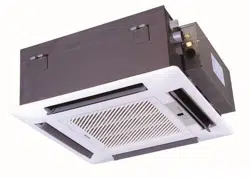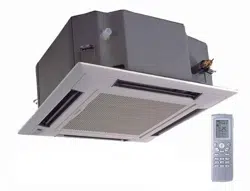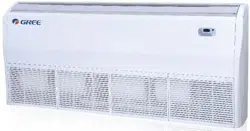

Change for life
Thank you for choosing our product.
Please read this Owner’s Manual carefully before operation and
retain it for future reference.
If you have lost the Owner's Manual, please contact your local
distributor or visit www.greecomfort.com or send an email to
[email protected] for the electronic version.
Installation & Owner's Manual
Original Instructions
Split Air Conditioner
Models:
CONS09HP230V1AF
GEH(09)AA-D3DNA1C/I
CONS12HP230V1AF
GEH(12)AA-D3DNA1C/I
CONS18HP230V1AF
GEH(18)AA-D3DNA1C/I
Contents
OPERATION INSTRUCTIONS
1. Part names and their functions ........................................................................................................... 1
2. How to use the remote control to operate the unit .............................................................................. 2
3. Maintenance ...................................................................................................................................... 7
4. Operating guide ................................................................................................................................. 10
5. Precautions ....................................................................................................................................... 12
6. Checking before contact the service man ........................................................................................ 13
INSTALLATION INSTRUCTIONS
7. Installation of indoor unit .................................................................................................................... 14
8. Routine check after installation ......................................................................................................... 22
The figures in this manual may be different with the material objects, please
refer to the material objects for reference.
This appliance is not intended for use by persons (including children) with
reduced physical , sensory or mental capabilities or lack of experience
and knowledge,unless they have been given supervision or instruction
concerning use of the appliance by a person responsible for their safety.
Children should be supervised to ensure that they do not play with the appliance.
External static pressures at the appliance was tested is 0 Pa
Fuse link: T250 V; 3.15 A
One of the benefits awaiting you with our room air conditioner is not only
comfort of life but also good health. This operation instruction brings you the
many omfort and technological features your unit has to offer. In addition, it
provides you vital information about maintenance, service and economical
operating. Take the next few minutes to discover how to get your comfort and
economy of the operation from your new room air conditioner.
Thank you for selecting our products
9. 23
Configuration of connection pipe and additional volume of refrigerant...........................................
1
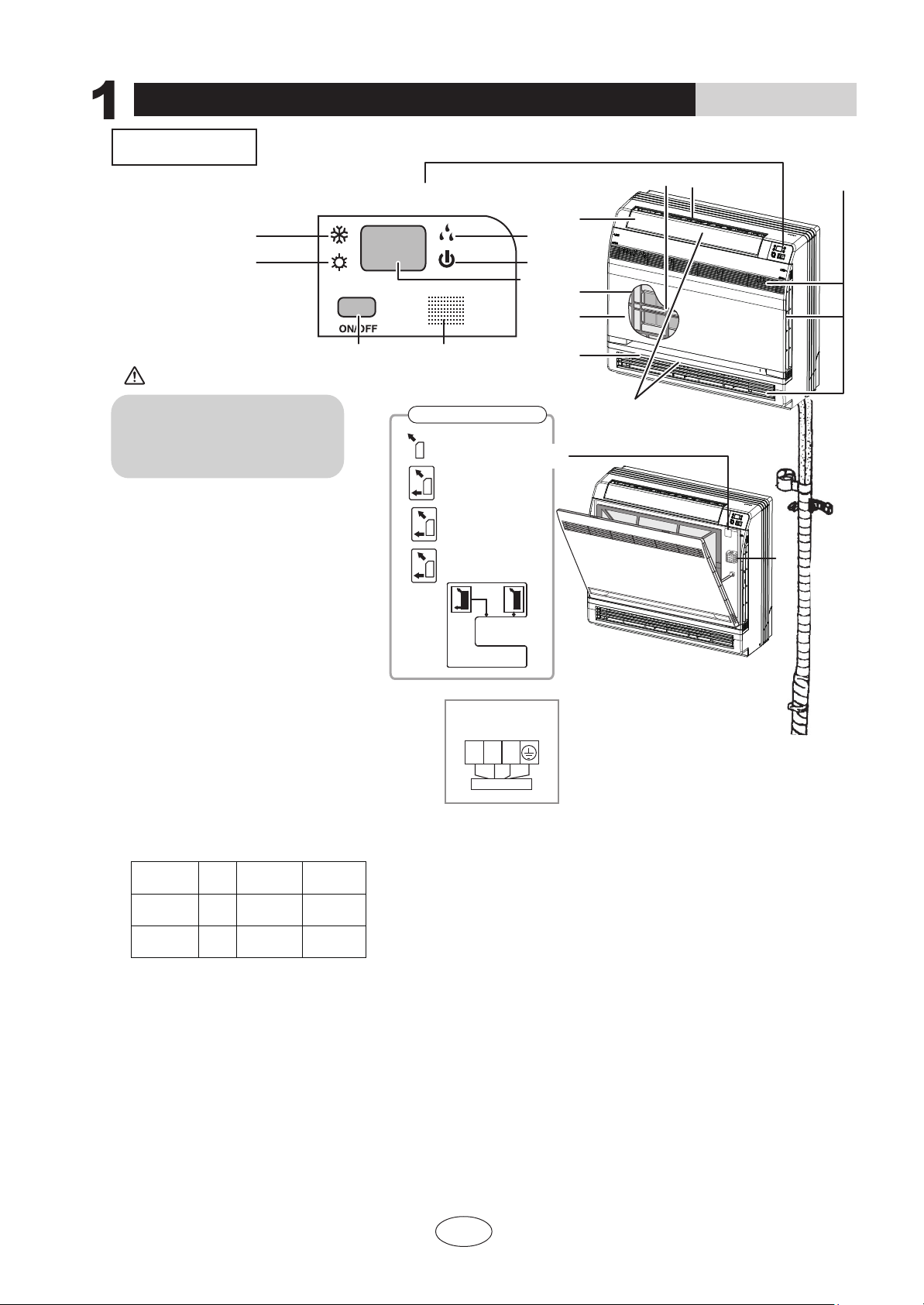
Part names and their functions
INDOOR UNIT
CAUTION
OPERATION INSTRUCTIONS
25℃
25℃
① If the supply cord is damaged, it must be replaced by the manufacturer or its service agent or a similarly qualified person in order to avoid a hazard.
③ An all-pole disconnection switch having a contact separation of at least 3mm in all poles should be connected in fixed wiring.
② The appliance shall be installed in accordance with national wiring regulations.
NOTE:
16
Air outlet selection switch
This setting blows air from
upper outlet only.
•
This setting automatically
decides a blow pattern
depending on mode and
conditions.
•
The unit is shipped from the
factory with this setting.
This setting is recommended.
1. Titanium Apatite Photocatalytic
Air-Purifying Filter:
12. Run lamp
13. LED display
16.Air outlet selection switch
17.Room temperature sensor:
● It senses the air temperature around the unit.
15.Signal receiver:
● It receives signals from the remote controller.
● When the unit receives a signal, you will hear
a short beep.
● Settings changed.....beep
14. Indoor Unit ON/OFF switch:
● Push this switch once to start operation.
Push once again to stop it.
2. Air outlet
3. Display
4. Front panel
5. Louvers (vertical blades)
● The louvers are inside of the air outlet.
6. Air inlet
7. Air filter
8. Flap (horizontal blade)
9. Cool mode lamp
10. Heat mode lamp
11. Dry mode lamp
● These filters are attached to the inside
of the air filters.
● The operation mode refers to the following table.
● This switch is useful when the remote controller
is missing.
Model Mode
Temperature
setting
Air flow rate
AUTO
AUTO
AUTO
AUTO
COOLING
ONLY
HEAT
PUMP
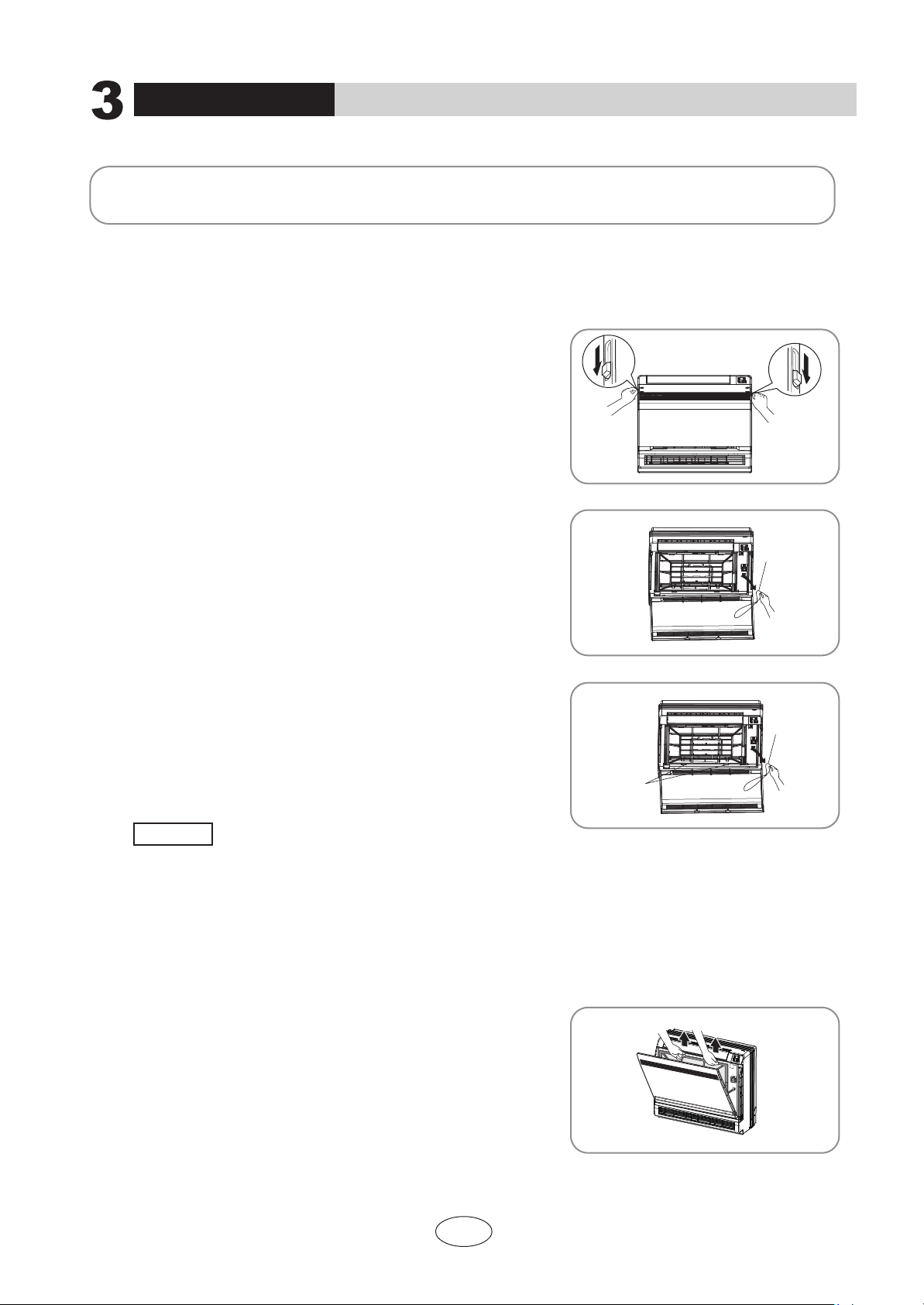
Opening the Front Panel
Indoor unit
wiring terminal
N(1) 2 3
3
9
12
10
14 15
13
11
1 2
5
6
2
4
7
8
Before opening the front panel, be sure to
stop the operation and turn the breaker OFF.
Do not touch the metal parts on the inside
of the indoor unit, as it may result in injury.
17
•
•
white
(blue)
black
red
(brown)
green
(yellow-
green)
Outdoor unit connection
2
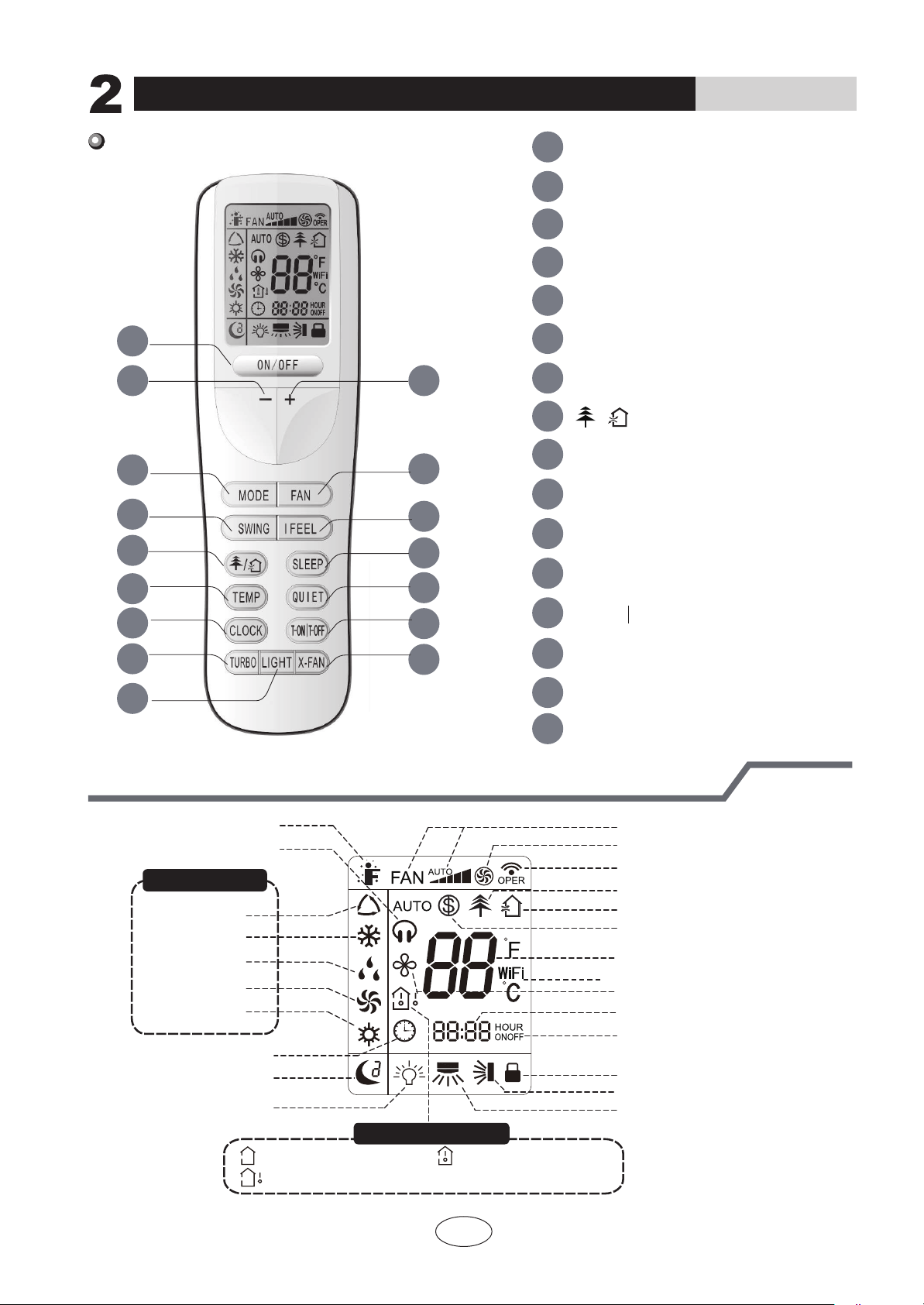
Remote Controller Description
How to use the remote control to operate the unit
Introduction for icons on display screen
2 3
7
6
10
14
15
16
13
12
11
9
4
5
8
1
1 ON/OFF button
2
MODE button
4
- button
3
+ button
5
FAN button
SWING button
I FEEL button
6
9
X-FAN button
10
QUIET button
CLOCK button
11
12
TURBO button
13
SLEEP button
TEMP button
14
15
16
LIGHT button
8
7
button
4
14
T-ON T-OFF button
/
Send signal
Turbo mode
8
℃
heating function
Set temperature
Set time
X-FAN function
TIMER ON /TIMER OFF
Child lock
Up & down swing
Left & right swing
Set fan speed
Light
Temp. display type
:Set temp.
:Outdoor ambient temp.
:Indoor ambient temp.
Sleep mode
Clock
Heat mode
Fan mode
Dry mode
Cool mode
Auto mode
Operation mode
I feel
Healthy mode
Scavenging functions
Quiet
This is a general remote controller. Some models have this
function while some do not. Please refer to the actual models.
OPERATION INSTRUCTIONS
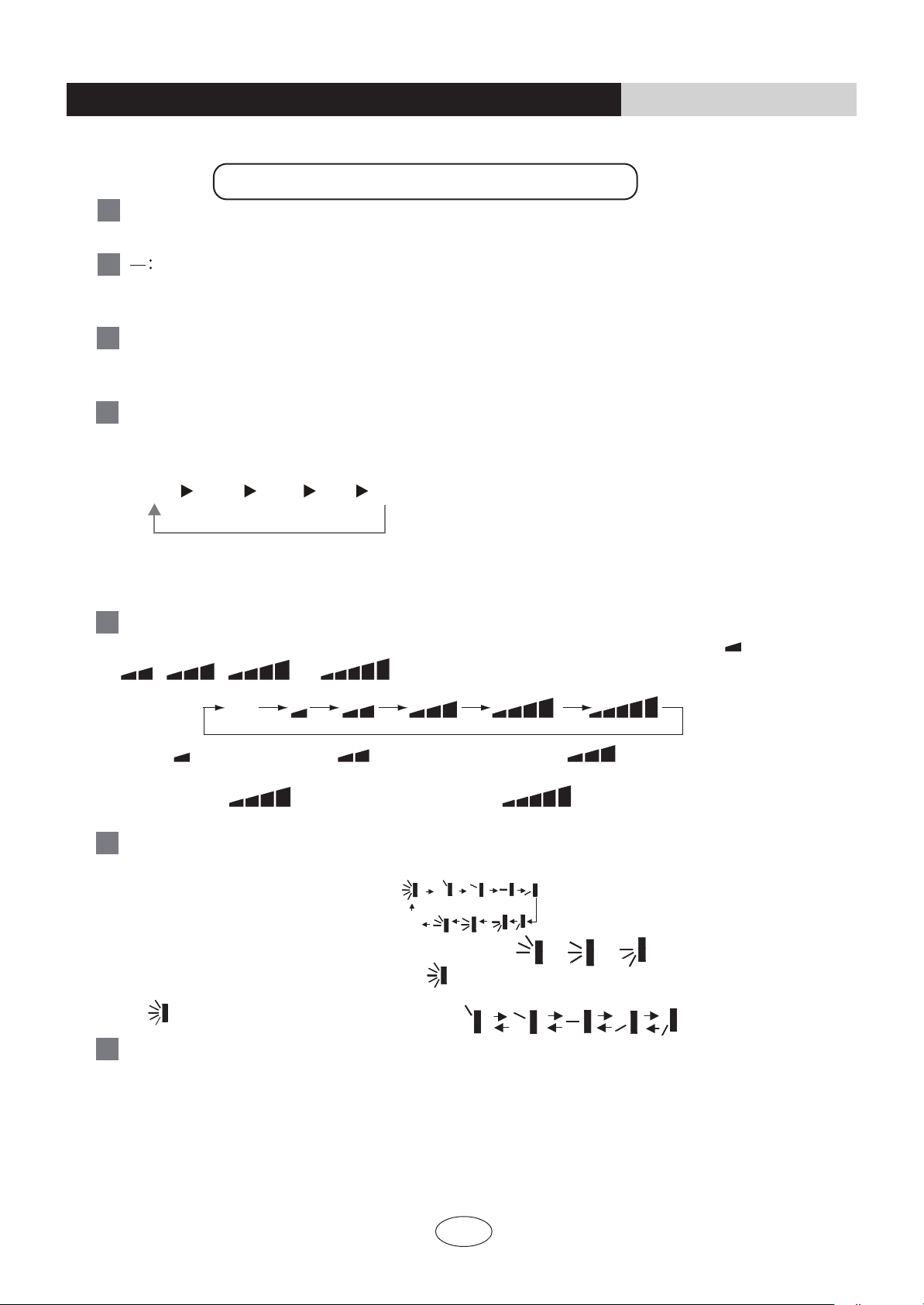
6
Press this button to set up &down swing angle, which circularly changes as below
:
OFF
This remote controller is universal . If any command , or is sent out,
the unit will carry out the command as
indicates the guide louver swings as:
Press this button to turn on I FEEL function. The unit automatically adjust temperature
according to the sensed temperature. Press this button again to cancel I FEEL function.
I FEEL:
SWING:
7
Remote Controller Description
ON/OFF :
MODE :
+ :
AUTO
COOL
DRY
FAN HEAT *
*Note:Only for models with heating function.
After energization, AUTO mode is defaulted. In AUTO mode, the set temperature will not
be displayed on the LED of the indoor, and the unit will automatically select the suitable operation
mode in accordance with the room temperature to make indoor room comfortable.
3
This button is used for setting Fan Speed in the sequence that goes from AUTO,
to
then back to Auto.
,
, ,
,
FAN
:
1
4
3
2
5
Press this button to turn on the unit .Press this button again to turn off the unit.
Press this button to decrease set temperature. Holding it down above 2 seconds rapidly
decreases set temperature. In AUTO mode, set temperature is not adjustable.
Press this button to increase set temperature.Holding it down above 2 seconds rapidly
increases set temperature. In AUTO mode, set temperature is not adjustable.
Auto
Medium speedLow-Medium speedLow speed
High speedMedium-High speed
Each time you press this button,a mode is selected in a sequence that goes from AUTO,
COOL,DRY, FAN,and HEAT
*
, as the following:
How to use the remote control to operate the unit
OPERATION INSTRUCTIONS
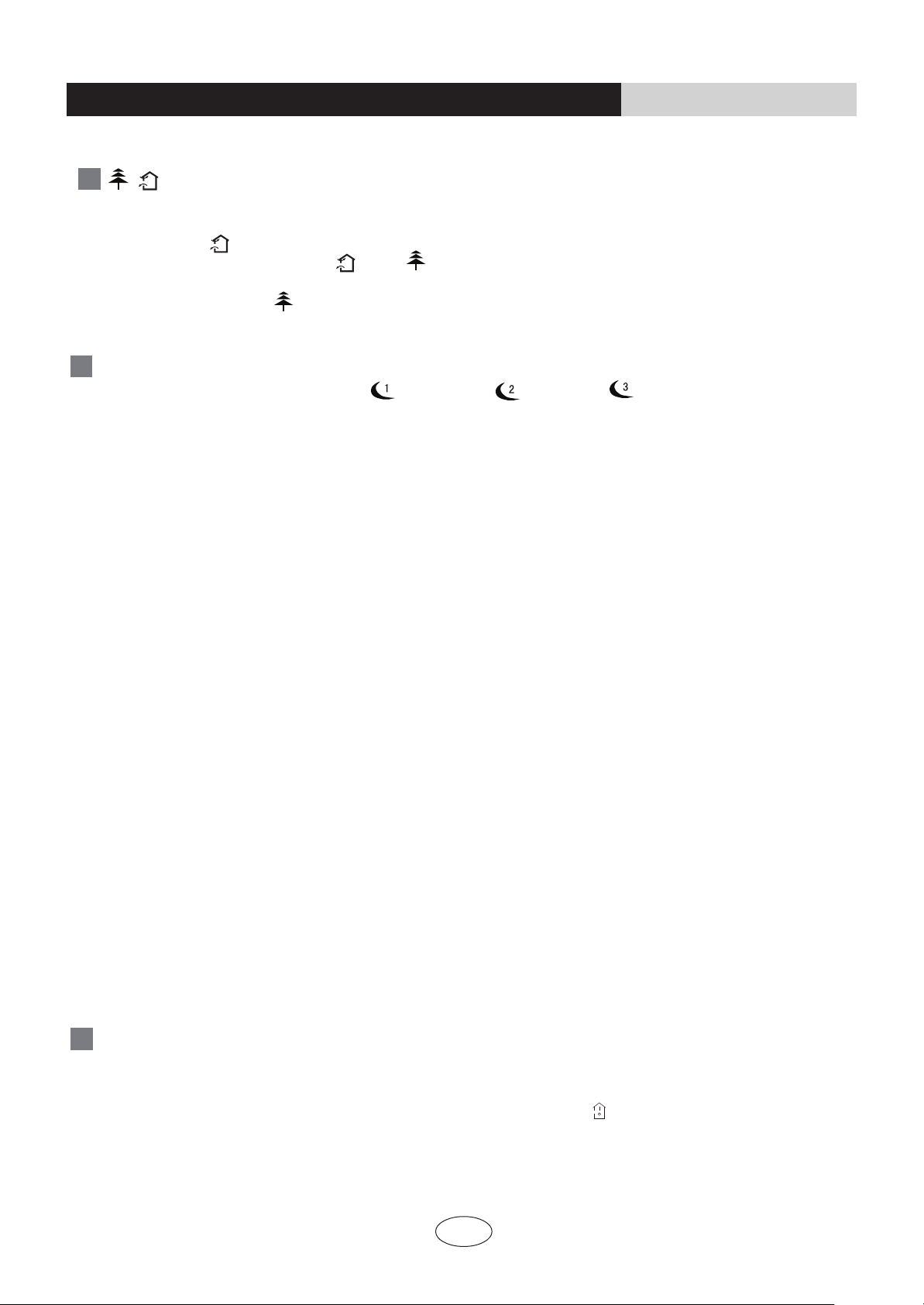
Press this button, could select displaying the indoor setting temperature or indoor ambient
temperature.When the indoor unit firstly power on it will display the setting temperature,
if the temperature's displaying status is changed from other status to" ",displays the
ambient temperature, 5s later or within 5s, it receives other remote control signal that will
return to display the setting temperature. if the users haven't set up the temperature
displaying status,that will display the setting temperature.
SLEEP:
9
Press this button, can select Sleep 1 ( ), Sleep 2 ( ),Sleep 3 ( ) and cancel the Sleep,
circulate between these, after electrified, Sleep Cancel is defaulted.
Sleep 1 is Sleep mode 1, in Cool, Dehumidify modes: sleep status after run for one hour, the main
unit setting temperature will increase 1
10
TEMP:
4
How to use the remote control to operate the unit
OPERATION INSTRUCTIONS
Sleep 3- the sleep curve setting under Sleep mode by DIY:
(1) Under Sleep 3 mode, press "Turbo" button for a long time, remote control enters into user individuation sleep
setting status, at this time, the time of remote control will display "1 hour ", the setting temperature "88" will
(2) Adjust "+" and "-" button, could change the corresponding setting temperature, after adjusted, press
"Trubo "button for confirmation;
(3) At this time, 1 hour will be automatically increased at the timer postion on the remote control, (that are
(4) Repeat the above step (2)
~ (3) operation, until 8 hours temperature setting finished, sleep
curve setting finished, at this time, the remote control will resume the original timer display;
display the corresponding temperature of last setting sleep curve and blink (The first entering will display
according to the initial curve setting value of original factory);
"2 hours " or "3 hours " or "8 hours "), the place of setting temperature "88" will display the
corresponding temperature of last setting sleep curve and blink;
temperature display will resume to original setting temperature.
●
●
Sleep3- the sleep curve setting under SLEEP mode by DIY could be inquired:
The user could accord to sleep curve setting method to inquire the presetting sleep curve, enter into user
individuation sleep setting status, but do not change the temperature, press "Turbo" button directly for confirmation.
Note: In the above presetting or enquiry procedure, if continuously within10s, there is no button pressed, the
sleep curve setting within10s, there is no button pressed, the sleep curve setting status will be automatically
quit and resume to display the original displaying. In the presetting or enquiry procedure, press "ON/OFF"
button, "Mod
e" button, "Timer"button or "Sleep" button, the sleep curve setting or enquiry status will quit similarly.
●
●
℃,setting temperature increased 2℃, the unit will run at this
setting temperature; In Heat mode: sleep status after run for one hour, the setting temperature will
decrease 1
℃, 2 hours, setting temperature will decrease 2
℃, then the unit will run at this setting
temperature.
●
Sleep 2 is sleep mode 2, that is air conditioner will run according to the presetting a group of sleep temperature curve.
P
ress this button to achieve the on and off of healthy and scavenging functions in operation status.
Press this button for the first time to start scavenging function;
LCD displays“ ”. Press the button for the
second time to start healthy and scavenging functions
simultaneously; LCD displays“ ” and “ ” .
Press this button for the third time to quit healthy
and scavenging functions simultaneously. Press the button for the fourth time to start healthy
function; LCD display “ ”
. Press this button again to repeat the operation above.
/
8
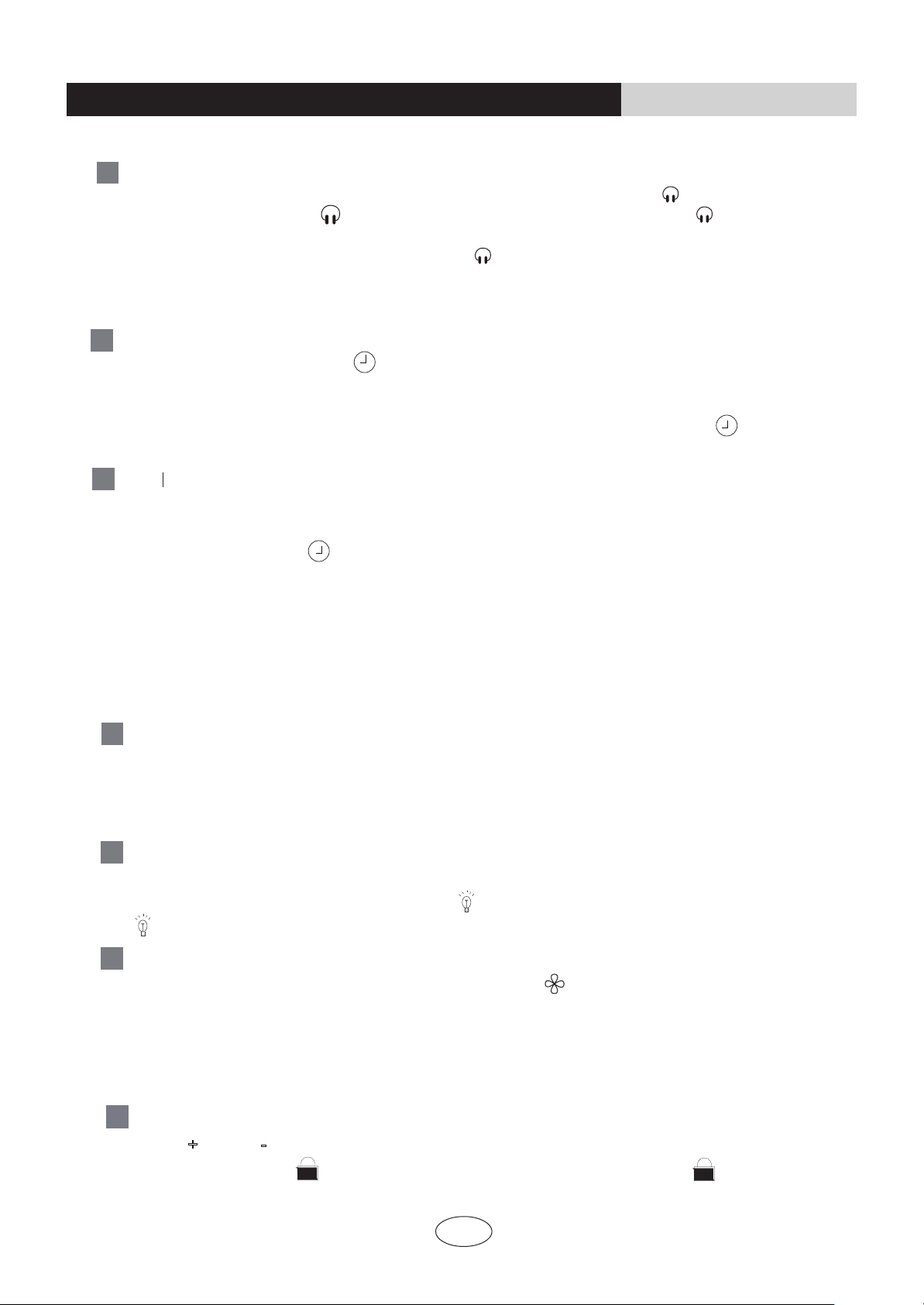
present time.Holding down either button above 2 seconds increases or decreases the
CLOCK:
T-ON T-OFF:
time by 1 minute every 0.5 second and then by 10 minutes every 0.5 second. During
blinking after setting, press CLOCK button again to confirm the setting,and then
Press T-ON button to initiate the auto-ON timer. To cancel the auto-timer program, simply
press this button again.
After press of this button, disappears and "ON "blinks .0
0:00 is displayed for ON time
setting. Within 5 seconds, press+or - button to adjust the time value. Every press of either
button changes the time setting by 1 minute. Holding down either button rapidly changes the
time setting by 1 minute and then 10 minutes. Within 5 Seconds after setting, press TIMER
ON button to confirm.
12
will
be constantly displayed.
13
Press T-OFF button to initiate the auto-off timer. To cancel the auto-timer program, simply
press the button again.TIMER OFF setting is the same as TIMER ON.
5
How to use the remote control to operate the unit
OPERATION INSTRUCTIONS
Press CLOCK button, blinking . Within 5 seconds,pressing +or - button adjusts the
LIGHT:
15
Press LIGHT button to turn on the display's light and press this button again to turn off
the display 's light. If the light is turned on , is displayed. If the light is turned off,
disappears.
TURBO:
14
X-FAN:
16
Pressing X-FAN button in COOL or DRY mode,the icon is displayed and the indoor
fan will continue operation for a while minutes in order to dry the indoor unit even though
you have turned off the unit.
After energization, X-FAN OFF is defaulted. X-FAN is not available in AUTO,FAN or
HEAT mode.
Press this button to activate / deactivate the Turbo function which enables the unit to
reach the preset temperature in the shortest time. In COOL mode, the unit will blow strong
cooling air at super high fan speed. In HEAT mode, the unit will blow strong heating air
at super high fan speed.
Press "+
" and "-" buttons simultaneously
to lock or unlock the keypad. If the remote
controller is locked, is
displayed. In this case,
pressing any button, blinks
three times.
Combination of "+" and "-" buttons: About lock
17
QUIET:
11
Press this button, the Quiet status is under the Auto Quiet mode (display and "Auto"" " signal)
and Quiet mode (display " " singal) and Quiet OFF (there is no signal of " " displayed),
after powered on, the Quiet OFF is defaulted. Note: the Quiet function cannot be set up in Fan
and Dry mode;Under the Quiet mode (Display " " signal), the fan speed is not available.
6
How to use the remote control to operate the unit
OPERATION INSTRUCTIONS
★
●
●
●
●
●
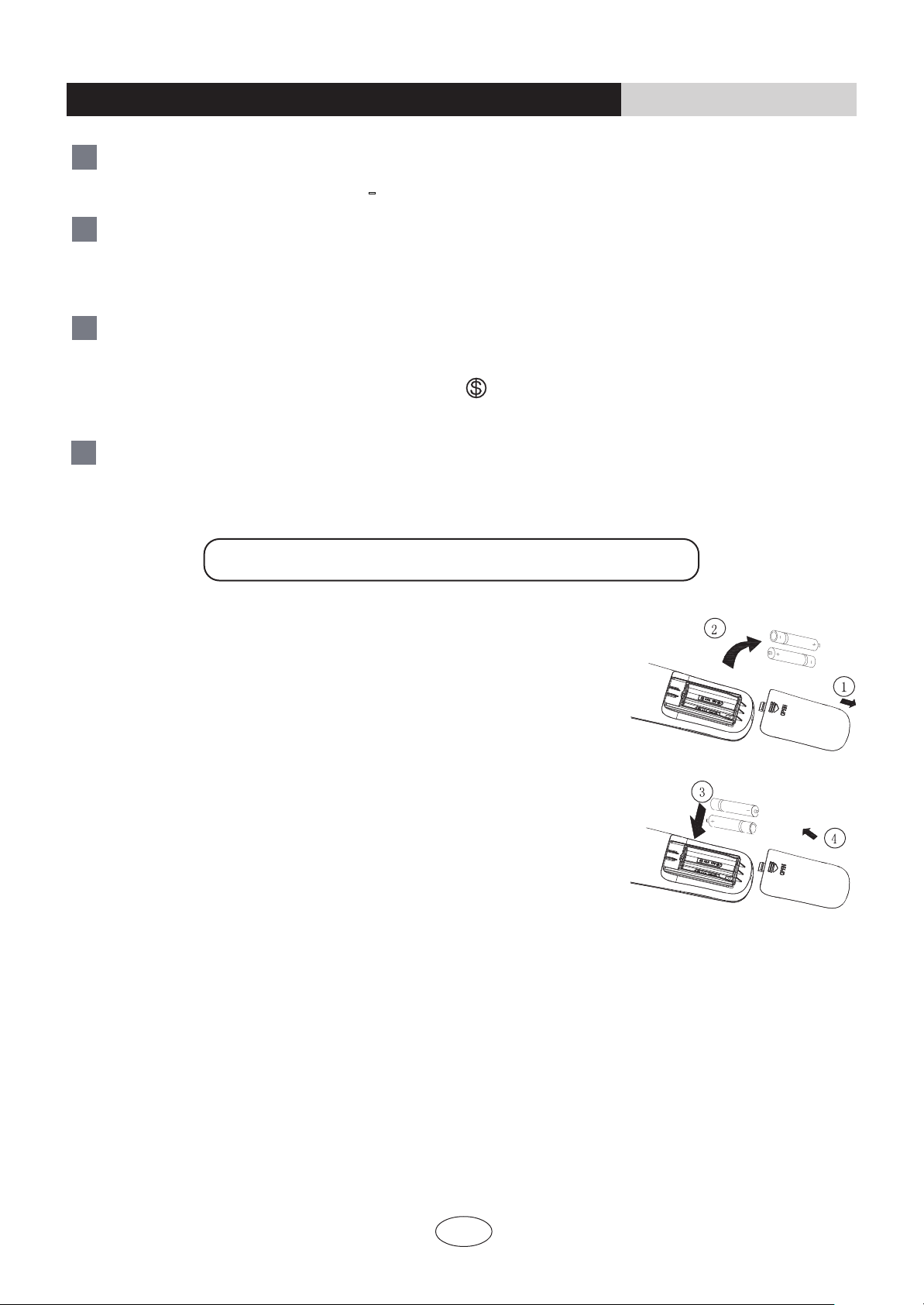
1.Remove the battery cover plate from the rear of the remote controller.
(As shown in the figure)
2.Take out the old batteries.
3.Insert two new AAA1.5V dry batteries, and pay attention to the polarity.
4. Reinstall the battery cover plate.
When replacing the batteries, do not use old or different types of batteries,
If the remote controller will not be used for a long time, please
otherwise, it may cause malfunction.
remove batteries to prevent batteries from leaking.
The operation should be performed in its receiving range.
It should be kept 1m away from the TV set or stereo sound sets.
If the remote controller does not operate normally, please take the
batteries out and reinsert them after 30 seconds.If it still can't operate properly,
Notes:
replace the batteries.
Sketch map for
replacing batteries
Replacement of Batteries
At unit OFF, press "MODE"
and " -
" buttons simultaneously to switch between and .
℃
℉
About Back-lighting Function
21
Combination of "MODE " and "-" buttons :
18
About switch between Fahrenheit and centigrade
Press “TEMP” and “CLOCK” simultaneously in COOL mode to start energy-saving function.
Nixie tube on the remote controller displays “SE”. Repeat the operation to quit the function.
Combination of " TEMP " and "CLOCK" buttons : About Energy-saving Function
19
Press “TEMP” and “CLOCK” simultaneously in HEAT mode to start
The unit lights for 4s when energizing for the first time, and 3s for later press.
8℃Heating Function
.
Nixie tube on the remote controller displays “ ” and a selected temperature of “
8℃”
(46 if
Fahrenheit is adopted). Repeat the operation to quit the function.
Combination of " TEMP " and "CLOCK" buttons : About 8℃Heating Function
20
℉
7
Maintenance
Before inspection and maintenance of the unit. PLEASE set power switch to “OFF” to cut off the
power supply.
3.1
Unit s
3.2 Filters
CAUTION
● Indoor unit, Outdoor unit and Remote controller
● Front panel
1. Wipe them with dry soft cloth.
1.
Open the front panel.
1. Open the front panel.
2. Remove the air filter.
Slide the two stoppers on the left and right sides inward until they click.
2. Remove the front panel.
• Remove the string.
• Allowing the front panel to fall forward will enable you to remove it.
3. Clean the front panel.
• Wipe it with a soft cloth soaked in water.
• Only neutral detergent may be used.
• In case of washing the front panel with water,dry it with cloth, dry
it up in the shade after washing.
4. Attach the front panel.
• Insert the front panel into the grooves of the unit (3 places).
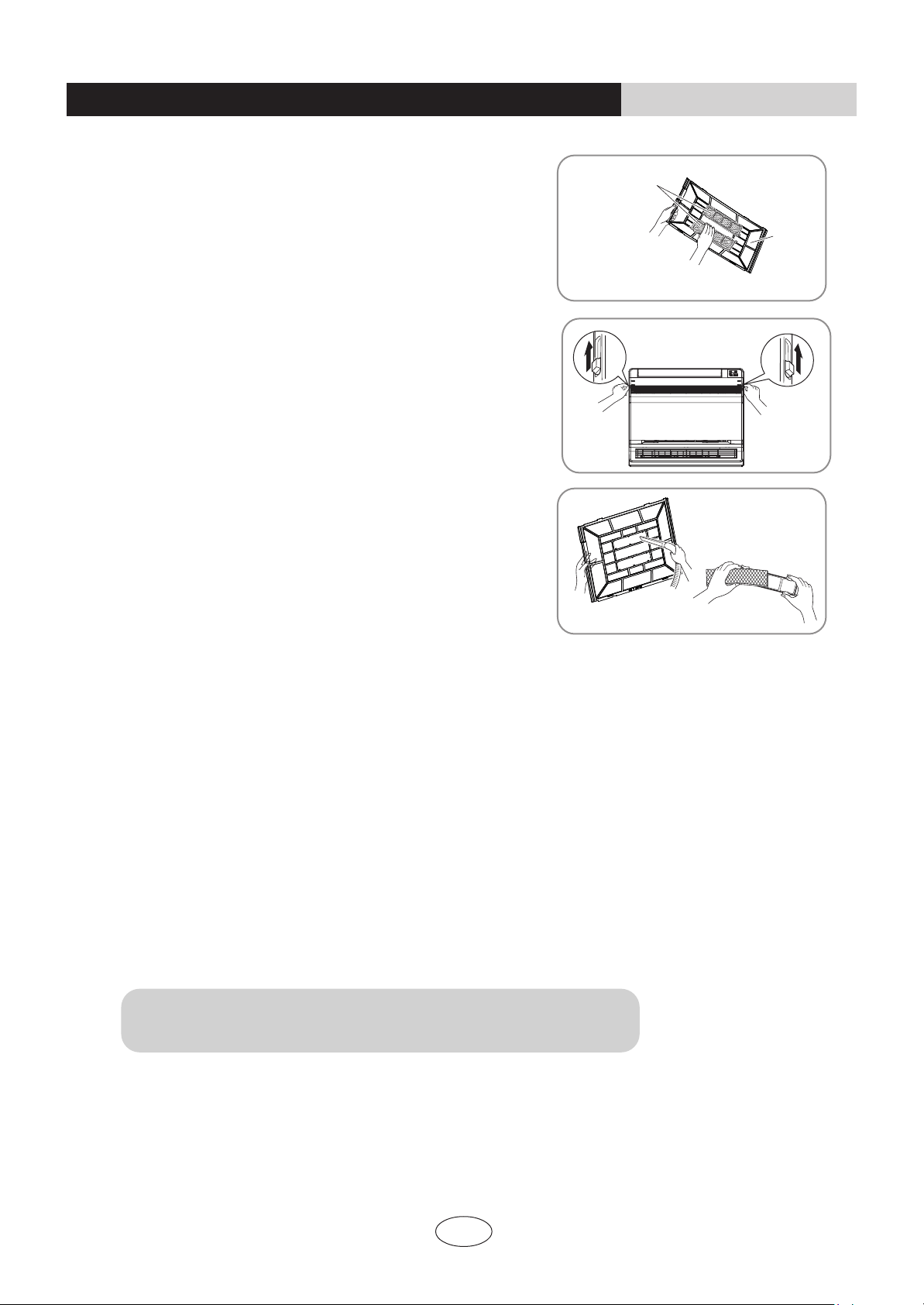
• Press the claws on the right and left of the air filter down slightly, then
pull upward.
3. Take off the Titanium Apatite Photocatalytic Air-Purifying
Filter.
• Hold the tabs of the frame, and remove the claws in 4 places.
• Don’t touch the metal parts of the indoor unit. If you touch those parts, this may cause an injury
• When removing or attaching the front panel, use a robust and stable stool and watch your steps carefully
• When removing or attaching the front panel, support the panel securely with hand to prevent it from falling.
• For cleaning, do not use hot water above 40°C, benzine, gasoline, thinner, nor other volatile oils, polishing compound,
scrubbing brushes, nor other hand stuff.
After cleaning, make sure that the front panel is securely fixed.
.
.
•
• Attach the string to the right, inner-side of the front grille.
• Close the panel slowly.
String
Place front
panel in
grooves.
OPERATION INSTRUCTIONS
String
8
4. Clean or replace each filter.
6. Wash the air filters with water or clean them with vacuum
cleaner.
1. Vacuum dusts, and soak in warm water or water for about 10 to 15 minutes if dirt is heavy.
Remove the tabs on the filter frame and replace with a new filter.
2. Do not remove filter from frame when washing with water.
3. After washing, shake off remaining water and dry in the shade.
4. Since the material is made out of paper, do not wring out the filter when removing water from it.
See figure.
5. Set the air filter and Titanium Apatite Photocatalytic
Air-Purifying Filter as they were and close the front
panel.
• Operation without air filters may result in troubles as dust will accumulate
inside the indoor unit.
• If the dust does not come off easily, wash them with neutral detergent
thinned with lukewarm water, then dry them up in the shade.
• Dispose of the old filter as flammable waste.
• Dispose of the old filter as flammable waste.
• It is recommended to clean the air filters every week.
Air filter
Titanium Apatite
Photocatalytic
Air-Purifying
Filter
The Titanium Apatite Photocatalytic Air-Purifying Filter can be renewed by washing it with water
once every 6 months. We recommend replacing it once every 3 years.
3.3
Titanium Apa tite Photocatalytic
Air-Purifying Filte r
NOT E
● Maintenance
● Replacement
• Operation with dirty filters:
(1) cannot deodorize the air. (2) cannot clean the air.
(3) results in poor heating or cooling. (4) may cause odour.
OPERATION INSTRUCTIONS
Maintenance
9
1. Operate the “FAN only” for several hours on a fine day to dry out the inside.
2. After operation stops, turn off the breaker for the room air conditioner.
3. Clean the air filters and set them again.
• When a multi outdoor unit is connected, make sure the heating operation is not used at the other room befure you use the fan
operation.
4. Take out batteries from the remote controller.
• Press “MODE” button and select “FAN” operation.
• Press “ON/OFF” button and start operation.
3.4
Before a long idle pe riod
Che ck
NOT E
Check that the base, stand and other fittings of the outdoor unit are not decayed or corroded.
Check that nothing blocks the air inlets and the outlets of the indoor unit and the outdoor unit.
Check that the drain comes smoothly out of the drain hose during COOL or DRY operation.
• If no drain water is seen, water may be leaking from the indoor unit. Stop operation and consult
the service shop if this is the case.
OPERATION INSTRUCTIONS
Maintenance
10
Operating guide
OPERATION INSTRUCTIONS
Working principle and special functions for cooling
Working principle and special functions for heating
Defrosting:
*
When outdoor temperature is low but high humidity, after a long while running, frost will
form on outdoor unit, that will effect the heating effect, at this time, the auto defrosting
function will act, the heat running will stop for 8-10mins.
*
During the auto defrosting, the fan motors of indoor unit and outdoor unit will stop.
*
During the defrosting, the indoor indicator flashes(or display “H1”), the outdoor unit may
emit vapor,
This is due to the defrosting, it isn't malfunction.
*
After defrosting finished,the heating will recover automatically.
The climate type of this unit is according to the nameplate.
Air conditioner absorbs heat in the room and transmit to outdoor and discharged, so that
indoor ambient temperature decreased, its cooling capacity will increase or decrease by
outdoor ambient temperature.
If the unit is running in COOL mode and in low temperature, there will be frost formed on
the heat exchanger, when indoor heat exchanger temperature decreased below 0 , the
indoor unit microcomputer will stop compressor running and protect the unit.
℃
Principle:
*
Air conditioner absorbs heat from outdoor and transmits to indoor, in this way to increase
room temperature. This is the heat pump heating principle, its heating capacity will be
reduced due to outdoor temperature decrease.
*
If outdoor temperature becomes very low, please operate with other heating equipments.
Anti-cool wind function:
In Heat mode, the following three kinds of status, if indoor heat exchanger hasn't achieve
certain temperature that indoor fan motor will not start, in this way to prevent blowing cool
wind (within 3mins):
1. Heat operation just startedup. 2. After Auto defrosting operation is finished.
3. Heating under low temperature.
Principle:
Anti-freezing function:

11
Operating guide
OPERATION INSTRUCTIONS
12
OPERATION INSTRUCTIONS
Precautions
5
13
OPERATION INSTRUCTIONS
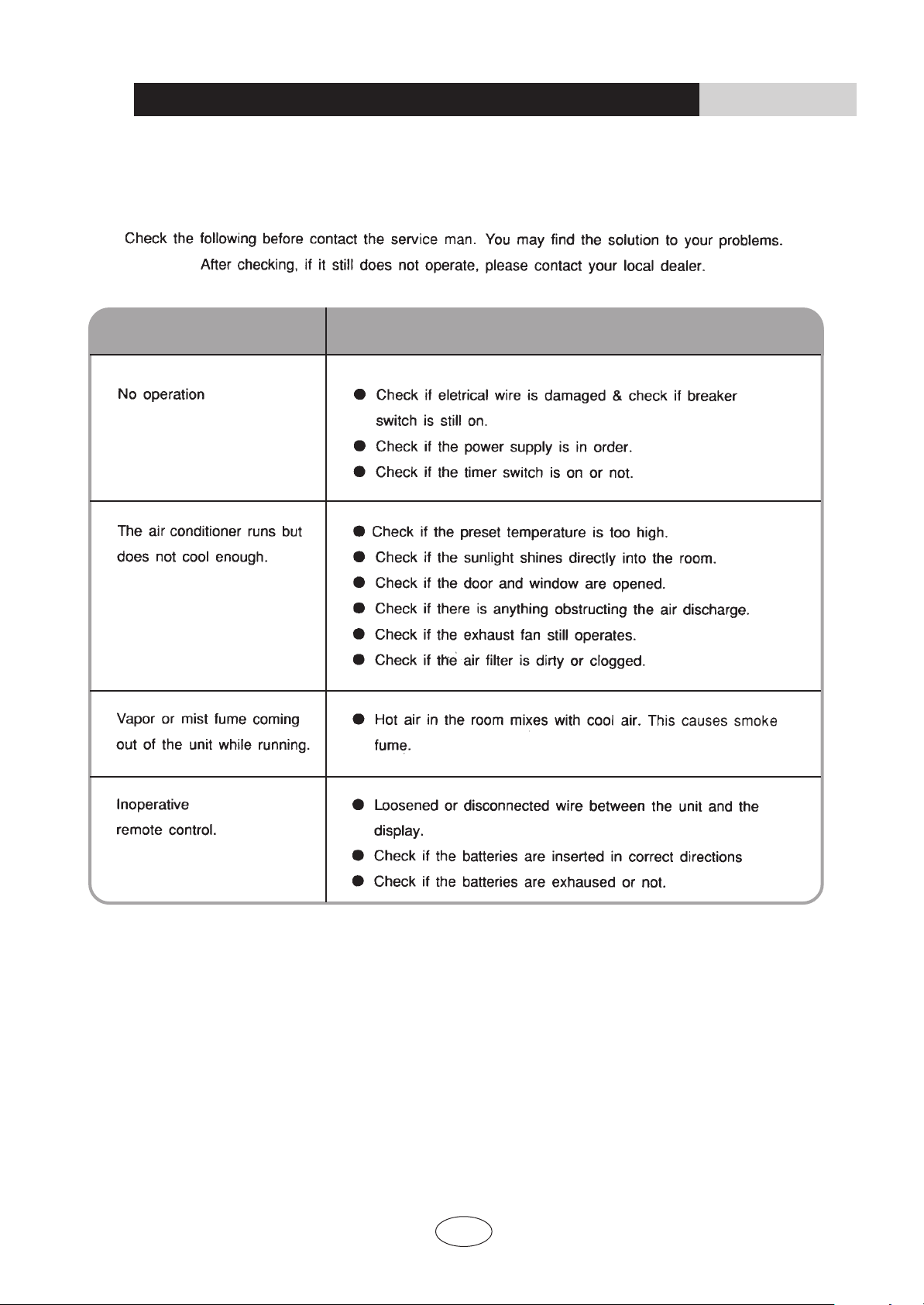
CAUSESPROBLEM
Checking before contact the service man
6
INSTALLATION INSTRUCTIONS
The appliance shall not be installed in the laundry.
Installation of indoor unit
●
●
●
●
Such a place where cool air can be distributed
Such a place where condensation water is easily
Such a place that can handle the weight of indoor unit.
Such a place which has easy access for maintenance.
drained out.
throughout the room.
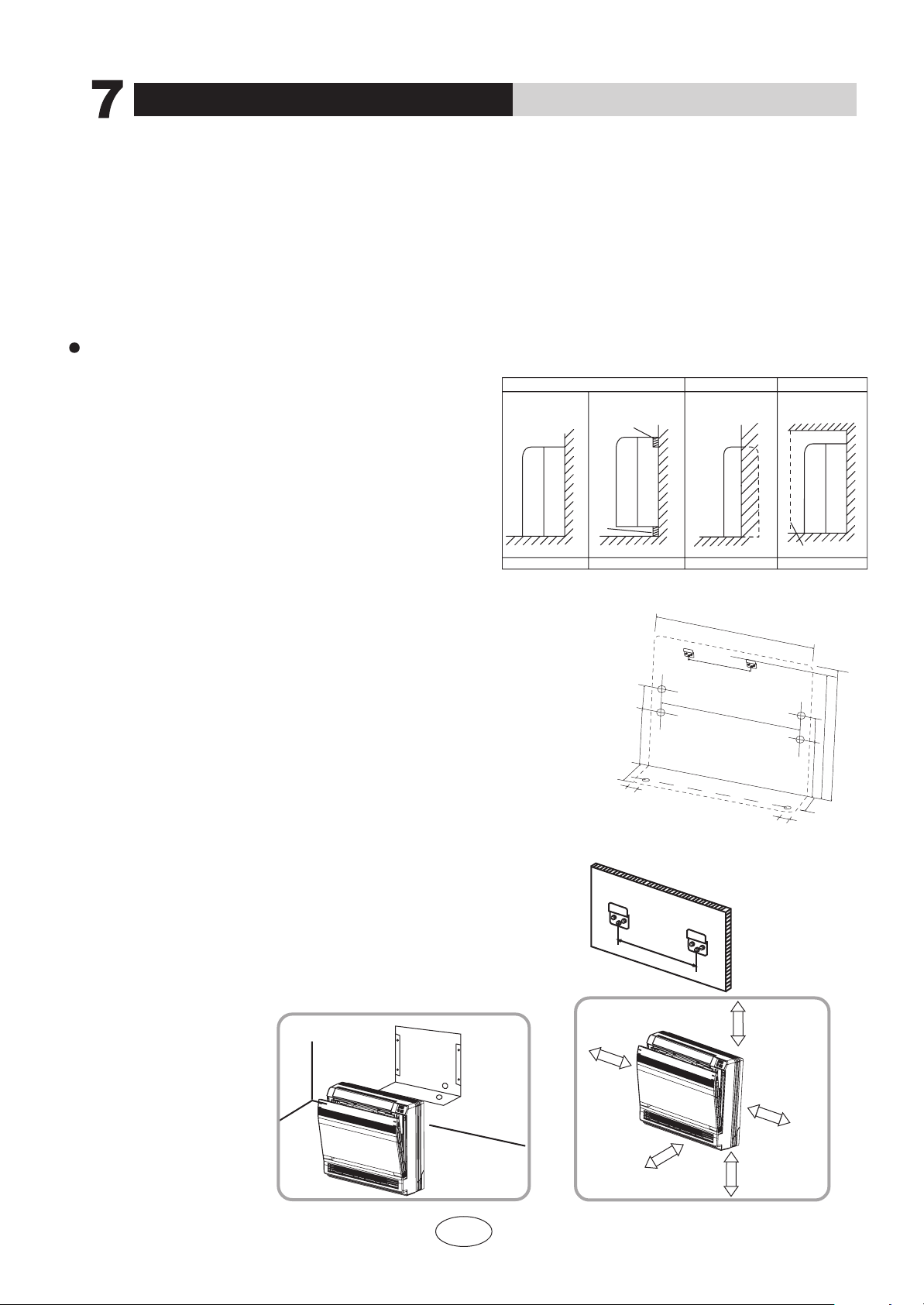
SELECTION OF INSTALLATION LOCATION.
Each type is similar to the other as follows;
●
●
THERE ARE 2 STYLES OF INSTALLATION.
CEILING TYPE
FLOOR TYPE
Schematic drawing of hooks:
Where there is too much of oil area.
Where it is acid base area.
Where there is irregular electrical supply.
●
●
●
TOOCCUR.
AIR CONDITIONER TROUBLEIS LIABLE
CAUTIONS FOR INSTALLATION WHERE
200mm
Indoor unit
The indoor unit should be sited in a place where:
1) the restrictions on installation specified in the indoor
unit installation drawings are met.
2) both air intake and exhaust have clear paths met.
3) the unit is not in the path of direct sunlight.
4) the unit is away from the source of heat or steam.
5) there is no source of machine oil vapour (this may shorten indoor unit life).
6) cool(warm) air is circulated throughout the room.
7) the unit is away from electronic ignition type fluorwscent lamps
(inverter or rapid stert type) as they may shorten the remote
controller range.
8) the unit is at least 1 metre away from any television or radio
set(unit may cause interference with the picture or sound).
Indoor Unit Installation Drawings
The indoor unit may be mounted in any of the three styles shown here.
Exposed
Floor lnstallation Wall Installation
Molding
Mounting plate
Half conceated
Concealed
Grid(field supply)
Location for securing the installation panel.
700
120
220
170
30
644
120
220
160
30
570
600
200
150cm
or more
150cm
15cm or below
from the floor
150cm
or more
150cm
or more
or more
14
INSTALLATION
PAPER PLANK

Refrigerant piping
1)Drill a hole ( 55mm in diameter ) in the spot indicated by the symbol in the illustration as below .
2)The location of the hole is different depending on which side of the pipe is taken out .
3)For piping ,see Connecting the refrigerant pipe ,under Indoor Unit Installation(1).
4)Allow space around the pipe for a easier indoor unit pipe connection.
Min.allowable length
The suggested shortest pipe length is 2.5m,in order to avoid noise from the outdoor unit and vibration.
(Mechanical noise and vibration may occur depending on how the unit is installed and the environment in which it is
used.)
See the installation manual for the outdoor unit for the maximum pipe length.
CAUTION
350
wall
Refrigerant pipe
45
75
Floor
45
45
45
45
60
75
75
75
75
45
Left back piping
gnipipmottobthgiRgnipipmottobtfeL
Wall
(Unit : mm)
Right back piping
Left/right piping
15
INSTALLATION INSTRUCTIONS
Installation of indoor unit
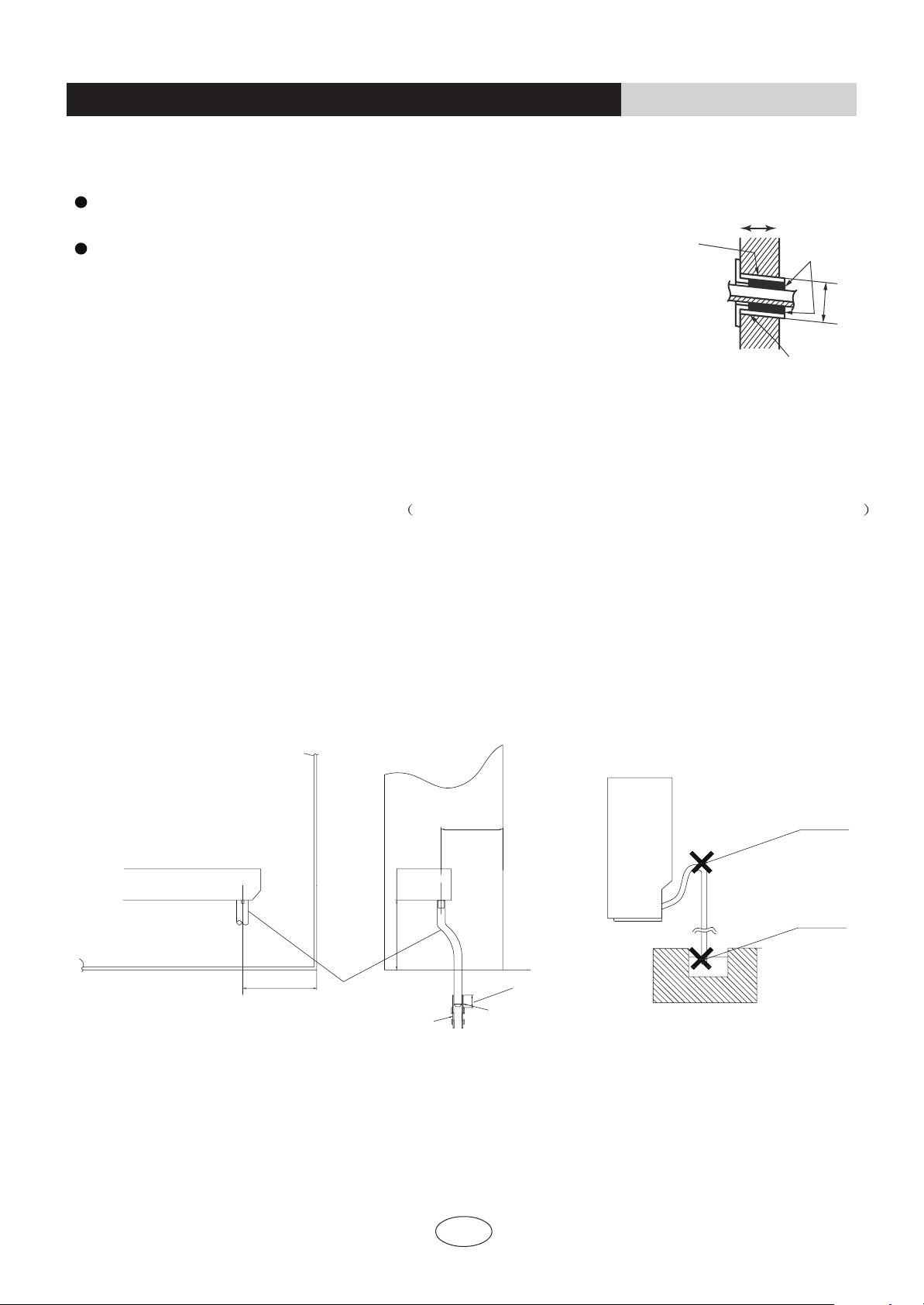
Drain piping
1)Use commercial regid polyvinyl chloride pipe general VP 20 pipe, outer diameter 26mm, inner diameter 20mm
for the drain pipe.
2)The drain hose (outer diameter 18mm at connecting end, 220mm long)is supplied with the indoor unit. Prepare the
drain pipe picture below position.
3)The drain pipe should be inclined downward so that water will flow smoothly without any accumulation.(Should not
be trap.)
4)Insert the drain hose to this depth so it won’t be pulled out of the drain pipe.
5)Insulate the indoor drain pipe with 10mm or more of insulation material to prevent condensation.
6)Remove the air filters and pour some water into the drain pan to check the water flows smoothly.
100
Drain hose
100
150
Vinyl chloride
drain pipe
50mm
or more
Reducer
Must be no trap
Do not touch water
16
INSTALLATION INSTRUCTIONS
Installation of indoor unit
Boring a wall hole and installing wall embedded pipe
For walls containing metal frame or metal board ,be sure to use a wall embedded
pipe and wall cover in the feed-through hole to prevent water leakage.
Be sure to caulk the gaps around the pipes with caulking material to prevent
water leakage.
1)Bore a feed-through hole of 55mm in the wall so it has a down slope toward the
outside.
2)Insert a wall pipe into the hole.
3)Insert a wall cover into wall pipe .
4)After completing refrigerant piping, wiring, and drain piping, caulk pipe hole gap
with putty.
Inside Outside
Caulking
Wall embedded pipe
(field supply)
Wall hole cover
Wall embedded pipe
(field supply)
Φ55

Open the front panel, remove the 4 screws and dis-
mount the front grille while pulling it forward.
Follow the procedure below when removing the slit
portions.
Front panel
Open the front panel
Remove
front grille
Casing
Front
grille
Remove 4 screws
3 tabs
For Moldings
Remove the pillars. (Remove the slit portions on the
bottom frame using nippers.)
For Side Piping
Remove the pillars.
1)Remove the 7screws.
2)Remove the upper casing (2 tabs).
3)Remove the left and right casings (2 tabs on each
side ).
4)Remove the slit portions on the bottom frame and
casings using nippers .
5)Return by following the steps in reverse order(3>2>
1).
3)Side
casings
2)Upper casing
3)Side
casings
Remove the pillar
Remove 7 screws
Casing
Remove the pillar
Casing
Remove the pillar
Bottom frame
Secure using 6 screws for floor installations.(Do not forget to secure to the rear wall.)
For wall installations, secure the mounting plate using 5 screws and the indoor unit using 4 screws.
Follow the arrows to disengage the clasps on the
front case to remove it.
Installing indoor unit
1.Preparation
2.Installation
17
INSTALLATION INSTRUCTIONS
Installation of indoor unit
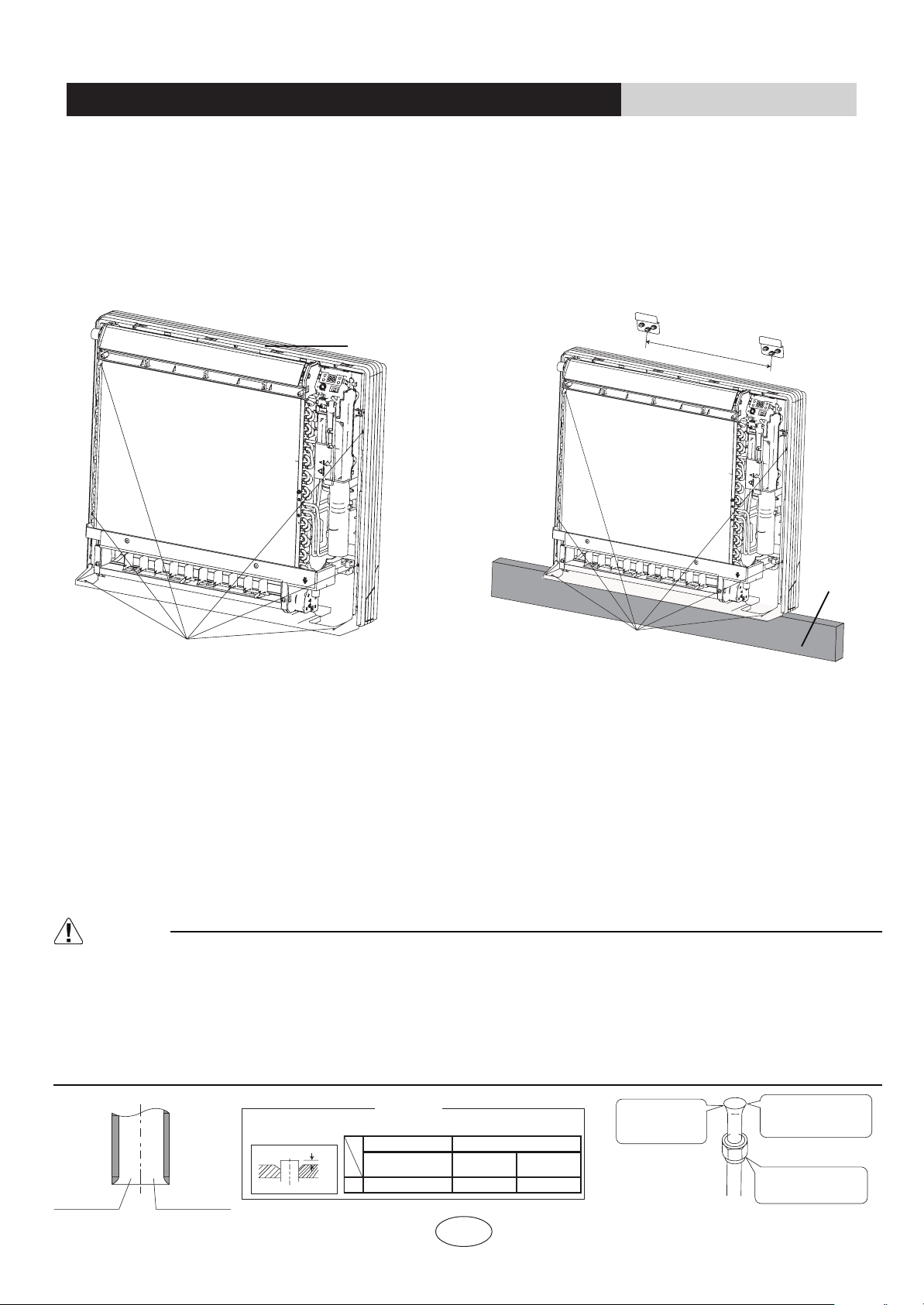
The mounting plate should be installed on a wall which can support the weight of the indoor unit.
1) Temporarily secure the mounting plate to the wall, make sure that the panel is completely level, and mark the boring
points on the wall.
2) Secure the mounting plate to the wall with screws.
6screws
Casing
Floor Installation
Wall Installation
6screws
Molding
3) Once refrigerant piping and drain piping connections are complete, fill in the gap of the through hole with putty. A gap
can lead to condensation on the refrigerant pipe, and drain pipe, and the entry of insects into the pipes.
4) Attach the front panel and front grille in their original positions once all connections are complete.
Flaring the pipe end
1)Cut the pipe end with a pipe cutter.
2)Remove burrs with the cut surface facing downward so that the chips do not enter the pipe.
3)Fit the flare nut on the pipe.
4)Flare the pipe.
5)Check that the flaring is properly made.
WARNING
1) DO not use mineral oil on flared part.
2) Prevent mineral oil from getting into the system as this would reduce the lifetime of the units.
3) Never use piping which had been used for previous installations. Only use parts which are delivered with the unit.
4) Do never install a drier to this R410A unit in order to guarantee its lifetime.
5) The drying material may dissolve and damage the system.
6) Incomplete flaring may cause refrigerant gas leakage.
Make sure that the
flare nut is fitted
The pipe end must
be evenly flared in
a perfect circle
Flare’s inner
surface must
be scratch-free
Cut exactly
at right
angles
Renove
burrs
Flaring
Set exactly at the position shown below
A
Die
A
0-0.5mm
1.0-1.5mm
1.5-2.0mm
Flare tool for R410A
Clutch-type
Clutch-type
(Rigid-type)
Wing-nut type
(lmperial-type)
Conventional flare tool
200mm
18
INSTALLATION INSTRUCTIONS
Installation of indoor unit

Connecting the refrigerant pipe
Wrench
Indoor unit tubing
Open-end wrench (fixed)
Connection pipe
Flare nut
1)Use torque wrenches when tightening the flare nuts to prevent damage to the flare nuts and gas leaks.
Coat here with refrigeration oil
2)Align the centres of both flares and tighten the flares and tighten the flare nuts 3 or 4 turns by hand.
Then tighten them fully with the torque wrenches.
3)To prevent gas leakage, apply refrigeration oil on both inner and outer surfaces in the flare. (Use refrigeration oil for
R410A.)
Liquid side
09K/12K
09K/12K
18K
09K 18K
09K/12K/18K18K
3/8 inch 1/2 inch 1/4 inch
31 -35
N.m
50 -55
N.m 15 -20
N.m
Flare nut tightening torque
Gas side
Caution on piping handling
1)Protect the open end of the pipe against dust and moisture.
2)All pipe bends should be as gentle as possible. Use a pipe bender for
bending.
(Bending radius should be 30 to 40mm or larger.)
Gas pipe
Gas pipe
insulstion
Finising tape
Inter-unit wiring
Liquid pipe
Liquid pipe
insulation
Selection of copper and heat insulation materials
When using commercial copper pipes and fittings, observe the
following:
1)Insulation material: Polyethylene foam
Heat transfer rate:0.041 to 0.052W/mK(0.035 to 0.045kca/(mh
Refrigerant gas pipe’s surface temperature reaches 110 max.
Choose heat insulation materials that will withstand this temperature.
2)Be sure to insulate both the gas and liquid piping and to provide insulation dimensions as below.
Liquid side
Liquid pipe
thermal insulation
O.D. 9.55mm O.D. 12.7mm O.D. 6.4mm I.D. 12-15mm I.D. 14-16mm I.D. 8-10mm
noitalusnilamrehtepipsaGedissaG
.niMmm01ssenkcihTmm8.0ssenkcihT
3)Use separate thermal insulation pipes for gas and liquid refrigerant pipes.
Be sure to
place a cap.
If no flare cap is
available,cover
the flare mouth
with tape to keep
dirt or water out.
INSTALLATION INSTRUCTIONS
Installation of indoor unit
19
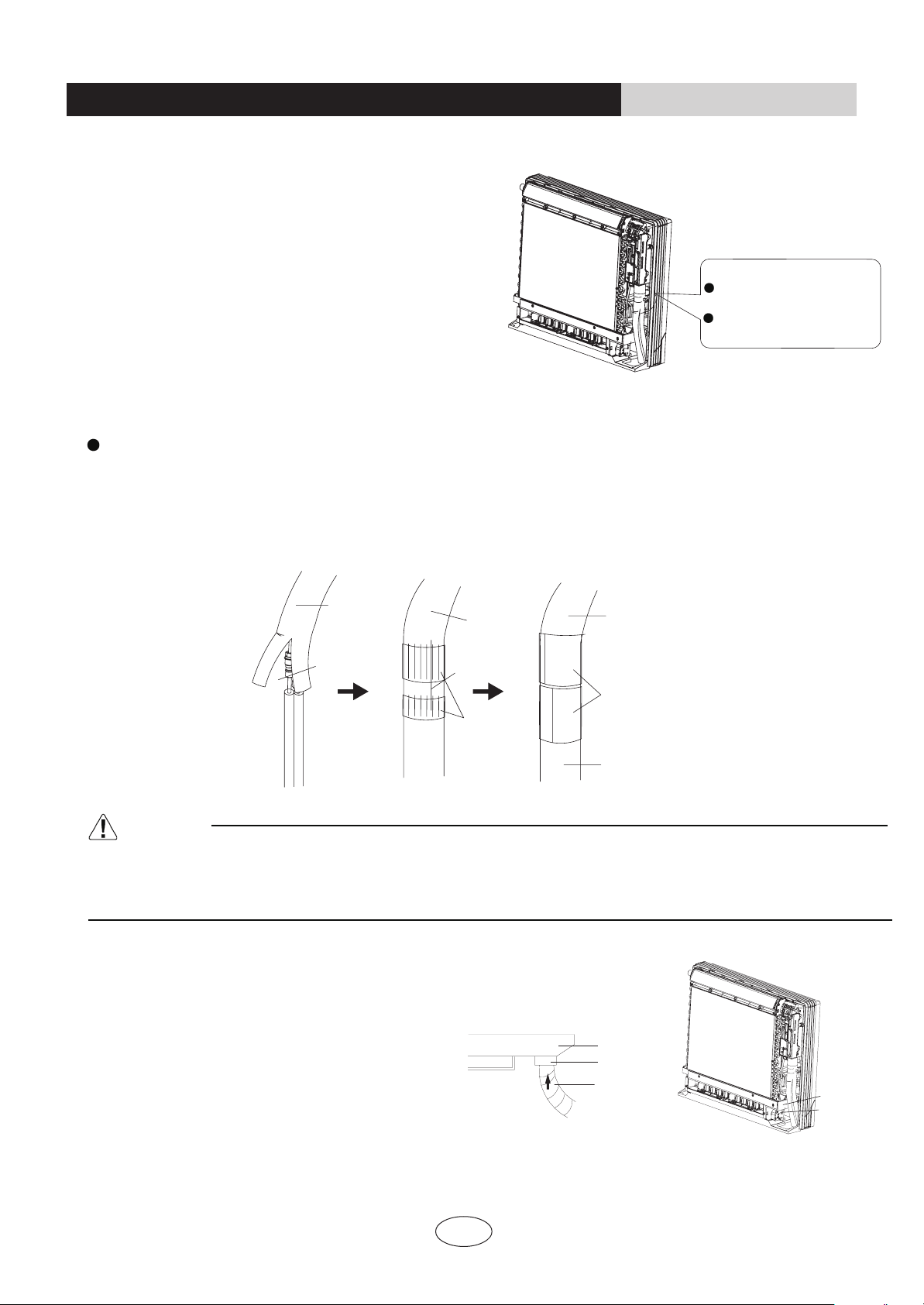
20
Checking for gas leakage
1)Check for leakage of gas after air purging
2)See the sections on air purges and gas leak checks in
the installation manual for the outdoor unit.
Attaching the connection pipe
Check for leakage here
Apply soapy water and ch-
eck carefully for leaking gas.
wipe soapy water off after
the check is complete.
Attach the pipe after checking for gas leakage, described above.
1)Cut the insulated portion of the on-site piping, matching it up with the connecting portion.
2)Secure the slit on the refrigerant piping side with the butt joint on the auxiliary piping using the tape, making sure there
are no gaps.
3)Wrap the slit and butt joint with the included insulation sheet, making sure there are no gaps.
Refrigerant
pipe
Refrigerant
pipe
Refrigerant
pipe
Slit
Slit
Tape
Auxiliary pipe
Insulation sheet
CAUTION
1)Insulate the joint of the pipes securely.
Incomplete insulation may lead to water leakage.
2)Push the pipe inside so it does not place undue force on the front grille.
Connecting the drain hose
Insert the supplied C drain hose into the socket
of the drain pan.
Fully insert the drain hose until it adheres to a
seat of the socket.
Drain pan
Seal
Drain pan
Seal
Drain hose
INSTALLATION INSTRUCTIONS
Installation of indoor unit
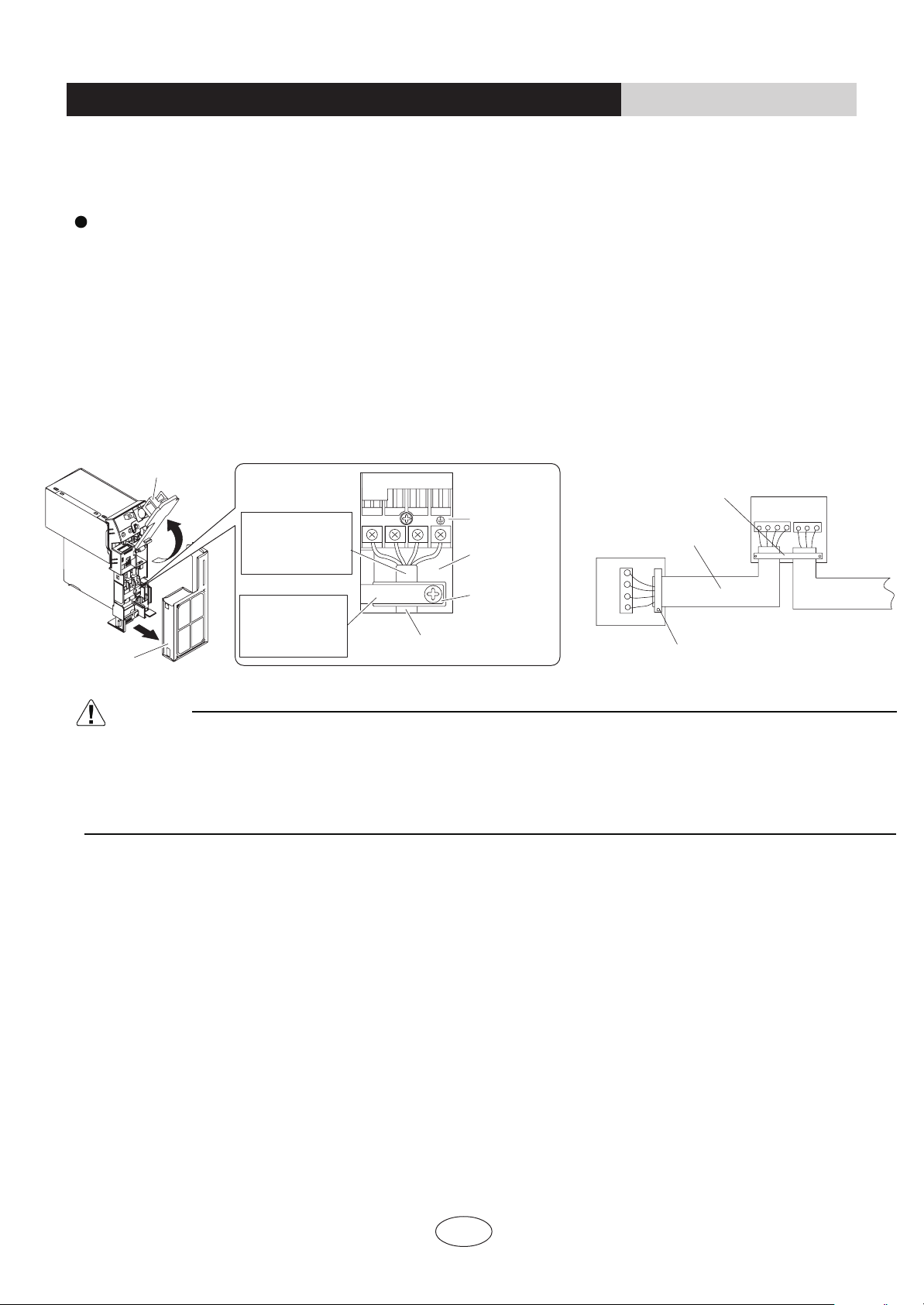
Live the sensor securing plate, remove the front metal plate cover, and connect the branch wiring to the terminal block.
1)Strip wire ends (15mm)
2)Mach wire colours with terminal numbers on indoor and outdoor unit’s terminal blocks and firmly screw wires to
the corresponding terminals.
3)Connect the earth wires to the corresponding terminals.
4)Pull wires to make sure that they are securely latches up, then retain wires with wire retainer.
CAUTION
1)Do not use tapped wires, stranded wires, extensioncords, or starburst connections, as they may cause overheating,
electrical shock, or fire.
2)Do not use locally purchased electrical parts inside the product. (Do not branch the power for the drain pump, etc, from
the terminal block.) Doing so may cause electric shock or fire.)
21
INSTALLATION INSTRUCTIONS
Installation of indoor unit
Outdoor unit
Indoor unit
Firmly fix the wires with the
terminal screws
Firmly fix the wires with the
terminal screws
When wire length exceeds 10m,
use 2.0mmdiameter wires
2 3
Terminal block
Electrical
component
box
Wire retainer
Use the specified wire type.
Shape wires so
that the front metal
plate cover will fit
securely.
Firmly secure wire
retainer so that
wires sustain no
external stress.
Front metal
plate cover
Sensor securing plate
N
(
1
)
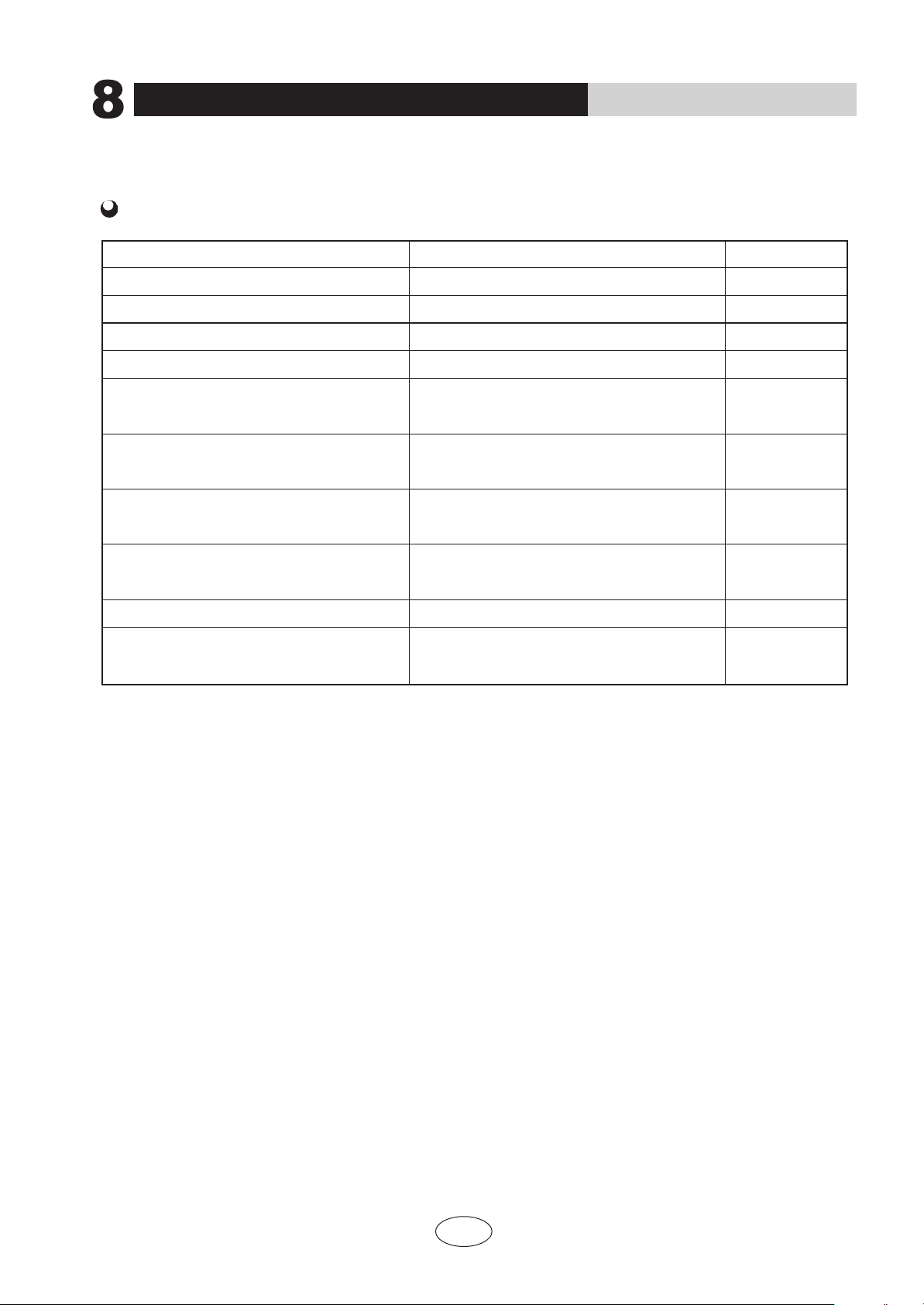
Routine check after installation
INSTALLATION INSTRUCTIONS
22
Check after installation
Items to be checked Possible malfunction Situation
Has it been fixed firmly?
Have you done the refrigerant leakage test?
Is heat insulation sufficient?
Does the unit drain well?
Is the voltage in accordance with the rated
voltage marked on the nameplate?
Is the electrical wiring and piping connection
installed correctly and securely?
Has the unit been connected to a secure earth
connection?
Is the power cord specified?
Has the inlet and outlet been covered?
Has the length of connection pipes and the
refrigerant charge been record?
The unit may drop,shake or emit noise.
It may cause insufficient refrigerating capacity.
It may cause condensation and dripping.
It may cause condensation and dripping.
It may cause electric malfunction or damage the
part.
It may cause electric malfunction or damage the
part.
It may cause electrical leakage.
It may cause electric malfunction or damage the
part.
It may cause insufficient refrigerating capacity.
The refrigerating capacity is not accurate
INSTALLATION INSTRUCTIONS
23
9
Configuration of connection pipe and additional volume of refrigerant
1. Standard length of connection pipe
5m、7.5m、8m
2. Min length of connection pipe
For the unit with standard connection pipe of 5m, there is no limitation
for the min length of connection pipe. For the unit with standard connection
pipe of 7.5m and 8m, the min length of connection pipe is 3m.
3. Max length of connection pipe
4. The calculation method of additional refrigerant oil and refrigerant charging
amount after prolonging connection pipe
After the length of connection pipe is prolonged for 10m at the basis of
standard length, you should add 5ml of refrigerant oil for each additional
5m of connection pipe.
The calculation method of additional refrigerant charging amount (on the
(1) Additional refrigerant charging amount= prolonged length of liquid pipe × additional
refrigerant charging amount per meter
(2) When the length of connection pipe is above 5m, add refrigerant according
to the prolonged length of liquid pipe. The additional refrigerant charging
amount per meter is different according to the diameter of liquid pipe. See Sheet 2.
basis of liquid pipe):
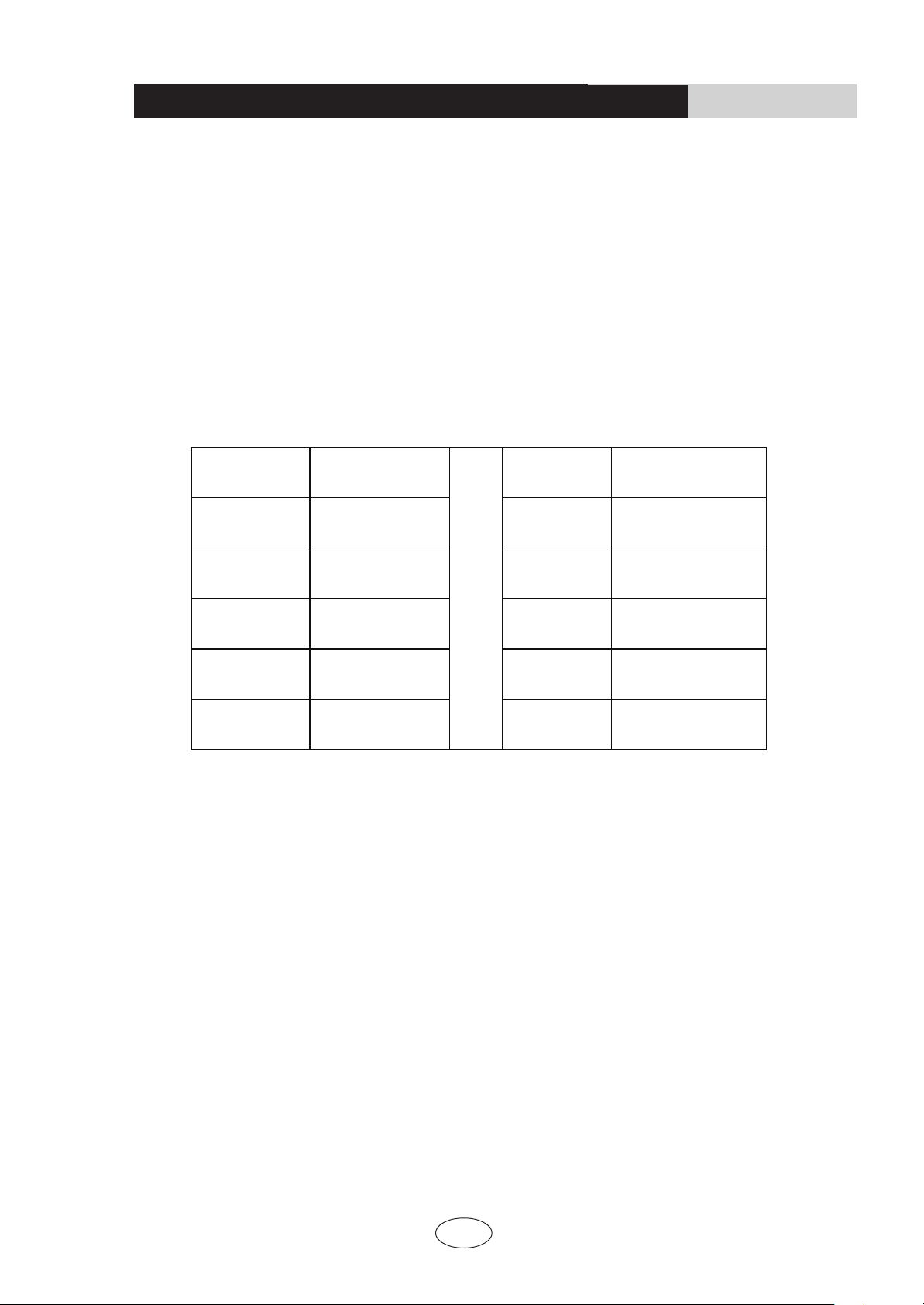
Sheet 1 Max length of connection pipe Unit
: m
Capacity
Max length of
connection pipe
Capacity
Max length of
connection pipe
5000 Btu/h
(1465 W)
15
24000 Btu/h
(7032 W)
25
7000 Btu/h
(2051 W)
15
28000 Btu/h
(8204 W)
30
9000 Btu/h
(2637 W)
15
36000 Btu/h
(10548 W)
30
12000 Btu/h
(3516 W)
20
42000 Btu/h
(12306 W)
30
18000 Btu/h
(5274 W)
25
48000 Btu/h
(14064 W)
30
INSTALLATION INSTRUCTIONS
24
Configuration of connection pipe and additional volume of refrigerant
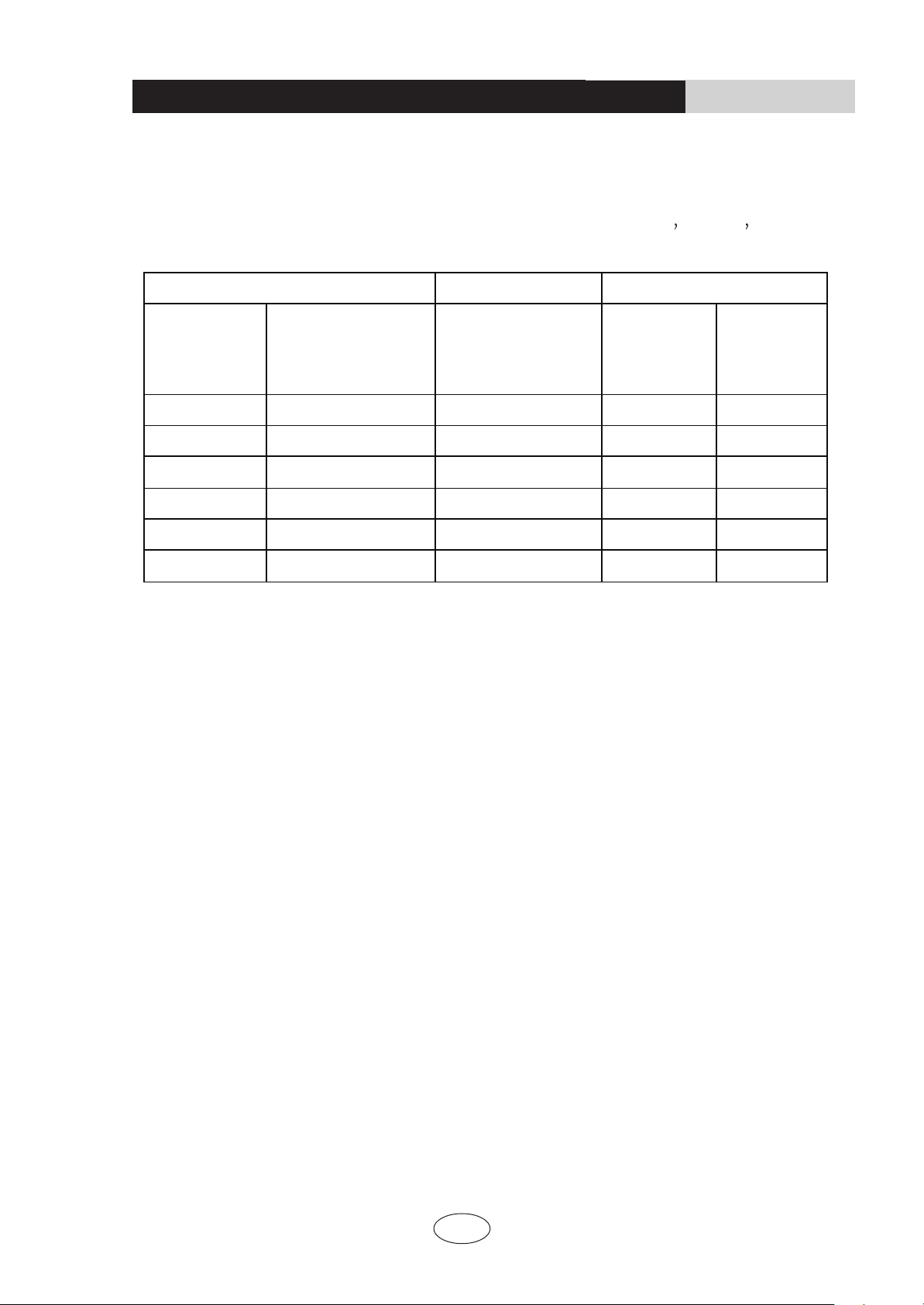
Sheet 2. Additional refrigerant charging amount
for R22 R407C R410A
and R134a
Note: The additional refrigerant charging amount in Sheet 2 is recommended
value, not compulsory.
Diameter of connection pipe mm Indoor unit throttle Outdoor unit throttle
Liquid pipe Gas pipe Cooling only,
cooling and heating
(g / m)
Cooling only
(g / m)
Cooling and
heating (g /
m)
Ф6 Ф9.5 or Ф12 20 15 20
Ф6 or Ф9.5 Ф16 or Ф19 50 15 50
Ф12 Ф19 or Ф22.2 100 30 120
Ф16 Ф25.4 or Ф31.8 170 60 120
Ф19 - 250 250 250
Ф22.2 - 350 350 350
GREE ELECTRIC APPLIANCES, INC. OF ZHUHAI
Add: West Jinji Rd, Qianshan, Zhuhai,Guangdong, China, 519070
Tel: (+86-756) 8522218
Fax: (+86-756) 8669426
E-mail: [email protected] www.gree.com
66162665
CAT NO: GREE_MULTI_MINI CONSOLE_A_INSTALL&OWNERS_061119