Table of Contents / Table des matières
REFRIGERATOR SAFETY.......................................................................2
INSTALLATION INSTRUCTIONS ...........................................................3
Unpack the Refrigerator .......................................................................3
Location Requirements.........................................................................3
Electrical Requirements........................................................................4
Water Supply Requirements.................................................................4
Connect the Water Supply ...................................................................4
Refrigerator Doors.................................................................................5
Adjust the Doors ...................................................................................6
REFRIGERATOR USE .............................................................................6
Using the Controls ................................................................................6
Ice Maker ..............................................................................................7
REFRIGERATOR FEATURES .................................................................8
Refrigerator Shelves..............................................................................8
Deli Drawer............................................................................................8
Crisper...................................................................................................8
FREEZER FEATURES .............................................................................9
Wire Freezer Shelf.................................................................................9
Glass Freezer Shelf...............................................................................9
DOOR FEATURES .................................................................................10
Door Rails............................................................................................10
Door Bins ............................................................................................10
Utility Compartment............................................................................10
REFRIGERATOR CARE ........................................................................10
Cleaning ..............................................................................................10
Changing the Light Bulbs ...................................................................11
Vacation and Moving Care .................................................................11
PROBLEM SOLVER...............................................................................12
ACCESSORIES ......................................................................................13
ASSISTANCE OR SERVICE..................................................................13
SÉCURITÉ DU RÉFRIGÉRATEUR ....................................................... 14
INSTRUCTIONS D’INSTALLATION .....................................................15
Déballage du réfrigérateur.................................................................. 15
Exigences d'emplacement.................................................................16
Spécifications électriques ..................................................................16
Spécifications de l’alimentation en eau..............................................17
Raccordement de la canalisation d'eau............................................. 17
Portes du réfrigérateur........................................................................ 18
Ajustement des portes ....................................................................... 18
UTILISATION DU RÉFRIGÉRATEUR................................................... 19
Utilisation des commandes................................................................ 19
Machine à glaçons
(sur certains modèles) ........................................................................20
CARACTÉRISTIQUES DU RÉFRIGÉRATEUR .................................... 21
Tablettes du réfrigérateur ................................................................... 21
Tiroir pour spécialités alimentaires..................................................... 21
Bac à légumes....................................................................................21
CARACTÉRISTIQUES DU CONGÉLATEUR .......................................22
Tablette métallique du congélateur
(sur certains modèles) ........................................................................22
Tablette en verre du congélateur .......................................................22
CARACTÉRISTIQUES DE LA PORTE..................................................23
Tringles de porte................................................................................. 23
Balconnets de porte ........................................................................... 23
Compartiment utilitaire ....................................................................... 23
ENTRETIEN DU RÉFRIGÉRATEUR..................................................... 23
Nettoyage ...........................................................................................23
Remplacement
des ampoules d’éclairage .................................................................. 24
Entretien avant les vacances ou lors d’un déménagement............... 24
RÉSOLUTION DE PROBLÈMES..........................................................25
ACCESSOIRES......................................................................................27
ASSISTANCE OU SERVICE..................................................................27
REFRIGERATOR
USER INSTRUCTIONS
W10817990B
2
REFRIGERATOR SAFETY
You can be killed or seriously injured if you don't immediately
You
can be killed or seriously injured if you don't
follow
All safety messages will tell you what the potential hazard is, tell you how to reduce the chance of injury, and tell you what can
happen if the instructions are not followed.
Your safety and the safety of others are very important.
We have provided many important safety messages in this manual and on your appliance. Always read and obey all safety
messages.
This is the safety alert symbol.
This symbol alerts you to potential hazards that can kill or hurt you and others.
All safety messages will follow the safety alert symbol and either the word “DANGER” or “WARNING.”
These words mean:
follow instructions.
instructions.
DANGER
WARNING
IMPORTANT SAFETY INSTRUCTIONS
To reduce the risk of fire, electric shock, or injury to persons when using the refrigerator, follow basic precautions,
including the following:
WARNING:
SAVE THESE INSTRUCTIONS
■
Plug into a grounded 3 prong outlet.
■
Do not remove ground prong.
■
Do not use an adapter.
■
Do not use an extension cord.
■
Disconnect power before servicing.
■
Replace all parts and panels before operating.
■
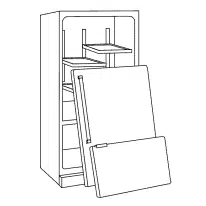
Remove doors from your old refrigerator.
■
Use nonflammable cleaner.
■
Keep flammable materials and vapors, such as gasoline,
away from refrigerator.
■
Use two or more people to move and install refrigerator.
■
Disconnect power before installing ice maker (on ice maker
kit ready models only).
■
A qualified service technician must install the water line and
ice maker.
■
This appliance is not intended for use by persons (including
children) with reduced physical, sensory or mental
capabilities, or lack of experience and knowledge, unless
they have been given supervision or instruction concerning
use of the appliance by a person responsible for their
safety.
■
Children should be supervised to ensure that they do not
play with the appliance.
■
This appliance is intended to be used in household and
similar applications such as: staff kitchen areas in shops,
offices and other working environments; farm houses and
by clients in hotels, motels and other residential type
environments; bed and breakfast type environments; and
catering and similar non-retail a
pplications.
■
If the power supply cord is damaged, it must be replaced by
the manufacturer, its service agent or a similarly qualified
person in order to avoid a hazard.
3
INSTALLATION INSTRUCTIONS
Unpack the Refrigerator
Remove the Packaging
■ Remove tape and glue residue from surfaces before turning on
the refrigerator. Rub a small amount of liquid dish soap over the
adhesive with your fingers. Wipe with warm water and dry.
NOTE: Do not use sharp instruments, rubbing alcohol,
flammable fluids, or abrasive cleaners to remove tape or glue.
These products can damage the surface of your refrigerator.
For more information, see “Refrigerator Safety.”
■ Dispose of/recycle all packaging materials.
IMPORTANT: Do not remove the white foam air return insert that is
located behind the control panel on the ceiling of the refrigerator
(on some models). The insert is part of the refrigerator and not part
of the packing material. If the insert is removed, ice may migrate
down from the freezer and cause icicles to form.
Clean Before Using
After you remove all of the package materials, clean the inside of
your refrigerator before using it. See the cleaning instructions in
“Refrigerator Care.”
Location Requirements
IMPORTANT: This refrigerator is designed for indoor household
use only.
Proper Disposal of
Your Old Refrigerator
IMPORTANT: Child entrapment and suffocation are not problems
of the past. Junked or abandoned refrigerators are still dangerous
– even if they will sit for “just a few days.” If you are getting rid of
your old refrigerator, please follow these instructions to help
prevent accidents.
Before You Throw Away Your Old Refrigerator or Freezer:
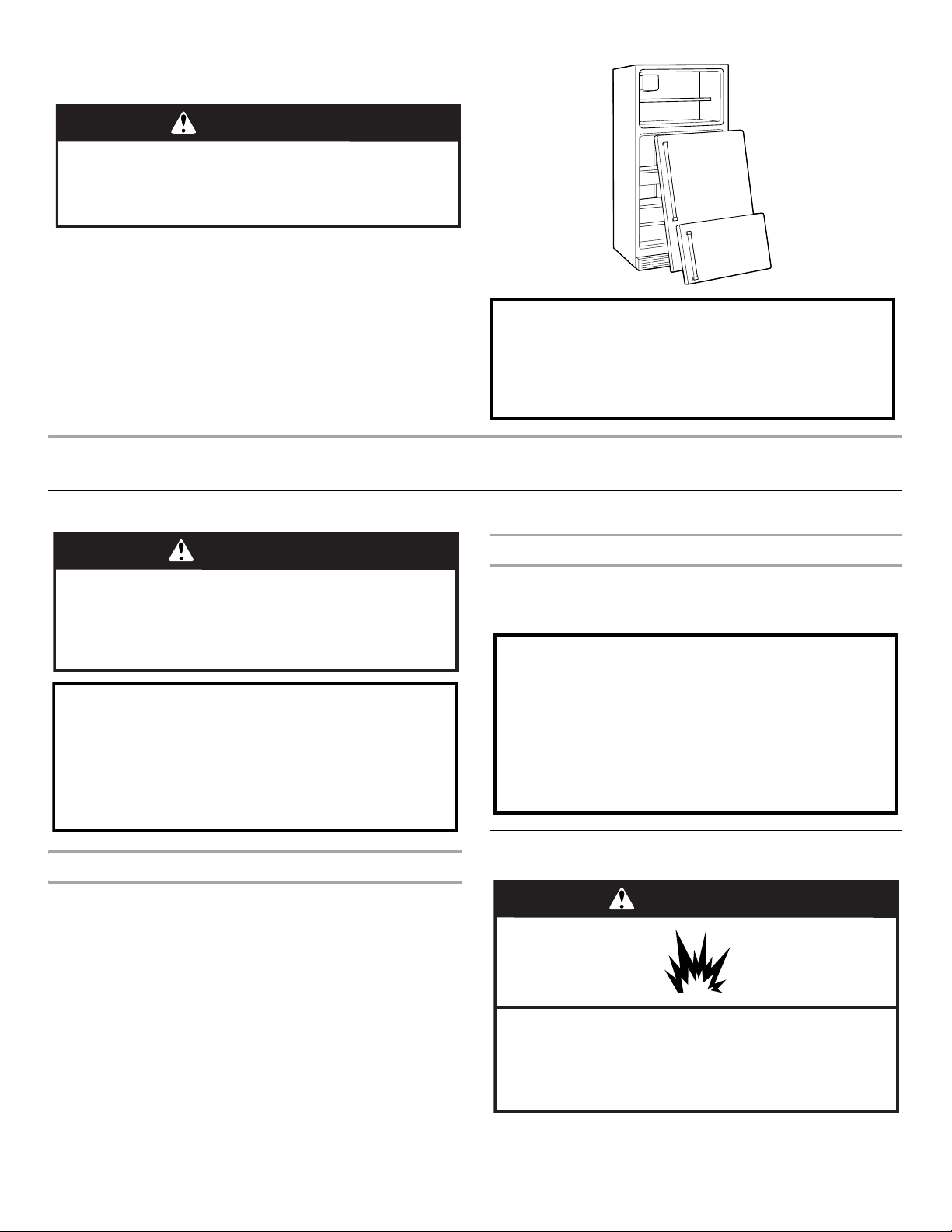
■ Take off the doors.
■ Leave the shelves in place so that children may not easily
climb inside.
WARNING
Suffocation Hazard
Remove doors from your old refrigerator.
Failure to do so can result in death or brain damage.
Important information to know about disposal of
refrigerants:
Dispose of refrigerator in accordance with Federal and Local
regulations. Refrigerants must be evacuated by a licensed,
EPA certified refrigerant technician in accordance with
established procedures.
WARNING
Excessive Weight Hazard
Use two or more people to move and install
refrigerator.
Failure to do so can result in back or other injury.
When Moving Your Refrigerator:
Your refrigerator is heavy. When moving the refrigerator for
cleaning or service, be sure to cover the floor with
cardboard or hardboard to avoid floor damage. Always pull
the refrigerator straight out when moving it. Do not wiggle or
“walk” the refrigerator when trying to move it, as floor
damage could occur.
Important information to know about glass shelves
and covers:
Do not clean glass shelves or covers with warm water when
they are cold. Shelves and covers may break if exposed to
sudden temperature changes or impact, such as bumping.
Tempered glass is designed to shatter into many small,
pebble-size pieces. This is normal. Glass shelves and covers
are heavy. Use both hands when removing them to avoid
dropping.
WARNING
Explosion Hazard
Keep flammable materials and vapors, such as
gasoline, away from refrigerator.
Failure to do so can result in death, explosion, or fire.
4
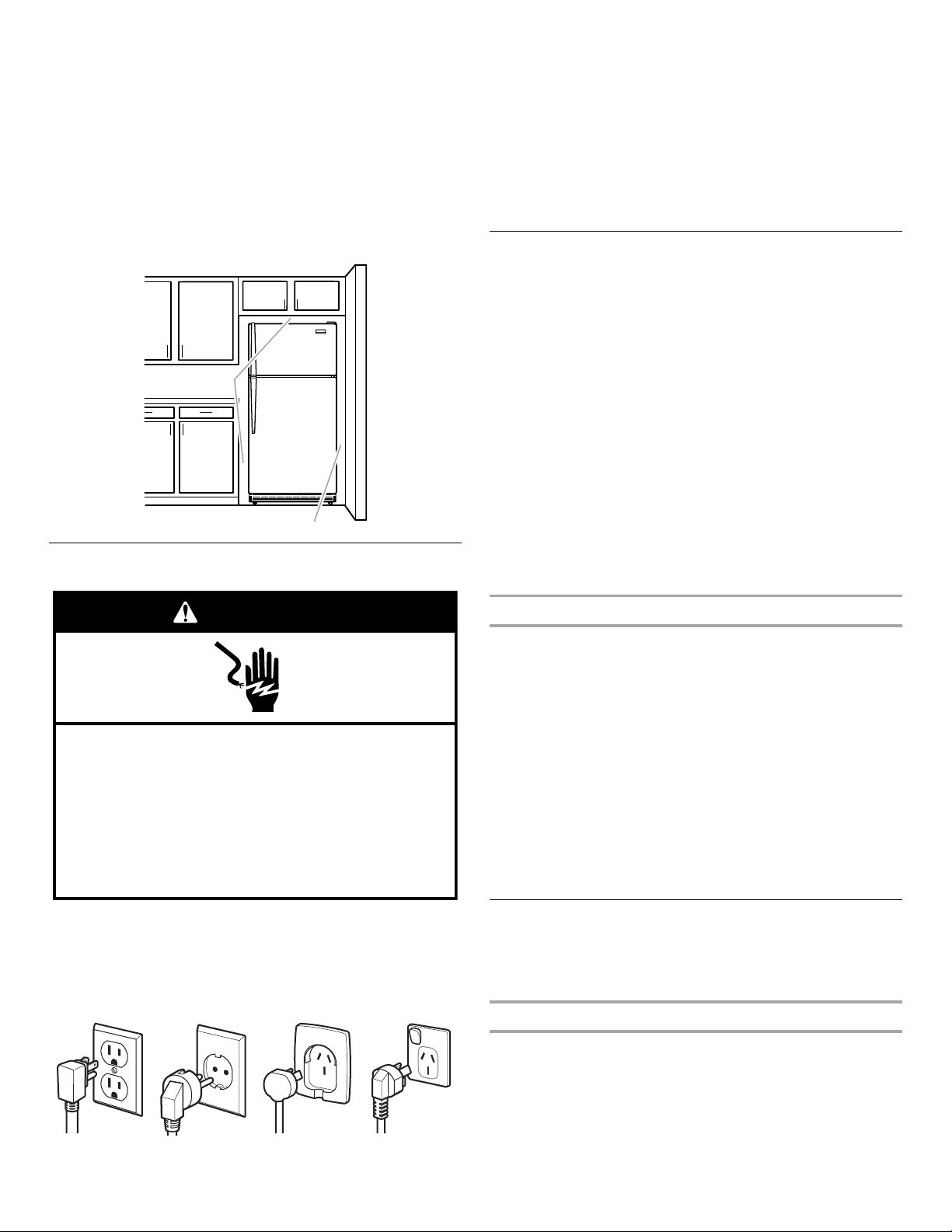
To ensure proper ventilation for your refrigerator, allow for
½" (1.25 cm) of space on each side and at the top. Allow for
1" (2.54 cm) of space behind the refrigerator. If your refrigerator
has
an ice maker, allow extra space at the back for the water line
connections. When installing your refrigerator next to a fixed wall,
leave a 2" (5.08 cm) minimum space on the hinge side (some
models require more) to allow the door to swing open.
NOTE: This refrigerator is intended for use in a location where the
temperature ranges from a minimum of 55°F (13°C) to a maximum
of 110°F (43°C). The preferred room temperature range for
optimum performance, which reduces electricity usage and
provides superior cooling, is between 60°F (15°C) and 90°F (32°C).
It is recommended that you do not install the refrigerator near a
heat source, such as an oven or radiator.
Electrical Requirements
Before you move your refrigerator into its final location, it is
important to make sure you have the proper electrical connection.
Recommended Grounding Method
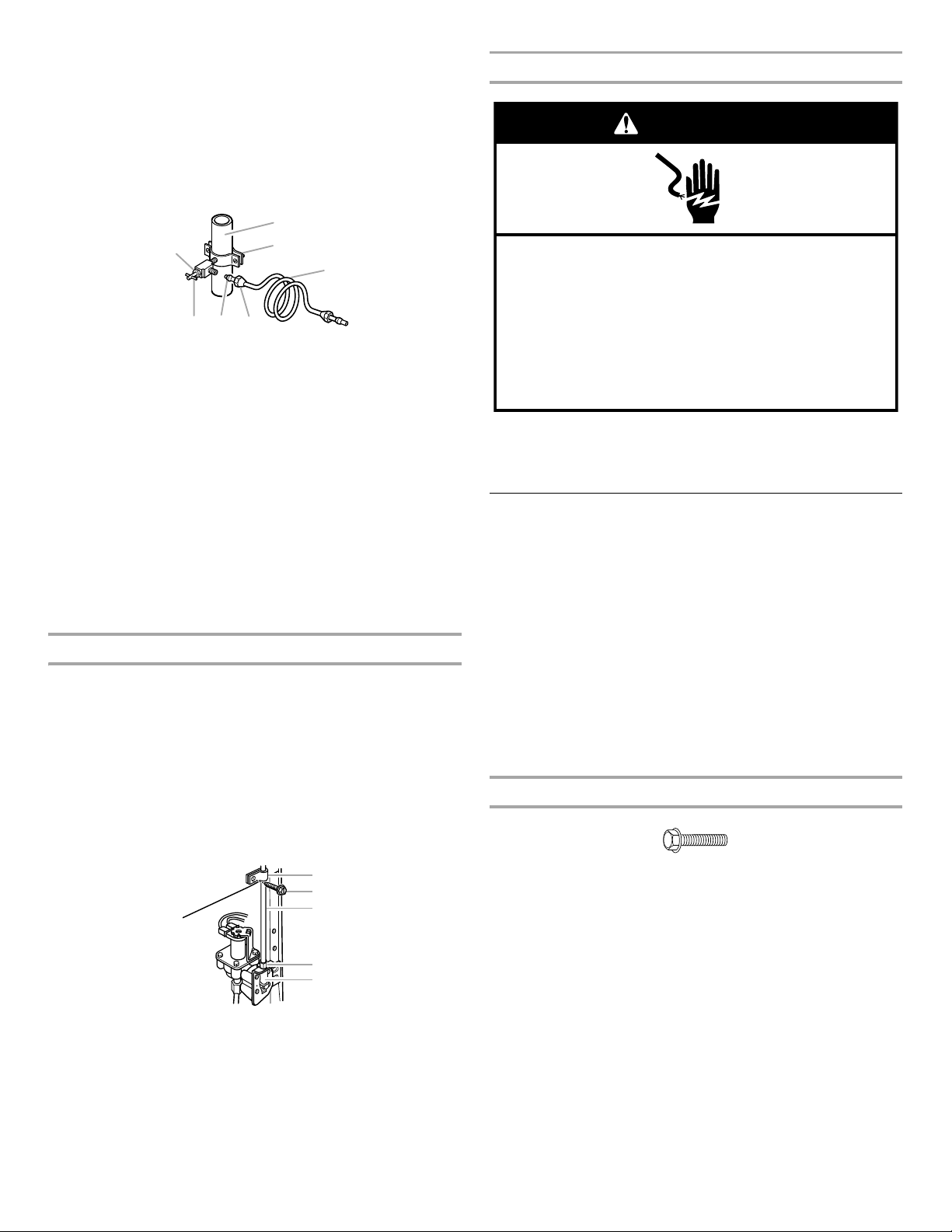
A 115 Volt 60 Hz. (Plug 1), 220-240 Volt 50 Hz. (Plugs 2 or 3), or
220-240 Volt 60 Hz. (Plug 4) AC only 10-amp fused and grounded
(earthed) electrical supply is required.
It is recommended that a separate circuit serving only your
refrigerator be provided. Use an outlet that cannot be turned off
by
a switch. Do not use an extension cord.
NOTE: Before performing any type of installation or cleaning,
or
removing a light bulb, turn cooling off or turn the control
(Thermostat, Refrigerator or Freezer Control depending on the
model) to OFF, and then disconnect the refrigerator from the
electrical source. When you are finished, reconnect the refrigerator
to the electrical source and turn cooling on or reset the control
(Thermostat, Refrigerator or Freezer Control depending on the
model) to the desired setting. See “Using the Controls” in the
User
Instructions, User Guide, or Use & Care Guide.
Water Supply Requirements
IMPORTANT: Connect to potable water supply only.
Read all directions before you begin.
Gather the required tools and parts before starting installation.
Read
and follow the instructions provided with any tools listed here.
Tools Needed: Flat-blade screwdriver, ⁷⁄₁₆" and ¹⁄₂" Open-end
wrenches or 2
Adjustable wrenches, ¹⁄₄" Nut driver and drill bit,
Cordless drill.
IMPORTANT:
■ If you turn on the refrigerator before the water line is connected,
turn OFF the ice maker.
■ All installations must meet local plumbing code requirements.
■ Use copper tubing and check for leaks. Install copper tubing
only in areas where the household temperatures will remain
above freezing.
NOTE:
Your refrigerator dealer has a kit available with a
¹⁄₄
" (6.35 mm)
saddle-type shutoff valve, a union, and copper tubing. Before
purchasing, make sure a saddle-type valve complies with your local
plumbing codes. Do not use a piercing-type or
³⁄₁₆
" (4.76 mm) saddle
valve which reduces water flow and clogs more easily.
Water Pressure
IMPORTANT: A cold water supply with water pressure between 30
and 120 psi (207 and 827 kPa) is required to operate the ice maker.
NOTE: If the water pressure is less than what is required, ice cubes
could be hollow or irregular shaped.
If you have questions about your water pressure, call a licensed,
qualified plumber.
Reverse Osmosis Water Supply
If a reverse osmosis water filtration system is connected to your
cold water supply, the water pressure to the reverse osmosis
system needs to be a minimum of 40
to 60 psi (276 to 414 kPa).
If the ice maker is still not operating properly:
■ Check to see whether the sediment filter in the reverse osmosis
system is blocked. Replace the filter if necessary.
■ Allow the storage tank on the reverse osmosis system to refill
after heavy usage.
Connect the Water Supply
Read all directions before you begin.
IMPORTANT: If you turn ON the refrigerator before the water line
is
connected, turn OFF the ice maker.
Connect to Water Line
1. Unplug refrigerator or disconnect power.
2. Turn OFF main water supply. Turn ON nearest faucet long
enough to clear line of water.
3. Locate a ½" to 1¹⁄₄" (1.25 cm to 3.18 cm) vertical cold water
pipe near the refrigerator.
IMPORTANT:
■ Make sure it is a cold water pipe.
Plug 1 Plug 2 Plug 3 Plug 4
1
/
2" (1.25 cm)
2" (5.08 cm)
Electrical Shock Hazard
Plug into a grounded 3 prong outlet.
Do not remove ground prong.
Do not use an adapter.
Do not use an extension cord.
Failure to follow these instructions can result in death,
fire, or electrical shock.
WARNING
5
■ Horizontal pipe will work, but drill on the top side of the
pipe, not the bottom. This will help keep water away from
the drill and normal sediment from collecting in the valve.
4. Determine the length of copper tubing you need. Measure from
the connection on the lower left rear of refrigerator to the water
pipe. Add 7 ft (2.1 m) to allow for cleaning. Use ¹⁄₄" (6.35
mm)
O.D. (outside diameter) copper tubing. Be sure both ends of
copper tubing are cut square.
5. Using a cordless drill, drill a ¹⁄₄" hole in the cold water pipe you
have selected.
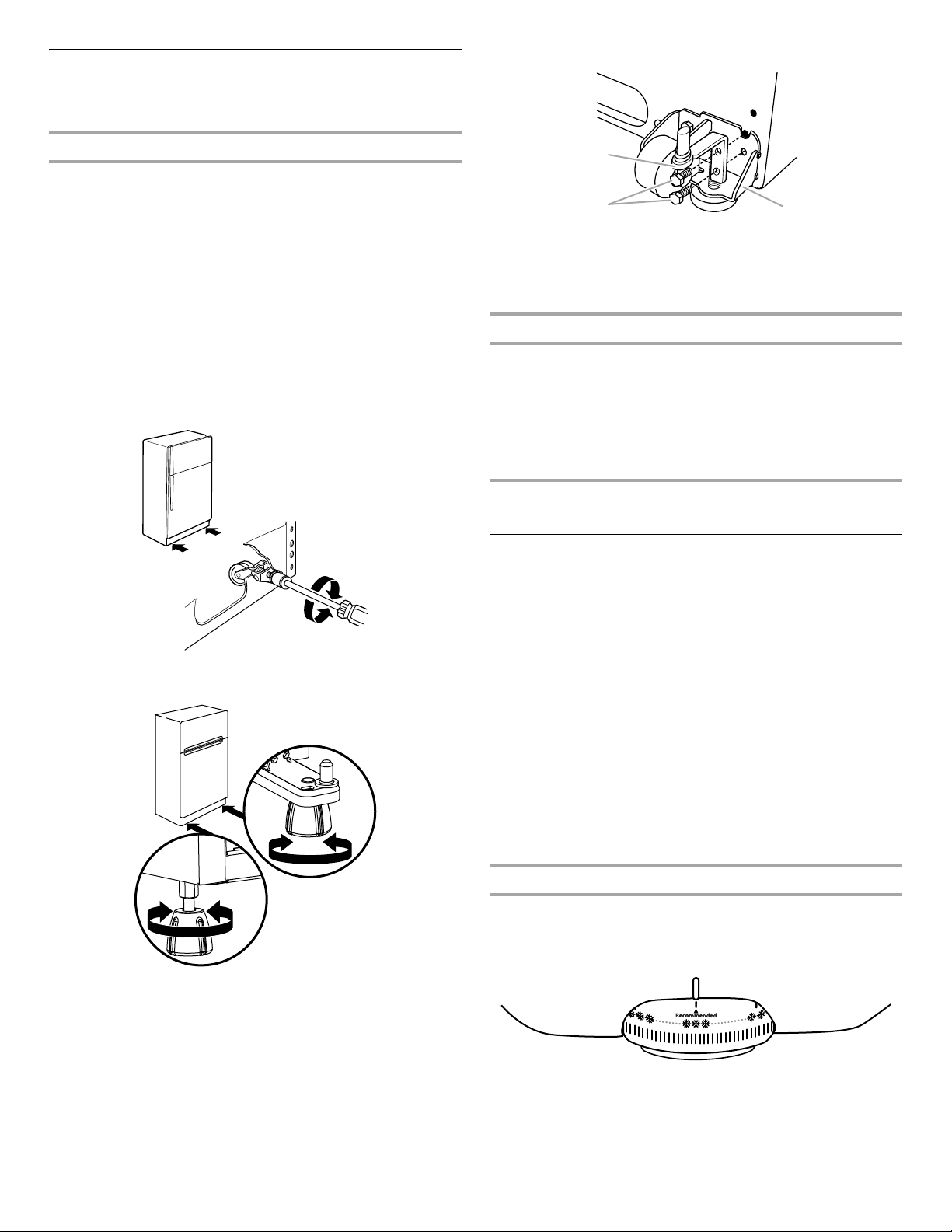
6. Fasten the shutoff valve to the cold water pipe with the pipe
clamp. Be sure the outlet end is solidly in the ¹⁄₄" drilled hole in
the water pipe and that the washer is under the pipe clamp.
Tighten the packing nut. Tighten the pipe clamp screws slowly
and evenly so washer makes a watertight seal. Do not
overtighten or you may crush the copper tubing.
7. Slip the compression sleeve and compression nut on the
copper tubing, as shown. Insert the end of the tubing into the
outlet end squarely as far as it will go. Screw compression nut
onto outlet end with adjustable wrench. Do not overtighten.
8. Place the free end of the tubing in a container or sink, and
turn
ON the main water supply. Flush the tubing until water
is
clear. Turn OFF the shutoff valve on the water pipe. Coil
the
copper tubing.
Connect to Refrigerator
1. Unplug refrigerator or disconnect power.
2. Attach the copper tubing to the valve inlet using a compression
nut and sleeve, as shown. Tighten the compression nut.
Do not overtighten.
3. Use the tube clamp on the back of the refrigerator to secure
the
tubing to the refrigerator, as shown. This will help avoid
damage to the tubing when the refrigerator is pushed back
against the wall.
4. Turn shutoff valve ON.
5. Check for leaks. Tighten any connections (including
connections at the valve) or nuts that leak.
6. The ice maker is equipped with a built-in water strainer. If your
water conditions require a second water strainer, install it in the
¹⁄₄" (6.35 mm) water line at either tube connection. Obtain a
water strainer from your nearest appliance dealer.
Complete the Installation
1. Plug into a grounded 3 prong outlet.
NOTE: Allow 24 hours to produce the first batch of ice. Discard the
first three batches of ice produced. Allow 3
days to completely fill
ice container.
Refrigerator Doors
Tools Needed:
IMPORTANT:
■ Before you begin, turn the refrigerator control OFF.
Unplug refrigerator or disconnect power.
■ Remove food and adjustable door or utility bins from doors.
■ If you are only removing and replacing the doors, see the
“Remove Doors and Hinges” and “Replace Doors and Hinges”
sections.
Remove Doors and Hinges
⁵⁄₁₆" Hex-head Hinge Screw
1. Unplug refrigerator or disconnect power.
2. Close the refrigerator door and keep both doors closed until
you are ready to lift them free from the cabinet.
NOTE: Provide additional support for the doors while the
hinges are being moved. Do not depend on the door magnets
to hold the doors in place while you are working.
3. Remove the parts for the top hinge, as shown in Top Hinge
graphic. Lift the freezer door free from the cabinet.
4. Remove the parts for the center hinge, as shown in the Center
Hinge graphic. Lift the refrigerator door free from the cabinet.
5. Remove base grille from the bottom front of the refrigerator.
6. Remove the parts for the bottom hinge, as shown in the
Bottom Hinge graphic.
A. Cold water pipe
B. Pipe clamp
C. Copper tubing
D. Compression nut
E. Compression sleeve
F. Shutoff valve
G. Packing nut
A. Tube clamp
B. Tube clamp screw
C. Copper tubing
D. Compression nut
E. Valve inlet
A
B
C
DEF
G
A
C
B
D
E
■ ⁵⁄₁₆" Hex-head socket
wrench
■ ⁵⁄₁₆" Open-end wrench
■ #2 Phillips screwdriver ■ Flat 2" putty knife
■ Flat-blade screwdriver
Electrical Shock Hazard
Plug into a grounded 3 prong outlet.
Do not remove ground prong.
Do not use an adapter.
Do not use an extension cord.
Failure to follow these instructions can result in death,
fire, or electrical shock.
WARNING
6
Adjust the Doors
IMPORTANT: Fully retract the rollers into the cabinet to lower
the
refrigerator.
Door Closing
Your refrigerator has two front adjustable rollers – one on the right
and one on the left. If your refrigerator seems unsteady or you want
the doors to close easier, adjust the refrigerator's tilt using the
following instructions:
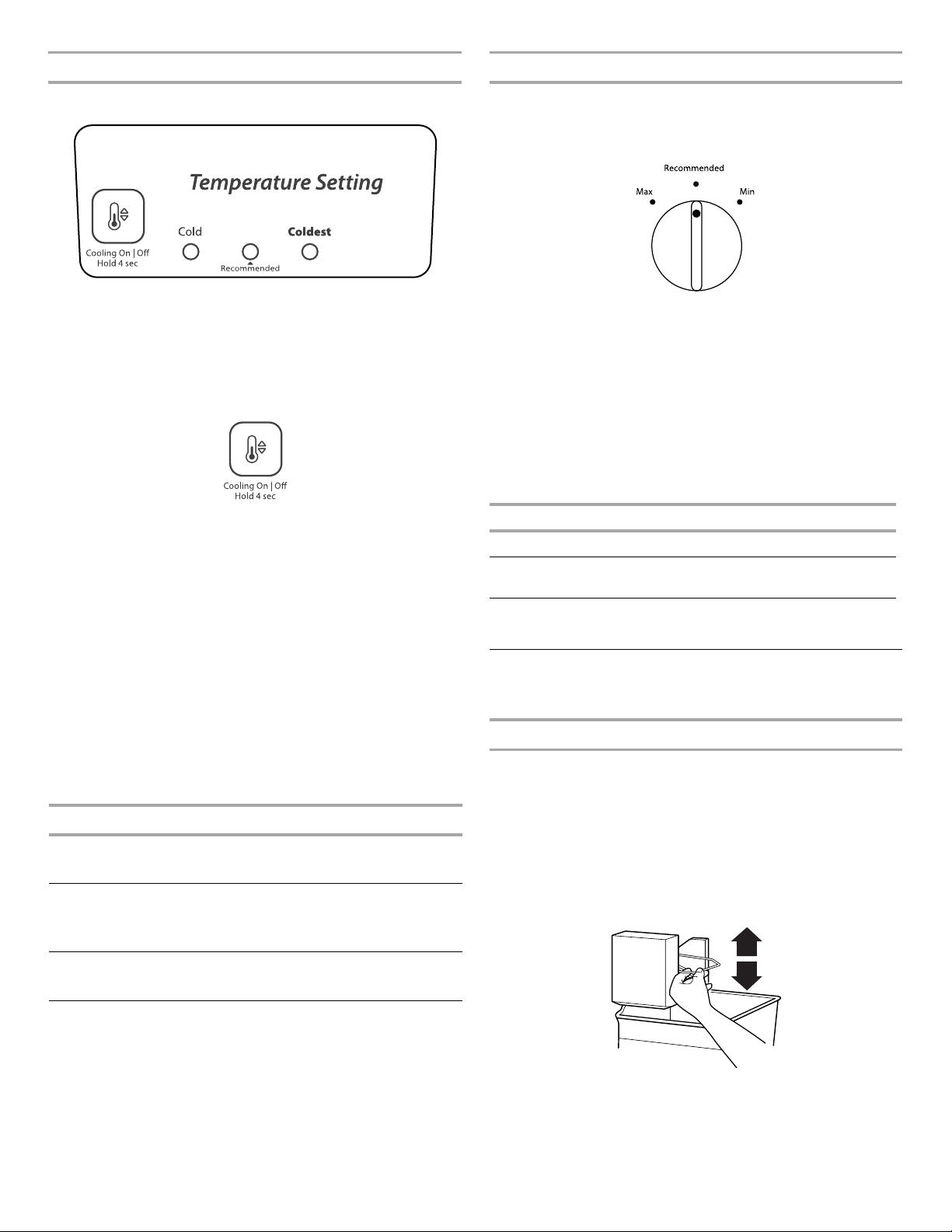
1. Remove the base grille. See the Base Grille graphic in
“Refrigerator Doors.” The two leveling screws are part of the
front roller assemblies, which are at the base of the refrigerator
on either side.
2. Use a socket driver to adjust the leveling screws. Turn the
leveling screw to the right to raise that side of the refrigerator
or
turn the leveling screw to the left to lower that side. It may
take several turns of the leveling screws to adjust the tilt of
the refrigerator.
NOTE: Having someone push against the top of the refrigerator
takes some weight off the leveling screws and rollers which
makes it easier to adjust.
NOTE: On some models if your product has an extra leveler adjust
it, turning right or left to prevent product tipping.
3. Open both doors again to make sure they close as easily as
you like and that they stay closed. If not, tilt the refrigerator
slightly more to the rear by turning both leveling screws to
the
right. It may take several more turns.
NOTES:
■ To keep the refrigerator level, you should turn both leveling
screws the same amount.
■ On models with the leveling/roller assembly, after adjusting
the refrigerator to the desired tilt, turn the leveling leg until
it is firmly against the floor as shown.
On some models
4. Replace the base grille.
Door Aligning
If the space between your doors looks uneven, you can adjust it
using the following instructions:
1. Depending on your model, remove the top hinge cover. Loosen
the top hinge screws using a ⁵⁄₁₆" socket or wrench.
2. Have someone hold the door in place or put a spacer between
the doors while you tighten the top hinge screws.
3. Replace the top hinge cover, if removed in Step 1.
REFRIGERATOR USE
Using the Controls
Your refrigerator has two controls that affect the temperature.
The
temperature control is located at the top front of the
refrigerator compartment and the Airflow control is located
on
the back wall of the freezer compartment.
IMPORTANT:
■ The recommended setting should be correct for normal
household refrigerator use. The controls are set correctly when
milk or juice is as cold as you like and when ice cream is firm.
■ Wait 24 hours for your refrigerator to cool completely before
adding food. If you add food before the refrigerator has cooled
completely, your food may spoil.
NOTE: Adjusting the refrigerator and freezer temperature
controls to a colder than recommended setting will not cool the
compartments any faster.
■ If the temperature is too warm or too cold in the refrigerator or
freezer, first check the air vents to be sure they are not blocked
before adjusting the controls.
Temperature Control (mechanical models)
For your convenience, the Temperature control is preset at the
factory. When you first install your refrigerator, make sure the
control is still preset as shown.
Recommended Setting “3 Snowflakes”
Cooling Off/On
■ Move the dial control to the word OFF. To turn cooling back on,
move the dial control to the desired temperature setting.
A. Bottom hinge
B. Screws
C. Leveling/roller assembly
C
B
A
7
Temperature Control (electronic models)
Recommended Setting
Cooling Off/On
■ To turn off Cooling, press and hold the Temperature Setting
button for 4seconds, until all lights turn ON for 1second. To
turn cooling back on, press and hold the Temperature Setting
button again for 4seconds.
NOTE: Neither compartment will cool when the control is set
to OFF.
Adjusting the Temperature Control (mechanical and
electronic models)
If you need to adjust the temperature in either the refrigerator or
freezer compartment, use the settings listed in the chart below
as
a guide.
NOTE: Except when starting the refrigerator, do not adjust the
control more than one setting at a time. Wait 24 hours between
adjustments for the temperature to stabilize.
■ Move the dial to the desired number of snowflakes from (1 least
cold to 5 coldest).
OR
■ Press the Temperature Setting button to toggle among the
three LED lights which indicate the temperature setting.
Reading from left to right, the LED in the first position is the
least cold. The LEDs indicate increasingly colder settings as
you continue to the right.
Airflow Control
The Airflow control regulates the amount of air flowing between
the
freezer and the refrigerator compartments.
When you plug in the refrigerator for the first time, turn the
Airflow
control to the Recommended setting.
Adjusting the Airflow Control (Freezer Temperature
Control)
If you want to temporarily increase the cold airflow to a specific
compartment, adjust the control.
■ Max - Increase airflow to the freezer (this will make the freezer
colder).
■ Min - Increase airflow to the refrigerator (this will make the
freezer warmer).
IMPORTANT: Once the performance is achieved, return the
Airflow control to the Recommended setting to keep the
refrigerator operating at optimum efficiency.
Ice Maker
(on some models)
Turning the Ice Maker On/Off
NOTE: Do not force the wire shutoff arm up or down.
■ To turn on the ice maker, simply lower the wire shutoff arm.
NOTE: Your ice maker has an automatic shutoff. As ice
is
made, the ice cubes will fill the ice storage bin and
the
ice cubes will raise the wire shutoff arm to the OFF
(arm
up) position.
■ To manually turn off the ice maker, lift the wire shutoff arm to
the OFF (arm up) position and listen for the click to make sure
the ice maker will not continue to operate.
NOTE: Turn off the ice maker before removing the ice storage bin
to serve ice or to clean the bin. This will keep the ice cubes from
dropping out of the ice maker and into the freezer compartment.
After replacing the ice storage bin, turn on the ice maker.
CONDITION/REASON: ADJUSTMENT:
REFRIGERATOR too warm TEMPERATURE Control
one setting higher
FREEZER too warm/too little ice AIRFLOW or
TEMPERATURE Control
one setting higher
REFRIGERATOR too cold TEMPERATURE Control
one setting lower
FREEZER too cold AIRFLOW or
TEMPERATURE Control
one setting lower
CONDITION/REASON: ADJUSTMENT:
Heavy ice use Max
Hot room temperature Max - To maintain ice making
production rate
Large quantity of groceries Min - To quickly chill food
and
beverages
8
Ice Production Rate
■ NORMAL Ice Production: The ice maker should produce
approximately 8 to 12
batches of ice in a 24hour period. If ice
is not being made fast enough, turn the Freezer control toward
a higher (colder) number in half number steps. (For example, if
the control is at 3, move it to between 3 and 4.) Wait 24
hours
and, if necessary, gradually turn the Freezer control to the
highest setting, waiting 24 hours between each increase.
■ MAXIMUM Ice Production (on some models): The ice maker
should produce approximately 16
to 20 batches of ice in
a
24hour period. If your refrigerator has the maximum ice
production feature, push the switch to MAX.
Remember
■ Allow 24 hours to produce the first batch of ice. Allow 3 days
to
completely fill the ice storage bin. Discard the first three
batches of ice produced.
■ The quality of your ice will be only as good as the quality of
the
water supplied to your ice maker. Avoid connecting the ice
maker to a softened water supply. Water softener chemicals
(such as salt) can damage parts of the ice maker and lead to
poor quality ice. If a softened water supply cannot be avoided,
make sure the water softener is operating properly and is well
maintained.
■ Do not store anything on top of the ice maker or in the ice
storage bin.
REFRIGERATOR
FEATURES
Your model may have some or all of these features.
Refrigerator Shelves
The shelves in your refrigerator are adjustable to match your
individual storage needs.
Storing similar food items together in your refrigerator and
adjusting the shelves to fit different heights of items will make
finding the exact item you want easier. It will also reduce the
amount of time the refrigerator door is open, and save energy.
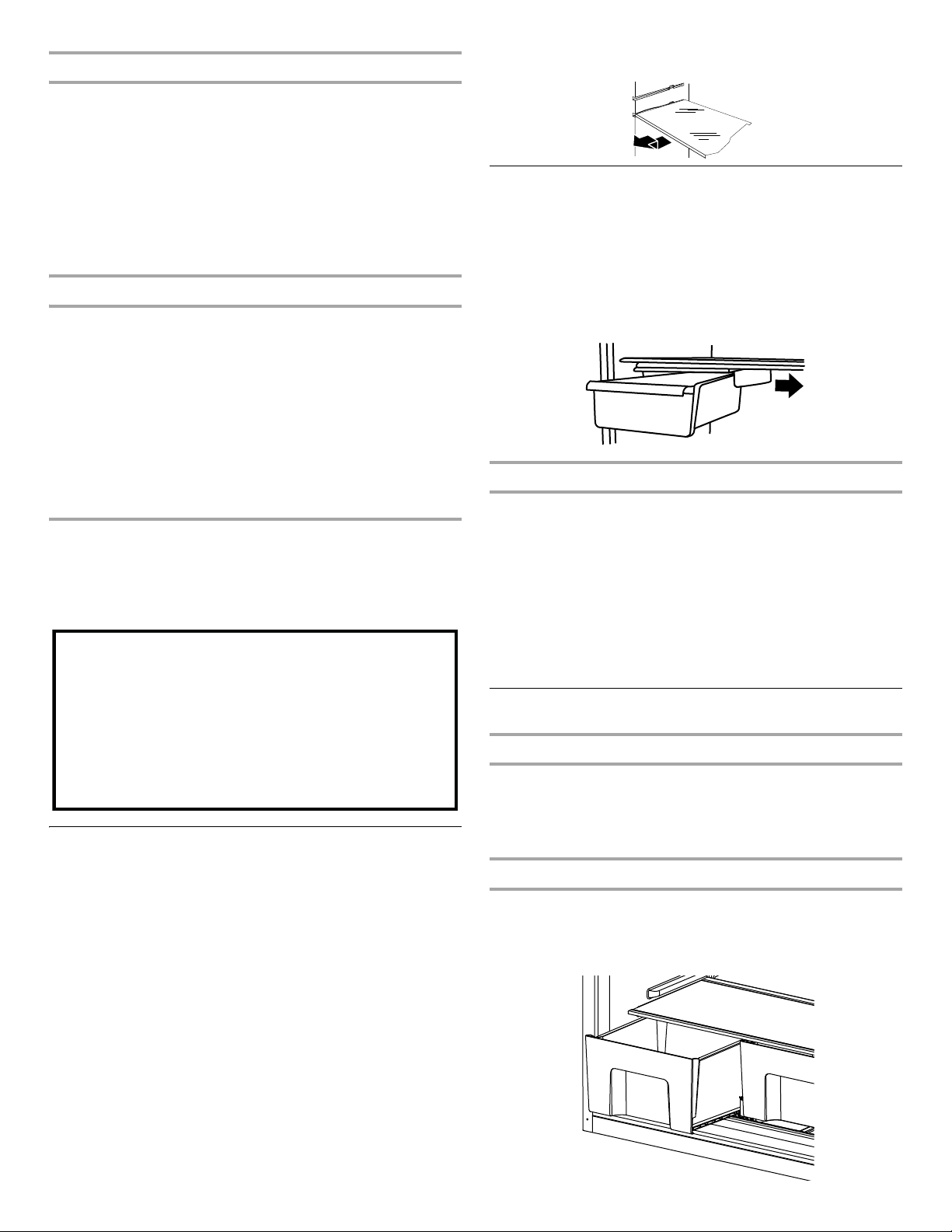
To remove and replace a shelf:
1. Remove items from the shelf.
2. Slide the shelf straight out to the stop.
3. Depending on your model, lift back or front of the shelf past the
stop. Slide shelf out the rest of the way.
4. Replace the shelf by sliding the back of the shelf into the track
in the wall of the cabinet.
5. Guide the front of the shelf into the shelf track. Be sure to slide
the shelf in all the way.
Deli Drawer
To remove and replace the deli drawer:
1. Slide deli drawer out to the stop.
2. Lift front of deli drawer with one hand while supporting bottom
of drawer with other hand. Slide drawer out the rest of the way.
3. Replace the drawer by sliding it back in fully past the
drawer
stop.
NOTE: The deli drawer moves sideways on the shelf to allow
for flexible positioning.
Meat Storage Guide
Store most meat in original wrapping as long as it is airtight and
moisture-proof. Rewrap if necessary. See the following chart for
storage times. When storing meat longer than the times given,
freeze the meat.
Fresh fish or shellfish.........................use same day as purchased
Chicken, ground beef, variety meats (liver)......................1-2 days
Cold cuts, steaks/roasts ..................................................3-5 days
Cured meats...................................................................7-10 days
Leftovers - Cover leftovers with plastic wrap, aluminum foil, or
plastic containers with tight lids.
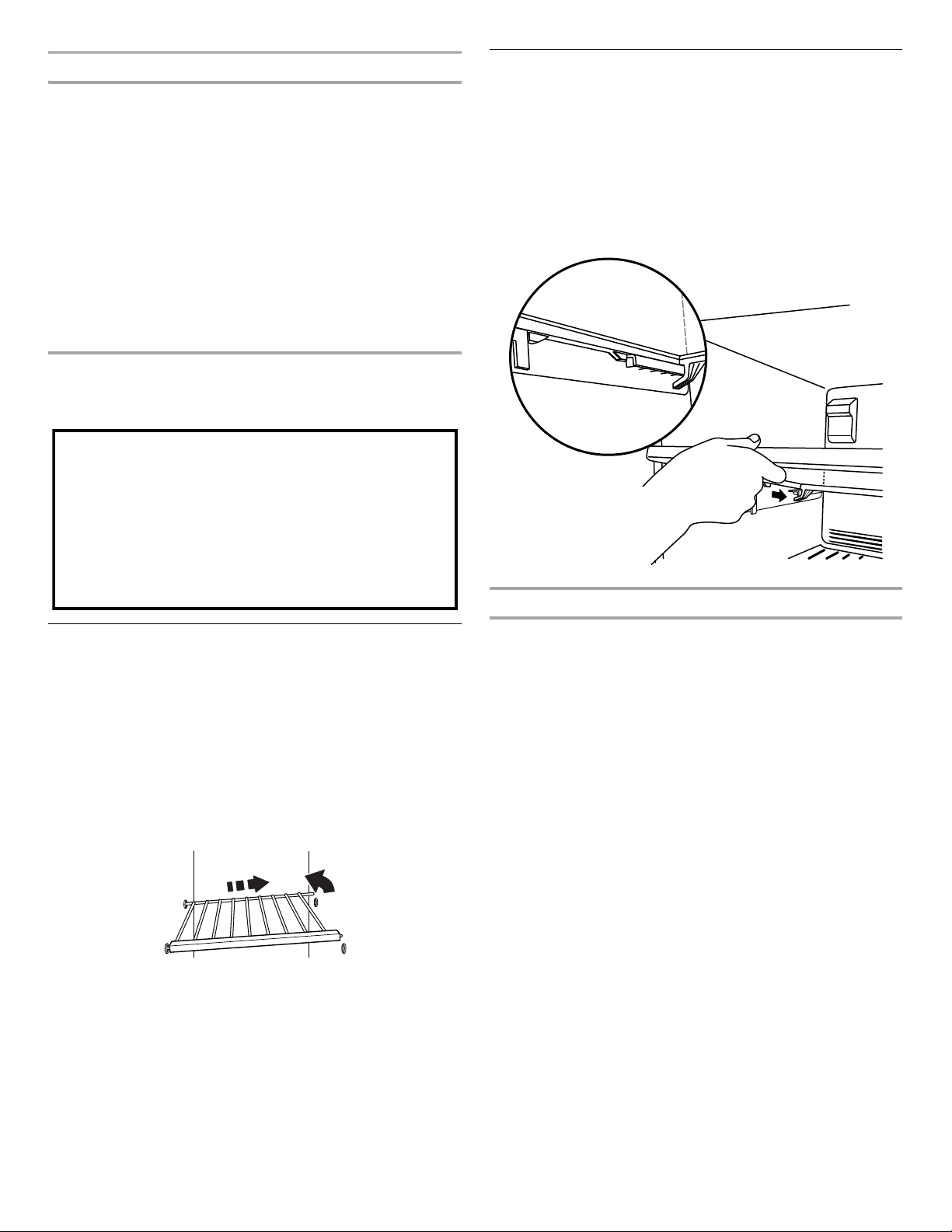
Crisper
Crisper Drawers
To remove and replace the crisper drawer:
1. Slide the crisper drawer straight out to the stop. Lift the front
and slide the drawer out the rest of the way.
2. Replace the drawer by sliding the drawer in fully past the stop.
Crisper Cover
To remove and replace the crisper cover:
1. Remove the crisper(s).
2. Pull the glass straight out.
3. Replace the glass by pushing it straight in.
Important information to know about glass shelves
and covers:
Do not clean glass shelves or covers with warm water when
they are cold. Shelves and covers may break if exposed to
sudden temperature changes or impact, such as bumping.
Tempered glass is designed to shatter into many small,
pebble-size pieces. This is normal. Glass shelves and covers
are heavy. Use both hands when removing them to avoid
dropping.
9
Crisper Humidity Control
You can control the amount of humidity in the moisture-sealed
crisper. Adjust the control to any setting between LOW and HIGH.
LOW (open) lets moist air out of the crisper for best storage of fruits
and vegetables with skins.
■ Fruit: Wash, let dry and store in refrigerator in plastic bag or
crisper. Do not wash or hull berries until they are ready to use.
Sort and keep berries in original container in crisper, or store in
a loosely closed paper bag on a refrigerator shelf.
■ Vegetables with skins: Place in plastic bag or plastic container
and store in crisper.
HIGH (closed) keeps moist air in the crisper for best storage of
fresh, leafy vegetables.
■ Leafy vegetables: Wash in cold water, drain and trim or tear
off
bruised and discolored areas. Place in plastic bag or plastic
container and store in crisper.
FREEZER FEATURES
Your model may have some or all of these features.
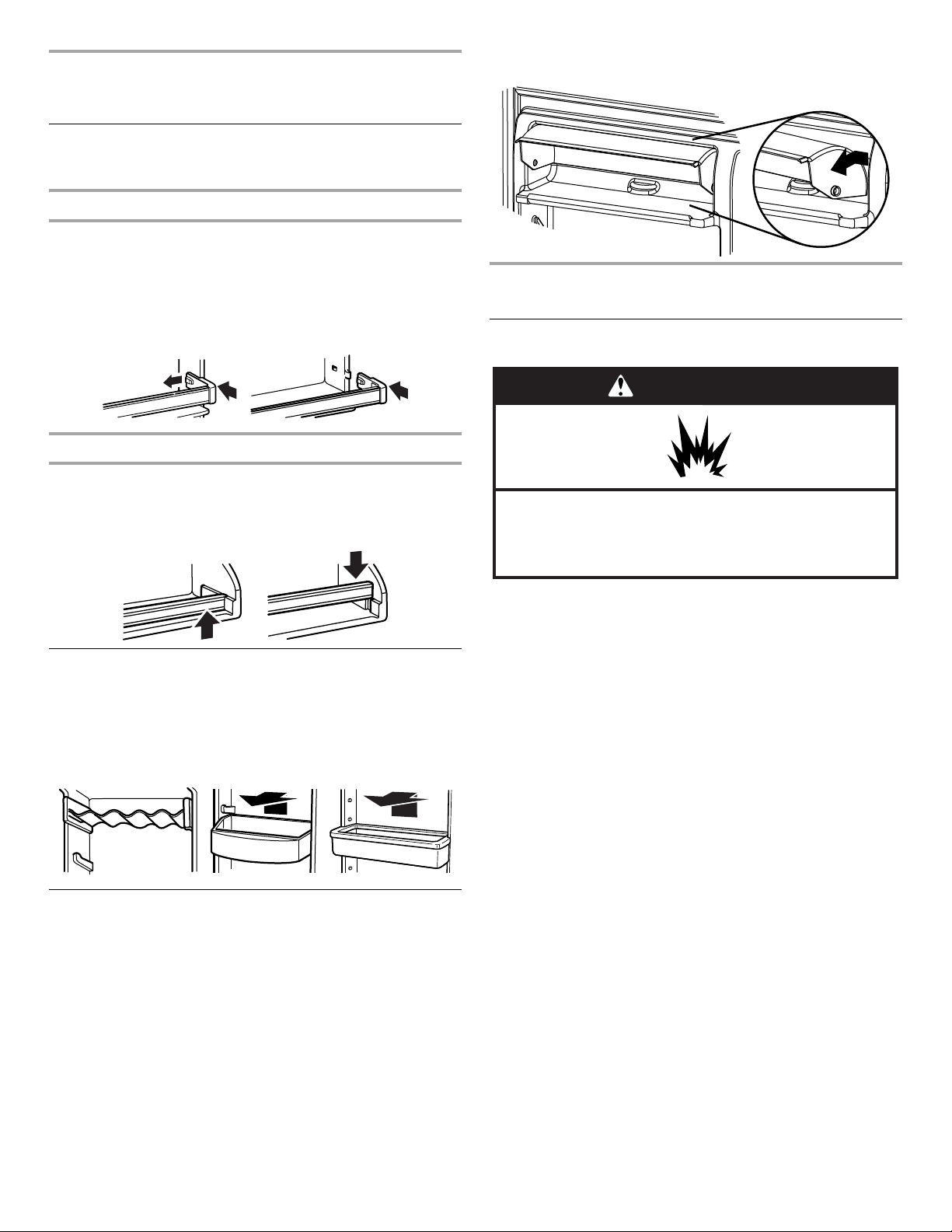
Wire Freezer Shelf
(on some models)
To remove and replace a wire shelf:
1. Remove the shelf by lifting the entire shelf slightly and moving
it all the way to the left-hand side. Tilt the right-hand side up
and out of the shelf supports.
2. Replace the shelf by inserting the left-hand end all the way
into the shelf supports. Then, lower the right-hand end of
the shelf and insert it into the shelf supports.
NOTE: The shelf should lower slightly and lock into place. If the
shelf does not appear stable, make sure both ends of the shelf
are inserted into the shelf supports.
Glass Freezer Shelf
(on some models)
To remove and replace a glass shelf:
1. Lift the front of the shelf to raise the shelf tabs up and out of the
opening in each shelf track. Slide the shelf out the rest of the
way.
2. Replace the shelf by tilting the back end downward to align the
back shelf tab under the track on each side of the freezer.
Gently push the shelf into the freezer until the two center shelf
tabs are positioned within the opening in each track. Lower the
shelf to rest on the shelf tracks.
Frozen Food Storage Guide
Storage times will vary according to the quality and type of food,
the type of packaging or wrap used (should be airtight and
moisture-proof), and the storage temperature. Seal the package
or
container securely to avoid taste and odor transfer throughout
the product. Ice crystals inside a sealed package are normal.
This
simply means that moisture in the food and air inside the
package have condensed, creating ice crystals.
Put no more unfrozen food into the freezer than will freeze within
24
hours (no more than 2 to 3 lbs of food per cubic foot [907
to
1,350 g per L] of freezer space). Leave enough space in the
freezer for air to circulate around packages. The freezer door
must
close tightly.
NOTE: For more information on preparing food for freezing,
check
a freezer guide or reliable cookbook.
Important information to know about glass shelves
and covers:
Do not clean glass shelves or covers with warm water when
they are cold. Shelves and covers may break if exposed to
sudden temperature changes or impact, such as bumping.
Tempered glass is designed to shatter into many small,
pebble-size pieces. This is normal. Glass shelves and covers
are heavy. Use both hands when removing them to avoid
dropping.
10
DOOR FEATURES
Your model may have some or all of these features.
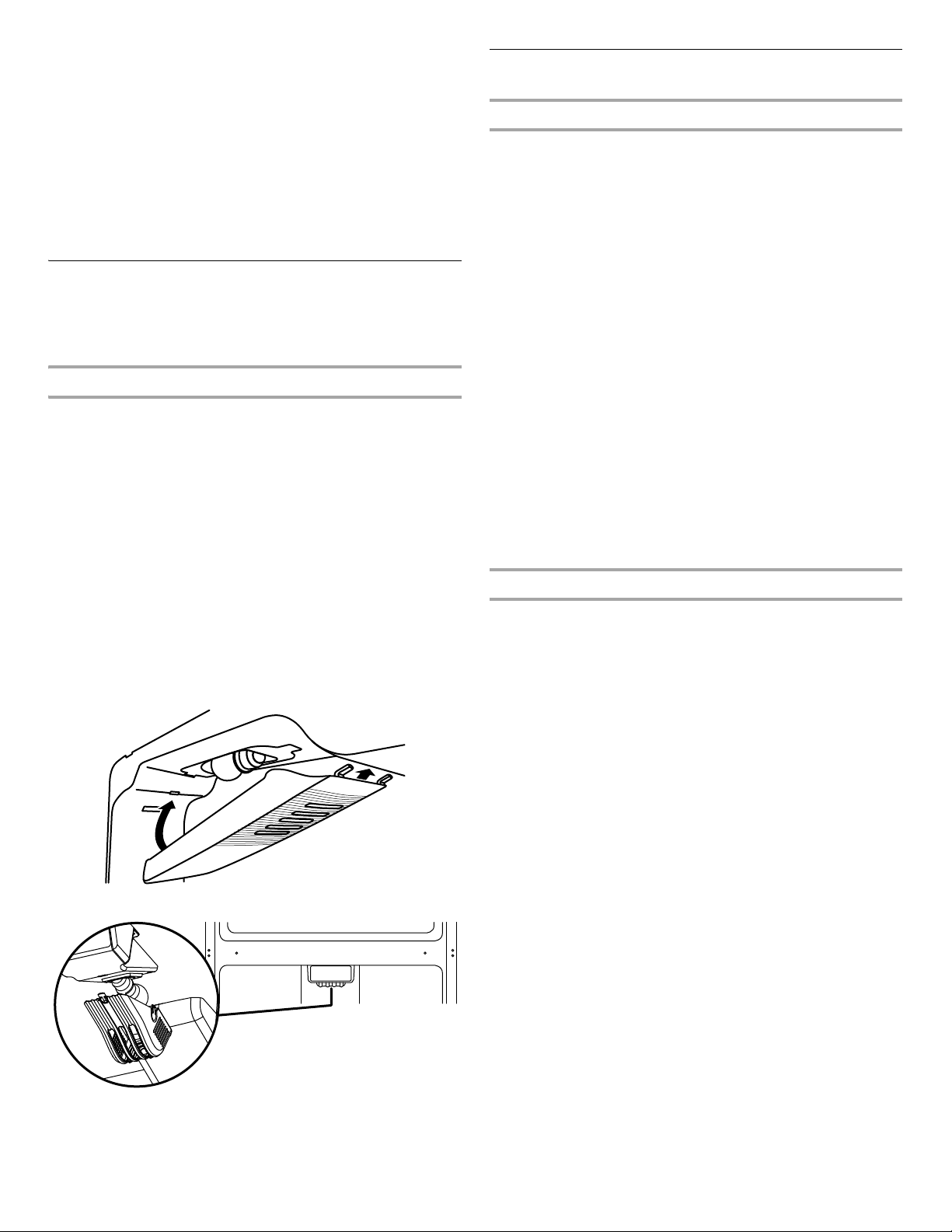
Door Rails
The door rails may be removed for easier cleaning.
Snap-on Door Rails (on some models)
To remove and replace the rails:
1. Depending on your model, remove the rails by pushing in
slightly on the front of the bracket while pulling out on the
inside tab. Repeat these steps for the other end.
2. Replace the rails by aligning the ends of the brackets with
the
buttons on the sides of the door liner. Firmly snap bracket
and assembly onto the tabs above the shelf, as shown.
Drop-in Door Rails (on some models)
To remove and replace the rails:
1. Remove the rails by pulling straight up on each end of the rail.
2. Replace the rails by sliding the shelf rail into the slots on the
door and pushing the rail straight down until it stops.
Door Bins
(on some models)
To remove and replace the bins:
1. Remove the bin by lifting it and pulling it straight out.
2. Replace the bin by sliding it in above the desired support
and
pushing it down until it stops.
Utility Compartment
The utility compartment may be removed for easier cleaning.
To remove and replace the utility compartment:
1.
Remove the utility compartment by squeezing against one side
while raising the utility compartment up and pulling it straight out.
2. Replace the utility compartment by positioning one side in the
lock and sliding in the opposite side until it stops.
REFRIGERATOR CARE
Cleaning
Both the refrigerator and freezer sections defrost automatically.
However, clean both sections about once a month to avoid buildup
of odors. Wipe up spills immediately.
IMPORTANT:
■ Because air circulates between both sections, any odors
formed in one section will transfer to the other. You must
thoroughly clean both sections to eliminate odors. To avoid
odor transfer and drying out of food, wrap or cover foods
tightly.
■ For stainless steel models, stainless steel is corrosion-resistant
and not corrosion-proof. To help avoid corrosion of your
stainless steel, keep your surfaces clean by using the following
cleaning instructions.
To Clean Your Refrigerator:
NOTE: Do not use abrasive or harsh cleaners such as window
sprays, scouring cleansers, flammable fluids, muriatic acid,
cleaning waxes, concentrated detergents, bleaches or cleansers
containing petroleum products on exterior surfaces (doors and
cabinet), plastic parts, interior and door liners or gaskets. Do not
use paper towels, scouring pads, or other harsh cleaning tools.
1. Unplug refrigerator or disconnect power.
2. Hand wash, rinse, and dry removable parts and interior
surfaces thoroughly. Use a clean sponge or soft cloth and a
mild detergent in warm water.
3. Clean the exterior surfaces.
Painted metal: Wash painted metal exteriors with a clean,
soft
cloth or sponge and a mild detergent in warm water.
Rinse
surfaces with clean, warm water and dry immediately
to
avoid water spots.
Stainless steel: Wash stainless steel surfaces with a clean,
soft
cloth or sponge and a mild detergent in warm water.
Rinse
surfaces with clean, warm water and dry immediately
to
avoid water spots.
NOTE: When cleaning stainless steel, always wipe in the
direction of the grain to avoid cross-grain scratching.
WARNING
Explosion Hazard
Use nonflammable cleaner.
Failure to do so can result in death, explosion, or fire.
11
4. There is no need for routine condenser cleaning in normal
home operating environments. If the environment is particularly
greasy or dusty, or there is significant pet traffic in the home,
the condenser should be cleaned every 2 to 3
months to
ensure maximum efficiency.
If you need to clean the condenser:
■ Remove the base grille.
■ Use a vacuum cleaner with a soft brush to clean the grille,
the open areas behind the grille and the front surface area
of the condenser.
■ Replace the base grille when finished.
5. Plug in refrigerator or reconnect power.
Changing the Light Bulbs
IMPORTANT: The light bulbs in both the refrigerator and freezer
compartments of your new refrigerator use LED technology. If
the
lights do not illuminate when the refrigerator and/or freezer
door is
opened, call for assistance or service.
Refrigerator Compartment Light
The refrigerator light bulb is located behind the control.
1. Unplug refrigerator or disconnect power.
2. Remove the light shield by squeezing in on the sides and
pulling it straight down.
3. Remove the light bulb and replace it with an appliance bulb of
the same size and shape.
■ To replace the LED bulb with an LED bulb, order part
number W10716219 (4 watts).
NOTE: Some LED replacement bulbs are not
recommended for wet/damp environments. The
refrigerator and freezer compartments are considered to
be wet/damp environments. If using a brand of LED bulb
other than the recommended LED bulb, before installation,
read and follow all instructions on the LED packaging.
■ To replace an LED bulb with an incandescent bulb, use
only incandescent bulbs for household appliances with a
maximum of 60 watts.
4. Replace the light shield.
or
5. Plug in refrigerator or reconnect power.
Vacation and Moving Care
Vacations
If You Choose to Leave the Refrigerator On While You’re
Away:
1. Use up any perishables and freeze other items.
2. If your refrigerator has an automatic ice maker, and is
connected to the household water supply, turn off the water
supply to the refrigerator. Property damage can occur if the
water supply is not turned off.
3. If you have an automatic ice maker, turn off the ice maker.
NOTE: Raise the wire shutoff arm to OFF (up) position.
4. Empty the ice bin.
If You Choose to Turn Off the Refrigerator Before You
Leave:
1. Remove all food from the refrigerator.
2. If your refrigerator has an automatic ice maker:
■ Turn off the water supply to the ice maker at least one day
ahead of time.
■ When the last load of ice drops, raise the wire shutoff arm
to the OFF (up) position.
3. Turn off the Temperature control(s). See “Using the Control(s).”
4. Clean refrigerator, wipe it, and dry well.
5. Tape rubber or wood blocks to the tops of both doors to prop
them open far enough for air to get in. This stops odor and
mold from building up.
Moving
When you are moving your refrigerator to a new home, follow these
steps to prepare it for the move.
1. If your refrigerator has an automatic ice maker:
■ Turn off the water supply to the ice maker at least one day
ahead of time.
■ Disconnect the water line from the back of the refrigerator.
■ When the last load of ice drops, raise the wire shutoff arm
to the OFF (up) position.
2. Remove all food from the refrigerator and pack all frozen food
in dry ice.
3. Empty the ice bin.
4. Turn off the Temperature control(s). See “Using the Control(s).”
5. Unplug refrigerator.
6. Clean, wipe, and dry thoroughly.
7. Take out all removable parts, wrap them well, and tape them
together so they don’t shift and rattle during the move.
8. Depending on the model, raise the front of the refrigerator so
it
rolls more easily OR raise the leveling screws so they don't
scrape the floor. See “Adjust the Door(s)” or “Door Closing
and
Door Alignment.”
9. Tape the doors closed and tape the power cord to the back
of
the refrigerator.
When you get to your new home, put everything back and refer to
the “Installation Instructions” section for preparation instructions.
Also, if your refrigerator has an automatic ice maker, remember to
reconnect the water supply to the refrigerator.
12
PROBLEM SOLVER
First try the solutions suggested here to possibly avoid a service call.
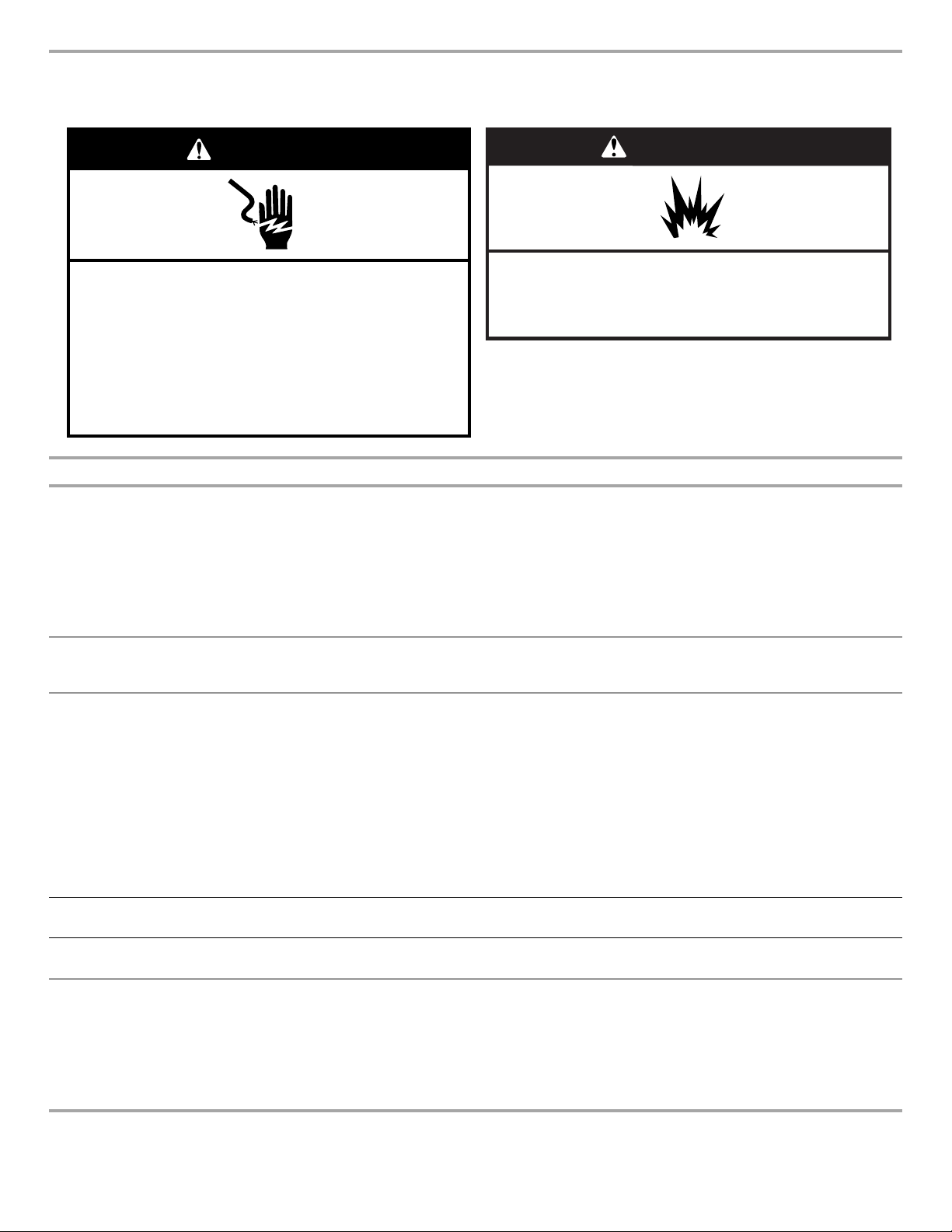
Electrical Shock Hazard
Plug into a grounded 3 prong outlet.
Do not remove ground prong.
Do not use an adapter.
Do not use an extension cord.
Failure to follow these instructions can result in death,
fire, or electrical shock.
WARNING
WARNING
Explosion Hazard
Use nonflammable cleaner.
Failure to do so can result in death, explosion, or fire.
If you experience Possible Causes and/or Recommended Solutions
The refrigerator
will not operate
■ Not connected to an electrical supply - Plug the power cord into a grounded 3 prong outlet. Do not use an
extension cord.
■ No power to the electrical outlet - Plug in a lamp to see if the outlet is working.
■ Household fuse blown or circuit breaker tripped - Replace the fuse or reset the circuit breaker. If the problem
continues, contact an electrician.
■ Control is not turned on - Turn ON the refrigerator control. See “Using the Controls” in the User Guide.
■ New installation - Allow 24 hours following installation for the refrigerator to cool completely.
NOTE: Adjusting the temperature control(s) to coldest setting will not cool the refrigerator more quickly.
The motor seems
to run too much
Your new refrigerator may run longer than your old one. Energy efficient refrigerators run longer at lower, more
energy efficient speeds. Your refrigerator may run even longer if the room is warm, a large food load is added,
the door is opened often, or if the door has been left open.
The refrigerator is
noisy
Refrigerator noise has been reduced over the years. Due to this reduction in operating noise, you may notice
unfamiliar noises that are normal. Following are some normal sounds with an explanation:
■ Buzzing - heard when the water valve opens to fill the ice maker
■ Clicking/Snapping - valves opening or closing
■ Pulsating - fans/compressor adjusting to optimize performance
■ Rattling - flow of refrigerant, water line, or from items placed on top of the refrigerator
■ Sizzling/Gurgling - water dripping on the heater during defrost cycle
■ Popping - contraction/expansion of inside walls, especially during initial cool-down
■ Water running - may be heard when ice melts during the defrost cycle and water runs into the drain pan
■ Creaking/Cracking - occurs as ice is being ejected from the ice maker mold
The door will not
close completely
■ The door is blocked open - Move food packages away from door. Push bin or shelf back into the correct
position. Make sure the crisper cover is fully pushed in, so that the back rests on the supports.
The door is
difficult to open
■ Gaskets are dirty or sticky - Clean gaskets and contact surfaces with mild soap and warm water. Rinse
and dry with soft cloth.
Temperature is too
warm
■ New installation - Allow 24 hours following installation for the refrigerator to cool completely.
■ Door(s) opened often or not closed completely - Allows warm air to enter refrigerator. Minimize door
openings and keep doors fully closed.
■ A large amount of warm food has been recently added - Allow several hours for refrigerator to return to
normal temperature.
■ Check that the Temperature control(s) are set correctly for the surrounding conditions - Adjust the
controls to one setting colder. Check temperature in 24
hours. See “Using the Control(s)” in the User Guide.
13
ACCESSORIES
To order accessories, contact the dealer from whom you
purchased your refrigerator.
ASSISTANCE OR SERVICE
Before calling for assistance or service, please check “Problem
Solver.” It may save you the cost of a service call. If you still need
help, follow the instructions below.
Contact the dealer from whom you
pur
chased the refrigerator.
If you need replacement parts
To locate factory specified replacement parts in your area, contact
the dealer from whom you purchased your refrigerator.
Warranty
Contact the dealer from whom you purchased the refrigerator for
warranty information.
Keep this book and your sales slip together for future
reference. You must provide proof of purchase or
installation date for in-warranty service.
Write down the following information about your appliance to help
you obtain assistance or service if you ever need it. You will need to
know your complete model number and serial number. You can
find this information on the model and serial number label, located
on the inside wall of the refrigerator compartment.
Dealer name _______________________________________________
Serial number ______________________________________________
Address ___________________________________________________
Phone number______________________________________________
Model number______________________________________________
Purchase date______________________________________________
There is interior
moistu
re b
uildup
NOTE: Some
moisture buildup
is normal.
■ Humid room - Contributes to moisture buildup in the refrigerator.
■ Door(s) opened often or not closed completely - Allows humid air to enter the refrigerator. Minimize door
openings and keep door fully closed.
The ice maker is
not pr
oducing ice
or not enough ice
(on some models)
■ The ice maker is not connected to a water supply - Connect refrigerator to water supply and turn water
shutoff valve fully open.
■ A kink in the line can reduce water flow - Straighten the water source line.
■ Ice maker is not turned on - Make sure the ice maker wire shutoff arm or switch (depending on model) is in
the ON position.
■ New installation - Wait 24 hours following ice maker installation for ice production to begin. Wait 3 days for
full ice production.
■ Large amount of ice recently removed - Allow sufficient time for ice maker to produce more ice.
■ Ice cube jammed in the ice maker ejector arm - Remove ice from the ejector arm with a plastic utensil.
■ A reverse osmosis water filtration system connected to your cold water supply can decrease water
pressure - See “Water Supply Requirements
.”
The ice cubes are
hollo
w or small (on
some models)
NOTE: This is a
n
indication of low
water pressure.
■ The water valve is not completely open - Turn the water shutoff valve fully open.
■ A kink in the line can reduce water flow - Straighten the water source line.
■ A reverse osmosis water filtration system connected to your cold water supply can decrease water
pressure - See “Water Supply Requirements.”
■ If questions remain regarding water pressure, call a licensed, qualified plumber.
Off-taste, odor or
gray
color in the
ice (on some
models)
■ New plumbing connections can cause discolored or off-flavored ice - Discard the ice and wash the ice
storage bin. Allow 24 hours for the ice maker to make new ice, and discard the first three
batches of ice
produced.
■ Ice stored too long can develop an off-taste - Discard ice. Wash ice bin. Allow 24 hours for ice maker to
make new ice.
■ Food odor transferring to ice - Use airtight, moisture proof packaging to store food.
■ There are minerals (such as sulfur) in the water - A water filter may need to be installed to remove the
minerals.
If you experience Possible Causes and/or Recommended Solutions
W10817990B
10/15