GEPppliances.com
&
0
©
Safety Im_ucti, ms .... 2-9
Operating Inslrucfions
Auto Feaulres ......... 20
Care and
Cleaning ........... 33, 34
Changing the
Power i,evel ........... 13
CooMng ©uide ..... 15, 16
Deflosdng Guide ...... 18
Exhaust Feature .... 37, 38
Features of Your
Microwave Oven .... 11, 12
Microwave Terms ...... 32
Other Features ..... 25-31
Replacing Bulbs .... 35, 36
Sensor Features ..... 21-24
Time Features ...... 14-19
Troubleshooting Tips ...39
Things That Are
Nomml With Your
Microwave Oven ....... 40
Consumer Support
Consm_ler
Support ....... Back Cover
Optional Kits .......... l0
Warranty .............. 43
Espafiol
For a Spanish ve_ion
of this manual,
visit our Websim at
GEAppliance.com.
Para consulmr una
version en espafiol
de este manual
de instrucciones,
visite nuestro sido
de inmrnet
GEAppliance.com.
PVM18 70
PNM 1871
PVM18 73
Write themodel andserial numbershere:
Model#
Serial #
Find these numbers on a label inside
the oven.
DE68-O3448A 49-40570-2 04-09JR

IMPORTANTSAFETYINSTRUCTIONS
READALLINSTRUCTIONSBEFOREUS/NG
iiiiiiiii;iii/iiiiiiiiii!/iiiiiiiiii
i_iNiii_iiiiil_ii_
WARNING!
Toreduce the risk of burns, electric shock, fire, injury
to persons, or exposure to excessive microwave energF
PRECAUTIONSTOAVOID
POSSIBLEEXPOSURETO
EXCESSIVEMICROWAVEENERGY
[o Not Attempt to operate
this oven with the door open
since open<tear operation
can result in harmflll
exposure to nlicrowitvc
energ_ 5 It is important not
to detcat or tamper with
tile sate b inmrlocks.
Oo Not Place any obiect
between the oven fl'ont
tilce and the door or allow
soil or cleaner residue to
accumulam on sealing
SllrJ{lces.
Be Not Operate the oven if it
is damaged. It is particularly
important that tile oven door
close properly and that there
is no damag_ to the:
doo_(,_ent>,
::_ii hinges and latches
(broken or loosened),
door seals and sealing
::::::::::::::::::::::::::snrJilces.
The Oven Shon/d Not be
adiusted or repaired by
anyone except properly
qualified service personnel.
SAFETYPRECAUTIONS
When using electrical appfiances, basic safety
precautions should be followed, including the foflowing:
Read and fi)llow the Install or locate this
specific precautions in
the Precautions to Avoid
Possible Exposure to
Excessive Microwa ve
Energy section above.
This appliance must be
grounded. Connect only
to a properly grounded
outlet. See the Grounding
[nstructions section on
page 8.
appliance only in
accordance with the
provided Installation
Instructions.
This microwave oven is
intended %r household use
and is UL listed fi)r
installation over electric
and gas ranges.
This microwave oven is
not approved or tested fi)r
n/_lrine use.
SAVETHESEINSTRUCTIONS
IMPORTANTSAFETYINSTRUCTIONS
READALLINSTRUCTIONSBEFOREUSING
GEApp/iances.com
Use this appfiance only for its intended purpose as described in this
Owner's Manual
Do not mount this appliance over a
sink.
This over-the-p, mge oven was designed
%r use over c,mges no wider than 361'
It m_W be installed over both Kas and
electric cooking equipment.
Do not opem/e this appliance if it has -
a damaged p(_wer cord or plug, if it is
not working properly or if it has been
damaged or dropped. If the power
cord is damaged, it nltlst be replaced
by General Electric Service or an
authorized service agent using a
power cord available fl'om (;eneml
Electric.
Do not cover oi" block any openings
on the appliance.
: Use this appliance only tot its
in/ended use as described in this
manual. Do not use corrosive
chemicals or vapo> in this appliance.
This microwave oven is specifically
designed to heat, d W or cook tood,
and is not inmnded for labomto W or
industrial use.
Do not store this appliance outdoors.
Do not use this product near wami_
fi)r example, in a wet basement, near
a swimming pool, near a sink or in
similar locations.
Kee I) power cord away fl'om heated
s/lrI{tces.
Do not immerse power cord or plug
in water.
Do not store anything directly on lop
of the micr{_wave _wen surtime when
the microwave oven is in openttion.
To reduce the risk of fire in the oven
cavity:
Do not oveIvook %od. Careflflly
at/end appliance when paper, plastic
or other combustible mamrials are
placed inside the oven while cooking.
Remove wire twis/-fies and me/al
handles tiom paper or plastic
containers before placing them in
the oven.
Do not use the oven tot storage
purposes. Do not leave paper
products, cooking umnsils or tood
in the oven when not in use.
If ma/erials inside the oven igni/e,
kee I) the oven door closed, turn the
oven off and disconnect the power
cord, or shnt off power at the fl_se or
circuit breaker panel. If the door is
opened, the fire may spread.
Do not use the Sensor Features
twice in succession on the same tood
portion. If food is undercooked after
the first countdown, use _me Cook for
addiuonal cooking lime.
See door surtime cleaning
instructions in the Care and cleaning
of the microwave oven section of this
n/an/lal.
This appliance should be serviced
only by qualified service personnel.
Contact nearest authorized service
ti_cili/)' tot examination, repair or
ad.illstll/ent.
As with any appliance, close
supeiMsion is necessao, when used
by children.
SAVETHESEINSTRUCTIONS ..............................................
/MPORTAIVTSAFETYiNSTRUCTiONS
READALLiNSTRUCTiONSBEFOREUSING
WA
,!
m
ARCING
If you see arcing, press the CLEAR/OFf:pad and correct
the problem.
Arcing is the microwave term
for sparks ill the oven. Arcing
is caused by:
The metal shelf not
installed correctly so it
touches the microwave wall.
Metal or foil touching tile
side of tile o_en.
{{{iii_i;;;!
{{{iii_i;;;!
Foil not molded to tood
(upturned edges act like
antennas).
Metal, such as twist-ties,
pouhry pins or gold-
rimmed dishes, ill the
m ic rowave.
Recycled paper towels
containing small metal
pieces being used ill the
m ic rowave.
iiiiiiiii;iii/iiiiiiiii{!/iiiiiiii{i
i_iii_iiiiiiiil_ii_
FOODS
{{{iii_i;;;!
{{{iii_i;;;!
Do not pop popcorn in
your microwave oven unless
ill a special microwave
popcorn accesso W or unless
you use popcorn labeled
fi_r use ill n/icrow}lve ovens.
Some products such as
whole eggs and sealed
containers--tot example,
closed jars--are able to
explode and should not be
heated in this microwave
oven. Such use of the
microwave oven could
result ill iI_.jur>
Do not boil eggs in a
microwave oven. Pressure
will build up inside egg yolk
and will cause it to burst,
possibly resulting ill iI_.jur>
{{{iii_i;;;!
Operating the microwave
with no tood inside tot
nloI'e than a nlinilte oF /\vo
may cause damage to tile
oven and could start a fire.
It increases the heat around
the magnetron and can
shorten the lite of the oven.
Foods with unbroken outer
"skill" such as potatoes, hot
dogs, sausages, tomatoes,
apples, chicken livers and
other giblets, and egg yolks
should be pierced to allow
steam to escape during
cooking.
SAVETHESEiNSTRUCTiONS

IMPORTANTSAFETYINSTRUCTIONS
READALLINSTRUCTIONSBEFOREUSING
GEAppliances.com
SUPERHEATEDWATER
Liquids, such as water,
coffee or tea are able to be
overheated beyond the
boiling point without
appearing to be boiling.
Visible bubbling or boiling
when the container is
removed from the microwave
oven is not always present.
THISCOULDRESULTIN VERY
HOTLIQUIDS SUDDENLY
BOILINGOVERWHEN THE
CONTAINERIS DISTURBED
ORA SPOONOR OTHER
UTENSILIS INSERTEDINTO
THELIQUID.
To reduce the risk of ii_.jury
to persons:
-- Do not overheat tile iiquid.
-- Stir tile iiquid both befbre
and hali\<ly through
heating it.
-- Do not use straigh/-sided
containers witl, narrow
necks.
-- After heating, aliow tile
container to stand in tile
microwave oven tot a silort
time before removing ti, e
container.
-- Use extreme care wi, en
inserting a spoon or ()tiler
utensii into ti, e container.
{{{iii_i;;;!
{{{iii_i;;;!
Avoid heating baby fbod in
giassjars, even with tile lid
off. Make sure all infimt
food is thoroughly cooked.
Stir %od to distribute ti*e
heat evenly. Be careflll to
prevent scalding when
warming %rmula or breast
milk. The container may
feel cooler titan tile milk
really is. Always test tile
milk before feeding ti, e
baby.
Don't deikost flozen
beverages in narrow-necked
bottles (especially
carl)onated beverages).
Even if ti*e container is
opened, pressure can build
up. This can cause ti, e
container to burst, possibly
resulting in i*_jury.
Hot Ibods and steam can
cause burns. Be careflll
when opening any
containers of hot fbod,
including popcorn bags,
cooking pouches and
boxes. To prevent possible
injur 5 direct steam away
fl'om hands and tilce.
Do not overcook potatoes.
They couid dehydrate and
catch fire, causing damage
/o your oven.
Cook meat and poultry
thoroughly--meat to at
least an INTERNAL
temperature of ] 60°F
and poultry to at least an
INTERNAI, temperature
of ] 80°K Cooking to ti, ese
temperatures usually
protects against food-
borne illness.
SAVETHESEINSTRUCTIONS ..............................................
IMPORTANTSAFETYINSTRUCTIONS
READAt/.INSTRUCTIONSBEFOREUS/NG
WA
,!
m
iiiiiiiii;iii/iiiiiiiii{!/iiiiiiii{i
i iNiii iiiiil ii
MICROWAW-SAFECOOKWAflE
Make sure all cookware used
in yotlr n/icrowave oven is
suitable tot microwa_qng.
Most glass casseroles, cooking
dishes, measuring cups,
custard cups, pottery or china
dinnerware which does not
ha_e metallic trim or glaze
with a metallic sheen can be
used. Some cookware is
labeled "suitable Jot
illicrow;iving."
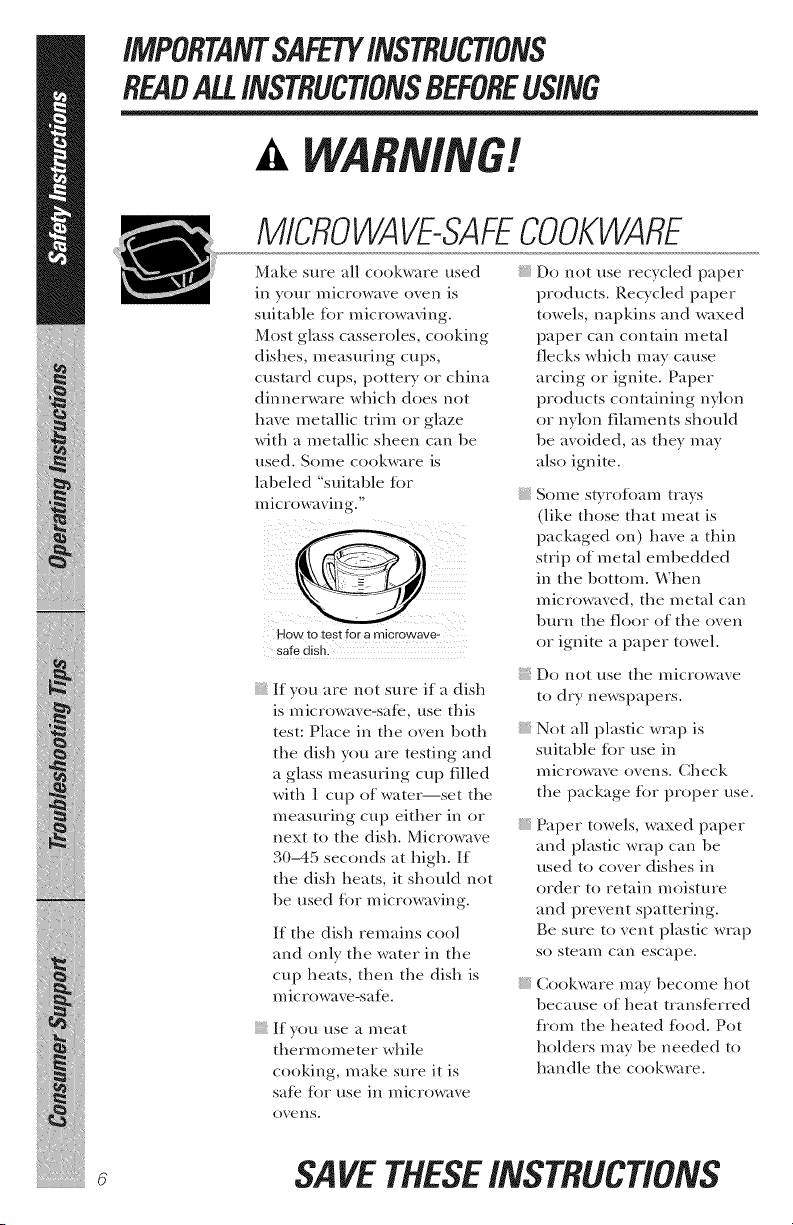
How to test for a microwave-
safe dish.
If you are not sure if a dish
is microwave-sate, use this
test: Place in the oven both
the dish you are testing and
a glass measuring cup filled
with ] cup of water--set the
measuring cup either in or
next to the dish. Microwave
3(t-45 seconds at high. If
tile dish heats, it should not
be used %r microwaving.
If the dish remains cool
and only the water in the
cup heats, then the dish is
mic rowave-sate.
If you use a meat
thermometer while
cooking, make sure it is
safe for use in microwave
{{{iii_i;;;!
{{{iii_i;;;!
{{{iii_i;;;!
Do not use recycled paper
products. Recycled paper
towels, napkins and waxed
paper can contain metal
flecks which may cause
arcing or ignite. Paper
products containing nylon
or nylon filaments should
be avoided, as they may
also ignite.
Some slyrofimn_ trays
(like those that meat is
packaged on) have a thin
strip of metal embedded
in the bottom. When
microwaved, the metal can
burn the riot), of the oven
or ignite a paper towel.
Do not use tile n/icrowaxe
to dry newspapers.
Not all plastic wrap is
suitable tot use in
microwave ovens. Check
the package tot proper use.
Paper towels, waxed paper
and plastic wrap can be
used to cover dishes in
order to retain moisture
and prevent spattering.
Be sure to vent plastic wrap
St) steam can escape.
Cookware may become hot
because of heat transferred
flom the heated food. Pot
holders may be needed to
handle the cookware.
oxens.
SAVETHESEINSTRUCTIONS

IMPORTANTSAFETYINSTRUCTIONS
READALL/NSTRUCT/ONSBEFOREUS/NG C lia.oe,.oom
"goilable" cooking pouches
and tightly closed plastic
bags should be slit, pierced
or vented as directed by
package. If they are not,
plastic could burst during
or immediately after
cooking, possibly resulting
in i,_.juW. Also, plastic
storage containers should
be at least partially
uncovered because they
form a fight seal. Wl_en
cooking with containers
tightly covered with plastic
wrp.p, Fen/ore covering
carefully and direct steam
away from hands and thce.
Use toil only as directed
in this manual. When using
toil in the microwave oven,
kee I) the toil at least ]" away
flom the sides of the oven.
Plastic cookware - Plastic
cookware designed %r
microwave cooking is very
useful, but should be used
careflfll> Even microwave-
satb plastic may not be as
tolerant of overcooking
conditions as are glass or
ceramic materials and may
soften or char if subjected
/o short periods of
overcooking. In longer
exposures to overcooking,
the tood and cookware
could ignite.
Follow these guidelines."
plastics only and
use them in strict
compliance with
the cookware
n/}in niltc till i'eF_s
retort/n/endations.
)_ Do not n/icrowa_,e
.......................empty containers.
Do not permit children
to use plastic cookware
without complete
superxision.
SAVETHESEINSTRUCTIONS ..............................................
iMPORTANTSAFETYiNSTRUCTiONS
READALLiNSTRUCTiONSBEFOREUSING
WA
b!
m
Improper use of the grounding plug can result in a risk of
electric shock.
iiiiiiiii;iii/iiiiiiiii{!/iiiiiiii{i
i_iNiii_iiiiil_ii_
GROUNDINGINSTRUCTIONS
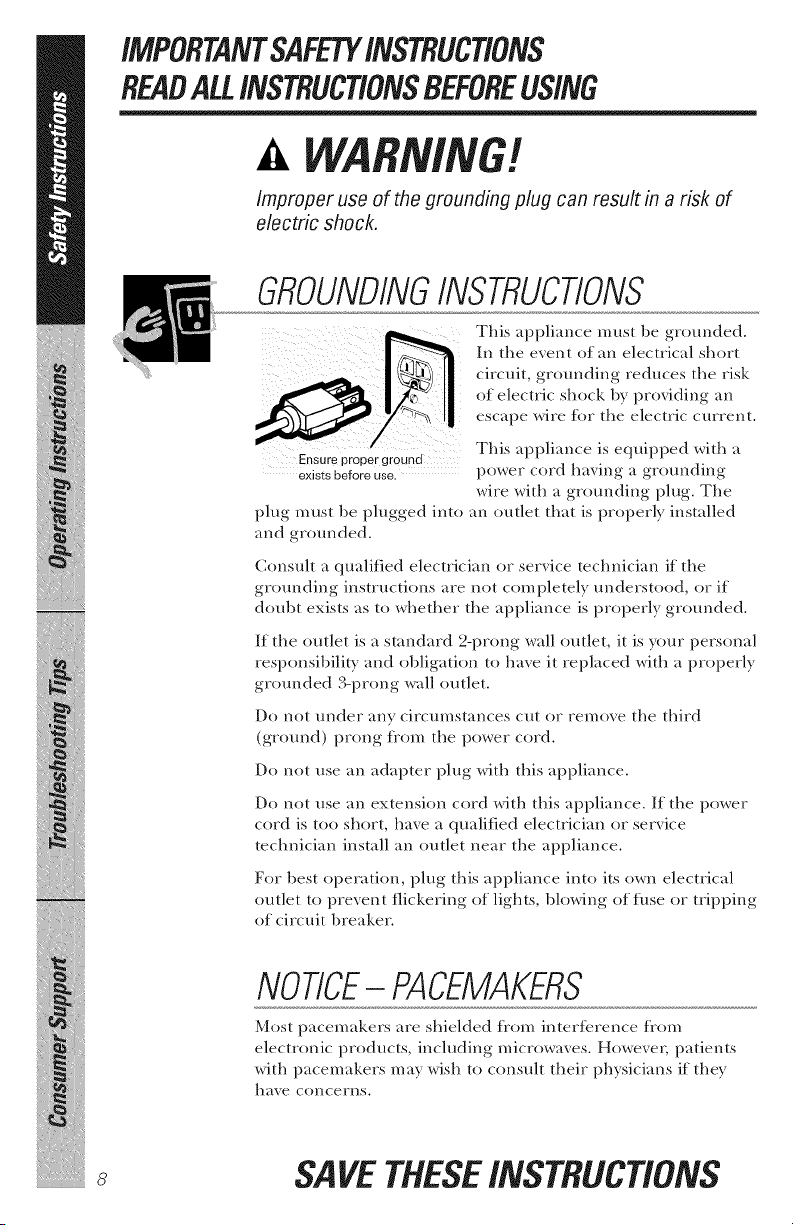
Ensure proper ground
exists before use.
plug must be plugged into
and grounded.
This appliance must be grounded.
In the event of an electrical short
circuit, grounding reduces the risk
of electric shock by providing an
escape wire tot the electric current.
This appliance is equipped with a
power cord having a grounding
wire with a grounding plug. The
an outlet that is properly installed
Consuh a qualified electrician or serxice technician if the
gr(mnding instructions are not corn pletely understood, or if
doubt exists as to whether the appliance is properly gr(mnded.
If the outlet is a standard 2-prong wall outlet, it is your personal
responsibility and obligation to ha_e it replaced with a properly
grounded 3-prong wall outlet.
Do not under any circumstances cut or remoxe the third
(ground) prong tiom the power cord.
Do not use an adapter plug with this appliance.
Do not use an extension cord with this appliance. If the power
cord is too short, haxe a qualified electrician or serxice
technician install an outlet near the appliance.
For best operation, i)lug this appliance into its own electrical
outlet to pre_ent flickering of lights, blowing of fuse or tripping
of circuit breaker.
NOTICE-PACEMAKERS
Most pacemakers are shielded tkom intertcrence tkom
electronic products, including microwaves. However, patients
with pacemakers may wish to consult their physicians if they
have concerns.
SAVETHESEiNSTRUCTiONS
iMPORTANTSAFETYiNSTRUCTiONS
READALL/NSTRUCT/ONSBEFOREUSING C_lia,ces.co,,
THEVENTFAN
The tim will operate automatically under certain conditions
{see Automatic Fan tcature). Take care to prevent the starting
and spreading of accidental cooking fires while the vent tim
is in use.
Clean the underside of the microwaxe often. Do not allow
grease to build up on the microwaxe or the tim filter.
In the event of a grease fire on the surfi_ce units below the
microwave oven, smother a flaming pan on the surfi_ce unit
by covering the pan completely with a lid, a cookie sheet or
a fiat tray.
Use care when cleaning tile xent tim filter. Corrosixe cleaning
agents, such as lye-based oxen cleaners, may damage the filter.
When preparing flaming fi)ods under the microwaxe, turn
the tim on.
Never leave surface units beneath your microwave oven
unattended at high heat settings. Boilovers cause smoking
and greasy spillovers that may ignite and spread if the
microwave vent tim is operating. To minimize automatic tim
operation, use adequate-sized cookware and use high heat
on surfi_ce units only when necessar>
READANDFOLLOWTHISSAFETY
INFORMATIONCAREFULLY.
SAVETHESEiNSTRUCTiONS
9

Aboutoptional kits.
OPtiONALKITS
Filler Panel Kits JX81B,JX81H
Jx52wH-White
:xs2et- elack
When replacing a 36" range
hood, filler panel kits fill in
tile additiomd width to ...........
provide a custom buil/-in
appearance.
JX52
For installation l)etween cal)inets
only; not tor end-oi=cabinet installation. Each kit contains/wo
3"-wide filler panels.
Filter Kits
JX81B - Recirco/ating Charcoal Filter Kit (1800and 3600Series models)
JXSf H - Recircolating Charcoal Filter Kit (2000Series models)
Filter kits are used when tile microwave oven cannot be vented
to tile outside.
Axailable at extra cost tiom your (;E supplier. See the back
co_er for ordering 1)y phone or at (;EAppliances.com.
/0
Aboutthe featuresof Four
microwaveoven. 6EApp/iances.com
Throughout this manual, features and appearance may vary from
your model.
/////! !/!!!\ \ \\_X
0
?
--0
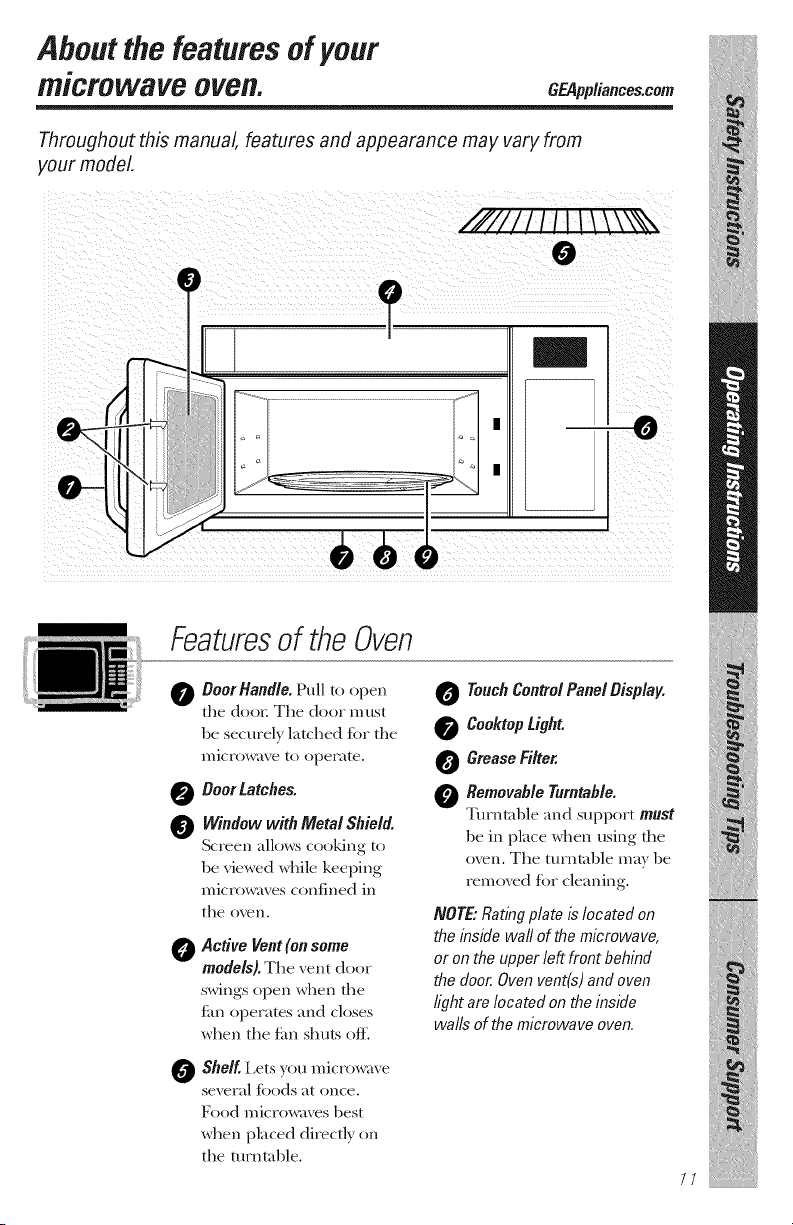
Featuresof the Oven
0
Boor Handle. Pull to open
the door. The door must
be securely l_tched {or the
n/icFow_txe to operate.
0 DoorLatches.
Window with Metal Shield.
Screen allows cooking to
be viewed while keeping
microw_ves confined in
the oven.
0
Active Vent (on some
models).The vent door
swings open when the
fhn operates m_d closes
when the tim shuts ofl_
0
Shelf. Lets you microw_ve
several %ods at once.
Food microw_ves best
when placed directly on
the/urnt_ble.
Touch Control Panel Display.
0 CooktopUght.
0 Grease Filter.
0 Removable Turntable.
Turntable m_d support must
be in place when using the
oven. The turntable m_ff be
removed %r cleaning.
NOTE,"Rating plate is located on
the inside waft of the microwave,
or on the upper left front behind
the door. Oven vent(s) and oven
light are located on the inside
walls of the microwave oven.
//
iliit!
Aboutthe featuresof your microwaveoven.
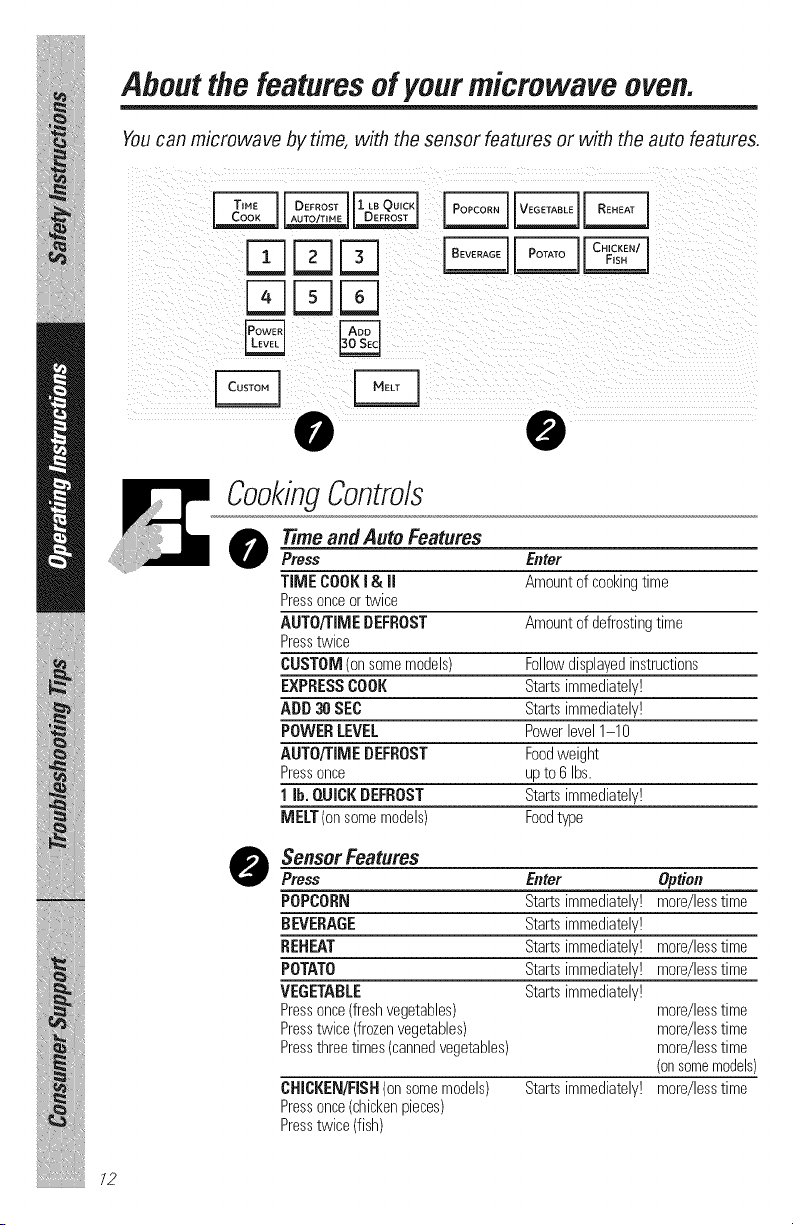
Youcan microwave bytime, with the sensor features or with the auto features.
FqrqFq
rqFqrq
iiiiiiiii;iii/iiiiiiiiii!/iiiiiiiiii
i_iii_iii_iiiiil_ii_
/2
CookingControls
O Time andAuto Features
Press Enter
TIMECOOKi & II Amountofcookingtime
Pressonceortwice
AUTO/TIMEDEFROST Amountofdefrostingtime
Presstwice
CUSTOM(onsomemodels) Followdisplayedinstructions
EXPRESSCOOK Startsimmediately!
ADD30 SEC Startsimmediately!
POWERLEVEL Powerlevel1-10
AUTO/TIMEDEFROST Foodweight
Pressonce upto 6 Ibs.
1 lb. QUICKDEFROST Startsimmediately!
MELT(onsomemodels) Foodtype
O SensorFeatums
Press Enter Option
POPCORN Startsimmediately! more/lesstime
BEVERAGE Startsimmediately!
REHEAT Startsimmediately! more/lesstime
POTATO Startsimmediately! more/lesstime
VEGETABLE Startsimmediately!
Pressonce(freshvegetables) more/lesstime
Presstwice(frozenvegetables) more/lesstime
Pressthreetimes(cannedvegetables) more/lesstime
(onsomemodels)
CHICKEN/FISH(onsomemodels) Startsimmediately!more/lesstime
Pressonce(chickenpieces)
Presstwice(fish)
Aboutchangingthe
power level. GEPpplianees.com
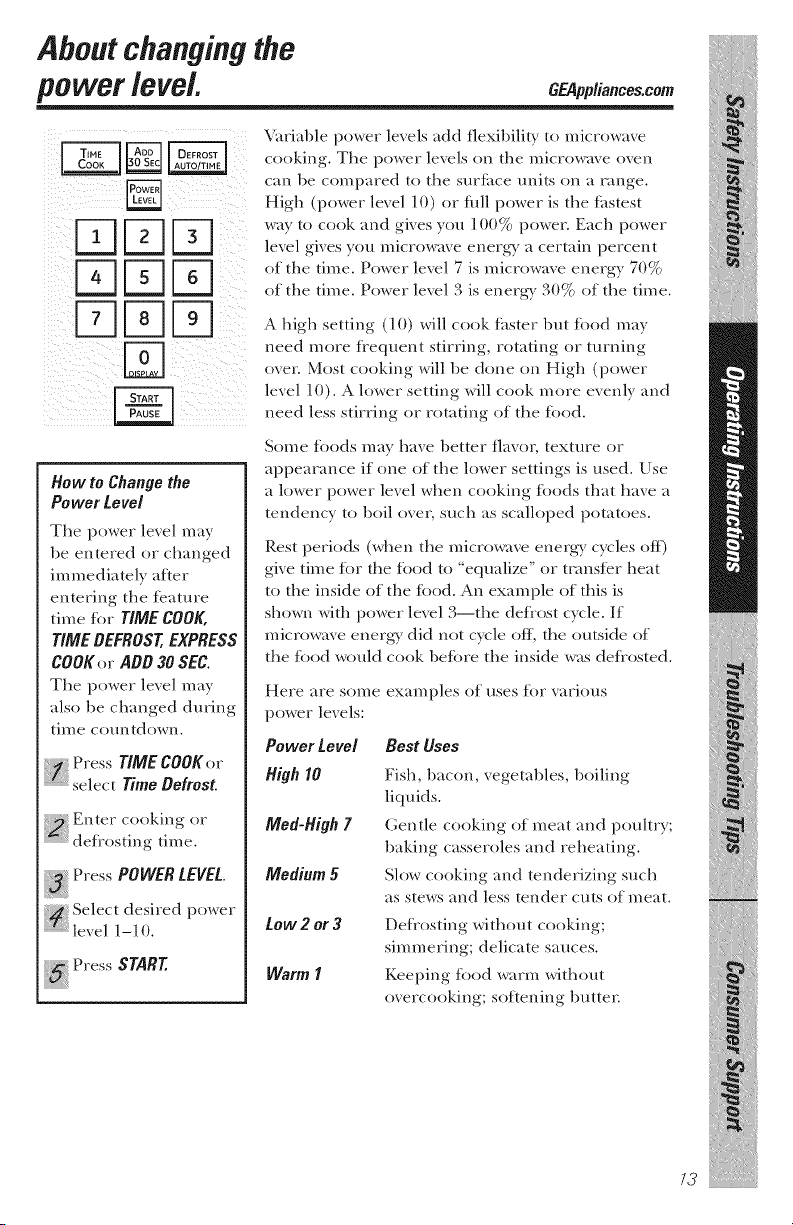
How to Change the
Power Level
The power level may
be entered or dmnged
immediately after
entering the tcature
time %r TIME COOK,
TIME DEFROST, EXPRESS
COOKer ADD 30 SEC.
Tile power level may
also be changed during
time countdown.
Press TIME COOKer
select Time Defrost.
Press POWER LEVEL.
i_ Select desired power
level 1-10.
Press START.
Variable power levels add flexibili/) , to microwave
cooking. The power levels on the microwave oven
can be compared to the surface units on a range.
Higil {power level ] O) or fl_ll power is tile tastest
way to cook and gives you 100% power. Each power
level gives you microwave energy a certain percent
of the time. Power lexel 7 is microwme energy 70%
of tile time. Power level 3 is energy 30 °/
. J/<_ of the time.
A high setting (lO) will cook fi_ster but toed may
need more flequent stirring, rotating or turning
o_er. Most cooking will be done on High (power
lexel 1(1). A lower setting will cook more exenly and
need less stirring or rotating of tile toed.
Some tbods may have better flavor, texture or
appearance if one of the lower settings is used. Use
a lower power level when cooking %ods that have a
tendency to boil over, such as scalloped potatoes.
Rest periods (when tile microwave energy cycles off)
give time tor tile toed to "equalize" or tcansicr heat
to tile inside of the toed. An example of this is
shown with power level 3--the defl'ost cycle. If
microwave energy did not cycle off, tile outside of"
tile toed would cook betore tile inside was deflosted.
Here are SOIl/e
power levels:
Power Level
High I0
Meal-High7
Medium 5
tow 2 or 3
Warm I
examples of uses tot xarious
Best Uses
Fish, 1)acon, vegetables, 1)oiling
liquids.
Gentle cooking of meat and pouhry;
baking casseroles and reheating.
Slow cooking and tenderizing such
as stews and less tender cuts of meat.
Defrosting without cooking;
simmering; delicate sauces.
Keeping food warm without
overcooking; softening 1)utter.
/3
iliit!
Abe th= etim efeatures .
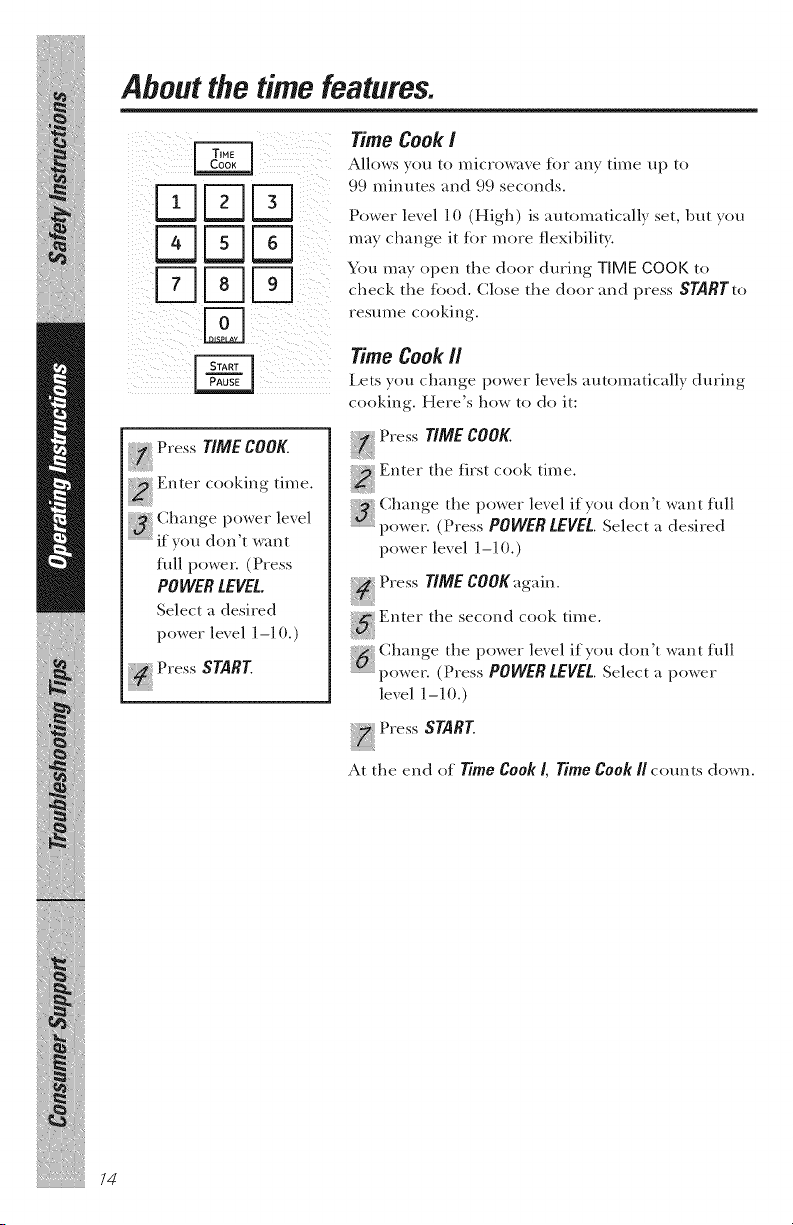
Time Cook i
Allows v(m to microwave for any time up to
I J _ _ Power level l 0 (High) is automatically set, but you
_ ['-7] You may open the door during TIME COOK to
L_ _ L_ check the food. Close the door and press SNRTto
resume cooking.
Timecook.
Lets you change power lexels automatically during
cooking. Here's how to do it:
Press TIME COOK.
::_ Enter cooking time.
flfll power. (Press
POWER LEVEL.
Select a desired
power level 1-1 (1.)
Press START.
i_ Press TIME COOK.
Enter the first cook time.
Cimnge the power level if you don't want fldl
power. (Press POWER LEVEL. Select a desired
power lexel 1-10.)
Press TIME COOK again.
Enter the second cook time.
Change the power lexel if you don't want fldl
power. (Press POWER LEVEL. Select a power
lexel ] -10.)
Press START.
At the end of Time Cook/, Time Cook Rcomets down.
iiiiiiiii;iii/iiiiiiiiii!/iiiiiiiiii
i iii iii iiiiil ii
GEAppliances.com
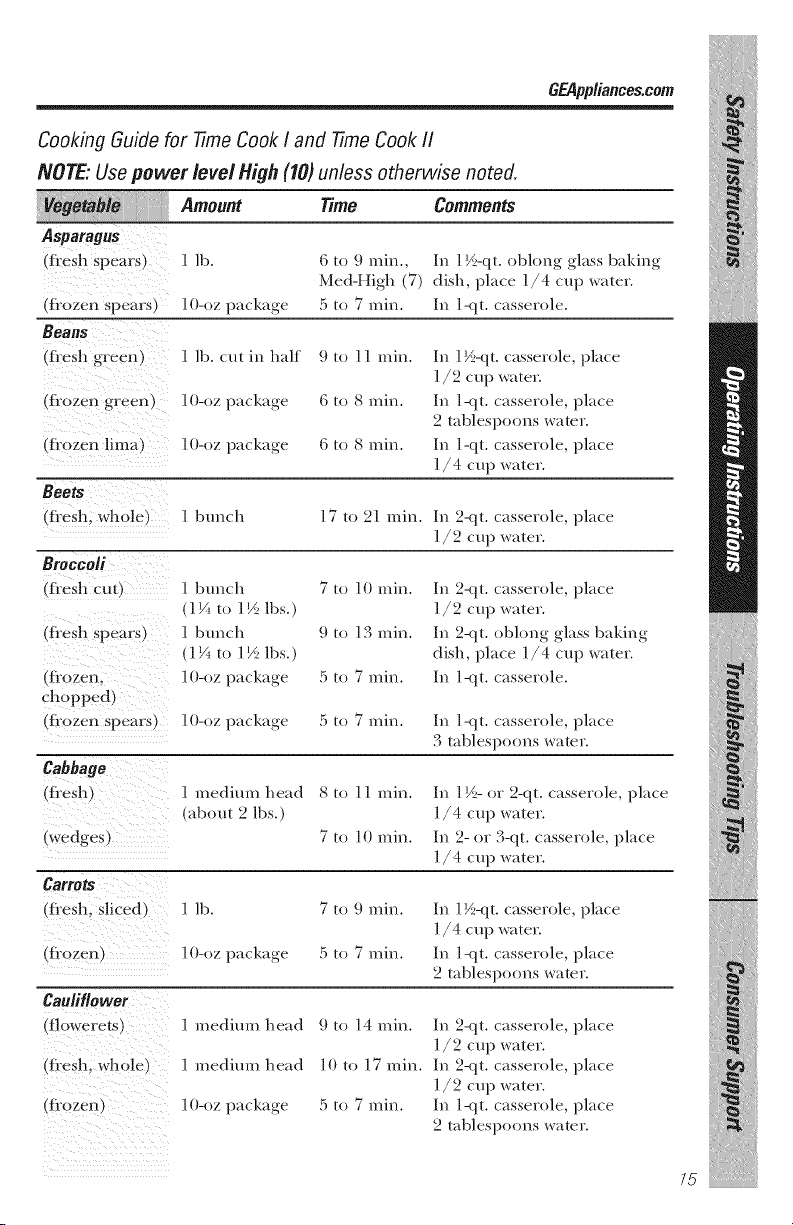
Cooking Guide for Time Cook I and 77meCook II
NOTE: Usepower level High (10) unless otherwise noted.
Asparagus
(f!esh Spears) 1 lb. (i to 9 rain., In ] ½-qt. oblong glass baldng
Med-High (7) dish, place ]/4 cup water.
(tiozen spears) ] 0-oz package 5 to 7 rain. In ]<it. casserole.
Beans
(fi'esh green) 1 lb. cut in half
(flozen gree n) l O-oz package
(fi0zen !ima) 10-oz package
9to 11 inin.
6 to 8 inin.
6 to 8 Inin.
In 1½-qt. casserole, place
]/9 cup water.
In ]<it. casserole, place
2 tablespoons water.
In ]-qt. casserole, place
]/4 cup water.
Beets
(fi'esh; whole) 1 bunch 17 to 21 rain. In 2<it. casserole, place
]/2 cup water.
m
BroCcoli
(fi'esh cut) 1 bunch 7 to 10 rain.
(1V_ to 1½ lbs.)
(fi'esh spears) 1 btmch 9 to 13 rain.
(1F_ to ] ½ lbs.)
(fiozen; l O-oz package 5 to 7 nlil_.
chopped)
(:[iozen spears) 10-oz package 5 to 7 rain.
Cabbage
(!i'esh) 1 medium head 8 to ] ] rain.
(about 2 lbs.)
(wedges) 7 to ]0 rain.
m.
Carrots
(fi'esh; sliced) 1 lb. 7 to 9 rain.
(ti0zen) 10-oz package 5 to 7 rain.
Cauliflower
(!!owereLs) 1 medium head 9 to 14 rain.
(!?esh; wh01e) 1 medium head 10 to 17 rain.
(fiozen) 10-oz package 5 to 7 rain.
In 2-qt. casserole, place
1/2 cup water.
In 2<it. oblong glass baking
dish, place 1/4 cup water.
In ]<it. casserole.
In ]-<it. casserole, place
3 tablespoons water.
In 1½- or 9-qt. casserole, place
]/4 cup water.
In 9- or 3-qt. casserole, place
]/4 cup water.
In ] ½-qt. casserole, place
]/4 cup water.
In ]<it. casserole, place
2 tablespoons water.
In 2-qt. casserole, place
]/2 cup water.
In 2<it. casserole, place
]/2 cup water.
In ]<it. casserole, place
2 tablespoons water.
75
iliit!
About the time features.
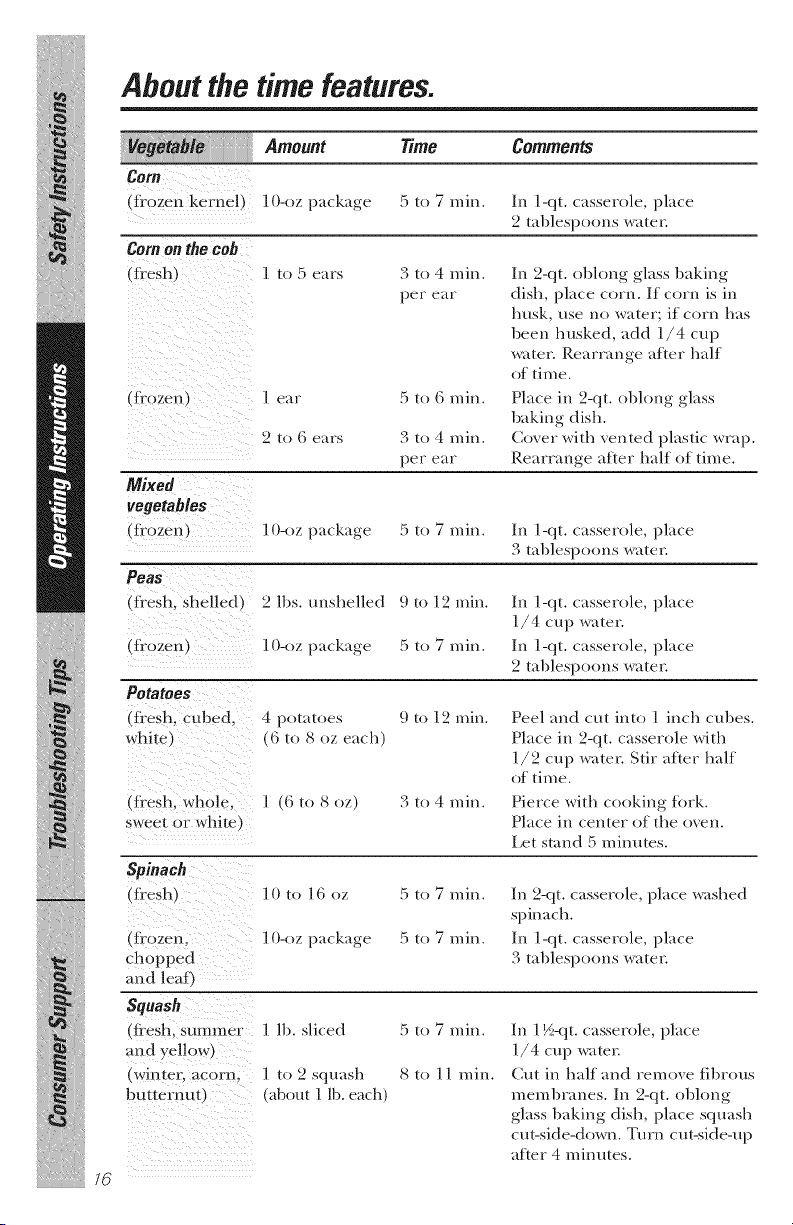
Am..., Tim°
eo 7
(fi.0zen keme!) 10_oz package :5 to 7 rain.
Corn on the cob
(fi'esh) l to 5 ears 3 to 4 rain.
per ear
9 to G ears 3 to 4 rain.
- per ear
_Mixed
vegetab/es
(frozen) ] 0-(,z package
5 to 7 rain.
Comments
In 1-qt. casserole, place
2 tablespoons water.
In 2-qt. oblong glass baking
dish, place corn. If corn is in
husk, use no water; if corn has
been husked, add ]/4 cup
water. Rearrange after half
of time.
Place in 2-qt. oblong glass
baking dish.
Cover with vented plastic wrap.
Rearrange after half of time.
In 1-qt. casserole, place
3 tablespoons water.
iiiiiiiii;iii/iiiiiiiii{!/iiiiiiii{i
iTiii iii iiiiil ii
/6
(fl'esh, shelled) 2 lbs. unshelled
(frozen) 10-oz package
Potatoes
{fi.esh, Cubed, 4 potatoes
white) (6 to 8 oz each)
9 t _ 12 rain.
5 to 7 rain.
9 t _ 12 rain.
In l-qt. casserole, place
1/4 cup water.
In l-qt. casserole, place
2 tablespoons water.
Peel and cut into 1 inch cubes.
Place in 9-qt. casserole with
]/9 cup water. Stir after half
of time.
(fi.esh, wh0!e, l (6 to 8 oz)
sweet or white)
3 to 4 rain. Pierce with cooking tork.
Place in center of the oxen.
I.et stand 5 minutes.
Spinaoh
(fi'esh) 10 to 16 oz
chopped
and leaf)
S ,ash
(fl_eShl Summer 1 lb. sliced
and yellow)
(winteE acorn; l to 2 squash
butternut) (about 1 lb. each)
5 to 7 rain.
5 to 7 rain.
5 to 7 rain.
8 to ] 1 rain.
In 2-qt. casserole, place washed
spinach.
In ]-qt. casserole, place
3 tablespoons water.
In 1 ½<!t. casserole, place
1/4 cup wa/er.
Cut in half and remove fibrous
membranes. In 2-qt. oblong
glass baking dish, place squash
cut-side-down. Turn cm-side-up
after 4 minutes.

eFessmToRIME
DEFROST twice.
i_ Enter detiosting
:::::::::::::::::::::tin/e.
pressSTAR
GEAppliances.com
Time Defrost
Allows }on to defl'ost tOT the length of time you
select. See the Deti'osOng Guide tOT suggested times.
Power level 3 is automaOcally set, but you may
change this tOT more flexil)ilit T. \_m may deti'ost
small items more quickly by raising the power level
after entering the Dine. However, they will need
more fiequent attenOon than usual.
Power lexel 7 cuts the total detiosting time in
about half; power level ] 0 cuts the total time to
approximately 1/3. Rotate or stir food tiequently.
A dull thumping noise may be heard during
defi'osting. This sound is normal when tile oxen
is not operating at High power.
Defrosting Tips
F'or best results, place food directly on the
deti'ost rack and place tile rack on tile turntable.
Foods frozen in paper or plasOc can be defiosted
in the package. Tightly closed packages should
be slit, pierced or vented AFTER todd has
parOally defiosted. PlasOc storage containers
should be at least parOally uncovered.
Family-size, prepackaged frozen dinners can be
deti'osted and microwa_ed. If tile food is in a toil
container, transtcr it to a microwaxe-satc dish.
Foods that spoil easily, such as milk, eggs,
fish, stuffings, poultry and pork should not be
allowed to sit out tOT more than one hour after
detiosOng. Room temperature promotes the
growth of harmflfl bacteria.
For more exen detiosting of larger foods, such
as beef, lamb and xeal roasts, use Aoto Defrost
Be sure large meats are completely defiosted
betore cooking.
When detiosted, todd should be cool but
softened in all areas. If soil slightly ic 5 return
/o the microwave very briefl 5 or let it stand a
tow minutes.
77
About the time features.
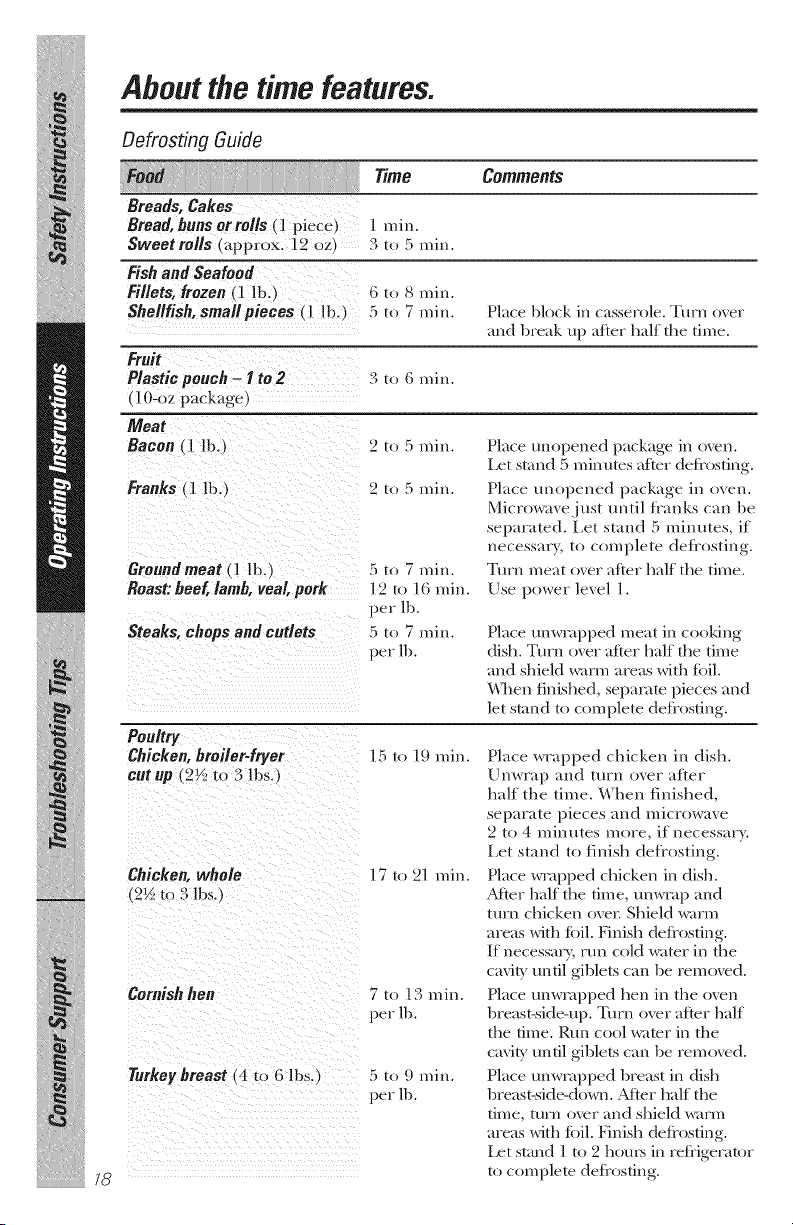
Defrosting Guide
Time Cemm .ts
Breads, Cakes
Bread,buns orrolls (l piece) I rain.
Sweetrolls Lapprox. 12 oz_ 3 to 5 rain.
Fishand Seafood
Fillets, frozen (1 lb.) (i to 8 rain.
Shellfish, smallpieces (l lb.) 5 to 7 rain. Place block in casserole. Turn over
m_d break up after half the time.
Fruit
Plastic pouch - I to 2 3 to (i rain.
(10-oz package
Meat
Bacon (] lb.) 2 to 5 rain. Place unopened package in oven.
Let stand 5 minutes afier deti'osfing.
2 [o 5 rain. Place unopened package in oven.
Microwave just until ti'anks can be
separated. Let stand 5 minutes, if
necessary, to complete defi'osting.
Turn meat over after half the time.
Use power level ].
iiiiiiiii;iii/iiiiiiiii{!/iiiiiiii{i
i iii iii iiiiil ii
/8
Franks _1 lb.}
Groundmeat ( 1 lb.)
Roast:beef,lamb, veal, pork
Steaks, chops and cutlets
5 to 7 min.
19/ol0min.
per lb.
5 to 7 min.
per lb.
Place unwrapped meat in cooking
dish. Turn over after half tile time
and shield warm areas with toil.
_¢\_en finished, sepamm pieces and
let s/and/o comple/e defi'osfing.
Chicken, broiler-fryer 15 to 19 rain.
cutup (2½ to 3 lbs.)
Chicken,whole
2½ to 3 lbs,
1 7 to 21 rain.
Cornish hen 7 to 13 min.
per lb.
Turkey breast (4 to 6 lbs.)
5 to 9 rain.
per lb,
Place wrapped chicken in dish.
Unwrap and turn over after
half the time. When finished,
separate pieces and microwave
2 to 4 minutes more, if necessary.
Let stand to finish defiosting.
Place w_vq)ped chicken in dish.
Atter half the time, unwrap and
turn chicken over. Shield warm
areas with toil. Finish deti'osting.
If necessary, run cold wamr in the
cavig until gible/s can be removed.
Place unwrapped hen in tile oven
breast-side-up. Turn over after half
the time. Run cool wa/er in tile
c_wig until gible/s can be removed.
Place unwrapped breast in dish
breast-side-down. Atter half the
time, turr_ over and shield warm
areas with toil. Finish deti'osfing.
let stand ] /o 2 hou_ in refrigerator
/o comple/e deti'osfing.
GEAppliances.com
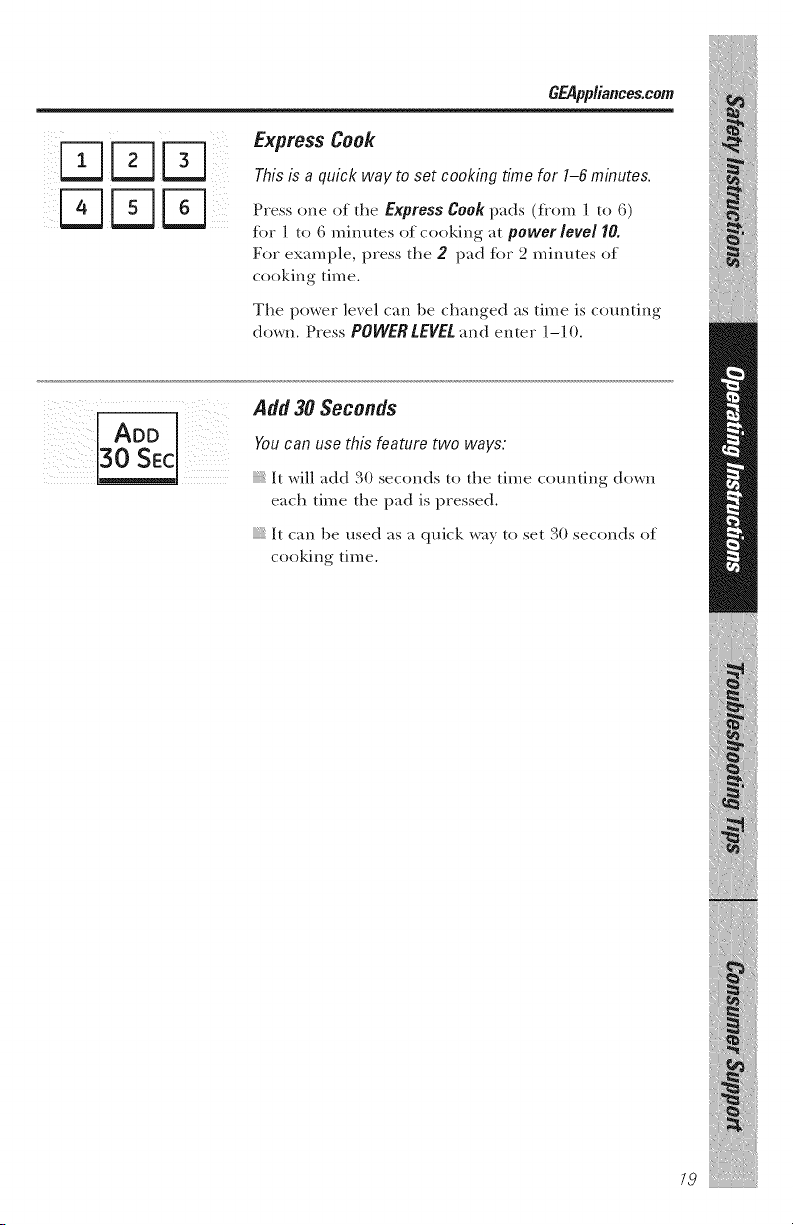
Express Cook
This is a quick way to set cooking time for 1-6 minutes.
Press one of the Express Cook pads (flom I to 6)
fbr ] to 6 mim_tes of cooking at power level I0.
For example, press tile 2 pad tot 2 minutes of
cooking time.
Tile power lexel can be changed as time is commng
down. Press POWER LEVELand enter ]-] O.
Pdd 3OSeconds
..ADD Yo.c_n.s_this_t_,,'_twow_ys:
_U :_EC
I_I It will add .,0 seconds to tile time c(mnting down
each time tile pad is pressed.
It can be used as a quick way to set 30 seconds of
cooking time.
/9
iliit!
About the auto features.
Auto Defrost
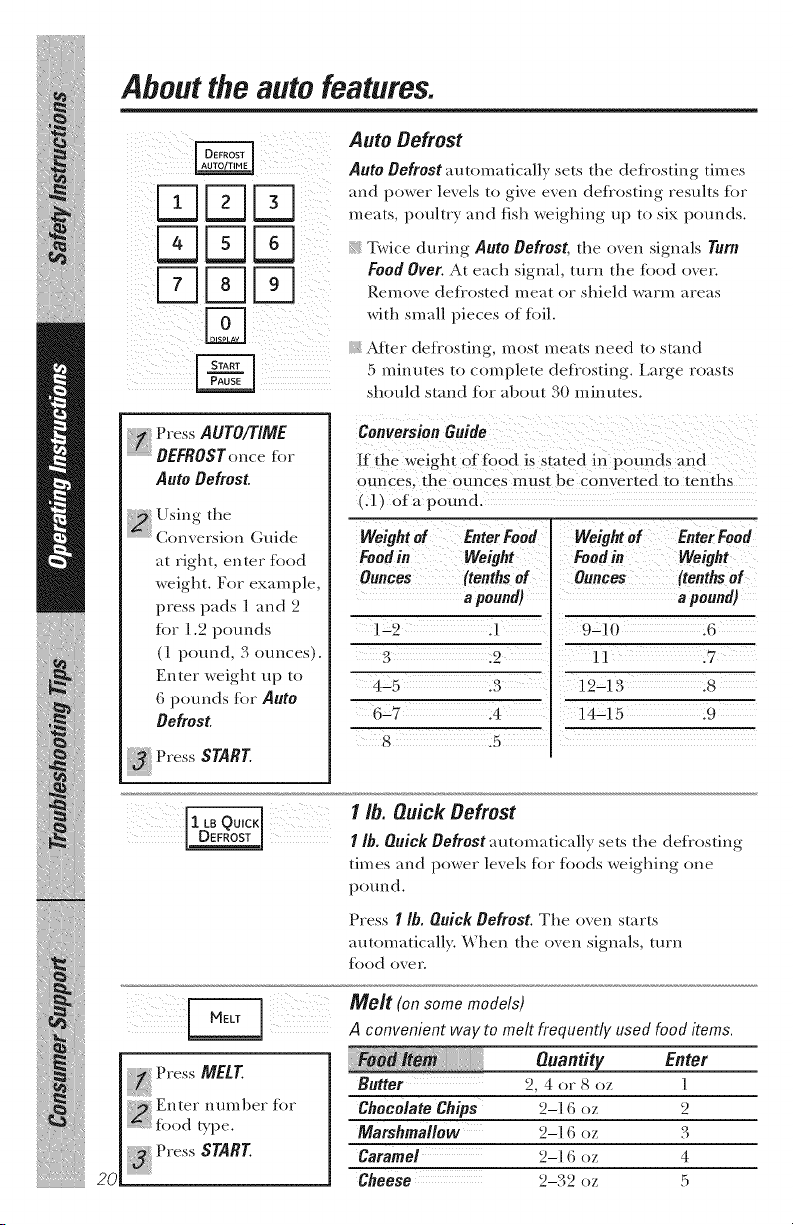
Auto Defrost automatically sets the defl'osting times
meats, pouhrv m_d fish weighing up to six pounds.
Remove defl'osted meat or shield warm areas
with small pieces of fk)il
Atier dcfl'ostin_:, most meats need/o stand
5 minutes to complete defl'ostin_:, l.ar_e roasts
should s/and tbr abou/30 minutes.
Press AUTO/TIME
DEFROSTonce fi,r
Auto Defrost.
Using the
C( river:i( n Guide
at right, enter food
weight. For e×mn pie,
press pads 1 and 2
for ! ._ pounds
(1 pound, 3 ounces,.
Enter wei_.'h/up to
6 pounds for Aoto
Defrost
Press START.
Conversion Guide
If the weight of fi)od is sta_-ed in pomMs and
ounces, fl_e ounces must be conver/ed to tenths
(.1) era pound.
Weight of Enter Food Weight el Enter Food
Foodin Weight
Ounces (tenthsof
a pound)
1-2 .1
3 .2
4-5 .3
6-7 .4
8 .5
Foodiu Weight
Ounces (tenthsof
a pound)
9-10 .6
11 .7
1_-13 .8
14-15 .9
iiiiiiiii;iii/iiiiiiiii{!/iiiiiiii{i
i iii iii iiiiil ii
1 lb. Quick Defrost
I Ih. Quick Defrost automatically sets the deflosting
times and power lexels for foods weighing one
pound.
Press I Ih. Quick Defrost. The oxen starts
automatically. When the oxen signals, turn
todd o_er.
I _ Press MEtT
Enter numl)er for
:::::: food Wpe.
"a!{Press START.
20
Melt (on some models)
A convenient way to melt frequently used food items.
Quantity Enter
Butter 2, 4 or 8 oz 1
ChocolateChips 2-1 6 oz 2
Marshmallow 2-1 (i oz 3
Caramel 2-1 (i oz 4
Cheese _ 3 _2-. 2 oz :5
About the sensor features. C pp,ancescom
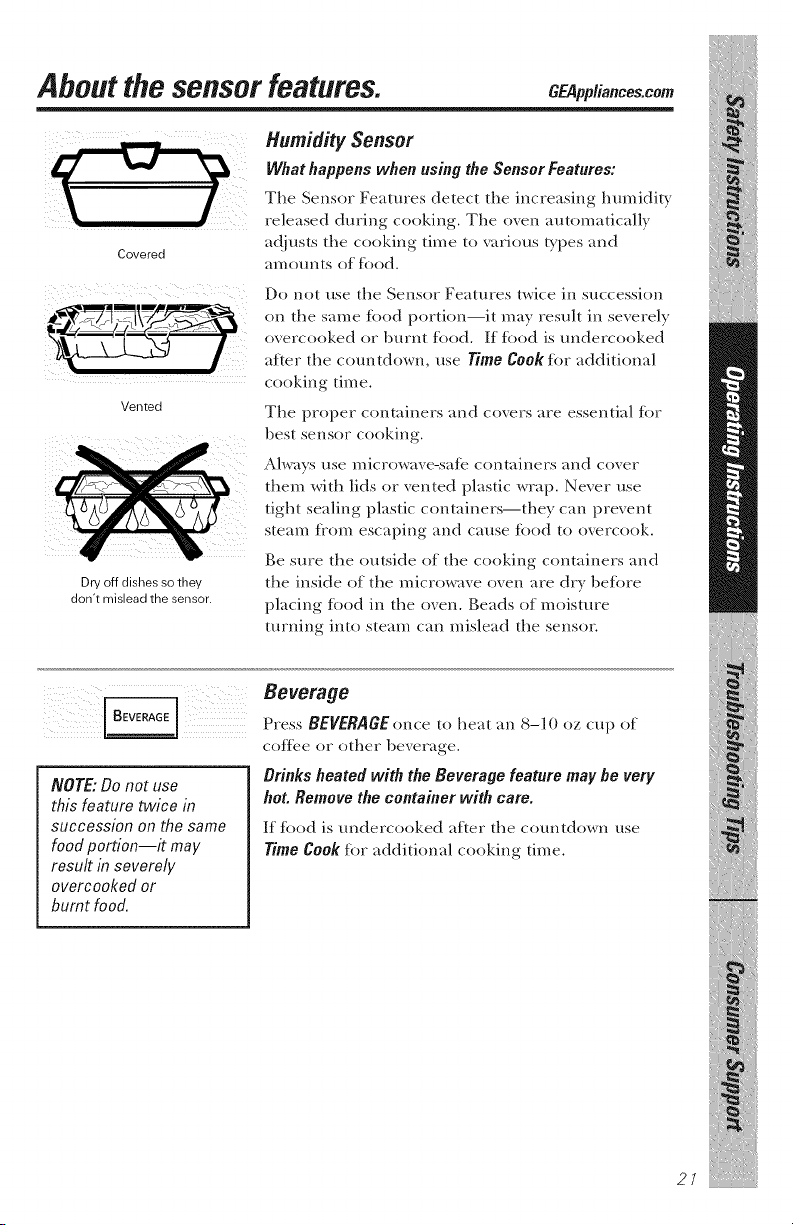
Covered
Vented
Dry off dishes so they
don't mislead the sensor.
Humidity Sensor
What happens when using the Sensor Features:
Tile Sensor Features detect tile increasing humidi b,
released during cooking. The oven automatically
adjusts the cooking time to various Q,pes and
amounts of fi)od.
Do not use the Sensor Features twice in succession
on the same fi)od portion--it may result in severely
oxercooked or burnt fi)od. If fi)od is undercooked
after the countdown, use Time Cook fi)r additional
cooking time.
The proper containers and covers are essential fi)r
best sensor cooking.
Always use microwave-sate containers and cover
them with lids or vented plastic wrap. Never use
tight sealing plastic containers--they can prevent
steam tiom escaping and cause fi)od to overcook.
Be sure the outside of the cooking containers and
the inside of the microwave oven are dry befi)re
placing fi)od in the oven. Beads of moisture
turning into steam can mislead the sensor.
NOTE: Do not use
this feature twice in
sHccession on the same
food portion--# may
result in severely
overcooked or
burnt food.
Beverage
Press BEVERAGE once to heat an 8-10 oz cup of
coftce or other beverage.
Brinks heated with the Beverage feature may be very
hot. Remove the container with care.
If fi)od is m_dercooked after the countdown use
Time Cook fi)r additional cooking time.
21
iliit!
iiiiiiiii;iii/iiiiiiiii{!/iiiiiiii{i
i iNiii iiiiil ii
About the sensor features.
Popcorn
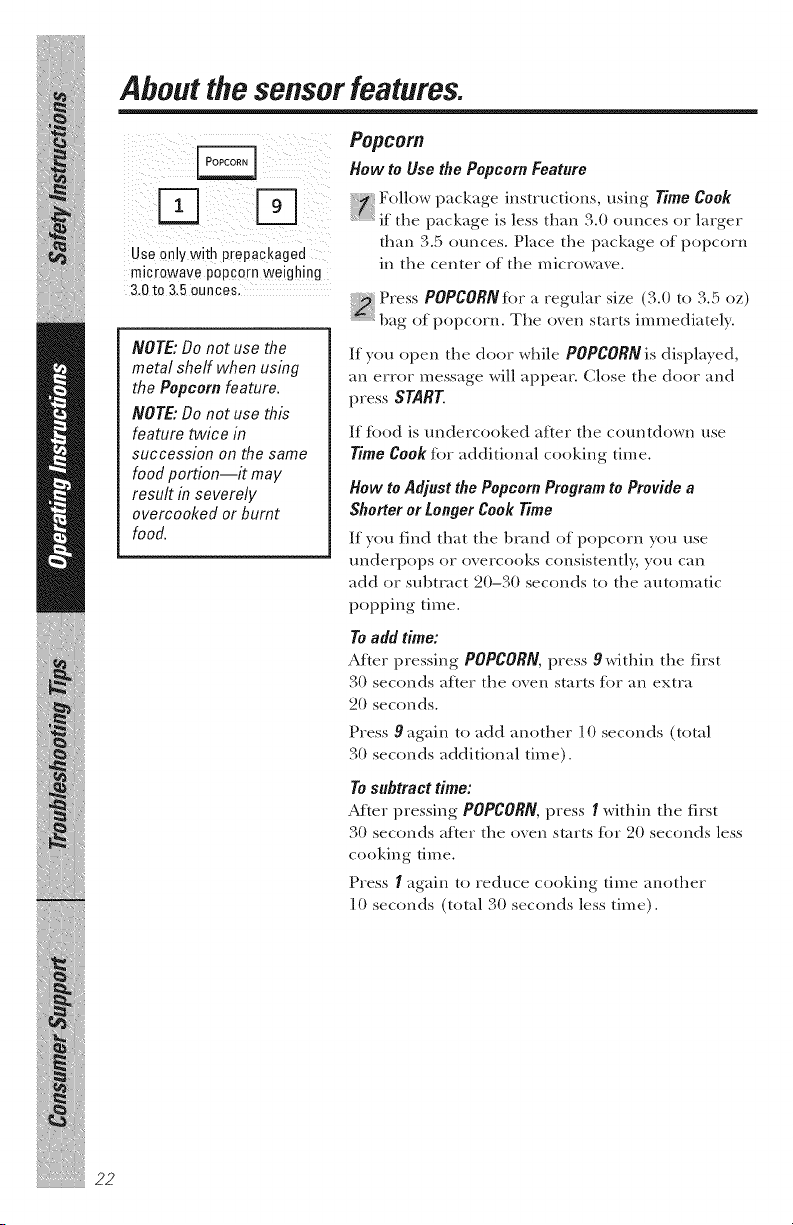
HowtoUsethePopcornFeature
_-] _ Follow package instructions, using Time Cook
L_._J if the package is less than 3.0 ounces or larger
than 3.5 ounces. Place the package of i)opcorn
Use only with prepackaged . . .
micr Wave 0 Corn Wei hin m the center ol the m,crowa, e.
o pp g g
3.0 to 3.5 ounces,
Press POPCORNfiw a regular size (3.0 to 3.5 oz)
r " "
"_1)ag o;F popcorn. The o_en starts mm_edmtely.
NOTE:Do not use the
metal shelf when using
the Popcornfeature.
NOTE:Do not use this
feature twice in
succession on the same
food portion--# may
result in severely
overcooked or burnt
food.
If you open the door while POPCORN is displayed,
an error message will appear. Close the door and
press START.
If tood is undercooked after the countdown use
Time Cook for additional cooking time.
How to Adjust the Popcorn Program to Provide a
Shorter or Longer Cook Time
If you find that the l)rand of popcorn you use
underpops or overcooks consistentl 5 you can
add or subtract 20-30 seconds to the automatic
popping time.
To add time:
After pressing POPCORN,press 9 within the first
30 seconds after the oven starts for an extra
20 seconds.
Press 9 again to add another 10 seconds (total
30 seconds additional time).
To subtract time:
AJ_ter pressing POPCORN,press I within the first
30 seconds after the oven starts tbr 20 seconds less
cooking time.
Press I again to reduce cooking time another
10 seconds (total 30 seconds less time).
22
GEAppliances.com
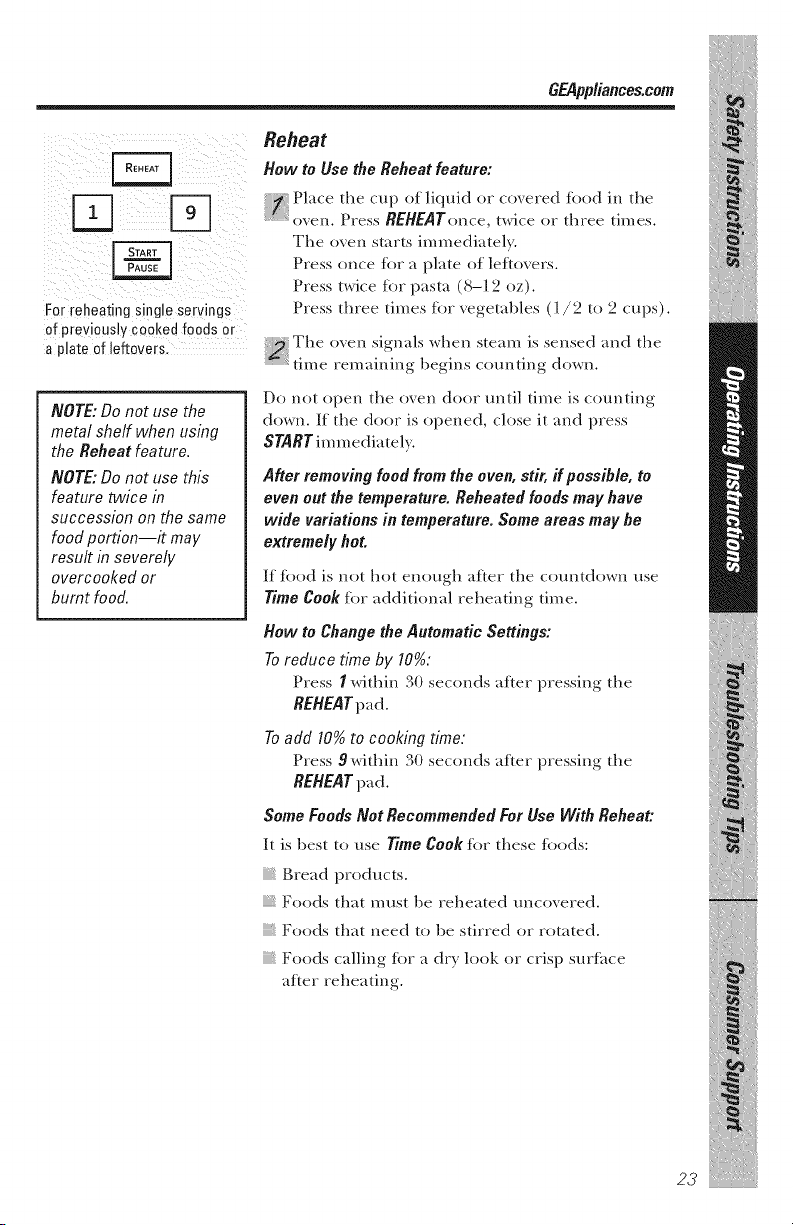
For reheating single servings
of previously cooked foods or
a plate of leftovers.
NOTE: Do not use the
metal shelf when using
the Reheat feature.
NOTE: Do not use this
feature twice in
succession on the same
food portion--it may
result in severely
overcooked or
burnt food.
Reheat
How to Use the Reheat feature:
Place the cup of liquid or co, ered tood in the
Press REHEATonce, twice or three times.
The oven starts immediatel>
Press once tbr a p}ate of leftovers.
Press/wice tbr pasta (8-] 2 oz).
Press three times tbr vegetables (]/2 to 2 cups).
The oxen signals when steam is sensed and the
time remaining begins com_ting down.
Do not open the oxen door tmtil time is counting
down. If the door is opened, close it and press
STARTim m ediate}}.
After removing foodfromthe oven, stir, ff possihle, to
even out the temperature. Reheatedfoodsmay have
wide variations in temperature. Some areas may he
extremely hot.
If tood is not hot enough after the countdown use
Time Cook for additional reheating time.
How to Change the Automatic Settings:
To reduce time by 10%:
Press I within 30 seconds after pressing the
REHEAT pad.
To add 10% to cooking time:
Press 9 within 30 seconds after pressing the
REHEAT pad.
Some FoodsNot RecommendedFor Use With Reheat:
It is best to use Time Cook tbr these tbods:
Bread products.
Foods that must be reheated tmcoxered.
Foods that need to be stirred or rotated.
Foods ca}ling tOT a dr}' look or crisp surfi_ce
after reheating.
23

iiiiiiiii;iii/iiiiiiiii{!/iiiiiiii{i
i iNiii iiiiil ii
mmmmmmmmm_
About the sensor features.
Sensor cooking gives you
easy, automatic results with
a variety of foods (see the
Cooking Guide belowb
Sensor Cooking
(Fish and Chicken Pieces on some models)
Place co_ered food in the o_en. Press the
iood pad. For _egetables, press the VEGETABLE
pad once for fl'esh vegetables, twice for
frozen vegetables or three times %r canned
vegetables. For chicken or fisl_, press the
CHICKEN/FISH pad once tot chicken pieces or
twice %r fish. The oven starts immediately.
NOTE: Do not use the
metal shelf with Sensor
Cooking.
NOTE: Do not use this
feature twice in
StlCCession on the same
food portion--it may
result in severely
overcooked or
burnt food.
::_ The o_en signals when steam is sensed and the
_i r r
"_time remaining begins c(mnting down. Turn or
stir the tbod if necessary.
Do not open the oxen door tmtil time is counting
down. If the door is opened, close it and press
START im m ediately.
If tood is undercooked after the countdown use
Time Cook for additional cooking time.
How to Changethe AutomaticSettings(automatic
settings for canned vegetables cannot he adjusted
on some models):
Y(m can adjust the cooking time for all foods to
suit your personal taste.
To reduce time by 10%."
Press I within 30 seconds after pressing the
food pad.
To add 10% to cooking time:
Press 9 within 30 seconds after pressing the
food pad.
CookingGuide
Amount Comments
Canned Vegetables 4-1 (i oz Co_er with lid or _ented plastic wrap.
Frozen Vegetables 4-1 (i oz Follow package instructions for adding
water. Coxer with lid or xented plastic wrap.
Fresh Vegetables 4-] (i (,z Add ]/4 cup water per serxing.
Coxer with lid or xented plastic wrap.
Potatoes 8-32 oz Pierce skin with fork. Place potatoes
on the turntable.
Fish* 4-1 6 oz Coxer with xented plastic wrap.
ChickenPieces_ 2-8 pieces Coxer with xented plastic wrap.
*On some models
24

Other features your
modelmayhave. GEAppliances.com
u
5;¸
!;i_i_i_i_!iii!i_i_ii__ii!ii_ii_i;_il;ii!i_i_ii_i
Custom
Tile CUSTOM pad allows you to save your most
flequently used settings. (Sensor cooking settings
cannot be saved.)
To set and save a setting:
Press tile CUSTOM pad.
Set tile amount of cooking time.
_{ Set the power level, if desired. {Full power will
"_m/tomatically be set if you do not change it.)
Press the CUSTOM pad.
\k)ur custom setting will be remembered fi)r flm_re
one [O/lch use.
To clear the custom setting, press and hold the
CUSTOM pad fir 2 seconds.
Help
The HELP pad displays tcature infi)rmation and
helpful hints. Press HELP; then select a feature pad.
Cooking Complete Reminder
To remind you that you have fi)od in tile oven,
the oven will display FOOl)IS REAOYand beep once
a minute until you either open the oven door or
press CLEAR/OFF.
Clock
Press CLOCKto set the time of day.
N Press CLOCK.
_ Enter the time of day.
_ Select AM or PM.
_ Press START.
To check tile time of day while microwaving,
press CLOCK.
25
iliit!
Oth featuresyourmode/mayha
P_ nMEe.
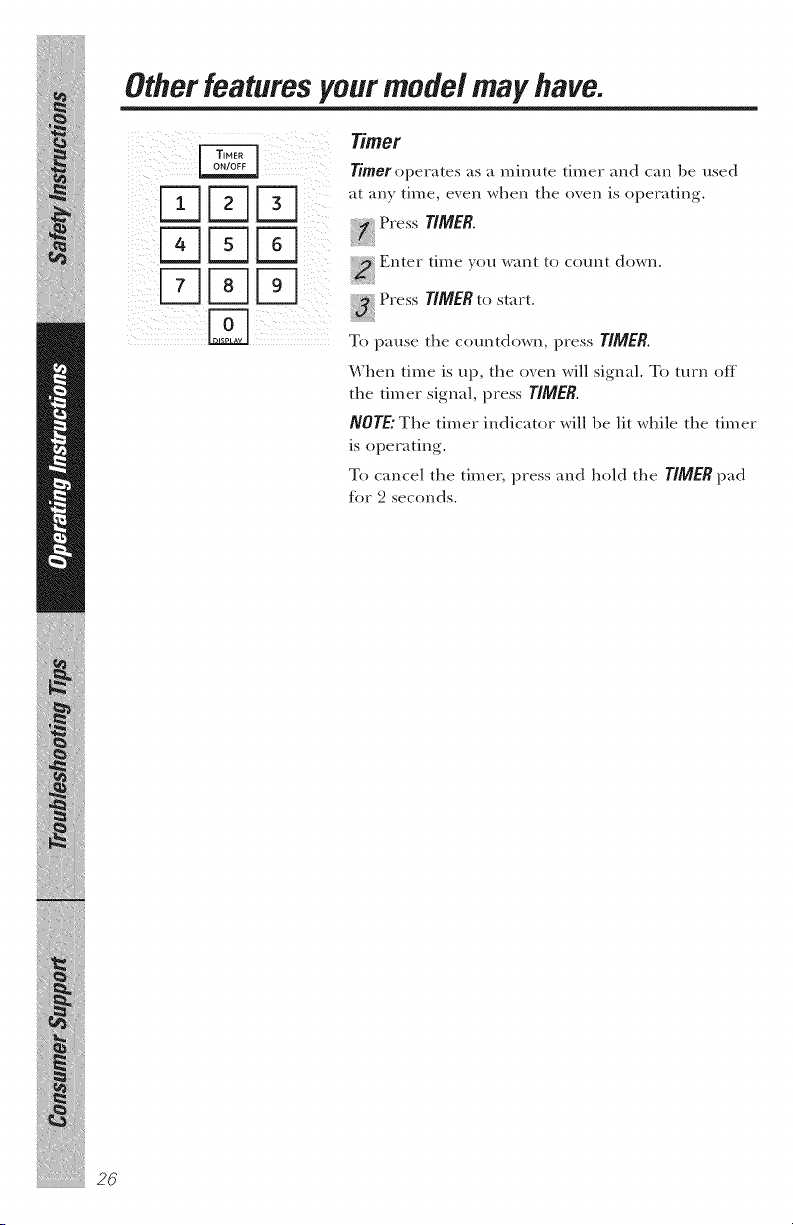
When time is up, the oven will signal. To mrn off
tile timer signal, press TIMER.
NOTE" The timer indicator will be lit while tile timer
is operating.
To cancel tile timer, press and hold the TIMER pad
for 2 seconds.
iiiiiiiii;iii/iiiiiiiiii!/iiiiiiiiii
i_iii_iii_iiiiil_ii_
GEAppliances.com
Start/Pause
Jn addition to starting many functions,
START/PAUSEallows you to stop cooking without
opening tile door or clearing tile display.
!! _i_i_ii!i_ _ii;_;ilil_
Child Lock-Out
You may lock the control panel to prexent the
microwaxe tiom being accidentally started or used
by children.
To lock or unlock the controls, press and hold
CI.EAR/OFFIor al)out three seconds. When the
control panel is locked, CONTROtLOCKEDor
lOCKED will be displayed.
27
Otherfeaturesyour mode/mayhave.
!iii iiii!ii!_I_ illIiiiiiiliiiili
Turntable
For best cooking results, leaxe tile turntable on.
It can be turned off tot large dishes. Press
TURNTABLEto turn tile turntable on or off.
Sometimes the turutab/e can become too hot to touch.
Be careful touching tile turntable during and after
cooking.
Vent Fan
The _ent tim removes steam and other _apors fiom
surfi_ce cooking.
Press VENYonce for high tim speed, twice for
medium thn speed, a third time tot low tim speed
or a fimrth time to turn tile tim off.
Press tile BOOSYpad (on some models) for extra
tim speed.
Automatic Fan
An mmmmtic tim tbature protects the microwme tiom
too much heat rising tiom tile cooktop below it. It
mmmmtically turns on if it senses too much heat.
If }_m have mined the tim on, you may find that you
cannot mrn it oit_ Tile tim will automatically turn off
when the internal parts are cool. It m_ff st;ff on %r
30 minmes or more after tile cooktop and microwave
controls are turned otK
iiiiiiiii;iii/iiiiiiiiii!/iiiiiiiiii
i_iii_iii_iiiiil_ii_
28
Surface tight
Press tlGHTonce tor bright light, twice tor tile
night light, or three times to turn tile light off.
GEAppliances.com
Options
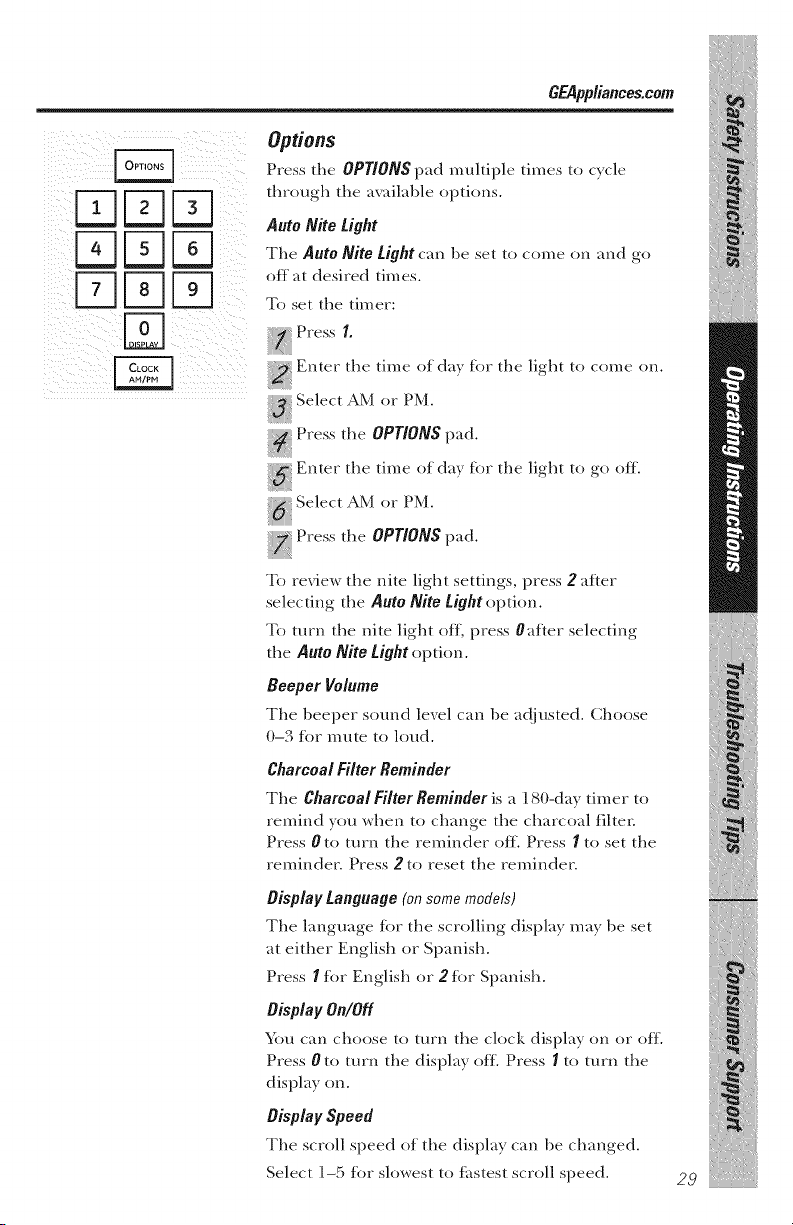
Press the OPTIONSpad muhiple times to cycle
through tile a_ailable options.
Auto Nite Light
Tile Auto NiLe tight can be set to come on and go
off at desired times.
To set tile timer:
PressI.
_ Enter tile time of day tbr tile light to come on.
_ Select AM or PM.
_ Press tile OPTIONSpad.
_ Enter tile time of day for tile light to go off.
N Select AM or PM.
_ Press tile OPTIONSpad.
To review tile nite light settings, press 2 after
selecting tile Auto NiLe tight option.
To turn the nite light off, press 0after selecting
tile Auto NiLe tight option.
Beeper Volume
Tile beeper sound level can be adjusted. Choose
0-3 for mute to loud.
Charcoal Filter Reminder
Tile Charcoal Filter Reminder is a 180-day timer to
remind you when to change tile charcoal filter.
Press 0 to turn tile reminder off. Press I to set tile
reminder. Press 2 to reset tile reminder.
Display Language (on some models)
Tile language t(_r tile scrolling display may be set
at either English or Spanish.
Press I tot English or 2 tot Spanish.
Display On/Off
\ira can choose to turn tile clock display on or off.
Press 0 to turn tile display off. Press I to turn tile
display on.
Display Speed
Tile scroll speed of tile display can be changed.
Select ] -5 tot slowest to ti_stest scroll speed.
29
Otherfeaturesyour modelmay have.
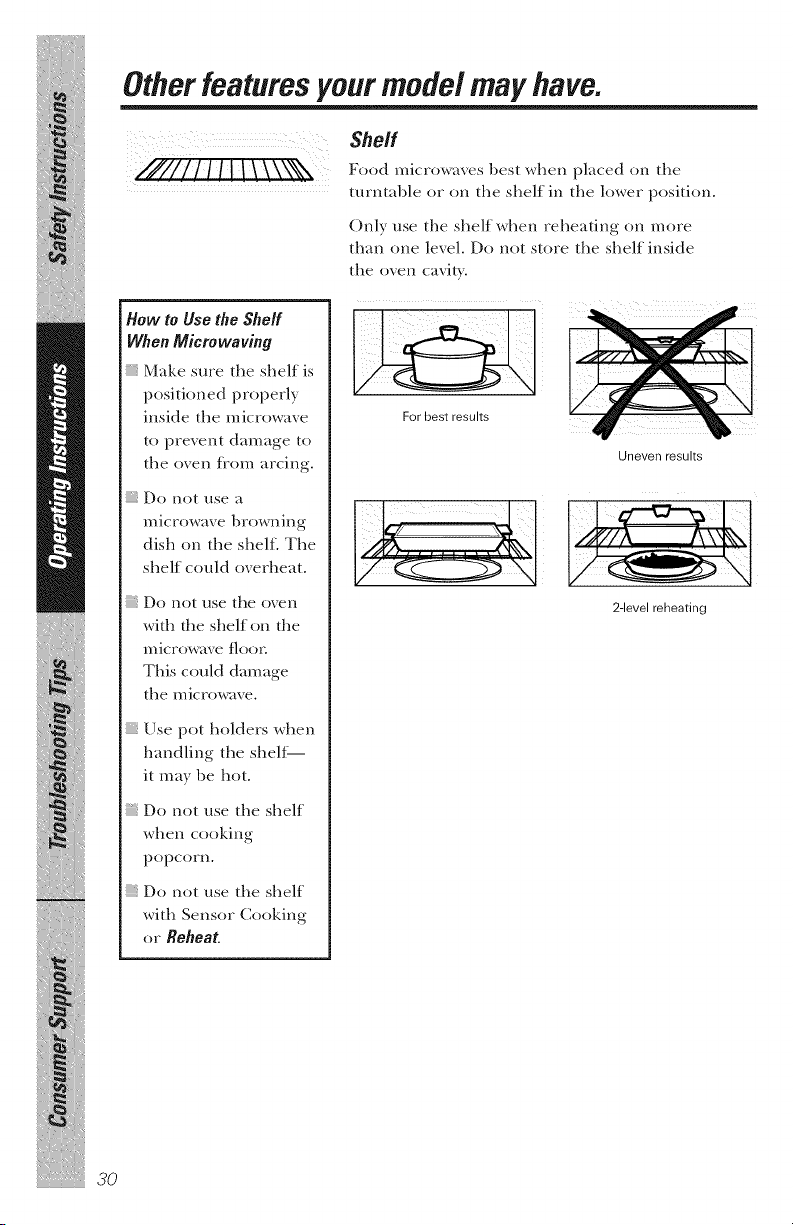
Shelf
//#////! !! \ \',\*N Foo_microw,.e_be_twhenpl,,ce_lon,1,e
turntal)le or oil the shelf in the lower position.
Only use the shelf when reheating oil more
than one level. Do not store the shelf inside
the oven cavity.
iiiiiiiii;iii/iiiiiiiii{!/iiiiiiii{i
i iii iii iiiiil ii
How to Use the Shelf
When Microwaving
Make sure the shelf is
positioned properly
inside the microwave
to prevent damage to
the oven flom arcing.
Do not use a
microwave browning
dish on the shelf. The
shelf could overheat.
; Do not use the oven
with the shelf on the
n/icrowave floor.
This could damage
the microwave.
Use pot holders when
handling the shelf
it may be hot.
Do not use the shelf
when cooking
popcorn.
Do not use the shelf
with Sensor Cooking
or Reheat
30
For best results
Uneven results
2-level reheating
GEAppliances.com
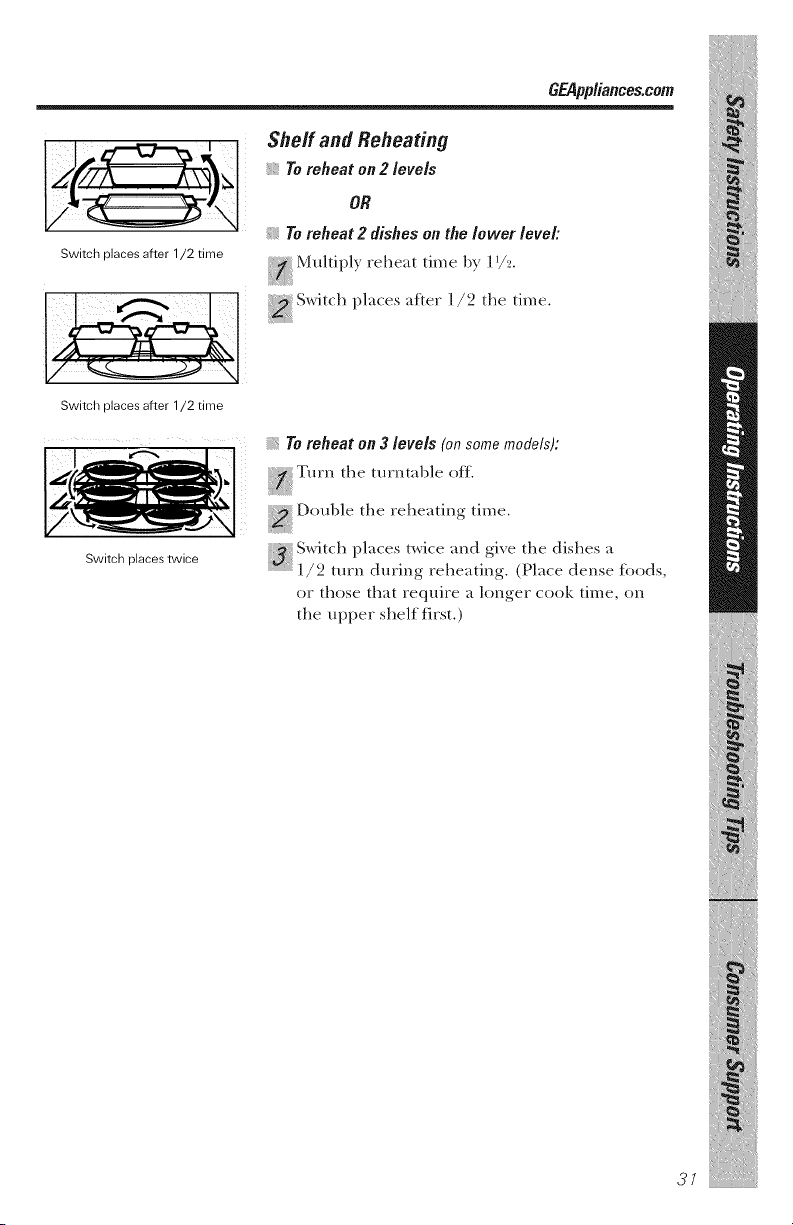
Switch places after 1/2 time
Sheff and Reheating
Toreheat on 2 levels
OR
Toreheat 2 dishes on the lower level:
Mtthiply reheat time by ]1/_.
i ,r
Switch places after 1/2 time
Switch places twice
Toreheat on 3 levels (on some models):
i
, D,.ntble the reheating time.
:_. Switch places twke and gi',e the dishes a
]/2 turn during" reheating. (Place dense toods,
or those that require a longer cook time, on
the ttpper shelf first.)
37
iliit!
Microwave terms.
Arcing Arcing is tile microwave term for spark_ in tile oven. Arcing is
caused by:
the metal shelf being installed incorrectly m_d touching
the microwave walls.
metal (w foil touching tile side of the o_en.
foil that is not molded to toed (upturned edges act like
m_tem_as).
metal such as twist-ties, poultry pins, gold-rimmed dishes.
recycled paper towels containing small metal pieces.
Covering Covers hold in moisture, allow tbr more e, en heating and reduce
cooking time. Venting plastic wrap or coxering with wax paper
allows excess ste_lll/to escape.
Shielding In a regular o, en, you shield chicken breasts or baked toods to
prexent oxer-browning. When microwaving, you use small strips
fit toil to shield thin parts, such as tile tips of wings and legs on
poulti 3, which would cook beiore larger parts.
Standing 17me _:hen you cook with regular exerts, foods such as roasts or cakes
are allowed to stand to finish cooking or to set. Standing time is
especially important in microwme cooking. Note that a
microwmed cake is not placed on a cooling rock.
Venting Atier co, eringa dish with plastic wrap, you vent tile plastic wrap
|)y turning back one corner so excess step,ill c_n esc_pe.
iiiiiiiii;iii/iiiiiiiiii!/iiiiiiiiii
i iii iii iiiiil ii
Careandcleaningofthe
miCrOWaVe OVefl. O_ppliances.com
Helpfu/ Hints
An occ_siomd thorough wiping with _ solution of
b_king sod_ _tnd w_ter keeps tile inside t_'esh.
NOTE."Be certain thepower is off beforecleaning any
part of this oven.
..........¸:¸3¸_oi. i i
How to Clean the Inside
Walls, Floor,Inside Window, Metal and Plastic Parts
on the Door
Some sp_tters c_m be removed with _ p_per towel;
others m_y require _ d_m_p cloth. Remove gre_sy
sp_tters with _ sudsy cloth; then rinse with _ d_m_p
cloth. Do not use _d)r_sive cle_mers or sh_rp
utensils on oven w_dls.
Never use a commercial oven cleaner on any part of
yourmicrowave.
RemovableTurntableand TurntableSupport
To prevent bre_k_ge, do not plaice the turntable
into w_terjust _fler cooking. Wi_sh it c_refl_lly
in w_rm, sudsy w_ter or in the disi_w_si_er. The
turntable _md support c_m be broken if dropped.
Remember, do not operetta the oven without the
turntable _md support in pk_ce.
Shelf
Clem_ with mild so_p _md _,_ter or in the dish_,_sher.
Do not clean in a self-cleaning oven.
Temperature Probe (on some mode/s)
Cle_m immedk_tely ;_fler using. To cle_m, wipe
witl_ _ sudsy clotl_, titan rub ligi_tly witl_ _ pl_stic
scouring b_dl if necess_ry. Rinse _md dry. The probe
c_m _dso be w_shed in ti_e dishw_sher.
33
Care and cleaning of the microwave oven.
iiiiiiiii;iii/iiiiiiiii{!/iiiiiiii{i
i iNiii iiiiil ii
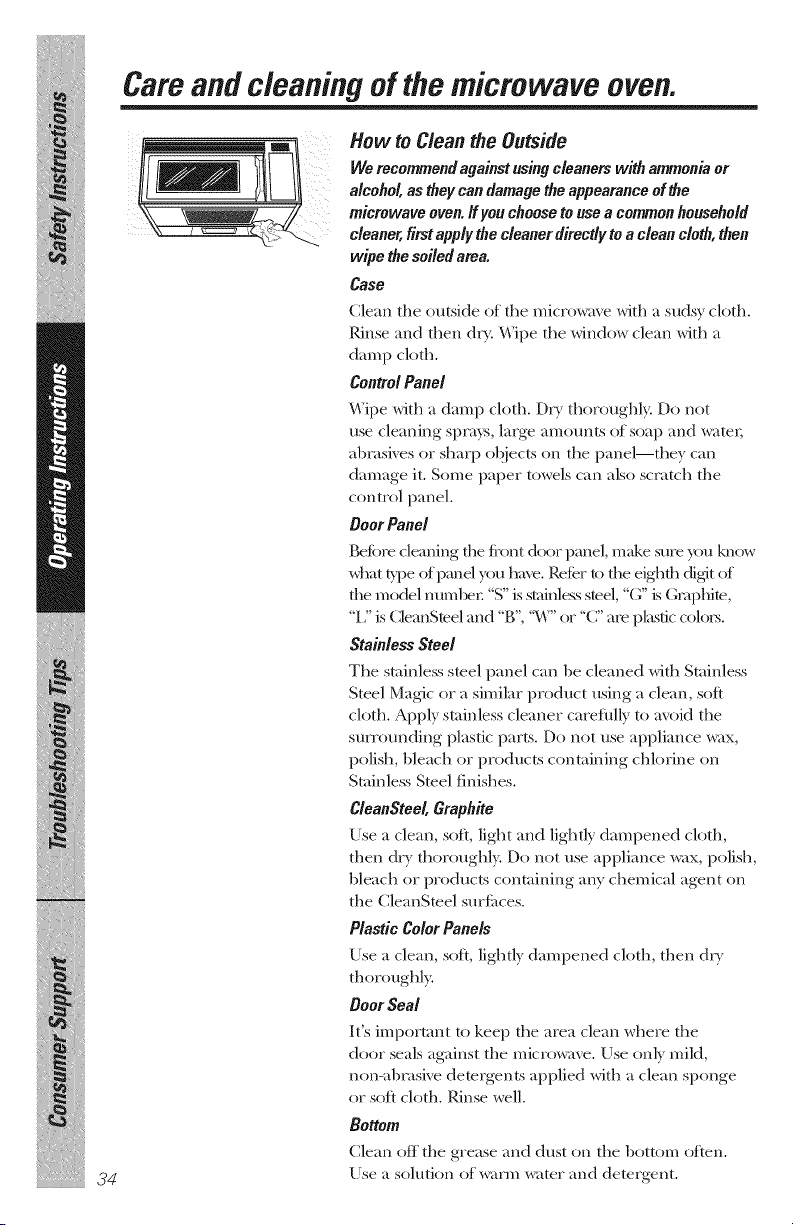
How to Clean the Outside
We recommend against using cleanem with ammonia or
alcohol, as they can damage the appearance of the
microwave oven. If you choose to use a common household
cleaner, first apply the cleaner directly to a clean cloth, then
wipe the soiled area.
Case
Clean tile (mtside of tile microwave with a sudsy cloth.
Rinse and then dr}_ Wipe tile window clean with a
damp cloth.
Control Panel
Wipe with a damp cloth. Dry thoroughl_ Do not
use cleaning si)m)_s, large amounts of soap and water,
al)msives or sharp el?leers on tile panel--they can
damage it. Some paper towels can also scmt(h tile
control panel.
Door Panel
Before cleaning tile fi'ont &×/r panel, make sure you know
what _,_)e of penal you have. RolLerto tile eighth (tigit of
fl_e model mm_l)cr. "S" is st;finless steel, "G" is Gnq)hite,
"12 is CDanSteel and "g", '_¢\"'or "C" are plastic col(_rs.
Stainless Steel
Tile stainless steel panel can be cleaned with Stainless
Steel Magic or a similar product using a clean, soft
cloth. Apply stainless cleaner carefl_lly to avoid tile
surrounding plastic parts. Do not use appliance wax,
polish, bleach or products containing chlorine on
Stainless Smel finishes.
CleanSteel, Graphite
Use a clean, soft, light and lightly dampened cloth,
then dr}' thoroughly. Do not use appliance wax, polish,
bleach or products containing any chemical agent on
tile CleanSmel surtimes.
Plastic Color Panels
Use a clean, soil lightly dampened cloth, then d_,
thor_ mghl)_
Door Seal
It's important to kee I) tile area clean where tile
door seals aKainst tile microwave. Use only mild,
non-al)msive demrgents applied with a clean sponge
or soft cloth. Rinse well.
Bottom
Clean off the grease and dust on the 1)ottom often.
Use a solution of warm wamr and detergent.
Rep/acing the/ight bulbs. O pplianoes.oom
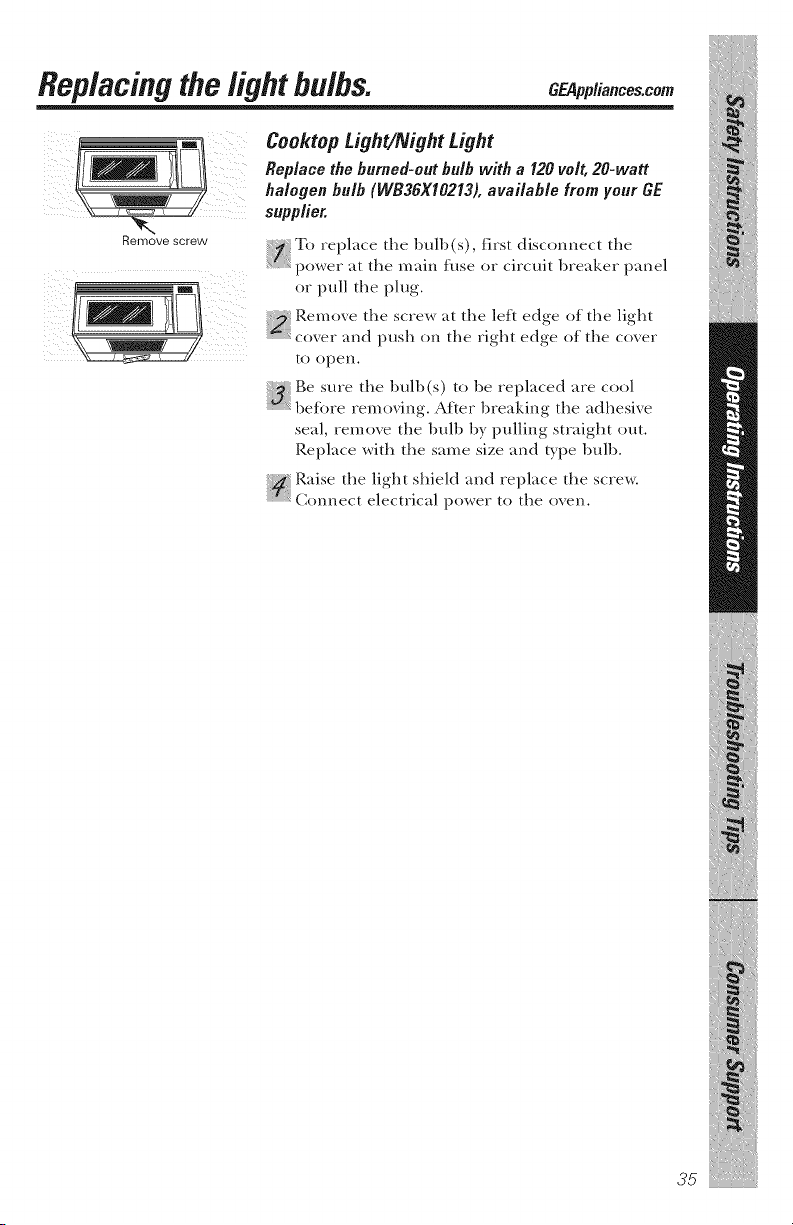
Remove screw
Cooktop Light/Night Light
Rep/ace the burned-out bu/b with a 120 vo/t, 20-watt
ha/ogen bu/b (WB36X10213), avai/aMe from your GE
supp/ier.
T{, replace tile bulb(s), first disconnect tile
power at tile main fuse or circuit breaker panel
or pull tile plug.
Remo_e tile screw at the left edge of the light
r r
...........................coxer and push on the right edge of the coxer
to open.
ii_ Be sure the bulb(s) to be replaced are cool
beJore ren/oving. After breaking tile adhesixe
seal, remove the bulb by pulling straight out.
Replace with the same size and b_pe bulb.
Raise the light shield and replace the screw:
C(mnect electrical i)ower to the oxen.
35
Replacingthelight bulbs.
,_ Oven Light
m
/
......Jl_...........................I_ _ _:_]l{llllllll_ll
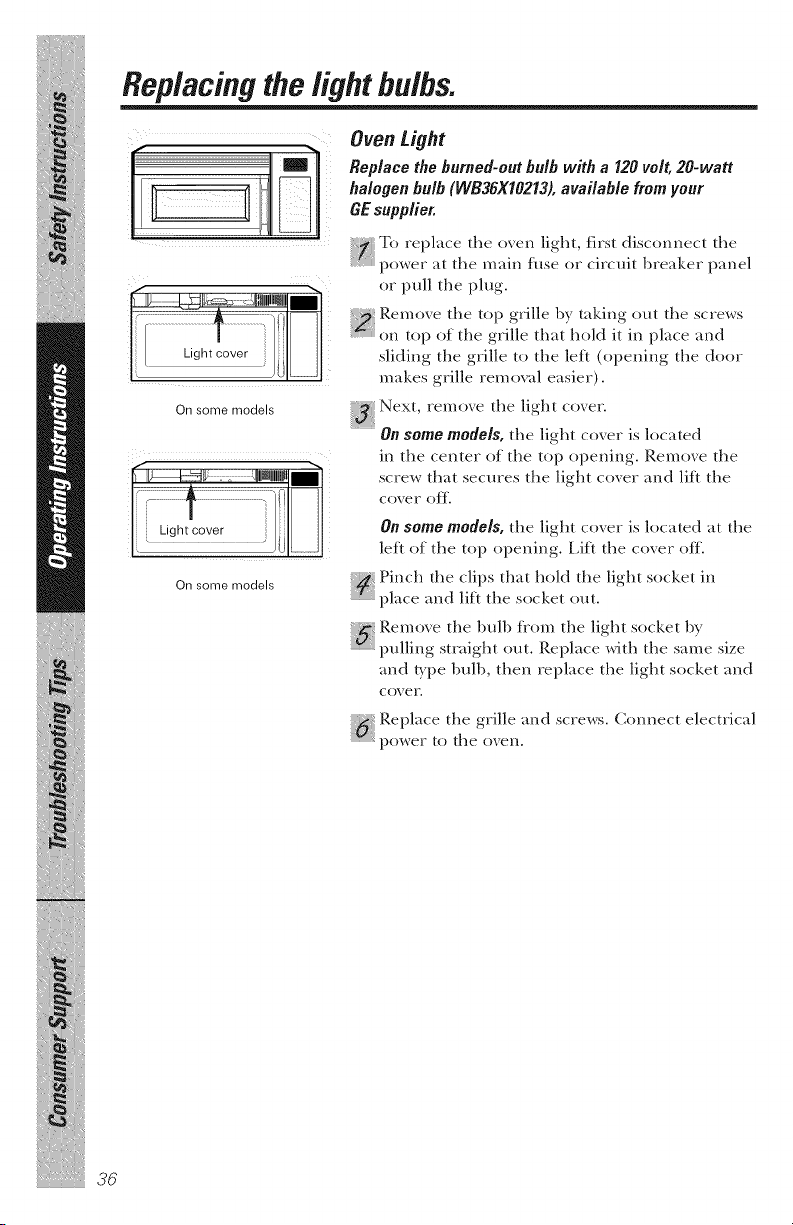
[ Light cover i) .........
On some models
[[Ugh!cove[::::::::::::::::::::::::::::::::::::::::::::::::[}
On some models
Replace the burned-outbulb with a I20 volt, 20-watt
halogen bulb (WB36X10213),available from your
GEsupplier.
] To replace the oxen light, first disconnect the
power at the main fuse or circuit breaker panel
or pull the plug.
Remo_e the top grille by taking out the screws
on top of the grille that hold it in place and
sliding the grille to the }eft (opening the door
makes grille removal easier).
Next remo_e the light co_er
On some models, the light coxer is located
in the center of the top opening. Remove the
screw that secures the light cover and lift the
cover o_.
On some models, the light coxer is located at the
left of the top opening. Lift the co_er off.
_ Pinch the clips that hold the light socket in
place and lift the socket out.
Remoxe the bulb tiom the light socket by
pulhng strmght out. Replace with the same size
m_d/)'pe bull), then replace the light socket and
COX er.
Replace the gri}le mad screws. Connect electrical
power to the oxen.
iiiiiiiii;iii/iiiiiiiiii!/iiiiiiiiii
i iii iii iiiiil ii
About the exhaust feature. C ppliancescom
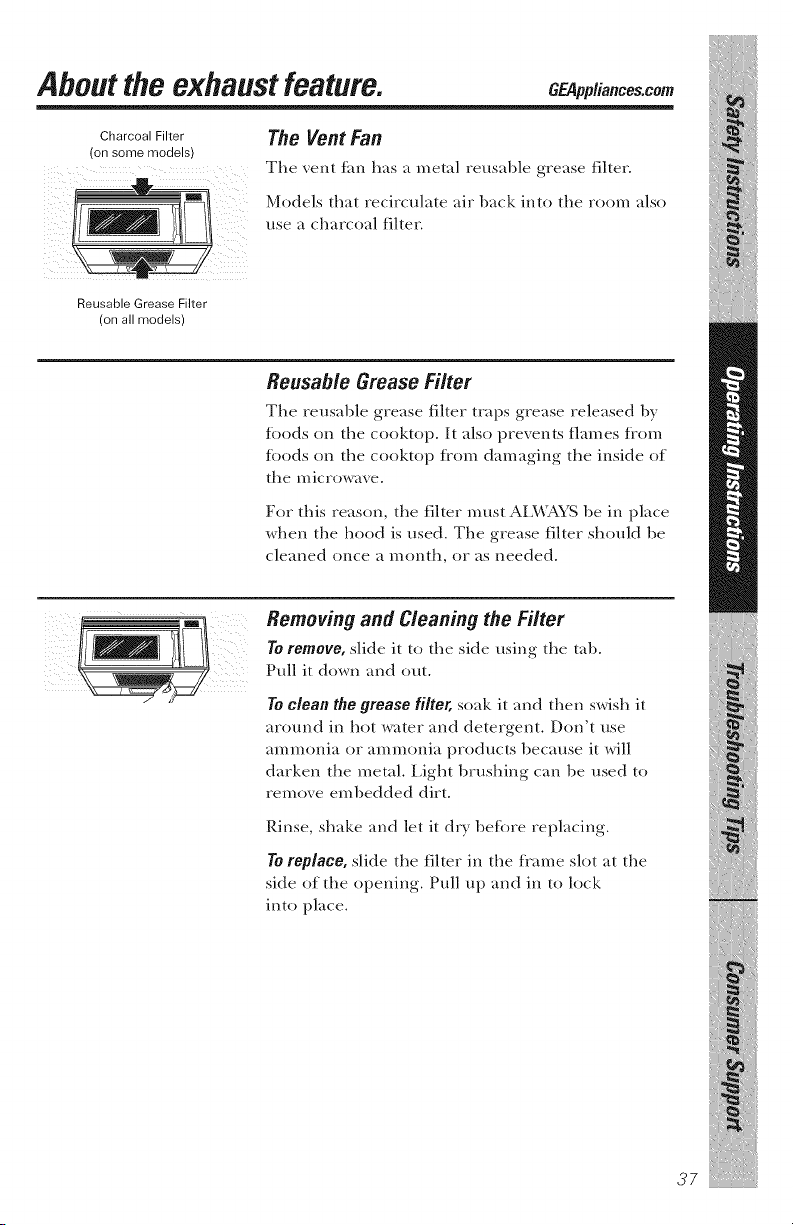
Charcoal Filter
(on some models)
The Vent Fan
Tile vent tim has a metal reusal)le grease filter.
Models that recirculate air back into tile room also
use a charcoal filter.
Reusable Grease Filter
(on all models)
Reusable Grease Filter
Tile reusable grease filter traps grease released by
%ods on the cooktop. It also prevents flames Kom
%ods on the cooktop from damaging the inside of
the microwave.
For this reason, the filter must ALWAYS be in place
when the hood is used. The grease filter should be
cleaned once a month, or as needed.
Removing and Cleaning the Filter
To remove, slide it to the side using the tal).
Pull it down and out.
To clean the grease filter, soak it and then swish it
around in hot water and detergent. Don't use
ammonia or ammonia products because it will
darken the metal. Light 1)rushing can 1)e used to
remove eml)edded dirt.
Rinse, shake and let it dry 1)etore replacing.
To replace, slide the filter in the flame slot at the
side of the opening. Pull up and in to lock
into place.
37

About the exhaust feature.
Charcoal Filter (on some models)
The charcoal filter cannot he cleaned. It must he
replaced.
Order Part No. WB2X10733fromyour GEsupplier.
If tile model is not xented to tile outside, the air
will be recirculated thr(mgh a disposable charcoal
filter that heli)s remoxe smoke and odors.
The charcoal filter should be rei)laced when
it is noticeably dirt), or discolored (usually after
6 to 12 months, depending on hood usage). See
"Optional Kits", page ] O, %r more in%tin ation.
Remove grille screws
to remove the grille.
ToRemove Charcoal Filter
To remo_e the charcoal filter, disconnect power
at the main flBe or circuit breaker panel or pull
the plug.
Remove the top grille by removing the screws on
top of the grille that hold it in i)lace and sliding the
grille to the left (opening the door makes grille
remowd easier). Slide the filter towards the flont
of the oven and remove it.
iiiiiiiii;iii/iiiiiiiiii!/iiiiiiiiii
i iii iii iiiiil ii
/
38
ToInstall Charcoal Filter
To install a new filter, remoxe plastic and other
outer wrapping flom the new filter.
Insert the filter into the top opening of the o_en as
shown. It will rest at an angle on 2 side support tal)s
and in fl'ont of the right rear tal). Replace the grille
_lnd screws.
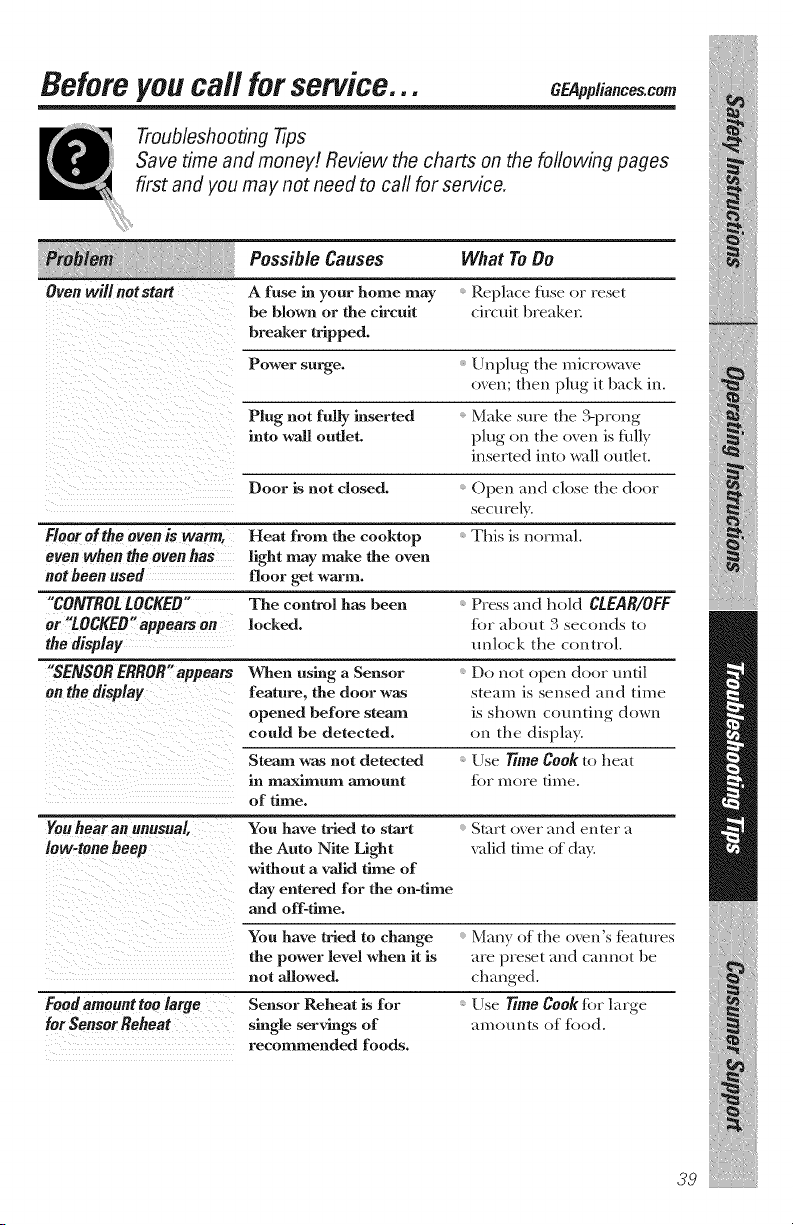
Before you call for service... O pplianees.eom
Troubleshooting 77ps
Save time and money! Review the charts on the following pages
first and you may not need to carl for service.
PossibleCauses What ToDo
Replace fhse or reset
circuit breaker.
Steam was not detected
in maximum amount
of time.
m
Oven will notstatt A fuse hi your home may
be blown or the circuit
breaker tripped.
Power surge.
Plug not ruby inserted
into wall outlet.
Door is not closed. Open and close file door
securely.
Floor of the oven is warm, Heat from the cooktop This is normal.
even when the oven has light may make the oven
not been used floor get warm.
"CONTROLLOCKED" The control has been Press and hold CLEAR/OFF
or "LOCKED"appears on locked, for about 3 see(rods to
the display unlock tl_e control.
"SENSOR ERROR"appears When using a Sensor Do not open door until
on the display feature, the door was steam is sensed ,rod time
opened before steam is shown counting down
could be detected, on tile display.
Use Time Cook to heat
_(_r n/ore tin/e.
Unplug tile microwave
oven; then plug it back in.
Make sure the ?.prong
I)lug on the oven is fldly
inserted into wall outlet.
Youhear an unusual
low-tonehoop
You have tried to start
the Auto NRe Light
without a valid time of
day entered for the on-time
and off-thne.
Start oxer aud enter _t
xalid time of do?<
Foodamounttoolarge
forSensorReheat
You have tried to change
the power level when it is
not allowed.
Sensor Reheat Lsfor
single servings of
recommended foods.
Many of the oven's teatures
are preset and cannot be
changed.
Use Time Cook for large
am ounts of toed.
39
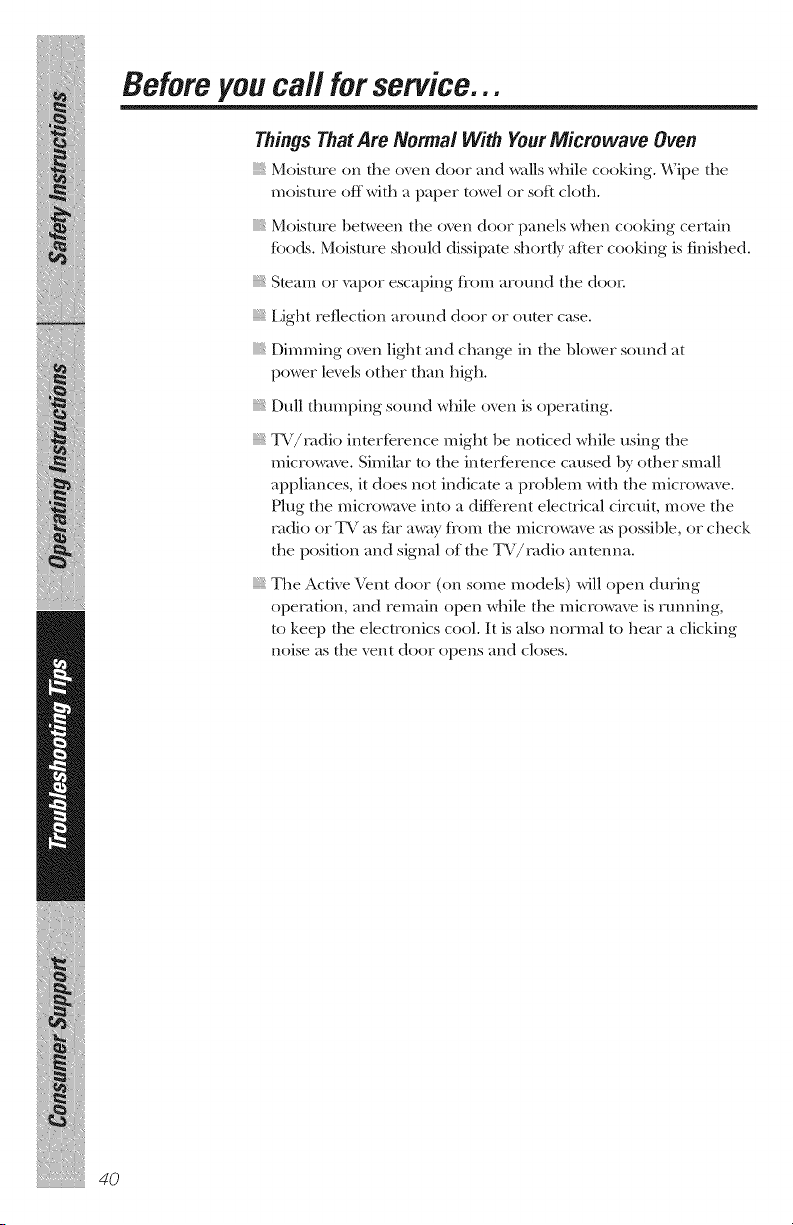
Before you call for service...
Things That Are Normal With YourMicrowave Oven
Moisture on tile oven door and walls while cooking. Wipe tile
moisture off with a paper t(_wel or soft cloth.
Moisture 1)etween tile oven door panels when cooking cer/ain
%ods. Moisture should dissipate shor/ly after cooking is finished.
S/cam or vapor escaping ti'om around the door.
IJght reflection around door or omer case.
Dimming oven light and change in the blower sound at
power levels other than high.
Dull thumping sound while oven is operating.
TV/r, tdio intertbrence might be noticed while using the
microwave. Similar to the inmrtbrence caused by other small
appliances, it does not indicate a problem with the microwave.
Plug the microwave into a diitbrent electrical circuit, move the
ntdio or T\ / as J{_r aw_g fi'oln the microwave as possible, or check
the position and signal of the TV/radio anmnna.
The Active Vent door (on some models) will open during
operation, and remain open while the microwave is running,
/o kee I) the electronics cool. It is also normal/o hear a clicking
noise as the vent door opens and closes.
4O
Notes.
47
NOteSI
iiiiiiiii_iiiliiiiiiiiii!liiiiiiiiii
i_iii_iii_iiiiil_ii_
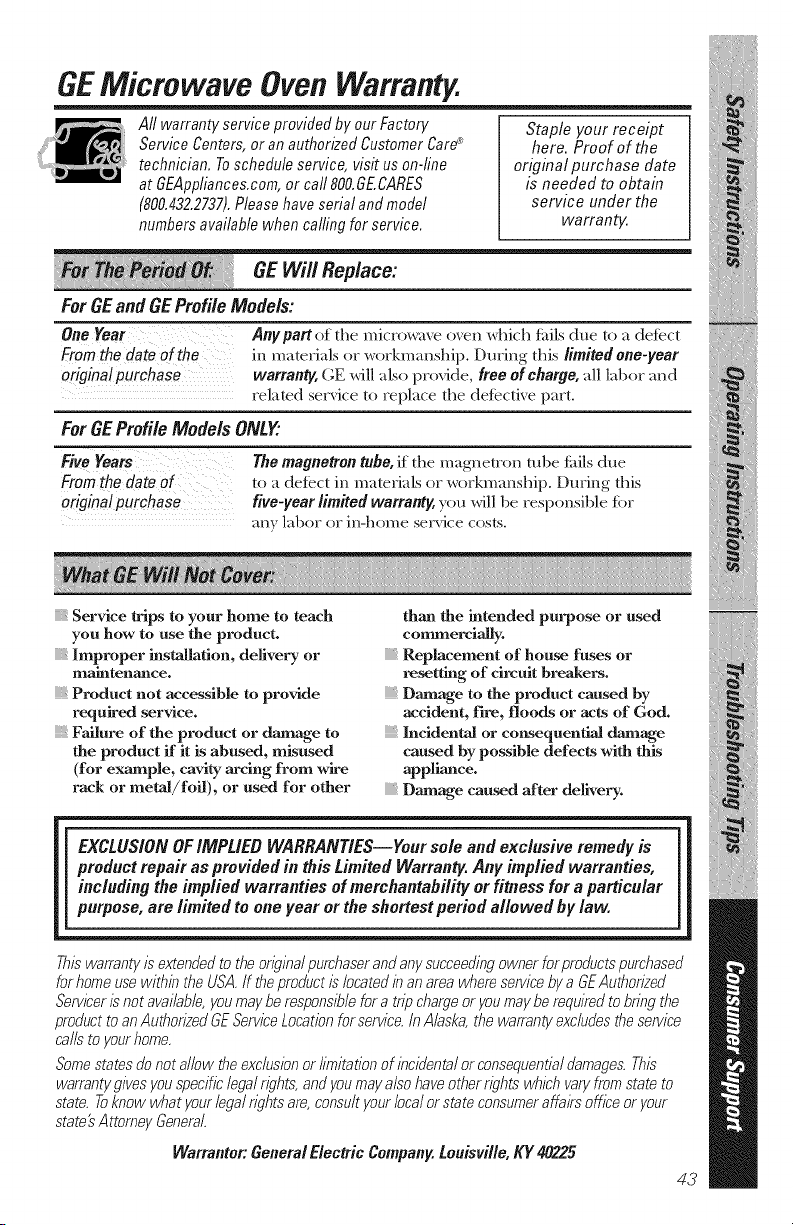
GEMicrowave Oven Warranty.
All warrantyserviceprovidedby ourFactory
ServiceCenters,oran authorizedCustomerCare_
technician,Toscheduleservice,visit uson-line
at GEAppliances,com,or call 800,GE,CARES
(800,432,2737),Pleasehaveserial andmodel
numbersavailablewhen calfingfor service.
Staple your receipt
here. Proof of the
original purchase date
is needed to obtain
service under the
warranty.
GE Will Replace:
For GEand GE Profile Models:
One Year Anypartof the microwme o_en which fifils due to a det_'c-t
Fromthe date of the in materials or workmanship. During this limitedone-year
origina!purchase warranty, (;E will also provide, freeof charge, all labor and
related ser_ice to replace the def_ctixe part.
For GEProfile Models ONLY'.
FF_;eYears The magnetron tube, it the magnetron tube tifils due
mthedateof to a defect in materials or workmanship. During this
original purchase five-year limited warranty, you will l)e responsible fiw
any labor or in-}lOll/e service costs.
Service trips to your home to teach
you how to use the product.
Improper instaBatinu, delivery or
maintenance.
Product not accessible to provide
required service.
Failure of the product or damage to
the product if it is abused, misused
(for example, cavity arcing from wire
rack or metal/foil), or used for other
than the intended purpose or used
commercially.
Replacement of house fuses or
resetting of circuit breakers.
Damage to the product caused by
accident, fire, floods or acts of God.
Incidental or cow,sequential damage
caused by possible defects with this
appliance.
Damage caused after delivery.
[i
EXCLUSIONOFIMPLIED WARRANTIES--Your sole and exclusive remedy is
product repair as provided in this Limited Warranty.Any implied warranties,
including the implied warranties of merchantability or fitness for a particular
purpose, are limited to one year or the shortest period allowed by law.
Thiswarrantyis extendedto theoriginalpurchaserandanysucceedingownerferpmductspurchased
forhomeusewithinthe USA.If theproduct/slocatedin anareawhereservicebya gEAuthorized
Servicer/snet available,youmaybe responsiblefora trip chargeor youmaybe requiredto bringthe
producttoan AuthorizedGEServiceLocationforservice.InAlaska,thewarrantyexcludestheservice
callsto yourhome.
Somestatesdenetallowtheexc/uslanor limitationof incidentalorconsequentialdamages.This
warrantygivesyouspecificlegalrights,andyoumayalsohaveetherrightswhlahvaryfromstateto
state.Toknew whatyourlagalrightsare,consultyourlocalorstateconsumeraffa/?sofficeoryour
state'sAttorneyGeneral.
Warrantor,"GeneralElectric Company,Louisville, KY 40225
43
ConsumerSupport.
GEAppliancesWebsite C_..li..ces.oom
Have a question or need assistance with your appliance? Tr} the (;E Appliances Website
)f the _ea_ :
24 hours a (M}_ any day ( " " For gneater corn enience and fhster serx_ce, }ou can
l_o_ dowi_load ()'_l_er's Manu_ds, order palls or e_en schedule sei_ce on-line.
ScheduleService c_..li..c_s._om
ExpeI_ GE repair ser_@e is on]) one step ax_ayfl'om your door. (;et on-line and
schedule your ser_@eat your comenience am dm of the _ear'. ()r call 800.GE.(_M_ES
(800.432.2737) duringl{ormal business hours. • •
RealLife DesignStudio c_ppli,,_,_._o,,
(;E suppoI_s the Uni_ ersal Design conceptmproducts, ser\_ces alld em_romnents that
can be used by people ()fall ages, sizes and capabilities. We recogmize the need to
design %r a _de range of physical and mental abilities and impairments. For details
of GE's Universal Design) applications, including kitchen desigm ideas %r people _th
disabilities, check out our Website todaz For the heating impaired, please call
800.TDD.GEAC (800.833.4322).
ExtendedWarranties
GEPppliances.com
Purchase a GE extended _mmnty and learn about special discounts that are a\_dlable
while your _uiantv is still in effect. \bu can purchase it on-line anytime, or call
800.6')6.2224 dm_ing normal business hours. GE Consmner Home Services _dll
still be there after yore _mianty expires.
Partsand Accessories c_ppli.._._._o_
Individuals qualified to service their o_n appliances can have parts or accessories
sent directl} to their homes (\ ISA, MasterCard and Discover cards are accepted).
Order on-line toda}; 24 hours exei 3 da} or b} phone at 800.626.2002 during normal
business hours.
Instructions contained in thismanual coverpmcedures to be petformedby any user. Other
servicing generally should be referred to qualified service personnel. Cautionmust be
exercised, since improper servicing may cause unsafe operation.
ContactUs c_opli,,_o,._om
If}ou are not satisfied with the ser_dce }ou receix e fiom (;E, contact us on our Website
with all the details including }our phone mmfl)ei; or write to:
(;eneial Managei; Customer Relations
(;E Appliances, Appliance Park
Louisville, KY 40225
RegisterYourAppliance _ppli,,co,._o,,
Re_ster your new appliance on-line--at your convenience! Timely product regdstmtion
will allo_ fi)r enhanced communication and prompt service under the terms of?our
_ariant}; should the need arise, kbu ma} also mail in the pre-printed regdsnation card
included in the packing material.
Prbted in Malaysia