Electric
Slide-in models
®
Modelos deslizables
Models, Modelos
790,46618
8 = Color number, nOmero de color
Sears Roebuck and Co., Hoffman Estates, mL 60179 U.S.A.
www.sears.com
P/N 318203803 Rev. C (0601}
Table of Contents
Slideqn RangeWarranty ................................................. 2
IMPORTANT SAFETY INSTRUCTIONS ......................... 3-5
Product Record ............................................................... 5
Protection Agreements ................................................... 6
Range Features ............................................................... 7
Setting Surface Controls ............................................ 8-13
Surface Cooking ............................................................. 14
Before Setting the Oven Controls ............................ 14-15
Control Pad Features ..................................................... 16
Minimum and Maximum Control Pad Settings ............ 16
Setting Oven Controls .............................................. 17-34
Setting Warmer Drawer Controls .............................. 35-36
Serf Cleaning ............................................................. 37-39
Adjusting the Oven Temperature ................................... 39
GeneraJ Care & Cteaning .......................................... 40-43
Before you call .......................................................... 44-45
Sears Service ................................................................. 46
Kenmore EHte Appliance Warranty
OneYear Limited Warranty
When installed, operated and maintained according to all instructions supplied with the product, if this appliance fails due to
a defect in material or workmanship within one year from the date of purchase, call 1-800-4-MY-HOME ® to arrange for free
repair, If this appliance is used for other than private family purposes, this warranty applies for only 90 days from the date of
purchase,
This warranty covers only defects in material and workmanship. Sears wilt NOT pay for:
1, Expendable items that can wear out from normal use, including but not limited to filters, belts, light bulbs, and bags,
2, A service technician to instruct the user in correct product installation, operation or maintenance,
3, A service technician to clean or maintain this product,
4, Damage to or failure of this product if it is not installed, operated or maintained according to all instructions supplied with
the product,
5, Damage to or failure of this product resulting from accident, abuse, misuse or use for other than its intended purpose,
6, Damage to or failure of this product caused by the use of detergents, cleaners, chemicals or utensils other than those
recommended in all instructions supplied with the product,
7, Damage to or failure of parts or systems resulting from unauthorized modifications made to this product,
FIVE-YEAR LiMiTED WARRANTY
For the second through the fifth year from the date of purchase, when installed and operated according to the Installation
Instructions and Use & Care Guide, Sears will supply the following range parts free of charge if they fail for the reasons
listed below, Customer must pay labor cost of installation,
o Cooktop glass if it fails due to thermal shock,
o Cooktop elements if they are defective,
What Sears wilt not cover:
o Failure of the product if it is abused, misused, or used for other than the intended purpose,
o Damage to the cooktop glass caused by the use of cleaners or utensils other than the recommended cleaning cream
and tools,
o Damage to the cooktop glass caused by hardened spills of sugary materials (including starches from vegetables or
pastas) or melted plastic that are not cleaned according to the directions in the Use & Care Guide,
o Repairs to parts or systems resulting from unauthorized modifications made to the appliance,
Disclaimer of implied warranties; limitation of remedies
Customer's sole and exclusive remedy under this limited warranty shall be product repair as provided herein, Implied
warranties, including warranties of merchantability or fitness for a particular purpose, are limited to one year or the shortest
period allowed by law, Sears shall not be liable for incidental or consequential damages, Some states and provinces do not
allow the exclusion or limitation of incidental or consequential damages, or limitations on the duration of implied warranties
of merchantability or fitness, so these exclusions or limitation may not apply to you,
This warranty applies only while this appliance is used in the United States and Canada,
This warranty gives you specific legal rights, and you may abe have other rights which vary from state to state,
Sears, Roebuck and Co., Dept. 817WA, Hoffman Estates, IL 60179
Sears Canada inc.,Toronto, Ontario, Canada M5B 2B8
Printed in United States 2
lm
Read aH instructions before using this appliance.
Save these instructions for future reference.
This manuaUcontains many important safety messages. AUways read and obey aH safety messages.
The safety symboU {F_ calls your attention to safety messages that inform you of hazards that can kHUor hurt you or others,
or cause damage to the product,
Undbates an imminentUy hazardous situation which, if not avoided may resuUtin death or serious injury,
Undbates an imminentUy hazardous situation which, if not avoided may resuUtin minor or moderate injury, or
product damage,
AH safety messages wHUidentify the hazard, tell you how to reduce the chance of injury, and tell you what can happen if the
instructions are not followed,
o Remove aH tape and packaging before using the
range. Destroy the carton and plastic bags after
unpacking the range, Never allow children to play with
packaging material,
o Proper Installation-Be sure your appliance is prop-
edy installed and grounded by a quaJified technician
in accordance with the National E_ectricaJ Code
ANSl/NFPA No. 70 tatest edition, and tocal code
requirements. Install only per installation instructions
provided in the literature package for this range,
Sears Parts & Repair is the recommended repair service
for this appliance, Know how to disconnect the electrical
power to the appliance at the circuit breaker or fuse box in
case of an emergency,
, User servicing--Do not repair or repJace any part of
the appJiance untess specifically recommended in
the manuaJs. All other servicing should be done only by
a qualified technician, This may reduce the risk of
personal injury and damage to the range,
o Never modify or niter the construction of a range by
removing leveling Jegs, paneJs, wire covers, anti-tip
brackets/screws, or any other part of the product.
Stepping, leaning or sitting on the door
or drawer of this range can result in serious injuries
and aJso cause damage to the range. Do not allow
children to climb or play around the range, The weight of a
@
_can tip.
o injury to persons could result.
Install anti-tip device packed with
range.
o See instaHation instructions.
To reduce the risk of tipping, the
range oven must be secured by
properJy installed anti-tip bracket(s} provided with
the range. To check if the bracket(s) is installed
properly, remove the lower paneJ or storage drawer
and verify that the anti-tip bracket(s} is engaged.
Refer to the Installation instructions for proper anti-
tip bracket(s) installation.
child on an open door may cause the range to tip, resulting
in serious burns or other injury, An open drawer, when hot,
may cause burns,
Do not use the oven or warmer drawer (if
equipped) for storage.
Do not store items of interest to children
in the cabinets above a range. Children climbing on the
range to reach items could be seriously injured,
,i
Never use your appliance for warming up :::':::::
or heating up the room.
o Storage in or on appHance--FtammabJe materiaJs
shoutd not be stored in an oven, near surface units
or in the drawer (if equipped). This includes paper,
plastic and cloth items, such as cookbooks, plasticware
and towels, as well as flammable liquids. Do not store
explosives, such as aerosol cans, on or near the
appliance. Flammable materials may explode and result
in fire or property damage,
o Do not have children niche--Children shouJd not be
teft aJone or unattended in the area where appliance
is in use. They should never be allowed to sit or stand
on any part of the appliance,
o DO NOTTOUCH SURFACE UNITS, AREAS NEAR
THESE UNITS, OVEN HEATING ELEMENTS OR
INTERIOR SURFACES OFTHE OVEN ORWARMER
DRAWER (if equipped). Both surface and oven heating
elements may be hot even though they are dark in color.
Areas near surface units may become hot enough to
cause burns, During and after use, do not touch, or let
clothing or other flammable materials touch these areas
until they have had sufficient time to cool. Among these
areas are the cooktop, surfaces facing the cooktop, the
oven vent openings and surfaces near these openings,
oven door and window,
Wear proper appare!--Loose-fitting or hanging
garments shoutd never be worn white using the
appliance. Do not let clothing or other flammable
materials contact hot surfaces,
o Do not use water or flour on grease fires--Smother
the fire with a pan tid, or use baking soda, a dry
3 chemicaJ or foam-type extinguisher.
[m
, When heating fat or grease, watch it closely. Fat or
grease may catch fire if aUUowedto become too hot,
o Use only dry pothoJders--Moist or damp potholders
on hot surfaces may result in burns from steam. Do
not [et pothoUders touch hot heating eUements, Do not
use a towe[ or other buUkyc[oth instead of a pothoUder,
o Do not heat unopened food containers--Buildup of
pressure may cause container to burst and result in
injury.
o Remove the oven door from any unused range if it is
to be stored or discarded.
IMPORTANT--Do not attempt to operate the oven
dur(ng a power fa)(ure, if the power fai(s, a)ways turn
the oven off, if the oven is not turned off and the power
resumes, the oven may begin to operate again, (Food left
unattended could catch fire or spoil,)
Electronic controllers can be damaged
by cold temperatures.When you use your app(iance for
the first time, or if it has not been used for a long
period of time, make sure that it has been exposed to a
temperature above 0°0/32°F for at [east 3 hours before
connecting it to the power supply.
mMPORTANT mNSTRUCTmONS FOR USING
YOUR COOKTOP
o Know which knob controls each surface heating
unit.
o Use proper pan size. This appliance is equipped with
one or more surface units of different sizes, Select
utensils having flat bottoms large enough to cover the
surface unit, The use of undersized utensils will expose
a portion of the surface heating unit to direct contact and
may result in ignition of clothing, Proper relationship of
utensil to the surface unit will also improve efficiency,
o Utensi[ handles shou[d be turned inward and not
extend over adjacent surface units, To reduce the risk
of burns, ignition of flammable materials, and spillage
due to unintentional contact with the utensil,
Never leave surface burners unattended at high heat
settings--Boilovers cause smoking and greasy accu=
mulations that may ignite, or a pan that has boiled dry
may melt,
Protective liners--Do not use aluminum foil to line oven
bottom or any other part of the appliance, Only use
aluminum foil as recommended for baking if used as a
cover placed on the food, Any other use of protective
liners or aluminum foil may result in a risk of electric
shock or fire or short circuit,
Glazed cooking utensils--Only certain types of glass,
glass/ceramic, ceramic, earthenware, or other glazed
utensils are suitable for rangetop service without break°
ing due to the sudden change in temperature, Check the
manufacturer's recommendations for cooktop use,
Do not use decorative surface element covers, if an
element is accidentally turned on, the decorative cover
will become hot and possibly melt, Burns will occur if the
hot covers are touched, Damage may also be done to
the cooktop,
FOR COOKTOPSWlTH COiL ELEMENTS ONLY
o Do Not immerse or Soak Removable Surface Heating
Elements. Surface heating elements should never be
immerse in water, Heating elements clean themselves
during normal operation,
o Make Sure Drip Pans or Drip Bowls Are in Place.
Absence of these pans or bowls du ring cooking may subject
wiring or components underneath to damage,
FOR GLASS COOKTOPS ONLY
o Do not cJean or operate a broken cooktop--lf cooktop
should break, cleaning solutions and spillovers may
penetrate the broken cooktop and create a risk of
electric shock, Contact a qualified technician immedi-
ately,
o Clean cooktop glass with caution--if a wet sponge or
cloth is used to wipe spills on a hot cooking area, be
careful to avoid a steam burn, Some cleaners can
produce harmful fumes if applied to a hot surface,
o Avoid scratching the cooktop glass with sharp
objects.
[MPORTANT mNSTRUCTmONS FOR USING
YOUR OVEN
o Use care when opening oven door or warmer drawer
(if equipped)--Stand to the side of the range when
opening the door of a hot oven, Let hot air or steam
escape before you remove or replace food in the oven
warmer drawer,
Keep oven vent ducts unobstructed. The oven vent is
located at right side of the front panel and visible
when the oven door is open, Touching the surfaces in
this area when the oven is operating may cause severe
burns, Also, do not place plastic or heat-sensitive items
on or near the oven vent, These items could melt or
ignite,
Placement of oven/warmer drawer (if equipped)
Racks. Always place oven racks in desired location
while oven/warmer drawer (if equipped) is cool, if rack
must be moved while oven is hot use extreme caution,
Use potholders and grasp the rack with both hands to
reposition, Do not let potholders contact the hot heating
elements in the oven/warmer drawer (if equipped),
Remove all utensils from the rack before moving,
Do not use the broiler pan without its insert. The
broiler pan and its insert allow dripping fat to drain and
be kept away from the high heat of the broiler,
lm
Do not cover the broiler insert with aJuminum foil.
Exposed fat and grease could ignite,
Do not touch a hot light bulb with a damp cJoth.
Doing so could cause the bulb to break, Disconnect the
appliance or turn off the power to the appliance before
removing and replacing light bulb,
mMPORTANT mNSTRUCTmONS FOR CLEAN°
raNGYOUR RANGE
o CJean the range reguJarJy to keep all parts free of
grease that coutd catch fire. Exhaust fan ventilation
hoods and grease fluters shouUdbe kept dean, Do not
allow grease to accumuUate on hood or fluter,Greasy
deposits in the fan couUdcatch fire, When you are
flaming food under the hood, turn the fan on, Refer to the
hood manufacturer's instructions for cbaning,
SELF-CLEANmNG OVENS
. in the seff-cJeaning cycle, onJy clean the parts Jisted
in this Use and Care Guide. Before self=cleaning the
oven, remove the broiler pan and any utensils or foods
from the oven,
ESE
o Do not use oven cJeaners--No commercial oven
cleaner or oven liner protective coating of any kind
should be used in or around any part of the oven,
o Do not ctean door gasket--The door gasket is essen-
tial fora good seal, Care should be taken not to rub,
damage or move the gasket,
o Remove oven racks. Oven racks color will change if left
in the oven during a self-cleaning cycle.
_The heaJth of some birds is extremely
sensitive to the fumes given off during the serf-charting
cycJe of any range. Move birds to another wett venti-
lated room.
mMPORTANT SAFETY NOTmCE
The California Safe Drinking Water and Toxic Enforcement
Act requires the Governor of California to publish a list of
substances known to the state to cause cancer, birth
defects or other reproductive harm, and requires
businesses to warn customers of potential exposure to
such substances.
S
¸:121111
Product Record
In this space below, record the date of purchase, model and serial
number of your product. You will find the model and serial number
printed on the serial plate.
Model No. 790.
Serial No,
Date of purchase
Save these instructions and your sales receipt for future reference,
P_ease carefully read and save these instructions
This Use & Care Manual contains general operating instructions for
your appliance and feature information for several models, Your
product may not have all the described features, The graphics
shown are representative, The graphics on your appliance may not
look exactly like those shown, Common sense and caution must be
practiced when installing, operating and maintaining any appliance,
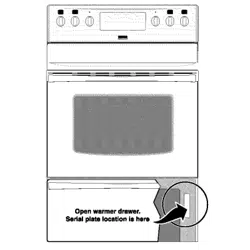
Seria P ate Location
You wiii find the model and serial number printed on
the serial plate, The serial plate is located as shown
below,
Remember to record the serial number for future
reference,
Serial Plate
Location
PROTECTION AGREEMENTS
In the U.S.A.
Master Protection Agreements
CongratuUations on making a smart purchase. Your new
Kenmore ®product is designed and manufactured for years
of dependabUe operation. But Hke aHproducts, it may require
preventive maintenance or repair from time to time. That's
when having a Master Protection Agreement can save you
moneyand aggravation.
Purchase a Master Protection Agreement now and protect
yourself from unexpected hassle and expense.
The Master Protection Agreement aUsoheUps extend the Hfe
of your new product. Here's what's incUudedin the
Agreement:
5_ Expert service by our 12,000 professionaU repair
specialists
[_ Unlimited service and no charge for parts and labor on
aUUcovered repairs
"No-lemon" guarantee= repUacement
of your covered product if four or more product failures
occur within twelve months
[_ Product replacement if your covered product can't be
fixed
[_ AnnuaJ Preventive Maintenance Check at your request
- no extra charge
[_ Fast heJp by phone = phone support from a Sears
technician on products requiring in-home repair, plus
convenient repair scheduling
[_ Power surge protection against electrical damage due
to power fluctuations
[_ RentaJ reimbursement if repair of your covered product
takes longer than promised
Once you purchase the Agreement, a simple phone call is
all that it takes for you to schedule service. You can call
anytime day or night, or schedule a service appointment on-
line.
In Canada
Maintenance Agreements
Your purchase has added value because you can depend
on Sears HomeCentraPfor service. With over 2400
Service Technicians and more than a million parts and
accessories, we have the tools, parts, knowledge and
skills to ensure our pledge: We Service What We Sell.
Your Kenmore®product is designed, manufactured
and tested to provide years of dependable operation. But
like all products, it may require service from time to time.
The Sears Maintenance Agreement offers you an
outstanding service program, affordably priced.
The Sears Maintenance Agreement:
Is your way to buy tomorrow's service at today's price
Eliminates repair bills resulting from normal wear and
tear
Provides phone support from a Sears technician on
products requiring
Even if you don't need repairs, provides an annual
Preventive Maintenance Check, at your request, to
ensure that your product is in proper running condition.
Some Jimitatione apply. For more information about
Sears Canada Maintenance Agreements,
call 1-800-381-8885
Sears has over 12,000 professional repair specialists, who
have access to over 4.5 million quality parts and
accessories. That's the kind of professionalism you can
count on to help prolong the life of your new purchase for
years to come. Purchase your Master Protection Agreement
today!
Some limitations and exclusions apply.
For prices and additionaJ information call
1-800-827--6855.
Sears Installation Service
For Sears professional installation of home
appliances, garage door openers, water heaters,
and other major home items, in the U.S.A. call
1-SOO-4-MY-HOME®
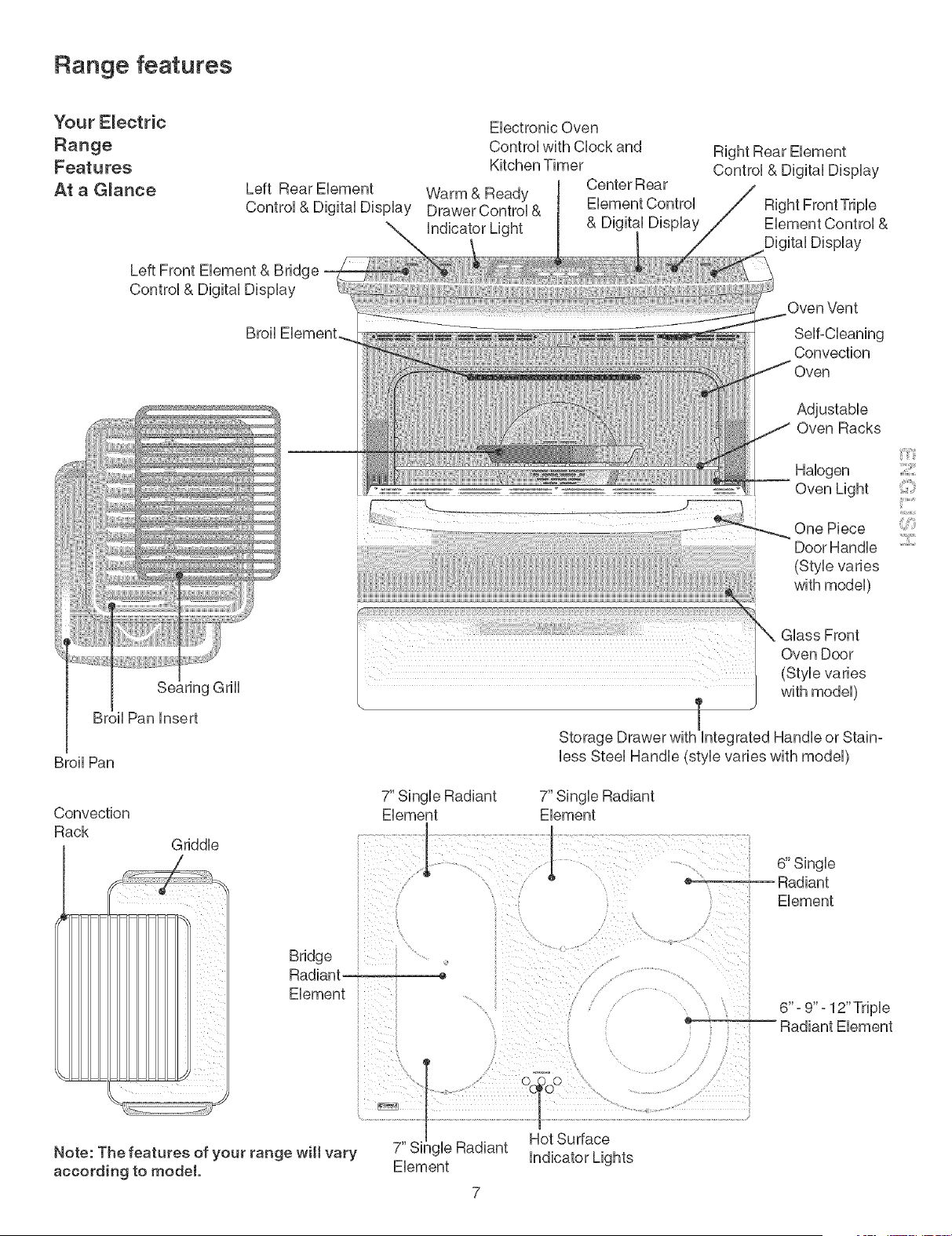
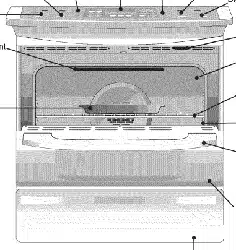
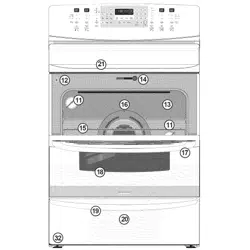
Range features
Your Electric
Range
Features
At a G_ance
Left Rear Element
Left Front Element & Bridge
Broil
Electronic Oven
Control with Clock and
Kitchen Timer
Center Rear
Warm & Ready
Drawer Control & Element Control
& Digital Display
Right Rear Element
Control & Digital Display
Right Front Triple
Element Control &
Digital Display
Oven Vent
Self-Cleaning
Convection
Se_ ing Grill
Broil Pan insert
Broil Pan
Convection
Rack
Griddle
Adjustable
Oven Racks
Halogen
Oven Light
One Piece
Door Handle
(SUe varies
with model)
Glass Front
Oven Door
(Style varies
with model)
Storage Drawer with integrated Handle or Stain=
less Steel Handle (sUe varies with model)
7" Single Radiant
Element Element
6" Single
.... Radiant
Element
Bridge
Radiant -
Element
6" =9" - 12" Triple
Radiant Element
Note: The features of your range wilt vary
according to model.
Element
7
Setting Surface Controls
About the Ceramic G_ass Cooktop
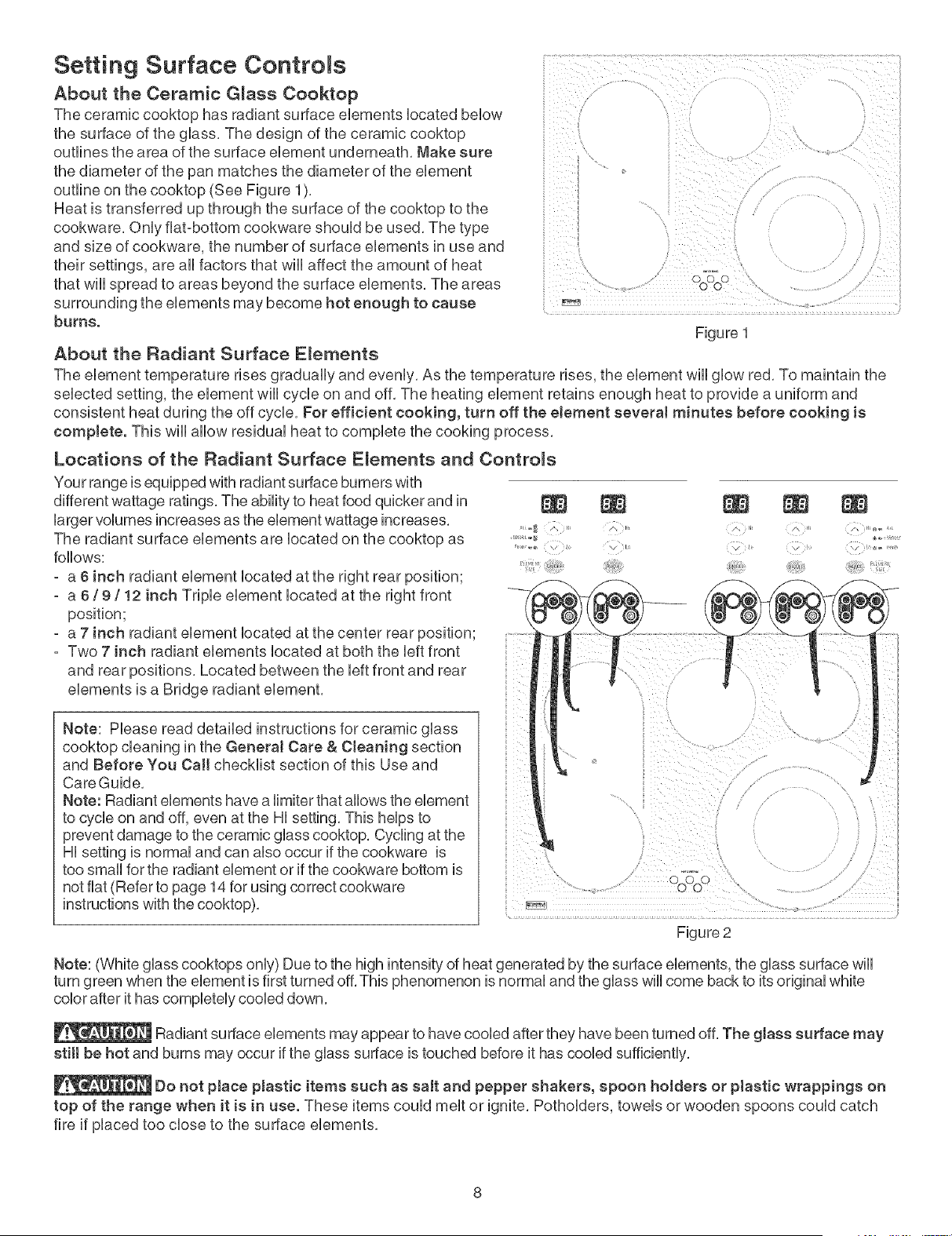
The ceramic cooktop has radiant surface elements iocated bellow
the surface of the giass. The design of the ceramic cooktop
outlines the area of the surface element underneath. Make sure
the diameter of the pan matches the diameter of the element
outline on the cooktop (See Figure 1).
Heat is transferred up through the surface of the cooktop to the
cookware. Oniy fiat-bottom cookware shouid be used. The type
and size of cookware, the number of surface elements in use and
their settings, are ali factors that wHi affect the amount of heat
that wHispread to areas beyond the surface elements. The areas
surrounding the elements may become hot enough to cause
burns.
DoOoC
Figure 1
About the Radiant Surface E_ements
The element temperature rises gradualiy and eveniy. As the temperature rises, the element will] giow red. To maintain the
selected setting, the element will] cyclic on and off. The heating element retains enough heat to provide a uniform and
consistent heat during the off cyclic. For efficient cooking, turn off the eJement severaJ minutes before cooking is
complete. This will] allow residua] heat to compiete the cooking process.
Locations of the Radiant Surface E_ements and Controms
nii;iiiJ_
_hz_
Your range is equipped with radiant surface burners with
different wattage ratings. The ability to heat food quicker and in
larger volumes increases as the element wattage increases. , oa _:.....
The radiant surface elements are located on the cooktop as
follows:
- a 6 inch radiant element located at the right rear position;
- a 6 / 9 / 12 inch Triple element located at the right front
position;
- a 7 inch radiant element located at the center rear position;
- Two 7 inch radiant elements located at both the left front
and rear positions, Located between the left front and rear
elements is a Bridge radiant element,
Figure 2
Note: Please read detailed instructions for ceramic glass
cooktop cleaning in the GeneraJ Care & Cteaning section
and Before You Call checklist section of this Use and
Care Guide,
Note: Radiant elements have a limiter that allows the element
to cycle on and off, even at the Hi setting, This helps to
prevent damage to the ceramic glass cooktop, Cycling at the
Hi setting is normal and can also occur if the cookware is
too small for the radiant element or if the cookware bottom is
not fiat (Refer to page 14 for using correct cookware
instructions with the cooktop),
Note: (White glass cooktops only) Due to the high intensity of heat generated by the surface elements, the glass surface wiii
turn green when the element is first turned off. This phenomenon is normal and the glass will come back to its original white
color after it has completely cooled down.
Radiant surface elements may appear to have cooled after they have been turned off. The glass surface may
stitt be hot and burns may occur if the glass surface is touched before it has cooled sufficiently.
Do not pJace pJastic items such as salt and pepper shakers, spoon hoJders or ptastic wrappings on
top of the range when it is in use. These items could melt or ignite. Potholders, towels or wooden spoons could catch
fire if placed too close to the surface elements.
Setting Surface Controls @ont'd)
The E_ectronic Surface E_ement Contro_ (ESEC)
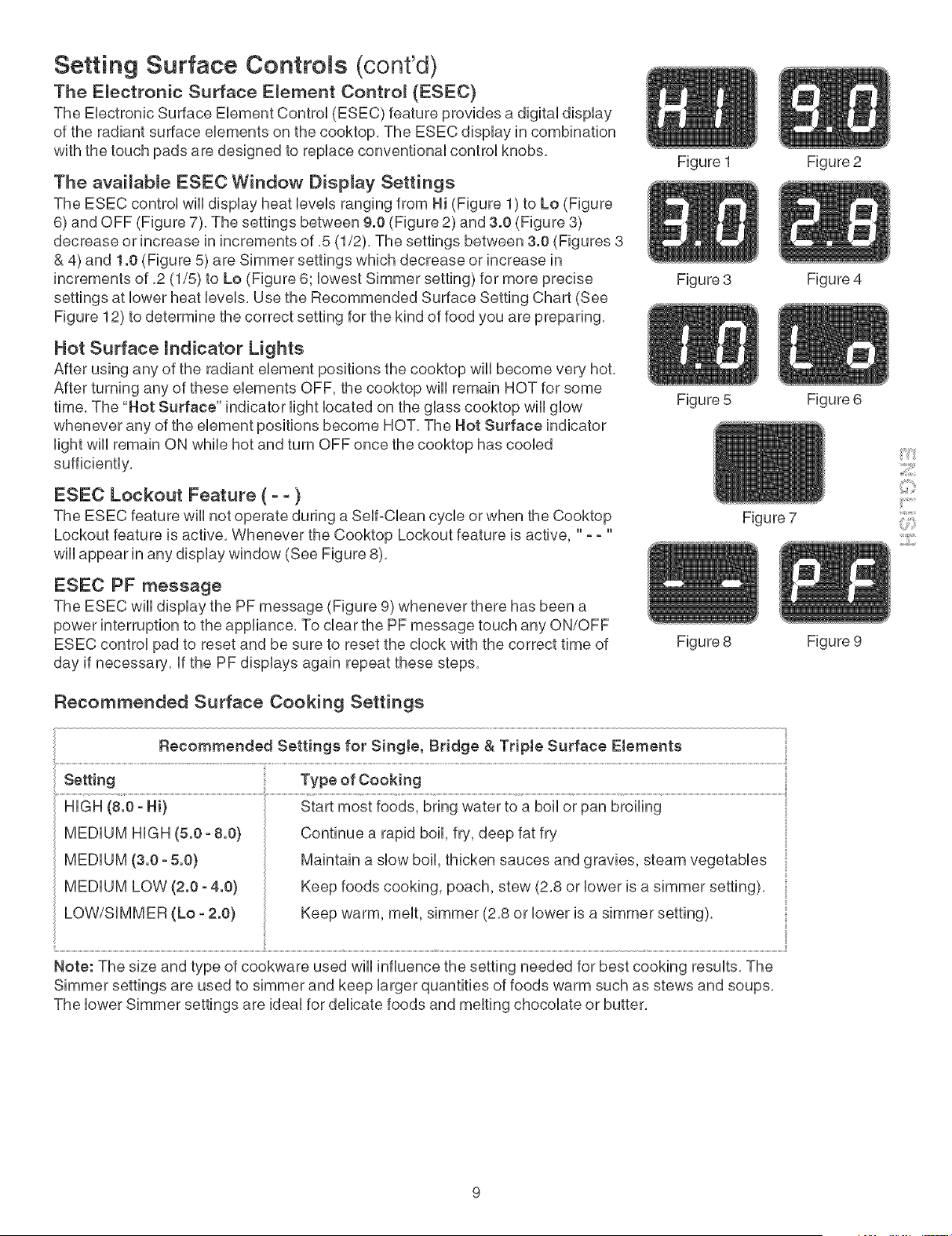
The Electronic Surface Element Control (ESEC) feature provides a digital display
of the radiant surface elements on the cooktop. The ESEC display in combination
with the touch pads are designed to replace conventional control knobs.
The available ESEC Window Display Settings
The ESEC control will display heat levels ranging from Hi (Figure 1) to Lo (Figure
6) and OFF (Figure 7). The settings between 9.0 (Figure 2) and 3.0 (Figure 8)
decrease or increase in increments of .5 (1/2). The settings between 3.0 (Figures 8
& 4) and 1.0 (Figure 5) are Simmer settings which decrease or increase in
increments of .2 (1/5) to Lo (Figure 6; lowest Simmer setting) for more precise
settings at lower heat levels. Use the Recommended Surface Setting Chart (See
Figure 12) to determine the correct setting for the kind of food you are preparing.
Hot Surface mndicator Lights
After using any of the radiant element positions the cooktop wiii become very hot.
After turning any of these elements OFF, the cooktop will remain HOT for some
time. The "Not Surface" indicator light located on the glass cooktop wiii glow
whenever any of the element positions become HOT. The Not Surface indicator
light wiii remain ON while hot and turn OFF once the cooktop has cooled
sufficiently.
ESEC Lockout Feature ( - - )
The ESEC feature will not operate during a Self-Clean cycle or when the Cooktop
Lockout feature is active. Whenever the Cooktop Lockout feature is active, " - - "
wiii appear in any display window (See Figure 8).
ESEC PF message
The ESEC wiii display the PF message (Figure 9) whenever there has been a
power interruption to the appliance. To clear the PF message touch any ON/OFF
ESEC control pad to reset and be sure to reset the clock with the correct time of
day if necessary, if the PF displays again repeat these steps.
Recommended Surface Cooking Settings
Figure 1
Figure 3
Figure 5
Figure 8
Figure 7
....................................................................... i!
Recommended Settings for Singte, Bridge & Triple Surface Elements
Setting Type of Cooking
HiGH (8.0 - Hi) Start most foods, bring water to a boil or pan broiling
MEDIUM HiGH (5.0 - 8.0)
MEDIUM (3.0 - 5.0)
MEDIUM LOW (2.0 - 4.0)
LOW/SiMMER (Lo - 2.0)
Continue a rapid boil, fry, deep fat fry
Maintain a slow boil, thicken sauces and gravies, steam vegetables
Keep foods cooking, poach, stew (2.8 or lower is a simmer setting).
Keep warm, melt, simmer (2.8 or lower is a simmer setting).
Note: The size and type of cookware used wiii influence the setting needed for best cooking results, The
Simmer settings are used to simmer and keep larger quantities of foods warm such as stews and soups,
The lower Simmer settings are ideal for delicate foods and melting chocolate or butter,
Figure 2
Figure 4
Figure 6
Figure 9
3:::11:
Setting Surface Controls (cont'd)
Operating Single Radiant Surface E_ements
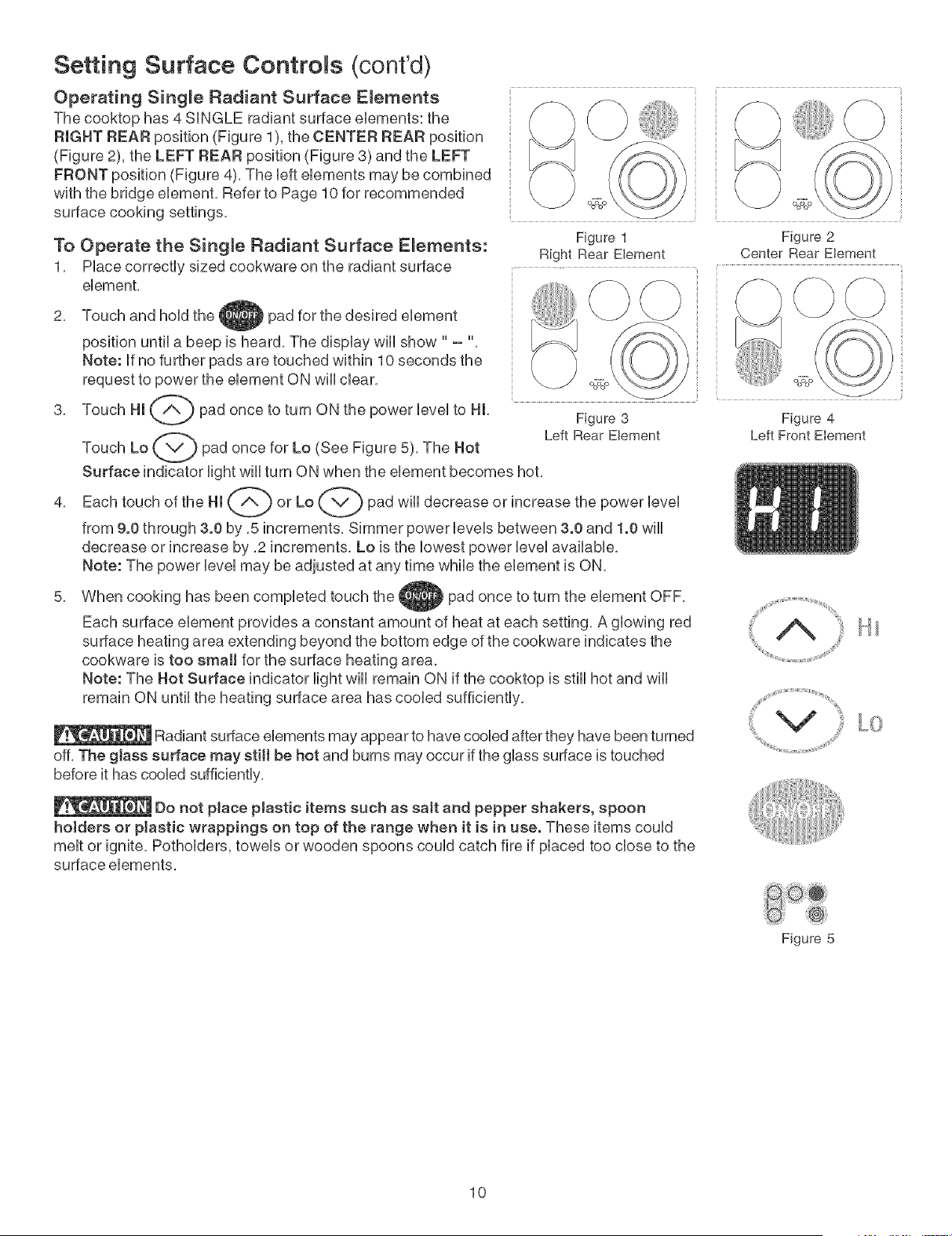
The cooktop has 4 SUNGLE radiant surface eUements: the
RIGHT REAR position (Figure 1), the CENTER REAR position
(Figure 2), the LEFT REAR position (Figure 3) and the LEFT
FRONT position (Figure 4). The UefteUements may be combined
with the bridge eUement. Refer to Page 10 for recommended
surface cooking settings.
To Operate the Single Radiant Surface E_ements:
1, PUacecorrectUy sized cookware on the radiant surface
eUement,
Figure 1 Figure 2
Right Rear Element Center Rear Element
2.
3.
4.
Touch and hoUdthe pad for the desired eUement
position until a beep is heard. The dispUay will show " - "
Note: If no further pads are touched within 10 seconds the
request to power the element ON will clear.
Touch HI _ pad once to turn ON the power level to HI.
Touch Lo _ pad once for Lo (See Figure 5). The Hot
Surface indicator light will turn ON when the element becomes hot.
Each touch of the HI _'-Ab or Lo _v'_) pad will decrease or increase the power level
from 9.0 through 3.0 by .5 increments. Simmer power levels between 3.0 and 1.0 will
decrease or increase by .2 increments. Lo is the lowest power level available.
Note: The power level may be adjusted at any time while the element is ON.
Figure 3
Left Rear Element
When cooking has been completed touch the pad once to turn the element OFF.
Each surface element provides a constant amount of heat at each setting. A glowing red
surface heating area extending beyond the bottom edge of the cookware indicates the
cookware is too small for the surface heating area.
Note: The Hot Surface indicator light will remain ON if the cooktop is still hot and will
remain ON until the heating surface area has cooled sufficiently.
Radiant surface elements may appear to have cooled after they have been turned
off. The gtass surface may stilt be hot and burns may occur if the glass surface is touched
before it has cooled sufficiently.
Do not pJace pJastic items such as saJt and pepper shakers, spoon
hotders or plastic wrappings on top of the range when it is in use. These items could
melt or ignite. Potholders, towels or wooden spoons could catch fire if placed too close to the
surface elements.
Figure 4
Left Front Element
Figure 5
10
Setting Surface Controls (cont'd)
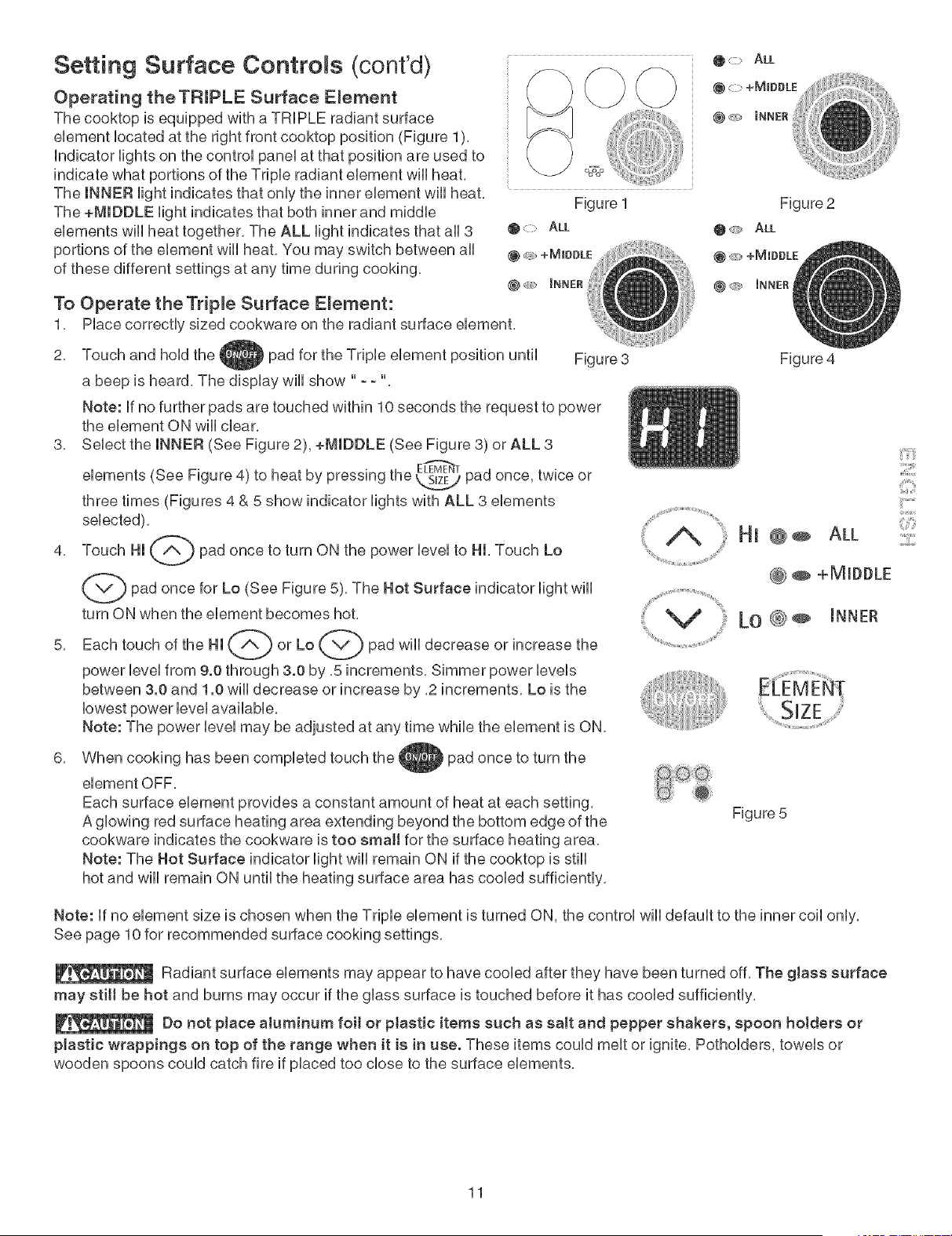
Operating theTRIPLE Surface E_ement
The cooktop is equipped with a TRIPLE radiant surface
ebment bcated at the right front cooktop position (Figure 1),
indicator Hghts on the controU paneUat that position are used to
indicate what portions of the Tripb radiant ebment wHUheat,
The INNER Hght indicates that onUythe inner ebment wHUheat,
The +MIDDLE Hght indicates that both inner and middb
ebments will heat together, The ALL light indicates that all 3
portions of the element will heat, You may switch between all
of these different settings at any time during cooking,
To Operate the Triple Surface E_ernent:
1,
Figure 1
@> ALL
@ c _ _NNER
Place correctly sized cookware on the radiant surface element,
2,
3,
4,
Touch and hold the _ pad for the Triple element position until Figure 3
a beep is heard, The display will show " - - "
Note: if no further pads are touched within 10 seconds the request to power
the element ON will clear,
Select the INNER (See Figure 2), +MIDDLE (See Figure 3) or ALL 3
(See Figure 4) to heat by pressing the _ pad once, twice or
elements
three times (Figures 4 & 5 show indicator lights with ALL 3 elements
selected),
Touch HI _ pad once to turn ON the power level to HI, Touch Lo
(_pad for Lo The Hot Surface indicator wiii
once
(See Figure 5), light
turn ON when the element becomes hot,
Each touch of the HI _ or Lo _"_) pad will decrease or increase the
power level from 9.0 through 3.0 by ,5 increments, Simmer power levels
between 3.0 and 1.0 will decrease or increase by ,2 increments, Lo is the
lowest power level available,
Note: The power level may be adjusted at any time while the element is ON,
Figure 4
iiA' Hi @÷ ALL
@ @ +MIDDLE
( Lo @÷ iNNEr
6,
When cooking has been completed touch the _pad once to turn the
element OFF,
Each surface element provides a constant amount of heat at each setting,
A glowing red surface heating area extending beyond the bottom edge of the
cookware indicates the cookware is too srnaH for the surface heating area,
Note: The Hot Surface indicator light will remain ON if the cooktop is still
hot and will remain ON until the heating surface area has cooled sufficiently,
Figure 5
Note: if no element size is chosen when the Triple element is turned ON, the control wiii default to the inner coil only,
See page 10 for recommended surface cooking settings,
Radiant surface elements may appear to have cooled after they have been turned off, The glass surface
may stitt be hot and burns may occur if the glass surface is touched before it has cooled sufficiently,
Do not place aluminum foit or ptastic items such as salt and pepper shakers, spoon holders or
plastic wrappings on top of the range when it is in use. These items could melt or ignite, Potholders, towels or
wooden spoons could catch fire if placed too close to the surface elements,
::31
{_i(iii
¸i¸:¸2¸:11
11
Setting Surface Controls (cont'd)
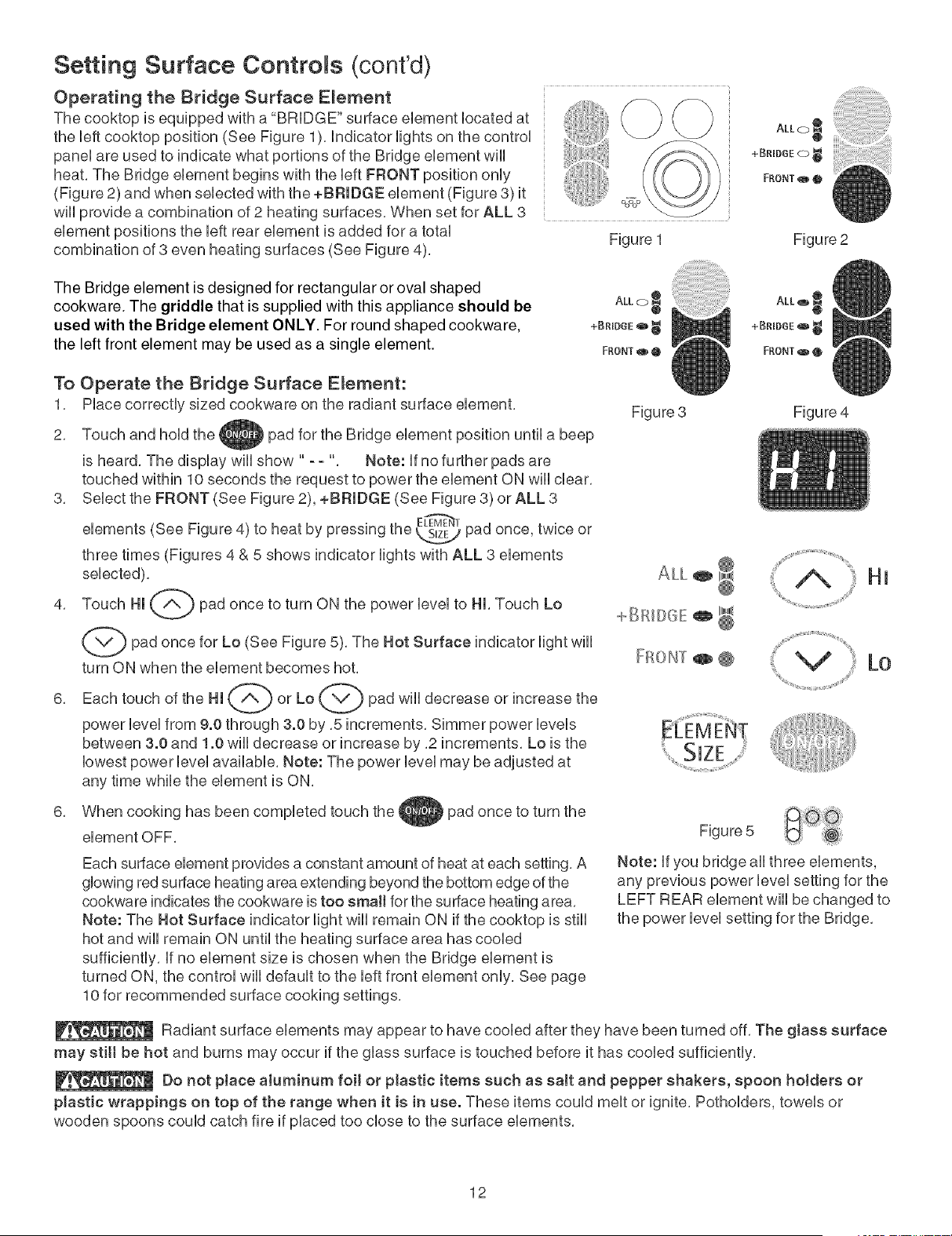
Operating the Bridge Surface E_ement
The cooktop is equipped with a "BRIDGE" surface element located at
the left cooktop position (See Figure 1). indicator lights on the control
panel are used to indicate what portions of the Bridge element will
heat. The Bridge element begins with the left FRONT position only
(Figure 2) and when selected with the +BRIDGE element (Figure 3) it
will provide a combination of 2 heating surfaces. When set for ALL 3
element positions the left rear element is added for a total
combination of 3 even heating surfaces (See Figure 4).
0,70°
Figure 1 Figure 2
The Bridge element is designed for rectangular or oval shaped
cookware. The griddle that is supplied with this appliance should be
used with the Bridge element ONLY. For round shaped cookware,
the left front element may be used as a single element.
To Operate the Bridge Surface E_ement:
1. Place correctly sized cookware on the radiant surface ebment.
2,
Touch and hold the pad for the Bridge element position until a beep
is heard, The display will show " - - " Note: if no further pads are
touched within 10 seconds the request to power the element ON will clear.
3. Select the FRONT (See Figure 2), +BRIDGE (See Figure 3) or ALL 3
(See Figure 4) to heat by pressing the _ pad once, twice or
elements
three times (Figures 4 & 5 shows indicator lights with ALL 8 elements
selected).
4. Touch HI _ pad once to turn ON the power level to HI. Touch Lo
(_pad for Lo The Hot Surface indicator wiii
once
(See Figure 5). light
turn ON when the element becomes hot.
Each touch of the HI (_ or Lo _ pad will decrease or increase the
6.
power level from 9.0 through 3.0 by .5 increments, Simmer power levels
between 3.0 and 1.0 will decrease or increase by .2 increments, Lo is the
lowest power level available. Note: The power level may be adjusted at
any time while the element is ON.
6. When cooking has been compbted touch the
ebment OFF.
pad once to turn the
Each surface element provides a constant amount of heat at each setting. A
glowing red surface heating area extending beyond the bottom edge of the
cookware indicates the cookware is too smalt for the surface heating area.
Note: The Hot Surface indicator light will remain ON if the cooktop is still
hot and will remain ON until the heating surface area has cooled
sufficiently, if no element size is chosen when the Bridge element is
turned ON, the control will default to the left front element only. See page
10 for recommended surface cooking settings.
ALL o
+BRIDGE 0
FRONT ,0 •
ALL,_ _
+BRIDGE ,o
FRONT_ •
Figure 3 Figure 4
_%%_,_,_,,,,_,_,_,_,_,,,,,_,_,j,,,,,_d,S_ii_
Figure 5
Note: if you bridge all three elements,
any previous power level setting for the
LEFT REAR element wiii be changed to
the power level setting for the Bridge,
Radiant surface elements may appear to have cooled after they have been turned off. The glass surface
may stitt be hot and burns may occur if the glass surface is touched before it has cooled sufficiently.
Do not ptace aluminum foil or ptastic items such as salt and pepper shakers, spoon holders or
ptastic wrappings on top of the range when it is in use. These items could melt or ignite. Potholders, towels or
wooden spoons could catch fire if placed too close to the surface elements.
12
Setting Surface Controls (cont'd)
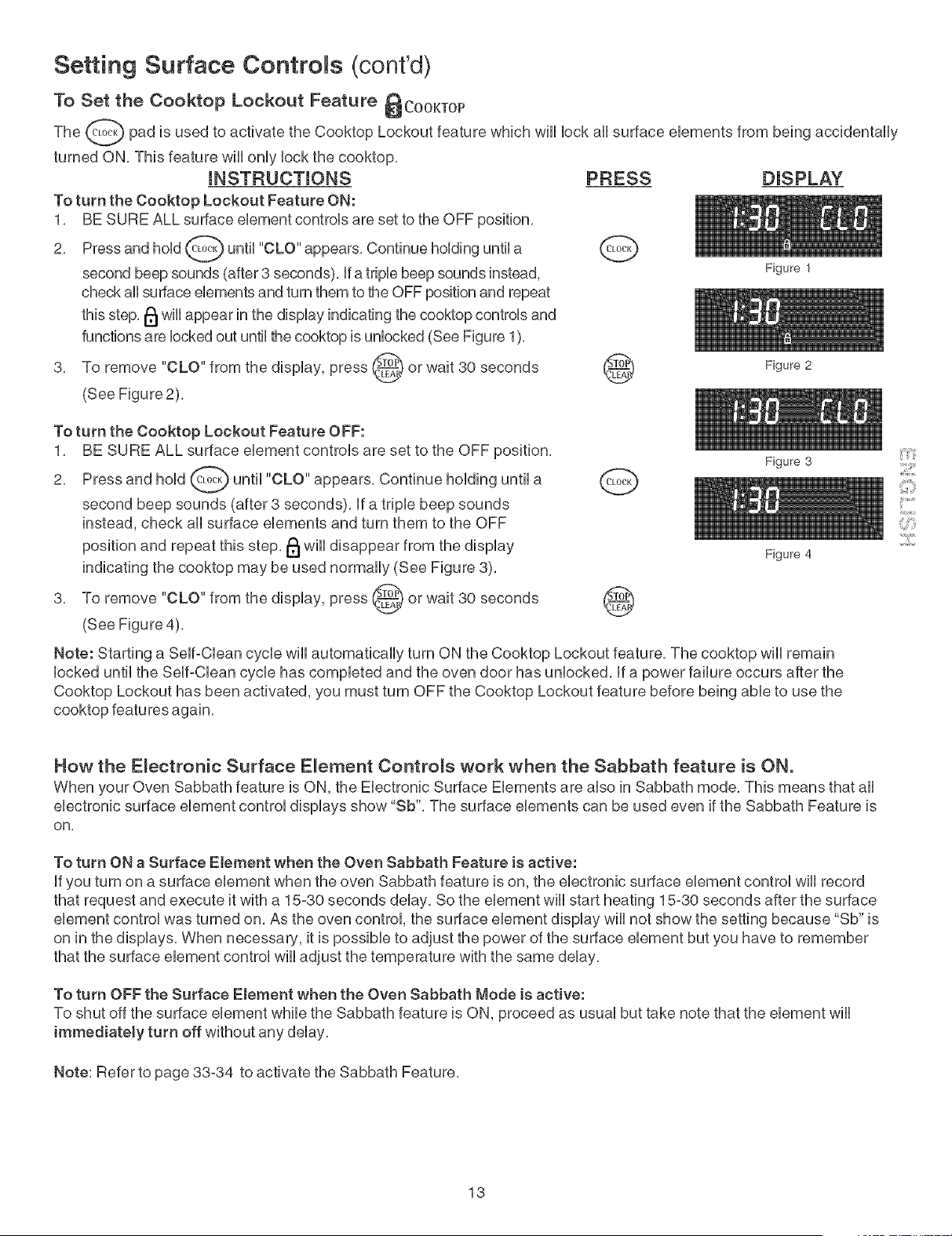
To Set the Cooktop Lockout Feature _COOKTOP
The _ pad is used to activate the Cooktop Lockout feature which wii[ lock ai[ surface elements from being accidentally
turned ON, This feature wili only lock the cooktop,
mNSTRUCTmONS
To turn the Cooktop Lockout Feature ON:
1. BE SURE ALL surface element controls are set to the OFF position.
2. Press and hold _ until "CLO" appears. Continue holding until a
second beep sounds (after 3 seconds), if a triple beep sounds instead,
check ail surface elements and turn them to the OFF position and repeat
this step. I_ wiil appear in the display indicating the cooktop controls and
functions are locked out until the cooktop is unlocked (See Figure 1).
3. To remove "CLO" from the display, press _ or wait 30 seconds _)
(See Figure 2).
PRESS DISPLAY
To turn the Cooktop Lockout Feature OFF:
1. BE SURE ALL surface element controls are set to the OFF position.
2. Press and hold _ until "CLO" appears. Continue holding until a
second beep sounds (after 3 seconds), if a triple beep sounds
instead, check all surface elements and turn them to the OFF
position and repeat this step. 1_1will disappear from the display
indicating the cooktop may be used normally (See Figure 3).
3. To remove "CLO" from the display, press @ or wait 30 seconds
(See Figure 4).
Figure 1
Figure 2
Figure 3
Figure 4
Note: Starting a Self-Clean cycle wili automatically turn ON the Cooktop Lockout feature, The cooktop wili remain
locked until the Self-Clean cycle has completed and the oven door has unlocked, if a power failure occurs after the
Cooktop Lockout has been activated, you must turn OFF the Cooktop Lockout feature before being able to use the
cooktop features again,
¸:121111
How the Electronic Surface Element Controls work when the Sabbath feature is ON.
When your Oven Sabbath feature is ON, the Electronic Surface Elements are also in Sabbath mode. This means that all
electronic surface element control displays show "Sb". The surface elements can be used even if the Sabbath Feature is
on,
To turn ON a Surface Element when the Oven Sabbath Feature is active:
if you turn on a surface element when the even Sabbath feature is on, the electronic surface element control wii[ record
that request and execute it with a 15-30 seconds delay, So the element wii[ start heating 15-30 seconds after the surface
element control was turned on, As the oven control the surface element display wii[ not show the setting because "Sb" is
on in the displays, When necessary, it is possible to adjust the power of the surface element but you have to remember
that the surface element control wii[ adjust the temperature with the same delay,
To turn OFF the Surface Element when the Oven Sabbath Mode is active:
To shut off the surface element while the Sabbath feature is ON, proceed as usual but take note that the element wii[
immediately turn off without any delay,
Note: Refer to page 33-34 to activate the Sabbath Feature.
13
Surface Cooking
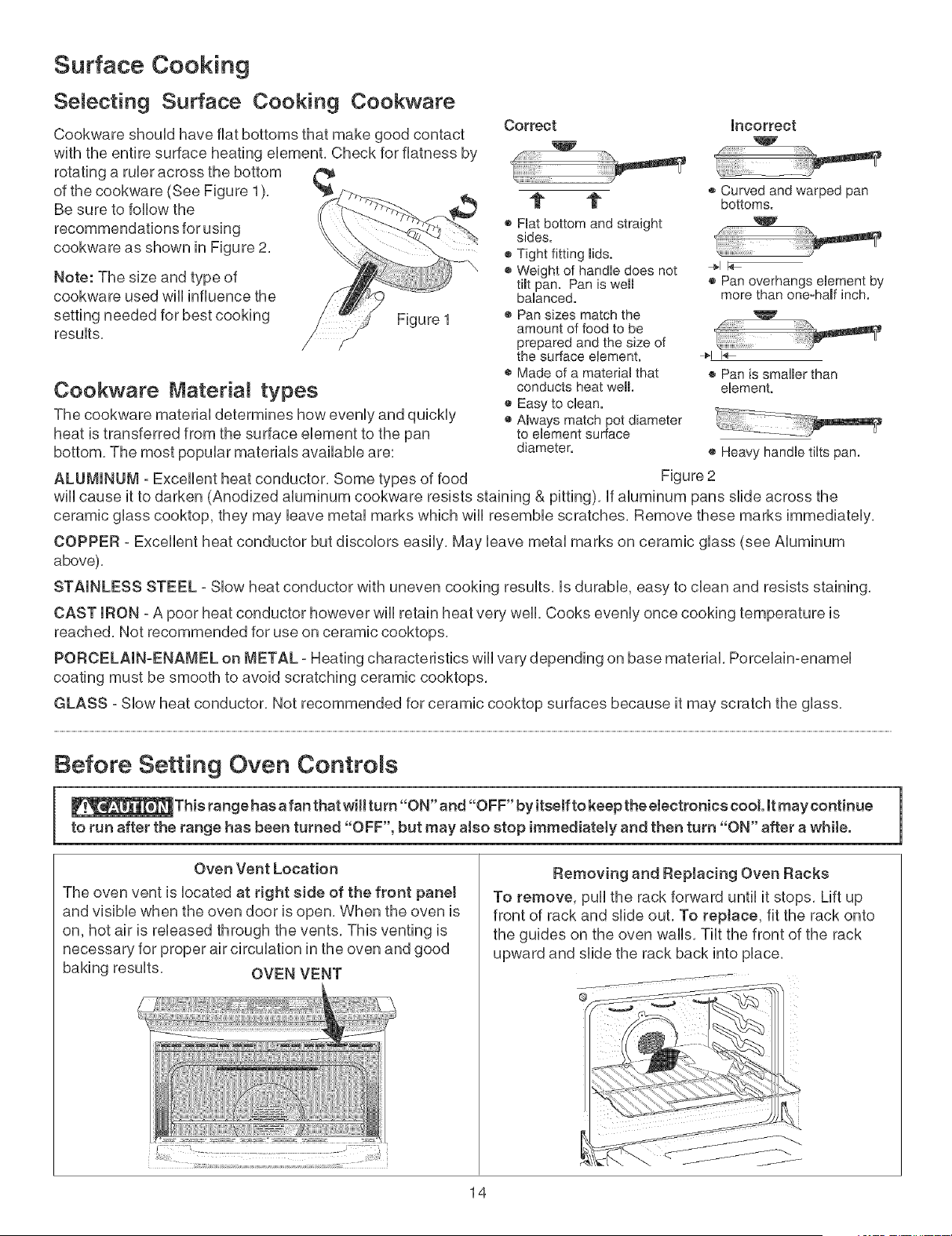
Selecting Surface Cooking Cookware
Cookware shouid have fiat bottoms that make good contact
with the entire surface heating element. Check for flatness by
rotating a ruler across the bottom
of the cookware (See Figure 1). '_
Be sure to follow the
recommendations for using
cookware as shown in Figure 2.
Note: The size and type of
cookware used wHiinfluence the
setting needed for best cooking
resuits.
Figure 1
Cookware Material types
The cookware materia] determines how eveniy and quickiy
heat is transferred from the surface element to the pan
bottom. The most popular materiais availabie are:
ALUMINUM -Excellent heat conductor. Some types of food
Correct Incorrect
t 1"
® Hat bottom and straight
sides.
• Tight fitting lids.
• Weightof handie does not
tiff pan. Pan is well
baianced.
• Pan sizes match the
amount of food to be
prepared and the size of
the surface eHement.
® Made of a materiamthat
conducts heat well.
® Easy to ciean.
o Always match pot diameter
to elementsurface
diameter.
® Curved andwarped pan
bottoms.
® Pan overhangs element by
more than one-haft inch.
t
1
_iiiiiiiiiiiiii_ ¸ _
® Pan is smalbr than
element.
® Heavy handb tiffs pan.
Figure 2
wiii cause it to darken (Anodized aluminum cookware resists staining & pitting), if aluminum pans slide across the
ceramic glass cooktop, they may leave metal marks which will resemble scratches. Remove these marks immediately.
COPPER - Excellent heat conductor but discolors easily. May leave metal marks on ceramic glass (see Aluminum
above).
STAINLESS STEEL - Slow heat conductor with uneven cooking results, is durable, easy to clean and resists staining.
CAST mRON- A poor heat conductor however wiii retain heat very well. Cooks evenly once cooking temperature is
reached. Not recommended for use on ceramic cooktops.
PORCELAIN-ENAMEL on METAL - Heating characteristics wiii vary depending on base material. Porcelain-enamel
coating must be smooth to avoid scratching ceramic cooktops.
GLASS - Slow heat conductor, Not recommended for ceramic cooktop surfaces because it may scratch the glass.
Before Setting Oven Controls
_This range has a fan that will turn "ON" and "OFF" by itseff to keep the electronics cool it may continue
to run after the range has been turned "OFF", but may also stop immediately and then turn "ON" after a while.
Oven Vent Location
The oven vent is located at right side of the front panet
and visible when the oven door is open. When the oven is
on, hot air is released through the vents. This venting is
necessary for proper air circulation in the oven and good
baking results. OVEN VENT
¸
Removing and Replacing Oven Racks
To remove, pull the rack forward until it stops. Lift up
front of rack and slide out. To reptace, fit the rack onto
the guides on the oven walls. Tilt the front of the rack
upward and slide the rack back into place.
@
J
14
Before Setting Oven Controls (cont'dl
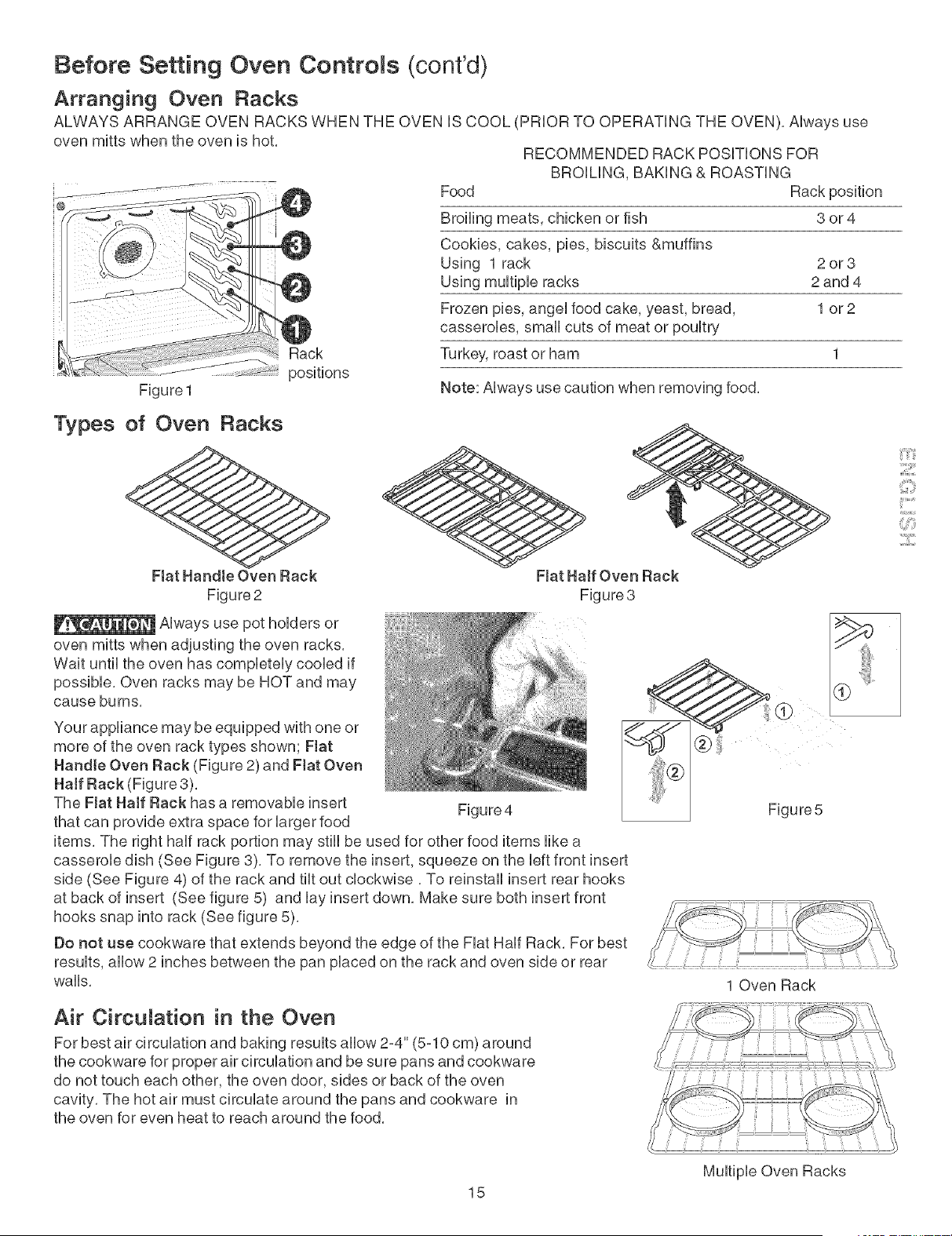
Arranging Oven Racks
ALWAYS ARRANGE OVEN RACKS WHEN THE OVEN iS COOL (PRIOR TO OPERATING THE OVEN), Always use
oven mitts when the oven is hot,
Rack
positions
Figure 1
Types of Oven Racks
Flat Handle Oven Rack
Figure 2
_.w_-_±_wJlt[®]_tAlways use pot holders or
oven mitts when adjusting the oven racks,
Wait until the oven has completely cooled if
possible, Oven racks may be HOT and may
cause burns,
RECOMMENDED RACK POSiTiONS FOR
BROiLiNG, BAKING & ROASTING
Food Rack position
Broiling meats, chicken or fish 3 or 4
Cookies, cakes, pies, biscuits &muffins
Using 1 rack 2 or 3
Using multiple racks 2 and 4
Frozen pies, angel food cake, yeast, bread, 1 or 2
casseroles, small cuts of meat or poultry
Turkey, roast or ham 1
Note: Always use caution when removing food,
Flat Haft Oven Rack
Figure 3
Your appliance may be equipped with one or
more of the oven rack types shown; Fiat
Handle Oven Rack (Figure 2) and Flat Oven
Haft Rack (Figure 3),
The Fiat Haft Rack has a removable insert Figure4
that can provide extra space for larger food
items, The right half rack portion may still be used for other food items like a
casserole dish (See Figure 3), To remove the insert, squeeze on the left front insert
side (See Figure 4) of the rack and tilt out clockwise, To reinstall insert rear hooks
at back of insert (See figure 5) and lay insert down, Make sure both insert front
hooks snap into rack (See figure 5),
Do not use cookware that extends beyond the edge of the Fiat Half Rack, For best
results, allow 2 inches between the pan placed on the rack and oven side or rear
walls,
1 Oven Rack
Air Circulation in the Oven
For best air circulation and baking results allow 2-4" (5-10 cm) around
the cookware for proper air circulation and be sure pans and cookware
do not touch each other, the oven door, sides or back of the oven
cavity, The hot air must circulate around the pans and cookware in
the oven for even heat to reach around the food,
::iiiil;:_il
Multiple Oven Racks
15
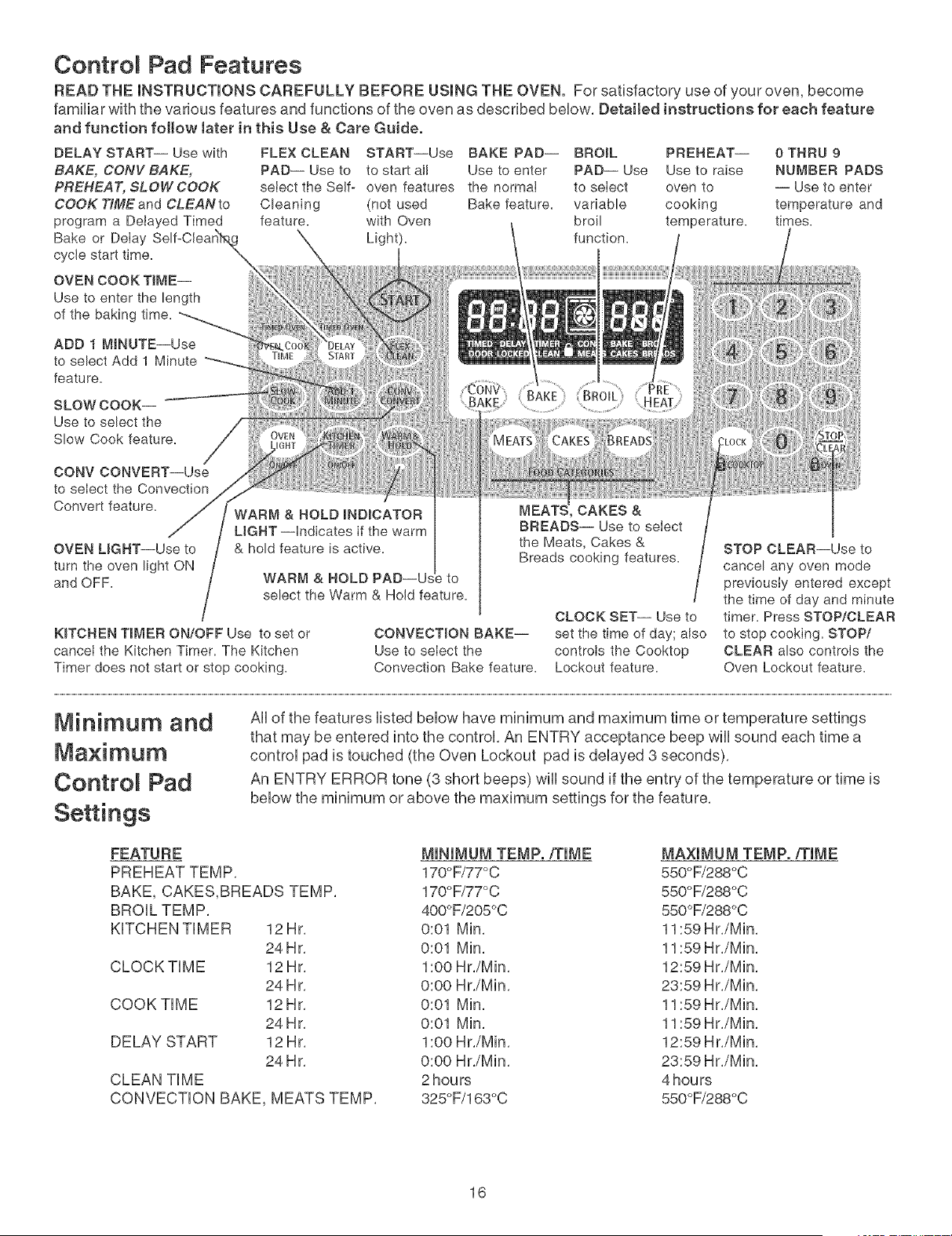
Controm Pad Features
READ THE mNSTRUCTmONS CAREFULLY BEFORE USmNG THE OVEN. For satisfactory use of your oven, become
familiar with the various features and functions of the oven as described beUow. Detailed instructions for each feature
and function follow later in this Use & Care Guide.
DELAY START-- Use with
BAKE, CONV BAKE,
PREHEAT, SLOW COOK
COOK TiME and CLEAN to
program a Detayed Timed
Bake or DeIay
cycle start time.
OVEN COOK TIME--
Use to enter the length
of the baking time.
FLEX CLEAN START--Use BAKE PAD-- BROIL PREHEAT-- 0 THRU 9
PAD-- Use to to start all Use to enter PAD-- Use Use to raise NUMBER PADS
select the Self- oven features the normaI to select oven to -- Use to enter
Cleaning (not used Bake feature, variable cooking temperature and
feature, with Oven broil temperature, times.
Light). function.
ADD 1 MINUTE--Use
to select Add 1 Minute
feature.
SLOW COOK--
Use to select the
Slow Cook feature.
CONV CONVERT--Use
to select the Convection
Convert feature.
OVEN UGHT--Use to
turn the oven light ON
and OFF.
WARM & HOLD
select the Warm & Hold feature.
KITCHEN TIMER ON/OFF Use to set or
cancet the Kitchen Timer. The Kitchen
Timer does not start or stop cooking.
CONVECTION BAKE--
Use to select the
Convection Bake feature.
CAKES &
BREADS-- Use to select
the Meats, Cakes &
Breads cooking features.
CLOCK SET-- Use to
set the time of day; also
controls the Cooktop
Lockout feature.
STOP CLEAR--Use to
cancel any oven mode
previously entered except
the time of day and minute
timer. Press STOP/CLEAR
to stop cooking. STOP/
CLEAR also controls the
Oven Lockout feature.
Minimum and
Ma×imum
Contro Pad
Settings
All of the features listed below have minimum and maximum time or temperature settings
that may be entered into the control. An ENTRY acceptance beep will sound each time a
control pad is touched (the Oven Lockout pad is delayed 3 seconds).
An ENTRY ERROR tone (3 short beeps) will sound if the entry of the temperature or time is
below the minimum or above the maximum settings for the feature.
FEATURE
PREHEATTEMP.
BAKE, CAKES,BREADS TEMP.
BROIL TEMP.
KFCHEN TIMER 12Hr.
24 Hr.
CLOCK TIME 12 Hr.
24 Hr.
COOK TIME 12 Hr.
24 Hr.
DELAY START 12 Hr.
24 Hr.
CLEAN TIME
CONVECTION BAKE, MEATS TEMP.
MINIMUM TEMP./TIME MAXIMUM TEMP./TIME
170°F/77°C 550°F/288°C
170°F/77°C 550°F/288°C
400°F/205°C 550°F/288°C
0:01 Min. 11:59 Hr./Min.
0:01 Min. 11:59 Hr./Min.
1:00 Hr./Min. 12:59 Hr./Min.
0:00 Hr./Min. 23:59 Hr./Min.
0:01 Min. 11:59 Hr./Min.
0:01 Min. 11:59 Hr./Min.
1:00 Hr./Min. 12:59 H r./Min.
0:00 Hr./Min. 23:59 Hr./Min.
2 hours 4 hours
325°F/163°C 550°F/288°C
16
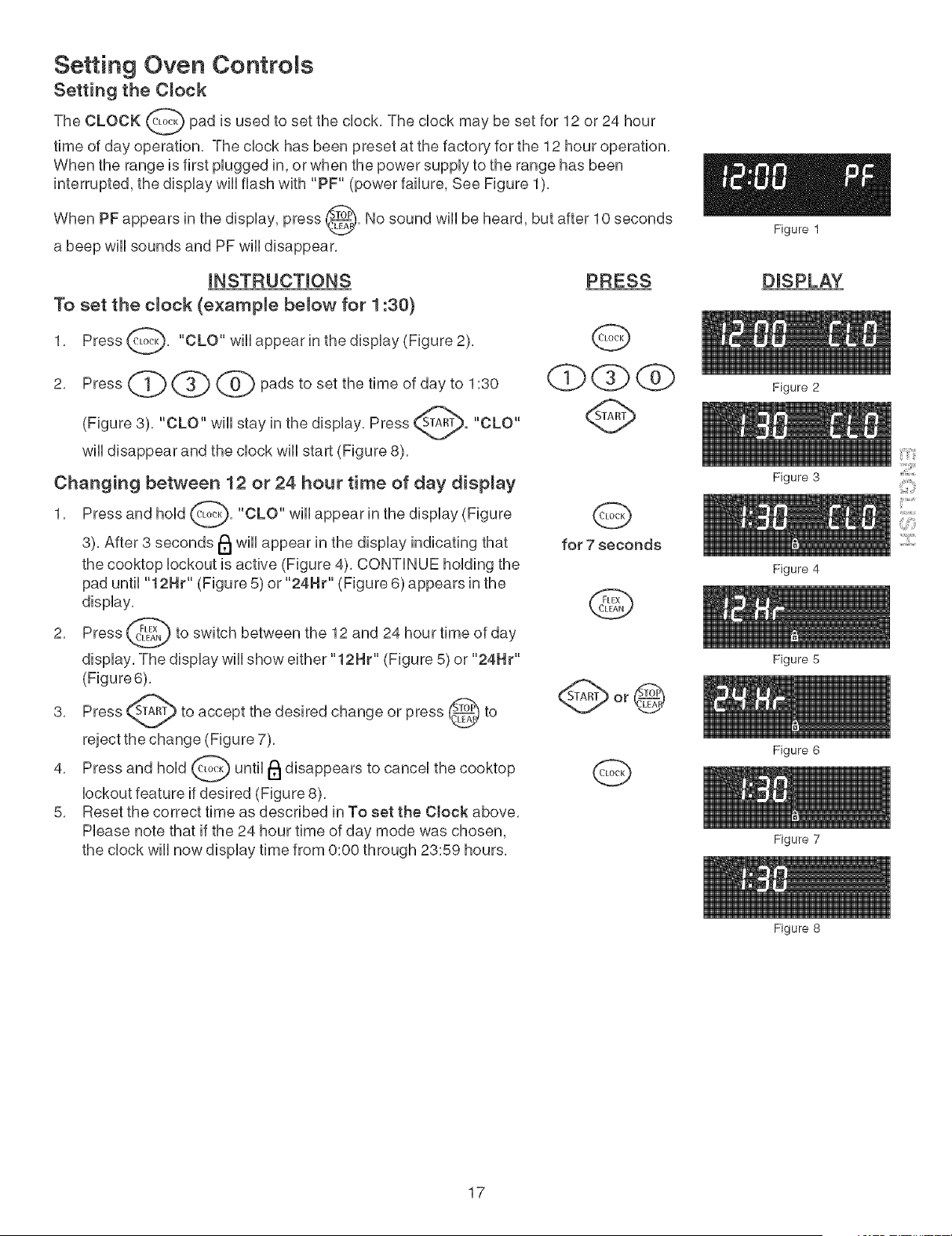
Setting Oven Controls
Setting the Clock
The CLOCK (_ pad is used to set the dock, The dock may be set for 12 or 24 hour
time of day operation, The dock has been preset at the factory for the 12 hour operation,
When the range is first plugged in, or when the power supply to the range has been
interrupted, the display wHIflash with "PF" (power failure, See Figure 1),
When PF appears in the display, press _. No sound wHI be heard, but after 10 seconds
a beep wHI sounds and PF wHIdisappear,
INSTRUCTIONS
To set the clock (e×ample below for 1:30)
1, Press@, "CLO" wHlappear in the display (Figure 2),
2,
Press (,_1_ (_.3j) (_ pads to set the time of day to 1:30
"CLO" wHI stay in the display, Press _. "CLO"(Figure 3),
wHIdisappear and the clock will start (Figure 8),
Changing between 12 or 24 hour time of day display
1, Press and hold _, "CLO" will appear in the
display (Figure
3), After 3 seconds lel will appear in the display indicating that
the cooktop lockout is active (Figure 4), CONTINUE holding the
pad until "12Hr" (Figure 5) or "24HP' (Figure 6) appears in the
display,
2, Press _ to switch between the 12 and 24 hour time of
day
display, The display will show either "12Hr" (Figure 5) or "24Hr"
(Figure6),
3, Press _Am_) to accept the desired change or press _ to
reject the change (Figure 7),
4, Press and hold _ until I_1disappears to cancel the
cooktop
lockout feature if desired (Figure 8),
5, Reset the correct time as described in To set the Clock above,
Please note that if the 24 hour time of day mode was chosen,
the clock will now display time from 0:00 through 23:59 hours,
PRESS
Q
d)Qdb
Q
for 7 seconds
Q
Q
Figure 1
DISPLAY
Figure 2
Figure 3
Figure 4
Figure 5
Figure 6
Figure 7
Figure 8
17
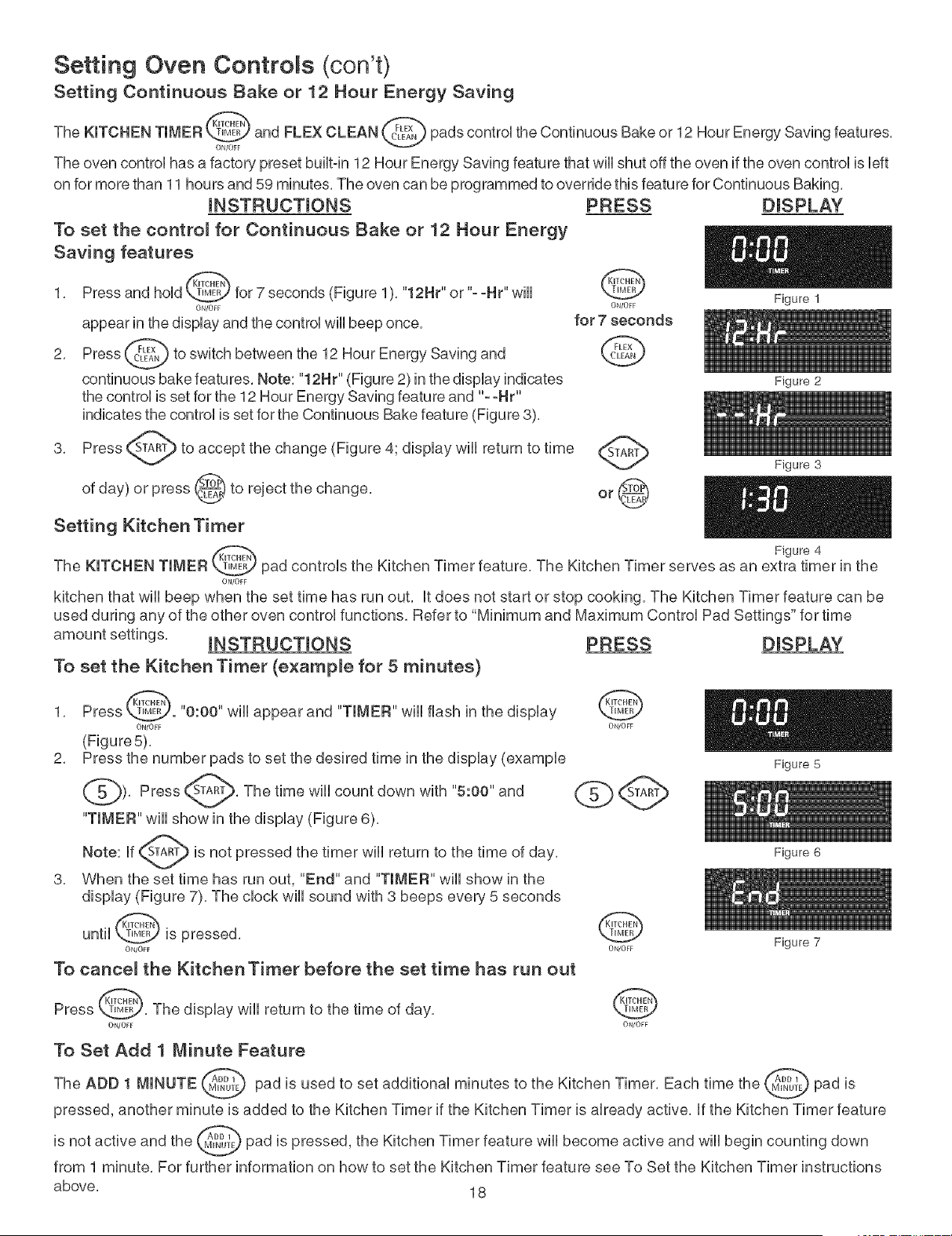
Setting Oven Controls @on't)
Setting Continuous Bake or 12 Hour Energy Saving
The KITCHEN TIMER _ and FLEX CLEAN _ pads controUthe Continuous Bake or 12 Hour Energy Saving features,
ON/OFF
The oven control has a factory preset built-in 12 Hour Energy Saving feature that wili shut off the oven if the oven control is left
on for more than 11 hours and 59 minutes, The oven can be programmed to override this feature for Continuous Baking,
mNSTRUCTmONS
To set the control for Continuous Bake or 12 Hour Energy
Saving features
1, Press and hoUd_ for 7 seconds (Figure 1), "12H¢' or "- -He' wHU
ON/OFF
appear in the display and the control wili beep once,
2, Press _ to switch between the 12 Hour Energy Saving and
continuous bake features, Note: "12H€' (Figure 2) in the display indicates
the control is set for the 12 Hour Energy Saving feature and "--He'
indicates the control is set for the Continuous Bake feature (Figure 8),
3, Press _ to accept the change (Figure 41 display will return to
time
day) or press @ to reject the change,
of
Setting Kitchen Timer
PRESS
@
ON/OFF
for 7 seconds
@
DISPLAY
Figure 1
Figure 2
Figure 3
Figure 4
The KITCHEN TIMER pad controls the Kitchen Timer feature, The Kitchen Timer serves as an extra timer in the
ON/OFF
kitchen that wiil beep when the set time has run out, it does not start or stop cooking, The Kitchen Timer feature can be
used during any of the other oven control functions, Refer to "Minimum and Maximum Control Pad Settings" for time
[NSTRUCTIONS
To set the Kitchen Timer (example for 5 minutes)
PRESS DISPLAY
1, Press _. "0:00" wili appear and "TIMER" wili flash in the display
ON/OFF ON/OFF
(Figure 5),
2, Press the number pads to set the desired time in the display (example
_), Press _'TA_, The time will down with "5:00" and
count
"TIMER" wiii show in the display (Figure 6),
Note: if _ is not pressed the timer will return to the time of day,
v
3, When the set time has run out, "End" and "TIMER" wiii show in the
display (Figure 7), The clock will sound with 3 beeps every 5 seconds
until @ is pressed, @
ON/OFF ON/OFF
To cancel the Kitchen Timer before the set time has run out
Figure 5
Press @, The display wili return to the time of day,
ON/OFF
@
ON/OFF
Figure 6
Figure 7
To Set Add 1 Minute Feature
The ADD 1 MINUTE (.._ pad is used to set additional minutes to the Kitchen Timer, Each time the _ pad is
pressed, another minute is added to the Kitchen Timer if the Kitchen Timer is already active, if the Kitchen Timer feature
is not active and the @_ pad is pressed, the Kitchen Timer feature will become active and will begin counting down
from 1 minute, For further information on how to set the Kitchen Timer feature see To Set the Kitchen Timer instructions
above, 18
Setting Oven Controls @on't)
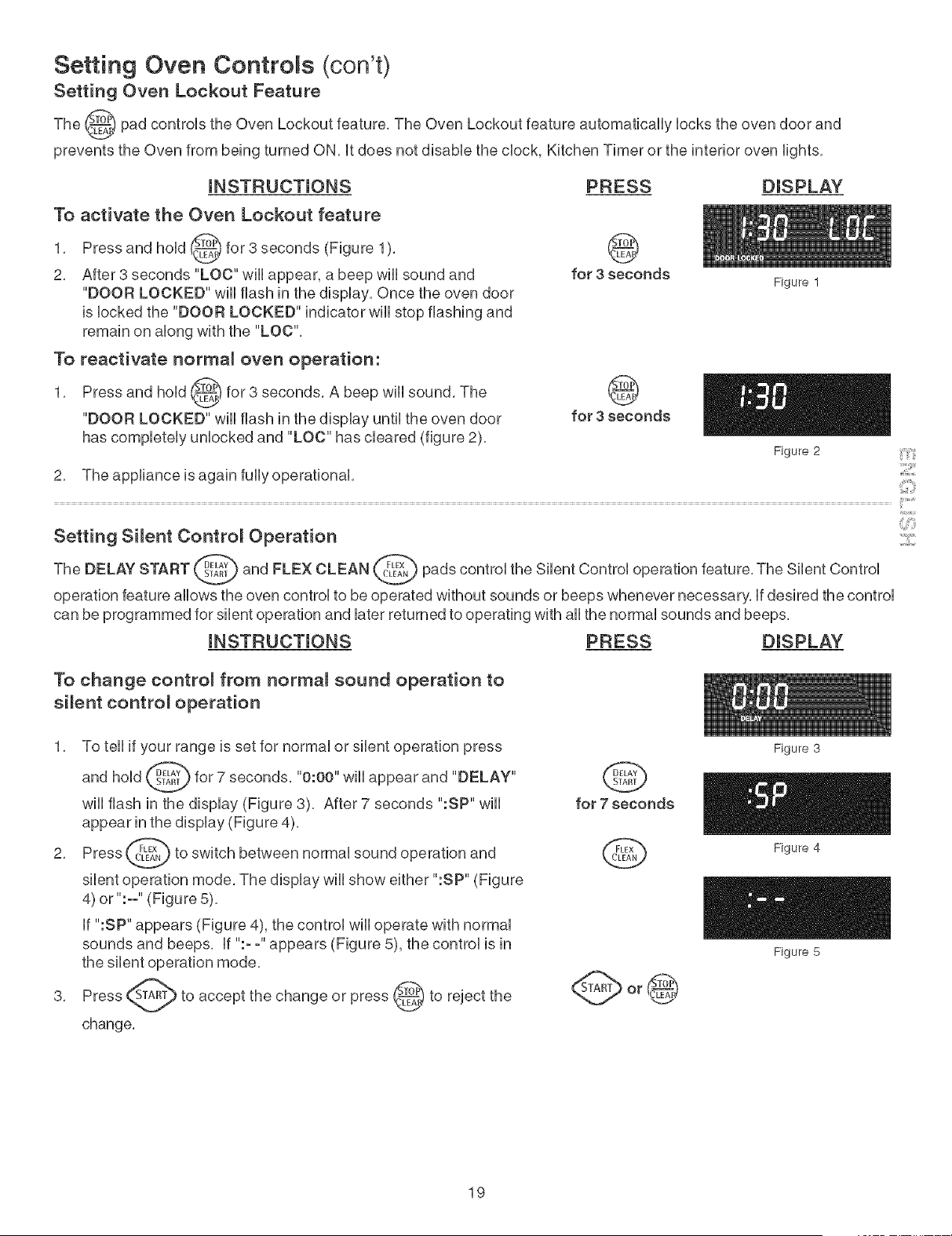
Setting Oven Lockout Feature
The _ pad controUs the Oven Lockout feature, The Oven Lockout feature automatbaHy bcks the oven door and
prevents the Oven from being turned ON, it does not disabb the dock, Kitchen Timer or the interior oven fights,
iNSTRUCTiONS
To activate the Oven Lockout feature
1, Press and hoUd_ for 3 seconds (Figure 1),
v
2, After 3 seconds "LOC" wHUappear, a beep wHUsound and
"DOOR LOCKED" wHUflash in the dispUay, Once the oven door
is bcked the "DOOR LOCKED" indicator wHUstop flashing and
remain on abng with the "LOC",
To reactivate normal oven operation:
1, Press and hoUd_ for 3 seconds, A beep wHUsound, The
v
"DOOR LOCKED" wHUflash in the dispUay until the oven door
has completely unlocked and "LOC" has cleared (figure 2),
2, The appliance is again fully operational,
PRESS DISPLAY
@
for 3 seconds
@
for 3 seconds
Figure 1
Figure 2
INSTRUCTIONS PRESS DISPLAY
To change control from normal sound operation to
silent control operation
1, To tell if your range is set for normal or silent operation press
and hold _ for 7 seconds, "0:00" wiii appear and "DELAY"
will flash in the display (Figure 3), After 7 seconds ":SP" will
appear in the display (Figure 4),
2, Press _ to switch between normal sound operation and
silent operation mode, The display will show either ":SP" (Figure
4) or ":-" (Figure 5),
if ":SP" appears (Figure 4), the control will operate with normal
sounds and beeps, if ":- -" appears (Figure 5), the control is in
the silent operation mode,
accept the change or press @ to reject
3, to the
change,
@
for 7 seconds
0
Figure 3
Figure 4
Figure 5
19
Setting Oven ControRs (con't)
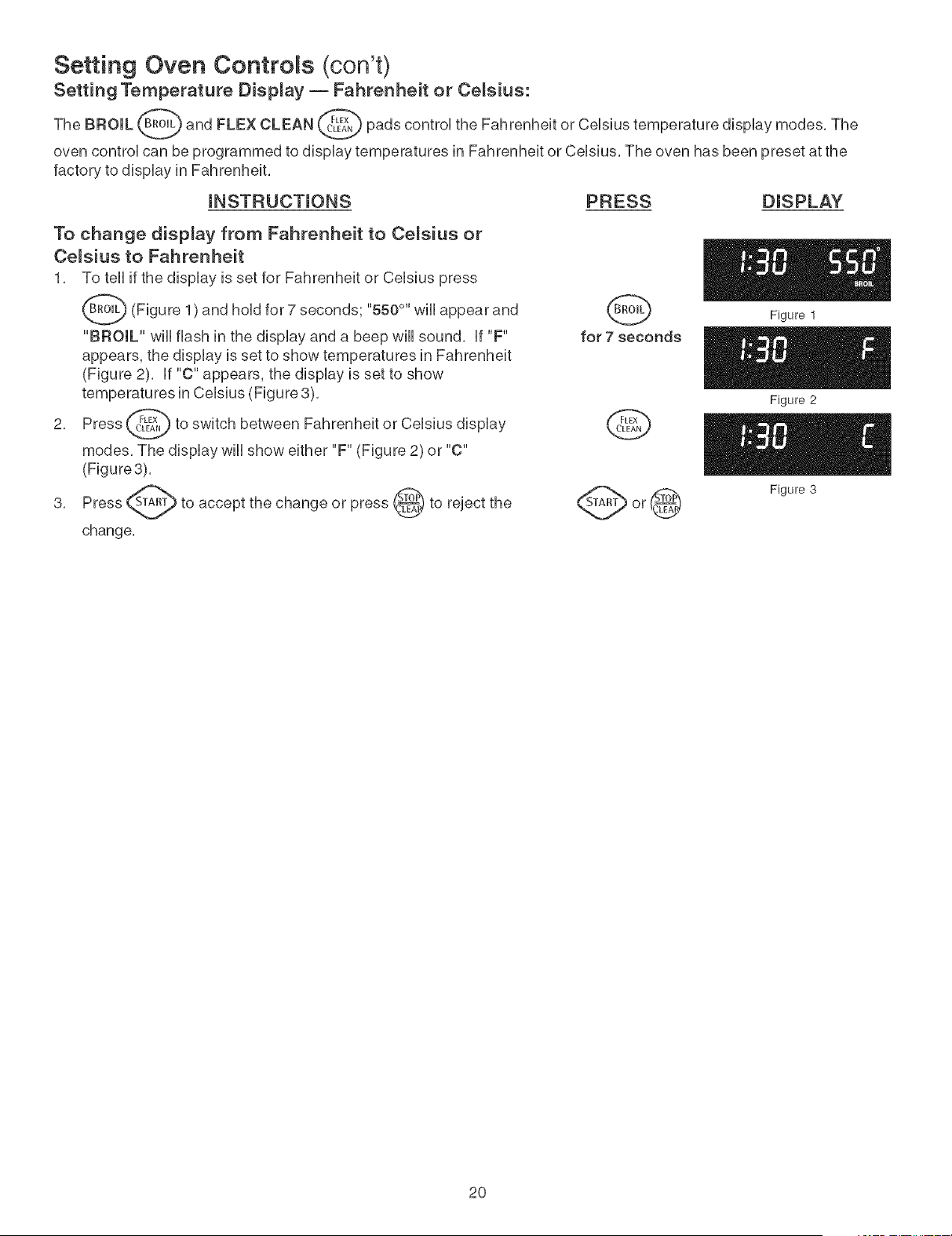
Setting Temperature Display -- Fahrenheit or Celsius:
The BROIL Bm_L_ and FLEX CLEAN _,_ pads controU the Fahrenheit or CeUsiustemperature dispUay modes. The
V
V
oven controU can be programmed to dispUay temperatures in Fahrenheit or CeUsius. The oven has been preset at the
factory to dispUay in Fahrenheit.
mNSTRUCTmONS PRESS DISPLAY
To change display from Fahrenheit to Celsius or
Celsius to Fahrenheit
1. To tell if the dispUay is set for Fahrenheit or CeUsiuspress
_(Figure andhoUdfor7 "550 °"wHu
1
) seconds; appear and
"BROIL" will flash in the display and a beep will sound, if "F"
appears, the display is set to show temperatures in Fahrenheit
(Figure 2), if "C" appears, the display is set to show
temperatures in Celsius (Figure 3),
2, Press _ to switch between Fahrenheit or Celsius display
modes, The display will show either "F" (Figure 2) or "C"
(Figure3),
accept the change or press _ to reject
3, to the
change,
for 7 seconds
Q
Figure 1
Figure 2
Figure 3
2O

Setting Oven Controls (con't)
Setting Preheat
The PREHEAT _,PE"AE_-_pad controHsthe Preheat feature. The Preheat feature wHHbring the oven up to temperature and
then indicate when to pHacethe food in the oven. Use this feature when recipes caHHfor preheating. Preheating is not
necessary when roasting or cooking casseroHes. The oven can be programmed to preheat at any temperature between
170°F to 550°F.
mNSTRUCTmONS
To set the Preheat temperature for 350°F
1, Arrange the interior oven racks,
2. Press "- - - °" and "BAKE" wHHappear in the dispHay
(Figure 1).
3. Press _ @ @. "350 °" wHHappear in the dispHay
(Figure2).
4. Press _'_Am_. "PRE" and "BAKE" wHHappear in the
dispHay
as
the oven heats and reaches 350°F (Figure 3).
Note: After the oven has reached the desired temperature (this
exampHe, 350°F) the controH wHHbeep and the "PRE" HightwiHHturn
off and oven temperature wiHHbe dispHayed (Figure 4). Hfyou missed
hearing the beep, you can teHHthat the oven has reached preheat
temperature if you see the oven temperature showing in the oven
dispHay. Once the oven has preheated, place food in the oven. The
"BAKE" light wiii stay on.
Press _ when baking is complete or to cancel the
preheat
v
feature.
PRESS
G
@
DISPLAY
Figure 1
Figure 2
To change Preheat temperature while oven is
preheating (e×amp_e: changing from 350°F to 425°F)
Hfit is necessary to change the preheat temperature whiHethe oven
is preheating to the originaH temperature:
1. WhiHe preheating, press _,_'E"AET_."- - -°" and "BAKE" wiHHappear
in the dispHay (Figure 5)
2. Enter the new preheat temperature. Press @ _ @.
"425 °" and "BAKE" wiHHappear in the dispHay(Figure 6).
Press _'_Am_. "PRE" and "BAKE" wiHHappear in the
3.
dispHay
as
the oven heats to 425°F (Figure 7). A beep wiHHsound once the
oven temperature reaches 425°F and the dispHay wiHHshow
"425 °" and "BAKE" (Figure 8).
baking is compHete press _).4. When
Q
C b(2>(2)
Figure 3
Figure 4
Figure 5
Figure 6
Figure 7
Figure 8
21
Setting Oven Controls @on't)
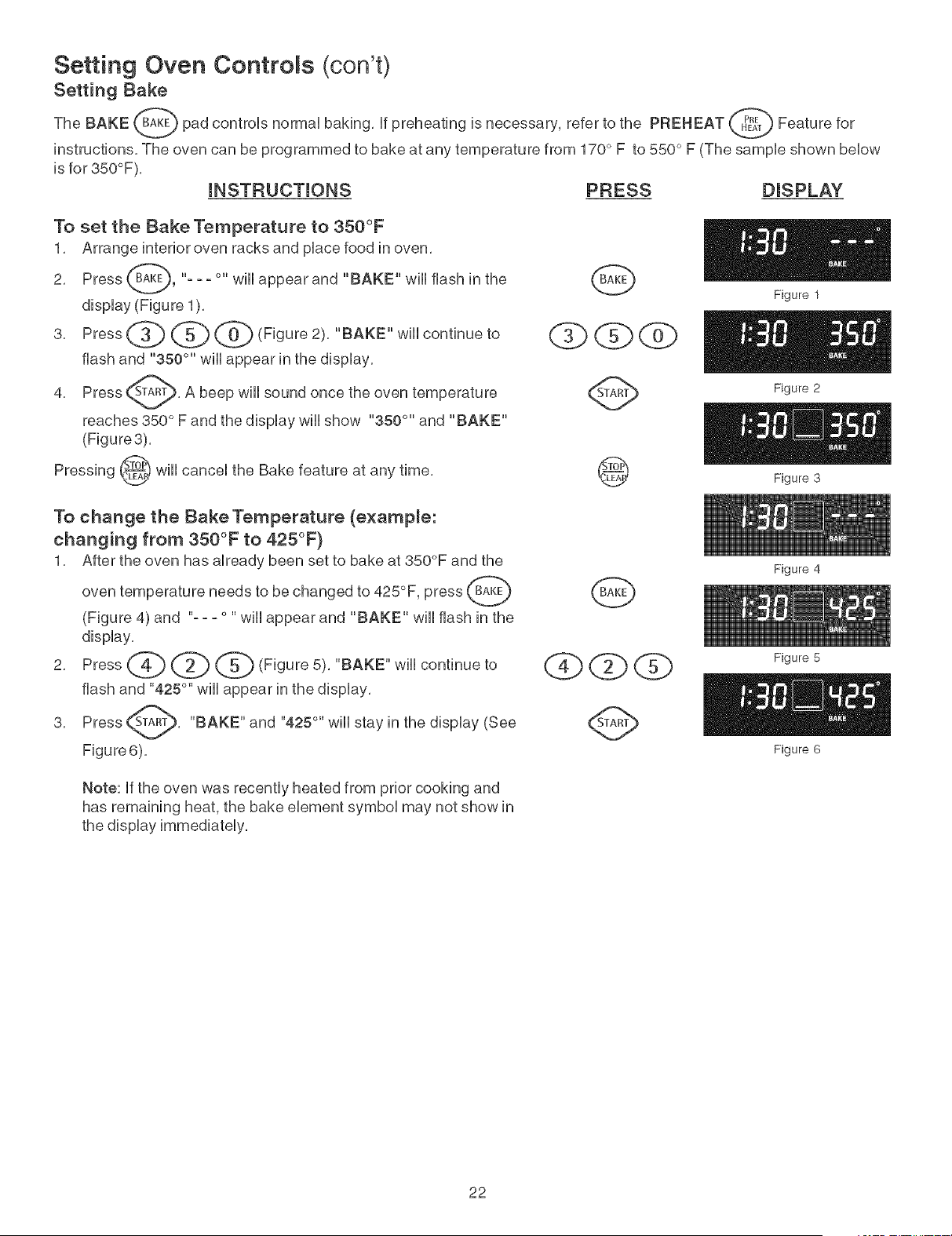
Setting Bake
The BAKE B_KE_ pad controls normal baking, if preheating is necessary, refer to the PREHEAT _ Feature for
instructions, The oven can be programmed to bake at any temperature from 170 ° F to 550 ° F (The sample shown below
is for 350°F),
INSTRUCTIONS PRESS DISPLAY
To set the Bake Temperature to 350°F
1, Arrange interior oven racks and pUacefood in oven,
Press _'-A_E}, "- - - °" WHUappear and "BAKE" wHUflash in the
2,
dispUay(Figure 1),
3, Press _ _ (0_ (Figure 2>, "BAKE" wHUcontinue to
flash and "350 °'' wHUappear in the dispUay,
Press _A_, A beep wHUsound once the
4, oven
reaches 350 ° F and the display wiii show "350 °" and "BAKE"
(Figure3),
_ will cancel the Bake feature at any time,
Pressing
( Qdg)
@
Figure 1
Figure 2
Figure 3
To change the Bake Temperature (example:
changing from 350°F to 425°F)
1, After the oven has aUready been set to bake at 350°F and the
oven temperature needs to be changed to 425°F, press
(Figure 4) and "- - - ° "will appear and "BAKE" will flash in the
dispUay,
2, Press _ _ _ {Figure5), "BAKE" wHUcontinue to
flash and "425 °" will appear in the display,
Press _A_, "BAKE" and "425 °'' will stay in the
3,
display (See
Figure6),
G
Qbd2bQ
Figure 4
Figure 5
Figure 6
Note: if the oven was recently heated from prior cooking and
has remaining heat, the bake element symbol may not show in
22
Setting Oven Controls (cont'd)
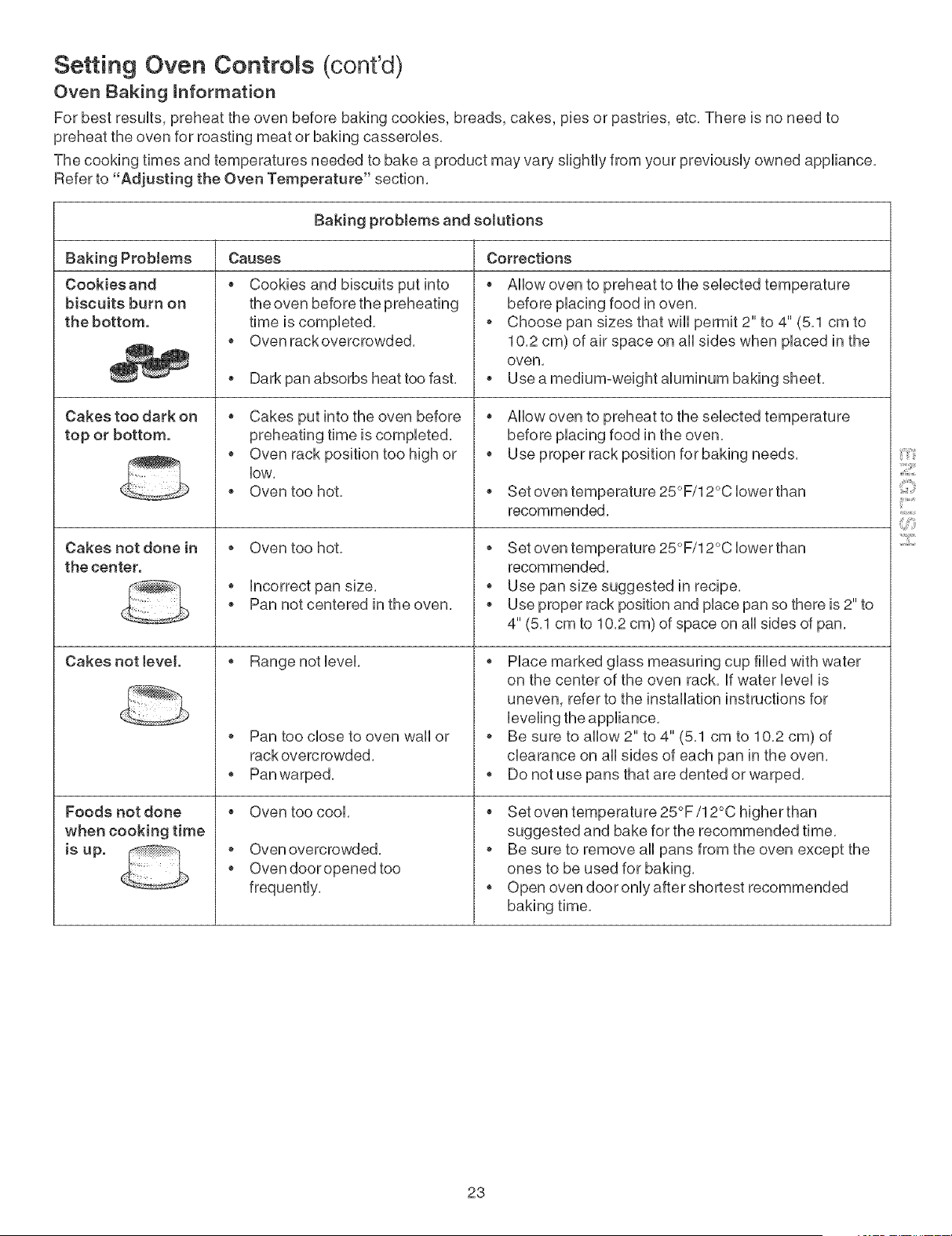
Oven Baking hformation
For best resuUts,preheat the oven before baking cookies, breads, cakes, pies or pastries, etc, There is no need to
preheat the oven for roasting meat or baking casseroUes,
The cooking times and temperatures needed to bake a product may vary sHghtUyfrom your previousUy owned appliance,
Refer to "Adjusting the Oven Temperature" section,
Baking problems and solutions
Causes Corrections
Baking ProMems
Cookies and
biscuits burn on
the bottom.
Cakes too dark on
top or bottom.
Cakes not done in
the center.
Cakes not level
Foods not done
when cooking time
is up.
Cookies and biscuits put into
the oven before the preheating
time is compUeted,
Oven rack overcrowded,
Dark pan absorbs heat too fast,
Cakes put into the oven before
preheating time is completed,
Oven rack position too high or
low,
Oven too hot,
o Oven too hot,
o Incorrect pan size,
Pan not centered in the oven,
Range not level,
Pan too close to oven wall or
rack overcrowded,
Pan warped,
Oven too cool,
Oven overcrowded,
Oven door opened too
frequently,
Allow oven to preheat to the selected temperature
before placing food in oven,
Choose pan sizes that will permit 2" to 4" (5,1 cm to
10,2 cm) of air space on all sides when placed in the
oven,
Use a medium-weight aluminum baking sheet,
Allow oven to preheat to the selected temperature
before placing food in the oven,
Use proper rack position for baking needs,
Set oven temperature 25°F/12°C lower than
recommended,
Set oven temperature 25°F/12°C lower than
recommended,
o Use pan size suggested in recipe,
Use proper rack position and place pan so there is 2" to
4" (5,1 cm to 10,2 cm) of space on all sides of pan,
Place marked glass measuring cup filled with water
on the center of the oven rack, If water level is
uneven, refer to the installation instructions for
Be sure to allow 2" to 4" (5,1 cm to 10,2 cm) of
clearance on all sides of each pan in the oven,
Do not use pans that are dented or warped,
Set oven temperature 25°F/12°C higher than
suggested and bake for the recommended time,
Be sure to remove all pans from the oven except the
ones to be used for baking,
Open oven door only after shortest recommended
baking time,
23
Setting Oven Controls (cont'd)
Setting Convection Bake
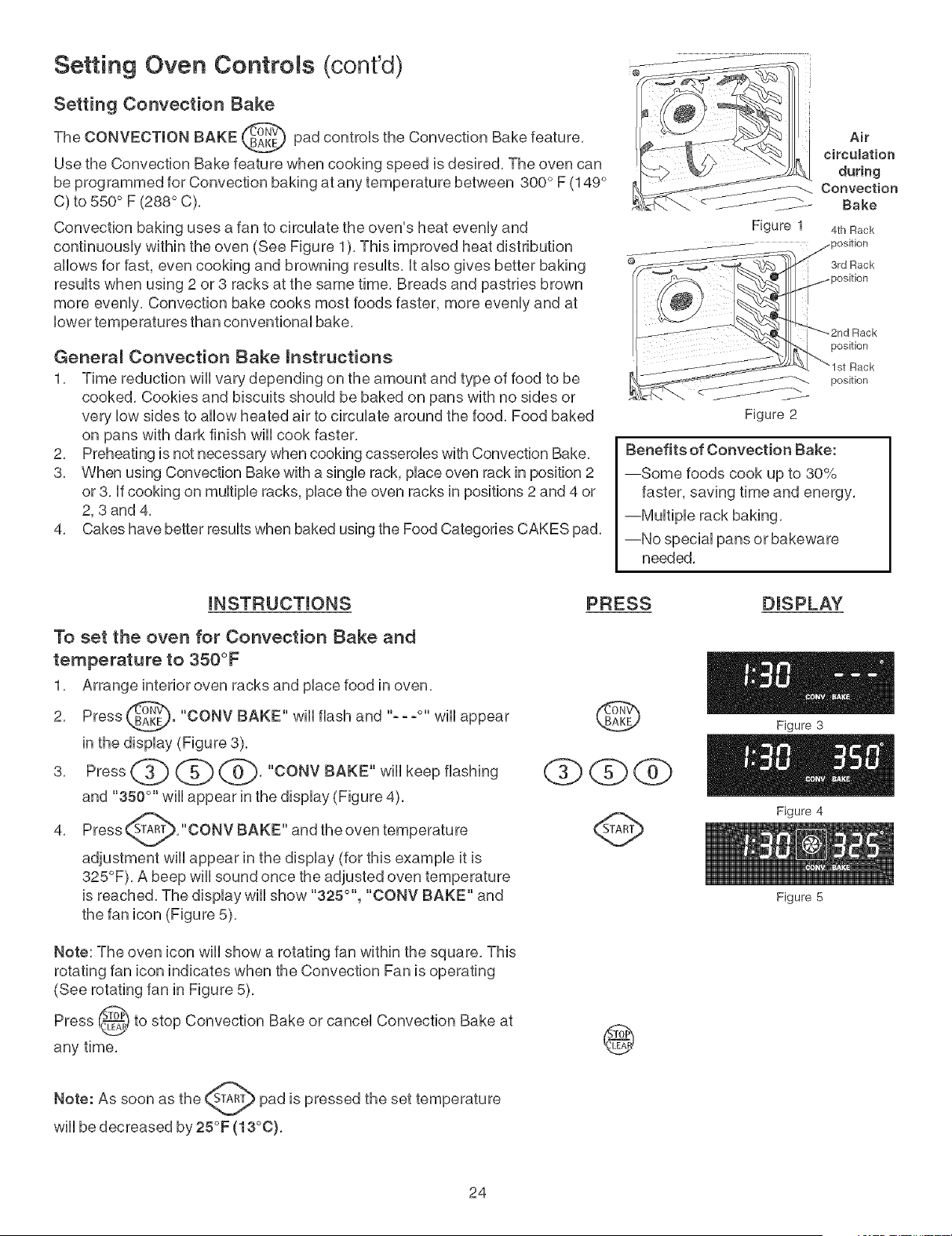
The CONVECTION BAKE _ pad controls the Convection Bake feature,
v
Use the Convection Bake feature when cooking speed is desired, The oven can
be programmed for Convection baking at any temperature between 300 ° F (149 °
C) to 550 ° F (288 ° C),
Convection baking uses a fan to circulate the oven's heat evenly and
continuously within the oven (See Figure 1), This improved heat distribution
allows for fast, even cooking and browning results, It also gives better baking
results when using 2 or 3 racks at the same time, Breads and pastries brown
more evenly, Convection bake cooks most foods faster, more evenly and at
lower temperatures than conventional bake,
General Convection Bake instructions
1, Time reduction will vary depending on the amount and type of food to be
cooked, Cookies and biscuits should be baked on pans with no sides or
very low sides to allow heated air to circulate around the food, Food baked
on pans with dark finish will cook faster,
2, Preheating is not necessary when cooking casseroles with Convection Bake,
3, When using Convection Bake with a single rack, place oven rack in position 2
or 3, If cooking on multiple racks, place the oven racks in positions 2 and 4 or
2, 3 and 4,
4, Cakes have better results when baked using the Food Categories CAKES pad,
Air
circulation
during
Convection
Bake
Figure 1 4th Rack
3rd Rack
Figure 2
position
Rack
position
Benefits of Convection Bake:
--Some foods cook up to 30%
faster, saving time and energy,
--Multiple rack baking,
--No special pans or bakeware
needed,
iNSTRUCTiONS
To set the oven for Convection Bake and
temperature to 350°F
1, Arrange interior oven racks and place food in oven,
2, Press _. "CONV BAKE" will flash and "---°" will appear
in the display (Figure 3).
3, Press _ @ @, "CONV BAKE" will keep flashing
and "350 °'' will appear in the display (Figure 4),
Press _A_, "CONV BAKE" and the
4,
oven
temperature
adjustment will appear in the display (for this example it is
325°F), A beep will sound once the adjusted oven temperature
is reached, The display will show "325 °'', "CONV BAKE" and
PRESS DISPLAY
Figure 3
Figure 4
Note: The oven icon will show a rotating fan within the square, This
rotating fan icon indicates when the Convection Fan is operating
(See rotating fan in Figure 5),
Press @ to stop Convection Bake or cancel Convection Bake at
V
any time,
A
Note: As
soon as the (_A_) pad is pressed the set temperature
will be decreased by 25°F (13°0),
@
24
Figure 5
Setting Oven Controls (cont'd)
Setting Convection Convert Feature
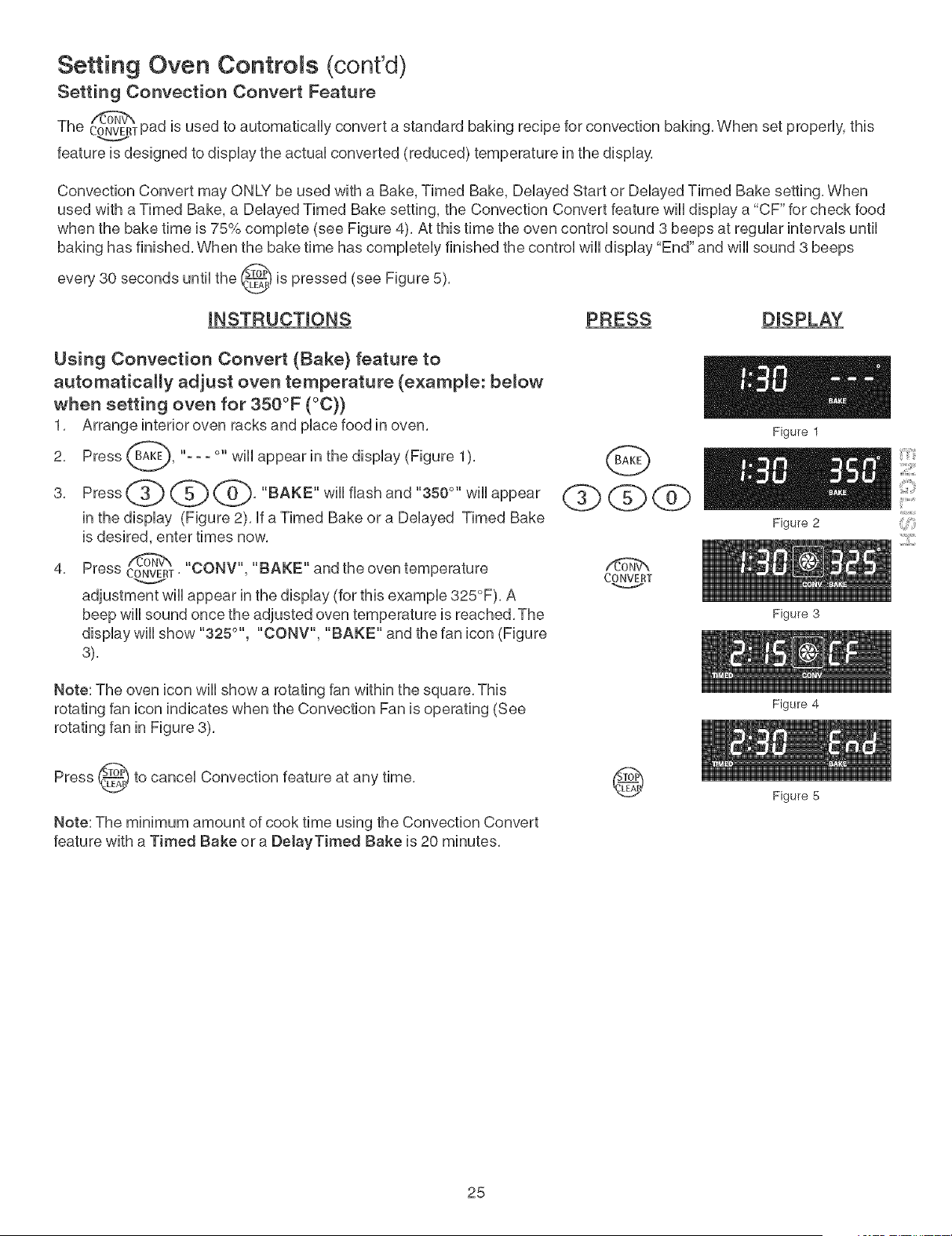
The CONVERTpad is used to automatbaHy convert a standard baking recipe for convection baking, When set properUy,this
feature is designed to dispUaythe actuaUconverted (reduced) temperature in the dispUay,
Convection Convert may ONLY be used with a Bake, Timed Bake, Delayed Start or Delayed Timed Bake setting, When
used with a Timed Bake, a Delayed Timed Bake setting, the Convection Convert feature will display a "CF" for check food
when the bake time is 75% complete (see Figure 4), At this time the oven control sound 3 beeps at regular intervals until
baking has finished, When the bake time has completely finished the control will display "End" and will sound 3 beeps
every 30 seconds until the _ is pressed (see Figure 5),
iNSTRUCTiONS PRESS DISPLAY
Using Convection Convert (Bake} feature to
automatically adjust oven temperature (example: below
when setting oven for 350°F (°C}}
1, Arrange interior oven racks and pUacefood in oven,
2, Press B_-KE_, "--- °" WHUappear in the dispUay (Figure 1
),
3, Press _} _ _, "BAKE" wHUflash and "350 °" wHUappear
in the display (Figure 2), If a Timed Bake or a Delayed Timed Bake
is desired, enter times now,
/dT@_
4, Press CONVERT'"CONV", "BAKE" and the oven temperature
adjustment will appear in the display (for this example 325°F), A
beep will sound once the adjusted oven temperature is reached, The
display will show "325 °'', "CONV", "BAKE" and the fan icon (Figure
3),
/tSW'w
CONVERT
Note: The oven icon wiii show a rotating fan within the square, This
rotating fan icon indicates when the Convection Fan is operating (See
rotating fan in Figure 3),
Press (_) to cancel Convection feature at any time,
Note: The minimum amount of cook time using the Convection Convert
feature with a Timed Bake or a DelayTimed Bake is 20 minutes,
@
25
Figure 3
Figure 4
Figure 5
Setting Oven Controls (cont'dl
Setting the S_ow Cook Feature
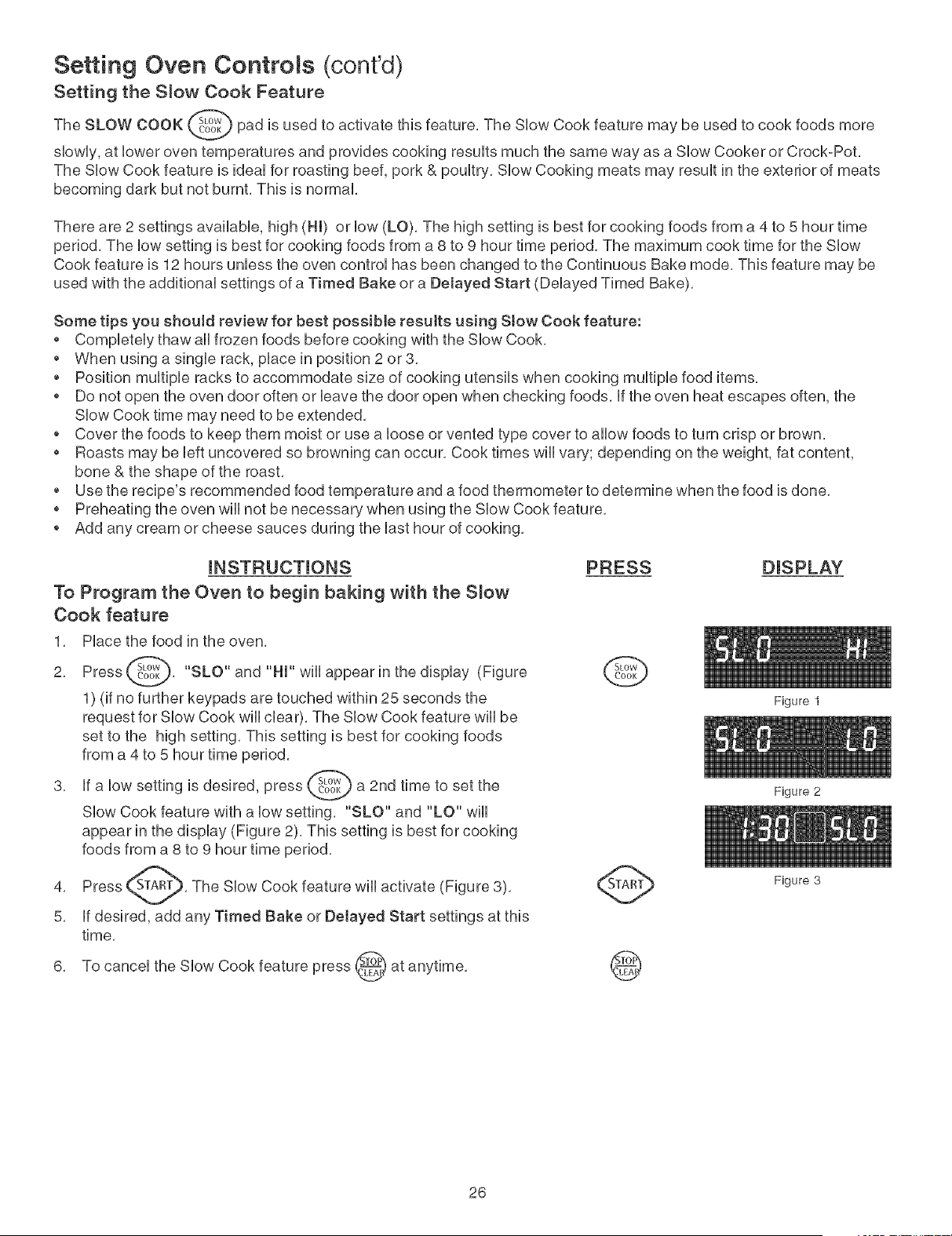
The SLOW COOK _) pad is used to activate this feature, The SHowCook feature may be used to cook foods
more
showily,at Howeroven temperatures and provides cooking resuHtsmuch the same way as a SHow Cooker or Crock-Pot,
The SHowCook feature is ideaHfor roasting beef, pork & pouHtry, SHowCooking meats may resuHtin the exterior of meats
becoming dark but not burnt, This is normal
There are 2 settings avaHabHe, high (HI) or How(LO). The high setting is best for cooking foods from a 4 to 5 hour time
period. The Howsetting is best for cooking foods from a 8 to 9 hour time period. The maximum cook time for the SHow
Cook feature is 12 hours unHess the oven controH has been changed to the Continuous Bake mode. This feature may be
used with the additionaH settings of a Timed Bake or a Delayed Start (DeHayed Timed Bake).
Some tips you should review for best possible resutts using Stow Cook feature:
* CompHeteHythaw aHHfrozen foods before cooking with the SHowCook,
* When using a singHe rack, pHacein position 2 or 3,
* Position muHtipHeracks to accommodate size of cooking utensiHs when cooking muHtipHefood items,
o Do not open the oven door often or Heavethe door open when checking foods, Hfthe oven heat escapes often, the
SHowCook time may need to be extended,
o Cover the foods to keep them moist or use a Hoose or vented type cover to aHHowfoods to turn crisp or brown,
* Roasts may be Heftuncovered so browning can occur, Cook times wiHHvary; depending on the weight, fat content,
bone & the shape of the roast,
* Use the recipe's recommended food temperature and a food thermometer to determine when the food is done,
o Preheating the oven wiHHnot be necessary when using the SHow Cook feature,
o Add any cream or cheese sauces during the Hasthour of cooking,
mNSTRUCTmONS
To Program the Oven to begin baking with the S_ow
Cook feature
1, PHace the food in the oven,
Press _, "SLO" and "HI" wiHHappear in the
2,
dispHay (Figure
1) (if no further keypads are touched within 25 seconds the
request for SHowCook wiHHdear), The SHowCook feature wiHHbe
set to the high setting, This setting is best for cooking foods
from a 4 to 5 hour time period,
3, Hfa Howsetting is desired, press _,_;_ a 2nd time to set
the
SHowCook feature with a Howsetting, "SLO" and "LO" wiHH
appear in the dispHay (Figure 2), This setting is best for cooking
foods from a 8 to 9 hour time period,
PRESS DISPLAY
G
4. The SHowCook feature wiHHactivate (Figure 3).
5. Hfdesired, add any Timed Bake or Detayed Start settings at this
time.
6. To canceH the SHowCook feature press _._ at
anytime.
@
26
Figure 1
Figure 2
Figure 3
Setting Oven Controls (cont'dl
Setting Timed Sake,Timed Convection Sake or Timed Convection Roast
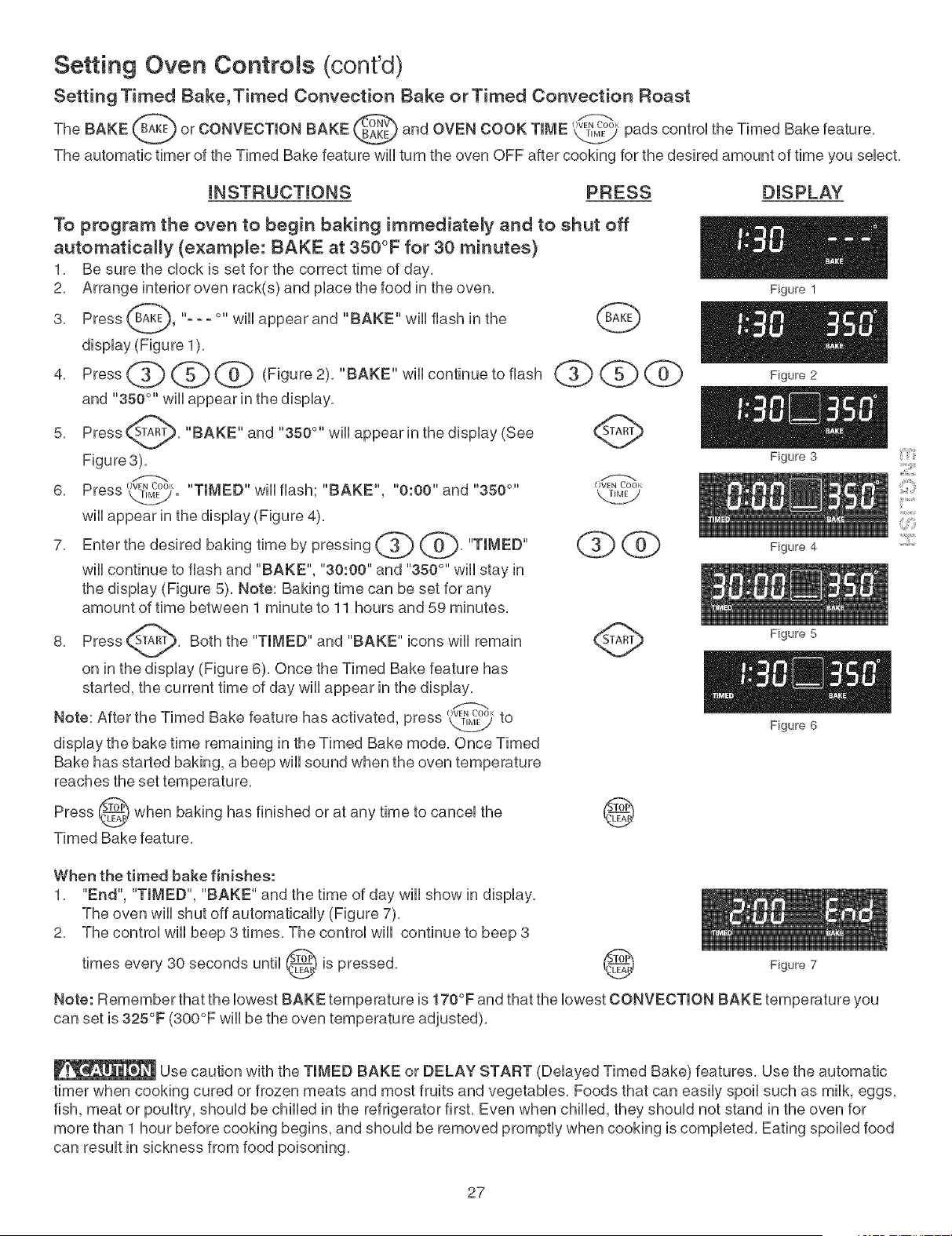
The SAKE _t'_aK_or CONVECTION SAKE v_BAKEI)and OVEN COOK TIME k.2j pads control the Timed Bake feature,
The automatic timer of the Timed Bake feature will turn the oven OFF after cooking for the desired amount of time you select,
iNSTRUCTiONS PRESS DISPLAY
To program the oven to begin baking immediately and to shut off
automatically (example: BAKE at 350°F for 30 minutes}
1, Be sure the clock is set for the correct time of day,
2, Arrange interior oven rack(s) and place the food in the oven,
3, Press _-AKE_, "- - - °" Will appear and "SAKE" will flash in the
display (Figure 1),
4,Press<Z>@ @ Figure"SAKE"willcontinuetoflash @ @
and "350 °'' will appear in the display,
5, Press @, "SAKE" and "350°" will appear in the display (See @
Figure3),
6, Press ,_. "TIMED" will flash; SAKE , "0:00" and "350 °''
will appear in the display (Figure 4),
7,Enterthedesiredbakingtimebypressingq>rib"TIMED"@ @
will continue to flash and "SAKE", "30:00" and "350 °" will stay in
the display (Figure 5), Note: Baking time can be set for any
amount of time between 1 minute to 11 hours and 59 minutes,
8, Press _, Both the "TIMED" and "SAKE" icons will remain S_AR_'_
on in the display (Figure 6), Once the Timed Bake feature has
started, the current time of day will appear in the display,
Note: After the Timed Bake feature has activated, press O_,<kT,M_to
display the bake time remaining in the Timed Bake mode, Once Timed
Bake has started baking, a beep will sound when the oven temperature
reaches the set temperature,
Press @ when baking has finished or at any time to cancel the
Timed Bake feature,
Figure 1
Figure 2
Figure 3
Figure 4
Figure 5
Figure 6
When the timed bake finishes:
1, "End", "TIMED", "SAKE" and the time of day will show in display,
The oven will shut off automatically (Figure 7),
2, The control will beep 3 times, The control will continue to beep 3
times every 30 seconds until _ is
pressed,
Figure 7
Note: Remember that the lowest SAKE temperature is 170°F and that the lowest CONVECTION SAKE temperature you
can set is 325°F (300°F will be the oven temperature adjusted),
::iii!i::_il
¸:121111
Use caution with the TIMED SAKE or DELAY START (Delayed Timed Bake) features, Use the automatic
timer when cooking cured or frozen meats and most fruits and vegetables, Foods that can easily spoil such as milk, eggs,
fish, meat or poultry, should be chilled in the refrigerator first, Even when chilled, they should not stand in the oven for
more than 1 hour before cooking begins, and should be removed promptly when cooking is completed, Eating spoiled food
can result in sickness from food poisoning,
27
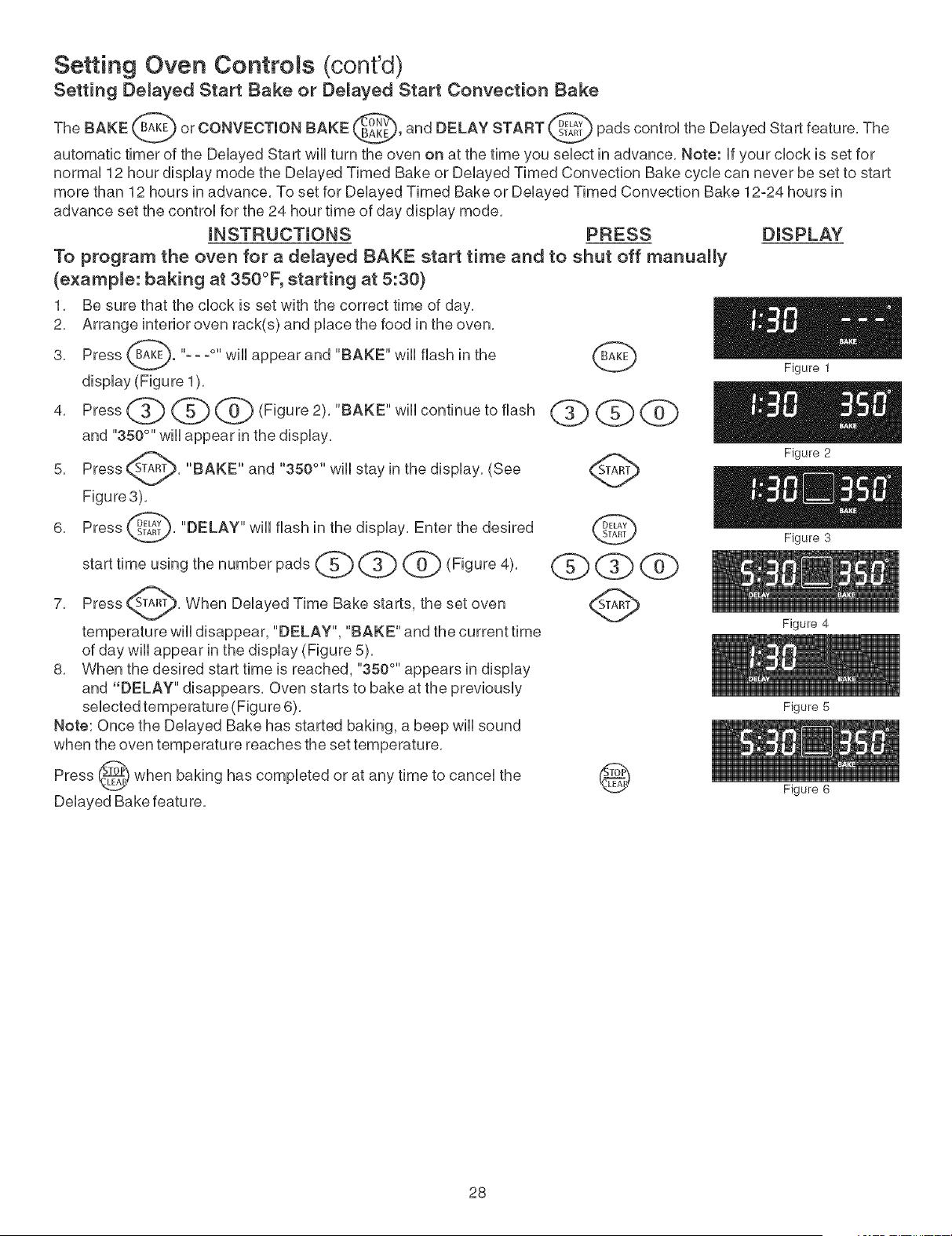
Setting Oven Controls (cont'd)
Setting Delayed Start Bake or Delayed Start Convection Bake
The BAKE _ or CONVECTION BAKE _, and DELAY START _ pads control the Delayed Start feature, The
automatic timer of the Delayed Start wH[turn the oven on at the time you select in advance, Note: If your clock is set for
normal 12 hour display mode the Delayed Timed Bake or Delayed Timed Convection Bake cycle can never be set to start
more than 12 hours in advance, To set for Delayed Timed Bake or Delayed Timed Convection Bake 12o24 hours in
advance set the control for the 24 hour time of day display mode,
INSTRUCTIONS PRESS DISPLAY
To program the oven for a delayed BAKE start time and to shut off manually
(example: baking at 350°F, starting at 5:30}
1, Be sure that the clock is set with the correct time of day,
2, Arrange interior oven rack(s) and place the food in the oven,
Press (_B_A_<E_."- - -°" Will appear and "BAKE" will flash in the
3,
display (Figure 1),
and "350°" will appear in the display,
Press _A_, "BAKE" and "350 °'' will stay in the
5,
display, (See
Figure3),
Press _._D_TE_,"DELAY" will flash in the display, Enter the desired
6,
7, Press _, When Delayed Time Bake starts, the set oven
temperature will disappear, "DELAY", "BAKE" and the current time
of day will appear in the display (Figure 5),
8, When the desired start time is reached, "350 °" appears in display
and "DELAY" disappears, Oven starts to bake at the previously
selected temperature (Figure 6),
Note: Once the Delayed Bake has started baking, a beep will sound
when the oven temperature reaches the set temperature,
Press _ when baking has completed or at any time to cancel the
v
Delayed Bake featu re,
@
q bq>@
Figure 1
Figure 2
Figure 3
@
28
Figure 4
Figure 5
Figure 6
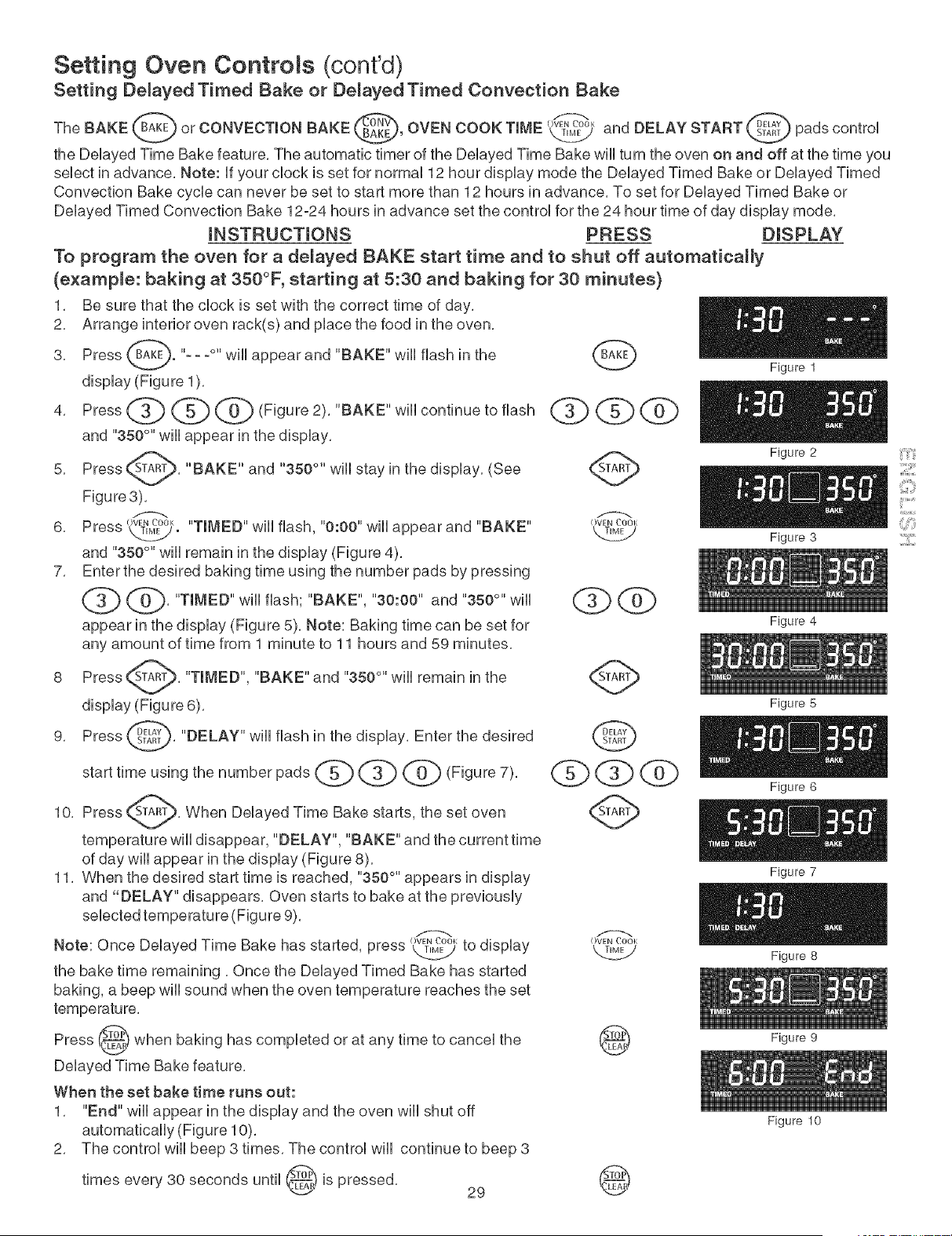
Setting Oven Controls (cont'd)
Setting De_ayed Timed Bake or De_ayed Timed Convection Bake
OW_N_°_",,T_ START _ pads controU
TheBAKE,..,orCONVECTIONBAKE OVENCOOKTiME andDELAY
the DeUayed Time Bake feature, The automatic timer of the DeUayed Time Bake wHUturn the even on and off at the time you
seUectin advance, Note: ff your clock is set for normal 12 hour display mode the Delayed Timed Bake or Delayed Timed
Convection Bake cycle can never be set to start more than 12 hours in advance, To set for Delayed Timed Bake or
Delayed Timed Convection Bake 12-24 hours in advance set the control for the 24 hour time of day display mode,
mNSTRUCTmONS PRESS DISPLAY
To program the oven for a de_ayed BAKE start time and to shut off automatically
(example: baking at 350°F, starting at 5:30 and baking for 30 minutes}
1, Be sure that the clock is set with the correct time of day,
2, Arrange interior oven rack(s) and place the food in the oven,
Press ([B_AK_."- - -°" Will appear and "BAKE" will flash in the
3,
display (Figure 1),
and "350°" will appear in the display,
Press <A_, "BAKE" and "350 °'' will stay in the
5,
display, (See
Figure3),
6, Press OVENCOOI<
_. "TIMED" Will flash, "0:00" will appear and "BAKE"
and "350°'' will remain in the display (Figure 4),
7, Enter the desired baking time using the number pads by pressing
"TIMED" will flash; "BAKE", "30:00" and "350 °" will
appear in the display (Figure 5), Note: Baking time can be set for
any amount of time from 1 minute to 11 hours and 59 minutes,
Press _A_, "TIMED", "BAKE" and "350 °'' will remain in the
8
display (Figure 6),
9, Press __S_TEAL_T_,"DELAY" Will flash in the display, Enter the desired
starttimeusingthe number pads _ _ @ (Figure7),
10, Press _A_, When DelayedTime Bake starts,the setoven
temperaturewilldisappear,"DELAY", "BAKE" and thecurrenttime
ofday willappear inthe display(Figure8),
1I, When thedesiredstarttimeisreached,"350°"appears indisplay
and "DELAY" disappears,Oven startstobake atthepreviously
selectedtemperature(Figure9),
O_K
Note: Once Delayed Time Bake has started,pressL_r2Mytodisplay
thebake time remaining,Once theDelayed Timed Bake has started
baking,a beep willsound when theoven temperaturereachestheset
dbQ@
OVEN ('001
Figure 1
Figure 2 ii'_ii!i'i
ill:iLl
Figure 3 ]iiii:_:iiiiii
@
Figure 4
Figure 5
Figure 6
Figure 7
Figure 8
Press (_F) when baking has completed or at any time to cancel the
Delayed Time Bake feature,
When the set bake time runs out:
1, "End" will appear in the display and the oven will shut off
automatically (Figure 10),
2, The control will beep 3 times, The control will continue to beep 3
times every 30 seconds until _! is
pressed,
29
®
®
Figure 9
Figure 10
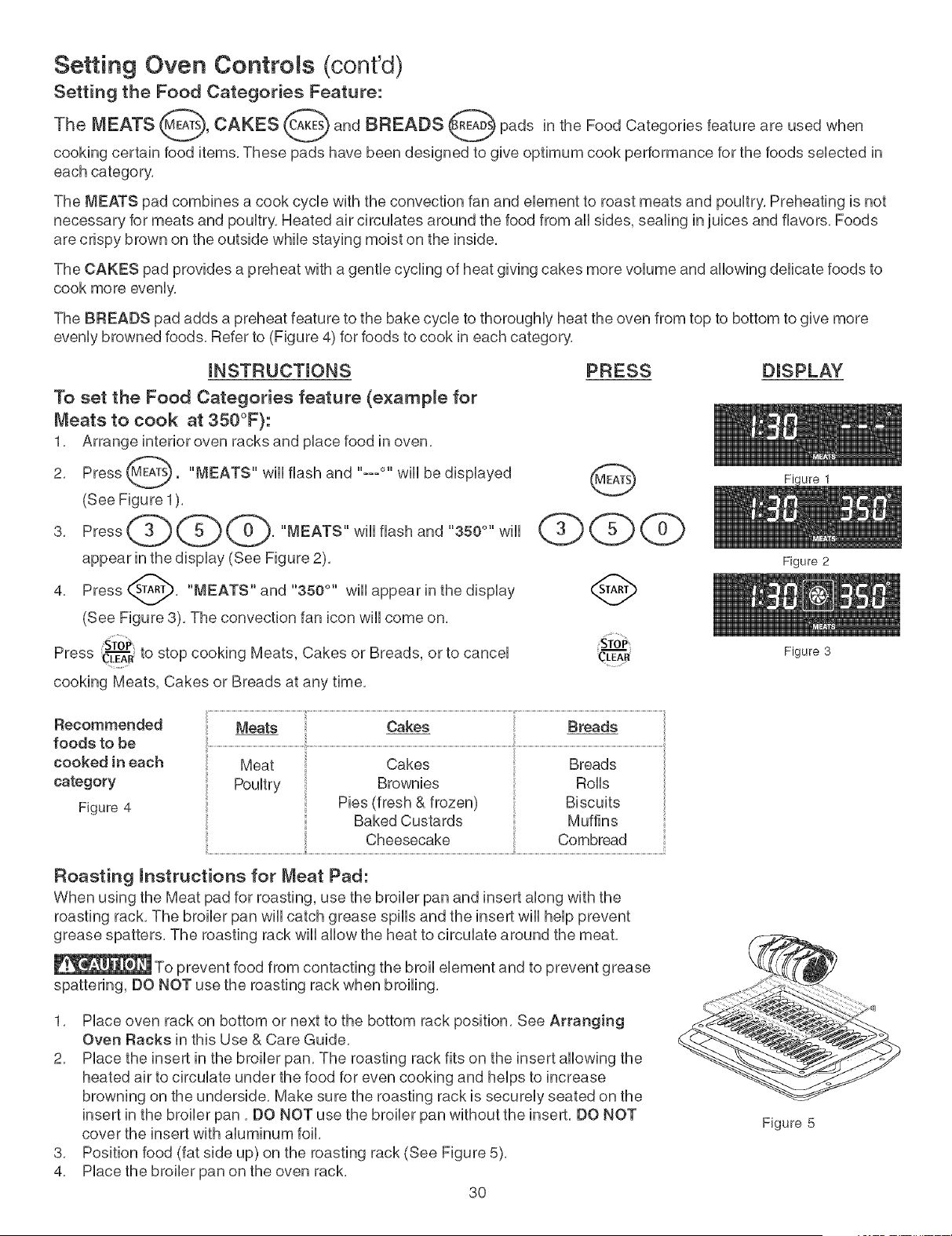
Setting Oven Controls (cont'd)
Setting the Food Categories Feature:
The MEATS _s_, CAKES c_ and BREADS _ pads in the Food Categories feature are used when
cooking certain food items, These pads have been designed to give optimum cook performance for the foods seUected in
each category,
The MEATS pad combines a cook cycle with the convection fan and element to roast meats and poultry, Preheating is not
necessary for meats and poultry, Heated air circulates around the food from all sides, sealing in juices and flavors, Foods
are crispy brown on the outside while staying moist on the inside,
The CAKES pad provides a preheat with a gentle cycling of heat giving cakes more volume and allowing delicate foods to
cook more evenly,
The BREADS pad adds a preheat feature to the bake cycle to thoroughly heat the oven from top to bottom to give more
evenly browned foods, Refer to (Figure 4) for foods to cook in each category,
mNSTRUCTmONS PRESS
To set the Food Categories feature (e×amp_e for
Meats to cook at 350°F}:
1, Arrange interior oven racks and pUacefood in oven,
2, Press _EAr_S "MEATS" wHUflash and "---°" wHUbe dispUayed
(See Figure 1),
appear in the dispUay (See Figure 2),
Press ST___, "MEATS" and "350 °" wHUappear in the dispUay
(See Figure 3), The convection fan icon will come on,
STo_
4,
Press CL--"_'Rto stop cooking Meats, Cakes or Breads, or to cancel
cooking Meats, Cakes or Breads at any time,
DISPLAY
Recommended
foods to be
cooked in each
category
Figure 4
Meats
Baked Custards Muffins
Cheesecake Combread
Roasting mnstructions for Meat Pad:
When using the Meat pad for roasting, use the broiler pan and insert along with the
roasting rack, The broiler pan will catch grease spills and the insert will help prevent
grease spatters, The roasting rack will allow the heat to circulate around the meat,
To prevent food from contacting the broil element and to prevent grease
spattering, DO NOT use the roasting rack when broiling,
1, Place oven rack on bottom or next to the bottom rack position, See Arranging
Oven Racks in this Use & Care Guide,
2, Place the insert in the broiler pan, The roasting rack fits on the insert allowing the
heated air to circulate under the food for even cooking and helps to increase
browning on the underside, Make sure the roasting rack is securely seated on the
insert in the broiler pan, DO NOT use the broiler pan without the insert, DO NOT
cover the insert with aluminum foil,
3, Position food (fat side up) on the roasting rack (See Figure 5),
4, Place the broiler pan on the oven rack,
3O
Figure 2
Figure 3
Figure 5
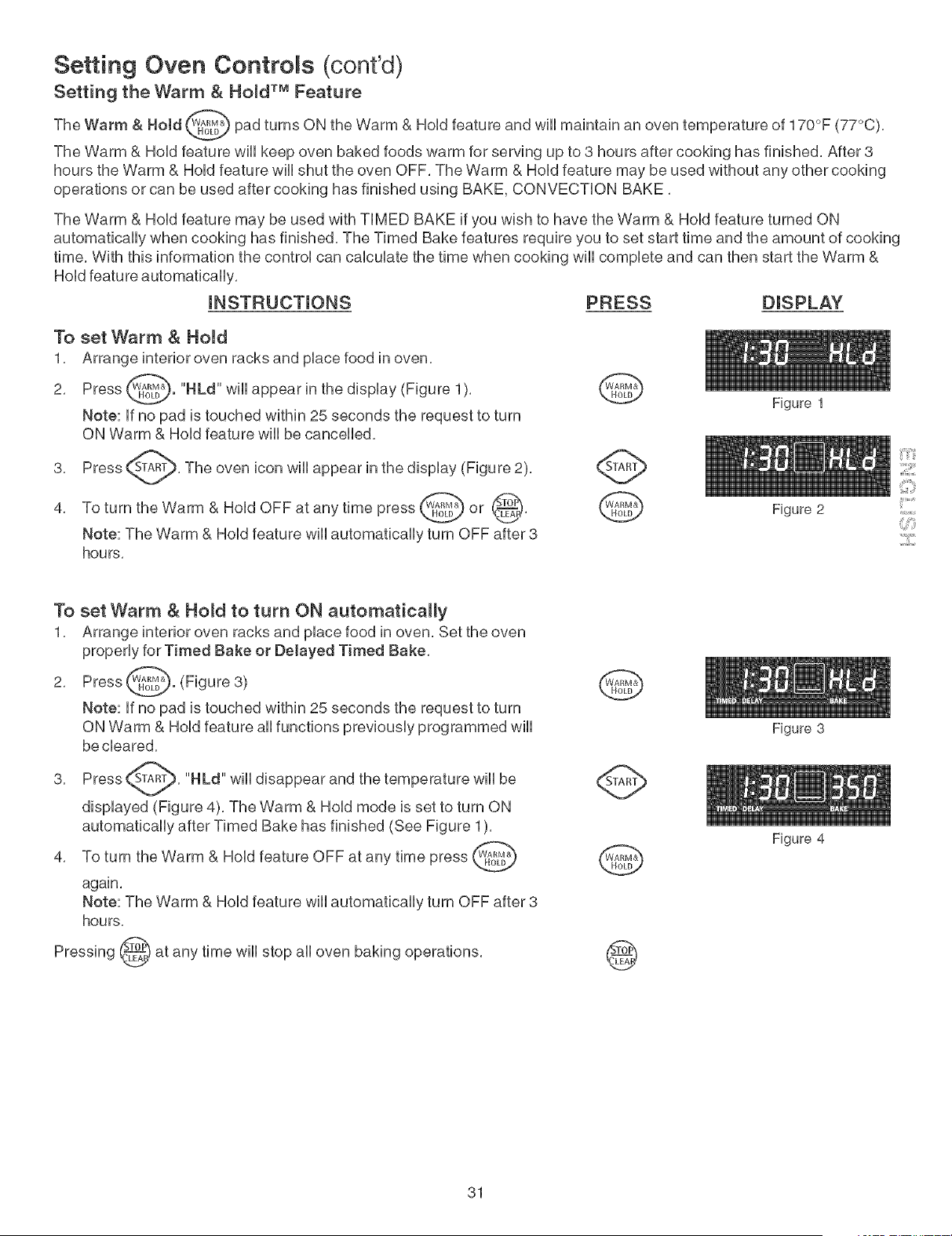
Setting Oven Controls (cont'dl
Setting the Warm & Hold TM Feature
The Warm & Hold @b pad turns ON the Warm & HoUdfeature and wHUmaintain an oven temperature of 170°F
(77°C),
The Warm & HoUdfeature wHUkeep oven baked foods warm for serving up to 3 hours after cooking has finished, After 3
hours the Warm & HoUdfeature wHUshut the oven OFF, The Warm & HoUdfeature may be used without any other cooking
operations or can be used after cooking has finished using BAKE, CONVECTION BAKE,
The Warm & HoUdfeature may be used with TIMED BAKE if you wish to have the Warm & HoUdfeature turned ON
automatbaHy when cooking has finished, The Timed Bake features require you to set start time and the amount of cooking
time, With this information the control can calculate the time when cooking will complete and can then start the Warm &
Hold feature automatically,
mNSTRUCTmONS PRESS DISPLAY
To set Warm & Hold
1, Arrange interior oven racks and place food in oven,
2, Press (_. "HLd" will appear in the display (Figure 1), _,A,O"_
Note: If no pad is touched within 25 seconds the request to turn
ON Warm & Hold feature will be cancelled,
3, Press _, The oven icon will appear in the display (Figure 2),
To turn the Warm & Hold OFF at any time press _ or @R_, _
4,
v
Note: The Warm & Hold feature will automatically turn OFF after 3
hours,
Figure 1
Figure 2
To set Warm & Hold to turn ON automatically
1, Arrange interior oven racks and place food in oven, Set the oven
properly for Timed Bake or Delayed Timed Bake,
2, Press _. (Figure 3)
Note: If no pad is touched within 25 seconds the request to turn
ON Warm & Hold feature all functions previously programmed will
be cleared,
Press _, "HLd" will disappear and the temperature will be
3,
displayed (Figure 4), The Warm & Hold mode is set to turn ON
automatically after Timed Bake has finished (See Figure 1),
4, To turn the Warm & Hold feature OFF at any time press _ _
again,
Note: The Warm & Hold feature will automatically turn OFF after 8
hours,
Pressing _} at any time wiii stop aii oven baking operations,
._,
31
Figure 3
Figure 4
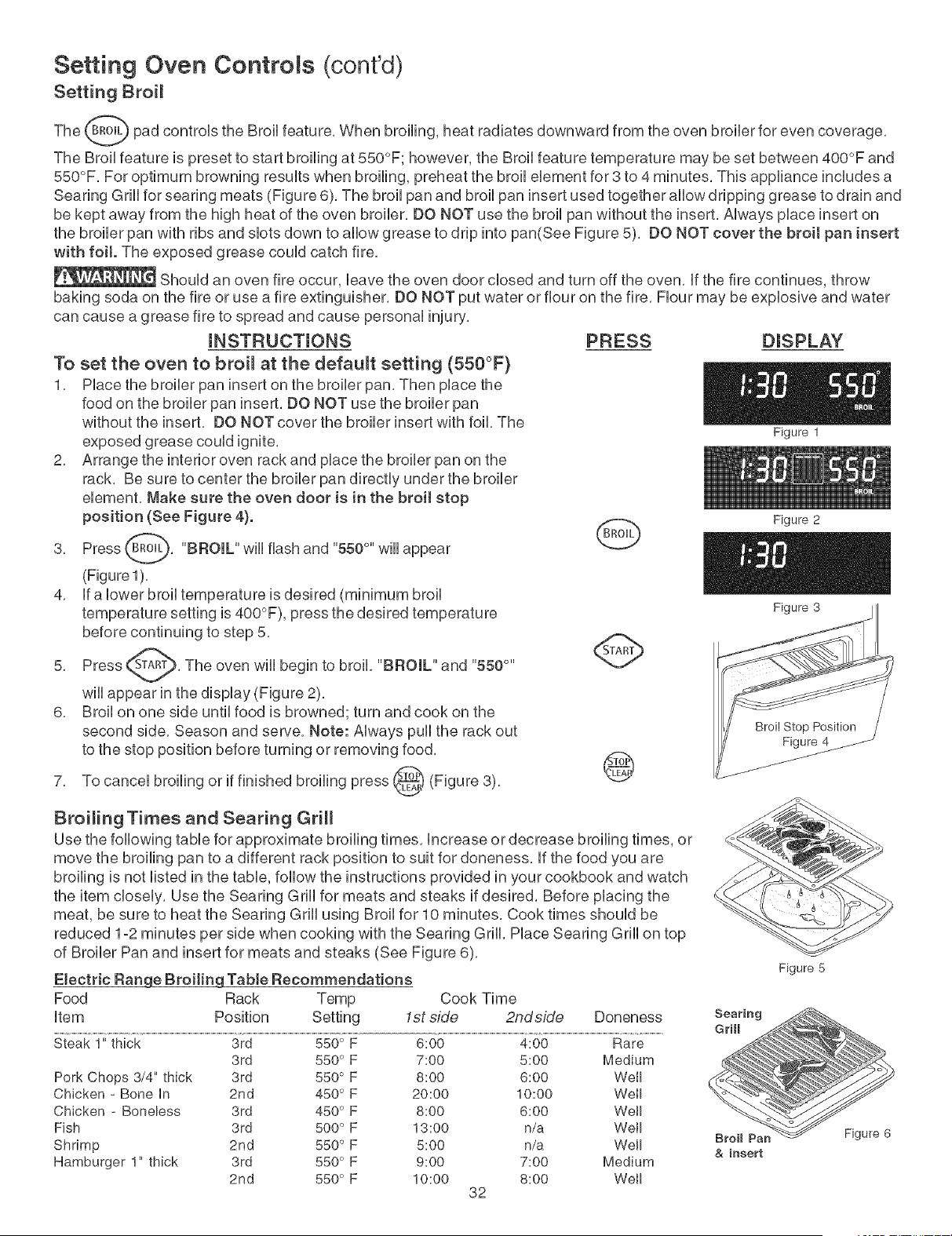
Setting Oven Controls (cont'd)
Setting Broil
The _ pad controls the Broil feature, When broiling, heat radiates downward from the oven broiler for
even
coverage,
The Broil feature is preset to start broiling at 550°F; however, the Broil feature temperature may be set between 400°F and
550°F, For optimum browning results when broiling, preheat the broil element for 8 to 4 minutes, This appliance includes a
Searing Grill for searing meats (Figure 6), The broil pan and broil pan insert used together allow dripping grease to drain and
be kept away from the high heat of the oven broiler, DO NOT use the broil pan without the insert, Always place insert on
the broiler pan with ribs and slots down to allow grease to drip into pan(See Figure 5), DO NOT cover the broil pan insert
with foit. The exposed grease could catch fire,
Should an oven fire occur, leave the oven door closed and turn off the oven, if the fire continues, throw
baking soda on the fire or use a fire extinguisher, DO NOT put water or flour on the fire, Flour may be explosive and water
can cause a grease fire to spread and cause personal injury,
mNSTRUCTmONS
To set the oven to broi_ at the default setting (550°F)
1, Place the broiler pan insert on the broiler pan, Then place the
food on the broiler pan insert, DO NOT use the broiler pan
without the insert, DO NOT cover the broiler insert with foil, The
exposed grease could ignite,
2, Arrange the interior oven rack and place the broiler pan on the
rack, Be sure to center the broiler pan directly under the broiler
element, Make sure the oven door is in the broit stop
position (See Figure 4).
3, Press _, "BROIL" wiii flash and "550°" wiii
appear
4, if a lower broil temperature is desired (minimum broil
temperature setting is 400°F), press the desired temperature
before continuing to step 5,
Press _A_, The oven wiii begin to broil, "BROIL" and "550 °"
5,
will appear in the display (Figure 2),
6, Broil on one side until food is browned; turn and cook on the
second side, Season and serve, Note: Always pull the rack out
to the stop position before turning or removing food,
broiling or if finished broiling press _ (Figure 3),7, To cancel
PRESS DISPLAY
Figure 1
G
@
Figure 2
Figure 3
Broiling Times and Searing Grill
Use the following table for approximate broiling times, increase or decrease broiling times, or
move the broiling pan to a different rack position to suit for doneness, if the food you are
broiling is not listed in the table, follow the instructions provided in your cookbook and watch
the item closely, Use the Searing Grill for meats and steaks if desired, Before placing the
meat, be sure to heat the Searing Grill using Broil for 10 minutes, Cook times should be
reduced 1-2 minutes per side when cooking with the Searing Grill, Place Searing Grill on top
of Broiler Pan and insert for meats and steaks (See Figure 6),
Etectric Range Broiting Tabte Recommendations
Food Rack Temp Cook Time
item Position Setting 1st side 2ndside Doneness
Steak 1" thick 3rd 550° F 6:00 4:00 Rare
3rd 550° F 7:00 5:00 Medium
Pork Chops 3/4" thick 3rd 550° F 8:00 6:00 Well
Chicken - Bone in 2rid 450° F 20:00 10:00 Well
Chicken - Boneless 3rd 450° F 8:00 6:00 Well
Fish 3rd 500° F 13:00 n/a Well
Shrimp 2nd 550° F 5:00 n/a Well
Hamburger 1" thick 3rd 550° F 9:00 7:00 Medium
2nd 550° F 10:00 8:00 Well
82
Figure 5
Figure 6
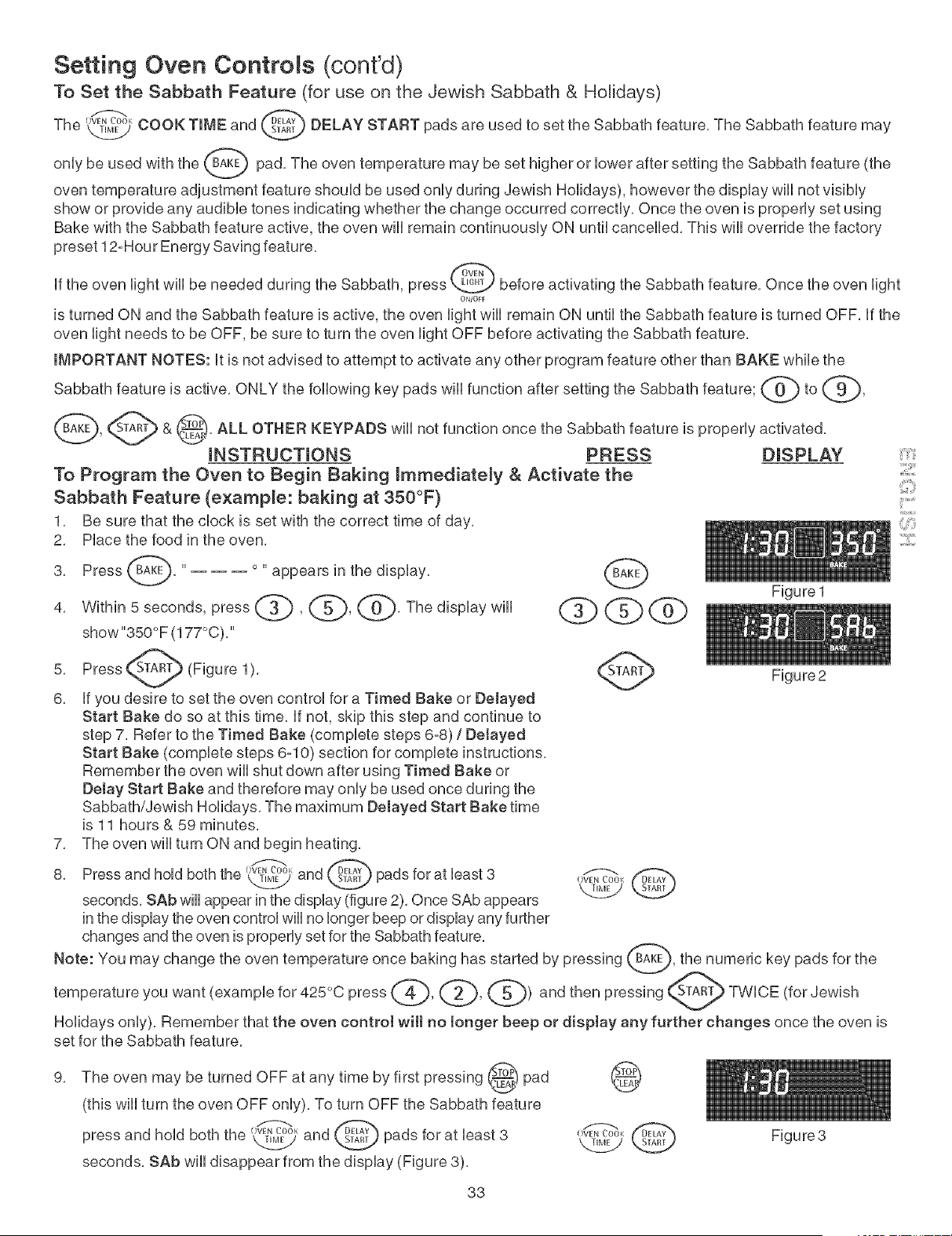
Setting Oven Controls (cont'd)
To Set the Sabbath Feature (for use on the Jewish Sabbath & Holidays)
T_ //_,< @
,,e, _,,,_ COOK TIME and DELAY START pads are used to set the Sabbath feature, The Sabbath feature may
be used with the _ pad, The oven temperature may be set higher or bwer after setting the Sabbath feature
onUy (the
oven temperature adjustment feature shouUd be used onUyduring Jewish Holidays), however the dispUay wHUnot visibUy
show or provide any audibb tones indicating whether the change occurred correctUy, Once the oven is property set using
Bake with the Sabbath feature active, the oven wHUremain continuousUy ON until cancelled, This will override the factory
preset 12-Hour Energy Saving feature,
If the oven light will be needed during the Sabbath, press _ before activating the Sabbath feature, Once the oven light
ON/OFF
is turned ON and the Sabbath feature is active, the oven light will remain ON until the Sabbath feature is turned OFF, If the
oven light needs to be OFF, be sure to turn the oven light OFF before activating the Sabbath feature,
IMPORTANT NOTES: It is not advised to attempt to activate any other program feature other than BAKE while the
Sabbath feature is active, ONLY the following key pads will function after setting the Sabbath feature; @ to (_,
_, S_AR"_ & _), ALL OTHER KEYPADS will function the Sabbath feature is activated,
not once
properUy
V
iNSTRUCTiONS PRESS DISPLAY
To Program the Oven to Begin Baking immediately & Activate the
Sabbath Feature (example: baking at 350°F)
1, Be sure that the clock is set with the correct time of day,
2, Place the food in the oven,
3, Press _, '.... appears in the
display,
4, Within 5 seconds, press _ , _5_, _'_, The display will
show "350° F (177°C),"
5, Press_A_ (Figure 1),
k
6, If you desire to set the oven control for a Timed Bake or Delayed
Start Bake do so at this time, If not, skip this step and continue to
step 7, Refer to the Timed Bake (complete steps 6-8) / DeJayed
Start Bake (complete steps 6-10) section for complete instructions,
Remember the oven will shut down after using Timed Bake or
Delay Start Bake and therefore may only be used once during the
Sabbath/Jewish Holidays, The maximum Delayed Start Bake time
is 11 hours & 59 minutes,
7, The oven will turn ON and begin heating,
8, Press and hold both the 0_, and _ pads for at least 3
seconds, SAb will appear in the display (figure 2), Once SAb appears
in the display the oven control will no longer beep or display any further
changes and the oven is properly set for the Sabbath feature,
r-.@
OVEN (_OOK
L2_j
Figure 1
Figure2
::2::::
Holidays only), Remember that the oven control wilt no longer beep or display any further changes once the oven is
set for the Sabbath feature,
The oven may be turned OFF at any time by first pressing (_l
pad
(this will turn the oven OFF only), To turn OFF the Sabbath feature
and hold both the 0_, and _ pads for at bast 3press
seconds, SAb will disappear from the display (Figure 3),
@
33
Figure3
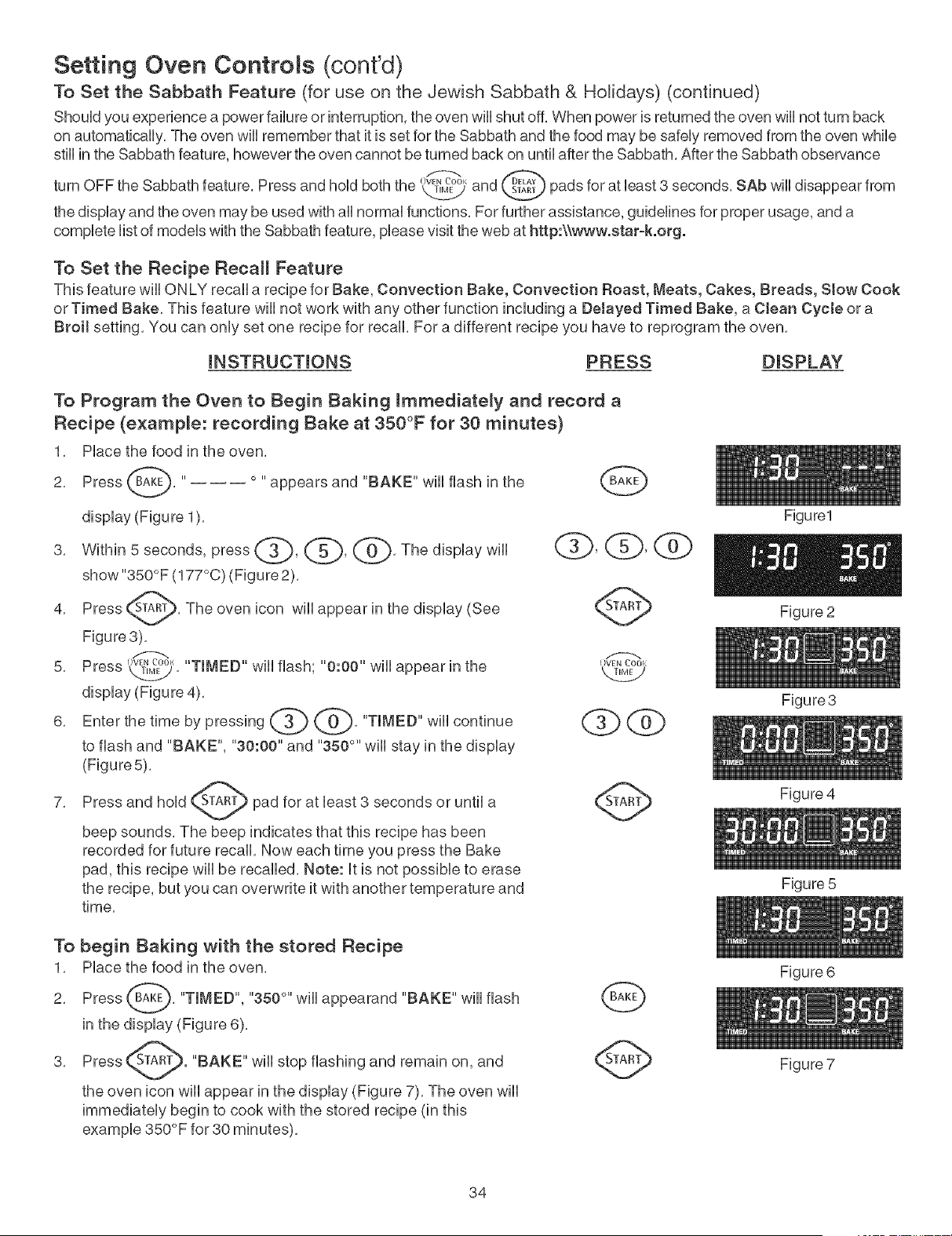
Setting Oven Controls (cont'd)
To Set the Sabbath Feature (for use on the Jewish Sabbath & Holidays) (continued)
ShouUdyou experience a power failure or interruption, the oven wHUshut off. When power is returned the oven wHUnot turn back
on automatbaHy. The oven wHUremember that it is set for the Sabbath and the food may be safeUyremoved from the oven while
stHUin the Sabbath feature, however the oven cannot be turned back on until after the Sabbath. After the Sabbath observance
OVEN L'_O01
turn OFF the Sabbath feature, Press and hoUdboth the kJ-_y and pads for at bast 3 seconds, SAb will disappear from
the display and the oven may be used with all normal functions, For further assistance, guidelines for proper usage, and a
complete list of models with the Sabbath feature, please visit the web at http:\\www.star-k.org.
To Set the Recipe Recall Feature
This feature will ONLY recall a recipe for Bake, Convection Bake, Convection Roast, Meats, Cakes, Breads, Stow Cook
or Timed Bake. This feature will not work with any other function including a DeJayed Timed Bake, a Clean Cycte or a
Broit setting. You can only set one recipe for recall. For a different recipe you have to reprogram the oven.
mNSTRUCTmONS PRESS DISPLAY
To Program the Oven to Begin Baking mmmediate_y and record a
Recipe (example: recording Bake at 350°F for 30 minutes)
1. Place the food in the oven.
2. Press _. '.... appears and "BAKE" will flash in the
display (Figure 1).
3. Within 5 seconds, press _, @, @. The display will
show "350°F (177°C) (Figure 2).
Press _-A_. The oven icon will appear in the
4.
display (See
Figure3).
5. Press \_j. "TIMED" will flash; "0:00" will appear in the
display (Figure 4).
6. Enter the time by pressing _'_ _}. "TIMED" will continue
to flash and "BAKE", "30:00" and "350 °" will stay in the display
(Figure 5).
7. Press and hold _A_ pad for at least 3 seconds or until a
beep sounds. The beep indicates that this recipe has been
recorded for future recall. Now each time you press the Bake
pad, this recipe will be recalled. Note: It is not possible to erase
the recipe, but you can overwrite it with another temperature and
time.
Figure1
Figure 2
To begin Baking with the stored Recipe
1. Place the food in the oven.
2. Press _. "TIMED", "350 °" will appearand "BAKE" will flash
in the display (Figure 6).
3.
"BAKE" wiii stop flashing and remain on, and
the oven icon will appear in the display (Figure 7). The oven will
immediately begin to cook with the stored recipe (in this
example 350°F for 80 minutes),
34
Figure3
Figure 4
Figure 5
Figure 6
Figure 7
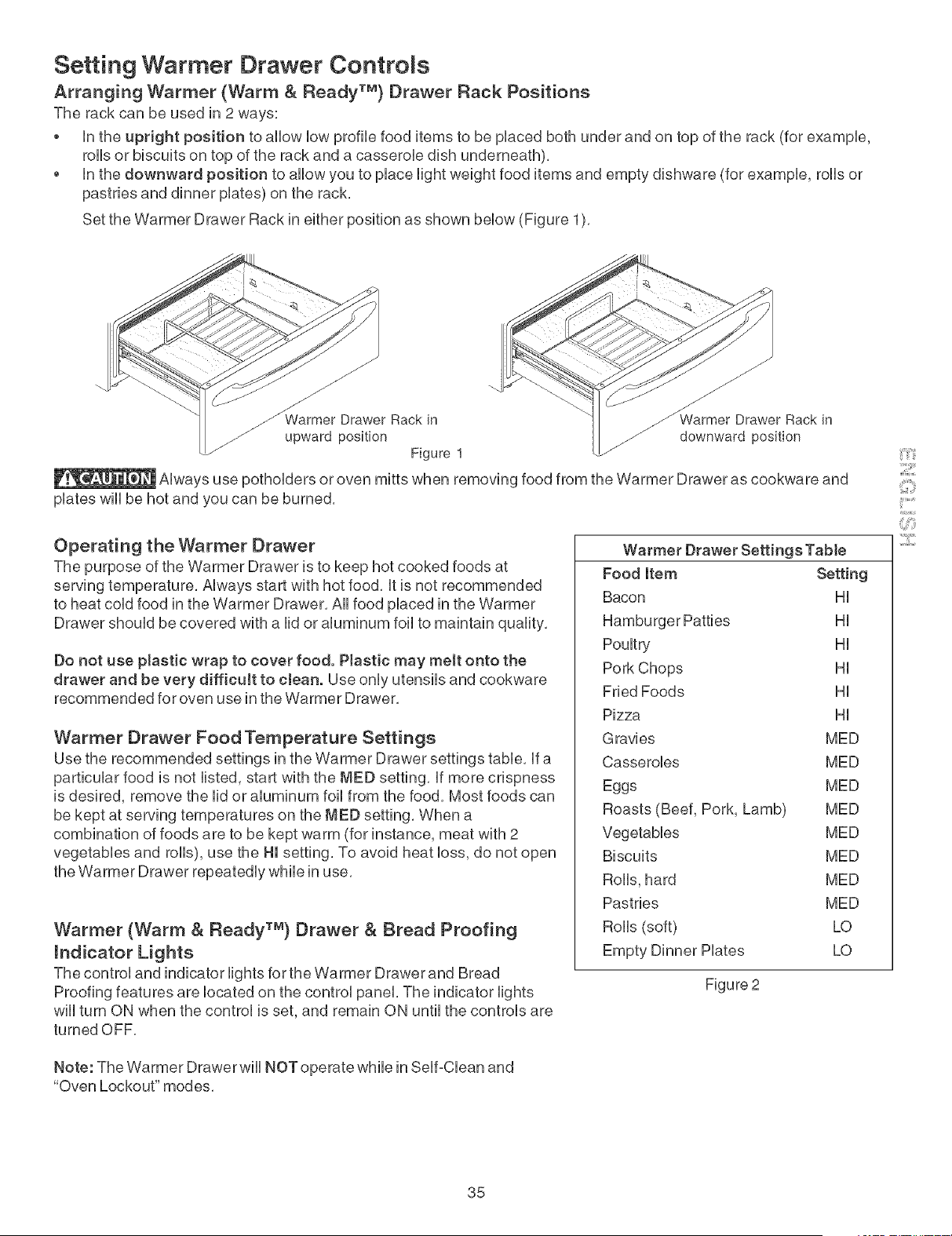
Setting Warmer Drawer Controls
Arranging Warmer (Warm & Ready TM) Drawer Rack Positions
The rack can be used in 2 ways:
, Hnthe upright position to aHHowHowprofiHe food items to be pHaced both under and on top of the rack (for exampHe,
forthsor biscuits on top of the rack and a casseroHe dish underneath),
* Hnthe downward position to aHHowyou to pHaceHightweight food items and empty dishware (for exampHe, roHHsor
pastries and dinner pHates) on the rack,
Set the Warmer Drawer Rack in either position as shown bellow (Figure 1),
J
z J
_armer Drawer Rack in Drawer Rack in
Jarmer
upward position _ downward position
Figure 1
AHwaysuse pothoHders or oven mitts when removing food from the Warmer Drawer as cookware and
pHateswHHbe hot and you can be burned,
Operating the Warmer Drawer
The purpose of the Warmer Drawer is to keep hot cooked foods at
serving temperature, AHwaysstart with hot food, Htis not recommended
to heat coHdfood in the Warmer Drawer, AHHfood pHacedin the Warmer
Drawer should be covered with a lid or aluminum foil to maintain quality,
Do not use plastic wrap to cover food. PJastic may melt onto the
drawer and be very difficuJt to cJean. Use onHyutensiHs and cookware
recommended for oven use in the Warmer Drawer,
Warmer Drawer Food Temperature Settings
Use the recommended settings in the Warmer Drawer settings tame, Hfa
particuHar food is not Histed,start with the MED setting, Hfmore crispness
is desired, remove the Hidor aHuminum foiHfrom the food, Most foods can
be kept at serving temperatures on the MED setting, When a
combination of foods are to be kept warm (for instance, meat with 2
vegetabHes and forths),use the HI setting, To avoid heat Hoss,do not open
the Warmer Drawer repeatedHy whiHein use,
Warmer (Warm & Ready TM} Drawer & Bread Proofing
mndicator Lights
The controH and indicator Hightsfor the Warmer Drawer and Bread
Proofing features are Hocated on the controH panel The indicator Hights
wiHHturn ON when the controH is set, and remain ON untiHthe controHs are
turned OFF,
Note: The Warmer Drawer wiHHNOT operate whiHein SeHf-CHeanand
"Oven Lockout" modes,
Warmer Drawer Settings Tabte
Food Item Setting
Bacon HH
Hamburger Patties HH
PouHtry HH
Pork Chops HH
Fried Foods HH
Pizza HH
Gravies MED
CasseroHes MED
Eggs MED
Roasts (Beef, Pork, Lamb) MED
VegetabHes MED
Biscuits MED
RoHHs,hard MED
Pastries MED
RoHHs(soft) LO
Empty Dinner PHates LO
Figure 2
35
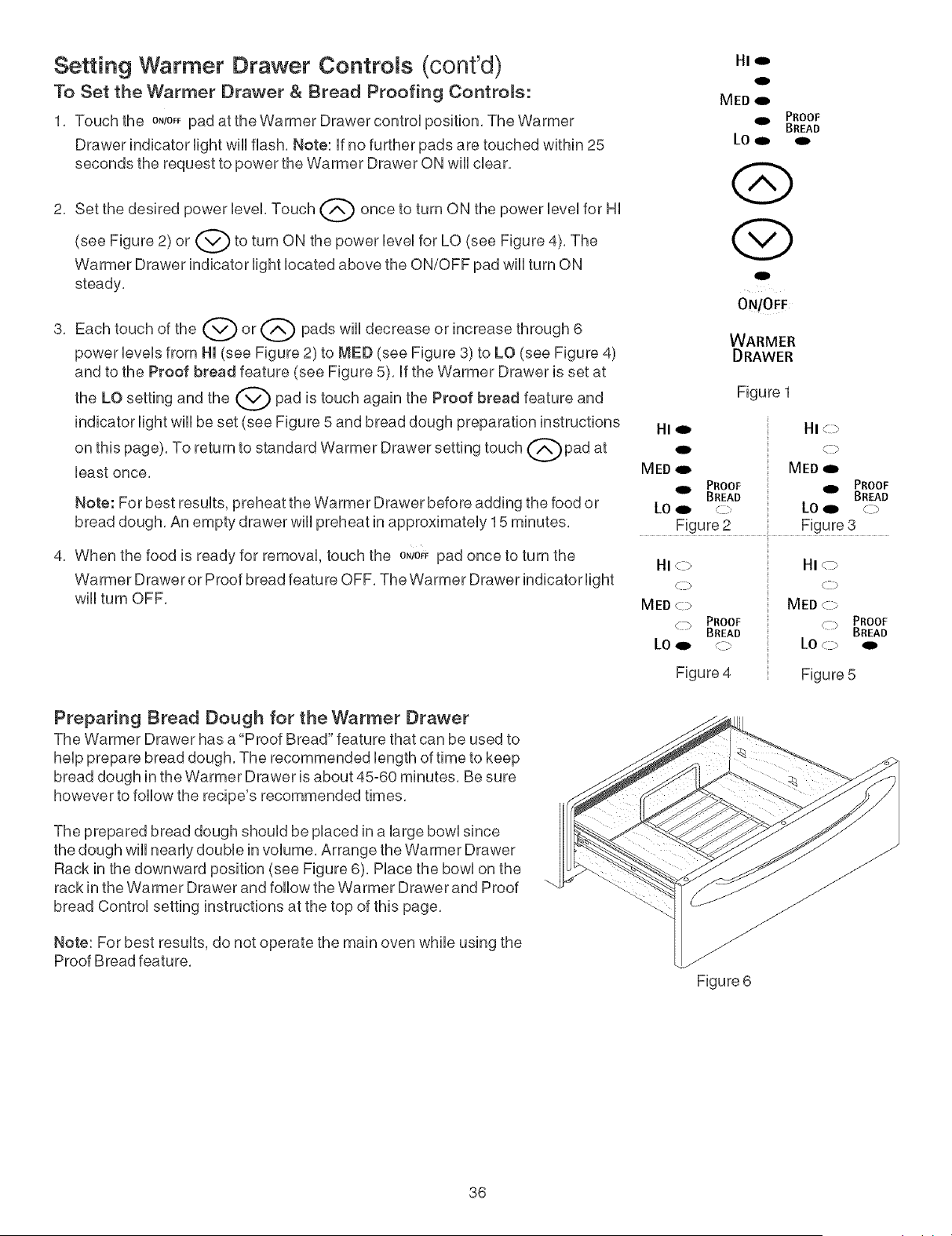
Setting Warmer Drawer Controls (cont'd)
To Set the Warmer Drawer & Dread Proofing Controls:
1. Touch the o,/o,_pad at the Warmer Drawer controU position. The Warmer
Drawer indicator Hght wHUflash. Note: ff no further pads are touched within 25
seconds the request to power the Warmer Drawer ON wHUdear.
2. Set the desired power bveL Touch Q once to turn ON the power bveU for HU
(see Figure 2) or Q to turn ON the power bveU for LO (see Figure 4).
The
Warmer Drawer indicator Hght bcated above the ON/OFF pad wHUturn ON
steady.
3,
Each touch of the 0 or LK_ pads wHUdecrease or increase through 6
power bveb from HI (see Figure 2) to MED (see Figure 3) to LO (see Figure 4)
and to the Proof bread feature (see Figure 5), ff the Warmer Drawer is set at
the LO setting and the @ pad is touch again the Proof bread feature and
indicator light will be set (see Figure 5 and bread dough preparation instructions
on this page), To return to standard Warmer Drawer setting touch Qpad at
least once,
Note: For best results, preheat the Warmer Drawer before adding the food or
bread dough, An empty drawer will preheat in approximately 15 minutes,
4, When the food is ready for removal, touch the ONiO_Fpad once to turn the
Warmer Drawer or Proof bread feature OFF, The Warmer Drawer indicator light
will turn OFF,
Preparing Dread Dough for the Warmer Drawer
The Warmer Drawer has a"Proof Bread" feature that can be used to
help prepare bread dough. The recommended length of time to keep
bread dough in the Warmer Drawer is about 45-60 minutes. Be sure
however to follow the recipe's recommended times.
The prepared bread dough should be placed in a large bowl since
the dough will nearly double in volume, Arrange the Warmer Drawer
Rack in the downward position (see Figure 6), Place the bowl on the
rack in the Warmer Drawer and follow the Warmer Drawer and Proof
bread Control setting instructions at the top of this page,
Note: For best results, do not operate the main oven while using the
Proof Bread feature,
Hie
0
MED o
9D, PROOF
BREAD
LO_
o
ON/OFF
WARMER
DRAWER
Figure 1
HI 91_ HI _J
MEDqD MED
911 PROOF _ PROOF
BREAD BREAD
LO_ 9 LOo _ >
Figure 2 Figure 3
HI <-b HI < _->
.c_ Q >
MED<:> MED <:>
PROOF
C17 PROOF Li_ BREAD
BREAD
Figure 4 Figure 5
Figure 6
36
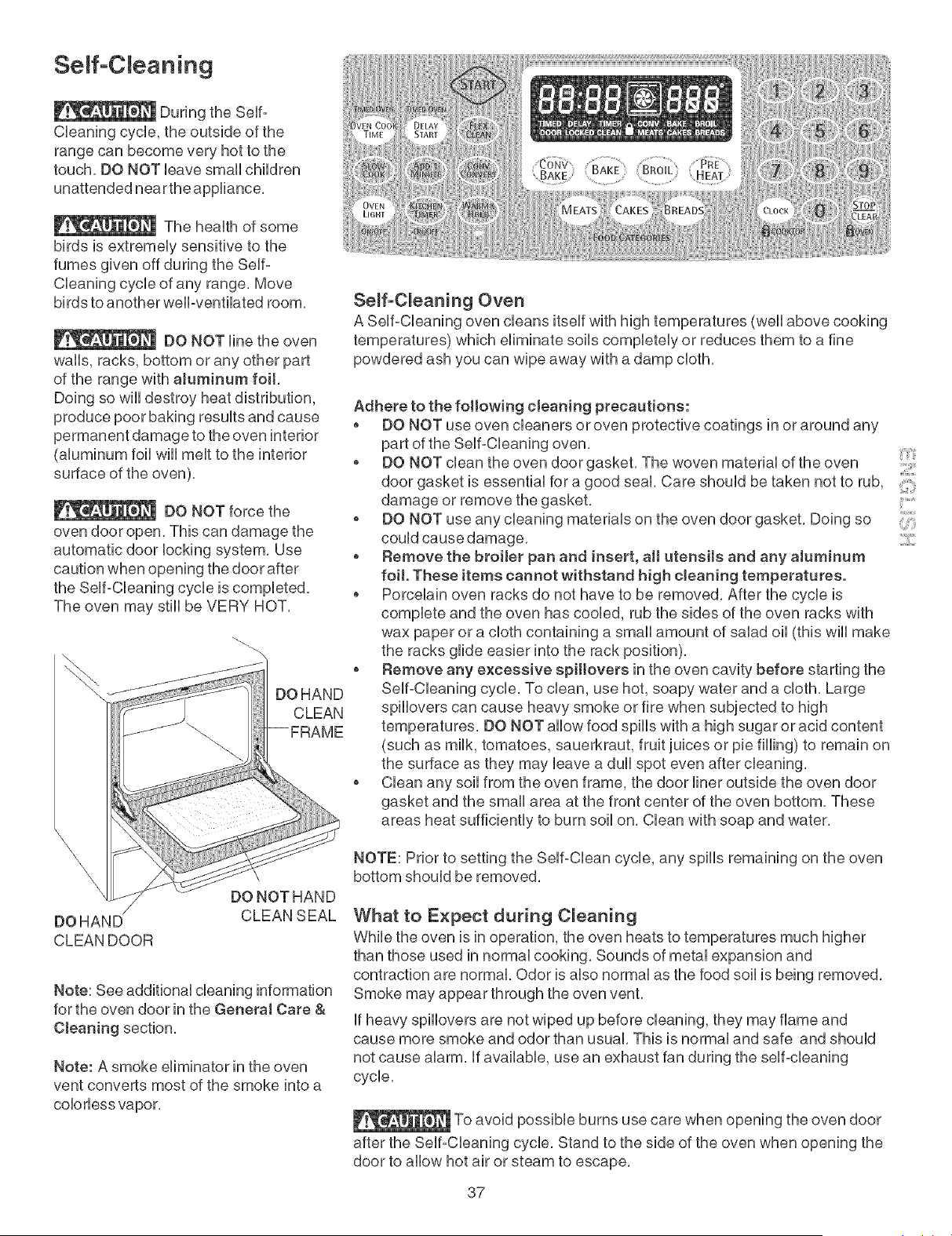
Seff-C eaning
During the Serf°
CUeaning cycle, the outside of the
range can become very hot to the
touch, DO NOT Ueave smafl children
unattended near the appliance,
The heaUthof some
birds is extremeUy sensitive to the
fumes given off during the Serf°
CUeaning cycle of any range, Move
birds to another weft-ventilated room,
DO NOT line the oven
wafts, racks, bottom or any other part
of the range with aJuminum foil,
Doing so wHUdestroy heat distribution,
produce poor baking resuUtsand cause
permanent damage to the oven interior
(aUuminum foil wHUmeUtto the interior
surface of the oven),
DO NOT force the
oven door open, This can damage the
automatic door locking system, Use
caution when opening the door after
the Self°Cleaning cycle is completed,
The oven may stHUbe VERY HOT,
Seff-C_eaning Oven
A Self-Cleaning oven cleans itself with high temperatures (well above cooking
temperatures) which eliminate soils completely or reduces them to a fine
powdered ash you can wipe away with a damp cloth,
Adhere to the following cleaning precautions:
o DO NOT use oven cleaners or oven protective coatings in or around any
part of the Self-Cleaning oven,
o DO NOT clean the oven door gasket, The woven material of the oven
door gasket is essential for a good seal, Care should be taken not to rub,
damage or remove the gasket,
o DO NOT use any cleaning materials on the oven door gasket, Doing so
could cause damage,
o Remove the broiler pan and insert, aH utensils and any aJuminum
foil These items cannot withstand high cleaning temperatures.
o Porcelain oven racks do not have to be removed, After the cycle is
complete and the oven has cooled, rub the sides of the oven racks with
wax paper or a cloth containing a small amount of salad oil (this will make
the racks glide easier into the rack position),
o Remove any excessive spiltovers in the oven cavity before starting the
Self-Cleaning cycle, To clean, use hot, soapy water and a cloth, Large
spiflovers can cause heavy smoke or fire when subjected to high
temperatures, DO NOT allow food spills with a high sugar or acid content
(such as milk, tomatoes, sauerkraut, fruit juices or pie filling) to remain on
the surface as they may leave a dull spot even after cleaning,
o Clean any soil from the oven frame, the door liner outside the oven door
gasket and the small area at the front center of the oven bottom, These
areas heat sufficiently to burn soil on, Clean with soap and water,
NOTE: Prior to setting the Self-Clean cycle, any spills remaining on the oven
bottom should be removed,
-_ DO NOT HAN D
CLEAN SEAL
DOHAND
CLEANDOOR
Note: See additional cleaning information
for the oven door in the General Care &
Cleaning section,
Note: A smoke eliminator in the oven
vent converts most of the smoke into a
colorless vapor,
What to Expect during C_eaning
While the oven is in operation, the oven heats to temperatures much higher
than those used in normal cooking, Sounds of metal expansion and
contraction are normal, Odor is also normal as the food soil is being removed,
Smoke may appear through the oven vent,
If heavy spiflovers are not wiped up before cleaning, they may flame and
cause more smoke and odor than usual, This is normal and safe and should
not cause alarm, If available, use an exhaust fan during the self-cleaning
cycle,
_To avoid possible burns use care when opening the oven door
after the Self-Cleaning cycle, Stand to the side of the oven when opening the
door to allow hot air or steam to escape,
37
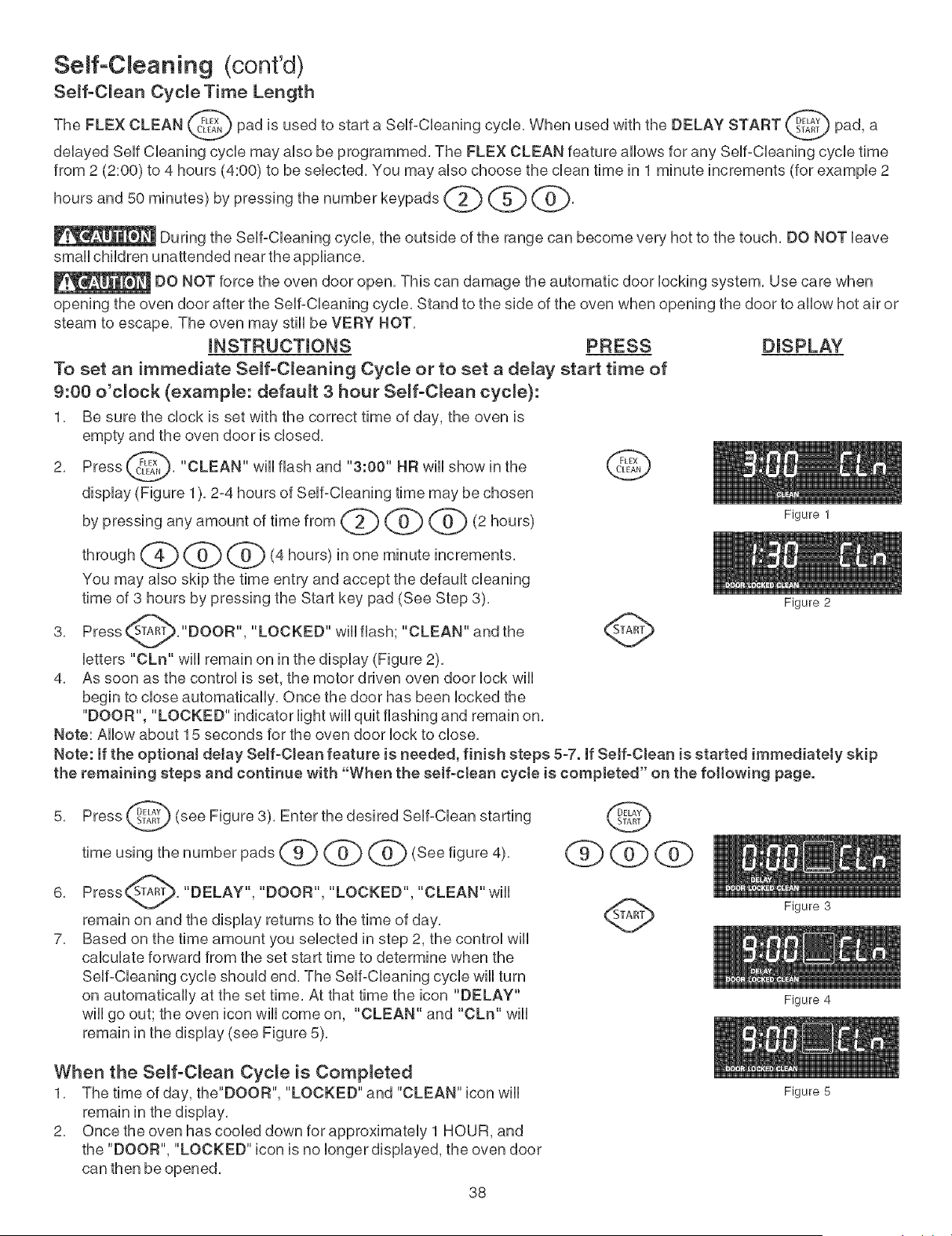
Seff-C eaning (cont'd)
Se_f-C_ean Cycle Time Length
The FLEX CLEAN _ pad is used to start a SeUf-CUeaning cycle, When used with the DELAY START _SDTEi_
pad, a
deUayed Serf CUeaning cycUemay aUsobe programmed. The FLEX CLEAN feature aUUowsfor any SeUf°CUeaningcycUetime
from 2 (2:00) to 4 hours (4:00) to be seUected. You may aUsochoose the dean time in 1 minute increments (for exampUe 2
hoursandm,nutes bypress,ngthenumberkeypads(2) @ @,
During the SeUf°CUeaningcycle, the outside of the range can become very hot to the touch. DO NOT Ueave
smaUUchildren unattended near the appliance.
DO NOT force the oven door open. This can damage the automatic door Uocking system. Use care when
opening the oven door after the SeUf-CUeaningcycle. Stand to the side of the oven when opening the door to allow hot air or
steam to escape. The oven may still be VERY HOT.
mNSTRUCTmONS PRESS DISPLAY
To set an immediate Seff-C_eaning Cycme or to set a de_ay start time of
9:00 o'clock (example: default 3 hour Seff-C_ean cycle}:
1. Be sure the clock is set with the correct time of day, the oven is
empty and the oven door is closed.
2. Press _F_x_,. "CLEAN" will flash and "3:00" HR will show in the _{'FLLE_
display (Figure 1). 2-4 hours of Self-Cleaning time may be chosen
by pressingany amount oftimefrom (_]) @ @ (2hours)
Figure I
through _ @ @ (4 hours) in one minute increments.
You may also skip the time entry and accept the default cleaning
time of 3 hours by pressing the Start key pad (See Step 3). Figure2
Press _TART_."DOOR", "LOCKED" will flash; "CLEAN" and the
3.
letters "CLn" will remain on in the display (Figure 2).
4. As soon as the control is set, the motor driven oven door lock will
begin to close automatically. Once the door has been locked the
"DOOR", "LOCKED" indicator light will quit flashing and remain on.
Note: Allow about 15 seconds for the oven door lock to close.
Note: if the optionaJ detay Seff-OJean feature is needed, finish steps 5-7. if Serf-Clean is started immediately skip
the remaining steps and continue with "When the self-clean cycte is completed" on the following page.
5. Press (._}#._) (see Figure 3). Enter the desired Self-Clean
starting
timeusingthenumber pads _ @ @ (See figure4),
6. Press_. "DELAY", "DOOR", "LOCKED",
"CLEAN" will
remain on and the display returns to the time of day,
7, Based on the time amount you selected in step 2, the control will
calculate forward from the set start time to determine when the
Self-Cleaning cycle should end, The Self-Cleaning cycle will turn
on automatically at the set time, At that time the icon "DELAY"
will go out; the oven icon will come on, "CLEAN" and "CLn" will
remain in the display (see Figure 5),
When the Seff-C_ean Cycle is Completed
1. The time of day, the"DOOR", "LOCKED" and "CLEAN" icon will
remain in the display.
2. Once the oven has cooled down for approximately 1 HOUR, and
the "DOOR", "LOCKED" icon is no longer displayed, the oven door
can then be opened.
38
Figure 3
Figure 4
Figure 5
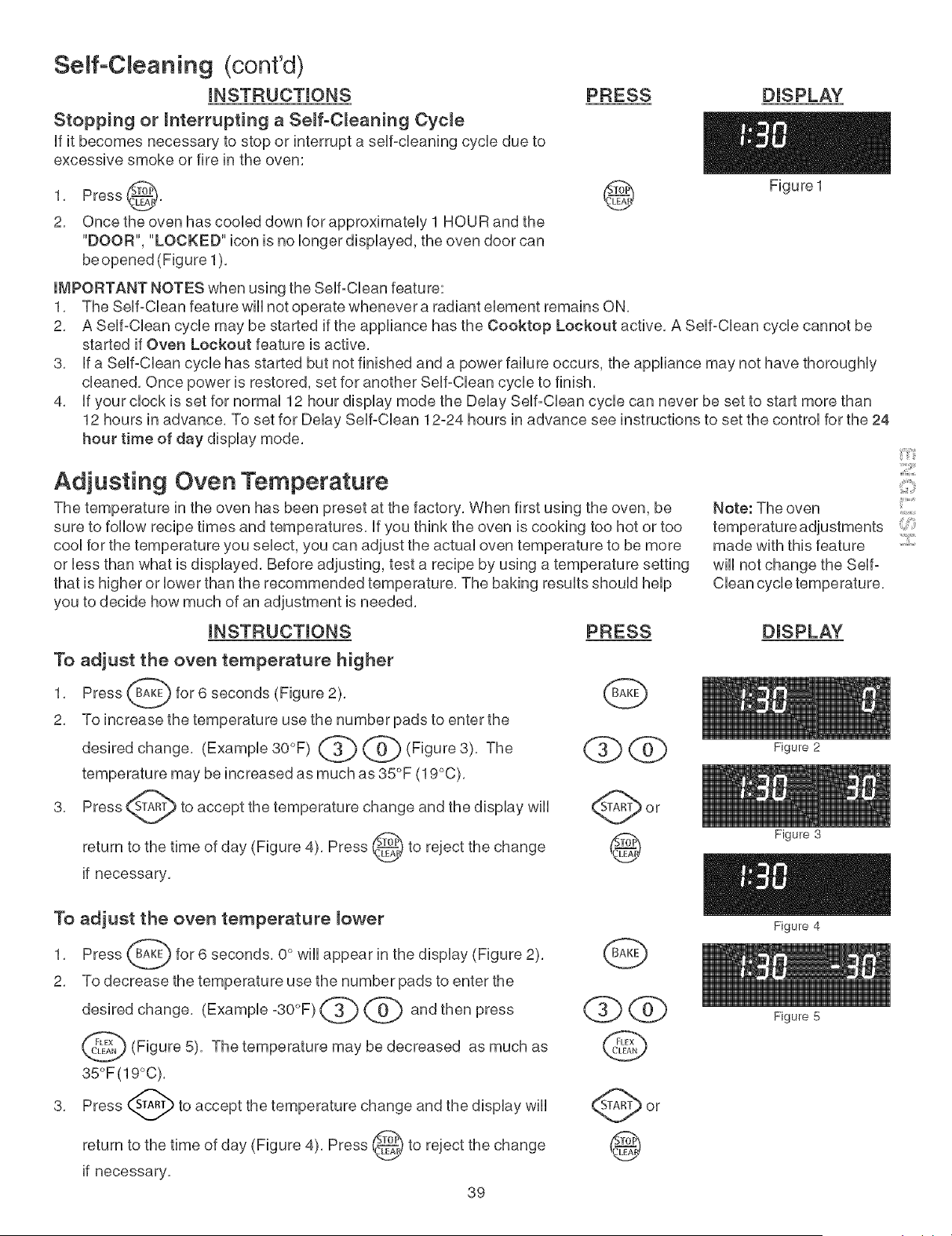
Seff-C eaning (cont'd)
mNSTRUCTmONS
Stopping or mnterrupting a Seff°C_eaning Cycle
ff it becomes necessary to stop or interrupt a serf-cleaning cycle due to
excessive smoke or fire in the oven:
PRESS
1, Press _},
2, Once the oven has cooled down for approximately 1 HOU R and the
"DOOR", "LOCKED" icon is no longer displayed, the oven door can
be opened (Figure 1),
IMPORTANT NOTES when using the Self-Clean feature:
1,
2,
3,
4,
®
DISPLAY
Figu re 1
The Self-Clean feature will not operate whenever a radiant element remains ON,
A Self-Clean cycle may be started if the appliance has the Cooktop Lockout active, A Self-Clean cycle cannot be
started if Oven Lockout feature is active,
if a Self-Clean cycle has started but not finished and a power failure occurs, the appliance may not have thoroughly
cleaned, Once power is restored, set for another Self-Clean cycle to finish,
if your clock is set for normal 12 hour display mode the Delay Self-Clean cycle can never be set to start more than
12 hours in advance, To set for Delay Self-Clean 12-24 hours in advance see instructions to set the control for the 24
hour time of day display mode,
Adjusting Oven Temperature
The temperature in the oven has been preset at the factory, When first using the oven, be
sure to foUUowrecipe times and temperatures, Ufyou think the oven is cooking too hot or too
cooUfor the temperature you seUect,you can adjust the actuaUoven temperature to be more
or Uessthan what is dispUayed, Before adjusting, test a recipe by using a temperature setting
that is higher or lower than the recommended temperature, The baking results should help
you to decide how much of an adjustment is needed,
mNSTRUCTmONS PRESS
To adjust the oven temperature higher
1, Press _ for 6 seconds
(Figure 2),
2, To increase the temperature use the number pads to enter the
change, (Example 30°F) (_ @ (Figure 3),
desired The
temperature may be increased as much as 35°F (19°C),
Note: The oven
made with this feature
will not change the Selfo
Clean cycle temperature,
DISPLAY
3,
to accept the temperature change and the display will
return to the time of day (Figure 4), Press _ to reject the
change
if necessary,
To adjust the oven temperature _ower
1, Press (_ for 6 seconds, 0 ° will appear
2, To decrease the temperature use the number pads to enter the
desiredchange, (Example -30°F)_ @ and then press
@ (Figure5),The temperaturemay be decreased as much as
35°F(19°C),
3, Press (_ to accept the temperature change and the display will
return to the time of day (Figure 4), Press _ to reject the change
if necessary,
39
Q@
G
Figure 2
Figure 3
Figure 4
Figure 5

Genera Care & C eaning
C_eaning Various Parts of Your Range
Before cbaning any part of the range, be sure aHcontroUs are turned OFF and the range is cooL Remove spHbvers and
heavy soiling as soon as possibb, ReguUardeanings now wHUreduce the extent and difficuUty of major cbaning Uater,
Surfaces How to Clean
AJuminum & Vinyl
Control Pane1 and Trim
Pieces
Gtaee, Painted and Plastic
Body Parts, Control Knobs
and Decorative Trim Pieces
Stainless Steel (some
modeJe) Oven door & drawer
Oven Racke
Porcelain Enamel
Broiler Pan and Insert, Door
Liner, Body Parts and
Warmer Drawerand Drawer
Cavity,
Oven Door
NOT HAND
DO HAN D
CLEAN DOOR
Use hot, soapy water and a cloth, Dry with a clean cloth,
Before cleaning the control panel, turn all controls to OFF and remove the control
knobs, To remove, pull each knob straight off the shaft, Clean using hot, soapy water
and a dishcloth, Rinse with a clean water and a dishcloth, Be sure to squeeze excess
water from the cloth before wiping the panell especially when wiping around the
controls, Excess water in or around the controls may cause damage to the appliance,
Be sure to rinse the cleaners as bluish stains may occur during heating and cannot de
removed, To replace knobs after cleaning, line up the fiat sides of both the knob and
the shaftl then push the knob into place,
Using a soft cloth, clean with mild dish detergent and water or a 50/50 solution of
vinegar and water, Follow by rinsing the area with clean waterl dry and polish with a soft
cloth, Glass cleaners may be used if sprayed on a soft cloth first, DO NOT spray
liquids directly on the control pad and display area, Do not use large amounts of water
on the control panel - excess water on the control area may cause damage to the
appliance, Do not use other liquid cleaners, abrasive cleaners, scouring pads, or paper
towels - they will damage the finish, To remove control knobs, turn to the OFF positionl
grasp firmly and pull straight off the shaft, To replace knobs after cleaning, line up the
fiat sides of both the knob and the shaft then push the knob into place,
Clean with hot, soapy water and dishcloth, Rinse with clean water and cloth, Do not
use cteanere with high concentrations of chlorides or cHodnee. Do not use
harsh scrubbing cleaners, Only use kitchen cleaners that are especially made for
cleaning stainless steel, Always be sure to rinse the cleaners off from the surface as
bluish stains may occur during heating that cannot be removed,
This oven comes with lubricated porcelain oven racks, which can remain in the oven
during the self-clean cycle, Do not clean this vegetable oil lubrication off the racks, it
is important that the sides of the oven racks always have a light coating of vegetable
oil, To maintain optimal rack performance, re-apply a thin layer of vegetable oil to the
sides of the rack after every self-clean cycle or when the rack becomes difficult to
slide,
Gentle scouring with a soapy scouring pad wiii remove most spots, Rinse with a 1:1
solution of clear water and ammonia, if necessary, cover difficult spots with an
ammonia-soaked paper towel for 30 to 40 minutes, Rinse with clean water and a damp
cloth, and then scrub with a soap-filled scouring pad, Rinse and wipe dry with a clean
cloth, Remove all cleaners or the porcelain may become damaged during future
heating, DO NOT use spray oven cleaners on the cooktop,
Use soap & water to thoroughly clean the top, sides and front of the oven door, Rinse
well, You may use a glass cleaner on the outside glass of the oven door, DO NOT
immerse the door in water, DO NOT spray or allow water or the glass charier to
enter the door vents. DO NOT use oven cleaners, cleaning powders or any harsh
abrasive cleaning materials on the outside of the oven door,
DO NOT clean the oven door gasket, The oven door gasket is made of a woven
material, on Self-Cleaning models, which is essential for a good seal, Care should be
taken not to rub, damage or remove this gasket,
4O
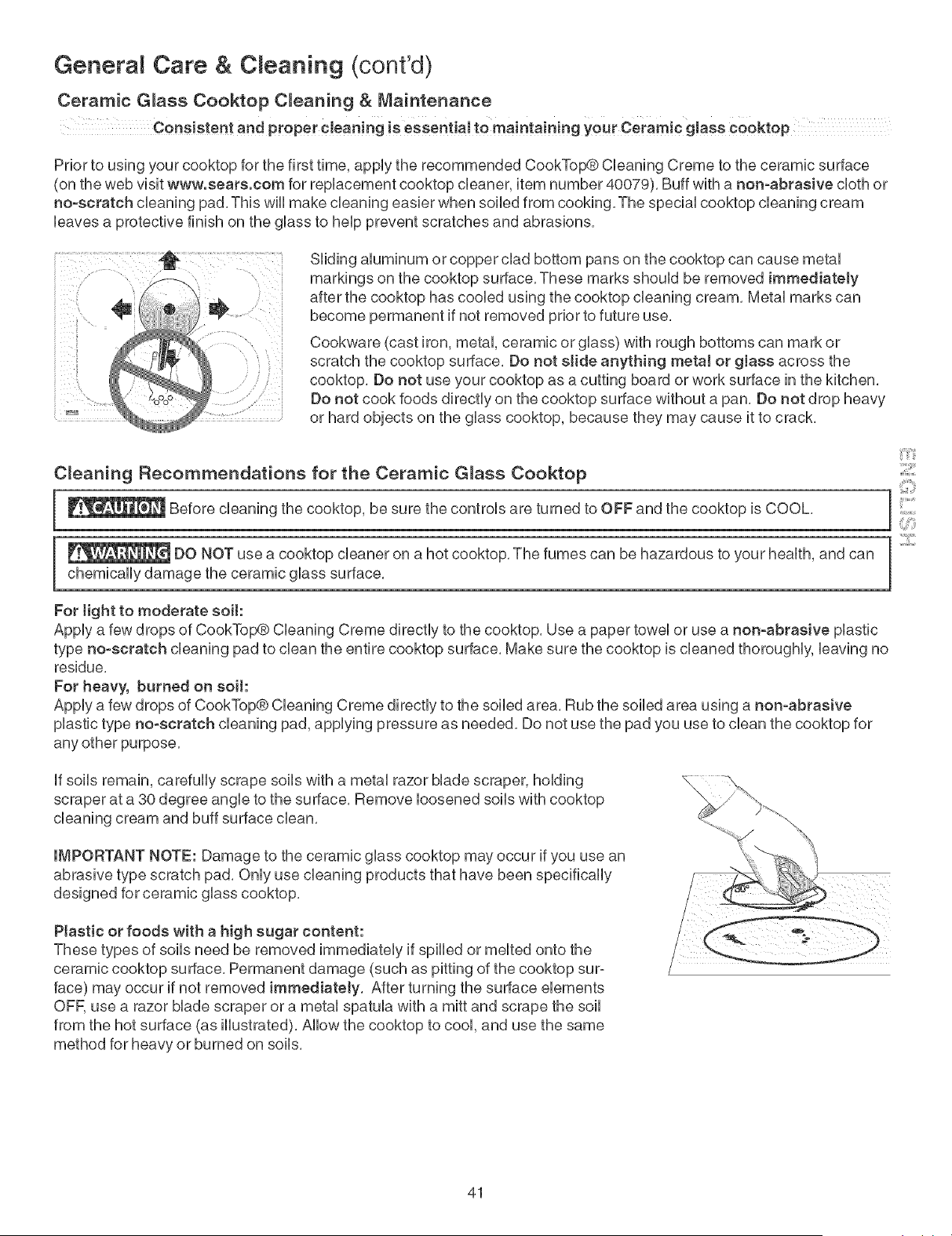
GeneraR Care & C eaning (cont'd)
Ceramic Glass Cooktop Cleanin 9 & Maintenance
Consistent and proper¢Jeanjng is essent!aJ tO maintaining your Ceramic glass Cooktop
Prior to using your cooktop for the first time, appUythe recommended CookTop@ Cbaning Creme to the ceramic surface
(on the web visit www.sears.com for repUacement cooktop cleaner, item number 40079). Buff with a non-abrasive cbth or
no-scratch cbaning pad. This wHUmake cbaning easier when soiled from cooking. The speciaUcooktop cleaning cream
haves a protective finish on the gUassto heUpprevent scratches and abrasions.
S-_..
• °/
SHding aiuminum or copper clad bottom pans on the cooktop can cause metaU
markings on the cooktop surface. These marks shouUd be removed immediately
after the cooktop has cooled using the cooktop cleaning cream. Metal marks can
become permanent if not removed prior to future use.
Cookware (cast iron, metal, ceramic or glass) with rough bottoms can mark or
scratch the cooktop surface. Do not sJide anything metal or gJass across the
cooktop. Do not use your cooktop as a cutting board or work surface in the kitchen.
Do not cook foods directly on the cooktop surface without a pan. Do not drop heavy
or hard objects on the glass cooktop, because they may cause it to crack.
C_eaning Recommendations for the Ceramic G_ass Cooktop
I_ Before the be the controls turned to OFF and the is COOL.
cleaning cooktop,
sure are
cooktop
_ DO NOT use a cooktop cleaner on a hot cooktop, The fumes can be hazardous to your health, and can
chemically damage the ceramic glass surface,
For tight to moderate soit:
Apply a few drops of CookTop® Cleaning Creme directly to the cooktop. Use a paper towel or use a non-abrasive plastic
type no-scratch cleaning pad to clean the entire cooktop surface. Make sure the cooktop is cleaned thoroughly, leaving no
residue,
For heavy, burned on soit:
Apply a few drops of CookTop® Cleaning Creme directly to the soiled area. Rub the soiled area using a non-abrasive
plastic type no-scratch cleaning pad, applying pressure as needed. Do not use the pad you use to clean the cooktop for
any other purpose.
if soils remain, carefully scrape soils with a metal razor blade scraper, holding
scraper at a 30 degree angle to the surface, Remove loosened soils with cooktop
cleaning cream and buff surface clean,
IMPORTANT NOTE: Damage to the ceramic glass cooktop may occur if you use an
abrasive type scratch pad. Only use cleaning products that have been specifically
designed for ceramic glass cooktop.
Plastic or foods with a high sugar content:
These types of soils need be removed immediately if spilled or melted onto the
ceramic cooktop surface. Permanent damage (such as pitting of the cooktop sur-
face) may occur if not removed immediately. After turning the surface elements
ore use a razor blade scraper or a metal spatula with a mitt and scrape the soil
from the hot surface (as illustrated). Allow the cooktop to cool, and use the same
method for heavy or burned on soils.
::2::::
41
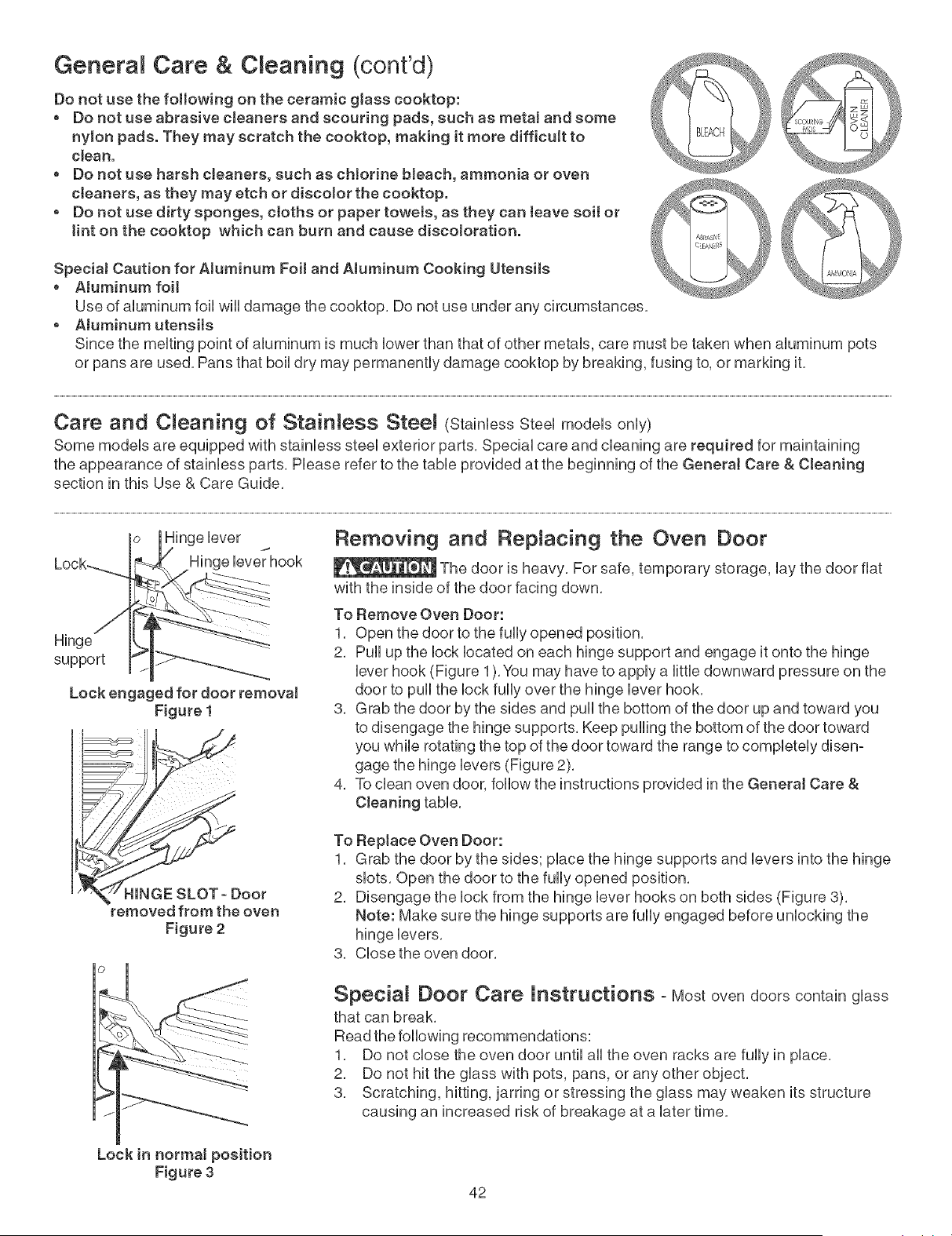
Genera Care & C eaning (cont'd)
Do not use the following on the ceramic gJass cooktop:
, Do not use abrasive cJeaners and scouring pads, such as metal and some
nylon pads. They may scratch the cooktop, making it more difficult to
clean.
o Do not use harsh cleaners, such as chlorine bJeach, ammonia or oven
cleaners, as they may etch or discolor the cooktop.
o Do not use dirty sponges, ctoths or paper towets, as they can leave soil or
tint on the cooktop which can burn and cause discoloration.
SpeciaJ Caution for Aluminum Foit and Atuminum Cooking Utensits
o Atuminum foit
Use of aluminum foil will damage the cooktop, Do not use under any circumstances,
o Atuminum utensits
Since the melting point of aluminum is much lower than that of other metals, care must be taken when aluminum pots
or pans are used. Pans that boil dry may permanently damage cooktop by breaking, fusing to, or marking it.
Care and Cleaning of Stainless Stee! (StainlessSteel models only)
Some models are equipped with stainless steel exterior parts. Special care and cleaning are required for maintaining
the appearance of stainless parts. Please refer to the table provided at the beginning of the GeneraJ Care & Cteaning
section in this Use & Care Guide.
Hinge lever
Hinge
support
Lock engaged for door remova!
Figure 1
Removing and Replacing the Oven Door
The door is heavy, For safe, temporary storage, lay the door flat
with the inside of the door facing down,
To Remove Oven Door:
1, Open the door to the fully opened position,
2, Pull up the lock located on each hinge support and engage it onto the hinge
lever hook (Figure 1),You may have to apply a little downward pressure on the
door to pull the lock fully over the hinge lever hook,
3, Grab the door by the sides and pull the bottom of the door up and toward you
to disengage the hinge supports, Keep pulling the bottom of the door toward
you while rotating the top of the door toward the range to completely disen-
gage the hinge levers (Figure 2),
4, To clean oven door, follow the instructions provided in the GeneraJ Care &
Cteaning table,
-tINGE SLOT- Door
removed from the oven
Figure 2
To Reptace Oven Door:
1, Grab the door by the sides; place the hinge supports and levers into the hinge
slots, Open the door to the fully opened position,
2, Disengage the lock from the hinge lever hooks on both sides (Figure 3),
Note: Make sure the hinge supports are fully engaged before unlocking the
3, Close the oven door,
Special Door Care instructions - Most oven doors contain glass
that can break,
Read the following recommendations:
1, Do not close the oven door until all the oven racks are fully in place,
2, Do not hit the glass with pots, pans, or any other object,
3, Scratching, hitting, jarring or stressing the glass may weaken its structure
causing an increased risk of breakage at a later time,
Lock in normal position
Figure 3
42
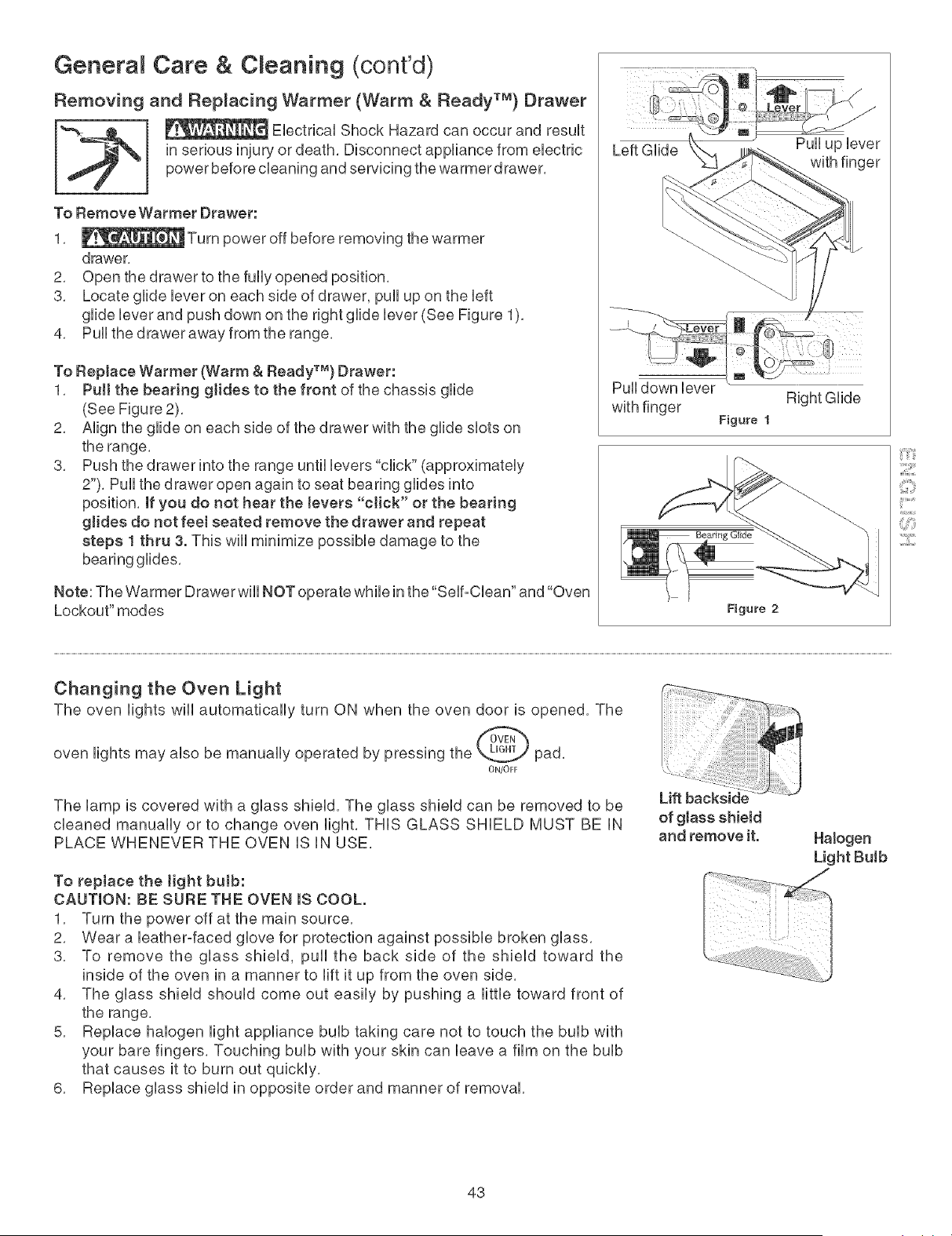
General Care & Cleaning (cont'd)
Removing and Replacing Warmer (Warm & Ready TM) Drawer
Ebctrbal Shock Hazard can occur and result
in serious injury or death, Disconnect appfiance from eUectric
power before cbaning and sen, bing the warmerdrawer,
To Remove Warmer Drawer:
1,
drawer,
2, Open the drawer to the fully opened position,
3, Locate glide lever on each side of drawer, pull up on the left
glide lever and push down on the right glide lever (See Figure 1),
4, Pull the drawer away from the range,
To Replace Warmer (Warm & Ready TM) Drawer:
1, Pull the bearing glides to the front of the chassis glide
(See Figure 2),
2, Align the glide on each side of the drawer with the glide slots on
the range,
3, Push the drawer into the range until levers "click" (approximately
2"), Pull the drawer open again to seat bearing glides into
position, if you do not hear the levers "click" or the bearing
glides do not feel seated remove the drawer and repeat
steps 1 thru 3. This will minimize possible damage to the
bearing glides,
Note The Warmer Drawer will NOT operate while in the"Self-Cban and "Oven
Lockout" modes
Left Glide
Pull up bver
with finger
Pull down lever
with finger
Figure 1
Right Glide
Figure 2
::iiiii_;_il
¸:121111
Changing the Oven Light
The oven lights will automatically turn ON when the oven door is opened, The
oven lights may also be manually operated by pressing the _ pad,
ON/OFF
The lamp is covered with a glass shield, The glass shield can be removed to be
cleaned manually or to change oven light, THiS GLASS SHIELD MUST BE iN
PLACE WHENEVER THE OVEN iS iN USE,
To replace the light bulb:
CAUTION: BE SURE THE OVEN IS COOL.
1, Turn the power off at the main source,
2, Wear a bather-faced glove for protection against possible broken glass,
3, To remove the glass shield, pull the back side of the shield toward the
inside of the oven in a manner to lift it up from the oven side,
4, The glass shield should come out easily by pushing a little toward front of
the range,
5, Replace halogen light appliance bulb taking care not to touch the bulb with
your bare fingers, Touching bulb with your skin can leave a film on the bulb
that causes it to burn out quickly,
6, Replace glass shield in opposite order and manner of removal,
of glass shield
and remove it.
43
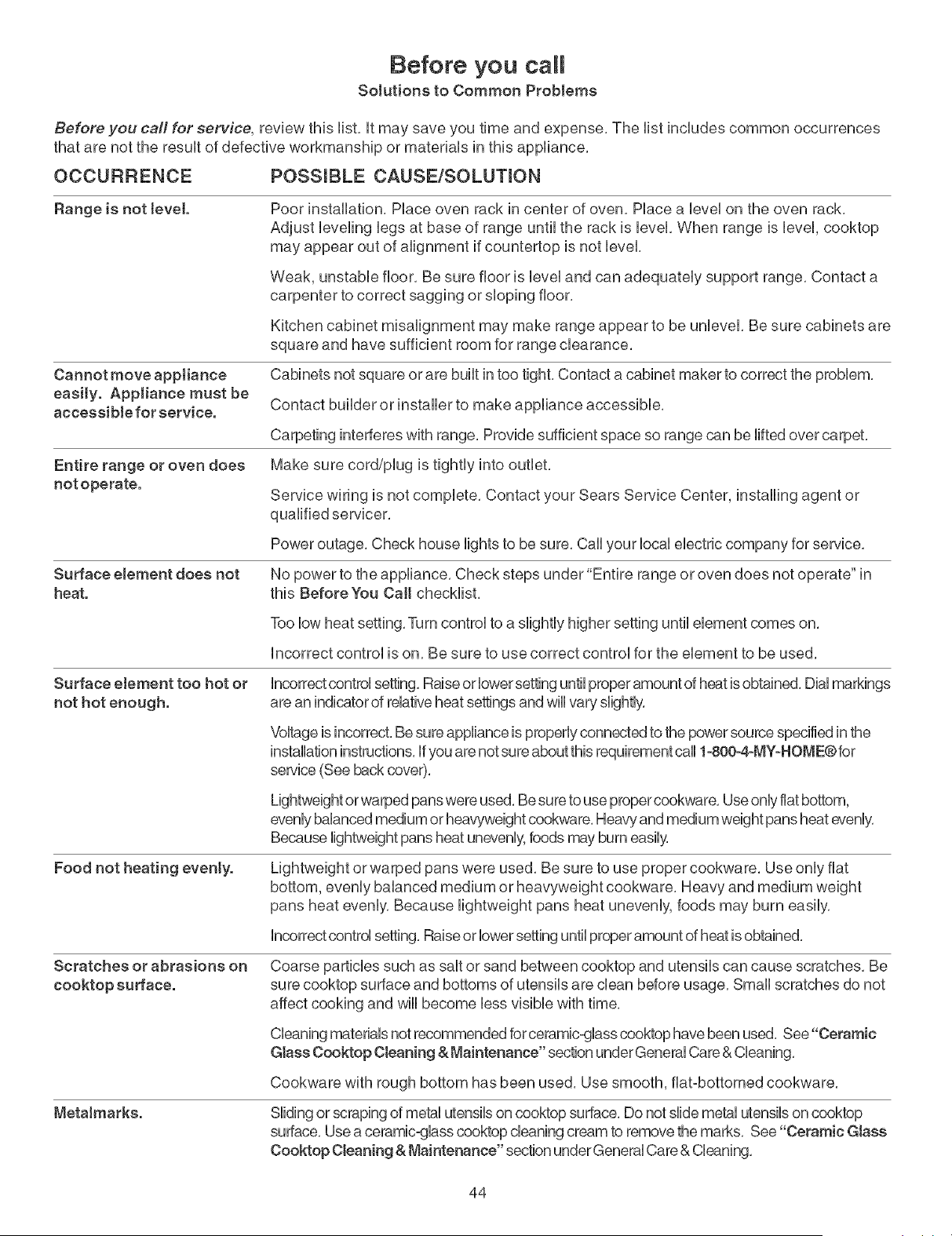
Before you call
Solutions to Common Problems
Before you calf for service, review this list, it may save you time and expense, The list includes common occurrences
that are not the result of defective workmanship or materials in this appliance,
OCCURRENCE POSSmBLE CAUSE/SOLUTmON
Range is not tevet.
Cannot move appJiance
easily. Appliance must be
accessible for service.
Entire range or oven does
not operate.
Surface element does not
heat.
Poor instaflation, Place oven rack in center of oven, Place a bvel on the oven rack,
Adjust bveling bgs at base of range until the rack is bvel, When range is bvel, cooktop
may appear out of afignment if countertop is not level,
Weak, unstable floor, Be sure floor is level and can adequately support range, Contact a
carpenter to correct sagging or sloping floor,
Kitchen cabinet misalignment may make range appear to be unbvel, Be sure cabinets are
square and have sufficient room for range clearance,
Cabinets not square orare built in too tight, Contact a cabinet maker to correct the problem,
Contact builder or installer to make appliance accessible,
Carpeting interferes with range, Provide sufficient space so range can be lifted over carpet,
Make sure cord/plug is tightly into outlet,
Service wiring is not complete, Contact your Sears Service Center, installing agent or
qualified servicer,
Power outage, Check house lights to be sure, Call your local electric company for service,
No power to the appliance, Check steps under "Entire range or oven does not operate" in
this Before You Call checklist,
Too low heat setting, Turn control to a slightly higher setting until element comes on,
incorrect control is on, Be sure to use correct control for the element to be used,
Surface element too hot or incorrect control setting. Raise or lower setting until proper amount of heat isobtained, Dial markings
not hot enough, are an indicator of relative heat settings and wiii vary slightly,
Food not heating eventy.
Voltage is incorrect,Be sure appliance is properly connected to the power source specified in the
installation instructions, if you are not sure about this requirement carl 1-800--4-MY-HOME®for
sewice (See back cover),
Lightweight orwarped pans were used, Be sure to use proper cookware, Use only fiat bottom,
evenly balanced medium or heavyweight cookware, Heaw and medium weight pans heat evenly,
Because lightweight pans heat unevenly, foods may burn easily,
Lightweight or warped pans were used, Be sure to use proper cookware, Use only fiat
bottom, evenly balanced medium or heavyweight cookware, Heavy and medium weight
pans heat evenly, Because lightweight pans heat unevenly, foods may burn easily,
incorrect control setting, Raiseor lower setting until proper amount of heat is obtained,
Scratches or abrasions on Coarse particles such as salt or sand between cooktop and utensils can cause scratches, Be
cooktop surface, sure cooktop surface and bottoms of utensils are clean before usage, Small scratches do not
affect cooking and will become less visible with time,
MetaJmarks.
Cleaning materials not recommended for ceramic-glass cooktop have been used, See"Ceramic
Glass Cooktop Cleaning & Maintenance" section under General Care & Cleaning,
Cookware with rough bottom has been used, Use smooth, flat-bottomed cookware,
Sliding or scraping of metal utensils on cooktop surface, Do not slide metal utensils on cooktop
surface, Use a ceramic-glass cooktop cleaning cream to remove the marks, See "Ceramic Glass
Cooktop Cleaning & Maintenance" section under General Care & Cleaning,
44
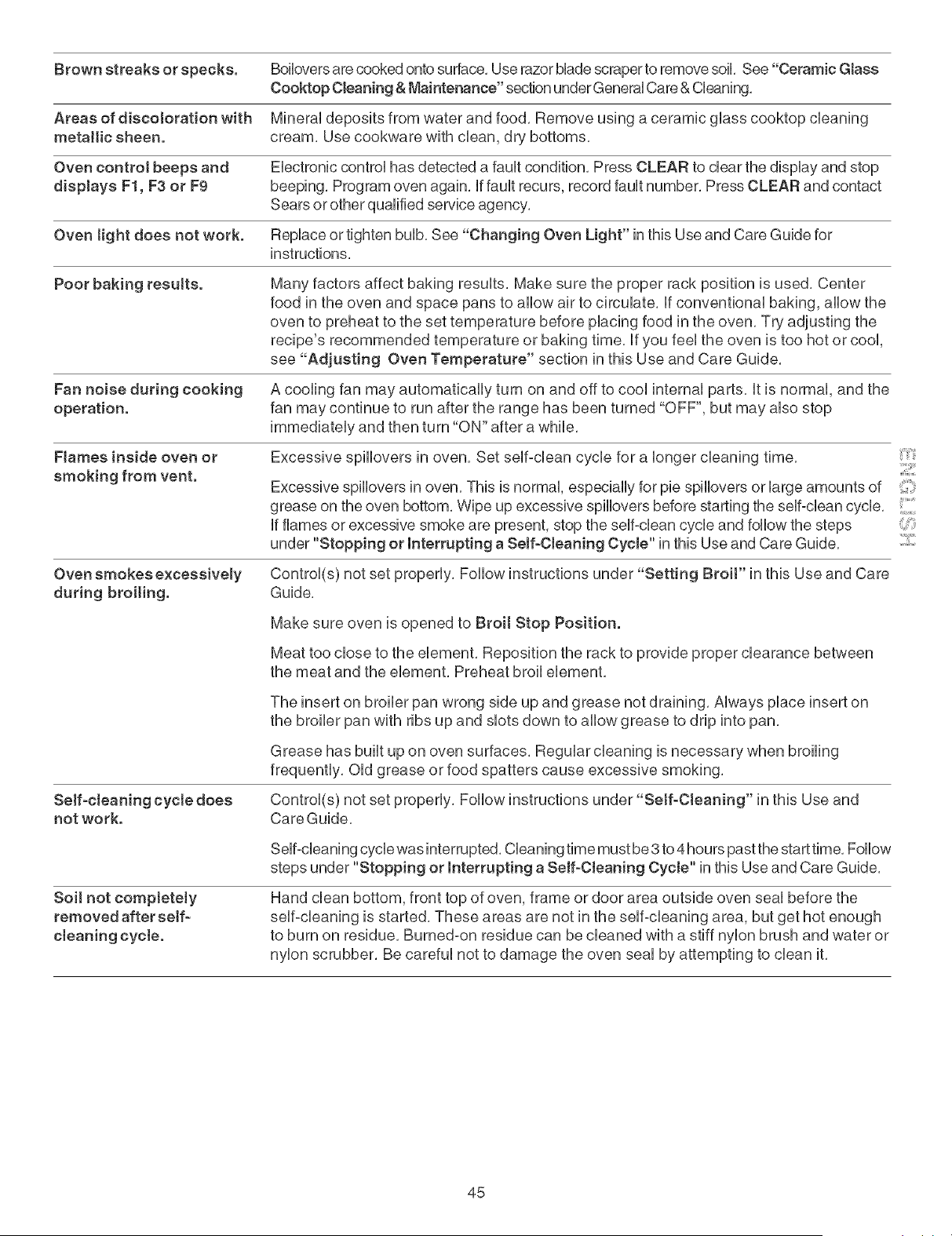
Brownstreaksor specks. BoHoversarecookedontosurface,UserazorMadescrapertoremovesoil,See"CeramicGlass
CooktopCharting&Maintenance"sectionunderGeneraUCare&Cbaning,
Areasofdiscolorationwith MineraUdepositsfromwaterandfood,RemoveusingaceramicgUasscooktopcleaning
metallicsheen, cream,Usecookwarewithdean,drybottoms,
Ovencontrolbeepsand EbctronbcontroUhasdetectedafauUtcondition,PressCLEARtodearthedispUayandstop
displaysF1,F3or F9 beeping,Programovenagain,iffaultrecurs,recordfaultnumber,PressCLEARandcontact
Searsorotherqualifiedserviceagency,
Ovenlightdoesnot work. Replaceortightenbulb,See"ChangingOvenLight"inthisUseandCareGuidefor
instructions,
Poorbakingresults. ManyfactorsaffectbakingresuUts,Makesuretheproperrackpositionis used,Center
foodintheovenandspacepanstoallowairtocirculate,Ifconventionalbaking,allowthe
oventopreheattothesettemperaturebeforeplacingfoodintheoven,Tryadjustingthe
recipe'srecommendedtemperatureorbakingtime,If youfeeltheovenistoohotorcool,
see"Adjusting OvenTemperature"sectioninthisUseandCareGuide,
Fannoiseduringcooking Acoolingfanmayautomaticallyturnonandofftocoolinternalparts,it is normal,andthe
operation, fanmaycontinueto runaftertherangehasbeenturned"OFF",butmayalsostop
immediatelyandthenturn"ON"afterawhile,
Flamesinside oven or
smoking from vent.
Excessive spillovers in oven, Set self-dean cycle for a longer cleaning time,
Excessive spillovers in oven, This is normal, especially for pie spillovers or large amounts of
grease on the oven bottom, Wipe up excessive spillovers before starting the self-dean cycle,
If flames or excessive smoke are present, stop the self-dean cycle and follow the steps _:
under "Stopping or Interrupting a Self-Cleaning Cycte" in this Use and Care Guide,
Oven smokes excessively Control(s) not set properly, Follow instructions under "Setting Broit" in this Use and Care
during broiling. Guide,
Make sure oven is opened to Broil Stop Position.
Meat too close to the element, Reposition the rack to provide proper clearance between
the meat and the element, Preheat broil element,
Serf-cleaning cycte does
not work.
The insert on broiler pan wrong side up and grease not draining, Always place insert on
the broiler pan with ribs up and slots down to allow grease to drip into pan,
Grease has built up on oven surfaces, Regular cleaning is necessary when broiling
frequently, Old grease or food spatters cause excessive smoking,
Control(s) not set properly, Follow instructions under"Setf-Cleaning" in this Use and
Care Guide,
Soil not compJetely
removed after self-
cteaning cycte.
Self-cleaning cycle was interrupted, Cleaning time must be 3 to 4 hours past the start time, Follow
steps under "Stopping or Interrupting a Self-Cleaning Cycte" in this Use and Care Guide,
Hand clean bottom, front top of oven, frame or door area outside oven seal before the
self-cleaning is started, These areas are not in the self-cleaning area, but get hot enough
to burn on residue, Burned-on residue can be cleaned with a stiff nylon brush and water or
nylon scrubber, Be careful not to damage the oven seal by attempting to clean it,
45
Your Home
For repair-in your home-of all major brand appliances.
lawn and garden equipment, or heating and cooling systems.
no matter who made it, no matter who sold it!
For the replacement parts, accessories and
owner's manuab that you need to doqbyourself.
For Sears professional installation of home appliances
and items like garage door openers and water heaters.
11-800-469-4663}
Call anytime, day or night (U.S.A and Canada)
www.sears.com www.sears.ca
Our Home
For repair of carry-in items like vacuums, lawn equipment.
and electronics, call or go onqine for the location of your nearest
Sears Parts & Repair Center,
t -800-488 -1222
Call anytime, day or night (U.S.A. only)
W_.SearS.COm
To purchase a protection agreement (U.S.A.)
or maintenance agreement (Canada) on a product serviced by Sears:
1°800°827°6655 (U.S.A.) 1o800o361 °6665 (Canada)
Para pedir serviclo de reparaci0n
a domicilio, y para ordenar piezas:
1-888-SU-HOGAR _
/ 1-888-784-6427
Au Canada pour service en frangais:
1-800-LE-FOYER M°
1o800-533-6937/
WWW.Sesrs.c8
TM
® Registered Trademark / Trademark / sM Service Mark of Sears Brands, LLC
® Mama Registrada / TMMama de Fabrica / SM Marca de Servicio de Sears Brands, LLC
lvIC lVID
Marque de commerce / Marque deposee de Sears Brands, LLC @ Sears Brands, LLC