Module No. 2349
2349-1
GENERAL GUIDE
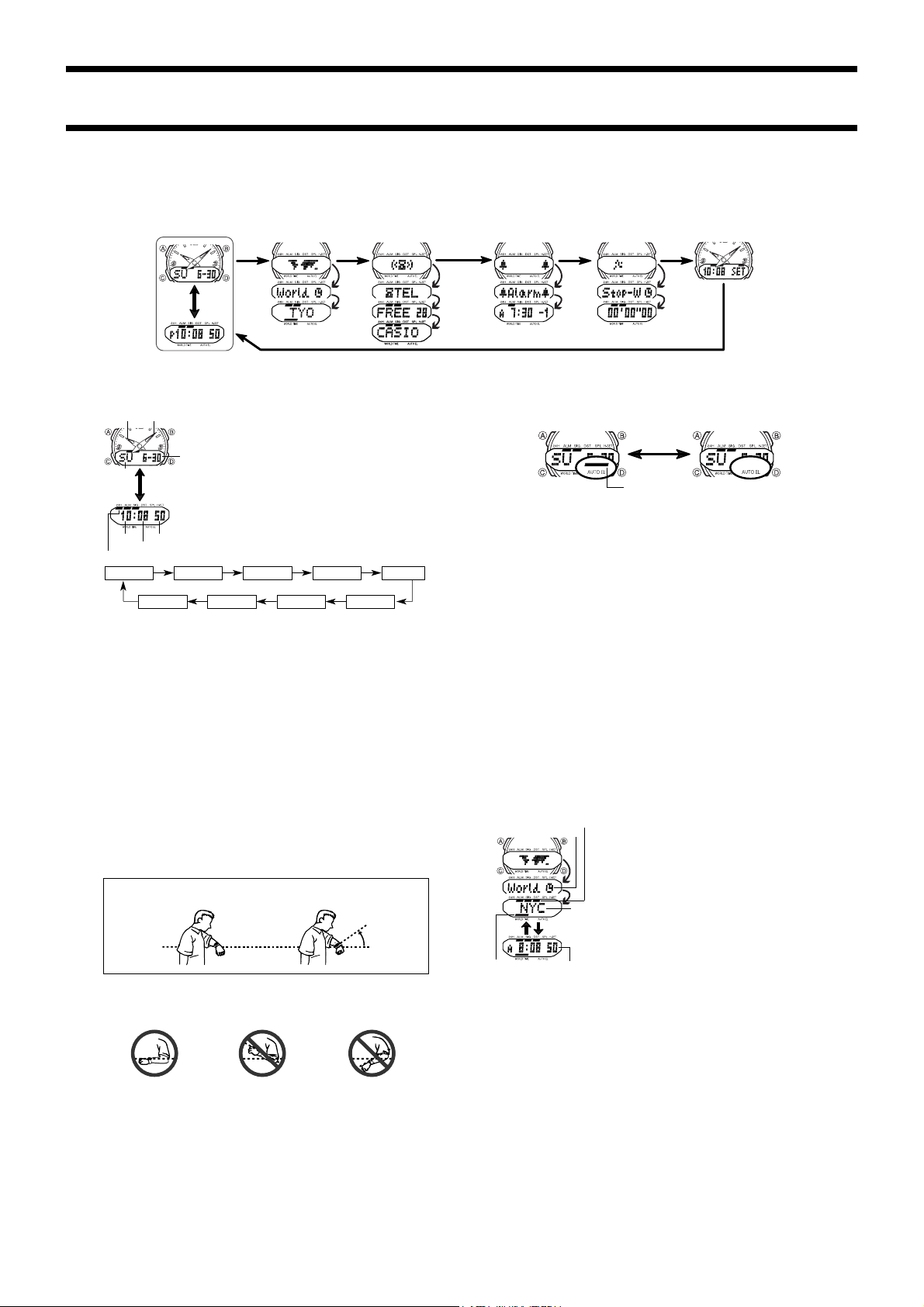
• Press C to change from mode to mode.
• Pressing B in any mode illuminates the digital display for about 1.5 seconds. The backlight is disabled while a setting screen is on the display.
• If you do not perform any operation for a few minutes while a setting screen (with flashing digits) is on the display, the watch automatically exits the setting screen.
Press C.
Timekeeping Mode World Time Mode Telememo Mode Alarm Mode Stopwatch Mode Hand Setting Mode
Press
D.
TIMEKEEPING MODE
• Press D to toggle the display between the date screen
(day of the week, month, day) and the time screen (hour,
minutes, seconds).
• With 12-hour timekeeping, times between midnight and
noon are indicated by A (am), while times between noon
and midnight are indicated by P (pm).
• The 24H indicator is on the display while 24-hour time-
keeping is selected.
To set the time and date
1.While in the Timekeeping Mode, hold down A until the
seconds digits flash on the display, indicating the setting
screen.
2.Press C to move the flashing in the sequence shown
below.
Seconds DST City Code Hour Minutes
Day Month Year 12/24
3. While the seconds setting is selected (flashing), press D to reset it to 00. If you press
D while the seconds setting is in the range of 30 to 59, the seconds are reset to 00
and 1 is added to the minutes. If the seconds setting is in the range of 00 to 29, the
minutes count is unchanged.
• While the DST (Daylight Saving Time) setting is selected, press D to toggle it on and
off. If you turn the DST on, the DST on indicator appears on the display.
• The DST on/off setting you make for the city code that is currently selected in the
Timekeeping Mode (your home time city) is also applied to that city code in the World
Time Mode.
• While the city codes setting is selected, use D (+) and B (–) to scroll thorough the
available codes until the one you want to use as your home time city is displayed.
• For full information on city codes, see the “CITY CODE TABLE”.
• While any other setting is selected (flashing), press D (+) or B (–) to change it.
Holding down either button changes the setting at high speed.
4.After you make the settings you want, press
A
to exit the setting screen.
• The day of the week is automatically set in accordance with the date.
• The date can be set within the range of January 1, 2000 to December 31, 2039.
ABOUT THE BACKLIGHT
About the Auto Light Switch Function
When the auto light switch function is turned on, the backlight automatically turns on for
about 1.5 seconds under the conditions described below. Avoid wearing the watch on
the inside of your wrist. Doing so causes the auto light switch to operate when not needed,
which shortens battery life.
Moving the watch to a position that is parallel to the ground and then tilting it
towards you approximately 40 degrees causes the backlight to illuminate.
• The backlight may not illuminate if the face of the watch is more than 15 degrees off
parallel to the left or right. Make sure that the back of your hand is parallel to the
ground.
• Static electricity or magnetic force can interfere with proper operation of the auto
backlight function. If the auto backlight does not illuminate, try moving the watch back
to the starting position (parallel with the ground) and then tilt it back toward you again.
If this does not work, drop your arm all the way down so it hangs at your side, and then
bring it back up again.
• Under certain conditions the backlight may not light until about one second or less
after turn the face of the watch towards you. This does not necessarily indicate
malfunction of the backlight.
Parallel to ground
40
°
Parallel to ground More than 15 degrees
too high
More than 15 degrees
too low
To switch the auto light switch function on and off
In the Timekeeping Mode, hold down D for one or two seconds to turn the auto light
switch function on and off.
• The auto light switch indicator is shown on the display in all modes while the auto light
switch function is on.
• In order to protect against running down the battery, the auto light switch function is
automatically turned off approximately six hours after you turn it on. Repeat the above
procedure to turn the auto light switch function back on if you want.
• Pressing B at any time illuminates the display, regardless of the auto light switch’s on/
off setting.
Caution
• The backlight of this watch employs an electro-luminescent (EL) light, which loses its illuminat-
ing power after very long term use.
• Frequent use of the backligfht shortens the battery life.
• The watch emits an audible sound whenever the display is illuminated. This is because the EL
light vibrates slightly when lit. It does not indicate malfunction of the watch.
Warning!
• Never try to read your watch when mountain climbing or hiking in areas that are
dark or in areas with poor footing. Doing so is dangerous and can result in serious
personal injury.
• Never try to read your watch when running where there is the danger of accidents,
especially in locations where there might be vehicular or pedestrian traffic. Doing
so is dangerous and can result in serious personal injury.
• Never try to read your watch when riding on a bicycle or when operating a
motorcycle or any other motor vehicle. Doing so is dangerous and can result in
a traffic accident and serious personal injury.
• When you are wearing the watch, make sure that its auto light switch function is
turned off before riding on a bicycle or operating a motorcycle or any other motor
vehicle.
Sudden and unintended operation of the auto light switch can create a distraction,
which can result in a traffic accident and serious personal injury.
WORLD TIME MODE
The World Time Mode shows you the current time in 27
cities (29 time zones) around the world.
• For full information on city codes, see the “CITY CODE
TABLE”.
• The time setting of the Timekeeping Mode and the World
Time Mode are synchronized. Whenever you change the
time setting for any city in the Timekeeping Mode, the set-
tings of all World Time cities are changed accordingly.
To select a World Time City and view its time
1. In the World Time Mode, press D to scroll forward through
the city codes (time zones). Holding down D scrolls at
high speed.
2.When the city code you want is on the display, press A
to view its current time.
• While the time screen is on the display, press D to switches back to the city code
screen.
• At this point you could press D again to scroll through city codes.
Daylight Saving Time (DST)
Daylight Saving Time automatically advances the time setting by one hour from
Standard Time. You can make individual Daylight Saving Time settings for each city code
(time zone). Remember that not all countries or even local areas use Daylight Saving
Time.
To switch between Standard Time and Daylight Saving Time
1.In the World Time Mode, use D to display the city code (time zone) whose standard
time/daylight saving time setting you want to change.
2.Hold down A toggle between Daylight Saving Time and Standard Time.
• The DST indicator appears on the display whenever you display a city code for which
daylight saving time is turned on.
Press D.
Minute handHour hand
Month-
day
24H indicator
Hour
Minutes
Seconds
Day of
week
Press A.
Press
D.
Mode
indicator 2
Current Time in
City Code zone
City
Code
DST on indicator
Mode indicator 1
Hold down D.
Auto light switch
indicator
ON OFF
2349-2
TELEMEMO MODE
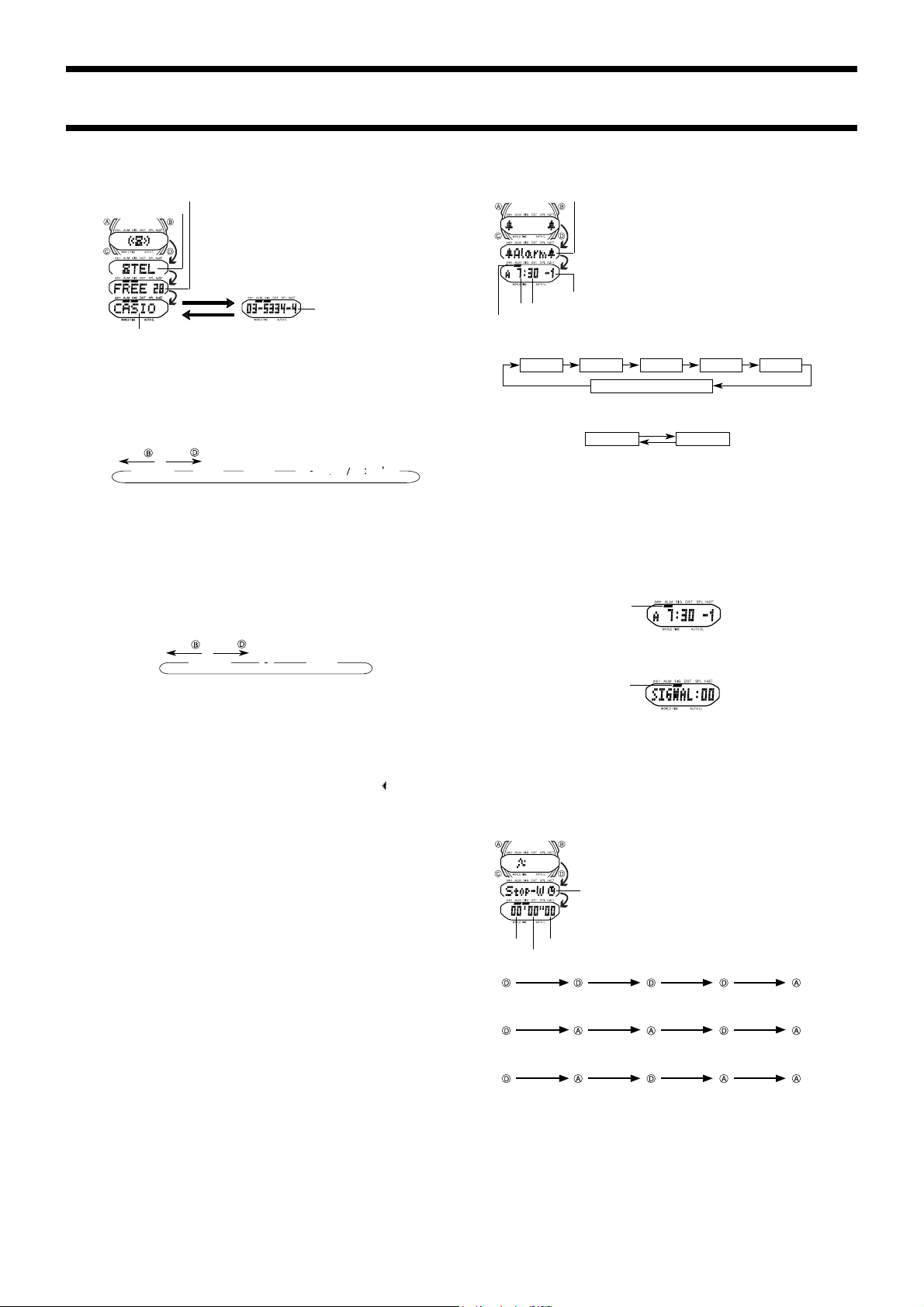
The Telememo Mode lets you store up to 30 records, each
with a name (up to eight characters) and a phone number
(up to 14 digits). Records are automatically sorted based
on the names. You can recall records by scrolling through
them on the display.
• See the “CHARACTER LIST” for details on how the watch
sorts records.
• The blank screen appears when there are no records
stored in memory, or when you scroll to the location
between the last and the first records stored in memory.
• The record on the display when you exit the Telememo Mode appears first the next
time you enter the Telememo Mode.
To input a new Telememo record
1.In the Telememo Mode, press D and B at the same time. This causes the blank
screen to appear.
• If the blank screen does not appear when you press D and B, it means that memory
is full. To store another record, you will first have to delete a record stored in memory.
2.Hold down A and a cursor appears on the display.
3.Use D (+) and B (–) to scroll through characters at the current cursor position.
Characters scroll in the sequence shown below.
A ~ Z
0 ~ 9
(
(
(Space)
Press .
Press .
• Holding down D or B scrolls at high speed.
4.When the character you want is at the current cursor position, press C to move the
cursor to the right.
5.Repeat the steps 3 and 4 to input the rest of the characters.
6. After you input the name, use C to move the cursor to the right until the number input
screen “-----” appears.
• You can input up to eight characters for the name, though only six characters are
visible at a time. If the name you input has fewer than eight characters, use C to move
the cursor to the eighth space (which means you would press C three times after
inputting a five-character name).
• Pressing C again while the cursor is at the eighth space changes to the number input
screen. When the cursor is at the 14th digit of the number input screen, pressing C
causes the name input screen to appear again.
7.Use D (+) and B (–) to scroll through characters (hyphen, numbers, space) at the
current cursor position on the number screen. Characters scroll in the sequence shown
below.
0 ~ 9
(Space)
Press .
Press .
• Holding down D or B scrolls characters at high speed.
8.When the character you want is at the cursor position, press C to move the cursor to
the right.
9.Repeat steps 7 and 8 to input the rest of the numbers you want.
• You can input up to 14 digits for the number.
10.After inputting the name and number of the record, press A to store it.
• The message “SORT” appears on the display for a few moments after you press A to
indicate that the watch is sorting records.
• After the record is sorted, the cursor appears in the display, ready for input.
11.Input the next record or press A to exit the setting screen.
• The display can show only six name characters or nine number digits at a time. Longer
names and numbers scroll continuously from right to left. The symbol “
” indicates
that the character or digit to the left is the last, and the character or digit to the right is
the first.
• Pressing D while a name is scrolling on the display jumps to the first character of the
name. Scrolling resumes from there.
• Pressing A while a number is scrolling on the display jumps to the first digit of the
number. Scrolling resumes from there.
To recall Telememo data
1.In the Telememo Mode, press D to scroll forward through the names of the stored
records.
• Holding down D scrolls through the names at high speed.
2. When the name for the record you want is on the display, press A to view its number.
• Pressing D while a number screen is on the display returns to the name screen.
• At this point you could press D again to scroll through names.
To edit Telememo data items
1.In the Telememo Mode, press D to scroll forward through the names of the stored
records.
• Holding down D scrolls through the names at high speed.
2. When the name for the record you want is on the display, hold down A until the cursor
appears in the display.
3.Use C to move the cursor to the character you want to change.
4.Use D (+) and B (–) to change the character.
• See step 3 of “To input a new Telememo record” for information on inputting name
characters, and step 7 for inputting number characters.
5.After making the changes that you want, press A to store them and exit the setting
screen.
• The message “SORT” appears on the display for a few moments after you press A to
indicate that the watch is sorting records.
To delete Telememo data
1.In the Telememo Mode, press D to scroll forward through the names of the stored
records.
• Holding down D scrolls through the names at high speed.
2. When the name for the record you want is on the display, hold down A until the cursor
appears in the display.
3.Press D and B at the same time. The message “CLEAR” appears in the display,
indicating that the record was deleted.
• After the record is deleted, the cursor appears in the display, ready for input.
4.Input a record or press A to exit the setting screen.
ALARM MODE
You can set up to five daily alarms. When the Daily Alarm is
turned on, the alarm sounds for 20 seconds at the preset
time each day. Press any button to stop the alarm after it
starts to sound. When the Hourly Time Signal is turned on,
the watch beeps every hour on the hour.
To set the alarm time
1. While in the Alarm Mode, press D to display the number of the alarm you want to set.
Alarm 1 Alarm 5Alarm 2 Alarm 3 Alarm 4
Hourly Time Signal
2.Hold down A until the hour digits flash on the display, indicating the setting screen.
• At this time, the alarm is turned on automatically.
3.Press C to move the flashing in the sequence shown below.
Hour Minutes
4.Use D (+) and B (–) to change the setting. Holding down either button changes the
setting at high speed.
5.After you set the alarm time, press A to exit the setting screen.
• The format (12-hour and 24-hour) of the alarm time matches the format you select in
the Timekeeping Mode.
• When setting the alarm time using the 12-hour format, take care to set the time
correctly as morning or afternoon.
To stop the alarm
• Press any button to stop the alarm after it starts to sound.
To turn a daily Alarm or the Hourly Time Signal on and off
1.Use D to display the alarm you want to turn on or off, or the screen for turning the
Hourly Time Signal on or off.
2.Press A to toggle the displayed alarm or Hourly Time Signal on and off.
• In the Alarm Mode, the alarm on indicator appears to indicate the on/off status of the
currently displayed alarm. In all other modes, the alarm on indicator appears when any
one of the five alarms is turned on. The alarm on indicator is not displayed in other
modes when all alarms are turned off.
• The Hourly Time Signal indicator is displayed in all modes when the Hourly Time
Signal is turned on.
To test the alarm
In the Alarm Mode, hold down D to sound the alarm.
• The alarm test does not work while the Alarm Mode setting screen is on the display.
• Holding down D to test the alarm also advances to the next alarm number.
STOPWATCH MODE
The Stopwatch Mode lets you measure elapsed time, split
times, and two finishes. The range of the stopwatch is 59
minutes, 59.99 seconds. You can use the EL backlight by
pressing B at any time while the stopwatch is operating.
Elapsed time measurement
Start
Stop Re-start Stop Clear
Start
Split Split release Stop Clear
Start
Split Stop Split release Clear
Split time measurement
Split time and 1st-2nd place times
First runner
finishes.
Second runner
finishes.
Record time of
first runner.
Record time of
second runner.
Daily Alarm indicator
Hourly Time
Signal indicator
Mode indicator
1/100 second
Minutes
Seconds
Press D.
Press A.
Mode indicator
Name
Remaining memory
Telephone number
Mode indicator
Alarm number
Hour Minutes
Alarm on indicator

2349-3
HAND SETTING MODE
When the time shown on the display does not match the
analog setting, use this mode to correct the analog setting.
1.Hold down A while in the Hand Setting Mode until the
message “SET” start to flash on the display.
2.Each press of D advances the hands 20 seconds. Hold-
ing down D advances the hand at high speed.
• Note that the hands can be advanced only and cannot be
moved back. Take care so you do not go past the setting
you want to make.
3.After you set the analog time, press A to exit the setting
screen.
• Depending on your timing when you operate the D
button, the above operation can cause the minute hand
timing to become late. If this happens, repeat the above
operation to correct the minute hand timing.
CHARACTER LIST
CITY CODE TABLE
–11 –11
–10 HNL HONOLULU PAPEETE
–9 ANC ANCHORAGE NOME
–8 LAX LOS ANGELES
SAN FRANCISCO
,
LAS VEGAS,
VANCOUVER, SEATTLE, DAWSON CITY
–7 DEN DENVER EL PASO, EDMONTON
HOUSTON, DALLAS/FORT WORTH,
–6
CHI CHICAGO NEW ORLEANS, MEXICO CITY,
WINNIPEG
–5 NYC NEW YORK
MONTREAL, DETROIT, MIAMI, BOSTON,
PANAMA CITY, HAVANA, LIMA, BOGOTA
–4 CCS CARACAS LA PAZ, SANTIAGO, PORT OF SPAIN
–3 RIO
RIO DE JANEIRO
SAO PAULO, BUENOS AIRES, BRASILIA,
MONTEVIDEO
–2 –02
–1 –01
0 GMT
0 LON LONDON
DUBLIN, LISBON, CASABLANCA,
DAKAR, ABIDJAN
MILAN, ROME, MADRID, AMSTERDAM,
+1 PAR PARIS
ALGIERS, HAMBURG, FRANKFURT,
VIENNA, STOCKHOLM, BERLIN
+2
CAI CAIRO ATHENS, HELSINKI, ISTANBUL,
JRS JERUSALEM BEIRUT,DAMASCUS, CAPE TOWN
+3 JED JEDDAH
MOSCOW, KUWAIT, RIYADH, ADEN,
ADDIS ABABA, NAIROBI
+3.5 THR TEHRAN SHIRAZ
+4 DXB DUBAI ABU DHABI, MUSCAT
+4.5 KBL KABUL
+5 KHI KARACHI MALE
+5.5 DEL DELHI MUMBAI, CALCUTTA
+6 DAC DHAKA COLOMBO
+6.5 RGN YANGON
+7 BKK BANGKOK
JAKARTA, PHNOM PENH, HANOI,
VIENTIANE
SINGAPORE, KUALA LUMPUR,
+8 HKG HONG KONG BEIJING,TAIPEI, MANILA, PERTH,
ULAANBAATAR
+9 TYO TOKYO SEOUL, PYONGYANG
+9.5 ADL ADELAIDE DARWIN
+10 SYD SYDNEY MELBOURNE, GUAM, RABAUL
+11 NOU NOUMEA PORT VILA
+12 WLG WELLINGTON CHRISTCHURCH, NADI, NAURU ISLAND
*
Based on data as of December 1999.
GMT City
City Other major cities in same time zone
differential Code
Mode indicator
Hour hand Minute hand
Hour Minutes