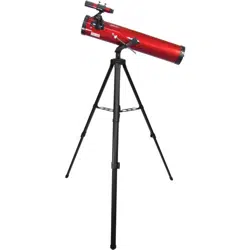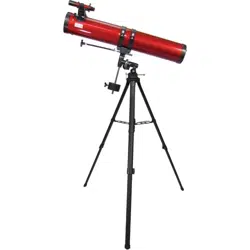

RP-300 TELESCOPE
Instruction Manual
CARSON®
2070 5th Avenue
Ronkonkoma, NY 11779
Phone: 631-963-5000
Fax: 631-427-6749
For information, call toll-free: 1-800-967-8427
[email protected] / [email protected] / www.carson.com
RP-300 / ©2017-R1

Table of Contents:
Introduction
3
Box Contents
4-9
Figures 1-9/Figure Key
10-11
Telescope Assembly
• Setting up Your Tripod
• Attaching the Equatorial Mount
• Attaching the Counterweight
• Attaching the Slow Motion Cables
• Attaching the Telescope Tube to the Mount
• Attaching the Finder Scope
• Attaching the Eyepieces
12-13
Balancing the Telescope
• Balancing the Mount in R.A.
• Balancing the Mount in Dec.
• Aligning the Finder Scope
13
Calculating Power
14
Understanding Celestial Movement
14-15
A Brief Overview of Celestial Coordinates
15
Polar Alignment
16-17
Using the Telescope
• Image Orientation
• Using Setting Circles
18-22
Care and Maintenance of Your Telescope
• Cleaning
• Collimation of Optics
• Adjusting the Diagonal Holder
• Adjusting the Primary Mirror
• Night Time Star Collimation Testing
21
Specications
21
Warnings
22
Customer Service
22-23
Warranty Information
Congratulations on your purchase of a Carson RP-300 Red Planet
TM
Series
telescope. This telescope features an easy-to-use design and high perfor-
mance optics that are perfect for amateur astronomers looking to explore
the wonders of outer space. Please read this manual carefully to ensure that
you assemble and use your telescope correctly. When used properly, your
Red Planet
TM
telescope should provide years of exciting observations of the
universe. Please note that this Newtonian Reector telescope was designed
for astronomical viewing and is not recommended for terrestrial use.
IMPORTANT: DO NOT USE YOUR RED PLANET
TM
TELESCOPE
TO LOOK AT OR NEAR THE SUN! DOING SO WILL CAUSE IN-
STANT AND PERMANENT EYE DAMAGE.
Each box contains the following:
• Complete Optical Tube Assembly.
• Equatorial Mount.
• Heavy-Duty Aluminum Tripod.
• 9mm Kellner Eyepiece (1.25”O.D.).
• 20mm Kellner Eyepiece (1.25”O.D.).
• Cradle Rings with Lock Knobs.
• 6x30mm Finder Scope.
• Counterweight Bar with Counterweight.
• Flexible Cable Controls for Both Axes.
Please unpack your telescope carefully and make sure that all accessories are
included in the box.
3

Table of Contents:
Introduction
3
Box Contents
4-9
Figures 1-9/Figure Key
10-11
Telescope Assembly
• Setting up Your Tripod
• Attaching the Equatorial Mount
• Attaching the Counterweight
• Attaching the Slow Motion Cables
• Attaching the Telescope Tube to the Mount
• Attaching the Finder Scope
• Attaching the Eyepieces
12-13
Balancing the Telescope
• Balancing the Mount in R.A.
• Balancing the Mount in Dec.
• Aligning the Finder Scope
13
Calculating Power
14
Understanding Celestial Movement
14-15
A Brief Overview of Celestial Coordinates
15
Polar Alignment
16-17
Using the Telescope
• Image Orientation
• Using Setting Circles
18-22
Care and Maintenance of Your Telescope
• Cleaning
• Collimation of Optics
• Adjusting the Diagonal Holder
• Adjusting the Primary Mirror
• Night Time Star Collimation Testing
21
Specications
21
Warnings
22
Customer Service
22-23
Warranty Information
Congratulations on your purchase of a Carson RP-300 Red Planet
TM
Series
telescope. This telescope features an easy-to-use design and high perfor-
mance optics that are perfect for amateur astronomers looking to explore
the wonders of outer space. Please read this manual carefully to ensure that
you assemble and use your telescope correctly. When used properly, your
Red Planet
TM
telescope should provide years of exciting observations of the
universe. Please note that this Newtonian Reector telescope was designed
for astronomical viewing and is not recommended for terrestrial use.
IMPORTANT: DO NOT USE YOUR RED PLANET
TM
TELESCOPE
TO LOOK AT OR NEAR THE SUN! DOING SO WILL CAUSE IN-
STANT AND PERMANENT EYE DAMAGE.
Each box contains the following:
• Complete Optical Tube Assembly.
• Equatorial Mount.
• Heavy-Duty Aluminum Tripod.
• 9mm Kellner Eyepiece (1.25”O.D.).
• 20mm Kellner Eyepiece (1.25”O.D.).
• Cradle Rings with Lock Knobs.
• 6x30mm Finder Scope.
• Counterweight Bar with Counterweight.
• Flexible Cable Controls for Both Axes.
Please unpack your telescope carefully and make sure that all accessories are
included in the box.
3
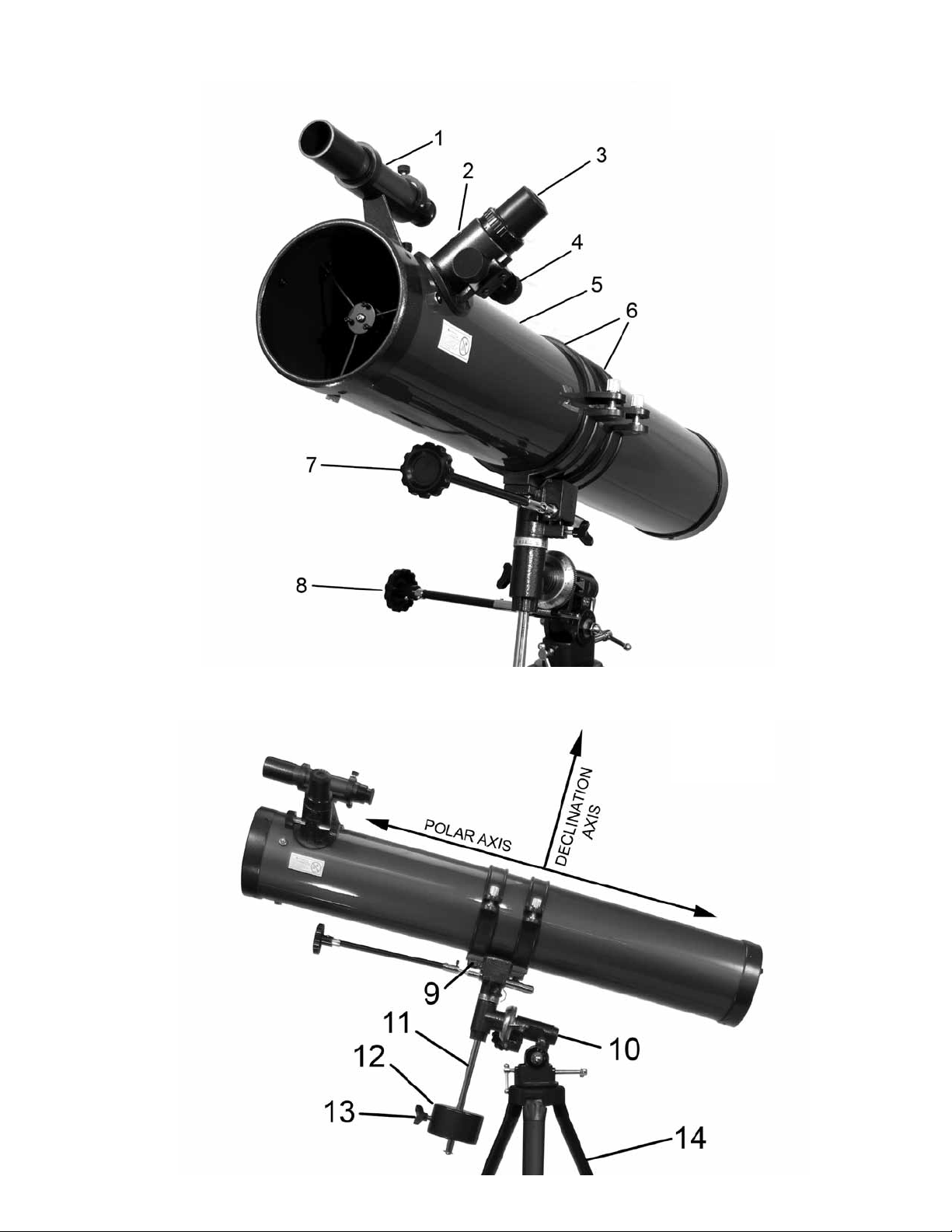
Fig.1
7--
8-
5
Fig.3
Fig.2
4
1
1
12
5
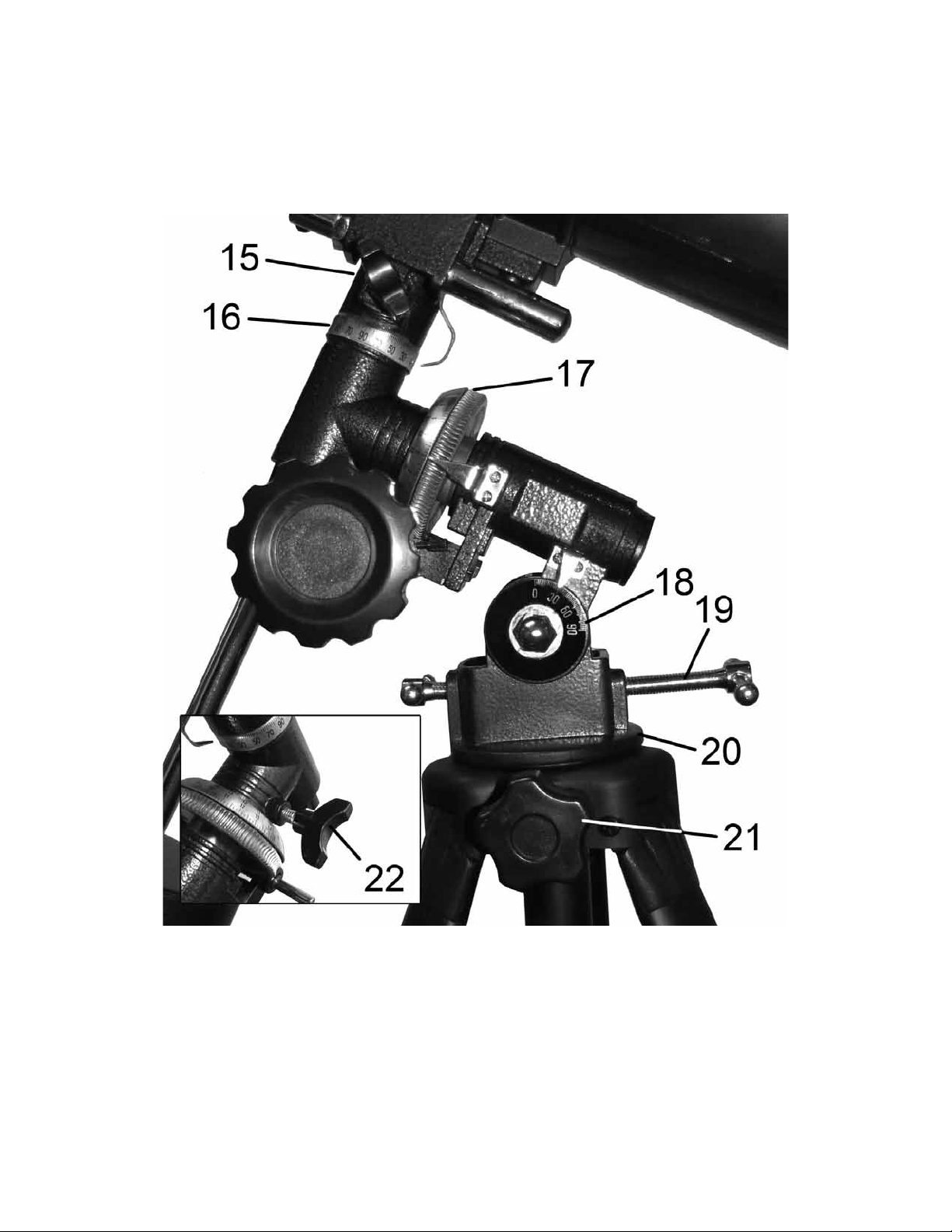
Fig.1
7--
8-
5
Fig.3
Fig.2
4
1
1
12
5
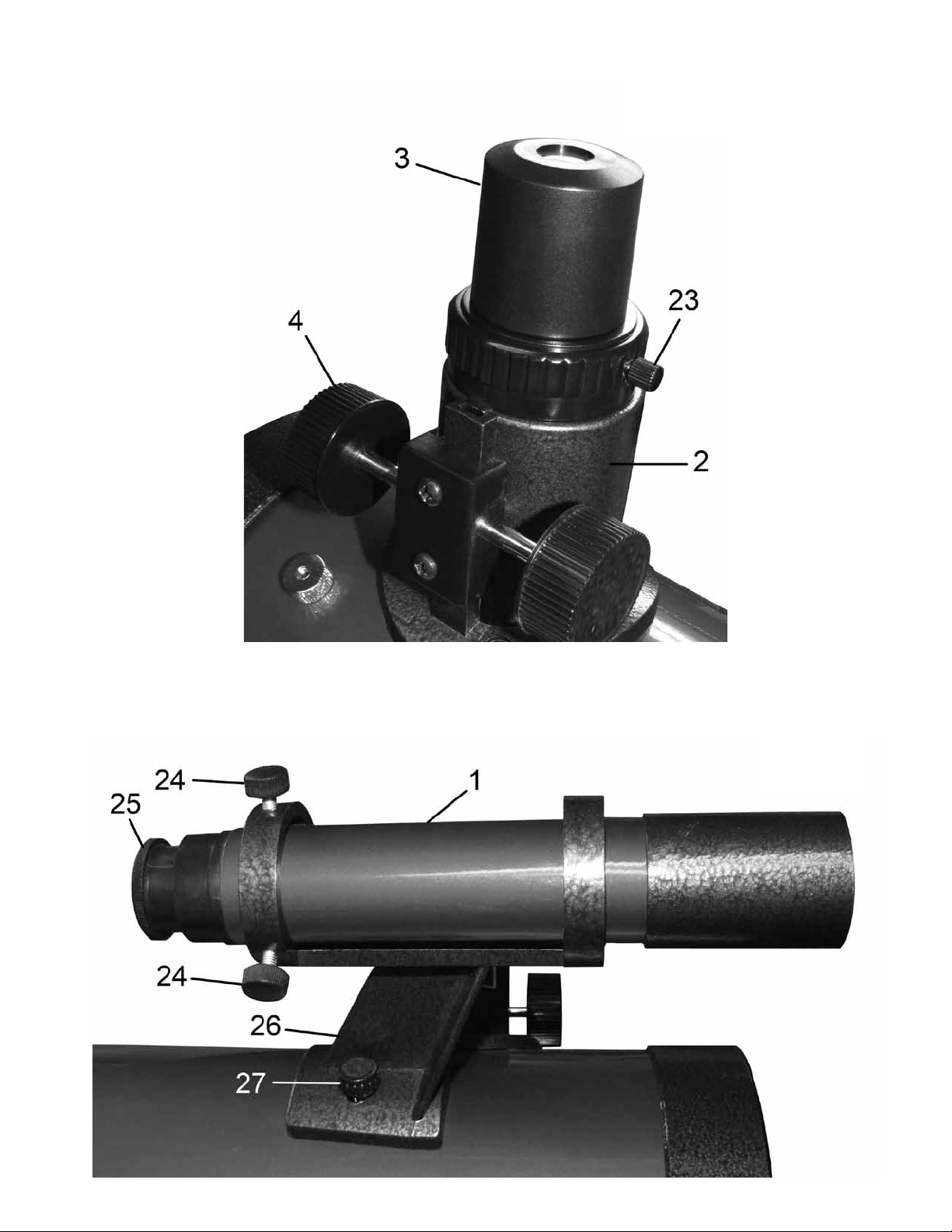
Fig.4 Fig.6
6
1
Fig.5
7
31
~
Fig.7
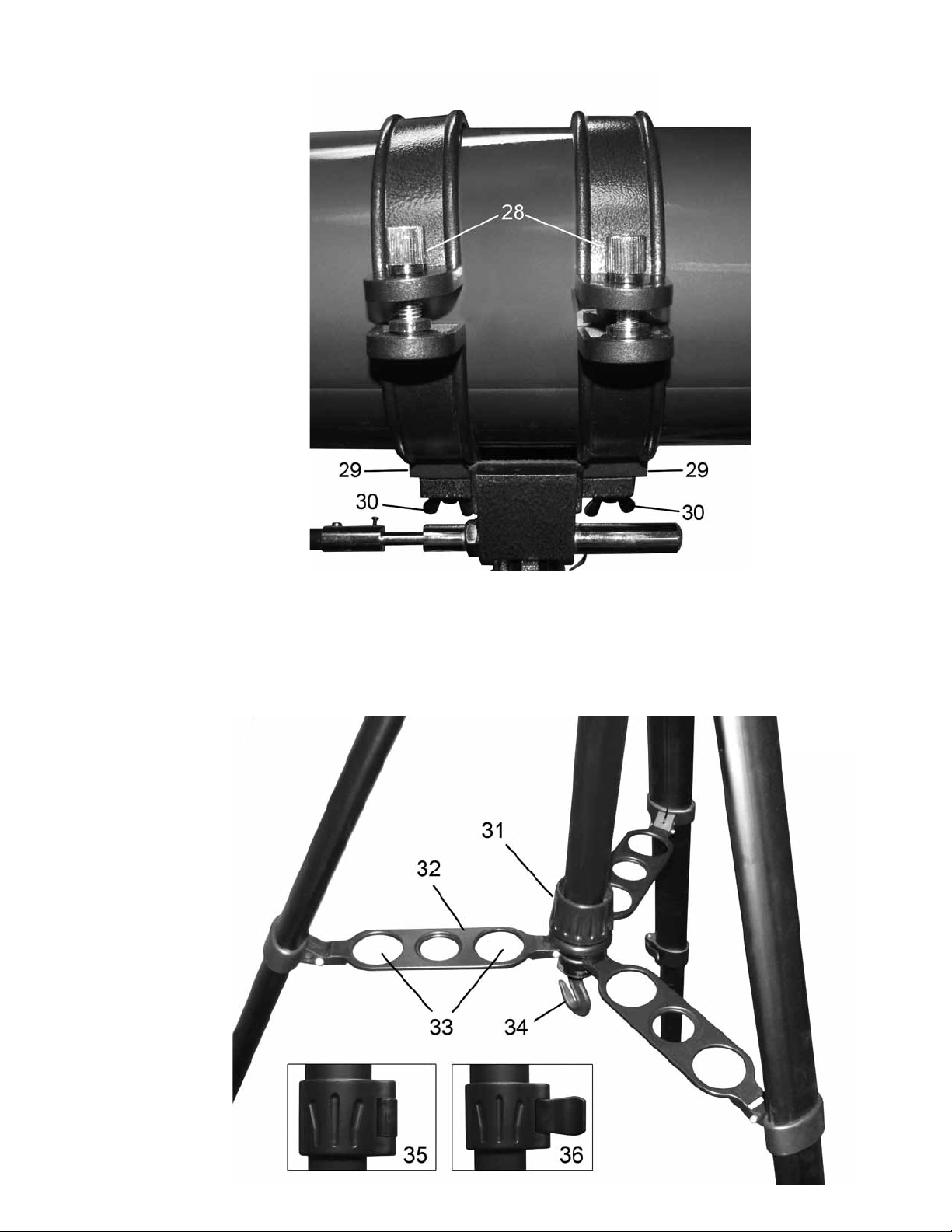
Fig.4 Fig.6
6
1
Fig.5
7
31
~
Fig.7
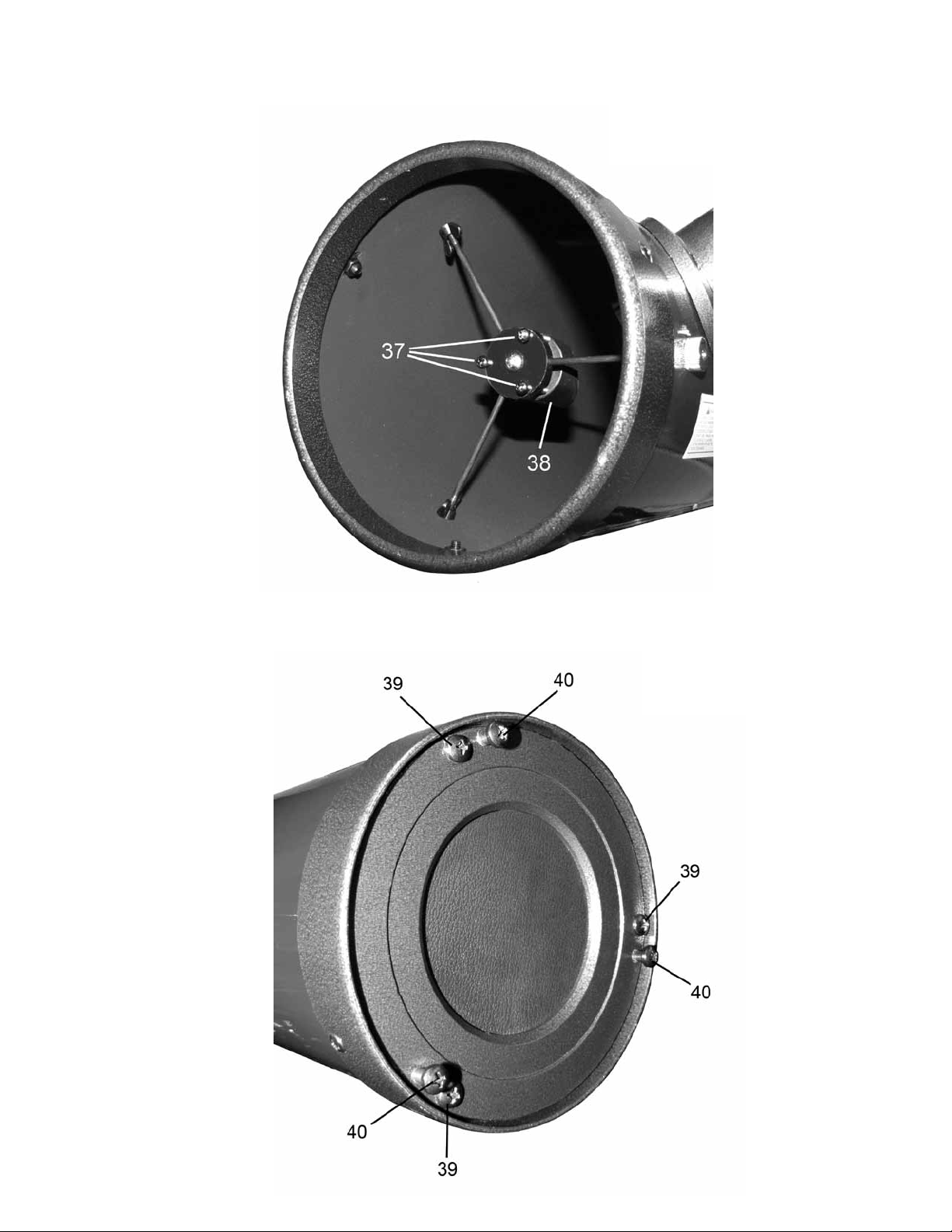
Fig.8
Fig.9
40
40
39
Key to Figures 1-9:
1. 6x30mm Finder Scope
2. Focuser
3. Eyepiece
4. Focus Knobs
5. Optical Tube Assembly
6. Cradle Rings
7. Dec. Flexible Cable
8. R.A. Flexible Cable
9. Optical Tube Saddle Plate
10. Equatorial Mount
11. Counter Weight Bar
12. Counter Weight
13. Counter Weight Locking Screw
14. Tripod Legs
15. Declination Lock
16. Dec. Setting Circle
17. R.A. Setting Circle
18. Latitude Dial
19. Latitude Turn Screws
20. Equatorial Mount Base
21. Equatorial Mount Locking Screw
22. R.A. Lock
23. Focuser Thumbscrew
24. Finder Scope Bracket Thumbscrew
25. Finder Scope Focus Knob
26. Finder Scope Bracket
27. Finder Scope Bracket Mounting Bolts
28. Cradle Ring Lock Knobs
29. Cradle Ring Attachment
30. Cradle Ring Attachment Wing Nuts
31. Tripod Tightening Ring
32. Tripod Brace
33. Eyepiece Holder Slots
34. Tripod Hook
35. Tripod Leg Lock Closed
36. Tripod Leg Lock Open
37. Diagonal Mirror Tilt Screws
38. Diagonal Mirror Holder
39. Primary Mirror Locking Screws
40. Primary Mirror Tilt Screws
8 9

Fig.8
Fig.9
40
40
39
Key to Figures 1-9:
1. 6x30mm Finder Scope
2. Focuser
3. Eyepiece
4. Focus Knobs
5. Optical Tube Assembly
6. Cradle Rings
7. Dec. Flexible Cable
8. R.A. Flexible Cable
9. Optical Tube Saddle Plate
10. Equatorial Mount
11. Counter Weight Bar
12. Counter Weight
13. Counter Weight Locking Screw
14. Tripod Legs
15. Declination Lock
16. Dec. Setting Circle
17. R.A. Setting Circle
18. Latitude Dial
19. Latitude Turn Screws
20. Equatorial Mount Base
21. Equatorial Mount Locking Screw
22. R.A. Lock
23. Focuser Thumbscrew
24. Finder Scope Bracket Thumbscrew
25. Finder Scope Focus Knob
26. Finder Scope Bracket
27. Finder Scope Bracket Mounting Bolts
28. Cradle Ring Lock Knobs
29. Cradle Ring Attachment
30. Cradle Ring Attachment Wing Nuts
31. Tripod Tightening Ring
32. Tripod Brace
33. Eyepiece Holder Slots
34. Tripod Hook
35. Tripod Leg Lock Closed
36. Tripod Leg Lock Open
37. Diagonal Mirror Tilt Screws
38. Diagonal Mirror Holder
39. Primary Mirror Locking Screws
40. Primary Mirror Tilt Screws
8 9

Assembly of your Red Planet Telescope:
Setting Up Your Tripod:
The aluminum tripod comes preassembled and ready-to-use. Remove the
tripod from the box and pull apart the legs. Gently push down the tripod
braces (Fig. 7-35) until they are in the lowest position. Turn the tightening
ring (Fig. 7-31) (located at the center of the Tripod Brace) clockwise to lock
the tripod in the open position. You can then extend the legs to the desired
height by pulling open the tab on each leg lock (Fig. 7-36), sliding the leg
down the desired amount and then pushing the leg lock back against the leg
into the locked position (Fig. 7-35). Repeat the process with each leg trying
to keep the tripod as level as possible with the ground. You will notice there
are holes in the tripod leg braces (Fig. 7-33). These are designed to hold eye-
pieces when not in use. For added stability you can hang a weight from the
tripod hook (Fig. 7-34) located at the bottom middle portion of the tripod.
Attaching the Equatorial Mount:
Remove the equatorial mount (Fig. 2-10) from the box and twist into the
position shown in Fig. 3. Place the bottom of the mount (Fig. 3-20) into the
hole in the top of the tripod head and secure with the mount locking screw
(Fig. 3-21). Please be careful to make sure that the mount is securely at-
tached to the tripod.
Attaching the Counterweight:
Attach the threaded end of the counterweight bar (Fig. 2-11) into the threaded
hole in the equatorial mount (Fig. 2-10). Remove the safety screw from the
end of the counterweight bar and set aside for a moment. Slide the counter-
weight (Fig. 2-12) onto the bar and tighten down using the screw on the side
of the counterweight (Fig. 2-13). Be careful not to drop the counterweight.
It is quite heavy and could harm you or damage your oor if dropped. Do
not worry about the position of the counterweight just yet. We will position it
properly later. Replace the safety screw at the end of the counterweight bar.
Attaching the Slow Motion Cables:
Locate the two slow motion cables (Fig. 1-7,8). Loosen the screw at the end
of each cable so that it does not protrude through the hole. Slide the short
cable onto either side of the R.A. shaft (Fig. 1-8) (located at the bottom of
the mount) and tighten down with the locking screw. You can place the cable
on either side depending on which side is most comfortable for you to use.
Slide the longer cable onto the Dec. shaft (Fig. 1-7) (located at the top of the
mount) and tighten down with the locking screw. These slow motion cables
will allow you to make ne pointing adjustments to the telescope in both
R.A. and declination. This will be discussed in more detail later.
Attaching the Telescope Tube to the Mount:
Removethetwocradlerings(Fig.1-6)fromthebox. Therearetwoholes
inthetopoftheequatorialmount(calledtheopticaltubesaddleplate(Fig.
2-9)).Placethethreadedscrewatthebottomofeachcradlering(Fig.6-29)
through one of these holes and secure it using the included washer and wing
nut(Fig.6-30). Attachandsecuretheothercradleringinthesameway.
Make sure that the cradle ring lock knobs (Fig. 6-28) are both on the same side.
Unscrewthelocks(Fig.6-28)oneachcradleringandopenthemboth.Care-
fullyremovetheopticaltubeassembly(Fig.1-5)fromthebox.Gentlyrest
theopticaltubeintothecradleringswiththefocuser(Fig.1-2)towardsthe
front. The cradle rings should be roughly in the center of the tube. We will
balance this later. Close the cradle rings around the telescope and secure by
tighteningthecradleringlockknobs(Fig.6-28).
Attaching the Finder Scope:
Therearetwo nderscopebracketmountingbolts(Fig.5-27)locatedatthe
frontendoftheopticaltube.Removethenutsandsetaside.Placethe nder
scopebracket(Fig.5-26)ontothemountingboltsandtightendownsecurely
totheopticaltube.MakesurethebracketisfacingforwardasshowninFig.
5. Slidethe nderscope(Fig.1-1)intothebracketfacingforward.Tighten
downthenderscopebracketthumbscrews(Fig.5-24)tosecurethe nder
scope in place.
Attaching the Eyepieces:
InserttheKellner20mmeyepiece(Fig.1-3)intothefocuser(Fig.1-2)and
tightendownusingthefocuserlockingscrew(Fig.4-23).
You have now completed the assembly of your Red Planet
TM
telescope.
Wewillnowneedtomakethenecessaryadjustmentsinordertouseyour
telescope properly.
10 11

Assembly of your Red Planet Telescope:
Setting Up Your Tripod:
The aluminum tripod comes preassembled and ready-to-use. Remove the
tripod from the box and pull apart the legs. Gently push down the tripod
braces (Fig. 7-35) until they are in the lowest position. Turn the tightening
ring (Fig. 7-31) (located at the center of the Tripod Brace) clockwise to lock
the tripod in the open position. You can then extend the legs to the desired
height by pulling open the tab on each leg lock (Fig. 7-36), sliding the leg
down the desired amount and then pushing the leg lock back against the leg
into the locked position (Fig. 7-35). Repeat the process with each leg trying
to keep the tripod as level as possible with the ground. You will notice there
are holes in the tripod leg braces (Fig. 7-33). These are designed to hold eye-
pieces when not in use. For added stability you can hang a weight from the
tripod hook (Fig. 7-34) located at the bottom middle portion of the tripod.
Attaching the Equatorial Mount:
Remove the equatorial mount (Fig. 2-10) from the box and twist into the
position shown in Fig. 3. Place the bottom of the mount (Fig. 3-20) into the
hole in the top of the tripod head and secure with the mount locking screw
(Fig. 3-21). Please be careful to make sure that the mount is securely at-
tached to the tripod.
Attaching the Counterweight:
Attach the threaded end of the counterweight bar (Fig. 2-11) into the threaded
hole in the equatorial mount (Fig. 2-10). Remove the safety screw from the
end of the counterweight bar and set aside for a moment. Slide the counter-
weight (Fig. 2-12) onto the bar and tighten down using the screw on the side
of the counterweight (Fig. 2-13). Be careful not to drop the counterweight.
It is quite heavy and could harm you or damage your oor if dropped. Do
not worry about the position of the counterweight just yet. We will position it
properly later. Replace the safety screw at the end of the counterweight bar.
Attaching the Slow Motion Cables:
Locate the two slow motion cables (Fig. 1-7,8). Loosen the screw at the end
of each cable so that it does not protrude through the hole. Slide the short
cable onto either side of the R.A. shaft (Fig. 1-8) (located at the bottom of
the mount) and tighten down with the locking screw. You can place the cable
on either side depending on which side is most comfortable for you to use.
Slide the longer cable onto the Dec. shaft (Fig. 1-7) (located at the top of the
mount) and tighten down with the locking screw. These slow motion cables
will allow you to make ne pointing adjustments to the telescope in both
R.A. and declination. This will be discussed in more detail later.
Attaching the Telescope Tube to the Mount:
Removethetwocradlerings(Fig.1-6)fromthebox. Therearetwoholes
inthetopoftheequatorialmount(calledtheopticaltubesaddleplate(Fig.
2-9)).Placethethreadedscrewatthebottomofeachcradlering(Fig.6-29)
through one of these holes and secure it using the included washer and wing
nut(Fig.6-30). Attachandsecuretheothercradleringinthesameway.
Make sure that the cradle ring lock knobs (Fig. 6-28) are both on the same side.
Unscrewthelocks(Fig.6-28)oneachcradleringandopenthemboth.Care-
fullyremovetheopticaltubeassembly(Fig.1-5)fromthebox.Gentlyrest
theopticaltubeintothecradleringswiththefocuser(Fig.1-2)towardsthe
front. The cradle rings should be roughly in the center of the tube. We will
balance this later. Close the cradle rings around the telescope and secure by
tighteningthecradleringlockknobs(Fig.6-28).
Attaching the Finder Scope:
Therearetwo nderscopebracketmountingbolts(Fig.5-27)locatedatthe
frontendoftheopticaltube.Removethenutsandsetaside.Placethe nder
scopebracket(Fig.5-26)ontothemountingboltsandtightendownsecurely
totheopticaltube.MakesurethebracketisfacingforwardasshowninFig.
5. Slidethe nderscope(Fig.1-1)intothebracketfacingforward.Tighten
downthenderscopebracketthumbscrews(Fig.5-24)tosecurethe nder
scope in place.
Attaching the Eyepieces:
InserttheKellner20mmeyepiece(Fig.1-3)intothefocuser(Fig.1-2)and
tightendownusingthefocuserlockingscrew(Fig.4-23).
You have now completed the assembly of your Red Planet
TM
telescope.
Wewillnowneedtomakethenecessaryadjustmentsinordertouseyour
telescope properly.
10 11

Balancing the Telescope:
Balancing the Mount in R.A.:
To reduce stress on the mount, the telescope should be balanced on the polar
axis (See Fig. 2). Instructions on how to do so are as follows:
• Loosen the R.A. lock knob (Fig. 3-22) and position the telescope
off to one side of the mount (you may need to remove the R.A. slow
motion cable (Fig. 1-8) temporarily). The counterweight bar
(Fig. 2-11) should be parallel to the ground.
• Release the telescope gradually and see which side it falls towards.
To avoid accidental damage, do not let go of the telescope completely.
• Loosen the counterweight (Fig. 2-12) and position the weight so that
the telescope and counterweight remain stationary (parallel to the
oor) on their own.
• Tighten the counterweight into place.
Balancing the Mount in Dec.:
To prevent sudden movement when the Dec. lock (Fig. 3-15) is loosened, the
telescope must be balanced on the declination axis (See Fig. 2). Instructions
on how to do so are as follows:
• Loosen the R.A. lock knob (Fig. 3-22) and position the telescope
off to one side of the mount (you may need to remove the R.A. slow
motion cable (Fig. 1-8) temporarily). The counterweight bar should
be parallel to the ground.
• Tighten the R.A. lock knob (Fig. 3-22) to hold the telescope in place.
• Loosen the Dec. lock knob (Fig. 3-15) and rotate the telescope until
the tube is parallel with the ground.
• Release the telescope gradually and see which way it will rotate. To
avoid accidental damage, do not let go of the telescope completely.
• Loosen the cradle rings (Fig. 1-6) and slide the optical tube forward
or backward as needed until it remains stationary and parallel to the
ground on its own.
• Tighten the cradle rings securely around the optical tube.
• Loosen the R.A. lock knob, return the telescope to its upright
position and retighten.
Aligning the Finder Scope:
The low power and wide eld of view provided by the 6x30mm nder scope
(Fig. 5-1) provides a quick and easy way to sight an object prior to looking
through the high-power telescope. The nder scope must rst be properly
aligned with the telescope in order to work properly. This alignment is best
performed during the daylight. Follow the steps below to align your nder
scope properly:
• Place the Kellner 20mm eyepiece (Fig. 4-3) into the focuser
(Fig. 4-2) of the telescope.
• Loosen both the R.A. lock (Fig. 3-22) and the Dec. lock (Fig. 3-15)
so that the telescope swings freely along both axes.
• Point the main telescope at a specic land object 200 yards or more
away. Lock down the R.A. and Dec. axes. Turn the slow motion
cables (Fig. 1–7,8) until the object is centered in the telescope eld.
• Now look through the nder scope and loosen or tighten the nder
scope bracket screws (Fig. 5-24) until the crosshairs are centered on
the same object. Focus by turning the nder scope focus knob
(Fig. 5-25) until the image in the nder scope is sharp and clear.
• Check the alignment at nighttime by repeating this process with a
bright star or the moon. Make any necessary adjustments.
Nowthatyournderscopeisproperlyaligned,anyobjectcenteredinyour
nderscopeshouldalsobecenteredinyourtelescope.
Calculating Power:
Themagnicationofatelescopedependsonboththefocallengthofyour
telescope as well as the eyepiece you use. There is a simple formula you can
usetodeterminethemagnicationyouareusingatanygiventime.Simply
divide the focal length of the telescope by the focal length of the eyepiece.
For example, if you are using the 20mm eyepiece with your RP-300
telescope the power would be:
Power = 900mm / 20mm = 45x
Usinganeyepiecewithasmallerfocallengthwillincreasethemagnication
ofyourtelescope.Itisalwaysbesttostartatthelowestmagnicationcon-
guration. Thewidereldofviewmakesiteasiertospotfarawayobjects.
Onceanobjectiscenteredinyour eldofviewyoucanswitchtothehigher
powercongurations.
12 13

Balancing the Telescope:
Balancing the Mount in R.A.:
To reduce stress on the mount, the telescope should be balanced on the polar
axis (See Fig. 2). Instructions on how to do so are as follows:
• Loosen the R.A. lock knob (Fig. 3-22) and position the telescope
off to one side of the mount (you may need to remove the R.A. slow
motion cable (Fig. 1-8) temporarily). The counterweight bar
(Fig. 2-11) should be parallel to the ground.
• Release the telescope gradually and see which side it falls towards.
To avoid accidental damage, do not let go of the telescope completely.
• Loosen the counterweight (Fig. 2-12) and position the weight so that
the telescope and counterweight remain stationary (parallel to the
oor) on their own.
• Tighten the counterweight into place.
Balancing the Mount in Dec.:
To prevent sudden movement when the Dec. lock (Fig. 3-15) is loosened, the
telescope must be balanced on the declination axis (See Fig. 2). Instructions
on how to do so are as follows:
• Loosen the R.A. lock knob (Fig. 3-22) and position the telescope
off to one side of the mount (you may need to remove the R.A. slow
motion cable (Fig. 1-8) temporarily). The counterweight bar should
be parallel to the ground.
• Tighten the R.A. lock knob (Fig. 3-22) to hold the telescope in place.
• Loosen the Dec. lock knob (Fig. 3-15) and rotate the telescope until
the tube is parallel with the ground.
• Release the telescope gradually and see which way it will rotate. To
avoid accidental damage, do not let go of the telescope completely.
• Loosen the cradle rings (Fig. 1-6) and slide the optical tube forward
or backward as needed until it remains stationary and parallel to the
ground on its own.
• Tighten the cradle rings securely around the optical tube.
• Loosen the R.A. lock knob, return the telescope to its upright
position and retighten.
Aligning the Finder Scope:
The low power and wide eld of view provided by the 6x30mm nder scope
(Fig. 5-1) provides a quick and easy way to sight an object prior to looking
through the high-power telescope. The nder scope must rst be properly
aligned with the telescope in order to work properly. This alignment is best
performed during the daylight. Follow the steps below to align your nder
scope properly:
• Place the Kellner 20mm eyepiece (Fig. 4-3) into the focuser
(Fig. 4-2) of the telescope.
• Loosen both the R.A. lock (Fig. 3-22) and the Dec. lock (Fig. 3-15)
so that the telescope swings freely along both axes.
• Point the main telescope at a specic land object 200 yards or more
away. Lock down the R.A. and Dec. axes. Turn the slow motion
cables (Fig. 1–7,8) until the object is centered in the telescope eld.
• Now look through the nder scope and loosen or tighten the nder
scope bracket screws (Fig. 5-24) until the crosshairs are centered on
the same object. Focus by turning the nder scope focus knob
(Fig. 5-25) until the image in the nder scope is sharp and clear.
• Check the alignment at nighttime by repeating this process with a
bright star or the moon. Make any necessary adjustments.
Nowthatyournderscopeisproperlyaligned,anyobjectcenteredinyour
nderscopeshouldalsobecenteredinyourtelescope.
Calculating Power:
Themagnicationofatelescopedependsonboththefocallengthofyour
telescope as well as the eyepiece you use. There is a simple formula you can
usetodeterminethemagnicationyouareusingatanygiventime.Simply
divide the focal length of the telescope by the focal length of the eyepiece.
For example, if you are using the 20mm eyepiece with your RP-300
telescope the power would be:
Power = 900mm / 20mm = 45x
Usinganeyepiecewithasmallerfocallengthwillincreasethemagnication
ofyourtelescope.Itisalwaysbesttostartatthelowestmagnicationcon-
guration. Thewidereldofviewmakesiteasiertospotfarawayobjects.
Onceanobjectiscenteredinyour eldofviewyoucanswitchtothehigher
powercongurations.
12 13

Understanding Celestial Movement:
In order to get the most enjoyment out of your telescope it is necessary to
know the basics of how celestial objects move across the sky. Due to the ro-
tation of the earth, celestial objects appear to move from East to West across
the sky, much like the Sun. You will notice this movement as an object in
your telescope eld of view will slowly move across the eld and out of
view. Continuous adjustment is needed to keep an object in the eld of view.
This will be explained in more detail later.
Many people choose to “star-hop” when using a telescope, a quick and rela-
tively easy way to start. This is a method of using easily identiable stars
and constellations to serve as reference points to nd other objects in the sky.
A more advanced and precise method of locating specic celestial objects is
by using setting circles (Fig. 3-16,17) located on your equatorial mount (Fig.
2-10) to nd the celestial coordinates of that particular object.
A Brief Overview of Celestial Coordinates:
Astronomers use a system of “celestial coordinates” similar to the Earth’s
latitude and longitude system to help locate objects in the sky. All celestial
objects are mapped on a “celestial sphere”, an imaginary sphere of arbitrary
size concentric with the Earth. If you extend the Earth’s rotational axis to
innity, both North and South, the points at which this axis intersects the
celestial sphere are known as the North Celestial Pole and the South Celestial
Pole. If you project the Earth’s equator outward to the celestial sphere this
would be known as the “Celestial Equator”.
The equivalent to latitude lines on the celestial sphere are known as lines of
“Declination”, or “Dec.” for short. These lines are measured in degrees, min-
utes and seconds. Declination readings north of the celestial equator carry a
“+” sign, while readings south of the celestial equator carry a “-“ sign. Ob-
jects located on the celestial equator have a 0°0’0” Declination. The North
Celestial Pole has a +90°0’0” Declination while the South Celestial Pole has
a -90°0’0” Declination. The star Polaris is located very near the North Celes-
tial Pole and has a +89.2° Declination.
The equivalent to longitude lines on the celestial sphere are known as lines
of “Right Ascension” or “R.A.” for short. These lines are measured in hours,
minutes and seconds starting at the “zero” line of R.A. which passes through
the constellation Pegasus. There are 24 primary lines of R.A. located at 15°
intervals along the celestial equator. Right Ascension coordinates range from
0hr 0min 0sec to (but not including) 24hr 0min 0sec.
Every celestial object has a corresponding R.A. and Dec. coordinate. Given
the proper coordinates, you can use the setting circles on your telescope
mount to locate any celestial object. The coordinates can only be used if the
telescope is rst aligned with the North (or South) Celestial Pole.
Polar Alignment:
If the telescope is accurately aligned with the celestial pole, very little dec-
lination adjustment will be necessary to track a celestial object. Most of the
tracking can be done using the Right Ascension cable (Fig. 1-8).
To line up your telescope with the pole:
• Make sure the equatorial mount is locked in the “home” position,
meaning that the optical tube assembly is parallel to the correspond-
ing portion of the mount below it and that the declination axis is
straight up and down with the counter weight (Fig. 2-13) in it’s
lowest position. For reference, the equatorial mount in Fig. 2 is in
the home position.
• Loosen the equatorial mount locking screw (Fig. 3-21) so that the
entire telescope (with mount) rotates freely on the tripod.
• Rotate the entire telescope until the polar axis points due North. If
you are not sure which direction is North, locate Polaris and point the
polar axis towards it. Polaris is less than one degree away from the
Celestial North Pole and is accurate enough for polar alignment.
• If needed, level the mount by adjusting the tripod legs accordingly.
• Determine the latitude of the area you are in. Use the latitude turn
screws (Fig. 3-19) to tilt the telescope until the pointer indicates the
correct latitude on the latitude dial (Fig. 3-18).
• Then ne tune the latitude turn screws (Fig. 3-19) until Polaris
appears in the center of your telescope eld of view.
• Do not move the telescope in R.A. or Dec. while polar aligning.
These adjustments should remain locked.
• If you live in the Southern Hemisphere, you should follow these
steps but point the polar axis due South and locate Sigma Octantis
instead of Polaris.
14 15

Understanding Celestial Movement:
In order to get the most enjoyment out of your telescope it is necessary to
know the basics of how celestial objects move across the sky. Due to the ro-
tation of the earth, celestial objects appear to move from East to West across
the sky, much like the Sun. You will notice this movement as an object in
your telescope eld of view will slowly move across the eld and out of
view. Continuous adjustment is needed to keep an object in the eld of view.
This will be explained in more detail later.
Many people choose to “star-hop” when using a telescope, a quick and rela-
tively easy way to start. This is a method of using easily identiable stars
and constellations to serve as reference points to nd other objects in the sky.
A more advanced and precise method of locating specic celestial objects is
by using setting circles (Fig. 3-16,17) located on your equatorial mount (Fig.
2-10) to nd the celestial coordinates of that particular object.
A Brief Overview of Celestial Coordinates:
Astronomers use a system of “celestial coordinates” similar to the Earth’s
latitude and longitude system to help locate objects in the sky. All celestial
objects are mapped on a “celestial sphere”, an imaginary sphere of arbitrary
size concentric with the Earth. If you extend the Earth’s rotational axis to
innity, both North and South, the points at which this axis intersects the
celestial sphere are known as the North Celestial Pole and the South Celestial
Pole. If you project the Earth’s equator outward to the celestial sphere this
would be known as the “Celestial Equator”.
The equivalent to latitude lines on the celestial sphere are known as lines of
“Declination”, or “Dec.” for short. These lines are measured in degrees, min-
utes and seconds. Declination readings north of the celestial equator carry a
“+” sign, while readings south of the celestial equator carry a “-“ sign. Ob-
jects located on the celestial equator have a 0°0’0” Declination. The North
Celestial Pole has a +90°0’0” Declination while the South Celestial Pole has
a -90°0’0” Declination. The star Polaris is located very near the North Celes-
tial Pole and has a +89.2° Declination.
The equivalent to longitude lines on the celestial sphere are known as lines
of “Right Ascension” or “R.A.” for short. These lines are measured in hours,
minutes and seconds starting at the “zero” line of R.A. which passes through
the constellation Pegasus. There are 24 primary lines of R.A. located at 15°
intervals along the celestial equator. Right Ascension coordinates range from
0hr 0min 0sec to (but not including) 24hr 0min 0sec.
Every celestial object has a corresponding R.A. and Dec. coordinate. Given
the proper coordinates, you can use the setting circles on your telescope
mount to locate any celestial object. The coordinates can only be used if the
telescope is rst aligned with the North (or South) Celestial Pole.
Polar Alignment:
If the telescope is accurately aligned with the celestial pole, very little dec-
lination adjustment will be necessary to track a celestial object. Most of the
tracking can be done using the Right Ascension cable (Fig. 1-8).
To line up your telescope with the pole:
• Make sure the equatorial mount is locked in the “home” position,
meaning that the optical tube assembly is parallel to the correspond-
ing portion of the mount below it and that the declination axis is
straight up and down with the counter weight (Fig. 2-13) in it’s
lowest position. For reference, the equatorial mount in Fig. 2 is in
the home position.
• Loosen the equatorial mount locking screw (Fig. 3-21) so that the
entire telescope (with mount) rotates freely on the tripod.
• Rotate the entire telescope until the polar axis points due North. If
you are not sure which direction is North, locate Polaris and point the
polar axis towards it. Polaris is less than one degree away from the
Celestial North Pole and is accurate enough for polar alignment.
• If needed, level the mount by adjusting the tripod legs accordingly.
• Determine the latitude of the area you are in. Use the latitude turn
screws (Fig. 3-19) to tilt the telescope until the pointer indicates the
correct latitude on the latitude dial (Fig. 3-18).
• Then ne tune the latitude turn screws (Fig. 3-19) until Polaris
appears in the center of your telescope eld of view.
• Do not move the telescope in R.A. or Dec. while polar aligning.
These adjustments should remain locked.
• If you live in the Southern Hemisphere, you should follow these
steps but point the polar axis due South and locate Sigma Octantis
instead of Polaris.
14 15
Normal view when looking
with
unaided eye.
Inverted image, normal when
viewing
with
Newtonian Reflector
telescopes.
Your telescope is now polar aligned for the area you are using it. You will
need only to point the telescope North (or South in the Southern Hemisphere)
when using it from now on. You will only need to repeat the polar alignment
if you move to a different location and your latitude has changed.
Using the Telescope:
Once you have properly assembled, balanced and aligned your telescope you
are nally ready to start using it.
• To locate an object using the telescope, rst loosen the R.A. lock
(Fig. 3-22) and Dec. lock (Fig. 3-15) allowing the telescope to rotate
along both axes. Look through the nder scope (Fig. 1-1) to sight the
object you are looking for and center it in the nder scope
cross-hairs. You may need to focus the nder scope by turning the
nder scope focus knob (Fig. 5-25). Then re-tighten the R.A. and
Dec. locks.
• It is best to use the lowest power eyepiece (the Kellner 20mm
eyepiece) at rst. This allows for a wider eld of view making it
easier to locate objects. Once the object is centered in the eld of
view you can switch the eyepiece to higher magnications.
• Once the object is centered in the eld of view, turn the focus knobs
(Fig. 4-4) on the eyepiece focuser (Fig. 4-2) until the image is clear
and sharp.
• You will notice that the object you are viewing will slowly move
across the eld of view (caused by the rotation of the Earth). You
will need to turn the R.A. exible cable (Fig. 1-8) to keep the object
centered.
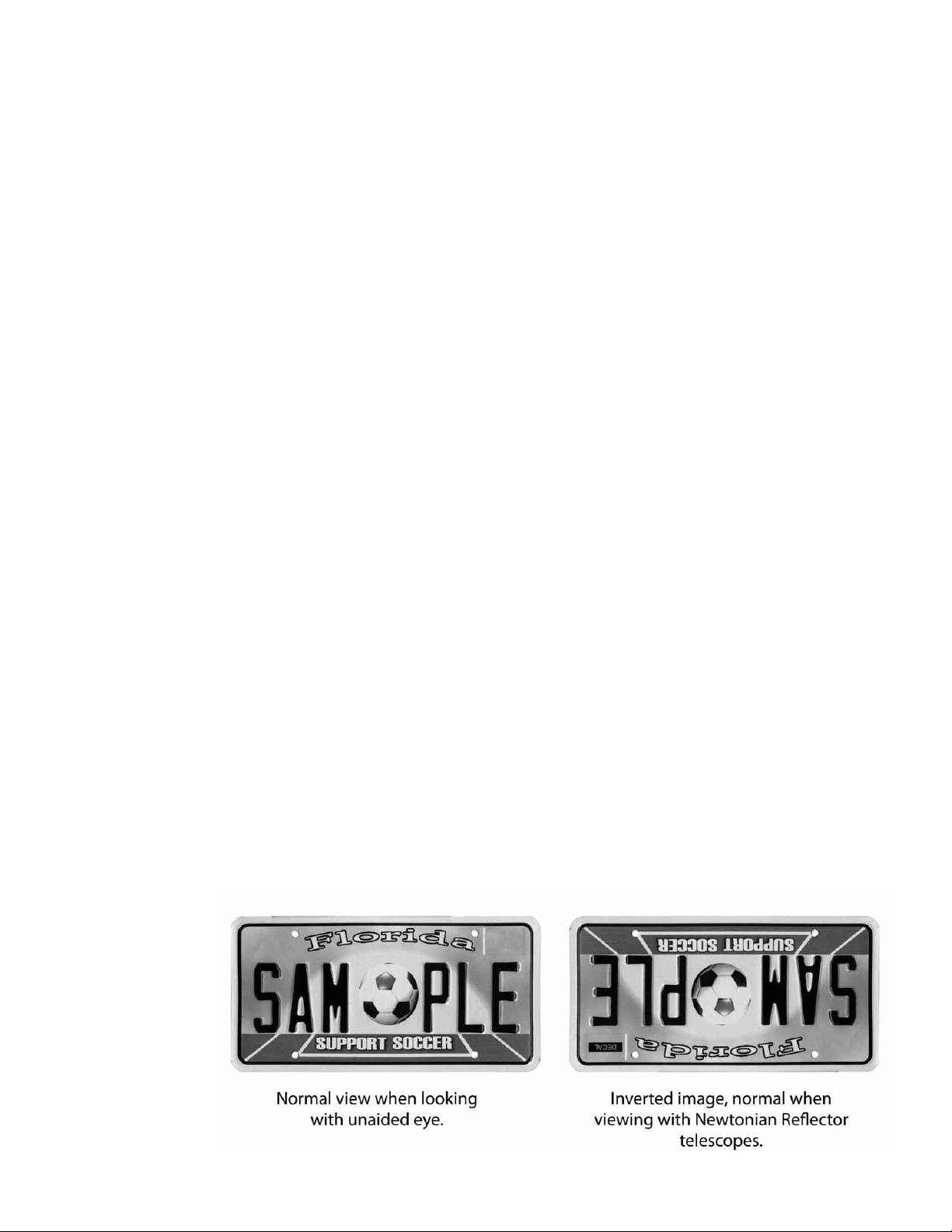
Image Orientation:
Youwillnoticethattheimageyouseethroughyourfinderscopeandtele-
scopeareinverted(upsidedown). ThisisnormalforNewtonianReflector
telescopes.
Using Setting Circles:
The setting circles (Fig. 3-16,17) on your equatorial mount can be used to
locate hard to nd celestial objects. Follow the instructions below to use the
setting circles effectively:
• Make sure your telescope is assembled properly and polar aligned.
• Look up the celestial coordinates of an easy to spot object located
nearby to the object you seek on a star chart or atlas (not included).
• Center this easy to spot object in the eld of view of your telescope.
• Rotate the R.A. setting circle (Fig. 3-17) on your telescope’s mount
by hand until the proper coordinate lines up with the R.A. indicator.
You will notice that the R.A. setting circle has two sets of numbers.
The top numbers are for the Northern hemisphere. The bottom
numbers are for the Southern hemisphere. Once complete your
setting circles are now calibrated. You are now ready to locate the
hard to nd object.
• Loosen the Dec. lock (Fig. 3-15) and move the telescope in
Declination until the indicator points to the correct coordinate.
Re-tighten the Dec. Lock when nished
• Loosen the R.A. lock (Fig. 3-22) and move the telescope in R.A. un-
til the indicator points to the correct coordinate. Re-tighten the R.A.
lock when nished.
• Look through the nder scope (Fig. 1-1) to see if you have located
the object you are looking for and center the object in the crosshairs
of the nder scope.
• Look through the telescope eyepiece and the object you are searching
for should be centered in the eld of view.
• This process must be repeated every time you set up your telescope.
16 17

Normal view when looking
with
unaided eye.
Inverted image, normal when
viewing
with
Newtonian Reflector
telescopes.
Your telescope is now polar aligned for the area you are using it. You will
need only to point the telescope North (or South in the Southern Hemisphere)
when using it from now on. You will only need to repeat the polar alignment
if you move to a different location and your latitude has changed.
Using the Telescope:
Once you have properly assembled, balanced and aligned your telescope you
are nally ready to start using it.
• To locate an object using the telescope, rst loosen the R.A. lock
(Fig. 3-22) and Dec. lock (Fig. 3-15) allowing the telescope to rotate
along both axes. Look through the nder scope (Fig. 1-1) to sight the
object you are looking for and center it in the nder scope
cross-hairs. You may need to focus the nder scope by turning the
nder scope focus knob (Fig. 5-25). Then re-tighten the R.A. and
Dec. locks.
• It is best to use the lowest power eyepiece (the Kellner 20mm
eyepiece) at rst. This allows for a wider eld of view making it
easier to locate objects. Once the object is centered in the eld of
view you can switch the eyepiece to higher magnications.
• Once the object is centered in the eld of view, turn the focus knobs
(Fig. 4-4) on the eyepiece focuser (Fig. 4-2) until the image is clear
and sharp.
• You will notice that the object you are viewing will slowly move
across the eld of view (caused by the rotation of the Earth). You
will need to turn the R.A. exible cable (Fig. 1-8) to keep the object
centered.
Image Orientation:
Youwillnoticethattheimageyouseethroughyourfinderscopeandtele-
scopeareinverted(upsidedown). ThisisnormalforNewtonianReflector
telescopes.
Using Setting Circles:
The setting circles (Fig. 3-16,17) on your equatorial mount can be used to
locate hard to nd celestial objects. Follow the instructions below to use the
setting circles effectively:
• Make sure your telescope is assembled properly and polar aligned.
• Look up the celestial coordinates of an easy to spot object located
nearby to the object you seek on a star chart or atlas (not included).
• Center this easy to spot object in the eld of view of your telescope.
• Rotate the R.A. setting circle (Fig. 3-17) on your telescope’s mount
by hand until the proper coordinate lines up with the R.A. indicator.
You will notice that the R.A. setting circle has two sets of numbers.
The top numbers are for the Northern hemisphere. The bottom
numbers are for the Southern hemisphere. Once complete your
setting circles are now calibrated. You are now ready to locate the
hard to nd object.
• Loosen the Dec. lock (Fig. 3-15) and move the telescope in
Declination until the indicator points to the correct coordinate.
Re-tighten the Dec. Lock when nished
• Loosen the R.A. lock (Fig. 3-22) and move the telescope in R.A. un-
til the indicator points to the correct coordinate. Re-tighten the R.A.
lock when nished.
• Look through the nder scope (Fig. 1-1) to see if you have located
the object you are looking for and center the object in the crosshairs
of the nder scope.
• Look through the telescope eyepiece and the object you are searching
for should be centered in the eld of view.
• This process must be repeated every time you set up your telescope.
16 17

Focused
Image
--
Mirror
Clip
Diagonal
Mirror
Reflection
of
Your Eye
Primary
Mirror
There are many conditions that may affect your ability to focus or observe
celestial objects clearly.
• Brightly lit areas (light pollution) will make it difcult to see faint
objects in the sky. It will also make it difcult for your eyes to adjust
to the dark. You should try and nd a dark area and allow your eyes
to adjust to the dark before making observations. Using a red ltered
ashlight to view charts and your telescope components is recom-
mended to preserve your night sight. The best viewing conditions
are when the sky is inky black.
• Hazy skies, pollution, clouds and moisture can all affect the clarity of
your viewing image.
• Avoid touching the eyepiece or optical tube while looking through
the telescope. The vibrations caused by this contact will cause the
object you are looking at to move. You should also make sure that
the surface you place your telescope on does not vibrate or move as
this will also cause your viewing object to move.
• You should avoid setting up your telescope inside a room looking
through an open window. The difference in air temperatures may
result in a blurry image.
• Viewing through a closed window might also result in a distorted im-
age due to the varying densities of window glass.
• Avoid viewing objects that are low on the horizon. Objects that are
higher up in the sky will appear much sharper.
• Sudden changes in temperature may cause condensation to appear
on the optical components of the telescope. It is best to set up your
telescope ahead of time and then wait while the telescope adjusts to
the new temperature before using it.
Care and Maintenance of Your Telescope:
Cleaning:
• Always replace dust covers and lens caps when not in use. This will
minimize the amount of dust and debris that gets into your telescope.
• Cleaning should be performed only if absolutely necessary. If dust
has built up on the optics use a soft camel’s hair brush or pressurized
air to gently remove it.
• If dew collects on the optics of your telescope or moisture condenses
inside the optics, remove all accessories and place the telescope in a
dry, dust free environment and point the telescope downward. This
should help eliminate the moisture.
• Avoid touching the surface of the mirror.
• Do not attempt to take apart your telescope to clean it.
Collimation of the Optics:
The internal optics of the telescope have already been “collimated” or
“aligned” at the factory. However, rough handling of the telescope may
knock the optics out of collimation, resulting in poor optical performance.
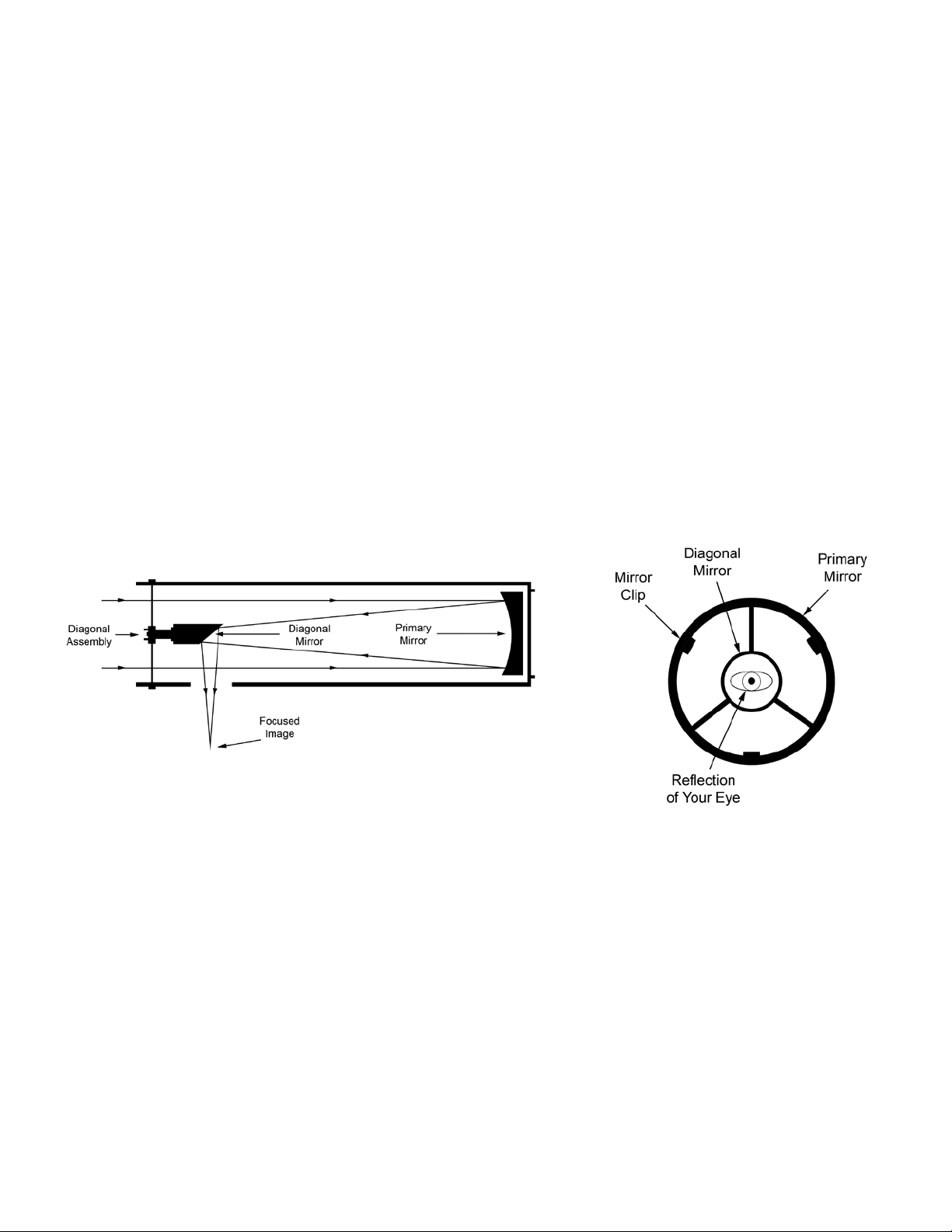
Please refer to Fig. 10 to better understand the internal layout of your
telescope. To determine if your telescope needs collimation perform the
following steps:
• Remove the eyepiece (Fig. 1-3) from the focuser (Fig. 1-2) and turn
the focusing knob (Fig. 1-4) until the tube is at its innermost position.
• Point the telescope at a plain background and then peer through the
empty focuser. You should see a series of concentric circles (See
Fig. 11). The outer most circle being a reection of the primary mir-
ror (with three mirror clips). The inner circle is the diagonal mirror,
which should be precisely centered inside the primary mirror. You
should see the reection of your eye in the diagonal mirror.
Fig.10 Fig.11
Adjusting the Diagonal Holder:
If the telescope is properly collimated you should see the primary mirror
(See Fig. 10) and three clips in their entirety. If the primary mirror is not
centered properly (See Fig. 12) you will need to adjust the diagonal
mirror (See Fig. 10) to correct this. Loosen the diagonal mirror so that
you can move the diagonal holder (See Fig. 10) with your hand. Tilt the
diagonal holder until the entire primary mirror is visible and carefully
retighten the screws to lock it into place. If necessary, turn the three screws
slightly to make ne adjustments.
18 19
Focused
Image
--
Mirror
Clip
Diagonal
Mirror
Reflection
of
Your Eye
Primary
Mirror
There are many conditions that may affect your ability to focus or observe
celestial objects clearly.
• Brightly lit areas (light pollution) will make it difcult to see faint
objects in the sky. It will also make it difcult for your eyes to adjust
to the dark. You should try and nd a dark area and allow your eyes
to adjust to the dark before making observations. Using a red ltered
ashlight to view charts and your telescope components is recom-
mended to preserve your night sight. The best viewing conditions
are when the sky is inky black.
• Hazy skies, pollution, clouds and moisture can all affect the clarity of
your viewing image.
• Avoid touching the eyepiece or optical tube while looking through
the telescope. The vibrations caused by this contact will cause the
object you are looking at to move. You should also make sure that
the surface you place your telescope on does not vibrate or move as
this will also cause your viewing object to move.
• You should avoid setting up your telescope inside a room looking
through an open window. The difference in air temperatures may
result in a blurry image.
• Viewing through a closed window might also result in a distorted im-
age due to the varying densities of window glass.
• Avoid viewing objects that are low on the horizon. Objects that are
higher up in the sky will appear much sharper.
• Sudden changes in temperature may cause condensation to appear
on the optical components of the telescope. It is best to set up your
telescope ahead of time and then wait while the telescope adjusts to
the new temperature before using it.
Care and Maintenance of Your Telescope:
Cleaning:
• Always replace dust covers and lens caps when not in use. This will
minimize the amount of dust and debris that gets into your telescope.
• Cleaning should be performed only if absolutely necessary. If dust
has built up on the optics use a soft camel’s hair brush or pressurized
air to gently remove it.
• If dew collects on the optics of your telescope or moisture condenses
inside the optics, remove all accessories and place the telescope in a
dry, dust free environment and point the telescope downward. This
should help eliminate the moisture.
• Avoid touching the surface of the mirror.
• Do not attempt to take apart your telescope to clean it.
Collimation of the Optics:
The internal optics of the telescope have already been “collimated” or
“aligned” at the factory. However, rough handling of the telescope may
knock the optics out of collimation, resulting in poor optical performance.
Please refer to Fig. 10 to better understand the internal layout of your
telescope. To determine if your telescope needs collimation perform the
following steps:
• Remove the eyepiece (Fig. 1-3) from the focuser (Fig. 1-2) and turn
the focusing knob (Fig. 1-4) until the tube is at its innermost position.
• Point the telescope at a plain background and then peer through the
empty focuser. You should see a series of concentric circles (See
Fig. 11). The outer most circle being a reection of the primary mir-
ror (with three mirror clips). The inner circle is the diagonal mirror,
which should be precisely centered inside the primary mirror. You
should see the reection of your eye in the diagonal mirror.
Fig.10 Fig.11
Adjusting the Diagonal Holder:
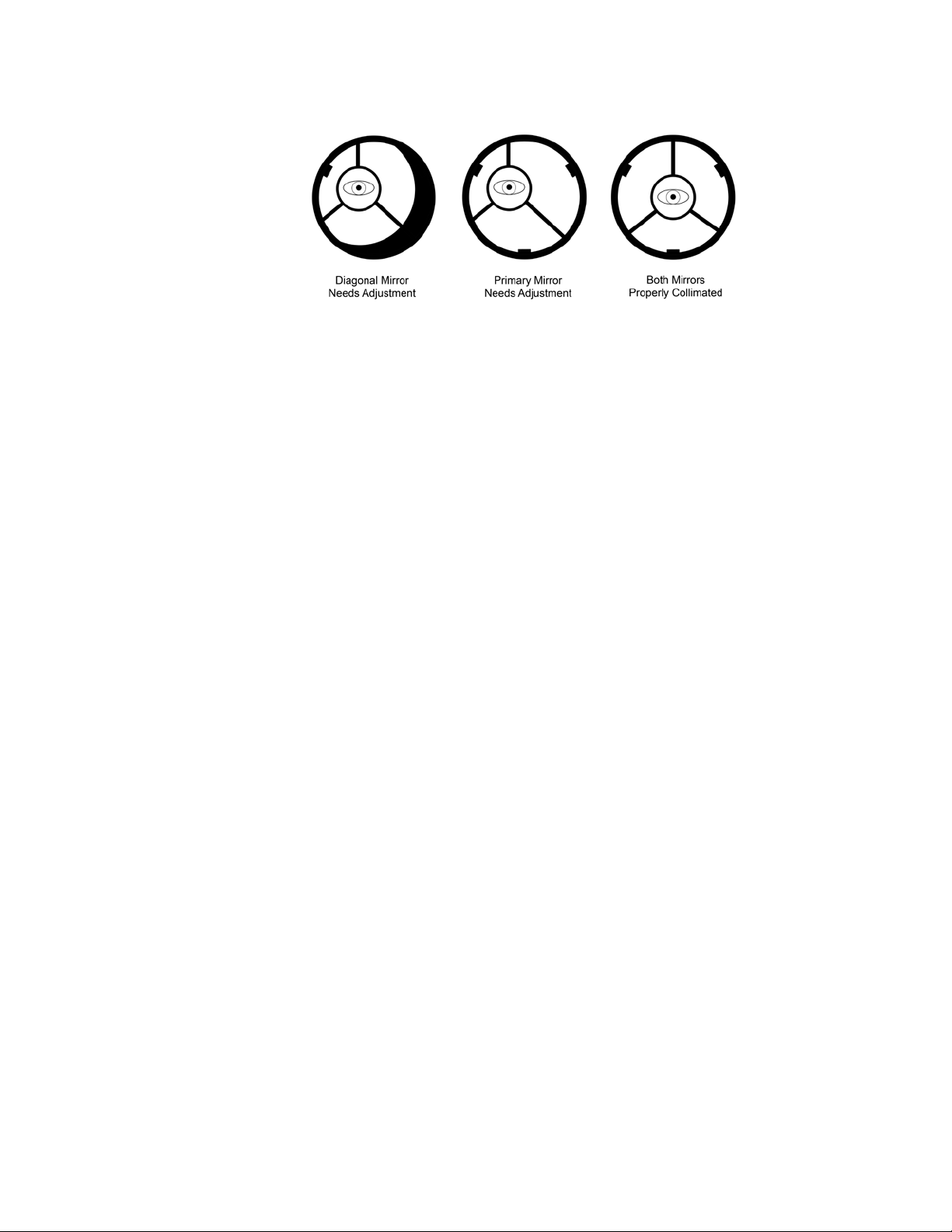
If the telescope is properly collimated you should see the primary mirror
(See Fig. 10) and three clips in their entirety. If the primary mirror is not
centered properly (See Fig. 12) you will need to adjust the diagonal
mirror (See Fig. 10) to correct this. Loosen the diagonal mirror so that
you can move the diagonal holder (See Fig. 10) with your hand. Tilt the
diagonal holder until the entire primary mirror is visible and carefully
retighten the screws to lock it into place. If necessary, turn the three screws
slightly to make ne adjustments.
18 19
Diagonal Mirror
Needs
Adjustment
Primary Mirror
Needs Adjustment
Both Mirrors
Properly Collimated
Fig.12
Adjusting the Primary Mirror:
If the telescope is properly collimated you should see the diagonal mirror
(See Fig. 10) at the exact center of the primary mirror. If the diagonal
mirror appears off-center (See Fig. 12) you will need to adjust the primary
mirror (See Fig. 10) located on the outside lower-end of the main tube. To
do this you will rst need to loosen the primary mirror locking screws (Fig.
9-39). These are the screws that are ush against the surface of the telescope.
Then alternately loosen and tighten the Primary Mirror Tilt Screws until the
diagonal mirror is centered inside the primary mirror. The primary mirror
screws are easily identied because they stick out from the surface of the
telescope. Once the adjustment is complete, re-tighten the primary mirror
locking screws.
Night Time Star Collimation Testing:
• To test the accuracy of your collimation, equip your telescope with
the 20mm eyepiece and focus on a moderately bright star.
• With the star centered in the eld of view, slowly turn the focus
wheel (Fig. 1-4) until the star is out of focus.
• If properly collimated, you should see a series of concentric circles
around a black center dot (Fig. 13-C).
• If the circles are not concentric and the black dot is not centered
(Fig. 13A) you will need to make adjustments to the primary mirror.
Loosen the primary mirror locking screws (Fig. 9-39) and use the
R.A. and Dec. cables to move the circles to the edge of the telescope
eld of view (Fig. 13-B). Then turn the primary mirror tilt screws
(Fig. 9-40) until the black dot moves to the center of the image with
the concentric circles radiating from it (Fig. 13-C). Once centered,
tighten down the locking screws.
Fig.13
Specications:
Optical Design: Newtonian Reector
Aperture: 114mm (4.49”)
Focal Length: 900mm (35.43”)
Focal Ratio: 7.89
Finder Scope: 6x30mm
Eyepiece 1: Kellner 20mm
Magnication 1: 45x
Eyepiece 2: Kellner 9mm
Magnication 2: 100x
Mount: Equatorial
Weight: 19.7 lbs.
Warnings:
• Never use this telescope (or its viewnder) to look directly at or near
the sun. Viewing the sun can cause instant and irreversible eye damage.
• Always supervise children when using this telescope.
• Do not leave telescope unattended at any time. Untrained adults or
children may not be familiar with the correcting operating procedure.
• Do not point the telescope at the sun even when you are not looking
through it. This will cause internal damage to the telescope.
• Handle this telescope with care. Rough handling might knock the
internal optical components out of alignment.
20 21
Diagonal Mirror
Needs
Adjustment
Primary Mirror
Needs Adjustment
Both Mirrors
Properly Collimated
Fig.12
Adjusting the Primary Mirror:
If the telescope is properly collimated you should see the diagonal mirror
(See Fig. 10) at the exact center of the primary mirror. If the diagonal
mirror appears off-center (See Fig. 12) you will need to adjust the primary
mirror (See Fig. 10) located on the outside lower-end of the main tube. To
do this you will rst need to loosen the primary mirror locking screws (Fig.
9-39). These are the screws that are ush against the surface of the telescope.
Then alternately loosen and tighten the Primary Mirror Tilt Screws until the
diagonal mirror is centered inside the primary mirror. The primary mirror
screws are easily identied because they stick out from the surface of the
telescope. Once the adjustment is complete, re-tighten the primary mirror
locking screws.
Night Time Star Collimation Testing:
• To test the accuracy of your collimation, equip your telescope with
the 20mm eyepiece and focus on a moderately bright star.
• With the star centered in the eld of view, slowly turn the focus
wheel (Fig. 1-4) until the star is out of focus.
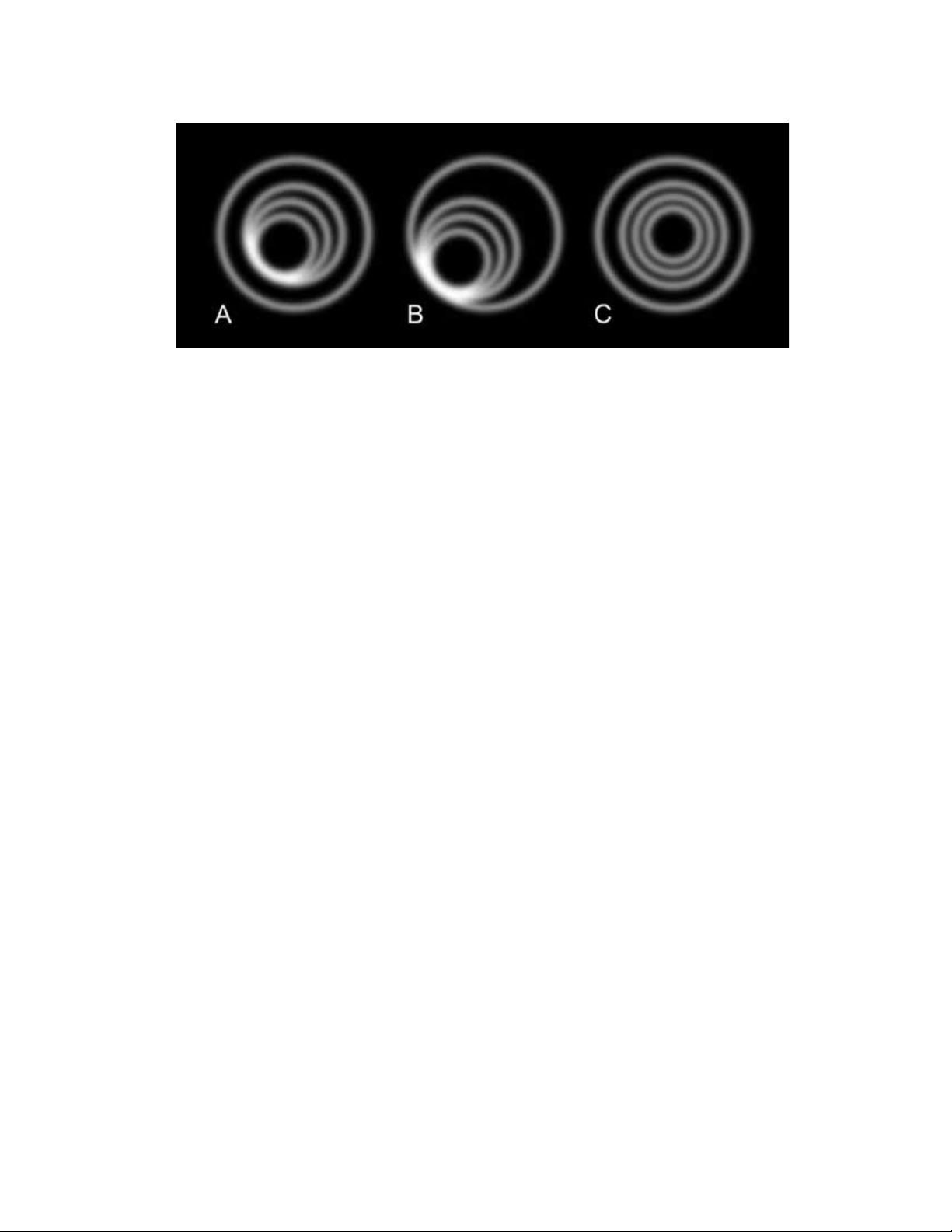
• If properly collimated, you should see a series of concentric circles
around a black center dot (Fig. 13-C).
• If the circles are not concentric and the black dot is not centered
(Fig. 13A) you will need to make adjustments to the primary mirror.
Loosen the primary mirror locking screws (Fig. 9-39) and use the
R.A. and Dec. cables to move the circles to the edge of the telescope
eld of view (Fig. 13-B). Then turn the primary mirror tilt screws
(Fig. 9-40) until the black dot moves to the center of the image with
the concentric circles radiating from it (Fig. 13-C). Once centered,
tighten down the locking screws.
Fig.13
Specications:
Optical Design: Newtonian Reector
Aperture: 114mm (4.49”)
Focal Length: 900mm (35.43”)
Focal Ratio: 7.89
Finder Scope: 6x30mm
Eyepiece 1: Kellner 20mm
Magnication 1: 45x
Eyepiece 2: Kellner 9mm
Magnication 2: 100x
Mount: Equatorial
Weight: 19.7 lbs.
Warnings:
• Never use this telescope (or its viewnder) to look directly at or near
the sun. Viewing the sun can cause instant and irreversible eye damage.
• Always supervise children when using this telescope.
• Do not leave telescope unattended at any time. Untrained adults or
children may not be familiar with the correcting operating procedure.
• Do not point the telescope at the sun even when you are not looking
through it. This will cause internal damage to the telescope.
• Handle this telescope with care. Rough handling might knock the
internal optical components out of alignment.
20 21

Customer Service:
We will be happy to help you with any problems you may experience
while using your telescope. Please call our toll-free customer service line
at 1-800-967-8427.
Warranty Information:
This Carson product is warranted to be free from defects in material and
workmanship for a period of one year from date of purchase. During this
period Carson will, at its option and without charge, either repair any part
or assembly of parts found to be defective in material or workmanship, or
replace this Carson product with a Carson product of comparable value and
condition, subject to the limitations and exclusions noted herein.
This warranty extends to the original purchaser only and is not assignable
or transferable. It shall not apply to any product that has been subject to
misuse, abuse, negligence or accident, or to any defects or damage directly or
indirectly caused by the use of unauthorized replacement parts and/or service
performed by unauthorized personnel.
This warranty gives you specic legal rights, and you may also have other
rights which could vary from state to state. Some states do not allow limi-
tations on the life of an implied warranty and/or do not allow excluding or
limiting incidental or consequential damages. If so, the above limitations or
exclusions may not apply to you.
Warranty Procedure:
Provide proof of purchase. A receipt or other dated proof of purchase
must be included with merchandise being returned for a warranty claim to
be processed.
Call or write for authorization. Before returning any product for a warranty
claim, a Return Authorization (RA) number must be obtained. No merchan-
dise will be accepted without an RA, and failure to obtain an RA will prevent
or delay processing of the warranty claim.
To obtain an RA call 631-963-5000, or write to Carson Warranty Service,
2070 5th Avenue, Ronkonkoma NY, 11779 with a description of the problem.
Include your name, address and telephone number.
Package the return carefully. Shippers will not reimburse for damages due to
insufcient packaging, even if the merchandise is insured.
Print the RA number prominently on the top of the package.
Prepay shipping. Insure the package. Send it to:
Carson Warranty Service, 2070 5th Avenue, Ronkonkoma NY, 11779.
Merchandise must be shipped prepaid. Carson will not accept
merchandise C.O.D.
22 23

Customer Service:
We will be happy to help you with any problems you may experience
while using your telescope. Please call our toll-free customer service line
at 1-800-967-8427.
Warranty Information:
This Carson product is warranted to be free from defects in material and
workmanship for a period of one year from date of purchase. During this
period Carson will, at its option and without charge, either repair any part
or assembly of parts found to be defective in material or workmanship, or
replace this Carson product with a Carson product of comparable value and
condition, subject to the limitations and exclusions noted herein.
This warranty extends to the original purchaser only and is not assignable
or transferable. It shall not apply to any product that has been subject to
misuse, abuse, negligence or accident, or to any defects or damage directly or
indirectly caused by the use of unauthorized replacement parts and/or service
performed by unauthorized personnel.
This warranty gives you specic legal rights, and you may also have other
rights which could vary from state to state. Some states do not allow limi-
tations on the life of an implied warranty and/or do not allow excluding or
limiting incidental or consequential damages. If so, the above limitations or
exclusions may not apply to you.
Warranty Procedure:
Provide proof of purchase. A receipt or other dated proof of purchase
must be included with merchandise being returned for a warranty claim to
be processed.
Call or write for authorization. Before returning any product for a warranty
claim, a Return Authorization (RA) number must be obtained. No merchan-
dise will be accepted without an RA, and failure to obtain an RA will prevent
or delay processing of the warranty claim.
To obtain an RA call 631-963-5000, or write to Carson Warranty Service,
2070 5th Avenue, Ronkonkoma NY, 11779 with a description of the problem.
Include your name, address and telephone number.
Package the return carefully. Shippers will not reimburse for damages due to
insufcient packaging, even if the merchandise is insured.
Print the RA number prominently on the top of the package.
Prepay shipping. Insure the package. Send it to:
Carson Warranty Service, 2070 5th Avenue, Ronkonkoma NY, 11779.
Merchandise must be shipped prepaid. Carson will not accept
merchandise C.O.D.
22 23

RP-300 TELESCOPE
Instruction Manual
CARSON®
2070 5th Avenue
Ronkonkoma, NY 11779
Phone: 631-963-5000
Fax: 631-427-6749
For information, call toll-free: 1-800-967-8427
[email protected] / [email protected] / www.carson.com
RP-300 / ©2017-R1