User Guide
Quality, Design and Innovation
home.liebherr.com/fridge-manuals
Contents
1 The appliance at a glance............................. 3
1.1 Additional benefits.............................................. 3
1.2 Delivered contents.............................................. 3
1.3 Overview of the appliance and equipment..... 4
1.4 Range of appliance use...................................... 4
1.5 Conformity............................................................ 4
2 General safety instructions.......................... 5
3 Start-up......................................................... 7
3.1 Turning on the appliance................................... 7
3.2 Insert the equipment.......................................... 8
4 Food management......................................... 8
4.1 Storing food......................................................... 8
4.2 Storage times...................................................... 9
5 Energy saving................................................ 9
6 Use................................................................. 9
6.1 Controls and displays......................................... 9
6.1.1 Status display.....................................................9
6.1.2 Navigation...........................................................9
6.1.3 Display symbols............................................... 10
6.2 Operating logic.................................................... 10
6.2.1 Activating/deactivating settings..................10
6.2.2 Selecting function value.................................10
6.2.3 Activating/deactivating settings..................10
6.2.4 Selecting the setting value............................ 10
6.2.5 Calling up the customer menu....................... 11
6.3 Functions.............................................................. 11
Temperature...................................................... 11
SuperFrost........................................................ 11
PartyMode......................................................... 12
EnergySaver...................................................... 12
IceMaker / MaxIce........................................... 12
6.4 Settings................................................................ 12
Language...........................................................12
Setting up the WLAN connection..................12
Entry lock...........................................................13
Display brightness........................................... 13
Door alarm.........................................................13
Temperature unit..............................................14
Info......................................................................14
SabbathMode....................................................14
TubeClean..........................................................14
Ice cubes........................................................... 14
Reminder........................................................... 14
Reset.................................................................. 15
Turn off appliance............................................15
6.5 Error messages.................................................... 15
6.5.1 Warnings........................................................... 15
6.5.2 Message............................................................ 15
6.5.3 DemoMode........................................................ 15
7 Equipment...................................................... 16
7.1 Drawers................................................................. 16
7.2 Pull-out board with IceTower............................ 17
7.3 IceMaker............................................................... 19
7.4 Accessories.......................................................... 19
8 Maintenance.................................................. 19
8.1 Defrosting the appliance................................... 19
8.2 Cleaning the appliance...................................... 20
9 Customer support......................................... 21
9.1 Technical specifications.................................... 21
9.2 Operating noises................................................. 21
9.3 Technical faults................................................... 22
9.4 Customer service................................................ 23
9.5 Rating plate.......................................................... 23
10 Decommissioning.......................................... 23
11 Disposal......................................................... 24
11.1 Preparing the appliance for disposal............... 24
11.2 Disposing of the appliance in an
environmentally friendly manner..................... 24
Congratulations on the purchase of your new appli‐
ance. With this purchase, you have chosen all the
advantages of the latest refrigeration technology, guar‐
anteeing you a high-quality appliance with a long life
span and high operating safety.
The equipment of your appliance gives you the highest
level of day-to-day ease of operation.
Together we are making an active contribution to the
conservation of our environment by purchasing this
appliance which is manufactured in an environmentally
friendly process with the use of recyclable materials.
We hope you enjoy your new appliance.
The manufacturer is constantly working to improve all
types and models. Therefore, please be aware that we
reserve the right to make changes to the shape, equip‐
ment and technology.
2 * Depending on model and options
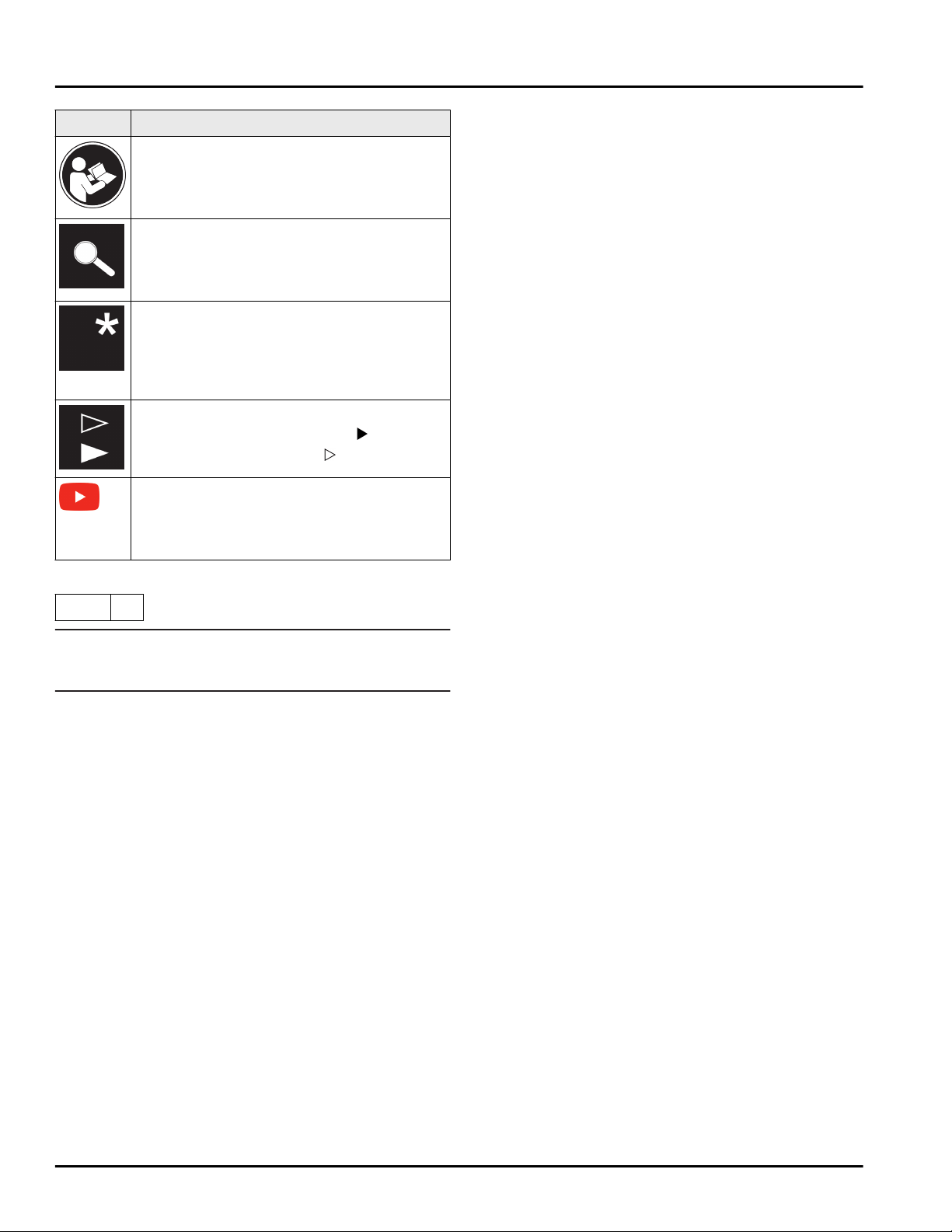
Symbol Explanation
Read instructions
Please read the information in these
instructions carefully to understand all of
the benefits of your new appliance.
Check appliance
Check all parts for transport damage. If you
have any complaints, please contact your
agent or customer service.
Differences
These instructions apply to a range of
models, so there may be differences.
Sections that apply to certain models only
are indicated by an asterisk (*).
Instructions and results
Instructions are marked with a
.
Results are marked with a
.
Videos
Videos about the appliances are available
on the YouTube channel of Liebherr-Hausg‐
eräte.
These operating instructions apply to:
SIFNhi
51..
Note
If your appliance has an N in its appliance designation,
it is a NoFrost appliance.
1 The appliance at a glance
1.1 Additional benefits
-
Natural coolant
-
Energy-optimized refrigerant circuit
-
Energy-efficient insulation
-
Low energy consumption
-
User-friendly electronic controls
-
Active function indicators
-
Temperature can be controlled in the appliance inde‐
pendent of ambient conditions according to its
climate rating - Temperature can be displayed as °C
or °F
-
The appliance defrosts automatically - no need to
spend time defrosting
-
Safety glass storage shelves
-
Large freezing capacity
-
Freezer over-temperature alarm
-
Quick-freeze feature for fresh food (SuperFrost)
-
Frozen food temperature indicator
-
Power outage /FrostControl display
-
All freezer drawers suitable for quick-freeze
-
Freezer compartment light
-
Bright LED interior light
-
Door ajar alarm
-
Handle grips on all extra-large drawers for easy
transport
-
Integrated transport grips on appliance housing
-
Transport castors at back
-
Easy to clean
-
Door hinges can be reversed
-
Door-on-door system for easy kitchen cabinet instal‐
lation
-
Soft stop mechanisms
-
This appliance has a SabbathMode function, so you
can use it on religious holidays. Further information
can be found on the Star-K website www.star-k.org.
1.2 Delivered contents
Check all parts for damage during transport. If you
have any complaints, please contact the dealer or
Customer Service (see 9.4 Customer service) .
Delivery contains the following parts:
-
Integrated appliance
-
Equipment (depending on your model)
-
Installation parts (depending on your model)
-
User Guide
-
Installation Guide
-
Warranty documents
The appliance at a glance
* Depending on model and options 3
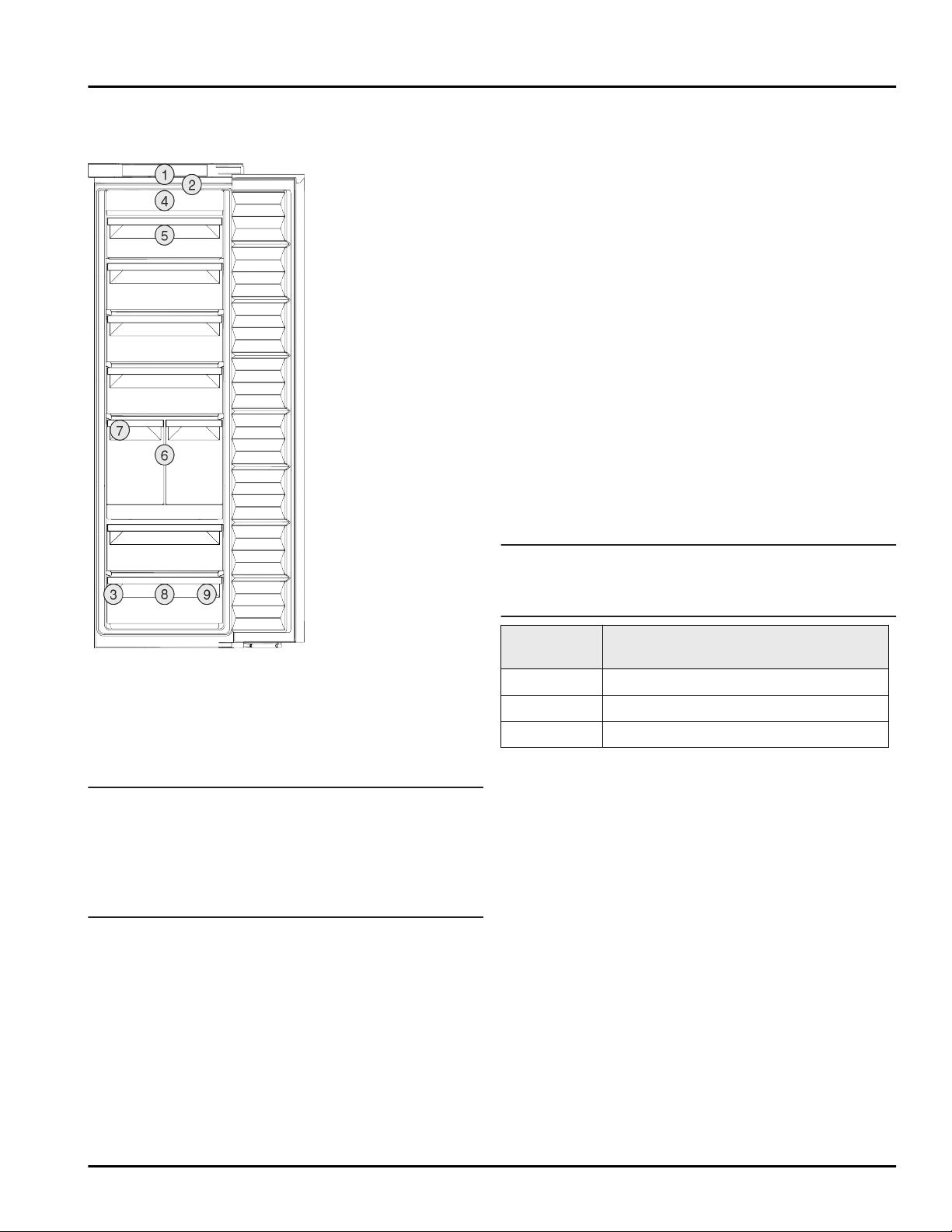
1.3 Overview of the appliance and
equipment
Fig. 1 Example illustration
Equipment
(1)
Controls (6) IceTower
(2) Lighting (7) IceMaker
(3) Serial tag (8) Freezer tray, cold
storage accumulators
(4) NoFrost (9) Ice cube scoop
(5) Tilting drawer
Note
u
The shelves, drawers, and baskets are arranged for
optimal energy efficiency in the factory configura‐
tion. However, changes to the arrangement within
the given insertion options – for example the
arrangement of shelves in the fridge compartment –
have no effect on energy consumption.
1.4 Range of appliance use
Normal use
This appliance is intended to be used in
household and similar applications such as,
-
staff kitchen areas in shops, offices and
other working environments;
-
farm houses and by clients in hotels, motels
and other residential type environments;
-
bed and breakfast type environments;
-
catering and similar non-retail applications.
All other types of uses are not permitted.
Foreseeable misuse
The following uses are specifically prohibited:
-
Storage and cooling of medication, blood
plasma, laboratory preparations or similar
substances and products in accordance
with the CMDCAS and FDA 510(k)
-
Use outdoors
-
Use in moist areas exposed to the rain
-
Use in outdoor areas with very high humidity
-
Use in areas at risk of explosion
Incorrect appliance use can cause damage to
the stored products or cause them to spoil.
Climate ratings
The appliance is set to operate within specific
ambient temperature limits according to its
climate rating The climate rating for your
appliance is printed on the rating plate
Note
u
To guarantee trouble-free operation, comply
with the indicated ambient temperatures.
Climate
rating
for ambient temperatures
SN, N to 90 °F (32 °C)
ST to 101 °F (38 °C)
T to 110 °F (43 °C)
The appliance will function properly in
ambient temperatures down to 41 °F (5 °C).
If your appliance has a fixed water connection,
then the appliance is guaranteed to function
correctly down to a lower ambient tempera‐
ture of 32 °F (0 °C).
If your appliance does not have a fixed water
connection, then the appliance is guaranteed
to function correctly down to a lower ambient
temperature of 5 °F (-15 °C).
1.5 Conformity
The refrigerant circuit has been tested for leaks. When
installed, the appliance complies with the relevant
safety regulations and the safety standards CAN/CSA-
C22.2 No. 60335-1-11, 60335-2-24-06 and UL 60335-1,
UL 60335-2-24.
The appliance at a glance
4 * Depending on model and options

2 General safety instructions
Please keep these operating instructions in a
safe place so you can refer back to them at
any time.
If you pass the appliance on, please hand
these operating instructions to the new owner.
Read and follow these instructions. They
contain safety information which is important
for safe and problem-free installation and
operation. Always read and follow the safety
information.
Dangers for the user:
-
This appliance is not intended for use by
persons (including children) with reduced
physical, sensory or mental capabilities, or
lack of experience and knowledge, unless
they have been given supervision or instruc‐
tion concerning use of the appliance by a
person responsible for their safety. Children
should be supervised to ensure that they do
not play with the appliance. Cleaning and
user maintenance must not be performed by
children unless they are supervised. Chil‐
dren between the ages of 3 and 8 may load
and unload the appliance. Children under
the age of 3 must be kept away from the
appliance unless they are constantly super‐
vised.
-
IMPORTANT: The power plug must be easily
accessible so that the appliance can be
disconnected from the mains quickly in an
emergency. It must not be behind the back
of the appliance.
-
The socket must be easily accessible so that
the appliance can be disconnected quickly
from the electricity in an emergency. It must
not be located in the area behind the appli‐
ance.
-
Always hold the appliance at the plug when
disconnecting it from the household power.
Do not pull on the cable.
-
Disconnect the power plug or fuse if there is
a malfunction.
-
Do not damage the power cable. Do not
operate the appliance with a faulty power
cable. If the supply cord is damaged, it must
be replaced by the manufacturer, its service
agent or similarly qualified persons in order
to avoid a hazard. For Plug and Play connec‐
tions, the change may be carried out by the
customer.
-
Repairs and work on the appliance may only
be carried out by Customer Service or other
specifically trained qualified personnel.
-
Only install, connect and dispose of the
appliance in accordance with the instruc‐
tions.
-
Only operate the appliance after it has been
installed.
-
The manufacturer is not liable for damage
arising from a defective fixed water connec‐
tion.*
Risk of fire:
-
The refrigerant contained within the appli‐
ance (specifications on the identification
plate) is environmentally friendly, but flam‐
mable. Leaking refrigerant can ignite.
•
WARNING: Do not damage the refrigerant
circuit.
•
Do not handle ignition sources inside the
appliance.
•
WARNING: Do not use electrical appli‐
ances inside the food storage compart‐
ments of the appliance, unless they are of
the type recommended by the manufac‐
turer (e.g. steam cleaning appliances,
heating appliances, ice cream makers).
•
If refrigerant leaks: Remove naked flames
or ignition sources located near the area
of the leak. Ventilate the room well.
Contact Customer Service.
-
Do not operate the appliance near explosive
gases.
-
Do not store or use gasoline or other flam‐
mable gases and liquids near the appliance.
-
Do not store explosive substances such as
aerosol cans with a flammable propellant in
this appliance. You can recognize such spray
cans by the printed list of contents or by a
flame symbol. Any leaking gases can be
ignited by electrical components.
-
Alcoholic beverages or other containers
holding alcohol must always be tightly
sealed for storage purposes. Any leaking
alcohol can be ignited by electrical compo‐
nents.
Risk of falling or toppling over:
General safety instructions
* Depending on model and options 5

-
WARNING: To avoid a hazard due to insta‐
bility of the appliance, it must be fixed in
accordance with the instructions.
-
Do not stand on the base, drawers, doors
etc. or use them as improper supports. This
applies in particular to children.
Danger of poisoning:
-
Do not consume spoiled food.
-
WARNING: Connect to potable water supply
only.*
-
Do not use any old or already premounted
water supply lines.*
Danger of frostbite, feeling of numbness and
pain:
-
Avoid prolonged skin contact with cold
surfaces or chilled/frozen food or take
protective measures, e.g. wear gloves.
Risk of injury and damage:
-
Hot steam may cause injuries. Do not use
any electrical heating or steam cleaning
equipment, naked flames or defrosting
sprays for defrosting measures.
-
WARNING: Do not use mechanical devices
or other means to accelerate the defrosting
process, other than those recommended by
the manufacturer.
-
Do not remove ice using sharp objects.
-
WARNING: Keep clear of obstruction all
ventilation openings in the appliance enclo‐
sure or in the structure for building-in.
-
WARNING: Risk of child entrapment. Before
you throw away your old refrigerator or
freezer:
•
Take off the doors.
•
Leave the shelves in place so that children
may not easily climb inside.
Risk of crushing:
-
Do not hold onto the hinge when opening
and closing the door. Fingers may become
trapped.
California Proposition 65
-
WARNING: This product can expose you to
chemicals including Diisononyl Phthalate
(DINP), which is known to the State of Cali‐
fornia to cause cancer, and Di-isodecyl
Phthalate (DIDP), which is known to the
State of California to cause birth defects or
other reproductive harm. For more informa‐
tion, go to www.P65Warnings.ca.gov
FCC Warning
-
Changes or modifications not expressly
approved by the party responsible for
compliance could void the user’s authority
to operate the equipment.
FCC information
-
This appliance has been tested and found to
comply with the limits for a Class B digital
device, pursuant to part 15 of the FCC Rules.
These limits are designed to provide reason‐
able protection against harmful interference
from an installation in residential areas. This
appliance generates, uses and can radiate
radio-frequency energy and, if not installed
and used in accordance with the instruc‐
tions, may cause harmful interference to
radio communications. However, there is no
guarantee that interference will not occur in
a particular installation. If this appliance
does cause harmful interference to radio or
television reception, which can be deter‐
mined by switching the appliance on and
off, the user should try to correct the inter‐
ference by one or more of the following
measures:
•
Reorient or relocate the receiving antenna.
•
Increase the distance between the appli‐
ance and receiver.
•
Connect the appliance to an outlet on a
circuit different from that to which the
receiver is connected.
•
Consult the dealer or an experienced
radio/TV technician for help.
FCC Radio Frequency Exposure Statement
-
This appliance is found to comply with FCC
radio frequency (RF) exposure limits set for
an uncontrolled environment. This trans‐
mitter must not be set up or operated in
conjunction with another antenna or
another transmitter.
-
This appliance should be installed and oper‐
ated at a minimum separation distance of
20 cm between the antenna and your body.
The user must follow the specific operating
instructions to comply with the limits of RF
exposure.
IC information
-
This appliance has license-exempt transmit‐
ters/receivers, which comply with the
license-exempt Radio Standards Specifica‐
General safety instructions
6 * Depending on model and options
tion (RSS) of Innovation, Science and
Economic Development Canada. Operation
is subject to the following two conditions:
•
This appliance may not cause interfer‐
ence.
•
This device must accept any interference,
including interference that may cause
undesired operation of the device.
IC Radio Frequency Exposure Statement
-
This appliance is found to comply with IC
RSS-102 radio frequency (RF) exposure
limits set for an uncontrolled environment.
This appliance should be installed and oper‐
ated at a minimum separation distance of
20 cm between the antenna and your body.
Symbols on the device:
The symbol may be located on the
compressor. It refers to the oil in the
compressor and refers to the following
danger: Can be fatal if swallowed or
inhaled. This notice only applies for
recycling. There is no danger during
normal operation.
WARNING: Risk of fire / flammable
materials. The symbol is located on the
compressor and indicates the danger
from flammable materials. Do not
remove the label.
This label or a similar one may be
located on the rear of the appliance. It
refers to the foam panels in the door
and/or the housing. This notice only
applies for recycling. Do not remove the
label.
Observe the warning messages and other
detailed information in the other sections:
DANGER
Indicates an immediately
hazardous situation, which if
not avoided, will result in death
or serious injury.
WARNING Indicates a hazardous situa‐
tion, which if not avoided,
could result in death or serious
injury.
CAUTION Indicates a hazardous situa‐
tion, which if not avoided,
could result in minor or
moderate injury.
NOTICE Indicates a hazardous situa‐
tion, which if not avoided,
could result in damage to prop‐
erty.
Note Indicates useful advice and
tips.
3 Start-up
3.1 Turning on the appliance
Make sure that the following requirements are met:
q
Appliance is installed and connected according to
installation instructions.
q
All adhesive strips, adhesive and protective films, as
well as transport safety devices in and on the appli‐
ance are removed.
q
All advertising material has been removed from the
drawers.
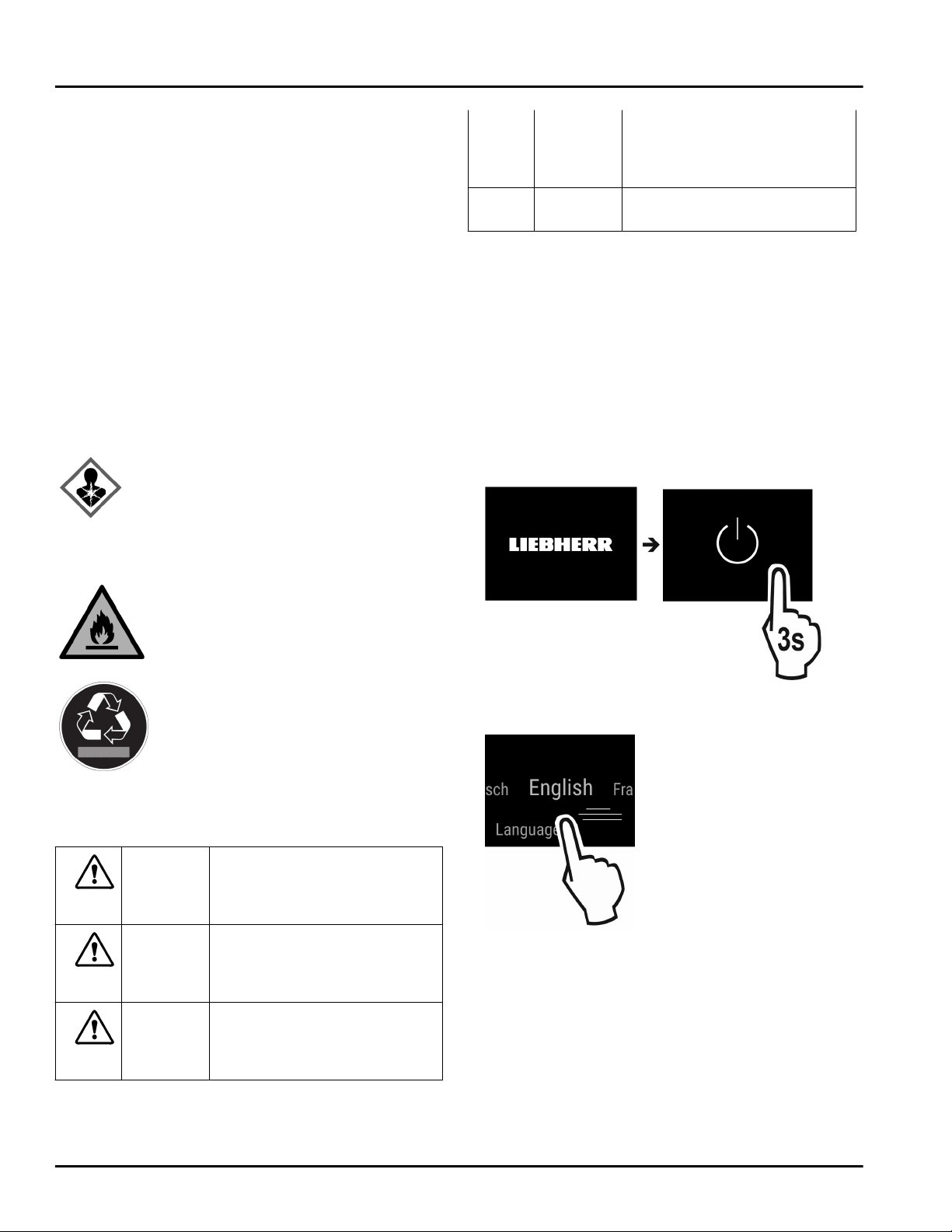
Fig. 2
u
Switch on the appliance using the display.
Fig. 3
u
Select the language.
w
The status display appears.
The appliance starts in DemoMode:
If the appliance starts in DemoMode, you can deacti‐
vate DemoMode within the next 5 minutes.
Start-up
* Depending on model and options 7
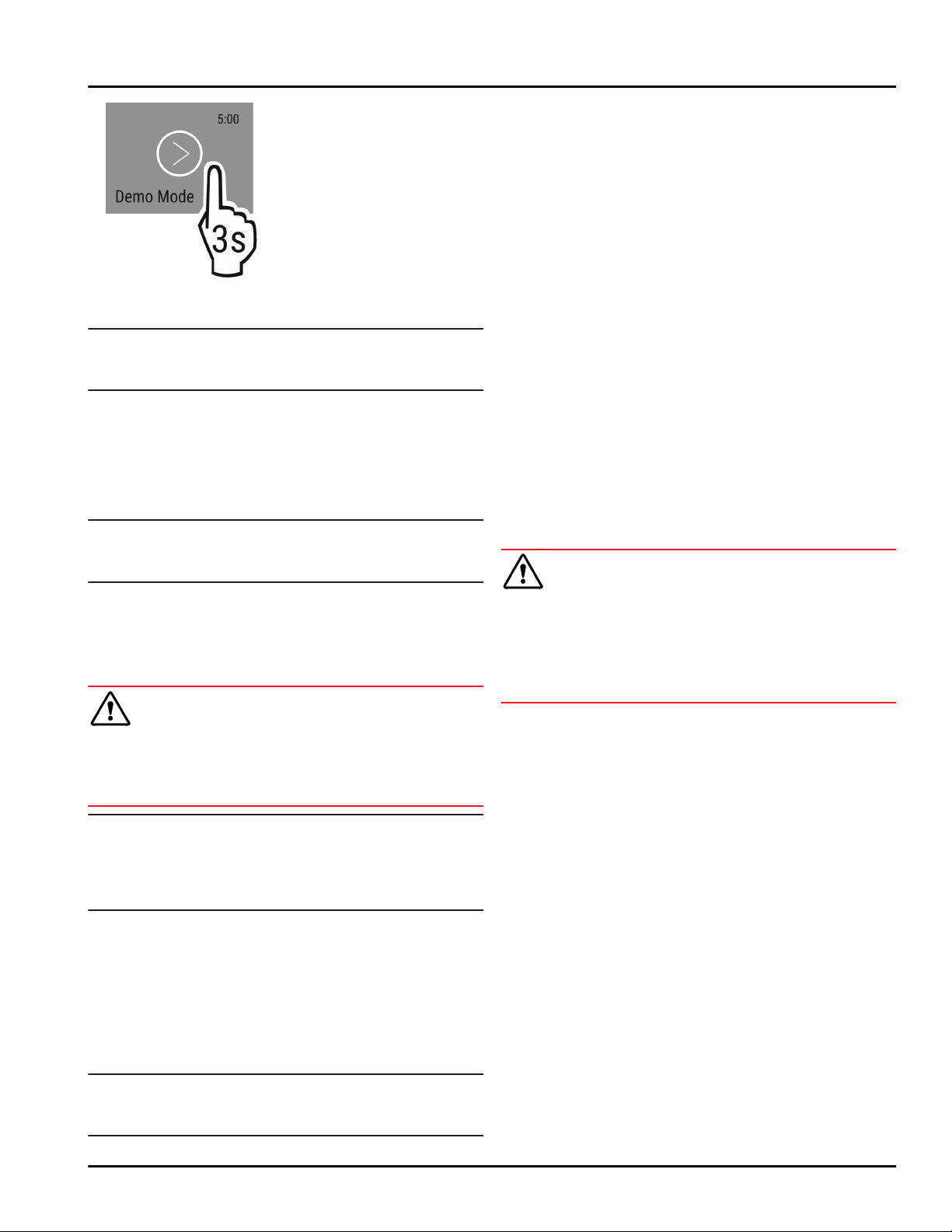
Fig. 4
u
Press DemoMode for 3 seconds.
w
DemoMode is deactivated.
Note
The manufacturer recommends:
u
Store frozen foods at 0 °F (-18 °C) or colder.
3.2 Insert the equipment
u
Insert the supplied equipment to help you make the
most of the appliance.
u
Install the SmartDevice app (see
apps.home.liebherr.com).
Note
You can purchase accessories from the Liebherr house‐
hold appliance store (home.liebherr.com).
4 Food management
4.1 Storing food
WARNING
Danger of fire
u
Do not use electrical appliances inside the food
storage compartments of the appliance, unless they
are of the type recommended by the manufacturer.
Note
Insufficient ventilation results in an increase in energy
consumption and reduction of the refrigerating
performance
u
Always keep the air slots unobstructed.
When storing food, remember these basic rules:
q
Do not obstruct the air vents on the back wall.
q
Do not obstruct the air vents on the fan.
q
Food is well sealed.
q
Raw meat or fish is in clean, sealed containers so
that other food cannot be touched or drip on them.
q
Food is stored spaced apart to ensure good air circu‐
lation.
Note
Failure to follow these guidelines can lead to food
perishing.
4.1.1 Freezer
This provides a dry, frosty storage climate at 0 °F
(-18 °C). A frosty climate is suitable for storing frozen
food and goods for several months, preparing ice
cubes, or freezing fresh food.
Freezing food
You can freeze as many kilograms of fresh food within
24 hours as indicated on the nameplate (see 9.5 Rating
plate) under "freezing capacity ... kg/24h".
To ensure that the food freezes quickly to the core,
keep to the following quantities per pack:
-
Fruit, vegetables up to 2.2 lb (1 kg)
-
Meat up to 5.51 lbs (2.5 kg)
Before freezing, please note the following:
q
SuperFrost is activated (see 6.3 Functions) when the
amount of food to freeze exceeds approx. 4.41 lbs
(2 kg).
q
With a small volume of frozen goods: SuperFrost is
activated approx. 6 hours prior.
q
With the maximum volume of frozen goods:
SuperFrost is activated approx. 24 hours prior.
Arranging the food:
CAUTION
There is a risk of injury from pieces of broken glass!
Bottles and cans containing drinks can split or crack
when frozen. This applies in particular to carbonated
drinks.
u
The BottleTimer function must be used when
freezing bottles and cans with drinks.
For appliances smaller than 48-1/16 '' (122 cm):
With a small amount of frozen goods:
u
Distribute packaged groceries across all drawers.
u
If possible, place groceries at the back of the drawer
near the rear wall.
With the maximum amount of frozen goods:
u
Distribute packaged groceries across all drawers.
u
If possible, place groceries at the back of the drawer
near the rear wall.
For appliances larger than or exactly 48-1/16 ''
(122 cm):
With a small amount of frozen goods:
u
Distribute packaged groceries across all drawers,
but do not place any groceries in the top drawer.
With the maximum amount of frozen goods:
u
Distribute packaged groceries across all drawers.
u
If possible, place groceries at the back of the drawer
near the rear wall.
For all appliances:
With the maximum amount of frozen goods:
u
Once SuperFrost activates automatically, place food
into the drawer.
Defrosting food
- in the fridge compartment
Food management
8 * Depending on model and options
- in the microwave
- in the oven/fan oven
- at room temperature
WARNING
Danger of food poisoning!
u
Do not re-freeze defrosted food.
u
Remove only the food you need for now.
u
Use defrosted food as quickly as possible
Freezer tray
Use the freezer tray for berries, herbs, vegetables and
other small goods without them freezing together in
the process. The food keeps its shape and is easier to
separate into portions later on.
You can also store the freezer packs in the freezer tray
to save space.*
u
Spread food, unsealed, at a good distance apart,
over the whole surface of the freezer tray.
4.2 Storage times
The storage times given are guidelines
Food with a “use by” date must still be consumed by
the date indicated on the package
Guidelines for storage periods for various foods
Ice cream at 28 °F
(-18 °C)
2 to 6 months
Sausage, ham at 28 °F
(-18 °C)
2 to 3 months
Bread, bakery prod‐
ucts
at 28 °F
(-18 °C)
2 to 6 months
Game, pork at 28 °F
(-18 °C)
6 to 9 months
Fish, fatty at 28 °F
(-18 °C)
2 to 6 months
Fish, lean at 28 °F
(-18 °C)
6 to 8 months
Cheese at 28 °F
(-18 °C)
2 to 6 months
Poultry, beef at 28 °F
(-18 °C)
6 to 12 months
Vegetables, fruit at 28 °F
(-18 °C)
6 to 12 months
5 Energy saving
-
Always ensure good ventilation. Keep clear of
obstruction all ventilation openings in the appliance
enclosure or in the structure for building-in.
-
Never block air slits in the fan.
-
Do not install the appliance in direct sunlight or next
to a stove, heater or similar heat source.
-
Energy consumption depends on installation condi‐
tions such as the ambient temperature
(see 1.4 Range of appliance use) . A warmer ambient
temperature can increase the energy consumption.
-
Avoid opening the appliance door for any longer then
necessary
-
The lower the temperature is set the higher the
energy consumption.
-
All food stored in the appliance should be well
wrapped and covered. This prevents frost buildup.
-
Insertion of warm foods: first let the food cool down
to room temperature.
6 Use
6.1 Controls and displays
The display provides a quick overview of the tempera‐
ture setting and the status of functions and settings.
You can control the functions and settings either by
deactivating/activating them or by selecting a value.
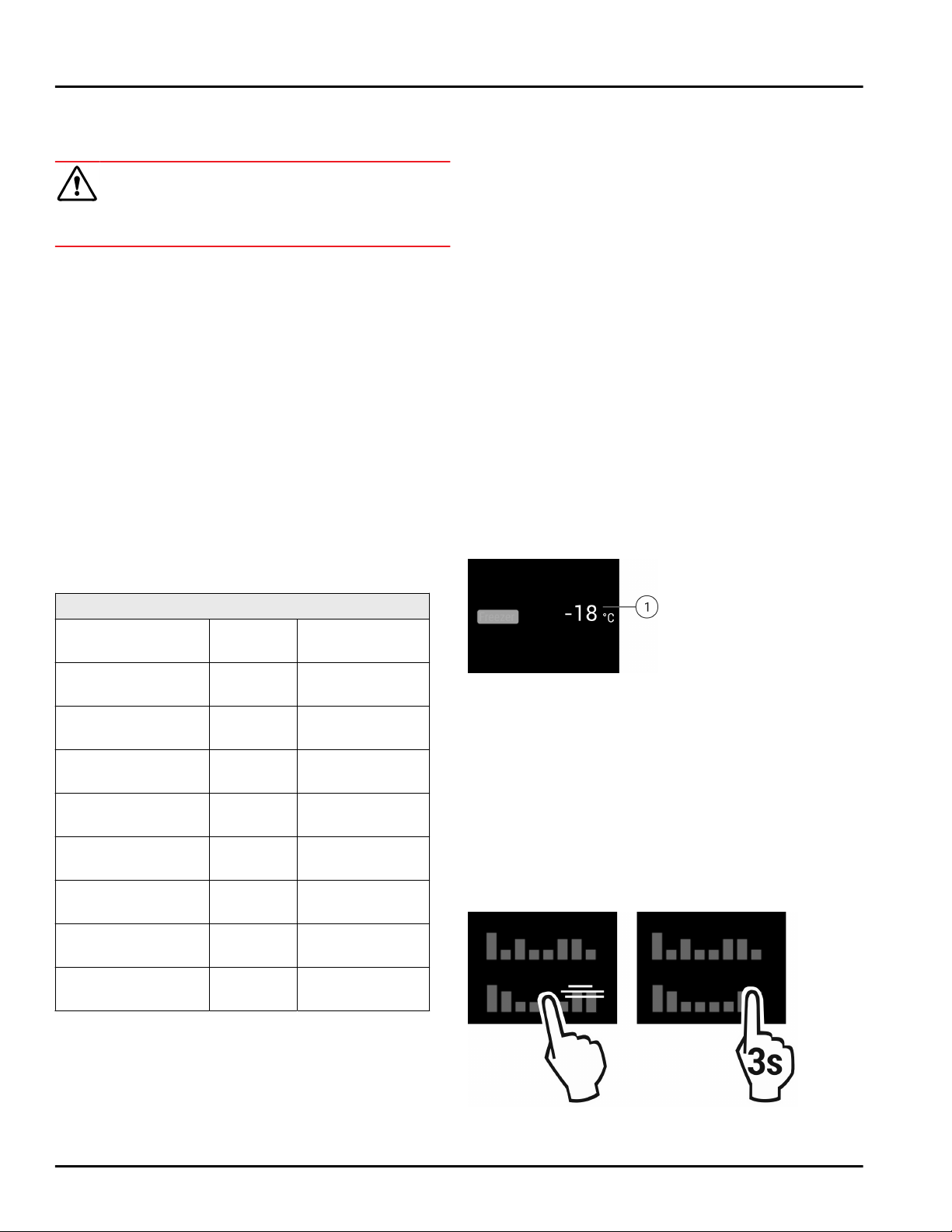
6.1.1 Status display
Fig. 5
(1)
Temperature display
The Status display shows the set temperatures and is
the home display. From there, you can navigate to the
options and settings.
6.1.2 Navigation
Navigate in the menu to access the individual func‐
tions. An audible signal sounds after confirming a
function or setting. If no selection is made after 10
seconds the display switches to the Status display.
The appliance is operated by swiping and confirming in
the display:
Fig. 6
Energy saving
* Depending on model and options 9
Back:
-
Confirm your selection in the submenu. The display
returns to the menu.
-
Select . The display returns to the function/
setting.
Back to Status display:
-
Close and open the door.
-
Wait 10 seconds. The display changes to the Status
display.
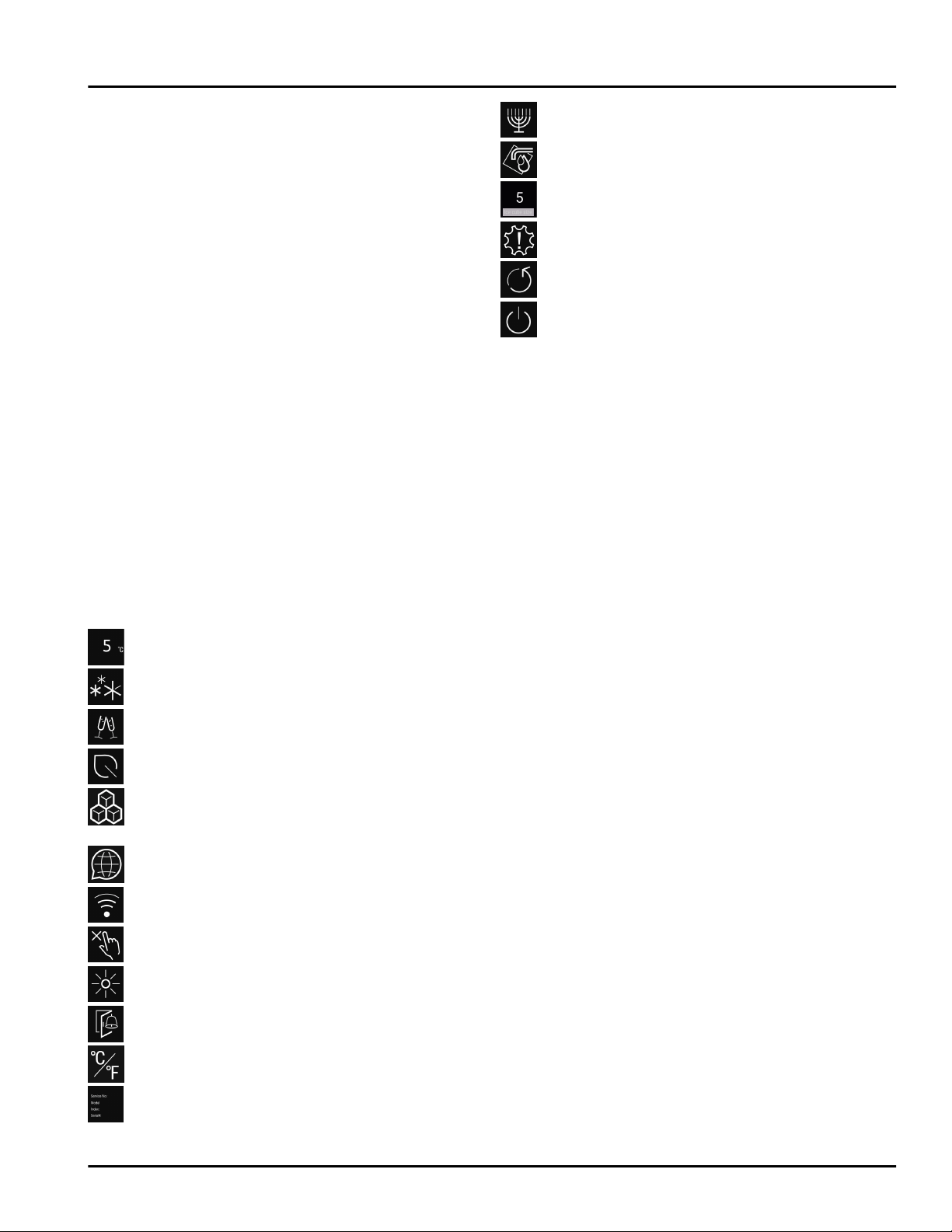
6.1.3 Display symbols
The display symbols provide information about the
current appliance status.
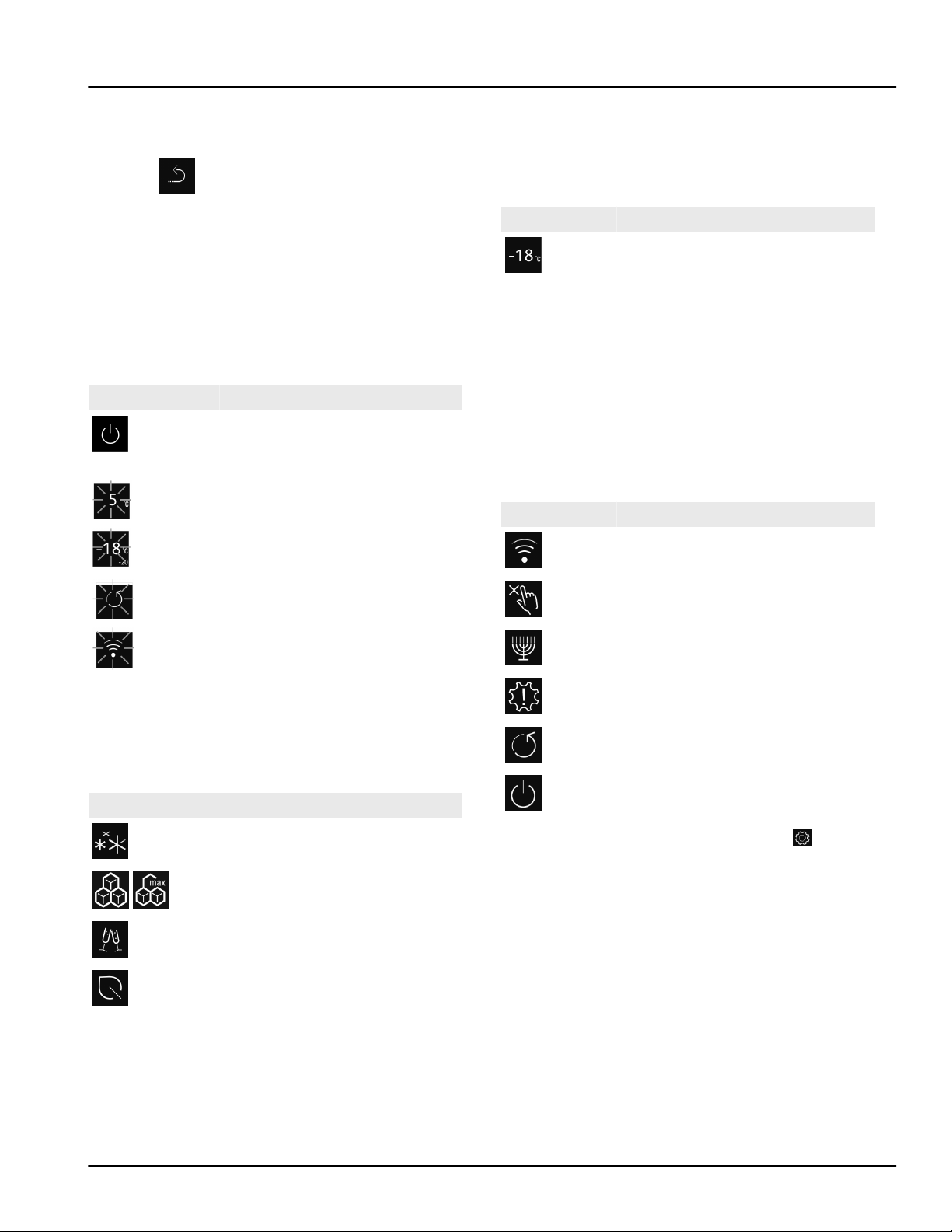
Symbol
Appliance status
Standby
The appliance or temperature
zone is turned off.
Flashing number
Appliance is working. Tempera‐
ture flashes until the set
temperature is reached.
Flashing symbol
Appliance is working. Setting is
made.
6.2 Operating logic
6.2.1 Activating/deactivating settings
You can activate/deactivate the following functions:
Symbol
Function
SuperFrost
x
IceMaker and MaxIce
x
PartyMode
x
EnergySaver
x
When a function is on, the appliance works harder.
This means the appliance could make louder noises
and consume more energy.
u
Swipe left in the display until the function appears.
u
Confirm selected function with a short tap.
w
You hear the confirmation tone.
w
Status appears in the menu.
w
Function is on/off.
6.2.2 Selecting function value
With the following functions you can set a value in the
submenu:
Symbol Function
Setting the temperature
Switch the appliance on/off
u
Swipe left in the display until the function appears.
u
Confirm selected function with a short tap.
u
Select the setting value by swiping the display.
Setting the temperature
u
Confirm selected value with a short tap.
w
You hear the confirmation tone.
w
The display changes to blue when it is activated.
w
Display switches back to the menu.
6.2.3 Activating/deactivating settings
You can activate/deactivate the following settings:
Symbol
Setting
WiFi
1
Entry lock
2
SabbathMode
2
Reminders
1
Reset
2
Switch off
2
u
Swipe left in the display until Settings
appears.
u
Confirm settings by tapping.
u
Swipe until you can see the setting you want.
1
Activate setting (short press)
u
Tap briefly to confirm.
w
You hear the confirmation tone.
w
Status appears in the menu.
w
Setting is activated / deactivated.
2
Activate setting (long press)
u
Press selection for 3 seconds to confirm.
w
You hear the confirmation tone.
w
Status appears in the menu.
w
Display changes.
6.2.4 Selecting the setting value
With the following settings you can set a value in the
submenu:
Use
10 * Depending on model and options
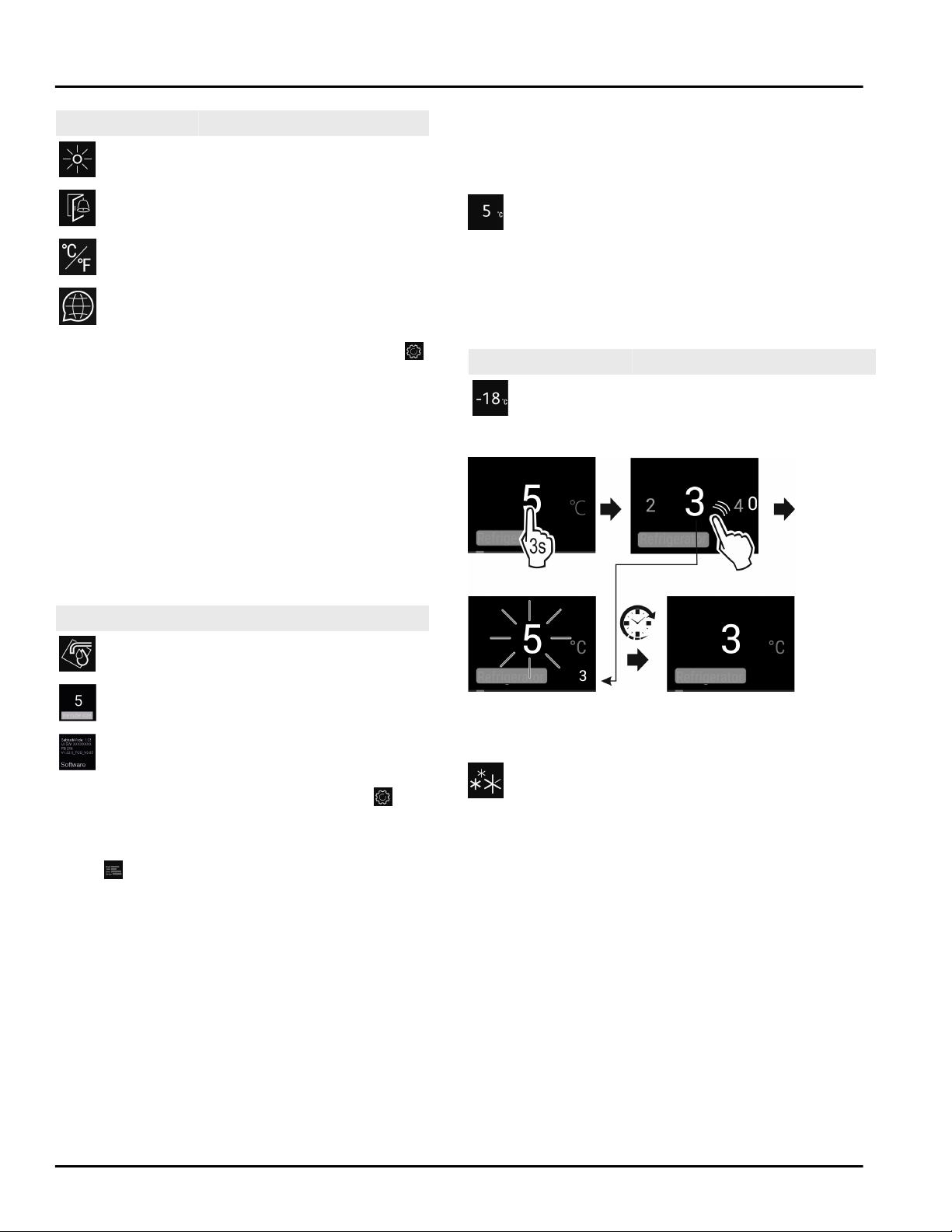
Symbol Settings
Brightness
Door alarm
Temp. unit
Language
u
Swipe the display to the left until the settings
are
displayed.
u
Confirm the settings by tapping.
u
Swipe until you can see the setting you want.
u
Tap briefly to confirm.
u
Select the desired setting value by swiping the
display.
u
Tap briefly to confirm.
w
You hear the confirmation tone.
w
Status appears briefly in the submenu.
w
Display switches back to the menu.
6.2.5 Calling up the customer menu
The customer menu provides the following settings:
Symbol
Function
TubeClean
2
Ice cube
1
Software
u
Swipe left in the display until the settings appear.
u
Tap settings.
w
The submenu appears.
u
Swipe left in the display until the appliance informa‐
tion
appears.
u
Press for 3 seconds.
w
The input menu for a numerical code appears.
u
Enter the numerical code 151.
w
The customer menu appears.
u
Swipe left in the display until the desired setting
appears.
1
Select the setting value
u
Tap briefly to confirm.
w
You hear the confirmation tone.
w
Status appears briefly in the display.
w
The display switches back to the menu.
2
Activate setting
u
To confirm, press the display for 3 seconds.
w
You hear the confirmation tone.
w
Status appears in the display.
w
The symbol flashes as long as the appliance is
working.
6.3 Functions
Temperature
The temperature depends on the following factors:
-
the number of times the door is opened
-
The duration the door is opened
-
the room temperature of the installation location
-
the type, temperature and amount of food
Freezer compartment
Recommended setting
0 °F (-18 °C)
Setting the temperature
Fig. 7
u
Set the value. (see 6.2 Operating logic) .
w
The set temperature is shown on the bottom right of
the display.
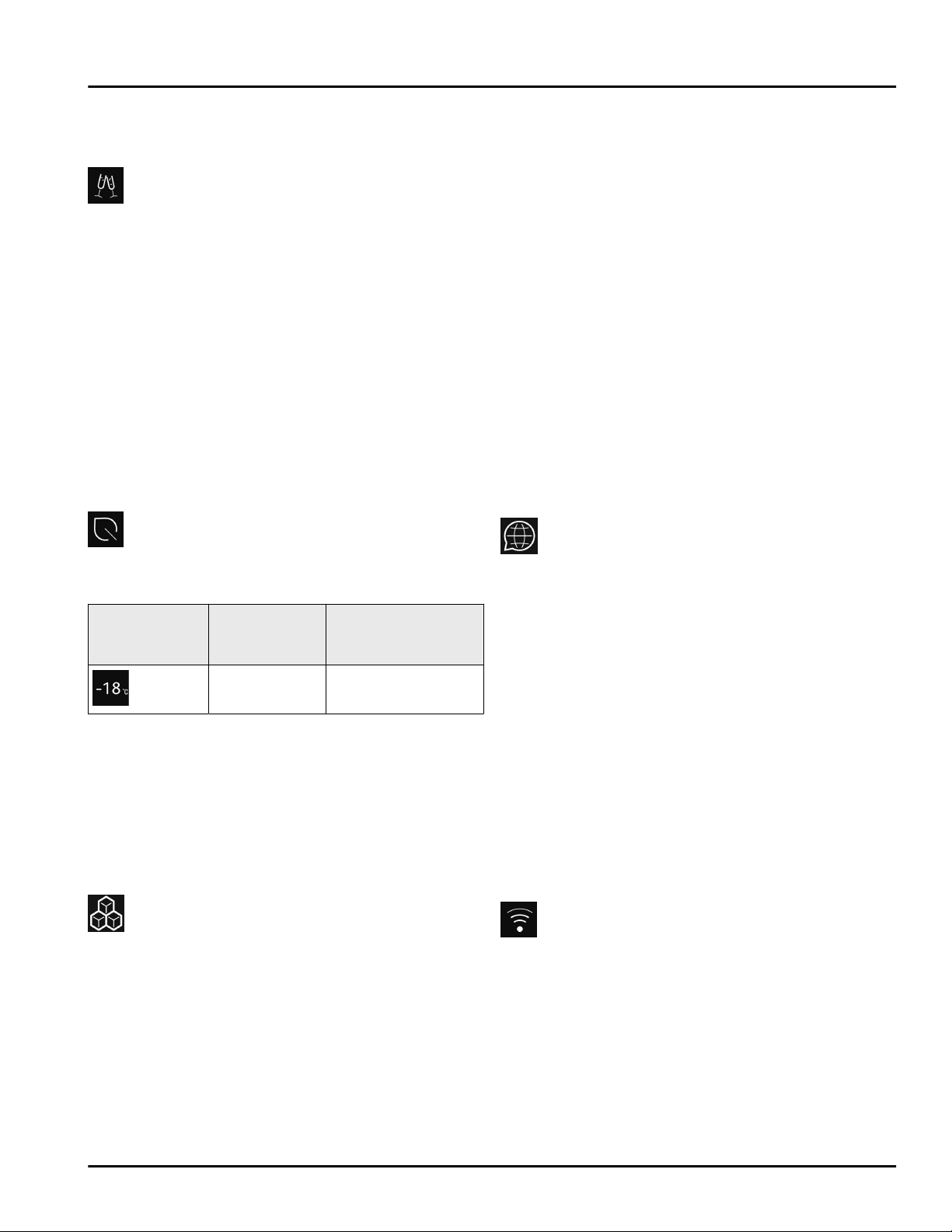
SuperFrost
Select this function for the maximum freezing setting,
to reach lower freezing temperatures.
Use:
-
To freeze more than 4.41 lbs (2 kg) fresh food a day.
-
Freezing fresh food quickly to the core.
-
Increasing the cold reserves in the stored goods
before defrosting the appliance.
Activating/deactivating settings
With a small volume of frozen goods:
u
Activate 6 hours before use.
With the maximum volume of frozen goods:
u
Activate 24 hours before use.
u
Activating/deactivating (see 6.2 Operating logic) .
-or-
u
Activate/deactivate using the SmartDevice app.
Use
* Depending on model and options 11
The function automatically turns off. The appliance
goes back to normal mode. The temperature adjusts
itself to the set level.
PartyMode
This option offers an assortment of special functions
and settings that are useful if you are having a party.
The following functions are activated:
-
SuperFrost
-
IceMaker and MaxIce
You can set any functions you like. Your changes are
lost when the option is switched off.
Activating/deactivating settings
u
Activating/deactivating (see 6.2 Operating logic) .
w
On: All functions are activated at the same time.
w
Deactivated: Previously set temperatures are
restored.
The function is automatically switched off after 24
hours.
EnergySaver
This function reduces energy consumption. If you acti‐
vate this function, the cooling temperature increases.
Temperature
zone
Recommended
setting
Temperature when
EnergySaver acti‐
vated
0 °F (-18 °C) 4 °F (-16 °C)
Use:
-
Save energy.
Activating/deactivating settings
u
Activating/deactivating (see 6.2 Operating logic) .
w
Activated: Higher temperatures are set in all temper‐
ature zones.
w
Deactivated: Previously set temperatures are
restored.
IceMaker / MaxIce
This function activates the production of ice cubes.
Use:
-
If this function is activated, you can decide between
the normal IceMaker function and MaxIce.
-
The MaxIce makes approx. 1.5 kg of ice cubes per 24
h within a short time.
The ice cube size can be set with the ice cube size
function. (see Ice cubes)
The lines can be cleaned with the TubeClean function.
(see TubeClean)
Activating the function
Make sure that the following requirements are fulfilled:
q
The water supply is established at the fixed water
connection. See Assembly Manual.*
q
IceMaker is put into operation. (see 7.3 IceMaker)
u
Activate the function. (see 6.2 Operating logic)
-or-
u
Activate via the Liebherr SmartDevice-App.
w
It can take up to 24 hours for the first ice cubes to
be made.
Deactivating the function
u
Deactivate the function. (see 6.2 Operating logic)
-or-
u
Deactivate the function via the Liebherr SmartDe‐
vice-App.
w
If ice cubes are currently being made, the system
completes the process. After that, the IceMaker
switches off.
6.4 Settings
Language
This setting lets you choose the language of the
display.
Choose from the following languages:
-
German
-
English
-
French
-
Spanish
-
Italian
-
Dutch
-
Czech
-
Polish
-
Portuguese
-
Russian
-
Chinese
Activating/deactivating settings
u
Activating/deactivating (see 6.2 Operating logic) .
Setting up the WLAN connection
This setting connects the appliance to the internet.
The connection is managed in the SmartDevice Box.
You can use the SmartDevice-App to add your appli‐
ance to a SmartHome-System. Use the SmartDevice-
App or other compatible partner networks to enjoy
advanced options and settings.
Use
12 * Depending on model and options
Note
The SmartDevice Box is available from the Liebherr
Residential Appliances Store (https://
home.liebherr.com/shop/de/deu/smartdevi‐
cebox.html).
More information about the availability, prerequisites
and individual options can be found on the Internet at
https://smartdevice.liebherr.com/install.
Use:
-
Manage the appliance with the SmartDevice-App or
a compatible partner network.
-
Enjoy advanced functions and settings.
-
Check the appliance status on the SmartDevice-App.
q
Install the SmartDevice app (see https://
apps.home.liebherr.com/).
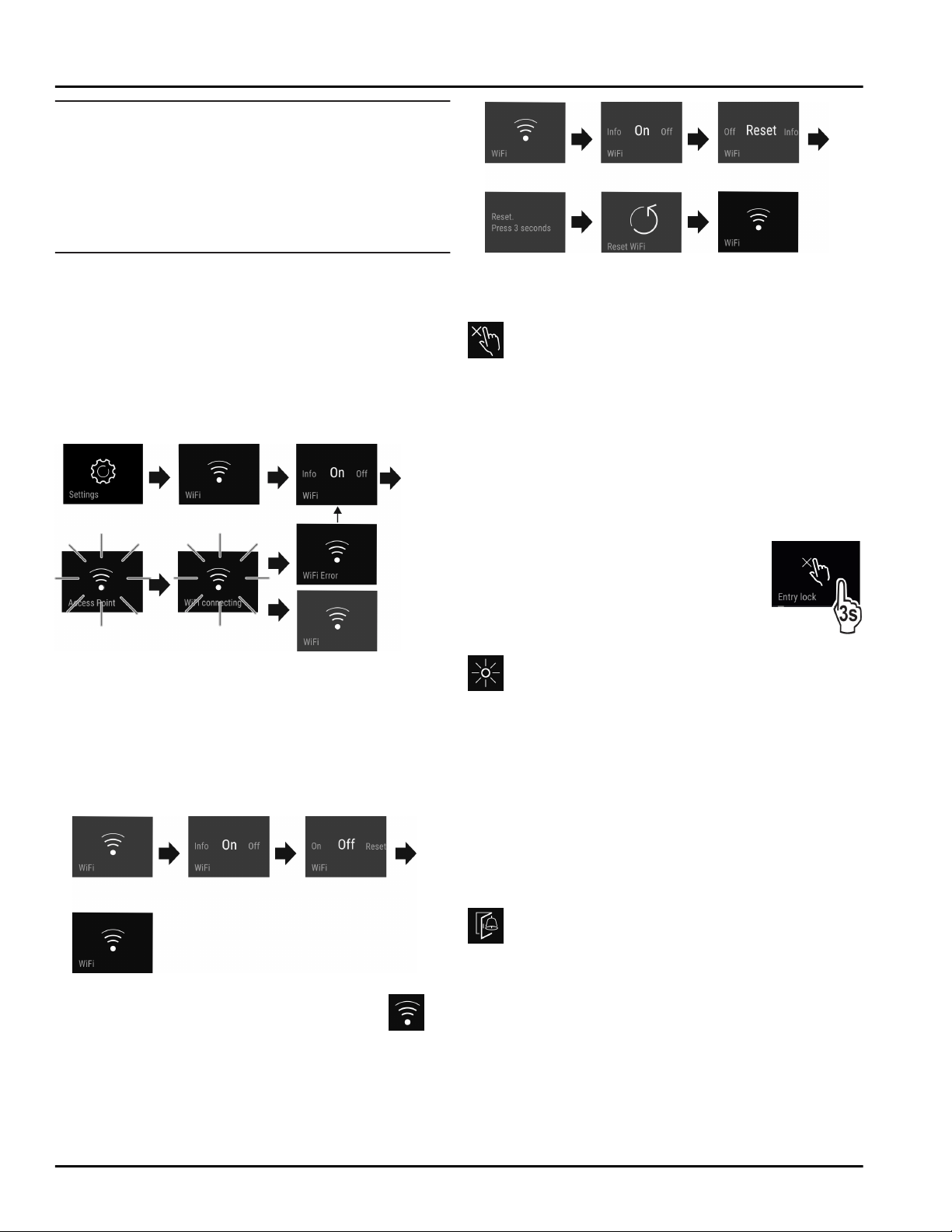
Setting up the WLAN connection
Fig. 8
u
Activate (see 6.2 Operating logic) .
w
The connection is set up: Connecting appears. The
symbol flashes.
w
The connection is set up: WiFi appears, the display
turns blue.
w
The connection failed: WiFi Error appears.
Disconnecting
u
Deactivate the setting (see 6.2 Operating logic) .
Fig. 9
w
There is no connection: The symbol is
displayed constantly.
Restoring the connection
u
Restore settings (see 6.2 Operating logic) .
Fig. 10
w
Connection and other settings are restored to
factory settings.
Entry lock
This setting avoids accidental operation of the appli‐
ance, e.g. by children.
Use:
-
Avoid unintentional changing of settings and func‐
tions.
-
Avoid unintentional switching off of the appliance.
-
Avoid unintentional temperature adjustments.
Activating/deactivating settings
u
Activating/deactivating (see 6.2 Oper‐
ating logic) .
Display brightness
With this setting, you can choose a brightness level for
the display.
You can set the following brightness levels:
-
40%
-
60%
-
80%
-
100%
Choosing the setting
u
Set the level (see 6.2 Operating logic) .
Door alarm
Set the time before the door alarm (see Close the
door) sounds.
Options are as follows:
-
1 min
-
2 min
-
3 min
-
Off
Choosing the setting
u
Set the level (see 6.5 Error messages) .
Use
* Depending on model and options 13
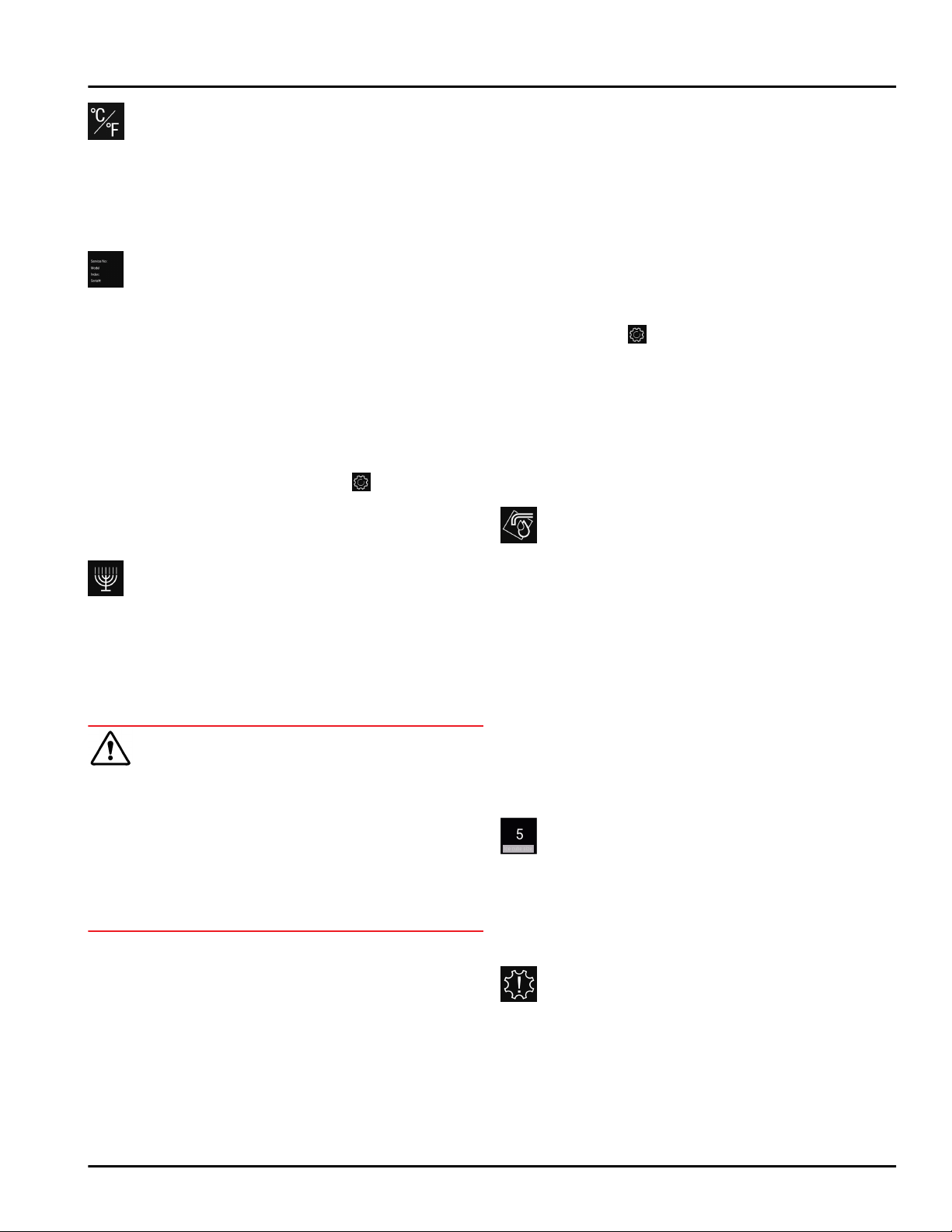
Temperature unit
This setting allows you to change between Celsius and
Fahrenheit as the temperature unit.
Selecting the setting value
u
Set the value (see 6.2 Operating logic) .
Info
This setting allows the appliance information to be
read out as well as access to the customer menu.
It provides the following information:
-
Model name
-
Index
-
Serial number
-
Service number
View appliance data
u
Swipe in the display until Settings
appears.
u
Confirm the display.
u
Swipe in the display until About appears.
u
Read the appliance data.
SabbathMode
This setting meets the religious requirements on the
Sabbath and Jewish festivals. Turn on SabbathMode to
switch off certain controls. This means you can use the
appliance without anyone changing any settings.
You can find a list of Star-K-certified appliances at
www.star-k.org/appliances.
WARNING
Danger of food poisoning!
If there is a power outage when SabbathMode is on,
this message is not saved. When the power is restored,
the appliance continues in SabbathMode. Afterwards,
the temperature display does not show a message
about the power outage.
If there was a power outage during SabbathMode:
u
Check the quality of the food. Do not consume
spoiled food!
What the appliance does in SabbathMode:
-
The Status display continuously shows
SabbathMode.
-
The display is locked for all functions apart from
deactivating SabbathMode.
-
Any functions/settings that are already on, remain
active.
-
The display stays bright when the door is closed.
-
Reminders are disabled. The set timer interval is also
stopped. The function is no longer executed in
SabbathMode.
-
Reminders and warnings are not displayed. No
acoustic signals are emitted and the display does
not show warnings / settings such as temperature
alarm or door alarm.
-
IceMaker is out of use.
-
The internal light is off.
-
The defrost cycle only works for the specified time
without taking account of fridge use.
-
After a power cut the appliance automatically
returns to SabbathMode.
Activating/deactivating SabbathMode
u
To activate this function, swipe the display until you
reach Settings and press for 1 second. The menu
shows the available settings.
u
Swipe the display until the symbol for SabbathMode
(Menora) appears. Press the symbol for 3 seconds.
w
The display changes color.
w
SabbathMode has been activated.
To deactivate the function, press the display for 3
seconds.
SabbathMode has been deactivated.
TubeClean
This setting cleans the IceMaker pipes.
Make sure that the following requirements are met:
q
IceMaker cleaning process is ready
(see 8.2.4 Cleaning the IceMaker) .
Activate setting
u
Activate the setting in the customer menu
(see 6.2 Operating logic) .
w
TubeClean is prepared (max. 60 min.): The symbol
flashes.
w
Water pipes are rinsed: Symbol flashes.
w
Rinsing process is complete: Function turns off auto‐
matically.
Ice cubes
With this setting, you can choose the ice cube size.
Choosing the setting
u
Make your settings in the Customer menu
(see 6.2 Operating logic) .
Reminder
Reminders are displayed acoustically by a beep and
visually by a symbol in the display. The signal gets
louder until the alert stops.
Activate setting
u
Activating/deactivating (see 6.2 Operating logic) .
Use
14 * Depending on model and options
Reset
This function resets all settings to the factory settings.
All settings that you have made thus far will be reset to
their original values.
Activate the setting
u
Activating (see 6.2 Operating logic) .
Turn off appliance
This setting turns off the whole appliance.
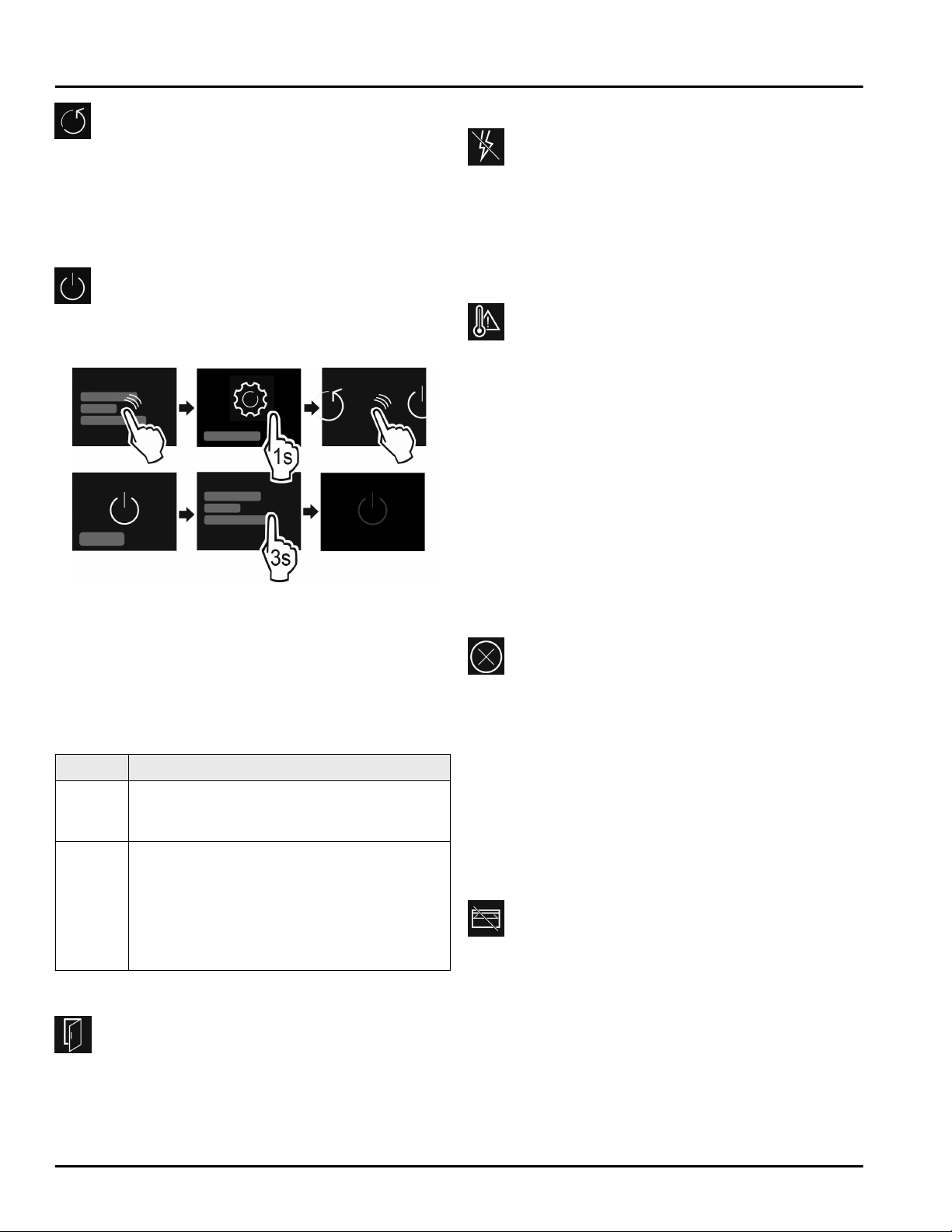
Switch off whole appliance
Fig. 11
u
Turning off the IceMaker .
u
Activating/deactivating (see 6.2 Operating logic) .
w
Off: Display turns black.
6.5 Error messages
Error messages appear in the display. There are two
categories of error message:
Category
Meaning
Message Reminder of general procedures. You can
carry out these procedures to eliminate the
message.
Warning Appears when there are malfunctions. A
signal sounds in addition to the display. The
signal becomes louder until you acknowl‐
edge by tapping the display. You can elimi‐
nate simple defects yourself. For more
serious defects, you must contact
customer service.
6.5.1 Warnings
Close the door
This message appears if the door is open too long.
You can set the time before this message appears .
u
Stop alarm: Confirm the message.
-or-
u
Close the door.
Power failure.
This message appears if the freezer temperature rises
after a power outage. When the power outage is over,
the appliance will continue to operate at the last
temperature setting.
u
Stop alarm: Confirm the message.
w
Temperature alarm appears (see Temperature
alarm) .
Temperature alarm
This message appears if the temperature does not
match the set temperature.
Temperature differences may be caused by:
-
Hot fresh food was placed in the appliance.
-
When sorting and removing food from the appliance,
too much warm ambient air got in.
-
There has been a prolonged power outage.
-
The appliance is faulty.
When the cause is eliminated, the appliance will
continue to operate at the last temperature setting.
u
Confirm the display.
w
Warmest temperature is displayed.
u
Confirm the display again.
w
The status display is displayed.
w
Current temperature is displayed.
Error
This message appears when there is a fault with the
appliance. An appliance component has an error.
u
Open the door.
u
Take note of the error code.
u
Confirm the message.
w
The signal tone stops.
w
The status display appears.
u
Close the door.
u
Contact customer service. (see 9.4 Customer
service)
6.5.2 Message
Insert IceMaker drawer
This message appears if the IceMaker drawer is open.
u
Push in the IceMaker drawer.
w
The message disappears.
w
The IceMaker produces ice cubes.
6.5.3 DemoMode
If “D” appears in the display, demo mode is on. This
feature is designed for retailers. The cooling features
are disabled.
Switching off DemoMode
When you see a time counting down:
Use
* Depending on model and options 15
u
Confirm within the countdown.
w
DemoMode is off.
If there is no countdown:
u
Disconnect the power plug.
u
Reconnect the power plug.
w
DemoMode is off.
7 Equipment
7.1 Drawers
You can remove the drawers for cleaning.
The shelves below can be used for storage until the
drawers are replaced.
How the drawers are removed and inserted differs
depending on the pull-out system. Your appliance can
include a variety of pull-out systems.
Note
Insufficient ventilation results in an increase in energy
consumption and reduction of the refrigerating
performance.
u
Leave the bottom drawer in appliance!
u
Never obstruct the vents on the interior rear wall!
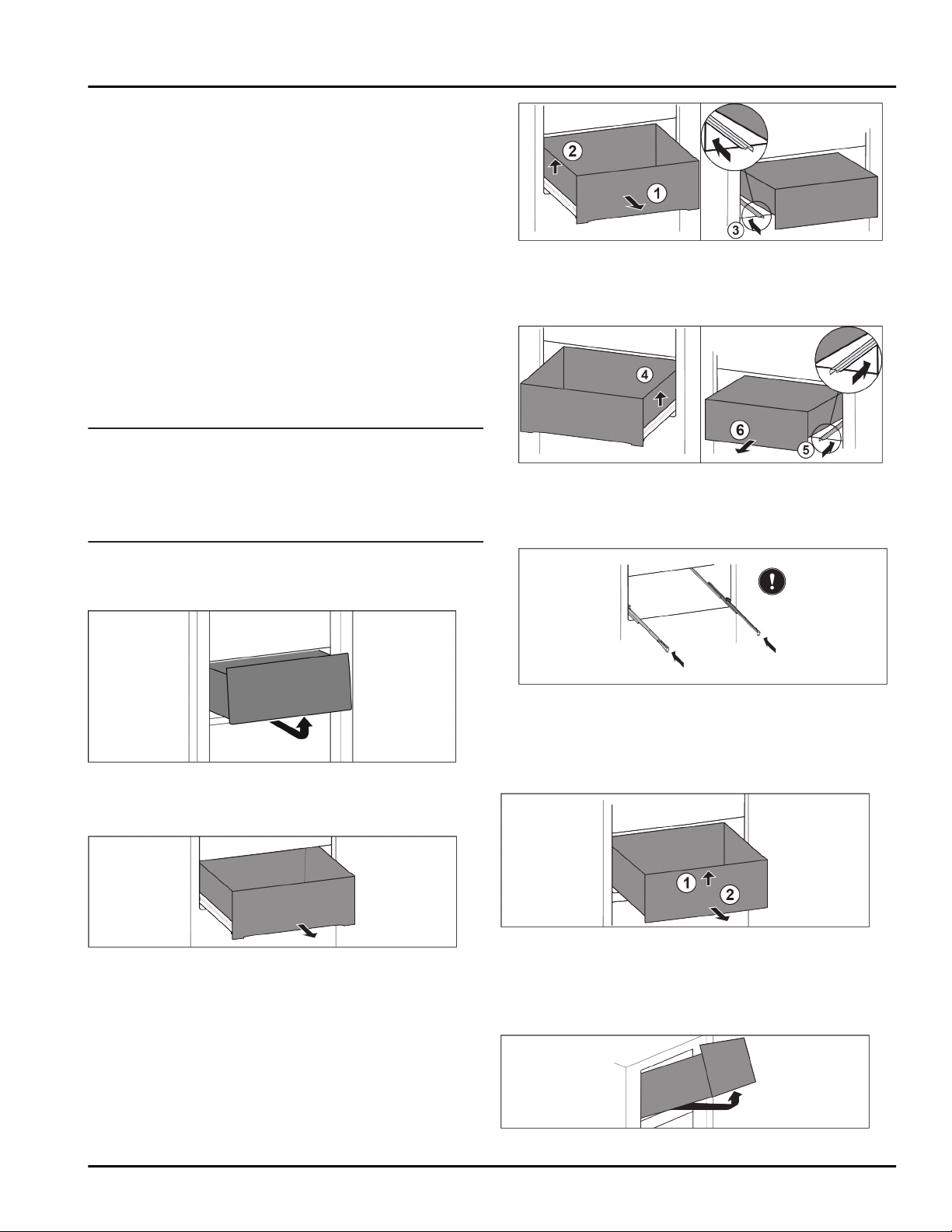
7.1.1 Remove the drawer
Drawer without pull-out system
Fig. 12
u
Remove the drawer as shown in the diagram.
Drawer on telescopic rails
Fig. 13
Make sure that the following requirements are fulfilled:
q
Drawer is completely pulled out (see Fig. 47) .
Drawer on glass shelf
Fig. 14
u
Pull drawer out completely Fig. 14 (1).
u
Lift drawer on the left Fig. 14 (2).
u
Slide in left rail Fig. 14 (3).
Fig. 15
u
Lift drawer on the right Fig. 15 (4).
u
Slide in right rail Fig. 15 (5).
u
Remove the drawer to the front Fig. 15 (6).
Fig. 16
If the rails are not yet fully pushed in after removing
the drawer:
u
Push the rails in completely.
Drawer on molded ribs
Fig. 17
u
Pull drawer out completely.
u
Lift at the front Fig. 17 (1).
u
Remove to the front Fig. 17 (2).
Tilting top drawer
Fig. 18
Equipment
16 * Depending on model and options
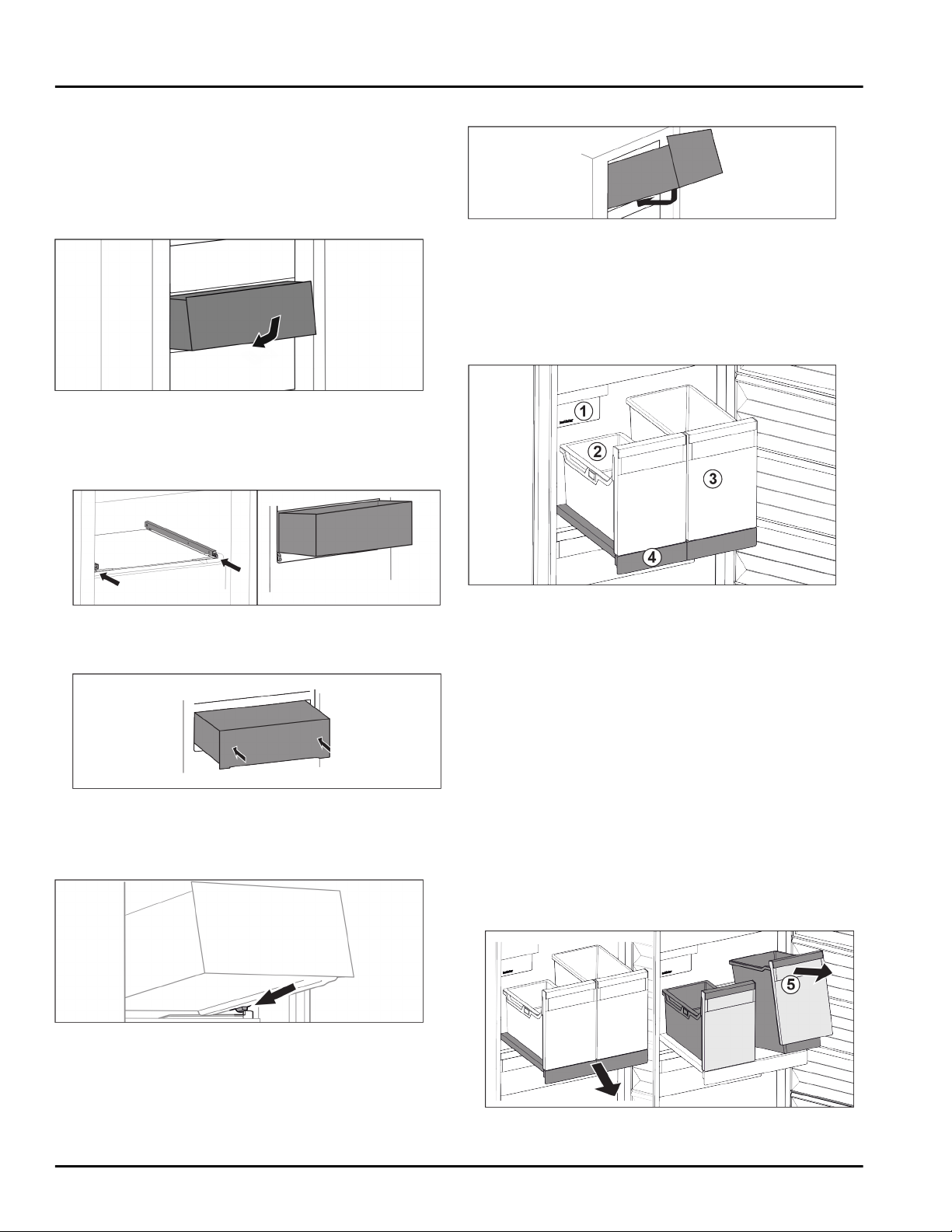
u
Pull out the drawer.
u
Lift up at the front and push up at the back from
below.
u
Take off to the front.
7.1.2 Inserting the drawer
Drawer without pull-out system
Fig. 19
u
Insert the drawer as shown in the diagram.
Drawer on telescopic rails
Drawer on glass shelf
Fig. 20
u
Slide the rails in.
u
Place the drawer on the rails at an angle.
Fig. 21
u
Lower.
u
Push all the way back.
Drawer on molded ribs
Fig. 22
u
Place drawer on the molded ribs behind the stoppers
with the drawer tiled up at the front Fig. 22 ().
u
Lower drawer.
u
Slide to the rear.
Tilting top drawer
Fig. 23
u
Place on the drawer as shown in the diagram.
w
The drawer rests on the glass panel.
u
Lift up slightly at the back and slide over the lip.
u
Slide to the rear.
7.2 Pull-out board with IceTower
Fig. 24 Pull-out board with IceTower
(1)
IceMaker (3) Container for pizza or
alcoholic beverages,
for example
(2) Hang-on tray for ice
cubes
(4) Pull-out board
On the pull-out board are two tall containers
(IceTower). Ice cubes from the IceMaker are collected
and stored in the container Fig. 24 (2). The container
Fig. 24 (3) is suitable for storing tall foodstuffs or bever‐
ages such as pizzas or alcoholic drinks.
The pull-out board with IceTower is mounted on a glass
shelf with pull-out rails. You can dismantle the pull-out
board for cleaning.
7.2.1 Dismantling the pull-out board with
IceTower
Removing the container
Fig. 25
u
Remove the pull-out board.
Equipment
* Depending on model and options 17
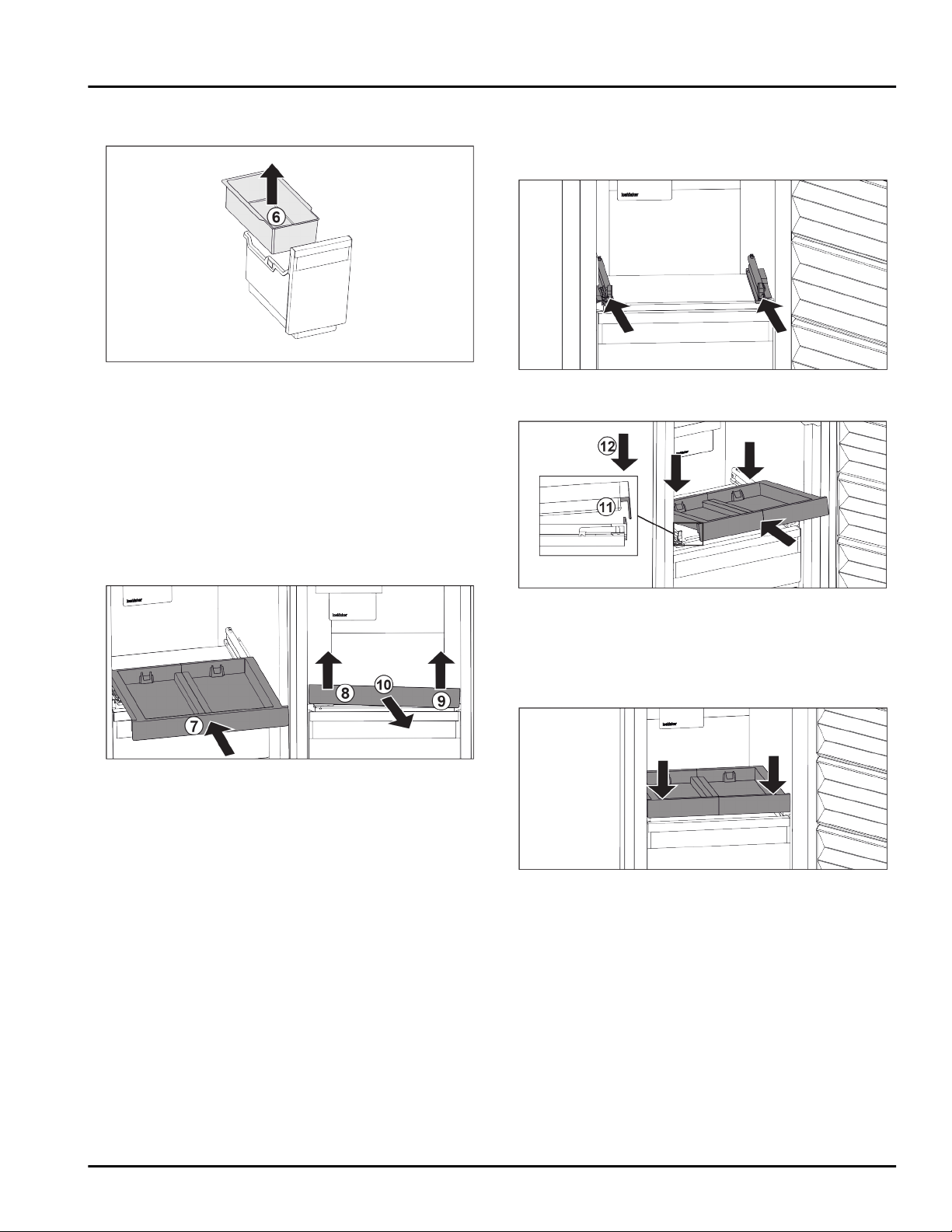
u
Lift the container Fig. 25 (5) at the front.
u
Remove the container.
Fig. 26
u
Remove the hang-on tray Fig. 26 (6).
u
If there are ice cubes in the hang-on tray: Empty the
hang-on tray.
w
The container and hang-on tray have been removed
and you can clean them. (see 8.2.3 Cleaning the
equipment)
Removing the pull-out board
Make sure that the following requirements are fulfilled:
q
Containers have been removed.
(see 7.2.1.1 Removing the container)
Fig. 27
u
Slide in the pull-out board. Fig. 27 (7)
u
Lift the pull-out board at the front left. Fig. 27 (8)
u
Lift the pull-out board at the front right. Fig. 27 (9)
w
The pull-out board is detached from the attachment
at the front.
u
Take out the pull-out board to the front. Fig. 27 (10)
w
The pull-out board has been removed and you can
clean it. (see 8.2.3 Cleaning the equipment)
7.2.2 Inserting the pull-out board with
IceTower
Inserting the pull-out board
Fig. 28
u
Slide the rails in.
Fig. 29
u
Place the pull-out board in at an angle behind the
front lug.
u
Slide it in at an angle. Make sure that the stop is
behind the lug on both sides. Fig. 29 (11)
u
Lower the pull-out board at the front. Fig. 29 (12)
Fig. 30
u
Push the pull-out board down at the front.
w
The pull-out board clicks into place.
Inserting the container
Make sure that the following requirements are fulfilled:
q
The pull-out board is inserted. (see 7.2.2.1 Inserting
the pull-out board)
Equipment
18 * Depending on model and options
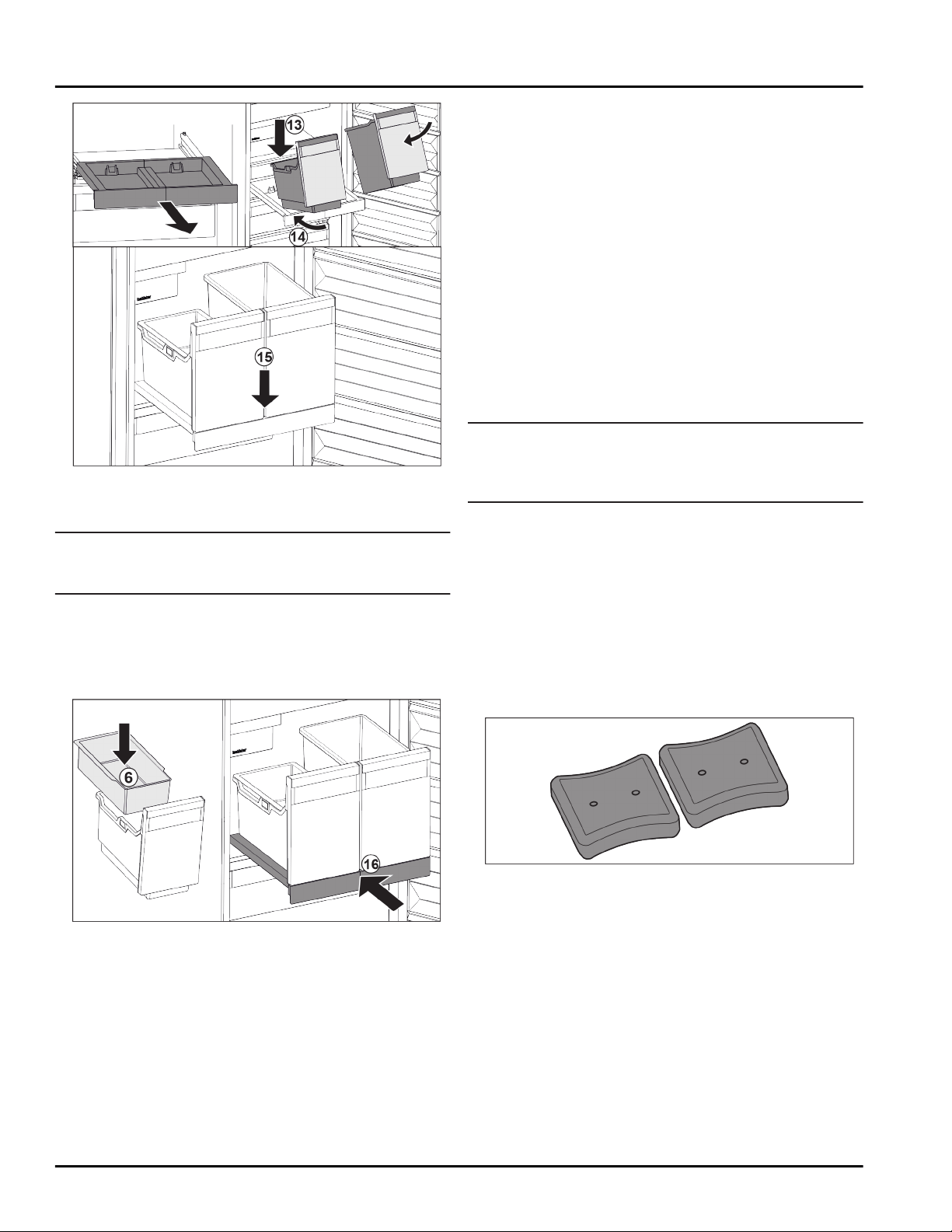
Fig. 31
u
Remove the pull-out board.
u
Hold the pull-out board with one hand.
Note
The containers are shaped in a way that they cannot be
interchanged.
u
Place the container at an angle on the pull-out
board. Fig. 31 (13)
u
Slide in the container at an angle to the back.
Fig. 31 (14)
u
Place container at the front. Fig. 31 (15)
Fig. 32
u
Insert hang-on tray Fig. 32 (6) for ice cubes.
u
Slide in the pull-out board with container (IceTower).
Fig. 32 (16)
w
Pull-out board with IceTower is fully inserted.
7.3 IceMaker
The IceMaker is used exclusively for the production of
ice cubes in household quantities.
Make sure that the following conditions are fulfilled
-
IceMaker is cleaned (see 8 Maintenance) .
-
IceMaker drawer is fully inserted.
7.3.1 Producing ice cubes
The production capacity depends on the freezer
temperature The lower the temperature, the more ice
cubes can be produced in a certain period
Once IceMaker is switched on for the first time, it can
take up to 24 hours to produce the first ice cubes.
u
Activate the IceMaker (see 6.2 Operating logic) .
u
To make a large quantity of ice cubes: Activate the
MaxIce (see 6.2 Operating logic) .
u
Distribute ice cubes evenly in the drawer to increase
its capacity.
u
Close the drawer: The IceMaker starts making ice
again.
Note
When a certain level is reached in the IceMaker drawer,
it stops making ice cubes. The IceMaker does not fill
the drawer to the very top.
7.4 Accessories
7.4.1 Freezer packs
The freezer packs prevent the temperature from rising
too fast in the event of a power failure.
The freezer packs are in the drawer.*
You can store the cold storage accumulators in the
freezer tray.*
Using the freezer packs
Fig. 33 *
When the freezer packs are fully frozen:*
u
Place on the frozen goods in the top, front part of
the freezer.*
8 Maintenance
8.1 Defrosting the appliance
8.1.1 Defrosting with NoFrost
Defrosting is performed automatically by the NoFrost
system. The moisture condenses on the evaporator and
is periodically defrosted and evaporated.
The appliance does not have to be defrosted.
Maintenance
* Depending on model and options 19
8.2 Cleaning the appliance
8.2.1 Preparation
WARNING
Danger of electric shock.
u
Unplug refrigerator or disconnect power.
WARNING
Danger of fire
u
Do not damage the refrigerant circuit.
u
Empty appliance.
u
Pull out the power plug.
8.2.2 Cleaning the interior
NOTICE
Improper cleaning!
Damage to the appliance.
u
Only use soft cleaning cloths and ph-neutral all-
purpose cleaners.
u
Do not use steel wool or sponges that scour or
scratch.
u
Do not use caustic or abrasive cleaning materials or
those containing sand, chloride, or acids.
u
Plastic surfaces: clean by hand with a soft clean
cloth, lukewarm water and a little detergent.
u
Metal surfaces: clean by hand with a soft clean
cloth, lukewarm water and a little detergent.
u
Drain outlet (): Remove any deposits with a thin item
such as a cotton bud.
8.2.3 Cleaning the equipment
NOTICE
Improper cleaning!
Damage to the appliance.
u
Only use soft cleaning cloths and ph-neutral all-
purpose cleaners.
u
Do not use steel wool or sponges that scour or
scratch.
u
Do not use caustic or abrasive cleaning materials or
those containing sand, chloride, or acids.
Clean with a soft, clean cloth, lukewarm water and a
little washing up liquid:
- IceTower pull-out board
- Drawer
Please note: Do not remove the magnet on the
drawer. The magnet ensures that the IceMaker func‐
tions.
- Freezer tray
Clean with a damp cloth:
- Retracting rails
Please note: the grease in the tracks is there for
lubrication purposes and must not be removed!
Clean in the dishwasher up to 140 °F (60 °C):
- Ice cube scoop
u
Disassemble the equipment: see the relevant
section.
u
Clean the equipment.
8.2.4 Cleaning the IceMaker
There are various options for cleaning the IceMaker.
We recommend cleaning in the following situations:
q
Initial commissioning
q
If out of use for longer than 5 days.*
Make sure that the following requirements are met:
q
IceMaker drawer is emptied.
q
IceMaker drawer is fully inserted.
q
The IceMaker has been activated. (see 6.2 Operating
logic)
On first use or if not used for prolonged periods
Clean the IceMaker with TubeClean.
u
Place a 50.72 fl oz (1.5 l) empty container (max.
height 3-15/16 '' (10 cm)) in the drawer under the
IceMaker.
u
Activate the TubeClean function. (see 6.2 Operating
logic)
w
The rinse process is prepared (max. 60 min.): The
symbol flashes.
w
Water pipes are rinsed: Symbol flashes.
w
Rinsing process is complete: Function turns off auto‐
matically.
u
Take out the IceMaker drawer and remove the
container.
u
Clean the IceMaker drawer with warm water and a
little detergent.
u
Push in the IceMaker drawer.
w
Ice cube production starts automatically.
u
Dispose of any ice cubes that are produced within 24
hours of the first ice cube production.
When cleaning is required
Clean the IceMaker manually.
u
Remove the IceMaker drawer and clean with warm
water and a little detergent.
u
Push in the IceMaker drawer.
w
Ice cube production starts automatically.
8.2.5 After cleaning
u
Wipe dry the appliance and items of equipment
u
Connect and switch on the appliance.
u
Activate SuperFrost (see 6.3 Functions) .
When the temperature is sufficiently cold
u
Place the food inside.
u
Repeat cleaning regularly.
Maintenance
20 * Depending on model and options
9 Customer support
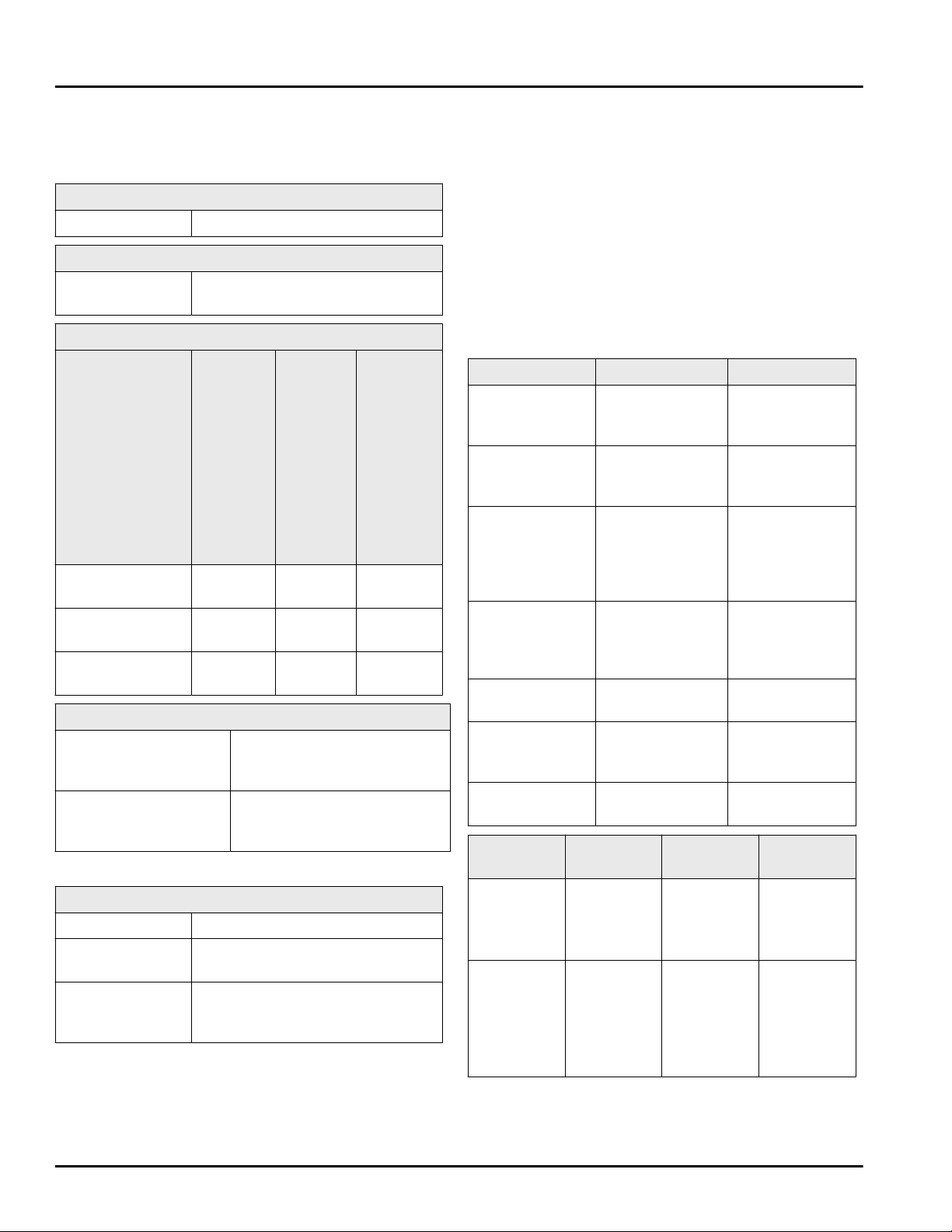
9.1 Technical specifications
Temperature zone
Freezing -18 °F (-28 °C) to 5 °F (-15 °C)
Maximum freezing capacity / 24 hrs
Freezer See nameplate, “Freezing
capacity … /24h”
Max. equipment capacity
Equipment Appliance
width
21-5/8 ''
(550 mm)
(see
installa‐
tion
instruc‐
tions,
appliance
dimen‐
sions)
Appliance
width
23-5/8 ''
(600 mm)
(see
installa‐
tion
instruc‐
tions,
appliance
dimen‐
sions)
Appliance
width
27-9/16 ''
(700 mm)
(see
installa‐
tion
instruc‐
tions,
appliance
dimen‐
sions)
Drawer on glass
shelf
26.46 lbs
(12 kg)
33.07 lbs
(15 kg)
--
Drawer on
molded rib
30.86 lbs
(14 kg)
41.89 lbs
(19 kg)
55.12 lbs
(25 kg)
Drawer on glass
shelf
26.46 lbs
(12 kg)
33.07 lbs
(15 kg)
48.5 lbs
(22 kg)
Ice cube production with IceMaker+
Ice cube production /
24 h
At a temperature of 0 °F
(-18 °C): 2.65 lbs (1.2 kg) of
ice cubes
Maximum ice cube
production / 24 h
When the MaxIce function is
active: 3.31 lbs (1.5 kg) of ice
cubes
For appliances with a WiFi connection:
Frequency specification
Frequency band 2.4 GHz
Maximum radi‐
ated power
<100 mW
Purpose of the
wireless equip‐
ment
Integration in the local WiFi
network for data communication
9.2 Operating noises
The appliance makes noises while in operation.
-
At less cooling output the appliance saves energy
but takes longer to cool items. The volume is lower.
-
At a higher cooling output the food cools more
quickly. The volume is higher.
Examples:
•
Activated functions (see 6.3 Functions)
•
Running fan
•
Freshly sorted food
•
High ambient temperature
•
Door opened for long periods
Noise
Possible cause Type of noise
Bubbling and
splashing
Coolant is
flowing into the
cooling circuit.
Normal noise
Spitting and
hissing
Coolant is
spraying into the
cooling circuit.
Normal noise
Humming The appliance
cools. The
volume depends
on the cooling
output.
Normal noise
Sipping noises The self-closing
door is being
opened and
closed.
Normal noise
Whirring and
murmuring
The fan is
running.
Normal oper‐
ating noise
Clicking Components are
being switched
on and off.
Normal
switching noise
Rattling or
humming
Valves are
active.
Normal
switching noise
Noise Possible
cause
Type of
noise
How to
resolve
Vibration Unsuitable
installation
Error noise Check
installation.
Set up the
appliance.
Clattering Equipment,
Objects
inside the
appliance
Error noise Secure
equipment
parts.
Leave a gap
between
items.
Customer support
* Depending on model and options 21
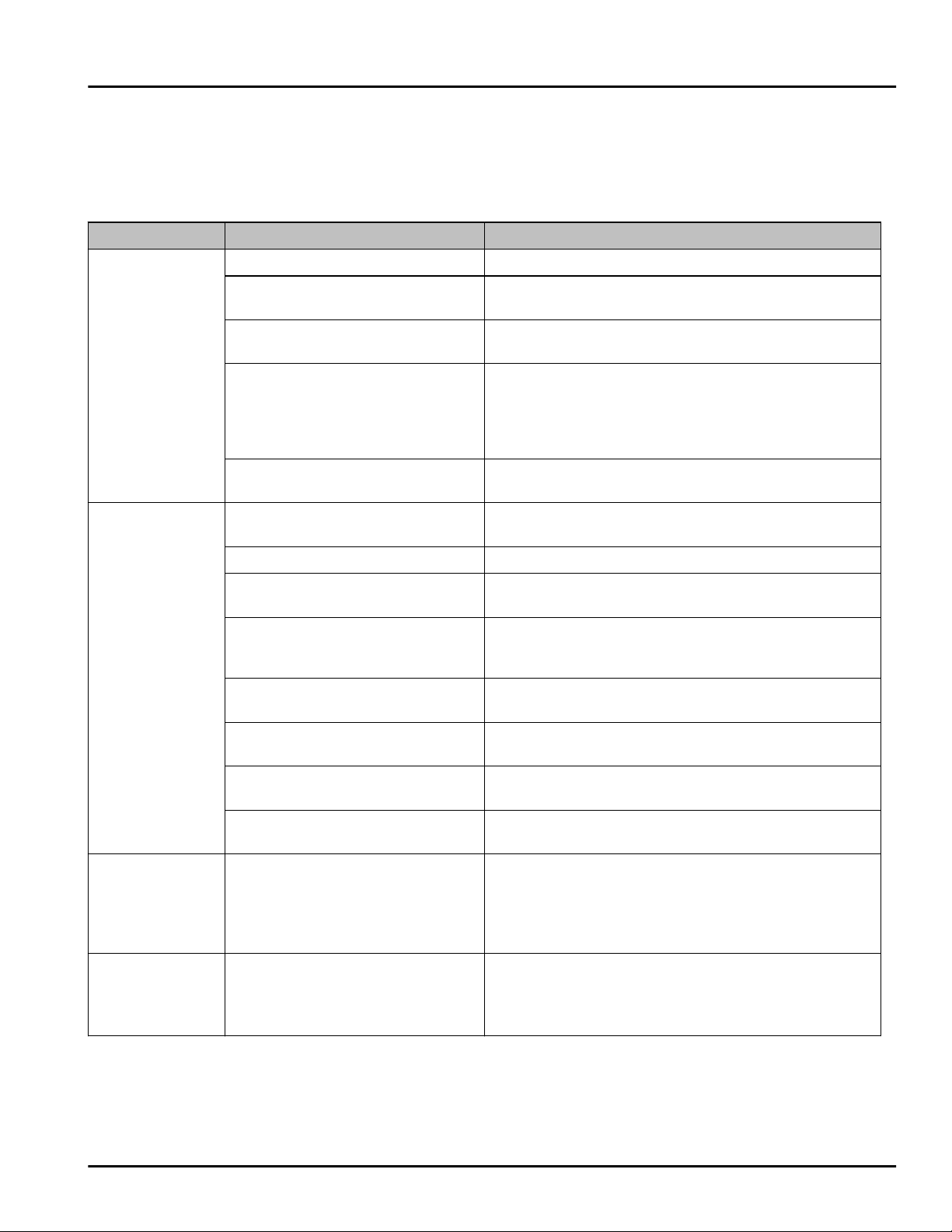
9.3 Technical faults
Your appliance is designed and manufactured for reli‐
able operation and a long service life. If a malfunction
nonetheless occurs during operation, please check
whether the malfunction is due to an operating error. In
this case, you will have to be charged for the costs
incurred, even during the warranty period.
You may be able to rectify the following faults yourself.
9.3.1 Appliance function
Defect Cause Remedy
The appliance
does not work.
The appliance is not switched on.
u
Switch on the appliance.
The power plug is not properly
inserted in the wall socket.
u
Check the power plug.
The powerfuse in the wall socket
is not OK.
u
Check the fuse.
Power failure.
u
Keep the appliance closed.
u
Protect your food: Lay freezer packs on top of the
food or use another freezer if the power is off for a
prolonged period.
u
Do not re-freeze defrosted food.
The appliance connector is not
correctly inserted in the appliance.
u
Check the appliance connector.
The temperature
is not cold
enough
This means that the door of the
appliance is not closed properly
u
Close the appliance door
Insufficient ventilation
u
Clear and clean the ventilation grille.
The ambient temperature is too
high
u
Solution: (see 1.4 Range of appliance use) .
The appliance was opened too
frequently or for too long
u
Wait to see whether the required temperature
resets itself by itself. If not, contact Customer
Service (see 9.4 Customer service) .
Too much fresh food was placed
inside without SuperFrost.
u
Solution: (see SuperFrost)
The temperature is incorrectly set
u
Set to a colder temperature and check after 24
hours.
The appliance is too near to a heat
source (stove, heater etc).
u
Change location of appliance or the heat source.
The appliance was not properly
installed in the recess.
u
Make sure the appliance was installed correctly
and the door closes properly.
The door seal is
defective or
should be
replaced for
other reasons.
The door seal is interchangeable.
You can replace it without the use
of any special tools.
u
Contact Customer Service (see 9.4 Customer
service) .
The appliance is
iced up or
condensation is
building.
The door seal may have slipped
out of its groove.
u
Check the door seal is well placed in the groove.
Customer support
22 * Depending on model and options
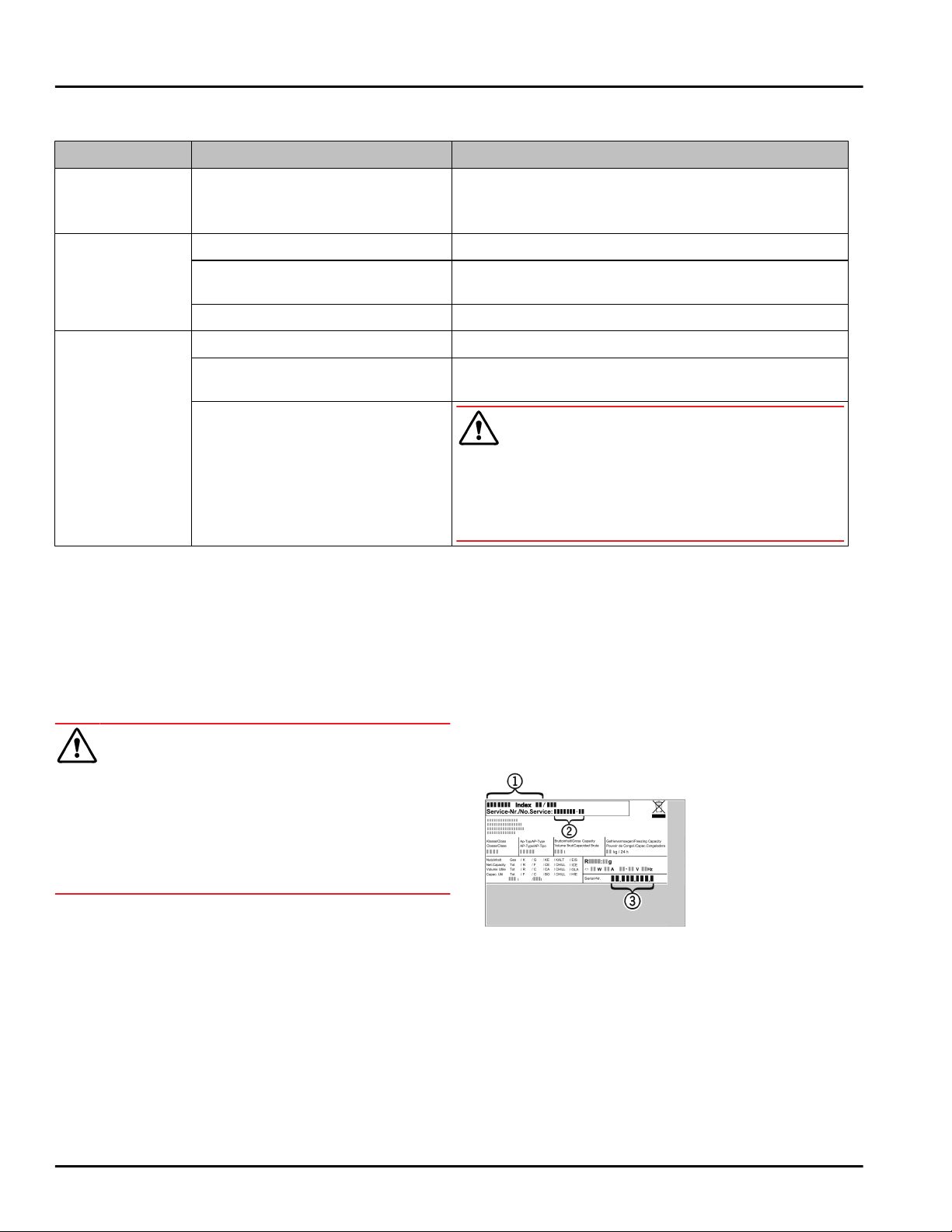
9.3.2 Equipment
Defect Cause Remedy
The IceMaker
cannot be
switched on.*
The appliance and therefore the
IceMaker are not connected.
u
Connect the appliance (see Installation Guide).
The IceMaker is
not making any
ice cubes.
The IceMaker is not switched on.
u
Activate the IceMaker.
The drawer of the IceMaker is not
properly closed
u
Close the drawer properly
The water connection is not open*
u
Open the water connection*
The interior light
does not turn on.
The appliance is not switched on.
u
Switch on the appliance.
The door was open for longer than
15 min.
u
The interior light automatically switches itself off
if the door stays open for approx. 15 min.
The LED interior light is faulty or
the cover is damaged:
WARNING
Risk of injury from electrical shock.
Live parts are under the cover.
u
The LED interior light should only be replaced or
repaired by the Customer Service department or by
engineers trained to do so.
9.4 Customer service
First check if you can fix the error yourself
(see 9 Customer support) . If this is not the case,
please contact customer service.
Please refer to the enclosed “Liebherr Service”
brochure for the address.
WARNING
Unprofessional repair!
Injuries.
u
A damaged power cable may only be replaced by the
manufacturer, the manufacturer’s Customer Service
or a similarly qualified person.
u
For appliances with plug and play connection cables,
the change can be made by the customer.
9.4.1 Contact Customer Service
Make sure to have the following appliance information
to hand:
q
Appliance name (model and index)
q
Service no. (service)
q
Serial no. (S no.)
u
Showing appliance info on the display (see Info) .
-or-
u
Referring to appliance info on the nameplate
(see 9.5 Rating plate) .
u
Take note of the appliance information.
u
Inform Customer Service: Tell us the problem and
the appliance details.
w
This will help us give you fast and accurate support.
u
Further instructions from customer service will
follow.
9.5 Rating plate
The nameplate is located behind the drawers on the
inside of the appliance.
Fig. 34
(1)
Appliance name (3) Serial no.
(2) Service no.
u
Information from the nameplate.
10 Decommissioning
u
Empty appliance.
u
Switch off the IceMaker .
u
Switch off the appliance (see 6.4 Settings) .
u
Pull out the power plug.
Decommissioning
* Depending on model and options 23
u
Remove the appliance connector if necessary: Pull it
out and, at the same time, move it from the left to
the right.
u
Clean the appliance (see 8.2 Cleaning the appli‐
ance) .
u
Leave the door open to prevent bad smells
11 Disposal
11.1 Preparing the appliance for
disposal
WARNING
Risk of child entrapment!
Before you throw away your old refrigerator or freezer:
u
Take off the doors.
u
Leave the shelves in place so that children may not
easily climb inside.
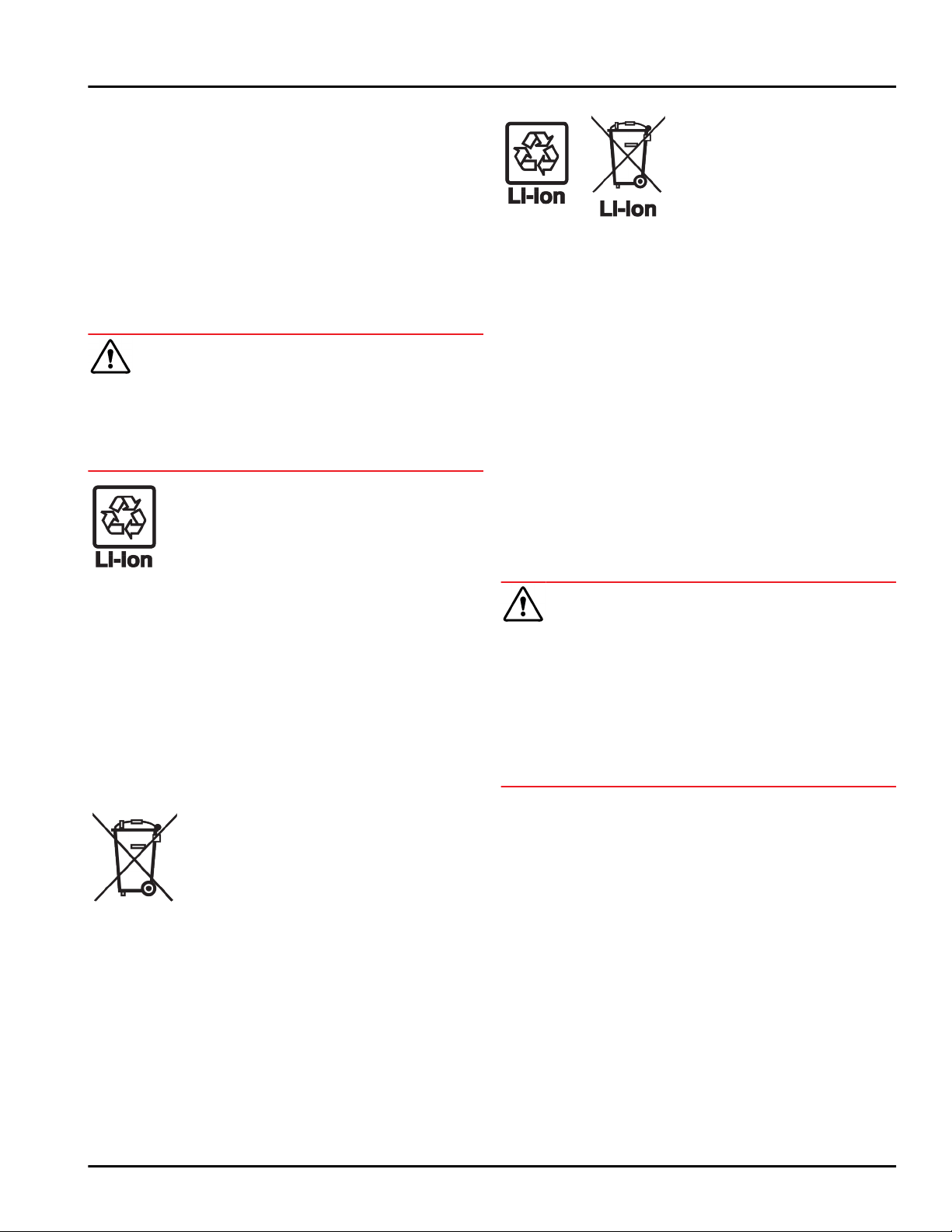
Liebherr uses batteries in some of its appli‐
ances. You should remove these before
disposal of the old appliance for environ‐
mental reasons. If your appliance contains
batteries, a corresponding notice is
attached to the appliance.
Lamps If you can remove the lamps yourself
without destroying them, also remove these
before disposal.
u
Take the appliance out of operation.
u
Appliance with batteries: Remove the batteries. For
description, see Maintenance chapter.
u
If possible: Remove lamps without destroying them.
11.2 Disposing of the appliance in an
environmentally friendly manner
The appliance still contains
valuable materials and must
be collected separately from
unsorted municipal waste so
it can be recycled.
Dispose of batteries sepa‐
rately from the old appliance.
Certain batteries should NOT
go in household garbage or
recycling bins. Waste
batteries can always be recy‐
cled or taken to household
hazardous waste collection
points. To prevent fires from
lithium-ion batteries, tape
battery terminals and/or
place batteries in separate
plastic bags and never put
these batteries in household
garbage or recycling bins.
Lamps
Dispose of removed lamps via
the respective collection
systems.
For USA: Check the Responsible Appli‐
ance Disposal (RAD) program
to find a RAD partner near
you.
For Canada: Follow your local guidance
about recycling and disposal
capabilities near you.
WARNING
Leaking refrigerant and oil!
Fire. The refrigerant contained within the appliance is
environmentally friendly, but flammable. The oil
contained within the appliance is flammable. Escaping
refrigerant and oil can ignite if they are of high enough
concentration and are exposed to an external heat
source.
u
Do not damage the pipelines of the coolant circuit
and the compressor.
u
Transport the appliance away without damaging it.
u
Dispose of batteries, lamps, and the appliance
according to the above specifications.
Disposal
24 * Depending on model and options

Disposal
* Depending on model and options 25
home.liebherr.com/fridge-manuals
Built-in combined fridge-freezer
Issue date: 20220725
Part number index: 7088275-00
For Service in the U.S.: Liebherr Service Center
Toll Free: 1-866-LIEBHER or 1-866-543-2437
Service-appliances.us@liebherr.com
PlusOne Solutions, Inc.
3501 Quadrangle Blvd, Suite 120
Orlando, FL 32817
For Service in Canada: Liebherr Service Center
Toll Free: 1-888-LIEBHER or 1-888-543-2437
www.euro-parts.ca
EURO-PARTS CANADA
39822 Belgrave Road, Belgrave, Ontario, N0G 1E0
Phone: (519) 357-3320 | Fax: (519) 357-1326